#(killer01_2) Please help me
39 messages · Page 1 of 1 (latest)
 supple girderBOT
Hi I'm AutoThreadBot! Don't mind me, I'll just be adding the helper team to this thread so they can see it. A human will get to you soon.
 flint inlet
/npc rename and /npc hologram
 bold salmonBOT
Thread Closing Reminder
Has your issue been resolved, or your question been answered?
If so, please use the </resolved:1028673926114594866> command to close your thread.
Or </invalid:1028673926898909185> if it's not possible to resolve.
If not yet resolved, please reply below to tell us what you still need.
(Note that if there is no reply for a few days, this thread will eventually close itself.)
@restive helm
 frigid wasp
The server will always get a lot of load if there is a large number of NPCs
flint inlet
best way is to try it out and see.
bold salmonBOT
Thread Closing Reminder
Has your issue been resolved, or your question been answered?
If so, please use the </resolved:1028673926114594866> command to close your thread.
Or </invalid:1028673926898909185> if it's not possible to resolve.
If not yet resolved, please reply below to tell us what you still need.
(Note that if there is no reply for a few days, this thread will eventually close itself.)
@restive helm
flint inlet
@restive helm put the PNG in plugins/Citizens/skins
 willow prism
 flint inlet
then /npc skin --file xxx
@restive helm it's called "old_pirate" not "old_pyrate"
@restive helm enable debug mode in config.yml and post logs after trying
!logs
 viscid pelicanBOT
flint inlet
!logs
viscid pelicanBOT
flint inlet
!logs
 Info: logs
Please post your full latest log file.
Background Info: One of the most helpful tools to identifying the source of a problem is your server logs file! Logs contain all sorts of important information like server and plugin versions, any error messages, and a lot more important information (More Info).
How To: Your log can be found in the logs folder within your server folder. The most recent log is a text file labeled latest.log. To get help using these logs, please open that file in a text editor and copy all of the text, then open https://paste.denizenscript.com/New/Log and paste the text into the box on the page. Then click "Submit" and copy the URL and paste that back into this channel.
Please do not upload the file to Discord or to other pastebin services, use the log pastebin linked above.
viscid pelicanBOT
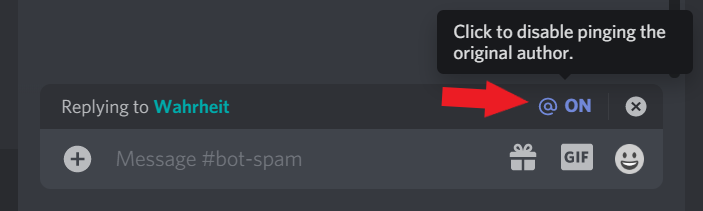
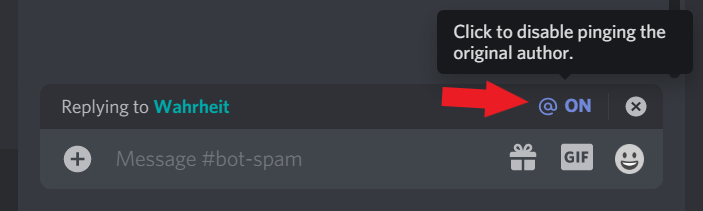
+++ Info disablereplies: Please disable reply-pings when responding to helpers. This relates to Rule #3: https://denizenscript.com/discord_rules#rule3
https://denizenscript.com/discimg/disable_replies.png
 flint inlet
!logcheck
viscid pelicanBOT
flint inlet
!logcheck
Repasted
Incorrect upload of log reuploaded to pastebin at https://paste.denizenscript.com/View/119855

Invalid Log
Log file given looks like a snippet or not a valid log. Please post your full logs/latest.log, not just the snippet you think is relevant.
All information is needed - especially the full startup output, which contains server/plugin versions, and usually is where important error messages are found.
viscid pelicanBOT
flint inlet
!logcheck
Repasted
Incorrect upload of log reuploaded to pastebin at https://paste.denizenscript.com/View/119857

Server Version
Paper version git-Paper-550 (MC: 1.19.4)-- (Current build :white_check_mark:)
Plugin Version(s)
Citizens v2.0.33-SNAPSHOT (build 3311) -- (Outdated build, behind by 3)
Checked For
@flint inlet
Online/Offline
Offline (proxy status unknown).
UUID Version
3 (:triangular_flag_on_post: Offline)
Other Noteworthy Plugin(s)
WorldGuard v7.0.8+33cdb4a, ProtocolLib v5.2.0-SNAPSHOT-679
Possibly Relevant Plugin(s)
TAB v4.1.1 - This plugin adds Below_Name scoreboards to NPCs.
Potentially Bad Line(s)
Starting Minecraft server on 0.0.0.0:25975 - server is offline but has no address bind. This might mean you're using a system level firewall, but if not, it means your proxy is bypassable by hackers. Either enable a system level firewall, or bind your server to localhost in server.properties via server-ip=127.0.0.1.
flint inlet
@obtuse valve cracked @restive helm
 obtuse valveBOT
flint inlet
<@492222895058059274> cracked <@456226577798135808>
obtuse valveBOT
flint inlet
<@492222895058059274> cracked <@456226577798135808>
Applied
Role applied.
Thread created: #1201895669129035896
bold salmonBOT
Thread Closing Reminder
Has your issue been resolved, or your question been answered?
If so, please use the </resolved:1028673926114594866> command to close your thread.
Or </invalid:1028673926898909185> if it's not possible to resolve.
If not yet resolved, please reply below to tell us what you still need.
(Note that if there is no reply for a few days, this thread will eventually close itself.)
@restive helm