#(nonemjs) Denizen script is not working on 1 20 2
71 messages · Page 1 of 1 (latest)
 dark latchBOT
Hi I'm AutoThreadBot! Don't mind me, I'll just be adding the helper team to this thread so they can see it. A human will get to you soon.
 burnt ironBOT

Error
Exception thrown while downloading raw data from link (see console for details).
 velvet lake
!pastelog
burnt ironBOT
velvet lake
!pastelog
 Info: pastelog
Help us help you by pasting your full server log directly to https://paste.denizenscript.com/New/Log (and not any other pastebin service) and linking it back here.
velvet lake
can you use ours instead please?
instead of using pastebin.com, can you use the link in our bot message?
Use this page to make a log paste that you can share.
I think I know what your issue is about to be without seeing your debug, but once you share it I should be able to confirm
Content of Server Log Paste #118478: log... pasted 2023/12/13 06:43:16 UTC-08:00, Paste length: 266608 characters across 1669 lines, Content: [17:34:50] [ServerMain/INFO]: Environment: Environment[accountsHost=https://api.mojang.com, sessionH...
burnt ironBOT
velvet lake
!logcheck https://paste.denizenscript.com/View/118478

Server Version
Purpur version git-Purpur-2089 (MC: 1.20.2)
Plugin Version(s)
Citizens v2.0.33-SNAPSHOT (build 3285) -- (Current build :white_check_mark:)
Denizen v1.2.9-SNAPSHOT (build 1800-REL) -- (Current build :white_check_mark:)
Checked For
@velvet lake
Online/Offline
Offline, but proxied.
UUID Version
3 (:triangular_flag_on_post: Offline)
Java Version
17.0.9 :white_check_mark:
Other Noteworthy Plugin(s)
WorldGuard v7.0.9+5934e49, ProtocolLib v5.1.1-SNAPSHOT-673
Suspicious Plugin(s)
SkinsRestorer v15.0.4 :triangular_flag_on_post: (Offline skins fixer plugin)
Problematic Plugin(s)
PlugManX v2.3.5 - :warning: Plugin Managers are dangerous and will cause unpredictable issues. Remove it.
Possibly Relevant Plugin(s)
TAB v4.0.7 - This plugin adds Below_Name scoreboards to NPCs.
ViaVersion v4.9.0 - Mixed client vs server versions can sometimes cause packet-related issues.
FastAsyncWorldEdit v2.8.2-SNAPSHOT-596;b8434f8 - This plugin has been known to break the plugin load order on many servers, due to usage of the 'loadbefore' directive in its 'plugin.yml'.
GSit v1.5.3 - 'Sit on other players' or 'sit on mobs' plugins sometimes allow players to sit on NPCs.
Potentially Bad Line(s)
Starting Minecraft server on *:25599 - server is offline but has no address bind. This might mean you're using a system level firewall, but if not, it means your proxy is bypassable by hackers. Either enable a system level firewall, or bind your server to localhost in server.properties via server-ip=127.0.0.1.
[17:35:03] [Server thread/WARN]: Caused by: org.bukkit.plugin.IllegalPluginAccessException: Plugin attempted to register de.myzelyam.supervanish.hooks.CitizensHook@55bdae46 while not enabled :warning: Log contains error messages.
velvet lake
@vale lava cracked @manic tartan
 vale lavaBOT
velvet lake
<@492222895058059274> cracked <@456226577798135808>
vale lavaBOT
velvet lake
<@492222895058059274> cracked <@456226577798135808>
Applied
Role applied.
Thread created: #1184505999567097926
velvet lake
We can continue supporting this issue once we resolve the status of the server in the new thread
 fleet locustBOT
Marked Invalid
Thread closed as invalid.
velvet lake
re-opening this thread again;
fleet locustBOT
Thread Reopened
Thread was manually reopened by @velvet lake.
burnt ironBOT
velvet lake
!debug
Info: debug
If you need help with a script issue, one of the most powerful tools Denizen has to offer is full debug output. This is displaying in your console whenever scripts are running until you turn debug off. To share a debug log quickly and easily with helpers, simply run the command /denizen debug -r in-game to begin recording, then run through the part of the script you need help with, then run the command /denizen submit. This will give you a link to a paste of the debug log, which you can then copy/paste back to us!
velvet lake
It should help reference what the actual issue is with the script
( Pretty sure I know what it is, just need to see what the debug says )
ope, your debug is disabled on the script
er, you have something weird happening
you might try restarting
Citizens builds now target MC 1.20.4; The last build for 1.20.2 is https://ci.citizensnpcs.co/job/Citizens2/3282/.
You'll need to swap out your citizens version for that
( It's one of your errors )
if you could yee
unsure still, Going between looking at this and some work at the moment
velvet lake
!rule 3
burnt ironBOT
velvet lake
!rule 3
Rule 3
Don't ping for help. https://denizenscript.com/discord_rules#rule3
"Pinging" refers to using an @ to alert somebody to your post.
Generally only ping somebody if your message is very specifically directed at them (meaning, only that person has anything to do with the information in your message, and it would be confusing who it was for without the ping).
If you're asking a question, please just make a forum post and ask.
If you have a bug report or a feature request, please just make a forum post about it.
If this is pulled up for you by a helper, your ping was unneeded.
If you're arguing about it, you're wrong.
This message is not a warning, it is just for your information.
velvet lake
I'm getting to this thread here in just a moment, I'm taking a look at the other easier ones first real quick, can't remember immediately why I couldn't figure out what was going on here initially
velvet lake
!t locationtag.ray_trace
burnt ironBOT
velvet lake
!t locationtag.ray_trace
Traces a line from this location towards the direction it's facing, returning the location of the first hit block or (optionally) entity.
This tag has also been referred to as 'cursor_on' or 'precise_cursor_on' in the past.
For ray tracing entities, see !tag LocationTag.ray_trace_target.
Using 'return=normal' instead replaces the old 'precise_impact_normal' tag.
Optionally specify:
range: (defaults to 200) a maximum distance (in blocks) to trace before giving up.
return: (defaults to prec...
Group
world
Returns
LocationTag
Examples
# Destroys whatever solid block the player is looking at.
- define target <player.eye_location.ray_trace[return=block]||null>
- if <[target]> != null:
    - modifyblock <[target]> air
# Spawns a heart wherever the player is looking, no more than 5 blocks away.
- playeffect effect:heart offset:0 at:<player.eye_location.ray_trace[range=5;entities=*;ignore=<player>;fluids=true;nonsolids=true;default=air]>
and more... Check the website for more examples
velvet lake
you might try leaving off the entitytag matcher
since you're trying to return a catchall anyways
as for the fakespawn issue: #1180155479679303824
You might consider using a real entity for the time being
 strong hemlock
Also the on tick event is generally a poor choice.
Consider using a while/repeat loop for short loops and delta time for permanent loops with short intervals.
fleet locustBOT
Thread Closing Reminder
Has your issue been resolved, or your question been answered?
If so, please use the </resolved:1028673926114594866> command to close your thread.
Or </invalid:1028673926898909185> if it's not possible to resolve.
If not yet resolved, please reply below to tell us what you still need.
(Note that if there is no reply for a few days, this thread will eventually close itself.)
@manic tartan
velvet lake
i wouldnt know how to fix that script offhand
You'd want to create more of an MCVE to figure out whats not working right
!mcve
burnt ironBOT
velvet lake
!mcve
Info: mcve
Please create a Minimal, Complete, and Verifiable Example of the problem you're reporting.
Minimal: contains nothing other than the part that's broken (and bare minimum structure).
Complete: contains everything needed to demonstrate the issue.
Verifiable: Anybody should be able to throw it on their own server and see the problem happen for themselves, without any needed tinkering.
velvet lake
Your script is too big to figure out what the issue is
You can probably figure out what's wrong if you just remove parts of your script until it's all the way down to the very minimal issue
like this for example:
test:
  type: task
  script:
    - define text "this is <red>red text"
    - define text "<[text]> with more red text"
    - define text "<[text]> but eventually, we run into"
    - define text "<[text]> an <error>"
- define text "<[text]> an <error>" creates an error because <error> is an invalid tag
you can easily remove the middle too lines to this:
test:
  type: task
  script:
    - define text "this is <red>red text"
    - define text "<[text]> an <error>"
which instead of four lines to look at, you have two
but also, glancing at your script again, you didn't seem to catch ice and i's suggestions
velvet lake
velvet lake
as for the fakespawn issue: <#1180155479679303824>
fakespawn is broken and will not work.
use spawn or create for now
!c create
burnt ironBOT
velvet lake
!c create
Required Plugins or Platforms
Citizens
Group
npc
Syntax
create [<entity>] [<name>] (<location>) (traits:<trait>|...) (registry:<name>)
Short Description
Creates a new NPC, and optionally spawns it at a location.
Description
Creates an npc which the entity type specified, or specify an existing npc to create a copy.
If no location is specified the npc is created despawned.
Use the 'save:<savename>' argument to return the npc for later use in a script.
Optionally specify a list of traits to immediately apply when creating the NPC.
Optionally specify a custom registry to create the NPC into. (Most users, leave this option off).
Will generate a new registry if needed.
velvet lake
probably not, no
create makes a citizens npc
You're going to need to actually adjust your code
You previously were using fake entities, you need to use real entities
when the devs both have time and are not dying sick :P
burnt ironBOT
strong hemlock
!rule 8 3 <@456226577798135808>
Rule 8
Don't overuse the edit/delete buttons. https://denizenscript.com/discord_rules#rule8
Use the edit button to fix typos, and the delete button to remove an accidental post shortly after posting.
Do not remove a post that pings someone, do not edit or delete a post that people have already replied to.
This message is not a warning, it is just for your information.
Rule 3
Don't ping for help. https://denizenscript.com/discord_rules#rule3
"Pinging" refers to using an @ to alert somebody to your post.
Generally only ping somebody if your message is very specifically directed at them (meaning, only that person has anything to do with the information in your message, and it would be confusing who it was for without the ping).
If you're asking a question, please just make a forum post and ask.
If you have a bug report or a feature request, please just make a forum post about it.
If this is pulled up for you by a helper, your ping was unneeded.
If you're arguing about it, you're wrong.
This message is not a warning, it is just for your information.
strong hemlock
Please do not delete messages when you accidentally pinged someone. This is causing ghost pings.
Also check the following:
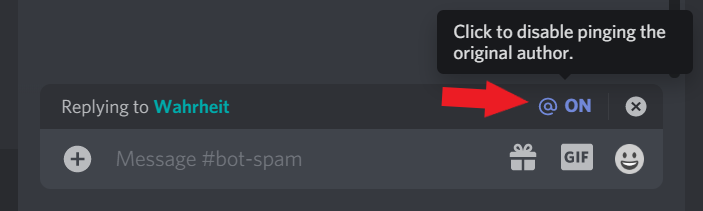
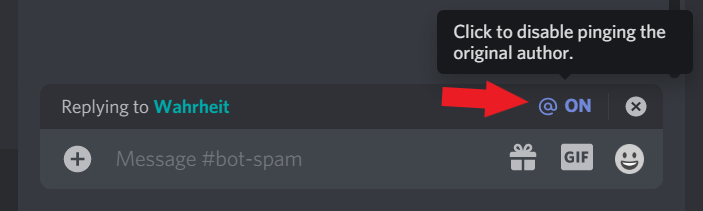
!disablereplies
burnt ironBOT
+++ Info disablereplies: Please disable reply-pings when responding to helpers. This relates to Rule #3: https://denizenscript.com/discord_rules#rule3
https://denizenscript.com/discimg/disable_replies.png
 fleet locustBOT
Thread Closing Reminder
Has your issue been resolved, or your question been answered?
If so, please use the </resolved:1028673926114594866> command to close your thread.
Or </invalid:1028673926898909185> if it's not possible to resolve.
If not yet resolved, please reply below to tell us what you still need.
(Note that if there is no reply for a few days, this thread will eventually close itself.)
@manic tartan