#(svyat1k0) How do I get coords of a block that is player looking at?
163 messages · Page 1 of 1 (latest)
 obsidian mulchBOT
Hi I'm AutoThreadBot! Don't mind me, I'll just be adding the helper team to this thread so they can see it. A human will get to you soon.
You can block this bot if you don't want to see these messages, I won't mind.
<@&525394568410038282>
 wispy juniper
!t player.cursor_on
 rugged girderBOT
wispy juniper
!t player.cursor_on
rugged girderBOT
wispy juniper
!t player.cursor_on
Returns the location of the block the entity is looking at.
Optionally, specify a maximum range to find the location from (defaults to 200).
This uses logic equivalent to !tag LocationTag.precise_cursor_on_block[(range)].
Note that this will return null if there is no block in range.
This uses all blocks, ie it includes passable blocks like tall-grass and water. Use !tag EntityTag.cursor_on_solid to exclude passable blocks.
Equivalent to <EntityTag.eye_location.ray_trace[return=block;fluids=true;nonsolids=true]>
Group
location
Returns
LocationTag
 serene dove
wispy juniper
!t player.cursor_on
serene dove
wispy juniper
!t player.cursor_on
but how to get the cords
rugged girderBOT
wispy juniper
!vague
 Info: vague
Your question is too vague to be able to answer well.
If you're asking how to do something, please make sure to add some background detail. Make sure to specify your overall end goal and the general design/idea and any existing progress towards that goal, not just the single specific point.
For script-related problems, see also !info haste debug. For non-scripting server trouble, see !logs.
See also !xyproblem
wispy juniper
!disablereplies
rugged girderBOT
+++ Info disablereplies: Please disable reply-pings when responding to helpers. This relates to Rule #3: https://denizenscript.com/discord_rules#rule3
https://denizenscript.com/discimg/disable_replies.png
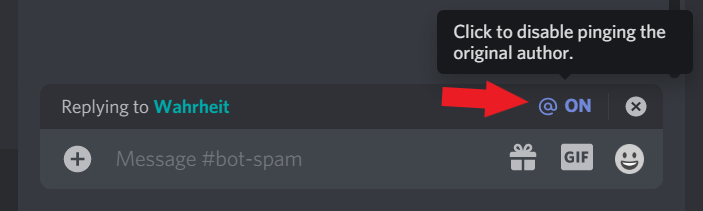
 cunning yarrow
serene dove
but how to get the cords
cunning yarrow
serene dove
but how to get the cords
What for?
serene dove
cunning yarrow
What for?
So i can tp to that block'
 crimson quiver
If you need to remember a specific location to teleport to, consider the flag system.
!l flag system
rugged girderBOT
crimson quiver
!l flag system
The flag system is a core feature of Denizen, that allows for persistent data storage linked to objects.
"Persistent" means the data is still around even after a server restart or anything else, and is only removed when you choose for it to be removed.
"Linked to objects" means rather than purely global values, flags are associated with a player, or an NPC, or a block, or whatever else.
See also the guide page at https://guide.denizenscript.com/guides/basics/flags.html.
For non-persistent temporary memory, see instead !command define.
For more generic memory options, see !command yaml or !command sql.
Flags can be sub-mapped with the '.' character, meaning a flag named 'x.y.z' is actually a flag 'x' as a MapTag with key 'y' as a MapTag with key 'z' as t...
Group
Denizen Scripting Language
rugged girderBOT
crimson quiver
!c note
Group
core
Syntax
note [<object>/remove] [as:<name>]
Short Description
Adds or removes a named note of an object to the server.
Related Guide Page
Description
Add or remove a 'note' to the server, persistently naming an object that can be referenced in events or scripts.
Only works for object types that are 'notable'.
Noted objects are "permanent" versions of other ObjectTags. (See: !language ObjectTags)
Noted objects keep their properties when added.
Notable object types: CuboidTag, EllipsoidTag, PolygonTag, LocationTag, InventoryTag
crimson quiver
serene dove
So i can tp to that block'
You say you want to teleport to a specific block, what are you making? A warp system? Something else? Because generally when people first time make checks for locations they end up hardcording locations which isn't something you should be doing.
serene dove
crimson quiver
You say you want to teleport to a specific block, what are you making? A warp sy...
Im making a tp tool so when i look at a block and right click the tool, i get teleported there
crimson quiver
Ah like the compass with worldedit.
Make sure you validate the cursor_on by the way, because as stated it will return null if there isn't a block within range.
!t objecttag.exists
rugged girderBOT
crimson quiver
!t objecttag.exists
Returns true if the object exists (is non-null). Returns false if the object doesn't exist, is null, or the tag errored.
This functions as a fallback - meaning, if the tag up to this point errors, that error will be hidden.
Returns
ElementTag(Boolean)
wispy juniper
serene dove
Im making a tp tool so when i look at a block and right click the tool, i get te...
You dont need coordinates then, you need a locationtag
!c teleport
rugged girderBOT
wispy juniper
!c teleport
Group
entity
Syntax
teleport (<entity>|...) [<location>] (cause:<cause>) (entity_options:<option>|...) (relative) (relative_axes:<axis>|...)
Short Description
Teleports the entity(s) to a new location.
Description
Teleports the entity or entities to the new location.
Entities can be teleported between worlds using this command.
You may optionally specify a teleport cause for player entities, allowing proper teleport event handling. When not specified, this is "PLUGIN". See !language teleport cause for causes.
Instead of a valid entity, an unspawned NPC or an offline player may also be used.
Optionally specify "relative" to use relative teleportation (Paper only). This is primarily useful only for...
serene dove
okay thanks
rugged girderBOT
serene dove
!c playsound
Group
world
Syntax
playsound (<location>|...) (<player>|...) [sound:<name>] (volume:<#.#>) (pitch:<#.#>) (custom) (sound_category:<category_name>)
Short Description
Plays a sound at the location or to a list of players.
Description
Plays a sound to a player or nearby players at a location.
The sound is played through the player's client just like any other sounds in Minecraft.
For a list of all sounds, check https://hub.spigotmc.org/javadocs/spigot/org/bukkit/Sound.html
Sounds are by default played under their normal sound type (eg zombie sounds are under the type Mobs/Animals).
You can optionally instead specify an alternate sound category to use.
For a list of all valid sound categories, check <@link url ht...
serene dove
Hello, how do i run a command when player right click with an item
wispy juniper
!e clicks block
rugged girderBOT
wispy juniper
!e clicks block
Group
Player
**WARNING**
this event may in some cases double-fire, requiring usage of the 'ratelimit' command (like 'ratelimit <player> 1t') to prevent doubling actions.
Event Lines
player (right|left) clicks <block>
Switches
with:<item> to only process the event if a specified item was held.
using:hand/off_hand/either_hand to only process the event if the specified hand was used to click.
type:<material> to only run if the block clicked matches the material input.
Triggers
when a player clicks on a block or in the air.
Has Player
Always. - this adds switches flagged:<flag name> + permission:<node>, in addition to the <player> link.
Context
<context.item> returns the ItemTag the player is clicking with.
<context.location> returns the LocationTag the player is clicking on.
<context.relative> returns a LocationTag of the air block in front of the clicked block.
<context.click_type> returns an ElementTag of the Spigot API click type <@link url https://hub.spi...
<context.hand> returns an ElementTag of the used hand.
Has Known Location
True - this adds switches in:<area> + location_flagged:<flag name>.
Cancellable
True - this adds <context.cancelled> and determines cancelled + cancelled:false.
rugged girderBOT
wispy juniper
!guide
Guides
View the Denizen Beginner's Guide at https://guide.denizenscript.com/
wispy juniper
Check out the guide
serene dove
alr
serene dove
wispy juniper
Check out the guide
Is it possible to use custom item there in that event?
wispy juniper
depends
if youre talking about a denizen item absolutely yes
otherwise you'd have to use a matcher
and if you cant use a matcher to match with your custom item, you can not
If you provide more info about your custom item I can help you
serene dove
What if i do it with a renamed stick? Will only the renamed stick work? Or every stick will?
wispy juniper
!vague
rugged girderBOT
wispy juniper
!vague
Info: vague
Your question is too vague to be able to answer well.
If you're asking how to do something, please make sure to add some background detail. Make sure to specify your overall end goal and the general design/idea and any existing progress towards that goal, not just the single specific point.
For script-related problems, see also !info haste debug. For non-scripting server trouble, see !logs.
See also !xyproblem
wispy juniper
serene dove
What if i do it with a renamed stick? Will only the renamed stick work? Or every...
!guide display text
rugged girderBOT
wispy juniper
!guide display text

View the guide page 'Common Mistakes - Display Text vs. Data' at: https://guide.denizenscript.com/guides/troubleshooting/common-mistakes.html#display-text-vs-data
wispy juniper
serene dove
What if i do it with a renamed stick? Will only the renamed stick work? Or every...
This is bad practice
Please provide more information about your custom item / script
!info haste
rugged girderBOT
wispy juniper
!info haste
Info: haste
Help us help you by pasting your script to https://paste.denizenscript.com/New/Script and linking it back here.
serene dove
Content of Plain Text Paste #114163: Scruot... pasted 2023/08/22 01:47:58 UTC-07:00, Paste length: 537 characters across 16 lines, Content: Teleport_tool: type: task
wispy juniper
rugged girder
pls paste as script paste using the link above
serene dove
I did
    type: task
    script:
    - if <player.has_flag[cooldown]>:
        - playsound <player> [sound:block.note_block.bass] (volume:10)
        - actionbar "<red>Wait <player.flag_expiration[cooldown].from_now.formatted>"
    - else:
        - flag player cooldown expire:5m
        - playsound <player.location> [sound:entity.enderman.teleport] (volume:10)
        - teleport <player> <player.cursor_on>

Teleport_tool2:
    type: world
    events:
        on player right clicks block with::
        - run teleport_tool
You pasted it as raw text, it's not a giant deal but it removes the built-in formatting help
serene dove
Is there a way to limit the range of teleport? - teleport <player> <player.cursor_on> and you can teleport to infinity if the chunks are loaded
crimson quiver
serene dove
Is there a way to limit the range of teleport? ```- teleport <player> <player.cu...
Yes. This was provided in the tag information.
!t entitytag.cursor_on
rugged girderBOT
crimson quiver
!t entitytag.cursor_on
Returns the location of the block the entity is looking at.
Optionally, specify a maximum range to find the location from (defaults to 200).
This uses logic equivalent to !tag LocationTag.precise_cursor_on_block[(range)].
Note that this will return null if there is no block in range.
This uses all blocks, ie it includes passable blocks like tall-grass and water. Use !tag EntityTag.cursor_on_solid to exclude passable blocks.
Equivalent to <EntityTag.eye_location.ray_trace[return=block;fluids=true;nonsolids=true]>
Group
location
Returns
LocationTag
serene dove
crimson quiver
Yes. This was provided in the tag information.
So do i just put a number in the [(<range>)]?
 waxen scaffold
try testing with something like /ex narrate <player.cursor_on[4]>
look around and see what it does, test different values, determine what you want from there
serene dove
alr
serene dove
How do i check for smth like: - if player has been teleported ?
crimson quiver
!e entity teleports
rugged girderBOT
crimson quiver
!e entity teleports
Group
Entity
Event Lines
entity teleports <entity> teleports
Switches
cause:<cause> to only process the event when it came from a specified cause.
Triggers
when an entity teleports.
Has Player
when the entity being teleported is a player. - this adds switches flagged:<flag name> + permission:<node>, in addition to the <player> link.
Has NPC
when the entity being teleported is an NPC.
Context
<context.entity> returns the EntityTag.
<context.origin> returns the LocationTag the entity teleported from.
<context.destination> returns the LocationTag the entity teleported to.
<context.cause> returns an ElementTag of the teleport cause - see !language teleport cause for causes.
Determine
"ORIGIN:<LocationTag>" to change the location the entity teleported from.
"DESTINATION:<LocationTag>" to change the location the entity teleports to.
Has Known Location
True - this adds switches in:<area> + location_flagged:<flag name>.
Cancellable
True - this adds <context.cancelled> and determines cancelled + cancelled:false.
serene dove
rugged girder
thats an event tho i need to use it to check if player has teleported or not
crimson quiver
Yes. This is... what you use.
Events fire usually when these things happen.
If you mean in your script then you may want to consider waiting?
!c wait
rugged girderBOT
crimson quiver
!c wait
Group
queue
Syntax
wait (<duration>) (queue:<name>) (system/{delta})
Short Description
Delays a script for a specified amount of time.
Description
Pauses the script queue for the duration specified. If no duration is specified it defaults to 3 seconds.
Accepts the 'queue:<name>' argument which allows the delay of a different queue.
Accepts a 'system' argument to delay based on system time (real-world time on a clock).
When that argument is not used, waits based on delta time (in-game time tracking, which tends to vary by small amounts, especially when the server is lagging).
Generally, do not use the 'system' argument unless you have a specific good reason you need it.
crimson quiver
And checking the players current coordinates versus their last?
serene dove
crimson quiver
And checking the players current coordinates versus their last?
Is there a command to remove a flag from a player?
i searched in the meta docs
i didn't find anything
crimson quiver
!c flag
rugged girderBOT
crimson quiver
!c flag
Group
core
Syntax
flag [<object>|...] [<name>([<#>])](:<action>)[:<value>] (expire:<time>)
Short Description
Sets or modifies a flag on any flaggable object.
Related Guide Page
Description
The flag command sets or modifies custom data values stored on any flaggable object (the server, a player/NPC/entity, a block location, ...).
See also !language flag system.
This command supports data actions, see !language data actions.
Flags by default are added permanently (or for the lifetime of the object they're attached to).
You can optionally specify a system time the flag will expire at, using either a DurationTag or a TimeTag.
If a DurationTag is used, it will be equivalent to: <util.time_now.add[<your_duration_here>]>
crimson quiver
serene dove
i didn't find anything
Did you read the flag part of the guide?
crimson quiver
The clear data action is ! as provided in the command usage, and the guide that explains the flag system.
- flag <player> my_flag:!
And such
!l data actions
rugged girderBOT
crimson quiver
!l data actions
Several commands function as a way to modify data values,
including !command flag, !command yaml, and !command define.
These commands each allow for a set of generic data change operations.
These operations can be used with a syntax like "<key>:<action>:<value>"
For example "mykey:+:5" will add 5 to the value at 'mykey'.
The following actions are available:
Actions that take no input value:
Increment: '++': raises the value numerically up by 1. Example: - define x:++
Decrement: '--': lowers the value numerically down by 1. Example: - define x:--
Remove: '!': removes the value entirely. Example: - define x:!
Actions that take an input value:
Add: '+': adds the input value to the value at the key. Example: - define x:+:5
Subtract: '-': subtracts the input value from ...
Group
Useful Lists
serene dove
ohh alr tysm
serene dove
!c effect
rugged girderBOT
serene dove
!c effect

Cannot Specify Searched Command
Multiple possible commands: effectlib, PlayEffect.
Possible Confusion
Did you mean to search for mechanism fuel?
serene dove
!c playeffect
rugged girderBOT
serene dove
!c playeffect
Group
world
Syntax
playeffect [effect:<name>] [at:<location>|...] (data:<#.#>) (special_data:<data>) (visibility:<#.#>) (quantity:<#>) (offset:<#.#>,<#.#>,<#.#>) (targets:<player>|...) (velocity:<vector>)
Short Description
Plays a visible or audible effect at the location.
Description
Allows the playing of particle effects anywhere without the need of the source it comes from originally.
The particles you may use, can come from sources such as a potion effect or a portal/Enderman with their particles respectively.
Some particles have different data which may include different behavior depending on the data. Default data is 0
Specifying a visibility value changes the sight radius of the effect. For example if visibility is 15; Targeted players won't see it unless they are 15 b...
serene dove
Is there a way to give potion effect to a player using a command>
waxen scaffold
serene dove
Is there a way to give potion effect to a player using a command>
!command cast
rugged girderBOT
waxen scaffold
!command cast
Group
entity
Syntax
cast [<effect>] (remove) (duration:<value>) (amplifier:<#>) (<entity>|...) (no_ambient) (hide_particles) (no_icon) (no_clear)
Short Description
Casts a potion effect to a list of entities.
Description
Casts or removes a potion effect to or from a list of entities.
The effect type must be from https://hub.spigotmc.org/javadocs/spigot/org/bukkit/potion/PotionEffectType.html.
If you don't specify a duration, it defaults to 60 seconds.
An infinite duration will apply an infinite duration potion effect, refer to !objecttype DurationTag for more details.
The amplifier is how many levels to *add* over the normal level 1.
If you don't specify an amplifier level, it defaults to 1...
serene dove
thanks
Need some help here... When a player hits an entity with a iron axe an entity should receive some effect but i dont really know how to give it to an entity
crimson quiver
!e on entity damaged
rugged girderBOT
crimson quiver
!e on entity damaged
Group
Entity
Event Lines
<entity> damaged by <entity> <entity> damaged (by <cause>) <entity> damages <entity>
Switches
with:<item> to only process the event when the item used to cause damage (in the damager's hand) is a specified item.
type:<entity> to only run if the entity damaged matches the entity input.
block:<block-matcher> to only run if the damage came from a block that matches the given material or location matcher.
Triggers
when an entity is damaged.
Has Player
when the damager or damaged entity is a player. Cannot be both. - this adds switches flagged:<flag name> + permission:<node>, in addition to the <player> link.
Has NPC
when the damager or damaged entity is an NPC. Cannot be both.
Context
<context.entity> returns the EntityTag that was damaged.
<context.damager> returns the EntityTag damaging the other entity, if any.
<context.damager_block> returns the LocationTag of a block that damaged the entity, if any.
<context.cause> returns an ElementTag of reason the entity was damaged - see !language damage cause for causes.
<context.damage> returns an ElementTag(Decimal) of the amount of damage dealt.
<context.final_damage> returns an ElementTag(Decimal) of the amount of damage dealt, after armor is calculated.
<context.projectile> returns a EntityTag of the projectile, if one caused the event.
<context.damage_type_map> returns a MapTag the damage dealt by a specific damage type with keys: B...
<context.was_critical> returns 'true' if the damage was a critical hit. (Warning: this value is ca...
Determine
ElementTag(Decimal) to set the amount of damage the entity receives.
"CLEAR_MODIFIERS" to zero out all damage modifiers other than "BASE", effectively making damage == final_damage.
Has Known Location
True - this adds switches in:<area> + location_flagged:<flag name>.
Examples
Examples too long to display... Check the website for more examples
crimson quiver
I don't understand, you can use context.entity as per the entity damaged by entity event?
 crimson quiver
() is unnecessary, but yes.
The () surrounding the arguments in the Syntax means it's optional. [] means it's required.
crimson quiver
Ah, I actually requested that feature myself.
serene dove
 crimson quiver
!m freeze_duration
rugged girderBOT
crimson quiver
!m freeze_duration
Sets the duration an entity has been freezing for (from powdered snow).
Object
EntityTag
Input
DurationTag
Tags
<EntityTag.freeze_duration> Returns the duration an entity has been freezing for (from powdered snow).
crimson quiver
Unfortunately, I think it will still harm you if it's too high so do some testing.
serene dove
alr
serene dove
Can someone help, im not getting any effects

 glass glacier
I'd suggest comparing the script examples in the guide to understand your formatting issues above.
serene dove
how do i fix it thoo
glass glacier
on your define and cast lines, why are you ending those lines with a : ?

 serene dove
glass glacier
on your define and cast lines, why are you ending those lines with a : ?
serene dove
glass glacier
on your define and cast lines, why are you ending those lines with a : ?
removed it
glass glacier
so what's the help text for that squiggly line say?
serene dove
 glass glacier
that's your answer
serene dove
ty 😅
glass glacier
btw you still have a colon on the define line
serene dove
ye i removed it thanks
can i use a custom item made in denizen in the for example on player damages entity:custom_item_name: ?
glass glacier
yup
serene dove
Alr ty
Also I'm not really sure how to make a item craft, do you know any kind of youtube video/doc for it?
glass glacier
do you mean how to create a custom item in code or how to have people be able to craft your custom item?
serene dove
The craft for custom item
glass glacier
silly that I ask, it's kinda the same answer
serene dove
And if I can use custom items in a custom item craft
glass glacier
!Language item script containers
rugged girderBOT
glass glacier
!Language item script containers
Item script containers are an easy way to pre-define custom items for use within scripts. Item
scripts work with the ItemTag object, and can be fetched with the Object Fetcher by using the
ItemTag constructor ItemTag_script_name. Example: - drop <player.location> super_dooper_diamond
The following is the format for the container. Except for the 'material' key (and the dScript
required 'type' key), all other keys are optional.
# The name of the item script is the same name that you can use to construct a new
# ItemTag based on this item script. For example, an item script named 'sword_of_swiftness'
# can be referred to as simply 'sword_of_swiftness'.
Item_Script_Name:

    type: item

    # Must be a valid ItemTag. See 'ItemTag' for more information.
    # | All item scripts MUST h
...
Group
Script Container System
glass glacier
and yes custom items can be used in a recipe unless the flag is set to false for that
serene dove
Alr ty
serene dove
glass glacier
and yes custom items can be used in a recipe unless the flag is set to false for...
Hey I tried making the recipe but that didn't worked, I used for example air|denizen:my_item|air so smth like this but that didn't work
Could you help?
 toxic trenchBOT
 rugged girderBOT
glass glacier
!haste
Info: haste
rugged girderBOT
glass glacier
!haste
Info: haste
Help us help you by pasting your script to https://paste.denizenscript.com/New/Script and linking it back here.
crimson quiver
serene dove
Hey I tried making the recipe but that didn't worked, I used for example air|den...
You don't need to include denizen: for denizen items in recipes. It just needs the script name.
 languid jay
if your original question has been answered, please close the thread and make a new one if you need further help
 atomic zealotBOT
Thread Closing Reminder
Has your issue been resolved, or your question been answered?
If so, please use the </resolved:1028673926114594866> command to close your thread.
Or </invalid:1028673926898909185> if it's not possible to resolve.
If not yet resolved, please reply below to tell us what you still need.
(Note that if there is no reply for a few days, this thread will eventually close itself.)
@serene dove
serene dove
ok
atomic zealotBOT
Resolved
Thread closed as resolved.
Thread Reopened
Thread was manually reopened by @serene dove.
Resolved
Thread closed as resolved.
atomic zealotBOT
Thread Reopened
Thread was manually reopened by @somber bolt.