#my model is appearing in game, but my texture isnt. any idea why?
15 messages · Page 1 of 1 (latest)
 hexed ledge
 deep jungleBOT
Welcome to the help forum! Once your question has been resolved, please mark the post as closed by typing !close.
hexed ledge
these are the texture in question https://i.imgur.com/tFj5y8s.png
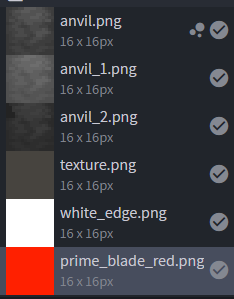
in game they just
dont appear
and i thought iti was because theyre pngs
but then when i tried to convert them into json files
there was no clean way to do so
 jagged sparrow
where are the textures
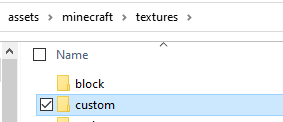
 jagged sparrow
!faq textures 1.19.3
deep jungleBOT
jagged sparrow
!faq textures 1.19.3
(Result for "java-1.19.3-textures")
General Information:
The game creates a "texture atlas" (combination of all textures into one file) for block/item models.
For performance reasons as of Java 1.19.3 the game by default only loads textures from within textures/item and textures/block (and any folders within those two folders) into that atlas instead of reading through every model for the relevant textures.
_________________________
Making the game load from custom directories
If you want the game to add textures from other directories (that are still somewhere within the "textures" folder) to that atlas you will need to create a blocks.json file in YourPack/assets/minecraft/atlases:
Example blocks.json
{
    "sources": [
        {
            "type": "directory",
            "source": "custom",
            "prefix": "custom/"
        }
    ]
}```
This example would make the game add _all_ textures that are within `textures/custom` to the atlas. This **even** applies to images that are not used by your models, so keep your pack clean for better performance and smaller size!.

**_\_\_\_\_\_\_\_\_\_\_\_\_\_\_\_\_\_\_\_\_\_\_\_\_**

**Additional/more specific information**:
If you have several custom directories you can add several json objects in the "sources" list/array.
blocks.json's of different packs combine btw, so you don't need to worry that one pack will stop another pack from loading their textures.

Here is also an example pack from a Minecraft dev (boq) with some more specific examples (like only using the face part of the default pig texture instead of loading all entity textures or the whole pig texture): <https://cdn.discordapp.com/attachments/593812273164976166/1042452631743901756/sprites.zip>

The official blog post with the changes (you will have to scroll down quite a bit for the relevant information): <https://www.minecraft.net/en-us/article/minecraft-snapshot-22w46a>instead of changing the path would it be easier for me to place them into one of the files?
jagged sparrow
what
jagged sparrow
deep jungle
(Result for "java-1.19.3-textures")
**General Information:**
The game creates ...
you can move them to the item or block folder, or you can do this: