
#how do I get my model into Minecraft from blockbench?
100 messages · Page 1 of 1 (latest)
 eager inlet
 sullen lark
try this guide https://www.youtube.com/watch?v=z3rv-r7FMRU

Presented by CyberAxe of www.OutLandishlyCrafted.com
Please support us on Patreon or on twitch.tv/cyberaxe
#bedrock #guide #Minecraft #blockbench #indiegamedev #howto #mcpe #MinecraftEntityWizard #howtoaddanimations #blockbenchanimations #bedrockAnimations
eager inlet
Within the first 5 minutes of that I am lost. I can’t find the developer bp or development rp for moving my files to. And he’s starting a new file to do this where I already spent hours on a separate file
I got to the part where I’m told to check if my model is edited in the game correctly but my model still hasn’t changed
 unique cipherBOT
sullen lark
!faq content-logs
unique cipherBOT
sullen lark
!faq content-logs
(Result for "content-log")
Content Log in Bedrock Edition helps you identify issues in resource and behavior packs. You can enable it here:
https://imgur.com/a/RSaukEP
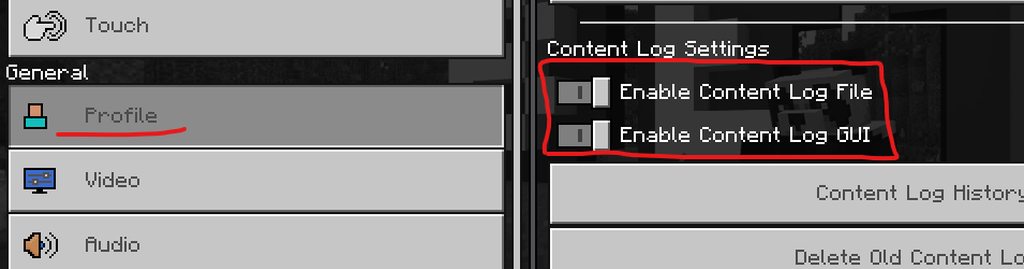 sullen lark
In creator now.
You can follow the getting started guide at wiki.bedrock.dev to help find those folders and understand the basics
eager inlet
Still nothing, I went to the guides and did those but it isn’t changing, I validated my behavior pack files and checked that my recourse and behavior packs are active and named/located correctly but still I just get regular snow golem
My egg shows up but no new golem
sullen lark
Show your resource json file
eager inlet
{
"format_version": "1.10.0",
"minecraft:client_entity": {
"description": {
"identifier": "minecraft:snowgolem",
"materials": {
"default": "snow_golem"
},
"textures": {
"default": "textures/entity/snow_golem"
},
"geometry": {
"default": "geometry.snow_golem"
},
"animations": {
"move": "animation.snow_golem.move",
"sheared": "animation.snow_golem.sheared",
"look_at_target": "animation.common.look_at_target",
"move_controller": "controller.animation.snowgolem.move.v1.8"
},
"scripts": {
"animate": [
"move_controller",
{
"sheared": "query.is_sheared"
}
]
},
"render_controllers": ["controller.render.default"],
"spawn_egg": {
"base_color": "#ffffff",
"overlay_color": "#0b0cd7"
json lint says the overlay color is an issue but idk how to fix that
eager inlet
i dont think i have a geo json its just a blockbench file
sullen lark
Post it
eager inlet
eager inlet
Did I post the correct file?
sullen lark
Im not at a pc and cant open at the moment, Ill check it shortly when I get home.
eager inlet
Understandable, just making sure
sullen lark
eager inlet
So this is a bbmodel project file NOT a geo model. Open this in bb. and the do file export bedrock geo.
eager inlet
I don’t seem to have that option, am I looking in the right place?
 sullen lark
You need to convert it to a bedrock entity format
You can check what format it's in under file projects
eager inlet
If it’s not working after I do that what do I try next?
sullen lark
You need to convert it to a bedrock entity format. Then export it to your resource pack models folder. Also save as your texture to your texture entity folder.
Then test it and check your logs
eager inlet
Content logs are still completely empty
sullen lark
and you converted and exported the entity
so now you have a yourmodel.geo.json file in models
post the geo here
eager inlet
Yes my geo is in models>entities in my rp folder
sullen lark
here is what you named the geo/models identifier geometry.snow_golemval
and here is what you told the game it's name was "geometry": { "default": "geometry.snow_golem"
These must match!
eager inlet
Okay so that makes sense, where do I fix the identifier? In the geo model? Or where the game reads the name
sullen lark
up to you
You need to run it, don't let it run you
You can open bb and change in project settings then reexport it
or you can open the resource pack entity file and change it there.
I'd highly suggest you use bridge IDE for that
eager inlet
So it has the same name across the different files and I’m still not seeing it in game
sullen lark
check your logs
sullen lark
hmm, we're missing something basic then
anything else in the addon work? or is this all thats in it
eager inlet
this is the first item i tried doing with blockbench
sullen lark
When you say item, do you mean item. or do you mean entity
eager inlet
entity i guess
sullen lark
ok. Post the behavior pack entity file
sullen lark
Sure, there are blocks, entities, and items. They are all different
eager inlet
so this would be the first entity i tried to edit, and i have not changed anything else in the addon yet
sullen lark
ok. So we're not sure if the BP/RP are working
You said they Both are active on the world?
eager inlet
Yeah both are active because of the dependencies
sullen lark
What do you mean?
eager inlet
Somewhere along the line some guide told me to make the bp dependent on the rp to where they automatically activate the rp when I activate the bp
eager inlet
i guess the identifier here looks wrong too
sullen lark
Are you making a new one, or replacing the older one?
eager inlet
trying to replace the origonal snow golem with my own version
 eager inlet
So what should they be named? Idk if that matters but all of them are named “geometry.snow_golem” right now in identifier
sullen lark
We're only talking about the identifier
you can make the geo named what ever you want as long as you tell the RP entity file what that name is
If you want to replace vanilla entities you have to use their name
So in this case is must be minecraft:snow_golem
you need to change this in the BP and RP entity files under identifier.
Not the geo's identitier the Entities files
eager inlet
everything is named minecraft:snow_golem now
i still cant summon it in the game for some reason
sullen lark
you should still get the normal snow golem right
are you sure you're not in peaceful mode
sullen lark
any errors
eager inlet
Nothing is giving me any error message, it just shows my spawn egg and spawns the regular golem, if I summon by command it just gives me the regular golem
sullen lark
try change the geometry in the resource pack entity file to a wolf and see if it changes in game or not
eager inlet
How exactly would I go about changing that
sullen lark
Open the resource pack entity file and where it says geometry.sheep or wolf or something.
eager inlet
The only thing in my development resource pack is the snow golem I don’t see any wolf or sheep geometry to open
sullen lark
Open your snow golem resource pack entity file
in that file change the geometry to point to some other model for testing
I'd use sheep or something
eager inlet
How would I add that in to the JSON correctly? I assume I need to go after geometry:
 sullen lark
simply backspace on snow_golum and type wolf or sheep
eager inlet
After changing that nothing happened in game