#Bedrock exporting and model not working
84 messages · Page 1 of 1 (latest)
 rare hollow
 hoary echoBOT
rare hollow
!faq content-log
hoary echoBOT
rare hollow
!faq content-log
Content Log in Bedrock Edition helps you identify issues in resource and behavior packs. You can enable it here:
https://imgur.com/a/RSaukEP
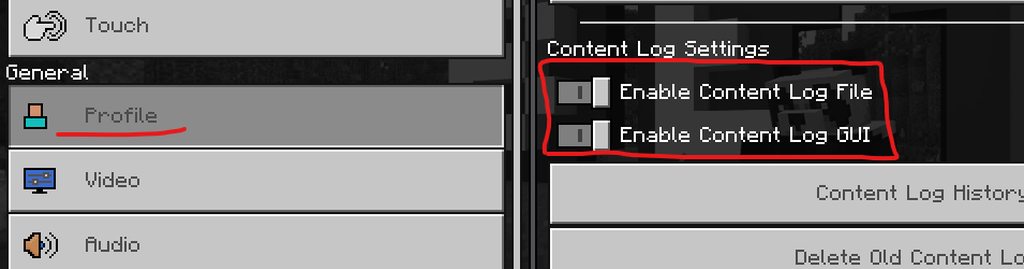 rare hollow
is the first step
 north axle
oh im so sorry i had no idea that existed 1 sec
rare hollow
After that this guide helps most people, I go over the most common issues before starting on aniamtions https://www.youtube.com/watch?v=z3rv-r7FMRU

Presented by CyberAxe of www.OutLandishlyCrafted.com
Please support us on Patreon or on twitch.tv/cyberaxe
#bedrock #guide #Minecraft #blockbench #indiegamedev #howto #mcpe #MinecraftEntityWizard #howtoaddanimations #blockbenchanimations #bedrockAnimations
rare hollow
It's under creator now
When using software for development it's a good idea to check all the menus so you know what there is an optinos
north axle
yeah sorry im new to this just trying to start out haha thank you btw
the log did not fix the model from being a normal zombie
thats what happening rn btw
rare hollow
So do you have errors in the log?
north axle
where do the log go?
rare hollow
 rare hollow
thats fine
north axle
ok
rare hollow
what does the log say is wrong
north axle
something about stealing code idk il paste it
[Localization][warning]-Line: 14 - Invalid lang file format. New line character was found while parsing key: '//made by demon xmodrx'.
[Localization][warning]-Line: 17 - Invalid lang file format. New line character was found while parsing key: '//do not take any files or code'.
[Localization][warning]-Line: 18 - Invalid lang file format. New line character was found while parsing key: '//without permission!!'.
i just changed texture
of a zombie
rare hollow
Doesn't look like it, looks like you used someone else models or addon
rare hollow
Tell me the steps you did from the start
north axle
so i customised a zombie and painted it to make it look a bit human with custom hair like this
and then i save animation and file
i export using the enity wizard
rare hollow
What about in other worlds or addons. Those errors are global
north axle
oh
i dont know what it could be on that world its the only pack i enabled
i can send you my storage mayve
rare hollow
There did you get the model in bb in th evideo?
north axle
the skin
north axle
no i used a zombie
rare hollow
So where did you get that model and texture?
north axle
the texures on the skin and hair i made
since this morning lol actully
you can see the zombie parts on the texture
rare hollow
well you tripped someone boobietrap. I'm not sure how to help you.
You need to open the Resource Pack entity file and post the json code
for this entity so we can make sure the geo is correct for this model
rare hollow
Watch my above guide I posted or this 101 guide https://youtu.be/xoybMf05Jl8

Links:
Entity 101 website: http://www.dragnoz.com
Free Blockbench: blockbench.net
Free Graphic Program: gimp.org
Free Code Editor: code.visualstudio.com
Sample Packs: minecraft.net/addons
Snowquake: https://dragnoz.com/snowquake/
DRAGNOZ TWITTER & INSTAGRAM:
TWITTER: https://twitter.com/dragnoz
INSTAGRAM: http://instagram.com/dragnoz/
TWITCH...
It will show you were those files are and which ones do what
You need the Resource Pack Entity file
north axle
ok when im done il post it in here
is there a timestamp i need should i just watch it
i cant find localstate
is it in appdata
i found it
@rare hollow what should i fo
do
copy and paste or pastebin?
?
rare hollow
you can post the json or file here.
north axle
ok
delta is my twitch btw
?
@rare hollow do you know what happned?
@rare hollow
north axle
<@&314483155153321984> since cyber is streaming if anyone online can read that and tell me the issue that would be great
 mighty swift
north axle
<@&314483155153321984> since cyber is streaming if anyone online can read that a...
mighty swift
north axle
<@&314483155153321984> since cyber is streaming if anyone online can read that a...
!faq dont-ping
hoary echoBOT
mighty swift
!faq dont-ping
As stated in Rule 9 in #info-and-rules you shouldn't ping random people or moderators for help with Blockbench/Minecraft (unless you specifically need that one person because of an earlier conversation).
rare hollow
Yeah I looked at it, I don't know whats going on. You have something messed up. Not sure what. I'd start over with a fresh BP/RP and make sure it all works, then add in the custom entity.
north axle
mighty swift
!faq dont-ping
it says modeling help but ight
north axle
@rare hollow i have got the message to stop it was a skin pack however now the mobs still arnt loading i have made a new mob to test and that one dosnt work
mighty swift
north axle
it says modeling help but ight
That includes using the model ingame
north axle
k