#tech
1 messages · Page 3 of 1
 kind sapphire
 agile ermine
idk about workstation cpus
agile ermine
idk about workstation cpus
One message removed from a suspended account.
One message removed from a suspended account.
agile ermine
probably not
maybe it was introduced earlier, but it's definitely not everywhere
the compatible ones are probably the ones based on the same architecture as the core family
there's a list on the Microshit website anyways
 spiral yew
microshit 😂 i love how you spelled the name
 latent aurora
Its true tho
 west phoenix
Microhard 

 celest nova
My little haul today, seems really cool

Medion LifeTec LT 9888 with PII 233MHz, 160MB RAM and original OS, Toshiba Satellite Pro 4600 with PIII 1GHz, 512MB RAM (currently dead)
and all the other things in the picture.
R9 270X VaporX, Club3D GTS 250, Club3D 7950GT, Quadro FX 4600 & finally my PCIe Slots.
Gonna fix some motherboards with broken slots. My ebay find Z87 will be first.

 hasty ether
Heres something that just found out my phone can rollover to 2038 even if I am not allowed to change it to that date.
I'll be 33 before that actually happens.
latent aurora
Yet Win7 is for me still the best OS, followed by XP SP3 
 mighty idol
yeah
hasty ether
Mostly need one for messing around with.
Trying to use a VM is hard.
But putting an OS and Activating it is easier on a real system because they have the key and the iso usually doesn't.
celest nova
agile ermine
it might be a bit too hard to run on older machines, though
Well, with some adjustments it just works fine on Core 2 Duo E8400.
I have 39 of these here currently, they do quite fine
agile ermine
Isn't the ram the issue?
like, can windows 10 properly run on a machine equipped with 2Go of ram for example?
celest nova
well, I ran it with 4GB
and depending on the chipset, you could install up to 16GB of RAM
 kind viper
My i3 2130 with 8 gb of ram runs slow on windows 10
agile ermine
well, it's not that much better than a core2 duo
 pliant comet
kind viper
My i3 2130 with 8 gb of ram runs slow on windows 10
pliant comet
kind viper
My i3 2130 with 8 gb of ram runs slow on windows 10
Depending on programs you run on your PC, 8 GB of RAM might be not enough. At some point paging file starts getting used, which could slow down the system, especially if the system is on HDD instead of SSD.
celest nova
well, especially 2nd Gen i3 is really bad. Doesn't matter how much RAM is installed.
hasty ether
hello again

I dunno why the old messages in here...
But I am re-installing Windows 7.
And this one cannot be unplug either.
It may have a battery but the battery cannot hold a charge... anymore.
Oh my god its actually happening.

It's working it's working!
Now on to drivers... Now where the hell do I find those?
latent aurora
Internet. I usually start by searching for the laptop brand and model and look for that
hasty ether
I mean doesn't dell archive that stuff?
latent aurora
What do you mean? Usually you can find drivers online when looking after 'dell %model drivers'
hasty ether
I found the drivers for the Wifi stuff and Driver for the Graphics on Dells Support Website.
hasty ether
Well the wifi driver didn't work.
I'll fix that later...\
I don't got time for that right now and it's like 4 am...
hasty ether
I was really having a big itch to do this.
and now I have a Windows 7 laptop that I once again can call my own.
mighty idol
unfortunately, my controller has died 
 kind sapphire
mighty idol
unfortunately, my controller has died <a:died:945069820649554020>
kind sapphire
mighty idol
unfortunately, my controller has died <a:died:945069820649554020>
One message removed from a suspended account.
pliant comet
If you're using DS4Windows, you might need to use Ryochan7's fork, as it's more up to date. @mighty idol
mighty idol
pliant comet
If you're using DS4Windows, you might need to use Ryochan7's fork, as it's more ...
I did use it......sometimes
usually I'll just use steam
normally, even if I didn't use ds4windows, it should be showing as wireless controller
but last night, I did use steam and ds4windows, both won't detect the controller
mighty idol
and bluetooth also didn't seem to work
spiral yew
i don't think it's the controller cause i still have the original controller even though it's almost 10 years and still works unless you abused the heck outta the controller
mighty idol

kind sapphire
spiral yew
i don't think it's the controller cause i still have the original controller eve...
One message removed from a suspended account.
pliant comet
You can try reinstalling the device. You can use DeviceCleanup program to clear up all disconnected devices.
 remote prism
Is a way to install linux on Xiaomi redmi 5A?
 remote prism
I wanted Ubuntu Touch, but it isn't supported
 small sage
Anything ARM should work in theory. Just look at Raspberry Pis
remote prism
Yes, the CPU in this phone is ARM
latent aurora
Does anyone know a legit site where I can download Windows 7 Pro x64 ? Me dumdum nub lost my installation dvd from back then 
I have the code, just not the iso 
agile ermine
latent aurora
Does anyone know a legit site where I can download Windows 7 Pro x64 ? Me dumdum...
isn't it available on Microsoft's website?
 tiny flower

Does that mean the CPU has 14 cores?
do they count as 0815 cores or are they useable in special areas of application only?
 sinful monolith
efficiency cores don't have hyper-threading and run at a lower frequency, Windows will try to place background applications on them so your foreground things can get the highest performance from the performance cores
tiny flower
next to multitasking, if we take 10 objects as one core, will I be able to run 140 objects without a big loss of FPS?
that's the language I speak in terms of tech lmao
agile ermine
as we said, e-cores aren't as fast as p-cores, and you have to take into account the fact that p-cores have multithreading
it's not that simple
tiny flower
so I'll need a ordinary 14 cores CPU to reach the performance level of 14 cores?
agile ermine
basically, you have your p-cores to run games for example, and the e-cores are here for windows, discord and the rest of the stuff that's not too cpu-intensive and can run on low power cores for less power draw
well, "less power draw"
agile ermine
tiny flower
so I'll need a ordinary 14 cores CPU to reach the performance level of 14 cores?
eh, some 4 cores cpus are faster than 8 cores ones, depending on the cpus you compare
the performance level of a core is relative
sinful monolith
the performance of individual cores varies even within CPUs so just comparing core counts is not very useful
if you're trying to evaluate if a CPU is good enough for you, you need to start from your use-case(s) and work backwards from there
6 p-cores and 8 e-cores is plenty enough for most people for the near future (might be overkill even). The exceptions would be specialized work or hobbies on the computer
 dawn kiln
I need a gaming headset suggestion. Preferably in the range of $20-50 USD
spiral yew
dawn kiln
I need a gaming headset suggestion. Preferably in the range of $20-50 USD
pc or console and wired or wireless?
 latent socket
I was updating my graphics card when the pc turned off while 50%. I turned on pc but now it wont show on screen. No signal, ive tried many times. Can I please get help
kind sapphire
latent socket
I was updating my graphics card when the pc turned off while 50%. I turned on pc...
One message removed from a suspended account.
latent socket
how can I boot into safe mode
kind sapphire
latent socket
how can I boot into safe mode
One message removed from a suspended account.
latent socket
I didnt make it. vga led on motherboard also red
kind sapphire
latent socket
I didnt make it. vga led on motherboard also red<:PES3_SadCat:756135949515227241...
One message removed from a suspended account.
One message removed from a suspended account.
One message removed from a suspended account.
pliant comet
In case if you're using Intel CPU, any CPU model, which ends with F won't have iGPU available.
latent socket
I have cpu i5-12600k and gpu 2060 dual. I tried to plug monitor to igpu but still no signal
pliant comet
You might want to enable iGPU in the UEFI settings. For exact steps, you'll need to check motherboard's manual to find the correct setting.
 hidden shell
I suspect your video card isn't seated correctly or you forgot to connect the proper power cables, windows should default to VGA mode if it can't load the correct driver
 limber sonnet
First of all, unplug everything but the display cable
I had this problem because i left a device that prevented the motherboard boot
latent socket
I have tried anything. Unplugged gpu many times too, and started pc with only gpu and battery
limber sonnet
The keyboard, mouse, etc*
Try booting only with the display cable, leave mouse and keyboard and any device connected to usb ports
limber sonnet
Did you got it?
latent socket
My brother has, if it works then i will buy new
limber sonnet
👍
limber sonnet
Does the gpu works on another computer?
If it works, before plugging your gpu, remove any gpu driver with DDU software (booting safe mode) and plug after this procedure
If it doesn't work, it might be your power supply (if the gpu that worked is weaker)
dawn kiln
spiral yew
pc or console and wired or wireless?
PC, either is fine.
latent socket
better sound in wired
kind sapphire
latent socket
my gpu, can i fix it?
One message removed from a suspended account.
kind sapphire
latent socket
better sound in wired
One message removed from a suspended account.
One message removed from a suspended account.
One message removed from a suspended account.
latent aurora
Soo, after googl'ing around for a while looking for a solution for my issue.
I've locally a server, where a debian 11 VM runs with Plesk (and the respective mailserver), however, all neccessary ports (22, 25, 80, 110, 143, 443, 465, 587, 993, 995, 3306 and 8443) are open, yet I only can SEND emails from my local server, but don't receive them. Could have this be something to do with an open port or a messed up DNS setting?
hidden shell
Could be a messed up MX record or missing SPF but many internet service providers block the standard mail ports so that people don't create their own mail servers and spam everyone
hidden shell
Depends on the ISP, if you can, try to telnet to port 25 to your mail server from a remote location ie. Outside of your current ISP network
limber sonnet
latent aurora
Soo, after googl'ing around for a while looking for a solution for my issue.
I'...
Is your server on internal ethernet kinda thing?
If is only internal stuff, disable TLS protocol
latent aurora
No, it's reachable to public
latent socket
kind sapphire
One message removed from a suspended account.
Now I have done that. GPU is working on other pcs, but not mine
kind sapphire
latent socket
Now I have done that. GPU is working on other pcs, but not mine
One message removed from a suspended account.
One message removed from a suspended account.
One message removed from a suspended account.
One message removed from a suspended account.
latent socket
that was too high tech for me xd
pliant comet
There's a small chance that motherboard is faulty. By the way, to clear the CMOS, you can either take out CR2032 battery for a while before putting it back, or short specific pins on the motherboard for a while (if applicable), or use dedicated button (if your motherboard has one).
limber sonnet
latent socket
so its not power supply?
You tried another power supply on your PC?
kind sapphire
latent socket
so its not power supply?
One message removed from a suspended account.
One message removed from a suspended account.
One message removed from a suspended account.
limber sonnet
Theres a small chance that your power supply can't take heavy loads
But follow what they're saying before testing another power supply
latent socket
850w power supply and motherboard z690-a
limber sonnet
Yeah, do a clear CMOS
Take the smoll battery in your motherboard, wait at least 10 sec and put it back
kind sapphire
limber sonnet
Theres a small chance that your power supply can't take heavy loads
But follow ...
One message removed from a suspended account.
kind sapphire
latent socket
850w power supply and motherboard z690-a
One message removed from a suspended account.
latent socket
msi z690-a pro ddr4 motherboard @kind sapphire
i have tried to put the battery out and waited minutes and then in, but still same problem
agile ermine
latent socket
I was updating my graphics card when the pc turned off while 50%. I turned on pc...
The computer might still boot, so try to blindly log into it and then press win+shift+ctrl+b
The computer should beep and the video driver will be resetted
Unless the vga led is still on? In that case it won't boot so it's not worth trying
Could you by any chance have a dual bios on your gpu? (Edit : forget about the dual bios if the gpu works in other pcs)
pliant comet
You could try connecting RTX 2060 to different PCI-E slots.
kind sapphire
latent socket
i have tried to put the battery out and waited minutes and then in, but still sa...
One message removed from a suspended account.
latent socket
No @kind sapphire
latent socket
agile ermine
Unless the vga led is still on? In that case it won't boot so it's not worth try...
Yes vga led still on
so.. a new motherboard will fix?
kind sapphire
latent socket
so.. a new motherboard will fix?
One message removed from a suspended account.
One message removed from a suspended account.
latent socket
Flash bios button
kind sapphire
latent socket
i have tried to put the battery out and waited minutes and then in, but still sa...
One message removed from a suspended account.
latent socket
No.. i can try
kind sapphire
latent socket
No.. i can try
One message removed from a suspended account.
One message removed from a suspended account.
latent socket
not from all components
kind sapphire
One message removed from a suspended account.
One message removed from a suspended account.
One message removed from a suspended account.
latent socket
yes ive done that
kind sapphire
latent socket
yes ive done that
One message removed from a suspended account.
One message removed from a suspended account.
One message removed from a suspended account.
latent socket
but i didnt changed anything in pc, it just happend
kind sapphire
latent socket
but i didnt changed anything in pc, it just happend
One message removed from a suspended account.
kind sapphire
latent socket
but i didnt changed anything in pc, it just happend
One message removed from a suspended account.
latent socket
well it get worse now my potato nuub pc wont turn on
kind sapphire
One message removed from a suspended account.
One message removed from a suspended account.
latent socket
lol
spiral yew
latent socket
lol
if you don't completely remove the GPU from the motherboard the pc will still think the GPU is there cause it's still getting power from the PCIE slot
latent socket
i have replaced it
spiral yew
you said it's not powering on correct or is it not booting
latent socket
thats right
spiral yew
which one?
if there is no power completely remove the gpu and plug in a hdmi or display port cable into the motherboard display port and try pressing the power button and see if you get anything
latent socket
nothing happens when i press power button
spiral yew
Does it look like this where the is a empty space where the gpu should be

 spiral yew
that either means you got a dead gpu or the psu doesn't have enough power
latent socket
but i have always used same components and gpu working fine on other computers
750w psu
spiral yew
what gpu were you trying to use?
latent socket
2060 dual
spiral yew
2060's in SLI?
latent socket
maybe..😅
idk
i have tried two different graphic cards and none of them will turn on my computer but work on other computer
spiral yew
to run a 2060 in SLI you would need at least a 800 watt PSU or higher
latent socket
bro i have always used my psu
spiral yew
it's either your PSU or your GPU
latent socket
so a psu failure?
spiral yew
not a psu failure but there isn't enough power to run both GPU's at the same time
latent socket
it was enough power before
i run one gpu
but okay i will change my psu, im sure gpu is working. Thank youu
spiral yew
the VGA light means there is a issue with GPU
latent socket
but gpu works on other computers
spiral yew
then it could be the motherboard connector is bad
there are like 300 different reasons your gpu isn't working
latent socket
damn
spiral yew
do you have any other PCIE slots on your motherboard?

those are the different pcie slots do you have more than one of the longer ones?
latent socket
i have 3
spiral yew
try a different one
latent socket
okay
spiral yew
make sure you hear a click when you insert the gpu
latent socket
but it happens under a gpu update btw, it was 50% when pc died
spiral yew
oh so the gpu driver was updating when the issue happened?
spiral yew
clearing the CMOS won't fix a corrupted gpu driver
spiral yew
what you need to is start up the pc and go into the geforce experience program and do a upgrade
latent socket
how can i go into program without gpu
spiral yew
what kind of cpu do you have?
spiral yew
intel has a built in gpu driver
latent socket
so its possible to start and run pc without my gpu?
spiral yew
yes

if you have a hdmi port on your motherboard plug a monitor cable into the port
i wouldn't suggest gaming on a cpu
latent socket
my pc wont turn on again
agile ermine
so, you have completely removed your gpu, and plugged the monitor on your motherboard?
latent socket
yes
agile ermine
and what's happening? the vga led is on again?
latent socket
not without gpu plugged
agile ermine
so what's happening? the monitor doesn't receives a signal?
agile ermine
wdym it won't turn on?
latent socket
i press power button and nothing happens
agile ermine
did you make sure everything is plugged in?
spiral yew
what is going on with your pc 
agile ermine
you should have 2 cables between your psu and your motherboard, and a smaller one linking the case with the motherboard
latent socket
yes i have
agile ermine
and check the switch at the back of the psu
agile ermine
you could try, but it shouldn't work
latent socket
i wait few minutes and try again, bc it worked
latent socket
it worked now. i search faulty graphic card drivers on internet and one of the signs is slow startup or no startup. But i will try connect igpu to my monitor now
igpu no working either, only no signal at monitor
agile ermine
the igpu should be disabled if a dedicated gpu is installed in a desktop pc, so you can't use it if the gpu is in
make sure you have an i5 12600K and not a 12600KF, if it's a KF it doesn't have an igpu
latent socket
dedicated gpu is unplugged
but graphics drivers corrupt, thats maybe why igpu no working either
agile ermine
and in case of a faulty driver, the pc should still be able to start in safe mode, unless im missing something
your gpu's drivers don't work with your igpu anyways
agile ermine
maybe try booting in safe mode with the igpu, if you haven't already tried
latent socket
how do i do that
agile ermine
turn it off completely by holding the power button
and then turn it back on and spam the F8 key


 sand valley
anyone know why i cant set waypoints or anything on ats?
latent socket
my pc booted correctly but i was going to install nvidia gpu driver. It tells me im not allow to do bc i dont have the rtx installed. If I install gpu, my igpu will be deactivated and pc will not be able to boot.
I need gpu driver before starting gpu, but software is telling me opposite
kind sapphire
latent socket
my pc booted correctly but i was going to install nvidia gpu driver. It tells me...
One message removed from a suspended account.
One message removed from a suspended account.
One message removed from a suspended account.
latent socket
It worked
Thank youu all for helping
 now i will drive kirkenes road with my friend
and sry for spam
sand valley
Hello tech friends
I need some help please. I know its going to be a dumb question but this will be my first time buying a gpu to replace the one in my pc

On this card. What do you attach to the bracket that is to the right of the geforce writing and to the left of the msi logo?
Do i need to buy something to go there or? Like i say probably a stupid question but i need to know for sure
agile ermine
Nothing?
There's already the cooler attached to the bracket
You should think about the space needed in your case as well as your power supply instead
Btw, what's this gpu? And what's your current cpu?
limber sonnet
latent socket
Thank youu all for helping<:PES3_HappyHeart:783754542860468247> <a:aPES3_GiggleG...
What a story 🤣
You need to learn more about your computer, then get married 😉
sand valley
Oh… weird it looks like im meant to attach something onto it and its the rtx 4080
But i didnt realise how big the card was. Cant fit into my pc case so i cant get time to find smaller card
Which is weird considering i have normal-large size pc case
remote prism
Me everytime I speak to a guy, who doesn't know anything about computers or 3D printers and asks dumb questions https://youtu.be/b3x28s61q3c?t=395

Thanks to Seasonic for sponsoring the unboxing of our new Power Supply Tester, and helping us spec it out! Buy a Seasonic Prime Platinum PX-1300W: https://geni.us/R0aH6
To prep for our upcoming Labs initiative, we ordered something more expensive than BOTH of Linus' vehicles combined... a massive Power Supply Tester worth $133,000. We can't wai...
spiral yew
I decided to watch a video about AIO placement and realized my current placement wasn't the best since i had both the rad tubes and pump up top and now this is what it looks like but my issue is now do i use a dremel to cut out slots for the tubes to hang down or do i spend money and get a bigger case 🤔
 sand valley
Money for bigger case
spiral yew
Update on pc i was able to get it to work but it doesn't look pretty
 kind sapphire
spiral yew
Update on pc i was able to get it to work but it doesn't look pretty
kind sapphire
spiral yew
Update on pc i was able to get it to work but it doesn't look pretty
One message removed from a suspended account.
 brittle mountain
spiral yew
Update on pc i was able to get it to work but it doesn't look pretty
brittle mountain
spiral yew
Update on pc i was able to get it to work but it doesn't look pretty
just flip the rad, tubes up
it won't affect it in any way as the pump is still below the top point, it's just gonna be slightly more audible due to the water flow at the entrance in the rad
spiral yew
brittle mountain
just flip the rad, tubes up
it won't affect it in any way as the pump is still b...
nah i'm not swapping it again it's hell moving the AIO around cause i gotta take out the gpu before i can remove the AIO
spiral yew
kind sapphire
One message removed from a suspended account.
yea it's the 4000D airflow
should've gotten the 5000D
brittle mountain
laughs in O11
kind sapphire
spiral yew
yea it's the 4000D airflow
One message removed from a suspended account.
spiral yew
plinky i would if my ram wasn't in the way
kind sapphire
One message removed from a suspended account.
One message removed from a suspended account.
spiral yew
we do
kind sapphire
One message removed from a suspended account.
One message removed from a suspended account.
kind sapphire
One message removed from a suspended account.
One message removed from a suspended account.
spiral yew
your motherboard must be in a different layout then mine
kind sapphire
One message removed from a suspended account.
kind sapphire
spiral yew
your motherboard must be in a different layout then mine
One message removed from a suspended account.
One message removed from a suspended account.
One message removed from a suspended account.
spiral yew
yea it's a 280
kind sapphire
One message removed from a suspended account.
One message removed from a suspended account.
One message removed from a suspended account.
kind sapphire
spiral yew
i have kraken X63 to be exact
One message removed from a suspended account.
One message removed from a suspended account.
One message removed from a suspended account.
One message removed from a suspended account.
kind sapphire
spiral yew
I decided to watch a video about AIO placement and realized my current placement...
One message removed from a suspended account.
spiral yew
 kind sapphire
One message removed from a suspended account.
One message removed from a suspended account.
spiral yew
mine is better right now
sinful monolith
the point is just making sure the air pocket that's inevitably somewhere doesn't end up inside the pump
kind sapphire
One message removed from a suspended account.
spiral yew
i was using the ok config
kind sapphire
One message removed from a suspended account.
spiral yew
i had purchased the case wanting to use the best config
sinful monolith
I'm using the ok right now. I could use best but I wasn't sure if it would fit
kind sapphire
One message removed from a suspended account.
spiral yew
i'd have to buy low profile ram if i wanted to use the best but if i was gonna do i might as well buy a new case
kind sapphire
One message removed from a suspended account.
spiral yew
i9-10900k
kind sapphire
One message removed from a suspended account.
One message removed from a suspended account.
One message removed from a suspended account.
One message removed from a suspended account.
One message removed from a suspended account.
agile ermine
An aircooler is already perfectly fine for a 5800x
And for a 10900k... a 240mm rad is definitely enough as well
kind sapphire
agile ermine
An aircooler is already perfectly fine for a 5800x
One message removed from a suspended account.
kind viper
direct die cooling 
sinful monolith
probably not if that's the only difference
kind sapphire
 quasi niche
is 300 pounds really worth it for a 3070ti rather than a 3060
quasi niche
is 300 pounds really worth it for a 3070ti rather than a 3060
One message removed from a suspended account.
One message removed from a suspended account.
quasi niche
ah
kind sapphire
One message removed from a suspended account.
quasi niche
okay ty
quasi niche
kind sapphire
One message removed from a suspended account.
it's the asus tuf a17 I'm looking at, but the product overview doesn't exactly say the difference between the cooling systems with the 3060 and 3070ti

 kind sapphire
quasi niche
it's the asus tuf a17 I'm looking at, but the product overview doesn't exactly s...
kind sapphire
quasi niche
it's the asus tuf a17 I'm looking at, but the product overview doesn't exactly s...
One message removed from a suspended account.
One message removed from a suspended account.
One message removed from a suspended account.
quasi niche
kind sapphire
One message removed from a suspended account.
Ah okay. How do I find that out?
kind sapphire
quasi niche
Ah okay. How do I find that out?
One message removed from a suspended account.
quasi niche
Ah. The specs didn't say anything about cooling, and jarrod didn't do a laptop review on the a17

Good news
found this one
and a 3060
didn't really talk about cooling though which is annoying
quasi niche
kind sapphire
One message removed from a suspended account.
I've left a comment on one who did a review not so long ago to find out about cooler tdp for the 3060 and 3070ti
quasi niche
kind sapphire
One message removed from a suspended account.
been told they're both 140W
kind sapphire
quasi niche
been told they're both 140W
One message removed from a suspended account.
One message removed from a suspended account.
One message removed from a suspended account.
quasi niche
kind sapphire
One message removed from a suspended account.
they both come with a mux switch
meaning that performance on both will be increased by around 5-10% whilst also reducing latency
kind sapphire
quasi niche
they both come with a mux switch
One message removed from a suspended account.
One message removed from a suspended account.
quasi niche
kind sapphire
One message removed from a suspended account.
Okay tysm for your help!
quasi niche
kind sapphire
One message removed from a suspended account.
final question. intel or amd
kind sapphire
quasi niche
final question. intel or amd
One message removed from a suspended account.
quasi niche
kind sapphire
One message removed from a suspended account.
think I might go with amd tbh
kind sapphire
quasi niche
think I might go with amd tbh
One message removed from a suspended account.
One message removed from a suspended account.
quasi niche
kind sapphire
One message removed from a suspended account.
I normally always play plugged in anyway
I watched a video yesterday of the asus tuf a17 vs the helios 300 and the a17 outperformed or matched the helios in the games he tested
sand valley
Hello
sand valley
When transferring a pc to another case. Do i need to disconnect my cpu radiator?
Also with a radiator. Can i have the hoses coming either end?
 severe sage
sand valley
When transferring a pc to another case. Do i need to disconnect my cpu radiator?
severe sage
sand valley
When transferring a pc to another case. Do i need to disconnect my cpu radiator?
You probably could get away without removing the radiator from the cpu. However it's always best practice to remove it so you can redo the thermal paste and make sure its aligned properly in your new case. Imo it's better to spend 2 mins removing it than 20 mins trying to put it all in at once 😉
sand valley
hm... that is a very valid point
plus it had the preinstalled thermal paste so might be good to get a better quality one applied
severe sage
sand valley
plus it had the preinstalled thermal paste so might be good to get a better qual...
Yeah definitely, also means you don't have to worry about doing it in the future.
sand valley
true
also let me ask your opinion here
i need to post a picture of the case im getting but a pic with fans in to be able to ask my question brb

you see the case has 10 fans?
where would you install this radiator for best cooling let me grab pic of my radiator

this my radiator
where do you think i should install for best result?
severe sage
Honestly it doesn't really matter. However, if you want your AIO to last for as long as possible, you should always have the pump below the top of the radiator. In this case, I'd probably go for the side or top mount.
sand valley
well i was thinking on the side at the top?
or do you think at the top towards the left is better?
severe sage
I'd personally go for a side mount as I prefer that. You can try both by holding it at either location before screwing it in and make your mind up like that.
It being 240mm is a bit of a pain aesthetically as it'll leave a gap but that's just nitpicking hehe
sand valley
yeah sadly my old case could only fit a 240 so i had no option
kind sapphire
sand valley
When transferring a pc to another case. Do i need to disconnect my cpu radiator?
One message removed from a suspended account.
One message removed from a suspended account.
mighty idol
@celest nova (sorry for the ping) but what cpu coolers did you use on the most amd AM3+ cpus?
considering to upgrade my cpu cooler but getting one that supports AM3/AM3+ really hard......most of them said it support AMD but only AM4
and wondering if the AMD Wraith Prism (with the retention bracket) can be used on the older AM3/AM3+.......might be a crazy idea but just wondering
celest nova
What I'd propose, instead of the standard cooler, use the Hyper212 Evo or such from CoolerMaster
had great performance with them
mighty idol
might be good recommendation.....I just need my cpu to go a little bit over 4.3 ghz
rn at 4.2 ghz all core
spiral yew
if you do get the hyper 212 EVO make sure you have enough room in the case cause it's a thick boi cpu's supported are AMD AM3+/AM2+/AM2/FM2+/FM2/FM1
 kind sapphire
mighty idol
considering to upgrade my cpu cooler but getting one that supports AM3/AM3+ real...
kind sapphire
mighty idol
considering to upgrade my cpu cooler but getting one that supports AM3/AM3+ real...
One message removed from a suspended account.
One message removed from a suspended account.
mighty idol
kind sapphire
One message removed from a suspended account.
nah the mouting hole spacing is a little bit different
but it is indeed you can use the retention bracket 
I really wanna try the wraith prism tho 
mighty idol
decided that the hyper 212 evo wouldn't fit in my case soooo

 agile ermine
I mean... maybe, if you want to start a fire
mighty idol
oop 
hope it didn't break other components tho
and I don't have more motherboard so gotta go to technician tomorrow
kind sapphire
mighty idol
and I don't have more motherboard so gotta go to technician tomorrow
One message removed from a suspended account.
One message removed from a suspended account.
mighty idol
kind sapphire
One message removed from a suspended account.
by the time I turn it off and checking it it already dried tho
didn't detect any humidity near the area
kind sapphire
mighty idol
by the time I turn it off and checking it it already dried tho
One message removed from a suspended account.
One message removed from a suspended account.
One message removed from a suspended account.
mighty idol

celest nova
ehh, the clock cap is a different story
it leaks and creates a continuity with possible shorts
an exploding cap on the other hand, no residue normally left
atleast it wasn't anytime that happened to me.
Repaired an RTX 2070 with reflow, one of the caps exploded due to heat. And no, it was no oven, it was a heatgun and preheater under the board, still it managed to blow up. No residue left whatsoever.
 mighty vine

I don't have a ton of knowledge about phones so if someone could help me on that side.
I've been considering getting the Xiaomi Mi 11T Pro 256 GB for €425. I would be upgrading from the Xiaomi Mi 9T which I bought a bit more than 3 years ago.
kind sapphire
celest nova
an exploding cap on the other hand, no residue normally left
One message removed from a suspended account.
celest nova
kind sapphire
One message removed from a suspended account.
The explosion is caused by overvoltage, which in that case might have happened due to too much power draw, maybe also through the PCIe slot
or it was just bad and didn't keep capacity
kind sapphire
One message removed from a suspended account.
One message removed from a suspended account.
tiny flower
mighty vine
<a:ablobcatwave:585899639082057773>
I don't have a ton of knowledge about phon...
I got the 11T Pro
accu life is great when in battery save mode which barely takes any noticeable performance
The charging in 20 mins is awesome tho, mine does not even get hot
But i would recommend that if you havw miui 12.5, let it be
Dont upgrade, it is not worth it in my opinion

I got mine for 300 euros three months after the launch because some guy got it from his provider but had no need for it
256 and 11GB ram model
The harman kardon speakers are awesome and loud, but high tone music will a bit overdteer depeninh on volume
mighty vine
so the TL;DR is that you recommend it
mighty vine
Too Long; Didn't Read aka "in short"
mighty vine
Thanks for that. I'm probably going to but it Thursday
tiny flower
Picture stabilisation
tiny flower
alrihjt then its a phone i definitely recommend
mighty idol
mighty idol
<:ARAquaThumbsUp:841251943913488405>
and now I bought a "new" secondhand motherboards...I'm wondering if the cpu could get damaged like shorted or smth
cause the system still run after the cap blown just before I turned off everything
celest nova
well, if there's "not that much load", it works. But heck, I wouldn't trust that. Replacing is the choice you might wanna seek.
celest nova
kind sapphire
One message removed from a suspended account.
Well, it somewhat disappears, this I don't really know
all I can say is that it didn't show residue after mine exploded
latent aurora
Hey there, I don't know if it fits here or #programming , but I ask here in prior.
I have at home a server with enough space. So far, so good.
For the media stuff I use Plex, which is working awesome. However, I'd like to use the remaining space (currently 12tb out of 16tb) for cloud stuff. Aka I want to access to my files (documents, photos, videos, whatever) over phone (iOS and Android ready) as well as over the computer. Should be local and remote.
Now my question: WHAT Cloud software is good? Preferably for free or a small symbolistic euro is okay, but not a fee of 100€/month or whatever 
Thanks in Advance 
sinful monolith
nextcloud is a popular option for that, but I haven't tried it myself
latent aurora
Thanks for the input 3v, I will take a look tomorrow 
 spiral yew
there is probably a issue with one of your hard drives
mighty idol
spiral yew
there is probably a issue with one of your hard drives
removed my hard drive and still the same tho
ran sfc/scannow and detected corrupted files, fixed it and still the same
hidden shell
Try DISM /Online /Cleanup-Image /RestoreHealth from an admin command prompt, doesn't hurt to try
mighty idol
mighty idol
it still didn't work so might just gonna reinstall windows anyway so no leftover driver from previous parts is present
and doing problems like this 
mighty vine
tiny flower
I got the 11T Pro
Just got it in today and set it up fully. It's really good
tiny flower

sand valley
hello
i need some help pls
so. i installed a monitor into my pc case. and it uses usb to power it right? but my pc provides power to the usb ports when pc is turned off.
so here is what i done
The setting is "USB power delivery in Soft Off state (S5)", set that to Disabled. It should be in the BIOS settings under "Advanced" > "Onboard Devices Configuration".
thats what i done ^
but my pc still providing power when pc is off
so i done some more searching and they said try turning "fast boot" to disabled. I went into bios to try and do that... i cant find that setting anywhere
someone knows where it might be hiding in bios please?
severe sage
sand valley
someone knows where it might be hiding in bios please?
What UEFI manufacturer are you using? The location changes. A quick way is to search it up in your motherboard manual 😉
pliant comet
The feature you're looking for should be located in Boot Menu section. You can press F9 in UEFI settings to open the search bar in order to find the option you're looking for. @sand valley
sand valley
ah okay will check next time i turn pc on ty
 grizzled crow
anyone wall mounted a monitor to plasterboard 🤔
spiral yew
if you are gonna mount a monitor to the wall i'd get a stud finding
sand valley
yeah or you can get some wall plugs for plasterboard
but make sure they are good quality sturdy ones
grizzled crow
spiral yew
if you are gonna mount a monitor to the wall i'd get a stud finding
i think there is one in the area but just incase, i want to find some decent wall plugs so it wouldn't fall off
as the bracket only has 2 screw holes
spiral yew
plasterboard it's self isn't very strong
 spiral yew
i'd still find a stud finder and see where the wall studs are
grizzled crow
i know there is one in the area cos i hit it when i was putting some trunking up
but i think it won't be in the middle of my other monitor
think monitor was like 16kg
spiral yew
can't you just get a desk mount?
spiral yew
they make desk mounts that clamp to the desk
grizzled crow
oh them
desk has a metal thing all the way round so monitors would have to be even closer to my face
i didn't future proof it very well 
spiral yew
if you aren't afraid of drilling a hole through the desk i know there are one that mount directly to the desk with a plate and a bolt
grizzled crow
ye i saw one on amazon but it but then they were like 24" max or you couldn't do 3 x 27"
spiral yew
the one i'm using right is the same way but i'm using a 27" in the middle and 2 22" on the sides
grizzled crow
i might have a look at the trunking and see where i hit the stud
spiral yew
i wouldn't trust the plasterboard to hold the weight of a monitor
grizzled crow
tbh we have it hold a 65" tv at work
but we have bolts that go through the whole wall and through a plank of wood on the other side then nuts
i found one
kind sapphire
grizzled crow
One message removed from a suspended account.
One message removed from a suspended account.
One message removed from a suspended account.
grizzled crow
kind sapphire
One message removed from a suspended account.
Oh my monitor is 27"
The 65" was just an example of something we did at work
kind sapphire
grizzled crow
The 65" was just an example of something we did at work
One message removed from a suspended account.
grizzled crow
Well they've been up over 3 years now i think or 4 year's
mighty idol
sand valley
The setting is "USB power delivery in Soft Off state (S5)", set that to Disabled...
is it this one that you've done?

I remembered that I need to turn that on in my gigabyte motherboard to turn off 5v standby power
mighty idol
mighty idol
is it this one that you've done?
try checking this option in advance menu > APM config
sand valley
i did not see that one
 sand valley
ill have a look 🙂
spiral yew
grizzled crow
The 65" was just an example of something we did at work
if you want a giant hole in the wall and a broken monitor then go ahead and wall mount it to plasterboard
celest nova
Just put together new system. RAM is adjusted now aswell. Working awesome.

CPU OCed to 4.9GHz.
grizzled crow
spiral yew
if you want a giant hole in the wall and a broken monitor then go ahead and wall...
tbf you can toggles for plasterboard that can support 80kg
spiral yew
the wall will give before the toggles do
also the toggles are made for concrete since you have to drill through the concrete, the toggles are also made to never be removed
grizzled crow
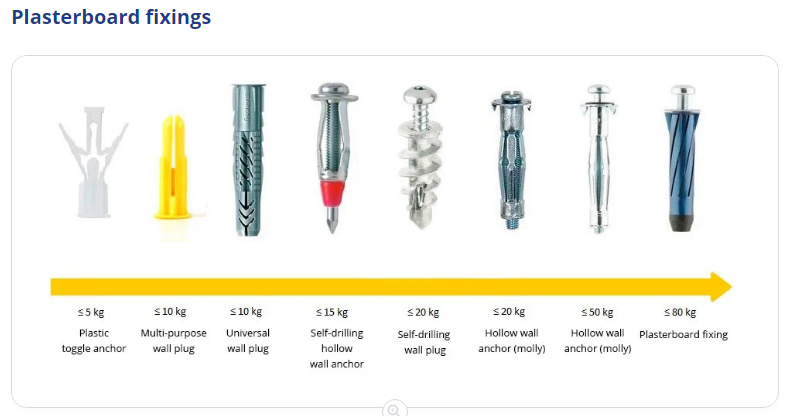 hidden shell
Jaw drop !!! https://www.youtube.com/watch?v=ESW3gXUo1QM

Thanks to HP for sponsoring this video! Learn more about the HP Z8 Fury G5 at: https://bit.ly/3KMvOq0
HP’s new Z8 Fury G5 is a monster! With the new Intel W9-3495X workstation CPU, four (FOUR!?) Nvidia A6000 GPUs, and up to 2 TERABYTES of RAM, this will make your puny best-of-class PCPartPicker dream machine look like a pi by comparison
Discus...
Tech Porn !
grizzled crow
still 6 fps in calais
mighty idol

 inland badger
wonder if I can run this with an athlon cpu 🤣
 pastel lodge
https://cdn.discordapp.com/attachments/610973915187118091/1083357042846203944/1da9d56e-db40-4b17-a1ae-9136078ab927.png more rc truck parts arrived finally
 grizzled crow
looks like it'll be a big boi
grizzled crow

Check out Goliath today using the link below and save 20% today: https://lmg.gg/Goliath-Technologies
Create your build at https://www.buildredux.com/linus
It is nearly impossible to cool Intel’s 13th gen CPUs.. so we got a 5000W industrial chiller!
Discuss on the forum: https://linustechtips.com/topic/1492779-the-god-of-computer-coolers/
Che...

pastel lodge
grizzled crow
looks like it'll be a big boi
it is not small no
lol
thats a full size keyboard
my truck is the size of that if not larger lol
latent socket
can i get recommendations for new case? i have multicom tycho i513k xD
i have motherboard msi pro z690-a ddr4
agile ermine
depends of your budget
latent socket
maybe around max 200eur
agile ermine
in the mid-range, be quiet makes some nice cases if you care about silence and not airflow, Corsair's 4000d is nice, and Fractal design has some nice stuff as well
for less than 200€ im pretty sure you can get the ATX version of the Fractal Torrent
latent socket
thats a good one
latent socket
or maybe nzxt h9 or h7
agile ermine
the h7 in its flow variant seems like a good option
don't bother with the h9, just get a lian li O11 dynamic (or the mini, I think it can still fit ATX motherboards)
(and additional fans since the O11 doesn't have any)
latent socket
g360a or g500a also good?
agile ermine
I'm more into Phanteks's evolv lineup, but they make good stuff overall
if you're looking for RGB, you also have the Corsair 4000X/5000X
agile ermine
most of their cases are furnaces
grizzled crow
mine does great
hasty ether
So recently I bought an sd card for my phone and it's been deleting files off of it and it turns out it's fricking faulty. So I guess I give up I am so tired of Chinese garbage not working right.
I hate my life...
Right time to format it to 2 GB so I can pop it in my wii.
grizzled crow
i cant remember last time i put an sd card in a phone

 spiral yew
Ewwww malware bytes, also why is your ram capacity so low
hasty ether
yeah
uhh
It's a mess...
Time to get another 16 gb stick.
ugh
I hate Windows.
Oh my gaad why why why the high ram usage?!
Ugh
Okay I can't use my pc normally anymore...
Screw WINDOWS!
Damnit all to hell.
spiral yew
I never have the logitech wingman running at startup
hasty ether
I play alot of simulation games.
hasty ether
spiral yew
Ewwww malware bytes, also why is your ram capacity so low
Look I hate using anything else but that.
spiral yew
Ewww iTunes
hasty ether
spiral yew
Ewww iTunes <:Wesh:983073194913202216>
Hey I gotta get stuff from cds.
iTunes is my best bet.
spiral yew
I tried malware bytes gamer edition and it locked me outta all web browsers
hasty ether
Gamer Edition? Oh cmon MWB just stop.
Honestly I only need one good gaming app.
Fricking stupid companies.
celest nova
Shot my next deal. 21,99€ for this gaming beast.
 spiral yew
Back when you could actually see the motherboard
I hate the so called asthetic look of the boards these days
grizzled crow
spiral yew
Ewwww malware bytes, also why is your ram capacity so low
50% is alright
spiral yew
The only time i'm near 50% memory usage is when i'm playing a game
grizzled crow
im on 78%
 oak beacon
Heyo, if anyone here lives in the UK, I'm selling my gaming PC to build a new one. I can send specs if you want them
It also runs ETS 2, ATS (including TMP) with no issues whatsoever
mighty vine
Should I buy a used RTX 2070 Super for €100 when the only problem is crashing while playing games? It apparently outputs an image just fine
mighty vine
mighty vine
Should I buy a used RTX 2070 Super for €100 when the only problem is crashing wh...
according to the seller*
 hasty marlin
mighty vine
hasty marlin
mighty vine
I don't need a graphics card at the moment. Just thought that for €100 I could try and fix it if it's something easy to do
kind sapphire
mighty vine
Should I buy a used RTX 2070 Super for €100 when the only problem is crashing wh...
One message removed from a suspended account.
One message removed from a suspended account.
mighty vine
That's what I'm thinking aswell
Says he has 0 knowledge on PC components so it's worth a shot imo
agile ermine
eh, could very well be a hardware issue as well
celest nova
mighty vine
Should I buy a used RTX 2070 Super for €100 when the only problem is crashing wh...
I would buy it tbh, had luck with an RTX 2070 myself.
Bought a Colorful RTX 2070 with the same issues, turned out to it needing a reflow (not oven, but with a rework station)
But, there's also a chance of a hardware defect. The RTX 2000 suffers from those, since early Micron VRAM (made in 2018) has the highest failure rates.
mighty vine
Interesting
celest nova
That's why more and more RTX 2000 GPUs get sold for defects on eBay, numbers rising.
Mine though had some GPU Core problems, probably a cold solder joint due to extensive use.
I mean, if you'd offer me the link, I might be able to buy it and fix it. Depends though on the description of failure and general specs of the card.
mighty vine
Are you from the Netherlands? If so I can give it to you and you could try your shot with the seller
Oh and the GPU is the "MSI Gaming X 2070 Super"
mighty vine
mighty vine
Are you from the Netherlands? If so I can give it to you and you could try your ...
I'm still expecting a response about it
celest nova
mighty vine
Are you from the Netherlands? If so I can give it to you and you could try your ...
I'm from Germany, shouldn't be difficult though
celest nova
yea sure

 grizzled crow
ya cooler is abit wonky
celest nova
ye I didn't screw it on, just didn't care enough lol
kind sapphire
celest nova
ye I didn't screw it on, just didn't care enough lol
One message removed from a suspended account.
One message removed from a suspended account.
 distant yew
 grizzled crow
get cable ties
spiral yew
look at this cable management krav
 grizzled crow
 grizzled crow
@spiral yew I got a stud finder for the monitor
hasty ether
I hate Mayflash.
spiral yew
grizzled crow
<@303275738017038337> I got a stud finder for the monitor <:Wesh:983073194913202...
You still haven't wall mounted that monitor yet
grizzled crow
I was waiting for payday to get the monitor
Monitor arrived, just waiting for everything else
 spiral yew
Non modular psu
grizzled crow
3rd monitor installed 
celest nova
MSI Z370 Tomahawk
i5-9600K
2x8GB 320pMHz CL16 Corsair Vengeance
ASUS ROG STRIX GTX 1070
1TB 970 Evo Plus SSD
500W be quiet! Pure Power 11 80+ Gold
remote prism
How can I dualboot Ubuntu and Windows 11 with Ubuntu on removable drive? When I turn on my PC without the Ubuntu disk, grub command line shows up. If disk with Ubuntu isn't inserted, I want it to boot to Windows
sinful monolith
you probably want to add windows as a boot option in grub
the arch wiki is usually a pretty good resource, even if not using arch linux specifically, but be mindful of possible differences in the available commands and their versions https://wiki.archlinux.org/title/Dual_boot_with_Windows
remote prism
I have it in the selection menu, but the menu only shows when Ubuntu disk is attached

As soon the disk is not attached, it goes to grub command line

I can type 'exit' and it will boot to Windows
 frozen mantle
Wondering if anyone can help. When playing a game after playing for some time my fans go full throttle and display shows no signal I can’t find any clear issue 
 pulsar cipher

 brittle mountain
frozen mantle
Wondering if anyone can help. When playing a game after playing for some time my...
brittle mountain
frozen mantle
Wondering if anyone can help. When playing a game after playing for some time my...
if it's an RX6000 gpu, your driver crashed and didn't recover
kept having that with a 6900XT until i returned it
frozen mantle
brittle mountain
if it's an RX6000 gpu, your driver crashed and didn't recover
kept having that w...
RX570. Drivers have been a pain recently. DDU’d it today and reinstalled yet no fix
brittle mountain
try an older version
maybe even 2-3 versions back
works on Nvidia gpus, might as well work on Radeon too 🤷♂️
grizzled crow
i have an issue where one screen goes black every so often
luckily its not the one i use for driving
frozen mantle
Single display issues
hidden shell
grizzled crow
luckily its not the one i use for driving <:Wesh:983073194913202216>
Do you use any kind of adapter to connect that monitor like HDMI to display port or something similar
grizzled crow
ye got a different hdmi cable
hidden shell
I've seen these small adapters fail sometimes, doing exactly that, turning the display off randomly
Not saying that's your issue but something to watch for
frozen mantle
Retried DDU and installed radeon pro drivers. 
 severe sage
frozen mantle
Retried DDU and installed radeon pro drivers. <:PU_PepeCringeZoom:76344998347472...
severe sage
frozen mantle
Retried DDU and installed radeon pro drivers. <:PU_PepeCringeZoom:76344998347472...
Not sure how graphical driver issues would cause an inaccessible boot device stop code. Normally signs of ssd driver issues/ssd failiure in my experience 🤔
severe sage
severe sage
Not sure how graphical driver issues would cause an inaccessible boot device sto...
That being said, a blank display could not be the gpu but the storage device.
frozen mantle
Same. But it was working fine before the display driver restart and the ssd’s only a few months old
Funny, must’ve been a windows boot thing automatic repair has fixed it
 severe sage
frozen mantle
Funny, must’ve been a windows boot thing automatic repair has fixed it
severe sage
frozen mantle
Funny, must’ve been a windows boot thing automatic repair has fixed it
Anything in event viewer which seems off?
Also run CHKDSK while you're at it.
frozen mantle
severe sage
Anything in event viewer which seems off?
Not that I can see, only the force shut down I have to do each time the display turns off
kind sapphire
severe sage
Not sure how graphical driver issues would cause an inaccessible boot device sto...
One message removed from a suspended account.
severe sage
frozen mantle
Not that I can see, only the force shut down I have to do each time the display ...
Is there a no signal message or rather a black screen but the monitor is still on?
frozen mantle
No signal
kind sapphire
One message removed from a suspended account.
One message removed from a suspended account.
frozen mantle
It’s windows. It’s probably having a strike day
kind sapphire
One message removed from a suspended account.
frozen mantle
Exactly
severe sage
kind sapphire
One message removed from a suspended account.
Could be, or might be a side affect of constant force shutdowns. Windows is a mysterious thing
frozen mantle
I rarely have to do it maybe once a week but power button doesn’t work you can only force it to shut down otherwise it’d run in infinitely
severe sage
frozen mantle
I rarely have to do it maybe once a week but power button doesn’t work you can o...
I'm assuming you've tried different cables or port on the gpu?
frozen mantle
Swapped ports. The cable I’m using is the least junky one I have but works fine on other devices
severe sage
frozen mantle
Swapped ports. The cable I’m using is the least junky one I have but works fine ...
Swapped ports on the monitor? And tried another device connected to it?
frozen mantle
I could but that doesn’t explain the fans going wacko
And it also happens on gaming sessions, not even after several hours streaming videos / searching etc
severe sage
frozen mantle
I could but that doesn’t explain the fans going wacko
I'm assuming you're referencing the graphics card fans right?
frozen mantle
Well that’s the whiny one tbh I’ve never looked just turned it off 😂
severe sage
frozen mantle
Well that’s the whiny one tbh I’ve never looked just turned it off 😂
Next time have a look at your gpu when the no signal occurs, such as increased fan speed, loud coil whine etc etc. If there is any of that chances are you have a faulty card.
spiral yew
brittle mountain
if it's an RX6000 gpu, your driver crashed and didn't recover
kept having that w...
i have a 6900xt and haven't had any issues with it
 unborn garden
pulsar cipher
<:bene:729412606414159883>
unborn garden
pulsar cipher
<:bene:729412606414159883>
thats look so good. I muss jump on my PC to close the Back
 cosmic urchin
pulsar cipher
<:bene:729412606414159883>
cosmic urchin
pulsar cipher
<:bene:729412606414159883>
mine is clearly better 


ive had it cablemanaged for the longest time, but at some point i just gave up
the side panel doesnt even go on anymore, so i just leave it open haha
pulsar cipher


 pulsar cipher
how much increased fps?
cosmic urchin
pulsar cipher
how much increased fps?
all of them
its even more effective than rgb
pulsar cipher

celest nova
tried SLI today 😄 Got my GTX 970s for my Z97 project, so since I wanted to clean my PC out, I just took the chance to test them in my main rig.

 hidden fiber
anyone got a good recommendation for A PSU? i got the H100i cappelix and 1660 Super+AMD Ryzen 5 5600G. Needs to be Fully modular and 650 or more watts
spiral yew
i'm using a corsair ax860
severe sage
hidden fiber
anyone got a good recommendation for A PSU? i got the H100i cappelix and 1660 Su...
Many good options out there for those requirements, personally I'd go for a corsair rm series but that might push your budget a bit depending on what you've set it at.
You can always check on the PSU tier list site if you want to look at other options.
agile ermine
EVGA and Seasonic makes some reliable stuff as well. Recommendations will depend of what you're willing to pay for it... Here, a good 650W fully modular PSU retails at 100-120€
maybe you should check for semi-modular PSUs as well, since the non-detachable cables are the ones you will need anyways
celest nova

PSU Tier List will help you to choose the best PSU out of hundreds of models on the market. From budget to the highest end Power Supplies.
Go by this list. Brands aren't a compareable factor in a lot of cases, many do still have rubbish products in their lineup. Or in other cases are brand issues (coughLC Power cough)
mighty idol
celest nova
https://cultists.network/140/psu-tier-list/
my psu were in avoid category 
brittle mountain
every psu is my house is in A tier lol, i can hear my wallet screaming in pain 😂
spiral yew
my PSU is not even on the list 😂
severe sage
mighty idol
my psu were in avoid category <:peepoU:784912836753096714>
I'm sure it's fineeee, not like it'll explode or anything....
 remote estuary
brittle mountain
every psu is my house is in A tier lol, i can hear my wallet screaming in pain �...
remote estuary
brittle mountain
every psu is my house is in A tier lol, i can hear my wallet screaming in pain �...
A tier here as well 
kind sapphire
One message removed from a suspended account.
grizzled crow
cosmic urchin
the side panel doesnt even go on anymore, so i just leave it open haha

why the spoiler tho
cosmic urchin
grizzled crow
why the spoiler tho
for more speeeeeed
grizzled crow
oog
oof
also if you like put all our body weight on the panel, it usually closes
celest nova
Currently fixing up a server board

soldered BIOS Chip onto it, now going into RAM errors. Gotta check once real compatible RAM arrives, since my DDR3 ECC RAM isn't on the support list of said mainboard
3.3V on RAM channels are there, but still no boot further than post code 55/5 beeps one long beep
IPMI works flawlessly.
pliant comet
Usually cleaning up the RAM slots should fix the issue.
celest nova
Well, they don't in that case.
frozen mantle
This may have been the reason why my pc kept randomly shutting down
 celest nova
Ehhh not good I suppose
spiral yew
frozen mantle
This may have been the reason why my pc kept randomly shutting down <:Wesh:98307...
what in the world kinda paste job was that?
also that looks more like a laptop motherboard than a desktop one
 tribal violet
That's a GPU board 
celest nova
That was a notebook a maniac treated.
 quasi niche
might go for the lenovo legion 5 pro 16 tbh
quasi niche
or the helios 300
spiral yew
celest nova
That was a notebook a maniac treated.
dear god look at that thermal paste madness they got it every where except for where it matters the most
latent aurora
Me first 3D printer 
 kind sapphire
latent aurora
Me first 3D printer <a:CE_PopCatVibe:875872127167897621>
kind sapphire
latent aurora
Me first 3D printer <a:CE_PopCatVibe:875872127167897621>
One message removed from a suspended account.
latent aurora
haha xD
 flint egret
Is a laptop with Ryzen 5 6600H, RTX 3060, 16gb of ram and a 144hz 1080p good for 1400€ brand new?
latent aurora
sounds like my laptop actually 🙈
Well, specs are the same except you have a 3060 - you have a better GPU than I do - apart from that, I love my laptop, I can play on any game I want to play
agile ermine
1400€ sounds expensive for that kind of specs
flint egret
Could also get a i5-12400f, GTX 1660 super and 16gb of ram desktop for 900
agile ermine
but it depends of the kind of laptop you need... you can have more powerful at that price point, but if you need good build quality, portability, etc... that will be a higher end laptop, and therefore more expensive
flint egret
agile ermine
but it depends of the kind of laptop you need... you can have more powerful at t...
Sure you can get more powerful for the same price at second hand market but I'm not buying it second hand
agile ermine
flint egret
Could also get a i5-12400f, GTX 1660 super and 16gb of ram desktop for 900
that's just bad if you can build your own pc
agile ermine
flint egret
Sure you can get more powerful for the same price at second hand market but I'm ...
who talked about second hand?
flint egret
agile ermine
that's just bad if you can build your own pc
Not looking to build one. It's either prebuild or nothing
agile ermine
then it's less bad, but still not great
flint egret
I could buy the desktop and then upgrade the GPU in the future
agile ermine
that's a possibility, if the power supply can follow
and for the laptop, unless prices are crazy in Finland, you should be able to find a better deal... for that price, I can find an 11th gen core i7 with an RTX 3070 without trying that hard
flint egret
Cheapest laptop with RTX 3070 is 1600€
Probably going to order the desktop with GTX 1660 super
Laptop with i5-12500h, 16gb of ram and RTX 3050 for 1000€ 
Or I'll just stick with my series X for now and check the store every now and then for deals
severe sage
flint egret
Probably going to order the desktop with GTX 1660 super
You could order a desktop without a gpu and then look on the second hand market for a good deal, depends if you're happy using used parts 
grizzled crow
flint egret
Is a laptop with Ryzen 5 6600H, RTX 3060, 16gb of ram and a 144hz 1080p good for...
lol
i have that laptop
well mines 6800h
but intel one was like £300 cheaper but intel is just trash compared to ryzen
flint egret
grizzled crow
i have that laptop
Is it good?
grizzled crow
ye
agile ermine
eh, the spec is one thing, the laptop is another thing
btw, intel 12th gen is actually really good
grizzled crow

Ebuyer.com
ASUS TUF Gaming A15 FA507RM, AMD Ryzen 7 6800H, 16GB DDR5, 1TB NVMe PCIe SSD, NVIDIA GeForce RTX 3060 6GB, 15.6" WQHD IPS, Windows 11 Home Laptop - Jaeger Grey
paid £900 for it
with a free mouse and bag
oh and mines 17.3
agile ermine
that's a nice deal you found there
I probably wouldn't keep the mouse given how bad the free stuff usually is, but the bag is always useful
grizzled crow
oh it was £999.99
na its a decent mouse
got rid of the bag tho

thats the mouse and bag
agile ermine
4-way SLI time ?
celest nova
well, then I'd have to get my other 970 back that I lent to a friend lol
but heck, 970 is the wrong graphics card for that
should be trying that with a 9800 GX2 or 8800 GTS/GTX/Ultra
 upper sundial
Does anybody else wheel make these high noise while steering? Or does somebody know what could cause this sound? Im using the G923
kind sapphire
upper sundial
Does anybody else wheel make these high noise while steering? Or does somebody k...
One message removed from a suspended account.
One message removed from a suspended account.
upper sundial
kind sapphire
One message removed from a suspended account.
I bought is at the end of January. The noise started like a week ago
kind sapphire
upper sundial
I bought is at the end of January. The noise started like a week ago
One message removed from a suspended account.
One message removed from a suspended account.
One message removed from a suspended account.
upper sundial
kind sapphire
One message removed from a suspended account.
I think thats the best way
thx
frozen mantle
upper sundial
Does anybody else wheel make these high noise while steering? Or does somebody k...
Could be a true force thing
 tawdry valve
My current setup


 tawdry valve
 fast steppe
Ill chime in with my rig aswell 😂👍
fast steppe
Ill chime in with my rig aswell 😂👍
Ignore my custom loop, my case is actually too too small for the whole thing, upgrading to the 4000D soon and holy…… 😅
What’s your specs?
fast steppe
tawdry valve
Ignore my custom loop, my case is actually too too small for the whole thing, up...
tbf i dont even know which loop youre talking about 😄 i just see a shiny pc that looks tidier than mine 😂
fast steppe
tawdry valve
What’s your specs?
got an old one... gtx 1070, ryzen 5 2600 and 16 gigs of ram at 3200mhz
tawdry valve
My specs
 fast steppe
nothing special, it has to last longer, with these current prices im not looking to shell a fortune 😄
i sometimes legit feel like my steam deck handles some games better than my pc lmao
tawdry valve
Ahaha as I said upgrades come within time… took me 3 years to get to this point
fast steppe
welp, my pc is turning.... 10? 9? soon 😂
tawdry valve
fast steppe
welp, my pc is turning.... 10? 9? soon 😂
Yeah, You'll get there man, i have to admit im jealous of your setup tho lol
fast steppe
20xx series happened from nvidia and i was like eh, i just got this, im fine. 30xx series happened and i was like welp, prices are dumb right now, no avaliability...
40xx series happens and nvidia i just straight up beeing the scalper themselves with those prices 😄
fast steppe
tawdry valve
Yeah, You'll get there man, i have to admit im jealous of your setup tho lol
cheers hehe 😄 its definitly overboard for trucking, but like i mentioned earlier in general, this was a competetive iracing purpose build, trucking, drifting and other games are just a bonus with that
fast steppe
tawdry valve
I got my 3090 for 750
my entire pc back then cost me just short of a grand back then 😂
tawdry valve
fast steppe
cheers hehe 😄 its definitly overboard for trucking, but like i mentioned earlie...
Yeah I do a bit of Assetto Drifting with the DCGP Cars
fast steppe
have to check that out some time again, been a while since i did assetto tbf...
did alot of Richard burns rally in the past months, and prior to that i was on the iracing grind, hence why the rig is the way it is. LED box on the top right for flag signals on track, Vocore 4.3 inch screen with RGB led strips in the housing mounted to the wheelbase and so on
controlled via simhub
spiral yew
tawdry valve
Ignore my custom loop, my case is actually too too small for the whole thing, up...
The cooler master 4000D isn't a very big case
 tawdry valve
spiral yew
The cooler master 4000D isn't a very big case
tawdry valve
spiral yew
The cooler master 4000D isn't a very big case
I'd be getting the Corsair 4000D its bigger
tawdry valve
Yeah ahaha Its still a good case tho 😄
spiral yew
That's how room there is between my gpu and the aio rad

i would get the 5000D it's even bigger
spiral yew
yea i should've gotten the 5000D
if i had know about the corsair obsidian 1000D when it was released i would've gotten that one
celest nova
SLI time today.

OG Chieftec Dragon, Z87 Extreme4, 4x4GB 1600MHz DDR3 RAM + 2x MSI GTX 970 Gaming X 4GB
kind sapphire
fast steppe
One message removed from a suspended account.
fast steppe
kind sapphire
One message removed from a suspended account.
i have a quest 2, but my pc is not good enough for it
potato of a pc for that
celest nova


 fleet crest
anyone want to be the judge for this build? im thinking of using this for ETS2, MSFS, dead by daylight and also some CAD programs
 celest nova
Ahhh right, CAD programs... Well, I wouldn't advise you to go NGREEDIA, but heck, in that case...
If you don't heavily rely on that CAD performance, rather go AMD.
tiny flower
fleet crest
anyone want to be the judge for this build? im thinking of using this for ETS2, ...
I'd buy more storage
fleet crest

tiny flower
you run out of storage faster than you can breathe
currently on my thrid 500gb SSD
planing on going for 5tb or even more
if possible don't use windows 11
It sucks
I got it on my build, 32gb 2666mhz, rtx 3070, i5-8400 and it has lags when searching a program through the search bar
windows 10 went fluent
fleet crest
tiny flower
I'd buy more storage
ive been thinking about bumping it up to 2TB. but i dont really use a lot of storage anyway. coughs
but tbf its a good point as well since most games nowadays are using more storage

plus if anything i have an external HDD with 6TB which is pretty much enough for me for my CAD stuff
tiny flower
then I have no doubts except the windows 11 stuff
 hmmm
hmmm
 celest nova
tiny flower
I got it on my build, 32gb 2666mhz, rtx 3070, i5-8400 and it has lags when searc...
celest nova
tiny flower
I got it on my build, 32gb 2666mhz, rtx 3070, i5-8400 and it has lags when searc...
You have some other problems rather than storage lol
tiny flower
fleet crest
<:think:1038121334254878810> hmmm
out of curiosity, why windows 10 over 11. *ye...
better optimised
fleet crest
celest nova
You have some other problems rather than storage lol
i mean storage isnt too important for me regardless 
im now trying to figure out whether to pick windows 10 or 11
celest nova
Doesn't make a ton of difference tbh
just differences in design choices and usability
(as of now)
sinful monolith
11 has dark mode task manager so it automatically wins
fleet crest
dark mode 
mighty idol
dang 
kind sapphire
fleet crest
i mean storage isnt too important for me regardless <:LuL:886623369603198976>
...
One message removed from a suspended account.
One message removed from a suspended account.
tawdry valve
Finally arrived


 fleet verge
 pearl stream
Microsoft Access
pearl stream
Microsoft Access
Its really a pain
tawdry valve
All installed


 tawdry valve
mighty idol
didn't you feel that the hose a little bit distracting?
tawdry valve
mighty idol
didn't you feel that the hose a little bit distracting?
Originally I was thinking the exact same thing, but it’s not as distracting as you think it would be
 brittle thunder
graphics card you gonna chance color too ? furthermore it looks pretty clean
tawdry valve
brittle thunder
graphics card you gonna chance color too ? furthermore it looks pretty clean
Yeah I was meant to open Up Spectra Before i took the pics lol
kind sapphire
tawdry valve
Yeah I was meant to open Up Spectra Before i took the pics lol
One message removed from a suspended account.
tawdry valve
kind sapphire
One message removed from a suspended account.
Spectra is just the Overclocking and RBG software for my GPU, I don’t usually have it open at all as I’ve had no use of it ahaha
spiral yew
tawdry valve
Spectra is just the Overclocking and RBG software for my GPU, I don’t usually ha...
is RBG a new software for GPU's?
tawdry valve
spiral yew
is RBG a new software for GPU's? <:Wesh:983073194913202216>
…….
The Lighting for the GPU 😂
kind sapphire
tawdry valve
Spectra is just the Overclocking and RBG software for my GPU, I don’t usually ha...
One message removed from a suspended account.
tawdry valve
kind sapphire
One message removed from a suspended account.
Yeah…. That’s very true it is kinda out there 😂😂 waking up first thing in the morning is like being flash banged
kind sapphire
tawdry valve
Yeah…. That’s very true it is kinda out there 😂😂 waking up first thing in the ...
One message removed from a suspended account.
tawdry valve
kind sapphire
One message removed from a suspended account.
So with that new AIO I have i’ve got a Brand New commander pro RGB and fan controller so all I need software wise now is ICue I guess it works okay, but I wish there was more customisation options
tawdry valve
kind sapphire
One message removed from a suspended account.
This is what mine does when I turn it on aha flashy flashy
Ignore the G920 in the background oh my gosh 😂
kind sapphire
tawdry valve
So with that new AIO I have i’ve got a Brand New commander pro RGB and fan contr...
One message removed from a suspended account.
flint egret
Ordered a Asus Vivobook 14 Pro to do some photoediting and some light gaming 
tawdry valve
kind sapphire
One message removed from a suspended account.
Dammm that sucks man…. Sorry to hear that
kind sapphire
tawdry valve
Dammm that sucks man…. Sorry to hear that
One message removed from a suspended account.
hidden fiber
yo can someone help me rq
i jus built my first pc and checked every cable
but it isnt powering on
tried different sockets
just doesnt work
sinful monolith
no sign of life at all?
pliant comet
Have you checked the switch on the power supply? It might be set to "OFF" position.
agile ermine
another possible silly mistake : is the power button plugged in the right way on the motherboard?
hidden fiber
just fixed it
was watching a yt tutorial and had the power sw cable connected wrong
runs great now
ty
mighty idol
it's always that damn power switch cable 
I also need to check my external power switch if something is wrong
hidden fiber
I swear bro. I jus got done w my fans cuz the rgb wasnt working
dasiy chained 1 fan wrong and nothing was working
but looks clean now only my gpu is killing me
 celest nova
4800MHz? Seems little bit slow tbh


 spiral yew
never heard of them
agile ermine
Me neither
celest nova
They were most relevant during GeForce 8000 series all the way up to GTX 500 series.
 flint egret
Still never heard of them
celest nova
okay xD
Wait, then lemme name up some old ones that used to be around, maybe you know one of them:
- Club3D
- VTX3D
- Spea Technologies
- BFG Tech
 west hemlock
Who watches this guy

YouTube
Let's become the Greatest Tech Community on the Planet 🌍
I'm Arun Maini, I'm a 27 year old Economics graduate whose life's passion is Technology, and I'm on a mission to make the most FUN and USEFUL Tech videos on the Planet! 🙏
mighty idol
west hemlock
Who watches this guy
I watched him before, he's quite good tbh, just recently I got more into pc tech and didn't watch him anymore
 spiral turtle
 celest nova
Wait, then lemme name up some old ones that used to be around, maybe you know on...
celest nova
celest nova
Wait, then lemme name up some old ones that used to be around, maybe you know on...
Well guess what - Matrox is back xD

 flint egret
Never heard
hidden shell
celest nova
Well guess what - Matrox is back xD
Damn, a Montreal company that I remember, I even had a friend that worked there
tribal violet
@whole verge, Don't mind the cables. That'll be sorted another time  Was a long day yesterday. But otherwise
  Mic on the right ofc.

 whole verge