#tech-support
1 messages · Page 780 of 1
 static swan
 bitter heron
[Game]
Library=RGSS100J.dll
Scripts=Data\Scripts.rxdata
Title=Pokémon Infinite Fusion
RTP1=
RTP2=
RTP3=
Thats the text inside
static swan
(habit die hard. It used to be the default to show the extension)
yes, the content of your file is right. I have no idea why your user doesn't want to have a Saved games folder
it's probably a settings somewhere
bitter heron
Well, at least i know where they are. So i can reinstall my windows. 😄
Thank you for the awesome support!
static swan
you're welcolm. I wasn't that useful lol
bitter heron
haha 😄
 sterile pivot
hi
sterile pivot
hello , im comming here because i got this issue who started to pop only today for me and i dont know what's the cause of it or how to solve it
 lament coral
@sterile pivot try to redownload.
sterile pivot
im doing that
sterile pivot
worked for d first one but now im keep getting this every 2-3 min i play :/
sterile pivot
Ye but only wild encounter why ?
lament coral
Turn off, then on again.
sterile pivot
How should i do that ?
lament coral
Pokécenter is a guy.
sterile pivot
Ah wait nvm i forgot that guy was here xD
 marble talon
update man at the top of pokemonc enters
sterile pivot
So i just turn all off close d game put back on ?
lament coral
Yes
sterile pivot
Done
 honest wind
I have a save file but the game won't get past the home screen where they show fusion monsters
 queen inlet
What happens?
honest wind
Just keeps showing pokemon get fused
But I can't go to the menu screen and start the game
queen inlet
Press enter?
honest wind
Tried that
honest wind
yep neither worked
queen inlet
Have you tried reinstalling the game?
queen inlet
Maybe check controls in f1 screen
honest wind
Shows Z is A so controls should be fine
lament coral
Press Z?
honest wind
Obv tried that lol
honest wind
Fuck it going to play the game from the start
queen inlet
Maybe @chilly kayak can help repairing that file
lament coral
They're saved in the game. I got often files from others with changed keys.
queen inlet
Why are they saved there?
honest wind
But if the keys are changed the file won't work?
queen inlet
No u just have to click the right key
queen inlet
Np
 mild rock
My friends are trying to download the latest version of the game, but they're telling me that the file they downloaded can't be extracted or deleted
I'm not sure what's going on, they told me they've downloaded it from the link on the forum page
And when I downloaded the game a couple years ago I played it just fine
marble talon
im not sure, but maybe downloading 4.6.0.1 from discord might help
cant say for sure
mild rock
It's strange though, he told me the file name was the same as the one from the discord mega download
So idk if it's just him or what
queen inlet
They should install WinRar so they can extract it
mild rock
I know that he has a way to unzip the file because we've played fan games like uranium and insurgence recently with no problems
The problem could be coincidental though
I have 7zip and I never had any problems extracting them
queen inlet
That’s weird. Can they give some more information on what error they get?
Maybe they didn’t download the full file or tried to move it to early such things can happen and then the file is useless
mild rock
All he told me is that once he downloaded the file, he couldn't extract it or delete it and it proceeded to screw up the rest of his files
He didnt have anything important on his computer which is good to hear
Now that I have time, I'm going to try to install the game for myself
queen inlet
Pro-Tip, don't screw up
lament coral
Seems like don't have 7zip
queen inlet
Windows has an integrated Zip Programm to unzip Zip files
lament coral
Download winrar
mild rock
Alright I got some more details from my friend, he said that he wasn't able to download it without making a mega account
I found it strange cause I never had to make an account for mega downloads
lament coral
Weird.
sterile pivot
Evoburst got the save from me and I forgot to tell him I changed the buttons
I sent him a list of the changed controls
mild rock
Ok my friend was able to extract it with winrar, apparently he was using windows to extract it and his computer acts weird with certain files apparently
He says it's working now, thanks for the advice
queen inlet
No prob. And don’t forget. Nothing is infinite except the test version of WinRar @mild rock
 rugged swallow
For some reason, when I enter the cities or certain routes, the bgm doesnt play
 stuck thistle
hi it is possible to plays with a controller ?
lament coral
It's possible.
 bronze brook
How do I get the custom sprites in?
bronze brook
I mean, Do I put the files in Fusion\Graphics\Pictures or CustomBattlers
 wraith marten
Any sprites in the custom battlers folder given the correct name (head.body) will overwrite the usual sprites
CustomBattlers
bronze brook
Thanks
static swan
Playing with a controller is not a native fonctionality though. So I wouldn't say it's possible. I would say there is workaround to trick the game into thinking you are using a keyboard when you really are using a controller. But that require the use of a third party software
 rancid hazel
Probably a stupid question but is it safe to update the game if I'm in the middle of a randomized playthrough? Would I have to go re-randomize or use the fixer or anything?
seems like the update changes randomization but I don't know if it'll do anything if my world is already randomized
 chilly kayak
Yes it's safe and your randomizer settings will stay the exact same. You don't have to rerandomize anything, unless you want to try the new randomizer type
rancid hazel
thanks
 wild bear
how do I patch the new update?
I've been playing on the 4.6 update and just downloaded the 4.61 update patch zip
lament coral
Download the full version in #announcements extract it. Then the patch and extract it too, after you did it replace the old files with the patch one.
wild bear
Thanks for the help
 jaunty bridge
 vernal frigate
I get this error when starting my fight against Giovanni with Zapmolticuno. I don't understand everything in this message but I think its because the backsprite of Zapmolticuno is missing and maybe there are other problems. I hope that someone could help me.
lament coral
Talk to fixman in the pokécenter. @vernal frigate
vernal frigate
but i'm stcuk in the 9th floor of the team rocket HQ
queen inlet
Debugger
vernal frigate
don't mind of what i said, i'm not stuck
vernal frigate
i talked to the fixman but nothing changed.
lament coral
You sure? Habe you tried again?
vernal frigate
Yes, I tried 3 times and each time the same error message appeared.
static swan
just to be sure. do you have a "special" folder in your "battlers" folder in your "Graphics" folder ? and if so, is 144.145.146.png inside it ?
vernal frigate
I'm not at my home right now so I dont have my pc but I already checked this "special" folder, I dont remember if I have this 144.145.146.png but I think that its Zapmolticuno's backsprit and I dont have any backsprit of all the fused legendary pokemons.
static swan
there is no actual "backsprite". those were removed for all pokemon to reduce the amount of png (we already have 120 000 + png with juste 1 sprite for each fusion. )
the backsprite is actually the regular sprite flip
sterile pivot
static swan
bloblo, that looks like a randomization error. you probably can fix it by talking in the men in black at the top of a pokemon center. and re-shuffle the dex
sterile pivot
Aww. But I wanna find the zekrom sword again
vernal frigate
@lament coral I have this one.
lament coral
@wheat blade When this happe. After you're starting the game?
@vernal frigate Well. Are you sure you extracted the game right?
 wheat blade
@lament coral When i try and use a save that i play with joiplay , when i transfer it back to my pc it freaks out
Guessing joiplay did somthing , aint a huge issue but would be nice if once im home i can play my save on my pc
lament coral
Can you show your folders, please. Also the ones in SavedGames.
vernal frigate
Yes I think I extracted the game right, I also downloaded it a second time and extracted everything again, but I still have this error.
lament coral
Can you show your folders, please. Also the ones in SavedGames.
and talk again to fixman.
wheat blade
@lament coral Were you asking me or poulet
 vivid vector
Just downloaded this game on my Mac trying to run through Wine. Everything works perfectly except the battles are super slow, to the point where it takes at least a minute for the Pokémon to even come out. Are there any settings that I could change to make the battles run more smoothly?
 forest jetty
are you using the newest version? Try an older build (4.5.10 for an example) if you are. I'm having the same problems too lmao but try that first
vivid vector
Sorry, I’m not very tech savvy, where do I find older versions of the game?
Never mind, I figured it out
Thanks for the help!
forest jetty
try it tho, if not then I have no idea, im experiencing the same problems as you rn cuz I also have a mac
vivid vector
No luck with 4.5.10, I’m going to try a developmental version of wine, see if that makes a difference
vivid vector
10.14.6
forest jetty
aight same, does the developmental version work tho?
vivid vector
It works much better with Developmental version. I downloaded winebottler 4.0.1.1
forest jetty
can you send me a link in dms?
vernal frigate
@lament coral which folders do you want to see ?
lament coral
Hm. Looks fine for me, wait.
What version are you playing?
Try this. @vernal frigate
vernal frigate
The latest version 4.6
lament coral
Download the map, replace the file and test it. If not working try an older version.
vernal frigate
Ok thanks.
 eternal night
wrong channel
wild bear
I can't use Strength outside of battle even though I've got the Rainbow Badge. help?
lament coral
You need 4 badges.
wild bear
Already got 4
lament coral
Then you should be able to use it.
chilly kayak
yeah you need 5 badges for strength
wild bear
is it any 5 or do I need Koga's badge specifically??
lament coral
Any.
wild bear
Silph Co. and then Sabrina, it is!! Thanks a lot!!
 sour copper
hey, when I try and download the mega file, it says "The provided key is invalid. Please check that the link is correct or ask the creator of the link again."
solved
sour copper
new question how do I patch 4.6.1 onto 4.6.0.1/
really, really new into this part of fangames, and I've never had to patch before
 tranquil saffron
Copy the contents of the patch into your game folder and overwrite all the files with the new ones
sour copper
thanks
bronze brook
I tried to use this sprite on a Togepi/Ditto, as thats who it was made for, and its not working
 fathom vector
that's because that sprite is for a ditto/togepi
 hollow ridge
change the numbers
bronze brook
ooh
hollow ridge
and it will work
bronze brook
OOOH
hollow ridge
for that
bronze brook
thanks lol
marble talon
4.6.1 patch acts like 4.6.0.1
replaced the old data file with the patch data file
nothing happens
and i have the random encounters file
so i patched correctly
queen inlet
Maybe frog just forgot changing the splash text?
wild bear
help!!
This dialog box started appearing once my Haungross (93.293) evolved into a Gengross (94.293)
After which the game has crashed twice now
queen inlet
Seems like the file in Custom Battlers is damaged try downloading the file from here again and put it into Custom Battlers https://discordapp.com/channels/302153478556352513/543958354377179176/565949151867699210
queen inlet
Did it help?
wild bear
still shows the same error
queen inlet
Can you try turning of use Custom Sprites in options and then do it again? So we can see if it’s bcs of Custom Sprite error
Will try to find someone who is more able to aid @lament coral HELP What is dis error https://discordapp.com/channels/302153478556352513/308392115338084360/736118791041318925
wild bear
Do I have to restart after turning off Custom Sprites?
There's no error after turning off custom sprites
queen inlet
What happens if you turn it on now (save beforehand)
Do you get the Error or does it work?
wild bear
There was no error once I turned it back on, but after restarting the game the error's back
lament coral
@queen inlet never seen.
queen inlet
Then you will have to wait until frogman will answer why that happens. We never saw it. Sry
chilly kayak
Never seen this. Are you playing on windows?
static swan
what about if you delete this specific png from the CustomBattlers folder ?
My best guess would be that its not an actual png. that someone made a thing in whatever format and rename it as png . renaming a file doesn't change it's format. Maybe rpg maker is trying to open it and fail ?
chilly kayak
@marble talon the splash screen should say 6.1 when the patch is installed. Can you check if the option to use the new randomizer type is there when you start a new game? Or if the strength npc (with the rhyhorn) is there on route 13?
marble talon
@chilly kayak the option to use the randomizer type isn't there when i start a new randomizer game
haven't checked route 13
this?
chilly kayak
yeah you don't have the patch
marble talon
but i patched correctly
chilly kayak
Weird
marble talon
i have the randomized encounters dat file in my data folder
was there supposed to be a graphics folder?
chilly kayak
Are you sure you replaced the old files?
marble talon
yes
chilly kayak
No just data
marble talon
i replaced the older files
i extracted the patch
and moved the patch data file to my game folder and replaced everything
but it still acts like a 4.6.0.1
 prisma swift
why are you playing as heracross in the first place
marble talon
whats wrong with that
tranquil saffron
Maybe try redownloading the game fully?
marble talon
that takes way too long and makes my pc slow
 livid ridge
okay so im havinga download issue
it says
"failed - blob resource"
whut does that mean
marble talon
well i redownloaded the patch
it seems to be working now
not sure what the problem was
livid ridge
@marble talon question for you
ik how you did it
but where did you get the sprites for heracross to be in the overworld as your trainer
livid ridge
ik but
@marble talon how did you get the dive ones
like how did you sprite it is what im asking
did you find the heracross sprites online
if so wheree
I wanna be a teddiursa so badlllyy
marble talon
i just used water pokemon for the dive sprites
wild bear
replying about the Gengross Error from yesterday - @chilly kayak Yes, I'm playing on Windows
@static swan I replaced the sprite with the one @queen inlet shared on here and it still shows the same error. Can anyone of you try using a Gengross and check if the .png is at fault or if it's an error only limited to me
Would'nt mind the error much since you can click 'ok' and continue playing, but after a minute or two of the error, the game crashes
queen inlet
If I get to Playing today I can try it else maybe @lament coral is willing to do it?
wild bear
Thanks a lot 
static swan
This is not what I suggested. I suggested you to try to delete the file completly in the custom battlers. So only the default one exist and see if it works with the default one
queen inlet
@static swan it works when turning off customs
I suggested that to see if it is the sprite
lament coral
@queen inlet Genros? Gengar/Tauros? It works fine for me and as foe.
 royal umbra
Why the game is not giving me the option to randomize the game at the start?
lament coral
You need a savefile first.
wild bear
@static swan There's no issue with default sprite. Deleted the custom sprite, had no issue, downloaded the sprite again, the error comes back
@lament coral Gengar/Metagross (94.293)
lament coral
works fine for me.
wild bear
I'll just have to toss Gengross off of the team then
any good suggestions for a replacement???
 inland tree
hi, I try to run the game on a macbook, using WINE stable.
the first 30/40minutes worked perfect, now i keep getting an error very soon after loading my game.
(I have a screenshot of the error but it is german)
Is there anything special I need to do/configure with WINE ? I am a total noob regarding MacOS
inland tree
lament coral
Have you extracted the game right, and opened Wine correctly?
It says there are errors with the game.exe
inland tree
I'm pretty sure I extracted it right, about wine I am not so sure.
When I open Wine i get that dos-like-looking window (which I really ignore) and then use "open with -> wine" on the exe
lament coral
It's for Linux, but this might help:
https://www.pcworld.com/article/2900497/how-to-run-windows-software-in-linux-everything-you-need-to-know.html#:~:text=First%2C download Wine from your,popular Windows programs and games.

PCWorld
Even the most die hard Linux lovers have to run a Windows program every now and again. Here's how to do so.
inland tree
thanks! but that also says
"Once it’s installed, you can then download .exe files for Windows applications and double-click them to run them with Wine."
does not sound like anything I could possibly do wrong.
think my problem might be that I got the 32bit version? I read on a redditpost that 64bit might run better
lament coral
Maybe you've the wrong Wine version for your system.
inland tree
yes, maybe that is my problem lol.
Thank you very very much for your time!
just seems strange that it worked for the first 30/40min without any issue
lament coral
Np
 brazen flint
hello, i can't progress in the Bell Tower in Ecruteak City. My Game keeps crashing whenever I enter the ladder.
This is the message i am getting
queen inlet
Have you talked to fixman
brazen flint
no, will try
well, it kinda helped. I can enter now, but half of the screen is blacked out inside
oh nvm
thats part of the game lmao
tyty
queen inlet
Yes it is
 brittle heart
Hi guys. Is there someone I can private message about some issues I’m having downloading this? I’m not a tech savvy person at all lol
hollow ridge
just post it here.
lament coral
you can dm me
brazen flint
hey, my porygon quest is bugged
lament coral
@brazen flint What you mean with buged?
lament coral
Send the savefile.
 bright totem
My game crashes if I try to use items/teleport, surf etc after downloading new version and applying patch
nvm... just unpacked and patched again now it works?
 mild karma
 oak knoll
So I tabbed out of my game and cant get back into it, I cant close it either. Help?
 coarse salmon
Did you 'Fullscreen' it or why did you need to tab out?
Maybe the task manager can help you, not sure what the exact name was, but you can “switch to process“ or whatever it's called. Maybe that'll help
queen inlet
And don’t fullscreen force the game. It doesn’t like that
queen inlet
Bcs it wears eviolithe
queen inlet
In this game it works as everstone too
 shut compass
ohh i never knew that and i've had this game for almost 2 years lmao
queen inlet
It’s only in If
queen inlet
Nice
lament coral
why it's not a persian when using mist stone? 🤨
queen inlet
Meowth is level
 hoary nova
Mist stones evolve no matter level or stone tho
queen inlet
Right my bad
hoary nova
But i dont think they used one, i assume they just leveled it up
lament coral
seems so.
shut compass
yeah I leveled up
 supple fractal
This error pops up every time i try and walk up the bell tower
marble talon
talk to fixman
supple fractal
Fixed the issue, thanks!
queen inlet
What mon leveled up? Is it a level it would evolve?
 rugged frigate
24.197 he was learning acid spray at the time
rugged frigate
Arbok/Umbreon
lament coral
Try it again.
rugged frigate
i got the error again, but it didnt crash the app instantly. I saved and defeated another trainer then it just crashed to desktop without any error. but then everything went fine
lament coral
so you've your evo now?
rugged frigate
yeah I was reporting the error
 silk fractal
Started a new file when I realized I buttonmashed through the starter-region choice so I could have totodile, and for some reason the game crashes every time my rival tries to fight me right after choosing our pokemon. Spits this error at me, and I can only assume the 'gym leader' it's referring to is Blue/rival? And something about randomizer.
I don't mind resetting since it's so early in, though.
just thought I oughta post it here anyway, in case it's important, I guess?
aaand it's happening no matter how often I reset. Hm
I dunno why it's talking about randomizers when I'm not using them, though.
lament coral
use Kanto starter.
lament coral
When this happen?
 lime cradle
I was running around training with wild encounters, im assuming something happened with some failed attempt at starting a wild battle
happened a few times before in similar circumstances
lament coral
reshuffle.
lime cradle
okay thank
sterile pivot
when ever i try to extract the file it allways says not responding
sterile pivot
oh i tried that
sterile pivot
how do u make it full screen
lament coral
can't
sterile pivot
kk
 rapid escarp
zapmolticuno doesn't seem to use the custom sprite i have in "custombattlers" does special fusion use a different directory ?
lime cradle
How do i fix this?
it happens with randomizer on a lot, so is there a way to permafix it or nah
[when trying to fight wild pokemon]
chilly kayak
Try to reshuffle
lime cradle
yea thats what ive been doing but it happens so frequently
chilly kayak
Are you using the route randomizer or the global one?
queen inlet
zapmolticuno doesn't seem to use the custom sprite i have in "custombattlers" does special fusion use a different directory ?
@rapid escarp is the custom sprite named correctly?
queen inlet
What happens if you replace the default one?
rapid escarp
it work
 dusk arch
Does this whenever i try to enter the game oof
queen inlet
Have you unzipped?
 median pebble
Hi, I'm having difficulty having the MEGA upload work? I just can't get it to download properly without an error occurring. I don't believe it has to do with my internet, as I've reset my modem multiple times. Is there a mirror link I can use?
 devout flax
I always get an error when i try to teleport
lament coral
https://mega.nz/file/t5lAEKYb#JPdXmWvSZYsBiGBx6uohMOSdaw-T2lCa_C8bIAhyOJQ try to download this, afterwards https://mega.nz/file/B1dkCA7D#KknG3FF0NDll2ZvLN94w4z60Eq67qeVeOxVFu4telP4 and replace the files with the new download. You've to extract both of course. @median pebble
@devout flax Which version are you playing? We need a few more information, probaly you're playing an older version of 4.5.10.
Please download the newest version of the game in #announcements. 🙂
median pebble
That's the exact download link I was using @lament coral
lament coral
Can you show the error, please. We don't have any other download link I know so far, so your best bet is to ask Frog then. 🙂
median pebble
I used a different browser (I had tried 3 others previously) and I finally got the download to work, thank you for trying to help troubleshoot though
lament coral
https://mega.nz/file/t5lAEKYb#JPdXmWvSZYsBiGBx6uohMOSdaw-T2lCa_C8bIAhyOJQ try to download this, afterwards
https://mega.nz/file/B1dkCA7D#KknG3FF0NDll2ZvLN94w4z60Eq67qeVeOxVFu4telP4 and replace the files with the new download. You've to extract both of course.
@devout flax
devout flax
extract both into the game folder?
lament coral
No. Download the first link, extract it. Download the second link, and extract it. Replace the files from the first download with the second.
@devout flax
devout flax
Thanks it worked 🙂
dusk arch
@queen inlet sorry I wasn't on discord, what do you mean by unzipped?
lament coral
Extract. @dusk arch
dusk arch
@lament coral which file should i check if i had extracted ?
lament coral
You should extract the whole game.
dusk arch
the game and everything in it has been extracted and it still does this
@lament coral oof
lament coral
https://mega.nz/file/t5lAEKYb#JPdXmWvSZYsBiGBx6uohMOSdaw-T2lCa_C8bIAhyOJQ try to download this, afterwards
https://mega.nz/file/B1dkCA7D#KknG3FF0NDll2ZvLN94w4z60Eq67qeVeOxVFu4telP4 and replace the files with the new download. You've to extract both of course.
@dusk arch
dusk arch
k
 idle rock
https://puu.sh/GfJNL/0441aef8c9.png hey, can someone help me?

if i want to enter the bell tower deeper in Ecruteak City the game keeps crashing
coarse salmon
Fix guy in pkmn centers should fix it
 hollow ridge
is there a way to edit maps from IF?
lament coral
with rpgmaker, yes.
hollow ridge
i have rpgmaker. when i put the data files into it, it aint work 😦
lament coral
graphics too
 vestal totem
im trying to click on new game but it does this?
also my friend downloaded the same thing and it didnt happen to him
and i dont have any current save files
vestal totem
i fixed it (needed a username an english keyboard has lol)
 acoustic tapir
Thief don't function correctly ? I have thief on my butterfree. He has no item. I fight with snorlax (with leftlovers) but i can't thief the leftlovers...
 keen iris
i cant go up the stairs in goldenrod
ive beat the 7th gym, but i beat it before the 6th gym
hollow ridge
include some screenshots please 🙂
tranquil saffron
Beat the 6th gym then
keen iris
IT SAYS I HAVE NONE
tranquil saffron
That's because you're in Johto
tranquil saffron
Show me the badges in Kanto
keen iris
tranquil saffron
OK, try asking the update man in the Pokemon center top floor to fix your game
tranquil saffron
Maybe try the key item to fix the game while you're in the Goldenrod mall
hollow ridge
debugger?
tranquil saffron
Ye
keen iris
ok
it didnt work
bruh..
@tranquil saffron wtf do i do now
i cant restart this game
tranquil saffron
I don't know
lament coral
@keen iris talk to sciensit
keen iris
which one
lament coral
Cinnabar?
 quaint nacelle
If that's actually required to set the quest flags, that's ridiculous
keen iris
what??
tranquil saffron
You didn't talk to the guy who tells you to go find Giovanni?
quaint nacelle
I don't know if that's a limitation of being in RPG maker, but that's the kind of game state that ought be automatically set
lament coral
He literally just need to talk to him, or get the Seagallo Pass...
quaint nacelle
a scientist in the room where you fought team rocket in the cinnabar lab
 brave loom
i keep getting this error while in Celedon Sewers
 slow compass
hi there, is this game playable on Mac?
 steep pond
Some people have had success getting it to run on Mac with WINE. You may have to update WINE for it to run smoothly
slow compass
thank you, i'll try!
slow compass
Update: it worked, except there is no music
steep pond
Any sound effects, pokémon cries, etc.?
and does your Pokémon Infinite Fusion\Audio folder look like this?
prisma swift
why is your screenshot dusty
slow compass
the sound effects and pokemon cries work just fine
it's only the music that's missing
steep pond
BGM is full of files?
steep pond
Hit F1. It will bring up a menu in Japanese, but one of the boxes you can check will say BGM. Make sure that's checked, and that's the last bit of advice I can give.
steep pond
wack
prisma swift
why is your screenshot dusty
 wind quarry
why is it orange
steep pond
I've got a program called f.lux that dims the screen as the sun goes down, so I'm not getting bombarded with nasty blue wavelengths like you are
wind quarry
commit brain usage
 vague moth
chilly kayak
vague moth
chilly kayak
Not without any context
 summer venture
I was trying to heal at a poke center and the game crashed
Now this message appears when I try to load
lament coral
What version?
lament coral
yes.
 upbeat eagle
Hey, I am having an issue with Infinite Fusion on version 4.6.2
when I try to do a wondertrade my game is crashing.
If I try to activate the Randomizer, it will also crash (see the other screenshot)
lament coral
That's weird, tho.
coarse salmon
“save file is corrupt“ uh-oh
coarse salmon
Wait, frogman implemented that backup script didn't he? If that save really is corrupted you have to hope that you have a working backup
summer venture
That’s not my issue
The problem is as soon as I get the message the game crashed
*crashes
marble talon
i dont think reinstalling will help if its a problem with the save file
you might need to delete the .rxdata save file in yoru saved games
 fervent stone
Apologies if this has been answered before, though I cannot find anything pointing to it through the search - I'm trying to start a randomized game in 4.6.2 and am getting the following error at the "Randomize Wild Pokemon" stage regardless of setting. Install looks correct so far, and all other randomization options seem to work fine.
coarse salmon
You could either start a game on the last version, then switch to 4.6.2
Or don't randomize wild pkmn (or whatever crashes it) and turn on that setting later on in pewter city Pokemon Center
 gloomy scroll
this is a wierd issue but i cant press down when im in the start menu or trying to start a new game
its hard to explain but its like my keys are in a permanant Up direction
its not my keyboard since all the arrow keys work in battle and in other fan games
Kind of game breaking since i cant save or access anything in the start except the pokedex
gloomy scroll
juuuust want to know if theres any possible explanation or fixes before i try to redownload the game
coarse salmon
Try this
6.: Controls are faulty, can't open the menu: Check your 'C:\Users"YourName"\Saved Games' directory. If there is a 'game.rxdata' file in it, move, delete or rename it and try again (BE AWARE IT MIGHT BE A SAVE FROM ANOTHER RPG MAKER GAME).
gloomy scroll
tried deleting it, still had the problem with the new save data
gloomy scroll
ended up deleting pokemon thyme and its save data, which was the only other rpg maker game on the pc and the problem still persists
sterile pivot
When I send out the pokeball it is really slow and sometimes so is the battle, how can I fix this?
 tiny barn
how do u use tha custom sprited
lament coral
Put the images in custombattlers.
hollow ridge
Replace the old one with it
hollow ridge
wdym?
coarse salmon
Put just the png's into the folder
lament coral
@tiny barn I said images...
 winter ledge
Hello , i'm here because i have the same problem than FrostedGlaceon a few day ago , has a solution been found ?
winter ledge
I was on a randomized run , I don’t want to lose my team can someone help me please ?
chilly kayak
Check if you have a file named game.BACKUP in C:/%username%/Saved Games/Pokémon Infinite Fusion/. If it's there rename it to Game.rxdata and try to launch the game.
winter ledge
I find Saved Games but Not Pokemon Infinite fusion (I’m maybe just stupid Sorry)
coarse salmon
The infinite fusion folder should be in there though, are you sure it isn't?
Maybe the file that chardub mentioned is in the saved games folder instead?
winter ledge
This is the Road I take too Find Saved Games
wind quarry
press the windows button and R
winter ledge
What I should Find ?
winter ledge
I found This
And now I’m worried because you ask me to actually rename it like this
chilly kayak
ok yes, open C:/Utilisateurs/%username%/Parties enregistrées/Pokémon Infinite Fusion
The backup file should be in there
chilly kayak
Ok so first rename Game to something else (in case it doesn't work)
Then rename the other file and remove the .bak at the end
Then try to launch the game again
winter ledge
I rename completely Game.rxdata ?
winter ledge
There is a Prevention message who say
If you change the extension of a file , the file risk to be unesable
(Sorry For the bad English)
Should I worry ?
winter ledge
I lose my save but the game rework
Im so sad because in my random run I have so much steel type , but the game rework and I’m really grateful thanks
chilly kayak
sorry, yes you should replace it. ignore the warning. Did you have the option to continue from the backup file or just a new game?
winter ledge
No , New game
chilly kayak
if you still have the renamed bak file, can you send it to me? It should allow you to restart from an earlier time you saved before it crashed
winter ledge
Don’t worry I’ll do a new game , There is so much Fusion possible, this will stay fun especially in A random
I just with I don’t have like Base pokemon in the start because even in random I just have Pidgey or nidoran on the first road
 glad latch
Hi, I'm trying to get a Randomized game started and when I get to the Global or Area mapping, either option gets me the following error. Not sure how to fix this, any help would be great. 🙂
marble talon
randomize on 4.6.1 then update to 4.6.2
glad latch
That worked, thank you!
 digital sentinel
guys i need help sorry
my saved games folder isnt saving each individual file
this is all i have in it
which is not ideal cos i just made a save i shouldnt of done
any tech savvys in here that can explain why its doing this? I can still run the game fine and it is saving just no sign of it in this folder
can anyone help me with this? thanks x
eternal night
it overlaps the save so it doesn't waste your storage space
hollow ridge
rename the folder to something else and make a new folder called "Pokémon Infinite Fusion" boot up the game and you can start a new game.
 gentle zinc
sorry my english is bad
But how do I fix the game crashing at team rocket in Caladon City
 lone ocean
where is the save game file again?
queen inlet
where is the save game file again?
@lone ocean c:/users/saved games
hollow ridge
downgrade to 4.6.1, 4.6.2 is very unstable
 summer maple
ok so im trying to transfer my data from one computer to another, but everytime i load the game it takes like 3 minutes to load and it crashes, anyone think they can help?
steep pond
Probably need to just download the game on the new computer
steep pond
did you download the game on the new computer or did you just try to copy the files over
steep pond
I would bet
hang on maybe not
make sure that in Users\yourname\Saved Games there's a folder called Pokémon Infinite Fusion
summer maple
there is
and my save data is in there
Idk what’s up
I’m going to actually download the game
See what happens
And the exact same thing happened
coarse salmon
It takes 3 minutes to load? Are you starting the game through winrar?
 woven chasm
so the game crashed when i tried to save. now it says "your safe file is corrupt. the previous safe file will be loaded" and then it crashes. i might need some help 😄
woven chasm
anyone?
 tawdry stone
anyone know a fix? happens everytime i go into my pokedex and look at fusions
 tame raven
umm what?
hollow ridge
what ver?
tame raven
lastest
hollow ridge
np.
tame raven
By the way double battles are so laggy? does lowering screen size help?
hollow ridge
no idea :/
tame raven
Oh it really helps not that much but still a bit. Sprite and animation loading lag is always present in fan games engine limitation I guess.
hollow ridge
Oh it really helps not that much but still a bit. Sprite and animation loading lag is always present in fan games engine limitation I guess.
also whats your team? 🙂
hollow ridge
lmao
tame raven
thicc grill
hollow ridge
oo, randomrizer?
prisma swift
stop talking here
wind quarry
^
hollow ridge
ok
tame raven
stop talking here
@prisma swift in the same time I sensed it.
 hasty crescent
lament coral
hasty crescent
lament coral
Without informations nobody can help
 flint harbor
Has anyone had an issue where the background music is not playing inside houses (eg. Pallet Town houses)?
sterile pivot
Has anyone had an issue where the background music is not playing inside houses (eg. Pallet Town houses)?
@flint harbor Try to check the BGM folder music name
 shy abyss
I had this issue trying to run full Randomized? When selecting what mapping type, either option gave this
https://cdn.discordapp.com/attachments/558770640501473300/749946682732707910/unknown.png

I installed the patch before I launched the game for the first time, might be it since my friend didn't do the same and it runs fine for him.
queen inlet
4.6.2 is unstable
flint harbor
@flint harbor Try to check the BGM folder music name
@sterile pivot Do you happen to know which music is being used for the inside of our house?
 dapper cove
Hey Guys, I am on 4.6.2 and trying to wondertrade and I get this error. I got a similar issue to @shy abyss when trying to randomize as well so I figure its due to the unstable nature of 4.6.2. Will my save still work if I roll back to just 4.6?
marble talon
save should work if you go back to a version of 4.6
dapper cove
Awesome, thank you! 🙂
sterile pivot
@sterile pivot Do you happen to know which music is being used for the inside of our house?
@flint harbor which house
flint harbor
@flint harbor which house
@sterile pivot Our house, the one with our mother and sibling
sterile pivot
@sterile pivot Our house, the one with our mother and sibling
@flint harbor The player house ost is Mom Theme.mid Please check it
flint harbor
@flint harbor The player house ost is Mom Theme.mid Please check it
@sterile pivot Yeah, the file is there, but yet I'm missing some BGMs like at the player house, PokeMart, Mt. Moon square, some gyms... So weird, but maybe because I'm playing with Wine on mac. Oh well...
sterile pivot
@sterile pivot Yeah, the file is there, but yet I'm missing some BGMs like at the player house, PokeMart, Mt. Moon square, some gyms... So weird, but maybe because I'm playing with Wine on mac. Oh well...
@flint harbor Are all music cannot play or just partially
flint harbor
@flint harbor Are all music cannot play or just partially
@sterile pivot Just partially. For example, Mt moon cave is fine, but not Mt moon square.
 turbid dock
Can anyone explain to me how I change the keybindings to match VBA's settings? I've tried using the F1 menu, but changing things around in the third tab doesn't seem to do anything?
sterile pivot
@sterile pivot Just partially. For example, Mt moon cave is fine, but not Mt moon square.
@flint harbor Mt Moon Square: Mt. Moon Square - Pokacmon HeartGold-SoulSilver.mp3
chilly kayak
@turbid dock ingame controls menu
flint harbor
@sterile pivot Renamed it to "Mt. Moon Square - Pokacmon HeartGold-SoulSilver.mp3" and still no music. Looks like I'll just have to live with it 😩
marble talon
pokacmon?
chilly kayak
It's probably because of the badly encoded accent in the file's title. It should say Pokémon, but it actually says Pokémon
It happens with a few of the bgm files. This is because for a lot of the music I just ripped it from youtube and didn't bother changing the title. I'll fix it for this one because it's only used in one map, but it can be a pain to fix it everywhere for the other tracks.
That being said, it should work if you change Pokacmon to Pokémon , exactly with the squiggly A and the copyright symbol.
flint harbor
@chilly kayak Thanks, I'll try that!
turbid dock
... every time I log in, I get "The game has detected that your battery is low."
Is it reading the power level of my actual laptop battery?
chilly kayak
yes
turbid dock
Ah.
Okay, so that's not going anywhere soon
I am fully aware that my battery is broken and holds zero charge >.<
flint harbor
That being said, it should work if you change Pokacmon to Pokémon , exactly with the squiggly A and the copyright symbol.
@chilly kayak It fixed the problem! Is there a way to see which BGM is used for each map? I'm still missing a bunch of musics in the game, but not sure which files to rename. And what about files with no mention of Pokemon, like "Mom Theme.mid"? What should I rename that one to?
chilly kayak
not as far as I know unless you open the game files in rpg maker
But I can tell you for a specific map
Also there are a few files in there that came with pokemon essentials by default and that aren't actually used in the game. I think Mom Theme.mid is one of them
flint harbor
I'm still in the early game, so so far, I'm only missing the player house's BGM, Pokemart, and Cerulean gym.
chilly kayak
ok so player's house is "Mom Theme.mid" (looks like I was wrong)
pokemart is "Pokemon HeartGold-SoulSilver - Pokemart theme..mp3"
and Cerulean gym is "gym.mid"
idk why they're not working though. doesn't seem to be because of the name like the other one
flint harbor
@chilly kayak Thanks frogman. Yeah, it's super weird. Maybe because I'm using Wine on mac?
chilly kayak
well maybe the pokemart one having 2 periods at the end causes problem (why haven't i noticed that before)
maybe wine doesn't handle midi files too well
hard to tell tbh
flint harbor
I tried removing the 1 period at Pokemart, unfortunately the music still doesn't play. I think you're right though, most of the issues are from midi files. So I think that's on my end.
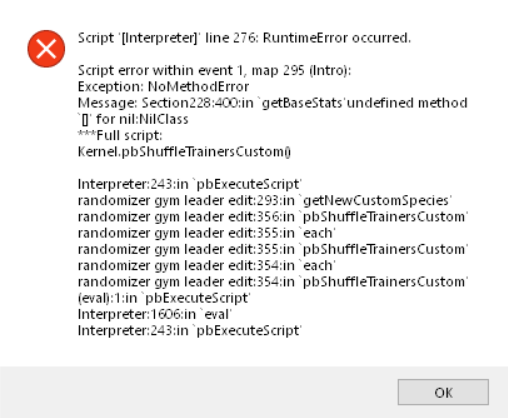 lament coral
More infos?
turbid dock
I'm trying to start randomizer mode.
I keep getting this error message
And then it crashes
turbid dock
Different error message this time
I select randomizer mode
and I just hit yes to everything
and then it crashes
Usually after it asks me to select a type of randomization for wild pokemon
Just tried using a pre-existing savegame and randomizing it at a PokeCenter, still crashed.
 buoyant wraith
lament coral
buoyant wraith
lament coral
@turbid dock go to 4.6.1 or 4.5.10
 neat knot
What is the latest version of this game?
 hot jackal
marble talon
hot jackal
marble talon
latest patch is 4.6.2 but its unstable, download 4.6 and patch with 4.6.1
neat knot
ok thank you.
 narrow vessel
I just installed 4.6.2 (should i downgrade to 4.6.1?) and am currently installing the custom sprites from the google doc and i wondered what the subfolder 'doubles' is for, could someone help me please?^^
tranquil saffron
Doubles are just different sprites for fusions that already have sprites, you don’t need them, you can just look through them if you prefer one design over another
Also yes, get 4.6.1, because 4.6.2 is a buggy test update
narrow vessel
i already have 4.6.2 installed, can i just add the 4.6.1 files into that and replace?
also will i have to re-add the custom sprites?
tranquil saffron
You probably can just replace the files
As for the custom sprites, just make sure not to replace the CustomBattlers folder
narrow vessel
alright will try, thanks 🙂
seems like it is working currently
ah before i forget, is there a way to play this in actuall fullscreen? Biggest size is like 1/3 of my 1080p panel
Also i tried to add the game.exe to my steam library, but when i start the game via steam it becomes horribly choppy, is that normal?
tranquil saffron
This is not a steam game
narrow vessel
i know, but you can add non steam programms into your steam library and start them via that
 elfin olive
Can someone tell me where save data is stored
steep pond
Users/yourname/Saved Games/Pokémon Infinite Fusion
the file is called game.rxdata
eternal night
why is this in tech support
hollow ridge
since this is a bug that needs to be fixed
 jagged flint
why is this in tech support
@eternal night mb
elfin olive
So, I've been having this issue for a little while, but it seems my game only uses custom sprites sometimes. Like, a lot of the trainers which would normally have the custom sprites just have the default sprites
also, there's not a folder in my saved games folder for pokemon infinite fusion
marble talon
can you still load your save?
elfin olive
I can, but I'm trying to delete it to see if I fix the other bug with a fresh install
 vestal herald
Updated to 4.7 and my Kyurem/Metang has become a Jirachi/Metang, any way to fix this?
elfin olive
https://i.imgur.com/vZ6ZBoj.png
this is how my saved games folder looks. the only thing in "My Games" is Warface
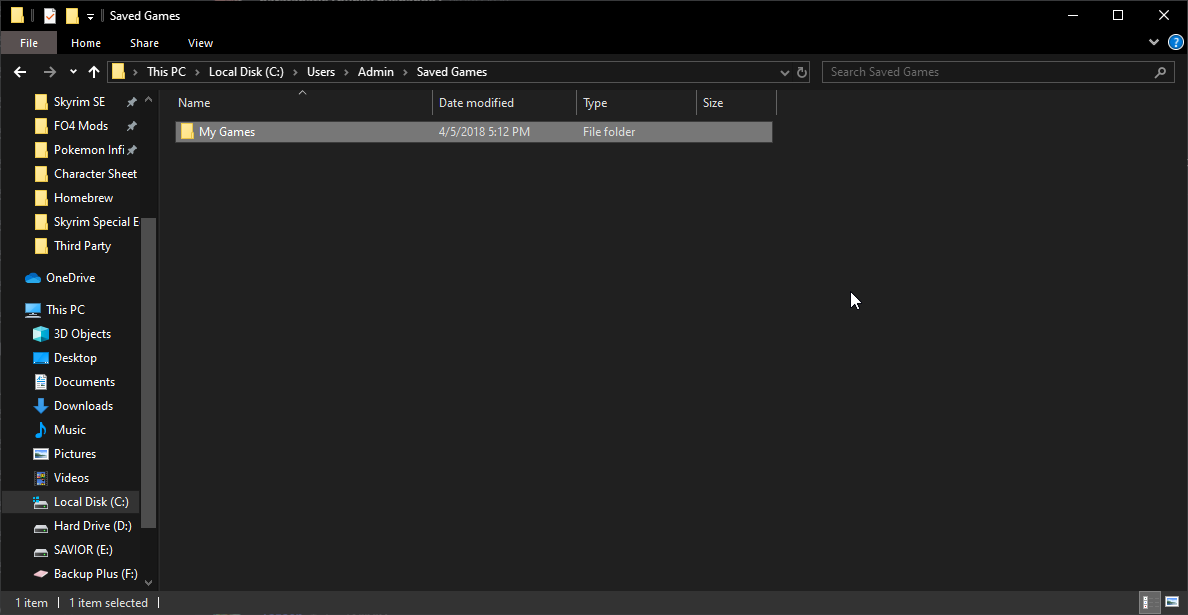 marble talon
is your game.rxdata in your game folder?
elfin olive
no
marble talon
huh
 dry atlas
Can I still use the old sprite packs in the new update?
 short basin
hey all, so my game crashes when i try to randomize the pokemon
anyone have any idea why?
sterile pivot
https://i.imgur.com/Fu3Tkwk.png All tripple fusions became Empoleon Fusions
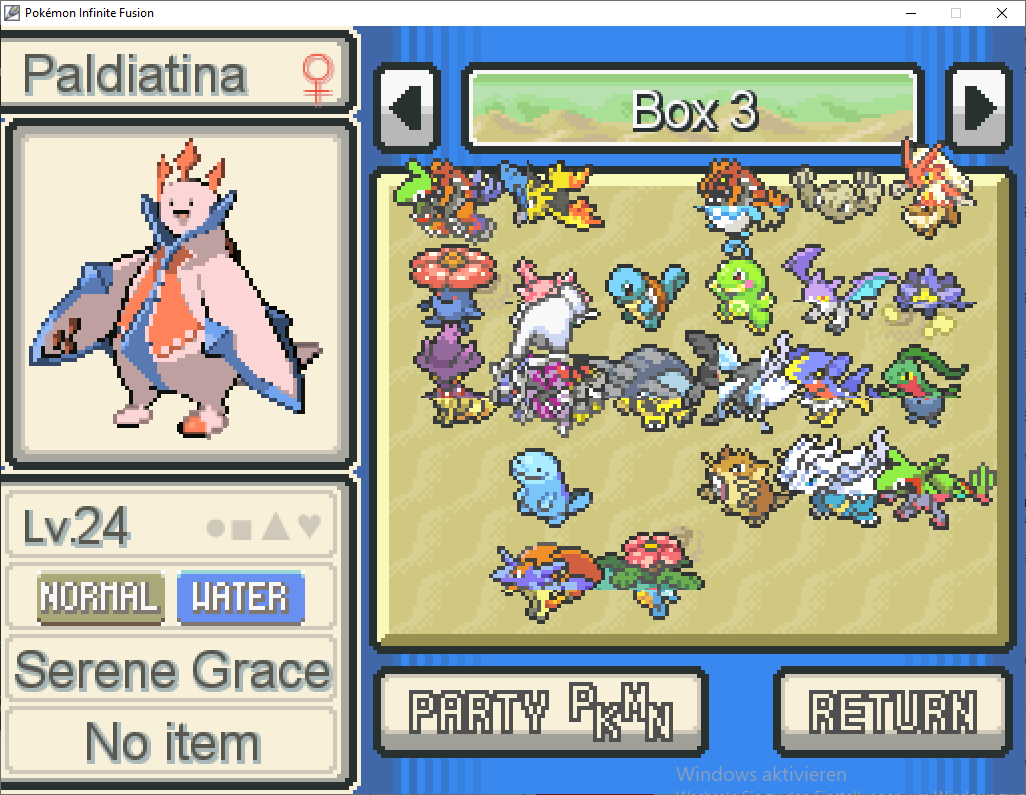 chilly kayak
@short basin 4.7 or older version?
short basin
@chilly kayak 4.6.2.
chilly kayak
ok, it's a bug that is specific to 4.6.2. It should be fixed in 4.7.
Or you could also downgrade to 4.6.1 if you don't want redownload the entire game.
short basin
ok sweet, didnt know 4.7 is out. installing new version now. Thanks @chilly kayak
and for creating the game
chilly kayak
You're welcome 🙂
 tulip grail
so I was looking at the game files to see if everything had gone right for the new version and I ended up discovering that there is a wrong file in the folder (2 to 19) battlers
 plucky flume
i deleted all triple fusion because it asked me while converting and now i cannot remake them
because it tells me that i already made them
jagged flint
Somehow the new version killed my controller support with Anti-micro. Is there another application that can help me set up a controller with the game?
Somehow the new version killed my controller support with Anti-micro. Is there another application that can help me set up a controller with the game?
nvm i fixed it. Running both applications as administrator works
 quartz acorn
Hey, running into a fair few bugs? I installed the latest version of the full game, just to clarify. Notable bugs thus far have been:
Game crashes whenever I try to look at the summary of any egg, or when trying to mouse over the egg in the PC. In addition, game crashes when egg is about to hatch.
There was also a separate bug where when using the NxtGen UI where every so often a capture would just break the battle system?
This was the egg hatching bug code
I'm using version 4.7
Trying to figure out how to actually...play the game, since I have an egg in my inventory that will crash the game the instance that it hatches or I try to drop it off in the PC
This is the bug for trying to look at the eggs summary
quartz acorn
Ah, is the latest release not the actual fully fixed up version? My apologies
 crimson ridge
~~Hey, just installed the newest patch and I get this error code when I'm fighting a trainer on route 13. When I click "OK" it just keeps popping up with new stuff
Edit: After reshuffling the trainers it didn't crash - seems to be an issue with a Ferrothorn fusion? the mon he was sending out was "Ferro<forgot the rest>"
Edit 2: Had the same crash with "Breper"
Edit 3: "Haxsaur"~~
Reinstalling the whole 4.7 made it work
 fading dove
Sry for asking, but where is the 4.7.0.2 patch? I downloaded and installed everything (main and patch) from the #announcements but my version still shows 4.7.0.1 🤨
Also couldn't find anything by searching here on discord
quartz acorn
Issue was fixed, thanks
chilly kayak
@fading dove it's the patch link in #announcements. I edit the post and replaced the .0.1 link with it
fading dove
Ok, thank you :)
quartz acorn
Not game-ending, but odd. Every time I'm in a double battle in the latest patch, this occurs randomly. It sometimes makes one of my mons just attack without the rest of the attacks occurring
 bronze mesa
after playing for awhile the bgm gets choppy, even when i go int oa new area, anyway to fix it without restarting the game itself?
narrow vessel
is it normal that you cant unfuse a pokemon part of which was obtained in a trade? So i fused the tyrogue you get in a npc trade with a caught nidoran, but afterwards i cant unfuse them again? Dunno if this is the correct channel for that, if not, i am sorry^^
 exotic storm
you're correct, in Violet City you can pay 50k pokedollars to trick a traded pokemon into thinking you're its owner, at which point you can unfuse it
to my knowledge at least
narrow vessel
even if i mysel fused it in the first place?
exotic storm
possibly? I haven't done any trading so far
steep pond
It keeps the Trainer ID of whichever pokémon you select first while fusing, which in this case was probably the tyrogue.
 hushed zinc
Hello guys, I am struggeling with this error in the Pewter City Gym, can anyone help me please?
Inside of the gym are 2 trainers and if I try to match both of them, my game continues to crash 😦
chilly kayak
Try to reshuffle the gym types. Might be a bug
 rich vessel
So I need to update my game, its on 4.5.7 can I just download the recent version and then patch that one?
exotic storm
correct
rich vessel
Ok, and do i just delete 4.5.7?
exotic storm
Yeah, your save file is stored elsewhere
Try to run 4.7 first before you delete anything
And maybe make a backup of your save if you're worried
My upgrade was pretty smooth, but I took the precautions anyway
rich vessel
ok
rich vessel
So what do I do exactly?
marble talon
download and extract and open the exe in the new 4.7 folder
So what do I do exactly?
@rich vessel
nothing else
rich vessel
Just download 4.7 and extract it?
marble talon
yes
marble talon
no
newest version is 4.7.0.2 or something which fixes the egg and triple fusion glitches and its already in the main download i think
 wide tendon
Just installed the game, and I'm getting a mostly black screen. The menu music plays, and the game seems to respond to some inputs; like if I press Enter a few times, the music will stop, the text disappears, and the black background turns white. After a few moments, I get a script error:
Huh. Looks like I got a partial extraction. Re-extracted the files with a different compression program and all is working 🙂
 dusk rapids
i updated my game, but this is not my team, can i fix it
dusk rapids
nvm just need to unfuse them in early version
great just found out i never need to unfuse them
do i need to delete the older version
marble talon
try waiting a few minutes and saving again
short basin
i keep crashing here,before battling gio in sliph's co
i also crash everytime i tried to get a poke egg. its almost like the egg sprite was causing it
marble talon
@short basin download the 4.7.0.2 patch in #announcements since 4.7 has issues with triple fusions and eggs
short basin
@marble talon thanks!! I need me more eevees 😍
 flint thorn
I just downloaded the game and had it work once before I had to go without saving, I tried to start up the game again and it keeps giving me the same error
Nevermind I just had to try a couple more times
 old talon
Sorry in advance if this is the wrong channel.
The game has run relatively fine up until now (running on 4.7.0.2.), but I opened up the game today to find that the stats of the middle 2 are just completely screwed up. The locations and met at lvl x are also incorrect, showing "Celadon Dpt. Store / Met at Lv. 28.8." and "PokeMart / Met at Lv. 14.4." respectively. The exp stats and movesets are still normal.
After some testing, I found out that Update Man doesn't help, however unfusing leaves the bodies at the exact same screwed stats, while the heads go back to normal. How the hell do I fix this? 
 upper quartz
Hello,
i got an egg from the day care station in the 3td city that was transferd to my box and one from a trainer, wich i got in my team. But every time i want to move the egg i got an error
how i can i repair it or how do i get the egg out of my box
and after that error the game close
error fixed with bugfix patch from #announcements
yeah saw the post from Riibirth a little to late
sterile pivot
whats does it men guys`Whats missing here?
coarse salmon
It tells you what you have to do, install the fonts that come with the download
I'm not sure why it is showing that though, never seen that before
sterile pivot
if got an problem with my triple legendaries fusions , they were normal before i updated the game and now they look like starters have the wrong type and show an incorrect description what i am supposed to do ?
fathom vector
technically, they are showing the right type
for the fusion they've turned into
sterile pivot
but why they turned into that ? is not normal
( if anyone got information about how to fix that , contact pm pls )
sterile pivot
@coarse salmon where do I find the fonts?=
the missing one?
those are the one in the folder
 pearl mason
you need to select all of them and install them on all users as administrator
else it will always say "not all fonts are installed"
flint thorn
Whenever I save my game and stop playing, I come back to it saying my save file was corrupted and I can’t continue from where I was, I have to restart, is there anything I can do to fix that?
 bold condor
foot is the script. this is a footprints script made by kleinstudio
oak knoll
idk what this is but it happens every so often when im battling
bold condor
 copper silo
It is not a problem and doesn't really matter but on the custom sprites there are some that have letters at the end, and i want to know what they mean, thank you
Ex. 1.1a
 wraith saddle
My game is crashing every time i access my PC and load into the storage box- the instant the cursor settles over the egg, it crashes.
It's repeatable, I've done it a half-dozen times or not.
queen inlet
Get patch from #announcements
wraith saddle
Bugfix patch?
queen inlet
Yes
 finite kettle
It is not a problem and doesn't really matter but on the custom sprites there are some that have letters at the end, and i want to know what they mean, thank you
@copper silo These are alternatives (sometimes there is more than one custom sprite for one fusion). To use them, the letter has to be removed
copper silo
@copper silo These are alternatives (sometimes there is more than one custom sprite for one fusion). To use them, the letter has to be removed
@finite kettle Thanks!
 fallen mason
I got this in a double battle after trying to select a target for sleep powder but after it closed the battle went as normal
 weary needle
This is an issue I'm having too. If you stay in the battle for too long the error message will appear again and the game will crash. Just make sure to end the battle quickly and save.
 eternal raptor
My game crashes every time I do the first double battle in celadon sewers with erika. I tried reinstalling the game completely and even on the most recent version I get the same issue
Will send screenshots when I can
eternal raptor
Has this happened to anyone else
eternal raptor
Fixed it but I keep getting the "failed to create bit maps" error and the game crashes shortly after. Also says missing fonts but I have the fonts. Game was running smoothly until lavender town
sterile pivot
Someone mind guiding a newcomer through the installation process? I have the game downloaded. Where's the patch?
weary needle
If you downloaded 4.7 you need the patch just below it.
If you have an earlier version then you need 4.7 first.
sterile pivot
Gotcha
 low steppe
hello y'all someone have a strange issue, the game shows a weird error when he tries to catch pokemons , here's the error log file
sterile pivot
I'm still in need of assistance. I do not see the patch. Is it within the files?
sterile pivot
Sorry for the ping
 spiral valley
Why did you try to ping everyone?
marble talon
that doesn't even work
spiral valley
Yea it doesn’t
sterile pivot
ok well I'd like some help and I'm sorry
marble talon
the game will automatically have the patch if you downloaded it later
sterile pivot
Ok.
marble talon
@sterile pivot
marble talon
you applied the patch to 4.7 right?
nvm you have your icon thing
make sure you patch like this: extract the patch, replace all the files in the full game with the files in the patch
should work like that
sterile pivot
fuck
chilly kayak
The dll is included in the main download. If you were able to start the game before it means that you had it at some point. Check your recycle bin.
sterile pivot
I didn’t have it prior. I just downloaded it today
 dusty rover
Hmmm maybe the files got corrupted when you downloaded for the first time and maybe it didn't download because of that
sterile pivot
I’ll try again tomorrow
 half heath
soo i downloaded the game today (again for new version) and downloaded the new patch aswell and deleted all other files (like save file and old version) but after ive done the patch and overwrite the data file i tried to start the game but it wont work at all. The screen is opening but about 45 sec later the window is closed and the game is not running anymore
i ment about 5 seconds later
hushed zinc
So I have this problem. I played this game on my windows 7 pc (ik it's way too old), but now I tried to remove it to my laptop which has windows 10 and this appears, every time I try to load the game.
Is it even possible to play the old game with my settings on my windows 10 now?
coarse salmon
Do a fresh install/download on your laptop, then transfer just the save file
marble talon
also thats really hard to read
hollow ridge
have you tried to go to the other trainer?
marble talon
if you're on randomizer, try rerandomizing trainers or gym type
weary needle
talk to the update man and select randomization settings
 strange dagger
@knotty bolt did u figure it out?
 knotty bolt
yes
strange dagger
@knotty bolt how do I fix it
knotty bolt
Go too pkmn center upstairs
strange dagger
I just reshuffle gyms and it worked
strange dagger
Do u know what the bst stands for?
strange dagger
Ok thanks
weary needle
That's not what it means. The BST setting is for difference in BST. The higher the number, the more varied in strength the pokemon will be.
wide tendon
That's not what it means.
@weary needle
It is, actually. Fireboss asked what BST stands for, not what the BST setting did. It stands for Base Stat Total.
The "BST setting" uses the "BST" value as a benchmark for determining the general range of allowed pokemon for randomization. As you say, the higher the number, the more varied in strength the pokemon will be, but that is the answer to a different question entirely.
 fleet barn
so uh......not a bug (due to changes in pokedex numbers...) but the triple fusions i have turned into something other than what they should be.....and you can only get one of each....so.....am i screwed here or?
queen inlet
@chilly kayak maybe you can reset a counter or sth like that?
 sudden canopy
Where are saves stored? I'm moving to uni tomorrow so I need to move my save from my PC to my laptop. 😅
 jade quarry
Users ur name then save games
steep pond
Users\yourname\Saved Games\Pokémon Infinte Fusion. the game specifically looks for a file called "game.rxdata"
 fleet eagle
TMs aren't randomizing for me, for some reason...?
am i missing something or is that function currently broken
dusty rover
It could be just that TM gained from gyms are static
steep pond
Randomizing items or TMs only randomizes those in actual item balls on the map
sterile pivot
i want to run the game but it says that rgss100j.dll is missing but when i look for the file its in the folder
chilly kayak
Did you edit the game.ini file?
 elfin hedge
Hello
After i beat the elite four, when i try load the game, shows if i want to save and then the screen stays black (forever)
if i press enter, shows a message ????????????????? and the game close
sterile pivot
it says its not supported on OS X...
did i download the wrong one?
queen inlet
No. Just use Wine
 edgy mortar
can anyone help me understand how to fix this? this keeps happening randomly when I run into wild pokemon.
i keep rerandomizing but it always seems to pop up at random times.
dusty rover
That happens a few times
edgy mortar
But why? I want to know what the errors mean haha. And is it something i can fix.
 hearty geyser
dusty rover
hearty geyser
dusty rover
Sweet you evolved you weedle into Error
hollow ridge
the type error is very rare!
rancid hazel
There seem to be a lot of errors surrounding butterfree and beedrills lines. I wonder whats up with that
sterile pivot
i keep getting an error whenever i open the map, try to teleport or try to fly, it says that mapArrowRight doesn't exist
rich vessel
Hey, is there a way to download Infinite Fusion onto my phone and then transfer it into my SD card of a laptop?
jade quarry
Google drive
rich vessel
But the download link is Mega
jade quarry
download it upload to ur google drive download it to ur laptop
 wraith locust
Just download it from mega and then connect your phone with your laptop? Usb, bluetooth, etc. Search for the zip and transfer it
download it upload to ur google drive download it to ur laptop
I guess cramo has no Internet on his laptop, otherwise he could download it directly or via hotspot
 haughty dove
hey, Always when i start the game it chrashes instantly and i cant played it ones yet. Can anyone help me?
rich vessel
I've downloaded it many times to my phone, but when I hook it up via USB I can't find it on my phone
 empty badger
i just tried starting the game and then this happened... what do i have to do?
if it isn readable... the white window says the following: " Script '[SpriteWindow_edited]' line 2213: Errno::ENOENT occured.
No such file or directory - Data/regionals.dat from 'SpriteWindowed_edited' line 2213 in 'initialize' from 'SpriteWindowed_edited' line 2213 in 'open'
from 'SpriteWindowed_edited' line 2213 in 'pbRgssOpen'
from 'PokemonMap_edited' line 177 in 'random_init' from 'challenge - Randomizer' line 12 in 'initialize' from 'PScreen_Load' line 484 in 'new'
from 'challenge - Randomizer' line 12 in 'initialize'
from 'PScreen_Load' line 484 in 'pbStartLoadScreen' from 'challenge - Randomizer' line 12 in 'initialize'
from 'PScreen_Load' line 365 in 'loop'
from 'challenge - Randomizer' line 12 in 'initialize' from 'PScreen_Load' line 526 in 'pbStartLoadScreen' from 'intro screen' line 76 in 'closeTitle'
from 'intro screen' line 62 in 'update' from 'intro screen' line 37 in 'main'
wide tendon
Try re-extracting the compressed download for the latest version. Don't use windows explorer
 drowsy tartan
I've gotten this twice while trying to fish in the safari zone. It happens in Zone 1 but not in Zone 4.
empty badger
@wide tendon it worked ty
 digital sleet
is it just me or do the crashes get worse loater at night\
wide tendon
You might have a scheduled task running at night, like antivirus software doing a scan or an HDD on a defrag schedule causing conflicts, or it's just in your head. 
digital sleet
maybe
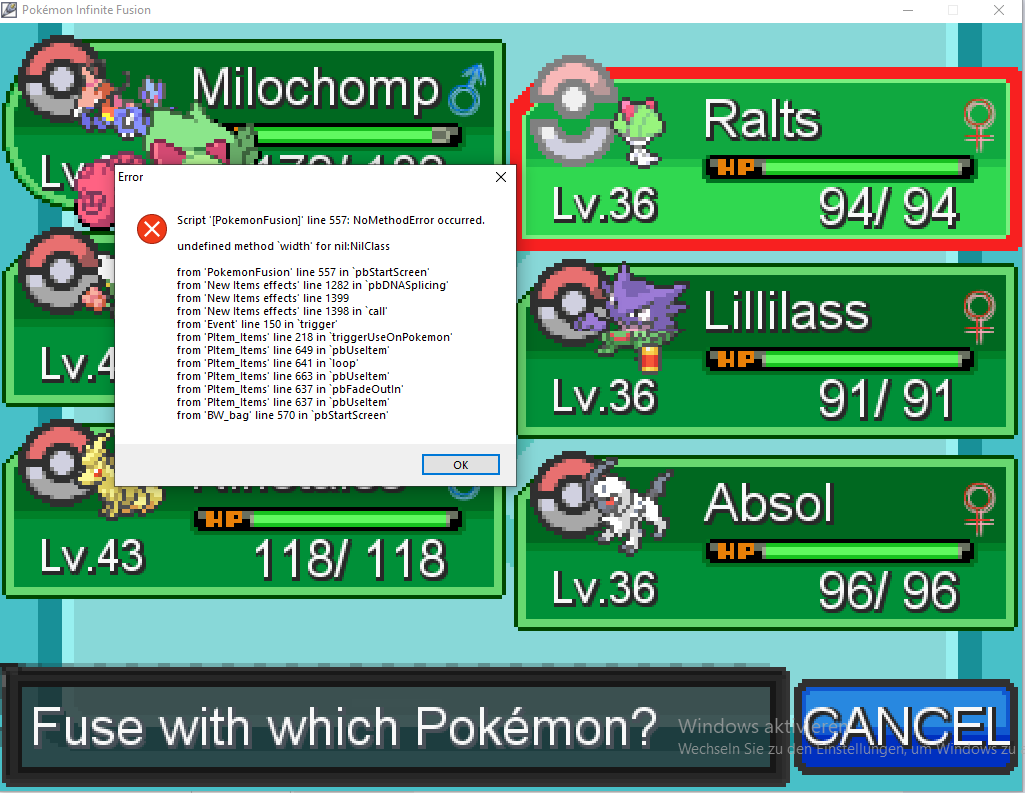


 clear jay
So I was just after brock in the patch where they said hidden ability pokemon were. I was grinding and found a LV 9 Sunkern. I decided to catch it. However for some reason after catching it, the game froze, and a blank box that simply said "Application Error" happened.
Anyone know what this could mean? or is this just a simple crash?
Edit: I just found another sunkern and caught it. I didnt receive any errors. I guess it was just a random crash.
clear jay
So I have an actual issue.
Constantly getting RGSS errors and constant errors when trying to catch a geodude in Mount Moon after using rock smash. It happed twice in a row.
 rapid gulch
I keep getting "fonts not installed" but fonts are installed. known bug or is something going weird?
chilly kayak
Known bug
 solid crypt
Is there another way to download the custom sprites other than the google drive? Mine isn't workiing for some reason
clear jay
So any info on why this occurs?
clear jay
Not exactly sure why im having so many errors
Failed to create bitmap after reverse dna splicing.
clear jay
Black ground texture when coming out of fishing.