#tech-support
1 messages · Page 653 of 1
 limber pelican
 fallow osprey
How would I do that? Do I need to fully uninstall everything and lose my save?
 verbal timber
fallow osprey
How would I do that? Do I need to fully uninstall everything and lose my save?
verbal timber
fallow osprey
How would I do that? Do I need to fully uninstall everything and lose my save?
unless you are on steamdeck or android, reinstalling won't touch your saves
check our android list
?tag android
 pearl magnetBOT
Check our Official Android guide ➡️ HERE.⬅️ If you didn't follow this guide, DELETE and UNINSTALL everything.
All Android bugs/workarounds are in the guide. If your issue isn't listed, there's no fix. No dedicated mobile version of IF will be developed in the future.
verbal timber
it comprises every device we know is compatible and not compatible
if it ain't listed, 50/50 odds of functionality
 leaden drum
Thats why when the intro done It just goes to black screen
 turbid terraceBOT
Hey @leaden drum! Black screen in this game is the loading screen. The duration of the black screen depends on YOUR computer and YOUR internet.
- If you get the message below while opening the game, this means to stop clicking/pressing buttons on the screen as it is loading.
- If you get the message while in game, this means your computer is struggling.
- Use our performance tips to help your issues: [More Info](#tech-support message)⬅️⬅️
 verbal timber
leaden drum
Thats why when the intro done It just goes to black screen
verbal timber
leaden drum
Thats why when the intro done It just goes to black screen
could be your device struggling to load the game
?tag performance
pearl magnetBOT
Performance Issues - Freezing? Lag? Long Black/Loading Screens? [More Info](#tech-support message)
leaden drum
So i there no way to fix it?
verbal timber
leaden drum
So i there no way to fix it?
do steps 2-7 in the performance link
what you can of it anyway
beyond that, not really
 opal lantern
I just downloaded infinite fusions, after booting the game and going through the opening sequence it said it would redirect me to discord but it sent me to general, and then closed itself, what do I do to actually be able to play the game?
verbal timber
opal lantern
I just downloaded infinite fusions, after booting the game and going through the...
?tag intro
pearl magnetBOT
Where did you get the game files from?
- The game is not asking where you heard about the game. It is asking where you downloaded the game.
- Please read what the game is asking you and answer appropriately. If you downloaded from links from this discord and is still opening discord and closing the game, you are selecting the wrong answer.
opal lantern
ohhhhh thank you
 rocky imp
hello i dont know why my pokemon game lose sprites if i actualize them in the last version
 limber nimbus
Shared from Daily Sudoku Together
 verbal timber
rocky imp
hello i dont know why my pokemon game lose sprites if i actualize them in the la...
verbal timber
rocky imp
hello i dont know why my pokemon game lose sprites if i actualize them in the la...
 rocky imp
ty
 night linden
going to battle the legendary hunter guy that just traded me a meowto and getting this popup with a crash following that
 verbal timber
night linden
going to battle the legendary hunter guy that just traded me a meowto and gettin...
verbal timber
night linden
going to battle the legendary hunter guy that just traded me a meowto and gettin...
this just happens sometimes
there is no fix
night linden
dang really thats unfortunate ty though
 prime tundra
What's going on with my game????
 verbal timber
prime tundra
What's going on with my game????
verbal timber
prime tundra
What's going on with my game????
plug in audio
headset/headphones/speakers/earbuds/etc
prime tundra
I never played with anything like that but sure I can get my headphones 🤷♀️
 sullen smelt
i installed the latest version and my sprite for greninja/blaziken is gone
 oak escarp
verbal timber
plug in audio
oak escarp
verbal timber
plug in audio
How is that supposed to help?!
verbal timber
just do it
the game needs to see/register an audio device
blame 20 year old technology
verbal timber
sullen smelt
i installed the latest version and my sprite for greninja/blaziken is gone
?tag resetcache
pearl magnetBOT
For missing sprites on the 6.6 update, talk to the help man in any Pokémon center and navigate to Advanced Options -> Other -> Reset -> Clear Sprite Cache. Video
prime tundra
Uh okay it actually worked
verbal timber
prime tundra
I never played with anything like that but sure I can get my headphones 🤷♀️
you would have needed some kind of audio device registered to your pc in the past to play this game
otherwise that same error would have occured
sullen smelt
verbal timber
?tag resetcache
thank you
oak escarp
@prime tundra and I are in a call and she doesn’t have the sound of the game anymore.
How is that normal?
verbal timber
is the sound off?
oak escarp
Nope
verbal timber
that is a bug that every once in awhile happens
the game is still detecting an audio device so it works fine, even if the audio is borked
oak escarp
But it’s boring a game without audio!
verbal timber
best bet there would be fix game via help man, save, close game, and reopen game
if that fails then maybe restart the device being used
after that it would fall into bug report territory
prime tundra
It actually worked wow. Thanks a lot
verbal timber
and since that is a bit rare, it is hard to diagnose the problem and fix it
prime tundra
I closed and reopened the game, the sound is back
verbal timber
i can't fix everything
prime tundra
verbal timber
i can't fix everything
But you fixed my problem
 flat jewel
Please help, my game keeps crashing, making my screen flicker and not letting me do anything.
 cold hollow
I have a switch running cfw android and it gets stuck on a black screen after the opening animation but the theme song still plays and none of the controls work
(Edit) im now just stuck on the start menu
turbid terraceBOT
Hey @cold hollow! Black screen in this game is the loading screen. The duration of the black screen depends on YOUR computer and YOUR internet.
- If you get the message below while opening the game, this means to stop clicking/pressing buttons on the screen as it is loading.
- If you get the message while in game, this means your computer is struggling.
- Use our performance tips to help your issues: [More Info](#tech-support message)⬅️⬅️
verbal timber
flat jewel
Please help, my game keeps crashing, making my screen flicker and not letting me...
did you put the game in full screen?
verbal timber
cold hollow
I have a switch running cfw android and it gets stuck on a black screen after th...
assuming you followed our android guide, that is usually an indication your device isn't compatible
though since it looks like you are using something other than an android phone/tablet to play the game
we can't help
cold hollow
I turned of my wifi and I got to the “new game” options menu and I’m going to update joiplay to see if anything else changes
verbal timber
good luck with that, the game needs specific versions of joiplay and rpgmaker to work
anything outside the ones we offer in our guide may not work correctly or at all
cold hollow
Ok
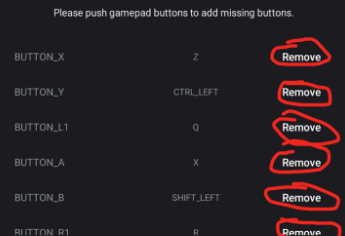
The remove button never showed on my gamepad settings after I turned on the option for bluetooth controllers so I thought it needed updated
But besides that it runs fine
 runic swallow
I just downloaded the launcher and i already had the game and updated the game thru the launcher and the launcher and game wont open can someone help
turbid terraceBOT
Hey @runic swallow! Black screen in this game is the loading screen. The duration of the black screen depends on YOUR computer and YOUR internet.
- If you get the message below while opening the game, this means to stop clicking/pressing buttons on the screen as it is loading.
- If you get the message while in game, this means your computer is struggling.
- Use our performance tips to help your issues: [More Info](#tech-support message)⬅️⬅️
runic swallow
runic swallow
I just downloaded the launcher and i already had the game and updated the game t...
i click the launcher or the game and they both go to open with a black load screen and then instantly close after 1 second and ive tried waiting, and ive restarted my pc and stuff
 exotic sparrow
Is this supposed to be possible? Making him walk that far when he sees you?

In this instance, the lilypad where he is standing started battle, and he didn't come after me, but when i moved to the right, he then started the battle
verbal timber
runic swallow
i click the launcher or the game and they both go to open with a black load scre...
?tag olddata
pearl magnetBOT
The most likely reason your game is opening and closing is due to improperly updated game files. We mention in #downloads to not update ANY files versions below 6.6.0.
If you're using the Launcher:
- Reinstall version 1.1.2 of the launcher from #downloads
- Open the settings tab
- Click "Reset Config"
NOTE: The original path that the launcher shows will be your old game folder. That folder should be deleted. The new game folder will be inPIFLauncher(#.#.#)/GameFiles/InfiniteFusion
If you're not using the Launcher:
Use the Lightweight installer guide to install in a NEW folder ➡️ Click Here⬅️
If you are on a non-Windows device, follow the [guide](#tech-support message) for your device to reinstall.
Reinstalling on Windows does not affect Save Files in any way.
 ember blaze
I started a run yesturday and just got to nugget bridge. When I get to the third trainer the game pops open this msg and crashes
 verbal timber
ember blaze
I started a run yesturday and just got to nugget bridge. When I get to the thir...
verbal timber
ember blaze
I started a run yesturday and just got to nugget bridge. When I get to the thir...
?tag randerror
pearl magnetBOT
When randomizing the game, you can only randomize Trainers and Gym leaders if you are playing Classic or Randomized Mode.
Randomizing trainers on Remix and Expert Mode will crash trainer battlers.
Steps:
- Go to a Pokemon Center and talk to Help Man (guy in black suit)
- Select Advanced Settings -> Randomizer Settings -> Turn Trainers/Gyms OFF

 solemn rapids
I downloaded the game from this reddit post, wanted to confirm if it is safe/offical:
https://www.reddit.com/r/PokemonInfiniteFusion/comments/wydpah/game_download_and_other_important_links/?utm_source=share&utm_medium=web3x&utm_name=web3xcss&utm_term=1&utm_content=share_button
Reddit
Explore this post and more from the PokemonInfiniteFusion community
ember blaze
verbal timber
?tag randerror
thx
verbal timber
solemn rapids
I downloaded the game from this reddit post, wanted to confirm if it is safe/off...
its a bit dated
would recommend a download from here
solemn rapids
where can I find the download here?
verbal timber
?tag guides
pearl magnetBOT
All of our Official Guides to install the game are located here: [CLICK HERE FOR GUIDES](#tech-support message)
 wild garden
this is what it says when i try to launch, what did i do wrong?

 scarlet grove
How download for android?
 upbeat sage
 crystal geyser
hey hows the mac ver?
crystal geyser
hey hows the mac ver?
Works great
Slightly more involved download process
upbeat sage
scarlet grove
How download for android?
?tag android
pearl magnetBOT
Check our Official Android guide ➡️ HERE.⬅️ If you didn't follow this guide, DELETE and UNINSTALL everything.
All Android bugs/workarounds are in the guide. If your issue isn't listed, there's no fix. No dedicated mobile version of IF will be developed in the future.
 vale saffron
hoo boy. Looks like my version is 5.0. I always struggle updating this thing. Glad there's an update button in the launcher after this one

If you're below 6.6.0 you must redownload and install in a NEW folder (since the updater won't work due to bugs).,
Reinstalling doesn’t remove or require you to move any Save Files.
I don't understand these instructions. We need to reinstall in a new folder and yet we dont need to move anything?
I think I need help being directed to the installation instructions then
I see these instructions but I also see below these instructions where it says they recommend a "clean install"

So it seems contradictory: I need to delete files but I don't need to move files? what
Forgive me, I may be dumb lol
vale saffron
TLDR:
Which files do I delete and which do I not? (if I'm at version 5.0 and tryingt o update)
upbeat sage
vale saffron
TLDR:
Which files do I delete and which do I not? (if I'm at version 5.0 and t...
Delete everything
Your save is stored separately
vale saffron
How does it know where my save files are located? Will I need to enter its file location somewhere at some point in the installation process?
thanks sm
 safe oriole
I don’t know where to ask this question but where do you find the animations for Pokémon to make your game animated?
 violet kiln
Idk if this is the right channel but I was wondering if there is any kind of .sav file for the game, or is it only in rxdata
vale saffron
What's the diff between the 3 diff .exe files?

Instructions say to use the one that says "Game.exe" so I want to ask what the other two options are
 hardy idol
violet kiln
Idk if this is the right channel but I was wondering if there is any kind of .sa...
hardy idol
violet kiln
Idk if this is the right channel but I was wondering if there is any kind of .sa...
not a rom. it only saves as .rxdata
vale saffron
Note for step 7: game.exe was replaced with InfiniteFusion.exe in the latest update. Open InfiniteFusion.exe to play the game instead.,
Oh
Well tha explains Game.exe, that it's the old launcher, but what about the performance one?
hardy idol
its used if your pc struggles to run the game
vale saffron
thx
violet kiln
hardy idol
not a rom. it only saves as .rxdata
ty
 soft kayak
 flint owl
this screen just wont stop loading, it also says to screenshot and send here every now and again, help?
 vale saffron
Can someone remind me where the instructions are for making the game use sprites from the internet rather from ur computer?
flint owl
flint owl
this screen just wont stop loading, it also says to screenshot and send here eve...
found the other screen

 gentle pollen
hello, so I may have a silly qustion. I just donwloaded the newest version of the game (with over 185000 sprites i think it said). So just to doublecheck, does it come with tall the sprites in the previous spritepacks already, or do i have to download tthat manually?
 viral bone
Hi there, anyone know how i get unstucked ? i stuck in a rock at the Violet Gym and cant get out. I tried Digging as well as the rope.
 quaint vale
can I play this on IOS?
turbid terraceBOT
Hey @quaint vale! You cannot install this game on iPhone or iPad. This game is not a ROM Hack so Delta won't work and we are not planning to release an iOS version.
 fallow wyvern
gentle pollen
hello, so I may have a silly qustion. I just donwloaded the newest version of th...
fallow wyvern
gentle pollen
hello, so I may have a silly qustion. I just donwloaded the newest version of th...
You don't need to download the sprite, they download automatically
 normal wraith
I had to reset my computer, losing all my data. I'd like to restart Pokémon Infinite Fusion, but with the randomizer already unlocked, I don't feel like replaying the game all the way to the league level. Is there a way?
 eager warren
Do i need to put custome sprites in myself when using the launcher or is there a setting that automatically does that? I havent played in a while and the launcher and everything is different from last time i played. Can someone help?
Wait i looked around and found the guide for it nvm!
 vivid inlet
Transporting save files across devices is possible right?
 oak hawk
the AI sprite creator or whatever its called isn't working unless the fusion has a sprite already made its just a question mark
vivid inlet
I wanna transport my save file from my pc to my steam deck
eager warren
I opened the game and the screen started flashing repeatedly
all ive done is put sprites in the import folder
 cloud wyvern
I've just Updated the game and now it wont load?
Opens on a Black Screen then crashes
turbid terraceBOT
Hey @cloud wyvern! Black screen in this game is the loading screen. The duration of the black screen depends on YOUR computer and YOUR internet.
- If you get the message below while opening the game, this means to stop clicking/pressing buttons on the screen as it is loading.
- If you get the message while in game, this means your computer is struggling.
- Use our performance tips to help your issues: [More Info](#tech-support message)⬅️⬅️
cloud wyvern
I just reinstalled and restarted, opens the game and then just kaput. It worked before I updated smh
 sour helm
is it typical of joiplay (patreon release, downloaded through the patreon) to ask access to all device files?
eager warren
I reinstalled the game and it was still flashing the whole time so idk whats up with this game but ig i aint playing it
cloud wyvern
eager warren
I reinstalled the game and it was still flashing the whole time so idk whats up ...
Must be an Update thing
hardy idol
eager warren
I reinstalled the game and it was still flashing the whole time so idk whats up ...
?tag fullscreen
pearl magnetBOT
Using the in-game option for Full Screen can strain your graphics card and lead to Graphics issues, flashing, green lines, and more.
We recommend setting the Screen Size option to a lower setting and dragging the corners of the window to make the screen larger instead for computers having issues.
 cloud wyvern
But if we cant load the game
turbid terraceBOT
Hey @cloud wyvern! Black screen in this game is the loading screen. The duration of the black screen depends on YOUR computer and YOUR internet.
- If you get the message below while opening the game, this means to stop clicking/pressing buttons on the screen as it is loading.
- If you get the message while in game, this means your computer is struggling.
- Use our performance tips to help your issues: [More Info](#tech-support message)⬅️⬅️
eager warren
thats the thing i cant even load it
cloud wyvern
^^^^
eager warren
the game doesnt respond to buttons and just flashes over and over
ive tried with custome sprites
without custom sprites
both versions of launcher
they open the game, but they just flash repeatedly and sometimes repeats the title theme over and over
cant unfull screen the game either with f11 ive tried that too
eager warren
well ill have to reinstall the launcher version but ill try that
nope!
i reinstalled it
and reset the config
and its still doing it
when im tabbed out of it, it looks fine
but when i tab in it just flashes over and over
im literally doing nothing to the game im installing the most recent version that the devs posted idk whats wrong with it
its starting to pmo at this point
i want to play this game, its worked fine in the past idk why its doing this now.
 bold halo
Is anyone using a Samsung a16 to play radical red? Curious to know if it works since it’s not on the list
eager warren
does anyone have ANY solution to my problem of the screen flashing repeatedly
and if it involves not being in fullscreen, i cant get out of fullscreen none of the buttons work
OH MY GOD I FIXED IT
I WAS PRESSING RANDOM BUTTONS
AND IT UNFULLSCREENED
IDK HOW
and now its working fine in fullscreen WTH HAPPENED
well nvm now ig
verbal timber
eager warren
and now its working fine in fullscreen WTH HAPPENED
don't use fullscreen
?tag fullscreen
pearl magnetBOT
Using the in-game option for Full Screen can strain your graphics card and lead to Graphics issues, flashing, green lines, and more.
We recommend setting the Screen Size option to a lower setting and dragging the corners of the window to make the screen larger instead for computers having issues.
verbal timber
i'm just saying, what ever issue you had happen before, will likely happen again by keeping it on fullscreen
eager warren
It was in fullscreen before and i spammed buttons and it unfullscreened
well its not anymore but ok ig
sour helm
just because something works fine for a moment doesnt mean its not going to have the same problem again
 lean ginkgo
just saying that for tech support i was in the installer version 6.5.1 and i could update 6.6.2 without problem
verbal timber
lean ginkgo
just saying that for tech support i was in the installer version 6.5.1 and i cou...
yes but will you be able to start the game without it crashing
that is the key thing of why we recommend a fresh install from anything lower than 6.6
you "can" update, but the game files freak out when you load it up and it goes "nah, I'd rather just...not"
turbid terraceBOT
Hey @verbal timber!
How to Update to the Latest Version (Windows)
- If you're on or above 6.6.0 double click
INSTALL_OR_UPDATE.batto update. - If you're below 6.6.0 you must either reinstall in a NEW folder (since the updater won't work due to bugs) or use the New Launcher to update.
- Reinstalling doesn’t remove or require you to move any Save Files.
- If playing on a Randomized save, make sure to reshuffle after updating. Use
?tag reshuffleif you need help.
For Non-Windows devices (Android, Mac, Steamdeck, Linux, Chromebook): Check our extended guides post
lean ginkgo
verbal timber
yes but will you be able to start the game without it crashing
work just fine for me but my game is kinda slow i'll make a fresh instal just to be safe but it does work fine
 rigid silo
 coral crow
when i try open the game it closes instantly
coral crow
when i try open the game it closes instantly
?tag olddata
pearl magnetBOT
The most likely reason your game is opening and closing is due to improperly updated game files. We mention in #downloads to not update ANY files versions below 6.6.0.
If you're using the Launcher:
- Reinstall version 1.1.2 of the launcher from #downloads
- Open the settings tab
- Click "Reset Config"
NOTE: The original path that the launcher shows will be your old game folder. That folder should be deleted. The new game folder will be inPIFLauncher(#.#.#)/GameFiles/InfiniteFusion
If you're not using the Launcher:
Use the Lightweight installer guide to install in a NEW folder ➡️ Click Here⬅️
If you are on a non-Windows device, follow the [guide](#tech-support message) for your device to reinstall.
Reinstalling on Windows does not affect Save Files in any way.
coral crow
ok thanks
 flat reef
i get this message when trying to load up the game what should i do?
 verbal timber
flat reef
i get this message when trying to load up the game what should i do?
verbal timber
flat reef
i get this message when trying to load up the game what should i do?
?tag cheating
pearl magnetBOT
Per Rules 23 and 24 in #rules, we will NOT assist with ANY code modifications or cheats. Modifying game files in any way VOIDS all tech and game support from us.
Attempting to edit code to enable debug will not work. Debug is only obtainable as an in-game reward for catching all 501 Base Pokémon.
The ONLY fix for your error is to delete your game folder and reinstall using the files linked in #downloads . Reinstalling will not affect your save files.
flat reef
ok thanks
 hazy pollen
i finish the update but my game is still version 6.6.2 and now it not letting me in the install or update bat again
what is wrong with my thing
rigid silo
hazy pollen
what is wrong with my thing
Nothing, because 6.6.2 is the latest version..
verbal timber
hazy pollen
i thougth 6.6.4 is the latest one
if you are seeing something say that, we'd love to see where
hazy pollen
I probably misread the text
 lilac imp
Is the new updates available for mobile yet?
I was reading through stuff and I dont see a definitive answer
verbal timber
lilac imp
Is the new updates available for mobile yet?
6.6.2 is available for mobile yes
lilac imp
Thank you
verbal timber
has been for maybe a few weeks i think
 torn ridge
This pop up after beating a wild ratata and closed the game. Is this critical?

 foggy coral
So... All my files got kind of corrupted or something so i deleted all of them. How can i download the game again? Can't fidn a link in the description
turbid terraceBOT
Hey @foggy coral! You can download the game from: [#downloads](#downloads message)
If you need a guide, they are located: [HERE](#tech-support message)
 olive ferry
is there a way to download all sprites that exist new and old once ?
fallow wyvern
foggy coral
So... All my files got kind of corrupted or something so i deleted all of them. ...
Where did you first download the game?
fallow wyvern
foggy coral
So... All my files got kind of corrupted or something so i deleted all of them. ...
So redownload it here
foggy coral
doing that rn😁
fallow wyvern
Rn ?
 obtuse star
.
 inner grail
obtuse star
.
inner grail
obtuse star
.
?tag roms
pearl magnetBOT
Infinite Fusion is NOT a rom, it is a fangame! Read below for more info on the differences.
Rom/ISO = A direct copy of a game taken from an official disc or cartridge. These require an emulator or official hardware to play.
Rom Hack = An edited version of a ROM/ISO. These usually require adding a patch to the original ROM/ISO. (ROM + Radical Red Patch = Radical Red Rom Hack) These require an emulator or official hardware to play.
Fan Game = A custom created game file with more freedom and variety than ROM Hacks. These use specific game engines, programs and files to build upon the official games base mechanics. [ex: Pokemon Infinite Fusion] These can not be played via an emulator or official hardware. Instead, it is a simple .exe (executable) file.
Remember! Resources to illegal content, including ROMs, is not allowed in the server as stated by Rule 6 of our #rules
fallow wyvern
obtuse star
.
The universal randomiser ?
inner grail
fallow wyvern
Rn ?
rn = right now, very common english abbreviation
obtuse star
I see, okaysies
fallow wyvern
inner grail
rn = right now, very common english abbreviation
Oh okay thx
verbal timber
fallow wyvern
The universal randomiser ?
there is an "unofficial" program you can download that will let you randomize mainline pokemon games
turbid terraceBOT
Hey @verbal timber! You can download the game from: [#downloads](#downloads message)
If you need a guide, they are located: [HERE](#tech-support message)
Hey @verbal timber! To unlock randomized mode: Create a new game, save in Pallet Town, and create a 2nd new game. More options will appear since the 1st save is locked to Classic Mode.
Our randomizer doesn't offer true randomization meaning each Pokemon or item you find is **not ** going to be random each time. Instead we offer the below for Pokemon:
Global:
- Makes it so that if Pidgey was randomized to Pikachu on route 1, all Pidgeys on all routes are Pikachu.
Area:
- Better randomization than Global. Makes it so that each route has their own randomized set of encounters.
For more questions on other randomizer settings, checkout the Randomized Mode Wiki Page
fallow wyvern
verbal timber
there is an "unofficial" program you can download that will let you randomize ma...
Ok thx
fallow wyvern
verbal timber
there is an "unofficial" program you can download that will let you randomize ma...
Wow, congratulations, you did a double trigger
 pine wave
i am stuck in azaleas town gym cause the gym leader wont appear in the cave
is this a common bug ?
fallow wyvern
pine wave
i am stuck in azaleas town gym cause the gym leader wont appear in the cave
Have you resolved the flood in the city ?
pine wave
yea
fallow wyvern
pine wave
yea
Mmmh weird, where did you download the game?
pine wave
the official website
fallow wyvern
pine wave
the official website
?tag fakefiles
pearl magnetBOT
Beware of Unofficial Websites That Claim To Be Official.
The only official sources to download the game are here, the game's subreddit or the pokecommunity thread.
To clean out your computer:
- Delete all the save files from the fake files. It's not recommended to keep these, as they have bugs and fake data that the normal game doesn't have.
🔵 Your game folder has a shortcut that you double click namedSavefileto take you to the location to delete all save files. They are namedFile A.rxdata. - Delete any zipped/unzipped folders from there
- Run a virus scan
After doing all the steps, use #downloads to download the real files.
@quasi abyss ff
fallow wyvern
pine wave
the official website
The game doesn't have an official website
pine wave
ahhh do i reinstall it from the discord server
fallow wyvern
pine wave
ahhh do i reinstall it from the discord server
Yeah
pine wave
will i lose my save files
fallow wyvern
pine wave
will i lose my save files
Yes
fallow wyvern
pearl magnet
# Beware of Unofficial Websites That Claim To Be Official.
The only official sou...
It's written just here
pine wave
ok thank you
 narrow tide
Hi i am playing the game normally but have no sprites, even though the file Sprite Pack 106 (September 2024) is downloaded on my pc.
 glacial shale
mordrid the black thanks for yesterday with my sprite issue it worked
verbal timber
narrow tide
Hi i am playing the game normally but have no sprites, even though the file Spri...
that only contrains sprites from that pack
and we are not recommending to add packs atm since it seems to cause sprites in game to get doubled
 narrow tide
so what can I do to get the sprites pls?
glacial shale
you have to wait
verbal timber
narrow tide
so what can I do to get the sprites pls?
read that message
narrow tide
ok and download sprites should be on rigth?
verbal timber
basically: play the game with download data turned on
narrow tide
okok ill try thanks
glacial shale
yeah shouldnt take too long
verbal timber
narrow tide
ok and download sprites should be on rigth?
if you still see download sprites in your options, you are wildly out of date on game versions
glacial shale
at least it didnt for me
narrow tide
verbal timber
if you still see download sprites in your options, you are wildly out of date on...
so how can I update or make sure its the latest version?
verbal timber
honestly if you are on anything lower than 6.6, you need a fresh install
i.e., yeet your old infinite fusion game folder and redownload following the guide for your device
 limpid crescent
Hi guys, I bought a game sir nova lite wireless control, anyone help me as it’s not connecting to game unless plugged in, can anyone help?
 charred ravine
how do you change sprites ingame? like when ur on the pokemon menu
its not a fused pokemon so i dont mean unfusing and refusing
rigid silo
limpid crescent
Hi guys, I bought a game sir nova lite wireless control, anyone help me as it’s ...
?tag controller
pearl magnetBOT
You can press F1 (FN + F1 on laptops) to change your keybindings!
Be aware, controllers will be auto mapped to buttons depending on which controller you plug in.
If you want to remap buttons on controller, you need to use Steam since this game doesn't support it. How to use Steam: [Guide](#tech-support message)
 rigid silo
charred ravine
how do you change sprites ingame? like when ur on the pokemon menu
its not a fus...
rigid silo
charred ravine
how do you change sprites ingame? like when ur on the pokemon menu
its not a fus...
pokedex, or summary of the pokemon.
 daring wren
I actually can't find the red line when i was downloading it.
rigid silo
daring wren
I actually can't find the red line when i was downloading it.
not quite sure what you mean, could you elaborate?
charred ravine
thank you, i was able to change them now i got the pokedex lol
daring wren
With the lightweight download for the game, during the installation
rigid silo
daring wren
With the lightweight download for the game, during the installation
those lines are drawn on by us..
we refer to the text.
rigid silo
no worries!
 bitter sorrel
how do i instal a sprite pack
 buoyant kelp
ive got an issue where the game crashes at certain trainer battles in my randomised save
hardy idol
buoyant kelp
ive got an issue where the game crashes at certain trainer battles in my randomi...
?tag randerror
hmmm. yanmega seems to be asleep
buoyant kelp
hardy idol
?tag randerror
i see is there any way to fix it or is it standard with randomised games?
hardy idol
you need to turn off the random trainers on remix or expert modes in randomizers
buoyant kelp
makes sense, thank you
 ripe summit
hardy idol
hmmm. yanmega seems to be asleep
ripe summit
hardy idol
hmmm. yanmega seems to be asleep
Deino*
 hushed reef
having kind of a wierd issue
this hasnt happened since I originally installed the game but whenever I launch the game all the audio works normally, I can even load a save file and move my character around and interact with the menus but the entire game is a black screen and I get no visuals no matter how long I leave the game open or relaunch
turbid terraceBOT
Hey @hushed reef! Black screen in this game is the loading screen. The duration of the black screen depends on YOUR computer and YOUR internet.
- If you get the message below while opening the game, this means to stop clicking/pressing buttons on the screen as it is loading.
- If you get the message while in game, this means your computer is struggling.
- Use our performance tips to help your issues: [More Info](#tech-support message)⬅️⬅️
narrow tide
fused pokemon are showing up as questions marks, what to do?
bitter sorrel
how do i instal a spritepack?
rigid silo
hushed reef
this hasnt happened since I originally installed the game but whenever I launch ...
your device is struggling to load textures.
give your device a restart using the restart option, not turning it off and on.
and check our other performance tips
?tag performance
pearl magnetBOT
Performance Issues - Freezing? Lag? Long Black/Loading Screens? [More Info](#tech-support message)
rigid silo
narrow tide
fused pokemon are showing up as questions marks, what to do?
---------------------------------
REGARDING SPRITE ISSUES:
---------------------------------
This is all support we will give around sprites.
The sprites are being monitored by staff and still work properly.
read this whole message carefully to know what is applicable to your situation.
➡️ IF you have seen even a single custom or base sprite for any pokemon:
--- Your game is fine and working properly.
----- the game can only download a limited number of sprites per time unit while playing before going on cooldown, you simply hit the maximum for now.
➡️ IF you have not seen even a single sprite for any pokemon:
--- Your game is not fine nor working properly.
----- This is likely the result of you messing with files, either to cheat or try to "fix" stuff. OR you have "download data" turned off in options.
step 1. Check your options in a save, turn on "download data" if it was turned off.
step 2. If that did not fix it: head to a pokecenter > talk to the man in a black suit with sunglasses > advanced > other > reset > reset sprite cache & reset alt selection
step 3. If that did not fix it: do a full reinstall.
➡️ IF you for some reason still do not believe your game is working properly:
step 1. delete your whole install
step 2. reinstall following our guide in downloads
step 3. go to a pokecenter
step 4. talk to the man in the black suit with sunglasses > advanced > other > reset > reset sprite cache
step 5. with the same man: advanced > other > reset > reset alt selection
🔴 After following the applicable steps your sprites are working. If you encounter missing sprites it is simply because of the sprite download cooldown. Keep playing and sprites will show up.
rigid silo
bitter sorrel
how do i instal a spritepack?
are you sure you need it?
the game auto-downloads everything, and adding the full spritepack will simply result in a duplicate of every sprite.
bitter sorrel
rigid silo
are you sure you need it?
the game auto-downloads everything, and adding the ful...
ohh okay, i thought you still had to like install the spritepack like in the older versions
rigid silo
bitter sorrel
ohh okay, i thought you still had to like install the spritepack like in the old...
nahh that hasnt been a thing for over 2 years
bitter sorrel
ohhhh, yea i havent played in a long long time soooo
 forest gate
hey um choice band breaks the game if you run out of pp because it wont let you struggle
question how much pp does agatha's wobgar have?
 torpid forum
I'm missing some sprites (including all of yanmas). How do I add them?
Version is 6.6.2
rigid silo
torpid forum
I'm missing some sprites (including all of yanmas). How do I add them?
Version ...
---------------------------------
REGARDING SPRITE ISSUES:
---------------------------------
This is all support we will give around sprites.
The sprites are being monitored by staff and still work properly.
read this whole message carefully to know what is applicable to your situation.
➡️ IF you have seen even a single custom or base sprite for any pokemon:
--- Your game is fine and working properly.
----- the game can only download a limited number of sprites per time unit while playing before going on cooldown, you simply hit the maximum for now.
➡️ IF you have not seen even a single sprite for any pokemon:
--- Your game is not fine nor working properly.
----- This is likely the result of you messing with files, either to cheat or try to "fix" stuff. OR you have "download data" turned off in options.
step 1. Check your options in a save, turn on "download data" if it was turned off.
step 2. If that did not fix it: head to a pokecenter > talk to the man in a black suit with sunglasses > advanced > other > reset > reset sprite cache & reset alt selection
step 3. If that did not fix it: do a full reinstall.
➡️ IF you for some reason still do not believe your game is working properly:
step 1. delete your whole install
step 2. reinstall following our guide in downloads
step 3. go to a pokecenter
step 4. talk to the man in the black suit with sunglasses > advanced > other > reset > reset sprite cache
step 5. with the same man: advanced > other > reset > reset alt selection
🔴 After following the applicable steps your sprites are working. If you encounter missing sprites it is simply because of the sprite download cooldown. Keep playing and sprites will show up.
torpid forum
It's just a download limit?
I notice it happens when I lose wi-fi connection (I have no data for my tablet). Would that effect things?
rigid silo
torpid forum
I notice it happens when I lose wi-fi connection (I have no data for my tablet)....
well yeah, no internet = no download
torpid forum
Last time it fixed itself though when I regaind wifi and reset the game
This time that didn't fix it though
torpid forum
Even on a game reset?
rigid silo
torpid forum
Even on a game reset?
yes. a download limit would be useless if it was that easy to avoid
 worn fox
Hello, i've finished the Darkrai/Cresselia quest but once I return to the room the green feather is still there and the quest shows up as "ongoing".
The caretaker says the "the pokemon's nightmares have ended" line and I both had Cresselia join my team (although it was a darkrai but that might have been the randomizer) and then fought and captured Darkrai but the quest doesn't finish.
I've tried talking to the "help guy" in the top floor of the Pk Center but it didn't fix it. Is there any quick fix?
torpid forum
So just keep playing then, okay. Thanks
verbal timber
worn fox
Hello, i've finished the Darkrai/Cresselia quest but once I return to the room t...
known bug where quests don't "finish" properly, no fix
worn fox
verbal timber
known bug where quests don't "finish" properly, no fix
Ok, thanks.
fallow osprey
verbal timber
unless you are on steamdeck or android, reinstalling won't touch your saves
So just to confirm I need to delete everything and then reinstall?
 hybrid pollen
hey, quick question. how can i take the launcher out of the download-thing
aka get game.exe on my desktop
rigid silo
the launcher guide goes over this.
hybrid pollen
i have the "lightweight installer". is it for both the same?
rigid silo
oh. but you said launcher.
simply make a shortcut. then move the shortcut
hybrid pollen
shortcut = verknüpfung. that took some time
 muted charm
Hey, so, I'm trying to get the reward for completing the dex and just opened my save file and my infini-splicers are gone, any way I can get those back without locking that reward away?
fallow wyvern
@muted charm you can try to "fix the game" at the men in black at every pokémon center
It's a pretty recurring bug unfortunately, it should have been fixed with the 6.6.1 but apparently not really, or you don't have 6.6.1 (or 6.6.2) version
muted charm
Doesn't that make it so I can't get the Magic Boots from getting the base 501?
turbid terraceBOT
Hey @muted charm! Magic Boots are an IN GAME reward for catching all unfused 501 Pokemon in a non-randomized file (Dex number 1-501). After doing so, the Developer in Celadon will reward you with them. Putting them on will unlock DEBUG options that you can play with.
Use ?tag proof to see how you get the Dex Completionist Role for earning the Magic Boots in Discord.
 humble scarab
I was playing the game yesterday and there was plenty of other sprites i could use and now it seems like a lot of them are now gone. I reinstalled the game and that didnt seem to help. Is there anyone that could maybe help me?
rigid silo
humble scarab
I was playing the game yesterday and there was plenty of other sprites i could u...
if you give an example, maybe
fallow wyvern
muted charm
Doesn't that make it so I can't get the Magic Boots from getting the base 501?
No, it's only when you go in advance setting
rigid silo
without an example it can be many things.
humble scarab
rigid silo
if you give an example, maybe
i had a luvdisc pidgey fusion that had a custom sprite and now its one of like the auto generated ones
 muted charm
fallow wyvern
<@280352718227243009> you can try to "fix the game" at the men in black at every...
muted charm
fallow wyvern
<@280352718227243009> you can try to "fix the game" at the men in black at every...
It worked.
 rigid silo
read my message
 slate raptor
Is there a recommended thingy bob for this
 rigid silo
slate raptor
Is there a recommended thingy bob for this
rigid silo
slate raptor
Is there a recommended thingy bob for this
delete whatever you downloaded.
since it seems you did not use our guide.
?tag android
pearl magnetBOT
Check our Official Android guide ➡️ HERE.⬅️ If you didn't follow this guide, DELETE and UNINSTALL everything.
All Android bugs/workarounds are in the guide. If your issue isn't listed, there's no fix. No dedicated mobile version of IF will be developed in the future.
 lofty anchor
wait ymir if i go in advanced settings at any point does that mean i can't get the magic boots
rigid silo
lofty anchor
wait ymir if i go in advanced settings at any point does that mean i can't get t...
nah, only if you touch randomizer settings, and the game would warn you at that point
lofty anchor
ok because i have a full pokedex and the npc isnt giving me the boots
rigid silo
check what they say
lofty anchor
and my file isnt random and i dont remember touching the randomizer settings
lofty anchor
rigid silo
check what they say
it's the normal dialogue
"ill give them to you if you catch the 501 base pokemon" or whatever
rigid silo
if they mention randomizer at any point, ya done goofed.
if they dont, you havent completed to pokedex
(keep in mind, meloetta comes as a self fusion, not as base)
lofty anchor
i've checked all my boxes (it's a living dex) and i've checked my in game pokedex and cross checked it with the wiki
lofty anchor
rigid silo
(keep in mind, meloetta comes as a **self fusion**, not as base)
oh no if that's what ive been missing i'm going to lose it
rigid silo
if you are really sure, send me your save in a DM and I will check
lofty anchor
i swear i unfused it as soon as i got it
rigid silo
but then I want a cookie if I find one not registered in the pokedex
If I dont find one, Ill just add the boots
verbal timber
 lofty anchor
ok no my meloetta is unfused
can you get the magic boots in ng+
my save is ng+ and remix
rigid silo
yip, that doesnt matter
feel free to just send me your save. ill check rq
i have time now
lofty anchor
how do i do that
rigid silo
?tag save
pearl magnetBOT
Your save files and backups are in: C:\Users\YOURNAME\AppData\Roaming\InfiniteFusion
- The game folder includes a shortcut to the location above named
Savefileyou can double click. Each save corresponds to a slot (e.g., Slot A saves as File A.rxdata). - To transfer, copy the save file to the same location on the new device.
- For non-Windows devices, refer to the workaround guide for your device: [HERE](#tech-support message)
https://cdn.discordapp.com/attachments/700790080175996938/1327016763719684226/image.png?ex=6781882b&is=678036ab&hm=f10dd293ef9e2c0e6a8b1944e6a5a2e0e5539ca0fe75de7a0f948414df861b88&
 rigid silo
and then just DM me your save

 rigid silo
that will do
lofty anchor
how have i not even SEEN ONE
wait ok hang on
there's a pidgeot in my box

why isn't it in my dex
rigid silo
that looks like a self fusion, given the sprite kinda looks like mega pidgeot
 fallow axle
where can i see which version im on?
verbal timber
title screen
fallow axle
ahhhh thank youuu
 rocky kraken
Hello, i had a simple question. I play on my phone and im trying to get back into it. I uninstall and reinstall everything, correct? I don't care about the saves so i can just uninstall everything and go through the process again essentially?
To update i mean
 frosty garnet
Yo, so I might have done something wrong, but after fully reinstalling the most recent version and running the .bat file, several of the custom sprites I was using on my team are no longer accessible, displaying only the autogenerated sprites. Additionally, hovering over some pokemon in the box completely locks up my game. Any idea how to fix this?
 cold tulip
So after I updated the game, every single fusion on my team lost its sprite. Did the update delete any sprites?
frosty garnet
Hang on, this is probably just an oddity in the auto downloading sprite thing thinking about it now. The sprites are slowly returning, disregard my previous statement
cold tulip
Yeah, I'll just wait. It'll probably resolve
 verbal timber
frosty garnet
Yo, so I might have done something wrong, but after fully reinstalling the most ...
verbal timber
frosty garnet
Yo, so I might have done something wrong, but after fully reinstalling the most ...
?tag resetcache
pearl magnetBOT
For missing sprites on the 6.6 update, talk to the help man in any Pokémon center and navigate to Advanced Options -> Other -> Reset -> Clear Sprite Cache. Video
verbal timber
cold tulip
So after I updated the game, every single fusion on my team lost its sprite. Did...
same as the above
frosty garnet
verbal timber
?tag resetcache
ty
verbal timber
 naive thistle
same to you
 wooden owl
Hi, i have debug (yay) and i was wondering if i can set the starter choice on my file?
naive thistle
verbal timber
same to you
Wait you’re having the same problem?
verbal timber
naive thistle
Wait you’re having the same problem?
you are having the same problem as two other people
verbal timber
wooden owl
Hi, i have debug (yay) and i was wondering if i can set the starter choice on my...
that would be custom starter, just say no when the game asks if you want to use the regular starters
 valid mulch
So i want to change the keys for my ps5 controller but it doesn’t read the intakes. I know its marked as the xbox buttons and i have adjusted for that but the settings dont register the square for example (on the xbox controller X) or r1 (rb) but r2 it registers as RTrigger+ and somehow D (quickmenu for favorite clothes) is on the r3 button
I cant change them without the setting registering the new buttons
 verbal timber
valid mulch
So i want to change the keys for my ps5 controller but it doesn’t read the intak...
verbal timber
valid mulch
So i want to change the keys for my ps5 controller but it doesn’t read the intak...
?tag controller
pearl magnetBOT
You can press F1 (FN + F1 on laptops) to change your keybindings!
Be aware, controllers will be auto mapped to buttons depending on which controller you plug in.
If you want to remap buttons on controller, you need to use Steam since this game doesn't support it. How to use Steam: [Guide](#tech-support message)
valid mulch
verbal timber
?tag controller
I know i did that, but the settings dont register ps5 controller intakes
verbal timber
valid mulch
I know i did that, but the settings dont register ps5 controller intakes
read the message
valid mulch
Yeah i am currently downloading steam
valid mulch
verbal timber
read the message
Thank you regardless
 bright radish
no matter what i do the triple fusions dont have other sprites. this is for the legendary beasts trio
 pearl magnetBOT
 No tag
 triplealts found.
verbal timber
?tag triplealt
pearl magnetBOT
Triple Fusions are not meant to have alt sprites. You can only manually change their main sprite. For more info: ➡️ https://discord.com/channels/302153478556352513/1195043740855832586
verbal timber
bright radish
no matter what i do the triple fusions dont have other sprites. this is for the ...
^
bright radish
thank you!
 forest moth
Does anyone know how to fix this issue?
 rigid silo
forest moth
Does anyone know how to fix this issue?
rigid silo
forest moth
Does anyone know how to fix this issue?
you are missing files.
delete and reinstall following our guide in #downloads
 hidden gorge
Is there any way I can bring up the virtual keyboard while in game on Steamdeck? I miss being able to name my Pokémon
 light pecan
Can I run PIF on my phone?
naive thistle
so ik am playing pif on ps5 remote on pc working very well . how do you soft reset
fallow wyvern
light pecan
Can I run PIF on my phone?
What phone ?
light pecan
iPhone 12
turbid terraceBOT
Hey @light pecan! You cannot install this game on iPhone or iPad. This game is not a ROM Hack so Delta won't work and we are not planning to release an iOS version.
light pecan
Great
fallow wyvern
naive thistle
so ik am playing pif on ps5 remote on pc working very well . how do you soft res...
Can't
Or alt F4 
naive thistle
its f12 actually
fallow wyvern
light pecan
Great
Sorry that's not dev fault, just Iphone 
fallow wyvern
naive thistle
its f12 actually
I heard that is somehow not really recommended because it can lead to some problems
naive thistle
f4 doesnt soft reset on my end
fallow wyvern
But if it works fine for you it's okay
 languid bison
I downloaded my save file from my Samsung to my Pc and when I loaded it deleted the map. What do I do?

It also deleted some textures of pokemon
forest moth
rigid silo
you are missing files.
delete and reinstall following our guide in <#92686611194...
thank you
 final bay
do i need to manually download the sprite packs if i downloaded through lightweight installer guide?
bc some of the fusions i tried dont work
languid bison
I fixed my problem
final bay
i had inf fusion before but deleted it, and the fusions that i tried worked then, but not now
verbal timber
final bay
i had inf fusion before but deleted it, and the fusions that i tried worked then...
 final bay
verbal timber
final bay
verbal timber
so will it take time for all the sprites to load, or every time i play am i limited to a number of sprites?
verbal timber
neither
reread that message
if you are missing sprites, do the reset sprite cache and resert alt selection, this should resolve most of the fusion sprites, anything else you need to play with download data turned On and be connected to the internet; the game will grab sprites as it is able
 uncut wedge
I'm just curious is there any way to play 2 player
 golden quiver
Hi all, I just updated to 6.6.2 and am noticing an issue with the sprites for pokemon I was using pre-update. A few of them are entirely different and I can't find the old ones. Based on the current selected sprite being similar to 1 or all other available fusion sprites, I assume my computer is using a sprite to replace a missing file, probably for sprites that were removed during the update or something. I accept that I probably need to find a new sprite to use for now, just want to know if anyone agrees that this is likely the cause.
What I need help with is I have 2 dex entries for Tanslash (Tangrowth- head & Sandslash- body) that aren't sharing sprites and the sprite I was using pre-update is in the sprite list for the dex entry not tied to my Tanslash. The dex numbers are 14142 (the one I want to use) and 14294 (the one I'm set to)
Picture was recommended so here it is


 verbal timber
 rain sigil
\
rain sigil
\
?tag randerror
pearl magnetBOT
When randomizing the game, you can only randomize Trainers and Gym leaders if you are playing Classic or Randomized Mode.
Randomizing trainers on Remix and Expert Mode will crash trainer battlers.
Steps:
- Go to a Pokemon Center and talk to Help Man (guy in black suit)
- Select Advanced Settings -> Randomizer Settings -> Turn Trainers/Gyms OFF
 fossil cradle
how i get out of white box, it also says i have an option to skip to starter selection even though im at the second gym

 slender pike
use the debug item in your bag
you may have to reinstall if your game file are messed up
 gleaming horizon
so where is the download i looked in the download section and its not there just links to other sites can you pls just send me the zip file
verbal timber
gleaming horizon
so where is the download i looked in the download section and its not there just...
the zip is in the guide
those links are the guides
 wispy anvil
Hey, I installed the latest version on steam deck. Fresh install, half the keybinds on the steam decks buttons don't work. Like I can use A, B, move around and speed up. Also I cannot rebind them. When you open the rebind menu, it brings up the "select key or button" but pressing anything on the steam deck does not do anything.
turbid terraceBOT
Hey @wispy anvil! You can press F1 (FN + F1 on laptops) to change your keybindings!
Be aware, controllers will be auto mapped to buttons depending on which controller you plug in.
If you want to remap buttons on controller, you need to use Steam since this game doesn't support it. How to use Steam: [Guide](#tech-support message)
verbal timber
wispy anvil
Hey, I installed the latest version on steam deck. Fresh install, half the keybi...
i think that is because the game thinks steamdeck is a controller
i could be wrong though
sadly im no expert when it comes to steamdeck
 neon lake
My game doesnt start
turbid terraceBOT
Hey @neon lake! Black screen in this game is the loading screen. The duration of the black screen depends on YOUR computer and YOUR internet.
- If you get the message below while opening the game, this means to stop clicking/pressing buttons on the screen as it is loading.
- If you get the message while in game, this means your computer is struggling.
- Use our performance tips to help your issues: [More Info](#tech-support message)⬅️⬅️
verbal timber
neon lake
My game doesnt start
?tag moreinfo
pearl magnetBOT
When asking for help, please be as specific as possible! We cannot help you if you don't give us the information we need!
Info we need:
- Explain the issue. Do not just say "Game won't work"! This does not help us at all!
- Where did you get the game files from? Discord, google doc from discord?
- Are you using the Launcher?
- Did you update to 6.4 from old files or install in a new folder?
- What version are you on? (Open the game, title screen says)
- What device are you playing on? (Windows, Android, Mac, etc.)
- Send a screenshot if applicable. Often times, it is hard to describe your issue. Send a screenshot so we can see what you are seeing. Especially if you are getting an error.
 worn merlin
Hello! im experiencing a visual bug with the new leafeon hairstyle. im using the launcher, afaik, i got the file from reddit, im updated to the current version, and im playing on a windows device. heres a recording i took!
this happens in all four walking directions as well.
 proud burrow
hey all! just re-downloaded the game after having issues a while back, and they're persistent. None of my basic sprites will generate, and all fused sprites are only the auto generated. already cleared sprite cache a couple of times and double checked in the .bat that everything is up to date, any suggestions?
verbal timber
proud burrow
hey all! just re-downloaded the game after having issues a while back, and they'...
 proud burrow
verbal timber
proud burrow
verbal timber
thank you! really not sure what i was up to back then to mess with those settings lol
 halcyon dagger
So I just reinstalled the game recently, and type immunities seem to be broken for me? I can hit ghost types with normal moves. Anyone know how to fix this? I tried the update-or-install file in the folder to see if something just didn't download correctly, and I also tried the fix game option from the help guy in the first pokecenter
final bay
verbal timber
neither
reread that message
if you are missing sprites, do the reset sprite ca...
okay tysm this worked ❤️
 sterile pivot
Umm, i dont have the 13rd badge. I already talk with chuck but nothing happend :c something is wrong? i have to do a extra thing? (sorry bad english i talk spanish :v)

 verbal timber
sterile pivot
Umm, i dont have the 13rd badge. I already talk with chuck but nothing happend :...
verbal timber
sterile pivot
Umm, i dont have the 13rd badge. I already talk with chuck but nothing happend :...
have you done what chuck said
sterile pivot
i dont understan what chuck said (i only kwon something about his gym, where is located?)
verbal timber
that is his gym
sterile pivot
ok, then how i get the 13rd badge?
T.T
oh
i only have to place in the other island
lol
sorry, i are dumb some times
Thank you for paying attention to me
 thick jackal
So I can just let this game go on idle while the data downloads right?
Or do I actually have to play the game (just move the characters around) so sprites download?
Also oh my god they still have the black screen download lag error 
thick jackal
Oh my god with the black screen/loading lag on top this is so devious
verbal timber
?tag performance
pearl magnetBOT
Performance Issues - Freezing? Lag? Long Black/Loading Screens? [More Info](#tech-support message)
verbal timber
steps 2-7
 clever hill
I would like to update my game but I don't have the INSTALL_OR_UPDATE.bat. What should I do
thick jackal
verbal timber
steps 2-7
I've been having for a long while now man idk what else to do at this point
It's what it is
Upgrades wouldn't do a thing considering how powerful this PC is playing other games smoothly so if this game is the sole exception there's nothing else I can do
😞
 maiden spire
how do i install the newest update?
 quartz basin
Can I play on iPhone ? Which download is it ?
turbid terraceBOT
Hey @quartz basin! You cannot install this game on iPhone or iPad. This game is not a ROM Hack so Delta won't work and we are not planning to release an iOS version.
thick jackal
Sidenote I think the guides probably need an update for the sprites situation
Since now there are just no sprites preloaded in the game
 slow shuttle
there's a gray spot in one of the frames in the celadon fountain and i wasn't sure if it was an error or intentional
near the top on the left side

i'm asking here bc one of the guidelines in #1052360360172199977 said it's explicitly not for overworld sprites (the 2nd to last one)
thick jackal
I downloaded the sprite packs and apparently they do have base sprites in the files now
Is there any way to plop them to the game folders?
 oblique stream
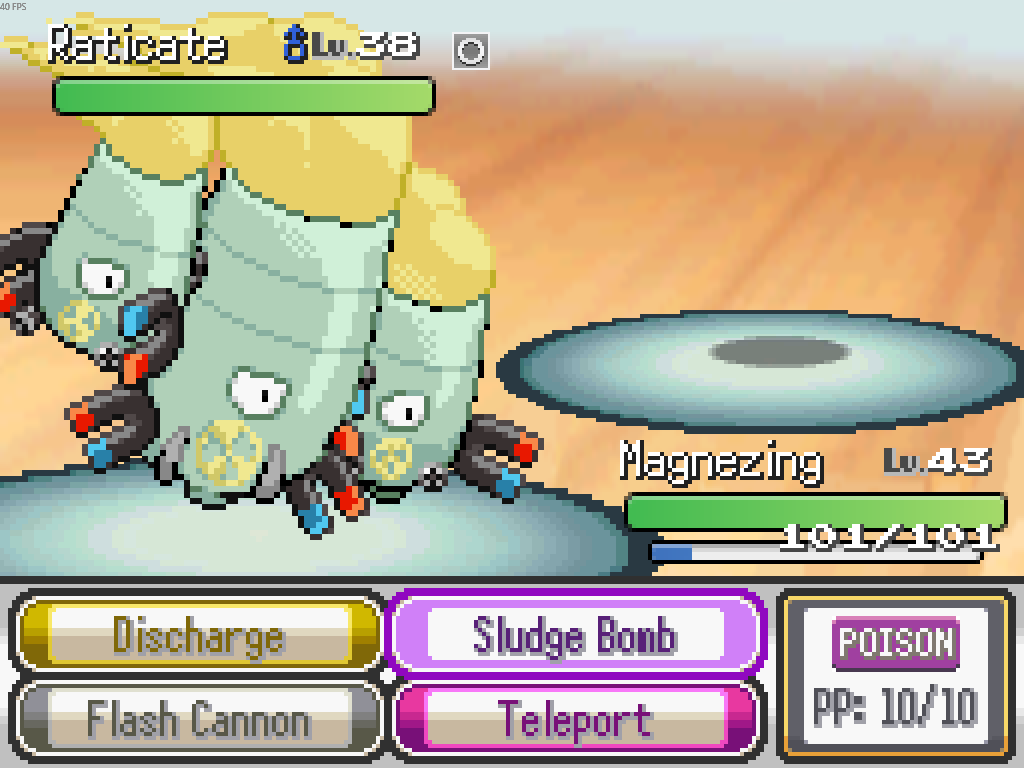
Having an issue with one sprite and one sprite only. Raticate is invisible.
He looks like this: https://i.imgur.com/z7SwslX.png
I've restarted the game, retoggled the download sprites while playing option, updated the game, and nothing works. He's always invisible.
 autumn flame
for me it's clefairy and abra so far
thick jackal
Help man > reset sprites
 open swallow
When ever I try to click play the game immediately goes away
 mossy inlet
... the download guide lies to me? it says there's only two things in the install lite download, the bat and the folder, but the whole game is there? Is this normal?
naive thistle
If I go to the data and go into the coding and higher my chance of the shiny odd will it work??? I see this bid and tired and idk if its working and is there anyways to obtain the shiny charm????
hardy idol
naive thistle
If I go to the data and go into the coding and higher my chance of the shiny od...
?tag cheating
pearl magnetBOT
Per Rules 23 and 24 in #rules, we will NOT assist with ANY code modifications or cheats. Modifying game files in any way VOIDS all tech and game support from us.
Attempting to edit code to enable debug will not work. Debug is only obtainable as an in-game reward for catching all 501 Base Pokémon.
The ONLY fix for your error is to delete your game folder and reinstall using the files linked in #downloads . Reinstalling will not affect your save files.
naive thistle
bah ok
 blissful pond
Sorry to bother you, I would like to ask how could I fix this issue? The original sprite graphics are unable to show normally and I cant enter the game. (I downloaded the 6.62 game pack and unzipped the Full Sprite pack 1-114 (May 2025) pack to the "Graphics" folder.

 turbid terraceBOT
Hey @blissful pond! You can download the game from: [#downloads](#downloads message)
If you need a guide, they are located: [HERE](#tech-support message)
 steep stag
In regards to Android, would I be best just doing a totally fresh install for the new update? I'm only about 2 hours in so not worried about my save file
 lilac crystal
I just updated my game to the most recent version and the launcher is not launching the game
hardy idol
your save you gotta move yourself. updates are always full rreinstalls for android
upbeat sage
blissful pond
Sorry to bother you, I would like to ask how could I fix this issue? The origina...
?tag missingsp
pearl magnetBOT
If you're encountering missing sprites
**If you just updated to 6.6, do the reset cache steps mentioned in this #announcements message post.
**The game comes with all sprites preinstalled, up until the February 2025 Pack.
The remaining packs will be downloaded as you play, as long as you have "Download Data" turned on and your device is connected to wifi. You do not need to do anything for them.
Keep in mind, the auto download does not have infinite speed or capacity and will not trigger if you are not actively encountering new sprites (ex; battling, checking the Pokedex, etc.).
After downloading X amount of sprites per time unit Y, it will be paused for a bit. We cannot adjust this limit and there is nothing you can do as the player to skip it or make it go faster.
The first time you encounter a base Pokemon, it will select a random one of all sprites, if it is a new one that hasn't been downloaded yet, it will show as missing.
The same goes for fusions but with a little more nuance. To keep it simple, think of it the same.
Again, nothing wrong with your game. You just hit a download cap.
Note: Updating your game resets all your auto-downloaded sprites. do not attempt to "fix" this with updating. It will just make everything start from the beginning.
If you would like to manually import the latest sprite packs, they are located in #spritepack-releases and further instructions can be found HERE
upbeat sage
You fucked your files pretty bad
 orchid slate
After installing the new update for 6.6 everytime I attempt to play the game or intialize it immediately closes/crashes it was working fine before I updated the game
fallow wyvern
orchid slate
After installing the new update for 6.6 everytime I attempt to play the game or ...
?tag olddata
pearl magnetBOT
The most likely reason your game is opening and closing is due to improperly updated game files. We mention in #downloads to not update ANY files versions below 6.6.0.
If you're using the Launcher:
- Reinstall version 1.1.2 of the launcher from #downloads
- Open the settings tab
- Click "Reset Config"
NOTE: The original path that the launcher shows will be your old game folder. That folder should be deleted. The new game folder will be inPIFLauncher(#.#.#)/GameFiles/InfiniteFusion
If you're not using the Launcher:
Use the Lightweight installer guide to install in a NEW folder ➡️ Click Here⬅️
If you are on a non-Windows device, follow the [guide](#tech-support message) for your device to reinstall.
Reinstalling on Windows does not affect Save Files in any way.
blissful pond
upbeat sage
You fucked your files pretty bad
Thanks, help a lot.
 cyan mulch
I don't need to keep the ZIP after downloading the game do i
sterile pivot
I have a problem with the Android version of Pokémon Infinite Fusion. I unzip it with RAR, but when I launch the game with JoiPlay, this message appears. I should point out that I took the game from the installation guide
 fallow wyvern
sterile pivot
I have a problem with the Android version of Pokémon Infinite Fusion. I unzip it...
fallow wyvern
sterile pivot
I have a problem with the Android version of Pokémon Infinite Fusion. I unzip it...
Did you take joi play and rpg maker from the guide too ?
sterile pivot
Yes
rigid silo
sterile pivot
I have a problem with the Android version of Pokémon Infinite Fusion. I unzip it...
you are missing files. likely it didnt extract properly.
sterile pivot
I try ti re extract the game
 pearl magnetBOT
No tag mobileat found.
 tender plume
?tag mobilealt
pearl magnetBOT
pearl magnetBOT
verbal timber
hybrid pollen
dont know, if its tech-supp, but should it look like this?
that is a common issue that happens with randomizer, especially with gift mons
basically you get a different mon, but the starting moveset of the mon you were originally meant to get
inner grail
not a tech question and you arent looking in the right place #ask-a-bot message
this is #tech-support , go somewhere else
thick jackal
I asked it before but I downloaded the full sprite pack with the new June sprites and in the Other folder they seem to now have base sprites packed in
rigid silo
full sprite pack always had bases in there too
thick jackal
Can I put them anywhere in the game so I can still have base sprites while not downloading data
rigid silo
nope, it will just duplicate every single entry
thick jackal
Huh?
rigid silo
if you import sprites, it will create new dex entries for imported sprites.
leaving you with empty entries with credits, and uncredited entries which you imported.
so simply doubling all entries
thick jackal
I'm talking base sprites though
rigid silo
same thing
thick jackal
Oh
Ohhhhhhh
So imported sprites still don't get read by the game as the sprites we'd normally have so they still don't have custom dex entries and artist credit
That's kinda stupid
rigid silo
been like that ever since the repo switch to spritesheets
thick jackal
Is it worked on so the game has the readability to check if the sprites match their database and match accordingly or is this just gonna be an inherent problem with importing sprites
rigid silo
it checks what it downloaded, if something isnt in there it will still download them.
its not an md5 check, but rather a "have I done this?" check, and since you are not the game it will not register with importing yourself
think of spritepacks more like a library/backup rather than game content.
so can you import them? yes
will you end up with a duplicate of every entry? also yes
 icy yoke
Is this the place to simply report a bug? I don't need active help with anything.
This occurs whenever I use an item in combat on a pokemon that isn't my active one:
[Infinite Fusion version 6.6.1] Randomized trainers, Randomized gym trainers, Randomized wild Pokemon (area), All fused, Exception: NoMethodError Message: undefined method pbDisplay' for [:UseItem, :COFFEE, 1, -1, 0]:Array
Backtrace:
001_Item_Utilities.rb:235:in pbBattleHPItem' New Items effects.rb:210:in block (2 levels) in load_scripts_from_folder'
005_Event_Handlers.rb:199:in trigger' 001_Item_Utilities.rb:103:in triggerBattleUseOnPokemon'
007_Battle_Action_UseItem.rb:94:in pbUseItemOnPokemon' 011_Battle_Phase_Attack.rb:75:in block in pbAttackPhaseItems'
011_Battle_Phase_Attack.rb:68:in each' 011_Battle_Phase_Attack.rb:68:in pbAttackPhaseItems'
011_Battle_Phase_Attack.rb:185:in pbAttackPhase' 003_Battle_StartAndEnd.rb:337:in block (2 levels) in pbBattleLoop'`
verbal timber
icy yoke
Is this the place to simply report a bug? I don't need active help with anything...
don't use coffee
known bug, will likely never be fixed
icy yoke
oh is it actually just coffee?
Gotcha. I'm doing a randomizer run so it's my only real healing
verbal timber
and this is why you don't randomize items
icy yoke
You don't like to have fun? haha
verbal timber
i prefer to not get softlocked
 idle notch
Hey guys, new here - been playing the game on steam deck, it's updated to the latest version, literally did it a couple hours ago 6.6.2
I have the June sprite pack in correctly.. but I'm still missing a lot of basic non-fused sprites..
I seem to remember there being a sprite.zip for regular, but I believe they're all meant to be in together now?
And weirdly, it mostly happens offline.. even off I have download data off.
I'm just wondering if I'm missing something crazy obvious here
icy yoke
The crucial items for progress dont randomize
verbal timber
you can always get softlocked from something
verbal timber
idle notch
Hey guys, new here - been playing the game on steam deck, it's updated to the la...
see what ymir said above
icy yoke
well then it's unrelated to randomizing items, huh? lol
verbal timber
idle notch
Hey guys, new here - been playing the game on steam deck, it's updated to the la...
but also each montly pack only has sprites for THAT month
and the base sprites are not in with the fusion sprites
 keen pivot
what button to speed the game?
verbal timber
your best bet atm is to not use the spritepacks and play with download data turned On
verbal timber
keen pivot
what button to speed the game?
q
keen pivot
verbal timber
q
thank you 😄
icy yoke
keen pivot
what button to speed the game?
or left bumper
idle notch
verbal timber
your best bet atm is to not use the spritepacks and play with download data turn...
AHH ok that explains a lot, much appreciated 👍
thick jackal
Already tried resetting sprite cache through Help Man, I'm guessing I'm literally out of any other options but download them then
 keen pivot
verbal timber
your best bet atm is to not use the spritepacks and play with download data turn...
keen pivot
verbal timber
your best bet atm is to not use the spritepacks and play with download data turn...
how to turn download data on?
fallow wyvern
keen pivot
how to turn download data on?
In settings
keen pivot
thx
thick jackal
verbal timber
but also each montly pack only has sprites for THAT month
Or download the full sprite packs too
fallow wyvern
thick jackal
Or download the full sprite packs too
That's not a good solution
thick jackal
No but if you wanna download all sprites you gotta download the full pack if you wanna go sprite packs route
icy yoke
fallow wyvern
That's not a good solution
What a contribution.
rigid silo
icy yoke
What a contribution.
they are right though.
verbal timber
thick jackal
No but if you wanna download all sprites you gotta download the full pack if you...
if you scroll up you will see we don't recommend that
verbal timber
thick jackal
Already tried resetting sprite cache through Help Man, I'm guessing I'm literall...
if you are seeing custom sprites in any capacity, base or fusion, your game is working as intended
 rigid silo
them installing the pack will simply make them end up with duplicate entries for everything, and the game will still display empty sprites for quite some base sprites until they set them themselves.
 zealous solstice
Why doesn't the sprites show up even after download em all?
rigid silo
because you're not meant to
with all this sprite talk, people confusing themselves, and misinformation I'm calling a veto again and reverting to my message.
verbal timber
fair enough
rigid silo
---------------------------------
REGARDING SPRITE ISSUES:
---------------------------------
This is all support we will give around sprites.
The sprites are being monitored by staff and still work properly.
read this whole message carefully to know what is applicable to your situation.
➡️ IF you have seen even a single custom or base sprite for any pokemon:
--- Your game is fine and working properly.
----- the game can only download a limited number of sprites per time unit while playing before going on cooldown, you simply hit the maximum for now.
➡️ IF you have not seen even a single sprite for any pokemon:
--- Your game is not fine nor working properly.
----- This is likely the result of you messing with files, either to cheat or try to "fix" stuff. OR you have "download data" turned off in options.
step 1. Check your options in a save, turn on "download data" if it was turned off.
step 2. If that did not fix it: head to a pokecenter > talk to the man in a black suit with sunglasses > advanced > other > reset > reset sprite cache & reset alt selection
step 3. If that did not fix it: do a full reinstall.
➡️ IF you for some reason still do not believe your game is working properly:
step 1. delete your whole install
step 2. reinstall following our guide in downloads
step 3. go to a pokecenter
step 4. talk to the man in the black suit with sunglasses > advanced > other > reset > reset sprite cache
step 5. with the same man: advanced > other > reset > reset alt selection
🔴 After following the applicable steps your sprites are working. If you encounter missing sprites it is simply because of the sprite download cooldown. Keep playing and sprites will show up.
inner grail
rigid silo
because you're not meant to
kinda seems like releasing the spritepacks makes life harder here
verbal timber
inner grail
kinda seems like releasing the spritepacks makes life harder here
tbf before we switched to sprite sheets, that worked fine
inner grail
long time ago though
rigid silo
inner grail
kinda seems like releasing the spritepacks makes life harder here
only because peoples brains go: "oh files, i must download and mess with them even though the guide doesnt mention them in the slightest"
zealous solstice
My sprites only load with internet, so you can't play offline?
icy yoke
rigid silo
# ---------------------------------
# REGARDING SPRITE ISSUES:
# ---------------...
Ok, but is that a useful guide if people are still constantly struggling with sprites?
rigid silo
icy yoke
Ok, but is that a useful guide if people are still constantly struggling with sp...
yes, because all the info is in there.
icy yoke
I've had missing sprites plenty of times that are because my game is acting up.
i dont see how a single missing sprite means your game is "working fine"
rigid silo
its not something I'm willing to spend time having a discussion about.
last weeks we've had plenty of people doubt the info, to come back hours/days later "oh you were right, I'm sorry"
I know how sprites work. I dont need people doubting the info
verbal timber
icy yoke
i dont see how a single missing sprite means your game is "working fine"
by that logic, the game is broken because there are some fusions that lack both an autogen and custom sprite
icy yoke
verbal timber
by that logic, the game is broken because there are some fusions that lack both ...
By what logic? I'm referring to the sprite guide.
verbal timber
by the logic of the message i replied to
"I don't see how a single missing sprite means your game is working fine"
icy yoke
Not sure what you're tripped up about tbh. The guide says if you are missing sprites but you have even a single one, the game is fine.
rigid silo
I drop info in here as the tech manager of the game, people doubt it and want to have a discussion.
meanwhile 10 different people are distributing misinformation regarding spritepacks.
for this reason it was decided that for sprite issues my message will be the help we provide.
inner grail
#discord-suggestions message guess we will see
icy yoke
I'm not doubting anything to be clear. The info IS all there, but the very first bit says "if you see any sprites your game isn't broke" and I was just commenting that it DOES seem confusing, and that might be why people constantly still ask for help.
rigid silo
icy yoke
I'm not doubting anything to be clear. The info IS all there, but the very first...
the fact is; if you've seen even a single sprite - your game is fine
all sprites are stored on the same server.
if it was able to get 1, and thus setup a proper connection with the server, it can get all
verbal timber
it just takes time
especially when you consider that there is a limit set on the download of sprites by Frog so he doesn't have to pay more than he already is for the repo hosting service
though I swear there was like a month where spritesheets got uploaded into a pack instead of the individual pngs...I assume that got dropped because it was harder to put where the game needed them
shame, as that would solve the duplication problem
thick jackal
Reinstalling PIF for the nth time and I think this is the first time I've actually decided to post this part specifically in the install process

Does this error mean anything
 dusty nimbus
Why doesn't my game download Pokémon sprites if I have an internet connection?
dusty nimbus
ok, thank you
 brittle kraken
rigid silo
I know how sprites work. I dont need people doubting the info
brittle kraken
rigid silo
I know how sprites work. I dont need people doubting the info
I only know how to make them sadly
Serious question tho, does it have anything to do with files that some credits are displayed as "Unknown artist" or is it just the fault of the spritecredits sheet?
dusty nimbus
thick jackal
Download Data > On
It was already installed, I have never disabled it, and when checking the sprites in the files, most of them are not there, only those of certain Pokémon, I can't find a solution.
thick jackal
Yeap idk anymore then
verbal timber
dusty nimbus
It was already installed, I have never disabled it, and when checking the sprite...

you likely hit the download cap
be patient
verbal timber
only Frog knows
brittle kraken
Why is there a download gap
verbal timber
brittle kraken
Why is there a download gap
because we don't have a free to use repo anymore like what we did with gitlab
Frog pays for hosting on the new repo
dusty nimbus
verbal timber
you likely hit the download cap
in that way?
brittle kraken
ah
verbal timber
to ensure that cost isn't too high, he set the cap so it doesn't boil over and cost more
verbal timber
dusty nimbus
in that way?
game can only downlod X amount of sprites every Y interval until Z cap is hit, then game stops grabbing sprites until a second Y interval is triggered at which point it resets and starts all over
thick jackal
Hey Mordrid if I get this outfit is it a portent that my game files in general are screwed
 verbal timber
thick jackal
Hey Mordrid if I get this outfit is it a portent that my game files in general a...
verbal timber
thick jackal
Hey Mordrid if I get this outfit is it a portent that my game files in general a...
no just means you fought a mon that didn't have a sprite
rigid silo
thick jackal
Hey Mordrid if I get this outfit is it a portent that my game files in general a...
no, thas just an outfit. it should look like that
thick jackal
That would be the Froakie I have it's been question mark for awhile now (don't worry I know I know I have Download Data I'll get Froakie sprites eventually)
dusty nimbus
verbal timber
game can only downlod X amount of sprites every Y interval until Z cap is hit, t...
How do I get it to reactivate?
verbal timber
just keep playing
as stated there is a second interval of time [Y] that has to pass before the game can start grabbing sprites again
brittle kraken
I wonder how much fusions people think dont exist just bc they hit the cap
thick jackal
The gitlab repo ban has been really hitting this game hard
verbal timber
not much we can do about that
dusty nimbus
verbal timber
as stated there is a second interval of time [Y] that has to pass before the gam...
Is there no way to do it manually? It's just really awkward to play without seeing the sprites.
verbal timber
there is, but it isn't recommended
importing sprites manually basically means you get duplicates
brittle kraken
I think reverting to the old system would be better atp.
 subtle sand
hey, is the rhyorn quest bugged? i got him to go to the towel but nothing happens
verbal timber
brittle kraken
I think reverting to the old system would be better atp.
individual pngs take up more space than the sprite sheets
 verbal timber
subtle sand
hey, is the rhyorn quest bugged? i got him to go to the towel but nothing happen...
verbal timber
subtle sand
hey, is the rhyorn quest bugged? i got him to go to the towel but nothing happen...
move it an extra space on the towel
brittle kraken
Individual pngs atleast worked tho
subtle sand
verbal timber
move it an extra space on the towel
doesn't work too
rigid silo
on the old system: "people complain they cant unzip and we should come up with something new"
on the new sysem: "people complain they can play but dont like the downloads caps"
verbal timber
subtle sand
doesn't work too
so moving it up a space or down a space on the towel, when it is already there, doesn't end it?
 subtle sand
verbal timber
so moving it up a space or down a space on the towel, when it is already there, ...
subtle sand
verbal timber
so moving it up a space or down a space on the towel, when it is already there, ...
yep, nothing happens
brittle kraken
Yeah having a cap on something called INFINITE fusions kinda beats the point
verbal timber
hm
dusty nimbus
verbal timber
importing sprites manually basically means you get duplicates
Ok, then I better wait, thanks for your help
brittle kraken
call it pokemon finite fusions atp
verbal timber
brittle kraken
Yeah having a cap on something called INFINITE fusions kinda beats the point
the irony is with the pngs it would take longer to get sprites
rigid silo
brittle kraken
Yeah having a cap on something called INFINITE fusions kinda beats the point
sadly hosting hundreds of thousands of sprites for 600.000 people costs a fuckton of money
verbal timber
without manually importing them anyway
rigid silo
more than you can imagine
thick jackal
Wait so when the game downloads the sprites what it actually downloads is a spritesheet?
 late bane
brittle kraken
call it pokemon finite fusions atp
late bane
brittle kraken
call it pokemon finite fusions atp
if you are going to keep complaining just stop playing infinite fusions and make your own game that works the way you want this one to
rigid silo
thick jackal
Wait so when the game downloads the sprites what it actually downloads is a spri...
yipyip
thick jackal
I'm gonna blame the spritesheet system on this "download data half minute lag" thing then yep
verbal timber
late bane
if you are going to keep complaining just stop playing infinite fusions and make...
dude, you need to seriously take a break from the server with this kind of stuff
thick jackal

brittle kraken
late bane
if you are going to keep complaining just stop playing infinite fusions and make...
This seems kinda rude for no reason
verbal timber
it is rude for no reason
brittle kraken
I dont even play the game and was just curious about how it worked
late bane
verbal timber
dude, you need to seriously take a break from the server with this kind of stuff
bro i say 1 message in this channel in over a week and suddenly im being attacking for telling someone to either stop complaining or make your own game?
rigid silo
brittle kraken
I dont even play the game and was just curious about how it worked
realistically the cap also doesnt come into play for most people on a new save.
we had an issue a couple weeks back where it reset everyones download progress, it now has to play catchup on people existing saves. making the cap more obvious
brittle kraken
ah, well thx, I am more enlightened now
verbal timber
basically the pipe that comes from the repo to the game is clogged
late bane
this is crap im getting attacked and blocked because im tired of people complianing about how frog runs his game
brittle kraken
what do I do when the game displays certain sprites as autogen?
thick jackal
I think people have the right to be frustrated about the state of the game and the sprites issue or even snarking about it without being told "go make your own game!!!"
late bane
brittle kraken
what do I do when the game displays certain sprites as autogen?
keep playing until you can get sprites again as youve hit a cap
verbal timber
brittle kraken
what do I do when the game displays certain sprites as autogen?
that could come down to a few things:
- you hit the download cap, just means you gotta be patient and keep playing, as long as the mon is in battle eventually the game should be able to grab the sprite [if there is one] and you can change it in the alts thing later if it doesn't automatically change
- the fusion lacks a custom sprite entirely
?tag alts
pearl magnetBOT
To change a Pokemon's sprite to an alternative one, go to their Pokedex entry (this can be done from their summary screen) and go to the "Sprites" tab. Here you can scroll through the different available sprites.
https://www.youtube.com/watch?v=VOY_mxJ-Bx8
 brittle kraken
I dont mean to be rude in a way but I dont think the cap is one
verbal timber
the cap applies to both fusion sprites and base sprites
thick jackal
Btw is autogen sprites just not even in the game anymore
verbal timber
they exist
brittle kraken
 thick jackal
Oh okay because I think I just kept seeing question marks at this point
brittle kraken
I only checked 1 pokemon for the rest
thick jackal
It's 10 minutes in this new save oh my god how is the only mon sprites downloaded the damn Dratini Gary has
verbal timber
thick jackal
Oh okay because I think I just kept seeing question marks at this point
that is usually more prominent on base sprites than anything else
but can happen with fusions as well
which can mean the fusion lacks both an autogen and custom
verbal timber
yeah you hit the cap
rigid silo
because if a sprite hadnt been downloaded yet, the game will display an autogen in the slot of the custom.
verbal timber
that fusion has a custom
brittle kraken
damn the cap really is 1 sprite
rigid silo
nahh thats normal
brittle kraken
nah I have the normally custom one selected
rigid silo
if they press select on the empty custom slot it will populate with an autogen
verbal timber
no i mean i get that but it should be credited as japeal, not widecloud
rigid silo
the right one is credited as japeal, the one selected is the custom one which has not been downloaded
verbal timber
oh
rigid silo
thus got filled with autogen
verbal timber
oop
brittle kraken
The sprite I have selected normally be custom
thick jackal
Mordrid I think you blocking Looker really pissed him off lol
rigid silo
anyhow, I just checked the server. nothing wrong. sprites working fine. tested on a fresh install. all good
verbal timber
thick jackal
Mordrid I think you blocking Looker really pissed him off lol
oh well, tired of how rude he has been
i am free to block whoever I so desire to make sure i don't blow up on someone
brittle kraken
He probably will come back
rigid silo
thats fine, we're no strangers
brittle kraken
to love
I forgot about my save
ik this isnt really the place but I forgot I named this
 thick jackal
Man it's really annoying that I decided to just tank this constant half a minute (it's 2 minutes and more now) lag during the download data lag knowing I'm still not gonna download any sprites
rigid silo
-# at this rate i might just take down the launcher and preload the other versions and just say "fuck it" to all the people that wont be able to extract the game
 rigid silo
thick jackal
Ah yep
rigid silo
thick jackal
Ah yep
have you tried resetting the cache already after you updated like frogs announcement said to do?
just to check
thick jackal
I tried resetting it on another save and I did still have this issue
rigid silo
coolcool, have you seen any custom sprite?
brittle kraken
I have seen a whopping 1
thick jackal
Only the Dratini Gary has
brittle kraken
I am not mad about it
thick jackal
I mean I'm gonna keep checking don't worry
brittle kraken
I think the circles are funny
rigid silo
thick jackal
Only the Dratini Gary has
was it the custom dratini sprite?
because thats a double dratini fusion.
if it was custom it should have multiple heads
thick jackal
Not even lmao it was base Dratini
rigid silo
so auto-gen
brittle kraken
lol
thick jackal
Yea
rigid silo
in that case you havent seen a single custom
give your game a full reinstall, then try running a new save and make sure the download data setting is on
thick jackal
This was a fresh reinstall a few minutes ago actually
brittle kraken
I keep wanting to type my adventures in here
ill move to playtrough talk
goodbyee
thick jackal
A new save too
With download data on
As I said I'm just gonna tank all this (plus the battle/pokedex/pokemon info lag for a minute and more) and then go to Help Man again
verbal timber
rigid silo
-# at this rate i might just take down the launcher and preload the other versio...
 rigid silo
thick jackal
As I said I'm just gonna tank all this (plus the battle/pokedex/pokemon info lag...
rigid silo
thick jackal
As I said I'm just gonna tank all this (plus the battle/pokedex/pokemon info lag...
when you do talk to help man:
reset the cache and reset alt sprite substitution once more.
then play for a bit.
then check this file: infiniteFusion\Data\sprites\updated_spritesheets_cache
and just copy paste whatever is in there in this discord chat
then I can see if it downloaded anything at all
thick jackal
How long is 'for a bit'
verbal timber
maybe like 5-10 minutes, as many battles as you can do
thick jackal
It's 30 minutes because of the download data lag bs
Every battle is gonna take 3x times as long I think
verbal timber
i wonder if this is more of an issue with your internet
rigid silo
thats fine, the in game time should not affect the cap. 5-10min is still fine even if thats only a couple battles
thick jackal
Dude I redownloaded this game for the nth time and it only took me 3-4 minutes
I have a good internet (I have to assume for the purposes of the "your internet might just be in the shits for this game bro" talk)
verbal timber
less that more just trying to narrow the cause down
because this game tends to get a bit...weird...with internet
thick jackal
And it's not my PC because I literally had to get this PC a new motherboard due to some faulty motherboard issues and it also involved deep cleaning etc etc
And it has always played a lot of games (even Remastered Oblivion) smoothly so like
Idk anymore
verbal timber
you'd be surprised...not trying to be rude on this
the game engine this is using is old, so much so it is starting to fall into the uncanny valley territory of technology that dislikes it when you have "too good of a device"
 thick jackal
oppenheimer.gif again
verbal timber
welcome to technology, we'll let you know when it makes sense...which should be right at the crossroad of never and eventually
thick jackal
I think this issue is worse for me now because the game just doesn't have prepackaged sprites anymore which is insane to me
At least when this game had prepackaged sprites I'll just tank the sprites/download data issue and move on but I can't even have sprites anymore damnit man
verbal timber
well try what Ymir said to see if your game is even downloading sprite sheets
if not he may have an idea outside the extreme option
thick jackal
@rigid silo
Graphics/CustomBattlers/spritesheets/spritesheets_custom/7/7b.png
Graphics/CustomBattlers/spritesheets/spritesheets_custom/19/19.png
Graphics/CustomBattlers/spritesheets/spritesheets_base/16.png
Graphics/CustomBattlers/spritesheets/spritesheets_custom/4/4a.png
Graphics/CustomBattlers/spritesheets/spritesheets_custom/16/16.png
Graphics/CustomBattlers/spritesheets/spritesheets_custom/4/4.png```Okay this clearly means I've downloaded some things
I guess I'm just out of luck with mons I actually play/face right now in the game
rigid silo
yeah no, seems to not be downloading anything.
(this is confusing, but those are artifacts shipping with the download. those 7 are always in there)
thick jackal
(oppenheimer.gif intensifies)
rigid silo
okay. i will send you a "fix" in DM
best to not spread it as it really is a duct-tape-ish fix
thick jackal
You understand now why I am intensely frustrated with this game whenever I'm in #tech-support lmao
verbal timber
i mean the option i was going to present if nothing else worked was just going to be the altdownload
man my brain is hell fried today
more so than usual
will prob just take another daycation from the server to chill out and not help so i can get my head on straight
 last meteor
Why my game stuck on this screen

 fallen summit
super mario galaxy music extended?
fallen summit
?tag rule23 - we dont support or help with modding of any kind
pearl magnetBOT
Rule 23. Any modifications to the game's code (that includes mods, edited gamefiles and "cheats") voids your support ( tech-support / gameplay-help )
 covert lodge
gotcha
fallen summit
we only advise you do a total reinstall
covert lodge
ty
 hallow rose
im alittle new but my game keeps crashing anything i can do to fix it?
fallow wyvern
hallow rose
im alittle new but my game keeps crashing anything i can do to fix it?
Is it your first time installing ?
hallow rose
fallow wyvern
Is it your first time installing ?
no its not ive had the game for awhile just came back to playing it im going to try deleting and reinstalling
fallow wyvern
hallow rose
no its not ive had the game for awhile just came back to playing it im going to ...
?tag olddata
pearl magnetBOT
The most likely reason your game is opening and closing is due to improperly updated game files. We mention in #downloads to not update ANY files versions below 6.6.0.
If you're using the Launcher:
- Reinstall version 1.1.2 of the launcher from #downloads
- Open the settings tab
- Click "Reset Config"
NOTE: The original path that the launcher shows will be your old game folder. That folder should be deleted. The new game folder will be inPIFLauncher(#.#.#)/GameFiles/InfiniteFusion
If you're not using the Launcher:
Use the Lightweight installer guide to install in a NEW folder ➡️ Click Here⬅️
If you are on a non-Windows device, follow the [guide](#tech-support message) for your device to reinstall.
Reinstalling on Windows does not affect Save Files in any way.
fallow wyvern
Is that what you wanted to say @verbal timber ?
verbal timber
was gonna ask if they were crashing with an error first
or no error
then maybe lead to that
fallow wyvern
Oh okay, so I forgot a step
verbal timber
no worries, its why we try to narrow it down so we can give out the right info
 spiral vine
I wanted to make some test with the debug mode but didn't found how to get it, i tried obtaining it with the 999_Main since it was the only method i knew that didn't implied cheat engines and since then i get this message and now i can't play
[Infinite Fusion version 6.5.1]
Exception: NoMethodError
Message: undefined method `language' for nil:NilClass
Backtrace:
001_MiscPBSData.rb:104:in pbLoadMapInfos' 004_Compiler_MapsAndEvents.rb:17:in import_new_maps'
001_Compiler.rb:793:in main' 999_Main.rb:162:in mainFunctionDebug'
999_Main.rb:54:in block in mainFunction' 003_Errors.rb:78:in pbCriticalCode'
999_Main.rb:54:in mainFunction' 999_Main.rb:185:in block (2 levels) in load_scripts_from_folder'
999_Main.rb:184:in loop' 999_Main.rb:184:in block in load_scripts_from_folder'
fallow wyvern
spiral vine
I wanted to make some test with the debug mode but didn't found how to get it, i...
First question, how did you get debug mode, I didn't see your pokédex completionist role
And second question why are you still in 6.5.1
spiral vine
first, i didn't got it since i can't launch my game to see if i have it, second, i just forgot to updated it while launching it this morning
turbid terraceBOT
Hey @spiral vine! Black screen in this game is the loading screen. The duration of the black screen depends on YOUR computer and YOUR internet.
- If you get the message below while opening the game, this means to stop clicking/pressing buttons on the screen as it is loading.
- If you get the message while in game, this means your computer is struggling.
- Use our performance tips to help your issues: [More Info](#tech-support message)⬅️⬅️
 hardy iris
I'm new! Just downloaded and the Game.exe file that was supposed to show up didn't show up! It says to send a screenshot to tech support, so that's what I'm doing
 fallow wyvern
spiral vine
first, i didn't got it since i can't launch my game to see if i have it, second,...
fallow wyvern
spiral vine
first, i didn't got it since i can't launch my game to see if i have it, second,...
So you try to modify the files ?
verbal timber
?tag cheating
pearl magnetBOT
Per Rules 23 and 24 in #rules, we will NOT assist with ANY code modifications or cheats. Modifying game files in any way VOIDS all tech and game support from us.
Attempting to edit code to enable debug will not work. Debug is only obtainable as an in-game reward for catching all 501 Base Pokémon.
The ONLY fix for your error is to delete your game folder and reinstall using the files linked in #downloads . Reinstalling will not affect your save files.
verbal timber
 verbal timber
hardy iris
I'm new! Just downloaded and the Game.exe file that was supposed to show up didn...
verbal timber
hardy iris
I'm new! Just downloaded and the Game.exe file that was supposed to show up didn...
hm this reads correctly
fallow wyvern
fallow wyvern
So you try to modify the files ?
So we can't help you anymore
verbal timber
where did you get your game files from
hardy iris
The link in this discord
verbal timber
odd
 young egret
Hello, I would like to play this on mobile(joiplay). May I ask how can I download it with preloaded sprites?
verbal timber
so the inside of your infinitefusion folder has nothing in it, or is just missing the game.exe
verbal timber
young egret
Hello, I would like to play this on mobile(joiplay). May I ask how can I downloa...
you don't
none of the downloads come with sprites
hardy iris
verbal timber
so the inside of your infinitefusion folder has nothing in it, or is just missin...

Here's all the stuff it gave me
young egret
I see. So the sprites automatically download even when using joiplay or do I have to download a sprite pack and put it in the files?
hardy iris
Hm, but when I clicked on it, it didn't open and errored at me. Hold on...

I assumed I did something wrong
fallow wyvern
Oh that, just connect headphones
verbal timber
hardy iris
Hm, but when I clicked on it, it didn't open and errored at me. Hold on...
plug in audio
hardy iris
Ohhh
verbal timber
headphones/headset/speakers/earbuds/etc
hardy iris
Ohhhhhh, aaa, I feel silly now
verbal timber
young egret
I see. So the sprites automatically download even when using joiplay or do I hav...
sprites download as long as you have download data turned On in the options and a connection to the internet
hardy iris
verbal timber
plug in audio
It's working now, thank you. Sorry for being dumb, hahaha
fallow wyvern
hardy iris
It's working now, thank you. Sorry for being dumb, hahaha
Np, it's a good thing to have simple things to fix like that sometimes
What ?
 runic pebble
did i type something lol
misclick ig
I was scrolling through this channel for help with something else and must have hit my keyboard by mistake
 ocean socket
?
 ocean socket
?
ocean socket
ocean socket
?
I'ts just stopped downlaoding
fallow wyvern
 oh okay np
rigid silo
ocean socket
?
thats not something on our end
ocean socket
rigid silo
thats not something on our end
alright, ill try the other links then
fallow wyvern
ocean socket
?
Hum where did you download the game to be sure
ocean socket
fallow wyvern
Hum where did you download the game to be sure
This link didn't work but the google drive worked
 rigid silo
just checked, link works fine.
something in your connection to it doesnt.
but glad it is solved already
verbal timber
either that or the browser
since i know operagx hates mediafire with a passion for some reason
rigid silo
that new link is our own repo
ocean socket
Yea i am using operagx so it's probaly that
narrow tide
I cant pick up the wood in the builder quest, any tips?
rigid silo
mediafire is now also moved to the "backups"
will keep an eye on the abomination that is operagx
verbal timber
lol
narrow tide
im pressing the action button
verbal timber
narrow tide
I cant pick up the wood in the builder quest, any tips?
you don't pick it up
you talk with the npc
to fight them and get it
narrow tide
oh ok then tks
fallow wyvern
 civic edge
you guys encrypted values by *2+1 ? why
civic edge
you guys encrypted values by *2+1 ? why
What ?
civic edge
memory values
fallow wyvern
Uhm see that with Ymir
civic edge
curious if its gamemaker being gamemaker or whether obfuscated intentionally
fallow wyvern
civic edge
curious if its gamemaker being gamemaker or whether obfuscated intentionally
No just because he is busy and doesn't need to bother him while Ymir maybe already now the answer
fallow wyvern
civic edge
who is "he"?
Frog the game creator, maybe I misunderstood your question
civic edge
ah, ig tech support isnt really accurate
 last juniper
Boys,which version of joiplay do I install?
civic edge
im editing how much money I have in the game and the "values" are always * 2 + 1 meaning if I have 100 gold in the game, the in-memory value is 100 * 2 + 1 = 201
last juniper
Cus I recall someone saying it wasnt latest ver
fallow wyvern
civic edge
im editing how much money I have in the game and the "values" are always `* 2 + ...
Oh
?tag cheating
pearl magnetBOT
Per Rules 23 and 24 in #rules, we will NOT assist with ANY code modifications or cheats. Modifying game files in any way VOIDS all tech and game support from us.
Attempting to edit code to enable debug will not work. Debug is only obtainable as an in-game reward for catching all 501 Base Pokémon.
The ONLY fix for your error is to delete your game folder and reinstall using the files linked in #downloads . Reinstalling will not affect your save files.
civic edge
im curious whether this is gamemaker being gamemaker, or whether the dev did this intentionally (obfuscating values to make them harder to find)
no worried, I don't need support haha
fallow wyvern
I think so, just a reminder
civic edge
gotya
I guess sometimes people will cheat and then ask for help because they broke their save files
😂😂
fallow wyvern
last juniper
Boys,which version of joiplay do I install?
Version in the mobile guide
fallow wyvern
civic edge
I guess sometimes people will cheat and then ask for help because they broke the...
Yeah
We have one today
civic edge
haha thats pretty funny
last juniper
?tag mobilealt
pearl magnetBOT
civic edge
just make backups :p
fallow wyvern
civic edge
im editing how much money I have in the game and the "values" are always `* 2 + ...
And okay, cool things to now
civic edge
oh btw this one may be important for Ymir/whoever to know, I figured what was causing the massive lag spikes
I shortly spoke with @rigid silo about it before, if you remember
2 reasons:
- memory leaks
- particle effects (grass when walking through it, surfing on ocean, walking in puddles, etc)
it doesnt really matter much, its a 7+ year old free fan-made game, so im not bothered by it
but in case anyone is ever going to look at it, I suggest checking the particle fx spawning
fallow wyvern
I keep this in case it gets flooded in the channel without them seeing it and reposting it later on the helper channel, I think it's maybe an important thing
civic edge
ok. to recreate this:
- have a device with lower specs (I play on steam deck oled)
- play for multiple hours (optional), then use the game-speed-up (Q on keyboard, left trigger on Deck) and you'll see stuttering while moving
- inspect RAM usage while playing for long periods
^ now ig you open the project in gamemaker and see exactly what code is causing how much RAM
particle effects:
- just speed up game (Q) while moving through grass or swimming in water. I get stuttering even while not playing for a while pretty much everywhere, especially swimming. but you see this getting worse after playing for some hours due to memleaks
rigid silo
thing is, I am not able to recreate it at all.
even on my steamdeck, where i remember you mention it
 earnest plume
I just had to use the debugger because after the celadon city bike race i spawned in the middle of a patch of trees. i had two badges and finished the race before my opponent
fallen summit
earnest plume
I just had to use the debugger because after the celadon city bike race i spawne...
known issue, glad you solved it yourself!
that is the correct thing to do in that instance


 fallen summit
 dim tree
I think im misising sprite packs
dim tree
I think im misising sprite packs
 quasi abyss
ymirs master message that we should honestly pin
 narrow trellis
when I click play, the game crashes. Any help with that?
rigid silo
narrow trellis
when I click play, the game crashes. Any help with that?
?tag olddata
pearl magnetBOT
The most likely reason your game is opening and closing is due to improperly updated game files. We mention in #downloads to not update ANY files versions below 6.6.0.
If you're using the Launcher:
- Reinstall version 1.1.2 of the launcher from #downloads
- Open the settings tab
- Click "Reset Config"
NOTE: The original path that the launcher shows will be your old game folder. That folder should be deleted. The new game folder will be inPIFLauncher(#.#.#)/GameFiles/InfiniteFusion
If you're not using the Launcher:
Use the Lightweight installer guide to install in a NEW folder ➡️ Click Here⬅️
If you are on a non-Windows device, follow the [guide](#tech-support message) for your device to reinstall.
Reinstalling on Windows does not affect Save Files in any way.
narrow trellis
I did that and it still doesnt work
rigid silo
then you didnt fully uninstall beforehand
narrow trellis
Do I just need to uninstall everything and download it all again?
rigid silo
on the launcher it will work with that setting.
on lightweight as the instructions say - reinstall.
narrow trellis
I have the PifLaunxher
rigid silo
then follow those steps.
if that doesnt work you will need to give more info.
we dont quite have a lot to go off of
narrow trellis
I did the download and I hit reset config and it still doesnt want to load
verbal timber
further proof you should just yeet the launcher
 tropic mountain
Hi tech Support I have fully updated the Game but when I click play game I get a pop up saying game does not exist. I'd like any assistance
rigid silo
tropic mountain
Hi tech Support I have fully updated the Game but when I click play game I get a...
did you move any files around?
a screenshot of the error and/or game folder would be appreciated.
tropic mountain
No all files have remaind where they were after the extract


Theres a better view of the error
This is how the files look
 rigid silo
setting, reset config
 winter sundial
hello, can I report bugs in this channel as well?
or is it only to get help?
verbal timber
winter sundial
hello, can I report bugs in this channel as well?
or is it only to get help?
you are meant to report bugs her yes
but it is also for tech help as well
winter sundial
ah alright!
then I'd like to report a minor bug in Sprout Tower, last floor.
The Victreebel, that go around in a circle only trigger a Stage-Reset if directly walked into.
If you just stand there they just walk into you and then just stack into each other.
I have a video that shows this if you'd like to see it for yourself.
lilac imp
So when I extract the zip its putting ALL of the image files of the game into my gallery. It didn't do this for any previous version for me. Any fixes?
winter sundial
lilac imp
So when I extract the zip its putting ALL of the image files of the game into my...
Do you have that problem on android? maybe you galery indexes all files that end with certain extensions like jpg or png.
I have a gallery app that does that as well.
In my app I can tell the gallery-app to ignore that folder and I will no longer see images in that folder again
lilac imp
I haven't changed apps between this version and a previous one so no
 next smelt
mine doesnt work for some reason
 winter sundial
next smelt
mine doesnt work for some reason
winter sundial
next smelt
mine doesnt work for some reason
is your game directory in "C:\Users%username%\InfiniteFusion"?
next smelt
yes
winter sundial
next smelt
yes
from which version do you try to update?