#tech-support
1 messages · Page 638 of 1
 shrewd brook
shrewd brook
shrewd brook
ok well at least im not alone
 spark peak
Can someone help

 shrewd brook
well at least you have one sprite
spark peak
yeah but what if I want to do a let's playvideo😭
shrewd brook
do you think it could be this thing?

i dont know how an older version of the game could be causing all this but like nothing else has fixed it
spark peak
...
 verbal timber
shrewd brook
i dont know how an older version of the game could be causing all this but like ...
verbal timber
shrewd brook
i dont know how an older version of the game could be causing all this but like ...
you are on v6.6.2 right?
shrewd brook
yes
verbal timber
if you updated from an older version that might be causing the problems
shrewd brook
shrewd brook
HOW IS IT GETTING WORSE
unless this is lying to me
which at this point i could believe
verbal timber
it aint
shrewd brook
i didnt update from an older version
my launcher was so outdated i had to completely redownload the game
verbal timber
because you don't have your dex yet, sprites will be a bit borked
you need to do the clear cache on each save, since sprites are dependant on that
so deal with the nonsense until you get your pokedex and then talk to the help man in viridian and do that
shrewd brook
i had this launcher but it was too outdated to be updated to the newest version so i just had to completely redownload the game

since i did the lightweight installer download do you think its worth trying to do the launcher download to see if that is any better or do you think its just gonna be the same thing?
shrewd brook
ok
verbal timber
if you get the launcher you'd just need to readd the sprites to that
but keep playing the game so you can get the dex, then help man, and clear sprite cache
hopefully that will resolve it
if not then something on your end is the cause
shrewd brook
verbal timber
if you get the launcher you'd just need to readd the sprites to that
well if the launcher isnt as borked as the lightweight installer then maybe i wouldnt have to do all of this stuff is what im saying but your the expert
verbal timber
oh no the launcher is borked in its own right
 regal geyser
You need to get the pokédex for sprites to download and update I'm pretty sure yeah
shrewd brook
verbal timber
if not then something on your end is the cause
yeah but i have no idea what it could be
verbal timber
neither do we
shrewd brook
i dont even think i have an antivirus. so that couldnt be messing with it
verbal timber
and the only fix i can think of that would solve all the problems would be reinstalling windows and keeping no files
but we can't help with that since it is well above and beyond the means of this channel
at any rate i've done what i can to assist, i'mm go crash for a nap
shrewd brook
verbal timber
and the only fix i can think of that would solve all the problems would be reins...
yeah that would cause way more issues then its worth
shrewd brook
verbal timber
at any rate i've done what i can to assist, i'mm go crash for a nap
well deserved
spark peak
Can someone help me
 shrewd brook
ok well now im even more confused

 brazen lotus
hey, just updated my game and my launcher and now the game won't launch
 turbid terraceBOT
Hey @brazen lotus! Black screen in this game is the loading screen. The duration of the black screen depends on YOUR computer and YOUR internet.
- If you get the message below while opening the game, this means to stop clicking/pressing buttons on the screen as it is loading.
- If you get the message while in game, this means your computer is struggling.
- Use our performance tips to help your issues: [More Info](#tech-support message)⬅️⬅️
 brazen lotus
it opens the game for a second, then the window closes itself
does anyone know what could be causing this?
spark peak
spark peak
Can someone help me
Can someone help me?
 fallow wyvern
spark peak
Can someone help me?
fallow wyvern
spark peak
Can someone help me?
?tag resetcache try this
 pearl magnetBOT
For missing sprites on the 6.6 update, talk to the help man in any Pokémon center and navigate to Advanced Options -> Other -> Reset -> Clear Sprite Cache. Video
spark peak
I have done this a milion times😭
fallow wyvern
brazen lotus
it opens the game for a second, then the window closes itself
This mostly because you touch buttons while the game is launching
spark peak
Can I do something else??
regal geyser
fallow wyvern
This mostly because you touch buttons while the game is launching
I don't think so
It sounds more like
?tag olddata
pearl magnetBOT
The most likely reason your game is opening and closing is due to improperly updated game files. We mention in #downloads to not update ANY files versions below 6.6.0.
If you're using the Launcher:
- Reinstall version 1.1.2 of the launcher from #downloads
- Open the settings tab
- Click "Reset Config"
NOTE: The original path that the launcher shows will be your old game folder. That folder should be deleted. The new game folder will be inPIFLauncher(#.#.#)/GameFiles/InfiniteFusion
If you're not using the Launcher:
Use the Lightweight installer guide to install in a NEW folder ➡️ Click Here⬅️
If you are on a non-Windows device, follow the [guide](#tech-support message) for your device to reinstall.
Reinstalling on Windows does not affect Save Files in any way.
fallow wyvern
regal geyser
I don't think so
Oh ok
fallow wyvern
spark peak
Can I do something else??
I don't know after, sorry
regal geyser
?tag missingsp
spark peak
ohh ok
pearl magnetBOT
If you're encountering missing sprites
**If you just updated to 6.6, do the reset cache steps mentioned in this #announcements message post.
**The game comes with all sprites preinstalled, up until the February 2025 Pack.
The remaining packs will be downloaded as you play, as long as you have "Download Data" turned on and your device is connected to wifi. You do not need to do anything for them.
Keep in mind, the auto download does not have infinite speed or capacity and will not trigger if you are not actively encountering new sprites (ex; battling, checking the Pokedex, etc.).
After downloading X amount of sprites per time unit Y, it will be paused for a bit. We cannot adjust this limit and there is nothing you can do as the player to skip it or make it go faster.
The first time you encounter a base Pokemon, it will select a random one of all sprites, if it is a new one that hasn't been downloaded yet, it will show as missing.
The same goes for fusions but with a little more nuance. To keep it simple, think of it the same.
Again, nothing wrong with your game. You just hit a download cap.
Note: Updating your game resets all your auto-downloaded sprites. do not attempt to "fix" this with updating. It will just make everything start from the beginning.
If you would like to manually import the latest sprite packs, they are located in #spritepack-releases and further instructions can be found HERE
regal geyser
If you have download data and are connected to the internet it should download as you play
brazen lotus
fallow wyvern
This mostly because you touch buttons while the game is launching
I'm not touching any buttons tho, I click the play button once and then the game opens and closes immediately
regal geyser
brazen lotus
I'm not touching any buttons tho, I click the play button once and then the game...
Read the bot post below that
spark peak
ok thanks
fallow wyvern
brazen lotus
I'm not touching any buttons tho, I click the play button once and then the game...
Yeah, listen nugat
shrewd brook
its actually fixed
finally
😭😭😭😭
i can play the game
after like 4 hours of bug fixing
spark peak
Congrats
shrewd brook
i have no idea what i did to fix it
i cleared the cache before getting the pokedex
and turned downloading sprites on
and cleared the cache after getting the pokedex
and somehow the game got fixed
brazen lotus
regal geyser
Read the bot post below that
It doesn't seem like any of that applies, unless my gaming laptop simply cannot handle the game at all which seems unlikely
regal geyser
?tag olddata
pearl magnetBOT
The most likely reason your game is opening and closing is due to improperly updated game files. We mention in #downloads to not update ANY files versions below 6.6.0.
If you're using the Launcher:
- Reinstall version 1.1.2 of the launcher from #downloads
- Open the settings tab
- Click "Reset Config"
NOTE: The original path that the launcher shows will be your old game folder. That folder should be deleted. The new game folder will be inPIFLauncher(#.#.#)/GameFiles/InfiniteFusion
If you're not using the Launcher:
Use the Lightweight installer guide to install in a NEW folder ➡️ Click Here⬅️
If you are on a non-Windows device, follow the [guide](#tech-support message) for your device to reinstall.
Reinstalling on Windows does not affect Save Files in any way.
regal geyser
This one
 serene hornet
Please fix the bug with the encounter rates of the Viridian River!
regal geyser
Bug?
 amber epoch
Hey is it correct that my game finds 188900 sprites? Because my game just shows blanks 90% of the time suddenly
 cyan mountain
hi! what folder are all the custom sprites located? i tried looking in the folders under the InfiniteFusion folder but i'm not seeing any custom sprites. i keep running into dead ends or .gitkeep files instead of images. i'm on Windows 11 Home and i've already installed and launched the game.
serene hornet
regal geyser
Bug?
I’m trying to find Bulbasaur in the Viridian River, but the Kalos starters have higher encounter rates than every other starter and the wiki says it’s because of a bug. I have no other option to find Bulbasaur, so I’m stuck looking through the River over and over and I’m so sick of seeing the Kalos starters 9 out of 10 times
regal geyser
?tag kalos
pearl magnetBOT
 brazen lotus
okay my game runs now but most of my fused pokemon do not seem to have custom sprites anymore
regal geyser
?tag resetcache
pearl magnetBOT
For missing sprites on the 6.6 update, talk to the help man in any Pokémon center and navigate to Advanced Options -> Other -> Reset -> Clear Sprite Cache. Video
brazen lotus
thanks a ton
serene hornet
Thank you!
cyan mountain
cyan mountain
hi! what folder are all the custom sprites located? i tried looking in the folde...
sorry to bother but would anyone know the answer to this question?
 tulip wyvern
someone can help me? i want to install the the lightweight version but it says to me, fatal bad conf line 1
regal geyser
?tag moreinfo
pearl magnetBOT
When asking for help, please be as specific as possible! We cannot help you if you don't give us the information we need!
Info we need:
- Explain the issue. Do not just say "Game won't work"! This does not help us at all!
- Where did you get the game files from? Discord, google doc from discord?
- Are you using the Launcher?
- Did you update to 6.4 from old files or install in a new folder?
- What version are you on? (Open the game, title screen says)
- What device are you playing on? (Windows, Android, Mac, etc.)
- Send a screenshot if applicable. Often times, it is hard to describe your issue. Send a screenshot so we can see what you are seeing. Especially if you are getting an error.
tulip wyvern
im playing on windows 11, only thing i see is fatal bad config line 1 in file c/users/..../.gitconfig below stand failed to download upadte. reverting to previous game version.
 regal geyser
Are you running the lightweight installer from your downloads folder?
 upbeat sage
tulip wyvern
i fixed it somehow
upbeat sage
tulip wyvern
i fixed it somehow
?tag giterror
pearl magnetBOT
Git has locked your game folder from installing/updating. To fix:
- Open your game folder.
- Enable the setting to view hidden files. Screenshot below shows how to see that.
- Open the .git folder you will see in your folder now
- Delete the file named
shallow.lock - Update Again by double clicking on
INSTALL_OR_UPDATE.bator using the Launcher to Install/Update
https://cdn.discordapp.com/attachments/308392115338084360/1335320045987041400/image.png?ex=679fbd34&is=679e6bb4&hm=88e8e747e55fe804d411ec1ca465fd4086297731bad9275b681ce2fa8ce168d8&
 upbeat sage
regal geyser
Are you running the lightweight installer from your downloads folder?
upbeat sage
regal geyser
Are you running the lightweight installer from your downloads folder?
fyi whenever the error involves config this is the error
tulip wyvern
hard to describ so i can tell some you in voice chat
it was an old git file that i found and deleted, after that all was going on
thx for help, i can finally enjoy pif now, and you guys doing a great job.
 sharp pawn
upbeat sage
fyi whenever the error involves config this is the error
sharp pawn
upbeat sage
fyi whenever the error involves config this is the error
That's a different error. This looks like an interaction between a version of git that ein has installed and the portable version that comes with the game. A similar but different thing happened before with an old version of the lightweight installer
upbeat sage
sharp pawn
That's a different error. This looks like an interaction between a version of gi...
touché
I’m the asshole
 fluid wave
okay, so, i could be a complete idiot or its my tism coming out, but in #downloads it explicitly says the game cannot be found on websites but the link brings me to a website that also says "We DO NOT have a website!" so like should i not download from the site it brings me to or should i?
upbeat sage
fluid wave
okay, so, i could be a complete idiot or its my tism coming out, but in <#926866...
HackMD is our hosting service and guide
Its fine
upbeat sage
fluid wave
okay so i am just stupid lol
If people didn’t steal our shit we wouldn’t have to have so many warnings
alas
fluid wave
upbeat sage
If people didn’t steal our shit we wouldn’t have to have so many warnings
no i get it, and im always super skeptical and ensure like 12x that im on the right page before downloading things
upbeat sage
fluid wave
no i get it, and im always super skeptical and ensure like 12x that im on the ri...
Good job, you’re smarter than most
fluid wave
what happens if i click i found teh download from a website on the launcher?
or really anything that isnt discord
tulip wyvern
Before that i had the launcher, but there was the problem that i cant update it.
fluid wave
is there an faq? if not im assuming this is the case but i cannot run this on a modded switch right? unless i install android?
regal geyser
It's a fangame, not a rom
And even if you could install android, there's a 50/50 chance it doesn't work
fluid wave
you can install android and arch very easy on the switch
 harsh epoch
thats beyond the scope of anything we're able to assist in
it would be at your trial and error and anything that comes with it
fluid wave
harsh epoch
it would be at your trial and error and anything that comes with it
hmmm i may dabble in it icl
would be cool to be able to play on the go lol
harsh epoch
usual response would b get a (compatible) android or just get a steamdeck

but wish you good luck
fluid wave
i have a samsung galaxy s24u but i like controllers and ik i can connect one with BT but id rather it be part of the screen
 native falcon
Despite completing several quests like the Invisible Pokemon and Lost Puppies and recieved the items from the quest givers, my completed quest are not updating for some reason.
verbal timber
known bug, no fix
 hollow laurel
I've reset the sprite cache and done fix game like twice now but I'm still missing a lot of sprites and alt sprites wtf is happening
native falcon
verbal timber
known bug, no fix
For my problem? dang. then how does one get Celebi in which you need 50 completed quests?
hollow laurel
native falcon
For my problem? dang. then how does one get Celebi in which you need 50 complete...
What I've been wondering
 young yacht
Hey after I’ve installed it the pastes of the game won’t appear
The additional files on the folder
hollow laurel
hollow laurel
I've reset the sprite cache and done fix game like twice now but I'm still missi...
Wondering if I should just download the sprite Pack at this point
 inner sigil
why wont these quests dissapear i have done them already
 hollow laurel
inner sigil
why wont these quests dissapear i have done them already
hollow laurel
inner sigil
why wont these quests dissapear i have done them already
Scroll up very slightly
Known issue, no fix
So good luck getting celebi
verbal timber
young yacht
Hey after I’ve installed it the pastes of the game won’t appear

?tag moreinfo
pearl magnetBOT
When asking for help, please be as specific as possible! We cannot help you if you don't give us the information we need!
Info we need:
- Explain the issue. Do not just say "Game won't work"! This does not help us at all!
- Where did you get the game files from? Discord, google doc from discord?
- Are you using the Launcher?
- Did you update to 6.4 from old files or install in a new folder?
- What version are you on? (Open the game, title screen says)
- What device are you playing on? (Windows, Android, Mac, etc.)
- Send a screenshot if applicable. Often times, it is hard to describe your issue. Send a screenshot so we can see what you are seeing. Especially if you are getting an error.
inner sigil
hollow laurel
So good luck getting celebi
oh no i got celebi before those so i dont have to worry
hollow laurel
inner sigil
oh no i got celebi before those so i dont have to worry
Lucky
 solemn jolt
and how?
solemn jolt
jeeeeeeeez
 woven steppe
guys quick question
for installing should i go for option 1 or 2?
solemn jolt
ok my man, thank u, ur saving me tonight
harsh epoch
graphics > battlers > special
either get the sprites from either of the calc sites
or the pack
verbal timber
woven steppe
guys quick question
for installing should i go for option 1 or 2?
yes
honestly, the choice is yours
harsh epoch
both options are basically the same
solemn jolt
i dont want to disrupt the files, that was for my gf but i dont wanna do destroy some important game file
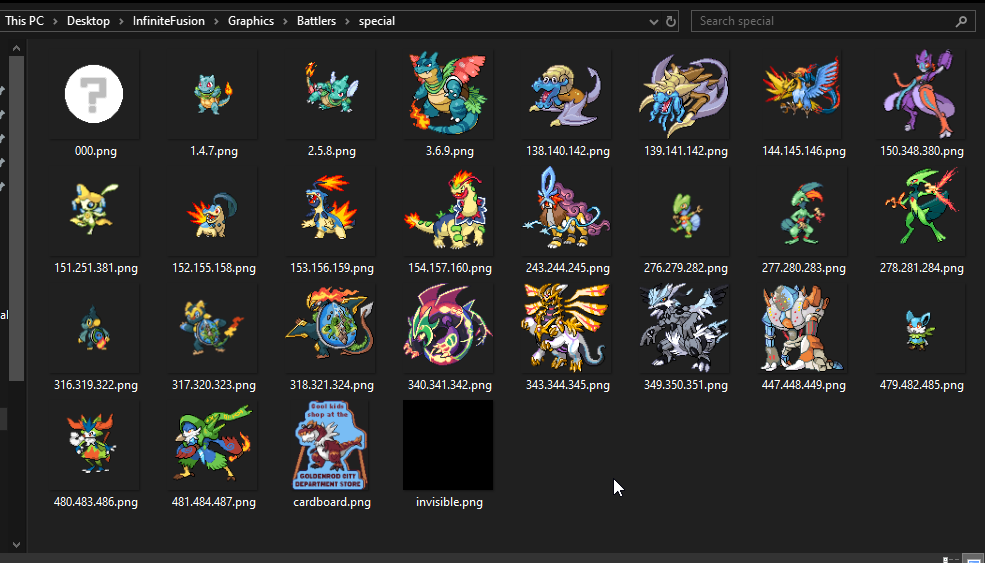 woven steppe
verbal timber
yes
woven steppe
verbal timber
yes
but exist any diference, why exist 2 ways of installing anyone better than other ?
solemn jolt
im not that good in softwares... the hardware is my thing hahah
verbal timber
woven steppe
but exist any diference, why exist 2 ways of installing anyone better than other...
there are differences in the install
but you get the game files either way
solemn jolt
harsh epoch
https://i.imgur.com/3mD2zPI.png
so... i have to delete a imagine and puit a different one keeping the name?
harsh epoch
yes
verbal timber
solemn jolt
im not that good in softwares... the hardware is my thing hahah
?tag triplealt
pearl magnetBOT
Triple Fusions are not meant to have alt sprites. You can only manually change their main sprite. For more info: ➡️ https://discord.com/channels/302153478556352513/1195043740855832586
solemn jolt
harsh epoch
yes
yo my man, where do i take the images? in the infinite fusion dex?
 jolly cedar
Guys, I downloaded the game from this site. As it's my first time downloading it, I can't say if it's reliable. I was worried after seeing the game's caution messages.
 harsh epoch
jolly cedar
Guys, I downloaded the game from this site. As it's my first time downloading it...
harsh epoch
jolly cedar
Guys, I downloaded the game from this site. As it's my first time downloading it...
?tag fakefiles
pearl magnetBOT
Beware of Unofficial Websites That Claim To Be Official.
The only official sources to download the game are here, the game's subreddit or the pokecommunity thread.
To clean out your computer:
- Delete all the save files from the fake files. It's not recommended to keep these, as they have bugs and fake data that the normal game doesn't have.
🔵 Your game folder has a shortcut that you double click namedSavefileto take you to the location to delete all save files. They are namedFile A.rxdata. - Delete any zipped/unzipped folders from there
- Run a virus scan
After doing all the steps, use #downloads to download the real files.
@quasi abyss ff
harsh epoch
solemn jolt
yo my man, where do i take the images? in the infinite fusion dex?
?tag calcs
pearl magnetBOT
https://infinitefusiondex.com/: Good for looking at stats, locations, movesets, and type matchups, as well as looking at the inverse fusions side-by-side.
https://www.fusiondex.org/: Good for looking at sprites and fusion names. Also includes stats, but no comparisons.
harsh epoch
for the first link, you just have to input the numbers so just click on any fusion on the front page, then swap the numbers
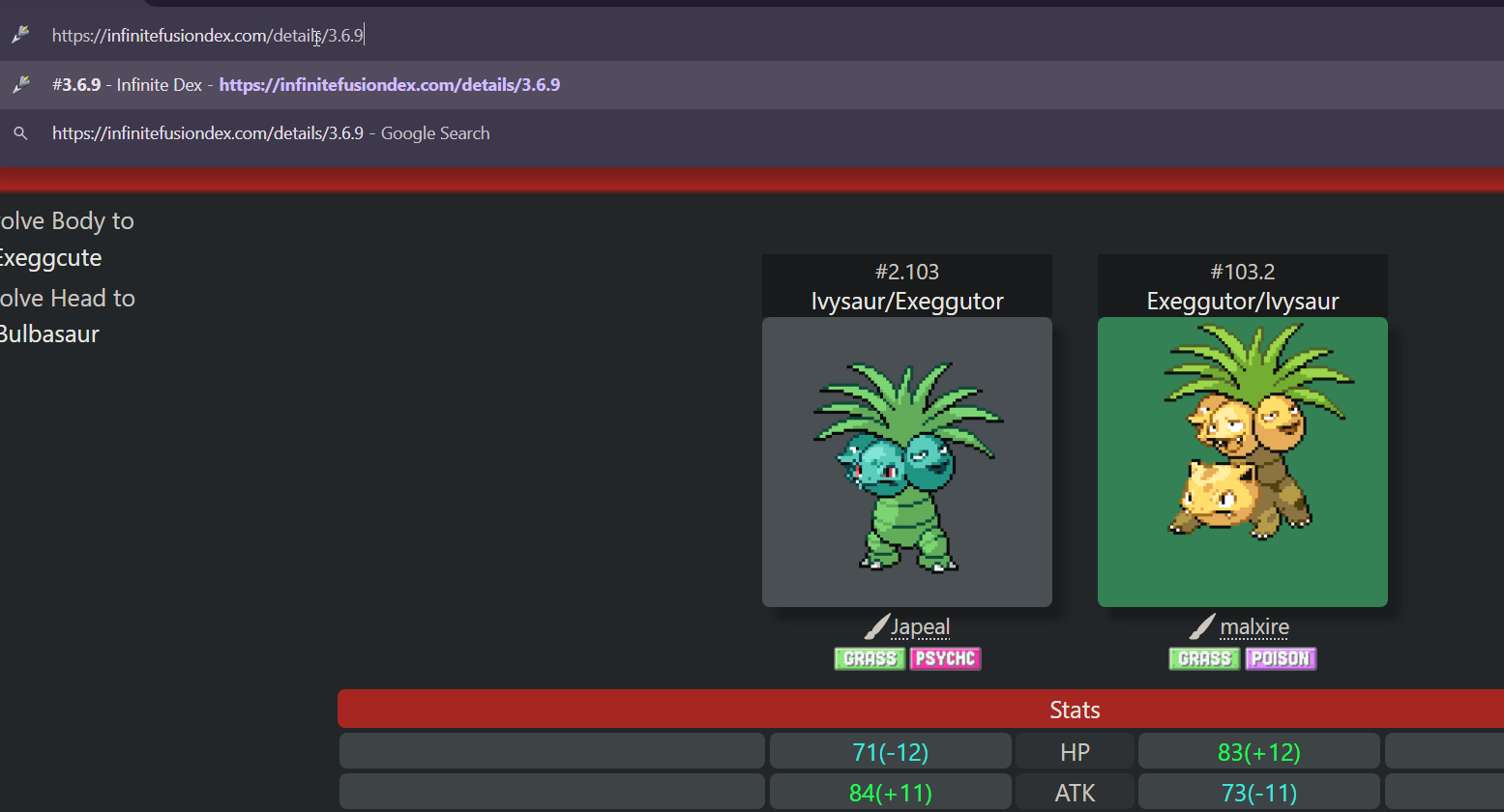
also not a tech support issue
solemn jolt
harsh epoch
for the first link, you just have to input the numbers so just click on any fusi...
i did it my man
thx
hollow laurel
inner sigil
why wont these quests dissapear i have done them already
On this issue after I talked go the hotel quest guy I somehow have 82 completed quests now despite having 28 before I updated lmao
verbal timber
hollow laurel
On this issue after I talked go the hotel quest guy I somehow have 82 completed ...
older saves from before 6.6 seem to be borking up more than others
but we do still know some quests will glitch out and not "complete" int he journal
 strange abyss
How do I download the game onto my iPhone?
turbid terraceBOT
Hey @strange abyss! You can download the game from: [#downloads](#downloads message)
If you need a guide, they are located: [HERE](#tech-support message)
Hey @strange abyss! You cannot install this game on iPhone or iPad. This game is not a ROM Hack so Delta won't work and we are not planning to release an iOS version.
 knotty wasp
Hi, I wanted to ask if anyone could help me. I downloaded the game yesterday, and it runs fine, but at certain points it freezes for like 5 seconds and it gets annoying. Can anyone give me the solution? (If you help me in Spanish, even better)
verbal timber
knotty wasp
Hi, I wanted to ask if anyone could help me. I downloaded the game yesterday, a...
we can't help in anything but english outside of the international section
?tag performance
pearl magnetBOT
Performance Issues - Freezing? Lag? Long Black/Loading Screens? [More Info](#tech-support message)
knotty wasp
verbal timber
we can't help in anything but english outside of the international section
I said it was preferable in Spanish, but I can speak English.
 tall mirage
Hi, I just have a quick question. I've been playing the game fine for several months, but today I went to load it up, did the update, and it acted like it wanted to load, but the screen that pops up for the intro came up and stayed totally black, then the game totally crashed. I've done everything I can short of uninstalling it. Just wanted to know if there's something else I can try! Thanks.
verbal timber
i understand that, but there are server rules for a reason
verbal timber
tall mirage
Hi, I just have a quick question. I've been playing the game fine for several mo...
?tag olddata
pearl magnetBOT
The most likely reason your game is opening and closing is due to improperly updated game files. We mention in #downloads to not update ANY files versions below 6.6.0.
If you're using the Launcher:
- Reinstall version 1.1.2 of the launcher from #downloads
- Open the settings tab
- Click "Reset Config"
NOTE: The original path that the launcher shows will be your old game folder. That folder should be deleted. The new game folder will be inPIFLauncher(#.#.#)/GameFiles/InfiniteFusion
If you're not using the Launcher:
Use the Lightweight installer guide to install in a NEW folder ➡️ Click Here⬅️
If you are on a non-Windows device, follow the [guide](#tech-support message) for your device to reinstall.
Reinstalling on Windows does not affect Save Files in any way.
hollow laurel
verbal timber
older saves from before 6.6 seem to be borking up more than others
It's duped all of my completed quests. I'm not complaining but still weird
verbal timber
 nocturne remnant
Hey can storage on my PC affect the game at all?
nocturne remnant
Hey can storage on my PC affect the game at all?
it would help to have the game on an SSD and make sure you have ample wiggle room on said SSD to allot for shenanigans
but game speed is capped to 40FPS
[aside from the actual speedup function]
crashing isn't tied to storage, that'd be more tied to other things
if you are getting an error with the crash, that means it is likely to do with something in game going haywire or something in the files goign haywire
crashes with no errors usually mean the problem is outside the game files
nocturne remnant
It's working but it's simply just going black after a screen change and stays that that every few minutes.
verbal timber
?tag performance
pearl magnetBOT
Performance Issues - Freezing? Lag? Long Black/Loading Screens? [More Info](#tech-support message)
verbal timber
?tag wifi
pearl magnetBOT
Going to sound weird, but turn off WiFi/internet on your device and try again. For some reason, even though your internet might be working just fine, something about this game clogs it up. Once you are in game, if issue persists, turn off Download Data as well.
verbal timber
do steps 2-7 in the performance link, then add on the wifi info if need be
anything beyond that, as I mentioned yesterday, would be either your device not being up to snuff to run the game properly, or being too OP for the game to work properly
 tulip badge
does anyone know how I gain permission to post in sprite-gallery? I finished a sprite and have it converted to the right format but I don't know how to request access
verbal timber
tulip badge
does anyone know how I gain permission to post in sprite-gallery? I finished a s...
ask in #spriter-general but i think you need to post in #1050404143807873157 first
 limber pelican
tulip badge
does anyone know how I gain permission to post in sprite-gallery? I finished a s...
limber pelican
tulip badge
does anyone know how I gain permission to post in sprite-gallery? I finished a s...
people with the spriter role can post there
you can sign up to be a spriter via #1134483288703119361
tulip badge
sweet thanks so much
tall mirage
verbal timber
?tag olddata
thank you so much <3

 verbal timber

quests duplicating is a known bug, no fix atm
and the character sprite has been a bit wonky since 6.3 when character customization got added
also no fix atm
shrewd brook
ok
 tranquil ocean
Anyone know why the install button isn't in the launcher?
shrewd brook
also the in game time was being weird? like it was moving really fast and skipping around? idk but it was doing something funky. It didnt impact gameplay that much it just looked weird because id go into a battle and it would be morning and then after the battle it would be the middle of the night
verbal timber
tranquil ocean
Anyone know why the install button isn't in the launcher?
did you follow the launcher guide
verbal timber
shrewd brook
also the in game time was being weird? like it was moving really fast and skippi...
do you have speedup on?
shrewd brook
verbal timber
do you have speedup on?
yeah but even when i didnt have speedup on it was being wierd
turbid terraceBOT
Hey @shrewd brook! To Speed Up your game, hold Q (or Spacebar if you are using Game-performance).
You can change the settings in game to be hold or toggle, see the image below!
- When set to Hold, the speed multiplier can be set up to x10
- When set to Toggle, the speed will cycle through x1, x2, and x3
 verbal timber
shrewd brook
yeah but even when i didnt have speedup on it was being wierd
verbal timber
shrewd brook
yeah but even when i didnt have speedup on it was being wierd
that's the only way what you are explaining would happen stupid fast
i think time is a weird ratio of 1 minute irl is 1 hour in game
and that is the default speed
shrewd brook
idk it didnt really affect gameplay much anyway as far as i could tell it just looked a bit funky so its fine ig
i would rather deal with it then spend like 3 hours trying to fix it and only semi-fixing it anyway
 grim bronze
I am getting no sound from the game
tranquil ocean
verbal timber
did you follow the launcher guide
Yes I did. I installed it a few weeks ago and today I realised that I accidentaly deleted the files for the launcher so I installed it again but this time the is not button to install or launch the game itself.
grim bronze
I restarted and its still did not work
verbal timber
tranquil ocean
Yes I did. I installed it a few weeks ago and today I realised that I accidental...
reset config in the settings
 tired forum
hello, I transfered my savefile to a new PC and all the custom sprites for the pokemon in my party were replaced with the default auto-generated sprites. Anyway to reinstall the sprite pack?
tired forum
lol
verbal timber
ok either bot is being slow again or it derped
tired forum
shouldve searched "missing sprites" before asking
I think the debug man in pokecenters can do it
verbal timber
ye
that just clears the cache, which should reset sprites where possible back to custom ones
pearl magnetBOT
 Something went wrong.
tired forum
not finding a "clear sprite cache" option, is it called something else?
pearl magnetBOT
For missing sprites on the 6.6 update, talk to the help man in any Pokémon center and navigate to Advanced Options -> Other -> Reset -> Clear Sprite Cache. Video
verbal timber
^follow the above
tired forum
verbal timber
^follow the above
worked! ty!
grim bronze
?tag sound
 fervent marsh
Hey, I can't post in the bug report for some reason so I'm posting this here. I keep getting this error constantly and it's costing me tons of progress to the point I'm save spamming, can someone please tell me how to solve this?
 verbal timber
fervent marsh
Hey, I can't post in the bug report for some reason so I'm posting this here. I ...
verbal timber
fervent marsh
Hey, I can't post in the bug report for some reason so I'm posting this here. I ...
where did you download your game files from
turbid terraceBOT
Hey @verbal timber! You can download the game from: [#downloads](#downloads message)
If you need a guide, they are located: [HERE](#tech-support message)
fervent marsh
so delete everything but my save file and reinstall?
Is that a yes or a no?
Ok thanks
 final skiff
im running into a problem when i run the game offline the fusion sprites exist but the base mons dont, i went through and downloaded the full pack but i just keep getting question mark circles
?tag preloaded
pearl magnetBOT
No tag preloaded found.
verbal timber
final skiff
im running into a problem when i run the game offline the fusion sprites exist b...
the base sprites are in a folder in the full pack the game doesn't use normally
you'd need to manually import them the same way you imported the custom sprites
final skiff
alright, where at in the full pack
nvm found them
what folder would those get moved into?
harsh epoch
Sprites to import
grim bronze
grim bronze
I am getting no sound from the game
Sound only works when using headphones, idk why
hollow laurel
I've already reset the sprite cache and done fix game what else do I need to do? The download option is on too

 minor stream
Why does it say the game is incompatible on Poco X6 Pro, im playing on one and it works just fine lol
 umbral delta
The whole Knot Island/Kindle Road map has quite a few map breaks. Genuinely have no idea if this presents an actual issue or is just kinda neat.


A missing part of a jump, too.

 weak kindle
Hey so I'm on android and all of the graphics have flooded into my photo gallery. While I appreciate all of the hard work that went into making them, it does make finding pictures of grandma more difficult. Is there a way to move them without messing up the game?
 hardy idol
android guide has a section about adding a .nomedia file which hides those from the gallery
 graceful osprey
Hello can someone help me because i downloaded infinite fusion on my android device but all of the sprites are missing
I dont know what to do too
So if someone can help that will mean alot to me
Oh i just realised
Infinite fusion is incompatible with my android device
Aw man 😦
 patent radish
what does this mean?

 fallen summit
 keen ruin
hey, what fo i go on to to download the game for mobilr,
keen ruin
hey, what fo i go on to to download the game for mobilr,
?tag guides
pearl magnetBOT
All of our Official Guides to install the game are located here: [CLICK HERE FOR GUIDES](#tech-support message)
fallen summit
patent radish
what does this mean?
Issue with your graphics card, either its just not compatible with opengl 2.0 or you have some kind of issue, perhaps drivers. not really in the scope of what is helped with in this channel but you can try a drivers update
 hallow arch
I keep having this problem, this is how my character shows up and certain areas of the routes are blocked off but invisible. I can’t talk to any NPCs either including mart and centers..


 rigid silo
hallow arch
rigid silo
hallow arch
hold shift, walk
 obtuse plinth
whenever I turn on autosaves or try to save manually, this error pops up
I tried both versions, my files are in download and I tried to delete shallow in the git file
nothing works
 rigid silo
obtuse plinth
whenever I turn on autosaves or try to save manually, this error pops up
I tried...
rigid silo
obtuse plinth
whenever I turn on autosaves or try to save manually, this error pops up
I tried...
?tag corrupted
pearl magnetBOT
The error you are having is due to a corrupted save in your save folder conflicting with your current save.
Note: Ensure you know which save file is corrupted before continuing. You can see the save slot on the save selection screen.
- Open your game folder
- Double click SaveFile
- Delete the save file causing issues.
- If you don't know which it is, you can remove the save 1 by 1 from this folder until you find it
If you want to revert your save to a backup, use ?tag backups for more info.
obtuse plinth
Thanks that was it
 worthy gyro
confused with conflicting comments, custom sprites are then automatically downloaded on Android or not? yes the option is on, turned off and on as well
do I have to import them myself on the custom battlers like on pc?
 pearl magnetBOT
If you're encountering missing sprites
**If you just updated to 6.6, do the reset cache steps mentioned in this #announcements message post.
**The game comes with all sprites preinstalled, up until the February 2025 Pack.
The remaining packs will be downloaded as you play, as long as you have "Download Data" turned on and your device is connected to wifi. You do not need to do anything for them.
Keep in mind, the auto download does not have infinite speed or capacity and will not trigger if you are not actively encountering new sprites (ex; battling, checking the Pokedex, etc.).
After downloading X amount of sprites per time unit Y, it will be paused for a bit. We cannot adjust this limit and there is nothing you can do as the player to skip it or make it go faster.
The first time you encounter a base Pokemon, it will select a random one of all sprites, if it is a new one that hasn't been downloaded yet, it will show as missing.
The same goes for fusions but with a little more nuance. To keep it simple, think of it the same.
Again, nothing wrong with your game. You just hit a download cap.
Note: Updating your game resets all your auto-downloaded sprites. do not attempt to "fix" this with updating. It will just make everything start from the beginning.
If you would like to manually import the latest sprite packs, they are located in #spritepack-releases and further instructions can be found HERE
verbal timber
?tag spritepacks
pearl magnetBOT
Sprite packs are not needed. When you install the game, it comes with the sprites. When new ones come out, the game automatically downloads them as you play.
If you play with no internet, here is a guide on how to install the sprites manually: No Internet Guide
worthy gyro
so downloading the packs and manually installing is just to like speed it up and avoid ingame downloads?
verbal timber
worthy gyro
so downloading the packs and manually installing is just to like speed it up and...
yes, but small issue
if you were to manually do the full pack [what would be needed to cover most things]
you'd be adding over 140K images to your phone
it is NOT recommended in any capacity
worthy gyro
yeah my pc was struggling with that
weak kindle
hardy idol
android guide has a section about adding a .nomedia file which hides those from ...
I must be missing it. Sorry, I've read through it like 3 or 4 times.
rigid silo
weak kindle
I must be missing it. Sorry, I've read through it like 3 or 4 times.
the android version already comes with .nomedia pre-added.
if you are still getting imges in your gallery there are 2 options:
- you are not using our android files
- your phone is simply ignoring the .nomedia
the second one you can do nothing about.
weak kindle
Well it would be the second one......
I'm looking through the files and I dont see .nonmedia anywhere. Is that a folder or filetype?
verbal timber
filetype
weak kindle
All of my graphics are png
I'm on an S23 Ultra with whatever is the latest os if that makes a difference
 amber goblet
Is there a link to get joiplay and the RPG maker plugin?
I cant find the links anywhere
verbal timber
amber goblet
Is there a link to get joiplay and the RPG maker plugin?
that is in the android guide
amber goblet
I was in there and the links weren't there
 quasi abyss
 hardy idol
weak kindle
I'm looking through the files and I dont see .nonmedia anywhere. Is that a folde...
hardy idol
weak kindle
I'm looking through the files and I dont see .nonmedia anywhere. Is that a folde...
the game wasnt moved from the folder downloaded to? and when you look in that download folder there just isn't a .nomedia?
amber goblet
verbal timber
which leads me to believe you aren't using the android guide
I was in it, im just a blind idiot. Thank you, I apologize
weak kindle
No I didnt move it. Am I allowed to share a screen recording?
 hardy idol
it was the android guide used?
weak kindle
Yes sir
hardy idol
the launch wine file looks odd in there
weak kindle
I didnt add anything. I followed the guide to a T
hardy idol
weak kindle
I didnt add anything. I followed the guide to a T
this was the 6.6.2 download yes?
weak kindle
Correct
hardy idol
okies. ty.
weak kindle
 verbal timber
likely for phones that dislike it, it could be possible it is yeeting the file
<@&306953740651462656>
hardy idol
id have to check what the current download has when its done
i use a galaxy s20 fe for mobile pif
 raw cove
hi people, when i try to open the game from the launcher the window for the game opens then immediatly closes
rigid silo
raw cove
hi people, when i try to open the game from the launcher the window for the game...
give it a full reinstall by first deleting everything and then following the guide in #downloads
you updated files too old to update
raw cove

weak kindle
OK I'll make due for now. I play on windows too so I might just uninstall from the phone till there's a fix
verbal timber
weak kindle
OK I'll make due for now. I play on windows too so I might just uninstall from t...
that's the thing
there likely wont be one
we can't control how phones handle the game in any capacity
nothing we do on our end will make that work
so short of something on your end changing
weak kindle
Ah dang. Could I just add a .nomedia file and transfer the images?
rigid silo
there should already be a .nomedia file.
we add it prior to uploading the android files.
best to not touch any images, it doesnt work how you think it does
weak kindle
weak kindle
Unfortunately not
rigid silo
then you can try adding one.
but still dont touch any imges
rigid silo
.nomedia is not anything specific
there is nothing in the file.
it is just an empty file named .nomedia
you can simply make one
weak kindle
I can do that
hardy idol
Downloaded and extracted the 6.6.2 mobile. Seems there aint a .nomedia file in there
rigid silo
I'll do a grep to see if it is in any deeper folders, otherwise will add one later
 forest star
how do i downlode te game
rigid silo
forest star
how do i downlode te game
follow the guide in #downloads
hardy idol
rigid silo
I'll do a grep to see if it is in any deeper folders, otherwise will add one lat...
seems to have a few odds in the folder. the launch-wine.sh seems quite out of place
weak kindle
hardy idol
Downloaded and extracted the 6.6.2 mobile. Seems there aint a .nomedia file in t...
At least it's not just me
quasi abyss
hardy idol
Downloaded and extracted the 6.6.2 mobile. Seems there aint a .nomedia file in t...
Wuh oh
hardy idol
copied my other ones over and it got that settled.
verbal timber
mega may have derped during the update
upbeat sage
hardy idol
seems to have a few odds in the folder. the launch-wine.sh seems quite out of pl...
No that’s normal
Its technically just bloat for android
but its part of a consolidation effort
weak kindle
I added a .nomedia file and thankfully it seems to have worked but it doesn't appear in the folder and is non searchable. Very strange but it worked nonetheless. Thank you guys for all the good you do!
 tame zodiac
I'm planning to reinstall because my game is on a version prior to 6.6.0. am I able to delete all of the files in the original folder without losing my save files, or should I keep all of those files around?
verbal timber
tame zodiac
I'm planning to reinstall because my game is on a version prior to 6.6.0. am I a...
saves are not tied to your game folder unless you are on steamdeck or android
if you are on either of those, please see the guide for your device on how to keep your save
rigid silo
weak kindle
I added a .nomedia file and thankfully it seems to have worked but it doesn't ap...
because .files are typically invisible.
but its there. glad its working now!
tame zodiac
verbal timber
saves are not tied to your game folder unless you are on steamdeck or android
alright thank you! im on windows so that won't be a problem
 runic laurel
so can you guys help me with getting the sprite pack in i think i missed it before
sharp pawn
pearl magnet
# If you're encountering missing sprites
**If you just updated to 6.6, do the re...
This is outdated. The game doesn't come with pre-installed sprites anymore and updating the game will no longer reset the sprites you've downloaded. Idk who to ping about changing the bot
runic laurel
nvm i fixed it
tranquil ocean
verbal timber
reset config in the settings
Thanks this helped.
 hearty pine
quick question. I want to help the wiki by writting an article on a place that hasn't been documented, but it has pokemon encounters, so how do I know the percentage of each encounter?
 glacial kernel
i encountered a trainer with oricorio pompom(head) + torkoal (body) and the ability effect spore, i tried to reset the game and the ability was still there, i did both fix game and reshufle trainer, now it has a keckleon(head) + seaking(body) but still has the ability effect spore
after rebooting the pc the abilities were fixed
after that i updated to 6.6.2 and abilities broke again, not even rebooting again worked
(i think that pokemon have the abilities of the not randomised encounter, for example in the pokemon tower there are a lot of livitate/aftermath pokemon and ig they were originaly gengar/drifblim)
 summer thicket
I'm using the Pokeradar, but encounters are popping up before I can get to the tile where the grass twitched, sometimes with an encounter popping up just from me changing direction, not even taking a step. Any idea how to fix this?
fallen summit
summer thicket
I'm using the Pokeradar, but encounters are popping up before I can get to the t...
?tag chaining read below and see if these help. otherwise #gameplay-help is the place for this question
pearl magnetBOT
Having trouble keeping up your chain? Read through the steps below.
- Gather up Repels and Pokéballs of your choice. It is also recommended to have Elixirs, Ethers, or Leppa Berries as well to maintain PP.
- Apply a repel outside of the grass ⬅️ and then enter the grass where your desired Pokémon is located. The Radar has its own built in Repel that only lasts 8 steps. The extra repel is for larger patches that would require more than those 8 steps. For small patches of grass, additional Repels aren’t needed
- Use the Radar and interact with rustling grass until you find the Pokémon you are looking for, running away from any Pokémon you are not hunting.
- Defeat or capture the Pokémon. Do not run away. More grass will be rustling around you. Choose a spot that is 4 steps away through grass tiles and is surrounded by grass on all sides. If such a location does not rustle, reuse your PokéRadar until it is. This will not break your chain.
- Repeat step four until you find a shiny. You can use items between battles to maintain your Pokémon HP and PP.
After 20 battles, you have maxed out your Shiny chance. After 40 battles, you no longer risk breaking your chain based on grass distance however, having grass tiles around a spot is still important.
For more in depth information on the Pokéradar, check the PokeRadar Wiki
 quaint shell
hearty pine
quick question. I want to help the wiki by writting an article on a place that h...
quaint shell
hearty pine
quick question. I want to help the wiki by writting an article on a place that h...
#1110719029062160394 for discussions on editing the wiki.
Every location should currently have a page except for New/Fullmoon Island locations (Darkrai/Cresselia quest).
The encounter tables are currently generated by a single person and put on the https://infinitefusion.fandom.com/wiki/Wild_Encounters and https://infinitefusion.fandom.com/wiki/Wild_Encounters/Remix pages. (We then copy-paste them to the other pages.) So the information for you're looking for should be there. (Although they are currently outdated, v6.6 changed stuff for Remix)
quaint shell
Ah, you can't get to that location through normal gameplay, we don't really add those to the wiki. (And frog occasionally removes those unused maps, not sure if bill's garden was one of the one's removed in v6.6)
 surreal notch
Where is the link to install the game
fallen summit
surreal notch
Where is the link to install the game
?tag guides
hearty pine
quaint shell
Ah, you can't get to that location through normal gameplay, we don't really add ...
nah, it is aviable, i just found it
but fair
pearl magnetBOT
All of our Official Guides to install the game are located here: [CLICK HERE FOR GUIDES](#tech-support message)
verbal timber
hearty pine
nah, it is aviable, i just found it
you can only access that via debug
turbid terraceBOT
Hey @verbal timber! Magic Boots are an IN GAME reward for catching all unfused 501 Pokemon in a non-randomized file (Dex number 1-501). After doing so, the Developer in Celadon will reward you with them. Putting them on will unlock DEBUG options that you can play with.
Use ?tag proof to see how you get the Dex Completionist Role for earning the Magic Boots in Discord.
hearty pine
yea
verbal timber
i.e., not available through normal gameplay
verbal timber

Pokémon Infinite Fusion Wiki
This page lists the encounter locations not available during normal play. This is only about wild Pokemon encounters from the maps in Wild Encounters. Unable to Access Maps "Route 4 (ID 236...
hearty pine
ah, thankya
quaint shell
^That's only the ones with encounter tables, there's more. (Again I can't remember which have since been removed but) at one point there was like 4 different versions of Route 4, more floors for Mt. Moon, etc
surreal notch
Bro wheres the installation link
pearl magnetBOT
All of our Official Guides to install the game are located here: [CLICK HERE FOR GUIDES](#tech-support message)
 near stump
does PIF have controller support on PC?
rigid silo
near stump
does PIF have controller support on PC?
yes and no
pearl magnetBOT
You can press F1 (FN + F1 on laptops) to change your keybindings!
Be aware, controllers will be auto mapped to buttons depending on which controller you plug in.
If you want to remap buttons on controller, you need to use Steam since this game doesn't support it. How to use Steam: [Guide](#tech-support message)
 quaint shell
glacial kernel
i encountered a trainer with oricorio pompom(head) + torkoal (body) and the abil...
quaint shell
glacial kernel
i encountered a trainer with oricorio pompom(head) + torkoal (body) and the abil...
Most trainers pokemon automatically select a random ability, and generate a moveset based on their level. Some are set to have a specific ability/moves/item.
The randomiser only changes the species; if anything is specifically defined then it won't be overridden.
Sounds like your Effect Spore pokemon is one of those with a predefined ability.
glacial kernel
quaint shell
Most trainers pokemon automatically select a random ability, and generate a move...
it never happened before and i didn't really understand what you ment but if you say it's normal and that it can happen than ok ty
 clever vortex
How do i get this sprite to appear ingame?

 verbal timber
clever vortex
How do i get this sprite to appear ingame?
verbal timber
clever vortex
How do i get this sprite to appear ingame?
have download data turned on
play while using the mon
eventually the game will grab it
clever vortex
okay
 amber pecan
Hello, my game is crashing and i need to restart my laptop, what would i do ? i don't know why is crashing
verbal timber
amber pecan
Hello, my game is crashing and i need to restart my laptop, what would i do ? ...
?tag moreinfo
pearl magnetBOT
When asking for help, please be as specific as possible! We cannot help you if you don't give us the information we need!
Info we need:
- Explain the issue. Do not just say "Game won't work"! This does not help us at all!
- Where did you get the game files from? Discord, google doc from discord?
- Are you using the Launcher?
- Did you update to 6.4 from old files or install in a new folder?
- What version are you on? (Open the game, title screen says)
- What device are you playing on? (Windows, Android, Mac, etc.)
- Send a screenshot if applicable. Often times, it is hard to describe your issue. Send a screenshot so we can see what you are seeing. Especially if you are getting an error.
rigid silo
amber pecan
Hello, my game is crashing and i need to restart my laptop, what would i do ? ...
without more info we cant know either.
please describe your issue
 turbid terraceBOT
Hey @fallow jackal! Black screen in this game is the loading screen. The duration of the black screen depends on YOUR computer and YOUR internet.
- If you get the message below while opening the game, this means to stop clicking/pressing buttons on the screen as it is loading.
- If you get the message while in game, this means your computer is struggling.
- Use our performance tips to help your issues: [More Info](#tech-support message)⬅️⬅️
amber pecan
i play in 6.6.2 i download with the discord and i think i don't have the launcher, i start the game on the folder, and i'm on windows, i can't take a screen the game is just freezing and i need to restart my laptop

 verbal timber
 fallow jackal
did you move the game exe out of the folder?
verbal timber
fallow jackal
did you extract the zip
 vocal pelican
Yeah well deleting and updating does work best for Android users but I am having issues atm but trying to follow the 6.6.2 guide and troubleshooting it
fallow jackal
deleteing the files was wierd i had to delete them 1 by 1
verbal timber
vocal pelican
Yeah well deleting and updating does work best for Android users but I am having...
what are you confuised by
fallow jackal
im on laptop
vocal pelican
I don't know if I should update joiplay and other file because uh I tried to use current version from a file called PIFAandroidplugins
verbal timber
vocal pelican
I don't know if I should update joiplay and other file because uh I tried to use...
you can only use the versions in that file
other versions may not work correctly or at all
stpe 1 and 3 both go over that
vocal pelican
Yes it did work from PIFAandroidplugins for 6.6.2 but I think it's like uh old version that work.. recently I tried to like uh download the current version then update but had the error called uh
verbal timber
vocal pelican
Yes it did work from PIFAandroidplugins for 6.6.2 but I think it's like uh old v...
don't update
that is why you got the error
you need to use that SPECIFIC version of joiplay and rpgmaker
vocal pelican
Got it
 white solstice
I'm running into and issue where the unfuzed pokemon don't have sprits but the fuzed do. I keep turning off download data and starting new games but I always have missing sprits. I'm playing on mobile by the way.
turbid terraceBOT
Hey @white solstice! You can download the game from: [#downloads](#downloads message)
If you need a guide, they are located: [HERE](#tech-support message)
white solstice
turbid terrace
Hey <@295282801085906949>! You can download the game from: [#downloads](https://...
I have the game downloaded, i'm having issues with missing sprites
verbal timber
white solstice
I'm running into and issue where the unfuzed pokemon don't have sprits but the f...
well that is why
you can only get base sprites with download data On
this is also how you get other sprites as well
since apparently the game no longer comes stock with ANY sprites
white solstice
verbal timber
well that is why
Everything I saw said to immediately turn off download sprites?
Also the game came with like 13000+ images, it took me awhile to figure out how to stop those from populating my gallery.
verbal timber
white solstice
Everything I saw said to immediately turn off download sprites?
none of our guides say that to my knowledge
white solstice
verbal timber
none of our guides say that to my knowledge
Oh, well I turned download data back on and sure enough, they are appearing again. So does that mean I always need to have some kinda online connection while playing?
vocal pelican
The Android 6.6.2 works with my Android 15 Samsung but it had like bit lagging or slowdown so I had to optimise the game version but did only improve to little bit of slowdown but it's playable but not what it used to be from previous versions
verbal timber
vocal pelican
The Android 6.6.2 works with my Android 15 Samsung but it had like bit lagging ...
optimize how and in what way is it compared to the previous version?
vocal pelican
Uh like its dated back to march version when it was smooth and it loads fast
verbal timber
each update tends to bork compatibility to some degree for android
nothing we can do about that
vocal pelican
Hmm.. that explains why but I might have to bear with it for now
white solstice
Okay so I'm an idiot and downloaded from a website. Gotta uninstall everything and start over from the discord.
vocal pelican
verbal timber
each update tends to bork compatibility to some degree for android
Many thanks Mordrid for helping and I hope that like in days or months uh the developers will check and update a bit for Android users to improve performance and smooth frames without like dropping off a bit after I experienced bit of lag and frames dropping but I did optimise the game and its working fine but it's like few frames drop for now
verbal timber
vocal pelican
Many thanks Mordrid for helping and I hope that like in days or months uh the de...
he won't
game was only ever made for windows
rigid silo
android is a "if it works it works, if it doesnt it doesnt"
no work specifically for android will be done
verbal timber
if you want better performance, your best bet is a steamdeck or ally rog
or pc
if you want to go that extra mile but lose on portability
vocal pelican
Got it. I'm just explaining how it goes from playing on patch 6.6.2 currently and uh I forgot that how do I have to play on a new game plus again since I did have a safe file from previous version and uh already finished the game on that version
verbal timber
up to you, if you brought your save over from the past version it is compatible
vocal pelican
Yeah I can tell you that it works just fine
verbal timber
otherwise just choose new game on the main menu [not to be confused with new game +]
vocal pelican
No issues with it so far
 atomic mesa
verbal timber
he won't
atomic mesa
verbal timber
he won't
agony
 stone thorn
Can we play on iOS
turbid terraceBOT
Hey @stone thorn! You cannot install this game on iPhone or iPad. This game is not a ROM Hack so Delta won't work and we are not planning to release an iOS version.
rigid silo
on what platform?
verbal timber
how can you not press enter on a pc then
you press it, on your keyboard
so shrot of having one of those really weird smol keyboards
stone thorn
I can press enter
verbal timber
aol dial up noises of confusion
stone thorn
It just won’t comfirm the names
rigid silo
make sure to first select the name field, after that type, then confirm it with enter.
if that still doesnt work - head into the options and change the text entry method
stone thorn
Ok
 foggy pulsar
Does anyone know if there is a place other than Mega to download the files?
stone thorn
I can’t find it
foggy pulsar
This "quota" is ridiculous
verbal timber
foggy pulsar
Does anyone know if there is a place other than Mega to download the files?
there should be a mediafire link
as an alternate download
rigid silo
foggy pulsar
This "quota" is ridiculous
check the guide. if there is no backup listed in the guide, no.
other sources were getting taken down by false flags from people.
we reupload them once in a while, but not constantly
foggy pulsar
rigid silo
check the guide. if there is no backup listed in the guide, no.
other sources we...
?tag ptguides I didn't find it here
rigid silo
check the english one, it might be more up to date
 foggy pulsar
verbal timber
heck mediafire is the only link on the android one atm
foggy pulsar
verbal timber
heck mediafire is the only link on the android one atm
The guide in Portuguese and via MEGA
verbal timber
foggy pulsar
The guide in Portuguese and via MEGA
as ymir said
use the english one
foggy pulsar
verbal timber
use the english one
What is the command to get the link?
?tag engguides
pearl magnetBOT
Check our Official Android guide ➡️ HERE.⬅️ If you didn't follow this guide, DELETE and UNINSTALL everything.
All Android bugs/workarounds are in the guide. If your issue isn't listed, there's no fix. No dedicated mobile version of IF will be developed in the future.
No tag engguides found.
foggy pulsar
Oh thx
foggy pulsar
pearl magnet
Check our Official Android guide ➡️ [*HERE*](<https://hackmd.io/@PIF-Tech/Androi...
I didn't know that version 6.6.1 worked for Android
verbal timber
it is v6.6.2 currently
foggy pulsar
verbal timber
it is v6.6.2 currently
What changes in the versions? The one I was playing was 6.5 something or 6.4
The outdated version of the guide in Portuguese
verbal timber
bug fixes mostly, and the shiny mon update
as for the guide
@noble rock I saw you post over in #português would you be willing, when time allows, to post an updated guide for android as the one over there is behind assuming you are fluent enough
I'd do it myself but I'd be stuck using google translate [and there's no telling how wrong it'd be]
foggy pulsar
verbal timber
<@181333962797350912> I saw you post over in <#929400599202656296> would you be ...
In Portuguese I am yes
verbal timber
foggy pulsar
In Portuguese I am yes
that post was directed at a moderator that talks over in that channel
foggy pulsar
I choose which one here
 foggy pulsar
verbal timber
that post was directed at a moderator that talks over in that channel
foggy pulsar
verbal timber
that post was directed at a moderator that talks over in that channel
Oh
verbal timber
game.exe or infinitefusion.exe
foggy pulsar
I already spoke to him once
verbal timber
they are the same file
foggy pulsar
verbal timber
game.exe or infinitefusion.exe
Doesn't it change at all?
verbal timber
nope
foggy pulsar
There are a lot of png in my gallery because of extraction, is there a way to prevent this from happening?
foggy pulsar
verbal timber
at least not in a normal way
If I delete everything, will it affect the game?
Ah, I solved it without deleting anything.
foggy pulsar
verbal timber
nope
If I delete something, does it affect ANYTHING?
 misty sand
I noticed speed boost made aura sphere not work for some reason. Is this already a known bug?
 frigid jolt
I'm trying to migrate my savefile from one linux device (running the game through Winetricks) to another (using the bottle in the FAQ) and both the wiki and the bot just list the location for Windows, with the bot redirecting me to the installation guide for linux which does not actually list where my savefile would be, nor even what kind of file it would be or how the naming is formatted to allow me to look for it, how do I find my savefiles?
regal geyser
Does your game folder have a savefile folder?
(Which would just be a shortcut to the actual location your files are saved on)
frigid jolt
it has a Savefile.lnk and a savefiles file but no savefile folder
verbal timber
foggy pulsar
If I delete something, does it affect ANYTHING?
yes
the game will just redownload it
verbal timber
frigid jolt
I'm trying to migrate my savefile from one linux device (running the game throug...
try the linux guide
which nvmd
lacks that info
yeah
frigid jolt
I did indeed check the linux guide 😂
frigid jolt
found it, thanks
minor stream
Why is the Poco X6 Pro listed as incompatible, im playing on it and it works just fine
harsh epoch
Means someone else using it reported it as so
If you're saying it works fine then that's good
minor stream
Okay lol
But smh everytime i play it random blackscreen pics spawn in my gallery lol
turbid terraceBOT
Hey @minor stream! Black screen in this game is the loading screen. The duration of the black screen depends on YOUR computer and YOUR internet.
- If you get the message below while opening the game, this means to stop clicking/pressing buttons on the screen as it is loading.
- If you get the message while in game, this means your computer is struggling.
- Use our performance tips to help your issues: [More Info](#tech-support message)⬅️⬅️
 hard gazelle
I'm a brand new player and I noticed that I had an older version of the game, so I tried to update it. Is "Recieving Objects" supposed to take this long?

this might take days at this rate
nvm my wifi just sucks
 gray elk
I'm in the post-game and suddenly my game Randomized pokemon and I can't turn it off.
- I've previously randomized it for EV training and buying unobtainable items (Power Training items for breeding) and when I originally turned them off it went back to normal
- I've used Fix Game around 3-4 times before this because It kept consuming the Infinite splicer
- In a separate save I've done a Randomlocke, but that was AFTER the initial problem started.
Is there a way to actually fix it?
I've tried to turn on the Randomize pokemon option and lower it to 25 and it calms down a bit in dungeons, but while surfing it's absolute random.
 pallid heath

 umbral abyss
 hard gazelle
I updated the game but I didn't get the game.exe file. So is this a glitch or was the application changed to the "Game" file or the "InfiniteFusion" file
 regal geyser
You just have file extensions turned off, the Game file is the game.exe file
glacial kernel
is there any way to fix this or do i have to restart the run?
 regal geyser
?tag randerror
pearl magnetBOT
When randomizing the game, you can only randomize Trainers and Gym leaders if you are playing Classic or Randomized Mode.
Randomizing trainers on Remix and Expert Mode will crash trainer battlers.
Steps:
- Go to a Pokemon Center and talk to Help Man (guy in black suit)
- Select Advanced Settings -> Randomizer Settings -> Turn Trainers/Gyms OFF
 glacial kernel
regal geyser
?tag randerror
glacial kernel
regal geyser
?tag randerror
oh ok ty, imma turn off expert mode
 stray iris
?tag mobilealt
pearl magnetBOT
 fiery cove
Hey, I got past the other part I was stuck on and now I keep getting stuck on the part where the gangar and nidoran fuse and attack the other fusions

 clear spruce
clear spruce
clear spruce
Everytime I try to play it shows some pokemon as this big round with a ? in it why does it do that ?
I played on my roomate pc and it was ok but now on mine it does that 😦
verbal timber
clear spruce
Everytime I try to play it shows some pokemon as this big round with a ? in it w...
game doesn't have that base sprite, as long as you play with Download Data turned On and use that mon, the game will grab that sprite
 ember furnace
yo, i installed the lightweight installer but when i try opening infinite fusion.exe or performance it closes instantly, any idea why this happens?
pearl magnetBOT
The most likely reason your game is opening and closing is due to improperly updated game files. We mention in #downloads to not update ANY files versions below 6.6.0.
If you're using the Launcher:
- Reinstall version 1.1.2 of the launcher from #downloads
- Open the settings tab
- Click "Reset Config"
NOTE: The original path that the launcher shows will be your old game folder. That folder should be deleted. The new game folder will be inPIFLauncher(#.#.#)/GameFiles/InfiniteFusion
If you're not using the Launcher:
Use the Lightweight installer guide to install in a NEW folder ➡️ Click Here⬅️
If you are on a non-Windows device, follow the [guide](#tech-support message) for your device to reinstall.
Reinstalling on Windows does not affect Save Files in any way.
clear spruce
verbal timber
game doesn't have that base sprite, as long as you play with Download Data turne...
How do I fix it 😅
verbal timber
i just told you
clear spruce
Yeah srry I just wanna make sure , it needs to be on or off
verbal timber
On
clear spruce
It was already on 🤨
verbal timber
then keep playing, the game will grab the sprite when it is able
 odd wyvern
Downloaded the newest update and am now having trouble playing the game. The game keeps like cutting to black/buffering. I tried doing a screen recording but it isn't showing up. Maybe it's a hardware issue or something
Idk how to explain it better but whenever I open the game the the screen keeps playing the opening animation and then the screen turns black repeatedly. I cannot properly start it because I can barely see whats happening on my screen and I don't believe it's registering my key imputs
verbal timber
odd wyvern
Idk how to explain it better but whenever I open the game the the screen keeps p...
?tag fullscreen
pearl magnetBOT
Using the in-game option for Full Screen can strain your graphics card and lead to Graphics issues, flashing, green lines, and more.
We recommend setting the Screen Size option to a lower setting and dragging the corners of the window to make the screen larger instead for computers having issues.
 odd wyvern
I was using fullscreen previously so that could be it. Is it possible to change screensize from the launcher instead of the game itself?
harsh epoch
once you save ingame itll stay like that
verbal timber
you would need to get to a menu to change it
even just the main menu
to temp shift it to something like L and then load up a sve and change it to XL then save and you'll be good to go
odd wyvern
ok, I'll try again. I wasn't able to get past the screen I recorded but ill only tried for a few seconds before I stopped
Ok yeah that seemed to fix it, thanks again for your help!
 maiden anvil
Hello, sorry for the inconvenience. I opened the PIF launcher and clicked on update. The game updated correctly but now it closes. I open the game and it closes. What should I do?
pearl magnetBOT
No tag oldata found.
harsh epoch
?tag olddata
pearl magnetBOT
The most likely reason your game is opening and closing is due to improperly updated game files. We mention in #downloads to not update ANY files versions below 6.6.0.
If you're using the Launcher:
- Reinstall version 1.1.2 of the launcher from #downloads
- Open the settings tab
- Click "Reset Config"
NOTE: The original path that the launcher shows will be your old game folder. That folder should be deleted. The new game folder will be inPIFLauncher(#.#.#)/GameFiles/InfiniteFusion
If you're not using the Launcher:
Use the Lightweight installer guide to install in a NEW folder ➡️ Click Here⬅️
If you are on a non-Windows device, follow the [guide](#tech-support message) for your device to reinstall.
Reinstalling on Windows does not affect Save Files in any way.
harsh epoch
maiden anvil
Hello, sorry for the inconvenience. I opened the PIF launcher and clicked on upd...
^
delete files/folder you have, download either new launcher option from #downloads , follow usual install guide
maiden anvil
Can I use my current save data?
hearty pine
Quick question, is there a debug option to unlock all clothes?
verbal timber
hearty pine
Quick question, is there a debug option to unlock all clothes?
not sure
debug is something that is present due to pokemon essentials
the character customization stuff i think is unique
so i have 0 idea if there is a debug option somewhere in that mess to unlock all clothes
hearty pine
fair
was asking because there's a youtuber that always starts with clothing that they shouldn't have
so i was curious
verbal timber
hearty pine
was asking because there's a youtuber that always starts with clothing that they...
debug
player options
set player outfit
 latent valve
hi, I modded my switch and there's an RPGMaker emulator on the homebrew app store. What version of RPGMaker was the game made in?
verbal timber
not sure if that unlocks the outfit or just changes it
verbal timber
latent valve
hi, I modded my switch and there's an RPGMaker emulator on the homebrew app stor...
we can't help you with that
we don't support modded stuff
latent valve
verbal timber
we can't help you with that
I know, very much outside your purview, the only thing I need to know is what version of RPGMaker was used so I know if the endeavor is worth my time or not
verbal timber
again
hearty pine
verbal timber
not sure if that *unlocks* the outfit or just changes it
Does neither, I checked that alas
verbal timber
we can't help with that
verbal timber
hearty pine
Does neither, I checked that alas
hm
verbal timber
latent valve
I know, very much outside your purview, the only thing I need to know is what ve...
?tag rule23
pearl magnetBOT
Rule 23. Any modifications to the game's code (that includes mods, edited gamefiles and "cheats") voids your support ( tech-support / gameplay-help )
verbal timber
?tag rule24
pearl magnetBOT
Talking about and distributing ways to edit/mod game code (that includes methods to illegitimately obtain magic boots/debug mode) is not allowed.
latent valve
verbal timber
we can't help with that
oh, you don't know then, no worries friend
verbal timber
no i know
but we LITERALLY can't help
per the rules of the discord
we only support and can give help for the devices we have linked
anything outside that is up to the person fiddling with things to figure out
latent valve
verbal timber
no i know
I'm not looking to mod the game at all, but I'm sorry for any misunderstanding or frustrations
 mystic fable
hi again ^^,
any news per chance ?
 latent forge
hey
how do i reset the config thing
all my sprites are gone
i do not see a settings tab
harsh epoch
?tag resetcache
pearl magnetBOT
For missing sprites on the 6.6 update, talk to the help man in any Pokémon center and navigate to Advanced Options -> Other -> Reset -> Clear Sprite Cache. Video
latent forge
oh sick
harsh epoch
Help man ingame
 hard pilot
Having trouble opening my game it’s saying no method error
upbeat sage
hard pilot
Having trouble opening my game it’s saying no method error
post screenshot
 hard reef
?tag reshuffle
pearl magnetBOT
After any new game update, you need to rerandomize the settings you have enabled.
If you have only pokemon randomized, you need to Reshuffle Wild Pokemon. If you have more options, reshuffle each.
This is done in the Pokemon Center -> Update Man (guy in black suit) -> Click Advanced Settings -> You will see the Reshuffle options
 wild cobalt
I downloaded infinite fusion on my phone and now every single game texture is saved in my gallery as a image
hard pilot
upbeat sage
post screenshot
 wild cobalt
Also i randomly lost every save i had
 leaden sedge
am i doing something wrong?

 fresh sierra
pearl magnet
For missing sprites on the 6.6 update, talk to the help man in any Pokémon cente...
fresh sierra
pearl magnet
For missing sprites on the 6.6 update, talk to the help man in any Pokémon cente...
What do i do if I reset sprite cache and most sprites are still gone?
maiden anvil
I installed everything as the tutorial says. I have version 6.6.2 but I'm still having problems with the sprites. They don't appear or I see a gray circle with the symbol "?".
limber pelican
fresh sierra
What do i do if I reset sprite cache and most sprites are still gone?
are you connected to internet?
sprites are downloaded from the internet as yoou play and won't show up if you are disconnected, or you hit the download limit
maiden anvil
xddddd wtf

 tulip pebble
Someone know this error?

The game was working normally and now it not even open anymore
maiden anvil
.-. any solution?
 maiden anvil
the update.bat?
limber pelican
maiden anvil
the update.bat?
if a sprite is missing do not update
if you update you actually remove all your sprites from the game
?tag resetcache
pearl magnetBOT
For missing sprites on the 6.6 update, talk to the help man in any Pokémon center and navigate to Advanced Options -> Other -> Reset -> Clear Sprite Cache. Video
maiden anvil
thnks i try.
tulip pebble
@limber pelican can you help me?
maiden anvil
still the same lol
tulip pebble
I cant play the game on joiplay
maiden anvil
The sprites still haven't appeared. It's strange.
latent forge
Hey is there a way to swap the sprites for a fusion to the reverse version
 primal copper
maiden anvil
.-. any solution?
primal copper
maiden anvil
.-. any solution?
Same issue here

What's causing this to happen? I already installed the latest spritepack and I was given the message where they were all imported
Resetting the cache didn't work...
?tag customsprites
pearl magnetBOT
No tag customsprites found.
primal copper
?tag preloaded
pearl magnetBOT
No tag preloaded found.
primal copper
?tag importsp
pearl magnetBOT
To successfully import your own custom sprite, please follow these steps:
Sprite Requirements:
- Format: The sprite must be in
.pngformat. - Naming Convention: Name your sprite according to the game's dex numbering. For example, a fusion of Aegislash and Goodra should be named
329.446.png.
Importing Your Sprite:
- Ensure your sprite meets the criteria above.
- Open your game folder and navigate to
Graphics/CustomBattlers/Sprites to import. - Paste your sprite into this folder.
In-Game Instructions:
- Launch the game.
- The game will automatically detect the new sprites.
- If you have an existing sprite that you're replacing, select the option "Replace All the old sprites with the new ones" when prompted.
Once completed, you can view your custom sprite in-game from the Pokedex's Sprite tab.

 valid dagger
Please i need help i want to play this game so bad please

 zinc dust
@pearl magnet why cant my game load after the opening the screen turns black but the music still plays
 raw cargo
Hey ! when i "log in" the game instantly asks me to save the game, then teleport me to a white room with no exit... any tips ? ty
 zinc dust
please help ! why cant my game load after the opening the screen turns black but the music still plays
verbal timber
raw cargo
Hey ! when i "log in" the game instantly asks me to save the game, then teleport...
menu
bag
key items
debugger
verbal timber
zinc dust
please help ! why cant my game load after the opening the screen turns black but...
your device is struggling to load the game
?tag performance
pearl magnetBOT
Performance Issues - Freezing? Lag? Long Black/Loading Screens? [More Info](#tech-support message)
raw cargo
verbal timber
menu
bag
key items
debugger
I'll try ! thanks
raw cargo
verbal timber
menu
bag
key items
debugger
It worked ! thanks a lot.
 sturdy folio
The quest journal has this NPC listed in cerulean city instead of vermilion city
 verbal timber
sturdy folio
The quest journal has this NPC listed in cerulean city instead of vermilion city
verbal timber
sturdy folio
The quest journal has this NPC listed in cerulean city instead of vermilion city
yeah it needs to be updated
dev felt it was odd the npc was in cerulean for a quest that needed to go to vermillion
 gentle jay
Why isn't my volcarona/torkoal fusion custom dex entry not showing?

 verbal timber
gentle jay
Why isn't my volcarona/torkoal fusion custom dex entry not showing?
verbal timber
gentle jay
Why isn't my volcarona/torkoal fusion custom dex entry not showing?
it is possible the aforementioned custom dex entry just hasn't been put into the game yet
not much can be done to fix that
gentle jay
verbal timber
it is possible the aforementioned custom dex entry just hasn't been put into the...
yeah. the same happened to my sunflora/horsea custom dex
 abstract jewel
all my pokemon on my team look like this now after the update how do i get my sprites back
 verbal timber
gentle jay
yeah. the same happened to my sunflora/horsea custom dex
verbal timber
gentle jay
yeah. the same happened to my sunflora/horsea custom dex
hm
then im not sure
6.6 has been really jank on a majority of fronts
quasi abyss
gentle jay
Why isn't my volcarona/torkoal fusion custom dex entry not showing?
thats not custom
thats an autogenerated dex entry
volcarona:
A sea of fire engulfs the surroundings of their battles, since they use their six wings to scatter their ember scales.
torkoal:
It battles using energy it gets from burning coal. When loosing smoke from its nostrils, it lets off a sound that is similar to a locomotive’s horn.
quasi abyss
abstract jewel
all my pokemon on my team look like this now after the update how do i get my sp...
?tag resetcache
pearl magnetBOT
For missing sprites on the 6.6 update, talk to the help man in any Pokémon center and navigate to Advanced Options -> Other -> Reset -> Clear Sprite Cache. Video
abstract jewel
quasi abyss
?tag resetcache
i already tried that no luck
verbal timber
oh right, that reminds me, not sure if you saw Hungry's post but the missingsp info is wrong
game doesn't come with sprites anymore
so that tag needs to be updated
honestly though it sounds odd, it might be smart to tell people on PC to grab the full sprite pack to import both custom and base sprites
that should help cut down on the repo getting hammered with requests
quasi abyss
i want to avoid that until i get a green light from a manager
verbal timber
fair enough
quasi abyss
ill forward hungrypickle's message to our bot thread
abstract jewel
so where do i get the sprite pack to download or am i sol
verbal timber
abstract jewel
so where do i get the sprite pack to download or am i sol
youa ren't SoL
as Sino said we can't overly recommend the big option
?tag spritepacks
pearl magnetBOT
Sprite packs are not needed. When you install the game, it comes with the sprites. When new ones come out, the game automatically downloads them as you play.
If you play with no internet, here is a guide on how to install the sprites manually: No Internet Guide
verbal timber
oh awesome @quasi abyss this one needs updating as well
 verbal timber
but at any rate, just have download data turned On, and a stable/fast/strong internet connection; and the game will grab sprites as it is able, while you use pokemon that lack sprites
verbal timber
quasi abyss
how dare
pft
the only other fix would be obviously do what the bot messages say and include sprites up to a set date
 exotic sparrow
Hmm, got this error just now.
 verbal timber
hm
abstract jewel
ill just go back to 6.1
verbal timber
abstract jewel
ill just go back to 6.1
you can't
we don't have downloads for earlier versions
abstract jewel
so i am sol, tragic thanks for the help though
verbal timber
i never said that
i said have download data on, be connected to the internet and play the game while using the mon
the game will grab the sprite when it can
exotic sparrow
exotic sparrow
Hmm, got this error just now.
This is randomized, downlaoded sprites, etc. Nothing changed in files by me personally. Guessing that specific fusion is just screwing stuff up.
verbal timber
exotic sparrow
This is randomized, downlaoded sprites, etc. Nothing changed in files by me pers...
works fine on my end
weird
 inner grail
exotic sparrow
This is randomized, downlaoded sprites, etc. Nothing changed in files by me pers...
inner grail
exotic sparrow
This is randomized, downlaoded sprites, etc. Nothing changed in files by me pers...
you have a file path there, try finding that sprite and checking the file format
abstract jewel
i have download data on, with a ethernet plugged in to my dell docking station its just not happening
verbal timber
abstract jewel
i have download data on, with a ethernet plugged in to my dell docking station i...
you may have hit the download cap then
inner grail
inner grail
you have a file path there, try finding that sprite and checking the file format
or just delete it and let the game download it
pearl magnetBOT
If you're encountering missing sprites
**If you just updated to 6.6, do the reset cache steps mentioned in this #announcements message post.
**The game comes with all sprites preinstalled, up until the February 2025 Pack.
The remaining packs will be downloaded as you play, as long as you have "Download Data" turned on and your device is connected to wifi. You do not need to do anything for them.
Keep in mind, the auto download does not have infinite speed or capacity and will not trigger if you are not actively encountering new sprites (ex; battling, checking the Pokedex, etc.).
After downloading X amount of sprites per time unit Y, it will be paused for a bit. We cannot adjust this limit and there is nothing you can do as the player to skip it or make it go faster.
The first time you encounter a base Pokemon, it will select a random one of all sprites, if it is a new one that hasn't been downloaded yet, it will show as missing.
The same goes for fusions but with a little more nuance. To keep it simple, think of it the same.
Again, nothing wrong with your game. You just hit a download cap.
Note: Updating your game resets all your auto-downloaded sprites. do not attempt to "fix" this with updating. It will just make everything start from the beginning.
If you would like to manually import the latest sprite packs, they are located in #spritepack-releases and further instructions can be found HERE
verbal timber
there is truth
mainly the second paragraph
i.e., there's a limit to how many sprites the game can download and how often it can download them
unfortunately since 6.6 borked sprites for EVERYONE, the repo is getting hammered with requests
exotic sparrow
inner grail
you have a file path there, try finding that sprite and checking the file format
I think the issue is the black background? It isnt' transparent, but it is a png and the same dimensions
inner grail
exotic sparrow
I think the issue is the black background? It isnt' transparent, but it is a png...
id delete it and let the game redownload naturally myself
verbal timber
inner grail
id delete it and let the game redownload naturally myself
no guarantees the game will be able to
as mentioned above
repo is getting hammered with requests
your best bet would be manually importing the sprite from the sever
inner grail
fair, can always make a fake sprite with the correct path / name i guess
verbal timber
?tag importsp
pearl magnetBOT
To successfully import your own custom sprite, please follow these steps:
Sprite Requirements:
- Format: The sprite must be in
.pngformat. - Naming Convention: Name your sprite according to the game's dex numbering. For example, a fusion of Aegislash and Goodra should be named
329.446.png.
Importing Your Sprite:
- Ensure your sprite meets the criteria above.
- Open your game folder and navigate to
Graphics/CustomBattlers/Sprites to import. - Paste your sprite into this folder.
In-Game Instructions:
- Launch the game.
- The game will automatically detect the new sprites.
- If you have an existing sprite that you're replacing, select the option "Replace All the old sprites with the new ones" when prompted.
Once completed, you can view your custom sprite in-game from the Pokedex's Sprite tab.
verbal timber
find the sprite in #sprite-gallery right click, save, make sure it is named correctly and is a png file, save
then follow the above
exotic sparrow
testing it now first, then I'll try manual download, if I can finisht his fight then it's fine to me, I'll get the sprite eventually
It worked
Definitely replaced it and is a custom sprite
inner grail
nice!
exotic sparrow
Dunno how I got a mesed up sprite though
inner grail
random internet blip at a bad time maybe
turbid terraceBOT
Hey @atomic mica!
How to Update to the Latest Version (Windows)
- If you're on or above 6.6.0 double click
INSTALL_OR_UPDATE.batto update. - If you're below 6.6.0 you must either reinstall in a NEW folder (since the updater won't work due to bugs) or use the New Launcher to update.
- Reinstalling doesn’t remove or require you to move any Save Files.
- If playing on a Randomized save, make sure to reshuffle after updating. Use
?tag reshuffleif you need help.
For Non-Windows devices (Android, Mac, Steamdeck, Linux, Chromebook): Check our extended guides post
 dusty tree
are the text being weird also normal?
dusty tree
dusty tree
are the text being weird also normal?
anyone know how to fix the text?
upbeat sage
dusty tree
is this normal?
yes
upbeat sage
dusty tree
are the text being weird also normal?
JoiPlay does that sometimes
upbeat sage
Double check the resolution settings in joiplay iirc
 atomic mica
Bro everytime I try to download it is on 6.5.1
verbal timber
atomic mica
Bro everytime I try to download it is on 6.5.1
what guide are you using?
atomic mica
This one
atomic mica
verbal timber
what guide are you using?
Yo?
rigid silo
 quasi abyss
theree are about
rigid silo
what you reacted to is every guide
atomic mica
quasi abyss
i counted its 8
Mobile
verbal timber
the guide should have an updated link
 verbal timber
then charge your phone
inner grail
i miss them alrady
quasi abyss
LMAO
inner grail
cached old link mayhaps
 verbal timber
 inner grail
whilst tech people are here, you may have a new customer or two: https://discord.com/channels/302153478556352513/1391095571133104139
atomic mica

And another question
Does joiplay only take a file that has the game inside of it or the game itself separately?
rigid silo
Joiplay only activates a file. it does not "take" anything.
basically emulation an rpgmxp environment on android
atomic mica
No I mean it only registers a game in a file or the game separately?
rigid silo
that question doesnt make sense to me, could you rephrase it?
atomic mica
Does joiplay only take if file that has the game inside of the file?
All you have a file and I put the game inside of the file
Joiplay can see it
rigid silo
you point it at the .exe
the game is then read from the .exe, but contained in all the other files.
atomic mica
Ooooo my bad bro the game I had in the file is 6.5.1
atomic mica
rigid silo
you point it at the .exe
the game is then read from the .exe, but contained in a...
Thanks for the help by the way
rigid silo
no worries
atomic mica

 sterile pivot
atomic mica
https://tenor.com/view/tokusou-sentai-dekaranger-dekaranger-banban-akaza-ban-aka...
sterile pivot
atomic mica
https://tenor.com/view/tokusou-sentai-dekaranger-dekaranger-banban-akaza-ban-aka...
I swear that guy is called deka red or something
 sterile pivot
Oh Im thinking of the japanese version my bad
atomic mica
rigid silo
no worries
Ummmmm bro it is not be go away from the file
The it's not getting deleted
@rigid silo BRO IT IS NOT GOING AWAY I AM TRYING TO DELETED AND IT IS NOT DELETED HELP ME HELP!
verbal timber
atomic mica
<@102165742836797440> BRO IT IS NOT GOING AWAY I AM TRYING TO DELETED AND IT IS ...
restart your phone
atomic mica
@rigid silo thank you bro
 atomic mica
verbal timber
restart your phone
atomic mica
verbal timber
restart your phone
No Need to
 lucid umbra
I am on 6.6.2 of the game. After downloading the newest version of the game it appears that certain sprites are missing and others are not downloading to the game. I have tried redownloading the newest verison of the game and relaunching the game. Is there anything else I can do to get the custom sprites working? Some are loading but not all of them, even for Pokémon seen and caught
valid dagger
What do i do in this please?
 verbal timber
valid dagger
What do i do in this please?
verbal timber
valid dagger
What do i do in this please?
the guide says what to do
valid dagger
I followed the guide but this still happen :((
verbal timber
the guide says what to do for that part
 narrow light
hey ive been having trouble updating the game and to the point that everytime i do it messes up all my sprite folders
 distant wyvern
can i get some help? my game is crashing as it shows an error in the code in the second gym
verbal timber
distant wyvern
can i get some help? my game is crashing as it shows an error in the code in the...
well without a screenshot of the error, we can't help
verbal timber
narrow light
hey ive been having trouble updating the game and to the point that everytime i ...
get a fresh install then

 loud sigil
distant wyvern
loud sigil
distant wyvern
?tag randerror
pearl magnetBOT
When randomizing the game, you can only randomize Trainers and Gym leaders if you are playing Classic or Randomized Mode.
Randomizing trainers on Remix and Expert Mode will crash trainer battlers.
Steps:
- Go to a Pokemon Center and talk to Help Man (guy in black suit)
- Select Advanced Settings -> Randomizer Settings -> Turn Trainers/Gyms OFF
dusty tree
can i transfer save files from a different platform?
 nimble spoke
i got game on website am i cooked chat
verbal timber
nimble spoke
i got game on website am i cooked chat
if it was a .net website, yes
?tag fakefiles
pearl magnetBOT
Beware of Unofficial Websites That Claim To Be Official.
The only official sources to download the game are here, the game's subreddit or the pokecommunity thread.
To clean out your computer:
- Delete all the save files from the fake files. It's not recommended to keep these, as they have bugs and fake data that the normal game doesn't have.
🔵 Your game folder has a shortcut that you double click namedSavefileto take you to the location to delete all save files. They are namedFile A.rxdata. - Delete any zipped/unzipped folders from there
- Run a virus scan
After doing all the steps, use #downloads to download the real files.
@quasi abyss ff
nimble spoke
verbal timber
if it was a .net website, yes
ye it was
 lavish token
My game crashes after I open after the new update
regal geyser
With what?
rigid silo
lavish token
My game crashes after I open after the new update
update instructions said to not update old files.
delete it all and reinstall from #downloads
 plucky charm
regal geyser
With what?
plucky charm
regal geyser
With what?
After loading the game it just gimme a black screen
turbid terraceBOT
Hey @plucky charm! Black screen in this game is the loading screen. The duration of the black screen depends on YOUR computer and YOUR internet.
- If you get the message below while opening the game, this means to stop clicking/pressing buttons on the screen as it is loading.
- If you get the message while in game, this means your computer is struggling.
- Use our performance tips to help your issues: [More Info](#tech-support message)⬅️⬅️
primal copper
verbal timber
but at any rate, just have download data turned On, and a stable/fast/strong int...
For some reason even the non fusion pokemon are lacking sprites
So was all of this was caused by the new update?
Importing the sprite pack and clearing the cache did not work
regal geyser
Because the sprite pack doesn't import the base sprites
primal copper
Well I followed the instructions and it was said to copy paste them into the "Graphics\CustomBattlers\Sprites to import" folder
regal geyser
Yeah but the base sprites are not in the main folder, they're in a sub folder
regal geyser
The base sprites in the spritepacks are in the other/basesprite folder
regal geyser
You can import them by going into there, deleting this file and folder, then going through the normal steps to import
primal copper
Sprites to import?
regal geyser
Yup, but you need to delete a folder and a PNG before you do that
primal copper
Well I followed MorbidTheBlack's instructions and got the "8866 sprites were imprted messsage"
It's still showing the ? sprites on all non fusion pokemon
regal geyser
Do you have the pokédex already?
primal copper

 primal copper
regal geyser
Do you have the pokédex already?
primal copper
regal geyser
Do you have the pokédex already?
Yeah, this was a save that I started at around 6.1 I believe
Somehere around the 6 point range
I already deleted my old files tho 😦
I don't think my save is the cause because the title screen looks like this lol

 regal geyser
Try making a new save just to the point you get the pokédex?
primal copper
Alright I'll try that
Thanks Nugat
It worked

Is there anything else I can do to fix my old save or do I need to start over like this?
regal geyser
Try loading back in your old save I guess
primal copper
Yeah my old save is working again
I did find some sort of bug

The game asks me to save, then it goes straight to the intro cutscene of Silph
And then I spawn at Oaks lab
Might've been caused by me skipping the intro in that new save
maiden anvil
Many people have the problem of disappearing sprites... I suppose they will fix it in the next update?
primal copper
maiden anvil
Many people have the problem of disappearing sprites... I suppose they will fix ...
Yep, quite the buggy start to a new update
They might have to pin the solutions in the meantime
maiden anvil
That seems haha! Well, thank you very much for the help these days to everyone. Have a good day.
 civic pelican
ehy do i have 2 infinite fusions

also when i open the game it says would ytou like to download sprites, i press yes but then nothing happens and all the custom sprites dont work
primal copper
civic pelican
ehy do i have 2 infinite fusions
Performance exe is if the game runs poorly I think
harsh epoch
?tag difference
pearl magnetBOT
Wondering what the different game files are?
- InfiniteFusion.exe is the normal game. You don't need sprite packs as they are downloaded automatically with the latest sprites as you play.
- Game.exe is a duplicate of InfiniteFusion.exe that will likely be removed in a later update.
- InfiniteFusion-performance.exe is the lighter version of the game required to make it work on slower computers. It has long black screen start up and pc/party sprites are invisible until your next game restart. For new sprites, monthly sprite-packs must be downloaded manually.
primal copper
civic pelican
also when i open the game it says would ytou like to download sprites, i press y...
Check the posts above
civic pelican
primal copper
Performance exe is if the game runs poorly I think
i mean as in theres "game" which i used to use and not the other one
primal copper
pearl magnet
Wondering what the different game files are?
- **InfiniteFusion.exe** is the no...
.
civic pelican
ohhhh
primal copper
Went through the same issues myself
Take a look at em
The mods might have to pin them
civic pelican
pearl magnet
Wondering what the different game files are?
- **InfiniteFusion.exe** is the no...
i see but also when i click download sprites over tiem nothing happens, idk if im not waiting long enough or what but the sprites never start working]
harsh epoch
We have bot responses for them, since generally most ppl don't check pins
like so
?tag missingsp
pearl magnetBOT
If you're encountering missing sprites
**If you just updated to 6.6, do the reset cache steps mentioned in this #announcements message post.
**The game comes with all sprites preinstalled, up until the February 2025 Pack.
The remaining packs will be downloaded as you play, as long as you have "Download Data" turned on and your device is connected to wifi. You do not need to do anything for them.
Keep in mind, the auto download does not have infinite speed or capacity and will not trigger if you are not actively encountering new sprites (ex; battling, checking the Pokedex, etc.).
After downloading X amount of sprites per time unit Y, it will be paused for a bit. We cannot adjust this limit and there is nothing you can do as the player to skip it or make it go faster.
The first time you encounter a base Pokemon, it will select a random one of all sprites, if it is a new one that hasn't been downloaded yet, it will show as missing.
The same goes for fusions but with a little more nuance. To keep it simple, think of it the same.
Again, nothing wrong with your game. You just hit a download cap.
Note: Updating your game resets all your auto-downloaded sprites. do not attempt to "fix" this with updating. It will just make everything start from the beginning.
If you would like to manually import the latest sprite packs, they are located in #spritepack-releases and further instructions can be found HERE
primal copper
@civic pelican Check this out too
 raw yoke
wait is this not compatible with gba,dsi?
mystic fable
harsh epoch
Saph isn't back yet
hi, i dont know if that for me but i update and redownload the game but not launche it yet i ll check right now
the problem is still there,
if you need my save i can send it, just tell me ^^.
 red echo
Question I’m trying to install the game for the first time and the link sends me to media fire to install the file but for some reason every time i click download all it does is reload the page and open a separate tap with some dumb ad thing is there a reason why its not working? Do i have to have a account for media fire or something to be able to download things?
I’m not good with pc stuff might I add so I dont want to mess anything up and somehow get a virus 
verbal timber
raw yoke
wait is this not compatible with gba,dsi?
?tag roms
pearl magnetBOT
Infinite Fusion is NOT a rom, it is a fangame! Read below for more info on the differences.
Rom/ISO = A direct copy of a game taken from an official disc or cartridge. These require an emulator or official hardware to play.
Rom Hack = An edited version of a ROM/ISO. These usually require adding a patch to the original ROM/ISO. (ROM + Radical Red Patch = Radical Red Rom Hack) These require an emulator or official hardware to play.
Fan Game = A custom created game file with more freedom and variety than ROM Hacks. These use specific game engines, programs and files to build upon the official games base mechanics. [ex: Pokemon Infinite Fusion] These can not be played via an emulator or official hardware. Instead, it is a simple .exe (executable) file.
Remember! Resources to illegal content, including ROMs, is not allowed in the server as stated by Rule 6 of our #rules
 green fossil
Trying to boot up IF, but when I click play on the launcher, it gives me an error message saying:
"Unhandled exception has occurred in your application. If you click Continue, the application will ignore this error and attempt to continue." If I click continue, nothing happens.
 timid horizon
eh... so i updated the game, and i had it manually update the sprite pack, but a LOT of fusions just disappeared.

oh not just that...
 regal geyser
?tag resetcache
pearl magnetBOT
For missing sprites on the 6.6 update, talk to the help man in any Pokémon center and navigate to Advanced Options -> Other -> Reset -> Clear Sprite Cache. Video
regal geyser
Won't help with missing base sprites though
timid horizon
this fixed everything, thanks
oh almost everything
okay lots of fusions and sprites are still missing
wait okay for some reason it works but i have to do it multiple times?
quasi abyss
maiden anvil
Many people have the problem of disappearing sprites... I suppose they will fix ...
dev's still trying to find out the cause afaik
its weird becaue its... just unexpected? 
red echo
One more question is the randomizer not a thing anymore when starting a new file? I played this a few years ago and it used to be an option when starting a new file i believe
quasi abyss
you need to have one existing file
your first save file is locked to classic
if you want to do random:
- make a save
- save at starter selection (or anywhere really)
- exit to main menu
- new game -> randomizer
red echo
Ooooo awesome thank you so much!
Can I also make a shortcut for the game to be on my home screen?
quasi abyss
yeah, you can do that through windows. as long as its a shortcut and youre not actually moving the file itself, youll be good
red echo
Sweet just wanted to make sure i could and it wouldn’t mess anything up
I appreciate the help
 median raptor
when i try to complete the pinkan island quest the police walk straight through me onto the boat after it tells me about the "few hours warning". the water, boat & npcs still move around but i cant

i am also on the latest version & update file as i tried to update to fix the problem


 fallow wyvern
 merry hound
Can you please say more details, I maybe wouldn't be able to help you, but if someone who has more knowledge comes here he will be able to tell how to fix your problem
regal geyser
Did you install the correct version of joiplay, of RPG maker and of the game?
merry hound
Yea in the official site.
merry hound
Oh
pearl magnetBOT
Beware of Unofficial Websites That Claim To Be Official.
The only official sources to download the game are here, the game's subreddit or the pokecommunity thread.
To clean out your computer:
- Delete all the save files from the fake files. It's not recommended to keep these, as they have bugs and fake data that the normal game doesn't have.
🔵 Your game folder has a shortcut that you double click namedSavefileto take you to the location to delete all save files. They are namedFile A.rxdata. - Delete any zipped/unzipped folders from there
- Run a virus scan
After doing all the steps, use #downloads to download the real files.
@quasi abyss ff