#tech-support
1 messages · Page 631 of 1
 verbal timber
 fickle tulip
Ok ty
 unkempt ether
?tag mobilealt
 pearl magnetBOT
 languid fern
hi im on oprea trying to install
i did not see the warning but went to the midea fire tab and downloaded
 heavy olive
whats the difference between Game.exe and InfiniteFusion.exe?
 languid fern
is the download safe
heavy olive
@languid fern
 native bolt
heavy olive
whats the difference between Game.exe and InfiniteFusion.exe?
native bolt
heavy olive
whats the difference between Game.exe and InfiniteFusion.exe?
from where are those files?
heavy olive
native bolt
from where are those files?
from the infinite fusion folder
native bolt
From the link from here on discord?
heavy olive
yknow the normal one where you enter to play the game, ive been using game.exe but i just wanted to ask if there were different things between them
languid fern
yes
heavy olive
native bolt
From the link from here on discord?
yes
i downloaded the lightweight launcher from here
native bolt
heavy olive
yknow the normal one where you enter to play the game, ive been using game.exe b...
ah. ok. Then I don't know the answer
verbal timber
languid fern
hi im on oprea trying to install
opera won't work
for some reason it dislikes our stuff
try another browser
verbal timber
heavy olive
whats the difference between Game.exe and InfiniteFusion.exe?
they are the same thing
languid fern
i already have it dowloaded and extracted form the offical thing I think im good
heavy olive
verbal timber
they are the same thing
i see thank you
languid fern
it opened up another tab but it did bring be to the real medea file
i compared it to the link on chrome
 kindred crystal
I can't tell if I am dumb or missing something here, I'm trying to download this game, but when I click onthe blue link that says "Option 1: Lightweight Installer", it just takes me to a guide on installing, but no actual .zip file for me to install
 blazing path
not an issue but i found a bug at the battle tower/factory lol

seems theres a bug that lets you surf up onto here from the right hand side
blazing path
maybe it is? shrugs
verbal timber
kindred crystal
I can't tell if I am dumb or missing something here, I'm trying to download this...
the guide has the link
 harsh epoch
kindred crystal
I can't tell if I am dumb or missing something here, I'm trying to download this...
harsh epoch
kindred crystal
I can't tell if I am dumb or missing something here, I'm trying to download this...
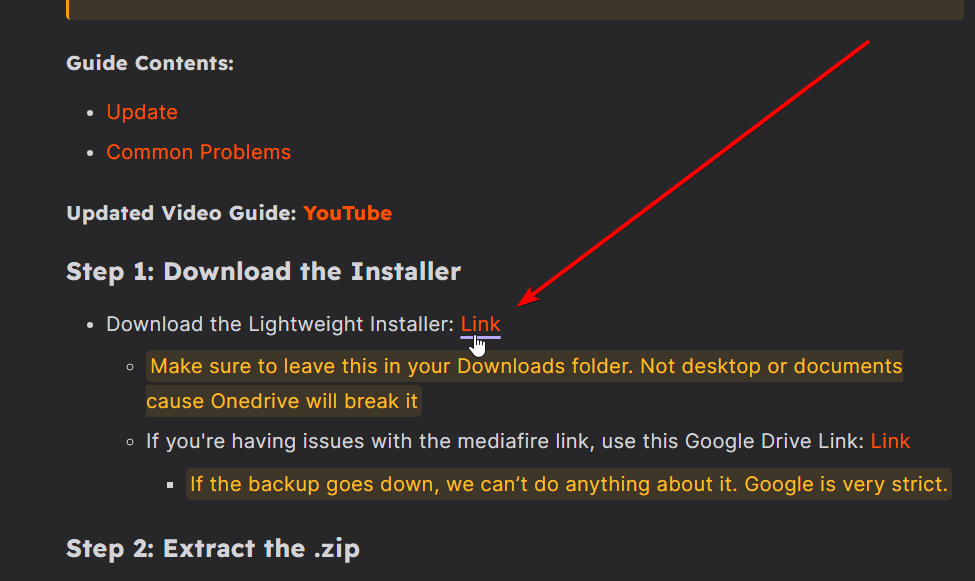
Step 1.
https://i.imgur.com/6FCsxSb.png
 kindred crystal
Ah, I'm dumb, got it
I'm really glad I pay for 300MB/second so that MediaFire can throttle it to 1.5MB
kindred crystal
What is the tag for showing where your savefile is ? Trying to find the one on mobile specifically
Oh wait, think I found it under a different name
No... That's backups
harsh epoch
?tag save
pearl magnetBOT
Your save files and backups are in: C:\Users\YOURNAME\AppData\Roaming\InfiniteFusion
- The game folder includes a shortcut to the location above named
Savefileyou can double click. Each save corresponds to a slot (e.g., Slot A saves as File A.rxdata). - To transfer, copy the save file to the same location on the new device.
- For non-Windows devices, refer to the workaround guide for your device: [HERE](#tech-support message)
https://cdn.discordapp.com/attachments/700790080175996938/1327016763719684226/image.png?ex=6781882b&is=678036ab&hm=f10dd293ef9e2c0e6a8b1944e6a5a2e0e5539ca0fe75de7a0f948414df861b88&
 kindred crystal
I don't have an appdata folder?

That also doesn't answer my original question, but I think I figured that one out
 hardy idol
kindred crystal
hardy idol
kindred crystal
it will be within the folder you downloaded the game at
kindred crystal
This is a fresh install, so there isn't a saved game
hardy idol
ah. the game shall make one for you then
kindred crystal
Oooohh. Maybe that's why the Appdata is missing, nothing has forced itt o generate
I tried searching Roaming the hard way and found it, but when I click on the shortcut for Savefile it says it can't it/been removed or deleted
hardy idol
appdata is likely one thats hidden by your pc aswell
kindred crystal
Bro what the fuck now the whole thing is missing. My download folder is empty
I told it to show hidden
hardy idol
hmmm
kindred crystal
Something goofy is going on here
hardy idol
i got C:\Users\User\AppData\Roaming\infinitefusion

 upbeat sage
kindred crystal
I tried re-extracting it and now I'm getting this
upbeat sage
kindred crystal
I tried re-extracting it and now I'm getting this
Looks good
kindred crystal
It didn't download anything wtf
Where is the launchers. where is the rest of it.
harsh epoch
it looks like it updated something instead
do you have another infinite fusion folder
kindred crystal
Hang on. I think this PC is acting up
Now I am missing from my god damn C Drive
 upbeat sage
kindred crystal
upbeat sage
kindred crystal
I think you’re having greater issues than we can provide solutions to
May I suggest a Priest or equivalent holy man
kindred crystal
I love that I did a fresh Windows install on this PC to clear some minor issues and instead broke my entire god damn computer
upbeat sage
I kid
upbeat sage
but for real this is beyond the scope of the pif tech support discord channel
kindred crystal
Good news. After googling and lots of swear words, Its fixed and I found the savefile in roaming
 honest tapir
There were sprites that were in my game, but are gone now. I tried reinstalling the game a few times, but they're still gone. Any idea what's up with that, or how to fix it?
 covert marsh
I'm having trouble trying to remap controls to a handheld device. There's no option to remove a control in the gamepad mapping settings when i try to look.

 fast mantle
I was trying to setup debug mode
 kindred crystal
?tag cheating
pearl magnetBOT
Per Rules 23 and 24 in #rules, we will NOT assist with ANY code modifications or cheats. Modifying game files in any way VOIDS all tech and game support from us.
Attempting to edit code to enable debug will not work. Debug is only obtainable as an in-game reward for catching all 501 Base Pokémon.
The ONLY fix for your error is to delete your game folder and reinstall using the files linked in #downloads . Reinstalling will not affect your save files.
 full cliff
I guess there is no cheating.
kindred crystal
covert marsh
I'm having trouble trying to remap controls to a handheld device. There's no opt...
Mapping controls to a mobile device is notoriously difficult and I have been working on it for a week but have not found a solution. To the best of my knowledge, controller support is not guranteed on mobile devices at this time through Joiplay
covert marsh
kindred crystal
Mapping controls to a mobile device is notoriously difficult and I have been wor...
I didn't think it was going to be easy i cant seem to find any recourses on this topic that have answers
hardy idol
I use the following for mobile controls. Aswell as a mapped wireless BT xbox one controller

i know this can be a bit better to convey what each does
kindred crystal
I think I can see what you did here, and it makes sense, that is smart
covert marsh
hardy idol
Thank you this is much better!
I just dont have the b button it seems but i think i can figure it out
kindred crystal
Never mind I dont see what you did but I did mess up my own keybinds copying it
#iamsmart
covert marsh
Is there no other apps that can run infinite fusion
kindred crystal
No because it has to be a specific version of Joiplay
 west crystal
Hi it says that i should write here about my problem that it says its complete without adding any files

 dusky tartan
Helloo i wanted to post a bug on 'bug-reports' but it sasys im not authorized to post?
 quasi abyss
dusky tartan
Helloo i wanted to post a bug on 'bug-reports' but it sasys im not authorized to...
quasi abyss
dusky tartan
Helloo i wanted to post a bug on 'bug-reports' but it sasys im not authorized to...
only staff can post new things in bug reports
we had a very very bad issue of people not reading the guidelines before posting, so the right got revoked from the rabble
what's your issue?
the bug i mean
dusky tartan
oh okay thats kinda sad.. um my 'bug' is related to the lost chansey quest, (i play on randomized mode) the trainer is not where it is supposed to be.
so is this channel the appropriate place to post bugs then?
quasi abyss
yes, where you get help with bugs. if need be, we'll create a report for you or direct you to a bug report
(people kept posting duplicate reports which isnt helping the tech team nor the dev, so thats why it was revoked)
now elaborate a little on the bug
i have my game up for testing right now
and the chansey quest you're referring to is the one in fuschia/safari, right?
dusky tartan
quasi abyss
and the chansey quest you're referring to is the one in fuschia/safari, right?
yes indeed, trainer should be located in area 5 house
quasi abyss
i just went and checked -- trainer is there. can you send a screenshot of the house interior?
dusky tartan
none of them is talking about the chansey for me
 quasi abyss
it should be this trainer -- only reason the trainer would be gone is if you already completed the quest, afaik

 coral shadow
I am having issues with downloading the most recent version
quasi abyss
have you checked the hotel? iirc the trainer would go there once the quest is completed
quasi abyss
coral shadow
I am having issues with downloading the most recent version
?tag moreinfo please
pearl magnetBOT
When asking for help, please be as specific as possible! We cannot help you if you don't give us the information we need!
Info we need:
- Explain the issue. Do not just say "Game won't work"! This does not help us at all!
- Where did you get the game files from? Discord, google doc from discord?
- Are you using the Launcher?
- Did you update to 6.4 from old files or install in a new folder?
- What version are you on? (Open the game, title screen says)
- What device are you playing on? (Windows, Android, Mac, etc.)
- Send a screenshot if applicable. Often times, it is hard to describe your issue. Send a screenshot so we can see what you are seeing. Especially if you are getting an error.
coral shadow
It makes me log in with Github and then doesn't download
quasi abyss
what guide are you using?
dusky tartan
quasi abyss
have you checked the hotel? iirc the trainer would go there once the quest is co...
not that i remember.. well atm there is this quest completion bug.. but im pretty sure i try to complete the quest before 6.6.1.
gonna check theg hotel
coral shadow
these are screenshots of what it takes me through


after signing in with GitHub, nothing happens
quasi abyss
you need to redownload the launcher. are you doing that?
coral shadow
Yes
quasi abyss
and you're going through the hackmd guide?
coral shadow
I didn't know there was a guide for it
I just downloaded it the same way I did a year ago
quasi abyss
HackMD
Pokemon Infinite Fusion LauncherDeveloped by: megaman [Tech Manager for Pokemon Infinite Fusion]
this is the guide
dusky tartan
is he supposed to say this after completion?
 quasi abyss
not the same trainer
west crystal
Hi is there any way to delete everything? i have problem installing the game, when i come to INSTALL_OR_UPDATE.bat it first say: Failed to download update. Reverting to previous game version.
Press any key to continue . . .
Den angivne sti blev ikke fundet.
Installation Complete.
If you do not see additional files in your folder, screenshot this window to #tech-support for further help.
Press any key to continue
quasi abyss
it's saying it cant find the path --
- is the folder unzipped?
- is it in your downloads?
dusky tartan
quasi abyss
not the same trainer
omg i found him/her. i am sorry to have bothered smh--
must have completed in 6.6.1.
thanks for your help anyway ❤️
quasi abyss
🫡
west crystal
i use winrar to unzip, and yes its in my downloade
 pale pine
quasi abyss
🫡
pale pine
quasi abyss
🫡
heyyyyyyyyyy
quasi abyss
is it fully unzipped?
because the error pops up when you're trying to run the .bat with a zipped or not completely unzipped folder
hardy idol
pale pine
heyyyyyyyyyy
go back to bed
west crystal
so i have to delete the zip file?
pale pine
quasi abyss
is it fully unzipped?
ya wanna know what else is unzipped? ||the zipbomb i put in ur pc :3 nukes ur pc||
pale pine
hardy idol
go back to bed
its 4pm
quasi abyss
west crystal
so i have to delete the zip file?
no. try unzipping it again
and run the .bat from the UNZIPPED folder
hardy idol
pale pine
its 4pm
perfect time for a 4 hour snooze
dusky tartan
but i got another bug which might be helpful,
i completed legendary band part 1 (completion bug) and as i got to recruit the next band member , part 1 is now 2 times in my quest journal (also has same quest text)
 west crystal
i think it worked now deleted the old unzipped, now it installing
quasi abyss
🙂↕️
quasi abyss
dusky tartan
but i got another bug which might be helpful,
i completed legendary band part ...
yeah, i suspect it has something to do with the buggy quests right now
we're still waiting for a fix on that
west crystal
it just say installation complete, is that it?
 west crystal
thanks
 tough arrow
Hi, my game keep crashing for no reason and very very laggy during battle. I have re download the game 3 or 4 times but it doesnt fixed and worse the game will crashed in the title screen
quasi abyss
?tag performance || run through this
pearl magnetBOT
Performance Issues - Freezing? Lag? Long Black/Loading Screens? [More Info](#tech-support message)
tough arrow
Alright i off the download data and it fixed the laggy, but if i off it will the game still dowload the custom fusion sprite?
likr both of them whirl just gone and my Lycanroc + duskull have become AI fusion

 quasi abyss
if you turn off downloads, sprites will not load
you can import the april spritepack
?tag resetcache || also try your luck with this
pearl magnetBOT
For missing sprites on the 6.6 update, talk to the help man in any Pokémon center and navigate to Advanced Options -> Other -> Reset -> Clear Sprite Cache. Video
hardy idol
kindred crystal
Never mind I dont see what you did but I did mess up my own keybinds copying it
I got the photo changed to reflect the buttons. its as followed

 eternal elbow
is there another way to download infinite fusion media fire isnt working
hardy idol
eternal elbow
is there another way to download infinite fusion media fire isnt working
whats not working about it?
eternal elbow
mediafire the one that dowloads the game
it sends me to a blank sreen and doesnt download
 ionic tendon
eternal elbow
it sends me to a blank sreen and doesnt download
ionic tendon
eternal elbow
it sends me to a blank sreen and doesnt download
Are you using opera?
eternal elbow
yea
ionic tendon
Try a different browser, opera doesn’t always like PIF
 hasty yew
How do you turn on downloads?
quasi abyss
in game options
hasty yew
Some sprites in the game sometimes appear as a question mark
I'll hover over one Pokemon which will turn into a question mark, and then all of them will turn into question marks
And yes downloads are on
 prime glade
?tag mobilealt
pearl magnetBOT
hasty yew
I'm playing on PC
 frozen zealot
prime glade
?tag mobilealt
frozen zealot
prime glade
?tag mobilealt
thanks to use #ask-a-bot for personnals commands
frozen zealot
hasty yew
I'm playing on PC
don't mind it, a porygon will come help you when they can, they have a perfect light green nickname with the role " porygon tech "
hasty yew
Right
ionic tendon
hasty yew
I'll hover over one Pokemon which will turn into a question mark, and then all o...
?tag resetcache | have you done this already?
pearl magnetBOT
For missing sprites on the 6.6 update, talk to the help man in any Pokémon center and navigate to Advanced Options -> Other -> Reset -> Clear Sprite Cache. Video
hasty yew
ionic tendon
?tag resetcache | have you done this already?
Yeah, I think it's fixed now.
 twilit mirage
pearl magnet
For missing sprites on the 6.6 update, talk to the help man in any Pokémon cente...
twilit mirage
pearl magnet
For missing sprites on the 6.6 update, talk to the help man in any Pokémon cente...
did clear the sprite cache but all my sprite are still missing
 terse geyser
game isnt launching keeps freezing on the home screen and saying the script is stuck?
ionic tendon
twilit mirage
did clear the sprite cache but all my sprite are still missing
?tag missingsp
pearl magnetBOT
If you're encountering missing sprites
**If you just updated to 6.6, do the reset cache steps mentioned in this #announcements message post.
**The game comes with all sprites preinstalled, up until the February 2025 Pack.
The remaining packs will be downloaded as you play, as long as you have "Download Data" turned on and your device is connected to wifi. You do not need to do anything for them.
Keep in mind, the auto download does not have infinite speed or capacity and will not trigger if you are not actively encountering new sprites (ex; battling, checking the Pokedex, etc.).
After downloading X amount of sprites per time unit Y, it will be paused for a bit. We cannot adjust this limit and there is nothing you can do as the player to skip it or make it go faster.
The first time you encounter a base Pokemon, it will select a random one of all sprites, if it is a new one that hasn't been downloaded yet, it will show as missing.
The same goes for fusions but with a little more nuance. To keep it simple, think of it the same.
Again, nothing wrong with your game. You just hit a download cap.
Note: Updating your game resets all your auto-downloaded sprites. do not attempt to "fix" this with updating. It will just make everything start from the beginning.
If you would like to manually import the latest sprite packs, they are located in #spritepack-releases and further instructions can be found HERE
ionic tendon
terse geyser
game isnt launching keeps freezing on the home screen and saying the script is s...
It means you interacted before it was loaded.
twilit mirage
ionic tendon
?tag missingsp
so the solution is manually import all the sprite 
ionic tendon
Just keep playing and it should download as you go, you likely just hit the download cap and have to wait till it resets and you can get more sprites
twilit mirage
but when auto download, it's always lag 1-2 mins
ionic tendon
Are you having lag issues or sprite issues? Those are two different problems
twilit mirage
sprite issue
there's no custom sprite in my game
but when choosing auto download On, it will be lag issue
ionic tendon
Okay, try launching the performance version with download on first. Loading in initially will take a few minutes, but the game should run better
 ionic tendon
Okay, so much just happened and disappeared. Lmao
twilit mirage
ionic tendon
Okay, try launching the performance version with download on first. Loading in i...
let me try
terse geyser
ionic tendon
It means you interacted before it was loaded.
bless you
twilit mirage
ionic tendon
Okay, try launching the performance version with download on first. Loading in i...
still same, no custom sprite
and the performance version is way laggier

 median minnow
hey i just installed a fresh copy of the game after deleting everything, but now i dont have sprites for non fused pokemon what can i to to fix this?
 umbral girder
Heya, throwing out my own issues with sprite download lag. It takes several minutes to get past the intro and 30-60 secs of lag occurs whenever a new sprite is loaded in battle, boxes, etc. I was playing before today with no issues. Turning off auto download resolves the problem but it does mean I do not have sprites for anything not previously downloaded.
ionic tendon
twilit mirage
still same, no custom sprite
and the performance version is way laggier
?tag Wifi try this
pearl magnetBOT
 No tag
 Wifi found.
ionic tendon
?tag wifi
pearl magnetBOT
Going to sound weird, but turn off WiFi/internet on your device and try again. For some reason, even though your internet might be working just fine, something about this game clogs it up. Once you are in game, if issue persists, turn off Download Data as well.
ionic tendon
median minnow
hey i just installed a fresh copy of the game after deleting everything, but now...
?tag resetcache
pearl magnetBOT
For missing sprites on the 6.6 update, talk to the help man in any Pokémon center and navigate to Advanced Options -> Other -> Reset -> Clear Sprite Cache. Video
ionic tendon
umbral girder
Heya, throwing out my own issues with sprite download lag. It takes several minu...
Did you reset cache already?
No wait, yours would be the wifi tag as well
umbral girder
No, I will definitely try it and see.
median minnow
ionic tendon
?tag resetcache
Can you explain how to use that ?
umbral girder
Reset internet and sprite cache and the issue still persists.
quasi abyss
median minnow
Can you explain how to use that ?
how to use what?
quasi abyss
umbral girder
Reset internet and sprite cache and the issue still persists.
have you gone through the performance tips yet?
umbral girder
Yep
quasi abyss
yeah, some devices seem to just be like that
dont really know why. some run it better than others
umbral girder
It's odd because it was running fine for weeks.
 umbral adder
How to update to 6.6.1 on Mobile
quasi abyss
umbral adder
How to update to 6.6.1 on Mobile
you dont
umbral adder
When can I do that
quasi abyss
umbral girder
It's odd because it was running fine for weeks.
it could be due to the new update? fixes are still coming out, so who knows
quasi abyss
umbral adder
When can I do that
¯_(ツ)_/¯
dev's working on a fix for a issue we're wwaiting on
and then the person that updates the files is on hiatus til monday
so
umbral girder
Free shrugs indeed. Thanks for the support anyway.
quasi abyss
🙂↕️
 misty summit
Hello! I just updated to the new update and everything was fine, but when looking at the Pokemon in my party all their custom sprites got replaced by the default fusion. Does anyone know how to fix this?


 broken crypt
misty summit
Hello! I just updated to the new update and everything was fine, but when lookin...
broken crypt
misty summit
Hello! I just updated to the new update and everything was fine, but when lookin...
same here
misty summit
Odd. The ones in my PC stayed the same just the ones in my party lost their sprites
misty summit
I tried that it didn’t work. It seems like the “default” fusion sprite saved over the custom sprite but im not sure how to fix that
broken crypt
Yeah... I confirm... it's ok with fusions in my PC but not with ones in my party
misty summit
I closed it and reopened, then went to options and turned off and on download data and 2 of my team members returned, but the other 4 are still messed up 😭
misty summit
misty summit
Hello! I just updated to the new update and everything was fine, but when lookin...
If either of these fix themselves I’ll send pics
broken crypt
Here, pkmn who have a custom fusion (normally) but my game decide they haven't anymore. And the pokedex doesn't provide custom fusions for them.


 regal geyser
?tag resetcache
pearl magnetBOT
For missing sprites on the 6.6 update, talk to the help man in any Pokémon center and navigate to Advanced Options -> Other -> Reset -> Clear Sprite Cache. Video
broken crypt
Oh! I'll try that.
 dry flax
Hmmm. Is the launcher still broken? I updated it to 1.1.2 and updated the game to 6.6.1. But when I try to open the game from the launcher, it opens the game window, but immediately closes it 
broken crypt
I completely forgot this npc, sorry! And thanks a lot :3 @regal geyser
regal geyser
dry flax
Hmmm. Is the launcher still broken? I updated it to 1.1.2 and updated the game t...
?tag olddata
pearl magnetBOT
The most likely reason your game is opening and closing is due to improperly updated game files. We mention in #downloads to not update ANY files versions below 6.6.0.
If you're using the Launcher:
- Reinstall version 1.1.2 of the launcher from #downloads
- Open the settings tab
- Click "Reset Config"
NOTE: The original path that the launcher shows will be your old game folder. That folder should be deleted. The new game folder will be inPIFLauncher(#.#.#)/GameFiles/InfiniteFusion
If you're not using the Launcher:
Use the Lightweight installer guide to install in a NEW folder ➡️ Click Here⬅️
If you are on a non-Windows device, follow the [guide](#tech-support message) for your device to reinstall.
Reinstalling on Windows does not affect Save Files in any way.
regal geyser
remember to reset config
dry flax
regal geyser
remember to reset config
This is why I'm an art person, not a tech person 
It worked
 sturdy pond
Just a quick notification that there was an update on my pixel 9 pro yesterday. Infinite fusion seems to boot up fine now...before I just had a black screen.
 turbid terraceBOT
Hey @sturdy pond! Black screen in this game is the loading screen. The duration of the black screen depends on YOUR computer and YOUR internet.
- If you get the message below while opening the game, this means to stop clicking/pressing buttons on the screen as it is loading.
- If you get the message while in game, this means your computer is struggling.
- Use our performance tips to help your issues: [More Info](#tech-support message)⬅️⬅️

 lament bone
- PokemonIF Android
- the left/right buttons ONLY are inversed whenever I try to input text
- l/L/m/M/z/Z seem to be invisible (although they still work)

 weak raven
Hiii, i get this bug after takeOff the uniform in the team rocket HQ. ive tried to save and close the game theres anyway to getOff without loosing my progress
 regal geyser
weak raven
Hiii, i get this bug after takeOff the uniform in the team rocket HQ. ive tried ...
regal geyser
weak raven
Hiii, i get this bug after takeOff the uniform in the team rocket HQ. ive tried ...
Bag -> Key items -> debugger
weak raven
Thanks a lot
 halcyon wadi
Hi, I plugged my Switch Pro controller into the PC and the game has a bug. Can I fix this?
verbal timber
halcyon wadi
Hi, I plugged my Switch Pro controller into the PC and the game has a bug. Can I...
wdym
halcyon wadi
verbal timber
wdym
It's as if I click all the buttons on the controller at the same time while I'm not touching anything.
regal geyser
Try using steam input?
halcyon wadi
and it works perfectly on switch
regal geyser
Controller is not natively supported on this game I believe
halcyon wadi
regal geyser
Try using steam input?
steam input ?
regal geyser
Add the game to steam as a non steam game
And then let steam handle the controller part
halcyon wadi
I'll try
 radiant inlet
i got a problem i think
verbal timber
halcyon wadi
It's as if I click all the buttons on the controller at the same time while I'm ...
yeah that is an issue unique to the switch controller, it isn't a game bug
radiant inlet
 verbal timber
but as Nugat stated, make use of Steam
verbal timber
radiant inlet
no issue
verbal timber
i'm saying there is no issue with what you posted
radiant inlet
it kept saying something about an openal
verbal timber
plug in speakers/headset
verbal timber
ye
 zinc pilot
How do I download the game
turbid terraceBOT
Hey @zinc pilot! You can download the game from: [#downloads](#downloads message)
If you need a guide, they are located: [HERE](#tech-support message)
zinc pilot
How do I download the game on iPad
turbid terraceBOT
Hey @zinc pilot! You can download the game from: [#downloads](#downloads message)
If you need a guide, they are located: [HERE](#tech-support message)
Hey @zinc pilot! You cannot install this game on iPhone or iPad. This game is not a ROM Hack so Delta won't work and we are not planning to release an iOS version.
 robust viper
guys how do i answer that i downloaded from discord cuz i started the game and i cant move the options
turbid terraceBOT
Hey @robust viper! You can download the game from: [#downloads](#downloads message)
If you need a guide, they are located: [HERE](#tech-support message)
robust viper
im on pc btw
verbal timber
robust viper
guys how do i answer that i downloaded from discord cuz i started the game and i...
arrow keys
?tag keybinds
pearl magnetBOT
You can press F1 (FN + F1 on laptops) to change your keybindings!
Be aware, controllers will be auto mapped to buttons depending on which controller you plug in.
If you want to remap buttons on controller, you need to use Steam since this game doesn't support it. How to use Steam: [Guide](#tech-support message)
 robust viper
verbal timber
arrow keys
robust viper
verbal timber
arrow keys
i dont got arrow keys in my keyboard
verbal timber
then you need to rebind
 hallow flint
What could be causing this whenever i try entering the lavender orphanage? Version 6.6.0 here
 robust viper
hallow flint
What could be causing this whenever i try entering the lavender orphanage? Versi...
robust viper
hallow flint
What could be causing this whenever i try entering the lavender orphanage? Versi...
sla
reinstala
ta falando q ta com script error
 lapis pelican
I just updated the game and it keeps failing to load after typing in wine Game.exe. The game shows up and then just dissapears.
says in terminal "block in error"
verbal timber
?tag olddata
pearl magnetBOT
The most likely reason your game is opening and closing is due to improperly updated game files. We mention in #downloads to not update ANY files versions below 6.6.0.
If you're using the Launcher:
- Reinstall version 1.1.2 of the launcher from #downloads
- Open the settings tab
- Click "Reset Config"
NOTE: The original path that the launcher shows will be your old game folder. That folder should be deleted. The new game folder will be inPIFLauncher(#.#.#)/GameFiles/InfiniteFusion
If you're not using the Launcher:
Use the Lightweight installer guide to install in a NEW folder ➡️ Click Here⬅️
If you are on a non-Windows device, follow the [guide](#tech-support message) for your device to reinstall.
Reinstalling on Windows does not affect Save Files in any way.
verbal timber
lapis pelican
I just updated the game and it keeps failing to load after typing in wine Game.e...
^likely this
hallow flint
It worked
lapis pelican
verbal timber
^likely this
Where do I find the files for the game? I just followed the steps exactly and the game files arent on my computer
verbal timber
they should be in the folder you ran the install in
if you used the lightweight, that would be in downloads in the InfiniteFusion folder
lapis pelican
I just realized that I didnt empty the orgianl files from my trash
Still cant find any folder. I need some help
 hexed tundra
can someone help me I just tried to open my game and after the opening scene all I see is a black screen?
turbid terraceBOT
Hey @hexed tundra! Black screen in this game is the loading screen. The duration of the black screen depends on YOUR computer and YOUR internet.
- If you get the message below while opening the game, this means to stop clicking/pressing buttons on the screen as it is loading.
- If you get the message while in game, this means your computer is struggling.
- Use our performance tips to help your issues: [More Info](#tech-support message)⬅️⬅️
verbal timber
lapis pelican
Still cant find any folder. I need some help
you should have a zip if you redownloaded
extract that
verbal timber
hexed tundra
can someone help me I just tried to open my game and after the opening scene all...
game is struggling to load on your device
?tag performance
pearl magnetBOT
Performance Issues - Freezing? Lag? Long Black/Loading Screens? [More Info](#tech-support message)
verbal timber
?tag wifi
pearl magnetBOT
Going to sound weird, but turn off WiFi/internet on your device and try again. For some reason, even though your internet might be working just fine, something about this game clogs it up. Once you are in game, if issue persists, turn off Download Data as well.
lapis pelican
verbal timber
you should have a zip if you redownloaded
Nothing
verbal timber
then you didn't redownload
or it is still in the process of downloading
both of which are your end things
 hexed tundra
verbal timber
game is struggling to load on your device
hexed tundra
verbal timber
game is struggling to load on your device
What should I do?
lapis pelican
I just realized what i did
verbal timber
hexed tundra
What should I do?
i poked the bot, follow the two links [blue text] under the message i replied to
 ancient coral
Greetings. It's appears I have a small issue with the game. Yea the sprites are missing for some reason after I updated the game. I even re-installed the game and no dice. What do?
 verbal timber
ancient coral
Greetings. It's appears I have a small issue with the game. Yea the sprites are ...
verbal timber
ancient coral
Greetings. It's appears I have a small issue with the game. Yea the sprites are ...
?tag missingsp
pearl magnetBOT
If you're encountering missing sprites
**If you just updated to 6.6, do the reset cache steps mentioned in this #announcements message post.
**The game comes with all sprites preinstalled, up until the February 2025 Pack.
The remaining packs will be downloaded as you play, as long as you have "Download Data" turned on and your device is connected to wifi. You do not need to do anything for them.
Keep in mind, the auto download does not have infinite speed or capacity and will not trigger if you are not actively encountering new sprites (ex; battling, checking the Pokedex, etc.).
After downloading X amount of sprites per time unit Y, it will be paused for a bit. We cannot adjust this limit and there is nothing you can do as the player to skip it or make it go faster.
The first time you encounter a base Pokemon, it will select a random one of all sprites, if it is a new one that hasn't been downloaded yet, it will show as missing.
The same goes for fusions but with a little more nuance. To keep it simple, think of it the same.
Again, nothing wrong with your game. You just hit a download cap.
Note: Updating your game resets all your auto-downloaded sprites. do not attempt to "fix" this with updating. It will just make everything start from the beginning.
If you would like to manually import the latest sprite packs, they are located in #spritepack-releases and further instructions can be found HERE
verbal timber
^read that in full
ancient coral
Uu fast response thanks
lapis pelican
If i redownload the game, do i still need to update it?
verbal timber
a fresh install of the game files will always yield the most up to date version
lapis pelican
Thanks.
ancient coral
@verbal timber So basically I just have to play and wait. Gotcha
regal geyser
(As long as you download it from here  )
)
ancient coral
Or download manually I guess
lapis pelican
Now it says command not found after typing wine Game.exe
ancient coral
Thanks a lot for the help. ❤️
verbal timber
ancient coral
Or download manually I guess
manual download won't give you base sprites
those you can only get via playing with download data turned on
verbal timber
lapis pelican
Now it says command not found after typing wine Game.exe
unfortunately macOS is not my area of expertise
best bet would be to double check you didn't goof something up during the process
lapis pelican
I got it to work!
 fleet wing
Can I download the game on my smartphone too?
turbid terraceBOT
Hey @fleet wing! You can download the game from: [#downloads](#downloads message)
If you need a guide, they are located: [HERE](#tech-support message)
regal geyser
fleet wing
Can I download the game on my smartphone too?
Android only and not all phones
Check the compatibility list
?tag android
pearl magnetBOT
Check our Official Android guide ➡️ HERE.⬅️ If you didn't follow this guide, DELETE and UNINSTALL everything.
All Android bugs/workarounds are in the guide. If your issue isn't listed, there's no fix. No dedicated mobile version of IF will be developed in the future.
Note: Android has not yet been updated to 6.6! Please be patient while we wait for a stable build.
 ember nacelle
hello, I have updated my game and now this error pops-up upon launching. Any tips?
 verbal timber
get a fresh install of the files, delete your existing infinite fusion folder [this won't touch your save]
regal geyser
When in doubt, reinstall
ember nacelle
thanks
 faint cradle
Is there any way to change how the game looks?
regal geyser
What do you mean?
 kindred spindle
Hey I have a problem. I tried to update my game after that it didn't started anymore so I deleted the game and reinstalled it. Now it works again but all the sprites are gone what happend?
verbal timber
kindred spindle
Hey I have a problem. I tried to update my game after that it didn't started any...
?tag missingsp
pearl magnetBOT
If you're encountering missing sprites
**If you just updated to 6.6, do the reset cache steps mentioned in this #announcements message post.
**The game comes with all sprites preinstalled, up until the February 2025 Pack.
The remaining packs will be downloaded as you play, as long as you have "Download Data" turned on and your device is connected to wifi. You do not need to do anything for them.
Keep in mind, the auto download does not have infinite speed or capacity and will not trigger if you are not actively encountering new sprites (ex; battling, checking the Pokedex, etc.).
After downloading X amount of sprites per time unit Y, it will be paused for a bit. We cannot adjust this limit and there is nothing you can do as the player to skip it or make it go faster.
The first time you encounter a base Pokemon, it will select a random one of all sprites, if it is a new one that hasn't been downloaded yet, it will show as missing.
The same goes for fusions but with a little more nuance. To keep it simple, think of it the same.
Again, nothing wrong with your game. You just hit a download cap.
Note: Updating your game resets all your auto-downloaded sprites. do not attempt to "fix" this with updating. It will just make everything start from the beginning.
If you would like to manually import the latest sprite packs, they are located in #spritepack-releases and further instructions can be found HERE
verbal timber
?tag resetcache
pearl magnetBOT
For missing sprites on the 6.6 update, talk to the help man in any Pokémon center and navigate to Advanced Options -> Other -> Reset -> Clear Sprite Cache. Video
kindred spindle
oh sorry I didn't know they need to load in I think they are all set by now... Thank you anyway ^^' Sorry for being uninformed
 hidden juniper
Hi everyone, yesterday I installed the game and tried a randomizer but unfortunately I don't see any Pokémon, they are invisible, can you help me. I only see some Pokémon
 fast flame
Hi, I've been trying to play on Linux Mint, but every time I start a new game I get this error. I've already tried several "solutions", but none of them have worked. Does anyone know how to fix it?

 violet nebula
How to delete all save files from the game
verbal timber
violet nebula
How to delete all save files from the game
?tag save
pearl magnetBOT
Your save files and backups are in: C:\Users\YOURNAME\AppData\Roaming\InfiniteFusion
- The game folder includes a shortcut to the location above named
Savefileyou can double click. Each save corresponds to a slot (e.g., Slot A saves as File A.rxdata). - To transfer, copy the save file to the same location on the new device.
- For non-Windows devices, refer to the workaround guide for your device: [HERE](#tech-support message)
https://cdn.discordapp.com/attachments/700790080175996938/1327016763719684226/image.png?ex=6781882b&is=678036ab&hm=f10dd293ef9e2c0e6a8b1944e6a5a2e0e5539ca0fe75de7a0f948414df861b88&
verbal timber
hidden juniper
Hi everyone, yesterday I installed the game and tried a randomizer but unfortuna...
?tag missingsp
pearl magnetBOT
If you're encountering missing sprites
**If you just updated to 6.6, do the reset cache steps mentioned in this #announcements message post.
**The game comes with all sprites preinstalled, up until the February 2025 Pack.
The remaining packs will be downloaded as you play, as long as you have "Download Data" turned on and your device is connected to wifi. You do not need to do anything for them.
Keep in mind, the auto download does not have infinite speed or capacity and will not trigger if you are not actively encountering new sprites (ex; battling, checking the Pokedex, etc.).
After downloading X amount of sprites per time unit Y, it will be paused for a bit. We cannot adjust this limit and there is nothing you can do as the player to skip it or make it go faster.
The first time you encounter a base Pokemon, it will select a random one of all sprites, if it is a new one that hasn't been downloaded yet, it will show as missing.
The same goes for fusions but with a little more nuance. To keep it simple, think of it the same.
Again, nothing wrong with your game. You just hit a download cap.
Note: Updating your game resets all your auto-downloaded sprites. do not attempt to "fix" this with updating. It will just make everything start from the beginning.
If you would like to manually import the latest sprite packs, they are located in #spritepack-releases and further instructions can be found HERE
verbal timber
?tag resetcache
pearl magnetBOT
For missing sprites on the 6.6 update, talk to the help man in any Pokémon center and navigate to Advanced Options -> Other -> Reset -> Clear Sprite Cache. Video
verbal timber
fast flame
Hi, I've been trying to play on Linux Mint, but every time I start a new game I ...
we only have guides for linix ubuntu
anything outside that we can't guarantee will work
nor can we assist
fast flame
verbal timber
we only have guides for linix ubuntu
Linux Mint is a distribution based on Ubuntu, so it's essentially the same.
verbal timber
it is the wrong channel, this is only for the game
verbal timber
fast flame
Linux Mint is a distribution based on Ubuntu, so it's essentially the same.
then follow the linux guide exactly, if it fails to work, there isn't much we can do
robust viper
guys i accindentally overwrite a new save in my main save there is something that i can do?
 charred solstice
verbal timber
it is the wrong channel, this is only for the game
charred solstice
verbal timber
it is the wrong channel, this is only for the game
Yeah I thought so. The website said to reach out to them via this discord so I wasn't sure where to put it. Thanks for letting me know though
fast flame
verbal timber
then follow the linux guide exactly, if it fails to work, there isn't much we ca...
Ok, thanks
verbal timber
charred solstice
Yeah I thought so. The website said to reach out to them via this discord so I w...
https://discord.com/channels/302153478556352513/1170955211922223205 its been reported
charred solstice
verbal timber
https://discord.com/channels/302153478556352513/1170955211922223205 its been rep...
Wow... I never knew that existed. Thanks a ton!
violet nebula
How to change the sprites of a pokemon
verbal timber
violet nebula
How to change the sprites of a pokemon
?tag alts
when the bot feels like bringing it up
violet nebula
lol
verbal timber
you didn't need to tag it yourself
i tagged it to pull the bot reponse for it
oh wow
even the backup command for it borked
deino is dead
violet nebula
The bot died?
pearl magnetBOT
To change a Pokemon's sprite to an alternative one, go to their Pokedex entry (this can be done from their summary screen) and go to the "Sprites" tab. Here you can scroll through the different available sprites.
https://www.youtube.com/watch?v=VOY_mxJ-Bx8

To change a Pokemon's sprite to an alternative one, go to their Pokedex entry (this can be done from their summary screen) and go to the "Sprites" tab. Here you can scroll through the different available sprites.
https://www.youtube.com/watch?v=VOY_mxJ-Bx8
 sage stream
anyone had problems with the launcer since it was updated? When I click play it just closes and never opens again 😦
verbal timber
sage stream
anyone had problems with the launcer since it was updated? When I click play it ...
?tag olddata
pearl magnetBOT
The most likely reason your game is opening and closing is due to improperly updated game files. We mention in #downloads to not update ANY files versions below 6.6.0.
If you're using the Launcher:
- Reinstall version 1.1.2 of the launcher from #downloads
- Open the settings tab
- Click "Reset Config"
NOTE: The original path that the launcher shows will be your old game folder. That folder should be deleted. The new game folder will be inPIFLauncher(#.#.#)/GameFiles/InfiniteFusion
If you're not using the Launcher:
Use the Lightweight installer guide to install in a NEW folder ➡️ Click Here⬅️
If you are on a non-Windows device, follow the [guide](#tech-support message) for your device to reinstall.
Reinstalling on Windows does not affect Save Files in any way.
 bleak dust
Hi so every time I try to turn on auto-save or save the game in general I keep getting this message. I downloaded the game straight from the discord so I really don't know what the problem is.

 glossy zephyr
Hello, I can't launch my game. As soon as I launch it, it closes immediately.
turbid terraceBOT
Hey @glossy zephyr! Black screen in this game is the loading screen. The duration of the black screen depends on YOUR computer and YOUR internet.
- If you get the message below while opening the game, this means to stop clicking/pressing buttons on the screen as it is loading.
- If you get the message while in game, this means your computer is struggling.
- Use our performance tips to help your issues: [More Info](#tech-support message)⬅️⬅️
regal geyser
?tag olddata
pearl magnetBOT
The most likely reason your game is opening and closing is due to improperly updated game files. We mention in #downloads to not update ANY files versions below 6.6.0.
If you're using the Launcher:
- Reinstall version 1.1.2 of the launcher from #downloads
- Open the settings tab
- Click "Reset Config"
NOTE: The original path that the launcher shows will be your old game folder. That folder should be deleted. The new game folder will be inPIFLauncher(#.#.#)/GameFiles/InfiniteFusion
If you're not using the Launcher:
Use the Lightweight installer guide to install in a NEW folder ➡️ Click Here⬅️
If you are on a non-Windows device, follow the [guide](#tech-support message) for your device to reinstall.
Reinstalling on Windows does not affect Save Files in any way.
verbal timber
bleak dust
Hi so every time I try to turn on auto-save or save the game in general I keep g...
?tag corrupted
pearl magnetBOT
The error you are having is due to a corrupted save in your save folder conflicting with your current save.
Note: Ensure you know which save file is corrupted before continuing. You can see the save slot on the save selection screen.
- Open your game folder
- Double click SaveFile
- Delete the save file causing issues.
- If you don't know which it is, you can remove the save 1 by 1 from this folder until you find it
If you want to revert your save to a backup, use ?tag backups for more info.
 quartz raven
I created a new game saved at file b, how do I access my save file saved under file a?
? tag olddata
regal geyser
Go back to the title screen
 azure aurora
Does anybody know where to view patch notes
regal geyser

Pokémon Infinite Fusion Wiki
Fixes Infinite Splicer vanishing from bag Fixes Wonder Trade crash Fixes Hall of Fame positions Fixes Lavender Town crash Fixes Necrozma questline crashes Gameplay Improved shinies (massive thanks...
 hallow marsh
bro i can't update this thing
 pale pine
hallow marsh
bro i can't update this thing
pale pine
hallow marsh
bro i can't update this thing
you have already
it says press any key to continue
hallow marsh
i still got 6.6.0
pale pine
press space
hallow marsh
already did
pale pine
where does it say that ur still on 6.6.0?
verbal timber
hallow marsh
bro i can't update this thing
this error is showing the path is borked, make sure you didn't move any files
hallow marsh
yea i didn't
upbeat sage
hallow marsh
bro i can't update this thing
show your game folder
hallow marsh
i did it
west crystal
Can somebody tell me why some of the pokemons not are showing in the game?
 verbal timber
?tag missingsp
pearl magnetBOT
If you're encountering missing sprites
**If you just updated to 6.6, do the reset cache steps mentioned in this #announcements message post.
**The game comes with all sprites preinstalled, up until the February 2025 Pack.
The remaining packs will be downloaded as you play, as long as you have "Download Data" turned on and your device is connected to wifi. You do not need to do anything for them.
Keep in mind, the auto download does not have infinite speed or capacity and will not trigger if you are not actively encountering new sprites (ex; battling, checking the Pokedex, etc.).
After downloading X amount of sprites per time unit Y, it will be paused for a bit. We cannot adjust this limit and there is nothing you can do as the player to skip it or make it go faster.
The first time you encounter a base Pokemon, it will select a random one of all sprites, if it is a new one that hasn't been downloaded yet, it will show as missing.
The same goes for fusions but with a little more nuance. To keep it simple, think of it the same.
Again, nothing wrong with your game. You just hit a download cap.
Note: Updating your game resets all your auto-downloaded sprites. do not attempt to "fix" this with updating. It will just make everything start from the beginning.
If you would like to manually import the latest sprite packs, they are located in #spritepack-releases and further instructions can be found HERE
 cunning orchid
How do I fix this? I’m on Mac
 ionic tendon
Don’t click on anything while it’s loading
 inland hazel
i'm under windows 10, what can i do
 obtuse vapor
I wanna ask, is 6.6.1 playable in Android?
inland hazel
idk
ionic tendon
obtuse vapor
I wanna ask, is 6.6.1 playable in Android?
Not yet
obtuse vapor
ionic tendon
Not yet
Ok noted, thank you
inland hazel
sooo, i think i only can play on ipad ?
turbid terraceBOT
Hey @inland hazel! You cannot install this game on iPhone or iPad. This game is not a ROM Hack so Delta won't work and we are not planning to release an iOS version.
inland hazel
so i think that i can only play on an old version ;-;
 rain osprey
I updated my game and the sprites i used for my team are just gone?
 dense mauve
hey so my splitter dissapered from my inventory
dense mauve
dense mauve
hey so my splitter dissapered from my inventory
nvm it wasnt an infinte one
 winged narwhal
Uhm, I might have accidentally given away my Exp share via the Team Rocket quest..
Is there any way to get it back or a second one?
 true wigeon
rain osprey
I updated my game and the sprites i used for my team are just gone?
true wigeon
rain osprey
I updated my game and the sprites i used for my team are just gone?
Same problem. Most of the custom sprites that I used are gone
harsh epoch
winged narwhal
Uhm, I might have accidentally given away my Exp share via the Team Rocket quest...
Not a tech support issue.
How to get exp share vv
#ask-a-bot message
 meager isle
Not working on ditto ?
 verbal timber
rain osprey
I updated my game and the sprites i used for my team are just gone?
verbal timber
rain osprey
I updated my game and the sprites i used for my team are just gone?
?tag missingsp
pearl magnetBOT
If you're encountering missing sprites
**If you just updated to 6.6, do the reset cache steps mentioned in this #announcements message post.
**The game comes with all sprites preinstalled, up until the February 2025 Pack.
The remaining packs will be downloaded as you play, as long as you have "Download Data" turned on and your device is connected to wifi. You do not need to do anything for them.
Keep in mind, the auto download does not have infinite speed or capacity and will not trigger if you are not actively encountering new sprites (ex; battling, checking the Pokedex, etc.).
After downloading X amount of sprites per time unit Y, it will be paused for a bit. We cannot adjust this limit and there is nothing you can do as the player to skip it or make it go faster.
The first time you encounter a base Pokemon, it will select a random one of all sprites, if it is a new one that hasn't been downloaded yet, it will show as missing.
The same goes for fusions but with a little more nuance. To keep it simple, think of it the same.
Again, nothing wrong with your game. You just hit a download cap.
Note: Updating your game resets all your auto-downloaded sprites. do not attempt to "fix" this with updating. It will just make everything start from the beginning.
If you would like to manually import the latest sprite packs, they are located in #spritepack-releases and further instructions can be found HERE
verbal timber
?tag resetcache
pearl magnetBOT
For missing sprites on the 6.6 update, talk to the help man in any Pokémon center and navigate to Advanced Options -> Other -> Reset -> Clear Sprite Cache. Video
verbal timber
true wigeon
Same problem. Most of the custom sprites that I used are gone
to you as well
 manic cloud
does anyone know an ez way to adjust shiny rate? the guide i seen online looked complicated and i searched for the docs needed to do it that way n didnt find them all so i dont wanna mess it up if thats an outdated method of doing so
regal geyser
manic cloud
does anyone know an ez way to adjust shiny rate? the guide i seen online looked ...
?tag rule24
pearl magnetBOT
Talking about and distributing ways to edit/mod game code (that includes methods to illegitimately obtain magic boots/debug mode) is not allowed.
verbal timber
?tag cheating
pearl magnetBOT
Per Rules 23 and 24 in #rules, we will NOT assist with ANY code modifications or cheats. Modifying game files in any way VOIDS all tech and game support from us.
Attempting to edit code to enable debug will not work. Debug is only obtainable as an in-game reward for catching all 501 Base Pokémon.
The ONLY fix for your error is to delete your game folder and reinstall using the files linked in #downloads . Reinstalling will not affect your save files.
verbal timber
regal geyser
?tag rule24
more this one than anything
manic cloud
oh thats messed up lol theres literally debug mode but cheating is frowned upon, i get it but imo thats seemed a lil too much my b
verbal timber
manic cloud
oh thats messed up lol theres literally debug mode but cheating is frowned upon,...
when you earn it legit that is fine
but since you lack the role proving you earned it
plus debug can/will break your game if used too much or incorrectly
it is easier for us to blanket statement say "yeah we can't help you cheat per the rules, even if you earned the ability to cheat in game"
 mental galleon
Had this pop up after accidentally using a Fancy Meal on a fainted pokemon during the Sabrina fight, somehow the pokemon revived after the error resolved?? In the Screenshot, Sonore was the one that was fainted initially
[Infinite Fusion version 6.6.1]
Exception: NoMethodError
Message: undefined method `pbDisplay' for [:UseItem, :FANCYMEAL, 0, -1, 0]:Array
Backtrace:
001_Item_Utilities.rb:235:in pbBattleHPItem' New Items effects.rb:1287:in block (2 levels) in load_scripts_from_folder'
005_Event_Handlers.rb:199:in trigger' 001_Item_Utilities.rbin triggerBattleUseOnPokemon'
007_Battle_Action_UseItem.rb:94:in pbUseItemOnPokemon' 011_Battle_Phase_Attack.rb:75:in block in pbAttackPhaseItems'
011_Battle_Phase_Attack.rb:68:in each' 011_Battle_Phase_Attack.rb:68:in pbAttackPhaseItems'
011_Battle_Phase_Attack.rb:185:in pbAttackPhase' 003_Battle_StartAndEnd.rb:337:in block (2 levels) in pbBattleLoop'

Everything still seems to be running smoothly though, so I guess I can keep going?
hardy idol
you can yes. its just fancy meal is one of those items that will put that error each time you try to use one.
 lime oriole
game not lanching
pearl magnetBOT
The most likely reason your game is opening and closing is due to improperly updated game files. We mention in #downloads to not update ANY files versions below 6.6.0.
If you're using the Launcher:
- Reinstall version 1.1.2 of the launcher from #downloads
- Open the settings tab
- Click "Reset Config"
NOTE: The original path that the launcher shows will be your old game folder. That folder should be deleted. The new game folder will be inPIFLauncher(#.#.#)/GameFiles/InfiniteFusion
If you're not using the Launcher:
Use the Lightweight installer guide to install in a NEW folder ➡️ Click Here⬅️
If you are on a non-Windows device, follow the [guide](#tech-support message) for your device to reinstall.
Reinstalling on Windows does not affect Save Files in any way.
 tired smelt
so i upated the game, didnt get my inf splicers back, went to fix man and fixed the game, and still didnt get my inf splicers back, any help? (please @ me)
verbal timber
tired smelt
so i upated the game, didnt get my inf splicers back, went to fix man and fixed ...
are you on v6.6.1?
 verbal timber
ok, yeah there's a new issue with that, it has been noted in the bug report for this
tired smelt
oof
 random reef
Im tryign to launch though the terminal but it shows me this. I can’t type anything on this page. As well I back out into setting and can’t find away to update the terminal my pc is updated to and it won’t let me do anything

 grizzled crown
Guys is it possible to change my keybinds through some config file? It's not fully recognizing my controller and I couldn't get it to work through Steam
random reef
random reef
Im tryign to launch though the terminal but it shows me this. I can’t type anyth...
In tryign to update it useing the tut in the other Chanel but it openly won’t let me type in the files at all anymore
verbal timber
grizzled crown
Guys is it possible to change my keybinds through some config file? It's not ful...
?tag controller
pearl magnetBOT
You can press F1 (FN + F1 on laptops) to change your keybindings!
Be aware, controllers will be auto mapped to buttons depending on which controller you plug in.
If you want to remap buttons on controller, you need to use Steam since this game doesn't support it. How to use Steam: [Guide](#tech-support message)
verbal timber
random reef
Im tryign to launch though the terminal but it shows me this. I can’t type anyth...
try a fresh install then
 twin sparrow
Quick question i am doing the "Lost Medicine" Quest where you grab a revie from a random bench i did grab the revie and give it to the guy but he never gave me the tm or finished the quest he just says "I dont want to talk to you leave me alone" any fix maybe like restarting the game or such?
random reef
verbal timber
try a fresh install then
Thanks I have no idea how to do that 😑
verbal timber
random reef
Thanks I have no idea how to do that 😑
?tag guides
pearl magnetBOT
All of our Official Guides to install the game are located here: [CLICK HERE FOR GUIDES](#tech-support message)
verbal timber
we have guides for all the devices [operating systems] we support
verbal timber
twin sparrow
Quick question i am doing the "Lost Medicine" Quest where you grab a revie from ...
ah, that dialogue means that the game is registering you used the revive
twin sparrow
shit
verbal timber
you'd have to load a backup save from before you used it, or start a new save
twin sparrow
thanks
mental galleon
I don't suppose this is somewhere i'd be able to get to, yeah? lol
 verbal timber
mental galleon
I don't suppose this is somewhere i'd be able to get to, yeah? lol
verbal timber
mental galleon
I don't suppose this is somewhere i'd be able to get to, yeah? lol
no
you need debug to get there
mental galleon
this?
 mental galleon
ah
verbal timber
basically legit cheats
if you need HA mons for transfering the ability
hit up the hidden forest
that is a perm HA zone
mental galleon
Are the magic boots something you get during normal gameplay or are they for bug testers and admin only? If not then i wonder if Debug Island should be barred from getting chosen as the area for hidden ability spawning
verbal timber
?tag debug
pearl magnetBOT
Magic Boots are an IN GAME reward for catching all 501 Pokemon in a non-randomized file (Dex number 1-501). After doing so, the Developer in Celadon will reward you with them. Putting them on will unlock DEBUG options that you can play with.
Use ?tag proof to see how you get the Dex Completionist Role for earning the Magic Boots in Discord.
mental galleon
Ah
Fair enough!
Now for an actual glitch, I was able to access what I think was a surfing minigame outside Fuschia City without being able to actually use surf. I was not able to teleport/fly out and needed to use the debugger


 opal coral
Is Viridian River bugged? I'm only getting Froakie, Chespin, and Fennikin spawns
verbal timber
opal coral
Is Viridian River bugged? I'm only getting Froakie, Chespin, and Fennikin spawns
?tag kalos
pearl magnetBOT
 verbal timber
basically you are entering the river from the tile that ONLY spawns those 3
 glass fulcrum
Will the performance version of the game improve the fps issues while walking through the celadon sewers?
verbal timber
glass fulcrum
Will the performance version of the game improve the fps issues while walking th...
it should help, but the sewers i think are one of the few areas in the game where fps just likes to dip
glass fulcrum
the water dislikes us xD
verbal timber

 sleek wave
So, I lost the infinite super splicer on my old save file when I had it. Do I just talk to the pokecenter guy to fix game or did something happen in the update that got rid of that item?
verbal timber
sleek wave
So, I lost the infinite super splicer on my old save file when I had it. Do I ju...
known bug, no fix atm
sleek wave
Understand, keep up the good work! I can't imagine how much time goes into making sure everything runs smoothly
 worthy dagger
Is the launcher no longer a thing? I installed and it just runs the game with no launcher
And for some reasons my shinies no longer look shiny🧍🏻♀️
 rugged acorn
I have noticed a series of bugs and issues since updating to 6.6.1 I cannot hand over items to NPCs for quests(ex. Network adapter is in my inventory, but the scientist wont take it.), quests I complete do not count(the Lost Puppies one is an example).
upbeat sage
rugged acorn
I have noticed a series of bugs and issues since updating to 6.6.1 I cannot hand...
Known issue
upbeat sage
worthy dagger
Is the launcher no longer a thing? I installed and it just runs the game with no...
You can still download the laundher
but it sounds like you download the lightweight
rugged acorn
ok good, I only saw the quest thing in the bug reports.
upbeat sage
rugged acorn
ok good, I only saw the quest thing in the bug reports.
If its in bug reports its means we’re working on a fix
rugged acorn
I figured the item thing would be separate
i understand the coding issues for quests that were already accepted, but I just got to knot island after the update on this playthrough.
 snow silo
getting this error as soon as I try to start a new game in randomized mode, any idea on a fix?

able to play and been fine in my first save file
 glacial wolf
the game keeps crashing during the necrozma quest when i leave the safari zone. can someone help?

this is the error i get
 fleet pier
Where is my infinite fusion save file located on Mac?
verbal timber
glacial wolf
the game keeps crashing during the necrozma quest when i leave the safari zone. ...
update your game
verbal timber
fleet pier
Where is my infinite fusion save file located on Mac?
the mac guides should go overt that
glacial wolf
Im not on a mac and im pretty sure im on the current version. the current version is 6.6.1 right?
verbal timber
glacial wolf
Im not on a mac and im pretty sure im on the current version. the current versio...
the mac response is for someone else
fleet pier
verbal timber
the mac guides should go overt that
Thanks! Where can I find this guide? I only found the guide for installing PIF on mac.
verbal timber
glacial wolf
Im not on a mac and im pretty sure im on the current version. the current versio...
i think that save is done because i'm pretty sure you also need to talk with the help man and fix the game
verbal timber
fleet pier
Thanks! Where can I find this guide? I only found the guide for installing PIF o...
...
that IS the guide
check the wine guide specifically
fleet pier
Thanks! Sorry I must of missed it
 plush linden
How do I download on iPhone
turbid terraceBOT
Hey @plush linden! You cannot install this game on iPhone or iPad. This game is not a ROM Hack so Delta won't work and we are not planning to release an iOS version.
fleet pier
I looked into the inifitefusion save directory and all I see if keybindings.mkxp. Is that the save file itself?
 modest jewel
Uhm I dont need support but I didn't know how to report this bug I had where I took off my team rocket uniform in the hideout in cerulean, to see what happened, and they kicked me out obviously, but when I loaded in outside I got booted to the roof of the hotel and was stuck, I had to use the debug tool
 olive anvil
what do i use for iphone
turbid terraceBOT
Hey @olive anvil! You cannot install this game on iPhone or iPad. This game is not a ROM Hack so Delta won't work and we are not planning to release an iOS version.
fleet pier
Does anyone know how to get File A.rxdata to show up? I don't see it under Linux files \ .wine\drive_c\users\YOURNAME\AppData\Roaming\infinitefusion, and I obviously do have a save file. But it seems like it is not in this directory. I am on Mac.
I also used Whiskey
Nvm I found my save file. My path is slightly different because I used Whisky and the guide has the path for using wine
verbal timber
modest jewel
Uhm I dont need support but I didn't know how to report this bug I had where I t...
known bug
modest jewel
Ok baller
 rotund loom
I know joiplay isn't part of the support but I seriously cannot figure out how to bind the keys on my retroid pocket 4 pro, anyone know what I need to do?
 quasi abyss
 sinful lodge
Help, My game keeps crashing when i enter the battle with this trainer animation
sinful lodge
Help, My game keeps crashing when i enter the battle with this trainer animation
according to the error, you attempted to start a double battle with only 1 pokemon in your party
sinful lodge
quasi abyss
according to the error, you attempted to start a double battle with only 1 pokem...
Ohhhh, that would make sense, i thought it was bugged, Im so sorry
 soft canopy
after i downloaded the update my game wont launch anymore 😦
turbid terraceBOT
Hey @soft canopy! Black screen in this game is the loading screen. The duration of the black screen depends on YOUR computer and YOUR internet.
- If you get the message below while opening the game, this means to stop clicking/pressing buttons on the screen as it is loading.
- If you get the message while in game, this means your computer is struggling.
- Use our performance tips to help your issues: [More Info](#tech-support message)⬅️⬅️
soft canopy
turbid terrace
Hey <@177679224700796928>! Black screen in this game is the loading screen. The ...
thats not whats happening 😦
quasi abyss
soft canopy
after i downloaded the update my game wont launch anymore 😦
?tag olddata || try
pearl magnetBOT
The most likely reason your game is opening and closing is due to improperly updated game files. We mention in #downloads to not update ANY files versions below 6.6.0.
If you're using the Launcher:
- Reinstall version 1.1.2 of the launcher from #downloads
- Open the settings tab
- Click "Reset Config"
NOTE: The original path that the launcher shows will be your old game folder. That folder should be deleted. The new game folder will be inPIFLauncher(#.#.#)/GameFiles/InfiniteFusion
If you're not using the Launcher:
Use the Lightweight installer guide to install in a NEW folder ➡️ Click Here⬅️
If you are on a non-Windows device, follow the [guide](#tech-support message) for your device to reinstall.
Reinstalling on Windows does not affect Save Files in any way.
 queen ravine
When entering the Team Rocket HQ in Cerulean City (after joining Team Rocket) and unequipping your Team Rocket Outfit causes you to get booted out of the HQ, but onto a hotel's roof. This has been very consistent through trying the glitch. I have tested and confirms that this likely applies to every tile of the house


 ancient coral
Hello again. Ye I've address this issue before after updating the game I've gotten a missing sprite issue. I've re-installed a fresh new version of the game. Started a new file and still no dice. Like 99% of the fusions are displayed incorrectly. Also the base base sprites seem to not load in even after dumping multiple hours in the game. What do?


 real flare
Hi, I have question, if you downloaded the android version, do I need to install the sprite pack also?
 woven tartan

 ocean badger
ancient coral
Hello again. Ye I've address this issue before after updating the game I've gott...
ocean badger
ancient coral
Hello again. Ye I've address this issue before after updating the game I've gott...
I got the same problem as you, I don't know if i need to download some sprites packs or not. Can someone help us on this point please ?
Exemple :

It supposed to be this one
 ancient coral
@ocean badger Yes indeed you have the same issue as me I guess. Are your non fused pokemon showing up normally?
ocean badger
I guess so, remembering from when i was child and playing Pokemon 😂 , Wailord looked as something like this :
 real flare
ocean badger
I got the same problem as you, I don't know if i need to download some sprites p...
real flare
ocean badger
I got the same problem as you, I don't know if i need to download some sprites p...
I tried to install it, but I guess I did it wrong, suddenly it became very laggy
ancient coral
Yea I snooped around in the spritesheets_customs and most of them are empty ..... no clue why
I'm afraid that if I just slap the png files in the folders the game will explode 
ocean badger
real flare
I tried to install it, but I guess I did it wrong, suddenly it became very laggy
Anyway i'm a bit confused, some sprites are totally working 
ancient coral
Yea the sprite "updater" seems to not work correctly?
I'm going to paste the files in at worse I can re-install the game
ocean badger
ancient coral
I'm going to paste the files in at worse I can re-install the game <:LUL:9225318...
Literally doing the same 😂
 analog plover
hii, i hace this problem when i use wonder trade

 silver jolt
so, i'm playing this game for the first time in a while again. but all the fused pokemon that go against me are the questionmark. can somebody help me fix this? the alst time i saw this it was a problem with sprites
regal geyser
analog plover
hii, i hace this problem when i use wonder trade
What version are you on?
analog plover
6.6.0
 timid obsidian
i don't have pictures but i have 2 bugs 1. The Jirachi/Scythe fusion sprite bugs out and doesn't appear 2.The guy you show the unava pokemon excepted my Giratina/Greninja fusion
regal geyser
analog plover
6.6.0
Update, it was fixed in the latest version
analog plover
thxxx all good now
silver jolt
how do i fix these questionmarkthings?
 regal geyser
silver jolt
how do i fix these questionmarkthings?
regal geyser
silver jolt
how do i fix these questionmarkthings?
?tag missingsp
pearl magnetBOT
If you're encountering missing sprites
**If you just updated to 6.6, do the reset cache steps mentioned in this #announcements message post.
**The game comes with all sprites preinstalled, up until the February 2025 Pack.
The remaining packs will be downloaded as you play, as long as you have "Download Data" turned on and your device is connected to wifi. You do not need to do anything for them.
Keep in mind, the auto download does not have infinite speed or capacity and will not trigger if you are not actively encountering new sprites (ex; battling, checking the Pokedex, etc.).
After downloading X amount of sprites per time unit Y, it will be paused for a bit. We cannot adjust this limit and there is nothing you can do as the player to skip it or make it go faster.
The first time you encounter a base Pokemon, it will select a random one of all sprites, if it is a new one that hasn't been downloaded yet, it will show as missing.
The same goes for fusions but with a little more nuance. To keep it simple, think of it the same.
Again, nothing wrong with your game. You just hit a download cap.
Note: Updating your game resets all your auto-downloaded sprites. do not attempt to "fix" this with updating. It will just make everything start from the beginning.
If you would like to manually import the latest sprite packs, they are located in #spritepack-releases and further instructions can be found HERE
 reef magnet
Not sure if that's the correct channel
Just wanted to report that you can talk (and fight) to Koga (and other Trainers) in the Fuchsia Gym through the invisible Walls.
I'm at 6.6.1


 ancient coral
Ok manually importing all base and fusion sprites fixed the missing and wrong fusion sprites . I still have to manually select the sprites in the pokedex but I'm ok with that. Cheers!
 verbal timber
 fickle sparrow
not one of our usual errors, did you use our link to download the game and follow the guide we have exactly for the install
fickle sparrow
Yeah that error was fixed but now it says this
 verbal timber
fickle sparrow
Yeah that error was fixed but now it says this
verbal timber
fickle sparrow
Yeah that error was fixed but now it says this
this one means you didn't follow the guide exactly
fickle sparrow
What did I mess up
verbal timber
steps 1 and/or 3
fickle sparrow
Let me check
fickle sparrow
verbal timber
steps 1 and/or 3
It was 3 but I installed it now what
verbal timber
follow the rest of the guide to make sure you are all good then you can play
fickle sparrow
Ok
 sweet flame
why is my screen black and playing music when i open infinite fusion?
nvm
okay why cant i start the game when it says press any key to continue
im pressing buttons and it doesn't work
 solid nymph
I believe it has to be a button that is mapped, like space or wasd
sweet flame
ok let me try
wasd or space doesnt work
i re opened it and it works
thx for the attempt of help though
 warm glen
TBH, I'm still facing some problems when downloading unfused mon sprites, is this because of my laptop performance in most cases?
Yeah, I'm using Zenbook, just in case with 8GB RAM and IrisXE Graphics
unkempt ether
?tag mobilealt
pearl magnetBOT
turbid terraceBOT
Hey @regal peak! Black screen in this game is the loading screen. The duration of the black screen depends on YOUR computer and YOUR internet.
- If you get the message below while opening the game, this means to stop clicking/pressing buttons on the screen as it is loading.
- If you get the message while in game, this means your computer is struggling.
- Use our performance tips to help your issues: [More Info](#tech-support message)⬅️⬅️
 regal peak
Oh, alright then, but doesn't pop up any message
pearl magnetBOT
No tag moreinfor found.
pearl magnetBOT
When asking for help, please be as specific as possible! We cannot help you if you don't give us the information we need!
Info we need:
- Explain the issue. Do not just say "Game won't work"! This does not help us at all!
- Where did you get the game files from? Discord, google doc from discord?
- Are you using the Launcher?
- Did you update to 6.4 from old files or install in a new folder?
- What version are you on? (Open the game, title screen says)
- What device are you playing on? (Windows, Android, Mac, etc.)
- Send a screenshot if applicable. Often times, it is hard to describe your issue. Send a screenshot so we can see what you are seeing. Especially if you are getting an error.
harsh epoch
my bets on olddata
verbal timber
sweet flame
okay why cant i start the game when it says press any key to continue
what device
sweet flame
pc but i works now
regal peak
Can I somehow go back to an older version of the game?
verbal timber
we don't support older versions
and unfortunately downloads of older versions pretty much don't exist [there are some that do, but they are ancient and not compatible in ANY capacity with the current version]
frozen zealot
and if you find one, take care of possible virus on them
cause sure they will not come from here
regal peak
verbal timber
and unfortunately downloads of older versions pretty much don't exist [there are...
Alright
So, what do I do now? I play on a laptop (MSI) with 16 of Ram
Like, that surely can handle the game right?
I also have more than enough memory for the game in my laptop
Its just when I try to run it, it's just cancels the game
verbal timber
in what way?
regal peak
verbal timber
in what way?
Maybe I can record my screen, hold on
 verbal timber
 blazing saddle
how can i six it
blazing saddle
how can i six it
follow the android guide exactly
blazing saddle
ok thanks you (I don't read it)
verbal timber
blazing saddle
ok thanks you (I don't read it)
...
then where did you get the game files
because you need to read the guide to even get the right stuff
blazing saddle
from discord
verbal timber
then make sure to read the guide and do what it says
blazing saddle
oki thx<3
 karmic crown
Err how do i fix this,
 verbal timber
karmic crown
Err how do i fix this,
verbal timber
karmic crown
Err how do i fix this,
?tag randerror
pearl magnetBOT
When randomizing the game, you can only randomize Trainers and Gym leaders if you are playing Classic or Randomized Mode.
Randomizing trainers on Remix and Expert Mode will crash trainer battlers.
Steps:
- Go to a Pokemon Center and talk to Help Man (guy in black suit)
- Select Advanced Settings -> Randomizer Settings -> Turn Trainers/Gyms OFF
 karmic crown
ty
regal peak
verbal timber
in what way?
Like this
verbal timber
regal peak
Like this
delete the folder that is all in, and get a fresh install
your launcher is out of date
regal peak
verbal timber
your launcher is out of date
Ooooh
wait
does that mean I loose my save file?
regal peak
verbal timber
your saves are not tied to your game folder
Ah
So, I just kill the Unzip PIF launcher folder?
verbal timber
ye
and any zipped folders of the launcher you have that aren't fresh [i.e., recently downloaded]
 pearl frost
Is there any news on mobile 6.6.1??
meager isle
Secret ability capsule not working ?
verbal timber
meager isle
Secret ability capsule not working ?
never has to my knowledge
 tough void
my game takes forever to load sprites any idea why
 shell urchin
Hello !
The game frozes after the intro scene. I try to reinstall it be it doesn't change anything. I am on windows
Sometime I get to the launch screen, but it frozes again
I am 6.6.1
regal geyser
?tag performance
pearl magnetBOT
Performance Issues - Freezing? Lag? Long Black/Loading Screens? [More Info](#tech-support message)
shell urchin
Thanks. Resarting the computer works !
 desert fjord
hello i can't update my game, i didn't even have the play button and when i try to update it, i have a message error and nothing happens
turbid terraceBOT
Hey @desert fjord!
How to Update to the Latest Version (Windows)
- If you're on or above 6.6.0 double click
INSTALL_OR_UPDATE.batto update. - If you're below 6.6.0 you must either reinstall in a NEW folder (since the updater won't work due to bugs) or use the New Launcher to update.
- Reinstalling doesn’t remove or require you to move any Save Files.
- If playing on a Randomized save, make sure to reshuffle after updating. Use
?tag reshuffleif you need help.
For Non-Windows devices (Android, Mac, Steamdeck, Linux, Chromebook): Check our extended guides post
desert fjord
i need to create a new folder to install it in ?
regal geyser
It should install itself if you run it specifially from your downloads folder I believe
 blissful rune
Hey, i have a problem with Sprites after update. I install one more time everything, i update game, i talked with UPDATE MAN and i still have in few pokemon symbol "?". And they even not fusion, normal pokemon like "Wobbuffet". What should i do?
 ebon raven
yeah, i too have that problem
regal geyser
blissful rune
Hey, i have a problem with Sprites after update. I install one more time everyth...
That's because base sprites are not included in the sprite packs, so they may show up as blank
If you are :
- Not playing the performance version
- Connected to the internet
- And have the option enabled
sprites will get downloaded as you play
 peak panther
Hello, so I just done a clean install & some some of the sprites just aren’t there. What could be the cause? I have 6.6.1 the latest version.
 regal geyser
?tag missingsp
pearl magnetBOT
If you're encountering missing sprites
**If you just updated to 6.6, do the reset cache steps mentioned in this #announcements message post.
**The game comes with all sprites preinstalled, up until the February 2025 Pack.
The remaining packs will be downloaded as you play, as long as you have "Download Data" turned on and your device is connected to wifi. You do not need to do anything for them.
Keep in mind, the auto download does not have infinite speed or capacity and will not trigger if you are not actively encountering new sprites (ex; battling, checking the Pokedex, etc.).
After downloading X amount of sprites per time unit Y, it will be paused for a bit. We cannot adjust this limit and there is nothing you can do as the player to skip it or make it go faster.
The first time you encounter a base Pokemon, it will select a random one of all sprites, if it is a new one that hasn't been downloaded yet, it will show as missing.
The same goes for fusions but with a little more nuance. To keep it simple, think of it the same.
Again, nothing wrong with your game. You just hit a download cap.
Note: Updating your game resets all your auto-downloaded sprites. do not attempt to "fix" this with updating. It will just make everything start from the beginning.
If you would like to manually import the latest sprite packs, they are located in #spritepack-releases and further instructions can be found HERE
peak panther
regal geyser
?tag missingsp
Thank you 🙂
tough void
my game is stuck on loading screen help
turbid terraceBOT
Hey @tough void! Black screen in this game is the loading screen. The duration of the black screen depends on YOUR computer and YOUR internet.
- If you get the message below while opening the game, this means to stop clicking/pressing buttons on the screen as it is loading.
- If you get the message while in game, this means your computer is struggling.
- Use our performance tips to help your issues: [More Info](#tech-support message)⬅️⬅️
pearl magnetBOT
Performance Issues - Freezing? Lag? Long Black/Loading Screens? [More Info](#tech-support message)
verbal timber
tough void
my game is stuck on loading screen help
^steps 2-7 in the above link
pearl magnetBOT
Performance Issues - Freezing? Lag? Long Black/Loading Screens? [More Info](#tech-support message)
 fiery vapor
if i update game will my old data be safe
 harsh slate
Currently facing issue with unfused sprites, fusion pokemon appear just fine. I have done the following: updated the game, reset sprite cache, restarted the game, restarted pc, reinstalled the game, and manually downloaded sprites and extract them to "\sprites to import" directory

 simple oak
What do I do here?
 tough void
have done all the steps, game still freezes here, unresponsive to inputs
 verbal timber
tough void
have done all the steps, game still freezes here, unresponsive to inputs
verbal timber
tough void
have done all the steps, game still freezes here, unresponsive to inputs
?tag wifi
right bot derpin
pearl magnetBOT
Going to sound weird, but turn off WiFi/internet on your device and try again. For some reason, even though your internet might be working just fine, something about this game clogs it up. Once you are in game, if issue persists, turn off Download Data as well.
Going to sound weird, but turn off WiFi/internet on your device and try again. For some reason, even though your internet might be working just fine, something about this game clogs it up. Once you are in game, if issue persists, turn off Download Data as well.
verbal timber
simple oak
What do I do here?
you are missing a file, redownload
pearl magnetBOT
If you're encountering missing sprites
**If you just updated to 6.6, do the reset cache steps mentioned in this #announcements message post.
**The game comes with all sprites preinstalled, up until the February 2025 Pack.
The remaining packs will be downloaded as you play, as long as you have "Download Data" turned on and your device is connected to wifi. You do not need to do anything for them.
Keep in mind, the auto download does not have infinite speed or capacity and will not trigger if you are not actively encountering new sprites (ex; battling, checking the Pokedex, etc.).
After downloading X amount of sprites per time unit Y, it will be paused for a bit. We cannot adjust this limit and there is nothing you can do as the player to skip it or make it go faster.
The first time you encounter a base Pokemon, it will select a random one of all sprites, if it is a new one that hasn't been downloaded yet, it will show as missing.
The same goes for fusions but with a little more nuance. To keep it simple, think of it the same.
Again, nothing wrong with your game. You just hit a download cap.
Note: Updating your game resets all your auto-downloaded sprites. do not attempt to "fix" this with updating. It will just make everything start from the beginning.
If you would like to manually import the latest sprite packs, they are located in #spritepack-releases and further instructions can be found HERE
verbal timber
harsh slate
Currently facing issue with unfused sprites, fusion pokemon appear just fine. I ...
^
harsh slate
verbal timber
^
This was one of the reason i had to resort to manual download, turning on the download option still displayed missing, i had waited for several minutes to see if the game downloads the sprites but nothing changes
regal geyser
Base sprites are not inside any of the sprite packs either
verbal timber
also that
base sprites can only be gotten via download data
right now the repo is being hammer with requests for sprites thanks to 6.6 borking things
so the cap is likely being hit more frequently than normal
harsh slate
Aight, so instead of waiting for several minutes I just need to wait longer?
ebon raven
probably a few hours of gameplay before everything loads in fully
ancient coral
Sorry but the base sprites are in pack that's how I fixed my issue

I still have to manually change them in pokedex but it works
harsh slate
I'll be back in maybe a day then if there's no change
ancient coral
Good luck
verbal timber
ancient coral
Sorry but the base sprites are in pack that's how I fixed my issue
those aren't used by the game normally
the Other folder is an extra one
ancient coral
@verbal timber That's the only solution I found to fix the missing sprites both fusion and basic
verbal timber
harsh slate
I'll be back in maybe a day then if there's no change
just have download data on and be using the base mons
the game will grab the sprites as it is able
we don't recommend what Far did
harsh slate
verbal timber
right now the repo is being hammer with requests for sprites thanks to 6.6 borki...
So its specifically this version? Is the performance problem also came with the version or has it been that way before? This is the first time i've updated since version 5 with a clean reinstall
ancient coral
don't worry I'm used to be unlucky with tech stuff
verbal timber
harsh slate
So its specifically this version? Is the performance problem also came with the ...
performance is dependent on your device, not the game version
but yes, 6.6 did break sprites; we're not sure what happened honestly
verbal timber
it broke ALL the sprites
ancient coral
Yes it did
verbal timber
the repo has a limit of how many sprites the game can download
thanks to 6.6 mini nuking things, it is being hammered with requests
ebon raven
i will now wait till they fix it and make a patch or something
verbal timber
might be waiting a few weeks if not months
ebon raven
because man, not having sprites kinda sucks
verbal timber
depends on how fast frog can fix it
harsh slate
verbal timber
performance is dependent on your device, not the game version
Performance in version 5 was really smooth on my machine tbh, then the game performs slower as i reinstall with version 6, I'll just assume its because the game has more content now
verbal timber
harsh slate
Performance in version 5 was really smooth on my machine tbh, then the game perf...
to a degree yes
though v6 made some optimization updates
v5 had all the sprites as individual files
ancient coral
Ah interesting
verbal timber
6.4 specifically changed that
ancient coral
So it's a mass loading of packages?
verbal timber
not sure what you mean by that
ancient coral
I'm just speculating and throwing guesses here
verbal timber
but prior to 6.4, we had a different repo which didn't have a download cap
ancient coral
Ah I see makes sense
 ancient coral
verbal timber
had to find a new repo and use a cap so that wouldn't happen again
ancient coral
So basically the data traffic is making the game freak out
For me at least
Hindsight not smart re-installing the game
verbal timber
a reinstall was needed for 6.6
verbal timber
power to you
ancient coral

verbal timber
we will probably still not recommend that as a fix just because adding on the base sprites on top of the custom fusion sprites might cause some issues with importing
ancient coral
It imported 185.214 sprites
It's funny cause it just added more slots in the pokedex

See the blank it has the name of the artist but the import is on a new slot
 verbal timber
that may be due to the fact base sprites aren't meant to be imported
 outer verge
why do I have Game.exe and InfiniteFusion.exe, what is the difference?
 verbal timber
outer verge
why do I have Game.exe and InfiniteFusion.exe, what is the difference?
verbal timber
outer verge
why do I have Game.exe and InfiniteFusion.exe, what is the difference?
nothing
same files, different name
game.exe was added as a temp fix for the launcher to work
outer verge
do I delete one? my drive is a bit full
verbal timber
how full is your drive that you can't afford 18kB
outer verge
oh i read it as mb nvm
verbal timber
lol
ancient coral
epic
verbal timber
the game files as a whole, if you have sprites take up like 4-5GB
peak panther
I’m trying to get to olivine city but I can’t seem to find the entrance to route 38 that goes to olivine city
outer verge
i am pretty sure that is for #gameplay-help
verbal timber
outer verge
i am pretty sure that is for <#1056705898669682718>
it ain't
pearl magnetBOT
Route 38, Cianwood and Olivine City were not added to the game. They were added to the map due to a recent map update, but the areas do not exist. The gyms associated to those areas are in the Sevii Islands. So to answer, "how do you get to those areas?"
https://tenor.com/view/you-don't-invincible-omni-man-jk-simmons-that's-the-neat-thing-gif-4390372980992221432
 verbal timber
peak panther
I’m trying to get to olivine city but I can’t seem to find the entrance to route...
verbal timber
peak panther
I’m trying to get to olivine city but I can’t seem to find the entrance to route...
^
outer verge
Ohhhhhh 
I know that but I have like 0 memory of what all the pokémon towns are called
So I didn't consider it being those towns
peak panther
verbal timber
^
Oh okay I didn’t known that, I thought my game was bugged haha. Guess I’ll take a trip down south then.
 brisk heron
i can go in battle with my pokemon but i cant see them is this a bug?
upbeat sage
?tag missingsp
pearl magnetBOT
If you're encountering missing sprites
**If you just updated to 6.6, do the reset cache steps mentioned in this #announcements message post.
**The game comes with all sprites preinstalled, up until the February 2025 Pack.
The remaining packs will be downloaded as you play, as long as you have "Download Data" turned on and your device is connected to wifi. You do not need to do anything for them.
Keep in mind, the auto download does not have infinite speed or capacity and will not trigger if you are not actively encountering new sprites (ex; battling, checking the Pokedex, etc.).
After downloading X amount of sprites per time unit Y, it will be paused for a bit. We cannot adjust this limit and there is nothing you can do as the player to skip it or make it go faster.
The first time you encounter a base Pokemon, it will select a random one of all sprites, if it is a new one that hasn't been downloaded yet, it will show as missing.
The same goes for fusions but with a little more nuance. To keep it simple, think of it the same.
Again, nothing wrong with your game. You just hit a download cap.
Note: Updating your game resets all your auto-downloaded sprites. do not attempt to "fix" this with updating. It will just make everything start from the beginning.
If you would like to manually import the latest sprite packs, they are located in #spritepack-releases and further instructions can be found HERE
brisk heron
thanks
outer verge
uhhh

ioh
i am illiterate
hold one
wait nvm?


I have the sprites downloaded but it doesn't show them in game
verbal timber
outer verge
I have the sprites downloaded but it doesn't show them in game
for fusion sprites
pearl magnetBOT
For missing sprites on the 6.6 update, talk to the help man in any Pokémon center and navigate to Advanced Options -> Other -> Reset -> Clear Sprite Cache. Video
verbal timber
for base mons, just have download data turned on, the game will grab it when it can
outer verge
that fixed that

 dusk lake
outer verge
dusk lake
outer verge
#ask-a-bot
outer verge
outer verge
that fixed that
wait I just realised... negative xp needed?
uhh, i used a rare candy and what

 eternal halo
Been a while since i played, just updated to 6.6.1 and now the game wont open... i click play from the launcher and the launcher closes, and then nothing... thoughts?
turbid terraceBOT
Hey @eternal halo! Black screen in this game is the loading screen. The duration of the black screen depends on YOUR computer and YOUR internet.
- If you get the message below while opening the game, this means to stop clicking/pressing buttons on the screen as it is loading.
- If you get the message while in game, this means your computer is struggling.
- Use our performance tips to help your issues: [More Info](#tech-support message)⬅️⬅️
eternal halo
there is no message, it just doesn't open
pearl magnetBOT
The most likely reason your game is opening and closing is due to improperly updated game files. We mention in #downloads to not update ANY files versions below 6.6.0.
If you're using the Launcher:
- Reinstall version 1.1.2 of the launcher from #downloads
- Open the settings tab
- Click "Reset Config"
NOTE: The original path that the launcher shows will be your old game folder. That folder should be deleted. The new game folder will be inPIFLauncher(#.#.#)/GameFiles/InfiniteFusion
If you're not using the Launcher:
Use the Lightweight installer guide to install in a NEW folder ➡️ Click Here⬅️
If you are on a non-Windows device, follow the [guide](#tech-support message) for your device to reinstall.
Reinstalling on Windows does not affect Save Files in any way.
verbal timber
eternal halo
there is no message, it just doesn't open
^
 placid shoal
Hey uh this keeps showing up whenever i get into a wild pokemon battle/use surf and idk whats happening...
For context i just beat the psychic gym leader and im in new game+, i have debug enabled because im doing a aegislash fusions only nuzlocke run, and til now the game was running smooth. Idk if its the new update thats messing me up bc i installed it before i started playing today (yesterday the game was fine), but thats the only problem i can guess. Another error message also pops up (second pic) when i open the game which wasnt there before


 sleek rune
I may have accidentally downloaded the game from infinitefusion dot net. The game was working as normal until I tried to update it so I had no idea. Any information on how specifically that version is harmful so I can check the potential damages?
regal geyser
?tag fakefiles
pearl magnetBOT
Beware of Unofficial Websites That Claim To Be Official.
The only official sources to download the game are here, the game's subreddit or the pokecommunity thread.
To clean out your computer:
- Delete all the save files from the fake files. It's not recommended to keep these, as they have bugs and fake data that the normal game doesn't have.
🔵 Your game folder has a shortcut that you double click namedSavefileto take you to the location to delete all save files. They are namedFile A.rxdata. - Delete any zipped/unzipped folders from there
- Run a virus scan
After doing all the steps, use #downloads to download the real files.
@quasi abyss ff
sleek rune
just trying to understand what kind of harm the fake data was doing to my computer
regal geyser
We can't know for sure
verbal timber
placid shoal
Hey uh this keeps showing up whenever i get into a wild pokemon battle/use surf ...
well you've got a few issues; it is possible debug is causing some shenanigans; when over used, or used incorrectly it can [and sometimes will] break your game; not much we can do about that (you also lack the rol to prove you earned debug which makes you a bit suspect)
as for the error in the left screenshot, it looks like your game is missing a file; i'd suggest rerunning the install_or_update batch file
no idea about the error in the right screenshot
turbid terraceBOT
Hey @verbal timber! Magic Boots are an IN GAME reward for catching all unfused 501 Pokemon in a non-randomized file (Dex number 1-501). After doing so, the Developer in Celadon will reward you with them. Putting them on will unlock DEBUG options that you can play with.
Use ?tag proof to see how you get the Dex Completionist Role for earning the Magic Boots in Discord.
pearl magnetBOT
Hey trainer! Are you trying to prove that your Pokédex is 100% full so you can get Pokédex Completionist role? Send an image where a moderator can see both the discord channel you are in and PIF with the game dev giving you the magic boots, just like in the picture. Don't forget to ping @ moderator! https://cdn.discordapp.com/attachments/700790080175996938/1237952585206468668/image.png?ex=67510e30&is=674fbcb0&hm=3578b328e18a0d5721dc8fdf0d50f2fe386e42bd75c4f12067e7bf8a774ffff1&

 opal tiger
Hey, my buddy is trying to install the update via the INSTALL_OR_UPDATE.bat script. All the files look good, but when he double clicks Game.exe it opens for a few seconds then crashes. How can we best debug this?
turbid terraceBOT
Hey @opal tiger! Magic Boots are an IN GAME reward for catching all unfused 501 Pokemon in a non-randomized file (Dex number 1-501). After doing so, the Developer in Celadon will reward you with them. Putting them on will unlock DEBUG options that you can play with.
Use ?tag proof to see how you get the Dex Completionist Role for earning the Magic Boots in Discord.
pearl magnetBOT
The most likely reason your game is opening and closing is due to improperly updated game files. We mention in #downloads to not update ANY files versions below 6.6.0.
If you're using the Launcher:
- Reinstall version 1.1.2 of the launcher from #downloads
- Open the settings tab
- Click "Reset Config"
NOTE: The original path that the launcher shows will be your old game folder. That folder should be deleted. The new game folder will be inPIFLauncher(#.#.#)/GameFiles/InfiniteFusion
If you're not using the Launcher:
Use the Lightweight installer guide to install in a NEW folder ➡️ Click Here⬅️
If you are on a non-Windows device, follow the [guide](#tech-support message) for your device to reinstall.
Reinstalling on Windows does not affect Save Files in any way.
verbal timber
opal tiger
Hey, my buddy is trying to install the update via the INSTALL_OR_UPDATE.bat scri...
^this
opal tiger
He's not using the launcher and its a new folder
verbal timber
the issue he is getting as you described says otherwise
and the bot message covers both the lightweight and launcher
 glacial blaze
To get the game s
Do I have to download something from Google play
verbal timber
glacial blaze
To get the game s
Do I have to download something from Google play
the android guide has what you need in full
opal tiger
verbal timber
the issue he is getting as you described says otherwise
when you say "new folder" does that just mean extract the initial zip into a new folder? Because thats what we're doing. Also wdym it says otherwise?
verbal timber
opal tiger
when you say "new folder" does that just mean extract the initial zip into a new...
i mean the issue of launching the game and it closing briefly afterwards ONLY happens if you updated from a version where something borked with the updater
so the best solution is delete the infinite fusion folder, and the zip file then get a fresh download of the zip from our guide
then to follow the guide as stated
opal tiger
gotcha, yeah probably outdated zip ty for the help
 dull crescent
i ve just updated my game from the previus version to the new one. After that when i click play the game window appears in black but after less than two seconds it closes itselft. in the laucher i tried already to reset config but it didnt hep, what can i do?
regal geyser
Did you delete the launcher and download the new one BEFORE resetting config?
dull crescent
no just reset the config, do i have to download the launcher again?
 night canopy
Hey Tech Support and any moderator who might see my message afterwards!
In my playthrough of the game in Cerulean City during the bike race in the field a bug (hope not a known one) happened.
When I won the race agaisnt her, the game broke and i got teleported and stuck in the trees to the left of Cerulean. I couldn't move or escape (had to use the debugger to get out of there).
Thanks!
verbal timber
night canopy
Hey Tech Support and any moderator who might see my message afterwards!
In my p...
known bug
night canopy
Hope you guys can help other people who might experience the same bug as me.
regal geyser
dull crescent
no just reset the config, do i have to download the launcher again?
Yes
 dusk lantern
I can’t update my game (I am on Ubuntu, I use a bottle to play)
turbid terraceBOT
Hey @dusk lantern!
How to Update to the Latest Version (Windows)
- If you're on or above 6.6.0 double click
INSTALL_OR_UPDATE.batto update. - If you're below 6.6.0 you must either reinstall in a NEW folder (since the updater won't work due to bugs) or use the New Launcher to update.
- Reinstalling doesn’t remove or require you to move any Save Files.
- If playing on a Randomized save, make sure to reshuffle after updating. Use
?tag reshuffleif you need help.
For Non-Windows devices (Android, Mac, Steamdeck, Linux, Chromebook): Check our extended guides post
 timid nymph
Hey! Not sure what the issue is, I'm trying to launch the game and upon me going through the scam text at the beginning, I hit understood and it sends me to the discord link then closes the game
regal geyser
You're probably not reading the text correctly, try again 😄
dull crescent
regal geyser
Yes
it didn t fix the problem what can i do?
regal geyser
Did you reset config after redownloading?
(Also make sure you are opening the game from the correct launcher)
dull crescent
i moved the laucher to a different file than rhe older one and it worked i was playing in random mode do i have to do something else ?
i also do not have the new sprites that i haved before
regal geyser
?tag resetcache
pearl magnetBOT
For missing sprites on the 6.6 update, talk to the help man in any Pokémon center and navigate to Advanced Options -> Other -> Reset -> Clear Sprite Cache. Video
dull crescent
thank you everything is fine again!
blissful rune
Not only i have problem with no sprites like for Mr. Mime but now i can't even enter PC becase i have crash

I never had this kind of problem, but after newest update i can't calmly play 😦
Any advise? What should i do?
I try:
Instal game one more time
Update Man
Wait for sprites as long they download, but after FEW HOURS a lot of them still missing
verbal timber
just waiting does nothing
you need to play
sprites only download during the following:
- title screen
- battles
- fusing
the game has a limit of how many sprites it can download and how often it can download them
once that limit is reached, it stops downloading for a set period of time
 brave bronze
hey can you get in a video call with me please
verbal timber
we don't do stuff like that
just click a guide for your device, if there is more than one pick; you'll get the results either way
follow what the guide says exactly, each of them has the download link for the game
and they all have video guides if the written option is too complicated
brave bronze
thanks
 dire sun
verbal timber
once that limit is reached, it stops downloading for a set period of time
dire sun
verbal timber
once that limit is reached, it stops downloading for a set period of time
how long is that period of ime?
verbal timber
dire sun
how long is that period of ime?
only frog knows
he's the only one that knowns how many sprites, how often, what the cap is, and how long it takes to reset
native bolt
My sprites are only showing the default fusion, help?
Some have the custom sprites. Others don't
On the previous version, they had
Its what I mean
blissful rune
verbal timber
he's the only one that knowns how many sprites, how often, what the cap is, and ...
But... why? I mean, why he's don't give, dunno, once a month a full pack with all sprites? That would be helpful and much faster than waiting for download sprites and also waiting this "Pause" to continue download rest of Sprites
 icy holly
hi, i put the installer in the folder after renaming it, and it says "instal complete" but i dont see any differences? i used the lightweight installer
blissful rune
I can't play peacfully because i've got crash when i want to go to my PC xd
 atomic wedge
I haven't played in a while deleted the old file and redownloaded the game fresh. I'm on 6.6.1. Also I am getting this on the opening page. I am unsure If this is the new home screen or I messed up. I also used the light weight installer.
 verbal timber
blissful rune
But... why? I mean, why he's don't give, dunno, once a month a full pack with al...
verbal timber
blissful rune
But... why? I mean, why he's don't give, dunno, once a month a full pack with al...
the fullpack includes everything, and each month one of the sprite managers puts together a pack for that months sprites
verbal timber
atomic wedge
I haven't played in a while deleted the old file and redownloaded the game fresh...
?tag missingsp
pearl magnetBOT
If you're encountering missing sprites
**If you just updated to 6.6, do the reset cache steps mentioned in this #announcements message post.
**The game comes with all sprites preinstalled, up until the February 2025 Pack.
The remaining packs will be downloaded as you play, as long as you have "Download Data" turned on and your device is connected to wifi. You do not need to do anything for them.
Keep in mind, the auto download does not have infinite speed or capacity and will not trigger if you are not actively encountering new sprites (ex; battling, checking the Pokedex, etc.).
After downloading X amount of sprites per time unit Y, it will be paused for a bit. We cannot adjust this limit and there is nothing you can do as the player to skip it or make it go faster.
The first time you encounter a base Pokemon, it will select a random one of all sprites, if it is a new one that hasn't been downloaded yet, it will show as missing.
The same goes for fusions but with a little more nuance. To keep it simple, think of it the same.
Again, nothing wrong with your game. You just hit a download cap.
Note: Updating your game resets all your auto-downloaded sprites. do not attempt to "fix" this with updating. It will just make everything start from the beginning.
If you would like to manually import the latest sprite packs, they are located in #spritepack-releases and further instructions can be found HERE
verbal timber
?tag resetcache
pearl magnetBOT
For missing sprites on the 6.6 update, talk to the help man in any Pokémon center and navigate to Advanced Options -> Other -> Reset -> Clear Sprite Cache. Video
atomic wedge
Fixed everything thank you for your help!
blissful rune
verbal timber
the fullpack includes everything, and each month one of the sprite managers puts...
Like i said: I try install game again, update Man, waiting
And nothing. Still have lot of "?" Symbols and crash game
verbal timber
blissful rune
Like i said: I try install game again, update Man, waiting
And nothing. Still ha...
to clarify, the full packs contains sprites in 2 manners
the first is the custom fusion sprites
the second is the base sprites
if you only imported the custom fusion sprites, then you will still be missing sprites
those would either be base mons, or fusions with a lack of both an autogen sprite or a custom sprite
not every fusion has a custom
kindred crystal
Which means if you have Custom Sprite Only turned on, there are some mon you won't encounter
blissful rune
verbal timber
*not every fusion has a custom*
Soooo what should i do?
verbal timber
blissful rune
Soooo what should i do?
have download data turned on and keep playing
as you play the game will grab sprites when it is able
if you are playing offline, then you'd need to import the base sprites
which isn't overly recommended
blissful rune
I have turn on this option and i tried to Play, but sometimes i met missing Sprites and have crash game
So again, i can't peacefully play
verbal timber
if you get an error with the crash, we'd need to see the error
otherwise it is hard to say what the cause is
 hallow geode
how exactly can i run this on my chromebook
blissful rune
I send photo up there
blissful rune
blissful rune
Not only i have problem with no sprites like for Mr. Mime but now i can't even e...
Here i send photo
kindred crystal
hallow geode
how exactly can i run this on my chromebook
in #downloads
verbal timber
blissful rune
Here i send photo
permission denied errors usually mean the folder isn't properly accessible
blissful rune
verbal timber
permission denied errors usually mean the folder isn't properly accessible
What? I never had problem like this and i Play Pokemon a year
verbal timber
blissful rune
What? I never had problem like this and i Play Pokemon a year
i'm just going off what i see with the error
blissful rune
So, any suggestion what should i do?
verbal timber
the primary thing is make sure to have your InfiniteFusion folder in Downloads on your main drive
anywhere else could easily cause a permission issue like that
regal geyser
And that there's no onedrive shenanigans happening
 blissful rune
verbal timber
anywhere else could easily cause a permission issue like that
blissful rune
verbal timber
anywhere else could easily cause a permission issue like that
Oh okay, good to know
verbal timber
grizzled crown
Um?
known bug, don't use that
some items exist thanks only to pokemon essentials, they aren't coded properly for this game
grizzled crown
got it ty
 serene flax
Are there ways to adjust sprites so they aren’t floating so high up?
ebon raven
man, because sprites dont exist for me, my game be very slow
 burnt sigil
I'm on android and I'm getting weird hitches/lag spikes when I cross some boundries, is there a way to fix that? They are very jarring. Also, if I put my phone to sleep and go back to the game I get a black screen and have to close the app. Are there any fixes?
turbid terraceBOT
Hey @burnt sigil! Black screen in this game is the loading screen. The duration of the black screen depends on YOUR computer and YOUR internet.
- If you get the message below while opening the game, this means to stop clicking/pressing buttons on the screen as it is loading.
- If you get the message while in game, this means your computer is struggling.
- Use our performance tips to help your issues: [More Info](#tech-support message)⬅️⬅️
 thin jungle
I don't know how to delete the files to download 6.6. I'm stuck on 6.2 and the pokemon are all question marks
kindred crystal
The game should be in your downloads folder. You are safe to delete your game files without losing any data, savefiles are stored in a different place
thin jungle
when i right click on the file there is no delete option
nevermind
im actually stupid
verbal timber
burnt sigil
I'm on android and I'm getting weird hitches/lag spikes when I cross some boundr...
try using game-performance, and no
kindred crystal
The black screen is temporary and dependant on how old the phone is. Newer models will jump back within seconds of unlocking the phone, while older models may close the app altogether. The random stopping is unavoidable and something you get used to, simply release the move button and push it again and your character will resume
verbal timber
nope
that belongs to Chromebook
the game was made for Windows, works fine there
it is a bit jank for Mac
Liinux is Linux [and thus does Linux things]
Steamdeck is guchi
Android and Chromebook are the problem children of our devices
Android regularly breaks with every update in compatibility, and Chromebook...has like 20-30 users that have successfully gotten it to work [plenty more that have failed]
hallow flint
What should i do if the quests won't count as completed, although i've completed them?
kindred crystal
Talk the help man in the Pokecenter
regal geyser
Known bug, nothing you can do
kindred crystal
Tell him to fix your game
hallow flint
Alright
kindred crystal
Oh dang, that's different than I thought it was
regal geyser
I assume it's that bug at least
hallow flint
kindred crystal
Tell him to fix your game
Yep, nothing happened, but now atleast i know why
Basically different ID's
kindred crystal
Yeah I am aware of two versions of that glitch, but Nugat is correct
verbal timber
hallow flint
What should i do if the quests won't count as completed, although i've completed...


there is no fix for the quests atm
known bug
hallow flint
Yeah 😭
Can't i switch the id's over on the game files? Would that be possible using some kind of program?
verbal timber
hallow flint
Can't i switch the id's over on the game files? Would that be possible using som...
sigh
?tag cheating
pearl magnetBOT
Per Rules 23 and 24 in #rules, we will NOT assist with ANY code modifications or cheats. Modifying game files in any way VOIDS all tech and game support from us.
Attempting to edit code to enable debug will not work. Debug is only obtainable as an in-game reward for catching all 501 Base Pokémon.
The ONLY fix for your error is to delete your game folder and reinstall using the files linked in #downloads . Reinstalling will not affect your save files.
hallow flint
Alright
 shut ore
How to download In android??
regal geyser
?tag android
pearl magnetBOT
Check our Official Android guide ➡️ HERE.⬅️ If you didn't follow this guide, DELETE and UNINSTALL everything.
All Android bugs/workarounds are in the guide. If your issue isn't listed, there's no fix. No dedicated mobile version of IF will be developed in the future.
Note: Android has not yet been updated to 6.6! Please be patient while we wait for a stable build.
kindred crystal
shut ore
Thank you
hallow flint
Would it be possible for me to downgrade the versions?
kindred crystal
