#tech-support
1 messages · Page 68 of 1
 leaden geode
 viscid grove
Need help setting infinite fusions on wine
 proven hull
So is 5.1 not compatible with mobile?
 turbid terraceBOT
Hey @proven hull! The game isn't made to be played on mobile! You can try to use Joiplay to run it, but the game will likely be very slow, glitchy, or downright unplayable.
You can try following this guide: https://youtu.be/jADyChlJbF0
Nothing can likely be done about issues experienced on mobile, unfortunately. You can ask for help in the video's comments section if you'd like.
No dedicated mobile version of IF will be developed in the future.
proven hull
Yeah shut it bot I know that
 ashen robin
Bonjour j'ai téléchargé le jeu, mis le patch note comme demandé dans le fichier d'instructions mais sauf que quand je veut cliquer sur "Pokémon Infinite Fusion" ça m'affiche ça et l'écran noir disparaît une demi seconde après
 leaden geode
lance alternative laucher
ashen robin
ça fait la même chose
y'a juste une petite différence, c'est que l'écran noir reste un peu plus longtemps que si je lance le fichier Pokemon Infinite Fusion
proven hull
How do I fix this?
 ashen robin
Bonjour j'ai téléchargé le jeu, mis le patch note comme demandé dans le fichier ...
ashen robin
ashen robin
Bonjour j'ai téléchargé le jeu, mis le patch note comme demandé dans le fichier ...
@balmy turtle je suis vraiment désolé de te ping mais je comprend pas comment régler ce soucis, j'ai fais tout ce qui est demandé dans le fichier d'instructions
proven hull
proven hull
How do I fix this?
Anybody
 ashen rain
do I need to download a sprite pack if I'm playing on dynamic? Ie: Yanma/gyarados has 1 custom fusion sprite and the reversed doesnt have a custom sprite. Do I need to download the march sprite pack
 peak sierra
my game wasn't doing this at first but now some fusions are freezing my game for like 30 seconds everytime their sprite loads (in the pc box or in combat, but not in the team view)
according to the wiki I should try using the alternate launcher, am I right?
 summer forge
game crashes when i try to fuse 2 pokemon how can i fix this
 little gulch
Link for discord?
 wet ridge
proven hull
How do I fix this?
wet ridge
proven hull
How do I fix this?
Httplite errors usualy can be fixed updating The joiplay AND The plugin
With The Last version (available on the joiplay discord server, updated Last month. The site's version is from january and thats plugin version dont have suport to this )
little gulch
Can I get link for discord?
proven hull
How would I do that?
 neat badger
still cant set inputs on main exe, only alt launcher lets me bind and main doesnt carry over any settings from alt, just saves.
the problem becomes that alt launcher takes ages to load
wet ridge
proven hull
How would I do that?
Download the Last version of joiplay and the plugin in their discord server
neat badger
and i wanted to move off it, but i cant due to controls
proven hull
Link?
 stuck gorge
Hello , excuse me for bothering you , i am having a problem with the game. Today I updated to the latest version, but since it was giving me quite some problems i decided to re download the older version. At first I just used an old patch , i tried and I can not encounter any wild pokemon. So I tried to delete all the files , redownloadeverything and just keep the save file of my save. But still nothing. I can not encounter any pokemon
 deft pollen
everytime i try to unzip the files it either crashes or unzips a file that is zipped please is there any help?
 cosmic ginkgo
I downloaded the patch today and now there is no sound playing
 frozen hill
is anyone still having lag with certain fusions?

 novel shell
heelp

 dry ingot
Has anyone managed to solve this? I'm currently having the same issue. I've updated to the latest version
 vocal steppe
dry ingot
Has anyone managed to solve this? I'm currently having the same issue. I've upda...
vocal steppe
dry ingot
Has anyone managed to solve this? I'm currently having the same issue. I've upda...
Nah no one knows
dry ingot
Damn - I guess the run's over then?
 lyric valley
Hello is pokemon fusion available in mobile ??
turbid terraceBOT
Hey @lyric valley! The game isn't made to be played on mobile! You can try to use Joiplay to run it, but the game will likely be very slow, glitchy, or downright unplayable.
You can try following this guide: https://youtu.be/jADyChlJbF0
Nothing can likely be done about issues experienced on mobile, unfortunately. You can ask for help in the video's comments section if you'd like.
No dedicated mobile version of IF will be developed in the future.
vocal steppe
dry ingot
Damn - I guess the run's over then?
Yeah. Pretty much
dry ingot
I'm gonna turn rando settings off and try and redo the encounter
And see if it does anything
vocal steppe
let me know
dry ingot
fixed

it worked
just go back after and put your rando settings back to the way they were after
i had a hunch
gl with your run
vocal steppe
Oh sick. How'd you turn them off and on?
dry ingot
i went to the settings guy in the pokemon center
vocal steppe
oh ok
dry ingot
under advanced settings
vocal steppe
thanks
dry ingot
just switch everything off
then switch them back to how you normally had them after the encounter
vocal steppe
@chilly kayak problem solved it was the randomize settings stopping the battle from initializing
Didnt realize you could turn them off and on. Thanks gl hf
 sterile pivot
what do i have to do

 grizzled timber
So i don't know which channel this classify under but i got 2 errors
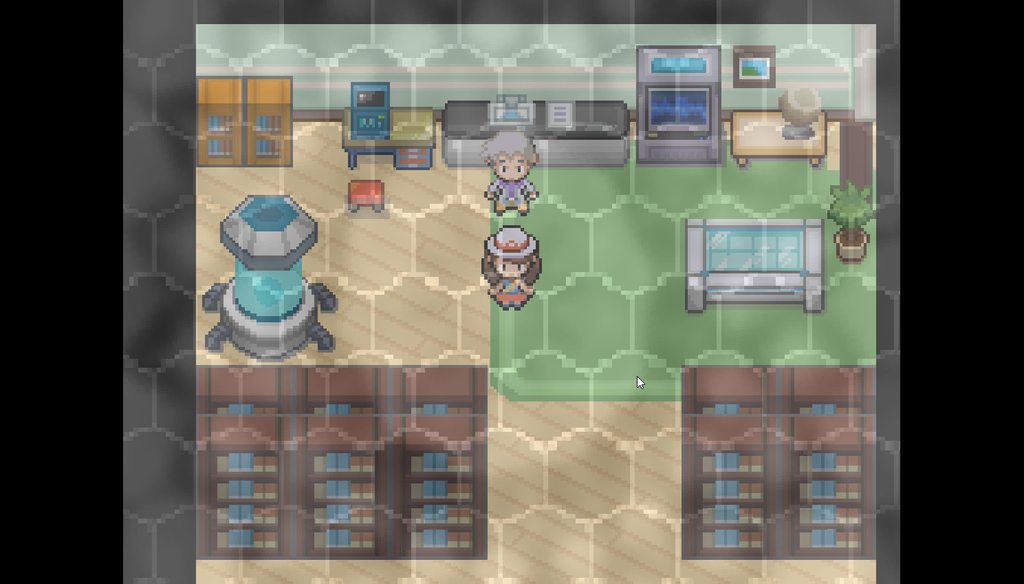
1 after losing to Mt silver fused legedary pokemon i get some where slowness plus a visual bug on my screen https://imgur.com/a/Y2NbV9p
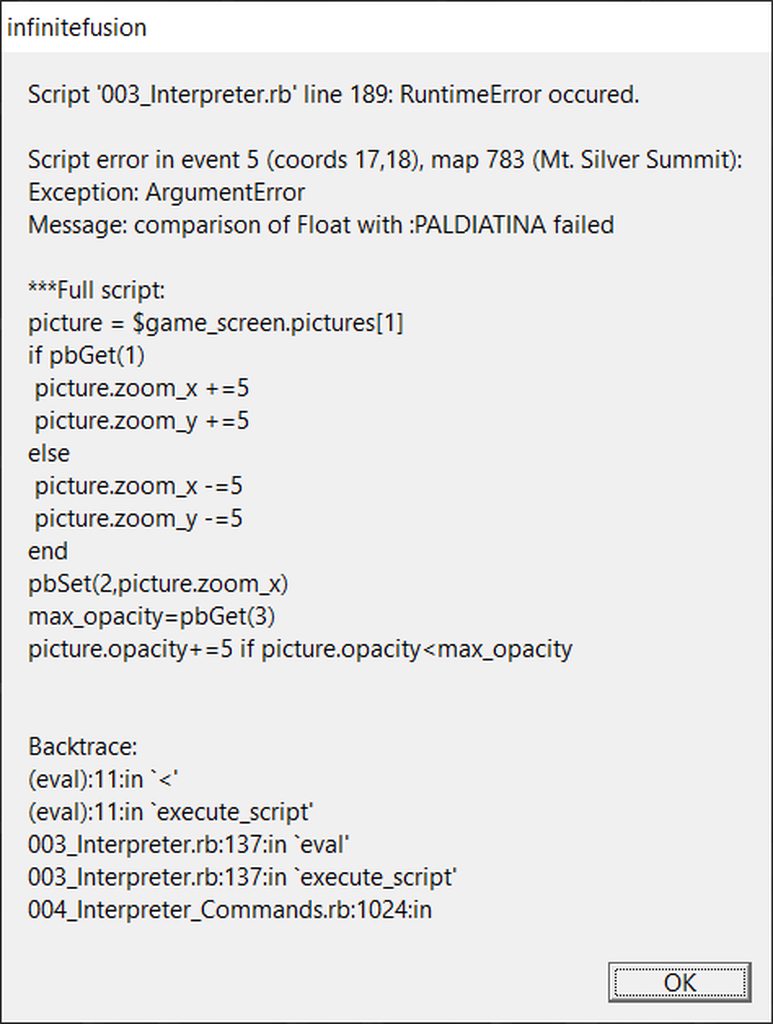
2 after going back to mt silver and enter the area with the fused legendary pokemon i get this error https://imgur.com/a/UkZY2qd
Honestly just trying to defeat that legendary pokemon and continue the game but its quite hard with that bug lol
 cerulean bison
So I just download this and drop it in with the rest of the files right?

 balmy turtle
ashen robin
<@652482871482908701> je suis vraiment désolé de te ping mais je comprend pas co...
balmy turtle
ashen robin
<@652482871482908701> je suis vraiment désolé de te ping mais je comprend pas co...
Me neither as i said i'm a mod not a nerdy boy 🗿
 idle jolt
That's what I was talking about. Anyone knows what to do?
Having to reset the game after entering/leaving every building is exhausting

 kind acorn
Quick question, ever since I downloaded preloaded my OneDrive storage has been completely used up, is it all supposed to be on OneDrive (sprites, music etc) and can I also do something to reduce the storage used up?
 opaque hollow
Hi, I have a little question, I have the last version of the game but I can't put my game on speed up mode with any key (Ctlr, A, Q, nothing) anyone have an idea plz ?
 quaint karma
Hey can someone help me pls, my game is really slow and I don't know what to do.
 summer forge
when i try to fuse it says rgcc script failed and it closes the game how can i fix this
 fierce trail
hey guys
I downloaded the preloaded v5.1.3.3 and couldn't boot the game due to an NoMethodError. I then installed v5.1.3.5 patch and tried again, but still got the same error. am I doing something wrong or am I just stupid?
the Error message was this one:

 manic dome
Sorry for interrupting.
My game doesn't save the settings even after confirming, it causes my volume to default to 50 and the game launches in Fullscreen (which I don't want) when I restart the game.
manic dome
oh kinda fixed it? I removed the save files that I don't need and changed the name of my save file to A and now the game is windowed with the xl screen and 100% volume, blah blah, it works if I save them to my save file now.
fierce trail
The heck, okay, removing all files in the saves folder worked for me too... weeeell okay, thx xD
Was about to try that too but then i was like "naaaah, what should that habe to do with anything" 
 pseudo forge
when i open the game it says " Error creating OpenAl context"
 snow basin
Any reasons why the Alternate Launcher wouldn't load?
manic dome
fierce trail
The heck, okay, removing all files in the saves folder worked for me too... weee...
Oh haha, glad it Helped xD
snow basin
snow basin
Any reasons why the Alternate Launcher wouldn't load?
Nevermind. I guess I underestimated it when you guys wrote it might take a while
 storm plover
i closed the tab on the download and i can't download it again for some reason
 boreal tide
how i can resolve?

 quiet edge
boreal tide
how i can resolve?
quiet edge
boreal tide
how i can resolve?
same problem

 fathom rock
i cant even get past the opening movie without my game closing
 gritty shoal
whenever i try to launch the game after the battle animation i just get a black screen and can only go to the settings
turbid terraceBOT
Hey @gritty shoal! Are you having trouble starting the game? If you are launching v5, and your screen is stuck on black at startup, don't worry, it's normal. Leave the game running for a few minutes and it will work eventually.
Do not click on the window during this, otherwise you'll get the error below and the game will close.
https://cdn.discordapp.com/attachments/308392115338084360/994274889055875142/Capture.PNG

 spring locust
hello, looking to download the game, and there are 2 zips that make sense to get, which is the best one to get? infinitefusion_dynamic_5.1.3.5_full and infinitefusion_preloaded_5.1.3.3_full
gritty shoal
can you download old versions?
 past whale
I have a problem, when I switch of area, I'm in the dark, even in the buildings.

 glossy juniper
spring locust
hello, looking to download the game, and there are 2 zips that make sense to get...
glossy juniper
spring locust
hello, looking to download the game, and there are 2 zips that make sense to get...
Dynamic auto downloads new sprites, while preloaded has them all... preloaded
preloaded needs a strong computer
 rigid compass
I'm trying to run Infinite Fusion on mobile through JoiPlay, but it keeps complaining about HTTPLite being an uninitialized constant in inffusion/Data/Scripts/050_AddOns/HttpCalls.rb (Line 44)
turbid terraceBOT
Hey @rigid compass! The game isn't made to be played on mobile! You can try to use Joiplay to run it, but the game will likely be very slow, glitchy, or downright unplayable.
You can try following this guide: https://youtu.be/jADyChlJbF0
Nothing can likely be done about issues experienced on mobile, unfortunately. You can ask for help in the video's comments section if you'd like.
No dedicated mobile version of IF will be developed in the future.
rigid compass
Is there a way to remedy that or use a block of code for similar functionality?
storm plover
what is this and why can't i download it

 tawny perch
Hi I was just wondering, if there was a way to fix the black screen in-between transitions between battles, entering buildings, and encounters being longer then normal?
turbid terraceBOT
Hey @tawny perch! Are you having trouble starting the game? If you are launching v5, and your screen is stuck on black at startup, don't worry, it's normal. Leave the game running for a few minutes and it will work eventually.
Do not click on the window during this, otherwise you'll get the error below and the game will close.
https://cdn.discordapp.com/attachments/308392115338084360/994274889055875142/Capture.PNG
 drowsy tulip
How i can resolve?

 forest basin
what can i do if my 5.0 and 5.1 versions saves are not synched (updated version is behind where it should be)
past whale
past whale
I have a problem, when I switch of area, I'm in the dark, even in the buildings.
Nobody can help me, please 🙏
 peak fiber
can someone tell me why this is happening, all the text get mixed, all the menus doesnt go up or down


 grim kernel
hi
when i start the game it tells me 1 fps or 0 fps, how do i fix it?
Can some1 help me please?

 eager quail
 gleaming egret
what does this mean
gleaming egret
what does this mean
It means that the game can't detect an audio output device
eager quail
You're not the first and the last one with this problem😂
grim kernel
can you help me?
eager quail
No
grim kernel
ok...
 deft stone
Still trying to figure out this whole custom sprites problem I'm having
Can't use the actual folder for it because nothing gets loaded in and it won't download automatically
 wanton moon
Hey, so when downloading the monthly sprite folder, I don't have the correct files that are displayed in the photo provided in #downloads. What do I do?
deft stone
Did you download just 88 or 1-88?
Because the single ones don't come with a premade custom battlers folder, you just gotta ctrl+A them all and copy/paste them in your games custom battlers folder
wanton moon
88
deft stone
Then yeah, just copy paste them all over
If it'll actually work
For some reason I haven't been able to get any of the custom sprites to load in my game and I'm wondering if it's the new update
That and everytime I turn on the game my pc just slows down like hell until I restart it
Starting to really think I either messed up something real bad or this update is being screwy
wanton moon
Didn't work. Battle sprites and summary sprites pop up with the ? sprite
Even though it prompted me to replace imported sprites with new ones in game
gleaming egret
Am I meant to be on a black screen? when I open the game
turbid terraceBOT
Hey @gleaming egret! Are you having trouble starting the game? If you are launching v5, and your screen is stuck on black at startup, don't worry, it's normal. Leave the game running for a few minutes and it will work eventually.
Do not click on the window during this, otherwise you'll get the error below and the game will close.
https://cdn.discordapp.com/attachments/308392115338084360/994274889055875142/Capture.PNG
deft stone
See I'm not even getting the prompt
My game just does not load them in
At this point im just gonna delete all my files for this game and see if starting from complete scratch works
This is just agitating
 lilac kiln
shouldn't sprites be moved to indexed automatically? I needed to move the sprites from the latest spritepack there manually
tawny perch
turbid terrace
Hey <@752296613493473393>! Are you having trouble starting the game? If you are ...
this didn't help T_T
 sonic dock
Hi im getting an error on start up saying no game scripts specified (missing Game.ini?)
turbid terraceBOT
Hey @sonic dock! Are you having trouble starting the game? If you're getting the "missing Game.ini" error, your game is not finding its necessary folders for some reason. Here's a list of things that may fix the issue:
- Make sure that you have extracted the files from the ZIP, and aren't running the game straight from the zipped folder.
- Make sure the game.exe file is in the folder with everything else. You might've moved it while trying to make a shortcut or something.
- Rename the folder with the extracted files to a name without numbers or special characters, e.g. "PokemonInfiniteFusion".
- Move the entire folder somewhere else on your computer. Moving it to the desktop seems to work for most people.
- Redownload and re-extract the game in full.
sonic dock
now it says unable to open Data/scripts.rxdata
deft stone
lilac kiln
shouldn't sprites be moved to indexed automatically? I needed to move the sprite...
Did this work? If so, how did you do it.
lilac kiln
deft stone
Did this work? If so, how did you do it.
I copied the sprite from the spritepack and moved it to the corresponding folder in indexed
they need to be in both folders
lilac kiln
deft stone
Did this work? If so, how did you do it.
did you add the spritepack folders into custombattlers?
deft stone
In both custom battlers and indexed?
lilac kiln
that's step one
deft stone
I did custom battlers
lilac kiln
deft stone
In both custom battlers and indexed?
yes, but then in the right folder
so like I did it for Dragonite/Espeon
and Dragonite's dexnumber is 149
turbid terraceBOT
That is not an IF Pokédex number. :eyes:
 mossy blade
So having the black screen keybinding thing is normal?
turbid terraceBOT
Hey @mossy blade! Are you having trouble starting the game? If you are launching v5, and your screen is stuck on black at startup, don't worry, it's normal. Leave the game running for a few minutes and it will work eventually.
Do not click on the window during this, otherwise you'll get the error below and the game will close.
https://cdn.discordapp.com/attachments/308392115338084360/994274889055875142/Capture.PNG
deft stone
lilac kiln
but then I copied the sprite into the indexed folder 149
Gotcha
Let me do this with this midbus sprite I'm trying to load in
lilac kiln
but as far as I know that should happen automatically
lilac kiln
deft stone
Let me do this with this midbus sprite I'm trying to load in
midbus?
deft stone
It's for mamoswine and slaking and someone did a custom sprite of those two pokemon but with the body of midbus from mario and luigi bowsers inside story
sonic dock
can someone help me i cant open my game it says unable to open Data/scripts.rxdata
turbid terraceBOT
Hey @sonic dock! Are you having trouble starting the game? Here are a few common errors you might be experiencing:
If you're getting the "missing Game.ini" error, your game is not finding its necessary folders for some reason. Here's a list of things that may fix the issue:
- Make sure that you have extracted the files from the ZIP, and aren't running the game straight from the zipped folder.
- Make sure the game.exe file is in the folder with everything else. You might've moved it while trying to make a shortcut or something.
- Rename the folder with the extracted files to a name without numbers or special characters, e.g. "PokemonInfiniteFusion".
- Move the entire folder somewhere else on your computer. Moving it to the desktop seems to work for most people.
- Redownload and re-extract the game in full.
If you are launching v5, and your screen is stuck on black at startup, don't worry, it's normal. Leave the game running for a few minutes and it will work eventually.
Do not click on the window during this, otherwise you'll get the error below and the game will close.
https://cdn.discordapp.com/attachments/308392115338084360/994274889055875142/Capture.PNG
lilac kiln
deft stone
It's for mamoswine and slaking and someone did a custom sprite of those two poke...
oh cool!
tawny perch
Does anyone know how to fix that long black screen thing??
turbid terraceBOT
Hey @tawny perch! Are you having trouble starting the game? If you are launching v5, and your screen is stuck on black at startup, don't worry, it's normal. Leave the game running for a few minutes and it will work eventually.
Do not click on the window during this, otherwise you'll get the error below and the game will close.
https://cdn.discordapp.com/attachments/308392115338084360/994274889055875142/Capture.PNG
deft stone
I really liked it and found those two in my randomizer so I'm trying to get that to work
lilac kiln
deft stone
I really liked it and found those two in my randomizer so I'm trying to get that...
cool, have fun!
my next goal is to make a team out of all my sprites 
Dragonite/Espeon is 1/6 of that 
deft stone
I'll try if this can work and I hope I'll see someone of your sprites
 faint field
turbid terrace
Hey <@752296613493473393>! Are you having trouble starting the game? If you are ...
faint field
turbid terrace
Hey <@752296613493473393>! Are you having trouble starting the game? If you are ...
are they gonna make a way to fix that
tawny perch
idk
deft stone
Found a dragonair and an espeon nearby so who knows
sonic dock
Did you know vaporeon is the most breadable
tawny perch
faint field
are they gonna make a way to fix that
I saw somthing about a alternitive launcher or something like that
faint field
k
mossy blade
Any idea on how long the black screen should be there until the game actually launches?
turbid terraceBOT
Hey @mossy blade! Are you having trouble starting the game? If you are launching v5, and your screen is stuck on black at startup, don't worry, it's normal. Leave the game running for a few minutes and it will work eventually.
Do not click on the window during this, otherwise you'll get the error below and the game will close.
https://cdn.discordapp.com/attachments/308392115338084360/994274889055875142/Capture.PNG
tawny perch
mossy blade
Any idea on how long the black screen should be there until the game actually la...
it takes time since its loading all the sprites and data you just need to wait, I wouldn't touch anything on your pc tho
mossy blade
Mkay
tawny perch
I don't know where to get a alternative launcher, does anyone have an idea where?
deft stone
lilac kiln
cool, have fun!
You're glorious, it worked. I'm catching that fusion and naming it in your honor just for helping me. Been trying to find a solution for this for days.
lilac kiln
deft stone
You're glorious, it worked. I'm catching that fusion and naming it in your honor...
Im glad I could help!
 hybrid wadi
which link to download the latest version of the full game?
tawny perch
mirror 1 and 2 both have the latest game its just a different download style I think
deft stone
Yep
Megadrive will make you wait some hours before finishing the download so mediafire is usually a better option
Though you have to download them one at a time instead
hybrid wadi
so download either preloaded or light versions wait for it to finish downloading then get the patch file download, correct?
 candid mural
does anyone know how to play on mac?
hybrid wadi
thanks for the help.
tawny perch
how do you install the patch??
deft stone
tawny perch
how do you install the patch??
Replace the files of the dynamic/preloaded game with the files from the patch
deft stone
lilac kiln
Im glad I could help!
Btw, did you also put the alternates in the index?
lilac kiln
deft stone
Btw, did you also put the alternates in the index?
Alts for what?
lilac kiln
I put all the sprites that I wanted to have in my game into indexed
But it’s a lot of work to do that manually
Remember to put them in the folder for the head fusion (:
 ripe crest
how do i add custom base sprites as alternates
deft stone
lilac kiln
Remember to put them in the folder for the head fusion (:
Gotcha and thanks again for the help
lilac kiln
deft stone
Gotcha and thanks again for the help
Sure! ^^
ripe crest
i downloaded the sprite back and found a folder as alternate base sprites how do i put them as alternate sprites for the base pokemon? i dont want to replace the sprite
mossy blade
Waited 10 mins at the key bind screen, nothing.
tawny perch
deft stone
Replace the files of the dynamic/preloaded game with the files from the patch
oh ok thank you
deft stone
No prob
ripe crest
how do i add the alternate base sprites
mossy blade
Meh, I'll deal witht his later, I want a nap
 burnt violet
So question does fusing a shiny to a non shiny crash the game? i have two shiny crobats (which is funny) and I want to fuse them with other things but seems so far to only work with fusing to eachother
ripe crest
burnt violet
So question does fusing a shiny to a non shiny crash the game? i have two shiny ...
no
 ripe crest
to add a alternate of a base sprite do i just change the alt to pokemon number a?
burnt violet
burnt violet
So question does fusing a shiny to a non shiny crash the game? i have two shiny ...
to clarify trying to fuse them to other pokemon has crashed the game everytime so far
 latent sinew
if anyone can tell me how to fix the crashing from wondertrade that would be great. I am playing with the newest version and tried update man and it still didn't work, also the only sprite i changed was the gengar/zoroark one
 sharp badge
Why won't my game start? I copied the custom battlers folder and it sounds like there is supposed to be another one but I didn't have a previously existing custom battlers folder
 native flicker
I don't understand how to update my game or how to download the march sprite pack. If anyone could help me I'd really appreciate it.
turbid terraceBOT
Hey @native flicker! Are you trying to add more custom sprites to your game? You can find the most up to date sprite pack containing all custom sprites in #downloads! To add them to your game, simply copy all the files into your game's CustomBattlers folder. The pack also contains alts and things such as joke sprites and regional variants, which you can also add to your game if you wish.
You can swap between alts of a given fusion in-game, using the Pokédex!
 naive spoke
Is there a way to change the individual base stats of a Pokémon through the game files? Ie if I wanted to change a Pokémon’s Base Attack to 255 or something
gleaming egret
it plays the opening scene and then just puts me onto a black screen saying keybinds and the version do I just have to wait?
turbid terraceBOT
Hey @gleaming egret! Are you having trouble starting the game? If you are launching v5, and your screen is stuck on black at startup, don't worry, it's normal. Leave the game running for a few minutes and it will work eventually.
Do not click on the window during this, otherwise you'll get the error below and the game will close.
https://cdn.discordapp.com/attachments/308392115338084360/994274889055875142/Capture.PNG
ripe crest
native flicker
I don't understand how to update my game or how to download the march sprite pac...
download the sprite pack then drag the custombattlers in the sprite pack to graphics in the game
native flicker
thanks!
 wild sable
It's been doing this for the past like 30 mins i reinstalled and also extracted all the files
 idle jolt
past whale
I have a problem, when I switch of area, I'm in the dark, even in the buildings.
idle jolt
past whale
I have a problem, when I switch of area, I'm in the dark, even in the buildings.
Did you find a solution to avoid this? I'm fed up with having to reload from home screen every time you go through a door is exhausting

 hearty tusk
I just downloaded Pokemon Infinite Fusion and it's stuck on a black screen. What do I do?
turbid terraceBOT
Hey @hearty tusk! Are you having trouble starting the game? If you are launching v5, and your screen is stuck on black at startup, don't worry, it's normal. Leave the game running for a few minutes and it will work eventually.
Do not click on the window during this, otherwise you'll get the error below and the game will close.
https://cdn.discordapp.com/attachments/308392115338084360/994274889055875142/Capture.PNG
hearty tusk
 glossy juniper
hearty tusk
I just downloaded Pokemon Infinite Fusion and it's stuck on a black screen. What...
glossy juniper
hearty tusk
I just downloaded Pokemon Infinite Fusion and it's stuck on a black screen. What...
it takes a while to load thats all
glossy juniper
oh that screen, idk
hearty tusk
It's been stuck like this for like 30 minutes
glossy juniper
did you install the patch, or full game
hearty tusk
lemme check
glossy juniper
the folder will say it
past whale
idle jolt
Did you find a solution to avoid this? I'm fed up with having to reload from hom...
No, I Sadly don't find a solution
glossy juniper
top is a full copy of older version, the bottom is the patch needed to update the game


 hushed pier
latent sinew
hushed pier
latent sinew
im having the same issue too, any idea what could be causeing it?
idle jolt
past whale
No, I Sadly don't find a solution
Didn't work for me though :/
 glossy juniper
hearty tusk
glossy juniper
hearty tusk
preloaded needs a lot longer to download, how good is your pc
 dawn dune
my house sprites won't load, I downloaded the dynamic version. I successfully loaded in to the game and started to play but my "house" looks like this:
 hearty tusk
pretty good, why?
glossy juniper
id do dynamic, it auto downloads sprites when released
hearty tusk
ok, thank you so much
glossy juniper
preloaded has them all preloaded
so it takes a lot of time
so did you have the patch before @devout night ?
idle jolt
dawn dune
my house sprites won't load, I downloaded the dynamic version. I successfully lo...
Don't worry about the house, soon you'll discover it happens everywhere 🙃
dawn dune
I am switching to preloaded, will that fix the issue?
idle jolt
You can try, I hope it works for you, I'm still searching for a solution... I'm trying to downgrade to 5.1.1, but with very little hope
past whale
idle jolt
Didn't work for me though :/
Thanks, i'll try this
dawn dune
I'm new to all this, so I hope this works as well.
hearty tusk
I did
 slender portal
I was told to come here, trying to update my game from 4.9.2 to the latest version and I'm not sure how
 misty mauve
Did you click the mirror 1 in the downloads channel
tawny perch
Sorry for the interruption, but is there a way to turn off 3D mode?
 winged pollen
Been playing the game for a while today and then all of a sudden I started to get crazy lag spikes, anyone know why this could be tried restarting the program a couple of times but no luck. Mainly lag spikes with the speedup option but I need speedup turned on due to shiny hunting, thanks
slender portal
misty mauve
slender portal
<#926866111948001341>
You get it?
slender portal
Found it.
"Download instructions", yeah?
slender portal
Make sure that you have downloaded the full game at some point (in version 5.0 or newer).
Welp-
misty mauve
Say goodbye to torpedo
slender portal
I have 100 hours in this save, aaa
 light cliff
On 5.1.3.3, rebinding the controller doesn't work anymore. The bindings that are there still work, but won't let me set new ones.
misty mauve
slender portal
I have 100 hours in this save, aaa
What’s another 100
 jaunty granite
okay so the game isn't registering the sprites and instead just giving me a grey circle with a question mark in it
slender portal
True, but how will I be lucky enough again to defeat Giovanni and Molzapdicuno FIRST TRY??
misty mauve
Save scum
 pliant quartz
Hi everyone! the dynamic 5.1.3.5 full version, is that one that is already patched?
misty mauve
Saving before important stuff
slender portal
Ah okay
misty mauve
I’m not calling you scum lol
slender portal
PFFFT HAHAHA
pliant quartz
i'm not really sure what i am doing XD
slender portal
Getting it extracted now

But yeah, if I wanted to play it outside of that other folder, Pandawolf, it would give me an error and refused to run
 proven hull
Okay! how do I do the do on pc?
misty mauve
Huh
misty mauve
slender portal
But yeah, if I wanted to play it outside of that other folder, Pandawolf, it wou...
What?
slender portal
????
misty mauve
The updated game in the same folder
Not just the patch now
Since your game is more ancient than the sun
slender portal
No??
misty mauve
Gonna need that too now
slender portal
This has always been an issue
alright
This was the error, too. Never knew what it meant.
 slender portal
But yeah, if I wanted to play it outside of that other folder, Pandawolf, it wou...
slender portal
slender portal
But yeah, if I wanted to play it outside of that other folder, Pandawolf, it wou...
Run the game in this folder here
misty mauve
From the patch folder?
 misty mauve
Not the old game
Just delete that
Download the whole new game from the same folder as the instructions
And use the instructions on that
slender portal
Delete the 4.9.2-full folder or the application?
And for the new game, that's infinitefusion_dynamic_5.1.3.5_full.zip, right?
 green sapphire
I started a randomized game and tried using a premium wonder trade ticket but it crashed my game with an error message... anyone know why or how to fix it???
slender portal
misty mauve
The full folder
There's preloaded and dynamic.
misty mauve
Preloaded I believe
slender portal
Alright, lemme do that rq
jaunty granite
okay so the game isn't registering the sprites and instead just giving me a grey circle with a question mark in it, how do i fix that
proven hull
How would one play on pc?
misty mauve
Download it
 keen furnace
i just downloaded and it wont run how do i fix this?
 slate imp
keen furnace
i just downloaded and it wont run how do i fix this?
slate imp
keen furnace
i just downloaded and it wont run how do i fix this?
What isn’t working?
misty mauve
It
slate imp
Ahh
keen furnace
slate imp
What isn’t working?
nvm i got it
slate imp
Happy to help
misty mauve
did absolutely nothing

 keen furnace
anyone know how to up download speed?
burnt violet
went to fuse after updating and this happend

anyone know what it means??
okay welp fou nd a work around but its still odd thats for sure
slender portal
misty mauve
Preloaded I believe
Now it doesn't want to extract anywhere
It just stopped responding altogether
misty mauve
slender portal
Now it doesn't want to extract anywhere
It just stopped responding altogether
?
slender portal
misty mauve
?
The full game for the patch. In order to play it, the zipped files need to be extracted, right?
It's not extracting anywhere
 winged mango
keen furnace
anyone know how to up download speed?
winged mango
keen furnace
anyone know how to up download speed?
certain sites throttle your speeds per connection so download managers, such as IDM and JD2, create multiple connections to download the files in parts. This allows you to get the fastest speed to whatever the smallest bottleneck is, whether it's your down speed, the server's up speed, or the server's overall throttle.
burnt violet
burnt violet
went to fuse after updating and this happend
This is actually now happening with all of the fusions now and after doing the workwround of selecting fuse instead of dragging pokemon to fuse it turns all backdrops for the party menu and battles black, does anyone know what the problem could be? (edit nvm it seems that backgrounds are broken in general for me 😅 )
 supple mulch
Anyone got the hexcode for magic boots?
slender portal
...Oookay, now my game file is still there, but not in the folder where it should be?? Wtf??
Yeah, so something is causing the latest game version to just... NOT extract anywhere?
Also, I can still load up the 4.9.2 version of the game and have it load, but cannot find my save in my computers' folders anywhere
misty mauve
slender portal
The full game for the patch. In order to play it, the zipped files need to be ex...
Do you have software?
slender portal
misty mauve
Do you have software?
Wdym? Also it JUST started extracting, FINALLY XD
misty mauve
Extractions, software and sorry I’m driving at the moment
slender portal
It's alright and not that I'm aware of
It's just slow to get started, I think
 iron spruce
Does anyone know why it takes so long to load after a battle or entering and leaving a loading zone?
misty mauve
Yeah might wanna get one of those
Makes it faster to extract
And pretty sure it extracts into the download folder so it’s easier to see
slender portal
Alright. As for the save file location, I looked where the instructions said it'd be and it's not there. But then the older version launches and it's fine.
I can wait until you're not driving XD
misty mauve
I’m fine now
slender portal
Ah okay
slender portal
What would I even be looking for?
I have no clue what it's called
misty mauve
The same name as the folder you were extracting
 hybrid coral
iron spruce
Does anyone know why it takes so long to load after a battle or entering and lea...
hybrid coral
iron spruce
Does anyone know why it takes so long to load after a battle or entering and lea...
yeah happens to me too
For someone like me who likes to break every single rock and talk to every single NPC in every building it's mad annoying I ain't gon lie
slender portal
misty mauve
The same name as the folder you were extracting
I'll check after dinner
dawn dune
I am still having an issue with the environment sprites not loading in. I downloaded the preloaded version this time.
I updated the patch to 5.3.5
*5.1.3.5
 flat saffron
Any idea how to fix this? Trying to play on android. I've done nothing besides install the custom sprites from this server. I normally play on PC but I want to play at work lmao
 turbid terraceBOT
Hey @flat saffron! Are you trying to add more custom sprites to your game? You can find the most up to date sprite pack containing all custom sprites in #downloads! To add them to your game, simply copy all the files into your game's CustomBattlers folder. The pack also contains alts and things such as joke sprites and regional variants, which you can also add to your game if you wish.
You can swap between alts of a given fusion in-game, using the Pokédex!
Hey @flat saffron! The game isn't made to be played on mobile! You can try to use Joiplay to run it, but the game will likely be very slow, glitchy, or downright unplayable.
You can try following this guide: https://youtu.be/jADyChlJbF0
Nothing can likely be done about issues experienced on mobile, unfortunately. You can ask for help in the video's comments section if you'd like.
No dedicated mobile version of IF will be developed in the future.
flat saffron
Oh nevermind lmao, I thought there was mobile support, ignore that 
turbid terraceBOT
Hey @flat saffron! The game isn't made to be played on mobile! You can try to use Joiplay to run it, but the game will likely be very slow, glitchy, or downright unplayable.
You can try following this guide: https://youtu.be/jADyChlJbF0
Nothing can likely be done about issues experienced on mobile, unfortunately. You can ask for help in the video's comments section if you'd like.
No dedicated mobile version of IF will be developed in the future.
 last wind
I find really amusing how I could randomize everything in the last version and I update the game and it crashes with trainers...
turbid terraceBOT
Hey @last wind! Do you have questions about Randomized mode? Find more info about it and its various settings on the Wiki: https://infinitefusion.fandom.com/wiki/Randomized_Mode
Note: You need to have an existing save file before the game lets you restart in Randomized mode!
slender portal
misty mauve
The same name as the folder you were extracting
Do you know what type of file it would be?
misty mauve
Ummmmm should just be a regular file
slender portal
Then either I'm not looking up the right thing or it's gone rogue XD
I know it's SOMEWHERE, but it's just hiding from me lol
 hidden reef
just got the game but when i run game.exe its just black screen
turbid terraceBOT
Hey @hidden reef! Are you having trouble starting the game? If you are launching v5, and your screen is stuck on black at startup, don't worry, it's normal. Leave the game running for a few minutes and it will work eventually.
Do not click on the window during this, otherwise you'll get the error below and the game will close.
https://cdn.discordapp.com/attachments/308392115338084360/994274889055875142/Capture.PNG
hidden reef
oh perfect
rigid compass
Are there plans for a native Linux version?
slate imp
rigid compass
Are there plans for a native Linux version?
No, the dev has no intention to make any non-Windows versions

 sterile pivot
right after I open the game, this happens. How do I fix this?

 knotty gate
Hey I’m all sorts of new to this and was wondering if I’d need to go to the downloads and get both the mirror one and two links to be able to download the game
 lament goblet
Im trying to play the latest version of the game but why does the loading time takes ages? takes around 2-3 min for the game to load again after battle
 tribal orchid
NVM figured it out

 shrewd lake
im trying to completely remove and reinstall but when i reinstall it still has my save files from before and continues to crash. Is there a way to completely fresh install
 copper trellis
this crash error happened when i tried to open the game for the first time

 river saddle
green sapphire
I started a randomized game and tried using a premium wonder trade ticket but it...
river saddle
green sapphire
I started a randomized game and tried using a premium wonder trade ticket but it...
I'm having the same issue but on any game type. wondertrades just crash the game completely
hearty tusk
what do i do when my fused pokemon are just a question mark with a white background?
 naive salmon
what do i have to do to fix this?

 charred pecan
If i have the game do i just install the new patch or do have to install the new version of the game and the new patch
 tough robin
Alguien sabe como puedo arreglar esto en pc?

 dark ledge
will updating the game mess up the sprites i have set up
 rigid compass
 polar latch
black screen
turbid terraceBOT
Hey @rigid compass! Are you having trouble starting the game? If you are launching v5, and your screen is stuck on black at startup, don't worry, it's normal. Leave the game running for a few minutes and it will work eventually.
Do not click on the window during this, otherwise you'll get the error below and the game will close.
https://cdn.discordapp.com/attachments/308392115338084360/994274889055875142/Capture.PNG
polar latch
When I click I never get an error it just stays like that though
 midnight heath
i got this when i booted up the game for the first time
 rigid compass
midnight heath
i got this when i booted up the game for the first time
rigid compass
midnight heath
i got this when i booted up the game for the first time
corrupted game?
or if you applied a patch it may not have been applied properly
midnight heath
idk i just downloaded the game and this appeared
rigid compass
midnight heath
idk i just downloaded the game and this appeared
what version?
polar latch
It just keeps having this and only staying in it
 hearty tusk
What do I do about this?
 rigid compass
hearty tusk
What do I do about this?
rigid compass
hearty tusk
What do I do about this?
same error as Yarnzy
rigid compass
i'd see if it's been reported as a bug
midnight heath
i downloaded this one on the media fire https://www.mediafire.com/file/ysgcmwnhm4zhvas/infinitefusion_5.1.3.6-patch.zip/file

MediaFire
rigid compass
midnight heath
i downloaded this one on the media fire https://www.mediafire.com/file/ysgcmwnhm...
oh
you downloaded the wrong version
polar latch
I down loaded mirror 2
 light scarab
havin the same issue as Yarnzy, dont know if it helps, but i was having a different issue and redownloaded the game and now this one started
rigid compass
patches are for updating, dynamic is for downloading sprites on the fly, and preloaded is for keeping all the sprites on your pc.
only dynamic and preloaded can be run standalone
polar latch
Is mirror 2 the wrong one cause this keeps popping up
 midnight heath
i downloaded infinitefusion_dynamic_5.1.3.6_full.zip and the thing is appearing again
rigid compass
polar latch
Is mirror 2 the wrong one cause this keeps popping up
which file on mirror 2 did you download?
rigid compass
midnight heath
i downloaded infinitefusion_dynamic_5.1.3.6_full.zip and the thing is appearing ...
hm, I'm on 5.1.3.5 and I'm not getting the error.
let me test something
oh
midnight heath
should i download the preload instead?
polar latch
It pops up after the gengar fusion
rigid compass
 rigid compass
midnight heath
should i download the preload instead?
rigid compass
midnight heath
should i download the preload instead?
try that and then use the patch to update
rigid compass
rigid compass
dynamic version got taken down
polar latch
So should I used patch or preload
midnight heath
oh
midnight heath
polar latch
So should I used patch or preload
preload
polar latch
Ok
rigid compass
rigid compass
try that and then use the patch to update
[updated reply]
hearty tusk
so, is everyone having the same issue?
rigid compass
I managed to download dynamic-5135 minutes before it updated
so not for me fortunately
 undone vector
Someone knows how to fix it?

 rough isle
yep i just downloaded the dynamic and got that issue too
scrolling up to see waht people are saying
undone vector
thx bro
rigid compass
undone vector
Someone knows how to fix it?
it looks like the devs are working on it
rigid compass
rough isle
scrolling up to see waht people are saying
the devs are probably working on it
rough isle
rigid compass
the devs are probably working on it
yep I'm gonna just use the preload for now
hearty tusk
what do you do when my fused pokemon are just question marks?
rigid compass
hearty tusk
what do you do when my fused pokemon are just question marks?
enable downloading sprites in settings
rough isle
@rigid compass if they patch it and fix it, do you think its possible for me to delete the preload version, download the dynamic and use that with my save?
rigid compass
rough isle
<@853754440509947914> if they patch it and fix it, do you think its possible for...
i believe so, provided you don't delete the save of course
midnight heath
dynamic is back in the mediafire
rough isle
rigid compass
i believe so, provided you don't delete the save of course
yep, ok thanks. If not then oh well i'll still have my save in appdata
midnight heath
idk if we can use it now tho
hearty tusk
rigid compass
enable downloading sprites in settings
how do i do that?
rigid compass
esc -> Options -> Download Sprites -> On
 runic tendon
hi. I have an issue where several of my unfused pokemon have fused sprites despite not being fused at all. The entire bottom row should be, left to right, zubat, buneary, buneary, hoothoot

also the buneary is genderless, but I un-fused it off a wild genderless pokemon so I'm not sure if that's intended
rigid compass
runic tendon
also the buneary is genderless, but I un-fused it off a wild genderless pokemon ...
it just identifies as non-binary
runic tendon
I guess it went right to the binary code for that
hearty tusk
are there some pokemon that don't have fusions yet?
runic tendon
well the pokemon at the top display the correct sprites, also the ones in my party. although they still show the wrong sprite if I put them in my party
rigid compass
runic tendon
I guess it went right to the binary code for that
🥁🥁 :cymbal:
runic tendon
in fact one of the bunearys was displaying the correct sprites, before I caught the two wild bunby from a swarm
rigid compass
runic tendon
hi. I have an issue where several of my unfused pokemon have fused sprites despi...
I'm noticing that the "fusions" on the bottom row are preexisting fusions in that box
runic tendon
except hoot hoot
rigid compass
maybe take those out and it'll fix itself?
runic tendon
that one never fused with mudkip
rigid compass
runic tendon
that one never fused with mudkip
there is another one in there
runic tendon
oh wait, it's not mudkip, it's shinx
 noble quail
Can anyone help me with updating the game? I downloaded the patch but I don't know what to do from there.
charred pecan
noble quail
Can anyone help me with updating the game? I downloaded the patch but I don't kn...
supposed to replace the previous one with it but idk how to do that as you dont drag it over it
that just drops it in the folder
rigid compass

 noble quail
charred pecan
supposed to replace the previous one with it but idk how to do that as you dont ...
noble quail
charred pecan
supposed to replace the previous one with it but idk how to do that as you dont ...
You mean just the application itself?
charred pecan
like i said idk
runic tendon
and if I open the box again the sprites get jumbled up
 rigid compass
runic tendon
and if I open the box again the sprites get jumbled up
rigid compass
runic tendon
and if I open the box again the sprites get jumbled up
weird
charred pecan
like im getting this issue
 noble quail
Is there anyone else who does know how to update the game?
rigid compass
charred pecan
like im getting this issue
redownload it, it's been patched
runic tendon
noble quail
Is there anyone else who does know how to update the game?
what I did was open the zip file that says "patch" and drop the contents in the folder that holds the game
hearty tusk
Are the fusions supposed to look this basic?
 noble quail
So just extract the downloaded patch and then just put it into the folder with the game?
polar latch
Do i redownload dynamic
runic tendon
hearty tusk
Are the fusions supposed to look this basic?
most do, the ones that are special look green before fusing and have credited artists
runic tendon
noble quail
So just extract the downloaded patch and then just put it into the folder with t...
yeah, make sure that the folders in the zip files are the same name as the folders you see in the root of the game
where the executable of the game resides
as well as the readme stuff
hearty tusk
that makes more sense, I thought all pokemon have cool looking fusions
runic tendon
it will ask if you want to replace the old files which of course you want because it's an update
rigid compass
polar latch
Do i redownload dynamic
yes
it got taken down so the devs could patch the crash
and put back up
runic tendon
hearty tusk
that makes more sense, I thought all pokemon have cool looking fusions
"nature mockery" type of fusion are half the fun
 noble quail
runic tendon
it will ask if you want to replace the old files which of course you want becaus...
noble quail
runic tendon
it will ask if you want to replace the old files which of course you want becaus...
So when I go to put the stuff from the patch into the folder with the game it'll ask me to replace the old files automatically?
hearty tusk
fair enough
runic tendon
noble quail
So when I go to put the stuff from the patch into the folder with the game it'll...
it will extract first if you do it directly from the zip file, but yeah
 open cargo
Hey guys, when i start my game, it play the animation, then when the pokemon start to fuse it sits there and does nothing
runic tendon

 pallid jasper
Hope it's alright to ask this but I notice 5.1.3.6 is out.
Had to downgrade after the last patch due to constant crashes. Is this newest patch more stable?
runic tendon
like dump the contents of the zip file here
rigid compass
runic tendon
like dump the contents of the zip file here
yes
rigid compass
pallid jasper
Hope it's alright to ask this but I notice 5.1.3.6 is out.
Had to downgrade aft...
yes
hopefully
pallid jasper
Nice~
rigid compass
it had a bit of a rocky start
rigid compass
charred pecan
like im getting this issue
this
charred pecan
runic tendon
like dump the contents of the zip file here
in the graphics folder?
rigid compass
charred pecan
in the graphics folder?
no
runic tendon
no, like in THAT root folder
rigid compass
runic tendon
no, like in THAT root folder
yes
runic tendon
you drag those files here
 rigid compass
exactly
open cargo
open cargo
Hey guys, when i start my game, it play the animation, then when the pokemon sta...
help
rigid compass
try redownloading, the new patch has been having issues
open cargo
do you have a specific version you recommend
rigid compass
dynamic-5.1.3.6-full
noble quail
Is there a big difference between .5 and .6?
last wind
Randomizer mode is unplayable a lot of trainers give this error
 rigid compass
noble quail
Is there a big difference between .5 and .6?
rigid compass
noble quail
Is there a big difference between .5 and .6?
unsure
rigid compass
last wind
Randomizer mode is unplayable a lot of trainers give this error
is this the new patch or an older one?
(.5 or .6?)
last wind
rigid compass
is this the new patch or an older one?
.6
 nimble cape
Can someone please send me the tileset files for 5.0
Mine are all bugged whenever I download them and need to update them
slender portal
I got this one, personally
 rigid compass
mamma mia
rigid compass
slender portal
I got this one, personally
sigh .6 I assume?
 slender flare
@runic tendon when you do this you replace the files in the destination yes?
slender portal
rigid compass
*sigh* .6 I assume?
No?
runic tendon
yep. it's an update
slender portal
I don't think so
runic tendon
out with the old in with the new
rigid compass
slender portal
I don't think so
ok try updating
slender flare
been at it for a day or two lmao
slender portal
rigid compass
ok try updating
I just did! I've been trying to update from 4.9.2 to 5.1 and just got this
Hold on, I'm going to try deleting some extra files, I think something got doubled on accident
noble quail
runic tendon
you drag those files here
Got it to work. Thank you!
last wind
rigid compass
if you don't have it I can give you the zip
I had already this problem with.5 in fact I got back 5.1.2.4 and still It's really weird cause I did a randomize last week before updating to .5 and it was working perfectly
rigid compass
last wind
I had already this problem with.5 in fact I got back 5.1.2.4 and still It's rea...
weird
this is a buggy game
slender flare
i'm still getting error codes 😦
rigid compass
at least I haven't found any 5-minute bugs in my experience
last wind
Guess I will play my Mono Poison run without randomizing for a while
nimble cape
Someone please send me tileset files 🙏 they keep coming out like this when I download them
 rigid compass
nimble cape
Someone please send me tileset files 🙏 they keep coming out like this when I do...
rigid compass
nimble cape
Someone please send me tileset files 🙏 they keep coming out like this when I do...
mobile
turbid terraceBOT
Hey @rigid compass! The game isn't made to be played on mobile! You can try to use Joiplay to run it, but the game will likely be very slow, glitchy, or downright unplayable.
You can try following this guide: https://youtu.be/jADyChlJbF0
Nothing can likely be done about issues experienced on mobile, unfortunately. You can ask for help in the video's comments section if you'd like.
No dedicated mobile version of IF will be developed in the future.
nimble cape
rigid compass
mobile
It’s just the download is glitched for me, I need the file for that specifically
nimble cape
rigid compass
what version?
5.0
turbid terraceBOT
Hey @rigid compass! The game isn't made to be played on mobile! You can try to use Joiplay to run it, but the game will likely be very slow, glitchy, or downright unplayable.
You can try following this guide: https://youtu.be/jADyChlJbF0
Nothing can likely be done about issues experienced on mobile, unfortunately. You can ask for help in the video's comments section if you'd like.
No dedicated mobile version of IF will be developed in the future.
nimble cape
If I get the correct tileset files in I can fix it, but they come in messed up
slender flare
 nimble cape
rigid compass
I tried 5.1.3.5 on my phone and it crashed instantly
nimble cape
rigid compass
I tried 5.1.3.5 on my phone and it crashed instantly
Yeah 5.0 is the only mobile version I can work
turbid terraceBOT
Hey @nimble cape! The game isn't made to be played on mobile! You can try to use Joiplay to run it, but the game will likely be very slow, glitchy, or downright unplayable.
You can try following this guide: https://youtu.be/jADyChlJbF0
Nothing can likely be done about issues experienced on mobile, unfortunately. You can ask for help in the video's comments section if you'd like.
No dedicated mobile version of IF will be developed in the future.
rigid compass
turbid terrace
Hey <@853754440509947914>! The game isn't made to be played on mobile! You can t...
ok cool I wanted that one once now you can shut up
nimble cape
But yeah I just need all the tileset files and I can fix it, making it run perfectly
But I can’t download them without it being messed up
slender flare
slender flare
this is the error codes i keep getting
rigid compass
I don't have tile files for 5.0 unfort
nimble cape
rigid compass
I don't have tile files for 5.0 unfort
It might work with other versions? I can try if you’re willing to send the files over
rigid compass
slender flare
this is the error codes i keep getting
!?
I get a similar error on mobil, same file
slender flare
idk if i'm moving files over correctly or not
little gulch
@wet ridge can I get the joiplay discord server
slender flare
downloading the preload then moving the patch over
rigid compass
try these
polar latch
What do I do
 rigid compass
polar latch
What do I do
rigid compass
polar latch
What do I do
enter
slender flare
rigid compass
try these
where do i drop these files?
directly into the graphics folder?
rigid compass
slender flare
where do i drop these files?
put them in Graphics
nimble cape
nimble cape
It might work with other versions? I can try if you’re willing to send the files...
But yeah any tileset files someone could send over 👍
charred pecan
So I tried to use debug mode to give myself galvantula put in it's dex number of 363 and what level I want it and it gives me tentacool
slender flare
that didnt solve it
rigid compass
charred pecan
So I tried to use debug mode to give myself galvantula put in it's dex number of...
maybe it has a different ID number
rigid compass
slender flare
that didnt solve it
does it at least look different?
slender flare
 rigid compass
try these
rigid compass
rigid compass
try these
@nimble cape
slender flare
lol its okay
nimble cape
rigid compass
<@893958103370985472>
Thank you
slender flare
it said i needed to replace some files when i dropped it so it probably was gunna be an issue anyway
rigid compass
Warning: Those tiles may be from a newer version than you're running! Caveat emptor!
nimble cape
rigid compass
`Warning: Those tiles may be from a newer version than you're running! Caveat em...
Nah it’s fine, whenever I tried to open them to check if they were messed up too it said media not found 🤷♂️
rigid compass
nimble cape
Nah it’s fine, whenever I tried to open them to check if they were messed up too...
uh what
slender flare
i dont have anything under the plugins folder
rigid compass
is the zip empty or smth??
nimble cape
rigid compass
uh **what**
 rigid compass
nimble cape
rigid compass
nimble cape
what file are you trying to open and where
nimble cape
Well with my other ones I just press open in photos because it lets me see it, which works
But I did the same thing here and nope
(I was in the interior parts I think)
rigid compass
well
nimble cape
Yeah idk what’s going on
nimble cape
rigid compass
nothing to lose ig
True
Alr booting up the game now
Prolly gonna take a couple minutes
slender flare
anyone know how to fix this issue?
 wet ridge
little gulch
<@371639478780952577> can I get the joiplay discord server
wet ridge
little gulch
<@371639478780952577> can I get the joiplay discord server
I send in your PV
nimble cape
@rigid compass sadly didn’t work

Anyways I’m going to bed it’s 5am here, I’ll try again when i wake up ig
rigid compass
f
nimble cape
rigid compass
f
I’d be able to play if I knew where things were 😔
wet ridge
flat saffron
Any idea how to fix this? Trying to play on android. I've done nothing besides i...
Httplite errors usualy can be fixed updating The joiplay AND The plugin
With The Last version (available on the joiplay discord server, updated Last month. The site's version is from january and thats plugin version dont have suport to this )
nimble cape
wet ridge
Httplite errors usualy can be fixed updating The joiplay AND The plugin
With The...
Do you know what might be causing my error?
rigid compass
wet ridge
Httplite errors usualy can be fixed updating The joiplay AND The plugin
With The...
so are there any newer versions of JP that support this?
wet ridge
nimble cape
Do you know what might be causing my error?
This plugin version doesnt support httplite, bit the Last version does
nimble cape
wet ridge
This plugin version doesnt support httplite, bit the Last version does
Okay thank you!
wet ridge
@nimble cape @rigid compass
But this version only can be find in their (joiplay) discord server
rigid compass
ok
nimble cape
I am not in it can you send an invite? :))
rigid compass
yes same here
runic tendon
unfusing inside the box fixed the sprite issue. also the genderless buneary came out as a girl
 nimble cape
Got the game loading up on the previous version of joiplay
If it doesn’t work I’ll cry
little gulch
wet ridge
I send in your PV
Thanks
nimble cape
DAMN IT

 long loom
where would i find the changelog for 5.1.3.6?
 dawn hemlock
I just freshly downloaded the dynamic game (latest version 5.1.3.6) and when I launch it, I get this error message. Is there a fix to this?
 latent sinew
it seems they must have updated the game like just today that broke something
cause i've been seeing crash reports going back to earlier this morning
dawn hemlock
ah I see. Hopefully the devs will be able to fix it soon
latent sinew
i know that several people have had issues with wondertrades crashing
it might be an error in the sprite loader coades?
 burnt mortar
I just started playing and I don't know what I did but the levels won't show anymore.

 hidden pier
none of the sprites that I have in the CustomBattlers folder are showing up in the new patch
cosmic ginkgo
How do i fix the sound being broken? there's been no music for the last 3 updates
slender portal
So, I understand there's been an issue with the most current version and I checked this file that it say it was having an issue with.
I'm on line 1148 as it says (have it highlighted).
For context, I went from 4.9.2 to 5.1.3.3

Not sure what this means, but just wanted to know if anyone else was getting error in particular?
 covert dove
i am doing a randomise fuse run with custom sprites and when i go vs misy when she has ice type my game freezes

 lilac ore
I can’t match a wild Pokémon in the grass what should I do
runic tendon
Swipe right
covert dove
My bad
 royal crater
 agile scroll
Hey guys, I need to download the newest version of infinite fusions, how do I patch my current version with joiplay?
 remote grail
do you guys know how to install a new patch? I have version 5.0.36.4 rn
 vivid inlet
Hey. I got some problems with importing savefiles. Can somebody help?
 wraith lava
remote grail
do you guys know how to install a new patch? I have version 5.0.36.4 rn
wraith lava
remote grail
do you guys know how to install a new patch? I have version 5.0.36.4 rn
i wouldnt do it unless youre passed celedon bcs theres a soft lock glitch in the latest patch
but if you go to the download folder in the mega theres a .txt file that explains how to patch the game
eager quail
lilac ore
I can’t match a wild Pokémon in the grass what should I do
Go to the second floor of a pokemon center and talk to a guy in a black suit. Then choose to reshuffle wild pokemon
 hazy nexus
dawn hemlock
I just freshly downloaded the dynamic game (latest version 5.1.3.6) and when I ...
hazy nexus
dawn hemlock
I just freshly downloaded the dynamic game (latest version 5.1.3.6) and when I ...
I have the same issue, but with the patch and the preloaded game
 gloomy raven
has anyone figured out the strength not showing up in inventory glitch yet?
 long fiber
i fixed it
gloomy raven
how?
lilac ore
eager quail
Go to the second floor of a pokemon center and talk to a guy in a black suit. Th...
It’s worked !
sterile pivot
how do you randomize abillitys
 humble heath
So I'm trying to get Joiplay working (I'm crazy, I know), but the app can't see the RTP package, do I need to do something to the exe file first?

 supple girder
i'm confused as to update to latest patch, do i need to download both the full and patch for 5.1.3.6?
 stoic sigil
supple girder
i'm confused as to update to latest patch, do i need to download both the full a...
stoic sigil
supple girder
i'm confused as to update to latest patch, do i need to download both the full a...
If you have an earlier game version (5.1+), the patch is for you. The full download is for a fresh install
supple girder
I'm on 5.1.3.2 so was wondering if there's really any point to update
stoic sigil
supple girder
I'm on 5.1.3.2 so was wondering if there's really any point to update
The fourth version number indicates hotfixes, highly recommended to patch to squash bugs
supple girder
ok, so how do i update to the new patch is confusing me
do i need to download just the 5.1.3.6 patch folder?
stoic sigil
supple girder
ok, so how do i update to the new patch is confusing me
There are instructions in the file _DOWNLOAD INSTRUCTIONS.txt
 stoic sigil
supple girder
do i need to download just the 5.1.3.6 patch folder?
stoic sigil
supple girder
do i need to download just the 5.1.3.6 patch folder?
But yes, get the patch zip and apply it as per the instructions
supple girder
To patch your game, download the patch from this folder and unzip it to a new folder.
Then copy everything in it (Data folder, etc.) to your game's folder and select "Replace everything"
so do i extract the patch folder into the current folder i have?
stoic sigil
 oak radish
game doesnt work i've had this screen for almost 5hours
oak radish
game doesnt work i've had this screen for almost 5hours
You have downloaded the patch version instead of full
stoic sigil
supple girder
To patch your game, download the patch from this folder and unzip it to a new fo...
Step-by-step instructions are below that paragraph
oak radish
stoic sigil
You have downloaded the patch version instead of full
where is the full version
oak radish
stoic sigil
Same place you got the patch from
wich one is the full version
 supple girder
HOW TO INSTALL A PATCH
#1. Make sure that you have downloaded the full game at some point (in version 5.0 or newer).
#2. Download the patch
#3. Extract the patch somewhere on your computer using Winrar, 7zip or any other program.
#4. Copy the content into your game's installation folder (click 'yes' when Windows asks you if you want to replace the older files)*
#5. Open Pokemon Infinite Fusion.exe to play the game.
i dont have winrar or 7zip, can i still update?
 alpine igloo
I keep getting "no games scripts specified (missing game.ini?)"
turbid terraceBOT
Hey @alpine igloo! Are you having trouble starting the game? If you're getting the "missing Game.ini" error, your game is not finding its necessary folders for some reason. Here's a list of things that may fix the issue:
- Make sure that you have extracted the files from the ZIP, and aren't running the game straight from the zipped folder.
- Make sure the game.exe file is in the folder with everything else. You might've moved it while trying to make a shortcut or something.
- Rename the folder with the extracted files to a name without numbers or special characters, e.g. "PokemonInfiniteFusion".
- Move the entire folder somewhere else on your computer. Moving it to the desktop seems to work for most people.
- Redownload and re-extract the game in full.
stoic sigil
oak radish
wich one is the full version
The ones ending with _full. The dynamic version requires an internet connection to run but is the latest version right away. The preloaded version has all the latest custom sprites but you'll need to patch it to get the hotfixes cause the file is too large to keep up-to-date
stoic sigil
supple girder
i dont have winrar or 7zip, can i still update?
I highly recommend getting either one (7-Zip is completely free and lightweight), the Windows built-in extractor is very prone to errors
oak radish
stoic sigil
The ones ending with `_full`. The dynamic version requires an internet connectio...
with the preloaded version do you have to put the custombattler file from the sprite pack in the graphic folder?
stoic sigil
oak radish
with the preloaded version do you have to put the custombattler file from the sp...
No cause it already contains the sprites
As of now, they should be the latest ones
When a new pack comes out though, you'll want to add it
oak radish
stoic sigil
No cause it already contains the sprites
k thx I will download it later bc im currently on school wifi
supple girder
so to update do i download 5.1.3.6 full and the patch then extract the patch into a new folder, what content am i meant to copy?
stoic sigil
supple girder
so to update do i download 5.1.3.6 full and the patch then extract the patch int...
Do you already have a version of the game or no?
supple girder
yes, v 5.1.3.2
stoic sigil
Then just download the patch (not full), extract it into a new (temporary) folder, then move all the contents into the 5.1.3.2 game folder and let it overwrite. Then you can delete the patch folder
 clear siren
anyone else ran into the problem that the XYAB buttons cant be set in the Keybindings? Stick and shoulder buttons work. I test my Controller and all buttons work fine. (I use a XboxOne controller)
EDIT: ok, just read that multiple people ran into this problem in the newest version. i guess a fix is needed
gritty shoal
im stuck on the screen after the fight for hours
 gritty shoal
they say you dont need to click on the screen and wait
but after 5 hours it has a black screen still
turbid terraceBOT
Hey @gritty shoal! Are you having trouble starting the game? If you are launching v5, and your screen is stuck on black at startup, don't worry, it's normal. Leave the game running for a few minutes and it will work eventually.
Do not click on the window during this, otherwise you'll get the error below and the game will close.
https://cdn.discordapp.com/attachments/308392115338084360/994274889055875142/Capture.PNG

 sterile coral
i cant get any encounters in any route
 civic hound
i tried to copy paste the new sprites pack but it doesnt work, and all the sprites is shown up ilke these. Can someone help me ?
 vivid inlet
Does anyone know the magic boots serial number for 5.1.3.6?
 red lagoon
im having a problem where the game takes like 5 minutes to load instead of like half a minute as it did yesterday and everytime i try to get the summary of a fused pokemon i get stuck in a black screen. Any tips?
turbid terraceBOT
Hey @red lagoon! Are you having trouble starting the game? If you are launching v5, and your screen is stuck on black at startup, don't worry, it's normal. Leave the game running for a few minutes and it will work eventually.
Do not click on the window during this, otherwise you'll get the error below and the game will close.
https://cdn.discordapp.com/attachments/308392115338084360/994274889055875142/Capture.PNG
 cosmic ivy
This happens every time I launch the game. What's the problem? How can I solve it? Thanks in advance
 stoic sigil
cosmic ivy
This happens every time I launch the game. What's the problem? How can I solve i...
stoic sigil
cosmic ivy
This happens every time I launch the game. What's the problem? How can I solve i...
See first pin third Q
 dapper stone
Hi, just wondering if its possible to play with custom sprites only yet? do i need to reinstall a newer version?
slender portal
dapper stone
Hi, just wondering if its possible to play with custom sprites only yet? do i ne...
Sadly, no.
Unless you have your own custom sprite for each and every fusion, that isn't doable right now.
dapper stone
No worries! ty
slender portal
Not a problem!
slender portal
stoic sigil
See first pin third Q
Also, thank you for this. My problem is with Line 1148, not 1144, but I'll check the save folder thank yoooou
stoic sigil
slender portal
Also, thank you for this. My problem is with Line 1148, not 1144, but I'll check...
Don't worry about the specific line number, it may change depending on changes to the code between versions
slender portal
stoic sigil
Don't worry about the specific line number, it may change depending on changes t...
Alright, that's good to know.
You'd mentioned to not try to migrate your older save file to the migrate_older_savefile_to_5_0.bat in 5.1, that it was for 5.0 specifically. Does this mean that a 4.9.2 file would not work or do I move it somewhere else?
 main moss
why everytime I beat the champion Blue then I save at HoF. But then it crashed while in the credit(maybe?). Any ideas how to fix this?

 north pumice
Hey, i downloaded the game and extracted the file but this message pops up when i try to start, anyone knows what this is and how to fix it?
 stoic sigil
slender portal
Alright, that's good to know.
You'd mentioned to **not** try to migrate your old...
stoic sigil
slender portal
Alright, that's good to know.
You'd mentioned to **not** try to migrate your old...
4.9 may work depending on the save, but often it just breaks. You can try migrating it, then renaming the migrated save from Game.rxdata to File A.rxdata, but if it starts generating backups or anything else goes wrong, it's probably not gonna work and you'll just have to remove it
red lagoon
i cant play the game anymore because everytime i try to load a fusion it just loads endless, is there a fix somebody knows about
slender portal
stoic sigil
4.9 _may_ work depending on the save, but often it just breaks. You can try migr...
Alright, thank you
main moss
Another one thing, Is 5.0 version just "like" not supported my pc because my pc is 32 bit?
north pumice
north pumice
Hey, i downloaded the game and extracted the file but this message pops up when ...
Downloading from mega fixed it, i guess the mediafire one is missing stuff, ifk
idk*
 ornate umbra
Hi, so a while ago I fused a Deino with a Scyther because I wanted to evolve it into a Hydreigon Scizor fusion. It's not a custom sprite, I haven't downloaded anything or altered any files, but now whenever my game tries to load the sprite, it crashes.

Both in the PC and the Pokedex
I went through my PC and it seems to only be this fusion that crashes the game
Ok I went into the files and noticed that there was a file numbered based on the fusion without an actual fusion sprite loaded in for some reason? I deleted it and it fixed the issue
sterile pivot
How can I manipulate my save data to give me surf so I can finish my first playthrough?
 cerulean kindle
Hey my game will not open (it black screens after the first fusion)
any idea what I need to do?
I was able to play yesterday but now it just wont work
red lagoon
cerulean kindle
Hey my game will not open (it black screens after the first fusion)
have you tried leaving it to load, i have the same thing, it loads but takes a while since today for me and even ingame it will take a minute or two to load fusions
 viscid ember
Is there anyway to make the game run smoother? Even without speed up, it occasionally freezes for a half second, just when running
eager quail
viscid ember
Is there anyway to make the game run smoother? Even without speed up, it occasio...
If you have preloaded version, you can use the alternate launcher
 eager quail
 bold vapor
Save file is corrupted, look in pinned messages for solution
bold vapor
damn, rip my save file ig
 thorny verge
How long do I have to wait on that black screen? Currently on minute 20. And does anyone know why it worked fine yesterday?
turbid terraceBOT
Hey @thorny verge! Are you having trouble starting the game? If you are launching v5, and your screen is stuck on black at startup, don't worry, it's normal. Leave the game running for a few minutes and it will work eventually.
Do not click on the window during this, otherwise you'll get the error below and the game will close.
https://cdn.discordapp.com/attachments/308392115338084360/994274889055875142/Capture.PNG
eager quail
thorny verge
How long do I have to wait on that black screen? Currently on minute 20. And doe...
If you have the preloaded version, you can try the alternate launcher
thorny verge
Oh that works but it now says I need to update. Was there a new update?
thorny verge
Oh ok. I'll try the update then. Thank you for the quick response!
eager quail
If you're not sure how to download a patch, I can send a tutorial
bold vapor
is there really no way to restore my save file?
eager quail
bold vapor
is there really no way to restore my save file?
I don't know
thorny verge
Do I have to copy custom sprites again after patching?
eager quail
No
thorny verge
Cool. Thank you for all you help!
eager quail
https://youtu.be/3DFd8e9dmRI
Here's a tutorial in case you need one. Different patch, same method
Very quick news. NEW PATCH. I do show how to use the patch.
Pokémon Infinite Fusion Website - https://www.pokecommunity.com/showthread.php?t=347883
Invite to official Discord -
https://discord.com/invite/Wjkjtpw
WinRAR -
https://www.win-rar.com/start.html?&L=0
#pokemon #patch #infinitefusion #news
0:00 Introduction
1:54 Applying Patch
 frosty sapphire
Hello, updated to the latest patch and now am unable to encounter pokemon. Switched back to the previous patch and still having the same issue. Was working fine before the most recent patch
eager quail
frosty sapphire
Hello, updated to the latest patch and now am unable to encounter pokemon. Switc...
Go the the second floor of a poke center and talk to a guy in a black suit. Then choose "reshuffle wild pokemon"
frosty sapphire
eager quail
Go the the second floor of a poke center and talk to a guy in a black suit. Then...
Okay, I went to him to fix it and that didnt do it. Didn't try to shuffle them again though
viscid ember
eager quail
If you have preloaded version, you can use the alternate launcher
I think I do. I'll give that a try
 shut osprey
Hello, I have an issue, I updated my game to 5.1.3.7 but my modern mode save game turned into classic..
How can I turn it back to Modern please ? 😭
 tidal steppe
 red lagoon
i dont know why but since today the auto generated sprites seem to break the game for me by taking way to long to load
storm plover
my download got to 92% then my transfer quota expired and after 3 hours it reset my progress on the download
 cinder spoke
Hi, I might be stupid but I'm having a hard time finding the installation folder, so I can copy the patch's content.
eager quail
storm plover
my download got to 92% then my transfer quota expired and after 3 hours it reset...
You only need preloaded or dynamic
storm plover
right so i just download those 2
storm plover
ok
eager quail
You choose which one you want
Dynamic downloads the sprites from the internet when you play, so you need a constant internet connection.
Preloaded has all the costum sprites already. There are a lot, so if your PC isn't very strong, I recommend dynamic. Choose preloaded if you don't want to be connected to the internet all the time
I recommend preloaded. Preloaded has an alternate launcher + lots of people have problems with dynamic
cinder spoke
Hi, I might be stupid but I'm having a hard time finding the installation folder, so I can copy the patch's content. :D
 halcyon condor
anyone know how to fix this

 sly crow
Hi. I'm having problem with custom sprites. im trying to get my Houndoom/Machamp fusion have sprite i have in the files but it wont show no matter what i do

 toxic rampart
ive got an issue where after the gengar/nidorino fusion cutscene im met with a black screen. i can change keybindings and it shows the version but that's all
turbid terraceBOT
Hey @toxic rampart! Are you having trouble starting the game? If you are launching v5, and your screen is stuck on black at startup, don't worry, it's normal. Leave the game running for a few minutes and it will work eventually.
Do not click on the window during this, otherwise you'll get the error below and the game will close.
https://cdn.discordapp.com/attachments/308392115338084360/994274889055875142/Capture.PNG
 trail juniper
uhm, the music works fine. everything else however
 red lagoon
toxic rampart
ive got an issue where after the gengar/nidorino fusion cutscene im met with a b...
red lagoon
toxic rampart
ive got an issue where after the gengar/nidorino fusion cutscene im met with a b...
same here have you tried letting the game load.
It works for me and takes about 10 mins or something and even after that my game needs really long to get the autogenerated sprites loaded when using them in battle or checking their summary
eager quail
toxic rampart
ive got an issue where after the gengar/nidorino fusion cutscene im met with a b...
Screenshot?
gleaming egret
it would look like this
 toxic rampart
yup exactly
eager quail
gleaming egret
it would look like this
You downloaded the patch instead of the full game
gleaming egret
oh
toxic rampart
oh shooooooot alrighty then lol
eager quail
Download preloaded or dynamic
toxic rampart
you got it
gleaming egret
ah
toxic rampart
tyty
covert dove
i am doing a randomise fuse run with custom sprites and when i go vs misty when she has ice type my game freezes
 eager quail
I recommend preloaded though. Preloaded has an alternate launcher + lots of people have problems with dynamic
covert dove
ok
eager quail
covert dove
ok
Wasn't talking to you
covert dove
ah
 peak mulch
Ehh hello hello i just wanted to ask how to fix lag when entering battle, swapping pokemon and finishing battle and to stop crashes from happening randomly (including on game start)
Alternate launcher has the same issue
(Copy pasted from different text channel)
The error message is the RGSS script is stuck one as well
turbid terraceBOT
Hey @peak mulch! Are you having trouble starting the game? If you are launching v5, and your screen is stuck on black at startup, don't worry, it's normal. Leave the game running for a few minutes and it will work eventually.
Do not click on the window during this, otherwise you'll get the error below and the game will close.
https://cdn.discordapp.com/attachments/308392115338084360/994274889055875142/Capture.PNG
peak mulch
Its not a startup issue.
eager quail
Eh don't listen to the bot
peak mulch
Haha no worries. Like i mentioned earlier my specs are fine and shouldnt be the issue. Idk what could be it though and i dont have a lot of computer knowledge lol
eager quail
There are not many game helpers here with knowledge of tech support, so it might take some while before you get help
 visual wasp
peak mulch
Ehh hello hello i just wanted to ask how to fix lag when entering battle, swappi...
visual wasp
peak mulch
Ehh hello hello i just wanted to ask how to fix lag when entering battle, swappi...
I'm having the same issue if you end up getting an answer ✌️
peak mulch
Yeah im okay with waiting
 fallen mirage
Why don’t my keybinds work i cant move or do anything arrows dont work and i tried changing them but any other keybind still doesn’t work
 icy veldt
I wanted to keep the Saber sprite (Honedge - Gardevoir, 327.287) upon evolving, so I swapped the sprites in the folder, however, it's not changing like the other sprites do
 sage vale
Hello! I have been trying to download the game, but it's too large for the mega site and media fire link on the community page says I also need to buy a premium account in order to download it. Is there any other links someone could provide so I can play? 🙂
 astral vessel
hi my game keeps crashing on this

like multiple times
nvm
turns out it was just frozen for a couple minutes
ok now it blackscreened after i left my house
turbid terraceBOT
Hey @astral vessel! Are you having trouble starting the game? If you are launching v5, and your screen is stuck on black at startup, don't worry, it's normal. Leave the game running for a few minutes and it will work eventually.
Do not click on the window during this, otherwise you'll get the error below and the game will close.
https://cdn.discordapp.com/attachments/308392115338084360/994274889055875142/Capture.PNG
slate imp
icy veldt
I wanted to keep the Saber sprite (Honedge - Gardevoir, 327.287) upon evolving,...
You need to change the name of the sprite as well as move it
icy veldt
ah no I managed to find the solution
I had to change the sprite in the custom sprite folder too
astral vessel
is there anyway to make it a bit faster?
or does it just stay blank for a while when u leave a building
or like exit a battle
is it just me?
 sterile pivot
The map is completely black and I can only see the character sprite.
 solemn harbor
if i understood right , ill write here. i have a problem with the box sprites. version 5.1.3.3. by googling i found out someone else had that problem onr eddit and someone else suggested to turn fusioned box sprites off in the options. that didnt fix my problem.
the problem started when i had two caterpies and one other in the same box or my team. as long as one of them is fusioned all others will look the same. fusioned despite not being in that state.
is there a way to fix this?
 rare basin
Hey I just downloaded the most recent version and started playing an older save on it and I'm not getting any wild encounters. Any idea what's wrong?
 viscid swift
uhh
why is it letting me redo the sewers
i did it ages ago
invis erika came up like
ayo bro
team rocket kidnapped mr fuji
like i svad him ages ago
im assuming its when i've switched versions?
solemn harbor
check if u get the viridian forest event back, too
viscid swift
what viridian forest event
solemn harbor
beedrill
solemn harbor
when u go back to make a fossil pokemon.
theres this scientist lady behind the corner when u enter with cut into the museum
 steep spire
Anyone know how to fully uninstall the game and its files?
last wind
Welp I solved the randomizer issue, you just have to restart the game if you're at the begining good for you if you were near the end...My condolonces
sly crow
anyone know how to get custom sprites to work? i mean i get to see them when i wonder trade and when other trainers use them but when i try to fuse them, they wont show. not even pokedex
turbid terraceBOT
Hey @sly crow! Are you trying to add more custom sprites to your game? You can find the most up to date sprite pack containing all custom sprites in #downloads! To add them to your game, simply copy all the files into your game's CustomBattlers folder. The pack also contains alts and things such as joke sprites and regional variants, which you can also add to your game if you wish.
You can swap between alts of a given fusion in-game, using the Pokédex!
 unique depot
anyone know how to fix this? i have tried reinstalling completely and it did not work


game was running fine. I enabled the debug in the game menu, continued to run fine for about 15 minutes and then crashed. This is now what i get when trying to launch
 arctic zephyr
latest sprites havent loaded, do i have to load the 1-88 file or is 1-87 and 88 separately is fine?
 loud haven
i just downloaded 5.1.3.7 and now i have no wild encounters in the grass
eager quail
loud haven
i just downloaded 5.1.3.7 and now i have no wild encounters in the grass
Go to the second floor of a poke center and talk to a guy in a black suit. Choose "reshuffle wild pokemon"
loud haven
ok bet
 vague crystal
How do I fix this?

 thick river
How do I alter the controls for the game?
 proud seal
Got the text tolding me that I got HM Strength but it doesn't appear in my inventory, same for Surf (a huge problem lol) and also water pulse gave by misty
 thick cypress
This is happening after new update mt moon first female trainer before the battle after the dialogue
 gleaming egret
I only see gen 1 and 2 pokemon am I doing something wrong?
I'm on version 5.1.3.3
dawn hemlock
I'm done with this game. I haven't been able to play for weeks because of errors. I've redownloaded the game like 5 times, tried every version, and followed every instruction and it still doesn't work. I'm just gonna find other games to play. Peace out.
eager quail
gleaming egret
I only see gen 1 and 2 pokemon am I doing something wrong?
Probably because you're playing classic mode
thick cypress
First trainer outside of pewter city I can’t move on it two save files what the hell did I do something wrong on the update??
 eager quail
gleaming egret
how do I change that?
eager quail
gleaming egret
how do I change that?
Your first game is always classic. Start a new game and then you get other options
gleaming egret
thx
 hushed sundial
when i finish choosing the settings of my randomized save this appears

how can i solve this?
 slender sandal
Hey i have this problem when i open the game, i have tried reinstalling the game but it doesnt seem to help anyone know how to fix this?

 snow nest
slender sandal
Hey i have this problem when i open the game, i have tried reinstalling the game...
snow nest
slender sandal
Hey i have this problem when i open the game, i have tried reinstalling the game...
did you install the sprite pack?
thick cypress
This is happening after new update mt moon first female trainer before the battle after the dialogue the other in first trainer outside of pewter city! I can’t advance and it’s bugging me!


 ruby sorrel
Im stuck here upon launch, no clue how to find game.ini
 turbid terraceBOT
Hey @ruby sorrel! Are you having trouble starting the game? If you're getting the "missing Game.ini" error, your game is not finding its necessary folders for some reason. Here's a list of things that may fix the issue:
- Make sure that you have extracted the files from the ZIP, and aren't running the game straight from the zipped folder.
- Make sure the game.exe file is in the folder with everything else. You might've moved it while trying to make a shortcut or something.
- Rename the folder with the extracted files to a name without numbers or special characters, e.g. "PokemonInfiniteFusion".
- Move the entire folder somewhere else on your computer. Moving it to the desktop seems to work for most people.
- Redownload and re-extract the game in full.
snow nest
this is the sprite file
ruby sorrel
I renamed the folder and it worked, good bot
 primal moth
how do i install the new patch
 rain dew
How do i fix this issues?

 plain coyote
what is the new update
rain dew
rain dew
How do i fix this issues?
ok i update the patch and no crashes for now
gleaming egret
how often does auto-save work?
 quaint linden
gleaming egret
how often does auto-save work?
quaint linden
gleaming egret
how often does auto-save work?
turn autosave off and on and you can see all the options for when it autosaves
like when you heal, finish a fight, every x steps, etc
gleaming egret
ok thanks
 sudden smelt
how do i do the lavender town bell quest?
cerulean bison
Do I have to have the other patches before downloading the newest one
naive salmon
what do I do here?
 noble quail
Is there somewhere where we can see a change log of whats the difference between the new versions?
ripe crest
how do i add alts for non fused pokemon
ripe crest
cerulean bison
Do I have to have the other patches before downloading the newest one
no
cerulean bison
Sweet
Alright question 2: so I just drop in the files or do I have to like replace anything
 mossy crest
whatt do i do about this?
 rigid gorge
when attempting to load up a randomized run, It goes thru then im met with this screen. Ideas?

 olive hemlock
Hello, I was sent to the tech support chat through comments on reddit posts. About an hour ago, when lauching the game for the second time today, the intro played then the starting screen, and then black screen when trying to use the start input. My save file seems inaccessible, even my user folder on /C:/ has disappeared and I really don't know what to do. Could anyone help me please?
turbid terraceBOT
Hey @olive hemlock! Are you having trouble starting the game? If you are launching v5, and your screen is stuck on black at startup, don't worry, it's normal. Leave the game running for a few minutes and it will work eventually.
Do not click on the window during this, otherwise you'll get the error below and the game will close.
https://cdn.discordapp.com/attachments/308392115338084360/994274889055875142/Capture.PNG
shrewd lake
I have done everything suggested and my game still wont launch
i have deleted and reinstall
i have changed the name of the folder
i have moved it to the desktop
i have changed the name of the data roaming folder

why
 peak estuary
I continue to receive a blank pop up after defeating a wild pokemon. When I close out of it my game shuts off and I lose any unsaved data. Is there a fix for this? I've tried going to the man at the top of the pokemon center and the problem persists.
 ashen patrol
I'm having the pokeradar not show sprites in modern mode and being greyed out any ideas?
Edit: Also happening in classic and randomized modes

 astral grove
ive been having trouble with the party screen. Im using the preloaded version using the alternate launcher, and loading zones between maps seem to work fine. But whenever I go into the party, try to switch pokemon, or heal a pokemon, it always takes about 3-5 seconds to load. Is my laptop just too crappy?
 austere wedge
astral grove
ive been having trouble with the party screen. Im using the preloaded version us...
austere wedge
astral grove
ive been having trouble with the party screen. Im using the preloaded version us...
this is due to having pokes pulled form the net you need to goto https://aegide.github.io/ enter your fusion and add them into the index in custom battlers
austere wedge
astral grove
ive been having trouble with the party screen. Im using the preloaded version us...
i can show you how in vc if you watch my screen
astral grove
ok!
sterile pivot
how can i manipulate my save data to put surf in my bag?
austere wedge
so how do i add a animation to my pokemon in battle the sprite 88 folder has "Animated Sprites" how do i work them into my game/
example this is 1.60 animation what loaction am i putting this for it to play in battle?

 rough idol
austere wedge
so how do i add a animation to my pokemon in battle the sprite 88 folder has "An...
rough idol
austere wedge
so how do i add a animation to my pokemon in battle the sprite 88 folder has "An...
they don't work anymore
austere wedge
🇫
astral grove
austere wedge
this is due to having pokes pulled form the net you need to goto https://aegide....
sorry i already forgot, do i save the images in customBattlers or just Battlers?
mossy crest
anyone know what to do here?
 austere wedge
custombattlers - index find the folder that is the head of the poke so if the head was a balba the folder would be 1 then drop it in there
astral grove
ok. for the 4 i replaced, they all looked like the same image
the poke PC also takes no time to load
Setting the Icons to DNA fixed the issue


 shrewd lake
So no one actually helps in this do they
How do I just completely remove the game since even when I delete and reinstall it still doesn’t work
copper trellis
shrewd lake
How do I just completely remove the game since even when I delete and reinstall ...
are you trying to delete your save data on your files or just uninstall the game
shrewd lake
My game just crashed over and over after the update. So I tried to delete and reinstall and now it won’t even launch. I delete the app data files too
But nothing I do works
 agile wasp
i need help its been 1h i try to solve this
 shrewd lake
So idk if there is a way to actually completely remove it if it has hidden files somewhere else or conflicting with files elsewhere but I keep asking and posting pics and no one helps so guess I’ll just stop trying to play
agile wasp
Ye same
copper trellis
shrewd lake
But nothing I do works
if your on windows pc, what i did was go into file explorer and go to the Savefile folder and delete everything. i it'll delete your save data but for me got the game to work
shrewd lake
I did chat
That
I deleted the save files and the folder they were in
I tried it on a different ssd on my computer too
Worried it is trying to pull files from 2 different locations but I’ve searched every drive and deleted its existence but now it won’t even start as opposed to just crashing
copper trellis
no clue man
shrewd lake
So I made the issue worse. Forget my save file I was gonna replay it and try a nezlock but I’m just saw it won’t launch this update seems rough. I could try the other full version not the dynamic one
But whatever I throw in the towel was a cool game
 spring plover
my sprites aren't working and i put the sprite packs in, gloom+gloom dosen't work as well as a ton of others, and i can't get it to work
 paper torrent
hey sorry but auto download doesnt seem to work for me, anyone know how to fix that:)
shrewd lake
is there anyone i can message to maybe help me work through it
agile wasp
i dont think there is
shrewd lake
fun
 valid jasper
I'm sorry for this but what did I do wrong here? It keeps happening even when I redownload it
 paper torrent
had the same issue yeah
shrewd lake
you prob just cant play anymore
 dire ginkgo
Hi, very new to this game, and im guessing its been asked a million times so im sorry. I have extracted the game into a folder however when I extract the monthly sprites there is no Custom Battle folder so I am unsure what to paste where
shrewd lake
go into graphics