#tech-support
1 messages · Page 65 of 1
 granite light
 safe quail
Probably not
granite light
im scared
safe quail
It's common to get a false positive for casdet!rfn, specially if u use Opera GX
Ur antivirus generally doesn't like u downloading .exe files from unverified publishers
granite light
so i wont get a virus
safe quail
I don't think anyone else has yet
 sterile pivot
Unless you’re downloading it off a website that isn’t Pokecommunity or the discord server, I think you’re fine to download it again
granite light
k
 broken fjord
Hey yall! I wanted to ask what might be going on with my game, it crashes immediatly as I begin the first battle with my rival
safe quail
Does it give u an error
 daring violet
everytime i encounter a trainer on the route before rock tunnel my game crashes
gives me an error and closes how do i fix it\
 teal crow
:(
 safe quail
Ur save file is corrupted
safe quail
daring violet
gives me an error and closes how do i fix it\
What is the error
 pure spoke
I have a trouble when receive fossil pokemon in pewter museum
 safe quail
Yea if u get this error u will have to revive ur fossils in Cinnabar Lab instead
daring violet
lemme open it real quick
safe quail
This fossil won't be recoverable but u can get a duplicate fossil from rock smashing after u beat the elite 4
daring violet
 safe quail
Yea this is an error that occurs sometimes on randomizer, I don't think we've found a fix yet
daring violet
all good this run just started
safe quail
U can turn the randomizer off at the update guy in the second floor of pokecenters as well
daring violet
i tried that
safe quail
Wym u tried that
If u turned off the randomizer the game shouldn't be getting this error
daring violet
i tried turning off the randomizer
safe quail
If u mean u tried turning the randomizer off and back on again then yea that doesn't change any of ur files
I'm saying if u turn it off and leave it off, it'll save some time compared to restarting ur save file
broken fjord
safe quail
Does it give u an error
Pulling up the error now
daring violet
ive kept it off
safe quail
If u keep it off u should be fine
daring violet
okie
broken fjord
 safe quail
That's an interesting new place to have an error
I've seen that error message before, lemme check smth
 plush creek
I checked the "custombattlers" folders in the game files and there seems to be some missing sprites. For example, from 68.345 suddenly jumps to 68.358. What happens if I fuse a Pokemon between these numbers? Will the game crash? Is this normal for the game files?
safe quail
The custombattlers folder only contains fusions which have custom spritework, autogenerated fusion sprites are located in the battlers folder
Only about 30% of the fusions in the game atm have custom spritework
broken fjord
safe quail
I've seen that error message before, lemme check smth
It immediately shuts my game out after
safe quail
Yea there's very few errors that don't
broken fjord
Ah
plush creek
Ohhh, well that solves my problem. Thank you very much king 👑😘!
 rapid trench
i used the alt launcher from a new preload as you suggested and it does seem to have fixed the controller issue. thanks
safe quail
broken fjord
The last person who encountered a similar error message fixed it by extracting a new copy of the game
Altho where they got the error seemed to be a little different
safe quail
rapid trench
i used the alt launcher from a new preload as you suggested and it does seem to ...
Nice
broken fjord
So just re-download and sync the "infinitefusion_preloaded_5.1.3.3_full.zip"?
plush creek
safe quail
The custombattlers folder only contains fusions which have custom spritework, au...
I have another question, which folder do I use if I want to add my custom sprite? Battlers or Custombattlers?
safe quail
Wym sync
broken fjord
Just have it replace the old files
safe quail
U shouldn't need to redownload if u kept the original .zip
safe quail
plush creek
I have another question, which folder do I use if I want to add my custom sprite...
Custombattlers
plush creek
safe quail
Custombattlers
Thank you!
broken fjord
Oh yea I got it
So what would I do from here? My apologies I'm not hugely versed in this stuff xD
plush creek
safe quail
Custombattlers
So I just name the sprite to the designated pokemon, correct? Sample name: 68.354
broken fjord
Extract all to said file?
safe quail
plush creek
So I just name the sprite to the designated pokemon, correct? Sample name: 68.35...
As long as that name doesn't already exist sure
If that name does exist u can still name it like that but it'll overwrite the original
plush creek
safe quail
If that name does exist u can still name it like that but it'll overwrite the or...
K learned a lot from u today thanks man
safe quail
broken fjord
Extract all to said file?
Replacing should be fine but if u wanna be on the safe side then u may want to delete the first copy of the game beforehand
 golden vortex
hey my screen stays in black after a battle or when then black screen comes it would go as soon as it came. But for me it stays alot longer then going
 turbid terraceBOT
Hey @golden vortex! Are you having trouble starting the game? If you are launching v5, and your screen is stuck on black at startup, don't worry, it's normal. Leave the game running for a few minutes and it will work eventually.
Do not click on the window during this, otherwise you'll get the error below and the game will close.
https://cdn.discordapp.com/attachments/308392115338084360/994274889055875142/Capture.PNG
 golden vortex
uh no not while setting up inside when i play the game
safe quail
That's usually just a general performance issue, u can reduce in-game load times by using the alternate launcher included with the preloaded version
 graceful shell
 golden vortex
safe quail
That's usually just a general performance issue, u can reduce in-game load times...
golden vortex
safe quail
That's usually just a general performance issue, u can reduce in-game load times...
ok
granite light
i just downloaded the game what do i do
 quaint pasture

 livid sleet
uhh so i keep randomly freezing while walking around the world. it's only for around a second but it's getting annoying...
 leaden crown
Hello! I need some help with a bug in the game
 untold mountain
leaden crown
untold mountain
leaden crown
The quests in the quest journal are duplicated and I want to remove the duplicates
safe quail
That usually happens when u use the update guy to fix ur game
Idk how to remove them tho
leaden crown
That sucks
I'm trying to see how many more quests I need to complete to get the GS Ball, but it's hard counting when there'sduplicates in the way
leaden crown
Where's the quest guy?
Oh wait
Nevermind, I forgot who you were talking about
I've done 23, so I need 7 more
Thank you!
 torpid mountain
Np
broken fjord
@safe quail well that fixed the texture error with the water in the first area when you first walk out of your house!
Checking how it goes rn
 sterile coral
how do i randomize the encounters?
turbid terraceBOT
Hey @sterile coral! Do you have questions about Randomized mode? Find more info about it and its various settings on the Wiki: https://infinitefusion.fandom.com/wiki/Randomized_Mode
Note: You need to have an existing save file before the game lets you restart in Randomized mode!
broken fjord
It works!!!
safe quail
Nice
sterile coral
how do i fix this? 🥲
 safe quail
U can't use custom sprites only rando option on dynamic
sterile coral
ty
 shy violet
where is custom battlers folder for me to add the sprites, and why is the launcher 2 years old

 calm rose
So my partners version of the game is the exact same as mine and we both downloaded the newest version out atm and mine runs fine besides 1 error crash from 1 instance but hers freezes for like 20+ seconds easily constantly any fix to this issue?
shy violet
shy violet
where is custom battlers folder for me to add the sprites, and why is the launch...
also why is the alternate launcher 2 years old
i cant run the game
 willow badger
This appears whenever I start a randomizer. Can anyone help?
 shy violet
where is custom battlers folder for me to add the sprites, and why is the launch...
shy violet
shy violet
where is custom battlers folder for me to add the sprites, and why is the launch...
?
 viscid relic
willow badger
This appears whenever I start a randomizer. Can anyone help?
viscid relic
willow badger
This appears whenever I start a randomizer. Can anyone help?
it fixed when i turned off custom battlers only in the randomize settings for all of them
willow badger
Thank You!
turbid terraceBOT
Hey @plain oriole! Are yo having trouble downloading the game? You can find the download of the game in #downloads! To run it, simple unzip all of the files into a folder, then click the .exe file. Be mindful that the game takes a few minutes to load, don't touch the black window before it does!
 sick rivet
I keep getting this error when i launch the game on Android
 turbid terraceBOT
Hey @sick rivet! The game isn't made to be played on mobile! You can try to use Joiplay to run it, but the game will likely be very slow, glitchy, or downright unplayable.
You can try following this guide: https://youtu.be/jADyChlJbF0
Nothing can likely be done about issues experienced on mobile, unfortunately. You can ask for help in the video's comments section if you'd like.
No dedicated mobile version of IF will be developed in the future.
 steady swallow
my game is stuck on the same screen
turbid terraceBOT
Hey @steady swallow! Are you having trouble starting the game? Here are a few common errors you might be experiencing:
If you're getting the "missing Game.ini" error, your game is not finding its necessary folders for some reason. Here's a list of things that may fix the issue:
- Make sure that you have extracted the files from the ZIP, and aren't running the game straight from the zipped folder.
- Make sure the game.exe file is in the folder with everything else. You might've moved it while trying to make a shortcut or something.
- Rename the folder with the extracted files to a name without numbers or special characters, e.g. "PokemonInfiniteFusion".
- Move the entire folder somewhere else on your computer. Moving it to the desktop seems to work for most people.
- Redownload and re-extract the game in full.
If you are launching v5, and your screen is stuck on black at startup, don't worry, it's normal. Leave the game running for a few minutes and it will work eventually.
Do not click on the window during this, otherwise you'll get the error below and the game will close.
https://cdn.discordapp.com/attachments/308392115338084360/994274889055875142/Capture.PNG
 opaque radish
hey does anyone know a fix for the pokeradar showing the complete wrong pokemon during a randomizer run? Or even what files it pulls the pokemon from thanks in advance
turbid terraceBOT
Hey @opaque radish! Are you having trouble with the Pokéradar? You get it from the scientist in Cerulean City's Pokécenter. She gives you the Exp share as a quest reward there, and then will go to Route 24, where she will give you the radar.
When using it, make sure you have a repel active, or else you may only get regular encounters.
More info here: https://infinitefusion.fandom.com/wiki/Pokéradar
Hey @opaque radish! Do you have questions about Randomized mode? Find more info about it and its various settings on the Wiki: https://infinitefusion.fandom.com/wiki/Randomized_Mode
Note: You need to have an existing save file before the game lets you restart in Randomized mode!
 summer rover
Hi, I’m trying to download the game on my Mac but can’t seem to make anything work. Can anyone point me in the right direction as to which software I need to download? I’m not very good with coding/binary
leaden crown
I just found another bug with the "First Contact (Part 2) Quest being bugged and not completing after encountering/capturing the Pokemon
safe quail
Yup that's known
 dull elm
whenever i try to open the game i get stuck on a screen that says f1 for controls
safe quail
U probably downloaded the patch .zip which isn't a full game
 wraith ermine
anyone know why my mates save is not showing sprites for his pokemon theyre invisible with white question mark
he updated game downloaded dynamic pack
 copper siren
Is it normal that the games takes a lot of second when I leave house and run from a Pokémon ?
 karmic mist

 zenith snow
tried starting the game.. got this error?

 south plinth
So just a quick question but when I go into a load zone like entering or leaving a house or when exiting a battle it takes a fat second to load, is that just my shit pc or have i done something wrong?
safe quail
It's probably just ur pc but u can try running the game from the alt launcher which is included in the preloaded version to help with load times
 storm fox
The rom has just deleted itself off my pc like I still have the folder of everything else the game just isn't in there anymore
safe quail
That's curious
zenith snow
zenith snow
tried starting the game.. got this error?
I also have the same issue using the alt launcher..

 errant monolith
i followed the tutorial for inputting the custom sprites into the game, all of them seemed to have gone in the right folder, yet when the game prompts me to replace the existing sprites it only said there were about 500 (out of the over 50k that were downloaded and put in the custombattlers folder) that the game recognized and replaced in game, unsure of what to do about this, i just want to see these cool sprites in game
i've heard you don't need the sprite pack when using the dynamic version, however, i didnt see the custom sprites by default before i put the sprites pack in either, and now when i go in game to test it, hardly any match what are supposedly in the folder
genuinely just looking to figure out what im doing wrong because i really wanna see and play with these custom sprites that all these amazing artists made for the game 💛
turbid terraceBOT
Hey @errant monolith! Are you trying to add more custom sprites to your game? You can find the most up to date sprite pack containing all custom sprites in #downloads! To add them to your game, simply copy all the files into your game's CustomBattlers folder. The pack also contains alts and things such as joke sprites and regional variants, which you can also add to your game if you wish.
You can swap between alts of a given fusion in-game, using the Pokédex!
errant monolith
the custom sprites dont show up as options to select in the pokedex, even after doing all the correct steps beforehand


like i can tell when it does work, because some of them have the correct options, yet even after i put everything in the correct spot, most of them dont have the option

 sterile pivot
i picked a alt sprite but it didn't change how i fix it
 covert mauve
my game isnt starting and keeps staying on a black screen
turbid terraceBOT
Hey @covert mauve! Are you having trouble starting the game? If you are launching v5, and your screen is stuck on black at startup, don't worry, it's normal. Leave the game running for a few minutes and it will work eventually.
Do not click on the window during this, otherwise you'll get the error below and the game will close.
https://cdn.discordapp.com/attachments/308392115338084360/994274889055875142/Capture.PNG
covert mauve
its been like 30 minutes and i restarted it twice
 dusky radish
so my friend is trying to download the game but its not working since when he downloads the game its not in a zip file and he cant extract it into a folder, please help
 hot flicker
covert mauve
its been like 30 minutes and i restarted it twice
hot flicker
covert mauve
its been like 30 minutes and i restarted it twice
You probably downloaded the patch instead of the full game
 hoary void
When i try to randomize the game give me this error. Can someone Help?

 bleak tulip
why am experiencing th9is?

 lone mural
For me the game is very slow and after the intro the game crashed
Can anyone help me?

 wet bramble
any known fix?

 half cedar
this keeps happening right when im about to fight giovanni

 eternal obsidian
Dunno if anyone can help - I've been streaming some infinite fusions but when using Twitch studio, the capture of the game zooms right in, so I've had to share full screen instead
hot flicker
half cedar
this keeps happening right when im about to fight giovanni
You need to make a new extraction of the game and then try playing. Once you get past Giovanni to back to your other game
hot flicker
wet bramble
any known fix?
Your save is corrupted
 final crest
how am i still getting encounters with a repel active???
half cedar
hot flicker
You need to make a new extraction of the game and then try playing. Once you g...
what do you mean with a new extraction just to be clear ?
as in like redownload it ?
 tame bronze
Anyone knows how to fix?
 hot flicker
half cedar
what do you mean with a new extraction just to be clear ?
hot flicker
half cedar
what do you mean with a new extraction just to be clear ?
No. Extract the zip you downloaded to create a second copy. And play that second copy
hot flicker
final crest
how am i still getting encounters with a repel active???
Because your pokemon are too low level
sterile pivot
Hey, for me it's just long to load the game everytime i enter or leave an area, or when i enter in fight, it make 5 to 10 sec to load
final crest
hot flicker
Because your pokemon are too low level
is there like a place where i can see the levels / areas i have to be for repels to work
hot flicker
final crest
is there like a place where i can see the levels / areas i have to be for repels...
Your 1st slot pokemon needs to be higher than any pokemon you encounter. That's it
hot flicker
sterile pivot
Hey, for me it's just long to load the game everytime i enter or leave an area, ...
Your computer is struggling. Do you have the preloaded version?
sterile pivot
hot flicker
Your computer is struggling. Do you have the preloaded version?
Yes i have
hot flicker
sterile pivot
Yes i have
Use the alternate launcher.exe
sterile pivot
I tried, i waited 10min but still black screen
turbid terraceBOT
Hey @sterile pivot! Are you having trouble starting the game? If you are launching v5, and your screen is stuck on black at startup, don't worry, it's normal. Leave the game running for a few minutes and it will work eventually.
Do not click on the window during this, otherwise you'll get the error below and the game will close.
https://cdn.discordapp.com/attachments/308392115338084360/994274889055875142/Capture.PNG
sterile pivot
I will try again
wet bramble
hot flicker
Your save is corrupted
how do I fix it?
sterile pivot
but thx, im coming back
hot flicker
wet bramble
how do I fix it?
Delete the save
 visual wasp
So, I tried to install the newest sprite pack and I thought I did it right (dragged all the .pngs into the CustomBattlers file) but this keeps happening when I open the game. :/
 hot flicker
sterile pivot
but thx, im coming back
hot flicker
sterile pivot
but thx, im coming back
Just let your computer load. It takes a very long time. Especially if your computer is already struggling
hot flicker
visual wasp
So, I tried to install the newest sprite pack and I thought I did it right (drag...
What does your custombattler folder look like?
visual wasp
Inside the folder has each individual sprite.
hot flicker
visual wasp
Inside the folder has each individual sprite.
I need to see it. Open up your custombattlers folder and take a screenshot
visual wasp
 hot flicker
Not sure why the instructions tell people to drag and drop. This always happen. Your indexed folder is missing
visual wasp
Is that in the sprite pack folder?
hot flicker
No. It was there when you extracted the game
visual wasp
Ah, okay. I'll try and find it. If I am able to, do I just drag that into the CustomBattlers folder?
hot flicker
Exactly
visual wasp
Awesome, thank you!
sterile pivot
@hot flicker Ok the game is way faster now thx ^^
 drowsy harbor
 near epoch
the outline of a pokecentre has been forged into my screen and it wont go
 slate imp
That seems like a monitor issue, did you leave it on overnight or something?
near epoch
yes i left i accidently left it on when i went to shower and when i came back my screen was flashing
south plinth
So im having long loading times when going out of pokemon battles, entering buildings, ect. whats the fix?
hot flicker
south plinth
So im having long loading times when going out of pokemon battles, entering buil...
Did you get the preloaded version?
south plinth
Dynamic
hot flicker
south plinth
Dynamic
Get the preloaded. Then run pokemon infinite fusion.exe
 real solstice
anybody know how fix the rgss script? sorta makes it so i cant encounter a legendary pokemon without crashing
hot flicker
Just try extracting the game again
 clever cairn
So is there a way to change save data from dynamic to preloaded as I kinda wanna do that as I noticed that victory road is glitching out
hot flicker
How do you do it? You already did it once to play the game. And no it doesn't remove any save data
clever cairn
I heard preloaded is less buggy
real solstice
hot flicker
How do you do it? You already did it once to play the game. And no it doesn't r...
do i just extract the full zip?
hot flicker
clever cairn
I heard preloaded is less buggy
Just download that version. The save data is kept somewhere else so you'll see your game on the preloaded version
hot flicker
real solstice
do i just extract the full zip?
Yes. Make a fresh new game
real solstice
alr ty
 slim garden
Hello ! after waiting 30 mins on the black screen in the beginning it ended with that message
 turbid terraceBOT
Hey @slim garden! Are you having trouble starting the game? If you are launching v5, and your screen is stuck on black at startup, don't worry, it's normal. Leave the game running for a few minutes and it will work eventually.
Do not click on the window during this, otherwise you'll get the error below and the game will close.
https://cdn.discordapp.com/attachments/308392115338084360/994274889055875142/Capture.PNG
hot flicker
slim garden
Hello ! after waiting 30 mins on the black screen in the beginning it ended with...
You downloaded the patch instead of the full game
sterile pivot
 clever cairn
Will I have to download the new sprites again while switching to preloaded from dynamic?
hot flicker
clever cairn
Will I have to download the new sprites again while switching to preloaded from ...
Yes if you deleted the zip
hot flicker
sterile pivot
Are you playing on an old version of the game?
sterile pivot
Current
slim garden
hot flicker
You downloaded the patch instead of the full game
thanks mate i'm so stupid didn't read it was only the patch lmao
sterile pivot
i just downloaded the game
hot flicker
Did you play the game in the past?
sterile pivot
nope
hot flicker
slim garden
thanks mate i'm so stupid didn't read it was only the patch lmao
Lol no worries
hot flicker
sterile pivot
i just downloaded the game
Can I see your folder that contains the game?
real solstice
hot flicker
Just try extracting the game again
didnt work, you want me to explain why i think its bugged?
real solstice
so im pretty sure its because i had autosave on, i had it on pokecenters, and steps taken. when i tried encountering raicune first it worked fine, used mean look accidentally killed it, reloaded save but my game saved the same time i encountered raicune so when i tried to reload it the raicune wasnt dead due to resaving but at the same time it also fainted (for some reason??) so now whenever i try to encounter it i get a black screen
then a message comes up saying smth like "rgss script isnt working" or something along the lines of that
all that because i got a crit 😔
hot flicker
real solstice
so im pretty sure its because i had autosave on, i had it on pokecenters, and st...
Did you try talking to the update man in the pokecenter? I doubt it will work but worth a shot
hot flicker
Yeah. Dude in a suit upstairs
real solstice
nope didnt work
"The rgss script seems to be stuck, infinitefusion will now force quit."
hot flicker
Have you tried defeating gold again or whatever to reset the legendaries?
real solstice
yup
first thing i did
im guessing i could fix it by screwing around game files but i dont know where to start
hot flicker
Wish I could help more. It sounds like your save is stuck :[
real solstice
ripppp ://
 fossil wing
Hey, so i downloaded the dynamic version of the game and after capturing my first articuno, i could also access mt Ember and got the second bird without fighting any rocket mob or anything (also no wild encounter).. I then headed back to the 8th badge's town which gave me no indication on what to do. I used the walkthrough and took the train and again no mob in the big building and no encounter with the 8th champ (Gio)...
I tried to download the game a second time assuming my version was the problem (i also used the update man with no results whatsoever) but its the same every time. Should i let go of my saves and start over (i dont wan to tho) ?
Pls help
real solstice
not like i had anything else to do, pretty much anything else i couldve done was catch the rest of the legendaries (everything that isnt the other first gen and second gen trios (excluding raicune) and rebattle gyms
moral of story : dont rely on autosave
sterile pivot
hot flicker
Can I see your folder that contains the game?

 jade blaze
@hot flicker to put in the sprite packs u just need to copy the folders inside de sprite pack to the graphics folder right?
and also is it possible to choose a different designs for a pokemon fusion in the pokedex?
hot flicker
sterile pivot
You downloaded an ancient version of the game
hot flicker
jade blaze
<@148305322975559680> to put in the sprite packs u just need to copy the folders...
https://youtu.be/qumu9gwGDfM watch that for installing custom sprites. To choose a different design, yes you do it in the pokedex

Please go to the discord if you have any questions
https://discord.com/invite/Wjkjtpw
Join this channel to get access to perks:
https://www.youtube.com/channel/UCldtLePk_c4MHRdlIA43aqw/join
hot flicker
No worries
jade blaze
whats the difference between lite and the original?
hot flicker
So they changed the names of things, this patch. Lite is dynamic. At the time, lite was the only version. Now the preloaded version is available. You want that one
 jade blaze
hot flicker
So they changed the names of things, this patch. Lite is dynamic. At the time, ...
jade blaze
hot flicker
So they changed the names of things, this patch. Lite is dynamic. At the time, ...
okok
hot flicker
jade blaze
does this also work in this version
What do you mean? Installing custom sprites?
jade blaze
hot flicker
What do you mean? Installing custom sprites?
changing the fusion desgin
in the pokedex, does it work in this version as well
i know this one is a bit older
hot flicker
jade blaze
changing the fusion desgin
Yes it does
hot flicker
5.0 and 5.1.3?
fossil wing
fossil wing
Hey, so i downloaded the dynamic version of the game and after capturing my firs...
does anyone know ?
jade blaze
hot flicker
5.0 and 5.1.3?
yes
hot flicker
fossil wing
does anyone know ?
Sounds like you broke the sequence. It should have been impossible to catch an articuno before moltres
jade blaze
is it the amount of files?
hot flicker
jade blaze
is it the amount of files?
Go read the patch notes for the differences
fossil wing
hot flicker
Sounds like you broke the sequence. It should have been impossible to catch an ...
i wanted to do articuno first so i got the ice pick but went to mt ember after without the gas mask
and got them both
hot flicker
fossil wing
i wanted to do articuno first so i got the ice pick but went to mt ember after w...
I don't know what version of the game you are playing but none of that exists anymore
 finite merlin
how do i fix this , when i try to randomize the game i get this error
 turbid terraceBOT
Hey @finite merlin! Do you have questions about Randomized mode? Find more info about it and its various settings on the Wiki: https://infinitefusion.fandom.com/wiki/Randomized_Mode
Note: You need to have an existing save file before the game lets you restart in Randomized mode!
hot flicker
finite merlin
how do i fix this , when i try to randomize the game i get this error
Don't randomize with custom sprites on
fossil wing
hot flicker
I don't know what version of the game you are playing but none of that exists an...
5.1.3
finite merlin
okay
hot flicker
fossil wing
5.1.3
Then that's the problem.
Yeah those story sequences don't exist anymore
jade blaze
hot flicker
Don't randomize with custom sprites on
wait u can randomize with custom sprites on?
fossil wing
so should i just start over ?
hot flicker
jade blaze
wait u can randomize with custom sprites on?
Yes. When you randomize, it's a setting
hot flicker
fossil wing
so should i just start over ?
You have to
jade blaze
hot flicker
Don't randomize with custom sprites on
but here u said to not do it, does it crash or smth?
hot flicker
jade blaze
but here u said to not do it, does it crash or smth?
What? That's related to his problem. Not in general
jade blaze
ah okok sorry
 open delta
does anyone know how to fix this? i updated to the latest patch and all my fusions sprites are question mark sprites
 hot flicker
open delta
does anyone know how to fix this? i updated to the latest patch and all my fusio...
hot flicker
open delta
does anyone know how to fix this? i updated to the latest patch and all my fusio...
I'm guessing your indexed folder is missing from your custombattlers folder
open delta
how do i fix that?
jade blaze
hey so, i also have the most recent version and in the pokecenters there isnt the top floor so i cant talk to the update npc
is that normal?
hot flicker
open delta
how do i fix that?
Let me see your custombattlers folder
hot flicker
jade blaze
hey so, i also have the most recent version and in the pokecenters there isnt th...
The first pokecenter doesn't have an upstairs
jade blaze
hot flicker
The first pokecenter doesn't have an upstairs
OK NOW MAKES SENSE
THANK YOU KIND
KING
hot flicker
Yes. Please enjoy the game for a bit
open delta
yeah there all empty
hot flicker
That's the problem then
 haughty plover
 storm fox
The rom has just deleted itself off my pc like I still have the folder of everyt...
storm fox
storm fox
The rom has just deleted itself off my pc like I still have the folder of everyt...
So what do I do with this I'm guessing just try and reinstall the game
 pseudo thistle
anyone have a fix for F1 not working in latest build?
clever cairn
Ok so victory road and the hidden cave in lavecender town glitch out for me I tried switching versions of the game because I heard people sometimes have problems with dynamic and nothing it is just a graphical thing but anyone know why this happens I play on windows 10
 dark cargo
Can someone help me with this ?
 plush creek
How do you add a custom loading screen in the game?
 candid eagle
Hello i have a message error witch the RGSS
turbid terraceBOT
Hey @candid eagle! Are you having trouble starting the game? If you are launching v5, and your screen is stuck on black at startup, don't worry, it's normal. Leave the game running for a few minutes and it will work eventually.
Do not click on the window during this, otherwise you'll get the error below and the game will close.
https://cdn.discordapp.com/attachments/308392115338084360/994274889055875142/Capture.PNG
sterile pivot

 rich sorrel
whenever I get out of a building or a battle ends a dark screen comes for like 10-15 seconds. it's really becoming frustrating. What to do?
hot flicker
sterile pivot
Your game is the old version. You need to delete everything and start over with the newest
hot flicker
rich sorrel
whenever I get out of a building or a battle ends a dark screen comes for like 1...
You need to get the preloaded version of the game and run the alternate launcher.exe
rich sorrel
the alternate launcher is just showing black screen
turbid terraceBOT
Hey @rich sorrel! Are you having trouble starting the game? If you are launching v5, and your screen is stuck on black at startup, don't worry, it's normal. Leave the game running for a few minutes and it will work eventually.
Do not click on the window during this, otherwise you'll get the error below and the game will close.
https://cdn.discordapp.com/attachments/308392115338084360/994274889055875142/Capture.PNG
hot flicker
rich sorrel
the alternate launcher is just showing black screen
There's your answer. Need to let it load
rich sorrel
ok thanks
sterile pivot
i just downloaded the newer version preloaded and just got this Error Script 'Main' Line 34
jade blaze
what versions work on mobile?
turbid terraceBOT
Hey @jade blaze! The game isn't made to be played on mobile! You can try to use Joiplay to run it, but the game will likely be very slow, glitchy, or downright unplayable.
You can try following this guide: https://youtu.be/jADyChlJbF0
Nothing can likely be done about issues experienced on mobile, unfortunately. You can ask for help in the video's comments section if you'd like.
No dedicated mobile version of IF will be developed in the future.
jade blaze
nvm
hot flicker
sterile pivot
i just downloaded the newer version preloaded and just got this Error Script 'Ma...
You still have some of the old game left. That error only pops up because of that
sterile pivot
how do i know i have some of the old game?
 wicked wedge
Hi , first time i play the game , im block on a black screen with the version number and keybindings , i already wait 15min , some one can help me?
turbid terraceBOT
Hey @wicked wedge! Are you having trouble starting the game? If you are launching v5, and your screen is stuck on black at startup, don't worry, it's normal. Leave the game running for a few minutes and it will work eventually.
Do not click on the window during this, otherwise you'll get the error below and the game will close.
https://cdn.discordapp.com/attachments/308392115338084360/994274889055875142/Capture.PNG

 eager quail
wicked wedge
eager quail
wicked wedge
You downloaded the patch instead of the full game
 spare falcon
i just spent ages downloading this and it just didnt work lmao- anyone help? i cant find any pointers on how to download this properly
eager quail
spare falcon
i just spent ages downloading this and it just didnt work lmao- anyone help? i c...
What did you download? Preloaded or dynamic?
spare falcon
eager quail
What did you download? Preloaded or dynamic?
dynamic i think
eager quail
What is not working exactly?
spare falcon
eager quail
What is not working exactly?
idk- i don’t understand tech stuff
the launcher didn’t work
bleak tulip
Is there a Johto region? If so can you do the gyms or nah?
 copper flume
Hello, I keep getting this error and I'm not sure what it is
 spare falcon
eager quail
What is not working exactly?
spare falcon
eager quail
What is not working exactly?
is there a guide or something anywhere i can follow to download it right
 red notch
im not sure whats happening, but the fusions are by chance/random?


 balmy nest
red notch
im not sure whats happening, but the fusions are by chance/random?
balmy nest
red notch
im not sure whats happening, but the fusions are by chance/random?
You can change which sprite you want in the Pokédex
Speaking of which, the game isn’t allowing me to change sprites, the base sprite is a custom one & I can’t edit any files
 mystic creek
jade blaze
nvm
mystic creek
jade blaze
nvm
Also depends on what phone you have but like me you can still play but it'll just be sorta slow but still works
turbid terraceBOT
Hey @mystic creek! The game isn't made to be played on mobile! You can try to use Joiplay to run it, but the game will likely be very slow, glitchy, or downright unplayable.
You can try following this guide: https://youtu.be/jADyChlJbF0
Nothing can likely be done about issues experienced on mobile, unfortunately. You can ask for help in the video's comments section if you'd like.
No dedicated mobile version of IF will be developed in the future.
 soft pumice
Hello, I’ve just download the game but when I oppened I see this :

sorry for the bad quality
 spare falcon
soft pumice
Hello, I’ve just download the game but when I oppened I see this :
spare falcon
soft pumice
Hello, I’ve just download the game but when I oppened I see this :
go to #gameplay-help i’ve seen multiple people report same issue
soft pumice
ty
mystic creek
soft pumice
It sometimes takes a while to load at first but after the first time it should go faster
spare falcon
I try run the game and this appears


 brave locust
Hey is there another way to redo key bindings? when I use the f1 keys on my laptop it just messes with my laptop settings, so I can't use pokeraidar or even use f1 to change the keybinding
 warped willow
Hi. I dunno why, but the game freeze here, before the title screen : https://cdn.discordapp.com/attachments/1056705898669682718/1099701559912300554/image.png
Did someone know what did I miss ?
 eager quail
warped willow
Hi. I dunno why, but the game freeze here, before the title screen : https://cd...
eager quail
warped willow
Hi. I dunno why, but the game freeze here, before the title screen : https://cd...
You downloaded the patch instead of the full game
spare falcon
spare falcon
I try run the game and this appears
anyone know where i went wrong
 steel hamlet
Hi guys sorry but could somebody help me with this error? I'm on android
 turbid terraceBOT
Hey @steel hamlet! The game isn't made to be played on mobile! You can try to use Joiplay to run it, but the game will likely be very slow, glitchy, or downright unplayable.
You can try following this guide: https://youtu.be/jADyChlJbF0
Nothing can likely be done about issues experienced on mobile, unfortunately. You can ask for help in the video's comments section if you'd like.
No dedicated mobile version of IF will be developed in the future.
warped willow
eager quail
You downloaded the patch instead of the full game
Oh, ok. Didn't know how it happens, but thank I will try in other way !
eager quail
warped willow
Oh, ok. Didn't know how it happens, but thank I will try in other way !
Download the preloaded or dynamic version. I recommend preloaded
warped willow
Thank !
 sharp rock
bru my game doesnt start
turbid terraceBOT
Hey @sharp rock! Are you having trouble starting the game? Here are a few common errors you might be experiencing:
If you're getting the "missing Game.ini" error, your game is not finding its necessary folders for some reason. Here's a list of things that may fix the issue:
- Make sure that you have extracted the files from the ZIP, and aren't running the game straight from the zipped folder.
- Make sure the game.exe file is in the folder with everything else. You might've moved it while trying to make a shortcut or something.
- Rename the folder with the extracted files to a name without numbers or special characters, e.g. "PokemonInfiniteFusion".
- Move the entire folder somewhere else on your computer. Moving it to the desktop seems to work for most people.
- Redownload and re-extract the game in full.
If you are launching v5, and your screen is stuck on black at startup, don't worry, it's normal. Leave the game running for a few minutes and it will work eventually.
Do not click on the window during this, otherwise you'll get the error below and the game will close.
https://cdn.discordapp.com/attachments/308392115338084360/994274889055875142/Capture.PNG
sharp rock
nvm

 shadow mason
hey i need some help the load times are insane for me rn so takes ages to load anything like after battles leaving buildings and stuff is there a way i can fix this?
 oak axle
I have not been able to encounter any wild pokemon for the past few days. Can I get some help?
 olive rune


 eager quail
oak axle
I have not been able to encounter any wild pokemon for the past few days. Can I ...
eager quail
oak axle
I have not been able to encounter any wild pokemon for the past few days. Can I ...
Go to the man in a black suit on the second floor of a pokemon center, and choose to reshuffle wild pokemon
eager quail
shadow mason
hey i need some help the load times are insane for me rn so takes ages to load a...
Use the alternate launcher if you have the preloaded version
olive rune

 fossil shale
My maps are all black except pallet town how do I fix this
I can see characters and stuff but the map is just all black
 cosmic zealot
Where do i find my IF Folder for Modern Mode?
olive rune
<@&1069286137530679327>
olive rune
I did with no idea of what to do
 toxic portal
Ahem. What does your error say.
And have you been dabbling in cosmetic modding of the game. Like, reskinning.
sharp rock
my game wont start
turbid terraceBOT
Hey @sharp rock! Are you having trouble starting the game? Here are a few common errors you might be experiencing:
If you're getting the "missing Game.ini" error, your game is not finding its necessary folders for some reason. Here's a list of things that may fix the issue:
- Make sure that you have extracted the files from the ZIP, and aren't running the game straight from the zipped folder.
- Make sure the game.exe file is in the folder with everything else. You might've moved it while trying to make a shortcut or something.
- Rename the folder with the extracted files to a name without numbers or special characters, e.g. "PokemonInfiniteFusion".
- Move the entire folder somewhere else on your computer. Moving it to the desktop seems to work for most people.
- Redownload and re-extract the game in full.
If you are launching v5, and your screen is stuck on black at startup, don't worry, it's normal. Leave the game running for a few minutes and it will work eventually.
Do not click on the window during this, otherwise you'll get the error below and the game will close.
https://cdn.discordapp.com/attachments/308392115338084360/994274889055875142/Capture.PNG
olive rune
i followed a guide on youtube and followed that
toxic portal
olive rune
i followed a guide on youtube and followed that
Your "left arrow" sprite, as clearly specified in the error message
Is 32px wide
The frame it's supposed to go in is 40 pixels.
Also as specified in the error
That doesn't cleanly multiply or divide, so the game can't display it.
 acoustic lark
 sterile pivot
What I have to do?
 errant monolith
the custom sprites dont show up as options to select in the pokedex, even after ...
errant monolith
errant monolith
the custom sprites dont show up as options to select in the pokedex, even after ...
I still need help with my issue, im at work right now so I can't test anything, but I can when I get home
 versed ice
Verry simple question how do I add a randomizer to the game?
turbid terraceBOT
Hey @versed ice! Do you have questions about Randomized mode? Find more info about it and its various settings on the Wiki: https://infinitefusion.fandom.com/wiki/Randomized_Mode
Note: You need to have an existing save file before the game lets you restart in Randomized mode!
 torpid eagle
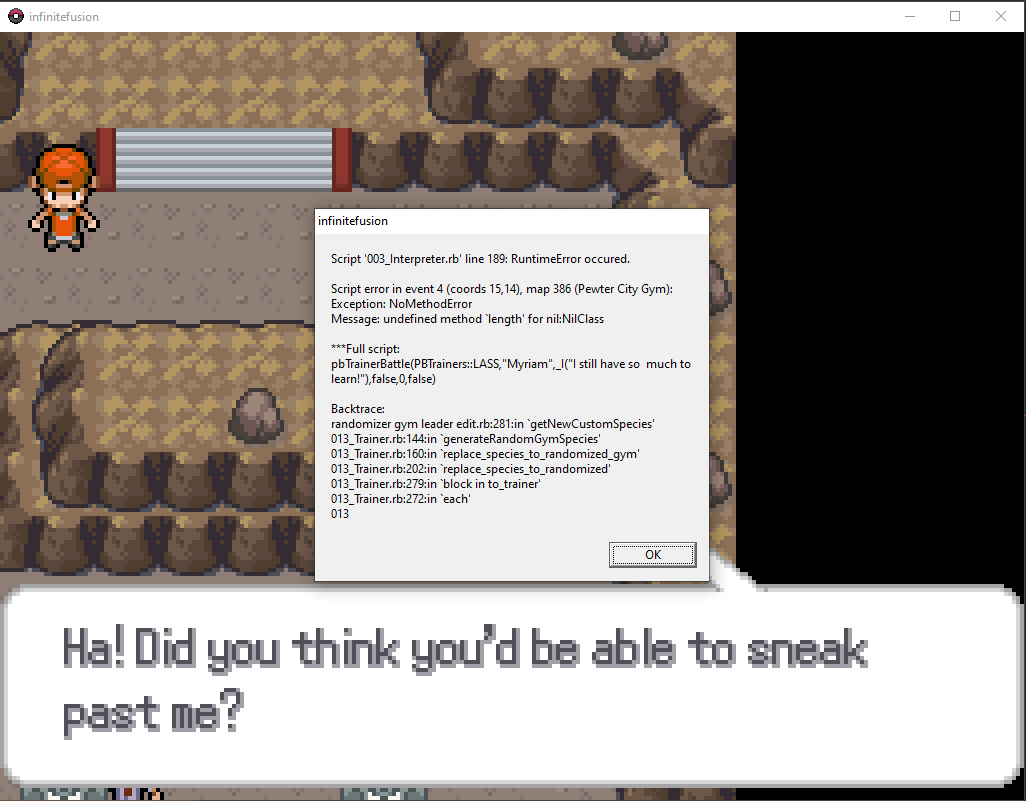
I crash every time I encounter either of these trainers in Brock's gym in randomizer mode
eager quail
versed ice
Verry simple question how do I add a randomizer to the game?
Start a game, save, and then start a new game. Then you'll be able to randomize
cosmic zealot
game crashe after i added modern mode
 toxic portal
acoustic lark
toxic portal
acoustic lark
Are you using preloaded?
acoustic lark
toxic portal
Are you using preloaded?
yeh
toxic portal
sterile pivot
What I have to do?
Your save is corrupt. Sorry, but you have to delete it
toxic portal
acoustic lark
yeh
Turn off "dynamically download missing sprites."
toxic portal
sterile pivot
And downloaded again
What
I said save data
....Ugh, the SaveFile folder is a shortcut to a place in AppData get the hell in VC and I'll walk you through this
sterile pivot
This one?
 sterile pivot
toxic portal
....*Ugh, the SaveFile folder is a shortcut to a place in AppData get the hell i...
sterile pivot
toxic portal
....*Ugh, the SaveFile folder is a shortcut to a place in AppData get the hell i...
I can't do VC sorry
My parents don't let me
toxic portal
....how old is this version of the game
sterile pivot
The newest one
toxic portal
Definitely not
....actually launch the game rq I wanna check something
See if it creates the folder like I'm expecting
acoustic lark
toxic portal
Turn **off** "dynamically download missing sprites."
where?
sterile pivot
toxic portal
....actually launch the game rq I wanna check something
Uh? Launch the what?
sterile pivot
Oh ok
toxic portal
Just open it, and when it crashes, (which it will), close it, then send another picture of the folder
cosmic zealot
anyone?
 acoustic lark
toxic portal
Turn **off** "dynamically download missing sprites."
acoustic lark
toxic portal
Turn **off** "dynamically download missing sprites."
where is this option located?
toxic portal
cosmic zealot
anyone?
Nope. I dunno how to fix this one. Now let me focus.
sterile pivot
Done

 toxic portal
....okay this is going to be a touch more annoying then
sterile pivot
._.?
sterile pivot
So what do I do?
toxic portal
You nuked the game installation for nothing - I'm getting to it -
sterile pivot
?
toxic portal
...Hey do me a favor, did you clean your recycle bin out yet?
If not, try to restore the initial installation
 undone latch
anyone know how to fix this? I get into a trainer fight and my game crashes...
 sterile pivot
Nope
toxic portal
toxic portal
If not, try to restore the initial installation
.
toxic portal
undone latch
anyone know how to fix this? I get into a trainer fight and my game crashes...
Turn off the randomizer
 granite ember
Checking the audio files for the game, why are there some duplicate songs

can the copies be ones with "- copie" name be deleted?
sterile pivot
toxic portal
.
Ok, is restored
toxic portal
Okay let's see that folder
toxic portal
granite ember
can the copies be ones with "- copie" name be deleted?
Wouldn't try it. Who knows how these maps are set up
sterile pivot
 errant monolith
can I ask if someone possibly has an answer to my issue? I don't want to interrupt anybody else, but I've been trying to get help pls
toxic portal
You can keep the keybinds
sterile pivot
Done
toxic portal
Launch the game
Also you might want to delete that screenshot, your real name is in it
sterile pivot
Oops, thanks
 jagged iron
Hey I keep getting this message when I try and do a randomizer run everytime I get in the first match with blue what should I do
 toxic portal
jagged iron
Hey I keep getting this message when I try and do a randomizer run everytime I g...
toxic portal
jagged iron
Hey I keep getting this message when I try and do a randomizer run everytime I g...
Can't help you with Joiplay stuff sorry
 slim fern
On a Mac using wineskin and I can’t access this item behind the well in azalea, this area has never loaded for me
 jagged iron
Ah no worries ty
errant monolith
hey is anybody available to help me with the issue I've been having?
toxic portal
Dude I dunno your issue. Sorry.
errant monolith
you dont know how to fix it? or you haven't seen it?
I posted about it already, but i can repost or reply to it if you need
sterile pivot
It works now! :3
Thanks ^^
 iron ermine
I was wondering if anyone could help me with the download. Sadly I've tried looking at three different YouTube videos but they don't seem to help. If anyone has any time just @ me because I'm really excited to try this game out. No rush!
 red belfry
i updated with a patch and now i get this
 errant monolith
toxic portal
Dude I dunno your issue. Sorry.
errant monolith
toxic portal
Dude I dunno your issue. Sorry.
is there anyone else who might be able to help if you don't know how? I am genuinely trying to ask for help, but everytime I ask it gets brushed aside or I'm redirected somewhere else, I followed the directions, yet somehow things still don't work
 swift raven
red belfry
i updated with a patch and now i get this
swift raven
red belfry
i updated with a patch and now i get this
same issue
errant monolith
errant monolith
i followed the tutorial for inputting the custom sprites into the game, all of t...
I posted all the info here, and have been trying to get help
 sinful herald
is there a latest version for the preloaded; cause the dynamic has a 5.1.3.4 and when I play the preloaded it says to update to the newest 5.1.3.4
 icy snow
Hi, updated from 5.1.3.3 (preloaded) to 5.1.3.4 and now I can't get past the opening cinematic. Error:
Script 'randomizer gym leader edit.rb' line 425: NoMethodError occured.
undefined method '<=' for nil:NilClass
My save file is not randomized if that helps
 violet egret
same here
 dire prawn
red belfry
i updated with a patch and now i get this
dire prawn
red belfry
i updated with a patch and now i get this
Bro same
violet egret
swift raven
I think I replaced it on accident
the tutorial does say to replace though
red belfry
you should replace it otherwise it would have doubles witch fucks with the code
violet egret
we wait
red belfry
now we wait
 coral juniper
dam
 rigid hollow
I'm tryng to play on android.
I downloaded the 5.0.36 version from mega but I can't extract the .zip file 'cause it gets some error and it won't show the extracted files.
Is there something I'm missing?
turbid terraceBOT
Hey @rigid hollow! The game isn't made to be played on mobile! You can try to use Joiplay to run it, but the game will likely be very slow, glitchy, or downright unplayable.
You can try following this guide: https://youtu.be/jADyChlJbF0
Nothing can likely be done about issues experienced on mobile, unfortunately. You can ask for help in the video's comments section if you'd like.
No dedicated mobile version of IF will be developed in the future.
dire prawn
violet egret
we wait
For what?
 stray oyster
everytime when it goes to the title screen its just black and i cant press play or anything
violet egret
a dev will provide an answer
swift raven
Oh well I have stuff to do today so this will up my productivity at least
icy snow
Oh, is the 5.1.3.4 patch not intended for Preloaded? I'll just dupe the save file on my desktop just in case
 stark flower
Hello, I just downloaded and started the game and get this error at the start, trying to pick up the town map
 serene gyro
do i need to move the files somewhere to continue, or what?


 sharp turret
So I tried updating my 5.1.3.3 preloaded version with the 5.1.3.4 patch, and now I get this error when starting up the game:

Ah yes, scrolled up a bit, and seems I'm not the only one with this isseu 
swift raven
I am just going to go back to the previous patch and carry over my save file
and wait for this to be resolved
 vestal plover
i got this after beating sabrina, anyone knows how to fix this?
 swift raven

 azure pagoda
 terse leaf
anyone know how to fix game crashing aftere taking oaks parcel at the second village
 simple sky
is it worth downloading the update right now? i havent done it yet.
sharp turret
Also did a little test with the patch on my 5.1.3.3 dynamic version, gives the same result
 pseudo parcel
Can someone help me on this
 safe quail
hm
Well I haven't seen this error before today but now I've seen it twice in like 5 minutes
So my first instinct is that the hotfix messed smth up
 gray pewter
safe quail
Well I haven't seen this error before today but now I've seen it twice in like 5...
gray pewter
safe quail
Well I haven't seen this error before today but now I've seen it twice in like 5...
i have it to
terse leaf
gray pewter
i have it to
same
sharp turret
safe quail
So my first instinct is that the hotfix messed smth up
Probably
stark flower
I skipped the map since it was crashing, and then it crashed again on route one getting the potions from the npc. Seems like it has something to do with npcs giving you items since the other person had the issue with the tm from Sabrina
stark flower
yeah, it crashed on the town map and the potions at the very start
terse leaf
im just going to an older version
 lost crown
I also had that issue with the parcel
safe quail
tech support gonna be a battlefield today huh
And by that I mean there's nothing we can do on our end but it's gonna be a lot of complaints
 fathom kelp
 swift raven
note to self: check here before updating
 earnest adder
guess people be havin same issue as me with the oak parcel
terse leaf
earnest adder
guess people be havin same issue as me with the oak parcel
yeh
im going to an older version coz i dont think there is a fix
earnest adder
terse leaf
im going to an older version coz i dont think there is a fix
ima try downloading the other version that was tehre
stark flower
So I redownloaded the preloaded version and that works now
Able to pick up the town map, parcels, and items from NPCs
safe quail
Yeah the preloaded is still on 5.1.3.3 since it's a pain to update
 primal skiff
Same error here

 alpine sky
im here
 raw orbit
Someone has the same issue as you
alpine sky
what can i do, cause i cant proceed prof oaks request
sterile pivot
What do i do?
 safe quail
I'm gonna answer 1 time and hope that yall can play telephone with the solution for the rest of today
stark flower
Might be best to pin a message for now if you're able to
 fluid jasper
hi, i just downloaded the game and this error pops up after the opening cutscene with the gengar and nido, and once i click okay the game closes itself.
 safe quail
I'm not a mod sadly
raw orbit
safe quail
Yeah the preloaded is still on 5.1.3.3 since it's a pain to update
wait, did smth happen?
finish your message first
safe quail
Basically, both of these errors appear to be an issue with the new hotfix to 5.1.3.4 that was uploaded today. The preloaded version on the Mega is currently still on 5.1.3.3 since it's a pain to edit, but that means that it's still stable, so if ur having these issues u should be able to download and play on that version without missing much
sterile pivot
safe quail
I'm gonna answer 1 time and hope that yall can play telephone with the solution ...
I will telephone it
 fiery belfry
fluid jasper
hi, i just downloaded the game and this error pops up after the opening cutscene...
fiery belfry
fluid jasper
hi, i just downloaded the game and this error pops up after the opening cutscene...
im having this issue too, just downloaded game as well
alpine sky
ahhh so take a later version instead
fiery belfry
im so bad with computers hopefully i can figure out... whatever this is

 fluid jasper
if i get the 5.1.3.3 version, would the march patch still work as normal?
safe quail
Should do
fluid jasper
gotcha, i'll see how it goes
 rough idol
F, I can't pin messages here
swift raven
what file do you have to manually delete with that one?
 loud haven
Every time I pick up oaks parcel my game crashes. Does anyone know why?
swift raven
Doing a fresh install because I fucked it up messing with the files
 hybrid shore
fluid jasper
if i get the 5.1.3.3 version, would the march patch still work as normal?
hybrid shore
fluid jasper
if i get the 5.1.3.3 version, would the march patch still work as normal?
where can i find this version
fiery belfry
hybrid shore
where can i find this version
should be mirror 1
then do version 5.1.3.3
hybrid shore
thanks
 shut copper
sorry i just installed the game and when i execute the exe it just does nothing
 boreal parrot
i'm stuck and cant do anything, what should i do? p.s. i tried to patch and re-install it

 swift raven

 analog cliff
Hello, playing dynamic 5.1.3.3, patched maybe 15 minutes ago to 5.1.3.4 - when i try to pick up the bricks for that one sidequest in vermillion i get this error

Haven't tried the planks in viridian yet though so don't know if it behaves the same
safe quail
Every gift item in the game behaves the same atm
shut copper
shut copper
sorry i just installed the game and when i execute the exe it just does nothing
I installed the dynamic 5.1.3.4 version
anyone can help?
 flat valley
Where can I find the mkxp .JSON file to delete?
swift raven
just do the thing in the instructions
boreal parrot
swift raven
fresh install and it is working
what version
analog cliff
oh so it's not just oak's parcel like i was seeing
analog cliff
well, good thing i duped the game folder before updating then
swift raven
also the json file is not in the fresh download
infinitefusion_dynamic_5.1.3.3_full
get this one
backup your saves
shut copper
shut copper
sorry i just installed the game and when i execute the exe it just does nothing
please i need help
 swift raven
😢
 finite glen
 storm wren
i have the same problem
 queen condor
same
boreal parrot
swift raven
and unzip it fresh
thats the one i'm currently using, the script crashes
boreal parrot
boreal parrot
i'm stuck and cant do anything, what should i do? p.s. i tried to patch and re-i...
here's what it looks like
storm wren
finite glen
i have the same problem
im gonna try saving the save file and intalling the game again
shut copper
please
boreal parrot
swift raven
Search for the json file in the main directory and see if you still have it
where do i find the main directory at
swift raven
where did you unzip the file
just go to the file that all of your files are in and search for that file
boreal parrot
it's not there
loud haven
I can’t find a dynamic version of 5.1.3.3 only 5.1.3.4
boreal parrot
 loud haven
And mega won’t let me download anything
boreal parrot
no file, i even searched it
 gleaming tulip
anyone know how to fix this error opening openAl device
everytime i try to launch it bring me that error
mkxp-z
flat valley
I ran into the latest error saying "Script 'randomizer gym leader edit.rb" etc, etc.
I put all my pokemon fusion files in one folder. I have spotted a file called "Savefile.Ink", is it possible for me to copy that to somewhere else, reinstall all my other files, add the Save back, and keep all my progress?
 storm wren
im gonna try saving the save file and intalling the game again
storm wren
storm wren
im gonna try saving the save file and intalling the game again
anybody found a fix?
finite glen
are all the sprite packs included automatically with the dynamic version?
 elder stratus
so after doing something stupid and extracting the patch into my installation folder, which pretty much copied everything in there making it marked with a (1) next to it, i decided to delete those (1) files and the 3 folders existing in the installation file, and decided to copy the patch back into that installation folder and replaced everything with the patch .zip, after doing that the game would start to freeze on the screen were the steelix/gyarados and the blaziken one appears, now what i just wanna know if what i ended up doing was bad or if it didn't matter. Version 5.1.3.3. preloaded before said patch.
sorry if this has been asked before, also sorry for the wall of text i like to give as much info as i can
boreal parrot
i don't have the json file
 frail pond
i reverted back to 5.1.3.3 (preloaded) after applying the 5.1.3.4 patch broke stuff, and now I have no encounters
 past lichen
is the 5.1.3.4 patch broken?
flat valley
Seems so
 storm wren
past lichen
because after patching it caused this glitch
storm wren
past lichen
because after patching it caused this glitch
isntall THE 5.1.3.4 dynamic version and paste your save file there
it worked for me
flat valley
Trying to see if anyone knows if it's possible to keep the save data, and reinstall everything else
Ah, okay
frail pond
i think my encounter table just got zeroed somehow
flat valley
storm wren
isntall THE 5.1.3.4 dynamic version and paste your save file there
The save file is "Savefile.Ink" correct?
frail pond
that is a link to where your savefiles are located
 dusk olive
when i try to fuse certain pokemon i get this window and it wont let me fuse them
 frail pond
doubleclick that to access your savedata folder
oh I see what happened
i think the random encounter table is saved in /data and not in your savedata folder
 humble oxide
Im trying to play randomiser and am getting the script 003_interpreter.rb error, cant find any solution on reddit
 karmic badger
help pls
 finite glen
are all the sprite packs included automatically with the dynamic version?
finite glen
finite glen
are all the sprite packs included automatically with the dynamic version?
like do I need to manualy download the ones in the downloads channel or does it automatically download those too from the internet
 fluid creek
I cant fuse my treecko and suicune. it just says "infinite fusion 2, 27"
boreal parrot
i have a idea on how to fix my error, but need a agreement.
 latent aspen
some gift items make this pop up
 humble oxide
seems like everyone is getting this error
boreal parrot
Since i'm missing my json file, i download the next update
flat valley
frail pond
i think the random encounter table is saved in /data and not in your savedata fo...
Having trouble actually opening the Save file.Ink up? Is this what I'm supposed to do?
elder stratus
ignore my wall of text, i found the problem myself, which may have been to delete the fonts folder 
 wheat drift
I'm not sure how to download the actual game, I was trying to use joiplay but I'm just having a hard time figuring it out 
turbid terraceBOT
Hey @wheat drift! Are yo having trouble downloading the game? You can find the download of the game in #downloads! To run it, simple unzip all of the files into a folder, then click the .exe file. Be mindful that the game takes a few minutes to load, don't touch the black window before it does!
fluid creek
can someone explain how i fix this?
 safe quail
Ur fusing in the wrong order
U gotta select fuse on the first Pokemon and then select the second Pokemon
frail pond
flat valley
Having trouble actually opening the Save file.Ink up? Is this what I'm supposed ...
you can browse to %appdata%\infinitefusion if you need to access your savedata if the .lnk doesn't seem to work
safe quail
Moving the first Pokemon to the second and then selecting fuse deosn't work
 shell current
any help
 humble oxide
^
safe quail
Can't use custom sprites rando option on dynamic
 outer lintel
Every time I am trying to extract it proceeds to not respond. Is there a way to fix it or do I just need to wait?
 safe quail
Probably use a different extraction tool
boreal parrot
7zip
safe quail
7zip is my recommendation
outer lintel
Nvm had to wait and it did it
safe quail
Windows can sometimes do it but it's slow
 proven raven
how do u update the game, im on version 4.9.2 even tho i got the game like 15 days ago
boreal parrot
safe quail
7zip is my recommendation
yes 7zip is amazing
safe quail
4.9.2 is very old, it probably won't update right
 noble oracle
how can i go back to the previous version of the game so i dont have the bugs? apologies for not being very competent with this stuff, im not much of a pc gamer haha
 tranquil saddle
line 425 in randomizer gym leader edit.rb is the problem child, but i'm not familiar enough with Ruby to fix it yet
 safe quail
Not really sure it's possible to un-patch ur game
proven raven
safe quail
4.9.2 is very old, it probably won't update right
so am i stuck on this version?
safe quail
If u can it would be under previous versions in properties
 sour mist
version preloaded 5.1.3.3 is bugged for me, how do i fix it?
safe quail
proven raven
so am i stuck on this version?
Nah u can get a fresh download but ur savefile probs won't transfer
 spiral rover
me too

 hexed moss
Keep trying to open the game amd i keep getting the error message
 proven raven
safe quail
Nah u can get a fresh download but ur savefile probs won't transfer
proven raven
safe quail
Nah u can get a fresh download but ur savefile probs won't transfer
is there a way i can keep my save file and update?
safe quail
tranquil saddle
line 425 in randomizer gym leader edit.rb is the problem child, but i'm not fami...
Don't think there's anything wrong with the line itself but the game isn't expecting to read it right
boreal parrot
safe quail
Nah u can get a fresh download but ur savefile probs won't transfer
maybe make a copy of the save file and delete the game?
safe quail
proven raven
is there a way i can keep my save file and update?
Very unlikely
If u have a postgame save maybe
Like if uve already done mt silver
Outside of story changes there are 2 issues
 rose parcel
The save file is located elsewhere in your computer, afaik as long as you copy and paste the shortcut redownloading the game won't delete your save
turbid terraceBOT
Hey @rose parcel! Are yo having trouble downloading the game? You can find the download of the game in #downloads! To run it, simple unzip all of the files into a folder, then click the .exe file. Be mindful that the game takes a few minutes to load, don't touch the black window before it does!
 charred quest
if u dont mind me butting in , i just installed the game and i get the same error
safe quail
Yes everybody is
charred quest
oh my bad sry
safe quail
safe quail
Outside of story changes there are 2 issues
1 is that the savefile is in a different location, that's normally solved by using the migrate save .bat, altho the pins recommend not using that .bat
proven raven
rose parcel
The save file is located elsewhere in your computer, afaik as long as you copy a...
r u able to help me do that?
boreal parrot
rose parcel
The save file is located elsewhere in your computer, afaik as long as you copy a...
yeah, when i re-installed it saved my data
safe quail
U may want to relocate it manually, the locations are told to u by the readme.txt
rose parcel
I am terrible with computers sooooooooo
safe quail
The 2nd issue is that 5.1 introduced multiple saves, so the naming convention is different
boreal parrot
i love tech so i could help
safe quail
Instead of Game.rxdata u will want to rename it to File A.rxdata
Even doing this usually doesn't let a 4.9 save transfer
 vivid cave
Is this the right channel to ask for help downloading the game because Im having problems
safe quail
But that's everything u can do
proven raven
rose parcel
I am terrible with computers sooooooooo
do u know anyone who could help me?
boreal parrot
vivid cave
Is this the right channel to ask for help downloading the game because Im having...
yes
rose parcel
But all I've done is saved the savedata file to a different folder and deleted the game and I'm now redownloading it
safe quail
proven raven
do u know anyone who could help me?
I just spent the last 5 minutes detailing to u what u would need to do to transfer save if at all possible
vivid cave
boreal parrot
yes
Ok so the 2 links the media fire and the mega one to download the game, one of them tell me I need to wait 5 hours and 50 mins to download it and the other tells me I need some kind of premium version
how do i download it without waiting or buying something
 mellow talon
well since the new version is unplayable what's the best one to use instead?
finite glen
i got this error when getting the map
 proven raven
safe quail
I just spent the last 5 minutes detailing to u what u would need to do to transf...
proven raven
safe quail
I just spent the last 5 minutes detailing to u what u would need to do to transf...
yea ik but it was a bit complicated srry
are u able to help me in dms?
sour mist
version preloaded 5.1.3.3 is bugged for me, how do i fix it?
the fusions dont have the custom sprites
boreal parrot
vivid cave
Ok so the 2 links the media fire and the mega one to download the game, one of t...
is media fire your preimium situation?
rose parcel
I mean the patch didn't update the save file directly afaik so I can't see why you can't just copy and past the shortcut
vivid cave
boreal parrot
is media fire your preimium situation?
Yes
it says “bulk download multiple folders upgrade to premium”
boreal parrot
there should be a X at the top right corner of the pop-up
jade blaze
hey is it possible to use arts from the spritework channel in my game? like just copying the spritework into the game? there is this lucario aggron fusion that looks like berserk guts and its really cool so i wanted to add it into the game
 frosty cradle
finite glen
i got this error when getting the map
frosty cradle
finite glen
i got this error when getting the map
i just got this exact same error also while getting the map
safe quail
proven raven
are u able to help me in dms?
Not really it's just gonna be telling u what I said but again, that's just how it is
 sturdy mirage
good evening, after going up the thread, this update is not viable to start a new game in randomizer, i am wrong ?
proven raven
safe quail
Not really it's just gonna be telling u what I said but again, that's just how i...
yea ik but like step by step and where to go?
noble oracle
vivid cave
Ok so the 2 links the media fire and the mega one to download the game, one of t...
dont download everything, thats what i tried to do at first lol
 tardy matrix

 maiden herald
So if I'm a first time installer, is my best bet to wait until a new fixed version is put out or would starting on an older version be fine?
jade blaze
jade blaze
hey is it possible to use arts from the spritework channel in my game? like just...
can someone help?
boreal parrot
vivid cave
Yes
mind sharing a screenshot if you didn't get it?
vivid cave
noble oracle
dont download everything, thats what i tried to do at first lol
I had no idea I could do it separately thanks
safe quail
maiden herald
So if I'm a first time installer, is my best bet to wait until a new fixed versi...
Any 5.1 version that's not 5.1.3.4 is fine
mellow talon
i was gonna download 5.1.3.3 but it looks like that one's buggy too?
tardy matrix
tardy matrix
its normal ?
proven raven
alright can anyone else help me out transfering a 4.9.2 save to the latest one?
safe quail
5.1.3.3 is buggy but it's the normal amount of buggy and not the catastrophic amount of buggy that 5.1.3.4 is
hexed moss
Should i redownload 5.1.3.4 and transfer my save cause i coped my main save or go back to 5.1.3.3and just transfer the save to that version
mellow talon
safe quail
5.1.3.3 is buggy but it's the normal amount of buggy and not the catastrophic am...
is there a "most stable" version?
vivid cave
boreal parrot
mind sharing a screenshot if you didn't get it?
Ill let you know if theres another issue I think i fixed it tho
flat valley
I'm having trouble finding the save files for the game. I've been playing on steam deck, it's worked perfectly so far. But it can be hard to search for specific files. I might just wait for an update from the creators for now.
loud haven
Where can I get the dynamic file for 5.1.3.3?
safe quail
I would still consider 5.1.1.1 most stable but that doesn't mean a lot
 raven sapphire
not sure who to ask but my friend is saying my folder shouldn't look like this
 boreal parrot
safe quail
5.1.3.3 is buggy but it's the normal amount of buggy and not the catastrophic am...
boreal parrot
safe quail
5.1.3.3 is buggy but it's the normal amount of buggy and not the catastrophic am...
so to save most of the bug trouble, try to download a older version?
safe quail
That looks fine to me
jade blaze
hey is it possible to use arts from the spritework channel in my game? like just copying the spritework into the game? there is this lucario aggron fusion that looks like berserk guts and its really cool so i wanted to add it into the game
safe quail
Yea u just copy it into custombattlers and restart ur game
It should already be named properly
jade blaze
i am ascending rn
safe quail
If u pick the grey one u might wanna remove the a in the name tho
finite glen
finite glen
i got this error when getting the map
help please
frosty cradle
finite glen
help please
5.1.3.4 is bugged get older version
finite glen
frosty cradle
5.1.3.4 is bugged get older version
where can i find the older versions
frosty cradle
finite glen
where can i find the older versions
idk for dynamic but for preloaded its already on an older version
elder stratus
i feel like problem is lying in trying to copy the patch into the preloaded version, cause i never played with the gym leader randomizer setting and got it, i wouldn't be surprised if that is the case, for those that patched it while having the preloaded version
finite glen
frosty cradle
idk for dynamic but for preloaded its already on an older version
i downloaded dynamic
sterile pivot
ok so i just repachet to the 5.1.2.4 and everything was fine so
 errant marsh
Hii, I'm new here, I just got past 1st gym, made a wonder trade and the game crashed. Tried to reboot the game but every time crashes, even downloading it again, how can I fix it??
boreal parrot
can you patch a new version to a old version?
hexed moss
Is there a difference between dynamic and preloaded saves?
sterile pivot
if you have 2 folders with the same name you just have to consent to overrite i guess ( no fucking clue)
boreal parrot
thanks
jade blaze
safe quail
Yea u just copy it into custombattlers and restart ur game
do i just copy it and change the name??
safe quail
Yea
 safe quail
Yea they were removed cuz buggy
They'll be back up later
5.1
5.0 is fffine but we won't be able to help as much with tech support and it's also like 6 months old or smth
 turbid saddle
Where can I get the previous version while this gets fixed?
 jade blaze
safe quail
Yea
jade blaze
safe quail
Yea
the number of lucario was wrong, i should change it to the right one right?
boreal parrot
5.1.1.1?
safe quail
jade blaze
the number of lucario was wrong, i should change it to the right one right?
Sure
jade blaze
it was 380 (deoxis)
safe quail
boreal parrot
5.1.1.1?
That's fine
safe quail
jade blaze
it was 380 (deoxis)
both the files I opened were 333
But yea if it's wrong u just rename it
turbid saddle
If I reinstall will it break my save?
safe quail
No biggy
safe quail
turbid saddle
If I reinstall will it break my save?
As long as everything's on 5.1 ur probably fine
 vernal loom
on the preloaded 5.1.3.3 version, when I have randomize given items off it randomizes them anyway
I've tried on different save files and made sure I didn't accidently turn it on and it randomizes them anyway

 safe quail
Yea I'm not sure if or how item randos work, it's generally safer to stay away from them
 gilded lava
hello I installed the latest patch and now I have this bug

 undone river
Was just about to say that
 stiff wave
Will there be a 5.1.3.5 full download link soon? Or do i just need to download the .3 and install the .5 patch?
safe quail
stiff wave
Will there be a 5.1.3.5 full download link soon? Or do i just need to download t...
Yea this is the play
boreal parrot
gilded lava
hello I installed the latest patch and now I have this bug
install 5.1.1.1
turbid saddle
5.1.3.5
safe quail
5.1.1 is also fine but there's not much wrong with 5.1.3.3 that isn't also wrong with 5.1.1.1
Just the dynamic stuff sometimes
 pulsar tendon
Hello, quick question while I wait on my slow as rocks internet, I downloaded dynamic without actually reading what it was properly 😅 Can I just put the sprite pack on it?
Or do I like need the full version?
safe quail
The sprite pack should do fine
U won't have the alternate launcher which helps with performance
But that's p much the only thing
pulsar tendon
Mah PC is decent, havent had any issues with an old version I had, so no big worries.
safe quail
Oh u also won't have the autogenerated sprites
Which may be a bit of a bump for fusions without custom sprites
pulsar tendon
But I was really sad to load up my save and see a bunch of ? sprites
boreal parrot
did we skip 5.1.3.4 cause of it being bugged?
pulsar tendon
boreal parrot
did we skip 5.1.3.4 cause of it being bugged?
Wait wut?!
safe quail
It wasn't skipped it was added and then very quickly deleted
It is bugged tho
Dony worl
boreal parrot
lol
pulsar tendon
DED
boreal parrot
ik, very confused on mine to
turbid saddle
5.1.3.5 same error
 undone river
Oof
pulsar tendon
What's supposed to be the error? I loaded my save on 5.1.3.4 dynamic without that much issue....
pulsar tendon
Welp time for another slow as hell download then.
safe quail
Then the main issue is that receiving a gift item crashes the game
 humble marsh
turbid saddle
5.1.3.5 same error
humble marsh
turbid saddle
5.1.3.5 same error
also getting the same error on the newer version just released
boreal parrot
most people with older versions using patches are probably not the ones being affected by this, right?
turbid saddle
Im going back to 5.1.3.3
safe quail
They prooooobably are
Every duplicate file is overwritten by the patch and I think the patch just includes full copies of data folders
humble marsh
I'm patching and getting the "randomizer gym leader" no method error
so patching is getting it
safe quail
There's essentially no difference between a 5.1.2.4 version patched up to 5.1.3.4 and a fresh install of 5.1.3.4
turbid saddle
Try the newer new one
boreal parrot
oh
turbid saddle
but that one might not work either
safe quail
Let us know if it doesn't
We know it hasn't worked for 1 of the bugs but not this one
boreal parrot
newer new ones got removed again
humble marsh
cant wait for the new new newer one
safe quail
Cmon baby
boreal parrot
i’m watching it live
humble marsh
same


 turbid terraceBOT
Hey @hidden tendon! Do you have questions about Randomized mode? Find more info about it and its various settings on the Wiki: https://infinitefusion.fandom.com/wiki/Randomized_Mode
Note: You need to have an existing save file before the game lets you restart in Randomized mode!
 naive zodiac
i cant find any wild pokemon and some of them are mystery marks
safe quail
I imagine it has to do with GetBaseStatsFormattedForRandomizer
That's a new one
Out of curiosity
Are u using the custom sprites only option on a dynamic/light version?
Not u Boba but u should try to reshuffle to fix ur first problem
boreal parrot
me?
safe quail
The second problem could be a lot of things
No the person who had the error that says GetBaseStatsFormattedForRandomizer
boreal parrot
ohhh
 hidden tendon
I just installed the new patch, loaded in my custom sprites, and tried to start a new playthrough
 sinful willow
by launching the game he tells me that version 5.2.3.5 is available and more the . 4 but it is not found
humble marsh
waiting on a .6 now
safe quail
hidden tendon
I just installed the new patch, loaded in my custom sprites, and tried to start ...
Yea how many custom sprites is that tho
Just all of them?
U didn't answer my first question so I'm still under the impression that u might be trying to use the custom sprites only rando option without having enough custom sprites in local storage
boreal parrot
can’t wait for this download to finally finish
hidden tendon
i loaded in the cutom sprites from the 1-88 sprite pack
safe quail
Do u know if u imported them properly
 astral night
Same here saying new version is out
hidden tendon
safe quail
Are u using the custom sprites only option on a dynamic/light version?
yes I am using only custom sprites on the dynamic version
sorry I missed that question originally
 light cliff
So before I waste my time trying to update again; does it actually work now? Or is it still fucked?
frosty cradle
are whatever changes were made in 5.1.3.4 other than the bugs even worth it to wait for or should i just play on 5.1.3.3?
naive zodiac
mines till mess up so am just going to wait for the new one
humble marsh
.4 + .5 are both fucked .6 is being worked on rn it seems
safe quail
hidden tendon
yes I am using only custom sprites on the dynamic version
So normally u can't do that but if u installed the sprite pack properly then u should be fine afaik, but if ur game didn't ask u to import the sprites after the title screen then u might not be
light cliff
safe quail
There is no update available atm
I'm on version 5.1.3.3. It updated to 5.1.3.4. It broke. The latest version is 5.1.3.5.
humble marsh
.5 is also broken
light cliff
Great!
safe quail
It's also not available
hidden tendon
safe quail
So normally u can't do that but if u installed the sprite pack properly then u s...
do the custom sprites need to be in the custom battler folder, or do they need to be in a folder called indexed in the custom battler folder?
safe quail
So u put the sprites into the custombattlers folder, and then when the game imports them they automatically get indexed
They have to be in the indexed folders to actually get used
But they have to be in the right indexed folders
So it's easier to let the game take care of that part
hidden tendon
ah ok. I think the custom battler folder from sprite pack 1-88 doesnt have the indexed folder for it to move them into. Let me try something, I might have solved my issue
 unique umbra
I can get the town map again on 5.1.3.5 when it was crashing on .4 but a minor thing I noticed is that the randomized starters is only from those that fused on the start screen.
boreal parrot
so what is the sprite pack expansion for?
safe quail
Yea u were supposed to merge the folders so u got the old custombattlers folder's indexed folder
frail pond
is it safe to update preloaded 5.1.3.3 to 5.1.3.5
boreal parrot
boreal parrot
so what is the sprite pack expansion for?
cus i am confused
safe quail
Dw boutit
 calm lily
Is there any reason to dowload the sprite pack if i'm playing dynamic?
safe quail
boreal parrot
so what is the sprite pack expansion for?
The sprite packs are used to add custom sprites to ur local files that u don't have, that's it
Not every preloaded version will have an up-to-date sprite pack
boreal parrot
oh
safe quail
And sometimes u don't wanna stay using download sprites on dynamic
naive zodiac
i just deleted the game so which one should i download
safe quail
calm lily
Is there any reason to dowload the sprite pack if i'm playing dynamic?
If u have bad internet or u get a crash that's related to the download sprites feature yea
 tawny verge
Hey, just now joined and been playing for like, 15 minutes or so, and found the game keeps crashing on me whenever I get an item. Town Map and the item from the Shop employee on route 1. I do have everything randomized though, is that the issue?
safe quail
Otherwise it should be fine
calm lily
Alright
safe quail
tawny verge
Hey, just now joined and been playing for like, 15 minutes or so, and found the ...
That's not the issue
 empty dagger
so i assume this is from the patch
 safe quail
It's just that the version u downloaded is hella bugged
It's not available for download anymore
humble marsh
empty dagger
so i assume this is from the patch
yes
empty dagger
man. lmao
hidden tendon
safe quail
Not every preloaded version will have an up-to-date sprite pack
yeah the 5.1.3.4 dynamic doesnt have any preloaded sprites
dark cargo
hello guys, im sorry but i did everything i could, but i have green lines can someone help me plz ?
humble marsh
empty dagger
man. lmao
a 5.1.3.6 is being worked on currently with fixes hopefully third times a charm
boreal parrot
i’ma change my profilee
empty dagger
yeah! :D
 ocean dirge
Hi, i cant find 5.1.3.5 download, where is it?
safe quail
Nah we don't know nothin bout green lines anymore, isn't that an old version issue or sumn
dark cargo
oh ok sorry
tawny verge
safe quail
It's just that the version u downloaded is hella bugged
I got the version less than an hour ago, it crashed when I tried getting my town map, then it told me a new update was out, I updated it and the map situation still happens and the issue on Route 1
humble marsh
ocean dirge
Hi, i cant find 5.1.3.5 download, where is it?
it was taken down due to bugs
hidden tendon
ocean dirge
Hi, i cant find 5.1.3.5 download, where is it?
safe quail
tawny verge
I got the version less than an hour ago, it crashed when I tried getting my town...
Yea the download was taken down less than less than an hour ago lmao
humble marsh
like 15 minutes ago actually lol
tawny verge
safe quail
Yea the download was taken down less than less than an hour ago lmao
I had .4 then got .5 and both were crashing at the same point
dark cargo
safe quail
Nah we don't know nothin bout green lines anymore, isn't that an old version iss...
so where do i can find the new version ?
tawny verge
So it's not just me, that's good to know
safe quail
That doesn't change what I said, .5 is also not available for download anymore
unique umbra
I can get items on 5.1.3.5 but the randomized pokemon are only the ones that fused on the start screen.
turbid terraceBOT
Hey @unique umbra! Do you have questions about Randomized mode? Find more info about it and its various settings on the Wiki: https://infinitefusion.fandom.com/wiki/Randomized_Mode
Note: You need to have an existing save file before the game lets you restart in Randomized mode!
humble marsh
dark cargo
so where do i can find the new version ?
its not out yet
safe quail
dark cargo
so where do i can find the new version ?
Well first off what version are u on rn
dark cargo
5.1.3.3
safe quail
Ok so u have most recent rn
Which means green lines can still happen on current patch
That's rough
frosty cradle
dark cargo
5.1.3.3
you dont want the new version lol
dark cargo
so i need to delete everything and start again ?
tawny verge
Do I just download 5.1.3.3?
safe quail
I would try to make a new extract yea
 native vapor
im getting this after giovanni can anybody tell me what to do?
 safe quail
Wait for a patch that works
 sterile quiver
What do i do i want to play randomised and ive tried like10-15 times and its before the game starts
 boreal parrot
until then were stuck
naive zodiac
which one should buy
safe quail
sterile quiver
What do i do i want to play randomised and ive tried like10-15 times and its be...
custom sprites rando option can't be used on dynamic
sterile quiver
safe quail
custom sprites rando option can't be used on dynamic
what do you mean
naive zodiac
boreal parrot
download?
yes that what i mean
hidden tendon
so does the .5 patch on the .4 dynamic just not work?
sterile quiver
safe quail
custom sprites rando option can't be used on dynamic
can you go to vc and help in in vc4
naive zodiac
boreal parrot
download 5.1.1.1 or any other 5.1 except for 5.1.3.4
where that one
sterile quiver
Dang
safe quail
If u have downloaded the dynamic version of the game
 vocal epoch
Hello!! What do I do for this, the game keeps crashing whenever I'm given and item
 safe quail
Because the randomizer needs u to have the custom sprites in local storage
Dynamic doesn't have any
 rose surge
vocal epoch
Hello!! What do I do for this, the game keeps crashing whenever I'm given and it...
rose surge
vocal epoch
Hello!! What do I do for this, the game keeps crashing whenever I'm given and it...
I have that same issue, just came here to ask about it.
boreal parrot
naive zodiac
where that one
older versions -> infinitefusion 5.1.1.1-full.zip
sterile quiver
safe quail
If u have downloaded the dynamic version of the game
i downloded full
safe quail
ok and?
 frank magnet
Is 5.1.3.3 the latest version? I'm seeing that 5.1.3.5 was taken down and I just want to make sure
safe quail
Yea
boreal parrot
naive zodiac
where that one
may be a slow download, but stay patient and play smth else until then
naive zodiac
boreal parrot
older versions -> infinitefusion 5.1.1.1-full.zip
is that one better?
tawny verge
Flat out, what is the best version I should use in terms of stability?
boreal parrot
safe quail
Define better
agreed
boreal parrot
tawny verge
Flat out, what is the best version I should use in terms of stability?
5.1.1.1
tawny verge
thank you
naive zodiac
boreal parrot
may be a slow download, but stay patient and play smth else until then
full or patch
boreal parrot
full
vocal epoch
rose surge
I have that same issue, just came here to ask about it.
Yea, I came her to ask because I would really like playing the game, but I can't get oaks parcel
safe quail
5.1.3 made some big mechanical bug fixes that I think add a lot to the game
 soft grotto
i cant encounter pokemon
im doing a randomizer
 river mortar
is there a non mirror download?
safe quail
But overall it has more issues with running
safe quail
river mortar
is there a non mirror download?
I feel like u don't understand what a mirror is
safe quail
It just means a place to download
river mortar
oh