#tech-support
1 messages · Page 34 of 1
 safe quail
 elfin schooner
My thoughts exactly. Not sure what speed they're playing the game on though.
 jolly nacelle
I play normal everywhere just when I try to fuse some Pokémon it takes too long/crashes and if it manages to make it it still takes too long whenever I use it
safe quail
That may be helped by turning off download sprites but I'm not sure how much
jolly nacelle
Where is that option just normal options?
safe quail
Should be
elfin schooner
Yes
jolly nacelle
It is real fun but unplayable if I can't use what I want
elfin schooner
What kind of GPU do you have?
jolly nacelle
Wait maybe this fixed it
elfin schooner
Yeat 👍
jolly nacelle
I reversed my Nidoking to psychic poison and worked
and doesn't crash when I go into battle
Jesus I lost so many hours
Trying to fix
And was just one option
What is the point of download if I have all the sprites in folder
safe quail
It's to keep ur sprites up to date automatically for future sprite packs
safe quail
What bug
safe quail
Ok good
jolly nacelle
Yesss
Also
I fused tyrogue with ledyba
And now it has 20 attack 20 defense
I love u all
Hitmontop technician here I come
I found out that other fusions bug too because I was trying to evolve tyroguw
While I had only Nidoking crash me so far
I'm so happy
 vast slate
hi guys i just got told to come here because i am having problems with the game working it worked before but now it is not please help thank you
 safe quail
If it's just sitting on a black screen and u haven't changed anything ab ur game I don't really know what can be done ab it
vast slate
so do i just uninstall and re install it
safe quail
U can try that, u could also try installing the new version but it's less stable overall and might cause more issues down the line
vast slate
damn well i got no other choice i haven't played it for ages
safe quail
Generally speaking the new version is also more technologically demanding, so if u think it's become a hardware issue that may not be recommended
vast slate
well a little while not ages
aw no my laptop is a gaming laptop and its pretty good
im being asked to pay for the downlaod what do i do
safe quail
U can use the mediafire link in Xillo's bio instead
vast slate
where is that please
safe quail
In Xillo's bio
elfin schooner

MediaFire
safe quail
No
elfin schooner
Is there a pokedex chat/channel Ferrous? I'm trying to find a custom sprite and I'm not sure how to go about finding it.
safe quail
elfin schooner
Is there a pokedex chat/channel Ferrous? I'm trying to find a custom sprite and ...
U can search for the fusion and scroll til u see a custom sprite for it, that's what I do
Usually they'll be in #sprite-gallery
elfin schooner
Appreciate it homie ❤️
 patent flare
managed to get the game to run via Wine on my mac but i keep running into this error when trying to import the custom sprites from the gallery folder
 safe quail
This is a typo generated by a coding error in the download sprites feature
U will have to turn this feature off in order to run the game
patent flare
darn, i was really hoping to use some of the cool custom sprites i've been seeing around everywhere
safe quail
The options menu to turn off this feature should be in the menu after this screen so u may have to tell the game to not import sprites first and then reboot
U can still use the custom sprites, the download sprites feature would just update the game on demand with the latest sprites whenever they would be accessed
patent flare
ohhhh i see
safe quail
As long as u still have the sprites in ur files ur fine
safe quail
lmk if that works
patent flare
so far so good, i'll post here if anything else goes wrong
ngl i didnt expect the game to even run so this is already pretty huge lol
safe quail
ok dope, I wasn't sure if skipping the import sprites step would actually let u thru
 shell arch
I think I've softlocked myself.
What gym badge do you need to be able to use Surf?
safe quail
U need the first 6 gym badges
shell arch
Which one is the sixth?
safe quail
Saffron
shell arch
Never mind then.
Thought it was going to be Toga's, guess I just can't figure out how to get into anything in Saffron.
safe quail
Koga is 5
shell arch
I know, I see the five badges on my trainer card.
safe quail
Alright
If uve gotten Koga's gym badge u should be able to enter Saffron and free Silph Co without issue
shell arch
First time I went in, there was something invisible blocking the building.
Tried again and I just got in.
Probably fine now.
safe quail
Nice
 trim aspen
Do scene transitions just take a long time or is it just me
safe quail
They can, it's hardware-dependent
U can try launching from the alt launcher and turning off download sprites in the full version to reduce load times
trim aspen
ok, thank you
 hollow dome
Hey ! I'm trying to stream the game and whenever I launch it, it crashed ! Can someone help ?
vast slate
how do i extract the game please
safe quail
U right click on the .zip and select extract all
Or use a program like 7-Zip or WinRAR
hollow dome
Please
safe quail
hollow dome
Hey ! I'm trying to stream the game and whenever I launch it, it crashed ! Can s...
Without an error I can't help u, if it's only happening when u stream, I have to assume it's a hardware issue
vast slate
thanks ill try
hollow dome
safe quail
Without an error I can't help u, if it's only happening when u stream, I have to...
I just tried without streaming and it still crashed
Maybe I installed it a wrong way ?
safe quail
It may still be a hardware issue, still can't say if I don't see an error message
 graceful moth
any way I can download the game off of mega without exceeding my transfer quota? I'm not buying a mega subscription.
 turbid terraceBOT
Hey @graceful moth! Are yo having trouble downloading the game? You can find the download of the game in #downloads! To run it, simple unzip all of the files into a folder, then click the .exe file. Be mindful that the game takes a few minutes to load, don't touch the black window before it does!
safe quail
U can try downloading off the mediafire link in Xillo's bio instead
If ur hitting the mega limit u may be downloading every file on the mega which is unnecessary
graceful moth
which ones do I strictly need?
safe quail
Any 1 .zip marked with "full"
 rich portal
Keep getting this error message, any ideas?
 safe quail
This is an issue with the download sprites feature, u will have to turn it off to continue
If u cannot get to the menu to turn it off, or if u are on light mode and have not installed the sprite pack, u will have to play on 5.1.1.1
 wicked ruin
Hi, I just downloaded the game but it said missing game script. How do I fix this
safe quail
which version did u download from the mega
wicked ruin
5.1.2.4 I think
safe quail
light, non-light, or patch
wicked ruin
Non light
safe quail
Can I see the error message
wicked ruin
 wicked ruin
Yes
safe quail
Is the folder in ur downloads?
wicked ruin
Yes
safe quail
Move the folder out of ur downloads and onto ur desktop
wicked ruin
Okay
safe quail
lmk if that allows the game to find game.ini
patent flare
are the pokemon met dates supposed to be the jan 1 2000 placeholder or is my computer being wonky
safe quail
I've seen that placeholder before
 tidal cradle
Just downloaded but when i opened it the town is just grass with invisible walls where the houses should be. How do i fix this?
 burnt orbit
I just downloaded the light version and whenever I try to boot the game up it loads the splash screen and then crashes, any tips?
 polar brook
I have a sprite loaded into custom battler, but it's not populating onto the monstah
nvm there it is...
just had to reload the game, kewl!
safe quail
Yea the game has to boot to sort the file into its index
safe quail
burnt orbit
I just downloaded the light version and whenever I try to boot the game up it lo...
Try the full version
polar brook
I loaded it in beforehand, it was just cusotm battler, nothing new but either way good ole power cycle to save the day!
safe quail
We can try some things on the light version but depending on the error u get when it crashes the light version may be incompatible with ur specs
safe quail
tidal cradle
Just downloaded but when i opened it the town is just grass with invisible walls...
This appears to be a tiling error with RPGmaker, I haven't heard of a fix for this sort of thing
 buoyant ether
Keep getting this error when trying to randomize game

 gentle finch
has anyone goten a openal context error after they try to open the game after a fresh install
 wheat whale
im still getting this when trying to import the new pack

 merry matrix
Version 5.2.1.4 / Win 10 (on the light version)
Getting this on a fresh game install when starting a randomizer game! Any help is super appreciated!
(Did NOT just accidentally delete my post)

 halcyon maple
I tried downloading the game, when the mega download was finished my browser blocked it because it supposedly had a virus. Any other way to get the most recent version of the game?
 astral rover
I just did this and am still facing the same issue. so weird what could be causing this
ferrous, would you happen to know what might be causing me to not have wild encounters? pokeradar says i can't use it in places where i should be able to get wild encounters. it's as if the game's erased whatever makes spaces cause wild encounters...
 honest scroll
does anyone know the current hex code for the magic boots?
 dusky kernel
My game keeps freezing when I try to scroll through a pc page of team rocket fusion pokemon
Is there any way I can perhaps clear them out one by one, or alleviate the lag/freeze?
My game runs relatively fine otherwise, it's just when I try to look at or move the pokemon in this page that the game completely freezes.
nevermind, it seems when I try to look at any fusion in my pc.
 quiet belfry
is there a way to add animated sprites in game?
 stoic sigil
dusky kernel
nevermind, it seems when I try to look at any fusion in my pc.
stoic sigil
dusky kernel
nevermind, it seems when I try to look at any fusion in my pc.
Try turning off sprite downloading in the options, but make sure you're not on the light version first
stoic sigil
quiet belfry
is there a way to add animated sprites in game?
As of now, no
quiet belfry
Heres hope some day
dusky kernel
stoic sigil
Try turning off sprite downloading in the options, but make sure you're not on t...
I’m not on the light version. By “sprite downloading”, is that making the sprites all the same dna symbol? If so, I’ve tried that but it still freezes. I’m resorting to releasing the fused Pokémon to try and alleviate the tension. I saved beforehand, so even if it doesn’t work my save’s good.
stoic sigil
dusky kernel
I’m not on the light version. By “sprite downloading”, is that making the sprite...
No, I meant the new 5.1.2 feature
stoic sigil
dusky kernel
I’ll find it in the options menu?
Yes, fourth option called "Download sprites"
dusky kernel
I released a couple Pokémon beforehand. Let me reload my save to see which fix attempt did the trick.
Mind explaining what that option does?
It was your fix, thank you so much! Once I clear out these fused Pokémon, I should be able to turn that option back on, yes?
stoic sigil
dusky kernel
Mind explaining what that option does?
It was made with the new light version in mind. Whenever the game detects it needs to show a fusion sprite, it will make a quick online database query to check if there's a custom sprite available for that fusion and if not, it will download the autogen one instead. You don't need to have it on if you have the full version with a sprite pack installed, but it can save you the trouble of getting new sprite packs (except I don't think it'll ever overwrite existing custom sprites, so you'd only get replacements for autogens). The hitching happens mainly with autogen sprites cause it will always check for a custom sprite when it encounters one
turbid terraceBOT
Hey @stoic sigil! Are you trying to add more custom sprites to your game? You can find the most up to date sprite pack containing all custom sprites in #downloads! To add them to your game, simply copy all the files into your game's CustomBattlers folder. The pack also contains alts and things such as joke sprites and regional variants, which you can also add to your game if you wish.
You can swap between alts of a given fusion in-game, using the Pokédex!
dusky kernel
Hah, so that’s why. 90% of the team rocket black market fusions I got were autogen. :p
stoic sigil
I almost have my dev environment set up to contribute to this game myself and then, after trying to fix a few bugs I've seen here, I'll see if I can make it check the autogens like once a day or something (might be difficult tho, we'll see)
stoic sigil
dusky kernel
Hah, so that’s why. 90% of the team rocket black market fusions I got were autog...
Phew, I was worried you had that with customs also, which would be a nastier situation 😄
quiet belfry
Does anyone know the path for the UI Textures like Pokedex or the Boxes?
 rough idol
quiet belfry
Does anyone know the path for the UI Textures like Pokedex or the Boxes?
rough idol
quiet belfry
Does anyone know the path for the UI Textures like Pokedex or the Boxes?
graphics > pictures
quiet belfry
ah thanks!
rough idol
then there's just folders for pokedex and storage
 unreal mist
ive been trying to add all the new sprites to my current game file but for some reason it wont work or use the updated ones but i put the custom battles folder into my graphics folder any way to fix it?
 dusty egret
Hi I just downloaded the light version 5.1.2, my game freezes on the title screen anytime a fusion is shown. Is it something that will happen anytime a new fusion appears or is it fixable ?
stoic sigil
dusty egret
Hi I just downloaded the light version 5.1.2, my game freezes on the title scree...
This is why:
#tech-support message
unreal mist
if i download the newest version of the game will there be all the most up to date custom spirtes? and is there a way to transfer my save data's over to the newest version if i have to go this route
stoic sigil
unreal mist
ive been trying to add all the new sprites to my current game file but for some ...
The image files found in the sprite pack need to be directly in the game's CustomBattlers. Launching the game will prompt to import and you need to let it replace existing ones. The files will then be moved from the CustomBattlers folder and any left over were not detected by the game for various reasons you may search for on this channel
stoic sigil
unreal mist
if i download the newest version of the game will there be all the most up to da...
The full version (non-light) does have the latest sprites at the time of its release. I don't think it has this latest (recently hotfixed) sprite pack yet
 scarlet jay
hello friends, ive recently started playing infinite fusion, just made it to celadon, but anytime i enter new areas or doors, everything goes black except for the character sprites. saving and reloading fixes it, just for it to happen again moments later. is there a known fix for this? i havent been able to find anything on my own except for others trying to find a solution
 nocturne dragon
Can anyone help me finish my installation on mac? I've downloaded the game, and pasted the custom sprites into the customsbattlers folder. I just download Wineskin Winery, but i don't know what to do from heree
turbid terraceBOT
Hey @nocturne dragon! Are yo having trouble downloading the game? You can find the download of the game in #downloads! To run it, simple unzip all of the files into a folder, then click the .exe file. Be mindful that the game takes a few minutes to load, don't touch the black window before it does!
unreal mist
stoic sigil
The image files found in the sprite pack need to be directly in the game's Custo...
i had launched the game and it never promted to import any of the sprites or anything and i had dragged the CustomBattlers into the graphics file as it said but it also didnt ever ask to replace any of the current files. so im very confused now
stoic sigil
unreal mist
i had launched the game and it never promted to import any of the sprites or any...
Can you screenshot CustomBattlers please

 vast slate
help i cannot install the sprites its just not downloading
stoic sigil
unreal mist
Interesting, that looks correct. Could you enable visible file extension from the explorer's View tab for me and send the screenshot again?
nocturne dragon
nocturne dragon
Can anyone help me finish my installation on mac? I've downloaded the game, and ...
can anyone help? What do i do from here?
 unreal mist
stoic sigil
Interesting, that looks correct. Could you enable visible file extension from th...
unreal mist
stoic sigil
Interesting, that looks correct. Could you enable visible file extension from th...
how would i do that
stoic sigil
unreal mist
how would i do that
There's a "View" dropdown button at the top of the window, there should be some toggleable option for file extensions there
 autumn sigil
 unreal mist
stoic sigil
There's a "View" dropdown button at the top of the window, there should be some ...
unreal mist
stoic sigil
There's a "View" dropdown button at the top of the window, there should be some ...
i appreciate your help and patience but im just going to delete all infinite fusions files off of my computer and just download the newest and port over the custom sprites, my brain can't do all the things i keep reading so im just going to make it simpler i apologize again for taking your time
stoic sigil
nocturne dragon
Ay help me thene,
Mac is out of my expertise, you can wait for someone else to come active or even better: try Discord's search
nocturne dragon
Aight, thanks mate
 wary ember
Anyone?

 normal field
Am i able to upgrade my game from 4.9 to 5.1?
 small mauve
My game wont reg a sprite change to a custom sprite
like if i change aegislash/gallade to a custom one it stays as the regular
 thick dew
Wasn't sure to come here or in the bug reports channel, but the levels of both my, wild, and trainers' Pokemon are missing. I've tried closing the game, fixing the game at the Pokemon Center, using the alternate launcher, none of which have worked to bring them back. Anyone know what happened or how to fix it?
 vast slate
can someone help me please i cannot seem to be able to see any pokmon none pop up in game
 iron fox
nvm im deliting those safe files
 merry stirrup
Just beat the bug gym in Johto and he gave me the TM for quiver dance. However it’s not in my bag. Any ideas?
vast slate
help
 wraith rain
can someone help me out with this?

 earnest berry
idk if this is the place for this, but I'm having a hard time closing the request I just finished in #sprite-requests 😅
 quick star
when I tried to download 5.1.2.4, my computer says it detected a virus
rough idol
earnest berry
idk if this is the place for this, but I'm having a hard time closing the reques...
if "finished {ping the requester}" doesnt work i think you need to ask kiwi or something
earnest berry
thank you 🙏 I didn't realize you have to ping the person, I was trying to close it by request name
tyyyy
rough idol
both should work, but the first one has been broken for some time
finished and then pinging is like a backup command
earnest berry
aha! I will remember that 👍
 grizzled aurora
i changed the way my game randomizes grass encounters and now i cant encounter any pokemon. how do i fix this?
quick star
I downloaded the light version, but the fusion sprints don't show
 stiff crag
I unzipped the file for 5.1.2.4 but it ended up like this, anyway i can fix this?
 rough idol
put them all into one folder
stiff crag
Ok
 idle nova
I'm on android, is the only way to play this by using joiplay?
turbid terraceBOT
Hey @idle nova! The game isn't made to be played on mobile! You can try to use Joiplay to run it, but the game will likely be very slow, glitchy, or downright unplayable.
You can try following this guide: https://youtu.be/jADyChlJbF0
Nothing can likely be done about issues experienced on mobile, unfortunately. You can ask for help in the video's comments section if you'd like.
No dedicated mobile version of IF will be developed in the future.
idle nova
Alright my apologies
stiff crag
Once everything is in one folder, how do i keep my save data from the previous version?
 onyx smelt
I'm not getting any response in game help so i'll try here, is there a file i ca edit to activate exp share on my save as the item randomizer meant i didn't get it as a reward
graceful moth
How can I do about connecting a controller to my computer to I can play fusion with that? is that a thing that fusion is built for rn?
 safe tiger
stiff crag
safe tiger
stiff crag
Its not allowing me to move the graphics folder into the new folder because apparently its already in use, eventhough no other folder or application is running or open
 tranquil verge
I’m getting this soon after getting into the game and it crashes. This happened after I installed the new sprite pack 87 and fixed extensions

 pallid grove
Deleting the original Zip is A-ok right? (when everything's already been extracted)
stiff crag
This keeps appearing when i try to move the folder into a main folder
 tranquil verge
I’m getting this soon after getting into the game and it crashes. This happened after I transferred the new sprite pack and fixed extensions

Hello?
wheat whale
tranquil verge
I’m getting this soon after getting into the game and it crashes. This happened ...
im having the same trouble...
 molten estuary
how/where do I install the 5.1.2 version?
molten estuary
I dont see where it is
the link to the download
rough idol

 clever portal
Hi guys, getting this error when going into the first gym battling either of the first trainers. Can anyone assist?

 abstract lodge
I am playing on Randomized basically everything except essential items. There were 2 trainers who gave me TMs, but they were never put in my inventory. I can't remember the first, but the second was the one who gives you Strength. Because I don't have Strength.... I think I'm soft locked out of Victory Road..
Edit. Is there a way to add in Strength or avoid the puzzles without it...? Or anything I can do?
clever portal
clever portal
Hi guys, getting this error when going into the first gym battling either of the...
Sorry meant to put I am on the latest version of the game and I have auto save enabled. Playing a randomised version^
 hot flicker
clever portal
Hi guys, getting this error when going into the first gym battling either of the...
hot flicker
clever portal
Hi guys, getting this error when going into the first gym battling either of the...
Try randomizing the game again. Go to the update man in the pokecenter and randomize the trainers and gym leaders
wheat whale
anyone know how to fix this?
 hot flicker
wheat whale
anyone know how to fix this?
hot flicker
wheat whale
anyone know how to fix this?
Is your game trying to load up the custom sprites?
wheat whale
hot flicker
Is your game trying to load up the custom sprites?
yeah
i tried extracting the individual pngs to the custom battlers folder but that error appears when starting up the game
clever portal
hot flicker
Try randomizing the game again. Go to the update man in the pokecenter and rando...
Just tried this and got the same error code come up again
 simple radish
Hey guys I transferred a save from one computer to another, same game version and no wild pokemon encounters are happening. The save was a random run not sure if this is a common issue or not but i just dragged and dropped the save
tranquil verge
Hello, do I basically reinstalled everything, ran through, good. Than installed the new spirit patch and fix extension and the same messaged with the same index numbers came up
 tranquil verge
Does it have to do with something about the file itself? Because I replaced the actual file with the updated one
 golden steppe
is there a way to reset npc's in an area? i'm soft locked in the sewers.
stiff crag
This message appears whenever i try to launch the game. Is there anyway this can be fixed?
 golden steppe
im stuck behind erika and can't move. i used the debug tool once and it worked but now it won't work at all
 hot flicker
stiff crag
This message appears whenever i try to launch the game. Is there anyway this can...
hot flicker
stiff crag
This message appears whenever i try to launch the game. Is there anyway this can...
Your saves are corrupted.
stiff crag
hot flicker
Your saves are corrupted.
So how do i launch the game without my saves?
 covert thunder
You'd have to delete them
stiff crag
So just delete my save then try to launch the game?
stiff crag
Nope, i have the most recent version
covert thunder
Oh, just a weird error message
stiff crag
I just had the same error message, even after deleting my savefile
tranquil verge
@wheat whale Yo I Fixed it. Basically I redownloaded the game and transfered the old file back to the original. I dont think we have to transfer any spirits because there is an automatic online download.
wheat whale
tranquil verge
<@505333330284380170> Yo I Fixed it. Basically I redownloaded the game and trans...
so dd the custom sprites automatically load in?
tranquil verge
wheat whale
so dd the custom sprites automatically load in?
yeah, at the menu: in the options, I turned the automatic download off and teh real nice looking sprites reverted to the crap ones. when I turned it on i had the issues again. Therefore I redownloaded the game and transfered the old customs file. Its working good now w/the automatic online download.
wheat whale
tranquil verge
yeah, at the menu: in the options, I turned the automatic download off and teh r...
do you mind dming me with some screenshots so i can follow...im a visual learner 😭
 robust crow
I'm getting this error message at the beginning of almost every trainer battle on a modern mode randomizer run

the path to giving the trainers randomized mons seems to be broken
molten estuary
keep encountering rattata in the mansion on Cinnabar island and they aren'r appearing
 tranquil verge
wheat whale
do you mind dming me with some screenshots so i can follow...im a visual learner...
tranquil verge
wheat whale
do you mind dming me with some screenshots so i can follow...im a visual learner...
lol just redownload the game and make a seperate file. The drag and drop the custom battle folder
 jovial falcon
is there a reason when i try exacting the infinitefusion5.1.2.4-full.zip nothing happens?
 frosty birch

 night panther
yo can anyone help me get the game by explaining it for dumb people. I read it and i can't get it to work
wheat whale
tranquil verge
lol just redownload the game and make a seperate file. The drag and drop the cus...
alr np, thanks
rough idol
night panther
yo can anyone help me get the game by explaining it for dumb people. I read it a...

My name is Logan and in this tutorial I am showing how to install Pokémon Infinite Fusion on the PC. I also show how to install more custom sprites into the base game. Please leave a comment if you need any help.
Pokémon Infinite Fusion Website - https://www.pokecommunity.com/showthread.php?t=347883
Invite to official Discord -
https://disc...
I think this video will still be up to date
If it isn't, I can try to help
But I'm not the best tech support guy
 still solar
Does anyone know where joiplay stores save files? Trying to import my save to mobile
turbid terraceBOT
Hey @still solar! The game isn't made to be played on mobile! You can try to use Joiplay to run it, but the game will likely be very slow, glitchy, or downright unplayable.
You can try following this guide: https://youtu.be/jADyChlJbF0
Nothing can likely be done about issues experienced on mobile, unfortunately. You can ask for help in the video's comments section if you'd like.
No dedicated mobile version of IF will be developed in the future.
still solar
Yeah that comment section didn't help me, any clues anyone? Save file location?
 tawny parrot
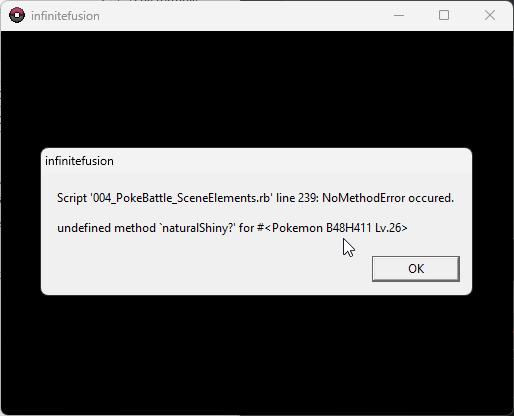
I got a shiny pokemon from wonder trade and every fight I throw it out, it crashes 😦
rough idol
tawny parrot
I got a shiny pokemon from wonder trade and every fight I throw it out, it crash...
that should be fixed on the latest version of the game, install the latest patch
tawny parrot
rough idol
that should be fixed on the latest version of the game, install the latest patch
Oh thanks
rough idol
np
 dusky ravine
does anyone know how to fix this issue? any help would be great.
 night panther
rough idol
But I'm not the best tech support guy
night panther
rough idol
But I'm not the best tech support guy
it's ok, thanks for even offering, i'll get back to you later if it worked tysm
 cerulean cipher
Has anyone had an invisible problem with the battle tower? I enter it and then I am just stuck in the first battle room invisible. I can run around but I cant interact with anything in the room or start the battle (I can open my inventory tho). I had 5.1.1 and put in the patch in its entirety.
 sterile tartan
does anyone know what ive done wrong or what i need to do now ****

 rugged acorn
if it's the same problem i was having before, you need to put the sprites loose in the custombattlers folder and the game will put them where they need to go when you boot up.
on that note, i've noticed a lot of alternate sprites have the same file name as other sprites so the game only gives you one of them. i've been going through all the alts and renamed them to have a, b, c, etc after the numbers to include all of them in my game. but some have quite a few more alts than expected. is there a limit to how many alternate sprites a single pokemon can have in the dex?
sterile tartan
i have no clue. i havent gotten past picking a starter. i got there then decided i wanted everything fused and all customs sprites and such and then i havent gotten to load back in with the custom sprites and everything
 tawny silo
any reason why I cant extract the files from the mediafire infinitefusion?
 tiny ravine
Why do I get viruses when I download the game in virus total?
covert thunder
stiff crag
I just had the same error message, even after deleting my savefile
Are you sure you deleted your save file and not just the shortcut to it in your game folder?
 ivory robin
anyone know what this means and how to fix it? it only happens when i try to import new sprites.
 astral rover
has anyone come across wild encounters not working and perhaps a fix for it?
covert thunder
ivory robin
anyone know what this means and how to fix it? it only happens when i try to imp...
You tried launching as admin?
ivory robin
covert thunder
You tried launching as admin?
yeah, 'cause it seems like it's a permissions issue and i get the same error.
covert thunder
Have you updated your game with the most recent patch? It looks like it's trying to change your folder structure to index all the sprites by dex ID, moving them from one giant mess of images to a smaller mess of folders full of specific images.
If the file path doesn't exist for the new logic, it might not be able to create them
rugged acorn
i'm looking through the sprites and there's a handful that are for example "411.132a_1"
is that intentional or should that be "411.132b" to work properly?
rugged acorn
and is there a limit to how far in the alphabet i can go for alternate sprites?
rough idol
it hasnt been tested properly, someone in spriter general tried and after Q it kinda stopped working, but it could be dependent on a lot of things
covert thunder
tawny silo
any reason why I cant extract the files from the mediafire infinitefusion?
Skill issue. What extractor are you using? I recommend 7zip
rugged acorn
there was a lot of overlapping name files between the original sprites and the alternates so i'm trying to clean it up.
oh well Q should be plenty. i'm just about finished and i only got as far as j on a couple.
rugged acorn
what about alt sprites for normal pokemon?
i have a random espeon sprite with "196_alt"
does that follow the same format so "196a"?
rough idol
Alt sprites for base, unfused mons are not indexed by the game
Meaning you can't swap to them in the pokedex
They can only be swapped manually via file renaming
rugged acorn
noted. i don't really play with non-fused pokemon anyway so it's not that big a deal. i might just change it to 196.196
 fallen plaza
does anyone experience freezing when opening your party, i can barely switch the order of my pokemon w/o freezing my butt off
rough idol
fallen plaza
does anyone experience freezing when opening your party, i can barely switch the...
I think the alternate launcher is meant to solve problems like that
fallen plaza
rough idol
I think the alternate launcher is meant to solve problems like that
yeah it's happening IN the alternate launcher
rough idol
Then it might just be a your pc thing
 zenith sedge
I updated the game and I think I fucked up, when the dnaspliser appears in the startup animation the game freezes and starts going at 1fps and when it finally starts it jerks every 5 steps.
can i extract the save files and reinstal?
safe quail
U can reinstall, u can also try running the game from the alt launcher and turning off download sprites, both of those impact loading times
 olive oasis
all the pictures are doing this what do i do
 rugged acorn
just realized i'm not entirely sure what to do with these other folders from the sprite pack besides CustomBattlers
 safe quail
olive oasis
all the pictures are doing this what do i do
safe quail
olive oasis
all the pictures are doing this what do i do
we can see ur name btw
olive oasis
safe quail
we can see ur name btw
eh its not crazy info if its just a first name
safe quail
Sure
I'm not sure what the X means other than it's not loading but u should probably take ur game files out of the cloud
I see the X in other places so that won't solve this issue, just in general it's good practice to keep the game files out of the onedrive and downloads folders
olive oasis
ok ty
safe quail
rugged acorn
just realized i'm not entirely sure what to do with these other folders from the...
.git isn't supposed to be there, the rest of the folders contain misc. graphics that mostly have more involved processes in order to utilize. U don't have to do anything with them until u want to use them
rugged acorn
as long as i'm not gonna run into some unexpected error by not having them in my main PIF folder. btw, that pack folder isn't part of my PIF folder since i just moved the sprites into the main CustomBattlers folder to get indexed.
idk if that matters
safe quail
It doesn't matter where the folder is, nothing will pick up the other files inside it unless they're sorted into the correct game folders
All the other files in the sprite pack are graphical additions, and none of them are things the game expects to have
wraith rain
wraith rain
can someone help me out with this?
anyone able to assist me with my problem?
safe quail
wraith rain
anyone able to assist me with my problem?
search the channel for "missing game.ini" and make sure u follow the bot's checklist
wraith rain
safe quail
search the channel for "missing game.ini" and make sure u follow the bot's check...
where would i search for it?
safe quail
Discord's search feature
 vast pulsar
Hi. Sorry to be a bother. But I’ve downloaded the game serval times and have been getting this error each time.
The game boots up and I can select my save but as soon as I do this appears.
 vast pulsar
Could it possibly be another rom mixing with it? I do have a lot of them on my Pc
safe quail
Game isn't a rom
vast pulsar
I’m trying my best to find it but I’m unsure of it’s location
safe quail
The error message is telling u the file path
Theoretically there should be a "doors4" file floating around in ur Characters folder
vast pulsar
The game seems to be working now
safe quail
Well alright then
vast pulsar
Though I don’t have backgrounds in battle
safe quail
Fwiw my entire graphics folder does not contain a "doors4"
vast pulsar
Strange
safe quail
So I'm not sure what the game is trying to load here
safe quail
My guess is that it's a typo generated by a coding error
We've had one of those that's a lot more common
vast pulsar
I’m not entirely certain at the moment. I just have the shortcuts on my desktop
safe quail
ok, that's fine
vast pulsar
This is what appeared
 safe quail
Those are just shortcuts and not the .exe files themselves right
safe quail
ok
Usually if graphics aren't showing, it's bc ur game can't find them, which is most commonly associated with the game folder being located in the downloads folder or on the onedrive, both of which mess with its organization
But if it's on ur desktop I'm not super sure why backgrounds wouldn't be appearing, might be related to the error that magically disappeared
vast pulsar
Besides the no background thing the game seems to be running smoothly now
tranquil verge
Does anyone know how to make a shortcut for the game through wine on Mac?
 lucid wolf
has there been updates on the black tilesets bug yet?
night panther
rough idol
https://youtu.be/uvqXltkYIao
i think it worked, ty
every time I start the game, it asks me if i wanna implement the custom sprites, it says the RGSS script isn't working
turbid terraceBOT
Hey @night panther! Are you having trouble starting the game? If you are launching v5, and your screen is stuck on black at startup, don't worry, it's normal. Leave the game running for a few minutes and it will work eventually.
Do not click on the window during this, otherwise you'll get the error below and the game will close.
https://cdn.discordapp.com/attachments/308392115338084360/994274889055875142/Capture.PNG
 night panther
oh i see
 hollow bear
am i just missing some sprites

game starts up and everything but crashes on the Start screen
did a reinstall a week ago so i could play without the custom sprites i put in a while back
game was working fine, started up a new game, got up to pewter already, then today it just wont boot
 patent mason
hello, apparently i found out that my save file is causing this error. Does anyone know how to fix this other than deleting my save file?

 opaque thorn
What do i do when i try to open the game but it says “the code execution cannot proceed because zlib1.dll was not found.”
It says reinstalling may help but if there is another way i wanna try that bc it took 2 hours to install lol
opaque thorn
opaque thorn
What do i do when i try to open the game but it says “the code execution cannot ...
And it says the same thing but instead x64-msvcrt-ruby310.dll was not found
The game opened fine at first then i closed it and when i tryed to reopen it started giving error messages
 slender totem
Does anyone know what this setting does? "POKERADAR_BATTERY_STEPS = 0"
turbid terraceBOT
Hey @slender totem! Are you having trouble with the Pokéradar? You get it from the scientist in Cerulean City's Pokécenter. She gives you the Exp share as a quest reward there, and then will go to Route 24, where she will give you the radar.
When using it, make sure you have a repel active, or else you may only get regular encounters.
More info here: https://infinitefusion.fandom.com/wiki/Pokéradar
slender totem
Thanks bot, but do you know why its set to zero?
 opaque thorn
opaque thorn
opaque thorn
What do i do about this
 wind cedar
Guys when using a CONTROLLER what button do i press to turbo?
 sly atlas
hello, anyone know how to fix this?

modern mode, turned on randomizer mode for wild pokemon, trainer, and gym leaders. error popped when trying to battle a trainer
 wheat vine
how do i delete old sprites?
 sterile pivot
Select them and Press canc
And put the new One in the folder the old One was
Give the same name as the old One of course
wheat vine
sterile pivot
Give the same name as the old One of course
im sorry but how? is there anyway u can show me idk if the game even has the sprite im looking for anyways the generator website is just giving me a different one
sterile pivot
I have never played the game actually but i think that there are folders where all the sprites are stored
There you have to look for the One of the fusion you have to change and switch It with the new one
wheat vine
i went threw the folders and couldnt fine it
clever portal
sly atlas
Hey I think I have the same problem! I’m yet to get a fix but I’ll @ you if I get a response before yours! 🙂
 odd axle
This happens everytime I enter or exit any type of building or cave

But when i restart the game everythint works fine...
 stoic crater
Everytime after a battle or after I walk outside off a building, my screen turns black for 10 / 15 seconds until it loads in. It is really frustrating because it is making the gameplay very slow. Does anyone know how I can fix this issue?
 winged ibex

 compact moon
Hello
My game used to get stuck on naming my character now it says name error occurred
Does anyone know how to help?
slender totem
I can't tell if I sequence broke. I beat sabrina, went to the train station and bought a ticket and went to Goldenrod. People seem to think you shouldn't be able to do that until you get given a free ticket later in the game. Second, I went to Pallet Town and surfed down, and now I'm at Moltress, and the story seems like I should have done something with Articuno or Zaptos first? "Finally the last legendary bird". Should the game have made me travel to Cinnebar via Fushia? Am I overthinking all of this lol?
jolly nacelle
Hey
My game plays normally now
But
Sometimes I open it
And it closes by itself
Should I worry
I restarted and works but still
 pseudo pivot
yo where do I place the fixed sprites after i download the "fixed extensions.zip" file posted in announcments
rough idol
pseudo pivot
yo where do I place the fixed sprites after i download the "fixed extensions.zip...
custombattlers
pseudo pivot
thx
normal field
can i update my save from 4.9.1 to 5.1.2.4 with the patch? or do I need to download at least a 5.1 to update?
 main shell
I am on modern mode and I get this error. I tried using the update man already. My game closes after this message shows up. I have tried using the alternate and standard launcher, they both give the same error

Idk how to progress
someone said that my save file is corrupted when I asked this earlier
 mossy ferry
si there any setting i can change in debug menu to lock pokemon from evolving?
 quartz smelt
Does anybody know how to solve this ?

 humble needle
why does my game lag after an encounter or when i leave the house
 native temple
How do I fix this?

 haughty crypt
I just downloaded latest version light mode and when I opened it said something about it unable to open the data/script.rx data. Could someone help me fix this?
 north lava
why are my save files in whatever this is

 errant sigil
Hey lovelies! How would I fix this so I can play the game?

 tame torrent
hello, when Iam about to start the game the launcher appears for 1 sec than disappear any help with this?
main shell
main shell
I am on modern mode and I get this error. I tried using the update man already. ...
pls help
 kind star
what does this mean

happened when I used hyperbeam on the turn foresight should have hit
north lava
is the save file supposed to look like this?

 main shell
Try alternate launcher
humble needle
main shell
Try alternate launcher
ok
 crimson hinge
Is there something to do with this error?
 humble needle
main shell
Try alternate launcher
humble needle
main shell
Try alternate launcher
It works a bit better
But there's still come lag
sterile pivot
I need some help, I can't full screen the game at all, if I change the dimensions at all it goes black and I can't get it back until I restart it
 limber osprey
Need help everytime I try opening my game this pops up

 weak gazelle
is it just me or is up-down movement faster than left-right?
 cursive sphinx
Hello, I've been playing for a while, and I'd like to know how to reduce the waiting time between map changes, and also when I'm in my boxes on the PC the switch between the box lag a lot. If you have any suggestions to make the game run smoother it would be great :), if you can't answer there's no problem, have a nice day.
safe quail
cursive sphinx
Hello, I've been playing for a while, and I'd like to know how to reduce the wai...
U can try launching the game from the alt launcher
Turning off download sprites may also help with load times but maybe not in these specific instances
cursive sphinx
safe quail
U can try launching the game from the alt launcher
thank you for answering so quickly, i'll try it and i'll say what right after. thanks for the advice
safe quail
limber osprey
Need help everytime I try opening my game this pops up
This is an issue with ur save file, altho the exact details are unclear. What version are u on and did u update from a previous version?
safe quail
crimson hinge
Is there something to do with this error?
This is a known issue with an unknown cause or fix. If u want specifics, the traceback.log in question has an invalid input for the query of "'have_key?" that we don't understand, and the input in question appears to be the entire registry of every NPC battle in the game. This error has been known to occur at the giovanni boss battle as well as during certain rival battles.
If ur extracted folder is located in the proper place and this issue doesn't go away upon rebooting, I don't know of any action to recommend
safe quail
kind star
what does this mean
In the few instance I have seen where something is logged in errorlog.txt, the game does not actually crash. However, those were when items were used. Did the game crash in this instance?
kind star
Oh it didn't but it also wouldn't let me continue the crash report would appear over and over while leaving the game stuck
safe quail
I see, so u couldn't choose any other actions and the opponent couldn't make any actions either?
clever portal
clever portal
Hi guys, getting this error when going into the first gym battling either of the...
Is there any update on this please?
safe quail
clever portal
Is there any update on this please?
If reshuffling the rando option didn't fix the issue, the only known fix is to turn off the rando setting that's encountering problems
cursive sphinx
frerrous... now with the alternate launcher i have an error message
kind star
safe quail
I see, so u couldn't choose any other actions and the opponent couldn't make any...
Yeah game just wouldn' move forward it was stuck on that "Izanami must recharge text" while making the crash report reappear even when I closed it
cursive sphinx
 clever portal
safe quail
If reshuffling the rando option didn't fix the issue, the only known fix is to t...
clever portal
safe quail
If reshuffling the rando option didn't fix the issue, the only known fix is to t...
So turn off gym trainer randomisation? Thanks for the quick reply 🙂
safe quail
cursive sphinx
This may or may not be an issue with the download sprites feature from before, are u on the light version?
Nvm that question the alt launcher isn't in the light version
If u can, try to mash past the intro screen
safe quail
kind star
Yeah game just wouldn' move forward it was stuck on that "Izanami must recharge ...
Have u had the Foresight/Hyper Beam interaction successfully before? What item was ur mon holding?
clever portal
safe quail
If reshuffling the rando option didn't fix the issue, the only known fix is to t...
This has fixed it and the Pokémon are still randomised! Double win, thanks for your help😁
@sly atlas hey, seem to have a fix if you haven’t tried to re randomise the gym trainers, I turned gym randomisation off and it’s worked!
kind star
safe quail
Have u had the Foresight/Hyper Beam interaction successfully before? What item w...
No that was the first time I tried and my pokemon was holding the glasses that boost special attack
I'll retry it later
safe quail
I would personally avoid attempting to repeat the interaction
Not sure if the issue is just hyper beam or hyper beam and foresight
Foresight by itself works fine
cursive sphinx
safe quail
If u can, try to mash past the intro screen
It works but the lag problem is not solved... 😦 maybe you have another idea ?
 pulsar minnow
There are still quite a few Pokémon with bugged sprites if you guys want I can hunt as many down as I can find
cursive sphinx
what do you mean by bugged
 cursive sphinx
oh ok
pulsar minnow
I can hunt them down and make a folder of them
safe quail
cursive sphinx
It works but the lag problem is not solved... 😦 maybe you have another idea ?
If uve extracted ur game and ur game files aren't in ur downloads or onedrive folders, I can't recommend anything else
 hollow sundial
Playing infinite fusions and I keep getting this on start up but the file is there I've checked. Had to re install the game. Now I get this. I was playing the game perfect before but i had issues going from 2.1.2.3 to 2.1.2.4 just totally messed up my files.
 safe quail
Game isn't made for mobile
lucid wolf
tech support, i've come to bargain, has there been development on the black tilesets bug?
safe quail
There's no reason to expect it to function or function well
As the game gets more complex it will become less compatible with mobile and mac, etc.
cursive sphinx
safe quail
If uve extracted ur game and ur game files aren't in ur downloads or onedrive fo...
no prob have a great day
lucid wolf
i've been trying to interview some people here that have posted the same problem but i've still got no new lead
hollow sundial
safe quail
As the game gets more complex it will become less compatible with mobile and mac...
Thank you
pulsar minnow
When I get a ton of them who would I send the folder to
safe quail
Not sure
I'm also not sure if this is an issue with the game or with ur hardware or install
pulsar minnow
It’s been an ongoing issue
The sprite images have a png extension instead of the normal
So the game can’t read them
safe quail
The png extension is the normal
pulsar minnow
Weird
pulsar minnow
Fair point
safe quail
It's worth noting
That file also doesn't exist
We've never made a custom sprite for Persian / Clefable
The autogenerated sprite would be under a separate filepath than the one the game is searching for
pulsar minnow
It says it’s an unsupported image format
safe quail
It says it is
So I'm interested what happens when u try and locate that file
Because it shouldn't exist in the first place
lucid wolf
are we troubleshooting games or quantum physics here 
safe quail
fr
 safe quail
So
My initial assumption is that the download sprites feature has "reserved space" in a sense for these custom sprites, and then gone to go search for them
When it find that the images don't exist, it breaks the function and continues, but then when the game tries to call that image it finds the incomplete file
pulsar minnow
That tracks
safe quail
If that's the case, every fusion that doesn't have a custom sprite will encounter this error
pulsar minnow
Another that I just remembered this has happened to a sprite that was working fine the day before
safe quail
Do u remember which one
pulsar minnow
It was Luigia gabite
safe quail
dex lugia
turbid terraceBOT
Lugia's IF Pokédex number is 249!
safe quail
dex gabite
turbid terraceBOT
Gabite's IF Pokédex number is 298!
pulsar minnow
I ended up just manually replacing it with the image from the calculator
safe quail
Those images should already be located in the Battlers folder
Lugia Gabite also is not a custom sprite
When did this error first start occurring
safe quail
Had u interacted with ur game files at all
pulsar minnow
It’s been more and more common since then
And if you count adding custom sprites from the discord then yes
safe quail
So what I would do is turn off the download sprites feature if u can, then delete ur custombattlers folder and re-extract the folder from ur full game .zip and re-install the sprite pack
I think it's likely that ur index is full of these placeholders that are breaking the game
And they'll be impossible to locate
pulsar minnow
Ok
 bitter flint
what do i do
 safe quail
bitter flint
what do i do
bitter flint
safe quail
bitter flint
what do i do
bitter flint
damn
safe quail
bitter flint
damn
If u want to test smth for me, try going back to the update man in the pokecenter and fixing ur game
I don't know if he'll be able to fix a script error or not
But it's worth a shot imo
bitter flint
I dont understand, this error shows in my first battle against blue after choosing the starter
Also i player with 0 issues many hours yesterday, i just restart a lot because im nuzlocking
safe quail
O right
This issue most commonly appears at Giovanni so I forgot where u were
Unfortunately script errors can appear anywhere and usually with little cause, so smth that may be working 1 day can stop working the next
bitter flint
I understand
safe quail
This specific error happens with these specific fights but for any script error we can only know where the error is coming from and what the fix is at best
Not why it's happening or why it doesn't happen to other people or at other times
 stoic igloo
when changing from one landscape to another (like exiting a pokemon center or ending a battle, a black screen appears for at least 15 seconds and then goes back to normal, any idea?
turbid terraceBOT
Hey @stoic igloo! Are you having trouble starting the game? If you are launching v5, and your screen is stuck on black at startup, don't worry, it's normal. Leave the game running for a few minutes and it will work eventually.
Do not click on the window during this, otherwise you'll get the error below and the game will close.
https://cdn.discordapp.com/attachments/308392115338084360/994274889055875142/Capture.PNG
 pliant pond
I heard that theres a way to have a fixed starter pokemon besides the original starters but im not sure how to do that
safe quail
pliant pond
I heard that theres a way to have a fixed starter pokemon besides the original s...
When u start a second save the game will ask if u want to use default starters, if u say no u can pick any unfused pokemon to be ur starter
pliant pond
I see, is there a way to choose something that isnt a starter or is it all random from there
pliant pond
Cool thanks
safe quail
I don't know of a way to select what ur encounters will be if that's what ur asking
pliant pond
Not the encounters, i just wanted to start with a certain pokemon
 tired zinc
my game has awkwardly long loading times whenever i enter a building or something similar (e.g., entering a pokecenter) is this just a general thing with the game that happens? Just wanna make sure I installed it properly
safe quail
Yea that's normal but dependent on ur hardware, u can try launching from the alt launcher to reduce load times
safe quail
Dope
 round prism
in some locations there is no music (cerulean city for example). Is there way to fix this or ideas what can cause this atleast?
safe quail
Cerulean City isn't one I've heard of, and I get the Cerulean City music just fine, but there are certain locations where music just doesn't play, ever, like in the Safari Zone
round prism
route 24 is no music for me aswell, but i sure there is more then that. I change sprites and trainer sprite aswell, i wonder if that can cause some troubles, even if it dont touch data and audio files
safe quail
Did u have audio before, if u know
round prism
cant say i did, cos i change sprites almost from start
safe quail
It could be that ur game is having trouble running .ogg files
There are .mp3 substitutes in the audio files but I think u can probably play those just fine and it's more likely that the game isn't being told to switch to them
limber osprey
safe quail
This is an issue with ur save file, altho the exact details are unclear. What ve...
5.1.2 and I updated yes
safe quail
What previous version
limber osprey
5.1.1
safe quail
The saves should be fully compatible
If u still have a separate 5.1.1 extract, does that run the save?
limber osprey
nope
 safe quail
So the save isn't exactly corrupted, but for our purposes I think it might as well be
safe quail
It seems like the program got interrupted while it was saving or something
Yea deleting save should work
limber osprey
thanks imma try
pliant pond
I think i discovered a bug
So i started a new run with the randomized setting and turned everything on randomized except starters. Apparently by doing so, you can choose which starters to start with from each region including a custom one. The custom option also has a setting for fused pokemon. So i made a rayvoir. But by doing so, once i reached the grass, all the supposedly random pokemon were the usual rattatas and pidgeys. Not even fused. Which is crazy cause i put the random setting to moderate
 main terrace
How can I fix lag after leaving a building or ending a battle
 glossy dove
My map goes black sometimes. I dont know how to fix it.
 ionic stump
I talked to the NPC in the safari zone that gives Surf and I don't have Surf in my bag. I talked to him again and he acknowledges that I got Surf from him. Not sure if this is a known bug or what. I don't have any item randomization in my file. I have six badges and I can't progress any further because of this. I tried the debugger guy and that didn't help either. Is there anything else I can do to try and fix this?
ionic stump
safe quail
No known fix
Oof alright thanks.
safe quail
Sometimes gift TMs and HMs just go missing
I'm missing the violet city gym TM rn
Wait no, I'm not
I forgot it got changed from Sky Drop to Defog
ionic stump
I started a second file and I think I'm missing one from a gym in that too, but it's not an HM so I wasn't as concerned
safe quail
yea
I think I was missing Dragon Dance at some point and it came back but it may just be that Tyranitar can't learn it as a TM and I didn't think to check my entire bag
 elder stone
uhhh so i extracted the February sprite pack to my graphics folder for the game and it’s not showing up when i run the game idk what i’m doing wrong
 arctic verge
Okay. I have been confusing myself for way too long. I get replacing the old files with the new for the sprite patch... but Why does the patch folder have so many folders that have no equivalent in the main game folder?
safe quail
If ur patching the light version, it may be missing things like the alt launcher that could be included in the patch
arctic verge
The folder I have is for 5.1.1.1 full
safe quail
elder stone
uhhh so i extracted the February sprite pack to my graphics folder for the game ...
Putting the sprite pack folder in the graphics folder does not sound accurate to the instructions given
safe quail
arctic verge
The folder I have is for 5.1.1.1 full
I'll download the patch again and check but patching from 5.1.2.0 to 5.1.2.4 I did not notice any major additions, and saves are for the most part fully compatible between 5.1.1 and 5.1.2, so I don't expect to find large differences
elder stone
safe quail
Putting the sprite pack folder in the graphics folder does not sound accurate to...
i also tried putting it in the custombattlers folder too
safe quail
Yes, that doesn't sound accurate either
I do have each extract separate in my folders currently and there is about a 600MB difference between the two
arctic verge
Ohhh.... Okay. So my friend sent me an older download link, apparently. maybe after I do the 5.1.2.4 patch things will make more sense...
safe quail
As long as u haven't replaced any of ur files that should be fine
elder stone
safe quail
Yes, that doesn't sound accurate either
if you don’t mind could you remind me of the instructions again?
arctic verge
elder stone
if you don’t mind could you remind me of the instructions again?
You install the patch folder to its own separate file location, then drag the folders within into their respected place in the main game file to replace those existing folders.
 mighty spade
when ever i try to unzip the folder with the game it causes file explorer to crash is there any way around this?
safe quail
There are 2 ways to install the sprite pack:
a) Drag the custombattlers folder from the 1-87 sprite pack into ur graphics folder and let it replace the current custombattlers folder. This option may not be available for the 87 sprite pack by itself, only the 1-87 sprite pack
b) Copy all sprites located in the 87 sprite pack into ur game's custombattlers folder
When u run the game, it will sort these new sprites into its custombattlers index
safe quail
mighty spade
when ever i try to unzip the folder with the game it causes file explorer to cra...
This is an issue on the hardware side, not an issue with the game or download itself. Try to use 7-Zip or WinRAR if ur default extractor is not working
elder stone
ohhhhh ok. thank you. i’ll try all of those methods.
 craggy zealot
Hey. I have been trying to download the game but it keeps telling me that there is a virus and does not let me proceed. What should I do ?
 vital wave
I'm not sure if the fault was by the download link or if was by Opera GX, but when Installed this morning the latest version, I received one of the most dangerous troyan in Spain, please, check if the problem was made by the link.
The virus' name is Agent Tesla
craggy zealot
how would i check that?
vital wave
I don't know
safe quail
Where did u download from
don't post the link if u believe it to be harmful, I just want the website name
craggy zealot
the discord link
craggy zealot
yes
safe quail
What software is telling u there is a virus
craggy zealot
windows antivirus, I am using Opera GX and after the mega Download completes a popup appears and opera GXstops the download
vital wave
Man, I received the virus and I need to format my pc
(Sorry if my english is not very good)
arctic verge
So, I know the CustomBattlers folder are the meat and potatoes of the sprite patch... but I still don't understand what all these other files are for. Some have matching folders I could combine them to, but like... whats with the ,git folder... or all the Other folders that dont have anything to add them to?
safe quail
The .git folder isn't supposed to be there, ignore it, delete it if u want
The Other folder has a bunch of other spritework for various other things, but they would require manual replacement of each graphic in question to implement
With some exceptions
I presume that the game has a way to check for the spritework used for the Eggs automatically, so long as the files are in the proper folder in the game files
safe quail
craggy zealot
windows antivirus, I am using Opera GX and after the mega Download completes a p...
If both ur virus and LuKeXs' virus are detected and perhaps caused by interacting with the website through Opera GX, that may be the issue. Downloads from the current Mega folder using other browsers have for the most part not reported any issue afaik. There was someone last night who was getting suspicious desktop notifs from their browser (which is the same as mine), but they haven't updated on their situation and seem to be playing the game fine according to message history
They were also using the mediafire link, not the mega
craggy zealot
ok
safe quail
Ur issue may also be dependent somewhat on geographic location, not sure
vital wave
@craggy zealot you are from Spain?
craggy zealot
no
vital wave
So the geographic location aren't the problem
safe quail
If u believe the downloads in the mega to be dangerous in any form, u can contact one of the mods and see what can be done, but the regulars who help with tech support likely will not be able to advise or fix anything
craggy zealot
I will thanks
 late night
Where do I put the fixed extension zip?
safe quail
The zip should contain a collection of sprites that were incorrectly formatted in the most recent sprite pack, so follow the same process for both
late night
Thx
 sinful plover
Hey guys, my pokemons doesnt show the level of pokemons in battle, do you guys know how to fix it?
wary ember
I can't seem to use the new sprites... I extracted them to the folder but it seems I dont have any alternative sprites to use lol
safe quail
sinful plover
Hey guys, my pokemons doesnt show the level of pokemons in battle, do you guys k...
Nope, this is a new one
safe quail
wary ember
I can't seem to use the new sprites... I extracted them to the folder but it see...
Can I see ur custombattlers folder
wary ember
safe quail
Can I see ur custombattlers folder
 safe quail
So the only sprites I am seeing currently are alternate base sprites
These go in the battlers folder and the game does not recognize alternate sprite filenames for unfused pokemon, so u will have to rename them manually for each one u want to use
wary ember
safe quail
These go in the battlers folder and the game does not recognize alternate sprite...
the fusions went straight to "indexed" with me doing anything... o.O
safe quail
Yes, that is what they are supposed to do
When the game recognizes compatible fusion sprites, it will sort them into the indexed folder
This is not the case for sprites which are formatted improperly, or for alternate sprites for unfused pokemon, which do not belong in those files and will not be recognized
wary ember
The thing is, I fused Gengar/gengar and got this:

but I want this one:

when I go to the pokedex I only have the first one
safe quail
The second one is located in ur battlers folder, yes?
wary ember
yeah
safe quail
Well if ur game is not recognizing ur battlers folder
That is mildly concerning
But u may be able to copy it from ur battlers folder to ur custombattlers folder without issue
crimson hinge
safe quail
This is a known issue with an unknown cause or fix. If u want specifics, the tra...
extract the folder in the proper place? what do you mean by that?
wary ember
safe quail
But u may be able to copy it from ur battlers folder to ur custombattlers folder...
Oh so the game recognizes the Battlers Folder and not the CustomBattlers one?
safe quail
wary ember
Oh so the game recognizes the Battlers Folder and not the CustomBattlers one?
Based on ur observations it appears the opposite is true
safe quail
crimson hinge
extract the folder in the proper place? what do you mean by that?
If the folder is located in the downloads folder or the onedrive folder, there have been many instances where the game has lost track of its files due to the way each folder organizes their files
wary ember
safe quail
Based on ur observations it appears the opposite is true
Ah yes, that's what I meant xD But its supposed to recognize th Battlers one. I'll give this a shake and see what I come up with
 edgy pine
Just downloaded the newest light version this morning (my computer isn't great) and I'm getting this whenever I try to do the randomizer (via a new save file or my existing). The game works great except for this 😦 Is this a consequence of the light version or something I did wrong in installation?
 crimson hinge
Ooohhh and you recommend another folder or the desktop?
safe quail
The desktop or documents would be ideal
safe quail
edgy pine
Just downloaded the newest light version this morning (my computer isn't great) ...
The randomizer has many issues in the current version of the game
edgy pine
would you recommend 4.9 then?
safe quail
U can try turning off various rando settings until it works, or u can try running the game from 5.1.1.1
edgy pine
ok!
safe quail
I would not recommend any version earlier than 5.1
As they may not transfer once a more stable version of 5.1.2 or greater releases
edgy pine
thanks, I'll extract it now
wary ember
safe quail
I would not recommend any version earlier than 5.1
Downloading the 5.1.1.1 fixed all my issues
patent flare
a lot of music tracks just. dont play
i even converted a bunch of them from .ogg to .mp3 since i have found that RPGmaker games on Macs dont like playing .ogg files but that didnt change it
safe quail
Most of them already have .mp3 substitutes
patent flare
hmmm
safe quail
I imagine the issue is that the games are not expecting to find .mp3 files and are not being told to check for .mp3 when they can't play/find the .ogg file
wary ember
@safe quail sorry to bother, but If I donwload the sprites from this website and replace them in my folder, will it work? https://kaboom242.github.io/PokemonInfiniteFusionTool/?id=255
 quick horizon
Pokémon Infinite Fusion
Exception: TypeError
Message: cannot convert Fixnum into String
EliteBattle_Animations:88:in `+'
EliteBattle_Animations:88:in `animateBattleSprites'
EliteBattle_Animations:61:in `each'
EliteBattle_Animations:61:in `animateBattleSprites'
EliteBattle_Battle:328:in `pbAttackPhase'
EliteBattle_Battle:327:in `times'
EliteBattle_Battle:327:in `pbAttackPhase'
EliteBattle_Battle:238:in `pbStartBattleCore'
EliteBattle_Battle:237:in `logonerr'
EliteBattle_Battle:237:in `pbStartBattleCore'
safe quail
They should
wary ember
safe quail
They should
Thanks!
quick horizon
this shows up every few fights anybody know about it?
patent flare
safe quail
I imagine the issue is that the games are not expecting to find .mp3 files and a...
hmm probably not much i can do then
quick horizon
also idk if im missrembering but i dont think my mons are getting moves from lvl ups
safe quail
Game uses gen 7 learnsets
quick horizon
doesnt charmander get smokescreen and ember really early?
quick horizon
yeah havent gotten either but its lvl 9
safe quail
What version u on
quick horizon
its the legacy one but it worked great before so im real confused rn
safe quail
For the record, the scripts that are encountering errors above do not exist in the current version of the game
Previous versions may use different learnsets and I cannot help with any versions pre-5.1
quick horizon
fair enough its just that i played legacy before and i got moves like normal
safe quail
Any number of things may be going wrong that I cannot advise on
patent flare
oh i think i figured out the issue with the music
some of the filenames for the songs corrupted and changed the é in Pokémon to. not an é
safe quail
I see
Still, one of the ones that doesn't play even on windows can't have that issue
Being as Pokemon isn't in its name
patent flare
hmm
safe quail
None of the ones related to the Safari Zone play in the Safari Zone itself
The Safari Zone Gate one does, I think
patent flare
ah
 woven oriole
Does anyone know why I'm missing the option to do 2v2 or 3v3 in the options? I have the most recent version
 alpine halo
Hey guys, I have joiplay Rar and had 5.0.36.4 downloaded and extracted but could not play. All the graphics were all jumbled up. No clue what I did wrong . Deleted everything and Im trying again with full zip 5.1.2.4 and its been 4 hours lol . idk if its even the right file.
 night karma
after an encounter or battle, theres a long blackscreen pause.
turbid terraceBOT
Hey @night karma! Are you having trouble starting the game? If you are launching v5, and your screen is stuck on black at startup, don't worry, it's normal. Leave the game running for a few minutes and it will work eventually.
Do not click on the window during this, otherwise you'll get the error below and the game will close.
https://cdn.discordapp.com/attachments/308392115338084360/994274889055875142/Capture.PNG
safe quail
woven oriole
Does anyone know why I'm missing the option to do 2v2 or 3v3 in the options? I h...
This may not be a feature in the most recent version
safe quail
alpine halo
Hey guys, I have joiplay Rar and had 5.0.36.4 downloaded and extracted but could...
Game is not made for mobile, there is no reason to expect it to function or function well
safe quail
night karma
after an encounter or battle, theres a long blackscreen pause.
U can try launching from the alt launcher
night karma
alright
quick horizon
my charmander learnd smokescreen fine guess he just really didnt feel like learning ember lol
safe quail
If he is above the requisite level he should be able to learn it from the move reminder in 2nd floor of pokecenters
Assuming that is a feature in ur version
quick horizon
oh thx ill go check it out hopefully it is
alpine halo
safe quail
Game is not made for mobile, there is no reason to expect it to function or func...
Ahh gotcha
patent flare
noticed the PC doesnt have selection sounds lol
weird, the .wav file for it is in here
which sounds do and dont play seems really arbitrary huh
safe quail
yes
 terse blaze
How do you place the Custom trainer sprites in your game?
Like for example
The Mewtwo or Jotaro one
safe quail
Do you need help customizing your in-game character? To change your trainer sprites, you need to swap out or edit several files.
for the boy sprites:
for the overworld: in the Graphics/Character folder; boy_bike.png, boy_dive_offset.png, boy_fish_offset.png. boy_run.png, boy_surf_offset.png, and trchar000.png
for the trainer card: in the Graphics/Trainers folder; POKEMONTRAINER_Red.png
for the pokeball throw animation: in the Graphics/Trainers folder; POKEMONTRAINER_Red_back.png
for the battle transition: in the Graphics/Transitions folder; vsTrainer0.png
for the intro scene: in the Graphics/Pictures folder; introBoy.png
for the girl sprites:
for the overworld: in the Graphics/Character folder; girl_bike.png, girl_dive_offset.png, girl_fish_offset.png. girl_run.png, girl_surf_offset.png, and trchar001.png
for the trainer card: in the Graphics/Trainers folder; POKEMONTRAINER_Lead.png
for the pokeball throw animation: in the Graphics/Trainers folder; POKEMONTRAINER_Leaf_back.png
for the battle transition: in the Graphics/Transitions folder; vsTrainer1.png
for the intro scene: in the Graphics/Pictures folder; introGirl.png
You can find some ready made alternate trainer sprites in the sprite packs in downloads!
safe quail
No
U have to make sure ur files are named the same
Whatever u do with the original ones doesn't matter but they'll be overwritten if u don't move them
terse blaze
Ok thanks you
 calm ravine
Aight ive been lookin for possible solutions but it doesnt seem like its addressed alot lol but my game keeps freezing for a while in transitions like out of buildings and Pokémon battles idk if this is an ingame issue or not lol i just wanna play the game lmao
calm ravine
safe quail
I address this all the time
Aight thx ive been looking for a minute ill try this
Ok i tried loading the Alt Launcer but its just a black screen
turbid terraceBOT
Hey @calm ravine! Are you having trouble starting the game? If you are launching v5, and your screen is stuck on black at startup, don't worry, it's normal. Leave the game running for a few minutes and it will work eventually.
Do not click on the window during this, otherwise you'll get the error below and the game will close.
https://cdn.discordapp.com/attachments/308392115338084360/994274889055875142/Capture.PNG
safe quail
That's normal
Alt launcher frontloads some processes so that load times are reduced in-game
It stays on a black screen for like
5 min
safe quail
Nice
patent flare
hmm so there's no way to fix certain sounds not playing, is there
like the ones that should play but dont (PC startup, cursor move, etc)
safe quail
Not that I've seen
patent flare
darn
i had to restrain myself from replacing all the cries with their modern versions bc i did that once for pokemon insurgence
safe quail
Does that game still exist
patent flare
yeah! it is just feature complete i think so it doesnt get updates anymore
safe quail
When did that happen
patent flare
several years ago
yeah the latest version was released in may 2020
anyway since i cant fix sound effects i should get back to actually playing the game lmao
safe quail
Alright
patent flare
hmm, just loaded up the mega file of all sprites but some of my sprites didnt change
namely togetic+zubat which should have a custom sprite
safe quail
dex togetic
turbid terraceBOT
Togetic's IF Pokédex number is 176!
safe quail
dex zubat
turbid terraceBOT
Zubat's IF Pokédex number is 41!
safe quail
this one?
 safe quail
It should have been autosorted into the indexed folder in the custombattlers folder once u booted the game
safe quail
Did the game prompt u to sort anything else?
patent flare
i'll relaunch and see
the prompt at the beginning with "sprites detected" is the one right?
safe quail
yes


 safe quail
Right, did u turn off download sprites after skipping this
patent flare
yeah i turned downloading sprites off
safe quail
Well that's no good
There's a typo at "...CustomBattlers//1.2...," but I thought it was exclusively generated by download sprites
patent flare
this is the current one (says 1.1.png now)
 safe quail
Yeah, same deal
It makes sense with this context that the error says that, but if it's not connected to download sprites that means ur entire indexing process is nixed
patent flare
uh oh
safe quail
@stoic sigil u said u found a coding oversight that causes this one, don't suppose u know if we could find and edit out the typo in any of the scripts?
patent flare
i am on 5.1.2.4 btw
safe quail
Yeah I assumed u to be, u would have to be on 5.1.2.0+ to have the download sprites option, and the other versions got replaced quickly
patent flare
ah
safe quail
good to confirm tho
patent flare
so i guess this isnt due to an issue on my end? i was worried about that since i am playing via Wine on an ARM Mac
stoic sigil
safe quail
<@391704042524639243> u said u found a coding oversight that causes this one, do...
I'm gonna get the fix into the next version as soon as I have the time, but this weekend is busy. If one is familiar with scripting, the settings script in Data holds the folder constants and they just need to change all occurrences to remove the extra slash
safe quail
How much beyond a find-and-replace for the double slash would need to occur
stoic sigil
safe quail
How much beyond a find-and-replace for the double slash would need to occur
It's literally just find and replace + some common sense to remove extra slashes etc.
stoic sigil
The issue is simply how all the older folder constants include a slash at the end, but CustomBattlers doesn't, so there are some simple code errors where an extra slash is added
safe quail
Ah so it's the string being appended improperly
stoic sigil
safe quail
Ah so it's the string being appended improperly
Yeah
patent flare
are these the lines in question
 safe quail
I'm only looking at my scripts thru notepad atm lol so mine looks different
I'd need to take a moment to find that function
patent flare
i'm using TextEdit since thats the mac equivalent lol
i can see if i can find what line its on
lmao in classic apple fashion TextEdit doesnt display line numbers, one sec
line 77 and 78
safe quail
My settings script in my 5.1.2.4 extract doesn't appear to contain this function
patent flare
am i in the wrong script lol
safe quail
This seems like more of a correct place to be than where I am
patent flare
i checked 999_Main.rb since that seems to be the script implicated in the error
safe quail
It may be because I updated these files from 5.1.2.0 instead of it being a fresh extract and some things didn't fully replace
stoic sigil
The settings file contains mostly constants at the top, you'll want to find the custombattlers one and add a slash at the end and then finding all occurrences referring to that constant to make sure the slashes are added/not added correctly (I recommend Visual Studio Code for this)
patent flare
yeah if i am reading this correctly, the error points to line 38 of 999_Main and line 38 points to lines 77 and 78 which are the "/" lines i screenshotted
safe quail
Yea it's been a few semesters since I was a CompSci student lol
patent flare
i have never coded unless writing minecraft datapacks counts lmao
safe quail
I think I've found the constant in my file, it's missing a slash but it's working fine so I'm not messing with it lol
stoic sigil
If you don't wanna get into the code I recommend just downloading and adding the missing sprites yourself (or using the full version)
patent flare
i have the full version i think
stoic sigil
safe quail
I think I've found the constant in my file, it's missing a slash but it's workin...
There are quite a few file that need editing after the slash is added lol
safe quail
I see
Yeah then I wouldn't mess with it anyways
There are a lot of sprites missing from the full version in comparison to the sprite pack 1-87 so it's not really feasible to do that for every sprite that's missing, but unfortunately ur best solution for the moment is to pick ur favorites and index them manually like Suamppa said
patent flare
oof
safe quail
Good news is this will be an easy fix for the people who know what they're doing
patent flare
reason number 2628762 i should learn to code lol
safe quail
Yea, but for now that still means that the next patch may not be too far away
patent flare
what does your 999_Main look like at line 77 lol
i'm curious as to why yours seems to work and mine does not
safe quail
He said the settings script so I wasn't looking in Main
patent flare
ah
safe quail
It would be the paragraph starting with the line I'm highlighting
 patent flare
mine looks to be the same as yours
safe quail
Yea, I imagine these constants worked fine at some point
And one of the versions from after 5.1.2.0 missed it
And the 5.1.2.4 patch didn't include the thing that would mess it up
 swift sluice
bj qlq peut me dire pk je n ai pas le salon main sprite voting svp
safe quail
no hablo francais
swift sluice
si hablo espanoles
safe quail
pues, mi espanol es no bueno, was a joke lol
swift sluice
Por qué no tengo una sala de votación de sprites por favor
safe quail
sala de votacion de sprites es no abierto actualmente
stoic sigil
You're looking at the right lines, the issue stems from how CUSTOM_BATTLERS_FOLDER_INDEXED is handled in various functions
swift sluice
im dont understund wath your mine
safe quail
Yeah, my Spanish is not good
If you are asking about the Sprites Voting channel, it is not open currently. Voting happens at the end of the month
safe quail
stoic sigil
You're looking at the right lines, the issue stems from how `CUSTOM_BATTLERS_FOL...
Yeah, that makes sense
patent flare
stoic sigil
You're looking at the right lines, the issue stems from how `CUSTOM_BATTLERS_FOL...
ah okay, so its way above my knowledge base to attempt to fix
swift sluice
o ok thanks gracias merci
safe quail
de nada
swift sluice
good by
patent flare
hmm how many sprites is it worth for me to manually index lmao
safe quail
If it were me I would do it for the fully evolved sprites of the team I intend to use
But that would require u to know
patent flare
yeah lol
still trying to figure out what Steelix fusion would be good
Blisslix seems appealing but i'm only in Vermillion and it has piddly damage output
safe quail
I went through the Alts folder and hand-picked some to index manually at some point, but then I realized my Pokedex magically understands my Alts folder
Which appears is not the case for... anyone else
patent flare
huh
safe quail
So the pokedex is supposed to be able to swap between alt sprites located in the indexed folder
But my pokedex could pick up and distinguish the sprites located in my alts folder right next to my indexed folder
Not sure why, most people have issues getting the pokedex to even recognize the indexed folder lmao
patent flare
huh
i havent checked the pokedex at all
okay just manually indexed all togetic.X fusions lol
that should at least do something
i need to stop fiddling with files and actually play the game
manually indexing paid off at least lol
i forgot that there's a sprite error on the Nessa spritesheet though lol
 celest fossil
I was running the game yesterday perfectly but now i get this error

 fathom trail
Hello can someone help me with sprites not being detected in game
 blazing crater
has anyone else gotten this error when trying to randomize on the new version?
 safe quail
Yes, many
blazing crater
is it with just the lite version? or both?
safe quail
Both
The fix is to turn off rando settings until it lets U thru p much
If none of them do u can't rando
Have to do it on 5.1.1.1
 trim vigil
I have beaten fuschia gym but Lance didn’t appear
And blue hasn’t fought me
I’ve tried the fix game option but is there any other fixes?
safe quail
Ur fine
trim vigil
And I don’t see a running person in saffron
safe quail
U should be free to do silph co
trim vigil
Or I have no idea if that’s the story haha
 timid totem
Evening! I'm playing Modern Mode and as I go to fight Giovanni at Silphco, I get a crash error saying "Traceback is too big". Is there a fix or am I out of luck?
I hope this the correct channel
safe quail
This is the correct channel, and u are out of luck
This is a common error generated at this fight and a few other story fights
We don't understand the traceback and have nowhere to start when it comes to trying to fix it
If u want, u can try to fix ur game at the update man
Might help, not sure
timid totem
safe quail
This is the correct channel, and u are out of luck
Bless it ;^; I happened to run into a few shinies this run.
But thank you!
 faint bay
Hey, everyone. It seems I've borked my save file and am getting an internal:marshal error upon launch. I reset my computer when it first happened, deleted and reinstalled, reset again even but am still getting the same error. Apologies if this is super common problem.
safe quail
Did u delete the save
faint bay
Do I delete the save files folder or the files in that folder?
safe quail
The save files are located in a folder that is not contained within the game files
faint bay
Sorry if dumb question
safe quail
U would need to delete any save file that is causing marshal issues
Deleting the game folder will not impact the save file
U have to open the save file location and delete it from there
safe quail
patent flare
i checked 999_Main.rb since that seems to be the script implicated in the error
Oh to clear this up btw, the Main program in any given project is just where the functions are stored, so most things happen in Main, but issues that trace back to Main are probably caused by code elsewhere that a function in Main is pulling from
faint bay
Fixed thank you
safe quail
Dope
covert thunder
Hmmmm
 safe quail
Hmm indeed
covert thunder
I skipped the intro and it loaded, but I fear that encountering a Raidabra might just zap me outta the game
safe quail
It probably would
It's good to know that skipping worked for u
Sometimes it doesn't
covert thunder
I'm gonna let the intro play again and see if I get the same error, then make a Raidabra to see if it happens in-game
safe quail
Normally I would recommend turning off download sprites, but this error doesn't seem familiar, ur game folder is called 5.0.36.2 when download sprites was added in 5.1.2.0, and I've recently been informed that issues can occur even if download sprites is turned off
What folder is ur game folder in
covert thunder
Same folder its always been in, I just finally patched it.
covert thunder
Okay so this time the game loaded without issue
safe quail
Also I ask because the Downloads folder and the OneDrive folder have both been known to mess with the game's file organization
covert thunder
Intro played through and I'm loading my game
safe quail
So if they're in there that could be one issue
covert thunder
safe quail
Also I ask because the Downloads folder and the OneDrive folder have both been k...
Aye, I've had the same conversation with a few people. It's not just OneDrive - any folder with automatic cloud backup upsets the game
safe quail
Correct
 brittle haven
I've recently encountered this issue. I don't know how this happened and how to fix this.
 sterile pivot
I need help please; I can't fullscreen the game or change the window size without it turning completely black and not coming back until I restart it
covert thunder
I think RPGMaker games don't like their files being accessed whilst they're trying to access them
safe quail
brittle haven
I've recently encountered this issue. I don't know how this happened and how to ...
Ur save is incompatible with the current version of the game
safe quail
sterile pivot
I need help please; I can't fullscreen the game or change the window size withou...
Are u changing the window size from the in-game option menu?
covert thunder
brittle haven
I've recently encountered this issue. I don't know how this happened and how to ...
Save data corruption, no real fix other that deleting save file
safe quail
That's not corrupted necessarily
A different/older version may be able to run that save
sterile pivot
I've tried it both ways, using the menu and just changing window size
safe quail
sterile pivot
I've tried it both ways, using the menu and just changing window size
I see. I don't know of a fix, sorry. U may be the only person I've seen bring this problem up
covert thunder
safe quail
That's not corrupted necessarily
I presume it's corruption because it seemingly just happened at random, but maybe that was an assumption too far
covert thunder
brittle haven
I've recently encountered this issue. I don't know how this happened and how to ...
Did you update your game files at all or did it happen at random?
safe quail
The error message for the typical corrupted save looks a bit different but I don't blame u for thinking that
sterile pivot
I can only use it in the tiny window; goes completely black if I try to make it bigger