#support
1 messages · Page 159 of 1
 gilded kayak
 uneven birch
just discord had to be updated
gilded kayak
i think some guy said it didn't actually show up but restarting after still worked
gilded kayak
the most common issue turning gpu on, on linux, is because the userland opengl driver installed into flatpak is not matching the kernel driver outside of flatpak
so the kernel driver is updated but the flatpak one isn't, once it is updated, everything is good again
or maybe restarting is actually what's needed and we're overthinking it
who knows~
uneven birch
still not working
gilded kayak
!logs ig
 haughty pumiceBOT
To find the logs, you can do one of the following:
- If your client failed to open, click the
Open logs folderbutton. - Open the screenshot directory by right-clicking 📷
Camerabutton, navigate 1 directory up, then open logs folder. - Navigate to
%userprofile%\.runelite\logson Windows or$HOME/.runelite/logson Linux and macOS.
Upload the log files named client and launcher by dragging them to Discord. If there are files prefixed with jvm_crash dated from today, upload them too.
gilded kayak
ye u can it should only have the system username
uneven birch
uneven birch
gilded kayak
do you have a gpu
gilded kayak
cuz the integrated cpu does not support opengl 3.3
2026-05-08 13:44:39 EDT [Client] INFO  n.r.client.plugins.gpu.GpuPlugin - Using device: Mesa Intel(R) HD Graphics (ILK)
2026-05-08 13:44:39 EDT [Client] INFO  n.r.client.plugins.gpu.GpuPlugin - Using driver: 2.1 Mesa 25.2.8-0ubuntu0.24.04.1
2026-05-08 13:44:39 EDT [Client] ERROR n.r.client.plugins.gpu.GpuPlugin - Error starting GPU plugin
java.lang.RuntimeException: OpenGL 3.3 is required but not available
i was using this laptop like 3y ago and the plugin worked from what i remember
something like that
gilded kayak
it's definitely possible we were on an older opengl version back then
uneven birch
aa ok ok
but its not possible to try anything?
like i can send u my rig
and u can check if it compatible
i can do that
il check now
gilded kayak
i'm not sure if we have a way to force an old opengl version, i would think we do not
 viscid lantern
pretty sure 3.3 has always been the case
 oblique plume
Wasn't it 3.1
uneven birch
its still compatible
oblique plume
viscid lantern
the shaders have version 330 and git blame dates that at 8y ago
uneven birch
bro this shit is old lmfao lemme send you
but google says its compatible still
ntel® Core™ i5 CPU M 460 @ 2.53GHz × 4
Mesa Intel® HD Graphics (ILK)
viscid lantern
that cpu is 16y old 
uneven birch
lmao yeah
came back to my hometown didnt broguht my gaming lap with me
🤣 \
but it still should of be able to run it
 solid mesa
Just have to run it with GPU off
uneven birch
I just saw that this laptop is hybrid graphics
Got thwt intel and
Amd mobility radeon hd 5650
uneven birch
I did it
gilded kayak
yippee
 languid kindle
Hello, so in regards to this, I looked around at some of the existing plugins and figured this was probably narrow enough that it didn't make much sense to integrate with an existing one like time tracking and I should just make my own plugin. Any strong opinions on this?
 blissful lion
Hey everyone, im having this weird issue, googling isnt really helping me. Everytime i open runelite it makes discord restart CONSTANTLY, like every 20 seconds
its the only program that makes it do that
any ideas?
i already disabled overlay, tried turning off gpu mode
disabled hardware acceleration
doesnt work
 zealous cedar
never heard of that
gilded kayak
i would probably try disabling the discord overlay in discord settings
that seems the most likely
blissful lion
i did
gilded kayak
oop
blissful lion
it was fine for a long time btw, it only started happening yesterday
blissful lion
zealous cedar
never heard of that
apparently its not a common issue cus i didnt find any post online about it lol
 lofty grove
blissful lion
any ideas?
lofty grove
blissful lion
any ideas?
try turn off hardware acceleration on discord
blissful lion
tried that already lol
ok so its not runelite
i tried using the official runescape client and it did it too
so its something with runescape
gilded kayak
honestly its probably discord's fault but yeah good to know it's not runelite
blissful lion
ok i fixed it
that was stressful
it was the gpu drivers i did a clean reinstall
weird tho
gilded kayak
classic
 upper gazelle
zealous cedar
upper gazelle
zealous cedar
It just got updated a few hours ago, so probably
 lilac epoch
Any ETA on interact highlight fix
not exactly game breaking so prob low on prio list
gilded kayak
i think adam already fixed it but needs a client update to get to the users
 clear ore
you can create a watchdog alert that flashes on full inv if you need
temporarily @lilac epoch
 misty forum
?
misty forum
all good
 warped prairie
is there a way to highlight every boss by true tile rather than marking each one individually?
solid mesa
Change the plugin settings
 warped prairie
solid mesa
Change the plugin settings
warped prairie
solid mesa
Change the plugin settings
noted! now is there a way I can mark all of the boss automatically? i know the wiki for example has a list of boss IDs for the colosseum as an example
solid mesa
Not by ID, but if you get a list of all bosses you can add it as a comma separated list in NPCs to Highlight
warped prairie
oh nice. I know the other version uses IDs. i guess for stuff like projetiles that you can't show with the other plugin
 craggy rampart
Hey i moved JL and RL from C to D drive using
robocopy "source" "desti" /sec /move /e
mklink "source" "desti" /j
-> now alot of my settings/plugins are not connected andi still have old settings in this folder i think i just need to delete all and move them to be sure?
-> if i right click open screenshot it still goes to old file location (still exist with 450MB data) - C:\Users\myname.runelite

 empty minnow
You can't move the installation location
If it's getting too big you can symlink your screenshots folder
 leaden trail
Instructions on that are in the FAQ on GitHub ^
craggy rampart
Hey, so best is to reinstall and then place correct on D Drive to have all correctly linked again?
oblique plume
You cant really move the data directory
 dapper briar
anyone know why im not getting notified that i get full inv of fishing
gilded kayak
cuz it's broken atm
gilded kayak
the plugin currently doesn't know you stopped fishing
dapper briar
oh okay
 storm jewel
Hi, wondering if this could get a review some time? it's a small change to auto scroll to bank tag tab on opening a bank tag tab. Also quick scroll to bottom or top of bank tag tabs. Really nice QoL for people with very high count of bank tag tabs
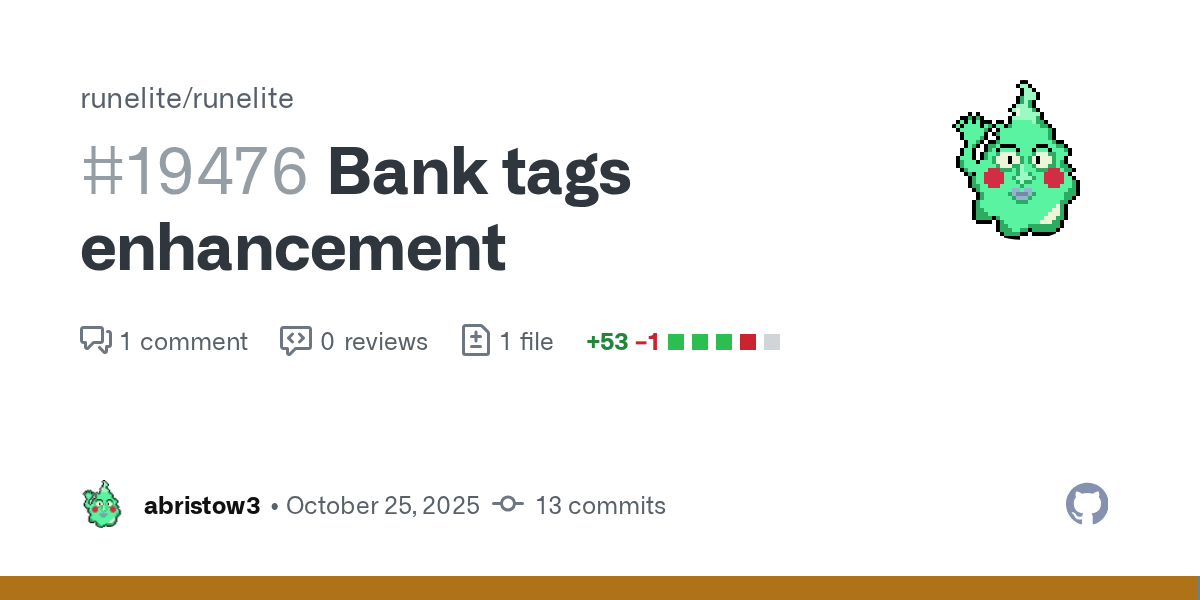
GitHub
For #19429
Bank Tags Scroll Navigation Enhancement
Summary
Added quick navigation features to bank tag scroll buttons for faster tag list navigation.
Changes
New Features
Scroll to top/bottom: Rig...
For context, the tag tab scroll bar has the "Auto layout" options. However the "view tag tabs" UI does not have this.
At a high count of tag tabs it becomes more efficient to navigate to tag tabs using "view tag tabs" UI rather than scrolling the tag tab bar. But this means you still have scroll the tag tab bar to the tab to use auto layout whenever the layout needs updating.
Auto-scroll would fix this accessibility because you can open the tag tab using "view tag tab" UI and then you have easy access to the same tag tab in the scroll bar for "Auto Layout" options
oblique plume
If anything that sounds like a bug that layout options dont work if you search using the tag tab tab
 twilit zenith
Not sure if this is the correct channel, but I am trying to reach out to a plugin maker, but I have no idea what her discord is - Is there any other way to contact the author?
haughty pumiceBOT
Support for hub plugins should be directed to the author of the plugin.
You can find the support link by searching for the plugin in the Plugin Hub panel and clicking the ? button on the plugin, or by right-clicking the plugin in the plugin panel and clicking the Support menu option.
solid mesa
Their github would be best
twilit zenith
Ah to bad as it looks like she is not maintaining the github, so I fear I'm out of luck 🙁
Maintaining as in fixing bugs etc
viscid lantern
whats the plugin?
twilit zenith
Clue Teleport Helper
twilit zenith
Oh I see people reaching out on the github page w/o reactions so not sure if they are being read. There are quite a few bugs
solid mesa
Well there's only 2 issues on their girhub and 1 is a feature request. So they may not know about them
twilit zenith
Hmm alright
 rapid mantle
hey looking for some support with the key remapping plug in
 round jacinth
just state your question instead of what you're doing
instead of "does anybody have experience with x" you should always say "i need help doing x"
rapid mantle
press enter to chat isnt being removed after turning off key remapping plugin, ive reset the plugin and restarted the client, press to enter comes back immediately after my next action
round jacinth
there is antoher plugin that does enter to chat
rapid mantle
do you know what it is?
 rapid mantle
thank you so much i think it was shift remap
 ebon pebble
Anyone got an idea how to get Shortest Path plugin to work with league teleports ? I see it has been updated recently in github with teleports added but no matter what settings I choose in the plugin it refuses to use league teleports.
solid mesa
You would need to build the plugin from source as they haven't released that version to the plugin hub
ebon pebble
Version in plugin hub matches the one it github though unless I'm missing something.
solid mesa
In this unmerged PR https://github.com/Skretzo/shortest-path/pull/463
 bitter bone
Is there an easy way to confirm whether someone has the 64-bit version installed?
solid mesa
Open task manager and see if it says 32-bit or not
 strange whale
I've got a profile that whenever i load it the gpu plugin is disabled and i have to manually enable it. anyone got any quick ideas or things i can look at to troubleshoot?
oblique plume
Do you have other gpu plugins installed
 analog ivy
anyone tell me why it always says error i dont seem to get i tot run
 strange whale
oblique plume
Do you have other gpu plugins installed
strange whale
oblique plume
Do you have other gpu plugins installed
I do have 117hd installed but it isn't enabled
 upper spindle
Anyone got stuck in login screen too? I'm tried many times and always i got a cl when i trying to login
 jade crypt
how do i get the !dry command to work
analog ivy
is ther any way to highlight zulrahs differnt attack styles with differnt colors?
lie th red for mele, blu emage, green range ?
solid mesa
Look at the color of zulrah. By the time you see the projectile it's already too late
 upper sapphire
Hey, anyone knows how to solve this issue im getting micro lags every time i kill an araxyte or a smoke devil after testing seems like its the loot tracker plugin causing the micro lags when they die, ive just tried messing with runeltie configure put those setings on in the pic but didint solve the issue, maybe somoene know how to fix this
 oblique plume
strange whale
I do have 117hd installed but it isn't enabled
oblique plume
strange whale
I do have 117hd installed but it isn't enabled
that one shouldnt be a problem, your logs could say more
haughty pumiceBOT
To find the logs, you can do one of the following:
- If your client failed to open, click the
Open logs folderbutton. - Open the screenshot directory by right-clicking 📷
Camerabutton, navigate 1 directory up, then open logs folder. - Navigate to
%userprofile%\.runelite\logson Windows or$HOME/.runelite/logson Linux and macOS.
Upload the log files named client and launcher by dragging them to Discord. If there are files prefixed with jvm_crash dated from today, upload them too.
 astral veldt
late but i recently reformatted my windows and it automatically downloaded a newer nvidia driver, 591.xx dont remember exactly. but after a while my entire pc would slow down to 1fps, not just the game but the entire operating system (this only happened while playing on runelite). restarting the desktop window manager by doing ctrl + shift + windows key + b temporarily fixed it but it always came back after either several hours or several days.
the only thing that fixed it was to block windows from force updating my nvidia driver and then DDU uninstalling it and installing an older driver
 coarse herald
Hey team, I've noticed since my recent Mac OS update, notifications on RuneLite are displaying an odd behaviour. If I get a single notification, I recieve it with no sound. However if I recieve another notification whilst the first one is active (i.e. banner showing), the sound plays. Any ideas?
round jacinth
All runelite does is request your os to do stuff, if it doesn’t behave then that’s your os deciding i think
 mossy swan
that sounds like my linux putting audio to sleep if i’m not playing anything and first sound being eaten
 rocky tiger
coarse herald
Hey team, I've noticed since my recent Mac OS update, notifications on RuneLite ...
rocky tiger
coarse herald
Hey team, I've noticed since my recent Mac OS update, notifications on RuneLite ...
That definitely happens on macOS with some audio output types. HDMI does it. It has to reconnect and some displays take a second. You can change notifications to use the built in speaker if it’s that.
coarse herald
Interesting. Thanks guys! I’ll have a play around tomorrow again and see if I can get it to work. It was usb-c output. I’ll try inbuilt speakers and also playing some continues audio and see if it reoccurs
 grizzled parrot
my client randomly keeps force closing, when i look at the logs it has a line that says "error Overlay.renderer" but idk what plugin that has to do with
 random arch
can someone get in a call with me and help me log into my acount?
 opal stream
Has this always sunken like this? I swear the clue icon used to be on her tile
 round jacinth
opal stream
Has this always sunken like this? I swear the clue icon used to be on her tile
round jacinth
opal stream
Has this always sunken like this? I swear the clue icon used to be on her tile
Restart your client maybe
opal stream
ill try once i get another step at her
round jacinth
what version does it say when you open 
opal stream
round jacinth
what version does it say when you open <:info_icon:938514423155400804>
1.12.26.1
round jacinth
restart your client
it should match the version found on #runelite
rather
(the one on the website bottom left)
and you should get in the habbit of restarting your client everyday
 opal stream
I used to, after finally breaking it for awhile because i was having issues with my loot tracker wiping
then it stopped wiping so i went back to restarting daily, then leagues happened and i had endless harvest 😂
round jacinth
loot tracker doesnt wipe because you turn off the client, imagine if it did lol
the riots
opal stream
so i afk 30 mins after i leave my PC lollll
its been a long while admittedly since i had issues but it also could have been xp tracker, i dont remember which one wouldnt repopulate sometimes
probably years, just hard to break habits
round jacinth
anyways, bringing up client issues that are long since fixed (a few days) because you don't restart isnt fair lol
turn it off when doen for the day and turn back on next day
 desert shard
would anyone know how to remove the toa raid level / time graphic in fixed mode? runelite lets me hold alt to drag it, but it can't be moved outside of the game area like other plugin infoboxes can
grizzled parrot
can anyone assist with the random force crashing?
usually happens when i go into gauntlet as well
haughty pumiceBOT
To find the logs, you can do one of the following:
- If your client failed to open, click the
Open logs folderbutton. - Open the screenshot directory by right-clicking 📷
Camerabutton, navigate 1 directory up, then open logs folder. - Navigate to
%userprofile%\.runelite\logson Windows or$HOME/.runelite/logson Linux and macOS.
Upload the log files named client and launcher by dragging them to Discord. If there are files prefixed with jvm_crash dated from today, upload them too.
 tribal fable
Is anyone able to figure out why my game keeps crashing? Any help is appreciated. I've tried looking through them but i don't really understand what im looking at.
zealous cedar
could be damage from the intel vmin thing, but it does look like you have the updated microcode
how often does it write the jvm_crash files?
 blissful thicket
tribal fable
Is anyone able to figure out why my game keeps crashing? Any help is appreciated...
blissful thicket
tribal fable
Is anyone able to figure out why my game keeps crashing? Any help is appreciated...
Looks unrelated to RuneLite. Java crashes by itself, unrelated to RuneLite code. Do you happen to have overlays enabled by any chance, or any other software that inserts itself?
I ran into a similar issue a bit ago: https://github.com/adoptium/adoptium-support/issues/1427
GitHub
Please provide a brief summary of the bug When playing oldschool runescape on the runelite client, specifically while doing chambers of xeric which has some UI plugins, my client will occassionally...
tribal fable
zealous cedar
how often does it write the jvm_crash files?
not all the time, maybe every couple of crashes
tribal fable
blissful thicket
Looks unrelated to RuneLite. Java crashes by itself, unrelated to RuneLite code....
the only overlay i thing i have is discord
blissful thicket
Maybe check your system for pre-installed software, if you have any, then. Try disabling the Discord overlay, but I think a lot of people will be using that, so I don't think that would be the issue
round jacinth
tribal fable
not all the time, maybe every couple of crashes
you are on 0x129 which apparently is a "good" microcode version to be on (as in it doesnt do more damage) but it's till 13/14 gen intel and just unstable
intel shipped a bad product
blissful thicket
Jeez, they've regressed that much? Haven't been keeping up with their products for years
round jacinth
its been an issue for years ye
it seems to manifest and crash on runelite/jvm for some reason
if you google intel 13/14 gen instability you'll find a lot of real articles about it
tribal fable
round jacinth
you are on 0x129 which apparently is a "good" microcode version to be on (as in ...
oh , so your thinking that it might be a problem with my processor?
round jacinth
yes a hardware issue
tribal fable
ok thank you very much, i will look in to it
blissful thicket
round jacinth
if you google intel 13/14 gen instability you'll find a lot of real articles abo...
That's so bad
Though I guess 0x12B is available, which should fix it from what I'm reading
Empahsis on should
round jacinth
once its hw crashing its not going to stop being hw crashing
blissful thicket
I was wondering what they meant with the damage in some articles, but it's actual electrical damage then
Crazy
round jacinth
its something in the architecture
blissful thicket
Yeah, seems a buggy mess
 pliant siren
im having trouble getting the client to launch
round jacinth
pliant siren
im having trouble getting the client to launch
can you elaborate
pliant siren
runelite keeps telling me theres been a fatal error in starting.
round jacinth
can you screenshot what it actually says
pliant siren
 round jacinth
can you click the open logs folder and drag and drop the launcher.log here
pliant siren
i had to reopen it and it worked. I tried this 8 times before.
thank you for your time.
round jacinth
ok probably an internet issue maybe
it wouldn't randomly fix itself otherwise
(probably)
pliant siren
i will keep that in mind next time and check connection
 kind saddle
When I open the launcher, it glitches—the mouse cursor gets stuck in slow motion—and then it closes. What should
 final axle
That happens to me once in awhile, I'm not entirely sure why. Wasn't anything in the logs last I checked either but you can upload yours
!logs
haughty pumiceBOT
To find the logs, you can do one of the following:
- If your client failed to open, click the
Open logs folderbutton. - Open the screenshot directory by right-clicking 📷
Camerabutton, navigate 1 directory up, then open logs folder. - Navigate to
%userprofile%\.runelite\logson Windows or$HOME/.runelite/logson Linux and macOS.
Upload the log files named client and launcher by dragging them to Discord. If there are files prefixed with jvm_crash dated from today, upload them too.
kind saddle
!logs
haughty pumiceBOT
To find the logs, you can do one of the following:
- If your client failed to open, click the
Open logs folderbutton. - Open the screenshot directory by right-clicking 📷
Camerabutton, navigate 1 directory up, then open logs folder. - Navigate to
%userprofile%\.runelite\logson Windows or$HOME/.runelite/logson Linux and macOS.
Upload the log files named client and launcher by dragging them to Discord. If there are files prefixed with jvm_crash dated from today, upload them too.
 bright narwhal
Hello! Does anyone know if version is required in runelite-plugin.properties?
what happens if I completely omit that field?
solid mesa
If ommited and using build=standard then the commit hash is shown in the plugins panel
Like this

 bright narwhal
Does anyone know why after syncing my forked plugin-hub with the latest on runelite/plugin-hub:master, then raising a new PR shows old commits that have been merged into runelite/plugin-hub already?
Should I rebase my forked plugin hub?
git rebase upstream/master
I'm scared someone hold my hand, there it is again that word - rebase; "How to, maybe or maybe not (and do not try this at home), hide the fact, from your employer, that you are secretly coding at night time so you can (instead of coding during office hours) play table fussball" 😇
 solid mesa
git checkout master
git pull upstream master
git checkout -b update-my-plugin
Feature branch? But I want to code on the master branch 
coarse herald
rocky tiger
That definitely happens on macOS with some audio output types. HDMI does it. It ...
Can confirm this was the solution. Although I'm using a USB-C headset. If I play audio, all the alerts come through. Thanks for your help mate!
 narrow grail
Hi, could some one tell me how I resize the interface? It's tiny on my monitor, i dont see the option in stretched
round jacinth
Scale arg in the configuration
haughty pumiceBOT
narrow grail
round jacinth
Scale arg in the configuration
arg?
I see. performance mode, integer scaling, keep aspect ratio and resizeable scaling
round jacinth
Read what I linked please
narrow grail
Ah it's because I had interger scaling on
round jacinth
I presume you’re talking about something else that isn’t handled in client for scaling.
But ok
 gleaming root
since last update i have huge latency problems ... anny solution?
haughty pumiceBOT
@gleaming root open command prompt, type this in:
ping -t oldschoolXXX.runescape.com
where the XXX is your world minus 300, for example world350 = 50
gleaming root
how do i open command prompt?
round jacinth
type command prompt in the search bar of your pc
gleaming root
its keeps giving me this: Reply from 13.248.169.48: bytes=32 time=16ms TTL=249
round jacinth
does that 16 ms ping match what the world you're on has?
gleaming root
max ping my world is 33ms
round jacinth
the ping in command prompt should be similar to the value to the ping you have
you say huge latency problem, so when you see the huge latency you can confirm command prompt shows same value
gleaming root
i think its latency .... my mouse run's behind my actions as is my screen rotation and my clicks nothing adds ups every world i log in to
haughty pumiceBOT
@paper cloak To find the logs, you can do one of the following:
- If your client failed to open, click the
Open logs folderbutton. - Open the screenshot directory by right-clicking 📷
Camerabutton, navigate 1 directory up, then open logs folder. - Navigate to
%userprofile%\.runelite\logson Windows or$HOME/.runelite/logson Linux and macOS.
Upload the log files named client and launcher by dragging them to Discord. If there are files prefixed with jvm_crash dated from today, upload them too.
round jacinth
yes
 paper cloak
round jacinth
paper cloak
round jacinth
you've got 146 hub plugins installed, i dont see a specific crash but you've got hub plugins that are constantly throwing spam errors
duck plugin, afk gotr (the one i made, lol) 2026-05-11 16:47:54 EEST [Client] WARN n.runelite.client.eventbus.EventBus - Uncaught exception in event subscriber java.lang.NullPointerException: null at com.zom.AFKGuardiansPlugin.atAltar(AFKGuardiansPlugin.java:374) at com.zom.AFKGuardiansPlugin.checkInMainRegion(AFKGuardiansPlugin.java:387) at com.zom.AFKGuardiansPlugin.onVarbitChanged(AFKGuardiansPlugin.java:277) at net.runelite.client.eventbus.EventBus$Subscriber.invoke(EventBus.java:70) at net.runelite.client.eventbus.EventBus.post(EventBus.java:223) at net.runelite.client.callback.Hooks.post(Hooks.java:217) at client.xn(client.java:4993) at client.ig(client.java:35824) at client.adm(client.java:11031) at client.fx(client.java:10501) at client.il(client.java:9501) at tf.qk(tf.java:442) at tf.yg(tf.java) at tf.run(tf.java:17638) at java.base/java.lang.Thread.run(Unknown Source)
just constantly spams you
paper cloak
Yea 🙁
round jacinth
uninstall the bloatware plugins you've got and then see if it improves
paper cloak
round jacinth
duck plugin, afk gotr (the one i made, lol) ```2026-05-11 16:47:54 EEST [Client]...
Nice ones ❤️
round jacinth
oh it's npe at WorldPoint playerLoc = client.getLocalPlayer().getWorldLocation();
anyways reduce hub plugin usage and see if it improves
 plucky cargo
hey does anyone know how to make it so my PM isnt closed when i open the bank?
oblique plume
are you saying the chat is closing when you open the bank
haughty pumiceBOT
Many plugins from the pluginhub break the client in subtle or not-so-subtle ways, including causing issues like client freezes. We do not support pluginhub plugins because we do not make or quality control them, and do not recommend their use.
Run the RuneLite (safe mode) shortcut, or with a Jagex account, first run the RuneLite (configure) shortcut and tick the Safe mode box, then launch RuneLite via the Jagex launcher.
This temporarily disables the GPU plugin and all hub plugins which will allow you to confirm the issue is caused by one of those plugins and isn't a core RuneLite issue.
If the issue is caused by a hub plugin, you should isolate which plugin it is and then uninstall the plugin.
plucky cargo
lol
round jacinth
opening an interface closes your pm you're about to type
the pm is an interface itself and just gets yeeted
plucky cargo
yeah , but im on my other account and itt doesnt. i mustve turned something off but im trying to figure out what 😂
 twilit garden
Guys, super long shot but would anyone know why I can't import any tile markers at doom via tile packs plugin or importing (via right clicking minimap). Manually setting tiles works
 twilit garden
Yeah I tried that it won't work unfortunately
it even says am I sure I want to import 37 then just doesnt
idk if I have another plugin interacting with it, blindfold etc is off
round jacinth
there are different floors at doom
theres 3 rooms
the tiles you got probably arent for floor 1 through 5
twilit garden
ah tysm ❤️
haughty pumiceBOT
Visit 117's HD plugin discord (https://discord.com/invite/U4p6ChjgSE) for support, issues & feedback
 glad axle
Will do it there too, but if anyone know the fix, I would appreciate it a lot.
 weary carbon
RuneLite encountered a fatal error while downloading the bootstrap.
Exception: IOException
Message: PKIX path validation failed: java.security.cert.CertPathValidatorException: validity check failed
i keep getting this error
leaden trail
Your system time is wrong
weary carbon
ty!
 gloomy frost
does anyone know if we can remove or hide these npc chats during sailing?
 round jacinth
sailing plugin i think does it
gloomy frost
round jacinth
sailing plugin i think does it
Wow legend, i overlooked that
warped prairie
does anyone remember the name of the plugin that highlighted which food is correct?

 hollow olive
warped prairie
does anyone remember the name of the plugin that highlighted which food is corre...
hollow olive
warped prairie
does anyone remember the name of the plugin that highlighted which food is corre...
ba minigame likely
warped prairie
yep ur right ty!
 astral shell
i dont see a ipv4 option
 astral shell
do i have the wrong version
and if i reinstall does it remove all my screenshots its captured on my folders and stuff
 tall olive
Is the !Kc command a runelite thing? Mine has been broken for a while (Sorry if wrong place)
 astral shell
solid mesa
The old launcher version doesnt have the IPV4 option
astral shell
solid mesa
The old launcher version doesnt have the IPV4 option
tysm i got it to work i can now split tunnel runelite
 jovial sandal
I have ppl pming me ingame saying nty cause I got some rank on a runelite plugin?
Already happend like 4 times this week
While pking
I dont use no ranking thing
Where I get that off lmao
Bad english sorry
 winter snow
It's probably PvP Leaderboard, we got a lot of support traffic from the PvP crowd when that launched
haughty pumiceBOT
Get support for the PvP Leaderboard Plugin Hub plugin here: https://runelite.net/plugin-hub/show/pvp-leaderboard.
You can also find the support link by searching for the plugin in the Plugin Hub panel and clicking the ? button on the plugin, or by right-clicking the plugin in the plugin panel and clicking the Support menu option.
winter snow
No, but you can still be featured if someone who does have that plugin fights you
winter snow
We can't, it's a third party service
solid mesa
Complain to the author https://github.com/findarian/pvp-leaderboard/issues
 zinc zealot
Runelite cloud sync question:
Can you not do it when you launch the game through the jagex launcher but select runelite as client? The cloud sync icon is just not there 🤔
round jacinth
tall olive
Is the !Kc command a runelite thing? Mine has been broken for a while (Sorry if ...
Get another ticket and it’ll sync up
oblique plume
isnt that the message right above
round jacinth
Oh, thought he checked something in game to see that, not sure.
Maybe the regex changed or rather message changed
oblique plume
message could easily have changed yea
 median matrix
Hi there, i have a new laptop freshly installed windows & the Jagex launcher to use Runelite. Getting the error message this program does not support the windows version im using. Windows is fully updated. Any suggestions? This also happens when i try to download runelite from the website. Thanks!
 round jacinth
What version of windows are you using
oblique plume
chances are its arm i think
you prob need the arm64 windows version of the launcher
oblique plume
no im saying for runelite
round jacinth
median matrix
Ill try the arm version ty.
if you load runelite's site what download does it recommend you to get
oblique plume
the browser doesnt know processor architecture
round jacinth
i thought it tried to put arm64 first if you were on arm
median matrix
Ehr the right one arm, i just automatically clicked the dropdown arrow. Assuming i needed the x64
round jacinth
i thought it did but wasnt sure
zealous cedar
The jagex launcher atomatically installs runelite now, it probably picked the wrong one
round jacinth
median matrix
Ehr the right one arm, i just automatically clicked the dropdown arrow. Assuming...
he says he picked x86 because that is what he is used to getting
lol
median matrix
Guess it did yea.
median matrix
At first i just downloaded the jagex launcher
zealous cedar
Yeah did it do the install for you?
median matrix
When you told me to install arm i used runelite website.
zealous cedar
Mm ok
median matrix
zealous cedar
Yeah did it do the install for you?
It tried, but not the arm version. Because i kept getting that message.
oblique plume
i didnt know jagex auto installed rl for you now 
zealous cedar
It’s new ish
 fading wind
May i ask about ground object hider? is it disabled or im just tweaking, i've setted up hotkey & when im right clicking nothing gets selected at all ._.
haughty pumiceBOT
Get support for the Ground Object Hider Plugin Hub plugin here: https://runelite.net/plugin-hub/show/object-hider.
You can also find the support link by searching for the plugin in the Plugin Hub panel and clicking the ? button on the plugin, or by right-clicking the plugin in the plugin panel and clicking the Support menu option.
viscid lantern
the plugin is not disabled. if its not working you would have to ask the author
 cursive kiln
Guys, I was walking around the map and this purple tile just started appearing on my cursor and at the same time my right button stopped working

anyone can help me?
round jacinth
so when you move your mouse the purple square moves too?
sounds like a hub plugin that would be doing that
viscid lantern
cursive kiln
Guys, I was walking around the map and this purple tile just started appearing o...
ground object hider probably
cursive kiln
round jacinth
so when you move your mouse the purple square moves too?
yes. However, it was something that I did not set to appear, it appeared out of nowhere. And simultaneously my mouse right click stopped working
fading wind
fading wind
May i ask about ground object hider? is it disabled or im just tweaking, i've se...
wait u can't hide floors anymore?
round jacinth
the author might've broke their own plugin or update impacted them
 round jacinth
it maybe was broken on first install and just needed a reboot, i dont think you had to reinstall runelite for it to work
a lot of hub plugins seem to not work on first install
 real hemlock
Any linux nerds around that can help another nerd with how to setup Runelite plugin development in IntelliJ for Linux?
I tried the known methods, but Bolt Launcher has a weird interaction with Runelite and doesn't send the --insecure-write-credentials line to runelite and I don't get the file, so I can't use IntelliJ's build/run command, since my credentials do not pass inside there.
I am on Linux KDE Plasma 43
round jacinth
you'll have to located where bolt puts the file and move it to the correct spot
 hushed sluice
hi @round jacinth I submitted this on the GitHub discussion board, but wanted to chime in here if you (or anyone else) has hashed this out before...
For Windows users that use a fractional scaling factor (i.e. 150% scaling for a 4K 27" display), Runelite is a bit of a struggle - Currently, best bet is to set the launcher config to Scale = 2.0 (which is mostly fine), but it does make the RL client 50% bigger than it needs to be.
Has the team ever considered implementing a MacOS-like scaling method of integer scaling up to the next whole factor (i.e. Windows @ 150% -> RL picks 200% or Windows @ 225% -> RL picks 300%) and then down sampling (Catmull, Mitchell, or Bi-linear) (MacOS uses Lanczos) to get it to (in my case) a 150% scale?
hushed sluice
All good, the discord just tends to be more responsive
zealous cedar
when you use --scale=2 we don't actually implement the scaling, its all java
hushed sluice
Is there a way to get Java to handle downsampling? Like a user inputs 1.5 (or windows being set to 150%) and it will up to 200% and down to 150%?
Idk what the hell I'm talking about, just something that would be nice to have
zealous cedar
i doubt it, i am not super familiar with it
if you want to research it more it is just called j2d scaling i think
you would have to fork the jdk at the very least
which is not something im super interested in
real hemlock
round jacinth
you'll have to located where bolt puts the file and move it to the correct spot
DUDE! Genius! You deserve a HUGE kiss/hug (whatever you fancy). Thanks! I got the file!
round jacinth
if i recall, you were told the same thing on reddit and im the guy who told you a runelite discord exists lol
mossy swan
he prefers a hot dog
round jacinth
while you're at it and reading the wiki for help in development make sure you read the statement of what is allowed
!statement
haughty pumiceBOT
Jagex's third party client guidelines: https://secure.runescape.com/m=news/third-party-client-guidelines?oldschool=1
Additionally, these features have been rejected or removed from RuneLite: https://github.com/runelite/runelite/wiki/Rejected-or-Rolled-Back-Features
 random forum
Hello, is there something else I need to do in this pull request?
https://github.com/runelite/plugin-hub/pull/11297
I think it should be inline

GitHub
Adds the ToA Invocations plugin.
Shows active invocations relevant to the current boss room (Kephri, Zebak, Akkha, Ba-Ba, Wardens) as a HUD overlay when entering a boss room. Two display modes: nam...
zealous cedar
since you are new someone has to hit the approve workflow button
its running now
the bot should pick it up and merge it now unless it gets too scared due to this touching toa, well see
real hemlock
round jacinth
while you're at it and reading the wiki for help in development make sure you re...
I already got the plugin merged on the main branch.
I thought that I give Linux another try, since this is my main PC and switching to my Win10 laptop is proving a little difficult.
I am a little confused though, since this is my first time working on a real plugin, and my first time actually having to make PR to merge to main.
My question is: is it okay to modify only the hash from the file instead of merging the actual fork I have?
I noticed this is the way, since this gets merged more quicker than, what I would've assumed is the normal flow (also the message This branch is XX commits ahead of runelite/plugin-hub:master is a little annoying, but I can live with that)
round jacinth
you can run the edited fork locally yeah
you'll have to sideload it or run it from intellij
random forum
zealous cedar
the bot should pick it up and merge it now unless it gets too scared due to this...
Thank you!
This is my first plugin.
I wanted to create something I would use myself and share with others. Hopefuly it gets merged, the source code should be quite straight forward too
 primal shoal
Hey trying to see what I need to do for this error I have un installed and reinstalled
 leaden trail
Your system time is wrong
It's several hours ahead
Er I know what day it is ignore that
primal shoal
Oh I see gotcha I did that for a riot client issue I'll try putting it back on auto time
That worked thank you
 near beacon
hey, my runelite keeps randomly crashing idk what to do
i have uninstalled it completely and reinstalled deleted the cache nothing working just randomly crashes after some time
haughty pumiceBOT
To find the logs, you can do one of the following:
- If your client failed to open, click the
Open logs folderbutton. - Open the screenshot directory by right-clicking 📷
Camerabutton, navigate 1 directory up, then open logs folder. - Navigate to
%userprofile%\.runelite\logson Windows or$HOME/.runelite/logson Linux and macOS.
Upload the log files named client and launcher by dragging them to Discord. If there are files prefixed with jvm_crash dated from today, upload them too.
near beacon
 fresh cosmos
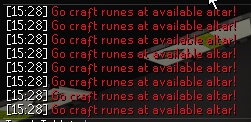
how do i stop the fucking spam of notifications to go make runes at gotr? i tried disabling all the gotr plugins and it didnt work 🙁
solid mesa
Turn on Runelite > Game message notifications and see what the notification says
oblique plume
near beacon
youre out of heap space, get rid of some hub plugins, one is probably leaking memory in some way. You can give yourself more space in the launcher config but if its a leak itl just delay the time untill it runs out again
haughty pumiceBOT
solid mesa
Maybe you have notify for highlighted drops turned on and you have highlighted runes people are dropping
near beacon
oblique plume
youre out of heap space, get rid of some hub plugins, one is probably leaking me...
thats sso weird it only crahses in 2 places that i notice okay thanks
viscid lantern
what does it say specifically?
solid mesa
No plugins say go craft runes. So posting the notification would help
 fresh cosmos
to go craft runes at available altar
viscid lantern

 oblique plume
zom 
viscid lantern
remove the gotr related plugin you installed
round jacinth
why would it suddenly start to smapm
fresh cosmos
said that i tried disabling them 🙁
fresh cosmos
nop
viscid lantern
nah
round jacinth
there is a NPE that happened in some ones log earlier that spammed
It is only meant to notify the once on a game tick, this is happening in onGameTick
do you have "always notify" ticked?
round jacinth
did the llm context get reset? we're talking about the afk gotr plugin that is spamming you
it spams per game tick but only if you enabled the setting for the spam
fresh cosmos
oh i disabled the gotr plugin and still got it though
oblique plume
he ran out of tokens
round jacinth
When the plugin is off it is not active
round jacinth
it sets the hasBeenNotified = false and the spam is sent on game tick which is no longer active since the plugin is off, i dont think there is any queueing with that
fresh cosmos
ok
round jacinth
¯_(ツ)_/¯
fresh cosmos
idk what to tell ya then man
round jacinth
i can fix it if some one can actually show me it's wrong tho, i don't know if it's wrong even from your screenshot
sometimes you're not even playing osrs but using runelite..
fresh cosmos
?
round jacinth
i would post the screenshot but it's advertising a rsps
anyways if you can record the plugin misbehaving and post it to my github i can fix it
leaden trail
I mean don't post it here but you can send it to modmail for sure
 shadow basalt
I remember years ago with the animation smoothing plugin you could disable certain types of animations, like environment objects. Is there any way to accomplish the same thing now?
Windmills, fires, etc. are very distracting but I like the smoothness on other things
round jacinth
not anymore no
 thin bison
Seems like its pretty common for people to have issues with AMd Drivers not playing nice with Runelite. I've been having a ton of Driver Timeouts/Crashes when trying to alt-tab into Runelite the last month or so. I think that the GPU plugin is working fine based on some of the convo's above about checking out the logs for Driver version. Is it just recommended to roll back drivers to a previous version in this case? EDIT: I did try just diasbling the GPU plugin entirely and still got a crash when alt-tabbing in yesterday

 queen token
Has anyone come up with a solution yet to the log in issue? I just get stuck on the Loading Please Wait part after clicking play to log in
haughty pumiceBOT
To enable safemode
Windows
Run the RuneLite (configure) shortcut from the windows start menu
Tick the Safe mode box, save, launch RuneLite the way you normally do.
Mac
In Terminal, run
/Applications/RuneLite.app/Contents/MacOS/RuneLite --configure
Tick the Safe mode box, save, launch RuneLite the way you normally do.
solid mesa
Does it work in safe mode?
queen token
I have a Jagex account so I might be completely screwed
I can't log in from the runelite app itself
solid mesa
It works exactly the same with a jagex account
queen token
I tried it and said I can't because I've upgraded to a Jagex account. Log in using the official launcher
solid mesa
Then you didn't do something right because safe mode works with jagex accounts
queen token
I'll try again
 meager plover
Hey 🙂 anyone know how to make it so the tile markers don't go through NPCs? Tried toggling "Draw overlays below NPCs" but that didn't work... The same setting "Draw overlays below player" works this way, though.
 solid mesa
Do you have Improved Tile Indicators?
meager plover
Yeah
 solid mesa
Its probably that
meager plover
Tried toggling it though no changes
solid mesa
Turn it off and restart the client
queen token
Okay I was able to log in. On safe mode do your plugins no longer work?
solid mesa
Yes, so one of your hub plugins is hanging on startup
I don't think its possible to have ground markers behind the npc though
viscid lantern
you can with improved tile indicators
meager plover
Tried turning off and restarting
 viscid lantern
add odd figure to the list in the plugin
or set draw above when its still in its hidden form
 queen token
solid mesa
Yes, so one of your hub plugins is hanging on startup
queen token
solid mesa
Yes, so one of your hub plugins is hanging on startup
What does that mean?
solid mesa
One of the plugins you installed from the  tab has an issue and you need to remove it
queen token
That's why none of my plug ins work now? How to I found out which one? Just uninstall everything?
solid mesa
Safe mode disables your hub plugins. Because you're able to login now it means one of your hub plugins was the problem
queen token
The GPU plugin is completely missing so I wonder if that's it
And my sailing plug ins
A lot are missing for some reason
Makes no sense because they were working an hour ago
solid mesa
GPU and all the plugins you installed from the tab are disabled in safe mode
Turn off safe mode and all the plugins will come back
queen token
Ooooh
So now that I've logged in with safe mode I just have to go back into regular mod and just uninstall random plugins till it lets me log in?
haughty pumiceBOT
Please refer to this flowchart for further troubleshooting.
solid mesa
Pretty much
queen token
Sweet thank you
 limber swallow
Guten Abend, ich habe ein Plugin heruntergeladen, um den Ton meines Haustiers zu verändern. Es hat automatisch alle Plugins stummgeschaltet. Ich habe das Plugin gelöscht, aber das Problem blieb bestehen. Es funktioniert nur, wenn ich den Umgebungssound einschalte – ein nerviges Lied.
 gilded kayak
try removing the plugin and restarting the client
limber swallow
ok 1 moment
not found
(Neustart des Clients) Bedeutet das, dass man sich aus dem RuneScape-Konto ausloggen und sich dann erneut mit Benutzername und Passwort anmelden muss???
(restarting the client) Does that mean logging out of your RuneScape account and logging back in with your username and password?
gilded kayak
just logging out of the game and clicking the x top right
queen token
I have a lot of plug ins so I just disabled all the plugin hub ones on another profile which let me log in then once in swapped to the once with all my plug ins and it works
limber swallow
I'll give it a try
queen token
Yeah I'll do it for today and later I'll go through and figure out which ones were the bad ones I know it was the first half of my list that was good
Thank you for the help
limber swallow
Jagex recently released an update and added a new button; the plugin wasn't the problem, but I really appreciate your help
gilded kayak
mmm
 jovial nebula
I asked this question a while back, but is there a good reason for why https://runelite.net/plugin-hub/ sorted by time added, sorts by the git --follow instead of when the plugin file was added to the pluginhub repo under ~/plugins/?
The relevant commands were added to /package/[...]/Plugin.java 6 years ago by abex, with the message "package: include plugin update times"
It is very niche, but it is causing all my plugins to bundle up on one release timestamp because I make them all within the same repository under different branches l0l
Sorry didn't know where else to ask
solid mesa
jovial nebula
I know, but plugins should never be renamed
Or well, the plugin-hub/plugins/plugin-x-y-z name should never change
Probably applies to no more than a handful of plugins, but I do like sometimes checking the recently added plugins to see if there are some good ones :p
 nova flint
I've never had any issues with the app until today--I went to go launch my app, and i got this: I've tried making exceptions for my windows firewall to allow it--I've also tried to uninstall, and reinstall the app--Not sure whats going on! Can anyone help?
 gilded kayak
this is an internet error per the fact that it says its an internet error
u can maybe use your phone as a hotspot temporarily to start the client
nova flint
It's just weird--I can browse the internet, I can still do everything in my computer as normal---Web browser, everything everywhere else is working
gilded kayak
not everything just the things you tried
you definitely cannot confirm everything everywhere is working
nova flint
I tried turning on Airplane mode and disconnecting my internet and then reconnecting--nothing changed
well
yeah
gilded kayak
this happens to people all the time
it really is just an issue between your internet and where we host the runelite boostrap
nova flint
sorry like. everything that I normally browse, the other games I normally play, websites I normally visit, all work just fine right now
gilded kayak
it could be anything in that internet chain causing the issue, and it probably will just go away at some point
but if u want to play right now, u can lookup how to use your phone as a mobile hotspot via usb
and then once runelite is open, u can turn that off
nova flint
ill give that a try. Thanks Felan
bruh
why--why would that work?
I mean, I appreciate the quick fix. Wholeheartedly. Thank you, but
gilded kayak
cuz u used your phone data not your internet
they are different services @ your isp
even if u have both through the same company
gilded kayak
a VPN probably also would have worked but it tends to be not the best idea due to the jagex launcher
since it gets mad when ur using a VPN
nova flint
so now I can turn off my hotspot and back onto my regular wifi and it will still work fine, ya think?
gilded kayak
yes
if it doesn't work fine then that would be a second thing that's broken, both runelite servers and the oldschool runescape servers
but it probably will work fine
nova flint
so the client loaded, im at the login screen--but it wont connect to the server
gilded kayak
oop
nova flint
cant even change the world
gilded kayak
then that would be a second signal that is internet, since all of that is your connection to jagex, while starting the client is your connection to us
e.g. im a similar situation sometimes people are unable to swap worlds in-game, but have no issue using the world hopper plugin, to switch
nova flint
its just so weird. I've played runescape since 05, and I've been using runelite for almost 10 years (easily) and never had this issue ever.
what do you recommend to fix it, if anything?
solid mesa
Wait for your ISP to fix it. Or call them and complain
nova flint

i thought this was a support forum not a "lets make people feel dumb as shit" forum. ffs.
gilded kayak
if u've had perfect internet for the past 10 years then i wouldn't bother calling personally
solid mesa
I mean it's a problem with your internet. The only way to fix it is have your ISP fix it, use a vpn, or a different internet source
gilded kayak
i'd just say eh whatever
nova flint
i mean perfect is subjective. I've had connectivity issues in the past but never like this. I find it strange that im able to use discord, im able to load up my web browser and visit websites and runewiki, like everything literally is working normally except booting and using runelite.
I have the stupid jagex launcher, but I never created a jagex account, so I cant login there.
gilded kayak
if you never converted to a jagex account then you could use a VPN probably
if you have one
nova flint
so I just made a frickin jamflex account and I can log in using the client now, and everything is working fine---except the runelite side of the launcher.
 shy willow
Played other games with higher stresses like ffxiv for multiple hours and no crashes, the event viewer is saying it’s a kernal power 41 crash
zealous cedar
id guess psu is gone bad maybe
gilded kayak
fwiw when my psu was dying i also had 0 issues in ffxiv
i dont think it's really that intensive
shy willow
When I checked my my stuff in ffxiv it was stressing my pc like twice as much as rs and drawing like x3 the power but never crashed
All my temps and stuff are low and defo can’t be the issue when on rs either, I have tried so much to fix it
 deep elbow

 shy willow
Okay thank you, just trying to figure out what going on it only seems like a osrs issue, but not sure if I need to buy a new pc part or what’s failing
haughty pumiceBOT
Get support for the Emoji Palette Plugin Hub plugin here: https://runelite.net/plugin-hub/show/emoji-palette.
You can also find the support link by searching for the plugin in the Plugin Hub panel and clicking the ? button on the plugin, or by right-clicking the plugin in the plugin panel and clicking the Support menu option.
bitter bone
shy willow
In my experience this is always a power supply or cooling issue
 cunning horizon
EDT [Client] ERROR injected-client - Client error
java.lang.AssertionError: null
    at net.runelite.client.plugins.gpu.FacePrioritySorter.uploadSortedModel(FacePrioritySorter.java:185)
    at net.runelite.client.plugins.gpu.GpuPlugin.drawTemp(GpuPlugin.java:1251)
    at ev.ib(ev.java:40554)
    at ev.vu(ev.java:46980)
    at ev.jm(ev.java:14581)
    at gd.ce(gd.java:3435)
    at qv.cs(qv.java:3216)
    at cb.ak(cb.java:11)
    at gc.az(gc.java:173)
    at gc.az(gc.java:209)
    at gc.vm(gc.java:66)
    at gc.ak(gc.java:57)
    at client.iu(client.java:10959)
    at client.ia(client.java:9559)
    at tf.en(tf.java:476)
    at tf.hv(tf.java)
    at tf.run(tf.java:38005)
    at java.base/java.lang.Thread.run(Unknown Source)
Anyone have any idea why this could be happening? This is the second time today where my game crashes a few minutes after logging in and interacting with the game by a bank.
The first one was GE and second was CoX GE. FWIW both times I logged back into the game after being logged out for a period of time.
 woven matrix
okay, maybe it's finally time to ask about this. Sometimes my runelite freezes the entire PC into a complete crawl (<1 FPS) and it doesn't recover until I shut runelite down. PC is not overheating (26'C all over), I kind of suspect there's some plugin at play here, but logs do not show any culprits. Anyone faced anything like this?
winter snow
It comes up a lot, the usually suggested solution is rolling back graphics drivers (if you use an NVidia card) to a version from back in November
woven matrix
interesting.. going to try I guess
winter snow
something about them becoming AI slop around that time, hah
woven matrix
this issue has been hounding me for the last two months, which is weird
and I could sometimes play a week without it, sometimes it's non stop entire day
fkin slop..
winter snow
You could try a safe mode run to check if it is some plugin before messing with drivers
haughty pumiceBOT
To enable safemode
Windows
Run the RuneLite (configure) shortcut from the windows start menu
Tick the Safe mode box, save, launch RuneLite the way you normally do.
Mac
In Terminal, run
/Applications/RuneLite.app/Contents/MacOS/RuneLite --configure
Tick the Safe mode box, save, launch RuneLite the way you normally do.
woven matrix
I am aware how to launch it in safe, thanks, yet I tried to see in the logs if something is spamming, but log entries seem to be spaced 10-15 seconds apart, I even checked if my SSD is dying for some reason (via resource monitor) during the crawl, but there's nothing. such a weird issue
leaden trail
You really shouldn't be having anything logged every 10-15 seconds, can you post the full log?
Realistically it's probably the gpu driver issue though
woven matrix
leaden trail
You really shouldn't be having anything logged every 10-15 seconds, can you post...
in this case it's bank value tracker and deaths hook plugins, so nothing out of the ordinary
2026-05-13 12:42:57 EEST [Client] ERROR n.r.client.callback.ClientThread - Exception in invoke
java.lang.NullPointerException: null
    at com.adriansoftware.BankValueHistoryTracker.lambda$addEntry$1(BankValueHistoryTracker.java:256)
    at net.runelite.client.callback.ClientThread.lambda$invokeLater$1(ClientThread.java:80)
    at net.runelite.client.callback.ClientThread.invokeList(ClientThread.java:119)
    at net.runelite.client.callback.ClientThread.invoke(ClientThread.java:101)
    at net.runelite.client.callback.Hooks.tick(Hooks.java:241)
    at client.sh(client.java:59455)
    at client.il(client.java)
    at tf.qk(tf.java:442)
    at tf.yg(tf.java)
    at tf.run(tf.java:17638)
    at java.base/java.lang.Thread.run(Unknown Source)
2026-05-13 12:44:13 EEST [Client] ERROR n.r.client.callback.ClientThread - Exception in invoke
java.lang.NullPointerException: null
    at com.adriansoftware.BankValueHistoryTracker.lambda$addEntry$1(BankValueHistoryTracker.java:256)
    at net.runelite.client.callback.ClientThread.lambda$invokeLater$1(ClientThread.java:80)
    at net.runelite.client.callback.ClientThread.invokeList(ClientThread.java:119)
    at net.runelite.client.callback.ClientThread.invoke(ClientThread.java:101)
    at net.runelite.client.callback.Hooks.tick(Hooks.java:241)
    at client.sh(client.java:59455)
    at client.il(client.java)
    at tf.qk(tf.java:442)
    at tf.yg(tf.java)
    at tf.run(tf.java:17638)
    at java.base/java.lang.Thread.run(Unknown Source)
2026-05-13 12:44:58 EEST [Client] ERROR n.r.client.callback.ClientThread - Exception in invoke
java.lang.NullPointerException: null
    at com.adriansoftware.BankValueHistoryTracker.lambda$addEntry$1(BankValueHistoryTracker.java:256)
    at net.runelite.client.callback.ClientThread.lambda$invokeLater$1(ClientThread.java:80)
    at net.runelite.client.callback.ClientThread.invokeList(ClientThread.java:119)
    at net.runelite.client.callback.ClientThread.invoke(ClientThread.java:101)
    at net.runelite.client.callback.Hooks.tick(Hooks.java:241)
    at client.sh(client.java:59455)
    at client.il(client.java)
    at tf.qk(tf.java:442)
    at tf.yg(tf.java)
    at tf.run(tf.java:17638)
    at java.base/java.lang.Thread.run(Unknown Source)
sorry for the long paste, most likely it's the graphics driver issue
having SSD choke would be an indicator if the log was like 20MB sized 😄
leaden trail
woven matrix
in this case it's bank value tracker and deaths hook plugins, so nothing out of ...
That's not the full log like I had asked for
You can try disabling the bank value history plugin and seeing if it resolves your issue since there's some chance it will but I do still think it's a driver problem
woven matrix
leaden trail
That's not the full log like I had asked for
You can try disabling the bank val...
hopefully it doesn't log any identifiable information 😅
in this log it has happened twice so far
but I skimmed thru and it just feels like that GPU driver issue that got mentioned
upper sapphire
upper sapphire
Hey, anyone knows how to solve this issue im getting micro lags every time i kil...
anyone able to help out with this i been trying to figure it out for days can't get it to stop doing these micro stuters when araxytes or smokes die at all
round jacinth
upper sapphire
anyone able to help out with this i been trying to figure it out for days can't ...
Don’t have the side panel open
empty minnow
cunning horizon
```cmd
EDT [Client] ERROR injected-client - Client error
java.lang.AssertionErro...
I've had that happen a couple times as well
 upper spade
I’ve been working on a plugin, but it’s something that needs testing. Really just prevents certain actions - how do I go about testing it? Am I risking a ban by playing with a non official plugin?
oblique plume
if you break the rules you could
haughty pumiceBOT
Jagex's third party client guidelines: https://secure.runescape.com/m=news/third-party-client-guidelines?oldschool=1
Additionally, these features have been rejected or removed from RuneLite: https://github.com/runelite/runelite/wiki/Rejected-or-Rolled-Back-Features
upper spade
Hmm this just prevents me from picking up resources that are not in my name as well as preventing the trade of them
winter snow
So, another bronzeman plugin? 😄
upper spade
No no no
 pulsar garden
Guys for about a month while typing to chat on Runelite I'm forced to hold shift for backspace to effectively delete a character. It's driving me nuts and slows down typing by a ton. I'm instinctively doing this everywhere now it's like a worm is eating my brain.
I have a 60% keyboard and use Key Remapping plugin to turn my # keys into f keys. Backspace alone does nothing & I can't find it binded to anything. I believe what caused this initially was binding backspace on accident using this plugin, but I instantly found this glaring issue and unbinded it, yet the problem stayed. Please god help me
 haughty pumiceBOT
@pulsar garden If one of your keys isn't working in game, you've most likely bound it to a feature of a plugin. The Debug Helper hub plugin can show what keys are bound to what plugins.
pulsar garden
@round jacinth what do you want out of life because I will give it to you I will give you babies, money, power, anything you want name it

It's such a small thing but it was genuinely making me go batshit insane
thank you
what a goated plugin too
 tough dew
any idea what's going on here with these flags? I've also noticed clipping and/or flickering in game as well. this is on my pc with 1440p monitor. this doesn't happen on my macbook with the same exact runelite profile

like the shirt from the mime in the random event has the same issue
 kind shuttle
Is there any way to make these bigger? im old 🙁
 haughty pumiceBOT
round jacinth
haughty pumiceBOT
round jacinth
scale probably i think
tough dew
haughty pumice
<https://github.com/runelite/runelite/wiki/RuneLite-Launcher-Configuration>
it helped but still visible. so its not a plugin issue?
 tough dew
mossy swan
i guess some scaling artifact from stretched mode
tough dew
mossy swan
i guess some scaling artifact from stretched mode
let me mess with scaling and see
round jacinth
maybe jagex broke it with todays update
tough dew
no its been like that for a couple weeks at least
mossy swan
tough dew
it helped but still visible. so its not a plugin issue?
i dont think zom responded to you though
round jacinth
and no i didn't respond to them with scale
kind shuttle
omg the configuration - scale thing worked great. ty
round jacinth
why would scaling client fix that lol
tough dew
idk brother im not a software wizard that's why im here trying to get help lol
 long dune
github only for plugin development? My account is flagged on there and i switched to gitlab.
gilded kayak
you can just make a new account no? you'll just have to deal with some restrictions like not being able to fire off gh actions automatically
but yes we only do github, accepting PRs from multiple at the same time sounds awful
tough dew
this is such weird behavior. if i use scroll wheel up/down it bugs out and if I use the arrows then it doesn't o.O
and 100% it has to do with stretched mode
im at 50% scale. with it turned off it works perfect but then my UI is tiny
long dune
gilded kayak
you can just make a new account no? you'll just have to deal with some restricti...
ill try that, tried using an different old account it was also flagged, they dont like multiple accounts from what i heard
mossy swan
tough dew
im at 50% scale. with it turned off it works perfect but then my UI is tiny
try a different scaling option in GPU
gilded kayak
are u on the no fly list
i know people definitely have alts since they shit their pants when they accidentally commit from their main
long dune
idk, had to send in my programming tech exam work and realised i was flagged lol. Support told me that my profile isnt associated with software development while i had 100s of repos with projects lol
tough dew
mossy swan
try a different scaling option in GPU
so I was on xBR and tried all the other ones, it's still doing it but not as noticably. the issue is the other ones are either blurry or over sharpened and grainy
mossy swan
tough dew
so I was on xBR and tried all the other ones, it's still doing it but not as not...
maybe try like 55% scale or somethign
tough dew
mossy swan
maybe try like 55% scale or somethign
thats going from 50 up one at a time to 100 then back down to like 20 and back up to 50
tough dew
it didn't use to be like this man
 grave notch
i cant switch worlds, neither in game nor with world switcher. any ideas? have already updated, and uninstalled/redownloaded.
opal stream
Just had my first full RuneLite crash to desktop, is there a place to put the log
rocky tiger
@opal stream Here is fine.
opal stream
ok, wasn't sure since I know some other games redact stuff or whatnot
client.log is what you need yea?
rocky tiger
Only thing sensitive would be your windows username. Your email will never be in logs.
haughty pumiceBOT
To find the logs, you can do one of the following:
- If your client failed to open, click the
Open logs folderbutton. - Open the screenshot directory by right-clicking 📷
Camerabutton, navigate 1 directory up, then open logs folder. - Navigate to
%userprofile%\.runelite\logson Windows or$HOME/.runelite/logson Linux and macOS.
Upload the log files named client and launcher by dragging them to Discord. If there are files prefixed with jvm_crash dated from today, upload them too.
opal stream
i was just running from farming guild to that weird shaman thing clue scroll and got the crash
rocky tiger
Some angry plugins but why it quit suddenly is not clearly logged unless I missed it. No like out of memory error.
opal stream
yeah it was weird
didnt say anything other than the little runelite popup saying it crashed
all i could discern was client error map loading lol
rocky tiger
Did the game freeze at all 45 seconds before it closed? There's an 14:57:14 CDT [Map Loader] ERROR injected-client which is most serious error in those logs.
opal stream
i was not looking at that monitor for a bit
so it might have just been sitting there til i ack'd it
i basically clicked on the minimap to run to the clue spot and looked away
looked back and had the popup
rocky tiger
I couldn't tell you what it means though. Could be problem from todays game update. That's inside RL internals.
opal stream
i guess i could run back there and see if it happens again
nah ran there just fine this time
crashed about here last
 rocky tiger
Based on the logs you posted the map error did crash client. Cause next line is client being started again. 2026-05-13 14:57:40 CDT [RuneLite] INFO net.runelite.client.RuneLite - RuneLite�1.12.26.3 (launcher version 2.7.3) starting up, args: none
opal stream
must have been minimap or mapchunk related because i didnt have the in game map open cause i was running
 lofty furnace
I am having issues with the home teleport spell. I have the Teleport Inside option toggled on in my house options but my spell still brings my outside my house. I tested this out in the main client and I do not have the same problem. Any idea what might be causing this? This first started happening during leagues and has continued to affect my account outside of the leagues servers. I believe I uninstalled all plugins that I had downloaded during leagues
rocky tiger
lofty furnace
I am having issues with the home teleport spell. I have the Teleport Inside opti...
Sounds like you swaped the left click option to outside.

Hold shift and right click the spell to see if it's the default menu entry swapper plugin. If not it's some hub plugin.
lofty furnace
You are the best! When did they add that option
 pure egret
Did the bridge bug get updated yet?
solid mesa
Yes, a while back
pure egret
The clicks are still bugged for me
May it be a plugin that causes clicks to be inaccurate?
It happens very often that my clicks are inaccurate (e.g. clicking on a tile, but it navigates me to a complete different one).
I tested this in multiple games and multiple mice, and it's only on RuneLite.
jovial nebula
Still haven't heard of anyone else having those issues, even in the areas you showed them, so I think it's some weird plugin or smth ye
I've also not noticed in cox or tob and iirc that's where you had them
pure egret
It happened in multiple places. Yama, Tob, Colosseum
Are there any plugins that you know of, that could cause this..?
long dune
hey, how can i submit an plugin to the hub?
haughty pumiceBOT
How to develop plugin-hub plugins: https://github.com/runelite/plugin-hub/blob/master/README.md
pure egret
Might be a good idea to do a clean install for RuneLite then, since I have no idea what (can) cause(s) this?
jovial nebula
pure egret
Are there any plugins that you know of, that could cause this..?
Nope 😛 Try safe mode and if that fixes it, it's just a one by one (or binary search)
haughty pumiceBOT
Please refer to this flowchart for further troubleshooting.
pure egret
Could it be that I have my fps too high with the unlock?
This didn't happen when I was on my old laptop. Now I have a game pc which has like 500 fps at all times.
 golden obsidian
anybody know why my GPU plug in goes on and the right when i left click it it turns off?
warped prairie
as long as I step outside of the red npc aggro zone here, the timer will reset? like this corner is 4-5 tiles from me so i wasnt sure if that would still work

 celest hatch
golden obsidian
anybody know why my GPU plug in goes on and the right when i left click it it tu...
celest hatch
golden obsidian
anybody know why my GPU plug in goes on and the right when i left click it it tu...
https://github.com/runelite/runelite/wiki/GPU-FAQ
Could be useful read

GitHub
Open source Old School RuneScape client. Contribute to runelite/runelite development by creating an account on GitHub.
solid mesa
warped prairie
as long as I step outside of the red npc aggro zone here, the timer will reset? ...
Assuming the plugin is calibrated correctly yes
warped prairie
alr ty!
haughty pumiceBOT
 warm canyon
Why my game look like shit? I am new

 round jacinth
That’s how the game looks
You can look at the pluginhub for 117hd which is like GPU but different

 crisp dune
the only difference I see is that he's zoomed in more? I really don't know what you're talking about
warm canyon
The font looks really bad too
look at bottom left like game and public
It's way different than my other pc i play on

In the screenshot it doesnt look bad but in person my eyes hurt looking at it
I found it!
It was stretched mode making it look like shit on my home pc for some reason. but at work it's fine
 fiery herald
Did they make Duke vents no longer highlightable? Mine are no longer marked
gilded kayak
maybe, isn't it a set pattern so ground markers work just as good
solid mesa
Yes, it changed 3 weeks ago
fiery herald
changed to not be highlightable or a new ID?
solid mesa
Not be highlightable
fiery herald
gotcha, thank you.
 timid rock
warm canyon
It was stretched mode making it look like shit on my home pc for some reason. bu...
timid rock
warm canyon
It was stretched mode making it look like shit on my home pc for some reason. bu...
diff resolutuon & windows scaling?
or oled
 delicate cedar
hi, my rl keeps crashing. is there something to do about this?
mossy swan
do we have that intel 14th gen wiki page yet
i guess not but is 99% this https://en.wikipedia.org/wiki/Raptor_Lake#Instability_and_degradation_issue
winter snow
Ultimately RMAing the processor and getting a new one
mossy swan
bios update + CPU replacement
winter snow
BIOS updates will prevent further damage, but not reverse it
delicate cedar
damn, thats no good
mossy swan
thanks intel
delicate cedar
yee..
long dune
Hey, to add an logo for an plugin i just need an icon.png file in the root directory? or is there any config needed
haughty pumiceBOT
How to develop plugin-hub plugins: https://github.com/runelite/plugin-hub/blob/master/README.md
viscid lantern
step 10 @long dune
 muted copper
Not a RuneLite issue, but...
In case anyone else is having issues with the Flatpak jagex launcher on Linux.
The game client dropdown menu stopped appearing for me after a jagex launcher update today.
Not sure how to fix it, but if you left click on the arrow, you can scroll through the options using the ⬆️ and ⬇️ arrow-keys instead of your mouse.
 round jacinth
I think you have to use bolt on Linux for it to work nice.
 dim bone
How do i check if a plug in is causing disconnect?
 wintry hull
Anyone else having trouble with custom sounds playing?
I've uninstalled the latest plugin and restarted RL but still not getting the custom notification sounds
leaden trail
dim bone
How do i check if a plug in is causing disconnect?
Generally they don't
long dune
viscid lantern
step 10 <@524621838094041088>
did it and pushed it, still no logo showingin hub
viscid lantern
thats because you didnt push it, you made a pr for an identical plugin hash so there was no change
solid mesa
You should also really use onWidgetLoaded instead of executing a loop every single game tick
long dune
solid mesa
You should also really use onWidgetLoaded instead of executing a loop every sing...
tried it wasnt working 🙁
from what i understood its something with raid party boards,
solid mesa
It's not, the code must have just been wrong
long dune
I mean i am only making it for like 10 people in clan, added some preformace upgrades. If people start using it ill just update it.
and if i follow everything here https://github.com/runelite/plugin-hub#updating-a-plugin it should get updated?

GitHub
External plugins for RuneLite. Contribute to runelite/plugin-hub development by creating an account on GitHub.
solid mesa
If you do it correctly yea
 craggy yoke
I have a plugin that i submitted about a month ago it's still open would it be better to wait till it's done and merged before trying to do any updates or go ahead and work on it I dont want make it more difficult by making any edits
round jacinth
which plugin?
you can wait for the intial version to be merged and then next pr you can put in build=standard (if applicable) and the ai tool can merge it pretty fast if it's able to
craggy yoke
It's the TerpinheimerCC im not worried about the time it take's i just dont want to put more work on someone when i know it's alot already
 craggy yoke
that was a mess up it's the one 11410
I strugglebused it for a minute there trying to learn to do all this lol
round jacinth
i think you need to add a warning=This plugin sends your RSN to sites not controlled by RuneLite or w/e is appropiate
so you need to add that before its merged regardless so you need to update it
long dune
Could any1 check if i updated an plugin correctly?
round jacinth
you also can still use build=standard so the ai tool can do the review
round jacinth
long dune
Could any1 check if i updated an plugin correctly?
are you asking for code review?
long dune
Just the update, added an logo and small changes in code
craggy yoke
round jacinth
i think you need to add a warning=This plugin sends your RSN to sites not contro...
i appreciate it Ill get that added
round jacinth
craggy yoke
i appreciate it Ill get that added
look for other plugins for examples on their warning= lines
craggy yoke
round jacinth
look for other plugins for examples on their warning= lines
Kinda like this from Wikisync? There the only one i could think of that goes externally
 round jacinth
I don't know, you'd have to know what data you're using/how youre using it and what other people see from it whe nthey visit your site
im not going to read your code to see what is appropaite, you should know
the plugin just looks like its interacting with a site that isn't runelite so it needs a clause
craggy yoke
Im not asking u to read it or tell me X D im saying i need to add something like that to it
round jacinth
its something like that yea, that's what warning= was when i mentioned it
but your warning line is not 1:1 the same as it probably
craggy yoke
Def not cause im not pulling anywhere near the same info "yet" but id like to eventually have it update/manage alot more than it does
round jacinth
i know you can't add a warning=line in the future, i am not sure if you're able to edit the warning=line because people opt in to the install when the plugin says "this plugin shares your rsn with a website not controlled by runelite" but if you start to send rsn + combat achievements then you're changing what the warning is
idk how that is handled some1 else probably knows
winter snow
You can edit it, but it does not get displayed again when it changes
round jacinth
right i know it doesnt get displayed and is why warning= can't be added after the fact
winter snow
That seems like an odd restriction, but what do I know 😄
round jacinth
a person who installed moleman mode probably doesn't want to randomly opt into sending me their ip without being asked for consent first
solid mesa
Because warning only shows up when you click the install button. The client just doesn't have any way to prompt the user if it changes currently
round jacinth
so it is either warning upfront or a toggle that default to false with a warning on toggle
if youve seen plugins with enables that when you turn em on they ask are you sure? its probaly because their original file didn't have a warning= line
and now they have to do it that way lol
winter snow
Right, I get that, but that doesn't explain why one couldn't add a warning for future installs alongside the other contingencies
craggy yoke
I appreciate the help i've learned alot while doing all this lol especially on the Github side cause i still mess up all of that X D
winter snow
and yes it would be neat if runelite natively had a way to detect warnings being added to installed plugins, but that's actually a hard problem
 cerulean pebble
Can anybody help me on why my RL keeps crashing out. It keeps giving the same message at the bottom everytime
empty minnow
Seems GPU related, you can try downgrading your drivers and see if that helps
leaden trail
winter snow
Right, I get that, but that doesn't explain why one couldn't add a warning for f...
Basically it's not allowed. If something new is added that would require amending the warning, it has to put behind an off-by-default config option with a warning instead
 long light
I have a plugin that I installed called Herblore Recipes. I've uninstalled it, but the plugin functionality remains. Is anyone able to help me troubleshoot? I just want it gone
solid mesa
Restart the client after uninstalling
long light
Did that
I've removed the plugin from .runelite/plugins, wiped the configuration from default.properties, etc.
solid mesa
You should not need to delete anything from the plugins folder
If you've turned the plugin off and restarted the client then it's a different plugin doing it


 zealous cedar
its probably green-thumb
long light
oh my god
adam
i am such a fucking idiot LMAO
thank you both lol. its been a long week
 queen aspen
Trying to set up runelite on new pc how do i get my profile back
haughty pumiceBOT
queen aspen
confused trying to find .runelite
solid mesa
Put %userprofile%\.runelite in the explorer path
queen aspen
ty we in
 viscid delta
can someone help me with this error tried a fresh install and allowing runelite throught the fire wall but no luck
 gilded kayak
this is internet not firewall
viscid delta
the internet is fine no vpn running and flushed dns
I was able to get it to run using runelite config to set it to ipv4 instead. i assume something is hogging a port or something
 knotty idol
Hello! Im completely new to java. I am trying to get a script going that will read my inventory and save all the inventory items into a variable. Is there anyone who would be able to help. I will pay. I have coding experience but only in MATLAB
solid mesa
Action Logger logs inventory changes to a json file which might do what you want
knotty idol
man i know what none of that means. im looking for someone to write the code and explain how i works through teamviewer or independently. Ill pay for services. I learn by example and seeing how people do things
WHen it comes to the runelite API i know nothing, ive been at it for 3 days
not as simple as matlab or c++ IMO
Its nothjing too complicated I just want the java script to ID all the items in the invy, place them in a variable according to position, and save teh variables.
 clear stratus
you would probably spend less money and get a faster result if you asked an llm to basically read the runelite api docs and guide you to make a sample plugin from the example-plugin repository
hollow olive
so true
 dreamy shuttle
Hello would anyone be able to help identify this, i have this red marked tile pointing north everywhere I go

Not pointing north but north from where I spawn
gilded kayak
probably radius markers
gilded kayak
not sure then it's definitely something from the tho
dreamy shuttle
yeah i didnt mess with any plugins that i can recall when i noticed it but obv it has to be something but its everywhere i go
craggy yoke
Is it normal when updating a Plugin that hasn't been merged yet to skip both the Build and the Upload? or did i do something wrong when updating it?
hollow olive
ya i think first time plugin workflows will have to be started by a reviewer
craggy yoke
Well when I ran it before the build was running now this time it skipped it completely. Maybe it's cause i fixed the Node 20 stuff
hollow olive
oh idk mebbe just wait for a reviewer to respond
zealous cedar
which pr?
craggy yoke
11410 is the number for it
zealous cedar
odd it says the job was skipped
craggy yoke
Yea idk what I did or why it's skipping
I did run everything to fix for the Node 20 depreciation that's the only thing really different out side of adding and changing some thing's with the plugin itself
zealous cedar
i think we broke something
zealous cedar
we as in runelite
 gentle vapor
Gm, i am planning to develop a plugin that removes unwanted items from the crafting interface, for example if i only wish to make latern lens, i remove every other option so i dont misclick. Interface would have another button where you can toggle them on/off.
My question is should it be a fork of another plugin or a completely new one? Does something like this already exist (i couldnt find it)?
 solid mesa
Something like that exists in the gauntlet plugin. But not a general use plugin
delicate cedar
hi, i had a problem yesterday, but got a defferent code today. can anyone tell me what this is?
gentle vapor
Ok so now i have another question, how can i create a test user, all my accounts are on jagex launcher, can you create new users without java launcher for testing?
haughty pumiceBOT
winter snow
Most people do runelite / plugin dev on their mains 🙂
 gloomy garden
is there an obvious thing that might be causing massive fps drops when i'm barraging things on task? nechs seem to be the worst, but smoke devils are also pretty bad. other npcs don't tend to cause an issue, and when i'm not barraging, i basically have no issues anywhere else
 tardy falcon
In World of Warcraft I use an addon that dynamically scales and repositions my UI between different resolutions and aspect ratios, including ultrawide. This allows me to preserve how it looks when I swap between monitors. Currently, when I switch resolutions in OSRS from 1080p to 1440p ultrawide, the layout keeps the same overall look, but the entire UI becomes smaller and shifts toward the top left instead of re-centering and using the added screen space.
I’d like my UI to stay the same overall size and keep the same look across different resolutions, with elements near the edges moving inward on smaller screens and back outward on wider ones. Is there a plugin that can help with this? If not, is a plugin like this possible?
leaden trail
You can place them in the blue anchor points but those points can't really be customized
tardy falcon
Hmm...I see.
I do see that the one item I have in that anchor point maintained it's position. Unfortunate that there's no customization for that.
 oblique mural
https://cdn.discordapp.com/attachments/1504450270980210819/1504459057442852954/screenrecording-2026-05-14-14-16-21_YV753erQ.mp4?ex=6a07b8ee&is=6a06676e&hm=3bae227652a6d8a9863d572c0dd1fe016939873c52969bfe8090bae09ba8c6a1&
i have issues with resising of the sidebar, also i cant seem to adjust ui size
hyperland(wayland) archlinux
tardy falcon
Is it possible to have two separate installations of OSRS / RuneLite so I can maintain two with different plugin configurations and UI scaling? I’d like to be able to launch one setup for standard 1080p and another for when I'm playing on my 1440p ultrawide without having to constantly change settings between them.
Or is there a different / better way I can achieve this same goal?
Oh wait, RuneLite has a profile system...maybe that would work? I'm scared to hit "New Profile" to test it. lol
leaden trail
Profiles are what you'd want
jovial sandal
Is there anyway to share data between players in a RuneLite plugin without having the 3rd party IP warning
For example a leaderboard, chat or even storing stuff in a database
oblique plume
party plugin?
jovial sandal
I mean if I build one my self
oblique plume
no
 polar adder
did you have any luck figuring this out? my friend is having a similar issue at the moment
empty minnow
tardy falcon
Or is there a different / better way I can achieve this same goal?
There is also a plugin that changes your scaling based on what monitor you're on, if you're wanting to keep the same profile
tardy falcon
empty minnow
There is also a plugin that changes your scaling based on what monitor you're on...
I'd like this check it out too, would you mind sharing the name?
empty minnow
tardy falcon
I'd like this check it out too, would you mind sharing the name?
Idk the exact name, something with resizable in it
It's intended for resizing the client but it's also got a scale setting and you can just ignore the sizing part
leaden trail
Client resizer probably
 grim flint
polar adder
did you have any luck figuring this out? my friend is having a similar issue at ...
grim flint
polar adder
did you have any luck figuring this out? my friend is having a similar issue at ...
I ended up deleting most of my plugins and only adding new ones I really needed. Otherwise no I never really figured out if it was one plugin in particular or just too many plugins. It was just weird my performance seemed to tank overnight. It’s fine now
 limpid talon

im just now noticing as well, when i zoom in, the text appears white 🤔
color on my monitor is correct otherwise (IE whites are still white)
limpid talon
where do i disable that?
oblique plume
somewhere in windows
limpid talon
aaahhh thank you, disabled it and that fixed it
that was crazy, i even went to take a photo because others didnt see it, and on the photo it was white as normal 😂
 wet relic
Anybody know how I could go about hiding just the players overhead hp bar without hiding the other 2d elements (hit splat and prayers) ive tried looking at the entity hider code but im a noob and it didnt help me with trying to isolate just the hp bar.
oblique plume
i dont believe you can
wet relic
Thats disappointing
 fast shuttle
Any reason why roofs show back up? I don't have the plugin on and using 117hd. Also, it's turned off in the settings.
Have to mess with it in order for it to go away.
 coral sinew
Need some help with this
Any idea how to fix it just opened the game client and haven't touched anything
oblique plume
what if you un maximize it
oblique plume
do you have some weird scaling settings
coral sinew
Haven't touched em
Never have
Just deleted and redownloaded the client and it didn't get fixed
That's what happens when it's minimised
 oblique plume
does it happen in safemode
haughty pumiceBOT
To enable safemode
Windows
Run the RuneLite (configure) shortcut from the windows start menu
Tick the Safe mode box, save, launch RuneLite the way you normally do.
Mac
In Terminal, run
/Applications/RuneLite.app/Contents/MacOS/RuneLite --configure
Tick the Safe mode box, save, launch RuneLite the way you normally do.
coral sinew
No that's fixed it thanks
oblique plume
so that means it was the gpu plugin or a hub plugin you installed
coral sinew
Was the gpu plug in after checking don't know why haven't touched it
gilded kayak
the plugin uses your gpu (or integrated cpu)
so as that changes things will change, we rarely update the gpu code
uneven birch
gilded kayak
your system time is wrong
uneven birch
oh. iseee
 hexed island
how do I resolve this issue? I havent logged in at all today/
 solid mesa
Jagex displays that. Maybe someone is trying to login to your account, maybe jagex is confused. If you don't have a jagex account that gives a higher hop limit
hexed island
why was turning off my Vpn the fix?
solid mesa
🤷♂️ you'd have to ask jagex
gilded kayak
there's probably other people playing from that vpn ip lol
 lusty granite
does anyone know what this thing is and why it randomly popped up and how do i disable it
 solid mesa
afk marks plugin
tardy falcon
I've been reading that in the past, when creating a new RuneLite profile, people have had all their settings wiped. Is this still an issue?
gilded kayak
i have never heard of such an issue
i think they probably just didn't understand the profile system
tardy falcon
Apparently it was fairly common, enough that the suggested fix was to ask about it on the Discord here.
gilded kayak
was it many many many years ago
solid mesa
I don't know who said it's fairly common
tardy falcon
I assume it's been fixed or whatever it was has been handled, but I wanted to be sure.
Well, fairly common in the sense that multiple people were reporting that it was happening to them. Most of the thread I'm looking at.
solid mesa
You can backup C:\Users\username\.runelite\profiles2 if you want to be extra careful
tardy falcon
❤️
solid mesa
You also have to realize there's been at least 300k people who've used runelite. So if 10 people reported it happened to them that's like 0.003% of people
tardy falcon
100%, but there's also something to be said about no one claiming that it worked fine on their end.
Just wanted to confirm what state it was in now, that's all.
Is there any kind of automatic profile switching? I'm trying to set up separate profiles for when I'm using my 1440p widescreen monitor vs my 1080p monitor. I came across the Client Resizer plugin, which can use profiles to automatically scale the UI, but I was wondering if there's also a way to automatically switch profiles when the monitor changes.
solid mesa
Only based on account, not anything else
empty minnow
What else would you need to switch profiles for when switching monitors other than scale?
tardy falcon
The positioning of the UI is not the same when going from a regular monitor to Ultrawide.
It's not centered, at least not for me.
empty minnow
Ah, yeah if you don't have it in the anchor points then it won't be the same
tardy falcon
Without the anchor points being customizable, it doesn't support how I have my UI. Just trying to figure out how to work it out for my situation.
I figure that a profile change + scaling change should do it.
tardy falcon
solid mesa
Only based on account, not anything else
Is that because a plugin with this feature doesn't exist, or is it because wouldn't be possible/allowed?
solid mesa
I don't know if you can make a plugin to detect what monitor the client is on
empty minnow
Client resizer does it
tardy falcon
Client Resizer seems to do this.
The only functionality it's missing is the ability to change the RuneLite profile.
empty minnow
My only question would be is would we allow hub plugins to change the profile?
If it is allowed then definitely possible
tardy falcon
Yeah, that was my thought as well.
empty minnow
Well, assuming the right profile APIs are exposed as well
tardy falcon
And...how would I do that?
oblique plume
how would you make it change profile
tardy falcon
I figured that changing the profile would be easier than saving and changing between individual plugin settings.
Assuming that it was possible.
Given that a profile is pretty much a build in process for exactly that, unless I'm mistaken.
oblique plume
its not really
tardy falcon
Ah I see. Well, from a user perspective it seemed to be pretty good at it.
 junior onyx
hey im new to the game and i have a question about 1 of the windows from im assuming the 3d weather plugin how do i remove or move this out of the way ? thanks in advance
 junior onyx
gilded kayak
should be holding alt
junior onyx
gilded kayak
should be holding alt
u are great thanks
tardy falcon
The RuneLite side panel is no longer opening within the same monitor...and I'm not sure what changed. Do any of these settings look wrong for that?
