#support
1 messages · Page 149 of 1
 round jacinth
 slow isle
So, it just comes down to trusting the code without seeing it?
 gilded kayak
what
slow isle
Nevermind, I will just add in "::" test features to mimic what I need for a visual representation as if said action was being committed.
I apologize for sounding cryptic, just didn't want to deal with the hassle. Thanks Jagex Launcher >.>
round jacinth
So, it just comes down to trusting the code without seeing it?
Just doesn’t make sense what does it mean lol
slow isle
I'll give you an example...
round jacinth
If you’re running from IntelliJ you have the source code you wrote
slow isle
How do you visually inspect a percentage contribution and unique drop change without participating or being in an active raid?
Obviously running the clone, but the action itself.
 timid rock

timid rock
im gonna run 40 claude code agents to build runeclaude
and it will be entirely runelite code
slow isle
I was going to say something, but I am choosing not too. Thanks for your "assistance!"
 orchid radish
Hey,
I have a bit of a weird issue that's hopefully an easy solve?
My laptop and PC are both logged into RL, yet the profiles are completely different. My main profile is cloud sync enabled as well and is set to default. Yet it doesn't show up on my PC, even after logging in/out etc. Please may someone give any advice?
 mossy swan
orchid radish
Hey,
I have a bit of a weird issue that's hopefully an easy solve?
My laptop a...
mossy swan
orchid radish
Hey,
I have a bit of a weird issue that's hopefully an easy solve?
My laptop a...
check you are logged in to the same account in the  tab
tab
orchid radish
mossy swan
check you are logged in to the same account in the <:info_icon:93851442315540080...
I am logged into the same account. This was my first thought too
mossy swan
have you tried restarting both
orchid radish
Yeah I have to no avail unfortunately
mossy swan
is it named "default" or something else?
orchid radish
It's named "Dan New" so I can easily identify it
mossy swan
then im not sure whats going on
orchid radish
Hmm, I've just restarted it again (on my laptop (which has the correct profile)) and all profiles have been removed
I sense a bit of corruption in the files somewhere here. Likely unrecoverable
Yep. Reinstalling and removing all files from it's local folder in Appdata resolved the issue. I lost the profiles, but it's now syncing correctly to my PC
 shadow geyser
Did you end up fixing your issue?
 wraith citrus
this is now added
 dusty goblet
wraith citrus
this is now added
dusty goblet
wraith citrus
this is now added
Amazing, thank you!
 sweet crescent
This is a clue details plugin issue. It's trying to highlight the song, but it's just 'highlighting' the whole music player. I know it's because they updated the player, but I ca't work out how to dehighlight it at all

It's making the plugin entirely unusable
Anyone know how to fix?
 haughty pumiceBOT
Get support for the Clue Details Plugin Hub plugin here: https://runelite.net/plugin-hub/show/clue-details.
You can also find the support link by searching for the plugin in the Plugin Hub panel and clicking the ? button on the plugin, or by right-clicking the plugin in the plugin panel and clicking the Support menu option.
round jacinth
 crisp temple
<@317319692823953409> if you get the time can you fix the fixed hide chat plugin...
crisp temple
<@317319692823953409> if you get the time can you fix the fixed hide chat plugin...
- Don’t @ people for their hub plugins here
- He doesn’t play anymore, some one else has to fix it
 sullen vapor
any plugin or way to make monster's health bar always visible even if it hasn't taken damage recently?
orchid radish
Inside the Ground Loot plugin - How do I make it so that an item appears on the floor (toadflax seed for example), and doesn't show me a loot beam? Normally Toadflax seeds would be lower value and wouldn't show. So I alt clicked the + on it so that it would show on the floor, but it has a loot beam which I don't want
round jacinth
You made it so highlighted items show up with loot beam
orchid radish
Oh wow, there's literally a tick box. Haha. Thank you. Excuse my ignorance
 wet thorn
crisp temple
<@317319692823953409> if you get the time can you fix the fixed hide chat plugin...
wet thorn
crisp temple
<@317319692823953409> if you get the time can you fix the fixed hide chat plugin...
i added some other person as maintainer there
 old hinge
Quick question, will this get updated in the future?

 winter snow
There's a PR outstanding for it, though since it's core rather than hub it's not going to be pushed out immediately
round jacinth
afaik it only happens on 2010 style
 raw marsh
anyone heard of sharp FPS drop while having GPU on? I've been seeing my frames drop from 160 to like 11, and it usually corrects when i disable gpu or close down runelite. doesn't happen with other games i play so idk if it's my computer or rl or what. thanks
round jacinth
could be a bad driver, try different versions (usually older ones)
and/or check behavior with a clean profile with only gpu enabled to confirm its not other issues from hub plugins

 zealous cedar
its incompatible and requires its author to update it
 civic meteor
it was working 2 days ago how long till it fixed?
zealous cedar
theres no eta
 celest yew
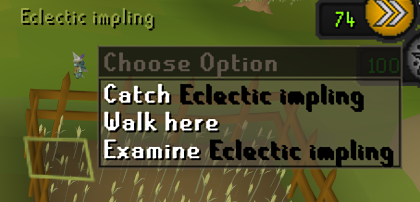
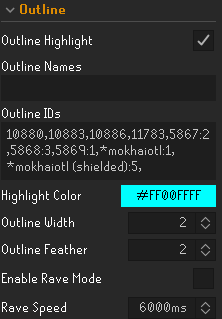
https://i.imgur.com/lcd2sxB.png what causes some npc's names to turn black when their true tile is a different color. think this is better npc highlight but cant find the setting. https://i.imgur.com/BMdGQpg.png also i have doom shield phase in outline and its never worked
 haughty pumiceBOT
Support for hub plugins should be directed to the author of the plugin.
You can find the support link by searching for the plugin in the Plugin Hub panel and clicking the ? button on the plugin, or by right-clicking the plugin in the plugin panel and clicking the Support menu option.
raw marsh
round jacinth
and/or check behavior with a clean profile with only gpu enabled to confirm its ...
seems to be still be randomly dropping frames on a new profile. my computer knowldge is limited, how would i try an older version?
round jacinth
you can consult google on how to install an older driver version for what ever gpu you have
raw marsh
ah gotcha i thought you meant like with rl lol okay easy enough thanks
round jacinth
no runelite just uses what you have for it
orchid radish
Sorry. maybe another silly question - Coins are still appearing on the floor under value of 500. Is this incorrect? I've tried putting a comma after and also decapitialising the C in coins to no avail
 winter snow
It doesn't hide the items, just the text iirc
orchid radish
Yeah, sorry, the text is still there

Ohh hold on. I had Coins in the highlighted box. Yep, another user error lol. Sorry!
winter snow
😄
 warped hemlock
@clear stratus I appreciate you looking into the fixed mode hide chat plugin, but it appears your earlier commit didn't fully solve issues for folks.
Repro steps: Hide chat, open a "Make-X" interface (making potions, chiseling gems etc) -> Interface doesn't override hide as it should.
I didn't want to make another issue in gh as it's basically the same issue with a different interface.
 muted copper

the NPC Indicators plugin allows you to highlight the menu entry of any NPC you tag
Is there any way to automatically tag/highlight the NPC that you're in combat with?
 clear stratus
warped hemlock
<@274242543766470666> I appreciate you looking into the fixed mode hide chat plu...
clear stratus
warped hemlock
<@274242543766470666> I appreciate you looking into the fixed mode hide chat plu...
that doesn't surprise me but i'm not sure when i'll have time to look at it again
if someone could send a pr i could look at it
 sonic nimbus
I need help
I am trying to log into my profile on a new computer
My login is through my university email who used to use google but stopped using google
The login brings me to google but when I login it gives an error as there is no longer google collab
So it will not login
 zealous cedar
do you still have the old computer?
sonic nimbus
zealous cedar
do you still have the old computer?
I do
zealous cedar
copy the .runelite folder from the old computer
sonic nimbus
I want them to sync though as I will be using both computers
 empty minnow
Sync them with a new email after you copy the files over
zealous cedar
I guess backup .runelite first before doing anything, but what you want to do is create a new account on your old pc
or i guess on your new pc,either way
most people cant do this without wiping all of settings though so backup .runelite first
sonic nimbus
its so creamy & dreamy having them sync, probably gotta go thru with that
probably gotta go through with making a new account I mean
muted copper
muted copper
I don't think 'NPC indicators' or 'Better NPC highlight' supports this feature
i figured it out
"Interact Highlight" is the plugin I needed
it doesnt support menu entry recoloring, but that's okay
'Slayer Tag Highlight' in the plugin hub tags every slayer task monster except the one you're in combat with. And it supports menu-entry recoloring
https://runelite.net/plugin-hub/show/slayer-tag-highlight
i just wish there was something like that for non-slayer task npcs

 round jacinth
Seems they interpret the rules from jagex to not want to break the guidelines.
muted copper
yeah, it would break the rules
the slayer task menu entry recolor is pushing it too, im surprised that it has been allowed
i just didn't know about that specific rule until today
sonic nimbus
Who decides what is "allowed"?
round jacinth
jagex has their own list of rules
muted copper
Old School RuneScape
We've updated our third-party client guidelines following the recent client announcement.

 round jacinth
And Adam has a list his rules
muted copper
there's jagex's list^
round jacinth
round jacinth
And Adam has a list his rules
There are things that don’t break jagex rules that won’t be allowed because they’re things runelite doesn’t want to facilitate. Like allowing muted players to chat with each other. Common sense things mostly.
 inland trail
Anyone else seeing this visual glitch using the 2010 interface game frame?
 muted copper
round jacinth
Seems they interpret the rules from jagex to not want to break the guidelines.
muted copper
round jacinth
Seems they interpret the rules from jagex to not want to break the guidelines.
is it safe to keep using the Slayer Tag Highlight plugin despite it seemingly breaking the rule, "Indicates which player an NPC is focused on" for slayer task NPCs?
just paranoid about getting banned for something silly like that
round jacinth
if it's on the hub then it's allowed
and for plugins on the hub that have triggered false bans, they were all squashed
the 1.5tick salvaging people did
muted copper
Yeah it's on the hub. Thank you for the peace of mind ❤️
 brazen marsh
i am a pker and mostly i play with 3 or 4 clients. Evrey 30 mins just one clients perma dcs for no reason other clients is fine net is fine even so screenshare on disc not blury
just one client
it is always just one client even if i restart the PC, reset router just one random client
I switched runelite profile(did a new one) , isp not blocking anything idk what else i can do any1 assist me with this
 leaden trail
Does it DC randomly or are you hopping
 compact nymph
Hi there, im wondering if anyone can help me with my runelite closing randomly, been happening a lot last couple days
haughty pumiceBOT
To find the logs, you can do one of the following:
- If your client failed to open, click the
Open logs folderbutton. - Open the screenshot directory by right-clicking 📷
Camerabutton, navigate 1 directory up, then open logs folder. - Navigate to
%userprofile%\.runelite\logson Windows or$HOME/.runelite/logson Linux and macOS.
Upload the log files named client and launcher by dragging them to Discord. If there are files prefixed with jvm_crash dated from today, upload them too.
compact nymph
 compact nymph
i've been playing for multiple years with no issues, what is the problem do you know?
 eternal canyon
i suddenly cannot open the jagex launcher and the website says "sorry you have been blocked"
i legit never touched a vpn or anything
any ideas?
the launcher deostn want to uninstall
its stuck on the start 1%
brazen marsh
leaden trail
Does it DC randomly or are you hopping
both
it mostly happens when i hop but also happens if im just afk and playing other acc
gilded kayak
eternal canyon
i suddenly cannot open the jagex launcher and the website says "sorry you have b...
!new you want the official discord probably
haughty pumiceBOT
newplayer: If you are new to OSRS, make sure to follow this excellent guide on OSRS wiki: https://oldschool.runescape.wiki/w/New_player_guide. You can also join the official OSRS Discord here: https://discord.gg/osrs
gilded kayak
but, i would guess u were blocked
compact nymph
So is that all I get, my cpu is slowly killing itself?
gilded kayak
if you're getting consistent crashes where the client just goes poof, then it might already be at the dying part
compact nymph
How do you figure? I run much more demanding games all the time with no issue.
gilded kayak
cuz of the hundreds of people with this issue
compact nymph
Do you have any real support to offer?
or just speculation on the degredation of my cpu?
gilded kayak
i'm not speculating anything i'm fairly certain
but otherwise no it's not a runelite issue, you can find people over the past few years with this issue
you're assuming the games you play demand the cpu more than this browser game
but this game is cpu bound
eternal canyon
gilded kayak
did u do anything to anger cloudflare
well the ip address is the issue because i cant log in on the phone on wifi too
maybe???
gilded kayak
😮
eternal canyon
but i do nothing tech savvy
gilded kayak
fwiw if your system time is wrong cloudflare really doesnt like that
they do not appreciate time travellers
gilded kayak
unfortunate
eternal canyon
gg
leaden trail
brazen marsh
it mostly happens when i hop but also happens if im just afk and playing other a...
You're probably hitting the hop limit mostly then
leaden trail
mossy swan
when is someone making a wiki page for this xd
If you write the bit about core affinity that I don't really understand I can write the rest I guess
mossy swan
leaden trail
If you write the bit about core affinity that I don't really understand I can wr...
it just makes runelite (or other program) not run on a specified core
so you know there is an issue with the core itself, and its not runelite (or something else)
leaden trail
Yeah you'd have to write the bit about doing that probably lol
mossy swan
i dont have a windows machine anymore so i cant xd
mossy swan
but you can do it by right clicking programs in task manager
leaden trail
I know you had a bit of a process you had people go through with that to try and work around the issue didn't you?
mossy swan
binary search of the broken cores basically
leaden trail
Sorry I'm like 2/3 asleep and a bit ill ATM
gilded kayak
compact nymph
Do you have any real support to offer?
do this ig #support message
 stone parcel
They could also use the latest microcode.
 agile pond
any ideas what causing this?
 round jacinth
probs just hd doing hd things
 fervent silo
runelite wont download for some reason ive done like all of the trouble shooting option i believe so im not sure what to do its an ssl exception with the message of a tag mismatch
log for those that might need it
gilded kayak
Is this a work computer
fervent silo
Nope
Its a home gaming PC
And it's only runelite the basic launcher works just fine
brazen marsh
leaden trail
You're probably hitting the hop limit mostly then
I have been hopping for over 8 years man this shit never happened to me at all. It is 100 percent not my net either
gilded kayak
dats heat
 quiet wind
Gonna post this before heading to bed but I just noticed that some notes I had added to the little notes plugin did not save after restarting runelite the other day. Never had this happen before. I'm guessing there's no way to get those back? Through a backup file or something.
 cunning horizon
[Client] DEBUG n.r.client.plugins.gpu.GpuPlugin - Zone invalidated: wx=-1 x=11 z=11
[Client] DEBUG n.r.client.plugins.gpu.GpuPlugin - Zone invalidated: wx=-1 x=12 z=11
[Client] DEBUG n.r.client.plugins.gpu.GpuPlugin - Rebuilt zone wv=-1 x=11 z=11
[Client] DEBUG n.r.client.plugins.gpu.GpuPlugin - Rebuilt zone wv=-1 x=12 z=11
[Client] ERROR injected-client - Client error
java.lang.AssertionError: null
    at net.runelite.client.plugins.gpu.FacePrioritySorter.uploadSortedModel(FacePrioritySorter.java:185)
    at net.runelite.client.plugins.gpu.GpuPlugin.drawDynamic(GpuPlugin.java:1193)
    at net.runelite.api.hooks.DrawCallbacks.drawDynamic(DrawCallbacks.java:172)
    at ih.vr(ih.java:55671)
    at ih.tv(ih.java:46916)
    at ih.cb(ih.java:35566)
    at ih.ws(ih.java:49359)
    at cf.ic(cf.java:3361)
    at bh.lv(bh.java:8625)
    at bh.lv(bh.java:8662)
    at ic.lw(ic.java:8496)
    at client.pg(client.java:13286)
    at client.bs(client.java:11717)
    at bv.bo(bv.java:475)
    at bv.jn(bv.java)
    at bv.run(bv.java:30071)
    at java.base/java.lang.Thread.run(Thread.java:833)
[OkHttp https://api.runelite.net/...] DEBUG net.runelite.client.TelemetryClient - Submitted error
Well that's a first. Happened during the Royal Titan's fight during the final phase
o7 -500k death
cunning horizon
Okay it just happened again idk wtf is going on lmao I'll make a proper GH issue

 azure drum
Any idea what plugin is drawing yellow pulsating box arround my skills tab? it happens on level up and the leveled skill flashes yellow. just started happening
zealous cedar
gilded kayak
The Mining skill guide shows Runite ore at level 92 instead of 85.
i feel like there's more new* errors than updates in the skill guides
azure drum
oh... that sucks
 earnest oxide
trying to make an account but its not letting me..
 haughty pumiceBOT
If you are new to OSRS, make sure to follow this excellent guide on OSRS wiki: https://oldschool.runescape.wiki/w/New_player_guide. You can also join the official OSRS Discord here: https://discord.gg/osrs
gilded kayak
you want the official discord, we dont control anything that happens on runescape.com
zealous cedar
I guess try again tomorrow, maybe during Uk business hours
gilded kayak
but yeah it might actaully be broken, and everyone is asleep
earnest oxide
rip, thanks
 drowsy rapids
On Mac, I'm unable to set keybinds to something like CTRL+<letter>. For example the Runelite->Sidebar toggle key. CTRL+1, CTRL+F1, etc. work, but not letter keys. Pressing CTRL+T just gets read as CTRL. Interestingly, pressing CTRL+H gets sent as CTRL+BACKSPACE. Makes me think some weird escape code thing in Java. OS isn't intercepting, other apps read the keys fine. Can another Mac user test if they have the same problem? Thanks!
Tried it with all plugins off as well, still happened.
 drowsy zealot
would just like to ask if anyone is experiencing the same problem as my friend, the specific barrows item is not showing, the loot drop notifs is on, is this due to the cc settings? thanks guys.
sorry don't know where to ask XD
 leaden trail
Valuable drop notifications in the in game settings I think
brazen marsh
Is there anyone or a place so that I could create a ticket please?
mossy swan
what do you need
brazen marsh
i am a pker and mostly i play with 3 or 4 clients. Evrey 30 mins just one clients perma dcs for no reason other clients is fine net is fine even so screenshare on disc not blury
just one client
it is always just one client even if i restart the PC, reset router just one random client
I switched runelite profile(did a new one) , isp not blocking anything idk what else i can do or try
round jacinth
brazen marsh
i am a pker and mostly i play with 3 or 4 clients. Evrey 30 mins just one client...
You were attempted to be told what the issue was and you just said nah it’s not me.
There is no ticket system for help you just chat here with folks who have free time to give it.
You previously said you would lose connection when you world hop makes it seem like an internet hiccup or a world hop limit.
mossy swan
someone did tell me the world hop limit is per-jagex-account and not per-character
 solid mesa
mossy swan
someone did tell me the world hop limit is per-jagex-account and not per-charact...
solid mesa
mossy swan
someone did tell me the world hop limit is per-jagex-account and not per-charact...
This is true
 dense mirage
Has anyone ever had issues with runescape crashing their entire computer? I got this a couple of times in the past days while i was at blast furnace, the entire system would basically go down to like 1 FPS and it stays like that until I restart. I ve checked cpu gpu temps and usage and everything is normal, and this only happened while playing runescape, with other games i have no issues
I've ran disk checks and everything seems fine, i ve ran malwarebytes as well, its really strange I can't figure it out
It only started occuring recently
leaden trail
Try rolling back your GPU drivers to an older version. It's almost certainly a driver crash
You can also try checking event viewer
dense mirage
I though it could ve been the drivers, I didnt roll them back rather I updated the drivers and the issue still persisted afterwards.
 rare flame
wraith citrus
just use the item id
rare flame
wraith citrus
just use the item id
Oh that works? I always tried just typing the name and it never worked for emberlight lol
@ionic ivy Any updates on the fixes gamer? I'm missing your plugin ;_;
brazen marsh
round jacinth
There is no ticket system for help you just chat here with folks who have free t...
zom i was not trying to be rude but i would have known if i would of hiit the world hop limit. Also that is not the case because even if i afk at bank i still dc
 hot charm
banned for using wrong client yesterday anyway too appeal that?
round jacinth
we aren't jagex
 compact spear
Should've used the right client
hot charm
facts lol
round jacinth
good to know they're banning cheaters still though
leaden trail
brazen marsh
zom i was not trying to be rude but i would have known if i would of hiit the wo...
Post your logs
If it's happened today post the ones without dates in the fine name, otherwise post the ones from a day where it's happened
haughty pumiceBOT
To find the logs, you can do one of the following:
- If your client failed to open, click the
Open logs folderbutton. - Open the screenshot directory by right-clicking 📷
Camerabutton, navigate 1 directory up, then open logs folder. - Navigate to
%userprofile%\.runelite\logson Windows or$HOME/.runelite/logson Linux and macOS.
Upload the log files named client and launcher by dragging them to Discord. If there are files prefixed with jvm_crash dated from today, upload them too.
 civic seal
Hey ive been afking MMs while playing cyber punk with no issue, recently, if i to the caves after 1-3 minutes my runelite will slow down untill it just freeze frames and Ihave to close app and restart. started doing this even if runelite is the only app running. Gpu is not helping and turning off 117 is not helping. I also cleared my runelite cashe
Any ideas what this could be ?
leaden trail
Try turning off quest helper
civic seal
leaden trail
Try turning off quest helper
Just tried that pulled up and still getting huge chugging, gpu usage and cpue usage was around 20 - 30 %
okay just noticed my GPU Fans are turning off when playing runelite, heatspikes maybe?
 oblique plume
if its gradually slowing down untill crash
you can install the debug helper plugin and hit heap dump and analyze that
civic seal
10 4 will try that
oblique plume
actually now that we have the built in little analyzer tool you can click that button
instead of dumping and then using a different tool to look at the dump
oblique plume
oblique plume
you can install the debug helper plugin and hit heap dump and analyze that
youd click this after its noticably slowed down some
civic seal
Yeah trying to now. Game legit freeze frames and wont let me even check it
Could it be a ram problem?
oblique plume
yea it might take more heap to run than you have left
haughty pumiceBOT
oblique plume
turn up the heap there and then try again
 kindred walrus
the hunters rumours plugin isn't working for me 
oblique plume
the -Xmx1536M option that it talks about in there
go back to the tunnels and sit for as long as you normally would have taken to crash out then hit analyze
this give RL a bunch more space but the underlying problem would still be there
civic seal
If it crashes and I close app will that heap be there on restart?
civic seal
Running it with the upped heap size stll crashes it almost right away.
 heavy flint
anyone else having crazy ping?
 mossy swan
wow your internet must be really struggling
 round jacinth
your internet is having hiccups
 limpid sand
Is ghauth stalling for anybody when submitting the auth token? Getting stuck on RuneLite is thinking...
round jacinth
sometime the bot is having a bad day
try again later
in meantime you can ask your development questions in #runelite
limpid sand
NP! Just have some plugin legality questions, will start a convo there
 viscid forge
Not sure if this is the right channel to report this, but I came across a weird bug when using the oculus orb - when using the orb then moving your mouse off screen or onto the side panel, it seems to trigger the "calculate next level" overlay from Runelite's native Combat Level plugin for some reason.
 oblique plume
civic seal
Running it with the upped heap size stll crashes it almost right away.
oblique plume
civic seal
Running it with the upped heap size stll crashes it almost right away.
unfortunate, does it work if you click it right after logging in?
 whole goblet
Anyone know why you can’t download the cox vanguard plugin anymore?
 orchid adder
Why my game is now running at 60 fps instead of 100, i've changed nothing recently?
round jacinth
whole goblet
Anyone know why you can’t download the cox vanguard plugin anymore?
Hub plugin broke and the author needs to fix it
 stone onyx
Hello! Id there a way to make the rl interface font bigger? I found font sizes for everything but rl itself
oblique plume
you mine like on the sidebar?
stone onyx
Yup!
brazen marsh
@leaden trail mb didnt see
stone onyx
Its so tiny on my screen lol
haughty pumiceBOT
oblique plume
the scale option in there
brazen marsh
leaden trail
brazen marsh
I need the client log as well
 leaden trail
So shocker ...this is just your connection
brazen marsh
to some certian worlds you think?
leaden trail
🤷
haughty pumiceBOT
open command prompt, type this in:
ping -t oldschoolXXX.runescape.com
where the XXX is your world minus 300, for example world350 = 50
leaden trail
You can try doing that I guess but if you're just hopping then I don't really have a good answer
round jacinth
You run it on the world(s) you’re connected to and when you get a dc in game the command prompt window should show the same
civic seal
oblique plume
unfortunate, does it work if you click it right after logging in?
I click it to run it and nothing happens, is it supposed to bring something up after I hit run ?
oblique plume
i want to say yes
i havent used it myself yet its sorta new
let me do it real quick
civic seal
Weird, dumb thing is so far it's Only mm caves
civic seal
Every where else I've been no problema
oblique plume
ohh wow even on the login screen i run out of heap just analyzing
ok well i guess its not working atm cuz even increasing it its just still failing
so we cant know what exactly is the cause for you other than the gpu/questhelper other people have reported
gilded kayak
i doubled my heap and it stopped ooming itself, when dumping
it no likey hub plugins with default memory
oblique plume
i did too and its still just ooomed out before ever logging in
gilded kayak
unlucky
brazen marsh
@round jacinth while dcing
 round jacinth
i can't see if you disconnected or not in that screenshot
brazen marsh
then the black box top left appeared
gilded kayak
you got 22 minutes into a raid and the command only ping(ed)* 7 times?
you need to be running in the background while ur playing
brazen marsh
like perma
round jacinth
until you disconnect yeah
gilded kayak
yes all it does is ping in the background
oblique plume
its intention is to show you its not a runelite issue
brazen marsh
alright
civic seal
oblique plume
so we cant know what exactly is the cause for you other than the gpu/questhelper...
Its some plugin
After i turned every plugin except debug off I am having no problems
oblique plume
yea its filling up the heap and just bogging down the client
the analyzer is supposed to help find which one
civic seal
For now ill just afk like this and slowly reintergrate pluggins to see if one makes it act up
 grave hill
Is anybody else experiencing this bug with their skill icons? It just popped up 2-3 days ago, anyone know how to fix it? or if it's a specific plugin causing it?
 leaden trail
The 2010 interface style has some issues right now
grave hill
Is that a setting I've chosen? How do i see which interface style im using?
round jacinth
in the interface style plugin my guy
grave hill
Wow, first time I've ever even click this plug in, i see, thanks
winter snow
It always surprises me how many people say it's the first time they've seen an optional setting they've turned on
grave hill
must've chosen 2010 interface years ago before one of my many annual breaks**
Anyway thanks for the help!
 fresh cosmos
does anyone know what would be marking npc's? its not just this one, its all of em. everything that i could think of, but i dont know too much about runelite

 eternal prairie
anyone else got black screen issues on windows 11 with runelite, i suspect it's something to do with the gpu plugin and my laptop's gpu.
specs: Lenovo LOQ Laptop
Processor 13th Gen Intel(R) Core(TM) i5-13450HX (2.40 GHz)
Installed RAM 16.0 GB (15.7 GB usable)
NVIDIA GeForce RTX 5060 Laptop GPU
I've tried all the classic re-install runelite and drivers but the problems seems to not go away (been here from the start). It's particularly bad when I tab out of the client or have a pop over window on it, computer grinds to a halt and then black screens. Any advice? Any settings in the gpu plugin that could cause this? should i switch to 117?
fresh cosmos
fresh cosmos
does anyone know what would be marking npc's? its not just this one, its all of ...
and why am is my client getting SUPER laggy for ~1 minute? its only the rl client, and im only barb fishing. its fine otherwise... too many plugins, maybe?
shouldnt be the issue:(

 pastel star
Hey , is it normal i don't hear the sound of my axe on trees?

 pastel star
no i can hear the music fine it's just my axe sounds...
sound effects is on too
 buoyant garnet
how do i send my friend my plugin set up?
gilded kayak
we don't support that because it brings in unwanted traffic when the friend, does not understand why x is happening
 primal wyvern
Loot tracker plugin randomly has bosses missing and drops not logged in the tracker anyore, is there an expiration period or something?
leaden trail
If you do a kill and restart the client it should come back
It doesn't load the full history, just only the so many most recent things
primal wyvern
ahh damn, havent had a hydra task in a couple months, so probably just gone
empty minnow
The client does not hold all your data at once, that doesn't mean it's gone. It's just not visible atm
If you have a RuneLite account all the data is on the website
 oblique loom
i wasn't sure where to report this to, but fixed mode hide chat isn't working properly. it does not open the box after selecting an option, for example, when talking to NPC or singing at the crystal bow in corrupted gauntlet.
nvm i apologize and have found the support page, disregard my message.
 atomic sphinx
with runelite plugin "dude where's my stuff" it keeps showing a deathbank for tob even though its empty
 solid mesa
You can delete the deathbank from the side panel
atomic sphinx
ah thanks
it will never do that automatically?
or was this just a weird bug
anyway, thanks, that fixed it for now 😛
solid mesa
I think its broken if you have auto-equip worn items turned on
 wet zenith
Is there a way to specify noted vs. unnoted in the ground items list? Or just quantity
wet zenith
Alright thanks I’ll check it out
 real sun
anyone been havin issues lately with audio?
rl will make audio as normal, watchdog notifs, c engineer pluggin etc
ingame sounds sometimes just stop even when i have my volume bars unmuted and high
 rose coral
@haughty pumice any way to recover a profile from the cloud sync?
 low palm
 fluid swan
Anyone knows on how to fix the issue with too many login attempts
 final axle
usually upgrading to a jagex account will help with that
 midnight radish
anyone knows why my skill tab looks like this?
 gilded kayak
it's a bug with the 2010 theme after the latest game update
where jagex changed something idr what
 karmic iris
anyone know how to tremove this but keep my current radius

 misty bay
why am i getting this grey line at the middle everytime i startup runelite? if i minimize the window and bring it back, it disappears but i dont want to have to do that everytime
 gilded kayak
if i remember correctly either runelite or the jagex launcher is running in windows8 compat mode
misty bay
uh why did it do that? i just installed it on a windows 11 machine\
gilded kayak
idk i would probably check to see if i'm remembering correctly
right-click runelite.exe and the jagex launcher one -> properties -> and check if that setting is checked
if it is, turn it off
if it's not, idk unlucky ig
misty bay
compat mode is disabled for both apps
also im running on a 2560x1600 (16:10) laptop if that matters at all
gilded kayak
oh apparently the windows 8 compat bug was a white line on the top, not the top-middle*
well i give myself half a point still
 carmine brook
Im having issues with my client freezing due to random stack overflows. Not sure what to do, wiped away my entire .runelite folder and other culprit plugins, now seems like something native is messed up.
gilded kayak
wow thats not good
carmine brook
gilded kayak
wow thats not good
Any ideas how I can fix this im crashing randomly and cant do Vardorvis or nothing because I dont want to lose loot...
gilded kayak
you could run safe mode to confirm it's some  plugin you still have, causing it
!safe
haughty pumiceBOT
safemode: To enable safemode
Windows
Run the RuneLite (configure) shortcut from the windows start menu
Tick the Safe mode box, save, launch RuneLite the way you normally do.
Mac
In Terminal, run
/Applications/RuneLite.app/Contents/MacOS/RuneLite --configure
Tick the Safe mode box, save, launch RuneLite the way you normally do.
gilded kayak
i would probably yes
carmine brook
ope just crashed again
the whole viewport freezes but i can hear the game music still
other times whole runelite crashes
If I use 117 hd plugin, i get very similar errors but directly mentioning some shaders
2026-03-07 00:56:33 CST [Client] WARN  rs117.hd.opengl.shader.ShaderProgram - Fast has missing or unused UniformTexture: textureArray
2026-03-07 01:03:06 CST [Client] ERROR injected-client - Client error
java.lang.StackOverflowError: null
    at rs117.hd.utils.ExpressionParser$Expression.lambda$toFunction$0(ExpressionParser.java:535)
    at rs117.hd.utils.ExpressionParser$Expression.lambda$toFunction$0(ExpressionParser.java:535)
    at rs117.hd.utils.ExpressionParser$Expression.lambda$toFunction$0(ExpressionParser.java:535)
    at rs117.hd.utils.ExpressionParser$Expression.lambda$toFunction$0(ExpressionParser.java:535)
    at rs117.hd.utils.ExpressionParser$Expression.lambda$toFunction$0(ExpressionParser.java:535)
    at rs117.hd.utils.ExpressionParser$Expression.lambda$toFunction$0(ExpressionParser.java:535)
    at rs117.hd.utils.ExpressionParser$Expression.lambda$toFunction$0(ExpressionParser.java:535)
    at rs117.hd.utils.ExpressionParser$Expression.lambda$toFunction$0(ExpressionParser.java:535)
can you post yesterday's log too then
carmine brook
Unfortunately I wiped away my entire .runelite folder today
so those logs are gone
I think i posted them in the actual 117 plugin discord basically same as above
 devout latch
I'm using exactly the same client with the same profile for both accounts, loaded through jagex launcher, but for some reason I can't get one to track my mains total gained. I've tried lots of things but can't seem to find it.
Only relevant thing I found is this github issue that was fixed in 2019: https://github.com/runelite/runelite/issues/9089
Any ideas?


GitHub
Describe the bug If you toggle the XP Tracker plugin off and on again the overall XP counter will fail to show up and the error panel that reads "You have not gained experience yet." does...
leaden trail
A few people have reported that but I don't think anyone has been able to reproduce it
devout latch
glad i'm not going crazy 😭
 fallow kestrel
Hi, I noticed that my Runelite doesn't play the Windows 10 notification sound, but everything else does. How do I fix this? Here's some more info:
Windows 10 Focus Assist / Do Not Disturbed is turned off
Windows 10 Global Notifications is set to on
Windows 10 has Runelite notification sound turned on

 brazen root
round jacinth
fallow kestrel
Hi, I noticed that my Runelite doesn't play the Windows 10 notification sound, b...
brazen root
round jacinth
fallow kestrel
Hi, I noticed that my Runelite doesn't play the Windows 10 notification sound, b...
Do you have system sounds muted in your mixer
fallow kestrel
round jacinth
Do you have system sounds muted in your mixer
How do I check this?
round jacinth
Bottom right for your system sounds you have a global volume but windows also allows you to do per app volume

Something like that
System sounds might be muted
fallow kestrel
round jacinth
Bottom right for your system sounds you have a global volume but windows also al...
Ohhh... Now I see that it's off. Thank you! Will turn it on now
:)
round jacinth
That’s what native is trying to use for sounds
fallow kestrel
I see
round jacinth
If you set it not to native then it uses that “notification volume”
sullen vapor
anyone know why the GotR plugin stops showing the "time since portal" for some matches?
round jacinth
Hub quality things or you also don’t know it so the plugin doesn’t know it.
 shrewd oak
My game wont start after redownloading windows. Upon loading Runelite gets stuck on the "downloading bootstrap" part of the loading process. Anyone know any fixes? tried deleting things from my computer still wont work.
round jacinth
does this load https://static.runelite.net/bootstrap.json
 muted mulch
 leaden trail
Turn off Nvidia HDR probably
muted mulch
i reinstalled and its fine now
carmine brook
Im seeing this error in my crash logs now
siginfo: EXCEPTION_ACCESS_VIOLATION (0xc0000005), reading address 0xffffffffffffffff


Register to memory mapping:

RIP=0x00007ffa9208c0d7 jvm.dll
RAX=0x41e38b4940738b49 is an unknown value
RBX=0x0 is NULL
RCX=0x00007ffa91fcd9c1 jvm.dll
RDX=0x000000e9c4bfb888 is pointing into the stack for thread: 0x000002701f7a3800
RSP=0x000000e9c4bfb810 is pointing into the stack for thread: 0x000002701f7a3800
RBP=0x000000000000000a is an unknown value
RSI=0x0000000000000042 is an unknown value
RDI=0x000000e9c4bfb990 is pointing into the stack for thread: 0x000002701f7a3800
R8 =0x0 is NULL
R9 =0xffffffffffffffff is an unknown value
R10=0x000000e9c4bfb888 is pointing into the stack for thread: 0x000002701f7a3800
R11=0x0 is NULL
R12=0x0 is NULL
R13=0xffffffffffffffff is an unknown value
R14=0x000000e9c4bfb908 is pointing into the stack for thread: 0x000002701f7a3800
R15=0x0 is NULL
 twilit imp
Not sure if this is the right channel for gameplay help but I CANNOT find the mud patches.
 empty minnow
Ground object hider?
twilit imp
empty minnow
Ground object hider?
Didn't do anything. I looked it up and saw the mud patches are inbetween the cabbages and potatoes. Idk why nothing happens when I pour water.

 twilit imp
I had to USE the bucket instead of emptying. It says "mud patch" if you hover before using it.
empty minnow
ah yeah you have to use items on stuff to interact with them. Aside from maybe digging with a spade
twilit imp
Yup, finally got it.
 chrome sapphire
SOLVED
sorry in advance for long post.
For a while my world switcher has been stuck on loading and ive just had to use the runelite world hopper instead. I have tried creating a fresh runelite profile to rule out the possibility of the plugins I have installed being the issue. I've also tried completely uninstalling both Jagex launcher and Runelite yet nothing seems to fix this.
I have a good stable internet connection so I dont think it would be that, I don't have any VPN's active and haven't changed any anti-virus setting since it stopped working.
Im really stuck on what to do now so any help would be great.
included an image of what my world switcher looks like
Solution:
I reset my wifi router and unpaired and re-paired any boosters around the house and now its fixed?
no idea how that solved it but it did lol
 gilded kayak
as far as we know when that happens it's just an issue between you and the world switcher server/system
and the runelite one works cuz we're not waiting for that, we just kinda tell jagex we are hopping to that world*
 dull moon
had to do a clean install on my PC i saved my whole runelite file in my google drive but i never made an actual profile in runelite itself and now when i pasted my old runelite file over the fresh one none of my settings transferred am i cooked and do i have to redo everything or is there a fix
gilded kayak
It automatically makes a profile
Make sure runelite is closed before you try pasting over
Or it will just override on shutdown
dull moon
ive done it while runelite is closed none running in the background completely replaced the folder still no work
gilded kayak
Probably just use the import profile button, in the  tab, and what you want to import is in the profiles2 folder
dull moon
thats the thing when i open profiles 2 and i import the profile in there it still does nothing
so me doing it trough google drive cooked it ?
round jacinth
dull moon
thats the thing when i open profiles 2 and i import the profile in there it stil...
What file are you importing and does nothing show up on the profiles side panel?
dull moon
i legit just downloaded the whole .runelite folder from before i cleaned my pc
and im trying to replace the fresh one from the fresh install i just did with my old one if that makes sense
round jacinth
can you show me instead of typing about it
dull moon
this is the folder i downloaded before fresh install and just pasted over the new one

so in the folder all the plugins and that all show up but when i open runelite none are there
round jacinth
profiles2 folder, that is the folder i care about
dull moon

 feral rivet
need help with something, im running runelite through bolt, there was a recent nvidia driver update on linux and now it looks like this
 round jacinth
dull moon
round jacinth
dull moon
it turned the .properties file into a .txt document
see that it's named default-numbers.properties of type 'text document'?
dull moon
yea
round jacinth
create a file called something like import-this.properties using notepad
and make the content of it the same as that text document
and import that
dull moon
and its this one right since thats the one thats in the old folder i downloaded
 round jacinth
ignore that one for now
round jacinth
default-blah for now
the $rsprofile already exists in there as a 421kb file
yeah the google drive thing broke this, in future just use the built in sync the client does, it does this stuff automatically
dull moon
ye i dint know that was a thing untill now @round jacinth i made a new notepad called it import-this.properties and saved it
feral rivet
gpu just falls back to software rendering
round jacinth
dull moon
ye i dint know that was a thing untill now <@179369590902489088> i made a new no...
import that version, make sure it actually is import-this.properties
 round jacinth
and not import-this.properties.txt
round jacinth
feral rivet
this is what it looks like
that looks normal to me
haughty pumiceBOT
Visit 117's HD plugin discord (https://discord.com/invite/U4p6ChjgSE) for support, issues & feedback
round jacinth
go to their discord for 117hd help
 round jacinth
it looks like it's still named .txt at the end
idk if that works
you can try to import it
dull moon
its a text document cuz its done on notepad i think im not a computer wizard im terrible with this ill try import it
round jacinth
if it works it'll create a new profile named like imported profile
you can name a file to be any file type while you're in notepad
sed
i sent you a pm
ill rename the file for you lol
idk how to explain it
 quartz lance
is the party rl server having issues, pings are very slow
and other party related things
 modest steppe
yeah must be party server because tob predicted hit plugin was being weird too
 mint harbor
How can I fix this?
 gilded kayak
you can probably bypass that by either enabling a VPN or using your phone data as a hotspot, just for starting the client
mint harbor
Doesn’t work, I was able to get onto the login page but when I try to login or change a world, it loads and then it reverts back and nothing happens
gilded kayak
then it's definitely your internet, since everything after the client is open, is your connection to jagex
and launching the client is your connection to our servers
mint harbor
Ur right, none of other apps are opening up either
gilded kayak
unfortunate
but it will probably just go away eventually
just some issue @ your ISP probably
 pliant quiver
trying to make a plugin and test it, im kind of stuck, intellij says build is fine but i cant seem to open runelite in dev mode or find my plugin
hmmm, may have solved it
 prisma tapir
Who do i talk to about my profile being removed? None of my plug-ins are there and the ones that come with runelite are reverted back to factory settings
haughty pumiceBOT
gilded kayak
that page maybe
prisma tapir
I did not use an account previously so there was nothing to sign into
gilded kayak
it's possible that the file that keeps track of what profiles to load, got corrupted, maybe but windows shitting itself during a sudden shutdown
and since it thought there was nothing to load, it started like it would if it was first time instlal
install*
prisma tapir
Hmm I did not notice any shut down on my PC since last night other than the reset I did after attempting to log in today and seeing a fresh profile
prisma tapir
Such is my luck, but thank you for the assistance. Everything seems back in order now
 dense swift
When you enable a plugin the icon goes on the right hand side, is there a way to rearrange these?
oblique plume
No
 lunar wagon
Any idea why my client keeps crashing at Royal Titans with the following error?
    at net.runelite.client.plugins.gpu.FacePrioritySorter.uploadSortedModel(FacePrioritySorter.java:185)
    at net.runelite.client.plugins.gpu.GpuPlugin.drawDynamic(GpuPlugin.java:1193)
    at net.runelite.api.hooks.DrawCallbacks.drawDynamic(DrawCallbacks.java:172)
    at ih.vr(ih.java:55671)
    at ih.tv(ih.java:46916)
    at ih.cb(ih.java:35566)
    at ih.ws(ih.java:49359)
    at cf.ic(cf.java:3361)
    at bh.lv(bh.java:8625)
    at bh.lv(bh.java:8662)
    at ic.lw(ic.java:8496)
    at client.pg(client.java:13286)
    at client.bs(client.java:11717)
    at bv.bo(bv.java:475)
    at bv.jn(bv.java)
    at bv.run(bv.java:30071)
at java.base/java.lang.Thread.run(Thread.java:829)```post the full logs
haughty pumiceBOT
To find the logs, you can do one of the following:
- If your client failed to open, click the
Open logs folderbutton. - Open the screenshot directory by right-clicking 📷
Camerabutton, navigate 1 directory up, then open logs folder. - Navigate to
%userprofile%\.runelite\logson Windows or$HOME/.runelite/logson Linux and macOS.
Upload the log files named client and launcher by dragging them to Discord. If there are files prefixed with jvm_crash dated from today, upload them too.
 wheat orchid
I saw on here that a fix is coming for the stat page visual bug on the 2010 interface style. Any timeline on that?
lunar wagon
Oh I see, no problem. I actually found there's already an issue on github about this error 👍
 exotic trellis
Anyone that might be able to help me figure out what is going on with my client? It has happened at least twice now. I will get disconnected from the game and in the top right of my client it will say some percentages loss. Last night I was in a CM and it happened and both my main and my iron both got dc'd with that percent loss thing. Then when I try to log back on it says can't connect to that world to try another. I had close both runelite and the Jagex launcher, re-launch runelite, while runelite was loading it said that it couldn't reconnect to the Jagex update server. So I closed both again and re-launched them again and it worked. I was in a discord call and streaming music the entire time and didn't notice a drop in quality of those so I don't "think" it was an issue with my network but I don't know. Just seeing if anyone here might be able to help me so where it doesn't happen anymore.
haughty pumiceBOT
open command prompt, type this in:
ping -t oldschoolXXX.runescape.com
where the XXX is your world minus 300, for example world350 = 50
stone parcel
You can try to leave that running, and then play the game until you encounter the issue, and then see what the cmd window says for the same time as the issue.
exotic trellis
Ok. Is there anything I should keep an eye out for when it happens?
stone parcel
Any sort of errors shown in the cmd window could be related.
Maybe something like "timed out".
exotic trellis
Just ping the world constantly to see if I get one that times out?
stone parcel
Pretty much yeah. You want to see if you can get the cmd window to show timed out at the same time RL shows an issue.
exotic trellis
Ahhh ok. Thank you
stone parcel
Np, good luck! 😄
 late frigate
My exp drop font seems to have changed back to default overnight, how should I go about this?
round jacinth
you're probably refering to "custom xp drops" which is a hub plugin, not core, right?
late frigate
"custom xp drops" was the plugin I was looking for somehow slipped past this one, fixed thank you!
 inner gale
font and size have changed and cant get it back to how it was
pliant quiver
im confused, what am i missing?
build.gradle runs fine, shadowjar runs fine, running he test.jar throws an error
Error: Main method not found in class com.hueyhelper.HueyHelperPlugin, please define the main method as:
public static void main(String[] args)
or a JavaFX application class must extend javafx.application.Application
zealous cedar
what do you mean test.jar?
pliant quiver
so what i was doing was, running build.gradle, then opening the gradle side panel and going to build and running ShadowJar (i saw it in a comment here somewhere) then going to build >libs in intellij and running that with the '-ea' in the VM field and it would load runelite and work
im guessing i've changed something thats required for that to work as its now not working
this is the full message:
"C:\Program Files\Eclipse Adoptium\jdk-11.0.30.7-hotspot\bin\java.exe" -Dfile.encoding=UTF-8 -jar C:\Users\joshu\IdeaProjects\Huey-s-Lil-Helper\build\libs\example-1.0-SNAPSHOT-all.jar
Error: Main method not found in class com.hueyhelper.HueyHelperPlugin, please define the main method as:
public static void main(String[] args)
or a JavaFX application class must extend javafx.application.Application
Process finished with exit code 1
oh hang on, i just went to Gradle > other > run and its loaded the client
nvm, doesnt have my plugin in there....
 full kindle
are the 2010 interface packs fixed yet?
 daring remnant
Anyone experienced this kind of issue before? Normally when my computer goes into this extreme lag mode, only way to get out of it is restarting computer or sign out from my profile. Would rly like to know whats causing this one... https://medal.tv/games/osrs/clips/mgsjWBivUBZAWcJ5Y?invite=cr-MSwwbHUsNTQxNjc0MjI2&v=60&tab=home I also found this topic which is exactly same problem i am having and tried uninstalling geforece experience and frameview but it didnt solve the problem for me. https://forums.tomshardware.com/threads/sudden-extreme-lag-less-than-1-fps-after-playing-hour.3830347/#post-23157559 Anyone know if its some plugin or is it runelite itself?

Watch Untitled by lemonaati and millions of other Old School RuneScape videos on Medal. #oldschoolrunescape
haughty pumiceBOT
Many plugins from the pluginhub break the client in subtle or not-so-subtle ways, including causing issues like client freezes. We do not support pluginhub plugins because we do not make or quality control them, and do not recommend their use.
Run the RuneLite (safe mode) shortcut, or with a Jagex account, first run the RuneLite (configure) shortcut and tick the Safe mode box, then launch RuneLite via the Jagex launcher.
This temporarily disables the GPU plugin and all hub plugins which will allow you to confirm the issue is caused by one of those plugins and isn't a core RuneLite issue.
If the issue is caused by a hub plugin, you should isolate which plugin it is and then uninstall the plugin.
round jacinth
full kindle
are the 2010 interface packs fixed yet?
next update the interface style will be fixed
daring remnant
haughty pumice
Many plugins from the pluginhub break the client in subtle or not-so-subtle ways...
Its not client freeze, its graphics card. This continues on desktop after closing runelite. Found out that win+cntrl+shift+B resets graphics card and it solves that without restarting computer. Just trying to ask if anyone got similar problems or anyoneone know whats causing this.
 vital ember
Hey guys, any reason why my customizable xp drops changed/stop working aswell as the bank value plugin? i cant get the bank value to work again
final axle
customizable xp drops changed to use the new runelite font settings. I had to tweak mine back to my old settings
 lunar lion
final axle
customizable xp drops changed to use the new runelite font settings. I had to tw...
lunar lion
final axle
customizable xp drops changed to use the new runelite font settings. I had to tw...
what did you change to revert them please? tried changing font size from 12 to 13/14/15 but not the same
final axle
I changed the font from runescape to runescape small or whatever it's called
I think I had mine tweaked from default before though so your mileage may vary
 wind hamlet
final axle
customizable xp drops changed to use the new runelite font settings. I had to tw...
wind hamlet
final axle
customizable xp drops changed to use the new runelite font settings. I had to tw...
ya idr my settings but whatever it is now is ugly as hell that's for sure lol
final axle
the changelog for that plugin says Changed font configs to work with the new Runelite font config setting feature. Added migration for old font settings to new one. but doesn't seem to work, maybe I missed something I had to do for it to migrate
 cloud needle
yeah i was using a custom font on xp drops but i guess thats not possible anymore
cloud needle
oh wait nevermind this font change is way better and more customisable 👍
 exotic nacelle
I had to change my settings to Runescape Small, Font Size 16pt to recreate what it was before (Runescape, Font Size 14pt)
was a very uncomfortable tob with the janked up settings 😄 thank u for all hard work u do @final axle , great plugin
final axle
not my plugin, just a fan of it
exotic nacelle
ah mb, big ty to the original author then
 narrow tangle
not sure if this is reported and whether its a runelite or jagex issue
 gilded kayak
would it be possible if you could explain a bit more
narrow tangle
the missing ground under the boulder
sorry i posted the area so it was obvious where it was
 gilded kayak
does it go away if you turn gpu off
narrow tangle
no
gilded kayak
mmm
 weary tulip
is there a supported way in the runelite API to programmatically execute a MenuAction for objects in a non-TopLevel WorldView, without requiring the user to click manually? If not, is this something that could be exposed safely, similar to how the auto world hopper works? i want to press shift + n to start navigating my boat. Now i am stuck i am not being able to do that lol, also was trying to do spacebar for activating, "Trim" option in sails. Didnt make it work, only made it work the "Disembark" option with enter and leave cargo also with spacebar.
solid mesa
That wouldn’t be allowed
weary tulip
solid mesa
That wouldn’t be allowed
why? its need user input its not automation
i see it as automated as the ctrl shift + right arrow for world hopping :p
weary tulip

 oblique stag
My runelite client keeps randomly crashing, is this the right place to get help?
haughty pumiceBOT
@oblique stag To find the logs, you can do one of the following:
- If your client failed to open, click the
Open logs folderbutton. - Open the screenshot directory by right-clicking 📷
Camerabutton, navigate 1 directory up, then open logs folder. - Navigate to
%userprofile%\.runelite\logson Windows or$HOME/.runelite/logson Linux and macOS.
Upload the log files named client and launcher by dragging them to Discord. If there are files prefixed with jvm_crash dated from today, upload them too.
oblique stag
first log I was in the middle of a CG kill, second I stood afk in gauntlet lobby
jvm_crash_pid_36504 is when I was AFK
 next canopy
When the chat is closed, id like to move the boss health bar to the green square (doing ALT + drag) , but it doesnt seem possible right? is there any plugin for this
 gilded kayak
no the chatbox is still there
it doesn't matter if it's closed, that's still the chat boxes area
next canopy
gilded kayak
no the chatbox is still there
okay i see, ty
 left oasis
Does anyone know how I can get comic sans back for the customizeable xp drops plugin? I'm on Mac OS, which may make a difference. I have the font installed to my operating system, and also have the .ttf file in the .runelite/fonts folder. However, it doesn't appear in the dropdown list. I've tried restarting the client, restarting my computer, uninstalling and reinstalling the plugin, and uninstalling and reinstalling the font. Any help appreciated-- this is a comic sans xp-only locked ironman 🥺


 left oasis
as a fellow programmer, "should" is my favorite word 🥰 currently looking into how the OS handles fonts, will report back if I fix it!
left oasis
zealous cedar
check the logs?
gladly! which logs do you mean?
zealous cedar
~/.runelite/logs/client.log
left oasis
hmm, I see this, so it seems the file in the fonts folder is being loaded. however, I still don't see the font in the dropdown for that particular plugin
 left oasis
OMG IT IS! YOU ARE A HERO!
I was only checking the position it'd be in if it were sorted alphabetically, but it makes sense that custom-loaded fonts would be at the top. I can play the game again 🥰
zealous cedar
if it is installed into the OS it should also be there too though I think so thats weird
left oasis
I agree! I suspect it has something to do with where global vs user-specific and/or default vs user-installed fonts are stored? There's a remark about that for Windows in the plugin's docs, so it's possible comics sans isn't present in all locations on my machine. Not that anyone else is silly enough to game on a Mac, but I'll check...
Hmm, yeah no obvious clues. Oh well, I'm just happy it works! ty for your time solving my picnic problem ❤️
 hoary walrus
hello, ive just come across an issue where RuneLite completly overrides mouse settings in the desktop, is this happened to anyone else?
mouse goes larger and much quicker when only hovered on runelite no other application
 ashen lake
hoary walrus
hello, ive just come across an issue where RuneLite completly overrides mouse se...
ashen lake
hoary walrus
hello, ive just come across an issue where RuneLite completly overrides mouse se...
Are u streaming on discord on win 11?
I had that for a while only when streaming on disc, running disc as admin fixes
 slender epoch
is there any ETA on silken herb pouch update and the herb patches displaying what they are on hovering it?
wet zenith
Hey this is sort of a niche question but I play runelite on steam deck, and any time runelite tries to open an external window (for example, a color picker for tile colors, etc) the window appears completely blank when I tab to it
 blazing vapor
Looking for assistance on runelite profile, computer updated and i lost all plugins and info. tried to import profile but nothing worked. the runelite website has a ton of my info. looking to transfer from website
pleaseeeeeeeeeeeeeee
 sleek crescent
I'm currently using client.getDBTableField() to dump some stuff for a code generator to make some enums for a plugin, but the way I'm using it currently (inside of the plugin itself) feels very awkward, requiring it to be manually ran if I want the data dumped again. I'm specifically using the PortTask table, but it's probably not that relevant.
Is there a better way to get this data without having to be inside of a loaded runelite instance? That way I can move all of the code generation related stuff outside of the plugin.
 stray grove
sleek crescent
I'm currently using `client.getDBTableField()` to dump some stuff for a code gen...
stray grove
sleek crescent
I'm currently using `client.getDBTableField()` to dump some stuff for a code gen...
you can use the runelite cache module as a library. it has a different api, but it will expose the same stuff. or you can use my @abextm/cache2 library if you want typescript, or you can use the json in a dump from https://github.com/abextm/osrs-cache/releases
sleek crescent
stray grove
you can use the runelite cache module as a library. it has a different api, but ...
Thanks. That seems to be exactly what I'm looking for.
oblique stag
Sorry, I see that I forgot the client and launcher files:
 dawn grail
Why cant i see when other people get purples in raids?
haughty pumiceBOT
@obsidian robin To enable safemode
Windows
Run the RuneLite (configure) shortcut from the windows start menu
Tick the Safe mode box, save, launch RuneLite the way you normally do.
Mac
In Terminal, run
/Applications/RuneLite.app/Contents/MacOS/RuneLite --configure
Tick the Safe mode box, save, launch RuneLite the way you normally do.
 obsidian robin
haughty pumice
<@520330611626475522> To enable safemode
## Windows
Run the `RuneLite (configure...
obsidian robin
haughty pumice
<@520330611626475522> To enable safemode
## Windows
Run the `RuneLite (configure...
Thank you mate
round jacinth
Did that load the client?
If so then you have a hub plugin that doesn't like you in some way
!logs
haughty pumiceBOT
To find the logs, you can do one of the following:
- If your client failed to open, click the
Open logs folderbutton. - Open the screenshot directory by right-clicking 📷
Camerabutton, navigate 1 directory up, then open logs folder. - Navigate to
%userprofile%\.runelite\logson Windows or$HOME/.runelite/logson Linux and macOS.
Upload the log files named client and launcher by dragging them to Discord. If there are files prefixed with jvm_crash dated from today, upload them too.
round jacinth
if you have a rsn hider plugin that's an easy one to turn off
 rose orchid
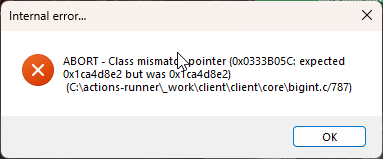
My runelite has been closing randomly lately.
I've only just recently come back to the game and it crashes with 117HD/GPU but also without.
I've only just gotten an error mesage (Which could be because I installed a few more plugins)
 mortal pond
post your crash logs if you have any too
haughty pumiceBOT
To find the logs, you can do one of the following:
- If your client failed to open, click the
Open logs folderbutton. - Open the screenshot directory by right-clicking 📷
Camerabutton, navigate 1 directory up, then open logs folder. - Navigate to
%userprofile%\.runelite\logson Windows or$HOME/.runelite/logson Linux and macOS.
Upload the log files named client and launcher by dragging them to Discord. If there are files prefixed with jvm_crash dated from today, upload them too.
rose orchid
rose orchid
mortal pond
post your crash logs if you have any too
Attached
mortal pond
sorry, I can't read them myself I just wanted you to post them so the people who can help will be able to take a look
rose orchid
Ohh. Okay thanks. I've just gone to do slayer so if it closes I at least probably won't die
round jacinth
rose orchid
13th gen intel with old microcode i think, your cpu is cooking itself
and for some reason it really shows up in java/runelite
rose orchid
round jacinth
13th gen intel with old microcode i think, your cpu is cooking itself
So basically I need to replace my CPU to fix the issue
round jacinth
thats how i preceive the issue yeah
intel shipped a really shoddy product with 13 and 14th gen
 brisk steeple
My cpu (13400f) also kinda sucks, fps around the 120 ballpark (rtx 3080, 64gb ram, good ssd)
Considering I got the whole PC for under $500 I can't really complain
But looking forward to upgrading to an AMD system in the future
round jacinth
that isn't the same as crashing/the issue they have
brisk steeple
Yeah but my fps has noticeably went from 300 to 120 now, and sometimes crashes
round jacinth
there is just bad 13/14th gen intel cpus that just crash
 daring kelp
Hey wondering if anyone can help me, I'm trying to switch out of fixed to resizeable but I just cannot get it to not look ass, so 100% on stretched with integer and aspect ratio looks great but I don't want my ui to be scaled up that high? I could've sworn there used to be a runelite ui scaling setting at some point? 🙂
round jacinth
i would suspect the 300 to 120 fps drop is from hub bloatware you've installed over time and not because of the cpu
brisk steeple
I've tried a fresh profile
round jacinth
and anything above 50 fps for osrs is the same,its just smoothness not additional information
brisk steeple
True true
round jacinth
so 120 is fine
round jacinth
daring kelp
Hey wondering if anyone can help me, I'm trying to switch out of fixed to resize...
you basically just keep messing with the various knobs until you like what you got, its got settings because its not one setting that looks good for everybody
checkout the different ui scaling options in the gpu/117hd too
daring kelp
Yeah the problem is 100% with xBR looks great, but then obviously my ui is scaled so everything is overlapping
So I just want the 100% clarity for fullscreen but send the ui scaling back down to how it looked at 60% (without it not being able to fullscreen haha)
round jacinth
xBR looks better with more realestate provided to it
use catmul or soemthign else if you plan to go from full screen. to 1/4 screen often
daring kelp
I basically want this UI scaling at fullscreen, if I untick integer scaling I physically can't get a setting that's not blurry

 round jacinth
that's what stretching does unless you integer scale it tho
daring kelp
Yeah so I'm really just asking, is there any ui scaling feature that's not "stretched mode" ?
round jacinth
i don't think so and that second screenshot looks like a normal game client to me
daring kelp
Normal would be like this haha
 round jacinth
looks again normal lol
brisk steeple
Quick question
How do I check what's bottlenecking my fps? Ram seems fine (48 gb free), GPU is under 10%, sad under 5%, cpu core runelite is on isn't maxed out.
round jacinth
what is your fps stuck at?
and there is a lot of variables, area you're at, the amount of people around you and the amount of hub plugins you're using
brisk steeple
You're right, let me try and uninstall all the hub plugins and see which one is causing this
brisk steeple
Yeah did that and turned on entity hider (hiding everyone)
Fps shot up to 300
Entity hider off (416 lobby) goes down to 150
round jacinth
i just typed it recently but anything above >50 is just smoothing
150 is perfectly playable :<
brisk steeple
Yeah that's true I'm just greedy and wanna remove bloat
round jacinth
then yeah remove as many hub plugins as you can , that's the bloat
brisk steeple
I wish runelite had a way to track individual plugin metrics (like task manager in chrome)
 gaunt compass
gm has anyone had issues with some area sounds not playing? ie verzik p3 attacks, warden floor slams, vard physically smacking you?
there's probably much more that i've not found but idk what else to check to try and fix it (a clean runelite profile didn't fix it)
 foggy blade
Anyone else having this problem with the Compact Orb plug-in? There's a gap between the FPS and the client. I didn't have that problem yesterday! Nothing has been changed in my RunLite either.
 foggy blade
srry :S
 round jacinth
2010 interface style is bugged until next update
round jacinth
np likely spammer lol
 scarlet eagle
if you know any discord mods tell them to #FreeElve
 ionic ivy
@rare flametesting now
 misty mulch
In the runelite devtools is there a way to debug varplayerids? As in can I for example run client.getVarpValue(VarPlayerID.ACHIEVEMENT_DIARY_TASKCOUNTS) somehow?
empty minnow
There is the jshell console
Which lets you run stuff like that while the client is running
misty mulch
I'm currently using the gradlew run route, am I best to just get the full runelite project?
 thick panther
 golden heart
where can i find import stuff for ground markers ?
golden heart
where can i find import stuff for ground markers ?
right click the world
 empty minnow
misty mulch
I'm currently using the gradlew run route, am I best to just get the full runeli...
empty minnow
misty mulch
I'm currently using the gradlew run route, am I best to just get the full runeli...
That should be fine. Pretty sure the run task enables dev tools
golden heart
thick panther
right click the world
i still don't understand this strategy even with a guide i'm that dumb
misty mulch
empty minnow
That should be fine. Pretty sure the run task enables dev tools
It does have devtools but I dont see a console I can use?
 oblique plume
shell
empty minnow
golden heart
<:acorn:964150612273008741> i still don't understand this strategy even with a g...
If you are looking to import tiles that you already have do that and hit import. If you're looking to find tiles in the first place then you either find them on the wiki or YouTube or w/e and then import. Or you can use the tile packs plugin which has premade tile sets
misty mulch
I'm struggling to understand varps.
I want to get diary progress but what it returns is different to what i'd expect.
When using a different varplayerid (collection log count) it works and gives me the value.
Am I just using the wrong varp or is there a way to decifer it?
 oblique plume
i wana say its bitpacked
 steady epoch
hi - is there a fix for this issue https://github.com/runelite/runelite/issues/17110
my sepulchre loot tracker got reset and wondering if there's any way to get that data back

GitHub
Type Incorrect behavior Operating System Windows OS Version 11 Pro, 22H2 Bug description In the absence of a session file and the profiles2 directory (ie new installs or older installs that haven&#...
oblique plume
is that one of the ones that changed name when we switched to the jagex events
if its the only one missing that would be why, or you reset it, or you havent done it in a while and its just not recent enough to be shown in the client
steady epoch
i did some last night so it should be recent enough. i just did a lap on a new device and it overwrote it
oblique plume
oblique plume
i wana say its bitpacked
haughty pumiceBOT
oblique plume
so you have this behavior then
misty mulch
oblique plume
yes <https://github.com/Zoinkwiz/quest-helper/blob/master/src/main/java/com/ques...
Oh that's a great help, thanks man
steady epoch
oblique plume
so you have this behavior then
yeah but only specifically for sepulchre. the rest of my loot tracker data is synced up
 tall path
is there an alarm for random events?
empty minnow
There's options in the random events plugin to get a notification if that's what you mean
 drowsy sand
hi i recently reset my pc and upon redownloading and signing into runelite i lost all of my plugins/settings is there a way to recover what was lost ?
empty minnow
If you did not sync your profiles then no. If you did sync them then all you should have to do is sign in to RuneLite
drowsy sand
empty minnow
If you did not sync your profiles then no. If you did sync them then all you sho...
how do you sync profiles? im almost sure it was synced
haughty pumiceBOT
round jacinth
 has to be clicked
drowsy sand
round jacinth
<:cloudsync:1302133016033886230> has to be clicked
i see, thats unfortunate i guess i didnt have it clicked if its not showing the profile
 summer meadow
Anyone know what I would have done that now my tabs don't show value? It will show my cashstack value on the main tab but when I go into the other tabs it doesn't show the tab value
 gilded kayak
the ge prices probably failed to load when you started the client
which would make only cash, have a cash value
summer meadow
gilded kayak
the ge prices probably failed to load when you started the client
Hmm weird, I've tride to restart a few times
gilded kayak
!logs the logs might said FAILED TO GET GE PRICES
haughty pumiceBOT
To find the logs, you can do one of the following:
- If your client failed to open, click the
Open logs folderbutton. - Open the screenshot directory by right-clicking 📷
Camerabutton, navigate 1 directory up, then open logs folder. - Navigate to
%userprofile%\.runelite\logson Windows or$HOME/.runelite/logson Linux and macOS.
Upload the log files named client and launcher by dragging them to Discord. If there are files prefixed with jvm_crash dated from today, upload them too.
summer meadow
gilded kayak
!logs the logs might said FAILED TO GET GE PRICES
Yeah it was being blocked by PiHole for some reason. It was either that or flushing my DNS fixed it
Good coms though wouldn't of the ge prices not loading
 gilded kayak
🕺
 heady drift
Unsure if this is correct location to post, having an issue with Interface Styles plugin. The 2010 interface has a ghost image of default skill icons in the background.
Has anyone else seen this?
Updated so I don't dox myself

 solid mesa
It will be fixed in the next runelite release
celest yew
ive been experiencing dc's while having another game up. ive done it for years with no issue, it just started recently. could the be a runelite issue or is it a my pc issue lol
haughty pumiceBOT
open command prompt, type this in:
ping -t oldschoolXXX.runescape.com
where the XXX is your world minus 300, for example world350 = 50
 wooden helm
celest yew
ive been experiencing dc's while having another game up. ive done it for years w...
wooden helm
celest yew
ive been experiencing dc's while having another game up. ive done it for years w...
I have been having a very similar issue recently, my game either disconnects or I am unable to take action, however I can see things happen around me and to my character. I have disabled all my plugins, uninstall and reinstalled runelite, deleted cache folders, you name it. I am connected directly into my modem via Ethernet so it's not a wifi issue... I am stumped and it's maddening lol
round jacinth
wooden helm
I have been having a very similar issue recently, my game either disconnects or ...
Do that same command above
celest yew
>ping -t oldschool573.runescape.com Ping request could not find host oldschool573.runescape.com. Please check the name and try again.
>ping -t oldschool523.runescape.com Ping request could not find host oldschool523.runescape.com. Please check the name and try again.
celest yew
the 523/573 number is my world and my world-50 lol unless i completely misunderstood what the xxx should be
celest yew
Pinging osrs-world-273.l3ushe.jagex.com [8.42.17.36] with 32 bytes of data:
Reply from 8.42.17.36: bytes=32 time=23ms TTL=55
dawn grail
cant see other players purple in cox, what setting could it be
 restive radish
customizble xp drops plugin suddenly started showing weird format, any ideas how to fix
 solid mesa
Change the font in the plugin settings

 slender lotus
really stupid question, how do i make my inventory bigger? i remember it being way bigger when i had my old account
 winter snow
Stretched Mode built-in plugin should help
slender lotus
Thanks
rare flame
Thanks @ionic ivy xoxo
 lapis carbon
How is it possible to get banned for macriong while uaing jagexlauncher
winter snow
This is not the place to complain about getting banned.
mossy swan
jagex launcher is not anticheat
lapis carbon
Its weird becaue i know someone that bought membership and got instant banned for macriong
He did manually wcing
And bareley plays he jusg made the acc like 4 weeks
winter snow
Unmoon's point is that it's still possible to cheat with a Jagex account
lapis carbon
Yeah but theres no proof just intant after buying member
winter snow
Your friend is probably lying to you (assuming, of course, you are not the friend)
lapis carbon
No hes not because i saw him on discord streaming wcing
No i dont marco or bot on my accounts i dont wanna lose years of progress
mossy swan
we cant do anything about it either way
 zealous estuary
lapis carbon
No hes not because i saw him on discord streaming wcing
zealous estuary
lapis carbon
No hes not because i saw him on discord streaming wcing
going to point A) lying to you or B) something you didnt notice/see
jagex does have cases of false bans but those are EXTREMELY rare tbh... even more so on brand new accounts. Jagex doesnt allow any macros etc. which do more than 1:1 inputs, so if your friend is using something like those thats bannable offense as well as any form of autoclickers etc. are also not allowed and will get you banned quite quickly since they are so easily detectable
 late notch
Anyone noticed issues with the interface styles plugin where 2010 is bugged with weird shadows on the skills since most recent update? How do I log the issue?
winter snow
It's already well known, well documented, and will be fixed with the next Runelite release
🙂
late notch
Love that, my eyes been burning ever since the update haha
 kind saddle
 rigid falcon
I have a question. I'm doing the inferno. I'm back at Zuk for my second attempt. I did alot of sim, and think I got it down. I'm logged out right now in inferno, when I log back in I'll be at Zuk.
I need to know how to highlight the healers' hull in the Zuk fight in RuneLite. Without logging in. Because if I log in and do the fight I won't have time to highlight them myself during that phase. Can someone please help?
Thank you!
winter snow
If you know the name of the mob, you can add it to the list of NPCs to highlight in the NPC Indicators plugin config
gilded kayak
steve
rigid falcon
winter snow
If you know the name of the mob, you can add it to the list of NPCs to highlight...
I did that, but if i click highlight hull, won';t it highlight hull for everything on that list?
I only want the hull of the healers
winter snow
You can't specify different types of highlight per mob with that plugin, if that's what you need
rigid falcon
okay, the tiles will ahve to do
empty minnow
You definitely can, just not from the config panel
rigid falcon
Right, but I need to do it out of game
Thanks anyway. I added it to the list, so its should atleats highlight their tile
Goodluck me!
 faint cedar
The runelite "Interface Styles" plugin has an issue after last wednesdays update. It constantly looks like this under the skills if you use the 2010 gameframe. Where should I report this?

If I change it to the default one, it looks normal again

 crisp dune
It's a known bug and will be fixed in the next runelite release
faint cedar
Alright cool. Just thought I'd toss it in here since it's been a week or so
sounds good tho
gilded kayak
it has not yet been a week 🤓 ☝️
winter snow
the 'or so' doing some heavy lifting
 rigid ravine
hey
im not sure if this is the right place to ask but im feeling lost on this one
i have the same jagex launcher installed at home and work, and theyre somehow different?
like at work i can set it up to still be open when minimized, and i dont have the same options setting for home
am i missing something?
haughty pumiceBOT
leaden trail
You need to set it up to sync your profile
rigid ravine
no i dont mean like in game settings
like hte launcher itself
oh 2nd reinstall did the trick
like i was missing this entire setting option

idk how/why
anyway sorry for the bother, have a good one ❤️
gilded kayak
it's funnier if it's not consistent
 flat schooner
Hello guys, quick question, Any known plugin to cause Micro-stuttering when switching gear?
gilded kayak
discord, instant inventory, probably something else im forgetting
discord as in the app not the plugin
 timid dawn
my client closes itself, it happend once last week and now 4 times today. any1 what could cause this?
flat schooner
gilded kayak
discord, instant inventory, probably something else im forgetting
Do you mean Discord as sharing screen on discord?
gilded kayak
no just having discord open
a couple people have confirmed closing discord stops their microstutters
gilded kayak
do you use instant inventory
flat schooner
No sir never heard of that plugin
gilded kayak
unfortunate
flat schooner
I've already blamed my old pc on being faulty for causing this, suddenly I noticed it happens on my new pc
 flat schooner
It does happen when my bank is open lol
gilded kayak
wellllllllllllll
when it starts happening again, try closing discord
and see if you get to join the club
of nonsense
flat schooner
Thing is, it's happening with bank closed
flat schooner
It stopped for now, and i have discord open, if it starts again ill close discord
let me close now just for the bank test
the bank interface issue still happens with discord closed through taks manager
gilded kayak
!safe try the bank issue in safe mode
haughty pumiceBOT
safemode: To enable safemode
Windows
Run the RuneLite (configure) shortcut from the windows start menu
Tick the Safe mode box, save, launch RuneLite the way you normally do.
Mac
In Terminal, run
/Applications/RuneLite.app/Contents/MacOS/RuneLite --configure
Tick the Safe mode box, save, launch RuneLite the way you normally do.
 fierce jasper
what does safe mode really does anyways?
flat schooner
I will try soon
gilded kayak
fierce jasper
what does safe mode really does anyways?
launches the client without plugins... and gpu
fierce jasper
Ohh sweet then
 mortal imp

With boosts infortmation how do I make these compact?

I want them to look like this
leaden trail
Change your infobox size under "RuneLite"
mortal imp
leaden trail
Change your infobox size under "RuneLite"
You're a beast, thanks
 untold thistle
i have a white bar on the top of my client, and have had it there for months. when i get out of full screen mode it goes away. but the second i maximize it. it appears again
is there anyhelp to fix this please?
so the white bar only appears when i go through the jagex launcher, how do i fix this issue?
gilded kayak
untold thistle
so the white bar only appears when i go through the jagex launcher, how do i fix...
check to make sure the jagex launcher is not running in windows 8 compatability mode
if it is, turn it off and the issue will probably stop
it should be in the right-click, properties settings
untold thistle
gilded kayak
check to make sure the jagex launcher is not running in windows 8 compatability ...
THANK YOU THANK YOU THANK YOU THANK YOU!!!!!!!!!!!!!!!!!!!!!!!!!!!!!!!!!!!!!!!!!!!!!!!!!!!!!!!!!!!!!!!!!!!!!!!!!!!!!!!!!!!!!!!!!!!
I have been stuck with that little white bar for 2 years and had no clue how to fix it
gilded kayak
ya it was an issue for a lot of people for a reasonable amount of time
and then 1 guy finally figured it out
wooden helm
round jacinth
Do that same command above
So the result of that test is that when I get the lag spikes I get request timed out
Also it might be worth noting that I had that ping test running most of the day and had only a few timed outs but the first time I attempt a boss it times out 7 times in a row
before that i was just bank standing
solid mesa
wooden helm
So the result of that test is that when I get the lag spikes I get request timed...
That means its your internet, not runelite
 south salmon
Anyone seeing issues with clicking "log in" and then getting tbe "loading" box in the upper left corner and then nothing? I ran repair from a new installer exe but not sure if this is a me issue or a known issue
dusty goblet
Is there a plug in that highlights the squares around you that enables you to move in L shape?
For ease of clicking rather trying to figure out where the L shape move is?
empty minnow
dusty goblet
Is there a plug in that highlights the squares around you that enables you to mo...
Relative tile markers might be able to do that?
solid mesa
Yea it can, you just need to type the L moves manually once
weary tulip
how to get role of development? to chat overthere?
is there a way i can preview this image on plugin development?
 solid mesa
 zealous cedar
not really, but if you make it 48x72px then it will look like exactly what you give it
weary tulip
zealous cedar
not really, but if you make it 48x72px then it will look like exactly what you g...
awesome tnx
 vivid idol
is there a way to highlight/tag based on game object id?
vivid idol
the object i'm trying to tag doesnt have that
I'm trying to do the rocks on the ground in Doom
 violet zenith
anyone know how to fix the font issue? its not just customizeable xp drops its also affecting runelite fonts as well
 solid mesa
Probably change the font in the Runelite plugin?
violet zenith
solid mesa
Probably change the font in the Runelite plugin?
yea ive changed it to that runescape small with 16 pt as well but it still looks bad like shown in the photo above
violet zenith
it has something to do with bold for sure. might be bugged out but game looks ok now without it
 digital ibex
Could someone explain how to get the numerical value for a Varbit? I am specifically interested in AMENITY_ROWBOARD_ANGLERS, but I need the numeric ID for this, how do I find it out?
Ah I have found it now in VarbitID.java
 winged edge
Hey, Since the Update last week the Plugin "Interface Styles" 2010 Style does not work anymore (Icons). Does some1 know any workaround or is there another Plugin which lets me change the styles?
 stray grove
it will be fixed with the game update in 17 minutes
winged edge
ty 🙂
 merry marsh
So i got this windows 11 issue, Smart app Control which forbids my pc to launch runelite for some reason, i just downloaded it. Is there any way to exclude Runelite so it could boot again?
oblique plume
idk what that is but can you not just turn it off
merry marsh
To disable fully equals lack of protection
oblique plume
then i guess thats a risk youre going to have to take
merry marsh
NMvm, got it to work, for future reference, Windows defender has an option to exclude folders, Smart App control works alongside Windows Defender, so i reckon its just interference.

 warped elbow
Did anyone see a shift in the skybox color in their POH after the update? It seems like it changed from using the Overworld color to using the Cave color.


 empty minnow
Customizable xp drops
Err actually looks like you already have that, not sure what you're looking for then
empty minnow
Ah then yeah customizable xp drops plugin
 true lark
What do u click or edit? To get it do u know
empty minnow
There should be an option for expected hit
 sullen crown
Is there a way to import other people's spellbook reorders? With Jagex consistently messing up the spellbooks...
solid mesa
Nope
 autumn crow
I'm getting white screened when loading RL after today's update - anynone know how to fix this?

 delicate bobcat
autumn crow
I'm getting white screened when loading RL after today's update - anynone know h...
delicate bobcat
autumn crow
I'm getting white screened when loading RL after today's update - anynone know h...
can you post your client log?
haughty pumiceBOT
To find the logs, you can do one of the following:
- If your client failed to open, click the
Open logs folderbutton. - Open the screenshot directory by right-clicking 📷
Camerabutton, navigate 1 directory up, then open logs folder. - Navigate to
%userprofile%\.runelite\logson Windows or$HOME/.runelite/logson Linux and macOS.
Upload the log files named client and launcher by dragging them to Discord. If there are files prefixed with jvm_crash dated from today, upload them too.
autumn crow
alright I narrowed it down tp 'Inventory setups' plugin
if I load without it it works fine
 keen horizon
Hi, figured out how my account got hijacked today and wanted to inform about the method. I'd rather not post it publicly here in case the ones using these exploits follow the channel, anyone I could DM?
zealous cedar
If its because someone called you and convinced you to download and run a thing then that is a pretty well known scam and we can't do anything about it really
keen horizon
I imagine it's because of an old fork I downloaded years ago, so that's ultimately my fault. I'm mostly interested in talking about how they bypass MFA etc. Seems that they're able to hijack the session tokens and was wondering if it is known how they do this and if anything can be done to prevent. So not exactly what you described but partly, that could extend to any malware though
winter snow
Generally these malicious clients include directions to generate a file that's used for auth - there's nothing stopping said clients from reading that file and forwarding the contents to an external server
Hell, now that I think about it, if they're installed in the place the Jagex Launcher expects Runelite to be, that auth would be passed directly to the malicious client anyway
keen horizon
Yes it seems that there was a skynet-2.1.4.jar which was collecting bankpin, creds file etc in the .runelite dir
winter snow
That's a pretty on-the-nose name 😂
leaden trail
Out of curiosity can you drop your logs?
haughty pumiceBOT
leaden trail
Oops
haughty pumiceBOT
To find the logs, you can do one of the following:
- If your client failed to open, click the
Open logs folderbutton. - Open the screenshot directory by right-clicking 📷
Camerabutton, navigate 1 directory up, then open logs folder. - Navigate to
%userprofile%\.runelite\logson Windows or$HOME/.runelite/logson Linux and macOS.
Upload the log files named client and launcher by dragging them to Discord. If there are files prefixed with jvm_crash dated from today, upload them too.
keen horizon
I only have fragments of it left, I was analyzing it with codex and mid-way through finding the .jar I deleted the whole dir.
zealous cedar
If you tell the jagex client to not prompt you each login for the 2fa code, it stores a session token thing to your hard drive that it uses to bypass 2fa
and so the account stealers just take that
keen horizon
Yeah, that's what happened, and bankpin was recorded etc
zealous cedar
unless you have a jagex account- that is totally different and idk how that works totally
keen horizon
I do have a jagex account, but I imagine getting the credentials.properties file is enough for that also
Ironically having a jagex account seems to be the reason it wasn't locked like my other accounts
zealous cedar
runelite doesnt write credentials.properties by default, maybe it enabled that
keen horizon
other accounts that were attempted to hijack got locked bcs of suspicious login
zealous cedar
but if they have code running on your system it doesnt really matter, they can do almost anything
keen horizon
Yeah I will have to format probs
winter snow
They usually have you use something like 'RuneLitePro' or 'RuneLitePlus' to get overpowered plugins that would never pass hub checks
With the side-effect of leaving your account wide open for the taking
And, you know, potentially breaking other stuff on the machine
keen horizon
This was most likely a fairly popular runelite fork before the official statement from jagex, years ago
winter snow
Either way, nuking it from orbit is the only way to be sure
keen horizon
At least that's what everything is pointing at. The .jar metadata was
Manifest-Version: 1.0
Plugin-Version: 2.1.3
Plugin-Id: runelite-plugin
Plugin-Provider: xKylee
Plugin-Description: Runelite Config
xKylee was part of that fork back then according to what I searched online
Scarier part is that I don't know how long my computer has been infected and what else has been compromised, but anyway that was mostly what I wanted to inform
round jacinth
sadly none of this is new and you won't be the last :/
 dull bear
I made a new profile to get rid of all the shitty hub plugins i had before, but when switching between my old profile and new one (so i can copy settings for what i want to keep) the gpu plugin keeps turning off, which for some reason freezes rendering until i turn it back on
drowsy sand
i cant seem to find the freeze timer plugin has it been removed/banned ?
crisp dune
The only freeze timer we've ever had has been timers on yourself being frozen, as part of the Timers & Buffs plugin
oblique plume
dull bear
I made a new profile to get rid of all the shitty hub plugins i had before, but ...
Do you have another gpu plugin installed that would trip the conflicts clause and turn it off
dull bear
not on the new profile, which is when it turns off, but i have 117 installed on the old profile
drowsy sand
crisp dune
The only freeze timer we've ever had has been timers on yourself being frozen, a...
ahh got it, i thought it was a seperate plugin called "freeze timer" thank you !
oblique plume
on either profile is probably it
 median hull
daring remnant
Its not client freeze, its graphics card. This continues on desktop after closin...
median hull
daring remnant
Its not client freeze, its graphics card. This continues on desktop after closin...
I was having this issue for a few days and I tried alot of things. Eventually I figured out it was 117HD plugin that was causing it. I turned off Vsync, enabled "Unlock FPS Control", changed the draw AND detail distance to 50 tiles and extended map loading to 3 chunks.
Havent had the problem since and its been a week
Also when u unlock FPS make sure u enable the seperate "FPS Control" plugin and change the FPS to match your system limit or lower
daring remnant
median hull
I was having this issue for a few days and I tried alot of things. Eventually I ...
I dont have 117HD plugin at all 😵💫
median hull
daring remnant
I dont have 117HD plugin at all 😵💫
Do you use the GPU plugin
 feral karma
Does anyone know how I can make "Disarm Fox trap" left click over "Ironwood logs" on the ground?
I tried Custom Swaps but it doesn't do anything
 rough igloo
Question -- my POH currently has a black skybox (w/117HD) using the setting ' Default Sky - Runelite Skybox' -- it seems the Skybox for POH was changed from overworld to Cave Skybox since if I chose a color for the cave skybox it magically works again. This is both in and out of 117HD/with GPU plugin too. Is there a way I can fix this without having to use 117HD Blue? I want the RuneLite Skybox to work for my POH again

 daring remnant
median hull
Do you use the GPU plugin
daring remnant
median hull
Do you use the GPU plugin
Yes, i matched your settings on gpu and fps control. Anything else i should look for?
empty minnow
feral karma
I tried Custom Swaps but it doesn't do anything
Custom menu swaps should definitely work. Make sure you have the trap under ironwood logs. Lower means higher priority
median hull
daring remnant
Yes, i matched your settings on gpu and fps control. Anything else i should look...
Nope just keep monitoring to see if it fixes it. Hopefully it does for you
daring remnant
median hull
Nope just keep monitoring to see if it fixes it. Hopefully it does for you
Okie, thankyou!
feral karma
empty minnow
Custom menu swaps should definitely work. Make sure you have the trap under iron...
Maybe I got it all wrong.. Should it be "Disarm,Fox trap"?
Or do I add "Ironwood logs" somewhere?
I'd done it wrong. Works now. Thanks!
rough igloo
warped elbow
Did anyone see a shift in the skybox color in their POH after the update? It see...
I've asked a question about this too, still waiting for it to be adressed but you're not the only one
zealous cedar
Jagex moved all of the pohs with the update, we need to fix it and some other stuff
 true granite
How can I troubleshoot the GPU extension not being able to turn on?
gilded kayak
i would first ask if ur on linux
true granite
I am yes.
gilded kayak
you probably just need to flatpak update and restart your computer
true granite
ok. I will try that then. Thank you.
That fixed it. Tyvm. Learned something new about flatpak. I already tried updating the drivers but they were not the flatpak ones so I guess that didn't work.
 upper gazelle
Hello , what should my uncapped fps be? I have 2 x 240hz monitors and i use 117hd plugin , i currently have the fps capped at 90 fps . please advise. Oh and i have 2 clients one in windowed mode and the other in fullscreen.