#support
1 messages · Page 146 of 1

 leaden trail
Interface styles -> collapse player options
 sharp cosmos
I know this isn't technically a client issue, but it involves the client, so I suppose I'm just gonna put this here.
I did a computer scan and got 2 malware detections for the RL client. I installed it back in september of last year, haven't had any issues yet so far outside of this.
Was there an update recently that is causing false positives or something?


 mossy swan
sharp cosmos
I know this isn't technically a client issue, but it involves the client, so I s...
mossy swan
sharp cosmos
I know this isn't technically a client issue, but it involves the client, so I s...
false positives are pretty common unfortunately
you should uninstall your garbage antivirus and use microsoft security essentials instead
or whatever it’s called now
sharp cosmos
mossy swan
false positives are pretty common unfortunately
you should uninstall your garbag...
It's malwarebytes though, aren't they usually pretty good?
either way I'm gonna do more scans with other stuff to see if anything comes up
mossy swan
sharp cosmos
It's malwarebytes though, aren't they usually pretty good?
no, it’s been bad enough that whenever someone has issues either rl being deleted or something i ask if they have malwarebytes
 stone parcel
Or anything more than just Windows Defender.
sharp cosmos
mossy swan
no, it’s been bad enough that whenever someone has issues either rl being delete...
hmm. very strange. I scan my computer weekly and have been using mwb and runelite for about as long as both of them have been around, and it's never false flagged RL a single time up until now... 🤔
I even use the built in windows defender scan as well as mrt while doing the weekly scans and nothing has come up. I'm patient 0 lowkey
mossy swan
you’re not but idk
you can search this discord for malwarebytes and see how often it pops up
sharp cosmos
yeah I hear you. it's just odd to think that this finally comes up now, you know? since I've been using both of them for what feels like an eternity with zero issues.
stone parcel
Updates. Especially the lists antivirus programs use to determine what it thinks a virus is tend to be updated frequently.
And now with AI, every update can have exciting outcomes. lol
sharp cosmos
https://www.malwarebytes.com/blog/detections/malware-ai
this is the page it takes me to when I click on how it was detected. the whole page looks like it was written by AI lol.
removed embed
oh wait you can remove embeds by clicking now. I'm dumb rofl
stone parcel
Oh interesting haha. Good find.
 gilded kayak
sharp cosmos
<https://www.malwarebytes.com/blog/detections/malware-ai>
this is the page it t...
gilded kayak
sharp cosmos
<https://www.malwarebytes.com/blog/detections/malware-ai>
this is the page it t...
that's because it was
 shrewd steeple
Howdy! Is there a way 2 save settings for ground items? Every time I open a new client I have 2 erase all hidden items, doesnt save setting in profiles?
gilded kayak
did you maybe install a BA plugin from the hub
i know one of them prevents you from changing it, cuz it's busy changing it itself
shrewd steeple
What I do then? Cant have that plugin installed for it 2 work?
gilded kayak
probably yes
we only review the plugins to make sure they wont hack you, not that they wont break stuff
mossy swan
if you are erasing it completely, it gets set back to default
shrewd steeple
So set a blank or must be an item 2 keep setting?
gilded kayak
are you trying to set it blank
if you do, then you cannot do that and should set 1 single item instead
shrewd steeple
Now I erase all default items so I want none hidden items. Do I need 2 have it set 2 one rare item or is there a way 2 save it blank?
shrewd steeple
Thank You Guys! It works now, done that forever haha XP
 shut ravine
I was playing at 145 fps, after restarting my computer, my runelite won't go above 40 fps. does anyone have a solution?
gilded kayak
did the gpu plugin turn off
wait
actually no
i know people on twitter keep saying discord causes games to lose 100 fps
shut ravine
gpu plugin is on
gilded kayak
well i can promise you we did not change anything with runelite in the time it took you to restart your pc
so its either a gpu driver issue or a windows issue
 verbal salmon
Hey my sister is having problems loading into any worlds, she is using jagex launcher, we have tried safe mode, reinstalling gpu drivers, debug option, among a few other things hardware side. Upon trying to load into a world it gets stuck at connecting to server, and loading - please wait at the top left
verbal salmon
We ended up figuring it out, it was a mix of wrong computer time and account issues, having just switched to a new device today
gilded kayak
verbal salmon
We ended up figuring it out, it was a mix of wrong computer time and account iss...
what are the "account issues" cuz this issue keeps coming up
i'd be very interested in knowing what to tell people
 tranquil harbor
Hello!
I have launched Runelite from inside IntelliJ. Im having issues logging into this instance because my jagex account is connected to my gmail account. I can log into the runescape website using my email and the password for the account, but that doesnt work on the IntelliJ Runelite login window.
I hope that makes sense! Any help would be appreciated
 haughty pumiceBOT
verbal salmon
gilded kayak
what are the "account issues" cuz this issue keeps coming up
haughty pumiceBOT
verbal salmon
gilded kayak
what are the "account issues" cuz this issue keeps coming up
For us it was the account import file, it had to be manually transferred between the systems via the import profile button in runelite settings
One of her freinds on discord suggested it so we tried it and after a bit of tweaking in the settings it was up and running
 violet pier
does anyone know, shouldnt this work for a simple watchdog alert? its not playing the sound when the message shows in chat for some reason

 solid mesa
Maybe you typed it wrong? Did you try using the picker?
violet pier
I did do the picker, yeah
solid mesa
Looks right to me
 bitter dew
Hey so I recently swapped my pc with my sister and when I signed into RuneLite with the same account, my KC has been erased. Any way I can restore them?
solid mesa
Check a ring of wealth boss log
bitter dew
solid mesa
Check a ring of wealth boss log
I don't have that
I'm doing a one chunk challenge
solid mesa
Well PoH Adventure log or Ring of wealth are your options
 eternal dagger
my customizable xp drops arent showing anyone else having this issue?
eternal dagger
works on my other accounts and on normal 07 but not on dmm.
 sudden iris
GPU plugin wont turn on, it's just instantly switches off.
I've updated OS and RL to latest version(flatpak)
Hardware/OS info:
Ryzen 9700X
Radeon 6650XT
xubuntu 25.10
opengl version 4.6
Everything is restarted/rebooted, yet it wont turn on.
Been searching the web without much success for my specific problem, it and 117HD both wont turn on, removing one, or the other, does not help either.
haughty pumiceBOT
To find the logs, you can do one of the following:
- If your client failed to open, click the
Open logs folderbutton. - Open the screenshot directory by right-clicking 📷
Camerabutton, navigate 1 directory up, then open logs folder. - Navigate to
%userprofile%\.runelite\logson Windows or$HOME/.runelite/logson Linux and macOS.
Upload the log files named client and launcher by dragging them to Discord. If there are files prefixed with jvm_crash dated from today, upload them too.
 sullen vapor
what is the difference of these options? I never noticed any

 oblique plume
depends on your operating system
request will ask for focus and that does whatever the OS decides to do
taskbar will flash the taskbar
force will pull it to front
leaden trail
sudden iris
GPU plugin wont turn on, it's just instantly switches off.
I've updated OS and ...
You probably need to do flatpack update or whatever it is
haughty pumiceBOT
 tender peak
Hello, lately i've experienced my FPS dropping or my game kind of stuttering on RuneLite when I switch multiple amounts of gear, or bank my equipment in bank etc. if this has happened to you and know how to fix it I will love you forever, thank you!
haughty pumiceBOT
Many plugins from the pluginhub break the client in subtle or not-so-subtle ways, including causing issues like client freezes. We do not support pluginhub plugins because we do not make or quality control them, and do not recommend their use.
Run the RuneLite (safe mode) shortcut, or with a Jagex account, first run the RuneLite (configure) shortcut and tick the Safe mode box, then launch RuneLite via the Jagex launcher.
This temporarily disables the GPU plugin and all hub plugins which will allow you to confirm the issue is caused by one of those plugins and isn't a core RuneLite issue.
If the issue is caused by a hub plugin, you should isolate which plugin it is and then uninstall the plugin.
 arctic hill
Hello - any chance there's a way to reset loot tracker info if the data was accidentally reset?
oblique plume
no
 lucid glade
Suggestion: Hiding the email your signed into on runelite by default, or an option to next to it. Similar to the in game play time option where it's click to see it.
So many times people accidently open it and dox themselves when streaming.
 mossy swan
lucid glade
Suggestion: Hiding the email your signed into on runelite by default, or an opti...
mossy swan
lucid glade
Suggestion: Hiding the email your signed into on runelite by default, or an opti...
you can turn off the info plugin to remove the panel completely
 west thistle
anyone been having sound issues lately at bosses with it cutting out?
 scarlet hill
need some help trying to transfer all my settings/plugins/etc from one computer to my other - i have them both signed in under the same runelite account but it doesnt bring over any other plugins or settings for those plugins.
I also have tried to copy the .runelite folder and manual bring it over and it doesn't do anything either.
haughty pumiceBOT
oblique plume
you have to replace .runelite
scarlet hill
i did 🙁
stone parcel
Make sure you are putting it in the correct location. You will also likely need to restart RuneLite after.
gilded kayak
runelite definitely should not be open if ur doing that
stone parcel
And you are replacing the .runelite folder, make sure you aren't putting one .runelite folder inside of the other.
 undone rune
hi guys ive been having an issue

the prayers when they are actually on, the prayer book shows them to be off. The glitch happens almost 100% of the time
 zealous cedar
do you have the instant inventory plugin? i think it breaks prayers
undone rune
Easy fix thank you. Also, now i cant do both right
thanks a lot
oh it might be the "prayer switch instantly" part that was on with that plugoinm
gilded kayak
that would make sense
 upper gazelle
Hello , my runelite profile on one account seems to have reverted to a few days back of data , maybe even upto a weeks info is lost. plz help
 worn light
Does anyone know how to have the ground items plugin stack items in the overlay? I'd like this to read Clue Scroll (easy) (5) if possible
 gilded kayak
they are all different items so it's not possible i believe
easy/medium/hard/elite clues are all their own different items
unlike master/beginners
worn light
ahh that's a shame
 clear sleet
hello i formated my computer after logging in via google to runelite
now i logged back in to runelite but i dont get my plugins back what i need to do?
stone parcel
That sounds bad, make sure you are logged into the correct account.
clear sleet
got this orange one from old runelite before i reset
 clear sleet
stone parcel
That sounds bad, make sure you are logged into the correct account.
clear sleet
stone parcel
That sounds bad, make sure you are logged into the correct account.
i did man
oblique plume
If that's not the right profile then you weren't syncing the right profile
stone parcel
Does the 2nd "default" profile now have that vertical orange line next to it?
 stone parcel
Dang.
 oblique plume
You can import them
clear sleet
from where bro
haughty pumiceBOT
stone parcel
Step 4 in there.
oblique plume
From what you sent
stone parcel
Try to import the one starting with "default-".
clear sleet
stone parcel
Try to import the one starting with "default-".
looks like that now
 stone parcel
Alright, switch to one of the imported ones and lets hope haha.
(whichever imported one was the "default-...")
clear sleet
it worked bro tyvm
stone parcel
Yay! 😄
 ember leaf
 ashen lake
How does the tick tracker plugin work? anyone know the intricacies, seems like inputs make the ms inflate lol
leaden trail
Afaik it's kinda nonsense
ashen lake
seems like the more i click the higher the ms gets
ashen lake
leaden trail
Afaik it's kinda nonsense
seems like it yea
nice ot have it for mega lag i guess but doesnt seem accurate for regularities
 river condor
hi i need help
 cloud hound
how can i login to a legacy account using runelite? i don't want my legacy account attached to jagex launcher
gilded kayak
type the username and password in
cloud hound
it doesn't have that option. its linked to a jagex account when i open runelite
gilded kayak
!logs
haughty pumiceBOT
To find the logs, you can do one of the following:
- If your client failed to open, click the
Open logs folderbutton. - Open the screenshot directory by right-clicking 📷
Camerabutton, navigate 1 directory up, then open logs folder. - Navigate to
%userprofile%\.runelite\logson Windows or$HOME/.runelite/logson Linux and macOS.
Upload the log files named client and launcher by dragging them to Discord. If there are files prefixed with jvm_crash dated from today, upload them too.
 winter snow
Normally when Runelite is run directly (ie. not through Jagex launcher) it has the old username/password login
cloud hound
my client opens when i run Runelite directly, but it says "Play Now (username)" instead of the standard login screen where I can put the details in manually
leaden trail
Can you post your logs?
haughty pumiceBOT
To find the logs, you can do one of the following:
- If your client failed to open, click the
Open logs folderbutton. - Open the screenshot directory by right-clicking 📷
Camerabutton, navigate 1 directory up, then open logs folder. - Navigate to
%userprofile%\.runelite\logson Windows or$HOME/.runelite/logson Linux and macOS.
Upload the log files named client and launcher by dragging them to Discord. If there are files prefixed with jvm_crash dated from today, upload them too.
gilded kayak
you shouldn't have that file on your computer without knowing why
cloud hound
apparently i do lol
 edgy marsh
Friends laptop has Norton (I know). It removed runelite randomly after using it for months. Can't access Norton as there is no subscription active.
Is there a backdoor to remove from quarantine?
What is best course of action? Remove Norton and re-download runelite? The file path is still there and I wasn't sure if all the settings would be removed. I don't think they logged into runelite directly
leaden trail
I would nuke Norton from orbit
edgy marsh
it's definitely getting removed. was trying to see if I could reinstate what it blocked first
oblique plume
It would have just blocked the exe afaik, which you can get back from reinstalling
The data directory is separate from the install
 tidal magnet
recently started playing again after a decent sized break and my runelite keeps spontaneously closing
edgy marsh
oblique plume
It would have just blocked the exe afaik, which you can get back from reinstalli...
okay thanks will try it
haughty pumiceBOT
To find the logs, you can do one of the following:
- If your client failed to open, click the
Open logs folderbutton. - Open the screenshot directory by right-clicking 📷
Camerabutton, navigate 1 directory up, then open logs folder. - Navigate to
%userprofile%\.runelite\logson Windows or$HOME/.runelite/logson Linux and macOS.
Upload the log files named client and launcher by dragging them to Discord. If there are files prefixed with jvm_crash dated from today, upload them too.
tidal magnet
I have opened it a couple times since last crash if it buries the client/launcher important stuff I appologize
 round jacinth
not wanted thie client and launcher log
ty
just**
i dont see anything obvious, you could turn off speedstep/overclock and see if that helps
on my i9 10900k i had to turn off intel speedstep for runelite
tidal magnet
I am running afterburner too underclock/volt due to asus rog strix 3090 oc black screen crashing pc for stability.. have been for a couple years at least with it stable, could it be a cause?
where do I find that
have it off wish me luck
tidal magnet
No fix
I do realize it’s not something specific to runelite though, something causing crashes on opera discord and runelite but not all at once ugh
 ivory frigate
I am trying to log in but it's just... not?
I start RuneLite, click Existing User, then enter info and click Login/Press enter, then it just sends me back to the "Welcome to Runescape, New User/Existing User" landing page after a few moments.
No error message, no wrong password/email message, no anything. Just loops back to landing page.
 gentle scarab
weekly maintenance atm
ivory frigate
Ah, just sat down haha. Unfortunate timeing. Thanks mate
 cold reef
my runelite wont open stuck on external plugin
 brittle cobalt
tidal magnet
I do realize it’s not something specific to runelite though, something causing c...
brittle cobalt
tidal magnet
I do realize it’s not something specific to runelite though, something causing c...
have you tried checking Event Viewer on Windows
 ionic epoch
How do I make it so that I can't drop valuable items by accident? Dropped my DWH and only got it a tick before moving on in TOA..
 low sage
Hello. I have some issues regarding my ingame sounds.
On several bosses such as Cerberus, Araxxor, Bosses in ToA, ToB and CoX. i am missing the area sounds on those encounters i think.
I have area sounds turned on and i used to be able to fix the missing sounds by deleting my cache or enabling/disabling music plugin.
But that doesnt work anymore.
Any suggestions?
oblique plume
what level is the sound set
low sage
oblique plume
what level is the sound set
On the sliders ingame?
oblique plume
ye
low sage
 oblique plume
turn it up to past that first tick mark
low sage
i've had em maxed out and still didnt function
oblique plume
someone earlier said they dont play until its there
 low sage
Ill give it a shot.
oblique plume
yw
 raw solar
Why is my boat not showing up? I have deleted the 117HD plug-in, reinstalled it, signed out of my user (jagex account) and signed back in. When I turn off the plug-in I can see my boat. Is this a new problem with sailing? All the more not to train it, I'm down for it but I wanted to check if this was a major issue?
 raw solar
I don't have GPU "legacy" installed.
 final axle
this is in 117hd
 raw solar
I had "Use legacy renderer" on for some odd reason. I turned it off. Now I can see the boat. Thank you.
 crisp goblet
Anyone know if there is a way to get !pb commands to work again? I had an issue with an account never properly loading to my linked profile. I think I tried unlinking it at one point and I just moved it over to jagex launcher. That seems to have fixed the profile linking problem but my commands still don't work.
oblique plume
The adventure log in your house will repopulate your pbs if you read it
crisp goblet
oblique plume
The adventure log in your house will repopulate your pbs if you read it
stand by...
crisp goblet
oblique plume
The adventure log in your house will repopulate your pbs if you read it
My hero! Thank you.
tidal magnet
brittle cobalt
have you tried checking Event Viewer on Windows
I have, and haven’t found anything telling
Wonder if it’s time to try windows 11 to see if it’ll resolve…
stone parcel
I've heard more people having issues with W11 crashing than W10, not sure if changing that would help.
 verbal ledge
why is my logs full of this

if i do cg for a day then i have like 1000000+ lines of the same thing
 empty minnow
Looks like the action progress plugin doing that
 muted sable
i started having some major network lag spikes after i got home
any clue what that could be?
haughty pumiceBOT
open command prompt, type this in:
ping -t oldschoolXXX.runescape.com
where the XXX is your world minus 300, for example world350 = 50
round jacinth
its probably not related to runelite
muted sable
🤔
verbal ledge
my friend has been getting crashes the whole time
round jacinth
your friend is on 13th gen intel, they may want to update their microcode to prevent futher damage to their chip
0x113 is an older microcode version, theyre is newer versions around but i think their cpu when crashing means its already damaged? not sure
verbal ledge
will let him know thx
round jacinth
they can also join here to avoid a game of telephone
 jade halo
hey guys,
In custom menu swaps im trying to make it so i always walk over fairy rings and not click on them.
I still want them to be right clickable so i can still use them, how can i do this im kinda stuck atm.
 vast bone
walk here,,*,fairy ring?
 random spoke
Been getting occasional ridiculous lag spikes for probably the past month, they last about a minute. Done speed tests, done packet loss tests, 0% packet loss so it seems pretty clear it's not my internet. Are osrs servers themselves just having issues?
A DMM thing?
round jacinth
random spoke
Been getting occasional ridiculous lag spikes for probably the past month, they ...
speed tests dont mean much as they dont interact with jagex's servers
haughty pumiceBOT
open command prompt, type this in:
ping -t oldschoolXXX.runescape.com
where the XXX is your world minus 300, for example world350 = 50
 terse orbit
does anyone know why the custom cursor addon doesnt work
empty minnow
works fine for me
what is not working about it? Just not showing the cursor you've selected?
upper gazelle
Help , i am loosing profile settings on my runelite accounts. Plz help.
haughty pumiceBOT
terse orbit
empty minnow
what is not working about it? Just not showing the cursor you've selected?
i didnt see your message its just not showing up only on startup until i move or click with cursor i dont know right now
empty minnow
terse orbit
i didnt see your message its just not showing up only on startup until i move or...
do you have contextual cursor installed?
Looks like I may have broken something
 hollow schooner
my runelite just instant crashes everytime i boot it up any ideas?
terse orbit
empty minnow
do you have contextual cursor installed?
i have custom cursor linux custom cursor dont even know why thats on and unresponsive cursor
empty minnow
one of those might be causing it, not sure which one
 clear sandal
hollow schooner
my runelite just instant crashes everytime i boot it up any ideas?
clear sandal
hollow schooner
my runelite just instant crashes everytime i boot it up any ideas?
Try running it in safe mode. If it doesn't, then likely a plugin is killing it upon boot
haughty pumiceBOT
To enable safemode
Windows
Run the RuneLite (configure) shortcut from the windows start menu
Tick the Safe mode box, save, launch RuneLite the way you normally do.
Mac
In Terminal, run
/Applications/RuneLite.app/Contents/MacOS/RuneLite --configure
Tick the Safe mode box, save, launch RuneLite the way you normally do.
terse orbit
empty minnow
one of those might be causing it, not sure which one
i turned all off restarded and now it works
linux cursor broke it
hollow schooner
safe mode works, will there be any consequences for running it in this mode? i see some of my plugins are still here
ok so i turned safe mode off and now it works very strange
upper gazelle
Using 117hd plugin on the classic layout and the ui looks fuzzy , is there a way to improve this?
clear sandal
upper gazelle
Using 117hd plugin on the classic layout and the ui looks fuzzy , is there a way...
Show us what you mean by fuzzy, by providing a picture
upper gazelle
clear sandal
Show us what you mean by fuzzy, by providing a picture

like the chat window text appears jagged
clear sandal
Looks pretty normal to me, unless my eyes can't discern a subtle difference.
upper gazelle
this looks different on my end
 clear sandal
If it's different on your end, then it sounds more akin to a hardware issue, like your monitor settings than Runelite.
upper gazelle
i changed the ui scaling mode and the blockiness has gone away
 slow isle
Not sure what my issue is, but here is an example if someone can help me!
I feel like a plugin messed something up - But I don't recall messing with anything other then Entity Hider, which I turned of seeing others 2d (prayers), but I have turned it back off, on, etc and the issue persists. When I go to normal prayer book, they don't disappear, only on Runious Prayers, but I didn't have this issue before.
upper gazelle
Also , about my settings and also saved inventory setups ... have disappeared , i have lost a few saved configs and i had some other settings that reverted to it's previous settings and changes made which have all been undone. Any comments on this? I was not having an issue with profile matching , just the settings and saves within.
gilded kayak
slow isle
Not sure what my issue is, but here is an example if someone can help me!
I feel...
instant inventory
slow isle
I've been using Instant Inventory for a very long time. Why does it only effect Runious Prayers? (Going to test it now)
gilded kayak
well 2 reasons
slow isle
Turned off Instant Inventory and it fixed the issue >.>
gilded kayak
1 would be how often are runious prayers in the game
but 2 cuz he added instant prayers to the plugin
slow isle
I see that, so there was no delay tricking you from thinking what you clicked or if it registered, which is smart.
Next question....
During this last Breach, southwest of the Combat Training Arena - The spawned monsters seemed vanish and reappear alot? I didn't know if that was the area, or if something else is messed up >.>
gilded kayak
was there a billion people there
i'm not sure about breaches but i would think if you entity hide the players, that wont happen?
slow isle
I did have entity hider on when running into the issue.
I even turned it off, tried GPU/117 and it still happened. I will wait for another breach and see if it continues.
 fast bone
Any issues noted with not being able to close interfaces with 'ESC' key? Tried running in safemode and it still won't work all of a sudden
zealous cedar
Do you have the esc closes interface option on in the settings?
fast bone
yessir
zealous cedar
that should be all you have to do
fast bone
I agree. It's driving me nuts. Ty though sir
 fading pewter
Why do I have so much crap in my profiles2 folder? I only have 1 profile I use. What can I get rid of?
 gilded kayak
cuz windows or an antivirus shit themselves while saving the files
so it generated a tmp file
you can get rid of all the TMP files if u really care
fading pewter
Ok, thanks. What about the profiles? Ideally I’d like to just like to have one profile.
 last tree
Any idea why i have a black outline behind text?
 empty minnow
isn't that just how text in the chatbox looks?
 hidden ridge
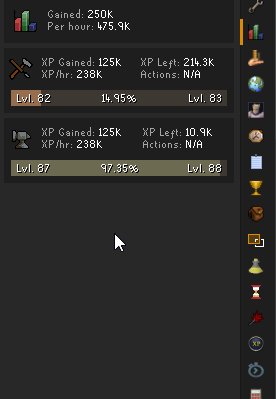
Still having the issue for months now with the "overall/total xp" not being shown/tracked and I cannot right click reset all trackers. Only happens on my main account, alt accs it does not have any affect. I noticed if I play DMM on the main account though, it will show the total/overall tracker, but switch back to maingame and it does not.
https://i.imgur.com/t4dE5bM.png
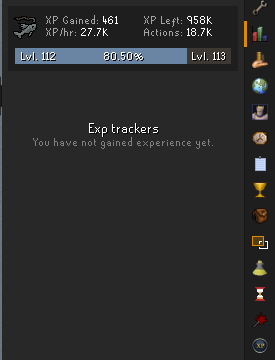
same acc, same profile, just on DMM worlds https://i.imgur.com/MgKlJ7l.png
 round jacinth
hidden ridge
Still having the issue for months now with the "overall/total xp" not being show...
round jacinth
hidden ridge
Still having the issue for months now with the "overall/total xp" not being show...
No developer can recreate the issue but it’s known
hidden ridge
round jacinth
No developer can recreate the issue but it’s known
Anyway I can help share game logs or something for them to look at or compare
round jacinth
I don’t think the logs show that it doesn’t work
vast bone
are there already logs?
round jacinth
!logs
haughty pumiceBOT
To find the logs, you can do one of the following:
- If your client failed to open, click the
Open logs folderbutton. - Open the screenshot directory by right-clicking 📷
Camerabutton, navigate 1 directory up, then open logs folder. - Navigate to
%userprofile%\.runelite\logson Windows or$HOME/.runelite/logson Linux and macOS.
Upload the log files named client and launcher by dragging them to Discord. If there are files prefixed with jvm_crash dated from today, upload them too.
 vague ivy
Can I get the link/info for transfering your data/plugins/etc to a new computer using the RL Sync.
Pls and ty ❤️
haughty pumiceBOT
vague ivy
Tyvm ❤️
 viscid forge
Hope you don't mind this ping over a month later, found your message through a search. I'm having the exact same issue (upgraded to 1440p, using 125% scaling) and yeah the runelite text looks awful and just like your screenshot. Did you ever find a fix for this by chance?
oblique plume
Did you check cleartext, like what was mentioned to them
viscid forge
yeah, it changes it a little but doesn't really resolve it, still some weird choppiness compared to how it is on 1080p (plus turning cleartype off makes some text in other software worse so it's not too ideal)
 pallid smelt
would anyone happen to know why anytime i do any action that gets me xp, my client freezes for a second. Any kind of bossing is impossible and this happens with any kind of xp I get. This didn't use to happen and this started about a week ago. I use a Macbook Pro to play and have been for a couple years but now its so irritating. I disabled the GPU plugin and tried using the legacy plugin. Disabling them and using no GPU plugin still glitches.
 obtuse vault
viscid forge
yeah, it changes it a little but doesn't really resolve it, still some weird cho...
obtuse vault
viscid forge
yeah, it changes it a little but doesn't really resolve it, still some weird cho...
I just realized, Runelite uses the same font as Runescape 🤯
The OSRS font is really pixelated and not meant for scaling UIs . I think the only way to solve fractional scaling would be use a different font altogether
pallid smelt
pallid smelt
would anyone happen to know why anytime i do any action that gets me xp, my clie...
scratch that, i just uninstalled and reinstalled and it's fixed.... i hate everything lol
viscid forge
obtuse vault
I just realized, Runelite uses the same font as Runescape 🤯
The OSRS font is r...
Ah yeah that'd make sense. Though afaik there isn't a way of actually changing it right?
 merry condor
hi, my client is really jumping and has crashed twice. is this happening elsewhere?
 naive sedge
is there any way to change the ctrl+m map keybind?
solid mesa
Nope
merry condor
is this normal for just RL running? i can't figure out why i'm so jumping and laggy in game. crashed twice
 haughty pumiceBOT
To find the logs, you can do one of the following:
- If your client failed to open, click the
Open logs folderbutton. - Open the screenshot directory by right-clicking 📷
Camerabutton, navigate 1 directory up, then open logs folder. - Navigate to
%userprofile%\.runelite\logson Windows or$HOME/.runelite/logson Linux and macOS.
Upload the log files named client and launcher by dragging them to Discord. If there are files prefixed with jvm_crash dated from today, upload them too.
merry condor
not sure if it picks it up since i have restarted cpu and client multiple times
hopefully someone can look at this and see what's up. i cannot
 gleaming sorrel
also chasing some help - lag aggressively without "GPU" on - but as soon as i turn gpu on i gain another mouse cursor on my screen .. this has been going on for months now and ive uninstalled, re installed etc everything .. 117HD also causes mouse cursors .. has anyone has this issue?
turning GPU back off just freezes the client and i have to close it all down and re-open
but if i load runelite through a 3rd party client (naughty) and have GPU on.. i dont have the twin mouse cursor issue.

 glossy ruin
Hey gamers, since sunday my game has been stuttering like crazy and causes my CPU to spike to 80-100% useage alot even when just afk in my poh.
this happens with every plug in disabled, but if i swap profiles to a default profile with the default plugins on it stops stuttering and cpu goes back to normal this issue also persist if i go back to an old import i have of the same profile.
anyone know why?
 sonic igloo
does anybody know of an effective way to keep track of flips? This word document is getting very cumbersome. tired of sucking ass at keeping track of this 🙁
round jacinth
There’s a few flipping utility based plugins and there’s better tools than word if you don’t want use word. Numbers is an excel/sheets thing
 timid rock
glossy ruin
Hey gamers, since sunday my game has been stuttering like crazy and causes my CP...
timid rock
glossy ruin
Hey gamers, since sunday my game has been stuttering like crazy and causes my CP...
dodgy pluginhub plugin probably.
glossy ruin
timid rock
dodgy pluginhub plugin probably.
even if theyre turned off? do i need to fully uninstall them to check?
round jacinth
You need to at least restart client after turning them off some times. Some hub plugins dont clear up their mess
glossy ruin
well i removed all my plugin hub plugins and it hasnt changed after restarting rl so i dont think thats it
round jacinth
Then maybe a windows update or driver issue.
glossy ruin
ill update everything ty
round jacinth
It may be a roll back required if it used to behave.
glossy ruin
yea true ill try that too worst case
 regal smelt
Anyone available to help me?
viscid forge
packet loss display is randomly showing absurd numbers tonight, is this a known bug? My connection seems fine so I assume it's a reporting glitch
 solid mesa
You have packet loss but the percentage is wrong. It will be fixed in the next release
viscid forge
Ah gotcha, thanks
 strange lily
viscid forge
Hope you don't mind this ping over a month later, found your message through a s...
strange lily
viscid forge
Hope you don't mind this ping over a month later, found your message through a s...
yep, i just got rid of the scaling
i couldn't get used to it otherwise
so now i just put up with really small everything else
merry condor
glossy ruin
Hey gamers, since sunday my game has been stuttering like crazy and causes my CP...
This is why mine is doing. I can’t soak to switching to default profile but the stuttering is what mine is doing
merry condor
if anyone knows what plugin is causing the stuttering please ping me TY
 vast garden
not sure what is hapening since update but it's crashed on me twice now mid raid
2026-02-18 07:49:28 EST [Client] ERROR injected-client - Client error
java.lang.AssertionError: null
at rs117.hd.renderer.zone.FacePrioritySorter.uploadSortedModel(FacePrioritySorter.java:213)
at rs117.hd.renderer.zone.ZoneRenderer.drawTemp(ZoneRenderer.java:1170)
at ih.pu(ih.java:19775)
at ih.ep(ih.java:63058)
at ih.di(ih.java:30380)
at cf.ic(cf.java:3361)
at bh.lv(bh.java:8625)
at bh.lv(bh.java:8662)
at ic.lw(ic.java:8496)
at client.pg(client.java:13286)
at client.bs(client.java:11717)
at bv.ae(bv.java:475)
at bv.mj(bv.java)
at bv.run(bv.java:44295)
at java.base/java.lang.Thread.run(Unknown Source)
haughty pumiceBOT
Visit 117's HD plugin discord (https://discord.com/invite/U4p6ChjgSE) for support, issues & feedback
oblique plume
Does that happen if you use reg GPU?
vast garden
unsure, i don't play without 117
final axle
maybe some of your cheats 
vast garden
wouldnt know how to even if i wanted to i'm not a computer wiz. im just posting an issue i have
vast garden
final axle
maybe some of your cheats <:clueless:1200896738479833088>
in wich case i'd gladly bring u to any content or stream you it with hand cam wich most can't nowdays it's rather pathetic honestly
 chilly vortex
anyone else have issues with the "expand pitch limit" setting in the "camera" plugin? when i turn it on it works, but it forces me to look down onto my character and wont let me lower it. images are before vs after turning on the setting, notice how in the 2nd picture the angle is higher, that's the furthest it will let me lower the camera


 acoustic lily
why does my client keep snapping to top left of my screen everytime it opens up?
leaden trail
chilly vortex
anyone else have issues with the "expand pitch limit" setting in the "camera" pl...
Try restarting your client
 lunar echo
yeah my client keeps crashing mid raid / tempoross / gotr as well
anyone know whats going on with this? heres crash log
oblique plume
13th gen intel with bad microcode 
chances are its cooking itself
and that can cause this sort of instability
lunar echo
damn - yeah ive been getting it the past few days
 bold wing
silly question. i forgot to switch from my dmm profile to my main in runelite and did some royal titans kc. is it possible to get those kc from the loottracker back into my main profile?
 warm kite
oblique plume
13th gen intel with bad microcode <a:classic:1105900505005314208>
warm kite
oblique plume
13th gen intel with bad microcode <a:classic:1105900505005314208>
Gotta love intel, do you remember if they said you were cooked once it started happening or if BIOS update was supposed to fix?
round jacinth
bold wing
silly question. i forgot to switch from my dmm profile to my main in runelite an...
your kc tracked on dmm/main game worlds are already tracked seperately
the settings do not split out the loot tracker or farming timers per settings, those are tied to the account + world type
you can easily confirm that by making a brand new profile, switching to it and looking at the farm timers/loot tracker and see everything still loaded/correct
bold wing
oh.. then whats the point of profiles?
round jacinth
to have different settings for different accounts or different world types
my bank tags for my main with BIS everything can be its own thing and my profile for my iron with midgame can be its own thing
or you can have a profile that is laptop (gpu friendly settings for a weaker laptop) and still have loot tracked between pc/laptop so you can do slayer on either type of thing
bold wing
but any and all tracking is done above all profiles and is always tied to RSaccounts so you cant ever mix loots say from leagues into my main
round jacinth
league and main game could share the same profile loaded on the side panel and not interact with eachother
I made -dmm profile so that when i made new bank tags it didn't store on my other profiles, i also tile marked safe region boarders that i don't need when dmm is over

and i can delete this profile when dmm is over
bold wing
gotcha. i thought each profile was its own loot tracker basciaally. im guessing everytihng is stored in the appdata folder right? for backup or moving to another pc
round jacinth
long story short, the royal titans kc you got was stored against the world + account you're on, so if you did it main game then it already stored it
did you reset your loot tracker in preperation of your dmm but before you got to dmm?
haughty pumiceBOT
bold wing
just swapped profile and never actually opened the loot tracker on annhilation lol
round jacinth
some folk delete their loot tracker when they make a new profile and then are shocked when it's all gone
bold wing
oof
round jacinth
because they think it works the way you thought it did..
loot is done by rsn + world type, the ones without the gray subtext are main game
 bold wing
i made a copy so just assumed it made a 1:1 at that point and since it was seasonal dont really care about stats. just didnt wanna mess up my main settigns
ahh
round jacinth
next time you can just duplicate the profile and use that profile to mess with and then delete it when you're done
your loot and everything is already split out outside of that profile so you dont have to worry about that
bold wing
i appreciate the clarification
super late but i finally did my first 10 royal titans kc haha
doing it super not opitmaly though. just cuz im lazy
oblique plume
warm kite
Gotta love intel, do you remember if they said you were cooked once it started h...
the bios update only prevents it from continuing to cook itself, if its already cooked its already cooked
warm kite
I meant moreso if it was already cooked once you started to have instability, but yeah BIOS isnt going to fix it if its cooked
I just avoided intel around that time anyways
haughty pumiceBOT
Please refer to this flowchart for further troubleshooting.
bold wing
round jacinth
because they think it works the way you thought it did..
im looking at it a bit more and im understanding it a lot better and noticed the linking button. thank you again 🙂
 sick rose
shortest path is kinda borked with sailing, ya?
 viscid lantern
I think it works, had no real issues with it when I was doing my sailing at least
sick rose
I just can't really fit into the spots it's telling me lmfao
 delicate bobcat
vast garden
2026-02-18 07:49:28 EST [Client] ERROR injected-client - Client error
java.lang....
delicate bobcat
vast garden
2026-02-18 07:49:28 EST [Client] ERROR injected-client - Client error
java.lang....
this is a known low priority bug unfortunately, since it only occurs while running with assertions enabled
round jacinth
they got muted hooder
delicate bobcat
oh
round jacinth
i think they were cheat clienting indeed
round jacinth
o7
 sweet crystal
I royally messed up my profile. I use two devices to play and was annoyed that the second wasn't automatically importing the settings from the first, so I just copied over the "profiles2" folder hoping that would work.
Instead, now the first device is using the settings from the second and all of my settings are lost. Is there any way to restore the earlier profile or am I screwed because I did something without knowing what I was doing?
leaden trail
If you cloud synced over it it's probably gone
sullen vapor
for submitting a suggestion for the Clue Scroll plugin, should it be done via "issues" in the Runelite github? It has 1.6k topics in there...
solid mesa
Discussions is better for suggestions
sullen vapor
well it's about improving the text for some of the clue steps to be more helpful
so this could be construed as being an issue with specific clue steps
round jacinth
doesnt hurt to make the discussion anyways
sullen vapor
forget it, I'm seeing a simple typo that was pointed out in july last year and it was neither fixed nor addressed. Waste of time. Thanks for answering my question though
gilded kayak
holy shit a typo !!!!!!!!!!!!!!!!!
round jacinth
cool
improvements to the client only happen when bugs are reported and prs are sent
many of the 1.6k issues are so old that they're probably solved by a hub plugin by now or they're a bunch of things that are wont' fix that haven't been closed yet
it takes time to just clean that up too
a typo is tagged as "good for first time contributor" because instead of wasting time of an admin to fix it, some one else can do it while the admins allow the client to work at all
sullen vapor
gilded kayak
holy shit a typo !!!!!!!!!!!!!!!!!
my thought process is, if they won't fix a typo that must be the quickest and easiest thing to fix, and my issue is of a similar nature, then I'll probably waste time reporting my issue. Could be a naive way to look at it though
timid rock
runelite team needs to do backlog grooming to determine the priority of a typo sorry
sullen vapor
adding extra info to a clue step to be more helpful to the user is higher priority than a typo, so I hope that suffices
final axle
you can shift right click a clue scroll infobox to add your own note to that step
sullen vapor
my idea is to make that extra info available to everyone by making it part of the default infobox
round jacinth
in this convo you couldve already submitted that :<
sullen vapor
I will, thank you
 torpid cedar
how can i fully reset settings? the resource pack plugin after uninstalling and deleting the plugin file still has my old settings saved
torpid cedar
would that reset everything??
torpid cedar
i did that but somehow theres an issue with it
maybe i can get in touch with the plugin dev
vast bone
what issue?
torpid cedar
i have the setting unchecked https://media.discordapp.net/attachments/1095045193721454754/1473880658416763084/image.png?ex=6997d1d4&is=69968054&hm=372203c1b6af060f9232d88864da2647b5cc1503474c1a60a6aac6471d33c905&=&format=webp&quality=lossless

it still puts the default overlay https://media.discordapp.net/attachments/1095045193721454754/1473881070914113606/image.png?ex=6997d236&is=699680b6&hm=22b2024aa51cd1560ec659404a4a6e785926074ca4d84b8a0eeacc2885316a06&=&format=webp&quality=lossless


it gets fixed
its the allow overlay color to be changed setting
vast bone
interesting, never heard of that one
torpid cedar
never had an issue before been using it for a few years
the "fix" is temporary once you leave the area and come back it makes it default again
round jacinth
hub plugins update at any time all the time and resource packs was updated just today
torpid cedar
ya thats why i was wondering if i can do a fresh install
i did that but somehow my old settings were there
round jacinth
the reset at the bottom of the page defaults a plugin to the default the author put
but it doesn't remove files
tidal magnet
So I have been having crashes (some with jvm logs some without, sent a couple days ago .. zom you looked and said didn’t see anything specific - but putting a jvm argument by suggestion of GPT with a bunch of other diagnostics might’ve solve the crashes - but what could be underlying that causes crashes?
torpid cedar
i did "uninstall" when you right click and deleted the file in the plugins folder
tidal magnet
-XX:TieredStopAtLevel=1 is the argument
round jacinth
if you remove radius markers and re add it, you get it back
are you the 10900k guy
torpid cedar
is there a way to full uninstall a plugic?
vast bone
no
round jacinth
you click reset
tidal magnet
Yea the 10900k
vast bone
torpid cedar
is there a way to full uninstall a plugic?
you can make a new profile and that will reset every plugin's settings completely
round jacinth
i suggested trying to tune down your OC and or turn off speed step, when i had my 10900k it couldn't overclock worth a damn, so i turned off some features
tidal magnet
I have exhausted all my ideas and all chats ideas short of fresh install
round jacinth
and it became rock solid
tidal magnet
I had tried turning speed step off and didn’t work
round jacinth
try turning off the AVX instruction thing or set the offset to be like -4
i also did that if i recall
this fixed my crashing problem 100%. Was running an otherwise stable 4.5ghz overclock on an 8600k, crashed all the time in apex. Just bumping avx down to -2 seems to have fixed all my crashing issues completely.
this is a memory of it
forr a 8600k
i did the same for my 10900k and it became better too
i am not a fan of just feeding all logs to chatgpt and then coming here with what it suggests
because we're not doing that to you
tidal magnet
I appreciate it I was just running out of ideas and was able to game for half hour without crash so was wondering if would help direct resolution - I’ll try what you’ve mentioned
Also I haven’t really set any kind of overclock for CPU just have extreme tweaker set to auto - I did have MSI afterburner installed with an underclock + under volt due to a black screen crash when playing more demanding games that arose with Diablo iv first came out, but has been stable for years .. I uninstalled it as part of trying to fix RL
When you say turn down the overclock, if I just have extreme tweaker set to auto, would you recommend just turning it off? Or try to identify stable profile settings / limits … on previous build I set clock speeds and voltages and did benchmark testing but for this one I never did and assumed auto setting was going to be conservative and safe
Thanks ! Sorry I can take to Pm if you want less chatter in channel too
sonic igloo
round jacinth
There’s a few flipping utility based plugins and there’s better tools than word ...
is there a way to make it keep track of only flips? Idk that I ever got it setup properly ffs
 vast bone
you didn't get back to me
^
other than that, fake drops setting maybe
if it's like lms
or ironman
vast bone
so removing magic from custom xp drops doesn't help?
vast bone
try group xp drops
vast bone
that's not surprising
vast bone
you can't hide magic and see splash xp drops
glossy ruin
glossy ruin
Hey gamers, since sunday my game has been stuttering like crazy and causes my CP...
update to this i reinstalled windows and it still happens.
the only way to fix it is to use the default profile. even on a new profile with all plugins deleted and off i stutter and get cpu spikes like mad.
so follow up question is there a way i can import all tile markers or would i just have to redo em or even better copy the entire settings over to the default profile just to see if that makes it go away?
vast bone
no, not all tile markers
you could try copying all the settings, no idea if that would help
just make sure you close runelite before you try that
glossy ruin
vast bone
you could try copying all the settings, no idea if that would help
it sadly caused the same issue. but ty anyway
 dreamy jackal
anyone here
leaden trail
If you have an issue just tell us what it is
 elder cargo
I've been having this issue for a couple of weeks now where my client freezes up for a couple of seconds and eventually catches up. It happens both during pvm and skilling but I can't seem to reproduce it. Sometimes it gives me the connection lost, waiting to re-establish in the top left corner but there doesn't seem to be a spike in latency. Also i've been running a ping log to the world im currently playing on and there's nothing weird happening in there. In the runelite client log I get the following when the game freezes up, it's always a different plugin. Added the ping log as well, fairly sure it's not a connection issue even tho it gives me a connection lost. Seems to happen mostly when I try to perform multiple actions in a short timespan, like quickly switching gear, or like right now when i'm doing gold ores at blast furnace and i'm emptying the bar dispenser, swapping to goldsmith gauntlets and clicking the bank chest.

 leaden trail
Does it happen in safe mode?
haughty pumiceBOT
To enable safemode
Windows
Run the RuneLite (configure) shortcut from the windows start menu
Tick the Safe mode box, save, launch RuneLite the way you normally do.
Mac
In Terminal, run
/Applications/RuneLite.app/Contents/MacOS/RuneLite --configure
Tick the Safe mode box, save, launch RuneLite the way you normally do.
leaden trail
Realistically it probably is still a connection issue though
elder cargo
Yes it does, also seems to happen now every time I try to open my bank. clicks are unresponsive for a couple of seconds and then it either opens the bank or i get a c/l message for maybe a seccond and then it catches up. Doesn't seem to happen on the official client.
elder cargo
elder cargo
Yes it does, also seems to happen now every time I try to open my bank. clicks a...
Just tried it again in safe mode, seemed ok. Swapped back to the normal client and it happens again. Seems like I can reproduce it when I try to perform many actions at once, like spamclicking the bank and closing it.
leaden trail
If it doesn't happen in safe mode then it's almost certainly a hub plugin giving you issues
!flow
haughty pumiceBOT
flowchart: Please refer to this flowchart for further troubleshooting.
 versed jetty
has anyone else ever ran into this issue where you cannot resize overlays when holding alt due to this odd cursor behavior?
round jacinth
sonic igloo
is there a way to make it keep track of only flips? Idk that I ever got it setup...
Probably not, I don’t think the plugin knows the 1000 sharks you bought aren’t for selling back or for pvm.
 last mirage
I have more than one character. How to have RuneLite show/switch to the one I'm playing at the time? (OSRS)
leaden trail
There's a drop-down in the Jagex launcher
last mirage
leaden trail
There's a drop-down in the Jagex launcher
screenshot please
round jacinth
what are you asking i guess
last mirage
These are from a different character than I'm in now.

overlay, still on one of my other characters.
I've logged into Runelite.
round jacinth
you have those same plugins enabled and also the same farming things available for it i guess
your account being changed doesnt mean you have different plugin settings
last mirage
Well yeah
I'm looking for it to show the character I'm playing, not a different character.
leaden trail
The question you actually asked is different from the one you thought you were asking
round jacinth
yeah lol
leaden trail
I think that's what, time tracking reminder?
round jacinth
enable the same plugins on the new profile
last mirage
No it's not, and not here to squable
round jacinth
yeah thats time tracking reminder
i am resisting the urge to correct here but dura is right lol
leaden trail
I think there's a plugin setting you want to toggle
last mirage
I'm in Zaxynn 412, so it should not be showing the overlay for Zaxynn G. Which it still is.
leaden trail
Go to the time tracking reminder settings and look for one about showing reminders for other characters
last mirage
So you have Runelite set to an email and the first characte you set plugins for shows no matter which character you are in?
round jacinth
you're confusing a few things i think
leaden trail
last mirage
I have more than one character. How to have RuneLite show/switch to the one I'm ...
When people ask this 99.9% of the time they're asking about logging in, not about one specific hub plugin's overlays, which is why you got the answer to something you weren't meaning to ask about
round jacinth
runelite is the client to play the game oldshool runescape.
The plugins you load are part of the profile
 last mirage
So I have to go into Zaxynn G and turn all off so I can have it show Zaxynn 412?
round jacinth
make a new profile and turn it off
leaden trail
Go to the time tracking reminder settings on your current profile
round jacinth
don't use the same settings for both accounts
last mirage
leaden trail
When people ask this 99.9% of the time they're asking about logging in, not abou...
Not my fault others assume. 😉
round jacinth
so one can have it on and the other can have it off
i was going to show this screenshot as the answer to their question.. it's the name of the character they're currently on.

anyways if you want some plugins for account a but not for account b, then use the profile system
haughty pumiceBOT
last mirage
round jacinth
anyways if you want some plugins for account a but not for account b, then use t...
I want the plug ins for any character/profile I'm playing at the time. 🙂
round jacinth
idk what you're asking for anymore
last mirage
round jacinth
make a new profile and turn it off
So to do all of them, I'm making a "new profile" and then naming them or am I "importing profile?
round jacinth
idk anymore
empty minnow
They're getting the farming reminders from the wrong account is how I understood it
last mirage
Most in this game multi account....I have 3 characters all under the same email. I don't want the overlay to reflect one character when I'm in a different character. You already answered my question. Now I need to figure out how that screenshot you showed me works.
round jacinth
the farm tracking time is depended on the logged in account, that reminder plugin shows the infobox based on what you've configured to show
leaden trail
empty minnow
They're getting the farming reminders from the wrong account is how I understood...
I'm pretty sure it's just a time tracking reminder setting but I have to go for other things do 🤷
round jacinth
so if you want account A to have them but not on B then just make a new profile and have account B not have it on
last mirage
I want to track account A when I'm in Account A not account B
round jacinth
tbf they opened the conversation asking how to know what account they're logged in with/switch to to the one they're playing at that time
last mirage
I want to track account B when I'm in account B, not account A.
round jacinth
Account A is already not being tracked on B and vice versa.
loot tracker and farm trackers are not shared when you switch accounts
last mirage
round jacinth
Account A is already not being tracked on B and vice versa.
I showed the screenshot where Zaxynn G is showing up and I'm in Zaxynn 412.
When I'm in Zaxynn 412 I want it to show Zaxynn 412 not Zaxynn G
I don't see the confusion.
round jacinth
gl
leaden trail
round jacinth
Account A is already not being tracked on B and vice versa.
I'm pretty sure time tracking reminder shows across accounts
So just disable that
last mirage
Can you name each profile or do you just go by default "profile 1" "profile 2" so on and so forth?
 round jacinth
and i am positive time tracking reminder relies on FarmingTracker which makes it depend on the account you're logged in as
last mirage
round jacinth
and i am positive time tracking reminder relies on FarmingTracker which makes it...
This overlay was showing on day one before I got 1xp in anything. I just started this character 5 days ago and don't have Fossile Island and such open yet.
So it's tied to the email instead of the accounts/profile.
haughty pumiceBOT
Many plugins from the pluginhub break the client in subtle or not-so-subtle ways, including causing issues like client freezes. We do not support pluginhub plugins because we do not make or quality control them, and do not recommend their use.
Run the RuneLite (safe mode) shortcut, or with a Jagex account, first run the RuneLite (configure) shortcut and tick the Safe mode box, then launch RuneLite via the Jagex launcher.
This temporarily disables the GPU plugin and all hub plugins which will allow you to confirm the issue is caused by one of those plugins and isn't a core RuneLite issue.
If the issue is caused by a hub plugin, you should isolate which plugin it is and then uninstall the plugin.
oblique plume
Its not our plugin so its not our problem
round jacinth
if you go to your timer plugin and navigate to your birdhouse tab, does it show completed on that account you say doesnt have access to fossil island?

i thought it pulled the data from this plugin to show
GitHub
A RuneLite plugin which extends the "Time Tracking" plugin to show an infobox when bird houses or farming patches are ready. - queicherius/runelite-time-tracking-reminder
last mirage
I have NO CLUE who's is what. I don't know how to run any kind of diagnosis on PCs.
round jacinth
okay nvm then
last mirage
Either way, YOUR PROGRAM shouldn't be showing on a new character unless I actually activated plugins on it which I haven't done yet.
empty minnow
It's literally not created by RuneLite
last mirage
I came here looking for some kind help. Not backhanded attacks.
round jacinth
Can you just check?
Click the clock icon for farm timers, then click the bird house icon and show what it says
 last mirage
That is what it shows and that's for the Zaxynn G character/profile............But I'm in Zaxynn 412.

 winter snow
ok, so the built-in plugin is behaving as expected
round jacinth
I've seen unknown appear as ready though
if you go to the primary tab

can you show this too
we've def seen unknown appear as Ready
last mirage
 round jacinth
figure it would be right as it uses farm tracking timer's data but i guess not
haughty pumiceBOT
Support for hub plugins should be directed to the author of the plugin.
You can find the support link by searching for the plugin in the Plugin Hub panel and clicking the ? button on the plugin, or by right-clicking the plugin in the plugin panel and clicking the Support menu option.
round jacinth
you'll have to report the issue against their repo
round jacinth
last mirage
Either way, YOUR PROGRAM shouldn't be showing on a new character unless I actual...
"we" dont make farm tracking reminder plugin, some person did and you downloaded it from the hub.
i was just trying to figure out how it's wrong but i can't
last mirage
I'm thinking if I can figure out how to change profile so Runelite can recognize I'm in a different profile/chatacter, that might clear it all up.
I should be able to set plugins according to profile/character.
winter snow
You can definitely set a profile per character
round jacinth
when logged in click this link icon to link that account to those settings
 winter snow
when you expand out a profile, the little link icon indicates which profile to load for the currently logged in character
 last mirage
This all is way over my 64yr old head. Funny but true. I didn't grow up with these fancy TVs. 😄
last mirage
winter snow
when you expand out a profile, the little link icon indicates which profile to ...
So I'm thinking maybe log into Zaxynn G and set a profile after I set one for Zaxynn 412 as default. Then make Zaxynn G profile 1. ??
winter snow
you could, yes
In my case I have slightly different plugin settings, so I just named the profiles after my characters
torpid cedar
how do you change the overlay settings again? i did it before i cant seem to find it again
 vast bone
"runelite"plug-in
last mirage
winter snow
In my case I have slightly different plugin settings, so I just named the profil...
Yes, that is the answer, now to figure out how I can name them. I tried to click on a new profile and name it but couldn't .
winter snow
last mirage
Yes, that is the answer, now to figure out how I can name them. I tried to click...
The first icon (with the pencil) lets you rename
last mirage
winter snow
The first icon (with the pencil) lets you rename
pencil...DUH....lol
vast bone
How is changing profile going to fix the farming reminder plug-in, isn't this just a bug?
winter snow
I think the issue was that they were not using separate profiles for their characters
and the time tracking reminders are at profile level
vast bone
I thought it used the same stuff as farming tracker
I swear it duplicated a whole bunch of code
winter snow
maybe it does, idk, that's hub stuff 😄
last mirage
winter snow
maybe it does, idk, that's hub stuff 😄
THANK YOU, THANK YOU, THANK YOU!!!
 winter snow
🙂
vast bone
winter snow
maybe it does, idk, that's hub stuff 😄
Why would you assume it did?
Am I wrong or is there a collective hallucination here
winter snow
winter snow
I think the issue was that they were not using separate profiles for their chara...
like this one
Or did you perhaps confuse me with zom? 😄
last mirage
Zom okay, he just got lost in the issue. Dur on the other hand not so much. 😉
winter snow
we do get a lot of traffic for people asking how to resolve issues with hub plugins
last mirage
Thank you again @winter snow you're awesome. Now back to my grinds. 🙂
winter snow
best of luck 😄
 fair moth
Any plugin developers out there know if there is some form of interaction I can make within a plugin to toggle a bank setting on a widget right click? Trying to make a potion storage deposit setting toggle
 rough ibex
Hi i recently reinstalled my pc and forgot how/where i log in to my google thingy so i can sync my settings. It just says sign in to sync but, dont know where
 round jacinth
if account plugin is enabled you will have a green door icon to click
vast bone
fair moth
Any plugin developers out there know if there is some form of interaction I can ...
probably would be rejected as against jagex rules
"additional actions that cause actions to be sent to the server"
or w/e it's called
rough ibex
round jacinth
if `account` plugin is enabled you will have a green door icon to click
ty!
fair moth
vast bone
probably would be rejected as against jagex rules
Toggling a bank setting via right click? Damn
vast bone
it technically is true
fair moth
Fair enough, ty. I figured there was a reason I couldn't find anything on it
vast bone
there's no precedent for this afaik
it would be nice to make that option easily toggleable though
iirc it makes having multiple doses a pain in the ass cause you have to change that setting twice
 mild flare
this is a weird bug, idk even know if its with runelite or just runescape. I don't understand it but sometimes when i send a message in runescape, my computer shuts off instantly right when i click enter, as if I hit the reset button on the case. This happens randomly but always happens the moment i press enter on a message (like within milliseconds) in runescape, never any other time. Has anyone heard of something like this before
 bitter bone
Computer randomly shutting off is usually a hardware issue. Most of the time its a problem with the PSU or poor cooling
warm kite
If it is your psu and you replace
Do NOT reuse cables unless it is the exact same PSU
gleaming sorrel
gleaming sorrel
??
mild flare
this started about 6 months ago it has happened about 10 times since, only ever in runescape, only ever immediately after sending a message. I play a lot of high power games and none of them have issue with my temps or with shutting off. The psu is a corsair 750x and its about 2 years old
round jacinth
!logs
haughty pumiceBOT
To find the logs, you can do one of the following:
- If your client failed to open, click the
Open logs folderbutton. - Open the screenshot directory by right-clicking 📷
Camerabutton, navigate 1 directory up, then open logs folder. - Navigate to
%userprofile%\.runelite\logson Windows or$HOME/.runelite/logson Linux and macOS.
Upload the log files named client and launcher by dragging them to Discord. If there are files prefixed with jvm_crash dated from today, upload them too.
round jacinth
i doubt a log is created in such a crash
mild flare
those my logs from today i made a copy of the client one right after i started up from the shut down
round jacinth
any jvm crash?
mild flare
im not sure, how do i check that
round jacinth
haughty pumice
To find the logs, you can **do one of the following**:
- If your client failed t...
the same command.
mild flare
ah, nothing in there
round jacinth
i think its some hardware issue
mild flare
word, ill try troubleshooting them, thanks for the time
 noble jetty
Anyone else get the same visual bug east of varrock? The first time it happened was 10 minutes ago and when I went by there again just now it was the same exact thing. GPU plugin is on.

 real oyster
i've been getting this from time to time in different locations
 crisp dune
it's a known graphical bug on our side, we'll get it fixed
noble jetty
no worries, thanks for the reply
 polar hound

I've been getting this error for days now
Sometimes the game starts and sometimes it doesnt I've reinstalled runelite and deleted all the files as well

2026-02-19 13:43:47 MST [main] ERROR net.runelite.launcher.Launcher - error fetching bootstrap
I'm assuming this is the root of the error
gilded kayak
does it open if you use a vpn, or your phone as a hotspot
polar hound
No I dont have access to a vpn and I am using ethernet I dont think its an internet thing since it fails to start and execute the program from the beginning
is there any addition file locatinos that runlite stores itself? I might need to reset everything
gilded kayak
i do think its an internet thing because ur posting errors clearly indicating its an internet thing
do you have access to a cellphone
gilded kayak
plug the phone in with usb
oh
that kind
are using an antivirus that isn't windows defender, they sometimes like to generate internet errors
polar hound
no but I can try seeing if there is a way to auto let runelite bypass the firewall maybe?
Maybe there is a permissions issue?





 gilded kayak
so what i'm trying to show you is that you are having an internet issue, because when you VPN the issue goes away
but the jagex launcher doesn't like VPNs
that's why I also suggested a hotspot, but you don't have that option
polar hound
is the only work around a moblie hotspot
gilded kayak
other than hoping the issue goes away, probably yeah
polar hound
what could be causing this?
gilded kayak
literally anything in the chain of internet
gilded kayak
obviously because they are the start of the chain, it could be
but i don't actually know
polar hound
I was able to boot it without the vpn by deleting the cache folder in .runelite . I an not sure if that actually solved the problem or if my network issues solved itself. If someone has this issue in the future that can be an option
 shadow geyser
Did you resolve your issue? I too am having difficulties with gauntlet as of late. Temps, fps, and ping all seem fine but it feel like I am still losing frames and/or stuttering.
stone parcel
Might want to try a fresh (blank) RuneLite profile and see if the issue persists.
Maybe a client restart after switching to the blank profile for good measure.
 sacred geyser
shadow geyser
Did you resolve your issue? I too am having difficulties with gauntlet as of lat...
sacred geyser
shadow geyser
Did you resolve your issue? I too am having difficulties with gauntlet as of lat...
I only kept messing with gpu plugins and I changed my target fps. I also had animation smoothing turned off once I turned that back on it was better too. I never narrowed it down to one thing though
Use fps plugin and make sure it’s targeting the same as whatever graphics plugin you use as well @shadow geyser
 elder swallow
sorry for being stupid, how do i link my github here? i can see i can type /'ghauth but then i don't know what to do with it
vast bone
no args
mossy swan
elder swallow
sorry for being stupid, how do i link my github here? i can see i can type /'gha...
do it without arguments
elder swallow
great thanks guys
 mortal quarry
can anyone tell me how I can get this placeholder to go away for good? I want the item in the bottom row only
I've also tried making the tag toa* and a hundred other things, for the life of me I can't get it to work
I should note I have 2 pharaoh's sceptres in my bank
seems to be a glitch, but I could be wrong
vast bone
mortal quarry
can anyone tell me how I can get this placeholder to go away for good? I want th...
Can't keep the item but not the placements
Placeholder*
You can drag the placeholder down of screen
I never added handling for multiple of the same item
mortal quarry
vast bone
You can drag the placeholder down of screen
I guess this works lol
 graceful gull
when i play on my laptop which is a surface pro eventually or randomly like it can be after 10 minutes my computer will freeze or my runelite, usually my entire computer and runelite will just close or something or my pc will freexe and i need to power it off, i am on the arm client and use gpu (if gpu is off i get like 5 fps so its needed i believe)
i seen some ppl have issues w this not sure if i missed any fix or whatever but rl is the only game i play on this computer and its relatively new
 dusty beacon
Hello everyone, how can I find out with what google account I'm logged into RuneLite on my main pc? Can't find anything on the internet about it
empty minnow
The info panel has your email on it
You may have to turn it on if you turned it off before
 pale finch
can anyone help, ive allowed it on my firewall but im not the best with technology lol
 oblique plume
does it work if you hotspot
pale finch
what like hotspot to my phone or something for the internet?
oblique plume
ye
pale finch
nope not working
 fresh cosmos
are you connected to a vpn?
if you are enable split tunneling and let it pass through your vpn maybe?
pale finch
i have no idea how to do that lol
i think ill just get my mate who kows about this stuff to come round and sort it lol ill probably mess something up
thanks anyway guys
winter snow
paranoia
 swift nimbus
someone mentioned on reddit a setting they change for when they have multiple weapons in their inventory to spec, they use some sort of plugin or setting to make specific weapons they DONT want to spec with greyed out (the spec attack circle near the map) this way if they think they switched to the proper weapon but they didnt, they can change in time before they spec with the wrong weapon (hope this makes sense lol). has anyone heard of this setting or know what it is ? i can no longer find the reddit thread 🙁
oblique plume
cant say ive heard of that
have you searched hub plugins that do spec stuff i guess
winter snow
I wonder how such a plugin would intuit which weapon the user wants to use 😄
 violet frost
Is there a way to see if a specific plugin is causing performance issues or is there only try safemode or toggling one plugin at a time? Like is there a resource monitor per plugin? If I can compile runelite myself and perhaps pass debug options? I checked my client.log for errors and only see some issues with the sailing plugin loading client.yy but nothing else
oblique plume
theres a heap analyzer which can help identify some specific issues
such as steadily degrading perf until it just freezes up
but random spikes not really
just gotta guess and check turning stuff off
violet frost
Got it, ty!
 eager haven
I get this error when trying to launch runelite - please help
 gilded kayak
are you on like windows 7 or something
eager haven
windows 10 pro
gilded kayak
have u tried reinstalling runelite
 atomic sphinx
GPU plugin was suddenly turned off and unable to be turned back on. restarting fixed it, unsure if its something you guys want to know
gilded kayak
atomic sphinx
GPU plugin was suddenly turned off and unable to be turned back on. restarting f...
the gpu plugin just uses your gpu, so it's probably not anything on our end
windows was probably preventing that launch of runelite, from finding the gpu
for whatever reason it felt like
tends to happen with amd
 fast mango
is there a way to see forestry invisible boost on runelite? it shows the +10 boost on mobile but not pc?
solid mesa
There's a PR to add it to core runelite but it hasn't been added yet
 golden ledge

Was getting this message and runelite crashing but disabled most plugins from hub and now crashing without any message, any ideas?
Also game runs smoothly except for when im in tzhaar area, lags so bad i cant even move around
leaden trail
Post your logs
haughty pumiceBOT
To find the logs, you can do one of the following:
- If your client failed to open, click the
Open logs folderbutton. - Open the screenshot directory by right-clicking 📷
Camerabutton, navigate 1 directory up, then open logs folder. - Navigate to
%userprofile%\.runelite\logson Windows or$HOME/.runelite/logson Linux and macOS.
Upload the log files named client and launcher by dragging them to Discord. If there are files prefixed with jvm_crash dated from today, upload them too.
merry condor
i have launched in safe mode and normal mode. The client is very glitchy and laggy. can tag a video if necessay. also my logs are attached. any remidy or advice would be appreciated. This is a new computer so not sure what the issue could be
oblique plume
the logs are saying your network is unstable
a video would help us tell you if what youre seeing is just network instability
if it looks like things slow down and speed back up
merry condor
ok i'll grab a video. it only on 1 specific account not even to the profile
the profile works fine on another acct
oblique plume
i would say thats indicatrive of a hub plugin messing up but you said it does the same in safemode which is odd
merry condor
would you prefer video in safe more or regual?
oblique plume
safemode
oblique plume
are you sure its not the world youre on
cuz this looks like you just have high ping really to me
oblique plume
i dont see anything
merry condor
my main in the same spot on the same high pop world not doing that
could my gpu settings be different bc of a different rig?
the gpu settings in RL i mean.
oblique plume
if you have a different machine it could just not be as powerful
merry condor
i'm pretty sure it's more powerful
i think i got it. i had vsync mode on adaptive w/ fps target at 150
i just turned off vsync
though i still don't know what is going on in the corner here
oblique plume
z-fighting looks like
gilded kayak
idk that probably happens
if it's z-fighting it wont get fixed unless someone is actually looking there
which most people are not
merry condor
gotcha thanks. i am computer illiterate when it comes to specs. how do the rest of my GPU settings look?
 winter snow
There are places even the official client has z-fighting iirc
gilded kayak
ye
thats what i mean, depending on if it's an official issue, or a runelite issue, the person who has to fix it, has to see that little corner of the door
oblique plume
you can report it to them, they are looking to fix z issues
 jagged grail
would anyone know why my runelite has frozen twice in 2 days now? both inside hunllef which could also be a coincidence as cg has been the only content i've been sending but as a hardcore im very scared of sending more now.
it freezes for a second or 2, when it happened yesterday i could keep playing, but today i couldn't although i could still interact with the sidebar
update: i found this error in the client logs, but i think im too stupid to understand
 shadow geyser
Is someone able to review my logs and let me know if there are any obvious errors? I have been experiencing stuttering/lap in the gauntlet for the last few days. Ping appears to be stable at 20, and fps stable at 60. GPU plugin is enabled, with vync off. Laptop is a Lenovo Legion 7 (16ACHg6) Ryzen 7 5800H Nvidia 3070. Thank you!
 simple kite
gilded kayak
the gpu plugin just uses your gpu, so it's probably not anything on our end
simple kite
gilded kayak
the gpu plugin just uses your gpu, so it's probably not anything on our end
I left a client open last night with GPU and it works, just opened a new one alongside it and the GPU plugin is broken
seems like something broke overnight
java.lang.RuntimeException: unable to find a fb config
    at net.runelite.rlawt.AWTContext.createGLContext(Native Method)
    at net.runelite.client.plugins.gpu.GpuPlugin.lambda$startUp$1(GpuPlugin.java:301)
    at net.runelite.client.callback.ClientThread.invokeList(ClientThread.java:119)
    at net.runelite.client.callback.ClientThread.invoke(ClientThread.java:101)
    at net.runelite.client.callback.Hooks.tick(Hooks.java:241)
    at client.dx(client.java:38304)
    at client.be(client.java)
    at bv.bo(bv.java:441)
    at bv.lp(bv.java)
    at bv.run(bv.java:7650)
at java.base/java.lang.Thread.run(Thread.java:1583)```seems like a flatpak issue nvm
leaden trail
Flatpack update yeah
jagged grail
jagged grail
Did some digging, and it seems to be an AMD driver issue? Has it been fully solved yet or is it all still speculation?
gilded kayak
yes no yes
gilded kayak
just turn off gpu/117 maybe
jagged grail
will do
 eternal rivet
is thieving stall plugin bugged for anyone else? it doesn't seem to count seed stalls at all
haughty pumiceBOT
Get support for the Port Roberts Thieving Helper Plugin Hub plugin here: https://runelite.net/plugin-hub/show/portrobertsthievinghelper.
You can also find the support link by searching for the plugin in the Plugin Hub panel and clicking the ? button on the plugin, or by right-clicking the plugin in the plugin panel and clicking the Support menu option.
eternal rivet
whoops my bad, been using this since a bit before Jan and didn't see the Jan 11 update - thanks!
 wide niche
hello! i'm not seeing any of my xp drops anymore. skilling, combats, none of them

was working last night
any clue what i might have done?
solid mesa
Did you click the xp button next to the minimap?
wide niche
lmao ty
what a silly button
i've never clicked that in 5 years of playing this game
 tiny arrow
Hey guys, was wondering if its normal for stretched mode to distort your client horizontally when you close the runelite side panel? It's normal when the panel is open, and overly-stretched horizontally when the runelite side panel is closed. i probably always had this issue but I recently made my stretched mode 100% and so its very obvious and annoying now. Ty!

 vast bone
I think it's just like that
You may be able to hold alt right click the menu stones though
Might improve it
The rest you can't do anything about I think
shadow geyser
Anyone know if this is an issue? It's been logged 1000 times. Could it be the cause of micro stutters in cg?
2026-02-21 18:57:19 AEST [Client] WARN n.runelite.client.eventbus.EventBus - following log message logged 1000 times!
2026-02-21 18:57:19 AEST [Client] WARN n.runelite.client.eventbus.EventBus - Uncaught exception in event subscriber
java.lang.NullPointerException: null
at java.base/java.util.TreeMap.getEntry(Unknown Source)
at java.base/java.util.TreeMap.get(Unknown Source)
at com.gauntletmap.GauntletMapSession.gameObjectSpawned(GauntletMapSession.java:434)
at com.gauntletmap.GauntletMapPlugin.onGameObjectSpawned(GauntletMapPlugin.java:189)
at net.runelite.client.eventbus.EventBus$Subscriber.invoke(EventBus.java:70)
at net.runelite.client.eventbus.EventBus.post(EventBus.java:223)
at net.runelite.client.callback.Hooks.post(Hooks.java:217)
at ih.bq(ih.java:20708)
at ih.bm(ih.java:444)
at jf.am(jf.java:1556)
at sb.ke(sb.java:64958)
at br.kk(br.java:5955)
at client.ro(client.java:12829)
at client.be(client.java:11656)
at bv.bo(bv.java:441)
at bv.lp(bv.java)
at bv.run(bv.java:7650)
at java.base/java.lang.Thread.run(Unknown Source)
solid mesa
Its probably not the stutters but you can turn off the gauntlet map plugin to check
 quartz lance
Does switching profiles not save your current profile before swapping? Is there a way to force save so I don't lose my changes I've made without having to restart client
 fading bloom
How can I force runelite to start in Wayland?
I checked with KWin debug console and it's reported as being an X11 window
fading bloom
Turns out this is quite the rabbit hole, Java on its own does not seem to support Wayland properly yet and it works through XWayland? There are some ongoing projects that try to make it work but nothing seems to be a gold standard yet
 astral veldt
turning these on in the sailing plugin is causing my entire client to lag like fkn crazy, massive rubber banding effect when moving the mouse or camera around, or scrolling up and down in the runelite sidebar

turning them off and the problem is no longer present
haughty pumiceBOT
Support for hub plugins should be directed to the author of the plugin.
You can find the support link by searching for the plugin in the Plugin Hub panel and clicking the ? button on the plugin, or by right-clicking the plugin in the plugin panel and clicking the Support menu option.
 silent wolf
Are frost dragons somewhat buggy? I play on mule while main afking frost dragons and i already got multiple crashes there. Only on this one account and seemingly only there.
2026-02-21 15:13:33 CET [Client] ERROR injected-client - Client error
java.lang.RuntimeException: unable to map GL buffer (bufId: 174 size: 4194304 renderer: null version: null err: 1287)
at net.runelite.client.plugins.gpu.VBO.map(VBO.java:77)
at net.runelite.client.plugins.gpu.VAOList.get(VAO.java:157)
at net.runelite.client.plugins.gpu.GpuPlugin.drawDynamic(GpuPlugin.java:1183)
at net.runelite.api.hooks.DrawCallbacks.drawDynamic(DrawCallbacks.java:172)
at ih.zo(ih.java:6127)
at ih.ep(ih.java:44564)
at ih.di(ih.java:30380)
at cf.ic(cf.java:3361)
at bh.lv(bh.java:8625)
at bh.lv(bh.java:8662)
at ic.lw(ic.java:8496)
at client.pg(client.java:13286)
at client.bs(client.java:11717)
at bv.ae(bv.java:475)
at bv.mj(bv.java)
at bv.run(bv.java:44295)
at java.base/java.lang.Thread.run(Unknown Source)
oblique plume
That area could be stressing the gpu more than others i guess
If you're afking, turn off gpu
 ember jungle
Hi i need some help, i took a break from rs and im back, i see theres a new gpu plugin, the problem for me is, when using the old gpu plugin on my laptop (legacy now) for some reason my fps only hits 50 when i turn “compute shaders” off, without it i barely scrape 30, the new gpu plugin doesnt have the compute shaders option so im wondering if theres a work around or something? Thanks
torpid cedar
Is there no way to move the jagex health bar as high as the runelite one?
 silent wolf
oblique plume
That area could be stressing the gpu more than others i guess
silent wolf
oblique plume
That area could be stressing the gpu more than others i guess
will try, ty
 visual wind
kinda looks like the GH linking is broken?
 leaden trail
Just try again later
 frank basin
what plugin makes me see MS in top right corner?
stone parcel
"Display current ping" option in "World Hopper".
 true granite
Hi - I am trying to use a micropad to map some keys in the world hopper to what is effectively F14 and F15 key signals. The macro is working as expected, but will not register in runelite. Is there something I need to do for this to work on runelite?
 wind star
Anyone have any idea why my GPU usage spikes when world hopping?
And also switches from Dedicated GPU to integrated as well
 lilac radish
wondering if you found a fix - I'm also getting no audio when launching runelite via JL on win11. runelite launched alone, or official client via JL both provide audio. however, runelite via JL results in no runelite in the volume mixer whatsoever
^running JL as admin fixed it
 carmine zodiac
Sorry if wrong location, wiki button keeps disappearing as of past couple days. Comes back if I turn off/on the plugin, but will immediately disappear again if i close/open an interface such as the bank. Any ideas?
 leaden trail
Can you check if it happens in safe mode?
haughty pumiceBOT
To enable safemode
Windows
Run the RuneLite (configure) shortcut from the windows start menu
Tick the Safe mode box, save, launch RuneLite the way you normally do.
Mac
In Terminal, run
/Applications/RuneLite.app/Contents/MacOS/RuneLite --configure
Tick the Safe mode box, save, launch RuneLite the way you normally do.
jagged grail
silent wolf
Are frost dragons somewhat buggy? I play on mule while main afking frost dragons...
do you also have the newest AMD drivers perchance?
carmine zodiac
leaden trail
Can you check if it happens in safe mode?
It works fine in safemode
silent wolf
jagged grail
do you also have the newest AMD drivers perchance?
im not
wait
i have, i have auto update
jagged grail
silent wolf
i have, i have auto update
so that error seemingly only happens to us that have the newest AMD drivers
i've reverted mine to an older one and haven't had my game crash yet but just speculation for now
silent wolf
will try, thx
winter snow
AMD drivers have always been buggy junk
jagged grail
never buying another AMD GPU ever again
 fast lark
any ideas on a fix for this? client is crashing once a day for over a month, I've reinstalled RL, and updated GPU drivers 3 times since it started
2026-02-21 16:37:47 EST [Client] ERROR injected-client - Client error
java.nio.BufferOverflowException: null
at java.base/java.nio.Buffer.nextPutIndex(Unknown Source)
at java.base/java.nio.DirectIntBufferU.put(Unknown Source)
at net.runelite.client.plugins.gpu.SceneUploader.putfff4(SceneUploader.java:838)
at net.runelite.client.plugins.gpu.SceneUploader.uploadTempModel(SceneUploader.java:821)
at net.runelite.client.plugins.gpu.GpuPlugin.drawTemp(GpuPlugin.java:1267)
at ih.pu(ih.java:19775)
at ih.ep(ih.java:63058)
at ih.di(ih.java:30380)
at cf.ic(cf.java:3361)
at bh.lv(bh.java:8625)
at bh.lv(bh.java:8662)
at ic.lw(ic.java:8496)
at client.pg(client.java:13286)
at client.bs(client.java:11717)
at bv.ae(bv.java:475)
at bv.mj(bv.java)
at bv.run(bv.java:44295)
at java.base/java.lang.Thread.run(Unknown Source)
I see people talking about AMD GPUs causing issues, I'm running nvidia
leaden trail
carmine zodiac
It works fine in safemode
Sounds like you have a hub plugin breaking it then
leaden trail
fast lark
any ideas on a fix for this? client is crashing once a day for over a month, I'v...
Can you upload the full log rather than just a snippet?
tidal magnet
round jacinth
i also did that if i recall
10900k guy here
finally got a minute to get on the PC and try it... turned it from auto to user defined (2)
went to take away JVM argument and it was missing without me changing it.. havent crashed yet
round jacinth
Sounds good
fast lark
leaden trail
Can you upload the full log rather than just a snippet?
that's the full error message, there's a handful of random warnings and such from other plugins but nothing that timed with the crash. can I send you the full log?
winter snow
You can drop it into this channel
fast lark
oh, I should also add that I tried creating a new plugin profile from scratch (so just the RL defaults) and still had a crash as well, so I'm confident it's not a third party plugin causing it
leaden trail
If anything I would try rolling back your GPU drivers to an older version
fast lark
thanks, i'll try messing around with older drivers
 verbal falcon
Using Idle Notifier for the first time in a long time. When idle notifier triggers after it senses im idle, how do i prevent runelite from force switching to my runelite window/application over what ever other window/app i was currently on?
solid mesa
In Runelite settings turn off force focus
solid mesa
Then it shouldn’t be opening runelite. Maybe you’re clicking the OS notification? Or you’ve customized that notification to request focus
verbal falcon
ah i may have found it. theres another "request focus" setting within another settings menu within the idle notifier plugin.... which may have been overriding the runelite setting. hopefully that fixes it
 tender hound
Having an issue whenever I have 2 clients open, clicking one and then clicking back to another causes the second client to freeze until clicked off. Here is the dump when it froze
zealous cedar
supplies tracker?
tender hound
Turn that off?
zealous cedar
yes
tender hound
Thanks, will report
zealous cedar
looks like its doing disk i/o on varp changes which would be not good
tender hound
fixed, thanks! You prob love that debug helper plugin lmao
mossy swan
abex's greatest contribution to rl
gilded kayak
its pgood
 burnt spire
Hello, I am completly new to Oldschool Runescape. I have installed RuneLite as recommened by a coworker and am trying to launch using the steam (I previously launched the game using steam 1 time). When I try logging in, resetting my password or anything It says I need to use the Jagex launcher to launch the game. Can someone please help me out? I am not super code or program savy. I just want to give the game a fair chance.. -someone who is about to give up
 hollow olive
if you previously PLAYED the game with steam, then you don't have a jagex account yet, and need to link it (most likely) see #faq message
after you do link it you have to use the jagex launcher to launch runelite. https://support.runescape.com/hc/en-gb/articles/33992401505937-Using-RuneLite-via-the-Jagex-Launcher
hollow olive
burnt spire
Hello, I am completly new to Oldschool Runescape. I have installed RuneLite as r...
^
burnt spire
Thank you I will try this out
burnt spire
hollow olive
^
It worked thank you!
 worldly coral
why is the quest helper bank tab empty it worked earlier today?

 plush locust
worldly coral
why is the quest helper bank tab empty it worked earlier today?
plush locust
worldly coral
why is the quest helper bank tab empty it worked earlier today?
this happened to me earlier as well, logged out and back in and it fixed itself
My game has been stuck here for the last 10 mins, do any of you know why?
 worldly coral
plush locust
this happened to me earlier as well, logged out and back in and it fixed itself
worldly coral
plush locust
this happened to me earlier as well, logged out and back in and it fixed itself
that didnt help
worldly coral
oh had to restart my pc LOL sorry
 modern parrot
Runelite crashing - Can someone please help me? or try to?
I have an hp omen with an i9 and RTX5070.
recently whenever I try to resize the client, it crashes and locks up my entire pc/laptop.
Today, now whenever GPU plug in, or 117 is turned on it crashes as well.
I lose my background on my desktop as well.
Now it’s doing this. wtf
oblique plume
Hail jesus
I would imagine its a driver issue, have you tried downgrading it to a lower version
modern parrot
ok this is weird
im on my other acc and everything works
so its gotta be some rogue plugin
 tawny lily
my client all the sudden closed and then couldnt run to re-open from launcher
haughty pumiceBOT
To find the logs, you can do one of the following:
- If your client failed to open, click the
Open logs folderbutton. - Open the screenshot directory by right-clicking 📷
Camerabutton, navigate 1 directory up, then open logs folder. - Navigate to
%userprofile%\.runelite\logson Windows or$HOME/.runelite/logson Linux and macOS.
Upload the log files named client and launcher by dragging them to Discord. If there are files prefixed with jvm_crash dated from today, upload them too.
leaden trail
Post your logs
modern parrot
I threw my crash log into chatgpt

kinda doesnt make sense tho, says to turn off any GPU enhancer
final axle
So you do the opposite of what you were asked and decided a shitty AI knows better than people who are familiar with the client
modern parrot
im sorry lol
i dont have a crash log from today. just one from last week
so wasnt sure if it was right
tawny lily
 vocal tusk
anyone else having issues with the customizable xp drops pluigin recently?
 upbeat mortar
RL client freezes up the second i disable 117 HD. Does not fix unless I turn it back on. This is persistent after force killing the app, toggling off the graphics at login screen, and even restarting the computer. Is there a fix for this?
 cunning anvil
vocal tusk
anyone else having issues with the customizable xp drops pluigin recently?
cunning anvil
vocal tusk
anyone else having issues with the customizable xp drops pluigin recently?
click the xp button
 vocal tusk
i am a moron, thank you
cunning anvil
vocal tusk
i am a moron, thank you
dw about it - the exact same thing happened to me just now and I had to do some searching on here, I have no idea when I clicked it
seems a couple people including you and I have asked in the past couple days. interesting coincidence.
vocal tusk
lol the cosmic coincidence saved us all
 wheat heath
stuck on login screen on my client.
however i see the account log in while this screen is on. (using another account on a different launcher)
tried: reinstalling RL, safe mode, disabling all plugins, clearing cache, using different accounts, worlds nothing seemed to help
any ideas on how i make runelite work again?
 wheat heath
stuck on login screen on my client.
however i see the account log in while this...
wheat heath
wheat heath
stuck on login screen on my client.
however i see the account log in while this...
gfx card driver and windows update fixed my issue
 cerulean crypt
hey guys how is it whenever i try to open runelite now it only opens my jagex accountr and i cant just open runelite on its own
 keen niche
hi guys I was wondering if its possible to stack these 2 menu''s on top of eachother in this location or can it only be like this? If it's just like this, why? it makes no sense D:
 cerulean crypt
i just want to open runelite to log into my non jagex account, but it wont let me as it only opens my jagex account
 abstract vault
Hey, annoying issue - I cant hear attack sounds for Wardens in P2 specifically. I reinstalled Runelite, disabled any plugin that might have to do with sound (Annoyance Mute, Sound Swapper etc). All regular sounds enabled in-game itself besides area.
Other sounds like special come through just fine. Any thoughts? :(
 winter snow
cerulean crypt
i just want to open runelite to log into my non jagex account, but it wont let m...
winter snow
cerulean crypt
i just want to open runelite to log into my non jagex account, but it wont let m...
There will be a credentials.properties file in your runelite directory - delete that and you'll be good to go
winter snow
yea, that one, bin it
cerulean crypt
can i kiss you
winter snow
Might be a bit far, but happy to have been helpful 😄
solid mesa
Maybe stop cheating so that file doesn't appear again 😉
cerulean crypt
Maybe mind your own business
 cunning pivot
So basically I made a second character on the same Jagex account, it's a HCIM for while I am afk'ing on one or the other.
I made 2 different profiles and assigned them to the accounts. When I removed the banktags on the HCIM they got removed the following day on my main as-well.
Anyone know where i made a mistake?
 violet spindle
Cant use the GPU or 117hd plugin?
its been working fine but now iv restarted the laptop it wont let me use either of them?
 tough oasis
cunning pivot
So basically I made a second character on the same Jagex account, it's a HCIM fo...
tough oasis
cunning pivot
So basically I made a second character on the same Jagex account, it's a HCIM fo...
And you were definitely using two different profiles for each like this? I've never had my settings change between runelite profiles
 winter snow
you can link profiles to automatically load when you're on a specific character
tough oasis
winter snow
you can link profiles to automatically load when you're on a specific character
Yes
 modern parrot
violet spindle
Cant use the GPU or 117hd plugin?
its been working fine but now iv restarted th...
modern parrot
violet spindle
Cant use the GPU or 117hd plugin?
its been working fine but now iv restarted th...
Had this issue last night
Not sure what the fix is
tiny arrow
dumb qn but is it possible to make runelite standard infoboxes one vertical row? I can't seem to alt-drag it to less than 2 vertical rows:
 modern parrot
good morning, I dont want to sound pushy, but not sure if anyone got a chance to look at my 'logs' from last night to determine whats causing my runelite to crash.
It's 2 issues now.
-Runelite screen was flashing black and unplayable/frozen
-When stretching/scaling my runelite window 'too fast' it causes the client to freeze, screen goes black, and then fails
I appreciate any support given
Here is the crash log from last night ( i think)
leaden trail
We want client.log and launcher.log
The ones without dates
Based on what you're describing though I would probably try rolling back your GPU drivers to an older version
Has it crashed today?
modern parrot
nah not yet. but i can force it I'll take a vid
leaden trail
I don't really care about the video
Let me look at the older logs that you sent then
It crashed yesterday though?
modern parrot
lol ofc, i cant force it to crash this morning.
yeah it crashed hard last night
multiple times
leaden trail
I don't really have a good answer for you unfortunately. You have a bunch of errors in there that are sorta all over the place and a lot of them I haven't seen before. I would try the GPU driver rollback and see if that helps. I'm not really able to dig further at the moment but maybe someone else will be able to
modern parrot
That’s wild $3k laptop is so unpredictable lol
I appreciate you looking into it
Thank you
 ruby badge
Is there a plugin that has timer's or something that tells you when you can run across to pick up the mushrooms at duke?
 raven garnet
Anybody else having issues with Item Stats Plugin turning off Enable Consumable Stats and Enable Equipment Stats? It's off every time a log in and turns off randomly throughout session
 swift meteor
ruby badge
Is there a plugin that has timer's or something that tells you when you can run ...
swift meteor
ruby badge
Is there a plugin that has timer's or something that tells you when you can run ...
you mean when to run to avoid the shadows on the ground?
that would be against the 3rd party client rules set by jagex
ruby badge
Ohh okok I thought so Will
swift meteor
just fyi with respect to the pink lights that zap you, you can avoid those by using tile markers. the pink lights should never ever hit you
ruby badge
I use them but I still get hit sometimes.. Have i set them wrong??
I copied and pasted the tile markers
swift meteor
if u have a screenshot i can tell u if they're wrong
swift meteor
ruby badge
Can you show me?
if you only stand on the blue tiles when you run across, you'll never get hit by the pink lights
 quartz lance
Does switching profiles not save your current profile before swapping? Is there ...
quartz lance
quartz lance
Does switching profiles not save your current profile before swapping? Is there ...
It saved nothing from the hours of configuration
ruby badge
I have to Stand on a blue tile and run tho right?
swift meteor
ruby badge
I have to Stand on a blue tile and run tho right?
yes
ruby badge
Ahh okay I was just running across lol