#support
1 messages · Page 138 of 1
 gilded kayak
 mossy sparrow
smh
 short locust
is that something people should do anyway?
 royal shuttle
Does anyone know why i can't stream my runelite window on discord to my friends?
It just says that the window is minimized so the stream is paused
gilded kayak
royal shuttle
Does anyone know why i can't stream my runelite window on discord to my friends?
u have to restart discord and keep runelite open
it's some bug they introduced with (some) apps opened after discord
royal shuttle
gilded kayak
u have to restart discord and keep runelite open
Thanks chief that worked!
 steady epoch
!import
 haughty pumiceBOT
 hardy compass
Which plugin is responsible for showing farming contracts? It has stopped appearing for me when I'm inside the guild
 solid mesa
Time Tracking?
 worthy agate
I have this persistent white line at the top of my game client and I'm unsure what it is or if it's fixable. It appears in all settings and is there as soon as I open Runelite before I even log in. Is this a known issue, or is there a fix for it?

 drowsy zealot
Hello my friend reformatted his pc. Now installed his rl again. He logged in using his gmail acc in runelite but his previous settings were not retrieved. Is there still a way to retrieve his old settings from his rl account?
 oblique plume
if he wasnt syncing them before then no
 deep elbow
 leaden trail
deep elbow
leaden trail
deep elbow
Post your launcher log too like I said to do
deep elbow
 coarse moon
how can i completely reinstall runelite fresh? is there steps i can follow
gilded kayak
if you really for real actually want a fresh install of runelite (WHICH MEANS YOU'LL LOSE ALL YOUR SETTINGS/screenshots/etc)
you can just delete the .runelite folder in c:\users\yourpcname
if you want something else then say that
coarse moon
wont my settings come back when i download runelite again and sign in?
gilded kayak
if you synced them yes
coarse moon
im just experiencing lag issues and want to fresh install
gilded kayak
but it's not automatic, you need to also manually click the ☁️ to turn it  below the profiles u want to save
if that's your issue u can just click new profile in the  tab and double-click swap to that
- a restart
instead of deleting stuff
deep elbow
And my crashed problem still persists
gilded kayak
deep elbow
And my crashed problem still persists
i don't know what's causing your issue but if you turn off the gpu plugin it shouldn't crash anymore
deep elbow
gilded kayak
i don't know what's causing your issue but if you turn off the `gpu` plugin it s...
I need to disable the GPU plugin; I'm going to run Runeli.
 void wing
idk if this is a plugin thing, but my light sources seem to not do anything?

I have a lit candle lantern, but can't see a thing in the cave other than the bone supports
 zealous cedar
try turning off the hd plugin?
 gentle scarab
different items have different brightnesses and candle lantern has the lowest https://oldschool.runescape.wiki/w/Light_sources#Light_sources

Old School RuneScape Wiki
Light sources are used to illuminate dark caves and dungeons. Some of these areas are inaccessible or very dangerous without a light source.
Most light sources are items that require certain Firemaking levels to be lit. However, there are also certain equipable and stationary light sources.
at least i can see things in the screenshot so your monitor might be calibrated badly
 pastel otter
any idea why i cant move the Boss health bar where its supposed to be?
 gilded kayak
it's probably being pinned down there by the total xp
it's a really fidgety widget
total xp that is
gilded kayak
you could turn off the in-game boss xp and see if u dont mind using ours
it should just appear after the setting is disabled
(unless it's off then i guess it wont xd)
 gilded kayak
oh sorry
i meant boss health
i just forgot to think about what i was typing
cuz that hp is the in-game one
not the runelite one
pastel otter
 gilded kayak
first one
with that disabled the rl one should appear, and shouldn't be restricted by the xp tracker
but it also looks different than the default one
so you might not like it
oblique plume
Id suggest you just reset the position of the xp tracker
gilded kayak
you could just do that
but i have a feeling since it's down there, u really want it down there
pastel otter
I come from wow so I like having stuff around middle xD
oblique plume
The xp tracker doesnt do anything though
pastel otter
nah its just a thing like seeing how far away im at xd
void wing
gentle scarab
at least i can see things in the screenshot so your monitor might be calibrated ...
I have a oil lamp now, but everything other than the bones and my character is still too dark to see for me

even tried boosting bightness and contrast on my monitor to max and still couldn't see
it just blew out the colors of what I could see
solid mesa
Thats just how the game is with darkness

 wooden needle
I'm having a particular issue with 2 plugins that display an overlay, not doing what the settings are saying it should do. The plugins are "Inventory Viewer" and "Boss Buddy". Inventory viewer is not displaying the viewer at all when the option "Hidden on inventory tab" is selected, even if not on the inventory tab. The hotkey toggle also won't do anything for it whilst this is selected. Boss buddy is not hiding the worn items overlay when outside of a bank.
The problem is, I know it's a plugin compatibility issue somewhere, because when I've tried it on a fresh profile, as well as after disabling every plugin entirely, both function as intended. The difficulty for me is that neither plugin seems to update unless you actively interact with either the bank or switching to a different tab, so I can't easily diagnose it by disabling each plugin one at a time which is something I did originally try. Does anyone happen to know what plugin (or plugins if multiple) could potentially be causing issues for certain overlay features? Would be a great help <3

 haughty pumiceBOT
Support for hub plugins should be directed to the author of the plugin.
You can find the support link by searching for the plugin in the Plugin Hub panel and clicking the ? button on the plugin, or by right-clicking the plugin in the plugin panel and clicking the Support menu option.
 round jacinth
That hub plugin is maybe the issue and feedback can go to them
 floral cove
can anyone help with log reading my runelite keeps crashing
haughty pumiceBOT
To find the logs, you can do one of the following:
- If your client failed to open, click the
Open logs folderbutton. - Open the screenshot directory by right-clicking 📷
Camerabutton, navigate 1 directory up, then open logs folder. - Navigate to
%userprofile%\.runelite\logson Windows or$HOME/.runelite/logson Linux and macOS.
Upload the log files named client and launcher by dragging them to Discord. If there are files prefixed with jvm_crash dated from today, upload them too.
 empty minnow
Upload them here and someone can take a look
gilded kayak
unfortunately as you can see there's basically nothing in the gaps
do you have any jvm_crash's in that folder
floral cove
No there isn’t any crash files or I can find them 🤦♂️
It’s like my whole pc goes into a freeze mode, but it’s only cause when playing rune, that’s what I can’t work out
gilded kayak
oh if your whole pc freezes then it's probably gpu drivers
i would turn off gpu for a bit and see if it still happens
in 20256 basically only gpu's can crash the computer
(this is a vague statement dont ping me about it)
floral cove
Yeah it’s random like last night was every 45mins tonight been 1 hr 30mins but it’s only on rune
I’m running a 3080 and I updated the software on the 18 December so could of been that🤷♂️
floral cove
It’s funny cause my laptop and pc have been doing the same thing days apart
gilded kayak
if you're certain the whole pc is freezing then yeah it's highly likely to be that
floral cove
I don’t think windows had been lately mate start of the month
gilded kayak
i'd check anyway they like to sneak those updates to you
floral cove
Yeah cause I can’t do nothing have to hard restart the pc by button
gilded kayak
ye ok
floral cove
So you reckon roll back my gpu update or turn gpu off then??
gilded kayak
i suggested turning gpu only as a quick-find, but if you have no issue rolling back your drivers i would do that yes
floral cove
Yeah I can just roll back through the gpu app
gilded kayak
ye sometimes people have no idea how to do that
so just getting the "answer" first is easiest
floral cove
Yeah I know what you mean, I’ll try that tomorrow and hopefully it solves it cause it’s funny how it’s happened to my pc and laptop within days apart and they both run 3080 gpus
 stable thicket
I’m using Idle Notifier so my screen flashes red when I stop salvaging. The issue is that when I click back to start salvaging again, the screen keeps flashing until I move my mouse. Is there a setting that makes the flash stop as soon as I click/interact instead of needing mouse movement?
solid mesa
No, there's a hard coded delay to prevent accidental dismissal
stable thicket
is the delay supposed to be infinite because when i click back to salvage it keeps going until i move mouse


 final axle
probably change Flash > Flash until cancelled
if I had to guess
notification delay being that low can cause other issues iirc bc game ticks are 600ms
solid mesa
I believe its a 3 tick delay, but I'd have to check the code. It isnt a setting you can adjust
private static final int MINIMUM_FLASH_DURATION_MILLIS = 2000;
private static final int MINIMUM_FLASH_DURATION_TICKS = MINIMUM_FLASH_DURATION_MILLIS / Constants.CLIENT_TICK_LENGTH;
Yep, it has to flash for at least 3 ticks
stable thicket
i changed the timeouts to 4000ms but still keeps flashing while salvaging, maybe its just buggy with salvaging, not sure what else to change
solid mesa
If you click to cancel the notification less than 1.8 seconds after the notification fires then it won't stop flashing. There's no way around it
stable thicket
Gotcha thanks for the assist on this guys!
 fast musk
hey everyone, I have had a problem where my C key has been bound to something and will not let me type the letter. I have looked for something that holds the bind but it is hard to check everything. I saw a video online that told me to check print screen but that was not it. thank you
zealous cedar
the debug helper plugin can tell you what its bound to
fast musk
thank you very much
 swift leaf
Is there a way to see which plugins are consuimg resources/when? When I'm sailing when ever it loads new chunks it hitches really badly, and I'm not 100% sure if it's 117, or what settings in 117 have performance impacts
I want to double check if any other random plugins are doing it, but I don't want to have to turn off one at a time to test
gilded kayak
i got some great news for you
the answer to that question yesterday was no
the question today is yes*
zealous cedar
the answer today is still no
gilded kayak
oh
swift leaf
Legit? They just released a new feature?
gilded kayak
would it really not show enough
zealous cedar
hes asking for essentially a cpu profiler and youre thinking of the heap analyzer
which are two different things
 swift leaf
Performance is fine most of the time, it's only when loading new parts of the world, which includes barracuda trials.
I saw that Reddit post, I don't have last seen online
swift leaf
Yeah I was hoping that might be it
gilded kayak
it does make sense that 117 could have trouble tho
swift leaf
Cuz I get how 117 might be to blaim, but I was hoping some other random thing might be the issue
gilded kayak
yes
zealous cedar
try using normal gpu plugin instead and see if it makes a difference
swift leaf
Cuz ideally I don't want to turn down the settings in ways that make it noticibly worse, I'm assuming distance rendering mightr be the issue
 swift leaf
zealous cedar
try using normal gpu plugin instead and see if it makes a difference
swift leaf
zealous cedar
try using normal gpu plugin instead and see if it makes a difference
Just tried it, it still hitches but not as much, although it also makes the game look unaccecptibly horrible (to me personally)
gilded kayak
yes but he wanted you to try that because 117 is just gpu but with changes
swift leaf
Okay lket me use it for a few minutes while charting
gilded kayak
so if it's still hitching you probably should click the new profile button & restart the client and how gpu/117 are
swift leaf
is my ship meant to be invisable on GPU?
gilded kayak
it's not supposed to but i know someone once did try to suggest switching between them made the boat invisible
117 and gpu
but i only ever saw one other report of that
swift leaf
It might be because I'm alredy in the water
GPU also seems weird with how it's loading chunks, it seems kind of random/selective. Also Gilenor seems to have been teliported into an endless void
 zealous cedar
that doesnt look right
swift leaf
Thats not what GPU is meant to look like?
swift leaf
It's on an ultra wide and I zoomed out to show it, so that might be why perspective is weird
 vestal anvil
osrs keeps crashing everytime i stream on discord, anyone had this problem?
 fair cargo
Hi any idea why I get this white screen when launching runelite? Gpu drivers up to date etc.

Official client doesn’t work either
Music plays just no display
Official client off jagex is a black screen, music plays as well

Steam is also a black screen, music plays
All other games I can play just fine, arc raiders etc
worthy agate
#support message I'm still having this problem, please does anyone have ideas how I can fix this?
 vestal niche
Happy new year everyone! i wish everyone a blessed year!
I need some help

when i get this message "you notice an urchin....." i want it to give me windows notification or that the screen flickers red
can anyone help me?

i tried this but it didnt work, ( it was on ofc, now its off)
 mossy swan
remove the quotes
 full shadow
does anyone know how to get the inventory setup filtering to work? could there be a plugin thats preventing it from filtering ?
nvm there is a filter button
 jolly willow
anyone else getting constant crashes?
 subtle temple
 wheat wagon
my healthbars dissapeard doing cox. i have them on the side but not above npc's heads and i cant see the 3rd hand phase regen when one of them is down. dunno how to fix i tried opponent information setting but this doesnt change anything. anyone got any tips?
 slow pendant
My runelite keeps stuttering, got a new pc so every plugin reset but i turned on GPU and all but it still stutters
any tips?
round jacinth
Ge with a lot of people is hard to run regardless of pc specs pretty much
 agile herald
Why everytime I enable the GPU plugin after a while my pc literally goes into slow motion and I have to restart it to get back to normal
I played without the GPU plugin for like a month, everytime ran fine but the second I turn it on, 2 hours later boom pc goes so slooooow
 river sleet
Gpu plugin wont enable, neither will 117hd, anyone have similar issues?
round jacinth
Are you on amd? If so downgrade drivers to 25.10.2
river sleet
Amd processor, nvidia gpu
haughty pumiceBOT
To find the logs, you can do one of the following:
- If your client failed to open, click the
Open logs folderbutton. - Open the screenshot directory by right-clicking 📷
Camerabutton, navigate 1 directory up, then open logs folder. - Navigate to
%userprofile%\.runelite\logson Windows or$HOME/.runelite/logson Linux and macOS.
Upload the log files named client and launcher by dragging them to Discord. If there are files prefixed with jvm_crash dated from today, upload them too.
round jacinth
Make sure your monitors are plugged into your GPU not motherboard hdmi spots too
river sleet
No, this recently happned, its most likely software related
pastel otter
I did the health bar recommendation yesterday now I dont have any boss health bar :C
agile herald
round jacinth
Make sure your monitors are plugged into your GPU not motherboard hdmi spots too
I have a nvidia gpu, which version should I downgrade to? Because right now GPU is just crashing my pc
round jacinth
river sleet
No, this recently happned, its most likely software related
Share your logs
round jacinth
agile herald
I have a nvidia gpu, which version should I downgrade to? Because right now GPU ...
My comments are to lasee about the driver and cable check because his GPU isn’t even turning on.
My comment to you is world 302 ge is hard to render.
agile herald
round jacinth
My comment to you is world 302 ge is hard to render.
I'm not on world 302 ge, I can do whatever activity it will crash, just now I was killing alchemical hydra and it crashed
round jacinth
But you can roll back to what ever
I have no clue what specific ones are good nor bad. I take pictures of my current driver before I upgrade then send it to my friend as a notepad memory
Because new driver versions will for sure only add better support for a triple A title and not care if they break a random game (they try not to break other games) but they can
river sleet
round jacinth
Share your logs
Which log
round jacinth
Read the bot message about it. It tells you.
 round jacinth
Upload the log files named client and launcher by dragging them to Discord. If there are files prefixed with jvm_crash dated from today, upload them too.
That's what the bot message said to do.
river sleet
Apparantly i need glasses, my bad
round jacinth
Your picture shows the two files of the ones that match
river sleet
Yeah i know, just having a headache uploading them because linux is being linux
round jacinth
drag and drop them into the window
river sleet
Discord app was being annoying, had to send trough the browser version for some reason, anywho, here they are.
round jacinth
idk what unable to find a fb config means for 117hd
can you just try regular gpu plugin
run flatpak update and reboot
is what i think you should try first
river sleet
Doesnt work either, trying to enable either of the plugins just disables them again
round jacinth
i dont see that in the logs i only see you attempting to turn on 117hd 100 times thinking one time it'll work lol
try updating flatpak and rebooting
river sleet
java.lang.RuntimeException: unable to find a fb config
    at net.runelite.rlawt.AWTContext.createGLContext(Native Method)
    at net.runelite.client.plugins.gpu.GpuPlugin.lambda$startUp$1(GpuPlugin.java:302)
    at net.runelite.client.callback.ClientThread.invokeList(ClientThread.java:119)
    at net.runelite.client.callback.ClientThread.invoke(ClientThread.java:101)
    at net.runelite.client.callback.Hooks.tick(Hooks.java:241)
    at client.oo(client.java:11821)
    at client.bf(client.java)
    at bm.bo(bm.java:463)
    at bm.tz(bm.java)
    at bm.run(bm.java:1458)
at java.base/java.lang.Thread.run(Thread.java:1583)```i didn't search too hard just try what i said
river sleet
no updates in flatpak, gonna reboot anyhow
 restive wave
Hey! Few days ago I’ve developed an issue where when gpu/117hd plugin is turned on I have two cursors on the screen, can’t find any help on this issue can someone help me?
Btw it also magically dissapoers when I share my screen on discord in a call
 round jacinth
restive wave
Hey! Few days ago I’ve developed an issue where when gpu/117hd plugin is turned ...
round jacinth
restive wave
Hey! Few days ago I’ve developed an issue where when gpu/117hd plugin is turned ...
other users have this because of some remote desktop app running i think, not sure
restive wave
Yeah i saw in faq on runelite website that having some random program running would cause this but i double checked and i dont have it
river sleet
Rebooting worked
round jacinth
classic
river sleet
Yep, pisses me off when i forget to reboot, especially as ive worked in it
empty minnow
restive wave
Hey! Few days ago I’ve developed an issue where when gpu/117hd plugin is turned ...
Do you have dual GPUs?
restive wave
empty minnow
Do you have dual GPUs?
i think so 😄
pastel otter
no boss health bar anymore im going nuts
 restive wave
oh cheers 🙂
 little nacelle
how come i cant see the other icons in the bottom right?
 empty minnow
little nacelle
how come i cant see the other icons in the bottom right?
empty minnow
little nacelle
how come i cant see the other icons in the bottom right?
Try alt right clicking the bar
Think it just got moved off screen
round jacinth
They dragged the other icons over it
haughty pumiceBOT
RL overlays and many Jagex widgets can be moved around the screen by holding the Drag Hotkey, (default: Alt) configurable in "RuneLite" settings, and left click dragging it around the screen.
Some overlays can be resized by dragging their bounds, right clicking will also reset their size and position.
They can also contain additional options, such as opening the config of the plugin that makes them, which can be discovered by shift right clicking.
round jacinth
It is in the bottom right lol
 feral iron

I installed this plugin, but it's not showing up in my Configuration menu, and there's no cog icon in the plugin hub menu
gilded kayak
i think that plugin is known to just fail to start on install
and you have to restart the client
feral iron
gotcha, thanks!
 half eagle
Is this the place to ask about plugins or only runelite base features
 rigid swift
2026-01-01 09:31:38 EST [main] ERROR net.runelite.launcher.Launcher - error fetching bootstrap please help im so confused been trying to figure this out for 3 hours now
 hollow olive
try to connect to a hotspot then start up runelite, if that works then you should be able to switch back to wifi or whatever you were using
likely your network is blocking the stuff runelite needs to download to update or whatever idk the intricacies
round jacinth
half eagle
Is this the place to ask about plugins or only runelite base features
This is the spot for core runelite stuff, not hub plugins.
People ask stuff anyways though.
half eagle
Where would be the appropriate area? prob the dev's github? :*(
round jacinth
half eagle
Where would be the appropriate area? prob the dev's github? :*(
What are you trying to ask?
Just ask it and you can be either helped or redirected
half eagle
So the Mastering Mixology Plugin used to have status bars and would update based on if you clicked the "boost" or spam clicked action thing on the concentrate, crystalize, homogenize tables, now it doesnt have it at all, reinstalled, got the plugin again, and dont think i've installed anything recently that should effect it
round jacinth
There’s two mixology plugins now and idk what either do differently.
half eagle
well one is a helper addon that improves interface and one highlights the orders to maximize points you want
round jacinth
But yes it would probably be asked better in their GitHub repo for help
Unless some one here immediately knew and just answers
gentle scarab
entity hider's 2d options?
 vast lark
anyone know why the loot tracker plugin isn't showing the amount of GP im pickpocketing from wealthy citizens? it just shows the coin pouches im taking. and how would i get it to also track how much im earning from the house robbings?
round jacinth
If it doesn’t do it already then it might not be supported
vast lark
i was seeing people on youtube that had the amount of gp on there
wooden needle
round jacinth
That hub plugin is maybe the issue and feedback can go to them
Boss Buddy maybe, but Inventory Viewer is a baseline plugin and that is also having issues
round jacinth
does it have issues on it's own?
wooden needle
round jacinth
does it have issues on it's own?
The point I made in my post is that I know that these issues are because of a plugin incompatibility somewhere, hence why I was asking if anyone happened to maybe have an idea on a plugin that could be causing issues to certain overlays. Neither plugin has an issue on its own
round jacinth
I am not familiar with boss buddy, sorta only care if inventory viewer is broken or is working and if it works then we're good
haughty pumiceBOT
Support for hub plugins should be directed to the author of the plugin.
You can find the support link by searching for the plugin in the Plugin Hub panel and clicking the ? button on the plugin, or by right-clicking the plugin in the plugin panel and clicking the Support menu option.
wooden needle
The point is being missed, but it's fine. It's likely not an issue directly with either plugin but with an entirely unrelated plugin. Thanks for the suggestion.
gilded kayak
there's like 1200 hub plugins i'm not surprised that there is conflicts
but that would be something you want to figure out, for the hub plugin author
as long as the default plugins work on their own, we're happy
wooden needle
gilded kayak
there's like 1200 hub plugins i'm not surprised that there is conflicts
Aye, which is why I was asking if maybe anyone had an idea on a certain plugin that could be causing issues. More reaching out for a suggestion than saying "hey, these outright don't work"
gilded kayak
like how normal ancient teleports breaks all alching hub plugins
gilded kayak
outside of what i just joked about, (which is a true statement) we're not really aware of what plugins other plugins break
round jacinth
are you expecting to see both your inventory && your worn equipment as overlays
and the inventory viewer/boss buddy do one or the other and not both
wooden needle
round jacinth
are you expecting to see both your inventory && your worn equipment as overlays
Inherently what is supposed to happen is that the worn equipment overlay shouldn't show when not in a bank. Interestingly enough it does briefly flash off when closing out of a bank, only to re-show instantly. As far as Inventory Viewer is concerned, with the toggle to "Hide when in inventory", it should at least show when the inventory is not open but it outright doesn't show up at all with that toggle enabled
But again, I know they function on their own, which is why this is difficult
round jacinth
then this is up to the hub plugin to be fixed
the core plugin is being broken by another plugin which shouldn't be a thing
really not a fan of that lol
wooden needle
And because neither plugin seems to update when you disable other plugins until you do an action, like open the bank or switch to another tab, it's more difficult to diagnose haha
wooden needle
round jacinth
really not a fan of that lol
Certainly not ideal
round jacinth
and im not sure how the overlay manager would break that way tho
wooden needle
It's definitely weird. My love of plugins has foiled me 😢
It's not the end of the world for me, more unfortunate than anything
 clear stratus
boss buddy is also literally bloatware so maybe just delete that one
its just like 4 other plugins cobbled together
and was not particularly well written iirc
 zinc crag
anyone who knows much about runelite profiles willing to give me some assistance please
haughty pumiceBOT
Dont ask to ask. https://iki.fi/sol/dontask.html
 tiny flame
not sure what the root issue is here, but i'm playing on multiple accounts, each with it's own RL profile, but I'm getting time tracking notifications for one account duplicated in the other account's chat box

is there a way to turn that off? i haven't found anything in the RL settings or the time tracking settings
zealous cedar
I dont think so
tiny flame
it's never happened before today
zealous cedar
its always done that afaik
 grave peak
hello all, hopefully a quick question
where / is it possible to hide the 'file path location' of screenshots that get taken? my OS name has my real name and it'd be easier to share without having to edit it out every time 🙂
 zealous cedar
turn off "Notify when taken"
grave peak
thanks mate 🤝
tiny flame
tiny flame
not sure what the root issue is here, but i'm playing on multiple accounts, each...
it just triggered on only one account just now 🤔
 twin vault
I've some how lost a profile for an account I just started playing again. I should have a back up of it (I try to regularly back up my entire .runelite folder) but I'm not quite sure what to do from here with it.
There's a profiles and profiles2 folder, not sure which one is applicable.
haughty pumiceBOT
twin vault
That's strange. The profile was in the correct folder, but didn't appear under the options to select it.
Was able to import it tho se we all good. Thanks
 wheat jasper
anyone know why thralls being summoned makes momentary black tiles or rows of tiles? not only on my thralls either
 placid warren
I got some problems at tob, for some reason once i get to xarpus it starts lagging all the way into verzik, are there any tob plugins that are fking with my client?
gilded kayak
i can answer that question with "probably" but i can't really tell you which one
it also could easily just not be a tob plugin
placid warren
yea that fking sucks, whats the methodology to figure it out
im about to make a clean profile just to fix it its driving me nuts
gilded kayak
it's usually disable half and try but i will acknowledge it's not great for in-the-middle-of-a-raid issues
making a clean profile + a client restart will almost certainly fix it tho
 misty plover
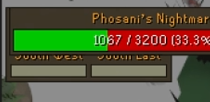
Is there a way to move the pillar hp out from the pnm hp bar 🤔
I tried the PNM QOL setting to force hide it and it's not working.
gilded kayak
i have this weird feeling the pillar hp was never made movable
i don't know for certain but i feel like this assumption is correct
misty plover
Been an issue for years ye
gilded kayak
the widgets have to be made movable it's not just automatic so if nobody ever did it, then yeah
ex dee
 solid olive
Win 11 N (sorry) went starting runelite I am getting:
Gamebar has been installed (xbox in the ms store) uninstalled and also tried using powershell to remove it, none of it has fixed it

- Appears this is the Jagex launcher....
 wary smelt
is there someone who can learn me some early game bosses?
leaden trail
pastel otter
I have a issue where if I click on XP button near mini map and show my xp per hit I dont see boss health bar if i remove it , it appears , ideas?
 fast narwhal
It could be another plugin inferring with it, I would try disabling recent plugins you've installed to see if it fixes it.
 hallow grove
so i got a new computer a few weeks ago, beforehand, when i typed in !kc a certain boss, my kc would show up, but ever since i got my new pc, sometimes when i do !kc and a certain boss, it doesn't work, but it's not for every boss only certain ones, is there a reason why?
oblique plume
pastel otter
I have a issue where if I click on XP button near mini map and show my xp per hi...
You moved the xp tracker box, alt right click it to reset
oblique plume
hallow grove
so i got a new computer a few weeks ago, beforehand, when i typed in !kc a certa...
Look at the ring of wealth boss log so the client can see all of them
hallow grove
thanks, i'll try that!
 regal locust
All my tool leprechauns suddenly look like this - does anyone know which plugin that could be please?
 fast narwhal
some type of npc highlight? or better npc highlight? or a farming plugin? turn off some random plugins to test
round jacinth
That's radius marker.
hallow grove
also, not sure if anyone knows how to fix this, but ever since grid master, my collection log is bugged (i have RuneProfile) even trying to update it, it still shows my collection log from barrows on most bosses, except the bosses i didn't do. is there a fix to this?
i've tried uninstalling RuneProfile, going into the collection log & syncing it, but it still shows up everything i pulled on grid master
oblique plume
Idk what runeprofile is but this is runelite
hallow grove
runeprofile is a plugin inside runelite for collection log
haughty pumiceBOT
Support for hub plugins should be directed to the author of the plugin.
You can find the support link by searching for the plugin in the Plugin Hub panel and clicking the ? button on the plugin, or by right-clicking the plugin in the plugin panel and clicking the Support menu option.
 maiden verge
does runelite work in china?
 round jacinth
looks like no
i do think players exist there though
so they find ways to connect with vpn or something
maiden verge
my friend played 2 years from there, now the reseted his internet and nothing works now 😄
round jacinth
¯_(ツ)_/¯
 leaden vortex
not sure if this is the right channel. I'm trying to use the osrs cache tools to extract midi files from the game cache and I have most of them, but 831 and 837 are both missing. anybody happen to know what's up with those tracks and/or how to load them into the cache? based on manual testing I expect them to be Sign Here and Scorching Horizon (as those are missing from my archive) but I can't confirm that as they could be jingles or something
 limber goblet
hey all, i downloaded a plugin (for sailing) since installed that its messed up my runelite, i can only play for 2minutes and it crashes my runelite telling me its crashed and cant carry on, i have since uninstalled the plugin i have downloaded and it has done nothing i am still currently having this problem, i am having to open runelite in safe mode and cant get all the qualities it brings using runelite, is anyone able to help?
gilded kayak
!logs
haughty pumiceBOT
To find the logs, you can do one of the following:
- If your client failed to open, click the
Open logs folderbutton. - Open the screenshot directory by right-clicking 📷
Camerabutton, navigate 1 directory up, then open logs folder. - Navigate to
%userprofile%\.runelite\logson Windows or$HOME/.runelite/logson Linux and macOS.
Upload the log files named client and launcher by dragging them to Discord. If there are files prefixed with jvm_crash dated from today, upload them too.
limber goblet
you asking for pics of what its crashing with?
gilded kayak
i don't think the word picture is anywhere in there
i'd like the log files that runelite automatically generates to tell you what's the matter
i guess the word camera is there, but it's just about the button
limber goblet
it doesnt fail to open though it allows me to get on log in and about 2minutes later it crashes
 limber goblet
ook apologies pretty rubbish at the technical side of stuff lol
gilded kayak
probably want the second one then
since it will open a folder close to the one u need
 junior kite
does anyone know the trawling plugin dev? there seems to be an issue with "Notify when depth change"
haughty pumiceBOT
Get support for the Deep Sea Trawling Plugin Hub plugin here: https://runelite.net/plugin-hub/show/deepseatrawling.
You can also find the support link by searching for the plugin in the Plugin Hub panel and clicking the ? button on the plugin, or by right-clicking the plugin in the plugin panel and clicking the Support menu option.
junior kite
awesome ty, looks like someone already reported it
 smoky oar
Hi, does anyone know the cause of this issue with 'examine sails' becoming a left click menu entry while sailing, and if it is fixable? It occurs when moving around the map and loading things in. (in this example its only briefly on screen, but this happens about every 15s and usually lasts longer - very annoying when it causes a red click while doing barracuda trials)
from what i can tell its not related to any specific plugin
 golden hollow
for the last few days i have been going to TOA and half way through the raid my whole pc drops to 1FPS. the only way to solve is sign out my profile and sign back in. only seems to happen when in TOA. any suggestions to fix this?
 winter snow
smoky oar
Hi, does anyone know the cause of this issue with 'examine sails' becoming a lef...
winter snow
smoky oar
Hi, does anyone know the cause of this issue with 'examine sails' becoming a lef...
official client does this too, specifically if there's nothing behind the object your mouse is over
smoky oar
winter snow
official client does this too, specifically if there's nothing behind the object...
ah ok - good to know. thanks!
 woeful wigeon
Hi, I was wondering if anyone knows how to access the Runelite Launcher configuration tool on Linux? I saw this post which details that it's possible to configure the launcher window itself. I wanted to increase the scaling size of the sidebar since it's too small on my monitor. Though I'm struggling to find a way to run the Runelite client independently as it's currently running through the Jagex Launcher, using the Flatpak installed from https://github.com/TormStorm/jagex-launcher-linux. I was just wondering if anyone could find a way to get the configuration window open so I can run the game normally through the Jagex Launcher. Thanks!
 solid mesa
Are you using bolt? If so there’s a pink configure runelite button
woeful wigeon
I'm not, just using the standard Jagex Launcher. Would you recommend using Bolt instead?
 stone parcel
Mmmm, I think there is a way to pass the scaling args to the nmlynch flatpak, but I'm not sure how off hand. Bolt would make that RuneLite configure window more reachable though.
 verbal sparrow
Hi everyone, I have a question: I've recently been experimenting with Doom of Mokhaiotl, and every time he uses his special attack, Shockwave, the screen lags for one, two, or three seconds until the attack finishes, which is quite annoying when switching to the orb. Does anyone know how to fix this or if there's a way to disable the screen shaking?
 ocean edge
i think i somehow managed to completly break runelight
can i somehow pull the log to where it helps to fix that?
leaden trail
Can you be more specific
ocean edge
i dont even know how to explain it
but the game is running
but the client is completly unclickable
leaden trail
Do you have the discord game overlay enabled?
ocean edge
idk

also the sidebar broke
and the close and minimize options etc etc
the game is running, its not frozen
all npcs are moving like normal
leaden trail
Oh this might be
haughty pumiceBOT
Graphical artifacts? Try disabling hardware acceleration: https://github.com/runelite/runelite/wiki/Disable-Hardware-Acceleration
leaden trail
Try doing that
ocean edge
for what i did/am doing rn
im currently multilogging (the other account has no issue)
i was looking something up with the GE pricechecker default plugin
i was searching for rosewood
and than everything broke
lol
leaden trail
Can you do what I'm suggesting
ocean edge
one sec
leaden trail
Or realistically just restart your client
ocean edge
can i do this in the runtime?
ocean edge
leaden trail
Or realistically just restart your client
well i dont wanna lose the bug in case of diagnosis for a fix XD
but fair
wtf
i cant end the task
not even taskmanager
leaden trail
ocean edge
well i dont wanna lose the bug in case of diagnosis for a fix XD
If restarting fixes it then it's fixed
Then this is a system thing not a RuneLite thing
leaden trail
Post your logs for me
haughty pumiceBOT
To find the logs, you can do one of the following:
- If your client failed to open, click the
Open logs folderbutton. - Open the screenshot directory by right-clicking 📷
Camerabutton, navigate 1 directory up, then open logs folder. - Navigate to
%userprofile%\.runelite\logson Windows or$HOME/.runelite/logson Linux and macOS.
Upload the log files named client and launcher by dragging them to Discord. If there are files prefixed with jvm_crash dated from today, upload them too.
leaden trail
Just upload them as is for now
ocean edge
also i turned hardware acceleration off now did that when you said originally
if it helps, my sidebar shows the "text input" pointer style when hovering anywhere
leaden trail
Do you have a client log with today's date in the file name?
ocean edge
no, oldest client log with a name is jan first


and "client" was last changed 10 minutes ago
oh
task ending worked this time
woeful wigeon
stone parcel
Mmmm, I think there is a way to pass the scaling args to the nmlynch flatpak, bu...
Thanks, I ended up just installing Bolt
ocean edge
ocean edge
task ending worked this time
welp since the restart it now seams fine
im quickly gonna try do the same with multilogging again though
wait... question: would be special attack orb not having prio be a client on osrs itself bug?
for some reason mooring points seam to have click priority over special attack orb
 frail totem
anyone happen to know which plugin makes a notification flash when i eat moonlight antelope? its driving me crazy
gilded kayak
there's a setting in the RuneLite plugin called notify to chat or something, maybe try toggling that on and see if the notif message explains it
frail totem
ah was something in watchdog apparently switching that off sorted it, thanks anyway!
 frigid prairie
This may be known, but every time I launch runelite I get no sound until I go to the volume mixer in windows 11 and change the output device, either from "default" to [my device], or from [my device] to "default." [my device] is default.
gilded kayak
i'm not aware of that, that sounds like a windows issue
 molten lark
can anyone please help me... I play on 2 clients both the same settings with gpu all that etc etc etc. Randomly my one client is blurry compared to the other client. Ive reset settings I've checked GPU drivers all that and no luck. This is has been a on going issue and cannot figure it out. This picture posted you can see a clear difference in clarity from the top client to the bottom client. https://gyazo.com/9440bf2c50b1a75119ba2e148aaf3445

 opal mango
Maybe a bit of a longshot, but anyone else play runelite on a mac and also use the SoundSource app? Just updated to 26.2 and when the game is in the foreground my audio is all glitchy.
 tepid vector
hey guys i was wondering if someone could help, im pretty new to thsi but id like to know how i turn on developer tools on runelite thank you
haughty pumiceBOT
 covert trellis
Was curious if anyone had previously diagnosed an issue where when exploring the client would stall for a couple seconds every minute or two, then return back to normal function. I’ve added runelite to nvidia control panel, removed plugins, and optimized my gpu settings. I’ve also looked at my logs and my task manager with no spikes or bugs being shown. Thanks in advance 🫶🏻
 dapper creek
Is this still valid? I dont have any options in the fairy ring plugin?
https://i.imgur.com/hob7wGB.png

Thanks in advance for your help.
empty minnow
No the search is always open now
All the plugins with auto scroll need to update, but I believe their authors haven't found a good solution yet
dapper creek
I figured as much, but was hopeful.
Darn, that's a huge bummer.
Stupid question but...
How was the plugin able to auto scroll (presumably by clicking the buttons automatically) but cant type in the code (or location)?
If you know. Seems like if the former was allowed, surely the latter would be?
(Full disclosure, I'm not a plugin maker and probably super naive about this)
tepid vector
covert trellis
Was curious if anyone had previously diagnosed an issue where when exploring the...
been having the same issues
also i would like to test a plugin on my jagex account that i coded and uploaded how do i do so
haughty pumiceBOT
 viscid kelp
@zealous cedar is it true that wikisync sends data to the wiki??
viscid kelp
The silence is deafening
 vast bone
Actually the wiki takes the data from your client so your computer doesn't have to do any work.
No data sending fees.
 balmy tinsel
got a question about adding hyperlinks to plugins. Whats permitted and whats not? for instance, i built a plugin, its on the hub, and one of the users would like me to add a link to the plugin that opens the plugins website.
 sharp crane
Not sure if maybe I have a weird setting on runelite that wouldn't let me, but for Death to the Dorgeshuun, right clicking to "talk to man" would not trigger for me, whatsoever, I had to log in on mobile to be able to do that part for the quest, I've never noticed any issues before with right clicking a npc and not getting the proper options.
 quartz egret
Probably been answered a million times so sorry for asking. Is there a way to fix discord not wanting to stream my runelite client? people I try and show stuff too just say the stream is paused, no matter if I stream my whole screen or the actual client. Discord recognizes Runelite as an available app to stream. I also use the GPU plugin and would really like to be able to keep it on when streaming it. I should mention, discord streaming works fine for literally any other thing other than Runelite
gilded kayak
quartz egret
Probably been answered a million times so sorry for asking. Is there a way to fi...
restart discord while runelite is still open
 west spire
viscid kelp
<@143183183322677248> is it true that wikisync sends data to the wiki??
west spire
viscid kelp
<@143183183322677248> is it true that wikisync sends data to the wiki??
i appreciate that i can come back after a multi-year hiatus and always rely on Cook still shtposting in support
 modest hill
The view task and open task right click option on chat announcements on CA completions haven't worked for a long while now. Before that it worked on / off. Idk if it's a Jagex thing or a runelite thing? My friends also have the same issue. Has anybody experienced this and found a fix for it?
 gilded kayak
i'm aware of it but i unironically think only 1 person has reported it
so i would guess some plugin is breaking it
modest hill
Ohh thats unfortunate. Guess ill try to find a fix for it since i really like the feature.
oblique plume
Its from recoloring it afaik
 solid current
what does this mean? seen it pop up several times, also with tomato as infobox
 round jacinth
Looks like some spell book reminder you added from hub
Actually it’s from “forestrycc”
 old turret
Hello. Anyone had any problems with magic tree sounds lately? Friend wanted to mute it w/o muting ambient/area sounds and options on 'Annoyance mute' doesn't work after tree respawns (after relaunching runelite). Eventually sound persists through music plugins option and ingame area sound mute and even stays after logging out. Does this sound like some kind of plugin problem or more cuz of servers didnt restart this week? Thanks
 old breach
somebody else experiencing random client freezes?
never had em happen before this week, now it happens like 2-3x a day
 sweet relic
anyone know why my kingdom of miscellania plugin isnt sending notifications?
round jacinth
old turret
Hello. Anyone had any problems with magic tree sounds lately? Friend wanted to m...
Magic trees make an ambient sound and are muted only via ambient mutes on annoyance mute.
old turret
round jacinth
Magic trees make an ambient sound and are muted only via ambient mutes on annoya...
specifically magic trees yes, only through Annoyance mute with ticking 'Magic trees' or entering IDs manually, but you can mute whole ambient sounds through Music plugin or muting area sounds ingame
round jacinth
I’m the maintainer of that hub plugin. The way ambient mutes work is a bit silly but it does work. If there’s a magic tree it doesn’t work then I haven’t added them.
Which magic tree isn’t it working on
The ambient mute works for a moment and when the tree is chopped and come back the sound comes back?
You can submit a video of what you mean to the repo for annoyance mute because I’m not sure if I’m following.
old turret
So when I was testing I didnt even chop anything, was just standing NW of legends guild (4 trees) and after like 5mins couldn't turn off the sound in any way, and it even stayed after I logged out, then I logged in and it started to double or triple. As for my friend, he is chopping his own magic tree near steve/nieve and 1 normal magic tree there, says after relaunching client it starts appearing when like second or third tree respawns (both normal and grown) and eventually he cant turn off the sound in any way apart from restarting client like it was for me.
round jacinth
Can you send in a recording of the issue? To the GitHub repository for annoyance mute
Ambient sounds are loaded by region to enter and load into. I remove the magic trees when you load into the zones that have them.
old turret
will see what I can do, after relaunching my client it was working as intended, will ask friend, thanks for the reply
 steep gorge
i just finished doing everything from this step, as soon as i finish it restarts to the top. how do i make it go to the next step of the quest
 haughty pumiceBOT
Visit Zoinkwiz's Quest Helper plugin discord (https://discord.com/invite/XCfwNnz6RB) for support, issues & feedback
 gritty marsh
2026-01-03 11:16:27 EST [RuneLite] INFO net.runelite.client.RuneLite - Client initialization took 5365ms. Uptime: 6363ms
2026-01-03 11:16:27 EST [Client] INFO n.r.client.plugins.gpu.GpuPlugin - Using device: NVIDIA GeForce RTX 3080/PCIe/SSE2
2026-01-03 11:16:27 EST [Client] INFO n.r.client.plugins.gpu.GpuPlugin - Using driver: 4.6.0 NVIDIA 591.59
2026-01-03 11:51:07 EST [Client] ERROR injected-client - Client error
java.lang.ArrayIndexOutOfBoundsException: Index -1 out of bounds for length 23
at net.runelite.client.plugins.gpu.GpuPlugin.drawTemp(GpuPlugin.java:1259)
at jh.xo(jh.java:30465)
at jh.zk(jh.java:22323)
at jh.dw(jh.java:64275)
at bj.jd(bj.java:3277)
at es.jk(es.java:3005)
at by.me(by.java:8688)
at by.me(by.java:8725)
at fj.md(fj.java:8559)
at client.qv(client.java:13633)
at client.bn(client.java:11699)
at bm.bs(bm.java:497)
at bm.ec(bm.java)
at bm.run(bm.java:42827)
at java.base/java.lang.Thread.run(Unknown Source)
GPU plugin causing intermittent crashes. 4th time its happened in last 2 days
zealous cedar
oh that is interesting, does it always crash at the same place?
 balmy flame
Can anyone give me advice how to fix the stutter I'm experiencing when I'm sailing? I'm running a new clean profile where I've only changed the gpu plugin to increase the draw distance. The stuttering happens when the map isn't loading anymore.
round jacinth
balmy flame
Can anyone give me advice how to fix the stutter I'm experiencing when I'm saili...
When you say clean profile did you create a new one and load into it and then restart client?
gritty marsh
zealous cedar
oh that is interesting, does it always crash at the same place?
Yes, it happens when entering the bounty hunter crater
haven't seen it otherwise
balmy flame
round jacinth
When you say clean profile did you create a new one and load into it and then re...
I went to the configuration menu, created a new profile and double clicked on it to enable that profile. After that I changed the draw distance in the gpu plugin from 50 to 80.
round jacinth
balmy flame
I went to the configuration menu, created a new profile and double clicked on it...
Restart client too.
balmy flame
round jacinth
Restart client too.
Have done that, still stutters.
zealous cedar
gritty marsh
Yes, it happens when entering the bounty hunter crater
this exact crash has only happened 75 times in the last 48 hours so, if 4 of them are you its probably something specific to your environment lol
 willow vale
have had this issue for a while, does anyone know a fix? tried turning on and off every plugin i have and nothing seem to change
 gilded kayak
if it's giga broken like that i would not expect turning it off to clean up properly
so you probably did find the plugin causing the issue but didn't realize
zealous cedar
probably "chugging barrel" or something?
willow vale
zealous cedar
probably "chugging barrel" or something?
that plugin makes it slightly less scuffed but still not fixes it
turning it off*
zealous cedar
try turning it off and then restarting runelite
willow vale
ayoooo that fixed it
tysm ❤️
been sitting with this shit for days lol
but surely it has to be something else too, since everyone else i know uses the plugin and it works fine for them
zealous cedar
oh weird
 steady epoch
is there a plugin that allows me to clear bank fillers but only on the tab that is currently open?
gilded kayak
there is not as fillers are an in-game feature
and we're not allowed to send fake requests to the server, as jagex only offers a remove all button
steady epoch
ah gotcha makes sense. ty!
 spare tulip
Hey, does anyone know how to make the beginner clue scrolls spread as well?
 zealous cedar
spread?
 spice fable
Visually stack I think he means
zealous cedar
like show Clue scroll (easy) (42) or something?
i sort of would expect it to but im not sure
 vast lotus
Something keeps crashing my client but in ways I can't predict and it doesn't happen all that often but often enough to be a problem >:U
spice fable
I think he wants 77 beginner clues to show on the ground like how easys are stacking menu wise
vast lotus
are crash logs safe to post or do they contain any sensitive info
stone parcel
It's just stuff like computer username, runelite profile names, nothing really sensitive, they are posted here very frequently fwiw.
zealous cedar
what is this lol
vast lotus
a crash log
zealous cedar
its not from the normal launcher
though even if it was it is not something i could really help with
vast lotus
oh yeah I just launch the RuneLite.jar directly rather than through the launcher
 nova lotus
I have a question, I cannot login to runescape using the runelite client. Using the official client i can login and play the game no problem. As you can see i the screen shot the game just freezes like that upon pressing play. I have already tried to do a reinstall of both jagex launcher and runelite and also tried launching it in safe mode.

Is there something i can do?
zealous cedar
does the log show any errors?
spare tulip
spice fable
I think he wants 77 beginner clues to show on the ground like how easys are stac...
yeah exactly
I want to see the tiemrs of each scroll
nova lotus
zealous cedar
does the log show any errors?
i will delete the log and then try again to get a clean one
vast lotus
spare tulip
I want to see the tiemrs of each scroll
theres a hub plugin called clue juggling that will give you an infobox for that iirc
spare tulip
it's ticked there, it spreads for the easy clue but not beginner
vast lotus
ahh
nova lotus
zealous cedar
does the log show any errors?
This what you mean?
zealous cedar
mm yeah, is it still frozen here?
nova lotus
yes
zealous cedar
turn off safe mode, install the debug helper plugin, login and have the client freeze, then click "Dump threads" and paste it here
 spice fable
Location/VPN issue? Could be being blocked
zealous cedar
try logging into the same world as youre using on the official client
nova lotus
wont work
also i cannot sign in on the runelite client itself
nor could i sign out when the problem started before deleting the chache
spice fable
Sounds like your client may have had some un-removed old files that were not 100% removed when you reinstalled. I'm not an expert but I'd start by removing everything, going to my home directory/user folders and looking for any runescape/ runelite files/ cache, left over files
and in your user folder, make sure you have it so you can see "dot" files. this will show hidden folders as well
such as .runelite
 muted copper

Stretched mode: 100%

Stretched mode: 20%

stretched mode: 100%

stretched mode: 20%
is there any way to make the Tile Indicator plugin less blurry when using Stretched mode?
oblique plume
No
nova lotus
thanks for the help Swaggy and Adam, I restarted PC again andreinstalled graphics drivers and its fixed. Not sure how this happened out of the blue
spice fable
Cheers 🍺 Glad you're able to 'Scape again
muted copper
oblique plume
No
Is it because the OSRS UI is using the UI scaling from GPU plugin, but the RuneLite overlay doesn't use the same UI scaling?
oblique plume
Hmm?
muted copper
oh I found a post about it from the past

GitHub
Is your feature request related to a problem? Please describe. I like the scaled UIs of scaled mode but miss the sizes of the non-scaled RL overlays. Describe the solution you'd like I would li...
I'm reading through it now
muted copper
muted copper
I'm reading through it now
Seems like a difficult problem to solve and not a big priority

this was the last update in the feature-request
 loud crown
i accidently deleted the wrong profile on my runelite account on the website while trying to clean up all the duplicates from seasonals and such and was wondering if its possible to fix this anyway?
round jacinth
i think the delete there is the nuke, so i don't think so
if you still haven't closed runelite locally your loot is maybe still on your local pc
dont open runelite if it's not open
muted copper
Ah, the issue I posted was already discussed about 2 weeks ago, and I just saw it now
vast bone
a lot of people (compared to normal) have brought it up recently, not sure why
I've wanted it for a while, would love to see it added.
 rich temple
is it safe to assume that if I want to use split tunnels with my vpn, even if I setup the jvm arguments for ipv4 = true correctly and modify the json file, the world hopper and ms measures on the top right via the plugins still think I am using my vpn?
The ping measurements change if I switch to the opposite side of the world, getting 300+ ms, but the client doesn't kick me out or lags out, and it still feels smooth
muted copper
vast bone
a lot of people (compared to normal) have brought it up recently, not sure why
I know why. It's because @soft surge's Fixed Resizable Hybrid plugin gained alot of popularity on reddit recently.
So alot of people who usually only play on resizable mode, are giving fixed mode a try using that plugin. It basically lets you play in Fixed mode, but without the downiside of having to choose between:
- the screen being stretched too wide
- having black bars on the side of your screen
gilded kayak
i think the pings are not split tunneled
muted copper
muted copper
I know why. It's because <@260175962400882688>'s Fixed Resizable Hybrid plugin g...
the caveat is that the plugin looks best when stretched mode is set to 100%
muted copper
vast bone
even 100% doesn't look great

this is wht the resizable hybrid plugin looks like with 100% stretched mode,

and with 0%
so most people prefer to keep stretched mode to 100% when using tht plugin
but then the RuneLite overlay gets scaled as well
also I zoomed out the camera all the way to exaggerate the scaling
if you're not zoomed out to the max, it's not so bad

for reference, this is OSRS's fixed mode without using the Fixed Resizable Hybrid plugin,
Stretched mode = 0%, but the RuneLite overlay still suffers from the same scaling issue
spice fable
Is someone able to transfer me a github repo that's a plugin, and I would then be the owner of said plugin? I know Github allows transfer of repos, but im unsure how this works with runelite, or in general tbh.
gilded kayak
you could yes
haughty pumiceBOT
gilded kayak
you'd have to submit an update changing the url on the plugin-hub to your name, but we would clearly see that the repo was transfered by github
round jacinth
It’s a whole wiki article
spice fable
Ah, sorry. I was unaware
gilded kayak
not really relevant if they give him the entire repo
gilded kayak
once it's transferred the old url will clearly redirect to your repo
so it will be obvious
spice fable
Of course, I was just wondering if that's how it worked. I'm not getting one. It was talked about between some people
 plain yew
Ever since switching to a 4k Screen and using 2x Scaling because of it my Runelite has been frozen for discord screen sharing until I restart Discord. It keeps telling me to tab into the application despite it being open. Enabling and disabling experimental capture withing discord doesnt do anything either
muted copper
plain yew
Ever since switching to a 4k Screen and using 2x Scaling because of it my Runeli...
This started happening to me a month ago, I think it might be a discord issue because restarting discord fixes the issue
plain yew
Ok atleast it isnt just me then thanks
muted copper
I think it might've started happening when I updated my AMD drivers to 25.12.1 but I'm not 100% sure if that's when it started
 fickle solstice
About every 20 minutes or so (but not always, and not exactly 20 min, my client drops to less than 1 FPS for like 30 seconds. Sometimes disconnects entirely. Anyone have any idea what could cause that, and how I can debug it?
I have a decent PC setup, no problems at all with other games. When it happens, other apps seem to be working fine, and the task manager shows nothing maxed out or even past 20% usage, honestly. RAM, CPU, GPU all fine, etc. temps fine.
Is there a debug file or something I can check to see if a plugin might be causing it?
zealous cedar
use the debug plugin to get a thread dump would probably give you an idea
fickle solstice
Let me try that, thanks.
Any particular settings? Heap dump on OOM or core dump, etc.? I was looking into Java global memory settings but don't see anything wrong.
muted copper
round jacinth
25.10.2 is the good version
I really wish I could use 25.10.2,
But every version from 25.5.1 -> 25.11.1 has pink artifacting in every electron/chroimium based app, and that affects most 7000 series gpus.
My only options are 25.4.1 or 25.12.1
 wraith crescent
in the world hopper plugin,i have "display current ping on" ..why isnt it showing? sometimes it shows sometimes it doesnt. is it the plugin itself or from my side?
 zealous cedar
maybe your network filters pings
wraith crescent
is there a way to ..fix that?
zealous cedar
it depends what is filtering it really
if you run eg ping oldschool301.runescape.com does that work?
wraith crescent
request timed out
gilded kayak
then something is preventing you (and runelite) from pinging
wraith crescent
Hm..i have to look deeper then
gilded kayak
inshallah
final axle


 bitter bone
Anyone ever run into an issue where the side panel sometimes becomes unresponsive when resizing the client vertically? Tried to repro in safe mode and the issue persists. Workaround is easy (switch to a different panel), but a strange problem nonetheless.
 verbal vine
gilded kayak
so i would guess some plugin is breaking it
verbal vine
gilded kayak
so i would guess some plugin is breaking it
I also experience this issue, I've tried runelite safemode, doesn't seem to help
oblique plume
Chat color works in safemode
 noble marsh
Am I doing something wrong, or is it nor currently possible to search for a shipwright.
 solid mesa
Those are from jagex so if they didn’t add it to the list then I guess not
noble marsh
hmm, not sure how to report that kind of bug
solid mesa
Right click the report button and report game bug
 fallen valve
I have a question about the sidepanels font size.
Upon turning off Smooth Font edges in SystemPropertiesPerformance.exe the small font in loot tracked got bigger, honestly was more readable and I like that. Is it possible to keep it like that without turning Smooth edges in windows on and off?

 gray steeple
Hey I have a problem:
Sometimes when i log in and click "click here to play" my Runelite freezes.
It shows me logged in when I check my alt.
how do i find out what game casues the freese?
Shows this and im frozen
 spare tulip
Hey guys, anyknow how to split the beginner clues?

 solid mesa
You can't, beginners and masters share item ids
 viscid lantern
Disable collapse ground item menu in the ground items plugin. Beginner clues all share the same item id
solid mesa
For clues?
 spare tulip
yeah but it doesn't show for individual beginner clue 🙁
gray steeple
gray steeple
Hey I have a problem:
Sometimes when i log in and click "click here to play" my...
Kinda updating this cuz i deal with this a lot
 chilly relic
fickle solstice
About every 20 minutes or so (but not always, and not exactly 20 min, my client ...
chilly relic
fickle solstice
About every 20 minutes or so (but not always, and not exactly 20 min, my client ...
Hey man. Let me know if something fixes this for you. I'm experiencing something similar.
At seemingly random times my frames drop to like 15 fps and lower (down from steady 165) and stay there until i restart the client. Also can't see any excess resource usage when looking in task manager, hwinfo or at the memory usage with ::displayfps.
I've tried turning off all of the plugin hub plugins, but it doesn't seem to help.
Sometimes i think it's gone cause it doesn't happen for three hours straight last night for example. Then it happens after 5 minutes this morning again.
Have also tried clearing the cache directory and reinstalling runelite.
Only started happening after I've returned to the game a couple of weeks ago - after about a year break.
muted copper
fallen valve
I have a question about the sidepanels font size.
Upon turning off Smooth Font e...
Finally someone with the same problem as me :0
^
coarse moon
any tips or steps i can take to stop my cursor from freezing for like half a second every so often when using runelitE?
 limpid dagger
Hey, does anyone know how to fix the fonts in the sidebar being weird when I set runelite scaling to anything higher than 1? Attached is a screenshot of it at scale 1.5. It looks fine at scale 1, but the text is just too small for my 1080p 15'' screen to be comfortably readable for me. Alternatively, is there any other way to scale the sidebar (not the game UI, I know how to do that) up a little bit?
While looking for a solution I found a reddit post I believe that talked about adjusting cleartext in windows being a temporary solution, and it does work, but only for as long as the client is open, once I close it and open it again, it's back to being wonky. I figured I'd mention it, since maybe it can tell you something about the issue, I have no clue.
 fickle solstice
chilly relic
Hey man. Let me know if something fixes this for you. I'm experiencing something...
fickle solstice
chilly relic
Hey man. Let me know if something fixes this for you. I'm experiencing something...
Yeah, the issues seem a bit similar. It'll go away for a while and then come back randomly. Yesterday I stopped loading extra chunks and reduced my render distance to about 60 or 70, and I disabled vsync, and I haven't had the issue in about 5-6 hours of gameplay.
Hard to tell if it's actually fixed and I'm not sure which setting may have helped. I think it is the GPU plugin most likely since I don't think it's hardware related. I usually have inventory setups open while I play, so it could be that, I guess.
It seems to happen more often when I'm doing hard content like Yama or Tob. Maybe it has something to do with instances or projectiles.
zealous cedar
did you get that thread dump like I asked you yesterday?
chilly relic
fickle solstice
Yeah, the issues seem a bit similar. It'll go away for a while and then come bac...
I just tried playing on a clean "default" runelite profile and didn't encounter the issue while doing so. Made me think that maybe some configuration in my profile was corrupted/set on some values that causes bugs now.
I also read a reddit thread with someone having a similar issue to ours, who had reported that disabling "compute shaders" in the GPU plugin had fixed it for him. I looked in the GPU plugin config but couldn't find the setting anymore - i suppose it's been removed (maybe because it was buggy?).
I went into the .properties file for my normal profile and found that it still had the line "gpu.useComputeShaders=true". I deleted it and started runelite again, and have not since had the issue.
Haven't played long enough to guarantee that this was the definte cause. But I am 99% sure that it's this, or some other profile property that was causing it.
Maybe have a look and see if you also have "gpu.useComputeShaders=true" in your property file - found in: {user}.runelite\profiles2{profileName}.properties 🙂
fickle solstice
zealous cedar
did you get that thread dump like I asked you yesterday?
I assume I need the issue to happen again to then get the thread dump?
It hasn't happened again
I can paste it regardless though
zealous cedar
yes, you said it was happening every 20 minutes, that shouldnt take long
fickle solstice
I changed the GPU settings as well and hasn't happened since
I can change back to try to recreate it I guess
fickle solstice
chilly relic
I just tried playing on a clean "default" runelite profile and didn't encounter ...
I saw that thread too and didn't see the setting either. Interesting that it's still hidden in there. I may play around with that.
chilly relic
fickle solstice
I saw that thread too and didn't see the setting either. Interesting that it's s...
I think I remember having another issue with this shader setting a long time ago. Which is why i thought to look a bit further into it.
fickle solstice
zealous cedar
yes, you said it was happening every 20 minutes, that shouldnt take long
Should I try to get the thread dump during the issue or right after? I also will try the profiler
zealous cedar
it has to be during
fickle solstice
Okay. May be hard to click but I'll try
zealous cedar
why is it hard to click?
fickle solstice
The entire app sort of stops responding I can barely see the mouse and get < 1 fps
Minimizing and unminimizing even takes a while
I have to confirm this applies to the entire RL interface but I am pretty sure
Let me try to reproduce it to not waste more of your time 😉 thanks
 scarlet patio
Looking at the API what is the acceptable usage of the client logout function?
 astral veldt
im trying to move ALL my ground markers from my current profile to a new one and i did this:
To export all tile markers, sign in to RuneLite and enable cloud sync on the profile that has the tile markers, then visit https://runelite.net/account/tile-markers and click "Export Tile markers".
chatbox said do you want to import 38 ground markers i said yes, but markers are not showing up, i restarted the client and still nothing
scarlet patio
scarlet patio
Looking at the API what is the acceptable usage of the client logout function?
For instance what is acceptable usage?
scarlet patio
Force logout potentially for the disability assistance plugin I’m working on.
Of course with notation. I don’t see anything in the plugin guide specifying against it. Which made me curious. Some plugins do mention it.
viscid lantern
you cant do that
muted copper
limpid dagger
Hey, does anyone know how to fix the fonts in the sidebar being weird when I set...
I'm the one who made that reddit post, and I haven't found a solution 🙁
Gonna keep a list here of everyone with the same issue:
#support message
#support message
#support message
limpid dagger
muted copper
I'm the one who made that reddit post, and I haven't found a solution 🙁
Gonna...
what do you find easier on the eyes for yourself? small font or the messy one? I'm askimg partially cause I'm being indecisive and partially out of curiosity
muted copper
I keep my runelite scaling set to 1.5x because otherwise the sidebar is too small for my monitor. So that means it always launches with the messy font.
But if I know I'm gonna be looking at the sidebar alot (e.g. Quest helper, Loot tracker, etc) I will turn cleartype off then on again. It's just annoying to have to do that everytime runelite launches.
limpid dagger
i can imagine, yeah. guess I'll prolly do the same, thanks
 sterile rock
Hello, I've recently been facing massive ping lag spikes on OSRS and ONLY OSRS, I'm not sure what to do to troubleshoot that as it's just been consistently bad for weeks now
I tried and this happens on US East, UK, and German worlds
zealous cedar
that is definitely network lag and not client lag, so we cannot really help
sterile rock
that's fair
zealous cedar
ask your friend there if they also lagged, if so it is server lag, otherwise its something on your end probably
 shrewd pendant
I know this is regarding a third party plugin called csv export but it is acting differently on different operating systems.
On fedora it exports the csv files each tick as intended but on Windows it doesn't work at all. Is there a difference between versions causing the issue?
 narrow tangle
are these types of visual bugs a known issue? Using GPU plugin

Its basically any ladder or steps down
heres another example at the tower of life.
 round jacinth
The skybox is in the ground yes
narrow tangle
but what about ladders and steps?
empty minnow
If something is clipping with the ground it's a Jagex bug
 sick swan
Hi, I go to press download for runelite, select the 64 bit version but then it redirects 'this site cant be reached' no attempt at download, have turnt off firewall safe web etc temporarily still to no avail?
gilded kayak
probably just a side effect of the weekly internet outage
it's hosted on github so it will probably fix itself
sick swan
oh fairs, hopefully does returning to rs after a long time away, is this common then? lol
 sick swan
thank you
gilded kayak
 round jacinth
https://sigterm.info/runelite/2.7.2/RuneLiteSetup.exe you can get it from here too.
gilded kayak
just the weekly internet outage
ya i guess adam does have an old launcher still hosted on his website
round jacinth
I think he has each but that’s the one I found in history
sick swan
thank you 🙂
round jacinth
Idk tho can’t really navigate the site and I’m on mobile
winter snow
that's actually a newer version of launcher than I have, lol
round jacinth
It’s like 2.7.6 rn or something
winter snow
I'm on 2.6.8
round jacinth
Unless you need the ipv4 checkbox idk what else is new
zealous cedar
the download looks ok to me
gilded kayak
yeah when the last guy had it, i had no issues downloading it
he then said that hovering the dropdown menu and picking it there worked
but it was probably more likely the issue stopped
winter snow
or CDN shenanigans
 ocean saffron
my bank value plugin is acting weird, only showing coin stack price, everything else is marked as untradeable even tho it clearly is

my untradeable items are showing up as tradeable

so i think it confused the 2, does anyone know how i could resolve this?
round jacinth
restart client and see if it fetches item prices
ocean saffron
k ty
 hidden ridge
did devs find a solution to the total xp tracker bug yet? going to xp tracker plugin/sidebar panel, and it doesnt show total xp and wont let me right click reset all xp tracks
 elder dust
the runlite website keeps saying cant load the page when i click download. i even tried turning off firewall. anyone know a solution?
round jacinth
hidden ridge
did devs find a solution to the total xp tracker bug yet? going to xp tracker pl...
no as no dev can recreate the issue
round jacinth
elder dust
the runlite website keeps saying cant load the page when i click download. i eve...
github is maybe not doing well
you can get it from here: #support message
hidden ridge
round jacinth
no as no dev can recreate the issue
wonder if its something to do with cache or something in the common files
round jacinth
it'd be nice if some one who does have the issue were to see if they can get it to happen from building from source and then look into it
hidden ridge
it seems to be linked to a specific account, if i change accounts it doesnt have the issue
round jacinth
that is what others have had too
hidden ridge
hmm, id be open to stream or let a dev or someone remote in and look around for anything out of the ordinary
 spice dune
i've been having some issues lately with my client freezing, and/or framerates crashing. It only happens with one of the user profiles and not the other so I'm guessing it has something to do with a plugin or setting that is on one but not the other. sometimes the client will just freeze up automatically, but also every time i let my computer go to sleep and go back to it the client is totally frozen and starts pulling as much power as it can and I have to use task manager to close it. Can someone help me out?
 hollow pike
Getting a weird bug after completing a run of tempoross last night. My default character model reset to this (image) and even after tele's or using the fashionscape plugin it will reset to this weird model.

I've seemly half fixed it, but it still trys and resets to this when tele'ing to new places & such. sometimes re-equipping pieces of armor & such can reset it back to my normal model, sometimes not
zealous cedar
surely its just a pluginhub plugin changing your player appearance?
hollow pike
This glitch happens even without Fashionscape plugin installed
nor was I using it when the glitched occured last night
 earnest tulip
is the download for the runelite cliet down right now?
stone parcel
You can see if it happens in safe mode.
haughty pumiceBOT
To enable safemode
Windows
Run the RuneLite (configure) shortcut from the windows start menu
Tick the Safe mode box, save, launch RuneLite the way you normally do.
Mac
In Terminal, run
/Applications/RuneLite.app/Contents/MacOS/RuneLite --configure
Tick the Safe mode box, save, launch RuneLite the way you normally do.
hollow pike
obviously its something within runelite as mobile shows the normal model
zealous cedar
theres basically no chance its something wrong with runelite, its probably from a pluginhub plugin
earnest tulip
im trying to download it and it says the webpage is down when i click 64bit download for windows
round jacinth
Seems other folks are having the same issue cook
zealous cedar
hollow pike
zealous cedar
theres basically no chance its something wrong with runelite, its probably from ...
I hadn't downloaded anymore new plugins in a hot minute though x-x
zealous cedar
you can use safe mode to confirm that it is a pluginhub plugin causing the issue
earnest tulip
can you download the cliet via the github instead of runelite.net?
round jacinth
that is what adam linked you
round jacinth
runelite.net links to the spot where everybody gets it from, adam has it own his website too
runelite.net and that link there is the only two legitimate spots to get runelite from
earnest tulip
much appreciated zom and Adam!
hollow pike
I assume my next step in trying to fix this issue is to go through each plugin?
zealous cedar
what error do you get trying to download it from the normal site?
earnest tulip
one sec, ill send you it

Thats after clicking the 64bit download and it takes me to this page
zealous cedar
i wonder if its just something with your ISP, weird
someone else here was having the same problem earlier
earnest tulip
thats what i was thinking
i even tried it in a different browser
didnt work either, same message
zealous cedar
what isp do you have?
zealous cedar
zealous cedar
https://sigterm.info/runelite/2.7.6/RuneLiteSetup.exe
anyway this mirror is good to use instead
earnest tulip
bet, i appreciate you man. got everything installed and logged in
elder dust
im having the same issue and so is my friend. we have different isps. somebody said might be a github issue or something
zealous cedar
optimum?
elder dust
i do ya.
zealous cedar
https://sigterm.info/runelite/2.7.6/RuneLiteSetup.exe use this link instead
 coarse sorrel
Is there a way to get my clue scrolls to stack like how my ppots stack with a "(x)" number instead of it showing as they currently do?
 solid mesa
No, because they all have different item IDs (except for beginners and masters)
coarse sorrel
Ahh gotcha oh well. Thank you!
spice dune
I left my laptop to sleep with the client open on safe mode which on standard would typically crash it and it is working just fine still. How can I figure out which of my plugins is the one causing the issue?
haughty pumiceBOT
Please refer to this flowchart for further troubleshooting.
empty minnow
Typically just disable half, restart and see if the issue happens. Repeat until it doesn't and then narrow down from there
 haughty dome
I keep getting this error message when attempting to go to the download page of runelite (this site cannot provide a secure connection) does anyone have a workaround?
zealous cedar
https://sigterm.info/runelite/2.7.6/RuneLiteSetup.exe use this link instead
haughty dome
thank you Adam
 tribal umbra
hello i am currently in the process of trying to download the runelite client and i am repeatedly having this issue, i have tried downloading it off of different browsers, and ive checked my firewall and proxy settings, am i doing something wrong?
 tribal umbra
i took a picture doesnt help image qual
gilded kayak
no i just mean the theme
tribal umbra
gilded kayak
optimum?
what this mean
gilded kayak
do you pay money to a company called optimum every month
and they supply you with internet
tribal umbra
no sparklight if u are familiar
gilded kayak
im not but i was wondering cuz everyone else earlier said optimum
anyway adam has a mirror of the launcher on his website https://sigterm.info/runelite/2.7.6/RuneLiteSetup.exe
gilded kayak
zealous cedar
https://sigterm.info/runelite/2.7.6/RuneLiteSetup.exe use this link instead
.
tribal umbra
omg it worked! that was fast thanks a bunch
i couldnt find no answers was worried it was a personal issue
gilded kayak
tribal umbra
i couldnt find no answers was worried it was a personal issue
just some issue some of the isp's nobody has ever heard of, is having
🤷
i thought the usa had 3 isp's only
tribal umbra
is this a recent issue?
gilded kayak
unlucky timing xd
 hazy blade
whys my coll log so fed
 gray steeple
Hey, My runelite creezes the moment i log in.
How do I find out the plguin that is crashing my shit?
 sullen vapor
I absolutely love bank tags, however it's a bit tiresome to add them manually. Are there presets by the community you can add? Such as tag "hammer" as "construction, saw, chisel" etc. since it's commonly taken together with other tools
empty minnow
sullen vapor
I absolutely love bank tags, however it's a bit tiresome to add them manually. A...
Is #bank-tags not what you are looking for?
sullen vapor
not exactly but that's pretty good too, thanks!
round jacinth
You make them over time tbh
If you just go out and make them right now for everything you’ll probably forget or be wondering why everything has so many tags
mossy swan
sullen vapor
not exactly but that's pretty good too, thanks!
can you please stop posting non-bank tag messages in the bank tags channel
sullen vapor
sure, my bad
 celest apex
ERR_SSL_PROTOCOL_ERROR this error keeps popping up when i try to click download from the site...
empty minnow
Try #support message
celest apex
this is support?
oblique plume
Click it
celest apex
nvm i think i got it lool sorry
omg thank you so much. been at this for 3 hours losing my mind. first time playing osrs thank youuuu
 fluid swan
Anyone else getting unusual herbs on tele out for Time Tracking plugin?
round jacinth
You mean they graphically appear for a moment and go away when you get there?
 willow wind
dispenser disappears everytime i enter the room

if im quick enough i can click it when i zone in then it disappears again
fluid swan
round jacinth
You mean they graphically appear for a moment and go away when you get there?
No, as in the memoey storage now is unclear (stores another herb instead of the herb i planted)
empty minnow
willow wind
dispenser disappears everytime i enter the room
Do you have ground object hider or something like that? Maybe blindfold?
empty minnow
Does it work fine in safe mode?
willow wind
i just tried it with the client version bolt launcher comes with and its fine
its only the most recent upstream build the i have locally that the issue appears
empty minnow
Oh hmm, I think Adam did make some GPU changes not sure if that could be it
 dense sparrow
i been having multiple issues with runelite recently, items dragging and swapping in invent from a click, dead clicks, some patches show as weeds but i can still interact with whatever i have planted (fossil island hardwoods is a big culprit for this)
is there a way to remove all plug ins ive added so i can jsut start again cause it used to work perfectly
round jacinth
dense sparrow
i been having multiple issues with runelite recently, items dragging and swappin...
The patches being weeds I think is a jagex bug afaik
dense sparrow
round jacinth
The patches being weeds I think is a jagex bug afaik
but if i turn the gpu plugin off it never happens
ive had that happen on jagex client, but when you get closer it updates, im not having that happen with this
 strange lily
I have a little bit of a question
i've just upgraded recently to a 1440p main monitor
i have it scaled to 125%
i've just fixed the scaling issue through Runelite (config)
is there nay way to fix the text in the sidebar?
see attached image (it looks like shit)
 leaden trail
You probably have cleartext enabled in Windows
sullen vapor
with "inventory setups" it shows my filtered gear setup, sure, but is there a way to auto-equip and auto-bring-to-bag everything without having to remove each item?
 oblique plume
No
strange lily
leaden trail
You probably have cleartext enabled in Windows
i had it on
but it wasn't optimised in the slightest
turning it off didn't fix it haha
thank you
 quiet raptor
I'm currently learning/thinking to migrate from windows 10 to linux (kubuntu). For now I'm keeping it all in a virtual machine.
I downloaded the appimage but where do I copy the plugins folder to? Is that even possible due to the nature of appimages? I know I could download runelite through discover and have it installed that way, but I'm curious how (if even possible ofcourse) it is done with appimage.
Downloading a plugin from plugin hub works just fine which probably means the plugin data must be stored somewhere.
(I don't use the runelite built-in cloud save, I like to keep things locally)
oblique plume
should be ~/.runelite
haughty pumiceBOT
quiet raptor
oh lord, it was there all along, I just didn't have hidden files turned on 🥲
round jacinth
The plugins folder you mention doesn’t have any data in it. It’s just the jars so that when you load the client it doesn’t have to download 1000 hub plugins again, it only downloads updates.
shrewd pendant
shrewd pendant
I know this is regarding a third party plugin called csv export but it is acting...
Looking at the Runelite logs on Windows 11 - it is showing this [Client] ERROR com.csvexport.CSVExport - Failed to retrieve items from inventory.
This plugin works fine on Linux. Is this a Runelite issue or the plugin?
stone parcel
I'd have to guess an issue with the plugin, but maybe even a windows permission thing. Might be worth to start with an issue on the plugin's github page.
gilded kayak
it's definitely not a runelite issue
shrewd pendant
stone parcel
I'd have to guess an issue with the plugin, but maybe even a windows permission ...
Thanks. Weird how it works on one but not the other. Will see if its still maintained
stone parcel
Yeahhhhhhh, I hope so but it doesn't look like the maintainer has replied to the current issues. :X
 viscid lantern
Theres a setting in indicators to ignore pets iirc
 gilded wren
ty, I was looking over the settings and somehow missed that entirely
sullen vapor
interesting that the HDOS client has different graphics for Lumbridge than the 117 HD plugin. Does anyone know why?
 winter snow
It's using different assets presumably
empty minnow
sullen vapor
interesting that the HDOS client has different graphics for Lumbridge than the 1...
Because they are completely different plugins?
HDOS is rs2 style, 117 is it's own style
 stray geode
sullen vapor
interesting that the HDOS client has different graphics for Lumbridge than the 1...
stray geode
sullen vapor
interesting that the HDOS client has different graphics for Lumbridge than the 1...
Our client is built on a different runescape engine from 2009.
sullen vapor
I wasn't aware 117 HD had its own models, I thought it used RS2 graphical rework models from before it became RS3
stray geode
Also, better to ask these things on our discord
stray geode
sullen vapor
I wasn't aware 117 HD had its own models, I thought it used RS2 graphical rework...
117 is just shaders and textures applied to the osrs client
 kind hatch
Question, i had runelite om my SSD so i deleted runelited and install again and put the map on my 2TB hard disk. But runelite is now clean without any plugins. I have already logged in on runelite with the same account where all the settings is correct. But now i have no more settings?
haughty pumiceBOT
kind hatch
Nope not working
empty minnow
If you didn't have cloud sync enabled and deleted all your files then it's lost, unless you can recover the files from your SSD
kind hatch
i got the files
empty minnow
Then that link should be all you need, literally just copy the files to the same location but on the other drive
leaden trail
I think it might have to be on C
kind hatch
I try to put .runelite in the new map Runelite but doesnt do anything
leaden trail
Which is why we tell people to symlink for screenshots
kind hatch
Got it boys, i just did import profile and then click on the old map and it fixed 🙂 Thnx
round jacinth
kind hatch
I try to put .runelite in the new map Runelite but doesnt do anything
Are you putting the .runelite inside the .runelite instead of the contents?
round jacinth
Your screenshots are doing that.
kind hatch
Yea haha
round jacinth
Delete or move the screenshots
round jacinth
leaden trail
Which is why we tell people to symlink for screenshots
Or this
haughty pumiceBOT
Download from the link in #welcome or from the link from the Old School RuneScape home page
 stiff python
Anyone know which plugin might be causing this fairy ring menu to reset ?
disabled the following with no change:
Fairy Rings
Better Teleport Menu
Easy Teleports
couldnt find anything in rs settings, nor in runelite
solid mesa
Bug in the hunter rumours plugin as jagex changed it to always open search
 steady storm
Hi, i was wondering if anyone has had any luck getting steam deck to run runelite? Im a linux noob but ive purchased a steam deck and having trouble getting it to launch, ive downloaded the bolt launcher through discovery and logged in, but when i try to click play it doesnt launch the game
gilded kayak
Does anything happen
stiff python
solid mesa
Bug in the hunter rumours plugin as jagex changed it to always open search
Dang, ty lad, hopefully it'll be fixed 🙂
steady storm
It just says ‘game is up-to-date’ and ‘game launch status: ‘OK’, im at a loss to what i do next
gilded kayak
Does runelite run normally if you open it seperately
I know you wont be able to login, but
steady storm
Yes i can launch runelite without the launcher
Its a brand new steam deck that arrived today, all ive tried to do is install runelite so should be pretty much factory settings still
 uncut ivy
Is there a process for tracking down a problematic plugin? I suspect it's a memory leak but that's just a guess. I would binary search if it didn't take several hours to show up
Is it as simple as installing the debug plugin and throwing that into a profiler?
empty minnow
I believe the debug plugin now has a built in profiler
 keen charm
Do you think this would be an enhancement or bug?
When using an item like a Sunlight antelope, which has two heal actions, the Item Stats plugin shows both primary secondary heals as uncapped even if the secondary heal action is over the cap. In my example screenshot, after the first heal action is performed my character would be at 89 HP. The second heal action will inherently be capped as it would only heal an additional 10HP, not the potential 12. Some of the secondary heal action would go to waste (assuming I'm not damaged further before the secondary heal pops), yet both show as uncapped. The plugin, in my opinion, should take this into account when calculating.
 gilded kayak
I have a comment on some PR trying to adjust it, im aware the way it needs to be is 12(92) green and 9(99) yellow
But i think the plugin does not currently support that outcome
keen charm
gilded kayak
I have a comment on some PR trying to adjust it, im aware the way it needs to be...
Understood. Yes, I believe that should be the logic. Would you like me to submit a bug report or hold off?
gilded kayak
I think there might be one
keen charm
gilded kayak
I think there might be one
Okay, I did take a search through but I was unable to find one.
keen charm
gilded kayak
I think there might be one

GitHub
Type Incorrect behavior Operating System None OS Version No response Bug description Normally, item stats shows tooltip text for healing/potions as yellow when you will waste part of the heal/recov...
Looks like there is already a PR for this. Thanks!
stone parcel
steady storm
Its a brand new steam deck that arrived today, all ive tried to do is install ru...
Here is a link to the Bolt discord if you are still having issues.
haughty pumiceBOT
For support with using Jagex accounts on Linux, visit Torm's Discord https://discord.gg/aX7GT2Mkdu
steady storm
Thank you very much, ill pop over in there
hazy blade
anyone know why my coll log is so small and on the left of my screen
 solid mesa
Its resizable, you can drag the white bottom right corner dots
hazy blade
ah ty
 next canopy
doing plugins cleaning
it won't let me delete it, also it's not in .runelite/plugins folder
 gilded kayak
it's not in there because it's not actually being loaded on startup
as it's 🅱️roken
next canopy
ah ok
is there any way to not show it on my plugin hub
 dusky solstice
hello guys, my toa loot has duplicate entries and i was wondering if the loot can be amended if possible?
round jacinth
dusky solstice
hello guys, my toa loot has duplicate entries and i was wondering if the loot ca...
If you don’t bank from chest and then you loot outside in the “you forgot to loot” you get the event twice.
If you see it happen you can look at loot by kill (before you close the client) you can delete the duplicate. But if it’s already in the log (like you closed client and reloaded it) it’s in there for good
I think when you delete the single entry it deletes it from the total… I forget but it doesn delete all entries.
dusky solstice
round jacinth
If you see it happen you can look at loot by kill (before you close the client) ...
ahhhh ill just forget about it then lol thanks for the reply 😀
 tranquil marsh
Hi, I have been having an issue recently (past 2 weeks or so) where at random sporadic points the client will freeze and the fps will drop to single digits for 10-15 seconds or so before returning to normal. All clicks will register while this is happening but it will take a few seconds before the screen updates to the clicks. I have not installed any new plugins or made any changes to the GPU plugin since this has started happening, is this happening to anyone else or does anyone know a potential solution to this? I have been trying to capture a recording of it but I have not done so yet.
I should also mention this is the only application this happens to.
tranquil marsh
gilded kayak
it's almost certainly just one of them shitting itself
Is there a way to manually update plugins or is it just waiting on the creator to release an update?
tranquil marsh
Is there a way to see in the log which one could be causing it?
round jacinth
Usually not no
haughty pumiceBOT
Please refer to this flowchart for further troubleshooting.
round jacinth
Any single hub plugin can be the issue
tranquil marsh
Got it, thanks
 fickle mulch
How do I stop getting these lag spikes every 10s when I'm doing Gwenith Glide?
solid mesa
Do you have the last seen online plugin? I know theres a few plugins that cause lag when crossing loading lines
fickle mulch
solid mesa
Do you have the last seen online plugin? I know theres a few plugins that cause ...
Thanks so much! There's still some stutter but it's a LOT less now!
 bold plaza
Anyone know if we can play runelite on Linux?
mossy swan
bold plaza
Anyone know if we can play runelite on Linux?
yes we can
 upper gazelle
why does discord screen sharing of runelite pause when i am trying to stream my runelite session? been awhile .........

 haughty pumiceBOT
@hidden wedge https://cdn.discordapp.com/attachments/301497432909414422/1145873655268655197/image.png



 mossy swan
 hidden wedge
idk whats happeening but how to turn that text off
hidden wedge
idk whats happeening but how to turn that text off
change your ground items settings not to highlight things that are too cheap
hidden wedge
ok lemme try
hidden wedge
mossy swan
change your ground items settings not to highlight things that are too cheap
sorry but where is the settings again
mossy swan
in the runelite sidebar, search for "ground items" and click the ⚙️
hidden wedge
gotcha
hidden wedge
mossy swan
in the runelite sidebar, search for "ground items" and click the ⚙️
can u see this as well

the text doesnt appear on textbox
sorry for troubles lol
mossy swan
hidden wedge
click on the "All" or w/e in bottom-left