#support
1 messages · Page 137 of 1
 mossy swan
 floral cove
I’ve got 3080 and it spike lag after 40mins any suggestions??
 round jacinth
Change your drivers
 rancid oyster
Good day for everyone, please link for Windows 7 última versión please
rancid oyster
Jagex launcher ?
rancid oyster
Ok, thanks very much
floral cove
round jacinth
Change your drivers
Change what drivers? Was working perfectly fine but this week it started doing it after some updates on the gpu so dunno if that has done anything
 stone parcel
That sounds like a promising lead.
floral cove
Yeah I just do get why gpu updates affect games so much
stone parcel
Games use a lot of graphics, and your graphics processing unit is major component in that job.
round jacinth
A GPU driver is patchwork where it only aims to improve on the games it says it’s released for, it’s not over all for everything ever, you may need to roll back and catalog known working ones for the games you like to go back when needed
They’ll support battlefield 6 and lose Lego starwars 🙁
floral cove
Yeah I use that plugin, I know what your saying, I’ve reset my laptop to see if that has made a difference if so I know I need to do same on pc if it hasn’t then I’m not sure 😂
round jacinth
Different hardware (laptop v desktop) will could use different drivers. Unless you need to update a driver you can just stay on the same version for ever pretty much
floral cove
Yeah I think I’m gonna just not update anything until I actually need to
 bronze idol
Can I change the size of these?

 solid mesa
RuneLite > InfoBox size
 gilded kayak
cuz it was being added by a hub plugin
the default bank tags plugin only has the default option, other hub plugins can add layouts to it
did you remove inventory setups today
i feel like it maybe did it too
did u maybe not close the client since then
maybe it doesn't properly undraw the menu option
but the next client startup would have not had it
 delicate olive
seems like ive logged myself out of runelite at some point, is there a way to log back in but keep the local settings? I dont know how long its been and i dont want to lose tile markers and stuff ive set up since i logged out
 round jacinth
You would just re-import them
If you feel uneasy about it, make a copy of your profiles2 folder as a back up and then import from there
 split willow
hey guys
ive just bought a new pc and transferred over my old m.2 and my old hdd to this new pc which already has a sata ssd and a m.2 ssd but for whatever reason i cant find any of my runelite folders or anything does any tech wizard know how to fix this?
 haughty pumiceBOT
To find the logs, you can do one of the following:
- If your client failed to open, click the
Open logs folderbutton. - Open the screenshot directory by right-clicking 📷
Camerabutton, navigate 1 directory up, then open logs folder. - Navigate to
%userprofile%\.runelite\logson Windows or$HOME/.runelite/logson Linux and macOS.
Upload the log files named client and launcher by dragging them to Discord. If there are files prefixed with jvm_crash dated from today, upload them too.
gilded kayak
3rd bullet point but you want the profiles2folder, not logs
or i guess 2nd bullet point would be easier
split willow
ok ill give that a go

like my storage shows
nvm ive found them
can i just delete from main ssd now and copy n paste the rest over?
gilded kayak
i would not delete anything yet until you are sure it's available where u want
i.e you've imported the settings
!transfer
haughty pumiceBOT
split willow
fixed it :))
gilded kayak
yippee
split willow
i just made my old ssd from previous pc be the primary boot in bios and its fine now 😄
everything is there and working so no cloning needed
 neon wind
New runelite user, longterm macbook user, its not uncommon to find UI/interfaces very small. The chat is hard to read, how can I adjust that?
neon wind
Ah ty, that did the trick
 tribal sand
how can i check if my runelite client has Hardware Accelration in off status?
haughty pumiceBOT
Graphical artifacts? Try disabling hardware acceleration: https://github.com/runelite/runelite/wiki/Disable-Hardware-Acceleration
round jacinth
these are the steps to turn it off, check if you have it set
tribal sand
ty
round jacinth
the logs also confirm if it's working though
haughty pumiceBOT
If you are on macOS version 10.11 or older (El Capitan, Yosemite), download this Runelite launcher instead: https://github.com/runelite/launcher/releases/download/2.4.2/RuneLite-x64.dmg
 twin vault
SO there's an annoying plugin that I downloaded I want to remove and cannot for the life of me find out which one it is. Is there some sort of way to show the plugins downloaded sorted by date?
gilded kayak
no
twin vault
Fuuucckkkkkk
 zealous cedar
the log file will show when you installed it
twin vault
So what's the best way at determining which log file is going to help me?
zealous cedar
client.log
gilded kayak
well sort of
twin vault
What sort of key word should I be looking for here?
zealous cedar
doesnt it log it? i thought it did
twin vault
Im sure it does, there's just a lot of text here
gilded kayak
it logs it in the same way it loads it
twin vault
Curious if theres like a "User installed x plugin" line I should be looking for.
round jacinth
twin vault
SO there's an annoying plugin that I downloaded I want to remove and cannot for ...
Have a hint for what it does
twin vault
It's making a literal "ahhh eee ooohhh" sound whenever I think it picks up a lag spike
I know I know
gilded kayak
there's a remux recordings button under the first button top left
round jacinth
that's some jerma sound
round jacinth
idk
gilded kayak
i assume you took that video in obs?
the only application using mkv as it's default
twin vault
ye
round jacinth
fallen tree sound
twin vault
Want an mp4?
gilded kayak
if zom watched it then it doesn't matter
round jacinth
https://jzomdev.github.io/pluginhub-searcher/#WyJKZXJtYSIsIiJd
I found it.
I implore you, stop installing random hub plugins and forgetting about them lol
twin vault
I figured the "fallen tree sound" plugin would play the sound of a fallen tree.
round jacinth
i figure it's hub quality and doesnt know
gilded kayak
i'm sure there is a falling tree somewhere
twin vault
round jacinth
https://jzomdev.github.io/pluginhub-searcher/#WyJKZXJtYSIsIiJd
I found it.
I...
I swear, I'll learn one day. Thank you kind people.

 sterile rock
Hello, I recently noticed that at Nex and Vardorvis my game goes from high fps (160) to 110 or sometimes 90 depending on attacks (Vardorvis tendril captcha special) or phases (Nex p2, swapping gear can cause stutter too), it's a bit jarring when stuff "stutter" or a sudden fps drop like that. I noticed on a fresh profile even with 117hd the game is fluid and I can perceive no fps drop
Is it just a plugin or several causing that and is the best way just to disable 1 by 1 until I find the culprit ?
gilded kayak
yes, i would do half tho not 1 at a time
sterile rock
I see, I'll have to try some digging tomorrow then
 wind plank
what do i do when runelite says "there was a fatal error starting runelite"
haughty pumiceBOT
To find the logs, you can do one of the following:
- If your client failed to open, click the
Open logs folderbutton. - Open the screenshot directory by right-clicking 📷
Camerabutton, navigate 1 directory up, then open logs folder. - Navigate to
%userprofile%\.runelite\logson Windows or$HOME/.runelite/logson Linux and macOS.
Upload the log files named client and launcher by dragging them to Discord. If there are files prefixed with jvm_crash dated from today, upload them too.
round jacinth
The rest of the error tells you more
 daring yoke
This might be more of a mac issue than a runelite issue.
But I just downloaded the gagek launcher and via the launcher went to runelite.net
There i was given 2 options
- Download (apple silicon)
- Download (intel)
(Both with mac logos ofcourse)
I downloaded the silicon one first, but upon trying to install it gave me the message “you cant open the application “runelite” bacuse this application is not supported on this mac”
So i downloaded the other option (intel) and was able to install it. I can launch it from my desktop just fine. But now the gagek launcher doesnt seem to recognize it. It still asks for an installment
Someone pls help. I wanna play my favorite medieval clicking game on a mac. Why does it have to be this difficult 🙁
gilded kayak
you're trying to put runelite somewhere other than the applications folder
you absolutely MUST put it in the applications folder
mossy swan
drag & drop it in the applications folder
gilded kayak
the jagex launcher will not check anywhere else except there
mossy swan
it caught me off guard when i first started using a mac too
most installers just show you the app and applications folder
to someone used to windows that means nothing
wind plank
idk why but it works now
i reset everything uninstalled everything and reinstalled everything
and now it works
i truley don't understand technology sometimes lol
 tiny stratus
having issues with the runelite opening on the launcher
nvm its fixed (read the ones up above. same issue....needed to drag into applications after downloading from website
 safe fog
is there a way to have plug in's on ur main pc/ profile with runelite to be transfered over to my laptop usin the same profile like an export so i dont have to redownload them all?
haughty pumiceBOT
 deft fulcrum
Is there a plugin that would allow me to scale the window even smaller than default?
Assuming there isn't. I looked for something in the stretch mode plugin and also couldn't find anything in the hub.
haughty pumiceBOT
 rocky tiger
Scale lower than 1.0 works.
deft fulcrum
ah spiffy
rocky tiger
You will lose details though.
deft fulcrum
I'm not concerned about that 🙂
rocky tiger
But fine if you do not need to read chatbox when using a bunch of accounts.
deft fulcrum
I mostly just want a tiny window so youtube can be bigger
rocky tiger
Basically 1.0 scale is actual number of pixels needed to render game.
deft fulcrum
hmmm I wonder whether something is different with the macOS version.
rocky tiger
You could try the PiP plugin if you just want to monitor game while youtube is fullscreen.
Oh that option doesn't work on mac.
deft fulcrum
PiP it is.
rocky tiger
Go in display and adjust scale for whole OS to more space. Game will get smaller.

In system settings on mac.
deft fulcrum
Super disinterested in global scaling haha. Thank you though
rocky tiger
RL on mac is just dpi aware. So it always renders at monitor resolution (retina) . It adjusts UI size based on what scale the OS gives it. Not the scale from config.
 long cosmos
anyone have any ideas on how to fix, friend trying to stream runelite client through discord, but i can only see black sccreen. if he shares whole display i can see everything, and when i share jsut my runelite it works for him. just black screen when he tries.
 leaden trail
He might need to restart discord
 dreamy sapphire
is there any way to run runelite on a different java other than 11?
 copper stratus
Anyone know what's up with NPC Aggression Timer? It doesn't seem to care what's in my list except for when I put a single wildcard.
 dreamy sapphire
isnt it just suppose to be Guard, no *
Or Guard*, for all guards
whatever it is
copper stratus
Sure, that doesn't work either.
 random lynx
Could someone help me diagnose a crash report?
 royal thicket
(Don’t ask to ask)
Send your crash report and your logs, possibly someone can help
haughty pumiceBOT
To find the logs, you can do one of the following:
- If your client failed to open, click the
Open logs folderbutton. - Open the screenshot directory by right-clicking 📷
Camerabutton, navigate 1 directory up, then open logs folder. - Navigate to
%userprofile%\.runelite\logson Windows or$HOME/.runelite/logson Linux and macOS.
Upload the log files named client and launcher by dragging them to Discord. If there are files prefixed with jvm_crash dated from today, upload them too.
random lynx
royal thicket
(Don’t ask to ask)
Send your crash report and your logs, possibly someone can he...
Thank you for showing me
2025-12-26 03:18:30 PST, Is when the crash happened. I was in the middle of Vale Totems when runelite just crashed. Im not quite sure how to diagnose what im looking at so I figured Id reach out. See if it was a runelite hiccup or my pc itself. I just switched to Windows 11 from Windows 10
royal thicket
send your launcher.log too pls
random lynx
I think thats the one after the crash, Im assuming the one prior to the crash is better
leaden trail
Do you have any jvm_crash logs?
random lynx
leaden trail
Do you have any jvm_crash logs?
Well I have one from december 6th, but there would be an updated one for today right?
leaden trail
That's not related then
random lynx
Thats what I figured
leaden trail
What were you doing when it crashed?
random lynx
Vale Totems
I was running towards the 8th totem in a full loop, clicked the maple tree behind it, clicked off of the maple to a empty tile to continue moving and then it crashed.
leaden trail
It looks GPU related but beyond that I'm not super sure, so someone else will have to look
If it was just a one off thing I wouldn't worry too too much about it though
random lynx
Alright no worries. Yeah i saw a lot of logs around the GPU so i wasnt sure if that was implying the plug-in or my own card.
I just had never had it happen in the middle of playing, so i figured i would investigate a little. Thanks so much for your help
 coral ice
Hello, I am having some issue to login with runelite, it says on this screen always, i did reinstall runelite, removed jagex launcher and such, still same issue, it feels like something its not connecting with runelite, any ideas what could caused this

It basically freezez
haughty pumiceBOT
@coral ice To find the logs, you can do one of the following:
- If your client failed to open, click the
Open logs folderbutton. - Open the screenshot directory by right-clicking 📷
Camerabutton, navigate 1 directory up, then open logs folder. - Navigate to
%userprofile%\.runelite\logson Windows or$HOME/.runelite/logson Linux and macOS.
Upload the log files named client and launcher by dragging them to Discord. If there are files prefixed with jvm_crash dated from today, upload them too.
coral ice
here they are
 left pumice
im on windows 10, when i choose the xBR setting in the gpu pluggin it turns the game window dark gray fully. i dont think my specs are the issue i def remember using it before and it working
what could be the issue and is it fixable?
 oblique plume
amd gpu?
left pumice
oblique plume
amd gpu?
its an igpu to an old intel celeron processor
its intel hd 3rd series
so its intel but amdx64 software work on it no problem
oblique plume
i know amd has had drivers that dont work with xbr well before
so its prob still the same thing
try a different gpu driver
oblique plume
ye
left pumice
well i had an older one before and had the same issue and the older update breaks other programs i need
is there any other solutions?
oblique plume
not afaik
left pumice
43 hours of rs is diabolical
 tough flare
Hi, if im in the wrong are I apologize. I just have a question regarding the clan events plugin. its taking the time and displaying UTC instead of my current time zone. Is there a way to change this?
stone parcel
To my untrained eye it only does UTC as an option. But maybe you could request the feature here.
haughty pumiceBOT
Support for hub plugins should be directed to the author of the plugin.
You can find the support link by searching for the plugin in the Plugin Hub panel and clicking the ? button on the plugin, or by right-clicking the plugin in the plugin panel and clicking the Support menu option.
tough flare
okay thank you
 halcyon totem
Hello, is there a way to restore my loot tracker? I managed to reset it 😩 I'm logged in
gilded kayak
do you still have the client open from when you reset it
halcyon totem
Yeah I realised that 😅
gilded kayak
i would have suggested this if it was still open #support message
you can maybe try anyway
halcyon totem
Ok thank you
 muted copper

When I launch RuneLite (Windows Cleartype = on) ^

When I open Cleartype settings and disable it ^

When I re-enable Cleartype^
It seems there are 2 different font sizes, one that RuneLite launches with, and one that enabling/disabling Cleartype forces RuneLite to update its font-size to.
Maybe this is because I have RuneLite set to 1.5x scaling

I have also tried all 4 settings the Properties -> Compatibility -> Change high DPI settings
- unchecked
- application
- system
- system (enhanced)
but these don't seem to change anything
Is there any way to get RuneLite to update the font size without having to enable/disable cleartype every time it launches?
 neon berry
Is XP Updater not working?
 prime remnant
Alright - I have done an entirely fresh profile with 0 plugins. I have still got random 'lag'. I am on a low ping world for me, but the game still occasionally 'lags' using the Bolt Runelite Client. This does not happen using the baseline RS client (that is also provided through Bolt)
I am on Fedora KDE
The game will just Freeze (as if loading a new area) while I am fighting monsters, walking around the world, doing stuff like Guardians of the Rift or in general playing the game.
 grand flame
update: it works fine on Wayland
but my monitors look blurry & all my settings are off
 primal hollow
anyone know why my "chase" option for cats in menu entry swapper may not be working? It's still "Walk here" even after resetting. Not sure what may be overriding it
primal hollow
primal hollow
anyone know why my "chase" option for cats in menu entry swapper may not be work...
nevermind found out, posting here for anyone else who may have this issue. It's because "move follower options further down" was turned on in the official in-game settings. Turned that off and it works now
 grand light
anyone have any idea whats causing "custom sounds" plugin to go off during opulent salvage?
it only happens when sorting so its not the highlight option.
i have noticed it happens with recieving dragon cannonballs but something else triggers it and im not sure what yet and why.

nvm seems as if its from highlighted items even though its not going on the ground
grand flame
grand flame
update: it works fine on Wayland
but my monitors look blurry & all my settings a...
bumping in case anyone is still willing to troubleshoot, or if this gives any more explanation
prime remnant
grand flame
bumping in case anyone is still willing to troubleshoot, or if this gives any mo...
What errors was it generating while using X11
grand flame
prime remnant
What errors was it generating while using X11
i wasn't seeing any new errors than what i posted already
i can run a command if u wanna see anything new, but it's the same things i've been posting the past 2 days
i'll also happily record a video from my phone of what happens
prime remnant
the command I sent only gets the errors in the current session. You need to send the actual log file because you're getting kicked out the session
grand flame
grand flame
prime remnant
the command I sent only gets the errors in the current session. You need to send...
does this help?
i didn't even do anything this time 😭 it just crashed on launch
prime remnant
I will check later
prime remnant
grand flame
i didn't even do anything this time 😭 it just crashed on launch
2025-12-26 14:37:08 EST [Client] DEBUG net.runelite.client.callback.Hooks - Graphics reset!
Your graphics driver or the X11 server is dying. You need to send the x11 log, not the runelite log.
Runelite simply can't recover
that said
You have a LOT of plugins.
Like, IF i'm even conservatively correct, you have more than 300 plugins.
gilded kayak
starting plugins counts defaults so he has 220~
 finite lily
Have they ever fixed being able to log into an alternate character using runelite? I have an old character that it tries to log in with and I can't swap to the current one. It works fine on steam or the official launcher.
gilded kayak
!logs
haughty pumiceBOT
To find the logs, you can do one of the following:
- If your client failed to open, click the
Open logs folderbutton. - Open the screenshot directory by right-clicking 📷
Camerabutton, navigate 1 directory up, then open logs folder. - Navigate to
%userprofile%\.runelite\logson Windows or$HOME/.runelite/logson Linux and macOS.
Upload the log files named client and launcher by dragging them to Discord. If there are files prefixed with jvm_crash dated from today, upload them too.
grand flame
prime remnant
Like, _IF_ i'm even conservatively correct, you have more than 300 plugins.
it's never been an issue before
gilded kayak
as like everyone except this guy so far has told you, this is almost certainly an issue with your wm/system fucking violently dying
while normally most issues in here are because of peoples billions of plugins, i would be very surprised if yours was
prime remnant
yes because that's not part of Runelite but part of your system
prime remnant
gilded kayak
as like everyone except this guy so far has told you, this is almost certainly a...
are you referring to me?
prime remnant
grand flame
i'm searching for the x11 log
/var/log/

 pastel star
Hey guys, hope y'all having sick holidays!
Quick question : I see you can import profiles in the plugin Dynacmi Inventory Tags but I was wondering if some people have shared theirs?
I can't find profiles online
leaden trail
finite lily
Have they ever fixed being able to log into an alternate character using runelit...
Post your logs following the instructions the RuneLite bot sent above
finite lily
Does posting logs allow you to swap your current character?
gilded kayak
it would let us see what the problem is
that's sort of the point of logs
to log problems
finite lily
When you log into the launcher, you can select which character to use. RuneLite does not have that option and only logs into the original character. I was wondering if this has been fixed.
finite lily
No, it is when you use runelite. If you use the official launcher you can select which character to log into.
This bug affects people who merged their steam account with their jagex.
gilded kayak
runelite does not have anything to do with the account process
we load whatever account jagex tells us to
the only "issue" that exists is from cheaters who install not runelite and it modifies the client to always load a certain account
finite lily
I think we're on different wave lengths.
gilded kayak
yes because you wont post your logs
i could easily verify who's right with them
(it's me)
prime remnant
you're not understanding him felan. He means to ask ' can you change character with runelite'
the answer is simple, no
finite lily
Thank you Prim. That's all I needed. The functionality is not yet built in.
finite lily
I'm on Linux and use the steam launcher.
gilded kayak
the jagex launcher is very much available on linux
finite lily
The new runescape launcher is. Is old school? I'm not trying to launch it through lutris if possible.
haughty pumiceBOT
Using Jagex accounts on Linux is not officially supported by Jagex, but there are some third party community guides to make it work https://help.jagex.com/hc/en-gb/articles/13413514881937-Downloading-the-Jagex-Launcher-on-Linux
gilded kayak
but if you want something not 3rd party then no you can't get what you want
but Jagex making these decisions does not make it a RuneLite issue
we're using the version of the game u were playing in your browser, we cant change how the login process works
only jagex can build ontop of it, which they've done
finite lily
You don't have to be so hostile. Thank you for input
gilded kayak
well unfortunately i asked you to post your logs because you reported something that sounds exactly what the cheaters report
and you refused which made it look even more like you were cheating
so i was not nice to you that's true
finite lily
You assumed I was a cheater because of an account issue?
gilded kayak
that account issue yes
finite lily
Next time, please don't assume. I knew it wasn't a log related issue.
gilded kayak
you would have gotten an actual answer a lot faster if you didn't decide what the logs did or didn't mean
because i would have seen that u weren't cheating
finite lily
I am leaving now, please try and calm down for the next person. Once again, thanks for the knowledge.
gilded kayak
i'm doubtful the next person will be so suspicious
grand flame
update on my issue; i went from X11 plasma to just plasma & it's working fine
presumably this is just an X11 issue
 crisp dune
That's a bizarre issue to be X11-specific, but if it works under wayland, and you're happy using wayland, all's well 👍
gilded kayak
indeed i expect many of the linux people are using x11
it sounds like something that should be reported
s/many/at least a reasonable amount
 primal wyvern
plugin for barracuda trails routes?
solid mesa
Tile Packs or maybe Bearycuda Trials
grand flame
crisp dune
That's a bizarre issue to be X11-specific, but if it works under wayland, and yo...
it seems like nothing on my desktop environment has changed other than i clicked a button that changed from "Plasma (X11)" to "Plasma" on login
idk
crisp dune
I'm sure the plasma team has wokred hard to make wayland work more or less the same as x11 as much as possible, so you probably won't notice much different
atm I'm still on x11 because I'm a curmudgeon who's not crazy about change, but eventually I'll have to make the switch
grand flame
i'm new enough to linux/fedora that i don't notice a difference
ironically, i was struggling originally (back in September or so) to get Runelite to launch with Wayland, which is why i went to X11
 frozen gyro
for about a week now i cant see my boat for sailing. even if i redownload the client/use the jagex launcher and redownload that the boat doesnt show up. i can try and recover the boat at any dock and still doesnt show up. cant work/upgrade boat and or sail in general. what should i do? edit. HD client has the issue it seems. turn it off the boat comes back
gilded kayak
frozen gyro
for about a week now i cant see my boat for sailing. even if i redownload the cl...
toggle off the setting that mentions legacy in 117 settings
frozen gyro
gilded kayak
toggle off the setting that mentions `legacy` in 117 settings
there are a lot of legacy options. i also noticed when doing chambers the white light doenst pop up unless i have legacy renderer on
gilded kayak
sailing required a renderer upgrade
so legacy code (before sailing) has no boats
but as you saw, the cox light doesn't work on the new renderer + 117
gilded kayak
it wont be updated it's intentional
you'll see the same invisible boats if you were to use gpu (legacy) from the  tab
tab
frozen gyro
so how would i fix cox light?
gilded kayak
i would say it's not possible to do cox and sailing at the same time
so toggle the setting based on what ur doing is really all you can do
if you want 117 for both activities
frozen gyro
sounds good man thanks for letting me know
sucks you cant have both but it is what it is
gilded kayak
the cox light not working with the new renderer is definitely a bug
i feel like it would have been fixed by now if fixing it was easy?
unless it's being broken by another plugin
i know there's that plugin that lets you change the color?
frozen gyro
thats what i would think. i just started doing cox with my boys so white/purple lights make it way more fun
yeah cox light colors on the hub make it happen
you can toggle different colors and shit thats about it
gilded kayak
yeah i'm suggesting maybe it's the problem
cuz i feel like hooder would have fixed the 117 side of the issue a while ago
 noble marsh
I have a couple of questions: I reimaged my computer so my settings were reset.
How do I get rid of HD graphics?
How can I setup move camera with middle mouse? Currently it only works for zoom. The setting is enabled in my osrs settings (Non runelite)
round jacinth
noble marsh
I have a couple of questions: I reimaged my computer so my settings were reset.
...
- turn off 117hd (thats the hd plugin), gpu is also default on, only 1 or other can be on at a time
- not sure, i think it just works oob...? hold middle click and drag
noble marsh
round jacinth
1. turn off 117hd (thats the hd plugin), gpu is also default on, only 1 or other...
117 isn't an option. It isn't even in this list. I thought they might have just changed the name, so I checked in gpu settings. Nothing
Also I checked on google, others are having the issue with runelite as well. I think there might be a setting somewhere for the camera. I just don't know where
round jacinth
i dont know what other people you're refering to
what is hd i guess, show me what you mean
noble marsh
 round jacinth
that is not hd i don't think
and your mouse may be acting funky because of the discord overlay
turn that off
noble marsh
Ok just disabled overlay and nothing changed
round jacinth
¯_(ツ)_/¯
that isn't hd i know that much
and idk how to check if your middle mouse button is working or not with click and hold
noble marsh
It's not standard either, something weird is going on.
round jacinth
gpu off/117 hd off is standard
noble marsh
117 hd is not even an option in my runelite for some reason.
noble marsh
ok you're right about the mouse, I just tried another one. The middle mouse button on this razor mouse must be mapped to something else by default
Confirmed it was I swapped it. Thanks for making me check that.
 void wing
is there a way to scale up the UI a little bit? I have it in resizable mode, however I can't seem to actually resize stuff
my monitor is 1080p, so I would just like the UI to be a bit bigger
I'm on Linux
so any windows solutions wouldn't work.
also having no luck finding a plugin myself that can increase the scale/size of the ui
solid mesa
Stretched Mode
void wing
I don't see that in the search
 final axle
it's a built in plugin, not on the hub
void wing
oh
I didn't know that's what the wrench icon was
been a while since I used Runelite and I don't think I did much with it last time
thank you ^.^
 gentle cloud
I'm having a problem with Runelite not remembering my configs. It resets them randomly whenever it seems to feel like it
For example, yesterday all of my custom menu swaps and custom hides got deleted entirely. I'm still on the same Runelite profile
it also reset some plugins to their default settings
this happened after nearly a month of it working without any issues
Friend of mine recommended me to download my runelite profile, which i did yesterday. but this morning my custom hides are gone again
 molten matrix
Ummm you should fix that its not one time thing its always
 gilded kayak
molten matrix
Ummm you should fix that its not one time thing its always
gilded kayak
molten matrix
Ummm you should fix that its not one time thing its always
this is the RuneLite discord
we don't make mobile
muted copper
gilded kayak
this is the RuneLite discord
Sir this is a wendys
molten matrix
Ups sorry i have so many dc
molten matrix
gilded kayak
this is the RuneLite discord
Thx 😁 and sorry
 mortal pond
noble marsh
I have a couple of questions: I reimaged my computer so my settings were reset.
...
mortal pond
noble marsh
I have a couple of questions: I reimaged my computer so my settings were reset.
...
Maybe you're looking for the Low Detail plugin?
 elder dome
Been searching with nothing working, Having major stutters when runelite is in the background for certain games/applications. No issues with browsers, but World of Warcraft f.e makes the fps itself drop to around 20, and quite huge variance which i assume are the stutters, goes between like 6-20 fps
From searches some people seemingly fixed through disabling g-sync, which did nothing. tried hw accell on and off and doesnt seem to affect it.
 hollow pumice
Hey, quick RuneLite sync question.
I play OSRS on multiple devices (Windows + Linux) with account sync enabled. I had ~130 Vorkath KC tracked, then logged in on my Linux PC (which apparently had no local Vorkath data), did 12 kills, and now my Vorkath loot tracker shows only 12 KC everywhere.
All my other trackers (TOA, raids, etc.) are still correct.
Is this a known RuneLite sync overwrite issue for certain bosses? And is there any way to recover old loot tracker data, or is it gone for good?
round jacinth
I don’t think there is an overwrite issue but you should understand how it works (or how I make mine never break)
You should always close your client before you switch devices to ensure the next load of a client has the correct settings and other data loaded on the next client you open.
hollow pumice
Just weird because only vorkath kills is the only thing that hasnt been tracked over
 fresh quarry

Watch Was it error from my side? by Lendoravad and millions of other Old School RuneScape videos on Medal. #oldschoolrunescape
Never had any problems with internet for years now and on the clip it seems that I dont even dc, just randomly forces me out, not sure if it's commong, never had it happen before
round jacinth
Yea just a internet hiccup I think
fresh quarry
Never had it happen before since I bought the super fast internet 😄 but hope you're right
 ancient merlin
Hi, idk if its the wrong channel or not but..
With the "Detached Camera" Plugin is it possible to make you able to interact with Box traps?
You can click pretty much everything else. But for Box traps the Interactions are disabled.
Would make hunter alot more cozy
solid mesa
No, you arent allowed to interact in detached camera
ancient merlin
interesting cuz ive been told you can use it for agility for example 🧐 i guess it makes sense tho
solid mesa
That is moving, not interacting with an object
ancient merlin
fair
 winter snow
How would you even use it with anything meaningful in agility
Except maybe the brimhaven arena spikes
ancient merlin
doubt that it has a huge impact on agility. would just be nice on hunter so you can do chins without having to use ur brain :xdd
fresh quarry
Does anyone know anything about the "Nyloer" plugin, I saw 1 guy posted a suggestion to the creator that is it possible to add like a Zulrah type beat plugin where it forces it open when its the Nylo room, is it against the rules for tob or just too hard to code for a certain room? (I've seen so many people who keep forgetting to change their Nyloer role before the room)
round jacinth
I don’t think it would know what role they are either
fresh quarry
No I mean just to force the plugin open, for Zulrah, if You enter the island it would open the plugin up for you, so it would force the plugin open for you, so it "reminds" you basically to still manually click the role yourself
round jacinth
Sure would be possible to do
haughty pumiceBOT
Support for hub plugins should be directed to the author of the plugin.
You can find the support link by searching for the plugin in the Plugin Hub panel and clicking the ? button on the plugin, or by right-clicking the plugin in the plugin panel and clicking the Support menu option.
 charred wind
round jacinth
I don’t think it would know what role they are either
charred wind
round jacinth
I don’t think it would know what role they are either
You could pretty easily have the plugin guess but that’s probably beyond the scope of #support yeah
 coarse moon
can anyone help me with trouble shooting mouse lag? like micro stutters it's only happening when using runelite
 summer pivot

Hey folks, I'm trying to use the sea charting helper from the 'Quest Helper' plugin. However, I'm not seeing an option for it and the search box isn't showing up like it does in the OSRS Guide youtube
Any thoughts on what I'm doing wrong? I'm on Mac btw
haughty pumiceBOT
Visit Zoinkwiz's Quest Helper plugin discord (https://discord.com/invite/XCfwNnz6RB) for support, issues & feedback
solid mesa
summer pivot
Its at the bottom under generic helpers
 summer pivot
solid mesa
Its at the bottom under generic helpers
summer pivot
solid mesa
Its at the bottom under generic helpers
I'm not seeing additional helpers in mine. I'll go check over in the QH discord per Shaggy
solid mesa
Make sure filters is set to show all and ordering is just a to z
summer pivot
solid mesa
Make sure filters is set to show all and ordering is just a to z
They are, just double checked my settings match the screenshot
 hexed hollow
Hey everyone, whenever I login to the game antipoison timer infobox appears and starts counting down from ~10:30. I think it started happening because I had antipoison before my membership run out 4 or 5 days ago and I am on free to play servers now. Does anyone know a fix?
Disabling and enabling back the timers and buffs plugin makes it go away but it comes back when I login
round jacinth
It reads it from the variables jagex has on your account that update when you login
I think you should do a #suggestions that membership only potions don’t check for variables maybe
But also you don’t need timer and buffs plugin when you’re f2p
So maybe just turn it off until you do need it
oblique plume
What's the chance its some sort of venom protection in f2p
hexed hollow
it was extended anti venom+
hexed hollow
round jacinth
So maybe just turn it off until you do need it
Yeah I guess I will keep it disabled for now thanks
noble marsh
round jacinth
1. turn off 117hd (thats the hd plugin), gpu is also default on, only 1 or other...
I think I found out what was making it looks weird. It was animation smoothing and the fact that konar's area is rather new
 spring pendant
when i relaunch my client my plugins positions are moved. any idea what might be the cause?
I tried going into runelite folder and deleting settings to start with fresh everything and still same issue.
 flat plover
elder dome
Been searching with nothing working, Having major stutters when runelite is in t...
flat plover
elder dome
Been searching with nothing working, Having major stutters when runelite is in t...
i've had this since Friday 26th. I have to restart client and it fixes itself. I've turned down my render distance and stuff like that to see if it makes a difference but not got any feedback yet.
elder dome
flat plover
i've had this since Friday 26th. I have to restart client and it fixes itself. I...
Ye been a problem for ages personally, easily 2 years at this point
flat plover
Anyone had a issue with streaming on Discord? Whenever I load my stream up it says application is paused. When I restart Discord it works fine but restarting Discord every time I go live for Runelite isn't good 🙁
gilded kayak
it's some new issue with discord and apps opened after it
if you restart discord with runelite still open it will work
flat plover
gilded kayak
if you restart discord with runelite still open it will work
Ye thought so. Hopefully Discord fixes the issue
 mint ledge
Should this be considered a bug?
'Degraded object marker quality when using stretched mode' #runelite message
More specifically, when using Resizable Scaling (anything above 0 begins affecting object marker quality), you'd expect only UI elements to increase in size.
 violet seal
Is there a way to remove this at all? It's the tooltips when I hover over an item in my inventory

 viscid lantern
remove whatever plugin you installed that adds it, probably herblore recipes
violet seal
viscid lantern
remove whatever plugin you installed that adds it, probably herblore recipes
No it's the runelite overlay settings and there's no disable option
viscid lantern
disable the tooltips plugin
violet seal
Cause I can make it bold or regular or small via that menu and it's the only thing that affects it
 deep elbow
 empty minnow
spring pendant
when i relaunch my client my plugins positions are moved. any idea what might be...
empty minnow
spring pendant
when i relaunch my client my plugins positions are moved. any idea what might be...
If you're talking about the icons on the sidebar then that's just how it works for plugins that don't set a specific position. They're just added in the order they load which is arbitrary
 proper void
Hey guys, client just crashed
Anyone mind having a look at the end of my logs?
There's a crap load of lines of that butlerinfo thing, idk what that is
Oh there's a plugin called butler info lol
Probably that
I'll uninstall it, I'm 99 con
 austere swallow
I'm getting really extreme FPS drops on my RuneLite client anytime there's lots of things happening (think G/E, raids, farming guild etc.). I don't get the same drops on the vanilla client. I've turned off and on every plugin, I've reinstalled RuneLite (which fixed the issue for exactly 1 raid somehow), I've created a blank RL profile, none of these worked. I'm unsure what to even try.
TO BE CLEAR, I AM NOT USING 117 HD OR ANY OTHER GRAPHICS PLUGIN BESIDES GPU.
zealous cedar
Decrease the draw distance of the gpu plugin?
austere swallow
makes no impact
zealous cedar
try setting it to 25
austere swallow
Nothing
zealous cedar
that makes no sense
austere swallow
welcome to my world 🙁
zealous cedar
i think probably some of your assuptions are wrong
austere swallow
Okay, that would make sense. What assumptions might I be wrong about?
I'm definitely not using 117. When I tested this on the vanilla client I used the ::displayfps command to show I was getting 60fps on Vanilla standing in an area I was getting 12 on RL. changing the draw distance on my GPU plugin has no effect, I can go as low as 10 and as high as 100 and my FPS stays the same.
zealous cedar
you are getting 12fps on runelite on 25 draw distance?
austere swallow
zealous cedar
you are getting 12fps on runelite on 25 draw distance?
12fps was inside Corrupted Guantlet. Currently standing at G/E getting 5fps at 25 draw distance
zealous cedar
what are your system specs?
austere swallow
zealous cedar
what are your system specs?
 zealous cedar
without any other context my first guess would be you aren't actually using a new profile even though you think you are
austere swallow
This is what I'm referring to when I say new profile. Maybe I'm using the wrong terms here.
 zealous cedar
with those specs you should get 50fps on any reasonably sized client resolution even with gpu off
austere swallow
zealous cedar
with those specs you should get 50fps on any reasonably sized client resolution ...
Agreed.
 clear stratus
i mean test profile isn't selected in that screenshot
austere swallow
clear stratus
i mean test profile isn't selected in that screenshot
correct. I know how to swap between them, and used the test profile as a test profile.
zealous cedar
you have to swap to the new one and then restart the client
austere swallow
 clear stratus
(some hub plugins don't clean themselves up properly, so you have to restart to be sure the effects of any hub plugins are gone after you switch to a fresh profile)
austere swallow
zealous cedar
you have to swap to the new one and then restart the client
Okay that's great to know. I was logging out and in but not restarting the client
I've restarted the client and now I'm back to getting full FPS on my main profile after adjusting nothing. I'm as confused as ever.
zealous cedar
you should use a new profile and not your main profile
switch to the new profile and then restart the client
austere swallow
New profile also getting full FPS.
zealous cedar
yeah but you have to switch to the new profile and then after that restart the client
austere swallow
zealous cedar
yeah but you have to switch to the new profile and then after that restart the c...
This is what I did, then I switched back to my main and it was ALSO getting full FPS
zealous cedar
no dont do that
austere swallow
zealous cedar
no dont do that
Understood. I've switched to test propfile, restarted client, and not switched to my main again. I'm sitting on the test profile
zealous cedar
then turn the gpu plugin on if it isnt on already (it might be on by default now?)
austere swallow
The test profile has the GPU and FPS plugins turned on, everything else off.
Should I create a new, blank test profile that I haven't adjusted at all?
zealous cedar
yes
austere swallow
yes
zealous cedar
okay so now play on that and stop changing the client settings
austere swallow
zealous cedar
okay so now play on that and stop changing the client settings
So I lose all my plugins?
zealous cedar
yes
austere swallow
zealous cedar
yes
That's kinda the point of RuneLite to me. I want plugins.
clear stratus
roughly how many hub plugins did you have on the other profile? jw
austere swallow
I have no idea how to answer that lok. Unless there's a counter somewhere
Probably 30+ hub plugins easily.
zealous cedar
the log file shows it
if youre getting 4fps id assume you probably have like 300-500
if you only have 30 it should be relatively easy to figure out which plugins are causing the fps drop
austere swallow
zealous cedar
the log file shows it
client.log?
clear stratus
that, or there's one bad one, that triggers in some unknown client state, which then tanks your fps and persists even when disabled
austere swallow
When I said I turned off and on each plugin, I wasn't restarting my client between each one so that process was probably not actually anything diagnostically helpful. I don't know which plugins are hub vs standard
haughty pumiceBOT
Please refer to this flowchart for further troubleshooting.
clear stratus
the overwhelming likelihood in this case is it's a hub plugin. maybe one bad actor, or just many bad ones, but i would personally guess the former
austere swallow
zealous cedar
the log file shows it
I'm not used to reading these log files. Can you tell me where in the log file it shows the number?
It's definitely not 300 of them.
zealous cedar
It doesnt show a number but it shows a line for each plugin
austere swallow
Gotcha
zealous cedar
so you just count the lines
austere swallow
189 total - 131 stabdard is 58 hub plugins. I was curious.
Thanks for your all's help this morning ❤️
 sullen vapor
anyone find that their timer plugin is slightly off? It would say my crops are done but when I got there they were still growing. I figured it was because the plugin had no way of knowing where exactly within a "growth cycle" I planted the seed, but now it was off with the birdhouse timer as well
solid mesa
Birdhouses have some randomization and won't be always exact. But for farming timers you can type in chat ::resetfarmtick and watch a tree patch progress. Oak, will, maple, magic
 tame perch
anyone know what might be hiding the squeeze-through crack during the death to dorg quest? It was missing and i swapped to a fresh profile and its there now but cant find the plugin causing issue.
solid mesa
Custom Menu Swaps?
round jacinth
Probably the zmi altar to avoid clicking the shortcut near altar when angled
spring pendant
empty minnow
If you're talking about the icons on the sidebar then that's just how it works f...
nope. talking about everything on the screen that is movable
when i relaunch my client my plugins positions are moved. any idea what might be the cause?
I tried going into runelite folder and deleting settings to start with fresh everything and still same issue.
sullen vapor
solid mesa
Birdhouses have some randomization and won't be always exact. But for farming ti...
so if I understood correctly, I'll have to spend a few minutes watching paint dry a plant grow, and then my timer will be permanently accurate from there onwards?
solid mesa
Yep
sullen vapor
should I type the command just after the tree changes stage?
solid mesa
You want to type it anytime before you watch a tree grow
 solid olive
Evening all New computer troubles with Audio when trying to use runelite, its not showing up in the volume mixer and the issue persists while in safe mode.
2025-12-28 21:52:44 GMT [RuneLite] INFO  net.runelite.client.RuneLite - RuneLite�1.12.10 (launcher version 2.7.6) starting up, args: --safe-mode --safe-mode
2025-12-28 21:52:44 GMT [RuneLite] INFO  net.runelite.client.RuneLite - Java VM arguments: -XX:+DisableAttachMechanism -Drunelite.launcher.blacklistedDlls=RTSSHooks.dll,RTSSHooks64.dll,NahimicOSD.dll,NahimicMSIOSD.dll,Nahimic2OSD.dll,Nahimic2DevProps.dll,k_fps32.dll,k_fps64.dll,SS2DevProps.dll,SS2OSD.dll,GTIII-OSD64-GL.dll,GTIII-OSD64-VK.dll,GTIII-OSD64.dll,DiscordHook.dll,DiscordHook64.dll -Xmx768m -Xss2m -XX:CompileThreshold=1500 -Dsun.java2d.d3d=true -Dsun.java2d.opengl=false -Drunelite.launcher.version=2.7.6 -XX:ErrorFile=<userprofile>\.runelite\logs\jvm_crash_pid_%p.log
...
2025-12-28 21:52:46 GMT [Client] ERROR injected-client - Error initializing sound engine. Audio will be unavailable.
yg:
    at ab.at(ab.java:47332)
    at aa.at(aa.java:39)
    at co.aa(co.java:64)
    at pi.hr(pi.java:1016)
    at client.bf(client.java:11611)
    at bm.bo(bm.java:463)
    at bm.tz(bm.java)
    at bm.run(bm.java:1458)
    at java.base/java.lang.Thread.run(Unknown Source)
Caused by: java.lang.IllegalArgumentException: No line matching interface SourceDataLine supporting format PCM_SIGNED 22050.0 Hz, 16 bit, stereo, 4 bytes/frame, little-endian, and buffers of 16384 to 16384 bytes is supported.
    at java.desktop/javax.sound.sampled.AudioSystem.getLine(Unknown Source)
    at aa.at(aa.java:26)
    ... 7 common frames omitted
I am using a USB sound card, but also plugging in to the front audio I get the same issue
Should add windows and chrome sounds work
gilded kayak
is this windows 11 N
solid olive
yes
gilded kayak
thank god i didn't want to have to put actual effort in
1 moment
tldr browser game uses very old media that doesn't come with windows 11 n
official client was made not in the late 90s so it works
solid olive
Cheers, thats what I get for looking up what N version did quickly before picking it 😄
gilded kayak
xd
 manic terrace
Anyone who is willing to help me edit an already existing plugin? Please dm me
solid olive
gilded kayak
xd
spot on thanks!
round jacinth
manic terrace
Anyone who is willing to help me edit an already existing plugin? Please dm me
Just post here if it’s core or #general if it’s hub
This is so vague you don’t provide what it is or how anybody could help
manic terrace
round jacinth
This is so vague you don’t provide what it is or how anybody could help
Don’t want to clog the complete channel but fine, was wondering if the colors of the “rainbow rave” plugin can be changed
round jacinth
If it’s not obvious in its own config then maybe not.
haughty pumiceBOT
Support for hub plugins should be directed to the author of the plugin.
You can find the support link by searching for the plugin in the Plugin Hub panel and clicking the ? button on the plugin, or by right-clicking the plugin in the plugin panel and clicking the Support menu option.
round jacinth
I doubt a small edit to an existing plugin would warrant a whole clone of it to exist, instead request the author to add your feature to it
 covert coral
Im on jagex launcher and im world hopping for imps why am I getting this error? https://i.imgur.com/mHHbJiK.png
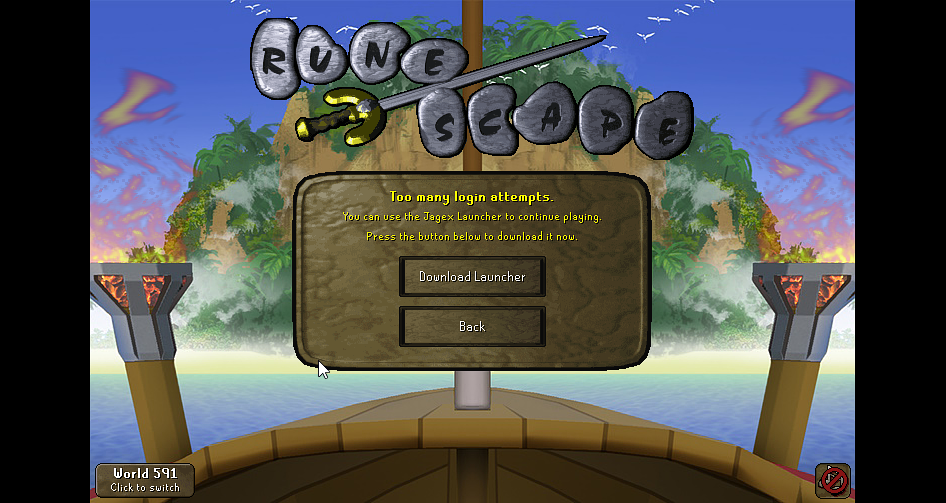 gilded kayak
because you're world hopping imps
world hopping counts as a new login]
too many login attempts = too many login attempts error
it's just that like 85% of all people who see that error wont get it for the reason you are
so the wording of "use the jagex launcher" is correct more often than not
 drowsy scarab
Not sure if anyone can point me in the right direction?
Weird tech question -
Used "cloud sync" runelite settings for my laptop while overseas, profile has "synced" but defaulted all plugins,now logging back into my home computer has copied all this default -
(For example, it still has item charges improved, however all the settings have changed to "default" of that plugin vs what i had customised and same for all others
Home computer was never turned off, is there a way to reset this or find the old settings?
zealous cedar
should just have to restart the client on the home pc
drowsy scarab
zealous cedar
should just have to restart the client on the home pc
I have but it seems to have copied the defaults of the laptop and overriden? Because both are "synced" or is it because I still have other open?
zealous cedar
no, it should just work
drowsy scarab
Hmm, it definitely isn't the same as my laptop now with "same profile" but all defaulted can tell because when I tag all a NPC on my home PC it use to do SW tile etc now its just an outline
Is there a way to force grab an old profile from a temp file somewhere?
zealous cedar
you could export the profile from your laptop and copy it to your desktop
drowsy scarab
The laptop is the one where the profiles are defaulted and never worked directly from the sync anyway, wouldn't it just copy that? Thought my main PC wouldn't change, but seems to have now copied
zealous cedar
im confused
drowsy scarab
Sorry let me explain (I used cloud sync) the laptop accepted the sync, has all the same plugins however they defaulted the plugins to base settings, eg better NPC highlight now outlines rather than SW tile etc, (back to base vs what I had it cuxsotmises as)
Thought okay weird must just be a laptop thing, however now that's also re-synced to my main PC, all plugins are there but all customisation of these have been defaulted is there a way to fix that?
zealous cedar
did you click the cloud icon on the laptop?
drowsy scarab
Yes
zealous cedar
that is the inverse of what you should have done
you would have wanted to cloud sync your desktop profile since it is the one that you want synced
drowsy scarab
I thought that's how it synced across, I see is there anywhere to grab an old temporary copy of the profile or anything then since I've broken it?
zealous cedar
check that your old profile isnt there on your desktop and just not active
otherwise no
drowsy scarab
Right, im confused tho because how else so you sync it without having it turned on? Without import/export it was default turned on when I logged in no?
drowsy scarab
zealous cedar
check that your old profile isnt there on your desktop and just not active
Isn't, just same 4 on both sides
covert coral
gilded kayak
because you're world hopping imps
Since when can I not world hop ive done it for so many things
 thick panther
covert coral
Since when can I not world hop ive done it for so many things
thick panther
covert coral
Since when can I not world hop ive done it for so many things
You can world hop, you just probably hit the limit
gilded kayak
since u did it that many times
covert coral
when does the limit cool off
its working for me now
but I went to go do stuff for 2 hours
thick panther
covert coral
when does the limit cool off
it's incremental, use "Hopper" on the plugin hub when you're at max hops again. It should show you an approximate amount of hops remaining/when they refresh.
 narrow tangle
If i were to perform a CLEAN install of runelite meaning deleting all the plugins/caches and settings absolutely fresh install. what files would i need to keep specifically to add plugins 1 by 1 with my current settings?
the purpose for this is i would like to start like ive never downloaded runelite to begin with on this pc, but when i start adding plugins back in, i want my settings pper plugin*
zealous cedar
there isnt really a way to do that
i guess you could duplicate your profile and then manually uninstall every plugin
narrow tangle
i tried that but i looked in my .runelite folder and theres file folders in there for plugins ive deleted/havent used in ages
zealous cedar
yeah that is fine
narrow tangle
if the plugin isnt downloaded/on those files will not be used at all anywhere?
zealous cedar
probably, any plugin can read/write to any file in .runelite so its sort of hard to say specifically what is writing to each
narrow tangle
so question
if i export a profile
then delete all files in .runelite and reinstall. itll only populate .runelite with what im currently using in the profile correct?
zealous cedar
assuming you reimport it?
narrow tangle
correct
round jacinth
narrow tangle
then delete all files in .runelite and reinstall. itll only populate .runelite w...
you don't need to delete any, just rename .runelite to .runelite_old or what ever
zealous cedar
i guess yes except for the things which aren't in the export
narrow tangle
zealous cedar
i guess yes except for the things which aren't in the export
gotcha ty
narrow tangle
round jacinth
you don't need to delete any, just rename .runelite to .runelite_old or what eve...
wym by this? close runelite and rename the .runelite folder .runelite_old
then relaunch runelite itll populate a whole new folder?
round jacinth
yea, you dont need to delete .runelite or the contents of it
narrow tangle
ok thank you guys im sure im asking ass backward questions i just want a fresh start but dont want the hassle of re setting up every single setting for every single plugin manually
zealous cedar
that seems mutually exclusive
covert coral
thick panther
it's incremental, use "Hopper" on the plugin hub when you're at max hops again. ...
thanks
narrow tangle
zealous cedar
that seems mutually exclusive
yeah thats why i said ass backwards lmao i appreciate the help
im just lazy xD
 scarlet patio
Is this something actionable or a flag for manual review?
https://github.com/runelite/plugin-hub/pull/10005/checks?check_run_id=59061652613

GitHub
Accessibility Plus
Accessibility Plus is a RuneLite plugin that improves accessibility and readability in Old School RuneScape by enhancing dialog UI and adding optional high-quality text-to-speech...
zealous cedar
your plugin looks like its doing process execution which we dont allow
scarlet patio
@clear stratus had mentioned that. It's spawning piper.exe so text to speech works for visual impared players. I modified it from the Natural Speech plugin failing to realize their most recent PR was rejected (I actually looked through quite a bit of the plugins to find a TTS capability). If that is an hard stop concern, i can try to figure out a way to have the user download a script to start it from my github. Any recommendations on a course of action would be greatly appreciated
clear stratus
there are plenty of ways to do tts without a process exec
scarlet patio
Any leads on a potential switch?
clear stratus
you basically just need to get a sound file with speech for whatever text somehow(TM) and you can play that through AudioPlayer. the somehow(TM) is typically making some API call with the text to some service that'll do the synth for you
I don't want to recommend you follow the code of any specific plugin but it looks like "Text to speech" demonstrates that process here https://github.com/techgaud/TTS/blob/main/src/main/java/com/ttsplugin/main/TTSPlugin.java#L291. The code itself has a number of issues I can see (like how we don't let new submissions use HttpUrlConnection) but that's the process
scarlet patio
It uses HttpURLConnection and new URL().openConnection(). Would the team be more amnicable to allowing me to use this?
clear stratus
The code itself has a number of issues I can see (like how we don't let new submissions use HttpUrlConnection)
just use okhttp like i said on the pr
scarlet patio
@Inject OkHttpClient?
clear stratus
yes
my point in linking that was just to show one example of "make api call with text input to get sound file, play sound file", don't copy that code verbatim
scarlet patio
This works enough, I can get this fixed in 20 minutes. Will end up using the same TTS provider.
clear stratus
i mean i'm done reviewing plugins for the day but i'll look at it whenever i do another pass
 rough meteor
hey everyone anyone knows what should i do with this? i m on runelite and i cant login into the game. its fine on steam but not in runelite. with or without VPN. changed DNS after saw the error but nothing i tried everything that came into my mind.
 scarlet patio
Resubmitting it now. Unfortunately I cant seem to tackle how to cut off the TTS when moving to the next sub menu
For instance
Text 1 -> Menu2 -> Text 3
Menu2 continues speaking while Text 3 starts etc
 scarlet jewel
Hello, i've been grinding alot of daeyalt essence to do ZMI and i wanted to set my rune pouch to left click fill option when the bank tab is open but it won't let me change that. I've put the bank deposit shift click to Eat/Wield/Etc. like on the next picture so I don't know what I'm doing wrong. Can someone help me out?


 gentle scarab
scarlet jewel
Hello, i've been grinding alot of daeyalt essence to do ZMI and i wanted to set ...
gentle scarab
scarlet jewel
Hello, i've been grinding alot of daeyalt essence to do ZMI and i wanted to set ...
does food, gear etc have the options? you might have this option off
 scarlet jewel
gentle scarab
does food, gear etc have the options? you might have this option off
scarlet jewel
gentle scarab
does food, gear etc have the options? you might have this option off
Thank you, this solved it!
 pastel otter
can u remove windows ping when ur run energy is 100% ?
oblique plume
idle notifier
pastel otter
ty
 tawdry lodge
Are plugin creators generally hanging out here? I wanted to leave some positive feedback but unsure how to do that other than via github issue
round jacinth
That’s perfectly fine place to do it or if you know their discord you can try to dm them
deft fulcrum
rocky tiger
Oh that option doesn't work on mac.
For macOS, the Scale Option is supposed to be completely nonfunctional right? Rendering of RL UI elements seems to change depending on whether I set 1.0 or system.


This is pretty minor, all things considered. I was curious why my icons and RL text suddenly looked bad so I decided to see whether it was because I had adjusted my scale in an attempt to make my RL window half as big
round jacinth
deft fulcrum
For macOS, the Scale Option is supposed to be completely nonfunctional right? Re...
Well seeing as you can check for yourself you can confirm if Fox is correct or not lol
oblique plume
Isn't that what he did
deft fulcrum
round jacinth
Well seeing as you can check for yourself you can confirm if Fox is correct or n...
I'm asking whether my understanding is correct
Setting to 2.0 or 0.5 results in the exact same thing as setting it to 1.0
If the setting is supposed to do nothing, then shouldn't it actually just do nothing?
From my tests, it seems as though it does something and I'm not sure whether that something is the desired outcome
oblique plume
We dont tell it to do nothing
The os just decides what to do with it and on macs it just doesnt seemingly do anything
round jacinth
oblique plume
Isn't that what he did
I read it differently.
Sorta like some Linux decide that a scale of 1.5 is 1 because it only allows integer numbers.
deft fulcrum
I wonder why "system" is different from any other value then.
oblique plume
Dpi awareness type stuff afaik
Different systems are doing the actual scaling
Windows behaves the same
You can put a value that's the same as your systems scaling and people say it looks different
deft fulcrum
There's very clearly a blur in the screenshots I took when I set it to 1.0. DPI shenanigans continue to vex me. No platform has a good solution, but most are just sufficient enough to function
I struggled a lot with different UI kits in Linux handling DPI awareness differently. KDE with Gnome apps was the bane of my existence for a long time.
deft fulcrum
round jacinth
stretching stuff is stretching/blurring
Well yeah. My confusion is about why explicitly declaring 1.0 scaling causes blurriness and not setting the value leaves things nice and crisp.
Intuitively, there should be no difference
leaden trail
The launcher sets the app to be dpi aware if the scale value isn't null
So something is still happening differently by setting 1.0 vs leaving it empty
I'm not sure if that actually matters but 🤷
rocky tiger
deft fulcrum
For macOS, the Scale Option is supposed to be completely nonfunctional right? Re...
From oracle docs note that on macOS, scaling only affects the off-screen buffer That setting would just make java render at lower quality.
deft fulcrum
That seems extremely undesirable lol
 wanton gust
All my settings/plugins reset to default. The profiles in the Runelite folder don't have any of the settings I'm expecting to see to import. Maybe an issue with syncing to Google account?
haughty pumiceBOT
empty minnow
try that
wanton gust
Yeah have tried finding the correct profile in the folder, none of them have current plugins/bank tags/etc. Info panel does say I'm signed into the right email.
round jacinth
Can you show the profiles2 folder in a screenshot to us
wanton gust
This is all from me trying to import different profiles since 10AM this morning
round jacinth
Show the size please
You’re showing a very small screenshot of what the window contains the size can tell us a lot about which is right
wanton gust
 round jacinth
The two good candidates to check are the 185 and the 163
You have some tmp files that are 328 and 708, but I don’t think you can import those.
(The file size being bigger means it has more stuff saved in it making it good candidates for )
wanton gust
None of those are the most recent settings. Those got created into the Profiles2 folder when I've been trying to import different profiles to RL. the largest and most recent file I could find was the one that correlated to my email address, but it's save data was from 2023. It's like the settings from just yesterday are gone
Just imported them again to check and none worked
 autumn jungle
Hello, sorry if this has been asked before, but when trying to login via RuneLite, I'm greeted with an old authenticator code request. There are no authenticators associated with my Jagex account and I cannot find a working code to access the game. I'm able to login from the official Runescape client without an authenticator code, but I'm blocked from RuneLite. Has anyone found a solution to this?
solid mesa
You need to launch via the jagex launcher
autumn jungle
I launch via the Jagex launcher, and Official Client works, but RuneLite requests an old authenticator
Seems to have been resolved after logging in from the Offical Client, sorry and thank you
 hexed fossil
need help, even tried reinstalling.
 zealous cedar
Did you try clicking "run as administrator"
hexed fossil
yes, get the same error
zealous cedar
click run as administrator and then show the error
hexed fossil
 zealous cedar
click open logs folder and then drag the launcher log file here
hexed fossil
sorry after several times i finally got this pop up from my malware, with this, once i allowed acess it lauched normally
 zealous cedar
what
oblique plume
Intentionally installed malware 
hexed fossil
anti.....
zealous cedar
try disabling your antivirus then?
hexed fossil
i just allowed permission for that file and it worked.
this was what it wanted access to.
 gilded kayak
io who what
hexed fossil
anyways, thanks for trying to help adam.
zealous cedar
you would probably be better off uninstalling this and just using the windows antivirus stuff
gilded kayak
the entire wiki page for this application is negative reception
thats kind of impressive
 elder rivet
Hi looking to get some help with improving runelite performance. I've recently upgraded hardware for my computer. Clean installed windows and GPU drivers while making sure BIOS and GPU drivers are all up to date. Working with 32gb ddr4 set at max read speed in bios. RL executes thru an ssd. i5 14600kf cpu on windows 11. Runelite struggles to push past 45 fps with any video opened so it can't handle multitasking and my task manager shows my GPU load sitting at 80% with nothing open besides RL and going upwards to 99% with a video + RL open. I also tested my runelite without any plugins on at all and then turned on just the GPU plugin for the same result. Some many years ago my 1070 used to easily push 100+ with a lot of other programs open with no problem. Would love to test possible suggestions because RL surely shouldn't be running so hard on my GPU which is a rtx 5060 ti.
My last option I'm looking into is replacing my PSU though I want to expend other hopefully settings related options. That is the one component that wasn't upgraded and it is about 7 years old.
 fickle mulch
turning circles plugin isntr working
haughty pumiceBOT
Get support for the Turning Circles Plugin Hub plugin here: https://runelite.net/plugin-hub/show/turning-circles.
You can also find the support link by searching for the plugin in the Plugin Hub panel and clicking the ? button on the plugin, or by right-clicking the plugin in the plugin panel and clicking the Support menu option.
fickle mulch
nvm its ok now after i hopped worlds
stone parcel
elder rivet
Hi looking to get some help with improving runelite performance. I've recently u...
Hi, if you used to have higher fps on your hardware than you do now, you might want to try installing older(or newer) gpu drivers.
I'd be surpised for a PSU issue to cause performance loss, generally I'd expect things like the pc turning off when under load. So I don't think you have to worry about the psu.
 coarse sorrel
Has anyone else have experience this same issue/potentially know a fix? Around when sailing was released anytime I'm on RL (doesn't happen on mobile) anytime I try and pull something out of the bank it seems to briefly freeze the client for maybe a tick. Easily noticeable by watching the NPCs moving around while banking just freeze up. Makes pulling items out of the bank take longer too otherwise I'll miss grabbing items. Doesn't matter what world or what location. Wondering if anyone else has dealt with this before
round jacinth
sounds like a classic hub issue
haughty pumiceBOT
@coarse sorrel Many plugins from the pluginhub break the client in subtle or not-so-subtle ways, including causing issues like client freezes. We do not support pluginhub plugins because we do not make or quality control them, and do not recommend their use.
Run the RuneLite (safe mode) shortcut, or with a Jagex account, first run the RuneLite (configure) shortcut and tick the Safe mode box, then launch RuneLite via the Jagex launcher.
This temporarily disables the GPU plugin and all hub plugins which will allow you to confirm the issue is caused by one of those plugins and isn't a core RuneLite issue.
If the issue is caused by a hub plugin, you should isolate which plugin it is and then uninstall the plugin.
coarse sorrel
Ooh good shout let me try doing that and seeing if it fixes the issue. If it does I can go through and test to see which plugin might be causing the issue
elder rivet
stone parcel
Hi, if you used to have higher fps on your hardware than you do now, you might w...
Hey ty for the ping ok I'll try using somewhat older gpu drivers of whatever I can get to. As it stands the newest drivers simply haven't helped.
Talking to others who tried to help troubleshoot a variety of issues to no avail all of which have been set to their standard settings to minimize the changing variables. I've been able to test between my old and new set-up too though the one constant between every test has been the PSU. I also agree with the PSU I feel like would either simply very obviously not work or just do as it is meant to do. But from process of elimination is just leading me down that path and to be fair it is somewhat aged. I'm not against buying it either I have a good reason to get a new one aside from just buying fresh hardware to eliminate yet another variable.
elder rivet
So the oldest available driver for my current GPU goes back to june of this year has been installed. The FPS seems to have improved by 10 so about 55 with any video open though I'd say the performance is still not great or what I would expect it to be with a 5060 ti's ability to multitask. It actually produced an older issue that I haven't ran into in a while with my scrolling being extremely laggy and this was with only RL open which maintained about 90 FPS during the gif. When I started moving my mouse up and down that was me trying to show I was scrolling up while the client could still only process me scrolling down until it could catch up with the lag. GPU load is still sitting at 80% RL managing 100 FPS with no video playing.
 round jacinth
That screen is just a really hard thing to load and run well tbh
My surface laptop gives up on that and even searching for hub plugins on the search bar.
If you want to see all the data it’s all online and loads faster
That’s only the last X number of total records.
elder rivet
Yea I could if I wanted the info but I was able to get that to go perfectly fine I could probably get that moving very smoothly going to the newest driver. Simply an example of just another thing slowing down that I would find related to the GPU I would assume. Gonna just update to the most recent GPU driver and hopefully that just let's me showcase that this problem can be fixed, but doesn't improve my overall game performance.
coarse sorrel
coarse sorrel
Has anyone else have experience this same issue/potentially know a fix? Around w...
If anyone stumbles upon this and has the same issue I figured out it was the "Bank Memory" plugin that was causing this issue. Disabling it fixed the problem
 young oar
Does anyone know a fix for scurrius falling bricks shadows appearing under the floor / flickering? Even does it in safe mode/gpu off.
 round jacinth
I think that’s on jagex to fix
elder rivet
elder rivet
Yea I could if I wanted the info but I was able to get that to go perfectly fine...
So this is with me GPU back to the most up to date driver, but also with hardware acceleration off. I still had the scrolling problem with it on. Im getting equal to better RL performance with a video running, but nothing I would consider good with my GPU. At least this is just 1 annoying aspect of the problem I'm having that I can control, but just running out of options for any way to improve runelite's performance especially when multitasking.
 gilded kayak
 halcyon cloud
how to fix the camera zooming far out when world hopping?
halcyon cloud
how to fix the camera zooming far out when world hopping?
get rid of camera smoothing plugin
 red tendon
Am I misremembering something with the clue scroll plugin? I could've sworn that cryptic clues would show all 3 locations before today, but now it looks like only the first one's being shown?
There should be another one on the top of the map for the wildy maze.

 gilded kayak
it doesn't work because it's in the lava maze dungeon
gilded kayak
we don't have a good way to indicate inside stuff, for any clue type except talk to people
red tendon
So sorry lol
gilded kayak
when it's talk to people i've tried to make sure the clue arrow is near the stairs
but we'd need an overhaul to show both the arrow outside, and the correct spot
red tendon
all good! thank you for the help. Thought I was going nuts lol.
spring pendant
does anyone know why my runelite would be not saving the position of plug ins when I move them?
 vast bone
does it save other settings?
 dire flume
how to get rid off this cancel option
 round jacinth
you dont
solid mesa
 dire flume
solid mesa
dire flume
solid mesa
tysm ❤️
round jacinth
solid mesa
does this hide too much
solid mesa
Not that I've found
 crimson quail
Hey, does anyone know why on the XP Tracker plugin sidebar it doesn't display actions(kills) / hr when Im killing npc's? I swear it used to and it was pretty nice seeing a rough estimation of kills/hr now all it says is time til level and I don't see any settings to change it..is that just not a functionality offered anymore? Appreciate it
gilded kayak
it was changed earlier this year as doing so made adding the ability to persist xp gains through restarts much easier
and it was the main reason people didn't restart their clients, just behind laziness
crimson quail
oh ok thanks:) Ill admit I am one of those people that basically never restarts out of laziness lol..thx for the info!
gilded kayak
we had to make it so you are forced to restart for game updates
so making the xp persist was needed otherwise people were gonna be anger
crimson quail
makes total sense, I thought i remember a time when you didn't have to restart it every time, glad im not going crazy hahaha
 pale blaze
currently wondering why none of my bank tags are there? recently had to reinstall jagex launcher, and when i loaded up RL, all of my plugins were gone, and none of my bank tags are there anymore... anyway to get them back?
haughty pumiceBOT
 hollow drum
hey I was wondering if there was a fix for runelite closing as soon as it loads from the launcher? never had this issue before, done a driver update about 30 mins ago and its happened since
leaden trail
Post your logs
haughty pumiceBOT
To find the logs, you can do one of the following:
- If your client failed to open, click the
Open logs folderbutton. - Open the screenshot directory by right-clicking 📷
Camerabutton, navigate 1 directory up, then open logs folder. - Navigate to
%userprofile%\.runelite\logson Windows or$HOME/.runelite/logson Linux and macOS.
Upload the log files named client and launcher by dragging them to Discord. If there are files prefixed with jvm_crash dated from today, upload them too.
leaden trail
It sounds like you probably want to roll back that driver update though
hollow drum
leaden trail
It sounds like you probably want to roll back that driver update though
rolling back the driver seemed to work thanks, had never done that before! will try update them again in a month or two and see if it still happens
 late sigil
Anyone knows how to fix world switch? Its just stuck on loading both ingame and in the login screen on runelite. Been this way for a few days now
 spark prism
anyone having rl freeze and having to reload lately? ( last 3 days )
 wide anvil
spark prism
anyone having rl freeze and having to reload lately? ( last 3 days )
wide anvil
spark prism
anyone having rl freeze and having to reload lately? ( last 3 days )
Yep, me.
Thought I was the only one tbh.
haughty pumiceBOT
Many plugins from the pluginhub break the client in subtle or not-so-subtle ways, including causing issues like client freezes. We do not support pluginhub plugins because we do not make or quality control them, and do not recommend their use.
Run the RuneLite (safe mode) shortcut, or with a Jagex account, first run the RuneLite (configure) shortcut and tick the Safe mode box, then launch RuneLite via the Jagex launcher.
This temporarily disables the GPU plugin and all hub plugins which will allow you to confirm the issue is caused by one of those plugins and isn't a core RuneLite issue.
If the issue is caused by a hub plugin, you should isolate which plugin it is and then uninstall the plugin.
deep elbow
Hello, my client, why am I getting this "crashed" message so often?
round jacinth
I believe all 3 of you could reflect on that same bot message.
elder rivet
elder rivet
Hi looking to get some help with improving runelite performance. I've recently u...
In case anyone scrolls up and gets curious to help, the issue has been resolved. ty for attempting though 
it was a me being very stupid issue not a RL issue, with it fixed RL is now buttery smooth 🙂
stone parcel
elder rivet
In case anyone scrolls up and gets curious to help, the issue has been resolved....
Oooooo, what did you do to solve it? Maybe someone will have a similar issue someday. 😁
elder rivet
It is comically dumb. Of the 3 GPU slots it could seat into when I upgraded my hardware I did attempt to slot it into the PCIe 4.0 slot however I literally didnt unlock the latch so I assumed it simply couldnt seat there. I used the weaker PCIe 3.0 slots which significantly lessened my performance.
stone parcel
Oh interesting, I wouldn't have guessed that. Very cool, glad you figured it out! 😁
elder rivet
It's a night and day difference so yes whoever has FPS issues make sure you have it in the right GPU slot 🙂
leaden trail
deep elbow
Hello, my client, why am I getting this "crashed" message so often?
Can you post your client.log and launcher.log files again?
spring pendant
my runelite doesnt save the position of anything i move on the screen. no plugins etc. its always moved where I didnt place it when I relaunch the client. anyone know why or how to fix?
haughty pumiceBOT
If you got permission problems, open Command Prompt (cmd) as administrator and try executing the following commands while testing if the problem is solved between every step. Make sure RuneLite is closed when executing commands!
mkdir "%userprofile%\.runelite"icacls "%userprofile%\.runelite" /grant:r *S-1-1-0:F /inheritance:r /tattrib -r -a -s "%userprofile%\.runelite\*.*" /d /s
charred wind
Assuming you’re not power button shutting down
pastel otter
Anyone know a plugin/setting to get a circle around ur cursor?
gilded kayak
you could custom cursor to a cursor with a circle around it
 mossy sparrow
Hello, gents, i have a problem running RuneLite smooth. I bought a new PC yday with high-end hardware, internet is 10/10, but if i open RuneLite if just lags every 10-15 sec for couple ticks, and then suddenly catch up everything as if nothing happens.
i tried official client, problem doesnt occur
zealous cedar
that sounds like lag
mossy sparrow
yea but if it was lag, the actions (input) wouldnt register and send to jagex right
but it just... idk, client lags or something
but its not stuttering either
zealous cedar
it sounds like network lag, not client lag
mossy sparrow
any known fix?
zealous cedar
fix your network
mossy swan
try different region server
mossy sparrow
im confused buddies, happy to try w/e u guys suggest but just so i understand u corectly
the network side didnt change anything, right? its still the same network as with the old PC
zealous cedar
can you get a recording of it?
mossy swan
a lot of things can change even though you personally don’t change anything
zealous cedar
yeah this is network lag
mossy sparrow
what weird is, sometimes it doesnt happen for... idk, x-minutes
and then its just horrible to play, constant bullcrap
never had this problem using runelite past years
haughty pumiceBOT
open command prompt, type this in:
ping -t oldschoolXXX.runescape.com
where the XXX is your world minus 300, for example world350 = 50
round jacinth
Your speed test is done against some company to report speed, not against jagex to tell you reliability
You can leave that command running and it should show hiccups when runelite does.
zealous cedar
id try and ping thing and watch if it either drops packets or has a big latency spike
round jacinth
The ping command terminal is their server not yours
zealous cedar
that looks like pretty significant packet loss
round jacinth
you could reset router to see if it helps some how or it could be out of your control
you can also try other worlds
mossy sparrow
tried other worlds
round jacinth
(regions of world too)
mossy sparrow
imma restart this entire router, see if it does anything
rocky tiger
Open another window and add a ping to 1.1.1.1 and see if that get drops to that at the same time.
mossy sparrow
roger, will do after reboot
Thanks massive amounts lads ❤️ much apreciated
brb
reboot didnt seem to change something, w/e that 1.1.1.1 ping does, it does the same
crisp dune
Then your internet service is generally dropping packets, not just to osrs
crisp dune
I'd expect to see the same behavior, yes
rocky tiger
You need to contact your ISP about packet loss.
mossy sparrow
ok since its not RL related, i wont fire the questions here, just 1 left
is there any valid explaination why this didnt happen before on the old rig?
mossy swan
you could test if it happens with your old rig now
if not, then you know it’s something to do with your new pc
rocky tiger
What sort of connection do you have? Do you know how to login your modem?
mossy sparrow
i do yea
rocky tiger
If you can find your ISPs default gateway that is a good one to ping and see if packet loss is from modem <-> isp or somewhere else within isps network.
mossy sparrow
roger
mossy swan
also if you’re using wifi try cable
rocky tiger
Video showed ethernet connection.
mossy sparrow
yea its cable
mossy swan
that does not bode well then
zealous cedar
did you switch the cable when you got the new pc?
mossy sparrow
well theres a few
i got 3 at my desk
so technically that could be the case
PS5/old rig/new rig
can it be something stupid as a faulty connector?
mossy swan
seems unlikely
i’ve had faulty connectors drop the speed to 100mbit but not randomly drop packets
viscid lantern
I've had packet drops on a bad cable, so it can definitely happen
viscid lantern
if you can easily switch cables thats definitely worth trying
solid mesa
Can also try updating network drivers if it is a different pc
rocky tiger
mossy sparrow
roger
Roger is cable right? If you login to modem which usually 192.168.100.1 you could check your snr and see if lots of uncorrectable errors.
rocky tiger
If you can acess modem stats feel free to post a pic. I have plenty of experience with those.
mossy sparrow
where do u want me to click
rocky tiger
Do you have a seperate modem and router or a combined?
That looks like a router not a modem.
mossy sparrow
this is router
viscid lantern
You on Ziggo?
mossy sparrow
yes.
viscid lantern
almost certainly modem+router combo then
rocky tiger
I've only ever used standalone modems. Not sure if you will have acess to docsis stats on that brand.
zealous cedar
if you arent getting packet loss on the old pc it would basically have to be the cable or something up with the pc itself right?
mossy sparrow
zealous cedar
if you arent getting packet loss on the old pc it would basically have to be the...
i'd assume so
or my old pc was that crap
the FPS lag was worse then the internet lag
mossy swan
if you can test on your old pc still that’s probs most straightforward
mossy sparrow
drivers up 2 date
just to be sure
didnt expect much else from a fresh build pc 3 days ago
zealous cedar
Like if you can run ping from both machines at the same time that would tell you a lot
mossy sparrow
zealous cedar
Like if you can run ping from both machines at the same time that would tell you...
does old rig need to run osrs aswell
or is 1.1.1.1 ping enough
crisp dune
just pinging should be enough, running osrs has nothing to do with your connection

 crisp dune
could be
rocky tiger
When you switched cables you left the other ends plugged in?
mossy swan
try different ports on the router
mossy swan
well
mossy swan
try swapping the ports
rocky tiger
Does this computer happen to have wifi to test?
mossy sparrow
it does @rocky tiger
mossy swan
mossy sparrow
not on router
yeah that should be ok
rocky tiger
Unplug and see if you do not get packet loss over wifi.
mossy sparrow
k
the loss seems to be gone
but ping is higher

internet is literally 70x times poorer tho
mossy swan
mossy sparrow
just switched on rigs ends
so how about this
mossy sparrow
yea what u want me to do again
rocky tiger
mossy sparrow
I still see packet loss to 1.1.1.1 over wifi here.
rocky tiger
So do not think it's anything to do with your ethernet cable. It's internet issue. Try running ping on old pc longer.
round jacinth
mossy sparrow
internet is literally 70x times poorer tho
Higher ping is manageable but not swings like that
mossy sparrow

this is the setup
the 1 line from router to hub is cable going upstairs
from there its split into multiple devices
mint ledge
@mossy sparrow on a different note - what plugin are you using for that fancy man walk animation?
rocky tiger
Did you try bypassing hub?
mossy sparrow
i can try
viscid lantern
mint ledge
<@278809205308391426> on a different note - what plugin are you using for that f...
my guess is this one: https://runelite.net/plugin-hub/show/weapon-animation-replacer



 mossy sparrow
mint ledge
<@278809205308391426> on a different note - what plugin are you using for that f...
mossy sparrow
mint ledge
<@278809205308391426> on a different note - what plugin are you using for that f...
 mint ledge
ty ty
rocky tiger
It's possible the hub doesn't like your new computer or cables have a fault that your new computer is more sensitive to.
mossy sparrow
what ive also noticed @rocky tiger , whenever i boot up youtube on chrome, its losing way more and faster packets
without it, its barely noticable
but still does lose minor minor ticks
from time to time
also, should things be better if i make an hotspot
on some device, pulling 5g?
rocky tiger
No. Your connection looks very good. I don't think youtube should be impacting game.
mossy sparrow
ok
mossy sparrow
rocky tiger
No. Your connection looks very good. I don't think youtube should be impacting g...
you have hardware experience too?
comparing old vs new
for the ethernet controller
(i assume its hardware..)
 still matrix
Hi. I have a quick question. I'm using a VPN and i intentionally excluded Runelite from the tunnel. Now it's refusing to connect. Ideas?
haughty pumiceBOT
viscid lantern
you probably have to check the IPv4 box
still matrix
I am still running through the Jagex launcher, that one is excluded too.
viscid lantern
click the link the bot posted and check the IPv4 box
rocky tiger
mossy sparrow
Not really. I've never heard of this happening. I have had an intermittent issue before but it was a bad cable and would not connect at 1gbps.
still matrix
Gucci. Thanks for the help.
rocky tiger
What brand ethernet switch?
You could put it back in and try again with 3rd cable and test all the ports.
mossy sparrow
 rocky tiger
Oh wow I have that exact one.
mossy sparrow
i have an IT guy for this crap
but im not gonna bother him about why EVERTHING works cept my medieval clicking simulator
highend games like final fantasy and other crap no issue at all
no connection loss (not that i feel like at least.. could be there)
viscid lantern
well the pings show it does/will affect everything, so far you just got lucky on everything else except the clicking sim
rocky tiger
Well packet loss was to everything not just the game. Things like youtube are just not sensitive to it.
mossy sparrow
cause they buffer?
the pings still running on new rig and havent got a single loss anymore
rocky tiger
You could try another brand switch or worst case run another cable from router just for that PC.
gilded kayak
fwiw runescape is probably the only thing you've ever played that uses 1 single connection
mossy sparrow
or just new cable..
cause now this one works, but rip the others
hmmm
lemme see if i have some brandnew cable somewhere
almost certain the HUB is fine
literally never touch it, cept now to make a pic
- once again, other devices work smooth too
mossy sparrow
ok so
checked everyhing
the second i open youtube and start playing some random vid, doesnt even matter which one, neither the browser
i get this

currently streaming TV via browser, on multiple tabs, no timeouts
ok seems like we fixed it
if anyone ever encounters this problem
suggest them this

needs to be on OFF
whenever i toggle this, i get instant timeouts
gilded kayak
mmm yes