#support
1 messages · Page 134 of 1
 gilded kayak
 crisp dune
we've never been able to replicate this bug, but you're not the only person who's had this come up before
gilded kayak
!hubsupport
 haughty pumiceBOT
Support for hub plugins should be directed to the author of the plugin. You can find the support link by searching for the plugin in the Plugin Hub panel and clicking the ? button on the plugin, or by right-clicking the plugin in the plugin panel and clicking the Support menu option.
 mossy swan
gilded kayak
Cant you just turn it off and back on to make it go away
mossy swan
gilded kayak
Cant you just turn it off and back on to make it go away
thats literally what they said lol
gilded kayak
mossy swan
thats literally what they said lol
Oh well they asked what's causing it
mossy swan
well true
 split willow
!hubsupport
haughty pumiceBOT
Support for hub plugins should be directed to the author of the plugin. You can find the support link by searching for the plugin in the Plugin Hub panel and clicking the ? button on the plugin, or by right-clicking the plugin in the plugin panel and clicking the Support menu option.
 granite topaz
anyone have issues like this occuring? not sure if its runelite related but it just recently started happening. ive checked all my entity hider plugins and id's and nothing is imput to hide entities like this and others that are gone (((ie chambers of xeric energy pools))).

 clear stratus
did you install "terrain toggle" recently
granite topaz
nope
clear stratus
somebody above you had this same issue it seems. try safemode
haughty pumiceBOT
To enable safemode
Windows
Run the RuneLite (configure) shortcut from the windows start menu
Tick the Safe mode box, save, launch RuneLite the way you normally do.
Mac
In Terminal, run
/Applications/RuneLite.app/Contents/MacOS/RuneLite --configure
Tick the Safe mode box, save, launch RuneLite the way you normally do.
clear stratus
it's going to be some hub plugin
granite topaz
clear stratus
somebody above you had this same issue it seems. try safemode
ahh yeah i see that but his is at demonics. hmm ok ill test it out
granite topaz
for future refrence, its "ground objects hider" plugin. i togged it off and on and fixed

 gilded kayak
oh you said you turned off all your entity hider plugins
the ground is definitely an entity
granite topaz
i guess i missed that one, i dont even remember using it tbh. i mainly focus on better npc highlight

 granite topaz
mossy swan
… no it’s not <:Susge:1082062371280924802>
granite topaz
mossy swan
… no it’s not <:Susge:1082062371280924802>
and yes, ground textures do have an entity ID. thats why you can hide the ground in bloat room in tob
mossy swan
 yeah but rationally ground is just ground and not really an entity like you would think of
granite topaz
mossy swan
<a:forsenExplainingHow:823224540158754876> yeah but rationally ground is just gr...
think and is are two different things. if you saw my first picture, the only blacked out area is the tiles infront of CoX, which is definately a texture.
mossy swan
granite topaz
think and is are two different things. if you saw my first picture, the only bla...
yeah the pictures are not loading for me again, classic discord too i guess
 drowsy bough
hello. I haven't played much since remaxing Wednesday and I noticed that my stat bars go all the way across my screen today vs it would just be 4 at a time. I haven't changed any settings and was curious what could be causing this. Any ideas?

 granite topaz
drowsy bough
hello. I haven't played much since remaxing Wednesday and I noticed that my stat...
granite topaz
drowsy bough
hello. I haven't played much since remaxing Wednesday and I noticed that my stat...
should be this plugin depending on how you want it to appear
 mossy swan
you can hold alt and drag the border of the box that appears
granite topaz
this too^
drowsy bough
unfortunately it appears to be just all one long box when I move it
gilded kayak
mossy swan
programmer vs user brain strikes again <a:classic:1355624460144738637>
i feel like even the user when having an issue where something is hidden, would search hider not entity
but ig not
 kindred crypt
This means I've fixed all immediate build errors, correct?

 river marlin
Sailing plugin - rosewood cargo showing question marks when items are in hold
 round jacinth
Known issue. They didn’t know the values but now they do I think.
 narrow surge
yup https://github.com/LlemonDuck/sailing/issues/176, you're all too quick, hard to find small things to contribute to 😂
 lucid turtle
I followed the flowchart and still having issues
ope i turned the gpu one off and it fixed it
 edgy bough
how do i publish a script the AI bot on github says it works
lucid turtle
So i followed the flowchart and the only thing that fixed it was turning the GPU plugin off. Turning it back on makes the issue come back. Is it ok to just leave it off?
 jade field
I asked about this a couple days ago but it seems more complicated that I initially explained. I'm having a weird runelite issue that I can't figure out. If i log out and log back in within a few minutes I'm totally fine. But if i log out and log back in say 20 minutes later, my client just freezes and I have to restart it? Any ideas?
gilded kayak
some hub plugin shitting itself probably
make a new profile and see if you can replicate it
jade field
turns out it's a known 117 issue
 lucid gate
For the RuneLite Bank plugin, are there any current plans to add showing your cargo hold value, similar to how you can show your bank and seed vault values?
 vast venture
i need some help please any1
my runelight as gotten small on maximize screen
everything the game , the writing and everything is really bad
 valid field
i got a new pc, when i log into runelite with the profile im logged in as on the old pc, nothing saves?
haughty pumiceBOT
 stone parcel
Might need to switch to the desired  profile.
 river copper
I can't get !task to work, any fix? Not on my default profile nor on a new profile

Does it have something to do with stored tasks maybe?
 empty minnow
If it's a new task it may not have been added yet
gilded kayak
or a task they randomly changed the name of
river copper
I'll quickly try on my stored task then
gilded kayak
ye i see the PR here to add gryphons it hasn't been merged yet
river copper
Yes the stored task (fire giants) does seem to work
Thanks for the help
Funnily it won't stop thinking it's a fire giant task now

 vague ivy
Unsure where to ask this, As its not really a support question 🙁
Is there a way to Hide your Sails on your boat? EX: Im doing combat not gonna use it/interact with it.. Don't wanan see it/block my vision on the boat
unsure if anyone else has ever asked this! But possible additon to the sailing plugin? 😄
boat hider plugin NVM! ❤️
 still fiber
hey is there any lovely people that can help me with my runelite not launching
 lucid gate
still fiber
hey is there any lovely people that can help me with my runelite not launching
lucid gate
still fiber
hey is there any lovely people that can help me with my runelite not launching
Looks network related. Has RuneLite loaded for you on this device and on the network that you're connecting from before?
still fiber
yeah ive had this pc for years and played osrs for years no problem
i was playing yesterday fine
lucid gate
Maybe there's a downstream internet provider issue somewhere between your ISP and wherever is hosting the boostrap being downloaded
Click Open logs folder and check the launcher.log file. There might be more verbose information in there
still fiber
oh nvm man its working now, tryed like 10 times before then just watched some youtube and its good now
thanks for your help haha
lucid gate
Lol no problem
lucid gate
Anyone know what the difference between the SailingBoatCargohold and SailingBoatCargoholdSide interfaces are?

 cyan crag
idk if this is a rl issue but im having an issue none the less - is there an issue with ocean clue step? hot/cold (strange device) ? device tells me to go to drumstick isle. the spot to dig is too close to a tree. when i click clue scroll it resets and the device reads nothing. i go to mainland and do it all over again just to be back on drumstick isle with same issue
cyan crag
okey
gilded kayak
it wouldn't be the first time that spot was inside an object
cyan crag
i've dug up half the island and no idea what to do lol. killin me not to complete this step
 tropic harness
 vast bone
won't be click through though.
vast bone
won't be click through though.
i've tried these both but no luck :(
 gilded kayak
it looks like we have the coord jagex has listed, you can see the same coords https://github.com/runelite/runelite/blob/a66485ec7e1c41f3f5e536cf696e9f197a48cbb7/runelite-client/src/main/java/net/runelite/client/plugins/cluescrolls/clues/hotcold/HotColdLocation.java#L154 here and https://abextm.github.io/cache2/#/viewer/dbrow/7068
vast bone
tropic harness
i've tried these both but no luck :(
cancel,,lookup,wiki?
tropic harness
vast bone
`cancel,,lookup,wiki`?
no luck :(
did some trouble shooting and it just looks like it cant be reordered at all
did cancel,* and it worked on most things besides the wiki button
cyan crag
gilded kayak
it looks like we have the coord jagex has listed, you can see the same coords <h...
 gilded kayak
unfortunate
gilded kayak
maybe try mobile
and see if what the cache says is just wrong
and the actual spot the mobile clue solver, knows
cyan crag
okey thanks a lot felanbird. i will try it out rq
gilded kayak
if it works can u log out in the spot on mobile, and then screenshot it on runelite with the indentificator plugin installed from the 
it will say what coord ur standing on
cyan crag
yea man of course. lemme see if i can stand there

so it didnt let me stand there but did this
 dense lodge
Anyone else experiencing issues with the "click here to play" button upon login? The client just freezes on me
cyan crag
should i go to buccaneers isle now? lol
gilded kayak
yeah i assume u actually have that one
but the solver doesn't know about it
this looks like it was added like WAY before sailing somehow?
cyan crag
okey thank you. i will let ya know in a few mins.
cyan crag
yea something is def wierd
haughty pumiceBOT
@dense lodge To enable safemode
Windows
Run the RuneLite (configure) shortcut from the windows start menu
Tick the Safe mode box, save, launch RuneLite the way you normally do.
Mac
In Terminal, run
/Applications/RuneLite.app/Contents/MacOS/RuneLite --configure
Tick the Safe mode box, save, launch RuneLite the way you normally do.
round jacinth
Check safe mode.
gilded kayak
it makes sense if you stop and look at it, it's 4963 1000

the other sailing clues are the 999 and 1001
but i nor abex noticed this when adding the clues
cyan crag
okey, well at least its not too far away lol
dense lodge
Ty for the safe mode option, is there any fix though? Is this well known?
 solid mesa
If safe mode works it means one of your hub plugins is broken
dense lodge
The issue wasn't it working on boot. After a 25min afk loggout, it would stall after logging in again
solid mesa
I think that's a known issue of 117HD?
gilded kayak
^
dense lodge
Ohh interesting, so disable that for now and i should be chillin
cyan crag
gilded kayak
but i nor abex noticed this when adding the clues
this is where it actually wanted me to go
 cyan crag
thanks a lot for the help!
gilded kayak
ty for the issue report
cyan crag
much appreciated. was about to drop that haha
gilded kayak
im surprised it took so long, hotcolds are the clue type that objectively does not like a missing step
cyan crag
yea no doubt lol
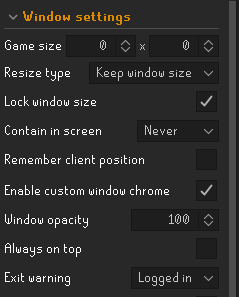
 rugged pollen
 sinful yarrow
https://gyazo.com/f5efd619e55cd3da9ed2a5dd806cfdc0
sinful yarrow
https://gyazo.com/f5efd619e55cd3da9ed2a5dd806cfdc0
remember client pos iirc
tick that on
 sinful yarrow
ty
 ornate kite
Hey your plugin on sailing dont work that well if you do quick deposit it does not count the hold with Kind regards
haughty pumiceBOT
Get support for the Sailing Plugin Hub plugin here: https://runelite.net/plugin-hub/show/sailing.
You can also find the support link by searching for the plugin in the Plugin Hub panel and clicking the ? button on the plugin, or by right-clicking the plugin in the plugin panel and clicking the Support menu option.
 rocky tiger
It’s already been reported. https://github.com/LlemonDuck/sailing/issues/177

GitHub
Ironwood cargo hold if it matters, adding items via the right click quick-deposit option when the chest is not opened. Items aren't tracked until manually opening the chest.
 bitter bone
Appreciate the follow-up. I've been thinking about this ever since your first posts lol
ornate kite
Oh okay ty guys
 oblique plume
gilded kayak
im surprised it took so long, hotcolds are the clue type that objectively does n...
oblique plume
gilded kayak
im surprised it took so long, hotcolds are the clue type that objectively does n...
to be fair, this guy said something about it three days ago #runelite message
 twilit zenith
As of today when playing OSRS through RuneLite, whenever I click on 'Click here to play' the whole client lags out, is this a known issue?
haughty pumiceBOT
open command prompt, type this in:
ping -t oldschoolXXX.runescape.com
where the XXX is your world minus 300, for example world350 = 50
 leaden trail
Do that for the world you're trying to log into while you're logging in
If that doesn't seem to spike then it's almost certainly a misbehaving hub plugin
oblique plume
i feel like ive heard 117hd causing problems like that
 delicate bobcat
really annoyingly we have yet another bug in 117 HD
will submit a patch for it in not too long
basically any time you stay on the login screen for 5 minutes or more, it erroneously detects it as OS suspend, and restarts the plugin (to ensure safe behaviour), but with the new zone streaming stuff that breaks if it's done mid upload
twilit zenith
leaden trail
Do that for the world you're trying to log into while you're logging in
If that...
The ping seems to be fine, thankfully. However, as @oblique plume mentioned with the 117 HD; it's the last plugin I've installed, so this is most likely the culprit. @delicate bobcat Are you w/ the 117 HD team? If so, and assuming you are making a post, I don't have to make a bug report, right?
delicate bobcat
yeah, I'm the maintainer
no need to make a report probably, as we're already aware of it
twilit zenith
delicate bobcat
no need to make a report probably, as we're already aware of it
Gotcha, thank you! 😄
delicate bobcat
the last update was fairly sizeable, and it's broken in like 3 ways at this point
hopefully this is the last thing we'll uncover
twilit zenith
I feel the pain; you fix one thing, and get 3 issues back for it, it's demotivational
I still like to thank you for making such an amazing plugin!
 uneven heron
any updates on anim smoothing
 zealous cedar
will be fixed tomorrow
uneven heron
my hero
 tight charm
odd situation arose yesterday, when i afk log out runelite freezes after clicking the “click to play” button, but this does not occur on manual log outs.
its a full freeze, animations stop, doesnt crash, just standstill
is there a way to access any txt files that point out errors when executing tasks or anything that would point me to an answer?
zealous cedar
as discussed above, that is the 117hd plugin breaking. try using the normal gpu plugin instead
delicate bobcat
yep, sorry!
tight charm
no worries, should have searched before asking. thank you both 😁
 signal dome
getting client crashes at the exact same place in gwneith glide... is there something wrong with my gpu?
2025-12-09 14:55:03 GMT [Client] ERROR injected-client - Client error
java.lang.ArrayIndexOutOfBoundsException:
    at net.runelite.client.plugins.gpu.GpuPlugin.drawTemp(GpuPlugin.java:1253)
    at jh.pb(jh.java:39614)
    at jh.pb(jh.java:58379)
    at jh.nh(jh.java:13702)
    at bj.jd(bj.java:3277)
    at es.jk(es.java:3005)
    at by.me(by.java:8688)
    at by.me(by.java:8725)
    at fj.md(fj.java:8559)
    at client.qv(client.java:13633)
    at client.bn(client.java:11699)
    at bm.bs(bm.java:497)
    at bm.qr(bm.java)
    at bm.run(bm.java:62125)
    at java.base/java.lang.Thread.run(Unknown Source)
Ive disabled most plugins, except things like watchdog, gpu
haughty pumiceBOT
To find the logs, you can do one of the following:
- If your client failed to open, click the
Open logs folderbutton. - Open the screenshot directory by right-clicking 📷
Camerabutton, navigate 1 directory up, then open logs folder. - Navigate to
%userprofile%\.runelite\logson Windows or$HOME/.runelite/logson Linux and macOS.
Upload the log files named client and launcher by dragging them to Discord. If there are files prefixed with jvm_crash dated from today, upload them too.
 charred wind
Snippets of logs usually aren’t helpful. Follow the instructions above
signal dome
 wide anvil
My RuneLite client requires me to restart every time I get logged out. Whenver I go to click on "Click Here To Play" after logging in, the client freezes and just gets stuck on that screen. The only way to fix it is to restart. Any ideas?
oblique plume
117hd issue
wide anvil
Thanks
 wet scroll
Please tell me there's a way to turn those horrid popups off... 😭

 winter snow
I don't believe there is
You will be glad to know that the popup is click-through, so it doesn't matter 😄
winter snow
I know on mobile they don't appear unless you press a little details button
tbh I'm too lazy to check 😄
wet scroll
Gahhhh, there needs to be a way to yeet those lolol
winter snow
why?
solid mesa
Hide Spellbook Tooltip plugin
wet scroll
winter snow
why?
Mainly because when I shrink my screen resolution and scale up the UI, that popup really is distracting visually 😂
lucid gate
Is it possible to use and slightly modify the Destroy Item chatbox panel? Or would you need to create your own?
 final sand
Has there been any update on a fix to the double cursor?
oblique plume
its your system
final sand
Ive done everything chatgpt said, ive done what google said, ive looked for other problems and cant figure out how to fix it
final sand
oblique plume
its your system
how do i go about fixing it then? because ive hit a wall
oblique plume
we dont have the problem so we dont know
final sand
not really helpful XD lol
Idk what i can share or do to help yall see how to correct the issue
 hallow sphinx
I have been trying to log into runelite but keep getting an issue where i just stay locked on "Loading - Please wait."
I have uninstalled both runelite and jagex launcher and still cannot log in. However, I can log into mobile just fine.
 final sand
been a fairly useless for help in this discord ijs... Ask for help and don't really get a answer on how to resolve something. wouldnt hold your breath @hallow sphinx
oblique plume
lol
charred wind
hallow sphinx
I have been trying to log into runelite but keep getting an issue where i just s...
Do you use HD
hallow sphinx
charred wind
Do you use HD
I do. I could toggle it off
oblique plume
hooder would be interested that his fix earlier didnt work
charred wind
I wouldn’t be surprised if this client has been open 90 hours
hallow sphinx
charred wind
It’s very likely an HD issue
My god, you’re the goat 🫡 toggling it on and off fixed it
charred wind
Did you restart your client
oblique plume
so you didnt reinstall then
charred wind
HD might have an update that you haven’t gotten
hallow sphinx
I did reinstall, but I uploaded my profile. Each time which has it turned on
leaden trail
final sand
Has there been any update on a fix to the double cursor?
You probably have RuneLite set to use something different from your default display adapter since that's what the problem was for the one other person who had this problem.
From a random Google result:
You can change which graphics adapter the program will run with, this setting can be changed on Settings > System > Display > Graphics. Select "Browse" to select the application and add it to the list, after adding it, select the application on the list > Options > Select the graphics adapter > Save.
final sand
leaden trail
You probably have RuneLite set to use something different from your default disp...
Ive already tried it. it sadly didnt work
delicate bobcat
hallow sphinx
I have been trying to log into runelite but keep getting an issue where i just s...
if you restart your client the issue should be fixed now
leaden trail
🤷 then I have no idea
I'm about to take a final so I can't really help you beyond that
final sand
leaden trail
🤷 then I have no idea
I'm about to take a final so I can't really help you be...
good luck!
delicate bobcat
can you also upload your client log here?
haughty pumiceBOT
To find the logs, you can do one of the following:
- If your client failed to open, click the
Open logs folderbutton. - Open the screenshot directory by right-clicking 📷
Camerabutton, navigate 1 directory up, then open logs folder. - Navigate to
%userprofile%\.runelite\logson Windows or$HOME/.runelite/logson Linux and macOS.
Upload the log files named client and launcher by dragging them to Discord. If there are files prefixed with jvm_crash dated from today, upload them too.
final sand
omfg i fixed it
@leaden trail you made my brain start thinking on what else to do with the info and managed to get it. thank you
rocky tiger
final sand
omfg i fixed it
Could you share what you did to resolve it for others?
charred wind
final sand
<@288504448030867466> you made my brain start thinking on what else to do with t...
What did you do? There was another person talking about this earlier in the week
final sand
so it was pretty much what Dura said, the only thing was instead of doing the actual folder where runelite is, go to desktop folder and add runelite thats there instead of going through the folder.
haughty pumiceBOT
@golden trout To find the logs, you can do one of the following:
- If your client failed to open, click the
Open logs folderbutton. - Open the screenshot directory by right-clicking 📷
Camerabutton, navigate 1 directory up, then open logs folder. - Navigate to
%userprofile%\.runelite\logson Windows or$HOME/.runelite/logson Linux and macOS.
Upload the log files named client and launcher by dragging them to Discord. If there are files prefixed with jvm_crash dated from today, upload them too.
charred wind
Yea for future reference your cheats did that
bitter bone
rocky tiger
Could you share what you did to resolve it for others?
Here's the solution the other guy posted: #support message
Moreso this link actually: #support message
 warped fjord
Hi I have an issue where my bank will lag for a second or 2 whilst I'm either depositing my worn items or wearing them, is there any known fixes for this
gilded kayak
i would guess turn off your bank plugins until it stops happening
warped fjord
gilded kayak
i would guess turn off your bank <:pluginhub:1264314292291895319> plugins until ...
ye i've tested each plug in one by one but it kept happening, stopped happening when i made a new profile tho
gilded kayak
well if it stops when you make a new profile, it's one of your plugins 100%
warped fjord
gilded kayak
well if it stops when you make a new profile, it's one of your <:pluginhub:12643...
would i have to uninstall the plug ins, or would just disabling it be enough
empty minnow
disabling might not work but disabling and then restarting should
warped fjord
alright cheers will try again
 haughty pumiceBOT
Graphical artifacts? Try disabling hardware acceleration: https://github.com/runelite/runelite/wiki/Disable-Hardware-Acceleration
 quartz summit
^yep that fixed it.
 quick sorrel
anyone know why when attempting to log back in after an extended idle period logged out my client freezes and needs to be restarted?
delicate bobcat
quick sorrel
anyone know why when attempting to log back in after an extended idle period log...
there was a bug with 117 HD causing this, but it has been fixed if you restart RuneLite
sorry about that
quick sorrel
oh like resolved today?
delicate bobcat
yep
quick sorrel
W thanks
I had assumed it was something to do with 117hd, I actually tried to cycle the plugin once the freeze happened
delicate bobcat
I think once it happens, it should recover after ~30 seconds
but that's a long time to wait
quick sorrel
yah I was concerned about potential issues logging into a dangerous area
delicate bobcat
anyway it shouldn't be possible anymore
quick sorrel
sick ty
 drifting star
why cant you stream on discord runelite?
gilded kayak
probably the capture tech discord is offering you specifically
they have a bunch of tech that different users get*
drifting star
only full screen works rn its not only me
gilded kayak
cuz you definitely can stream it
 arctic fjord
I cant stream also
drifting star
it just gives gray screen
gilded kayak
then discord probably fucked it
charred wind
In settings -> voice and video
Do you have any experimental settings enabled?
gilded kayak
cuz we have not updated runelite all week
drifting star
charred wind
In settings -> voice and video
Do you have any experimental settings enabled?
no
charred wind
interesting. I see two people streaming it in one of my discords
drifting star
10 people in my dc cant stream it since yesterday
charred wind
I doubt it's related to Runelite. Are you using HD?
quick sorrel
just tested. Works fine for me
drifting star
unless its full screen
quick sorrel
and I'm in fixed-classic, non full screen
drifting star
just using gpu plugin
drifting star
quick sorrel
and I'm in fixed-classic, non full screen
i mean full screen streaming
not only runelite
charred wind
That would be streaming the display
quick sorrel
yeah I just did application stream
drifting star
application just gives gray screen
quick sorrel
do you have hardware acceleration on for discord
drifting star
quick sorrel
do you have hardware acceleration on for discord
ye
quick sorrel
turn that shi off
gilded kayak
true lol
drifting star
quick sorrel
turn that shi off
works now xd
quick sorrel
🙂
quick sorrel
its the most buggy feature in almost all of software rn
gilded kayak
only sort of a joke
quick sorrel
but likely it worked earlier when your vram cache wasn't full of junk
especially if using the GPU plugin
 red jetty
Hello, I'm experiencing a "malformed login in packet"?. Lets me log in (jagex account) to my iron man. as soon as i "click here to play" it freezes then comes back and says malformed login packet. I can log into my pure account and it has no issue at all. any ideas?
red jetty
connection has been solid and its only when logging in after its been idle for awhile. doesnt do anything world hopping
also to note... i always tried to log the iron in first. so maybe its "fixed" what ever the issue is before it hits the pure
gilded kayak
this could be the 117 issue that was fixed today
red jetty
good to know. i reset both clients and cleared caches. we will see
appreciate the insight!
 onyx vortex
is it normal to experience stuttering when a new 'chunk' is loaded?
Doing the Gwenith glide for example causes quite a lot of stuttering as new chunks are loaded
zealous cedar
it depends on what plugins you have really
gilded kayak
did u restart after disabling everything
onyx vortex
no
zealous cedar
try making a new profile and switching to that
onyx vortex
zealous cedar
try making a new profile and switching to that
this is what I did
zealous cedar
we cant improve it anymore than that does
onyx vortex
here is a little video..just want to check if this is 'normal' or expected I guess
everything is disabled except for GPU and tile packs - but maybe it just is what it is
 digital nest
How does it now wanna show me my fucking sw tile it is either 1 or the other like what why ?

it works for others
it should be like this

why is not like that even if I config the client with the ID and npc name it does not wanna do ti
just give me the fucking sw tile
oblique plume
Shift right click and change it?
Or use a different plugin to tag it, there's like at least 3 that do
Chances are you're just using a different one than you expect
digital nest
oblique plume
Or use a different plugin to tag it, there's like at least 3 that do
No like I shift and I pick it
and it only shows me tile or just sw tile
I want the full 2x2 and sw tile
but It dont give it to me
I am using npc tile markers extended
the buffed vers
 brisk tide
hello, i am dealing with lots of lag on rl for the past 3 days, my internet speeds have not been affected. what are some things i can check to help improve this?
leaden trail
Try disabling 117
gilded kayak
'_>'
 cinder hamlet
I've expereinced Runelite completely freezing recently when I enter the Akkha puzzle room.. In client.log both times I see
2025-12-09 20:55:40 CST [AWT-XAWT] ERROR net.runelite.client.RuneLite - Uncaught exception:
java.lang.OutOfMemoryError: Java heap space
Is there anyway to isolate if it's a plugin issue? It only seems to happen after I've sunk 30 minutes into the raid, I'm not able to easily reproduce
gilded kayak
it's a plugins ran out of memory issue yes
zealous cedar
you arent using a really old runelite appimage by chance?
zealous cedar
that will probably fix it
cinder hamlet
Appreciate the tip
 minor smelt
Has anyone experienced the runelite wiki plugin opening a barebones version of their default browser?


Not sure if it related to runelite or my os but it is super weird

 molten aurora
What to do when runelite says "you do not have any ground markers copied in your clipboard" when trying to copy giant pastebin of text?
molten aurora
Thanks i figured it had to do with copying it correctly. As someone who doesn't know what they're looking at how would i go about doing this?
It's tiles for gwenith glide
Perhaps one of you amazing coders could seperate the parts for me?
Pastebin
Pastebin.com is the number one paste tool since 2002. Pastebin is a website where you can store text online for a set period of time.
I tried for about a hour then gave up.. just looks like a bunch of numbers and letters to me..
vast bone
Looks like your should be able to grab the whole thing
Not at my PC so I can't test it myself though
molten aurora
Ok thx
gilded kayak
it's 4 sets of them
molten aurora
Where do they start and stop at?
vast bone
I can't find them either XD
 drifting ibex
Getting this chat message today, it wasn't there yesterday and I haven't changed anything in my settings. I believe it's the plugin "Dude, Where's My Stuff" that is syncing to the "Ground Items" plugin and sending the message but I don't see a way to disable or turn off the messages in either plugin. I also think it removes the time added by contingency option in the Dude, Where's My Stuff settings.
 haughty pumiceBOT
Get support for the Dude, Where's My Stuff? Plugin Hub plugin here: https://runelite.net/plugin-hub/show/dude-wheres-my-stuff.
You can also find the support link by searching for the plugin in the Plugin Hub panel and clicking the ? button on the plugin, or by right-clicking the plugin in the plugin panel and clicking the Support menu option.
gilded kayak
that's a fucking horrible color choice for [DWMS]
drifting ibex
drifting ibex
Getting this chat message today, it wasn't there yesterday and I haven't changed...
Plugin creator has hotfixed the issue so if someone else using the plugin no need to be worried 🙂
 tardy falcon
Is it possible to have the key remapping plugin use modifiers like shift + alt?
sinful yarrow
hi how can i stop the client size changing when i open the side bar?
 molten dagger
Hey i heard there people here that can help with crash logs?
mossy swan
molten dagger
Hey i heard there people here that can help with crash logs?
post the log file
 rocky hatch
rl crash anything out of the ordinary?
winter snow
That's not a full log
Also you can drop files in here, no need to upload them externally
 clear fiber
Me and my friend can't stream RuneLite on discord anymore. It just says "User has minimized application" so we have to stream monitor. Does anyone know if this is a RuneLite issue or Discord issue? Thanks
molten dagger
mossy swan
post the log file
 viscid lantern
clear fiber
Me and my friend can't stream RuneLite on discord anymore. It just says "User ha...
viscid lantern
clear fiber
Me and my friend can't stream RuneLite on discord anymore. It just says "User ha...
discord
winter snow
molten dagger
First thing you'll want to do is a BIOS update, that microcode is out of date and your CPU may or may not be frying itself
molten dagger
winter snow
First thing you'll want to do is a BIOS update, that microcode is out of date an...
ohh i see, thank you!
winter snow
For some reason it comes up a lot in here - Runelite seems almost tuned to fail on processors with that issue (read: almost all 13/14th gen Intel processors running on microcode earlier than 0x12f)
molten dagger
ok wow, good to know. thanks for that, I'm not the only one having that issue so very helpful. I'll update bios now
molten dagger
winter snow
For some reason it comes up a lot in here - Runelite seems almost tuned to fail ...
I was talking to a friend they said they ruined their last pc updating their BIOS
mossy swan
molten dagger
as psychemaster said, bios update first, but most likely your cpu is already permanently damaged and you need to get it replaced via RMA
leaden trail
winter snow
First thing you'll want to do is a BIOS update, that microcode is out of date an...
If it's any microcode other than 0x12f there's no "may or may not" about it, really. It's happening
 sacred meadow
My runelite keeps crashing is their any fix for this yet please advise
haughty pumiceBOT
@sacred meadow To find the logs, you can do one of the following:
- If your client failed to open, click the
Open logs folderbutton. - Open the screenshot directory by right-clicking 📷
Camerabutton, navigate 1 directory up, then open logs folder. - Navigate to
%userprofile%\.runelite\logson Windows or$HOME/.runelite/logson Linux and macOS.
Upload the log files named client and launcher by dragging them to Discord. If there are files prefixed with jvm_crash dated from today, upload them too.
 vapid acorn
Ive lost all my loot tracker data on runelute, running on macos Tahoe 26.1
need help recovering it as i created a backup of the profile before this happened
winter snow
leaden trail
If it's any microcode other than 0x12f there's no "may or may not" about it, rea...
From personal experience it's not guaranteed to have been fatal, but better safe than screwed I guess
 exotic flint
im having issues replying to pm in game.
for some reason i have to hold shift + tab to reply to messages instead of the normal just tab to reply.
When i switch runelite profiles the issue goes away. i have looked through every setting i can possibly think of both in game and on runelite with no luck fixing my "main" profile.
any help would be much appreciated
mossy swan
exotic flint
im having issues replying to pm in game.
for some reason i have to hold shift +...
use “debug” plugin from the hub to check what plugin you’ve bound tab in
exotic flint
thank you 1 million!
 rocky python
I don’t get great fps when running RL on my laptop
I’ve set windows to run rl on my dedicated gpu which is the 4050 laptop version and have the gpu plugin enabled
 left inlet
hopefully not too ie but my swapped shift and left clicks are all off after todays update
edit: only some are off, the ones in my inventory but not equipped
edit 2: im a moron because i am on the wrong profile 😭
haughty pumiceBOT
oblique plume
it could be that, or youre signed in to a different RL account
 sharp void
clear fiber
Me and my friend can't stream RuneLite on discord anymore. It just says "User ha...
sharp void
clear fiber
Me and my friend can't stream RuneLite on discord anymore. It just says "User ha...
Did u find a fix for this? I’m struggling w the same thing
clear fiber
sharp void
Did u find a fix for this? I’m struggling w the same thing
works now for my friend but not for me idk
sharp void
clear fiber
works now for my friend but not for me idk
yeah i can see my friends but they cant see mine
leaden trail
In your Discord settings (not in RuneLite), find the one that says something like "experimental capture" and set it to the opposite of however you have it set now
 sullen vapor
anyone know why the Idle Notifier for animations sometimes simply doesn't trigger when the fishing spot changes and your character stops fishing?
round jacinth
i dont think the fishing idle is based on animation, its an interact
because the fishing spot is an npc not a object
doesnt quite answer the why for you as intermittent is odd
charred wind
@sharp void @clear fiber allegedly the fix is disable hardware acceleration in discord
clear fiber
leaden trail
In your Discord settings (not in RuneLite), find the one that says something lik...
Thank you!
sharp void
charred wind
<@538421696978223124> <@224895364480630784> allegedly the fix is disable hardwar...
funnily enough i had mine turned off and i turned it on and it works now
sullen vapor
round jacinth
i dont think the fishing idle is based on animation, its an interact
thanks, now I realized I need to turn on interact idle notif instead
clear fiber
sharp void
funnily enough i had mine turned off and i turned it on and it works now
weird i had it on and turned it off
oblique plume
it works on animations and interactions
 tulip lagoon
Runelite wont launch after updating this morning, any suggestions? doesn't even seem to launch into task manager
haughty pumiceBOT
To find the logs, you can do one of the following:
- If your client failed to open, click the
Open logs folderbutton. - Open the screenshot directory by right-clicking 📷
Camerabutton, navigate 1 directory up, then open logs folder. - Navigate to
%userprofile%\.runelite\logson Windows or$HOME/.runelite/logson Linux and macOS.
Upload the log files named client and launcher by dragging them to Discord. If there are files prefixed with jvm_crash dated from today, upload them too.
leaden trail
Follow the third bullet point and post your logs here
gilded kayak
!windows
haughty pumiceBOT
windows-debug: run this command in cmd, then show us the displayed output through a screenshot.
"%localappdata%\runelite\runelite.exe" -c -v --console -- --debug
Can u do this instead
tulip lagoon
sure, just run "%localappdata%\runelite\runelite.exe" or that entire string ?
gilded kayak
Entire string
tulip lagoon
perhaps im screwed up here. That is now launching runelite client, but I need to log in through jagex client which usually launched with runelite. am I in the wrong discord ? probably should be in jagex I guess
gilded kayak
If runelite is launching fine by itself then maybe
tulip lagoon
yeah runelite itself will launch but jagex launcher wont launch game
gilded kayak
I would* expect the jagex launcher to throw out an error, even if its a completely useless one
 inland trail
Hello all! Are there any plans to adjust the location of the sailing icon when using the 2010 interface style? As of now, it is slightly off-center. Thanks in advance!
 round jacinth
i dont know if that issue was even known/reported to github #suggestions
its the issue tracker for these type of issues but make sure it's also wrong in safe mode
!safe
haughty pumiceBOT
safemode: To enable safemode
Windows
Run the RuneLite (configure) shortcut from the windows start menu
Tick the Safe mode box, save, launch RuneLite the way you normally do.
Mac
In Terminal, run
/Applications/RuneLite.app/Contents/MacOS/RuneLite --configure
Tick the Safe mode box, save, launch RuneLite the way you normally do.
empty minnow
pretty sure there's a PR up to fix it
haughty pumiceBOT

LarsTwiNky
Close #19511
Copied combat-icon to SideiconInterface and switched SpriteOverride from SideIcon to SideiconInterface
empty minnow
not the main focus but I think it does fix that
inland trail
Awesome, thanks for the reply! Looks like it's the same in safe mode as well
 mint ledge
Howdy all, what's the best way to report a bug with the black roof in the Demonic Gorilla cave?
zealous cedar
do you know how to reproduce it? ive seen it before
mint ledge
zealous cedar
do you know how to reproduce it? ive seen it before
Seems to be persistent for my setup, toggling the GPU/Remove Roof plugins resolves per instance - but upon each tele out, the roof breaks when re-entering. Doesn't persist when you're simply in the cave and hopping. Exiting the cave via the rope and re-entering also doesn't trigger the issue again, only seems to happen when I tele out.
With the bug present, if you change extended map loading it also removes the black roof issue.
Setting extended map loading to 0, tele'd away, re-entered the cave, black roof isn't present.
Testing extended map loading increments, please hold.
0 - Fine
1 - Fine
2 - Fine
3 - Starting to break, perhaps a 3rd of the 'normal' black roof begins appearing
4 - 2/3's broken
5 - Fully broken
@zealous cedar I believe this is the cause.
zealous cedar
Ill look into it
mint ledge
Can't DM you @zealous cedar but here's the other settings I currently have configured;
 zealous cedar
i was able to repro it
mint ledge
Nice - glad I was able to help!
rocky tiger
@mint ledge I am the zorro rojo you met in game. Glad you got this reported. (Sent him here)
 vital fiber
anyone know any reasons for tile packs not showing up on the sidebar? been googling and im turning up 0 info
mint ledge
@vital fiber Might be as simple as this being toggled?

 livid echo
I'm look for help. I was transferring all of my data, including my runelite files, to another Microsoft account on the same laptop. I transferd all of the files to the .runelite file but now my plugins won't load in even though they are in the .runelite file on this other microsoft account. Is there some one who could please help me fix this so I don't have to instal all my plugins again.
haughty pumiceBOT
round jacinth
be sure to load into the profile you copied
livid echo
Well, I didn't have a profile on which I used Runelite
round jacinth
microsoft has nothing to do with this
haughty pumiceBOT
round jacinth
just follow this guide
livid echo
Tyvm
In my profile file I don't have my original profile, but I can stil see my file with all of my plugins. Is it also possible to get that file into a new profile?
 royal thicket
empty minnow
not the main focus but I think it does fix that
royal thicket
empty minnow
not the main focus but I think it does fix that
@inland trail just checked it - it doesnt fix it - the png of the 2010 sprite is slightly off so only one of them will be correctly in the frame. Im gonna look at it tomorrow
 last heart
hello , looking for some help
 stark fiber
Why does my game keep crashing
haughty pumiceBOT
@last heart Dont ask to ask. https://iki.fi/sol/dontask.html
@stark fiber To find the logs, you can do one of the following:
- If your client failed to open, click the
Open logs folderbutton. - Open the screenshot directory by right-clicking 📷
Camerabutton, navigate 1 directory up, then open logs folder. - Navigate to
%userprofile%\.runelite\logson Windows or$HOME/.runelite/logson Linux and macOS.
Upload the log files named client and launcher by dragging them to Discord. If there are files prefixed with jvm_crash dated from today, upload them too.
charred wind
Yves already hit them with /hello
inland trail
royal thicket
<@322945024738459650> just checked it - it doesnt fix it - the png of the 2010 s...
Awesome, really appreciate your help!
stark fiber
 clear stratus
it's probably BigDerrick69's fault
charred wind
haughty pumice
<@1229447079391395850> To find the logs, you can **do one of the following**:
- ...
We can help but you have to start here sir
clear stratus
give us your logs, see above
 charred wind
Upload the log files named client and launcher by dragging them to Discord. If there are files prefixed with jvm_crash dated from today, upload them too.
stark fiber
whoa cool
im not sure if what i did just exposed my IP address so plz dont hack me ❤️
charred wind
Ip Address literally doesn’t matter in 2025, I have mine listed publicly under my domain lol
mossy swan
charred wind
Ip Address literally doesn’t matter in 2025, I have mine listed publicly under m...
gg ur account is mine 
(this is a joke)
stark fiber
so what do i do to fix
happens 9/10 times if teleport somewhere or enter in a cave/poh etc
 light trellis
Hot/Cold clue function is broken or something is 0ff. It either keeps resetting on final location or the dig location isnt doing anything
zealous cedar
There is a new sailing one it might be that
charred wind
You should use your eyeballs and maybe the wiki until it gets fixed sir
Read the chat box and it’ll help you get closer, especially if you know it’s one of the new sailing location
light trellis
Wiki saying the isle of serpants isn't even accessible yet?
gilded kayak
it's maybe buccaneer's island
log into mobile and it should tell you the correct spot
light trellis
After narrowing it down to final location with orb im assuming?
gilded kayak
ye
the clues are out of order in the games database, so one of the S (sailing) hot colds got missed in the sailing update
 light trellis
Ty !!!
 wheat heron
hey guys
im having an issue with runelite on a brand new gaming laptop. Constantly getting connection lost attempting to re-establish notifications. like every 2 minutes. My internet is totally fine, anyone know whats causing this?
round jacinth
Jagex doesn’t think your internet is totally fine
haughty pumiceBOT
@wheat heron open command prompt, type this in:
ping -t oldschoolXXX.runescape.com
where the XXX is your world minus 300, for example world350 = 50
wheat heron
ok then what?
narrow surge
watch for a little bit and see if any packet loss or latency increase
wheat heron
no issues its been consistant for a couple minutes
 livid fox
Hi there, first off much gratitue for supporting maintaing and adding features to Runelite! 🙏
I'm having an issue with audio playing on Windows 11. Have tried numerous troubleshooting steps per reddit, google etc
The non runelite official client via Jagex launcer does play sound
- reboot windows
- disabling audio drivers
- checked audio mixers
- updated java
- tried runelite safe mode
- ran runelite as admin
- reinstalled runelite
- ran runelite standalone (not via jagex launcher)
- updated audio drivers
- tried multiple audio devices (headphones, bluetooth speaker)
Have not tried a non bluetooth device as I do want to play audio over bluetooth
I do see this error in the client.log
[Client] ERROR injected-client - Error initializing sound engine. Audio will be unavailable. yg: at ab.at(ab.java:4716) at aa.at(aa.java:39) at co.aa(co.java:64) at pi.hr(pi.java:1016) at client.bf(client.java:11611) at bm.bs(bm.java:463) at bm.lw(bm.java) at bm.run(bm.java:3778) at java.base/java.lang.Thread.run(Unknown Source) Caused by: java.lang.IllegalArgumentException: No line matching interface SourceDataLine supporting format PCM_SIGNED 22050.0 Hz, 16 bit, stereo, 4 bytes/frame, little-endian, and buffers of 16384 to 16384 bytes is supported. at java.desktop/javax.sound.sampled.AudioSystem.getLine(Unknown Source) at aa.at(aa.java:26) ... 7 common frames omitted
I saw a post from Meltruck a while back but no resolution
Any ideas or suggestions would be much appreciated!
zealous cedar
I guess the bluetooth device doesnt support a low enough frequency or something, it requires specifically 22050hz like the message says
try a normal audio device instead?
livid fox
Tried another non bluetooth with much larger format support and still same error
Audio enhance and spacial sounds off
 gilded kayak
well ur still using the gpu plugin so that's expected
stark fiber
oh fawk\
 floral spade
Hey is it possible to scale up the runelite sidebar? It's quite small on my monitor
 lavish geyser
floral spade
Hey is it possible to scale up the runelite sidebar? It's quite small on my moni...
lavish geyser
floral spade
Hey is it possible to scale up the runelite sidebar? It's quite small on my moni...
Run "RuneLite (configure)" then input scale number above 1
floral spade
Thanks!
 pulsar ingot
rocky hatch
pulsar ingot
rocky hatch
client crashed for the 3rd time today. need some insight pls
rocky hatch
gilded kayak
<https://en.wikipedia.org/wiki/Raptor_Lake#Instability_and_degradation_issue>
my i5 is the problem?
gilded kayak
i would think yes unfortunately
this is a common issue we have to dael with, people with 13th and 14th gen cpu's have the client just close
rocky hatch
unfort
 craggy yoke
I have a friend whom keeps crashing at TOA can someone please look at this and tell me possibly what is going on?
round jacinth
the error log doent like Damage Counter in that snippet you shared
craggy yoke
round jacinth
the error log doent like Damage Counter in that snippet you shared
So you think removing Damage Counter & restarting RL will resolve the issue?
round jacinth
i dont know, i am reading the logs you shared and thats all it had being mad
tardy falcon
Is there an plugin that can play a sound when I get a text popup like "your inventory is too full"?
livid fox
zealous cedar
I guess the bluetooth device doesnt support a low enough frequency or something,...
The bluetooth device(s) both work on a macbook. Is there a way I can see which audio device runelite is attempting to use? Seems to be isolated to a windows issue
livid fox
livid fox
Hi there, first off much gratitue for supporting maintaing and adding features ...
Got it working for anyone who comes back to this thread later
"On Windows 11 N: Select the Start button, then select Settings > Apps > Optional features. Select View features next to Add an optional feature, and then select the Media Feature Pack in the list of available optional features."
I thought I had tried this before but it didn't install did it again and rebooted now we are good!
oblique plume
yes
oblique plume
i didnt do much, i got you the answer after you already found it yourself 😅
zealous cedar
Ive never even heard of windows 11 n
oblique plume
its been a thing a handful of times in here
felan usually sniffs it out first
idk what it is or why it exists though
zealous cedar
seems its a special version of windows that doesnt include audio drivers
oblique plume
seems like its existence just only causes problems
livid fox
Well put, I saw the option and thought there'd be less bloatware not realizing it wouldn't include important stuff. Atleast it was an easy fix. Also worth noting to double check this, cause I def tried to install it yesterday
winter snow
Apparently Windows 11 N is a version that removes some of the pre-installed applications (notably Windows Media Player and other similar audio/video builtins) due to EU competition regulations
It also strips out a lot of the media playback codecs, hence the plethora of sound problems 😄
 iron ravine
Hey, I had to reformat my ssd and had cloudsync on on my runelite but it only shows my loot tracker and kc's/pb's synced? Everything else got wiped
 agile river
would like to ask for some help, as sailing released i had to stop playing on my main because having 2 clients open would often result in runelite crashing (it has not been happening before sailing released). i was hoping its some optimization issue and it will get resolved soon, well its been couple weeks so i returned to play on main but my clients are still crashing randomly even outside of sailing content, mainly when new assets are loading (teleporting, lighting a new room at cg, hopping worlds etc.) it only happens seemingly randomly like once in several hours or once per several hundreds of seemingly identical actions taken.
some of the time client freezes and i can close it, other times i have to end task through task manager
clear stratus
i would try safe mode, but also share your logs
haughty pumiceBOT
To enable safemode
Windows
Run the RuneLite (configure) shortcut from the windows start menu
Tick the Safe mode box, save, launch RuneLite the way you normally do.
Mac
In Terminal, run
/Applications/RuneLite.app/Contents/MacOS/RuneLite --configure
Tick the Safe mode box, save, launch RuneLite the way you normally do.
To find the logs, you can do one of the following:
- If your client failed to open, click the
Open logs folderbutton. - Open the screenshot directory by right-clicking 📷
Camerabutton, navigate 1 directory up, then open logs folder. - Navigate to
%userprofile%\.runelite\logson Windows or$HOME/.runelite/logson Linux and macOS.
Upload the log files named client and launcher by dragging them to Discord. If there are files prefixed with jvm_crash dated from today, upload them too.
agile river
the very last log name is "launcher_2025-12-07.0" and "client_2025-12-09.0" tho, so arent they 4 and 2 days old?
iron ravine
iron ravine
Hey, I had to reformat my ssd and had cloudsync on on my runelite but it only sh...
Or is the config profile just gone? Or is it somehow salvageable still?
gilded kayak
loot is stored seperately but unfortunate you need to click the ☁️ to turn it orange, to save your plugin settings
as we can't automatically sync every users profile
since u can have up to 20 of them, it would destroy the server
agile river
clear stratus
i would try safe mode, but also share your logs
ty, i red the crash reports and they claim its insufficient amount of ram to load new chunks which goes in line with the crashes happening while new stuff loads, except... rl barely uses any ram and it never gets even close to maxing out my ram?
so idk whats up with that
lots of logs and crash reports in the folder but none seem to be recent
leaden trail
agile river
the very last log name is "launcher_2025-12-07.0" and "client_2025-12-09.0" tho,...
Upload the ones without dates in the name
agile river
seems to be these then
gilded kayak
runelite wont start if it can't generate files with the exact names of client.log and launcher.log
so they're definitely in there
iron ravine
gilded kayak
loot is stored seperately but unfortunate you need to click the ☁️ to turn it or...
I had my cloudsync on
gilded kayak
the cloudsyncer disagrees with you
just to be sure, if you see
default
default```
in the  tab, those are differentBefore I had to reformat my ssd, I had 2 profiles on runelite (both named "default") and one was marked as a main profile with cloudsync on. Now that I reformatted my ssd there were same 2 profiles which were completely identical with no plugins etc. I already modified the other one to have like key remapping things etc.
 round badge
Can I ask for some help please? I’m running into a visual issue and wanted to see if it’s known. Whenever I attack something at sea, my projectile effects don’t render, noticed it specifically with the Twinflame staff. On land the flame animation works normally. Tested on two PCs with the same result, and it displays correctly on mobile. I also tried safe mode and a default profile with no plugins loaded, but the issue still happens.
zealous cedar
Might be a bug, is it only with twinflame staff?
round badge
No not limited to twinflame staff just first noticed with that since the obvious double projectiles, just replicated with staff of fire too not limited to fire spells
Pretty sure after this weeks update but could be wrong
zealous cedar
projectiles work for me from boats okay
round badge
Strange only on land it displays correctly for me
 steel stirrup
can someone help me, my ground items are broken, i cant change highlighted items i removce the list and they come straight back
zealous cedar
entity hider?
clear stratus
steel stirrup
can someone help me, my ground items are broken, i cant change highlighted items...
you have some hub plugin that's messing with the list
steel stirrup
clear stratus
you have some hub plugin that's messing with the list
any idea what could be? its been an issue for months, i cant reset highlighted items
clear stratus
no, there are a handful of plugins that do it. try !flow
haughty pumiceBOT
flowchart: Please refer to this flowchart for further troubleshooting.
round badge
zealous cedar
entity hider?
Ye i thought it might be that but i disabled it and ran in safe mode
 autumn stirrup
i know 117 HD is not made by RuneLite, but i was wondering if anybody could tell me if it's possible to increase the render distance of detailed water, so it doesn't have this sharp edge
 delicate bobcat
autumn stirrup
i know 117 HD is not made by RuneLite, but i was wondering if anybody could tell...
delicate bobcat
autumn stirrup
i know 117 HD is not made by RuneLite, but i was wondering if anybody could tell...
It's a bug/limitation with expanded map loading set to something below 5 atm
Also there is a discord for 117 HD
haughty pumiceBOT
Visit 117's HD plugin discord (https://discord.com/invite/U4p6ChjgSE) for support, issues & feedback
autumn stirrup
roger that, back to ⭐ GPU
 muted copper
I am on Linux, and I'm trying to set the scale to 1.5 in Runelite using "Runelite(configure)" within the flatpak version of the Jagex Launcher (https://github.com/nmlynch94/com.jagexlauncher.JagexLauncher)
I am able to open Runelite (configure) by running this command in the terminal:
And when I save the configuration, the launcher.log file shows:
 debug: false
 nodiffs: false
 skip tls verification: false
 noupdates: false
 safe mode: false
 ipv4: false
 scale: 1.5
 client arguments: none
 jvm arguments: none
 hardware acceleration mode: AUTO
 launch mode: AUTO```

Which looks like it saved the configuration successfully, but it doesn't actually save the config.
Is there a config file I can manually edit to change the scale to 1.5?there is a settings.json it should be writing to
it should be in the same directory as RuneLite.jar
that said, i dont think fractional scaling works on linux from what ive heard
agile river
i was told runelite isnt allowed to use more than 1GB or ram and so thats likely why it is crashing (it is using consistently the full 1GB) is there a way to allow RL use more RAM? idk how exactly these things work
muted copper
zealous cedar
it should be in the same directory as RuneLite.jar
these are the two runelite directories I have:
/home/chris/.var/app/com.jagexlauncher.JagexLauncher/data/user_home/.runelite/
and
/home/chris/.local/share/flatpak/app/com.jagexlauncher.JagexLauncher/x86_64/stable/3a8c86037f38e9a79a794b7785156444822d8601f30917f4ae23316b02cc6372/files/
haughty pumiceBOT
@agile river To remove the Java memory limit on your PC follow https://github.com/runelite/runelite/wiki/Remove-java-memory-limit
zealous cedar
I dont really know how flatpak works
muted copper
muted copper
these are the two runelite directories I have:
/home/chris/.var/app/com.jagexlau...

 zealous cedar
does one have a settings.json?
muted copper
nope 🙁
zealous cedar
if it says "Updated launcher configuration" it means it is writing it I think
theres no other errors?
muted copper
No other errors. I think I am writing it to the wrong place.
The only settings.json file I found was in the Jagex Launcher folder
agile river
haughty pumice
<@471097691359805481> To remove the Java memory limit on your PC follow <https:/...
tyvm will look into it
so i presume the person was correct? i mean its going slightly over 1GB so i was not sure
muted copper
muted copper
The only settings.json file I found was in the Jagex Launcher folder
I'm guessing the flatpak filesystem is configured in a weird say where the Runelite.exe file and Runelite.Jar file is located in a different place than where it usually is in a normal Windows filesystem
so maybe there's no way to create the settings.json file in the correct location because I can't point RuneLite to the correct folder, or at least I don't know how to
zealous cedar
are you sure that the settings file isnt being picked up, and that the issue isnt actually that fractional scaling doesnt work?
it will log the scale value at startup
 zealous cedar
i guess not then
muted copper
Maybe I can try using Bolt launcher instead of the the flatpak Jagex Launcher
zealous cedar
that might work better
 scenic egret
hey anyone know what this error is? My runelite was being funky earlier no won't launch
 zealous cedar
try reinstalling?
muted copper
zealous cedar
that might work better
Tried again with Bolt Launcher, using this command (-Duser.home location might be wrong, I'm not sure) :
flatpak run --command=/app/jre/bin/java com.adamcake.Bolt -Duser.home=/home/chris/.var/app/com.adamcake.Bolt/data/bolt-launcher/ -jar /home/chris/.var/app/com.adamcake.Bolt/data/bolt-launcher/runelite.jar --configure
And this is the full log entry:
 debug: false
 nodiffs: false
 skip tls verification: false
 noupdates: false
 safe mode: false
 ipv4: false
 scale: 1.5
 client arguments: none
 jvm arguments: none
 hardware acceleration mode: AUTO
 launch mode: AUTO```

But again, it doesn't save the config.I think bolt has a button you can click to open the config ui

 zealous cedar
no not that, i think its above that
i think they have it styled to not look like a button
 muted copper
how did i not see that 😭
zealous cedar
tbf its basically terrible ui/ux
 muted copper
omg, if i leave it empty, it says %command%, and then i relaunch Bolt, and it automatically reverts back to --configure
but manually typing %command% fixed it
ok i think i'm all set now
thank you for the help
round badge
zealous cedar
entity hider?
Hi Adam, done some more tested even backed up .runelite and deleted it to let it recreate everything no change. Found out whats causing it though does look like a bug if you wouldnt mind testing to confirm when you get time please. I was able to get projectiles to show at sea from my boat by disabling "Hide roofs" of all things. When you get a min if you could confirm
zealous cedar
oh that is interesting
muted copper
zealous cedar
that said, i dont think fractional scaling works on linux from what ive heard
Also, now that my settings are actually saving. I see that you're correct about fractional scaling. I'll stick with 2.0 scaling instead of 1.5
round badge
Turning it back on causes the issue again
Are you able to mark that as a bug for a future patch if possible? thanks for the help
zealous cedar
for me it causes the projectile to flash instead of go totally missing which is weird
round badge
Yes same flash in your hands like in the video
Its only recently started doing that
Kinda looks like your high alching lol
 harsh spruce
Unsure if this is a discord or runelite issue, but everyone i know that streams in disc calls has their stream just showing "X has minimized their screen" when they stream runelite. Is this a known issue?
Started 2 days ago
streaming other games or desktops works fine
gilded kayak
probably fixed by disabling hw accel in discord settings
disabled by the streamer that is
harsh spruce
actually worked for me
 tacit pelican
not sure if this is a bug on runelite or runescape in general, but my 2 of my trees that are growing on fossil island are showing up as weeds while 1 of them is displaying correctly
 round jacinth
tacit pelican
not sure if this is a bug on runelite or runescape in general, but my 2 of my tr...
round jacinth
tacit pelican
not sure if this is a bug on runelite or runescape in general, but my 2 of my tr...
if you turn off the gpu/117hd does it look like the tree again?
tacit pelican
round jacinth
if you turn off the gpu/117hd does it look like the tree again?
this is with 117hd off
round jacinth
and gpu off?
tacit pelican
round jacinth
and gpu off?
i never installed that one
gilded kayak
it's default
tacit pelican
gilded kayak
it's default
hmmm this screenshot was from a few hours ago. I'll have to check next time I go back there
round jacinth
..
tacit pelican
ok, gpu is on, I'll check next time I'm back there
round jacinth
its maybe resolved by now and not worth troubleshooting, wish you were talking as it was an active problem rather than hours ago
tacit pelican
i forgot to get on discord at the time
 tawny sorrel
something is bugged with the xp tracker. it randomly started showing like 4k/hr earlier despite having like 70 hours @ 40kxp/hr. i clicked "reset/hr" and and it started showing 2.3m/hr after idk how long

then i clicked "reset/hr" again. waited ~15 only doing merchant salvages and it says im getting 600k/hr
 clear stratus
tawny sorrel
something is bugged with the xp tracker. it randomly started showing like 4k/hr ...
clear stratus
tawny sorrel
something is bugged with the xp tracker. it randomly started showing like 4k/hr ...
yo leak the method?
tawny sorrel
clear stratus
yo leak the method?
reverse 1.6t while having 3 noted monkey nuts in your 25th inv spot
tacit pelican
round jacinth
and gpu off?
problem was still there when I returned. I tried turning gpu off then back on and it fixed itself. thanks
 rose bluff
my Examine plugin seems to be broken 90% of the time
sometimes it shows GE value but most times it doesn't
not sure what's bugging it
 sour flint
does anyone happen to know why red clicks pre much always yellow click when using touch screen with runelite?
solid mesa
Because Jagex uses the cursor position 20ms before you actually clicked
sour flint
actual? 🤣 I suppose there is no way to change this? it doesn't have that issue on mobile
or bluestacks mobile version
solid mesa
Because that isn’t how the mobile app is programmed. That’s why the desktop client just doesn’t really work on touchscreens
winter snow
This is also yet another reason RuneLite doesn't exist for mobile devices 😄
 woven crown
anyone got any ide whats wrong with my rl? all profiles but one work normally, but theres one profile thats capped at 38fps and tweaking with gpu plugin settings doesnt seem to do anything, tried both legacy and the new one
profile 1 (fps in top left)


profile 2
solid mesa
You probably have a hub plugin on that profile with poor performance
woven crown
rly doubt that bcs its just a copypaste of my main profile with entry swaps for clue scrolls
- it worked fine yday
but ig ill start turning em off one by one
im heavily biased towards thinking its being artificially capped somehow
bcs if i like turn off smth like ground object hider fps shoots up to my cap then insta comes back down
found the culprit, literally last plugin on the list 😭 it requires relog every time u turn it on apparently
dont remember it being that way but ohwell
 lunar wagon
I'm working on fixing a small bug in a plugin-hub plugin but the GPU plugin keeps crashing RuneLite when running from IntelliJ. It works fine when running the normal downloaded client.
java.lang.NullPointerException: null
    at net.runelite.client.plugins.gpu.GpuPlugin.swapScene(GpuPlugin.java:2006)
    at client.ca(client.java:48457)
    at os.kz(os.java:46728)
    at client.bf(client.java:11632)
    at bm.bs(bm.java:463)
    at bm.lw(bm.java)
    at bm.run(bm.java:3778)
at java.base/java.lang.Thread.run(Thread.java:829)```You are running client from the plugin test?
lunar wagon
Yes
rocky tiger
You could try gradle refresh. Just in case that impacts like what injected client is being downloaded. I've not looked though. If it's not that then you need someone familiar with GPU plugin to help.
lunar wagon
I tried that but it didn't make a difference unfortunately. I did find out it crashes specifically when loading a new map chunk or increasing the extended map loading distance.
rocky tiger
lunar wagon
I tried that but it didn't make a difference unfortunately. I did find out it cr...
Your build.gradle has def runeLiteVersion = 'latest.release' correct?
lunar wagon
rocky tiger
Your build.gradle has `def runeLiteVersion = 'latest.release'` correct?
Yes
rocky tiger
Then I'm out of ideas sorry.
lunar wagon
rocky tiger
Then I'm out of ideas sorry.
All good, I'll try to mess around some more lol, thanks anyway! 👍
charred wind
woven crown
found the culprit, literally last plugin on the list 😭 it requires relog every ...
What plugin was it? Might help someone else in the future if you share
woven crown
charred wind
What plugin was it? Might help someone else in the future if you share
meepspeak
 rich shard
my client semi-regularly freezes when I manually resize it, sometimes including game (screen, sounds etc.) and client UI, other times I can still interact with the game, sidebar etc. but can't move or resize the client any more. It's been happening for around 2 years. Any help much appreciated.
leaden trail
Does it happen in safe mode?
haughty pumiceBOT
To enable safemode
Windows
Run the RuneLite (configure) shortcut from the windows start menu
Tick the Safe mode box, save, launch RuneLite the way you normally do.
Mac
In Terminal, run
/Applications/RuneLite.app/Contents/MacOS/RuneLite --configure
Tick the Safe mode box, save, launch RuneLite the way you normally do.
rich shard
will try, thanks. My problem with it is how incosistently it happens so I can't figure out what causes it.
 pastel turtle
Why does idle notifier not work after killing a great white shark and I’m just standing there but it works after I harvest it and standing there?
oblique plume
probably sailing weirdness
do you have idle interaction notifications enabled though
pastel turtle
Yes
Npcs do say “I can’t attack your target captain” or whatever but its not in the actual public chat box area so I cant use that as a chat notification way around it
If anybody has found a fix around this lmk 🫡 greatly appreciate it
round jacinth
I think there’s a hub plugin that removes their overhead text now
You can check the primary sailing hub plugin or the various other things for sailing on hub for it
pastel turtle
Idc that its there its just not in the public chat box so I cant use it as a chat notification alert
round jacinth
Oh most people want that overhead spam gone lol
pastel turtle
I have it gone for other boats
pastel turtle
pastel turtle
Why does idle notifier not work after killing a great white shark and I’m just s...
@round jacinth this is what im trying to solve
round jacinth
idk i havent started sailing yet
pastel turtle
Damn hahah
Figured it out actually for anyone who needs. I kept looking in public but its in game, it says “your crewmate on the cannon can’t attack your target” you put that in chat notification in the highlight regex area
oblique plume
that doesnt use any regex so it fits better in words tbh
 spark chasm
hello guys. all in a sudden i am having this error
 oblique plume
have you tried reinstalling
haughty pumiceBOT
Download and install the updated RuneLite launcher from the website link in #welcome. You don't need to uninstall your current version. You will not lose any settings or plugins.
spark chasm
no, because it just popped first time from this morning after i closed the game. i am using jagex launcher cause i have jagex account
restarting pc worked lmao
 lucid glen
Hello, I'm looking into developing a plugin and wanted to ask if the idea would be allowed by the rules, where would i do that?
stone parcel
The #runelite channel would be good, but also here is the guidelines so you can look through them yourself. 😄
haughty pumiceBOT
Jagex's third party client guidelines: https://secure.runescape.com/m=news/third-party-client-guidelines?oldschool=1
Additionally, these features have been rejected or removed from RuneLite: https://github.com/runelite/runelite/wiki/Rejected-or-Rolled-Back-Features
 eternal gate
Is there a way to keep the aspect ratio of runelite, without getting these black corners?
 round jacinth
integer scaling
 vivid tinsel
Do I write here for improvement suggestions for plugins?
 twin eagle
Friends how to download profile from your website. I have multiple profiles saved under my mail, but I cant import them on my laptop
oblique plume
The profiles you see on the website are not config profiles
twin eagle
So if I has no access to my old pc where the profiles are, its done ?
oblique plume
yep
you have to mark the config profiles to sync by clicking the cloud icon on them
then itl be orange and sync
clear stratus
vivid tinsel
Do I write here for improvement suggestions for plugins?
if it's a hub plugin: !hubsupport
haughty pumiceBOT
Support for hub plugins should be directed to the author of the plugin. You can find the support link by searching for the plugin in the Plugin Hub panel and clicking the ? button on the plugin, or by right-clicking the plugin in the plugin panel and clicking the Support menu option.
clear stratus
vivid tinsel
Do I write here for improvement suggestions for plugins?
if it's not: #suggestions
 night echo
new amd driver update killed gpu plugin again...
gilded kayak
sad but good to know
 tawdry lodge
Hello - is there any plugin for Runelite, or Runelite setting, that can toggle placeholders or change how they look? It'd be an accessibility lifesaver. I'm wondering if some plugin is changing their opacity as I see in other people's screenshots they're more faded
Would appreciate any advice, 2nd day back so a bit overwhelmed! (mostly in a good way)
lavish geyser
winter snow
This is also yet another reason RuneLite doesn't exist for mobile devices 😄
Speak for yourself 😛
winter snow
There's always one isn't there
I don't think it counts if you're just streaming it from another computer 😄
lavish geyser
😆
vast bone
tawdry lodge
Hello - is there any plugin for Runelite, or Runelite setting, that can toggle p...
there is no plugin for that afaik. There are differences in the 2 bank tag layouts plugins if that's what you're seeing. otherwise it's probably a brightness thing or something like that.
 fresh dock
how do you connect disc to runelite so that icon shows up in party sidebar and minimap? have the discord plugin enabled but missing something
haughty pumiceBOT
@fresh dock If your Discord activity status is not showing properly follow these steps:
- Make sure your Discord plugin is enabled.
- Make sure RuneLite is not manually added as game to Discord game list.
- Enable
Share your detected activities with othersin Discord settings. - Make sure both RuneLite and Discord are NOT running as admin.
fresh dock
ty
 raw trellis
Ive noticed that with the animation smoothing on vorkath is bugged. Dunno if its a new renderer thing but the animation looks really choppy now, to the point its throwing me off.
winter snow
There's a fix in the next client update iirc
gilded kayak
i'm pretty sure it was fixed in wednesday's update
i remember adam saying he wanted to fix it for then
so he probably did
winter snow
tbh it might have been, and people just never restart Runelite for some reason
it does ring a bell
 visual pewter
anyone have an idea why "better NPC highlight" is creating these sahdows on an npc when it dies?
 gilded kayak
would you be willing to accept "hub plugins suck sometimes", as a valid answer
vast bone
the npc is supposed to be there but an evil core plugin probably removes them
haughty pumiceBOT
 gloomy garden
I'm not sure where I'm supposed to post feature requests, but in the 'bank' plugin, it lets you search for items by individual item alch value , like 'hai > 3k', or 'hai < 3k', but i'm wondering if it would be possible to search using both greater than and less than, like '3k < hai < 50k', because currently, when I'm looking for alchable items, the greater than filter still includes all of my combat gear, and it'd be nice to filter it more tightly
narrow surge
gloomy garden
I'm not sure where I'm supposed to post feature requests, but in the 'bank' plug...
Reading through the code, try hai 3k - 50k
 pastel sluice
fix your discord streaming for runelite
narrow surge
search for "discord" in the last few days - it's a discord issue not a runelite issue
pastel sluice
k.
narrow surge
also fix the attitude
gilded kayak
when they open like that its not even worth telling them
gloomy garden
narrow surge
Reading through the code, try `hai 3k - 50k`
that worked, thanks!
I assume it's asking too much / would be too clunky to allow alch filtering and ge filtering at the same time?
narrow surge
the way it currently works currently isnt the nicest to extend
 deep elbow
 gloomy garden
ok, no worries. thanks for checking
deep elbow
Can someone help me? I get this message and it suddenly closes.
round jacinth
it explains what the issue is, which could be hub plugins
haughty pumiceBOT
@deep elbow Please refer to this flowchart for further troubleshooting.
oblique plume
narrow surge
Reading through the code, try `hai 3k - 50k`
Thanks for the wiki PR
 wraith rover
anyone know how to transfer loot tracker/loot logger data from an old pc to a new pc
haughty pumiceBOT
wraith rover
Okay, when i sign in and go to the RL website to view my tracker it doesnt have my kc’s/loot either
round jacinth
using the right email?
wraith rover
is it the email my acc is associated with? because thats a yahoo email. but rl only offers google emails so i used my main one, and it has my loot tracker from years ago (my first pc)
so not anything that i need or want now
round jacinth
no
the email is the one you'd use to sign into runelite.net
not the osrs account
 dry veldt
I loaded up runelite settings on a new computer and the drop down menu on players appears like this how do I change it?
 wraith rover
so what if my loot isnt on runelite.net when i signed in, does that mean i was playing without being logged into RL this entire time? because I had cloud sync on
round jacinth
dry veldt
I loaded up runelite settings on a new computer and the drop down menu on player...
interface styles i think
round jacinth
wraith rover
so what if my loot isnt on runelite.net when i signed in, does that mean i was p...
you are maybe on the wrong gmail?
when you go to https://runelite.net/account/home you don't see
?
 wraith rover
i tried the 3 that i have, and it only pulls up my first pc's loot from like 5 years ago

i do
but its old
round jacinth
did you forget to log in or something if you logged out or switched pcs or made a new gmail
wraith rover
login to RL website?
dry veldt
round jacinth
interface styles i think
Thank you!!!!
round jacinth
runelite uses gmail.
did you forget that you weren't signed on gmail or did you switch gmails and forget?
wraith rover
never swapped gmails
round jacinth
or you are maybe checking a leagues profile from 5 years ago
wraith rover
nah its not, it has my old barrows and CG log not from leagues
so that info is my 1st pc. I didnt know much about RL accs and signing into the acc online. my 2nd pc is the one im trying to get the data from, im on my 3rd pc. I have my 2nd pc with me. I had cloud sync on, before i got my 3rd pc and when i signed into my 3rd pc, it didnt have data. I went onto RL website and it only shows the 1st pc's data. I also have the .runelite folder from my 2nd pc, on this 3rd pc as well
 pearl bough
hey guys, just wondering why custom cursor isnt working for me. its enabled, set to custom image, and the cursor is named cursor.png in the ~/.runelite directory. still just shows my default cursor. the other presets of cursors work fine
 gilded kayak
what os is this
pearl bough
archlinux
gilded kayak
i think there's a hub plugin to do this?
cuz the native one doesn't work on linux
????
i feel like that's the case
pearl bough
oh... really? the wiki said it would work on linux
gilded kayak
oh then maybe
pearl bough
ill check though
 gilded kayak
if you have a jagex account, the jagex launcher alternative you have, might have generated it's own .runelite folder
it might need to be put in that runelite folder, not the root one
gilded kayak
usually it works the opposite way where u need to take something from that new runelite folder, and put it in the root
but maybe for this, it's the other way
pearl bough
Yeah that works now, thanks!
 hardy moon
anyone on that could help with an odd issue?
ive tried everything, cant seem to get anything to fix this issue
haughty pumiceBOT
Dont ask to ask. https://iki.fi/sol/dontask.html
 strong cargo
anyone know why my runelite has been crashing lately? here is the log
stone parcel
Can you give the complete log?
strong cargo
hardy moon
Hey guys, got a new monitor recently and havent been having any issues till recently. I run Runelite with GPU plugin and Stretched Mode plugin and have never had any issues until now. If i have my GPU plugin activated it completly freezes the client unless its dragged to my other monitor. I've tried everything I could find to diagnose the issue but have not had any luck. I've gotten so used to used stretched mode and its hard for me to not use it anymore, but without the GPU plugin the game looks horrible. If anyone would be able to help me diagnose this issue id be highly appreciative.
 hard fern
ty guys for helping me figure out my isp was fucked got it fixed no more dcing
hardy moon
hardy moon
Hey guys, got a new monitor recently and havent been having any issues till rece...
I can provide additional information if needed.
stone parcel
I don't have much of a clue about that and was hoping for someone more knowledgeable to respond. If I had to guess though, I'd say something about gpu drivers. Maybe could try downgrading or upgrading those.
It's kinda a quiet time in here as far as support goes, but might be worth waiting for another opinion.
hardy moon
Sounds good, thank you. My computer had a security update and that's when the issue started happening. I uninstalled the update but the issue is persistent.
I fixed it....
You wont believe how simple the fix was..
stone parcel
Oh yay! 😄 What was it?
 final axle
new monitor not plugged into the gpu?
hardy moon
Dude..... so when i retsart my computer i have to unplug the adapter for the monitor cause it doesnt register unless i uplug-replug it in. When i replugged it in it wasnt into the GPU port....
hardy moon
final axle
new monitor not plugged into the gpu?
yes....
God i feel so stupid. I spent 2 hours almost trying to fix this LOL....
Sorry for wasting your guys time...
 cyan dirge
 cerulean cairn
Absolutely not expecting anyone to find a fix, but in the Key Remapping plugin, on Linux you get REALLY strange behavior when you use F13-F24 keys
I have them bound on my mouse so nothing else conflicts, but they show up as stuff like PrintScreen, Pause and Scroll Lock
I spent way too long finding the cause, but it's actually in how the awt package reads keys from X11, so I don't think anything could fix it unless you managed to convince openjdk to fix it lmao
 worn viper
Good morning, regarding the GPU plugin: I still get graphical glitches for instance at farming guild herb patch when switching from legacy to regular. Am I the only one experiencing this? 🙂
charred wind
Legacy? Like no gpu -> gpu?
worn viper
Yeah sorry, Legacy GPU vs. normal
oblique plume
wraith rover
so that info is my 1st pc. I didnt know much about RL accs and signing into the ...
if you put the whole of the 2nd PCs .runelite onto the 3rd PC it will act exactly like the 2nd, so you must not have done that correctly
wraith rover
where exactly do i put it, i just copied the folder and put it into the runelite folder
oblique plume
you put it where you got it from
wraith rover
pretty sure i did, i saw the spot was like windows/users/my acc/ and then the final folder
oblique plume
well then delete it on the 3rd and replace it again
wraith rover
so delete the .runelite folder under the 3rd, replace it, and reopen app and hope it works
oblique plume
ye
wraith rover
holy fk, wow it worked ty bro
now to make sure i dont lose it again, if my cloud is on and im currently signed into RL on the info tab i should be good correct
wraith rover
ty
 pulsar portal
The Blindfold plugin was working without issue earlier in the week when salvaging. Now I'm at wintertodt and have tried to enable it again and it's doing nothing.
Tried reloading client, reinstalling plugin from hub, restarting laptop, no change.
haughty pumiceBOT
Support for hub plugins should be directed to the author of the plugin.
You can find the support link by searching for the plugin in the Plugin Hub panel and clicking the ? button on the plugin, or by right-clicking the plugin in the plugin panel and clicking the Support menu option.
round jacinth
This channel is for support for core client release not the plugin hubs.
split willow
idk what option i have enabled but i cant move my client out of one of my monitors but my alt clients on a different profile can move between monitors have i enabled a setting thats locked it to my monitor? if so where is it im so lost
oblique plume
Theres a contain in screen option in "runelite" settings
 open sparrow
Hey guys, I got a bug or maybe a setting I'm unaware of where I can't get the Runelite client to stream to discord. Any ideas of what I can do. I've looked through trouble shooting on discord but no luck.
empty minnow
Turn off hardware acceleration in discord
open sparrow
I was looking for that setting but can't find it unless they relocated it or renamed it?
leaden trail
There's a setting called something like "experimental capture options". Swap it to the opposite of however you have it set now
open sparrow
ok found the hardware acceleration they had relocated it from the "Voice and video" to "advanced". thanks for the help. Switching this off corrected the issue.
haughty pumiceBOT
Get support for the PvP Leaderboard Plugin Hub plugin here: https://runelite.net/plugin-hub/show/pvp-leaderboard.
You can also find the support link by searching for the plugin in the Plugin Hub panel and clicking the ? button on the plugin, or by right-clicking the plugin in the plugin panel and clicking the Support menu option.
winter snow
I wondered how long it'd be before we saw something about the PvP leaderboard once it finally got reviewed 🙂
 craggy vault
hi guys, can someone tell me if there is a plugin which with a hotkey i can deposit all inventory to bank and withdraw a spefic item ?
winter snow
There is not
craggy vault
ok thnx
is there a plugin that can hotkey slots in inventory?
like if i want to use slot 1 on slot 2?
or is that something only available for rs3
 grizzled quartz
 craggy vault
that much i do know (player since 2003, but have been out of the game for a very very very long time)
 gaunt rapids
If I accidentally deleted my RL profile while trying to upload it to the cloud is there any way to recover it?
 brisk palm
If I try to open runelite through the jagex launcher it shuts down immediately, anyone got the same issue?
leaden trail
gaunt rapids
If I accidentally deleted my RL profile while trying to upload it to the cloud i...
If you deleted it in the client you can just reimport it
leaden trail
brisk palm
If I try to open runelite through the jagex launcher it shuts down immediately, ...
Post your logs
haughty pumiceBOT
To find the logs, you can do one of the following:
- If your client failed to open, click the
Open logs folderbutton. - Open the screenshot directory by right-clicking 📷
Camerabutton, navigate 1 directory up, then open logs folder. - Navigate to
%userprofile%\.runelite\logson Windows or$HOME/.runelite/logson Linux and macOS.
Upload the log files named client and launcher by dragging them to Discord. If there are files prefixed with jvm_crash dated from today, upload them too.
deep elbow
round jacinth
it explains what the issue is, which could be hub plugins
I don't have many plugins.
gaunt rapids
leaden trail
If you deleted it in the client you can just reimport it
from where, im sorry
round jacinth
!logs
haughty pumiceBOT
To find the logs, you can do one of the following:
- If your client failed to open, click the
Open logs folderbutton. - Open the screenshot directory by right-clicking 📷
Camerabutton, navigate 1 directory up, then open logs folder. - Navigate to
%userprofile%\.runelite\logson Windows or$HOME/.runelite/logson Linux and macOS.
Upload the log files named client and launcher by dragging them to Discord. If there are files prefixed with jvm_crash dated from today, upload them too.
round jacinth
gaunt rapids
from where, im sorry
The profiles2 folder when you go to import
When you delete a profile on the side panel it just removes the entry. The file still exists on the computer.
brisk palm
leaden trail
Post your logs
haughty pumiceBOT
The RuneLite Wiki: https://github.com/runelite/runelite/wiki
 craggy raptor
recently switched over to CachyOS from Windows. I'm using 200% resolution scaling on the OS level and am using stretched mode in Runelite. The font for the Runelite client itself is still tiny though. Is there a Runelite config file setting I can change for that? Pic example:

On a 4K monitor the Runelite client font is almost illegible unless I lean over the desk
haughty pumiceBOT
empty minnow
Change the scale there ^
worn viper
worn viper
Good morning, regarding the GPU plugin: I still get graphical glitches for insta...
Anyone? I'm on AMD btw, RX7800XT
craggy raptor
haughty pumice
<@160572777240330240> <https://github.com/runelite/runelite/wiki/RuneLite-Launch...
Thanks, I'm using Bolt since I have a Jagex account. Same process involved?
 spring anvil
there seems to be a bug in the fishing counter thingy when fishing in the ruins of camdozaal. The fish/hour seems to be wrong
 solid mesa
You can try resetting your xp/hr since it’s based on that
 narrow tangle
!logs
haughty pumiceBOT
To find the logs, you can do one of the following:
- If your client failed to open, click the
Open logs folderbutton. - Open the screenshot directory by right-clicking 📷
Camerabutton, navigate 1 directory up, then open logs folder. - Navigate to
%userprofile%\.runelite\logson Windows or$HOME/.runelite/logson Linux and macOS.
Upload the log files named client and launcher by dragging them to Discord. If there are files prefixed with jvm_crash dated from today, upload them too.
narrow tangle
can someone take a look at this and maybe see why i crashed in soul wars?
clear stratus
117hd is incredibly upset, whether or not that caused your crash i cannot say
narrow tangle
id agree however ive been using GPU
narrow tangle
clear stratus
117hd is incredibly upset, whether or not that caused your crash i cannot say
love your loot filter btw
i just realized who you were lol
spring anvil
solid mesa
You can try resetting your xp/hr since it’s based on that
that fixed it thx
craggy raptor
craggy raptor
Thanks, I'm using Bolt since I have a Jagex account. Same process involved?
Bolt launcher has a built in button for accessing the config window. Super easy for anybody else that has this issue! Thanks for you help yall.
haughty pumiceBOT
!cache command not found!
 round leaf
My ping changes every second varying from 20ms-140ms
If i delete runelite and install it again and dont import my settings, it gets fixed
I tried turning off every plugin 1 by 1 but it didnt change anything
Well that kinda sucks doesnt it
all the tiles, bank layouts etc
The weird thing is, mostly it doenst even feel like its lagging
haughty pumiceBOT
open command prompt, type this in:
ping -t oldschoolXXX.runescape.com
where the XXX is your world minus 300, for example world350 = 50
 peak wedge
is anyone having issues with aggression timer?
winter snow
Seems fine to me
peak wedge
winter snow
Seems fine to me
hmm, do you have any suggestions what i can try? just shows ? and no timer, dungeon or tp isnt doing it. And i tried reinstall the plugin and reinstall runelite
i am not very experienced but that is what i have atleast tried
winter snow
Not sure how you managed to reinstall a built-in plugin 😮
 gritty dust
haughty pumice
Get support for the **PvP Leaderboard** Plugin Hub plugin here: <https://runelit...
gritty dust
haughty pumice
Get support for the **PvP Leaderboard** Plugin Hub plugin here: <https://runelit...
what I do with this @leaden trail
winter snow
gritty dust
what I do with this <@288504448030867466>
Ultimately you'd raise an issue with the plugin author, since they'd be responsible for the third party system doing the rankings
narrow tangle
narrow tangle
can someone take a look at this and maybe see why i crashed in soul wars?
Update on this. I cleared runelites cache and everything seems to be running better. its been a LONG while since ive done that so hopefully it was some weird files interecting. idk
gritty dust
report issue on github?
peak wedge
if anyone has an idea of what i can try with aggression timer, i would appreciate 🙂
winter snow
yes
gritty dust
is best to do?
winter snow
well, they might have some other avenue, but that's not something Runelite knows about 🙂
gritty dust
crazy no
ppl get warned that their IP is in hands of 3rd party and runelite doesnt know what happends to it. thats good
narrow tangle
peak wedge
if anyone has an idea of what i can try with aggression timer, i would appreciat...
did you read how to start the tracking? You need to teleport away from the area and re enter it to get it to start up
round leaf
sadge
 winter snow
gritty dust
ppl get warned that their IP is in hands of 3rd party and runelite doesnt know w...
winter snow
gritty dust
ppl get warned that their IP is in hands of 3rd party and runelite doesnt know w...
Yes, that's why the warning is there
gritty dust
but they allowed to capture snapshots of everything that happends ingame and log it for every1 to see?
winter snow
If you install their plugin, yes
gritty dust
i didnt install it
but my info is on there
it said who I fought
what our outcome is
cause he installed it
I didnt
i never touched this plugin
but its saying what im doing in game
its logging me
thats why I wanted my user to be untracked
if thats possible or nah
I dont use that plugin ;P
winter snow
That's something you need to ask the plugin authors
narrow tangle
brother youre tweeting into the void. go to the github page and complain there damn
peak wedge
narrow tangle
did you read how to start the tracking? You need to teleport away from the area ...
ofcourse 🙂 this problem did not occur before today
gritty dust
im confused why
peak wedge
i can tp to narnia and walk back and timer didnt reset
peak wedge
entering dung dont do anything either
narrow tangle
peak wedge
ofcourse 🙂 this problem did not occur before today
hmm im not a dev/helper here i just know what ive experienced. sorry i cant be of more help bud!