#support
1 messages · Page 133 of 1
 ionic epoch
 leaden trail
Are you using some sort of 3rd party antivirus?
 timid dawn
i have norton
leaden trail
That is probably your problem, and I'm surprised it hasn't caused you more issues
Third party AV in 2025 is basically malware that you pay for
timid dawn
is windows defender enough these days?
 winter snow
It has been for years
timid dawn
k i removed norton, ill try for a bit, hope it helps
 brittle vine
anyone knows why this is yellow? i didnt change anything and it just there

 viscid lantern
its for the sailing release
 rocky tiger
@brittle vine That is what the login screen currently looks like since sailing release.
brittle vine
lol i thought it was my settings XD
 rare needle
why sailing plugin have me charting taverly dungeon XD
 leaden trail
rare needle
why sailing plugin have me charting taverly dungeon XD
leaden trail
rare needle
why sailing plugin have me charting taverly dungeon XD
Do you have any other sailing plugins installed? (Other than the one just called "Sailing")
 jovial plover
Anyone able to help me figure out why my runelite randomly closes?
rare needle
leaden trail
Do you have any other sailing plugins installed? (Other than the one just called...
no
leaden trail
jovial plover
Anyone able to help me figure out why my runelite randomly closes?
Post your logs
 haughty pumiceBOT
To find the logs, you can do one of the following:
- If your client failed to open, click the
Open logs folderbutton. - Open the screenshot directory by right-clicking 📷
Camerabutton, navigate 1 directory up, then open logs folder. - Navigate to
%userprofile%\.runelite\logson Windows or$HOME/.runelite/logson Linux and macOS.
Upload the log files named client and launcher by dragging them to Discord. If there are files prefixed with jvm_crash dated from today, upload them too.
jovial plover
here are my logs.
 delicate bobcat
it should work if you enable this setting

should probably rename that config now that it presents differently
 elder wasp
Logged in this morning and my mini map icons are gone Anyone run into this issue They are there when I play on noble and are only disappeared when I am on my desktop on runelite?
jovial plover
check your minimap plugin
elder wasp
i did there is no setting for icons
jovial plover
HAve you tried to restart your client?
 jovial plover
Looks like it faulted out because you dont have any colors selected
elder wasp
ive never even opened this tab until this morning
jovial plover
Try uninstalling that plugin and reinstalling?
elder wasp
that is a regular plugin can you uninstall ?
elder wasp
still no icons
rocky tiger
elder wasp
still no icons
Check if this setting is turned on. In game settings.

 steady holly
hey everyone. im getting into osrs for the first time but im having this weird bug where i cant click these buttons and the icons arent showing so i cant really do the tutorial

 round jacinth
Are you so new that you’re still on tutorial island
steady holly
yeah. im clicking on the dude who tells me to click the settings button
round jacinth
hold alt and right click it
You maybe moved it and they don’t get icons until jagex tells you to click em
There’s meant to be 2 rows right there
steady holly
ur a wizard harry thank you so much lol
round jacinth
When you hold alt you can move widgets around, alt right click sends them back home.
Np
timid dawn
leaden trail
That is probably your problem, and I'm surprised it hasn't caused you more issue...
still getting the spikes
rtss also still show gpu dropping to <5% whenever they haveen
round jacinth
rivatuner stats server causes issues with runelite and shouldn't be interacting with runelite at all
(it's a blacklisted .dll to prevent issues)
 wet cape
@elder wasp checking the box "hide minimap icons" in the Ground Object Hider plugin fixed it for me
timid dawn
had the problem before i started using rtss, just turned it on to see what happends to my hardware whenever the lag spikes happen
 whole bloom
I see that’s my mistake then. One of my friends who played far longer than me said there wasn’t a good plugin that did what I wanted. I should’ve done my own research.
I do apologize though, I didn’t mean it in a hostile manner, but rather I was excited for a review and saw everyone else’s plugin getting reviewed. So I assumed mine was being avoided based on the reaction
winter snow
You may get better mileage out of finding one of the existing plugins that's close to yours feature-wise and making pull requests to add things you think are missing. Hell, the maintainers might suggest that when you reach the head of the queue 🙂
 normal pumice
I re-ordered some spells in magic book and am now looking to reset it. How do I reset the re-ordering?
winter snow
You basically have to reset the plugin's configuration in the sidebar, there doesn't seem to be a nice quick way of doing it
normal pumice
as in like reset all plugins? o_O
winter snow
no, just the Spellbook one
normal pumice
ah found it - spellbook plugin and then reset 🙂 thanks
 slender sage
im making a plugin and im trying to draw some tile markers, but they all seem to be below the ground. has anyone experienced this before and found a fix?
 solid mesa
Without seeing your code do you have setPosition(OverlayPosition.DYNAMIC);
slender sage
i dont, its TOP_LEFT atm
slender sage
solid mesa
Without seeing your code do you have `setPosition(OverlayPosition.DYNAMIC);`
chaning to dynamics fixed it, tyty
 solemn tinsel
@round jacinth @sand star My farm tick reset itself again on login, just 2 minutes ago, after resetting it at the Falador Park patch last night.
 haughty pumiceBOT
@solemn tinsel To find the logs, you can do one of the following:
- If your client failed to open, click the
Open logs folderbutton. - Open the screenshot directory by right-clicking 📷
Camerabutton, navigate 1 directory up, then open logs folder. - Navigate to
%userprofile%\.runelite\logson Windows or$HOME/.runelite/logson Linux and macOS.
Upload the log files named client and launcher by dragging them to Discord. If there are files prefixed with jvm_crash dated from today, upload them too.
 sand star
logs should have info about farming tick
 gilded kayak
Offset error!
sand star
dang it I never made the error message show what the length of the ticks is
 oblique plume
Yay we finally get a log after I asked for it two days ago
round jacinth
Does debug show it
sand star
I don't think so
solemn tinsel
how fix?
sand star
solemn tinsel
can you upload the client.log with yesterdays date as well?
gilded kayak
offset of ONE-HUNDRED AND EIGHTY-FOUR
gilded kayak
me neither but it sounds bad
sand star
is your computer time correct
gilded kayak
easier question is does this website https://time.is/ say it's not correct
7 million locations, 58 languages, synchronized with atomic clock time.



 solemn tinsel
it says 1.4 secs behind
sand star
does this ever happen outside of the farming guild?
solemn tinsel
it happens regardless of where i am, but only on login. it changes my farming tick to whatever minute it is on login
and has only started after the sailing update. literally has never done this prior
haughty pumiceBOT
@solemn tinsel To enable safemode
Windows
Run the RuneLite (configure) shortcut from the windows start menu
Tick the Safe mode box, save, launch RuneLite the way you normally do.
Mac
In Terminal, run
/Applications/RuneLite.app/Contents/MacOS/RuneLite --configure
Tick the Safe mode box, save, launch RuneLite the way you normally do.
sand star
search in the start menu
solemn tinsel
got it
solemn tinsel
sand star
try this
I'm in on safe mode. What's next?
sand star
see if it happens
sand star
reset it and relog
solemn tinsel
sand star
reset it and relog
it is still showing the same incorrect times after relogging in regular mode
sand star
do safe mode
solemn tinsel
i did in safe mode too, same incorrect times.
i did in safe mode before i did in regular, both are showing the wrong times
sand star
what world are you in
solemn tinsel
my CORRECT farming tick just rolled over (1:32pm), and my farming times in the plugin corrected themselves.

I hope this will stay upon logout/in
solemn tinsel
sand star
what world are you in
575
solemn tinsel
solemn tinsel
my CORRECT farming tick just rolled over (1:32pm), and my farming times in the p...
it has never done this on its own before. since this issue arose, I have had to force it with ::resetfarmtick
solemn tinsel
you have to do it in front of a regular tree as it goes into it's next growth cycle. so every 40 mins after planting (depending on tree i guess)
sand star
@solemn tinsel what is everything you have planted at the farming guild?
I reset my tick and I cannot get this to happen
the way the offset saving works then it will only change the time if it sees something with a longer growth cycle
so it has to be like fruit/redwood/hardwood tree thats wrong somehow
solemn tinsel
sand star
<@287110971212824576> what is everything you have planted at the farming guild?
I have every patch planted with something at the farming guild
sand star
but I'm logging in on 575 and I can't get this to happen
do you have another computer?
that can run runelite
 daring remnant
My client has started crashing, more frequent after sailing relase, any help?
solemn tinsel
sand star
do you have another computer?
no, I have a tablet/phone.
do you mean you cant get your farming tick to mess up? I dont think I've heard anyone else have this issue, but I still am.
I asked my clan and several randos in the farming guild, no one else says theres is messed up
sand star
solemn tinsel
I asked my clan and several randos in the farming guild, no one else says theres...
I would try and resync your systems clock. You should be able to google how to do it for your operating system
solemn tinsel
I will try. It just bothers me that this has never happened before Sailing came out, and now it plagues me. I feel like its a deeper problem than clock sync.
Seems too coincidental to not have something to do with the sailing update
solid mesa
You're like the only person who has come to the discord with the issue though. Which makes it seem like it's something with your setup or profile
sand star
are you growing yew trees
solemn tinsel
ok. if resetting my system clock does nothing, you gotta get the whole team on it then. deal?
no maples
sand star
I am the whole team for farming offset
solemn tinsel
cooper doesnt seem busy
haughty pumiceBOT
@daring remnant To find the logs, you can do one of the following:
- If your client failed to open, click the
Open logs folderbutton. - Open the screenshot directory by right-clicking 📷
Camerabutton, navigate 1 directory up, then open logs folder. - Navigate to
%userprofile%\.runelite\logson Windows or$HOME/.runelite/logson Linux and macOS.
Upload the log files named client and launcher by dragging them to Discord. If there are files prefixed with jvm_crash dated from today, upload them too.
daring remnant
solemn tinsel
I've synced my system time. I restarted Runelite in safe mode. I'm back in regular mode, time tracking plugin showing correct times. I hope not to be back 😘
Thanks for the help!
winter snow
I have to say it's a unique way for an out of sync system time to manifest, usually you get a certificate error when starting Runelite for that 😄
round jacinth
Those cert errors happen in waves when something has to renew and you see it for tons of people at once
Something like that (one time it was wide spread)
 charred wind
daring remnant
charred wind
daring remnant
I think you need to disable XMP in bios? Whatever AMD's core performance boost thing is. Need someone else to confirm though
leaden trail
It would just be core performance boost
But I don't know if it's actually that issue
daring remnant
Ok so just disable core performance boost from bios and should stop crashing?
leaden trail
It might although I'm not super confident your issue is the one that fixes because we don't see that one very much anymore
 jaunty lagoon
i get this in the chatbox any time i open cargo hold, is there an easy way of figuring it which plugin is fucking with me (its not the sailing one)
 solid mesa
Do you have the polywoof plugin installed?
jaunty lagoon
solid mesa
Do you have the polywoof plugin installed?
i do not, i did however look at it rn on the plugin hub, and wtf is this furry image. can it be removed from the plugin hub
solid mesa
I'm pretty sure port tasks is not adding that. Port tasks doesn't have notifications or chat messages
jaunty lagoon
solid mesa
I'm pretty sure port tasks is not adding that. Port tasks doesn't have notificat...
you are right, wtf
it didnt happen when i shut it off, but its back
this be weird
solid mesa
jaunty lagoon
i get this in the chatbox any time i open cargo hold, is there an easy way of fi...
Dryness Tracker
jaunty lagoon
solid mesa
Dryness Tracker
That seems to be it, not sure why that interracts with the cargo hold. Thank you!
solid mesa
It happens on every widget load
 rapid root
Icons on the minimap stopped showing up today, anyone have a clue what might cause this?

 empty minnow
ground object hider settings maybe?
 brisk sandal
i have an interface question. i want my skill canvas to stack vertically but it keeps going left to right. how do i make them stack up and down?
from this

to this
 rapid root
empty minnow
ground object hider settings maybe?
rapid root
empty minnow
ground object hider settings maybe?
That was it!


 fallen vortex
empty minnow
ground object hider settings maybe?
fallen vortex
empty minnow
ground object hider settings maybe?
I think something is wrong with the plugin 🙂 Setting works reverced
viscid lantern
@timid rock ^
oblique plume
classic
fallen vortex

 viscid lantern
empty minnow
ground object hider settings maybe?
viscid lantern
empty minnow
ground object hider settings maybe?
ty for detective work on this one 
rapid root
fallen vortex
I think something is wrong with the plugin 🙂 Setting works reverced
Yeah the checkbox is reversed for me lmao
 timid rock
viscid lantern
<@222820662564093953> ^
timid rock
viscid lantern
<@222820662564093953> ^
errm whoops
rapid root
Yeah thanks @empty minnow mvp
viscid lantern
can you make a pr that fixes that? 
timid rock
ye sec
viscid lantern
ty
timid rock
viscid lantern
ty
its up
viscid lantern
you need to rebase
 clear stratus
round jacinth
the guy who made the plugin put a dev "DEBUG" and left it on true
clear stratus
round jacinth
the guy who made the plugin put a dev "DEBUG" and left it on true
i have been in the slop trenches
timid rock
how have i struggled so much to rebase a 1 line commit 
oblique plume
just reset lol
timid rock
ye i did that at the end but i was committed
 desert pagoda
i'm struggling to find a option that would fix my map.
no minimap icons are showing shops etc.
 leaden trail
desert pagoda
i'm struggling to find a option that would fix my map.
no minimap icons are show...
leaden trail
desert pagoda
i'm struggling to find a option that would fix my map.
no minimap icons are show...
restart your client
viscid lantern
desert pagoda
i'm struggling to find a option that would fix my map.
no minimap icons are show...
Ground object hider, check the bottom checkbox in that plugins settings
desert pagoda
viscid lantern
Ground object hider, check the bottom checkbox in that plugins settings
TY
Is it backwards?

 viscid lantern
yep
desert pagoda
LOL
ty was driving me nuts
ahh i didn't even notice ppl above asking for that as well
mb
 wild wave
 leaden trail
Wait for it to get fixed basically
timid rock
😭
viscid lantern
@clear stratus you happen to have a spare couple mins to review 9755? 
clear stratus
i'm out of town til later sunday sorry otherwise i would
viscid lantern
Fric
solemn tinsel
I'm BACKKKKKK 🙂
I logged back in after some time, and farming tick is STILL messing up, making the plugin think my farming tick is whatever minute I logged in on.
This is after everything y'all made me do. Safe mode, reset my system time, etc and still isn't working properly. Help pls 🥺
@round jacinth @sand star
round jacinth
Idk what it is anymore, you can stop pinging me
I did all I could.
I think it’s due to the yew tree or something?
solemn tinsel
round jacinth
I think it’s due to the yew tree or something?
what about the yew tree? i grow maples except for contracts in the farm guild
round jacinth
So the first stage of a yew tree (planted in the ground) grows on the 5 min farming tick instead of 40 mins
Not sure if that’s all there was noted about it
Maybe some one can figure it out or it’ll fix itself later. Idk if anybody can recreate your issue
Be mindful that folks here of any color name are volunteers so there isn’t really a team of people to make a ticket to as you thought this was leading to earlier. This is the support ticket chat.
sand star
solemn tinsel
I logged back in after some time, and farming tick is STILL messing up, making t...
I'm at a total loss. I cannot reproduce this error.
If you reset farm tick and then sit at fossil island and watch a hardwood tree grow then I think it will permanently lock in your offset
I guess actually a redwood tree could still reset it which is at the farm guild so unlucky
Just don't log out at farming guild ever
solemn tinsel
sand star
If you reset farm tick and then sit at fossil island and watch a hardwood tree g...
I hope so. everyone online I saw with this issue only needed to watch the regular tree grow to fix it
solemn tinsel
sand star
Just don't log out at farming guild ever
lmao just dont log out at farming guild? i got over 140m farming xp, I live at the farm guild.
time track plugin has been amazing and necessary for me, but just wont stay working now
round jacinth
It’s the suggestion while you have this error and keep bringing it up. Log out at crating guild and teleport back lol
sand star
Watching a normal tree will find your correct offset, but any longer tick will be seen as more correct and overwrite
You can also try a new profile, but the farming tick is account based
 timber hound
are z axis rendering issues still ongoing with GPU plugin?
round jacinth
You could try doing this exercise with safe mode on to confirm it happening due to default plugins too
solemn tinsel
sand star
Watching a normal tree will find your correct offset, but any longer tick will b...
thats not whats happening though. when i watch a regular tree grow, ALL of my patches go back to normal. It is only when I log in does the plugin think my tick has changed, to THAT minute. sounds like its an issue with the game grabbing my farming tick at login instead of remembering it from the last time I had a grow cycle.
sand star
timber hound
are z axis rendering issues still ongoing with GPU plugin?
Sometimes, but they will all be Jagex issues and can be reported in game
 spark rune
hello, how do I get permission to post on the development channel? I have some coding questions I'd appreciate some help with
sand star
spark rune
hello, how do I get permission to post on the development channel? I have some c...
The channel description has instructions, or you can just use #runelite
round jacinth
solemn tinsel
thats not whats happening though. when i watch a regular tree grow, ALL of my pa...
Please do this exercise in safe mode.
haughty pumiceBOT
To enable safemode
Windows
Run the RuneLite (configure) shortcut from the windows start menu
Tick the Safe mode box, save, launch RuneLite the way you normally do.
Mac
In Terminal, run
/Applications/RuneLite.app/Contents/MacOS/RuneLite --configure
Tick the Safe mode box, save, launch RuneLite the way you normally do.
oblique plume
Id say just watch the redwood grow tbh
gilded kayak
can i vote give up on farming
 vernal jewel
hey i got some graphics issues that just happened. I cant either enter my boat. Anyone got a solution?
 solemn tinsel
oblique plume
Id say just watch the redwood grow tbh
solemn tinsel
oblique plume
Id say just watch the redwood grow tbh
well thanks to the plugin not working, idk when the grow cycle happens, since I don't truly know when it's done growing.
sand star
vernal jewel
hey i got some graphics issues that just happened. I cant either enter my boat. ...
Try restarting your computer
vernal jewel
sand star
Try restarting your computer
Already done. didnt fix it sadly
solemn tinsel
gilded kayak
can i vote give up on farming
fat funking chance. best skill in the game
sand star
vernal jewel
Already done. didnt fix it sadly
Try turning off all the GPU/hd pluggins
vernal jewel
sand star
Try turning off all the GPU/hd pluggins
Didnt work that either
All my docks are also see through now. ive had that before aswell
sand star
Oh it's probably some ground hider or low detail thing
round jacinth
solemn tinsel
fat funking chance. best skill in the game
You’ve been helped the best we can at this moment. You can try safe mode, watch a hardwood tree and then see if the issue happens when you log back in at farming guild all while in safe mode.
The instructions were above
vernal jewel
sand star
Oh it's probably some ground hider or low detail thing
Thanks alot for the help !
oblique plume
solemn tinsel
well thanks to the plugin not working, idk when the grow cycle happens, since I ...
You've said you reset it to be correct all the time, you know when it would be ticking just reset and stand next to it when it would tick
 ripe slate
Hello there!
I have scoured the net and also done a bunch of searches in the discord but to no avail so I'll bite the bullet and ask.
I'm trying to sort out split tunnelling for Runelite.
I've done the recommended tricks (IPv4 toggle, -Djava.net.preferIPv4Stack=true added to JVM arguments and config file) but I'm still getting the same results
Brief Description of Settings:

Using BitdefenderVPN, Split tunnelling enabled

Exceptions added -
JagexLauncher.exe
RuneLite.exe

IPv4 toggled in Runelite (Configure)

Behaviour:
Click play in JagexLauncher(Runelite Launch) or Launch Runelite via it's own .exe
Nothing happens (about 0.2seconds of loading wheel at cursor then nothing)
Secondary test
Brief Description of Settings:

Using BitdefenderVPN, Split tunnelling enabled

Exceptions added -
JagexLauncher.exe

IPv4 toggled in Runelite (Configure)

Behaviour:
Click play on Jagex Launcher or Launch Runelite via it's own .exe
Launches fine but then am unable to login due to it going through VPN
This confuses me as I feel like it should be the other way round at least? I don't know, I've been staring at it for too long now.
Feels like when it's added as an exception something is getting stuck/stopped or something?
Can add logs, just direct me to where?
Any/all assistance appreciated, I just wanna play the dang game
sand star
I think the exception you want to add is for java.exe
but idk, I know split tunneling is a pita
ripe slate
sand star
I think the exception you want to add is for java.exe
I did also try adding the java.exe to exceptions and it made no difference to results
ripe slate
 zealous cedar
all you should have to do is enable ipv4
zealous cedar
all you should have to do is enable ipv4
Sadly not in this instance and I genuinely don't know why
haughty pumiceBOT
run this command in cmd, then show us the displayed output through a screenshot.
"%localappdata%\runelite\runelite.exe" -c -v --console -- --debug
Launch rl like that and see if it says anything
In the first test state where you say it does basically nothing
ripe slate
Sorry, just trying to sort the command as Runelite is installed on my D:
Want me to dump the output in here?
oblique plume
Ye
ripe slate
That should be with VPN on, Split Tunnel, Runelite.exe added as Exception and IPv4 ticked
oblique plume
I wana say this just looks like the classic your vpn doesnt work error
ripe slate
oblique plume
I wana say this just looks like the classic your vpn doesnt work error
Just confusing that it works and launches when the exception isn't there, so when VPN is interfering it's fine but when it should be ignoring it, it's getting stopped.
Have never had an issue VPN wise with anything else when adding to exceptions
Though even when successfully launched while removed from exceptions it gets stuck at "Failed to Login Please Try Again" anyway from the Jagex having issue with VPNs
 winter rover
Has anyone’s graphics been weird since Wednesday’s update? I’ve been doing Chambers and Olm’s head has been stuttering like a mf making my eyes hurt, I think it’s the GPU plugin that’s broken
I also tested the Legacy GPU plugin
 spark stirrup
Don't know if someone can help - Tried searching. After roughly 1 hour of using Runelite normally my Escape key no longer works for some things (It will close interfaces but will not switch tab to my backpack). This also seemingly affects other keys as Control + Delete will delete a single word yet after an hour the control will stop functioning too.
It only happens with Runelite and debug helper shows I don't use escape for any other functions
Tried completely reinstalling RL and still happens
 wicked owl
Errrrm I’m sure this may have already been talked about but I need some help 😭
I have runelite installed via Linux/vim on my Chromebook.
Literally have nothing else on the computer downloaded except for osrs
I updated the app and I’m super laggy.
I updated my VIM through Linux and it didn’t solve the issue.
I deleted all my plugins just incase since it’s been a while since I used this laptop.
gilded kayak
wdym by "you updated the app"
wicked owl
gilded kayak
wdym by "you updated the app"
OSRS app was updated through Google play.
 steady heart
does anyone know why dink isnt working other discord plugins ping but dink doesnt
gilded kayak
probably because dink is using an embed and the others aren't?
 merry bridge
Is there a known issue with sailing doing a weird like stutter ? It's about every 5 seconds or so. I don't have 117 hd plugin on. I tried turning off all plugins. And also tried optimizing gpu plugin and still the same issue.
 dull bear
there are quite a few hub plugins that cause stutters on loading lines with sailing
i had way too many tho, just gave up and restarted on a fresh profile
merry bridge
Ahhh okay. So even if off can cause problems ? I'll have to try a fresh profile. It's like so annoying lol. Makes the trials harder than they need to be.
 dense oriole
Any help here? With GPU mode on I cannot load the area before Doom. But when I turn GPU off I can see the area

 leaden trail
Turn off blindfold probably
gilded kayak
blindfold blindfold blindfold blindfold blindfold blindfold
round jacinth
god forsaken plugin 🙁
dense oriole
I dont have that installed
round jacinth
try it without anti aliasing then
gilded kayak
are you sureeeeeeeeeeeeee
dense oriole
Yep uninstalled and restarted runelite
dense oriole
round jacinth
try it without anti aliasing then
Anti aliasing off didnt work lol
leaden trail
Can you post your logs?
haughty pumiceBOT
To find the logs, you can do one of the following:
- If your client failed to open, click the
Open logs folderbutton. - Open the screenshot directory by right-clicking 📷
Camerabutton, navigate 1 directory up, then open logs folder. - Navigate to
%userprofile%\.runelite\logson Windows or$HOME/.runelite/logson Linux and macOS.
Upload the log files named client and launcher by dragging them to Discord. If there are files prefixed with jvm_crash dated from today, upload them too.
dense oriole
 steady walrus
Hey yall quick question, I'm playing on a high resolution monitor and the Runelite sidebar UI element is scaled very tiny, is there any way to scale it up?
 haughty pumiceBOT
solid mesa
haughty pumiceBOT
solid mesa
Change the scale
steady walrus
Thank you!
I signed into runelite via the client, but my settings haven't imported yet. Is there a way to force update them?
solid mesa
You have to have cloud sync  turned on for them to sync
steady walrus
Got it, didn't realize it created a second profile. Thank you again :)
gilded kayak

 tardy garden
found it. Stretch mode was disabled
solid mesa
Stretched mode and configuration scale are two different things. One only adjusts the game size. One adjusts the runelite UI as well
tardy garden
okay
I have one last question. Do plugins take long to download? been sitting here for about 3 minutes for one to download but hasn't yet. I do have my game open.
says " installing "
solid mesa
No, they shouldn't take more than a few seconds typically
tardy garden
seems it was bugged. Restarted and now they work 🤣
any idea how to make the taskbar go away? Managed to get my game to be fullscreen but the taskbar is annoying.
 solid mesa
I know people have had success with https://github.com/Codeusa/Borderless-Gaming
 naive egret
Anyway to download jagex launcher on Linux?
solid mesa
Most people use bolt. Jagex said they're working on a launcher for linux but it isn't out yet
naive egret
What is bolt
haughty pumiceBOT
Using Jagex accounts on Linux is not officially supported by Jagex, but there are some third party community guides to make it work https://help.jagex.com/hc/en-gb/articles/13413514881937-Downloading-the-Jagex-Launcher-on-Linux
solid mesa
naive egret
haughty pumice
Using Jagex accounts on Linux is not officially supported by Jagex, but there ar...
This is pretty tech savvy. I’m screwed
 final axle
why use linux if you're not tech savvy
naive egret
final axle
why use linux if you're not tech savvy <:nullstare:1397699690778329178>
The laptop I have runs on Linux
gilded kayak
indeed
 rough grove
Hello folks. Talking about scale, could someone with access to a Mac running Sequoia (15.7.2) confirm whether changing Scale in the configuration window works for them?
I've used this feature before on a Windows 11 PC and it worked fine, but the Mac is not responding to any of the values I try.
oblique plume
i want to say it doesnt work at all on mac
rough grove
oblique plume
i want to say it doesnt work at all on mac
Ah, so in your experience it's something that has never worked, not just a recent issue?
I'm just surprised then that there are instructions on the GitHub repo for how to bring up the configuration window and the scale option is there.
oblique plume
theres a couple things that just dont work on mac because apple has decided that they dont want to let people do those things
and the way we scale might be one of them
i forget all of them exactly
rough grove
oblique plume
theres a couple things that just dont work on mac because apple has decided that...
Got it, thanks very much for taking the time to explain 🙂
 solemn sluice
clicking sign in to runelite does nothing. how do i sign in to runelite to enable sync?
oblique plume
it should open the website, do you have a default browser set?
solemn sluice
oblique plume
it should open the website, do you have a default browser set?
i have edge. it looks like it tries to load something shows loading icon on mouse but then goes away and nothing happens
haughty pumiceBOT
To find the logs, you can do one of the following:
- If your client failed to open, click the
Open logs folderbutton. - Open the screenshot directory by right-clicking 📷
Camerabutton, navigate 1 directory up, then open logs folder. - Navigate to
%userprofile%\.runelite\logson Windows or$HOME/.runelite/logson Linux and macOS.
Upload the log files named client and launcher by dragging them to Discord. If there are files prefixed with jvm_crash dated from today, upload them too.
oblique plume
The client log might say something about it
solemn sluice
nothing but theres this from earlier when loading client
2025-12-06 07:18:24 EST [RuneLite] INFO n.r.client.account.SessionManager - No session file exists
2025-12-06 07:18:24 EST [RuneLite] INFO n.r.client.config.ConfigManager - Profile 'default' (sync: false, active: true, id:
oblique plume
Thats just normal logging
 loud silo
morning yall, is there a way to get notifications for sailing randoms?
 rough light
Hi Guys - Is there a way to export / import my profiles from the site into the client? I had to hard reset my PC this morning and I must've forgot to save my profile. Is it really obvious and I'm being a tit? The profiles exist on the site in my account section..
 rocky tiger
loud silo
morning yall, is there a way to get notifications for sailing randoms?
rocky tiger
loud silo
morning yall, is there a way to get notifications for sailing randoms?
The sailing plugin > ocean encounters section.
loud silo
rocky tiger
The sailing plugin > ocean encounters section.
incredible its already there ty
round jacinth
rough light
Hi Guys - Is there a way to export / import my profiles from the site into the c...
Not from site to client no, that stuff on site is your loot track and farming timers not the settings of a profile
rough light
Ah bollocks - Im gonna have to re-do all my plugins and stuff eh?
round jacinth
There’s really 2 things. Plugin settings and rs profile settings. The stuff you see on site are rs profile settings
Yeah
haughty pumiceBOT
round jacinth
Check this out too.
rough light
Nice one, I'll have a gander. Cheers for the info bud
 molten escarp
is the runelite git on the AUR the right one for arch?
i dont want to use snapcraft
 lapis elm
abex maintains it but idk if it works still? you can use the all platform jar from the website
 limpid agate
Hello, sorry im a noob - I've recently been having runelite just decide to close itself. I ran all of my windows updates including nvidia driver update and it seems to have reduces how often its happening, but even still, in the past hour, i've crashed 3 times.
Any help or guidance on what to look for how to proceed?
haughty pumiceBOT
To find the logs, you can do one of the following:
- If your client failed to open, click the
Open logs folderbutton. - Open the screenshot directory by right-clicking 📷
Camerabutton, navigate 1 directory up, then open logs folder. - Navigate to
%userprofile%\.runelite\logson Windows or$HOME/.runelite/logson Linux and macOS.
Upload the log files named client and launcher by dragging them to Discord. If there are files prefixed with jvm_crash dated from today, upload them too.
 verbal sparrow
Hello, I've had this problem since the day I completed the Sailing quest. After finishing it, the ship is completely hidden when I try to get on it. I asked a friend for help to see if it would be fixed if I got on his ship, but the problem persists. I would appreciate any guidance on how to fix this. Thank you!


 hollow olive
if you're using 117hd make sure these are off
 winter rover
Any updates on an Animation Smoothing fix since Wednesday it’s been iffy
limpid agate
Do I just post logs here for help?
leaden trail
Telling us what your issue is first would help
limpid agate
The client just randomly closes while int he middle of any activity, been happening for the past 2 weeks.
i updated drivers/windows11, cleaned cache, made more room on C drive(memory was low)
solemn sluice
so i figured out how to export tile markers manually since runelite is apparently bugged. LOGIN to runelite will not function correctly with jagex launcher no matter the version, updated to latest, no plugins enabled, safemode, etc. im assuming its related to launching via the jagex launcher causing the 3rd party link to open to runelite to login is being blocked(idk why) but if you go into
C:\users\(current user)\.runelite\profiles2
and open up which ever properties file profile you're using (default or custom name), you can search for GroundMarkers and copy and past all your tile markers into a notepad. takes only a few minutes.
escaped colons and backslashes need to be cleaned up if importing...idk if there is any easier way but i just imported over 700 tile markers doing this.
leaden trail
Please do not manually edit your config like that
You can also just import the profile, and that won't cause your client to break like is fairly likely when you manually edit your config
leaden trail
limpid agate
The client just randomly closes while int he middle of any activity, been happen...
Yeah you can post them but someone else will have to look
 hushed wind
Hello
 idle ermine
I've having an issue where I cannot change my idle notification, I set it to 150ms which is to quick... Now anytime I change it, it will always revert back to what I set it to? Not sure why this is happening but it's very painful
I've been banking on proper notifcations for years now it's just broken and it's a true pain
Please save me, I cannot find any help online. This is my last hope lol
round jacinth
run runelite as admin once then close out and reload it without admin and see if that fixes it
You maybe have read/write permissions a lot more generically than this and didn’t notice until now
limpid agate
Client has been randomly crashing
 stone parcel
You have a 14th gen Intel cpu without the latest microcode. There are issues with 13th and 14th gen processors and the microcode update should prevent them from hurting themselves, but if they are already hurt before they get the chance to update the issues would continue.
You can try updating your microcode though.
 final sand
Guys so im still haing a double cursor problem... i cant figure out how to fix it...
limpid agate
stone parcel
You can try updating your microcode though.
Do you have any quick resources I can look at for this? Im going to hit up google.
leaden trail
Google "Intel vmin shift"
 idle ermine
round jacinth
run runelite as admin once then close out and reload it without admin and see if...
idle ermine
round jacinth
run runelite as admin once then close out and reload it without admin and see if...
Okay thanks man ill give it a go, appreciate the recommendation. Let ya know if it works in a bit
leaden trail
final sand
Are you on a laptop that has both integrated graphics and a discrete GPU?
final sand
leaden trail
Are you on a laptop that has both integrated graphics and a discrete GPU?
im not sure how to even look that up.
 modest pawn
Sorry, I know this is unwanted post, I wanted to thank all the people that had issues with runelite, I hate asking dev problems moving here from Minecraft plugin dev, I first had a white screen error, then classic login issues, thanks to all the problems others had I managed to finally get it all fixed as of right now without repeating questions 🤣.
 latent sky
hello guys
does anyone know how i can enable the gpu plugin without my graphics being changed (i just want to increase my draw distance)
 somber turtle
I have issue where the whole port decks are transluscent. Happens on both computers using the same plugins. If I have 117 I cant even embark or disembark on the dock. If I remove 117 hd as seen in the right image I can embark and disembark, but port is still transluscent. Does anyone know how to fix or what plugin is causing it

 viscid lantern
ground object hider?
viscid lantern
latent sky
does anyone know how i can enable the gpu plugin without my graphics being chang...
not an option, you can disable antialiasing in the gpu plugin which gets closer but thats about it
final sand
@acoustic island @crisp dune I am needing help but getting no where with answers... can you please advise what to do
stone parcel
Well the last thing you were asked was if your laptop has integrated graphics and a discrete gpu. You could start by solving that question instead of pinging random admins.
final sand
I already answered that question, I dont know how the answer to it nor where to find it
stone parcel
Googling your laptop or "How do i find out if my laptop has a integrated graphics and a discrete gpu" could help.
stone parcel
Ahhh very similar to that other person from the github issue. Alright cool. Hopefully in the AMD graphics software you can set it to only use the Vega. https://techcult.com/how-to-force-windows-to-use-dedicated-graphics/
 severe robin
any fix for olm head shaking?
gilded kayak
turn off anim smoothing
severe robin
i dont use that plugin
gilded kayak
is that true
final sand
stone parcel
Ahhh very similar to that other person from the github issue. Alright cool. Hope...
so id still download the AMD graphics software
stone parcel
Oh, I'm not sure. I was expecting whatever would be needed to already be installed.
It might be called something different depending on the version. Maybe even "AMD Adrenalin"? I'm not sure.
 indigo wolf
is there any knowledge on which plugin it might be that is causing lag on chunk load while sailing
solid mesa
Last Seen Online and 117HD are both known to
 brave cape
stone parcel
You have a 14th gen Intel cpu without the latest microcode. There are issues wit...
brave cape
stone parcel
You have a 14th gen Intel cpu without the latest microcode. There are issues wit...
I have a 14900k
if the cpu and memory is not stable, runelite will just randomly crash; but thats not runelite's fault (cpu bad)
the way to check if your cpu is stable is running prime95; if that errors in the first few minutes something is wrong
indigo wolf
solid mesa
Last Seen Online and 117HD are both known to
oh I see I'll try to disable them
stone parcel
brave cape
I have a 14900k
if the cpu and memory is not stable, runelite will just rando...
They are also on 0x127 and should update it as soon as possible.
brave cape
stone parcel
They are also on 0x127 and should update it as soon as possible.

I got lucky, I updated from a 12900k -> 14900k on the same platform, and since I was worried about popping my PSU; I manually power limit the 14900k before the whole degradation news even started
so my cpu is still gud
limpid agate
is there anyways to test if my CPU is bad? I updated and its still crashing 🙁
 mossy swan
limpid agate
is there anyways to test if my CPU is bad? I updated and its still crashing 🙁
mossy swan
limpid agate
is there anyways to test if my CPU is bad? I updated and its still crashing 🙁
use task manager to put runelite on one cpu core at a time and find ones that work and ones that don’t
i think it’s called cpu affinity
limpid agate
so I can essentially try to "work around" the bad CPU by setting it to a dedciated core IF I find the one thats bad
mossy swan
better to just take notes about that and get the cpu replaced by warranty
limpid agate
Is intel doing warranty on this issue?
mossy swan
yes, they extended the warranty on affected processors
indigo wolf
solid mesa
Last Seen Online and 117HD are both known to
it was 117 hd, tyty
brave cape
@limpid agate if you're on the latest bios, idk who your mobo manufacturer on is but:
-
If its CPU degradation, there should be a new option under where you OC your CPU to where you can set how badly your CPU is degraded, and that will drop perf a bit but increase stability. On ASUS it goes from "best case" to "worst case"
-
there is always a chance the issue is memory, since memory stability and cpu stability go hand it hand. you can try turning off XMP and see if the cpu is stable
You can check stability using Prime95 or OCCT (only test the CPU and Memory individually, OCCT has a cpu+memory test, dont do that one)
mossy swan
you absolutely should get your cpu replaced so you don’t get stuck with a half broken one
brave cape
oh idk how laptop warrenty works, but worth looking into
limpid agate
I didnt see that in the list on the intel site
brave cape
limpid agate
I didnt see that in the list on the intel site
might have to deal with lenovo
mossy swan
for that you’ll need to talk to lenovo
and have information like what cores are affected and how you can reproduce it
marat said prime95 might trigger it? so good idea to try also
brave cape
mossy swan
for that you’ll need to talk to lenovo
and have information like what cores are ...
prime95 will trigger it within 5 minutes if the system is unstable
mossy swan
i’ve seen plenty of laptop users here with the issue so even though intel has not listed it doesn’t mean it’s not affected
limpid agate
I’m running prime95 now. So far so good
brave cape
you allocated every thread right
 limpid agate
This was the default settings(I didn’t touch anything else) exactly what you have shown is what I ran
brave cape
ok good, you should hear dinging if it starts to error
and results.txt will have "FATAL ERROR" in it
limpid agate
No dings or anything. Can tell it’s running hard though
brave cape
if it runs for like an hour without errors, your cpu is good enough
make sure to look at results.txt in the same folder as prime95
 umbral berry
Does anyone know why the GPU plugin will not turn on at all for me? Entirely new computer and new install of the launcher and runelite, drivers up to date and nada
gilded kayak
amd?
umbral berry
yes
gilded kayak
the latest amd+latest windows version, prevents us from finding the gpu
need to downgrade one of them
(pick amd downgrade)
umbral berry
can that be fixed in the future if you're preventing from finding it?
gilded kayak
we're prevented
so technically yes, it's probably a windows issue
over an amd issue
 warm yarrow
anyone knows why the mermaid solver is ticked but i dont get the puzzles auto solved?
limpid agate
brave cape
if it runs for like an hour without errors, your cpu is good enough
make sure t...
so I should let this run for about an hour?
brave cape
yea
but laptop cpus might not be the best example, since prime95 is a torture test
the second the laptop cpu gets hit, it will thermal throttle down pretty hard and fast to the point where its stable because the clocks are low a.f
 lyric surge
Is anyone else encountering issues with the plugins related to the plank sack? I have item charges improved and the plank sack plugin and neither one of them seems to properly go down to zero when the sack has been emptied
brave cape
lyric surge
Is anyone else encountering issues with the plugins related to the plank sack? I...
plank sack never worked well
the plugins try to guess how much is inside of it
there is an individual plugin called "plank sack" that works ok; sometimes it gets confused
if it gets confused just go to the bank and keep trying to empty it until it thinks its empty -- or fill it up and then empty
make sure your invy has nothing in it except the plank sack
 undone jay
Runelite not working …. Gtx 1080 ti
stone parcel
What about it isn't working for you?
undone jay
It loads to the login screen.. everything fine.. then i click login and freezes with “please wait, Loading”
gilded kayak
!logs
haughty pumiceBOT
To find the logs, you can do one of the following:
- If your client failed to open, click the
Open logs folderbutton. - Open the screenshot directory by right-clicking 📷
Camerabutton, navigate 1 directory up, then open logs folder. - Navigate to
%userprofile%\.runelite\logson Windows or$HOME/.runelite/logson Linux and macOS.
Upload the log files named client and launcher by dragging them to Discord. If there are files prefixed with jvm_crash dated from today, upload them too.
 sage coral
so my .runelite is 34gbs, what folders do i actually need inorder to keep my plugins/profile when switching to a new computer
gilded kayak
u can probably just copy out the screenshots folder and keep the rest of the folder
that's probably 33gb of the 34
sage coral
gilded kayak
u can probably just copy out the screenshots folder and keep the rest of the fol...
will try that thanks!
undone jay
any solution for my fix?
gilded kayak
!safe check if it works in safe mode
haughty pumiceBOT
safemode: To enable safemode
Windows
Run the RuneLite (configure) shortcut from the windows start menu
Tick the Safe mode box, save, launch RuneLite the way you normally do.
Mac
In Terminal, run
/Applications/RuneLite.app/Contents/MacOS/RuneLite --configure
Tick the Safe mode box, save, launch RuneLite the way you normally do.
undone jay
still not working
gilded kayak
not sure then, your logs are not aware of any issue
undone jay
Hdos works not runelite 🙁
gilded kayak
unfortunate
do you have an antivirus other than windows defender
that could probably cause this issue
zealous cedar
just use safe mode...? its probably just a plugin crashing
 hot mural
hey i have 25 accounts and im trying to setup --profile. i know how to use it to load a client up. at the moment i have 20 profiles all named after each account name with all the same plugins (each account has just slightly different plugins, tile markers etc) and for 20 it works as it should. if i want to create profiles while copying my current ones but changing the names on each profile so each account has its dedicated profile how can i do so?
i know i can just --profile (name) but its a blank profile. any suggestions
limpid agate
I updated BIOS to attempt to update microcode to CPU. Prime85 ran successful for over an hour. Just crashed in the middle of raid with buddies,
 stray aspen
the teleport maps plugin is missing the new spirit tree from sailing release. not sure if this was reported or not just doing so in case it wasn't
gilded kayak
it uses an actual image, which the author has not updated
it's not automatically generated or anything
stray aspen
right i assumed that just wasn''t sure if this was noticed by author yet so figured id mention it
brave cape
@limpid agate in the prime95 folder open results.txt what does it say
limpid agate
Every line says "Passed"
brave cape
the crashlogs point to a stability issue
limpid agate
Is there something else that could cause this aside from CPU?
brave cape
cpu/memory (if one is unstable, the other will be)
since you have a laptop, things arnt as straight forward
idk if you can go into the bios, and change your degradation state
what you can do is try to downclock, a few people do that as a bandaid
but if the cpu is degraded, warrenty is your best option
limpid agate
Im just not sure how to describe or prove to anyone that its faulty
computer is only a year old and not under Lenovo warranty anymore
brave cape
for 13th/14th gens intel made it so you dont have to proove anything
but thats for people who bought the desktop cpu standalone, idk anything about lenovo/laptops
whats your laptop model
@limpid agate did you ever play any Unreal Engine 5 games, and get errors during shader pre-compilation?
limpid agate
legion pro 5 16irx9
I pretty much only play league and osrs RIP.
I do a lot of CAD and never have issues
brave cape
intel also has their processor diagnostic tool
it gives you a pass/fail; but I ntoiced its very generous
like I can run unstable clocks/timing and it will pass
leaden trail
RuneLite tends to be a bit more sensitive in the earlier stages of the issue
brave cape
leaden trail
RuneLite tends to be a bit more sensitive in the earlier stages of the issue
yea I noticed when fucking around with ram timings
that where slightly loose/not exactly stable
a lot of programs/games would be just fine, but runelite would rip often
 grim badge
ever since sailing release my game has been freezing like this in random areas, makes me unable to do certain content
messing with gpu plugin didnt help fix it, anyone else dealt with it before?
gilded kayak
it could be any of your hub plugins
jovial plover
Idk if anyone else is running an asus laptop with an oc command button but all my issues stopped (so far) when I turned off my turbo mode on my laptop.
limpid agate
I changed the GPU settings to only run on the dGPU and have not crashed since.
still going to see about warranty, but from what I've seen online the warranty only applies to desktop 13/14th gen.
charred wind
grim badge
ever since sailing release my game has been freezing like this in random areas, ...
Looks like it stuttered loading the next region of the raid nevermind. Wack.
leaden trail
limpid agate
still going to see about warranty, but from what I've seen online the warranty o...
You will need to reach out to your laptop manufacturer
 uneven heron
grim badge
messing with gpu plugin didnt help fix it, anyone else dealt with it before?
uneven heron
grim badge
messing with gpu plugin didnt help fix it, anyone else dealt with it before?
could try hiding lower planes in the low detail settings
 craggy hill
on friends list the notes feature, is that saved uniquely on each runescape account, or runelite proifle, or something else?
 atomic sphinx
leaving this here before i log off: the improved item charges plugin has some issues tracking the plank sack. I've noticed that its often saying planks that were removed are still inside it. The only way to "fix" it has been to fill it with those planks specifically, then empty, to get itb ack to 0.
it was a bit frustrating during the sailing stuff when moving around trying to fix up the islands
haughty pumiceBOT
Support for hub plugins should be directed to the author of the plugin.
You can find the support link by searching for the plugin in the Plugin Hub panel and clicking the ? button on the plugin, or by right-clicking the plugin in the plugin panel and clicking the Support menu option.
empty minnow
Yeah both plank sack plugins have been broken since the sailing update, it's up to their authors to fix them
atomic sphinx
aight
 thick citrus
the inventory tag- after i enable it, it wont actually give me the option to tag the item in my inventory
am i doing something wrong?
grim badge
uneven heron
could try hiding lower planes in the low detail settings
@charred wind through trial and error turns out the plugin that was causing it was "last seen online"
doesnt make any sense how it could stutter the game since it doesnt do anything graphics wise
but disabling it fixed my issue
empty minnow
yeah thats a know issue with that plugin
empty minnow
that doesn't mean the underlying code is well made
 devout pagoda
hai, im interested in playing osrs on steam deck and wanted to know if the RuneLite in the discover store is official?
gilded kayak
that would depend which backend it says
is there more info about where it's loading runelite from
like snap or flatpak or some other shit
devout pagoda
its a flatpak im pretty sure, let me take a picture from the installation screen
if it has any information
gilded kayak
then yes the flatpak is ours
it should have the ✅
cuz on flathub it says we've verified the app through runelite.net


 round jacinth
you should familiarize yourself with what that means for software/your os/that package software
i think it reads: install the program for my user vs for my computer
you can google though.
devout pagoda
ohh yeah
round jacinth
also use screenshot button.
devout pagoda
its just that i havent installed much things on my steam deck through the discover store
gilded kayak
are you new to OSRS btw
devout pagoda
round jacinth
also use screenshot button.
steam deck is a handheld pc, i dont have a keyboard + mouse
gilded kayak
cuz if you are you'll need to install more than just runelite
devout pagoda
gilded kayak
cuz if you are you'll need to install more than just runelite
wait let me send what i sent to the OSRS server because i dont wanna type it all again
hai, im currently coming back into the game after like a 2 year break, i never got out of the early game and my stats look like this:
so i mostly came to ask two questions:
-
idk where to start now, i have like 35/160 something quests completed if that helps with knowing where i am currently in the game, if i remember correctly my most difficult completed quest is dragon slayer!
-
i played previously on my tablet that i dont have anymore, and my primary gaming device is a steam deck nowadays, is the runelite client which can be found in the discover store safe? or is it like a fake version of it? (and also should I even use RuneLite as a moderately early game player, ive never used it before cos I used to play on a tablet)

so yea, ive played osrs before
and no i havent changed to a Jagex account
gilded kayak
if that's a 2 year old account then you're probably fine to log into runelite directly
devout pagoda
gilded kayak
if that's a 2 year old account then you're probably fine to log into runelite di...
is it the jagex account thing
i dont have that
gilded kayak
yes
devout pagoda
devout pagoda
<@323951080188936192>
im like asking once more, is that an official runelite install?
cos i dont want my account to get hacked or smth
gilded kayak
i don't know enough about the discover store to give you a 100% answer
but the versions of runelite on the official snap and flathub are real yes
if you can confirm the discover store pulls from those official channels, then the runelite is very likely real
devout pagoda
gilded kayak
if you can confirm the discover store pulls from those official channels, then t...
the discover store is the official install method on the steam deck which is a pretty big device, so i would assume its gonna pull from those official channels
yeah its on all Linux distros that use KDE desktop which is one of the most widely used Linux desktop environments
devout pagoda
@gilded kayak ive never used RuneLite before, is there a glitch or why is the window so small
 gilded kayak
that's just the way the login screen is on the java client
once ur in-game you can change the graphic settings
devout pagoda
oh
gilded kayak
it looks even smaller on a "regular" monitor
devout pagoda
i’m scared to touch any of these.
 gilded kayak
stretched mode is the one u want to touch, if you really need the login screen to be stretched
devout pagoda
i feel like i can mess something up very badly if i enable or disable some of those settings
leaden trail
They're there to be used, for the most part
devout pagoda
ive heard of quest helper and 117 and sailing is a new thing i think..? but why does it say that they might be risky
 devout pagoda
nvm i mistyped it
why does it say that it might be risky to run them
can i get banned for using them?
gilded kayak
no, the people who make them don't always make them to work perfectly
like earlier when hooder caused a memory leak in 117hd (xd)
but he fixed it
devout pagoda
ohh
i hope im not bothering you too much but do you recommend me to install any of those plugins (quest helper for example) as a moderately early game player
 gilded kayak
quest-helper would probably be the only one i'd suggest
the rest you'll probably only need, when ur doing their specific activity
devout pagoda
okayy
also
do i need to sign in to runelite to use it or smth? i dont have a google account because i dont like the way they collect data and such
empty minnow
no, it can just sync some stuff across computers
devout pagoda
oh so i can use everything except syncing without signing in? thats good
empty minnow
correct
devout pagoda
also one more thing, does the runelite client have controls already set or do i need to tinker with them
(considering I will be playing on a Steam Deck which is not a traditional PC)
devout pagoda
@gilded kayak what do these settings mean?

i changed the game size to 1010x800 cos that seemed to be a recommended window size for steam deck users
round jacinth
you can hover over icons and read what things mean
and also we have a wiki about what things do
haughty pumiceBOT
The RuneLite Wiki: https://github.com/runelite/runelite/wiki
devout pagoda
ohh
i know im probably wasting yall time, but what does the 117 HD plugin do exactly
gilded kayak
makes the game textures look hd
devout pagoda
oh so it does nothing else, okayy
also another question
ive never heard of this plugin before which was mentioned in the page for Quest Helper plugin
gilded kayak
shortest path?
devout pagoda
its called “Not Enough Runes”, is that a safe plugin?
gilded kayak
o
devout pagoda
it seems like a very useful plugin
gilded kayak
if it's on the hub it's safe yes
i'm not aware of anyone reporting any issues with it recently
gilded kayak
shrug i think people are used to, using the wiki
round jacinth
devout pagoda
its called “Not Enough Runes”, is that a safe plugin?
every plugin on the hub as stated before is safe, the message in yellow above the list says so...
 abstract wind
So this is 117 HD specific so idk if this is the right place to ask, but the winter overlay keeps disappearing for me between logins sometimes.
I have it set to winter, and everything gets that slight blue hue, but theres no snow. Ive tried relaunching, changing seasons, but its still just grass with the slightly cooler color shift.
haughty pumiceBOT
Visit 117's HD plugin discord (https://discord.com/invite/U4p6ChjgSE) for support, issues & feedback
devout pagoda
gilded kayak
shrug i think people are used to, using the wiki
ohh people have multiple screens
 opaque belfry
does this not work atm?
 haughty pumiceBOT
Support for hub plugins should be directed to the author of the plugin.
You can find the support link by searching for the plugin in the Plugin Hub panel and clicking the ? button on the plugin, or by right-clicking the plugin in the plugin panel and clicking the Support menu option.
gilded kayak
do that and check if anyone else has reported it
opaque belfry
oh i'm silly. It's a separate listing for which you want displayed
weird implementation, but all good
tardy garden
might be a dumb question but I read I can turn runelite on and off to fix some of the plug ins that don't show even when it says they are installed.

I downloaded it but it won't enable
 gilded kayak
!logs the logs will probably say why
haughty pumiceBOT
To find the logs, you can do one of the following:
- If your client failed to open, click the
Open logs folderbutton. - Open the screenshot directory by right-clicking 📷
Camerabutton, navigate 1 directory up, then open logs folder. - Navigate to
%userprofile%\.runelite\logson Windows or$HOME/.runelite/logson Linux and macOS.
Upload the log files named client and launcher by dragging them to Discord. If there are files prefixed with jvm_crash dated from today, upload them too.
tardy garden
idk what any of that means but i'll try. Thanks
tardy garden
Figured it out. Safe mode was the issue. Disabled and now they show
 kind saddle
what is the name of this plugin ? (Thrall)
 final axle
kind saddle
what is the name of this plugin ? (Thrall)
final axle
kind saddle
what is the name of this plugin ? (Thrall)
probably Spell Reminder
kind saddle
Ty
 gilded cobalt
Hi. I want to save all my settings so that I can use them on a new computer, and so that I have a backup. How can I do that please?
haughty pumiceBOT
gilded cobalt
Thanks
 jade halo
what is the pluigin called that gives your the circle around the spec orb showing the timer

 rocky tiger
jade halo
what is the pluigin called that gives your the circle around the spec orb showin...
rocky tiger
jade halo
what is the pluigin called that gives your the circle around the spec orb showin...
Regeneration Meter
umbral berry
umbral berry
found the fix, colourblind settings on gpu plugin
jade halo
rocky tiger
Regeneration Meter
thaNK YOU ❤️
 lavish geyser
umbral berry
lavish geyser
umbral berry
Ur in a forest 👍
umbral berry
lavish geyser
Ur in a forest 👍
lmao
everything was washed out, click options were green too
 flat socket
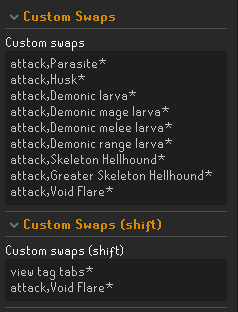
hi, could someone help me figure out why I'm unable to hit void flares thru yama?
https://i.imgur.com/UTcA3TV.png
 haughty pumiceBOT
Support for hub plugins should be directed to the author of the plugin.
You can find the support link by searching for the plugin in the Plugin Hub panel and clicking the ? button on the plugin, or by right-clicking the plugin in the plugin panel and clicking the Support menu option.
 mortal pond
flat socket
hi, could someone help me figure out why I'm unable to hit void flares thru yama...
mortal pond
flat socket
hi, could someone help me figure out why I'm unable to hit void flares thru yama...
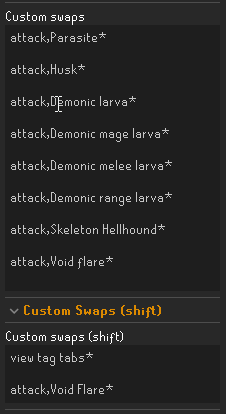
Double check that attack,Void Flare* is on a new line (not just separated by a space after Greater Skeleton Hellhound*)
 flat hill
is there a plugin that tags NPCs as damaged by another player persistently?
Monster HP indicators would kinda do it, but i was hoping for something that only shows up when it is relevant
Monster Menu HP doesn't seem to keep track very well when it's not you doing the damage
the use case is knowing which mobs you shouldn't click on as an iron
round jacinth
No you don’t really know that info
flat hill
i found Monster HP Percentage has a "Hide when full" option which basically does what i'm looking for :) ty for the reply
round jacinth
flat hill
i found Monster HP Percentage has a "Hide when full" option which basically does...
it doesn’t know what it doesn’t know IE if I tagged every dragon and then left, when you came to fight them you’d see that they’re not your loot only after attacking them.
flat hill
right, i understand
round jacinth
Basically anything made in the last 5 years is going to be fine.
Folks seem to misunderstand that being able to play apex or call of duty or what ever at epic settings should mean that runelite a client for a game made in 2002 should never ever lag but it just isn’t that simple
rough light
Zom - I don't suppose you know the answer to this do you? "Re Bank Tags - I can't seem to drag items within the tab. I've ticked and unticked the "Prevent tag tab item dragging", but still no joy. Is there another setting I'm missing somewhere I need to configure?"
round jacinth
As a layout?
rough light
yeah, i just can't drag anything
round jacinth
Can you video what you mean I guess
rough light
yeah hold on
haughty pumiceBOT
@light dove Visit 117's HD plugin discord (https://discord.com/invite/U4p6ChjgSE) for support, issues & feedback
round jacinth
For other questions go there
rough light
new install sorry, dont have anything to record rn. But I can't drag items within the tab.. to organise it

(I didn't save my RL profile before resetting my PC to fix an issue, so I've lost every bank tab setting..)
gilded kayak
you probably want to right-click the farming cape icon on the left side, and enable layout
rough light
ohhh it's that.... nice one, thanks Felan
 quiet vapor
Any idea how can I clean tileman plugin settings / cache? it doesnt reset after uninstall
 lost flume
Any way to hard reset the timer plugin in runelite? Its showing all ym herb patches as uknown or ready/empty on my new account?

 clear crane
what plugin is making the animation of my infernal cape stop l0l
gilded kayak
i think there's a bug with gpu/maybe 117 where if you keep the client open for a very long time that happens?
does it come back if you turn whichever one ur using, off and back on?
or i guess restart the client if you know you've kept it open a long time
clear crane
I don't use hd clients/plugins. If I reload client as a whole it will fix it, but this is 2 days in a row it's just randomly stopped
round jacinth
Gpu/117d is the list of both GPU plugins.
lost flume
lost flume
Any way to hard reset the timer plugin in runelite? Its showing all ym herb patc...
Can somebody please help with fixing the saved data being incorrect
clear crane
round jacinth
Gpu/117d is the list of both GPU plugins.
ok ye i use GPU, would that cause the cape issue aswell?
round jacinth
Idk felan mentioned it happens if yo leave client open for a long time randomly
For gpu or 117
clear crane
hm, never had it before, got a new pc now it's happening
round jacinth
Gpu had a huge update when sailing got released
Like it’s possible you didn’t notice it until recently.
delicate bobcat
afaik it should not happen with GPU nor 117 HD at this point
but it used to be a problem
round jacinth
lost flume
Can somebody please help with fixing the saved data being incorrect
Idk if folk could recreate this problem
Go visit the patches
It’s unknown because it doesn’t know
lost flume
Yea but this is a new iron lol will be a few months before i see the crystal patches
or like
hard diary
round jacinth
That makes sense.
lost flume
egh
round jacinth
I can confirm it defaults to unknown. I haven’t done any sailing or coral
My coral is unknown.
lost flume
silly
round jacinth
Even though I know it’s not there.
No, it’s just how it is. Your client hasn’t seen that it is known to be empty or populated.
round jacinth
Yeah you don’t need it for everything.
 fair grotto
Is there a way for me to get a notification above my characters head for instance - when im not wearing a bow that would say PUT YOUR BOW ON - Ive seen people on videos have texts above there heads but idk how to do it
solid mesa
Probably using watchdog
fair grotto
Im not that good at code - can you write one XD
 wicked zephyr
Weird question, but the animations on Zulrah appear to be very jittery for me, does anyone know why?
round jacinth
animation smoothing is doing it ive been hearing
round jacinth
people have had it at vorkath and a few other places
 narrow surge
there are a couple of others https://github.com/runelite/runelite/discussions/19659
GitHub
Screen.Recording.2025-12-04.001948.mp4 Hello, Since the release of sailing I've noticed many bosses are stuttering and shaking when idle or moving. This is not a part of their normal animations...
round jacinth
and its similar to what you're seeing.
wicked zephyr
Oh good thing that it isn't just a me problem, thanks
fair grotto
does anyone know how to trigger a overhead text using watchdog i want to get a overhead saying PUT YOUR BOW ON - when i dont have a certain weapon equipped
 bleak briar
if anyone could tell me is it fine if i make a mod of a current plugin with adding new features if i credit the original creators could it possibly be released to the pluginhub
stone parcel
Ideally you add the features to the current plugin.
bleak briar
yeah thats what im doing but im just like idk if i can use existing features from it
i dont wanna like be rude and just copy the mods features while adding my own
fair grotto
round jacinth
Check it out maybe
ive tried it but i cant get it to trigger i dont understand what i need to put in this part
 stone parcel
I'm saying that ideally you would PR or contribute your new features into the current plugin instead of making a new plugin.
stone parcel
Np. Gl 😄
bleak briar
stone parcel
Np. Gl 😄
thx
round jacinth
fair grotto
ive tried it but i cant get it to trigger i dont understand what i need to put i...
I don't know if you can, the options don't look at specific equipment or things like that.

there are other options for what to do the event on and none seem to be tied to specifically equipped inventory
maybe just have to rely on sight plugin
mortal pond
fair grotto
ive tried it but i cant get it to trigger i dont understand what i need to put i...
If the bow isn't equipped then I assume it's in your inventory, so you can set up an alert that triggers when your bow is in your inventory. I can DM you the one I made just now if you want it. I'm hesitant to post it here because it's a big ugly json and I don't want to spam the channel 😅
fair grotto
mortal pond
If the bow isn't equipped then I assume it's in your inventory, so you can set u...
yes please!!
atomic sphinx
question: is there an easy way to remove certain tile markers?
Removing the swordfish/shark tilemarkers from courses can be a bit painful as you got to basically sail the entire course and doing clear-tilemarkers repeatedly to catch them all
could there be a way to have an import/exportable set of "remove tilemarker"s?
 elfin crown
I am unable to "board gangplank" on runelite. The option isnt there...
any ideas? ive tried to go through all the plug ins..
 zealous cedar
use safe mode?
 viscid lantern
the latter is ground object hider
haughty pumiceBOT
Many plugins from the pluginhub break the client in subtle or not-so-subtle ways, including causing issues like client freezes. We do not support pluginhub plugins because we do not make or quality control them, and do not recommend their use.
Run the RuneLite (safe mode) shortcut, or with a Jagex account, first run the RuneLite (configure) shortcut and tick the Safe mode box, then launch RuneLite via the Jagex launcher.
This temporarily disables the GPU plugin and all hub plugins which will allow you to confirm the issue is caused by one of those plugins and isn't a core RuneLite issue.
If the issue is caused by a hub plugin, you should isolate which plugin it is and then uninstall the plugin.
elfin crown
i did safemode and it was showing, so i just have to run through all my plugins and hope to get lucky? lol
ooh. I just removed all the ground object hiders Gamma nd it worked
i love u
viscid lantern
did that also bring back the board gangplank option?
elfin crown
yessir!
viscid lantern
interesting, ty for that confirmation 
 final frost
hi anyone know why some animations is very shaky? For example ayak attack, olm head. GPU plugin and animation smoothing is ON
solid mesa
Animation smoothing is kinda broke since Wednesday
solid mesa
Ayak has animation smoothing disabled since it doesn't loop properly
 inland crescent
hello, how can i build plugin? i tried with ./gradlew build but something isnt right bc when i add it to plugins it doesnt work
and is there any way to log in to runelite with jagex account without jagex launcher?
i tried bolt, but with bolt i cannot test the plugins
haughty pumiceBOT
How to develop plugin-hub plugins: https://github.com/runelite/plugin-hub/blob/master/README.md
stone parcel
Both those questions should be answered in there 😄
gilded kayak
it's broken when using 117
inland crescent
stone parcel
Both those questions should be answered in there 😄
after a while i just know linux is not good for plugin modding xD
stone parcel
I think it works great lol.
inland crescent
stone parcel
I think it works great lol.
with wine it works 50/50
stone parcel
Well if you are creating or testing plugins you are probably using something like IntelliJ
inland crescent
at point 2
"For Windows, run RuneLite (configure) from the start menu. Otherwise, pass --configure to the launcher (i.e. /Applications/RuneLite.app/Contents/MacOS/RuneLite --configure on Mac)." i cannot find a jar with runelite which launcher uses
i found client
but it doesnt support command --configure
 meager meteor
Morning lads - anyone noticed a massive CPU load increase since using 117HD?
stone parcel
Oh, yeah. You can use that command on Bolt to get the credentials, then use those in IntelliJ to test.
meager meteor
Went from 10-20% before I updated & now sitting on 70-80%
stone parcel
Well on Bolt you click the configure button, then continue the instructions.
solid mesa
meager meteor
Morning lads - anyone noticed a massive CPU load increase since using 117HD?
There was some updates for chunk loading. @delicate bobcat might be interested
meager meteor
I did see that yeah - the zone streaming?
Anyway, even with that disabled it's pretty high aswell - I've seen it mentioned on reddit too
Doesn't bother me too much but thought I would raise anyway 🙂
solid mesa
I think there's a bug with zone streaming off and there's a pending fix
delicate bobcat
there's a couple of known issues
inland crescent
stone parcel
Well on Bolt you click the configure button, then continue the instructions.
it makes error
[B] Successfully spawned game process with pid 117
[B] [117] exec failed, errno 2, target: --configure** **
bolt is strange
delicate bobcat
atm I wouldn't recommend disabling zone streaming, as it can cause RuneLite to run out of memory
meager meteor
I just disabled 117 Tbh - when it's enabled my CPU is like 80c
delicate bobcat
there's a patch pending for that atm, and once that's in, you can disable zone streaming to get the old zone loading behaviour (or very similar anyway, the whole scene will be loaded before it's displayed)
solid mesa
inland crescent
it makes error
[B] Successfully spawned game process with pid 117
[B] [117] exec...
Are you trying to pass --configure as an arg or clicking the configure button in bolt?
meager meteor
Probably a bit hot for runelite haha
stone parcel
This is a button in Bolt.
 delicate bobcat
regarding higher CPU usage though, we fixed an issue with rendering models with transparency, which currently requires uploading those models twice, so it costs a bit of performance
we'll keep working on that in the coming days to weeks
the focus atm has just been on getting this zone streaming stable
delicate bobcat
meager meteor
I just disabled 117 Tbh - when it's enabled my CPU is like 80c
it's possible that you're seeing this because you're allowing the plugin to run as fast as it can though
do you have vsync enabled?
meager meteor
delicate bobcat
regarding higher CPU usage though, we fixed an issue with rendering models with ...
Surely that wouldnt be costing this much intentionally though would it? I have a 9800X3D and nothing I open on my computer uses as much as Runelite has been
delicate bobcat
eh it depends on the area
it is intentional, as it fixes broken rendering, but it's something we'll definitely look into possibly reverting if it can't be fixed properly soon
because the rendering issues are relatively minor
zone streaming disabled currently has issues though, as mentioned
I wouldn't recommend having it disabled atm
once this is merged, it'll be safe to disable it again https://github.com/runelite/plugin-hub/pull/9771
meager meteor
Tried vsync both on and off - same result - I've put zone streaming back on 🙂
And FPS is capped to 90
delicate bobcat
ah
you can dig further into the reason by running ::117hd timers in the in-game chat, but we shouldn't clutter this channel with that
feel free to join 117 HD's discord
haughty pumiceBOT
Visit 117's HD plugin discord (https://discord.com/invite/U4p6ChjgSE) for support, issues & feedback
meager meteor
Will do - thanks for your time!
inland crescent
stone parcel
This is a button in Bolt.
brooooooo i love u :D
stone parcel
Next it will probably put those credentials in ~/.var/app/com.adamcake.Bolt/data/bolt-launcher/.runelite/ btw.
Which would need to be moved to the main .runelite folder in home.
inland crescent
stone parcel
Next it will probably put those credentials in `~/.var/app/com.adamcake.Bolt/dat...
i found every positions where runelite can be xD
even this one from jagex launcher from logs
but i didnt know it was button... xD
stone parcel
Haha yeah, you aren't alone.
 uncut meteor
is there an issue with animation for olm and verzik where their move animation is laggy?
ie the head turning left and right or bobbing is choppy?
solid mesa
Yes, animation smoothing has some issues since wednesday
 jade field
I don't know if this is runelite or jagex but i'm having an issue where when I log out and then log back in, the game freezes and i have to restart the client completely
haughty pumiceBOT
@jade field To enable safemode
Windows
Run the RuneLite (configure) shortcut from the windows start menu
Tick the Safe mode box, save, launch RuneLite the way you normally do.
Mac
In Terminal, run
/Applications/RuneLite.app/Contents/MacOS/RuneLite --configure
Tick the Safe mode box, save, launch RuneLite the way you normally do.
round jacinth
does it happen during safe mode?
 median birch
Does anyone know how to get this to go away? It's coming from the Sailing plugin and I've legit tried going through every setting and cant figure it out.
 jade field
round jacinth
does it happen during safe mode?
jade field
round jacinth
does it happen during safe mode?
i will check this
 silk grail
Is there a way to remove someone from the Clan Chat Webhook? We have an ex-member that is broadcasting from a new cc, but we are having trouble getting ahold of them. I know you can reset things, but we are hoping to not have to ask all people with the plugin to update because one person isn't paying attention.
solid mesa
Nope, unless you're proxying the webhooks before they reach discord you'd have to change the discord webhook
 calm citrus
Anyone know why the equipment inspector plugin just seemingly disappears from the context menu? Sometimes enabling disabling the plugin brings it back, sometimes not. I see it hasn't been updated in 5 years so I'm not sure if it's a bug with the plugin or conflict with another
round jacinth
Too many right click options on a player
That used to be a thing maybe still is.
What other right click options do you have
calm citrus
good question, lemme go check
walk, follow, trade, lookup, investigate, predict, report
that is indeed a lot of options
round jacinth
Remove bot detector
It actually does nothing.
Fundamentally just a waste of your time and cpu cycles to have it
And equipment will come back
calm citrus
ah rip, sounded like a neat plugin to have
round jacinth
It just doesn’t do anything at all, jagex has that data that the plugin claims to submit anyhow.
calm citrus
fair
round jacinth
Is investigate from runewatch? You may want to remove that entry too
calm citrus
I believe so
round jacinth
Idk why it has that option because you only care if they’re red listed anyways
That could also be turned off and keep the core function of not raiding with scammers
calm citrus
yeah I just turned off the player option
round jacinth
You may need to restart but equipment will come back
 zealous isle
Hey Everyone,
I've been using the Jagex Launcher / Rune Lite on my laptop all year and everything was fine until a few days ago. When in the game it's very jumpy and often freezes for a few seconds. Laptop has even crashed a few times. I'm not sure if it's Runescape/Runelite or my device - I have also contacted the brand of my laptop. But so far I haven't had any big issues out side of Runescape so I don't think it's hardware issues. Sometimes the text in the text window flashes bold but that's the only thing that seems to be noticeably different besides running poorly.
Has anyone else experienced this or have any ideas? Should I try disabling hardware acceleration?
Thanks!
 sharp parrot
Hi All, when I build runelite locally the plugin-hub doesn't work, is that intended or did I mess something up?
haughty pumiceBOT
We don't provide builds of pluginhub plugins for snapshot versions. Usually you can pass -Drunelite.pluginhub.version=<current RL version> as a VM option to load the plugins built against the release into your build, which will work if there are no ABI changes. If there are ABI changes, build the plugins yourself and place them into the sideloaded-plugins directory when running in developer mode.
 long cosmos
Hi everyone, im not sure if this has been discussed as im just joining the server, but I havent changed any settings but all of a sudden while sailing (trials) my map is loading tile row by tile row, where as before when going through portals i would just insta load the whole world not like procedurely generated? is this a new setting or bug or something i need to change? Thanks
mossy swan
long cosmos
Hi everyone, im not sure if this has been discussed as im just joining the serve...
do you have extended map loading enabled in gpu (i think)?
and if its first time playing after jagex update it may need you to go to those areas first before it can load them
long cosmos
nah its every portal i enter it reload tile row by row. every run. its something to do with renderer i beleiv. I use legacy render and it doesnt do it. but then my boat is invisible
mossy swan
what do you mean row by row? like 16 tile rows or something?
also if you use 117hd i dont know what options it has
haughty pumiceBOT
Visit 117's HD plugin discord (https://discord.com/invite/U4p6ChjgSE) for support, issues & feedback
long cosmos
ummm im not sure how to explain it, like it will load like a small chunk around my boat. then as it goes further it loads like a row of tiles like 1 second per row until whole area is loaded.
i use 117 hd
when i click legacy render it goes back to normal
but then all my ships are invis
 solar owl
Its a recent update to 117, they recommend keeping it on for now while they work on another update
long cosmos
yeah i thought it would be something like that ^
no problem just wanted to see if any fixes or anything
solar owl
Alternatively you could probably turn the whole plugin off, reload the client and play without it for a while
long cosmos
lowkey annoying doing trials with how it loads after each portal haha
i cant stand vanilla i'll put up with it for now its allgood
elder wasp
@wet cape thank you icons fixed!
mossy swan
can anyone else see your messages? you might be muted ingame
uneven heron
means ur muted
 quick sorrel
Looking to have packet loss displayed on my client, is there a way to show that?
haughty pumiceBOT
@quick sorrel open command prompt, type this in:
ping -t oldschoolXXX.runescape.com
where the XXX is your world minus 300, for example world350 = 50
charred wind
it's not super effective because Jagex servers will drop pings/ICMP traffic when it receives too much/is very busy
round jacinth
The ping command is to show that it’s not runelite with the issue as it happens generically(probably)
quick sorrel
yah not looking for troubleshooting per se, more of just to display like an overlay on my RL, like I have for FPS/Ping
round jacinth
oh you want a display of it not that a display of it exists (tick tracker does this, sorta)
misread that my bad
i dony know if you'd get any reliable data out of it due to how jagex already responds to pings as dom said
 uneven smelt
This may be a stupid question. I want to work on some plugins in the plugin hub, but last time i tried working with the development client, the account I logged into was flagged for macroing. How can i avoid this?
haughty pumiceBOT
Jagex's third party client guidelines: https://secure.runescape.com/m=news/third-party-client-guidelines?oldschool=1
Additionally, these features have been rejected or removed from RuneLite: https://github.com/runelite/runelite/wiki/Rejected-or-Rolled-Back-Features
stone parcel
Make sure to follow the guidelines.
uneven smelt
Thats the thing, it was fresh unmodified client that was downloaded from the repository. All I had done was complete tutorial island and logged off. I'm not sure if I had done anything wrong. The only thing i had done was copy my log-in keys from the offical client to the dev client since I was not about to launch the dev client from the jagex launcher.
empty minnow
Copy your login keys from the official client? That's not normal
haughty pumiceBOT
winter snow
That's the usual way
uneven smelt
haughty pumice
<https://github.com/runelite/runelite/wiki/Using-Jagex-Accounts>
Ill try this. thank you!
 ornate kite
trying to split tunnel runelite from my normal vpn traffic but splitting just the runelite client isn't doing it. anyone know what else i have to add to split tunnel?
stone parcel
You can try enabling the IPv4 checkbox in this:
haughty pumiceBOT
ornate kite
ah, thanks, checking out a similar option. enabling ipv6 on my vpn
 north crane
Would anyone know why the loot tracker is tracking my salvaging on my PC, but not on my Laptop?
 sour flint
anyone know why the inventory background hiding was removed from the game?
menu stones hider
stone parcel
north crane
Would anyone know why the loot tracker is tracking my salvaging on my PC, but no...
Maybe you haven't restarted the client on the laptop in a very long time.
ornate kite
stone parcel
You can try enabling the IPv4 checkbox in this:
ah, should have just tried what you said in the first place. the ipv4 sorted it, thanks!
north crane
stone parcel
Maybe you haven't restarted the client on the laptop in a very long time.
Im pretty sure I have to after each hard update, but I'll try that and see.
It most likely wont "retroactively" add it unless it was tracking it the whole time right?
empty minnow
sour flint
anyone know why the inventory background hiding was removed from the game?
Jagex asked for it to be removed
stone parcel
north crane
Im pretty sure I have to after each hard update, but I'll try that and see.
It...
Correct.
empty minnow
north crane
Im pretty sure I have to after each hard update, but I'll try that and see.
It...
RuneLite releases updates without a "hard" update. You should always close your client if you're not using it
sour flint
empty minnow
Jagex asked for it to be removed
lol, what actual losers
thx for the update
north crane
Omg that worked lololol I feel like that was the equivalent to
"Did you try unplugging it and replugging it back in?"
Appreciate the help y'all!
 ionic hearth
hi folks, any ideas why my xp drops are showing im getting fishing xp even though im just ranging
 gilded kayak
some xp hub plugin
 shell loom
Hey I just noticed a bug with the world map plugin. The Arceuus Teleport Battlefront shows the wrong symbol on the world map. (Should be a K not a B)

 empty minnow
Interestingly it seems like the spell uses K and the tablet uses B, so I guess technically it's not wrong
winter snow
The B is for Barrows (it always was, which is even more confusing)
empty minnow
Barrowfront teleport
 solid current
anyone else's GPU not turning on anymore?
solid current
oblique plume
amd gpu?
yes
solid current
oblique plume
rollback to 25.10.2 driver
ty, just found a comment of 2 day ago 🙂
 humble oasis
is anyone elses sailing animation really choppy today?
sour flint
humble oasis
is anyone elses sailing animation really choppy today?
ye olms a joke, perma seizure mode
humble oasis
yikes 🙁
charred wind
Disable animation smoothing
 lucid turtle
Anyone know why certain areas of the map are blacked out like this?
 solid mesa
Are you using ground object hider?
ornate kite
they paved paradise
looks like a missing texture, can that even happen with just GPU?
viscid lantern
they installed a plugin that removes that part of the floor, its not a missing texture
lucid turtle
im not using ground object hider
viscid lantern
low detail?
lucid turtle
low detail is off
ornate kite
Client restarted yet?
lucid turtle
yeah its done this the past few times ive logged in
haughty pumiceBOT
To enable safemode
Windows
Run the RuneLite (configure) shortcut from the windows start menu
Tick the Safe mode box, save, launch RuneLite the way you normally do.
Mac
In Terminal, run
/Applications/RuneLite.app/Contents/MacOS/RuneLite --configure
Tick the Safe mode box, save, launch RuneLite the way you normally do.
viscid lantern
see if it happens in safemode ig
lucid turtle
that fixed it thank you!
haughty pumiceBOT
Please refer to this flowchart for further troubleshooting.
viscid lantern
ok follow that then and find the plugin that causes it ^
 nocturne bloom
anyone really good at gpu and graphic setting need help, i want to have the osrs graphics and get more then 50 fps, if i use gpu it makes the game look hd no matter what setting i use. I ask people that have the settings i want and they just have gpu on and it looks diffrent
i posted about this before but just want to know how to if its possible call
mossy swan
uh, turning on gpu should not make a large difference for graphics
nocturne bloom
for me its huge idk why
i ask streamers on twitch and they dont have this happen
i have HD turned off as well obv
mossy swan
screenshot?


 oblique plume
You cant compare an edited video to your own client
nocturne bloom
or if u see how like odablock has his graphics i just dont know how its possible
true
mossy swan
seems like he plays in a much smaller window and its scaled up when you watch it as a video
so it looks worse quality
if you want to emulate that, maybe get a really low resolution monitor
 eager sun
charred wind
Disable animation smoothing
eager sun
charred wind
Disable animation smoothing
is the plugin broken? ive been using it for like a year or 2 and now since last week olm head looks like its having a perma seizure (its the only place in the game thats affected by this bug afaict)
mossy swan
well the fact is, it looks good for him on his monitor, but it gets converted multiple times and becomes more and more blurry and pixelated
and then it ends up looking crap
it looks so bad i thought you took a photo of your screen actually lol
leaden trail
Something broke it on Wednesday yes
charred wind
eager sun
is the plugin broken? ive been using it for like a year or 2 and now since last ...
if you search "olm" or "animation smoothing" you'll see this is reported for the last week. Not sure when or what caused it, just know that's what's causing what you're seeing. It'll probably get fixed eventually
delicate bobcat
nocturne bloom
all good thx for the help
could be that you're using stretched mode to upscale the UI, but if the GPU plugin is enabled, it won't actually upscale the underlying game
 haughty crater
Hi i have a question i bought a new videocard an AMD rx 9070 XT but when i use the 117 hd plugin it will only go to 40fps does someboy know the issue
haughty pumiceBOT
Visit 117's HD plugin discord (https://discord.com/invite/U4p6ChjgSE) for support, issues & feedback
 celest yew
https://i.imgur.com/snjnhxJ.png it looks like this when i run into the dg cave. but if i turn gpu plugin off and on it goes away. whats causing this?




 split willow
how do u get hold of runelite plugin creators
gilded kayak
celest yew
https://i.imgur.com/snjnhxJ.png it looks like this when i run into the dg cave. ...
Gpu is causing it