#support
1 messages · Page 130 of 1
 graceful notch
i feel like i've seen a streamer change the preset colours i just can't recall how
this is what object markers and better npc highlight settings are but the preset colours in game don't change no matter what i input hmm


 mossy swan

perhaps you could use this "Pick color" option
i think it shows last 5 colors or something
graceful notch
oo it does just show the most recent manual picked colours, thank you !
 twin totem
i've got my layout on "resizable - modern layout" but i can't resize it
anyone know how to?
graceful notch
is it the runelite plugin? u might have lock window size checked
 twin totem
i've got my layout on "resizable - modern layout" but i can't resize it
twin totem
twin totem
i've got my layout on "resizable - modern layout" but i can't resize it
like i wanna make my stuff 140% bigger
graceful notch
it's the runelite plugin itself, not in game settings
twin totem
what do i search
graceful notch
"runelite" in your plugins
twin totem
???
i wanna make my text box 140% bigger
so i can read it
idk how thats gonna fix it
i did it normally when i was using just the jagex launcher
mossy swan
twin totem
i've got my layout on "resizable - modern layout" but i can't resize it
either “stretched mode” plugin or scale in “runelite (configure)” shortcut in your start menu
latter will also make the sidebar etc bigger
twin totem
i tried stretched mode but it just makes everything... stretched
i just want all the icons to be 140% bigger
mossy swan
err what icons?
twin totem
like the chatbox
inventory
everything
except for the actual game
lemme launch my game normally so i can show
 twin totem
how do i make it the normal size
 mossy swan
turn off integer scaling
mossy swan
yeah and if you want to really get the best you can, play around with the available algorithms in gpu
 wise canyon
anyone having issues in fps ? turning off GPU Plugin seems to remove it but the game looks bad without gpu or 117
twin totem
mossy swan
yeah and if you want to really get the best you can, play around with the availa...
thanks for the help
 hollow meteor
It seems that when the map loads left-click for your mast and sails becomes a red-clickable Examine for a split second
I've been trying to catch it with a screenshot but no luck, it's fairly reproducible though since it happens everywhere but it only really gets in the way during Barracuda Trials when you're clicking through your sails at just the wrong moment for it to become a red-x rather than change heading
 floral plank
Hi guys, anyone know why my brightness in HD plugin isnt changing anything when i adjust it? My game stays the exact same brightness?
 haughty pumiceBOT
Visit 117's HD plugin discord (https://discord.com/invite/U4p6ChjgSE) for support, issues & feedback
 minor stump
anyone else been having pretty bad issues with the game crashing and the game just feels choppy now, lagging a bit. my pc shouldn't be the issue, and yes ive reset my pc recently 🤣
 round jacinth
!safe check if you have issues in safe mode and if you do not then you have gpu (or drivers) or plugin hub related issues
haughty pumiceBOT
safemode: To enable safemode
Windows
Run the RuneLite (configure) shortcut from the windows start menu
Tick the Safe mode box, save, launch RuneLite the way you normally do.
Mac
In Terminal, run
/Applications/RuneLite.app/Contents/MacOS/RuneLite --configure
Tick the Safe mode box, save, launch RuneLite the way you normally do.
round jacinth
yeah i figure with them mentioning crashing it wasn't related to just 0 fps
minor stump
aint no way im playing this without the gpu plugin loooool
i tried hiding boats in entity hider, that boosted my fps from 30 to 60, hasn't crashed yet...
round jacinth
minor stump
aint no way im playing this without the gpu plugin loooool
it's a trouble shooting step.
it's not a "forever keep them off" step
 twilit zenith
So it has been a while since I've played, but I remember changing withdraw prayer potions to 5, but not through the 'X' option, which option in RuneLite is this? (Or rather, the plugin)
round jacinth
in the bank you can pick 1,5,10,all,x
twilit zenith
Correct, but it's not the 5, since it is on 1
round jacinth
then pick the 5
twilit zenith
Still withdraws 5
When it is on 1, it withdraws 5, when it is on 5, it withdraws 5
round jacinth
oh you madeit always withdraw 5 as an overwrite
twilit zenith
Correct
twilit zenith
Amazing! Thank you! 😄
round jacinth
np
 inner torrent
Just chiming in to say thanks. Downgrading the driver resolved the issue for me.
 gilded kayak
inner torrent
Just chiming in to say thanks. Downgrading the driver resolved the issue for me.
gilded kayak
inner torrent
Just chiming in to say thanks. Downgrading the driver resolved the issue for me.
👍 is it possible u could post your logs, that guy didn't
inner torrent
gilded kayak
👍 is it possible u could post your logs, that guy didn't
Sure, I've got the client log open now. Where do you want it?
gilded kayak
just here
unless your windows username is all your lifes info, then you could dm it to @haughty pumice instead
inner torrent
Nope, Windows username is practically useless. Do you want just the relevant GPUPlugin sections or just copy/paste the whole thing here?
gilded kayak
the whole thing is fine
inner torrent
 oblique plume
thats what it normally shows
gilded kayak
yeah but some of the people who have gotten GENERIC gpu clean installed
i wasn't 100% sure it was the full-on reason why it was failing to start
inner torrent
I'm just not sure why the plugin is detecting a different driver version
Before
2025-11-22 08:48:49 CST [Client] INFO n.r.client.plugins.gpu.GpuPlugin - Using device: GDI Generic
2025-11-22 08:48:49 CST [Client] INFO n.r.client.plugins.gpu.GpuPlugin - Using driver: 1.1.0
2025-11-22 08:48:49 CST [Client] ERROR n.r.client.plugins.gpu.GpuPlugin - Error starting GPU plugin
After
2025-11-22 09:00:47 CST [Client] INFO n.r.client.plugins.gpu.GpuPlugin - Using device: AMD Radeon RX 7800 XT
2025-11-22 09:00:47 CST [Client] INFO n.r.client.plugins.gpu.GpuPlugin - Using driver: 4.6.0 Compatibility Profile Context 25.10.2.251031
gilded kayak
that's just the "idk what gpu this is", driver version
but why it's happening when you update past 25.10.2 is 🤷
round jacinth
ive only seen AMD cards do this too
inner torrent
Well - at least it's resolved for now. I submitted a bug report to AMD, so hopefully others do the same.
gilded kayak
I just wanted to see the logs b/c there was a wonder if the error would mention something specific
but this is just "???" error
 split reef
can anyone help me in installing a plugin? I'm trying to get watchdog but when I install it no icon appears on my sidebar and it also doesn't appear in my settings
gilded kayak
!logs maybe it failed to load
haughty pumiceBOT
To find the logs, you can do one of the following:
- If your client failed to open, click the
Open logs folderbutton. - Open the screenshot directory by right-clicking 📷
Camerabutton, navigate 1 directory up, then open logs folder. - Navigate to
%userprofile%\.runelite\logson Windows or$HOME/.runelite/logson Linux and macOS.
Upload the log files named client and launcher by dragging them to Discord. If there are files prefixed with jvm_crash dated from today, upload them too.
split reef
gilded kayak
!logs maybe it failed to load
i installed it though, should I reinstall it and resend the logs?
split reef
the plugin that im trying to download is watchdog(if that makes a difference)
split reef
hm wonder what that could mean
 leaden trail
I think this is for some tts thing isn't it?
Or the watchdog API key thing usually is anyway I think
 nocturne current
everytime i try to instal and open runelite it gets stuck on downloading bootstraps
round jacinth
as stated in #general try different drivers
and make sure your monitor display is coming from the GPU and not the motherboard
round jacinth
runelite disagrees
split reef
leaden trail
I think this is for some tts thing isn't it?
im not sure about that. i think you can make watchdog give you tts yes
 onyx vortex
I see that
round jacinth
and we didn't say reinstall drivers, we suggested trying different drivers
as in a different version
round jacinth
some folks get auto updates on drivers without them knowing
or they don't realize they did update them when they installed BO7 or BF6
onyx vortex
I manually download mine thats why its weirding me out
round jacinth
and forgot
onyx vortex
I was just playing bf6 / where winds meet
also pc showing that drivers are working fine
round jacinth
in anycase, try rolling it back to a different version that does work
gilded kayak
we have no reason to put fake logs on your computer
for some reason when you update above 25.10.2, runelite can't figure out your gpu anymore
i'd like to place my bet that it's somehow microsofts fault
onyx vortex
 gilded kayak
25.11 is above 25.10 yes
onyx vortex
since 6/11 it was fine
gilded kayak
we've had people reporting this issue since then
so idk why it was fine for yo
you*
 gilded kayak
I asked a friend his thoughts and he immediately said "it's probably windows' fault"
maybe your windows updated
onyx vortex
Actually
you are right
yestrday when i got home i saw that pc needed an update
updated and turned it off
split reef
oblique plume
and its saying you have an invalid api key
how do I validate my API key?
haughty pumiceBOT
Get support for the Watchdog (Custom Alerts) Plugin Hub plugin here: https://runelite.net/plugin-hub/show/watchdog.
You can also find the support link by searching for the plugin in the Plugin Hub panel and clicking the ? button on the plugin, or by right-clicking the plugin in the plugin panel and clicking the Support menu option.
round jacinth
you'll ahve to see if they have a guide to tell you what it means
split reef
sorry super ignorant when it comes to github. am i supposed to sign up to this website and post a discussion question?
round jacinth
just read their guide to see if they reference what the heck the api key is or what ever
this discord is for core client help, not hub help
they seem to have a discord to join too
 cursive jay
im trying to login to runelite on a new pc. my runelite account uses a yahoo email. when i try to login, it takes me straight to google accounts to login. i cannot login using my yahoo email. please tell me there is a way to fix this
onyx vortex
@gilded kayak Ty
 gilded kayak
ty for helping confirm that it's probably microsoft's fault
cursive jay
i have added my yahoo account to google acocunts, still cant login using it
split reef
round jacinth
they seem to have a discord to join too
thank you! ive joined their discord and made a post asking for support.
gilded kayak
 fluid otter
or is there some fix?
fluid otter
or is there some fix?
i don't know the reason but someone said yesterday that installing and enabling gpu (legacy) from the hub, and then swapping back to 117 fixed boat issues
fluid otter
nope, boat still invisible
haughty pumiceBOT
Visit 117's HD plugin discord (https://discord.com/invite/U4p6ChjgSE) for support, issues & feedback
 trim ferry
I don’t know if this is a RL issue, a jagex launcher issue, or my PC lol 😅
Having issues with playing on multiple accounts. The screens don’t switch back and forth right. Sometimes won’t let me type on the other one and/or it’ll let me click on one my main account but my iron accounts screen is still overlapping the mains.
gilded kayak
disable the discord overlay in discord settings
trim ferry
That seems to have fixed it. Thanks!!
 delicate bobcat
fluid otter
nope, boat still invisible
delicate bobcat
fluid otter
nope, boat still invisible
disable the legacy renderer in the Legacy settings section
the legacy renderer does not support boats
delicate bobcat
yep, that's a known issue
 sonic herald
Is there anything that can be done for godawful FPS at jubbly or is the game just unplayable for now?
 solemn laurel
i'm having a issue with the menu entry swapper, shift swapped left click on my sail and now i cannot revert it to be left click again even after being reset.
any help i would much appreciate
 hard fern
anyone getting dcd been on and off for last hour saying malformed login packet
delicate bobcat
sonic herald
Is there anything that can be done for godawful FPS at jubbly or is the game jus...
with 117 HD? You should probably switch to GPU when doing stuff where the lag is too excessive
mossy swan
hard fern
anyone getting dcd been on and off for last hour saying malformed login packet
thats an indication of your internet having trouble
delicate bobcat
we're working on something, but we want the plugin to be stable
so it takes time
sonic herald
delicate bobcat
with 117 HD? You should probably switch to GPU when doing stuff where the lag is...
Not 117, just the main gpu plugin
hard fern
ok
delicate bobcat
ah, that you can thank Jagex for
lol
it will improve with more optimizations though
hard fern
ping 28 download is 377mbs
delicate bobcat
afaik there is stuff in the works, but again, it needs to be stable enough
sonic herald
I mean something is whack if I get 20 fps with 10% gpu use right?
delicate bobcat
I'll agree there, but it's not an easy fix, let me tell ya
hard fern
mossy swan
thats an indication of your internet having trouble
how do i know if its my inyernet what can i do
delicate bobcat
best you can do atm is reduce the draw distance probably
mossy swan
hard fern
how do i know if its my inyernet what can i do
first thing would be restarting your router and pc
!testping if it keeps happening
haughty pumiceBOT
open command prompt, type this in:
ping -t oldschoolXXX.runescape.com
where the XXX is your world minus 300, for example world350 = 50
hard fern
mossy swan
first thing would be restarting your router and pc
ok brb
hard fern
mossy swan
first thing would be restarting your router and pc
so far its better maybe just my router needed to be reset
 strange panther
for the built in GPU plugin, I'm getting this error:
2025-11-22 12:12:15 EST [Client] INFO n.r.client.plugins.gpu.GpuPlugin - Using device: GDI Generic
2025-11-22 12:12:15 EST [Client] INFO n.r.client.plugins.gpu.GpuPlugin - Using driver: 1.1.0
2025-11-22 12:12:15 EST [Client] ERROR n.r.client.plugins.gpu.GpuPlugin - Error starting GPU plugin
java.lang.RuntimeException: OpenGL 3.3 is required but not available
at net.runelite.client.plugins.gpu.GpuPlugin.lambda$startUp$1(GpuPlugin.java:318)
at net.runelite.client.callback.ClientThread.invokeList(ClientThread.java:119)
at net.runelite.client.callback.ClientThread.invoke(ClientThread.java:101)
at net.runelite.client.callback.Hooks.tick(Hooks.java:239)
at client.qh(client.java:35569)
at client.bf(client.java)
at bm.bo(bm.java:463)
at bm.ya(bm.java)
at bm.run(bm.java:65390)
at java.base/java.lang.Thread.run(Unknown Source)
round jacinth
are you on AMD? if so try going back to 25.10.2 version
strange panther
I am on AMD, I will revert to that version and try again
sonic herald
delicate bobcat
best you can do atm is reduce the draw distance probably
Turns out the answer is "official client" until rl is fixed oh boy
strange panther
@round jacinth thank you! that looks to have worked. is this a temporary issue?
 chrome stump
gilded kayak
chrome stump
gilded kayak
no
 mossy swan
 upper spindle
try again in a minute, brazil got accidentally blocked
sorry for the trouble
 dusty pasture
@delicate bobcat ⛵ 👀 ❤️
delicate bobcat
dusty pasture
<@180739654323142656> ⛵ 👀 ❤️
working on it now actually 🙂
 tough crow
Stupid question, I'm looking to export tiles from a set regionID, and my tile-markers are blank within the website (even though that's definitely not the case) Is it stored locally anywhere I can search by regionID?
round jacinth
Just get to that region again and export from there while in game
tough crow
Fair enough, thanks
 ocean ivy
random question. got a new pc imported profile. got my plugins, and client settings however none of my loot tracker logs are there. i see the data but not sure if it can be imported on my profile
also, my plugin icons, and numbers are blurred bc i scale my display settings on the pc at 125%. But on the old pc, it was not blurry. any suggestions for that?
 pearl lion
is there way to filter out bot on this plugin https://github.com/runelite/runelite/wiki/Twitch

GitHub
Open source Old School RuneScape client. Contribute to runelite/runelite development by creating an account on GitHub.
round jacinth
ocean ivy
random question. got a new pc imported profile. got my plugins, and client setti...
copy the entire .runelite folder
haughty pumiceBOT
round jacinth
you also want yo set a scale i think
round jacinth
pearl lion
is there way to filter out bot on this plugin https://github.com/runelite/runeli...
no afaik its just the irc chat feed of the twitch chat
pearl lion
round jacinth
no afaik its just the irc chat feed of the twitch chat
ah, could be neat to filter out botcommands but oh well
round jacinth
i think it reads it from some irc channel of the twitch chat of some sort and idk if it knows what are bots are from that
round jacinth
paste it in the same spot but on the new pc
ocean ivy
okay ty
 merry pelican
Does anyone have problems with lag spike while sailing, useing 117 HD, it only happens when rendering?
round jacinth
yes sailing on hd is abit tough right now
merry pelican
I see, i guess its gonna be some time before its fixed 🙂
ocean ivy
yeah, even with the scaling from the launcher configuration the client's icons, and numbers are still blurry for some reason
round jacinth
Set it to 1
 hushed orchid
Is there any way to show boat true tile? Similar to player
 rocky tiger
Not easily. The boat location is not aligned with the normal tile grid. That's why you can walk around on it and the tiles are able to be at an angle compared to the rest of the game.
round jacinth
Not yet
hushed orchid
Ah
 dense oriole
Any idea how to fix fps issues at jubblie area?
 craggy star
Is there a way to make my whole inventory left click to drop? When I shift click the inventory menu I see an option for left click, but the submenu doesn't pop out
 leaden trail
There's a "left click dropper" hub plugin
craggy star
Ok cool
I was also assuming that maybe another plugin was causing that not to pop out
 tawdry bronze
You can also leverage Custom Menu Swaps (another hub plugin).
craggy star
I do have that one
tawdry bronze
Config > Custom Swaps > Drop,*
craggy star
Yeah just knowing myself, if it is buried somewhere I am going to forget how I turned it on and forget how to turn it off lol
tawdry bronze
😛
Then you can use the Left Click Dropper plugin, I suppose. Per Dura's reference.
craggy star
Looking into that, thanks!
 delicate olive
does anyone know if theres a way to filter these "fire!" messages that keep getting spammed in my chat?

 steel stirrup
ground items list wont reset, saves 30 items even after deleting? also runelite crashing constantly during sailing?
tawdry bronze
steel stirrup
ground items list wont reset, saves 30 items even after deleting? also runelite ...
What activity are you doing?
ocean ivy
see how my icons and numbers are very blurred with my scaling? anyother ideas how to fix this

 charred wind
Are those affected by the UI scaling setting in GPU
But otherwise fractional scaling (not whole numbers like 1, 2, 3) will introduce some blur most of the time
 sand flame
any reason why brush marker doesnt work while on a boat
ocean ivy
it didnt blur with my other pc with my display scaling at 125% :/
gilded kayak
sand flame
any reason why brush marker doesnt work while on a boat
all the default marking plugins had to be updated by Adam to work on boats
i would guess that one was not updated
steel stirrup
tawdry bronze
What activity are you doing?
sailing trials
tawdry bronze
steel stirrup
sailing trials
Which course?
steel stirrup
tawdry bronze
Which course?
jubbly, but honestly i used to send raids constantly, then i stopped because i was getting constant lag and disconnects/client crashes ive been having issues with runelite past 6 months
since sailing its gotten so much worse for me personally
gilded kayak
those are horribly unoptimized
tawdry bronze
Yeah. I'm going to look at adding a low detail config option to the Sailing plugin in a few.
There was one submitted to the Hub but the approach seems rough in terms of what was done.
gilded kayak
is that the barracuda trials

 west pewter
check client log
hard fern
all day i have been getting dc and it says malformed login packet but then i can log right back in? i reset router and launcher
hard fern
steel stirrup
mine is doing same thing all day
 west gulch
My runelite is stuck on "Starting External Plugins" despite reinstalling runelite, restarting pc, deleting the plugins folder https://i.imgur.com/sVCFGm7.png
tried launching it through jagex launcher and runelite exe
 zealous cedar
you could use safe mode and then uninstall the bad plugins
haughty pumiceBOT
To enable safemode
Windows
Run the RuneLite (configure) shortcut from the windows start menu
Tick the Safe mode box, save, launch RuneLite the way you normally do.
Mac
In Terminal, run
/Applications/RuneLite.app/Contents/MacOS/RuneLite --configure
Tick the Safe mode box, save, launch RuneLite the way you normally do.
west gulch
that worked thanks
 hidden ridge
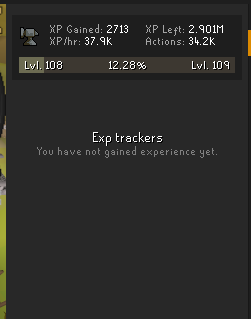
anyone know how to fix xp tracker not tracking total xp? annoying when i want to reset all skills i cant i have to right click manually clear each one
ever find a fix for this? experiencing the same thing

 solid mesa
It means your internet is bad and jagex is disconecting you
hard fern
solid mesa
It means your internet is bad and jagex is disconecting you
no bro
hard fern
solid mesa
It means your internet is bad and jagex is disconecting you
internet is fine
solid mesa
Okay
hard fern
sailing broke osrs
this malformed packet shit started the day of sailing release for me lol
 vocal kernel
ive had that message forever it has nothing to do with runelite
should b able to press try again and log in though
hard fern
vocal kernel
ive had that message forever it has nothing to do with runelite
yeah it does let you log right back in but its horrible to just randomly getting dc,d
steel stirrup
whilst in a trial and it puts you somewhere fully random or takes your boat to a random dock....
 fresh sentinel
@small musk
I heard you were looking for suggestions for the sailing plugin. I thought I'd share some suggestions I thought of:
- Solves for Dives
- Duck path and ending location on map
- Time until shipwreck disappears and notification when it does
- Travel path prediction on current hovered heading (appended example, optional sidehull width)
- Tooltip Effect of the Drinks on Hover
I can likely come up with more ideas, just thought I'd throw a few out there and see if you might find any of them worthwhile to implement
 tawdry bronze
You can suggest them on the Github yourself. There are plenty on there and some are even already noted by duck herself. ref: https://github.com/LlemonDuck/sailing/issues
 rocky remnant
Ive been having this problem with my runelite client where the GPU plugin crashes the client after playing for a short while. At first it runs smoothly as it should then it starts freezing the game little by little after it just crashes. The crash usually occurs when im changing locations through for an example a spirit tree or teleporting. This has been the case all the way from sailing update 19th november. In the logs folder the only straight up error I see is this: EET [Client] ERROR injected-client - Client error
java.lang.RuntimeException: unable to map GL buffer 414 size 4194304
Is there something I can do to fix this myself or is this something you guys can work on? The game runs just fine without the GPU plugin but I need it for smoother gameplay.
 verbal falcon
Is there a way to reduce stuttering when sailing when using 117 HD? Each time a new chunk or part of the map loads my game stutters and/or frames drop. Tried adjusting draw distance and detail distance but it happens no matter what. Or is this just currently a known bug/performance issue that they are working on fixing?
tawdry bronze
verbal falcon
Is there a way to reduce stuttering when sailing when using 117 HD? Each time a ...
Are you doing Barracuda Trials right now, or just general roaming?
verbal falcon
Both
tawdry bronze
verbal falcon
Both
Which trial course? Jubbly Jive causes some bad frame rates, naturally, but.. curious if you are seeing that on others as well.
verbal falcon
tawdry bronze
Which trial course? Jubbly Jive causes some bad frame rates, naturally, but.. cu...
im 4 levels off being able to do Jubbly Jive but it happens all the time on Tempor Tantrum and just generally sailing anywhere. Any time a new portion of the map is loaded my game stutter, with the 117HD plugin that is. I switched to the GPU plug in and have 0 issues now but would like to switch back if it didn't have the stuttering. I doubt it my PC with my specs but could be wrong
hidden ridge
how do i fix xp tracker, its not showing total overall xp tab and i cant reset all skills , only manually individually

 paper cedar
hello guys can i ask 1 qustion. i dont know what i did but in begining everytime when wind is catching on sails i could see it was green color. but for some reason i dont see that and i dont know how can i make that happening aggain. it was so usefull on barracude trails and now i mis wind speed i cant make time
any1 can help me whit that
twilit zenith
Hopefully I am not annoying anyone w/ this question, but today all of a sudden when doing stuff on OSRS my mouse is heavily lagging (the cursor). Yesterday was perfectly fine, and I am using RuneLite. Ofcourse it is a stretch to think about RuneLite being the issue, but does anyone else experience this issue? It's a gaming PC w/ RTX 4070, so surely that is not an issue.
And when logged out, the mouse moves normally
 warm drum
The hitsplats on my boat are not showing anymore, does anyone have the same issue?
twilit zenith
warm drum
The hitsplats on my boat are not showing anymore, does anyone have the same issu...
I just saw an hitsplat against me, so works fine for me!
 ember stream
Ive seen in some vids that people have a visual indactor box (similar to Thralls) for wind motes, with a countdown of like 5 secs.
Can anyone explain how to do this?
warm drum
I randomly figured out it was Entity Hider, Hide NPCs 2D 🙂
 grave roost
has anyone ever seen this at spindel? ground is messing up when i scroll in/out move around it

its fixed if i turn off 117hd so might be some odd setting in there?
 heavy kraken
i think my profile has disappeared? not sure how because it was cloud synced. all my profiles are now completely default
mossy swan
heavy kraken
i think my profile has disappeared? not sure how because it was cloud synced. al...
restart client to start with, then check if you are still logged in
 verbal flower
has anyone seen this used before in another way in thier custom menu swapper 'Use,bones -tar'
heavy kraken
mossy swan
restart client to start with, then check if you are still logged in
restarted a few times, I'm logged into RUnelite itself
tried importing all the profile sthat were in my profile2 folder
all of them are defaults
oblique plume
are you on a new computer
heavy kraken
oblique plume
are you on a new computer
no
oblique plume
show us your profiles2 folder then
 oblique plume
that doesnt seem right to me
they should be the same size when imported
and 212kb means theres a lot of stuff in there so that should def be your settings
haughty pumiceBOT
To find the logs, you can do one of the following:
- If your client failed to open, click the
Open logs folderbutton. - Open the screenshot directory by right-clicking 📷
Camerabutton, navigate 1 directory up, then open logs folder. - Navigate to
%userprofile%\.runelite\logson Windows or$HOME/.runelite/logson Linux and macOS.
Upload the log files named client and launcher by dragging them to Discord. If there are files prefixed with jvm_crash dated from today, upload them too.
heavy kraken
i just checked one of my profiles
and there's way more stuff in there
that's not appearing on the client
like fore xample it has quest helper properities in it
but quest helper doesn't exist in my cleint
mossy swan
you might need to restart after importing and selecting it
oblique plume
this all looks fine to me
other than the fact it doesnt try to load hub plugins until like the 5th time you load a profile, which is odd
but its reporting the number of keys its importing
heavy kraken
mossy swan
you might need to restart after importing and selecting it
tried a nmber of restarts tbf
let me try again
nothin
sand flame
any advice how to fix the sailing plugin so it marks the sail when its trimable?
tawdry bronze
sand flame
any advice how to fix the sailing plugin so it marks the sail when its trimable?
You will just need to wait for it to be updated. If you’re using a mahogany sail, then this is part of the problem. Maybe not all of it. But there are pending changes for it.
 rough ocean
I got this problem when I start play Last Man Standing... It happens me around 3 times... Sometimes happens too meanwhile I use teleport to other city like Varrock or Falador and use click so fast to move.

Any suggestion to fix this problem?
 hallow tulip
Ok ok... I get it. Runelite dev's say don't install a bunch of plugins. Yes... but, I'm a new one chunk ironman, plugin edition. I can only go an additional chunk everytime I add a plugin. Ok, but for real... is there a way to organize all those logos on the right? Hide... sort? I believe the answer is no....
But if no, is it possible... or is it allowed, to make a plugin to organize your plugins? So I can have a plugin within a plugin to control my plugins?
tawdry bronze
hallow tulip
Ok ok... I get it. Runelite dev's say don't install a bunch of plugins. Yes....
Not possible currently. Yes, likely possible. It would have to be a core client feature.
round jacinth
to add, it hasn't been done yet because the ui/ux of doing it hasn't been nailed correctly yet afaik
a handful attempts were made and each worked but each was done differently
hallow tulip
i donate a bounty of 200 dollars in bitcoin to whoever does it
see me to collect (serious)
round jacinth
it would've been done for free by now if it was as easy as you're asking
leaden trail
rough ocean
Any suggestion to fix this problem?
Post your logs
haughty pumiceBOT
@rough ocean To find the logs, you can do one of the following:
- If your client failed to open, click the
Open logs folderbutton. - Open the screenshot directory by right-clicking 📷
Camerabutton, navigate 1 directory up, then open logs folder. - Navigate to
%userprofile%\.runelite\logson Windows or$HOME/.runelite/logson Linux and macOS.
Upload the log files named client and launcher by dragging them to Discord. If there are files prefixed with jvm_crash dated from today, upload them too.
tawdry bronze
round jacinth
it would've been done for free by now if it was as easy as you're asking
Zom.. copy and paste a solution in.. get it approved.. and then snag the free 2 hunnid.
 buoyant aurora
why does the "sailing" plug-in by @small musk keep untagging my sail and the boxes on the trials? the rapids always stay highlighted but everything else stops working on the next "map" load
gilded kayak
i would guess the answer is because "it's bugged"
buoyant aurora
gilded kayak
i would guess the answer is because "it's bugged"
okies ty
rough ocean
haughty pumice
<@334012704354205696> To find the logs, you can **do one of the following**:
- I...
oblique plume
youve got gpu plugin issues
try unlinking your profile from your rs account
and do the profile switching manually
 crimson vector
my friends have a runelite bot that shares our level growth
how do i get that bot to see me?
oblique plume
we dont have a runelite bot
mossy swan
i assume they mean a discord webhook
crimson vector
huh maybe they do something else sorry
mossy swan
using dink
haughty pumiceBOT
Get support for the Dink for Discord Plugin Hub plugin here: https://runelite.net/plugin-hub/show/dink.
You can also find the support link by searching for the plugin in the Plugin Hub panel and clicking the ? button on the plugin, or by right-clicking the plugin in the plugin panel and clicking the Support menu option.
tawdry bronze
buoyant aurora
why does the "sailing" plug-in by <@138318226181324800> keep untagging my sail a...
It is already addressed. It is just pending a merge for the changes.
 prisma oriole
tawdry bronze
It is already addressed. It is just pending a merge for the changes.
prisma oriole
tawdry bronze
It is already addressed. It is just pending a merge for the changes.
is that PR #40 ?
Might test it if u dont mind !
tawdry bronze
prisma oriole
Might test it if u dont mind !
Yep.
Plus some other goodies.
You can DM me if you find any quirks, but I’ve been beating on it locally and it’s been holding up. @prisma oriole
prisma oriole
tawdry bronze
You can DM me if you find any quirks, but I’ve been beating on it locally and it...
ofc, I think it looks good from the code just wanted to have a look myself as I noticed the issue too
tawdry bronze
prisma oriole
ofc, I think it looks good from the code just wanted to have a look myself as I ...
It’s open source. I don’t have a choice in letting you run it or not. :p
prisma oriole
I know, just trying not to be rude
buoyant aurora
tawdry bronze
It is already addressed. It is just pending a merge for the changes.
tyvm
rough ocean
oblique plume
try unlinking your profile from your rs account
How can I do that... I reset the Jagex Launcher and I have the same problem again...
oblique plume
the profiles menu the chain link icon
rough ocean
Inside the game or in the Jagex Launcher? Sorry I don't get it hehe... 🥲
gilded kayak
RuneLite -> 🔧 -> 
rough ocean
Gotcha
 calm zephyr
problem is that i had the same issue on my arch linux computer. i think the problem is that the RL ui uses system scaling and on high dpi screens it's just super small. my arch sys has a 4k monitor
 cinder spruce
If not already reported, Key remapping doesn't seem to work on the new smithing menus. Spacebar still works to smith previous item, but if I have it remapped to 9 on my mouse (or even pressing 9 on the keyboard) it no longer continues smithing.
Still works everywhere else it seems.
 final quarry
anyone having horrible fps issues? im struggling to get higher than 30 fps since i started sailing
ive tried turning gpu plugins on and off and as soon as i move i get drops
 haughty veldt
Hello, when I turn on the GPU plugin my window resizes and I can't see most of the game.

 keen sierra
to update, i believe the reason i was unable to use object markers was because of named pets by pappymint.
uninstalled named pets and started working.
 flat lion
I think email verification is stumping me
🙁
I can only play on normal launcher
Help please but I'm at work just lmk 🤙
flat lion
It says to use normal launcher or contact jagex support
Even tho I know my pass it won't let me fully log in
I'm like stuck at log in screen
Is it because of email verification?
I'll send screen shots later
I probably need someone who knows what they are doing
 stone parcel
You have to use the Jagex Launcher to launch RuneLite.
stone parcel
Kinda more similar to Steam or something, but with like 3 Jagex games, but you can choose which client to launch OSRS with.
flat lion
Me either lol
gilded kayak
someone mentioned it once i think as the example so i just parroted that
 unborn onyx
Hey 👋 what are the requirements to get a plugin approved to the plugin hub. We have a clan that would like some features in a plugin like auto drop detection that sends a webhook with data about the drop and people near them. Perhaps more would be added in the future. Would this be sufficient to be a new plugin?
solid mesa
Is it possible to do that with dink?
unborn onyx
Does it return all nearby people?
I dont think it does at least, just the webhook iirc
gilded kayak
does that have any use except for harassing people who picked up your loot after u waited to long?
 scarlet cave
hopefully this has a simple solve...
I recently did a clean OS install on my desktop and ofc had to reinstall all my program, runelite included. current issue I'm dealing with is a had a ton of plugins installed and configured in specific ways, and should have been attached to my runelite login... but I have no clue what info I used to create my runelite account, so I'm unable to recover all my plugins/settings.
now, I AM logged in to the correct runelite account with all my plugins on my laptop still. is there any way to figure out what my username is at least where I am logged in? I'm sure I can recover my password, really don't feel like remarking all my tiles, reconfiguring every plugin, etc
gilded kayak
the email you used to log into runelite is in the  tab
tab
scarlet cave
beautiful, thanks much
unborn onyx
gilded kayak
does that have any use except for harassing people who picked up your loot after...
Yes it has an use for the purpose i listed above. Im not sure why you think it would be used for harassing, when it would show on kill and not 90seconds later.
Members of the clan get points for certain drops, which would be made less manual with this plugin
 proper blaze
where should a runelite plugin save a JSON file? What directory
leaden trail
In .runelite
proper blaze
is that the same accross the various operating systems too?
 inland dock
Anyone know what the Issue with jubbly jive could be for people without 117? Got a friend who drops in frames there and it even happens in kephirs room in ToA?
We are struggling to find out what is causing it, consdering he has a 3060TI it shouldnt be an issue?
prisma oriole
it doesnt really matter what your gpu is
the engine constraints are what they are and throwing more power at them won't help in some places
inland dock
But it still on his end right?
You got any idea what we could try to make somhing work?
prisma oriole
hm
inland dock
im open to suggestions
prisma oriole
Sometimes even stuff like java versions
round jacinth
jubby jive is just very hard rn
prisma oriole
but honestly its hard
round jacinth
i think jagex has to address it some how?
inland dock
Will there be a fix on jagex end or a update to runelite that woudl fix it? aka we just need to wait?
round jacinth
i think everybody is having big time performance issues there
 sharp oyster
Hello, im trying to log in into RL and everytime i get this error and sometimes the screen turn black and it says Loading Please wait. but its not loading... can anyone pls help?
I tried to uninstall and install, clear cache, unistall java and install again,
 round jacinth
your internet is not feeling well
proper blaze
Sorry for the dumb questions, how would I go about finding the .runelite directory where plugins store JSON files from a plugin codebase?
I'm developing kind of blindly here as I can't install runelite on this laptop, so I can't look at directory structure and I can't find anything online showing it
leaden trail
https://static.runelite.net/runelite-client/apidocs/net/runelite/client/RuneLite.html#RUNELITE_DIR
But this channel is for release client support so if you have any other questions you can ask them in #runelite
proper blaze
thanks, I'll ask further questions there
 small musk
buoyant aurora
why does the "sailing" plug-in by <@138318226181324800> keep untagging my sail a...
small musk
buoyant aurora
why does the "sailing" plug-in by <@138318226181324800> keep untagging my sail a...
Let me know if this is still the case after updating your plugin (just reboot RuneLite)
 twin vault
So is it called packet loss when you're constantly having clicks not register and the little spinny cursor with that one plugin enabled?
 untold hornet
Has anyone else had weird , random disconnects over the past couple of weeks (maybe since the tech rollout of sailing?) I've never had dc issues before, but 2-3 times a day now, I get massive lag spikes then 'Failed to Login' errors. I finally caught it happening and can confirm pinging that world through command line just times tout, but at the same time, google pings fine, so its definitely on my ISP side?
(These are low ping US east worlds, averaging 34ms normally)
round jacinth
Yeah your command prompt also not getting a response is saying it’s your side/isp
untold hornet
Right, but the fact I can ping google and have no other issues during the dc and lag makes me thing its an ISP routing issue?
My interent is generally a super stable 1gb connection
My next step was guunna be running a traceroute next time it happens to see where its failing.
leaden trail
Generally this sort of thing is a routing issue, yes
untold hornet
If i confirm via traceroute that its failing somewhere along the way (Charter is my ISP), I assumes theres literally nothing I can do yeah?
Happens on average every like 2-3 hours of playing so not detrimental, but would be pretty killer if it happens during some pvm or something.
leaden trail
You can try a world in a different region but other than that not really
untold hornet
Maybe ill try us west for a couple days. 30 to 65ms I guess isnt really much of a difference
And I read VPNs dont work well with osrs?
Cause I thought about subbing to nord if I can mess with the routing that way lol but immedietly got hit with a bunch of reddit posts saying jagex doesnt like vpns
 outer isle
I’ve got a very small but frustrating issue. Just recently bought a sick ass OLED 240 lg monitor. Other games look absolutely gorgeous but my poor osrs client had these annoying ass red pixels around shit. Anyone know if a setting in runelite is fucking with it? left image is old monitor right is OLED

 untold hornet
outer isle
I’ve got a very small but frustrating issue. Just recently bought a sick ass OLE...
untold hornet
outer isle
I’ve got a very small but frustrating issue. Just recently bought a sick ass OLE...
This is super weird... I also have a 240hz OLED but I don't have this issue
Picture mode setting maybe?
outer isle
its driving me bonkers
untold hornet
Make sure your Nvidia or GPU color settings are correct too
outer isle
ive messed around with all the settings on the monitor itself and nothing. trying some other stuff chatgpt is recommending
untold hornet
The only thing I could maybe think of is your color depth not set correctly or maybe something funky with DSC
I have DSC disabled in mine but not all 240hz OLED allow you to do so

 broken smelt
does any1 have the same problem where some textures in rs glitch and everytime you move your camera or move your character the textures start glitching even more? Any fixes to this?

 pure steppe
turned off plugins still doesnt have a floor in toa

kind of a floor for the final bits but still really buggy
i turned off all plugins and was still this way
gilded kayak
why'd you turn them all back on for this screenshot
i don't think all your plugins are needed for warden
pure steppe
i just said they are the same without ill show
gilded kayak
i saw that i asked why
pure steppe

 sacred elk
i just got a new pc and redownloaded rl. when i logged into rl, my plug ins did not reappear. i also am not able to log into my old pc to copy the profile. i checked the plug in wrench and enabled the cloud sync but the plug ins still are not back. any ideas?
pure steppe
thats without plugins
zealous cedar
a pluginhub plugin is hiding stuff
gilded kayak
pure steppe
thats without plugins
?
 zealous cedar
plugins can be updated at any time and so you cant just look at what youve recently downloaded
gilded kayak
sacred elk
i just got a new pc and redownloaded rl. when i logged into rl, my plug ins did ...
you only want to enable the cloud sync on the computer that you're syncing from
if you enabled it on this computer that would do the opposite of what you want
sacred elk
gilded kayak
you only want to enable the cloud sync on the computer that you're syncing from
Hmm my comp died and I can’t get back on it so I don’t have access to it. I thought the plug ins would carry over as long as I logged into my rl profile. I’m just tryna get my old plug ins back that I’ve collected over the years haha
gilded kayak
we can't offer everyone sync for all their profiles, when they login or our server would explode
only the ones you manually enable
pure steppe
i found out what it was
low detail was turning it off
sorry for wasting your time my mistake
sacred elk
gilded kayak
we can't offer everyone sync for all their profiles, when they login or our serv...
I don’t remember if I ever enabled sync back on my old pc. Am I cooked then for retrieving the old plug ins?
 blazing token
first time trying out plugin dev .. dumb question: how do i login via the dev launcher?
haughty pumiceBOT
blazing token
ahhh i saw that already but didnt realize (Configure) was a different app and was confused
tyty
gilded kayak
sacred elk
I don’t remember if I ever enabled sync back on my old pc. Am I cooked then for ...
probably yes, but fwiw just because it doesn't turn on doesn't mean u can't get the files, if you really want to get them
 pallid anchor
hello, i have just purchased a 4k monitor and I'm wondering if there is a way to scale runelite txt and icons
haughty pumiceBOT
solid mesa
Change the scale to be bigger than 1
 wind owl
cargo hold tracking drop down menu dont work so cant turn it off or on
haughty pumiceBOT
Get support for the Sailing Plugin Hub plugin here: https://runelite.net/plugin-hub/show/sailing.
You can also find the support link by searching for the plugin in the Plugin Hub panel and clicking the ? button on the plugin, or by right-clicking the plugin in the plugin panel and clicking the Support menu option.
 glacial fiber
where can i report a bug in a plugin?
gilded kayak
right-click it -> support -> report an issuefor  plugins
vocal kernel
my hiscore plugin disables itself when i load up runelite. anyone else have this issue?
gilded kayak
i'm not aware of that issue no
gilded kayak
vocal kernel
my hiscore plugin disables itself when i load up runelite. anyone else have this...
!logs
haughty pumiceBOT
To find the logs, you can do one of the following:
- If your client failed to open, click the
Open logs folderbutton. - Open the screenshot directory by right-clicking 📷
Camerabutton, navigate 1 directory up, then open logs folder. - Navigate to
%userprofile%\.runelite\logson Windows or$HOME/.runelite/logson Linux and macOS.
Upload the log files named client and launcher by dragging them to Discord. If there are files prefixed with jvm_crash dated from today, upload them too.
 steep rivet
Hi, I have a fresh install of Runelite and I can't enable the GPU plugin even though I should meet all the requirements. In the log I can see:
2025-11-24 08:54:23 GMT [Client] ERROR n.r.client.plugins.gpu.GpuPlugin - Error starting GPU plugin
java.lang.RuntimeException: OpenGL 3.3 is required but not available
you need to install gpu drivers or plug your monitor in to your gpu
steep rivet
GPU drivers are installed, integrated GPU is disabled in BIOS and monitor is plugged into GPU
mossy swan
i guess you have latest amd drivers then
need to roll back to earlier version i think
something broke in windows or amd drivers
steep rivet
Any idea which version of drivers I should try? It's a fresh install of Windows too
mossy swan
steep rivet
Any idea which version of drivers I should try? It's a fresh install of Windows ...
sorry i don’t know, maybe try searching this server for adrenaline or something
steep rivet
I just did full uninstall of graphics drivers, reboot, reinstall graphics drivers and it seems to work now
 rugged dove
is there a plugin that can display simple text when at bosses? similar to this timer, but with user customisable text? So I can add boss notes like "enrage @ 25%"

 winter snow
Not that I know of, but you could probably just put a ground marker somewhere in the boss room and put that text on it
 wind walrus
Did you guys change the color of rapids for sailing to yellow? My cyan color changed to yellow after i logged in.. also ‘highlight trimmed sail’ does not work for me.
Logged off and on and the cyan color is back. Lol weird, but cool.
prisma oriole
wind walrus
Did you guys change the color of rapids for sailing to yellow? My cyan color cha...
highlighting the trimmed sail is not working
what is your boat setup tho
 warm fog
Hey guys I’m having serious issues with my runelite!
summary: after playing for 5-10 minutes I go from 120 FPS down to 20-30 and in certain areas like raids, specific things like zebak makes it unplayable down to 12 FPS.
So far I’ve turned off amd free sync, turned off anything in runelite like shaders. Updated virtual ram info to my SSD drive and set windows 11 advance game settings to optimize Runelite and set to play it on my GPU in windows. I’ve tweaked the AMD adrenaline app to increase base clock speeds and nothing helps.
I can play any game on medium to high and hit consistent 165 hz no problem.
Specs
Ryzen 5 5600x 6 cores
Radeon 6700 xt 12GB
Acer 165 hz
1000w PS
I’ve checked that I’m on 64x not 32x software as well.
haughty pumiceBOT
Please refer to this flowchart for further troubleshooting.
mossy swan
probably a hub plugin or gpu drivers crapping
warm fog
Thank you!
wind walrus
prisma oriole
what is your boat setup tho
What do you mean? I now also see 0/90 cargo highlighted but can’t remove that. It is pretty distractive
haughty pumiceBOT
To enable safemode
Windows
Run the RuneLite (configure) shortcut from the windows start menu
Tick the Safe mode box, save, launch RuneLite the way you normally do.
Mac
In Terminal, run
/Applications/RuneLite.app/Contents/MacOS/RuneLite --configure
Tick the Safe mode box, save, launch RuneLite the way you normally do.
prisma oriole
wind walrus
What do you mean? I now also see 0/90 cargo highlighted but can’t remove that. I...
Sorry - I mean what is;
- Your boat type (raft/skiff/sloop)
- Sail type (mahogany?)
wind walrus
Skiff, mahogany yes can almost upgrade to the next one 67 now
prisma oriole
wind walrus
Skiff, mahogany yes can almost upgrade to the next one 67 now
There is a known bug with mahogany sails - should be fixed soon as there is a fix out there
tawdry bronze
Cargo Hold Tracker should only be enabled if you’re on developer mode, iirc.
At least for right now.
I’d have to look at confirm again though.
prisma oriole
I have it but I assumed its because I'm on developer mode
 spare flare
Hello, I am looking for help with running runelite's GPU plugin on ubuntu 25 I get an error that doesn't show up in discord or on the FAQ, but I have an nvidia 3080 TI card and am running the 64 bit version. I use bolt as my launcher and the plugin just immediately turns off.
ERROR n.r.client.plugins.gpu.GpuPlugin - Error starting GPU plugin
java.lang.RuntimeException: unable to find a fb config
    at net.runelite.rlawt.AWTContext.createGLContext(Native Method)
    at net.runelite.client.plugins.gpu.GpuPlugin.lambda$startUp$1(GpuPlugin.java:303)
    at net.runelite.client.callback.ClientThread.invokeList(ClientThread.java:119)
    at net.runelite.client.callback.ClientThread.invoke(ClientThread.java:101)
    at net.runelite.client.callback.Hooks.tick(Hooks.java:239)
    at client.qh(client.java:35569)
    at client.bf(client.java)
    at bm.bo(bm.java:463)
    at bm.ya(bm.java)
    at bm.run(bm.java:65390)
    at java.base/java.lang.Thread.run(Thread.java:1583)
run flatpak update and reboot
wind walrus
tawdry bronze
At least for right now.
 prisma oriole
wind walrus
prisma oriole
wind walrus
you probably haven't reset the plugin since it updated so the code is still there
tawdry bronze
wind walrus
Reload your client.
prisma oriole
might need to click this also
 wind walrus
I will reload the client
wind walrus
prisma oriole
might need to click this also
Tried that, but didn’t do much 😅
wind walrus
tawdry bronze
Reload your client.
It is still there
tawdry bronze
It shouldn’t even be running though. I’d have to look later and see though.
rough ocean
Hi again... My problem continue the last step I do was changing my profile by my own... This happens when I start Last Mast Standing and sometimes when I use teleport to city.
 tawdry bronze
prisma oriole
worth noting port tasks also highlights it
tawdry bronze
prisma oriole
worth noting port tasks also highlights it
IDK if it has counts though. Unless they added it.
prisma oriole
it doesnt, but I was just thinking if it was still highlighted but no count
Mine still had the count on my live client until I clicked reset
rough ocean
There's my logs.
wind walrus
Should i do reset?
prisma oriole
I would
tawdry bronze
wind walrus
@small musk - fyi. Cargo Hold running on base client but supposed to be dev locked. Will look later if I beat you to it.. but I imagine you’ll fix it anyways.
spare flare
zealous cedar
run flatpak update and reboot
It didn't have anything to update so no change
wind walrus
prisma oriole
I would
Does not work, it also says 2/90 now even though the chest is empty
prisma oriole
incredible
oblique plume
rough ocean
There's my logs.
n.r.client.config.ConfigManager - switching to already-active profile! im pretty sure this means its still linked
in your profiles2 directory there is a profiles.json do any of the entires have defaultForRsProfiles set?
you can send it here and i can check too if you cant read it well
rough ocean
oblique plume
in your profiles2 directory there is a `profiles.json` do any of the entires hav...
Sorry I don't get it hehe... I see this on my PC user or inside the Runelite?
oblique plume
its a file in %userprofile%/.runelite/profiles2
prisma oriole
rough ocean
Sorry I don't get it hehe... I see this on my PC user or inside the Runelite?
 oblique plume
ye
rough ocean
Nice! I see this inside the profiles2
 prisma oriole
the profiles.json you should be able to open with notepad if you have nothing else
rough ocean
prisma oriole
the profiles.json you should be able to open with notepad if you have nothing el...
{"profiles":[{"id":-1,"name":"$rsprofile","sync":true,"active":false,"rev":16054,"defaultForRsProfiles":[]},{"id":411886460484100,"name":"Imported Profile (2)","sync":true,"active":true,"rev":1,"defaultForRsProfiles":["rsprofile.aud8uVdw"]}]}
oblique plume
yea its still linked
can you unlink it in the client
otherwise you can send the file here and i can edit it for you then you can replace it back
rough ocean
How can I unlink in the client?
oblique plume
the chain link icon in the profiles menu
orange is active, white is inactive
you can hover over them for each profile and itl tell you which account its set for too
rough ocean
You mean this?
 oblique plume
yes
rough ocean
Should I delete? Because I try yesterday but I can't do...
oblique plume
just click it
rough ocean
Great but sorry... Import Profile? The chain?, The cloud? Sorry sorry...
oblique plume
oblique plume
the chain link icon in the profiles menu
this
rough ocean
Done.
oblique plume
its just a hunch that thats causing issues, so i guess try playing again and see what happens
 oblique plume
darn
rough ocean
Thanks for the help... So... I want fix this... Should I send any "ticket" or every problem with the game is here?
oblique plume
ive escalated it internally, only thing i can think of now is to try a different gpu driver version
we keep telling people to use 25.10.2 cuz of some issues with newer ones than that, im not familiar with amd versionsing so idk what card you actually have
they like reused numbers recently ish so its confusing
rough ocean
Well... Thanks again, I will try play lms again on wednesday
 gritty dust
Is there a method to get target boosted HP?
oblique plume
no
gritty dust
was it getting HP b4 from osrs it self?
rough ocean
Beautiful... I use basalt teleport and the game freeze haha.
 gritty dust
I notice I cant get HP from target in pvp arena/lms anymore
oblique plume
it does hiscore lookups afaik
 jolly talon
maybe I never noticed this, but I feel like it's not intended - when my Runelite boots up, it has this colored gradient effect that expands outwards until it loads? is this just me?
 charred wind
Bro got holographic RuneLite
oblique plume
amd image sharpening
 twin scroll
Object Markers are behaving strangely today. They seem to be unsetting on world hop, seemingly at random.
jolly talon
oblique plume
amd image sharpening
EZ fix, thanks so much 🙂 while here, are you aware of any other AMD adrenalin settings that are either beneficial or not?
 split rover
Does anyone know how to mark objects in the watchdog plugin for a notification?
I press "Set Marker", and then what?
tawdry bronze
That is actually kind of a sick logo tho, lol.
 quiet wigeon
Is there any way for the Sailing plugin to consider cargo added by Cabin Boy since he just says "woo" lol. I'm guessing no, but wondering.
oblique plume
not afaik
 clear stratus
use someone else?
tawdry bronze
I wonder if there are any vars that track it, unless it's just strictly server-side.
oblique plume
hes the best though 
winter snow
Does he still woo woo woo if you're wearing a ghostspeak ammy
split rover
He does with legs 4
quiet wigeon
oblique plume
hes the best though <:taggTired:1035924437356253184>
right, he's the only one with deckhandiness = 4, so he's optimal even though it leaves you questioning what the real cargo number is lol
 solar basin
Hello, happy day to everyone. I have a question: why can't I use the RuneLite client?
gilded kayak
you're going to have to be way more specific than that
solar basin
It says the email or password is incorrect, which I've checked many times and I'm entering everything correctly. It's worth noting that I can play perfectly fine on the original launcher.
gilded kayak
you need to use the original launcher you're mentioning, to launch RuneLite
the spot where it says Official Launcher is a drop-down menu
twin scroll
twin scroll
Object Markers are behaving strangely today. They seem to be unsetting on world ...
Here is what I mean. I mark these two salvage spots (green for active, red for inactive), and when I hop one or both get reset. Also happening to my Crystal Extractor (I mark red when it is inactive as a reminder)
 solar basin
gilded kayak
the spot where it says `Official Launcher` is a drop-down menu
solar basin
gilded kayak
the spot where it says `Official Launcher` is a drop-down menu
Could you please send me an explanatory image?
solar basin
gilded kayak
<https://support.runescape.com/hc/en-gb/articles/33992401505937-Using-RuneLite-v...
great help, love u man
prisma oriole
how do I get in the development channel 😭
untold hornet
Anyone else seeing an exception being thrown like this from BetterNPCHighlight? Seems to have just started happening today. Literally cant play with it enabled for more than 5 min. Just wondering if anyone else has seen this yet
 old yarrow
untold hornet
Anyone else seeing an exception being thrown like this from BetterNPCHighlight? ...
old yarrow
untold hornet
Anyone else seeing an exception being thrown like this from BetterNPCHighlight? ...
Yes, it's been happening for me for a little while. There's a github issue open for it
untold hornet
Ah awesome thanks! Ill just leave it disabled for now
ill monitor the github issue
you have a link by chance?
haughty pumiceBOT
Get support for the Better NPC Highlight Plugin Hub plugin here: https://runelite.net/plugin-hub/show/better-npc-highlight.
You can also find the support link by searching for the plugin in the Plugin Hub panel and clicking the ? button on the plugin, or by right-clicking the plugin in the plugin panel and clicking the Support menu option.
old yarrow
Then top right "report an issue" links to the github repo
zealous cedar
the plugin doesn't have a maintainer atm so it probably won't be fixed
old yarrow
I'll take a look and see what's going on then
untold hornet
zealous cedar
the plugin doesn't have a maintainer atm so it probably won't be fixed
oh dang, thanks for reply Adam. Ill probably just uninstall it then.
Didnt realize it was abadnoned. Tbh I don't remember what I was even using it for. Maybe muspah? cant quite remember
 sinful flare
Did the cargo hold tracking got disabled? I could see the numbers but now its gone.

 summer patio
not sure if I'm at the right place but,
I can't mark tile on water,
while manning the helm > shift click = no options
with manning the helm > shift click > Mark tile > Nothing shows, when I right click same time I can ''unmark'' the tile.
Tried changing the colours, labeling them etc, not working.
Any suggestions?
 empty minnow
Have you restarted your client recently? Afaik that was fixed
summer patio
empty minnow
Have you restarted your client recently? Afaik that was fixed
damn it was just that...! I restarted it yesterday I think but now its working, feel a bit dumb lol tysm tho 🙂
 crimson leaf
having issues with this plugin, it was working yesterday, but now it's suddenly not (it's showing sea charting events, but not the locations of current duck/weather station). Tried turning plugin on/off, and reloading client
 haughty pumiceBOT
Get support for the Sailing Plugin Hub plugin here: https://runelite.net/plugin-hub/show/Sailing.
You can also find the support link by searching for the plugin in the Plugin Hub panel and clicking the ? button on the plugin, or by right-clicking the plugin in the plugin panel and clicking the Support menu option.
tawdry bronze
crimson leaf
having issues with this plugin, it was working yesterday, but now it's suddenly ...
@crimson leaf
tawdry bronze
zealous cedar
the plugin doesn't have a maintainer atm so it probably won't be fixed
I know him, but haven't talked to him in a while. I just reached out and asked if he wants me to take it over for him.. or at least add me as a maintainer and I'll look at updating it for him.
 ancient creek
What (plugin) settings can be adjust to make your client possible perform faster? I feel like since sailing release i keep lagging like a tick. Not sure if its the RL client or just game on its own. But i like to check if my settings correct for optimal performance
stone parcel
You can try a fresh (blank) profile with only GPU enabled, that will help you to determine if hub plugins are slowing you down.
ancient creek
Can u switch easy between blank profile and current one using?
haughty pumiceBOT
stone parcel
It's pretty easy, not all hub plugins might shutdown correctly on a profile switch though. Might be best to restart the client into the new profile, for testing anyway.
ancient creek
Ill try that tomorrow ty
 brazen sluice
is the cargo hold tracking not working on the sailing plug in please?
prisma oriole
no it is not
brazen sluice
ok thanks, ive just updated my plug in and noticed it wasnt there
 lost flume
 oblique plume
.<
hidden ridge
why is my exp tracker not showing the overall/total xp tab where i can right click and reset all, it only shows the skills and its annoying to reset all manuall
warm fog
warm fog
Hey guys I’m having serious issues with my runelite!
summary: after playing for...
hey guys having an issue with RL after finding the culprit. My GPU plugin wont turn back on it just keeps turning off as soon as I click it. Any support on this?
gilded kayak
did figuring out the culprit involve upgrading your drivers
b/c the latest amd driver version + something windows did, makes it so the plugin cant figure out your gpu
which is probably the reason why its not turning on
25.10.2 is the last version we know that it can recognize
idk what windows version
only one of them needs to be done tho afaik
warm fog
i tried this
on the runelite configure launcher under hardware accelertator and launch mode should I leave both of those auto?
 lapis marsh
having issues with mark objects (outline selection isnt showing) - tile markers appearing on mini map but not in world
 wide anvil
Why does my Runelite icon look like this?
 leaden trail
Windows just loses icons sometimes
wide anvil
Any way to fix it? I like my icons haha
leaden trail
Usually if you pin and then unpin it from your taskbar it'll fix it
 undone night
Hi, I have a problem with idle notifier. When I want to change the notification timeout setting in the customize notification settings it always revert back to the default value. It does the same for every type of notification you can customize.

 tidal thicket
hey, i found a little non-breaking bug with the "port tasks" plugin. would this be the place to mention it?
haughty pumiceBOT
Get support for the Port Tasks Plugin Hub plugin here: https://runelite.net/plugin-hub/show/port-tasks.
You can also find the support link by searching for the plugin in the Plugin Hub panel and clicking the ? button on the plugin, or by right-clicking the plugin in the plugin panel and clicking the Support menu option.
tidal thicket
ah. thank you!
 low cosmos
could anyone tell me where the hitsplat tracker plugin by leejt stores the data? I need to track my dps
haughty pumiceBOT
Support for hub plugins should be directed to the author of the plugin.
You can find the support link by searching for the plugin in the Plugin Hub panel and clicking the ? button on the plugin, or by right-clicking the plugin in the plugin panel and clicking the Support menu option.
stone parcel
Is it putting that into the client log?
solid mesa
It very well could be going straight to the wiki if it’s a Cook Plugin
I’d recommend Combat Logger
 lucid gate
For developing a runelite plugin and testing it, should you fork runelite and create a package under the plugins folder, or fork the example-plugin repo and drop it into the plugins folder of a cloned runelite repo?
haughty pumiceBOT
How to develop plugin-hub plugins: https://github.com/runelite/plugin-hub/blob/master/README.md
lucid gate
My bad, was overthinking it
lucid gate
I noticed that I can detect when players spawn/despawn when we're on land, but the event doesn't get triggered when one (or both) of us is on a boat. Is there a recommended way to pull a list of all players within view, including those on land and on a boat?
I'm subscribed to PlayerSpawned and PlayerDespawned events and fetching players with client.getTopLevelWorldView().players();
Perhaps I need to change my approach to how players are fetched? Was wondering if I need to try something with WorldViews and WorldPoints
solid mesa
You probably want onWorldViewUnloaded()
zealous cedar
im pretty sure PlayerSpawned works for players on boats
lucid gate
Hm still no luck. Someone's on their boat next to me but it's not finding them. Any nearby players that appear on land are seen though, whether I'm on my boat or on land. But once they board their boat, it doesn't see them anymore
tawdry bronze
lucid gate
Hm still no luck. Someone's on their boat next to me but it's not finding them. ...
 lucid gate
I see, I was doing client.getTopLevelWorldView().players(); for all of the events, I apologize. For updating the player count, I suppose I could have a global int that gets updated on the events triggering, because client.getTopLevelWorldView().players().stream().count(); doesn't factor in players who are on a boat. I'll keep tinkering around, thank you for sharing that with me
 wheat quarry
Apologies if this has been asked already, but is anyone else experiencing rubber banding / lag when sailing? Frames are perfectly fine. I'm getting it with GPU turned on. When I switch to GPU Legacy, granted the boat doesn't render, but the movement goes back to being smooth as butter.
 lost anchor
wheat quarry
Apologies if this has been asked already, but is anyone else experiencing rubber...
lost anchor
wheat quarry
Apologies if this has been asked already, but is anyone else experiencing rubber...
Does it happen when new chunks are loading in?
wheat quarry
lost anchor
Does it happen when new chunks are loading in?
Yes, chunk loading seems to be when the bulk of it occurs. But in general the movement is quite jittery. The difference when switching to legacy is night & day.
lost anchor
Unfortunately that's what I came here to ask how to fix. Been tweaking settings all day
wheat quarry
At least I know I'm not alone then. It's pretty frustrating to play with.
lost anchor
Tag me if someone sets you up with a fix 🙏
I've found that extending the chunk loading range reduces the frequency, but increases severity, and reducing the range increases the frequency but reduces the severity
I've tried increasing the model cache thinking it might have to do with suddenly rendering a lot of objects in at once, but not noticed a difference with that at all. Maxed chunk loading range while also adding fog beyond two chunks thinking it would let the chunks load but not render, removing overhead, but no luck on anything so far
wheat quarry
I've found similar results to you. All the while sitting on a comfy 200fps. I'm not hopeful it will be addressed in the near future. I'm just dealing with it to re-max then never touch the skill again.
lost anchor
(7800XT(16GB), 5700X, 32GB RAM, happens under windows and Arch linux(btw)) but my runelite profiles are also synced so I'm thinking it must be a setting shared between systems, I just can't find which one
 lapis elm
tawdry bronze
lapis elm
tawdry bronze
why do you have a piss filter
tawdry bronze
lapis elm
why do you have a piss filter
Good 'ol f.lux.
Is there a way to disable it for screenies?
So my eyes can be saved and my soul not attacked? 🫠
gilded kayak
google tells me that if you have the main sharex window open, there will be a tray setting
well the setting is "disable for sharex" so hopefully ur using sharex
otherwise skill issue ig
tawdry bronze
I am using ShareX, haha.
 lilac spruce
Anyone having this with GPU plugin? noticing it on certain textures mainly walls and tress

 tawdry bronze
gilded kayak
well the setting is "disable for sharex" so hopefully ur using sharex
tawdry bronze
gilded kayak
well the setting is "disable for sharex" so hopefully ur using sharex
It does pull back the hue but not enough. It still shows up slightly tinted. Unfort.
gilded kayak
unlucky
lucid gate
What would cause 2 PlayerDespawned events to get triggered in succession for 1 user?
 neon berry
why are trimmable saiols not being highlighted?
sailgs
i already reinstalled plugin
tawdry bronze
neon berry
why are trimmable saiols not being highlighted?
If you have mahogany sails, it is pending this to be merged in: https://github.com/LlemonDuck/sailing/pull/46.
tawdry bronze
Yeah. Duck will eventually merge it in and release. Then you'll just need to update plugin/reload client.
 wet scroll
I just wanted to double check, to make sure... When you duplicate a profile, whatever changes you might do to that duplicated profile won't affect the original, right? I mean, kinda seems Captain Obvious much, but yeah. lolol
tawdry bronze
You are correct. It clones the parent and then becomes it's own profile.
wet scroll
All right thank you very much :)
lucid gate
I did some more digging and it turns out that players on boats have a different world view ID than the top level world view which is why doing client.getTopLevelWorldView().players(); wasn't returning a full list of players on the screen
vocal kernel
how can i make set heading option appear above uncharcted shipwrecks? i always accidentally click the shipwrecks at the glide and it messes me up
solid mesa
Custom menu swaps
 verbal tulip
Hey is there any way to use the same code I used to import ground-markers to remove them?
I imported these tile markers from the wiki: https://oldschool.runescape.wiki/w/The_Gwenith_Glide
But I dont like them
Anyone know?
solid mesa
If you’re in the area you can right click the world map and clear ground markers. It’ll only clear loaded markers and will show you how many will be removed
verbal tulip
Yeahh thats the issue, since this area is massive..
I wont be able to get all o fthem
solid mesa
Gotta do it bit by bit
verbal tulip
Is there no other way?
 tardy ember
Does anyone know how i could delete all my marked tiles?
oblique plume
not all at once but there is a clear option that deletes all the currently loaded regions ones
next to the import/export option
tardy ember
ok thanks
 solid turret
im at fremmy salvage, trying to mute this wind gust sound, cant find a sound effect for it, can anyone help.
rough ocean
Hi again... Yesterday I got problems with the game when I play Last Man Standing... Today I uninstall and install again the game with the launcher

And the problem continue 😢
oblique plume
have you changed your video drivers
rough ocean
No... I didn't do that yet.
 cunning crescent
it appears the health bar for my boat isnt showing up on my runelite, im not sure if i have a clashing plugin or a plugin that has it turned off, not sure if anyone else had a similar problem and found a solution for it
haughty pumiceBOT
Many plugins from the pluginhub break the client in subtle or not-so-subtle ways, including causing issues like client freezes. We do not support pluginhub plugins because we do not make or quality control them, and do not recommend their use.
Run the RuneLite (safe mode) shortcut, or with a Jagex account, first run the RuneLite (configure) shortcut and tick the Safe mode box, then launch RuneLite via the Jagex launcher.
This temporarily disables the GPU plugin and all hub plugins which will allow you to confirm the issue is caused by one of those plugins and isn't a core RuneLite issue.
If the issue is caused by a hub plugin, you should isolate which plugin it is and then uninstall the plugin.
 stoic cairn
rough ocean
And the problem continue 😢
stoic cairn
rough ocean
And the problem continue 😢
A temporary fix would be to disable GPU plugin no?
prisma oriole
cunning crescent
it appears the health bar for my boat isnt showing up on my runelite, im not sur...
I think hide NPCs 2D hides some of the stuff
that would be my first port of call (haha get it sailing)
cunning crescent
prisma oriole
I think hide NPCs 2D hides some of the stuff
that did the trick, thanks!
 faint hare
Perhaps a silly question, but why can i not make my info boxes vertical? i havent changed any plugins or anything but all of a sudden today they are in 2 columns?
tried resetting with alt right click, and redragging with alt, but doesnt seem to change it
haughty pumiceBOT
You can configure horizontal/vertical orientation, infobox groups or split infoboxes into new groups with the menu options opened with Shift + right-click. https://runelite.net/img/blog/1.6.28-Release/infobox.gif
 faint hare
ah ok that fixed it thank you. any idea why this wouldve randomly changed?
oblique plume
no
faint hare
fair enough
 pulsar hemlock
How does one get permission to talk in #development ? I'm developing my first plugin and may have some questions that don't belong in #support or #general
I'm assuming contributor rank gets added once a plugin is approved
solid mesa
You can ask in #runelite The channel topic for #development has instructions though
pulsar hemlock
Oh got it, didn't see the channel topic - I'll do that now thanks
 steep bridge
is there any way i can change the size of the classic layout
stone parcel
Scale in here is nice.
haughty pumiceBOT
stone parcel
Or maybe Stretched Mode plugin.
steep bridge
im using scale 1
 lavish geyser
steep bridge
is there any way i can change the size of the classic layout
lavish geyser
steep bridge
is there any way i can change the size of the classic layout
like this?
 stone parcel
steep bridge
if i want stuff to be smaller?
stone parcel
steep bridge
if i want stuff to be smaller?
Yeah that should work.
steep bridge
lavish geyser
like this?
yeah i guess
lavish geyser
stretched mode plugin
mossy swan
steep bridge
the scale in the plugin doesnt change anything
turn off integer scaling i guess?
steep bridge
fullscreen isnt the problem
steep bridge
haughty pumice
<https://github.com/runelite/runelite/wiki/RuneLite-Launcher-Configuration>
didnt work
only changed the sidebar
 tardy falcon
If I right click the map orb and choose "clear ground markers" will that only do my current area or all of them?
rough ocean
stoic cairn
A temporary fix would be to disable GPU plugin no?
I've been banned for "quitting" a lot games until tomorrow... I will see tomorrow if GPU off will work
sinful flare
Any chance you guys can add how much is in the storage on the boat? It was there a few days ago but got removed? 🙂
round jacinth
It was experimental and wasn’t meant to be released
And it’s not core plugin for now so feedback is to be address to the hub plugin creator
haughty pumiceBOT
Support for hub plugins should be directed to the author of the plugin.
You can find the support link by searching for the plugin in the Plugin Hub panel and clicking the ? button on the plugin, or by right-clicking the plugin in the plugin panel and clicking the Support menu option.
tardy falcon
https://www.youtube.com/watch?v=uIg-13lNS8M
Does anyone know which plugin shows a second, more accurate tile overlay under the boss like in this video?

Beat the bots with this melee-only method that works on Artio and Callisto. Subscribe if you enjoyed the guide! Use your chain mace and don't worry about freezing the boss!
Thanks!
solid mesa
You can do it with core's NPC indicators just make sure you use true tile and not tile

It looks like they have tile and true tile turned on.
tardy falcon
tyvm
 crisp dune
you should also be able to change the render style by shift+right-clicking a tagged npc
 haughty pumiceBOT
Many plugins from the pluginhub break the client in subtle or not-so-subtle ways, including causing issues like client freezes. We do not support pluginhub plugins because we do not make or quality control them, and do not recommend their use.
Run the RuneLite (safe mode) shortcut, or with a Jagex account, first run the RuneLite (configure) shortcut and tick the Safe mode box, then launch RuneLite via the Jagex launcher.
This temporarily disables the GPU plugin and all hub plugins which will allow you to confirm the issue is caused by one of those plugins and isn't a core RuneLite issue.
If the issue is caused by a hub plugin, you should isolate which plugin it is and then uninstall the plugin.
 verbal kestrel
I delted all plugins and ran it in safe mode already
I think its some other issue i have a pretty high end pc so i dont know what it coupd be since its not a plugin issue
oblique plume
then i guess you just have bad net
verbal kestrel
Super good wifi too man
Just runelight client not anytging else like a search engine
oblique plume
jagex doesnt run a search engine so thats not really relevant
verbal kestrel
Right but it wifi conection doesnt have to do with runelight freazing at all
oblique plume
you can try the official client and see if it works
verbal kestrel
It would work but i dont use the offical client man
oblique plume
ok so you dont actually know
wide anvil
i put a custom notification.wav in the notifications folder of runelite, but whenever i get a notification when using "custom" as my notification sound, i get both the custom sound and the windows notification sound. how can i turn off the windows one?
oblique plume
tray notification
wide anvil
oblique plume
tray notification
what do you mean tray notification?
 silk helm
tawdry bronze
<@138318226181324800> - fyi. Cargo Hold running on base client but supposed to b...
silk helm
tawdry bronze
<@138318226181324800> - fyi. Cargo Hold running on base client but supposed to b...
nvm ^
tawdry bronze
silk helm
nvm ^
I believe she already fixed this.
You'll just need to reload the plugin/relaunch client.
silk helm
tawdry bronze
You'll just need to reload the plugin/relaunch client.
ive tried everything. sails arent highlighting either for some reason
Its rob a user error on my end I cant seem to figure out
tawdry bronze
silk helm
ive tried everything. sails arent highlighting either for some reason
Its rob a...
The sails highlighting.. are you on a Mahogany sail? If so, I just confirmed that she did indeed fix this already.
It is in version 1.1.0.
Go to your plugin hub, search for sailing, and confirm your Sailing version is on that.. and doesn't have an "Update" option. (Reloading your client will auto-update it.)
silk helm
tawdry bronze
Go to your plugin hub, search for sailing, and confirm your Sailing version is o...
 tawdry bronze
So, you still see the cargo hold overlay AND the sails don't appear..?
silk helm
hopefully reloading will make it work. I'm salvaging rn, so dont wanna move
silk helm
tawdry bronze
So, you still see the cargo hold overlay AND the sails don't appear..?
i wanna say neither
lemme give it a try
no on the cargo hold. tyring out sails now
sails fixed, just still nothing on the cargo hold
round jacinth
i think cargo hold was accidently added and then removed because it wasn't quite right
tawdry bronze
You're not supposed to see the cargo hold, correct.
If she hasn't made progress on it as she's focusing on others, she may just hide that config section temporarily as well. IDK.
 torpid ore
lilac spruce
torpid ore
lilac spruce
i have this same thing, pretty much happening after teleporting mainly, toggle gpu off and on fixes, or changing some settins and back
 zealous cedar
this is a bug
lilac spruce
Noted. Thanks for acknowledging Adam!
torpid ore
zealous cedar
this is a bug
i can rest easy knowing its not some wonky config on my side 🙏
or well we are playing osrs, no resting for us :D
lucid gate
Is there a way to fetch and iterate through all loaded world views?
 wheat basalt
Is there anyone that might be able to help me work out how to fix my ground tiles plugin?
I can shift click to mark a tile and it shows on my minimap
but I don't see the tile marked in game
same with imported tiles, can see on minimap, but not in game
wheat basalt
lapis marsh
having issues with mark objects (outline selection isnt showing) - tile markers ...
looks like this person yesterday was having the same issue
lapis marsh
wheat basalt
looks like this person yesterday was having the same issue
Mine was an idiot mistake - forgot to import markers on word map icon smh
hidden ridge
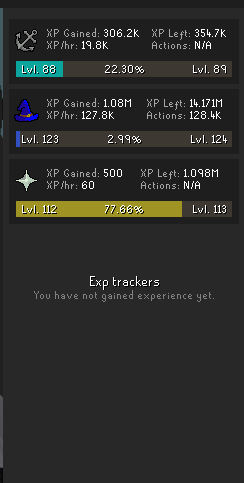





why is my exp tracker bugged like this
wheres the total xp panel where i can right click reset all
 crude chasm
hidden ridge
wheres the total xp panel where i can right click reset all
crude chasm
hidden ridge
wheres the total xp panel where i can right click reset all
Try resetting the plugin? Or restarting rl if you haven't yet
hidden ridge
crude chasm
Try resetting the plugin? Or restarting rl if you haven't yet
ive done both
crude chasm
hidden ridge
ive done both
Actually using the reset option in the plugin, not just flicking it off and on?
hidden ridge
yes
crude chasm
Weird.
hidden ridge
maybe be a issue with runelite launcher version?
empty minnow
That bug keeps coming up but I believe no one has been able to reproduce it to fix it
hidden ridge
only diff i see between my two accs, one that has the issue and the one that doesnt, is the runelite version being 1.12.5.2 vs 1.12.6
stone parcel
Maybe restart the older one.
leaden trail
If you restarted the old client you should now be on the latest version
hidden ridge
leaden trail
If you restarted the old client you should now be on the latest version
the issue is still on the latest, it wasnt on the older. restarted both clients, the one acc/profile still has the iussue
like its linked to my one launcher but not the other. diff profiles, but when switching profiles between diff launchers, it stays
 jade dirge
hi does anyone know the plugin for this, i can only see black on the roof top, sky box is off also. any help is appreciated. thanks!
 round jacinth
Blind fold or low detail?
jade dirge
it's low detail! thanks so much!!
 near palm
The Radius Markers plugin is disabling itself instantly when I try to enable it. Any suggestions for fixing this other than reinstalling the plugin (and possibly losing my settings)?
gilded kayak
we don't delete your settings when you uninstall a plugin that would be dumb
near palm
Ah good, I'll try reinstalling then
Even stranger, now it doesn't have settings or appear in the regular plugin list when installed.

I did try restarting client when it was disabling itself
haughty pumiceBOT
To find the logs, you can do one of the following:
- If your client failed to open, click the
Open logs folderbutton. - Open the screenshot directory by right-clicking 📷
Camerabutton, navigate 1 directory up, then open logs folder. - Navigate to
%userprofile%\.runelite\logson Windows or$HOME/.runelite/logson Linux and macOS.
Upload the log files named client and launcher by dragging them to Discord. If there are files prefixed with jvm_crash dated from today, upload them too.
 light garden
hello, i downloaded shortest path plugin but when i set a target on the map it doesn't draw any path to it, but it does work when im using it for quest with quest helper. Is it not working because of a conflict with another plugin or anything you need to tweak in shortest path? couldn't find a fix
gilded kayak
i know there's a "use shortest path" setting in quest-helper
but that's as far as my knowledge of the interaction goes
light garden
when i use that in quest helper it does draw the shortest path indeed, it's when i try to set a waypoint on the map by left clicking on it that it doesn't show any path to get to a target, matter of fact the target doesn't seem to get registered on the map
solid mesa
You have to Right-click > Set target on the map
light garden
oh wow thanks that's a pretty funny glitch that i got. Actually if u use RuneLingual and use the DeepL api option to translate Mouse Menu Options, it actually change the the Set Target on map to "Choisir Chemin" in French (what i used) so it looked like it didn't get grabbed by the shortest path plugin. I switched to "Don't Translate" for Mouse Menu Options and now it's working again. Thanks for your help
 molten aurora
I know this is a offical runelite plugin but i thought i'd ask here as a last hope. Does anyone know how to get the watchdog plugin to work with wind motes in sailing? I perfectly copied the pastebin code into watchdog and it doesn't work at all.
round jacinth
watchdog plugin has their own discord you can join and ask for help directly in
 molten aurora
hey guys i imported tiles for a cuda trial and they show in my minimap but not on the ocean?
any ideas?
 gilded cobalt
Hi Folks. So, I set up Camera Points, but oddly Ctrl+W doesn't work as a shortcut:

To my knowledge, I don't have another shortcut as Ctrl+W. Any ideas of why this one specifically might not work? Thanks.
gilded kayak
debug helper on the will list your bound keybinds
gilded cobalt
Wonderful thanks
haughty pumiceBOT
Get support for the Camera Points Plugin Hub plugin here: https://runelite.net/plugin-hub/show/camera-points.
You can also find the support link by searching for the plugin in the Plugin Hub panel and clicking the ? button on the plugin, or by right-clicking the plugin in the plugin panel and clicking the Support menu option.
gilded kayak
otherwise, that link
 deep python
what plugin is doing this tooltip?
 round jacinth
Port tasks
deep python
thx
solid mesa
deep python
what plugin is doing this tooltip?
This should be fixed and it should only show the tooltip when the interface is visible
 lucid gate
Having luck so far with maintaining a list of nearby players based on PlayerSpawned and PlayerDespawned events. Thank you @tawdry bronze and @solid mesa for your help with the questions I had

 shy solstice
i am trying to use the click to minimize plugin at barbarian fishing, does anyone know what i need to put into the script? Use-Rod: Fishing spot is what i am using and it is not wokring
shy solstice
shy solstice
i am trying to use the click to minimize plugin at barbarian fishing, does anyon...
 solid mesa
This is what I have
Mine: Daeyalt Essence,
Cast: Lvl-3 Enchant -> Topaz bracelet,
Cast: Lvl-1 Enchant -> Opal bracelet,
Use-rod: Fishing spot,
Cut: Sulliuscep,
Cut: Redwood tree,
Make: Light orb,
Fish: Fishing spot,
Chop: Blisterwood tree,
Mine: Crashed star,
Use: Knife -> Leaping sturgeon
Don't forget the comma at the end if you have multiple hides
Should be Use-rod not Use-Rod
 keen epoch
Hey guys, Im trying to get the high alch value of an item by passing the itemID, but Im getting an AssertionError. Im using the same code snipet from ChatCommandsPlugin:
ItemComposition itemComposition = itemManager.getItemComposition(itemId);
This line gives me the error:
java.lang.AssertionError: must be called on client thread
solid mesa
You need to call it from the client thread
twin scroll
Reported it a couple times in this channel and don't know if its been looked at, but there is a bug causing Object Markers not to stick. Affects shipwreck salvage hotspots and ship facilities mostly.
tardy falcon
Are there any plugins that can track gp/hour?
solid mesa
Profit Tracker?
tardy falcon
Ty!
lavish geyser
how do I fix Shortest Path plugin thinking my house is in a different location?
it keeps telling me to teleport to house even after teleporting there
haughty pumiceBOT
Get support for the Shortest Path Plugin Hub plugin here: https://runelite.net/plugin-hub/show/shortest-path.
You can also find the support link by searching for the plugin in the Plugin Hub panel and clicking the ? button on the plugin, or by right-clicking the plugin in the plugin panel and clicking the Support menu option.
 torn oxide
Hi why do the trees in game look this way?
 mossy swan
torn oxide
Hi why do the trees in game look this way?
mossy swan
torn oxide
Hi why do the trees in game look this way?
do they look weird on standard gpu plugin?
!hd
haughty pumiceBOT
Visit 117's HD plugin discord (https://discord.com/invite/U4p6ChjgSE) for support, issues & feedback
torn oxide
Nope Just runelite
mossy swan
well, does it look normal on just gpu?
if so, you should ask in the 117hd discord server
mossy swan
is this hdos or why can you not just turn on the gpu plugin
torn oxide
Oh yeah its the 117hd plugin thats messed up
mossy swan
ok cool, yeah, go to their discord to report it
torn oxide
kk will do thanks
 soft charm
I use to have a number displayed above my cargo chest telling me how many items where inside and it updated if an npc added an item. Today it isnt there. anyone know what that was from and why its gone now?

it was only there yesterday btw ^
leaden trail
It was from the sailing plugin and went away because the feature wasn't quite working yet
soft charm
ok, ty. seemed to work for me haha
rocky tiger
@soft charm That was a WIP feature of the sailing plugin by @small musk. It will return if it can be made to work reliably.
 silk violet
hi guys i got a new pc an i logged into rl an none of my plugins are loading
mossy swan
silk violet
hi guys i got a new pc an i logged into rl an none of my plugins are loading
!transfer
haughty pumiceBOT
silk violet
for some reason my config profile is missing ;o
tardy falcon
Does anyone know if GP Per Hour can be set to only track raw GP income?
haughty pumiceBOT
Get support for the GP Per Hour Plugin Hub plugin here: https://runelite.net/plugin-hub/show/gp-per-hour.
You can also find the support link by searching for the plugin in the Plugin Hub panel and clicking the ? button on the plugin, or by right-clicking the plugin in the plugin panel and clicking the Support menu option.
tardy falcon
I don't see the answer to my question there.
mossy swan
then ask it there
 wide mirage
Hi, any chance you can make the github logs an announcments channel so we may follow it?
mossy swan
i don’t think anyone actually wants that
 fossil summit
everyone in your discord will mute it
oblique plume
announcements are also manual iirc, no one is going to push all those themself
fossil summit
nah if a channel is labeled as an announcement, then you can set a discord channel to follow it from another discord