
#support
1 messages · Page 127 of 1
 signal kite
 marsh mauve
 forest coyote
anyone else facing an issue where the cursor inside the client keeps changing then comming back to normal?
 stone parcel
Maybe the Discord overlay thing. Try disabling overlay in Discord settings.
 spare basin
I am unable to turn on the GPU plugin after it turned itself off automatically. I've tried uninstalling and reinstalling and setting RuneLite to use my graphics card in the windows graphics settings. GPU is Ryzen 7 7800X3D on newest AMD drivers. Does anyone know a fix for this?
 gilded kayak
spare basin
I am unable to turn on the GPU plugin after it turned itself off automatically. ...
gilded kayak
spare basin
I am unable to turn on the GPU plugin after it turned itself off automatically. ...
the latest gpu drivers are shit
downgrade
and search amd in the discord if u dont believe me for some reason
spare basin
which one are you using?
 acoustic gorge
signal kite
https://gyazo.com/fd79148a258f5cbd8964de390807bac9
anyone know what could cause...
acoustic gorge
signal kite
https://gyazo.com/fd79148a258f5cbd8964de390807bac9
anyone know what could cause...
Were you able to figure this out? Having the same issue
gilded kayak
searching the discord will also answer that question since i dont remember what people asid
forest coyote
stone parcel
Maybe the Discord overlay thing. Try disabling overlay in Discord settings.
you're right, thank <4
gilded kayak
said*
 oblique plume
25.10.2 iirc
signal kite
acoustic gorge
Were you able to figure this out? Having the same issue
No I rage logged out fuck it guess I’ll try to figure it out another day
gilded kayak
!safe
 haughty pumiceBOT
safemode: To enable safemode
Windows
Run the RuneLite (configure) shortcut from the windows start menu
Tick the Safe mode box, save, launch RuneLite the way you normally do.
Mac
In Terminal, run
/Applications/RuneLite.app/Contents/MacOS/RuneLite --configure
Tick the Safe mode box, save, launch RuneLite the way you normally do.
gilded kayak
.
haughty pumiceBOT
To enable safemode
Windows
Run the RuneLite (configure) shortcut from the windows start menu
Tick the Safe mode box, save, launch RuneLite the way you normally do.
Mac
In Terminal, run
/Applications/RuneLite.app/Contents/MacOS/RuneLite --configure
Tick the Safe mode box, save, launch RuneLite the way you normally do.
spare basin
gilded kayak
downgrade
this worked, thanks guys
gilded kayak
fortunately the first guy with this issue was using 117 and clearly recognized the error prompt only appeared, after he updated his drivers
so getting the answer was very quick
 little path
need some help when i tab out of runelite i can see the game but when i click on to the window it goes black. any thoughts?
gilded kayak
little path
need some help when i tab out of runelite i can see the game but when i click on...
not the same issue everyone else has but try disabling the discord overlay anyway
otherwise it's probably a gpu driver issue
little path
gilded kayak
not the same issue everyone else has but try disabling the discord overlay anywa...
how do i disable the discord overlay? im not sure ive ever enabled it
gilded kayak
it's in discord settings
little path
found it seems to have fixed the issue thank you
 placid sparrow
Hey I accidentally "reset" my Revenant Demons on loot tracker, but before i did i saved the file with "export" is there any way to add it back to my runelite? 🙁
it exported as a .JSON file i think before i reset.
gilded kayak
what kind of export
we need to get rid of that fucking garbage feature
it's not the kind of exporting you want
placid sparrow
oh dam so i cant get back my 3k kc loot log?
gilded kayak
#support message do this
placid sparrow
ok trying now
gilded kayak
this guy said that it didn't appear immediately, and that importing a dupe of his actual plugins, not the rsprofile caused it to reload
so i guess do that also
placid sparrow
nice i didnt copy paste anything, i just went and got one more kc of the same mob i reset and it popped back up, then I exported and saved the file for later
and i checked runelite.net loot tracker info and it showed 0 kc, then i refreshed it and it updated 🙂
thanks for all your help
gilded kayak
lit
placid sparrow
2700 kc with 2 craws bows, chainmace, sceptre and more. couldnt lose that record lol
 rough roost
anyone having issues with micro stutters since the sailing update last week? tried all 3 gpu plugins
acoustic gorge
Any idea on what's causing the issue with vials of water?
Or if there's a better method than going vanilla and slowly enabling plugin's one by one
gilded kayak
well you could either way until other people show up who can't use runelite
or you could be specific about your issue
and then maybe i can answer
 modern rover
 gilded kayak
your computer's time is wrong
 winter snow
^
gilded kayak
cloudflare does not like time travelers
signal kite
acoustic gorge
or just turn off "Empty Vial Blocker"
Thank you very much
acoustic gorge
Np, just went through all of my plugins to figure it out lmao - ofc it was in the W's so I was almost done
 echo trellis
Hello, I am having a little trouble with runelite. ~I'm currently playing ark raiders and i'm afk xp on my account but for some reason. runelite is taking mouse priority over my main game on monitor one. The highlighting on ark raiders is there but no mouse input happens. Just wondering if anyone has heard or knows a fix for this.
 final axle
disable discord's overlay
echo trellis
Oh my thank you. I have been trying to figure this out for ages...
 south root
It keeps opening the opposite window of what I'm clicking on, anyone knows what to do?
stone parcel
Try disabling overlay in Discord settings.
south root
perfect thank you very much
 rocky hatch
Runelite has crashed 3 times today and theres nothing showing up in the logs. any help on this?
stone parcel
You can post the logs here, maybe someone here can see something.
haughty pumiceBOT
To find the logs, you can do one of the following:
- If your client failed to open, click the
Open logs folderbutton. - Open the screenshot directory by right-clicking 📷
Camerabutton, navigate 1 directory up, then open logs folder. - Navigate to
%userprofile%\.runelite\logson Windows or$HOME/.runelite/logson Linux and macOS.
Upload the log files named client and launcher by dragging them to Discord. If there are files prefixed with jvm_crash dated from today, upload them too.
rocky hatch
Pastebin
Pastebin.com is the number one paste tool since 2002. Pastebin is a website where you can store text online for a set period of time.
id greatly appreciate it
 gilded latch
Does anybody know how i can use mullvad vpn and runelite? i used split tunneling to bypass jagexlauncher.exe and runelite.exe and can now open jagexlauncher but runelite still throws a fit.
haughty pumiceBOT
 solid mesa
Turn on the IPV4 option
gilded latch
i have an IPV6 option, it says IPV4 is on by default
solid mesa
This button that says IPv4
 gilded latch
this is a setting i can find in the runelite client?
solid mesa
Click the link I sent
gilded latch
perfect, seems to be working now. thank you so much @solid mesa !
 proper blaze
Hello, What is the correct way to check for a chest opening event now?
all of these seem to be deprecated
gilded kayak
probably a gameval
proper blaze
gilded kayak
probably a gameval
Thanks, could you elaborate a bit? Not super familiar with runelite plugin development or Java in general
gilded kayak
i dont know what the name is, these are the official ones jagex sends
it could have a really stupid name
proper blaze
ah ok, awesome, thank you for the link!
 abstract shell
Hi guys, I've been having issues with RL randomly closing, or crashing all day, are any brainy people able to offer some advice from these crash logs? 🙂
stone parcel
Try disabling overlay in Discord settings.
stone parcel
Yay! 😄 Haha
 limpid hound
must of pushed a shit update
 edgy lagoon
this is happening to me right now actually
 vale surge
my RL kept getting an error..now it works
 turbid talon
Hello, my loot tracker data is incorrect 🙁
I followed the steps listed on the github, but could not get it back to the correct amount
I have the same profile on two computers and when I switched to the other computer, I didn't notice initially, but the data was not the same - probably because the client was still open from a previous session. So, I had gotten another "kill" (I'm opening volcanic mine ore packs) before noticing the discrepancy in values.
Immediately, I tried logging on to my main computer.
After switching, the loot tracker data was incorrect, my guess is that it was overwritten from the previous session on the other computer.
Is there anyway I can get my data back? 
 full storm
My account is being hacked, and my jagex says "too many requests, come back ina few hours"
winter snow
full storm
My account is being hacked, and my jagex says "too many requests, come back ina ...
This is not the place for Jagex account support
gilded kayak
but that doesn't always indicate being hacked
you can easily trigger that with a ton of world hops
 obtuse ore
Hi, if I tab out from RL and back into LoL/HS, it causes a delay. It picks up my mouse moving on the game but clicks dont work until I close RL
full storm
gilded kayak
but that doesn't always indicate being hacked
Lost all my gold, and someone made a bond purchase. So that kinda gives it away
gilded kayak
obtuse ore
Hi, if I tab out from RL and back into LoL/HS, it causes a delay. It picks up my...
disable the discord overlay in discord settings
ah well we still can't help you we have 0 connection to your account
!new
haughty pumiceBOT
newplayer: If you are new to OSRS, make sure to follow this excellent guide on OSRS wiki: https://oldschool.runescape.wiki/w/New_player_guide. You can also join the official OSRS Discord here: https://discord.gg/osrs
obtuse ore
gilded kayak
disable the discord overlay in discord settings
I'm not great when it comes to Disc, how do I do that? On Disc or RL 🙂
winter snow
Discord
gilded kayak
discord or i would have said the discord plugin in runelite
obtuse ore
ok jesus christ
winter snow
 wet vessel
stone parcel
Try disabling overlay in Discord settings.
wet vessel
stone parcel
Try disabling overlay in Discord settings.
Been struggling with that for days, your a hero sir!
 frail mirage
Does anyone know which default plugin shows which attack type you're using above the chat box? I want to turn it off because I have no real use for it and it's kind of annoying no matter where I put it.
 gilded kayak
is it attack styles
frail mirage
It was cheers!
 vivid vortex
i'm kindof at a loss, i can't turn on any gpu based plugins. 117hd gives me a warning that my amd drivers are broken, but I can run all my other games just fine. I have done a fresh install of runelite, reinstalled my drivers, even ran the windows 11 os repair function. does anyone have any ideas? this just started within the last 2 days
vivid vortex
i don't have the option to roll back driver version under control panel after the windows reset, i'll take a look in adrenalin and see if theres a feature there, tyvm
 weak wadi
Another update here, so, in short when i use the JVM argument it just start crashing later
pc start freezing after 45-1h of runelite
i also have 3 clients open
GPU Memory leaks ? but only on runelite idk?
vivid vortex
gilded kayak
downgrade 1 driver version
manually downloaded and installed 25.10.2 from amd website, thank you so much
 slow robin
im having issues navigating multiple runelites at once, its like they overlap each other even if i try to focus on another one. tried using a new profile with no plug ins and still having the issue.
slow robin
 leaden trail
In Discord, not in RuneLite
leaden trail
In Discord, not in RuneLite
thank you soooooooo much!!!!
i've been trying to disbable that discord crap and thought it was tray notifications and crap on runelites end, thank you thank you thank you!!!!!
gilded kayak
nope we've just been griefed by discord
 urban cove
idk if this is due to an updated plugin or something was changed yesterday/today, but having more than 1 client open and swapping between the 2 has caused it to flicker for me, briefly flashing like i click the Alt key, and then gives trouble of a client staying on top of the other when swapping
i could record a video or something but this is the only reason i joined just now wondering if its been reported or i need to disable something
urban cove
hate it here
urban cove
thank god tytyty
gilded kayak
fwiw can you check your  tab on the sidebar
and tell me what runelite version it says
Adam attempted to bash discord from our end in the latest version
urban cove
1.12.4
gilded kayak
mmm kk
 sudden fable
Hey I am having a werid bug recently where when I have runelite open on a second monitor and click on something in runelite and then go back to my main monitor with another game on it I cant click or make any inputs in my other game. I sorta have to spam click, alt+tab and sometimes restart the other game to gain control back
gilded kayak
disable the discord overlay in discord settings
 obtuse blade
Anyone having issues with alt tabbing?
I disabled the discord overlay and it didnt help
gilded kayak
are you sure you disabled it
you'd be the first person in actually like 100 people here, where it didn't fix their issue
sudden fable
Yeah it just worked for me make sure you disable on RL not on the other game
 zealous charm
anyone know why a specific setting in a specific plugin is not being saved between sessions? 🤔

resets with every new session
solid mesa
I think SRA QoL or something messes with it
zealous charm
solid mesa
I think SRA QoL or something messes with it
would make sense, my iron BIS is SRA so i use that.
ty ❤️
 slow niche
Does anyone know of a way to force a certain bank tag tab to show when you open the bank?
 vast bone
no
weak wadi
can i get any update on this?
 solid mesa
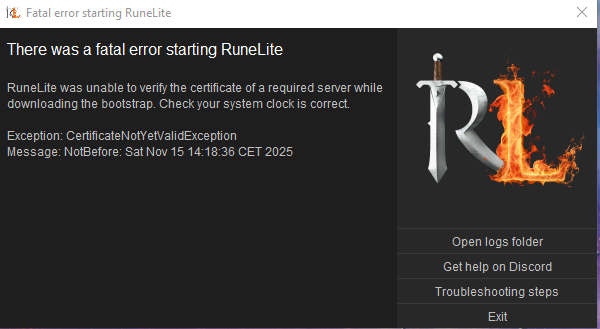
The clock on your computer is wrong
 warm cliff
aah i notice lol wtf
gilded kayak
cloudflare does not appreciate time travelers trying to access their stuff
 agile river
my xp tracker doesnt seem to be doing too well
any idea how to fix it without resetting? all was working fine for the ~10 months since it stopped resetting on closing the client and i presume with sailing update the total xp/h bugged out, i doubt there is a way to fix it without resetting the tracker but still worth asking i guess
 gilded kayak
you probably want to disable the setting that mentions sessions
i don't remember it's exact name
agile river
save between sessions? but i do want it to save my xp between sessions
gilded kayak
oh i see
agile river
the entire point of me asking is i dont want to reset it lol
agile river
ye i thought so, not too big deal
each individual skill still works only the total xp got bugged and that wasnt entirely accurate even before anyway. it just looks wrong having over 1m xp/h there lol
 fair hatch
Not sure if this is the right channel to type, but does anyone else experience bsod on runelite specifically since sailing pre-release? It's the only client / game that causes my bsod to my knowledge, and it started since that update
 frosty socket
anyone else experiencing constant stuttering? never happened before but now I'm getting it every few minutes
frosty socket
rough roost
anyone having issues with micro stutters since the sailing update last week? tri...
yeah, happening to me too. have you found a fix?
 errant heron
Hello, I am having an issue where GE prices aren't showing up for bank/examine. Is this a known API issue or is it most likely on my end?
errant heron
Have restarted client, reinstalled client, and restarted pc multiple times with same result
Also, I thought logging in and out of runelite might fix it but after clicking log out, clicking the log in button doesn't do anything
 tardy falcon
One of the plugins allows me to change the default option for my shift click. I'm trying to use it for the Fairy Ring to set shift click to teleport me to Zanaris, but the option doesn't appear there. Is there a reason for this or a way to change it?
 round jacinth
check the cogwheel on menu entry swapper for the fairy ring override
tardy falcon
Interesting...so I can use the cogwheel option to change it so that left click sends me to Zanaris, but I can't do this for shift left click?
oblique plume
Its cuz zanaris is already the default option
 empty minnow
It would be nice to have the shift click option as well since every fairy ring is different
I suppose custom menu swaps can probably do that 🤔
round jacinth
i think it's similar to how/what the jewelry box has an issue with maybe
 silk thicket
why does it still say (echo) at DKS? 😄
 stone parcel
I've heard Jagex bug.
solid mesa
It is indeed
 meager pollen
Has anyone had the recent problem when it comes to going inbetween runelites? I often play two accounts and as of the paast few days, whenver I click to the other account it doesn't rarely work? I have to spam click. I can click on a star on my alt account, press F1 to check its inventory and the inventory will open on my main account?
solid mesa
Disable discord overlay
meager pollen
Ima try that
 sour fossil
For the Runelite launcher config is it not possible to get something like 1.5x? 0.5, 1.0, and 2.0 work but 1.5 doesnt
solid mesa
It is, are you on linux? Some windows managers don't support non-integer scaling
sour fossil
Yeah linux
I can set it in KDE to do 1.5 but then it does it for all X11 windows
Was hoping to do it for RL only
solid mesa
You can try to adjust your windows manager. But runelite supports it just fine
sour fossil
Ok ty
 junior steeple
hello, I've been having a weird problem with stuttering. I wanted to record me catching it in the act but it happens randomly. the issue is after a long stutter, the game slowly seems to go from buttery smooth to very stuttery and choppy as my playtime increases. i've tried tweaking both my gpu and 117hd settings and the only thing that has really helped is the unlock fps button, but this video is with it checked on. it increasingly gets worse and worse until i have to restart the whole client
it's pretty hard to tell in the video since it's a bit low quality but i wanted to ask if anyone had any suggestions or encountered this before.
for a better reference, it looks like the game is running at 30 fps but my monitor and fps control plugin says my frames are not dropping down below 100
 verbal tulip
So.. quick question for future reference.. How do I avoid the following from happening:
I logged into runelite from a new laptop... closed it... launched runelite from my normal pc, and my profile was overwritten by the one from the laptop? instead of the other way around
 hushed orchid
Does anyone know how to use commands for RL on the Bolt launcher? I want to scale the UI, but inserting --scale=2 in the RuneLite launch command doesn't work
gilded kayak
hushed orchid
Does anyone know how to use commands for RL on the Bolt launcher? I want to scal...
bolt has their own runelite configure
in settings
 hushed orchid
That's how I've done it in windows, thought it would be the same
gilded kayak
idunno
haughty pumiceBOT
For support with using Jagex accounts on Linux, visit Torm's Discord https://discord.gg/aX7GT2Mkdu
gilded kayak
u can ask bolt questions there
solid mesa
What happens if you click Configure RuneLite?
hushed orchid
I found it out with a search in that discord. Turns out you need %command% --scale=2, so it needs that before a command
gilded kayak
lit
 mossy swan
oh that makes sense
gilded kayak
that would explain why the other 2 boxes also had %command%
 fossil bough
Is there any way to monitor runelite's performance by plugin or anything? My usual profile is having crazy bad FPS drops, so I swapped to a brand new one and have no issues. Curious what incompatibility/issue there might be.
abstract shell
Is anyone able to help me with RL consistently crashing? - It's been happening for 3 days now
solid mesa
fossil bough
Is there any way to monitor runelite's performance by plugin or anything? My usu...
No
fossil bough
Any sort of trouble shooting advice beyond turning things off/on 1 at a time?
mossy swan
!flow
haughty pumiceBOT
flowchart: Please refer to this flowchart for further troubleshooting.
mossy swan
you need to restart after turning hub plugins off since some of them dont shutdown correctly
hushed orchid
gilded kayak
that would explain why the other 2 boxes also had %command%
Yes, but that requires a brain to figure out :)
 old yarrow
hushed orchid
I found it out with a search in that discord. Turns out you need %command% --sca...
old yarrow
hushed orchid
I found it out with a search in that discord. Turns out you need %command% --sca...
You shouldn't need to change the launch command in bolt. Click the pink wrench, set the "scale" to 2.0 or whatever you want


 hushed orchid
Ah, didn't see that lol
stone parcel
You wouldn't be the first person to not notice the Configure RuneLite thing there is a button.
hushed orchid
Yea completely missed it lmao
old yarrow
To be fair, It does just sort of seem like a header/section title and icon
I can see why some might overlook it
fair hatch
https://gyazo.com/d7bc226980468abbaaf53eb79e5df975 I can't swap between two clients since the last update. Any idea what causes this?
 old yarrow
A recent update to the discord overlay is known to cause issues with RuneLite. Try disabling the overlay in Discord's settings
stone parcel
fair hatch
https://gyazo.com/d7bc226980468abbaaf53eb79e5df975 I can't swap between two clie...
Try disabling the overlay in Discord.
fair hatch
tyvm ❤️
 fallen tiger
Oi, nobody committed this issue to the github page. This needs some maintenance
Seems like some textures were changed, very obscure. Will look into it
 charred wind
fallen tiger
Oi, nobody committed this issue to the github page. This needs some maintenance
...
charred wind
fallen tiger
Oi, nobody committed this issue to the github page. This needs some maintenance
...
Likely GPUe change. VM recolor died too
Haven’t looked into it myself
fallen tiger
Na, cg recolor works fine no matter the gpu plugin version/even with it enabled
And this pretty much just affects the rats, so my guess would be there were some texture changes on the rats
Do you still use the invalidation bug to recolor or did you change to the premapload event at some point? @charred wind
charred wind
I still use invalidation bug
 cosmic patio
Do you guys know how to transfer the .runelite from C drive to another drive? I moved the folder to my desktop and then copied it to the other drive, but instead of it opening from that location it reinstalled a brand new runelite into the previous location
mossy swan
do you just need to free up space on your C drive or what?
solid mesa
You'd have to symlink C:\Users\username\.runelite to your new location
mossy swan
most of the time people create a symbolic link for just the screenshots folder
cosmic patio
mossy swan
do you just need to free up space on your C drive or what?
yeah my runelite was 100gb on my c drive so i just wanted to move it over to my 2tb ssd instead
mossy swan
damn thats a lot of screenshots
cosmic patio
oh yeah my screenshot folder is 99.5gb lol, so i just need to fiigure out how to symlink the screenshot folder to the other drive?
solid mesa
Yea
mossy swan
or if you are feeling extra lazy, just occasionally move it
cosmic patio
does a soft or hard link matter iin this case
mossy swan
idk
 torpid gulch
Hi guys!
Having issues where if i have two runelites open, i cannot rotate the worlds on both accounts im playing....just one.
Any similar issues?
solid mesa
Disable discord overlay
torpid gulch
@solid mesa You're the bomb!
Thank you!
 patent trout
so alot of ''holes'' in the world are being filled whit grass tiles, for example that little shortcut, also edgive dungeon is also ''hide'' with a square of dirt, is part of the GPU addon? how to fix it?
 solid mesa
Jagex needs to fix the zbuf for those objects. Report it in-game as a bug
patent trout
this is how the edgive dungeon looks, the trapdoor flickers lol

so is a osrs problem?
gotcha
 open hearth
I keep getting stuck here, restarting pc temporarily fixes it

 merry trout
i lost all my settings and bank tabs after i got a new PC and dont have access to old drive. i am logged in to my runelite but none of my plugins are here, any way to retrieve them?
 rocky tiger
cosmic patio
does a soft or hard link matter iin this case
rocky tiger
cosmic patio
does a soft or hard link matter iin this case
Hard links can only be done on the same drive so wouldn't help with issue with storage space.
haughty pumiceBOT
 hollow horizon
Any idea why my retribution prayer is missing? AFAICT I don't have any prayers filtered out. Disabling the "Prayer" runelite plugin shows the retribution prayer.


 merry trout
haughty pumice
<@207281887759171584> <https://github.com/runelite/runelite/wiki/FAQ#my-plugins-...
merry trout
haughty pumice
<@207281887759171584> <https://github.com/runelite/runelite/wiki/FAQ#my-plugins-...
unfortunately i am not sure if i had cloud sync on or not
old yarrow
If it's not showing up in the profiles tab, I think you're unfortunately SOL
without the old drive
 tepid robin
is there a way to get Actions: @combat skills? (Att, Str, Def etc.)
 old yarrow
hollow horizon
Any idea why my retribution prayer is missing? AFAICT I don't have any prayers f...
old yarrow
hollow horizon
Any idea why my retribution prayer is missing? AFAICT I don't have any prayers f...
right click the prayer stone tab and enable filtering
hollow horizon
old yarrow
right click the prayer stone tab and enable filtering
it already is enabled
 rocky tiger
hollow horizon
Any idea why my retribution prayer is missing? AFAICT I don't have any prayers f...
rocky tiger
hollow horizon
Any idea why my retribution prayer is missing? AFAICT I don't have any prayers f...
You can hide prayers while reordering them. Sounds like you just hid it. Reseting plugin should revert prayer book to default.
 hollow horizon
old yarrow
then unhide it
hollow horizon
old yarrow
then unhide it
ahh! awesome ty
tepid robin
anyone ??
 old yarrow
tepid robin
is there a way to get Actions: @combat skills? (Att, Str, Def etc.)
old yarrow
tepid robin
is there a way to get Actions: @combat skills? (Att, Str, Def etc.)
I'm not fully sure what it is that you're asking here
mind rewording it for me please?
tepid robin
oke moment let me use paint 1sec
old yarrow
are you at crab?
last I remembered, killing stuff did calc out how many kills left per level, buy maybe I'm thinking slayer
tepid robin
yes i do slayer task
rocky tiger
No actions left is not possible for combat skills. It was a long time ago but it was buggy and they removed it.
tepid robin
ahh thanks, there is not an another option to fix it? maybe another plugin?
rocky tiger
A hub plugin wouldn't be able to change what is displayed there.
tepid robin
Thanks for your update
rocky tiger
@tepid robin Here is the latest news on that. They are open to someone adding it back but no ETA. https://github.com/runelite/runelite/issues/19145#issuecomment-3064905890

GitHub
Type Incorrect behavior Operating System MacOS OS Version 13.7.6 Bug description XP Tracker plugin does not show "Kills left" for combat skills including where the XP/hr rate is consistan...
hollow horizon
any chance anyone knows what this runelite icon stands for?

 clear stratus
is there any text if you hover over it
hollow horizon
sadly not
 crisp dune
something to do with watson maybe? https://oldschool.runescape.wiki/w/Deerstalker
hollow horizon
ahh! yes, I'm doing elite clues rn and i kept a watson step on the floor
weird that it uses a different icon
 naive palm
A buddy of mine is having issues with the F-keys not acting properly when windows are changed. A reinstall did not work, neither did turning off all plugins on both windows.
hushed orchid
If you mean they do different things it's set by character not Runelite
Ingame settings^^
naive palm
No, sorry, let me explain a bit more:
- Main acct (smaller window) is clicked.
- GIM acct (larger window) is clicked.
- F-keys are pressed.
- Menus change on the main acct (smaller window)
- After a few seconds, menus change on the GIM acct (larger window)
solid mesa
naive palm
A buddy of mine is having issues with the F-keys not acting properly when window...
Turn off discord overlay
rocky tiger
@naive palm I assume that's the discord overlay bug. Tell them to turn it off in discord settings.
hushed orchid
Ah fair enough
naive palm
I'll pass the message along -- fingers crossed. You guys are kickass
naive palm
naive palm
I'll pass the message along -- fingers crossed. You guys are kickass
Problem fixed. Ty for your help @solid mesa and @rocky tiger!
 languid juniper
Would anyone happen to know how to fix this? The total level covers half of the bottom row skills. It doesn't do it on the official client. I tried turning every plugin off and back on, didn't fix it though.
 solid mesa
Turn off skills organizer and restart the client
languid juniper
solid mesa
Turn off skills organizer and restart the client
Fixed, TY! Was curious and turned it back on, lo and behold reverted to being fucked up again. I don’t even know what this plug in is/does and don’t remember messing with it, guess it is something to automatically comes with RL?
solid mesa
Its a hub plugin
 clear stratus
it would appear you installed it at some point and then forgot
languid juniper
Probably, just going to uninstall 🤷🏻♂️
Thanks. Been bugging me for weeks
 stuck crater
I'm having an issue where when I switch windows, the runelite client is lagging and sometimes doesn't realize that it's the active window. Anyone else run into this?
gilded kayak
stuck crater
I'm having an issue where when I switch windows, the runelite client is lagging ...
disable the discord overlay in discord settings
stuck crater
ohhh thanks! You're awesome!
clear stratus
have we got room for /discordoverlay lol
 hoary spade
what is causing the named pets plugin to show the name so high above the pet? its been happening for a couple weeks at least and on every pet with a name on them
 haughty pumiceBOT
Get support for the Named Pets Plugin Hub plugin here: https://runelite.net/plugin-hub/show/named-pets.
You can also find the support link by searching for the plugin in the Plugin Hub panel and clicking the ? button on the plugin, or by right-clicking the plugin in the plugin panel and clicking the Support menu option.
solid mesa
Others have reported it too
hoary spade
so mostly a case of waiting for an update?
solid mesa
Yep (if one happens)
hoary spade
ty for your assistance anyways 👍
 wet zenith
Hello, so I’m playing on an m1 Mac and with the new gpu plugin vs legacy my frame rate is cut by two thirds, most areas before where I had it capped at 90 would be locked 90 and now it’s barely 35 if I’m lucky with identical settings, any ideas or suggestions would be appreciated greatly, thanks
 dry raft
Anyone know why my GPU plugin is no loger working? I made sure my drivers are updated. AMD Radeon RX7900 XT version 25.11.1
solid mesa
Linux?
final axle
days since amd driver issues 0 0
patent trout
aim half sleep right now
and iinstalled a plugin

that give little tickets
dont remember what i install
dont even know what those thickets do
gonna go sleep now what addon.. is?
final axle
emote clue items
patent trout
gonna uninstall that tomorrow thanks
abstract shell
Hi, I've been having the same issue for about 5 days with RL randomly closing/crashing, I followed the flowchart and it seems to be an issue with GPU, as requested on the flowchart here is a video with no pluginhub plugins active - I have also added my most recent crash logs - is anyone able to offer some advice?
mossy swan
abstract shell
Hi, I've been having the same issue for about 5 days with RL randomly closing/cr...
do you get a jvm crash file every time it crashes?
abstract shell
Not every time, however I've had quite a few of them
mossy swan
could be gpu plugin, could be gpu drivers (somewhat more likely)
but also could be your ram, so try running this: https://memtest.org/
abstract shell
mossy swan
could be gpu plugin, could be gpu drivers (somewhat more likely)
I thought it may have something to do with GPU drivers, so I updated them, but the issue persisted - do you know of a way to install memtest without a flash drive? It only seems to have a USB installer download option for windows, and I don't own a flash drive 😅
mossy swan
no
if you have another pc you might be able to use network boot but thats really advanced
abstract shell
Ah, I dont have that either, I'll run mdsched and see if windows memory diagnostics pick anything up
mossy swan
windows memory test is not good enough usually
abstract shell
Oh, well I was going to give the good news that it didn't pick up anything, but in that case, it probably doesn't mean too much lol
 upbeat pagoda
Is there a way to manually change the farming offset of the time tracking plugin? it's off by a minute
oblique plume
you can ::resetfarmtick in chat and then calibrate it again by standing next to a wood tree for a growth tick
upbeat pagoda
ty
 clear sandal
Unsure if this is classified as a bug or not but the loot tracker appears to count Phosani's guaranteed drop (With the tablet) as two kills, than one.

 oblique plume
thats just how jagex made it work i guess
clear sandal
No idea. I don't think the charged Ice from Muspah works the same way, but I could be mistaken.
winter snow
Brimstone chest also still adds an extra line in the loot logger from Konar. Game's just weird sometimes 😄
solid mesa
winter snow
Brimstone chest also still adds an extra line in the loot logger from Konar. Gam...
That's actually a runelite bug. It still does chest tracking from the old days and has the new npc loot coming from the server
oblique plume
we dont make loot logger so its not our bug
solid mesa
It happens to loot tracker too
winter snow
oh yea I misspoke there, I don't use loot logger 😛
 gleaming summit
I'm having an issue switching between clients. when clicking from one RL client to another it takes a few clicks for the new one to become active
oblique plume
disable game overlay in discord
gleaming summit
fixed, thanks
 astral veldt
what has happened the past 2½ weeks??? i stopped playing last month and i come back and the game or client is so insanely laggy and stuttery i cant solo cox anymore. massive stutters out of nowhere at olm while not even loading tiles, it was not like this last month
oblique plume
mac?
astral veldt
no
old yarrow
astral veldt
what has happened the past 2½ weeks??? i stopped playing last month and i come b...
This actually just recently started happening to me as well
Was going to look more into it and see if I can find anything or figure out steps to reproduce it. For reference, running mint 22.2 with an nvidia card
 spiral flare
since gridmaster the game worlds for me at least have risen across the board by like, a flat 10-14 ping
it may just be a congestion issue with thr actual hosting centers
astral veldt
oblique plume
mac?
installed the gpu (legacy) plugin, restarted runelite and ran another cox, zero stutters or lagging, entire run flawless. is this a jagex or runelite issue?
solid mesa
GPU has some performance regressions on Mac compared to GPU (Legacy) but Adam has been working on some improvements
astral veldt
im not on mac
old yarrow
What are you on?
astral veldt
windows 10
solid mesa
Oh. Well most people have significant performance increases with GPU
round jacinth
Seems it's behaving fine then? RuneLite's default GPU is updated to support sailing, GPU (legacy) is still around and may still continue to exist after sailing is released. Jagex themselves have some zbuffering issues to fix, you may see some objects hidden behind stuff
astral veldt
round jacinth
Seems it's behaving fine then? RuneLite's default GPU is updated to support sail...
i have no graphical issues, i quit in october for a month, i come back, game goes from stutter free smooth gameplay to an unplayable stutterfest with the new gpu plugin. i download the gpu legacy plugin from the hub and the game is back to being flawless and stutter free, so how is it behaving fine?
round jacinth
you seemed to indicate you have 165 fps with gpu plugin
astral veldt
what does fps have to do with stutters?
round jacinth
try a fresh profile with only GPU enabled
 untold spear
Is anyone having issues in runelite? It is not registering my clicks 50% of the time and cant click on npc's
round jacinth
and get a recording of what you see, you may try safe mode without any hub plugins also to see if it behaves the same
astral veldt
lmao
round jacinth
turn off discord overlay
@untold spear discord's overlay is impacting your game, turn it off
round jacinth
astral veldt
lmao
I sorta need to see what you're seeing as its not explained well and I don't take users for their word for the things they try unless they show it. A fresh profile with only GPU on recorded would go a long ways
untold spear
@round jacinth that did not fix it unfortunately
round jacinth
hmm thought that could've been it, keeep it off anyways as it is impacting some users
round jacinth
if your issue was widespread as you ask, it would be a dumpsterfire in here though
so it could be something else just for you
rocky tiger
I get worse performance with gpu legacy on mac. I used to use gpu experimental for the performance boost. Might be because intel mac though. (Unrelated to Fern just saying it's not a performance regression for all mac users.)
round jacinth
Fern is not on mac idk why people kept asking about mac stuff for him
untold spear
@round jacinth yeah I am gonna look into it more, my friend is also having the same issue
Could it be a specific plug in is effecting it?
round jacinth
you may want to try safe mode or reload client now discord overlay is off
untold spear
I did reload client
round jacinth
!safe
haughty pumiceBOT
safemode: To enable safemode
Windows
Run the RuneLite (configure) shortcut from the windows start menu
Tick the Safe mode box, save, launch RuneLite the way you normally do.
Mac
In Terminal, run
/Applications/RuneLite.app/Contents/MacOS/RuneLite --configure
Tick the Safe mode box, save, launch RuneLite the way you normally do.
round jacinth
confirm issue is present in safe mode then, if it isn't then it's a hub plugin
untold spear
will try that. thanks!
safe mode did not help, I am also unable to move my camera sometimes by holding middle mouse button
untold spear
that is just what I thought
round jacinth
Seems like it’s bad hardware tho
 stray cosmos
I am having a problem when I switch to my second runelite window I can't move the camera with arrows. The focus is still on my previous window.
untold spear
stray cosmos
I am having a problem when I switch to my second runelite window I can't move t...
that was also happening to me yesterday with another game open
gilded kayak
well disable the discord overlay cuz that's the cause of that guys issue
stray cosmos
still having the problem
gilded kayak
are you sure you disabled it
stray cosmos
I need to click outside the window before I can move my camera again
gilded kayak
cuz the discord overlay is causing a ton of focus issues
stray cosmos
thanks guys
abstract shell
round jacinth
Seems it's behaving fine then? RuneLite's default GPU is updated to support sail...
would you recommend GPU legacy for my issue also? - I still can't get to the bottom of it, Unmoon tried helping earlier, but I don't have a way to install the memtest he recommended - message link for reference: #support message
mossy swan
you can try it
but to make sure the memory isnt bad you could just go out and buy a small usb stick
or if you're really oldschool and have a dvd or cd drive, burn a cd 
abstract shell
mossy swan
but to make sure the memory isnt bad you could just go out and buy a small usb s...
I'll give that a go after my holiday, I've been put on a strict "no buying shit" from the wife, because she seems to think we're going to need 10bill or something for a 2 week cruise 😂
gilded kayak
you might
round jacinth
you might have a 4gb or 8gb thumb stick laying around the house to put memtest86 on it
gilded kayak
those boats are really expensive if one of you causes it to crash
mossy swan
your neighbor might have a usb stick 
untold spear
Thanks for the help @round jacinth. Apparently having discord overlay (before you messaged me) active when launching runelite it created a dead spot in the middle of my monitor where I could not click for any games. After restarting my pc with overlay off it got rid of the spot and everything is working perfectly!
 novel tartan
do anyone know why my client does this? https://gyazo.com/fb4869bc2553d9275d3a77d8641569d0
 round jacinth
discord overlay is enabled
turn it off
i really don't understand why it's default on for being such a stinker
gilded kayak
cuz it was only slightly terrible before
 olive sail
anyone know how to fix this?
 charred wind
System time is wrong
gilded kayak
your computer's time is wrong
olive sail
ok thank you
gilded kayak
cloudflare does not appreciate time travelers trying to access stuff
abstract shell
round jacinth
you might have a 4gb or 8gb thumb stick laying around the house to put memtest86...
yeah I'll have another proper look now I've finished work, but I seem to think I gave them all away when most things I used them for switched to ISO's - legacy didn't work 😅
round jacinth
take one home from work lol
 deep wren
Question. I downloaded runelite and I tried to log in using my jagex account but its not working. Am I doing something wrong?
mossy swan
deep wren
Question. I downloaded runelite and I tried to log in using my jagex account but...
use jagex launcher to launch runelite
deep wren
rip i run linux and i cant get the launcher to work.
haughty pumiceBOT
Using Jagex accounts on Linux is not officially supported by Jagex, but there are some third party community guides to make it work https://help.jagex.com/hc/en-gb/articles/13413514881937-Downloading-the-Jagex-Launcher-on-Linux
gilded kayak
"linux is not supported" is only so they dont have to, linux will always be supported
some nerd will figure it out
deep wren
Ill give it a go. Thank you so much everyone!
gilded kayak
(pick bolt its probably the easiest)
deep wren
it worked! Thank you for the help and the Bolt recommendation!
charred wind
Here
 wide citrus
replay log?
haughty pumiceBOT
@wide citrus To find the logs, you can do one of the following:
- If your client failed to open, click the
Open logs folderbutton. - Open the screenshot directory by right-clicking 📷
Camerabutton, navigate 1 directory up, then open logs folder. - Navigate to
%userprofile%\.runelite\logson Windows or$HOME/.runelite/logson Linux and macOS.
Upload the log files named client and launcher by dragging them to Discord. If there are files prefixed with jvm_crash dated from today, upload them too.
gilded kayak
today is not 11-14
mossy swan
14900 
wide citrus
yh i think thats righ
wide citrus
yh but the odd part is runelite is the only thing that closes
gilded kayak
yeah we know
it's gotta be something to do with how much cpu we use
or at least the way we use it
last summer a ton of people had it start happening, due to the extreme heat
in da uk
gilded kayak
there's a wiki page about it
wide citrus
so the higher the cpu gets te more crashes?
charred wind
No. Your cpu has likely cooked itself for a long time and you’re just now starting to see the results of that
gilded kayak
u should update your bios so it stops melting and rma your cpu
wide citrus
charred wind
No. Your cpu has likely cooked itself for a long time and you’re just now starti...
yh im out of warranty too so
i did
mossy swan
intel extended warranty on those cpus
gilded kayak
they extended it according to this wiki page
although this cpu isn't on this chart o.o
i'd still try
wide citrus
i check with the intels program to test my cpu 0 errors to
mossy swan
yeah i dont think that program actually does anything
gilded kayak
also i probably wouldn't use their program
is there anything wrong with our CPUs? nope 🙂
mossy swan
you can probably find the cpu core that is failing by setting cpu affinity or w/e in task manager to specific cores on runelite
rocky tiger
This is a laptop right? The voltage issue only applied to desktop cpus. No extended warranty.
wide citrus
yes this is a laptop correct
mossy swan
rocky tiger
This is a laptop right? The voltage issue only applied to desktop cpus. No exten...
that seems crazy considering how many laptops ive seen with this issue
leaden trail
rocky tiger
This is a laptop right? The voltage issue only applied to desktop cpus. No exten...
This is what Intel has said but this isn't really super true
There have been plenty of people in here with vmin shift problems on laptops
rocky tiger
So intel just scamming him. 🙁
leaden trail
Welcome to reason 5426 why Intel is crap in 2025
wide citrus
so nothing i ca do or anything i can try
wide citrus
wont i just get the same laptop with the same cpu or are the diffrent dates better?
gilded kayak
possibly but you'd be able to get on a bios version that prevents the melting, before it happens (???)
someone who actually pays attention to this issue can chime into my thoughts
mossy swan
mossy swan
you can probably find the cpu core that is failing by setting cpu affinity or w/...
 might be helpful to put runelite on cores that wont crash
wide citrus
im gonna take a look at this https://rog-forum.asus.com/t5/rog-strix-series/intel-how-to-update-your-microcode-for-intel-hx-13-14th-cpus/m-p/1034987

ha scritto: I already know 2 other cases of mobile CPU failure! I am also experiencing the same failure patterns (Memory corruption etc...) https://community.intel.com/t5/Processors/i9-13980HX-Access-memory-issue-0xc0000005/m-p/1595756 Good. Let's collect here these reports too...
if that doesnt fix then rma
rocky tiger
@wide citrus Both of those crashes were in the C2 CompilerThread. You could look at other crash logs and see if that's always the case.
haughty pumiceBOT
wide citrus
i will check
rocky tiger
haughty pumice
<https://github.com/runelite/runelite/wiki/RuneLite-Launcher-Configuration>
Some things you could try is adding -XX:UseAVX=0 to the JVM arguments. @wide citrus
rocky tiger
That will stop the compiler using AVX instruction set which might stop the crashing. If that doesn't work could try -XX:TieredStopAtLevel=1 which will change the compiler to C1 if the crash is specifially caused by only C2 which is more optimized.
rocky tiger
wide citrus
is it possible to recreate the closing?
If this is a cpu hardware bug then it's going to be pretty random.
I mean it's technically possible this is a jvm bug if this crash is always in that same C2 thread. You could try reinstalling RL.
The java version in those crash logs is not the latest used by RuneLite.
wide citrus
kk so what do you advice reinstall and add -XX:UseAVX=0
or wait and if it crashes reinstall
 hexed pecan
Hello ive been having a weird issue where when i launch runelite for the first time it will fail to launch and make my taskbar almost unusable but if i launch runelite again it launch's fine but my taskbar and applications on it are broken still and the only temp fix i've found is a restart to my computer
 lapis elm
hexed pecan
Hello ive been having a weird issue where when i launch runelite for the first t...
lapis elm
hexed pecan
Hello ive been having a weird issue where when i launch runelite for the first t...
Do you use the discord overlay
hexed pecan
dont think so
rocky tiger
I assume reinstalling will update your java to 11.0.29+7. No harm in disabling avx now. If other programs are not crashing it could be issue only in programs using axv.
hexed pecan
hexed pecan
dont think so
i have it off for runelite
gilded kayak
Unlucky
Its been causing an actual dozen random issues so yours could have been caused by it
wide citrus
i reinstalled runelite for now and added -XX:UseAVX=0 in the jvm
rocky tiger
You could still check if there is a bios update for your laptop.
wide citrus
rocky tiger
You could still check if there is a bios update for your laptop.
its updated yes
 wind viper
Anyone else playing with two accounts having issues with the windows being finicky? Hard to explain what the problem is. But it isnt working like it used to, for me at least.
gilded kayak
yes
before i give you the answer can you do something so we can try to fix it from our end
can you install debug helper from the  -> click the green icon that appears on the sidebar, and click
 dump natives and paste it here
it's not our issue but Adam has been trying to fix it, but his fixes have not yet worked
wind viper
 regal canopy
Both of these boxes from 2 separate plugins got stuck here when I put them in the anchor. When I try to move them it just moves the camera. Other stuff did not get stuck though.
 round jacinth
You maybe also have discord overlay on
regal canopy
i dont
hexed pecan
hexed pecan
Hello ive been having a weird issue where when i launch runelite for the first t...
so is there a way i can figure out a fix?
abstract shell
@mossy swan @round jacinth - found an old dusty drive and ran memtest - left it running for the last 6hrs because my dumbass didnt realise it ran as an endless loop - i thought after a certain amount of passes it gives you some kind of "full pass" report 🤣🤣🤣

 round jacinth
Depending what your test (you pick) it does a gauntlet of stuff rather than forever, it does end and have a report it writes back to the usb
Idk if that endless loop was that series of tests or not but it could be
abstract shell
Ah, ngl, little out of my depth lol - I just booted from the drive and it started running it's test passes - I was just keeping an eye out on the "errors:" and hoping it stayed at 0 lmao - it doesn't appear to have written a report on the USB, maybe I have to go through the configuration and have a look at the options - I'll do that after work tomorrow 😄 - thanks for all the advice/feedback btw, you and unmoon are doing Saradomin's work - I just wanna sit like a quaver at my desk and kill some doom 😂
 modern parrot
Hoping someone can help?
Recently got a brand new laptop (i9 and 5070 gpu)
Randomly my screen will flash black and then runelite crashes. Nothing else closes, but runelite does.
Anyone have a way I can look into this to solve? Dont want it to crash on my HCIM or raid content.
@wide citrus does ur screen flash black and runelite is the only thing that crashes?
haughty pumiceBOT
To find the logs, you can do one of the following:
- If your client failed to open, click the
Open logs folderbutton. - Open the screenshot directory by right-clicking 📷
Camerabutton, navigate 1 directory up, then open logs folder. - Navigate to
%userprofile%\.runelite\logson Windows or$HOME/.runelite/logson Linux and macOS.
Upload the log files named client and launcher by dragging them to Discord. If there are files prefixed with jvm_crash dated from today, upload them too.
stone parcel
Oh screen flashing black sounds like gpu thing, maybe check windows event viewer too.
modern parrot
any idea how to get that open?
just searched but nothing pops up
got it
shows '1 application error' in the last hour
Faulting application name: dwm.exe, version: 10.0.26100.7019, time stamp: 0xfe5d65d0
Faulting module name: igd10umt64xe.DLL, version: 32.0.101.6733, time stamp: 0x67ed76ed
Exception code: 0xc0000005
Fault offset: 0x00000000008e93b0
Faulting process id: 0x6B0
Faulting application start time: 0x1DC539F65A73FDD
Faulting application path: C:\windows\system32\dwm.exe
Faulting module path: C:\windows\System32\DriverStore\FileRepository\iigd_dch.inf_amd64_ba9a5b0b0eb17ab5\igd10umt64xe.DLL
Report Id: 5f59b340-3b90-444d-a36a-1df3739e23e3
Faulting package full name:
Faulting package-relative application ID:
stone parcel
Nice, hopefully that will be helpful for whatever helper comes around and sees this. 😄
modern parrot
LOL
From chat gpt
This crash report points to Intel’s graphics driver (igd10umt64xe.dll) crashing inside dwm.exe (Windows Desktop Window Manager).
The exception code 0xC0000005 = access violation, which almost always means a faulty/corrupted GPU driver or a conflict with something using the GPU (like your game).
 dim kettle
is there a plugin/setting that sets your zoom upon login/hopping? mine is really zoomed out
rocky tiger
dim kettle
is there a plugin/setting that sets your zoom upon login/hopping? mine is really...
Seen others report the camera smoothing plugin is causing that.
mossy swan
abstract shell
<@213762071165141002> <@179369590902489088> - found an old dusty drive and ran m...
hey that’s great, sounds like your ram is all good and the problem is somewhere else
 vast bone
No
 rare needle
so everyones feet aint visable?
vast bone
Yeah
rare needle
is it to do with rl or what?
rare needle
only way to stop it is to turn on gpu legacy, but my fps goes from 400 to around 90 with that shit
vast bone
90fps is shit now XD
No other solution though.
Your feet have actually probably always been in the floor
But the old renderer rendered them after the tile you stand on. That's my guess.
 misty pagoda
Is this the right channel to ask for help, or inquire about a plugin?
My wife is super scared of sharks and with how real they look in sailing, it's a bit of problem for her. Is it possible to change anything about them with a plugin? Not sure if there are existing plug-ins some similar utility or not.
mossy swan
misty pagoda
Is this the right channel to ask for help, or inquire about a plugin?
My wife i...
probably someone could make a hub plugin to change them to a different npc
i dont know if they need to be clicked on or anything, but might need to keep the old clickbox in that case
misty pagoda
mossy swan
probably someone could make a hub plugin to change them to a different npc
Any tips on how to submit or who to ask haha? Pretty out of the loop on the whole process or where to ask.
mossy swan
#suggestions will hopefully guide
you to right place
wide citrus
modern parrot
<@771723692379996160> does ur screen flash black and runelite is the only thing...
no
 lofty shuttle
hello im getting a fatal error starting runelite?
mossy swan
hello, what else does it say?
lofty shuttle
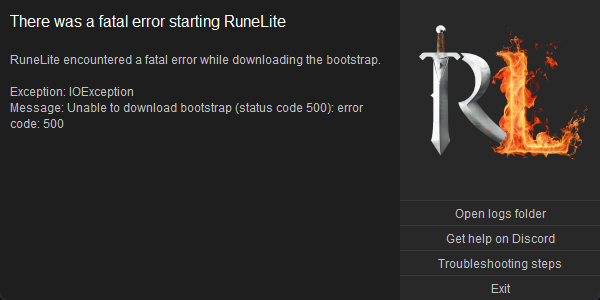
exception ioexception
 foggy tiger
 tepid solstice
https://i.imgur.com/xDxoHej.png
tepid solstice
https://i.imgur.com/xDxoHej.png
same error here
 faint marsh
yep
lofty shuttle
yeah mine says server returned http presonse code 500 for url
mossy swan
https://static.runelite.net/bootstrap.json i assume this will give you a cloudflare error also
because it does for me
faint marsh
yep
tepid solstice
yes
lofty shuttle
yeah thats what i got
 orchid terrace
same for me
mossy swan
follow https://www.cloudflarestatus.com/ for updates if it continues for longer
i dont see any issues reported there yet though
man you guys are fast
FAST 
 nova solstice
wiki is down too
tepid solstice
We trying to afk crab at work
nova solstice
cloudflare issue
lofty shuttle
i just tried logging in and couldnt
faint marsh
are they getting ddosed?
lofty shuttle
i was like uhhhhhhhhhhhhhhh
orchid terrace
working now for me
faint marsh
they have reported:
Investigating - Our support portal provider is currently experiencing issues, and as such customers might encounter errors viewing or responding to support cases. Responses on customer inquiries are not affected, and customers can still reach us via live chat (Business and Enterprise) through the Cloudflare Dashboard, or via the emergency telephone line (Enterprise).
We are working alongside our 3rd party provider to understand the full impact and mitigate this problem. More updates to follow shortly.
Nov 18, 2025 - 11:17 UTC
lofty shuttle
oh no i hope not this is my one day off work this week lmfao
faint marsh
so literally like 15 minutes ago ish
mossy swan
faint marsh
Investigating - Our support portal provider is currently experiencing issues, an...
looks like a different issue though
faint marsh
oh 🙁
mossy swan
mine just loaded, so please try again now
nova solstice
same
faint marsh
nice same
tepid solstice
bless you
lofty shuttle
im back thanks
faint marsh
rejoyce everybody
mossy swan
i got another error on second refresh but none after that, so might need a few tries
lofty shuttle
my herooooooooooooooooooooooooooooooooooooooooooo
mossy swan
okay now i get only errors again
faint marsh
I'm logged ingame
mossy swan
great, dont restart your client 
 thick estuary
I made it in, only thing I've noticed is GE values not showing on items which I can live without 😄
foggy tiger
its 110% cloudflare. i cant watch my favourite streamers atm lmao
 crystal tree
good morning cloudflare 😭
foggy tiger
its working momentarily
 modest walrus
i got in just now
foggy tiger
yeah it seems to be working and crashing
i just got on too but its very spotty it took me 4 times lmfao
 dusky flax
stoopid error code
 granite oasis
I am restarting over and over again and can't get on. But even League of Legends servers seems to be down. they went down at the same time
 latent wraith
Was able to open client once, but I was logged out of runelite and couldn't log in
gilded kayak
I went to shitpost this outage w/ my friend but he said this is planned
Apparently theres cloudflare maintenance 2day
I guess the backup rerouting is shitting itself
 stable night
 gilded kayak
Indeed
 viscid lantern
seems to be working again 
winter snow
Today is a good day
viscid lantern
better today than tomorrow ig
lofty shuttle
i already got my torch lit
 gusty oracle
RuneLite encountered a fatal error while downloading the bootstrap.
Exception: IOException
Message: Unable to download bootstrap (status code 500): error code:
Hello, what's going on?
 chilly stump
gusty oracle
RuneLite encountered a fatal error while downloading the bootstrap.
Exception: ...
chilly stump
gusty oracle
RuneLite encountered a fatal error while downloading the bootstrap.
Exception: ...
+1
winter snow
It is out of the RuneLite team's hands.
viscid lantern
it seems to work intermittently so just keep trying
 mellow scaffold
anyone know how to fix?
 clear sandal
mellow scaffold
anyone know how to fix?
clear sandal
mellow scaffold
anyone know how to fix?
 viscid lantern
read up
 hallow shoal
i got the error on 1 account, but my other account didnt get it
mellow scaffold
i was playing just 5 minutes ago
 tender lance
glad it isn't just my machine lol
 rancid jasper
also joined cuz it's doing that, i read keep trying above up here so i'll do that
gusty oracle
winter snow
It is out of the RuneLite team's hands.
Ok, but is it general mistake?
winter snow
Availability is intermittent - try, try, and try again
winter snow
gusty oracle
Ok, but is it general mistake?
It's affecting large swathes of the internet, yes
tender lance
yay cloudflare... -.-
gusty oracle
Just try a few times, I was able to get in.
winter snow
The irony of Cloudflare doing maintenance today is not lost on me
 errant rain
anyone have any fixes?
crystal tree
cant wait for tomorrow
 toxic garden
it sometimes works?
clear sandal
Yes.
toxic garden
ive tried it a whole bunch
clear sandal
It's intermittently getting fixed
crystal tree
keep trying
 neon berry
Exception: IOException
Message: Unable to download bootstrap (status code 500): error code: 500
clear sandal

 main isle
bruh was just about to goon with my twin
 wanton summit
its time to try official client xd
toxic garden
i saw cloudfare was down i assumed that was why but im confused how youre getting in
 mint temple
I think it's fixed
 mint citrus
So we just wait a few minutes/hours?
 analog hearth
I'm unable to get in atm
clear sandal
You can continue to try, once you get in, STAY in.
toxic garden
yeah ive been spamming open for 10min ish and not worked once
crystal tree
got 3/6 clients open
 swift wedge
Got in just now, seems up within the past minute or so
crystal tree
still trying
 grand sonnet
I had the same problem, just got in
 sour flint
god damn
mint citrus
it launched for me but all plugins from github are lost
analog hearth
Were you guys closing out of launcher and reopening or just clicking play over and over?
toxic garden
maybe the nearest cloudfare server to me is still down
swift wedge
mint citrus
it launched for me but all plugins from github are lost
Remembering what life was like pre gpu and 117hd, grim
 night goblet
just got 2 accounts on, just close the error msg and click play again
clear sandal
It's a global outage.
mint citrus
swift wedge
Remembering what life was like pre gpu and 117hd, grim
Glad i dont have to quest today
 tulip ledge
should be solved now
 cyan peak
Yeah twitter was down as well
 analog fog
back up now for me
crystal tree
still down for me
analog hearth
Oh finally got in lmao
toxic garden
still cant here
hallow shoal
skill issue?
toxic garden
australia issue
hallow shoal
rip
toxic garden
o shi i got in
tulip ledge
click troubleshoot and let me know what server location
neon berry
i used a VPN and it worked
mossy swan
its global issue
toxic garden
actually was australia issue it took longer here
mossy swan
just need to keep trying
 sharp spear
 clear sandal
sharp spear
clear sandal
sharp spear

 clever cloak
sharp spear
clever cloak
sharp spear
reinstalling runelite helped me
 median geyser
Yep cloudflare outage
swift wedge
sharp spear
It's coming back, third party known issue dw


 sick marlin
it worked for me just now
median geyser
its affecting much more than Runelite
clear sandal
Everything is affected.
tulip ledge
Manchester fixed within 5 minutes
sharp spear
Now it worked
toxic garden
classic us cloud networks being down all the time
swift wedge
Cloud is just someone elses datacentre, it's still a DC somewhere on earth regardless of cloud or not
 solemn grove
Also not connecting to cloudflare, struggles are real
 mild mesa
toxic garden
classic us cloud networks being down all the time
mild mesa
toxic garden
classic us cloud networks being down all the time
this is the first time I've seen this in years of playing, they're not down all the time
toxic garden
well yeah any server is someones server
crystal tree
what if the server is in my head
fair hatch
Any mods / supporters that can look at my LOGs to see if they can find a reason for my crashes / bsod?
toxic garden
idk man seems down to me
mild mesa
Mine came back up
leaden trail
fair hatch
Any mods / supporters that can look at my LOGs to see if they can find a reason ...
If you're getting a BSoD, 99% chance your GPU drivers are crashing
fair hatch
leaden trail
If you're getting a BSoD, 99% chance your GPU drivers are crashing
Its just weird, it only happens with osrs, no other games i'm playing :/
clear sandal
fair hatch
Any mods / supporters that can look at my LOGs to see if they can find a reason ...
You can upload the logs here and someone will bound to take a look. but BSOD is very likely hardware related.
leaden trail
Logs won't help in this situation
fair hatch
Okay, thank you for fast response
leaden trail
fair hatch
Its just weird, it only happens with osrs, no other games i'm playing :/
We use the GPU in kind of a weird way, I'd try rolling back your drivers
solemn grove
Cloudflare's looking like it's working again lads/laddets 👌
 wise venture
Working for me now as well
 harsh laurel
working for me as well
 dusky token
works for me
swift wedge
leaden trail
If you're getting a BSoD, 99% chance your GPU drivers are crashing
Or RAM or CPU (Intel 13/14 series burnin without/pre microcode patch) or PSU constrained or on some motherboards the CMOS battery is screwing with time and MS say nty. Does depend, GPU drivers a lot of the time is common, but more than 1% are unstable for other reasons
leaden trail
If it's only while using RuneLite it's almost certainly GPU drivers
The other things you mentioned will virtually always manifest as awful client instability long before they start causing system crashes
swift wedge
Or would BSOD before boot, or under load from other games yes, didn't clock the "other games are okay" part
 uneven bolt
went to see if anyone else is having issues, guess that answers my question
and i got in
 nocturne moon
Cloudflare 😠
 random wraith
The outage is fixed for me now - but a lot of plugins are missing. Anyone else?
nocturne moon
I assume that there's no way to launch the locally cached version of runelite without trying to contact runelite to check version difference?
viscid lantern
nope
 slender gate
gotta read up cloudflare issues
 verbal canyon
i think its a wait till this gets fixed angle
https://www.cloudflarestatus.com/
Welcome to Cloudflare's home for real-time and historical data on system performance.
slender gate
osrswiki is down also thats how i found out lol
 magic saddle
eta when this is fixed?
viscid lantern
you would have to ask cloudflare
 tight tiger
wtf is cloudfare and when does it get fixed
verbal canyon
i think its fixed right now
slender gate
Maybe wait it out? lol
 analog reef
working for me now
 oblique hill
its back up
tight tiger
oh shit its fixewd
slender gate
able to login now but who knows for howlong
tight tiger
lmao
magic saddle
client isnt even launching for me
tight tiger
worse case scenario, vpn to usa, then run runelite
 kind pendant
you guys having and issue with the wikki?
viscid lantern
well its a global outage
leaden trail
The wiki would also be affected yes
 dull oar
rip cloudflare
 finite prism
glad to see i'm not the only one lol
 opal lynx
Cloudflare Global Network experiencing issues
 hearty cipher
does nobody read.. lol bunch of parrots
hearty cipher
consecutively too lol
opal lynx
People do know Cloudflare runs most websites and apps right?
so when its down.. nothing works lol
 woven wadi
Tell the CEO of Cloudflare that I need to go buy my daily staves, asap.
viscid lantern
Identified - The issue has been identified and a fix is being implemented.
Nov 18, 2025 - 13:09 UTC

 near marten
someone else?
 viscid lantern
yeah cloudflare is having an outage
 woven wadi
near marten
someone else?
woven wadi
near marten
someone else?
Everyone else. There's a Cloudflare outage, outside the control of RuneLite.
mossy swan
man i like how chill everyone is being today
opal lynx
@hearty cipher i swear people will start a war over this shit ahaha
relax its not the end of the world
 teal walrus
did anyone notice runelite is down and its totally their fault? 😉
 astral heron
 opal lynx
@teal walrus im chilling in wc guild cutting redwoods lol
hearty cipher
opal lynx
<@206189558759555073> i swear people will start a war over this shit ahaha
Right.. lol this is mind blowing
So am i lmfao.. i been on for 10 mins already cutting redwoods
teal walrus
Does regular client work is all i came hre to ask?
winter snow
Yes
opal lynx
ahaha, @hearty cipher imagine if there was no internet, this generation is fucked lol
 opal lynx
listening to Youtube cutting redwoods @teal walrus soo chill
woven wadi
opal lynx
ahaha, <@206189558759555073> imagine if there was no internet, this generation i...
If there was suddenly no Internet, then I'd write a strongly worded letter to RuneLite's support team.
opal lynx
Of course you would @woven wadi because you think its Jagex fault lol
teal walrus
opal lynx
listening to Youtube cutting redwoods <@434054497938178049> soo chill
Not sure why youre @ing me specically but congrats lmao
opal lynx
because your chill lol
modern parrot
HDOS isnt working either. wtf going on
opal lynx
and not like others, crying over a bit of an outage lol
woven wadi
modern parrot
HDOS isnt working either. wtf going on
I'm guessing they also use Cloudflare as a gateway for version verification, if I took a guess.
opal lynx
5,195,854 websites using Cloudflare and your winging about RL?
 compact spear
This is the rl discord so
 zenith geode
anyone have an idea what is happening ?
 clear sandal
zenith geode
anyone have an idea what is happening ?
clear sandal
zenith geode
anyone have an idea what is happening ?

 fresh oracle
hi my pc just crashed and now its giving me this error when connecting to runescape, do I have to re-download runelite and if i do is there a way to save my plugins or not
 viscid lantern
read up
teal walrus
opal lynx
5,195,854 websites using Cloudflare and your winging about RL?
its like the only website 99% of us use
compact spear
Just turn comments off and leave that cloudflare update in
hearty cipher
My god
teal walrus
theres no way these people arent memeing right
opal lynx
@hearty cipher started again want to join me?
viscid lantern
teal walrus
theres no way these people arent memeing right
 they arent
teal walrus
like theres no way they dont see this active thread from the last 30m and dont just read like 10 messages up lol
fresh oracle
i guess ill use normal client for now
opal lynx
Eating popcorn? @hearty cipher
 normal bridge
I HAVE BIRDHOUSES TO REFILL WTF
viscid lantern
teal walrus
like theres no way they dont see this active thread from the last 30m and dont j...
you must be new here 
hearty cipher
opal lynx
Eating popcorn? <@206189558759555073>
Sitting here with my coffee watching the circus lol
 cinder orchid
Im just jamming to the song from the launcher and eating popcorn watching these
compact spear
teal walrus
like theres no way they dont see this active thread from the last 30m and dont j...
People cant/choose not to read, can see the same in here every game update
zenith geode
so all we can do rn is just to wait ?
opal lynx
ahaha @hearty cipher legit same here
 lilac sparrow
People struggle to read
dull oar
zenith geode
so all we can do rn is just to wait ?
yes
opal lynx
im drinking a dare ice coffee lol
zenith geode
alright ty
woven wadi
zenith geode
so all we can do rn is just to wait ?
Correct. It's an issue for Cloudflare to correct.
hearty cipher
Caramel macchiato iced coffee here lol
compact spear
Bet someone in their head office is having a great time
opal lynx
ahaha, nice i could go for some Caramel Macchiato
 pulsar kernel
Can anyone else log into the official client, mine says failed to login.
opal lynx
would be soo nice and sweet lolo
clear sandal
pulsar kernel
Can anyone else log into the official client, mine says failed to login.
 pulsar kernel
wasn't sure if they used the same thing, i guess that means they do
dull oar
cloudflare really chaining the issues these days, i hope somebody aint losing their job
opal lynx
☕ @hearty cipher
compact spear
Interested to see the cause once its tracked back haha
hearty cipher
opal lynx
☕ <@206189558759555073>
Still going strong at redwoods, using RL lmao
opal lynx
same here @hearty cipher
 cursive berry
Is there a way to get around needing to download the bootstrap?
opal lynx
soo good
 clear sandal
No
lilac sparrow
global unproductivty at all time low as cloudflare outage prevents us from not doing work
 crimson sorrel
opal lynx
Eating popcorn? <@206189558759555073>
crimson sorrel
opal lynx
Eating popcorn? <@206189558759555073>
YES, THANK YOU. you get it ❤️
dull oar
lilac sparrow
global unproductivty at all time low as cloudflare outage prevents us from not d...
oh noooo, what shall i dooooo, i can't wooooork xd
hearty cipher
 opal lynx
@hearty cipher ahahaha
 eager dawn
logi nto mobile guys 😄
opal lynx
what world?
woven wadi
cursive berry
Is there a way to get around needing to download the bootstrap?
Nope. The thing about the bootstrap is that it needs it to pull itself up by the bootstraps, yk.
 cursive berry
Is there a mirror that doesn't use cloudflare?
compact spear
Could've waited to have this happen on a day i was working, smh
 sharp token
Christ its a game people
opal lynx
@hearty cipher im here in 444
round jacinth
cursive berry
Is there a mirror that doesn't use cloudflare?
No.
compact spear
sharp token
Christ its a game people
Dont think its as serious as youre imagining
woven wadi
cursive berry
Is there a mirror that doesn't use cloudflare?
Even if the bootstrap were mirrored elsewhere (which it's not), the client doesn't let you enter a mirror anyway, so it would be pointless.
 steep patio
how long has the issue been a thing
dull oar
sharp token
Christ its a game people
i mean i'm more concerned with the other services that use cloudflare than just runescape at this point
opal lynx
@hearty cipher im Breadtop XD
 full wind
im playing on the official client... shudder
 floral dock
^^^^
hearty cipher
I see you lol and Finna Bread lmao



 frosty salmon
full wind
Wait never mind
frosty salmon
full wind
Wait never mind
Tried that too lol
full wind
fuck what do i do without runescape
floral dock
still doesn't work.
 clear sandal
Touch grass.
frosty salmon
Mobile is fine
 woeful spire
I am assuming loads of people are having the same bootstrap issue#?
clear sandal
Yes.
 celest flume
yeah 100% of users
round jacinth
They’re actively talking about it right now in this chat
sharp token
Welcome to Cloudflare's home for real-time and historical data on system performance.
cloudflare status page
woeful spire
I managed to get into 1 of my acc about 30 minutes ago
cloudflare has stopped me from watching anime too its messing with osrs and anime shits fucked 😭
sharp token
woeful spire
cloudflare has stopped me from watching anime too its messing with osrs and anim...
my company is literally grinding to a halt rigght now hahaha
mossy swan
im just chilling here trying to slack off more
woven wadi
Is now a bad time to pitch my multi-million dollar idea for a smart life-support machine that uses Cloudflare as a gateway?
celest flume
unfortunately it's midnight in australia so no company time burning for me 🙁
woeful spire
woven wadi
Is now a bad time to pitch my multi-million dollar idea for a smart life-support...
could be a dying business
 thin echo
woven wadi
Is now a bad time to pitch my multi-million dollar idea for a smart life-support...
thin echo
woven wadi
Is now a bad time to pitch my multi-million dollar idea for a smart life-support...
I'd buy
celest flume
ba dum tss
round jacinth
The us-east AWS outtage bricked people’s BEDS for a bit. People would buy it.
mossy swan
engineer would never
 royal furnace
keep getting this code
steep patio
u could read the chat
round jacinth
Yes cloud flare is down
celest flume
100% of users are
woven wadi
God. Why have we put network-enabled computers in beds!? That's as sad as the story of when the AWS outage stopped somebody from getting food out of a vending machine.
frosty salmon
Global CloudFare outage
royal furnace
steep patio
u could read the chat
my bad gng 💔
hearty cipher
celest flume
100% of users are
No, some of us are using RL just fine lol
round jacinth
steep patio
u could read the chat
Get used to it. People won’t. It is what it is.
 remote relic
Cloudflare outage is a huge deal. You'll probably see it hit the news soon enough.
frosty salmon
Mobile is up Glow
steep patio
royal furnace
my bad gng 💔
i forgive u <3
mossy swan
woven wadi
God. Why have we put network-enabled computers in beds!? That's as sad as the st...
it has a lot of cool features and the company wants to charge you a monthly fee
 errant topaz

Business Insider
Cloudflare confirmed that an "internal service degradation" was causing issues for users across the internet.
remote relic
If it's not fixed by market open...
 marsh sandal
u just leaked ur bankpin
mossy swan
errant topaz
https://www.businessinsider.com/cloudflare-outage-internet-down-x-open-ai-2025-1...
 AI AI AI AI
woven wadi
Can't wait to pay a premium and then neglect ever getting the subscription, then junking it as e-waste asap.
royal furnace
marsh sandal
u just leaked ur bankpin
why r u baiting me I actually just insta deleted the message LMAO
 plucky lily
reeeeeeeeeeeeeeeeeeeeee
 outer sun
reeeeeee waste of exp!
 nova charm
oh i was about to come in here to complain. glad its not just me
 prisma notch
got IOException when trying to boot up just now. whats the fix for this?
plucky lily
 frosty salmon
prisma notch
got IOException when trying to boot up just now. whats the fix for this?
frosty salmon
prisma notch
got IOException when trying to boot up just now. whats the fix for this?
Waiting for cloudfare to be fixed like the rest of us lol
mossy swan
im not moderating your fucking videos
frosty salmon
Down Detector, that's ironic
 silent crescent
no shit the only time i can play osrs after work the cloud crashed
outer sun
fk i shouldnt have logged out and shut the client off
mossy swan
cloudflare is down so runelite server cant be reached
prisma notch
i just started work and i need to chop some yews
outer sun
i think people who are already logged in and playing right now are unaffected?
frosty salmon
yeah I closed the client to test for a clanmante lol
silent crescent
also FYI league of legends cloud also crashed lmao
 raw sandal
who cares about leage of legends
silent crescent
🙁