#support
1 messages · Page 122 of 1
 crude chasm
 wet zenith
i have tbe same issue on bolt on steam deck as of this morning, game crashes when you hit the play button
havent updated anything and bolt on my arch linux desktop still works fine
 white belfry
wet zenith
i have tbe same issue on bolt on steam deck as of this morning, game crashes whe...
white belfry
wet zenith
i have tbe same issue on bolt on steam deck as of this morning, game crashes whe...
didn't know it was on steam deck lol, just download the GPU legacy plugin for now and diable the new GPU plugin
crude chasm
the gpu (legacy) plugin works for me currently, for anyone who needs it
yea
k glad it wasnt just me lol
wet zenith
in desktop mode the steam deck crashes so hard from it that it does a full reboot
crude chasm
yep
mine semi-gracefully crashes the graphics stack but recovers.. ive had the same crash reboot me tho
white belfry
My pc just freezes for several seconds then crashes runelite without any crash after report
wet zenith
its weird because like i said my desktop machine is running arch and isnt having any issues despite similar circumstances and same version of bolt
but it sounds like its more of a mesa / gpu plugin problem i guess
white belfry
if you didn't update your system then you're probably fine
I use CachyOS, which is a fork of Arch that focuses on having the most up to date drivers
wet zenith
i didn't update steam deck either whichj leads me to believe its something in runelite
but if you guys say the legacy gpu plugin works fopr now ill try that instead
crude chasm
wet zenith
its weird because like i said my desktop machine is running arch and isnt having...
yeah 25.2.6 fixes it
gpu legacy is working yea
gpu legacy seems to run better than the gpu plugin did this morning but maybe thats placebo
wet zenith
just for science i tried the 117 HD plugin and that works fine as well
 gilded kayak
gpu and gpue are on a the sailing version
gpul and 117 are on the non-sailing changes
wet zenith
that must have changed in the last few hours or so?
gilded kayak
it was 8 hours ago
 urban zenith
 round jacinth
Hope it works come sailing release 🫣
 little drift
yo does anyone has a plugin called "Delve Calculator", i have installed but it kinda sucks for me, and once i have unistalled it still doesnt disappeared on quick icons on the right... kinda sus. im little bit scared ...
 crisp dune
restart your client and whatever it's added should be gone
not every hub plugin cleans up after itself when they're disabled/removed
 tawny parcel
Anyone knowledgeable on running runelite on linux?
i've been using bolt just fine for like a month now. and suddenly the gpu plugin just crashes my system logs dont give me any idea of whats wrong either
any ideas?
crisp dune
The gpu plugin was updated (see #announcements). If you can update or roll back your mesa drivers, versions >25.2.6 or <25.1.7 will work fine
tawny parcel
i have not done any updates since before or after crashes
crisp dune
alternatively, disable the gpu plugin and install the GPU (legacy) plugin from the hub
what distro are you on?
crisp dune
ah, flatpak would be an issue then, since it needs mesa drivers updated there
aur has 25.2.6 available, but flatpak doesn't have it yet
tawny parcel
gpu(legacy) works,
tawny parcel
but its weird because it just suddenly crashed while i was playing
gilded kayak
it's a mesa bug
we're very aware of it but sailing still is coming out soon
so we gotta do this
tawny parcel
welp time to give a good ol kick to mesa then 🦶
crisp dune
GPU (legacy) will be the same as GPU was prior to this update; once mesa is updated, I recommend switching back to the core GPU plugin since that'll be mandatory once sailing is released
until then, no rush
 charred wind
If not flatpak version yeah probably
tawny parcel
yeah im grabbing from AUR now
updating mesa and running from AUR works mint
ty fellas ❤️
 warped mango
Hey all any idea if there is a plugin, etc that resolves some of the clipping issues that came with the graphics changes during this weeks update? Driving me crazy at places like vetion, etc..
round jacinth
read #announcements
warped mango
Oh wow yeah probably should've read that first lol ty beast
round jacinth
adam did not @ here so its just a normal unread message
 hollow raven
So I just switched runelite profile to one that has no plugins enabled. 117 HD plugin enabled itself somehow, yet when I look through the list of plugins, I don't see 117 HD present at all.

I was testing right-clicking Combat achievements to View/Open them because it wasn't working, then this happened instead. So, 2 bugs for one haha
No errors in client.log
 severe zephyr
Are there any debugging options available where you can hover over a window / icon / menu and Runelite will tell you the Plugin source from which the icon came from?
 zealous cedar
no
hollow raven
Here is the video showing right-clicking CA's not working in clan chat. I'm assuming this is coming from a plugin since there's no context menu text in the top-left of the game window.
severe zephyr
zealous cedar
no
Do you know how hard would something like that be to contribute to the codebase? I guess the initial question would be does Runelite create windows / icons that Plugins call the "create icon" API for with some metadata of what created that window?
zealous cedar
the hard part is theres like 1300 plugins which don't use whatever the new api would be to associate plugins to overlays or w\e
severe zephyr
Ah, dang. Ok no problem, thank you Adam
zealous cedar
if i was remaking runelite from scratch i would do something like that though
especially for chat messages, we have a lot of random plugins which add random chat messages and it confuses people
severe zephyr
Yeah I ask because there was an insanely helpful command in WoW called fstack / framestack that would help diagnose errant addon issues https://warcraft.wiki.gg/wiki/MACRO_framestack
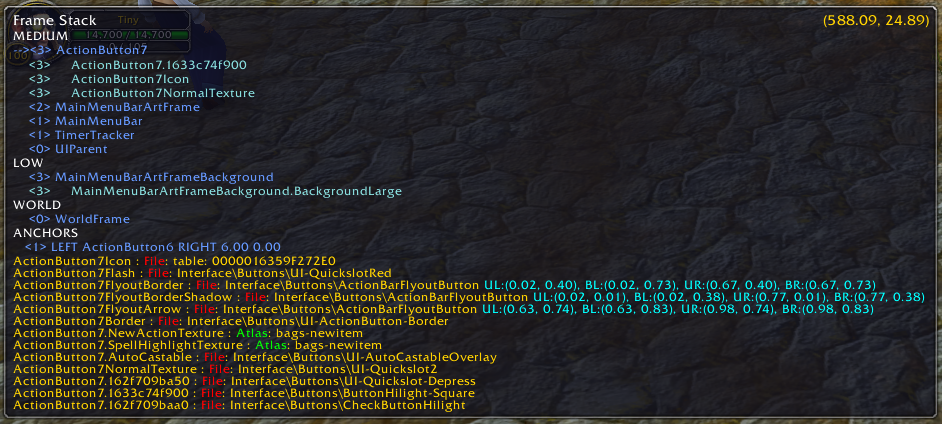
Warcraft Wiki
framestack shows all frames under the mouse cursor. It is part of the Blizzard DebugTools interface. The window will start in a corner of the screen, and move to another corner if moused over.
Though in my brief time crawling through the Runelite codebase, I'd choose developing plugins in RL Java over all of that Lua work I did every day of the week 😂
 rancid pilot
hey all hope all is well, is there a fix for the time tracking plugin causing a lag? I saw a few reddit posts but wasnt sure if there was a fix? thanks
 empty minnow
hollow raven
Here is the video showing right-clicking CA's not working in clan chat. I'm assu...
empty minnow
hollow raven
Here is the video showing right-clicking CA's not working in clan chat. I'm assu...
It's been reported at least once or twice before, one person said it was the chat color plugin, specifically the clan info color iirc (changing it won't retroactively fix it tho). Another said that that didn't fix it for them tho
gilded kayak
rancid pilot
hey all hope all is well, is there a fix for the time tracking plugin causing a ...
!hw maybe this
 haughty pumiceBOT
Graphical artifacts? Try disabling hardware acceleration: https://github.com/runelite/runelite/wiki/Disable-Hardware-Acceleration
gilded kayak
if you mean lag, when you have the sidepanel open
hollow raven
empty minnow
It's been reported at least once or twice before, one person said it was the cha...
Hmm, I've not changed a setting in that plugin (still using defaults)
rancid pilot
wow I hate to be that guy but turns out I am an idiot who didnt realise I needed to update runelite outside of the jagex launcher
gilded kayak
hollow raven
Hmm, I've not changed a setting in that plugin (still using defaults)
there's like 1 person with this issue who comes back ever so often
but when i say 1 person i mean it
hollow raven
How odd, it had worked for me before. I'll do some looking into it on the side.
rancid pilot
I have disabled hardware acceleration ill report back, very odd that its just time tracking when open that causes an issue
thank you
 vague ivy
No rush, Just annoying bug maybe? or maybe a setting I have?
Problem: my "show each kill separately" section of the loot tracker isnt showing things properly?
Currently it shows Loot from corp kills I did a few days ago. Since then Ive done chambers, yama, and tons of other things. Which get updated and moved to the top of the Loot tracker properly, however, if I choose the show kill separately button, it does not show my updated kill.
If i have it set to show kill separately open, and kill something it shows, but once I change back to group all, and then show kill separately again, it goes back to showing the last item I got was from the corp again, and what I kill just isnt shown anymore in that section.
I hope I worded this properly to understand. Im just at a loss why its doing that! lol.
zealous cedar
it was ordering the kills in the wrong order but I fixed that this morning
 west socket
Not sure if it's a widespread issue, but the new GPU renderer causes my whole system to hang until runelite gets killed (AMD RDNA3, Linux, Java 11 & Java 25, via bolt-launcher)
gilded kayak
it's not widespread per-say since it only happens to amd users who aren't on the latest mesa version
west socket
sounds like a known issue
gilded kayak
but check your package managers and see if u can download .6 - otherwise use gpu legacy
mesa 25.2.6
west socket
huh i am on 25.2.6
gilded kayak
ye just use gpu legacy, i would expect whoever's fault it is, to fix it before sailing comes out for real
idk if it's the bolt devs fault or not, i wasn't really paying attention earlier when people were talking about it
west socket
ty ty <3 good to know its a known issue
oh duh I just remembered im running it as a flatpak, which could very well be the reason its running .4
gilded kayak
ah yes
flathub does not have that mesa version
i do remember that being said earlier
vague ivy
Hmm... Phosani BLK circles that spawn... Their Almost invisable RN to me!! Is there a plugin that would be affecting this? I havent changed any settings for anything! I tried to see if Skybox was the problem and it isnt! I have noo Clue lol
gilded kayak
vague ivy
Hmm... Phosani BLK circles that spawn... Their Almost invisable RN to me!! Is th...
probably GPU, try GPU (legacy) on the 
vague ivy
Ill turn it off and try and see if their fixed.
gilded kayak
if turning GPU off does NOT fix it, but turning GPU (legacy) on DOES, can you post about it here https://github.com/runelite/runelite/issues/19495
vague ivy
Ok turned it of and fixed. But how do I run the gpu plugin, and it not mess it up? lol
vague ivy
ooh, was there a gpu plugin change that messed some things up?
gilded kayak
yes core GPU now has the changes it needs for sailing
GPU legacy is the gpu code from yesterday
vague ivy
TYVM ❤️
 molten aurora
I also noticed that with moons of peril
Does anyone know why my runelite would randomly close? I went to the bathroom and came back 2 minutes later and my 3 runelite accounts that i was playing on were closed. I thought my PC updated and restarted but I checked in task manager and it had still been running for hours aswell as my other programs like discord and chrome still up. I think its a nvidia app problem but just my guess.
 burnt shore
Hey guys, anyone had an issue with chat commands not working? unable to get !Pb jad to work
 cyan atlas
not sure if a known issue, client crash

 gilded kayak
you ran out of memory for hub plugins
the moment quest helper draws the arrow path does use a bit more memory than usual, so it can push you over the edge if you're already near it
do u have a lot of hub plugins
cyan atlas
i have a few yeah, not sure it its considered a lot
gilded kayak
u can cut your hub plugins or increase your heap, if ur worried its going to happen again
or if it did happen again
!config
haughty pumiceBOT
cyan atlas
if its a me issue then all g, honestly assumed it was a memory leak in a plugin or so, figured id flag it
if i do run into it again ill cut down my installed plugins, first time happening to fingers crossed it doesnt happen again
gilded kayak
it could be but it's unlikely to be a core plugin
if u can figure out if there is a leak we'll probably disable the hub plugin causing it
burnt shore
Anyone got any idea regarding the chat comands plugin not working with !Pb jad? i can get KC to work but not the PB even though i've done jad.
 old yarrow
burnt shore
Anyone got any idea regarding the chat comands plugin not working with !Pb jad? ...
old yarrow
burnt shore
Anyone got any idea regarding the chat comands plugin not working with !Pb jad? ...
I believe you can force it to update your PB's if you open up your adventure log in your POH
see if that fixes it
 solid mesa
I think that only updates KCs not PBs but I could be wrong
solid mesa
I don't think I've ever opened the boss log so maybe it does have PBs too
old yarrow
Just went to confirm, looks like jad is under the counters section (5)
 burnt shore
old yarrow
I believe you can force it to update your PB's if you open up your adventure log...
burnt shore
old yarrow
I believe you can force it to update your PB's if you open up your adventure log...
Will try that, thank you
Do i need to have my house done up or simply open the guide whilst in my POH?
old yarrow
burnt shore
Do i need to have my house done up or simply open the guide whilst in my POH?
It's a specific thing you build in your poh [[adventure log]]
https://oldschool.runescape.wiki/w/Achievement_gallery#Adventure_log oops wrong discord lol

Old School RuneScape Wiki
An achievement gallery is a room in a player-owned house in which the player can display their various accomplishments. It can be created at level 80 Construction for 200,000. A player may only have one achievement gallery in their POH at any given time.
If the player uses an orange spicy stew to boost their Construction by 5 levels, it is possi...
solid mesa
It does work in this discord, just not in the support channel
old yarrow
oh really? cool, that's good to know
 gentle cove
Does anyone know how to fix the screenshot folder path on MacOS? It doesn't save screenshots whatsoever
 lean holly
I think you specify path in the settings for the screenshot plugin
 safe pumice
GPU Plugin performance seems to have degraded significantly on ARM Macbooks in the last day or two. Quick scan of the discord seems to call out a separation between GPU and GPU (Legacy). This might be worth an in-Runelite notification. I was getting 30 FPS instead of 60 in some places.
charred wind
safe pumice
GPU Plugin performance seems to have degraded significantly on ARM Macbooks in t...
This is probably worth posting as an issue on github for a more formal record of this issue.
 hollow void
Any setting I can change in GPU plugin for the shadows in PNM? Currently only half of them load, if that and the rest just render the outline of the shadow
charred wind
hollow void
Any setting I can change in GPU plugin for the shadows in PNM? Currently only ha...
Gpu legacy on the hub
hollow void
tyvm
 wintry warren
Anyone else's macbook client shitting bricks last two days?
and has there been a solve to this yet
 leaden trail
Scroll up a few messages
round jacinth
My Mac likes the new GPU
zealous cedar
i have heard a bunch of conflicting reports from mac users and i am confused by it
is it just draw distance or something?
round jacinth
The GPU legacy has different settings compared to normal, where I think the GPU experimental and GPU have the same key values, is that right? Or am I seeing things
Checking the differences now
 toxic moss
Hi my runelite is failing to 'download bootstrap' on my hotel wifi, it isn't particularly fast but the WiFi is working enough
round jacinth
You may need to hotspot from phone first then switch after client loads
 faint hare
Well, I see you guys are talking about the GPU plugin, and im guessing that is what is contributing to my issue as well, but tzhaar area is like way darker for me than it was when i was last here a few days ago

 round jacinth
Checking the differences now
round jacinth
round jacinth
Checking the differences now
zooming out more on gpu v gpu legacy is a fps drop, at weiss farm spot i get 65 fps on gpul (120 draw distance, 5 extended maps) and i get 19.
is brighter textures on?
faint hare
yup, no settings changed at all
round jacinth
round jacinth
zooming out more on gpu v gpu legacy is a fps drop, at weiss farm spot i get 65 ...
and now they're both 19.... i dont know i guess
zealous cedar
are you sure you just didnt change the brightness setting?
faint hare
117 not installed either, etc etc. in game settings are the same
i wasnt aware that the gpu plugin had been like split off into seperate plugins since the renderer thing though, so ill poke at those and see if it makes a diff
toxic moss
round jacinth
You may need to hotspot from phone first then switch after client loads
That worked thanks mate
faint hare
Ok so going to the LEGACY GPU, settings and copying them over fixed it, but not the experimental one, if that means anything
just for the sake of confirmation, its back to looking like this now

 jolly tartan
Last few days I've been getting a connectException on launch, already set up RuneLite to bypass the firewall. Works fine when I turn on a VPN though. Any ideas on how to prevent this?
round jacinth
split tunnel runelite in your vpn
zealous cedar
safe pumice
GPU Plugin performance seems to have degraded significantly on ARM Macbooks in t...
do you have any more information on this? I have an arm macbook and I dont see degraded performance on it
 slender sage
is there a good guide somewhere with details on developing the panel part of plugins? I've seen the runelite wiki one but it's quite basic
empty minnow
Swing is apparently awful so most people avoid it
slender sage
is there a decent alternative or just avoid making a panel if possible?
 unreal delta
I cannot see my character or any NPCs. Worked fine last login a few hours ago, but now I see an empty world. any suggestions? It isn''t entity hider as that is turned off
 slender sage
unreal delta
I cannot see my character or any NPCs. Worked fine last login a few hours ago, b...
slender sage
unreal delta
I cannot see my character or any NPCs. Worked fine last login a few hours ago, b...
for me this happened when i put the experimental gpu plugin on, works fine when i have the legacy version on
unreal delta
slender sage
for me this happened when i put the experimental gpu plugin on, works fine when ...
THANK YOU! just switched over to fix it
zealous cedar
oh, yes
unreal delta
the experiment must be to see if you can play blind haha
 cursive veldt
hey i want to the nightmare and noticed weird graphics for the shadow attack on the ground. do u maybe have an idea how to fix that.


when it starts i cant even see most of the shadows, before the attack comes
solid mesa
It's a jagex issue. You can download GPU (Legacy) from the hub until jagex fixes it. See #announcements
zealous cedar
are you sure that isnt fixed now?
 livid aspen
Anybody know why the yellow pools and purple tornados are flashing at verzik p3? everything else seems fine its just these 2 things it seems like some kind of rendering thing it works fine on the normal client
 stone parcel
I'd guess the same thing as above.
gilded kayak
what runelite version are you on, it's in the  tab
tab
livid aspen
gilded kayak
what runelite version are you on, it's in the <:info_icon:938514423155400804> ta...
where i see this icon
gilded kayak
it's on the sidebar unless you've disabled the info plugin
livid aspen
RuneLite version: 1.12.0
zealous cedar
try restarting to 1.12.1
gilded kayak
your issue is probably fixed in 1.12.1 yeah
livid aspen
cheers
 thin sluice
question how do i remove the (nex) after the drops? never had this before..
 cursive veldt
solid mesa
It's a jagex issue. You can download GPU (Legacy) from the hub until jagex fixes...
cursive veldt
solid mesa
It's a jagex issue. You can download GPU (Legacy) from the hub until jagex fixes...
was this answer for me?
solid mesa
Yes, but you can also try updating to runelite 1.12.1 to see if it improves
cursive veldt
allright thanks man
 boreal raptor
zealous cedar
do you have any more information on this? I have an arm macbook and I dont see d...
boreal raptor
zealous cedar
do you have any more information on this? I have an arm macbook and I dont see d...
i'm on an m2 pro and new gpu also super laggy, if i switch back to legacy it's absolutely fine - i fixed it before by disabling 'compute shaders' but that option isn't there in the new plugin
wintry warren
zealous cedar
i have heard a bunch of conflicting reports from mac users and i am confused by ...
Got some screenshots for you, might be more helpful


 lean holly
thin sluice
question how do i remove the (nex) after the drops? never had this before..
lean holly
thin sluice
question how do i remove the (nex) after the drops? never had this before..
It’s relatively recent game update
 pale crater
Hello want to see if someone can please help me figure out why my runelite app is acting up
it keeps saying connection lost and logging me out
round jacinth
your internet is acting up
pale crater
never had this problem before and i have everything up to date and this isnt happening on any other devices
my internet is fine because it works on my phone and ipad
haughty pumiceBOT
open command prompt, type this in:
ping -t oldschoolXXX.runescape.com
where the XXX is your world minus 300, for example world350 = 50
pale crater
its just on the runelite app
round jacinth
while you play have this running
when you get a dc see if the command prompt says a different message besides ping resposnes
pale crater
where do i open the command prompt?
pale crater
im not sure i understand
gilded kayak
if you're on windows 11 there's an ugly search box, at the bottom of your screen
pale crater
im on a mac
gilded kayak
then you need to instead open terminal
pale crater
ok opened it up
gilded kayak
ok now run that command, after you replace the XXX with your world number-300
on mac it might error if you include the -t
if it does, remove it
pale crater
ok i did that now what?
gilded kayak
it will run in the background
if it errors, at the same time you disconnect from the game, it's your internet
because the terminal app on your mac is not runelite
gilded kayak
it wont stop running
was there a spot where the numbers skyrocketed
or it said "timed out"
pale crater
neither
no timed out
and numbers stayed similar
i put the world number minus 300 or world number+ -300
is it a dash?
pale crater
like i was in world 495 so i put 195
gilded kayak
yes
pale crater
ok i put that and ya didnt say timed out and numbers were all similar
gilded kayak
but unfortunately there's 200k+ people playing right now and ur the only one here, so unfortunately i have to continue still assuming it's on your end
when there's an issue like 10 people minimum start talking here at the same time
pale crater
but so strange
like my internet is fine just runelite not working
it runs on normal website download
gilded kayak
yeah but runelite is the one thing you've tried that doesn't work
it doesn't actually mean that there aren't other things not working
gilded kayak
yes you can't log into the official java client since it doesn't exist anymore
which is the only one i'd be interested in you testing
pale crater
so im just out of gas i guess lol
gilded kayak
like all internet issues anyone here has ever had, it will just go away
but
just for fun even tho there's a basically negative % chance this will work
!safe try safe mode
haughty pumiceBOT
safemode: To enable safemode
Windows
Run the RuneLite (configure) shortcut from the windows start menu
Tick the Safe mode box, save, launch RuneLite the way you normally do.
Mac
In Terminal, run
/Applications/RuneLite.app/Contents/MacOS/RuneLite --configure
Tick the Safe mode box, save, launch RuneLite the way you normally do.
pale crater
but my internet is working everything else running fine
ok did that
what is suppose to happen now?
gilded kayak
that's fine, safe mode just runs the client without any of the plugins - i did not expect it to work
pale crater
ok something popped up
the runelite launcher configuration popped up
do i click on safe mode?
pale crater
no i just put it in termianl
ok i just clicked the safe box do i click anything else?
there is like 6 boxes total
gilded kayak
did you do it 6 times
pale crater
debug, disable TLS verifications, Safe Mode, Disable Diffs, Disable updates, and IPv4
No i just never saw this popup until now
pale crater
do i just click the safe mode and thats it?
gilded kayak
 pale crater
ok now do i launch runelite again?
 ornate kite
So after a Windows 11 update came out, my game has started slowing down to a crawl at random intervals, any ideas what that could be? I haven't actually done anything besides updating.
zealous cedar
If you get a thread dump from the debug helper plugin when it is very slow we can maybe tell
ornate kite
a thread dump, now I just gotta find out where that is
gilded kayak
it's in the debug helper plugin
ornate kite
Is there a hotkey combo I gotta press? I can't seem to actually do anything with the plugin
gilded kayak
there's a new green icon on your sidebar
ornate kite
oh wow, I'm blind thanks
thin sluice
lean holly
It’s relatively recent game update
But is it changeable?
gilded kayak
i doubt jagex would add a setting for that since that's the way wildy bosses are also
chat filter could filter it from (nex) to *** but i assume that's not really what u want
 lethal bridge
My Slayer plugin has seemed to be glitchy for a while now, it doesn't show !task, nor highlights monsters anymore, I Change account and works fine?
it's not runelite profiles, due to I've tried all of them and same problem.
 mellow cape
round jacinth
Recover it with email
mellow cape
round jacinth
Recover it with email
tried
i had this account since 2010
i can log in but i dont have auth
old yarrow
lethal bridge
My Slayer plugin has seemed to be glitchy for a while now, it doesn't show !task...
I did notice this before as well and I've been trying to find a way to reliably reproduce it. Do you happen to play gridmaster at all?
mellow cape
and im not getting no email from auth
old yarrow
lethal bridge
My Slayer plugin has seemed to be glitchy for a while now, it doesn't show !task...
also
haughty pumiceBOT
To find the logs, you can do one of the following:
- If your client failed to open, click the
Open logs folderbutton. - Open the screenshot directory by right-clicking 📷
Camerabutton, navigate 1 directory up, then open logs folder. - Navigate to
%userprofile%\.runelite\logson Windows or$HOME/.runelite/logson Linux and macOS.
Upload the log files named client and launcher by dragging them to Discord. If there are files prefixed with jvm_crash dated from today, upload them too.
lethal bridge
old yarrow
I did notice this before as well and I've been trying to find a way to reliably ...
I played it for a few days then stopped
Didn't touch slayer on there.
The accounts I didn't play gridmaster with, do not have that issue @old yarrow
old yarrow
lethal bridge
The accounts I didn't play gridmaster with, do not have that issue <@95856390332...
Can you send the logs for me, please?
lethal bridge
I've checked them myself, there's 0 things related to "slayer" in there
in both files, client/launcher


Unless there's anything else you'd like me to check?
I've just finished my slayer task "kalphites" will see if taking another changes out
old yarrow
lethal bridge
I've checked them myself, there's 0 things related to "slayer" in there
Maybe not, but there's probably other log messages that provide more context. I can't know what to tell you to find if I don't know exactly what's happening 😋
lethal bridge
@old yarrow So, it could be directed to kalhpites specificlaly.
New task: daggs works fine, kalphiote however no, breaks everything, including !task
i.e before and after


 mortal island
Hey, hope you guys are doing well.
I’m having an issue with my RuneLite profile. I recently switched from a Windows PC (where I had all my plugins and settings) to a MacBook. When I logged into RuneLite on my Mac, none of my plugins or settings were there.
When I check RuneLite on the web, I can still see all my loot tracker data from months ago, so I know I was logged in before. Do you guys know if there Is any way to recover my old profile — including the plugins and settings? I don’t have access to my old computer anymore.
old yarrow
lethal bridge
<@958563903321813002> So, it could be directed to kalhpites specificlaly.
If I'm honest, It'll be easier if you just send the logs. Without those I'm just taking shots in the dark
haughty pumiceBOT
round jacinth
Switch to that profile in side panel
mortal island
haughty pumice
<@298130471072694272> <https://github.com/runelite/runelite/wiki/FAQ#my-plugins-...
It’s not showing up — I don’t have any profiles on RuneLite on my new computer.
 old yarrow
mortal island
It’s not showing up — I don’t have any profiles on RuneLite on my new computer.
old yarrow
mortal island
It’s not showing up — I don’t have any profiles on RuneLite on my new computer.
Did you have cloud sync enabled on your old PC for that profile?
The orange icon in the image

 sly sentinel
Having an issue where loot tracker is lagging when open during clue opening/hunter loot sacks. Had this issue a while ago and it fixed itself somehow but it is happening again. Anyone had experience with this?
gilded kayak
sly sentinel
Having an issue where loot tracker is lagging when open during clue opening/hunt...
!hw
haughty pumiceBOT
Graphical artifacts? Try disabling hardware acceleration: https://github.com/runelite/runelite/wiki/Disable-Hardware-Acceleration
sly sentinel
Thanks @gilded kayak
oh weird i already have it toggled off
ill try restarting client again
gilded kayak
unfortunate
mortal island
old yarrow
Did you have cloud sync enabled on your old PC for that profile?
The orange ico...
Hmm, I’m not sure — do you think that could be the issue?
old yarrow
mortal island
Hmm, I’m not sure — do you think that could be the issue?
Yeah, if it wasn't enabled then it wouldn't have been synced with your account and would explain why it's not shown on your Mac.
It's still possible its a different issue, but that's what I'd check first
mortal island
old yarrow
It's still possible its a different issue, but that's what I'd check first
ight, thanks !!
empty minnow
old yarrow
If I'm honest, It'll be easier if you just send the logs. Without those I'm just...
Jagex updated the task name for goblins recently which broke that task and presumably a couple others, just no one has looked into it yet
Probably just need to revert the RL fix for the previously incorrect names
old yarrow
empty minnow
Jagex updated the task name for goblins recently which broke that task and presu...
Well interesting, I was not aware of that. Sorry about that @lethal bridge !
 river sedge
Any one know of something interfering with Clue Details pluggin - Fairy ring auto scroll not working properly?
gilded kayak
does it work if you disable automatically open search in the fairy ring plugin
river sedge
how are you so smart
gilded kayak
i stole the answer tbh because the same thing happens to the hunter rumors plugin
river sedge
bless you brethren of the runelite discord
 spring sequoia
hello, need some advice / help on this.
i have been losing frames on runelite after updating to windows11, version 25H2
- before the update, ive been playing for 2 months without any problems.
- after updating, its smooth, but frame drops significantly when playing videos on chrome/edge
- tried disabling hardware acceleration on chrome and runelite config but it doesn't help.
- GPU overlay isn't turned on. I also reinstalled jagex launcher and runelite, runelite is 64x
- chrome running doesnt seem to be the problem. frame drops only when videos are turned on
everything went southafter the windows update.
edit: no problem on OSRS official client
edit 2 : somehow it feels fixed ? didnt change anything. i just played on official client for abit, then went back to runelite
any help would be very much appreciated !
spring sequoia
not sure if this is how to get the dump log or something
 trail pewter
Hi, is annoyance mute broken atm? I still hear other players sound even if i have Others' area sound checked.
one scenario is woodcutting
old yarrow
trail pewter
Hi, is annoyance mute broken atm? I still hear other players sound even if i hav...
Seems to work fine for me. You could also try enabling the "Mute other player' area sounds" option in the Music plugin and see if that helps
wont solve the issue with annoyance mute not working, but it'll at least mute others for you
trail pewter
old yarrow
Seems to work fine for me. You could also try enabling the "Mute other player' a...
the music plugin fixes it. Apparently wtod cutting bruma roots sounds are environmental
thanks!
 clear ridge
spring sequoia
hello, need some advice / help on this.
i have been losing frames on runelite af...
clear ridge
spring sequoia
hello, need some advice / help on this.
i have been losing frames on runelite af...
I have the same issue, for me all of OSRS via RuneLite is stutering jittery - on W11 24H2 though
Tested a fresh profile still happening - on main PC is fine but laptop rtx 3060 mobile gpu it is stuttering. This started happening ever since Jagex 'renderer' updates. If there is any more technical info I can gather let me know, but from my perspective this is the only thing that has changed.
 torpid hazel
Someone else have issues with gpu or something like that?
clear ridge
torpid hazel
Someone else have issues with gpu or something like that?
Yes it stutters really badly
My question is this related to something Jagex has done that Runelite has to account for?
 winter snow
Yes, changes to the GPU plugin were made off the back of the z-buffering stuff that will be used for Sailing
You should be able to switch to the GPU (legacy) plugin on the hub to restore the old behaviour, but that will stop working correctly when Sailing launches
spring sequoia
when did the z buffering update go up ?
winter snow
spring sequoia
when did the z buffering update go up ?
like 2 days ago
spring sequoia
i got frame drop issues only approximately 12 hrs ago 🤔
i did try the GPU legacy plugin, but it was still lagging. removed it, enabled the normal GPU plugin again, and i dont know if that fixed it. there hasnt been frame drops since
 fair niche
Hi guys, anyone experienced this after the gpu update?
Using AMD gpu. After one lap of hallowed sep it comes right back in a different way 😂
Doesnt happen on 117 / when gpu plugin off/ gpu (legacy) When i turn off the plugin and turn it back on it disappears...
 empty minnow
At least one other person has mentioned it, might be good to report it on GitHub to track it. I've seen this happen in the PoH too back when GPU was still GPU experimental
 sturdy willow
Not sure if this is the right place for this question... but is there any key that you can press to shift cursor focus from the runelite/plugin bar on the side of the game window back to the game?
solid mesa
I don't think so, I think you have to click back into the game
sturdy willow
Ah, that's what I've always done, but I thought I'd ask, ty.
 atomic sphinx
blindfold plugin got disabled again ? "imcompatible with current runelite version"
zealous cedar
it should be coming back now
atomic sphinx
sweet thanks
just tried a doom run without it and it is just painful not being able to tell the dark spots with the settings my monitor is able to do
atomic sphinx
zealous cedar
it should be coming back now
its back but slightly bugged. you need to reload to a compeltely new area to be able to turn it off again
not really a big issue for me as I'd rather have it and just tele once to fix this than not have it
solid mesa
atomic sphinx
its back but slightly bugged. you need to reload to a compeltely new area to be ...
@quasi goblet
 formal perch
Hi guys I’m new here, I’m hoping to get some help my runelite overlay has all of a sudden gone all grey like no icons or display when I expand it,
Does anyone have any suggestions please as to what I might have done that’s caused this bug, or any suggestions on how I could go about fixing or finding more info about it as I’ve hit abit of a wall ✌🏻
Thank you in advance
 fringe rivet
Anyone know why the loot tracker shows loot in reverse chronological order? (When showing individual kills)
zealous cedar
pretty sure i fixed that the other day
fringe rivet
Ill reload the client, I think its been open a few days
 serene hare
Has anyone else had issues with the new GPU plugin on Linux? 117HD and GPU (Legacy) allow me to load into the game fine, but the new renderer in the GPU plugin crashes my whole device (Steam Deck, I use it to play on lunch lol). I know it's not a standard config, but I figured I'd ask.
gilded kayak
yes it will be fixed whenever steamos updates to mesa something.6
serene hare
Good to know, thank you!
solid mesa
You need Mesa 25.2.6
gilded kayak
yeah that
fringe rivet
fringe rivet
Ill reload the client, I think its been open a few days
Yep its fixed, thanks Adam.
 rare needle
empty minnow
Jagex updated the task name for goblins recently which broke that task and presu...
rare needle
empty minnow
Jagex updated the task name for goblins recently which broke that task and presu...
what was the change?
empty minnow
rare needle
what was the change?
I think initially the task name was "Goblins" then it got changed at some point to "Goblin" (singular) and then RL put out a fix to react to that. Then Jagex un-broke the names so now they're back to "Goblins" I believe. RL has not un-fixed the slayer plugin yet tho
Same applied to one or two other tasks iirc
Hmm maybe just Goblins actually https://github.com/runelite/runelite/commit/e1a4054e6778f27515749e6150dc8277e1ab9096
 solid mesa
Boss tasks were broken at the same time due to the summer sweep up but just goblins changed task name
empty minnow
Oh yeah maybe that's what I was thinking of
atomic sphinx
is there a way to access a crash file for runelite? just was seconds away from completing perfect doom when client suddenly closed itself
would really like to know what caused it if possible
haughty pumiceBOT
To find the logs, you can do one of the following:
- If your client failed to open, click the
Open logs folderbutton. - Open the screenshot directory by right-clicking 📷
Camerabutton, navigate 1 directory up, then open logs folder. - Navigate to
%userprofile%\.runelite\logson Windows or$HOME/.runelite/logson Linux and macOS.
Upload the log files named client and launcher by dragging them to Discord. If there are files prefixed with jvm_crash dated from today, upload them too.
 vast bone
That's where they are
atomic sphinx
thanks
 civic vapor
Hello, I hope this is the right place for this. I found a small bug in the Path Marker plugin by @median lichen. In the repo it said I should contact via discord, I hope this is okay.
The bug: When the minimap is zoomed in or out, the path markers don't scale correctly in relation to the zoom. (The zooming is done with the built-in plugin called Minimap)
Thank you!
atomic sphinx
can i show the file to anyone who might know what caused the crash?
leaden trail
Just upload it here
atomic sphinx
good thing im 4.7x dry at doom for my first unique so I'll probably be able to get perfect doom again before I get what i need, but this just now was so sad 🙁
game just crashed again a few seconds after I logged back in
spring sequoia
oof the runelite frame lag is back : |
atomic sphinx
If anyone can tell me what caused the above two crashes I'd be very helpful
 median lichen
civic vapor
Hello, I hope this is the right place for this. I found a small bug in the Path ...
median lichen
civic vapor
Hello, I hope this is the right place for this. I found a small bug in the Path ...
Hmm, right. It was made before zomming in/out the minimap was a thing. Thanks for letting me know. But to be honest, I rarely am bothered to update the plugin 💀
thin sluice
anyone knows why there is (nex) behind my drops? this changed like 2 weeks ago?
 thin sluice
my friend doesnt have it
civic vapor
median lichen
Hmm, right. It was made before zomming in/out the minimap was a thing. Thanks fo...
That's okay, thank you for responding! If I make a PR would you consider merging it? I haven't worked on a runelite plugin before but I do have programming experience.
median lichen
Sure
gilded kayak
thin sluice
my friend doesnt have it
🤷
i stole the answer but i trust the person who said it
 sterile echo
Hey, probably related to GPU plugin:
Some textures are missing.
AMD GPU in case it is relevant.
on GPU(legacy) it's showing textures


 gilded kayak
is it fine with neither plugin on
sterile echo
When i'm disabling all GPU related plugins, textures are hidden
solid mesa
It's a zbuf issue Jagex needs to fix
sterile echo

 gilded kayak
ye what cooper said, can you post it here just so it doesn't get lost
ok
where'd my http go
sterile echo
Yeah sure i'll add my issue there too
spring sequoia
ok enabling gpu legacy, turning it on and off, turning gpu normal back on fixed the frame rate again
atomic sphinx
Sorry for reposting, but is there anyone who could tell me why the client first crashed at Doom, then seconds after logging back in after reloading it?
leaden trail
You can try disabling core performance boost in bios
atomic sphinx
ah, hoped it was related to a singular plugin or something (saw the agility plugin mentioned)
im not comfortable messing around in bios, so I'll just hope that next patch I can play again
or I'll grab the official client and just afk redwoods or something
ty though
hollow raven
Is it safe to switch from Legacy GPU to regular yet?
solid mesa
There's still some zbuf issues you may encounter in some areas
 quasi goblet
atomic sphinx
its back but slightly bugged. you need to reload to a compeltely new area to be ...
quasi goblet
atomic sphinx
its back but slightly bugged. you need to reload to a compeltely new area to be ...
Not at PC atm but can you record a clip so I know what I'm looking for
 sudden inlet
im having a plugin issue, its saying my plugins are downloadedf but they're not showing up, i made sure to restart the computer, the client, using jagex client, and done everything i can think of but its not set-up properly any ideas?
for instance inferno and colosseum isnt showing up and my chugging barrell isnt labeld
haughty pumiceBOT
round jacinth
That plugin folder doesn’t mean anything really
sudden inlet
i have already checked profiles and everything, the plugin is downloaded but its not in the list i just re updated runelite still not showing up
leaden trail
Post your logs
haughty pumiceBOT
To find the logs, you can do one of the following:
- If your client failed to open, click the
Open logs folderbutton. - Open the screenshot directory by right-clicking 📷
Camerabutton, navigate 1 directory up, then open logs folder. - Navigate to
%userprofile%\.runelite\logson Windows or$HOME/.runelite/logson Linux and macOS.
Upload the log files named client and launcher by dragging them to Discord. If there are files prefixed with jvm_crash dated from today, upload them too.
sudden inlet
just todays log?
no crash log from today
missing toa, inferno tracker, flipping, fortis colo. on the sidebar, and a few weird things like chugging barrel info overlays
leaden trail
You have some file permissions issues
Redownload RuneLite from the link in #welcome . As long as you don't delete anything, you won't lose any settings. Run it standalone as admin once (even if you log in via Jagex launcher usually). Once you get to the login screen, close it and set it to not run as admin anymore and that should fix the permissions issues. You can then launch it however you normally do
If the problem still persists we can go from there
sudden inlet
ok ill come back and update you
yeah it's still doing it, i followed your directions step by step, should i restart the computer then try it over again?
leaden trail
Upload your logs again
 blazing pelican
@zealous cedar figured out the GPU plugin issue... if curious I had to go to Armory Crate and switch my GPU settings. I think something changed when I got an update last week
 muted copper
The new GPU plugin has no toggle for Color Banding.
This is a very weird choice, considering the Official OSRS client has color banding always on
Reddit
Explore this post and more from the 2007scape community
round jacinth
does their new renderer still have color banding?
muted copper
Alot of people I know were excited for the new GPU plugin because of the new Hybrid UI scaling. But having no colorbanding is really rough... the game looks so bland without it
muted copper
round jacinth
does their new renderer still have color banding?
I'm not sure. I think jagex paused the beta for the new renderer while they work on it. The current version of the official client has color banding always on.
atomic sphinx
quasi goblet
Not at PC atm but can you record a clip so I know what I'm looking for
hey - I can't easily record a video if the recent issue I had with my client crashing keeps persisting. But here is what happens:
- Enable plugin on the right sidebar like usual. It works
- Attempt to click on the right sidebar thing again to disable. nothing happens.
- Teleport away. It disables the plugin
(from memory). I'm unsure if the plugin sidebar thing disabled itself or just completely became unreacting
atomic sphinx
I can check that tomorrow if I dont forget
The teleproting away to disable plugin also only happens after you clicked to disable the plugin ofc
quasi goblet
atomic sphinx
hey - I can't easily record a video if the recent issue I had with my client cra...
Thanks, I'm pretty sure I know what's happening and the fix should be simple
 hollow bison
i this the right place to get help with connectivity issues? i just get a lot of random lag spikes sometimes for no apparent reason. Id go from 30 ping to 500-1200+. I do watch hbo/youtube on the side sometimes but it wasnt this bad before
haughty pumiceBOT
open command prompt, type this in:
ping -t oldschoolXXX.runescape.com
where the XXX is your world minus 300, for example world350 = 50
solid mesa
You can run ping in command prompt/terminal. But if that shows ping spikes then the issues aren't runelite. It's your pc, router, isp, etc.
solid mesa
Yes
 solid mesa
You can try ping -t 8.8.8.8 which is google. If you don't get ping spikes then it's going to be either your ISP or Jagex
 solid mesa
Yep, no ping spikes
hollow bison
thank you so much
 left inlet
having issues mostly while doing phosanis and i feel like i noticed a few times at whisp too
i have a 9060 xt gpu and a 7600x3d
getting microstutters mostly during certain parts of the fight, im using gpu (legacy) plugin and ive recently turned off hardware acceleration but it doesn't seem to have fixed it (maybe partially?) logged with amd adrenalin and had chatgpt turn it into a graph

for the record I was already having this issue prior to the gpu plugin issue thats going on rn
my fps stays high mostly except during those points and its mostly during holes/flowers phases also i booted into safe mode and wanted to do a kill but it was not nearly as smooth (looked blocky when running) so really i dont even know if i'd be able to tell whats lag and what isnt based on that alone

i tried csgo and dont seem to be getting any issues (only tested for about 10 minutes but its really reoccuring in runelite so figured that was enough)
these are my gpu settings as well

 peak sonnet
anyone know how I can connect RuneLite to Discord? Thanks in advance for your help!
gilded kayak
what's the context
peak sonnet
To show my status on Discord - I want my friends to be able to see when I am playing so they can join in
I tried Google / Reddit..I'm stumped !
gilded kayak
it should just work if the Discord plugin is enabled* and ur not running discord as admin
also if ur not on some obscure operating system too I guess
also u have to be using the discord app, not the web browser
peak sonnet
It is enabled. I'll give restarting a go
gilded kayak
just incase ur doing that
haughty pumiceBOT
If your Discord activity status is not showing properly follow these steps:
- Make sure your Discord plugin is enabled.
- Make sure RuneLite is not manually added as game to Discord game list.
- Enable
Share your detected activities with othersin Discord settings. - Make sure both RuneLite and Discord are NOT running as admin.
peak sonnet
Aha Admin is it. Thank you!
 charred cradle
Hey question, my old PC died and I don't have access to the old harddrive. Is there any way to recover my profile on the new PC? I logged into the website and see all my profiles, but no idea how or if I can export them?
left inlet
charred cradle
Hey question, my old PC died and I don't have access to the old harddrive. Is th...
just log into runelite there is a little green button on the top right next to the camera button
solid mesa
(If you synced your profile)
left inlet
man my question is going to get so buried 🙁
guess ill just reply to it later in case nobody sees it
charred cradle
I did but dont see them on in the profile list so means I must of not synced them?
If they show on the website does that mean I synced them?
solid mesa
No
charred cradle
Sounds like I gotta redo all of them then darn
rare needle
?
muted copper
round jacinth
the new gpu is meant to support the new renderer
shouldn't the color banding toggle be removed when the new renderer releases then?
round jacinth
We are switching to a new renderer today to support Z-buffering for the upcoming sailing release.
i think thats what it means? idk
left inlet
left inlet
having issues mostly while doing phosanis and i feel like i noticed a few times ...
seems to be happening anywhere with a lot of animations going on can be seen on the run going left
muted copper
round jacinth
i think thats what it means? idk
yeah the Z-buffering update is already out for the official client, but color banding is still enabled on the official client.
but the new renderer has been taken offline while jagex is working on it:
Thank you once again for testing, reporting, and supporting us as we chart the next generation of Old School visuals - we're keeping the same style you know and love, just with a bit of polish! ```
Old School RuneScape
This week, we say a temporary goodbye to the new renderer beta so the team can work on preparing for the future!


So it doesn't make sense for such a big change to happen to the GPU plugin for RuneLite
to disable color banding entirely
when everyone on the official client, the mobile client, etc
all are using a version of OSRS with color banding
gilded kayak
do you want to write a java renderer for us
gilded kayak
we are using the browser version of the game
muted copper
shouldnt the new GPU plugin be delayed until the new renderer is offically out then?
crisp dune
No?
round jacinth
and if you peaked at #development at all, adam has been smushing bugs
crisp dune
The ability to toggle color banding may yet be re-added, but having an otherwise functional renderer is a bit more important first
solid mesa
The new renderer is for the official client and is totally separate from Runelite or the GPU plugin
muted copper
But the official client isn't using the new renderer
round jacinth
it will though
muted copper
they delayed the release of the new renderer to 2026
solid mesa
The new renderer is totally irrelevant to runelite though
GPU has to support zbuf by sailing (November 19th)
round jacinth
the current gpu that is released needs to work 100% by nov 19
yeah
the quality of life features don't
gilded kayak
lets go back in time and rig the vote so we dont have to do all this shit
i doubt necromancy needs a whole rendering overhaul
gilded kayak
i guess
muted copper
i guess it's a quality of life change to some ppl, but color banding has been part of the game for the past 20 years, its just so jarring to see it be removed
gilded kayak
if we could get all the rendering tested with colorbanding, as NFC said it would probably be done
but we need this working in basically 2 weeks
 whole bloom
Hey guys, I dont mean to change that topic, but I was trying to add my own icon for. a plugin I am working on, but I'm having a hard time figuring out where I should put my icons folder. Am I allowed to put it under the resources folder?
crisp dune
Yes, files included in your plugin build should go under the resources directory
whole bloom
Thank you
muted copper
round jacinth
or gpu legacy
Can we add hybrid UI scaling to GPU Legacy then 👉 👈
solid mesa
GPU Legacy is going away in 2.5 weeks
muted copper
solid mesa
GPU Legacy is going away in 2.5 weeks
 zealous cedar
hopefully, i may keep it around longer depending
and just stick a warning on it about sailing
gilded kayak
WARNING: YOU WILL EXPLODE IF YOU ATTEMPT TO INTERACT WITH THE SAILING SKILL, WHILE USING THIS PLUGIN
muted copper
when sailing releases, and the official client still has color banding, do I have permission to come back to #support to rant again
round jacinth
you can go to #suggestions
muted copper
round jacinth
you can go to <#474137683120095263>
ill make a post there abt it on november 19th 👍
muted copper
but if the official client removes color banding on november 19th, then its a OSRS issue, not a RuneLite issue
solid mesa
The GPU plugin is totally separate from the official client renderer. If Jagex has color banding or not is totally separate than if Adam writes the code for color banding
muted copper
round jacinth
can start it early just for tracking purposes

GitHub
In the GPU (Legacy) plugin, there is an option to "remove color banding." A lot of people played with [ Remove color banding = Off ] because that matches how the game looks on Official OS...
 muted copper
https://www.reddit.com/r/2007scape/comments/1onrmcb/why_did_the_runelite_gpu_plu...
muted copper
muted copper
https://www.reddit.com/r/2007scape/comments/1onrmcb/why_did_the_runelite_gpu_plu...


 mossy fog
atomic sphinx
its back but slightly bugged. you need to reload to a compeltely new area to be ...
mossy fog
atomic sphinx
its back but slightly bugged. you need to reload to a compeltely new area to be ...
hide terrain works for you?
i did just change computers but rest of my plugins work. so i expected blindfold to work too (since fix)
 hidden pulsar
anyone know what causes this flickering issue? happens with alot of things.
gilded kayak
the short answer is ZBUF
the long answer is sailing is coming out in 2.5* weeks and some stuff is broken right now, if you use gpu (legacy) from the instead it probably wont do that
hidden pulsar
gilded kayak
the long answer is sailing is coming out in 2.5* weeks and some stuff is broken ...
legacy fixed it, thanks
gilded kayak
you'll have to swap back to core gpu if u want to do sailing, but it should be fixed by then
hidden pulsar
gilded kayak
you'll have to swap back to core gpu if u want to do sailing, but it should be f...
thank you sir
 vocal kernel
so will the legacy gpu plugin still be around after sailing release or no
solid mesa
vocal kernel
damn all i had to do was scroll up haha
thats awesome
another question, is runelite able to fix the visual bugs that the new renderer has or would that all have to be fixed by jagex
just curious
solid mesa
All on Jagex
vocal kernel
oo interesting lol
 stray aspen
customizeable xp drop plugin is not showing correct predicted hit
it used to but today it hasnt been working correctly
haughty pumiceBOT
Get support for the Customizable XP drops Plugin Hub plugin here: https://runelite.net/plugin-hub/show/customizable-xp-drops.
You can also find the support link by searching for the plugin in the Plugin Hub panel and clicking the ? button on the plugin, or by right-clicking the plugin in the plugin panel and clicking the Support menu option.
 whole gulch
hey not sure if this is a runelite issue, but was wondering if someone could help me out?
some textures are flickering like crazy, like my poh ponds and dryad circles at forestry events

 final axle
read up like 10 messages
 worn viper
#support I just came here to say thank you for talking to all of us frustrated nerds who are having GPU plugin issues. Runelite makes OSRS truly great. ❤️ Much love
 copper tiger
Anyone know what this error is?, I wasn't sure why this was happening so, I deleted the Jagex launcher cache and its only happening when I'm trying to open it through Runelite, official client still works

 mossy swan
copper tiger
Anyone know what this error is?, I wasn't sure why this was happening so, I dele...
mossy swan
copper tiger
Anyone know what this error is?, I wasn't sure why this was happening so, I dele...
has it worked before?
copper tiger
yess only happened this morning, I ended up reinstalling runelite, think a file possibly corrupted! seems to be working fine :)
mossy swan
sounds possible
mossy swan
copper tiger
yess only happened this morning, I ended up reinstalling runelite, think a file ...
make sure to shut down your pc normally and not by unplugging it from power or anything
dont force shutdown by holding the power button also
quasi goblet
atomic sphinx
hey - I can't easily record a video if the recent issue I had with my client cra...
just submitted a pr, should be fixed once the reviewers approve it. thanks for the report
 rustic palm
hello ground objects hider isnt hiding the ids i have listed anymore. is this a jagex issue i'll have to wait out or is there something i need to do?
haughty pumiceBOT
Support for hub plugins should be directed to the author of the plugin.
You can find the support link by searching for the plugin in the Plugin Hub panel and clicking the ? button on the plugin, or by right-clicking the plugin in the plugin panel and clicking the Support menu option.
rustic palm
oh roger tyvm
 timid rock
rustic palm
hello ground objects hider isnt hiding the ids i have listed anymore. is this a ...
timid rock
rustic palm
hello ground objects hider isnt hiding the ids i have listed anymore. is this a ...
restart client & use regular gpu plugin
 olive socket
has anyone else noticed/reported that the new gpu plugin "breaks" (unsure if it's a plugin quirk or it was technically a bug to begin with that z buffering fixes) the brimhaven spikes footpedal/click method? I've only found one spot of the arena that I can yellow click now to do it whereas before you could click the cliffs or most other parts of the arena
winter snow
I have no idea why GPU would change click zones in that way, but would argue being able to click outside a walkable area and get movement is a bug anyway
but I am not Jagex
 inner geyser
why skybox not remove bloat floor anymore
 oblique plume
are we sure it ever has
inner geyser
how to remove
olive socket
olive socket
has anyone else noticed/reported that the new gpu plugin "breaks" (unsure if it'...
it still works on the official client so seems to be specific to the new gpu plugin
video 1 - works with gpu off, doesn't work with gpu on unless I click on a specific part of the arena
video 2 - works on official client
is a github issue the right place for this?
edit https://github.com/runelite/runelite/issues/19505
rustic palm
timid rock
restart client & use regular gpu plugin
this worked great to hide the ground objects again thanks but everything is kinda blurry now when i turn gpu on. i usually dont have gpu on, i play on a macbook with only a cpu no gpu
im incredibly uneducated with computer stuff so mb if the answer is kinda already there
oblique plume
im pretty sure you had to have gpu on before to use blindfold, thats not new
you could have a different ui scaling setting than before though
quasi goblet
Ground object hider not blindfold
oblique plume
oh
 shadow heath
zealous cedar
pretty sure i fixed that the other day
shadow heath
zealous cedar
pretty sure i fixed that the other day
thank you, that was veeeeery anyonning
mossy fog
oblique plume
im pretty sure you had to have gpu on before to use blindfold, thats not new
okay so this fixed blindfold working.
but turning on gpu turns off 117. I used to be able to use 117 and blindfold at same time, is that new or should i just deal with it and fix my skybox color (used to get skybox color set from 117 plugin)
leaden trail
You might need to wait for 117 to update
left inlet
left inlet
having issues mostly while doing phosanis and i feel like i noticed a few times ...
anyone got any ideas on this?
 main plinth
i've been getting weird graphical issues lately and not sure if this is happening to anyone else or not ... i play on a mac with tahoe using the gpu plugin
 zealous cedar
yep its a known bug
zealous cedar
no just ignore it
 dire flume
what is "hybrid" for ui scaling? it looks really nice, never seen it before

 valid tartan
hey someone used the eye spec like a day ago when i was in a party and i left the party but the box is still there how do i remove it?
dire flume
round jacinth
it's what hd called pixel i think?
ahh okay thanks rookie ❤️
valid tartan
think that fixed it thx
 mossy dirge
Has anyone else had issues with Tray Notifications no longer displaying in Win11?
I'm still getting the sound itself, but no longer getting any contextual messages/notifications in my tray
Have tried turning the tray notification settings off and on again with a client restart
gilded kayak
is dnd enabled
mossy dirge
Nope, it's off
dire flume
mossy dirge
Nope, it's off
got this on?
 mossy dirge
Yep, have also tried it intentionally when I'm not focused on the game, same result
Gonna try a fresh restart one more time, see if it makes a difference
gilded kayak
those global notification settings, can be set per-notification now, make sure u didn't do that
by clicking the ⚙️ next to the notification you're expecting, and check if it loads settings, instead of a "turn this on" page
mossy dirge
Like in this sense you mean?

 wide citrus
hi my runelite client closes out of nowhere noww i look in the logs and it gives these errorsEvent: 530.603 GC heap before
{Heap before GC invocations=41 (full 1):
stone parcel
Could you post the full logs?
haughty pumiceBOT
To find the logs, you can do one of the following:
- If your client failed to open, click the
Open logs folderbutton. - Open the screenshot directory by right-clicking 📷
Camerabutton, navigate 1 directory up, then open logs folder. - Navigate to
%userprofile%\.runelite\logson Windows or$HOME/.runelite/logson Linux and macOS.
Upload the log files named client and launcher by dragging them to Discord. If there are files prefixed with jvm_crash dated from today, upload them too.
wide citrus
jvm_crash_pid_13808_r.log ?
stone parcel
If that's the most recent jvm_crash, sure that could help. 😄
mossy dirge
mossy dirge
Has anyone else had issues with Tray Notifications no longer displaying in Win11...
I've noticed (and this could be coincidence but who knows) sometimes when I get the idle notification sound, my actual explorer.exe functionality stalls for a second, sometimes requires a restart
Wonder if something weird is going on with the notification interaction with the system tray and the .exe itself
wide citrus
@stone parcel i suppose its hardware related, not sure what changed maybe faulty ram stick.
stone parcel
You could try a memtest, but you also have a 14th gen Intel cpu without the latest microcode. There are issues with 13th and 14th gen processors and the microcode update should prevent them from hurting themselves, but if they are already hurt before they get the chance to update the issues would continue.
mossy dirge
mossy dirge
Wonder if something weird is going on with the notification interaction with the...
Yea it's definitely doing something funky with explorer.exe
Directly happening during notifications
wide citrus
stone parcel
You could try a memtest, but you also have a 14th gen Intel cpu without the late...
ah that is rough i did a memtest but no errors
stone parcel
stone parcel
You could try a memtest, but you also have a 14th gen Intel cpu without the late...
I'm not 100% sure if its the normal 13th and 14th gen issue that comes in here though, so maybe wait for a second opinion.
wide citrus
stone parcel
I'm not 100% sure if its the normal 13th and 14th gen issue that comes in here t...
ye i think cpu is hurt ngl
just happens randomly too
stone parcel
Well if it's the cpu I hear there is extended warranty stuff that maybe you could claim. :\
wide citrus
ur 80% sure its cpu?
stone parcel
No, there are a lot of other things going on with the client right now and I'm out of the loop.
Someone else might know better.
mossy dirge
Upside, turning off tray notifications seems to have fixed the issue with the interaction with explorer.exe, downside, they weren't working even when on.
But, the sound notification itself is still working and that gets the job done for what I'm really looking for. So no really "working" but, meeting the need.
wide citrus
i will run some test to see if the cpu is faulty
mossy dirge
pardon the weird ramblings on my end, just trying to understand why this is happening
I don't really need the tray notification itself but, would like to know why it's not working
winter snow
wide citrus
ur 80% sure its cpu?
Even if it turns out not to be, do a BIOS update anyway because you're behind on microcode version (and yes, it crops up a lot here)
wide citrus
winter snow
Even if it turns out not to be, do a BIOS update anyway because you're behind on...
100% did that
stone parcel
mossy dirge
I don't really *need* the tray notification itself but, would like to know why i...
Do tray notifications work for other applications?
mossy dirge
stone parcel
Do tray notifications work for other applications?
Nope, and that's what's making me think it's Windows
solid mesa
Usually the culprit is people have a full screen media running or do not disturb on. It's generally due to the OS and not runelite
mossy dirge
Yea I'm definitely starting to think it's something on the OS side and RuneLite is just the squeaky wheel here
Probably something to do with the Windows push notification service
gilded kayak
if windows explorer is fucking dying i would also think it's windows
i'd be extremely impressed if anything we do, could kill it on it's own
mossy dirge
Probably has some weird interaction with the latest Windows update, I hadn't had this prior
gilded kayak
sounds like a normal windows update to me
mossy dirge
yeppo
Gonna do some more testing, see if I can find a fix to at least help anyone else who comes across this in the future
Ayyyy okay we got a tray notification and my system tray didn't crash let's go
I had done a forced restart of both of these after also doing a fresh PC restart itself

Will see if this behavior continues or degradates at all
Buddy recommended I give these a go, anyways, probably a Windows problem and not RuneLite, so I'll quit yappin' here. Thanks all the same folks 👍
SFC /scannow
DISM /online /cleanup-image /restorehealth
gilded kayak
i would indeed think those are your best bet
 fallow panther
I'm trying to launch RL to login to a user/password account (normally it's connected to my jagex account via bolt)
java -jar -Duser.home=client-home-Duser.home=client-home RuneLite.jar```
the above still appears to be reading my credentials from somewhere, what am I doing wrong?I believe as long as there is a credentials.properties file, it'll try and use that
so if you've ever launched with --insecure-write-credentials you'll need to go and rename or delete that file
fallow panther
old yarrow
so if you've ever launched with `--insecure-write-credentials` you'll need to go...
that worked, I was hoping that giving it a custom home dir would make it not check .runelite/credentials.properties
thank you!
charred wind
Why do you have a credentials file
old yarrow
fallow panther
that worked, I was hoping that giving it a custom home dir would make it not che...
Is that command above exactly as you were running it? it looks a bit malformed
which might be why
duplicate -Duser.home with no space between them
old yarrow
charred wind
Why do you have a credentials file
Such is the life of trying to develop when you have a jagex account :p
charred wind
Yes but if you’re developing you would know
fallow panther
charred wind
Why do you have a credentials file
was developing something and i only had a jagex account to test, yes
 late fractal
Is anyone able to help with this on Mac?
 fallow panther
old yarrow
Is that command above exactly as you were running it? it looks a bit malformed
fallow panther
old yarrow
Is that command above exactly as you were running it? it looks a bit malformed
was seeming to work ok, .runelite file in this folder
 old yarrow
charred wind
Yes but if you’re developing you would know
old yarrow
charred wind
Yes but if you’re developing you would know
Maybe, but I know when I'm learning something new I kinda skip over parts out of eagerness to get to the good stuff. Not ideal but I understand how sometimes people have blindspots
fallow panther
I knew it was there, I know it's insecure, and I was hoping I could circumvent it with the java option mentioned.
old yarrow
or just missed that part of the doc
fallow panther
also dumb question but I launched RL in safe mode and its seemingly overwritten runelite.gameSize
if I dont have the size I was using backed up somewhere, is it lost? seems to have been synced to my cloud profile
 woven coyote
Is there a fix for runelite via bolt launcher crashing when entering game enabled with GPU plugin enabled on steam deck?
solid mesa
You can use GPU legacy. You need mesa 25.2.6 which probably isn't available via package manager yet
old yarrow
woven coyote
Is there a fix for runelite via bolt launcher crashing when entering game enable...
I believe thats a mesa version issue. Try the GPU (Legacy) from the
too quick for me
woven coyote
Will try thank you both
solid mesa
When sailing comes out you'll need GPU so keep an eye out for when you can update to Mesa 25.2.6
fallow panther
fallow panther
also dumb question but I launched RL in safe mode and its seemingly overwritten ...
got around this by using dimensions from some obs recordings
woven coyote
Super it works thank you.
What do you mean by updating to 25.2.6, steam os will do that automatically eventually right?
gilded kayak
i think the bolt dev knows he has to push an update
so you'll probably just need to flatpak update com.adamcake.Bolt at some point
woven coyote
Gotcha. I take it until that's done I won't be able to run the HD plugin either as legacy isn't talking to it
gilded kayak
i'm pretty sure HD is on the not-sailing build
unless that changed today
there was an update to it, earlier, so maybe
woven coyote
Cool, wanting to get back into it after a break but want to do it on the deck
Thanks again
leaden trail
old yarrow
I believe as long as there is a `credentials.properties` file, it'll try and use...
When someone comes in here asking that it's because they've been naughty

 leaden trail
@old yarrow yes
 deep osprey
Is there no way to enable color banding again with the new GPU plugin? Game looks very weird without it
solid mesa
Correct
old yarrow
crisp dune
The ability to toggle color banding may yet be re-added, but having an otherwise...
See here
deep osprey
ohhh i see
 rocky hatch
the bloat floor isnt hidden for me anymore. it seems like the GPU(legacy) plugin just broke this morning.
 solid mesa
What should be hiding it? You have blindfold off
oblique plume
skybox does not hide anything
rocky hatch
sorry
i meant the ground object hider plugin
11847,11848,11849,11850,32941,32942,32943,32944,32945,32946,32947,32948
witht these ids
haughty pumiceBOT
Support for hub plugins should be directed to the author of the plugin.
You can find the support link by searching for the plugin in the Plugin Hub panel and clicking the ? button on the plugin, or by right-clicking the plugin in the plugin panel and clicking the Support menu option.
 stiff hill
is there a way to always minimize the minimap by default?
 placid jewel
Was asked to upload video regarding issues with current GPU plugin. GPU (legacy) does not have this issue for me.
oblique plume
thats nice and spooky
valid tartan
skybox plugin isnt working for me in bloat room
atomic sphinx
quasi goblet
just submitted a pr, should be fixed once the reviewers approve it. thanks for t...
no problem
leaden trail
valid tartan
skybox plugin isnt working for me in bloat room
It's not skybox, it's ground object hider
haughty pumiceBOT
Support for hub plugins should be directed to the author of the plugin.
You can find the support link by searching for the plugin in the Plugin Hub panel and clicking the ? button on the plugin, or by right-clicking the plugin in the plugin panel and clicking the Support menu option.
valid tartan
is it broke
atomic sphinx
mossy fog
hide terrain works for you?
i did just change computers but rest of my plugins ...
mc said he submitted a fix, so I assume its all good 🙂
zealous cedar
placid jewel
Was asked to upload video regarding issues with current GPU plugin. GPU (legacy)...
can you run glxinfo and paste it here?
 quasi leaf
my character's feet seem to be cut off. is this a runelite issue or a rendering issue with the game? will it be patched?
wide citrus
hi adam u mind looking at why my client keeps closing? i dropped full logs in this chat few hours ago
zealous cedar
pretty sure its a game issue. does it happen on mobile?
quasi leaf
i havent checked it on mobile. but across both mac/windows it appears to be a problem
gilded kayak
can u check mobile
quasi leaf
sure
zealous cedar
wide citrus
hi adam u mind looking at why my client keeps closing? i dropped full logs in th...
14th gen intel cpus are sort of unstable, may just be that, i dont know otherwise
wide citrus
zealous cedar
14th gen intel cpus are sort of unstable, may just be that, i dont know otherwis...
😢 alright
quasi leaf
gilded kayak
can u check mobile
it appears to be an issue on mobile as well
leaden trail
wide citrus
😢 alright
Your logs just look like the typical "14th gen Intel CPU that damaged itself" situation, especially since you're on 0x12b
valid tartan
so ground object hider from pluginhub isnt working rn
leaden trail
Probably not because multiple people have mentioned issues with it
I did say as much to you
 lean scaffold
RuneLite is unable to connect to a required server while downloading the bootstrap. Please check your internet connection.
Exception: SocketException
Message: Permission denied: no further information
wide citrus
leaden trail
Your logs just look like the typical "14th gen Intel CPU that damaged itself" si...
yh rip me
muted copper

I uploaded somes examples showing the difference between color bandings vs no color banding here: https://github.com/runelite/runelite/discussions/19503

and here's a screenshot from the original game in 2013 that I found online
showing that color banding is an iconic part of the game
 clear stratus
ok well someone PR'd it
muted copper
Yeah, i saw. He posted his PR as a comment on my post
But it seemed people had trouble seeing the difference, so I just wanted to provide better examples than the screenshots proto provided
clear stratus
have you been up for like the last 24 hours crashing out about this
empty minnow
I think Alex is the only one who couldn't see it
clear stratus
because i looked at this channel once like 12 hours ago and saw you talking about it
and here you are
muted copper
No I went to sleep crashing out. And I woke up crashing out. Went to vote. Then came home to crash out some more.
clear stratus
lol
leaden trail
muted copper
showing that color banding is an iconic part of the game
Nobody is saying that it's going away permanently.
Right now the priority is just getting the new GPU stuff that's required for sailing working properly in time for that release and then it can probably come back
Which is what NFC told you last night
muted copper
Just wanted to make sure. Because the "may yet be" made it seem like a 50/50 low priority thing
clear stratus
what if he had said no
leaden trail
muted copper
Just wanted to make sure. Because the "may yet be" made it seem like a 50/50 low...
Right now it's a lower priority than getting things working properly
Once that's sorted I'd imagine it can probably come back
clear stratus
must've been the wind
 wild thistle
Hey guys, I'm running Runelite via Bolt (Flatpak) on Linux, Debian stable / KDE, AMD Radeon RX 7800 XT. I'm experiencing crashes when I enable the default GPU plugin (Legacy GPU and HD plugins work fine). I have the crash logs from my terminal, would those be helpful to you guys? Where might be the best place to post those?
old yarrow
The new gpu plugin currently relies on a newer version of mesa. For flatpaks (or bolt launcher), you will need to wait for the new dependency to be added. Otherwise, you need to wait until the new mesa version is available from your package manager.
In the meantime, you can use the Legacy GPU plugin from the pluginhub
probably
wild thistle
Alrighty, sounds good! Thanks for keeping the legacy GPU plugin around 🙂
stiff hill
anybody know if always minimize the minimap is possible? would that be a client side thing or in account settings feel like ive looked everywhere
sly sentinel
My lag when loot tracker issue only seems to happen when i have group loot by source open, and time tracking is lagging as well
I have hw accell turned off, played with g sync settings etc. and nothings worked
empty minnow
stiff hill
anybody know if always minimize the minimap is possible? would that be a client ...
Does right click minimizing the minimap not persist?
old yarrow
empty minnow
Does right click minimizing the minimap not persist?
I don't believe it does. Always resets on relog for me. Can always check the hide minimap option in the minimap plugin, but then you lose the orbs too
empty minnow
Weird, it persists on mobile
 uncut meteor
is the Ground Object hider plugin broken?
empty minnow
Apparently yes
uncut meteor
okay i was like confused why my bloat floor was shoring
old yarrow
empty minnow
Weird, it persists on mobile
Yeah. I think I even tried on the vanilla client at one point and it didn't persist on a relog either
livid aspen
Does cloud sync work with. jagex launcher?
i got a new machine and somehow, most of the runelite settings copied over but i have no idea how, i didnt copy any files over...
old yarrow
livid aspen
Does cloud sync work with. jagex launcher?
Yes, cloud sync works fine on the jagex launcher. So long as you are signed in to runelite, your profiles will copy over (assuming cloud sync is enabled on them)
 gilded kayak
the jagex launcher literally just double-clicks* runelite.exe for you, and whispers a secret code in the games ear
other than that ur just using runelite, so if you enabled cloud sync before migrating, it's the same thing
 wind needle
laptop got destroyed by water, got a new one but lost my loot tracker. any way to get that back?
gilded kayak
it's only synced if you enabled cloud sync like we mentioned right above you
wind needle
didnt read up ngl, but bet thank u. mustve had it turned off
gilded kayak
so if you didn't do that, the only way to get it back would be to get someone to pull from the drives assuming they are not also
broken
sly sentinel
sly sentinel
My lag when loot tracker issue only seems to happen when i have group loot by so...
Felan i know you said to turn off hw accel, tried that as well as modifying g sync settings. Seems like its only lagging when loot tracker holds a lot of the same bosses loot i want to say
gilded kayak
i believe you but since people including myself have tens of thousands of kills of npc's and it doesn't lag, it's probably something else
rancid pilot
Does anyone know why Huberte isn't showing when I type !pets in game? 🙁
 scarlet flame
rancid pilot
Does anyone know why Huberte isn't showing when I type !pets in game? 🙁
scarlet flame
rancid pilot
Does anyone know why Huberte isn't showing when I type !pets in game? 🙁
These commands don't update from the obtaining message but rather from reading the collectionlog.
Try opening the 'all pets' tab in the 'other' section of the collectionlog, then switching to a different tab and closing the clog.
Retype the command and it should be there.
Additionally sometimes relogging, relaunching client and repeating those steps can help if those above steps do not result in the expected output.
Let me know if that fixes it!
rancid pilot
you are a genius!! Thank you so much
rancid pilot
When doing Forestry a lot of the events give me this, it just looks off, anything I need to do to fix?
 crisp dune
Hmm, we can fix it to not do that
In the meantime before tomorrow's update you can update the plugin settings to have some minimum value above 0
rancid pilot
Sure! thanks 🙂 also, when RuneLite updates, does it automatically update in the J-Launcher or do I need to go to Runelite and update it myself?
also - which plug-in is it to edit the 0?
ah ground items and then change hide under value to 1?
round jacinth
jagex launcher is just a launcher and runelite updates with or without it, both get their own updates
rancid pilot
Ah okay perfect makes sense thank you, so I should always keep runelite up to date myself
round jacinth
it does it automatically
crisp dune
You'll be prompted to restart your client after the game update, and that'll fetch the latest version of the client
So nothing special needed on your end
rancid pilot
Thanks for all the help guys
Was I right about changing the ground item value to >1 for that error to go away ?
gilded kayak
i think so
crisp dune
If you wanted chat messages for every flower you could change it back to 0. The <col> stuff in there we can get rid of though
 left surge
anyone got any issues with TOB yellow spazzing out or not showing on P3
final axle
see #announcements
left surge
final axle
see <#421312115450707968>
thanks! going to legacy gpu now
anyone know why my character looks like it is equipped and holding staff when I have nothing on
gilded kayak
did you mess around with a transmog plugin and forget
left surge
I dont think so... only thing is I am using laptop and usually use desktop but not even sure what setting I would look at
gilded kayak
!safe does it happen in safe mode
haughty pumiceBOT
safemode: To enable safemode
Windows
Run the RuneLite (configure) shortcut from the windows start menu
Tick the Safe mode box, save, launch RuneLite the way you normally do.
Mac
In Terminal, run
/Applications/RuneLite.app/Contents/MacOS/RuneLite --configure
Tick the Safe mode box, save, launch RuneLite the way you normally do.
left surge
perfectly fine in safemode
gilded kayak
then as I mentioned something you installed from the is causing that to happen
start with searching transmog I guess and hope the plugins are tagged correctly
rancid pilot
It wasn't ground items, it must be something to do with Loot but I can't figure it out - anyways here's another shot of it, this time in beehive forestry
 crisp dune
it's the loot tracker plugin
 ashen hazel
I am on a mac and keep getting disconnected from runelite, any idea if theres any issues on mac at the moment?
round jacinth
your internet is misbehaving
charred wind
I remember there being some power saving feature and there beign a plugin about fixing that for macos
round jacinth
i think it keeps the network busy by pinging stuff
but idk what the problem manfiested as that it was meant to help with
i use my mac all the time for osrs and never have the issue
 weak wadi
hi, since last weekend 1st november i keep having issue where my GPU stop working (freeze my entire PC) for like 2-3 seconds, i can't have any GPU or 117HD plugin on or Runelite or it freeze my pc and does this error in event viewer
The description for Event ID 153 from source nvlddmkm cannot be found. Either the component that raises this event is not installed on your local computer or the installation is corrupted. You can install or repair the component on the local computer.
Is it related to the update this weekend ? I guess so ? I tried Legacy GPU, it's less frequent but still happen
Can send logs if needed
 verbal tulip
Is there any way to make highlighted ground items get menu-prioritized?
 ashen hazel
round jacinth
your internet is misbehaving
ashen hazel
round jacinth
your internet is misbehaving
yeah its strange, it never happened in the past. I am wired in and have ~800 mbps/~600mbps
just started happening recently
 chilly palm
anyone unable to launch the client manually and on jagex launcher atm?
or able to assist? 🙂
gilded kayak
what happens
chilly palm
the client box pops up then crashes
just a black transparent square for a fraction of a second
tried a full shutdown and a reinstall so far
gilded kayak
!safe does it crash in safe mode? the answer might be yes
haughty pumiceBOT
safemode: To enable safemode
Windows
Run the RuneLite (configure) shortcut from the windows start menu
Tick the Safe mode box, save, launch RuneLite the way you normally do.
Mac
In Terminal, run
/Applications/RuneLite.app/Contents/MacOS/RuneLite --configure
Tick the Safe mode box, save, launch RuneLite the way you normally do.
chilly palm
yeah not working 🙁
gilded kayak
are you using an anti-virus other than windows defender
gilded kayak
!windows-debug does this way work
haughty pumiceBOT
run this command in cmd, then show us the displayed output through a screenshot.
"%localappdata%\runelite\runelite.exe" -c -v --console -- --debug
!logs this if no still
haughty pumiceBOT
To find the logs, you can do one of the following:
- If your client failed to open, click the
Open logs folderbutton. - Open the screenshot directory by right-clicking 📷
Camerabutton, navigate 1 directory up, then open logs folder. - Navigate to
%userprofile%\.runelite\logson Windows or$HOME/.runelite/logson Linux and macOS.
Upload the log files named client and launcher by dragging them to Discord. If there are files prefixed with jvm_crash dated from today, upload them too.
gilded kayak
copy paste %userprofile%\.runelite\logs into the top box of file explorer, where it probably says home
chilly palm
no items match my search 🙁
gilded kayak
ye

 gilded kayak
the ones without a date in the name
otherwise the command would say client-yesterdays-date.log
chilly palm
delete the ones without a date?
chilly palm
wym the ones without a date
chilly palm
ah yeah my bad, so screenshot the contents of the ones without a date?
gilded kayak
haughty pumice
To find the logs, you can **do one of the following**:
- If your client failed t...
.
chilly palm
anything i can do?
gilded kayak
can you try going back from the logs folder, to the .runelite folder, and then back again to the your-windows-username folder
once you're there, rename the .runelite folder to runelite-old or something
and try opening the client again, it will make a new folder
if that does NOT work, you can delete the new .runelite folder, and rename the -old one back to .runelite
so when your issue stops your settings will still load
chilly palm
it didnt seem to make a new .runelite
gilded kayak
thats fun
chilly palm
change the name back or just leave it? haha
gilded kayak
you can change it back ig, whatever's happening is happening before that step, which is very early in the client startup
this issue definitely seems like something on your computer is just completely blocking the client startup
chilly palm
what a pickle
gilded kayak
an antivirus or a work vpn
chilly palm
i have no vpn, should i do anything with windows defender?
gilded kayak
i'm not really sure what you would do, if windows defender blocked the client we'd have to deal with this literally every day
since like 95% of the userbase is on windows
but the misc antiviruses do come up often enough here
 naive nova
I think I got the same or similar issue

this is the dialog window that opens up when launching either through jagex launcher or manual
gilded kayak
searching the discord for that error brings up 2020 gpu crashes and nothing else
yippee
naive nova
fair enough I literally just installed the latest drivers for my GPU
naive nova
gimme a min to rollback and I'll get back to you
chilly palm
yeah i got no clue for mine lol, cant seem to find any form of antivirus
onto mobile i guess
mossy swan
chilly palm
yeah i got no clue for mine lol, cant seem to find any form of antivirus
did you do windows debug and show what it says?
haughty pumiceBOT
run this command in cmd, then show us the displayed output through a screenshot.
"%localappdata%\runelite\runelite.exe" -c -v --console -- --debug
would runelite go by any other name in my firewall?
chilly palm
mossy swan
did you do windows debug and show what it says?
nothing happens at all
same as the launcher, looks like its opening then instantly crashes a fraction of a second later
naive nova
gilded kayak
what if you go back to not latest
RIP same issue on the previous driver version
mossy swan
chilly palm
nothing happens at all
oh rip
chilly palm
any other suggestions? 😅
gilded kayak
mossy swan
because that’s not normal
thats why i assumed something is just objectively killing it
mossy swan
screenshot the command prompt


 mossy swan
ok thats not the command prompt lmao
chilly palm
i might be way too high for this haha
mossy swan
type "cmd" in that run window instead to open the command prompt
and then paste in the command bot gave
chilly palm
 mossy swan

chilly palm
do i delete the "?
chilly palm
not that im aware of? is that a program?
chilly palm
windows defender