#support
1 messages · Page 120 of 1
 round jacinth
i said this because if client is open then you can

which is bullet #2 in that log command
 grave nebula
drag and drop what file
round jacinth
client.log
grave nebula
theres like 50
 leaden trail
client.log and launcher.log
round jacinth
the one that's not named client-0125125125-151251.log
round jacinth
did this start yesterday?
can you provide the one dated from yesterday for example
 deep elbow
Hello, how do you use launcher to enter the old choll?
 gilded kayak
click where it says official client and click runelite
grave nebula
it doesnt say that
gilded kayak
i am not talking to you
i already know what caused your issue
idk why others are pretending like they dont*
grave nebula
then if you know why not say?
grave nebula
what are you talking about when did i say you were wrong?
gilded kayak
.
the one you tried playing around with, even for a short time, on that level 3 account was the cause of your issue
the real runelite does not do that automatically
that's the website
grave nebula
so thats a fake client?>
gilded kayak
it's not where you installed the one, you were using for that level 3 account
grave nebula
im literally on the client i used for the lvl 3
gilded kayak
do you think if you keep arguing i'm going to give up
literally everyone who's active here knows why you were having your issue
you included
i dont care if you don't want to admit it
grave nebula
u think id be bothered about telling u i used another client?
grave nebula
u think ur talking to a kid who cares if i botted or used another client?
gilded kayak
yes I do
gilded kayak
ok
grave nebula
im trying to sort this and ur just there talking about fake clients
 stone parcel
Well RuneLite doesn't cause this on it's own, so either you did it or something you installed did. That's all there is.
gilded kayak
you can't sort it out with us, as the real Runelite does not automatically do that
grave nebula
well runelite has done this on its own
gilded kayak
you can keep saying that but it still isn't true
round jacinth
did you ever develop a plugin using your jagex acc and forgot
grave nebula
listen kid if i was using another client id tell u
leaden trail
At this point you're really just wasting everyone's time. If you were cheating or botting, whether or not you want to admit it to us, then that's why
If you sincerely were not, then you downloaded a fake client unintentionally. Either way, follow this
 haughty pumiceBOT
You've downloaded a fake client, and your account has been compromised. Remove the fake as soon as possible to minimise further damage.
The following actions should be performed from a secure computer or secure mobile device:
- Change your RuneScape password
- Remove and re-add Authenticator to RuneScape
- Change your RuneScape bank PIN
- Change your email's password
- Add 2FA to your email if you haven't got it enabled
- Check for any linked accounts by accessing the account settings page (https://www.runescape.com/account_settings)
Some fake clients also install malware, only a fresh install of your operating system can guarantee the total removal of any unwanted software.
You might also want to change any email password if you reused the same as your RuneScape account password.
Once your computer is secure, you should download RuneLite from the link available at the #welcome channel.
round jacinth
dura said what i was gonna say
 clear stratus
any muters?
 sleek wren
lol i'll let you clever bods work that one out 😆
 ionic epoch
There's a runelite plugin that puts a * next to monster's names in the right click option when they're attacking you / being attacked. What's that called?
gilded kayak
that's a great question
if only discord search didn't* suck and i could search * and get you the answer
someone else might remember
 ionic epoch
Nope, that just shows a health overlay on their name


 viscid lantern
then its a hub plugin breaking it, its that setting
ionic epoch
Monster stats was breaking it, spot on
 lilac wadi
I don't know if this is Runelite or OSRS being the issue but I just installed Runelite and logged in for the first time and my character is gone... and I think it's started me in ironman mode?
lilac wadi
Ah. That explains a lot. Thanks lol
 fossil narwhal
anyone know why sharex is all of a sudden screenshotting the RL window instead of just game client
gilded kayak
do you update your sharex
i've been to lazy to update mine, but it still lets me screenshot both the inner game and full client

 fossil narwhal
yea its up to date
 celest yew
https://imgur.com/VPeWvkR how come it only cycle hidden or highlighted item? want it to just be white or its default price color
 gilded kayak
my guess is you changed the color of a regular steel bar once, and i think you can't manually change the color back, on a note
next time ur at a bank drop a regular steel bar, and check the shift-click options
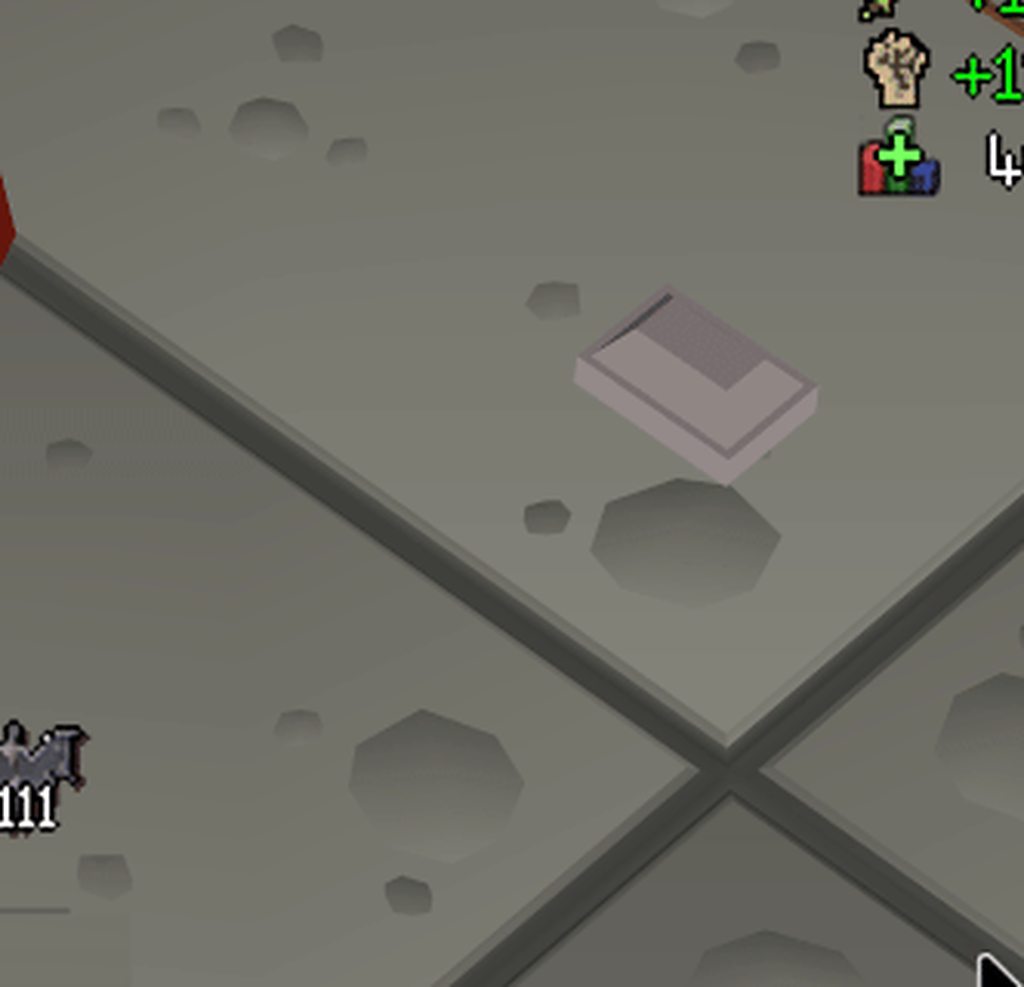 gilded kayak
shift+right-click it
to bring up the menu
check if the color section, has a reset button
celest yew
ahh never seen that option before, cycling through the plus and minus used to work, it does this for almost all items so i know i didnt do that lol
ty
gilded kayak
oh you probably have them hidden in the box
i can replicate that only once i've manually added, my clue scroll for example, to the hidden box
so back to what i said originally, i should have instead guessed that you hid a single steel bar, and it's happening to the noted
celest yew
steel bar isnt in my hidden items, i checked
gilded kayak
is there a an entry that includes *
i put clue* because i was too lazy to type out clue scroll (beginner)
and when I do that, i can replicate what ur reporting
but i think that's expected
fossil narwhal
fossil narwhal
anyone know why sharex is all of a sudden screenshotting the RL window instead o...
bump
gilded kayak
i don't think anyone is going to know if i didn't
it works for me on an old version of sharex, on runelite
it doesn't work for you on a new version of sharex, on runelite
 opal stream
has anyone ever figured out the view/open task problem
i fixed it when i originally had the problem (it was broken cause i changed a specific chat color option) then it was fine for months and now it's.... random? when it works or doesnt
like today i could view someones CA, but yesterday I could not, and sometimes when i click the option to view it it tells me something along the lines of unable to look up player unknown name or something
gilded kayak
i unironically think you're the only person with this issue
or at least ur the only person who uses that feature
other people might have the issue but just don't know about it
 floral dragon
Hi, me again. It was NOT an issue with ALSA... at least not that it hadn´t been installed
Long ago I had enabled a loopback to use my phone as a wifi camera since my notebook's cam is dead. Runelite was stuck on the loopback device. I'm not using my webcam for now so I just grotesquely blacklisted snd-aloop
gilded kayak
lol
floral dragon
why was it stuck on the wrong output, god knows
 dense lodge
My debuff timer won't activate. Not sure why. I have reset it and restarted the client
gilded kayak
which debuff timer do you expect to see
 round jacinth
for what potion
dense lodge
Ovl primarily in cox
round jacinth
if you buff at the exact time where you'd get debuffed runelite doesn't get the debuff to countdown on
i do it with the salts at toa
its like being exact perfectly buffing
it could be that, buff with a str potion and wait a minute and confirm it does count down correctly
 junior nacelle
Does anyone know what the deal is with object highlights and the Arceeus Library doors? Some I can only change the color of their open state and others vice versa.
 gilded kayak
is the arceuus plugin doing it
i have a vague memory that when you highlight a door, in code, you only need 1 half
so if that memory is correct, that half is being highlighted by the plugin, which allows object highlighting, to highlight the other half
junior nacelle
Does not appear to affect the doors in any way.
gilded kayak
agility? same reason
junior nacelle
Nope.
gilded kayak
no idea then
junior nacelle
The doors never had a highlight until I put one on them, by the way.
I highlight every door and 99.9% of them let me change their open/closed states individually.
gilded kayak
oh that's interesting
i'm not sure personally
my idea only stemmed from one of the colors being the "default" green
junior nacelle
Here's how it usually works, and the way I want it

 gilded kayak
oh is your issue that you want to color the open doors
cuz that should be possible but requires being quick
because those are different objects
junior nacelle
Uhh... that's not how literally every other door works
I mark it, I color it, I open it, both disappear, I do again, then both are done
No time limit, they just are.
junior nacelle
Don't all doors? Including the Arceeus Library doors?
gilded kayak
i dont think they all do no
junior nacelle
Well, either way, that's also not been a consideration.
gilded kayak
zaff's house door stays open
junior nacelle
gilded kayak
zaff's house door stays open
Confirmed Zaff's door is the same as any other.
gilded kayak
for the purpose of highlighting or open/close
junior nacelle
Both
 willow wind
am i allowed to build runelite from a fork and use it for regular play?
https://github.com/runelite/runelite/pull/17522
the fork has this change but it was never merged

GitHub
This changes the bottom left and chatbox right widget snap points so that they are attached to the chatbox.
java_MGIwResaDU.mp4
if you couldn't then nobody would ever be able to develop the client
willow wind
but like whats stopping someone from building a plugin that violates the plugins tos or w/e
without getting it approved/merged
junior nacelle
Nothing, really.
willow wind
ic
clear stratus
don't assume jagex doesn't notice if you're doing that to break the rules, though
don't break the guidelines and you'll be fine
willow wind
yee im just trying to get the above change into my client
current anchor points dont play nice with resizable chatbox plugin
 bleak dirge
Anyone know if the fixed mode hide chat is broken chatbox is bugged atm
 pine stirrup
yah so annoying makes my game look fked
bleak dirge
Thought was just me 😂
haughty pumiceBOT
Get support for the Fixed Mode Hide Chat Plugin Hub plugin here: https://runelite.net/plugin-hub/show/fixed-mode-hide-chat.
You can also find the support link by searching for the plugin in the Plugin Hub panel and clicking the ? button on the plugin, or by right-clicking the plugin in the plugin panel and clicking the Support menu option.
viscid lantern
will have to wait for the author to fix it
bleak dirge
Hopefully wont take too long right
viscid lantern
idk, im not the author
clear stratus
deathbeam still around?
viscid lantern
think so yeah
I hope so at least  @wet thorn fixed mode hide chat seems to have broken
pine stirrup
my chat seems to be doing weird shit stuck in quest dialogue atm aswell
 fathom helm
 bleak dirge
Everyone getting it
 wet thorn
viscid lantern
I hope so at least <a:ahehe:1059246197832958103> <@317319692823953409> fixed mod...
wet thorn
viscid lantern
I hope so at least <a:ahehe:1059246197832958103> <@317319692823953409> fixed mod...
some dude took over it idr who xd
haughty pumiceBOT
Search for oont returned no results.
[ https://github.com/supyosup ] [ @worn lava 148298030033010688 ] oont#0
wet thorn
^
 lunar vapor
Hey, I'd like tile markers for the venom clouds at zulrah with an ID of 11700, but I can't seem to find a plugin which I can use to do that. Better NPC Highlight doesn't work
round jacinth
they’re not NPCs so that makes sense
 solid mesa
viscid lantern
I hope so at least <a:ahehe:1059246197832958103> <@317319692823953409> fixed mod...
solid mesa
viscid lantern
I hope so at least <a:ahehe:1059246197832958103> <@317319692823953409> fixed mod...
@worn lava
 agile gust
Experiencing the same issue with fixed mode hide chat atm
solid mesa
Yes because it’s broken
leaden trail
It's been disabled because it's broken
 mortal fog
Can you tell me how to turn off unused prayers?
 round jacinth
when prayer plugin is enabled, shift right click the prayer tab to enable reordering
when that is enabled you can move them around but also hide them
mortal fog
love it
 misty trench
what happend to hide fix chat mode
 quiet lichen
same ! fixed layout hide chat is no more ?
viscid lantern
it broke after todays update, the author will have to fix it
 wide comet
clear stratus
wide comet
clear stratus
i'm gonna try and look at it and see if i can fix it but no promises
round jacinth
all i did was update the depcreated widget stuff to gamevals before trying to fix and it made my frames drop to 1 fps
lol
 rich inlet
is equipment inspector broken just for me?
round jacinth
works for me
rich inlet
weird the menu option is gone
round jacinth
did you disable the plugin
round jacinth
or added hold shift?
round jacinth
¯_(ツ)_/¯
round jacinth
you could try that.
round jacinth
rich inlet
i'm not that dumb :p
you'd be surprised.
people ask why they can't log into a world and the message will say they're f2p and to change worlds
rich inlet
you're right
round jacinth
so they ask us for help
round jacinth
others think runelite forgot their acc because they're level 3 but they logged into gm world
xd
rich inlet
wtf
round jacinth
anyways its available to me /shrug
 violet void
they removed fixed hide chat completly?
round jacinth
it broke
leaden trail
It's broken
 fierce bison
Game looks weird without the fixed chat box hider
 crisp temple
hope its fixed soon 🙏
 rigid ravine
during gridmaster i copied my profile to not mess with my loot tracker, and reset my tracker on the grid profile
now im logging to the main profile in main game nad my loot tracker is empty
i logged into the website and saw that it still has my tracker and exported it, but how do i import it?
round jacinth
you don’t
The side panel doesn’t load all loot ever retrieved go get kc and it’ll remember
rigid ravine
oh so once i get 1 kc it will recover the others?
rigid ravine
i mean the other kills from that same boss?
round jacinth
yes
rigid ravine
doesnt seem to work tho
 round jacinth
Try turning off and back on the plugin
If you refresh the website do you have two profiles named the same
round jacinth
Before you get more kc
I think you have to delete the wrong profile that has no loot on it
But don’t do that yet
Some one else can confirm
Looks to be true
idk if client should be opened when you do this, close clients then delete the wrong profile and load it up again
rigid ravine
so eh
might be a my bad on that one
apparently the araxxor tracker is gone on the RL profile too in the website
specifically the araxxor one is missing, even tho i had like 800 kills tracked, but i guess its been over 3 months since i last looted him so it might have been deleted?
round jacinth
No they don’t get deleted
rigid ravine
so its just missing? i cant seem to find it
round jacinth
You said you have 2 profiles made the same thing on the site right
show me the site
Screenshot it
 neon flare
hello i'm having an issue game keeps disconnecting my internet is good it happens only at grid master mode what would cause this?
neon flare
?
round jacinth
your connection to jagex is not the same as when you go to google or Netflix
rigid ravine
you mean screenshot the profiles its showing me?
round jacinth
rigid ravine
you mean screenshot the profiles its showing me?
yeah on the site
The ones you click for the loot to see on the site
neon flare
what should i do then?
round jacinth
nothing you can do, your internet is bad wait it out
reset router maybe
Runelite doesn’t impact your agility to connect to jagex and if it did then others would have that issue usually
rigid ravine
round jacinth
yeah on the site
sent you
im going over the other profiles now to see if i can find the one with a single araxxor kill
none of them do
odd
none of them have ANY araxxor loot
im getting the feeling i deleted my own araxxor loot lol
gonna see if vard fixes my vard drops
 white forum
gpu plugin not working on linux? been working since forever... but opene another account and now it doesnt binge
should be working since i even had it on today and always before 😂 but opening another account disabled it and it doesnt turn on again
round jacinth
Try updating flatpack or what ever
white forum
round jacinth
Try updating flatpack or what ever
would be weird... since i had it on after the update aswell
il try
opening another acc through jagex launcher which hadnt had it on fucked it
ffs
 wary quartz
Loot tracker shows loot that you received in previous sessions despite option being toggled off. All time loot from a monster only shows up after you kill at least one, otherwise tracker starts empty as usual.
neon flare
round jacinth
Runelite doesn’t impact your agility to connect to jagex and if it did then othe...
tysm sxir
sir*
 west slate
what happened to the fixed mode hide chat plugin
fierce bison
@west slate its broken
west slate
fierce bison
<@1223737664625442826> its broken
yeah i thought so
it’s impossible for me to play the game without it lol
 thick fable
Is there a way in the ground items plugin to make a difference between iron ore and iron ore (noted). I actually only want it to show noted iron ore.
In the highlited item section.
gilded kayak
there is not but you can use </> assuming the noted ore you want, comes in stacks of 2 or more
thick fable
Okay so for example: > iron ore or iron ore >
thick fable
okay I will try this, thanks!
 fresh cosmos
what plugin lets me minimize my chatbox?
clear stratus
if you're thinking of fixed-mode-hide-chat it's currently broken
 civic nest
hey my friend updated his drive and his RL profile seems to have gone, all plug ins, bank tabs etc. any advice?
haughty pumiceBOT
civic nest
ty
civic nest
haughty pumice
<https://github.com/runelite/runelite/wiki/FAQ#my-plugins-are-gone-or-my-config-...
apparently he never had an account so nothing was saved
im assuming thats gg?
round jacinth
read the rest of the information
did he nuke his .runelite folder..?
or rather the new drive is completely new install of windows/linux and the old drive is laying around?
civic nest
ill ask
civic nest
round jacinth
or rather the new drive is completely new install of windows/linux and the old d...
bought a new SSD for windows 11
round jacinth
and the old ssd/drive is where?
that drive if not reformatted will have the .runelite folder on it
civic nest
sweet thank you
round jacinth
so all they need to do is plug it in, it would now be the D drive or w/e, they navigate to the .runelite folder and put it into the same spot as the new ssd
haughty pumiceBOT
civic nest
legend thank you
round jacinth
You can either copy the whole .runelite folder to the other computer, or you can sync your profile.
you'd be doing copy whole thing, you didn't have sync enabled - you can enable sync AFTER you correct it
civic nest
very much appreciated ty
 verbal junco
anyone know how to fix this?
won't let me send photo it's saying there was a fatal error starting runelite
haughty pumiceBOT
To find the logs, you can do one of the following:
- If your client failed to open, click the
Open logs folderbutton. - Open the screenshot directory by right-clicking 📷
Camerabutton, navigate 1 directory up, then open logs folder. - Navigate to
%userprofile%\.runelite\logson Windows or$HOME/.runelite/logson Linux and macOS.
Upload the log files named client and launcher by dragging them to Discord. If there are files prefixed with jvm_crash dated from today, upload them too.
 lavish geyser
Has anyone here ever remote controlled into their PC on their phone to play RuneLite?
Well I have and I play just fine with it using trackpad mode in my remote control app, but if I try to play like the regular mobile app with touch controls, it doesn't work well.
The touch interactions are very wonky and inaccurate. The video below shows me trying to plant a seed but I fail numerous times, running to an entire different patch. Interacting with things fail to click when I tap on them.
Does anyone know how to fix this issue? BTW I'm using VoidLink on iOS to remote into my PC running RuneLite.
 lean holly
It’s probably not fixable. If it’s a mouse location issue then i doubt it’ll be fixable on runelite
Why not play mobile
 gentle scarab
ur very likely looking like a bot cos mouse jumping from touch controls is not normal for non-mobile use
lavish geyser
lean holly
Why not play mobile
Cus RuneLite is better 🙂
lean holly
Clearly not if you can’t click
round jacinth
this is the exact same issue you have if you use a touch screen on windows directly playing runescape
lean holly
U can highlight tiles and menu swap on mobile now
round jacinth
touch screens click the where the mouse was located and next client tick it moves the mouse to the new spot
the way to avoid that is to double click everytime when interfacing with touch screens
which obviously sucks
lavish geyser
I can with trackpad mode
lavish geyser
 hollow olive
i did like 80% of tithe on ipad
lavish geyser
lean holly
Clearly not if you can’t click
I'm not fighting I'm replying to
hollow olive
you don't need runelite
round jacinth
touch screens click where mouse was last located
lavish geyser
Yeah I know that
round jacinth
there is no fix
lavish geyser
Okay cool
lean holly
round jacinth
touch screens click the where the mouse was located and next client tick it move...
Is it not done per frame btw?
round jacinth
what
lean holly
The mouse
lavish geyser
lean holly
U can highlight tiles and menu swap on mobile now
Menu swap is absolute dogshit on mobile
lean holly
Moving
lavish geyser
BTW
round jacinth
when you click you click the previous client tick's location
people who are turbo neets and very fast at clicking can misclick
despite the hover over text saying the intention
round jacinth
no
lean holly
O
round jacinth
game ticks are 100 / minute
client ticks are 50 / second
lean holly
If I turn fps down and try to pk I get yellow clicks when I try to red x
round jacinth
the frame rate of client without gpu plugin is 50 / second, basically 1 frame is 1 client tick
lean holly
So I thought it was frame rate related
lavish geyser
This is how I play with trackpad mode btw. Much rather play like this than use the mobile app
lavish geyser
I only do this at night in bed also u can’t play on a pc on the go lol
lean holly
Ah yes fps control plugin uses sleeps so the client wouldn’t be receiving inputs between frames
That explains
Well the mouse loc wouldn’t update I think
Bcos client ticks would be skipped
Or am I being dumb
 severe thicket
Hey guys where can I enable developer tools plugin?
round jacinth
read the build guide it tells you
severe thicket
Yeah I just saw, thought it was a plugin, thx
 tight abyss
my gpu plugin is not working it seems like its not reading my gpu it says Local\Temp\6714827295707395775rlawt.dll: Can't find dependent libraries
anyone know what i can do?
 mossy swan
tight abyss
my gpu plugin is not working it seems like its not reading my gpu it says Local...
mossy swan
tight abyss
my gpu plugin is not working it seems like its not reading my gpu it says Local...
does your windows username contain special characters?
tight abyss
Yeh
mossy swan
that’s probably the problem, and you need to create a new user without special characters
changing your windows username will not fix it btw
you need a new user
tight abyss
ill try
tight abyss
@mossy swan its working thx mate!
 solid owl
For the soundswapper plugin, where should my .wav files be placed? I've got them in /.runelite/SoundSwapper but its not working correctly
clear stratus
you're doing it right according to their README so either your sound files are somehow unplayable by runelite or the plugin has a bug
in which case
haughty pumiceBOT
Get support for the Sound Swapper Plugin Hub plugin here: https://runelite.net/plugin-hub/show/sound-swapper.
You can also find the support link by searching for the plugin in the Plugin Hub panel and clicking the ? button on the plugin, or by right-clicking the plugin in the plugin panel and clicking the Support menu option.
solid owl
I see, I just renamed mp3 files to wav files so I'll try converting them somehow instead
 boreal gate
my interface styles plugin is bugged since last update that just me?
 empty minnow
What about it is bugged?
 misty plover
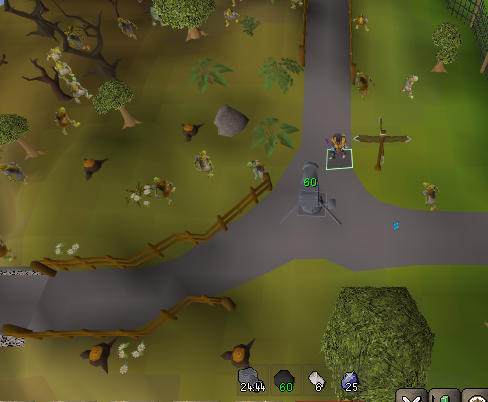
Slayer plugin might've broken again: It's not highlighting goblins (slayer gem icon) and showing the wrong icons for kalphites (slayer gem)
 empty minnow
lmao maybe they fixed their weird naming so now RL is wrong?
round jacinth
My plugins
solid mesa
Yep
 misty plover
 well fuck
empty minnow
Can we not just go off of that enum or something?
misty plover
round jacinth
Impossible solution just block them
I’ll just teleport to and kill a few dozen Icefiends incorrectly a few times until it’s fixed 😭
misty plover
another change from today 🤨
It started showing the drops from all the kc, rather than just the session, despite remember loot being off:
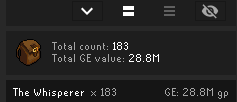

Is there a way to get back to show only the current session's stats?
gilded kayak
oh yeah he forgot that people are actually not going to like this xd
it was done this way so people stop thinking their loot tracker data is gone, when they go a while without killing a boss
and have their recent-enemies filled with other stuff
misty plover
oh and u can't clear it
if you clear it and then get another kc, it brings it all back up
gilded kayak
i would guess clearing it doesn't clear it, until it saves
misty plover
In the meanwhile, I'm just using bossing info to track how many kc I did, so no big deal 🤷♂️
 drifting star
wiki search button icon not appearing anymore after pressing wiki button? any fixes?
gilded kayak
there's a wiki search button icon?
 thorn tusk
 gilded kayak
disable the mouse tooltips plugin
 ember karma
Unsure if this counts as support and if this is already known by now. The incense burner timers currently do not work with the new burner cosmetics added onto them,
 gilded kayak
ye i think someone opened a PR
it doesn't just magically guess the burners it's just a list
so they just aren't on the list
ember karma
I figured as much. Thankfully the House Hosting plugin can detect the timers somehow and alert me regardless
 balmy bough
Where does net.runelite.client.RuneLite.RUNELITE_DIR return in Windows?
Trying to find where this plugin saves files to, but it doesn't seem to be writing to the root Runelite folder.
Specifically trying to find where 'RLCGPerformanceTracker' is dumping the logs
 verbal tulip
Is there any way to add loot manually to the loot tracker that you got on Mobile ?
 wicked cedar
Loot tracker is now showing historic data when I kill something rather than just session data, despite 'remember loot' being toggled off.
lavish geyser
what plugin is this NPC highlight? it only shows when im attacking an npc

and no its not NPC Indiciators or Interact Highlight
 dense sierra
Better NPC highlight maybe?
 zinc citrus
Anyone know a fix for this?
When I have both Stretched mode and either the GPU or 117 HD plugin active, whenever I open the side menu, like in the image, my game visually does that.
I have to open and close the menu multiple times for it to become normal again.
Sometimes the issue does not happen though, and it resizes normally.

 astral veldt
i went into ToA for the first time and practicing 350 rooms and kephri was lagging so bad during intermissions that the game was actually unplayable. i restarted the client with the default profile and the lag was gone. how am i supposed to know which plugin is causing this? is there a profiler that tells me?
haughty pumiceBOT
Please refer to this flowchart for further troubleshooting.
 compact spear
lavish geyser
what plugin is this NPC highlight? it only shows when im attacking an npc
compact spear
lavish geyser
what plugin is this NPC highlight? it only shows when im attacking an npc
It's one of the cannon options for showing monsters who can be double hit
leaden trail
You're probably just going to have to start fresh, we don't support manually editing that
verbal tulip
wicked cedar
Loot tracker is now showing historic data when I kill something rather than just...
Even from mobile?
verbal tulip
leaden trail
You're probably just going to have to start fresh, we don't support manually edi...
You talking about me?
leaden trail
No, the person I was talking to deleted their message
 charred wind
Frankie u can’t add things to loot tracker no
 drifting ibex
Hello my loot tracker is working differently from how it was before without me making any changes to the settings plugin. I have it set to not remember loot between sessions but I just noticed when looking now it has been remembering the loot anyways (in the background without showing old loot) and it now starting to show the old loot as well. Is there a way to only show the sessions loot and have it reset upon closing the client like it did before? Pictures of my settings and how the loot tab looks after killing 1 skotizo and like 3 or 4 sara wizards this session

 gilded kayak
it was changed because people constantly come here, upset that their old loot is gone, because the client didn't load it when they killed it again
but the change forgot to respect that setting
drifting ibex
Ah I see, I hope the old ways become available as an option again for people like me then that don't want to see all the old loot. Thanks 🙂
verbal tulip
charred wind
Frankie u can’t add things to loot tracker no
Oh I see. Do you know if mobile loot log automatically gets added to runelite loot tracker?
Like whenever you next log in
gilded kayak
no
we're listening to the live loot tracker info jagex sends
but if we didn't "hear" the loot drop, it wont know about it
verbal tulip
So if I get loot on mobile, it wont be tracked by runelite? :(
gilded kayak
drifting ibex
Ah I see, I hope the old ways become available as an option again for people lik...
ye adam already pushed the change to make it respect that setting, for whenever the next rl update is
verbal tulip
Like upon logging on next
gilded kayak
it will not
verbal tulip
Damn.. there should be a way to add loot manually
verbal tulip
I mean theyd only be cheating themselves
Im in a GIM so we are just trying to keep track of what items we get
verbal tulip
gilded kayak
we're listening to the live loot tracker info jagex sends
What IF I have runelite open while I'm on mobile and I get a drop? Since its litening to the live loot tracker info jagex sends
gilded kayak
jagex doesn't "speak" to the client unless you're logged in
which you can't be logged into 2 clients at once
verbal tulip
Damn I wish jagex could have a server datbase runelite pulls from for loot tracking instead
gilded kayak
we only recently got them to send the kills in this way, cuz of the yama update where they did ???? to his loot
so we're probably far away from that
verbal tulip
I guess the only way would be once they release their official plugin client
But itd be nice of somehow runelite could pull whatever was received while on mobile
drifting ibex
gilded kayak
ye adam already pushed the change to make it respect that setting, for whenever ...
Perfect, looking forward to it. Thanks again
 old yarrow
I'm hopeful that when the official plugin support gets added to the c++ client, they open up some api's for runelite to pull from
verbal tulip
gilded kayak
we only recently got them to send the kills in this way, cuz of the yama update ...
Any way to pressure them into sending it to a live server to pull from with some API haha
gilded kayak
i doubt it
verbal tulip
gilded kayak
i doubt it
One can dream I guess haha
 radiant horizon
im not able to see settings of this plugin when i installed it im not able to search in configuration settings
 haughty pumiceBOT
@radiant horizon To find the logs, you can do one of the following:
- If your client failed to open, click the
Open logs folderbutton. - Open the screenshot directory by right-clicking 📷
Camerabutton, navigate 1 directory up, then open logs folder. - Navigate to
%userprofile%\.runelite\logson Windows or$HOME/.runelite/logson Linux and macOS.
Upload the log files named client and launcher by dragging them to Discord. If there are files prefixed with jvm_crash dated from today, upload them too.
 tame mesa
Anyone having trouble logging in?
 crisp dune
Can you upload your log file here? Just drag the file here
crisp dune
Looks like that plugin is failing to start because it's doing something wrong
You'll have to reach out to the plugin author and ask them to fix it
haughty pumiceBOT
Get support for the Tob Utilities Plugin Hub plugin here: https://runelite.net/plugin-hub/show/tob-utilities.
You can also find the support link by searching for the plugin in the Plugin Hub panel and clicking the ? button on the plugin, or by right-clicking the plugin in the plugin panel and clicking the Support menu option.
 hushed lynx
leaden trail
hushed lynx
leaden trail
Infobox color under "RuneLite"
hushed lynx
tyty
 austere dragon
hi does anyone know if i can set bank tags for my main on one runelite account, and then have a different runelite account for my pure with also bank tags? without having 20+ bank tags for all accounts? hope this makes sence haha
solid mesa
Make a new profile and link it to each account
austere dragon
ah thanks! can i do that with jagex accounts?
solid mesa
Yes
austere dragon
ty bro!
 deep lance
Hey guys, i need some help with stretched mode and 117 HD plugin. I really like the xBR UIscaling but the xBR is making anything with text a little too hard to read. Is there a way i can keep this scale as i like where i have my bags and mini map/chatbox but with the text being a bit more readable.

 haughty pumiceBOT
Visit 117's HD plugin discord (https://discord.com/invite/U4p6ChjgSE) for support, issues & feedback
 formal wren
I lost all my loot tracker data. I was wondering if there was a way to get it all back?
haughty pumiceBOT
 sand sequoia
Having an issue logging in? I can login and the client immediately freezes? Noticed it only does it on GridMaster Worlds
gilded kayak
probably some  plugin* you installed exploding because of gridmaster differences
!logs the logs might say
haughty pumiceBOT
To find the logs, you can do one of the following:
- If your client failed to open, click the
Open logs folderbutton. - Open the screenshot directory by right-clicking 📷
Camerabutton, navigate 1 directory up, then open logs folder. - Navigate to
%userprofile%\.runelite\logson Windows or$HOME/.runelite/logson Linux and macOS.
Upload the log files named client and launcher by dragging them to Discord. If there are files prefixed with jvm_crash dated from today, upload them too.
formal wren
okay, i had a gridmaster profile i had briefly started and i deleted that. My loot tracker is still onoy showing what ive done the past couple of days. Its not a huge deal, I just like looking back on all the loot.
sand sequoia
gilded kayak
!safe looks like none of them are throwing up on the log, but try safe mode anyway
haughty pumiceBOT
safemode: To enable safemode
Windows
Run the RuneLite (configure) shortcut from the windows start menu
Tick the Safe mode box, save, launch RuneLite the way you normally do.
Mac
In Terminal, run
/Applications/RuneLite.app/Contents/MacOS/RuneLite --configure
Tick the Safe mode box, save, launch RuneLite the way you normally do.
sand sequoia
will do thanks
 distant vigil
Loot Tracker plugin is remembering loot from previous sessions even with "remember loot" unchecked Apologies, I see this is addressed already above.
 delicate bobcat
deep lance
Hey guys, i need some help with stretched mode and 117 HD plugin. I really like ...
delicate bobcat
deep lance
Hey guys, i need some help with stretched mode and 117 HD plugin. I really like ...
you can set the UI scaling mode to Pixel. It's the best scaling imo, although it looks more regular than xBR
 solemn plinth
Hey! I can't seem to find the runelite login button. Any suggestions?
 mossy swan
solemn plinth
Hey! I can't seem to find the runelite login button. Any suggestions?
mossy swan
solemn plinth
Hey! I can't seem to find the runelite login button. Any suggestions?
turn on the account plugin
solemn plinth
mossy swan
turn on the account plugin
Nice! Thanks.
 viscid sand
Is there a plugin or other way to fix this? (hiding the combat masteries bar in Grid Master)

 round jacinth
You use their client to do that or mobile I think
viscid sand
And it caarries over to RL?
charred wind
Yes
 wanton cipher
opal stream
has anyone ever figured out the view/open task problem
wanton cipher
opal stream
has anyone ever figured out the view/open task problem
it kind of fixed for me when i reset the "chat color" plugin to default settings. before those options didnt work for me at all, now it works for most tasks but some still dont work idk
 neon girder
Kind of a weird thing. Im using Windows 11 (and i think i had an update recently). But since yesterday when i sue the screen spli functions, runelite "cuts of" a portion of my width - leaving some gaps. I tested it with multiple programs and the didnt had this (hence why im going here). Does anyone else has this too and/or know maybe how to help me?
 atomic apex
I’ve started play osrs again on runelite. Every time I start up and start playing ground items not being displayed like the use too with white text unless I restart the plugin each time then it stops working again 5 mins later anyone have any idea why it does this?
haughty pumiceBOT
@atomic apex To find the logs, you can do one of the following:
- If your client failed to open, click the
Open logs folderbutton. - Open the screenshot directory by right-clicking 📷
Camerabutton, navigate 1 directory up, then open logs folder. - Navigate to
%userprofile%\.runelite\logson Windows or$HOME/.runelite/logson Linux and macOS.
Upload the log files named client and launcher by dragging them to Discord. If there are files prefixed with jvm_crash dated from today, upload them too.
 tacit veldt
gilded kayak
ye adam already pushed the change to make it respect that setting, for whenever ...
tacit veldt
gilded kayak
ye adam already pushed the change to make it respect that setting, for whenever ...
Thanks for the info. I just came on to say I had the same issue as @drifting ibex. Looking forward to the next patch. Thanks to the team
 wind owl
is there a boss hp overlay plugin that can show me either the % hp its on or its actual hp its on over top of the boss?
 solid mesa
Monster HP Percent
 craggy sky
hello guys, i need some assistence with runelite, my maximuze icon is not here anymore idk what happend already tried to delete and reinstall client but still the same
 mossy swan
craggy sky
hello guys, i need some assistence with runelite, my maximuze icon is not here a...
mossy swan
craggy sky
hello guys, i need some assistence with runelite, my maximuze icon is not here a...
under “runelite” plugin untick keep window size
craggy sky
mossy swan
under “runelite” plugin untick keep window size
thanks man it worked
 obtuse dawn
hey, how can i make so that when i press my hotkey for the inventory it doesn't hide it?
round jacinth
turn that setting off in jagex’s settings (assuming you’re modern resizable)
 urban pike
I am trying to import some ground markers. But they do not seem to save, as when I check RuneLite website they are nowhere to be found and when I try to export ingame it says I have no ground markers
round jacinth
You need to be in the region of them to export them
Otherwise you’d export the entire map
urban pike
round jacinth
You need to be in the region of them to export them
Oh I see
Does that also apply to importing into the game?
round jacinth
No
urban pike
Alright thank you a bunch
urban pike
round jacinth
No
Can I view all my tiles marked somehow?
round jacinth
Idk
clear stratus
no
 toxic girder
Is there a way to have Runelite sort new drops at the top of the list again?
having to scroll all the way to the bottom past multiple thousand entries is kinda not ideal I think :(
mossy swan
toxic girder
Is there a way to have Runelite sort new drops at the top of the list again?
it’s supposed to work like that. is it always doing that for you?
toxic girder
mossy swan
it’s supposed to work like that. is it always doing that for you?
the loot tracker has just been really weird the past day or two idk
mossy swan
toxic girder
the loot tracker has just been really weird the past day or two idk
we need a way to reproduce any issues so if you can give us clear steps to make it happen please ping me
we haven’t had it happen
toxic girder
I'm currently killing Vardorvis, and my latest drops have been these two


if I go into "view loot separately" it doesn't even show any Vard drops at all, thousands of vyres I pickpocketted
so instead I go into this individual category

and this is at the bottom of the loot tracker, as can be seen by the scroll bar

but, this new kill that I just got

now goes to the top
 mossy swan
does it only happen with vard or also with other mobs?
toxic girder
unless I exit out of the Vardorvis-only view then go back in, at which point it joins the other drops at the bottom
mossy swan
oh hmm
toxic girder
It was happening with Zulrah and Thermy prior to Vard
mossy swan
so uh, the “view details” bit at least is adding to the bottom?
individual kills thing does not appear at all or it’s at the bottom?
toxic girder
if I go into view details then individual kills, it reorders the list of drops to have newest at the bottom. Without going into view details, my Vard kills aren't showing up there at all
I don't know if that's just because of the amount of thieving I did
gilded kayak
Was it a fuckton, i feel like it only happens if your individual tab is full
That matches up with the first report, and probably why adam couldnt replicate it
gilded kayak
Xd
toxic girder
but I have another client open which is still sorting newest drops at the bottom with nothing but ~50 kreearra killed
 still widget
I am trying to do this and it's not saving the credentials, so it doesn't log in when I boot up through IDE.
FYI if anyone encounters this issue I fixed it by running Runelite (configure) as administrator
round jacinth
Running runelite as admin fixes permissions and otherwise you should not have to do
 vestal frost
Has there been any mentions of the GPU plugin causing huge frame loss in the Delve dungeon area? Starting today for whatever reason, going into that area slams my gpu to 100% and puts me on 10fps :/
round jacinth
Enable shaders

 gritty veldt
vestal frost
I disabled it and now get 30 fps instead of 3 thank you fella
gritty veldt
vestal frost
I disabled it and now get 30 fps instead of 3 thank you fella
Lift your cap to 60
vestal frost
its on 60 😌
oh wait, the cap. I have the 'target' set to 60
is the cap something different/not in the gpu plugin?
gritty veldt
FPS unlock plugin I think
vestal frost
ah there is an unlock fps option. I'm now getting 60 everywhere and 25-35 in the delve tunnel
that'll do i guess, ty for the help
 frank stratus
been getting this a lot, starts lagging and then dcs to start screen with this message. Already tried changing default browser back and forth
 leaden trail
That's a connection issue
gritty veldt
vestal frost
ah there is an unlock fps option. I'm now getting 60 everywhere and 25-35 in the...
Do you use the animation smoothing plugin? I like it, but some don’t.
It fills in the gaps
vestal frost
i dont, could never get used to it 😄
 mortal pond
mossy swan
we need a way to reproduce any issues so if you can give us clear steps to make ...
mortal pond
mossy swan
we need a way to reproduce any issues so if you can give us clear steps to make ...
for me it moves new kills to the bottom of the list after i change tabs in the loot tracker
or if i toggle "show ignored items"
mossy swan
mortal pond
for me it moves new kills to the bottom of the list after i change tabs in the l...
thanks!
 slow niche
I launched RL on 0.9 to play split-screen with two accounts. Is there a way to make the inventory box larger? Same for the bank, etc. It looks really small right now.
 mossy swan
slow niche
I launched RL on 0.9 to play split-screen with two accounts. Is there a way to m...
mossy swan
slow niche
I launched RL on 0.9 to play split-screen with two accounts. Is there a way to m...
stretched mode i guess
slow niche
mossy swan
stretched mode i guess
Nice! Got it working on one of the accounts
Not sure why it doesn't work on the other (yet)
Meh, no I don't think it is doing anything
🙁
Or very minimal
slow niche
gritty veldt
UI scaling plugin <@180022412056723456>
Is that a plugin in the hub?
mossy swan
slow niche
Not sure why it doesn't work on the other (yet)
integer scaling off?
slow niche
Yeah! Let me try to show
mossy swan
i’m pretty sure alex is talking about the same plugin
 slow niche
mossy swan
slow niche
mossy swan
1004%? lol bro
mossy swan
try 25 like alex's screenshot
slow niche
I do at the end
But it stays the same
Makes it like 1 percent bigger
Very strange
gritty veldt
mossy swan
yeah
slow niche
Thanks for the help tho 🔥
gritty veldt
Maar mijn advertentie is niet
slow niche
😂
 jade shard
Anyone have an issue where WASD keys stop working for camera movement? Only can be fixed that I've found by restarting client.
Typically just the A & D keys will stop out of nowhere but sometimes AWD all stop
haughty pumiceBOT
If one of your keys isn't working in game, you've most likely bound it to a feature of a plugin. The Debug Helper hub plugin can show what keys are bound to what plugins.
 twilit sorrel
anyone else freezing on login? when i press login im hanging on the "Connecting to server...
screen with "Loading - please wait." in the corner
haughty pumiceBOT
@twilit sorrel Many plugins from the pluginhub break the client in subtle or not-so-subtle ways, including causing issues like client freezes. We do not support pluginhub plugins because we do not make or quality control them, and do not recommend their use.
Run the RuneLite (safe mode) shortcut, or with a Jagex account, first run the RuneLite (configure) shortcut and tick the Safe mode box, then launch RuneLite via the Jagex launcher.
This temporarily disables the GPU plugin and all hub plugins which will allow you to confirm the issue is caused by one of those plugins and isn't a core RuneLite issue.
If the issue is caused by a hub plugin, you should isolate which plugin it is and then uninstall the plugin.
twilit sorrel
same thing in safe mode, might be a computer issue. ill try restarting my computer later
 iron urchin
I tried 117HD, a well-known and commonly used plugin, and ever since, my game (and computer) has been crashing non-stop. I tried uninstalling it, as well as fresh installs of RuneLite and the Jagex Client, which I use to get into RuneLite often. I deleted caches for both. Still an issue. Anyone know of a fix?
For reference, it is not currently downloaded and I don't plan on its continued use... obviously.
gilded kayak
it uses your gpu
and gpu crashes are like the most common computer crash in this modern time of computers (i think)
so i would think it's related to your gpu
 nimble marlin
I've just started an ironwoman and I was wondering if there's a plugin that can show respawn timers of ground spawns. Also I recall there was a way to have a respawn timer for thieving stalls but I can't find it.
twilit sorrel
it was my fault, i had to restart the windows management instrumentation service yesterday so thats what did it probably - even nvidia control center couldnt update
gilded kayak
xd
 obtuse sparrow
having troubles with the brewing plugin
it wont show up on the toolbar'
nvm im just stupid
 rancid aurora
anyone know how I can stop autoposting my levels onto an old friend's server?
I'm not a dev on that server, trying to figure it out on runelite side of things
 static harness
Sorry if this has been asked before but does anyone know how to fix missing half of the options panel on the bottom missing when the runelite sidepanel is open? This never used to happen to me

 haughty pumiceBOT
RL overlays and many Jagex widgets can be moved around the screen by holding the Drag Hotkey, (default: Alt) configurable in "RuneLite" settings, and left click dragging it around the screen.
Some overlays can be resized by dragging their bounds, right clicking will also reset their size and position.
They can also contain additional options, such as opening the config of the plugin that makes them, which can be discovered by shift right clicking.
static harness
Thank you - that fixed the problem
 vestal sundial
I ran into an issue where I made a tag tab and maybe exited during the auto preview layout. Now I have the spade icon stuck and I'm unable to right click to delete it or do anything with it. I've tried to close and re-open RL and disabling/re-enabling bank tab layouts and it's persisted. Has anyone encountered this issue and is there a fix for it? Thank you in advanced

 vast bone
What happens if you right click it?
vestal sundial
vast bone
What happens if you right click it?
Nothing lol
vast bone
No menu at all?
I would just import a tab of the same name
Export another one change the name for example.
Also which btl are you using?
 cursive cargo
Hey brother, have you managed to fix you GPUe crashes?
 worldly parrot
cursive cargo
Hey brother, have you managed to fix you GPUe crashes?
worldly parrot
cursive cargo
Hey brother, have you managed to fix you GPUe crashes?
Yeah the fix is done on mesa's end, just not yet released into an actual version. So you have two choices, either compile mesa from git, or you can downgrade it to before 25.2.0, 25.1.7 most certainly works.
cursive cargo
Thank you, brother
 vale fox
hi guys,
i can't get it set for item tags in my inventory


 oblique plume
Does shift right clicking show a tag option
vestal sundial
vast bone
No menu at all?
Nope, not at all. If I click on it, doesn't do anything. If I hover over it, it doesn't show the name either. I'll try your suggestion of importing a bank tag layout with the same name and see what happens. Thank you!
 celest estuary
Hi i got a new disk and had to reinstall runelite and all my loot tracker stuff is gone? I checked on the runelite website account page but its giving me the loot i got on my laptop instead of my pc which i use the most
is there a way to recover my loot tracker info from my pc or is it all gone? i dont know why its tracking the app on my laptop which i've barely used instead of the thousands of entries it registered from the main pc
and if the data being registered under my account was from the laptop, how did it keep track of things from my main pc?
haughty pumiceBOT
celest estuary
I see what the problem is, on my main pc i wasn't logged in on the runelite client but was from the laptop, so it tracked the data from there.
But still, that data has to be stored somewhere no? Otherwise how would the loot tracker plugin know what loot i had on my main pc between sessions, even if i was not logged in?
Edit: I said that i wasnt logged in on my main pc before but thats just an assumption. I really don't remember ever logging in on there and since i only have 1 email and it didn't keep track of my stuff that is the only option i see.
 sharp token
having some trouble findind the runlite config folder on linux ( I assume it would be in my home directory but its not) anyone know where it likely is?
solid mesa
If you right-click the screenshot and open screenshot folder does that work?
 winter snow
The usual location is ~/.runelite iirc
mossy swan
it’s a hidden folder so it doesn’t show by default
 mossy swan
some hub plugin
iron urchin
gilded kayak
so i would think it's related to your gpu
Hmm, you might be right. This computer is brand new, as is the GPU. That would be pretty unfortunate. Doesn't the GPU setting also use the GPU? I've always had that enabled.
But I've also had that turned off for several days with continued crashes
 pastel schooner
Hello! Total noob here. I've looked around in the settings, but is there a way to either make this text box larger or maybe if not just move it elsewhere?

 clear sandal
You can use the core plugin "Stretched mode"
pastel schooner
Oh, thank you so much!
oblique plume
celest estuary
I see what the problem is, on my main pc i wasn't logged in on the runelite clie...
If you have access to the "main pc" you can attempt to import the rsprofile inside the profiles2 directory of .runelite
haughty pumiceBOT
oblique plume
This tells you where .runelite is
Grab that whole folder and put it somewhere on the laptop
Then press the import button in the client and navigate to that copied .runelite folder and import from there
I think that will grab your old rsprofile data and get in into the cloud save
haughty pumiceBOT
oblique plume
That's how to import
celest estuary
yeah same problem persists, i got the .runelite file from my old disk and imported the rsprofile file stored in there and for some reason it still imports the data from my laptop
everything else is correct tho, all my settings, plugins etc linked with what i was using on my main pc but for some reason the loot tracker data specifically didnt
haughty pumiceBOT
oblique plume
Are you in that state now on the website
Importing an old rsprofile can do that
Could have a new and old version and you'd need to delete one
celest estuary
How does loot tracker work on a not logged in client?
oblique plume
It saves to the rsprofile
Which is tied to an in game account
But the method at which it ties it changed a while back
So if you start playing completely fresh then you could have an old and new style tied to the same account
 trim ferry
Trying to import tile markers for HS, i have them copied but runelite is saying "you do not have any ground markers copied in your clipboard"
mossy swan
if it’s the markers i remember being on pastebin, they have like five sets of markers in it
you need to copy them separately
 undone girder
does anyone know what could be causing a "drinking" sound to happen when i load chunks.. etc?
clear sandal
Probably a plugin you've installed.
undone girder
I haven't installed anything new or even played in ages
was hoping someone else was experiencing it
clear sandal
Anything client related you're experiencing is a client sided, not server sided. Otherwise, everyone would be experiencing and/or complaining about it.
undone girder
fair enough
do you have any tips on how to figure it out? just go down the list?
haughty pumiceBOT
Please refer to this flowchart for further troubleshooting.
 true egret
What does this crash log mean? My runelite keeps crashing, and I've updated GPU, BIOS, all related firmwares, java version, etc
winter snow
ah, another instance of out of date microcode on a 13/14th gen Intel CPU 🙁
 primal lance
Hey, I downloaded jagex launcher with USA-RedDragon/jagex-launcher-flatpak and I just found out the whole filesystem with it is sandboxed how do I go about changing the custom Notification sound, like where do I put the .wav file
primal lance
yea but where is that
gilded kayak
idunno try find . -name runelite
or maybe find . -name profiles2 just incase the . in the folder name is messy
and then jump back from that profiles2 folder, to .runelite
solid mesa
find . -type d -name profiles2 will probably execute faster
stone parcel
Maybe something like .var/app/com.jagex.Launcher/.runelite/
primal lance
gilded kayak
or maybe `find . -name profiles2` just incase the `.` in the folder name is mess...
that worked. Thanks guys
It was in /var/home/myUser/.var/app/com.jagex.Launcher/.runelite/
 timid basin
hello guys, whats the cursor on runelite who makes circle when you click?
 grizzled steppe
so I've been trying to use custom sound bits for the woodcutting plugin. all are wav files, not sure where im stuck but using drop down to select my custom sound, just a normal "ding" soudns most times instead of the custom sound bite. ideas?
haughty pumiceBOT
Place the files for the feature you want in %userprofile%\.runelite on Windows or ~/.runelite/ on Linux/OSX
The names and type for the files are:
- Custom cursor:
cursor.png - Custom default notification sound:
notification.wav - Custom specific notification sound:
<name>.wavin.runelite/notifications, then select<name>in the notification sound dropdown - Custom login screen:
login.pngImage size 765 x 503 recommended, larger images will be (simply) scaled down automatically.
leaden trail
Make sure to follow that and if they don't work still, load them in Audacity and re export as a WAV with default settings
 glad delta
Hm, it seems like whenever I have the Time Tracking panel open on the side, my game experiences like input lag every every now n then. I don't remember this happening in the past for me.
haughty pumiceBOT
Graphical artifacts? Try disabling hardware acceleration: https://github.com/runelite/runelite/wiki/Disable-Hardware-Acceleration
gilded kayak
that will probably stop it from lagging
glad delta
gilded kayak
that will probably stop it from lagging
oh it seems like that fixed it 👍
i'll report back here later if it acts a lil funny again. thanks!
 dry imp
Has the loot logger window when you list kills individually (rather than grouped) always listed items in actual chronological order? I.E. It lists the first thing I killed after I logged in at the top and I have to scroll all the way down to see my latest kill. I feel like it used to be the opposite - the most recent kill would show up at the top. For example, my first kill gave me prayer pots and my last kill gave me a dragon scim:

This might just be my memory playing tricks and it has always worked this way idk.
empty minnow
it's a known issue
 rose root
hey everyone, sorry to bother you all but i cant seem to fix this myself, i accidentaly deleted my loot tracker data on runelite! I have the files stored locally, is there anyway to add them back to the loot tracker? I tried putting the files in the new loot tracker folder but it didn't seem to work!
rose root
leaden trail
If you deleted it, it's gone
thanks! was hoping there was a way to reimport it but thanks for verifying for me!
 stoic bone
Hello guys, a friend of mine is having issues with his runelite, it was working fine, he had to format his pc and now the game is stuck on loading, he maganed to get it working but it just crashes now, hes stuck at loading with a black screen again, any ideas? thank you
round jacinth
Have them join here and we can properly interact and see what’s happening instead of a game of telephone
haughty pumiceBOT
To find the logs, you can do one of the following:
- If your client failed to open, click the
Open logs folderbutton. - Open the screenshot directory by right-clicking 📷
Camerabutton, navigate 1 directory up, then open logs folder. - Navigate to
%userprofile%\.runelite\logson Windows or$HOME/.runelite/logson Linux and macOS.
Upload the log files named client and launcher by dragging them to Discord. If there are files prefixed with jvm_crash dated from today, upload them too.
round jacinth
They can give logs once they join
stoic bone
im gonna send it rq 1 sec
 dusky shale
Hey I encountered a sound bug with the whisperer, and possibly awakened duke as well. The whisperer is the one I investigated since I kill her the most. Basically, with the Music plugin enabled, the whisperer's attack sounds do not play. This has been happening for at least a couple weeks now, I would really appreciate it getting fixed since the sound cues are so important for this boss (at least for me). I can't do any coding or anything but if there's any way I can help to get this fixed I will.
stoic bone
round jacinth
Have them join here and we can properly interact and see what’s happening instea...
theres no game, he just doesnt speak english so well...
gritty veldt
2025-10-25 23:08:59 COT [Client] ERROR n.r.client.plugins.gpu.GpuPlugin - Error starting GPU plugin
java.lang.RuntimeException: OpenGL 3.1 is required but not available
at net.runelite.client.plugins.gpu.GpuPlugin.lambda$startUp$1(GpuPlugin.java:331)
?
stoic bone
he cant even turn that option on, its off by default
gilded kayak
that's just trying to use gpu when their computer doesn't support it
it would not lock up the client
round jacinth
dusky shale
Hey I encountered a sound bug with the whisperer, and possibly awakened duke as ...
You maybe are muting area sounds with music plugin
Or some other config option
haughty pumiceBOT
To enable safemode
Windows
Run the RuneLite (configure) shortcut from the windows start menu
Tick the Safe mode box, save, launch RuneLite the way you normally do.
Mac
In Terminal, run
/Applications/RuneLite.app/Contents/MacOS/RuneLite --configure
Tick the Safe mode box, save, launch RuneLite the way you normally do.
dusky shale
I havent tried safe mode, Ill go test it now
round jacinth
Unfortunately I’m on mobile so I can’t see the logs
But if they reformatted because they were crashing before then it’s maybe hardware
round jacinth
Not you
stoic bone
round jacinth
But if they reformatted because they were crashing before then it’s maybe hardwa...
no he formated for other reason, he played the game just fine all this time, then it just stopped working after that
round jacinth
The other person
I’m between you and the other guy playing telephone for his friend
dusky shale
ok ok np
round jacinth
Maybe some one else can check logs as my phone can’t open
gilded kayak
it didn't have anything
round jacinth
kk
gilded kayak
the client is not aware of any problems
round jacinth
cpu wasn’t Intel bad?
gritty veldt
round jacinth
Unfortunately I’m on mobile so I can’t see the logs
Before, it complains about minimap
2025-10-25 19:48:24 CST [Client] ERROR n.r.client.callback.ClientThread - Exception in invoke
java.lang.NullPointerException: null
at client.getVarbitValue(client.java:34164)
at client.getVarbitValue(client.java:27929)
at net.runelite.client.plugins.minimap.MinimapPlugin.updateMinimapWidgetVisibility(MinimapPlugin.java:145)
at net.runelite.client.plugins.minimap.MinimapPlugin.lambda$startUp$0(MinimapPlugin.java:82)
at net.runelite.client.callback.ClientThread.lambda$invokeLater$1(ClientThread.java:80)
at net.runelite.client.callback.ClientThread.invokeList(ClientThread.java:119)
at net.runelite.client.callback.ClientThread.invoke(ClientThread.java:101)
at net.runelite.client.callback.Hooks.tick(Hooks.java:229)
at client.ju(client.java:57064)
at client.bg(client.java)
at bg.ss(bg.java:447)
at bg.za(bg.java)
at bg.run(bg.java:6886)
at java.base/java.lang.Thread.run(Unknown Source)
gilded kayak
everyone has that
gritty veldt
I think I saw an issue when I was reading earlier of someone with minimap issue?
round jacinth
Probably fixed by abex soon in his pr?
gritty veldt
Maybe related?
gilded kayak
every single user of runelite has that error
round jacinth
Like settings in what jagex has for their client impacts Java client and Java client can’t change that setting
round jacinth
lol
stoic bone
gritty veldt
Before, it complains about minimap
>>> 2025-10-25 19:48:24 CST [Client] ERROR n...
it somehow disabling the minimap plugin made it work
thank you man
gritty veldt
Sure
dusky shale
safe mode does not fix it
the only way I get her attacks to have audio so far is by disabling the music plugin
it worked at least a month ago with the music plugin
round jacinth
Idk what could be changed for music plugin since then
gritty veldt
yes this was your issue @stoic bone https://github.com/runelite/runelite/issues/19468 I read it earlier
gilded kayak
there's audio changes in every game update for some reason, i think
round jacinth
like camera does for zoom
It’s always why zoom no work and never why audio don’t work at whisperer
dusky shale
the random updates?
round jacinth
no no jagex client updates breaks a lot of stuff runelite does overrides for
dusky shale
;_;
round jacinth
then runelite patches stuff to make the client behave normally despite the updates.
It’s maybe what did it for audio but I don’t have a clue
dusky shale
can we notify a dev about the whisp audio bug somehow?
round jacinth
I don’t think there is any sound based stuff for scripts that would break a plugin tho, I don’t know of any call backs for that stuff
you can make an issue
gilded kayak
gritty veldt
yes this was your issue <@600880686274183168> https://github.com/runelite/runeli...
i don't understand why that would do literally anything
round jacinth
And show footage of safe mode on. Music plugin on and then off
And post it to #suggestions as an issue to the GitHub
gritty veldt
gilded kayak
i don't understand why that would do literally anything
I don't know I just read the logs he sends and remembered it
I don't know the code
gilded kayak
i know it's internal code causing it
cuz if u run with any java version above 11 the npe isn't null, it actually says why
gritty veldt
yes I was wondering why I don't see that when I compile with 11.5 at work
gilded kayak
but i've had that error all month
gritty veldt
ok good night
dusky shale
There is no "issue" post option but there is Q&A? Should I just use that?
making the video now
dusky shale
oo tyty
gritty veldt
gilded kayak
i don't understand why that would do literally anything
I will fix your code today. I slept poorly because I could not stop thinking about your question. This is not a problem
 carmine ibex
for some reason my xp tracker is no longer showing the "total xp" gained & per/hr at the top. Tried resetting all the xp tracker settings to default and still nothing. any ideas?

 turbid swallow
my XP and Loot trackers used to reset every time i booted up runelite but they have just started saving between sessions even when the option is turned off, does anyone know why this might be happening?
gritty veldt
I think the minimap NPE is an race condition. SO I have updated your line 145 in MinimapPlugin.java:
boolean vanillaHideMinimap = client.getVarbitValue(VarbitID.MINIMAP_TOGGLE) == 1;
to
        // set to false and handle NPE exception
        boolean vanillaHideMinimap = false;
        try
        {
            vanillaHideMinimap = client.getVarbitValue(VarbitID.MINIMAP_TOGGLE) == 1;
        }
        catch (NullPointerException e)
        {
            // here we do nothing because there is nothing to do yet
        }
I think I ran into similiar conditions in my plugin last month when I task threads before availability
this makes sense?
I am unsure how to test my changes though. I do not have your experience with this project
winter snow
https://github.com/runelite/runelite/wiki/Building-with-IntelliJ-IDEA
This is probably the most useful page for you
gritty veldt
winter snow
https://github.com/runelite/runelite/wiki/Building-with-IntelliJ-IDEA
This is pr...
Thank you I will read this with breakfast
It is akward though. At work I am having to use VScode. At home i am using IntelliJ.
How is IntelliJ so much more robust then VSCode? Pycharm and CLion is not like this when comparing. Java in VSCode tries to hurt me but at home with IntelliJ it tells me everything.This is great
gritty veldt
winter snow
https://github.com/runelite/runelite/wiki/Building-with-IntelliJ-IDEA
This is pr...
Yes I have read this many times in the past. This is not my problem. I am not asking my question well. I am unsure how to reproduce the bug behavior users reported to make sure my exception handling is correct because it is a timing issue. This is where I require your experience
winter snow
Well I have no idea, it's never affected me, so 🤷♂️
gritty veldt
Can you tell me who will know?
Or maybe they will see my error in review. But I would prefer to test a change first
 distant edge
Anyone experiencing the !log command on the main game picking up loot from gridmaster? Using the rune profile plugin and when I type !log vard it shows like 50 awakeners orbs and nearly green logged even though I only have like 20 kc and not a single orb. Is there a way to reset this or update manually?
haughty pumiceBOT
Support for hub plugins should be directed to the author of the plugin.
You can find the support link by searching for the plugin in the Plugin Hub panel and clicking the ? button on the plugin, or by right-clicking the plugin in the plugin panel and clicking the Support menu option.
gritty veldt
Or maybe they will see my error in review. But I would prefer to test a change first
this is silly but I had changes in my master branched from the forked repo I included by mistake in my first commit in my PR. I am having trouble throwing away all the changes to the irrelevant files. It does not like my tabs
 errant osprey
hi can anyone help me with my client just resizing itself? i want it to stay how i want it when i play in resizable mode but it either makes itself abit smaller or just goes full screen?
oblique plume
can you show a vid
errant osprey
oblique plume
can you show a vid
sure 1 sec lemme take one
winter snow
oh, that IS interesting...
oblique plume
weird
haughty pumiceBOT
Many plugins from the pluginhub break the client in subtle or not-so-subtle ways, including causing issues like client freezes. We do not support pluginhub plugins because we do not make or quality control them, and do not recommend their use.
Run the RuneLite (safe mode) shortcut, or with a Jagex account, first run the RuneLite (configure) shortcut and tick the Safe mode box, then launch RuneLite via the Jagex launcher.
This temporarily disables the GPU plugin and all hub plugins which will allow you to confirm the issue is caused by one of those plugins and isn't a core RuneLite issue.
If the issue is caused by a hub plugin, you should isolate which plugin it is and then uninstall the plugin.
oblique plume
id have to just assume its this though
errant osprey
i think it is a plugin or a plugin i deleted i just cant seem to find which one
one thing i noticed is it happens everytime i tele?
round jacinth
Check safe mode
empty minnow
Fixed resizable hybrid would be my guess
errant osprey
empty minnow
Fixed resizable hybrid would be my guess
u genius
it worked
❤️
deleting that shit rn
 tepid robin
In OSRS RuneLite, I don't see the number of actions left for killing monsters. Can anyone help me out?

I'm killing Cyclops for Dragon Defender btw
round jacinth
It was removed ages ago
 gentle cliff
I'm making a plugin in IntelliJ; is there a way to install the plugin in runelite manually without going through the hub and without going through IntelliJ? Any guides for achieving this?
(Apologies if this is already explained somewhere, my googling skills might be shite)
oblique plume
No
gentle cliff
Sadge
round jacinth
@haughty pumice is where you report users, you’re effectively advertising for them by doing it this way
crisp dune
Thanks, but as zom said, please dm the bot in the future. 🙂
 pure stream
Ah sorry my bad guys
crisp dune
No worries
 woeful turret
For some reason when I cast high alc, the item price overlay doesn't show up. It used to but now it doesn't. When I launch in safe mode, it does work correctly. I have another client with mostly the same plugins and it works on that one too, how can I figure out what is causing it to not work?
 gilded kayak
is normal ancient teleports one of the plugins that the other profile doesn't have
that the broken one does
i remember that plugin breaks the high alch menu, and requires a restart even if you disable it
woeful turret
yes it is actually wow, im trying restart now
it fixed it, ty so much. its nice having the normal names but not worth it breaking that lol
clear stratus
HuBQualitY
gilded kayak
this one is kind of ehhhhh
it was a transfer that broke it
and it was transferred before i made 100% sure issues were always enabled, on transfers
 heady badger
any update on this? would love some zig zag on the default banktags plugin
round jacinth
It didn’t pan out
I put in a little bit of time for a feature I don’t use and figure why develope something I don’t like lol
heady badger
ah bummer appreciate that you tried 🙂
round jacinth
You can use hub plugins to add zigzag
 tulip crane
Everytime hunleff changes prayer my fps drop, is that runelite related?
gilded kayak
it could be plugin you installed from the hub, related
 cold badger
I don't know if this is a known issue, or a feature, but recently my loot tracker has been sorting itself in reverse chronological on individual drops whenever I open it
If I have the tracker open when I get the drop it will appear at the top, but as soon as I go back to bulk loot and then open the individual tracker again, it will sort them all to the bottom
 gilded kayak
ye it's known if u do that
cold badger
Is there a known cause or a workaround? Or is it just wait until it's solved in a future update
gilded kayak
i think it's just a bug from, changing it so when you kill an enemy u haven't killed in forever, it loads the old kc
since people constantly came here upset that all their loot for that boss was gone
(it wasn't)
no workaround tho other than just not switching tabs
cold badger
Gotcha, thanks
 serene flower
Lost power the other day and now every time I open Runelite after about 20 seconds all my profiles will go away. When launching they are visible and I can activate them, but the auto switch to linked profile does not works and they all get removed after some time of the client being open.
stone parcel
Maybe try safe mode, I have seen something like the profiles disappearing before when a plugin was going wild.
haughty pumiceBOT
To enable safemode
Windows
Run the RuneLite (configure) shortcut from the windows start menu
Tick the Safe mode box, save, launch RuneLite the way you normally do.
Mac
In Terminal, run
/Applications/RuneLite.app/Contents/MacOS/RuneLite --configure
Tick the Safe mode box, save, launch RuneLite the way you normally do.
serene flower
stone parcel
Maybe try safe mode, I have seen something like the profiles disappearing before...
java.lang.NullPointerException: null
    at client.getVarbitValue(client.java:34164)
    at client.getVarbitValue(client.java:27929)
    at net.runelite.client.plugins.minimap.MinimapPlugin.updateMinimapWidgetVisibility(MinimapPlugin.java:145)
    at net.runelite.client.plugins.minimap.MinimapPlugin.lambda$startUp$0(MinimapPlugin.java:82)
    at net.runelite.client.callback.ClientThread.lambda$invokeLater$1(ClientThread.java:80)
    at net.runelite.client.callback.ClientThread.invokeList(ClientThread.java:119)
    at net.runelite.client.callback.ClientThread.invoke(ClientThread.java:101)
    at net.runelite.client.callback.Hooks.tick(Hooks.java:229)
    at client.ju(client.java:57064)
    at client.bg(client.java)
    at bg.ss(bg.java:447)
    at bg.za(bg.java)
    at bg.run(bg.java:6886)
    at java.base/java.lang.Thread.run(Unknown Source)
This exception is thrown in the logs right before the ProfilePanel throws NPE, do you know how to uninstall plugin or change plugin settings (not sure if MinimapPLugin can be uninstalled without the client being open?
Might be worth nuking the install and re-installing since all my profiles are backed up in cloud anyways. Must be something corrupted with Minimap PLugin when power cut.
stone parcel
You can uninstall plugins in safe mode.
stone parcel
If you have any plugins that move the sidebar icons, particularly above the config icon, that's what caused that for me.
oblique plume
How about instead of interpreting the logs yourself, you post them here so we can see them in their entirety
 fossil phoenix
is there way to move around overlays on fixed mode including the anchoring points?
Everythign seems to snap back when i try to move once its out of set area
round jacinth
No, anchor spots can’t be moved
fossil phoenix
sorry if its obvious, brand new to resizable
 rare flame
Anyone fancy being a goat and updating the Cox Scouter External with the new demonbane weapons? Scobo, Emberlight/Purging staff xoxo?
winter snow
rare flame
Anyone fancy being a goat and updating the Cox Scouter External with the new dem...
https://github.com/Blackberry0Pie/CoX-Scouter-External/pull/14 There's already a PR on the plugin for it, blame whoever made it for not merging 😄
rare flame
winter snow
https://github.com/Blackberry0Pie/CoX-Scouter-External/pull/14 There's already a...
Not sure what PR is but will this ever get merged? Lol
tepid robin
Hello everyone! i have a question do someone know how to clear Chat-channel Recent FCs?

or any Admin can help me?
winter snow
rare flame
Not sure what PR is but will this ever get merged? Lol
No idea, ask the author lol
 boreal parrot
hey folks - does anyone know if its possible to "mod" a plugin. I.e adjust it yourself, or make changes just for personal use.
In particular i'm wanting to adjust the tree/herb run portions of the quest helper plugin, so that i can change what tps they use, adjust for different trees/herbs in different locations, add a routing etc
mossy swan
you could change it and build & run locally but thats a bit of a pain
i wouldve expected there to be a hub plugin for that but maybe not
winter snow
could always do a PR to quest helper
rare flame
winter snow
No idea, ask the author lol
I couldn't find him on here 🙁
lavish geyser
how come i dont have reorder prayer option?

 stiff ibex



 unique charm
my client wont update
mossy swan
unique charm
my client wont update
wont update?
mossy swan
!logs
haughty pumiceBOT
To find the logs, you can do one of the following:
- If your client failed to open, click the
Open logs folderbutton. - Open the screenshot directory by right-clicking 📷
Camerabutton, navigate 1 directory up, then open logs folder. - Navigate to
%userprofile%\.runelite\logson Windows or$HOME/.runelite/logson Linux and macOS.
Upload the log files named client and launcher by dragging them to Discord. If there are files prefixed with jvm_crash dated from today, upload them too.
mossy swan
unique charm
have you tried again? there's one network error and some errors from minimap lugin (but that should be ok)
so i suspect your internet is having a bad time
unique charm
internet is showing 400mb download and 200 upload
oblique plume
prob not to jagex
 trail silo
ive had 3 crashes close to eachother, never happened before. Anyone have a clue why?
haughty pumiceBOT
To find the logs, you can do one of the following:
- If your client failed to open, click the
Open logs folderbutton. - Open the screenshot directory by right-clicking 📷
Camerabutton, navigate 1 directory up, then open logs folder. - Navigate to
%userprofile%\.runelite\logson Windows or$HOME/.runelite/logson Linux and macOS.
Upload the log files named client and launcher by dragging them to Discord. If there are files prefixed with jvm_crash dated from today, upload them too.
trail silo
clear stratus
so there was no jvm_crash?
trail silo
no didnt see one
 fringe rivet
Has there been an unusual number of crashes in the last week?
trail silo
i had 3 crashes today within like 5 minutes but never had before
 golden minnow
Came here for the same problem, i see i'm not the only one.
clear stratus
there's an NPE in the jagex client it looks like? wouldn't be able to debug that though
 left iron
I have had a lot of crashes recently that i have never had. Boots for like 1-2 mins then freezes.
 light oxide
My game client hanged rather than crashing when accessing bank from GE. Let me try and retrieve the logs
here are the logs
null pointer exception hmm
golden minnow
Seems to have fixed it.
light oxide
Thank you for the fast response, devs 👍
viscid lantern
if your client version under  shows 1.11.23 you are good to go
 sudden mantle
Hello i have a problem with world map plugin it used to show teleports on world map but now it does not when you try to turn off and on the teleport spots flash and disappear again any ideas why would that happen? Thanks!
winter snow
Probably some hub plugin breaking it
sudden mantle
could it be cause i got 1.11.24 version?
leaden trail
I think you should restart if you're on 1.11.24
sudden mantle
i did restart/reinstall multiple times
leaden trail
Are you on 1.11.24 or 1.11.24.1?
sudden mantle
1.11.24.1
haughty pumiceBOT
To enable safemode
Windows
Run the RuneLite (configure) shortcut from the windows start menu
Tick the Safe mode box, save, launch RuneLite the way you normally do.
Mac
In Terminal, run
/Applications/RuneLite.app/Contents/MacOS/RuneLite --configure
Tick the Safe mode box, save, launch RuneLite the way you normally do.
sudden mantle
ye it works good in safe mode
gilded kayak
Then a plugin is causing your issue
sudden mantle
found out its plugin "clue details"
gilded kayak
!
sudden mantle
when i turn it off
it fixes everything after refreshing world map plugin
but it was working yesterday 🙁
gilded kayak
@halcyon star !
 nova monolith
Does anyone have a fix for the special attack counter getting stuck on the screen, or do I just have to turn off and on every time it happens?
sudden mantle
anyway thanks for the help @leaden trail!
 halcyon star
gilded kayak
<@475823434761502732> !
halcyon star
gilded kayak
<@475823434761502732> !
😞
fossil phoenix
Is there way to make the infobox that's by combat icon follow the relative position to the inventory?
It seems to fly around when i open side bar
I am on stretched mode.

 solid mesa
No, if you don't use an anchor point it will move around
halcyon star
sudden mantle
Hello i have a problem with world map plugin it used to show teleports on world ...
Sorry about that! Not sure what the reason would be. I basically copied how the Clue Scroll plugin and Quest Helper does it
sudden mantle
i thought it could be conflict with other plugins but i turned off all plugins just left 2 clue details and worldmap
and still had the same problem
halcyon star
sudden mantle
it fixes everything after refreshing world map plugin
Is it the case that you have clues on the floor and Ground clue timers enabled?
sudden mantle
i have no clues on ground
halcyon star
Interesting