#support
1 messages · Page 119 of 1
 leaden trail
 gilded kayak
i guess i gotta bond up
gilded kayak
i guess i gotta bond up
If you haven't already I can hop on
Save you a bond
leaden trail
Oh sick
Update your BIOS ASAP and then I can link you to the last time someone had this issue because your CPU is cooking itself
 cosmic grove
leaden trail
Update your BIOS ASAP and then I can link you to the last time someone had this ...
cosmic grove
leaden trail
Update your BIOS ASAP and then I can link you to the last time someone had this ...
i think i updated not so long ago
but i will do it again now
trying to play without the gpu plugin now
leaden trail
You're on a pretty outdated microcode version so that's definitely an issue
GPU is not relevant in this situation
 winter shard
Bumping this in case any mac users have suggestions
Currently can't use command key for anything which is the equivalent of control on windows
winter shard
Command is the copy/paste/default modifier for common actions on mac. Is that not what control is on windows?
 mossy swan
yes but mac is special
winter shard
Regardless when i try to use it as a hotkey it doesn't work and processes as a right click in runelite
Would appreciate some help instead of semantics
 haughty pumiceBOT
If one of your keys isn't working in game, you've most likely bound it to a feature of a plugin. The Debug Helper hub plugin can show what keys are bound to what plugins.
 hollow olive
cmd seems to work for me in key remapping plugin and in the default runelite options where i tried changing the drag hotkey
mossy swan
mmm yeah i seem to recall being able to bind command+f to bank search too
hollow olive
though you're right that cmd + click = right click
i'm not sure you can bind it to something with a click in that case
but it triggers other things for sure
winter shard
That might be the issue, i want to use it for toggling walk/run
hollow olive
ctrl to invert already exists
winter shard
Now that i think about it its working for bank search
I can't reach control without contortionist level finger gymnastics
using tab atm with my pinky lmao
hollow olive
do you not play with wasd ctrl space 🤔
what the
you can rebind control to something you can reach i guess
 oblique plume
isnt cmd right next to ctrl
winter shard
Not on my mac. from right to left it's space, command, option, control
I have a touchbar for fkeys so i remap number keys as fkeys
idk i'll just have to live with using tab i guess
gilded kayak
ok this one works for real this time i actually tested it
it's not going to do anything special with gridmaster unlocks yet™ but normal stuff works
 lilac forge
Looks good to me, thanks dude
 humble hatch
Aside from Entity Hider, is there some way to hide all the right-click player options in crowded tiles?
I could have sworn there was some plugin that did that.
 opaque bloom
there is in the in game settings
opaque bloom
humble hatch
Aside from Entity Hider, is there some way to hide all the right-click player op...

 empty minnow
You can turn on condense player options in interface styles. That won't hide them but it'll reduce it
 charred kettle
why did no plugins transfer over when logging into a new pc? then when trying to log into old pc to make sure it was synced my plugins are gone there as well? all plugins were working last night on the old pc
haughty pumiceBOT
leaden trail
Did you sync over them with an empty profile?
 covert notch
hello everyone, I'm playing on my Imac and want to install Runelite. Only thing is everytime i want to login in de application I can't even when I know for certain that my password is wright. I can't login on runlite with the jagexclient also because it keeps saying that I need to install it... any suggestions?
leaden trail
You need to drag RuneLite into your applications folder
 junior basin
Anyone know how i can fix my customizable xp drops plugin? It broke while trying to change xp multiplier and now it multiplies by a ton
Even when i set it to 1.
I did reset the plugin & restart client but the issue persist
 covert notch
leaden trail
You need to drag RuneLite into your applications folder
covert notch
leaden trail
You need to drag RuneLite into your applications folder
ok I'll try that
junior basin
junior basin
Anyone know how i can fix my customizable xp drops plugin? It broke while trying...
I also checked my profile .properties file and this is the value that the config file has
CustomizableXPDrops.xpMultiplier=1.0
covert notch
leaden trail
You need to drag RuneLite into your applications folder
It worked.... I'm such a dumbass....
gilded kayak
covert notch
It worked.... I'm such a dumbass....
it's not really your fault
Jagex doesn't put any effort into finding RuneLite, on macOS
covert notch
gilded kayak
Jagex doesn't put any effort into finding RuneLite, on macOS
I know but still ... THX alot guys!!!!
 round jacinth
screenshot the profiles2 folder
there is no private tickets, mod mail isn't for 1:1 support either
gilded kayak
do you name your profiles slurs
round jacinth
unless a mod asks for it there ofc
 clear stratus
lmfao
gilded kayak
if you don't then there's nothing in that folder you cant post
round jacinth
are you saying that because you can't find it and that's why you won't show it && that's why you haven't been able to find your profile?

delete it after you get help then
gilded kayak
round jacinth
is that true
leaden trail
Are you switching to the profile after you import it?
round jacinth
gilded kayak
is that true


can you click the top right icon
so it shows the date info
 gilded kayak
we care about the size not the date
round jacinth
round jacinth
so it shows the date info
i mispoke
but yea we care about size
size indicates more
charred kettle
i feel like i had to have wiped it or saved over it somehow
round jacinth
according to this you only have the one from 56kb that's different
leaden trail
That says bytes
gilded kayak
your assumption seems correct unfortunately
charred kettle
what a tragedy
round jacinth
round jacinth
do you have a bunch of tmp files
this might be a thing for you
charred kettle
where would i find them
gilded kayak
this same folder, but not inside the client
 gilded kayak
if you go to this folder, via windows file explorer
charred kettle
it is the same list as the previous screenshot
gilded kayak
unfortunate
that folder is a cache unfortunately
so the jars being in there isn't relevant
leaden trail
It also has nothing to do with settings
charred kettle
rip
gilded kayak
sometimes if bad things are happening when the client is doing stuff, windows will generate tmp files that never get cleaned up
but unfortunately that was not the case for you either
on the bright side that rsprofile in the folder, is like 30% of the plugins settings and your loot tracker
charred kettle
ah i didnt care to save anything other than the hassle of finding the plugins again, thanks for trying
 spiral flare
i mean, ive been deleting plugins that i dont reeeally use anymore as per the teams suggestion but it aint doin shit, probably because its doing the same in safe mode. id go into 117 if you use it and at the very least raise the cache or something idk
dont listen to me i am still stuttering 🤷🏻♂️
 cyan dirge
i dont know what 117 is
so dont think i use it
dang
been experiencing it for 1-3 days now
slowly pulling my hairs out
haughty pumiceBOT
Many plugins from the pluginhub break the client in subtle or not-so-subtle ways, including causing issues like client freezes. We do not support pluginhub plugins because we do not make or quality control them, and do not recommend their use.
Run the RuneLite (safe mode) shortcut, or with a Jagex account, first run the RuneLite (configure) shortcut and tick the Safe mode box, then launch RuneLite via the Jagex launcher.
This temporarily disables the GPU plugin and all hub plugins which will allow you to confirm the issue is caused by one of those plugins and isn't a core RuneLite issue.
If the issue is caused by a hub plugin, you should isolate which plugin it is and then uninstall the plugin.
 rocky island
Anyone familiar with running runelite through proxy?
I'm behind a firewall that blocks runelite.net and runescape sites but I do have a SOCKS ssh tunnel to circumvent it
I used to be able to run it with java -DsocksProxyHost=localhost -DsocksProxyPort=12321 -jar RuneLite.jar --launch-mode=REFLECT
But it now hangs on getting bootstrap (and every now and then I get error page from firewall back)
Also when running from intellij in dev mode for plugin development I get the error it's "RuneLite is unable to connect to the RuneScape update server." and it prints error_game_js5connect in the console
(If I start without the proxy it errors earlier with "RuneLite is unable to resolve the address of a required server while loading the client" )
 cerulean jolt
Hii. I'm wondering if anyone could shed some light on the situation that I am having.
As everyone knows, display port and windows don't always get along. When waking a screen up ,program windows will move across the screens until finally the operating system positions them correctly.
Now here's the issue. Only sometimes, if RuneLite is open regardless if it's focused or minimized, the client will close during this windows position situation.
Now my PC has a 15 minute timer before it turns the screen off (the PC does not go into sleep mode), and when I go afk and my account is still logged on. I can see the game loaded up, I can see where I was before I went afk and then when the Runelite window is moved automatically to its original screen position, it closes. This happens intermittently.
It's getting kind of annoying and I'm not sure if there's anything I can do to prevent this..
I've tried using Persistentwindows to keep the windows position, I've tried deleting old monitors through device manager. The only solution I can see i have found was physical, by moving one monitor to HDMI and one display port, but that doesn't really sound to good considering the frame rate and resolution of my monitor is restricted on HDMI compared to display port.
I will note that when I change keep windows position to always instead of resizing in the Runelite settings it doesn't happen as often but then I can't resize the client, or more the client to the other screen
round jacinth
I think you’ve already discovered windows doesn’t like waking up and behaving exactly the way you left it
I don’t think it has anything to do with hdmi or DisplayPort
It could be a monitor not waking up and windows seeing you have a single monitor set up and then a 2 or more
But that’s not a runelite problem either
 obtuse lintel
Hi, I get no sounds from runelite client even though it is , is there a bug going on regarding this?
round jacinth
No check sound drivers
cerulean jolt
Well, you see that's the funny thing. It only happens sometimes with Runelite. Nothing else. No other games/clients.
Like I said it's intermittent, but at least 6 out of 10 times.
So, to my understanding, Runelite is crashing when being moved/resized.. I should also have noted that I only use 117hd/GPU plugin. I haven't tested this without those plugins enabled.
 fickle raven
Does anyone know how to get your profile to work on your gridmaster account? I selected my iron's profile, but the gridmaster version of the account has absolutely everything in the settings set to defaults. So like my menus are all fucked, not transparent, exp drops are weird, etc.
 empty minnow
In game settings are different than RuneLite settings
You'll have to change those manually
cerulean jolt
But the best way to describe the situation, is if you were to try and update your graphics drivers while Runelite was open, with the GPU/117hd plugin enabled typically that would result in the client crashing. But like I said, it is only Runelite that closes. I can have Photoshop, call of duty, or a blender rendering a 2gb model and none of those programs close when waking the screen
empty minnow
fickle raven
there's really no way to copy paste that somehow? dang
Yeah, During leagues it would at least carry over between leagues I think but for some reason they didn't this time
cerulean jolt
obtuse lintel
Hi, I get no sounds from runelite client even though it is , is there a bug goin...
I've had to manually go in the sound settings in Windows its self and make sure that the right audio output was selected recently as well, sometimes Runelite would end up being set to a different audio device rather than the systems default
obtuse lintel
How can I see what audio device is being used on runelite?
since I do have an audio interface
cerulean jolt
Right click the speaker icon on the bottom right of your screen and click sound settings. A window will open and you will scroll down to the bottom and you will see there's an option for App specific input/output configuration
When you scroll down you will see RuneLite and you need to make sure it's set to your preferred audio output. I use an audio interface as well and with Runelite, it doesn't like to route the client sound through the interface.
obtuse lintel
yeah still get no sound unfortunately
cerulean jolt
Hmm.. well I would say if your audio is working correctly on windows/chrome/discord and just not with RuneLite, than something isnt configured correctly and it's hard to pinpoint without knowing how youre routing your audio
gilded kayak
obtuse lintel
yeah still get no sound unfortunately
.
i didn't see it was an hour ago
obtuse lintel
Hi I'm on windows 10
gilded kayak
is it windows 10 N
 gilded kayak
mmm i think it would say there
it's a version of windows that does not include some old audio stuff
and since this game is an early 2000s browser game, it falls under that "old audio stuff"
basically people on windows N versions have no sound, install that optional audio stuff manually, and then suddenly have sound
gilded kayak
but i don't know what will happen if u install this on not N versions
u probably wont explode but who knows
obtuse lintel
fair
 lean lynx
i don't know if this is an issue with runelite or the main game, but i'm right now afk fishing karambwan at the gridmaster server the the client just keeps giving me notifications, i don't even know what for, they are not for level ups, nor for random events, so i'm confused now, anyone else with this issue?
gilded kayak
there's a game message notifications setting in the RuneLite plugin, to write the notification thats firing to chat
then you might know what it is
lean lynx
ohh, could you tell me where to find it?
lean lynx
ohh, ok, i forgot "runelite" was also a plugin in runelite, my bad XD
 coarse zinc
heyo ! new here , i was wondering if anyone has had any troubles draging there items in there inventory? i have dealt with this on and off for months now and i have tried quite a few things to try and correct it. ex... i try to drag a potion two slots to the left... i will get the animatioin to move the potion and it will only move one slot and then proceed to drink a sip.... also if i try dragging across my entire inventory i have never been able to do so..
round jacinth
anti drag is on?
i guess if anti drag is on it doent even let you move it or act like it can move
coarse zinc
antindrag is off unfortunatly 🙁 first spot i checked, uive also turned off all plugins that i am not currently using in game, and updated to the newest windows, restrted client and computer multiple times as well
gilded kayak
!safe does it happen in safe mode
haughty pumiceBOT
safemode: To enable safemode
Windows
Run the RuneLite (configure) shortcut from the windows start menu
Tick the Safe mode box, save, launch RuneLite the way you normally do.
Mac
In Terminal, run
/Applications/RuneLite.app/Contents/MacOS/RuneLite --configure
Tick the Safe mode box, save, launch RuneLite the way you normally do.
coarse zinc
i will check, i normally use runelite through my jagex launcher so will try and figure out how to run as an admin ( which i am assuming is safe mode) i use windows
coarse zinc
ahh i see instead of typing runelite into my windows search i just had to type configure instead ! okay trying this out
unfortunately yes i am still having the same issues
this is an example in safe mode
i am clicking and pressing to try and grab never letting go
when i clicked on the potion if just sip it instead of letting it move free
coarse zinc
has onyone sle every experienced this?
gilded kayak
that definitely looks like ur mouse is clicking but i don't have a mouse equiv of the keyboard event viewer people post here
coarse zinc
i would 100 percent agree its like i make an initial click to drag but 1 second later it clicks again even though i havent lifted the finger


i have googled and googled and im so lost
coarse zinc
current game play
d
literally just the inventory that isnt working
and no i dont unfortunatly
gilded kayak
what if you use the native windows mouse settings to swap left and right click
and see if it still happens if you hold down right, which will now be your left click
coarse zinc
are you trolling ?
gilded kayak
no?
if your problem is your left click is double clicking
and you don't have another mouse
invert the clicks and try that
gilded kayak
unfortunate
gilded kayak
works for me
 glacial kayak
Anyone happen to know why my client could suddenly be running so bad, I play leagues and its always run perfectly but for some reason coming back for gridmaster its stuttering like crazy, its worse with the xp tracker sidebar up but ive always played with it on no problem in the past.
gilded kayak
!safe does it happen in safe mode
haughty pumiceBOT
safemode: To enable safemode
Windows
Run the RuneLite (configure) shortcut from the windows start menu
Tick the Safe mode box, save, launch RuneLite the way you normally do.
Mac
In Terminal, run
/Applications/RuneLite.app/Contents/MacOS/RuneLite --configure
Tick the Safe mode box, save, launch RuneLite the way you normally do.
gilded kayak
!hw if yes, do try this as well
haughty pumiceBOT
Graphical artifacts? Try disabling hardware acceleration: https://github.com/runelite/runelite/wiki/Disable-Hardware-Acceleration
gilded kayak
if no then it's some hub plugin you installed that's broken now, we only review them to make sure they aren't going to hack you, they lag u sometimes
 merry trail
I have a very weird unfortunate issue in gridmaster worlds that doesn't occur on the official client.
Any cutscene, in ANY quest (i've attempted 5 or 6 so far) is completely broken on gridmaster worlds and simply does not progress.
I cannot enter barrows tunnels as the text box/my entire HuD is not visible and space bar does not seem to do anything.
Here is an attached video of my issue:
this is only happening on runelite, and only in gridmaster worlds, I tested on my maingame save and it does not happen on my regular iron.
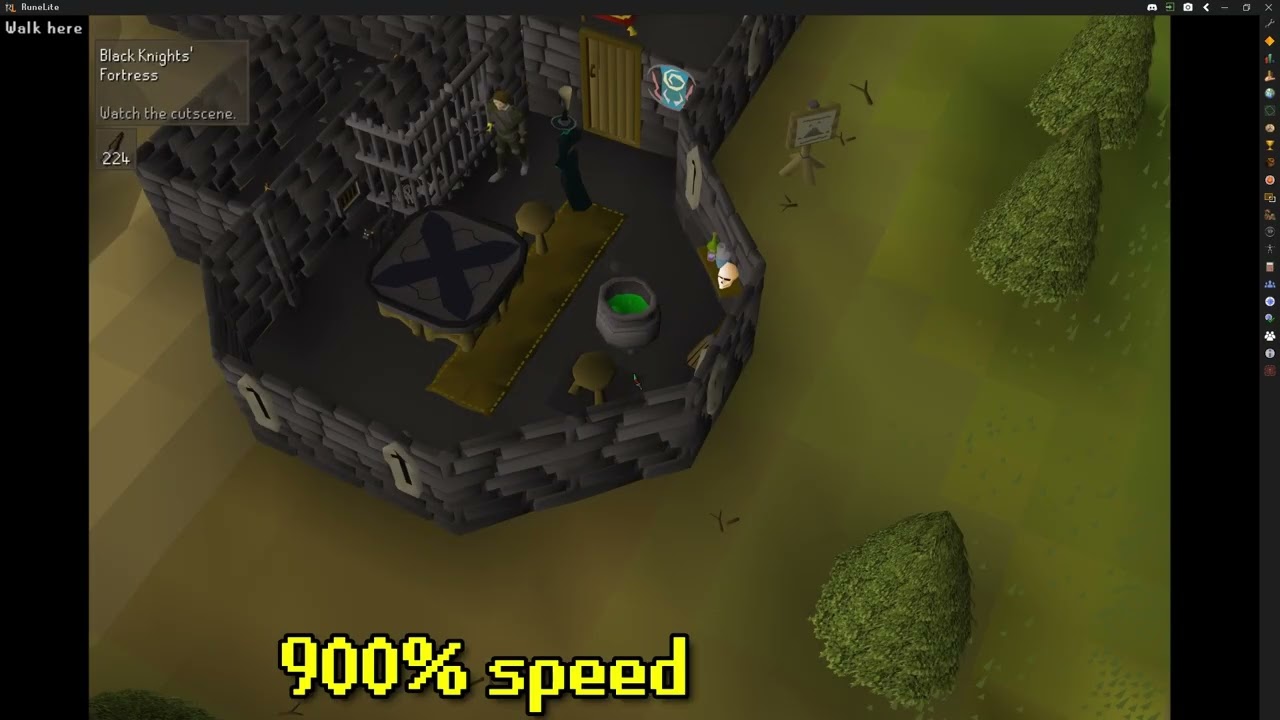
jagex pls fix :(
BGM Is Crystal Rose - Tama's Little Music Shop
gilded kayak
haughty pumice
**safemode**: To enable safemode
## Windows
Run the `RuneLite (configure)` short...
u do this too
merry trail
is this installed by default? or am i misinterpreting? is this not a .exe that you run
gilded kayak
it's a shortcut in your windows start menu, if it's not you probably installed runelite originally before we added it
and you just need to run the installer again, to get it
merry trail
I installed runelite almost 10 years ago so that checks out
gilded kayak
the runelite launcher basically never has to be updated, except if you need to do something like this
i was on a 2019 version till last year
merry trail
quick question before I reinstall, I've never made a runelite account, can I save my settings somehow? I'd hate to have to redo them
gilded kayak
if you want to go to %userprofile%\.runelite\ and take a copy of the profiles2 folder you could do that, but just running the installer overtop of your existing install wont delete this
you can put that userprofile path, in the top bar on file explorer, where it probably says Home
merry trail
better safe than sorry! I appreciate it I'll get back to you in a second
glacial kayak
unfortunately im stuck using the jagex launcher now is there any way to run safe mode off that?
mossy swan
yeah read what the bot said about safemode
gilded kayak
we only have jagex-launcher friendly instructions because when we had both, people got confused
somehow
merry trail
It does not happen with safe mode active
gilded kayak
then your issue is some  plugin is exploding
merry trail
dang, okay. I'll go down the list and disable every single one in order..
Thank you.
gilded kayak
i would search hub instead outside of safe mode, and disable half
1 at a time sounds awful
merry trail
oh good, I can search by hub only ones.
appreciate that
I have discovered the offending plugin, it was a creators kit plugin.
Appreciate the help.
glacial kayak
it seems hardware acceleration off has removed most of the stutter, im not sure why it all of a sudden became an issue
gilded kayak
yeah idk it just happens to people for some reason
side panel open + hw accel = boom for no reason
gilded kayak
!logs
haughty pumiceBOT
To find the logs, you can do one of the following:
- If your client failed to open, click the
Open logs folderbutton. - Open the screenshot directory by right-clicking 📷
Camerabutton, navigate 1 directory up, then open logs folder. - Navigate to
%userprofile%\.runelite\logson Windows or$HOME/.runelite/logson Linux and macOS.
Upload the log files named client and launcher by dragging them to Discord. If there are files prefixed with jvm_crash dated from today, upload them too.
 scarlet shell
ground items keep dissapearing anyone got a solution for that?
gilded kayak
haughty pumice
To find the logs, you can **do one of the following**:
- If your client failed t...
u can do this also since the other guy decided he didn't need help
 haughty pumiceBOT
oblique plume
haughty pumiceBOT
oblique plume
the scale option there
 copper gorge
oblique plume
the scale option there
copper gorge
oblique plume
the scale option there
ah, what if i'm launching through bolt?
oblique plume
they have a configure window
 bronze tulip
i'm getting white screen with dev tools for some reason - there's a ReflectUtil error that may be causing this?
I'm not sure what to do as i've followed the guide here https://github.com/runelite/runelite/wiki/Using-the-client-developer-tools
pls help ❤️


GitHub
Open source Old School RuneScape client. Contribute to runelite/runelite development by creating an account on GitHub.
round jacinth
were you the one that asked in #runelite and were told moremaven
and moved it here lol
 winter snow
I thought it looked familiar
bronze tulip
round jacinth
were you the one that asked in <#301497432909414422> and were told moremaven
it was a response to someone else
empty minnow
it was not
round jacinth
this is support for core client not how to compile
round jacinth
that reflection isn't an error that is a warning and is normal
bronze tulip
well i'm getting a white screen though
winter snow
Maybe do a clean before you build it too
round jacinth

we're not babies first java project helpers
follow the build guide
more than likely you want to dev a hub plugin anyways
so you already foollowed the wrong guide
winter snow
If someone as dumb as me can figure out building RuneLite, you can too 😄
 gritty veldt
Hello, is this the right discord / channel to ask a question about plugin-hub plugin development?
gritty veldt
hollow olive
<#301497432909414422> for plugin questions
Thank you
gritty veldt
hollow olive
<#301497432909414422> for plugin questions
Thank you
bronze tulip
round jacinth
follow the build guide
got what i needed running with the help of both guides, thanks y'all
 sinful pine
running into mm2 tunnels crashed my runelite, happened to faux too. not sure if bug is known already but ye 🙂
gilded kayak
that area fucking sucks
round jacinth
jagex broke it last time maybe they did again, try without gpu on
gilded kayak
turn off gpu/117
i think this issue is off because there's like a trillion things that get computed there for no reason
sinful pine
yeah thats odd, good to know ty guys
 snow leaf
ouch

never seen a window popup on a crash before
havent crashewd like this either before though
it wont show any text though
 delicate bobcat
snow leaf
ouch
delicate bobcat
snow leaf
ouch
is there anything in the client log?
snow leaf
2025-10-16 20:27:34 GST [Map Loader] ERROR injected-client - Client error: map loading
java.lang.OutOfMemoryError: Java heap space
at ib.ax(ib.java:1633)
at ib.lm(ib.java:6863)
at ib.el(ib.java)
at ih.bc(ih.java:25821)
at ih.qt(ih.java)
at rl3.wy(rl3.java:41183)
at rl3.xu(rl3.java:50795)
at rl3.run(rl3.java:42085)
at java.base/java.util.concurrent.Executors$RunnableAdapter.call(Unknown Source)
at java.base/java.util.concurrent.FutureTask.run(Unknown Source)
at java.base/java.util.concurrent.ThreadPoolExecutor.runWorker(Unknown Source)
at java.base/java.util.concurrent.ThreadPoolExecutor$Worker.run(Unknown Source)
at java.base/java.lang.Thread.run(Unknown Source)
2025-10-16 20:27:34 GST [D3D Screen Updater] ERROR net.runelite.client.RuneLite - Uncaught exception:
java.lang.OutOfMemoryError: Java heap space
at java.desktop/sun.java2d.d3d.D3DScreenUpdateManager.run(Unknown Source)
at java.base/java.lang.Thread.run(Unknown Source)
2025-10-16 20:27:36 GST [Client] ERROR injected-client - Client error
java.lang.NullPointerException: null
at net.runelite.client.plugins.gpu.GpuPlugin.swapScene(GpuPlugin.java:1618)
at client.nu(client.java:41773)
at client.hm(client.java:46495)
at client.aph(client.java:14108)
at client.ki(client.java:12935)
at client.bg(client.java:11940)
at bg.al(bg.java:447)
at bg.nt(bg.java)
at bg.run(bg.java:36534)
at java.base/java.lang.Thread.run(Unknown Source)
yeh
gilded kayak
it probably says "too many things to compute, goodbye"
delicate bobcat
does it happen with GPU experimental? 🤔
snow leaf
not sure
but out of memory so could be anything right
ive been playing literally all day 2 clients
gilded kayak
i'm fairly certain it's that cave
snow leaf
and my unity is open in background though not using it today
gilded kayak
there's like a trillion things on the outside for no reason
unless they've fixed that, but i feel like they didn't
which get computed and gg
snow leaf
those are the gpu settings if it matters
 delicate bobcat
looks like possibly a Jagex bug, but could also be rl internals
snow leaf
anyway just restarted and will keep playing, not too bothered but wanted to post incase known issue or a pattern with future crashes
delicate bobcat
would be good to check if it also happens on GPU experimental
 solid mesa
Yea as someone else mentioned GPU crashed for Faux yesterday in MM2 caves. It's just a rough area
delicate bobcat
might help narrow it down
snow leaf
kinda hard to make it crash though surely
like if i get experiemntal gpu i could probs go through this area 20x and have no problem
 tropic harness
IDK if this is the right place to ask a question like this.
I'm looking to extract sounds from runescape. I know there IDs and everything but dont know of a way to extract them.
My use case is wanting to use custom Sound Swapper (https://runelite.net/plugin-hub/show/sound-swapper) to replace sounds with the same sound but increase the volume so they stand out more.
 simple pagoda
Is there anything that would help with inputs freezing on loot tracker update? visually nothing freezes in the client but inputs get delayed like 2 full ticks
gilded kayak
!hw this maybe
haughty pumiceBOT
Graphical artifacts? Try disabling hardware acceleration: https://github.com/runelite/runelite/wiki/Disable-Hardware-Acceleration
gilded kayak
this only if you have the loot tracker prompt open, and it's happening
!safe if it's closed, but you know ur getting loot, do this instead
haughty pumiceBOT
safemode: To enable safemode
Windows
Run the RuneLite (configure) shortcut from the windows start menu
Tick the Safe mode box, save, launch RuneLite the way you normally do.
Mac
In Terminal, run
/Applications/RuneLite.app/Contents/MacOS/RuneLite --configure
Tick the Safe mode box, save, launch RuneLite the way you normally do.
simple pagoda
haughty pumice
Graphical artifacts? Try disabling hardware acceleration: <https://github.com/ru...
Fairly certain this fixed it, thank you!
 young turtle
Heeey, I’ve got another question about the Discord plugin. I tried the steps from !discord and followed everything it told me to do, but I’m still not seeing the rich presence show up on my profile, no activity or location info at all. If !discord didn’t fix it, what should I try next?
gilded kayak
are you sure it's not step 2, because i can clearly see RuneLite in your discord game history
 young turtle
Yes, I've never manually added it to my game activity

Does not give me an option to remove it
gilded kayak
idunno i can't really tell since the gta thing you have open is constantly resetting its timer
sometimes people come here and cant see it, but we can
cuz caching is fun
young turtle
gilded kayak
idunno i can't really tell since the gta thing you have open is constantly reset...
Mb, was tabbing back and forth between the games but it should show up now
 ebon roost
hello, does anyone know where the linux appimage for runelite stores data/cache?
i'm having an issue on my steam deck where plugin configs won't save and i want to start from square 1, potentially with the flatpak i see on the discover store
 zealous cedar
~/.runelite
ebon roost
😆 thanks, i'll go kick myself
 gaunt lion
Has anyone else seen the issue where in gridmaster, you try to open a shop and the shop screen itself doesn't render (but the inventory buttons go blank as if it has oppened and hover options on items say things like Value/ Sell 1, etc.
It seems to go away if I open the teleport menu from the mushroom, and then try to trade with shopkeep again.
zealous cedar
does the client log show anything?
gaunt lion
Not really.
At least not as far as I can tell.
Log ends at the last plugin I installed, nothing after that despite triggering the issue.
 zealous cedar
duno then
gaunt lion
Yeah I am wondering if it is just with the actual game.
Should I change logging level (if I can?)
I am assuming it is possible to change.
zealous cedar
no i was expecting a client error or something
 valid tartan
for the tob utitlies plugin in plugin hub, is there any way you can set a number yourself for the visual metronome in a room? i cant seem to find it. in sotetseg room for instance i'd like a 5t metronome but it seems to automatically be a 4t metronome and i cant seem to change it.
round jacinth
valid tartan
for the tob utitlies plugin in plugin hub, is there any way you can set a number...
I don’t think that plugin does that
 unique flume
is there a way to make suggestions about a specific default plugin? maybe to the devs that work on it in the github or something?
round jacinth
if it’s core then it belongs on #suggestions
unique flume
awesome ty
gaunt lion
@zealous cedar (sorry to ping)
I noticed something very specific. If I teleport using one fo the special items, the anchors for all of the UI stuff moves: https://i.imgur.com/PPAdcYp.jpeg
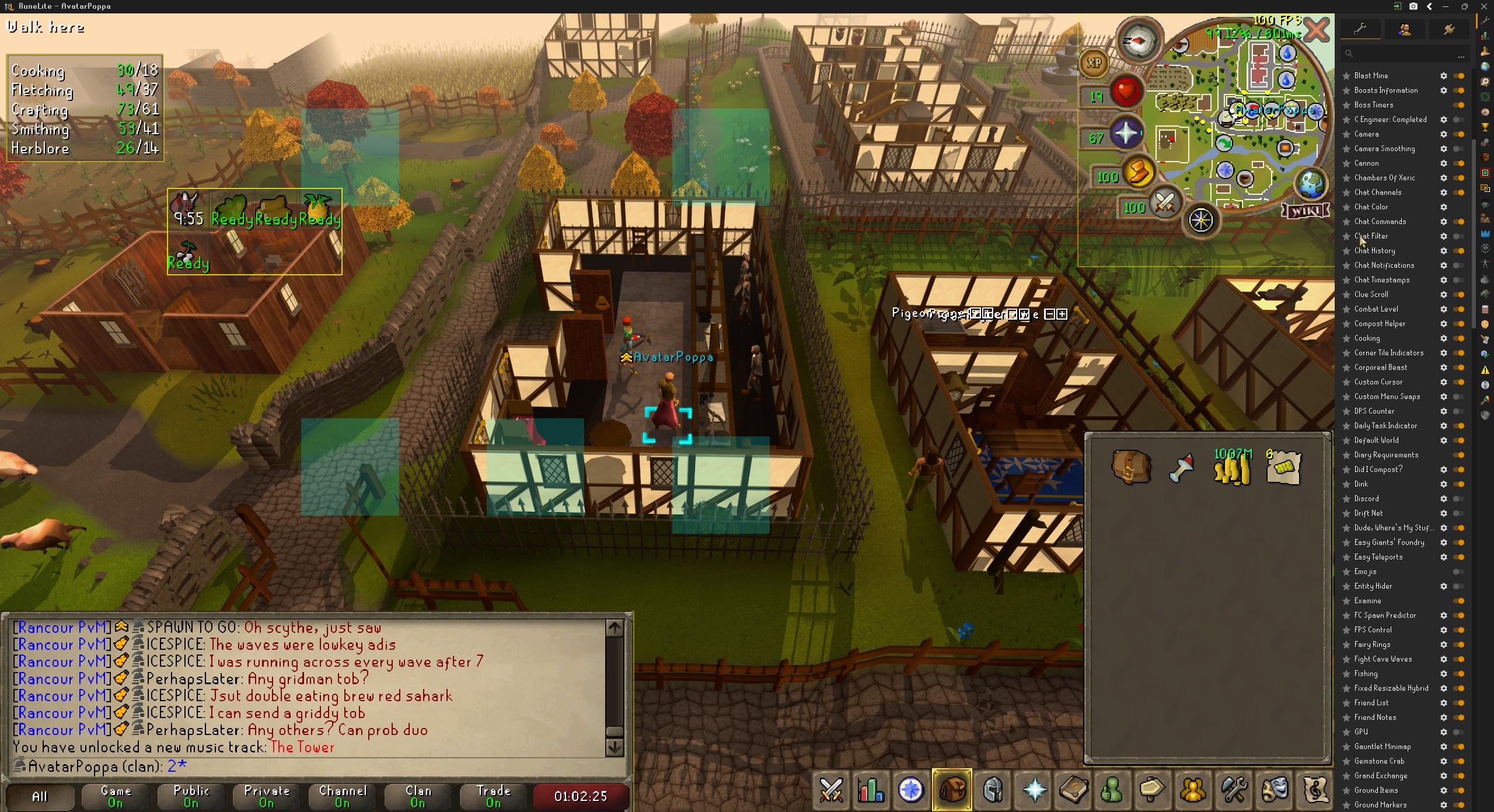
Now, if I open the teleport menu of the mushroom
then exit it without teleporting
It moves back: https://i.imgur.com/Ez3AYY3.jpeg
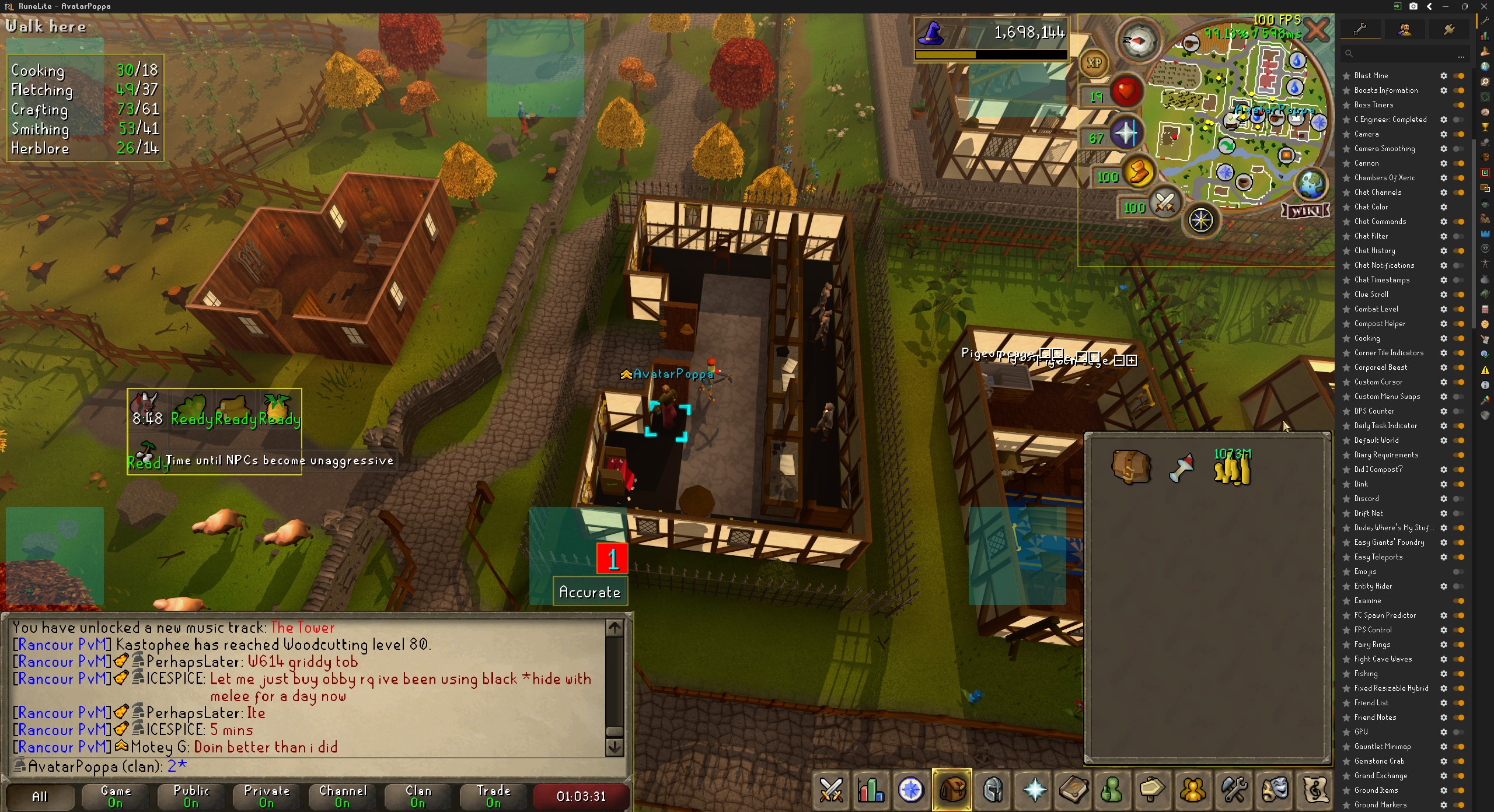
Isn't that strange?
And after doing that the issue gets fixed
This also happens going down ladders
 tidal sedge
i'm trying to mute the ruby bolts (e) proc noise using annoyance mute, i typed out all the id forms i could find in both sections but i'm still getting the sound, am i formatting it wrong or something? disabling and re-enabling the plugin didn't work. sorry if this isn't the right place to ask qs about specific plugins
 gilded kayak
it's just the number afaik
also make sure you don't have the imadrum money plugin on the hub
tidal sedge
i do not 😔
i'm trying some other ids and they aren't working either, is there a checkbox to enable muting the typed ids or something like that that i'm missing?
gilded kayak
it might be id1,id2,id3
tidal sedge
that did it, thank you so much!!!
round jacinth
I think there’s a mute option as a toggle specifically for that besides that text bot
maybe not I forgor
 swift meteor
tidal sedge
i'm trying to mute the ruby bolts (e) proc noise using annoyance mute, i typed o...
swift meteor
tidal sedge
i'm trying to mute the ruby bolts (e) proc noise using annoyance mute, i typed o...
i've also found the "sound swapper" plugin useful in that it has a "debug sounds effect" option that you can turn on temporarily, and it'll display the sound id's of the sounds that you're hearing, so you can mute sounds even if you don't know what the name or id is.
tidal sedge
oh sick that's awesome, thanks!!
 tardy falcon
I've noticed that the Minimap Orb Hider plugin no longer hides the correct orb and the orb that it does hide only hides the texture. Did something change?
 midnight ocean
probs since new orb was aded for tilemaster
tardy falcon
Ah interesting, that does make sense. I wonder if it will go back to working after it's gone then.
 dense tendon
is it possible & legal to code a plugin to hide the 3 blue combat mastery icons in gm?
 frank thistle
I am bursting maniacal monkeys (gridmaster) and runelite apparently thinks some of them are "dead NPCs".
Menu entry swapper hides the attack option for some of them with the "Remove dead NPC menus" option enabled, and entity hider with the "hide dead NPCs" option enabled hides those same monkeys as well.
Maybe 30% are still visible and attackable via left click, but most aren't. Is this a known bug?
 gentle scarab
there is, announcement volume
 clear sandal

 crisp heath
yo anyone know why my ping isn't showing up anymore?
round jacinth
Jagex isn’t replying back
crisp heath
i see others still show their ms.. wonder why i aint getting mine to appear anymore?
like is it something with my settings? (ping is currently turned on)
round jacinth
No probably just not replying back
worldhopper plug in has the toggle just in case I think
cyan dirge
spiral flare
i mean, ive been deleting plugins that i dont reeeally use anymore as per the te...
I have allocated a reasonable amount of virtual memory to my computer. which fixed my lag issue
hope u fixed ur issue. or hope this will help
🫡
 fast shuttle
Which option to show item names? It's not hidden btw. Was working last night.
 winter snow
double-tap Left Alt
fast shuttle
Ah, thanks. Classic off and on then that worked 🙂
empty minnow
frank thistle
I am bursting maniacal monkeys (gridmaster) and runelite apparently thinks some ...
If npcs respawn too fast this happens
Same thing happened in leagues with whatever those small abyssal creatures are. They respawn pretty much instantly so it thinks its still the same npc
 gleaming pike
i'm not sure where to ask this, but i have a question about the first person plugin from the plugin hub. can you direct where i can ask? i'm not too familiar with github per se
haughty pumiceBOT
Support for hub plugins should be directed to the author of the plugin.
You can find the support link by searching for the plugin in the Plugin Hub panel and clicking the ? button on the plugin, or by right-clicking the plugin in the plugin panel and clicking the Support menu option.
gleaming pike
ty!
 alpine lion
is there a setting etc that may be installed on runelite that may cause it to affect my mouse when playing other games potentially?
round jacinth
no
alpine lion
interesting when i play another game (league) my mouse feels like slightly offset, when i switch back and forth from runelite. however if i reset comp, never open runelite i dont have the problem
 unique edge
hey is there a way to save my plugins to my other pc
haughty pumiceBOT
unique edge
like transfer them over
 hasty cosmos
how i can pike up ?


 alpine lion
yeah i just dont know what to change
when i turn gpu on, top left 25%~ of screen works, and the rest is frozen
same ratio as above
gilded kayak
your gpu driver...
update or or downgrade it
and see if it fixes it
gpu drivers are for the latest games not this browser game, so sometimes they cause issues
alpine lion
i fked up a setting somehow with trying to run runelite off my gpu/cpu or something similar
 cold oasis
does any one know how to set a certain drop to notify me i am going for a giants key and would like to know how to get notify when i find it
solid mesa
Add it to highlighted items and turn on notify for highlighted drops
cold oasis
ty but i am still new to runelite and i dont understand haha
solid mesa
 cold oasis
ahhh that helps ty
tardy falcon
I keep clicking on my pet, so I used custom menu swap to change left click to walk here. I wanted to make shift click talk to him, but that option doesn't seem to appear, is there a way to change this so I can?
 broken smelt
Is it a plugin where i get a notification for example when a Superior spawns during a slayer task? If so what is it called?
empty minnow
tardy falcon
I keep clicking on my pet, so I used custom menu swap to change left click to wa...
You have to hit reset
When you shift right click, swap, there should be a reset option
empty minnow
broken smelt
Is it a plugin where i get a notification for example when a Superior spawns dur...
Pretty sure that's in the default slayer plugin
broken smelt
empty minnow
Pretty sure that's in the default slayer plugin
Oh yeah it is 😅 Thanks!
tardy falcon
empty minnow
When you shift right click, swap, there should be a reset option

I haven't changed the shift click setting, so there's nothing to reset. It just doesn't show the "talk-to" option.
empty minnow
Hmm, there should also be a reset option on that sub menu
 coarse cedar
anyone know why this is happening? i hate ingame notis set to 10k+ and it just keeps senign messages after everything i kill
 zealous cedar
I think its the loot tracker
coarse cedar
yes it was, thank you man that was driving me crazy
 fallen briar
ground items keep turning themselves off even though the plugin is enabled? on grid master worlds

 gilded kayak
are you playing on gridmaster
cuz this happens sometimes to people, on leagues
i don't think we really know why
 strong marsh
no, just regular
gilded kayak
oh then i really dont know
 raw coral
is there anywhere i can make a ticket for some help on my client plugins
gilded kayak
if it's one of the pre-installed plugins you can ask here
if it's something you installed from the tab
haughty pumiceBOT
Support for hub plugins should be directed to the author of the plugin.
You can find the support link by searching for the plugin in the Plugin Hub panel and clicking the ? button on the plugin, or by right-clicking the plugin in the plugin panel and clicking the Support menu option.
raw coral
its more or less account base/ just got a new pc lost all my plugins , i signed into my account but its not working
haughty pumiceBOT
gilded kayak
if you see
default
default``` in the  tab, those are differentto actually sync your profiles tho you have to click the ☁️ so it turns orange, on the computer you want to sync from
since we can't just offer every single user sync on every single profile, or the server would explode
 novel flower
hi, im not sure what info is relevant or if this is the right place to ask but recently ive been having blue screens while playing runelite (bug code 0x00000116 VIDEO_TDR_FAILURE caused by dxgkrnl.sys)
i can play more gpu intensive games just fine like genshin or overwatch and never had any blue screens there, and ive monitored my temps while gaming and theyre fairly normal (90c cpu which is normal for thin gaming laptops)
do you know if theres any settings in runelite thats causing this or if its even caused by runelite at all?
oblique plume
novel flower
hi, im not sure what info is relevant or if this is the right place to ask but r...
graphics driver crash, try updating/rolling back
novel flower
alright, will do
 peak comet
Anyone else's notifications popping up with this name?
 round jacinth
No
raw coral
idk what im doing wrong but my plugins are still not loading on my runelite lol
im obviously signed into the correct account
raw coral
problem im having is i got a new pc
and i lost the old runelite files
so if i didnt cloud sync it before i got a new pc i lost all data?
haughty pumiceBOT
raw coral
but if i dont have the old files i cant transfer them?
round jacinth
If you didnf cloud sync then yeah you’re hosed
round jacinth
those aren’t related to settings
you could switch profiles and keep your loot and farming timers
The profiles are the settings for plugins
round jacinth
Enable cloud sync this time around 🙂
 round jacinth
Yeah should be fine yeah
Before dumping your current pc for a new one it’s good to make sure it works tho
raw coral
yeah i never woulda thought about the plugins
i thought it was just all account synced
 exotic robin
so i had an issue with my runelite for months where i was unable to change my profile unless i had just freshly restarted the client and logged out...
profiles not being able to be changed etc and this carried over to 2 machines...
i sent in my logs for you guys to look at and everythign seemed fine
today i deleted my profile and decided to start a fresh one as more and more things started to break,
everything seemed fine (yes its workinG)
I then proceed to one by one reinstall all my old addons to slowly elimate the problem,
it turns out the problem occurs when i enable to natively installed emoji addon...
is this a known issue?
leaden trail
Can you post logs?
exotic robin
I don't have emoji enabled anymore but this is the log i posted when i was having the issue @leaden trail
humble hatch
I noticed that when zooming out a lot, the FOV changes. It is possible to have a fixed-FOV zoom?
leaden trail
exotic robin
I don't have emoji enabled anymore but this is the log i posted when i was havin...
I want to see today's
exotic robin
leaden trail
I want to see today's
 undone tree
Hey everyone. Does anyone know a good way to get sound notifications when a new message appears in clan chat?
 left tide
How?

 stone parcel
They might have de-ironed.
left tide
ohhh ok
round jacinth
or joined a booger gim group
 frosty ember
Any idea on how to make the Windows 11 Taskbar not over render, or show up when runelite is in full screen?
Worked fine in windows 10 but Windows 11 changed taskbar behavior.

Or have runelite be able to be actually full screen when the taskbar is not auto hidden.
 zealous cedar
ive been wondering about that, i know it used to work
are you sure its a win 10 vs 11 thing?
frosty ember
Yes
I just installed windows 11 on the 13th
The change was immediate
Another program i use "Stardock Fences" is kind of messed up due to not following the taskbar anymore when auto hidden.

Where before they would move with the task bar
zealous cedar
interesting. you could file a bug with that info so at least we can track it. i dont have time to look into it atm
frosty ember
Yes i can
Ill do it now
The issue stems from runelite not actually being fullscreen etc
But with personally i dislike playing most games in exclusive full screen
zealous cedar
so the previous behavior where maximized runelite prevents the taskbar from popping up, i dont think we have any specific code for
its just how windows 10 works
frosty ember
Yeah
Its not a runelite issue. Its a conflict in Windows 11.
But maybe there is a solution out there somewhere, so i'll make the report anyway.
zealous cedar
i asked chatgpt and it said to set WS_EX_TOOLWINDOW which seems hilariously wrong
gilded kayak
ask claude instead
 silent charm
one of my profiles is messed up everytime i switch to it the client just crashes, and theres nothing in the logs about what config setting or plugin it is since last plugin to load is always different before crash. how can i get my marked tiles and stuff from the corrupted profile into a new one?
zealous cedar
use safe mode
silent charm
in safe mode when i try export it exports all the settings still, how can i export only the settings with safemode plugins?
frosty ember
gilded kayak
ask claude instead
I 2nd that claude is better
zealous cedar
you can use safe mode and just uninstall your pluginhub plugins
silent charm
but is it possible to export only safemode plugins as a properties file since i dont think that will solve it
leaden trail
No
frosty ember
Would it be a good idea to also remove them from C:\Users\[USER]\.runelite\plugins?
gilded kayak
it is not possible to only export anything specific
silent charm
where is the data for marked tiles stored thats the only thing i want to salvage, thats not in the properties file? or where can i look for it
leaden trail
Just launch in safe mode and export the tile markers from the areas you care about
silent charm
i know i can do that, but where is the data i dont want to do all that work if theres another way
gilded kayak
if you do what you want, incorrectly, you'll lose everything
and because of that we wont instruct you on how to find it
leaden trail
And if you try to do it anyways, we won't help you fix it fwiw
silent charm
everything is already lost anyway and im trying to learn how the properties file works and youre just telling me na ull fk it up were not telling you where to find it
 dim kettle
anyone know how to add a potion from my storage into an already existing bank tag?
round jacinth
make it a layout
 sand yoke
anyone know why the private part looks like this?
 frosty ember
sand yoke
anyone know why the private part looks like this?
frosty ember
sand yoke
anyone know why the private part looks like this?
Might want to get those checked out by a professional.
Seriously though, check for any plugin that might be effecting your chat.
Best suggestion is to create a new empty profile, switch to it which will unload all non base plugins from the game. (it will freak out) but if you issues goes away you know its a plugin hub plugin.
Then you should use the 50/50 method to find which plugin it is.
Which is, choose a group of plugins, start disabling half of those plugin. If no change, you know those arent the issue
If they do, you know one of them is
Slowly minimize that group until you find the problem plugin
 long ruin
what do we do if we are stuck here on linux? nvidia-settings doesnt offer this functionality https://github.com/runelite/runelite/wiki/GPU-FAQ#i-meet-the-all-the-requirements-but-it-still-wont-turn-on-or-is-very-laggy

GitHub
Open source Old School RuneScape client. Contribute to runelite/runelite development by creating an account on GitHub.
gilded kayak
flatpak update probably
long ruin
it worked before i updated my drivers with sudo ubuntu-drivers install
 mortal pond
sand yoke
anyone know why the private part looks like this?
mortal pond
sand yoke
anyone know why the private part looks like this?
I'm pretty sure that is due to the resource packs plugin, if disabling the plugin & relaunching RuneLite doesn't fix it, try running RuneLite in safe mode one time, that's what fixed it for me iirc
long ruin
this is on a fresh install
long ruin
2025-10-18 19:27:01 CDT [Client] ERROR n.r.client.plugins.gpu.GpuPlugin - Error starting GPU plugin
java.lang.RuntimeException: unable to find a fb config
at net.runelite.rlawt.AWTContext.createGLContext(Native Method)
at net.runelite.client.plugins.gpu.GpuPlugin.lambda$startUp$1(GpuPlugin.java:312)
at net.runelite.client.callback.ClientThread.invokeList(ClientThread.java:119)
at net.runelite.client.callback.ClientThread.invoke(ClientThread.java:101)
at net.runelite.client.callback.Hooks.tick(Hooks.java:229)
at client.uq(client.java:62696)
at client.bg(client.java)
at bg.al(bg.java:447)
at bg.nt(bg.java)
at bg.run(bg.java:36534)
at java.base/java.lang.Thread.run(Thread.java:840)
2025-10-18 19:27:08 CDT [Client] WARN n.runelite.client.eventbus.EventBus - Uncaught exception in event subscriber
java.lang.NullPointerException: Cannot read the array length because "array" is null
at java.base/java.util.Arrays.stream(Arrays.java:5459)
at com.soulwars.SoulWarsPlugin.highlightCaptureAreas(SoulWarsPlugin.java:244)
at com.soulwars.SoulWarsPlugin.onGameStateChanged(SoulWarsPlugin.java:92)
at net.runelite.client.eventbus.EventBus$Subscriber.invoke(EventBus.java:70)
at net.runelite.client.eventbus.EventBus.post(EventBus.java:223)
at net.runelite.client.callback.Hooks.post(Hooks.java:205)
at client.fg(client.java:62791)
at fw.hg(fw.java:880)
at client.yw(client.java:17298)
at client.yp(client.java:61926)
at rn.kb(rn.java:16449)
at gn.kr(gn.java:4706)
at client.mm(client.java:1402)
at client.bg(client.java:11922)
at bg.al(bg.java:447)
at bg.nt(bg.java)
at bg.run(bg.java:36534)
at java.base/java.lang.Thread.run(Thread.java:840)
2025-10-18 19:27:30 CDT [Client] ERROR n.r.client.plugins.gpu.GpuPlugin - Error starting GPU plugin
java.lang.RuntimeException: unable to find a fb config
at net.runelite.rlawt.AWTContext.createGLContext(Native Method)
at net.runelite.client.plugins.gpu.GpuPlugin.lambda$startUp$1(GpuPlugin.java:312)
at net.runelite.client.callback.ClientThread.invokeList(ClientThread.java:119)
at net.runelite.client.callback.ClientThread.invoke(ClientThread.java:101)
at net.runelite.client.callback.Hooks.tick(Hooks.java:229)
at client.uq(client.java:62696)
at client.bg(client.java)
at bg.al(bg.java:447)
at bg.nt(bg.java)
at bg.run(bg.java:36534)
at java.base/java.lang.Thread.run(Thread.java:840)
gilded kayak
yeah so flatpak update
long ruin
oh how do i do that
gilded kayak
type the words flatpak and update into your terminal
long ruin
i got this error when i tried this last time on pop_os but just never updated
long ruin
ty i thought flatpaks auto updated for some reason
last time i was googling this i mean
should i add this to the FAQ?
gilded kayak
i keep meaning to and then i just dont
long ruin
i tripple dog dare you to
gilded kayak
 long ruin
would have saved me 3-6 hours back in august 😭
dim kettle
round jacinth
make it a layout
the bank tag is already a layout, would I have to remake the whole tag/layout and include the new potion?
round jacinth
i found a short to be) disable potions always go to bank -> deposit that potion into regular bank, drag it into the lay enabled tab so its part of that layout tag tab and then withdraw that potion, release place holder and then disable that "deposit potion goes to bank"
a few steps to avoid remaking the tag tab
 jaunty stratus
Hi, I have an issue with my account that I cant figure out. I log in with the correct details (I promise its the correct username and password) on a new computer but it doesnt load my osrs account. Its the correct email and password because i bought members not too long ago for it and it works on my laptop, but it doesnt load on my desktop. anyway I can figure this out?
round jacinth
does it not log in or what
jaunty stratus
it does on jagex launcher, but not my osrs account. I pretty much have to start from lvl 3
it seems like its not linked
which is weird because its all the same email
 warped frost
I'm trying to get a plugin to be aware of the player's body mode so I can show the correct version of the farmer's outfit icons depending on if the player has body type a or b. I found the pvar IF1, which seems to be set to 1 for the female looking body and 0 for the male looking body when you use the makeover mage. however, sometimes when i look at the IF1 varp at login its set to 4 or something other than 1 or 0. What does it mean when IF1 == 4, and is there a better way to detect player "gender"?
oh I managed to figure it out. apparently IF1 is just a script local variable slot? so it only has this meaning when the makeover mage script is running. darn. https://oldschool.runescape.wiki/w/RuneScape:Varplayer/261
zealous cedar
you should just use PlayerComposition.getGender()
warped frost
I tried that but I couildnt figure out how to get access to a Player instance
zealous cedar
client.getLocalPlayer().getPlayerComposition().getGender()
warped frost
i kept getting a null value when i called client getLocalPlayer but maybe i was calling it too early
round jacinth
wait a game tick yeah
warped frost
Is there a way to detect if it changed? other than just checking it every tick?
prolly something like onPlayerChanged im assuming
round jacinth
could just be an edge case to not care about if a varbit doesnt change with it
or detect the make over mage interaction in your plugin and run the check
first game tick after login || first game tick after shop interface closes at make over made
¯_(ツ)_/¯
warped frost
ill just detect widgetLoaded and widgetClosed, mark a flag to enable the check at makeover mage and whatever the tutorial island interface for gender is, and only check per tick if that flag is enabled. thanks for help 😄
sand yoke
frosty ember
Might want to get those checked out by a professional.
didn't realize how strange that sentence sounded haha
turns out it was the collapsible modern chat plugin, thanks for the help!
 empty spoke
hey, just making it known that dangerous floor tiles in hunleff room don't show up on gpu experimental
at least on mac os. used to be missing the whole floor but that was changed recently. still unable to do cg until the dangerous tiles show up too though
 bright narwhal
screen completley freezes on ennis figt during final dawn quest
 charred wind
!logs
haughty pumiceBOT
To find the logs, you can do one of the following:
- If your client failed to open, click the
Open logs folderbutton. - Open the screenshot directory by right-clicking 📷
Camerabutton, navigate 1 directory up, then open logs folder. - Navigate to
%userprofile%\.runelite\logson Windows or$HOME/.runelite/logson Linux and macOS.
Upload the log files named client and launcher by dragging them to Discord. If there are files prefixed with jvm_crash dated from today, upload them too.
 pseudo ridge
this just started popping up today, 2nd time. Is this a problem with files in Runelite?
 mossy swan
pseudo ridge
this just started popping up today, 2nd time. Is this a problem with files in Ru...
mossy swan
pseudo ridge
this just started popping up today, 2nd time. Is this a problem with files in Ru...
… what makes you think this is related to runelite?
pseudo ridge
i have no clue, chat gpt thinks its runelite since there is no PDFEditor file anywhere even though it shows in the file link
mossy swan
pseudo ridge
i have no clue, chat gpt thinks its runelite since there is no PDFEditor file an...
don’t trust chat gpt lol
anyway it’s not runelite
pseudo ridge
yea i just have no clue why it started popping up today, havent updated or installed anything in months
have you seen it before?
mossy swan
no
 deep wigeon
Hello, i have an issue with runelite where my seed vault in the farming guild on runelite disappears, when i tried using the official client it is there.


Much appreciated if anybody could help
 viscid lantern
are you using the experimental gpu plugin?
deep wigeon
viscid lantern
are you using the experimental gpu plugin?
Yes i was, uninstalling didn't work
viscid lantern
try switching to the default gpu plugin
deep wigeon
Has this happened b4?
viscid lantern
no, does it work with the default gpu plugin?
deep wigeon
viscid lantern
no, does it work with the default gpu plugin?
Still not there

Also tried deleting cache but it didn't do anythin
viscid lantern
hmm, then its probably a differnet issue and likely a hub plugin doing that
haughty pumiceBOT
Many plugins from the pluginhub break the client in subtle or not-so-subtle ways, including causing issues like client freezes. We do not support pluginhub plugins because we do not make or quality control them, and do not recommend their use.
Run the RuneLite (safe mode) shortcut, or with a Jagex account, first run the RuneLite (configure) shortcut and tick the Safe mode box, then launch RuneLite via the Jagex launcher.
This temporarily disables the GPU plugin and all hub plugins which will allow you to confirm the issue is caused by one of those plugins and isn't a core RuneLite issue.
If the issue is caused by a hub plugin, you should isolate which plugin it is and then uninstall the plugin.
To enable safemode
Windows
Run the RuneLite (configure) shortcut from the windows start menu
Tick the Safe mode box, save, launch RuneLite the way you normally do.
Mac
In Terminal, run
/Applications/RuneLite.app/Contents/MacOS/RuneLite --configure
Tick the Safe mode box, save, launch RuneLite the way you normally do.
deep wigeon
viscid lantern
hmm, then its probably a differnet issue and likely a hub plugin doing that
Seed vault shows during safe mode
What should i do from here?
haughty pumiceBOT
Please refer to this flowchart for further troubleshooting.
solid mesa
Which plugin was it?
deep wigeon
solid mesa
Which plugin was it?
Polygon limiter
 fluid otter
am i only one who doesnt show items names on ground?
solid mesa
Double tap left alt
 woven dove
I'm UIM in main game, played some gridmaster, went back to main game and now the scroll box info is all off as it thinks I have a load of boxes banked.
How do I reset the data for that? Seems to be part of the 'Runelite' plugin?
mortal pond
Probably not the best solution, but I would guess if you switch to grid master and drop all of the clues it'll be fixed. You don't need to do clues for gridmaster anyway
woven dove
mortal pond
Probably not the best solution, but I would guess if you switch to grid master a...
Ooh true, I'll do that 😄
I should have copied my profile for gridmaster but completely forgot
empty minnow
It'd probably be good to report that bug to the author so it can be fixed
woven dove
Dropping them in gridmaster fixed it
It's just the built-in runelite settings as far as I know
round jacinth
No, it’s a hub plugin that doesn’t care if you’re in a specific world type or main game
You see how your loot tracker is tracked per world type? Your gm stuff isn’t in main game. They could do that for the clue stuff but they didn’t bother
 fallen creek
Sometimes my clicks don't register on runelite mac, any idea? It's not my mouse, since i never experience this in anything else.
woven dove
round jacinth
No, it’s a hub plugin that doesn’t care if you’re in a specific world type or ma...
Ah okay, I went through all plugins and couldn't find anything except the runelite one which had some infobox settings
 cosmic remnant
Is it just me or the counter in the Tick Manipulation Helper plugin is way off-center?
haughty pumiceBOT
Get support for the Tick Manipulation Helper Plugin Hub plugin here: https://runelite.net/plugin-hub/show/tick-manipulation-helper.
You can also find the support link by searching for the plugin in the Plugin Hub panel and clicking the ? button on the plugin, or by right-clicking the plugin in the plugin panel and clicking the Support menu option.
 wet gull
Why the letter T not work in runelite??
haughty pumiceBOT
If one of your keys isn't working in game, you've most likely bound it to a feature of a plugin. The Debug Helper hub plugin can show what keys are bound to what plugins.
mossy swan
ok then it work
wet gull
i cant do this
gilded kayak
why
wet gull
how i found this Debug Helper
gilded kayak
tab
solid mesa
Then it’ll be a green bug icon in your sidebar icons
wet gull
got it what now?
 gilded kayak
solid mesa
Then it’ll be a green bug icon in your sidebar icons
gilded kayak
solid mesa
Then it’ll be a green bug icon in your sidebar icons
.
wet gull
 round jacinth
do you want us to read what button to click for you
mossy swan
i guess they don’t know english
wet gull
I don't know. English completely.
round jacinth
cool so click the button that is appropiate for key binds


 edgy marsh
!64bit
haughty pumiceBOT
!64bit command not found!
 errant skiff
wont let me login dont know what im doing worng
gilded kayak
what does it say
 lean geyser
client freezes/crashes when clicking play or world selector. not logged in, 0 plugins enabled, uninstalled and reinstalled, both shut down my laptop for an extended period aswell as reset it. Nothing seems to work. The vanilla client loads and runs no issue.
 gilded kayak
is this screenshot from the attempt, when you disabled all plugins
lean geyser
yes
gilded kayak
i.e did you not restart inbetween doing that, and trying to login
if no, try logging in again now
lean geyser
that screen shot is post all everything i mentioned
haughty pumiceBOT
To find the logs, you can do one of the following:
- If your client failed to open, click the
Open logs folderbutton. - Open the screenshot directory by right-clicking 📷
Camerabutton, navigate 1 directory up, then open logs folder. - Navigate to
%userprofile%\.runelite\logson Windows or$HOME/.runelite/logson Linux and macOS.
Upload the log files named client and launcher by dragging them to Discord. If there are files prefixed with jvm_crash dated from today, upload them too.
lean geyser
Uh, I no longer have a camera button
gilded kayak
then go to the folder manually
lean geyser
And turning the plugin on does not bring it back
gilded kayak
you can put that path in the top bar file explorer
 tepid raven
Hello, i wonder if anyone know if it's possible to make this specific drop to only say "Karambwan" or "Manta ray"

*But leave the rest of same of drops the same
round jacinth
tepid raven
*But leave the rest of same of drops the same
Check ground items to see what settings to change
tepid raven
round jacinth
Check ground items to see what settings to change
Yeah i tried, but i'm Lost.
round jacinth
Unlucky
tepid raven
I'm not sure if it's possible to do it for a specific item without effecting the rest of the drops, unless anyone knows how
lean geyser
no jvm_crash log either aswell
round jacinth
tepid raven
I'm not sure if it's possible to do it for a specific item without effecting the...
It’d be an all or nothing I think if it exists
And it would be in the ground items plugin settings
 amber coyote
Any plug in to get rid of the text when i scroll over rocks and trees?
 round jacinth
Those are from mouse tool tips
gilded kayak
lean geyser
nothing special in here, idunno
lean geyser
perfect lol
round jacinth
They maybe just need to reinstall
amber coyote
round jacinth
Those are from mouse tool tips
tysm
round jacinth
np the search bar is keyword search fwiw
gilded kayak
if it's getting stuck there with 0 plugins i would guess it actually being a connection issue
since getting stuck there for any other reason usually throws up in the logs
lean geyser
but why is the vanilla working no issue?
gilded kayak
cuz that client was written this century
and not in the late 90s on a literal rock
runelite basically uses the browser version of the game
and the official client uses something actually sort of modern
lean geyser
the only differene ive noticed is looking at cpu spikes to 60+ when it crashes, when i launch the vanilla it only hits about 30 max
idk if thats got anything to do with it
gilded kayak
the only thing of any interest in the logs was your startup time taking triple mine with no plugins
but i have no idea if that's relevant, it probably isn't
 solemn knoll
i know this isn't support directly for runelite so i'll ask elsewhere if that's needed, but does anyone know why this doesn't work when i try to import it?? i keep getting an invalid format error saying the layout string doesn't include regular bank tag data and i think im just stupid
solemn knoll
solemn knoll
i know this isn't support directly for runelite so i'll ask elsewhere if that's ...
i've now realized after turning my brain on that it does not in fact have regular bank tag data attached and the error is indeed valid, i am just dumb
 vast bone
solemn knoll
i know this isn't support directly for runelite so i'll ask elsewhere if that's ...
vast bone
solemn knoll
i know this isn't support directly for runelite so i'll ask elsewhere if that's ...
Well yeah, it doesn't include that.
The person posted something wrong.
 boreal mesa
what can i do about priff insta crashing my pc when i teleport in with gpu plugin enabled?
i've tried the experimental plugin, priff plugin that removes scenery, 64 bit client etc. gpu is a 7800 xt.
 empty tree
Hello, I've got a strange issue, Runelite has no audio, the regular osrs app works perfectly, sound and all, the issue comes with the Runelite client. System sounds are turned to 100, Runelite is turned to 100, in-game volume is turned to the max. I've tried re-installing, turning off the plugins, updating drivers, changing audio devices, but the problem's still there, any fixes?
 swift viper
for anyone familiar with 117hd, do you know if there's a way to make the lava / magma not look like this? i would like to keep 117hd on while having oldschool style lava
 midnight ocean
no not unless u overide the texures json
haughty pumiceBOT
@humble knoll Visit 117's HD plugin discord (https://discord.com/invite/U4p6ChjgSE) for support, issues & feedback
 umbral tiger
Hey got a bit of a weird one, my cat walked on my keyboard and seemed to have changed something which has messed up my client.
When I click to move the square selected is way off - sometimes in the complete opposite direction. Seems like it’s misconfigured but at random, as every now and then it works. I can’t seem to open RL settings either, it highlights but doesn’t open. I’m on a mac for reference. Any ideas?
Have reinstalled, restarted my laptop still nothing
 river juniper
Have there been any reports of RuneLite causing crashes in other programs? If I have RL & Discord open, discord will crash after a minute or so.'
mossy swan
no
river juniper
😬
delicate bobcat
swift viper
for anyone familiar with 117hd, do you know if there's a way to make the lava / ...
does disabling Ground Textures do that? It'll disable any other tile texture also, so it's perhaps not quite what you want
swift viper
delicate bobcat
does disabling Ground Textures do that? It'll disable any other tile texture als...
i didn't test it, but i would rather like to keep the ground textures, yeah
not sure what to do about it, makes yama really unappealing. shit's such an eyesore 😭
using a bunch of new settings my friend gave me for 117hd that makes it look identical to GPU but i still get the benefits of the lighting and stuff (useful for praying against yama and idk, catching my eye during akkha memory puzzle ig lol)
would be a shame to quit using it just because of this so ig i'll tough it out
delicate bobcat
swift viper
not sure what to do about it, makes yama really unappealing. shit's such an eyes...
if you care enough about it, you can override it
but it's complicated
and not really something we support
swift viper
something like that, just seems like a lot of work and- yea i'm worried about editing plugins like that
since it technically isn't allowed or whatever
thanks for the input though
delicate bobcat
swift viper
since it technically isn't allowed or whatever
with 117 HD, you can technically swap out the JSON files the plugin uses to decide which textures to add to what
without touching the plugin's source code
it's just not something I'd recommend, since it may break when the plugin updates
swift viper
i'd probably need to go into the 117hd discord and ask someone to swap the lava textures with the oldschool ones, and then have them give me the json or something
which feels like quite an ask
delicate bobcat
I see
swift viper
i have no idea how to go about that kinda thing lol
delicate bobcat
the biggest problem is you might struggle to fix it if it breaks I guess
either way, this should probably move to the 117 HD discord :p
swift viper
true, ty still though
 spring otter
Hello! I'm trying to learn inferno to complete the mage tile in grid masters and found the tzhaar hp tracker and it looked nice but the highlighting of the mobs doesnt seem to work. do i need something els for it to work? i can manually mark them with better NPC highlights but then the custom coloring doenst work
haughty pumiceBOT
Get support for the Tzhaar Hp Tracker Plugin Hub plugin here: https://runelite.net/plugin-hub/show/tzhaar-hp-tracker.
You can also find the support link by searching for the plugin in the Plugin Hub panel and clicking the ? button on the plugin, or by right-clicking the plugin in the plugin panel and clicking the Support menu option.
spring otter
ty
broken smelt
What plugin/Setting enables the !kc and !log commands? I have everything enabled in Chat Commands plugin but the commands still dont do anything.
vast bone
KC is from chat commands. Log is from one of the collection log hub plugins. Idr which one
broken smelt
vast bone
KC is from chat commands. Log is from one of the collection log hub plugins. Idr...
Yeah i have everything enabled in Chat Commands but !kc still doesnt work :p
Was there something that i needed to do in order to get !kc and !log to work? cuz like !price works normally.
vast bone
If it's just your commands not working, the ones that your send, then maybe it didn't know your kc
It does not use jagex hiscores
It has to see it in game
leaden trail
The !log one was the temple plugin I think?
broken smelt
vast bone
It has to see it in game
wdym with this?
vast bone
I think there's another way too? Like maybe looking at the boss log but idr exactly.
broken smelt
vast bone
I think there's another way too? Like maybe looking at the boss log but idr exac...
Last time i did this it required me to scroll thru every boss log and it had a little * on the logs if it wasnt like "Checked" yet but rn it doesnt show anything
vast bone
That's for the log command
broken smelt
ah
 vital verge
This morning all my plugins seemed to have stopped working all of a sudden. Anyone have any suggestions?
 native fulcrum
Hey guys, a while back I came to this disc with crash logs with EXCEPTION_ACCESS_VIOLATION codes on a 14th gen intel (14900hx), and altho Intel claim(ed) that mobile/laptop cpus werent effected, it seems like mine is effected anyway.
Now ive been having contact with the company I bought this laptop from (coolblue, a popular and big Dutch webstore for technology related stuff), Ive send it up for repair once and just got it back recently, they claimed they couldnt reproduce the issues I was claiming (blue screens, exception access violations etc). I was wondering if you guys have some tips or tests that I can do and provide to show proof that im suffering from these intel issues.
Ive provided a crashlog for your information aswell.
PS: for anyone else suffering from the same issue: something Ive found that 'solves' it in the meantime is limiting my CPUs max mhz to (far) below its standard.
leaden trail
Don't go to the seller, go to the manufacturer
You also need to update your BIOS like crazy because you're on the oldest microcode I've seen
native fulcrum
Really? I just did that the other day and from what I can see online this is the most recent one from feb 2025?
winter snow
0x12f is the one you need
leaden trail
0x116 is before they started out rolling out any of the stuff that mitigated further damage afaik
native fulcrum
https://wccftech.com/msi-releases-intel-microcode-0x116-for-various-z890-and-b860-motherboard/
This article claims the 0x116 was 'just released' in feb 2025
leaden trail
But really you need to just go to the manufacturer about your issue rather than the store
native fulcrum
I will do that then
just to be sure about the bios microcode update. that would be under system -> windows update -> advanced options -> optional updates right?
native fulcrum
It says here my bios release date is from 15 januari 2025 so thats from is after the fixes isnt it?
 winter snow
If that's the most recent option available to you, then frankly you need a newer motherboard 😄
native fulcrum
I am on a laptop
winter snow
Then replace 'motherboard' with 'laptop'
native fulcrum
I mean im sure you are right and that there are newer versions available, cuz its been a while since I did update it.
winter snow
I have one of the affected CPUs (i7-13700KF) so I keep on top of it 😄
leaden trail
I can tell you for a fact that you're on an insanely old microcode so there's virtually a 100% chance that there is an update available
What's the actual manufacturer and model number for your laptop?
native fulcrum
MSI vector 17 hx a14 vhg
According to the MSI website the most recent bios update is from 28 februari 2025 for my specific laptop.
https://www.msi.com/Laptop/Vector-17-HX-A14VX/support?sub_product=Vector-17-HX-A14VHG#bios
and the version name matches with the one I have, so I guess I am on the newest version?
Im very bad with all this tech stuff so please correct me if im wrong 🙂

 tough berry
hi y'all. I have a problem that I can no longer see my own typings above my head, nor can I see anyone else's.
mossy swan
tough berry
hi y'all. I have a problem that I can no longer see my own typings above my head...
entity hider 2d?
tough berry
I've looked into the entity hider, and it's not even turned on. I've been told it's supposed to be the "Hide others 2d", but even that is off..
mossy swan
is your public chat turned off?
mossy swan
np lol happens all too often
tough berry
I thought i had Private on friends, but Public was on friends...
mossy swan
happy gaming i guess
tough berry
you too brother or sister
 gilded kayak
in-game settings
 acoustic lily
idk if this was reported anywhere but theres a missing block on agility pyramid, 2nd level northeast corner, not sure this is rl or main game problem
 acoustic lily
yes
gilded kayak
indentificator on the hub
gilded kayak
i think the default settings should put an id above that
wet gull
gilded kayak
in-game settings
yes but how
acoustic lily
theres nothing above of it rn


 acoustic lily
ID 10860
gilded kayak
wet gull
yes but how
 gilded kayak
acoustic lily
ID 10860
gilded kayak
acoustic lily
ID 10860
can you screenshot it so i can include it, if it was changed
acoustic lily
gilded kayak
can you screenshot it so i can include it, if it was changed
have to go around again, im dieing from heat i didnt bring food
wet gull
gilded kayak
thanks
gilded kayak
this is 10860 which is in the agility plugin

but the comment for this objectid says its a ledge
/**
     * Gap
     */
    public static final int AGILITY_PYRAMID_JUMP_HOTSPOT = 10859;

    /**
     * Ledge
     */
    public static final int AGILITY_PYRAMID_LEDGE_HOTSPOT = 10860;

    /**
     * Gap
     */
    public static final int AGILITY_PYRAMID_WALLHANG_START_HOTSPOT_GROUND = 10861;

    /**
     * Gap
     */
    public static final int AGILITY_PYRAMID_WALLHANG_END_HOTSPOT_GROUND = 10862;

    /**
     * Gap
     */
    public static final int AGILITY_PYRAMID_WALLHANG_START_HOTSPOT = 10863;

    /**
     * Gap
     */
    public static final int AGILITY_PYRAMID_WALLHANG_END_HOTSPOT = 10864;
the plugin just stopped working, ids not showing anymore
ima restart client and try again
alright theres no id on the block itself, it 10860 was apparently the agility cross ledge

but once i put my mouse over something and then hover over the missing block, the id stays
acoustic lily
its right above first floor moving block, texture is just completely missing
gilded kayak
ohhhhhhhhhhhhh is that a moving block
acoustic lily
yea its one the moves and pushes you off
gilded kayak
its been forever
ok yes
does it come back if you turn off a gpu plugin, if you're using one
gilded kayak
probably game bug then
cuz that should be the only plugin that could effect it
(tho it technically could be something we are doing)
 lament condor
is there a known issue about runelite starting up and it being stuck on loading in plugins?
lament condor
runescape keeps on freezing. this wasn't an issue with my runelite until the new gamemode came out
haughty pumiceBOT
Many plugins from the pluginhub break the client in subtle or not-so-subtle ways, including causing issues like client freezes. We do not support pluginhub plugins because we do not make or quality control them, and do not recommend their use.
Run the RuneLite (safe mode) shortcut, or with a Jagex account, first run the RuneLite (configure) shortcut and tick the Safe mode box, then launch RuneLite via the Jagex launcher.
This temporarily disables the GPU plugin and all hub plugins which will allow you to confirm the issue is caused by one of those plugins and isn't a core RuneLite issue.
If the issue is caused by a hub plugin, you should isolate which plugin it is and then uninstall the plugin.
 hallow yew
Having an issue which I believe it's every time I go into an instance but it bugs the Ground Items plugin and it won't show the text above items anywhere until I turn it off and on again. Zero idea how to fix it and it only started happening like 2 weeks ago.
 floral dragon
https://github.com/runelite/runelite/issues/3525#issuecomment-3386610832
I'm having audio issues on KDE, Ubuntu, not Arch. Not sure if I'm stupid or searching the discord for audio and this link doesn´t apply to me.
I get no sound, "No applications playing or recording audio" runnining via Bolt's launcher BTW
stone parcel
Do you have pipewire-alsa installed?
floral dragon
I don´t think so, no
Is that what runelite uses?
But when I google "pipewire-alsa" it seems like an Arch thing?
stone parcel
That issue you linked has someone using Kubuntu (KDE + Ubuntu), and they said installing pipewire-alsa fixed it for them.
floral dragon
Did that, restarted, nothing happened.
RL still no audio, audio still working on my system
I found this command and I thought it was an Arch thing (because it starts with pac) but no it's an audio thing. Does this look correct?
ƒ pactl info
Server String: /run/user/1000/pulse/native
Library Protocol Version: 35
Server Protocol Version: 35
Is Local: yes
Client Index: 125
Tile Size: 65472
User Name:
Host Name:
Server Name: PulseAudio (on PipeWire 1.0.5)
Server Version: 15.0.0
Default Sample Specification: float32le 2ch 48000Hz
Default Channel Map: front-left,front-right
Default Sink: alsa_output.pci-0000_00_1f.3-platform-skl_hda_dsp_generic.HiFi__hw_sofhdadsp_3__sink
Default Source: alsa_input.pci-0000_00_1f.3-platform-skl_hda_dsp_generic.HiFi__hw_sofhdadsp__source
Cookie: 85b8:3781
Mmmmm, no idea what that is, not exactly an expert haha.
floral dragon
Anything else I can try to do to debug?
stone parcel
But, copying this from the Bolt discord, but you can try adding this into the RuneLite configure JVM args.
-Djavax.sound.sampled.Clip=com.sun.media.sound.DirectAudioDeviceProvider -Djavax.sound.sampled.Port=com.sun.media.sound.PortMixerProvider -Djavax.sound.sampled.SourceDataLine=com.sun.media.sound.DirectAudioDeviceProvider -Djavax.sound.sampled.TargetDataLine=com.sun.media.sound.DirectAudioDeviceProvider
floral dragon
Where do I add that?
stone parcel
Bolt > ⚙️ > RuneLite configure > JVM args.
floral dragon
Found it, thought it was the Runelite launch command stuff and it wouldnt even launch
Still, no dice
stone parcel
Not sure if thats a good copy/paste might need to be line by line.
floral dragon
Ill try the copy paste line-by-line
stone parcel
-Djavax.sound.sampled.Clip=com.sun.media.sound.DirectAudioDeviceProvider
-Djavax.sound.sampled.Port=com.sun.media.sound.PortMixerProvider
-Djavax.sound.sampled.SourceDataLine=com.sun.media.sound.DirectAudioDeviceProvider
-Djavax.sound.sampled.TargetDataLine=com.sun.media.sound.DirectAudioDeviceProvider
Maybe like that with each on a new line
floral dragon
Nope, niether with or without enters. I tried the scale option and it worked, as a sanity check. I also tried the "JVM" launch mode just to make sure those args worked
Could you pass me the bolt discord? I didn´t know they had one
haughty pumiceBOT
For support with using Jagex accounts on Linux, visit Torm's Discord https://discord.gg/aX7GT2Mkdu
stone parcel
That's the one. 😄
stone parcel
Might be logging into the wrong account, but you could try the Jagex discord for account related stuff.
haughty pumiceBOT
If you are new to OSRS, make sure to follow this excellent guide on OSRS wiki: https://oldschool.runescape.wiki/w/New_player_guide. You can also join the official OSRS Discord here: https://discord.gg/osrs
delicate bobcat
floral dragon
Could you pass me the bolt discord? I didn´t know they had one
Presumably you got help over there, but if not, you need to figure out whether you're using pulseaudio or pipewire, and install the pulseaudio-alsa or pipewire-alsa package accordingly. You may even need to uninstall the other one, idk. Basically for RuneLite's/Java audio it needs to use ALSA
 sand tangle
yooo, ever since grid master, I get, my speed test is showing like 30ms 500mbgps down, 80mbps up. Runelite reinstalled + updated, restarted PC, restarted router, just can't seem to connect to the world, other games such as FPS games are stable with no issue, browsing is fine - any other suggestions?

 buoyant shuttle
Aside from the RL program at this path: AppData\Local\RuneLite, are there any others I need to exclude from my VPN so the bootstrap works?

I have the Jagex launcher excluded as well
I see someone else had the same issue in here, I'll mess with the launcher config first
(fixed by forcing IPV4, and also realized my VPN did not have IPV6 enabled so it was not tunneling any of that traffic!)
sand tangle
something to do with Three ISP
viscid lantern
yes
 fast narwhal
someone at toa told me to download this and im not a tard.
viscid lantern
do NOT touch anything on that page
report that person ingame or use tipoff@jagex.com and block them on discord
 sleek wren
ello ello i'm trying to work out why all my ground items keep being hidden? They dissapear and then I need to restart the ground item plugin
this happens periodically
round jacinth
are you pressing alt
sleek wren
I don't think so
thing is pressing alt doesn't bring them
back
only restarting the plugin
empty minnow
Someone else reported that recently too
sleek wren
mmm
It's only been happening since Gridmaster
It first happened while playing Gridmaster and upon returning to the main game the problem persists
gilded kayak
!logs
haughty pumiceBOT
To find the logs, you can do one of the following:
- If your client failed to open, click the
Open logs folderbutton. - Open the screenshot directory by right-clicking 📷
Camerabutton, navigate 1 directory up, then open logs folder. - Navigate to
%userprofile%\.runelite\logson Windows or$HOME/.runelite/logson Linux and macOS.
Upload the log files named client and launcher by dragging them to Discord. If there are files prefixed with jvm_crash dated from today, upload them too.
clear stratus
some hub plugins also mess with ground item lists, might want to try safe mode
leaden trail
I think everyone I've seen report this has been using 117
Does it happen if you just use regular GPU?
sleek wren
Trying it out now
As I said it's periodic so I won't know for a while
yeah it happens with GPU
my items are hidden again
sleek wren
I'm not sure what that is sorry
gilded kayak
NULL POINTER EXCEPTION
it means the code got to a point where it just said
"i can't do that" and then it fell over and died
sleek wren
🙁
sleek wren
Out my control then?
clear stratus
right
clear stratus
line 182, i'm guessing getItemLayer() on GroundItem comes back null and then the npe is on the call to getWorldLocation()
but i'm in line at the bmv and can't deepdive it rn
sleek wren
Fair enough - thanks for your help
leaden trail
clear stratus
but i'm in line at the bmv and can't deepdive it rn
Sounds like you've got all day then 😛
clear stratus
nah i'm in a random midwest state, it's quick
 crude chasm
sleek wren
Why might this have coincided with Gridmaster?
crude chasm
sleek wren
Why might this have coincided with Gridmaster?
Just a guess, but I'd assume it's because you don't play on an ironman in the main game normally and maybe you have the 'only show takeable items' setting enabled?
I'm not sure why it wouldn't 'fix' itself when you go back to the main game, but just a thought
sleek wren
clear stratus
nah i'm in a random midwest state, it's quick
I have only ever played Ironman
crude chasm
ah
sleek wren
sorry wrong person
crude chasm
well that doesn't explain it then
sleek wren
Turning off 117 seems to be helping atm
it hasn't hidden the items since turning it off earlier
might be a coinky dink
 grave nebula
how do i log out of my launcher account to play on my other non launcher accounts?
sleek wren
clear stratus
nah i'm in a random midwest state, it's quick
Hey just wanted to let you know that turning off 117 HD did solve the problem. So if anyone else comes in here let them know. 👍
gilded kayak
ironically enough he already looked into it and thinks 117/gpu are not related
so that's fun
grave nebula
empty minnow
just launch RuneLite directly
its literally not working i have deleted launcher and runelite re downloaded runelite and its still on my launcher account i now cant get on my main because i made a lvl 3 account to grab a few items off my main because bank is full
midnight ocean
People been getting it without 117 we already talked about it
empty minnow
grave nebula
its literally not working i have deleted launcher and runelite re downloaded run...
then your bot is forcing it to always be on your jagex account
grave nebula
what bot?
gilded kayak
the one you tried to setup with that account
empty minnow
you did something to get it stuck like that, that doesn't just magically happen
grave nebula
well its magically happened
gilded kayak
❌
leaden trail
Bot, cheat client, whatever
grave nebula
is there anyone who actually knows about runelite?
stone parcel
You did it, or something bad you installed did it.
gilded kayak
well your issue isn't runelite
haughty pumiceBOT
You've downloaded a fake client, and your account has been compromised. Remove the fake as soon as possible to minimise further damage.
The following actions should be performed from a secure computer or secure mobile device:
- Change your RuneScape password
- Remove and re-add Authenticator to RuneScape
- Change your RuneScape bank PIN
- Change your email's password
- Add 2FA to your email if you haven't got it enabled
- Check for any linked accounts by accessing the account settings page (https://www.runescape.com/account_settings)
Some fake clients also install malware, only a fresh install of your operating system can guarantee the total removal of any unwanted software.
You might also want to change any email password if you reused the same as your RuneScape account password.
Once your computer is secure, you should download RuneLite from the link available at the #welcome channel.
gilded kayak
runelite does not automatically do that, ever
leaden trail
You should follow those steps ^
grave nebula
ive not got a fake client im on the discord from the website
haughty pumiceBOT
To find the logs, you can do one of the following:
- If your client failed to open, click the
Open logs folderbutton. - Open the screenshot directory by right-clicking 📷
Camerabutton, navigate 1 directory up, then open logs folder. - Navigate to
%userprofile%\.runelite\logson Windows or$HOME/.runelite/logson Linux and macOS.
Upload the log files named client and launcher by dragging them to Discord. If there are files prefixed with jvm_crash dated from today, upload them too.
grave nebula
where is the open logs folder?
stone parcel
That only appears if your client failed to open.
leaden trail
Follow the second or third bullet points
 lean holly
grave nebula
where is the open logs folder?
lean holly
grave nebula
where is the open logs folder?
I think ur supposed to open the logs folder
Not then your open logs folder
leaden trail
They're confused by the first bullet point and looking for the "open logs folder" that only shows up if the client fails to start
grave nebula
i cant find any of that i deleted all caches all files and all folders to do with runelite everything to do with launcher i re download runelite and it loads launcher account
stone parcel
When you redownload and relaunched RL it should make new logs.
stone parcel
And if you put %userprofile%\.runelite\logs into the windows run thing it should take you there if you can't get to the folder.
grave nebula
what windows run thing?
stone parcel
Windows key + R
grave nebula
does nothing
stone parcel
Nothing?
round jacinth
your client is open
lean holly

stone parcel
Lol, no you are uploading the ones named client.log and launcher.log here.