#support
1 messages · Page 118 of 1
 gilded kayak
 feral rover
- Load client, login at crafting guild. object markers gone
- Toggle object markers plugin off and on, they appear
- Teleport to PoH. Object markers are there like they should be
- Teleport to burthorpe from jewel box. Object markers gone.
- Toggle object markers plugin off and on, they appear in burthorpe
- Teleport to crafting guild, object markers gone again
- Teleport to PoH, object markers still there like before
I will also add that this issue still happens regardless of which account profile I use, and re-marking the objects doesn't fix the issue.
 gilded kayak
i can replicate this if i close and re-open my client
i dont have poh right now cuz im not bonded
feral rover
Good to know, thanks for testing. Yeah, the PoH is the only area so far, instanced or otherwise, where the markers aren't disappearing.
 dim juniper
anyone having issues opening the client? im stuck on this
 gilded kayak
i would assume one of the  plugins is failing to start
you can run safe mode, it might give the broken plugin the smack it needs to work, afterwards
!safe
 haughty pumiceBOT
safemode: To enable safemode
Windows
Run the RuneLite (configure) shortcut from the windows start menu
Tick the Safe mode box, save, launch RuneLite the way you normally do.
Mac
In Terminal, run
/Applications/RuneLite.app/Contents/MacOS/RuneLite --configure
Tick the Safe mode box, save, launch RuneLite the way you normally do.
gilded kayak
run safe mode, it will load, close and undo - see if it works
dim juniper
thank you, sir
gilded kayak
if it doesn't then you'll have to figure out which plugin is clogging the startup
dim juniper
that worked youre a legend ❤️
ah shoot i lied. started in safe mode but not after i closed and undid. is there a way to check which plugin its stalling on or do i need to one by one uninstall and try again?
 round jacinth
No, we are just now positive that it's a hub pluging causing the problem
you can do a binary search of turn off half and see if it works, if it works then that half had the bad actor and repeat until you narrow it down
good place to start before searching is evaluating which ones you don't even use anymore and remove those first
but happy hunting
dim juniper
appreciate the help guys. if i find it ill message here but i gotta run rn so ill try later if issue still exists
thanks again
 bold forge
anyone else getting weird fps drops (to like only 47-48 from 50) and then your mouse like has some sorta drag/lag feel to it for 1-2 seconds then goes back to normal. Ive tried everything on my end to fix it from uninstalling riot vanguard to cleaning my mouse sensor but I cant find anything to fix my problem. Am starting to believe it has something to do with unstable worlds but idk
 simple hornet
Over the past couple days I'm having issues with my previous object markers disappearing. Things I've had marked for years just suddenly not marked anymore, and when I mark them again they are unmarked when I close runelite and reopen
 zealous cedar
over the past couple days?
 digital pilot
Could anyone give me some advice on a quest glitch please? shadow of storm quest wont let me chant demonic sigil in the circle
simple hornet
yes I noticed it probably 2 days ago playing my gim I haven't played in years, I marked the gemstone crab cave and the next day the marker was gone. I figured maybe I was under my skillers runelite account so I created it's own account and marked it again, and later that day it was gone. On my main the farming guild door and ladder up to redwoods slowly deleted themselves, I kept closing my client, opening client marking the ladder then closing. Reopened client and ladder AND farm guild door marker was removed, I marked that door years ago
@zealous cedar
zealous cedar
there is an ~5 hour old issue making object markers disappear, but this sounds like something else
 buoyant wave
anyone know how i can make Runelite stop using Jagex launcher? got an account that uses the old email system and i want to log into it but it always instant start up with a Jagex Launcher account pre logged in
zealous cedar
the bot you installed reconfigured runelite to do that. tough.
buoyant wave
Used to bot a while ago and now it's a clean install
zealous cedar
except its not!
gilded kayak
indeed
buoyant wave
i have uninstalled all
gilded kayak
obviously not
buoyant wave
ill check
gilded kayak
well you dont need to check
we can tell you it's clearly not clean
otherwise the client wouldn't know about your Jagex account
buoyant wave
will try and do a reinstall again
 grand peak
Is there a way to view GE history, I see the website has the function but how do I log in to my RS account from there?
 solid mesa
If runelite is logged into a google account it sync it
 split glacier
can anyone tell me why all other spawns then the first bees in each wave in Colosseum isnt highlighted with better npc? and how do i fix it?
solid mesa
Tag them with NPC Indicators?
split glacier
ty
grand peak
solid mesa
If runelite is logged into a google account it sync it
Yeah I've never connected the two, is there a way to do that now?
gilded kayak
yes click the green icon near the exit ❌
 true niche
Hey guys, I logged into OSRS via RuneLite today and noticed that my map was see through. I could see right through it. I've came to do some Agility Pyramid and I can see the black behind the map. and whenever I rotate the camera it'll show what ever colour is behind the map. For example if I'm on the Pyramid it will show the colour of the pyramid and if I'm not, it will show black.
Picture to show.

 viscid lantern
disable the hd minimap plugin
true niche
viscid lantern
disable the hd minimap plugin
Ah is it a known issue?
viscid lantern
in some locations+zoom levels it does that, the author has been notified of it so its up to them to fix it now
true niche
Alright cheers for the help 🙂
 compact briar
hey fellas, upon loading up my PC and RuneLite today, my Ground Markers plugin seems to have turned itself off. same thing happened after restarting PC a few hours later. not a huge issue, as turning it back on cleared everything up, but just wanted to let it be known that this might be a thing for some reason? simply closing/reopening the client without shutting down/restarting PC doesn't seem to toggle the plugin.
 crimson quail
viscid lantern
disable the hd minimap plugin
crimson quail
viscid lantern
disable the hd minimap plugin
Thank you, I forgot even I had this plugin.
 limpid talon
is there a way to easily compare two different profiles and see which plugins are "missing" from one and which plugins have different settings across the profiles?
round jacinth
Load two clients side by side and compare
Or if you want to match just duplicate the one you want
limpid talon
im basically trying to merge two profiles
round jacinth
Then open them side by side
 robust cairn
Hi, I just installed RL and it doesn't show. I run it as admin, it opens but it stays on the task bars only with the music on.
See that I click it a couple of times but it doesn't do anything.
zealous cedar
is this windows 7
robust cairn
Indeed
zealous cedar
maybe check the log, not sure
robust cairn
zealous cedar
maybe check the log, not sure
Where I can find that log?
haughty pumiceBOT
To find the logs, you can do one of the following:
- If your client failed to open, click the
Open logs folderbutton. - Open the screenshot directory by right-clicking 📷
Camerabutton, navigate 1 directory up, then open logs folder. - Navigate to
%userprofile%\.runelite\logson Windows or$HOME/.runelite/logson Linux and macOS.
Upload the log files named client and launcher by dragging them to Discord. If there are files prefixed with jvm_crash dated from today, upload them too.
haughty pumiceBOT
 stone parcel
Did you try step 4?
 livid fox
Does it matter I'm on a different PC/SSD?
stone parcel
If you want to transfer settings between PCs, check this one out.
haughty pumiceBOT
 karmic sage
Hello.
Lately my loot tracker has been acting weird and resetting alot of my kills. For instance i just got a vampire task, which i know ive killed several, i can see it on the website, but in the client its reset.
Idk if this is some bandwidth or memory issue, but is there any way to keep it tracking everything without it resetting?
I read on github it says events such as clue scrolls, barrows etc reset after 90 days, does it have anything to do with that?
Ive noticed several "missing" kc's, TDs and Vampyres among others.
 leaden trail
Do a kill and then restart your client
karmic sage
That seem to have updated some kills, thanks.
Is there any way to achiev this without having to restart the client?
gilded kayak
the limitation you're thinking of is just the total amount of recent enemies, the client will load on startup
you could clean out the worthless enemies from the recent load, but that's the only option
well actually i'm pretty sure u can just turn the plugin off and back on to reload
but people say it doesn't work
but i think they are lying
karmic sage
Oh, okey i see.
So essentially theres a "cap" of whats actually loaded, and if i want something thats been popped off i have to get a kill and restart the plugin/client for it to show previous kills? Does that make sense?
gilded kayak
yes, or you can just clean up the list and restart and the enemy u want might be in the 2nd most recent set
like when I played i would usually clean up my loot tracker of rats and such, when my hard clues stopped loading
karmic sage
Yeah, makes sense.
Ill try to remember to turn off/on the plugin next time i see its missing some kc. If that doesnt work i guess ill clean some stuff out like you mentioned. Thanks for the help! 🙂
 quaint pulsar
Heya my brother is currently doing LMS but cannot see any opponents health bars/prayer or hit splats. Does anyone know what could be causing this? everything shows in main game but stops showing in LMS

 spice sinew
bold forge
anyone else getting weird fps drops (to like only 47-48 from 50) and then your m...
spice sinew
bold forge
anyone else getting weird fps drops (to like only 47-48 from 50) and then your m...
yeah i feel like i have been going to insane, it will lock around 45-50 fps and then randomly go back to normal, i check task manager and stuff but its not any background process taking up processing power
feels super choppy
 valid crow
Ok, the freeze I mentioned a few days ago happened again. What do I paste out of the debug plugin for troubleshooting?
I just pasted everything into this pastebin and saved the heap dump to my PC. Let me know what else I can provide. https://pastebin.com/aeSjb38a
Pastebin
Pastebin.com is the number one paste tool since 2002. Pastebin is a website where you can store text online for a set period of time.
Haven't seen that before, but the app screen eventually froze (Not Responding) and crashed to desktop. Usually I've terminated the process and restarted before that could happen.
 narrow mason
hello I have recently wiped my computer when I load up jagex launcher none of my runelite setting are there
I do have all the runelite data files before I wiped computer is there anyway to import those files and whatnot to get my settings back?
gilded kayak
yes, click the import profile button in the  tab
tab
you want the file with your profile name, from the profiles2 folder, and the one named rsprofile
narrow mason
what do i import?
gilded kayak
gilded kayak
you want the file with your profile name, from the `profiles2` folder, and the o...
.
i cant remember if the rsprofile will import silently, or make a second imported profile
if it make a second one i guess ignore it or delete it
narrow mason
this is what i see in the profiles 2 sections I dont see my name specifcailly

are there other locations? like I have everything from the harddrive its just not automatically installed on the pc
leaden trail
It wouldn't have your name unless you named the profile
 west laurel
words switcher not working, does anyone know a solution?
already uninstalled and installed the runelite
 solid mesa
Did you filter them to something like tournament worlds?
solid mesa
narrow mason
this is what i see in the profiles 2 sections I dont see my name specifcailly
Then import all of them and figure out which is the one you want
narrow mason
solid mesa
Then import all of them and figure out which is the one you want
in that profile2 section?
gilded kayak
narrow mason
this is what i see in the profiles 2 sections I dont see my name specifcailly
you want the profiles2 folder from the stuff you said you saved
what did you save
solid mesa
The same way you'd import your own
gilded kayak
but we prefer you don't do that because when you come here asking about some plugin you don't understand, we're gonna fight you
(also we probably wont know about it either)
narrow mason
I have alot of knowledge on the game/plugins, I just wanted to make sure that there was a easier option. I think it would be much easier to do that sadly then redo all my tilemarkers bank tags etc
gilded kayak
my point is more about the plugins with 200 users that nobody knows about, but u can do whatever u want im not your dad
 charred wind
GPU E crashes RL on Arch Linux KDE Plasma through Bolt Launcher 👀
charred wind
Looking
gilded kayak
there is mesa driver crash thats their fault not ours
but if this is new then it might be ours
 crisp dune
gilded kayak
there is mesa driver crash thats their fault not ours
crisp dune
gilded kayak
there is mesa driver crash thats their fault not ours
I'm guessing it's this. Currently newer mesa drivers crash due to a regression on their side
gilded kayak
mmm yeah that would be a be a logical guess since the longer they dont fix it the more people who will update
charred wind
i am concerned because a little birdie told me gpu is gonna be donezo soon and gpue will be gpu
gilded kayak
it's a bit sooner than soon ™ but i think there's still some time
surely they'll fix it by then
((i'm coping))
narrow mason
gilded kayak
my point is more about the plugins with 200 users that nobody knows about, but u...
ye ill try not to i prefer having my own authetnic settings but man its a pain in ass lol
i cant even remember the plugin name for true tile
solid mesa
If you search the core plugins for Tile you'll probably find it
narrow mason
ye im using that now its nice
narrow mason
solid mesa
If you search the core plugins for Tile you'll probably find it
is there one for bank tag layouts?
just some general end bank tag layouts that i can build off of
solid mesa
#bank-tags has some but I'd just make my own
 spiral flare
it still happens, far less, but definitely still happens
camera/game state skips for at least one full tick
so the entire game chops on dropping from inv, state changes (fermentation vat), and not on safe mode on boss drops
what could i do to minimize the chop
round jacinth
use less hub plugins
spiral flare
its happening on safemode my guy
im currently on kill 8 of a duke trip
happening on vents and when the vat swaps, sometimes just when im running across
not moving camera, game just chops for a tick
round jacinth
idk what chop even means
round jacinth
The graph doesn’t matter
spiral flare
im also looking at max tick timing
because thats really the only thing that matters is tick offset
round jacinth
That plugin doesn’t know either
spiral flare
aiight fair ig
anything i can do? seems to be on worldstate changes primarily
model changes
round jacinth
it breaks on loading lines even if you don’t see a load line
spiral flare
yeah i noticed it hits 1700 on duke door lol
round jacinth
idk maybe record a kc in safe mode and timestamp the example
spiral flare
fair enough
round jacinth
And some one can see for themselves and tell you
spiral flare
i think i still have obs somewhere
 thorn gazelle
I noticed that some base plugin settings have changed for me overnight, like object markers, and some NPCs that I did not expect to be tagged were tagged. I'm using the same computer, same RuneLite login, and same profile. Cloud sync is NOT enabled. Any idea why configurations changed for me?
Here is an example - the agility shortcuts at Weiss are not tagged for me, but I have had those tagged via object markers for years:
 solid mesa
There is a bug with object markers as of today's runelite update
thorn gazelle
Ah good, so it's not some mysterious me-related profile corruption then
I see that my nardah altar is not marked either, so now I'm starting to believe that all of my object markers were wiped. I can still re-tag stuff manually, so it works
solid mesa
They aren't wiped, if you turn the plugin off then on they should come back
It's just that they aren't rendering. But they haven't been forgotten
thorn gazelle
I had a really bad problem with cloud sync in the past, where I played on my laptop on a work trip, and it completely corrupted my runelite profile with a mix of new and old settings, it made no sense at all. I had to restore to a backup profile that I had saved
 dark sinew
hey guys, i keep getting an error that my launcher is failing to open, any ideas?
thorn gazelle
it would probably help to share what error message you're getting

 final axle
That's the jagex launcher, not runelite
dark sinew
any workarounds on how i can fix that?
gilded kayak
well probably click yes so they know about it
dark sinew
i've clicked yes everytime
gilded kayak
lit
but no you'll need to ask in the official discord, half of us dont even use the launcher, let alone know about it
dark sinew
it's driving me nuts. i'm just trying to play lol
gilded kayak
!newplayer
haughty pumiceBOT
If you are new to OSRS, make sure to follow this excellent guide on OSRS wiki: https://oldschool.runescape.wiki/w/New_player_guide. You can also join the official OSRS Discord here: https://discord.gg/osrs
spiral flare
1:41
its like this a lot on the main client, that stutter/chop happens a lot
its fucking annoying
is there like, cache or something i could clear?
round jacinth
No but I see that stutter but not sure why
Maybe some one else will have something for you to try
spiral flare
alright, ty for your efforts
admittedly my cpu isnt the best, but if i can play fucking Spider-Man 2 i should be able to play this lmao
im just looking at inferno soon and this cannot be happening lol
gilded kayak
i doubt that game is cpu bound
like this game written on a literal rock in the late 90s
round jacinth
osrs is a single threaded game that Adam and folks made good
spiral flare
thing is is that its a lot more cpu intensive than 1 due to having to render so many fucking buildings at high speeds, crowds, cars, etc
the slipstreams specifically
round jacinth
That single stuffer isn’t enough to die in the inferno
You’ll die for other reasons
final axle
it almost seemed like the clan chat message came in right as it stuttered
spiral flare
theres another at 8s without cc message tho
but good looks, could be force recolour hangups
as i do use force recolour a bit
chatbox opacity and whatnot
if im clicking constantly on the vat without safemode on, it stutters every tick
round jacinth
Make a new profile
Enable gpu
final axle
I don't see a lag spike at 8s
spiral flare
for example
final axle
only the 1:41 one you mentioned
round jacinth
spiral flare
if im clicking constantly on the vat without safemode on, it stutters every tick
this is certainly hub plugin behavior
final axle
I know my client actually crashed once from the old clog plugin that let people post their whole 'all clues' log in clan chat
spiral flare
could it be clogged.me?
i did turn off pretty much every single hub plugin, still persisted
final axle
I mean safe mode disables all hub plugins
round jacinth
do as I suggested…?
Make a new profile only gpu on and send a kc or what ever
See if you lag
spiral flare
still happens
just sent
happened again just now outside of duke
only plugins changed from a new profile were gpu, key remapping, true tile, and increased window size a bit
also, side question, why has the update blog not been updated in over a year?
used to troll that for new changes/features
round jacinth
Nobody has wanted to write one
they used to be more common when core got cool changes and even though there has been a few cool core stuff, the majority of the work the core devs do is invisible as people only think plugins exist on the hub anyways
spiral flare
rude, ive gained so much qol reading those
like, genuinely im the type of person to check updated plugins and new ones for small changes n shit
crisp dune
fwiw you can still view recent changelogs via https://runelite.net/pulse or https://github.com/runelite/runelite/pulse
 crisp dune
but yeah, mostly it's that we don't often have large enough changes every release to warrant writing blog posts for
spiral flare
died because of a triple stutter
simple hornet
Are Object Markers still an issue? Mine are still acting very strange
crisp dune
yes, we've identified some issues relating to them, they'll be worked on
simple hornet
Okay thank you
 jaunty shuttle
Have there been any reports of the 'Ground Markers' plugin not staying enabled between client launches?
I see someone mentioned issues with Object Markers and was wondering if this might be related.
jaunty shuttle
I can say that it will start itself properly if I swap to a different profile and back.
 elfin wren
Has anyone else had any issues with their hidden windows taskbar no longer staying hidden when RuneLite is maximized? I assume it started happening due to a Windows Update but maybe there's a workaround (other than always on top)?
 fossil summit
spiral flare
died because of a triple stutter
fossil summit
spiral flare
died because of a triple stutter
does it happen with gpu turned off?
fossil summit
hmm
 winter shard
Any mac users know how to free up the command key for mapping in plugins? Currently command is a toggle for right click and I can't find a way to disable that functionality
 snow leaf
Entity Hider - hide dead npcs. Sometimes zalcano looks like it dies but it doesn't. May be specific to zalcano


 oblique plume
It does that for some npcs yea
 vital knot
was there a rune lite update? my tile markers are gone and i can't create new ones
oblique plume
there was one yesterday
vital knot
i was on like 7-8 hrs ago and something changed in between lmao
oblique plume
did you not restart to get the update till today
oblique plume
lol
 torpid hazel
spiral flare
1:41
torpid hazel
spiral flare
1:41
I have the same thing for about 4 days now
Random screen/mouse stutter for 0.5 secs
west laurel
solid mesa
Did you filter them to something like tournament worlds?
fck... there was a seasonal filter... im felling so dumb
fossil summit
spiral flare
safe mode video was posted my guy
time for a fresh install of windows
 mild island
why cant i see the minimap in cataboms in kurend?
 oblique plume
hd minimap
mild island
thanks
valid crow
valid crow
I just pasted everything into this pastebin and saved the heap dump to my PC. Le...
Good morning, bumping this from last night if anyone is able to help troubleshoot.
 mossy swan
did you post a video of the issue?
valid crow
I did not capture a video
 dim owl
Is there a way to have the side panel auto expand when launching the client? i've checked settings and can't find an option for it. Just thought I would ask and see.
leaden trail
No
It's something I had looked at but there's not really a great way to handle some of the edge cases that pop up (like if the default panel is a plugin that gets uninstalled or disabled, what gets opened, for instance)
dim owl
Ahh, makes sense. Thanks for the response.
valid crow
mossy swan
did you post a video of the issue?
Unfortunately it's a random issue and I don't have an easy way to trigger it to record video. the client completely freezes anywhere I would try to click, though background ambient noises continue to play and the side panels still work.
 river belfry
hey, having issues with object markers not loading on client open + new locations without having to turn the plugin off and on any help regarding that cheers
round jacinth
known problem fixed in next release probably
river belfry
oh thanks didnt see on the linked post. cheers
 thorn tusk
having issues with plugins that were working yesterday
bank value doesnrt show, item stats arent apppearing, those are a few im noticing
oblique plume
restart the client
thorn tusk
fixed 🙂
 dusky nacelle
i dont understand why my object markers keep getting reset or they only sometimes show up...............
oblique plume
bug
dusky nacelle
its been like that since i started playing runescape (month ago)
oblique plume
i dont think so
dusky nacelle
i have runelite account and runelite profile
round jacinth
reading a message that is 5 messages up (impossible)
oblique plume
do you have exact examples
dusky nacelle
rune essence objects in varrock which admin Adam tested yesterday but said they were fine
they worked for me aswell after logging out but today logging in the markers are gone
oblique plume
its almost like there is a bug today
 worldly parrot
gilded kayak
it's a bit sooner than soon ™ but i think there's still some time
worldly parrot
gilded kayak
it's a bit sooner than soon ™ but i think there's still some time
a mesa dev just replied to my bug report with a possible fix, so maybe the cope wasn't unwarranted. Compiling it now to see if it's right
worldly parrot
charred wind
i'll hit up the bolt discord to find out how to roll back
have you figured it out or do you still need help with that
charred wind
I didn't roll back because I huffed the cope
I just went back to normie gpu. I'm a big fix it when it catches on fire person
worldly parrot
lmao
fair enough
yeah the fix works. I guess we just gotta wait for them to commit it now
 tepid raven
Hello, Lately iv'e been running The Gauntlet,
But there are some walls that disturb my vision on the Boss.
I wonder if there's a way to hide them or any plugin that could help avoid them blocking my vision during the fight.
(Example
oblique plume
dont think so
tepid raven
 gilded kayak
try boss wall remover
gilded kayak
i remember fighting the author when he was adding gauntlet walls, because of the previous time he added nex walls which were on by default
and got people very confused, as the plugin was called sote-wall-remover when they installed it
 karmic ore
Hi there, does anyone know which plugin has turned off the chat text above players? I can only see my own and friends I think
can't see anyone elses
karmic ore
gilded kayak
probably entity hider
not that and don't have blindfold
karmic ore
nope, it's really weird. Occasionally I'll be able to see messages above players then they stop working again
haughty pumiceBOT
Many plugins from the pluginhub break the client in subtle or not-so-subtle ways, including causing issues like client freezes. We do not support pluginhub plugins because we do not make or quality control them, and do not recommend their use.
Run the RuneLite (safe mode) shortcut, or with a Jagex account, first run the RuneLite (configure) shortcut and tick the Safe mode box, then launch RuneLite via the Jagex launcher.
This temporarily disables the GPU plugin and all hub plugins which will allow you to confirm the issue is caused by one of those plugins and isn't a core RuneLite issue.
If the issue is caused by a hub plugin, you should isolate which plugin it is and then uninstall the plugin.
round jacinth
combat level muting? are they noobs
 white forum
I’m using Linux Mint, and when I set a window to stretch mode, resize it how I want, and then lock it, it still snaps back to a fixed, smaller size whenever I open the settings or the XP/hour panel on the right side.
any fixes?
oblique plume
integer scaling?
white forum
oblique plume
integer scaling?
off
oblique plume
dunno
round jacinth
when you click the side panel dose the client size get larger and when you close it does it stay that size?
white forum
no when i open the side panel its all faboulous.. and sometimes when i close the panel it stays stretched as it should... but sometimes it auto snaps back to fixed smaller size
sometimes i mean often
charred wind
Mint?
white forum
cinanom
charred wind
Ahem… @viscid lantern 👀
mossy swan
 now im hungry
charred wind
I think it’s late for gamma tho
white forum
then i get this black space below and need glasses to see 😛
 viscid lantern
 doesnt do that for me, idk
havent heard my friend ask about it either, so definitely dont know 
charred wind
My mint knower doesn’t know, unlucky
white forum
dis fine ye?

 static dew
anyone know why the preview auto layout buton is showing up on my tabs even though i have it disabled?

 haughty pumiceBOT
Support for hub plugins should be directed to the author of the plugin.
You can find the support link by searching for the plugin in the Plugin Hub panel and clicking the ? button on the plugin, or by right-clicking the plugin in the plugin panel and clicking the Support menu option.
bold forge
spice sinew
yeah i feel like i have been going to insane, it will lock around 45-50 fps and ...
it was happening to me religiously on east us worlds. Ive hopped to west and have had a better gaming experience, seems on jagex end to me
 ashen hound
https://gyazo.com/71a10656a77ddf630f87eda96f226d26 Picking up ground items takes priority over attacking npcs. Issue persists even with all plugins disabled. Quite rather annoying and disturbing - might anyone happen to know what's causing this?
 solid mesa
I think turning GPU on fixes this?
ashen hound
solid mesa
I think turning GPU on fixes this?
It 100% does
solid mesa
It's a jagex bug that GPU plugin is able to fix
 chrome quail
im on mac os and am having a weird issue that is everytime i close my client ground markers plugin turns off. This started happening after i re-downloaded rl cause i reset my computer. Its one of those things that really trigger me so any help would be appreciated
gilded kayak
we're aware of it you'll just need to not let it bother you and turn the plugin back on
chrome quail
🙁 why so passive agress ive 😢
no i just asked cause mac does some weird shit sometimes
 harsh linden
Anyone know how to get the "Walk here" menu to show when it is the only choice, with the Camera Right-click moves camera option enabled. I can shift-click as a work around but I want the menu to appear every right click even if Walk here is the only option

 wild zealot
does anyone know if theres a plugin that would stop escape closing in game menus? It just randomly stopped working for me
solid mesa
It's a jagex setting
wild zealot
its on but still wont work
haughty pumiceBOT
If one of your keys isn't working in game, you've most likely bound it to a feature of a plugin. The Debug Helper hub plugin can show what keys are bound to what plugins.
solid mesa
Check that for Esc
wild zealot
wild ok yeah somehow i used esc for f9 mustve fat fingered
ty
also, does anyone know which plugin makes it so depositing items automatically deposits the most top left item?
gilded kayak
Thats just the game?
wild zealot
i thought it deposited whatever you clicked?
 modest frigate
hey guys my minimap has been bugged recent patch or so
is there anything i can do to fix it?
solid mesa
HD Minimap plugin has issues. Turn it off
modest frigate
ty!

 tiny flame
why is the ground markers plugin always turning off when restarting the client? it's kinda annoying having to always turn it on, kinda cringe if you made it intentionally to turn off for no reason
 lavish geyser
is it just me or has the ping increased for all worlds? I usually play with ~135 ping but now the lowest is ~185
 final axle
not a runelite issue
 quasi goblet
spiral flare
quasi goblet
spiral flare
Do you have "automatically remove banned players from ignore" checked in ur game settings
narrow mason
any thoughts on this?

my loot tracker is also tracking things i have not even done post pc wipe/(runelite setting wipe?)
mossy swan
!lost
haughty pumiceBOT
 stray aspen
not sure if this is the right location for this, but i noticed that the 'object markers' plugin is not saving what objects i mark. EX: I had a bank and an anvil marked last night. I logged in tonight for the first time for the day and they were both not marked anymore. I tested it by marking the same objects, logging out and restarting my computer. same thing happened, both weren't marked anymore. obviously this isn't that big of a deal, but it would be nice to not have to re-mark every time i log in for the first time for the day.
solid mesa
It is saving it's just failing to render them. It's a known issue that should be fixed later. I belive toggling the plugin off then back on fixes it.
spiral flare
quasi goblet
Do you have "automatically remove banned players from ignore" checked in ur game...
🫡
ty
stray aspen
solid mesa
It is saving it's just failing to render them. It's a known issue that should be...
will try that thanks
spiral flare
quasi goblet
Do you have "automatically remove banned players from ignore" checked in ur game...
good to know i got kill confirmations ingame
 old niche
gpu plugin makes floor black, if i turn it off it doesn't, i already reset it.
 snow leaf
low detail plugin on?
mossy swan
i guess you have some floor hider hub plugin?
 winter snow
blindfold? 😄
snow leaf
sounds likely lol
mossy swan
in the plugin list search bar, click the arrow and select "plugin hub" to see your hub plugins
snow leaf
specifically the show terrain option being off would cause blackness @old niche

check mark show terrain may fix it
 true skiff
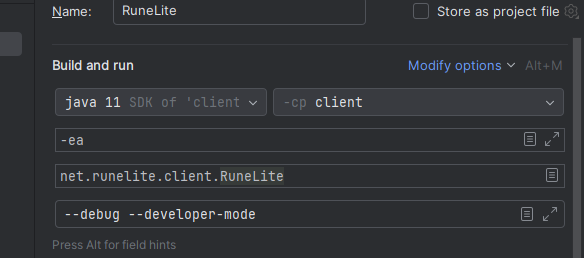
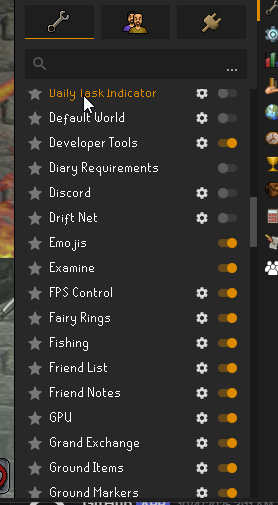
Hey 👋 I'm making my first plugin running into issues, the jar is compiled and currently ready to test. I can't seem to get it to show up in the plugins. Developer mode is on https://i.imgur.com/xyktUMP.png I do have the issue of plugin manifest failed so maybe that affects it?
https://imgur.com/tGVQ27o
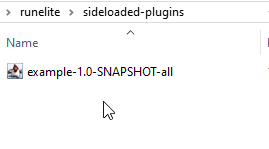
The shadow jar is in sideloaded plugins
https://imgur.com/tofLPvc
The build gradle in my plugin is set to latest release
 old niche
snow leaf
specifically the show terrain option being off would cause blackness <@407531151...
old niche
snow leaf
specifically the show terrain option being off would cause blackness <@407531151...
yes thats it thanks!
haughty pumiceBOT
@true skiff How to develop plugin-hub plugins: https://github.com/runelite/plugin-hub/blob/master/README.md
winter snow
That gives the steps to test your plugin
Shouldn't need to do any of this sideloading stuff
true skiff
sweet thanks
 outer surge
hi guys im new to runelite i tried to install but cant run it i tried reinstall it but still the same showing an error messgae unknown process error when i tried launching using jagex ... but if i tried straight to runelite app it wont run/open
oblique plume
can you show
dusky nacelle
hello is ground markers/object markers fixed?
 fringe rivet
How does the loot tracker cloud syncing work when using two different computers? Sometimes kills are logged between both, sometimes I completely lose some logged kills on both computers
 empty minnow
dusky nacelle
hello is ground markers/object markers fixed?
empty minnow
dusky nacelle
hello is ground markers/object markers fixed?
It's been fixed but the update has not been released yet
haughty pumiceBOT
oblique plume
that can happen with two computers
it should only happen the one time though so once you fix it its good
fringe rivet
Thank you!
 late pebble
Ever since this most recent update to OSRS, RuneLite has been causing my CPU to run super crazy and hot. Average of 95C
I made sure to limit FPS and I'm using the GPU plugin, but it's never done this before. Any ideas?
oblique plume
check your fans
solid mesa
I've heard since the 9 October engine update phones are running a lot hotter. I'm not sure if it's a Jagex thing or if it's just your fans
zealous cedar
thats an ios thing afaik
late pebble
oblique plume
check your fans
All fans are on in my tower and CPU. I can even play other games with no issues (MegaBonk & Skate)
oblique plume
even if its running at 100% it shouldnt hit 95
zealous cedar
your cpu cooler is probably broken
oblique plume
unless your cooler is undersized or broken
late pebble
so why would RuneLite cause it to spike but no other games?
zealous cedar
what kind of cpu do you have and what kind of cooler?
late pebble
Didn't have any issues until this morning's update. Gonna try to just uninstall and reinstall RuneLite.
zealous cedar
there wasnt an update this morning
late pebble
I mean for OSRS, not RuneLite itself. The downtime
i have a intel i7 6700.
it's old, but haven't had any issues until today.
Tried the official client and no issues. I will uninstall and see if that changes anything.
winter snow
6700 is a relic by now 😄
oblique plume
at that age i would expect your cooler to have lost efficiency
paste is prob all dried up
zealous cedar
according to intel the t-case temperature for a i7-6700 is 71C lol
oblique plume
run just a regular stress test/benchmark and see what happens
zealous cedar
(some of the newer intels can run sort of legitimately at 95C)
id recommend taking the cooler off and getting some new thermal paste and reapplying it
oblique plume
71 sounds way too low
zealous cedar
oh maybe im looking at the mobile version
winter snow
My i7-13700KF has a max temp of 100
oblique plume
yea ususally its 100c
cpu world shows it at 100c
i cant find anything on intels own site
winter snow
Do they ever list those? I can't say I see them a lot
mossy swan
oh thats so weird, i swear intel used to list those
 young turtle
Anyway to get the discord plugin to work? I turn it on, but the RPC doesn't change in my status
mossy swan
!discord
haughty pumiceBOT
If your Discord activity status is not showing properly follow these steps:
- Make sure your Discord plugin is enabled.
- Make sure RuneLite is not manually added as game to Discord game list.
- Enable
Share your detected activities with othersin Discord settings. - Make sure both RuneLite and Discord are NOT running as admin.
late pebble
zealous cedar
id recommend taking the cooler off and getting some new thermal paste and reappl...
Pulled my CPU heatsink and fan off. There wasnt any paste lmao. So I’m adding that to see if it helps.
zealous cedar
lol
winter snow
It probably all evaporated at some point in the last decade
oblique plume
lmao
late pebble
Thermal paste added, so we shall see.
I could kiss all of you. Thank you everyone for the help and guiding me through my stupidity LOL
charred wind
late pebble
I could kiss all of you. Thank you everyone for the help and guiding me through ...
you should refresh paste at least once every 3 years
winter snow
Yea it dries up and becomes worthless, just a fact of life really
late pebble
charred wind
you should refresh paste at least once every 3 years
Understood. Last time it was added was when I built this old beast so like... 10+ years lmao.
winter snow
The processor itself was launched in 2015
late pebble
It's now running 41c instead of 98. Thank yall so much. Appreciate it!
winter snow
May that soldier keep on trucking another 10 years
charred wind
it will on rs lol
winter snow
inb4 RS gets updated to require TPM and Secure Boot, Win11 style
 nova pilot
restarted client (3 times) and this message persists, even reset pc and it persists. next step is reinstalling RL but i figure i'd pop in here before i go that far
any thoughts?
 gilded kayak
!logs
haughty pumiceBOT
To find the logs, you can do one of the following:
- If your client failed to open, click the
Open logs folderbutton. - Open the screenshot directory by right-clicking 📷
Camerabutton, navigate 1 directory up, then open logs folder. - Navigate to
%userprofile%\.runelite\logson Windows or$HOME/.runelite/logson Linux and macOS.
Upload the log files named client and launcher by dragging them to Discord. If there are files prefixed with jvm_crash dated from today, upload them too.
 radiant karma
I'd like to open two separate instances of RuneLite on MacOS, could someone help me with this?
zealous cedar
i think you can run open -na RuneLite.app
nova pilot
no apparent jvm crash for today
zealous cedar
mm
round jacinth
i think you're having connection issues to oldschool.runescape.com/servers on it?
zealous cedar
yeah, 1 min
nova pilot
im on jagex client right now, the update issue is on the stand alone runelite
idk if there would be a reason one app can communicate and one cannot
round jacinth
adam is looking into it
winter snow
Let him do his thing 🙂
nova pilot
sure i figured it would be an interesting case when it persisted repeatedly
i do see that the date in the client file didnt update to todays date for w/e
but the launcher did
viscid lantern
adam is fixing it as we speak 
round jacinth
looks like adam fixed it and itll work again soon
radiant karma
zealous cedar
i think you can run `open -na RuneLite.app`
great, that works a treat! is there an argument to load a specific profile?
zealous cedar
--profile=name
nova pilot
adam for president 🫡
 tribal warren
Minimap plugin [Hide Minimap option] Isn't working properly
gilded kayak
did you hide it with the jagex hiding
outer surge
Hi everyone im new to runeclient it seems that i got unknown process error code... I tried to reinstall but still it wont run
gilded kayak
its new as of like last week
tribal warren
gilded kayak
did you hide it with the jagex hiding
Nope
oblique plume
describe not properly
tribal warren
It's very easy to replicate, activate hide minimap and open the bank
and the minimap will appear
when it's supposed to stay hidden
solid mesa
I did see someone else mention today opening the bank breaks it
But that is not what you said at first
 gilded kayak
fun
oblique plume
we arnt aware of that atm, thats different than the jagex minimap hiding afaik
solid mesa
It seems to be an issue with core Minimap not jagex minimap hiding
oblique plume
yes thats what the guy just showed
 green nacelle
Any idea why I have a missing settings.properties file and config file?
Maybe I'm looking in the wrong place, but I've checked both the runelite folder in user data and in appdata
leaden trail
What do you mean they're missing?
green nacelle
Like, there's no file with either name in them
oblique plume
can you play the game
leaden trail
I think to clarify, my question is more of "why do you think you're missing those files?"
green nacelle
oblique plume
can you play the game
Yes
green nacelle
leaden trail
I think to clarify, my question is more of "why do you think you're missing thos...
I'm seeing references to these files. I'm looking for the file where the !KC commands are contained
oblique plume
then they exist
green nacelle
Yeah, that's what I figured. But I've gone to both the Runelite and .runelite folders, neither of which seem to contain them
oblique plume
dont worry about it
green nacelle
Uh, I'm trying to find them is the point
oblique plume
why
green nacelle
So that I'm able to work with the !kc commands
leaden trail
If you have an issue you're trying to troubleshoot just tell us what your actual problem is so we can help
What do you mean "work with" them?
oblique plume
the answer is dont worry about it
green nacelle
That's super unhelpful
leaden trail
You're being really vague and honestly it sounds like you're going to try to do something that's gonna break your client
oblique plume
well we dont support editing the clients data files manually
so dont worry about it is the help
green nacelle
I'm not being intentionally vague, I'm having a hard time explaining what I'm doing here
oblique plume
because you shouldnt be doing it
leaden trail
If you try to manually edit things we will not help you if and when you break your setup
winter snow
You want to know where data is stored, so presumably you want to change the data
mossy swan
yeah no
green nacelle
Uh, is there some rule against this?
winter snow
It took way too much effort to get that out of ya 😄
oblique plume
i mean we knew what they were doing from the start
green nacelle
The problem is that I want to find the file, not what I'm going to do
The issue is that I cannot find the file
green nacelle
Is this not the support channel for Runelite?
oblique plume
it is
round jacinth
not for fuckin around with it
oblique plume
but you arnt asking for support with runelite
green nacelle
I am though. I'm asking where a file is located
oblique plume
dont worry about it
oblique plume
i have confirmed that everything is functioning correctly and you dont need assistance
so dont worry about it
round jacinth
it's ripe for abuse as you can do more than just !kc urmom, so no not going to get help
leaden trail
We specifically do not support manually editing what you are seeking to manually edit
And if/when things break as a result we won't help fix that
green nacelle
leaden trail
And if/when things break as a result we won't help fix that
I didn't ask for help with editing it or with help fixing it
mossy swan
either way we are not going to be helping you with that
good luck, ask chatgpt or something
green nacelle
round jacinth
`I'm trying to get the KC to say 'Mind Goblin'`
You asked what I was doing with it
I asked you where to find it
oblique plume
buddy give it up
green nacelle
not the line of code, but the file itself
oblique plume
accept that were better than you
leaden trail
We aren't gonna tell you where to find it with the knowledge that you want to edit it
leaden trail
oblique plume
accept that were better than you
Eh don't include me in that, I'm just a potato
green nacelle
Uh, this is a really weird reaction from the support community in Runelite
oblique plume
potatoes are tasty
leaden trail
Please do not the Dura
green nacelle
I'm fine with you not helping me edit it, or finding it really. The reaction was just really weird
round jacinth
its volunteers who help with real issues for the client
green nacelle
Yeah, that's fine. I asked where the config file was initially because I'm unable to locate it
Is this actually rulebreaking in some way though? Def don't wanna do it if there's something bannable in doing so
charred wind
it is outside the scope of this channel. You've been told that. This is a support channel for the intended way of using RuneLite. Hell, we don't even support hub plugins here. So while what you're asking isn't rulebreaking, I'll repeat it to you: this is not the channel for what you want, we don't tell you how to do it or how to find it, and if you do it you're basically voiding your opportunity to get support here.
 hybrid ivy
cant open runelite from jagex client after changing folder location. reinstalled and getting same issue.
leaden trail
It needs to be in the default location for the launcher to find it I think
haughty pumiceBOT
If you're getting an error while trying to install RuneLite in the lines of unable to find unins000.exe that means you have a previous RuneLite version that didn't uninstall cleanly. To fix that you need to delete the following windows registry key: Computer\HKEY_CURRENT_USER\SOFTWARE\Microsoft\Windows\CurrentVersion\Uninstall\RuneLite Launcher_is1
oblique plume
so you could technically change that i think and it would work
but why do you need to move it
hybrid ivy
i was getting some other issue when launching runelite so i moved it to see if it (it was on external drive b4 and i know that can cause issues with some stuff)
round jacinth
what issue did you have before
hybrid ivy
i couldn't tell you because i just reinstalled it and it works now 😭
oblique plume
lol
 lusty wind
hey guys, just joined because I have recently been dabbling in plugin dev and I was previously having clean builds, but decided to try and implement data persistence using the config system. I have my config file in the same directory as my plugin but I am now getting a mvn clean install error involving the plugintestmanager:
Failures:
[ERROR] PluginManagerTest.testLoadPlugins:155 expected:<131> but was:<130>
- No implementation for net.runelite.client.plugins.adventuremode.AdventureModeConfig was bound.
while locating net.runelite.client.plugins.adventuremode.AdventureModeConfig
for field at net.runelite.client.plugins.adventuremode.AdventureModePlugin.config(Unknown Source)
at net.runelite.client.plugins.PluginManager.lambda$instantiate$6(PluginManager.java:594)
how do I end up binding the config to the plugin? I can post code if needed but didn't want to make this too long. Also, please let me know if this is not the correct area to ask this, I didn't have access to post in the development chat
lusty wind
thanks
green nacelle
charred wind
it is outside the scope of this channel. You've been told that. This is a suppor...
I understand this. I am not continuing to ask you how to do it. I have asked a single time. I answered questions and clarified my intent when asked and did not continue to press it. You are all reacting as if I'm begging you to help me with it when that is not the case. Just now, I asked if there is a rule against doing so, not in the discord, but if it is a bannable offense to alter the runelite config settings.
winter snow
green nacelle
Yeah, I'm trying to get the KC to say 'Mind Goblin'
I think things like this are why that kinda stuff isn't user configurable 😄
green nacelle
winter snow
I think things like this are why that kinda stuff isn't user configurable 😄
I saw someone do it in game, so I was interested in how that happened
viscid lantern
you are unable to connect to the runescape update server so either a firewall or your internet connection
 quasi leaf
hi all, ground markers plugin appears to be disabling itself on mac tahoe on startup. i've tried reinstalling runelite but the problem still perists. I've tried logging out of my RL profile too. I'm running jagex launcher
leaden trail
Should be fixed with the next update I believe
 crude chasm
worldly parrot
a mesa dev just replied to my bug report with a possible fix, so maybe the cope ...
crude chasm
worldly parrot
a mesa dev just replied to my bug report with a possible fix, so maybe the cope ...
Give me updates, how'd it go?
charred wind
 gleaming pike
slightly off topic but on the 117hd plugin, is the model caching size allocation for VRAM or RAM?
haughty pumiceBOT
Visit 117's HD plugin discord (https://discord.com/invite/U4p6ChjgSE) for support, issues & feedback
gleaming pike
ty
 viral knot
Anybody having issues logging in through runelite?
gilded kayak
are you dutch
viral knot
aye
viral knot
Sad
gilded kayak
viscid lantern
Delta 
viral knot
Thanks
crude chasm
@charred wind @worldly parrot on the off chance you have any idea what's going on here, trying to downgrade to 25.1.9-1 and am getting a huge barrage of errors. Feels like I'm just doing something wrong but have no idea what https://pastebin.com/WSFbh2Yx
Pastebin
Pastebin.com is the number one paste tool since 2002. Pastebin is a website where you can store text online for a set period of time.
I downloaded the rpm from koji and it's local
charred wind
if you don't know what you're doing you should wait for the release. This is also beyond the scope of #support
crude chasm
charred wind
if you don't know what you're doing you should wait for the release. This is als...
Both points are fair, I just figured it might be something you could spot at a glance. Ty anyway
 forest mortar
Hello, I'm not sure if this is the correct place to ask, but is anyone else getting this error in the log?
2025-10-14 15:27:41 PDT [Client] ERROR n.r.client.callback.ClientThread - Exception in invoke
java.lang.NullPointerException: null
at net.runelite.client.game.npcoverlay.NpcOverlayService.rebuild(NpcOverlayService.java:138)
at net.runelite.client.game.npcoverlay.NpcOverlayService.lambda$rebuild$0(NpcOverlayService.java:131)
at net.runelite.client.callback.ClientThread.lambda$invoke$0(ClientThread.java:49)
at net.runelite.client.callback.ClientThread.invokeList(ClientThread.java:119)
at net.runelite.client.callback.ClientThread.invoke(ClientThread.java:101)
at net.runelite.client.callback.Hooks.tick(Hooks.java:229)
at client.uq(client.java:62696)
at client.bg(client.java)
at bg.al(bg.java:447)
at bg.nt(bg.java)
at bg.run(bg.java:36534)
at java.base/java.lang.Thread.run(Unknown Source)
gilded kayak
yes
forest mortar
Ah, so I'm not the only one that's freezing when it says 'starting plug in'.
I guess I'll wait a bit to see if it's fixed. Thanks
gilded kayak
that's not causing that
forest mortar
Oh
gilded kayak
is your issue that the client is failing to start, and getting stuck on starting plugins?
forest mortar
Yes. Whether it's safemode or not, it goes to starting then gets stuck and numbers are different, sometimes at 50, sometimes 91 and etc
 gilded kayak
it's happening in safe mode?
forest mortar
Yes
gilded kayak
can you record of video of that
forest mortar
I'll try
gilded kayak
forest mortar
Yes. Whether it's safemode or not, it goes to starting then gets stuck and numbe...
or just screenshot that prompt, when using safe mode
forest mortar
Does this work?
gilded kayak
that's very interesting
i feel like that's freezing for a different reason
!wind can you do this
haughty pumiceBOT
windows-debug: run this command in cmd, then show us the displayed output through a screenshot.
"%localappdata%\runelite\runelite.exe" -c -v --console -- --debug
This is a common occurrences for me, sometimes I just have to restart jagex launcher and etc
gilded kayak
yeah but that's not a common occurrence for the other 200k people using rl
basically nobody ever in my time here, haven't been able to open the client in safe mode
so it's very interesting
forest mortar
Oh, it opened now, I'll try regular through jagex launcher
The regular one is stuck at this. Will try safemode again

Safemode launched, but showing the familiar white screen.
 forest mortar
So sorry, I'm not familiar dutch vs delta
forest mortar
internet service provider?
gilded kayak
yes, in the netherlands where dutch people live
forest mortar
Nope, I'm in Canada
forest mortar
gilded kayak
so it loaded fine in debug?
the logs seem to suggest that being the case, along with the timing
forest mortar
When I did ran the debug yes.
And when I opened it again in safe mode, this time with white screen rather than actual login screen.
regular mode through jagex launcher just freezes
gilded kayak
if instead of the (safe mode) shortcut, you use the (configure) shortcut, safe mode can be toggled on for the jagex launcher, launch
forest mortar
I used the configure and turned on safe mode and it still freezes
 gilded kayak
unless i'm misunderstanding the NpcOverlayService error, it shouldn't be completely locking up the client, i saw it in my logs yesterday
but in the debug startup it does not NPE
i guess toggle on debug instead of safe mode in the configure prompt?
forest mortar
This is interesting.
When I use the debug mode, it launches and once it does the downloading it does nothing, but I can see it in the task manager background processes
But once I end that task then the actual game client opens

That is so odd
I guess that's a work around for now
Thanks felanbird
gilded kayak
very odd
 whole thorn
I'm having an issue where I have turned off all notifications and sound settings I can find, but whenever my divine combat runs out RuneLite still plays the default runelite notification sound. I have sounds off in "RuneLite" settings and sounds off in the idle notifier.
nevermind, apparently "Boosts information" had a setting that made the sound play even with notifications off
 golden lotus
Hey, new to the discord so I'm not sure if this is the correct location to ping this, but a Clannie and I have noticed that 117HD has been using an irregularly large amount of resources (RAM & GPU) when runelite has been on for an extended amount of time.
We've also noticed that, after turning off 117HD for approx 15-30 mins, the usage returns to normal.
 clear sandal
Can go to the 117HD server for that.
haughty pumiceBOT
Visit 117's HD plugin discord (https://discord.com/invite/U4p6ChjgSE) for support, issues & feedback
golden lotus
thanks, will do!
 wild creek
Anyone have any idea, when I restart my runelite, Things I marked are disappearing?, Im pretty sure Im using highlights from NPC highlight,
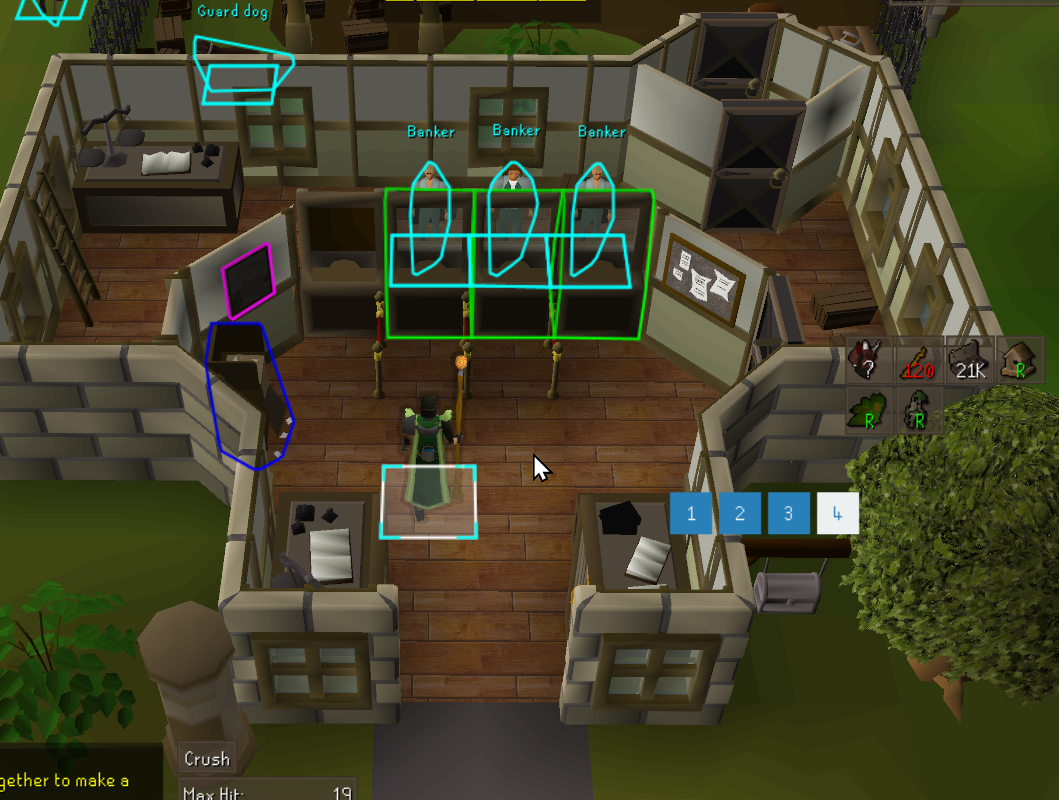
After restarting
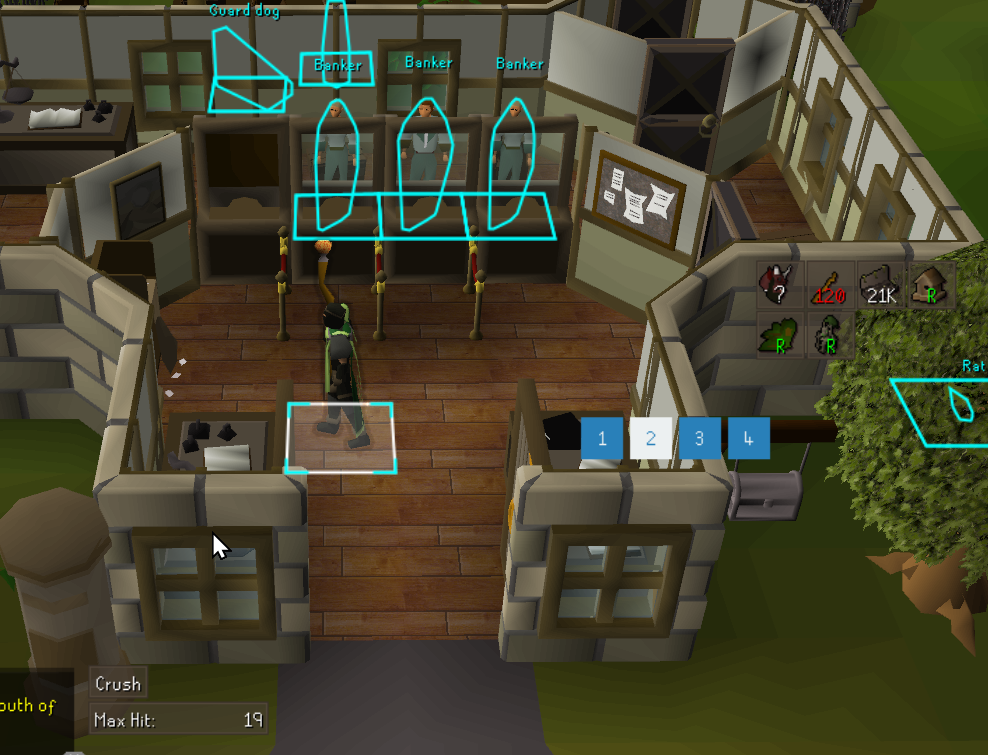
Just marked random stuff to show, but usually have things like banks marked and stuff,
zealous cedar
there is a bug where object markers get lost sometimes atm
gilded kayak
turn the plugin off and back on
wild creek
Nah, didnt seem to fix
spiral flare
spiral flare
1:41
the stutters getting pretty bad ngl
round jacinth
i dont know if its a runelite problem
idk, if it happens in safe mode it usually means something else maybe
id suspect others to report it if it was broader too
 shadow arrow
hiya, where do profile pics for parties get pulled from? I'm playing on mac and mac users in our party have no profile pic so we cant see them on map
round jacinth
it's the discord image isn't it?
gilded kayak
it is indeed
shadow arrow
hmm maybe im not understanding how to link discord on mac
gilded kayak
we're just pulling your pfp from the rpc discord is running on your computer
it might not work on mac?
gilded kayak
me neither like 95% of all users are on 🅱️ indows
zealous cedar
i think it works on mac
gilded kayak
wow there's a lot of UK worlds offline
shadow arrow
ok i got it working! had to restart my runelite and rejoin party after setting up discord
gilded kayak
ig u dont see yourself
charred wind
Good omens for grid


 ornate kite
any reason why npc highlight and object highlight aren't working properly and keep losing it tags on zone refresh?
round jacinth
its bugged right now
it is fixed in next release
you turn off and back on as needed
 proven niche
as of today GPU plugin no longer works on linux using wine flatpak.
proven niche
I have no idea why I didnt even think about that first off. ha, just waking up
thank you guys
 winged shard
Hey is there any way to make the runelite plugin ui larger besides changing my windows size above 100%?
haughty pumiceBOT
solid mesa
Change the scale to a number bigger than 1
winged shard
ty
 coarse pulsar
any idea why Shortest Path is malfunctioning with Mahogany homes? It keeps telling me to teleport to watchtower when ardy teleport is faster, or lumbridge when varrock is faster
solid mesa
Probably disable Use Portal in Shortest Path settings. Or just disable shortest path integration with mahogany homes. It's only 5 teleports and the plugin already highlights them
coarse pulsar
ohh i figured it out
shortest path isn't counting runes from twinflame staff correctly, so it didn't think I had the runes to cast the teleports
I toggled it to use inventory and bank, now it's suggesting the correct teleports
I like using shortest path because im very new to mahogany homes. i dont know where the houses are by memory yet
clear sandal
You could make a issue on the github related to the plugin relating to that.
clear sandal
Making an issue on the github notifies the dev promptly. But up to you.
 modern cloak
Does anyone have the entire list of region IDs?
solid mesa
https://mejrs.github.io/osrs turn on grid and you can calculate region IDs
 lilac forge
Anyone know where the Leagues URL setting is in Dink settings?
true skiff
How/where do i import varbits into my plugin? I've got it importing the runelite module but if i'm testing it locally before putting it into my sideloaded plugins it isnt local to my plugin (makes sense) is the play to just copy and make it a local class and import that?
haughty pumiceBOT
How to develop plugin-hub plugins: https://github.com/runelite/plugin-hub/blob/master/README.md
solid mesa
There's no need to sideload your plugin
true skiff
I know
true skiff
im trying to import the varbits from net.runelite.api.VarbitID but since that doesnt exist locally inside my plugin (to my knowledge) what's the work around to that?
winter snow
If you'd followed the guide then those should absolutely be available
true skiff
Ok
 tropic moth
how would i make it so this plugin isnt on by default whenever i open up RL?
 winter snow
Uh, turn it off? The client remembers which plugins are active/inactive between launches
tropic moth
it hasnt seemed to
nbd can just clear the key it ovverides for pings
just wondered if theres settings for that somewhere
worldly parrot
crude chasm
<@270355893638529034> <@219434508498370561> on the off chance you have any idea...
don't have experience with using dnf/.rpm unfortunately. On Arch I had to force a downgrade ignoring dependencies, which is kinda dangerous but it worked for me.
the fix was just submitted to a merge request, so I guess you could simply wait for the next mesa version I think
 rain owl
Hey all, just curious- im capping at around 20-30fps and ive turned on and off gpu and 117 and messed with fps regulators. It feels like my runelite isnt running on gpu, and the gpu plugin doesnt seem to help facilitate this. Anybody know how to fix this?
round jacinth
Be sure your monitor cable is plugged into the gpu
rain owl
yea i believe it is
round jacinth
check
haughty pumiceBOT
To find the logs, you can do one of the following:
- If your client failed to open, click the
Open logs folderbutton. - Open the screenshot directory by right-clicking 📷
Camerabutton, navigate 1 directory up, then open logs folder. - Navigate to
%userprofile%\.runelite\logson Windows or$HOME/.runelite/logson Linux and macOS.
Upload the log files named client and launcher by dragging them to Discord. If there are files prefixed with jvm_crash dated from today, upload them too.
round jacinth
This would tell us what GPU runelite is using too
winter snow
Hm, no mention of GPU at all in those logs...
round jacinth
I forget if it’s client or launcher
winter snow
Client would have it
round jacinth
They shared only client
Yeah
doesn’t look like gpu is even on or at least logs aren’t capturing your GPU
winter snow
Well, simplest question first - is the GPU plugin actually turned on?
round jacinth
Check the faq as a resource too on the runelite wiki
rain owl
when i had it turned on my fps was crashing, so i was turning it off
radeon 5700xt for gpu for reference
round jacinth
You shared a log from 2 days ago and yesterday so we don’t know what it when you’re talking about
 fervent geyser
Hi Team,
I play on 4k.. The text in the right sidebar panel, including quests guide for example is really small, I am trying to make this slightly larger, however I cannot seem to find a way...
I tried stretched mode, which only scales the game... Do you have any tips please?
round jacinth
Edit the scale in runelite (configure)
rain owl
round jacinth
You shared a log from 2 days ago and yesterday so we don’t know what it when you...
my bad :<
think thats it
crude chasm
worldly parrot
don't have experience with using dnf/.rpm unfortunately. On Arch I had to force ...
Fair enough. Thanks for the reply at least ❤️
rain owl
actually, seems like i've mostly gotten it
amd free sync was tanking me
was bouta spaz cause i get 110 fps on somewhat max on cyberpunk but couldnt even get above 30 fps with 117 or gpu on lmao, so hype now
 latent ibex
rain owl
when i had it turned on my fps was crashing, so i was turning it off
latent ibex
rain owl
when i had it turned on my fps was crashing, so i was turning it off
Im also having this issue, you ever get it figured out?
ope just saw newer messages
rain owl
yea it was just amd freesync for the most part for me - im sure i could get higher FPS through optimizing but im cool with what im getting now
if you have AMD i would highly suggest trying to find if u have free sync on
latent ibex
Nah i have NVIDIA, Ill try turning gesync off, mines only crashing in like specific locations
hm no clue, also seems like gpu isnt running for me, suppose ill just see what happens
latent ibex
no, also tried running experimental GPU from Phub to no avail
just went from getting consistent 200+fps to now around 70-50 today
ill try safemode
is there a way to run RL in safemode through jagex client?
eh i suppose sm wouldnt even be too much of a help because it would be running off gpu anyways
round jacinth
latent ibex
is there a way to run RL in safemode through jagex client?
Yes of course
But yeah gpu would be off
You maybe are in an area that is too populated
latent ibex
most of the time its just in my poh or in edge with like one other person, usually if im in an area with no one im still getting significantly lower fps than usual..hardware is 3080/13700k and im not getting high usage on either
 wide pagoda
anyone have an issue with worlds not loading?

had this for like last 2 weeks, just been using ::hop but its annoying - worlds dont load in-game either
 oblique plume
thats connection issues to jagex for you
wide pagoda
how do i resolve such issues? it was fine 2 weeks ago, they did the interface update and suddenly worlds stopped working
idk if it correllates but thats the only thing that changed lol
round jacinth
I think it’s just jnternet issues
wide pagoda
everything else works, could it be linked to online safety act?
 restive charm
How do i get Runelite to not launch gridmaster?
 modern quarry
restive charm
How do i get Runelite to not launch gridmaster?
modern quarry
restive charm
How do i get Runelite to not launch gridmaster?
choose a "non-grid" world.
 wide pagoda
how do i resolve such issues? it was fine 2 weeks ago, they did the interface up...
wide pagoda
wide pagoda
how do i resolve such issues? it was fine 2 weeks ago, they did the interface up...
anyone else had a similar issue? seems quite weird to only affect one thing
wide pagoda
its been like this for 2 weeks, idk if itll fix itself
leaden trail
You can use the sidebar to hop
wide pagoda
sure but its not a solution is the issue lol, i have been using alternatives but would be easier to use the game yk
leaden trail
You can try restarting your router but it's really not a RuneLite issue, it's a problem with your connection
wide pagoda
leaden trail
You can try restarting your router but it's really not a RuneLite issue, it's a ...
will give it a go and see if it helps 😄 ty
wide pagoda
leaden trail
You can try restarting your router but it's really not a RuneLite issue, it's a ...
i could kiss you
its back now, so weird how that was the issue lol
winter snow
Networking is basically magic
 gray latch
Is there a way to show the new Grid worlds in the Runelite World Hopper plugin?
solid mesa
In filters it should be seasonal or something
solid mesa
Thats why I said or something. Is tournament not a filter?
round jacinth
no
alternatively maybe the worlds arent loaded into the world hop thing and it would work otherwise
idk how that magic side panel works 😄
gray latch
The plugin has a bug. I tested and it works correctly with a fresh profile. If a user had previously changed the World Hopper settings, the config file is permanently misconfigured, and Grid or Seasonal worlds will not show up no matter what the setting combination. Takes a full Runelite settings reset or manually changing the config files to fix.
Broken config:
worldhopper.regionFilter=["AUSTRALIA","GERMANY","UNITED_KINGDOM","UNITED_STATES"]
worldhopper.worldTypeFilter=["Seasonal"]
Working fresh config:
worldhopper.regionFilter=[]
worldhopper.worldTypeFilter=[]
Even if all regions are listed, the Grid worlds will not show. The filter needs to be an empty array, which is not possible to set in the UI, and needs to be manually edit in config. No combination of setting in the UI will fix. But manually editing the files does.
Clicking "Seasonal" breaks the fresh install too, and removes all worlds.
zealous cedar
you can right click it and click reset it on the ui
.. or just hit the big reset button
winter snow
Ctrl-clicking the selected options to deselect them also works
gray latch
zealous cedar
you can right click it and click reset it on the ui
Thanks, that reset them to default, which makes all the worlds appear, including the Grid worlds.
Clicking "Seasonal" doesn't show the Grid worlds, but at least they are included in the full world list when settings are reset.
zealous cedar
thats because they arent seasonal worlds
gray latch
they're Special
zealous cedar
theyre tournament worlds, which dont have their own type of filter
gray latch
The bug is they won't appear in the list if you select to show all the available worlds.
Jagex seems to include them in the "Seasonal Event" category in their world switcher.
zealous cedar
there isnt a bug
gray latch
I don't think I described it well. If you click any button in the Filter, the Grid worlds pernamently disappear, until the Reset button is clicked, and the arrays are set to []
zealous cedar
that is because all of the filters filter out gm worlds
if you reset the filter, it doesnt filter anything, and thus the gm worlds show
gilded kayak
we're aware of what you're reporting, but it's not a bug, there just isn't any code in the plugin to handle tournament worlds
cuz players dont normally play on tournament worlds
zealous cedar
we can categorize them as seasonal i guess
gilded kayak
ye probably have to
gray latch
You can't reset the filter with resetting all other settings in the plugin. It resets your shortcuts, your member selection, region selection, checkboxes, which are unrelated to the World type filter.
When a user limits the worlds by Filtering them, its expected they can Unfilter them by clicking within the UI again. That's not possible.
gray latch
"Ctrl-clicking the selected options to deselect them also works"
That doesn't work.
"you can right click it and click reset it on the ui"
Right click what menu?
".. or just hit the big reset button"
That was addressed, it resets all the options in the plugin.
zealous cedar
yes, it does work
winter snow
gray latch
"Ctrl-clicking the selected options to deselect them also works"
That doesn't w...
I wouldn't have said the Ctrl-Click worked if I hadn't tested it first 🙂
zealous cedar
i just tested it and it works
gray latch
Do you mean Ctrl Click?
zealous cedar
even if it didnt work, this also works
 winter snow
That's what I said, yes
gray latch
Oh okay I was right clicking within the menu on the "Normal" and "Deadman" part not the "Word type filter"
Thanks for the help!
 digital bridge
I just got back into the game and my runelite will freeze after login
Could someone assist?
gilded kayak
!logs
haughty pumiceBOT
To find the logs, you can do one of the following:
- If your client failed to open, click the
Open logs folderbutton. - Open the screenshot directory by right-clicking 📷
Camerabutton, navigate 1 directory up, then open logs folder. - Navigate to
%userprofile%\.runelite\logson Windows or$HOME/.runelite/logson Linux and macOS.
Upload the log files named client and launcher by dragging them to Discord. If there are files prefixed with jvm_crash dated from today, upload them too.
clear sandal
Boot it up in safe mode. If that works, then a plugin is causing it to crash/ freeze.
gilded kayak
that's a given, since there was a game update i'd prefer to see the logs incase it's actually an issue
digital bridge
!safemode
haughty pumiceBOT
To enable safemode
Windows
Run the RuneLite (configure) shortcut from the windows start menu
Tick the Safe mode box, save, launch RuneLite the way you normally do.
Mac
In Terminal, run
/Applications/RuneLite.app/Contents/MacOS/RuneLite --configure
Tick the Safe mode box, save, launch RuneLite the way you normally do.
digital bridge
still nothing, it black screens after login
digital bridge
2025-10-14 19:01:32 CEST [main] ERROR net.runelite.launcher.Launcher - Unable to verify artifacts
gilded kayak
that is one line of the logs yes
digital bridge
this happened yesterday and today, first time playing in years
winter snow
Preferably the whole log
gilded kayak
can you post the launcher.log too if you're getting unable to verify artifacts
digital bridge
gilded kayak
nothing in here to match up with unverified artifacts but you do have an error which shouldn't be happening in safe mode
i'll ask someone to look at it
winter snow
gilded kayak
nothing in here to match up with unverified artifacts but you do have an error w...
That unable to verify artifacts message is timestamped yesterday, which may explain it being missing from today's logs
winter snow
that's a mood
digital bridge
today is today
This issue is consistent today and yesterday sadly. Sorry i think i did send an old log
gilded kayak
it definitely showed the issue but not the artifacts thing which is something else
digital bridge
so original client as well has issues
gilded kayak
mmmmmmmmmmmmmmmmmmmmmmm
digital bridge
with world hopping, it will be blackscreened for like 20 seconds
then everything catches up
gilded kayak
i did notice that the stacktrace came a full minute after client startup finished, i assume it didn't take u a minute to login?
unless it did then xd
digital bridge
depends on if i was googling shit lol
gilded kayak
mm
digital bridge
could it be a graphics card issue?
rendering/aliasing?
cause im having issues with the official client and runelite
gilded kayak
maybe
i would be surprised if it could resolve itself after a graphics card issue, but going into your app and just reinstalling the driver isn't going to hurt
gilded kayak
i'm trying to remember if the steam client is different than the official client, under the hood
i feel like it might be yes but i'm not 100%
under the hood the official client and the one runelite uses are very different tho
digital bridge
another issue
I pk someone, and the game freezes every time for 2-3 seconds
on steam, and now i get black screened again for 10 seconds, then it appears and the game catches up
 ripe bluff
hello guys, good afternoon
i need some help pleasee
been trying to figure this out, but its giving me nothing but headaches at this point, its been a minute since i've tried to set this thing up and not being able too. Appreciate the help in advance
 clear stratus
just ask your question
ripe bluff
@clear stratus I downloaded the Jagex Launcher and its been working fine, saw the button that had Runelite and was explained that it has more features and would be better to use, I am playing on Macbook Laptop and downloaded the Runelite application via the same website but for some reason cannot get it to open via the Jagex Launcher like they are asking me to do
oblique plume
you have to drag rl into the applications folder
digital bridge
@gilded kayak could you check my logs now if you have a sec?
leaden trail
If it's happening on the steam client then it won't be in your logs because the steam client isn't RuneLite
ripe bluff
@oblique plume not working
leaden trail
Then it's not a RuneLite issue
digital bridge
Someone can still help, as it happens in runelite.
oblique plume
thats not how that works
leaden trail
If it happens on the official client too, then it's not a problem with anything we have control over
digital bridge
lmao.
 humble hatch
All my menus (attack, skills, quests, etc) are on the bottom instead of top and bottom. How do I revert it?
ripe bluff
man i am over here stressing about this thing not working
humble hatch
I tried 'interface styles' but that doesn't seem to do anything
ripe bluff
can someone pm me and help me out
 eager charm
if i were to make the dodgy deals plugin work again do i just re open pull request or does it need something updated
round jacinth
yeah
round jacinth
ripe bluff
man i am over here stressing about this thing not working
drag and drop runelite to the app folder
 cyan dirge
@spiral flare Found a fix? i seem to be experiencing a similar issue
 dull cove
Any idea how to fix this? Tried deleting/updating graphics/admin/configure mode. Still same issue

 rotund seal
to mny login attempts?
yet on mobile it works
and i even ended all sessions in settings
hmm safemode worked
but all features dont really work, how to fix this
winter snow
humble hatch
All my menus (attack, skills, quests, etc) are on the bottom instead of top and ...
Change to a different layout in the in-game settings
rotund seal
ty mate
gilded kayak
rotund seal
to mny login attempts?
yet on mobile it works
and i even ended all sessions in s...
safe mode probably didn't do anything and you happened to no longer too many login attempts, at the same time
but now if u close the client and try again, you might hit the limit again
which is sorta funny
lilac forge
Is Dink working for others for Gridmasters?
gilded kayak
no it intentionally ignores tournament worlds and Jagex made this a tournament world, instead of a seasonal
cuz they're funny
lilac forge
Ah ok, is there a vision to allow this or?
gilded kayak
prodigy is probably going to look into fixing it over his lunch
 opaque bloom
so I can't find the post but a couple days ago had an issue with ground items not showing up and the solution that fixed was to just disable/re-enable the plugin. After further testing it seems to be an issue upon entering moons of peril
lilac forge
Amazing thanks
opaque bloom
NP just thought I'd update on the issue
gilded kayak
i think he was talking to me xd
opaque bloom
oh sry
 acoustic epoch
what plugin disables the death ppl
oblique plume
menu entry swapper
 cosmic grove
could i get help with this_
my client just shuts down for no reason
i have a 4090
and a 13900
gilded kayak
lilac forge
Is Dink working for others for Gridmasters?
can you go to the tab, search dink and click the Update button that's replaced the remove button and tell me if stuff works
or if you happened to have already closed your client it will say 1.11.14 if it's correct
lilac forge
Don't think it's working
lilac forge
