#support
1 messages · Page 115 of 1

 mossy swan
yes
 alpine hemlock
Right thanks, I'm heading to work now but will look into this in about 6-8 hours
Thank you kind sir
mossy swan
godspeed
 patent patrol
is there any way i can replace the vanilla indicator with the more detailed one that runelite provides?
 mossy swan
patent patrol
is there any way i can replace the vanilla indicator with the more detailed one ...
mossy swan
patent patrol
is there any way i can replace the vanilla indicator with the more detailed one ...
what "more detailed one that runelite provides" do you mean?
patent patrol
mossy swan
what "more detailed one that runelite provides" do you mean?
Like, can i make it so that it basically shows the information from the skills runelite tab instead of the vanilla progression thing
 mossy swan
patent patrol
Like, can i make it so that it basically shows the information from the skills r...
mossy swan
patent patrol
Like, can i make it so that it basically shows the information from the skills r...
you can right click that and "add to canvas"
but it disappears when you restart the client or maybe even on log out
patent patrol
mossy swan
but it disappears when you restart the client or maybe even on log out
i see, is there a plugin that lets it appear automatically when I'm training skills?
mossy swan
i dont know
 errant shell
Is there a possibility to "change" sidebar font?

 spring socket
gm all!
I'm trying to play using a vpn (express VPN)
and i've added jagex launcher and runelite to the exceptions list for split-tunneling which lets me get as far as getting to the osrs log-in, but always receive the "log-in failed" error. Does anyone have an fixes or advice? thank you!
 haughty pumiceBOT
 oblique plume
try the ipv4 box there
 round jacinth
patent patrol
i see, is there a plugin that lets it appear automatically when I'm training ski...
round jacinth
patent patrol
i see, is there a plugin that lets it appear automatically when I'm training ski...
No, imagine getting them added to canvas when you get xp drops for stuff. Add/remove the one you want as you play, you’d have a crowded screen otherwise imo
 stoic cairn
spring socket
gm all!
I'm trying to play using a vpn (express VPN)
and i've added jagex launch...
stoic cairn
spring socket
gm all!
I'm trying to play using a vpn (express VPN)
and i've added jagex launch...
Were you able to figure this out? I play at work through work proxy tunneled to my home connection (basically a VPN) and would be more than happy to help
 cedar acorn
macbook air m3 16/256gb, running 117 hd only gives me 40ish fps, with draw set at 50, others in their standard setting. Is it supposed to be so or not? Client im using in from jagex launcher, as its needed for my new account.
runelite cpu usage at around 54%
 hollow olive
sounds about right lol lower your draw
round jacinth
some areas are harder to draw than others, seems fine though?
cedar acorn
back to rs after years of retirement, and this time on mac so didnt know what to expect. Thanks 🙂
 young fern
can anyone tell me why, even when i changed my Screen flash colour to yellow, it still flashes yellow AND red for the fist few flashes?

 gilded kayak
i would guess another plugin is flashing red
young fern
 gilded kayak
since ur in a pvp area, i'd check the pvp ones
young fern
i tried to find another plugin but wildy player alarm is toggled off for this test
gilded kayak
where are you setting the color, in the RuneLite plugin or the individual plugin
young fern
in the runelite
gilded kayak
i would also check the ⚙️ options of the relevant plugins, as the settings can be changed on a per-notification basis
young fern
no colour option in plugin
 gilded kayak
click the ⚙️
it will either give you a "turn this on" tab or you'll see all the settings
 gilded kayak
!safe try safe mode then, if it works fine here then it is a  plugin doing it
haughty pumiceBOT
safemode: To enable safemode
Windows
Run the RuneLite (configure) shortcut from the windows start menu
Tick the Safe mode box, save, launch RuneLite the way you normally do.
Mac
In Terminal, run
/Applications/RuneLite.app/Contents/MacOS/RuneLite --configure
Tick the Safe mode box, save, launch RuneLite the way you normally do.
young fern
well it doesnt do anything without idle alarm plugin toggled on
but thats a default RL plugin isnt it
hollow olive
idle alarm is not core
young fern
which is the core one
hollow olive
idle notifier
 hollow olive
are you in safe mode and does it occur?
 hollow olive
probably
hollow olive
then follow the prompt and use configure
haughty pumiceBOT
To enable safemode
Windows
Run the RuneLite (configure) shortcut from the windows start menu
Tick the Safe mode box, save, launch RuneLite the way you normally do.
Mac
In Terminal, run
/Applications/RuneLite.app/Contents/MacOS/RuneLite --configure
Tick the Safe mode box, save, launch RuneLite the way you normally do.
young fern
kk
gilded kayak
the (safe mode) shortcut is only for pre-jagex accounts, thats why the command doesn't mention it
it only mentions (configure) because it will work for both account types
 charred wind
Yes
Some plugins don’t cleanup properly when they turn off. The only way to be sure it’s off is to turn it off and restart the client
 young fern
ok new discovery
only happens when i kill monster then afk
not if i chop tree or run then afk
fucking watchdog plugin
even though afk mode was turned off
thank you guys!
 spark hatch
can anyone assist with the ground items plugin?
items are stuck in both categories, highlight and hidden. cant edit it and its become quite disruptive.
tried re installing
TIA
 oblique plume
did you install a plugin that edits those
round jacinth
What item is stuck? The tofu, crackers, worms, eggs?
 glad prairie
Random tick loss. Anyone else???
Whole game freezes sometimes for 5+ seconds

Doesn't even register as ping or on tick tracker
mossy swan
your internet poopoo
 leaden trail
Tick tracker is not a reliable way to assess your connection
 vital panther
Does anyone know a way to make the alt key work as a push to talk key whilst in runelite?
round jacinth
you already can
 viscid lantern
you can change the Drag hotkey under RuneLite to something else
 spark hatch
oblique plume
did you install a plugin that edits those
spark hatch
oblique plume
did you install a plugin that edits those
not that i know of
spark hatch
round jacinth
What item is stuck? The tofu, crackers, worms, eggs?
all the items in the highlight and hide. i can sometimes add new ones to hide but cant remove (edit either list)
round jacinth
the list of those barbarian assault items are from a BA plugin that adds them
vital panther
viscid lantern
you can change the Drag hotkey under `RuneLite` to something else
That still seems to disable alt from registering clicks
Had it to shift + ctrl
haughty pumiceBOT
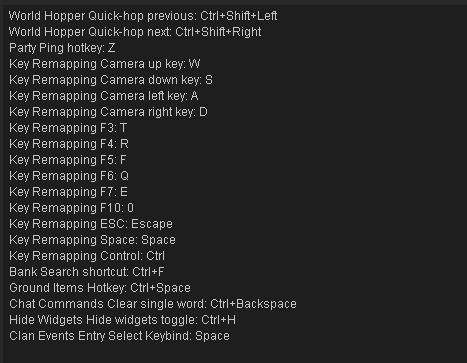
If one of your keys isn't working in game, you've most likely bound it to a feature of a plugin. The Debug Helper hub plugin can show what keys are bound to what plugins.
round jacinth
base runelite only uses alt to move overlays
round jacinth
you maybe have a hub plugin for something that uses it
 round jacinth
perhaps discord doesnt like alt as a push to talk key
vital panther
used it for years
round jacinth
i use f23 as my push to talk key as no program uses f23
confirmed alt works fine for me as push to talk when using runelite
are you perhaps running runelite as admin
or discord as adminn
vital panther
maybe let me check
gilded kayak
those "years" discord did not recognize RuneLite as a game, nor did it force its overlay ontop of it
so it definitely could be that
haughty pumiceBOT
@spark hatch Many plugins from the pluginhub break the client in subtle or not-so-subtle ways, including causing issues like client freezes. We do not support pluginhub plugins because we do not make or quality control them, and do not recommend their use.
Run the RuneLite (safe mode) shortcut, or with a Jagex account, first run the RuneLite (configure) shortcut and tick the Safe mode box, then launch RuneLite via the Jagex launcher.
This temporarily disables the GPU plugin and all hub plugins which will allow you to confirm the issue is caused by one of those plugins and isn't a core RuneLite issue.
If the issue is caused by a hub plugin, you should isolate which plugin it is and then uninstall the plugin.
vital panther
Yeah unfortunately nothing seems to be allowing me to use alt and click to move in game
Ooh slight progress, alt is now click and drag for the camera
But can't find a bind for that anywhere
viscid lantern
the drag for the camera is vanilla client behavior, theres no way to turn that off afaik
 primal canopy
Trying to create a new profile (for AFK) and duplicated my main profile in order to tweak it for AFK. However, the client size always reverts back to the size I have it on the main profile
This isn't happening on a different profile I have, however that one is pretty much a blank profile
Any idea what's causing runelite to resize the AFK profile back to main profile size every time?
spring socket
stoic cairn
Were you able to figure this out? I play at work through work proxy tunneled to ...
the ipv4 thing worked amazing. thank you for responding though!
 limber terrace
hey is there a way to get the code to this plugin?

im working on a plugin to be able to change the opacity of the minimap/orbs and it would help to view this
gilded kayak
? -> report an issue
all the plugins on the hub are open source
just make sure to follow the license if you plan to copy their code
limber terrace
thank u!
 thin spindle
Whats the go when you want to add to a current plugin hub, Do you have to reach out directly to the plugin creator and ask if you can edit it or do you edit it and push it to the plugin hub and they get notification from that push request and they comment there?
Just found the answer now, Thanks
For anyone else that finds this and has the same question
https://github.com/runelite/runelite/wiki/Plugin-takeover-policy
 narrow tangle
yeah turning off transparent chat in the base game settings fixed it
 humble hatch
Is there some way to make rendering distance centered on the player instead of on the center of the chunk?
IE: It looks weird if I lower it like so:

I'm in the middle of the screen, yet the viewable area seems to be centered on the chunk
It's a bit of a goofy use case, but I thought I'd ask anyways.
 spiral spade
Hi, trying to move overlay items such as inventory over lay etc but the alt is not working and i cant figure out what's wrong.. any idea?
gilded kayak
maybe you changed the keybind, check the RuneLite plugin
 wanton karma
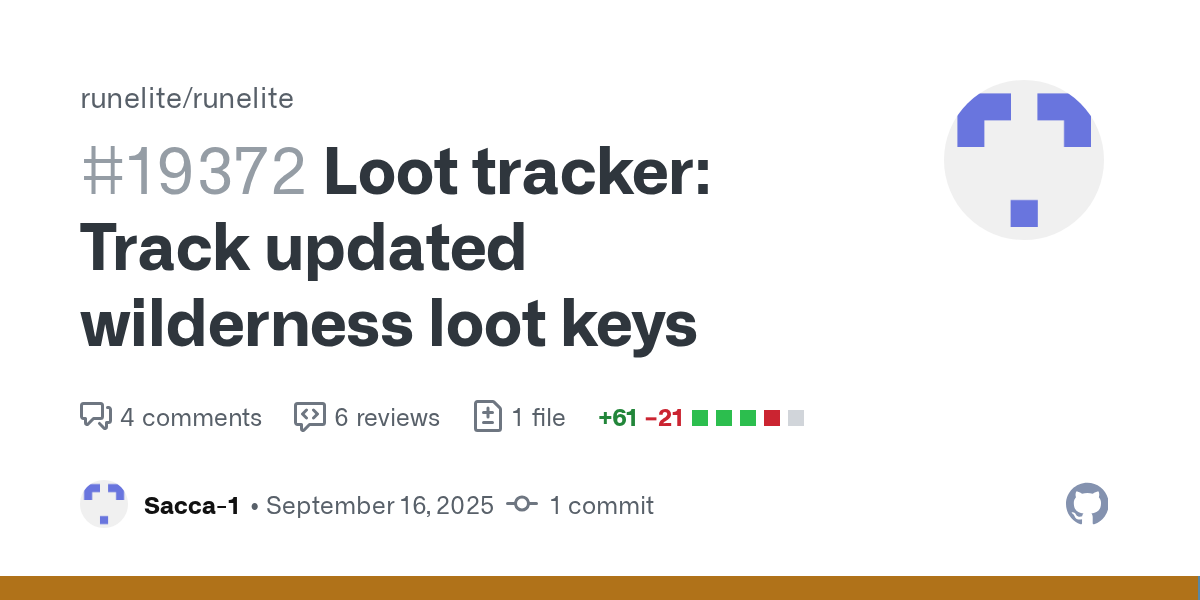
https://github.com/runelite/runelite/pull/19372 Hi i see this was done last week which im very thankful for, loot keys are still not being tracked for me however
GitHub
Fixes the support for loot keys which has been broken since Jagex adopted the deadman-style wilderness loot keys in the main game.
Hooked the loot tracker into the updated Wilderness loot key inte...

stll just tracking the bones of the death but not adding to the loot key tab in tracker
ah apologies, the 'open' status i guess was a clue 😄
viscid lantern
those changes arent merged yet
wanton karma
viscid lantern
those changes arent merged yet
ah ok so if im reading it right, the issue was found and resolved it just hasn't been updated to the public client yet?
leaden trail
If the pull request isn't merged, it's just a change that's proposed
If it says open it's not in the client
 outer plaza
Anyone else having issues with the runelite client? Crashes constantly as soon as the game opens
haughty pumiceBOT
To find the logs, you can do one of the following:
- If your client failed to open, click the
Open logs folderbutton. - Open the screenshot directory by right-clicking 📷
Camerabutton, navigate 1 directory up, then open logs folder. - Navigate to
%userprofile%\.runelite\logson Windows or$HOME/.runelite/logson Linux and macOS.
Upload the log files named client and launcher by dragging them to Discord. If there are files prefixed with jvm_crash dated from today, upload them too.
 solar tusk
I have not found an answer to this on the internet, I am trying to hide the outline of others pets when using both entity hider (to hide the pets) but having Interactable hints plugin enabled in order to view highlited npc/objects keeps the pet outline on top of the invisible pet.
IDK, how to manually add the pets ID to block the outline appearing over the hidden body of the pet.
haughty pumiceBOT
Get support for the Interactable Hints Plugin Hub plugin here: https://runelite.net/plugin-hub/show/interactable.
You can also find the support link by searching for the plugin in the Plugin Hub panel and clicking the ? button on the plugin, or by right-clicking the plugin in the plugin panel and clicking the Support menu option.
 karmic ore
Hi there, still having issues with my client crashing
The issue is that my client just becomes unresponsive, it doesn't crash and close. I just lose all keyboard/mouse input and have to force close the client
 thick meadow
I need help with when I launch runelite or auto launches into my jagex launcher idk how to fix it ?
karmic ore
logs wont show anything as I'm force closing it
oblique plume
can you use the sidebar while its frozen
leaden trail
thick meadow
I need help with when I launch runelite or auto launches into my jagex launcher ...
Can you post your logs?
haughty pumiceBOT
To find the logs, you can do one of the following:
- If your client failed to open, click the
Open logs folderbutton. - Open the screenshot directory by right-clicking 📷
Camerabutton, navigate 1 directory up, then open logs folder. - Navigate to
%userprofile%\.runelite\logson Windows or$HOME/.runelite/logson Linux and macOS.
Upload the log files named client and launcher by dragging them to Discord. If there are files prefixed with jvm_crash dated from today, upload them too.
oblique plume
or is it not even frozen, you just have no interactability with it?
karmic ore
oblique plume
or is it not even frozen, you just have no interactability with it?
No interactability at all
Can't minimize or close the client even via the taskbar window, have to literally open task manager and force close it, however the strange thing is the window doesn't grey out and the game continues playing as I can see everything still moving like normal, I just cannot interact with the game/client at all
At the minute I'm recording to see if I can catch it as it happened about 5 times in quick succession but now it's not happening haha
oblique plume
thats pretty odd
ive seen people that say they become unable to interact with sidebar stuff but the client is fine
or that the client will freeze on a frame and they have to force close it
dont think ive seen everything uninteractable
karmic ore
Bare in mind it is only runelite this happens with, no other games/applications have any issues
karmic ore
oblique plume
thats pretty odd
Yeah so far nobody has been able to help me and I am completely stumped, I've tried reinstalling runelite and double checking I'm on x64 etc, to no avail
and it's not an issue I've been able to find anywhere
oblique plume
have you had it happen in safemode
haughty pumiceBOT
To enable safemode
Windows
Run the RuneLite (configure) shortcut from the windows start menu
Tick the Safe mode box, save, launch RuneLite the way you normally do.
Mac
In Terminal, run
/Applications/RuneLite.app/Contents/MacOS/RuneLite --configure
Tick the Safe mode box, save, launch RuneLite the way you normally do.
karmic ore
oblique plume
have you had it happen in safemode
Yes
I was previously getting random wifi drops but turns out it was the ping detector in the world hopper plugin which is now resolved, I've turned off betterNPChighlight as that was throwing up an error but still hasn't fixed the freezing
haughty pumiceBOT
Graphical artifacts? Try disabling hardware acceleration: https://github.com/runelite/runelite/wiki/Disable-Hardware-Acceleration
karmic ore
strangely enough it hasn't happened since I began recording, which is the longest it has ever gone without happening so far (11 minutes)
Okay I've got it on video
I just solved the issue by right clicking RuneLite in task manager and creating a memory dump file which managed to unfreeze it, or it fixed itself. However it IMMEDIATELY froze as soon as I stopped recording on my PC @oblique plume
I do have a video of this, am I able to send it here?
oblique plume
idk what the vid would show us but yea you can send it
i feel like this behavior shows that some other process is causing the problem and it was prevented from happening because off how you were recording
like things that do game overlays or something
karmic ore
Yeah that makes sense, however I don't have any overlays
I am using a Gigabyte A16 laptop with GIMate installed which is recommended for Gigabyte drivers
unsure if this is causing the issue however I was able to play on this laptop fine for a while before issues presented itself
So it happened again just now, did the memory dump again and it resolved it so I think you're right but I'm unsure of how to even determine what is causing this
oblique plume
you can try the dump natives feature of the debug helper hub plugin
and post that here
that might show a process we arnt familiar with hooking into the client
karmic ore
oblique plume
you can try the dump natives feature of the debug helper hub plugin
how do I get those?
got the plugin

Just noticed the task icon becomes this everytime it crashes
So I figured out that is the default java icon, so I'm gonna try and investigate what is causing it
@oblique plume lots of angry errors that appear now that I'm not force closing runelite to fix the crashing
seems like for some reason runelite is blowing past the default set memory allocation which is causing the java to crash
leaden trail
There aren't really lots of errors there. You have basically one error and then flipping utilities is kinda spamming the log
karmic ore
leaden trail
There aren't really lots of errors there. You have basically one error and then ...
the java crashing error?
leaden trail
Are you crashing (client closing on its own) or are you freezing?
karmic ore
leaden trail
Are you crashing (client closing on its own) or are you freezing?
it just freezes
this logo appears as the runelite process icon when it happens with means it's going back to default java process due to the java runelite is using crashing
 leaden trail
How are you coming to these conclusions? You're saying a lot of things that don't really make sense/aren't consistent with your logs
 ashen plover
This issue appeared within the last week.
So I've used my own Runelite profile, and disabled every plugin, boss healthbars do not show. Yet when I load the original default profile (with some plugins enabled by default) I am able to see boss healthbars in an encounter. I am talking about those large boss-healthbars at the top of your screen on an encounter. Does anyone know where else to troubleshoot?
 empty minnow
Did you move the xp widget? Not sure if that saves per profile
But the hp bars are offset from that
ashen plover
is xp widget a plugin or a bse game setting?
leaden trail
That
 ashen plover
Wow, I can see that attachment, how do I detach that dependency?
 balmy sorrel
import tile markers is not working for some reason how do i fix that
round jacinth
ashen plover
Wow, I can see that attachment, how do I detach that dependency?
You don’t
round jacinth
balmy sorrel
import tile markers is not working for some reason how do i fix that
Make sure you’re copying the right part of the tiles
balmy sorrel
what do you mean by that
round jacinth
What are you copying to import
ashen plover
So if I want to move what is in the screenshot @leaden trail shared to the left side of my screen, I am forfeiting having boss healthbars?
balmy sorrel
do i just send it here
ashen plover
Zom a bit of an exchange happened there, were you speaking to me or Cool Guy?
round jacinth
I was talking to cool guy
The xp tracker thing being in the top right there makes stuff appear below it sorta like when you put info boxes into the anchor zones
they organize themselves
That’s just how they organize
 river badge
I'm having trouble importing tiles etc. from an old ssd onto my new ssd. I've gone to my C:users>(my name)>app data> local - then copied the runelite file in there and moved it over to my new SSD from a flash drive but it's still not working
there is a .runelite folder which could potentially be the actual folder i need..? the one I've copied over is a simple "Runelite" folder
 stone parcel
Yeah you want the .runelite one
round jacinth
the .runelite folder has everything
haughty pumiceBOT
 ornate kite
theres some kind of bug or fixed mode hide chat thing that is causing clicking in the game window to turn chat from friends to off
noticed it playing 3 accs
idk whats doing it
i usually play chat off tho
leaden trail
ashen plover
So if I want to move what is in the screenshot <@288504448030867466> shared to t...
If you move the XP tracker you break a lot of things because Jagex bases the location of a bunch of stuff on where the XP tracker is
 sleek blaze
idk where to send this but I was afking on my hardcore at the naguas and this happened
 leaden trail
Do you have the Blindfold plugin enabled?
leaden trail
Can you post your logs? I'll take a look
sleek blaze
bet
haughty pumiceBOT
To find the logs, you can do one of the following:
- If your client failed to open, click the
Open logs folderbutton. - Open the screenshot directory by right-clicking 📷
Camerabutton, navigate 1 directory up, then open logs folder. - Navigate to
%userprofile%\.runelite\logson Windows or$HOME/.runelite/logson Linux and macOS.
Upload the log files named client and launcher by dragging them to Discord. If there are files prefixed with jvm_crash dated from today, upload them too.
river badge
Thanks for the help btw 🙂
sleek blaze
leaden trail
Can I get the launcher.log and the client log with yesterday's date as well?
leaden trail
Client log from the 25th actually, I had assumed incorrectly that you had launched yesterday
leaden trail
I'd want to see the one from whenever you launched the client
sleek blaze
oh right
just realized that yeah I had rl open for a few days I think
might be mistaken tho because its usually on a second desktop but in any case this is 25 I'll send 24 too just in case
oh and in case this helps
 primal canopy
Trying to create a new profile (for AFK) and duplicated my main profile in order to tweak it for AFK. However, the client size always reverts back to the size I have it on the main profile
This isn't happening on a different profile I have, however that one is pretty much a blank profile
Any idea what's causing runelite to resize the AFK profile back to main profile size every time?\
 brazen spade
Hey is it a known thing that the "Mute other players' area sounds" option in the Music plugin also mutes the player's teleport sound?
round jacinth
I think so because the teleport doesn’t come from a source it’s just played audio so it’s not owned by anybody
In annoyance mute it tries mute only other teleports because it’s not your player doing the animation while the sound of the teleport is fired
brazen spade
Oh interesting, that makes sense.
 coarse condor
Is the project to build the injected clients like injected-client-1.11.18.jar open source?
leaden trail
No
 fair lodge
hello everyone, will someone be able to help me with my runelite scaling? i uninstalled it and reinstalled it and its blurry rn, i remember scaling it a few times but it was through the help of people in here
i think ive figured it out looking at previous messages
karmic ore
leaden trail
How are you coming to these conclusions? You're saying a lot of things that don'...
Summary:
The game freezes and client is not interactable at all, however the game continues to run in the client as everything continues as normal, I just have no input to the client, including the sidebar whatsoever.
In the logs it shows Java having issues/crashing, as well as the fact the client's process image changes from the "RL" logo to the default Java icon, and I then noticed I have "jvm_crash_pid" files in my logs aswell.
This indicates an issue with the client exceeding the default memory allocated to it, which is causing the crash - subsequently and temporarily fixed by creating memory dump files as it resets the process without closing it.
This could mean a plugin is creating issues with memory. I believe it could be related to the error in the log that says there is multiple profiles, especially in conjunction with flipping utilities as that has been a constant issue in the log aswell.
leaden trail
Are you just feeding your logs to ChatGPT or something?
karmic ore
leaden trail
Are you just feeding your logs to ChatGPT or something?
No, everything I've said is what I've worked out myself
leaden trail
You probably are not OOMing
karmic ore
OOMing?
leaden trail
I don't think I remember JVM crash logs being mentioned prior, send those
Running out of memory
karmic ore
Oh I'm definitely not, I have 32gb of ram, but I think the client itself is for some reason
leaden trail
There's no "multiple profiles" error, that's really just informational
karmic ore
leaden trail
karmic ore
Oh I'm definitely not, I have 32gb of ram, but I think the client itself is for ...
The client doesn't get allocated all of that.
And if you run out of what the client is allocated, it will close and show up in your logs in a way that it has not done
leaden trail
karmic ore
Oh I'm definitely not, I have 32gb of ram, but I think the client itself is for ...
Ok JVM crash kinda changes this
karmic ore
I've monitered the RAM usage and it's never exceeded 50% during a freeze
haughty pumiceBOT
To remove the Java memory limit on your PC follow https://github.com/runelite/runelite/wiki/Remove-java-memory-limit
leaden trail
Try that
karmic ore
Okay will do
karmic ore
leaden trail
Try that
Don't have anything there for JAVA
round jacinth
leaden trail
Are you just feeding your logs to ChatGPT or something?
I refuse to believe this anything but that
lol
karmic ore
round jacinth
I refuse to believe this anything but that
How so? I'm just trying to piece together what I've seen/know of my freezes, processes and logs lol
round jacinth
it wouldnt be the first some one fed their log to ai and then brought the ai message back to use
lower the amount of hub plugins / disable watch dog plugin (idk if they fixed it still tbh) / increase memory for runelite
karmic ore
round jacinth
it wouldnt be the first some one fed their log to ai and then brought the ai mes...
How is it an AI message? I literally typed that out 🤦♂️
 winter snow
The internet does not know this.
round jacinth

GitHub
Open source Old School RuneScape client. Contribute to runelite/runelite development by creating an account on GitHub.
you seemed to assert a lot while also trying to ask which is what triggered the "is this ai" reflex
as they only assert
i think dura linked the wrong memory thing
¯_(ツ)_/¯
karmic ore
round jacinth
you seemed to assert a lot while also trying to ask which is what triggered the ...
Tbf I am autistic so I type quite blunt when explaining things, my bad
karmic ore
round jacinth
i think dura linked the wrong memory thing
I'll give it go thanks
round jacinth
you may just have a fuck ton of hub crap and should reduce them too
karmic ore
round jacinth
you may just have a fuck ton of hub crap and should reduce them too
I have a gross amount of plugins, I'm sure I installed one recently now you mention it so perhaps I'll try and backtrace what I installed recently and see if that helps
round jacinth
recently installed doesnt really matter as they update whenever
karmic ore
round jacinth
recently installed doesnt really matter as they update whenever
Okay I'll keep that in mind
Is the JVM argument done using the runelite config app?
round jacinth
ideally you have as close to 0 hub plugins installed because many almost all are bad
yes
haughty pumiceBOT
To enable safemode
Windows
Run the RuneLite (configure) shortcut from the windows start menu
Tick the Safe mode box, save, launch RuneLite the way you normally do.
Mac
In Terminal, run
/Applications/RuneLite.app/Contents/MacOS/RuneLite --configure
Tick the Safe mode box, save, launch RuneLite the way you normally do.
karmic ore
I have just noticed I'm getting graphical glitches on discord when the game freezes aswell
round jacinth
you may want to remove them from safemode
karmic ore
And the client has now frozen on boot where it is loading plugins, which is also new
round jacinth
not uncommon with hub plugins
karmic ore
Since putting the JVM argument into config I literally cannot load RL without it freezing
even in safemode
 round jacinth
can you share the logs while it attempts in safe mode
round jacinth
it doesnt seem to indicate it not working in safe mode
karmic ore
"2025-09-27 22:19:18 BST [RuneLite] INFO net.runelite.client.RuneLite - Java VM arguments: -XX:+DisableAttachMechanism -Drunelite.launcher.blacklistedDlls=RTSSHooks.dll,RTSSHooks64.dll,NahimicOSD.dll,NahimicMSIOSD.dll,Nahimic2OSD.dll,Nahimic2DevProps.dll,k_fps32.dll,k_fps64.dll,SS2DevProps.dll,SS2OSD.dll,GTIII-OSD64-GL.dll,GTIII-OSD64-VK.dll,GTIII-OSD64.dll -Xmx768m -Xss2m -XX:CompileThreshold=1500 -Dsun.java2d.d3d=true -Dsun.java2d.opengl=false -Drunelite.launcher.version=2.7.5 -XX:ErrorFile=C:\Users\megaf.runelite\logs\jvm_crash_pid_%p.log -Xmx1536M"
This is the error I get when it freezes based on the time
karmic ore
I see
round jacinth
about the args used
karmic ore
that same message appears every single time my client freezes however
round jacinth
its the last/first line thats printed before hub plugins would load
its in every log ever posted in this discord
its normal
karmic ore
I see
round jacinth
you can try safe mode without the Xmx thing set i guess
karmic ore
Is this normal? Plugins stuck "removing" in safe mode?
 round jacinth
i dont think it'd say removing
but safemode doesn't load hub plugns
its runelite without hub
karmic ore
Okay
round jacinth
so people can remove hub plugins that lock them from playing
or turn off plugins
i dont recall stuff getting stuck in removing...
im a bit puzzled
karmic ore
Strange, I also removed the JVM argument I put into the configure app and I'm now able to load runelite into the game without freezing aswell
Spoke too soon, it froze
round jacinth
while in safe mode still?
karmic ore
I really don't understand why I can't even load RuneLite at all now
round jacinth
me neither.
karmic ore
round jacinth
while in safe mode still?
No I turned off safe mode
round jacinth
keep it on to remove hub plugins, turn them off
haughty pumiceBOT
Please refer to this flowchart for further troubleshooting.
round jacinth
might be helpful a bit to explain some steps to narrow down bad plugins
karmic ore
Okay so RL gets stuck loading my 126th plugin, am I able to find that plugin within runelite to see if I can manually remove it?
as in within the files I mean
karmic ore
round jacinth
might be helpful a bit to explain some steps to narrow down bad plugins
"2025-09-27 22:36:25 BST [RuneLite] INFO n.r.c.e.ExternalPluginManager - Loading external plugin "tile-packs" jar "ZmHuwXKv0oOhN4GN9z1efSe6S5A0H85VnJfuh7BciII"
2025-09-27 22:36:25 BST [RuneLite] INFO n.r.client.discord.DiscordService - Initializing Discord RPC service.
2025-09-27 22:36:27 BST [pool-3-thread-1] INFO n.r.client.discord.DiscordService - Discord RPC service is ready with user b_enn."
Does this mean anything? Last line on multiple startups from where I've frozen and nothing else loads on the log for that startup
round jacinth
no the latest loaded thing before a freeze doesnt matter
karmic ore
Okay
round jacinth
and the last 2 lines are the built in core plugin for discord that starts the service
that interacts with party and also discord to tell discord you're training woodcutting in draynor
if safemode works correctly then it means it's not core runelite but a hub plugin being a problem, but without the logs screaming its sorta hard
if you're in safe mode you can filter by hub and disable/uinstall
you dont need to worry about core ones
karmic ore
round jacinth
if you're in safe mode you can filter by hub and disable/uinstall
I removed a bunch of plugins and RL loaded and didn't freeze, will report back if it seems solved or not if I don't freeze again
round jacinth
which ones did you remove can you try to remember/recall/narrow down on it
i gues you said bunch /shrug
if you decide you want one of the old ones back, you would get the previous settings back as they're not removed just because you removed a plugin
karmic ore
round jacinth
if you decide you want one of the old ones back, you would get the previous sett...
okay cool
And I'm not sure, I removed a few plugins at once
round jacinth
np
karmic ore
Thank you for the help though, looking good so far
 tepid raven
hello!
 lavish karma
Did yuou ever get it to work?
Anybody in here have a working group bronzeman mode plugin? Like the one content creators used in the recent BMM series. The available one is pretty busted as far as I'm aware.
round jacinth
the ones they used for BMM was some special cooked up one that gudi made i think
its probably based on one of the 4 existing ones
we only guarentee that they wont be malicious and get you hacked/banned not that they work well
you may have to try to find youtube videos or a discord communtiy for em
lavish karma
Damn, ok thank you.
lavish karma
round jacinth
the ones they used for BMM was some special cooked up one that gudi made i think
Any idea how I would go about finding someone
MLGudi, or somethin
lavish karma
Yeah I'm tryna see how I cna reach out to him
round jacinth
his plugin was based of the one dkvl made
 thick panther
lavish karma
Anybody in here have a working group bronzeman mode plugin? Like the one content...
thick panther
lavish karma
Anybody in here have a working group bronzeman mode plugin? Like the one content...
Gudi did a special plugin not on the hub for that
round jacinth
which was 6 year old code that he updated to make work better (at all) or for the special event, not sure. i'd think he would've pushed it to his repo but he didn't
he seemed to use dkvl either as a start or as an example
not sure
lavish karma
thick panther
Gudi did a special plugin not on the hub for that
Yeah, that's the problem. Me and my boys are wanting to do a BMM together but no plugin has group integreation. As in, when we get an unlock it doesn't unlock for the whole team :\
round jacinth
that's the special thing that gudi probably did and thats about it tbh lol
thick panther
I can almost guarantee he will not make it public
lavish karma
thick panther
I can almost guarantee he will not make it public
Why?
round jacinth
it would not be terribly hard to do if that's the only feature
thick panther
It was for content creators
round jacinth
it doesn't mean he wouldn't release it, he releeaed key frames which is only useful for content creators
thick panther
Fair
lavish karma
Yeah I don't see why he wouldn't. What's the harm lol
round jacinth
he maybe should've released it for the hub, there was a runelite update that made content creators unable to play the game
until he rebuilt the jar and sent it to them
thick panther
I can ask him, but he’s a pretty busy dude
lavish karma
That would be hugely appreciated man
round jacinth
its a tad bit annoying but i get it that he does these special things and not release them either on github or w/e because people come here expecting they can get them
when they're made specifically for some one's series
thick panther
That’s why I made chance man 🤷🏻♂️
round jacinth
group bronzeman mode probbably relied on a server of some sort
lavish karma
thick panther
I can ask him, but he’s a pretty busy dude
My boys in disc said they got some $ for him as incentive 😂
round jacinth
round jacinth
group bronzeman mode probbably relied on a server of some sort
this might be the barrier of entry for you and your friends
idk how else you share your unlocks with a group
or i guess some other repo to share/update together /shrug
lavish karma
Yeah idk, we're having to trade each other every item which is super annoying lmao. Would be a massive QOL to have group integration.
round jacinth
until gudi helps you out or some one actually creates such a solution that is your work around
lavish karma
Yeah no worries. @thick panther Lmk what Gudi says, like I said the boys got some $ headin his way if he can help out in any way 👍
just @ me
thick panther
lavish karma
Yeah no worries. <@140677940307296256> Lmk what Gudi says, like I said the boys ...
No promises he’ll reply. Haven’t spoken to him in a few weeks.
 lone siren
How do I talk in development? I have a simple ass problem lol.
faq and welcome didn't help.
lavish karma
Yeah man all good, appreciate you reaching out regardless. We're lookin kinda hopeless rn so anything is appreciated :)
round jacinth
lone siren
How do I talk in development? I have a simple ass problem lol.
faq and welcome d...
you can ask in #runelite or read the channel topic
if your question is answered by the faq imma stink up the whole room
 whole stag
round jacinth
you can ask in <#301497432909414422> or read the channel topic
whole stag
round jacinth
you can ask in <#301497432909414422> or read the channel topic
Sorry, I was a bit hasty posting, lol ill put it in the correct place
round jacinth
lol
lone siren
It's not i swear i can read lol ill investigate that thanks

 jolly coral
Hi, is it possible to have a mod dm me? I have a problem but would prefer to speak about it privately.
 crisp dune
see #welcome message; DM @haughty pumice
 scarlet cave
i am playing on surface pro 11, arm64 device and gpu (experimental) has improved my fps greatly over original gpu plugin.
however there is a lot of unpleasant flickering ://// (in priff scrolled out, and in ge around certain capes like spotted cape/infernal cape)
is there any solution to this or just waitttt
empty minnow
It's experimental so there are issues, nothing you can do about it at the moment
scarlet cave
i have been using the 117 HD plugin as a replacement since it does decently with the resolution turned down but still, cant match the resolution + fps of gpu (experimental)
sad!
i eagerly await updates
mossy swan
you may wish to report bugs like that on github
haughty pumiceBOT
Get support for the GPU (experimental) Plugin Hub plugin here: https://runelite.net/plugin-hub/show/gpu-experimental.
You can also find the support link by searching for the plugin in the Plugin Hub panel and clicking the ? button on the plugin, or by right-clicking the plugin in the plugin panel and clicking the Support menu option.
 odd bluff
Hi, does anyone know how I fix my runelite loot tracker to display lootkeys loot? On the official rs client it works, but on runelite it doesnt show me anything. (I enabled the tracking on the official client settings)

 snow leaf
odd bluff
Hi, does anyone know how I fix my runelite loot tracker to display lootkeys loot...
snow leaf
odd bluff
Hi, does anyone know how I fix my runelite loot tracker to display lootkeys loot...
I think the fix is coming next update. With the new interface it broke a while ago
Or rather it is being worked on https://github.com/runelite/runelite/pull/19372
GitHub
Fixes the support for loot keys which has been broken since Jagex adopted the deadman-style wilderness loot keys in the main game.
Hooked the loot tracker into the updated Wilderness loot key inte...
odd bluff
tysm for the info 🙂
snow leaf
When it says merged instead of open it will be in the next runelite update on a Wednesday i believe
snow leaf
can't seem to find an issue on this for puzzle solver. Someone else posted this and said it never found the solution. Anyone know more about this? I may look into it
 mossy swan
drop and get a new one
snow leaf
yeh they did that and had same issue, maybe they have a potato or is it algorithm issue
 frank vault
Hello all, when i try log into runelite at the top of the screen and it sends me to sign in with google no matter if i choose my gmail account or try sign in with a different user it tells me "something went wrong". Anyone have any idea how to fix this? Thanks in advance!
 halcyon parcel
Hey!
Hoping someone may be able to help?
I’ve been having strange crashing/dc issues with runelite for the past 3-4 weeks, been playing no issues for the past 18 months.
I was due to replace my laptop anyway so thought perfect time to, I’ve reinstalled fresh, and I’m still having the exact same issues,
My internet connection is fine, I have 4 ping to the Osrs servers when logged in, discord stays connected and have no issues.
I’ve posted the extract from the client log below,
2025-09-28 16:58:57 BST [Client] WARN n.runelite.client.eventbus.EventBus - Uncaught exception in event subscriber
java.lang.NullPointerException: null
at net.runelite.client.chat.ChatMessageManager.colorChatMessage(ChatMessageManager.java:132)
at net.runelite.client.chat.ChatMessageManager.onScriptCallbackEvent(ChatMessageManager.java:223)
at net.runelite.client.eventbus.EventBus$Subscriber.invoke(EventBus.java:70)
at net.runelite.client.eventbus.EventBus.post(EventBus.java:223)
at net.runelite.client.callback.Hooks.post(Hooks.java:205)
at client.sk(client.java:1347)
at jq.at(jq.java:40855)
at fy.aw(fy.java:16285)
at my.af(my.java:103)
at client.qb(client.java:13576)
at client.bl(client.java:12074)
at bl.az(bl.java:479)
at bl.mo(bl.java)
at bl.run(bl.java:25)
at java.base/java.lang.Thread.run(Unknown Source)
Could anyone help?
It doesn’t seem to matter if I disable all plugins, fresh Runelite profile, the error keeps happening 😞
Thanks
crisp dune
That log message is likely not related, can you upload a full client log?
halcyon parcel
I can,
Give me 1 min to fire up the laptop
That error occurs every time I get the disconnection message in game
Log attached
crisp dune
It's an error happening when either the local player, or the local player's name is null, neither of which should happen during normal gameplay. This seems to indicate you're most likely encountering some kind of network interruption
Have you noticed any kind of pattern to it? Does that happen to you after a specific amount of time, or on any kind of schedule?
 zealous cedar
Id start with removing some of the plugins throwing errors, like gauntlet map and item charges improved
halcyon parcel
It seems to happen when I’m doing “busy” content,
Toa kephri/wardens
doesn’t do it if I do any solo content / skilling.
I don’t experience any lag/stutter,
ive left pings running to the specific server im connected to, and they do not drop
I have 4ms to all uk worlds
sleek blaze
hey yall so this bug happened to me last night, where my name/equipment disappeared and my camera went to a weird spot while I was at sulpher naguas and my game stopped responding, sadly it happened again and I lost my hardcore status has anyone else experienced this issue or anything similar to it
 leaden trail
I'll try and look at your logs now that I'm not on mobile
charred wind
I see no name beside the hc icon
Probably not related to that plugin but likely a hub plugin
sleek blaze
this might seem far fetched but if I were to look into restoring my status if it was confirmed to be a game breaking bug where do i communicate that besides a reddit post or some cry for help on social media post
viscid lantern
status restoration isnt a thing, the only exceptions ahve been where it was directly jagex fault
sleek blaze
only this account
leaden trail
your logs show verzzz actively being used as well, and your HC looks like Bloat resets?
sleek blaze
iirc I only logged into verzzz for a few minutes to bond bloat resets
leaden trail
how many active client instances did you have open the last few days though?
sleek blaze
and they're both on separate jagex account
leaden trail
trying to make sense of your logs
sleek blaze
at most 2
verzzz and bloat resets
Im looking through the log files rn and if it helps as soon soon as the incident happened I logged out for the rest of the day
sleek blaze
not quite sure if this is relavent but given the client was open for a few days would I need to look through previous logs? @leaden trail
 ionic coyote
Anyone know where the place is to report a bug with the motherlode mine plugin?
empty minnow
GitHub
Open source Old School RuneScape client. Contribute to runelite/runelite development by creating an account on GitHub.
sleek blaze
2025-09-27 19:28:10 EET [Client] WARN n.r.c.ui.overlay.OverlayRenderer - following log message logged 1000 times!
2025-09-27 19:28:10 EET [Client] WARN n.r.c.ui.overlay.OverlayRenderer - Error during overlay rendering java.lang.ArrayIndexOutOfBoundsException: null
2025-09-27 19:28:14 EET [Client] WARN n.r.c.ui.overlay.OverlayRenderer - following log message logged 1000 times!
2025-09-27 19:28:14 EET [Client] WARN n.r.c.ui.overlay.OverlayRenderer - Error during overlay rendering
found it
in any case ggs
 edgy marsh
I have a new computer and runelite didn't recognize my profile. Can I just copy over my old runelite folder from previous PC to new to get all of my plugins/settings back?
haughty pumiceBOT
edgy marsh
thanks!
 marsh pebble
Hello! I would like to create plugins for Runelite. The tutorials on how to set it up is from before jagex account. Any tips?
 west spire
marsh pebble
Hello! I would like to create plugins for Runelite. The tutorials on how to set ...
marsh pebble
west spire
https://github.com/runelite/runelite/wiki/Using-Jagex-Accounts
west spire
marsh pebble
Hello! I would like to create plugins for Runelite. The tutorials on how to set ...
marsh pebble
west spire
https://github.com/runelite/runelite/wiki/Using-Jagex-Accounts
Im on Linux using Bolt Launcher to start RuneLite D:
round jacinth
i dont think that matters
round jacinth
huh
you think runelite devs dont use osrs the game to test the client/plugins? lol
marsh pebble
Yes I do think they do
west spire
i think hes saying because hes on linux which isnt officially supported afaik there might be something wonky
marsh pebble
Ye
west spire
im unfamiliar with bolt launcher or devving in a linux environ for RL so cant be of much help, sorry
marsh pebble
When I moved my test plugin to the folder for my plugins it didnt show up after restarting runelite
round jacinth
the bolt launcher has ability to set the --insecure-writes
and that file would exist in .runelite which intellij would use to launch the game using your jagex accc
marsh pebble
but im not using intellij. Im just coding the plugin in terminal
Cant I just paste a plugin into the plugin folder of runelite then use it?
marsh pebble
Why?
round jacinth
our guides you follow are to use an ide to build and run client, if you're trying different things outside of that then its up to you to get it to work
because that folder isn't how you magically make plugins run as if they're from hub
if you're interested in developing hub plugins i suggest following the guides for it
haughty pumiceBOT
How to develop plugin-hub plugins: https://github.com/runelite/plugin-hub/blob/master/README.md
round jacinth
it's probably very difficult to write it in the console to work
marsh pebble
I've forked a plugin that I want to add some other features to at the moment
leaden trail
This channel is for release client support
 glass isle
@zealous cedar can you send me the download link for runelite 24.2 the website is still glitched for me to get onto... thanks
haughty pumiceBOT
If you are on macOS version 10.11 or older (El Capitan, Yosemite), download this Runelite launcher instead: https://github.com/runelite/launcher/releases/download/2.4.2/RuneLite-x64.dmg
 pure stone
not sure if anyone can help but ive really messed up. i think i know the issue but even when launching in safe mode the problem still persists. yesterday, ran a plugin to help with blackjacking which disabled the attack option for npc's. Next day, i try to disable the plugin but the attack option is no longer available. restarted RL, no luck. Looked online, found a reddit post that explained the steps to take and unfortunately im still without an attack option. Hopefully ive explained that well enough. please and thank you in advance.
haughty pumiceBOT
Many plugins from the pluginhub break the client in subtle or not-so-subtle ways, including causing issues like client freezes. We do not support pluginhub plugins because we do not make or quality control them, and do not recommend their use.
Run the RuneLite (safe mode) shortcut, or with a Jagex account, first run the RuneLite (configure) shortcut and tick the Safe mode box, then launch RuneLite via the Jagex launcher.
This temporarily disables the GPU plugin and all hub plugins which will allow you to confirm the issue is caused by one of those plugins and isn't a core RuneLite issue.
If the issue is caused by a hub plugin, you should isolate which plugin it is and then uninstall the plugin.
pure stone
In safe mode now and still running into the issue.
oblique plume
So you disabled the combat options in jagex settings
pure stone
forgive my ignorance. ty
 ornate mirage
Hi guys, so I have been having some random lag spikes on my runelite clients, on both accounts that both load the same plugin profile.
I have had some problems with this before where if I load a fresh profile of plugins, I no longer have the lag spikes.
I know its not my internet as I have monitored my task manager to find correlation between internet spikes and actual client lag spikes. Sometimes happens, but maybe 10% of the time it seems to actually be the internet.
Ive tried deleting the plugins I don't use to reduce some of the load on my computer, but it doesnt seem to have helped much.
I tried to clear my HDD of excess memory being used up (Steam games I don't play anymore), and that hasnt seem to help.
Sometimes I restart my computer when the spikes seem to get really bad, and sometimes it seems to help and others it doesnt.
I have two runelite clients on at all times and one is bank standing at GE and the other is doing PvM stuff. They seem to spikes independently of each other.
I just wanted to see if anyone here has had a similar problem, and if so, what I might be able to do to stop these very inconvenient lag spikes.
haughty pumiceBOT
open command prompt, type this in:
ping -t oldschoolXXX.runescape.com
where the XXX is your world minus 300, for example world350 = 50
ornate mirage
i mean there is slight correlation, but it only spikes by like 20 ping when i get some lag spikes
i tried running the game in safe mode and experienced no lag
and ive been following the !flow chart to try the binary debugging
gilded kayak
ah
 magic flax
what happens if i accidently delete my runelite folder then empty recycle bin is there anything i can do to recover that file?
gilded kayak
no
ornate mirage
its strange because its the type of lag where the game seems to be accepting my inputs for walking.
Example: If I am killing Araxxor in the enrage phase and the lag spikes, I can mentally time the two tile skip to prevent the damage while click two tiles away for every attack. Eventually the client catches up and my game quickly resyncs.
but it can lag for like either a fraction of a second to like 5 seconds
If it were internet lag, would my character simply not be moving even if I am inputting because the packets arent making it to the game server?
magic flax
gilded kayak
no
assuming this was to me :/
magic flax
never logging in again
 short geyser
So my bottom menu just randomly split apart after completing a quest and now its stuck like this. Might be a silly question but does anyone know how to make it go back to normal 😅 the buttons are all functionable its just a weird split

 hollow olive
alt right click
ornate mirage
How do I carry over my bank tags and tile markers to a new plugin profile?
leaden trail
Duplicate the profile
ornate mirage
But without carrying over all the plugin hug plugins i have on the one im trying to move on from?
do i just manually uninstall?
coarse condor
In the runelite client repo on github, what is the cache sub-project used for, and how can I use it?
crisp dune
it's used for reading/interfacing with the game's cache files
generally most people don't need to use it
(and most people who do want to look at cache contents tend to find abex's cache releases (https://github.com/abextm/osrs-cache/releases) or cache viewer (https://abextm.github.io/cache2) more useful)
coarse condor
Could I say modify a model from the cache and repack it and it could be displayed on my client?
leaden trail
No
coarse condor
What prevents it? Cache like signed or something or something else?
crisp dune
Cache contents are validated on launch, and we don't provide an API to do that in the client
coarse condor
validated by official gamepack?
crisp dune
yes
coarse condor
Ah, okay then. Thx
coarse condor
So that runelite-cache-code-updater:
"This takes things in the runelite repo and automagically maps them to the new values when the cache changes. Most important is script and widget updates."
Is this for like widget Id's changing after an update? Can you give a specific example of what it would be used for in runelite?
round jacinth
coarse condor
So that runelite-cache-code-updater:
"This takes things in the runelite repo and...
There’s been times where long lasting hub plugins worked because they hard coded an id for a widget to read and they broke from an update. I can’t think of one off the top of my head but it’s definitely happened
crisp dune
coarse condor
So that runelite-cache-code-updater:
"This takes things in the runelite repo and...
Mostly it is useful for generating the runelite-api definitions, but it also does some other things like generating item variation mapping for the client api
coarse condor
Like for updating these constants if they change between revision?:
 coarse condor
Yeah, I am seeing the adding of new ones. Looks kind of uncommon for one to change
crisp dune
Usually they don't change existing stuff but it does happen. Before gamevals came around it used to be rather disruptive because we couldn't provide consistent names for everything
ornate kite
how do i join development channel? can't type
 solid mesa
Read the channel message
coarse condor
I didn't even realize these gamevals were a thing until just now. Seems pretty convenient.
So are all these things its updating just stored as constants in the cache?
 crisp dune
Yes
coarse condor
Cool. Ty again
 knotty panther
I think my entity hider is bugged. thoughts? lol..
 round jacinth
that's just hd
oblique plume
High definition box entities
 delicate olive
knotty panther
I think my entity hider is bugged. thoughts? lol..
delicate olive
knotty panther
I think my entity hider is bugged. thoughts? lol..
can u send a log?
knotty panther
how?
oblique plume
Why?
delicate olive
to see if there is anything in it that can help debug this issue
oblique plume
Hd already knows about it
knotty panther
oh ok
delicate olive
i know but i dont think we have had a log after its happened to someone
oblique plume
Im confident they do
knotty panther
ok. well lmk how i send a log
oblique plume
This is their most common "issue"
haughty pumiceBOT
Visit 117's HD plugin discord (https://discord.com/invite/U4p6ChjgSE) for support, issues & feedback
delicate olive
come over to the 117hd discord and post it in there
 clever tulip
Hey guys is the quest helper an official plugin? Or is there another place to get help with it
haughty pumiceBOT
Visit Zoinkwiz's Quest Helper plugin discord (https://discord.com/invite/XCfwNnz6RB) for support, issues & feedback
clever tulip
Ty
 quasi goblet
is there a reason why my logs are being spammed with this message every 20 seconds minutes?
 [pool-2-thread-1] WARN  n.r.client.ClientSessionManager - Resetting session
java.io.IOException: Unsuccessful ping
    at net.runelite.client.SessionClient.ping(SessionClient.java:97)
    at net.runelite.client.ClientSessionManager.ping(ClientSessionManager.java:130)
    at net.runelite.client.util.RunnableExceptionLogger.run(RunnableExceptionLogger.java:41)
    at java.base/java.util.concurrent.Executors$RunnableAdapter.call(Executors.java:515)
    at java.base/java.util.concurrent.FutureTask.runAndReset(FutureTask.java:305)
    at java.base/java.util.concurrent.ScheduledThreadPoolExecutor$ScheduledFutureTask.run(ScheduledThreadPoolExecutor.java:305)
    at java.base/java.util.concurrent.ThreadPoolExecutor.runWorker(ThreadPoolExecutor.java:1128)
    at java.base/java.util.concurrent.ThreadPoolExecutor$Worker.run(ThreadPoolExecutor.java:628)
    at java.base/java.lang.Thread.run(Thread.java:829)
 feral kayak

what could be causing the floating plugin on the left
hard to recreate it and toggle plugins
crisp dune
no idea
 mighty steppe
what might be reason im getting stuck on this:

tried launch RL again and its still connecting to server
haughty pumiceBOT
safemode: To enable safemode
Windows
Run the RuneLite (configure) shortcut from the windows start menu
Tick the Safe mode box, save, launch RuneLite the way you normally do.
Mac
In Terminal, run
/Applications/RuneLite.app/Contents/MacOS/RuneLite --configure
Tick the Safe mode box, save, launch RuneLite the way you normally do.
 gilded kayak
ah definitely possible
mighty steppe
F will have to work
gilded kayak
ah yeah looks like there's 3 new posts on r/2007scape in the past 5 minutes
 whole horizon
gilded kayak
ah yeah looks like there's 3 new posts on r/2007scape in the past 5 minutes
whole horizon
gilded kayak
ah yeah looks like there's 3 new posts on r/2007scape in the past 5 minutes
im getting it too does that safe mode works?
mighty steppe
if servers are down 99.9% safe mode will not work
gilded kayak
yeah safe mode was only for a breaking so hard it prevents you from logging in
but this is almost certainly the servers
whole horizon
noted thanks
 inland rune
this one won't go away regardless of my kingdom plugin settings. does anyone know a solution? 😄

 last bronze
hello, just wondering if someone knows why a bunch of my runelite commands aren't working
!kc (boss name) doesn't work, other people can see my kc when I type it but I can't. i can see other people's kc when they type the command, i just can't see my own. i have tried checking my boss log etc with ring of wealth and via the adventure log, have also checked my collection log.
the only command that seems to be working is !price (item)
any ideas?
have also tried resetting the plugin, doesn't work
 mossy swan
have you tried restarting the client
last bronze
is that different from just xing out of runelite?
leaden trail
No
last bronze
yeah i've quit runelite plenty of times
mossy swan
!logs
haughty pumiceBOT
To find the logs, you can do one of the following:
- If your client failed to open, click the
Open logs folderbutton. - Open the screenshot directory by right-clicking 📷
Camerabutton, navigate 1 directory up, then open logs folder. - Navigate to
%userprofile%\.runelite\logson Windows or$HOME/.runelite/logson Linux and macOS.
Upload the log files named client and launcher by dragging them to Discord. If there are files prefixed with jvm_crash dated from today, upload them too.
 dark plaza
Hey, I've been wondering why my Echo Ahrim's show up as hugely valuable in RL. Now I checked and they're about 2x the actual GE value of the combined items.
I narrowed it down to ItemMapping.java, which seems to have them listed two times; first under the regular items (eg
ITEM_AHRIMS_HOOD (...,ItemID.BARROWS_AHRIM_HEAD_ORNAMENT_25,...),
and also right below that under the Echo set (eg.
ITEM_ECHO_AHRIMS_HOOD(...,ItemID.BARROWS_AHRIM_HEAD_ORNAMENT_25,....
I suspect that double listing might stack the values, and at least i would guess its unnecessary? not familiar at all with anything, just looking around
leaden trail
dark plaza
Hey, I've been wondering why my Echo Ahrim's show up as hugely valuable in RL. N...
Just to double check, what value does it show you?
 leaden trail
It's probably related to https://github.com/runelite/runelite/commit/fc90582d86c826066a1efe30591a1ab5c1d1db17
I can take a look in a couple hours once I'm back at my pc
 coarse willow
Hi guys, anyone might be able to suggest any action to take over an fps issue I've been having? I've essentially been getting frame drops that only occur for a split second (play at 50-60fps currently, drops to 10-30fps). Weirdly its most common when withdrawing items from the bank. For months I thought it might just be my pc as it's around 5-6yrs old now - but the other day I played the standard client and it was back to being super smooth with 0 frame drops. I now presume it may be a plugin config, or just in general having too many plugins that might be responsible for this issue. Anyone have any good suggestions for diagnosing which plugin might be causing this?
mossy swan
!flow
haughty pumiceBOT
flowchart: Please refer to this flowchart for further troubleshooting.
coarse willow
mossy swan
!flow
Thanks - will give it a go!
inland rune
inland rune
this one won't go away regardless of my kingdom plugin settings. does anyone kno...
Does anyone know this?
charred wind
Change the settings to what you want then restart the client
Some plugins don’t clean up after themselves properly so your changes aren’t reflected appropriately
inland rune
charred wind
Change the settings to what you want then restart the client
Do you know which plugin it is? Kingdom one?
oblique plume
youre the one that installed it
charred wind
No I don’t know
 thorn gazelle
If I have a runelite login but no cloudsync enabled on my profiles, is that essentially the same as not using a runelite login at all?
oblique plume
no your rsprofile will still be synced
stuff thats account specific
like farming timers and kc and loot received
 orchid junco
inland rune
this one won't go away regardless of my kingdom plugin settings. does anyone kno...
orchid junco
inland rune
this one won't go away regardless of my kingdom plugin settings. does anyone kno...
wish u could alt click the message box and it would tell u what plugin it falls under
oblique plume
insert rip HCIM meme here
round jacinth
it’s up to you to remember the shovelware plugin hub stuff you install
 fast quarry
Question.... Is it possible to calculate members skills with the skill calculator in a f2p world with the skill calculator?
oblique plume
not afaik
round jacinth
inland rune
this one won't go away regardless of my kingdom plugin settings. does anyone kno...
Oh didn’t realize the person asking and responding is different. I answered what it was a message above this reply.
 crystal lintel
i just realised some of my loot from the tracker has dissapeared (corrupted gauntlet) dissapeared is there anwyay to get it back
empty minnow
If you just did your first kc in a long time just toggle the plugin off then on or restart
If that's not the case then may be something else
solid mesa
And if you did the kills before May 14 2025 they're tracked under a different name
crystal lintel
Nah it was recent like within 2 months all the corrupted animals are there like bears etc
Just the loot chest has gone
oblique plume
maybe you hid it
crystal lintel
oblique plume
maybe you hid it
nah i toggled on off few times
 tough minnow
Anyone know about runelite's interaction with Nvidia's shadow-replay?
After manually adding runelite to Nvidia control center to allow ndvidia to record the screen I started getting graphical glitches & the window freezes. Happens at random.
tough minnow
charred wind
Use OBS replay
is it because of known incompatibilities between runelite and shadow replay or out of general recommendation
gilded kayak
yes it's always been broken we dont know why
charred wind
It’s a 2004 point and click adventure game with a miracle gpu plugin
I wouldn’t ask more than that
gilded kayak
yes
 granite locust
Whenever runelite gives you a notification, either flash or solid until cancelled, there seems to be 3 tick "immunity" where if you unfocus the client before tick 3, it keeps flashing and you would have to focus the client again.
Any ideas how to turn that "immunity" off and cancel the notification instantly after focusing the client?
oblique plume
Its to prevent accidentally canceling it
granite locust
so there is no toggle for it?
it just can be pain in the ass when playing other games and having to delay or alt tab again cus u were too fast to click
oblique plume
Nope
 wide anvil
Is there a way to change the size of the health bar box like in the photo?
 solid mesa
In-game settings for condensed boss health bar
 tacit spindle
question: When you import bank tag layouts can you make it so it imports placeholders for items you dont have in the bank?
oblique plume
No
 shadow lark
question screenshots are saved locally in runelite? i built a new pc forgot to transfer files
zealous cedar
yes
 pure jewel
Does anyone know of a problem where resizing the runelite client makes your pc freeze and crash out?
I’ve had issues with my laptop freezing so I thought I’d return it and get a new one and now I have this one
and I’m getting an even worse version of the freezes now when I try to resize my client, Does anyone know of any solutions?
gilded kayak
applications don't really make computers* crash out anymore, basically only gpu crashes do that
so i would start with upgrading/downgrading your gpu drivers
also checking event viewer
pure jewel
Okay thank you I’ll try both of those
orchid junco
@haughty pumice Hey any chance I can get my trial extended another 3 days? I was just diving into the nmz helper when the plugins were removed. I spent some time away on the weekend and was unable to take full advantage of the trial
charred wind
?
who are you paying for runelite
or are you confusing Runelite the client with Runescape the game
solid mesa
RuneLite is always free. You've downloaded a fake client
haughty pumiceBOT
You've downloaded a fake client, and your account has been compromised. Remove the fake as soon as possible to minimise further damage.
The following actions should be performed from a secure computer or secure mobile device:
- Change your RuneScape password
- Remove and re-add Authenticator to RuneScape
- Change your RuneScape bank PIN
- Change your email's password
- Add 2FA to your email if you haven't got it enabled
- Check for any linked accounts by accessing the account settings page (https://www.runescape.com/account_settings)
Some fake clients also install malware, only a fresh install of your operating system can guarantee the total removal of any unwanted software.
You might also want to change any email password if you reused the same as your RuneScape account password.
Once your computer is secure, you should download RuneLite from the link available at the #welcome channel.
 fossil summit
orchid junco
<@454996275201572864> Hey any chance I can get my trial extended another 3 days?...
fossil summit
orchid junco
<@454996275201572864> Hey any chance I can get my trial extended another 3 days?...
can we get you over in #general for a brief interview
coarse condor
So when runelite updated to revision 232, this object definition in the cache got modified:
How do you come up with these names / find the usage of these new variables? The name isn't actually in the cache is it?
 coarse condor
Will keep that in mind next time I post
 echo dove
117 HD got very dark for me two weeks ago or something some know why
haughty pumiceBOT
Visit 117's HD plugin discord (https://discord.com/invite/U4p6ChjgSE) for support, issues & feedback
echo dove
ty
 rich kiln
Does anyone know which plugin adds all these infoboxes for farming patches? I can not figure it out and would love to get rid of them
 solid mesa
Time Tracking Reminder
rich kiln
thanks
 thin dock
Hi guys, thank you for the help beforehand.
I formatted like a month ago and when logged back into runelite i had settings from like a year ago, is there a way to get my settings/profile from lets say the last time or last times i logged in before formatting? i though it was automatically synced with the cloud
haughty pumiceBOT
thin dock
Thank you!
Edit, i'd guess i didnt have cloud sync on, rip, i started doing harder content plus updated my bank tags and now is all gone, unlucky
west spire
would MES having customizable left/shift click functionality for potion storage be a suggestion or a bug report
oblique plume
probably suggestion
 harsh wing
is it possible to have argument that set username and password from launching so i dont have to type the password every time 😅
round jacinth
there is a few password manager plugins that do this
bitwarden works quite well for me
harsh wing
yea ik but having it as argument is 100% easier and more secure for trust issues ppl ( like myself ) 😄
round jacinth
the various password managers are safe
or you can transfer to a jagex account and never need to login again
harsh wing
yea ik but are admins against having arg for username and pass or something, it isnt that hard too tbh ?
gilded kayak
i don't think they'd be interested in adding plain-text arguments for your username and password
round jacinth
not wanting anything to do with the login screen is the mantra of core
gilded kayak
upgrade to a jagex account and you wont even have to type them in anymore
harsh wing
okay , tyvm ❤️
mossy swan
more secure 
oblique plume
the more hands that touch it the more secure it has to be right
 undone jay
117 HD not working on 2015 macbook pro? Why
haughty pumiceBOT
Visit 117's HD plugin discord (https://discord.com/invite/U4p6ChjgSE) for support, issues & feedback
 last saddle
how do I make these popups on the left smaller? most things are way too big

 frozen shard
There are areas on the map that completely freezes my screen. It is not a disconnection, and when it happens I have to X out of the windo and relog back in. If in the area, I cannot even login sometimes, Ill have to use mobile to move out of the area to be able to use my laptop and runelite. Just looking for any suggestions. Specific Plugins that could be causing this?
pure jewel
gilded kayak
so i would start with upgrading/downgrading your gpu drivers
To anyone who has runelite crashing problems from resizing if at all, just want to let you know uninstalling and reinstalling the latest nvidia driver fixed my problem so thanks @gilded kayak
gilded kayak
gpu drivers are at minimum 50% of all issues anyone has ever posted here
something something applying gpu to a game from the early 2000s
 quasi fox
To add onto that statistic: any idea why my GPU plugin suddenly stopped working?
I'm on Ubuntu, ran an apt upgrade command earlier this afternoon (everything was working last night when I was last playing), tried reverting to previous driver versions. RuneLite is the only program that seems to be unable to use the GPU.
zealous cedar
reboot?
quasi fox
Did that several times, too.
quasi fox
Is there somewhere I can look to see which driver versions have been tested? I think I was on 575, upgraded to 580, and I actually reverted to 570.
zealous cedar
the client.log file
 warped mango
Hey folks, anyone run into conflicts when disabling the bank tags layout plugin as now all my layouts are messed up and having trouble getting them all readjusted how I had them before 🙁
round jacinth
Turn on the bank tag layout plugin?
If that’s what you relied on for layout before
warped mango
Problem is when exporting them to friends it doesn't import correctly
quasi fox
zealous cedar
no idea
I'm dumb, it was Bolt launcher related for anyone else that runs into that problem. 🙂
zealous cedar
i dont know what that means
quasi fox
Edited my response, updating the Bolt launcher fixed the issue. Didn't expect that to matter.
zealous cedar
might have been a flatpak update?
quasi fox
Yup!
zealous cedar
yeah if you update flatpak you have to i think restart it
or, just update it more
its a common problem
usually system reboots fixes it though
 thick orbit
just got my brand new computer, trying to run runelite, and am struggling with HD and GPU FPS, HD only running at 20 fps or so. my computer specs are:
CPU: AMD Ryzen 9 7950X3D
GPU: AMD Radeon RX7900XTX
Ram: 64GB
runelite currently open is sapping performance from my other applications, such as google chrome. graphics card is up to date. can anyone offer any help/guidance?
mossy swan
make sure you plugged your monitor in to your graphics card, and not the motherboard
thick orbit
this fixed it. graphics card got displaced in transit, disconnecting from motherboard. didn't realize i was using the motherboard port regardless. thanks!
 reef inlet
Good evening runelite team, I am having difficulty importing my plug ins. I exported it into a file and sent it to myself in an email, i have the file on my desktop. I click import profile and nothing happens.
it lets me choose the file i saved on my desktop but the plug ins are not downloading. It just says imported profile
 gilded kayak
imported file is the name
what's the size in kb of the file you're trying to import
or whatever it's listed as
reef inlet
it says it is 47.9
I opened it up into notepad and i see alot of my settings
did I mess up by pressing sync on my new pc and now i have lost all my settings?
all my plug ins are gone now on both PCs
gilded kayak
yes if the thing you exported is not what you need
reef inlet
the thing i exported had everything i need
gilded kayak
can you dm it to @haughty pumice i guess
reef inlet
that shows all my tile markers and all the things i have done.
when i import it i dont know why all my plug ins do not appear
gilded kayak
i'm not sure, it doesn't look like any hub plugins are saved to this file, except the tempoross plugin
i attempted to export and import my own profile, and plugins load file
i would unfortunately have to assume you did not export the correct profile, do you remember having a profile that only had the tempoross plugin?
reef inlet
@gilded kayak that is what the file looks like that i saved on my desktop, does yours look similiar? all my plug ins and settings are in that correct? Ill copy and paste the whole file
yes that was on my new PC i downloaded just the tempeross plug in on there until i got home
omg.. so i overrided everything and lost it all
gilded kayak
seems like yes
round jacinth
how large is the file you emailed yourself
reef inlet
how is that even possible i literally clicked export on my old PC and saved that to my desktop.
@round jacinth it is 48.9 kb and size on diisk says 52.0 KB
round jacinth
That’s basically the size of a default file
reef inlet
wow rip me
round jacinth
you maybe emailed the wrong file. Do you have access to the old files
reef inlet
theres no way to go backwards huh?
round jacinth
Your you sent seems to be a nothing file is what my comment is
Do you not have access to the old pc?
reef inlet
im on the old PC talking to you now
round jacinth
Open your profiles2 folder and sort by size
screenshot that folder and post it here
reef inlet
im screwed zom thank you for helping me, I deleted everything just gonna start over
i only had 1 profile that was named
round jacinth
ok
reef inlet
and that was the file i exported
my friend is going to send me his file
i guess i can start from there
reef inlet
its better than nothing. i deleted profiles looking for it. i Swear i did this before and all i had to do was sign into runelite and everything synced itself
ive never had to export and import before to get my plug ins
and setting transferred to a new pc
round jacinth
Did you delete using runelite or do you delete them manually
reef inlet
i deleted using runelite under the profile
round jacinth
Then your stuff isn’t gone
reef inlet
OMG zom
round jacinth
And I’m asking you to look for them
round jacinth
round jacinth
Open your profiles2 folder and sort by size
Follow this.
reef inlet
ok where do i go again? I apologize i just figured they were gone because i pressed the trash can
in runelite
haughty pumiceBOT
To find the logs, you can do one of the following:
- If your client failed to open, click the
Open logs folderbutton. - Open the screenshot directory by right-clicking 📷
Camerabutton, navigate 1 directory up, then open logs folder. - Navigate to
%userprofile%\.runelite\logson Windows or$HOME/.runelite/logson Linux and macOS.
Upload the log files named client and launcher by dragging them to Discord. If there are files prefixed with jvm_crash dated from today, upload them too.
reef inlet
@round jacinth
 round jacinth
i would reason to believe default-549...
or something is one you want
it's 126kb compared to the 48/49kb of the other ones
it was last updated in july tho
reef inlet
Ive done so much since july but i'll give it a go
reef inlet
@round jacinth my friend sent me his settings and it will not import
should it be called default.properties ?
or are we exporting the wrong thing again
 oblique acorn
hello, idk what plugin or setting i changed for this to display in the top right of my screen. can anyone help me get it removed?
 gilded kayak
ah you said top right the first time
oblique acorn
ohhh lol sorry
 final axle
moleman mode
final axle
why do almost 1000 people have that plugin downloaded
oblique acorn
idk i was doing a clan event at mole, didnt know if any of those would help
just clogged my screen
pure jewel
pure jewel
To anyone who has runelite crashing problems from resizing if at all, just want ...
So this actually didn’t fix it long term I’m having the same screen freezes now. If downgrading gpu drivers might help, how far back of a downgrade should it be?
 exotic sigil
One message removed from a suspended account.
 delicate bobcat
quasi fox
To add onto that statistic: any idea why my GPU plugin suddenly stopped working?...
delicate bobcat
quasi fox
To add onto that statistic: any idea why my GPU plugin suddenly stopped working?...
If you're launching through a flatpak, you need to run flatpak update whenever you update your drivers
Ah you already got it resolved, nice
 sharp echo
oblique acorn
hello, idk what plugin or setting i changed for this to display in the top right...
sharp echo
oblique acorn
hello, idk what plugin or setting i changed for this to display in the top right...
what plugin is that in the upper left showing your herb and birdhouse runs?
oblique acorn
sharp echo
what plugin is that in the upper left showing your herb and birdhouse runs?
Time tracking reminder I believe
 topaz mantle
Anyone knows why i cant use this shortcut in the Catacombs of Kourend that leads to the Ankou?
My guess is that it is a plugin. Anyone have any suggestions?
 mossy swan
topaz mantle
Anyone knows why i cant use this shortcut in the Catacombs of Kourend that leads...
mossy swan
topaz mantle
Anyone knows why i cant use this shortcut in the Catacombs of Kourend that leads...
!flow
haughty pumiceBOT
flowchart: Please refer to this flowchart for further troubleshooting.
mossy swan
i sure hope its not tool required... 
leaden trail
Does it happen in safe mode? I don't see any additional requirements (assuming you have 17 agility lol)
haughty pumiceBOT
To enable safemode
Windows
Run the RuneLite (configure) shortcut from the windows start menu
Tick the Safe mode box, save, launch RuneLite the way you normally do.
Mac
In Terminal, run
/Applications/RuneLite.app/Contents/MacOS/RuneLite --configure
Tick the Safe mode box, save, launch RuneLite the way you normally do.
topaz mantle
leaden trail
Does it happen in safe mode? I don't see any additional requirements (assuming y...
I can use this shortcut with Safe mode. So i was right there is a plugin in the pluginhub that hides this shortcut
Is there anyway to know which?😅
ah i read the flowchart now, sry for not reading before 🙂
 plucky talon
anyone know how to sort this issue ?
 mossy swan
convert to jagex account and use jagex launcher
plucky talon
Is there no other option ?
 mellow rover
runelite down?
viscid lantern
no
 livid orchid
i did agility route for mm2, now runelite won't show that route again
haughty pumiceBOT
Visit Zoinkwiz's Quest Helper plugin discord (https://discord.com/invite/XCfwNnz6RB) for support, issues & feedback
round jacinth
I don’t think quest helper remembers it after you’ve done the quest, and quest helper needs to be updated to work with the update today
Maybe it does, I mark my route just in case
 outer forum
i duplicated a profile on runelite for a different account but when i restart the client it defaults back to the original duplicated profiles settings?
i have also enabled cloud sync on both profiles
round jacinth
does your normal profile allow you to change any settings or do you also lose settings
outer forum
normal profile is fine
round jacinth
can you confirm by editing a config item and reloading to see if the setting saved
the other profile should work the same way or break in same way
outer forum
ok i just noticed i hadnt confirmed the second profile to be the default profile for the second account, so i think the overlay was saying i had the profile selected but it was using the main one
if that makes sense
because it just worked lol
it defaulted to world 500 which i wanted it to, as the main profile is defaulted to 373
yeah works now, was something to do with comfirming the profile to be default to the account
 tight ether
any got experience with fps stutters?
 silent marten
im just wondering if bank tags are missing for everyone since today or just me?
nvm i was using the wrong profile 🤡
round jacinth
tight ether
any got experience with fps stutters?
Instead of asking this instead say what your issue is
tight ether
round jacinth
Instead of asking this instead say what your issue is
random fps drops making the game stutter
round jacinth
any more context than that, a video maybe?
 dim kettle
how do I enable auto layout: zigzag on bank tags?
 tight ether
it happens all the time , doesn't matter what i do @round jacinth
round jacinth
you can try lowering your gpu draw distance
round jacinth
dim kettle
how do I enable auto layout: zigzag on bank tags?
hub plugins add the zigzag, not core's bank tags
like inventory loadouts/set ups or w/e adds zigzag
tight ether
tried lowering that it's at 55 now
winter snow
That's still pretty far iirc
round jacinth
you can try gpu expiremental
 haughty fog
been having trouble loggin in after relogging with jagex
oblique plume
whats that mean
 willow bay
hi, is there a plugin or setting on runelite that can resize this notification message box? I've got a chat resize plugin but it ignores this box entirely
 round jacinth
I don’t think so no, the dev of that plugin should account for these dialogs too
willow bay
rip 😔
 scarlet birch
hey yall 🙂 I keep crashing on runelite. not sure why
Faulting module name: nvoglv64.dll, version: 32.0.15.8097, time stamp: 0x689517af
Exception code: 0xc0000409
Fault offset: 0x0000000001081c6d
Faulting process id: 0x44E0
Faulting application start time: 0x1DC32E0D3A5B654
Faulting application path: C:\Users\RyM1\AppData\Local\RuneLite\RuneLite.exe
Faulting module path: C:\WINDOWS\System32\DriverStore\FileRepository\nv_dispi.inf_amd64_07300e6dd871b22a\nvoglv64.dll
Report Id: 59e4b250-cff2-44bc-821d-a416b2ef0aff
Faulting package full name:
Faulting package-relative application ID: ```This is the event viewer response to my crash
scarlet birch
scarlet birch
hey yall 🙂 I keep crashing on runelite. not sure why
```Faulting application na...
Error code: 3 (subcode 7)
(pid=17632 tid=23416 runelite.exe 64bit)```well this is referring to nvidia gpu drivers so... probably something to do with those?
west spire
looks like Fairy Rings plugin breaks the scrollbar click-to-scroll functionality on fairy rings since update
 still matrix
Hi, i just installed runelite and i'm running into an issue. I am using a VPN but i have excluded it from actually running on the VPN tunnel.
haughty pumiceBOT
leaden trail
Check the IPV4 box
 still acorn
hey guys, I have a runelite problem with the fullscreen plugin, the problem is when I use the fullscreen button it makes the game fullscreen, but then when I change tabs it doesnt work its like "always on top"... UNTIL I go to the configuration tab and literally change anything there, and then I could change tabs while its fullscreen. why does it always put it in "always on top"? I checked the runelite settings button that is always on button but its turned off
leaden trail
The fullscreen plugin that's super broken and warns you that it will break your install?
still matrix
leaden trail
Check the IPV4 box
that fixed it thanks
charred wind
Plugin needs to be disabled ngl
leaden trail
That would probably cause even more support traffic unfortunately
still acorn
leaden trail
The fullscreen plugin that's super broken and warns you that it will break your ...
since when it warned? I have it long ago and the problem happened to go randomly
leaden trail
As long as I can remember
still acorn
also I dont want to see my taskbar while I play
if there's another option I could go with
leaden trail
So just hide the taskbar?
stone parcel
I've seen people recommending "NoMoreBorder on Github" recently. Haven't tired myself though.
still acorn
leaden trail
So just hide the taskbar?
the auto hide feature?
leaden trail
That would work
still acorn
leaden trail
That would work
yeah it did work indeed
but I dont want it to auto hide only because of runelite. is there any other option that is available? if not then thanks for helping
round jacinth
this is not a runelite issue, you'll have to google how to get the task bar to hide/show depending on what you're doing
still acorn
round jacinth
this is not a runelite issue, you'll have to google how to get the task bar to h...
I think its a problem from the plugin, but Ill google it
still matrix
one more stupid question ,sorry. How do i log in with my jagex account from runelite? I'm on the same fresh install
round jacinth
use jagex launcher to launch runelite
 trail silo
im having a problem wiht the GPU plugin, anti-aliasing doesnt do anything no matter the setting

 still matrix
okay this was slightly convoluted. but it works now. thanks
trail silo
im trying to see a difference when very zoomed in but nothing happens. i also checked the fps when its disabled an 16x and theres no difference
round jacinth
round jacinth
without pixel peeking it's hard to tell
mossy swan
screenshots?
trail silo
first pic x16, second disabled

 trail silo
yes
mossy swan
can you screenshot the settings?
trail silo
 mossy swan
and with aa on?
trail silo
i mean the game looks the same with x16
 trail silo
only ones are disabled and msaa x2, x4, x8 and x16


 haughty pumiceBOT
To find the logs, you can do one of the following:
- If your client failed to open, click the
Open logs folderbutton. - Open the screenshot directory by right-clicking 📷
Camerabutton, navigate 1 directory up, then open logs folder. - Navigate to
%userprofile%\.runelite\logson Windows or$HOME/.runelite/logson Linux and macOS.
Upload the log files named client and launcher by dragging them to Discord. If there are files prefixed with jvm_crash dated from today, upload them too.
trail silo
mossy swan
dont know why it wouldnt work, nothing weird in logs
can you try turning off and back on the plugin after turning aa on?
and if that changes nothing, try the experimental gpu from the hub
trail silo
alright, ill have to look around myself. Thanks for trying though
winter snow
I can definitely see a difference on my end when using the settings you provided
trail silo
yeah its weird, i know it has worked before
oblique plume
your gpu drivers can override it
trail silo
some nvidia settings?
oblique plume
Ye
trail silo
i have messed around a bit with the anti aliasing settings on the 3d settings but all the settings gave no results
 unique heron
can you move this whole sidebar to the left?
 mossy swan
no
 cloud perch
hi everyone i need some of your big brain help. i am trying to do some flipping while at work so i brought my laptop but am having the hardest time in the world getting runelite to pull up properly without getting a black screen (instead of the login screen). the side bar of runelite is there but the entire playing screen is black. i am on a mac laptop. i have uninstalled and reinstalled runelite. i have linked my jagex account and am trying this both via runelite alone and via the launcher. i have disabled gpu and hd plugins. i cannot get the login screen to pull up for the life of me. any advice would be greatly appreciated! thanks so much
haughty pumiceBOT
To enable safemode
Windows
Run the RuneLite (configure) shortcut from the windows start menu
Tick the Safe mode box, save, launch RuneLite the way you normally do.
Mac
In Terminal, run
/Applications/RuneLite.app/Contents/MacOS/RuneLite --configure
Tick the Safe mode box, save, launch RuneLite the way you normally do.
cloud perch
it was doing it last night before work. youre correct Adam my work is blocking it but thats from the moment i try to pull up the launcher. did a hot spot on my phone and was able to pull/load everything but then get the black screen. going to try safe mode. thank you!
trail silo
I got it to work finally. It was some nvidia setting that overrid it lkike Alex said
cloud perch
Alright Adam. i got the login screen. now time for me to be a pita. is there any way for me to be able to run an external RL plugin from the hub while i am in safe mode? or does the safe mode stop my ability to do that?
gilded kayak
safe mode is for the purpose of disabling hub plugins, and GPU
so one of those is likely causing your issue
cloud perch
hmmm okay. i had the gpu and the hd plugins both turned off when i was getting the black screen. at least i have this as an optino. im going to keep messing around ty guys so much
 strong jasper
Ehm hello i just had to factory reset my pc which in turn means i lost all my plugins and its settings i did not have cloud sync enabled as i thought it was default. is there anyway to recover this?
solid mesa
Sometimes windows saves a windows.old. But you'd have to find your C:\Users\username.runelite folder. If that's gone then it's gone
strong jasper
hmm i found the deleted runelite folder using wondershare but seems a bit exessive to spend 60 bucks for it, is there any good free options?
 gloomy thistle
Yo
Is there any jmod or mod able to help me? My main account got hijacked and the system don't let me recover because it was migrated into a jagex account... Any tips or help?
solid mesa
This is not jagex, runelite cannot help with your account. You should contact jagex
 brittle vine
anyone knows how u put those next to each other ?

 mortal pond
gloomy thistle
Is there any jmod or mod able to help me? My main account got hijacked and the s...
mortal pond
gloomy thistle
Is there any jmod or mod able to help me? My main account got hijacked and the s...
https://support.runescape.com/hc/en-gb/requests/new?ticket_form_id=360000062689, choose I think my account's been hijacked as the contact reason.
If you had a legacy account and it was imported to a Jagex account by a hijacker, you can recover it there.
If you had a Jagex account and your Jagex account was hijacked then there's currently no recovery, but there are plans to change that in the future. Support will secure the account in the meantime if you open a ticket, though.
mossy swan
brittle vine
anyone knows how u put those next to each other ?
!infobox hold alt and drag it to be bigger
haughty pumiceBOT
infoboxes: You can configure horizontal/vertical orientation, infobox groups or split infoboxes into new groups with the menu options opened with Shift + right-click. https://runelite.net/img/blog/1.6.28-Release/infobox.gif


 hasty forge
i cant get my RL UI to fit my computer screen or scale to my screen. can someone help
 humble pine
Question about 'Better NPC Highlight' and possibly entity hider. I havent changed any of my settings in either of those plugin's recently and I have all of the correct ID numbers to outline my thralls and others thralls, but my thrall no longer shows up at all...the outline at least, I can make it come back with entity hider but the outline itself only works for other people?
mossy swan
 hub plugin quality
 icy raptor
hey I'm having an issue with runelite on my second desktop displaying red text strangely, it seems to be some kind of rendering / scaling issue but i'm running out of ideas of what to try / where to look - does anyone have any pointers or ideas please?
snow leaf
trying to blackjack bandits and the knockout option is doing pickpocket sometimes
seems to happene especially after ive failed a pickpocket and got stunned then try knockout after being stunned it goes for pickpocket. super annoying
haughty pumiceBOT
Many plugins from the pluginhub break the client in subtle or not-so-subtle ways, including causing issues like client freezes. We do not support pluginhub plugins because we do not make or quality control them, and do not recommend their use.
Run the RuneLite (safe mode) shortcut, or with a Jagex account, first run the RuneLite (configure) shortcut and tick the Safe mode box, then launch RuneLite via the Jagex launcher.
This temporarily disables the GPU plugin and all hub plugins which will allow you to confirm the issue is caused by one of those plugins and isn't a core RuneLite issue.
If the issue is caused by a hub plugin, you should isolate which plugin it is and then uninstall the plugin.
 unborn dust
hey i just made my first runelite plugin with the example plugin, how can i built its .jar file to put in .runelite/plugin? I tried chatgpt but it failed me and i couldnt find a proper youtube video for it
haughty pumiceBOT
How to develop plugin-hub plugins: https://github.com/runelite/plugin-hub/blob/master/README.md
solid mesa
You can't run plugins with release runelite. You have to build with the IDE
 jovial kite
Just had a crash due to out of memory, which would be surprising given my 64gb. I did see tons of occurences of this in logs:
2025-10-01 14:09:34 CDT [Client] WARN n.r.c.ui.overlay.OverlayRenderer - following log message logged 1000 times! 2025-10-01 14:09:34 CDT [Client] WARN n.r.c.ui.overlay.OverlayRenderer - Error during overlay rendering
winter snow
A full log would be more useful
jovial kite
What format should I share that via? Its ~5.5k rows
mossy swan
drag & drop the file here
unborn dust
solid mesa
You can't run plugins with release runelite. You have to build with the IDE
oh so i cannot just drop the .jar file into .runelite/plugins and run it that way? 😔
solid mesa
No
winter snow
Of course not, if you could do that it'd be trivially easy to distribute bad plugins (bad in the rules sense, that is)
jovial kite
Here is the full log, with only identifier info redacted
 vestal knoll
profit tracker doesnt work for me it stays at 0 anyone know fix?
haughty pumiceBOT
Get support for the Profit Tracker Plugin Hub plugin here: https://runelite.net/plugin-hub/show/profit-tracker.
You can also find the support link by searching for the plugin in the Plugin Hub panel and clicking the ? button on the plugin, or by right-clicking the plugin in the plugin panel and clicking the Support menu option.
 gilded musk
hello, whenver i minimize my map, i still have a black backgorund. i cant seem to find out whats causing it
 gilded kayak
i would say it's one of your 900 hub plugins
solid mesa
Should be fixed in the next runelite version. Don't think there's a workaround currently
solid mesa
gilded kayak
i would say it's one of your 900 hub plugins
Someone doesn't read game update newsposts
gilded kayak
omg
gilded kayak
hell no they don't update the game
 proud granite
Hey guys with shortest path plugin keeps directing me to use house teleport - but seems to think my house location is somewhere else to where it actually is
any ideas? 🙂
vestal knoll
vestal knoll
profit tracker doesnt work for me it stays at 0 anyone know fix?
all my hits it makes it go down but kills dont make it go up
haughty pumiceBOT
Get support for the Shortest Path Plugin Hub plugin here: https://runelite.net/plugin-hub/show/shortest-path.
You can also find the support link by searching for the plugin in the Plugin Hub panel and clicking the ? button on the plugin, or by right-clicking the plugin in the plugin panel and clicking the Support menu option.
jovial kite
jovial kite
Here is the full log, with only identifier info redacted
If anyone has any ideas lmk
gilded kayak
we don't let the client use all your computers memory, otherwise leaks would crash your computer
either remove some hub plugins or increase the limit
haughty pumiceBOT
jovial kite
-Xmx1536M?
gilded kayak
if that's how much u want to give it, yes
jovial kite
Helpful