#support
1 messages · Page 112 of 1
 solid magnet
 leaden trail
Your problem is your CPU.
14th generation Intel CPUs have an issue where they basically cook themselves resulting in hardware damage.
You're on an old microcode version from before Intel resolved the underlying issue, so you'll want to update your BIOS and make sure you're on microcode version 0x12f. That will prevent the problem from worsening
 grave stream
Hey, I'm sure this gets asked a lot but I can't see anything in search and youtube videos are fairly old... Is there a guide or some steps for someone who has no clue what they are doing to create a fairly basic plugin?
 haughty pumiceBOT
How to develop plugin-hub plugins: https://github.com/runelite/plugin-hub/blob/master/README.md
 round jacinth
You don’t want to rely on videos for that.
You should familiarize yourself with some of what is available out there as code examples (clone core repo)
And before you make anything you should read the rules of what’s allowed
haughty pumiceBOT
Jagex's third party client guidelines: https://secure.runescape.com/m=news/third-party-client-guidelines?oldschool=1
Additionally, these features have been rejected or removed from RuneLite: https://github.com/runelite/runelite/wiki/Rejected-or-Rolled-Back-Features
round jacinth
For development questions you can ask them in #runelite this channel is for release help not how to compile Java
grave stream
got it thank you
 halcyon wraith
how do i link my starminers to discord
haughty pumiceBOT
Support for hub plugins should be directed to the author of the plugin.
You can find the support link by searching for the plugin in the Plugin Hub panel and clicking the ? button on the plugin, or by right-clicking the plugin in the plugin panel and clicking the Support menu option.
 left tide
Is there a way to change the order or orientation of how these attach to the green docking areas when you hold alt? i want the visual ticks above the hp bar for example but when i dock them they auto sort like this
 leaden trail
No
 twin scroll
The Chat Color "Clan chat channel name" option doesn't seem to work when level ups, clogs, etc are posted to the clan chat (the color of the clan name on these specific messages is the default). Is there a fix?
Middle one is a level up message, isnt taking on the custom color of the others

 stone parcel
Yeah that seems to be a known issue unfortunately. https://github.com/runelite/runelite/issues/18768
I tried to figure it out myself, but no luck. :\
twin scroll
Damn, I poked around the disc but didn't try looking at the GitHub issues, my bad. Thanks for trying!! 🙏
 empty minnow
I think there's something internal that forces the clan name for broadcasts. I noticed that if you set a custom clan name on a broadcast type messages it's just totally ignored and that's probably all the chat color plugin does
 static ivy
Is there a chance a plugin is causing me to disconnect at ~2:30pm PST everyday?
I assumed it was my ISP or home system until only my main DC'ed today with my alt on the same world still playing with no interruption.
Info:
My main is a jagex account running runelite through the launcher doing a variety of pvm content during the disconnections.
My alt is not a jagex account running on the Runelite application skilling.
They have seperate Runelite profiles
leaden trail
Do you have a nighthawk router?
static ivy
no, eero
 buoyant robin
With the NPC Idle Timer plugin, I saw a lot of people in the github support area having issues with the plugin not working, showing up in the plugin list aftering installing, or even turning on (and I ran into all of these myself).
Is there anything I can do to get it working on my end, or is the plugin just broken and not functioning with the current version of runelite entirely?
 solid mesa
It should work if it's turned on and you restart runelite
buoyant robin
Currently I can't even turn it on lol, when I click it, it just immediately turns back off

 viscid lantern
log out before turning it on
buoyant robin
that seems to have worked, thanks
viscid lantern
the plugin is basically broken but you can finesse it into working, if you want to make any adjustments log out first, then change the plugin settings and then log back in 
 misty plover
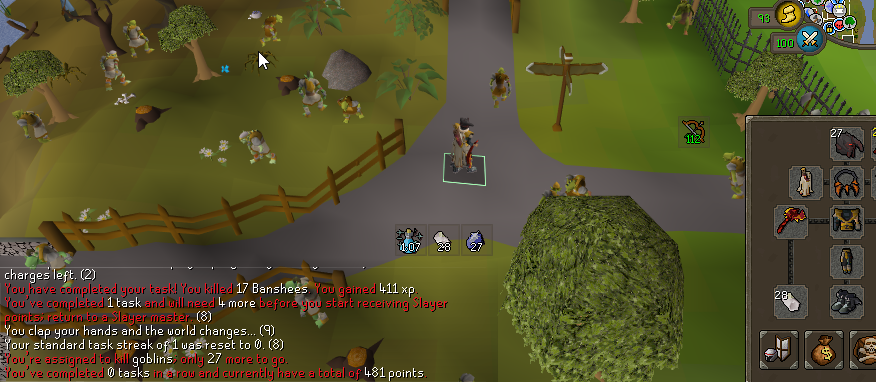
Hey, I restarted client just in case and the slayer tag highlight still remains even after the task is over, which it previously didn't.
It only removes it after the monster respawns or you teleport away.
 stray patrol
would anyone be able to tell me why my boss hp bar is so far off the top border of the game? Its in the "hotspot"

Is that just as far up as it will go?
 mortal pond
stray patrol
would anyone be able to tell me why my boss hp bar is so far off the top border ...
mortal pond
stray patrol
would anyone be able to tell me why my boss hp bar is so far off the top border ...
you should be able to hold alt and then drag it where ever you want it, or alt+right click to reset it to the default position
stray patrol
Hmm, that's an ok idea but wouldnt work if it gets resized. but not a bad idea
It's like it's made room for the xp orbs, which I have disabled
round jacinth
It’s sorta reliant on the xp tracker thing in the top right I think
Like it’s offset down from that
stray patrol
hmmmm
 patent dock
has anyone ever ran into issues with their RL client constantly resizing itself? Like every 5-20 seconds it'll grow by a few pixels or completely reposition itself
it all started when i got a new monitor. I've tried messing with gpu, 117, shutting them off, killing any plugins that might change the screen and nothing is working 🙁
its driving me insane
stone parcel
That sounds odd, you could check to see if it happens in Safe Mode.
haughty pumiceBOT
To enable safemode
Windows
Run the RuneLite (configure) shortcut from the windows start menu
Tick the Safe mode box, save, launch RuneLite the way you normally do.
Mac
In Terminal, run
/Applications/RuneLite.app/Contents/MacOS/RuneLite --configure
Tick the Safe mode box, save, launch RuneLite the way you normally do.
patent dock
i'll do this rn
Ok so it seems to move when i'm interacting with the game
but i can't log in, in safe mode cause i have a jagex account only
stone parcel
Those instructions work for Jagex Accounts.
patent dock
ohh ok ok
this seems to be working
is there a way to see the oldest plugin's you've installed? I would love to work backwards but can't remember
leaden trail
No
left tide
In item stats plugin, how can i make it so stats only show on hover when im at a bank?
It makes it hard to see my inv when bossing.
 opal stream
Did something recent break the CA view option in chat?
I had an issue with it before but it was because my chat was colored, but i resolved that and now the issues back. it seems to not be all the time though cause some show.
patent dock
Just going to put this here in case anyone else comes into this issue. It looks like "Fixed Resizable Hybrid" broke and was causing my window to do insane things. Thank christ i figure it out finally.
stone parcel
Interesting, thank you for letting everyone know. 😄
 wild marlin
Can someone please help me with an Inventory Tags issue? Tags I inputted some time ago are working as intended, but new tags arent. The interface displays them as tagged, but my actual inventory doesnt.
See screenshot - Tags on the BCP/DDef are old and functional, the tag on the Crossbow is not
Are there any known conflicts with other plugins?
 solid mesa
Other plugins which also tag like Profitable Alchs or Dynamic Inventory Tags could certainly conflict
wild marlin
I dont have any of those installed, and I can't recall installing any other inventory overrides recently
solid mesa
You can double check safe mode and see if it works
haughty pumiceBOT
To enable safemode
Windows
Run the RuneLite (configure) shortcut from the windows start menu
Tick the Safe mode box, save, launch RuneLite the way you normally do.
Mac
In Terminal, run
/Applications/RuneLite.app/Contents/MacOS/RuneLite --configure
Tick the Safe mode box, save, launch RuneLite the way you normally do.
wild marlin
The plugin does work in safemode
solid mesa
So one of the hub plugins you have is causing it to break. You'll just have to figure out which one
wild marlin
Figured that might be the case, I guess I'm going through one-by-one
Thank you!
I may be back
stray patrol
round jacinth
It’s sorta reliant on the xp tracker thing in the top right I think
yeah you're right, if I disable XP drops/the exp traacker with the minimap orb, I can drag the health bar further up. I wonder if that's somethign that could be improved
seems like it'd be a vanilla thing 
 crisp dune
I think that happens when you've dragged the XP tracker to a different snap corner than you have it configured in the ingame settings for it
So changing the ingame setting should fix that
stray patrol
crisp dune
So changing the ingame setting should fix that
Which setting is that? I'm not seeing anything under 'xp' 'experience' or 'track' lol
you're right that if I alt-rightclick the xp tracker, it looks as you'd expect
 crisp dune
There's a setting for alignment, that's the one which affects this
stray patrol
Ahhh sweet, yes the first option in Configure XP Drops (right click XP orb by minimap). Thanks for looking!

 frosty ember
Any idea what causes this exception?
Happens when i run into any POH on 330 or when walking towards the herb plot in Varlamore.
java.lang.NullPointerException: null at net.runelite.api.coords.WorldPoint.fromLocalInstance(WorldPoint.java:243) at com.Crowdsourcing.scenery.CrowdsourcingScenery.addObjectThisTick(CrowdsourcingScenery.java:81) at com.Crowdsourcing.scenery.CrowdsourcingScenery.onWallObjectSpawned(CrowdsourcingScenery.java:98) at net.runelite.client.eventbus.EventBus$Subscriber.invoke(EventBus.java:70) at net.runelite.client.eventbus.EventBus.post(EventBus.java:223) at net.runelite.client.callback.Hooks.post(Hooks.java:205) at it.am(it.java:30123) at mj.kv(mj.java:63727) at fn.ka(fn.java:6128) at client.qb(client.java:13332) at client.bb(client.java:12074) at bl.az(bl.java:479) at bl.ug(bl.java) at bl.run(bl.java:27233) at java.base/java.lang.Thread.run(Unknown Source)
Makes my game hang for a bit as well.
crisp dune
I suspect that error is unrelated to your game hanging
frosty ember
It happens at the same time as the game hangs, but I trust your call 🙂
 pine ibex
Anyone experiencing their special attack regen meter turn off by itself?
Edit - It's the soulreaper axe qol
solid mesa
frosty ember
It happens at the same time as the game hangs, but I trust your call 🙂
I'm assuming that exception happens because your game is hanging. But you can disable the wiki crowdsourcing plugin to see if that stops it from hanging. But I agree with NFC that I doubt it is the cause
opal stream
Did you have any other tests for this? I am having some work in opaque but not all of them, its really weird.
It was working last week and I havent downloaded any new plugins
solid mesa
I think Jagex broke it in the game update wednesday
 narrow tangle
opal stream
Did you have any other tests for this? I am having *some* work in opaque but not...
narrow tangle
opal stream
Did you have any other tests for this? I am having *some* work in opaque but not...
i don't. the only thing that got them to work at all for me was changing it from transparent to opaque. its been going on a lot longer than just this past Wednesdays update @solid mesa btw
solid mesa
You could have something else affecting it. But Jagex also changed something on Wednesday as well
opal stream
yeah mine was working just fine til the update, i did have a problem with it in the past but found out it was cause i had some color changed in runelite
that made it not work
frosty ember
solid mesa
I'm assuming that exception happens because your game is hanging. But you can di...
Yeah I didnt think it could have been, but strange that its even hanging. My GPU is pretty strong.
solid mesa
If it only happens on busy worlds its probably related to the server sending data to the client
frosty ember
Wonder why it always happens in the same loading zone in varlamore
Happens when im running to herb patch using this path.

When the game needs to load the aqueduct it hangs for a bit. But only when running in that exact path.
POH makes sense due to all the people, but the varlamore thing happens on every world
 swift viper
does anyone know what plugin causes this "total body hueycoatl" box to appear? just started doing vale totems, and have turned on / off all my fletching and vale totem related plugins without it going away
 solid mesa
I think someone said its the CA Timers plugin?
 mossy swan
top tier hub quality
solid mesa
I briefly read the code just now and to be honest I'm not sure. It looks like it's only supposed to activate in region 5939 but I didn't dig deep enough to figure out why it does. I may look at it tomorrow
 timber cargo
frosty ember
Wonder why it always happens in the same loading zone in varlamore
timber cargo
frosty ember
Wonder why it always happens in the same loading zone in varlamore
Its loading the 5 north chunks with alot of objects
 tardy folio
hi, is it possible to completely close the inventory panel in resizeable - classic layout? it only works when i set it to modern layout in the ingame settings. i cant find a setting related to this in the runelite settings.
solid mesa
No, classic layout is always open
tardy folio
ok ty.. modern layout is kinda ugly ^^ ill stay classic then
 native gate
Is there a bug with mobile? Doesn’t work on my iPhone nor iPad. I try to log in, which works. Then I come to the screen where it says tap here to play. And the app just shuts down. I’ve reinstalled on both iPad and iPhone.
solid mesa
Runelite isn't on mobile so this wouldn't be the place to ask
leaden trail
!new
haughty pumiceBOT
newplayer: If you are new to OSRS, make sure to follow this excellent guide on OSRS wiki: https://oldschool.runescape.wiki/w/New_player_guide. You can also join the official OSRS Discord here: https://discord.gg/osrs
leaden trail
Ask there^
 oblique plume
misty plover
https://i.imgur.com/se2JBtT.png
oblique plume
misty plover
https://i.imgur.com/se2JBtT.png
looks like goblins doesnt work because its looking for Goblins capitalized
oblique plume
no, there is a toLower there
 winter snow
So many other tasks would be broken if casing was the issue 😄
oblique plume
Yea it was a bit early in the morning to be looking into that
Somehow the Task is null though so it's somehow not finding it
 plush harbor
Anyone else have a random pet following them when you call follower? I can talk to it but when I pick it up it Disappears. If I then call for a follower again Smalcano appears again.


 haughty pumiceBOT
Many plugins from the pluginhub break the client in subtle or not-so-subtle ways, including causing issues like client freezes. We do not support pluginhub plugins because we do not make or quality control them, and do not recommend their use.
Run the RuneLite (safe mode) shortcut, or with a Jagex account, first run the RuneLite (configure) shortcut and tick the Safe mode box, then launch RuneLite via the Jagex launcher.
This temporarily disables the GPU plugin and all hub plugins which will allow you to confirm the issue is caused by one of those plugins and isn't a core RuneLite issue.
If the issue is caused by a hub plugin, you should isolate which plugin it is and then uninstall the plugin.
 rigid steeple
having an issue with RL client just disappearing while playing. mid boss, mid raid, client just goes away. no crash report or anything. Have tried disabling all plugins
round jacinth
rigid steeple
having an issue with RL client just disappearing while playing. mid boss, mid ra...
the message above applies
haughty pumiceBOT
@rigid steeple To find the logs, you can do one of the following:
- If your client failed to open, click the
Open logs folderbutton. - Open the screenshot directory by right-clicking 📷
Camerabutton, navigate 1 directory up, then open logs folder. - Navigate to
%userprofile%\.runelite\logson Windows or$HOME/.runelite/logson Linux and macOS.
Upload the log files named client and launcher by dragging them to Discord. If there are files prefixed with jvm_crash dated from today, upload them too.
round jacinth
can also share logs
 gray needle
Can I ask questions here?
I bought a new laptop and have been playing a while through other laptop and runelite cliënt. Now I have been busy copying the plugins, after logging in finding out the loot tracker is (of course) also empty.
Is their a way to copy my previous setting into my new pc?
Thx in advance
haughty pumiceBOT
round jacinth
follow this instead of what ever you were trying to do
enable cloud sync so that they keep eachother up to date with settings and loot
gray needle
Wow, really quick thanks guys I'm going to look into it
round jacinth
on your primary pc, enable the cloud sync feature
wait a little bit (idk if that matters)
and log out/close client then login to the same gmail on the 2nd pc, and relaod the client
leaden trail
If you copy it over manually you don't need to enable cloud sync
gray needle
I can just send the maps to my other pc and copy them right? Overwrite
round jacinth
you sorta want cloud sync if you plan on using both computers
and yeah you'd overwrite files if prompted
gray needle
Oh that's a good one
Mainly the new one i think
Now copying full .runelite map to USB, then overwrite map in new pc correct
round jacinth
yeah it would 1:1 match, i still would recommend the cloud sync anyways
be sure you're copying from the original pc (duh) lol
if it's too many files you can skip the screenshots folder, you may have TONS of pictures
gray needle
Can you explain the xloud sync beter i don't know what you mean by it or how to do it
round jacinth
it’s just a nice feature. If you had a power outage suddenly during a file write local file could be broken
If you have cloud sync you have both) settings shared across machines
and a bit of peace of mind that that power outage thing is mitigated
Force closing client the wrong way also can cause issues, you want to avoid sudden force closes
 silk wren
I just got a new mouse and i'm bossing. Sometimes when i click stuff in my invy (pot for instance) it shows that i click it but it doesn't drink. At first i thought my left click wasn't working but i can clearly see the click thing where an item turn dark happen but with nothing else happening. Any1 else experiencing the same issue?
round jacinth
You maybe are dragging them
You could get a recording of it but it’s probably a you issue
silk wren
ye can send the recording sec
silk wren
For any1 else who might have an idea what's going on
round jacinth
You maybe are going too fast
The click location is actually the last 20ms location ago for the mouse, but I do see the tbow get clicked so idk
 dusk flume
anyone experienced getting banned for killing bots? 🤣
round jacinth
no, but people on Reddit think it’s a thing #runescape
silk wren
round jacinth
You maybe are going too fast
Never had this issue before i switched this mouse like 2 days ago. No idea what it might be
round jacinth
This chat is for core client support not chatting about bans
Not sure, did you go to a g502 by chance or some other Logitech mouse
silk wren
nop steelseries areox 5
round jacinth
Logitech mice’s left click have issues
That’s my only idea I had maybe be a bit slower
Idk
silk wren
fair enough
winter snow
round jacinth
Logitech mice’s left click have issues
that explains a lot (longtime g502 owner reporting in)
 glad orchid
it dont let me switch what do i do ?

 zealous cedar
click switch world and choose a silver world
glad orchid
it dont it said loading and dos nothing
glad orchid
zealous cedar
click switch world and choose a silver world
.
 chilly karma
I've installed RuneLite through the Jagex Launcher, but when I try to login I get the following unhelpful error.
2025-09-13 13:40:31 CDT [Client] ERROR injected-client - Client error: Login authentication error. Response code: 403 Forbidden Response body: error code: 1020
I've checked to ensure that RuneLite is not running as an admin, but haven't found anything else that could help resolve it while searching. Any help would be appreciated.
 solid mesa
Are you using a VPN? It seems like Jagex is blocking you and they don't like a lot of VPNs
 coral obsidian
i recently got a new lap top so i transfered my runelite profile from my pc to laptop through profile cloud option, only some of the stuff transferred over which i didnt mind too much as im only really afking on my laptop, but i went onto my pc and my pc runelite saved the exact same way . Tried to go into my pc runelite profile settings and it still doesnt work. is there anything else i can do or try
haughty pumiceBOT
chilly karma
solid mesa
Are you using a VPN? It seems like Jagex is blocking you and they don't like a l...
I am using a VPN, but the Jagex Launcher and RuneLite are splittunneled to not route the traffic through the VPN.
 hot pumice
Hmm, anyone knows why my GPU spikes the moment I enter the Hunter Guild basement? Litteraly goes from 20% load to 80-90% load on a RTX 4080 super... Also literally the only place it happens, everywhere else it's completely fine. Even Fossil Island on maxed out settings barely taxes my GPU.
 dim panther
Is there any info on the issue with boss tasks? They no longer count through the plugin or show your current task in an infobox
 solid mesa
There is a fix that was just submitted today. It is a known issue for box tasks
haughty pumiceBOT
dim panther
Thank you!
leaden trail
In that window check the IPV4 box
chilly karma
leaden trail
In that window check the IPV4 box
Thank you! That worked.
 glass tusk
What does this mean?
2025-09-13 22:39:01 WEST [Client] ERROR rs117.hd.HdPlugin - Error while starting 117HD java.lang.UnsatisfiedLinkError: C:\Users\UserName\AppData\Local\Temp\16839504907959037618rlawt.dll: Access is denied
Getting this error when trying to start 117 HD and GPU. They will simply flash on and off.
leaden trail
do you have some sort of antivirus software installed?
rigid steeple
rigid steeple
leaden trail
Try disabling max hit calculator
 unreal mica
anyone able to help me understand what might be causing this lag/delay on my runelite (in vid soon as i swap back to mage pray)
ive tried running runelite in safemode, disabling and uninstalling plugins not using, connecting to different internet
https://medal.tv/games/osrs/clips/l58qZC4qpkayZtgU7?invite=cr-MSxxVkksNDM5MDExNDIx\

10 Views - Watch Why is my runelite doing this? by brodz and millions of other Old School RuneScape videos on Medal. Tags: #oldschoolrunescape, #osrsoldschoololdschoolrunescape
mossy swan
looks like network lag
either your connection to jagex server is bad (dropping here or there), or jagex server is shitting
unreal mica
hmm, maybe something wrong with a network driver? because i tried phone hotspot and i was having exact same issue (i usually run ethernet)
mossy swan
well those would be using different drivers
unreal mica
any suggestion on how to pinpoint my issue?
haughty pumiceBOT
open command prompt, type this in:
ping -t oldschoolXXX.runescape.com
where the XXX is your world minus 300, for example world350 = 50
mossy swan
it seems like its dropping only a packet here or there so might take a while for ping to show anything
unreal mica
yeah you are right there, ill have a look at that
i think it happens over several worlds but ill try a vpn for a bit then, apreciate your quick reply and help
 bright dock
Have a interesting issue, was wondering if anyone had something similar happen,
When i Launch runelite Via jagex Launcher It Failed to login, It however IS able to login via official client,
Im able to login in legacy accounts if loaded normally,
Its like jagex client isnt successfully passing token to client,
Any ideas on how to fix, ive uninstalled runelite, and launcher and still happens
mossy swan
bright dock
Have a interesting issue, was wondering if anyone had something similar happen, ...
make sure runelite (or jagex launcher) is not being launched as admin
bright dock
when right clicking properties of launcher, and jar file i dont even see a run as admin in properties so its not happening by default
and im not right clicking run as admin
mossy swan
what is the message you get?
 mossy swan
!logs
haughty pumiceBOT
To find the logs, you can do one of the following:
- If your client failed to open, click the
Open logs folderbutton. - Open the screenshot directory by right-clicking 📷
Camerabutton, navigate 1 directory up, then open logs folder. - Navigate to
%userprofile%\.runelite\logson Windows or$HOME/.runelite/logson Linux and macOS.
Upload the log files named client and launcher by dragging them to Discord. If there are files prefixed with jvm_crash dated from today, upload them too.
mossy swan
not sure what that is about though
bright dock
2025-09-13 18:46:35 MDT [Client] ERROR injected-client - Client error: Login authentication error. Response code: 400 Error servicing REST query: Connection timed out: connect Response body:
i wonder if profile corruption is potentially causing problem with authtication of token :l
mossy swan
not sure why it would time out
maybe some antivirus or other crap
or jagex just having a bad day
bright dock
heres the strange thing though

Stupid official works every time
and legacy login works xd

hate this game sometimes
unreal mica
mossy swan
it seems like its dropping only a packet here or there so might take a while for...
was doing the ping test and every 10 pings or so its saying request timed out?
mossy swan
unreal mica
was doing the ping test and every 10 pings or so its saying request timed out?
yeah that would be some kind of internet issue
are you using wifi when not on hotspot too?
unreal mica
no i mainly use ethernet connection
mossy swan
then i really dont know
unreal mica
apreciate you trying to help
 gilded kayak
!config try enabling ipv4 here
haughty pumiceBOT
gilded kayak
i dont know why this would work but people keep saying it fixes their failed to logins
rigid steeple
Runelite keeps crashing randomly, what should i do?
 astral shell
i need help about login
too many attempts and `can't login' issue , even i am on jagex account

this is a jagex linked account
gilded kayak
this error comes from Jagex, there's not really much we can do if you get it
you defintiely shouldn't get it when using a Jagex account, but u know
astral shell
gilded kayak
you defintiely shouldn't get it when using a Jagex account, but u know
bro this is happening with jagex account
jagex has to fixed this problem
 river pewter
the opponent information keeps shjowing percentage. I want the display style to be "both" or "Hitpoints". I tested it on another account and it worked fine. just something on my account. any ideas?
 solid mesa
I don't think it works properly for doom since it uses the same NPC ID for every floor but the HP changes
gilded kayak
^
we don't have any way of indicating it to you, because of that type of limitation
river pewter
^ its the same on every monster. was having problems on yama
ahh
alg ty
will test and share if i find something
gilded kayak
basically raid bosses and anything newer than dt2 it might not work
due to the way jagex keeps putting those NPCs in
solid mesa
If you check something simple like a cow it should work
gilded kayak
or i should say dt2 onwards
river pewter
yeh goblins work
interesting... i found this problem when i was doing yama. one person was able to get hp but i wasn't
gilded kayak
were they maybe using the in-game healthbar
river pewter
probably
gilded kayak
i assume yama has one of those since he's new enough
jagex wouldn't have an issue displaying the hp value, since it's their game
but we're limited by the setup we have, which is NPC ids
river pewter
plugin API 🙏
 soft plover
is there anyway other to adjust ground item font size or font typefont than "bold" "normal" "small"
glad orchid
How do I disable this
 solid mesa
Turn off the inventory viewer plugin you installed
glad orchid
solid mesa
Turn off the inventory viewer plugin you installed
ok thx
 strange drift
Is it known why the "Time tracking" plugin lags hard when kept opened?
haughty pumiceBOT
@strange drift Graphical artifacts? Try disabling hardware acceleration: https://github.com/runelite/runelite/wiki/Disable-Hardware-Acceleration
 celest sierra
Is anybody a wizard with plugins etc? seem to be having client crashes often when i have gpu turned on
something is conflicting with gpu evidently but is there a file or something i can read to see what is conflicting?
mossy swan
!logs
haughty pumiceBOT
To find the logs, you can do one of the following:
- If your client failed to open, click the
Open logs folderbutton. - Open the screenshot directory by right-clicking 📷
Camerabutton, navigate 1 directory up, then open logs folder. - Navigate to
%userprofile%\.runelite\logson Windows or$HOME/.runelite/logson Linux and macOS.
Upload the log files named client and launcher by dragging them to Discord. If there are files prefixed with jvm_crash dated from today, upload them too.
mossy swan
rigid steeple
Runelite keeps crashing randomly, what should i do?
run a memtest to start with https://memtest.org/
celest sierra
where should i upload them
celest sierra
mossy swan
!logs
drop them in here or elsewhere?
mossy swan
here
 short spruce
any keep getting disconncted from servers?
mossy swan
celest sierra
better npc highlight seems to be causing thousands of errors at least
mossy swan
yes
celest sierra
Will turn that off for now see if it fixes it, any others looking like theyre causing issues?
mossy swan
short spruce
should i delete?
oh wait i was not talking to you smh
mossy swan
celest sierra
Will turn that off for now see if it fixes it, any others looking like theyre ca...
not immediately but we generally recommend not using any hub plugins, and at the very least uninstalling all you aren ot using
probably delete + restart client
haughty pumiceBOT
@short spruce open command prompt, type this in:
ping -t oldschoolXXX.runescape.com
where the XXX is your world minus 300, for example world350 = 50
celest sierra
mossy swan
not immediately but we generally recommend not using any hub plugins, and at the...
seems odd that that would conflict with gpu alone though or is that normal
mossy swan
celest sierra
seems odd that that would conflict with gpu alone though or is that normal
idk where you got the idea that something is conflicting with gpu
celest sierra
if i turn gpu off nothing crashes
short spruce
it happens on all worlds sadly and it only happens on the runlite client through jagex
celest sierra
so its only if gpu is on
mossy swan
celest sierra
if i turn gpu off nothing crashes
do you have jvm crash files? if not i guess its your gpu driver being poopoo
mossy swan
short spruce
it happens on all worlds sadly and it only happens on the runlite client through...
what other clients did you try?
celest sierra
would they have been in the same folder?
mossy swan
celest sierra
would they have been in the same folder?
yes
short spruce
ive tried normal client
celest sierra
then nah, not sure if they dont appear as the client actually just freezes and i have to force close it
doesnt necessarily close itself
mossy swan
oh yeah that definitely sounds like what this "better" npc highlight thing might cause
mossy swan

short spruce
fps boosted as well
mossy swan
yeah, but also bad plugin so accidental improvement to your life
celest sierra
mossy swan
yeah, but also bad plugin so accidental improvement to your life
will have a look see how i get on cheers
mossy swan
gl
celest sierra
mossy swan
gl
no luck unfortunately, removed a load of plugins if resending will help and there's any others if youve a min?
mossy swan
sure
mossy swan
but you could just go straight to trying older driver versions
celest sierra
well when i'd sent you those last my drivers were 2 behind
so ive updated them today
mossy swan
well, apart from almost 100 hub plugins, not really anything obvious
celest sierra
hm
starting to feel like its not a rl issue
just v strange it only happens when gpu is on both clients
celest sierra
mossy swan
well, apart from almost 100 hub plugins, not really anything obvious
i did start a new profile and literally just turn gpu on and it still happened to be fair
so sounds like it could be something else
leaden trail
If it's happening on a new profile with nothing but GPU enabled then it's almost certainly a GPU driver problem
Especially if you're on fairly new drivers
celest sierra
could try run they back a further way
lot of newer games force newer drivers is the issue
 weary solar
Is it any discord where its possible to discuss development?
I got the basics for creating plugins, but there are always questions on how to. And not always sure how to find out what im looking for. Thought it were discussion for it here earlier.
 hollow olive
haughty pumiceBOT
hollow olive
haughty pumiceBOT
How to develop plugin-hub plugins: https://github.com/runelite/plugin-hub/blob/master/README.md
rigid steeple
mossy swan
run a memtest to start with <https://memtest.org/>
Memtest was a pass.
mossy swan
rigid steeple
Memtest was a pass.
how long did you run it?
rigid steeple
40 minutes i think, all the way through untill it said PASS in big green letters
rigid steeple
i'll look in to that, thanks for helping me bredda
mossy swan
i dont really know how to read the jvm crash logs that well
leaden trail
rigid steeple
i'll look in to that, thanks for helping me bredda
Make sure "core performance boost" is turned off in BIOS
I think the access violation crash on G1 is a JVM bug though
 leaden hatch
did you figure out what the issue was? this sounds similar to what i'm experiencing
rigid steeple
Testing possible fix, fingers crossed
 timber trail
rigid steeple
leaden trail
Make sure "core performance boost" is turned off in BIOS
timber trail
rigid steeple
leaden trail
Make sure "core performance boost" is turned off in BIOS
So you were 100% right. Disabling my PBO "precision boost overdrive" in bios was a winner. Also realized while in there I wasn't taking full advantage of my ram speeds so. W all around. Cheers
rigid steeple
mossy swan
i dont really know how to read the jvm crash logs that well
Your instincts about RAM were also correct, thanks m8
mossy swan
interesting lol
 crude jasper
hi guys, im trying to set idle notifier to alert me when im done enchanting a full inventory of jewelry but i cant quite seem to figure it out with the settings, any advice?
rigid steeple
my XMProfile 1 was defaulted to 2933mhz, but my ram was spec'd for 3600...i thought enabling the xmp profile was all you had to do, but not fo rthis mobo {Aorus x570 elite}
mossy swan
rigid steeple
my XMProfile 1 was defaulted to 2933mhz, but my ram was spec'd for 3600...i thou...
thats fucking wild, was there another profile with faster settings or something?
rigid steeple
no! had to manually set the speed inside the xmp profile
mossy swan

rigid steeple
rofl
 uneven folio
hey guys question
mossy swan
hey guy answer
uneven folio
when i go to verzik right in HMT and we do the web part
and when i swap to dragon claws before we go back to the north side i get like a stutter aswell as when i swap to my scythe afterwards
haughty pumiceBOT
Please refer to this flowchart for further troubleshooting.
uneven folio
is that normal behaviour because of 5 people stacking doing it at the same time or no
 viral osprey
leaden hatch
did you figure out what the issue was? this sounds similar to what i'm experienc...
viral osprey
leaden hatch
did you figure out what the issue was? this sounds similar to what i'm experienc...
Not really. I worked around it with a new profile
 ocean crypt
hey guys, quick question. all my plugins randomly deleted? cant seem to get them back
mossy swan
!lost
haughty pumiceBOT
 frosty flare
Hello. For some reason my runelite has stopped remembering my window size and position. I havent changed any setting afaik. Please advise.

 lucid ocean
 gritty dust
Has there been a update regarding GPU or runescape rendering or something?
zealous cedar
uhh maybe, why
gritty dust
Havent checked in a while but I went from 700 to 130 fps
Which is still fine
But idk was wondering
If its me
Or maybe a update idk
zealous cedar
do you have the GPU plugin or the GPU (experimental) plugin?
zealous cedar
which one are you using now when you are complaining
its not possible to use both at once
gritty dust
True, both same
I was using normal 5 min ago
Now experimental but no difference
On linux bre
Btw
zealous cedar
its very hard for me to follow what you are saying
zealous cedar
so you were using the normal, non experimental plugin, and observed a 700 to 130 fps drop?
gritty dust
Now im testing experimental
No I used to run around 700 on either of those
Now today I checked fps and saw I was on like 130 so I started testing experimental and the normal one but no difference
zealous cedar
nothing has changed on the normal GPU plugin for sure
gritty dust
So came here to ask if theres been a update cause I cant find any issues on my linux desktop
zealous cedar
in years
gritty dust
Ah fair
zealous cedar
there has been changes to the experimental one, but it seems you weren't using that
gilded kayak
it's linux so you probably updated your drivers and now problem
gritty dust
Haha maybe
 cold mural
Was wondering if anyones seen anything like this and had a fix for it, it only happens at whisperer/levi but sometimes the projectiles "stall" and then come out along side the next projectile. I get the issue on a fresh profile as well.
gritty dust
Think its a linux issue
The standalone jar runs fine
The jagex launcher is the laggy one
I think it uses wine
Thanks for quick replies
zealous cedar
cold mural
Was wondering if anyones seen anything like this and had a fix for it, it only h...
network lag?
 solar gale
 haughty pumiceBOT
@cold mural open command prompt, type this in:
ping -t oldschoolXXX.runescape.com
where the XXX is your world minus 300, for example world350 = 50
solar gale
tryiing to remove a tile marker and import new ones, this single one just isn't removing?
and when i try import new pack it doesn't update
for doom
 cold mural
zealous cedar
network lag?
cold mural
zealous cedar
network lag?
this looks normal? unless the highlighted time maybe causes it?
 gritty dust
thats normal
gilded kayak
that is normal but you want to compare that, to when you visually see a problem in-game
and see if it is no longer normal
cold mural
so keep the ping running do leviathan and check if its spiking?
cold mural
did not spike when it happened
they were all around the lower ping time when it happens 25ish~
mossy swan
ping only runs once per second and it looks like a pretty short stutter so it may not show up every time
cold mural
ok ill keep testing a few more times to see if i get any different results
cold mural
not noticing any significant increase in ping around the times when i recieve the stalling , I checked with my recording
ping average over 30min test

it almost always happens when leviathan increases attack speed, normally on the 2t or 3t attack cycles near the end. Seems related to animations that have no delay between them because i have this same issue at whisperer but it doesn't not affect the fight there. (Like whisper throws 3attacks in a row 1t appart, same when leviathan speeds up to always queing an attack on every tick)
 violet forge
https://i.imgur.com/KkLxijH.mp4
anyone know why this happens?
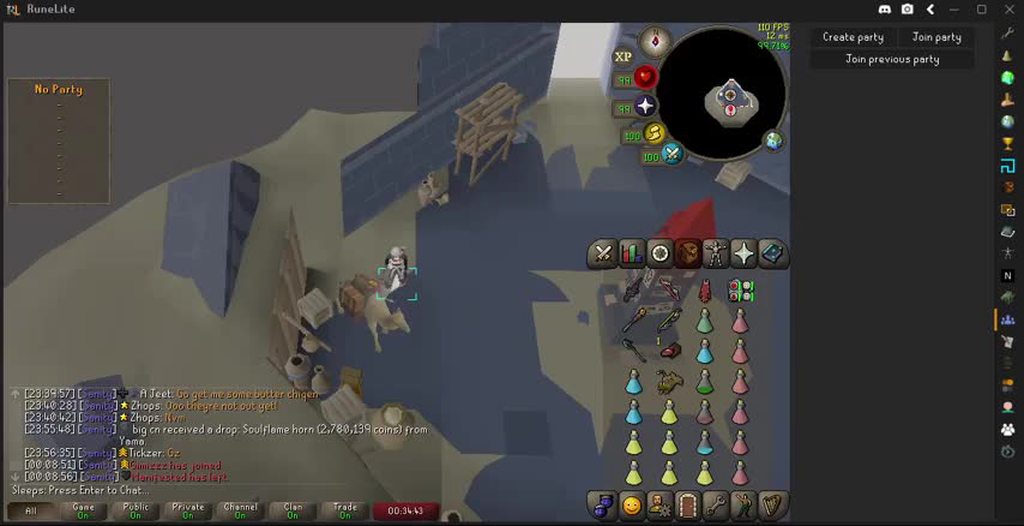
 drifting agate
i just hit a 41 with an eye of ayak spec but for some reason it registered as a 2 on the spec counter plugin. is this because of a thrall hitting the boss on the same tick?
haughty pumiceBOT
Support for hub plugins should be directed to the author of the plugin.
You can find the support link by searching for the plugin in the Plugin Hub panel and clicking the ? button on the plugin, or by right-clicking the plugin in the plugin panel and clicking the Support menu option.
gilded kayak
but yes, probably
 terse marten
i've been having issues lately with my runelite just crashing randomly multiple times per day. no indication leading up to it, everything will be completely normal, and then it will just force close.
drifting agate
gilded kayak
but yes, probably
special attack counter is not a hub plugin.
haughty pumiceBOT
@terse marten To find the logs, you can do one of the following:
- If your client failed to open, click the
Open logs folderbutton. - Open the screenshot directory by right-clicking 📷
Camerabutton, navigate 1 directory up, then open logs folder. - Navigate to
%userprofile%\.runelite\logson Windows or$HOME/.runelite/logson Linux and macOS.
Upload the log files named client and launcher by dragging them to Discord. If there are files prefixed with jvm_crash dated from today, upload them too.
gilded kayak
ah my mistake, i have heard so little complaints about it i thought it was a hub plugin
terse marten
leaden trail
14th gen on 0x12b
RMA your CPU basically
If it's already crashing a bunch you're not going to be able to make that better.
13 and 14th gen Intel CPUs have an issue where they basically permanently damage themselves
empty minnow
I feel like at this point there needs to be a command for that info with how often it pops up 😅
leaden trail
I've been meaning to write an FAQ thing for it but I've been too busy
 plain plume
Hello, I'm trying to find the supposed IPv4 checkbox that should be in the Configuration menu, but it isn't present in my menu. Does anybody know why this might be?
zealous cedar
update your launcher
zealous cedar
its np
plain plume
oh yeah that got it
It must have not auto updated? interesting
plain plume
zealous cedar
its np
thanks so much!
zealous cedar
it doesnt auto update usually
plain plume
ahh
when I looked in that config menu I assumed it did based on the options there
good to know
zealous cedar
it pulls updates for the client, but updating itself is a completely different thing
which it can do, but its not something we do commonly
 sand leaf
Hello! I've been having some trouble lately with multiple Dink notifications per event. Sometimes two, sometimes three. I know it can trigger for both Loot Value and Collection Log, but these are multiple notifications for the same category. Any ideas on how I can help reduce some of the spam?
 gilded kayak
check your client log its probably internet, dink has retry options by default so if we never get a response, it's going to retry
!logs
haughty pumiceBOT
To find the logs, you can do one of the following:
- If your client failed to open, click the
Open logs folderbutton. - Open the screenshot directory by right-clicking 📷
Camerabutton, navigate 1 directory up, then open logs folder. - Navigate to
%userprofile%\.runelite\logson Windows or$HOME/.runelite/logson Linux and macOS.
Upload the log files named client and launcher by dragging them to Discord. If there are files prefixed with jvm_crash dated from today, upload them too.
sand leaf
Hmm. I normally have pretty stable internet. Would a Discord webhook lose stability over time? It's been about 2 years of use
 gilded kayak
i doubt it
but normal stable internet, is sometimes not stable, even for short bursts
sand leaf
Got it thanks! I'll start with increasing the timer for retries.
 modern verge
sand leaf
Got it thanks! I'll start with increasing the timer for retries.
modern verge
sand leaf
Got it thanks! I'll start with increasing the timer for retries.
try increasing Image Upload Timeout as well
 lofty garnet
Any idea why bank value isn't being calculated for my tabs, only the items literally in the "general" tab

 solid mesa
Restart the client. Item prices failed to load so it only knows the value of your stack of coins
lofty garnet
solid mesa
Restart the client. Item prices failed to load so it only knows the value of you...
Legend, thank you
 brittle furnace
hey just curious why my runelite plugins keep breaking including like predicted hit etc.
haughty pumiceBOT
Support for hub plugins should be directed to the author of the plugin.
You can find the support link by searching for the plugin in the Plugin Hub panel and clicking the ? button on the plugin, or by right-clicking the plugin in the plugin panel and clicking the Support menu option.
brittle furnace
is there a runelite plugin for predicted hit?
 exotic sigil
One message removed from a suspended account.
stone parcel
What are the issues?
drifting agate
drifting agate
i just hit a 41 with an eye of ayak spec but for some reason it registered as a ...
any plans to make this plugin use predicted hit based on xp drops or something to make sure this doesn't happen?
exotic sigil
One message removed from a suspended account.
solid mesa
Do you have Hide lower planes turned on?
exotic sigil
One message removed from a suspended account.
One message removed from a suspended account.
haughty pumiceBOT
To enable safemode
Windows
Run the RuneLite (configure) shortcut from the windows start menu
Tick the Safe mode box, save, launch RuneLite the way you normally do.
Mac
In Terminal, run
/Applications/RuneLite.app/Contents/MacOS/RuneLite --configure
Tick the Safe mode box, save, launch RuneLite the way you normally do.
brittle furnace
is there any plans to be able to log in to 2 separate runelite profiles to enable only certain plugins based off account logged in?
solid mesa
You can already link profiles to an account
exotic sigil
One message removed from a suspended account.
solid mesa
Click the Chain icon once you've logged in
brittle furnace
i dont have a chain icon lol
exotic sigil
One message removed from a suspended account.
solid mesa
Thats the point of safe mode. Does your problem still happen?
exotic sigil
One message removed from a suspended account.
solid mesa
brittle furnace
i dont have a chain icon lol
Did you login to the game?
 solid mesa
exotic sigil
One message removed from a suspended account.
solid mesa
exotic sigil
One message removed from a suspended account.
So one of the hub plugins you installed is causing it
exotic sigil
One message removed from a suspended account.
One message removed from a suspended account.
exotic sigil
One message removed from a suspended account.
One message removed from a suspended account.
solid mesa
brittle furnace
i have a jagex account
You still have to login to the game. Profile linking works fine with jagex accounts
brittle furnace


 zenith mango
just built a new pc and cant get my runelite profile to transfer over with the plug-ins, i've exported, downloaded to usb drive and nothing transfers
haughty pumiceBOT
exotic sigil
One message removed from a suspended account.
One message removed from a suspended account.
One message removed from a suspended account.
stone parcel
Some hub plugins don't turn off when turning them off, and you need to then restart the client after.
exotic sigil
One message removed from a suspended account.
One message removed from a suspended account.
bright dock
bright dock
2025-09-13 18:46:35 MDT [Client] ERROR injected-client - Client error: Login aut...
To anyone whos having a issue Connecting to runescape via runelite when using jagex Launcher, Ended up fixing my problem by forcing IPV4 in runelite configuration
Seems like jagex launcher, and runelite have seperate configuration files?
gilded kayak
well they're different applications
so yes?
also I guess the !config I used was for you, but i thought it was for the other guy
 cobalt vessel
any idea why my slayer info has dissapeard? like how many i got left used to shown up on my slayer helmet and the info box would appear on bottom where the other icons are located on the picture. i havent changed anything and i got slayer tab on. i have tried everything and i can get it back as it was. and i havent changed anything tried to reset slayer tabh everything. but nothing seems to work
 winter snow
Should be fixed in next client update iirc
cobalt vessel
oh so im not the only one?
cobalt vessel
winter snow
Should be fixed in next client update iirc
word. thank you
winter snow
Boss tasks have been broken for a while, only recently did the team finally get a handle on why
cobalt vessel
oh. i see. wasent aware of this. thanks for the quick respon
 plain raven
anyone know why fps goes down when i zoom out i have a well decent pc
winter snow
I think Varlamore in general is a bit more detailed than some of the older environments
Which does not help things
plain raven
mossy swan
try gpu experimental if you aren’t already running it
i am using gpu
plain raven
winter snow
I think Varlamore in general is a bit more detailed than some of the older envir...
happens pretty much everywhere sometimes it just drops by a few fps and sometimes it goes to 80 - 90
my cap is at 165
winter snow
Also have to bear in mind the OSRS engine was never made with those draw distances in mind - even the best hardware can be brought to its' knees by a game that's poorly optimised for what you're trying to do in it
round jacinth
plain raven
happens pretty much everywhere sometimes it just drops by a few fps and sometime...
Anything above 50 is gravy on top. The game is a 100 ticks per minute system along with 50 client ticks (frames) per second system.
Sure it dips but anything above 50 is really the same. Below 50 means you’re missing information but the game is just hard to run tbh
plain raven
round jacinth
Anything above 50 is gravy on top. The game is a 100 ticks per minute system alo...
why is it hard to run?
plain raven
winter snow
Also have to bear in mind the OSRS engine was never made with those draw distanc...
so its a client limitation rather than hardware?
coz the game never uses all my resources
not even half
round jacinth
because it’s a game from 2002 that primarily runs on 1 thread
It’ll never use much cpu
Because a 10 core cpu with 1 being used 100% is still gonna say 10% usage
And the gpu is really just magic that Adam Abex momo and more were able to get to work in the first place
plain raven
is it possible to allow the game to use more cpu cores?
round jacinth
No
The client itself is 1, plugins get to use more
the gpu gets sued as much as possible and the game is just sorta hard to run in some places
plain raven
damm 🙁 suprised they havent moved on from java im sure there would be a way to port osrs to a more steady engine
idk im not a computer wizard tho
round jacinth
It’s not really much to do
zealous cedar
try using the gpu (experimental) plugin
plain raven
where do i find experimental version
zealous cedar
the pluginhub
plain raven
whats the difference
zealous cedar
it works differently
plain raven
yeh
zealous cedar
no idea then
oblique plume
rendering more means it has to take longer to render
you can even see as you pan that as more stuff comes in frame it slows down
plain raven
but is it not already rendered?
oblique plume
not if its off screen
plain raven
idk i dont know how it works all i know is that my pc isnt terrible so i dont know why my fps would drop
round jacinth
plain raven
but is it not already rendered?
it renders it every object every frame
You have a lot more to draw at ge
winter snow
plain raven
damm 🙁 suprised they havent moved on from java im sure there would be a way to ...
as I understand it the new official client doesn't use Java, so they're technically working on it 😄
plain raven
round jacinth
You have a lot more to draw at ge
So pc isn’t broken it’s just engine limitations?
 sterile echo
I have some fps isssued in tomb of amascut with regular gpu plugin, running gpu (experimental) fixes the hiccups but some animations (like kephris projectiles) show flickering animation on the shadows. Is there a way to fix the shadow issue on gpu (experimental). Running all amd system and tried HWA off and automatic and no difference.
oblique plume
yep
 stiff mountain
Is the raised HP bar meant to be acting like this on raised terrain? I've noticed it for the last few weeks and want to have all the bars aligned. I'm currently using high detail health bar, prayer bar, and attack timer metronome bar
 haughty pumiceBOT
To enable safemode
Windows
Run the RuneLite (configure) shortcut from the windows start menu
Tick the Safe mode box, save, launch RuneLite the way you normally do.
Mac
In Terminal, run
/Applications/RuneLite.app/Contents/MacOS/RuneLite --configure
Tick the Safe mode box, save, launch RuneLite the way you normally do.
stiff mountain
I've tried disabling the rest of the plugins but it still does this
round jacinth
I think any plugin that draws a new hp bar replaces the existing so it’s probably intended behavior
But I don’t know because you have like 40 bars for some reason
So check safe mode
round jacinth
Then it’s probably intended yeah
winter snow
If I had to guess, it's using the highest point on the terrain to determine the base height for positioning the healthbar
so it looks weird on steep slopes where there's a large disconnect between model placement height and that high point
stiff mountain
yeah i noticed it because the tick counter would hide behind the overhead prayer
empty minnow
I think Jagex changed how 2D stuff renders on slopes a couple weeks ago
stiff mountain
Yeah that makes sense, its not a major issue anyways maybe it'll get fixed
 gusty oxide
when i try to login to osrs it is stuck on connecting to server. any ideas why this is happened
winter snow
Most likely a connection issue at your end, game's up and working just fine
 mighty raft
hey question
my friend imported someone else his runelite setting and now hes missing text over nex her head when she phases or shouts stuff like contain this
anyone knows what plugin gets those things back?
oblique plume
make a new profile
mighty raft
without that
oblique plume
ask the someone else
mighty raft
am asking about the plugin that does that not making a new profile
mighty raft
couse my friend is an idiot and doesnt wanna get help but keeps complaining
winter snow
So it's a Layer 8 problem, gotcha
mighty raft
idk what that means
winter snow
User error, basically. I dunno about anyone else, but I don't plan on playing Chinese whispers
 gentle escarp
Hi, I am having an issue with the Resizable Chat plugin. All the chat is cutoff now when using it. I just launched Runelite yesterday and this happened out of nowhere. The plugin was not updated so maybe it is a client issue? Could anyone help me figure out how to diagnose the issue?
 haughty pumiceBOT
Support for hub plugins should be directed to the author of the plugin.
You can find the support link by searching for the plugin in the Plugin Hub panel and clicking the ? button on the plugin, or by right-clicking the plugin in the plugin panel and clicking the Support menu option.
gentle escarp
Yes of course, but I am wondering if there is a way to pinpoint if something changed in the Runelite client that caused this or if there is a way to look at logs or modifiers to see what is going wrong with the text formatting
oblique plume
no
winter snow
It's a great question... for the maintainers of that plugin
gentle escarp
haha alright thanks
 languid helm
is there any method for forcing runelite to use my intel integrated graphics instead of my 3080ti? I've tried setting in windows the grpahics area to set gpu preference to it, but it doesn't seem to work
I should note I use 117 HD plugin if that makes a difference
 lyric river
Hello, recently factory reset my windows, getting crashes at random since. Tried disabling GPU or 117, although after it seemed to work for a while it but then it continued. Doesn't seem to be any pattern to the crashes. I have the logs, not sure which part to paste here.
haughty pumiceBOT
@lyric river To find the logs, you can do one of the following:
- If your client failed to open, click the
Open logs folderbutton. - Open the screenshot directory by right-clicking 📷
Camerabutton, navigate 1 directory up, then open logs folder. - Navigate to
%userprofile%\.runelite\logson Windows or$HOME/.runelite/logson Linux and macOS.
Upload the log files named client and launcher by dragging them to Discord. If there are files prefixed with jvm_crash dated from today, upload them too.
lyric river
winter snow
languid helm
is there any method for forcing runelite to use my intel integrated graphics ins...
Most desktops won't let you use integrated graphics when a discrete card is present, your mileage may vary
lyric river
Those are the 2, I suspect it's similar to a previous response I just read. RMA CPU was the solution 😂 But worth a check just in case
winter snow
It won't be in that case, your CPU is not one that is affected by that issue
lyric river
Good news haha
winter snow
No client log?
 frozen monolith
Hello! I have an interesting issue - my client will not launch. I have ued the quick reference FAQ located here to no avail. I have also tried contacting Jagex Support and had no luck either. I installed runelite onto my new desktop and have been unable to launch it or even have it generate log files for why its failing to launch. I had no issues on my old laptop and my boyfriend doesn't have nay issues on his desktop either. He checked to make sure it was whitelisted for my firewall as well. Is there any other places I can look to get a hint as to why it is failing to launch without the log files being generated?
haughty pumiceBOT
run this command in cmd, then show us the displayed output through a screenshot.
"%localappdata%\runelite\runelite.exe" -c -v --console -- --debug
try doing this
frozen monolith
 zealous cedar
I think it doesnt like your username
oblique plume
Yea gotta make a new user
frozen monolith
Okay I will change the user name, and redownload runelite again! Will let you know if it works - sorry, was trying to be cute with the new computer :3
gilded kayak
changing it probably wont work
windows doesn't actually change the username internally
frozen monolith
Okay made a test user - confirmed this is the issue. And @gilded kayak it does seem like you are also correct and I will either need to migrate everything from one user to another and make that the administrator or just play OSRS on a seperate user haha!
Thank you everyone I've tried like 20-30 people to find the answer - you're great!
gilded kayak
ye
 fresh field
languid helm
I should note I use 117 HD plugin if that makes a difference
fresh field
languid helm
I should note I use 117 HD plugin if that makes a difference
If you are wanting to afk and play another game just run it on your phone and click crab afk 👌🏿
fresh field
frozen monolith
If you have decent internet and some patience, I’d recommend just factory resetting and setting up windows again with no emojis in your username, anytime you need to search something with your username in cmd you will not be able to because windows doesn’t recognize that little heart. If you see in the next line it goes from Maria ❤️ to Maria ?? That’s why it’s not working.
 delicate bobcat
languid helm
is there any method for forcing runelite to use my intel integrated graphics ins...
delicate bobcat
languid helm
is there any method for forcing runelite to use my intel integrated graphics ins...
I think you can only do this on a desktop PC if you connect your monitor to your motherboard instead of the graphics card, due to how the OpenGL context is created
stiff mountain
How do I configure my status bars to look like this, I don't have any option to combine
 uneven folio
hey guys i was recommended using a flowchart to fix my issue which is hitching at verzik when swapping to claws into scythe for web part to pogtank
haughty pumiceBOT
Please refer to this flowchart for further troubleshooting.
uneven folio
so what i did was indeed disable half the plugins issue persisted and then the other half
after that i did disable all to test but yet the issue still remains
most of the game i just have a steady 120 fps but at verzik that happens and rarely at nylo to where i gear swap running torwards the range dps to stack for mage i notice a small hitch
uneven folio
so i tried it in safe mode and the issue seems to remain its harder to see but i think i did notice it because of the 50 fps its harder to see but here is an example
but the hitch you see as in the last second 2 seconds of the video is way more noticable when im at 120 fps because i get a sudden kinda like fps dip
anyone who has any idea or any advice i might be able to try? (also apologies i didnt include the title bar just noticed afterward i was supposed to can make a new 1 eventually if needed)
uneven folio
yeah that video is in safe mode so shouldnt have anything hub plugin wise active
 charred wind
Do you happen to have an uncropped video with “(Safe Mode)” in the title?
uneven folio
no but i can make 1 tommorow
i took a part of the screen to vid
my dumb mistake
if needed i will yah
charred wind
That’s usually the request, that safe mode be visible
uneven folio
okay i will do that tommorow
u notice it however in the vid provided?
harder to see i think cuz of the 50 fps
ill still provide the vid tho whenever i have time
uneven folio
yeah its weird because of the 50 fps i think cuz
if i run runelite regular with 120
it only does that hitch when i swap to claws into scythe
and rest is basically normal for verzik
unless safe mode has to be smooth ig
should i still just make a new vid regardless?
charred wind
What kind of computer do you have? Like specs
haughty pumiceBOT
@uneven folio To find the logs, you can do one of the following:
- If your client failed to open, click the
Open logs folderbutton. - Open the screenshot directory by right-clicking 📷
Camerabutton, navigate 1 directory up, then open logs folder. - Navigate to
%userprofile%\.runelite\logson Windows or$HOME/.runelite/logson Linux and macOS.
Upload the log files named client and launcher by dragging them to Discord. If there are files prefixed with jvm_crash dated from today, upload them too.
charred wind
Helpful if you could point out the time you experienced the issue
uneven folio
uhhh
my specs are
32 gb corsair vengeance samsung 990 pro 2tb rtx 5090 aorus master and ryzen 9 9950X3D
how long ago idk exactly but like quite a bit ago but wouldnt know exact date
but i would say maybe 2 or 3 months ish
can i send the logs whenever i get the time to do it?
mossy swan
yeah
uneven folio
okay ill follow that and send it whenever i possibly can
will be approx 8 hours so yah ty in advance for the help so far
 wise kayak
anyone know how to remove these bar of squares on the right
 haughty pumiceBOT
Graphical artifacts? Try disabling hardware acceleration: https://github.com/runelite/runelite/wiki/Disable-Hardware-Acceleration
solid mesa
Maybe that?
viscid lantern
remove the fixed resizable hybrid plugin you installed probably
solid mesa
viscid lantern
remove the fixed resizable hybrid plugin you installed probably
Oh that makes sense
 brazen trail
My game freezes when i turn off the GPU Plugin and similar plugins that supply the same feature. I get the GitHub and it states that it happens with Nvidia drivers. I don't have a GPU and use Integrated graphics. Running an AMD Ryzen 7 5825U, any tips on how to fix this?
zealous cedar
afaik that is just a driver bug
 idle yarrow
Hey anyone noticing that loot tracker plugin is resetting loot? Despite "remember loot" being checked
or is this not the right place to ask about plugins?
gilded kayak
the issue you're running into might be something else, are you maybe doing an activity where you fight a large amount of different enemies, like turael skipping?
idle yarrow
i am in the middle of wildy grind yes, so lots of turael skipping. Am i hitting some sort of cap on the number of tracked npcs?
if so is it possible to increase this number? I wouldn't care if it took 10 gbs, just nice to be able to historically track loot. I use loot logger to track session data
solid mesa
Yes there's a cap of what it shows recently otherwise it lags the client. You can see all the loot data online
round jacinth
the issue isn't the file size, the issue is how much stuff is drawn on the side panel afaik
if you want to see the stuff you're missing get a kc and turn off/turn on the plugin or use online yeah
idle yarrow
nah getting another kc doesnt include historical data
gilded kayak
some people say turning the plugin off and on works, some say it doesn't
but if the NPC is in the most recent enemies, it will load the historical kills on client restart
idle yarrow
lmao ok turning off and on worked
gilded kayak
i mean that's what zom said to do so
idle yarrow
i sort of hate that that works 😄
shoudl've tried that first
round jacinth
if you killed 10k men 100 monsters ago those aren't drawn, get 1 more today it'll recall the 10k + 1
yeah
idle yarrow
yeah needed the old off and on
just killing didnt pull old data for some reason
idle yarrow
ah yep
and pull the rest from whatever database if its within the displayed tracked npcs
tysm
 lyric mirage
hi, is there any way to recover an account with a locked email address? i used my uni address and it got locked with no access 🙁
zealous cedar
a runescape account?
 cunning steeple
Looking for some help with running it through steam. It works fine when I "add non-steam game to my library", but when I put '"/home/[name]/Desktop/RuneLite.AppImage" %Command%' into my OSRS launch options it does launch runelite, but then it immediately closes. I'm on Linux mint
replace [name] with my name, just trying not to dox myself
charred wind
Why do you need to run it through steam
cunning steeple
mainly wanting to keep things in the same spot, and I like seeing hours go up
charred wind
Also, do you know what %command% does?
cunning steeple
lizard brain is me
plain raven
@zealous cedar and anyone else that is smart
also i bought discord nitro just to send this video
cunning steeple
I initially had it without, but only with %command% did it actually open runelite
otherwise it just opened regular osrs
but no I don't know what it does, was just bashing my head against a wall
charred wind
Unlikely anyone here knows or cares to get it into steam
cunning steeple
fair enough
charred wind
The fact we get Jagex launcher on Linux at all is a blessing
charred wind
plain raven
<@143183183322677248> and anyone else that is smart
Please don’t ping people
 fossil summit
plain raven
<@143183183322677248> and anyone else that is smart
fossil summit
plain raven
<@143183183322677248> and anyone else that is smart
no c++ client and runelite will never converge, i don’t know if varlamore is the best place to test your fps, its worse than fossil island for me
charred wind
Yes I understand the irony
plain raven
charred wind
Please don’t ping people
sorry
charred wind
And like nuc said, no. Probably not. The GPU plugin on Runelite is pretty incredibly different from Jagex’s renderer afaik
plain raven
fossil summit
no c++ client and runelite will never converge, i don’t know if varlamore is the...
🙁 but better fps
i wonder if the opposite could happen like have all the runelite plugins on the osrs client
charred wind
That is the future plan
fossil summit
gpu experimental has similar model priority sorting but you’ll need to lower your draw distance to achieve anything good in varlamore in my experience
 next fossil
Not sure if anyone can help; all of a sudden today Runelite won't open properly. I've restarted the PC and just re-installed runelite.. It's just launching as a black screen, but the titlebar and plugin bar are visible with nothing on them.
solid mesa
plain raven
<@143183183322677248> and anyone else that is smart
Have you tried GPU Experimental?
fossil summit
I’ve been told by jagex that jagex is remodeling a lot of models to prevent z fighting like in that clip, i’m sure somehow runelite will find a way to benefit from that
solid mesa
Yes Jagex is fixing a lot of the z-fighting which will fix the issue in official client new renderer and RuneLite's GPU (Experimental)
next fossil
next fossil
Not sure if anyone can help; all of a sudden today Runelite won't open properly....
This is all Im getting. This is also after a copy/move of the .runelite folder, so in essence a fresh install
 uneven folio
so i can provide the screenshots now from the logs for my pending issue i have
but what exactly is needed from the logs that i need to post because theres quite some i can pick
oh nvm lol
here is the logs dominickcobb for the hitching gear swap issue we spoke about
lyric river
lyric river
Hello, recently factory reset my windows, getting crashes at random since. Tried...
Anyone able to help with this one? Logs are under the replied comment
mossy swan
lyric river
Anyone able to help with this one? Logs are under the replied comment
do the crashes always create a jvm crash log file?
my first suggestion would be to run https://memtest.org/ to see if your RAM is ok
and then second, if that passes all ok, would be to disable whatever auto overclock that may have (in bios)
mossy swan
uneven folio
here is the logs dominickcobb for the hitching gear swap issue we spoke about
do you get it in safe mode?
lyric river
mossy swan
do the crashes always create a jvm crash log file?
They do yes
Thank you i'll check those this evening
I have had issues with ram in the past so every chance its that
 worldly parrot
GPU Experimental still crashes on me. I figured I'd throw some logs to you, but they are suspiciously empty, this is using a brand new profile with GPU Experimental being the only plugin hub plugin.
leaden trail
That plugin comes with a warning saying it may cause crashes when you install it
So that checks out
worldly parrot
I mean yeah I just want to help get it fixed
it performed so much better when it worked
It produces no jvm crash log and just freezes like this the moment I click "click here to play". Using Arch Linux, mesa 25.2.2, amd 9070XT gpu
 leaden trail
You can maybe make an issue on the GPUe repo but I think Adam generally gets what he needs from it from telemetry
worldly parrot
thing is that I don't see anything relevant in the logs, no jvm crash. doubt any telemetry would catch this. dmesg does say
[ 4617.346044] amdgpu 0000:03:00.0: amdgpu: Dumping IP State Completed
[ 4617.346180] amdgpu 0000:03:00.0: amdgpu: [drm] AMDGPU device coredump file has been created
[ 4617.346187] amdgpu 0000:03:00.0: amdgpu: [drm] Check your /sys/class/drm/card1/device/devcoredump/data
[ 4617.348702] amdgpu 0000:03:00.0: amdgpu: ring gfx_0.0.0 timeout, but soft recovered
this when it happens, I could send over the gpu coredump if needed. It does blame java for the crash, but then it's just full of very low level details lmao
leaden trail
Make an issue on the repo
worldly parrot
I think I'll do that, but am I supposed to do it under runelite-plugins? It points me there when I go click Report an issue on the plugin page
leaden trail
Yes
 pure egret
Anybody here uses Linux and can play Runelite through the jagex launcher?
Please DM me if you have a solution
worldly parrot
pure egret
Anybody here uses Linux and can play Runelite through the jagex launcher?
If you want a simple solution, look up Bolt Launcher. You can also just use Jagex Launcher via Wine but then it's an entire process to set it up, including some registry shenanigans
winter snow
Side note - I really wish people would stick to asking for things in just one channel instead of three
pure egret
winter snow
Side note - I really wish people would stick to asking for things in just one ch...
I get it; but it's the quickest way. It won't happen again.
Deleted in other channels.
pure egret
worldly parrot
If you want a simple solution, look up Bolt Launcher. You can also just use Jage...
Thanks - will look into it.
leaden trail
It's really not any quicker
haughty pumiceBOT
Using Jagex accounts on Linux is not officially supported by Jagex, but there are some third party community guides to make it work https://help.jagex.com/hc/en-gb/articles/13413514881937-Downloading-the-Jagex-Launcher-on-Linux
winter snow
The list of channels in this server is small enough that it fits on one screen, so things are never really missed
I for one can appreciate the compactness 😄
 edgy hearth
Hi all, can't seem to get into OsRs via runelite. It keeps telling me "too many login attempts, use jagex launcher". I can log in fine via the official OsRs mobile app.
I've looked at OsRs support and tried waiting 30 mins like suggested. Any other options to try please? Or do I finally have to transfer to using an email address to log in?
Ew. Just checked if restarting might help and discovered Jagex Launcher is enabled as a startup app by default. Who does that.
mossy swan
upgrade to jagex account and launch runelite via jagex launcher
edgy hearth
But I like my account as it is 😢 I've been putting it off as long as possible.
Just seem weird that it suddenly happened. I'm hoping there might be a fix that avoids changing my account.
edgy hearth
Ok I've scrolled back a lot and see this may not be the place to ask. Seems not wanting to be forced into having a Jagex account isn't very popular here lol.
 charred brook
worldly parrot
If you want a simple solution, look up Bolt Launcher. You can also just use Jage...
charred brook
worldly parrot
If you want a simple solution, look up Bolt Launcher. You can also just use Jage...
You don't have to do any registry shenanigans anymore, there are flatpaks that you can just install and run without any additional setup 🙂
worldly parrot
Oh neat, even though I'm not a huge fan of flatpaks, but another option is good to have
I still have my old wine version set up so I just keep using it ¯_(ツ)_/¯
leaden trail
edgy hearth
Ok I've scrolled back a lot and see this may not be the place to ask. Seems not ...
There aren't really many things you can do besides trying to wait it out, ending all sessions, or upgrading. It's a Jagex issue so we can't really help beyond that.
 glass bone
Any idea why it wont detect these tile markers? If I add a new tile in the room, it will detect the new tile, but not the old once

Mystery solved
haughty pumiceBOT
Support for hub plugins should be directed to the author of the plugin.
You can find the support link by searching for the plugin in the Plugin Hub panel and clicking the ? button on the plugin, or by right-clicking the plugin in the plugin panel and clicking the Support menu option.
glass bone
was tile packs
uneven folio
@mossy swan sorry for the tag but its hard to tell if i do get it in safe mode cuz of the 50 fps it seems yes its there but it can also seem to be its not cuz of how 50 isnt smooth
without safe mode it is noticable for sure
charred wind
Create a new profile
Select that profile
Make sure when you login it doesn’t change profiles
Restart the client
Do a raid with GPU on
That’s “safe mode” with just GPU
charred wind
The point is to find out if base Runelite has a problem
uneven folio
logs dont show anything i assume
charred wind
We don’t care about any hub plugins. They can cause problems, but we’re not fixing them because we didnt create them
Logs aren’t gonna say “hey you lagged here”
uneven folio
right yah but they can show somethin is seemingly wrong ish
if some setting isnt ok or so i suppose
but alright ill do as stated
charred wind
I have one more idea but don’t do this until you’ve tested again
||disable chat filter||
uneven folio
gpu on no plugins correct?
or this time gpu on with plugins
also if i do test it want a vid again or rather just it be known its the same or not
charred wind
charred wind
Create a new profile
Start here
A new profile means only base Runelite plugins. That’s what happens when you create a profile
Do not install hub plugins, we don’t care about them and we don’t want them affecting the client. The point is to find out if there’s a hub plugin causing your problem
uneven folio
ok ok will do
charred wind
This also should be fine and my chat filter idea is scrapped because chat filter will have a default config which won’t have issues, so don’t even worry about that suggestion
round jacinth
just listen to the instructions of new profile. Only gpu plugin on.
uneven folio
okay i will do that in aprox 1-2 hours ish and send in an update
round jacinth
He didn’t say no plugin but gpu
 tame breach
Since the last game update, when I'm in combat, my hitsplats on the opponent are not showing, and the usual HP bar above opponent head is also gone. Any idea how to fix?
empty minnow
do you have entity hider on?
 timid stump
How do i transfer my old loot after a name change?
round jacinth
it would automatically do that
it's not tied to a rsn it's tied to some other value that is tied to the account
timid stump
Ahh so what do i do since my old loot was never there after the name change
I name chaanged maybe 2 years ago if that makes a difference im only now trying to add it back
Runelite website has no loot under the old names profile either
oblique plume
then it doesnt exist
timid stump
Well in .runelite I can see files that seem to be tracked loot. There’s no way to import those?
oblique plume
nope
timid stump
Oof
 static dew
has anyone else run into an issue with load times after switching profiles a couple of times?
charred wind
Probably some hub plugin isn’t playing nice

 full storm
thank you god bless
 weak ice
I am having an issue where my loot tracker keeps losing its info. Doom boss has already lost my drops so it isn't the issue where it hasnt been killed recently enough. I am logged into runelite so is there a command to pull data that is stored locally?
haughty pumiceBOT
 vast bone
Maybe that
weak ice
i will give that a look, thanks!
 narrow temple
am i doing something wrong here? im logging into a new computer with my runelite but its not showing any of the profiles. they are cloud synced too
oblique plume
perhaps youre signed in to the wrong rl account
do you have access tothe other machine
narrow temple
not atm, and i tried both the emails it could be. would it happen automatically or do i need to press something?
oblique plume
it should be auto
oblique plume
could require a restart to get everything though
weak ice
is there a way to make corrupted hunleff drops go back under "the gauntlet" drop tracking?
to rephrase, all my old drops are under "the gauntlet" and now when i do kills it is in a new tracker called "corrupted hunleff"
oblique plume
No
 fringe plover
My RL screen all of a sudden flashing black
round jacinth
are you on mac
round jacinth
can you make a fresh profile and only turn on gpu and see if it continues?
fringe plover
I can''t even click around on runelite without screen turning black
for like 10 seconds
round jacinth
your entire screen flashing black or just runelite
fringe plover

 haughty pumiceBOT
@fringe plover Many plugins from the pluginhub break the client in subtle or not-so-subtle ways, including causing issues like client freezes. We do not support pluginhub plugins because we do not make or quality control them, and do not recommend their use.
Run the RuneLite (safe mode) shortcut, or with a Jagex account, first run the RuneLite (configure) shortcut and tick the Safe mode box, then launch RuneLite via the Jagex launcher.
This temporarily disables the GPU plugin and all hub plugins which will allow you to confirm the issue is caused by one of those plugins and isn't a core RuneLite issue.
If the issue is caused by a hub plugin, you should isolate which plugin it is and then uninstall the plugin.
round jacinth
check safe mode i guess
round jacinth
clip of safe mode happening too?
just to make sure you are insafe mode
maybe your drivers updated since yesterday i guess
winter snow
How many clients are open? Not sure if that makes a difference, but I could see at least one other one on the non-safemode clip
fringe plover
A couple but i've always had a lot open
haughty pumiceBOT
Graphical artifacts? Try disabling hardware acceleration: https://github.com/runelite/runelite/wiki/Disable-Hardware-Acceleration
fringe plover
Legit was just fine yesterday
oblique plume
what if you do that
round jacinth
can we trouble shoot your issues with just one open my guy
fringe plover
lemme see
round jacinth
im really not interested in trouble shooting with client #30 isn't working
but the first 29 work
uneven folio
hey again test number 1 with verzik stutter going back on the support idea of turning on only gpu
so far first kill no issue
fringe plover
same thing with 1 client
uneven folio
running some more raids for now though to make sure
(will take bit to make sure cuz i have to do whole raids constantly) so bare with me
winter snow
The hard part is going to be figuring out which of the hub plugins is causing hitches 😄
uneven folio
is that counted for
the regular runelite plugins to or just hub?
cuz i dont have many hub plugins on tbf when i do play
winter snow
Generally hub ones are the problem
uneven folio
hmm strange cuz when i turned both off completely and restarted the client
with 117 hd on i had the issue
all hub plugins i mean*
uneven folio
except 117 hd
winter snow
117 HD is a hub plugin, so that tracks 😄
uneven folio
f
lets say if its 117 hd
what the heck do u do lol
just not use it?
cuz that be quite annoying
winter snow
That or talk to their people about a possible fix
 solar owl
They have a discord server you can ask for details
empty minnow
fringe plover
I haven't got any new plugins since yesterday
plugins can update at any time
haughty pumiceBOT
Visit 117's HD plugin discord (https://discord.com/invite/U4p6ChjgSE) for support, issues & feedback
uneven folio
peraps it could be that
perhaps*
i have like a very sensitive eye to it maybe others just dont notice in the heat of the fight or somethin
but it exists regardless
i do notice however when i did turn half off my plugins off at maiden when stacking i dont stutter there
but it remains at verzik and that would be these plugins

 junior patrol
hi, im currently facing a problem , Gp and Ge prices on items are missing, the plugin is enabled, is there a fix ? 🙂 tahnks in advance
junior patrol
hmm restarted all, still Gp and Ge Prices missing, on examine its missing, and bank values are missing aswell
oblique plume
yea
junior patrol
winter snow
Sometimes it fails to pull price data
reinstalled RL - now everything works , maybe just a hickup , Still tahnks alot for the advice
haughty pumiceBOT
To find the logs, you can do one of the following:
- If your client failed to open, click the
Open logs folderbutton. - Open the screenshot directory by right-clicking 📷
Camerabutton, navigate 1 directory up, then open logs folder. - Navigate to
%userprofile%\.runelite\logson Windows or$HOME/.runelite/logson Linux and macOS.
Upload the log files named client and launcher by dragging them to Discord. If there are files prefixed with jvm_crash dated from today, upload them too.
zealous cedar
you could uninstall the plugin?
haughty pumiceBOT
Get support for the Temple OSRS Plugin Hub plugin here: https://runelite.net/plugin-hub/show/temple-osrs.
You can also find the support link by searching for the plugin in the Plugin Hub panel and clicking the ? button on the plugin, or by right-clicking the plugin in the plugin panel and clicking the Support menu option.
solid mesa
Report it to temple then
uneven folio
alright update on the 2nd raid its still a noticable hitch when swapping to scythe when pogwebbing
this time i relogged tho so idk if can be a render thing
ill try n record it on the third again if possible
 idle cargo
any idea on how to fix this issue with the sidebar?
i have it on both, my main computer and on my laptop
on my main computer i sometimes switch to 4k and i have read that this might have been what triggered this issue.
but somehow this issue moved over to my laptop somehow without this laptop being able to use 4k so no idea what im dealing with right now
there also seems to be no solution that i can find for that
windows 11 btw

 haughty pumiceBOT
Graphical artifacts? Try disabling hardware acceleration: https://github.com/runelite/runelite/wiki/Disable-Hardware-Acceleration
leaden trail
Probably that
winter snow
A missing font? That's definitely not the usual one
oblique plume
Is this the added font thing
idle cargo
already tried different scaling and disabling hardware acceleration without any changes
also changing screen resolution and doing a DDU didnt fix it
uneven folio
so here is the example with a fresh profile per recommendation i tried it and in the first second u can kinda see once i swap to claws a noticable small hitch and when running north to swapping to scythe theres 1 aswell
scythe it didnt do it as obvious that time but normally when i go over there to swap to scythe its kinda the same thing as what u see when swapping to claws
dunno if this could be perhaps related to a NVCP issue or something else?
idle cargo
is it possible that this is tied to the %temp% folder being cleaned while playing or starting the game up maybe?
just restarted the game and suddenly it was fixed again
 real arrow
Yesterday everything was fine, but today when playing I'm getting freezing issues. As I run around fossil island doing herbiboar my client will just randomly freeze for a couple of seconds before continuing as normal. I'm not getting these issues on the vanilla client and it continues even in safe mode
oblique plume
i wonder if it has anythign to do with limiting your fps
zealous cedar
looks like map loading but theres no loading-please wait
I guess use the debug helper plugin and get a thread dump when its frozen?
oblique plume
yea that sounds good
youll have to disable safemode for that though
so maybe make a new profile so its all default clean settings and only install the debug helper plugin
real arrow
Want me to just drop it here?
oblique plume
yea
zealous cedar
what the fuck is this lol
uneven folio
lf a good sign ngl
zealous cedar
this isnt runelite, this is a bot client, that is freezing
i dont really care if your bot client is freezing, its not a runelite issue
yeah
ok, but it isnt runelite
haughty pumiceBOT
You've downloaded a fake client, and your account has been compromised. Remove the fake as soon as possible to minimise further damage.
The following actions should be performed from a secure computer or secure mobile device:
- Change your RuneScape password
- Remove and re-add Authenticator to RuneScape
- Change your RuneScape bank PIN
- Change your email's password
- Add 2FA to your email if you haven't got it enabled
- Check for any linked accounts by accessing the account settings page (https://www.runescape.com/account_settings)
Some fake clients also install malware, only a fresh install of your operating system can guarantee the total removal of any unwanted software.
You might also want to change any email password if you reused the same as your RuneScape account password.
Once your computer is secure, you should download RuneLite from the link available at the #welcome channel.
zealous cedar
you are also clearly in like, at least several botting discords
so idk who you think you are fooling
like i'm not nearly stupid enough to mistake a botting client for runelite
leaden trail
Wowee
zealous cedar
a lot of the bots basically hijack the runelite install and backdoor it
so running vanilla runelite again becomes somewhat hard
also rsps do that too a bit
uneven folio
i have a question regarding the issue i have going is it possible that somehow for verzik the small hitch happens cuz of how 5 man do the same thing sort of? or is it not normal
cuz i was looking at github for a possible same likely issue
zealous cedar
Its possible its just like really slow disk i/o loading the model or something, Im not really sure. its quite a small hitch
zealous cedar
like when you switch gear like that it has to go to disk and load the model, which can be slow
uneven folio
is there any possible solution
because beforehand i tested it in g.e.
by running and gear swapping
and i managed to eleminate that somehow i dont really remember how again cuz i did quite some things to get rid of that
zealous cedar
if it was a diskio thing id expect it to happen ~everywhere
uneven folio
yeah it does sometimes happen at the big nylo boss to
but its only like when i run and gear swap
if im not moving it doesnt do the same thing
and it seems if i do it in lets say the g.e. now it doesnt happen either its not like a always thing so its strange
its the same kinda if i do inferno i swap to mage gear as i walk to freeze the nibblers and i sometimes get it to (rarely) but verzik seems way more often
so idk if i can try something else to possibly fix it or is it considered normal cuz im up to test more and try and fix it if its possible ofc
winter snow
man why do I miss all the dumb stuff
uneven folio
u mean with bot guy?
winter snow
ye
 left locust

any1 know how to fix this? my char is in front of all text etc on the ground and such
if i turn "GPU" off it fixes it, but i want that on lol
zealous cedar
uninstall improved tile indicators
left locust
thanks ❤️
 pseudo nova
I am having trouble with profile syncing. I have used the Jagex launcher to login to the same Jagex account on both comptuers, but syncing won't work. When I look at the info page in runelite where it shoes the RL version, Launcher version, etc. it has two different emails. One of the computers I have been playing on since before my account got migrated to a Jagex account. Any advice on how to fix the syncing?
solid mesa
Logout of runelite on one computer and login to the same account the other computer is using
pseudo nova
🤦♂️ Duh. I don't know why that wasn't painfully obvious. Thank you for the help, it's working now.