#support
1 messages · Page 106 of 1
 random bolt
 round jacinth
i think the links runelite opens just calls xdg-open or w/e
 rigid marsh
just wanted to post this here: only this high with the 117 plugin, otherwise it sits around 1.5gb or so
found it to be the model cashing was set to 16gb, is this normal?
 random bolt
it doesn't matter if I already the "normal" Firefox running. if RuneLite needs to open a browser page, a new Firefox window will pop out with default settings (no addons, default settings, etc)
round jacinth
you probably have hub plugins just bleeding memory
 stone parcel
Maybe you have a separate installation of firefox that is set to the default browser.
random bolt
stone parcel
Maybe you have a separate installation of firefox that is set to the default bro...
nope
round jacinth
if you opened terminal and did xdg-open https://www.google.com
would it open same way runelite is?
random bolt
nope. it re-used my "normal" Firefox window
random bolt
even when Firefox is closed, it opens my "normal" Firefox
and I know I only have one Firefox installation
 haughty pumiceBOT
@rigid marsh Many plugins from the pluginhub break the client in subtle or not-so-subtle ways, including causing issues like client freezes. We do not support pluginhub plugins because we do not make or quality control them, and do not recommend their use.
Run the RuneLite (safe mode) shortcut, or with a Jagex account, first run the RuneLite (configure) shortcut and tick the Safe mode box, then launch RuneLite via the Jagex launcher.
This temporarily disables the GPU plugin and all hub plugins which will allow you to confirm the issue is caused by one of those plugins and isn't a core RuneLite issue.
If the issue is caused by a hub plugin, you should isolate which plugin it is and then uninstall the plugin.
round jacinth
as stated, xdg-open is what is used
idk why it wouldn't behave 1:1 with terminal's input vs runelite
random bolt
it's like whenever RuneLite opens FireFox, it's not using my profile, it's like it's using its own separate profile
I noticed this the first time I launched RuneLite
and it does this every time I open a plugin page
 oblique plume
how are you running rl
 late orchid
Any known issues with the clue plugin?
round jacinth
elaborate?
round jacinth
do you have another clue plugin fighting with it?
haughty pumiceBOT
@late orchid To enable safemode
Windows
Run the RuneLite (configure) shortcut from the windows start menu
Tick the Safe mode box, save, launch RuneLite the way you normally do.
Mac
In Terminal, run
/Applications/RuneLite.app/Contents/MacOS/RuneLite --configure
Tick the Safe mode box, save, launch RuneLite the way you normally do.
round jacinth
check safe mode i think
late orchid
Let me try but I've not installed any plugins recently, was working fine last night
round jacinth
there was a game update today but i think if it was broadly broken it would've come up by now
and hub plugins update async to client updates and and break
no new != no recent update basically
late orchid
Let me try do the clue step, see if it's this particular step that may be bugging out
round jacinth
can you instead check safe mode first
late orchid
Yeah sure
round jacinth
i doubt logs would show anything but
haughty pumiceBOT
To find the logs, you can do one of the following:
- If your client failed to open, click the
Open logs folderbutton. - Open the screenshot directory by right-clicking 📷
Camerabutton, navigate 1 directory up, then open logs folder. - Navigate to
%userprofile%\.runelite\logson Windows or$HOME/.runelite/logson Linux and macOS.
Upload the log files named client and launcher by dragging them to Discord. If there are files prefixed with jvm_crash dated from today, upload them too.
late orchid
When running in safe mode do I log in using email/pass since it doesn't run from jagex launcher
round jacinth
if you read the message above about how to do safe mode
it says it works regardless of jagex launcher or not
runelite (configure) enable safemode
Run the RuneLite (configure) shortcut from the windows start menu
Tick the Safe mode box, save, launch RuneLite the way you normally do.
late orchid
Alright I'm in safe mode, should I proceed to click the clue to see if the issue persists?
round jacinth
yeah check clue step
 gilded kayak
yeah they changed the clue today
round jacinth
interesting
gilded kayak
by moving the ENTIRE island
round jacinth
lmao
late orchid
Ah yes, so moving the island breaks the clue helper, makes sense ig
gilded kayak
yes cuz that coord your step has, is no longer the coord the helper knows about
round jacinth
it will be fixed in next update, similar to how the clue about how many listeners are in the lobby in the longhall from 5 to 4
or 4 to 5*
ty felon
late orchid
So with that clue step it's just digging on the island right
gilded kayak
yes
if it's specific the new coord is 3765, 3899, 0 but you'd need identificator from the hub to see the ground coords
late orchid
Many thanks 😺
random bolt
oblique plume
how are you running rl
Bolt Launcher
stone parcel
If you try running RL standalone does your issue still happen?
random bolt
1sec
random bolt
stone parcel
If you try running RL standalone does your issue still happen?
yea. without Bolt it behaves normally
stone parcel
Interesting, I guess maybe asking in the Bolt/Torms discord could be helpful.
haughty pumiceBOT
For support with using Jagex accounts on Linux, visit Torm's Discord https://discord.gg/aX7GT2Mkdu
random bolt
stone parcel
Interesting, I guess maybe asking in the Bolt/Torms discord could be helpful.
(I still haven't opened the link yet)
 stone parcel
Ahhh yeah I just saw that, I guess I shoulda been able to find that for you. 😅
20 year old firefox issues are fun lol.
random bolt
lol I had "Documents" and "Downloads" and ".mozilla" directories inside ~/.local/share/bolt-launcher/
stone parcel
That's more than expected haha.
 young magnet
So I just joined, and was interested in learning how to make runelite plugins. Ive been reviewing the developer guide on the wiki, but wanted to ask if there were any best practices or conventions for file structure or naming, as well as for testing locally. I wanted to know if there were any recommendations for local testing other than ensuring it follows the stated 3rd party client guidelines published by jagex. Lastly, just wanted to ask if anyone had any idea if migrating existing plugins or developing them for the new plugin hub on the official client will be a significant departure from how they are handled currently.
 clear stratus
- there are no real conventions other than don't do things that would make it annoying for us to review
1a. if you're trying to aim for a "gold" standard, just look for examples of how core does something you're trying to do - the ehc plugin api is lua-based so to migrate a plugin would be a total rewrite
young magnet
Awesome, thats what I was looking for, thanks a bunch
also wanted to ask about where and how to use the bot commands, was trying to link to github
 winter snow
You can use the Discord / commands from any channel
haughty pumiceBOT
How to develop plugin-hub plugins: https://github.com/runelite/plugin-hub/blob/master/README.md
young magnet
ok cool, just didnt want stuff displaying in random channels, didnt know how it was set up, ty
 ocean canyon
might also help to bring up what you wanna make (if you have something specific in mind) in #runelite to save you some time. the plugin hub is pretty massive, and a lot of newer plugins tend to be denied since their use cases overlap too much with existing plugins
 kind egret
when did the xp globes start tracking by hit splats vs kills left?
oblique plume
quite a while ago
kind egret
is their any setting i can change for it to count kills left?
young magnet
ocean canyon
might also help to bring up what you wanna make (if you have something specific ...
Yeah, im definitely gonna review whats already there to try and avoid overlap. I had a couple vague ideas, but need to see whats even possible from the api first.
oblique plume
no
kind egret
hmmm thatts too bad, thank you!
 devout lintel
maybe im not looking in the right places but i got a new mac, downloaded launcher and runelite, was able to log in with my runelite account. exported the default.properties file from windows to my mac but idk how to get al my plugins and settings for those plugins automatically from one runelite (windows) to my other runelite (mac)
haughty pumiceBOT
devout lintel
I did that no plugins are installed?
Or do I need to manually install pligins and the settings will appear
 leaden trail
You need to switch to the imported profile
oblique plume
or really you should mark the profile on the old pc to sync and then just use it on the new pc
 velvet hamlet
Hi all. Im having a persistent issue where after some amount of time with RL open, the side panel becomes comepletely unresponsive. I cant change the active interface nor can I minimize/maximize the panel. Restarting RL does not fix the issue, rather I have to fully reboot my computer to get the panel working again. I am on macOS 15.5 running RuneLite 2.7.5.
Has anyone else reported an issue like this recently?
 charred wind
Do you have compute shaders enabled in the gpu plugin
velvet hamlet
charred wind
Do you have compute shaders enabled in the gpu plugin
I can check. I need to reset my system to take a look. One moment
velvet hamlet
charred wind
Do you have compute shaders enabled in the gpu plugin
Yes it is turned on. Should turning that off help?
velvet hamlet
Ok thanks. I disabled it. I'll keep monitoring
charred wind
reason being is there's a memory leak or something like that on mac
velvet hamlet
Hmm. Is there a range RL should stay within usually memory-wise? I can track that and see if it ever goes haywire
charred wind
🤷🏼♂️
I think it fluctuates as your gpu uses stuff, don’t know if that’s reflected in memory usage by the same application
 haughty jackal
hey guys, I've been having some issues with blurriness on the GPU plug in. Its intermittent, but usually happens when I run around. It's very noticeable and giving me a bit of a headache when pking
I haven't changed any of my settings, and I can also notive it slightly on the 117 HD plug in. Not sure whats going on
random bolt
haughty jackal
hey guys, I've been having some issues with blurriness on the GPU plug in. Its i...
if on Windows, you probably didn't install the GPU drivers from the manufacturer, and you are probably using the (shit) Microsoft drivers
haughty jackal
i went back and checked and downloaded the gpu drivers for my rx7800, but not sure if windows drivers recntly wrote over them over the last update lol
thats a good point, is there a way to check?
leaden trail
Post your logs
haughty pumiceBOT
To find the logs, you can do one of the following:
- If your client failed to open, click the
Open logs folderbutton. - Open the screenshot directory by right-clicking 📷
Camerabutton, navigate 1 directory up, then open logs folder. - Navigate to
%userprofile%\.runelite\logson Windows or$HOME/.runelite/logson Linux and macOS.
Upload the log files named client and launcher by dragging them to Discord. If there are files prefixed with jvm_crash dated from today, upload them too.
 timid rock
is this supposed to be spammed at head phase olm?
[Red] empty jagfx.js file.
gilded kayak
can u screenshot it
haughty jackal
leaden trail
Post your logs
do i literally just copy and paste them here?
stone parcel
Drag and drop the files.
haughty jackal
its like 60k characters lol
ahh gotcha
with my very little understanding how any of this works, I think the issues are towards the end of the document
leaden trail
That looks like it's using the right driver
haughty jackal
super weird, just did a fresh driver install soooo hoping it works now
seems like this was the issue
gilded kayak
ex dee
haughty jackal
do you guys think that doing the DDU uninstall is necessary? Or is DL the drivers on top of the windows drivers enough?
 lyric lance
How long does it take to get approved after submission and your plugin has passed tests?
 solid mesa
Usually a few weeks, but it depends
random bolt
haughty jackal
do you guys think that doing the DDU uninstall is necessary? Or is DL the driver...
probably not necessary. but wouldn't hurt to do it anyway
 shell skiff
My buddy just installed runelite but for some reason no sound is coming from his client. Have tried pretty much all the typical troubleshooting stuff such as reinstalling, checking audio input/output devices, checking sound mixer, messing with the music plugin in runelite, adjusting ingame settings. A strange thing is that the vanilla clients audio works fine. Its just runelite thats the problem. But, we have been unable to pinpoint the reason why. Any suggestions would be great!
Did you ever solve this issue?
stone parcel
What OS?
shell skiff
Windows 10
stone parcel
Dang, there goes my only theory.
It doesn't happen to be Windows 10 N Or Windows 10 KN would it?
 light marsh
hi hi
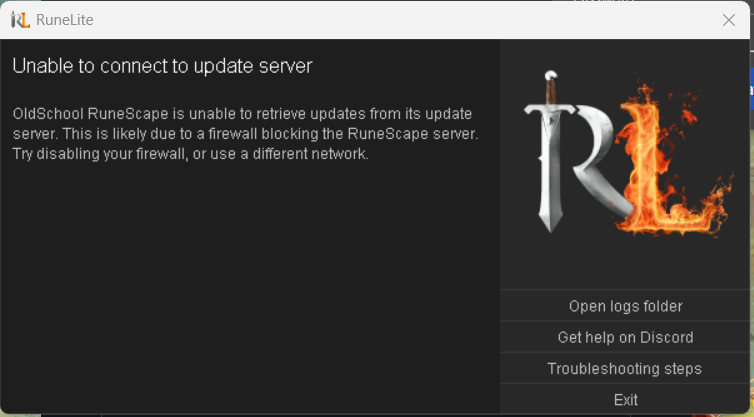
need some help troubleshooting runelite, first time it happens to me
when i try to go in, the checking updates bar gets stuck at 71%, then randomly switches the 79%, then back to 71% then the screen just turns black
ill check logs if theres anything
leaden trail
Just post them
light marsh
yerr
id assume its this part thats messing everything up https://gyazo.com/d9a1c1b6560ff1cf97ecf4bf592d1320
 shell skiff
stone parcel
It doesn't happen to be `Windows 10 N` Or `Windows 10 KN` would it?
shell skiff
stone parcel
It doesn't happen to be `Windows 10 N` Or `Windows 10 KN` would it?
I saw that post as well. Will check on that when he is back online.
since windows 10 N is a European thing its unlikely though
light marsh
light marsh
when i try to go in, the checking updates bar gets stuck at 71%, then randomly s...
yeah it just constantly gets stuck like this then eventually goes all black

idk if its a connection issue? i had an error message mentionning that but idk im using it rn and it works fine literally everywhere else and i never had issues w logging before on that same wifi so idk
leaden trail
light marsh
Post your launcher log as well?
gilded kayak
its a connection issue yes, your logs match up with that
light marsh
yeah i got no idea what to do cuz the connection is just fine eveywhere else
ive had similar issue yesterday and the day before where upon attempting to login (with the play now ui) id just get connection lost at top left but randomly worked again last night
leaden trail
Have you considered that your bot is broken?
light marsh
?
wym
the wifi i use is eduroam and when i did some research i saw other ppl having issues using runescape on it somehow
woah i was able to login on the official client
yeah ig its only runelite atm, tried uninstalling and installing too
 hollow olive
eduroam is probably blocking some stuff
light marsh
sounds likely but if it were the case it would be consistent always, but for a few days i had no issue getting on runelite and rn i can log in the official client w no issue
i give up for today ill check again tomorrow thank u guys
 scenic inlet
I know how to import tile markers but for some reason Line Markers do not appear for me when I import them for colosseum, any thoughts on why that could be?
round jacinth
like markers aren’t imported the same way tile markers are I think? You
Import them the way the line markers want them to
GitHub
Contribute to Skretzo/runelite-plugins development by creating an account on GitHub.
Looks like they show how here.
scenic inlet
ty, I needed line markers plugin, it works now
all tiles marked, hardest part of the colosseum completed

 swift meteor
scenic inlet
all tiles marked, hardest part of the colosseum completed
swift meteor
scenic inlet
all tiles marked, hardest part of the colosseum completed
just fyi, your mino drag tile is wrong. move it 1 tile west
it works as a mino drag tile just fine as is. but you want it to be moved 1 tile west so that it also works as a shaman drag tile :)
 sour zenith
runelite client has unsuccessful ping, not sure why
2025-08-21 09:35:00 EEST [pool-2-thread-1] WARN  n.r.client.ClientSessionManager - Resetting session
java.io.IOException: Unsuccessful ping
    at net.runelite.client.SessionClient.ping(SessionClient.java:97)
    at net.runelite.client.ClientSessionManager.ping(ClientSessionManager.java:130)
    at net.runelite.client.util.RunnableExceptionLogger.run(RunnableExceptionLogger.java:41)
    at java.base/java.util.concurrent.Executors$RunnableAdapter.call(Executors.java:515)
    at java.base/java.util.concurrent.FutureTask.runAndReset(FutureTask.java:305)
    at java.base/java.util.concurrent.ScheduledThreadPoolExecutor$ScheduledFutureTask.run(ScheduledThreadPoolExecutor.java:305)
    at java.base/java.util.concurrent.ThreadPoolExecutor.runWorker(ThreadPoolExecutor.java:1128)
    at java.base/java.util.concurrent.ThreadPoolExecutor$Worker.run(ThreadPoolExecutor.java:628)
    at java.base/java.lang.Thread.run(Thread.java:829
 idle canopy
I have no audio in Runelite through my speakers(audiointerface) , but I do when i change the windows audio output to my headphones, how can i fix this problem?
 rocky tiger
@idle canopy What are the sample rate and bit depth of the interface? Try 48khz or 44.1khz at 24 or 16 bit. Also make sure no application is taking exclusive control and that it plays sound from windows audio mixer. RuneLite doesn't support ASIO audio.
idle canopy
These are my settings, thing is it is greyed out so I cant change the sample rate/bit depth

Thankyou btw for your response
 mossy swan
maybe try disabling the exclusive control there
haughty pumiceBOT
To find the logs, you can do one of the following:
- If your client failed to open, click the
Open logs folderbutton. - Open the screenshot directory by right-clicking 📷
Camerabutton, navigate 1 directory up, then open logs folder. - Navigate to
%userprofile%\.runelite\logson Windows or$HOME/.runelite/logson Linux and macOS.
Upload the log files named client and launcher by dragging them to Discord. If there are files prefixed with jvm_crash dated from today, upload them too.
rocky tiger
idle canopy
These are my settings, thing is it is greyed out so I cant change the sample rat...
Could you see if there is anything in logs mentioning sound? Shouldn't be with that format though. Only seen it in logs if it's over 192khz before.
After checking if turning off allow exclusive fixes it first.
idle canopy
rocky tiger
After checking if turning off allow exclusive fixes it first.
This does not fix it unfortunatly
rocky tiger
rocky tiger
<@484344465578786818> What are the sample rate and bit depth of the interface? T...
Ok windows key + R and run sndvol to open the sound mixer.
 rocky tiger
Play a youtube video. Does it show up visually in the mixer when playing?
idle canopy
It does yeah
rocky tiger
Sound maxed in game settings right?
mossy swan
is runelite playing sounds to your headphones (or whatever other device is there in the dropdown)? i think you may need to just set whatever you want to be used as default device, and then restart runelite
rocky tiger
When you switch device there on left to headphones Does the RL vol bar start showing audio playing?
oblique plume
yea it just picks a random device and only uses that afaik
idle canopy
When i switch windows audio output to headphones, and restart runelite, i indeed have sound;

But i rarely use headphones, would love to get it working on my speakers
oblique plume
i just tell people to disable the devices they dont want to use
idle canopy
oblique plume
i just tell people to disable the devices they dont want to use
Didnt fix it unfortunatly
rocky tiger
Try restarting the computer?
oblique plume
did it pick another one thats not speakers
rocky tiger
Windows audio can be pretty buggy. I wrote a powershell script just to restart windows audio service for a streamer once cause their OBS would randomly stop working.
idle canopy
oblique plume
did it pick another one thats not speakers
There are only 2 outputs, my speakers and headphones, where can i see which audio ouput runelite is using?
 mossy swan
idle canopy
There are only 2 outputs, my speakers and headphones, where can i see which audi...
mossy swan
idle canopy
There are only 2 outputs, my speakers and headphones, where can i see which audi...
in the old control panel "sounds" (you were there before i think), you can set devices as default. check which one is default, and assign the one you want to be default and disable others?
idle canopy
Disabling all other devices and setting my speakers to default also did not fix it unfortunatly
oblique plume
if headphones shows up i dont think its disabled
 wanton karma
Hi runelite isnt showing player kills in the loot tracker since the last update, and nor on loot logger either. I had wondered if it was due to the slight update with loot keys, however it doesn't show the player kill with just the bones like it did either, is this a known issue?
oblique plume
yea, no ones investigated the fix yet though that i know of
its probably just a interface id change
wanton karma
ok cheers, I didnt see it under issues in the github so was checking others had it to
wanton karma
oh ok yea I'll do that
 delicate olive
i wish clicking on the sidebar didnt count as being "unfocused" for the purposes of this option...

 ionic imp
Any movement on users seeing this error? I still crash all the time. At the point of buying a new laptop. :/
EXCEPTION_ACCESS_VIOLATION (0xc0000005) at pc=0x00007ffb78c9e06a, pid=20204, tid=9904
leaden trail
14th gen Intel on old microcode 😭
Buying a new laptop is basically what you'd have to do anyway
ionic imp
I think that's what was determined last time too, but I don't recall seeing a fi
round jacinth
i thought 0x129 was the not bad one
ionic imp
fix*
leaden trail
There isn't one
round jacinth
xd
ionic imp
fucks sake lol
round jacinth
intel shipped shoddy product :<
leaden trail
It's a "your CPU has permanently damaged itself" situation
ionic imp
Yeah I figured
round jacinth
and for some reason runelite makes it show up more often than other games
leaden trail
I'd recommend an AMD CPU for your new laptop
ionic imp
Yup thats what I am planning on doing. Waiting until labor day to see if I can get a good deal on something
Shame cause this laptops brand spankin new lol.
leaden trail
You might be able to reach out to the manufacturer and get a refund or replacement
ionic imp
I will push that once I get something else, can't be without a laptop in the meantime since they want me to ship it in.
Also, how do I persuade a refund when the issue only pops up on runelite ha.
"Hey can you log into runescape a play for a bit until it crashes, then look at the jvm crash logs" "yeah that's my issue" Have a feeling nobody will rma it since its so secluded
leaden trail
"I have the stability issues typical of faulty Intel 14th generation CPUs"
round jacinth
i believe this issue is a known problem you dont have to go specific
leaden trail
This was such a widely occurring thing that they'll know what you're referring to
I haven't really heard of anyone getting too much pushback when they try and get their money back
ionic imp
I hope so. Wonder if Acer will honor it or if they'll push me ot intel
Or if they'll make me send it in, say they tried some stuff and i play back and forth shipping it for a while.
round jacinth
i believe laptop brands cover their own and deal with intel themselves where if you bought a desktop processor you'd deal with intel
ionic imp
good point
Last time I spoke with them they wanted me to send the laptop in first, but I'll try again with the fautly 14th gen issue and see what they say. Hoping to avoid all that.
round jacinth
its sorta common for them to request the hardware back and they can evaluate the problem maybe they have some tool that can force the 14th gen problem
winter snow
Pretty sure a tool was made that could be run on a machine to see if it exhibits symptoms of the hardware fault
ionic imp
Hmm.
winter snow
My GF's computer had suffered from that fault - somehow I avoided it, even though we had the same processor 😄
ionic imp
what was her resolution?
ionic imp
was it replaced on intels dime at least?
winter snow
No
I couldn't be bothered with that crap, it was a 13th gen one
not worth replacing like for like and not having a working computer for X weeks while they figure their shit out
ionic imp
Yeah I feel that.
winter snow
especially since she does like, 3d modelling work and such
can't do that on a potato
ionic imp
What are you using now?
winter snow
the best one our board supports, i9-14900KF
but I made sure we had the BIOS updated first
🙂
ionic imp
just hoping that one never has issues i suppose?
winter snow
The point of the BIOS updates is to update the processor microcode so it doesn't fry itself anymore
That's not just a meme
ionic imp
Must be cpu specific or something - I did the whole bios updates thing as well and still experience the asme problem lol.
winter snow
They do not undo damage that has already been done
It's literal physical damage to the processor
 left vigil
Guys im having issues with my client
On my main, which is jagex launcher, client loads and logs in fine and normal
When i launch rl without jagex launcher and try to log with my iron (non jagex acc) it logs but just stays at the “connecting to server screen” but i can see that im logging in on the account from my other?
Any ideas
oblique plume
does it happen in safemode
haughty pumiceBOT
To enable safemode
Windows
Run the RuneLite (configure) shortcut from the windows start menu
Tick the Safe mode box, save, launch RuneLite the way you normally do.
Mac
In Terminal, run
/Applications/RuneLite.app/Contents/MacOS/RuneLite --configure
Tick the Safe mode box, save, launch RuneLite the way you normally do.
left vigil
Trying now
Same issue
I see acc log in on alt, but it just stays at the connecting screen
round jacinth
yesterday some one was having a similar problem and a computer restart magically fixed it
left vigil
I have tried that
leaden trail
ionic imp
Must be cpu specific or something - I did the whole bios updates thing as well a...
You are definitely not on the most recent microcode
But yeah once the damage is done it's not reversible
left vigil
No help?
haughty pumiceBOT
Delete your %userprofile%/.runelite/cache folder or run this command in command prompt run as Administrator:
rmdir /s "%userprofile%\.runelite\cache"
How can you tell?
Assuming the log but where in the log
round jacinth
ctrl + f microcode and it'll show 0x129 or something
ionic imp
ah
round jacinth
CPU:total 32 (initial active 32) (16 cores per cpu, 2 threads per core) family 6 model 183 stepping 1 microcode 0x129
 twin frigate
Hi, I suddenly lost my synced profile, it no longer grabs my data for some reason any ideas?
mossy swan
!lost
haughty pumiceBOT
twin frigate
haughty pumice
**lostsettings**: <https://github.com/runelite/runelite/wiki/FAQ#my-plugins-are-...
This didnt work, this is why I came here because this post says contact the discord if those solutions do not work
twin frigate
oblique plume
Are you signed in to the correct rl account
yes i am
twin frigate
oblique plume
We're you syncing it to begin with
Yeah, I was
because i use runelite on my laptop as well, but the data just disappered from everywhere
ionic imp
leaden trail
You are definitely not on the most recent microcode
I show the latest bios version is 1.17 according to Acer, which I have

 solid mesa
BIOS and microcode are not the same
ionic imp
Do I not update the microcode via bios?
If I am up to date on all windows update and my bios is the latest I dont know how else you'd change the microcode. not that it really matters anyway at this point
light marsh
just tried booting runelite on 2 different wifis and i still cant connect
hollow olive
have u tried hotspot
light marsh
not sure how to do that
yeah using another wifi i get this message instead of black screen https://gyazo.com/9588b45fe729aef0863ae16afbd19ee6

my shit cooked
btw i can boot official client
nvm i get same error as this
this is so odd n frustrating
hollow olive
idk what to say aside from your network / firewall is blocking those connections
ionic imp
As I suspected, lol

If they're going to attempt to 'repair' it, what should I notate now before I ship it so when I get it back I can verify changes were done?
mossy swan
does it crash now? does it crash when fixed?
idk if you can get the processor serial number via some program, that may be useful indication to know if it was changed or not
ionic imp
Figured the first, grabbing the id of the processor is a good idea
 ornate kite
Hey so I just installed runelite on a tablet running Ubuntu Linux. At first I had these really nice gesture controls like hold to right click and pinch to zoom but theyre not working anymore
leaden trail
RuneLite doesn't really play nicely with touch controls
ornate kite
Ah is there any reason they stopped working after a reboot tho
They were nice for the few hours I had them
Oh y'know what it is I was using the touchpad not the touch screen
 misty plover
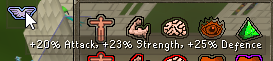
Is there a way to hide specific pop-ups?
I want to keep the "Attack, NPC" when hovering over it, but not piety/ranged boost
solid mesa
You can't hide infobox tooltips. But you can turn off the prayer infoboxes in the prayer plugin
misty plover
😭 damn, any chance that could be changed?
 hollow grotto
My runelite is freezing on login screen when on the profile for my iron, but when i switch to the profile for my main it works
I can't seem to isolate which plugin is causing the problem
gilded kayak
its the one u dont have installed on your main, but on your iron
type the word hub into the 🔧 tab search
compare the list
gg ez
hollow grotto
gilded kayak
its the one u dont have installed on your main, but on your iron
I think it was either clue emote item plugin or totem fletching plugin, i turned those off & restarted & it worked
I have like 265 plugins so it took a second to figure out which I dont have on the main that I do on the iron lol
 dull bear
what would be causing this to take upwards of 2 minutes to download
 leaden trail
Your connection probably
dull bear
is it hosted on github
clear stratus
that'll be on repo.runelite.net i believe
dull bear
hmm idk
clear stratus
could just be a bad host or something
 nocturne cipher
deposit equipped items is missing. has anyone dealt with this?

 final axle
nocturne cipher
deposit equipped items is missing. has anyone dealt with this?
final axle
nocturne cipher
deposit equipped items is missing. has anyone dealt with this?
did you turn it off
nocturne cipher
final axle
did you turn it off
didnt know there was an option to turn it off
where can I find it?
final axle
it's a vanilla option, click the wrench in the top right(?)
 opaque prawn
does anyone know why I would be getting this error? cleared cache and tried safe boot
Exception: CertificateException
Message: No subject alternative DNS name matching repo.runelite.net found
 glad mirage
O.o
leaden trail
opaque prawn
does anyone know why I would be getting this error? cleared cache and tried safe...
What if you use 8.8.8.8 for DNS?
 haughty pumiceBOT
oblique plume
haughty pumiceBOT
oblique plume
The scale parameter in there
 winged saffron
thanx so much!
opaque prawn
leaden trail
What if you use 8.8.8.8 for DNS?
A good ole computer restart fixed it lmaooooo
 fair flame
I keep getting this
I reinstalled (also deleted the folder under appdata)
was working 20 mins ago, I closed the game and went on 5 mins later and it wont start
Getting these in the logs:
[Client] ERROR c.q.r.r.PlayerQuestStateRequirement - For input string: "false"
[Client] WARN n.r.c.ui.overlay.OverlayRenderer - Error during overlay rendering
java.lang.NullPointerException: null
at ci.ac(ci.java:10841)
at iq.wl(iq.java)
at iq.getModel(iq.java:65297)
at net.runelite.client.ui.overlay.outline.ModelOutlineRenderer.drawOutline(ModelOutlineRenderer.java:1010)
at net.runelite.client.ui.overlay.outline.ModelOutlineRenderer.drawOutline(ModelOutlineRenderer.java:1127)
at com.questhelper.steps.ObjectStep.makeWorldOverlayHint(ObjectStep.java:337)
at com.questhelper.steps.ConditionalStep.makeWorldOverlayHint(ConditionalStep.java:399)
at com.questhelper.overlays.QuestHelperWorldOverlay.render(QuestHelperWorldOverlay.java:69)
at net.runelite.client.ui.overlay.OverlayRenderer.safeRender(OverlayRenderer.java:734)
at net.runelite.client.ui.overlay.OverlayRenderer.renderOverlays(OverlayRenderer.java:328)
at net.runelite.client.ui.overlay.OverlayRenderer.renderOverlayLayer(OverlayRenderer.java:235)
at net.runelite.client.callback.Hooks.drawScene(Hooks.java:496)
at iy.ie(iy.java:2279)
at iy.cw(iy.java:6840)
at cl.jq(cl.java:3327)
at cf.it(cf.java:3108)
at dj.mu(dj.java:8571)
at dj.mu(dj.java:8608)
at ky.mh(ky.java:8442)
at client.qf(client.java:13474)
at client.ba(client.java:11813)
at bv.bx(bv.java:480)
at bv.zb(bv.java)
at bv.run(bv.java:41162)
at java.base/java.lang.Thread.run(Unknown Source)
[Client] WARN n.r.c.ui.overlay.OverlayRenderer - Error during overlay rendering
java.lang.NullPointerException: null

 fair wing
runelite not loading "starting external plugins" is preventing it
haughty pumiceBOT
Many plugins from the pluginhub break the client in subtle or not-so-subtle ways, including causing issues like client freezes. We do not support pluginhub plugins because we do not make or quality control them, and do not recommend their use.
Run the RuneLite (safe mode) shortcut, or with a Jagex account, first run the RuneLite (configure) shortcut and tick the Safe mode box, then launch RuneLite via the Jagex launcher.
This temporarily disables the GPU plugin and all hub plugins which will allow you to confirm the issue is caused by one of those plugins and isn't a core RuneLite issue.
If the issue is caused by a hub plugin, you should isolate which plugin it is and then uninstall the plugin.
fair wing
thank you
 native ether
"I have an issue where Old School RuneScape keeps freezing and crashing a lot while I’m playing in the Corrupted Gauntlet OldSchool RuneScape has crashed. Crashes are most commonly caused by plugin hub plugins, but can also be caused by RuneLite or Jagex client bugs. If you receive this message commonly, try playing in safe mode to eliminate the potential of plugins causing the crash. The client log file will contain additional information about the crash.
stone parcel
Lol, is that part of an LLM response or something? Yeah safe mode is a solid idea though.
light marsh
how do i open runelite in safe mode with jagex launcher?
 thick panther
light marsh
how do i open runelite in safe mode with jagex launcher?
thick panther
light marsh
how do i open runelite in safe mode with jagex launcher?
read 4 messages above you
light marsh
purrr
haughty pumiceBOT
@light marsh To enable safemode
Windows
Run the RuneLite (configure) shortcut from the windows start menu
Tick the Safe mode box, save, launch RuneLite the way you normally do.
Mac
In Terminal, run
/Applications/RuneLite.app/Contents/MacOS/RuneLite --configure
Tick the Safe mode box, save, launch RuneLite the way you normally do.
native ether

"I have an issue where Old School RuneScape keeps freezing and crashing a lot while I’m playing in the Corrupted Gauntlet
haughty pumiceBOT
@native ether Please refer to this flowchart for further troubleshooting.
mossy swan
!logs also, maybe someone has time to look
haughty pumiceBOT
To find the logs, you can do one of the following:
- If your client failed to open, click the
Open logs folderbutton. - Open the screenshot directory by right-clicking 📷
Camerabutton, navigate 1 directory up, then open logs folder. - Navigate to
%userprofile%\.runelite\logson Windows or$HOME/.runelite/logson Linux and macOS.
Upload the log files named client and launcher by dragging them to Discord. If there are files prefixed with jvm_crash dated from today, upload them too.
 random surge
not sure where to ask, could someone point me towards where I could report a bug/error/glitch in a runelite plugin? it's about stretched mode, when I'm in barbarian assault and above 80% resizable scaling (resizable classic layout) it starts to hide default BA UI completely. the area also is very limited where you can move the default ui on the screen
 oblique plume
reset the position of the xp tracker
random surge
xp tracker is not on currently. when the default ui goes under the red line, it starts to disappear. so with 74% resizable scaling it's visibly fine, but it can't be moven anywhere else but on that spot from left to right

it also seems that the default UI doesn't show at all in fixed - classic layout when stretched mode is on or off.
only shows in both resizable layouts
stone parcel
From what I understand, several UI elements rely on the position of the xp tracker, even if it is not on currently, I think they might still try to set their location relative to the xp tracker. It might be worth trying to reset the position of the xp tracker.
random surge
how do you reset the position of the tracker again? I turned it on and the "add to canvas" trackers show and move perfectly fine, but the default UI is anchored almost in the center line
stone parcel
This one with the little XP orb

 old niche
i cant seem to mark the delve doom orb with these settings from Radius Markers, any1 have tips?
 haughty pumiceBOT
Support for hub plugins should be directed to the author of the plugin.
You can find the support link by searching for the plugin in the Plugin Hub panel and clicking the ? button on the plugin, or by right-clicking the plugin in the plugin panel and clicking the Support menu option.
old niche
Thanks
random surge
ohhh that one, works perfectly fine now. thanks a bunch, you have saved my day!
native ether
mossy swan
!logs also, maybe someone has time to look
Where is the error?
@mossy swan
 cursive cobalt
any update if doom !pb works?
mossy swan
native ether
looks like you are running out of heap space. try uninstalling some hub plugins
native ether
mossy swan
looks like you are running out of heap space. try uninstalling some hub plugins
Do you mean that?
 haughty pumiceBOT
 west blade
hello! trying out plugin development and hit a snag - when I add my jar to the plugins folder, or add -Drunelite.plugin-development=true -ea -Xrunelite.pluginpath="<my-plugin-path>\build\classes" (both of which i found online as potential solutions) I still dont see the plugin in the logs or in the settings panel. Is there a recommended way to do this? Do I have to build the whole client locally?
oblique plume
have you considered reading the actual guide on how to do that instead of random stuff made up online
haughty pumiceBOT
How to develop plugin-hub plugins: https://github.com/runelite/plugin-hub/blob/master/README.md
west blade
I read it a few times, and could have missed something but it just has steps to run the test, and then once its working heres how you submit it. I cant find anything on how I get my client to recognize my plugin
oblique plume
start at step 1
solid mesa
The release client cannot add jar files to the plugin folder. You either run the plugin test from IntelliJ or put it on the hub
west blade
Is there something I did to offend? i feel like my ask wasn't unreasonable, but please let me know if im wrong
The guide is unclear to me and im stuck, I tried to research on my own, found outdated and conflicting information and documentation that assumes your UI matches what the contributor had when they wrote it. I dont have a 'run test' button so had been running gradlew test which passes and i assumed was equivalent to whatever the IDEA did.
Last time i did plugin dev was pre hub and dropping the jars in was the method of testing, thank you coopermor for confirming thats not the case anymore, and ill look into my ide setup in more detail.
oblique plume
i think new intellij does hide the edit configurations button now
they call it something else
run with parameters maybe
based on this
 empty minnow
I mean really it's just click the green arrow and then click on the configuration in the top right and hit edit
could be good to add a screenshot of that I suppose
oblique plume
i mean this is quite explicit no matter the ui style

its obviously not ./gradlew test
 crisp dune
cursive cobalt
any update if doom !pb works?
crisp dune
cursive cobalt
any update if doom !pb works?
Nope, I'll make a tracking issue for it though
I made https://github.com/runelite/runelite/issues/19303 to track it
haughty pumiceBOT
Many plugins from the pluginhub break the client in subtle or not-so-subtle ways, including causing issues like client freezes. We do not support pluginhub plugins because we do not make or quality control them, and do not recommend their use.
Run the RuneLite (safe mode) shortcut, or with a Jagex account, first run the RuneLite (configure) shortcut and tick the Safe mode box, then launch RuneLite via the Jagex launcher.
This temporarily disables the GPU plugin and all hub plugins which will allow you to confirm the issue is caused by one of those plugins and isn't a core RuneLite issue.
If the issue is caused by a hub plugin, you should isolate which plugin it is and then uninstall the plugin.
cursive cobalt
crisp dune
Nope, I'll make a tracking issue for it though
tyvm
west blade
im sorry alexsuperfly but that screenshot wasnt clear for me. double clicking it in the project opens the file, nothing in the right click menu lists run. I tried making a run configuration using the gradle template (docs dont say what kind of run configuration you need) but it just builds. I do think something is wrong with my install of IDEA though (its originally from 2019), as its prompting me for an android SDK so going to do a fresh install and hopefully that resolves it
empty minnow
yeah right clicking should absoutely give you a run option
oblique plume
i used 2019 for a while and it works fine
west blade
yeah its definintely not recognizing the file as a runnable
 oblique plume
looks like it didnt pick it up as a gradle project
 raw orbit
Hi, my account was recently compromised, and after changing my password to something that they wouldn't have been able to know, I was compromised by the same people yet again. I did some digging and I found that there is a function on runeline to write credentials to a file, allowing people to access my account without needing my password (seen here: https://github.com/runelite/runelite/wiki/Using-Jagex-Accounts)
I also noticed that the documentation here notes the end sessions button on the jagex website. Does anyone know with absolute certainty if this would expire the token, disallowing the hacker from continuing to access my account?

GitHub
Open source Old School RuneScape client. Contribute to runelite/runelite development by creating an account on GitHub.
Alternatively, if this end sessions button does not work, is there any other avenue that I can go to invalidate this token? If not, my account is seemingly permanently and forever compromised.
final axle
Did you download something from someone you met at toa?
raw orbit
I was just a victim of social engineering. Thought that it was somebody that I could trust and it was not.
no malware or anything was downloaded. I willingly gave my account information to another user
final axle
!secure You can ignore the fake clients part but the rest is good advice. I'd check the connected accounts section of your account on the jagex website, some people can link their twitch or whatever and log in to your account using that
haughty pumiceBOT
You've downloaded a fake client, and your account has been compromised. Remove the fake as soon as possible to minimise further damage.
The following actions should be performed from a secure computer or secure mobile device:
- Change your RuneScape password
- Remove and re-add Authenticator to RuneScape
- Change your RuneScape bank PIN
- Change your email's password
- Add 2FA to your email if you haven't got it enabled
- Check for any linked accounts by accessing the account settings page (https://www.runescape.com/account_settings)
Some fake clients also install malware, only a fresh install of your operating system can guarantee the total removal of any unwanted software.
You might also want to change any email password if you reused the same as your RuneScape account password.
Once your computer is secure, you should download RuneLite from the link available at the #welcome channel.
final axle
Oh it already says to check that
raw orbit
Thank you for the advice. I've done all of these steps besides removing my 2FA and re-adding it, which I will do. Unfortunately however, this method which I have mentioned bypasses the requirements of any of this and logs directly into my account. No matter how many times I change my password, email, 2fa, etc, they have direct access to my account through an access token.
 strong anchor
what is going on? ive done a full re-install. reset everything i could think of. what is going onnnn????
haughty pumiceBOT
@strong anchor Graphical artifacts? Try disabling hardware acceleration: https://github.com/runelite/runelite/wiki/Disable-Hardware-Acceleration
strong anchor
been doing this on and off last week. All drivers are updated so idkk
stone parcel
Do you have nvidia HDR enabled?
strong anchor
let me check,
stone parcel
or the hw thing would solve that too.
leaden trail
raw orbit
Thank you for the advice. I've done all of these steps besides removing my 2FA a...
Ending sessions will invalidate the token they have
leaden trail
stone parcel
or the hw thing would solve that too.
Nah this is the hdr thing not hwaccel
stone parcel
Dang.
raw orbit
That is good news. Do you happen to have documentation of this process or confirmation that this works in any way? The only reason that I ask is because this is a serious issue for my account, and if I re-build just to be stolen from again, there's just no point. I would love to have some sort of confirmation on the backend or somebody with experience to confirm that this is the case. Sorry to ask for further assistance with this issue past my initial question.
 austere grove
anyone else find initializing the development setup cumbersome? or do things just work smoothly as read in the readme?
leaden trail
People having their credentials file stolen is basically exactly why Jagex added the end sessions thing
gilded kayak
austere grove
anyone else find initializing the development setup cumbersome? or do things jus...
things just work afaik
leaden trail
austere grove
anyone else find initializing the development setup cumbersome? or do things jus...
Follow the guide literally and make sure not to miss any steps
I run through it as if I have zero knowledge every couple of months
Just to make sure that nothing is missing
strong anchor
haughty pumice
<@1086715849500541021> Graphical artifacts? Try disabling hardware acceleration:...
omg this worked
raw orbit
Thank you all for your time. I'll open a ticket with Jagex just for my own superstition. I'm being more anal than I have to be over this, but I just don't want to be stolen from.... again
raw orbit
I'm happy to be transparent about anything to assist others with not having the same experience as myself. Feel free to ask

 leaden trail
I dunno that Dura person is a total potato
raw orbit
here's some account gore for those interested lol

not the biggest loss. but still pretty catastrophic
final axle
iron?
raw orbit
thankfully not. I'd give up
final axle
at least they left untradables, especially the infernal. fwiw since you have void if you can rebuild back up to being able to afford one synapse for a scobo you could probably go do delves to rebuild maybe?
raw orbit
Yeah, im in CG for the first bit of gear atm
final axle
cg also very good rebuild place
leaden trail
Hey at least they didn't disassemble your slayer helm for the black mask and feros for the leather
raw orbit
yeah they were in weirdly a large rush the second time around
didn't get a lot of my stuff
 neon basin
about a week or so or more, GPU (experimental) started crashing the game immediately upon being turned on, i am aware it's experimental and everything but is this common?
 crystal tree
is there a way to nuke rainbow rave from my client? i just installed it to try it out but even after uninstalling it i sometimes get the mouse trail and the destination tile animations so i have to reinstall the plugin and disable the options even though the plugin is off
round jacinth
neon basin
about a week or so or more, GPU (experimental) started crashing the game immedia...
no but also it's expiremental so you get what you got while Adam works on it
round jacinth
crystal tree
is there a way to nuke rainbow rave from my client? i just installed it to try i...
restarted client after removing it?
round jacinth
sounds like you didn't actually remove it
fair flame
fair flame
I keep getting this
I reinstalled (also deleted the folder under appdata)
was w...
any1 have a fix to this? I did all the troubleshooting steps (allowed it into my firewall, have no antivirus running etc)
 glass rivet
Does anyone know what this is about? just started
 gilded kayak
INTERNET
try using your phone as a hotspot just for starting the client
u can stop after it's open
fair flame
fair flame
any1 have a fix to this? I did all the troubleshooting steps (allowed it into my...
i guess i had an instance of my old anti-virus running.. closing it fixed the issue lmao.
glass rivet
would it be due to my alteration of host files for another program (tarkov)?
crystal tree
round jacinth
sounds like you didn't actually remove it
i uninstalled the plugin, closed runelite, started runelite, login to my account, and i have the mouse trails and tile marker. i had to INSTALL the plugin from plugin hub and then disable the options EVEN with the plugin off
but then i restarted again and the issue didnt retrun this time
so as i said, intermittent
gilded kayak
glass rivet
would it be due to my alteration of host files for another program (tarkov)?
it would be due to having your connection timeout, while trying to access the bootstrap on static.runelite.net
glass rivet
hmmmmm thats whats odd tho, id this seem to be the only program running into that issue?
gilded kayak
thats why i immediately suggested an internet-based workaround, using your mobile data for 10 seconds to start the client
u didn't try every program in the world so thats not really useful
sometimes u can't connect to certain websites, today it's ours
tomorrow it wont be
(probably)
 brisk lynx
What's the best Discord channel for me to ask if my Plug-in idea is appropriate or not? (A Developer Plug-in where you can enter in an NPC ID, and then the plug-in will show the Animation ID of that NPC in real time in the chat)
haughty pumiceBOT
Some specific features that RuneLite can't currently accept: https://github.com/runelite/runelite/wiki/Rejected-or-Rolled-Back-Features
solid mesa
ID based plugins are no longer allowed
brisk lynx
Oh snap. Thanks for the link! I'm curious why
solid mesa
Potential for abuse
brisk lynx
Ah, gotcha. Thank you a bunch for explaining 😁! That saved me a bunch of coding just to have it rejected later XD
 low cosmos
Hello, I recently switched to a 1440p monitor and am finding the mouse movement in OSRS very slow compared to 1080p. I have scaled the UI/used Stretch mode plugin to adapt the interfaces but the mouse movement is still drastically slower than playing on 1080p.
got any solutions?
 sly plaza
Hey guys been trying to play the game, few months ago I was playing perfectly fine. Now I start up the game and it isntantly closes. I tried resetting computer, uninstalling and reinstalling and doesnt help. I have an ARM bbuild (🥹)
charred wind
low cosmos
Hello, I recently switched to a 1440p monitor and am finding the mouse movement ...
your monitor is now roughly twice the size of 1080p, you have more distance to cover with your mouse
if you're saying the game is slower or has lower fps, that is something someone could do
haughty pumiceBOT
@sly plaza To find the logs, you can do one of the following:
- If your client failed to open, click the
Open logs folderbutton. - Open the screenshot directory by right-clicking 📷
Camerabutton, navigate 1 directory up, then open logs folder. - Navigate to
%userprofile%\.runelite\logson Windows or$HOME/.runelite/logson Linux and macOS.
Upload the log files named client and launcher by dragging them to Discord. If there are files prefixed with jvm_crash dated from today, upload them too.
leaden trail
Post your logs and I can look
low cosmos
charred wind
your monitor is now roughly twice the size of 1080p, you have more distance to c...
Anyway to make the mouse pointer behave differently inside an active window? like faster or something?
solid mesa
You can change your DPI in your mouse settings
low cosmos
solid mesa
You can change your DPI in your mouse settings
Thanks will look it up
sly plaza
Could it be that I have the wise old man plug in?
Nope tried removing.
Figured it out, it was clashing with me activating GPU
@leaden trail thanks 🙂
 west mirage
any ideas? just started happening, tried all the classic troubleshooting

 pearl robin
hi, I was wondering how to make the scaling for runelite menu bigger? it's tiny. i got the in game menu to look fine
haughty pumiceBOT
solid mesa
Change the scale option
solid mesa
west mirage
any ideas? just started happening, tried all the classic troubleshooting
You have some sort of network issue. Can try a phone hotspot
west mirage
hmm
 plain pond
i've also been getting the same issue. using mac.
pearl robin
haughty pumice
<https://github.com/runelite/runelite/wiki/RuneLite-Launcher-Configuration>
these launch options don't seem to work for me. i'm using the bolt launcher to run runelite, any ideas for that?
solid mesa
It's in the bolt options somewhere
pearl robin
I tried it in the RuneLite launch commands but it doesn't seem to load when i try that (inside of bolt launcher)
solid mesa
I believe it's some UI in Bolt but I don't use it so I can't tell you where
plain pond
did the same troubleshooting as well. no luck. also not the only one, there's a thread on reddit too started happening like 30-40 mins ago
 solid mesa
Does this load in your web browser? https://static.runelite.net/bootstrap.json
plain pond
yes
solid mesa
You may have some sort of firewall or antivirus blocking runelite then
west mirage
west mirage
any ideas? just started happening, tried all the classic troubleshooting
Just tried my phone hotspot. same error
crazy because it was JUST working lol
plain pond
no firewall or antivirus enabled or anything changed. nothing was updated. been using runelite on this mac for years
and ya i was playing a few hours ago
sometimes the game will launch but will just stay trying to connect to a world
leaden trail
Where in the world are the two of you located?
Might just be an ISP issue or something
west mirage
Texas
west mirage
oh lol
leaden trail
I bet you two have the same ISP probably
 west mirage
spectrum
 grave dove
Got spectrum Texas
plain pond
spectrum 😄
west mirage

grave dove
damn spectrum hate this shit internet so much i swear
leaden trail
Unfortunately the solution is probably just to wait it out
 pure geode
just came here to ask the same thing
leaden trail
We see this sort of thing from time to time and usually it resolves itself within a few hours
Do you also have spectrum and live in Texas?
pure geode
yes
pearl robin
solid mesa
I believe it's some UI in Bolt but I don't use it so I can't tell you where
can't seem to find an option inside of the bolt-launcher other than this, cant find a command that works though

 leaden trail
pearl robin
can't seem to find an option inside of the bolt-launcher other than this, cant f...
leaden trail
pearl robin
can't seem to find an option inside of the bolt-launcher other than this, cant f...
--configure probably
 grim nova
texas spectrum reporting in boyzzz
pearl robin
leaden trail
`--configure` probably
nope. will try find an alternative to scale it ig
pearl robin
pearl robin
nope. will try find an alternative to scale it ig
update; running bolt-launcher with GDK_SCALE=2 fixed this issue
 kindred flint
came to see if it was just me lol i miss verizon fios, texas spectrum sucks
 tribal sierra
ya!! texas spectrum sucks, they pay me too good lmao
 acoustic ibex
anyones client working yet? texas spectrum here and im still down
tribal sierra
@acoustic ibex it just loaded for me finally
acoustic ibex
it worked!
glass rivet
pure geode
mine is still down
hard reseting my modem with a paperclip did the trick
glass rivet
pure geode
mine is still down
Do keep in mind this will reset your network name and password to the default listed on the device.
 split adder
FIX RUNELITE PLZ
solid mesa
split adder
FIX RUNELITE PLZ
Do you have spectrum and live in texas?
split adder
u not doxxing me brother
solid mesa
Well can you clarify what is wrong with runelite?
empty minnow
yeah same issue for me 😭
 karmic pewter
Ahh, well got my answer for the bootstrap issue. Spectrum better start paying me fore all these issues they have. im not getting fucked for free.
empty minnow
oh its magically working now
tribal sierra
ya go ahead and take the 14 cents for the "minutes" youve been down
 formal gate
The runelite plugin can keep the window always on top but can it prevent the window from being moved? Right now I use a script to position the window incase I accidentally move it
 lethal ridge
Hello I'm wondering how I can move the skill calculator for iron ore on my screen so I don't have to click it all the time, any tips/
solid mesa
You can't, skill calc is sidebar only
lethal ridge
damn, okay thanks
 upbeat steeple
Hey can anyone help me out? I keep getting "There was a fatal error starting RL" Message:Connection Timed Out: Connection
already tried allowing it through my firewall
nvm just scrolled up
Also Texas Spectrum
solid mesa
Can try restarting your router. Otherwise wait for spectrum to fix it. VPN might help if you have one
solid mesa
🤷♂️ guess they broke their routing to some AS or something
 gusty gate
i dont understand, did someone at spectrum turn my runescape off? everything else seems to work fine
im never gunna beat runescape now
solid mesa
Yep, spectrum turned off the runelite light switch
 naive stratus
 solid nest
Hi all, Is anyone able to help me out as I am unable to get RL to launch.
Have tried reinstalling jagex launcher and the runelite client twice. Restarted PC and done GPu driver updates. From some basic googling seems it could be CPU related but it just randomly stopped working a couple of days ago. Any suggestions and thanks. Also updated Java. Have attached error log,
crisp dune
looks like a gpu-related crash, given that it's d3d that's the issue
 next tapir
Hello, i believe i refreshed windows last year, and now i can't seem to login to my old runelite account. ( can only login with google account?) it still shows some of my loot tracker, but i lost all my plugins. did they get lost on my old pc system? any way to recover all screenshots and stuff and plugins i had before? using cloud sync on profile didnt work either.
leaden trail
Were you cloud syncing the profile on the old system?
Screenshots are gone if you didn't copy them manually
sour zenith
sour zenith
runelite client has unsuccessful ping, not sure why
```
2025-08-21 09:35:00 EEST...
Ehm, why am I blocked?
 leaden trail
Is it giving you a specific code?
sour zenith
code? 403?
sour zenith
i printed the ping url, and tried to access it from browser
oblique plume
yea that should probably block you
leaden trail
Are you having actual client issues?
sour zenith
Just wondering why ping is unsuccessful in runelite
oblique plume
typically thats at the router level
sour zenith
my router? but i can access the base url just fine
leaden trail
That's not the same as your router just dropping pings
next tapir
leaden trail
Were you cloud syncing the profile on the old system?
Not sure, it’s been nearly 2 years I can’t remember
leaden trail
If it didn't show up when you logged into the client that's probably a no
leaden trail
sour zenith
Just wondering why ping is unsuccessful in runelite
What if you ping that URL in CMD?
oblique plume
Should ask what the url is
sour zenith
Can I paste it here? it has a "session" parameter
leaden trail
Also a good point
Is there a RuneLite "ping" even? I can't think of one but I'm not quite awake
sour zenith
SessionClient.java there's ping
leaden trail
sour zenith
Can I paste it here? it has a "session" parameter
Just DM it to the RuneLite bot I guess
oblique plume
i dont think session does pings
west mirage
still down...I HATE you Texas spectrum!!!
 leaden trail
Do you just mean that world hopper isn't showing ping?
oblique plume
and also i would expect session to not work unless youre the actual client
sour zenith
actual client?
oblique plume
your browser isnt runelite
leaden trail
It's easier if you tell us the actual problem you're trying to solve up front rather than just trying to troubleshoot yourself and then asking about why weird troubleshooting steps don't do what you expect
sour zenith
true, but runelite throws exception as well
leaden trail
What exception and when?
sour zenith
World hopper shows ping.
I have a bunch of ping exceptions in runelite logs
2025-08-23 14:13:37 EEST [pool-2-thread-1] WARN  n.r.client.ClientSessionManager - Resetting session
java.io.IOException: Unsuccessful ping
    at net.runelite.client.SessionClient.ping(SessionClient.java:98)
    at net.runelite.client.ClientSessionManager.ping(ClientSessionManager.java:130)
    at net.runelite.client.util.RunnableExceptionLogger.run(RunnableExceptionLogger.java:41)
    at java.base/java.util.concurrent.Executors$RunnableAdapter.call(Executors.java:515)
    at java.base/java.util.concurrent.FutureTask.runAndReset(FutureTask.java:305)
    at java.base/java.util.concurrent.ScheduledThreadPoolExecutor$ScheduledFutureTask.run(ScheduledThreadPoolExecutor.java:305)
    at java.base/java.util.concurrent.ThreadPoolExecutor.runWorker(ThreadPoolExecutor.java:1128)
    at java.base/java.util.concurrent.ThreadPoolExecutor$Worker.run(ThreadPoolExecutor.java:628)
This channel is for release client support
next tapir
leaden trail
If it didn't show up when you logged into the client that's probably a no
Also, if I did log in to my correct account, screenshots and plugin etc will be wasted no matter what? Otherwise I stop trying and just accept it and try to make it as good as it was.
leaden trail
If you were cloud syncing your profile you'll have your plugins/settings saved but the screenshots are gone unless you still have access to the old computer
next tapir
Thanks a lot, so without cloud sync the plugin and settings are gone anyways?
leaden trail
If you weren't cloud syncing the profile that's correct
 celest cobalt
my f1 key is not working properly in the runelite client - might be due to a plugin, but i cannot locate the issue. any suggestions? Key remapping is off, all other f keys work fine and if i hold alt the f1 key works as it should.
leaden trail
Download debug helper from the hub, click the green bug it adds to the sidebar and there's an option to show key binds
 deep gate
 celest cobalt
leaden trail
Download debug helper from the hub, click the green bug it adds to the sidebar a...
celest cobalt
leaden trail
Download debug helper from the hub, click the green bug it adds to the sidebar a...
thanks! this helpmed me solve it 😄 - f1 was binded to party pings
deep gate
help
haughty pumiceBOT
@normal bay To find the logs, you can do one of the following:
- If your client failed to open, click the
Open logs folderbutton. - Open the screenshot directory by right-clicking 📷
Camerabutton, navigate 1 directory up, then open logs folder. - Navigate to
%userprofile%\.runelite\logson Windows or$HOME/.runelite/logson Linux and macOS.
Upload the log files named client and launcher by dragging them to Discord. If there are files prefixed with jvm_crash dated from today, upload them too.
 twin vault
How exactly does xBR work with the GPU plugin? Why on fixed mode does it make it super crisp but on resizable it' ugly as hell?
 slim wagon
west mirage
still down...I HATE you Texas spectrum!!!
slim wagon
west mirage
still down...I HATE you Texas spectrum!!!
lmao samee
what is going on with this thing today
slim wagon
i dont understand how internet provider affects runelite specifically
leaden trail
Not all servers are in the same place. There's an issue somewhere between you and the RuneLite servers but your traffic to, say, discord, goes somewhere else and so is routed differently, so that traffic doesn't encounter whatever the issue is
leaden trail
twin vault
How exactly does xBR work with the GPU plugin? Why on fixed mode does it make it...
You probably need to use integer scaling
round jacinth
twin vault
How exactly does xBR work with the GPU plugin? Why on fixed mode does it make it...
xbr needs screen real estate to work with
try the other rendering options too
west mirage
slim wagon
lmao samee
so I connected to my phones hotspot and logged in (no problem) then turned it off and swapped back to spectrum. Been working fine for the past 1hr
 gleaming wave
west mirage
so I connected to my phones hotspot and logged in (no problem) then turned it of...
gleaming wave
west mirage
so I connected to my phones hotspot and logged in (no problem) then turned it of...
Did you swap wifi while logged in? Or do you use lan? When i try and switch after logging in i get taken back to login screen
west mirage
uhh I had ethernet in and phone hotspot connected. Turned off hotspot on my phone once in game and computer just swapped over. Hope it helps 😅 not too great at this lol @gleaming wave
gleaming wave
gotcha thanks
 soft agate
@west mirage lol was having the same issue and did exactly what you did and it worked thanks
west mirage
yay happy it worked 😊
celest cobalt
slim wagon
celest cobalt
if ur from texas follow @west mirage's advice and use your phone hotspot to log in
celest cobalt
wait what? its not my internet
gilded kayak
are you in texas
celest cobalt
no
gilded kayak
then obviously its not the same issue
thats why they said "if ur from texas"
if someone said "if you're from texas" and I wasn't, i would understand that they aren't talking about my issue
now
the jagex launcher basically gives no useful information
does runelite still open, if you do it from the shortcut (runelite.exe)
if no, run the runelite installer over your current runelite, link to the website is in #welcome
if yes, not sure
gilded kayak
dats heat
 worthy bane
Hey all - I have a question regarding HD117 and AMD GPUs that seems to be a common issue. Some areas like fossil island and varlamore make my AMD 7800 XT use 100% of the GPU for pretty much no reason whatsoever. I have seen other people on reddit with 6000 series revert back to 22.5.1 drivers which fixed the issue. However since I have a 7000 series I can't backdate that far.
The issue started popping up since a recent Windows 11 and AMD driver update. Previously I was on AMD 24.12.1 and had no issues with any game, include HD117 on runelite, I could even play multiple characters using HD117 at the same time without maxing anything, but rolling back didn't fix the issue whatsoever.
Any known fixes out there?
haughty pumiceBOT
Visit 117's HD plugin discord (https://discord.com/invite/U4p6ChjgSE) for support, issues & feedback
 rough ocean
Hi... Sometimes when Akha use her spear on the floor, my runelite looks broken.

And only fix when I restart... I delete the game, and install again but the problem is the same... Only with Akha on Tombs of Amascut when she hit the floor and start her specials attacks.
solid mesa
Are you using the GPU plugin? Adam believes it to be a Jagex issue.
One preson said changing their drivers fixed it, one person said turning off the camera plugin fixed it, and everyone else hasn't replied
 rancid oyster
Good day, i cant no play game for error BEX64
solid mesa
Can you post a screenshot?

 rough ocean
solid mesa
Are you using the GPU plugin? Adam believes it to be a Jagex issue.
rough ocean
solid mesa
Are you using the GPU plugin? Adam believes it to be a Jagex issue.
No... No GPU plugin.
gilded kayak
try using it
solid mesa
I think turning GPU on should fix it
gilded kayak
the GPU plugin bypasses a few of the game bugs from the last major update
rough ocean
solid mesa
One preson said changing their drivers fixed it, one person said turning off the...
One friend tell me low details... I turn ON and OFF... But continue the problem... Only happens with Akha when hit the floor with her spear.
gilded kayak
cuz magic
solid mesa
rancid oyster
Is this windows XP? I don't think that's supported
rancid oyster
solid mesa
Is this windows XP? I don't think that's supported
@solid mesa no is Windows 7 ultimate
final axle
I don't believe windows 7 is supported anymore
gilded kayak
u'd need an older launcher version if it is
rancid oyster
gilded kayak
u'd need an older launcher version if it is
You has versión old?
gilded kayak
rancid oyster
Thanks
rough ocean
So... Where can I report this problem?... Only happens in ToA with Akha when she hit the floor with the spear... I have low detail off... No use GPU... I uninstall and install again the game but continue happens...
I wanna report this to get solution and continue making toa... Thx.
 gilded kayak
in-game
and use GPU to continue doing ToA
like cooper and I already said
Adam thinks its a jagex bug
rancid oyster
gilded kayak
https://github.com/runelite/launcher/releases/download/2.4.0/RuneLiteSetup.exe t...
Thank You very mucho bro, i can play OSRS aaaaaaaah thanks x1000
rough ocean
gilded kayak
and use GPU to continue doing ToA
The problem is when I use GPU the game got 8 FPS
gilded kayak
try turning compute shaders off
the relevant GPU "fix" should still work without that
rough ocean
And... Where is "compute shaders" haha... Inside runelite ¿?
solid mesa
In GPU settings
rough ocean
Thank you... Now, let's check on ToA.
 lost cliff
Hey guys I really need some help. I'm having some really weird issues with runelite that I just can't figure out. For whatever reason when I'm on runelite if I try to hop worlds I get booted from the game and get a "Failed to login" error. When I try to log back in i have to change my world like 5 different times before I can get back into the game. I have also just randomly disconnected with the same error. It doesnt seem to happen when I'm on the official client but I need runelite. I tried completely wiping runelite from my computer and reinstalling it, nothing. I even booted up my laptop and I'm having the same issue, so it seems like its not something on my side but no one I've talked to is experiencing this. I just started a brand new gim last night and it sucks cuz I'm missing out on all the fun with the group because of this. If anyone can offer any ideas that maybe I hadn't thought of yet I'd really appreciate it.
It actually might have just fixed itself. I restarted the client for the 50th time and when i reoppened it this time it lingered on the "downloading bootstrap" portion of the start up and now i can hop worlds? idk if its really fixed or not, just waiting for it to break again
rough ocean
@gilded kayak @solid mesa thank you so much... I think is work because I test 2 times and the graphics don't get broken
 calm garnet
anone know why i wouldnt be able to see other people talk
or see their overheads
or hp
solid mesa
Entity hider?
gilded kayak
entity hider is probably on
hollow olive
200wpm typers here
solid mesa
lost cliff
It actually might have just fixed itself. I restarted the client for the 50th ti...
Sounds like your internet connection is just being flakey
 coral iron
Random just start getting this & unable to start up runelite. Tried reinstalling both the launcher & runelite as well as allowing access through firewell. Any other suggestions?
 gilded kayak
are u in texas
coral iron
gilded kayak
are u in texas
Yep
gilded kayak
spectrum sucks
coral iron
Ok thanks, glad it's not just me, yea also noticed issues hopping worlds yesterday
 compact mantle
yeah its me too @coral iron went looking for this answer :/
Edit: got past it with a VPN like coop suggested
 silver bane
this is happening to me too, i have spectrum, and previously, been told that at&t isn't better, so these are my only options haha
 torpid burrow
same with spectrum
silver bane
is this really a spectrum issue though? i can sign in just fine on mobile without mobile data/vpn
i just can't even load up runelite
solid mesa
Well if it doesn't work on spectrum and works on mobile it sounds like a spectrum problem
Spectrum is having issues connecting to runelite, not to jagex
You should be able to play official client on desktop just fine
silver bane
but once i have runelite launched, switching worlds/logging in, the problem still persists sometimes
i never knew that even after launching runelite, the login servers are connected to runelite?
unless theres an actual spectrum problem with runescape servers
and not just runelite
gilded kayak
probably
all we can tell you is every single person with this type of issue, since yesterday, lives in texas and has spectrum
silver bane
this started happening yesterday, when i was switching worlds, i get the failed login at random times
gilded kayak
whoever's issue it is, it aint ours
solid mesa
Yep, people started reporting it last night
It's been a spectrum issue nearly 24 hours
silver bane
so it's best if i contact jagex then?
leaden trail
No
solid mesa
No, contact spectrum
silver bane
what would i even tell them
solid mesa
That their network isn't routing all traffic
torpid burrow
i fixed the issue by adding runelite to my firewall exceptions
leaden trail
Realistically you can probably just wait a day or two and usually these sorts of things go away on their own
leaden trail
torpid burrow
i fixed the issue by adding runelite to my firewall exceptions
Then your issue is not the same issue
silver bane
@torpid burrow that can just be a concidence, because sometimes it works, sometimes it doesn't
torpid burrow
it was though i have spectrum and live in texas and it wouldnt work at all until i did that
silver bane
like right now, i'm in the game just fine, but switching worlds can fail
leaden trail
Generally this sort of thing doesn't fail 100% of the time
silver bane
luckily it's just a login issue, once you're in-game, it works all perfect
leaden trail
If the firewall was actually the root cause it would typically manifest a bit differently
silver bane
thanks for confirming that it's my poo spectrum 😭
west mirage
darn you Texas spectrum 😡
torpid burrow
anyone reported it yet to them?
gilded kayak
some guy said he was getting his money back (the $0.14 worth of internet) but who knows
 plain rose
Heya, ive just installed RuneLite the other day on my new Fedora 42 installation, im seeing these "artifcats" / not properly rendered checkboxes/scrollbars and such in RuneLite. Would anyone have an idea of what could be the cause?
I first thought it had to do with the Bolt installation and tried manually disabling Hardware Acceleration but the problem still persists when i tried downloading the RuneLite AppImage from the website.

 unkempt compass
Is dink broken? it hasn't been sending my pvp loot chest pics to discord since the update on wednesday.
thick panther
unkempt compass
Is dink broken? it hasn't been sending my pvp loot chest pics to discord since ...
no
empty minnow
I beleive the pvp chest loot interface changed so anything relying on that loot is broken
like loot tracker doesnt work for that either rn afaik
silver bane
does this spectrum routing issue cause general ping spikes?
or is it just(can be) another problem
solid mesa
Ping multiple endpoints and see what happens. If we don't have spectrum it's hard to say
silver bane
i rebooted the modem and router, and the issue is still occuring, even wired, so i think giving spectrum a call is the right way to go
thanks for the support guys ❤️
 obtuse hemlock
2/3 of my accounts load up fine but one gives me a fatal error pop up.
kindred flint
torpid burrow
it was though i have spectrum and live in texas and it wouldnt work at all until...
I've had this done for awhile and I still have the issue occuring. Could have just been a coincidence because if I try a bunch of times runelite will just eventually open. The issue is on spectrums backend, it's not with your router/modem/local network.
 torn sphinx
Can anyone help me with downloading the runelite client? as i'm trying to download and open the setup, i keep getting this message
 gilded kayak
well what version of windows are you on
torn sphinx
should be 11
gilded kayak
then u probably have an arm processor
torn sphinx
runelite isnt compatible?
gilded kayak
u need the arm version, hover the down arrow
at least i think
on the website where u downloaded it from
 odd island
not sure what happened, was playing just fine last night, now cant get open the client, wont get past fetching bootstrap. I added an exception in the firewall for runelite(never needed to before)and still will not go past fetching bootstrap. can i get a little help?
 oblique plume
Classic Texas spectrum
obtuse hemlock
same problem going on for me right now but only for 1 account. both my 2 other accounts open up fine.
i just got mine to open just trying over and over.
odd island
yeaaa ive been trying that for about an hour now and it still refuses to fetch bootstrap. ive tried everything i feel like.
torpid burrow
i contacted spectrum and they said its not possible that its on their end. but they prob dont even know. but vpn works so im just going to use that
stone parcel
Not possible?! 😮
gilded kayak
yeah i wouldn't expect literally anyone you talk to on the phone, to have ANY idea
about anything that isn't on their script
odd island
so multiple people dealing with issue?
gilded kayak
yes dozens of people in texas, with spectrum, since yesterday
torpid burrow
yeah everyone in texas with spectrum is effected
odd island
thats wild didnt know that.
solid mesa
Search this discord for spectrum and you’ll see
torpid burrow
but go to microsoft store theres a free vpn you can use to play for now
called x-vpn
 sharp moss
only on one of my four accounts (iron if relevant), broken html spams my chatbox every few minutes. I assume this is a plugin issue but I can't figure out which one
 haughty pumiceBOT
Many plugins from the pluginhub break the client in subtle or not-so-subtle ways, including causing issues like client freezes. We do not support pluginhub plugins because we do not make or quality control them, and do not recommend their use.
Run the RuneLite (safe mode) shortcut, or with a Jagex account, first run the RuneLite (configure) shortcut and tick the Safe mode box, then launch RuneLite via the Jagex launcher.
This temporarily disables the GPU plugin and all hub plugins which will allow you to confirm the issue is caused by one of those plugins and isn't a core RuneLite issue.
If the issue is caused by a hub plugin, you should isolate which plugin it is and then uninstall the plugin.
sharp moss
ah ok no worries
solid mesa
sharp moss
Barb assault PBs
 south echo
haughty pumice
Many plugins from the pluginhub break the client in subtle or not-so-subtle ways...
south echo
haughty pumice
Many plugins from the pluginhub break the client in subtle or not-so-subtle ways...
@obtuse hemlock
 pallid karma
is it safe to share runelite plugin profiles with a friend?
round jacinth
Yes but it’s not recommended as you’ll give them settings they have no clue how they’re set and you’ve signed up to perma help them figure out the choices you made
It’s better for them to change stuff themselves
solid mesa
If you have discord webhooks in any of your plugin configs you'd be allowing your friend to also post in those discord channels
pallid karma
Thanks for the info, he lost his plugin profile so he's just needing something similar, appreciate the response
I guess I could remove the webhooks right and then send it to him
haughty pumiceBOT
stone parcel
Maybe that would be useful for them.
pallid karma
I actually did the same thing a couple years back, I've been through the whole cloud sync/log in to runelite with him
stone parcel
The local files are generally most useful imo, but alright.
pallid karma
He reset his computer so he doesn't have access to any old files sadly
ty anyway though
stone parcel
Ahhh, dang. Depending on the type of "reset" there might be a windows.old folder in the C: drive. But it doesn't sound hopeful.
pallid karma
he said he did a full bios reset and he tried using a software to recover old files but he said he couldn't get hold of any useful files
odd island
just got off the phone with spectrum, they told me the same as what ive read, def not on their end. i asked if there was any gaming sites they support that are now having issues, he said no. So i guess im going to cross my fingers and hope it fixes itself on update day or something
💔
leaden trail
Spectrum support is probably not going to be helpful
final axle
ISPs never want to admit it's their fault
kindred flint
spectrum support reads off a script you would need to speak to a tier 2 at minimum but ideally a tier 3
leaden trail
I had my ISP spend over a week arguing with me about how my lack of Internet was a router issue when the line had come down from my house in a storm
kindred flint
if the rl team hasn't detected any issues on their end, it's 100% spectrum considering we all live in texas and have spectrum. haven't seen anyone else with the issue
final axle
I had an issue where my internet would cut out every hour on the hour and they replaced my router like 3 times and every time I said it's gotta be on their end. Turns out they gave me a follow-up call after the third one and said "oops actually it was on our end and you should be good now"
oblique plume
You could maybe get a tracert and show them its dropping in their stuff
odd island
so ive seen this has happened in the past too, im guessing it fixed itself over time in the past?
solid mesa
It happens with other ISPs too and it usually fixes itself over time
oblique plume
Its typically less than a day
The longest we had was some Canada one
It would come and go for a couple weeks for multiple hours at a time
Then eventually stopped
west mirage
⚰️
odd island
le sigh....ok i guess ill go outside.
 brazen trail
having this issue but im not using an nvidia gpu, instead amd integrated graphics

GitHub
Type GPU Operating System Windows OS Version Windows 10 Bug description The game appears to freeze when the GPU plugin is toggled off after having been active. Turning the GPU plugin back on subseq...
leaden trail
It's still probably a driver issue
 thin palm
where would I find in the logs where the connection is dropping? I'm referring back to the texas folks using spectrum having issues
solid mesa
thin palm
where would I find in the logs where the connection is dropping? I'm referring b...
You can probably run tracert static.runelite.net in a terminal and send them the output (assuming the person you're talking to knows what it means)
 sharp nebula
is there any way to make the text or ui of runelite itself (not the osrs) ui bigger?
haughty pumiceBOT
gilded kayak
we have a scale param in there, set it to 1.5 or 2.0 or whatever
sharp nebula
that did t he trick! thank you
 old osprey
is runelite still not able to be used through jagex launcher?
 slim wagon
it works sometimes for me
old osprey
i have to run it as an admin on my pc in order for it to work for me
solid mesa
You need to be an admin to install the jagex launcher. But you shouldn't be launching the launcher or runelite as an admin
old osprey
it wouldnt load for me at all and now having trouble logining in
solid mesa
Make sure neither are set to launch as an admin or it can cause authentication issues
kindred flint
are you by chance in texas and a spectrum customer
old osprey
nope still having issues
reinstalled it and still nothing. Updated my drivers and no help with that
kindred flint
kindred flint
are you by chance in texas and a spectrum customer
@old osprey
empty minnow
Yup
kindred flint
yea lol i just had to hit log in like 6 times to get into a world
old osprey
bro WHY IS THIS A THING????
 limber solar
thats if i can connect to a server to update the bootstrap rip 💀
torpid burrow
use vpn
 lusty field
I am having a weird situation happen where some of my loot trackers are getting forgotton. I can find the correct values in my $rsprofile--1, and the rsprofile there (i.e loottracker.rsprofile._OkT_IRR ) seems to line up with the default rsprofile for the Runelite Profile I have active (i.e. Primary).
So... how could these things become disjointed? I'm pretty sure a simple find and replace of some rsprofile keys will likely fix this, but does anyone have any insights?
(If I should move this to #development let me know, but didn't seem feature related)
round jacinth
loot trackers/farm timers are not with a specific profile, they're tied to the account not a profile
and you do not want to manually edit these files
lusty field
round jacinth
loot trackers/farm timers are not with a specific profile, they're tied to the a...
So how could they get reset or forgotten?
round jacinth
they're likely not lost at all or forgotten
if you killed a goblin 1000 days ago and then another today, the first kc isnt lost its just not loaded until you reload the client
the kc ought to say 2
haughty pumiceBOT
round jacinth
and getting #support is here, you'd go to #development if you want to develop
loot tracker does not perma hold all kc data in its side bar forever
its not the best spot for it, the website will contain that data
it will retrieve the legacy data and stich it on a reload afaik
(the goblin example)
lusty field
Got it. Is there a possibilty that loot entities could be renamed?
round jacinth
no
lusty field
for example, it seems at some point "Corrupted Gauntlet" changed to "Corrupted Hunleff"
round jacinth
when we started to use jagex supplied server loot events
they had some changes
correct yeah
lusty field
That would do it
round jacinth
it just is what it is
lusty field
so those original ones are "lost" then
round jacinth
no, they'd be on the site
lusty field
The site
Sorry, which site are you referring to?
round jacinth
lusty field
read my mind
round jacinth
if you're signed in
i haven't killed a mourner in god knows when but i see i got the outfit on the site
i doubt that record loads when i check side panel
lusty field
Hmmmm am I missing something about how the search works?
lusty field
lol you do seem to read my mind
ahhhhh that will do it
site vs sidebar


No way to merge these huh?
round jacinth
correct
although
in the link i sent you eaelier
sometimes people see issues because the site shows 2 profiles under the same rsn
which is often how people lose loot
but those wont be merged because they're different names
lusty field
Balls, no merge is unfortuante. Well thank you, learned a ton in these last 5 minutes! Greatly appreciate the insights.
round jacinth
jagex can tell the diff between a cg loot chest vs normal chest
we couldn't
serverloot can tell us
its why generically it was just gauntlet
¯_(ツ)_/¯
i thought you were blurring your numbers
why is your text so fucky


 lusty field
Great on site that aren't already in dark mode. Gets super fucky with ones that are
round jacinth
hope you're back at cg for the love of the game cause 2 enhanced weapons would mean i'd never return xd
gl with grind but at least you know where to see loot 🙂
lusty field
Yeah was coaching a friend a little
 violet frost
Is there any reason the screenshot plugin would not trigger when my friend got 99 strength earlier today? It did trigger successfully upon getting 99 farming today for him. He has the plugin enabled and Screenshot levels is checked. He is on Windows 10. He checked under the levels folder and can see the screenshot from farming 99 but not strength 99.
Let me know if any details are needed I can get them
crisp dune
Do they have level up dialogs enabled?
solid mesa
If combat interrupts the level up message it prevents a screenshot from happening
violet frost
crisp dune
Do they have level up dialogs enabled?
Is this the setting in OSRS settings and not runelite? He was fighting Cerb
crisp dune
yes
solid mesa
If it took a picture of 99 farming they have it enabled. It's most likely combat just interrupted the message
violet frost
Got it - they have the level up dialog set to have them appear
 mighty fox
anybody ever had an issue with 117HD wont let me turn it on?
solid mesa
You can check your logs, usually driver related
haughty pumiceBOT
To find the logs, you can do one of the following:
- If your client failed to open, click the
Open logs folderbutton. - Open the screenshot directory by right-clicking 📷
Camerabutton, navigate 1 directory up, then open logs folder. - Navigate to
%userprofile%\.runelite\logson Windows or$HOME/.runelite/logson Linux and macOS.
Upload the log files named client and launcher by dragging them to Discord. If there are files prefixed with jvm_crash dated from today, upload them too.
mighty fox
cheers for that
the logs says Unable to allocate 128 MiB as a single chunk and ERROR rs117.hd.model.ModelPusher - Error while initializing model cache. Stopping the plugin...
haughty pumiceBOT
Visit 117's HD plugin discord (https://discord.com/invite/U4p6ChjgSE) for support, issues & feedback
 chilly hill
anyone been having "fatal errors" loading jagex recently?
solid mesa
Can you post a picture?
 wanton patio
Been getting this message 90% of the time when I try loading runelite the past few days. The other 10% of the time it loads just fine and then I can play with no issues but idk how to fix it
 final axle
texas, spectrum?
wanton patio
yes and yes
final axle
yeah it's been an issue the last few days
wanton patio
annoying but thank you, glad to know its nothing on my end at least
 simple gull
anybody seen this before? worked fine yesterday

im able to start official client without a crash
haughty pumiceBOT
run this command in cmd, then show us the displayed output through a screenshot.
"%localappdata%\runelite\runelite.exe" -c -v --console -- --debug
 simple gull
cool thx
mossy swan
probably you had electricity cut out or you forcefully shut down your pc
simple gull
ok sick it is working now, tyvm ❤️
 delicate pivot
hi hello i am having Loading - please wait. freeze on my main, and yes I am trying safe mode rn too

i tried official client and it works fine though
haughty pumiceBOT
@delicate pivot Please refer to this flowchart for further troubleshooting.
delicate pivot
when i tried making video it decided to go black screen instead
 sand knoll
does idle notifier just not work for fletching moonlight antler bolts?
round jacinth
it might not have the animation ID put into the list of animations that when stopped call for the alert to happen.
#suggestions you can report it on the github as an issue
 scarlet bramble
I have a question. I just enabled cloud sync, it all works fine. The only thing is, the total kills and loot of the kills I did on my laptop is shown. (so content i did on two different devices won't merge, only laptop shows up). Content i did on only PC is shown fully, and content i did on laptop also shows fully). Is there a solution for this? It feels like everything went well, except for the merging part of the same content i did on two different devices.
leaden trail
Make sure you're closing your client when you're not actively using it for one
haughty pumiceBOT
leaden trail
You can follow that but if it's created a duplicate profile then you just have to choose one, they can't be merged
 polar lantern
Hey all! Can't seem to find information on why doesn't the bow string spool from Vale Totems minigame doesn't show its amount of spools left in an infobox
leaden trail
I think there's a plugin for that minigame on the hub if you aren't already using it
If you are, you can right click it in the plugin list, follow the "support" link, and make a suggestion to the authors there
polar lantern
I've got that installed yeah, works great, but just doesn't show the amount of bow strings the spool has ^^
leaden trail
I'd make the suggestion to the authors then
polar lantern
That sounds great! Thanks a lot for the info ❤️
 severe vault
new player wanting to try out osrs (got recommended to use runelite), trying to login with my jagex account but get the following error
looking at some disc messages i need to launch it via jagex launcher, but im a linux user (arch), and cant seem to get that to work on my system, are there any other ways?
 haughty pumiceBOT
Using Jagex accounts on Linux is not officially supported by Jagex, but there are some third party community guides to make it work https://help.jagex.com/hc/en-gb/articles/13413514881937-Downloading-the-Jagex-Launcher-on-Linux
gilded kayak
follow that, download bolt, gg ez
 charred rapids
hey guys! any idea on how to resolve this? this is the first time i've ever gotten this message. was just using RL the other day; nothing changed since. network is the same, same pc, same settings, etc.
 gilded kayak
are yuou in texas