#support
1 messages · Page 101 of 1
 oblique plume
 strange drift
Thanks for your input
 solid mesa
You probably have Firefox blocking web socket connections to localhost
 sinful pine
the metronome sound is back randomly, my guess is its to do with the 1 tick flick plugin? since i turned it on recently...but the sound keeps playing even after turning it off
okay after turning it off and restarting the client it went away
oblique plume
did you disable tray notifications
windows like to eat notifications based on some states it can be in
such as focus mode and DnD
are you saying you disabled receiving notifications sent from runelite
are you saying you disabled receiving notifications on low hp
oblique plume
oblique plume
windows like to eat notifications based on some states it can be in
you go spelunking
 toxic girder
Anyone happen to know if there's custom regex I can use in the chat filter to block dms from specific usernames? I know this is a bit convoluted but I wanna do so without ignore listing which im aware accomplishes the same thing
 mortal pond
give a few example names?
actually i'm not sure if regex work usernames
oblique plume
it doesnt check the username
oh actually that was added after i stopped playing
and it does accept regex
toxic girder
mortal pond
give a few example names?
actually i'm not sure if regex work usernames
"canyon croc" for instance
I dunno if having a space in it fucks with it or it can accomodate that
oblique plume
you just put each entry on a new line
 limpid mesa
The time tracking is wrong. It should be 14, 34, or 54. It works fine on my laptop, but not on my desktop. Is there anything I can do to fix this?
 oblique plume
fixing your operating system is out of the scope of this channel
type ::resetfarmtick in chat and then stand next to a wood tree youre growing for a cycle to calibrate
toxic girder
oblique plume
you just put each entry on a new line
ooh tyvm im a lil silly and never realised there's straight up a section for filtered names
mortal pond
toxic girder
"canyon croc" for instance
Oh I think I misread your first message
I think what you're looking for is just adding names to the list
I recommend doing it like this: ^canyon croc$ the ^ and $ mark the start and end of the string, respectively. Using the ^$ will avoid matching substrings
oblique plume
thats redundant
 stone parcel
You should probably be trying to import the profile from the profiles tab. !lost
!lost
 haughty pumiceBOT
oblique plume
haughty pumiceBOT
oblique plume
I've got my original runelite folder
I do not have the original profile folder
one of these statements doesnt check out
limpid mesa
oblique plume
type `::resetfarmtick` in chat and then stand next to a wood tree youre growing ...
Worked!! Thanks
stone parcel
The folder you are looking for might be called profiles2, and not just profiles btw.
Inside .runelite
Recycle bin maybe?
I guess you could see if you cloud synced it.
 sweet flame
Can someone help to make me understand how this works?
The Watchdog plugin, I can make an overlay and set it to stick, but what up with ID's and the advanced 'Dismiss Overlay'? I just can't seem to grasp how to go at this.
 haughty pumiceBOT
Get support for the Watchdog (Custom Alerts) Plugin Hub plugin here: https://runelite.net/plugin-hub/show/watchdog.
You can also find the support link by searching for the plugin in the Plugin Hub panel and clicking the ? button on the plugin, or by right-clicking the plugin in the plugin panel and clicking the Support menu option.
 sonic elk
Hey how do u get the ID for a projectile in game?
solid mesa
Developer Mode
 small grail
Hi all, having an issue where I can't undo a favorited world in world hopper, it stays on top.
This seems to be the exact issue in 2020: https://github.com/runelite/runelite/issues/11726

GitHub
Describe the bug While removing favorited world from World Switcher plugin it resets menu state of every world, not just the one selected, so when you click on any other favorited world except the ...
oblique plume
you favorited it in game
 austere trellis
any idea why im getting connection lost on runelite? not seeing ping spike up or nothing
it lasts for like a sec or 2
like it freezes the game for like 3 seconds, then flashes connection lost and goes back to normal
 leaden trail
That sounds like your connection dropping momentarily
austere trellis
could using 2.4ghz wifi cause this? i just tried to switch to 5ghz
leaden trail
It could be your network or it could be anywhere between your system and Jagex's servers
You can try rebooting your router I guess
austere trellis
just want to add im using 2 pcs rn, my main pc which im typing this on has no issues. 2nd pc is having this problem rn ( freshly installed windows too)
 round jacinth
 daring sparrow
It just play without jagex
daring sparrow
It just play without jagex
you must use a jagex account if you want to play the game on a new account
daring sparrow
I just want to login separately on runelite my account
leaden trail
You're a couple years too late
Any account you make now will have to launch RuneLite via the Jagex launcher
daring sparrow
leaden trail
You're a couple years too late
I just want to login my account separately on runelite
 compact spear
Not possible, as you have just been told
daring sparrow
Can u tell me another way to login separately
leaden trail
No
 mossy swan
there is no way
leaden trail
You've been given the answer, whether or not you like it, that's the answer
leaden trail
That's really not what they're asking
 neon basin
it is another way to login separately
compact spear
Gonna take a stab in the dark and say finish your ticket first and then you can do another launcher one 😂
mossy swan
that’s just replacement for jagex launcher for linux users
daring sparrow
I will made an account on jagex after few they will ban this acc
neon basin
😭 brother
leaden trail
That sounds like you're doing some things they don't want you doing, which is not a RuneLite problem
mossy swan
don’t break jagex rules
leaden trail
Therefore it's not something we can or really will help you with
mossy swan
jagex runs the game, it’s their kingdom
leaden trail
This isn't relevant to support at all
daring sparrow
Have any way to make runelite account
mossy swan
no
leaden trail
We've given you an answer several times
neon basin
in any case, i was wondering if it's normal to get this horrendous performance in civitas illa fortis (granted my render distance is totally cranked up but i am running a GPU that runs games 500x more demanding than this perfectly

specifically looking in that direction just tanks me from 120 to like 30-60fps
mossy swan
yes
leaden trail
What GPU? But yes
neon basin
7900xtx
mossy swan
especially new areas perform poorly
neon basin
not a particularly weak gpu
mossy swan
try experimental gpu from the hub
it performs better but has graphical glitches and maybe unstable
neon basin
compeltely fixes it
you are an angel
i've been fiddling around with linux for hours i had no idea this option even existed
mossy swan
it’s just how osrs rendering is
jagex is working on a new renderer and experimental is based on that
neon basin
oooh
leaden trail
I think enabling rebar in bios may help too?
neon basin
it is
the new renderer is very buggy from experience, but i'll take it since clearly it performs way better
neon basin
neon basin
in any case, i was wondering if it's normal to get this horrendous performance i...
tiny fps difference can be observed

mild improvements
nothing crazy
 gritty void
yeah - you'll see a lot of visual issues with Experimental but those will get better with time
it requires Jagex to adjust assets to fix them
neon basin
it is indeed pretty horrendous so i will stay on old GPU but now at least i can know there is a solution that is in the works
and also i dont have any business in varlamore but it just feels weird to have a 2007 game run so bad on new top of the line hardware
gritty void
just turn off GPU entirely and enjoy the sweet, sweet vibes of software rendering
neon basin
genuinely would, i would kill to have a plugin that just uncaps FPS and gives render distance while keeping the pixelated look
i wish there was a setting to keep the game pixelated with gpu plugin
leaden trail
Even better play RSC and enjoy a really old school experience
neon basin
rip
mossy swan
neon basin
i wish there was a setting to keep the game pixelated with gpu plugin
turn off aa?
gritty void
you can uncheck "Remove colour banding" as well
neon basin
gritty void
you can uncheck "Remove colour banding" as well
i do that already but
 turbid mirage
How can I make it to where I can log into a non jagex launcher account? I try running runelite out of the launcher and only my jagex account appears. I logged out of my jagex account on the launcher, but it still happens. 😦
neon basin
not exactly the same

 gritty void
yeah - there are a lot of oddities to the ancient homebuilt software renderer that are very difficult to replicate with 3D acceleration
leaden trail
Can you post your logs?
haughty pumiceBOT
@turbid mirage To find the logs, you can do one of the following:
- If your client failed to open, click the
Open logs folderbutton. - Open the screenshot directory by right-clicking 📷
Camerabutton, navigate 1 directory up, then open logs folder. - Navigate to
%userprofile%\.runelite\logson Windows or$HOME/.runelite/logson Linux and macOS.
Upload the log files named client and launcher by dragging them to Discord. If there are files prefixed with jvm_crash dated from today, upload them too.
leaden trail
I'll take a look
neon basin
gritty void
yeah - there are a lot of oddities to the ancient homebuilt software renderer th...
i mean i feel like all that would have to be done is add an option to render at like half res and upscale the output and boom pixels
in any case thanks a bunch for the tip about gpu experimental
had no idea that existed
gritty void
are you on a high-DPI display?
oblique plume
neon basin
not exactly the same
this is prob from stretched mode more than gpu
leaden trail
Just do what I do and have terrible vision so you don't notice the difference
neon basin
oblique plume
this is prob from stretched mode more than gpu
and oh yeah youre right
mossy swan
neon basin
and oh yeah youre right
play around with algorithms in gpu then
neon basin
stretched mode is makin the game pixellated
neon basin
mossy swan
play around with algorithms in gpu then
if you mean UI upscaling i have been trying every single one and nearest neighbor is clearly superior
mossy swan
oh right with gpu it doesn’t upscale the game
oblique plume
if you want it to look horrible sure
oblique plume
eww
neon basin
oblique plume
if you want it to look horrible sure
not if it just so happens that a certain scaling % divides perfectly into your monitor's resolution and looks flawless
at like 130% ish on 1440p, nearest neighbor is essentially perfect
otherwise, the only rational pick is catmull-rom
oblique plume
oh god
neon basin
sidenote; in bolt there's a runelite configuration thingy and there's a scale field, but i can't seem to find how to format the scale to actually work, IF it works

is it like... 1.25, or 125%, or 125 or..
is this a bolt thing or a runelite thing even
leaden trail
1.25
Probably
Since that's what you'd put for the regular RuneLite configure window
haughty pumiceBOT
mossy swan
oh yeah but since you are on linux it may only do 1, 2, 3 etc
neon basin
my WM supports fractional scaling just fine, setting it to 125% through WM settings works fine but breaks other stuff, am looking for ways to do it only on runelite
 zealous cedar
if it works it would be 1.25. it probably doesnt work with your wm
mossy swan
i prefer speakers
wtf is that
please don’t
someone else can search and find your messages later
and i won’t look crazy
neon basin
the GPU experimental plugin doesn't have an option to bring back color banding
is this a new renderer thing 💔
 warm dagger
Is there a way to launch via jagex account in safemode?
oblique plume
same way as without one
small grail
oblique plume
you favorited it in game
Oh wow, this was it, thanks a lot.
 sly perch
He buenas tardes estimado nose si este sea el canal correcto pero quisiera pedir ayuda con algo juego old school rune scape y me pase al mobile y cuando quiero iniciar sesión por mi cuenta de jagex pongo mi correo siempre la pestaña se queda en blanco y no es mi internet tengo buena conexión y aún sigue sucediendo
 charred wind
!es
haughty pumiceBOT
Esto es un servidor donde se habla inglés. Para conectarse con otras personas que hablan español, debe ir aquí: https://discord.gg/rb9ucDY
sly perch
Gracias
leaden trail
Can you upload the file here instead of posting a photo of a screen with just part of it?
 winged void
Hi, does anyone know if it's possible to change to order or add to the sidebar of plugins in runelite?
 gilded kayak
you cannot change the order no
the sidebar will increase in size, if you have too many buttons
winged void
i just wanted to add a plugin like ground items to the sidebar so I don't need to search through configuration
but I guess I can favorite it
was just curious if the sidebar was customizable
stone parcel
Not really at all lol.
winged void
or maybe remove some that I don't really use
but that's fine thanks for the quick responses = D
 wary sorrel
custom menu swaps lists this as a limitation:
Player entries, including non-combat entries such as "trade with".
Does this mean it doesn't support a way to express "use snapdragon seed with farming patch should be on top of use snapdragon seed with player"?
We know there's a plugin that removes the option to use things on players, but that creates problems in toa monkey room
solid mesa
You can add items to be blacklisted in no use player
You can also add use,* -> Tool Leprechaun to Custom Swaps in Custom Menu Swaps
wary sorrel
oh! That's new since we last looked!
wary sorrel
solid mesa
You can also add `use,* -> Tool Leprechaun` to Custom Swaps in Custom Menu Swaps
thank you! We missed that example in the documentation
 raven bloom
Would anyone know why installed addons do now show up with an icon to use them? i.e. I have Zulrah Helper installed, but no icon on the right side to click on.
 gilded kayak
that plugin has a setting to only show up, in the zulrah area
stone parcel
I think for that one by default it only shows when you are in the area, but there is a config to turn on always iirc.
raven bloom
okay thanks
 strong obsidian
how to increase runelites ui size not osrs?
 winter wadi
Does RuneLite works on a Surface Pro? It's a snapdragon ARM processor
 rustic kraken
Would anyone happen to know how would i fix my client suddenly just froze in GE when i opened map and scrolled to see more of the map and now im stuck in " loaded sprites " when starting the runelite client
 umbral finch
My Runelite is sometimes freezing randomly, but only when I search something on the client (for example looking up a price on GE or someones stats) any idea?
haughty pumiceBOT
oblique plume
the scale parameter there
oblique plume
winter wadi
Does RuneLite works on a Surface Pro? It's a snapdragon ARM processor
yes
haughty pumiceBOT
@rustic kraken To enable safemode
Windows
Run the RuneLite (configure) shortcut from the windows start menu
Tick the Safe mode box, save, launch RuneLite the way you normally do.
Mac
In Terminal, run
/Applications/RuneLite.app/Contents/MacOS/RuneLite --configure
Tick the Safe mode box, save, launch RuneLite the way you normally do.
@umbral finch Graphical artifacts? Try disabling hardware acceleration: https://github.com/runelite/runelite/wiki/Disable-Hardware-Acceleration
oblique plume
can try that, there is a known thing where there will be quick little freezes/stutters doing stuff in the sidebar and that helps
rustic kraken
haughty pumice
<@211860431281586176> To enable safemode
## Windows
Run the `RuneLite (configure...
seems to be working but cant use 117HD plugin
rustic kraken
alright, quess ill need to figure out why it suddenly started having problems
 desert vessel
So I'm at a bit off a loss with the GPU plugin, having followed the FAQ, disabling hardware acceleration and GPUsync and such on Nividia;

Basically, all wall decoration flicker a ton while moving until coming to finish like the one on the left, right is non-gpu of course. I just can't figure out why it's happening. It's a bit of a confusing thing.
oblique plume
are you sure youre not using the experimental gpu plugin
desert vessel
I could be, i'll check. I've literally only just started OSRS so i'm a bit behind.
You're correct, boy do I feel silly.
Appreciate the help.
 mortal crater
how do i get rid of the box between inventory and map while still using resizeable classic layout?
 round jacinth
You have a hub plugin that’s doing that I think.
mortal crater
round jacinth
You have a hub plugin that’s doing that I think.
ill look again but ive checked through like everything lol
round jacinth
If you load in safe mode is your problem gone
zealous cedar
there isnt a box between the inventory and map in classic resizable mode
mortal crater
zealous cedar
there isnt a box between the inventory and map in classic resizable mode
 mortal crater
round jacinth
If you load in safe mode is your problem gone
mortal crater
round jacinth
If you load in safe mode is your problem gone
idk what safe mode is
oblique plume
dont install plugins that you dont want to use
round jacinth
It’s some hub plugin that makes it mimic fixed but while in resizable
mortal crater
bro i have like 5 installed lmao, that are like calcs and 1 tick flick
oblique plume
ok then its easy to find it
round jacinth
“Fixed resized hybrid”?
mortal crater
easier said than done yep, thanks for absolutely nothing alex!
oblique plume
yw
 brazen knot
guys... quick question. I have like intermittent issues with hd 117 having super dead clicks. is there a setting that causes this?
haughty pumiceBOT
Visit 117's HD plugin discord (https://discord.com/invite/U4p6ChjgSE) for support, issues & feedback
oblique plume
havent heard of that
round jacinth
mortal crater
easier said than done yep, thanks for absolutely nothing alex!

Filter by plugin hub
And use your eyes plugin and look
mortal crater
round jacinth
I guarantee you’ve got more than 5.
 oblique plume
tada
mortal crater
13 my baad
round jacinth
That’s on that view.
Can you show the other?
Idk that just installed plugins ordered by popularity
If you installed some since talking here but still see the issue you may need to restart client for them to actually be disabled.
haughty pumiceBOT
 quartz summit
When opening sidebar, instead of expanding out to the right, it expands my game size

 stone parcel
You might want to try "Keep game size" on the Resize type setting in the top right there.
quartz summit
Thank you
 hybrid niche
i did set up my grounded items to not show below 5k, but when i get drop from gargoyles 10k gold its still hidden any fixes for it?
mossy swan
hybrid niche
i did set up my grounded items to not show below 5k, but when i get drop from ga...
unhide coins
 gray vigil
can anyone help with client freezes
haughty pumiceBOT
@gray vigil Many plugins from the pluginhub break the client in subtle or not-so-subtle ways, including causing issues like client freezes. We do not support pluginhub plugins because we do not make or quality control them, and do not recommend their use.
Run the RuneLite (safe mode) shortcut, or with a Jagex account, first run the RuneLite (configure) shortcut and tick the Safe mode box, then launch RuneLite via the Jagex launcher.
This temporarily disables the GPU plugin and all hub plugins which will allow you to confirm the issue is caused by one of those plugins and isn't a core RuneLite issue.
If the issue is caused by a hub plugin, you should isolate which plugin it is and then uninstall the plugin.
gray vigil
its just odd because the only ones i installed recently are some GOTR plugins and my other plugins been working fine
stone parcel
Things get updated.
gray vigil
also been on my fliping account for days but cant play my iron due to freezing when world hoping to a GOTR world
so im assuming its a gotr plugin
stone parcel
You can try to uninstall the suspected problematic plugin, then restart the client and see if the issue persists.
gray vigil
yeah i just didnt want to deactivate them all so trying to one at a time but its annoying lol
is there any error/crash folder?
that will tell me
haughty pumiceBOT
To find the logs, you can do one of the following:
- If your client failed to open, click the
Open logs folderbutton. - Open the screenshot directory by right-clicking 📷
Camerabutton, navigate 1 directory up, then open logs folder. - Navigate to
%userprofile%\.runelite\logson Windows or$HOME/.runelite/logson Linux and macOS.
Upload the log files named client and launcher by dragging them to Discord. If there are files prefixed with jvm_crash dated from today, upload them too.
gray vigil
where can i send these to get looked at
 clear stratus
read the message again
it's entirely possible the logs won't tell you anything. you're pretty much going to have to figure out which plugin is causing it (if it is a hub plugin, which it likely is)
haughty pumiceBOT
Please refer to this flowchart for further troubleshooting.
gray vigil
ok
pretty sure its this

think i fixed it
did they just not update it yet is that why or something
but i also had 2 gotr plugins so they might have been having errors between the both of them idk
gray vigil
ya was just curious, thanks for the help
gray vigil
id log into a gotr world and it would just freeze my entire client
but just took that plugin off and its not freezing
 loud fiber
if you install it again does it happen again
gray vigil
but i have/had also this one on to

let me try
yup after a world hop

before world hop no it seemed to be fine
 gray vigil
i might
loud fiber
this is the helper plugin, can you try disabling that

i believe* "guardians of the rift helper"
gray vigil
ya still froze it
 loud fiber
mhh, odd
can you create a new runelite profile and get just this one specific plugin - if its still happening I need to figure out whats going on
gray vigil
i can try it on my alt that ive been on lol and its not freezing
loud fiber
with that plugin of mine active?
gray vigil
nah doesnt have any gotr plugins
well actually it does i guess thought it didnt
but either way hasnt been freezing but seems to only when your at gotr
loud fiber
loud fiber
mhh, odd
can you create a new runelite profile and get just this one specific pl...
can you test this on the alt, just to pinpoint it down to the specific plugin?
unless you just did
gray vigil
thought i could get there with alt i cant
but your plugin is off and nothing is freezing
loud fiber
for now just keep it off, I try to figure out what it could be - I have also sent you a friend request incase I have further questions when I look into it
gray vigil
sounds good man yeah ill help in whatever way possible i wish i could use it lol , i like the plugin
gray vigil
ps its not his plugin, his plugin is fine its some other plugin i have so gotta figure out that or just keep his off till the problematic plugin is updated or something
 chilly nexus
my runelite keeps freezing whenever i tab out and click a different window. Any ideas why and how to fix please?
 plucky torrent
My scurrius kill time will not show up, i am doing a private instance and i checked my settings in osrs. is something in runelite blocking this or does anyone know how to fix it?

Or do i need to enter instance normal
sonic elk
how do i know if aplugin is allowed
haughty pumiceBOT
@sonic elk Jagex's third party client guidelines: https://secure.runescape.com/m=news/third-party-client-guidelines?oldschool=1
Additionally, these features have been rejected or removed from RuneLite: https://github.com/runelite/runelite/wiki/Rejected-or-Rolled-Back-Features
 warm eagle
i just installed runelight and opened it using the jagex client, i am constantly hearing a 'metronome' like sound unless im moving. The metronome plugin in disabled and not active but the sound is constant and ongoing.
 late spire
Hello, I tried ctrl F for the fix and couldnt find it, safe mode doesnt allow me to use any addons, so idk what to do, for a few weeks now whenever my windows goes to sleep/ hibernate or better yet i close my laptop with runelite open, when i open windows with my password back again runelite is closed, any fixes?
 hollow olive
maybe it crashes because your gpu switches when your computer goes to sleep or something
late spire
yeah, thats what i the problem was supposed when I was googling it, is there any fix or just gotta live with it?
hollow olive
you have to wait for someone more knowledgable to answer that qn
late spire
ill wait ty
hollow olive
warm eagle
i just installed runelight and opened it using the jagex client, i am constantly...
double check all your installed metronome related plugins are off and then restart the client. some hub plugins do not shut down properly when turned off or uninstalled and the only way to turn it off off is to restart the client
warm eagle
hollow olive
double check all your installed metronome related plugins are off and then resta...
this seemed to work but then the sound started up again as soon as i move, if i just sit still after the restart it doesnt come back its weird
it was the idle alarm
 serene sparrow
ive seen some people have these smaller, but i dont see how to resize them. just rearrange and move them. anyone know how?
 haughty pumiceBOT
You can configure horizontal/vertical orientation, infobox groups or split infoboxes into new groups with the menu options opened with Shift + right-click. https://runelite.net/img/blog/1.6.28-Release/infobox.gif
 serene sparrow
legend, thank you brother
hollow olive
type ::mouseovertext in chat i believe
round jacinth
warm eagle
i just installed runelight and opened it using the jagex client, i am constantly...
Did you find out which one it wasv
hollow olive
he said idle alarm
round jacinth
Hmmm that did metronome?
hollow olive
its probably a constant sound
hollow olive
think there's a plugin for that

 toxic atlas
any idea why these tiles from the warrens might be rendering over everything else?
 gilded kayak
it happens on the vanilla client too i believe
toxic atlas
gagek...
gilded kayak
i think the first guy who reported it, said nvm it happens there too
toxic atlas
gilded kayak
i think the first guy who reported it, said nvm it happens there too
i cant seem to get it to happen on vanilla with normal or new renderer

just runelite with gpu on
mossy swan
that’s jagex gpu rendered and not the vanilla vanilla
toxic atlas
ic, i dont have the original client to try it
mossy swan
i think just turn off gpu in rl
toxic atlas
ah yea you just have to get a lot closer to see it

 covert anvil
Hey gamers,
I am trying to disable Hardware Acceleration for RuneLite on my mac in the hopes of resolving an issue with dead clicks. This can be configured through launcher version 2.6.3+. However I am using a previous version of the launcher. The wiki advises that:
" To update your launcher please visit the RuneLite website and select to download the setup file for your Operating System then install the launcher using that."
However on the RuneLite website I can only find an option to download an entire copy of RuneLite, which installs an application named "RuneLite 2". By default, the Jagex launcher does not use this application.
Can anyone assist me with the steps needed to disable Hardware Acceleration in this situation?
gilded kayak
i'm pretty sure the client will fail to start if u disable hw accel on mac
so maybe dont do that
but you can click the Configuration window part that's a link, which links you to more info about the config window
like how to use it on mac
covert anvil
Thank you. I clicked the Configuration Window link, which suggested that I use launcher 2.6.3+, thus leading to my question about how to update the launcher.
However if disabling hw accel on mac is going to cause issues, then maybe I don't need to pursue this.
gilded kayak
oh sorry i forgot how to read
i'm not aware of such an issue when you install runelite again, but maybe it's a thing on mac?
covert anvil
thanks for checking, yes, I was downloading from the url given there. I think I was expecting to find a link to download the launcher specifically, without a fresh installation of the entire application.
Is it possible I would want to delete runelite and then install a fresh copy?
leaden trail
The launcher is what you install from the website normally
mossy swan
why are you doing all this anyway
leaden trail
I haven't heard of hardware acceleration causing dead clicks but if you're on that old of a launcher version you definitely do want to update it
So yeah just run the setup file you downloaded and it will update you to the latest version of the RuneLite launcher, and you should then have access to the configuration window
covert anvil
Here is the link from the website, together with the window that appears when opening the downloaded file. Dragging runelite to applications produces a warning that there is already an application called runelite

 hollow olive
i don't think it'd fail to start
right just drag and replace it
that's how you "install" applications on mac
covert anvil
hollow olive
right just drag and replace it
Thanks! This seems to have worked. I'm now able to open the config menu through Terminal, and verified that I can still login with all my old plugins. I must have been caught up on the idea that I was trying to update the launcher rather than the app itself.
 tidal wigeon
Hello
mossy swan
hi
tidal wigeon
my rl keeps crashing saying something about bootstrap
"RuneLite was unable to verify the certificate of a required server while downloading the bootstrap. Check your system clock is correct.
Exception: CertificateNotYetValidException
Message: NotBefore: Sun Jul 20 11:03:33 CEST 2025""
mossy swan
your clock is wrong
 fallow cove
Trying to build runelite in intelliJ gettint a build error
Constructor scriptVartype in enum.runelite.cache.util ScriptVartype cannot be applied to given types
 cosmic tapir
Where do you paste the tile markers in on your Runelite for the boss fights
solid mesa
Right click the globe and import ground markers
cosmic tapir
Ty cooper
 ripe oracle
My Screenshot plugin stopped taking screenshots on levels. It does work for collection log or valuable drops though. I double checked the settings. Any suggestions?
round jacinth
is it combat based levels?
if you level as you take damage the widget that says congrats on leveling doesn't show up
ripe oracle
Last level captured was att and cb. Since then I've gained several levels and no screenshot
round jacinth
did you disable level up interface in the ingame settings?
ripe oracle
Nope, just confirmed that is unchecked
stone parcel
"If you're in situations where the level-up dialog does not show up (because of being interrupted during combat, for instance) it wouldn't capture a screenshot"
ripe oracle
Maybe that was it? Idk the last three combat based levels were skipped. Could be just bad luck. I'm about to get a fletching level
Whelp fletching worked. Guess it was just bad timing for the other levels. TY
 tough steeple
I cannot interact with any entities , no attacking, no talking, not even able to right click on other players
i was spamming teleport spells before this happened. and i tried it on a different launcher so its only a runelite issue
I reinstalled it too
haughty pumiceBOT
@tough steeple Many plugins from the pluginhub break the client in subtle or not-so-subtle ways, including causing issues like client freezes. We do not support pluginhub plugins because we do not make or quality control them, and do not recommend their use.
Run the RuneLite (safe mode) shortcut, or with a Jagex account, first run the RuneLite (configure) shortcut and tick the Safe mode box, then launch RuneLite via the Jagex launcher.
This temporarily disables the GPU plugin and all hub plugins which will allow you to confirm the issue is caused by one of those plugins and isn't a core RuneLite issue.
If the issue is caused by a hub plugin, you should isolate which plugin it is and then uninstall the plugin.
tough steeple
i booted in safe mode and disabled every plugin. issue isnt fixed
ill try uninstalling it again
stone parcel
Might want to try a fresh (blank) config profile.
tough steeple
Ill test that
 gray field
could someone point me in the right direction for where I can ask about a plugin I'd like to make and if it's compliant with jagex's plugin rules? One of the specific feature examples makes me question if my idea is allowed or not.
haughty pumiceBOT
Jagex's third party client guidelines: https://secure.runescape.com/m=news/third-party-client-guidelines?oldschool=1
Additionally, these features have been rejected or removed from RuneLite: https://github.com/runelite/runelite/wiki/Rejected-or-Rolled-Back-Features
tough steeple
nothing is working, fresh runelite install. Ill reboot to see if its client side but im honestly out of ideas rn
gray field
that may be my best bet, as the rejected/removed page didn't asnwer, and the guidelines has a specific feature that is related to my idea, but i don't know if it would be considered as not compliant. ill go ask there. thanks!
stone parcel
Oh nice haha.
tough steeple
found the issue, if GPU is off then i cant interact with anyone.
stone parcel
Well that's weird...maybe someone would be interested in seeing your logs.
haughty pumiceBOT
To find the logs, you can do one of the following:
- If your client failed to open, click the
Open logs folderbutton. - Open the screenshot directory by right-clicking 📷
Camerabutton, navigate 1 directory up, then open logs folder. - Navigate to
%userprofile%\.runelite\logson Windows or$HOME/.runelite/logson Linux and macOS.
Upload the log files named client and launcher by dragging them to Discord. If there are files prefixed with jvm_crash dated from today, upload them too.
tough steeple
if it happens again to me or someone ill send em
 loud silo
Hi Guys, bit of a frustrating one for me lately. When I open runelite it always opens in a small client in the center of my screen instead of maximized. I've been playing with the window settings in Runelite with no luck. I can change the game size but it still goes back to a smaller size in the middle of the screen. before it would reopen maximized. Any ideas?
I figured it out! I unchecked remember client position and re-enabled it. seems to work now. been frustrating me for like a week
 brave plover
Hello, I am having an issue in which seems like a memory leak of sorts. After encountering an area with many entities (Doom of Mokhaiotl spore phase/ TOA Zebak Wave phase/ farming guild), My fps drops into the 40's and will recover back to normal 200-300 in empty areas, but will stay locked at 35-40 after, eventually dropping closer to 10/12 fps. Restarting runelite client temporarily fixes the issue until I encounter the fps dropping area. Turning on/ off gpu plugin does not make impact, verified 64 bit client is installed, as well as the standard checks. If anyone encounters similar issues and has a fix, help would be appreciated.
 dire olive
Anyone know what plug-ins utilize a db? I'm trying to figure out how to connect a db without a direct connect, and I'm out of options that I can think of
solid mesa
Like a local database? Or like a cloud service?
 topaz tapir
i understand that running either runelite or discord as admin break the discord plugin, but how can i actually stop runelite from being run as admin ? both jagex launcher and runelite launch as admin despite not being set to 'run as admin' in their properties
 shut oyster
I have an issue where every time I load a new chunk, the game freezes for 2-10 seconds. I have tried a new profile with no plugins, deleting cache, different osrs account, etc. Still happens.
No issue with official/legacy client, only Runelite.
topaz tapir
topaz tapir
i understand that running either runelite or discord as admin break the discord ...
oh okay well even when runelite isn't elevated (running in safe mode) i'm still not getting rich presence. any ideas 🙁
 haughty pumiceBOT
If your Discord activity status is not showing properly follow these steps:
- Make sure your Discord plugin is enabled.
- Make sure RuneLite is not manually added as game to Discord game list.
- Enable
Share your detected activities with othersin Discord settings. - Make sure both RuneLite and Discord are NOT running as admin.
topaz tapir
that i'm aware of the discord/runelite not running as admin sort of suggests that i've already gone through this list no
topaz tapir
T_T i've been unable to get gpu plugin to work either despite going through chat history in here and trying every fix i could find
topaz tapir
yeah i genuinely cannot figure out how to solve either of these issues -- is anyone able to help me ?
haughty pumiceBOT
@topaz tapir To find the logs, you can do one of the following:
- If your client failed to open, click the
Open logs folderbutton. - Open the screenshot directory by right-clicking 📷
Camerabutton, navigate 1 directory up, then open logs folder. - Navigate to
%userprofile%\.runelite\logson Windows or$HOME/.runelite/logson Linux and macOS.
Upload the log files named client and launcher by dragging them to Discord. If there are files prefixed with jvm_crash dated from today, upload them too.
leaden trail
Try turning it on so it gets logged and then post your logs
I can try and look in a bit
topaz tapir
java.lang.UnsatisfiedLinkError: C:\Users\???\AppData\Local\Temp\2389020526090051328rlawt.dll: Can't find dependent libraries
    at java.base/java.lang.ClassLoader$NativeLibrary.load0(Native Method)
    at java.base/java.lang.ClassLoader$NativeLibrary.load(Unknown Source)
    at java.base/java.lang.ClassLoader$NativeLibrary.loadLibrary(Unknown Source)
    at java.base/java.lang.ClassLoader.loadLibrary0(Unknown Source)
    at java.base/java.lang.ClassLoader.loadLibrary(Unknown Source)
    at java.base/java.lang.Runtime.load0(Unknown Source)
    at java.base/java.lang.System.load(Unknown Source)
    at net.runelite.rlawt.AWTContext.loadNatives(AWTContext.java:92)
    at net.runelite.client.plugins.gpu.GpuPlugin.lambda$startUp$1(GpuPlugin.java:297)
    at net.runelite.client.callback.ClientThread.invokeList(ClientThread.java:119)
    at net.runelite.client.callback.ClientThread.invoke(ClientThread.java:101)
    at net.runelite.client.callback.Hooks.tick(Hooks.java:229)
    at client.wn(client.java:5837)
    at client.at(client.java)
    at bo.bl(bo.java:467)
    at bo.vy(bo.java)
    at bo.run(bo.java:60859)
    at java.base/java.lang.Thread.run(Unknown Source)
this looks like it would be the relevant section
am i seriously missing jre or something is that even required
leaden trail
Post the full logs
leaden trail
launcher.log and client.log
Just drag them into discord, don't copy and paste
leaden trail
Do you have weird characters in your windows username?
leaden trail
You have to make a new windows user then unfortunately
topaz tapir
there's genuinely just no support for that ? the only other time this has been an issue is on like software from pre-2010
even with older software it would usually work completely fine if my language for non-unicode programs was set to english .. man
well thank you for your help anyway
leaden trail
It's a JVM problem afaik
limpid mesa
::resetfarmtick is not working. I just sat and watched a tree grow and it did not update.
oblique plume
What time does it day
limpid mesa
trees 13:00 herbs 10:00
limpid mesa
from what i understand herbs always grown at 14, 34, and 54
oblique plume
Depends on your account
 white cape
how do you turn music down in runelite?
limpid mesa
🤯
mossy swan
white cape
how do you turn music down in runelite?
after logging in, there's the ingame settings menu where you can adjust volumes
oblique plume
The music slider?
white cape
In game settings menu?
white cape
the wrench icon gives me no indication that i can adjust volume.
limpid mesa
I just did ::resetfarmtick next to the herb patch and morytania and it reset my herb trackers
mossy swan
white cape
the wrench icon gives me no indication that i can adjust volume.
not in runelite sidebar, but in the game itself
 empty minnow
white cape
the wrench icon gives me no indication that i can adjust volume.
empty minnow
white cape
the wrench icon gives me no indication that i can adjust volume.
icon and layout will be slightly different based on your interface style but this:
 white cape
The problem was just started a new character and didnt progress enough to get wrench in game. thanks guys!
empty minnow
thats kinda crazy you have to unlock the settings lmao
limpid mesa
I wonder if having the iosar anima (chance to skip growth stage) planted affects the tracker?
mossy swan
yes
limpid mesa
jk iosar is the disease one
round jacinth
limpid mesa
I just did ::resetfarmtick next to the herb patch and morytania and it reset my ...
I would recommend slugging out waiting for a tree to grow after doing the reset farming tick
The longer item takes to grow (trees) the more accurate it would be, watching a herb isn’t going to calibrate a palm tree
 karmic fox
I am confused - the world switcher plugin stopped showing me worlds a while ago and I haven't been able to figure out how to get them to show again, anyone have any clues?

 gritty void
is it because you’ve got seasonal selected in the filter maybe?
seasonal is usually used for leagues but there’s no leagues worlds atm
karmic fox
gritty void
is it because you’ve got seasonal selected in the filter maybe?
I'm dumb, that 100% was it. I did that for leagues and never changed it back jesus
 thorn ether
if I swap profiles, every time i go back to my "standard" (one i use most of the time) stuff isnt there anymore. For example, 117HD is no longer installed
haughty pumiceBOT
To find the logs, you can do one of the following:
- If your client failed to open, click the
Open logs folderbutton. - Open the screenshot directory by right-clicking 📷
Camerabutton, navigate 1 directory up, then open logs folder. - Navigate to
%userprofile%\.runelite\logson Windows or$HOME/.runelite/logson Linux and macOS.
Upload the log files named client and launcher by dragging them to Discord. If there are files prefixed with jvm_crash dated from today, upload them too.
thorn ether
No one answered then i saw a support channel so i came here
will post in a sec
actually mayeb it wasnt profile, i just tried and it didnt happen that time, but it was gone this morning.
it coulda been gone last night who knows i guess i wasnt paying much attention
leaden trail
Ok so what is your actual issue, since you seem to not be sure?
thorn ether
At some point 117HD (and idk what else) uninstalled itself
i guess ill just keep an eye out to determine when it happens. i did a profile swap last night so i thought it was that
 torn oxide
Hi, is there a way for me to expand the limitations on how many users I see around me?
zealous cedar
no
torn oxide
kay
chilly nexus
Hi - my runelite keeps freezing whenever i click a different window or even the plugin panel. Anyone any ideas why and how i can fix it?
clear stratus
it's likely a hub plugin
haughty pumiceBOT
To enable safemode
Windows
Run the RuneLite (configure) shortcut from the windows start menu
Tick the Safe mode box, save, launch RuneLite the way you normally do.
Mac
In Terminal, run
/Applications/RuneLite.app/Contents/MacOS/RuneLite --configure
Tick the Safe mode box, save, launch RuneLite the way you normally do.
chilly nexus
clear stratus
it's likely a hub plugin
done that, it launched runelite without any plugins. seems to have fixed my issue. Do i just import my profile now?
it seems to work fine when i disable gpu plugin
its only happening when i have gpu or 117hd plugin enabled
round jacinth
leaky driver
clear stratus
yeah you'll have to try older gpu drivers probably
chilly nexus
i'll try that ty both @round jacinth @clear stratus
 carmine moss
Been told to repost here
I need help. I don't know whats going with my client. The RAM usage keeps going up and I can't do anything. I clean reinstalled runelite. Turned off all plugins and it still goes up. When I close and open the game. It's starts at around 1.5gb usage and then after some minutes it keeps going up usually until 7gb and doesn't drop down no matter what I would do.
Tried safe mode for pretty much 10mins. The ram usage is still going up but much slower by the looks of it. Started with 1.5gb and now I am at 4.3gb and still climbing
The more I move, teleport around the more it uses but never drops down
leaden trail
Are you on a Mac?
carmine moss
No on windows
leaden trail
Probably still a leaky GPU driver, try disabling "compute shaders" in the GPU plugin
carmine moss
I had all plugins disabled at one point and still had the problem. Been hearing that some other people are having a similar issue
leaden trail
That issue is almost always what I mentioned
carmine moss
Hmm will have to try it in a bit
Would be weird if it did help tho. Fingers crossed it does
carmine moss
I tried with it being off. The usage kept going up and not going down at all
anywhere I went
leaden trail
can you post your logs?
haughty pumiceBOT
To find the logs, you can do one of the following:
- If your client failed to open, click the
Open logs folderbutton. - Open the screenshot directory by right-clicking 📷
Camerabutton, navigate 1 directory up, then open logs folder. - Navigate to
%userprofile%\.runelite\logson Windows or$HOME/.runelite/logson Linux and macOS.
Upload the log files named client and launcher by dragging them to Discord. If there are files prefixed with jvm_crash dated from today, upload them too.
carmine moss
Do I post them here?
stone parcel
Yeah.
carmine moss
I assume you guys are looking for something there. What will my next steps be then?
 wanton salmon
brave plover
Hello, I am having an issue in which seems like a memory leak of sorts. After en...
wanton salmon
brave plover
Hello, I am having an issue in which seems like a memory leak of sorts. After en...
I'm also encountering this exact problem; both GPU and 117 provide the same results, Windows 10.
`Startup runelite and login at farm guild bank, use spirit tree to house, then portal to Civitas, use Quetz to Tal Teklan - 120-150fps the whole time
Do a Doom run, die on 7 or 8 because skissue, tab back to house - fps still 100+
Spirit tree to farm guild - fps tanks to 50-60 and doesn't go back up
rinse and repeat, each time I return to the farming guild, or any other overworld area, my fps tanks and will NOT recover until I restart Runelite.`
Pretty sure this started happening after the most recent patch day since I was doing Doom without these problems fine before then.
I updated my NVIDIA GPU drivers, same results, tried to use a clean Runelite profile, same results, tried clearing the "Jagexcache", same results, and also tried changing around AA settings in NVIDIA Control Panel.
Edit: apparently when I tried to use a clean profile it didn't select it properly the first time I think, mb.
definitely something related to a hub plugin, create a new profile in Runelite and made sure no plugins were running on it that would be installed from the hub, no issues with GPU on
gilded kayak
did you try downgrading your drivers
new stuff bad for trying to throw gpu ontop of a game written on a rock in the late 90s
wanton salmon
Not yet, it just started occurring at random consistently as of Wednesday on my old drivers, which were Dec 24 GPU drivers
 steel kiln
Anyone know how to get the "too many login attempts" use the jagex launcher screen to go away? Im using runelite through the jagex launcher
i also get this using the vanilla jagex client too
solid mesa
You just have to wait. It’s a Jagex thing
steel kiln
Now my runelite won’t connect and is saying it’s failed to open due to a connection issue
Zzz hopping worlds cooked me lol
wanton salmon
gilded kayak
did you try downgrading your drivers
any thoughts on what version I should attempt to downgrade to?
fwiw RTX 2080 Super
meant to deselect ping, mb
brave plover
wanton salmon
Not yet, it just started occurring ~~at random~~ consistently as of Wednesday on...
I did fix the issue, maybe 6 months ago, by rolling back to an older driver. If I find the one thats stable ill let you know. Im nvidia as well.
wanton salmon
just seems odd to need to do that since I had virtually no changes since this started on my end; no macros or anything along those lines either
might try loading up my runelite profile on gf's PC, just about the same specs as mine but RTX 2070 Win11, I'll do my best to remember to update ya if it works out
brave plover
But i have friends with the same series card, same driver, not experiencing the issue. so its def weird.
wanton salmon
right; that's why I was thinking a possible caching issue, even gave the cache more space on 117 to see if that'd do anything to help but nada
Doom especially; as the issue is occurring, once the volatile earths spawn frames tank due to the entities.
brave plover
yeppp. TOA is bad too like in OP. its like when theres many entities on screen, and each wave counts lol
so i drop to like 12 fps, and when they go away, back to 200+
Found old driver, 576.28. Ill DDU and give it a shot and update you.
wanton salmon
Hmm, I WAS on 566.36 prior to yesterday. I appreciate ya brother.
 lethal pulsar
How do I fix. Fatal Error. Getting this message.
RuneLite is unable to connect to a required server while downloading the bootstrap. Please check your internet connection.
Exception: BindException
Message: Cannot assign requested address: no further information
brave plover
wanton salmon
Hmm, I WAS on 566.36 prior to yesterday. I appreciate ya brother.
I actually JUST tried to revert back to 565.36 last night and experienced the issue. lol a day too late. Will test within hour and report
wanton salmon
brave plover
I actually JUST tried to revert back to 565.36 last night and experienced the is...
interesting, thanks again!
 paper prism
@gilded kayak can you assist @lethal pulsar please?
gilded kayak
dont split tunnel
 lean fiber
is there a way to play runsecape in fullscreen bordless so my task bar wil not anoy me
brave plover
wanton salmon
interesting, thanks again!
k so tested 576.28. Its better, but not fixed. GE fps was 300, did a run of delve, GE fps 100, did a delve, GE fps 50. If i close runelite and relaunch it fixes. so its def a memory leak. I guess just trial and error drivers. Illl test some other shit out tonight but figured id keep you in the loop.
gilded kayak
are you guys testing this with no hub plugins btw
cuz those can leak, we only review them to make sure they wont hack you
(and rules obviously)
lethal pulsar
gilded kayak
dont split tunnel
Not using a VPN or at least I don't think so. I'm not sure how to check that
gilded kayak
not sure then I only see that error when using a VPN
 rocky hatch
Hi. Runelite has been randomly closing for me. nothing shows up in windows event viewer or reliability monitor. is there a folder that i can look at for crash logs? happend at 7:30pm/7:35
lethal pulsar
gilded kayak
not sure then I only see that error when using a VPN
How do I check if I have a VPN?
round jacinth
i believe you'd know
lethal pulsar
I have a nordVPN on my macbook, but I don't use it. This computer I'm on is strictly for gaming, I don't think I've installed a VPN
rocky hatch
rocky hatch
Hi. Runelite has been randomly closing for me. nothing shows up in windows event...
cant find .runelite/logs
lethal pulsar
would norton block it?
rocky hatch
rocky hatch
cant find .runelite/logs
found it. where can i find where the crash happened?
leaden trail
lethal pulsar
would norton block it?
Probably, Norton is awful and breaks lots of things
leaden trail
rocky hatch
found it. where can i find where the crash happened?
Post the files that will be mentioned in the message below here and we'll look at it
haughty pumiceBOT
To find the logs, you can do one of the following:
- If your client failed to open, click the
Open logs folderbutton. - Open the screenshot directory by right-clicking 📷
Camerabutton, navigate 1 directory up, then open logs folder. - Navigate to
%userprofile%\.runelite\logson Windows or$HOME/.runelite/logson Linux and macOS.
Upload the log files named client and launcher by dragging them to Discord. If there are files prefixed with jvm_crash dated from today, upload them too.
lethal pulsar
leaden trail
Probably, Norton is awful and breaks lots of things
Recommended anti virus? My book is a year old. Norton protection expired a couple days ago.
leaden trail
Windows defender is enough
Third party antivirus software in 2025 is a scam and will cause more problems than it will prevent
clear stratus
you don't need aftermarket antivirus for windows in 2025 whatsoever
 gleaming current
Is there a way to get monster attributes?
solid mesa
Some data is in cache but it's best to get data off the wiki. Further development questions can be in #runelite
gleaming current
Woops thanks for correcting me, didn't realize I was in support
rocky hatch
rocky hatch
Hi. Runelite has been randomly closing for me. nothing shows up in windows event...
wanton salmon
gilded kayak
are you guys testing this with no hub plugins btw
apparently when I tried to use a clean profile it didn't select it properly the first time I think, mb.
definitely something related to a hub plugin, create a new profile in Runelite and made sure no plugins were running on it that would be installed from the hub, no issues with GPU on with it clean
now to try to figure out which one is the problem... 🙃
 fast herald
Hi all needing some support with the runelite client not playing audio.
I have it installed on two systems my macbook and a windows 11 pro machine.
I share the profile across the two devices and on macbook i have audio but not windows 11 pro.
I have an audio interface and there's only one audio quality, ive disabled all other output devices. I did a fresh install of runelite and reset my profile.
Volume mixer showing 100%
Same as this issue
https://github.com/runelite/runelite/issues/17042#issuecomment-2750035222

GitHub
Type Incorrect behavior Operating System Windows OS Version Windows 11 Bug description No sound on runelite, works good on jagex clientc. Doesn't even show on volume mixer Re-installed runelite...
zealous cedar
Check the log file?
fast herald
2025-08-04 07:50:30 AEST [Client] ERROR injected-client - Error initializing sound engine. Audio will be unavailable.
zealous cedar
there is probably more specific information right next to that
fast herald
avax.sound.sampled.LineUnavailableException: line with format PCM_SIGNED 22050.0 Hz, 16 bit, stereo, 4 bytes/frame, little-endian not supported.
at java.desktop/com.sun.media.sound.DirectAudioDevice$DirectDL.implOpen(Unknown Source)
at java.desktop/com.sun.media.sound.AbstractDataLine.open(Unknown Source)
at java.desktop/com.sun.media.sound.AbstractDataLine.open(Unknown Source)
at aq.aj(aq.java:27)
at aq.aj(aq.java:33)
at gq.ab(gq.java:76)
at hx.hy(hx.java:1052)
at client.at(client.java:12004)
at bo.bl(bo.java:467)
at bo.vy(bo.java)
at bo.run(bo.java:60859)
at java.base/java.lang.Thread.run(Unknown Source)
So maybe it is the sampling rate
whcih is probably a audio interface driver issue
thanks! 🙂
Yep reinstalled focusrite drivers and swapped ot 24 bit 19200 and bam it works
ty adam
 ancient crag
i've just bought a new pc and was wondering if there's anyway that i can copy all the plugins and tile markers from my old pc runelite onto the new one
haughty pumiceBOT
 bleak basin
im having my entire runelite client freeze randomly, not sure what or how is causing it, runelite itself is interactable (can change plugin settings, etc) but the game screen is completely frozen and then i logout after a minute or so, as if i x-logged. (can see myself logging out on alt)
lethal pulsar
Anyone know how to get true full screen with runelite?
stone parcel
I've seen people recommending "NoMoreBorder on Github" recently. Haven't tired myself though.
Assuming your on windows anyway.
 gilded stratus
Yo i was using the Time Tracking Reminder plugin for a while, then suddenly I dont have the icon on the right side of my window, and it seems not to actually be racking any of my timers. I've tried uninstalling and reinstalling, reseting the plugin, but it hasn't helped. Any help?
 valid ice
Has anyone else been experiencing sudden full system crashes with Runelite open? It only seems to happen with 2+ clients open (one regular runelite launch and one launched through Jagex launcher, in my case). I'm not getting anything in event viewer and no Windows minidump-- not even 100% sure it's Runelite causing it but I'm kind of at a loss for what the issue could be since it's just a sudden shutdown into an automatic reboot. My build is fairly new, built late Dec 2024. Parts list here: https://pcpartpicker.com/list/Zsmjxg If I can provide any other info or info about runelite ie a plugin list etc please lmk. I've run through the gamut of driver updates, Windows updates, ddu, memtesting, stress testing, and nothing can make the machine pop other than having 2+ rl clients open (and even then, I'm not sure exactly what behavior if any is making this happen)
Part List - AMD Ryzen 7 7700X, Radeon RX 7700 XT, Thermaltake Divider 170 TG ARGB MicroATX Mid Tower
 obsidian dove
Is there are way to hide the xp bar but have the xp drop stay active
 solid mesa
I think just turn progress bar off

Oh that seems to keep the number still. Might have to turn xp drops off and use customizable xp drops?
obsidian dove
Trying it but it still hides the xp drops if you hide the progress bar
 solemn surge
hi this may sound stupid, but i also couldnt find much about it. Im trying to create a new plugin, but i cant login. Every time i try its using user/pass and wont launch jagex auth, and i cant load up the development client in jagex launcher either. any help?
haughty pumiceBOT
 pulsar portal
any way to change the colour of the countdown timer for minigame teleports? Kinda completely useless once it becomes low

 indigo marsh
been getting this for a while now, tried reinstalling but didnt work, just lookin around for some fixes if anyone had any

 hardy mica
im getting the same error,
i cannot access runelite.net without a vpn as well for some reason when i tried to redownload it
edit; runelite gets stuck on loading when it says "downloading bootstrap"

 mortal crystal
 bleak wyvern
same here, connection keeps getting timed out on both the webside and while downloading bootstrap
 vocal vector
Same
Not sure how this fixes it, but when I activate my VPN it works. Not even switching country (connecting from Germany), just connecting to the nearest VPN server (I use Mullvad)
chilly nexus
clear stratus
yeah you'll have to try older gpu drivers probably
i tried that yesterday and still no luck, any other ideas?
 keen scarab
Same issue on my end, anyone found a fix yet?
 hushed flame
I was able to resolve the connection issue by using the online “Troubleshoot” function offered by my ISP (Telekom), where I reported that the internet wasn’t working. After that, my router was restarted automatically, and now everything is working again.
bleak wyvern
It randomly started working again, I could launch RuneLite just now. Without doing anything.
keen scarab
site is up again and its working
 brazen wolf
hello, same problem here. the solutions is to do nothing? 😄
obsidian dove
Any idea why my 117 hd shows as installed on the hub, but isnt showing under my list of plugins? Game became a blurry mess overnight
zealous cedar
it should be fixed in a minute
 crystal pine
has something changed with level up screenshots over the last few years?
Back when I was playing my main in ~2019, every single level successfully got a screenshot when I was training on crabs. I've been playing an iron recently and looking back through loads of them are missing
zealous cedar
no
 small brook
wow i forgot how oldschool looked without 117hd, glad to see a fix is on its way 😄
crystal pine
well that's weird then
leaden trail
crystal pine
has something changed with level up screenshots over the last few years?
Back wh...
If the pop up doesn't open because you're in combat it doesn't take a screenshot
obsidian dove
This plugin doesn't retain the 'Custom Overlay Message' between closing and opening runelite if you delete the ready message and leave it blank.
 oblique plume
blank is considered not set and therfore gets given the default vaule
crystal pine
leaden trail
If the pop up doesn't open because you're in combat it doesn't take a screenshot
That's probably why, but looking back through my main's screenshots there are none missing when I was training on crabs.
obsidian dove
oblique plume
blank is considered not set and therfore gets given the default vaule
Yeah thats what I was thinking it was set to, maybe I can put an invisible character on it.
leaden trail
Crabs probably are just attacking slowly enough that the pop up triggered the screenshot
crystal pine
so is it just total coincidence that no level was ever missed on my main training at crabs but loads were missed on my iron?
leaden trail
Yeah probably
crystal pine
or actually, has there been some sort of change in osrs over the last few years, like popups not stopping actions instead of just enemy actions interrupting them?
leaden trail
Not that I'm aware of
crystal pine
weird
I'm a bit sad, I love my archive of level up screenshots. it's one of the reasons I don't play mobile much
 winter snow
There is an option to turn off the big level up message (that covers the chat box), but I'll assume that's not relevant here
crystal pine
it's definitely turned on
leaden trail
I'm pretty sure that's what triggers the screenshots in the first place
 fierce bison
Timers broken?
oblique plume
right at least twice a day
 tight basalt
fierce bison
Timers broken?
tight basalt
fierce bison
Timers broken?
yea i have the same issue
round jacinth
What is wrong with them instead of just asking
oblique plume
no help only ffix
round jacinth
i guess it's evng timers?
zealous cedar
divine range pots timers work at least
round jacinth
veng*
tight basalt
anyone else dont see the timers in game anymore? for like vengeance and pots etc
round jacinth
fierce bison
veng and divine doesnt work for me
zealous cedar
 tight basalt
dc as well
leaden trail
Did one of the hub plugins that adds timers break or something?
 white garnet
timers arent showing up for divine for me aswell tried messing with boost info
oblique plume
probably
zealous cedar
zealous cedar
are you referring to these infobox timers? or something else?
leaden trail
What if you start in safe mode?
haughty pumiceBOT
To enable safemode
Windows
Run the RuneLite (configure) shortcut from the windows start menu
Tick the Safe mode box, save, launch RuneLite the way you normally do.
Mac
In Terminal, run
/Applications/RuneLite.app/Contents/MacOS/RuneLite --configure
Tick the Safe mode box, save, launch RuneLite the way you normally do.
white garnet
leaden trail
What if you start in safe mode?
will safe mode be applied in jagex launcher with this
oblique plume
yes
white garnet
didnt do anything still same
oblique plume
is the plugin on
oblique plume
depends on what functionality you are looking for
white garnet
divine timers
white garnet
 oblique plume
you have to drin ka divine potion to get a divine potion timer
white garnet
i know it looks like i didnt but i did lol
oblique plume
show us then
rocky hatch
rocky hatch
Anything in these logs stand out? Runelite closing randomly
oblique plume
nah, you have multiple hub plugins that are sprewing garbage though
a couple network timeouts
 junior meadow
anyone found a fix for the missing boost timers?
i dont see my prayer regeneration timer
oblique plume
is the plugin on
hollow olive
!newplayer
haughty pumiceBOT
If you are new to OSRS, make sure to follow this excellent guide on OSRS wiki: https://oldschool.runescape.wiki/w/New_player_guide. You can also join the official OSRS Discord here: https://discord.gg/osrs
 plain igloo
the timer plugin isnt showing up in my runelite list anymore either
oblique plume
not possible
leaden trail
daring sparrow
Any support me to create a separately runescape account
We have answered you multiple times. No.
plain igloo
 junior meadow
oblique plume
not possible
junior meadow
oblique plume
not possible
lol what do you mean not possible, its not there
oblique plume
hmm that is quite curious
leaden trail
Can you post your logs?
haughty pumiceBOT
To find the logs, you can do one of the following:
- If your client failed to open, click the
Open logs folderbutton. - Open the screenshot directory by right-clicking 📷
Camerabutton, navigate 1 directory up, then open logs folder. - Navigate to
%userprofile%\.runelite\logson Windows or$HOME/.runelite/logson Linux and macOS.
Upload the log files named client and launcher by dragging them to Discord. If there are files prefixed with jvm_crash dated from today, upload them too.
plain igloo
leaden trail
I meant @junior meadow
plain igloo
shiet...
leaden trail
Oh wait
No I did mean you whoops lol
025-08-05 01:07:32 AEST [AWT-EventQueue-0] ERROR n.r.client.plugins.PluginManager - Unable to start plugin TimersAndBuffsPlugin
net.runelite.client.plugins.PluginInstantiationException: java.lang.NullPointerException
    at net.runelite.client.plugins.PluginManager.startPlugin(PluginManager.java:451)
    at net.runelite.client.plugins.PluginManager.lambda$startPlugins$2(PluginManager.java:237)
    at java.desktop/java.awt.event.InvocationEvent.dispatch(Unknown Source)
    at java.desktop/java.awt.EventQueue.dispatchEventImpl(Unknown Source)
    at java.desktop/java.awt.EventQueue$4.run(Unknown Source)
    at java.desktop/java.awt.EventQueue$4.run(Unknown Source)
    at java.base/java.security.AccessController.doPrivileged(Native Method)
    at java.base/java.security.ProtectionDomain$JavaSecurityAccessImpl.doIntersectionPrivilege(Unknown Source)
    at java.desktop/java.awt.EventQueue.dispatchEvent(Unknown Source)
    at java.desktop/java.awt.EventDispatchThread.pumpOneEventForFilters(Unknown Source)
    at java.desktop/java.awt.EventDispatchThread.pumpEventsForFilter(Unknown Source)
    at java.desktop/java.awt.EventDispatchThread.pumpEventsForHierarchy(Unknown Source)
    at java.desktop/java.awt.EventDispatchThread.pumpEvents(Unknown Source)
    at java.desktop/java.awt.EventDispatchThread.pumpEvents(Unknown Source)
    at java.desktop/java.awt.EventDispatchThread.run(Unknown Source)
Caused by: java.lang.NullPointerException: null
    at client.getVarpValue(client.java:56747)
    at net.runelite.client.plugins.timersandbuffs.TimersAndBuffsPlugin.checkTeleport(TimersAndBuffsPlugin.java:1175)
    at net.runelite.client.plugins.timersandbuffs.TimersAndBuffsPlugin.startUp(TimersAndBuffsPlugin.java:177)
    at net.runelite.client.plugins.PluginManager.startPlugin(PluginManager.java:429)
    ... 14 common frames omitted
Did a varp change maybe?
plain igloo
No idea, was working fine yesterday and I haven't changed anything since
 tribal void
plain igloo
No idea, was working fine yesterday and I haven't changed anything since
tribal void
plain igloo
No idea, was working fine yesterday and I haven't changed anything since
I have the same problem, but I probably dont add anything to the table for as a help
plain igloo
so nothing to do on my end just have to wait for a fix?
oblique plume
you can restart the client
oblique plume
its non deterministic
clear stratus
must have been the wind
solid mesa
Should be able to just restart the plugin?
plain igloo
It booted on the 6th restart just don't close the client now 😅
solid mesa
Ahh that's right, my bad
carmine moss
Hey I wrote here yesterday but couldn't get a fix. Still having huge issues with RAM usage. There is a memory leak and I have no idea what to do anymore
oblique plume
if gpu is off idk how you can get a leak
so i didnt reply
but you could try disabling hw accel i guess
haughty pumiceBOT
Graphical artifacts? Try disabling hardware acceleration: https://github.com/runelite/runelite/wiki/Disable-Hardware-Acceleration
carmine moss
I had everything off in safemode and it still didn't fix
oblique plume
its sometimes magic
carmine moss
Ty
 atomic sphinx
hi, why has the blindfold plugin suddenly been listed as incompatible?
oblique plume
gpu changes
atomic sphinx
it worked fine yday 😮
carmine moss
 oblique plume
today is today
carmine moss
like this just looks crazy to me
atomic sphinx
rip
carmine moss
oblique plume
its sometimes magic
I'll try this now
atomic sphinx
is there an alternative?
oblique plume
no
atomic sphinx
f
carmine moss
@oblique plume so far so good. It actually started to go down when ever I load in something after going up. Fingers crossed it stays like this
Ah nvm it started to sky rocket again 🙁
 hallow zodiac
anyone with bootstrap error? it just crashes and doesnt load client
oblique plume
yea i didnt think it would do anything
 thin vector
oblique plume
its non deterministic
thin vector
oblique plume
its non deterministic
It took 4 restarts, for me, for the boost information (potion timers) to show up
carmine moss
I think this started happening after the last update. Could the next one fix it or something?
 weary wren
im really confused as to how to log into this on the steam deck.
oblique plume
boost information and timers & buffs are two different plugins
weary wren
i made an account, but apparently it was a jagex account? so will that not work?
oblique plume
you can tell because they are two different entries in the plugins section
thin vector
which one is for potoin timers?
oblique plume
guess
thin vector
timers and buffs
haughty pumiceBOT
Using Jagex accounts on Linux is not officially supported by Jagex, but there are some third party community guides to make it work https://help.jagex.com/hc/en-gb/articles/13413514881937-Downloading-the-Jagex-Launcher-on-Linux
oblique plume
ding ding ding
thin vector
but regardless you have to restart
 slim plover
on login im having fps issues, would anyone be able to help?
oblique plume
weary wren
i made an account, but apparently it was a jagex account? so will that not work...
you have to launch RL with the jagex launcher
carmine moss
@oblique plume I'll try to clean reinstall everything again. Runelite, jagex acc. Then run runelite without importing the old profile. Did it once but maybe somehow this will help
 low rapids
stupid question maybe but i dont see what difference this is making? my chatbox isnt changing
 oblique plume
no idea what that is
low rapids

 hollow badger
carmine moss
<@97115422100291584> I'll try to clean reinstall everything again. Runelite, jag...
hollow badger
carmine moss
<@97115422100291584> I'll try to clean reinstall everything again. Runelite, jag...
You need to run Jagex launcher if you have a Jagex acc
carmine moss
hollow badger
You need to run Jagex launcher if you have a Jagex acc
Ye I do that
hollow badger
low rapids
stupid question maybe but i dont see what difference this is making? my chatbox ...
It’s the tooltips that appear when hovering chat categories at bottom like game, friends, clan etc. it just a tooltip that says change chat channel
oblique plume
low rapids
Hover over it for its description
 weary solar
Someone knows what plugin that shows (channel) after RSN? No clue hoew wto get rid of it. And all chat and channel plugins are toggles off.
carmine moss
So I've deleted everything. Only installed jagex launcher and the official client to see how it goes. It works perfectly fine. Will try runelite in a bit
empty minnow
weary solar
Someone knows what plugin that shows (channel) after RSN? No clue hoew wto get r...
Can you share a screenshot of what you mean?
weary solar
 empty minnow
I think that's the base game, you've just set the channel you're talking in to the channel tab. Try typing /@p I think it is to reset it?
hollow olive
you can also right click the all tab to select the default
weary solar
hollow olive
you can also right click the all tab to select the default
Dang THANKS!!! lol >.<
 obsidian radish
is anyone else having this problem with the boost information boxes, it used to show veng cooldown, if ur venged, death charge cd etc, now its only showing my divine boost and no timer? also does anyone know the name of the plugin that has all the extra info boxes? ive had it for years and today its not showing

 rugged pelican
Hello, my potion timer information disappeared suddenly. I tried disabling and reenabling boost information it didn't work
 sleek skiff
ok phew im not the only one with this issue
obsidian radish
rugged pelican
Hello, my potion timer information disappeared suddenly. I tried disabling and r...
hi are you talking about the problem i have too? posted above urs?
ah ok looks like everyone is having that issue i guess
 crisp dune
There's a known issue with the timers plugin with today's client update, we're working on a fix
sleek skiff
ok perfect ty for the info
rugged pelican
Okay thank you for the info
 limpid plank
Anyone else having issues of not being able to access runelite or is my provider routing broken?
 desert peak
my timers & buffs plugin is disappearing from the list and not working in game. It's there when I run runelite by its self but if I run it through the jagex launcher (as all my accounts are on this) it's just missing. any ideas?
sleek skiff
crisp dune
There's a known issue with the timers plugin with today's client update, we're w...
see above
sleek skiff
npnp
 obtuse blade
Hey guys my Boost infoboxes suddenly have stopped displaying timers for potion boosts, sat heart timer, etc. It still shows the level boost, just not the timers...Anyone know what's going on? my Boosts Information plugin is enabled
 thick panther
obtuse blade
Hey guys my Boost infoboxes suddenly have stopped displaying timers for potion ...
thick panther
obtuse blade
Hey guys my Boost infoboxes suddenly have stopped displaying timers for potion ...
Dang it Bobby
 young halo
My Runelite isn't starting,
it worked fine yesterday its stuck trying to download the bootstrap and then returns a fatal error
anyone know something i could try? or a cause
playing throu jagex launcher
hollow olive
post a screenshot of your error
 wild holly
Apologies if I sound like a dummy... but is the experimental GPU plugin gone? Can't find it, and Google (and searching here) aren't helping me
solid mesa
Yes, adam disabled it for a bit
wild holly
Ah, gotcha. Thank you. Couldn't see anything saying so, and though I was losing my mind lol
limpid plank
young halo
My Runelite isn't starting,
it worked fine yesterday its stuck trying to downloa...
Having the same issue
young halo
hollow olive
post a screenshot of your error
u can have this for now

but i'm going to restart my router
i feel something is off
limpid plank
works through vpn but not through my normal network 😂
 young halo
i bet its some stupid website Blocking BS
leaden trail
There are some known issues with cloudflare right now
carmine moss
So as soon as I went to runelite memory leak cameback. Had only the plugin on that come with installing rl. Was just idle standing and it went to 8gb use. I give up
leaden trail
Can you post your safe mode logs again?
carmine moss
Where do I find them again?
haughty pumiceBOT
To find the logs, you can do one of the following:
- If your client failed to open, click the
Open logs folderbutton. - Open the screenshot directory by right-clicking 📷
Camerabutton, navigate 1 directory up, then open logs folder. - Navigate to
%userprofile%\.runelite\logson Windows or$HOME/.runelite/logson Linux and macOS.
Upload the log files named client and launcher by dragging them to Discord. If there are files prefixed with jvm_crash dated from today, upload them too.
To find the logs, you can do one of the following:
- If your client failed to open, click the
Open logs folderbutton. - Open the screenshot directory by right-clicking 📷
Camerabutton, navigate 1 directory up, then open logs folder. - Navigate to
%userprofile%\.runelite\logson Windows or$HOME/.runelite/logson Linux and macOS.
Upload the log files named client and launcher by dragging them to Discord. If there are files prefixed with jvm_crash dated from today, upload them too.
leaden trail
But I'd want to see them for when you're experiencing that high memory usage while also in safe mode
carmine moss
Okey I will get that done then
young halo
ok nvm works now
i restarted my router
sorry to bother you guys and ty for wanting to help@hollow olive
low rapids
oblique plume
Hover over it for its description
the description was as unhelpful as your reply though. @autumn gull thanks for the help
carmine moss
@leaden trail I need to log out for the logs to update right?
 fluid otter
devs still working im timer fix?
stone parcel
Pretty sure yeah.
fluid otter
good to know i thought my client is cooked
leaden trail
carmine moss
<@288504448030867466> I need to log out for the logs to update right?
I don't think so
carmine moss
leaden trail
I don't think so
 carmine moss
leaden trail
I don't think so
carmine moss
leaden trail
I don't think so
Let me know what you will see
leaden trail
Is this just with a single client instance open?
carmine moss
Yeah
Single client and the usage never drops down only goes up
Or stops when it's high
leaden trail
What if you also set hardware acceleration to off in the configuration window (still in safe mode)
carmine moss
If this will help I have noticed this being so bad for like 3 days now. But had some lags after the update last week it seems
I can try to do that
 hollow geyser
I suddenly can't access RuneLite? the official client still works, but I can't even get on Runelite.net
it gets stuck at "bootstrapping" and gives me this log
solid mesa
Sounds like you have internet issues if you can't access runelite.net
 bronze knot
i have the same error cant even ping runelite.net from the windows console...
hollow geyser
every other website works fine, its so weird. worked a few hours ago too
 heady epoch
Hey gang, I am currently using the vengeance timer on timers & buffs and it is not showing cooldown in top left corner
carmine moss
leaden trail
What if you also set hardware acceleration to off in the configuration window (s...
Still the same. maybe it took a lil bit longer to start going up but other than that it's at 6.5gb now and still going up
 wise birch
heady epoch
Hey gang, I am currently using the vengeance timer on timers & buffs and it is n...
wise birch
heady epoch
Hey gang, I am currently using the vengeance timer on timers & buffs and it is n...
work on that fix is ongoing, gotta be patient a bit
leaden trail
Someone else is going to have to look then because I have absolutely no idea why you're experiencing that and I haven't heard of it happening to this degree before
heady epoch
Okay thanks for filling me in
carmine moss
leaden trail
Someone else is going to have to look then because I have absolutely no idea why...
Thanks for trying to help. I appreciate it a bunch
 severe zephyr
Hi all - is there any way to make the RuneLite client text size larger? I'm on a 4k monitor and the text is almost unreadable. Thank you for the help
stone parcel
You can try setting the scale in here (below) to something like 1.5 or 2.
haughty pumiceBOT
hollow geyser
Well I'm glad I asked, "you must have internet issues" really helped me figure out the problem. Guess it's Jagex client for now...
leaden trail
Are you in Europe by any chance?
hollow geyser
yeah, why?
zealous cedar
Its probably a regional isp issue
hollow geyser
Germany
leaden trail
Cloudflare is having issues in Europe rn
Yeah that tracks I think a couple people who have mentioned issues have been German
 quartz lance
did latest rl version break grub animations
zealous cedar
yes
hollow geyser
ah okay, thanks for that. if i change my DNS settings maybe it will help?
 languid geyser
I‘m from Germany too and having problems
leaden trail
hollow geyser
ah okay, thanks for that. if i change my DNS settings maybe it will help?
Probably not
solid mesa
hollow geyser
ah okay, thanks for that. if i change my DNS settings maybe it will help?
Probably not. Can try hotspot or vpn
zealous cedar
do you all have the same isp?
limpid plank
Telekom for me
leaden trail
 limpid plank
don't know about the others
hollow geyser
Telekom here too 😮
limpid plank
traceroute: Warning: runelite.net has multiple addresses; using 104.26.8.233
traceroute to runelite.net (104.26.8.233), 64 hops max, 40 byte packets
 1  192.168.178.1 (192.168.178.1)  1.286 ms  0.992 ms  0.612 ms
 2  p3e9bf455.dip0.t-ipconnect.de (62.155.244.85)  8.186 ms  6.130 ms  5.691 ms
 3  d-ed5-i.d.de.net.dtag.de (62.153.187.130)  7.943 ms  8.401 ms  8.083 ms
 4  ae5.edge6.dus1.sp.lumen.tech (4.68.71.113)  8.827 ms  11.245 ms  12.248 ms
 5  ae2.3221.edge8.frf1.neo.colt.net (171.75.10.151)  13.745 ms * *
 6  * * *
 7  * * *
 8  * * *
 9  * * *
10  * * *
11  * * *
12  * * *
Yeah Telekom here
hollow geyser
Well, sounds like I'm on the normal client until Telekom sort themselves out. Thanks for the more info, i really appreciate it
bronze knot
thanks guys
 acoustic cypress
so uuu i have this plugin oke this seems to ship with runelite as i cant uninstall it.... here is the funny part my friend tells me he does not see potion timers anymore

and i ask to check this plugin
and its not there
stone parcel
crisp dune
There's a known issue with the timers plugin with today's client update, we're w...
acoustic cypress
this is what my friends send me back
 acoustic cypress
stone parcel
acoustic cypress
stone parcel
oke
leaden trail
It's a known issue
acoustic cypress
is there anyway i can copy this plugin from a plugin folder or something and send it to my friend
round jacinth
huh
acoustic cypress
if so where is the plugin folder loaction
round jacinth
no
solid mesa
You can restart the client until it shows up
acoustic cypress
dam
round jacinth
they just need to wait/restart until it works for them
 lament harness
hey any idea what could be the reason for that? it starting glitching mid raid, tried restarting and now its not letting me on
HDOS works, internet connection works everything works except runelite and the actual website
 zealous cedar
your isp is Telekom
lament harness
uh and whats the issue with that
zealous cedar
it doesnt work
gilded kayak
(if you scroll up there are other people with telekom who have the same issue)
gilded kayak
yes
 lyric karma
zealous cedar
it doesnt work
lyric karma
zealous cedar
it doesnt work
Im having the same issue does vpn work to launch runelite and then turn it off and login?
zealous cedar
probably
keen scarab
its working again for me (had same issue in germany)
lament harness
keen scarab
its working again for me (had same issue in germany)
ty for the call works again
 ornate kite
i cant seem to get my plugins to load with the profiles using the online account method
i see it there
and im 99% certain thats hte one i was using
i switched from linux to windows recently if it menas anything
haughty pumiceBOT
ornate kite
ok bot so i got hte orannge bar lol
low rapids
uh sorry i think i changed this setting somewhere and im looking to revert it but cant find it. does anyone remember what its called that makes another window open like this?
 solid mesa
It was a jagex change to the log basket with the Varlamore pt 3 update
low rapids
oh okay, thanks. i might be mistaken but i do recall a setting that consolidates a bunch of menu stuff but it wasnt in the menu entry swapper thing
solid mesa
Interface Styles > Condense Player Options
ornate kite
i feel like im gonna ask a a question tats heard a lot here lol
why the hella areny my imported profiles installing any plugins
hollow olive
did u switch to them
ornate kite
yes
the line is there
the eye thing too
oh god did i have to be having that cloud sync thing on at all times
who knows if i did
gilded kayak
yes u need to enable cloud sync with the settings you want to sync
we can't automatically sync everyones settings, or big problem for server
 gilded kayak
click the >
ornate kite
i want the lenovo one on
gilded kayak
you need the cloud to be  but ONLY press it from the computer you want to sync
so i guess if you can see the lnovo profile, this might be the computer
ornate kite
i was playing on that profile
and then i switched os
not really been playing lately so didn tthink of it
this feels liike the first time i got pked in 2005
and also i cant control thje camera with the scroll wheel and yep its enabled
fixed it by changing port
wat it stopped again fml
got it lmao. issue with logitech software
 honest dew
Hey guys. Ive recently switch from NVIDIA to AMD and therefore have enabled the GPU experimental plugin because my FPS was grabage. The experimental GPU plugin works fine but I noticed that in ToA on Kephri the ground of the explosives it not really visible. Is this a known issue or is it better to open a new github issue? I did not found anything while searching but wanted to make sure here.
 round jacinth
gpu expiremental is that, it's expiremental you can submit issues against the hub plugin's repo
 fierce vortex
I'm having an issue after changing out my motherboard and reinstalling windows. Yesterday runelite was working fine, but today I'm getting this issue. It only started after restarting my computer. (which was after restoring some files) I've tried disabling the firewall, restarting the router, reinstalling, and I'm currently reformatting the last drive I restored.
PS. I will also add that I have a laptop on the same network not having any issues.
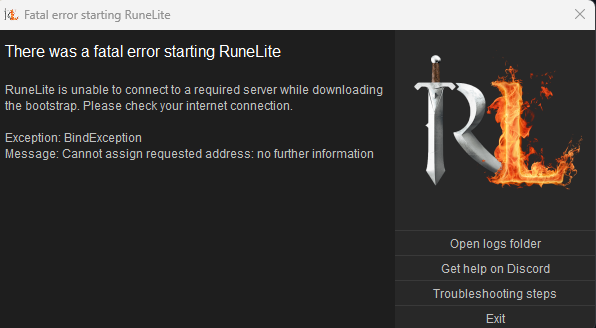


 empty minnow
Are you in Germany by chance?
fierce vortex
Texas, USA
empty minnow
Nvm then
leaden trail
fierce vortex
I'm having an issue after changing out my motherboard and reinstalling windows. ...
This is usually a firewall/AV thing I believe
So disabling your firewall is the right direction
keen scarab
aaaaand its down for me again
fierce vortex
I have tried adding it to the allowed programs and disabling my firewall completely. Ill try again in case I did something wrong.
 loud sequoia
Please let me know if you find a solution, I have the same problem here ... and yes I am in Germany, why does that matter?
loud sequoia
Was working fine until like 2-3 hours ago. But ok, then I just wait.
vocal vector
Using a VPN works for me
loud sequoia
Also makes sense since I also have trouble logging into League of Legends right now ^^
solid mesa
Well it isn't just you
 loud sequoia
Thanks guys, was just worried since I never got a problem like this before and I tried everything ^^
 polar breach
Hey guys I want to remove this overlay and i have no idea where it is. I set it up for bingo but now I cannot find where to disable it. This is not clan events plugin either...

 meager urchin
I got the fatal error too and I'm in germany
restarting pc didnt help
only thing that worked was resetting my wifi router
keen scarab
for me its working again
hollow olive
polar breach
Hey guys I want to remove this overlay and i have no idea where it is. I set it ...
ask your clan what that is then?
lyric karma
Its working again
loud sequoia
yep same here :D
fierce vortex
No luck here. I think ill have to reinstall windows. Will update after.
 fathom prairie
Seems like my default 'Timers & Buffs' plugin is missing. I must have uninstalled it by accident. How do I reinstall it?
empty minnow
It's a known issue, you can try restarting a bunch and it might reappear
fathom prairie
Okay, thanks! (Edit: worked on the first restart)
low rapids
im looking through the settings in entity hider and random events and i was wondering if its possible to hide all random events from other players but not your own?*
or is this the limit
 empty minnow
The entity hider one only hides other players
low rapids
oh the phrasing is ambiguous but thats cool, thank you
empty minnow
Yeah I never remember if that's true or not but the wiki mentions it's only yours https://github.com/runelite/runelite/wiki/Entity-Hider#16-hide-random-events

GitHub
Open source Old School RuneScape client. Contribute to runelite/runelite development by creating an account on GitHub.
low rapids
fair enough, thanks again. ill have to start using the wiki more often
gilded kayak
empty minnow
It's a known issue, you can try restarting a bunch and it might reappear
Adam reverted the release so a single restart back a version will resolve it
fierce vortex
fierce vortex
I'm having an issue after changing out my motherboard and reinstalling windows. ...
Reinstalling windows worked. My best guess is that something I restored to my drive caused conflict.
 terse zodiac
my account was hijacked and iv put in more than 1 ticket but no answer......
what do i do
credit card is on file
still paying for gold
 hot oasis
not spam every channel, and this is not jagex support. we can't help you
 hard fern
my timer for antifire and divine pots went away today on lg in any help getting those timers back up ive tried a few things
leaden trail
Restart your client
gilded kayak
WHEN IN DOUBT
hard fern
thank you!!! @leaden trail
gilded kayak
TURN IT OFF AND ON AGAIN
hard fern
i thought i did but i guess not'
gilded kayak
we reversed the thing that broke it like 5 hours ago
so if u restarted then thats probably why
hard fern
ahhh gotcha ty!!
yeah that was it most likely
it was around that time i restarted it last
 sonic birch
uninstall the shitty gimp plugin first
second of all, your are ooming
one of your plugins, potentially that crappy gimp plugin, is problematic
alternatively you might need to increase available heap if it's not a plugin leaking memory
 rocky temple
okay plugin is gone now but yeah I was wondering how i was out of memory
how would I increase available heap?
also its not every toa just did 4 b4 crashing
sonic birch
!config
haughty pumiceBOT
sonic birch
yeah, one of your plugins probs keeps using more and more memory till you hit the heap limit
if you still crash after the heap size been upped to e.g. 2g, let us know and we'll tell you how to get a heap dump
rocky temple
im thinking its a different plugin, bc my group members have that same plugin and it doesn't happen to them
okay sounds good, thank you very much
 red fox
suggestion : corner true tiles + normal tiles combined
colors .

 lavish geyser
Anyone else notice their Fullscreen shortcut key doesn't work after some time? I always have to re-launch RuneLite to fix it.
stone parcel
Are you talking about for the "Fullscreen" hub plugin?
lavish geyser
stone parcel
Are you talking about for the "Fullscreen" hub plugin?
ya
stone parcel
Hmmmm I don't see anything in the their open issues about something like that.
haughty pumiceBOT
Get support for the Fullscreen Plugin Hub plugin here: https://runelite.net/plugin-hub/show/fullscreen.
You can also find the support link by searching for the plugin in the Plugin Hub panel and clicking the ? button on the plugin, or by right-clicking the plugin in the plugin panel and clicking the Support menu option.
lavish geyser
hm
 hidden pulsar
hey so i recently returned to osrs and runelite seemed to have created a new profile for the same account. How do i access the old profile so i can restore my loot tracker in runelite?
 hidden pulsar
no way to combine the data?
gilded kayak
no