#support
1 messages · Page 98 of 1
 sick anvil
 pale zephyr
anyone know why I can't left click "wear" with an amulet of glory. I have reset the options but the default resets it back to rub. I can change the shift left click option to wear, btu the left click options oonly show rub, drop, and use, no wear option.
 hollow olive
that one
 pale zephyr
Thank you!
 bold sierra
anyone else try logging in today and runelite is frozen with black screen after clicking login? i've already tried logging in with safe mode which doesn't work but it works with the official client
 round jacinth
If it works in safe mode but not without them you have a hub plugin or the GPU causing the issue
 haughty pumiceBOT
@bold sierra Please refer to this flowchart for further troubleshooting.
 buoyant robin
Is there a way to see the order you installed plugins?
Having an issue where my chat is always not scrolled down to the last message (as in every time a message gets posted, I have to scroll down once in chat to see it), and figured I could start by disabling the most recent plugins I've installed.
It's an issue that started the past couple hours, even though it's been probably a week since the last time I installed a plugin so I'm not sure 🤷
 zealous cedar
The log file would show when they are installed
 sly sigil
did something happen to the party plugin not showing party members on the map anymore?
 autumn stirrup
I have this strange issue with RuneLite Jar version on KDE Wayland, where if it's the first thing I open after boot, no other sound is working until i close RunelIte. It's like it's blocked.
If I open RuneLite after opening another program has emitted sounds, RuneLite doesn't have any sound, and I don't see it in my volume controls.
Sounds familiar to anyone?
 buoyant robin
zealous cedar
The log file would show when they are installed
buoyant robin
zealous cedar
The log file would show when they are installed
While I didn't find exactly that, while looking at my client.log I'm see a significant amount of:
2025-07-19 06:39:54 EDT [Client] WARN c.g.c.r.p.a.detect.ChatboxDetector - [*] Unhandled chatbox action
Knowing nothing I'd assume since I'm having issues with my chatbox, this could be the issue? How can I diagnose what plugin is causing it from here though 😬
zealous cedar
itl say "Loading external plugin" when you install it (but it might say that also on bootup so maybe its not so helpful)
bold sierra
haughty pumice
<@1141188428386545709> Please refer to [this flowchart](<https://raw.githubuserc...
for whatever it's worth, the client was working for me yesterday
autumn stirrup
autumn stirrup
I have this strange issue with RuneLite Jar version on KDE Wayland, where if it'...
turns out it was this: https://github.com/runelite/runelite/issues/3525
when i recompiled pipewire with pipewire-alsa enabled, it worked

GitHub
When I start Runelite before any other application, it locks my sound devices. Because of this, I can't play youtube videos, vlc can't output sound, ... I always have to make sure that eith...
 empty minnow
@buoyant robin do you have Clean Chat installed?
Ah looking at your log you do, that's probably it. I made an update recently and looks like it broke some scrolling stuff
haughty pumiceBOT
To find the logs, you can do one of the following:
- If your client failed to open, click the
Open logs folderbutton. - Open the screenshot directory by right-clicking 📷
Camerabutton, navigate 1 directory up, then open logs folder. - Navigate to
%userprofile%\.runelite\logson Windows or$HOME/.runelite/logson Linux and macOS.
Upload the log files named client and launcher by dragging them to Discord. If there are files prefixed with jvm_crash dated from today, upload them too.
buoyant robin
empty minnow
Ah looking at your log you do, that's probably it. I made an update recently and...
Could this also be related to it? Would show up like this when I relogin but quickly goes away so I never was too bothered by it.

 ivory socket
482 world soulware both activet any person visit 482 world
 final axle
empty minnow
buoyant robin
Could this also be related to it? Would show up like this when I relogin but qui...
final axle
empty minnow
buoyant robin
Could this also be related to it? Would show up like this when I relogin but qui...
Yep aware of that bug as well
 old sluice
I have extended map loading on gpu plugin set to 5, it does render further, but then I need to get super close for it to render next 5, ykwim?
Like I need to get within certain range for it to load the 5 next chunks, and there is a lag/second of freeze when its loading
old sluice
zealous cedar
yeah you need to get within 6 zones
that's an issue for me when going to chaos altar, you don't get in range to see pkers and they will see you first
and the lag/freeze messes up a lot of hallowed sepulchre runs
is there a fix?
zealous cedar
it doesnt lag/freeze for me
the distance you can see other players is unrelated to extended map loading
 drowsy parcel
why am i able to log into osrs on every device but not when i try logging on through Runelite? its my first time playing osrs and my friend doesnt know how to help.
 gilded kayak
drowsy parcel
why am i able to log into osrs on every device but not when i try logging on thr...
gilded kayak
drowsy parcel
why am i able to log into osrs on every device but not when i try logging on thr...
because you have a very new account, and the new account system cannot use the in-game login that RuneLite uses*
you need to install the Jagex Launcher and use that to start RuneLite
inside the Jagex launcher, above the play button, says Official Client but that's a dropdown menu, click it and select RuneLite
gilded kayak
it's not really user friendly but once u learn it it's pretty alright
 coarse hedge
I'm having an issue with plugins loading on startup. My designated profile loads, but it's all the default plugins. When I go to the download tab for RL plugins, it shows I have my plugins downloaded; however, they do not show in my downloaded plugins when I search for them. I've restarted the launcher multiple times, as well as my computer, but nothing seems to be working. Any suggestions?
haughty pumiceBOT
Delete your %userprofile%/.runelite/cache folder or run this command in command prompt run as Administrator:
rmdir /s "%userprofile%\.runelite\cache"
 thick panther
do that
coarse hedge
Will do!
coarse hedge
haughty pumice
Delete your `%userprofile%/.runelite/cache` folder or run this command in comman...
Awesome! That was the fix. I appreciate your help!
zealous cedar
can the next person that that happens to give me their okhttp cache first
thick panther
can update the command to have em zip it and send it to you first
 ornate kite
does the "trust this computer" NOT work on the runelite client or is it another source? It only trusts my computer for 1 hour
 gilded kayak
it works it's a uh
its just some issue that happens to people sometimes
we used to have a command to tell you to delete a folder, and then auth all your accounts 1 at a time
i don't remember what folder it was off the top of my head tho
zealous cedar
that was due to a bug which was fixed like over a year ago
gilded kayak
hmm
 violet ingot
anyone have the issue where quest helper wont show up
gilded kayak
maybe, does it show up as installed in the  tab
tab
violet ingot
yes
gilded kayak
ok
i think i know the reason, and we'd like to look into fixing it but we'll need some help from you if that's alright
violet ingot
it just gives me the option to remove it
gilded kayak
yes yes
violet ingot
but okay
gilded kayak
are you on windows 10 or 11
violet ingot
11
gilded kayak
kk, can you open file explorer and at the top where it says Home, copy paste this in
%userprofile%\.runelite\logs
and then drag the client file with NO date in the name, into here
violet ingot
into where?
gilded kayak
just here
this channel is fine unless your windows username is all your personal info
then you could dm it to @haughty pumice instaed
violet ingot
yeah is there another way where im not sharing personal info
gilded kayak
the only personal info in that file is your windows username
but i would not be able to verify your problem without it
gilded kayak
yes this is the problem I thought it was
we want to try and fix this problem, but we need the broken cache folder from someone
I'd like to give you instructions to send it to us, but it's larger than the discord upload limit, so you'd need to upload it to google drive maybe, if you were alright with that
unless you have discord nitro and have the badge hidden somehow
violet ingot
no how can i upload
gilded kayak
no like you don't want to, or no like you want to?
gilded kayak
oh yes I see
violet ingot
i appreciate your help
gilded kayak
close runelite
open file explorer
replace the top bar where it says Home with %userprofile%\.runelite\cache and enter
right-click the okhttp folder and click compress to -> ZIP File and it should just make a okhttp zip
can you do this
violet ingot
done
gilded kayak
can you upload that okhttp.zip here <redacted> it's a professional friends uploader i'm going to use for this xd
and send the link
oh wait maybe it doesn't accept zips shit
i thought it did
uhhhhh
grrr why is discord so restrictive
violet ingot
yea cant upload file type
gilded kayak
ya i was confusing 2 different peoples uploaders, one that's not longer available accepted any file type
violet ingot
sooooo
gilded kayak
gimmie a quick sec to think of something
could you post it to google drive and send us the link via @haughty pumice https://drive.google.com
this issue is sudden and very fucking annoying so we'd like to try to get it fixed automatically for everyone else
violet ingot
yeah im working on it geez
gilded kayak
i wasn't trying to rush you
i just was making sure you weren't worried about doing it
can you make the link public
when you generate the shareable link, can you make it Anyone with the link can view
tyvm
if you delete both the okhttp folders that you have now, your issue will go away and the plugin should load again
violet ingot
ok lets see if it wokred
gilded kayak
you have the correct error so it definitely should work
violet ingot
your a wizard harry
gilded kayak
thank you for the help, this issue just magically appeared and we want to fix it for everyone else automatically
violet ingot
did i help at all with that?
gilded kayak
yes sending us the broken folder is exactly the help we need
because it's not broken for us
violet ingot
perfect how can i donate
gilded kayak
!patreon
haughty pumiceBOT
If you are looking to support RuneLite, you can do so through our Patreon: https://www.patreon.com/runelite
violet ingot
cool i thank you for your help
 ornate pecan
Heya! So within the last hour, suddenly none of my plugins work. No changes to files, only thing that happened was PC went to sleep. You can see them listed in the plugins, but even manually reinstalling them doesn't make them show up in sidebar or config. Reinstalled Runelite itself, restarted pc, imported profile again, no luck. Any other suggestions?
gilded kayak
can you go to %userprofile%\.runelite\logs and drag the client file with NO date in the name, into this channel
ornate pecan
gilded kayak
zealous cedar
can the next person that that happens to give me their okhttp cache first
adam only asked for 1 persons okhttp folder but a second one isn't going to kill us
ornate pecan
Oh, I feel special. Sent!
gilded kayak
ty, if you delete both those okhttp folders your issue wil go away
ornate pecan
neat! that did it! haha
gilded kayak
yeah caching is really fun
works perfectly for SEVEN YEARS
suddenly there's a problem
 gritty void
should’ve used goodhttp instead of okhttp
gilded kayak
indeed
 leaden trail
betterhttp when?
ornate pecan
Regardless, thank yall for being awesome! Fastest fix ever.
gilded kayak
the patreon setting "dont auto join discords I subbed to" applies to discords you are already in
which is fucking hilarious
thick panther
gilded kayak
monthly trolled by the patreon bot is very funny
Wait it's gonna do that every month?
gilded kayak
no
i think it just does it the one time
unless u manually resub every month
then I guess it might
 narrow ginkgo
i have a question, my runelite and all the plug-ins decided to reset themselves right, well i have screenshots of my plugins and am trying to reinstall them but when i go to install it will say downloading and then say installed but when i go back to my plugin area the one i installed isnt there and theres no way to change settings
ive reinstalled runelite and even redownloaded the jagex launcher and the problem is still persisting
any info on what i can do to get my plugins redone? i cant even download quest helper LOL
leaden trail
Scroll up a couple messages
narrow ginkgo
imma be honest idk what any of that means, im not super tech savy
gilded kayak
close runelite
open file explorer and at the top copy paste in ```
%userprofile%.runelite\cache
delete the okhttp folder, open runelite again
 steel aurora
Had same issue, deleting folder fixed.
narrow ginkgo
never had this issue before used runelite since before the laucher figured i was screwed haha, thanks i appriciate it time to spend hours on plugin settings
 stone parcel
!lost if settings are missing too.
haughty pumiceBOT
 neat turret
enabling the gpu plug in black screens my OBS...any one know what I can do?
 coarse dome
welp. if you're using steel series sonar GG. Don't update the 90. version... It wouldn't recognize runelite sounds. at least for me
old sluice
zealous cedar
the distance you can see other players is unrelated to extended map loading
Sure, but the fact that it freezes for 1-2 seconds when loading next chunk(s) for me and not for the stationary pker standing at chaos altar gives them a huge advantage
zealous cedar
i guess. as it said it doesnt freeze for me
old sluice
zealous cedar
i guess. as it said it doesnt freeze for me
how is that helpful to me?
old sluice
neat turret
enabling the gpu plug in black screens my OBS...any one know what I can do?
it doesn't blackscreen obs for me
is this a good answer?
leaden trail
I think you want to change your capture type
I just can't recall offhand which one is the one that works
thick panther
leaden trail
I just can't recall offhand which one is the one that works
Yea I think game capture doesn't work well, think you have to select the exe itself
 pastel marlin
anyone else getting crashed after an hour
thick panther
no
 haughty minnow
why does my visual metronome not disappear during instances when the screen goes black (for eg after yama judge to yama)
 sonic birch
!hubs
haughty pumiceBOT
hubsupport: Support for hub plugins should be directed to the author of the plugin. You can find the support link by searching for the plugin in the Plugin Hub panel and clicking the ? button on the plugin, or by right-clicking the plugin in the plugin panel and clicking the Support menu option.
haughty minnow
is there a way to make it disappear during change of instances
sonic birch
it is a hub plugin, see the message above
we do/did not create, maintain, or quality control it
 silk lotus
Hey guys so i bought a new laptop and set it up with the jagex and runelite launchers, but all my plugins didnt convert with the account? Anyone know how to get them over to the new laptop?
Also the wife has wiped the old laptop already so no files are on there if thats what i needed 😪 cheers
 fresh herald
Hello, a bit of a weird one. The plugin hub shows all the plugins I have added but the configuration doesn't have any of them. I've tried reloading, changing profile etc and nothing seems to be working.
Any suggestions? Thanks in advance

 fresh herald
silk lotus
Hey guys so i bought a new laptop and set it up with the jagex and runelite laun...
fresh herald
silk lotus
Hey guys so i bought a new laptop and set it up with the jagex and runelite laun...
If you still have the old laptop you can export the profile and email it to yourself then import it on the new laptop
 mossy swan
fresh herald
Hello, a bit of a weird one. The plugin hub shows all the plugins I have added b...
mossy swan
silk lotus
Hey guys so i bought a new laptop and set it up with the jagex and runelite laun...
mossy swan
fresh herald
Hello, a bit of a weird one. The plugin hub shows all the plugins I have added b...
mossy swan
silk lotus
Hey guys so i bought a new laptop and set it up with the jagex and runelite laun...
if you didnt enable cloud sync for your profiles, and the laptop is wiped, you're out of luck
sonic birch
Do make sure to double check if you're on the right profile though
 hearty cloak
Is it best to play with gpu plugin vsync off, on, or adaptive. Also should nvidia control panel vsync be off? Monitor vsync off? I seem to be getting weird stutters every maybe 20 seconds in intense visual pvm. Ex: xarpus, duke, olm
round jacinth
Try what works for you? If you turn both off, youd know if the stutter is from vsync or not.
 ebon crescent
anyone else's world switcher tab not loading?
 mossy swan
ebon crescent
anyone else's world switcher tab not loading?
mossy swan
ebon crescent
anyone else's world switcher tab not loading?
!logs
haughty pumiceBOT
To find the logs, you can do one of the following:
- If your client failed to open, click the
Open logs folderbutton. - Open the screenshot directory by right-clicking 📷
Camerabutton, navigate 1 directory up, then open logs folder. - Navigate to
%userprofile%\.runelite\logson Windows or$HOME/.runelite/logson Linux and macOS.
Upload the log files named client and launcher by dragging them to Discord. If there are files prefixed with jvm_crash dated from today, upload them too.
 earnest plinth
Hi, anyone gotten this before?
2025-07-20 14:58:25 [main] ERROR net.runelite.launcher.Launcher - error fetching bootstrap
javax.net.ssl.SSLHandshakeException: PKIX path validation failed: java.security.cert.CertPathValidatorException: validity check failed
mossy swan
ebon crescent
hmm not sure, maybe just restarting will help? i assume its a connection issue to rl server to load the list, but i dont see an error about it
earnest plinth
The time was not correct on my computer, wich caused the error... Weird exception message for such a thing...
leaden trail
The launcher window usually tells you that's what the problem is with that error
 low jetty
stone parcel
low jetty
stone parcel
If it's the same PKIX thing, you can check if your system clock is correct.
 short locust
can someone help me log into runelite on a new account with the jagex launcher? when i hit play in the jagex launcher with runelite and the account selected, RL loads but it looks normal and has the new account or existing account options...... not the play button to log into this new account
round jacinth
Don’t launch jagex launcher as admin
ebon crescent
mossy swan
hmm not sure, maybe just restarting will help? i assume its a connection issue t...
hmmm ok ty
 fringe token
can bank tags be turned fuzzy selectively? I have jewelry that I want to fuzz a slot. Full charged jewelry in one slot, semi-charged in a second, and empty in a third.
I am currently solving it like this:

But if I don't have the exact slot, it won't appear, and if the slot is empty and I drop a charge that doesn't exist, it overwrites an empty slot instead of making a new one
Ie, I have slayer ring 8,6,2 at the bottom. My slayer ring (7) doesn't show up, but if I drop it into the tag, it will overwrite (6)
I want to be able to fuzz Slayer rings (1-7) into a single slot, and (8) into a separate one.
 random forge
RuneLite was unable to verify the certificate of a required server while downloading the bootstrap. Check your system clock is correct.
Exception: CertificateNotYetValidException
Message: NotBefore: Sun Jul 20 10:03:33 BST 2025
anyone know how to sort this?
 oblique plume
Fix your computer clock
round jacinth
fringe token
I want to be able to fuzz Slayer rings (1-7) into a single slot, and (8) into a ...
1-7 are different items so they won’t share one slot I think
random forge
oblique plume
Fix your computer clock
my computer clock is accurate to todays date/time unless it needs to not be GMT
oblique plume
What time is it
random forge
15:48 gmt
round jacinth
no just turn off auto time and turn it back on to auto get time again
oblique plume
That says its before 10
random forge
found the issue, security system has been a dick and blocked some CPU drivers which have caused some other issues, all good now, thanks
 mighty patio
Im having an issue where non of my Plugins show up at all on my accounts
 zealous zodiac
 empty minnow
Make sure your time is correct
 lyric badger
if i try to switch to a fresh 9brand new) profile from my exsisting, my client freezes and i can't do anything. how can i fix that so i can make a new profile?
stone parcel
Maybe safe mode could help.
haughty pumiceBOT
To enable safemode
Windows
Run the RuneLite (configure) shortcut from the windows start menu
Tick the Safe mode box, save, launch RuneLite the way you normally do.
Mac
In Terminal, run
/Applications/RuneLite.app/Contents/MacOS/RuneLite --configure
Tick the Safe mode box, save, launch RuneLite the way you normally do.
leaden trail
Do you have task tracker installed? I think I remember that causing issues on profile changes
If you post your logs I can take a look
haughty pumiceBOT
@lyric badger To find the logs, you can do one of the following:
- If your client failed to open, click the
Open logs folderbutton. - Open the screenshot directory by right-clicking 📷
Camerabutton, navigate 1 directory up, then open logs folder. - Navigate to
%userprofile%\.runelite\logson Windows or$HOME/.runelite/logson Linux and macOS.
Upload the log files named client and launcher by dragging them to Discord. If there are files prefixed with jvm_crash dated from today, upload them too.
 wary ice
Does anyone know why my plugins aren't appearing/usable?
https://i.imgur.com/u3dsxxH.png
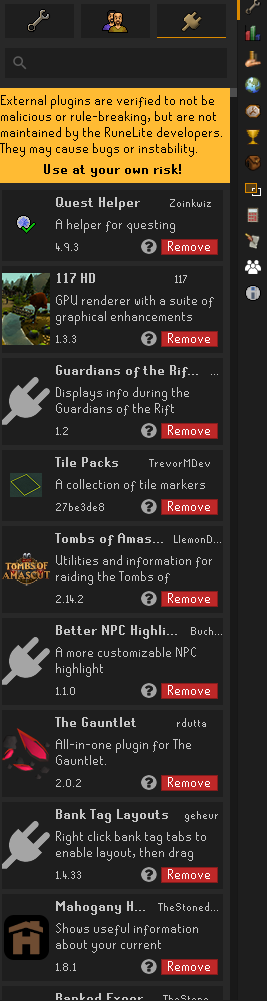
I've done all the troubleshooting I could think of
haughty pumiceBOT
Delete your %userprofile%/.runelite/cache folder or run this command in command prompt run as Administrator:
rmdir /s "%userprofile%\.runelite\cache"
Is it because my user profiles are not in the runelite folder?
wary ice
haughty pumice
Delete your `%userprofile%/.runelite/cache` folder or run this command in comman...

 solid mesa
You need to close runelite first
 cold mural
got kind of a weird problem where animations for specifically dt2 bosses kinda stutter then throw multiple animations at once
not really sure what causes it or where id start to fix it
leaden trail
It's probably because the Shadow's attack animation is blocked from being smoothed by animation smoothing since it's broken
cold mural
im not using animation smoothing
i tried using a fresh runelite account and still had the same issues
leaden trail
Make a fresh profile without adding any plugins to that and try then
cold mural
I did, still same issue
leaden trail
Ah you said account so I wasn't sure
cold mural
ah yea mb, i made a fresh new profile not new account
 viral grotto
haughty pumice
Delete your `%userprofile%/.runelite/cache` folder or run this command in comman...
viral grotto
haughty pumice
Delete your `%userprofile%/.runelite/cache` folder or run this command in comman...
was just having this same problem! ty for the help!
 strong urchin
Hello. When I try logging in, it says "Too many login attempts. You can use the Jagex Launcher to continue playing."
I'm already using Jagex Launcher and I can login to the other characters on the account. Just not this particular character. I can also access the other characters page on the OSRS website, but when I click on my Iron character, it says "Incorrect password."
Any advice?
 solid mesa
Have you been world hopping a lot?
final axle
Or maybe login spamming themselves with their bot client 🙂
ebon crescent
😳
 worldly brook
when playing in modern resizable, is there a way to prevent the tab window to minimize when pressing the same f-key more than once?
 mortal pond
disable this in the in-game settings

 cedar reef
any reason when i open runelite all my plugs aren't working but last night they were?
gilded kayak
i mean that's a weird way of wording it, yes there's probably a reason
close RuneLite, try going to the %userprofile%\.runelite\cache folder (you can copy paste it into file explorer) and delete the okhttp folder in there
gritty void
do you run multiple runelite instances at the same time?
cedar reef
gritty void
do you run multiple runelite instances at the same time?
no i dont but for some weird reason the boarder around my games also showing up white aswell last night it was black
like this thing
 haughty pumiceBOT
oblique plume
haughty pumiceBOT
oblique plume
Sounds like this then
haughty pumiceBOT
How to develop plugin-hub plugins: https://github.com/runelite/plugin-hub/blob/master/README.md
 ornate verge
guys
i run runelite through jagex launcher
i have my main account open and its got all my plugins and stuff
i then realise on my alt account when i go to do a quest that quest helper plugin isnt there, and neither is any of my normal plugins that i have installed from the plugin hub. i close and open new client and its the same, now reset pc and no plugins are still showing up. If i go into the plugin hub it says theyre all installed, but nowhere to be found like on the sidebar or the configuration tab
please someone help before i tweak the fuck out
haughty pumiceBOT
Delete your %userprofile%/.runelite/cache folder or run this command in command prompt run as Administrator:
rmdir /s "%userprofile%\.runelite\cache"
Go to there and delete the okhttp folder while your client is closed
gilded kayak
yes
your issue will be resolved
try to do it 1 client at a time tho
i assume you usually do all your clients immediately?
ornate verge
holy fucking shit
gilded kayak
like play, swap, play swap, play
ornate verge
gilded kayak
like play, swap, play swap, play
wdym?
gilded kayak
when you open RuneLite for your main and alt, do you do them at the same time
ornate verge
yeah i use the jagex launcher and just like press play on both accounts quick
 fresh sluice
i am attempting to use the 117 plugin (same thing happens for gpu plugin) and i get the following:

however my gpu does support opengl4.3:


but it looks like runelite is defaulting to the generic software renderer? the 1.1 GDI one
im not sure how runelite reads the available gpus, ie via registry value or something
 fossil summit
llvm mesa is a software renderer and isn't in their list of fallback gpus when detecting a gpu
you wouldn't want that to run those plugins anyways
I dont think gpu passthrough exists for apple silicon also
fresh sluice
is there a way to force to use the vmware renderer instead of the 1.1.0 default one? via config.json or something
fossil summit
yes but if you have to ask how it's most likely not in your realm of possibility
fresh sluice
i have tried adding to here:

"-Dsun.java2d.opengl=true",
"-Dsun.java2d.d3d=false",
"-Dprism.forceGPU=true" in addition, but that doesnt work either
fossil summit
none of that will work because you don't have a gpu, llvm is a fallback, java2d isnt making the context also, rlgpu lwjgl isnt detecting llvm and 117hd doesnt have it in the fallback list, you'd have to fork one or the other and mess around and if you did get it to work, it would run like ass
fresh sluice
ultimately here:
log.info("Using device: {}", GL43C.glGetString(GL43C.GL_RENDERER));

GitHub
Open source Old School RuneScape client. Contribute to runelite/runelite development by creating an account on GitHub.
 unreal sun
when ever i try to do !lvl or !cmb it says negtive stats or unranked
fresh sluice
its not detecting the svga 3d renderer and falling back to 1.1 gdi
unreal sun
fresh sluice
its not detecting the svga 3d renderer and falling back to 1.1 gdi
is tht to me?
fresh sluice
no


 charred wind
What are your stats
You have to be in like the top 2 million to be on the hiscores and I think that’s where it pulls this info from
solid mesa
They aren't ranked
 charred wind
Yeah their photographs seemed to indicate that
unreal sun
Oh
 coarse nebula
Monring all, ive loggin in this morning and my pluggins arent showing on the right hand side ivve logged in and out, restarted my computer, re installed rune lite.
Some pluggins must be working such as loot tracker etc though. (it isnt pulling the GE prices though)
 haughty pumiceBOT
Delete your %userprofile%/.runelite/cache folder or run this command in command prompt run as Administrator:
rmdir /s "%userprofile%\.runelite\cache"
perfect thank you
 young hare
hey good morning i've been using custom menu swaps for blast furnace all i want to do is fill coal bag when im at the bank and empty it without using shift click just left click what do i have to type in the plugin?

 fair ember
when i log in, i cant switch worlds manually and the same happens in game, just says loading... and never loads. i also cant view hiscores anymore, which ive never had an issue with either of these for years, any ideas?
 twin minnow
i have changed my name on the rs website when i log into runelite its my normal old name and account but when i log in on the launcher or website its the name i changed it too and a brand new non member account but im using the same email to log into everything
mossy swan
i guess you made a new jagex account instead of converting your old account to a jagex account
charred wind
young hare
hey good morning i've been using custom menu swaps for blast furnace all i want ...
Shift right click the coal bag while in these two places and set your preference accordingly - the bank and outside the bank are different iirc
 final anvil
hello, i wanted to know if any else is experiencing a bug where instead of placeholders on the bank, it puts the option of withdraw all but 1 and how to fix it?
 bitter condor
Is the name that is up here in the RuneLite window always equal to the name of the account that is logged in currently?
Asking due to bingo and ppl post drops with chatbox closed and they refer to the name up here is always correct. Can any of you runelite knowledge-able persons confirm this? 🙂
 bitter condor
oblique plume
yes
bitter condor
oblique plume
yes
Ty 🙂
haughty pumiceBOT
Support for hub plugins should be directed to the author of the plugin.
You can find the support link by searching for the plugin in the Plugin Hub panel and clicking the ? button on the plugin, or by right-clicking the plugin in the plugin panel and clicking the Support menu option.
 neon basin
i am told that to remove the (GE: x) (HA: x) things next to ground items i should go to the ground items plugin, but theres just no option to do that in it
 paper rune
 neon basin
oh. im blind, sorry. thank you
paper rune
You're welcome
 sullen mesa
hi, i'm getting this error, first time installing runelite on mac, no firewall active
 haughty pumiceBOT
Run in Terminal: sudo rm -rf /var/root/.mitmproxy. Enter your Mac password and then press enter. You may have to reboot after.
leaden trail
Try that maybe?
oblique plume
i dont think its that but i suppose it could be
haughty pumiceBOT
To find the logs, you can do one of the following:
- If your client failed to open, click the
Open logs folderbutton. - Open the screenshot directory by right-clicking 📷
Camerabutton, navigate 1 directory up, then open logs folder. - Navigate to
%userprofile%\.runelite\logson Windows or$HOME/.runelite/logson Linux and macOS.
Upload the log files named client and launcher by dragging them to Discord. If there are files prefixed with jvm_crash dated from today, upload them too.
oblique plume
that would help us tell
leaden trail
It's been so long I forget how that manifests
leaden trail
Ah
sullen mesa
sullen mesa
hi, i'm getting this error, first time installing runelite on mac, no firewall a...
no crash files
oblique plume
nothings even logged
sullen mesa
i suspect its because im forced to use a http/https proxy on this machine, but idk how this works in regards to connecting to runelite.... other games work normally
oblique plume
your error says it cant connect to the game not RL
oblique plume
i feel like thyre going to see this "im forced to use a http/https proxy on this machine" and just go yep sounds like the problem, turn it off
zealous cedar
the game doesnt use http/https so if you can only use an http proxy that probably wont work well
sullen mesa
turning it off isn't an option, but i'll see if there's a workaround i guess
 native lotus
hello gamers, if im getting a note in my build output stating that im using depreciated gradle features, do i need to change them to be compatible with gradle 9?
round jacinth
this channel is for support with release, not how to develop hub plugins... just follow the build guide and make sure the example provided builds
haughty pumiceBOT
How to develop plugin-hub plugins: https://github.com/runelite/plugin-hub/blob/master/README.md
native lotus
is there a place where i can ask questions like these so im not yapping in the wrong place?
thank you
native lotus
damn, sorry. i thought it was the other way around. thanks guys
 tawny vale
Getting back into the game after a few years and Runelite no longer likes my setup. Wants HW Acceleration off, which works fine for the CLI argument. But, when going through the Jagex launcher it doesn’t keep the argument, I saw that this should be fixed by using the config manager to set the argument so that the Jagex Launcher can do the same. But, when I open the config manager, I get the same white screen that I need the HW Acceleration change to fix and I can’t interact at all with the manager. Any fix for that, or am I just unable to use RL?
Have tried running with and without admin. Full reinstall after removing app, folders and registry entries. Applying the HW line to the config launch. Ran in every compatibility mode. Not sure what else to do.
zealous cedar
wow that is odd, ive never heard of the configure ui not working due to hw accel before
tawny vale
Yeah, it’s very strange and I can find no other mention of it online. Just opens the blank white box that HW fixed for the regular launcher.
oblique plume
so the reg client is also some white box
tawny vale
it was until doing “—hw-accel=OFF”
haughty pumiceBOT
To find the logs, you can do one of the following:
- If your client failed to open, click the
Open logs folderbutton. - Open the screenshot directory by right-clicking 📷
Camerabutton, navigate 1 directory up, then open logs folder. - Navigate to
%userprofile%\.runelite\logson Windows or$HOME/.runelite/logson Linux and macOS.
Upload the log files named client and launcher by dragging them to Discord. If there are files prefixed with jvm_crash dated from today, upload them too.
zealous cedar
you could edit %localappdata%\runelite\settings.json and change the "hardwareAccelerationMode":"AUTO" to "hardwareAccelerationMode":"OFF" I guess
typically hw accel doesnt cause a white screen, it causes a bunch of artifacting
so that is weird
round jacinth
thats what i was working on suggesting but wanted to make sure it was fine
tawny vale
10-4. Yeah; the whole thing was very strange. I’ll give that a shot.
 half minnow
there is a guy in my clan that his plugins that he has installed doesn't show up on his sidebar but they are all installed, his profile is loaded, he restarted his pc and re-downloaded rl and it's still not showing his plugins on the sidebar, anyone with a similar issue?
haughty pumiceBOT
Delete your %userprofile%/.runelite/cache folder or run this command in command prompt run as Administrator:
rmdir /s "%userprofile%\.runelite\cache"
 mossy mesa
half minnow
there is a guy in my clan that his plugins that he has installed doesn't show up...
mossy mesa
half minnow
there is a guy in my clan that his plugins that he has installed doesn't show up...
I'm the one with the problem, it seems to be linked with the external plugins only. When I look in the external plugins tab they are installed, but when I check the RL settings I do not see them.
stone parcel
Hello and welcome! Try that thing above your message.
leaden trail
Just delete the okhttp folder in there, really
mossy mesa
It worked. Thank you very much 🔥
 deft inlet
I just had a power outage and when i loaded runelite my plugins were all gone, I was able to import an older setting from my profiles2 folder, but its still about a year or so old. Any suggestions for a fix?
oblique plume
maybe theres a more recent one you can import
haughty pumiceBOT
 odd osprey
Hello guys, I am having an odd issue . My GE value of drops are not showing despite it being turned on. It only shows HA value.
solid mesa
Try restarting the client. Sometimes ge prices fail to load
oblique plume
that can happen sometimes, you can try just restarting the client
odd osprey
alright noted. ty
deft inlet
I went through the steps and still cant get my most recent profile back. Any extra tips or tricks?
tawny vale
zealous cedar
you could edit `%localappdata%\runelite\settings.json` and change the `"hardware...
Took a look and there is/was no settings.json. There’s config.json, but it is missing the listed settings. Adding them in causes a failure to launch. 🤷♂️
zealous cedar
uhh really
tawny vale
Yep
zealous cedar
what launcher version do you have
tawny vale
1.11.11 according the website
Grabbing from the download page of runelite.net as linked by the Jagex launcher
deft inlet
Actually, this profile is really recent, the only stuff missing is the inventory setups from that plugin.
Is there a way to get them back potentially?
tawny vale
zealous cedar
use this
Trying, now. Really appreciate your help with this.
That fixed it. You're magnificent.
deft inlet
gg, ig my profiles gone XD, a year or so ago isn't that bad ig. just a ton of settings to update.
round jacinth
you maybe just didnt try the right one
screen shot your profiles2 folder ordered by date/size
deft inlet
 round jacinth
looks like your candidates are the 212kb and the 248kb file (tmp file)
I have no clue what the tmp file looks like inside of it but its a tad bit larger than the 212
there also is the 208kb file
are you switching to the imported profile after importing?
deft inlet
yep
 odd grove
Quick question, does anyone know much about how the Jagex Launcher launches RuneLite? does RL have a URI like runelite:// or do they have some generic command line calls to launch it?
I'd like to try and launch RL from a web browser but I can't access generic command line stuff, URI seems like the only thing that would be doable
zealous cedar
there is a runelite:// but the jagex launcher doesnt use it, it just launches runelite.exe
odd grove
Are there any docs on how to call it? neither run box or browser launch it
zealous cedar
runelite-jav://oldschool.runescape.com/jav_config.ws
odd grove
Legend thanks ❤️
I do wonder if there's a way to launch through Jagex launcher to have account association but probably not right?
This project I'm working on is browser based so I'm super limited
zealous cedar
i dont think so
odd grove
Ah thought so, it's only a demo tbf so just launching vanilla RL should be sufficient, many thanks
 unborn glen
Is there any fix or workaround for the RL client crash for macos users?
Using a i9 processor 2019 macbook pro
haughty pumiceBOT
To find the logs, you can do one of the following:
- If your client failed to open, click the
Open logs folderbutton. - Open the screenshot directory by right-clicking 📷
Camerabutton, navigate 1 directory up, then open logs folder. - Navigate to
%userprofile%\.runelite\logson Windows or$HOME/.runelite/logson Linux and macOS.
Upload the log files named client and launcher by dragging them to Discord. If there are files prefixed with jvm_crash dated from today, upload them too.
gilded kayak
also if you post that official Apple™ crash popup, it might say the cause
unborn glen
Memory leak
Ill do that once i get it
charred wind
unborn glen
Memory leak
Ill do that once i get it
Known issue I think. You can try disabling compute shaders in the gpu plugin
gilded kayak
(if it's that issue)
 tough oasis
unborn glen
Is there any fix or workaround for the RL client crash for macos users?
Using a ...
tough oasis
unborn glen
Is there any fix or workaround for the RL client crash for macos users?
Using a ...
Buy a proper pc instead of that apple shit ngl
solid mesa
tough oasis
Buy a proper pc instead of that apple shit ngl
That isn't helpful
unborn glen
tough oasis
Buy a proper pc instead of that apple shit ngl
Consider it yrself
tough oasis
solid mesa
That isn't helpful
I'm just taking the piss. I'm the one who referred him to this place. I'm a mac user as well and have had similar issues, however, what worked for me didn't work for him (or only partially)
unborn glen
charred wind
Known issue I think. You can try disabling compute shaders in the gpu plugin
I’ll try it for now, thanks
 tardy falcon
Is there a resource I can use to view which types of features are and are not allowed for RuneLite plugins? I assume there is something that potential plugin developers can view for this?
unborn glen
mossy swan
apple silicon macs are great
They also struggle from similar issues
Not that great i guess
mossy swan
tardy falcon
Is there a resource I can use to view which types of features are and are not al...
!rejected
haughty pumiceBOT
Some specific features that RuneLite can't currently accept: https://github.com/runelite/runelite/wiki/Rejected-or-Rolled-Back-Features
Jagex's third party client guidelines: https://secure.runescape.com/m=news/third-party-client-guidelines?oldschool=1
Additionally, these features have been rejected or removed from RuneLite: https://github.com/runelite/runelite/wiki/Rejected-or-Rolled-Back-Features
tardy falcon
Tyvm
mossy swan
unborn glen
They also struggle from similar issues
Not that great i guess
dunno mine is rock solid
unborn glen
mossy swan
dunno mine is rock solid
Have u been running rl on it for a while? Or you just started
mossy swan
since i got it like 4 years ago?
unborn glen
Btw it mainly happens when the fps goes down
unborn glen
mossy swan
since i got it like 4 years ago?
Oh ok
tough oasis
mossy swan
dunno mine is rock solid
I have an M1. Works great until I log out and log back in later. Then I get crazy tick lag. I have to restart the client every time I log out. Haven't found a solution/which plugin is at fault
 fossil garnet
On windows 11, when i receive a notification it prevents mouse interaction in the bottom right of my Runelite UI for a few seconds. I have the notification pop-up disabled, but it still prevents me from clicking prayers/inventory for a few seconds. Is there a solution to this?
 fair echo
https://cdn-cf-east.streamable.com/video/mp4/g7uekv.mp4?Expires=1753389960&Signature=iX45-Xpfdo0L~5qPl~MURbGcS5qAJf5hU8SihZAMhkH~zBq~TL4eMsYieh3ObX5B5kjY5j7x6T8kucw9ORhSPeZeCDrPnGaOj3YxKZeUVlJa1xIWxvp0BT13~7W4fP3~QKK6fb6Xz0mih1IxFS8ilocYz-KlwN1v3UNmRlXxND8spF3u5MU01GCgTjCd~H0PBswif7~kwSpcEYo25IFJpxR4luR2hI-xCr8m6rFijBTUXWqM~eMLySToqezaHmvysvyh26~n17rMMwAw~w3a499eUdcBrr68aiCDmf~F-UdX4xl7Q83~7n05S2bDzf3TwJnn4Mc8T3YFSaxq4rgAYw__&Key-Pair-Id=APKAIEYUVEN4EVB2OKEQ @zealous cedar @acoustic island @crisp dune anyone know why this is happening so often
i just get a freeze on runelite dunno why
happens like once or twice a day now before was once a month
haughty pumiceBOT
@fair echo Many plugins from the pluginhub break the client in subtle or not-so-subtle ways, including causing issues like client freezes. We do not support pluginhub plugins because we do not make or quality control them, and do not recommend their use.
Run the RuneLite (safe mode) shortcut, or with a Jagex account, first run the RuneLite (configure) shortcut and tick the Safe mode box, then launch RuneLite via the Jagex launcher.
This temporarily disables the GPU plugin and all hub plugins which will allow you to confirm the issue is caused by one of those plugins and isn't a core RuneLite issue.
If the issue is caused by a hub plugin, you should isolate which plugin it is and then uninstall the plugin.
round jacinth
you do not need to @ admins for this type of issue btw, just state your problem with example as you have and anybody can help you
i can't tell if this is network lag or a hub lag thing, maybe its just network lag
fair echo
doesnt rly seem like internet man
thats not what internet does
doesnt just freeze the client lol
 celest cobalt
anyone knows how this happened or how to fix it?
 oblique plume
Describe this
round jacinth
fair echo
doesnt just freeze the client lol
You jumped locations
Try safe mode if you’re so sure then I guess
celest cobalt
oblique plume
Describe this
the greyed out tiles on the floor
 simple pagoda
fair echo
https://cdn-cf-east.streamable.com/video/mp4/g7uekv.mp4?Expires=1753389960&Signa...
simple pagoda
fair echo
https://cdn-cf-east.streamable.com/video/mp4/g7uekv.mp4?Expires=1753389960&Signa...
I have this exact same problem, nearly always happens when an enemy dies and the model is despawning or something, safe mode didn't fix it for me and I got no further help than that, so I hope you can figure it out lol
oblique plume
There's ground hider hub plugins out there did you install one of those
celest cobalt
lol yes, and its the solution
thanks
id dint change anything in the plugin though
weir
d
final axle
I think there's a hotkey option to quick select tiles to hide, you might have hit that
celest cobalt
ye must have been it, thanks though
 lavish geyser
anyone know why my plugin icons are aligned like that and not going all the way down?
 zealous cedar
I think thats just how it works
lavish geyser
zealous cedar
I think thats just how it works
i have another profile that doesn't do that though
 gilded kayak
it works that way, when you have that many buttons
stone parcel
If you add more it will. You have too many to display in two columns.
gilded kayak
that profile does not have as many buttons
zealous cedar
it depends on how many icons you have and the height of the window
lavish geyser
ah okay i see
 uneven elk
how can i change the font size on runelight, the quest helper guide for me is too small to read
haughty pumiceBOT
solid mesa
Change the scale
 long ruin
anyone know what could cause my game to look like this? restarting the gpu plugin seems to fix it temporarily

im using a fresh install of pop!_os

ive encountered it twice, both times after putting my computer to sleep
zealous cedar
looks like its using the wrong textures
long ruin
zooming into the water causes it to fade to blue underneath
transparent tree leaves were also affected
 uneven elk
solid mesa
Change the scale
uneven elk
solid mesa
Change the scale
got it thanks, shame it cant be full screen above 1.25 scale
 woeful spear
Runelite working fine on my laptop but the Mrs gets this.
I've uninstalled and reinstalled both runelite and the jagex launcher and still no luck
 zealous cedar
Firewall/antivirus maybe?
woeful spear
Don't think so, it was working fine until a few days ago but didn't have the time to deal with it then. Tried to get on today and problems
 tranquil spruce
im having serious issues with my account with everything but bolt launcher with runelite on linux, im wanting to play on windows tho primarily and i cant get any launcher official or 3rd party to let me log in, but i can just fine only on linux with bolt launcher with runelite as i mentioned before
stone parcel
If you can't login to the Jagex Launcher on windows, maybe this discord could help with that:
haughty pumiceBOT
If you are new to OSRS, make sure to follow this excellent guide on OSRS wiki: https://oldschool.runescape.wiki/w/New_player_guide. You can also join the official OSRS Discord here: https://discord.gg/osrs
 stray patrol
my chat keeps scrolling itself up, maybe after a chat filter message is removed. anyone seen that? It started a week or two ago
possibly due to pluygin hub Chat Cleanup/Clean Chat, i'm gonna remove it
 fringe fulcrum
fair echo
https://cdn-cf-east.streamable.com/video/mp4/g7uekv.mp4?Expires=1753389960&Signa...
fringe fulcrum
fair echo
https://cdn-cf-east.streamable.com/video/mp4/g7uekv.mp4?Expires=1753389960&Signa...
looks like a gpu or cpu spike at 100%
 cerulean pagoda
Any ideas why my runelite is changing colors? I have uninstalled and reinstalled 10x. I have tried everything possible. When I hover items it changes colors again


 vital cloud
eeh, i did the player quest in the questhelper, but now i got hopleez instead of the normal guy, how can i reverse this player quest?
mossy swan
vital cloud
eeh, i did the player quest in the questhelper, but now i got hopleez instead of...
!quest
haughty pumiceBOT
questhelper: Visit Zoinkwiz's Quest Helper plugin discord (https://discord.com/invite/XCfwNnz6RB) for support, issues & feedback
 empty hull
Can plugin repositories be in a GitHub organization?
mossy swan
empty hull
Can plugin repositories be in a GitHub organization?
yes?
empty hull
That's what I thought, just wanted to be 100% sure
mossy swan
they are just repos
empty hull
I was sure that they technically could, I just wasn't sure if the process allowed
 midnight patrol
Is there a setting to stop the minimap rotating when you rotate the camera? Like a "minimap lock"
empty hull
Or if it was some internal rule that it had to be on a personal account, maybe for some verification question
mossy swan
midnight patrol
Is there a setting to stop the minimap rotating when you rotate the camera? Like...
no
oblique plume
empty hull
Or if it was some internal rule that it had to be on a personal account, maybe f...
if you use an org you just have to list the gh account youre going to commit with as an author on the manifest since it by default only lets the repo account commit changes
empty hull
In runelite-plugin.properties, right?
oblique plume
no
the file you submit to the hub is the "manifest"
look at 117hds
they have an authors field
oblique plume
cerulean pagoda
Any ideas why my runelite is changing colors? I have uninstalled and reinstalled...
i think this is nvidia HDR
 fallen widget
Hey, just got back on OSRS after a few years. Last time I was on, I had no issues using the GPU plug-in, but it won't let me turn it on now, any reason why?
haughty pumiceBOT
To find the logs, you can do one of the following:
- If your client failed to open, click the
Open logs folderbutton. - Open the screenshot directory by right-clicking 📷
Camerabutton, navigate 1 directory up, then open logs folder. - Navigate to
%userprofile%\.runelite\logson Windows or$HOME/.runelite/logson Linux and macOS.
Upload the log files named client and launcher by dragging them to Discord. If there are files prefixed with jvm_crash dated from today, upload them too.
fallen widget
Where do I find the open logs folder button? Having a hard time locating that
empty minnow
That's only if your client failed to open, do one of the other options
round jacinth
Turn off shaders
leaden trail
fallen widget
There we go, believe those are the proper ones
Do you have a discrete GPU or just integrated graphics?
fallen widget
round jacinth
Turn off shaders
Turn off shaders? Sorry, just got back on Runelite after a long time
fallen widget
leaden trail
Do you have a discrete GPU or just integrated graphics?
Integrated graphics, it's an old ass laptop but that was never an issue before.
You suggesting a driver issue?
oblique plume
in gpu plugin there is a compute shaders option
fallen widget
oblique plume
is that just vram
Uncertain what you mean, but I mean... I did overclock my laptop a few years ago, pretty sure I upped my vram. Been years since I been on this old b
fallen widget
oblique plume
in gpu plugin there is a `compute shaders` option
Apparently this was the issue, now my laptop no longer feels like it's going to start an inferno of burning death
What does that function do?
oblique plume
gives better perf afaik
round jacinth
It computes shaders
fallen widget
Like, is it necessary or no big deal without it? Apparently I might just need to update opengl for it
oblique plume
it used to be required for increased draw distance
fallen widget
Apparently it might just be a driver update needed, gonna look and see
Increased performance likely means less odds of my laptop despising me and lighting a fire out of sheer spite
 dapper perch
yo, i run rnlite in ubuntu, if i unlock fps it will give insane iinput delay and stutter as wel as loseing focus and sharpness, its a a high end pc 5900X rtx 4080S and 64 ram
lowest lag input and stutter is turning of gpu plugin over all, works like normal in windos.
charred wind
are you sure it's using your dedicated GPU
dapper perch
yes, after some testing it looks like it is related to nvidia settings vsync and g-sync
turning this off in nvidia settings make the game run fine ven when i unlock fps
charred wind
Nvidia on Linux, classic
dapper perch
yes got it befour i did the switch and cant relly sell it ether to change but yhe i will reinstall to fedora in some time likely as soon as i figure out how to get the dock as i want in fedora and not hide behind the wallpapper xd
charred wind
Dash to dock gnome extension
dapper perch
thanks! i wll look in to it on my test rig 🙂
 clear stratus
charred wind
Nvidia on Linux, classic
clear stratus
charred wind
Nvidia on Linux, classic

 fresh sentinel
After working totally fine with no issues, I decided to do a kernel update and now hardware acceleration does no longer work with RuneLite.
117 HD or GPU get turned off. Through glxinfo I get that it is using the gpu:
❯ glxinfo | grep -E "OpenGL vendor|OpenGL renderer"
OpenGL vendor string: NVIDIA Corporation
OpenGL renderer string: NVIDIA GeForce RTX 5080/PCIe/SSE2
So I just wonder, is there a way to get the debug messages that would happen when I turn on/off the GPU plugin so I can further try to suss out what the update fucked up
mossy swan
!logs
haughty pumiceBOT
To find the logs, you can do one of the following:
- If your client failed to open, click the
Open logs folderbutton. - Open the screenshot directory by right-clicking 📷
Camerabutton, navigate 1 directory up, then open logs folder. - Navigate to
%userprofile%\.runelite\logson Windows or$HOME/.runelite/logson Linux and macOS.
Upload the log files named client and launcher by dragging them to Discord. If there are files prefixed with jvm_crash dated from today, upload them too.
dapper perch
fresh sentinel
After working totally fine with no issues, I decided to do a kernel update and n...
are you useing flatpak?
fresh sentinel
I think I am using Bolt through a Flatpak, yeah. Have to check
dapper perch
sudo flatpak update
reboot solves it for me
fresh sentinel
Sweet, I'll try that, thanks. A bit annoying playing russian roulette with updates
dapper perch
fresh sentinel
Sweet, I'll try that, thanks. A bit annoying playing russian roulette with updat...
Nvidia on Linux is intresting. i ahve the same issues hre n there as well. but i also think it is intresting 🙂
fresh sentinel
And we are back, thanks
 dapper perch
np 🙂
btw ,you need to do that after every update and if you reinstall NVIDIA drivers 🙂
 verbal minnow
So my pc has been crashing but it only happens when I use runlite? Is there a way to tell if that is a source cause. I barely use plug ins so I’m unsure what would be doing it. I got my PC serviced and they didn’t find any significant issues
stone parcel
If the whole pc is crashing maybe you can find details in the system event viewer.
mossy swan
verbal minnow
So my pc has been crashing but it only happens when I use runlite? Is there a wa...
!logs
haughty pumiceBOT
To find the logs, you can do one of the following:
- If your client failed to open, click the
Open logs folderbutton. - Open the screenshot directory by right-clicking 📷
Camerabutton, navigate 1 directory up, then open logs folder. - Navigate to
%userprofile%\.runelite\logson Windows or$HOME/.runelite/logson Linux and macOS.
Upload the log files named client and launcher by dragging them to Discord. If there are files prefixed with jvm_crash dated from today, upload them too.
mossy swan
if you have these jvm_crash files, upload the latest one
leaden trail
If it's their PC it's probably not a JVM crash
95% of the time it's a GPU driver thing
mossy swan
oh oops i read that a bit too quick, you're right
verbal minnow
My drivers are up to date is there anything else I should do or check? I had geek squad look at it the last few days and they found nothing so I’m lost
solid mesa
Is runelite crashing? Is the PC blue screening? Also post your logs as you were given instructions for
leaden trail
They said it was a system crash
leaden trail
verbal minnow
My drivers are up to date is there anything else I should do or check? I had gee...
Look in event viewer for something around the time of the crash
solid mesa
People say crash all the time when they just get logged out by the server
leaden trail
You might want to roll back your GPU drivers
mossy swan
yeah you cant trust people 
oblique plume
i think people are pretty good about when they say "pc crashing" its not just "ive been logged out of runescape"
solid mesa
I've seen multiple people say runelite crashed and then it just says "Malformed login packet"
verbal minnow
Not home atm I had to step I’m out but I will. GPU diver makes sense. Video just dies but I cns still hear audio playing. Then I just have to to hard reboot. Nothing real notable is on the event log.
sonic birch
solid mesa
I've seen multiple people say runelite crashed and then it just says "Malformed ...
I've seen people call dcs, freezes, baods etc etc rl crashes indeed
 brazen trail
Hello! I have been using RuneLite for around a year now on my old PC. I have switched to a new Mini PC with an AMD Ryzen 5825U with integrated graphics and 32 gigs of RAM. On RuneLite, i have noticed that my FPS drops significantly whenever i zoom out. I have used the GPU plugin, lower anti aliasing to 2x, turned off VSync, lowed draw distance to 90, and removed unneeded plugins. I used the Official Steam client to make sure it wasnt my PC, and lo and behold, the steam client worked just fine. Is there any bugs with the client currently? or should i reinstall RuneLite?
sonic birch
!flow check performance in green tree and don't put gpu settings to insane stuff
haughty pumiceBOT
flowchart: Please refer to this flowchart for further troubleshooting.
mossy swan
brazen trail
Hello! I have been using RuneLite for around a year now on my old PC. I have swi...
make sure "rebar" is enabled in bios settings
sonic birch
And that as well probs
brazen trail
mossy swan
make sure "rebar" is enabled in bios settings
I will try to do that and will be back soon!
 full cobalt
Hello, I'm trying to make runelite work for me. I'm trying to use the --scale option, but it doesn't seem to do what I would expect.
flatpak run net.runelite.RuneLite --scale=1.5
It seems to be using only the integer part of the number, setting anything between 1-2 results in scaling 1. "2.5" does scaling 2, "3.5" results in 3. Going below 1 sticks to scaling 1
It seems to be setting it to the java2d.uiScale correctly
-Dsun.java2d.uiScale=1.5
Is there something I'm doing wrong?
I'm thinking that there might be some issue with my set locale, or maybe it's another nvidia thing?
I tried putting the number in quotes but that didn't help
solid mesa
Some windows managers only allow integer scaling. Does scale=2 work?
Oh yea it's a setting of your windows manager
full cobalt
Okay makes sense, thanks
brazen trail
mossy swan
make sure "rebar" is enabled in bios settings
i looked up a guide, it told me to check if my motherboard supported rebar while i was booted into my BIOS, and when i googled my motherboard, i didnt find any info on whether it supported it or not.
mossy swan
probably it does, go look in bios itself?
stone parcel
It might also be called SAM I think.
brazen trail
i genuinely could not find any mentions of resizable bar, whenever i boot into bios it shows me a windows 98 looking bios menu.
mossy swan
hmmm whats your mobo?
brazen trail
BosGame ABC19D
verbal minnow
here are the two thing i think
mossy swan
lmao that is wild
mossy swan
the model of that mobo
i dont know, i googled it but seems they dont have any manual even
i guess you'd have to take pics of the bios and see if we can lead you to right place
or it doesnt support it, who knows
but with AMD it's a big perf boost

 mossy swan
i would guess its under one of the advanced menus
maybe cpu configuration
or acpi
i forget where mine was
stone parcel
Wait, isn't that cpu have an igpu?
brazen trail
starting to think it just doesn't support it

 stone parcel
I think the cpu can already access the full igpu memory since they use the same memory right?
mossy swan
 oh frick
stone parcel
Maybe no rebar then
stone parcel
Well the idea would be it is already enabled rather.
brazen trail
oop
mossy swan
yes im sorry, it's only available as a toggle for "addon" gpus
stone parcel
Might want to circle back to that flowchart that was recommended. Hopefully it would turn out to be a plugin.
 pallid dragon
has anyone got this issue trying to use the group bronzeman mode plugin?
 haughty pumiceBOT
Get support for the Group Bronzeman Mode Plugin Hub plugin here: https://runelite.net/plugin-hub/show/crabman-group-bronzeman-plugin.
You can also find the support link by searching for the plugin in the Plugin Hub panel and clicking the ? button on the plugin, or by right-clicking the plugin in the plugin panel and clicking the Support menu option.
 grim carbon
inventory setups still broken?
round jacinth
grim carbon
inventory setups still broken?
No?
haughty pumiceBOT
Support for hub plugins should be directed to the author of the plugin.
You can find the support link by searching for the plugin in the Plugin Hub panel and clicking the ? button on the plugin, or by right-clicking the plugin in the plugin panel and clicking the Support menu option.
 novel dirge
How do I get the perms to talk in the development channel?
cerulean pagoda
Any ideas why my runelite is changing colors? I have uninstalled and reinstalled 10x. I have tried everything possible. When I hover items it changes colors again


Its making runelite non-usable
round jacinth
novel dirge
How do I get the perms to talk in the development channel?
Read the topic
haughty pumiceBOT
@cerulean pagoda Graphical artifacts? Try disabling hardware acceleration: https://github.com/runelite/runelite/wiki/Disable-Hardware-Acceleration
leaden trail
cerulean pagoda
Any ideas why my runelite is changing colors? I have uninstalled and reinstalled...
This is usually due to something like Nvidia HDR
Which someone told you this morning
cerulean pagoda
leaden trail
Which someone told you this morning
Yeah I looked it up and its disabled already it wasn't on.
haughty pumiceBOT
Use /ghauth command to get github roles and be allowed to post in #development
fair ember
I can't use the normal switch worlds on rrunelite and my hiscores also won't load. I think it may be caused by possibly my firewall, because when I try to load oldschool home page it shows an (insecure website) with the symbol (i) next to the website when I try to load it. Any ideas how to fix it would be great. Its worked for many years but now all of a sudden stopped , including world swith. Works on mobile only.
gilded kayak
what about the sidebar world hopper
grim carbon
round jacinth
No?
well the thing is even if the panel is active on the right side, it doesn't show the preset unless i exit said preset in panel and click it again
is this one of those miraculous inventory setups features now
(it didn't do this before it broke a week-ish ago)
fair ember
gilded kayak
what about the sidebar world hopper
That works but regardless I can't get hiscores to load and the normal world when I log on will be random everytime. I also can't open osrs website on my pc due to it saying its insecure
gilded kayak
yes but you said you have an issue with RuneLite, which you don't, all 3 of your issues are between you and Jagex
I just wanted to make sure you could still world hop, with RuneLite
fair ember
Yeah that one works. Any idea why I can't communicate with their website?
It works just fine on my phone
gilded kayak
🤷 I would think that your system time was wrong, but you probably wouldn't be able to open RuneLite if that was the case
fair ember
Its always worked up until about last week. Not sure why, 😕 I tried turning off firewalls. Giving it permission ect. Still nothing
leaden trail
They've been having issues with everything being under exceptionally heavy load lately
 mint merlin
what is this square?
 haughty pumiceBOT
flowchart: Please refer to this flowchart for further troubleshooting.
mint merlin
ye it was visual metronome, ty
 quasi garnet
haughty pumiceBOT
quasi garnet
haughty pumiceBOT
 worn briar
My runelite has closed itself with 0 warning or popups about 4 times today. i cant seem to find a reason is there anyone else experiencing this or know a possible solution?
stone parcel
!logs
haughty pumiceBOT
To find the logs, you can do one of the following:
- If your client failed to open, click the
Open logs folderbutton. - Open the screenshot directory by right-clicking 📷
Camerabutton, navigate 1 directory up, then open logs folder. - Navigate to
%userprofile%\.runelite\logson Windows or$HOME/.runelite/logson Linux and macOS.
Upload the log files named client and launcher by dragging them to Discord. If there are files prefixed with jvm_crash dated from today, upload them too.
worn briar
Ive viewed my logs but i cant understand them. do i upload them here inthis channel?
stone parcel
Yeah you can drag and drop them here. 😁
worn briar
Just the crash logs or client and launcher as well?
stone parcel
Yeah a recent jvm_crash and the client and launcher log would be good.
worn briar
the other crash logs summary are also something to do with Command Line: -XX:+DisableAttachMechanism -
round jacinth
that has nothing to do with the crash, its a vm arg
worn briar
oh im just an ape
 proud violet
hi im about to do a fresh install of windows on my pc is there a way to save all my plugins and settings on runelite and if so whats the folder?
stone parcel
!transfer But grab and backup that .runelite folder.
haughty pumiceBOT
stone parcel
If you backup that whole .runelite folder too that will keep your screenshots as well as settings and stuff.
stone parcel
Np. 😁
 hardy sundial
I cant run the fkn launcher, it jsut says cant log in try again on my pc no matter what. ive reinstalled jagex launcher, runelite. vpns on, vpns off everything
leaden trail
worn briar
I can't say I've seen this particular JVM crash before but it might be related to some windows stuff? Maybe try running the system file checker
oblique plume
hardy sundial
I cant run the fkn launcher, it jsut says cant log in try again on my pc no matt...
what exacty does it say
leaden trail
Learn how to run System File Checker in Windows to check if your computer has problems with files.
hardy sundial
oblique plume
what exacty does it say
 oblique plume
maybe youre on some network that blocks that
hardy sundial
I play on the same network on my phone and play with no issues
i play like everything else jsut fine and i play a shitload of games on steam
 west crown
does anyone know how to center the collection log ui on the screen? for some reason its more to the left and the every other ui is perfectly centered

 gentle scarab
drag and move
west crown
it wont drag like it did in resizable
gentle scarab
drag from around the title and it should move. holding alt wont move that one and doesnt have the same reset option afaik
west crown
tried dragging from the top bar where it says collection log and it didnt move. wonder if theres a plugin/setting that's preventing it maybe?
 ivory crane
I can't seem to login?
 nimble bison
what usually causes long loading times for runelite? (5min) it's not just now because of the update 🙂
solid mesa
ivory crane
I can't seem to login?
Weekly game update
 hollow prairie
solid mesa
Weekly game update
hollow prairie
solid mesa
Weekly game update
about 12 mins left
 obsidian chasm
Will RuneLite need an update or should it be fine at the start?
 vernal wing
Doesn't seem to work yet atm
solid mesa
obsidian chasm
Will RuneLite need an update or should it be fine at the start?
Should already be updated
hollow prairie
almost
 vernal wing
osrs is updated, but runelite is being updated atm
 stray grove
runelite is updated, osrs is still down
vernal wing
oh flipped around my b
solid mesa
 vernal wing
looks like osrs updated their status page to include an additional 15 min to the original update time
so if all goes well osrs should be done updating in 5 min
 dreamy prairie
vernal wing
so if all goes well osrs should be done updating in 5 min
dreamy prairie
vernal wing
so if all goes well osrs should be done updating in 5 min
nope
vernal wing
oof
 amber gorge
just go out and take some air while its getting updated
 gritty dust
They just wrote on twitter it will be live thursday afternoon
I want refund for bond
 timber folio
proof
 solar coyote
twitter: 📢 Apologies for the delay - the update’s running fashionably late while we sort out some back-end wizardry.
We don't expect it to be long!
Thanks for hanging tight ❣️
This one’s taking a bit longer than we hoped, but we’re still on it and aiming for a fix ASAP.
We'll keep you updated, thank you for being patient with us🙏
hollow prairie
maybe a huge issue is happening right now XD


 foggy shale
anything on the luancher working again?
solid mesa
No
foggy shale
darn, thanks for answering. At least I know now that I am not the only one
 rose ravine
Is it because of final dawn?
solid mesa
Yes
 worn flame
Curious if this has happened to anyone.
Logged into my runelite Google account on a new pc synced my profile, settings were different.
Logged back into old pc, settings were changed to the new pc log in settings
Mainly miscellaneous plugins like ground items, ground marker, interface styles
Is there anyway to get a previous save state from 2 days ago? Hard to know all the settings that changed until I play the game
leaden trail
If you overwrote the synced version then no
worn flame
Alright thanks, kind of strange its all very minor changes all the plugins I had are still there just different colors random mobs are highlighted
haughty pumiceBOT
@pliant urchin If you are new to OSRS, make sure to follow this excellent guide on OSRS wiki: https://oldschool.runescape.wiki/w/New_player_guide. You can also join the official OSRS Discord here: https://discord.gg/osrs
round jacinth
the jagex launcher is from jagex, you can ask them there
 stuck ruin
hi there. im currently having an issue where the longer i leave my game running, the lower my fps drops. i open w/ runelite @ 160 FPS, however ive played for 34 minutes and my fps has dropped down to 65~ or so. i've tried uninstalling any & all plugins, ive tried reinstalling the client but nothing has helped out.
any ideas what might cause this?
stuck ruin
no windows 11, this never occurred until about 1 day ago.
leaden trail
If you make a fresh profile with only GPU enabled does it still happen?
stuck ruin
leaden trail
If you make a fresh profile with only GPU enabled does it still happen?
trying this rn
zealous cedar
stuck ruin
hi there. im currently having an issue where the longer i leave my game running,...
this is almost always due to a bad pluginhub plugin
stuck ruin
zealous cedar
this is almost always due to a bad pluginhub plugin
would this still occur even when i deleted all of them?
stuck ruin
leaden trail
If you make a fresh profile with only GPU enabled does it still happen?
still happening, 70 fps
zealous cedar
if you restart the client after deleting them all, it would not occur
stuck ruin
zealous cedar
if you restart the client after deleting them all, it would not occur
trying this, closing jagex launcher and reopening
zealous cedar
making a fresh profile with only gpu on is a good way to do that.
 frigid hawk
I installed the resource packs plugin and when I toggled it off it reverted my cross sprites to the animated blue circle, how do I toggle this back to the yellow X?
zealous cedar
try restarting the client
frigid hawk
I tried everything but apparently forgot the basics, many thanks
 sinful flare
Im prob missing something, but any chance to get this bar to be smaller?

It gets bigger wehen you go over 1000 actions.
 west thorn
Hello hello,
Linux mint user here, is anyone here having issues today where your gpu plugin refuses to enable when you click it?
My gpu drivers are up to date
And I dont use 117
 crisp dune
I'm on Debian and it's fine today
worn flame
Any reason why my client settings just change when syncing to a new pc?
Plugins load up, but the individual settings changed
Gpu, ground items, ground marker colors, interface styles, info boxes changed location and size were immediate notice. Still need too see what else changed
What I did
Booted up new pc logged into my Google account for runelite, synced my profile noticed settings were off so I logged out of Google account.
Checked original PC all settings were off or saved to whatever happened during sync process.
For future I will do manual back ups but wanted to see if there were similar issues for others
west thorn
stone parcel
Might need to do `flatpak update` then restart pc.
It works! Thanks \o/
stone parcel
west thorn
It works! Thanks \o/
Sweet! Np! 😄
 limpid talon
Not getting any sound with runelite. Made sure to check the obvious things - It's not individually muted. Sound works fine for the rest of my system. Sound Output for RL is also set to the same as the rest.
I used to use headphones but they recently broke, and the RuneLite install is pretty fresh too, just reinstalled today. Not sure what else could be affecting this.
ornate kite
west thorn
Hello hello,
Linux mint user here, is anyone here having issues today where you...
Same issue for me on CachyOS
charred wind
flatpak update
ornate kite
charred wind
flatpak update
Fixed it, thank you!
limpid talon
limpid talon
Not getting any sound with runelite. Made sure to check the obvious things - It'...
was able to fix this by launching runelite in safe mode (which had sound), closing it, and launching it as normal again.
Dunno why but eh, I can hear again.
grim carbon
when is inventory setups being fixed
haughty pumiceBOT
Get support for the Inventory Setups Plugin Hub plugin here: https://runelite.net/plugin-hub/show/inventory-setups.
You can also find the support link by searching for the plugin in the Plugin Hub panel and clicking the ? button on the plugin, or by right-clicking the plugin in the plugin panel and clicking the Support menu option.
solid mesa
But I don't know of it being broken
 vocal vine
Kastori fruit tree patch wont show as done on the time tracker. .. And I just planted fruit tree

 signal rover
Which plugin adds this tooltip:
 solid mesa
Prayer
signal rover
ah, it is there. thank you. one more quick q... is there anything that adds zero xp drops for misses but still shows if prayer was correctly turned on? fumbled a bunch with the xp drop plugins and haven't gotten it to work yet.

 cloud charm
Hey guys is it ok that quest helper doesn't show how to get required items for quests? It just tells me bring redberries, ashes and flour, but doesn't tell how i can get it?
gilded kayak
it's okay yes, you probably didn't select full info
haughty pumiceBOT
Visit Zoinkwiz's Quest Helper plugin discord (https://discord.com/invite/XCfwNnz6RB) for support, issues & feedback
dapper perch
i have a issue where if i use runelite on my main pc bouth windows and linux my cpu or gpu fan goes to 100% opening system manager in linux my cpu cores goes to 100% on specefic ones. on my old pc that i use on a diffrent location i have no issue whats so ever. AMD 5900X nvidia 4090 super ubuntu LTS, windows 10. i susoect that this is due t9o my main pc haveing 16 cores and my old have 2, is this a bug?
ps old pc useing win 10 and fedora 42
 shadow spoke
Hey guys, is there a plugin that can disable typing in the wilderness? My friend keeps getting muted out there and I want to save him lol...
 fresh swift
lmao
solid mesa
You don't even need a plugin, its called self control
 pure egret
Is there a !kc doom already, or something of some sort?
zealous cedar
there is not
pure egret
Any plans to add it in the near future? 🙂
 light laurel
Hi I'm just curious does anyone have the issue when something new get written in the chat/you press examine on something that it does not scroll to the bottom of the chat?
 empty minnow
light laurel
Hi I'm just curious does anyone have the issue when something new get written in...
empty minnow
light laurel
Hi I'm just curious does anyone have the issue when something new get written in...
Do you have the Clean Chat plugin installed?
light laurel
empty minnow
Do you have the Clean Chat plugin installed?
Oh yea I did and disabling it solved it lol, thanks!
empty minnow
light laurel
Oh yea I did and disabling it solved it lol, thanks!
Sweet. I have a fix for that up, just waiting on another reviewer to take a look
light laurel
light laurel
Oh yea I did and disabling it solved it lol, thanks!
here is the settings that I had before disabling it

 feral delta
Hi, the maximise button has gone from my Runelite. This has happened over night. was fine yesterday. cant find any settings to change it
 gilded kayak
it's the lock window size setting in the RuneLite plugin
feral delta
thankyou! i dont get why its changed on its own though lol
gilded kayak
core settings don't change on their own, plugins sometimes change them tho
 violet seal
why is there no valuable drops folder in my screenshots even tho it is enabled
do i have to have the actual game settings have loot drop notifications on?
gilded kayak
I think so?
violet seal
that makes sense then lol
gilded kayak
i think it's reading the in-game message, for the value
oblique plume
yes
violet seal
ohhh thank you!!!!
oblique plume
the reason its configurable in the plugin is because people will put the in game value to 1gp and then get angry that there are 5 million screenshots
which i think is insane but users be users
old sluice
cant fully zoom out on world map, why?
haughty pumiceBOT
Many plugins from the pluginhub break the client in subtle or not-so-subtle ways, including causing issues like client freezes. We do not support pluginhub plugins because we do not make or quality control them, and do not recommend their use.
Run the RuneLite (safe mode) shortcut, or with a Jagex account, first run the RuneLite (configure) shortcut and tick the Safe mode box, then launch RuneLite via the Jagex launcher.
This temporarily disables the GPU plugin and all hub plugins which will allow you to confirm the issue is caused by one of those plugins and isn't a core RuneLite issue.
If the issue is caused by a hub plugin, you should isolate which plugin it is and then uninstall the plugin.
round jacinth
old sluice
cant fully zoom out on world map, why?
there is a limit to the zoom out
old sluice
yea but mine is unreasonably low
round jacinth
show what it is?
old sluice
 old sluice
I see, I am using stretched mode so maybe that's why
Is it possible to move the world map
round jacinth
no
old sluice
ok thanks for help
round jacinth
you can right click the globe and click fullscreen worldmap
that will show you a lot more
 lucid gate
After successfully building RuneLite, I tried running the client and noticed that the font and graphics in general are somewhat... distorted? Anyone ran into this before?
If I use the exe from RuneLite's website, the client display is fine


Here is the client when using the exe

 empty minnow
Did you have 117hd on before and now you have neither that nor GPU on?
Since I think building from source doesn't have hub plugins if the latest version is a snapshot version
lucid gate
I don't have 117hd installed in either clients. GPU is disabled on both too
Although I turned GPU on just now for the built client and it looks better now
oblique plume
The release blocks a bunch of dlls from injecting themselves so maybe they're causing it for the compiled version
That's because they cause the "hw accel" issue not really this
gritty void
it looks like some dodgy DPI scaling
oblique plume
Yea
 vast bone
does it happen on the sidebar also?
oblique plume
I wana say that the release also declares itself dpi unaware?
Either aware or unaware
Something like that so that yada yada something doesnt/does happen
lucid gate
Yeah, happens on the sidebar too. Oddly, built client's sidebar is crisper than the exe client

 round jacinth
yeah the spacing is all differnet
 wraith monolith
Question regarding profiles. I play on 3 accounts, each with their own profile with cloud sync enabled. When I'm on my Windows PC, when I boot up RL after closing it, it always defaults to the last profile I opened. So first question is that is there a way to properly link an OSRS account to a profile
oblique plume
The chain link icon on the profile
lucid gate
oblique plume
The release blocks a bunch of dlls from injecting themselves so maybe they're ca...
I tried running the compiled version with the same VM arguments as the exe, including the blacklisted DLL option, but the graphics issue persisted
Enabling the GPU plugin makes the game graphics look better but the client graphics (title bar, JPanel, etc) surrounding the game are still off
oblique plume
The blacklisted dll param won't do anything without the accompanying support of the rest of the launcher afaik
lucid gate
Ahh okay gotcha
 bronze condor
Where did my player options go? I just opened Runelite on this laptop (Its sync'd with my other PC) and I cant follow or trade anyone

I have these options on my other Runelite client on my other PC so I have no idea why this is different
bronze condor
i closed and re-opened Runelite and they are there now
Yeah my settings are turned on, hadnt messed with them
 cold river
anyone got an idea why my settings on runelite keep resetting each day
stone parcel
I've heard some people long press the power button on their computer or pull the power cable to shutdown, and that seems to do it. Make sure you are shutting down correctly.
Maybe some permission issue if it happens everytime you close the client though.
cold river
i found an old profile on my pc and was able to import that so i atleastgot something to go off of
stone parcel
If you sort the profiles2 folder by date modified and show the file size it might make it easier to find a more recent one. But yeah at least thats something.😁
 chilly smelt
is the login screen plugin bugged? its keeping this green tint from the new varlamore login screen on every background.
round jacinth
yeah same thing happened with yama's red background
the background you slect is just the graphic in the back, not the ui you interact with
gilded kayak
ye
zealous cedar
the flames arent a part of it yeah
chilly smelt
is the color on the login stone/world changer stone not modifiable by the client?
zealous cedar
oh i hadnt even noticed that, i think its a separate image maybe
gilded kayak
looks to be sprite 499, 500, and 818
verbal minnow
my PC did the thing again and just crashed out. probably a gpu thing or idk but idk if this helps
 wind owl
is there a way to mark ent trails all at once?
round jacinth
no, people are making tile marker paths of them
i imagine there will be a plugin to assist in that though or a tilepack for it eventually
wind owl
yeah for sure i got the tiles just trying to highlight the ent trails
 indigo swallow
Recently got a new PC.
Is there a way to port an identical copy of your runelite over??
haughty pumiceBOT
 stiff totem
Working on setting up my stream and showing Runelight on OBS is giving me some issues, any ideas on how to help? Either it shows the side bar and no game windown, or just he game window and the sidebar is invisible


 crisp galleon
Just checking, not sure if this was a RuneLite feature or default client feature, but the collection log seems to no longer be resizable?
solid mesa
Yea jagex changed it back
crisp galleon
Ah bugger, any mention on if it was intentional or not lol
solid mesa
I haven't seen anything
crisp galleon
No worries, thanks for the info, will submit an in game bug report!
dapper perch
stiff totem
Working on setting up my stream and showing Runelight on OBS is giving me some i...
have you tryd setting it up by screen capure? game capture will capture the game, sence the sidebar is from my understanding not hooked to the client it self. choseing game capture will not how bouth. same if u stream in discord btw. however keep in mind screen capture will show everything else on the screen as well like discord notifications. from my understanding what streamers do is that they strem a section at the stream as screen capture. there is even a video from A friend (big osrs youtuber) that acedently due to this showed a folder that he shouldn't have.
 ripe dirge
is anyone having issues with chat box randomly moving up or showing text on top of text when logging in?
Examples:
When I get a agme message the chat box with shoot up
https://gyazo.com/e041b24f9ad3c8fb9367c0c8e35b68f2
example text on top of text (it also brings chat box to the top):
https://gyazo.com/c6f96b90b5ab33fac1dd9c66fa29e5d8

 gilded kayak
!safe
haughty pumiceBOT
safemode: To enable safemode
Windows
Run the RuneLite (configure) shortcut from the windows start menu
Tick the Safe mode box, save, launch RuneLite the way you normally do.
Mac
In Terminal, run
/Applications/RuneLite.app/Contents/MacOS/RuneLite --configure
Tick the Safe mode box, save, launch RuneLite the way you normally do.
gilded kayak
so your issue is being caused by something you installed from the
ripe dirge
yh just dont have any chat plugins dl'd was one of the first things i checked, any ideas on common plugins that could do that?
gilded kayak
no or i would have just said "it's this plugin"
 deep warren
morning fellas, having some trouble with the quest helper plugin? returning after a few years off - not sure the steps to troubleshoot aside from removal/re-adding the plugin which didnt do anything.
leaden trail
What's the actual issue, and is it only Quest Helper?
deep warren
The issue is I'm ignorant and missed the tab on the right. Disregard my message, but I appreciate the response nonetheless
 vernal tangle
Asked in the wrong chat, apologies
Is there anyway to re-sort the sidebar?
leaden trail
No
vernal tangle
Alright :c thank you
 quasi ether
Anyone know how to add my runescape profile to the website?
 oblique plume
use the same runelite account when playing on the client
 terse lodge
Can someone help me? Recently bought a new laptop because my old one (6 y/o) was giving FPS issues on RL. The new one is fastly better in terms of CPU and GPU but it also gives issues, particulary in ping (video), but also sometimes in FPS at places like Leviathan. I followed the flow chart which suggests that it might be GPU related. I created new profile without any plugin hubs and didnt configure the GPU plugin for the video.
Can someone help?
round jacinth
That’s sorta just how the game is.
Get 180 fps at varrock.
Get 40 at prif.
100 at one boss and 60 a another.
It’s also hard to see when you disabled the fps counter
oblique plume
idk what im supposed to be looking at there
empty minnow
ripe dirge
yh just dont have any chat plugins dl'd was one of the first things i checked, a...
It's probably Clean Chat. That should be fixed in the latest version though (2.2.0). If it's still happening let me know and I'll take a look
round jacinth
oblique plume
idk what im supposed to be looking at there
Me neither bro. Me neither.

 signal sun
Did you figure this out? Mine is doing same thing.
round jacinth
Yours could be happening for a different reason
haughty pumiceBOT
Many plugins from the pluginhub break the client in subtle or not-so-subtle ways, including causing issues like client freezes. We do not support pluginhub plugins because we do not make or quality control them, and do not recommend their use.
Run the RuneLite (safe mode) shortcut, or with a Jagex account, first run the RuneLite (configure) shortcut and tick the Safe mode box, then launch RuneLite via the Jagex launcher.
This temporarily disables the GPU plugin and all hub plugins which will allow you to confirm the issue is caused by one of those plugins and isn't a core RuneLite issue.
If the issue is caused by a hub plugin, you should isolate which plugin it is and then uninstall the plugin.
round jacinth
It’s probably a bad hub plugin.
 ripe coral
any ideas why my boost timer isn’t showing the countdown for d axe spec?
round jacinth
idle notifier alerts when special attack is back
boosts information only shows how long you have boosts for
signal sun
round jacinth
It’s probably a bad hub plugin.
How do I know what plug ins are from plugin hub?
round jacinth
click the ... and filter by plugin hub
 ripe coral
round jacinth
boosts information only shows how long you have boosts for
ripe coral
round jacinth
boosts information only shows how long you have boosts for
yeah, don’t seem to have the timer going
round jacinth
show non combat stats
ripe coral
 round jacinth
looks like it's showing
ripe coral
i have both on
 round jacinth
 ripe coral
is it only with combat potions that have the timer?
round jacinth
next buff change is set to never..?
signal sun
round jacinth
click the ... and filter by plugin hub
Thanks!
ripe coral
round jacinth
next buff change is set to never..?
yeah but i need debuff so i know when my wc level turns from 90 to 89
🤔
or is it the oethway around
round jacinth
buff change is from positive -> going back to base
ripe coral
ah ok ok
round jacinth
you disabled it and can easily check my guy
ripe coral
ty
wind owl
https://gyazo.com/e0a0affb47e16225f9b440dce1b7ea9c is this the correct way to set this up to prioritize click the melee frem
 round jacinth
the item on the bottom is swapped last so its top option
so shaman and berserker on same axis of your hover over will have serpent be top.
terse lodge
round jacinth
Me neither bro. Me neither.
Ye maybe it was unclear that i refered to FSP too. The issue that I'm trying to solve is ping spikes.
The ping in top right changes all the time with ´high´ spikes to 120/130 level. Ping has always been 17-24 ms for me at my location and internet. What makes it spike like this? Im running only GPU in the video, no plugins from hub
 opal dagger
Is there a way I can fix the pixelated text? It is like this on every plugin.

 haughty quarry
what on runelite would make everyones name dissapear?
round jacinth
where do you expect their name to be?



 round jacinth
player indicators
haughty quarry
Thank you!
terse lodge
round jacinth
That’s sorta just how the game is.
Get 180 fps at varrock.
Get 40 at prif.
1...
This what my ping looks like, very inconsistent. Should be running at roughly 17 ms all the time. I have no clue what makes it spike
 round jacinth
ping != fps which si what you talked about specifically in that clip
 burnt tree
When will the new quests be added to quest helper?
haughty pumiceBOT
Visit Zoinkwiz's Quest Helper plugin discord (https://discord.com/invite/XCfwNnz6RB) for support, issues & feedback
round jacinth
terse lodge
This what my ping looks like, very inconsistent. Should be running at roughly 17...
i also do not trust that hub plugin
terse lodge
Ye like i said I was maybe unclear on throwing FPS into that question. I have no FPS issues, just ping
terse lodge
round jacinth
i also do not trust that hub plugin
And what about the ping counter from world hopper? Which is show in the video in top right
round jacinth
not sure, its your network though if it's ping
 rapid crest
If I try to run something else at the same time, Runelite freezes my whole machine
round jacinth
or connection to jagex
oblique plume
jagex rate limits pings so you cant really trust that response all the time too
terse lodge
And how can I improve connection to jagex? I know my network is not the problem, except for maybe my laptop is restricting excess for security measures maybe. Pinging server gives this:
 oblique plume
looks like network to me
terse lodge
Pinging google gives the following, which looks a lot more stable
 rapid crest
Run a latency test
mossy swan
terse lodge
Pinging google gives the following, which looks a lot more stable
yeah, so might want to try osrs servers in a different location than your usual world
opal dagger
opal dagger
Is there a way I can fix the pixelated text? It is like this on every plugin.
Anyone have any idea on this?
terse lodge
mossy swan
yeah, so might want to try osrs servers in a different location than your usual ...
Left is German world en right is British world. What can we make of this?
 mossy swan
terse lodge
Left is German world en right is British world. What can we make of this?
mossy swan
terse lodge
Left is German world en right is British world. What can we make of this?
uh, your router might need a reboot
wind owl
if i have this under my custom swaps is it gonna prioritize the berserker frem over the other frems or do i have to move it to the front of the text? Attack, Fremennik warband archer*,Attack, Fremennik warband seer*,Attack, Fremennik warband berserker*,attack, serpent shaman*
round jacinth
i replied earlier and you replied with a ?
wind owl
yeah sorry i reacted idk
round jacinth
the last item in the list is the last swap so it is ontop
wind owl
so serpent shaman is prioritized?
round jacinth
attack, bug
attack, spider
attack, bigger bug
if all 3 of these are on the same spot/hove over you will attack bigger bug > spider > bug
so in your xample serpent shaman is last so if it's ontop of the other frems it will be clicked
you can test this yourself by going to a place where you can easily stack npcs ontop of eachother with different names
wind owl
so move the ones i want to prioritize to the bottom
round jacinth
and see how it behaves
 safe ember
I just logged in and all my plugins are gone, tiles, etc.
safe ember
what the hell happened?
 fiery saddle
Anyone know the id for doom's orb to outline the safe tile around it while moving
fiery saddle
i have that but it's just outlining the orb itself not showing square around on the ground