#support
1 messages · Page 97 of 1
 brave quartz
 thick panther
brave quartz
I tried re-importing an old saved profile and even that does not load any non-st...
thick panther
brave quartz
I tried re-importing an old saved profile and even that does not load any non-st...
So no hub plugins are showing?
brave quartz
Correct, even though when i go to the plugin hub it shows them as installed already
 mossy owl
im having the same issue currently
weird thing is i logged into 2 accounts per usual, 1 is fine other is not, both same profiles
thick panther
Weird that’s like the 4th person
brave quartz
I tried removing quest helper and readding just to see if it made a difference and it doesn't do anything, still doesn't show
 gilded kayak
both of you do this
brave quartz
but standard runelite plugins work fine (EX entity hider)
want the logs uploaded here or where?
gilded kayak
ye
brave quartz
thats from the client log
 verbal shuttle
same here
gilded kayak
that is some lines from the client log yes
 haughty pumiceBOT
Delete your %userprofile%/.runelite/cache folder or run this command in command prompt run as Administrator:
rmdir /s "%userprofile%\.runelite\cache"
do this but delete the okhttp folder inside cache
 drifting ember
haughty pumice
Delete your `%userprofile%/.runelite/cache` folder or run this command in comman...
drifting ember
haughty pumice
Delete your `%userprofile%/.runelite/cache` folder or run this command in comman...
im a boomer in a zoomers body, how tf do i do this?
brave quartz
open runelite, right click camera button at top and open screenshots folder, go up one folder level, open "cache" folder, delete "okhttp" folder
verbal shuttle
that worked for me too ty!
brave quartz
you'll have to close runelite before it lets you delete the okhttp folder tho
gilded kayak
or open file explorer and change the bar the top where it probably says Home to %userprofile%/.runelite/cache
brave quartz
that's probably easier but was trying to keep it super simple lol
and tyvm @gilded kayak
mossy owl
worked for me as well ty, any reason why something like that happens?
gilded kayak
caching is funny
it makes things faster 99.9999999999999% of the timne
and then critically breaks the other whatever %
i dont wanna hold down 0
mossy owl
Lol nice, well thanks you for the assistance
drifting ember
gilded kayak
do this but delete the okhttp folder inside cache
if i ever see u in person im gonna give u a big kiss, appreciate all the support
i was literally struggling for 4 hours
 oblique plume

 bronze belfry
i like 117hd textures tho 😿
gilded kayak
just gotta wait for sailing
oblique plume
Cringe
gilded kayak
cuz the point of that plugin is for sailing changes
oblique plume
Dunno how hard it will be to port 117hd to experimental gpu
gilded kayak
mmm good point
oblique plume
But afaik they would have to with sailing
gilded kayak
i assume hooder has at least looked at it by now
oblique plume
Its doing a ton more than regular gpu
gilded kayak
it doesn't on nvidia
bronze belfry
i have an amd gpu
gilded kayak
or at least my 1060 ran not ass
oblique plume
Exactly
gilded kayak
the gpu/117 code just doesn't pref amd, and it automagically does when adding sailing changes to it
gilded kayak
ye
bronze belfry
😼
 fickle bobcat
hi,
ive just restarted my pc and attempting to use runelite - my main profile is not loading correctly. none of my plugins are there. i have re-imported it twice aswell
does anyone know how to fix this?
 stone parcel
Normally it's the reimporting thing, but I've seen this a few times recently. #support message
And the message under that
stone parcel
Sweet! Np! 😄
 west phoenix
uhhh is there a way to make runelite itself go fullscreen so as to hide border and taskbar?
gilded kayak
on windows 10 maximizing with custom chrome enabled in the RuneLite plugin worked to hide the taskbar, but i did notice on windows 11 the taskbar does whatever it wants
gilded kayak
as for the border we have a hub plugin, but it almost certainly will break your runelite in ways we don't understand, as the warning indicates
stone parcel
If you happen to use kde plasma and have custom chrome disabled in RuneLite you can then right-click** the titlebar and choose fullscreen.
west phoenix
oww i think i read about that in search
 winged lava
any clue as to why the ui cuts out like this?
 gilded kayak
hub plugin | stretched mode | funny jagex bug
winged lava
stretched mode isn't on
gilded kayak
!safe does it happen in safe mode - that's for guess 1
haughty pumiceBOT
safemode: To enable safemode
Windows
Run the RuneLite (configure) shortcut from the windows start menu
Tick the Safe mode box, save, launch RuneLite the way you normally do.
Mac
In Terminal, run
/Applications/RuneLite.app/Contents/MacOS/RuneLite --configure
Tick the Safe mode box, save, launch RuneLite the way you normally do.
winged lava
ooh, will check
 native lotus
hi gamers, im new to creating plugins, and have a tiny understanding of java too so im using chatgpt to help me create a plugin that will overlay and rotate thru png files (simluating a gif if u will) over the combat, prayer, spellbook, etc icons.
When i had originally added the plugin package to runelite-client/src/main/java/net.runelite.client/plugins it worked (still needed tweaking ofc), but when i added a config class to that same package, my plugin isnt visible in the plugin list. is this the right place to ask for help?
haughty pumiceBOT
How to develop plugin-hub plugins: https://github.com/runelite/plugin-hub/blob/master/README.md
 solid mesa
You should not be developing hub plugins in client/
gilded kayak
chatgpt doesn't know how to make RuneLite plugins, it just makes stuff up
solid mesa
(once again chatgpt has no clue what it is talking about)
 final axle
That also sounds potentially rule-breaking
winged lava
gilded kayak
!safe does it happen in safe mode - that's for guess 1
uh well. i guess not
 native lotus
well, it got it working to some degree, but then it started asking me to make changes to dependencies and i was like "yea this doesnt seem right' lol

ill have a look at the readme and follow up if necessary, thank you gamers i love u
native lotus
final axle
That also sounds potentially rule-breaking
can you point me somewhere that i can verify that? if it's a no go i'd rather quit while im ahead lol
haughty pumiceBOT
Jagex's third party client guidelines: https://secure.runescape.com/m=news/third-party-client-guidelines?oldschool=1
Additionally, these features have been rejected or removed from RuneLite: https://github.com/runelite/runelite/wiki/Rejected-or-Rolled-Back-Features
gilded kayak
winged lava
uh well. i guess not
so your issue is either being caused by a  plugin, or the gpu driver version you're currently on
since the GPU/117 plugin(s) just use your GPU to do stuff
solid mesa
If it's just meme images its fine. But like showing what prayer to pray would be rule breaking
final axle
^
Like if it could be used to change the images on the prayers when nightmare shuffles them
winged lava
gilded kayak
so your issue is either being caused by a <:pluginhub:1264314292291895319> plugi...
huh, interesting. guess i'll see if i can update my drivers or something
gilded kayak
i would maybe try a new profile in the  tab, turn on GPU and see if it happens
if it doesn't then it's some plugin you installed
native lotus
ah, okay i see what you mean. yeah im aiming strictly for meme usage. I had seen a video of what i want and was told it was likely an obs overlay
 final axle

winged lava
gilded kayak
i would maybe try a `new profile` in the <:profiles:1183560772022964305> tab, tu...
huh, it does even with the default profile when i turn gpu on
gilded kayak
i probably would just ignore such a minor visual bug but it does seem to be some minor issue on the driver version
we're using your gpu on a game written on a computer that was basically a rock in the late 90s
so new gpu stuff tends to xd sometimes
winged lava
gilded kayak
i probably would just ignore such a minor visual bug but it does seem to be some...
fair. it's been driving me up the wall which is why i gave it a try, thanks for the help ❤️
understandable sadly. the official client seems to work pretty well in that regard
gilded kayak
yeah it's very new in comparison
 golden minnow
I cant figure this one out\


So i log in today and all sorts of plugins arent showing. Weapon charges and item charges isdnt working. I uninstall and reinstall doesnt work. Create new config profile and it doesnt work
This is driving me nuts
gilded kayak
close runelite
open file explorer
put this in and enter %userprofile%\.runelite\cache
delete the okhttp folder

i'm just gonna save us the trouble of you having to find your logs, and me having to read them and we'll just skip to probably the answer
golden minnow
gilded kayak
i'm just gonna save us the trouble of you having to find your logs, and me havin...
alright buddy
whats your cash app
This worked lol
gilded kayak
xd
haughty pumiceBOT
If you are looking to support RuneLite, you can do so through our Patreon: https://www.patreon.com/runelite
gilded kayak
random caching issue for some people today dunno why
caching is fun, makes everything faster 99.9999% of the time, sometimes breaks really hard
golden minnow
I appreciate it a lot. Thankyou
 left niche
my client has random brief input lag to it, where the mouse just lags behind a bit. I've tried in safe mode and it seemed to work fine then. I'm wondering how I can isolate which plugin is probably causing it as it is hard to reproduce the issue.
 round jacinth
!flow
haughty pumiceBOT
flowchart: Please refer to this flowchart for further troubleshooting.
 hot pasture
is the lightbox solver broken atm?
 frail karma
RL is showing plugins as installed but not on my sidebar.. please help
 frail karma
gilded kayak
random caching issue for some people today dunno why
frail karma
gilded kayak
random caching issue for some people today dunno why
THANK YOU SO MUCH!
 marsh rain
hey guys, i've been having issues with my runelite launching i uninstalled and reinstalled now when i go to try to install the client again it says 'an error occurred when trying to rename a file in the destination directory' movefile failed; code 183.
any reason for this? thank you
 cerulean lintel
trying to make a GIM and it kept breaking the group as soon it was made and saying settings mismatch, would that be due to these caching issues?
 mossy swan
cerulean lintel
trying to make a GIM and it kept breaking the group as soon it was made and say...
mossy swan
cerulean lintel
trying to make a GIM and it kept breaking the group as soon it was made and say...
gim is a jagex thing so i dont think so
mossy swan
marsh rain
hey guys, i've been having issues with my runelite launching i uninstalled and r...
!logs
haughty pumiceBOT
To find the logs, you can do one of the following:
- If your client failed to open, click the
Open logs folderbutton. - Open the screenshot directory by right-clicking 📷
Camerabutton, navigate 1 directory up, then open logs folder. - Navigate to
%userprofile%\.runelite\logson Windows or$HOME/.runelite/logson Linux and macOS.
Upload the log files named client and launcher by dragging them to Discord. If there are files prefixed with jvm_crash dated from today, upload them too.
mossy swan
oh crap i forgot
haughty pumiceBOT
@marsh rain run this command in cmd, then show us the displayed output through a screenshot.
"%localappdata%\runelite\runelite.exe" -c -v --console -- --debug
looks its not able to even write logs
well uhhh
you dont have permission to your own user folder? lol
marsh rain
i should have as its only me that uses this pc lol
it was weird because my client random closed and said failed to launch since randomly been about 4-5 days now where i haven't been able to play 😂
mossy swan
did you install antivirus or something?
marsh rain
nah i only have malwarebytes, which over all over the years ive played hasnt been a issue
maybe its that?
marsh rain
hence why i think my client forced closed
mossy swan
our recommendation is to only use windows defender and no other antivirus
marsh rain
i can add it to a 'allow list' maybe that will unblock it possibly?
if i just add the application maybe it will work? im not sure
mossy swan
i would just uninstall malwarebytes
marsh rain
true then that will fix the entire issue
lets see then hopefully be able to get past the install
so weird after years it would block it lol
mossy swan
i guess none of the malwarebytes devs play osrs
mossy swan
nice, happy gaming
 sonic dagger
im hoping someone could help me with missing plug ins,
my power went out and when i came back on runelite they're all gone. I'm in the right profile cause it still has all the same plugins installed but they're not showing up if that makes sense please and thank you ❤️
haughty pumiceBOT
Delete your %userprofile%/.runelite/cache folder or run this command in command prompt run as Administrator:
rmdir /s "%userprofile%\.runelite\cache"
 leaden trail
Do that^
sonic dagger
that was fast thank you very much!
 quartz basin
Any1 know why I cant fullscreen/resize my RL
currently playing on resizable classic layout
oblique plume
did you enable lock window size in "runelite" settings
 south lynx
recycled runelite twice, but after update fishing tiles no longer appear in game
i also created a fresh RL profile just to make sure it wasn't a plugin hub plugin messing it up, with a fresh profile still no tiles
mossy swan
make sure you have a fishing tool in inventory
or do you mean they dont appear at all? entity hider can hide them since they are npcs
south lynx
i had no idea about the needing an item to display fishing spots thing, i was gonna do barb harpooning which is why i didn't have anything D:
i'm assuming there's no way to keep them on then?
mossy swan
start fishing and they should show up
 shrewd aurora
hello, im not that tech savvy. got a pc, previously used laptop and gpu plugin is not turning on. i also couldnt get 117 as well but i posted log in there as well
mossy swan
install drivers for your graphics card
shrewd aurora
mossy swan
install drivers for your graphics card
i went onto amd website and downloaded already
mossy swan
2025-07-16 10:21:01 EDT [Client] INFO  rs117.hd.HdPlugin - Using device: GDI Generic
2025-07-16 10:21:01 EDT [Client] INFO  rs117.hd.HdPlugin - Using driver: 1.1.0
means you dont have a gpu or gpu driver though
mossy swan
make sure to reboot after installing too
shrewd aurora
ill try that out again\
shrewd aurora
ok im still getting the error unfortunately and its not detecting it for some reason
oblique plume
I feel like people have updated cpu drivers before and that's helped
Or they go in bios and hard disable integrated graphics
So it has to use the gpu
 ornate kite
hello i installed the jaqex client on ubuntu linux but i can't seem to get the runelite client installed. i did install it multiaple times but when i start the client it still shows (install) instead of play
i can play the normal client tho
oblique plume
i dunno how the linux jagex launcher stuff works
we usually tell people to use the bolt launcher
haughty pumiceBOT
For support with using Jagex accounts on Linux, visit Torm's Discord https://discord.gg/aX7GT2Mkdu
Using Jagex accounts on Linux is not officially supported by Jagex, but there are some third party community guides to make it work https://help.jagex.com/hc/en-gb/articles/13413514881937-Downloading-the-Jagex-Launcher-on-Linux
oblique plume
i wana say jagex themselves even suggest that, but i havent read that article in a while
ornate kite
just used their guide and now i can use runelite thanks bro @oblique plume
ornate kite
!safenide
haughty pumiceBOT
!safenide command not found!
ornate kite
!safemode
haughty pumiceBOT
To enable safemode
Windows
Run the RuneLite (configure) shortcut from the windows start menu
Tick the Safe mode box, save, launch RuneLite the way you normally do.
Mac
In Terminal, run
/Applications/RuneLite.app/Contents/MacOS/RuneLite --configure
Tick the Safe mode box, save, launch RuneLite the way you normally do.
ornate kite
Got an issue where my boss health bars are appearing closer to the middle of the screen then top, same issue on safe mode. Any ideas?

If I try to hold alt and drag it higher it physically won't go further up
gilded kayak
the in-game xp tracker is probably in a non-default spot
ornate kite
gilded kayak
the in-game xp tracker is probably in a non-default spot
That seems to be the case, do you know how to reset it?
gilded kayak
alt+right-click should work?
if not then right-click the XP orb and check those settings
ornate kite
gilded kayak
if not then right-click the `XP` orb and check those settings
Moved it back to the right side, will see if that's fixed it
That's sorted it, thank you
 leaden crag
Is there any guide on how to write plugins on linux?
solid mesa
The same way you write plugins on Windows?
haughty pumiceBOT
How to develop plugin-hub plugins: https://github.com/runelite/plugin-hub/blob/master/README.md
leaden crag
what if i dont want to use that IDE
wait do i need a github account for writing plugins?
oblique plume
Everything is actually just a text file
leaden trail
leaden crag
what if i dont want to use that IDE
Then you're kinda on your own in terms of getting things to work. We basically all use IntelliJ
 charred wind
If you want your plugin to be on the hub yeah
Also #runelite better suited for discussion like this. This channel is for release client support
leaden crag
alr sry
solid mesa
gilded kayak
close runelite
open file explorer
put this in and enter `%userprofile%\.runelit...
Try this
solid mesa
solid mesa
Try this
@full vortex
 full vortex
solid mesa
<@258273939686424576>
full vortex
solid mesa
<@258273939686424576>
if I have a lot of them would I delete them all
oh folder, i'll find that. was looking at individual files in results
@solid mesa thanks man, this worked. that's a huge help.
 tame remnant
does anyone know how to get rid of the weird spacing between infoboxes? pretty sure i did it through accidental detaching. i've already reset runelite settings, boost info settings, messed around with infobox sizes, tried detaching and deleting the detached infoboxes to add them back to the same group, tried using alt and dragging corners to adjust size/position

 hollow olive
i think thats just the default?

if its not attached you can alt drag and drop into the stack to attach them
tame remnant
could have sworn i used to have mine touching, but maybe i'm crazy. also my gap looks bigger than yours
 vast bone
if it's changeable it'll be in "runelite" plugin
if not then it probably just is this way always.
you could make the background invisible if you want
then it might look like they're touching.
 formal grove
is anyone else plugins not working? side bars arent there i cant right click start quest anymore and i cant uninstall or install
haughty pumiceBOT
Delete your %userprofile%/.runelite/cache folder or run this command in command prompt run as Administrator:
rmdir /s "%userprofile%\.runelite\cache"
Do that^
formal grove
thank you
 quaint willow
idk if its osrs or runelite if anyone could be of help. It logged me out mid raid
 final axle
think that's runeprofile
haughty pumiceBOT
Get support for the RuneProfile Plugin Hub plugin here: https://runelite.net/plugin-hub/show/runeprofile.
You can also find the support link by searching for the plugin in the Plugin Hub panel and clicking the ? button on the plugin, or by right-clicking the plugin in the plugin panel and clicking the Support menu option.
final axle
I had it spam like that the other day but it didn't log me out
quaint willow
idk if i just dced then it updated it, or made me dc
 empty minnow
It updates whenever you log out, so I would think it just updated when you dced
 lucid folio
do plug-ins uninstall everytime you close the client?
charred wind
shouldn’t
haughty pumiceBOT
 fast kernel
Can this be downloaded on a Chromebook?
 zealous cedar
yes, though if you have a jagex account its basically unnecessarily complicated
lucid folio
definitely "unnecessarily" complicated lol
fast kernel
Sweet. What's the best way of playing with QoL features that isn't complicated? Chrome Extensions?
 white pebble
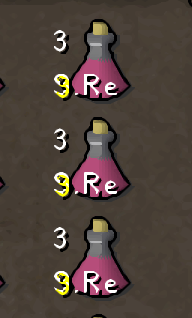
anyone else experiencing this? https://i.imgur.com/Sazlwe5.png i usually dont have the number of doses on the bottom left and would like to disable it
 haughty pumiceBOT
Many plugins from the pluginhub break the client in subtle or not-so-subtle ways, including causing issues like client freezes. We do not support pluginhub plugins because we do not make or quality control them, and do not recommend their use.
Run the RuneLite (safe mode) shortcut, or with a Jagex account, first run the RuneLite (configure) shortcut and tick the Safe mode box, then launch RuneLite via the Jagex launcher.
This temporarily disables the GPU plugin and all hub plugins which will allow you to confirm the issue is caused by one of those plugins and isn't a core RuneLite issue.
If the issue is caused by a hub plugin, you should isolate which plugin it is and then uninstall the plugin.
stone parcel
This for the Jagex Account + Chromebook thing earlier:
https://support.google.com/chromebook/answer/9145439
^^^ This first ^^^
Open the Linux terminal and run the following command to install Java and Bolt:
sudo apt install default-jdk && sudo apt install flatpak && flatpak --user remote-add --if-not-exists flathub https://dl.flathub.org/repo/flathub.flatpakrepo && flatpak install flathub com.adamcake.Bolt
Run Bolt from the terminal:
flatpak run com.adamcake.Bolt --no-sandbox
white pebble
white pebble
anyone else experiencing this? https://i.imgur.com/Sazlwe5.png i usually dont ha...
found it - it's item charges improved under potions
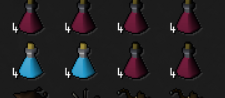
round jacinth
improved
 azure inlet
 valid cedar
I have this annoying issue where when searching my bank I cant use the letter 'g' it instantly closes bank search (while keeping the bank open) . Anyone have any ideas?
haughty pumiceBOT
If one of your keys isn't working in game, you've most likely bound it to a feature of a plugin. The Debug Helper hub plugin can show what keys are bound to what plugins.
 half furnace
Hello. Is there a way to make the Runelite sidebar bigger? I have tried scaling through stretched mode but thats only for the UI in RS.
 runic linden
hey i need help i currently logged all accounts off my runelite thru jagex nun of plugin hub plug ins work how do i fix?
gilded kayak
!logs
haughty pumiceBOT
To find the logs, you can do one of the following:
- If your client failed to open, click the
Open logs folderbutton. - Open the screenshot directory by right-clicking 📷
Camerabutton, navigate 1 directory up, then open logs folder. - Navigate to
%userprofile%\.runelite\logson Windows or$HOME/.runelite/logson Linux and macOS.
Upload the log files named client and launcher by dragging them to Discord. If there are files prefixed with jvm_crash dated from today, upload them too.
 spring rune
My ‘regeneration meter’ plug in turns off the ‘special attack counter’ everytime I log back into the game through the jagex launcher, is there a way to keep this setting turned on?
charred wind
half furnace
Hello. Is there a way to make the Runelite sidebar bigger? I have tried scaling ...
Set Scale to 1.25 or something higher. You can find this in the RuneLite (Configure) app
runic linden
is there a way to fix Plugin Hub plugins none of them is showing up for me after i download them?
gilded kayak
haughty pumice
To find the logs, you can **do one of the following**:
- If your client failed t...
this was for you
you have an issue and the client writes down to your log file, when there are issues
i would like to read them, so i can tell you how to fix your issue
half furnace
charred wind
Set Scale to 1.25 or something higher. You can find this in the RuneLite (Config...
This is what I see for my Runelite settings unless I am in the incorrect tab.
 haughty pumiceBOT
gilded kayak
haughty pumiceBOT
gilded kayak
he should have used this command
runic linden
gilded kayak
this was for you
will do
leaden trail
it's probably this
haughty pumiceBOT
Delete your %userprofile%/.runelite/cache folder or run this command in command prompt run as Administrator:
rmdir /s "%userprofile%\.runelite\cache"
yes but since his first message was incoherent and the cache folder has in-game settings, i want to be sure
runic linden
not to be a bot but where do i find the logs
gilded kayak
open file explorer and just replace the top bar with %userprofile%\.runelite\logs
where it says Home on windows 11 and something i forget on windows 10
 celest yew
can you edit the default bank tags layout? seems i can re-edit to default but not zigzag
runic linden
okay i got all logs pulled
gilded kayak
celest yew
can you edit the default bank tags layout? seems i can re-edit to default but no...
when the bank tags plugin was updated, for layouts, it was done in a way where we added the 1 layout type, but hub plugins can add additional layout options
so i think u need btl running in the background, to get zigzag?
gilded kayak
runic linden
okay i got all logs pulled
just drag the one named client.log with no date, into discord
solid mesa
gilded kayak
so i think u need btl running in the background, to get zigzag?
Or inventory setups
runic linden
gilded kayak
gilded kayak
close runelite
open file explorer
put this in and enter `%userprofile%\.runelit...
this should fix it
celest yew
wanted to use default banktags to use potion storage, if i want to set up a new banktag i can make it zigzag. but cant edit to zigzag ig
runic linden
done, how can i avoid this in the future?
gilded kayak
runic linden
done, how can i avoid this in the future?
not really something u can avoid, just a minor cache issue. caching makes things faster 99.999999% but then has it's rare 0.0000whatever issue
unless all the people so far have done the same thing we don't know about
hollow olive
or maybe that's part of another plugin idk
runic linden
ahh copy thank you
gilded kayak
hollow olive
or maybe that's part of another plugin idk
i think thats being added by one of the hub plugins
hollow olive
maybe inv setups
gilded kayak
ye
half furnace
charred wind
Set Scale to 1.25 or something higher. You can find this in the RuneLite (Config...
Solved. I didn't know there was a configure app. I scaled it 2 and then tinkered with stretched mode plugin.
celest yew
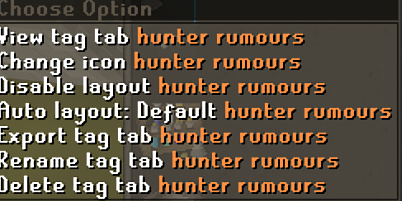
okay, last night i was able to zigzag on the default bank tags plugin now i cant lol was under default https://i.imgur.com/nBJBjLu.png
 round jacinth
Other hub plugins that do bank stuff add zigzag layout, core doesn’t have it but supports others doing jt
Like inventory set ups
celest yew
ahhh, if i turn btl on and off i can use the zig zag option lol
round jacinth
That’s odd, it should prosbbly go away if you turn it off
celest yew
yeah if i turn on then off the bank tag layout plugin i can freely make all of my layouts zigzag and the option stays until i close runelite
gilded kayak
it definitely shouldn't, but since that's a very minor and useful thing we'll probably overlook it
shutting down a plugin needs to undo everything it does
 finite canyon
could anyone look at a crash log for me? i have a buddy thats playing on runelite on a pretty decent pc with plenty of memory but he keeps getting crashes particularly during toa and places that trigger loading zones.
round jacinth
It’s easier to help directly if they can join here
haughty pumiceBOT
To find the logs, you can do one of the following:
- If your client failed to open, click the
Open logs folderbutton. - Open the screenshot directory by right-clicking 📷
Camerabutton, navigate 1 directory up, then open logs folder. - Navigate to
%userprofile%\.runelite\logson Windows or$HOME/.runelite/logson Linux and macOS.
Upload the log files named client and launcher by dragging them to Discord. If there are files prefixed with jvm_crash dated from today, upload them too.
finite canyon
i have his log one sec
round jacinth
again, easier to help them directly instead of a game of telephone
 young basin
what you need ? the log?
finite canyon
thats teh boy
young basin
round jacinth
And a jvm crash log today if you crashed today
haughty pumiceBOT
young basin
okay im looking thru the logs folder and the most recent jvm crash was logged back in 2023, ive tried increasing increasing the heap limit before and it still didnt help, i added a jvm argument to dump the heap on full error, would that cause the jvm error?
young basin
i know cause it didnt help
gilded kayak
well you should do it again and we can address it if it happens again
round jacinth
young basin
okay im looking thru the logs folder and the most recent jvm crash was logged ba...
Then it’s not relevant for this, do as the bird says
gilded kayak
the log you posted today clearly says "hey i'm out of of heap space, goodbye"
young basin
yeah and itll say it when i increase it and ill be back then
gilded kayak
great
you know what we can do for that
you can also install the plugin debug helper, click the green icon on the sidebar and enable the heap dump on oom setting
and then if it does happen again, there will be a heap dump and we can look at it and see what plugin is causing it
young basin
bet tyty
gilded kayak
but if you dont increase the heap, but crash and send us a dump anyway we're gonna be problem
 solar fjord
Is there a way to open Runelite with the old username/password options again? You used to be able to do it by opening it not through the launcher but it seems that doesn't work anymore.
I normally log in with my Jagex account through the Jagex launcher, but I was trying to see if I remembered the username/password for an older osrs account that isn't linked to a Jagex account.
 meager kernel
could i get some help loging in i just joined and created a new account but for some reason it says my password and login is incorrect
round jacinth
solar fjord
Is there a way to open Runelite with the old username/password options again? Yo...
load runelite normally not through jagex?
round jacinth
meager kernel
could i get some help loging in i just joined and created a new account but for ...
If it’s a new account that’s a jagex account, you must use their jagex launcher to launch the game
meager kernel
but it works on the jagex launcher
round jacinth
Then that’s how you have to play
solar fjord
round jacinth
load runelite normally not through jagex?
That used to work, but now it's opening it with my last logged in Jagex account when I do that.
round jacinth
You can’t use normal login anymore
round jacinth
solar fjord
That used to work, but now it's opening it with my last logged in Jagex account ...
Oh I see
meager kernel
then how do i use runelite?
round jacinth
You use jagex launcher and pick runelite as the client to load
haughty pumiceBOT
@solar fjord To find the logs, you can do one of the following:
- If your client failed to open, click the
Open logs folderbutton. - Open the screenshot directory by right-clicking 📷
Camerabutton, navigate 1 directory up, then open logs folder. - Navigate to
%userprofile%\.runelite\logson Windows or$HOME/.runelite/logson Linux and macOS.
Upload the log files named client and launcher by dragging them to Discord. If there are files prefixed with jvm_crash dated from today, upload them too.
solid mesa
meager kernel
then how do i use runelite?
 solar fjord
Here are the logs
round jacinth
It's behaving this way because you told it to
solar fjord
I found the workaround, deleting credentials.properties
haughty pumiceBOT
You've downloaded a fake client, and your account has been compromised. Remove the fake as soon as possible to minimise further damage.
The following actions should be performed from a secure computer or secure mobile device:
- Change your RuneScape password
- Remove and re-add Authenticator to RuneScape
- Change your RuneScape bank PIN
- Change your email's password
- Add 2FA to your email if you haven't got it enabled
- Check for any linked accounts by accessing the account settings page (https://www.runescape.com/account_settings)
Some fake clients also install malware, only a fresh install of your operating system can guarantee the total removal of any unwanted software.
You might also want to change any email password if you reused the same as your RuneScape account password.
Once your computer is secure, you should download RuneLite from the link available at the #welcome channel.
solar fjord
Hm?
round jacinth
you would know why that file existed, and since you didn't it was because of a cheat client you were using?
i would secure your account
solar fjord
No, I googled and found a reddit thread that said it was related to credentials.properties
solid mesa
And how do you think that file got there?
round jacinth
that file existed because of cheats or you were doing something else and you were't doing that something else
solar fjord
Do you have to put it there when doing plugin development?
round jacinth
if you were doing plugin development at any point you'd recall that step, and you don't place the file there.
w/e im over it
solar fjord
I can assure you my memory is poor enough that I would not 😅
I was helping beta test a plugin for the Zeah Only clan
solar fjord
But that file is put there during plugin development then? You had me worried there that it may have been related to a fake client
round jacinth
that file exists for --insecure-write that you had in the log
it allows runelite to launch using a jagex acc
for development
otherwise you can't develop if you are a jagex acc
solar fjord
Ok, thank you, that explains why I found almost no one else with this problem when I googled. Because it's self inflicted
gilded kayak
indeed
 hoary tangle
hi, a lot of my plugins have stopped working / being visible even despite still being installed, can anyone help?
gilded kayak
!logs
haughty pumiceBOT
To find the logs, you can do one of the following:
- If your client failed to open, click the
Open logs folderbutton. - Open the screenshot directory by right-clicking 📷
Camerabutton, navigate 1 directory up, then open logs folder. - Navigate to
%userprofile%\.runelite\logson Windows or$HOME/.runelite/logson Linux and macOS.
Upload the log files named client and launcher by dragging them to Discord. If there are files prefixed with jvm_crash dated from today, upload them too.
gilded kayak
just the one named client.log is fine for this
gilded kayak
gilded kayak
close runelite
open file explorer
put this in and enter `%userprofile%\.runelit...
do that
hoary tangle
yoo ur the goat thank you !!
 vague juniper
I seem to have similar issues to people above? My power went out yesterday while playing and havent had a chance to log in until today after work and all my plugins are no longer here 😦
gilded kayak
if it's all of your plugins that's a different issue
vague juniper
I think I got reset to default rl, at least it feels like it
gilded kayak
!lost that's probably just this
haughty pumiceBOT
gilded kayak
sometimes the client can forget what profiles to load, if windows is shut down in a panic (like a power outage)
vague juniper
oookay I got my gim's profile I just gotta find my mains, thanks! 😄
gilded kayak
the ones you want are probably the largest files, NOT named $rsprofile
vague juniper
will this change, or could change - the setting to where the profile is autoloaded on different character login?
gilded kayak
click the button that looks like a chain, below the profile name
(while you're logged into the game)
vague juniper
ok got the mains and theyre all linked ty again!
 frozen bloom
hi guys im trying to report an issue to jagex and its asking me for my client number says its on the login screen but theres nothing there, would that just be the runelite version number or the launcher number.
gilded kayak
is this the in-game reporter or like the website
frozen bloom
on the website
zealous cedar
did you test the official client first to make sure the issue happens there too?
frozen bloom
thatll be a quick minute have to reinstall official, one sec, if that works im sorry to have bother you guys
gilded kayak
well if you have an issue, and it doesn't happen on the official client, you aren't really bothering us to report it to us
but if it does then the client number you need, is probably in the official client, login screen
frozen bloom
alright the number showed on the official, thanks guys, wasnt sure if the version would be the same on runelite
left niche
Am I able to post a screen recording of the issue I'm having? My client is currently in safe mode and I'm still having issues with mouse movement. At this point I think it might be some kind of setting on the computer but unsure at this point.
gilded kayak
yes but it needs to be a good format like mp4 or the bot/discord will eat it
left niche
So at the 10 second mark you can see I'm moving the mouse fluidly, and then it stops while the animations are continuing before jumping up to the bank chest area, and it happens again at second 24/25
oblique plume
Considered cleaning your mouse?
left niche
I've tried messing with a bunch of Nvidia settings, setting the refresh rates of monitors to be the same, and the mouse movement happens outside of the client as well, but it seems to only happen when I have runelite opened
left niche
oblique plume
Considered cleaning your mouse?
I mean the mousepad was cleaned recently, and the issues don't really happen in other games except for when Runelite is open
Which is why I doubt its the mouse
I could try a mouse swap
left niche
Can confirm it is not a mouse issue
left niche
I've tried looking into so many settings on the computer as well, Nvidia settings, monitor settings. And it only happens when Runelite is opened. I tried loading up HDOS just to see and everything has been working fine, at least for the past 10 minutes.
Not a great sample time but still
celest yew
i have 3 jagex accounts, 2 loaded up all my plugins and 1 didnt. and its my main lol even when i swap profiles nothing changes
gilded kayak
!logs
haughty pumiceBOT
To find the logs, you can do one of the following:
- If your client failed to open, click the
Open logs folderbutton. - Open the screenshot directory by right-clicking 📷
Camerabutton, navigate 1 directory up, then open logs folder. - Navigate to
%userprofile%\.runelite\logson Windows or$HOME/.runelite/logson Linux and macOS.
Upload the log files named client and launcher by dragging them to Discord. If there are files prefixed with jvm_crash dated from today, upload them too.
celest yew
gilded kayak
hmm this issue is more widespread than we thought
if i give you instructions would u be willing to zip and send us the problematic folder so we can figure out why this is happening
celest yew
sure
gilded kayak
are u on win11
celest yew
i am
gilded kayak
great
close runelite
open file explorer
replace the top bar where it says Home with %userprofile%\.runelite\cache and enter
right-click the okhttp folder and click compress to -> ZIP File and it should just make a okhttp zip
and dm that zip to @haughty pumice
ty, now u can just delete the okhttp folder and your plugins will load again
u can delete the zip too, runelite wont care that it's there tho I think?
celest yew
so i can safely delete both of these? lol
gilded kayak
ye
the okhttp folder is the the folder with the file being a pain
and the zip is just a copy of that
celest yew
huge, ty! hope you guys can resolve it🤝
 dusky hare
GM, my runelite plugins are downloaded but not appearing. Anyone know a fix?
Just randomly happened.
hollow olive
try that perhaps
stone parcel
In the future are any more of those okhttp zips desired?
gilded kayak
need to figure out why it's happening
the cache themselves doesn't seem to be the problem
might have the next person try to go to the folder, but 1 folder at a time c: -> users -> username -> .runelite -> cache -> okhttp and see if they get any perm errors
or maybe they cant find a folder
 daring geode
hey I have been running runelite on kali linux for the past 4-6 years, today something happend to my system where my network manager is gone, cant access the internet, or know how fix the distro, so i am trying to get all my runelite files to Windows and switch over, is this possible?
haughty pumiceBOT
solid mesa
Can just use a flash drive to copy the folder over
daring geode
really its that simple?
what if its already on a portable Usb HDD same thing right?
native lotus
hello gamers, anyone know the widgetinfo for the clan tab and the account tab?

(or how to figure it out)
 leaden trail
This channel is for release client support, development questions can be asked in #runelite .
native lotus
copy that chief, mb
 golden igloo
hello, i logged in this mornin to both my accounts and they each have a seperate runleite profile. Only one of them had plugins and the other didnt and when I tried to swap profiles on the one it didnt help. Now both dont have any active
I see the profiles yet when I click them nothing changes
leaden trail
golden igloo
hello, i logged in this mornin to both my accounts and they each have a seperate...
Can you do this?
golden igloo
leaden trail
Can you do this?
https://discord.com/channels/301497432909414422/44249246830742...
hey i just did that
delete the okhttp folder too?
leaden trail
Yeah that's the bit that should resolve the problem
The rest mostly is to help us look into why people have been having this issue
golden igloo
you are a savior it worked
leaden trail
golden igloo
you are a savior it worked
Mostly out of my own curiosity can you zip up the same thing again and send that to the bot too? Having a side by side comparison might end up being helpful for us
golden igloo
I sent it to rl support does that work
oblique plume
we would want the client log with it
 trim raptor
How do I fix skilling pages from opening off screen? Karamja map when sailing also renders incorrectly

I'm using Resizable - Classic layout with Stretched Mode and Fixed Resizable Hybrid
oblique plume
thats prob why
trim raptor
I was advised to use this setup
haughty pumiceBOT
Many plugins from the pluginhub break the client in subtle or not-so-subtle ways, including causing issues like client freezes. We do not support pluginhub plugins because we do not make or quality control them, and do not recommend their use.
Run the RuneLite (safe mode) shortcut, or with a Jagex account, first run the RuneLite (configure) shortcut and tick the Safe mode box, then launch RuneLite via the Jagex launcher.
This temporarily disables the GPU plugin and all hub plugins which will allow you to confirm the issue is caused by one of those plugins and isn't a core RuneLite issue.
If the issue is caused by a hub plugin, you should isolate which plugin it is and then uninstall the plugin.
trim raptor
👍
 signal rampart
Will runelite ever be available in the iPad?
leaden trail
No
 minor skiff
how can i see monster xp? before i cud see even cow hp now only bosses.
oblique plume
opponent info plugin
minor skiff
ty so much
 lunar maple
how do i turn the highlights for agility/shortcuts etc. back on. had system failure,rebooted, now the highlights are gone and can't get them back.i've tried settings ans all that.
haughty pumiceBOT
round jacinth
but you're looking for... the agility plugin.
 proper lily
Whenever I click the "Play Now" button when logging in, Runelite locks up. I get stuck on the "Click Here to Play" screen and no plugins are selectable for about 45 seconds. Kind of annoying. Any ideas on what might be causing this?
haughty pumiceBOT
Many plugins from the pluginhub break the client in subtle or not-so-subtle ways, including causing issues like client freezes. We do not support pluginhub plugins because we do not make or quality control them, and do not recommend their use.
Run the RuneLite (safe mode) shortcut, or with a Jagex account, first run the RuneLite (configure) shortcut and tick the Safe mode box, then launch RuneLite via the Jagex launcher.
This temporarily disables the GPU plugin and all hub plugins which will allow you to confirm the issue is caused by one of those plugins and isn't a core RuneLite issue.
If the issue is caused by a hub plugin, you should isolate which plugin it is and then uninstall the plugin.
proper lily
Ok thank you. I'm having trouble finding the "Jagex account, Runelite (configure) shortcut" and the tickbox for Safe mode. Could yo explain more on where that is?
haughty pumiceBOT
Download and install the updated RuneLite launcher from the website link in #welcome. You don't need to uninstall your current version. You will not lose any settings or plugins.
oblique plume
you could potentially need that
leaden trail
It's just "RuneLite (configure)", it won't say anything about a Jagex account
proper lily
Ok found it. Thank you. It does seem like it's one of the plugins causing this issue.
 uncut nest
any reason why i cant access plugins from my runelite? i can see the plugins installed via plugin hub, but cannot see them in configurations. im running the most current version and launcher and ensured that im on my main profile

 empty minnow
gilded kayak
close runelite
open `file explorer`
replace the top bar where it says `Home` wit...
empty minnow
gilded kayak
close runelite
open `file explorer`
replace the top bar where it says `Home` wit...
maybe try this ^
uncut nest
dont have nitro so i cant upload the file, am i sol? 😒
empty minnow
oh well uploading the file is just helpful for debugging, the main thing you want is in the following message. delete the okhttp folder I beleive
uncut nest
so i can delete both folders, zip and non zip?
empty minnow
ya
uncut nest
ok gotcha
oblique plume
can you look at them and see if theyre "hidden" first
cuz something is going on, this issue is pretty systemic atm
uncut nest
no they arent hidden
oblique plume
or check on what permissions you have with the files in therre
maybe list youre antivirus solution if you have one
uncut nest
viewing as admin
oblique plume
they like to mess up our files a lot
uncut nest
just windows defender
ok, deleted those two folders seemed to have done the trick, will remember that next time this happens
usually i exit runelite then reopen and it fixes itself, this time it didnt, thank you!
 fresh cosmos
is there a plugin to post in the cc your virtual level ups for those who are using runelite?
charred wind
If it’s sending a message for you that’d be auto typing and not allowed
Dink does post virtual level screenshots to discord though
fresh cosmos
couldnt it post a message in the cc, like this? or would this still not be allowed? @charred wind
 leaden trail
No
solid mesa
Your clan admin already has the ability to turn on post-99 xp milestone clan broadcasts
solid mesa
I think they can do 1m. But it's up to your clan admin
 cyan veldt
Hello is something wrong with runelite? I was using it this morning fine went to log in just now and all my plugins are wiped and on top of that I can’t enable any plugins either. For example animation smoothing is off and when I turn it on it’s still not smoothed.
Is there a way to import my settings back?
an example, im logged in to my profile as well
 haughty pumiceBOT
cyan veldt
hollow olive
check the second tab <:profiles:1183560772022964305> and try loading the diff on...
haughty pumiceBOT
cyan veldt
hollow olive
check the second tab <:profiles:1183560772022964305> and try loading the diff on...
worked, thank you oh wise one
ornate kite
Can anyone help me, the past few weeks runelite randomly crashes and my screens go black for a second and i have to refresh my desktop it just randomly closes. I've tried looking in the crash logs and disabled plugins but it doesnt seem to show me any problem. Thanks
mossy swan
ornate kite
Can anyone help me, the past few weeks runelite randomly crashes and my screens ...
!logs
haughty pumiceBOT
To find the logs, you can do one of the following:
- If your client failed to open, click the
Open logs folderbutton. - Open the screenshot directory by right-clicking 📷
Camerabutton, navigate 1 directory up, then open logs folder. - Navigate to
%userprofile%\.runelite\logson Windows or$HOME/.runelite/logson Linux and macOS.
Upload the log files named client and launcher by dragging them to Discord. If there are files prefixed with jvm_crash dated from today, upload them too.
oblique plume
sounds like a gpu driver crash
ornate kite
oblique plume
sounds like a gpu driver crash
Its really odd, it happens randomly
 ocean jetty
is there any way to search/filter the worlds in the quick hopper? for example, "guardian" shows the gotr worlds and any others that match the search term
empty minnow
I always just sort by activity and then its alphabetical and easy to find stuff like that
oh wait are you talking about the rl panel
ocean jetty
yeah in the quick hopper plugin. its not much, but i think it would be a nice qol to quickly find specific worlds lol.
i think its maintained by the rl team
gilded kayak
the buttons at the top are interactable so you can sort by world name and then it's G
ocean jetty
gilded kayak
the buttons at the top are interactable so you can sort by world name and then i...
i thought you meant press g to quick scroll down to g T_T lmao. ill probably add it in the suggestions since it doesnt look like its a feature yet, thanks 🙂
ornate kite
haughty pumice
To find the logs, you can **do one of the following**:
- If your client failed t...
Where do i upload the files?
stone parcel
You can drag and drop them here.
ornate kite
ornate kite
stone parcel
You can drag and drop them here.
thankyou
leaden trail
ornate kite
Can you upload the logs that are just called client.log and launcher.log?
ornate kite
Do you want all of them?
stone parcel
There should only be one named exactly client.log and one named launcher.log
final axle
You already uploaded all the other ones
stone parcel
Yep, perfect. 😄
signal rampart
signal rampart
Will runelite ever be available in the iPad?
@haughty pumice
final axle
no
stone parcel
"No"
 autumn pilot
Hi, so I opened runelite twice by accident from the jagex launcher, closed one, logged into the other, but now it looks like im on the vanilla client, no plugins, no runelite hub

Any idea how to fix?
gilded kayak
!logs
haughty pumiceBOT
To find the logs, you can do one of the following:
- If your client failed to open, click the
Open logs folderbutton. - Open the screenshot directory by right-clicking 📷
Camerabutton, navigate 1 directory up, then open logs folder. - Navigate to
%userprofile%\.runelite\logson Windows or$HOME/.runelite/logson Linux and macOS.
Upload the log files named client and launcher by dragging them to Discord. If there are files prefixed with jvm_crash dated from today, upload them too.
gilded kayak
i have a feeling i know what this is going to be but i'd like to be sure
since we need help from people sending us the broken files, to figure out why it's happening
autumn pilot
Im on mac so I think the third bullet point applies to me? where do I enter $HOME/.runelite/logs?
gilded kayak
cmd+shift+g in finder and click go to folder...?
oh i clicked a apple discussion from 2012 thats a little old lol
 clear stratus
finder is so bad
gilded kayak
sad
is it gonna be a pain for them to zip the okhttp folder on mac
should i just wait for another windows user
autumn pilot
whats the equivalent of run on mac again?
clear stratus
the issue with finder is mainly navigating. i think zip is a right click
not at my mac rn
hollow olive
zip is just compress on right click
autumn pilot
Im here right now
 clear stratus
that's not the right one
autumn pilot
yes I think it did
hollow olive
did he get it
clear stratus
cmd+shift+period should show it
gilded kayak
folders leading with . can be hidden by default
hollow olive
wow i'll remember that for future use
autumn pilot
still not seeing it
hollow olive
open up terminal and type open ~/.runelite/logs (then press enter)
hollow olive
did you miss the word open << with a space after the word
gilded kayak
open ~/.runelite/logs
``` there should be a copy button on the right side of this little blurb now, u can click thatthe one named client with no date is the important one for this
autumn pilot
gilded kayak
the one named `client` with no date is the important one for this
thats the second one
gilded kayak
autumn pilot
thats the second one
no its not
the word client is not the word launcher
 abstract pawn
clear stratus
<#301497432909414422> please
abstract pawn
clear stratus
<#301497432909414422> please

autumn pilot
This is all I See
 gilded kayak
scroll up
autumn pilot
Ohh nvm
i ahd to scroll up
Im silly
you all are being very very patient with me
thank you!
gilded kayak
it definitely thinks it loaded plugins
can you drag your mouse on the right-side of the game screen and see if an arrow appears
there's a keybind but i don't remember what it is
solid mesa
Ctrl+F11
gilded kayak
solid mesa
Ctrl+F11
NEED THE MAC KEY PROBABLY
solid mesa
For future reference on a Mac you can press Command+Shift+G then type in ~/.runelite and press enter
 gilded kayak
i guess thats what the difference since 2012 is
cuz i did say the keybind but it also said to do it, inside finder
 gilded kayak
mmm
 versed stone
hi, trying to load up right now and when i launch from jagex launcher it doesnt seem to load up the plug ins like usual so it looks like a vanilla client. any help would be greatly appreciated!
versed stone
the bar on the far right is there but when i cluck on the wrench it doesnt show all the plug ins i normally have. and then on the plug in hub it looks like theyre installed cause they have the "remove" option
haughty pumiceBOT
To find the logs, you can do one of the following:
- If your client failed to open, click the
Open logs folderbutton. - Open the screenshot directory by right-clicking 📷
Camerabutton, navigate 1 directory up, then open logs folder. - Navigate to
%userprofile%\.runelite\logson Windows or$HOME/.runelite/logson Linux and macOS.
Upload the log files named client and launcher by dragging them to Discord. If there are files prefixed with jvm_crash dated from today, upload them too.
gilded kayak
just the one with client in the name, but no date
gilded kayak
mhm
ok so this issue has been happening for a couple days now and we're not really sure why, could you send us the broken folder if I give you instructions
versed stone
yes of course
gilded kayak
close runelite
open file explorer
replace the top bar where it says Home with %userprofile%\.runelite\cache and enter
right-click the okhttp folder and click compress to -> ZIP File and it should just make a okhttp zip
DM that okhttp.zip to @haughty pumice
i'm assuming ur on windows 11 for this
if ur on something else i'll have to write other instructions
ty
u can delete that new zip, and the old okhttp folder and your issue will go away
versed stone
you are amazing, thank you sooo much!
 naive lily
Hey guys, whats the best way to get up and running on Linux
Im on ubuntu, i downloaded runelite but i guess the account i made is a jagex account and cant login directly from the app
haughty pumiceBOT
Using Jagex accounts on Linux is not officially supported by Jagex, but there are some third party community guides to make it work https://help.jagex.com/hc/en-gb/articles/13413514881937-Downloading-the-Jagex-Launcher-on-Linux
gilded kayak
(probably bolt is the short answer)
naive lily
cool cool, ill look into it ty
 unique pasture
ok so this runelite not loading all plugins thing is happening to everyone right now?
unique pasture
gilded kayak
close runelite
open `file explorer`
replace the top bar where it says `Home` wit...
if I'm having the same issue would you recommend following the same steps?
stone parcel
Above that a bit further above that is steps to upload the client.log too, if you wanted to upload that log and then do those other steps, I think that would be appreciated. 😄
 tulip ermine
!dpi
haughty pumiceBOT
!dpi command not found!
unique pasture
stone parcel
Above that a bit further above that is steps to upload the `client.log` too, if ...
Should I keep a copy of the okhttp file?
gilded kayak
if you zip it and send it to us, no since it's the reason why your plugins wont load
could you send the client.log Kalil mentioned along with the zip file, to @haughty pumice
tulip ermine
Hi,
I'm experiencing a blur effect in my RuneLite client. The side panels, such as Loot Tracker, Herb Run, etc., appear with slightly distorted or blurry fonts, making them harder to read.
I've already tried creating a new profile and setting runelite.exe to use the application's DPI settings, but the issue persists.
Any suggestions on how to fix this?
Thanks in advance!
 sharp harness
!safe
haughty pumiceBOT
safemode: To enable safemode
Windows
Run the RuneLite (configure) shortcut from the windows start menu
Tick the Safe mode box, save, launch RuneLite the way you normally do.
Mac
In Terminal, run
/Applications/RuneLite.app/Contents/MacOS/RuneLite --configure
Tick the Safe mode box, save, launch RuneLite the way you normally do.
 tropic harness
Hey! I'm experiencing some really weird lag when opening interfaces or withdrawing items from my bank. Very similar to #support message
I did everything in !safe and things did improve, the followed stuff in !flow to troubleshoot my issue but but the binary test showed no improvements.
the most damning thing is I had a friend send over their profile where they get ~144fps and I was getting ~80-90fps. I have better specs than them for what its worth. is there anything I should before I just reset my whole profile?
what i've resorted to sofar is removing a ton of my bloat and i've seen some imporvements but still pretty bad :(
clear stratus
when you did the binary search were you restarting the client every time you disabled plugins?
because if safe mode fixed it that more or less guarantees it's a hub plugin
tropic harness
i did yes
i was only supposed to turn them off correct?
not uninstall half
turning of each half saw a slight increase in performance (going from 90 to 110) but nothing like the FPS i was experiencing in safe mode. ~300
tropic harness
clear stratus
because if safe mode fixed it that more or less guarantees it's a hub plugin
sorry forget to reply so you got the ping :)
round jacinth
Some hub plugins stay active after being turned on(like they leave behind overlays)
You basically keep trimming the fat until you’re happy
FWIW the game at the heart of it is a 50hz game (50 fps) and runelite did magic to make it smoother and better
The client ticks are still 50/s and game ticks are still 100/minute
So if it’s always 90 fps, that’s a lot better than 40.
But you’re on the right track of increasing more and more. Keep removing bad hub plugins.
tropic harness
yeah ill keep messing with stuff until i see better performance i guess :)
oblique plume
i dont think you can get 300fps in safemode since you wouldnt have the gpu plugin
haughty pumiceBOT
 hybrid niche
i started using new computer and my entire runescape account plugin group dissapeared????
haughty pumiceBOT
hybrid niche
are u joking i already sold it
ahh
this is truely deppresing
how do I make bigger chatbox in fullscreen and gui?
cant find streched plugin
oblique plume
Stretched mode
 zenith cargo
getting this on launch everytime any ideas 🤔
2025-07-17 14:04:34 MDT [Client] ERROR n.r.client.plugins.gpu.GpuPlugin - error swapping buffers
java.lang.RuntimeException: unable to SwapBuffers (6)
at net.runelite.rlawt.AWTContext.swapBuffers(Native Method)
at net.runelite.client.plugins.gpu.GpuPlugin.draw(GpuPlugin.java:1372)
at bo.am(bo.java:2905)
at bo.ek(bo.java)
at bo.run(bo.java:2387)
at java.base/java.lang.Thread.run(Unknown Source)
oblique plume
gpu drivers maybe
zenith cargo
oblique plume
gpu drivers maybe
should be up to date
round jacinth
try not up to date ones
 mild steeple
anyone know why my C:\Users\XXXXXXX.runelite\screenshots\XXXXX\Boss Kills folder, wont allow me to use arrow keys to filter through pictures? TIA
mild steeple
they work in this one, but not the above C:\Users\XXXXXXX.runelite\screenshots\XXXX
 tough void
Hi all, I'm getting a weird visual glitch and was hoping someone might have a solution
 oblique plume
jagex bug
ornate kite
stone parcel
Yep, perfect. 😄
Could i get an update please 😭
stone parcel
Yeah, I'm not sure the cause of that. Hopefully someone else does though.
ornate kite
stone parcel
Yeah, I'm not sure the cause of that. Hopefully someone else does though.
Thankyou anyway ❤️
oblique plume
oblique plume
sounds like a gpu driver crash
are you somehow expecting this to change
ornate kite
oblique plume
are you somehow expecting this to change
Well im not really sure how to fix it and it ONLY happens with runelite, i play heavier games and dont have an issue so im just curious
oblique plume
try different drivers and see what happens
 charred mortar
hello, my FPS seems to be oddly low for my machine. i'm on a 13900K with a 5090 and i only get about 90 FPS not even fullscreened using the GPU plugin RuneLite offers, and my GPU utilization runs at about 9%
integrated graphics is disabled, so i don't believe it could be that
round jacinth
It depends on where you are in game, how much you’re seeing(view distance, zoom level) and amount of hub plugins
See how much better it performs if you make a new profile, then turn into on the GPU plugin
If it performs better with the same GPU settings then you’ve got hub bloat
round jacinth
have fun hunting it down lol
FWIW I am a broken record but the game at the core is a 50fps (20 client ticks/second) and game ticks are 600ms(100/minute) so anything above 50fps is just smoothing and eye candy, mechanically it’s the same. Playing below 50 is not good on the other hand
charred mortar
yea that makes sense
round jacinth
So 90 is probably fine
charred mortar
its fine, but mostly just the eye candy aspect lol
seems like Attack Ranges causes my FPS to drop from capping at 240 all the way to 160 in lumby
not sure why GPU utilization is so low though
round jacinth
Idk how it works at a high enough level to explain it but just because it’s not 100% or higher than 10% usage doesn’t mean it’s not struggling
oblique plume
Prob cuz you're cpu bound
 dark ermine
I have been having some issues with certain plugins in RuneLight not working that are working fine for my clan mates. I uninstalled RuneLite and gave it a fresh install and restarted my PC and still having the same issues. More specifically if I add/remove a plugin its not instant like usual, it'll be stuck on "removing" or "installing" until I restart the client. The "improved item charges" along with "custom menu swapper" aren't working and they don't show up in the configuration menu even if they say they are installed in the plugin hug.
Actually if I install any new plugins they won't show up in my configuration menu but the plugin hub will show they are installed
The quest helper plugin is inaccessible so this is quickly turning into a major issue for me, any ideas on how to fix would be much appreciated
haughty pumiceBOT
Delete your %userprofile%/.runelite/cache folder or run this command in command prompt run as Administrator:
rmdir /s "%userprofile%\.runelite\cache"
This fixed my issue thank you so much you're a life saver
 narrow tangle
Anyone aware of frequent crashing issues on runelite running on an iMac
I have the most recent crash log
zealous cedar
disable "compute shaders" in the gpu plugin
 zinc zenith
having this issue only when i press the (i) key. its somehow linked to report button? ive reinstalled and same issue. it works fine in runelite notes and such but when i try to chat in game it does this. please pay attention to report button as i press i
haughty pumiceBOT
If one of your keys isn't working in game, you've most likely bound it to a feature of a plugin. The Debug Helper hub plugin can show what keys are bound to what plugins.
solid mesa
Probably check that
mossy swan
im guessing you bound i to screenshot
 grim coral
what plugin is this?
 solid mesa
Instant Damage Calculator
zinc zenith
ohhh tysm ill try that
it fixed, it was indeed bound to screenshot. i appreciate the help very much. thanks everyone ❤️
 deep python
Could someone help me find out why my client crashed?
This has been happening recently and it is super annoying :c
round jacinth
not sure if the removeNavigation ther can cause crash but your gimp plugin you have doesn't seem to ever work for you
every 5s it's spamming that it can't connect
deep python
yea i'm going to remove that..
round jacinth
do you have a jvm crash for today
deep python
gilded kayak
13th gen...
stone parcel
microcode 0x11d
gilded kayak
i dont know the microcodes is that the good or bad one
round jacinth
not sure if 0x11d is a bad1
gilded kayak
lol
round jacinth
they can try the 32bit launcher or finding a newer microcode revision
man intel really stunk the room with that 1 huh
stone parcel
They want like 0x12b or above iirc. On mobile.
gilded kayak
round jacinth
man intel really stunk the room with that 1 huh
i asked my friend about it and he said yeah it was a really well known thing, but i didn't catch anything about it until it started aggressively appearing here
wild times
deep python
so was it just because of my cpu?
round jacinth
yeah, intel has a hardware level issue with 13th and 14th gen chips
gilded kayak
and it aggressively appears for RuneLite for some reason
round jacinth
where they cook themselves and break, microcode updates can help fix it but also its still broken
idk if this is the intel meltdown issue or a different one
gilded kayak
we gotta get someone to write up a wiki page for this
the info necessary to give to people does not stick with me
round jacinth
gilded kayak
and it aggressively appears for RuneLite for some reason
firefox reported that the heatwave in uk has caused a surge of this specific hw bug surfacing and turned off telemetry on it
gilded kayak
round jacinth
firefox reported that the heatwave in uk has caused a surge of this specific hw ...
l o l
round jacinth

Tom's Hardware
The saga continues.
Mozilla staff's tracking overwhelmed by Intel crash reports, team disables the function
so funny
not funny for consumers
funny that intel's eff up is so bad that global warming is pointing it out
leaden trail
stone parcel
They want like 0x12b or above iirc. On mobile.
0x12f
Really they want the absolute latest one
stone parcel
Yeah most recent probably best.
mossy swan
(Image credit: Intel)
🔥
 silent crow
I can't access plugins from the plugin hub from the jagex launchers runelite
 oblique plume
What
gilded kayak
he just has the okhttp bug
but he's assuming it's a jagex-launcher-specific issue
maybe he's right who knows
not me
oblique plume
It is weird that it seems to happen on the second launch too
Multiple people have said it happens only on one
Then they restart and its both
gilded kayak
i think the first startup triggers the tmp file rename issue and by the time the second startup is happening, problem
at least that makes sense to me, idk if it's right
gilded kayak
silent crow
I can't access plugins from the plugin hub from the jagex launchers runelite
are u on win11
silent crow
win10
silent crow
yeah
 glad meteor
Hi guys, is there a way to filter the run tab in Intellij to only my plugin output? I get spammed out by other plugin debug messages lol
gilded kayak
kk can u do this but zip it yourself, not the way i instructed here
gilded kayak
gilded kayak
close runelite
open `file explorer`
replace the top bar where it says `Home` wit...
also dm @haughty pumice the client file with NO date in the name, that's in %userprofile%\.runelite\logs
this issue is very odd and not easily replicatable so we need as many broken files to test with
as we can get
oblique plume
Why are there 4 zips 
leaden trail
Well for starters you have file permissions issues
gilded kayak
hmm
maybe some weird 5mb limit?
cuz the okhttp folder is somewhere around 20mb from what i can tell
leaden trail
That client log covers several days
gilded kayak
ye well what can u do
leaden trail
And I think I remember noticing that for a few other people with the okhttp issue as well
gilded kayak
silent crow
yeah
if you delete all the okhttp folders now, your issue should go away
gilded kayak
oh ya i guess it doesn't zip it well enough
i was imagining a perfect world where it zips below the 10mb limit
ig so many small files dont compress for that outcome
 vague locust
I just started playing again after not being on for more than a year. My RuneLite Loot Tracker isn't tracking my pickpockets, any ideas how to fix this?
silent crow
Thanks for the help
vague locust
I don't believe they are hidden, I didn't change any of that from when I last played. Not seeing an eye icon.
gilded kayak
it's at the top of the loot tracker panel
vague locust
Mine just says "Loot tracker You have not recieved any loot yet."
gilded kayak
did you let yourself logout while asking for support
vague locust
I just signed out, signed in, and then killed something. It let me see the icon then. Thanks.
oblique plume
So it was hidden?
vague locust
It was I guess
and because it was, it wasn't ever showing up without having anything in the list
oblique plume
There's a gh issue of me out there with that exact problem
gilded kayak
HIDDEN
oblique plume
I hid gnomes cuz I would accidentally kill them at the bank
Then when I pickpocket them I was like wtf
Cuz I forgot years ago that I hid them
And now my mistake is enshrined forever in gh issues 
gilded kayak
dont worry i'll delete it if adam ever accidentally gives me the wrong permissions
oblique plume
An unlikely story
gilded kayak
xd
 olive magnet
it not installing
 oblique plume
That means you're in safemode or more likely have the okhttp cache issue were seeing commonly right now
haughty pumiceBOT
Delete your %userprofile%/.runelite/cache folder or run this command in command prompt run as Administrator:
rmdir /s "%userprofile%\.runelite\cache"
Do that
 marsh bay
 oblique plume
Hmm yes this is a picture
 pure geode
All of a sudden my pc will not load 117 HD i reinstalled Jagex launcher and Runelite and the plugin got nothing. anyone seen this?
oblique plume
Delete the okhttp folder in here
haughty pumiceBOT
Delete your %userprofile%/.runelite/cache folder or run this command in command prompt run as Administrator:
rmdir /s "%userprofile%\.runelite\cache"
 warped pollen
Hey there, my computer crashed while runelite was open and now all of my runelite pluggins and settings are gone, i have tried to import but none of the profile are working that are in the profiles2 folder. Any ideas? I did recently convert my rs account and started using the jagex launcher a few days ago
pure geode
haughty pumice
Delete your `%userprofile%/.runelite/cache` folder or run this command in comman...
thank you so much!!!! 🙂
celest yew
https://i.imgur.com/UQEqxLB.png
which plugin is tagging my bracelet? turned off invy tags so its not that

 safe wagon
is there a way to separate 2D elements in the code (health bar vs overheads)
 empty hull
Hello, I have a silly question... Do git submodules inside plugins work fine?
solid mesa
Even if it did work probably not good for review since it's more work to also open the diff of submodules.
empty hull
It would be really helpful since we're using that to centralize some stuff that's used in 2 different plugins plus a couple of other projects
Submodule would contain only data (.json files)
(this is the repo for reference: https://github.com/OSRS-Taskman/task-list)
solid mesa
You can see what @small musk or one of the other reviewers thinks
empty hull
Usually it's pajlada(?) that reviews our PRs
Or at least it was him the last few times
 small musk
we do not call git submodule init, so no
I don't really want to review through a submodule ref either
 verbal minnow
So every now and then, my runelite will freeze out and. I can’t even close it- other issues happen too on the Pc. That is a problem external to runelite most likely then right
empty hull
small musk
we do not call git submodule init, so no
Fair enough
 pastel marlin
Hows it going, recently (the last week or two) my RL client crashes after around an hour of gameplay. RL message pops up saying that the client has crashed, but without any actual details. has this been happening to anyone else?
haughty pumiceBOT
@pastel marlin To find the logs, you can do one of the following:
- If your client failed to open, click the
Open logs folderbutton. - Open the screenshot directory by right-clicking 📷
Camerabutton, navigate 1 directory up, then open logs folder. - Navigate to
%userprofile%\.runelite\logson Windows or$HOME/.runelite/logson Linux and macOS.
Upload the log files named client and launcher by dragging them to Discord. If there are files prefixed with jvm_crash dated from today, upload them too.
 rancid summit
turned on pc, loaded up RL and all my plugins are gone, never been logged into runelite before, My plugins folder still has all of them, how do I get them back on RL?
haughty pumiceBOT
 sudden canopy
anyone know why my game is like this? I've tried ctrl + enter and Ctrl + F11 and it still doesnt work
 solid mesa
Because Stretched Mode is off?
sudden canopy
THANK YOU
rancid summit
All my plugins show in the pluginhub downloaded, but not actually in my plugins, and the correct profile is loaded up.
haughty pumiceBOT
Delete your %userprofile%/.runelite/cache folder or run this command in command prompt run as Administrator:
rmdir /s "%userprofile%\.runelite\cache"
If you want you can zip %userprofile%\.runelite\cache\okhttp and dm that and your %userprofile%\.runelite\logs\client.log to @haughty pumice
rancid summit
so just delete the cache folder and reload runelite?
solid mesa
Yes
rancid summit
im scared, hope this doesn't mess up anything...
stone parcel
Should be totally fine. 😄
rancid summit
thank you, holyyy. i was about to cry
 cosmic solstice
I can't access plugins from the plugin hub from the jagex launchers runelite.. can anyone help?

 haughty pumiceBOT
Delete your %userprofile%/.runelite/cache folder or run this command in command prompt run as Administrator:
rmdir /s "%userprofile%\.runelite\cache"
 wet vigil
hi guys..newbie here..how do u show ur connection's latency? Like the ping?
stone parcel
I think this option in the "World Hopper" plugin might be what you are after.
 wet vigil
That works!! Thanks!
stone parcel
Np! 😄
wet vigil
i'm using exitlag but it doesn't seem that my latency has improved 😦
wet vigil
any VPN recommendation for oldschool runescape? TIA
solid mesa
Jagex doesnt like a lot of vpns
wet vigil
😦 That means VPN won't help with high ping?
solid mesa
VPNs don't really reduce your ping since they add another hop (unless your ISP has really bad routing for some reason)
wet vigil
Oh, I see! Rip then 😭
spring rune
Morning! The ‘regeneration meter’ plugin seems to turn off the ‘special attack’ charging bar option everytime I close runelite.
I think.. this started happening when I got a soulreaper axe and got a soulreaper axe charge overlay plugin, but I’ve tried deleting it etc. and the spec meter charge option still turns off!
 edgy mauve
Anyone having problems with runelite not loading your plugins?
final axle
haughty pumice
Delete your `%userprofile%/.runelite/cache` folder or run this command in comman...
try this @edgy mauve
charred wind
spring rune
Morning! The ‘regeneration meter’ plugin seems to turn off the ‘special attack’ ...
Soulreaper axe QoL?
spring rune
charred wind
Soulreaper axe QoL?
yeha!
charred wind
Yeah I notice it disables the regen thing on spec. Is what it is. I mentioned it to the author but he hasn’t done anything and it doesn’t bother me enough to fix it
spring rune
ok, as long as i know i'm not messing up anything, then i can just reenable it everyday, all good!
 wheat pier
hi, is it possible to change the image for the "vanced barrows" plugin?, i know for resource packs you can just rename the img in resource-packs-repository but cant find something similar for the barrows plugin
haughty pumiceBOT
Get support for the Vanced Barrows Plugin Hub plugin here: https://runelite.net/plugin-hub/show/vanced-barrows.
You can also find the support link by searching for the plugin in the Plugin Hub panel and clicking the ? button on the plugin, or by right-clicking the plugin in the plugin panel and clicking the Support menu option.
 potent garden




 leaden crater
Hello.. for some reason the 117 plugin is showing that it is installed, but i am not able to configure it or turn it on
haughty pumiceBOT
Visit 117's HD plugin discord (https://discord.com/invite/U4p6ChjgSE) for support, issues & feedback
solid mesa
I think its just
haughty pumiceBOT
Delete your %userprofile%/.runelite/cache folder or run this command in command prompt run as Administrator:
rmdir /s "%userprofile%\.runelite\cache"
Just delete the okhttp folder inside that folder
leaden crater
that worked.. you are awesome
mossy swan
ah cool
 torpid rover
hi, is it normal for runelite client to take up to 3-4gb of memory, playing on mac
leaden trail
You probably have a leaky GPU driver, what if you restart your client?
Although 3-4gb isn't suuuuuuper crazy so 🤷
I don't really remember the baseline offhand
torpid rover
yeah restarting the clients helped in the past
i mean its literally brand new, so it doesnt make sense, i looked around and many people report having memory leaks on macs
leaden trail
Yeah the Mac GPU drivers have some memory leaks
What if you disable GPU and restart, does it still end up high after a bit?
torpid rover
ill try
it dropped to stable 800mb
makes sense but its weird to play on 60fps now
leaden trail
You can maybe try disabling "compute shaders" in the GPU plugin and then reenabling GPU
torpid rover
tried that, its at 1,3gb i guses thats acceptable?
oblique plume
you probably should just be able to toggle the gpu plugin and that would release all the stolen ram from it in stead of restarting
 bleak scroll
Cant figure out what setting I changed to make it so I can't see what's under the level I'm at - Anyone know? I'm referring to the blue background when it should show the overworld
 oblique plume
low detail hide floors option
bleak scroll
Ty bro
 pastel ravine
hey I wanted to make a runelite plugin that will return the old prayer sounds for the royal titans e.g. make deadeye and mystic vigour sound like Eagle Eye and mystic might, this should be quite easy but i never make a runelite plugin before whats the process?
also does this already exist? if so there is no point haha
round jacinth
Sound swapper can do that
pastel ravine
oh ok lol
round jacinth
You can use keywords in the hub for this stuff) ie you wanted to swap sounds lol
I hope sound swapper shows up when you search hub
oblique plume
it doesnt load old data
if you do a run it will consider it new
so when you restart it will load
 crimson helm
ah yeah its reset now, thanks mate
 mighty steppe
Can someone please help. I have Good PC its not performance issue but when I open Runelite with another game, Runelite freezes and is not responding. what could be problem?
 jolly coral
hi, is there plugin for sol heredit to make a sound befori flicking special starts?
leaden trail
jolly coral
hi, is there plugin for sol heredit to make a sound befori flicking special star...
This would be against the rules
 real eagle
Hi, I am having an Issue being unable to enable the GPU plugin.
Specs:
i5-14400F
RTX 4070
32GB DDR5 RAM
Windows 11 64-bit
It just keeps automatically disabling and turning itself off
I have the most up to date drivers from my motherboard manufacturer and Nvidia
round jacinth
pastel marlin
These are from yesterday
The ones for today have no date stamp with them
pastel marlin
round jacinth
The ones for today have no date stamp with them
ill look for today, these are from last night when i crashed
these are today
leaden trail
Can you post your logs?
haughty pumiceBOT
To find the logs, you can do one of the following:
- If your client failed to open, click the
Open logs folderbutton. - Open the screenshot directory by right-clicking 📷
Camerabutton, navigate 1 directory up, then open logs folder. - Navigate to
%userprofile%\.runelite\logson Windows or$HOME/.runelite/logson Linux and macOS.
Upload the log files named client and launcher by dragging them to Discord. If there are files prefixed with jvm_crash dated from today, upload them too.
round jacinth
pastel marlin
ill look for today, these are from last night when i crashed
Oh, you had no context with the random attachments.
pastel marlin
round jacinth
Oh, you had no context with the random attachments.
ye sorry boss.
real eagle
real eagle
Hi, I am having an Issue being unable to enable the GPU plugin.
Specs:
i5-14400F...
zealous cedar
I think this is just due to your username charset being something it cant deal with

 vestal echo
Hello looking for a little help please. Unsure if this is a bug or not but the discord loot logger plugin did not work for this player receiving this drop exceeding the 10,000,000 GP value mark. I checked out his webhook URL and can confirm it is correct and worked for him yesterday on a blood shard drop.
Is the issue because the item is initially untradable? What would solution be here?

 haughty pumiceBOT
Get support for the Discord Loot Logger Plugin Hub plugin here: https://runelite.net/plugin-hub/show/discord-loot-logger.
You can also find the support link by searching for the plugin in the Plugin Hub panel and clicking the ? button on the plugin, or by right-clicking the plugin in the plugin panel and clicking the Support menu option.
vestal echo
No support in there. Guess ill post the issue in there then
leaden trail
You're probably better off just using Dink instead
real eagle
zealous cedar
Is there a way to resolve this?
as I can't just rename the user folder as it'll cause tons of missing directory issues and symbolic link issues
zealous cedar
youd have to make a new user
real eagle
Only way?
 untold shadow
runelite pluing please
untold shadow
untold shadow
runelite pluing please
?
clear stratus
someone should probably ban them
real eagle
untold shadow
?
GPU plugin
 odd grove
Hey guys, I've been using Bank Tag Layouts for years now and never really had an issues with it, but I think ever since RuneLite added their own layouts stuff there may be some conflictions in my presets?
If I disable layout in a preset it moves around and other wierd stuff, not sure what's going on and when I try to give a friend a preset I need to enable the layout and I get this:

Does RL have everything that BTL has now? or do I need to change some config in one of them? seems like they are fighting each other
 manic spear
Have the two tag export options been combined into one?

 rich warren
Hey there! Is there a way for the Wise Old Man plugin to automatically rank up a clan member, or at least give a heads up when someone qualifies for a rank based on XP gained? For example, if I set specific XP thresholds like 1M XP gained since joining for the Recruit rank can it notify me or handle that promotion automatically?
mossy swan
rank up someone ingame? no, that would not be allowed
rich warren
What about having it send a ping in a Discord channel whenever someone reaches the XP needed for a rank up?
So a Staff can Rank up that clan member manually
oblique plume
That sounds like something a bot specific to your clan should do
Since every clan is gonna have a different idea of how they want to operate
 compact spear
Just set up a competition for total xp gained or whatever and have it run forever, then add new members as you invite them to your clan
oblique plume
Wom cant do it all
 sick anvil
Just a quick question if anyone has any insight. when loading runelite or switching profiles, my plugins are not showing up on the side bar.
haughty pumiceBOT
Delete your %userprofile%/.runelite/cache folder or run this command in command prompt run as Administrator:
rmdir /s "%userprofile%\.runelite\cache"