#support
1 messages · Page 93 of 1
 thin flame
 leaden trail
Tick tracker is kinda nonsense because it doesn't really quite do what it says it does, for what it's worth
 gilded kayak
bugs don't care about making sense btw
thin flame
ok, big one that doesn't work is tombs of amascut. that's fucked bruh
maybe trying to reset whole pc, since rs is the only thing im doing on it anyway and trying it again afterwards
oh damn I just realised that I cant download ANY more plugins, could it be, that I restricted the amount/size of plugins somehow on my rl client? that would make sense I guess, atleast how rl is working rn
 oblique plume
theres no RL setting for that
itl be something with your network or computer itself not allowing it
stuff like Anti Virus and such'
thin flame
oblique plume
stuff like Anti Virus and such'
I think you just saved me hold on
thin flame
oblique plume
stuff like Anti Virus and such'
OMG DUDE I FRICKING LOVE YOU, i deactivated antivirus (not on purpose) an that was the problem
holly im freeeeeeeeeeeee
 haughty stream
anyone else having issues with plugins vanishing and configs in plugins resetting when starting multiple clients after update today?
thin flame
ty all guys for your trys to help
 haughty pumiceBOT
leaden trail
haughty pumiceBOT
leaden trail
Are you using different profiles for each client?
haughty stream
haughty pumice
<https://github.com/runelite/runelite/wiki/FAQ#my-plugins-are-gone-or-my-config-...
thank you
it for some reason changed profile, i usually only use one as i thought i only had one profile
 primal wyvern
Is it going to be possible to hide the new monster examine spell on regular spellbook?
 round jacinth
yes
primal wyvern
thank god
round jacinth
it currently is possible too, not just going to be possible
spellbook plugin does what you want
 dire junco
hey same issue here, shift withdraw all is not working now
primal wyvern
dire junco
hey same issue here, shift withdraw all is not working now
I've been stuck manually changing every stack as I go
 onyx valley
I have a similar problem to @haughty stream, after updating most (not all) of my config profiles are missing.
Looking at the linked help page, it looks like I will be able to re-import missing profiles from the profiles2 folder.
However, it's a bit confusing since it looks like deleted profiles stay on disk, so I'll have to pick out the ones I want.
Does anyone know how to keep this from happening in the future?
I was not using --config, --profile, or --session flags mentioned in the doc.
haughty stream
This is what happened to me, it loaded the upper profile rather than the bottom one, i pressed the arrow on the right side and it loaded in correctly
 onyx valley
I saw slightly different behavior, I had ~8 profiles and lost most of em
leaden trail
make sure you aren't force shutting down your computer and that avoids it most of the time
leaden trail
Ah yeah that'll do it too
onyx valley
I was able to recover my stuff once I sorted the profiles by modified to help remember which I was still using. NBD.
leaden trail
We've had people who always force shut down their computer come in here and get mad at us that this happens 🤷
onyx valley
Yeah I was only confused for a bit since old deleted profiles stick around, took the opportunity to clean up the folder.
leaden trail
yeah that's so if someone accidentally deletes the wrong one, their stuff isn't GONE gone basically
 white light
Anyone able to help me with logs? Still crashing, yesterday ran good all night and today same thing. Crashes randomly
haughty pumiceBOT
@white light To find the logs, you can do one of the following:
- If your client failed to open, click the
Open logs folderbutton. - Open the screenshot directory by right-clicking 📷
Camerabutton, navigate 1 directory up, then open logs folder. - Navigate to
%userprofile%\.runelite\logson Windows or$HOME/.runelite/logson Linux and macOS.
Upload the log files named client and launcher by dragging them to Discord. If there are files prefixed with jvm_crash dated from today, upload them too.
leaden trail
Their logs don't show anything at the times they said it's crashed, really
And no JVM crashes
leaden trail
white light
Anyone able to help me with logs? Still crashing, yesterday ran good all night a...
I would look at event viewer to see if there was anything logged at the time of the crashes
round jacinth
Didn’t see they previously typed, read it as they needed help reading their logs 🥸
white light
all good zom any help is appreciated. @leaden trail event viewer on pc or is there a spot on RL?
 solid mesa
Event Viewer is a Windows app
white light
Do you know what I should type in to find them Dura?
Found them
Pmed some to you dura if you have a chance to take a look, appreciate the help


 sonic igloo
does anyone know why i am not getting notifications for highlighted drops? wtf else could it be if I have them enabled for the runelite app in settings??
gilded kayak
ur windows is probably in dnd mode
which causes it to ignore all notification attempts from applications
there's a game message notification setting in the RuneLite plugin that will write to chat, when a notif fires, you could maybe turn that on and see if your notifs are actually sending
if you see the message in chat, the notif is being sent and windows is probably eating it
sonic igloo
hmmm okay I enabled that in chat, we will see if it sends in chat. I will check dnd mode right now.
ok so do not disturb is off and I also made sure to uncheck other options, eg hide when playing a game or in full screen mode. think all that would fix it?
gilded kayak
not sure, i just know that if the chat message is happening, then the client knows a notif should be happening
what happens after that seems like it's microsoft's fault
oblique plume
you could also just be focused and not have the notifications when focused option enabled in "runelite" settings
 magic field
Anyone know why the Thrall damage counter plugin isnt working properly? seems to be counting damage that isnt from the thrall
haughty pumiceBOT
Get support for the Thrall Damage Counter Plugin Hub plugin here: https://runelite.net/plugin-hub/show/thrall-damage-counter.
You can also find the support link by searching for the plugin in the Plugin Hub panel and clicking the ? button on the plugin, or by right-clicking the plugin in the plugin panel and clicking the Support menu option.
magic field
seems like the creator isnty respomnsing to current issues
magic field
yes if they are still ongoing issues
 calm violet
Just to be sure, does anyone know if the Karil's leatherskirt graphical issues are Jagex or Runelite?
I remember hearing about some graphical issues like 2 months ago, but a new one popped up, so I'm curious
I don't think I have the classic launcher to test, unless you don't need to download a new one - I use Jagex launcher to RL
 hollow olive
someone talked about it before but there was no followup on who/why
i only recently started noticing it so it also might be potion storage related
 calm violet
Should I report a new thing regarding the Loot Tracker plugin and the new update here?
oblique plume
if you want it fixed
gilded kayak
yes but if it's, <x npc started a new section> then we know about that and it's just a side-effect of the update to listening to the official loot tracker
or that clue scrolls from wilderness bosses appear as a second kill
that one we know about
 zenith thicket
Hey, is the thrall cd infobox something I can change myself from 1m30 to 2m?
This is due to the new 2min thrall cd going from gm to master
gilded kayak
which plugin is that?
calm violet
gilded kayak
yes but if it's, <x npc started a new section> then we know about that and it's ...
Basically that, so as long as it's known, then that's fine
gilded kayak
hespori, ms the brimstone chest and mr the gauntlet chest all started new tracks
implings too i think
zenith thicket
gilded kayak
which plugin is that?
Timers & Buffs
gilded kayak
it looks like that plugin checks the varbit RESURRECT_THRALL_COOLDOWN so i would expect it to just work?
maybe jagex does not correctly update that one, based on the diary
or uh
combat achievement not diary
zenith thicket
I can see they have just updated that one. Probably not added yet? #github message
oblique plume
thats a hub plugin
gilded kayak
arceuus timers is a very weird way to spell timers & buffs
oblique plume
(client.getVarbitValue(VarbitID.CA_TIER_STATUS_GRANDMASTER ) == UNLOCKED) ||(client.getVarbitValue(VarbitID.CA_TIER_STATUS_MASTER) == UNLOCKED)
this is funny though
gilded kayak
oh yes it looks like the plugin checks that too, so it should be working?
zenith thicket
No CA-tier is 1m30 anymore, so that means the plugin must be updated to Master = 2min right?
oblique plume
idk what its doing
its checking your mage level
is spawn time based on mage lvl when you spawn them?
zenith thicket
Should be 1 min usually and 2 min for Master and Grandmaster CA
gilded kayak
i tried to look up the relevant script and i got a very large version of the error page
 oblique plume
nice
gilded kayak
so i will take this as a bad omen and not try anymore
calm violet
gilded kayak
hespori, ms the brimstone chest and mr the gauntlet chest all started new tracks
Mine was related to Obor vs Obor's Chest
So I assume that's related
gilded kayak
probably yeah, i did not know obor had a chest but if jagex says so then sure
oh it's new today i see
 drowsy temple
i logged into my runelite profile on a new device. it doesnt show my plugins and whatnot
is there a way to copy them over or is it all manual?
haughty pumiceBOT
 pulsar frost
After not playing for months, i'm getting "Failed to login, please try again" error. Any ideas?
leaden trail
That's a connection issue between you and Jagex
 craggy surge
How do you move the box for moons curse separate from all the stat buff boxes?
haughty pumiceBOT
You can configure horizontal/vertical orientation, infobox groups or split infoboxes into new groups with the menu options opened with Shift + right-click. https://runelite.net/img/blog/1.6.28-Release/infobox.gif
 craggy surge
👍
 languid grotto
anyone know why my client looks deep fried? game looks good when i mouse over elements of the sidebar it looks fine for a second then goes back in the fryer
 gilded kayak
nvidia hdr
languid grotto
hdr is disabled in windows and in my nvidia control panel
gilded kayak
unlucky cuz it's been the exact characters typed everytime someone has had a bright yellow client
languid grotto
updating drivers fixed it for now but confirmed hdr was still turned off before and after
 coarse ravine
anyone know why there's a slight blur in my game even after turning on the gpu plugin?
i think 117hd might have turned off another setting
 quiet wind
necro post but did you ever figure this out?
i'm also having this problem for a couple weeks now where my runelite clients will randomly flicker/flash white
looks like this
 gleaming summit
quiet wind
i'm also having this problem for a couple weeks now where my runelite clients wi...
gleaming summit
quiet wind
i'm also having this problem for a couple weeks now where my runelite clients wi...
It just kinda stopped tbh. I think it sometimes happens but very rarely
quiet wind
gleaming summit
It just kinda stopped tbh. I think it sometimes happens but very rarely
=/ you never changed anything huh, it's pretty annoying cause it feels like my computer is about to shit itself lol
could be a driver issues so i'm gonna update now and report back later
 charred wind
Runelite likes driver rollbacks
Graphics drivers updates do not benefit Runelite
@quiet wind before you update just pinging to show you my previous two msgs
quiet wind
charred wind
<@176386290940510208> before you update just pinging to show you my previous two...
too late haha, my graphics drivers are awfully out of date so i should probably do it for general reasons anyways
also note that apparently doing so closes all runelite clients, glad i wasnt do anything
😒
charred wind
Yes if you had GPU on it would sever the connection from the plugin/your card
That goes for any game
 surreal hinge
anyone know if there is a plugin that would happen to turn off wilderness levels? only seeing them pop up in multi for some reason
 crisp dune
not that I'm aware of
 raw heath
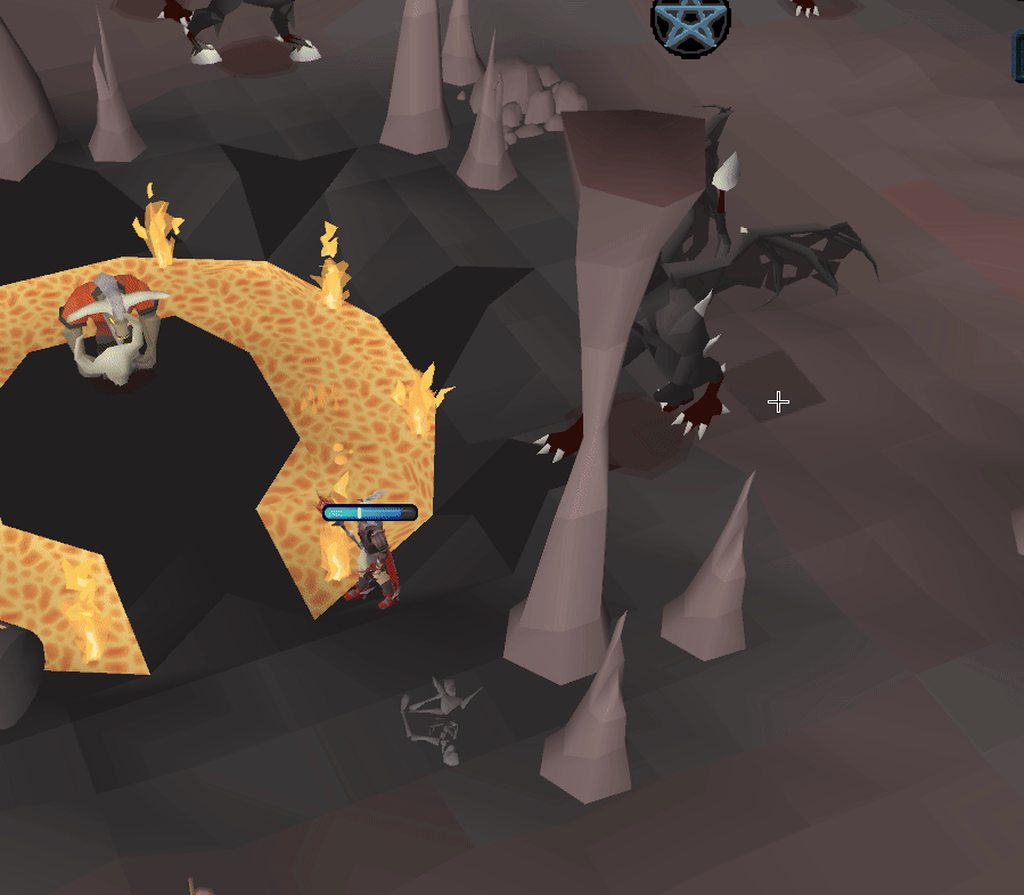
My runelite sometimes freezes when i use an arceuus spell, is there any debug/logs i can look at?
https://imgur.com/x9dvCxT
 haughty pumiceBOT
To find the logs, you can do one of the following:
- If your client failed to open, click the
Open logs folderbutton. - Open the screenshot directory by right-clicking 📷
Camerabutton, navigate 1 directory up, then open logs folder. - Navigate to
%userprofile%\.runelite\logson Windows or$HOME/.runelite/logson Linux and macOS.
Upload the log files named client and launcher by dragging them to Discord. If there are files prefixed with jvm_crash dated from today, upload them too.
oblique plume
its prob not gonna log though
and be a hub plugin you got
you could install the debug helper plugin and press dump threads while its frozen there
and that could say something
 fallen bough
is idle notifier bugged for afk firemaking doing forester's campfire? my guy just chilling there doing nothing and theres no notification
oblique plume
no, the animation for bonfireing just doesnt stop
so you arnt idle for a long time
 tired delta
my client freezes on loading lines all of the sudden. Never had this; it also closes randomly sometimes, even though my fps is 160 consistently. Never had any issues. Any thoughts?
haughty pumiceBOT
To find the logs, you can do one of the following:
- If your client failed to open, click the
Open logs folderbutton. - Open the screenshot directory by right-clicking 📷
Camerabutton, navigate 1 directory up, then open logs folder. - Navigate to
%userprofile%\.runelite\logson Windows or$HOME/.runelite/logson Linux and macOS.
Upload the log files named client and launcher by dragging them to Discord. If there are files prefixed with jvm_crash dated from today, upload them too.
leaden trail
Post your logs but it's probably just a bad hub plugin causing the freezes
gilded kayak
lol
leaden trail
lol indeed
tired delta
why
 mossy swan
holy fuck
gilded kayak
cuz there's literally nothing but cheats in these logs
leaden trail
have you tried not cheating?
gilded kayak
LITERALLY only cheats
 oblique plume
cringe
leaden trail
Although it was a good laugh at least
gilded kayak
that being said if i ever see that much watchdog log spam in a non cheaters logs, he's getting these hands
round jacinth
I always miss the good ones 😭
charred wind
Rolled in here late too. Never get to clown on cheaters
 keen narwhal
anyone had an issue with runelite crashing with new clogs?
i got a clog and the client went white right before and said not responding
when it came back i got the clog and it took no screenshot
but i heard the audio for clog
leaden trail
Post your logs
haughty pumiceBOT
To find the logs, you can do one of the following:
- If your client failed to open, click the
Open logs folderbutton. - Open the screenshot directory by right-clicking 📷
Camerabutton, navigate 1 directory up, then open logs folder. - Navigate to
%userprofile%\.runelite\logson Windows or$HOME/.runelite/logson Linux and macOS.
Upload the log files named client and launcher by dragging them to Discord. If there are files prefixed with jvm_crash dated from today, upload them too.
keen narwhal
just updated gpu drivers, that was issue thanks
 buoyant shadow
is there an update right now? My client is stuck on “fetching applet viewer config” for the last 10-15 mins
 zealous cedar
no
buoyant shadow
well that’s weird why would it be stuck there
 autumn bay
any clue on what causes these emojis to appear in friends list?
 oblique plume
A plugin
 wanton rain
im having an issue trying to launch runelite from the jagex launcher: "there was a fatal error starting runelite"
wanton rain
yes one second

its not even launchin runelite now
it used to and it gave me a connection error i think
hollow olive
is your pc time correct?
wanton rain
yes
hollow olive
then idk, could be a network issue
wanton rain
nothing changed since yesterday, and it was working fine
after multiple tries on my phone the game launched
but not on pc
"same network"
leaden trail
This is probably just a connection issue
wanton rain
 gilded kayak
wow dura ur so smart how'd you know it was going to be that
 solemn pasture
Anyone have any thoughts around my PC crashing when trying to play OSRS on RuneLite? Recently got a new PC with a 5090 and it seems if i use the GPU or 117HD plug-ins it crashes within 10 minutes, and need to restart PC by the button on the case, completely unresponsive.
 stone parcel
Might want to look in Windows event viewer if your whole pc is becoming unresponsive.
solemn pasture
Don't really know what im looking for, all it says is the pc shut down in an unexpected way
leaden trail
I would guess that you're probably experiencing a GPU driver crash
 somber relic
In the AppImage how would I go about adjusting the java Xmx memory amount? I'm crashing due to OutOfMemoryError, the launcher.log shows "jvm arguments: none", but checking the process command it shows "-Xmx768m".
Ah, nevermind.
Opened terminal and ran
./Runelite.AppImage --configure
and set the JVM argument from there. Hopefully this solves my crashes.
Actually, the process still shows "-Xmx768m" for some reason?
ERROR n.runelite.launcher.LauncherSettings - unable to save launcher settings!
java.nio.file.FileSystemException: /tmp/.mount_RuneLic1s4PK/settings.json: Read-only file system
Yeah I don't think you can use --configure on the appimage, personally I used --appimage-extract, extracted it, then I was able to use --configure on the "AppRun", and that seems to work.
Then I just use the extracted AppRun to run it.
 spare kindle
Anyone know why when I switch from my intel igpu, to my nvidia gpu, pixels become slightly blurry? using 117
haughty pumiceBOT
@spare kindle Visit 117's HD plugin discord (https://discord.com/invite/U4p6ChjgSE) for support, issues & feedback
somber relic
I tried the Flatpak version, but running it with --configure causes it to think it's saved the config, but on next launch the options are gone.
At least with Flatpak I'd be able to add an environment variable with Flatseal, but _JAVA_OPTIONS="-Xmx1280m" doesn't appear to affect it either, but it's harder to confirm since it won't change the process options.
 rocky tiger
@somber relic For bolt I did flatpak override com.adamcake.Bolt --filesystem=/home/<username>/.runelite then made a symlink in .var/app/com.adamcake.Bolt/data/bolt-launcher named .runelite pointing it. Might want to do similar thing.
Useful to get RL folder into normal place so if you run jar or from IDE it sees same folder.
stone parcel
In Bolt you could just use RuneLite configure there. But I think they are running the standalone RL.*
rocky tiger
Wasn't sure if bolt was involved or not. Personally Jagex launcher with wine randomly stopped working for me.
stone parcel
I'm still on Lutris 🤣
somber relic
Yea, I'm just running standalone for my non-jagex account. Not a bad idea to set the flatpak filesystem up like that or similar. For now tho I think I'm just going to run it as is and see if I crash again. I'm happy to adjust plugins, but since I can't reproduce the issue on command it'll be a pain to figure out which was or not.
For my Jagex Account I'm using the torm flatpak, but I don't have nearly as many plugins installed and haven't had an issue yet.
 wild yarrow
Runelite deleted all my profiles, Im logged into the correct rl account
haughty pumiceBOT
gilded kayak
more likely runelite just forgot what profiles it needed to load
wild yarrow
I followed that guide already and it just lead me to the same conclusion, which is that I am logged into the correct account and its still gone
I went to the runelite website,m figured maybe I could download them there but it only has the home profile
are rl profiles stored on ur device by any chanse?
 empty minnow
tell me you didn't read the link without telling me you didn't read the link
wild yarrow
found it
wild yarrow
empty minnow
tell me you didn't read the link without telling me you didn't read the link
couldve just told me to go read the link again without being derogatory and bitchy
 , glad it worked out tho
 tiny vessel
this might be a wild question... I just installed linux. and I want to install jagex launcher but i see that linux is not an option. is bolt legit?
 solid mesa
Yes
 strange sage
Does anyone know if I am able to move the right side of the bar to my left side
solid mesa
You can't
strange sage
thanks for the info 🙂
😢 my monitor has black lines all on the right side so its hard to read my exp tracker xD
 vivid shoal
is it normal for bosses to reset in the loot tracker after not killing for a while?
just individual bosses
solid mesa
Yes
vivid shoal
rip </3
 cinder yoke
is this a 3rd party plugin? If not, I believe there is a typo. Should be 'paid', not 'payed'.

it also doesn't accurately track bank trips made by the butler?
leaden trail
Hub Quality™
cinder yoke
makes sense
ah yep, found the plugin
figured it was too bad to be official too, hence it was my first question
 spare token
Hello after all, is there a plugin that sends me a notification to my phone when Runelite idler goes off?
leaden trail
I watched that mute in real time 💀
charred wind
I missed it damnit
leaden trail
Oh I just meant I saw the name go gray
 orchid cloud
This is how the game looks with GPU plugin turned OFF

But with gpu on it has a lot more detail that I don't want, it gives a lot more texture, better performance but how can I keep it lower detail
 tidal nacelle
Anyone getting failed login or is it just me?
round jacinth
tidal nacelle
Anyone getting failed login or is it just me?
If it was far wide spread I imagine you’d see it here. Your connection is just bad at that moment.
tidal nacelle
All good, resolved by logging out and back in. From actual client
 fossil summit
orchid cloud
But with gpu on it has a lot more detail that I don't want, it gives a lot more ...
fossil summit
orchid cloud
But with gpu on it has a lot more detail that I don't want, it gives a lot more ...
turn off remove color banding
orchid cloud
its off
gilded kayak
dont they literally just want computer shaders disabled
and to read what the prompt says when disabling* it
oblique plume
i dont think that does that
it looks like theyre stretching to me and gpu is unstretching the scene
or scaling algo
gilded kayak
oblique plume
i dont think that does that
sad
fossil summit
I think it's a mix of the stretching of the canvas in projection matrix and also fixed vs floating point vertex positions
but when I see the cpu renderer, color banding is what I look at first
im sure if u casted all those floats as an int, it would look pretty close
spare token
Is this where I ask questions? I was muted when I asked a question, I can’t see any rules regarding it?
gilded kayak
spare token
Is this where I ask questions? I was muted when I asked a question, I can’t see ...
Hi, this is the correct place for RuneLite users to ask questions, but you get muted by the bot since on a previous occasion you came here asking questions, you were not using RuneLite but actually using a cheat client
please stop trying to circumvent your mute or i'm just going to ban you, thanks
 vestal smelt
Hey I'm using Adams playtime plugin but its completely broke on me. It's added an extra 30 minutes on top and I can't get it resync to my actual playtime. Either by talking to Hans or opening the time played section.
Tried uninstalling and didn't work. Is there somewhere in the settings file I can reset it?
 haughty pumiceBOT
Support for hub plugins should be directed to the author of the plugin.
You can find the support link by searching for the plugin in the Plugin Hub panel and clicking the ? button on the plugin, or by right-clicking the plugin in the plugin panel and clicking the Support menu option.
gilded kayak
i didn't even know we had such a plugin, it seems like it would fall out of sync all the time since that data shouldn't always be available
vestal smelt
I guess I can report an issue but there isnt really anything I can go off here

Nvm I gotta create a github account. Guess its gg
gilded kayak
there seems to be issues as far back as 2022 saying it doesn't work i was looking at the wrong plugin
so i don't think u need to make one, it probably just doesn't work
vestal smelt
Been using it on other accounts fine and it was working on this account up until last night.
I was just wondering if theres a line of text I could wipe in the settings file somewhere to reset it. But I can't find anything with ctrl + f
I would have thought uninstalling the plugin would reset the settings for it but 🤷♂️
gilded kayak
uninstalling a plugin removing the settings would be awful this discord would CONSTANTLY filled with people complaining about that
literally nothing but that
ok i'm looking at the correct plugin this time and the logic seems correct
it's reading the varclient that's only available when the character summary tab is selected in the background, but the total time is wrong for me too
i wonder why
oblique plume
jamfflex
vestal smelt
Yea I'm using the other one now and whilst its buggier it does actually resync when you open the summary tab
the one by Adam doesn't
gilded kayak
that doesn't seem true since when i clicked the summary tab, my overlay went from nothing to a time
vestal smelt
Yea sorry, I meant to say it DID update beforehand. But now it won't
I've been using these plugins for months and its a massive req for me to get videos like this out. I know its niche but without them its so annoying to track time manually myself and edit the videos lol
 gilded kayak
seems like we dont have a ::getvarc dev command
so i can't easily check what the value is to figure out where the problem is
 fervent hemlock
anyone know if there is a way to stop the notifications from deleting whats in my clip board?
solid mesa
That does not happen for me. Do you have screenshot set to Copy to clipboard or something?
gilded kayak
vestal smelt
I've been using these plugins for months and its a massive req for me to get vid...
i think your issue is fixed by just clicking the quest tab and swapping back
if i keep the tab open and focused, the varc does not tick up, but the plugin does still count
which is probably why it counts, because it has to otherwise the time would just stop, when jagex does not correctly update the value
also i figured out why my time is wrong, it's not wrong it's correct, but only if i lived in UTC
utc vs local time strikes adam again
fervent hemlock
maybe where is the setting for that??
vestal smelt
gilded kayak
i think your issue is fixed by just clicking the quest tab and swapping back
Yea thats how I used to be able to resync it. But unfortunately its broken now
fervent hemlock
how can i make it so screenshots dont copy to clipboard?
solid mesa
 gilded kayak
vestal smelt
Yea thats how I used to be able to resync it. But unfortunately its broken now
gilded kayak
vestal smelt
Yea thats how I used to be able to resync it. But unfortunately its broken now
what's the chance you live in a country where the time is off by :30 compared to the rest of the world
like Iran for example
fervent hemlock
solid mesa
tyyyyyy
vestal smelt
Zero, I'm from the UK 😄
vestal smelt
The only other clue I could give is that when it broke it reset to me to an ingame playtime of ~30 minutes. I then copied my profile, logged in on that and it added those 30 mins + my actual ingame time. Swapping back did nothing.
I'll use the buggier plugin for now because I can atleast resync that one. But I may just nuke my runelite profile anyway. I've had it since the beginning of RL and transferred it multiple times to new PC's
gilded kayak
i don't really see why it's wrong and we have no hub plugin for checking these values
i had to boot up the shell to check mine
i do think it's related to time tho
cuz my time is exactly perfectly wrong, the exact amount of 6 hours from eastern to UTC
but 30 minutes wrong is very weird
 white pebble
Hi all, if there's a plugin I and many people really liked that is no longer being updated by the author, do you have any suggestions for the best place to try to talk to a group of plugin devs and see if someone would be interested in fixing/recreating/updating it?
 clear stratus

GitHub
Open source Old School RuneScape client. Contribute to runelite/runelite development by creating an account on GitHub.
#runelite is going to be the most appropriate channel for that
white pebble
awesome. thank you so much. I will put a calendar notif for if i dont hear from em. ❤️ thank you!
clear stratus
what plugin is this
white pebble
I got an arcane and was surprised, looks like it's been 2 weeks since someone reported it needing updated
solid mesa
 gilded kayak
fwiw if u have devs they could just submit a fix
people react very differently between "hey this is broken" and "hey I went ahead and fixed a new problem for you"
now they might actually for real be MIA and never see it, but yeah
 sturdy temple
Hi, is it possible to set up Unbalanced Trade Prevention (or something similar) with a percentage rather than a flat number?
haughty pumiceBOT
Get support for the Unbalanced trade prevention Plugin Hub plugin here: https://runelite.net/plugin-hub/show/unbalanced-trade-prevention.
You can also find the support link by searching for the plugin in the Plugin Hub panel and clicking the ? button on the plugin, or by right-clicking the plugin in the plugin panel and clicking the Support menu option.
 gleaming mango
Hi, I am unable to see other player over head prayers. How can i fix this please?
hollow olive
entity hider -> un check hide others 2d
gleaming mango
hollow olive
entity hider -> un check hide others 2d
Legend, thanks
oblique plume
Nice
gilded kayak
my thought was "lmao" so i guess that aligns with alex
i don't believe runelite has an trojans
 noble marsh
I am looking for a plugin similar to the tick counter, that would show my hp and prayer as a number only near my character. Are there any plugins like this?
gilded kayak
any* trojans
 slim notch
Yeah neither do i and figured it'd be Norton being idiotic
solid mesa
noble marsh
I am looking for a plugin similar to the tick counter, that would show my hp and...
You could join a party with nobody else in it
noble marsh
solid mesa
You could join a party with nobody else in it
That works, but those numbers are huge lol Thanks!
 dreamy marten
what is the x,y range in osrs? does it ever go into the negatives? whats the highest and lowest x and y cord?
clear stratus
i don't think there's a technical upper limit but there is certainly an upper limit at which map chunks exist, as you can see above
afaik there are no map chunks in negative space today
you also have to consider instance template chunks but it really depends on what you're doing
 white pebble
gilded kayak
people react very differently between "hey this is broken" and "hey I went ahead...
white pebble
gilded kayak
people react very differently between "hey this is broken" and "hey I went ahead...
good tips, tysm
 frail junco
Been experiencing random crashes with runelite (as if xlogging) out of nowhere. haven't been able to figure out the cause from crash files and i've already reinstalled runelite including deleting the whole folder with no luck as it still happens. Any ideas?
round jacinth
crash as in poof entire client is gone?
haughty pumiceBOT
@frail junco To find the logs, you can do one of the following:
- If your client failed to open, click the
Open logs folderbutton. - Open the screenshot directory by right-clicking 📷
Camerabutton, navigate 1 directory up, then open logs folder. - Navigate to
%userprofile%\.runelite\logson Windows or$HOME/.runelite/logson Linux and macOS.
Upload the log files named client and launcher by dragging them to Discord. If there are files prefixed with jvm_crash dated from today, upload them too.
frail junco
leaden trail
Definitely update your microcode before your CPU cooks itself any more
We don't have a solution for this and I'm fairly certain it's a hardware issue unfortunately
clear stratus
do we need an /intel1314 lol
leaden trail
I feel like telling someone their CPU is frying itself via bot command is a bit too impersonal
It feels bad enough having to say it, templating it would feel even worse
round jacinth
You have a Intel 14th or 15th gen chip where they have a hardware level bug within the chip. You can update the microcode within the chip to prevent the bug from being an issue
leaden trail
Zom you're off by one
oblique plume
15 
round jacinth
13 or 14
leaden trail
It's 13/14th
round jacinth
What Eva
leaden trail
zom_wrong++
round jacinth
Snake case in 2025

Anyways
Google around on the Intel microcode how to apply, idk if there is a specific version to pick
leaden trail
frail junco
if im stupid and dont understand any of this?
There is a hardware issue with the generation of CPU you have. Basically they fry themselves after a while
If you search "Intel 14th generation microcode update" you should be able to find instead on what you need to do
The sooner the better because the update will help prevent further damage although it can't fix anything that's already happened
frail junco
alright ill look into it ty, and thats whats likely causing the crashes then?
frail junco
what would be the fix? replace motherboard or?
round jacinth
It’s the chip itself, the intel processor
frail junco
alrighty ty guys
 ruby bison
how i use runelite to log into legacy accs? it keeps opening for my jagex launcher acc
leaden trail
Can you post your logs?
haughty pumiceBOT
@ruby bison To find the logs, you can do one of the following:
- If your client failed to open, click the
Open logs folderbutton. - Open the screenshot directory by right-clicking 📷
Camerabutton, navigate 1 directory up, then open logs folder. - Navigate to
%userprofile%\.runelite\logson Windows or$HOME/.runelite/logson Linux and macOS.
Upload the log files named client and launcher by dragging them to Discord. If there are files prefixed with jvm_crash dated from today, upload them too.
ruby bison
deleted everything and it seemed to work but lost all my screenshots and everything oh well...
round jacinth
it was your cheats you had that was causing it.
Just nice to get logs to dunk on ya about it
ruby bison
funny, cuz i have a brand new pc and installed jagex launcher for one acc and legacy for another
and it kept doing it till i uninstalled my jagex launcher and deleted runelite and reinstalled it xD
 wind owl
trying to remove a potion from tag and for some reason it doesnt remove it?
round jacinth
can you show a clip of what you mean?
wind owl
it took me 10 minutes to figure out how to record that
round jacinth
use OBS
wind owl
that is
round jacinth
remux it to MP4
gilded kayak
what'd you use to record it that saved in flv lol
round jacinth
in obs you can re-encode a video to be another format
round jacinth
gilded kayak
what'd you use to record it that saved in flv lol
when'd*
gilded kayak
ok then in the first tab of obs is a remux recordings button
click that, and convert it to mp4
wind owl
i cba ty idk how
round jacinth
i would like to fix your problem
gilded kayak
i'm indifferent on your problem
round jacinth
if your issue is something i can recreate it means others have the problem
and that's not good
wind owl
i dont mind but idk how to do it
round jacinth
can you upload that video to youtube instead
and share the link
or google "how to remux a video in obs" it will also explain how so you can re-drag and drop it here
gilded kayak
for me this is what happens after i select a file, but i don't remember if i did something special to get it to pick mp4

 wind owl
i dont have file button
 round jacinth
that is SLOBS not OBS
gilded kayak
ah slobs garbage got u
i've never heard a positive thing about streamlabs' version of OBS
round jacinth
it makes some stuff easier, but it obscures good features or removes them from what it's based on which is silly
i think OBS now has some of the creature comforts SLOBS did first
wind owl
round jacinth
are you using bank tag layouts or bank tags for this layout, i do not have this issue
wind owl
months ago
gilded kayak
ya this works fine for me, even with the hub plugin
round jacinth
bank tag lay outs (hub plugin) does not work with potion storage, so you'll want to convert layouts to regular bank tags (which supports layouts)
and maybe check to see if the issue persist?
just export this one to clipboard
turn off bank tag layouts (hub plugin) and re-import it in
it'll import as a core bank tag with layout
then see if the issue is still there even with only core active
wind owl
im dumb with this bro
i turned off bank tag layouts
idk how to import it
chat says i coopied it to the clipboard
wind owl
it says its been imported
round jacinth
and when you go to that tag tab it still looks like the layout you just had right?
round jacinth
okay now this is interesting
wind owl
maybe im not doing it right?
wind owl
gilded kayak
well it seems the most likely that it's being caused by some other  plugin you have
so i would have to suggest you try safe mode
!safe
haughty pumiceBOT
safemode: To enable safemode
Windows
Run the RuneLite (configure) shortcut from the windows start menu
Tick the Safe mode box, save, launch RuneLite the way you normally do.
Mac
In Terminal, run
/Applications/RuneLite.app/Contents/MacOS/RuneLite --configure
Tick the Safe mode box, save, launch RuneLite the way you normally do.
gilded kayak
it's definitely going to work fine here, since nobody else has reported such an issue
wind owl
i fixed it
gilded kayak
lit
wind owl
gilded kayak
lol
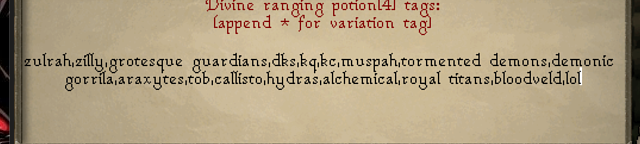 noble marsh
I am getting spammed with notifications for drops I haven't recevied in a very long time when I login. Any ideas on how to fix this?
gilded kayak
!safe does it happen in safe mode?
haughty pumiceBOT
safemode: To enable safemode
Windows
Run the RuneLite (configure) shortcut from the windows start menu
Tick the Safe mode box, save, launch RuneLite the way you normally do.
Mac
In Terminal, run
/Applications/RuneLite.app/Contents/MacOS/RuneLite --configure
Tick the Safe mode box, save, launch RuneLite the way you normally do.
 south gust
Is there an easy way to add a webhook to certain plugins that don't support that? For instance if i want a webhook added for the raid data tracker plugin sending the json after each raid
solid mesa
Not without modifing the code to the plugin, submitting a PR, having the author accept it, and update it on the hub
 brave slate
When I fish anglers and infernal eels my idle notifier does not trigger. Works for karambwans tho. Any ideas?
 vast bone
Dunno. There is a fishing idle plug-in on the hub iirc, could try that.
solid mesa
Make sure Idle interaction notification is turned on for fishing to work
 wheat carbon
I have a question, I am a software engineer but I am not too familiar with Java.
This is the step by step to create your own plugin.
Now I am confused what they mean at step 5, it's telling me to enable external plugins.
I know there is two different ways to make plugins, 1 for local and 1 for plugin hubs.
I got the local to work, because you can just put that in the /plugins folder.
But I don't understand how to do it for the plugin hub.
So my questions:
- What do they mean by enabling external plugins?
- My plugin hub plugin should be just a clone that's separate from the main runelite client folder, right?
 leaden trail
2 is very much not what it should be. It should be basically a copy of the example-plugin repo
solid mesa
If you correctly copied the template there should be src/test/java/com/package/ExamplePluginTest.java
You just run that and it should launch the client with your plugin
leaden trail
For 1, the external plugin in this case is the plugin you're working on
Basically what you're calling "local" plugins where you're just adding them to the core client is not at all what you want to be doing
 stoic monolith
sooooooooooooo i cant play osrs on my computer at all, the jagex launcer wont even open anymore, and i get this when i open runelite "Exception: IOException
Message: An existing connection was forcibly closed by the remote host"
any ideas what this is and how to fix it?
ive tried everything i can think of, reinstall, computer on and off, clear cache, reset internet
leaden trail
Are you using a VPN?
leaden trail
Can you post a screenshot of the launcher error?
stoic monolith
i just uninstalled again
ill reinstall
still there

this is so shit, i cant open either runelite or the jagex launcher, and i have no clue why
leaden trail
What do you see if you go to https://static.runelite.net/bootstrap.json?
stoic monolith
uhmmmm a whole bunch of words and numbers
i dont know what im looking at or should be looking for
leaden trail
I would try using your phone as a hotspot and launching the client, then you should be able to switch over
stone parcel
Might want to check firewall/antivirus stuff.
wheat carbon
solid mesa
If you correctly copied the template there should be src/test/java/com/package/E...
Alright I tried doing that with the instructions from the github, but it keeps failing to build. Is the guide up to date?
I am using temurin 11 like the guide suggests. I even tried different versions but it's not working.
stone parcel
The guide mentions it should fail, then tells you what to do iirc.
wheat carbon
Alright I got it. It deleted my configuration, had to add -ea in my vm options again
Thanks for the help guys
stoic monolith
stone parcel
Might want to check firewall/antivirus stuff.
i tried turning it all off, no change
stone parcel
Dang, maybe a restart after too? Or maybe make sure Jagex Launcher completely closed after turning firewall off.
stoic monolith
my jagex launcher is also broken
i cant use either
ive tried everything ive seen suggested, flushed caches, all sorts of command prompt stuff
(im really bad at all of this)
but good enough to read things, and try them blindly lol
stone parcel
Some firewalls might not turn off when being turned to the "off" position, If you are using something other than Windows Defender for firewall, it might be worth trying to exit the program completely.
stoic monolith
im going to try and reset my internet again
then turn it all off, and try again
WAIT HOLY SHIT RUNELITE WORKS
stone parcel
Awesome! 😄
stoic monolith
dunno what fixed it all, but its back, worst part i deleted all my cached files, soooo all my settings and plugins and everything are cooked, plus all the screenshots and stuff, but ohh well. we can fix most if it
redoing alllllll my plugins and settings 90% of which i have no clue about will be fun 😂
stone parcel
Maybe that stuff is still in your recycle bin, try looking for the .runelite folder in there if you deleted it. Then you can reimport you profile using this:
haughty pumiceBOT
stoic monolith
you are a genius
stoic monolith
haughty pumice
<https://github.com/runelite/runelite/wiki/FAQ#my-plugins-are-gone-or-my-config-...
you are a genius, but i remember i used a uninstall program and it wiped it all so my old profiles/screenshots/everything is gone, but its all good
stone parcel
Dang, those would have also been in that .runelite folder. :C
 shrewd berry
I am currently doing a quest and my quest helper just randomly shut off
its turned on, but idk how to get it back to working ?
any suggestions?

cant figure it out
haughty pumiceBOT
@shrewd berry Visit Zoinkwiz's Quest Helper plugin discord (https://discord.com/invite/XCfwNnz6RB) for support, issues & feedback
shrewd berry
haughty pumice
<@594371350257205298> Visit Zoinkwiz's Quest Helper plugin discord (<https://dis...
seems pretty inactive
leaden trail
It hasn't even been 20 minutes
shrewd berry
leaden trail
It hasn't even been 20 minutes
the last message in the support section was 4 days ago,...
gilded kayak
and what does that message say
 haughty minnow
how to set a prefered world for my client?
gilded kayak
default world plugin
 tender ocean
ive been having an issue where i cant see public chat or the writing above ppls heads. When i log out and back in, it shows the history of what people have said, but it doesnt show in realtime. I dont have any chat plugins running right now. any ideas ?
tender ocean
 leaden trail
Do you have entity hider enabled?
tender ocean
nope, no entity hider
right now its not updating public chat in history or above heads
tender ocean
omg it was the area mute plugin, i thought that was for sounds only
thank you very muich
round jacinth
well the music plugin does sounds so does annoyance mute
One of the area region themed plugins you pick areas on the world map to mute the chat of
tender ocean
round jacinth
One of the area region themed plugins you pick areas on the world map to mute th...
yeah thats the one i was using
 sick crypt
Hey there! Quick question – how can I adjust the infobox for the thrall timers? I have Master CA’s, but with the recent update, the thrall duration got increased, and it’s not matching what’s displayed anymore. Right now it’s showing 1:30, but it should be 2:00. Thanks in advance for any help!
solid mesa
It is fixed in the next client release
 wanton edge
Hello. I play two accounts at the same time and when I click over to the second account (or click back), I get a lag for a few seconds that is really bad. I have tried unloading every single plugin but that makes no difference. Anyone got any clues to what I could test to fix it?
clear stratus
white pebble
I got an arcane and was surprised, looks like it's been 2 weeks since someone re...
@livid mountain FYI ☝️(your plugin has ~40k installs)
 dapper finch
Hi anyone know how to fix this issue? Got a new laptop and its been like this. Fire/infernal capes are just blank colour
 empty minnow
don't think this is correct but maybe low detail plugin is enabled?
 austere wing
hey,my world switcher menu isnt loading anyone got a fix for that? its not loading both ingame and in the login screen
gilded kayak
austere wing
hey,my world switcher menu isnt loading anyone got a fix for that? its not loadi...
does the RuneLite one work
austere wing
no
gilded kayak
i mean the one on the sidebar of the client btw
dapper finch
empty minnow
don't think this is correct but maybe low detail plugin is enabled?
Its not im afraid
The issue goes away if i turn off GPU plug in
gilded kayak
do you keep your client open for a long time
dapper finch
Nope
gilded kayak
i think that just happens to the fire/infernal capes after very long client usage
🤷 then
dapper finch
Haha
gilded kayak
(when using GPU)
dapper finch
I tried adjusting some setting in gpu but its still the same
Only goes to normal once i off gpu
austere wing
gilded kayak
i mean the one on the sidebar of the client btw
yeah this one works,whats up with the normal world hopper then?
leaden trail
gilded kayak
i think that just happens to the fire/infernal capes after very long client usag...
I thought that got fixed a while back
gilded kayak
leaden trail
I thought that got fixed a while back
oh mayb
gilded kayak
austere wing
yeah this one works,whats up with the normal world hopper then?
you're just having a problem connecting to the Jagex world switcher(s), we load the list of worlds in the RuneLite one and tell jagex we are going to that server
so ours basically always works, when people have issues with the in-game one
austere wing
so the issue will go on its own later?
gilded kayak
highly likely
austere wing
alright thanks for the help bro
 trail bluff
Hi my timers dont sync between my computer and my steamdeck runelite
Is this a known issue?
charred wind
Are you syncing your Runelite profile and closing Runelite on both
 dusky flax
is there anywhere to request something to be added to runelite?
haughty pumiceBOT
You can make suggestions for new features, plugin enhancements, or general discussion on usuability of current plugins at the link here: https://github.com/runelite/runelite/discussions

GitHub
Explore the GitHub Discussions forum for runelite runelite. Discuss code, ask questions & collaborate with the developer community.
Jagex's third party client guidelines: https://secure.runescape.com/m=news/third-party-client-guidelines?oldschool=1
Additionally, these features have been rejected or removed from RuneLite: https://github.com/runelite/runelite/wiki/Rejected-or-Rolled-Back-Features
dusky flax
thanks!
 acoustic lily
is there a known reason why bank tab item icons would be missing/blank
 zealous cedar
I think some plugins will change them to be blank
acoustic lily
do you know off hand any to look for?
gilded kayak
bank tab names
 stark sandal
recently my client has been inconsistently launching into two different window sizes despite "lock window size" being on, is this a known issue? spellbook screen markers being slightly skewed for example

 jolly kindle
Can someone help me please? My runelite keeps crashing upon login.
 hollow valley
Hello can someone help me login to my runelite account? Currently cannot loggin says too many attempts.
gilded kayak
jolly kindle
Can someone help me please? My runelite keeps crashing upon login.
!safe
haughty pumiceBOT
safemode: To enable safemode
Windows
Run the RuneLite (configure) shortcut from the windows start menu
Tick the Safe mode box, save, launch RuneLite the way you normally do.
Mac
In Terminal, run
/Applications/RuneLite.app/Contents/MacOS/RuneLite --configure
Tick the Safe mode box, save, launch RuneLite the way you normally do.
gilded kayak
hollow valley
Hello can someone help me login to my runelite account? Currently cannot loggin ...
That's not a RuneLite account, that's an Oldschool Runescape account
you can do what the error says and migrate to a Jagex account, or you can wait until it stops happening
jolly kindle
gilded kayak
!safe
It doesn’t crash now but it’s running badly. It just started crashing recently. It worked great before the Yama update.
gilded kayak
it's probably running badly because GPU is disabled in safe mode
the crashing plugin is likely something you installed from the tab, as those are also disabled in safe mode
jolly kindle
I disabled all the plugin hub stuff and cleared cache before and it still crashed
gilded kayak
!logs maybe you'll get lucky and the logs will say what's crashing
haughty pumiceBOT
To find the logs, you can do one of the following:
- If your client failed to open, click the
Open logs folderbutton. - Open the screenshot directory by right-clicking 📷
Camerabutton, navigate 1 directory up, then open logs folder. - Navigate to
%userprofile%\.runelite\logson Windows or$HOME/.runelite/logson Linux and macOS.
Upload the log files named client and launcher by dragging them to Discord. If there are files prefixed with jvm_crash dated from today, upload them too.
leaden trail
That is nothing
gilded kayak
that's an image
leaden trail
Can you upload the full file instead of taking a photo of a screen showing a small portion of it?
 tropic oxide
gilded kayak
tropic oxide
gilded kayak
nothing special in the logs, maybe it is the gpu driver version you're currently on, can you successfully login outside of safe mode, if GPU is kept disabled
jolly kindle
gilded kayak
nothing special in the logs, maybe it is the gpu driver version you're currently...
Yea it’s working without gpu outside safe mode
gilded kayak
so it's probably just the GPU driver version you're currently using that's not playing nice
if you were to downgrade the driver version it's highly possible the issue might go away
or update* I guess if ur not on the latest
 sonic birch
stark sandal
recently my client has been inconsistently launching into two different window s...
sonic birch
stark sandal
recently my client has been inconsistently launching into two different window s...
Should just work if you set the size in the runelite config
hollow valley
gilded kayak
you can do what the error says and migrate to a Jagex account, or you can wait u...
very weird because I can loggin to the normal osrs. It is only when I try to loggin to runelite
gilded kayak
hollow valley
very weird because I can loggin to the normal osrs. It is only when I try to log...
yes this issue only applies to us
the official clients bypass said issue
the way to resolve it is only what I mentioned before though
 cyan kernel
Hey guys, my !kc command is not working, i have it enabled (i think)
 fallen briar
anyone using the on-screen notes plugin? it doesnt appear anywhere on my screen when i enable it, and supposedly can be managed by typing ::notes which doesnt work either
haughty pumiceBOT
Get support for the On-screen Notes Plugin Hub plugin here: https://runelite.net/plugin-hub/show/on-screen-notes.
You can also find the support link by searching for the plugin in the Plugin Hub panel and clicking the ? button on the plugin, or by right-clicking the plugin in the plugin panel and clicking the Support menu option.
mossy swan
oh that readme is very helpful
fallen briar
yeah i went to the github that it linked from the author and it appears to be a standardized cookie cutter example repository
and the issues page was inactive lol
no biggie if it just doesnt work just thought it would be handy to write quick stuff about bosses on
i can keep using the sidepanel notes
fallen briar
yeah thats true
 plucky ravine
Good morning
Can someone help me with a issue with email and autenticator ?
mossy swan
we dont run the game, and so dont have anything to do with that
try the official server
haughty pumiceBOT
If you are new to OSRS, make sure to follow this excellent guide on OSRS wiki: https://oldschool.runescape.wiki/w/New_player_guide. You can also join the official OSRS Discord here: https://discord.gg/osrs
plucky ravine
Hmm thx
cyan kernel
charred wind
What are you typing, and do the hiscores load for you
they do, for example !kc cox
 amber barn
Hey does anyone know why when i launch my runelite client all my pluggins are reset aside from the native ones?
or what i can do to fix this
like for example only like loot tracker and notepad is here
amber barn
if anyone can help me that would be wonderful I dont know what to do :(
haughty pumiceBOT
 gusty reef
is there a way to remove this coloring option from ground items plugin?

 unique tiger
any one else getting unexpected crashing?
leaden trail
unique tiger
any one else getting unexpected crashing?
Post your logs and we can look
haughty pumiceBOT
To find the logs, you can do one of the following:
- If your client failed to open, click the
Open logs folderbutton. - Open the screenshot directory by right-clicking 📷
Camerabutton, navigate 1 directory up, then open logs folder. - Navigate to
%userprofile%\.runelite\logson Windows or$HOME/.runelite/logson Linux and macOS.
Upload the log files named client and launcher by dragging them to Discord. If there are files prefixed with jvm_crash dated from today, upload them too.
 jade oyster
hey - can i hide this xp bar thing?
 solid mesa
Click XP next to the minimap
jade oyster
well i feel stupid. thanks 😄
solid mesa
I would also recommend alt-right clicking it to move it to it's original position. A lot of UI elements are drawn relative to that and moving it can mess things up
 polar brook
hi guy's i can't get my runelite going ;s
says there was a fatal error starting runelite runelite was unable to verify the certificate of a required server while downloading the bootstrap check your system clock is correct ;s
solid mesa
Is your clock wrong?
gilded kayak
did you check if your system clock is correct
polar brook
thanks folks love ya
 sharp thorn
hey all this is the first time im reaching out for some help. I am really struggling on building the project. I run the client through the IDE and I am not getting RL to open but it kinda freezes
 torn gorge
hey some of my profiles not showing up i tried restarting client/relogging into my rl how do i go about it?
haughty pumiceBOT
 tulip ibex
my client has been closing a lot these past few days as well. No error messages just closes
mossy swan
13900kf 
leaden trail
mossy swan
13900kf <:catdespair:1087521982817509426>
microcode 0x10e too 😳
leaden trail
tulip ibex
my client has been closing a lot these past few days as well. No error messages ...
Are you familiar with the Intel 13 and 14th generation stability issues?
tulip ibex
Nope haha I’ve never really had a problem until these past few weeks maybe
leaden trail
That's actually pretty shocking given the microcode version you're on
Basically RIGHT NOW what you want to do is to install the microcode update for your machine (Google would be more helpful than I would be)
There's a flaw with a LOT of 13 and 14th gen Intel CPUs where they basically cook themselves leading to irreversible hardware damage
tulip ibex
Oh hmm thanks for the info! I found this reddit post here. Is that sort of what you are referencing? https://www.reddit.com/r/overclocking/comments/1axepvu/optimizing_stability_for_intel_13900k_and_14900k/
Reddit
Explore this post and more from the overclocking community
solid mesa
Depending on how you purchased your CPU I would also recommend looking into using the extended warranty and getting it replaced as it likely has permanent hardware damage.
 haughty pumiceBOT
stone parcel
haughty pumiceBOT
stone parcel
You can use scale in there to resize most things.
 ashen chasm
okay i fixed. and right now i see chatbox is kind little big
solid mesa
If you're using stretched mode then you can reduce the scale
 stone parcel
Maybe Resizable Chat plugin would help here.
 marsh bone
anyone ever seen this? mobile shows the options
 solid mesa
Likely a teleport plugin you have hiding/breaking it
haughty pumiceBOT
To enable safemode
Windows
Run the RuneLite (configure) shortcut from the windows start menu
Tick the Safe mode box, save, launch RuneLite the way you normally do.
Mac
In Terminal, run
/Applications/RuneLite.app/Contents/MacOS/RuneLite --configure
Tick the Safe mode box, save, launch RuneLite the way you normally do.
marsh bone
solid mesa
Likely a teleport plugin you have hiding/breaking it
what plugin could it be?
solid mesa
🤷♂️
marsh bone
same thing for relocating poh
round jacinth
!flow
haughty pumiceBOT
flowchart: Please refer to this flowchart for further troubleshooting.
 safe nebula
hey is this the place to try and get help with a RL plug in if that plug in doesnt have a specific support discord?
clear stratus
no
haughty pumiceBOT
Support for hub plugins should be directed to the author of the plugin.
You can find the support link by searching for the plugin in the Plugin Hub panel and clicking the ? button on the plugin, or by right-clicking the plugin in the plugin panel and clicking the Support menu option.
safe nebula
So that takes me to the actual plug in link with no support options
solid mesa
There's a link that says Report an issue
 safe nebula
gotcha ty
 spark stirrup
Does anyone have a solution for shift click not withdrawing all in bank on menu entry swapper? every option including all but 1 works but not the withdraw all (fresh install on new pc and fresh account as coming back to the game). I tried searching on here and other people have had the issue dating back a couple months but can't see a solution posted
tulip ibex
leaden trail
microcode 0x10e too 😳
@leaden trail I think I updated my microcode. Is there a place I can check to confirm? Within Runelite? Or?
stone parcel
 scenic basin
Hi, my clent keeps crashing in f3 of cms, seems fine everywhere else, mystics room seems especially troublesome. No errors or anything it just freezes for a second then closes. Can someone smarter than me help please
Also no jvm_crash log
tulip ibex
stone parcel
Intel says https://www.intel.com/content/www/us/en/support/articles/000055672/pr...
Tried that tool and it froze my pc twice trying to look at it lol not sure what the deal is. Is the only way to see it in Runelite is if the game crashes? I can't see it within the launcher or client log?
stone parcel
It's also in registry from what I hear, I found a thing that says this into CMD will pull up the microcode version?
reg query HKEY_LOCAL_MACHINE\HARDWARE\DESCRIPTION\System\CentralProcessor\0
But I think that is only printed into the jvm_crash logs.
tulip ibex
gotcha, thanks! Is it one of these? Sorry I'm a big pc noob:
FeatureSet REG_DWORD 0x311b3dff
~MHz REG_DWORD 0xbb3
Update Revision REG_BINARY 2F010000
Patch Source REG_DWORD 0x1
Record Type REG_DWORD 0x2
CPU Family Model Stepping REG_DWORD 0xb0671
CPU Meta Data REG_DWORD 0x2
Firmware Record Version REG_DWORD 0x12f
Previous Record Version REG_DWORD 0x12f
Current Record Version REG_DWORD 0x12f
Preferred Record Version REG_DWORD 0x0
Patch Configuration Used REG_DWORD 0x0
Update Status REG_DWORD 0x6
Update Environment REG_DWORD 0x1
Previous Update Revision REG_BINARY 2F010000
Platform Specific Field 1 REG_DWORD 0x2
stone parcel
I think this indicates 0x12f for your microcode verison, I'm pretty sure this means you successfully updated it from the 0x10e you had earlier. 😄
tulip ibex
oh okay, thanks! Appreciate the help!
stone parcel
Np! This update basically should stop the CPU from damaging itself, but if it already has damaged itself you might still see issues, and may need to claim some extended warranty stuff related to this issue.
tulip ibex
makes sense, thanks! Issues as in crashing, blue screens, etc..?
leaden trail
Basically yes
tulip ibex
Sounds good, thanks again
 lean phoenix
hello, just wondering if you guys know of any issues regarding game sounds not working through speakers or airpods? system sounds and youtube works, since yesterday I've had no in game audio through my speakers or airpods. Intermittently theres been issues with airpod connectivity and runelite sounds beforehand but now it seems to not work at all. I've ran the troubleshooter and checked drivers just wanted to know if theres anything else cheers
crisp dune
We haven't changed anything about sound in the client recently. You could check to see if RuneLite is muted in your OS
charred wind
lean phoenix
hello, just wondering if you guys know of any issues regarding game sounds not w...
disable handsfree telephony in bluetooth services for your airpods while connected
won't help I think but it'll disable something you don't want with those
lean phoenix
charred wind
disable handsfree telephony in bluetooth services for your airpods while connect...
didnt work unfortunately, cheers for helping anyway
lean phoenix
crisp dune
We haven't changed anything about sound in the client recently. You could check ...
in the volume mixer? its unmuted but if i change the volume theres no response as in the windows sound when you adjust volume slider
lean phoenix
@charred wind @crisp dune restarting pc fixed it for now
 worthy trout

everything good with runelite? Internet is fine and game status doesnt have any info yet
gilded kayak
if RuneLite was having a problem this place would be on fire
 unreal viper
Hey guys, i need some help. I got a new pc, and i logged into my account, but none of my plugins or presets are popping up, i went to the profiles tab and clicked default but nothing changes, is there a solution to this?
haughty pumiceBOT
unreal viper
ah, so i would need to get that information from my other computer?
stone parcel
That should be useful, you can basically cloud sync your profile (on original PC), or you can transfer the mentioned .runelite folder.
Yeah.
unreal viper
okay cool, thank god i still have access to that computer. I will try cloud sync and if that doesnt work ill transfer, thanks @stone parcel !!!
stone parcel
Np, gl! 😄
unreal viper
playing without the correct plug ins makes me feel like im not even playing the same game xD
Cheers
 short cove
Hello, can i ask something about the Jagex Launcher?
stone parcel
The Jagex discord might be better if it's only about the Jagex Launcher, but if it's RuneLite related maybe someone here could help.
haughty pumiceBOT
If you are new to OSRS, make sure to follow this excellent guide on OSRS wiki: https://oldschool.runescape.wiki/w/New_player_guide. You can also join the official OSRS Discord here: https://discord.gg/osrs
short cove
stone parcel
The Jagex discord might be better if it's only about the Jagex Launcher, but if ...
can you give me the Jagex discord pls
gilded kayak
 stone parcel
It's the thing in between our messages.
short cove
mb,i thought its only OSRS discord. thanks
 urban mountain
Why is 'tombs of amascut' still displaying the old % chance? was it not updated with summer sweep up?
solid mesa
It was updated about 5 hours 44 minutes before your message
leaden trail
Restart your client, in other words
haughty minnow
is there a reason why my tob projectiles are going into my feet?
 gilded kayak
basicallyJagex changed a bunch of projectile stuff in the last major update, Adam changed the APIs so they wouldn't break like 100 plugins, a few of them broke anyway
i don't remember if that feet thing will be fixed after the next RL update, or if the author for that tob plugin, has to change something
haughty minnow
whats the plug in that saves log in details, avoiding to retype user/pass
fossil summit
jagex account
 finite swan
Hello, my computer just restarted and as I launched runelite again all my saved profiles was gone.. does anyone know if I can find these in some saved archive? I tried logging out/in of the runelite account
haughty pumiceBOT
finite swan
Thank you so much:)
 safe jolt
I think this isn't fixable by RuneLite (well without sub optimal changes), but i'm putting this here to start.
Using the cluescrolls plugin switched to "on pickup" saves a ton of time, however I ran into an easy step that does not properly activate on pickup, and must be clicked for the overlay to show up. Easy clue step Hura's Crossbows ItemID: 3494.
I looked through the plugin and it checks all your items on inventory change for ParamID 623 to check if items are clues.
So I believe the "fix" for this bug is for Jagex to update ParamID 623 on ItemID 3494 to correctly identify it as a clue scroll.
gilded kayak
safe jolt
I think this isn't fixable by RuneLite (well without sub optimal changes), but i...
@halcyon star lmao nvm false alarm nothing funny happened, just the known wrong itemid
 tight parrot
Is there a ticket or anything related to clients freezing for 1/2 seconds? past month or so once my client has been open (logged in or out) for ~3 hours I start to experience freezes every minute or so, once I close and reopen the client everything is fine again until the 3 hour mark
gilded kayak
it's almost certainly a plugin you installed from the hub, leaking
i would probably remove the you don't actually use
and hope that it stops
tight parrot
Any way to sort plugins by install date?
gilded kayak
since debugging a 3 hour issue is obviously not reasonable
tight parrot
alright thank you
safe jolt
gilded kayak
<@475823434761502732> ~~lmao~~ nvm false alarm nothing funny happened, just the ...
So does that mean this is a known issue, or things like this just happen to different items over time and it's a constant battle to have Param consistency?
gilded kayak
no i just* found it funny and pinged the guy who added this feature
 lament sail
Can someone point me to discussion about Bank Tags Core Layouts swap/insert functionality?
The Bank Tags Core layout addition seems really clunky to me -- there's no option to make a layout by default, I don't think. You have to right click the bank tab to transform it into a layout every time. Additionally, the always-swap functionality of Bank Tag Layouts is preferable to me and a lot of others. I like using insert in my bank and swap for my layouts, and toggling between these is tedious and prone to errors resulting in the disorganization of the layout, which is really frustrating.
I'm sure there is something I'm missing or misunderstanding about this.
gilded kayak
safe jolt
So does that mean this is a known issue, or things like this just happen to diff...
if it was inconsistent* we probably wouldn't have added the feature
so i assume you either found the only one, or one of a few that might not work
gilded kayak
gilded kayak
if it was inconsistent* we probably wouldn't have added the feature
or, maybe it is inconsistant and we managed to not notice with the batch of clues tested, but seems more likely that it's small
safe jolt
Agreed, I looked through the plugin pretty thoroughly trying to figure out what was wrong, and came to the conclusion nothing in the plugin was wrong, so it must be the clue/item. Also I didn't find an easy way to check the ParamID's on items manually in runelite, so it's just an educated guess at this point.
gilded kayak
oh
solid mesa
gilded kayak
it has that param yeah https://abextm.github.io/cache2/#/viewer/item/3494
safe jolt
Well now I'm just more confused
gilded kayak
did you confirm in-game that it was ID 3494 and not just the item id we have, which could be wrong
safe jolt
No, but clicking the clue brings up the correct "active clue", so I think that confirms it
safe jolt
What's the easiest way to get the itemid in game?
 gilded kayak
it has that param yeah <https://abextm.github.io/cache2/#/viewer/item/3494>
gilded kayak
gilded kayak
it has that param yeah <https://abextm.github.io/cache2/#/viewer/item/3494>
it's probably right since 3494 correctly has the relevant step attatched to that param
idk why it would be wrong
oh wait yeah i do know lol
3494 is Search through some drawers in the upstairs of a house in Rimmington. not the hura step
yeah this is already known to be wrong
https://github.com/runelite/runelite/pull/19052 i thought this had been merged already
you overthought it and tricked us all 🧘
xd
safe jolt
Yeah if i would have seen the true ItemID i would have seen the bug
so because 3493 isn't in the list, it's not getting set as active because it doesn't exist. I think there would be a log of that somewhere
gilded kayak
it's wrong because it's duped and we didn't have a test for that
so it snuck by
but since clicking the item reads the text, the mistake doesn't effect everyone using clues the "normal" way
 winged void
Hi, I've been using runelite as a 'guest' user, how do I export/import my 'guest' lootlog into my runelite account so I can continue the grind
solid mesa
I think they mean just not logged into the client
winged void
Yes, as Cooper said
gilded kayak
just log into the client and loot will be automatically synced, and click the ☁️ below the profile name, so it turns orange, to sync plugin settings
winged void
gilded kayak
just log into the client and loot will be automatically synced, and click the ☁️...
I'm logged in, on client and browser. Not synced. I don't see the cloud? Is it client or browser
Found it, will test
 rapid moth
Hey Guys, I have a plugin which is making annoying noices during Kephri in TOA - when the scarabs are coming in - cant find out how to disable it
not sure which plugin it is
leaden trail
You would know better than us, we have no idea what you installed
vast bone
what does it sound like?
rapid moth
its only when the scarabs come out in Kephri
its like screaming somethign weird to grab my attention or something
but hella loud
only place it does it
leaden trail
Something related to a streamer probably
vast bone
does it sound like a popular video game streamer saying a meme phrase?
rapid moth
yes i think so
leaden trail
It's probably whatever <streamer name here> plugin you installed then
rapid moth
ermmmmm dont have any streamer name 😦
leaden trail
So I'm not guessing blindly can you post your logs so I can see what you have installed?
haughty pumiceBOT
To find the logs, you can do one of the following:
- If your client failed to open, click the
Open logs folderbutton. - Open the screenshot directory by right-clicking 📷
Camerabutton, navigate 1 directory up, then open logs folder. - Navigate to
%userprofile%\.runelite\logson Windows or$HOME/.runelite/logson Linux and macOS.
Upload the log files named client and launcher by dragging them to Discord. If there are files prefixed with jvm_crash dated from today, upload them too.
rapid moth
sure 1 sec
leaden trail
I really just need client.log
rapid moth
 rare trout
hello i had to reinstall windows however before i did, i hit export on my profile and it made me a .properties file, and saved it to my external hd. when i got everything reinstalled, jagex launcher, runelite i logged back into my account via google. nothing repopulated, and i tried to import my .properties file but it doesnt show up when i hit import profile on runelite . i checked the faq and help so i am at a loss on what to do
round jacinth
rapid moth
Hey Guys, I have a plugin which is making annoying noices during Kephri in TOA -...
Oh I know this.. let me find it
rapid moth
round jacinth
Oh I know this.. let me find it
Thank you!!!! ❤️
vast bone
kephri makes sounds like a streamer?
am I reading this right, that's a normal vanilla osrs sound?
rapid moth
round jacinth
annoyance mute
how do i do that?
round jacinth
hub plugin
rapid moth
you are the best - so it was the default sound? lol
round jacinth
idk they seemed to add a new sound a few months baxk there and at zebak puzzle
rapid moth
gotcha!! thank you!!!!
round jacinth
6495 and 6509 are zebak room sounds the other is kephri I guess, I didn’t categorize them properly in my notes

Old School RuneScape Wiki
This page lists the IDs for in-game sounds. A full list of their respective files can be found here.
 edgy haven
how do i redownload runelite? its been a long ass min
empty minnow
There's a link in #welcome
You also wanna download the jagex launcher if you have a jagex account, that's from their website
edgy haven
okay lemme see wat i got goin on
sonic birch
rare trout
hello i had to reinstall windows however before i did, i hit export on my profil...
Probs just need to swap to the profile as mentioned in one of the steps here:
!lost
haughty pumiceBOT
 weak reef
is there a way to change the default runelite audible notification from the system default beep? I keep tuning out system sounds
like is there a tts option like with the pickpocketing pluggin? that grabs my attention
if there isn't, maybe this hypothetical alarm could just tts the word "runescape"
haughty pumiceBOT
Place the files for the feature you want in %userprofile%\.runelite on Windows or ~/.runelite/ on Linux/OSX
The names and type for the files are:
- Custom cursor:
cursor.png - Custom default notification sound:
notification.wav - Custom specific notification sound:
<name>.wavin.runelite/notifications, then select<name>in the notification sound dropdown - Custom login screen:
login.pngImage size 765 x 503 recommended, larger images will be (simply) scaled down automatically.
weak reef
the notification folder is empty, how am I supposed to replace a specific name? look them up?
vast bone
idk maybe there's a dropdown in "Runelite" plugin?
weak reef
alright, lemme look
it's got a custom option, but the discord macro implied I could replace for specific activities, or am I interpretting wrong?
vast bone
I don't know because I don't use this feature.
weak reef
damn. off to see if anyone begged reddit for a tutorial before now, then
sonic birch
Just place it in there, don't need to replace anything
Then enable the sound in the client
weak reef
Ah, I found where it lists the new .wav, it seems to specifically be in the "idle notifier" vanilla pluggin. looks like there's no option for the task I'm looking for, I'll have to use the generic custom sound.
I wanted to make one for when the gotr round starts or maybe when the timer for the afk pluggin runs out to go run and make essence
generic is probably good enough
now to find where I turned on system chimes and turn it back off
 old sluice
is there a way to swap spacebar click into some other button when confirming crafting/fletching etc
 silent kayak
Anyone run into crashes randomly lately? Found this in logs:
2025-06-30 22:24:13 PDT [WebSocketSelector-53] ERROR o.j.server.WebSocketServer - Shutdown due to fatal error
java.net.BindException: Address already in use: bind
at java.base/sun.nio.ch.Net.bind0(Native Method)
at java.base/sun.nio.ch.Net.bind(Unknown Source)
at java.base/sun.nio.ch.Net.bind(Unknown Source)
at java.base/sun.nio.ch.ServerSocketChannelImpl.bind(Unknown Source)
at java.base/sun.nio.ch.ServerSocketAdaptor.bind(Unknown Source)
at org.java_websocket.server.WebSocketServer.doSetupSelectorAndServerThread(WebSocketServer.java:583)
at org.java_websocket.server.WebSocketServer.run(WebSocketServer.java:383)
at java.base/java.lang.Thread.run(Unknown Source)
 craggy verge
When I have Runelite open, all the other audio from my PC is crackling and distorted. This only happens with runelite, and I can run all other programs with no other issues.
mossy swan
craggy verge
When I have Runelite open, all the other audio from my PC is crackling and disto...
try putting your audio output to 44.1khz or 48khz, i forget which one
haughty pumiceBOT
@silent kayak Delete your %userprofile%/.runelite/cache folder or run this command in command prompt run as Administrator:
rmdir /s "%userprofile%\.runelite\cache"
I think following that usually fixes it iirc
 native ether
Cancel monster voice:
nex ?
leaden trail
native ether
Cancel monster voice:
nex ?
Turn off Nex Nostalgia probably
 verbal depot
Hi There, I was wondering if i would be able to get some assistance with troubleshooting why my client times out for about 5 seconds randomly throughout the day, my internet connect stays up. Its just runeline that times out - Ifr I can get some troubleshooting with Logs etc
leaden trail
It's probably just your connection to Jagex specifically
haughty pumiceBOT
open command prompt, type this in:
ping -t oldschoolXXX.runescape.com
where the XXX is your world minus 300, for example world350 = 50
leaden trail
You can do that for the world you're connected to and see if it's dropping at the same time
verbal depot
Thanks Dura, Ill do that, its happening in any world however? is there any kind of resolution to this? or what can you suggest
sonic birch
Gotta first figure out if it is indeed your connection, but then it depends a lot on your specific setup
verbal depot
My internet connection in general isnt dropping out. e.g if im watching twitch at the same time, stream continues to stream, however my game just comes up with 'timed out' but it doesnt have the error to connection.
leaden trail
Try a world in a different region
Twitch 1) buffers data and 2) isn't hosted in the same place as OSRS worlds, for example
verbal depot
understand that but if my connection to jagex specifically isnt 100% what can I do? Is there a resolution?
Because this is a new issue
for the past 5 years its been fine
But the last month the issue has been happening
leaden trail
leaden trail
Try a world in a different region
.
verbal depot
leaden trail
.
Again - I have tried numerous worlds and regions - I also dont want to play on US in UK and play with a constant 90ping
leaden trail
Usually they're relatively short-lived issues but sometimes they linger
You can try restarting your router I guess but there's not really a ton we can do if it's entirely external, at that point it's more of an ISP thing
native ether
leaden trail
Turn off Nex Nostalgia probably
volume gain 0 ?
 leaden trail
native ether
volume gain 0 ?
leaden trail
native ether
volume gain 0 ?
Turn the plugin off entirely
dreamy marten
so if i have a panelComponent and make a little text box ui element thingy with panelComponent.getChildren().add(LineComponent.builder(), is there a way to make it so you cant click throught it? so that "walk here" doesnt appear when you right click on it
verbal depot
leaden trail
.
Hi Dura
Theres the time out, Do you think Jagex would offer any assistance? ill try reseting and flushing DNS after this but its literally a 4 tick dropout
 leaden trail
No this is more of a "yell at your ISP" thing then
verbal depot
Even if my connection in general is fine? just my connection to Jagex
round jacinth
Your isp connection to jagex isn’t fine
rare trout
sonic birch
Probs just need to swap to the profile as mentioned in one of the steps here:
yes i tried that no luck. i thought my info was saved to the website https://runelite.net/account/home
verbal depot
Have just spoken to my provider. They cannot see the drop out. So its either Runelite dropping out, or something to do with my PC im assuming? but they cannot see the dropout and its hardwired
oblique plume
your pictures show its not RL though
oblique plume
so theres really nothing we can do
stone parcel
There is also a chance the tech support you talked to was wrong, and it is actually on their end. Just fwiw so you don't rule out isp stuff.
leaden trail
I spent two weeks arguing with my ISP about my Internet connection having gone out. They kept saying it was user error. Tech finally comes out, doesn't even make it inside, he saw there was an issue at the pole from the street
ISPs are usually kinda dumb
sonic birch
rare trout
yes i tried that no luck. i thought my info was saved to the website https://run...
Try all those steps again, especially the one about switching profiles. It might not be on the website, but if you exported the profile to a usb stick, you can reimport it and switch to it
 cloud shale
greetings is there a way i can carry over my plugins to a new pc without copying the .runelite folder bc overtime that will accumulate all sorts of stuff no longer relevant korrect
haughty pumiceBOT
oblique plume
the RL account syncing there
cloud shale
i understand a cloud sync does not copy plugin settings does it carry over all the plugins though
solid mesa
Cloud sync also includes plugin settings. It only doesn't include if a plugin writes files to other directories
cloud shale
solid mesa
Cloud sync also includes plugin settings. It only doesn't include if a plugin wr...
wot like
round jacinth
The mistake trackers, one of the grand exchange util plugins, chat logger, the profile plugin (one you used to auto fill a username)
Just copy the entire .runelite folder and exclude the screenshot folder as that’s the bulk of the size and the reason why copying the entire thing takes a while
(IMO that’s what is easiest)
oblique plume
Cloud sync is like only plugin settings
 nocturne kiln
Is there a way to show the actual hp numbers in the healthbars of enemies?
solid mesa
Opponent Information. But it is only an approximate based on the visual of the health bar. Jagex does not transmit the exact HP unless you monster examine
 willow wind
anyone have an issue where "lock window size" isn't being respected on linux? i think it may have something to do with my tiling manager (kwin bismuth) but not sure
https://streamable.com/ymy2vo
in the video, you can see that my main profile has "lock window size" enabled with a set window resolution. i then switch to a profile with "lock window size" disabled, and then maximize the client. then I go back to my main profile, and the behavior I expect is for it to revert to the configured resolution, but instead, it stays maximized. on top of that, when I unmaximize, it still does not revert to the correct resolution. In order to set it back to the correct resolution, I need to manually increase/decrease the resolution in runelite settings. this is quite annoying whenever I switch between profiles and was wondering if anyone knew how to fix this
 leaden trail
Posting here is going to get you the same response as on GitHub tbh
willow wind
so ur saying i should ask on github instead?
leaden trail
Are you not the person who made an issue for this exact thing a couple hours ago?
gilded kayak
dura is just remembering wrong, you're the same person who posted in #runelite , not github
leaden trail
Oh mb
willow wind
#runelite message this part is more what im wondering though
or are you saying that part is also expected behavior?
 untold crane
i uninstalled watchdog plugin but i still get highlighted text and notification from watchdog plugin?
is there something in config files somewhere i need to delete? bug i assume
solid mesa
Are you sure it isnt Chat Notifications?
But also restart the client after uninstalling plugins to be sure
untold crane
solid mesa
Are you sure it isnt Chat Notifications?
u r a legend it definitely is
ty
 glossy cobalt
Is anyone have an issue starting RL at the moment?
I'm getting stuck on Loading Plugins, seems to crash.
stone parcel
willow wind
or are you saying that part is also expected behavior?
Oh that is kinda odd, like it uses the Game Size from profile 2 after: starting in profile 1, switching to profile 2, maximize window, switching to profile 1, restore window, and then it restores to** the Game size from profile 2. I see.
leaden trail
glossy cobalt
I'm getting stuck on Loading Plugins, seems to crash.
Probably just you, you likely have a bad hub plugin
glossy cobalt
It's strange as I haven't added a plugin or anything. How can I fix
zealous cedar
you could start in safe mode
willow wind
stone parcel
Oh that is kinda odd, like it uses the Game Size from profile 2 after: starting ...
essentially yeah, except it doesnt necessarily restore to the game size from profile 2, its just some arbitrarily different size
 civic briar
is there a possibiliy to change prayer sounds? for example to change rigour sound to piety?
oblique plume
isnt there a sound swapper hub plugin
civic briar
searching
clear stratus
oblique plume
isnt there a sound swapper hub plugin
(yes)
haughty pumiceBOT
Get support for the Sound Swapper Plugin Hub plugin here: https://runelite.net/plugin-hub/show/sound-swapper.
You can also find the support link by searching for the plugin in the Plugin Hub panel and clicking the ? button on the plugin, or by right-clicking the plugin in the plugin panel and clicking the Support menu option.
civic briar
it works, but you have to convert the file you find on the wiki into wav
thanks for the help!
 subtle temple
everytime i am using therunelite i am now getting this annoying "DING" sound, i have no idea how to get rid of or what is causing it
hollow olive
subtle temple
everytime i am using therunelite i am now getting this annoying "DING" sound, i ...
go to the runelite plugin and turn on game message notifications, and you might be able to find out what plugin is sending notifications

 gilded kayak
did u find it by searching AFK
subtle temple
ye xD
just got back to the game so was a bit puzzled with what it was but thanks for the help 🙂
 pulsar portal
How do I go about finding where my .runelite folder is on linux lol
steamdeck if that helps
 lapis elm
right click on the screenshot icon and hit open
solid mesa
It should open .runelite\screenshots
solid mesa
This button?
 pulsar portal
yes
 buoyant kernel
making custom sound for superior notification through the base slayer plugin, what would be the name in the <name>.wav ? (and overall where would i even look for the names to use for stuff?)
would it be literally be Superior_foe_notification.wav? or am i way off?
 haughty pumiceBOT
Place the files for the feature you want in %userprofile%\.runelite on Windows or ~/.runelite/ on Linux/OSX
The names and type for the files are:
- Custom cursor:
cursor.png - Custom default notification sound:
notification.wav - Custom specific notification sound:
<name>.wavin.runelite/notifications, then select<name>in the notification sound dropdown - Custom login screen:
login.pngImage size 765 x 503 recommended, larger images will be (simply) scaled down automatically.
buoyant kernel
i know this, i cant find the name to use though
solid mesa
notification.wav
lapis elm
steamdeck uses a readonly home dir right
buoyant kernel
solid mesa
notification.wav
so all the custom sounds would always be the same? cant have separate for each?
thanks



 solid mesa
buoyant kernel
so all the custom sounds would always be the same? cant have separate for each?
solid mesa
buoyant kernel
so all the custom sounds would always be the same? cant have separate for each?
You can if the notification has a gear like this. Which it looks like the Slayer plugin does not
 pulsar portal
buoyant kernel
so all the custom sounds would always be the same? cant have separate for each?
pulsar portal
buoyant kernel
so all the custom sounds would always be the same? cant have separate for each?
watchdog
but it's currently broken
trying to help the dev fix it atm
buoyant kernel
it does though
 lapis elm
are you using flatpack or the appimage?
solid mesa
I realized you were one submenu in. You can name the wav anything you want in .runelite/notifications and it should be in the dropdown