
#support
1 messages · Page 92 of 1
 azure schooner
 abstract flame
i have no enemy hp bars above the enemies head? has anyone else had this issue and how do i fix it. please it makes pvp quite annoying
 final axle
do you have entity hider on
abstract flame
@final axle welp that was it thank you so much. has been 2 months of this
 dreamy marten
so im making a plugin and i would like it to save when runelite is closed but it doesn't seem like shutdown gets called when runelite closes and it only gets called when you disable the plugin, so is there anyway to tell when runelite is closing? or do i just gonna save manualy every like minute?
final axle
abstract flame
<@188961133279969280> welp that was it thank you so much. has been 2 months of t...
specifically I think it's the Hide others 2D option if you just want to turn that one off
 zealous cedar
there is an event for it, i think clientshutdown?
dreamy marten
zealous cedar
there is an event for it, i think clientshutdown?
this looks like it will work ill give it a test
thanks adam it worked :3
 rich otter
Hello, I was wondering why my loot tracker got reset, I've been signed in on runelite and its remember loot is toggled. I got loot logger and it's been logging since it seems to happen every time I take longer breaks. For instance here is my loot from Duke from both loot tracker and loot logger. I looked on reddit for a fix and saw they said come here.

 zealous cedar
if you restart your client does it fix it?
rich otter
It does not. I restart every week. It happens whenever I take a several month break.
 gilded kayak
just to be sure, are you saying this happened before and restarting did not fix it, or did you try restarting right now like Adam suggested
rich otter
Yes it's happened before. and it's been a thing for a while. I notice if I don't play a long time then I assume it resets.
gilded kayak
so did you not try restarting right now?
 leaden mica
hi how can i start runelite from jagex launcher on mac!??
doesn't let me....
please help
gilded kayak
gilded kayak
it shouldn't even be an issue fwiw
Jagex just doesn't put any effort in finding RuneLite, on mac
is it in the applications folder?
leaden mica
bro i love youuu!!!!!
gilded kayak
no? ok well it doesn't exist
leaden mica
i think it's done
yeaaaah i'm inside
thanksss man!!!
was fucking easy and fast thanks to you ❤️
rich otter
ill try it
 narrow mason
im close to uploading my logs
it seems i have alot of these
what does that imply though having jvm crash logs?
 stone parcel
Might wanna just upload the client.log, launcher.log and a couple of the most recent jvm crashes.
narrow mason
should i just copy past log details here
?
also says something wierd about drunelite alot of times jvm is mentioned
ig leme upload logs first
so u guys can see
stone parcel
Sure thing, you can just drag and drop the files here.
rich otter
rich otter
ill try it
still the same.
 rich otter
still the same.
rich otter
rich otter
still the same.
I guess if there's not a fix, I can track and it the next time it resets I'll resubmit.
 leaden trail
narrow mason
also says something wierd about drunelite alot of times jvm is mentioned
leaden trail
narrow mason
also says something wierd about drunelite alot of times jvm is mentioned
Those are just your regular logs
I'm asking about files called jvm_crash whatever
narrow mason
leaden trail
That's a client log
narrow mason
leaden trail
leaden trail
I'm asking about files called jvm_crash whatever
.
leaden trail
stone parcel
Might wanna just upload the client.log, launcher.log and a couple of the most re...
They did right before the message they responded to
stone parcel
Oh my bad. :C
narrow mason
leaden trail
I'm asking about files called jvm_crash whatever
is that diffrent then this?
 leaden trail
Yes
narrow mason
how do i get jvm crash logs?
leaden trail
If there aren't any in your logs folder then you aren't experiencing JVM crashes
narrow mason
leaden trail
If there aren't any in your logs folder then you aren't experiencing JVM crashes
okay tyty i see
ig ppl will need time to review these logs to see still if it is a runelite issue?
or does no jvm crashes mean its not runelite issue right away cuz i dont think i have any jvm logs
leaden trail
No JVM crashes means the JVM specifically is not crashing
Oh
You're calling freezes crashes
That's not going to show up in logs
Crash = the client closes
!flow
 haughty pumiceBOT
flowchart: Please refer to this flowchart for further troubleshooting.
leaden trail
Follow that I guess
narrow mason
leaden trail
You're calling freezes crashes
i should have specfied
but my entire pc crashes like blue screen
randomly when ive been playing osrs only
i wanted to rule out thats runelite is not the issue before trouble shooting further
leaden trail
That would not be a RuneLite issue
And to.your original question, would not be a result of copying your .runelite folder over
narrow mason
well tbh ive been thinking its more of a power supply issue but my friend wanted me to check this game
gilded kayak
did you google the bluescreen error
narrow mason
since i only seem to crash on osrs recently
gilded kayak
when i had a power supply issue, my blue screen error matched up with, powersupply blue screen errors
narrow mason
no i havint ive checked event viewer logs
gilded kayak
if you blue screen the first thing you should do is look up the blue screen error
it's kind of there for a reason
gilded kayak
i don't know if you can retroactively
narrow mason
so if it crashes again try to take a picture asap?
narrow mason
its saying i can check it through system logs which i havint done
 old sluice
my runelite doesn't fit the 720 res after restart for some reason it refuses to stay within screen
im assuming it has to do w dpi scaling?
 steep vault
I'm new to runelite and I asked this guy on twitch how do you make runelite look like his
He said "just low detail and stretched mode"

this is low detail with stretched mode

 charred wind
You also have HD on
Low detail hides some frivolous objects on top of the ground, as well as lower planes depending on the settings.
Stretched mode will require tweaking to be the size you want for your set up
steep vault
charred wind
You also have HD on
I do not have any HD on unless I'm unaware of it. This is a clean profile with no 117 HD or gpu or anything, just the stretched mode + low detail like he said
I disabled all plugins except stretched mode and low detail
 vast bone
steep vault
I do not have any HD on unless I'm unaware of it. This is a clean profile with n...
vast bone
steep vault
I do not have any HD on unless I'm unaware of it. This is a clean profile with n...
lmao what. there are shadows, that only comes from 117hd.
also GPU can affect how stretched mode looks.
so turn that or 117hd on.
steep vault
vast bone
also GPU can affect how stretched mode looks.
what.
vast bone
well first of all turn off 117hd.
vast bone
steep vault
what.
stretched ui looks different with GPU on vs off.
steep vault
It is off, only stretch and low detail is on
otherwise it means it took my old plugins on new profile (even tho they're not active)?
vast bone
if 117hd is off in your screenshot, restart your client
that would be a bug
it's definitely on in that screenshot.
 paper drum
I need help. Please 🙏 🙏
My son did something to my MacBook. When I go to sign into runlite it says install
Everything I've tried doesn't work
I'm almost to my first 99,and losing so much time in xp 😔
I've got it now
dreamy marten
so normally if you save doing like config.savedata("cool string") it would be saved into the properties file for that profile your using like coolprofile-283913821908109.properties but when the profile changes i need a way to save the data to that old profile i know you can do setconfiguration with a profile name but that just saves it to the rsprofile properties file and id rather have it in the actual correct properties file, so is there any signal the profile is about to change and i can sneak a config.savedata("cool") in before it switch's or some configmanager that I'm not seeing that can do it?
vast bone
I don't think you get advance warning on profile changes.
What are you trying to do?
dreamy marten
save the data but it could be quite large and i dont want to convert a couple megabyte object into a string every tick to save it x) and would rather only save it on game close / plugin shutdown / profile change
vast bone
If it has to specifically be saved to a profile I think you're out of luck.
rsprofile and files on the file system don't work for you?
dreamy marten
i just dont like it i feel like there should be a way but honestly looking at the code for a couple hours i couldnt find any
vast bone
yeah same. I had an issue where I wanted to know if a config change was part of a profile change and couldn't find a clean way either.
eventually I think I just checked the thread name XD
(that wouldn't be useful for your purpose though)
dreamy marten
why does every entry in rsprofile have .rsprofile. in the middle tho?
vast bone
my guess is that rsprofiles predate profiles and therefore there had to be a way to differentiate them from regular config settings without them being in different files.
iirc years ago they would have been in the same file.
(also why the naming is so confusing, rsprofile vs profile, and the folder is "profiles2" XD)
vast bone
vast bone
iirc years ago they would have been in the same file.
actually I'm not so sure on this now that I think about it. I don't remember too well how it used to be.
steep vault
vast bone
it's definitely on in that screenshot.
Yeah it was carrying over when switching profile 🤦♂️
Can't get it to look like his tho, must have some weird resolution
whatever
vast bone
which part is different?
vast bone
vast bone
actually I'm not so sure on this now that I think about it. I don't remember too...
nope I was right, found an old settings file
they were together in the same file.
dreamy marten
its just kinda odd that its grandexchange.rsprofile.CeAjd4d
with that rsprofile in there and the random numbers i assume is the profile id so why would you need that x) it just seems redundant
steep vault
The stretched scaling, idk if he has a different resolution but my UI does not fit with inventory there, it's either way too small or way too big
Last question what is this plugin or how does he make boosts/buff/timers fit like that?
 vast bone
dreamy marten
its just kinda odd that its grandexchange.rsprofile.CeAjd4d
with that rsprofile ...
vast bone
dreamy marten
its just kinda odd that its grandexchange.rsprofile.CeAjd4d
with that rsprofile ...
how would you be able to tell the difference between a profile key and a settings name?
vast bone
steep vault
The stretched scaling, idk if he has a different resolution but my UI does not f...
could be. there is a setting in stretch mode to make it stretch differently, you could fiddle around with those, idr how they work exactly.
vast bone
steep vault
Last question what is this plugin or how does he make boosts/buff/timers fit lik...
"boosts information"
and
haughty pumiceBOT
You can configure horizontal/vertical orientation, infobox groups or split infoboxes into new groups with the menu options opened with Shift + right-click. https://runelite.net/img/blog/1.6.28-Release/infobox.gif
 vast bone
also "timers" plugin
dreamy marten
vast bone
how would you be able to tell the difference between a profile key and a setting...
well thats just up to the user to put the argment in the correct order in the getconfiguration x) cause it always does name of the plugin . profilename. key
so you know just by order and technicaly there is nothing stoping me from just not adding rsprofile i can make the profilename anything and it will add it to the rsprofile propertys so its very useless ngl
vast bone
the only way to tell them apart that I can think of is counting periods before the equals sign.
which is really much more jank than just writing "rsprofile"
I don't really get what you are saying above.
dreamy marten
i think there has been a misscommunication at some point
vast bone
yes, it does feel that way.
steep vault
vast bone
"boosts information"
I don't think this is it
 dreamy marten
im just sayin if you open your $rsprofile-1.properties file in your profiles2 folder every single entry has rsprofile right after the plugin name and its a lil goofy
vast bone
and disable noncombat skills if you don't want those.
yeah and back when all the profile stuff was combined in 1 file you had to be able to tell them apart.
and no one changed it after they were split because it's just a few kb.
steep vault
vast bone
change the style in the plugin
There is no option in it to change style
and this is infoboxes
 vast bone
yeah that looks correct to me
steep vault
it's not even close lol
vast bone
if you don't like the boxes change the background color in "runelite" plugin.
make it transparent.
vast bone
shift right click like in the gif I had the bot link
also hold alt and drag the edges.
vast bone
np
steep vault
oh wait one more thing, when stretched and I decide to hide side panel of runelite, my minimap does go to the right and follow side panel, but my inventory stays in the middle@vast bone
vast bone
hold alt right click it
steep vault
yeah, it gets stuck to the right but only in one fixed position
 hoary pilot
hey! today my client froze up. this happend 5 times both 5 times in the rev cave. when i was speccing with abby dagger. only 1 time i died but how do i prevent this from happening again ?
steep vault
I wanna move it down a little cause its blocking special attack

but if i move it down, it doesn't follow the wall?
hoary pilot
normally i have never problems with my client . its just standard runelite
vast bone
can't really do that, there's only the default position really.
best you can do is make the icons for the different tabs go on one row, I think there is an option for that in the vanilla osrs settings
 solid mesa
Can you replicate it by doing an abby dagger spec on a cow? Or does it only happen at revs?
hoary pilot
solid mesa
Can you replicate it by doing an abby dagger spec on a cow? Or does it only happ...
i tried it in 302 white portal
with surge pot
but only in cave
vast bone
solid mesa
Can you replicate it by doing an abby dagger spec on a cow? Or does it only happ...
why the specific hate for cows, cooper?
haughty pumiceBOT
Please refer to this flowchart for further troubleshooting.
solid mesa
It's most likely some sort of plugin
If it only happens in rev caves that will make it a bit harder to find
hoary pilot

market it with red dots
3 of them where i killed some one with 60+ abby dagger
as soon as i killed them client froze
was wondering if it was some sort of exploit since i am hindering the bot farm owner
solid mesa
Could be something like PvP performance tracker if it happens on player death?
solid mesa
I would start disabling plugins until it stops happening
steep vault
vast bone
can't really do that, there's only the default position really.
best you can do ...
thanks 👍
hoary pilot
since it happend only in pvp it felt so targeted xd
isnt there a crash report or something
where i can see it from ?
vast bone
screenshot plugin? I think if you have a full hard drive it can be bad.
haughty pumiceBOT
To find the logs, you can do one of the following:
- If your client failed to open, click the
Open logs folderbutton. - Open the screenshot directory by right-clicking 📷
Camerabutton, navigate 1 directory up, then open logs folder. - Navigate to
%userprofile%\.runelite\logson Windows or$HOME/.runelite/logson Linux and macOS.
Upload the log files named client and launcher by dragging them to Discord. If there are files prefixed with jvm_crash dated from today, upload them too.
vast bone
yes
hoary pilot
launcher or client?
vast bone
client
hoary pilot
didnt tested it when it happend
i had to xlog real quick to get in the game back
but 1 time i didnt log and some one killed me
vast bone
imo best you can do is disable plugins like cooper said
if it's freezing then it also often doesn't log anything because it's, well, frozen XD so the logs aren't much help.
hoary pilot
i shouldve recorded my screen
i normaly do
but i tought obs was making it freeze or something
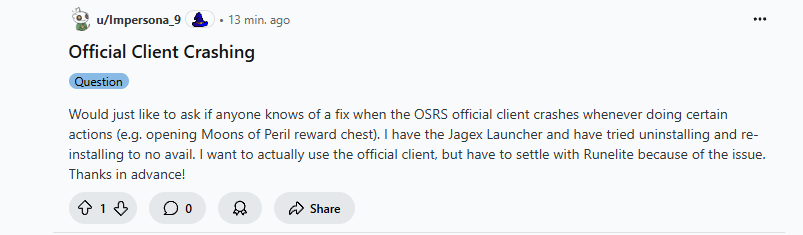 leaden trail
That's not even regarding the same client
hoary pilot
yes but runelite is on top of the official client no ?
leaden trail
RuneLite is on top of the Java client, which you can't use standalone anymore
They're talking about the "enhanced" client
Even if that was about the Java client it's very much not the same thing
hoary pilot
you lost me
is there a setting or something from the normal client that could cause this ?
leaden trail
Their issue has zero to do with your issue
hoary pilot
oh
leaden trail
They are using something entirely different from you
vast bone
"have to settle with Runelite" bruh XD
really ditto you should do safe mode from cooper's flow chart and spec out a friend in rev caves, that will quickly tell you if it was a hub plugin.
hoary pilot
so i just kill a friend of mine in cave?
vast bone
I imagine that would cause it to crash normally right?
could kill a bot too but maybe that's harder, idk.
hoary pilot
well i killed alot of ppl before it happend and inbetween so not always
but lets try
vast bone
btw when exactly does it crash?
vast bone
yeah that's why I said screenshot plugin because I bet it screenshots those
(could be something else though, who knows).
hoary pilot
smart thinking
killed my alt
nothing happend
i think issue with the screenshot folder
would be most logical what u said
vast bone
i mean, take a screenshot and see
hoary pilot
i disabled it
i am going to do some test if it happends i again i have video of it
if you dont hear from me its fixed
hoary pilot
but i dont wanna die 😢
vast bone
if the client is frozen I would assume that counts as an xlog
but I guess I don't know for sure.
hoary pilot
i do know my disk is starting to have some problems
so thats inline with the screenshots
i will see
thanks for your time and help
 naive ferry
nope
 unique ferry
Did the projectile reskin issue get fixed? (One that hid Sote/Olm attacks if modified by plugin)
 light gorge
Hello, is RuneLite certificate pinned? I've just implemented a SWG for myself and it couldn't load the bootstrap. Will I need to put an SSL decryption bypass in for it?
haughty pumiceBOT
 rocky tiger
I think disable TLS verification is what you are looking for, assuming you understand risk.
light gorge
Thanks Fox, workaround for now is to just disable my SWG client before opening, then re-enable it once TLS has verified.
rocky tiger
@light gorge I looked over launcher code and I don't actually see certificate pinning at a glance. It could be just that RL is not seeing the what I assume is self signed root certificate. You would have to look at launcher log for untrusted certificate chain: line to be sure.
You would have to import it into the JVM truststore.
 gentle gate
Hey guys, recently came back to the face and my notes was deleted. I’ve tried everything can’t get it back
haughty pumiceBOT
 round jacinth
If notes got lost then other settings were too?
 noble arrow
I don't know if I should ask it in here,
But.
I have moved from windows to Linux (Debian)
I installed runelite but my runescape accounts are upgraded to a jagex account, and I apparently cannot install jagex launcher on linux. Anybody found a solution for this?
haughty pumiceBOT
Using Jagex accounts on Linux is not officially supported by Jagex, but there are some third party community guides to make it work https://help.jagex.com/hc/en-gb/articles/13413514881937-Downloading-the-Jagex-Launcher-on-Linux
stone parcel
There are a few solutions in there, I hear Bolt is frequently recommended.
noble arrow
Thank you, I'll be able to figure it out myself 😄
stone parcel
Good luck! If you have issues there is a discord linked in that Torms guide too! 😁
noble arrow
Decided going with bolt based on github stars 😛
 shell pelican
why its black?
skybox color : white
low detail : on
hide lower planes : on
is there anything i forgot?


 worthy wedge
Hi! I couldn't find anything about this in the past year of messages; so I apologize for if this has been brought up before:
Where are plugins' sidebar icons stored, and are we allowed to change them?
If so, would it be as simple as changing the asset it's loading?
Would doing this be against any TOS; either JagEx' or RuneLite's?
I'd appreciate any and all information about this, as I find some of them very difficult to identify at a glance. Thank you!
 solid mesa
Not possible
worthy wedge
solid mesa
Not possible
Any idea why? There are some plugins that allow you to change the look—like "Dude, Where's My Stuff?" for example—so I just find it odd that there aren't more; and that there isn't a way to edit them.
solid mesa
If the plugin allows you too then you can. But if the plugin hasn't implemented it you can't just swap out the assets. The hash is verified, you can't just modify hub plugins.
worthy wedge
solid mesa
If the plugin allows you too then you can. But if the plugin hasn't implemented ...
Thank you, that is a very good answer. I won't go poking around anymore then 🙂
 versed elk
Is there a plugin toexclude certain items from your bank value or hide them all together in the bank?
leaden trail
I don't think so
 trim wadi
I think a while back I told runelite could use any amount of ram it needed but with 3 clients open its nuking my ram. How do i revert this
haughty pumiceBOT
trim wadi
i cant even remember why i did this, is this safe to remove? -Xmx1536M
solid mesa
Yes, you really only need to increase the memory limit if you have too many hub plugins and crash due to lack of memory
leaden trail
I think you just want to set it back to the default value, not remove it entirely
solid mesa
The default is JVM arguments is empty
narrow mason
gilded kayak
"can i check what my last blue screen error was"
tysm for this advice with chat gpt/looking at these errors/dump files seems like its bios config issue
leaden trail
ChatGPT is not going to know how to properly interpret your logs
stone parcel
And doing anything in BIOS that chatgpt says sounds very, very scary.
 near saddle
i figured out the offending plugin, combat logger
 stable hound
@uncut nexus Thank you so much. I have been banging my head for YEARS trying to figure out why I can't close interfaces with Esc and have to Shift+Esc only to find an issue thread showing the existence the debug helper you wrote which showed me I had Esc mapped to screenshot in the CoX plugin. If anyone can't figure out why a certain key isnt working as intended please use that plugin
 static umbra
near saddle
i figured out the offending plugin, combat logger
static umbra
near saddle
i figured out the offending plugin, combat logger
Friend of mine was running into it bc of a plugin that was changing out sound effects for Zeb
 shell niche
how do you play with a jagex account, natively on runelite under linux (manjaro specifically)?
the steam runescape launcher does not support linux, so it would be executing under windows compatability layer which is suboptimal
haughty pumiceBOT
Using Jagex accounts on Linux is not officially supported by Jagex, but there are some third party community guides to make it work https://help.jagex.com/hc/en-gb/articles/13413514881937-Downloading-the-Jagex-Launcher-on-Linux
worthy wedge
stable hound
<@154003363476799489> Thank you so much. I have been banging my head for YEARS t...
Bro, I've been unable to press shift+F and shift+S for 3 years... Thank you 😭
 sharp bison
does anyone know if its possible to have a bosses hp value displayed on the bar for 'opponent infomation plugin' when disabling boss hp bars in the osrs settings?
these are my current settings and a pic of the opponent info bar when attacking a regular enemy


but when attacking a 'boss' it shifts to % on the bar only
gilded kayak
it does that if we don't have the HP
raid bosses and dt2 awkened bosses
(yes the hp of awakened bosses are known, but they are the exact same NPC ID so we don't know when to display it correctly)
so we just ignore the hp for them that the wiki supplies for us
sharp bison
damn ok, so you're suggesting it should work for regular dt2 boss?
sharp bison
nah im farily sure its any enemy that the game would categorise as a boss.
but dont have a sample size of every boss and ive just been doing dt2 bosses that spring to mind
not trying to be pedantic
ok zulrah works
gilded kayak
i wasn't making up my answer btw
we load hp data from the wiki
vardorvis and vardorvis awakened are the same NPC id
sharp bison
i wasnt beginning to assume you was, sorry if the phrasing of my response suggested that, i was just trying to get clarity
gilded kayak
if the wiki scraper runs into hp values with the same ID, it will ignore it, since we can't correctly display 2 different hp's for the same id
jagex can do it correctly because it's their game
sharp bison
yeah fair enough, i got my answer. thankyou
leaden trail
First time this has come up where I haven't been pinged for being technically somewhat the person responsible for that breaking for DT2 bosses.
So smh me I guess
gilded kayak
ya i thought originally the normal bosses had hp
but since he worded his question like that, i knew he meant those didn't work
leaden trail
Nope when I added the IDs to the pages for awakened it broke for normals ;_;
 grave tide
hi! i started having a weird problem as of yesterday with RL.
when i open the client (through the jagex launcher), it resizes my resolution of my whole monitor. i checked the properties and its not letting me change the resolution? its only with runelite, i can use the steam version just fine. when i tab out, my resolution is back to normal.
even when i go into “change settings for all users” it doesn’t let me fix it. im not even sure if its the cause of my problems but it seems like the most likely?
other things ive done:
-reinstalling graphics drivers
-disabling fullscreen optimizations
-making sure stretched mode is turned off
-disabling and enabling gpu
-trying fixed and resizable resolution in the osrs settings
please help :c
 gilded kayak
did you forget that you came here before and were told to change a setting
i'm pretty sure we fixed the part of the issue on our end but maybe not
vast bone
I think it's semi fixed atm
the full fix is not released yet.
projectile always lands on the player's feet or something.
just very weird.
gilded kayak
moral of the story: don't ever compat anything and let every plugin break
vast bone
true, it worked back in 1.11.10, at least somewhat
then someone had to come in and complain that the API returned the wrong numbers
||olm balls are always hard to see because they're under the ground||
gilded kayak
u were told it was a bug the first time u asked, if they changed the rules we would have told u that instead
vast bone
I'm surprised no one published a half fix yet, I think someone was looking into it for the tob one.
idk about cox qol since buchus is kinda awol I think
but you'll just have to wait and see when it's fixed 🤷
gilded kayak
grave tide
hi! i started having a weird problem as of yesterday with RL.
when i open the ...
googling run in 640x480 screen resolution greyed out brings up this thread that seems correct-enough https://www.fsdreamteam.com/forum/index.php?topic=31616.0 where they suggest checking those registry keys
i guess just find the one that's tied to runelite and delete it, i see a few here on my computer for other not-runelite games
grave tide
gilded kayak
googling `run in 640x480 screen resolution greyed out` brings up this thread tha...
thank you so much! i can’t believe i didnt google that lol, i’m so bad with computers. can you send me a screenshot of some of the ones you see so i can see how the key name is formatted for runelite? if its not too much trouble.
i’m gonna try finding and deleting those
gilded kayak
i do not have any for runelite
but there are others, i assume one of them on your computer, will be for runelite
 graceful lodge
is there a different idle setting i need to use when splashing kraken pool?
I noticed from https://github.com/runelite/runelite/pull/16017 that the case of fighting kraken where it starts at disturb but transitions has been fixed, but if player is in combat casting onto only the pool when the afk timer ends combat no notification is triggered

GitHub
NPCs which begin combat with a menu option that is not "Attack" are missed during combat detection. This PR uses NpcChanged to detect when an NPC that we are interacting with tran...
 red cliff
whenever i turn on gpu setting in runlite and fullscreen my window goes like this

resizing stuff very weirdly
 stone parcel
I wonder if it's some kind of scaling being done by gpu software (Nvidia/AMD/Intel).
 frail hornet
red cliff
whenever i turn on gpu setting in runlite and fullscreen my window goes like thi...
frail hornet
red cliff
whenever i turn on gpu setting in runlite and fullscreen my window goes like thi...
what gpu do you have
red cliff
stone parcel
I wonder if it's some kind of scaling being done by gpu software (Nvidia/AMD/Int...
was my laptops gpu reinstalling drivers fixed it
stone parcel
Oh nice! 😄
 bitter mulch
hello i am trying to reinstall runelite through the jagex launcher but it thinks its still installed and gives an error
is there a way to reinstall it
rocky tiger
Windows or Mac?
bitter mulch
nevermind after deleting the broken exe in control panel then relaunching after the 3rd error code it is letting me reinstall via the website
now i gotta hope it recovers my old settings
bitter mulch
anyone know if the Collection log share command is bugged. its not working anymore

 calm violet
bitter mulch
calm violet
bitter mulch
sad
 tropic gale
Has anyone had trouble with fc spawn predictor recently? some starting waves it'd work, and then it'd be a whole different layout. Just finally reinstalled it.. but haven't gone back in yet. I have tried turning it off, leaving the area, and turning it back on. Then waiting a full rotation. Still did not fix. Wondering if I missed something
haughty pumiceBOT
Support for hub plugins should be directed to the author of the plugin.
You can find the support link by searching for the plugin in the Plugin Hub panel and clicking the ? button on the plugin, or by right-clicking the plugin in the plugin panel and clicking the Support menu option.
 sturdy cobalt
has anyone had issue with fps drop when unfocused
tropic gale
sturdy cobalt
has anyone had issue with fps drop when unfocused
you probably ticked the box in fps control plugin
tropic gale
same rl profile? I used 1 profile before for two accs, and would toggle settings/plugins on one, but not the other. End of the night, i would close the client i had toggled the settings on first, and it wouldnt save etc
tropic gale
yeah i had some serious issues recently with fps drops, noticed it more when west ping was doomed. messed w/ few settings n now idk if its good or not lol. still get frame drops here n there
 mighty cave
hello, RL has suddently crashed 2 times with this log in the past 2 hours. havent changed anything besides pushing a w10 pack that ive postponed for a while now.
A fatal error has been detected by the Java Runtime Environment:
EXCEPTION_ACCESS_VIOLATION (0xc0000005) at pc=0x00007fff9fea1e93, pid=14208, tid=1460
JRE version: OpenJDK Runtime Environment Temurin-11.0.25+9 (11.0.25+9) (build 11.0.25+9)
Java VM: OpenJDK 64-Bit Server VM Temurin-11.0.25+9 (11.0.25+9, mixed mode, tiered, compressed oops, g1 gc, windows-amd64)
Problematic frame:
V [jvm.dll+0x301e93]
or, it doesnt even crash, just suddently close. never had this happend before.
 mossy swan
mighty cave
# A fatal error has been detected by the Java Runtime Environment:
#
# EXCEPTIO...
mossy swan
mighty cave
# A fatal error has been detected by the Java Runtime Environment:
#
# EXCEPTIO...
can you upload the full file please
mighty cave
 graceful oriole
what does this mean? game just booted me, and i cant log back in, no idea why
 mossy swan
graceful oriole
what does this mean? game just booted me, and i cant log back in, no idea why
mossy swan
graceful oriole
what does this mean? game just booted me, and i cant log back in, no idea why
server may have crashed
mossy swan
mighty cave
can you post the other one too?
graceful oriole
idk but game wont let me log in to anyworld cause it thinks im logged in, idk what to do, ive closed the game and retsarted it and same issue
mossy swan
graceful oriole
idk but game wont let me log in to anyworld cause it thinks im logged in, idk wh...
wait a while i guess
mossy swan
not sure what could be causing that, maybe your pc is broken, though its not the typical cpu issue we see
maybe you need to test your ram or something
graceful oriole
so its a game issue and not me right? cause it wont let me go in any world, even the free to play worlds
mossy swan
graceful oriole
so its a game issue and not me right? cause it wont let me go in any world, eve...
yeah
graceful oriole
is there any way around it or just have to wait, if so how/when do i know, cause if the game thinks im logged in, how would i log in?
final axle
This channel is for support for the RuneLite client, we can't really do anything about the actual game not letting you log in
graceful oriole
ah apologies, where do i go for that
haughty pumiceBOT
If you are new to OSRS, make sure to follow this excellent guide on OSRS wiki: https://oldschool.runescape.wiki/w/New_player_guide. You can also join the official OSRS Discord here: https://discord.gg/osrs
 gritty void
yeah, i think there's been an issue with one of the worlds but hopefully somebody will take a look at it soon
 worn scaffold
I’m pretty new to plugin development, I’ve tried debugging projectile events, and graphics events but neither seems to be unique for Yama mage/ range graphic
Does anyone have any advice on finding out what event to look at beyond these two?
 trim moat
I cant seem to get the game to properly run at above 60 fps, ive got a 165 hz monitor and am at well over 60 fps but its no different than on a 60hz monitor
 mortal mist
while i was trying to figure out how to import my setting to my laptop, and as i did that i found out all my loot from the loot tracker is gone
haughty pumiceBOT
 steep flume
Hi, I think my Runelite is bugged. When I changed the overlay color opacity to 0 and logout. It will reset itself to the old colour when I log back in. I tried to enable cloud sync and profile default to that profile with the settings but it keeps resrtting itself when I log in. plss help 😦
 oblique plume
Resource packs resets it
 proper perch
anyone know how to change back to normal from this collapsed menu? asking fro a friend

 flat ruin
Anyone got any idea why 2 of these are blue and one is purple, as far as i can work out the purple is ground items highlighted but i can figure out what highlighting the others blue
 oblique plume
proper perch
anyone know how to change back to normal from this collapsed menu? asking fro ...
oblique plume
proper perch
anyone know how to change back to normal from this collapsed menu? asking fro ...
Interface styles
proper perch
oblique plume
Interface styles
thanks mvp
old sluice
I can't tag my kitten for some reason
well i can tag it but it wont be highlighted or anything
 dreamy jackal
how can i see when i die how much i lost?
 iron cliff
is anyone else struggling with bank tag layouts? sometimes not withdrawing an item
(not clue scroll)
 vernal matrix
im having trouble with my authenticator needing to be typed in every damn time i log into osrs. yes the box for 30 days is ticked. still asks me everytime. googles ai said i should delete a file cache for runelite, does anyone know which file/folder i need to delete to maybe reset whatever error is in the cache?
oblique plume
This
vernal matrix
oblique plume
This
thank you very much sir
 fringe token
I am mining calcite, is there a way to figure out what is causing the trigger for notification? I just want idle activity, it's currently set to 1.5s, so it shouldn't be triggering from the idle animation between mining.
 ornate kite
There is a bug in the Entity hider plug-in. If u hide NPC's left clicking fishing spots doesn't work, also right clicking fishing spots gives no option anymore to fish.
solid mesa
Well yes fishing spots are NPCs
ornate kite
solid mesa
Well yes fishing spots are NPCs
How is a fishing spot NPC?
solid mesa
fringe token
I am mining calcite, is there a way to figure out what is causing the trigger fo...
In Runelite turn on Game message notifications so you can see in your game chat what the notification is
gritty void
the game treats them as NPCs
solid mesa
ornate kite
How is a fishing spot NPC?
Because thats how jagex programmed them
ornate kite
Bad coding I guess
gritty void
fishing is one of the oldest features in RuneScape and I think making them NPCs was the only way to do it at the time
ornate kite
Probably yea it's kinda odd but atleast I figured out the problem for myself almost bashed my mouse and keyboard 😉
round jacinth
they're yellow dots on the map, which npcs also are
 drifting schooner
Im having an issue with logging in to certain worlds or maybe being timed out while world hopping. I can login and play fine, but after world hopping like 3 or 4 times, I'll get the message "Failed to login. Please try again." I was able to do hundred of world hops the other day (grinding out some GP on steelplate legs on my IM F2P account) but now this.
solid mesa
Sounds like you have network issues
gilded kayak
well that error comes from jagex, and is a networking error
 subtle lantern
Does OSRS/Runelite use PhysX? Noticing some worse performance after updating to 5000 seriies gfx card. maybe i need to clean install driver
 strong spear
When do stats update when searching your own player name within runelite?
leaden trail
You don't need to ask in multiple channels
gilded kayak
didn't like the answer so they asked again
 deep epoch
did something happen to the tile marker color picker
it seems like it can't find the other colors used in the area anymore
round jacinth
you can get the color of other tiles in the area by picking the color of a color you want and copying the color it has
i dont think ground tiles supports the same thing inventory tags to color the same green consistently for example
vast bone
I believe it does have that feature.
round jacinth
It does, neat.
 zealous spade
shift click withdraw all not working on bank, but deposit is, any help please?
leaden trail
Bank or group storage?
zealous spade
bank, group storage works
zealous spade
fixed, plugged my laptop into my monitor and its sorted it 😂 god knows..
 hearty thicket
is there a way to get the infoboxes/etc to sync to client so when i open side panel it doesnt go inside my inventory
oblique plume
They need to be snapped to an anchor point
hearty thicket
how do you view the anchor points
oblique plume
When you're dragging stuff around, they're the blue boxes
leaden trail
And no there isn't a way to move them or add more, because that's generally the next question that gets asked
hearty thicket
yeah i already saw the git posts in 2019 assumed nobody ever did it when nobody responded in years
hearty thicket
oblique plume
When you're dragging stuff around, they're the blue boxes
tyvm
 verbal minnow
can i make a command like Use,Rockhammer,Dawn* to prioritize dawn during p2 in custom menu swaps? i entered it like that and it didnt work. is there a specific way to do it with use items?
solid mesa
You do it like this use,cannonball -> dwarf multicannon
verbal minnow
best
 marble patio
Hi, can someone tell me how to fix runelite? the laucher is working with the officiel client but note runelite?
gilded kayak
not unless you say what your problem is
ornate kite
I think they mean they have the jagex launcheer but are trying to launch with the standard jar or something
gilded kayak
how would you get that from what they said
 white light
Anyone able to help me? Everytime I load up runelite in regular startup mode, it will run fine for a certain amount of time and seemingly continues to increase on my CPU usage and will randomly crash, sometimes right off on launch other times minutes after being launched. Even safe mode just did the same thing to me.
haughty pumiceBOT
To find the logs, you can do one of the following:
- If your client failed to open, click the
Open logs folderbutton. - Open the screenshot directory by right-clicking 📷
Camerabutton, navigate 1 directory up, then open logs folder. - Navigate to
%userprofile%\.runelite\logson Windows or$HOME/.runelite/logson Linux and macOS.
Upload the log files named client and launcher by dragging them to Discord. If there are files prefixed with jvm_crash dated from today, upload them too.
white light
Want me to pm @leaden trail
stone parcel
You can drag and drop them here, nothing too personal, config profile names, windows username.
stone parcel
Are there any files starting with jvm_crash in that folder too? Very possible there aren't though.
white light
Negative unfortunately all just client launcher
stone parcel
Alrighty, and when you say crash you mean like, poof client disappeared?
white light
Yeah precisely, sometimes i just barely log in and it disappears, other times i can play for 30-60 minutes and then boom it will happen
Tried putting client into high priority and doesn't seem to change anything, when I keep an eye on task manager I see it go up above 50% on cpu usage
sometimes the client just straight up freezes aswell, no dc nothing just frozen screen and thats it
 hearty cloak
Any one have an idea why my runelite is running suboptimally in places like xarpus/verzik? i have a 4080 and 5800x3d. usually it runs fine (feels smooth) but once im in xarpus my dps drops from like 150-70 and feels insanely choppy.
stone parcel
Maybe a pluginhub plugin, you could try a new (blank) profile with gpu enabled and no hub plugins to see if that is better. Maybe older gpu drivers could help too if that doesn't.
hearty cloak
pinpointed it down to being the NVIDIA app causing this issue for whatever reason. uninstalled the app and feels fine everywhere now 🙂
stone parcel
Oh nice, thanks for letting us know what the issue was. 😄
 hidden fossil
Hello, not sure if im writing this in the correct thread, but i want to develop a plugin for Runelite. I have created my example plugin and launched the Runelite client through the Runelite.jar in the runelite-client directory. Unfortunately im unable to test the plugin since i cannot log in without the jagex launcher. What is the solution for this?
haughty pumiceBOT
hidden fossil
haughty pumice
<https://github.com/runelite/runelite/wiki/Using-Jagex-Accounts>
Thank you very much!
 swift hull
is it against the rules to make a plugin that tags animation ID (or some way of identifying attack style) with a color? For example - an npc uses multiple attack styles and would have a different color outline for each attack style
solid mesa
Yes
haughty pumiceBOT
Jagex's third party client guidelines: https://secure.runescape.com/m=news/third-party-client-guidelines?oldschool=1
Additionally, these features have been rejected or removed from RuneLite: https://github.com/runelite/runelite/wiki/Rejected-or-Rolled-Back-Features
solid mesa
Probably
- Adds additional visual or audio indicators of a boss mechanic except in cases where this is a manually triggered external helper.
- Indicates which prayer to use in any combat situation
swift hull
I see people use color indicators in a similar way with NPCs (like Akkha and Hunleff) that I assume have different NPC IDs per phase or something like that, so I wasn't sure if the rules were defined around that in some way. It sounds like that isn't allowed either?
solid mesa
Correct, differing protection prayers are different NPC IDs which can be tagged. But attacks are not and would in my opinion, be considered an addition visual indicator of a boss mechanic. I believe that rule specifically referencing a demonic gorilla plugin which showed a (color or prayer icon?) of what to pray
swift hull
solid mesa
Correct, differing protection prayers are different NPC IDs which can be tagged....
Ahh I see, thank you
 feral current
I used to be able to switch runelite profiles and it would remember the username on login screen for each profile separately so i could have an easy switch between my iron and main.
has this feature been removed? or was it always janky and im just now realizing 😄
or maybe that's not how that worked at all...
solid mesa
It works, make sure you're logged into the game then click the 🔗 icon so it turns orange
 foggy smelt
hi team im having issues with the wiki sync plug in
i have installed it but its not coming up in my plug in list ive tried restarting my client, signing in/out of runelite uninstalling and reinstalling and nothing seems to be working
haughty pumiceBOT
To find the logs, you can do one of the following:
- If your client failed to open, click the
Open logs folderbutton. - Open the screenshot directory by right-clicking 📷
Camerabutton, navigate 1 directory up, then open logs folder. - Navigate to
%userprofile%\.runelite\logson Windows or$HOME/.runelite/logson Linux and macOS.
Upload the log files named client and launcher by dragging them to Discord. If there are files prefixed with jvm_crash dated from today, upload them too.
 real rivet
Is the olm toa and sote toa projectiles fixed yet ?
verbal minnow
Here's probably a stupid question for you guys, every time i have to re-load my client or log in, the RuneLite Setting "overlay color" opacity goes to 90+%, i have to re drag it down to 0% every single time. Is there anyway to make that stop happening? Its not like it hard to fix, but after months of this, i figure i'd ask
zealous cedar
the resource pack plugin is changing it, it might have an option to disable it idr
verbal minnow
Well that's an obvious answer that I should have considered. I hardly use plug-ins at all so i should have assumed. ty ty i'll take a look
What an idiot.
 charred wind
real rivet
Is the olm toa and sote toa projectiles fixed yet ?
charred wind
real rivet
Is the olm toa and sote toa projectiles fixed yet ?
Whisperer projectiles uses the same thing iirc, should be good
Unless it was with ToA projectiles specifically
 mossy gust
Hi all, I'm loading runelite via the Jagex Launcher and it gets stuck on this screen.
I re-installed Runelite, restarted my PC and still doesn't work.
On my different pc with the exact same settings and plugins it does load.
I cannot find any solutions online as well. Someone knows what's wrong?
 haughty pumiceBOT
@mossy gust Many plugins from the pluginhub break the client in subtle or not-so-subtle ways, including causing issues like client freezes. We do not support pluginhub plugins because we do not make or quality control them, and do not recommend their use.
Run the RuneLite (safe mode) shortcut, or with a Jagex account, first run the RuneLite (configure) shortcut and tick the Safe mode box, then launch RuneLite via the Jagex launcher.
This temporarily disables the GPU plugin and all hub plugins which will allow you to confirm the issue is caused by one of those plugins and isn't a core RuneLite issue.
If the issue is caused by a hub plugin, you should isolate which plugin it is and then uninstall the plugin.
round jacinth
Hub plugins probably.
mossy gust
Awesome this is useful, thanks
round jacinth
You load in safe mode to disable hub plugins/confirm base client works correctly
mossy gust
I turned off the plugin I assumed was the issue, now it goes a bit further but still stuck. I really don't understand this

Wait it works, just took like 4 min
Thanks!
real rivet
It was the toa projectiles specifically being invisible
haughty pumiceBOT
@mossy gust To find the logs, you can do one of the following:
- If your client failed to open, click the
Open logs folderbutton. - Open the screenshot directory by right-clicking 📷
Camerabutton, navigate 1 directory up, then open logs folder. - Navigate to
%userprofile%\.runelite\logson Windows or$HOME/.runelite/logson Linux and macOS.
Upload the log files named client and launcher by dragging them to Discord. If there are files prefixed with jvm_crash dated from today, upload them too.
round jacinth
I dont know how useful it will be for loading but could help see a stuck plugin, usually doesn’t but could
leaden trail
Probably not useful at all really
charred wind
There’s actually an error when it tries to create the projectiles iirc
Oh zom helping previous person
mossy gust
round jacinth
I dont know how useful it will be for loading but could help see a stuck plugin,...
The problem seems to be with the GPU plugin
Whenever I turn that off it starts smoothly
round jacinth
if you make a completely fresh profile and only have gpu on, does it still hang on load?
mossy gust
Now my profiles are buggy, when I click anything client freezes
What the hell, never experienced anything like this before with Runelite
With the new profile and GPU on, problem starts again
mossy gust
Update: I deleted all Runelite files from my PC, reinstalled it, loaded it well. From the minute I started loading my profile is crashed again.
When opening the exact same settings and profile on another device/steamdeck it works perfectly. I am so confused really
leaden trail
Try disabling "compute shaders" in GPU
mossy gust
leaden trail
Try disabling "compute shaders" in GPU
That fixed it!
Why's that?
I have an insanely strong PC so this is so weird
mossy gust
I see, thank you so much man, life saver!!
 crystal tree
in the ground items plugin is there a way to highlight specifically noted items? i know you can set an amount like >10 but im specifically looking for filtering by noted
oblique plume
no
leaden trail
Loot Filters might let you do that?
crystal tree
o ye looks like it might be able to, ill take a look, thanks
crystal tree
leaden trail
Loot Filters might let you do that?
works perfectly, thanks!
deep epoch
vast bone
I believe it does have that feature.
yes but it doesnt seem to be working recently
 naive fog
Hey I think I'm tripping but what are various ways of collapsing chat?
There's the chat filter plugin that can do it but I swear there was another way of doing it?
vast bone
Closest I can think of is game filter to remove unnecessary messages?
naive fog
vast bone
Closest I can think of is game filter to remove unnecessary messages?
That just hides the game chat not collapsing
 leaden trail
If you want to collapse stuff like that then the options in chat filter are the only things that do it afaik
naive fog
leaden trail
If you want to collapse stuff like that then the options in chat filter are the ...
I see thanks
gilded kayak
lol!
yes it did!
if it didn't fix it for you then u dont have the same issue!
lol!
crazy how more than 1 issue can exist ever
that is a random github comment from 6 months ago
solid mesa
Are you also aware that pings are generally not routed through VPNs?
gilded kayak
this is a crazy way to tell people ur having an issue
just start lashing out at random people
LOL NO UR WRONG IT DIDN'T FIX IT
round jacinth
speed running a mute i see
gilded kayak
weird crop

sure
the issue that you randomly replied to, is the fact that our jvm sends ipv4 requests but pretends they are actuall ipv6
solid mesa
Before: people couldnt launch runelite with a split-tunnel vpn
Now: people can launch runelite with a split-tunnel vpn
gilded kayak
so we force the client to actually use ipv4 and not fake it
if that is not the issue you are having, that's fine
but that issue you replied to, was fixed
solid mesa
Oh okay I'm wrong then 🤷♂️
gilded kayak
we can try this again in 10 minutes
 hollow olive

gilded kayak
in 10 minutes, if you are having an issue then you can describe the issue you are having and we'll be more than happy to help
if your only problem is you think you understand an issue, that you don't, then please don't bother
i don't know if anyone else will be able to help, as you didn't actually report a problem
you just told cooper he was wrong
leaden trail
If the IPv4 option doesn't work correctly for you then you have a different issue going on.
We can try to work it out with you, but none of us get paid to provide support here, so if you're just going to be combative, I don't think any of us will have any interest in giving our time to your issue.
What we're trying to tell you is that the issue that was fixed is not the issue you're experiencing
That's a separate issue from what was fixed
IPv4 prevents an issue where people attempting to split tunnel just couldn't connect at all, not that it was failing to split tunnel
So an issue was fixed but it wasn't your issue
The issue that thread resolves was that the client would entirely fail to start.
Now, it starts, but it sounds like from what you're saying that it doesn't split tunnel correctly.
The two are similar, and very possibly related, but they're distinct issues with separate outcomes.
I can try to walk you through troubleshooting steps, but if you're going to continue to try and argue the above with me, I'm going to go do something else with my time instead.
oblique plume
and you think the failure to tunnel is not the thing tunneling?
gilded kayak
well that was fun
 clear stratus
did someone rage and then delete their shit
oblique plume
yes
leaden trail
Indeed
clear stratus
classic
 gentle moat
Any macbook players on here? Dw I don't solely play on macbook 🤣 I just wanted any advice on what I can do to stop it from getting so hot and the fan making a sound like it's about to take off
solid mesa
Using FPS control to limit FPS helps a lot
gentle moat
solid mesa
Using FPS control to limit FPS helps a lot
ah perfect thanks man, did you just tick limit global FPS?
solid mesa
Yea
gentle moat
solid mesa
Yea
amazing, i'll leave everything else then
white light
stone parcel
Maybe a pluginhub plugin, you could try a new (blank) profile with gpu enabled a...
Was this aimed at me ?
@stone parcel
stone parcel
No, I was hoping for someone else to be able to find something in your logs.
white light
Anyone able to figure out why my client crashes with these logs?
Thanks Kalil regardless
white light
white light
^
stone parcel
Np. 😁
 wanton laurel
could someone explain to me what it means to take over a plugin?
 indigo hemlock
Anyone had issues with low performance on AMD cards?
solid mesa
wanton laurel
could someone explain to me what it means to take over a plugin?
If the author is not updating the plugin and is no longer around someone else who wishes to maintain the plugin can request to take it over. They would then be writing the code for updates and push updates to the plugin hub
solid mesa
indigo hemlock
Anyone had issues with low performance on AMD cards?
People who have seem to have better performance when enabling ReBAR
wanton laurel
solid mesa
If the author is not updating the plugin and is no longer around someone else wh...
are these updates limited to what the plugin already does , like can i change its assets ,or am i able to completely overhaul the plugin as i see fit?
solid mesa
Generally, the plugin would continue to function as it currently does for existing users. But adding features is fine
indigo hemlock
Really doubt it would improve that much with rebar
At the moment with GPU plugin if I enable compute shaders my gpu usage spikes to 100% fully utilizing it, and not even reaching 144 fps (depending on where i am)
Of course it lags my whole PC, and disabling it, just brings fps down to 20%
considering im running 10th gen intel and 6800 i dont think this performance is really "expected"
wanton laurel
solid mesa
Generally, the plugin would continue to function as it currently does for existi...
so i am unable to change its current assets but only add new ones?
solid mesa
You can. I just mean if someone tookover a ToA Puzzle Solver it would be unexpected to turn it into a motherlode mine plugin. But adding more ToA features to it would make sense
wanton laurel
i think i understand what you mean ,but ,i might be asking too much here ,but could explain what this message here mean ,#runelite message
what i understood from it is that i need to change most the plugin ,and then i can add more features to it? i am still not sure what he meant by it
solid mesa
He meant if plugin A exists but it unmaintained it is better to takeover plugin A and add a feature than it is to make plugin B which is a copy of plugin A adding a feature
wanton laurel
ah that makes sense ,thanks for the explanation
leaden trail
indigo hemlock
Really doubt it would improve that much with rebar
At the moment with GPU plugi...
Rebar has helped for basically everyone so I'd at least try it
indigo hemlock
Indeed it did help, however still gpu sitting at 60-70% is that expected ?
solid mesa
Runelite is generally CPU bound not GPU bound
indigo hemlock
Im with GPU plugin
leaden trail
It can still be cpu bound
 opal bramble
my quest helper plugin and star miner plygin stop working
not i cant download any plugins
now*
tried re installing still cant
stone parcel
In the titlebar does it say RuneLite (Safe mode) by any chance?
 solid mesa
It says how to build the core client. Really though just clone the repository then start reading
hollow olive
you just read code
 untold sun
my computers power got cut, when i rebooted and got internet back, i had to run the repair in the installer.exe, now my plugins are not loading. i am logged into RL stille
foggy smelt
hi team im having issues with the wiki sync plug in
i have installed it but its not coming up in my plug in list ive tried restarting my client, signing in/out of runelite uninstalling and reinstalling and nothing seems to be working
I’ve tried to dl plug in on a different computer and it’s still not appearing in plug in list after installing
Someone pls help me lol
haughty pumiceBOT
leaden trail
foggy smelt
hi team im having issues with the wiki sync plug in
i have installed it but its...
Can you post your logs?
haughty pumiceBOT
To find the logs, you can do one of the following:
- If your client failed to open, click the
Open logs folderbutton. - Open the screenshot directory by right-clicking 📷
Camerabutton, navigate 1 directory up, then open logs folder. - Navigate to
%userprofile%\.runelite\logson Windows or$HOME/.runelite/logson Linux and macOS.
Upload the log files named client and launcher by dragging them to Discord. If there are files prefixed with jvm_crash dated from today, upload them too.
 random sinew
Does anyone know how this creator managed to get their graphics to look like this? The ground looks HD and even the door is looking different

Compared to mine

Door was due to "hide roofs" I just figured, but the floor still looks a lot different
untold sun
@leaden trail how do i know which of the profiles to import? i have like 15 and none are labeled
leaden trail
If you post a screenshot of the contents of your profiles2 folder with the dates and file sizes showing we can probably tell you
 foggy smelt
untold sun
foggy smelt
untold sun
I GOT IT
foggy smelt
@leaden trail
untold sun
can i delete everything else in that folder?
foggy smelt
i tried to dl a different plug in just to test and it comes up
its literally just wiki sync xD
leaden trail
untold sun
can i delete everything else in that folder?
I would just leave them
untold sun
okay
haughty pumiceBOT
@foggy smelt You've downloaded a fake client, and your account has been compromised. Remove the fake as soon as possible to minimise further damage.
The following actions should be performed from a secure computer or secure mobile device:
- Change your RuneScape password
- Remove and re-add Authenticator to RuneScape
- Change your RuneScape bank PIN
- Change your email's password
- Add 2FA to your email if you haven't got it enabled
- Check for any linked accounts by accessing the account settings page (https://www.runescape.com/account_settings)
Some fake clients also install malware, only a fresh install of your operating system can guarantee the total removal of any unwanted software.
You might also want to change any email password if you reused the same as your RuneScape account password.
Once your computer is secure, you should download RuneLite from the link available at the #welcome channel.
leaden trail
You downloaded a lure client
foggy smelt
Surely I would have been hacked by now
gilded kayak
ok
leaden trail
These logs are definitely not from legitimate RuneLite so that's 99% your problem
foggy smelt
Kk
Thanks for letting me know
I’ll delete everything at home and change all passwords
Are there fake jagex launchers too?
gilded kayak
I'm not personally aware of any but I can't guarantee it
I would guess Jagex would have a lot easier of a job removing fake ads, than we do
foggy smelt
Yeah okay
Sorry for this I genuinely didn’t realised I downloaded fake client
Zzzzzz
white light
white light
@leaden trail you able to help me with these?
leaden trail
If it's freezing it's not going to show up in logs
 loud void
any ideas why my client is saying i have no plug ins installed in configuration tab, but when i go to plugin hub it says theyre all still installed? importing previous profiles doesnt change anything
thank you 🙂
stone parcel
In the titlebar does it say RuneLite (Safe mode) by any chance?
loud void
no just runelite - (rsn)
 tame narwhal
trying to install runelite on my roommates pc, keep getting this message :/
 stone parcel
I'm finding ancient posts (2009, 2011) blaming antivirus softwares for "MoveFile failed code: 5".
stone parcel
Np. 😄
 fossil summit
I’ve had avast quarantine my entire github folder before
loud void
stone parcel
In the titlebar does it say `RuneLite (Safe mode)` by any chance?
Was there anything else I could try? I've tried reinstalling runelite, even when making a new profile the plugins won't install & show up on the sidebar
gilded kayak
!logs
haughty pumiceBOT
To find the logs, you can do one of the following:
- If your client failed to open, click the
Open logs folderbutton. - Open the screenshot directory by right-clicking 📷
Camerabutton, navigate 1 directory up, then open logs folder. - Navigate to
%userprofile%\.runelite\logson Windows or$HOME/.runelite/logson Linux and macOS.
Upload the log files named client and launcher by dragging them to Discord. If there are files prefixed with jvm_crash dated from today, upload them too.
 crimson quail
Anyone with the "Expand pitch limit" enabled in the Camera plugin along with 117HD on, ever experience gpu temp skyrocket in certain areas if you move your camera to the floor as far as it will let you? Like its rendering an ungodly amount of things it doesnt need to or something. Just wondering if its a me problem or just a quirk of 117hd and going beyond default camera limits. (it doesnt do it with regular gpu plugin on in the same camera position)
loud void
gilded kayak
!logs
i pm'd you
gilded kayak
i don't read my pms
loud void
what if my personal email is in my logs 😂
gilded kayak
crimson quail
Anyone with the "Expand pitch limit" enabled in the Camera plugin along with 11...
for what 117 is doing it doesn't sound too impossible, because it probably is rendering a fuckton more stuff that it should? be
then dm them to @haughty pumice
loud void
ok sweet
gilded kayak
!hd if it doesn't happen with GPU then probably post here
haughty pumiceBOT
Visit 117's HD plugin discord (https://discord.com/invite/U4p6ChjgSE) for support, issues & feedback
gilded kayak
dm the logs... not a copy of your issue
crimson quail
Will do felan, appreciate it!
gilded kayak
loud void
ok sweet
next to the logs folder you just found, is a cache folder, delete that (with runelite closed)
loud void
Perfect, that's worked. Thanks for your help 🙂
 white pebble
hi is there a place to report bugs for plugins?
haughty pumiceBOT
Support for hub plugins should be directed to the author of the plugin.
You can find the support link by searching for the plugin in the Plugin Hub panel and clicking the ? button on the plugin, or by right-clicking the plugin in the plugin panel and clicking the Support menu option.
white pebble
Thank you so much!
looks like someone already reported it, nice 🙂
okay so i tried to make my spell reminder a custom text with just "Thrall!" but there's currently a bug where you cant resize the text box which is being worked on.
I went back to "Reminder style: Long Text" and I cannot get it to work at all now. Any tips/suggestions? https://i.imgur.com/7uS1vj7.png
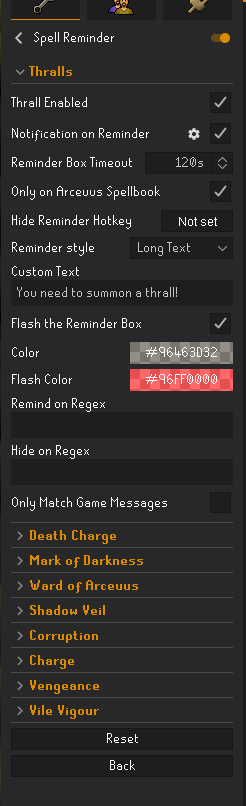

this is the only reminder im getting at all and i believe thats base game, i want the text box that flashes
gilded kayak
we don't make the hub plugins, so if we're going to have an answer it needs to be a question about a very popular plugin
i didn't even know we had that plugin
white pebble
it just got updated yeah. I think it combined a bunch of "reminder" style plugins
round jacinth
It’s to cut down on duplication of plugins
gilded kayak
i did not remember what it was about tho
white pebble
understandable, nw
round jacinth
I have the box you’re talking about but I’m not sure if it’s this plugin
white pebble
it is i had it before
round jacinth
Best bet is showing a recording of it not working and posting it to their GitHub so they can see it not working I guess
It’s a hub plugin we don’t support here
white pebble
round jacinth
I have the box you’re talking about but I’m not sure if it’s this plugin
i had it before but since i tried the custom text, i can't get it to come back despite reconfiguring the settings as best i can to default
round jacinth
Regardless of popularity unless it’s a quick thing like “put new lines when using custom menu swaps” best bet is to go to their github and make an issue
Or ask a friend who has it working for their settings but I can’t see what you have that’s wrong
white pebble
Sounds good, thanks for taking a look anyway, really apprecaite it 👍
round jacinth
Np
white pebble
if i uninstall/reinstall will that reset the settings back to default?
round jacinth
No
white pebble
Do you know?
is there a way to do that?
oh i think i see a reset button, ill try that
round jacinth
There is a reset button at the bottom of the plugin which factory resets the config but idk if it impacts the overlay locations
white pebble
ah clicking on each setting also has a reset option
round jacinth
If a plugin defaults 3 settings to be on off of and you made them all on, clicking that reset would put them all reset
white pebble
sweet. ill get out of y'alls hair now tysm ❤️
round jacinth
Which is offered on the single option as you discovered, handy to see what a default is without having to make everything default
If play on modern resizable I wonder if you’d see the reminder box
If you*
white pebble
oh ill try that, thanks
I FIXED IT 😄
not sure if it was uninstalling and reinstalling or fully closing down my runelite client and opening it back up, but its all good now. ❤️
 indigo wolf
why is visual sounds disabled in toa?
 civic meteor
Can anyone help me
I got new pc and i want to have my same plugins to the pc and i don’t know how
haughty pumiceBOT
leaden trail
indigo wolf
why is visual sounds disabled in toa?
It was being abused in certain bossing situations so it got disabled in raids and at a bunch of bosses
indigo wolf
how do you find sound ids though without it
round jacinth
You run dev mode and see it yourself, end users don’t run dev mode so they won’t see it.
hollow olive
:what:
round jacinth
hollow olive
:what:
There I put a react on my own
You can leverage it and I’ll remove it so it looks like you put it there
🤣
indigo wolf
round jacinth
You run dev mode and see it yourself, end users don’t run dev mode so they won’t...
I see, thanks
round jacinth
If you want ambient sounds you have to use annoyance mute but from the clone of the project tho, nothing else shows them in a friendly way
 broken compass
So i'm trying to get into making runelite plugins and using the example, i'm up to the part where I need to add -ea to the VM options however I can't seem to find VM options in the templates
 broken compass
it says in the area i'm in "modify options" then add VM options. However I don't see a modify options or add vm options
 oblique plume
read before that
 chrome laurel
new spell reminder plugin works fine for all spells except thralls for me
doesnt notify

am i missing something
round jacinth
literally the second checkbox from the top in that ss?
chrome laurel
sorry i meant its not showing the box thing
neither of them have the notification enabled
but death charge shows the box
haughty pumiceBOT
Support for hub plugins should be directed to the author of the plugin.
You can find the support link by searching for the plugin in the Plugin Hub panel and clicking the ? button on the plugin, or by right-clicking the plugin in the plugin panel and clicking the Support menu option.
round jacinth
i wonder when they renamed the plugin they changed some of the config key names but forgot about the original ones and broke stuff, because other people are having issues too
hollow olive
i know it works for the default but idk about custom text
 round jacinth
you have to summon a thrall first and let it expire for it to remind you to make another
if all else, just go to their github and make an issue
broken compass
okay figured out where i went wrong thanks to this video. https://youtu.be/mB5Wxfx0Ork

Music by: https://www.youtube.com/c/OSRSBeatz
Support the runelite project here: https://www.patreon.com/runelite
I want to say a big thank you to the runelite team.
The documentation that they make is awesome! I used their documentation to make this video!
Here is a link to that: https://github.com/runelite/plugin-hub/blob/master/README.md
C...
leaden trail
I wouldn't rely on YouTube videos for how to do things because they're usually pretty wrong
You just need to read the guide pretty closely to make sure you don't miss small things
 clever tulip
Hey guys i just logged into an old char and then logged into my HCIM and all my spell order has reset
Is there any way to get it back? it took me ages to sort
leaden trail
Did your other settings get reset too?
haughty pumiceBOT
broken compass
leaden trail
I wouldn't rely on YouTube videos for how to do things because they're usually p...
I mean I followed that one and it helped with the issue I was having. I know not to rely on them when making a plugin but that helped with getting started
round jacinth
i cba making a PR but i provided a fix in my issue submission
tldr dont restart the reminder plugin, it will break it lol you must have it on just the once and that's all.
oblique plume
lol
broken compass
what did i mess up?
 round jacinth
it looks like it's still running rather than it not starting (the stop button is there)
broken compass
i stopped it and re-ran it but same again
oblique plume
and you didnt look at why it didnt work first?
broken compass
it just says "caused by: com.google.inject.creationexception. unable to mcreate injector
saying something like "An illegal reflective"
solid mesa
You can ignore the illegal reflective
round jacinth
did it or did it not load the client, your process was running in that screencap for 40s
broken compass
i ran but the plugin isn't there
round jacinth
isn't it called example if you copied from template?
broken compass
i've changed it to Customizable_Drop_Sound
wait might have spotted something one minute
oblique plume
isnt that already a plugin
round jacinth
you changed the name in @PluginDescriptor to say "Customizable_Drop_Sound"?
because that's the name it displays..
clear stratus
pretty sure we already have like 3 drop sound plugins
broken compass
yes found it, i changed one to "customizable_Drop_Alerts" rather than Sound
I want to try and make a more advanced one, where the user can add and direct themselves into a specific sound file and drop id
oblique plume
you should just make a current one better then
clear stratus
yeah we're not gonna accept a new one
broken compass
thats what i'm looking into
gilded kayak
he got you
round jacinth
i was pranked
 lean compass
 solid mesa
The plugin is broken until the author submits an update to the plugin hub
clear stratus
is that another failure from blocking calls on clientthread/edt?
 glacial pagoda
Anyone know if there's a way to disable the minimap overlay for npc indicators?
gentle gate
any1 know if i can reset runelite to factory settings?
oblique plume
why
gilded kayak
just click the new profile button and switch to that
 mossy jacinth
Hi, does anyone know how to get runelite to bypass vpn on surfshark? I've added runelite.exe to the bypass list but still signsme out as soon as i turn it on
haughty pumiceBOT
zealous cedar
enable "IPv4" here
mossy jacinth
does this work if using jagex launcher aswell?
leaden trail
It should
mossy jacinth
leaden trail
It should
think this vpn is cursed lol, even with IPV4 enabled as soon as its connected the game logs me out
 primal wyvern
I accidentally reset my shift click for bank, and even though I've ensured in the menu entry swapper that shift click is set to withdraw all, it's not doing it. How do I fix this?
 harsh spire
what's the problem i do not see kuramommy? i didnt add something or i didnt delete something
gilded kayak
did you install the plugin that only lets you get tasks from konar
harsh spire
gilded kayak
did you install the plugin that only lets you get tasks from konar
you're a legend!
 brittle wing
Can somebody help me with VPNs? I'm trying to stream with a VPN but dont want it to connect through runelite. I've tried split tunneling, but the more I read I dont think it works with runelite?
zealous cedar
split tunneling will work if you enable the ipv4 option
brittle wing
zealous cedar
split tunneling will work if you enable the ipv4 option
And how do you do that?
haughty pumiceBOT
brittle wing
I dont have that option?

 autumn cloud
I am having the most trouble getting rl to show up on my discord currently playing: thing. Playing on RL on a chromebook, I have disc opened on both pc and phone, with discord plug in on...
Jagex launcher also
zealous cedar
what arch is the chromebook?
 winter osprey
I restarted my computer and lost all my RuneLite plugins and settings, etc ... but my "profile2" file in .runelite has my backups. I've confirmed I can see things like Loot Tracker info on my account in the web browser, but that's not appearing in RuneLite. I'm signed in and tried importing these profiles, however, it does nothing. I've read through the troubleshooting guide to no avail. Is there something I am missing?
leaden trail
Did you try to actually switch to the profile after importing it?
winter osprey
leaden trail
Did you try to actually switch to the profile after importing it?
Yes, double clicked and nothing.
gilded kayak
can you screenshot the files in that profiles2 folder
if you do it from the in-client picker, also click this button






 gilded kayak
what if you import 481234...
or, if you already see this in the client, they are different profiles
default
default```Yes, I tried importing and deleted the imported ones. It essentially keeps duplicating "default" profiles which appear to have no plugins, settings, etc.
gilded kayak
can you try it anyway
winter osprey
Yes, trying again.
gilded kayak
because that one is very clearly 5x larger than the default
so it absolutely has custom settings on it
winter osprey
I just tried a second time and suddenly everything worked. It just needed you to tell me to do it. 🤣
Thank you for all your help!
 rose harbor
Can you help me, why when I open Runelite, it opens with an imported account?
rose harbor
jagex launcher
round jacinth
When you load normal runelite it loads as if you launched from jagex launcher?
rose harbor
Yes
round jacinth
Did you recently develop a plugin or something?
round jacinth
Then your cheat plugins you have broke it for you
it’s doing what you told it to do
leaden trail
Skipping all the fun bits zom, smh my head
 fathom wolf
if I stack boxes here, it stacks them horizontally

can I make it so that they stack vertically?
haughty pumiceBOT
You can configure horizontal/vertical orientation, infobox groups or split infoboxes into new groups with the menu options opened with Shift + right-click. https://runelite.net/img/blog/1.6.28-Release/infobox.gif
fathom wolf
they don't
on the anchor box to the left, they do stack vertically

I want them to do the same on the right box

I could manually stack them but I want to stack by themselves if possible
 opal wolf
Hey, plugin develoment question here: There is currently an edge case where GrandExchangeOfferChanged events are not emmitted correctly for items bought via the in-game item sink. This may happen more often now the GE fee has increased to 2%. The end result is we can't accurately track all GE transactions of our plugin users.
I am wondering if any runelite devs could provide some insight into whats going on here and how difficult it would be to fix? It's something we could potentially invest time to help fix but I am looking to understand the scope of what would be involved first. Is it something that could be fixed with only a change to runelite code or is the problem much deeper?
zealous cedar
I have a really old branch to fix that but I was never able to test it
https://github.com/Adam-/runelite/commit/50df5e2892d032b7ba1846a4667000984983fbc5 youd have to rebase this, not sure how hard that is
opal wolf
Thanks! I'll see if I can bring it up to date and do some testing. I guess testing is a little tricky since it only happens rarely but I'll figure something out.
 marsh mauve
I am having an issue with player inducators. Is there any way to input a lvl range for example 1-29 or 61-126 will not draw tiles under players within the set ranges?! Is there any plugin for this?
gilded kayak
no and no, combat level scouting plugins are against the rules
 winged nymph
is there a way to hide ignored peoples p[ets specifically
i know you can hide their player but ive got someone whos pet id like to hide as well
 crystal hinge
hello, just had a pc crash and lost all my rl plugins and the import old plugins isnt working
i can see all of my plugins saved under the plugin file but i cant import thart
marsh mauve
gilded kayak
no and no, combat level scouting plugins are against the rules
Is this mentioned directly in the rules or TOS? "combat level scouting".
gilded kayak
we disallow it under our plugin rules, as Jagex explicitly has the rule against plugins that:
Offers additional information about other players, with the purpose of scouting PvP targets
marsh mauve
gilded kayak
we disallow it under our plugin rules, as Jagex explicitly has the rule against ...
Not poking the bear here but isn't Hiscore lookup "Offering additional information about other players"? Hiscore also shows CB level? Just want to better understand is all due to the lack of transparency by Jagex.
gilded kayak
Jagex is the one who supplies that data
assume that if a default plugin appears to be skirting a rule, Adam has already spoken to Jagex about it and gotten approval
otherwise he wouldn't make the plugin
marsh mauve
Understandable thanks for the info.
crystal hinge
is there a way to take all of the plugins, in the plugin folder and import them into the profiles folder
haughty pumiceBOT
crystal hinge
so if i lost all of my rl plugins am i just shit outa luck
stone parcel
Make sure you try step 4 really good.
crystal hinge
i've went over every profile i had, they are all empty
stone parcel
If you want to send a screenshot of the profiles 2 folder with file size and date modified visible someone here can take a swing at it.
marsh mauve
gilded kayak
otherwise he wouldn't make the plugin
Another thought, the third party plugins that you can install are not vetted by runlite correct? Some some could be violating the guidlines set by Jagex? For example the Equipment Inspector plugin by sean-duffy could be a violation of "Indicates to other players what items/loot will drop in PvP"?
leaden trail
They are vetted
We don't guarantee they work but they're reviewed to make sure they comply with Jagex's rules and are not malicious
leaden trail
The rule you're citing is more in reference to specifically showing what someone was risking in PVP. Equipment inspector just shows stuff that's plainly visible anyway
marsh mauve
Gotcha, just checking some of these other plugins out. Thank you.
gilded kayak
also it's been a plugin for 5 years
so if jagex had a problem with it, they might have said something by now
crystal hinge
one last thing, is there any way i can use the files in the plugin folder to at least redownload them quickly instead of manually downloading all my files on rl individually
stone parcel
The Profiles2 folder was blank?
You said you went over all the profiles you had and they were empty, Were there no profiles?
crystal hinge
the profiles 2 folder was full of profiles that had nothing, I did a hard reset of my pc and went back to it and everything there was corrupted
i also happened to go from windows 10-11
so that sucks
stone parcel
It's probable that they were not all empty.
Maybe windows made a window.old folder in your C: drive, it sounds like you did a clean upgrade or whatever its called.
crystal hinge
kk ill look for that tyvm
stone parcel
Good luck! 🙁
 small latch
Hi guys has anyone had an issue with stretched mode and ground/object markers sort of wobbling?
opal wolf
zealous cedar
<https://github.com/Adam-/runelite/commit/50df5e2892d032b7ba1846a4667000984983fb...
If I understand correctly, this will works around the missing GrandExchangeOfferChanged events. Out of curiosity, what would be required to just have GrandExchangeOfferChanged events generated for the item sinks. Or is that basically something that would require the runescape devs themselves to fix?
 tired crystal
@sick tendon can you update arceeus timers plugin for this?
The Combat Achievements Reward to double the duration of your summoned Thralls has been moved to Master tier, down from Grandmaster tier.
 thin flame
Anyone knows why it isn't loading anymore? I tried to delete runelite (saved my profile). Once I startet rl, i had default config (to be expected after reinstall). but once I import my old profile, it loads all default plugins with my settings, but the ones i downloaded from the hub, aren't getting downloaded and this exact same window opens again?

like rl is open and i can play, but the additional plugins dont get downloaded/setup
haughty pumiceBOT
flowchart: Please refer to this flowchart for further troubleshooting.
thin flame
trying it out ty, gonna come back if something is unclear, but I have a good feeling with such a structured process. (don't know if it's correct what i'm saying, not native speaker XD)
Alright I just tried it out, made also a new profile and donwloaded just one plugin from the hub, which i know works for others. Downloaded it, it worked. Closed the game, restarted it and the plugin from the hub isn't in the profile anymore, would had to download it again. Assuming this is what happens with all the plugins from my profile
oblique plume
sounds like you cant change any of your settings then
haughty pumiceBOT
To find the logs, you can do one of the following:
- If your client failed to open, click the
Open logs folderbutton. - Open the screenshot directory by right-clicking 📷
Camerabutton, navigate 1 directory up, then open logs folder. - Navigate to
%userprofile%\.runelite\logson Windows or$HOME/.runelite/logson Linux and macOS.
Upload the log files named client and launcher by dragging them to Discord. If there are files prefixed with jvm_crash dated from today, upload them too.
 sick tendon
tired crystal
<@203129891883843584> can you update arceeus timers plugin for this?
The Combat...
sick tendon
tired crystal
<@203129891883843584> can you update arceeus timers plugin for this?
The Combat...
yes i will, thanks for letting me know
thin flame
haughty pumice
To find the logs, you can **do one of the following**:
- If your client failed t...
oblique plume
you got a lot going on in there, it looks like youre editing profiles on multiple clients at the same tiem i think
dont do that
and also signing in and out of a RL account?
thin flame
oblique plume
and also signing in and out of a RL account?
I never signed in before and read on reddit that for some guy it worked after that again
thin flame
oblique plume
you got a lot going on in there, it looks like youre editing profiles on multipl...
Only got 1 client open idk
oblique plume
if you are then i guess it has to be permissions issues
run as admin once and itl try to fix that
then you can run normal again
thin flame
so run as admin and send logs again? bc also tried as admin already and also didn't changed. Still wasn't able to download and keep plugins from hub
round jacinth
thin flame
so run as admin and send logs again? bc also tried as admin already and also did...
if you have a recent version of the launcher (reinstall from #welcome ) you can run runelite ONCE as admin, then close out after it loads and try running runelite normally (no admin mode)
oblique plume
oh yea i see that
thin flame
quick input, I play over jagex client, but I assume this shouldn't change anything
oblique plume
i didnt look at the launcher log cuz it wouldnt have the info i was looking for
nah
i def see you messing with profiles rapidly so i cant tell exactly what youre doing where
thin flame
Should i delete log and try it just once so that you have a clean log?
oblique plume
nah just do one action on one client and tell me what happened
then you can post the log
thin flame
alright, closed first everything with task manager, 1. Open jagex launcher 2. Started and pressed paly 3. went to profiles and pressed on import 4. Imported my profile (saved on desktop, not rl folder, but tried it yesterday already both ways, nothign changed) 5. double pressed imported profile 6. RL got frozen, just changed client size + starting external plugins came up. Can't close the game via top right corner, closed it via task manager


Logs from right after
tired crystal
sick tendon
yes i will, thanks for letting me know
tyvm
thin flame
oblique plume
uninstall them
so tecnicaly setting up a new profile and just downloading 1 by 1 plugins from the hub to check wich one doesn't work? I would say i have pretty standart plugins, so i wonder why it only happens to me and not my clanmates for example. But I gues I try it out, ty for your time
oblique plume
you could
charred wind
reverse flowchart holy
thin flame
Kinda fucked myself here I gues XD
just a quick question, is it possible to compromise informations about accounts via a profile? bc if not i would love to send my profile to a clanmate so he could try it out to see if it works for him, if not i 100% sure its plugins instead of 95% XD
round jacinth
no but you'd share webhooks if you have any of those
it is not recommended to share profiles because you're now on the hook to explain what every setting you've changed were
they're better off finding the bank tags they can use because of their gear choices, or the settings of a gpu they prefer or scaling they like etc etc
a lot of the plugins that have share-able settings have ways to export and import settings, like bank tags. tile markers and radius markers
thin flame
round jacinth
a lot of the plugins that have share-able settings have ways to export and impor...
ty
one last question, can i delete plugins from my profile file by editing it? if so what part would i have to delete so the whole plugin deletes? Just trying to find the faulty one, once I have found it would be nice if I could delete it from my original profile, so i don't have to setup all plugins
in my now new profile
gilded kayak
if you know what plugin it is you just boot up safe mode and delete it there
if you don't know what plugin it is, you can also blindly delete plugins, from safe mode
thin flame
gilded kayak
if you know what plugin it is you just boot up safe mode and delete it there
the thing is in safe mode, it didn't show me ANY plugin from the hub
gilded kayak
in the main plugin list yes because they didn't load, but they still show up in the  tab
tab
thin flame
ah ok, ty alot