#support
1 messages · Page 85 of 1
 misty plover
 grave shadow
I'm having "connection lost" issues every time i interact with an NPC. Official client works just fine. Any suggestions?
 haughty pumiceBOT
To find the logs, you can do one of the following:
- If your client failed to open, click the
Open logs folderbutton. - Open the screenshot directory by right-clicking 📷
Camerabutton, navigate 1 directory up, then open logs folder. - Navigate to
%userprofile%\.runelite\logson Windows or$HOME/.runelite/logson Linux and macOS.
Upload the log files named client and launcher by dragging them to Discord. If there are files prefixed with jvm_crash dated from today, upload them too.
 sand pebble
Game just froze again for a good 10 seconds. I did not see any interruption in the connection in cmd
grave shadow
 zealous cedar
this isn't runelite
 haughty peak
hey all - had my game crash and it froze up my computer, had to hard shut down my cpu. When I turned it back on and loaded up jagex launcher then runelite, it seems as if all of my settings have been wiped. is there anyway to retrieve them?
 gilded kayak
!lost
haughty pumiceBOT
sand pebble
Hey so my game is freezing for 10-15 seconds. I think it might be something related to discord cuz they usually freezes with the game, not always though. I can use my browsers while the game is frozen
I tried safe mode and the same thing happened, i was ping the server when it happend and it doesnt seem like there was a connection error
gilded kayak
are you up for trying with discord closed
it is a terrible electron app
if it was causing freezes i would not be surprised at all
sand pebble
But sometimes only the game freezes and discord is fine
I honestly am using discord when im playing the game so realistically that wouldnt be an option LOL
And its only happening when im playing runelite not any other game
 leaden trail
Do you have the Discord game overlay enabled and/or are you streaming the game in discord?
sand pebble
Not really. Even right now when it happen i had discord open on the other monitor but im not in any call or anything
It might be when i get a new discord notification but im not sure about that
 unreal bobcat
sorry to bother, this is what is happening with my runelite (not my own image but same thing) i already deleted and installed runelite, i already restarted my pc. the issue seens that none of the puglins are working, i already tried unninstalling and installing the puglins and they still don't work, i importated a friend runelite profile and his also doesn't work for me, the profiles exist and they show the puglins i had and the same configuration for the base runelite puglins
 gilded kayak
can we get an image from you
because these images are absolutely not whats happening
unreal bobcat
last image showing htat one of the puglins that are saying is downloaded isn't showing


 gilded kayak
!logs the logs should say why it's failing to load
haughty pumiceBOT
To find the logs, you can do one of the following:
- If your client failed to open, click the
Open logs folderbutton. - Open the screenshot directory by right-clicking 📷
Camerabutton, navigate 1 directory up, then open logs folder. - Navigate to
%userprofile%\.runelite\logson Windows or$HOME/.runelite/logson Linux and macOS.
Upload the log files named client and launcher by dragging them to Discord. If there are files prefixed with jvm_crash dated from today, upload them too.
unreal bobcat
today launcher, it isn't allowing me to see what is on client and i can't send it
i can send yesterday client idk if that would help
unreal bobcat
not able to open archieve, verify if there is a specified disc (trying to translate sorry)

so even sending doesn't work
gilded kayak
well i bet that issue is related to why your plugins wont load
but that's probably not good
gilded kayak
i'm not sure, even in english i don't recognize that error
seems to be windows-level tho, the google search brings up support.microsoft.com posts
 charred wind
Is that the permission error
unreal bobcat
it looks like
gilded kayak
charred wind
Is that the permission error
if it was the permission issue the client wouldn't start
 gritty void
i think that translates to "verify that there's a disk in the specified device"
which is ... weird for C:\
gilded kayak
yeaaaaaaaaaaaah
is there a disk in here, also here you can have another file in the same folder no problem
unreal bobcat
i verified the disk there was a issue i fixed it, i'm opening runelite again
it was probably a me issue if it was sorry for bothering you all
no, still same issue
i opened the logs using the browser instead

this is what is showing
that is what is showing in the logs when i opene using the browser but yeah i feel there is a lot missing
 mossy flare
is this the correct channel to ask about why my legacy character x-fered to my jagex account wont show in the osrs website? tried to buy member but it went to an unnamed/played character... did the member x-fer support request.
anyone else have this problem / know how to resolve this?
leaden trail
!new
haughty pumiceBOT
newplayer: If you are new to OSRS, make sure to follow this excellent guide on OSRS wiki: https://oldschool.runescape.wiki/w/New_player_guide. You can also join the official OSRS Discord here: https://discord.gg/osrs
mossy flare
thanks guys
 stoic dove
it's storming here and my power went out, when it came back i lost a bunch of my runelite profiles. is there any way to recover them?
charred wind
!lost
haughty pumiceBOT
stoic dove
ok nice i was able to import the .properties files, thanks
 agile river
hello, idk if where exactly to report this and if its even relevant, but the impling loot is still duped in the loot tracker. (i was told it got fixed couple days ago but doesnt seem to be the case)
gilded kayak
we did fix it but we haven't updated the client with the fix(es)
 sweet dirge
Good morning, anyone else having a problem where the loot tracker doesn't track any kills? It's been a few days for me now, it did track clues and seed packs/hunter sacks. Nothing else. Tried resetting but idk what to do to fix this
gilded kayak
sweet dirge
you mean this?
 gilded kayak
no, the setting you need to enable is not available on the java client, which is the one we use
sweet dirge
I'm having trouble understanding, should I log in mobile and check there?
gilded kayak
...yes
 hasty tiger
anyone experience issues with the loot tracker? did over 100kc of yama few days ago, restarted client today and it only logged 25kc of it
also did not keep what i did today logged.
leaden trail
Do what the messages just before yours say to do
leaden trail
gilded kayak
 fallen bough
is inventory/sidepanel somehow lockable in one place? so when I resize my client the inventory doesn't go all over places


 mossy swan
fallen bough
is inventory/sidepanel somehow lockable in one place? so when I resize my client...
mossy swan
fallen bough
is inventory/sidepanel somehow lockable in one place? so when I resize my client...
hold alt and right click on it
fallen bough
oh lol, thanks
also is there a way to prevent inventory disappearing when pressing F key? with modern layout
mossy swan
i believe thats an option in the ingame (jagex) settings
fallen bough
found it, thanks again
 wintry plank
Hi there, could anyone help me? Menu Entry Swapper -> Object Swaps > Shift-click walk here doesnt seem to be working
Like if there's loot on the ground, unless it's hidden via ground items plugin, still defaults to "take"
works for NPCs though
 fading quartz
Is there a way to change yama's special attack text's in runelite? I can't find anything related to it from the Chat Color plugin.
mossy swan
wintry plank
Hi there, could anyone help me? Menu Entry Swapper -> Object Swaps > Shift-click...
might have some hub plugin overriding it
!flowchart
haughty pumiceBOT
Please refer to this flowchart for further troubleshooting.
mossy swan
fading quartz
Is there a way to change yama's special attack text's in runelite? I can't find ...
if none of the options in whatever chat color plugin we have built in (i forgot the name) dont work, you can try "force recolor" from the plugin hub
wintry plank
mossy swan
!flowchart
ill take a look thanks
Idk really how to show that im pressing shift but I do it for NPCs repeatedly at the end and it works
mossy swan
 im not sure then
check the item swaps
but if theres nothing there will need to see if someone else knows
wintry plank
Ah I see now I fiddled with the other settings
completely missed that there's a separate...ground item swap... for shift walk...
I thought objects were ground items
thanks so much @_@
 heady sky

my commands never proc
oh is it because i dont have that in my runelite folder anymore? i got a new pc last year
leaden trail
do you have chat commands enabled?
 round jacinth
Or they need to check adventure log
 indigo wolf
Hi, @warm cape do you accept PRs to inventory setups?
 warm cape
Yeah, I’ll review PRs. What do you have in mind?
indigo wolf
warm cape
Yeah, I’ll review PRs. What do you have in mind?
I'd like to add two features:
- filter for fuzzy
- make jewelry use the lowest charge
warm cape
Could you elaborate on filter for fuzzy? Right now the fuzzy stuff is kinda bad. It needs some fixing
 rare oak
filter for fuzzy is a banger band name
indigo wolf
the jewelry stuff seems quite almost bugged currently, it makes a bunch of dupes in the setup
warm cape
Yeah, it’s not working like bank tags
I can give some explanation for you to help if you want to tackle the issue
indigo wolf
both are related I suppose, but the filter would be a simple text the user would provide e.g.
super combat*
*restore*
``` and it would exclude those from using fuzzying small vale
My runelite is acting like it hasnt updated somehow. Any idea? Did a reboot/relog but no luck
Like plugins apart from the default ones arent loading
haughty pumiceBOT
small vale
ty
 fervent drift
I’m sceptical about making a runelite account. First of all, is it just connected to a google account? Secondly, is it permanently connected to my runescape character in any way? Would really appreciate an answer. Thanks in advance!
round jacinth
Secondly, is it permanently connected to my runescape character in any way?
runelite is just the client, it doesn't connect to jagex/your account in any way
idk why google account was used but presumably it was because it was "easy" and straight forward and everybody has a gmail (or they can make one), it's just used for syncing, you don't get any emails ever from runelite
fervent drift
Ok, thanks a lot!!
round jacinth
it also adds some neat stuff
when synced you can use the site to see loot tracker stuff, ge stuff and what not on a per runescape profile

this is the ge history for my main
fervent drift
Sounds good👍
 fervent drift
Thanks a lot for the help again👍
round jacinth
that is probably a radius marker
(if it's always there)
if you set up radius marker on a npc in that room or copied one, it was created from that tile and that tile is set as the spawn point of the NPC in radius marker
 oblique plume
its true tile
round jacinth
oh it's just the player's true tile, same blue as radius marker
and they deleted the picture so now we're crazy
 plucky hearth
Anyone else having problems with rune lite? I go into logging in etc get to the menu bit after logging where it says click to continue then bam the clients offskies
leaden trail
Post your logs I guess
haughty pumiceBOT
To find the logs, you can do one of the following:
- If your client failed to open, click the
Open logs folderbutton. - Open the screenshot directory by right-clicking 📷
Camerabutton, navigate 1 directory up, then open logs folder. - Navigate to
%userprofile%\.runelite\logson Windows or$HOME/.runelite/logson Linux and macOS.
Upload the log files named client and launcher by dragging them to Discord. If there are files prefixed with jvm_crash dated from today, upload them too.
plucky hearth
I don't have a open logs folder
round jacinth
Read the other options to navigate there.


 leaden trail
Client and launcher
plucky hearth
Client is rune lite and launcher is jagex launcher
 hollow olive
jeez
 leaden trail
I need the file called client and the file called launcher
leaden trail
2025-05-21 16:17:29 BST [Client] INFO n.r.client.plugins.gpu.GpuPlugin - Using device: D3D12 (Qualcomm(R) Adreno(TM) 7c+ Gen 3)
What device are you running on?
leaden trail
Like what sort of computer is this lmao
 torn ether
I've been having issues with this since yesterday - was running fine before that. Did you ever find a fix?
 modest steppe
torn ether
I've been having issues with this since yesterday - was running fine before that...
modest steppe
torn ether
I've been having issues with this since yesterday - was running fine before that...
my short term solution was to switch the shift to all-but-1 because for some reason withdraw-all was the only thing that broke and then it randomly started working again lol
 calm viper
@plucky hearth also on aml here and launcher won’t boot my runelite since today
plucky hearth
ye literally only had the issue today
leaden trail
calm viper
<@521107818204364805> also on aml here and launcher won’t boot my runelite since...
Post your logs as well
leaden trail
plucky hearth
ye literally only had the issue today
I don't really see anything that jumps out, at a quick glance
plucky hearth
fuck knows
calm viper
Gimme one min and I’ll post
torn ether
modest steppe
my short term solution was to switch the shift to all-but-1 because for some rea...
Thanks for the tip, all-but-1 works for me too! How very strange
modest steppe
yeah legit no idea what was breaking and didnt even change any settings but after a day or two it started working again
modest steppe
torn ether
Thanks for the tip, all-but-1 works for me too! How very strange
are you also on a fresh account?
calm viper
@leaden trail its not giving me a log since my runelite wont boot via the jagex launcher, i get an instant error
However the official client is loading correctly via the launcher
torn ether
modest steppe
are you also on a fresh account?
Account a couple months old, was working before just fine.
Also playing a second account which is years old, on the same plugin profile and not having any issues there
modest steppe
ah yeah no idea then, was hoping at least something was consistent about our situations but who knows man
leaden trail
calm viper
<@288504448030867466> its not giving me a log since my runelite wont boot via th...
Can you show the error?
modest steppe
just check if it works in a couple days LOL
 leaden trail
!new
haughty pumiceBOT
newplayer: If you are new to OSRS, make sure to follow this excellent guide on OSRS wiki: https://oldschool.runescape.wiki/w/New_player_guide. You can also join the official OSRS Discord here: https://discord.gg/osrs
leaden trail
You're probably more likely to get an answer there^
plucky hearth
calm viper
i didnt even get that id say reinstall the launcher
calm viper
I will try that, thanks. Was thinking it had to do with Runelite since the official client is loading correct via the launcher
leaden trail
I believe that's a launcher error, but Jagex doesn't really give terribly helpful error messages so it can be hard to troubleshoot
haughty pumiceBOT
run this command in cmd, then show us the displayed output through a screenshot.
"%localappdata%\runelite\runelite.exe" -c -v --console -- --debug
do this
calm viper
 zealous cedar
I guess your install is corrupted? try reinstalling?
 harsh spire
anyone who can help me ? how can i put this off

 solid mesa
Loot tracker settings

 crisp dune
Loot Tracker > Show chat message for NPC kills
crisp dune
Log in to the official client or mobile and enable the ingame loot tracker; we've switched to using server-driven loot events for the loot tracker
 foggy blade
I’m experiencing an issue with the built-in Loot Tracker (RSProfile) feature in RuneLite. Specifically, the loot tracker does not log any loot or activity when using the following account:
OSRS Username: Stieren Lul
However, when I log in with another account — OSRS Username: Kont Krummel — the loot tracker functions correctly and logs all loot as expected.
Any ideas?
crisp dune
Or, wait for the game update tomorrow, we expect it should be updated and working regardless of official client setting after that
foggy blade
thanks for the answer❤️
 torpid elk
are there any alternatives for the binding necklace charges tracking? really annoying that it is not working in any charge related plugin
solid mesa
No, but there will probably be a client update with tomorrow's game update that would include the fix
 gleaming dragon
Hey guys, I've got a quick question about a thing I have been experiencing lately. It's about the map chunks not loading on the gpu plugin nor the 117 hd plugin until I am like 4 tiles away. It used to run really smooth and map chunks just loaded in seamlessly in runelite but right now I can't seem to get that same user experience.
I shall upload a screenshot of my gpu plugin settings
and anything else requested by someone willing to look into this with me

Specs of my pc are 32 gb ram 3200mhz / I5-12600k / RTX 4070 TI SUPER
Im also using the jagex launcher and runelite as the client
leaden trail
Can you post a video of what you mean?
 gentle lake
hey did anyone elses runelite settings fully reset? anyway to restore it?
haughty pumiceBOT
gleaming dragon
leaden trail
Can you post a video of what you mean?
I am running a mem test real quick and I’ll try to make one.
I want to make sure it’s not my hardware taking a dump
gentle lake
i have a runelite acc but i dont think ive ever saved a profile, i've always used default. is there a way to find a older version somewhere? i dont see it under import
gilded kayak
did you go to the profiles2 folder
gilded kayak
if you mean which one inside the profiles2 folder, probably the largest one NOT named rsprofile
or if you had named your profile "my profile" or something, then it's that one
gleaming dragon
@leaden trail https://gyazo.com/ea20742e1455e61a90df4143ae473d06

As you can see the black fog doesn't seamlessly move forward into the new chunk
and the whole chunk just pops in when i get close to it.

Here is a perfect example of the fog not moving anymore, and just popping in a whole chunk 2005 style.
As you can see at the end it moves a tiiiiny bit and then just stops until i get closer and pops in a whole chunk.
gilded kayak
does your issue go away if you set fog depth back to 0
gilded kayak
that's interesting because i just replicated the issue at 3 fog depth, for the first load
but i can't replicate it at 0
gleaming dragon
Let me try again with 0 fog.
Interesting indeed! It's now loading the things in at the end whilst walking
but very ehm... how should I put this
uncanny
It's one line at a time, but that's why the fog exists right?
I guess fog might be broken then?
round jacinth
Make an issue about it on the GitHub if you think it is
Won’t be fixed unless it’s there
And then Adam sees it
gleaming dragon
Mmmhr nvm it still happens with fog 0
gilded kayak
well it could be fixed from seeing it here but i'm not really sure what the issue itself is
if i understand the issue correctly it happened for me once but after that one area loaded it doesn't happen anymore
gleaming dragon
It happens for me with every single area. Even when I've been there before.
https://gyazo.com/1796f03a468def8218523dc7f29f0ae3 This was with 0 fog. It loads in the chunks bit by bit, stops until I get closer and then goes bit by bit again.

I was also thinking it might be a cache thing like it needs to be loaded at least once.
But it happens in varrock even after restarts.
It's not super game breaking but I thought the fog always moved with every step.
Going to 65 draw distance fog 3 kind of fixes this
but then I see waaaay less
 wintry isle
hey quick question, my loot tracker hasnt updated any new loot for a couple of days now, i've tried everything I can think of, is there any potential fix for this?
gilded kayak
wintry isle
thank you
 robust ruin
Okay im tired of getting on my main pc and my tags and tiles are gone.
Is being signed in on two different pcs causing this?
oblique plume
Are you syncing your profile
 pliant widget
hi the guardians of the rift plugin keeps freezingmy client when i try to hop to a world that has guardians of the rift active any knowledge of this / fixes?
haughty pumiceBOT
Support for hub plugins should be directed to the author of the plugin.
You can find the support link by searching for the plugin in the Plugin Hub panel and clicking the ? button on the plugin, or by right-clicking the plugin in the plugin panel and clicking the Support menu option.
 sullen kernel
Has anyone seen this before? I'm logged into the game right now with the Discord plugin disabled and the RP is just completely screwed up
 gilded kayak
have you closed discord? maybe they just didn't listen to our "hey we're done playing" notification
sullen kernel
yea I've tried closing discord and runelite both, I'm not sure how the timer can even get this high when I've turned my PC off every night
and like right now for instance apple music is correctly displaying as my activity, this will intermittently pop in every once in a while

not sure if its an issue on discord's end
gilded kayak
almost certainly an issue on discord's end
unless your system time is wrong
i don't know if they even use system time in the calculation, but it doesn't sound impossible to be related
sullen kernel
this started happening about 572 hours ago only so I'm sure one of the infinite discord updates that do nothing probably broke the rich presence somehow, I don't even have runelite as a program in my activities
gilded kayak
if it says what you're doing in-game then it means we started the rich presence instance
but i don't know why it would be so aggressively broken
other than just a normal day using discord
sullen kernel
Had this happen earlier where a friend's activity was spazzing out and swapping back and forth repeatedly between these two


1 was his activity and the other was a long counter of nothing like mine got to
Just discord things ig
gilded kayak
highly likely
 orchid orbit
Having trouble with loot tracker.
In the past couple days, I noticed it stopped tracking my hydra kills. It will track birdhouse runes, brimstone chests.
But it appears anything combat related, it won’t track. If tried turning the plug-in on/off. resetting it, but I can’t seem to get it to work.
Any thoughts?
solid mesa
I don't think it will be fixed tomorrow
solid mesa
It works with Bank Tags but not Bank Tag Layouts
 tribal bobcat
i got it working with bank tag layouts fyi just had to mess around with it a bunch
 lilac forge
Loot tracker doesn't seem to be tracking Demonic Gorillas? Is this something just I am experiencing or anyone else?
gilded kayak
have you attacked any other NPCs
there's a solveable issue where no NPC loot works, but if it's actually only demonic gorillas that could be a thing we don't know about
lilac forge
Maybe it's other NPCs, I just killed a few gnomes and their bones didn't show up in loot tracker.
gilded kayak
then do this
lilac forge
Loot from things such as birdhouses, seed packs and The Gauntlet are all working ok
gilded kayak
lilac forge
gilded kayak
Got it, thanks. I think I disabled that due to it crashing mobile the other day 🙂
leaden trail
Jagex fixed that issue I believe (specifically the crashing bit)
 hybrid orchid
I wanted to look at any plugins that could work, or if there's something easy to be made?
We have a clan high scores, part of this is the Speed Runners.
This is all on an online excel sheet.
Is there possibly a plugin that can either send PB's to discord to be logged, or one that has a link that if someone in the clan gets a faster time, it can edit that specific part of the sheet to log the new PB in that slot?
 leaden trail
Dink can maybe (probably) send PBs to discord
leaden trail
Jagex broke it, it's fixed with the next RuneLite update
They changed the message that we had used to track it
leaden trail
I don't know, when Adam feels like doing a release basically
 glacial yarrow
okay ty
 pure fossil
Hello, what is the cause of this error?

 odd nacelle
I have an issue where when i hover an npc or tree etc it will rapidly change between "attack" and "examine" or whatever, like many times per second. I also have the interact highlight plugin enabled and that will constantly flicker rapidly. Turning off menu entry swapper/interact highlight plugin doesnt fix it, but restarting the game does. I imagine this image has the issue but im not sure what to do to fix it. https://i.imgur.com/gnyu3XX.png
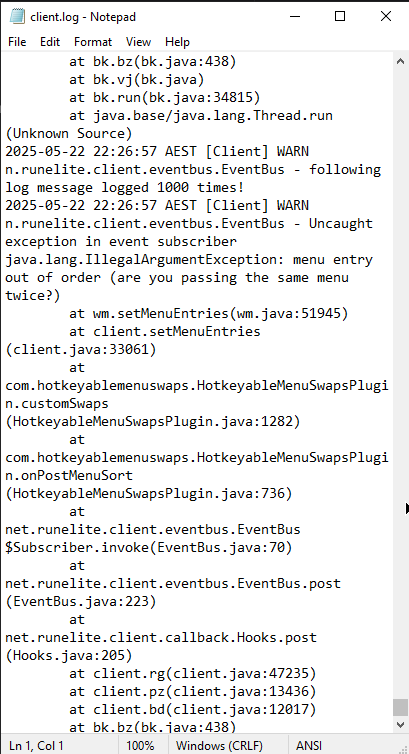 oblique plume
pure fossil
Hello, what is the cause of this error?
oblique plume
pure fossil
Hello, what is the cause of this error?
Usually your system time is wrong
haughty pumiceBOT
@odd nacelle Many plugins from the pluginhub break the client in subtle or not-so-subtle ways, including causing issues like client freezes. We do not support pluginhub plugins because we do not make or quality control them, and do not recommend their use.
Run the RuneLite (safe mode) shortcut, or with a Jagex account, first run the RuneLite (configure) shortcut and tick the Safe mode box, then launch RuneLite via the Jagex launcher.
This temporarily disables the GPU plugin and all hub plugins which will allow you to confirm the issue is caused by one of those plugins and isn't a core RuneLite issue.
If the issue is caused by a hub plugin, you should isolate which plugin it is and then uninstall the plugin.
odd nacelle
thanks!
pure fossil
oblique plume
Usually your system time is wrong
thanks
robust ruin
So anyone able to help? I play on 2 pcs, signed in on gmail on both clients.
Is this whats messing with my tiles, tags, etc?
 native bane
im having issues with npc highlights too
oblique plume
the core plugin or the broken hub plugin
native bane
i believe its the Better NPC Highlight from plugin hub, seems to not tag vardorvis axes through their true tile IDs
leaden trail
Yeah that plugin is pretty broken
 woven isle
native bane
i believe its the Better NPC Highlight from plugin hub, seems to not tag vardorv...
woven isle
native bane
i believe its the Better NPC Highlight from plugin hub, seems to not tag vardorv...
yeah i just came here for this
was working just before today's update but isn't highlighting anymore
native bane
i was thinking have they changed the id's by any chance, but didn't find any news
but seeing ranged xp and strenght problems they probably have messed up something
leaden trail
No nothing in the game changed that broke it, it's just been broken in one way or another for months
woven isle
native bane
i was thinking have they changed the id's by any chance, but didn't find any new...
actually, it just started working for me. Try turning it off and on again lol
native bane
woven isle
actually, it just started working for me. Try turning it off and on again lol
fixed ❤️
 frozen dust
Is there a reason why everyone i open runelite through Jagex launcher it keeps saying "there was a fatal error starting runelite" while downloading the bootstrap. I've Uninstalled and reinstalled both runelite and Jagex launcher
leaden trail
Post your logs
haughty pumiceBOT
To find the logs, you can do one of the following:
- If your client failed to open, click the
Open logs folderbutton. - Open the screenshot directory by right-clicking 📷
Camerabutton, navigate 1 directory up, then open logs folder. - Navigate to
%userprofile%\.runelite\logson Windows or$HOME/.runelite/logson Linux and macOS.
Upload the log files named client and launcher by dragging them to Discord. If there are files prefixed with jvm_crash dated from today, upload them too.
frozen dust
oblique plume
the 21st was yesterday
frozen dust
.... hmmm my computer says the 21st. 1 second
omfg im sorry, somehow my laptops date was screwed up, all good now
 amber thunder
I have an issue where the bottom right corner of my client is unclickable. Anyone seen similar before?
leaden trail
Do you have Discord's game overlay enabled?
oblique plume
thats usually top left
bottom right is typically a tray notification blocking it
but its pretty obvious when that is happening
leaden trail
It's bounced around a few places so I figured I'd ask
oblique plume
its prob a configurable location in discord
leaden trail
Also discord likes changing things
 odd osprey
Hello guys I have an issue starting RL its my first time using discord here
leaden trail
What happens when you try to start it?
oblique plume
have you double clicked it
odd osprey
RuneLite encountered a fatal error while downloading the bootstrap.
Exception: IOException
Message: PKIX path validation failed: java.security.cert.CertPathValidatorException: validity check fail
oblique plume
your system time is incorrect
amber thunder
leaden trail
Do you have Discord's game overlay enabled?
not for runelite...
it only happens in full screen
solid mesa
Like the fullscreen plugin?
oblique plume
is it after receiving a notification
amber thunder
no, when i make my client fullscreen...
amber thunder
oblique plume
is it after receiving a notification
its all the time
solid mesa
Using the fullscreen plugin?
oblique plume
the client doesnt have a fullscreen option
 oblique plume
as you can see by your picture there that is called "Maximise"
fullscreen would remove the frame aswell
is it only if its mazimised or is maximising it just making it big enough to be in the area where the problem exists
amber thunder
small screen is fine, when maximised i cant do anything in my inventory

 leaden trail
What if you don't have it maximized but place the client in the bottom right corner of your screen?
amber thunder
I restarted my pc and it fixed, must have been some notification issue, weird... Thanks 🙂
 celest yew
https://i.imgur.com/Dm4Vdum.png
https://i.imgur.com/wz0g4UK.png
how come some things in my loot tracker are doubling up? i was at least able to hide one of the sepulchres. cant hide one of the crystal imps
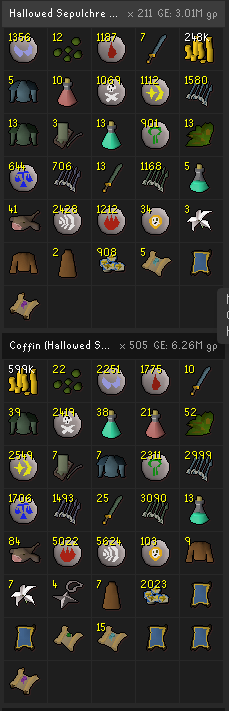
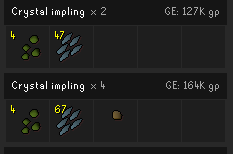 solid mesa
Those should be fixed in the next client update
Loot tracker changed to use some new jagex provided data and some ended up getting doubled
 stoic halo
solid mesa
Those should be fixed in the next client update
stoic halo
solid mesa
Those should be fixed in the next client update
Can I ask when runelite is typically updated?
I assumed it updates when the game does.
 solid mesa
Is your clock correst?
 sullen slate
Here`s the logs
mossy swan
(and date)
solid mesa
stoic halo
Can I ask when runelite is typically updated?
I assumed it updates when the gam...
Thre is no fixed schedule, but likely today or tomorrow
sullen slate
solid mesa
Is your clock correst?
oh, my pc clock really is weird since I reset my pc lol
Could that be the issue? Its weird, because runelite opened normally yesterday... and my clock is weird for 3-4 days
mossy swan
yes
solid mesa
SSL is not happy when the clock is not right
 tawny citrus
when i log into runescape everything is crazy pixilated i it was fine before but even the chat and the worlds to choose on the loading screen are more pixilated i think this is something i turned on but how do i turn it off
oblique plume
stretched mode?
charred wind
Gpu off?
tawny citrus
charred wind
Gpu off?
thank you haha
sullen slate
solid mesa
Is your clock correst?
Worked, tyvm!
 opaque bloom
can anyone tell me why when I click on the idle notification does not bring the runelite window into focus?
or should I be asking this in the #runelite channle?
charred wind
no, keep your question to one channel
 buoyant kernel
never had the black cooldowns for thralls/mark of darkness till today, cant find where to disable them. anyone knows?
atleast the mark of darkness one, kinda off to as u can recast way earlier than it says

(i downloaded the "arceuus timers" plugin, but i uninstalled it after, and just incase closed client and opened a new one and its still like this)
hollow olive
if you closed/reopen with it uninstalled this shouldn't happen
buoyant kernel
just tried again and its still happening 😢 we sure its that plugin that messed me up then?
opaque bloom
yea so request focus does nothing on any of the settings
I've been searching online for a solution and think it has something to do with the request focus option in runelite settings
however I have tried it on all the options and it literally does nothing except to make the window the active window but it stays in the background
 wraith citrus
buoyant kernel
never had the black cooldowns for thralls/mark of darkness till today, cant find...
wraith citrus
buoyant kernel
never had the black cooldowns for thralls/mark of darkness till today, cant find...
Timers & Buffs plugin
hollow olive
the black icons are from arceuus timers
buoyant kernel
nono , this helped thank fuck
 wraith citrus
hollow olive
the black icons are from arceuus timers
wraith citrus
hollow olive
the black icons are from arceuus timers
No its the buffs & timers plugin
buoyant kernel
wraith citrus
Timers & Buffs plugin
thanks 🙂
is this a new addition i guess? never had it till now maybe arceuss plugin made it turn on or something idk
opaque bloom
guess I'm just cooked
hollow olive
weird
wraith citrus
looks like it was added april 13th
opaque bloom
I just wanna be able to keep my game client windows in background and be able to click on the notification when I become idle to bring the window to forefront but guess that's too much to ask
buoyant kernel
ok so a little FYI if anyone had this and searches in the future
the cooldown is off by defualt in buffs plugin
but if u download arceus plugin, then remove it, it turns on the cooldown in the buff plugin 🤷🏻♂️ weird but i just checked it lol
zealous cedar
pluginhub plugins can adjust settings of other plugins sometimes yeah
opaque bloom
oh thanks soooooo much for all the useful help eyes roll
 stone parcel
That sounds like an OS thing, if you click notifications from other applications does it bring the window to front?
torpid elk
did Runelite updated today?
opaque bloom
I literally don't understand when I click the notification I get with spotify when it changes song it brings spotify into focus
but runelite notifications just clears them
 viscid lantern
torpid elk
did Runelite updated today?
viscid lantern
torpid elk
did Runelite updated today?
no
opaque bloom
so why can I click notifications of other applications to bring into focus but not RL.....
opaque bloom
literally said previously request/force focus does absolutely nothing except for making it the active window but keeps it in background
so it becomes active window but I can't see it
oblique plume
then you have a window forcing itself over RL
stone parcel
Are you on Linux? Iirc the force focus thing is hit or miss there.
opaque bloom
I'm in the windows focus settings now
oblique plume
linux loves to just not have things work
opaque bloom
 stone parcel
There are a few different PRs trying to fix this, but last I heard no one has gone through and found 1 solution that works on most DEs or WMs or w/e. https://github.com/runelite/runelite/pull/16676
 viscid lantern
its more a JVM/Linux thing afaik
stone parcel
Really needs one of us Linux users to test it a bit and find which works best. 😅
stone parcel
Yeah, the toFront() thing worked for me, but not everyone iirc. #support message
solid mesa
Unless you want to build the client from source you can't put it anywhere
charred wind
gamma is the resident mint expert
viscid lantern
 I never used that feature so idk
opaque bloom
damn so I guess it just doesn't work then
gilded kayak

 fresh pelican
Can someone help me? I already restarted pc, WiFi, and I ran it as administrator. I don't want to reinstall because then I lose my runelite settings
 oblique plume
your system time is wrong
 stiff latch
I have a loot tracker plugin question.
My loot from monster kills doesn't show up anymore.
It does show pickpockets & stuff like brimstone chest loot.
But not monsters.
I reinstalled runlite, reset the loot tracker plugin and deleted the cache.
But nothing seems to help.
Any one has any idea's?
oblique plume
you have to turn it on with the enchanced client or mobile
RL uses the jagex loot events now but they could be disabled for your profile and only those clients can edit the setting for it
fresh pelican
Thanks alex it works again
stiff latch
oblique plume
RL uses the jagex loot events now but they could be disabled for your profile an...
Is there any way for me to fix that?
oblique plume
read the message above the one you just read
torpid elk
is there any plugin that prevents you from picking ground items? similar to the menu entry swapper (thats for shift click only)
oblique plume
custom menu swaps can do basically anything
charred wind
you can deprioritize hidden items
so if it's a hidden ground item you will yellow click on it unless you right click to pick up
torpid elk
charred wind
so if it's a hidden ground item you will yellow click on it unless you right cli...
wich option should I use from the menu?
solid mesa
Deprioritize menu hidden items
 true crane
how do I change what plugins go here
 oblique plume
Turn them on/off
 restive yacht
Does anyone know if Windows Updates recently fucked with the GPU plugin on ARM64 machines? Can't login with the GPU plugin enabled after turning it off last night.
I have a shit Windows Surface Pro but I have never had this issue with the GPU plugin before
oblique plume
no idea what a .wer file is but the bot ate it
restive yacht
haha yeah
this is the body
it doesnt like OpenGLOn12.dll
seems like someone else had a similar issue yesterday but not being able to use the GPU plugin is a fucking shame
oblique plume
restive yacht
it doesnt like OpenGLOn12.dll
what makes you say that
crisp dune
it's listed as the faulting module
oblique plume
i see
restive yacht
ive done two reinstalls as well and that didnt help
works flawless without gpu plugin enabled
ShartPooPooPee says its not a RuneLite issue though:
🧠 What This Means:
OpenGLOn12.dll is part of Microsoft's D3D12/OpenGL compatibility layer (used on ARM64 systems or devices without native OpenGL drivers). It's how your Surface Pro 9 with the Microsoft SQ3 ARM chip is emulating OpenGL by translating it to Direct3D 12.
So:
RuneLite's GPU plugin is using LWJGL (Lightweight Java Game Library) to talk OpenGL, but...
That’s being translated to Direct3D via OpenGLOn12, and that layer is crashing hard during startup.
This is not a RuneLite bug, and it’s not your fault — it's a known compatibility problem on ARM64 when OpenGL is being faked on top of D3D12.
so ggwp surface pros running on arm then
any ideas or am i toast?
on this machine at least
solid mesa
You could try rolling back your GPU driver
 cinder gate
I tried googling but nothing much. My runelite freezes when chaning profiles..
infact runelite does not freeze but the game does..
haughty pumiceBOT
Many plugins from the pluginhub break the client in subtle or not-so-subtle ways, including causing issues like client freezes. We do not support pluginhub plugins because we do not make or quality control them, and do not recommend their use.
Run the RuneLite (safe mode) shortcut, or with a Jagex account, first run the RuneLite (configure) shortcut and tick the Safe mode box, then launch RuneLite via the Jagex launcher.
This temporarily disables the GPU plugin and all hub plugins which will allow you to confirm the issue is caused by one of those plugins and isn't a core RuneLite issue.
If the issue is caused by a hub plugin, you should isolate which plugin it is and then uninstall the plugin.
 reef island
Any idea why runelite isnt able to open up browser tabs? Stopped playing on my pc for a bit and when I came back to it, I cant seem to wiki click items or anything
oblique plume
Do you have a default browser set
gilded kayak
if yes, it will probably be fixed by changing the default to something else, and the back to the one you want
reef island
Yeah okay it seems like a browser issue, thank you
for some reason the same browser works perfectly on my laptop but its having issues on the pc all of a sudden
 rocky zinc
just started getting this error. does anyone know how to fix? thanks
 zealous cedar
does https://runelite.net load for you?
rocky zinc
Yes it does
zealous cedar
your system clock is wrong
rocky zinc
oh yeah it is. that's really weird
I have it set auto but it's just wrong
it's 3:39 here
fixed thank you
 topaz nimbus
Influx of these system clock issues today, wonder what happened
haughty pumiceBOT
!!! command not found!
 fossil spoke
is Runelite even useable anymore? Only the steam client and official client let me log in at this point. Keep getting "too many login attempts".
gilded kayak
yes it's still usable
you can do what the error says and update to a jagex account
or you can wait until jagex stops servicing you that error
fossil spoke
the error only tells me to download official client. Nothing about a "jagex account" idek what that is

 sonic birch
You can use the jagex launcher to launch runelite
Just need to have RL installed and click the dropdown
fossil spoke
ah, tyvm Yves W
 red brook
does anyone know how to get the in game boss hp bar to show percentage and exact hp?
gilded kayak
the in-game one you would need to check the in-gmae settings
i'm not sure if they offer that?
gilded kayak
then I guess not
red brook
so i assume its a RL thing when I see ppl ahve it
gilded kayak
yes
the opponent information plugin
but it wont work in places like raids where the HP value is not available (because of scaled HP bosses)
gilded kayak
!logs if you post your logs then maybe
haughty pumiceBOT
To find the logs, you can do one of the following:
- If your client failed to open, click the
Open logs folderbutton. - Open the screenshot directory by right-clicking 📷
Camerabutton, navigate 1 directory up, then open logs folder. - Navigate to
%userprofile%\.runelite\logson Windows or$HOME/.runelite/logson Linux and macOS.
Upload the log files named client and launcher by dragging them to Discord. If there are files prefixed with jvm_crash dated from today, upload them too.
gilded kayak
but gpu crashes aren't always in our logs, they might be in your system logs
 wintry oyster
my client open
but then I turn on gpu plugin it crashed
that problem i have couple of days before everything work smootly
gilded kayak
is this a tablet?
leaden trail
Whatever update rolled out yesterday or the day before really borked those for a bunch of people, huh?
gilded kayak
unfortunately as I thought there's nothing in our logs for the gpu crash
you'll have to check your system logs, (event viewer on windows) and see what it says
it's possible that something updated on your system causing this issue, as we have not updated the gpu plugin in many months
 sour vortex
my loot tracker is not tracking loot for certain sources. I have cleared all my ignore options. it seems to track clues just fine, but boss kills havent registered, including raids
gilded kayak
sour vortex
Thank you
 wheat bridge
could i get some help here? had no issues yesterday
 gilded kayak
can you tell me what happens when you open runelite by double-clicking it
jagex's errors are useless
wheat bridge
loads up like nothing is wrong i go to hit the "play button" and then that error appears
gilded kayak
then i would assume it's not a rl issue
 mortal pond
i think reinstalling runelite has fixed that for some people in the past
gilded kayak
that's for the issue* where when they double-click runelite, nothing happens
that's why I asked them to double-click runelite
wheat bridge
okay i mis read and i double clicked rl
and it woint open at all XD
my fault, apologies
wheat bridge
i appreciate you thank you
@gilded kayak CONFIRMED thank you get this person a pay raise!@!
wintry oyster
gilded kayak
unfortunately as I thought there's nothing in our logs for the gpu crash
i fix it thanks
 hollow star
Question for anyone who may have encountered this bug or know a fix.
After not having played rs for close to a year, i recently got back into playing again about a week ago. In this time my loot tracker hasn't been working at all, and has wiped all my previous info.
I've killed a number of different mobs/bosses in this week since returning, these 3 entries are the only ones that seem to get tracked and updated.
From first glance it seem like only non pve related drops are being recorded, like Misc, the unsired pet drop, birdhouses ect.
Anyone know a potential fix? I've even tried reinstalling runelite as a fix, but that didnt help. I've also tried removing the plugin and reinstalling that too.
 gilded kayak
now for the wiping that's a different thing
!lootmissing this might resolve that, assuming you are syncing your settings
haughty pumiceBOT
gilded kayak
but do the setting change on an official client first
hollow star
Just did that and its fixed now, thanks so much. I assume that jagex encorporated the loot tracking into the main game and thats why the change happend?
gilded kayak
we encorporated their official loot tracking into RuneLite, but apparently it can be disabled
xddd
but only for NPCs
hollow star
gotcha, Thanks a ton for the help, it was driving me crazy and i looked everywhere on google and couldn't find a fix. Untill i remembred this discord 🙂
round jacinth
with 1.11.8.1 out, isn't that fix in release now?
gilded kayak
no
round jacinth
darn
gilded kayak
jagex has to fix it not us
round jacinth
oh, i thought we had a fix waiting for next release
i knew it was a jagex problem tho
 crimson tree
hey guys i think im in the right channel, how do i tfurn thralls outline on with entity hider m, when i turn entity hider on they completely dissapear but i want to see their outline
crisp dune
gilded kayak
jagex has to fix it not us
I'd thought they were fixing that this week but I was mistaken
gilded kayak
you have to pair it with the currently broken, better npc highlight
crimson tree
gilded kayak
you have to pair it with the currently broken, `better npc highlight`
i have the id of the thralls in the outline section of better npc hightlight
gilded kayak
yes, the plugin is currently broken
i believe there's a way to start it and have it not be broken, but i don't know how
crimson tree
ohh alright thank u 🙂
gilded kayak
since while a lot of people have reported it being broken, nowhere near as many as I'd expect, if it was 100% for sure broken
 brazen crag
Hi, where could i find the implementation for the functions in PlayerComposition?
 empty minnow
The actual implementation of most of the client API is private
gilded kayak
(as per Jagex's angry lawyers)
 fossil ridge
When is itemstats plugin being updated for the oathplate armours??
gilded kayak
i could probably poke someone to merge it when it does the weekly scrape of the wiki tomorrow
i think it runs on friday
fossil ridge
What time zone is that?
 zealous cedar
interesting it just kicked off 2 minutes ago
gilded kayak
lit
zealous cedar
indeed
 hot shell
My xp tracker plugin lists my xp gained as lower than the actual xp gained on my account, is there a way to force the plugin to update?
round jacinth
xp tracker doesnt reset between client restarts anymore, its probably just the avg across the days
solid mesa
Right click and reset
 hot shell
ok I see, I thought that it listed the total xp gained since account creation not just since last reset
thnx
 vagrant night

there is a plugin that renders stuff in the void thats not supposed to be visible right
idk how to search for it
gilded kayak
someone said that can happen on the official client
but i don't know whether to believe them
but they were also at that same spot
gilded kayak
.
technically the vanilla client would be the now deprecated java client before we touch it, but people don't normally know the real names so i'm just assuming he means official
 ashen belfry
I think I read somewhere that after like a year or so of not doing a certain piece of content the loot tracker wipes that data. Is that correct? And is there any way to get it back?
I'm talking content you havent done in a really long time, not like a month where you just turn loot tracker on and off and it fixes itself
solid mesa
The client only keeps a certain amount. You can do the content again to refresh it. Or all the loot tracker should be available on runelite.net
 wind fog
I bought a new pc and im trying to import the file of my loot tracker i just don’t know where to put in anyone can help ?
haughty pumiceBOT
wind fog
But i did import the runelite profile on the new pc do i have do delete everything then copy all the files over to the new pc ?
solid mesa
If you have access to the old PC I would transfer the whole .runelite as the page says
ashen belfry
solid mesa
The client only keeps a certain amount. You can do the content again to refresh ...
What if the Loot Tracker on teh website doesn't have it either?
solid mesa
Then it's gone, did you check that you don't have multiple profiles?
haughty pumiceBOT
wind fog
Its not gone i still see it on the other pc
But now i have some kc on the new one so i was looking for the file so i could add the one from the old pc but i can’t find the new
mossy swan
wind fog
But now i have some kc on the new one so i was looking for the file so i could a...
you cant combine them
wind fog
Well i might just forget about it then and start fresh lol
 tight bobcat
Fountain of Uhld's animation does not loop correctly with the animation smoothing plugin enabled, it snaps back at the end. I've seen windmills do this earlier but those seem to have been fixed
mossy swan
another one for the blacklist 
 crystal grove
A bunch of my data from the last week or so has gone missing after the latest OSRS update.
Loot trackers on two of my accounts lost a bunch of kills from their history and on another account the GE logs are missing too.
All 3 clients were logged into the same google account.
The GE logs showed the last entry as 6 days ago, both in the client and on the website. That lines up roughly with where the kill counts on the other two accounts rolled back to.
On the website the data is matching what is shown in the desktop client now.
Not sure if it's some funny buggers with having multiple clients open. Any ideas?
 full magnet
Anyone know of an issue where I cannot type when trying to edit the name of a profile?
I can search plug inside, type everywhere else so it's not a hardware problem. Made a new character and wanted to customise the profile but the only keys that work are backspace and delete
 robust elk
GOOD MORNING, Trying to log in, and it keeps saying network issue? keeps asking me to loging in etc? any ideas? many thanks
viscid lantern
It appears to be a jagex issue, nothing we can do about that one
 frank marsh
certificate is expired for secure.runescape.com
robust elk
viscid lantern
It appears to be a jagex issue, nothing we can do about that one
guess ill go and touch grass 👀 🥲
viscid lantern
frank marsh
certificate is expired for secure.runescape.com

frank marsh
monitoring and maintaining certificates must be one of the easiest things you can do when it comes to IT management
but I digress
 silent plover
viscid lantern
silent plover
viscid lantern

PSA: We're investigating reports of SSL issues impacting players' ability to log in or access parts of our website (including the Game Status page).
︀︀
︀︀We'll update you once we know more and advise you avoid hopping worlds if you're already logged in.
 FxTwitter
·
FxTwitter
·
 marsh rain
hey, some of my text seems to be cut off a little at the top in my chat box. anyway to fix this please? thanks
mossy swan
got a screenshot?
marsh rain
mossy swan
got a screenshot?

maybe its stretched to much and not cut? im not sure

and sometimes at the bottom
mossy swan
oh yeah that does look like stretched mode issue
try a different scaling algorithm maybe
or scaling a different amount
marsh rain
i'm at 50% on stretched and 1.0 scaling, should i lower both a little?
mossy swan
would not touch the scaling but % on stretched yeah
 candid sapphire
Runelite isn't letting me rename my profiles right now, anyone else having this issue?
zealous cedar
it works ok for me. what is your profile name you are trying to rename?
candid sapphire
These two, I am trying to rename them to "Main" and "Main 2nd Monitor"

The problem is when i click the rename button, it acts like i do not have a keyboard plugged in. It does not respond to key presses.
zealous cedar
mm it works for me ok, weird
candid sapphire
I even tried the on screen keyboard.
 viscid lantern
your system time/date is wrong
 steel cloak
i didint even notice that thank you i willl update and try agian
that fixed it thank you don't know how it got off there was a update on my pc when i booted it up this morning but i didn't think that it would mess with date and time
 crystal pine
has anyone encountered a weird bug where hovering over overlapping entities causes the highlighted option to rapidly cycle between them all?
trying to figure out what's causing it and I think it's something to do with menu entry swapper, since it seems to happen after I change the default left click of something
only fix I've found is to restart the client
viscid lantern
crystal pine
has anyone encountered a weird bug where hovering over overlapping entities caus...
Ive seen logs of people with that issue and it was custom menu swaps freaking out, idk if you're using that?
 upper spade
im building a new pc, but have a jagex account. im fresh installing windows so everything will need re downloaded. im honestly not too sure of my runelite account details and if i can even log in to it. will everything be transferred to the new pc through the jagex account (plugins and settings) etc
solid mesa
It is only transferred if you turned on cloud sync for the profile
haughty pumiceBOT
upper spade
so i should copy the whole runelite folder to a safe drive, then paste it over to the new pc when its built
upper spade
now, if i were to just install windows on a new drive, then take my old c: drive and put it in my computer (it would still have this old windows and all its files - including runelite data) would that just end up working?
solid mesa
You'd still have to move the file to the new drive. Assuming you get the boot order working
upper spade
hmmm... everyone is reccomending a fresh install but im kinda dreading it lol
stone parcel
I don't often use windows, but when I do, it's on an installtion that was upgraded since like xp lol.
upper spade
i just have so much stuff... but i hear you can run into problems down the road without doing a fresh install
who knows though
stone parcel
Yeah I feel that, years of programs and settings exactly how you desire. Good luck on your journey though! 😄
upper spade
thank you! one thing is for sure these runelite settings will be stored securely lol
my .runelite is dated as 5/6/2025 in my file explorer, could that be an old one? i know i recently installed the 64gb version on another drive because of an issue with 117hd
it seems to list all of my recent plugin downloads inside
stone parcel
That should be the correct one. It should have been in the location in that transfersettings link.
upper spade
okay, looks good. now in copying this over to the new pc, it will automatically sign me in?
stone parcel
🤔 Not sure.
upper spade
took a risk and signed out and back in so ive got that info lol
 dreamy raven
So I'm currently doing Corrupted Gauntlet and for 1.4k kc its been tracking the loot under "The Gauntlet" but now its started logging the loot under a new list called "Corrupted Gauntlet" is there anyway to fix this or combine the loot into the same list?
solid mesa
No, the loot tracker changed with last week's update
zealous cedar
candid sapphire
I even tried the on screen keyboard.
oh turns out I was on an older release and didnt realize it lol, yes it appears totally broken
candid sapphire
zealous cedar
oh turns out I was on an older release and didnt realize it lol, yes it appears ...
Good to know its not just me.
 night hawk
My RL has just stopped loading - am I alone with this issue? Loads very slowly when i press "play" in jagex launcher (several minutes to open RL client), and then when I attempt to login, it just hangs on "connecting to server".
gilded kayak
those both sound like internet
your connection to Jagex's servers might be slow today
night hawk
Hm, odd, it was working fine 30 mins ago, and everything else is working at normal speed on the internet
gilded kayak
gilded kayak
your connection to Jagex's servers might be slow today
.
in 30 minutes the problem might just go away
night hawk
I'll try to wait it out for now 🙂
gilded kayak
that's the fun of the internet
 boreal valve
Since very recently I'm lagging very bad (fps wise) when I'm zoomed out far or have my camera looking horizontally. I've never had this problem ever before, does anyone know what the reason could be?
Nevermind, I've just now enabled Compute Shaders in the GPU plugin. And it's fixed ❤️
 lunar ore
Could use some help - my loot tracker stopped working about 2 weeks ago. Runelite will still track kills from NPCs I killed before it stopped working, but wont track kills from any new NPCs. I tried all standard trouble shooting, any advice?
solid mesa
Login to mobile and enable loot tracker in the game settings
boreal valve
gilded kayak
 fathom kraken
solid mesa
Login to mobile and enable loot tracker in the game settings
fathom kraken
solid mesa
Login to mobile and enable loot tracker in the game settings
This actually fixed @lunar ore 's problem. Was trying to help out in discord. Can you explain why in gods green earth this actually works?
gilded kayak
we migrated to jagex's official loot tracker for NPCs but as you can see apparently you can disable it
so the loot would be super-for-real-basically-always correct
fathom kraken
I see
Then, when you kill something on mobile, will it track on desktop in runelite?
solid mesa
No
gilded kayak
no!
viscid lantern
no
gilded kayak
we're just listening to the servers loot recieved
so only when you are playing from runelite will it know about them
fathom kraken
Gotcha
viscid lantern
no more random scythes in your duo giant boss loot! 
fathom kraken
Oh, thats neat
round jacinth
i got cook to think you can get 13 fire capes/hr on average at royal titans
fathom kraken
Cool, thanks for the info!
 gray tulip
does anyone know why i cant edit my profile names in Runelite? I can only backspace the name but cant type a new name.
zealous cedar
It is broken
gray tulip
just a know current issue then or is there something i can do to fix it?
zealous cedar
its a known issue
gray tulip
okay thank you
 warm otter
any reason why runelite freezes when playing another game
leaden trail
Do you have gsync enabled?
 jolly coral
how can i turn off that option pop up?
 solid mesa
If you click Teleport it still brings up the old interface
jolly coral
ye but i dont want that pop up when i hover over teleport
crisp dune
It's part of the vanilla client now, I don't think there's a toggle
jolly coral
thats actual cancer
 fathom burrow
anyone have any issues with trying to rename profiles
i press rename but it wont let me type anything in the box
solid mesa
Its broken
fathom burrow
oh nice
warm otter
turned of all plugins still freezin
warm otter
wasnt happening yesterday with the 2 games hmm
wasnt that an RL updates yesterday too
leaden trail
There was but I don't think it's related
Is it freezing or just dropping to 0fps when you focus a different window/display?
 leaden trail
Post your settings for "FPS Control"
warm otter
ive that disabled but enabling does nothing
leaden trail
If that's disabled post your settings for the GPU plugin
warm otter
 solid mesa
Turn off vsync
warm otter
still same
solid mesa
Then it's usually some setting in your GPU about unfocused resources
warm otter
😮💨
crystal pine
viscid lantern
Ive seen logs of people with that issue and it was custom menu swaps freaking ou...
I'm using some customised left clicks with the built in menu entry swapper, but no plugin hub plugins
leaden trail
Does the issue happen in safe mode?
haughty pumiceBOT
To enable safemode
Windows
Run the RuneLite (configure) shortcut from the windows start menu
Tick the Safe mode box, save, launch RuneLite the way you normally do.
Mac
In Terminal, run
/Applications/RuneLite.app/Contents/MacOS/RuneLite --configure
Tick the Safe mode box, save, launch RuneLite the way you normally do.
warm otter
I fixed it!!
Turns out new Nvidia driver is messing up the background fps
Rolled it back to prev version and problem gone
 frozen crypt
Looking if anyone has an answer.
Not getting 'collection log' screenshots for 1 of my accounts even though it is ticked. Works for all of my other accounts on my RuneLite profile, just not one of them for some reason.
gilded kayak
is it ticked in-game
it relies on the in-game setting to display info that you got a collection log slot
frozen crypt
the 'collection log' popup?
gilded kayak
or the chat message

 gilded kayak
yes the settings in the first image from in-game
frozen crypt
bit of an odd one, yes they're were ticked.
has been like this for years. just thought id ask now. its typically not a big deal because i get screenshots for boss kc/expensive item etc.
just be convenient to have col logs
gilded kayak
i'm not aware of anyone else reporting such an issue, maybe the logs say why?
!logs
haughty pumiceBOT
To find the logs, you can do one of the following:
- If your client failed to open, click the
Open logs folderbutton. - Open the screenshot directory by right-clicking 📷
Camerabutton, navigate 1 directory up, then open logs folder. - Navigate to
%userprofile%\.runelite\logson Windows or$HOME/.runelite/logson Linux and macOS.
Upload the log files named client and launcher by dragging them to Discord. If there are files prefixed with jvm_crash dated from today, upload them too.
leaden trail
Did you get a coll log item today?
 leaden trail
Just asking since sometimes people will have an issue and then not come in here for a few days and that would affect which logs we'd want to see
solid mesa
Is it screenshotted inside valuable drops?
frozen crypt
yes
solid mesa
Yea there's a race condition
frozen crypt
 leaden trail
2025-05-24 00:27:04 AEST [Client] ERROR injected-client - Client error: Warning: Script null finished at op count 526497 of max 600000
I haven't seen this before
But that's not necessarily related
solid mesa
It will screenshot it as valuable loot, or collection log, but not both
frozen crypt
hmm
 craggy surge
I'm trying to figure out how to have the notifications show up when I'm full screen on youtube. They show up fine in every other situation, but not in fullscreen. I tried all these options and nothing changed. Is there another setting somewhere?
 solid mesa
Like the windows notification in the corner of your screen?
leaden trail
That would be an OS setting somewhere then
solid mesa
There's probably something putting your computer in focus mode when you have a full screen media
craggy surge
Do you guys have this behavior on Windows or do notification popups show up in fullscreen?
solid mesa
If I turn windows focus mode on then I don't get notification popups
 gilded kayak
click that open logs folder and drag in launcher.log and if it existsclient.log
zealous cedar
is your system clock correct?
 gilded kayak
can you check what Adam said first
solid mesa
Just launcher.log and client.log. Two files
gilded kayak
is the time on your computer the correct time
gilded kayak
ok, then yes there should be files in that folder that do NOT have a date in the name
one for launcher and probably one for client* also
drag those 1/2 into discord
they look like this for me on windows

 left dune
like this
gilded kayak
this says your device is full
if you go into mac settings (the apple icon -> system settings -> general -> storage) is the storage very very very full?
 solid mesa
Time to delete some files
gilded kayak
yeah the client doesn't use much, but it needs more than that
multiple things are upset about how little space there is
left dune
It only shows 4gb files and other 94gb don’t know how to get to i guess all YouTube how to delete more

Like this
solid mesa
OmniDiskSweeper is good https://www.omnigroup.com/more
 gilded kayak
you're more likely to get the answer if you just install 117 and try it
versus us just saying no, when we could be wrong
left dune
Got you I’m a noob so just go on website and install it
haughty pumiceBOT
 solemn pasture
my loot tracker isnt working, and i have spent a week trying to figure it out xD can anyone help?
solid mesa
Login to mobile and turn on loot tracker in the game settings
 bleak portal
Weird question - been doing GOTR, now all runes are set by default to drop
any ideas?
 leaden trail
Gotr plugin maybe?
bleak portal
Your right don't know how that was changed, thanks
 lethal dragon
Sometimes I get notifications for drops from ground items that aren't there
Prior to the drop:

After the drop:
 viscid lantern
someone might be killing zygomites nearby and its notifying you of those highlighted items
If you set the Ownership filter in ground items to Takeable, that should make it stop doing that
lethal dragon
Okay, will do! thank you
 final axle
The helper needs help, no idea what caused my crash earlier trying to go down DKs ladder. Timestamp it happened is around line 920
viscid lantern
helper is not gonna like my answer 😂
final axle
last thing before crash was
2025-05-23 16:31:10 EDT [Client] ERROR injected-client - Client error
java.lang.ArrayIndexOutOfBoundsException: Index 55 out of bounds for length 23
    at nu.ar(nu.java:51)
    at nu.xp(nu.java:55)
    at ce.la(ce.java:17607)
    at wm.aq(wm.java:137)
    at wm.cp(wm.java)
    at client.mm(client.java:64970)
    at client.pk(client.java:60298)
    at client.pz(client.java:13436)
    at client.bd(client.java:12017)
    at bk.fy(bk.java:438)
    at bk.uo(bk.java)
    at bk.run(bk.java:55221)
    at java.base/java.lang.Thread.run(Unknown Source)
shh yes I know I have a lot of hub plugins but it's usually not a problem
viscid lantern
thats probably the crash yeah, could be caused by a hub plugin, could be a blip, hard to tell 
 long knoll
I need help adding my discord webhook into the discord notifications plugin on runelite
Can anyone help please
haughty pumiceBOT
Support for hub plugins should be directed to the author of the plugin.
You can find the support link by searching for the plugin in the Plugin Hub panel and clicking the ? button on the plugin, or by right-clicking the plugin in the plugin panel and clicking the Support menu option.
 proud sage
question my rl randomly closed and now my profile wont load any plugins
 buoyant shuttle
odd nacelle
thanks!
buoyant shuttle
odd nacelle
thanks!
Did you find the solution to this? I'm experiencing it too and am not sure which plugin might be doing it
haughty pumiceBOT
 maiden wasp
Hello, I have "Login Screen" plug-in turned off yet I keep getting this. If I turn the plug-in on and back off to where it was, I get the regular Yama log in screen. What gives?

Here is even a video of what I mean
This has been happening for ages. I have restarted my computer, uninstalled and reinstalled runelite and importing my profile back in. I don't know what else to do
My best guess would probably be an edge-case bug with the Login Screen code
mossy swan
its that plugin you got to change your ui color n stuff ingame
maiden wasp
mossy swan
its that plugin you got to change your ui color n stuff ingame
Sorry, I don't understand. Can you rephrase?
gilded kayak
i think it was a riddle for "resource packs is causing it"
at least thats the answer i got
 eternal adder
Hi, could someone help me? I'm having problems with the loot tracker.
round jacinth
boreal valve
 kind saddle
https://www.youtube.com/watch?v=R0ZLd93nsWQ
Is it possible to do this instead of the ''bank tag layout'', do it with the inventory setup?
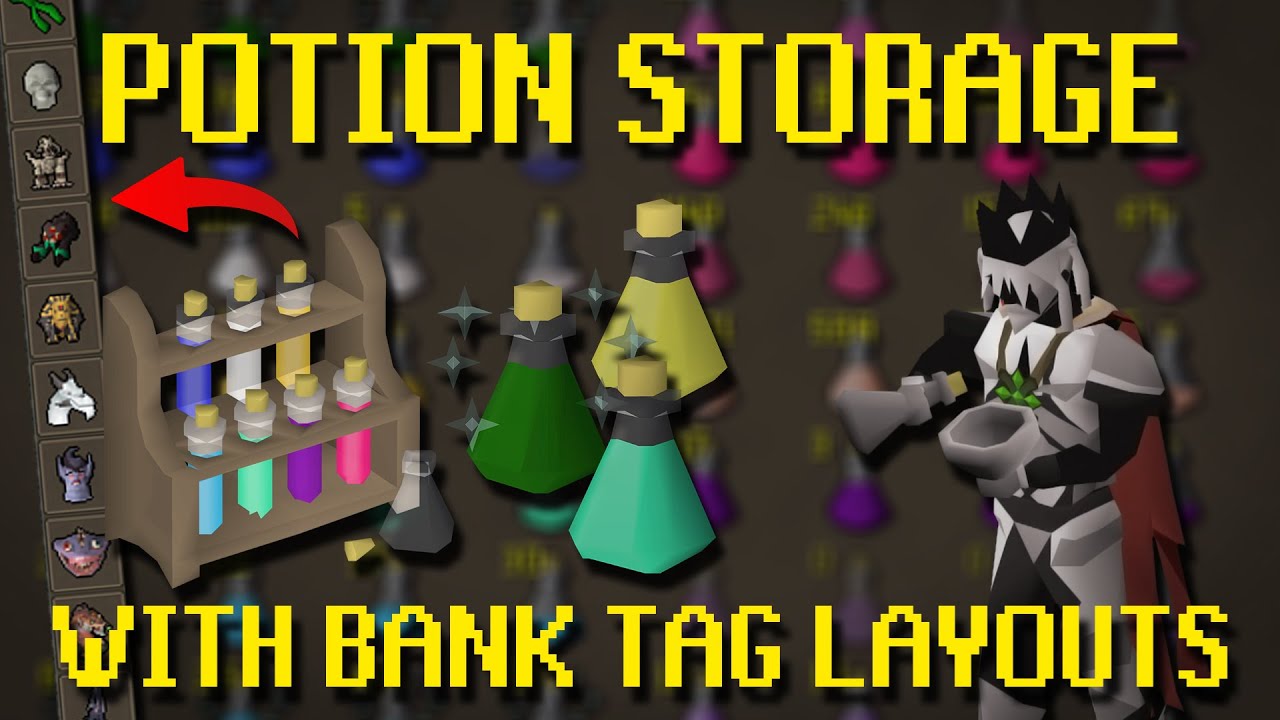
Easy guide to get your bank tag layouts to work with the new potion storage.
- Disable "Always deposit to potion store" in menu (top right settings)
- Export Tag Tab with Layout (right click tab)
- Import Tag Tab (top left +)
- Exit Bank
- Enable "Always deposit to potion store" in menu (top right settings)
Guides Playlist: https://www.youtub...
round jacinth
yes it would work
the only bank plugin that doesnt work with potion storage is the bank tag layouts hub plugin itself, to use layouts with potion storage at all you need to just use core's bank tag plugin - which is what inventory setups uses anyways
kind saddle
And how would I do that?
round jacinth
idk i dont use that hub plugin but presumable the same way..? you equip your inventory of stuff and then you tell the hub plugin thats the set up you like
and presto
eternal adder
round jacinth
how do I do that?
round jacinth
idk how to explain it any more clear than what that forwarded message is
you login on mobile or official client and enable loot tracker there
kind saddle

it doesn't work, I put all my potions in the potion storage, and the potions don't appear there
round jacinth
do you have place holders for your potions
left in your bank yet
if you have any in your bank at all, it will pull from that stock first and a place holder is included in that
looks like you have place holders

you should remove them if you want potion storage's potions to be withdrawn

 round jacinth
i dont speak that language but you have all of those potions as place holders in your bank
remove them
(if you want potion storage potions to be withdrawn from)
kind saddle
sure
round jacinth
kind saddle
they go into potion storage but you still have place holders
kind saddle
Yes, I have it, I don't know if this will work with inventory setup, so as a security vote I left it there, understand?
round jacinth
withdrawing from bank using layouts withdraws from the stock in the bank first and then potion storage, and a place holder is in the bank
only bank tag layouts the hub plugin doesnt work with potion storage
the rest do
i understand the precaution but you can safely free the bank slots
🙂
kind saddle
exactly, but I don't use bank tag layouts, just "inventory setups"
The question is: does this work with inventory setups?

 round jacinth
anytime you have this type of spacing you're in a layout

 round jacinth
gl with yama
round jacinth
nice work
 round jacinth
spoon 🙂
kind saddle
Yeee
leaden trail
 sly sinew
Hello! I signed into runelite on a different computer and all my bank tags are gone. I tried signing in and out and I made sure I was signed into the correct runelite account. Is there anything I can do from here?
upper spade
im a little confused with this .runelite folder transfer.. i have it saved on a drive and im trying to copy it into the new .runelite and nothing happens
 hollow falcon
All my walls and the altar are dissappearing at Nex so I can't leave the arena. After enabling debug and checking the log. I'm getting these spammed. Does anybody know what would be causing this error and/or behavior?
2025-05-23 23:47:13 EDT [Client] WARN  n.r.c.ui.overlay.OverlayRenderer - Error during overlay rendering
java.lang.NullPointerException: Cannot invoke "net.runelite.api.GameObject.getClickbox()" because "dispenser" is null
    at com.ticketReminder.TicketReminderOverlay.render(TicketReminderOverlay.java:24)
    at net.runelite.client.ui.overlay.OverlayRenderer.safeRender(OverlayRenderer.java:734)
    at net.runelite.client.ui.overlay.OverlayRenderer.renderOverlays(OverlayRenderer.java:328)
    at net.runelite.client.ui.overlay.OverlayRenderer.renderOverlayLayer(OverlayRenderer.java:235)
    at net.runelite.client.callback.Hooks.drawScene(Hooks.java:496)
    at ho.rc(ho.java:61014)
    at ho.ck(ho.java:12228)
    at ss.iu(ss.java:3569)
    at lv.ls(lv.java:8809)
    at lv.ls(lv.java:8846)
    at ba.lc(ba.java:8680)
    at client.pt(client.java:13879)
    at client.bu(client.java:12071)
    at bk.xs(bk.java:472)
    at bk.lk(bk.java)
    at bk.run(bk.java:56758)
    at java.base/java.lang.Thread.run(Unknown Source)
it's some wall remover plugin for some other area of the game
they added nex to it
unrelated to whatever this portion of your logs is
solid mesa
Boss Wall Remover
hollow falcon
Sweeet, thank you!
hollow falcon
That got the walls back, but the altar is still missing
solid mesa
Did you restart the client?
hollow falcon
I don't believe so, does that plugin block the altar too?
solid mesa
Maybe 🤷♂️
 tulip thistle
Does anyone have a full resolution image of the OSRS world map with its latest updates and no icons or names on the world map? Or does anyone know how I can get that? I'm working on a project and really would like the latest world map as an image. I have an older revision of the world map with no icons or names overlayed on the top and found websites that I can view it w/o those like Google Maps, but never any that allow downloading/exporting the full map as an image like PNG or JPEG.
solid mesa
https://oldschool.runescape.wiki/w/World_map/History might be your best bet. Otherwise using the map image dumper.
tulip thistle
solid mesa
https://oldschool.runescape.wiki/w/World_map/History might be your best bet. Oth...
Thank you, I appreciate it. I'm not seeing any on there so far w/o icons for the latest version but thank you. I haven't been able to find a guide on using the map image dumper and I'm not well versed with Java or any kind of programming so I think that might be a bit over my head unfortunately. I'll try to give it another look though. Thanks again.
 coral obsidian
does anyone know why my ui size doesnt change in stretched mode when i increase the percentage
solid mesa
Is Integer Scaling on?
coral obsidian
no
solid mesa
Do you mean the runelite UI or the game UI?
coral obsidian
runelite ui, like my inventory / map size doesnt increase or decrease
solid mesa
Inventory and map are not the runelite ui
coral obsidian
ahh ok i just seen a bunch of videos of it increasing the minimap and invetory size
in stretched mode
solid mesa
And if you set the resizable scaling to like 300% it doesnt change?
coral obsidian
no not at all
final axle
screenshot the settings. is the plugin on?
coral obsidian
plug in on increased perforfmance mode on resize scaling 200% but makes no diffrence what its set to it changes nothing for me
final axle
post a screenshot of the settings so we can see
coral obsidian
 final axle
I dunno, I just tried those exact settings myself and the ui became massive
coral obsidian
ya i cant seem to find out why mine wont i dont wanna make it mega big just slightly bigger than what i got
final axle
It seems to have a cap, going above 117% doesn't increase the scale anymore for me
I dunno if it's tied to resolution or what but that might be all the bigger the ui can get
coral obsidian
ya mine wont even go smaller if i set the number low either
haughty pumiceBOT
solid mesa
You can try changing scale instead
 finite jolt
Is there a leagues toggle I'm missing? it says I'm fighting the echo dks right now.
final axle
It's a bug on jagex's end from what I've heard
finite jolt
ah ok, thanks
 formal star
Guys, since a week or so my Loot Tracker just isn't functioning anymore. It will update some ''kc'' like clues, but most kills I do just dont even get tracked. What am I doing wrong? Tried resetting everything, no luck.
solid mesa
Login on mobile and turn on loot tracker in the in-game settings
formal star
solid mesa
Login on mobile and turn on loot tracker in the in-game settings
legend, this looks to be it
formal star
solid mesa
Login on mobile and turn on loot tracker in the in-game settings
Srry for the ping, right before I joined this server I deleted my entire loottracker info to see if that did anything (spoiler it didnt) so now its all gone. Any way to find an older version from a couple days ago in my RL data?
viscid lantern
Its likely gone forever, unless you made a backup of your runelite data yourself
formal star
Definately not haha
 obtuse summit
Hello scapers
recently my loot tracker stopped working
it's not tracking my npc kills only skillling and loot boxes
i did everything like uninstall and played around with the options but nothing helps
round jacinth
Login on mobile and turn on loot tracker in the in-game settings
 gritty fossil
Idk if im able to ask here but when i use watchdog plugin... sometimes rarely the alerts will cause my runelite to be unclickable for a few seconds... until the notifcation goes off
haughty pumiceBOT
Get support for the Watchdog (Custom Alerts) Plugin Hub plugin here: https://runelite.net/plugin-hub/show/watchdog.
You can also find the support link by searching for the plugin in the Plugin Hub panel and clicking the ? button on the plugin, or by right-clicking the plugin in the plugin panel and clicking the Support menu option.
gritty fossil
ty
 dapper creek
Hi - how can I login to the jagex launcher through the runelite client? i'm on a macbook air
mossy swan
select "runelite" in the dropdown that says "official client" and press play
if it shows install, you need to drag & drop the RuneLite.app to Applications folder
dapper creek
I don't see the dropdown options
mossy swan
got a screenshot?
dapper creek
just new user and existing but if i click existing not getting option to login via launcher
yeah sec
dapper creek
oh right
Yeah the issue is I can't run the jagex launcher as this macbook is 13yo and cant update further
so looking for a workaround.
Regret linking my accs to the launcher on my phone as now I can't login on this pc Zzz
 glass plume
Hi guys i would like to get soome help
i am on my laptop logged in runelite
i want to import all my plugin markers all from the pc i had
haughty pumiceBOT
glass plume
is that possible
mossy swan
dapper creek
so looking for a workaround.
im not sure there is one, maybe bolt runs on mac?




 marsh rain
hey does adjust cleartype effect in game font?
 unique tiger
loot tracker not working?