#support
1 messages · Page 84 of 1
 bronze isle
let me try hard reset w just one driver
Just so weird it happened a few weeks back and didn’t think much of it, then looking on discord/github/reddit a decent number of people see the same issue
bronze isle
No rl anything lol
I also WANT game sounds 😂
Not a world gender but I miss in game music c
Okay it worked
So full pc reset every time I want to hear game sounds lmfao
Fuck
 oblique plume
lol
 haughty pumiceBOT
bronze isle
haughty pumiceBOT
bronze isle
@oblique plume thanks again! Made first run at Yama way more fun
 chilly crest
Hi, is there a way to retrieve my previous RL Profile?
haughty pumiceBOT
chilly crest
haughty pumice
<https://github.com/runelite/runelite/wiki/FAQ#my-plugins-are-gone-or-my-config-...
what do i do if my latest plugin setup is not found in this?
oblique plume
then theyre gone i guess
but show us the contents of the profiles2 directory
chances are you just arnt seeing them
chilly crest
there's 2 files in profiles2. after importing, both are the empty one
oblique plume
then i dont think you could have lost them
because by default it starts with 3 files
so you had to have deleted the others yourself
chilly crest
i found a profile in profiles/(my email) which has a .properties file, this is the correct one
but it is not the most updated version
i logged in my runelite on another pc earlier today. might have deleted the default profile. anyway to recover that or is that gone forever?
oblique plume
ive seen people start rl on a new pc
then sign in
then select to sync the profile theyre playing on on the new pc
 round jacinth
chilly crest
i found a profile in profiles/(my email) which has a .properties file, this is t...
round jacinth
chilly crest
i found a profile in profiles/(my email) which has a .properties file, this is t...
the profiles(not profiles2) is old stuff from feb 2023
since 2023 it's been profiles2
chilly crest
round jacinth
the profiles(not profiles2) is old stuff from feb 2023
that'll work for me since i just came back to this game last week. last played was 2022.
oblique plume
but that only happens with the first profile created since they have the same 0id
chilly crest
so whatever i have in profiles/email is my old setting from 2022
am trying to recover all my new plugins that i set this past week
chilly crest
oblique plume
but that only happens with the first profile created since they have the same 0i...
yes, i do think this is what happened. unfortunate.
so after i setup my plug ins again, i should export it and keep it somewhere for safe keeping?
oblique plume
its a particular series of events that has to happen
with one action being obviously wrong to do
chilly crest
how should i setup my laptop's runelite? import the exported .settings file or transfer over the entire .runelite folder?
oblique plume
but most people dont understand the syncing system so i suppose its not actually obvious to them
haughty pumiceBOT
chilly crest
yes i read that. it says either sync the profile or transfer the .runelite folder. i'm trying to ask which is better.
oblique plume
some hub plugins dont sync their settings through the config
so if you have those then moving the entire folder could be considered better
syncing is more hands off though
set and forget
chilly crest
noted, thank you.
 urban lotus
Anyone know what to do when Loot-Tracker completely stops working? havn't worked since Yama update. Just doesn't register anything i kill anymore (Tried turning it off/on etc)
 zealous cedar
login on mobile and turn it on
urban lotus
does mobile loot tracker need to be turned on for Runelite tracker to work? never played mobile before
 solid mesa
As of wednesday, yes, it will be fixed soon
urban lotus
Ahh okay! thank you a lot! 🫡
 quasi ferry
have yall decided when to to update runelite for item charges etc?
solid mesa
For the binding necklace fix?
quasi ferry
yes
solid mesa
There's not a fixed release schedule. Just whenever Adam feels like one needs to be made
haughty pumiceBOT
Use /ghauth command to get github roles and be allowed to post in #development
 simple pagoda
Could try installing the windows store app " EarTrumpet" as it allows switching audio between drivers quite seamlessly without switching default devices etc
 loud pagoda
why can't i open the installer?

 gilded kayak
if that's actaully the installer, probably because your antivirus is breaking the download
loud pagoda
it is the installer i'see the security
solid mesa
The installer should be RuneLiteSetup.exe
loud pagoda
it ain't the windows security
gilded kayak
well we obviously don't expect you to run a file called 4303164b-c841-446d-852a-...
it's called runelitesetup.exe as cooper has said
 hot python
New computer. Text for side panel is single digit pixels. Lmao
 haughty pumiceBOT
 viscid lantern
you might want to set the scale to 2.0 
hot python
This is 2.0
viscid lantern
what distro?
viscid lantern
mint is not ubuntu but try enabling fractional scaling control in Display->Settings:
 hot python
Tried that route already.
viscid lantern
though I would expect 2.0 to work just fine, I only had issues running 1.5 till I enabled that setting
how are you running runelite?
hot python
Ah well, I'll figure it out. Sorry for asking.
viscid lantern
viscid lantern
how are you running runelite?
if you can answer this I can maybe point you in the right direction
snap/flatpak/appimage/bolt?
 willow rampart
Anyone else having issues with loot tracker? Mine have for some reason stopped tracking the loot i get, have tried with different monster.
viscid lantern
Login on mobile and enable the loottracker there
gilded kayak
or the official client
 vital badge
Anyone know why external plugins installed is not showing in plugins tab?
oblique plume
failed to load
haughty pumiceBOT
To find the logs, you can do one of the following:
- If your client failed to open, click the
Open logs folderbutton. - Open the screenshot directory by right-clicking 📷
Camerabutton, navigate 1 directory up, then open logs folder. - Navigate to
%userprofile%\.runelite\logson Windows or$HOME/.runelite/logson Linux and macOS.
Upload the log files named client and launcher by dragging them to Discord. If there are files prefixed with jvm_crash dated from today, upload them too.
 fickle hare
Does anyone know why RL from the Jagex launcher runs at 12fps and drops to 2 fps in some places?
oblique plume
are you saying it doesnt if you run it directly?
fickle hare
No just adding context
oblique plume
does it happen in safemode
haughty pumiceBOT
To enable safemode
Windows
Run the RuneLite (configure) shortcut from the windows start menu
Tick the Safe mode box, save, launch RuneLite the way you normally do.
Mac
In Terminal, run
/Applications/RuneLite.app/Contents/MacOS/RuneLite --configure
Tick the Safe mode box, save, launch RuneLite the way you normally do.
fickle hare
fixed
you da man
doing the entire sins of the father quest line at 3fps was awful lol
 stone parcel
Well if it works in safe mode that indicates that it is a hub plugin or the gpu causing it. You probably wouldn't want to run in safe mode daily though.
fickle hare
is there a troubleshooting page I should focus on to figure it out
haughty pumiceBOT
Please refer to this flowchart for further troubleshooting.
stone parcel
That might be helpful 😄
fickle hare
hahah! thanks
 leaden trail
if you play League or Valorant make sure those and Vanguard aren't running
Vanguard likes to absolutely NUKE GPU performance
 supple elm
Hey can anyone help me figure out why when i download a Plugin it doesnt show up in the plugins tab
round jacinth
some plugins crash instantly on first load
Reload the client to see if they appear
Noticed that on NPC idle timer
supple elm
I just Solved it. I had the safe mode version running somehow haha
 errant dagger
Looking for some help My loot tracker is not working. Ive tried restarting. Clearing it. I also completely uninstalled my client and resinstalled
 empty minnow
RuneLite uses the Jagex loot tracker now. If you've turned if off on mobile or the official client you'll need to go there and turn it back on
 crisp dune
it should be fixed next week either way
but until then you can turn it back on in the official or mobile client
then it'll work in RuneLite as well
 steel oak
This might be a stupid question in the wrong channel, but is there any known way to capture SteamDeck button (as in the physical buttons) input and use them as keys?
I.e. I want the "A" face button to function as the inventory esc key.
I thought I could do this by changing my deck settings so the A button outputs hotkey "1" and then using the keyrebinds plugin to rebind F1 to "1" but the behavior is just that the A button types "1" while the "1" key on the keyboard gets correctly rebound.
^^ I have python and Java dev experience and could open a PR (for keyRemappingPlus) or this feature if anyone knows what libs to poll controllers with Java
crisp dune
I'd expect that would be handled outside of RuneLite, like via the OS or some input handling software. I'm not really sure where in SteamOS that would live, maybe KDE has some handling for controller input?
stone parcel
Have you tried looking at the community controller layouts in Steam for RuneLite? Iirc there were some neat options.
steel oak
Yes, so there's a steam settings page that lets me rebind "A" to keyboard "1"
And I'm also using the KeyRemapper to bind "1" to "inventory" (and the keyboard version of this works)
But putting them both together fails, I'm guessing because the "1" sent by the steam layer isn't registering in RuneLite as a proper key press.
steel oak
stone parcel
Have you tried looking at the community controller layouts in Steam for RuneLite...
Could you elaborate more on this? I can't launch RuneLite in "BigPictureMode" only in desktop mode. There's the steam OSRS client with controller configs but it's not RuneLite
stone parcel
Most people "add non-steam game" into steam from desktop mode, and then access controller layouts from the normal steamdeck mode.
Iirc, its been a bit.
Trying to find the layout link.
steel oak
Since I have a Jagex Account I have to launch RuneLite from Bolt, so it might be a tad bit more involved for me to get it running in SteamDeck mode but if the community layouts work I can definitely start from there ty.
stone parcel
Yeah this is from the Bolt/Torm discord, so hopefully this works with Bolt. steam://controllerconfig/2545645360/3151282612
I think that link should open a controller layout thing on Steam/Steamdeck.
steel oak
I'll give it a shot. Thanks so much!
stone parcel
Np, gl! and if you need more help with SteamDeck/Bolt stuff, this is the Discord.
haughty pumiceBOT
For support with using Jagex accounts on Linux, visit 7ormRS's Discord https://discord.gg/aX7GT2Mkdu
stone parcel
Oh yeah, you can also long press the ". . ." button while in desktop mode to switch to gamepad controls, which might allow those keymappings you tried earlier to work in dekstop mode. 😄
 pliant agate
is loot tracker getting an update or is mine just not working for some reason
gilded kayak
To fix it you need to open either mobile, or the official client, and enable the in-game setting Loot Tracker - Track loot
pliant agate
it was working yesterday, fairly sure i have enabled it since i was on mobile not long ago and had it working
gilded kayak
well does it work again after you do what I suggested
pliant agate
I shall let you know after these last 2 gargoyles
cant change the setting on the runelite client through official laucnher?
gilded kayak
yeah they just don't supply that setting for the java client
which is the one we use
 cedar holly
howdy, I'm having an issue where my necklace of binding charges are failing to update automatically. When I destroy a necklace of binding the Item Charges plugin correctly updates the displayed charges to 16, but it doesn't update when I actually use a charge. Checking the amount of charges does properly update the displayed charges.
This issue is not affecting teleportation jewelry or things like Explorer's Ring alchemy charges. I have not tested the slayer jewelry yet.
I've tried restarting runelite as well as toggling the plugin. Please help!
EDIT: actually used the search function, I see that jagex fucked up the chat message, disregard haha
solid mesa
Jagex changed the chat message. It will be fixed in the next client update
 nocturne cipher
how do i re-enable my overlay icons for farming timers?
gilded kayak
they come from the time tracking reminder plugin
so i guess look in those settings?
assuming you're talking about the little box that says Ready?
nocturne cipher
gilded kayak
assuming you're talking about the little box that says `Ready`?
yes that one
gilded kayak
i just fresh installed the plugin on a profile with no extra plugins, and it works fine for me
nocturne cipher
hmm not working for me
i want to see the farming timers up here but all i see is this npc aggession timer

 tight bobcat
Custom cursor plugin doesn't color the cursors correctly, I have tried downloading the dragon scimitar cursor png and setting it as a custom cursor and it still shows as this flat brown color
crisp dune
I assume you're on Linux? It's a known issue with no fix, sadly
 tired roost
Hello, my loot tracker isn't working
It's only showing me barrows chests opened, not individual monster drops
 mossy swan
log in on mobile/other official client and turn on loot tracker there
rl loot tracker is using official loot tracker data now for npcs
tired roost
Thank you my b for not searching discord first
mossy swan
its all g
tired roost
For future loot tracker not working enquiries

 delicate vortex
Hello, i have an issue. Plugin bank don't show GE and HA prices on items in my bank. I've tried to reset, turn off and on plugin, noting works.
 leaden trail
delicate vortex
Hello, i have an issue. Plugin bank don't show GE and HA prices on items in my b...
leaden trail
delicate vortex
Hello, i have an issue. Plugin bank don't show GE and HA prices on items in my b...
Can you show your settings for "Item Prices"?
tight bobcat
crisp dune
I assume you're on Linux? It's a known issue with no fix, sadly
yeah, linux... oh well
viscid lantern
theres a hub plugin that claims to work on linux with multiple colors but I never tried it myself "Linux Custom Cursor"
delicate vortex
leaden trail
Can you show your settings for "Item Prices"?
It works, ty :D. I'm back to game after a break and i forgot a lot things 😄
 nova breach
Not sure if it's been mentioned but for the last few weeks when I open a 2nd client it always opens with the profile of the previous client I opened. And when you change profile it crashes making you re open
oblique plume
first part is correct, second is definitely not correct
haughty pumiceBOT
To find the logs, you can do one of the following:
- If your client failed to open, click the
Open logs folderbutton. - Open the screenshot directory by right-clicking 📷
Camerabutton, navigate 1 directory up, then open logs folder. - Navigate to
%userprofile%\.runelite\logson Windows or$HOME/.runelite/logson Linux and macOS.
Upload the log files named client and launcher by dragging them to Discord. If there are files prefixed with jvm_crash dated from today, upload them too.
nova breach
Do I need to do client log or launcher log
oblique plume
client
nova breach
Because I've already opened client again so will it still show
If I need to do it again I can
oblique plume
is ThrobertHaan the bad profile
oblique plume
is 2 in the bad one then
nova breach
No it just started one day a few weeks ago
Usually when I click launch on an acc it opens the correct profile and client position
oblique plume
it can do that if you have the profiles linked to a rs account
nova breach
Yes I have them all linked
Up until a few weeks ago that's how it acted, now it's only first 2 clients I open for the day
Lemme finish gotr game and I will try to get a crash log instead of that log for throberthaan
And when it happens I can't click anything on the client, or anything on the crash page. I have to close it with task manager
leaden trail
Disable raid data tracker probably
oblique plume
can you do this with just one client open
its very hard to tell whats going on where when there are multiple
but its very likely justa hub plugin being bad
nova breach
Ok 1 sec
leaden trail
2025-05-17 08:51:56 EDT [pool-3-thread-1] ERROR c.r.filereadwriter.FileReadWriter - Error occurred reading from file
java.io.FileNotFoundException: null\raid_tracker_data.log (The system cannot find the path specified)
Raid data tracker being broken seems likely
oblique plume
thats not causing
2025-05-17 09:20:47 EDT [Client] ERROR injected-client - Client error
java.lang.NullPointerException: null
    at client.fm(client.java:7104)
    at du.jv(du.java:62206)
    at client.bd(client.java:12007)
    at bk.bz(bk.java:438)
    at bk.vj(bk.java)
    at bk.run(bk.java:34815)
    at java.base/java.lang.Thread.run(Unknown Source)
which is the actual issue
leaden trail
Ah didn't see that one
nova breach
That's why it does it for any account because when I load my 2nd client it always defaults to koning haan
oblique plume
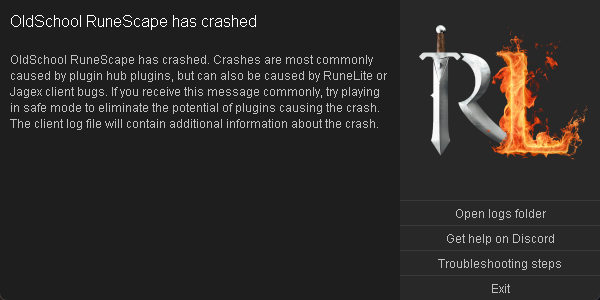
what did you mean by or anything on the crash page.
is that just the standard fatal error dialog saying there was a client error
 oblique plume
that doesnt seem right
RL also continues doing stuff in the logs after that
so its not hung up
nova breach
 haughty pumiceBOT
To enable safemode
Windows
Run the RuneLite (configure) shortcut from the windows start menu
Tick the Safe mode box, save, launch RuneLite the way you normally do.
Mac
In Terminal, run
/Applications/RuneLite.app/Contents/MacOS/RuneLite --configure
Tick the Safe mode box, save, launch RuneLite the way you normally do.
nova breach
Yeah it don't happen
The only plugin I've downloaded in the last couple months was ground item sounds, I deleted it and tried again
Nothing
oblique plume
id say just start going through Koning Haan and turn off/uninstall some plugins and see if it happens
stuff can update whenever or you can change settings to be invalid at any time
nova breach
RIP, ok
oblique plume
as dura pointed out earlier there are issues with raid data tracker in the Koning Haan profile
so you could start there
nova breach
It's on 2 in profile
So would turning the plugin off have the same effect as uninstalling?
nova breach
Ok cool
oblique plume
nova breach
It's on 2 in profile
hmm ok the order in the logs was throwing me off
the only thing before the client error is the BaMinigamePlugin right when you initiate the switch from koning to 2 in
oblique plume
that tracks since the client error is from a map loading
and cg recolor does do some map fanagling
oblique plume
thanks for the logs and reporting back what it was
if we see another we'll already know the answer
 fallen tiger
I'll investigate it, seems obscure. Thanks for the report
Does not crash for me when switching between a profile that has it enabled, a profile that has it disabled and a profile that where it's not installed. Does it need a specific setup for it to crash? @nova breach
nevermind, found it
only happens if you do it while not logged in, right?
stone parcel
It's really not advised and would probably make it hard on them.
They would be confused why things function certain ways.
Recommended to make the settings changes yourself so you know what you did.
leaden trail
We would ask that you not do that, because it invariably leads to people coming here with "problems" for us to help them with that are actually just the client doing what it was configured to do
 raw salmon
hey question, if i have mac sequoia how do i use runelite?
leaden trail
You should just be able to use it as usual
raw salmon
says i gotta be running silicon
leaden trail
Definitely make sure you're on the latest version of Sequoia though because older ones had ✨ p r o b l e m s ✨ with RuneLite
Ah you probably download the wrong version
stone parcel
 raw salmon
ya thats all i see
leaden trail
What processor do you have?
raw salmon
2.4 GHz Quad-Core Intel Core i5
leaden trail
You want the macOS (Intel) one
raw salmon
ty brotha
raw salmon
ty ty
nova breach
fallen tiger
Does not crash for me when switching between a profile that has it enabled, a pr...
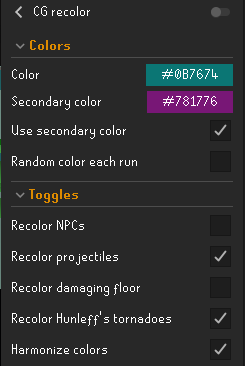
https://i.imgur.com/joWdZjT.png sorry for late reply. This is my only profile with it installed and this is my settings
 mighty steppe
why runelite freezes when im trying to resize it?

it freezes also when i minimze it and open again
gilded kayak
!safe
haughty pumiceBOT
safemode: To enable safemode
Windows
Run the RuneLite (configure) shortcut from the windows start menu
Tick the Safe mode box, save, launch RuneLite the way you normally do.
Mac
In Terminal, run
/Applications/RuneLite.app/Contents/MacOS/RuneLite --configure
Tick the Safe mode box, save, launch RuneLite the way you normally do.
mighty steppe
safe mode isnt crashing, but doesent have most of my plugins. so its not hard fix
stone parcel
Correct, safe mode is to identify your issue is caused by a hub plugin or the gpu plugin.
Now you can try to figure out which hub plugin (or gpu) it is.
You could try disabling half your hub* plugins  , restarting client, check for issues, and repeat until you find the culprit.
 mental plinth
leaden trail
The other one is for people with M1 processors etc
mental plinth
leaden trail
The other one is for people with M1 processors etc
what about M4 I might get a Mac mini that uses M4 will runelite work with it or only M1 I always used windows before no problems
stone parcel
It runs from what I know, you use the "Apple Silicon" download there.
mental plinth
And it works all the plugins the same like windows?
mental plinth
nice ty
 flat oyster
any idea how fix it ?

 pearl briar
Hey guys, stupid question, but my fullscreen button is gone 😄 no idea how or why
 stone parcel
You might have enabled "Lock window size" in the "RuneLite" plugin settings.
pearl briar
ah yes thx hahah
viscid lantern
flat oyster
any idea how fix it ?
you probably installed Fixed Resizable Hybrid
flat oyster
yes i find it th
 topaz ermine
Is it possible to override specific settings locally? I sometimes swap between a 4K desktop and a 1080p laptop and it's safe to say the setup needs to differ a bit on them. I've tried to make separate profiles but when I change other unrelated stuff, they start to differ a lot and it becomes a mess
round jacinth
You probably want the auto client resizer hub plugin
simple pagoda
topaz ermine
Is it possible to override specific settings locally? I sometimes swap between a...
I do the same thing, and what worked for me was setting the scale of runelite to be different on the 4k to match the 1080
round jacinth
It does stuff to change when you go from one resolution to another
 dark totem
Hey just checkin, is anyone else having problems with loot tracker/logger not recording kills? I'm killing TDs and nothing is being logged since a couple days ago
stone parcel
"To fix it you need to open either mobile, or the official client, and enable the in-game setting Loot Tracker - Track loot"
dark totem
stone parcel
"To fix it you need to open either mobile, or the official client, and enable th...
Wow, thank you so much. That work! 👍
 indigo rampart
since yama release my loot tracker (and plugin hub loot logger) are not tracking loot. Figured it may be an update for yama, but have restarted the client and my computer a few times since and even doing a task of demonics didnt show in the loot tracker. Is this an ongoing issue, or just for me? Any ideas how to get it working again? Maybe uninstall/reinstall runelite?
viscid lantern
Login on mobile and enable the loot tracker in there
 celest egret
Any idea why yama is not showing up in the loot tracker? I have reset the client and forgotten lockboxes are tracking so im not sure why yama isnt
gilded kayak
do what gamma just mentioned above you
celest egret
Will do thanks
celest egret
That did indeed work, thanks all!
 pallid epoch
anyone know why my quest helper isnt showing? cleared cash, updated, redownloaded and still no luck
gilded kayak
close the client, open the plugins folder instead of the cache and just delete the quest-helper jar in there
that fixes like 95% of peoples issues in the quest-helper discord
pallid epoch
ill try now, thanks 🙂
 silent aspen
Hey guys, my Loot Tracker has stopped working on one of my accounts? I can have same window open and login to a different rs account and it works fine, just one rs account wont track any more?
gilded kayak
gilded kayak
To fix it you need to open either mobile, or the official client, and enable the...
silent aspen
Thank you, sorry i didnt see that
silent aspen
gilded kayak
FIXED IT thankyou!
gilded kayak
i only forwarded it because i was too lazy to type it again
not because you were supposed to have seen it
silent aspen
Either way, I appreciate you taking the time to help me out
 regal remnant
Reinstalled Ruenlite the other day. My Awakened boss timers aren't working anymore. All other boss timers are working. How do I fix this?
I've done the following:
- Relogged
- Checked the bosses scoreboards for regular and awakened variants
- Checked the combat achievements
- Used the POH Adventure Log
solid mesa
Usually the POH adventure log updates it. I'm not sure if awakened PBs are in the adventure log?
 rich vapor
does anybody know how to disable these lines?
 viscid lantern
Remove radius markers
 red fox
what is the plugin removes the divide between bank tabs?
I have turned it on and my bank couldnt look any worse lol
 wispy swan
just an update, i wound up fixing this. there was a conflict with the highlight stackable items plugin where items i had highlited there were automatically in the highlighted items list in ground items and they couldnt be removed from there - i had to remove them from the highlight stackables plugin first. now ground items works perfectly fine
leaden trail
Yeah sounds like what we thought the issue was then
wispy swan
yep. i forgot i had the highlight stackable items plugin set up for some items from a long time ago and that indeed was the fix.
 topaz crag
Hi, can someone help me? I'm trying to open Runelite on an old PC with 32-bit 7 Windows, and when I open it, the game stays minimized in the taskbar and can't be maximized. Does anyone know what the problem could be? I know the PC is old, and so is Windows. But the game worked before. I just reinstalled Windows, and now it won't work.
zealous cedar
what windows version are you using?
topaz crag
seven
zealous cedar
i guess check the runelite logs
topaz crag
ok let me see
Can i pass the logs here so someone can review them and see if they find the problem?
zealous cedar
yes
topaz crag
oblique plume
Are you sure it's not opening on some other screen
topaz crag
yes im sure
haughty pumiceBOT
To enable safemode
Windows
Run the RuneLite (configure) shortcut from the windows start menu
Tick the Safe mode box, save, launch RuneLite the way you normally do.
Mac
In Terminal, run
/Applications/RuneLite.app/Contents/MacOS/RuneLite --configure
Tick the Safe mode box, save, launch RuneLite the way you normally do.
topaz crag
I did the safe mode and it still opens minimized
oblique plume
dunno then
zealous cedar
that is really odd
oblique plume
if you hover over it in the taskbar do oyu see the correct preview
zealous cedar
ive not tested runelite on 7 in awhile, maybe something broke it
3% of runelite users are using 7 though so it should work at least somewhat
unless they are all bots maybe idk
oblique plume
lol
topaz crag
oblique plume
if you hover over it in the taskbar do oyu see the correct preview
In the preview i can see the blank window with the letters RL
oblique plume
hmm?
topaz crag
I play on Windows 11, that's why I don't know. It's the PC of an old lady who likes to play RS and asked me for help with that problem.
The thing is that the original RS client does work.
and jaguex launcher
zealous cedar
open cmd and run
"%localappdata%\runelite\runelite.exe" -c -v --console -- --debug --safe-mode
and then copy/paste the contents of the cmd window which opens
 solid cipher
Good morning, could I get some help next whenever spike is taken care of?
leaden trail
topaz crag
The thing is that the original RS client does work.
the funny thing about this is that Jagex recommends Win10 or later for the official client
solid cipher
I'm getting a crash everytime I use the home telly tab at Sire.
oblique plume
youre out of memory
solid cipher
OH. Stupid tiny SSD. I would've totally overlooked that. 242 MB left.. lol. Thanks!
zealous cedar
youre out of memory, not hard drive space
leaden trail
although that little free space on your drive is likely to cause issues in general too to be fair
zealous cedar
although 242mb free on your ssd is also a problem
oblique plume
for sure
solid cipher
Eh? I'm only seeing ram usage at 66%.
That's why I assumed you meant storage memory
leaden trail
the client only gets allocated a certain amount
and you're running out of memory that's been allocated to it
leaden trail
oh
solid cipher
What does that mean?
leaden trail
wait if this is happening on map loading, try disabling CG recolor
zealous cedar
you are out of memory
leaden trail
I think this was the issue that happend with that plugin for someone yesterday
oblique plume
That presented differently
solid cipher
It is disabled. I forgot to reenable it when he needed to get it reapproved
leaden trail
ah gotcha I did miss some of that discussion, mb
solid cipher
2025-05-18 00:15:15 EDT [Client] WARN c.b.BarrowsPotentialPlugin - plan does not meet target
Could it have something to do with this? Or is that just checking to see if I'm there?
leaden trail
nah that's probably not related
 finite summit
hey there quick question regarding menu entry swapper, for some reason my shift click withdraw all doesnt work anymore.... reseting the plugin also doesnt help... has anyone encountered that before?
if i set it seperatly for each item it still works
 storm jewel
Question about overlay anchor points. I notice that if a widget (inventory in my case) is not snapped to the anchor, it will be drawn on top of any anchored overlays. Is there a setting to reverse this to make anchored overlays be drawn on top of non-anchored elements?
round jacinth
The inventory is snapped to an anchor it’s just not a green location that runelite made, it’s what jagex has
haughty pumiceBOT
RL overlays and many Jagex widgets can be moved around the screen by holding the Drag Hotkey, (default: Alt) configurable in "RuneLite" settings, and left click dragging it around the screen.
Some overlays can be resized by dragging their bounds, right clicking will also reset their size and position.
They can also contain additional options, such as opening the config of the plugin that makes them, which can be discovered by shift right clicking.
storm jewel
Interesting. The thing I'm not understanding is, when an overlay infobos is floating, it is drawn on top of the inventory, but when it is anchored, it is drawn underneath. Is it possible to keep the infobox always on top, when anchored?
finite summit
finite summit
hey there quick question regarding menu entry swapper, for some reason my shift ...
sooo i assume no one has this issue?
leaden trail
does it happen in safe mode?
haughty pumiceBOT
To enable safemode
Windows
Run the RuneLite (configure) shortcut from the windows start menu
Tick the Safe mode box, save, launch RuneLite the way you normally do.
Mac
In Terminal, run
/Applications/RuneLite.app/Contents/MacOS/RuneLite --configure
Tick the Safe mode box, save, launch RuneLite the way you normally do.
finite summit
how can i run that if i have a jagex acc?
viscid lantern
by doing what it says
gilded kayak
the information on that command is universal
 gilded lichen
where can i see my runelites error logs? im trying to see what plugin is giving me massive issues with loging in
haughty pumiceBOT
To find the logs, you can do one of the following:
- If your client failed to open, click the
Open logs folderbutton. - Open the screenshot directory by right-clicking 📷
Camerabutton, navigate 1 directory up, then open logs folder. - Navigate to
%userprofile%\.runelite\logson Windows or$HOME/.runelite/logson Linux and macOS.
Upload the log files named client and launcher by dragging them to Discord. If there are files prefixed with jvm_crash dated from today, upload them too.
viscid lantern
client.log file is what you want probably
gilded lichen
viscid lantern
client.log file is what you want probably
thanks!
finite summit
leaden trail
does it happen in safe mode?
yes same issue in safe mode too
solid mesa
I believe the behavior changed with core bank tags. I'm not sure if there are any plans to change it
finite summit
but wouldnt that mean it wont work for anyone? since for my friends it still works normaly
topaz crag
It is possible to download an older version of Runelite to check if it opens on Windows 7.?
solid mesa
They probably have bank tag layouts
finite summit
solid mesa
They probably have bank tag layouts
so do i
solid mesa
topaz crag
It is possible to download an older version of Runelite to check if it opens on ...
No
topaz crag
Should Runelite be able to run on a Windows 7 32-bit PC with a dual-core e5800 processor and 2GB of RAM?
solid mesa
2GB of RAM is not much at all
topaz crag
Because if it installs but it stays minimized and I've done everything and I can't get it to work and before it worked only they reinstalled Windows because it was slow and from then on it stopped working
viscid lantern
you can try an older launcher version maybe: https://github.com/runelite/launcher/releases
storm jewel
round jacinth
It should always be above the inventory I think
For example, the infobox group on the left is anchored and covered by the inventory, while the group on the right is floating on top
 topaz crag
viscid lantern
you can try an older launcher version maybe: <https://github.com/runelite/launch...
topaz crag
viscid lantern
you can try an older launcher version maybe: <https://github.com/runelite/launch...
its woks, thx so much
viscid lantern
which version did you get?
topaz crag
2.6.8
 topaz crag
thx bru i love u
zealous cedar
Oh that is interesting
finite summit
is there a way to see which plugins i installed most recently
maybe i will try to work my way back to get menu entry swapper to work
but if it doesnt work in safe mode i assume that wont change a thing
 buoyant tundra
not too sure where else to put this, but the soul wars crates are opening as null now, which never happened before.
 solid mesa
Loot tracker changed on Wednesday.
 ocean lava
anyone having issues with item charges not tracking charges of binding necklaces while doing lavas? the charge number doesnt change after crafting runes
leaden trail
It's a known issue that will be fixed with the next client update
Jagex changed the message when you make combination runes a bit so it broke
ocean lava
okay thanks!
 vast birch
anyone else having problems with being disconnected everytime u talk to an npc?
solid mesa
Someone mentioned that in Quest Helper the other day but they said it happened with Quest Helper removed. They said uninstalling and reinstalling runelite fixed it. But that was the first I heard of it
vast birch
ill give that a go ty
 grizzled comet
I'm using item charges to track my binding necklace charges, but how do I make the number update in real time? Each time I craft lava runes the number of charges don't change unless I manually check the charges
solid mesa
Known issue, jagex changed the chat message. Will be fixed in next client update
grizzled comet
Damn, thanks for the speedy reply!
round jacinth
storm jewel
For example, the infobox group on the left is anchored and covered by the invent...
I don’t think I’ve seen this before did you move the inventory away from its normal spot? Idk if that matters
 mental phoenix
anyone having issues with the world switching on runelite? just loading a different client to see if not runelite myself
solid mesa
Define "issues with the world switching"
mental phoenix
when i "change worlds there is no list of worlds at all on the login menu or in game
solid mesa
It's a werid connection issue to Jagex if the in-game world list doesn't load. You can use the runelite world hopper
mental phoenix
right so regarless of client same thing sound ty
 viscid kelp
gilded kayak
viscid kelp
gilded kayak
i went to gofundme.osrs.wiki and nothing came up
gilded kayak
hmm
round jacinth
checking fandom
 blissful ermine
how do I play on the download fiels?
haughty pumiceBOT
The Jagex launcher (https://www.jagex.com/en-GB/launcher) will let you login and fully supports RuneLite. Login problems are a Jagex issue and there is nothing we can do about it.
red fox
Hi , How do i clear the cache or my inventory setups / bank tag layouts data?
I'm reseting my layouts- its a mess and I have come across a bug .
The bug:
Inv Setups + Bank Layouts
aren't giving the correct layout when I export it.
For E.G :
I exported a different layout with Graceful
Then deleted it all , Organisted my own Inventory setup -
and with the 'same name'
then caused the graceful that wasn't in my new setup to be bugged in to my new setup.
So my work around :
was to delete the placeholder and remove it from my bank and remove tag.
(I could not remove the tag from the stuck 'graceful items' manually)
I think deleting data is wise since I've only made a few setups which I can backup - -.
I saw online there is a patch coming through later.
just wondering
does this resolve this issue .
 heavy mural
When I open Runelite, my Show spec. attack regen is always turned off. It used to always be on but recently this issue started. Anyone else having this issue? Or any ideas on how to fix? Have been turning it on manually the past few days.
 fervent bay
Recently my game has been freezing periodically during the Yama boss fight, and recently crashed. Has anyone else had this problem and/or would anyone be able to read the jvm crash file to assist me?
 ashen lion
is there any profiler or something to see what could be casuing fps loss? get random fps drops/stutters while at yama, while others dont seem to be experiencing the same
leaden trail
ashen lion
is there any profiler or something to see what could be casuing fps loss? get ra...
Realistically it's just a bad hub plugin probably
leaden trail
fervent bay
Recently my game has been freezing periodically during the Yama boss fight, and ...
Just post your logs here
haughty pumiceBOT
@fervent bay To find the logs, you can do one of the following:
- If your client failed to open, click the
Open logs folderbutton. - Open the screenshot directory by right-clicking 📷
Camerabutton, navigate 1 directory up, then open logs folder. - Navigate to
%userprofile%\.runelite\logson Windows or$HOME/.runelite/logson Linux and macOS.
Upload the log files named client and launcher by dragging them to Discord. If there are files prefixed with jvm_crash dated from today, upload them too.
 marsh pond
Has anyone been having an issue with the loot tracker?
ashen lion
leaden trail
Realistically it's just a bad hub plugin probably
i realize that, just wanted to see if theres a way to monitor what plugin could cause vs turning on and off
leaden trail
There is not
fervent bay
ashen lion
leaden trail
There is not
gotcha, ty
leaden trail
gilded kayak
leaden trail
marsh pond
Has anyone been having an issue with the loot tracker?
Do that^
leaden trail
fervent bay
That JVM crash log is 3 years old it's not relevant
fervent bay
wrong one srry
leaden trail
You can try disabling core performance boost in bios
Other than that maybe disable ToA Points because it definitely seems unhappy
marsh pond
leaden trail
Do that^
you're the best ❤️
fervent bay
leaden trail
Other than that maybe disable ToA Points because it definitely seems unhappy
will try disabling that plugin, ty king
if that doesnt work will resort to bios
leaden trail
I think they're two separate issues
red fox
Okay one of my bank tags are bugged .
Anything I change on one inventory setup goes to the bugged beginner tab :
I'm trying to put on Easy but it's going to Beginner

 haughty pumiceBOT
Get support for the Inventory Setups Plugin Hub plugin here: https://runelite.net/plugin-hub/show/inventory-setups.
You can also find the support link by searching for the plugin in the Plugin Hub panel and clicking the ? button on the plugin, or by right-clicking the plugin in the plugin panel and clicking the Support menu option.
red fox
ok ok o k, i may have had 'highlighting enabled' on beginner
which seemed to solve it. .
red fox
haughty pumice
Get support for the **Inventory Setups** Plugin Hub plugin here: <https://runeli...
Thank you .
Sorry for spam.
🫂
 undone basin
is the karils skirt not rendering a RL or osrs issue?
oblique plume
Osrs iirc
gilded kayak
ye I believe it's an osrs issue
undone basin
ah ok thanks for the replies!
fervent bay
@leaden trail still getting the freezes after shooting the plugin, any idea why core performance boost would be causing issues?
It seems to only happen at yama from what i can tell
gilded kayak
the freeze is probably something seperate from the crash
!safe see if you freeze in safe mode
haughty pumiceBOT
safemode: To enable safemode
Windows
Run the RuneLite (configure) shortcut from the windows start menu
Tick the Safe mode box, save, launch RuneLite the way you normally do.
Mac
In Terminal, run
/Applications/RuneLite.app/Contents/MacOS/RuneLite --configure
Tick the Safe mode box, save, launch RuneLite the way you normally do.
fervent bay
will try, assuming safe mode is just no plugins from plugin hub?
solid mesa
No hub plugins and no GPU
fervent bay
so if it doesnt freeze its gpu plugin or im gonna have to go down my plugin list 😪
 leaden trail
Do what it says
 clear flint
what
solid mesa
"If you rerun RuneLite as an administrator, RuneLite will attempt to fix the file permissions."
fervent bay
gilded kayak
the freeze is probably something seperate from the crash
so i've yet to freeze
clear flint
solid mesa
"If you rerun RuneLite as an administrator, RuneLite will attempt to fix the fil...
 solid mesa
Post the logs then
haughty pumiceBOT
To find the logs, you can do one of the following:
- If your client failed to open, click the
Open logs folderbutton. - Open the screenshot directory by right-clicking 📷
Camerabutton, navigate 1 directory up, then open logs folder. - Navigate to
%userprofile%\.runelite\logson Windows or$HOME/.runelite/logson Linux and macOS.
Upload the log files named client and launcher by dragging them to Discord. If there are files prefixed with jvm_crash dated from today, upload them too.
clear flint
gilded kayak
permissions are wrong for launcher.log writable: false
how did you write it then runelite
 clear flint
gilded kayak
permissions are wrong for launcher.log writable: false
clear flint
gilded kayak
permissions are wrong for launcher.log writable: false
so what do I do
gilded kayak
tell us what antivirus you have installed
and when you say a name instead of "i dont have one" then we'll know the cause
clear flint
just basic windows
gilded kayak
oh my god
oblique plume
Windows has its own ransomeware protection option that I think does this
clear flint
should I install a different av?
gilded kayak
no it's just that this can be caused by one
gilded kayak
i think the setting you need to mess with is called controlled folder access
i can't google the specifics rn
clear flint
its been off
fervent bay
@gilded kayak is there any way to tell if its gpu plugin or another
gilded kayak
fervent bay
<@323951080188936192> is there any way to tell if its gpu plugin or another
make a new profile and dont install any hub plugins i guess
but turn on gpu
fervent bay
will do
gilded kayak
clear flint
its been off
not sure then, something is causing the permission issue, the client almost always has no problem doing everything it needs to do
minus when peoples antivirus stick their noses in the way
gilded kayak
what if you delete the launcher.log since it's the only file it's mad about
 coarse surge
Hi friends, I have a question regarding the integration of Bank Tags with the Inventory Setups plugin. I know the migration happened back in November, and since then I noticed that the edit-tags section now includes the "uid" (for lack of a better word) for any items that are in a given setup.
Now I of course did some google-fu and discovered this pr that describes and fixes the issue with a "hidden tag" feature: https://github.com/runelite/runelite/issues/18503 However, for whatever reason this tags seems to not hidden on most items in my bank. Is this something I should ask Dilly about or is there something I need to do to get these tags hidden? I suspect that this may be related to the migration as I have tested and noticed that FURTHER created inventory setups do NOT add to an item's tags. I could PROBABLY export and delete all my setups in order to rectify this but I wanted to ask if there were any alternate options first before I do all that work. Appreciate you all

GitHub
Type Other Operating System Windows OS Version Windows 11 Bug description Not sure why but today I've noticed all my items with tags have a bunch of extra _invsetup_dhjudhd31234981 in them. See...
As a follow up: Removing the the inventory setup and reimporting it has cleaned up the tag like I thouught. So it does seem to me like its extra data just lying around
 proud violet
hi im having some crashing issues with my client and was wondering if there is some sort of crash logger?
haughty pumiceBOT
To find the logs, you can do one of the following:
- If your client failed to open, click the
Open logs folderbutton. - Open the screenshot directory by right-clicking 📷
Camerabutton, navigate 1 directory up, then open logs folder. - Navigate to
%userprofile%\.runelite\logson Windows or$HOME/.runelite/logson Linux and macOS.
Upload the log files named client and launcher by dragging them to Discord. If there are files prefixed with jvm_crash dated from today, upload them too.
proud violet
i found the jvm file but cant really make sense of it
@solid mesa do you want to take a look at my logs?
 loud spruce
Hello, weird question; I have a vm and set-up gpu-pv from : https://github.com/jamesstringerparsec/Easy-GPU-PV
Now I can see my gpu inside my vm that's beeing run on Hyper-V and all but when I try to enable the gpu plugin it automatically turns off. Which is pretty weird because when I use windows sandbox the gpu plugin stays on.
GitHub
A Project dedicated to making GPU Partitioning on Windows easier! - jamesstringerparsec/Easy-GPU-PV
Oh, wait checking the logs now and it looks like it gives me this error which makes no sense
 mossy swan
well that makes sense to me
either you have some virtual gpu or you are missing drivers
loud spruce
I think I found the issue:
https://github.com/jamesstringerparsec/Easy-GPU-PV/issues/132
It's some virtual driver from parsec probably preventing to use opengl
GitHub
great project; simplify everyone's lives. but why opengl and games not work (like minecraft) or just chrash (like csgo)? okok, i'm not sure about csgo, but i have played minecraft and other...
mossy swan
yeah unfortunately it’s not a setup we can support or help with beyond that
loud spruce
Okey, just posting the solution here if someone stumbles upon the same issue. A legend modified the script from james where it doesnt install the virtual driver from parsec that prevents using opengl.
It seems to work perfectly with this release. https://github.com/grrminator/Easy-GPU-PV/releases/tag/1.6
Keywords: GPU-PV , GPU-P , GPU-Passthrough , Hyper-V, VM, GPU turns off

GitHub
Fixed Readme. Readded USB driver after some investigations.
Fixed some code in the powershell scripts.
 craggy ravine
Hello , I don't know if this is the correct place to ask this and feel free to redirect me to appropriate resources however I have been having problems with Loot tracker not tracking my kills. I was wondering if you had any trouble shooting steps that you would recommmend ? I have logged out of runlite , have tured the plugin on and off , have uninstalled and reinstalled runelite. However , nothing seems to cause it to work , It tracks certain activities like opening chests for exapmle brimstone keys, catching an impling bare handed but catching an impling with a net or all kills seem to not track ( I am someone that has used loot tracker and runlite for years and had no problem) .
viscid lantern
Login on mobile(or the enhanced vanilla client) and turn on your loottracker in there
craggy ravine
Thank you very much that instally fixed it 🙂
 silver rock
Hey boys having and issue with loot tracker and bossing info plugins none of them re tracking any loot, but the bossing info is tracking my kph ect, ive tried uninstalling runelite, reseting plugins and nothing is working im out of ideas
viscid lantern
See my previous message
silver rock
bless your soul
 dense tendon
is it possible (or legal) to write a plugin to enable true tile for yama waves? they have no npc id, what are they?
round jacinth
people marked the waves at zebak i think
they're probably objects? not sure
probably legal but idk what they are to tag, if they're not npcs then they are objects
solid mesa
I think someone said they’re graphics objects?
round jacinth
o
i dont know if a user could easily tag those with any existing plugin then
if it's helpful, the tile the gfx is on is 1 tile behind they're actually on lol
just like akkha orbs or huey tail slam
 heady garnet
Hello, would creating a plugin which would play a custom sound on Yama's meteor strike be against any rules?
solid mesa
Yes
oblique plume
ye
haughty pumiceBOT
Jagex's third party client guidelines: https://secure.runescape.com/m=news/third-party-client-guidelines?oldschool=1
Additionally, these features have been rejected or removed from RuneLite: https://github.com/runelite/runelite/wiki/Rejected-or-Rolled-Back-Features
solid mesa
"Adds additional visual or audio indicators of a boss mechanic except in cases where this is a manually triggered external helper." is prohibited
 wraith citrus
just out of curiousity, how is that any different from the sote ball and the verzik ball playing sound in the tob plugins?
heady garnet
ah, bugger
oblique plume
they already have sound
i also dont know what youre actually talking about
do they actually do something
wraith citrus
does yama meteor not have its own sound effect?
oblique plume
idk i dont play the game anymore
heady garnet
wraith citrus
does yama meteor not have its own sound effect?
it does
solid mesa
I think replacing it if it already has one is fine, as that's what ToB QOL does. But adding one is not allowed
 wraith citrus
there's a sound swapper plugin, use that
heady garnet
I need to get the sound id somehow then
wraith citrus
it has a debugging feature to list id's
heady garnet
Im new to this, just want to create a meme plugin for my clan, thanks for info
heady garnet
wraith citrus
there's a sound swapper plugin, use that
This will work probably, thanks
 wispy canyon
I see that the animation smoothing for shadow is disabled, but is there a reason my whole client drops to like 5fps during the entire animation and then goes back to 120 the second the animation is over? Really tripped me up during toa. Its as if all animation smoothing stops while the shadow animation is running.
A little more digging, it didn;t trip up when attacking a guard in varrock lol. So far I saw it in toa, especially p3 and p4 wardens, and then in kraken's lair. Maybe its the number of animations running and then 1 of them not being smooth screwing it up? I could be off base though.
 spice kiln
all my plugins are gona when i loaded the client for the first time today, ive tried restarting client and switching profiles, but theyre all empty. I do not have my old profile saved, is there any way for me to get it back?
haughty pumiceBOT
stone parcel
The stuff in there should help. 😄
spice kiln
thanks kalil!
 wet gull
need show hp and prayer??
 round jacinth
status bars
round jacinth
in opponent info change to show %
heady garnet
Is there a way to play certain sound by its ID?
wraith citrus
you can create a sound alert in watchdog and preview it
think Weapon Animation Replacer also lets you preview sound
round jacinth
instant idle notifier also does it, lots of options
 vivid coral
My loot tracker does not track anything.
gilded kayak
gilded kayak
To fix it you need to open either mobile, or the official client, and enable the...
round jacinth
You need to login on mobile or official client and enable loot tracker
vivid coral
Yep. Works now. I had turned off official loot tracker because it crashed my phone client. Still does so I have to keep turning it on and off again.
viscid lantern
you should be able to turn and leave it off on wednesday
solid mesa
It should be fixed Wednesday I think
 hollow olive
have u tried the mobile loot tracker fix thing
hollow olive
vivid coral
Yep. Works now. I had turned off official loot tracker because it crashed my pho...
 solid mesa
Mobile loot tracker is great because when you go to bird houses where there's a lot of ground items it just crashes the client
round jacinth
my favorite thing is that the depletion of a vein of mlm is tracked different from just a normal vein's resource
 warm yarrow
My binding necklace overlay keeps stuck at a static amount. And when one breaks it says 17 charges (which is impossible). Only way to update overlay amount is by manually checking. Anyone knows what triggers this?
 leaden trail
It will be fixed with the next RuneLite update
Jagex broke our tracking
With that being said, are you using item charges improved or something? I don't know if it's actually possible for the core item charges to set it to 17
Oh wait I see where it did that, ignore me
warm yarrow
it seems to be item charges, when i turn it off its gone
leaden trail
Yeah I forgot the old tracking would set it to max_charges + 1 when it broke
 pastel rune
Is there a plugin to remind you if you cast a demonbane spell without mark of darkness active?
I keep realizing my mark of darkness expired while fighting yama..
viscid lantern
people are working on a mark of darkness reminder atm
 frail maple
hello i need help i logged into my jag launcher acc and all my runelite plug ins and all my settings have been deleted how do i get them all back been sitting here freaking out for like a hour a mate in the clan told me to try this page and that somebody should be able to help me i have been playing for 11 years and all of my stuff from that time is gone
haughty pumiceBOT
frail maple
what i mean is iv played for 11 years no need to be a dick when im having a hard time trying to get helpso srrry if my spelling and wording was messed up
gilded kayak
I literally linked the page to fix your issue
if I was trying to only be a dick I would not have helped at all
frail maple
gilded kayak
also runelite has not existed for 11 years
also mate i said iv been playing not using runelite for 11 years holy shit the people are right most of you on here are dog water for help lol no need in being so sassy and attuided ridding your the one who does this to "help" people then when alot of people come you cant handle it
gilded kayak
what on earth are you rambling about
stone parcel
Seems like great help to me. 1 minute to get the link to fix the problem.
 median fog
hello, for some reason a few days ago my loot tracker stopped tracking loot, any suggestions on how to fix this?
median fog
worked perfectly, thank you
 misty zodiac
hi, how can i make hold to press work for selection dialogues? I am on a con grind using the con qol plugin. I can skip through most actions with holding one key thanks to the plugin, except it wouldnt work when it asks to remove something or when asking to butler to fetch something. any workaround for this?
wet gull
how i show this?
 solid mesa
In game settings for valuable loot threshold
oblique plume
thats loot tracker
 glad dome
for some reason whenever go to east ardougne mine, my left click and right click options break, like clicking some items in my inv will randomly examine/drop/break it and the right click menu can have things in the wrong order (cant get it to happen now)
occured while i was doing tureal boosting at bears in ne ardy mine
leaden trail
does it happen in safe mode?
glad dome
i turned off every plugin and its still happening
haughty pumiceBOT
To enable safemode
Windows
Run the RuneLite (configure) shortcut from the windows start menu
Tick the Safe mode box, save, launch RuneLite the way you normally do.
Mac
In Terminal, run
/Applications/RuneLite.app/Contents/MacOS/RuneLite --configure
Tick the Safe mode box, save, launch RuneLite the way you normally do.
glad dome
how do i dothat
kk
ill try to replicate
doesnt appear to be happening then again it was somewhat inconsistent before
@leaden trail
would it help to try to replicate out of safe mode or provide some kind of video
leaden trail
I mostly only care about it happening in safe mode
glad dome
gotcha
leaden trail
otherwise the problem is a hub plugin you installed and I can't really help a ton with that
glad dome
what if i disable every plugin on the plugin hub and replicate it outside of safe mode
leaden trail
hub plugins don't always shut down correctly
glad dome
got it, well ill just remove likely offenders like tool required hopefully wont happen again
 tardy canyon
Hey all. I'm having an issue where the idle notifier will no longer force focus. Or rather, very inconsistently. Every now and again it will, but not generally. I have set "Request focus" to "Force" in the RuneLite settings which used to work. Any idea what could be causing this?
gilded kayak
you probably set overrides in the plugins settings, the ⚙️ next to each notifier
and the one that is forcing, does not have an override, so it's using the global setting found in the RuneLite plugin
tardy canyon
^ ohhhh thank you. That was it. I had set the idle interaction notification as custom & the custom settings didn't have force on. Thank you 🙂
wet gull
How to show the circular line

 ebon galleon
i lost Internet connection and tried to log back in and all my plugins and settings are all gone
i tried importing profile i had saved but it didnt seem to do anything 😦
crisp dune
You should have one or more profiles in your ~/.profiles2/ folder, make sure you check all of them
haughty pumiceBOT
pastel rune
wet gull
How to show the circular line
Prayer plugin, built into runelite (not on plugin hub)
round jacinth
I think that’s the special attack orb
I think if they searched for a keyword like special or regeneration they would see which core plugin does it
 serene sparrow
does the !log command not work anymore?
gilded kayak
the plugin you were using for it shut their website down
there's a few alternatives through templeosrs and such i believe
i don'
t know the names tho
 mossy lake
Hey guys, I'm having an issue with the Item charges plugin, was wondering if it's an issue on my end. Binding Necklaces are not being updated at all unless I "check" them. This is acting differently than any other charge item as far as I can tell.
Is this intended or maybe I'm missing a setting?
gilded kayak
jagex changed the message
solid mesa
It will be fixed in the next client update. Jagex changed the chat message used for tracking Wednesday
gilded kayak
we'll fix it whenever we need to update the client
mossy lake
Oh thanks a lot, it was driving me nuts! Thanks for all the hard work you guys put in : )
 cinder thorn
My loot tracker suddenly stopped tracking. I reset it entirely still nothing tho. Is there anything I can do to fix?
solid mesa
Go to mobile and turn on loot tracker
cinder thorn
Ez fix. Thanks!
 dusty siren
Does the bank tags plugin support potions in potion storage?
gilded kayak
yes
but i think if you have an empty placeholder of that potion, it gets in the way of the potion storage?
its something like that
dusty siren
But how do I even tell the plugin that I want this potion in this tab. I don't see a way to do that
dusty siren
Cause you can't drag from potion storage
I see that support was added or atleast there's a PotionStorage Java file added in repo
gilded kayak
i was hoping someone who remembered was going to give the answer
i feel like the answer is to make a layout with the hub plugin, export and import it into the default plugin
but i do not remember exactly
i know it works tho
that i know for a fact
solid mesa
Bank Tag Layouts is the hub plugin which does NOT work with potion storage
dusty siren
ah that's why im using bank tag layouts
gilded kayak
ah well thats not what you said
you need to migrate from bank tag layouts, to bank tags
and then it will work
dusty siren
I thought Bank Tag Layouts was built on top of it
Alright so get rid of bank tag layouts
gilded kayak
you need to export your layouts from bank tag layouts, into bank tags
unless ur starting fresh
then i guess it doesn't matter
dusty siren
I have a ton of tags lmao
gilded kayak
the hub plugin was a seperate thing, but when potion storage came out we added layouts, to the default plugin
however long ago that was now
months n such
dusty siren
oh so I don't even need bank tag layouts
gilded kayak
inventory setups migrated to using the default plugin as well
dusty siren
by default you just mean Bank Tabs?
solid mesa
Yes
gilded kayak
you'll probably need it on, to migrate, but yeah
 random nova
Hey! Runelight wont appear on my jaggex launcher and i have no idea why
haughty pumiceBOT
If you're getting an error while trying to install RuneLite in the lines of unable to find unins000.exe that means you have a previous RuneLite version that didn't uninstall cleanly. To fix that you need to delete the following windows registry key: Computer\HKEY_CURRENT_USER\SOFTWARE\Microsoft\Windows\CurrentVersion\Uninstall\RuneLite Launcher_is1
stone parcel
It's not in there?
 random nova

It says instal even though i already installed it
Is that a normal thing to happen?
stone parcel
Looks like you can try making sure that registry key is the same path that your RL is installed at.
Maybe an uninstall and reinstall of Jagex Launcher or RL could help.
If not maybe the Jagex server can help from what I'm seeing in this Discord history.
random nova
stone parcel
Looks like you can try making sure that registry key is the same path that your ...
Already tried uninstalling and installing both and jagex server?
haughty pumiceBOT
If you are new to OSRS, make sure to follow this excellent guide on OSRS wiki: https://oldschool.runescape.wiki/w/New_player_guide. You can also join the official OSRS Discord here: https://discord.gg/osrs
stone parcel
That's the Jagex Discord server.
random nova
stone parcel
That's the Jagex Discord server.
Still cant find anyone this is so annoying 😭
stone parcel
Dang. :C
random nova
Maybe i have to move the file somewhere?
stone parcel
On Mac it has to be in the Applications folder, but I saw in your screenshots it looks like windows. So once it's installed it should just work, I saw someone in the OSRS discord recommending RuneLite and the Jagex Launcher be installed to the same drive though.
And you checked that registry key and it leads to the location RL is actually installed?
 sand pebble
Hey guys, I just wanted to ask about a problem I've been having recently with runelite. The game just freezes randomly for 10-15 seconds and then starts working like nothing every happened
Everything else on the pc is working fine when it happens
haughty pumiceBOT
@sand pebble Many plugins from the pluginhub break the client in subtle or not-so-subtle ways, including causing issues like client freezes. We do not support pluginhub plugins because we do not make or quality control them, and do not recommend their use.
Run the RuneLite (safe mode) shortcut, or with a Jagex account, first run the RuneLite (configure) shortcut and tick the Safe mode box, then launch RuneLite via the Jagex launcher.
This temporarily disables the GPU plugin and all hub plugins which will allow you to confirm the issue is caused by one of those plugins and isn't a core RuneLite issue.
If the issue is caused by a hub plugin, you should isolate which plugin it is and then uninstall the plugin.
sand pebble
How can i recreate the issue if i don't know when it will happen? Also im not using the gpu plugin, I've been using the 117HD plugin.
 cinder coyote
My runlite is not tracking monster drops, only drop from birds nest, impling jars etc. could use some help
round jacinth
Log into mobile or use official client and enable loot tracker there
round jacinth
sand pebble
How can i recreate the issue if i don't know when it will happen? Also im not us...
A hub plugin is probably causing the issues and we don’t know which and don’t provide support for hub plugins
Check safe mode to confirm it’s not core runelite having the issues
sand pebble
Okay that makes sense
Yeah i was thinking it might be a plugin from the plugin hub but its close to impossible to konw which one is causing the issue
round jacinth
Not without more context
haughty pumiceBOT
To find the logs, you can do one of the following:
- If your client failed to open, click the
Open logs folderbutton. - Open the screenshot directory by right-clicking 📷
Camerabutton, navigate 1 directory up, then open logs folder. - Navigate to
%userprofile%\.runelite\logson Windows or$HOME/.runelite/logson Linux and macOS.
Upload the log files named client and launcher by dragging them to Discord. If there are files prefixed with jvm_crash dated from today, upload them too.
round jacinth
Logs can maybe print useful stuff but not always
cinder coyote
My runlite is not tracking monster drops, only drop from birds nest, impling jars etc
gilded kayak
 sand pebble
Okay i will play for a bit in safe mode and see if the issue persists
And go from there
 dry ridge
Hi ya'll, last night I noticed my infoboxes (Timer's & Buffs plugin) disappeared. It happened randomly, and I haven't been able to get them to work since. They're not hidden under any of my UI, and both of the plugins (Boosts Information, too) are still the same as they were. Any suggestions?
gilded kayak
!safe do they work in safe mode?
haughty pumiceBOT
safemode: To enable safemode
Windows
Run the RuneLite (configure) shortcut from the windows start menu
Tick the Safe mode box, save, launch RuneLite the way you normally do.
Mac
In Terminal, run
/Applications/RuneLite.app/Contents/MacOS/RuneLite --configure
Tick the Safe mode box, save, launch RuneLite the way you normally do.
gilded kayak
so that means something you installed from the is breaking them
dry ridge
I haven't installed anything since they broke D:
solid mesa
Plugins update
gilded kayak
yeah but they update
dry ridge
That's real
I haven't played in two months and clannie made me jump on to Yama
They were there for the first hour and just went, boop.
I assume I'll have to play the add and subtract game to figure it out.
Would turning them off to check work, or? I'd assume.
Found it: "Item Charges Improved" messed with it.
crisp dune
What did it do exactly?
dry ridge
Not sure, but when I turned it off, it completely removed my buff timers and others (i.e tree patches, npc aggro, etc).
 cobalt knot
hi all, loot tracker is not working for me, i have reset the tracker, uninstalled and reinstalled runelite and it continues to not work.
fervent bay
@sand pebble having the same issue, lmk if you find any results.. I synced my plugins with a friend's and it still happened even tho it isn't for him
sand pebble
I took the advice and played in safe mode for a couple of hours and it didnt happen
Ill play in safe mode for a day or two and see if it happens
fervent bay
yeah i did that too, but hard to narrow down which plug-in is the issue
sand pebble
If it doesnt then probably ask here for more assistance later lol
gilded kayak
cobalt knot
hi all, loot tracker is not working for me, i have reset the tracker, uninstalle...
you'll need to boot up either the mobile client, or the official client, and enable the in-game setting for loot tracker
that will fix your runelite loot tracker issue(s)
cobalt knot
@gilded kayak legend, that work, very much appreciated
 muted willow
I'm getting the old "too many login attempts, get the jagex account" message when trying to log in (mobile works fine), now I know I can fix it by just jagexing but does anyone know why it happens? Is it just a bug or is someone really frantically trying to log into my account and has been for the past few weeks?
mossy swan
muted willow
I'm getting the old "too many login attempts, get the jagex account" message whe...
just some jagex thing, i think it’s unlikely someone is brute forcing random accounts
muted willow
mkay thanks
interesting that mobile works
maybe it's a bug that's to do with my ip
mossy swan
well, the new login flow bypasses it
muted willow
guess I'll just have to jagex, I really wanna try tds while synapses are 80 mil. thanks fellas
gilded kayak
ye fair but only the mobile client can offer the new flow to old accounts
mossy swan
steam can too
gilded kayak
can you use a regular account on the steam client?
 sturdy ravine
looking for some help with the Runelite Loot Tracker if someone can help please?
Stopped working (Across 2 devices, laptop & pc) I am logged into both. no longer tracks
I've logged in/out
I've turned on/off the plugin
i've reinstalled runelite
Nothing seems to be working! it just shows the last tracked loot and stuck there 🤷🏻
leaden trail
gilded kayak
you'll need to boot up either the mobile client, or the official client, and ena...
sturdy ravine
Legend, my 16 yama kc I missed will (not) be forgotten. but, its working. Thankyou
 gritty zodiac
Hello, GPU wizards in here?
mossy swan
gilded kayak
can you use a regular account on the steam client?
you just link your account yeah, no jagex account required
gritty zodiac
Using stretched mode is making my m1 macbook pro run hot. using xbr. metal set in config. tried with and without "increased performance mode" checked in plugin settings. had no issues prior.
is it just something i should accept, or are there ways to mitigate the load?
 gentle cloud
Hello. My binding necklace charges dont show properly with Item Charges plugin (or item charges improved plugin). Number doesnt go down and goes to 17 when necklace breaks.
with and without the runecrafting outfit.
gilded kayak
jagex changed the chat message and made it grammatically incorrect, but because of the change the plugin doesn't recognize it anymore
it'll be fixed whenever we update runelite
gentle cloud
can u do it now /s
 halcyon cloud
I did a factory reset on my laptop, with everything backed up on iCloud.
All of my RL settings got reset, is there a way to restore loot tracker?
haughty pumiceBOT
halcyon cloud
Thank you ❤️
 inner monolith
Id like to use a key to act as my left click. So I could spam let's say the "fn" key and move my mouse to drop
Instead of using the left click on my mouse
Is this possible ?
oblique plume
yes
inner monolith
oblique plume
yes
How pls
oblique plume
software of choice
round jacinth
gritty zodiac
is it just something i should accept, or are there ways to mitigate the load?
I think that’s just it? Playing games and doing stuff causes laptops to work and produce heat
gritty zodiac
round jacinth
I think that’s just it? Playing games and doing stuff causes laptops to work and...
Yeah I guess I was surprised that it went from 40C to 75C just from stretching UI
round jacinth
If you don’t stretch but otherwise do the exact same stuff it stays 40c? 75c is completely fine temp anyways
round jacinth
lmao
gritty zodiac
lol whoops
think the stretching algo is behind the load
yall know which one to use for performance?
catmull-rom seems fine
round jacinth
I think those are just for preference to how they look maybe slight performance but it’s eye candy afaik
 frozen crypt
reaching out to see if i can get some help.
have been having issues the last few months where my client whilst playing freezes, game doesnt crash / disconnect. but it is as if i have input delay sporadically and the only way to fix it is to re launch the client and even then it sometimes re occurrs if im on long enough.
For example after it starts, mousing over items / NPCs which shows their name next to the mouse will get 'stuck', mouse isnt stuck, but the name of the item is. also when typing/moving camera/pressing F-Keys all become barely responsive.
if i can replicate it and get a screen recording i will post it. (doesnt appear hardware related as it occurrs on my work laptop as well as home pc and doesnt happen in other games etc)
haughty pumiceBOT
@frozen crypt Many plugins from the pluginhub break the client in subtle or not-so-subtle ways, including causing issues like client freezes. We do not support pluginhub plugins because we do not make or quality control them, and do not recommend their use.
Run the RuneLite (safe mode) shortcut, or with a Jagex account, first run the RuneLite (configure) shortcut and tick the Safe mode box, then launch RuneLite via the Jagex launcher.
This temporarily disables the GPU plugin and all hub plugins which will allow you to confirm the issue is caused by one of those plugins and isn't a core RuneLite issue.
If the issue is caused by a hub plugin, you should isolate which plugin it is and then uninstall the plugin.
 fading valley
Hello i was banned from RL discord ages ago for spamming some bullshit is it possible for an unban? I think this was like 2018.
Discord id: 307943488421494784
zealous cedar
you were banned in 2021, for spamming, I can unban you though
 carmine bridge
The NPC-Indicators plugin supports the * wildcard to make multiple selections. Is there also a wildcard for exclusion?
Or should I ask this in the general runelite channel?
round jacinth
just be more speciic with the names so that * doesnt hit everything?
- dragon would highlight all dragons but not all guards in varrock
markdown'd
* dragon
alternatievly you can override a highlight style of stuff that is tagged, maybe you can override the style with a blank style so that there is no highlight?
carmine bridge
Yea, but that is the thing. I want all NPC's to be selected, just want to make some exclusions
 rare flame
I don't suppose anyone has the text for the instant damage calculator for Yama :D?
I can't seem to get mine to changel ol
 fresh girder
Hello i am having a recurring Fatal Error when starting Runelite.
Exception: ConnectException
Message: Permission denied: no further information
I do make use of a VPN regularl, but I use Split tunneling for RuneLite and the Jagex Launcher as those services typical fail when I make used of quantum resistance and DAITA features.
Runelite used to launch fine under these conditions but has begun failing. I tried readding runelite to split tunneling and it is still failing.
Are there additional processes that RuneLite uses to conection to certain servers that I need to also add to split tunneling? In theory, all requests from Runelite and the Jagex Launcher should just be granted internet access outside of my VPN tunnel.
It specifically fails to download Bootstrap - step 1.
solid mesa
Search for Runelite (configure) and turn on IPV4 if you use split tunneling.
 blazing geyser
Anyone have a clue why my lootbeams are turned off in ground items each time i launch runelite?
 viscid lantern
another plugin disabling it probably
fresh girder
solid mesa
Search for Runelite (configure) and turn on IPV4 if you use split tunneling.
What is this? A runelite plugin or seperate application? If an app, where is it stored?
viscid lantern
I know rainbow rave can override lootbeam settings
solid mesa
 blazing geyser
viscid lantern
I know rainbow rave can override lootbeam settings
blazing geyser
viscid lantern
I know rainbow rave can override lootbeam settings
ill try that, thanks
fresh girder
solid mesa
My router supports ipv6, my isp does, and the vpn also does. Can you explain why this fixes my issue? (Not arguing, just want to understand )
That is to say - it is also enabled for all devices and apps as well.
solid mesa
It has to do with the way Java handles connections between the launcher and the actual runelite client. I haven't really looked into it exactly other than it fixes split tunnel vpns
 coral pelican
Hey i got a question. How do i know which e-mail i am logged in with?
viscid lantern
press the  button on the sidepanel
 sharp leaf
gentle cloud
can u do it now /s
sharp leaf
gentle cloud
can u do it now /s
🔃
 dapper leaf
Hello people, I don't know if this belongs here but I get disconnected periodically from osrs/runelite
I've tried a lot of network debugging and I found this in the logs:
2025-05-20 20:32:05 CEST [Client] WARN n.runelite.client.eventbus.EventBus - Uncaught exception in event subscriber
java.lang.NullPointerException: null
at net.runelite.client.chat.ChatMessageManager.colorChatMessage(ChatMessageManager.java:132)
at net.runelite.client.chat.ChatMessageManager.onScriptCallbackEvent(ChatMessageManager.java:222)
at net.runelite.client.eventbus.EventBus$Subscriber.invoke(EventBus.java:70)
at net.runelite.client.eventbus.EventBus.post(EventBus.java:223)
at net.runelite.client.callback.Hooks.post(Hooks.java:205)
at client.ko(client.java:42127)
at dw.ae(dw.java:43562)
at am.an(am.java:21879)
at cl.ao(cl.java:103)
at client.pz(client.java:13420)
at client.bd(client.java:12017)
at bk.bz(bk.java:438)
at bk.vj(bk.java)
at bk.run(bk.java:34815)
at java.base/java.lang.Thread.run(Unknown Source)
This from the client log at the timestamp this disconnect occurred
round jacinth
can you provide the full log instead
gilded kayak
you have debug logs on for some reason, that's why it's so large
dapper leaf
yea I treid to see if debug mode made it easier to find the cause
viscid lantern
java.net.SocketTimeoutException: Read timed out
looks like your connection is unstable
haughty pumiceBOT
open command prompt, type this in:
ping -t oldschoolXXX.runescape.com
where the XXX is your world minus 300, for example world350 = 50
viscid lantern
try doing this at the same time as you are playing
dapper leaf
Guess i'll contact my isp for a new router :p
viscid lantern
when you have a dc check that cmd window and see if there are any timeouts
crisp dune
@winged flame could you look into this? https://github.com/runelite/runelite/discussions/19018 We've had another report of this yesterday night, see #support message
it's possible it's unrelated
halcyon cloud
haughty pumice
<https://github.com/runelite/runelite/wiki/FAQ#my-loot-tracker-data-is-gone>
i have been using RL from JagexLauncher, I just checked and I have never been logged into a RL account this whole time. Is it not possible to get my loot tracker back now?
oblique plume
If you were not syncing your data and then wiped your hard drive then your data is gone
gilded kayak
they claim to have synced everything to icloud
does that just put everything back where it belongs, or is it just sitting on the cloud waiting like most clouds
if it's the latter you should just be able to import everything again
halcyon cloud
gilded kayak
they claim to have synced everything to icloud
I made sure all my data was synced on iCloud before I did my factory reset too
halcyon cloud
let me see if i can find it
gilded kayak
you want .runelite/profiles2
halcyon cloud
gilded kayak
you want `.runelite/profiles2`
where do i plug that in
dapper leaf
viscid lantern
when you have a dc check that cmd window and see if there are any timeouts
I am timing out Reply from 81.31.203.143: bytes=32 time=23ms TTL=55
Reply from 81.31.203.143: bytes=32 time=20ms TTL=55
Reply from 81.31.203.143: bytes=32 time=19ms TTL=55
Reply from 81.31.203.143: bytes=32 time=22ms TTL=55
Reply from 81.31.203.143: bytes=32 time=24ms TTL=55
Request timed out.
Reply from 81.31.203.143: bytes=32 time=18ms TTL=55
Reply from 81.31.203.143: bytes=32 time=22ms TTL=55
Reply from 81.31.203.143: bytes=32 time=24ms TTL=55
Request timed out.
Reply from 81.31.203.143: bytes=32 time=21ms TTL=55
Reply from 81.31.203.143: bytes=32 time=20ms TTL=55
 viscid lantern
yeah that checks out
your connection to the game isnt stable which explains your dcs
 ionic brook
solid mesa
Search for Runelite (configure) and turn on IPV4 if you use split tunneling.
ionic brook
solid mesa
Search for Runelite (configure) and turn on IPV4 if you use split tunneling.
This doesnt seem to work for me. I'm using Mullvad
gilded kayak
are you getting the same error
for that error the other person mentioned, the mullvad devs were the ones who pointed out that it was a ipv4/ivp6 thing
oblique plume
then its nota runelite issue
ionic brook
From within the jagex launcher runelite wont start if the vpn is enabled (split tunneling enabled)
When runelite starts (vpn disabled) it refuses to connect when I enable the vpn connection (split tunneling enabled for runelite)
It's weird because it quite literally worked fine just 2 days ago
gilded kayak
i don't think it can fail to connect but also not give you any error
ionic brook
I didnt even know it could give you an error
Runelite has never given me any (on windows)
I've reinstalled runelite too today
gilded kayak
so you open runelite and nothing happens, when connected to a VPN?
ionic brook
It loses connection
gilded kayak
how do you know it loses connection
ionic brook
I open runlite from within jagex launcher
VPN disabled
Log in to a world
Hit connect on vpn
gilded kayak
so runelite opens ?
ionic brook
Yes
gilded kayak
that's not a runelite issue then
ionic brook
Just NOT when VPN is enabled
gilded kayak
that's your* connection to the game
ionic brook
From within the jagex launcher
gilded kayak
the person you replied to, had an issue where runelite did not open when VPN was enabled
ionic brook
It does not from within the jagex launcher
After migrating to a jagex account you cannot use the runelite client without the jagex launcher
There is no way to log in
gilded kayak
yes I am aware of that
ionic brook
And jagex launcher refuses to open runelite when connected to a vpn
gilded kayak
you started your messages by saying you have the same problem, as someone who said RuneLite did not open
when they were VPNing
which you've now said is not actually what's happening
ionic brook
I thought he used the jagex launcher?
Are there additional processes that RuneLite uses to conection to certain servers that I need to also add to split tunneling? In theory, all requests from Runelite and the Jagex Launcher should just be granted internet access outside of my VPN tunnel.
gilded kayak
i'll say it one more time
and then i'm giving up
his issue was that RUNELITE was not opening, when he had a VPN on
ionic brook
oblique plume
you also said everything works fine if you dont use a vpn
I mean that would solve it but it used to work fine so I'm just wondering why and whether we can solve this
oblique plume
counter point
gilded kayak
jagex intends to block VPNs
gilded kayak
if your issue suddenly started happening, only for the Jagex launcher, that's probably why
gilded kayak
gilded kayak
jagex intends to block VPNs
they just don't block all of them, yet™️
ionic brook
I dont like the rest of my traffic not being behind a vpn. Also avoids funny letters from the ISP
Anyway if there is no solution then that's also ok
gilded kayak
the solution might be to split tunnel the jagex launcher off the VPN
which could cause the issue the previous person had, requiring the IPV4 setting
gilded kayak
as far as I understood the only error they've gotten is from the jagex launcher, so i'd guess no
 gilded kayak
so the jagex launcher is being excluded, and still* fails to start?
gilded kayak
ok well I mean start successfully



 ionic brook
You were right, it only took a while before it posted an error

I guess they changed something in the last 2 days
gilded kayak
it definitely seems like it's not split tunneling it correctly, but i don't know for certain
i see google results that say it white screens during outages, and when the VPN ip is blocked
gilded kayak

sand pebble
I posted an issue about my runelite freezing randomly for 10-15 seconds. It happened again in safe mode but only for like 5 seconds
And my discord froze with it i noticed
haughty pumiceBOT
open command prompt, type this in:
ping -t oldschoolXXX.runescape.com
where the XXX is your world minus 300, for example world350 = 50
solid mesa
You can check your ping, sounds like you have internet issues
sand pebble
I think it might be an issue with runelite and discord running together ? Cuz my internet connection is stable. I can browse the internet when its frozen
stone parcel
Well in this case it's about your connection to Jagex, and maybe Discord. Not just general network connection.
sand pebble
Anyway i could go about fixing it ?
stone parcel
You can check if that is the issue with the command up there first.
sand pebble
I am pinging the server and i am not seeing any connection loss or timed out
stone parcel
Leave it going, have RuneLite open, and see if at the time of the RuneLite issues, something changes in the cmd window.
sand pebble
Okay ill leave it running the background and see what it says when the problem happens again
stone parcel
Perfect. 😄
sand pebble
Should keep playing in safe mode ? Or go back to the regular client
stone parcel
Mmmmm, you could probably go back if the issue is still happening.
vast birch
does anyone know what is making runelite skip my click to continue dialog
leaden trail
Can you post your logs?
haughty pumiceBOT
@vast birch To find the logs, you can do one of the following:
- If your client failed to open, click the
Open logs folderbutton. - Open the screenshot directory by right-clicking 📷
Camerabutton, navigate 1 directory up, then open logs folder. - Navigate to
%userprofile%\.runelite\logson Windows or$HOME/.runelite/logson Linux and macOS.
Upload the log files named client and launcher by dragging them to Discord. If there are files prefixed with jvm_crash dated from today, upload them too.
 limpid yew
Anyone know how to fix lag in toa? its weird my fps stays around 240 but the animations look terrible and choppy
leaden trail
I need the files called client.log and launcher.log
vast birch
gilded kayak
these are the logs of a cheat client pretending to be RuneLite
so I guess you're getting what's expected?
 tawny phoenix
Helloo, i tried reading through the docs, but unless I'm blind i didn't see this covered, when I fork the repo and open runelite via intellij how can I login to my user if it's a Jagex Account (no login info available)
haughty pumiceBOT
tawny phoenix
magic, thank you
 winged flame
crisp dune
<@269156920319803393> could you look into this? <https://github.com/runelite/run...
winged flame
crisp dune
<@269156920319803393> could you look into this? <https://github.com/runelite/run...
Sounds like a plugin crash, no? Do we have any logs related to this?
crisp dune
We don't, so far
tawny phoenix
on the off chance you've got another quick wiki article, how do i add a plugin to my intellij runelite, I've got the repo cloned already
haughty pumiceBOT
How to develop plugin-hub plugins: https://github.com/runelite/plugin-hub/blob/master/README.md
leaden trail
This channel is for release client support
tawny phoenix
sorry, didn't know, looks like cooper got me the link, thanks
round jacinth
limpid yew
Anyone know how to fix lag in toa? its weird my fps stays around 240 but the ani...
Do you mean your shadow attacks look choppy?
Or is it more generic than that you maybe need to show with a recording maybe
Recently shadow stopped getting animation smoothing
So it’s “choppier” than other stuff
 misty plover
Hey, does this mean that it was already implemented? I checked and I'm still not getting screenshots of boss kills.
solid mesa
It is in the next client release