#support
1 messages · Page 80 of 1
 gilded kayak
if it does work, you only need to start the client on the hotspot, so after it starts you can swap back to your internet
 wary cargo
nope doesnt owrk
work
guess im taking a day off osrs
the strangest thing is it was working earlier today
gilded kayak
i'm not aware of any issues where it actually gets stuck at that point, people say it gets stuck, but when pressed further they confirm the error prompt did eventually appear, and they just didn't mention that originally
wary cargo
before i went to work
ya mine still didnt pop up the error
it just stayed at the screen
so idk
gilded kayak
me neither unfortunately
wary cargo
its okay maybe next day or something it will randomly work again
gilded kayak
almost certainly
gilded kayak
that's the fun about tech, issues just disappear
wary cargo
haha
gilded kayak
especially when you're trying to fix them
wary cargo
true
 grim badger
Could use some assistance. Not sure what's happening but occasionally (1-3 times a day) when I am swapping tabs in chrome or to other windows my entire computer goes black for a second and this 100% force quits runelite.
gilded kayak
that sounds like a textbook GPU driver crash
grim badger
Like the GPU plugin? or my computers fault?
I THINK this is the crash file. but it's time stamped almost 11 hours ago..
gilded kayak
the GPU plugin just uses your GPU, so it could be just as easy as the latest update for your GPU has issues
or you aren't on the latest version and they already fixed that
grim badger
Well it's been happening consistently since December (when I bought this new PC), I don't believe I have any driver updates.
gilded kayak
i would maybe check event viewer and see if the logs in there, that match up with the time, clearly say "hey this is a gpu driver problem*"
oh if it's been happening for 5 months then it might be hardware
 leaden trail
The JVM crash isn't related based on what you're saying is happening
JVM crashes will just cause the client to close
grim badger
Yeah I figure it's just Chrome doing it to my computer, and forcing runelite.
gilded kayak
could be, maybe try using firefox and see if it stops happening
if that doesn't work maybe also turn the GPU plugin off
grim badger
I do hear Opera is nice. Guess we'll swap to a new Browser.
Thanks for the support, glad (maybe) to hear it's my computer and not RL
 fair hatch
Hi guys. I've had an issue the past week and a half, where some of my plugins shows it's turned on, but it's bugging out AKA not working. Better npc highlight being one of them. I've hidden my thralls with entity hider, and put a hull around my thralls with better npc highlight. When i open the game, it doesn't show that hull around them until i've deactivated and reactivated better npc highlight. This now happens with multiple plugins. Is there a way to fix this somehow, or will i have to re-do my entire profile once again?
 mossy swan
that plugin is just mega broken i guess
 haughty pumiceBOT
Get support for the Better NPC Highlight Plugin Hub plugin here: https://runelite.net/plugin-hub/show/better-npc-highlight.
You can also find the support link by searching for the plugin in the Plugin Hub panel and clicking the ? button on the plugin, or by right-clicking the plugin in the plugin panel and clicking the Support menu option.
fair hatch
So i'll have to submit an issue with every plugin doing so? 🙂
fair hatch
Oki doki, thank you
gilded kayak
you said better npc highlight like 5 times, so i think that's the only plugin you have an issue with
so not too many plugins to report issues for
fair hatch
gilded kayak
you said better npc highlight like 5 times, so i think that's the only plugin yo...
Also the new loot filter one, those are the ones i noticed so far. I have a lot of plugins, some i don't even pay attention to anymore, given i only raid these days i noticed the better npc one 😅 But after i got linked to the support site on the specific plugin, i see that multiple people have the same issue, so that's "positive"
leaden trail
Loot Filters has a discord server linked their readme I believe, I would go there.
 whole meadow
Does anyone know why when I get into the runelite it doesn't let me change the world?
 oblique plume
you have connection issues to jagex
 lilac sigil
How do I get rid of the jagex launcher play now button on my runelite? I've uninstalled jagex launcher, runelite and reinstalled runelite
lilac sigil
lilac sigil
How do I get rid of the jagex launcher play now button on my runelite? I've unin...
I want to log into my non jagex account, osrs account
mossy swan
well not launching with jagex launcher should be the key
lilac sigil
I'm not
lilac sigil
Had Jagex launcher, uninstalled. still have the playnow button on runelite. I want the old log in screen so I can use my old non jagex account
mossy swan
did your jagex account get banned btw
lilac sigil
the account tied to it yeah
mossy swan
lol
lilac sigil
I have an old non jagex account I want to use. Is there a way of me removing the current profile from the runelite login screen?
 stone parcel
You just launch RuneLite.
 round jacinth
we don’t help cheaters sorry
 lilac sigil
it wasn't a cheating ban but love how you jump to conclusion straight away
round jacinth
Your login screen is broken for cheating it was a safe assumption.
anyways have a good one
stone parcel
If you didn't cheat then you downloaded a fake client and have bigger issues to worry about tbh.
mossy swan
dont worry it was not straight away, i made sure its the case
lilac sigil
I don't have a fake client. jagex launcher uninstalled. only have runelite installed
stone parcel
Okay, so the thing is if it is logging in with your Jagex Account when only launching RuneLite, you cheated, or a fake client, or are a RL developer. Pick one.
lilac sigil
if someone comes here again with a similar question and you action want to support rather than passing judgement and circlejerking eachother. Revo unistaller to remove everything to do with runelite/jagex, restart PC, clean install fixes it
enjoy your lives
(not)
stone parcel
If you really didn't cheat, and really aren't a RL developer, you should be concerned about having a fake client. This issue doesn't happen by itself.
mossy swan
we know
 sinful latch
this is every night if im mining runite, or i hop more then twice.
the fix most the time is i link a steam account, log in on steam, wait 5 min, reset cache on computer, unlink the account, log out of all sessions, then log back in on runelite and it lets me in. that works 75% of the time. or wait 3-4 hours.
its a runelite communication thing? or whats happening it dosnt happen with steam, and i refuse to get a jag account. this is a NIGHTLY occurance, any time after midnight EST

account dosnt bot, is super old (usn) normal main play.
it lets me log in my alt when i get the message to
sinful latch
this cant be the only option surely. jagex accounts are horrible
mossy swan
why is that
oblique plume
I like it tbh
Unless it's like league release
Then rip login servers
The one click login is goated
sinful latch
having a legacy account. not using a authenticator, as its just a hendrence and not a security measurement from hacks at all
i do not want to loose my legeacy account, and the jag launcher and runelite seem to have issues with eachother time to time after updates
oblique plume
Well it's gonna happen eventually
 viscid lantern
I dont remember any issues with jag launcher+runelite at all
sinful latch
plus i have a firend that i let him have all my runite ore on top of what he mines , we are hunting moon key halfs
i cvoulnt launch from runelite for a week, but i could use the vanilla, was a long time ago tho, JA wasnt needed
oblique plume
What
sinful latch
reasons aside, does anyone know how its triggered? why it seems only to happen at night? how long is the delay?
oblique plume
No one knows
All we know is what it says
There is a theory they are using it to encourage transfer
sinful latch
oblique plume
What
(he logs into me when im at work at mines runite, for key half (going for lunar helm) and anything i mined and banked he gets to keep, he is low lvl so its great gp for him
oblique plume
No the other part
sinful latch
damn, i appreciate the feedback anytways! thanks
glad its not just a me problem or an error
i have ash on discord, ill dm him monday and see if he can give me any kind of #s on times and post them here if so
 hushed lynx
Anyone else experience fps drop in cm’s? Or any idea if it could be a plug in I have on causing it?
hushed lynx
It is yeah, I’ll run in safe mode and narrow it down, thanks chief
 pale rain
Hello guys
 agile zenith
I lost access to my e-mail which makes impossible for me to log-in into the Jagex Account/Launcher since it requests a code sent to this e-mail.
The only way I can play right now is by launching the original client through steam and that gives me the account 1 click log-in, without having to log-in through the Jagex account.
I was wondering if there's a way to have that 1 click log-in on RuneLite but through steam?

 calm garnet
just because I'm an idiot. My friend helped me out. My CPU fan had become loose and my CPU was throttling everything
new paste + reseated fan and we are back
mossy swan
agile zenith
I lost access to my e-mail which makes impossible for me to log-in into the Jage...
no. you'll need to do account recovery through jagex and get back in to the jagex account
 tribal wing
my 117 hd plugin isnt working after my computer froze last night. i made sure that i reinstalled runlelite on 64 bit for my 64 bit comuter. i swapped runleite over to my nvidia processor in the nvidia control panel and reinstalled the updated graphics driver from the nvidia website and restarted my computer but 117 hd still says my graphics driver is broken and cant run 117 hd. any help?
haughty pumiceBOT
Visit 117's HD plugin discord (https://discord.com/invite/U4p6ChjgSE) for support, issues & feedback
leaden trail
Their discord would be a better place to ask
 uncut tapir
so if i have an account set up to do one click login via jagex login, when i launch runelite in dev mode to test my plugin how do i log in?
haughty pumiceBOT
uncut tapir
i've heard of people getting banned from unapproved runelite plugins. is the development process going to put me at risk?
 clear stratus
don't do anything that breaks the rules and you'll be fine
plenty of people in here including myself develop plugins and test them with our main accounts without issue
uncut tapir
awesome thanks
 keen lodge
How do you turn your task bar on anf off at the bottom of your screen
stone parcel
It's a windows setting, I think if you right click the taskbar and look for something like "Hide taskbar" "Show taskbar" Taskbar settings" "Taskbar behavior", something like that.
 pastel rune
How do I get #development perms?
mossy swan
check the channel description
 exotic cipher
anyone else having jagex launcher not recognizing the runelite.appimage file in linux mint?
i followed a guide and everything went great until i ran wine jagexlauncher.exe and its still asking me to install runelite even though i already have it downloaded
round jacinth
use bolt instead
 charred brook
exotic cipher
i followed a guide and everything went great until i ran wine jagexlauncher.exe ...
charred brook
exotic cipher
i followed a guide and everything went great until i ran wine jagexlauncher.exe ...
Which guide did you use to install it? Using Bolt is a good option, and it’s very easy to set up 🙂
exotic cipher
very easy would mean that i could do it first try lol, tried installing it but it doesnt let me choose the runelite appimage cause its asking for a .jar
its just the average, ask someone else and it magically works...
started right up when i tried it again just now
 subtle pine
I started playing on my new laptop and logged into my runelite account and did not have access to the setup that I have on my pc. I just thought it was because my plugins were not downloaded on my laptop so I started to then I came back to my runelite on my pc finding it was completely reset. My notes were all gone, most of my plugins were reset and more. I tried searching through my files and restored some of my plugins but most are not. It looks like I imported my runelite save with a file from 2022-2023, just wondering if there is a saved place that can bring everything back.
 slim frigate
I've had this issue for weeks now where the Item Stats plugin keeps resetting these two toggles; they keep turning off. I've tried reinstalling RuneLite, using a new profile, but it just keeps turning it off almost at random; even mid-session. Anyone run into something like this?

 cold laurel
is there a plugin that shows me what kc i got a drop for a collection log for bosses? a quick google search came up empty
 solid mesa
No, it isn't possible to know. If you have collection log screenshots on it might help
cold laurel
unfort... 😭
 cerulean jolt
Would anyone know why my party hub doesnt let me ping tiles? I have set the hotkey to various different keys and none of them seem to be working
mossy swan
cerulean jolt
Would anyone know why my party hub doesnt let me ping tiles? I have set the hotk...
hold the key down and then click
 fervent niche
slim frigate
I've had this issue for weeks now where the *Item Stats* plugin keeps resetting ...
fervent niche
slim frigate
I've had this issue for weeks now where the *Item Stats* plugin keeps resetting ...
Mine isnt reseting, though it doesnt show equipment stats like its off
 tired whale
Hi, i'm trying to use idle notifications to pop up over my other programs, but i don't want it set to Forced as im usually using the F keys on another client. Request doesn't seem to actually pop-up over anything, not sure why
leaden trail
That's mostly down to how your OS handles notifications
You want the tray notification to show up but you don't want the client to focus right?
tired whale
I'd like the game to show up to the front, but it not be the focus
e.g. if its minimised it'll still come up on top, but if im say, typing, the letters owuldnt go onto that client
it seems to work sometimes, maybe if there's nothing fullscreen on?
 rough bobcat
Hi.
I think I broke tray notifications on my (new) macbook air m4 (sequoia 15.4.1). I wanted to hide the (hideous, sorry) menu bar icon and got the warning that it may influence tray notification behavior. I wanted to test it anyway. When I turned it off, I stopped receiving tray notifications. I quicky realised that I still want those since I miss notifications otherwise (audio only). I turned them back on, but it seems the tray notifications don't show up anymore.
Steps to reproduce:
- clean install of runelite (homebrew, not sure if relevant)
(optional): configuration (installed plugins) > runelite > notification settings > send notifications when focused: true
(optional): configuration (installed plugins) > idle notifier: true > idle movement notifications: true - configuration (installed plugins) > runelite > notification settings > disable tray icon > warning: yes
- restart client
- configuration (installed plugins) > runelite > notification settings > enable tray icon > warning: yes
- restart client
-> no more tray notifications 😔
Steps I've tried to resolve this:
- reboot
- uninstall and reinstall runelite (homebrew)
- use the default .runelite settings instead of my own
- disabled and enabled notifications for runelite (system settings)
Any ideas?
I can't play without tray notifications 😭
UPDATE:
Fixed it by using the "Native Mac Notifications" plugin from the hub.
 wet gull
every hour lost connections why ???
 mossy swan
bad internet
oblique plume
if its at exact intervals theres a router out there that does that
 round grove
does anyone know why certain items i weild become invisible?
nvm found the culprit plugin
leaden trail
A hub plugin is hiding them
round grove
transmog plugin bugged
 lethal stone
which plugin allows me to edit/remove these messages?
 round jacinth
In think that’s base game and you have the value set so low
Adjust the in game drop notification
 rugged hound
Sorry if this has been asked and solved before. I've searched the discord a fair bit. I'm getting low FPS with 117HD in high detail areas like Fortis.
I'm running Debian testing. Same issue with the Runelite through the flatpak and with Bolt.
FPS is high detailed areas like Fortis are giving 23-40 fps. The same Runelite settings config in the same location on Windows gives 144 fps.
I'm using an AMD 7900 XT and the amdgpu driver. Happy to give any further required system config info or execute diagnostic commands. Thanks!
haughty pumiceBOT
Visit 117's HD plugin discord (https://discord.com/invite/U4p6ChjgSE) for support, issues & feedback
rugged hound
To update, I get a similar issue of around 36 FPS with the GPU plugin instead. Compute shaders on/off has no effect.
leaden trail
What if you install GPU experimental from the hub?
You're probably getting griefed by your GPU drivers
rugged hound
GPU experimental is 144 fps!
Some graphical glitching though where some objects meet
rugged hound
Yeah I thought as much 🙂
leaden trail
You can try rolling back to an older driver version to see if that helps, although I don't remember what the known good one someone had was
I wouldn't recommend using gpue while doing anything risky since there's the potential for crashes, just as a heads up
stone parcel
I heard 22.5.1 at one point, may be old news.
rugged hound
Interesting, I just switched back to the regular GPU plugin and it's still at 144 fps. Any reason why it was struggling so much previously?
 sand flame
does anybody know how i fix so that all easy clues get the same color once i change one of them, like beginner clues
 viscid lantern
I dont think you can, beginner clues all share the same item id which is why thats only a single recollor
 candid arch
My account got a 1 day ban for using "illegal 3rd party software" after playing around with this RuneLite make a plugin tutorial: https://www.youtube.com/watch?v=mB5Wxfx0Ork&t=190s is this posible? perhaps Jagex detected I was using a forked RuneLite client? Very strange

Music by: https://www.youtube.com/c/OSRSBeatz
Support the runelite project here: https://www.patreon.com/runelite
I want to say a big thank you to the runelite team.
The documentation that they make is awesome! I used their documentation to make this video!
Here is a link to that: https://github.com/runelite/plugin-hub/blob/master/README.md
C...
leaden trail
If you were breaking the rules with your plugin that checks out
 strange nest
Hi, Does anyone know what setting would stop me from moving my interface? ive never had the problem before and havent installed any new plugins that use the ALT key which is bound to moving interface but cant understand why the blue/green boxes are appearing https://gyazo.com/491719ac4f855a7b91a6c134345ea237

 charred wind
Alt hotkey is working. Are you holding alt then holding left click on the interface you want to move
Looks like you’re just holding alt on the interface off the rip and trying to move it
strange nest
yeah holding alt and then holding left click to drag 🙂
 grim jacinth
i figured it out nvm
strange nest
@charred wind i saw mentioned further up about a debug plugin that would show what keys are bound to what, is there a link to how to use it?
haughty pumiceBOT
If one of your keys isn't working in game, you've most likely bound it to a feature of a plugin. The Debug Helper hub plugin can show what keys are bound to what plugins.
stone parcel
Once installed there will be a green bug icon in sidebar.
strange nest
yep got to that now and then just use the key im assuming is double bound or?
stone parcel
I think in the debug plugin there is a "Show keybinds" or something to that extent.
strange nest
 stone parcel
Oh, looks like its working in that vid.
viscid lantern
looks like you have a screen sized widget in that video
strange nest
What do you mean sorry?
viscid lantern
a hub plugin adding a massive widget on top of everything preventing you from moving the ones below it
or maybe a screen marker
strange nest
viscid lantern
a hub plugin adding a massive widget on top of everything preventing you from mo...
do you know of any that cause that issue or a way for me to see since the debug plugin didnt show a keybind?
viscid lantern
nope
leaden trail
That GWD plugin that makes it darker or whatever does that I think
Idr the name offhand
strange nest
leaden trail
That GWD plugin that makes it darker or whatever does that I think
do you know what its called? dont think i have anything like that installed but i can check
leaden trail
I don't that's why I said I don't remember the name
 jaunty granite
hello RL support. having an issue in-game where i have a 3-4 tick delay on every single action. nothing else on my PC is slow/lagging behind. internet is quick. reset router multiple times, made sure pc and gpu are up to date and nothing is working. Can show visually ingame if needed
charred wind
yeah an example would be great
you can also try to see if the issue occurs in safe mode to rule out a plugin. Likely network related though
jaunty granite
trying to screenshare, 1 sec
round jacinth
you can't screenshare here, you can provide a recording
jaunty granite
oh.
um how do i record it then
can't someone some permit screenshare for a second so I can show the issue?
round jacinth
you can use OBS
jaunty granite
and where do I get that? download off google?
leaden trail
yes it's just screen recording software
just make a recording rather than trying to screenshare
jaunty granite
ok
 wooden trout
having issues with runelite auto skipping dialouge without holding space bar. i use vanila client and it dont do it, as soon as i talk to anyone it auto skips dialouge. any recommendations?
stone parcel
Maybe a plugin, does it happen in safe mode?
haughty pumiceBOT
To enable safemode
Windows
Run the RuneLite (configure) shortcut from the windows start menu
Tick the Safe mode box, save, launch RuneLite the way you normally do.
Mac
In Terminal, run
/Applications/RuneLite.app/Contents/MacOS/RuneLite --configure
Tick the Safe mode box, save, launch RuneLite the way you normally do.
wooden trout
okay, i started shutting off each plug in 1 by 1. the plug in "info" that lets you get wiki, auto skips dialouge. i shut info off it stops, turn info back on and it auto skips.
possible bug?
 dark flint
im having the same issue
gilded kayak
the what plugin
dark flint
its not a plugin its a runelite setting
 crisp dune
huh
dark flint
but its just called info
crisp dune
There's no "info" setting
viscid lantern
and the info plugin definitely cant do that
crisp dune
Can you post a screenshot?
wooden trout
 jaunty granite
ok where does the recording go? @charred wind @round jacinth
stone parcel
Drag and drop here.
round jacinth
you can drag and drop it here
if its a mkv you maybe need to remux it to a better format
dark flint
i went onto a new profile and its there aswell so it looks to be a default runelite setting
jaunty granite
yeah I mean i dont see anything.. i clicked start recording, did a few seconsd on screen, then stopped
i dont see what to drag and drop here.
wooden trout
gotta do what you gotta do
viscid lantern
round jacinth
how come both of you have every single plugin favorited lol
its the same screenshot, one is just cropped
dark flint
i have only the ones i use frequently i have a lot that are not favorited haha
round jacinth
o
leaden trail
can you post your logs?
haughty pumiceBOT
To find the logs, you can do one of the following:
- If your client failed to open, click the
Open logs folderbutton. - Open the screenshot directory by right-clicking 📷
Camerabutton, navigate 1 directory up, then open logs folder. - Navigate to
%userprofile%\.runelite\logson Windows or$HOME/.runelite/logson Linux and macOS.
Upload the log files named client and launcher by dragging them to Discord. If there are files prefixed with jvm_crash dated from today, upload them too.
wooden trout
^^
jaunty granite
oh i found it
round jacinth
viscid lantern
its the same screenshot, one is just cropped
levi and koda both came to say they're having same problem,
unless levi is trying to help koda
jaunty granite
wooden trout
brothers
round jacinth
and if thats the case one of you should stop talking and the other with the actual problem should continue
round jacinth
jaunty granite
you can remux this to a mp4 so it embeds
jaunty granite
how do i do that? @round jacinth
stone parcel
"In OBS select File > Remux recording and change it to an mp4"
wooden trout
tbh neither of us said we were coming here, jsut ended up both coming to report it. coinsidence.
jaunty granite
stone parcel
"In OBS select File > Remux recording and change it to an mp4"
ty
leaden trail
can one or both of you post your logs like I asked?
round jacinth
It’s probably internet lag?
haughty pumiceBOT
open command prompt, type this in: ping -t oldschoolXXX.runescape.com where the XXX is your world minus 300, for example world350 = 50
viscid lantern
looks like a connection issue
jaunty granite
but my internet is fine? ive checked the speed and reset it multiple times. you think I need to call the company?
or is there soemthing more i can do than resetting the router myself?
leaden trail
it could be anywhere between your machine and jagex's servers
jaunty granite
everything was working fine before I went to sleep less than 12 hours ago, and ive downloaded nothing new plugins or anything
sec
leaden trail
connection issues to jagex would have nothing to do with any of that
jaunty granite
ok youre right its definitely my internet somehow, but speeds say otherwise

other than resetting my router, what can I do?
leaden trail
speedtests are basically irrelevant here
jaunty granite
ah
leaden trail
because they don't test the connection to Jagex
jaunty granite
ok so then how do I fix that?
or theres nothing I can personally do on MY end and just hope it works itself out through jagex?
the game is not playable, as you can see
well endgame stuff at least...
viscid lantern
this isnt runelite?
dark flint
i followed dura's instructions to upload the log files
i will also say im not the best with computers so it may be wrong in which case i can try again if youd like
viscid lantern
yes and these logs are not of runelite but a cheat client
dark flint
no clue what that means?
viscid lantern
you definitely do
jaunty granite
so what can I do? nothing? @leaden trail
dark flint
how is this a cheat client i load it up through the jagex launcher?
round jacinth
can we just slap the mute and go back to helping people who don’t play stupid lol
🤝
jaunty granite
is there nothing I can do with my issue zom?
round jacinth
jaunty granite
is there nothing I can do with my issue zom?
Internet is isp related check that ping command in cmd prompt
See if it’s the same
wooden trout
okay, for real. were not tech save people. we absolutely have genuinly no idea what you guys are talking about. we need real tech savy help.
can someone go in to vc with us and tell us waht you mean?
jaunty granite
round jacinth
Internet is isp related check that ping command in cmd prompt
im sorry, where?
gilded kayak
type cmd into the windows search on the taskbar, or the start menu
jaunty granite
ahh kk ty
gilded kayak
you'll see this app
 jaunty granite
got it
gilded kayak
haughty pumice
open command prompt, type this in: `ping -t oldschoolXXX.runescape.com` where th...
and then do this
when you see your client lag, you should see the number randomly spike
viscid lantern
yup
gilded kayak
it will spam ping the server over and over, and when you move in game, and lag, you should see the time=### randomly spike
viscid lantern
you want to see what the cmd window does at the time you experience the lag ingame(can screenshot if you dont know what to do with that info)
jaunty granite
thank you guys for the help, will take a second
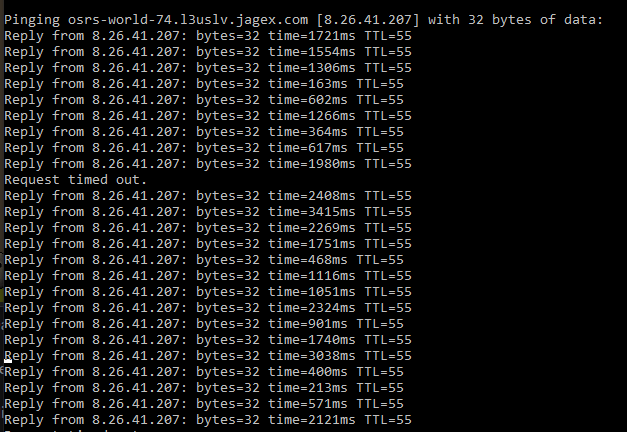
yeah seems its their connection looking at numbers? https://i.imgur.com/Pb9pYus.png
 gilded kayak
well it's your connection to them, not sure where in the chain is the problem
viscid lantern
oh dear those are some absolutely awful numbers
gilded kayak
it's more likely when there's an issue on their end, that more than 1 person shows up here
viscid lantern
it could be a blip at your isp or somewhere in the chain, you could try a vpn and see if thats better for now and see if it resolves itself
gilded kayak
so i'd be inclined to think it's unfortunately on your end
leaden trail
you can try a world in a different region maybe but you might just have to wait it out
jaunty granite
leaden trail
you can try a world in a different region maybe but you might just have to wait ...
so THIS has happened once before (months ago, maybe a year now) andit eventually just went back to normally....
I thought it was something I did though on my end
reset, update, reboot, etc
viscid lantern
for now I would either use a different world/region or try a vpn 
jaunty granite
viscid lantern
it could be a blip at your isp or somewhere in the chain, you could try a vpn an...
ive tried a few different worlds but ill try a few more
viscid lantern
because those ping times in your screenshot are 1000% unplayable
jaunty granite
exactly lol
i mean i could fucking do a farm run but i dont do that shit, i just wanna get back to my endgame content xd
viscid lantern
moving 5 ticks after you click is uhm, not ideal
 jaunty granite
right
so if its my ISP, which is has to be somehow, can I do something other than reset my router?
round jacinth
you can call them and complain or try a vpn or wait it out
viscid lantern
you cant actively do anything to resolve it yourself no
gilded kayak
you could call and complain and point out the very clear ping spikes you see when using ping, but not sure if the person in the call centre can help
jaunty granite
i see i see.
viscid lantern
usually stuff like this tends to resolve itself though, there might just be a problem somewhere thats being worked on atm
jaunty granite
ok for the vpn stuff though, that works fine through jagex launcher?
viscid lantern
yup
gilded kayak
well
not always
jagex tries to block most VPNs, i'm not sure if they've done it successfully
jaunty granite
yeah I get that...but you know. addiction. guess I can go netflix for now..
viscid lantern
yeah jagex dislikes some vpn services, in my experience it has always worked fine though
cant hurt to try, or its farm run+netflix time
viscid lantern
I would even try australia
jaunty granite
fuckin right. im gonna try germ too since i cant ever play there normally.
yup none working. looks like i gotta wait it out cause if i talk to a real person on the phone and not some automated message bullshit ill rage on them
thank you guys for all your help ❤️ much appreciated
zom, dura, felan, gamm
viscid lantern
hope you can get it resolved soon 
 tough pollen
I downloaded a plugin called resizable chat from runelite plugin hub and now my chatbox is stuck like this https://imgur.com/a/sPMWtHx
I have tried restarting runelite, restarting PC, right clicking chat box +alt, uninstalling plugin

the buttons themselves are misaligned
gilded kayak
did you restart the client, after uninstalling it
tough pollen
yes I did
gilded kayak
!safe
haughty pumiceBOT
safemode: To enable safemode
Windows
Run the RuneLite (configure) shortcut from the windows start menu
Tick the Safe mode box, save, launch RuneLite the way you normally do.
Mac
In Terminal, run
/Applications/RuneLite.app/Contents/MacOS/RuneLite --configure
Tick the Safe mode box, save, launch RuneLite the way you normally do.
tough pollen
ok will try that now]
leaden trail
that button issue is a resource packs issue I think
gilded kayak
i was wondering if that was a resource pack yeah
tough pollen
happens without resource packs too on regular
leaden trail
not if you restart after disabling it won't
gilded kayak
safe mode is the actual for real, "on regular", so try that
tough pollen
yep, works on safe mode like you said
is there a way to fix so I can go back to regular?
gilded kayak
yes remove the hub plugin actually causing the issue
or, you might get lucky and using safe mode once, resolved it
tough pollen
sweet let me try that real quick
gilded kayak
if it didn't, something else you installed from the  is causing the misalign
or is broken because of maybe that plugin
tough pollen
yeah pretty much as soon as I dragged the slider from that resizable plugin it broke the chat box
you guys are the absolute best! works perfectly after booting into safemode and back to regular
thank you so much I really appreciate your help!
haughty pumiceBOT
!ticket command not found!
stone parcel
You can explain your problem here, or if it is top secret DM the RuneLite bot.
round jacinth
 wind viper
Whats the command to contact someone within the team for assistance?
wind viper
Whats the command to contact someone within the team for assistance?
you’re currently using HDOS you maybe need to go to them instead
wind viper
round jacinth
you’re currently using HDOS you maybe need to go to them instead
Good eye.
 toxic girder
How do I use custom fonts on plugins that have support for it? I'm typing a font name into the box and it isn't changing the font that's used
it seems to be working for "default" fonts on my computer, but not a font i have installed
 mighty glen
Anyone have an idea why ground items plugin doesnt tag all my hard clues the same color ?
 round jacinth
They have different ids and you tagged those specific steps those colors
Reset their colors
round jacinth
Each clue is its own thing I think
mighty glen
like different order of steps for each gives it a unique ID ?
mighty glen
yeah just i gotta keep tagging until i got all of them , ty ty ty
solid mesa
Beginners and masters are different though where they have the same ID. But the other tiers all have a different ID for each step
 wet scroll
Can I understand how the profile sync settings work? I think I keep doing something that somehow makes me lose my saved setting changes, but I can't pinpoint the cause due to lack of understanding.
This doesn't happen to me constantly, but there are times when I do several changes only to lose them all, seemingly reverted back to a older profile save
This used to happen to me when I had at least two runelite clients open, but this time around, it happened to me when I only had my primary runelite client open so I'd really like to get to the bottom of this because it's the reason I'm avoiding logging onto my alts lol
round jacinth
every once in a while the call to Google sync happens in bulk changes and this call also happens when you go to close the client after logging out
If you’re force closing the client or shutting down the computer in the middle of operation it can have issues with saving settings before it goes to cloud to be synced
wet scroll
You mean X'ing out without logging out first?
round jacinth
yeah that type of stuff
wet scroll
Well tbf, I keep my client open a majority of the times, so I do log out and x out the proper way but could it be causing issues in the other way? (the length of time it's staying open)
round jacinth
no I don’t think having it open for too long causes problems it’s not uncommon for people to never close the client until jagex update happens
wet scroll
Yeah, pretty much what I do too lol
Is there any other known plugins that may interfere with this function?
round jacinth
I don’t know some hub plugins probably attempt to update a set config every game tick but that’s only for itself afaik
But again the write to the config is bulk
A hub plugin could I suppose cause issues. That’s all they do for folks lol
wet scroll
I feel that honestly lol. It's like those can be super useful but a lot of the plugin coders seem to do this thing once, update it once or twice then forget about it totally. Then it breaks eventually lol.
Is there anything that you would suggest to do to avoid those types of saved losses?
This time it seemed weird too, because it seemed to revert back to something that I had changed weeks ago, as opposed to a more recent saved profile
round jacinth
But no, I don’t know what to do try differently as a revert should only be to what it was previously and not weeks ago, you maybe loaded the wrong config and called it good enough.
Every plugin I’ve written only had to be written once(so far) because they only break when jagex breaks them fwiw, many hub plugins are like that. They don’t need continuous updates cause they’re written for one thing and it’s fine
Imbued fart probably won’t break lol
wet scroll
LOL fair enough, yeah it's more of a longer-term basis too.
To be clear, config = profile?
 lime cairn
wet scroll
LOL fair enough, yeah it's more of a longer-term basis too.
To be clear, config...
lime cairn
wet scroll
LOL fair enough, yeah it's more of a longer-term basis too.
To be clear, config...
believe so yes
round jacinth
Without elaborating, yes.
 marble goblet
anybody know why my client keeps graphically glitching out like this? happens usually when i'm resizing the client and stuff
 leaden trail
Does it happen in safe mode?
haughty pumiceBOT
To enable safemode
Windows
Run the RuneLite (configure) shortcut from the windows start menu
Tick the Safe mode box, save, launch RuneLite the way you normally do.
Mac
In Terminal, run
/Applications/RuneLite.app/Contents/MacOS/RuneLite --configure
Tick the Safe mode box, save, launch RuneLite the way you normally do.
 real hawk
anyone know how i can make my tile indicator not go through my character like in the pic with the infernal cape ?

 leaden trail
It's a hub plugin
real hawk
oh its a different tile plugin than normal ?
leaden trail
Improved tile indicators or something
I think I remember people talking about it performing kinda poorly though
round jacinth
yes it does something extra to try to do what it does and it's not performant but it looks pretty
round jacinth
it's recommended to use as few hub plugins
leaden trail
I wouldn't use it personally
marble goblet
leaden trail
Does it happen in safe mode?
safe mode seems to work okay. i guess i just need to keep disabling and removing plugins until i find the culprit🙄
leaden trail
Can you post your logs? I wonder if something is angry
haughty pumiceBOT
To find the logs, you can do one of the following:
- If your client failed to open, click the
Open logs folderbutton. - Open the screenshot directory by right-clicking 📷
Camerabutton, navigate 1 directory up, then open logs folder. - Navigate to
%userprofile%\.runelite\logson Windows or$HOME/.runelite/logson Linux and macOS.
Upload the log files named client and launcher by dragging them to Discord. If there are files prefixed with jvm_crash dated from today, upload them too.
 lapis sparrow
how can i access my old profile? Ive signed into runelite but no change
can share screen to make life easier as well, thanks.
 sand star
lapis sparrow
how can i access my old profile? Ive signed into runelite but no change
sand star
lapis sparrow
how can i access my old profile? Ive signed into runelite but no change
(#general message convo started here)
lapis sparrow
ty again momo
sand star
I think you're out of luck but maybe someone has an idea
lapis sparrow
runelite website seems to know who i am, if thats of any consequence
 oblique plume
If you weren't syncing it then you can't get it
round jacinth
is your rsn the one that you have highlighted there
i guess it shouldn't matter because of the profile hash thing it does
round jacinth
and the email you're using on the site is the same as the one you use in the  ?
?
lapis sparrow
yes
round jacinth
it could be you never enabled cloud sync so the settings of plugins are gone but your loot tracker and what not are still available
if you get a kc at vorkath does your loot tracker come back
 round jacinth
and if you click import profile and navigate to profiles2 folder you don't see a profile you want?
 for next time
 sonic birch
There are several types of mysterious old man. One can be the maze, one can be the mime, one can be the mysterious old man rick turpentine style. The maze one is hidden by the maze option, the mime one hidden by the mime option, the classic rick turpentine style version by the mysterious old man option.
If you can get proof that this is broken with the identificator plugin on and preferably a video, you can create a github issue on the repo. For now I believe it all works.
 surreal berry
Anyone else having issues with never logging out while idling? At least 3 times since around December, I've come back to my computer over 25 minutes later (just now it was about 1-2 hours) and my character is still logged in. Lost a lot of clue scrolls from redwoods because of this
Turning the "Logout Timer" plugin on/off and setting it to 25/5 mins does not affect it
solid mesa
Is it possible you have a bad keyboard which is holding a key down?
You can use this website to see if any keyboard events happen https://w3c.github.io/uievents/tools/key-event-viewer.html
 undone stream
Hi, so I recently purchased a membership and my skill calculator add-on is not showing me membership methods. its just showing me the f2p skills and training methods. could someone help out?
gilded kayak
you are probably still on a free to play world
surreal berry
solid mesa
You can use this website to see if any keyboard events happen https://w3c.github...
So just leave that open while I'm not using my computer for a while and see if it detects anything?
gilded kayak
yes
and if it does, then that would be the reason why you're failing to logout
since as far as the client knows, you really are there
surreal berry
Alright thanks guys!
 worldly trellis
Im trying to test the plugin i made, but the client will not start. Crashes when i run the project, with the error message in the screenshot. Have i messed something up?
EDIt; ope, nevermind. I deleted the .idea folder, re-opened the project, set up running configs again and it works just fine
 surreal berry
I've also had another issue with the client (Key Remapping plugin I think), where starting a public/CC/etc. message (not a PM) but then hitting escape to cancel it doesn't work. The chat will again display "Press Enter to Chat..." like it usually does, but function key/number and arrow/WASD remapping won't work (although function keys and arrows themselves still work)
Note that hitting escape a 2nd time makes the remapping function again correctly
haughty pumiceBOT
@surreal berry To enable safemode
Windows
Run the RuneLite (configure) shortcut from the windows start menu
Tick the Safe mode box, save, launch RuneLite the way you normally do.
Mac
In Terminal, run
/Applications/RuneLite.app/Contents/MacOS/RuneLite --configure
Tick the Safe mode box, save, launch RuneLite the way you normally do.
round jacinth
Can you recreate it in safe mode
 sturdy girder
why is my exp being kept after i log out and close the client? It used to auto delete but now it saves?
viscid lantern
its a setting in the xp tracker plugin, you can turn it off
 sacred cairn
im having issues with logging into runelite but on mobile its working fine anyone have an answer? i reinstalled it aswell
oblique plume
do you have a mobile only account
sacred cairn
i did not know that was a thing but im not sure lol
oblique plume
if you made it on mobile then its a mobile account
mossy swan
have you only played on mobile?
oblique plume
its easy to convert to jagex account to be able to use everywhere though
sacred cairn
mossy swan
have you only played on mobile?
yes
oblique plume
sacred cairn
oblique plume
its easy to convert to jagex account to be able to use everywhere though
thank you guys a ton
 winter elk
what could cause shift withdraw all in bank to work on one account but not the other
they're on the same profile
and I restarted both
leaden trail
Is it not working at all or giving you the wrong option?
winter elk
yes
leaden trail
Does it work if you set it to 5?
And can you send a screenshot of your menu entry swapper settings?
Sorry for all the questions at once, need to step away but this sounds similar to something I submitted a fix for so just getting info to try and reproduce once I get home
 leaden trail
That's everything off the top of my head. Do you mind if I ping you a bit later if I need more info?
winter elk
nope
round jacinth
does the new bank menu entry work completely now
winter elk
it's also 2 nearly exactly equal new accounts
round jacinth
or is it still bugged
winter elk
wtf now it works
is it possible it had something to do with 1 account having withdraw x set and the other not?
round jacinth
use profiles to have different accounts have different settings
winter elk
I want those 2 to have the same settings
round jacinth
so everything 100% the same except for that singlular swap?
winter elk
yeah but it's fixed now
round jacinth
then probably not, just change the setting each time you go play
leaden trail
round jacinth
does the new bank menu entry work completely now
The bank menu options setting doesn't actually impact the issue I'm aware of, so this may be something else
round jacinth
leaden trail
The bank menu options setting doesn't actually impact the issue I'm aware of, so...
it just seemed like an off by 1 type of issue /shrug
leaden trail
Yeah that's basically what one of them is
 uncut helm
I need account
 azure furnace
anyone know how i can get this plugin for production skills/bank standing?
 solid mesa
Install Action Progress
 cold burrow
The quest helper plugin has disappeared for me, I cant find it in the list anymore.
haughty pumiceBOT
Visit Zoinkwiz's Quest Helper plugin discord (https://discord.com/invite/XCfwNnz6RB) for support, issues & feedback
leaden trail
I think that can sometimes happen and I believe restarting your client should fix it, but they could probably tell you more in their discord ^
cold burrow
Restarts didn't do it for me, but I will seek help in their discord, thanks.
 cinder path
Many of my independent settings are resetting upon opening Runelite. What I mean is if I remove items from my ground items, they re-appear back on it when I reset the client. The same can be said for when I change the keybinds for the teleport locations on my Nexus. How can I fix this?
 haughty pumiceBOT
To find the logs, you can do one of the following:
- If your client failed to open, click the
Open logs folderbutton. - Open the screenshot directory by right-clicking 📷
Camerabutton, navigate 1 directory up, then open logs folder. - Navigate to
%userprofile%\.runelite\logson Windows or$HOME/.runelite/logson Linux and macOS.
Upload the log files named client and launcher by dragging them to Discord. If there are files prefixed with jvm_crash dated from today, upload them too.
cinder path
cinder path
Image 1: default list
Image 2: I remove the BA eggs from my list
Image 3: I close and re-open game and it reverts


 oblique plume
thats just from the ba plugin you installed
you said it happens for other things that arnt features ofa plugin you decided to enable
cinder path
I just did the same for black battleaxe and chocolate cake, they both re-appeared
leaden trail
What if you try to change it while in safe mode, close the client, and then reopen in safe mode?
haughty pumiceBOT
To enable safemode
Windows
Run the RuneLite (configure) shortcut from the windows start menu
Tick the Safe mode box, save, launch RuneLite the way you normally do.
Mac
In Terminal, run
/Applications/RuneLite.app/Contents/MacOS/RuneLite --configure
Tick the Safe mode box, save, launch RuneLite the way you normally do.
cinder path
Weird, I cleared my entire list and this time it worked

 leaden trail
Do you have clue details installed?
cinder path
Safe mode worked to keep ground items the same between logins. I also disabled the BA plugins
cinder path
leaden trail
Do you have clue details installed?
No
leaden trail
Yeah I searched your logs after asking
The battleaxe and cake are from something else
Although it's possible the ba plugin just broke it somehow, I'm not sure
cinder path
My current guess is maybe its two different problems with two different conflicting plugins
Or going into safe mode reset the problem
Thank you for your help
 normal trail
I don't got any audio on my runelite client, osrs client works fine. I saw more people have this issue, any updates or fixes for this ?
 odd sage
any idea why it says runelite is using 90gb of application memory? That is extremely high and i keep getting this popup because of it
 oblique plume
the mac display driver will leak and do that
im surprised you have enough to even let it leak 90gb worth
oblique plume
you can disable compute shaders and it stops i think
or try the gpu experimental plugin from the hub
it could work better, i know it seems to ffor AMD hardware
or try different versions of display driver
odd sage
compute shaders in 117 or gpu or?
gilded kayak
in GPU
oblique plume
gpu
gilded kayak
you can't disable it in 117 they are required
odd sage
hmm, gpu was off at the time though because i had 117 on
so couldn't have been gpu causing 90gb i suppose?
leaden trail
It would still be your GPU driver leaking memory
gilded kayak
it's probably still the same issue
odd sage
okay so i'll turn off compute shaders on gpu, anything else that could cause the driver leaking memory?
gilded kayak
possibly but this seems likely to be the problem, you'll need to swap to using GPU tho
mossy swan
117hd would cause it to leak
 noble goblet
I was using the resources pack plugin along with the sailing theme. I had a few others downloaded, but was actively using the sailing theme
for some reason this invalidated the idle logout timer
odd sage
okay thank you, so if i want to use 117, anything i can do to stop the leak?
leaden trail
Probably not
gilded kayak
not unless you can learn extensive java development and debug the problem for us
odd sage
cool brb
noble goblet
I left myself mining a star when I left for a dr appointment. Was still logged in 3 hours later. I restarted my pc, runelite and tested it again. Still didn't get idle logged at all. Uninstalled the plugin and started getting idle logged again
gilded kayak
Adam has tried on various hardware and cannot replicate it sadly
which just immediately kills the chances of getting it fixed
fixing problems u can't replicate are almost impossible
odd sage
okay thanks for the help everybody, have a great evening
leaden trail
Resource packs shouldn't be providing any sort of inputs so I suspect you probably have a key sticking on your keyboard or something
noble goblet
I'll reinstall it and see if it causes the same thing
but I'm pretty sure that was the difference
mossy swan
noble goblet
I left myself mining a star when I left for a dr appointment. Was still logged i...
did you have your mouse inside the runelite window when you were away for hours? did a cat walk on your keyboard?
(i am not joking)
oblique plume
the cat story getting a guy rate limited is a classic
noble goblet
I can't recall what window was my active window when I left
gilded kayak
wonder how that guys cat is doing
noble goblet
but runelite was up on my 2nd monitor
leaden trail
What do you see if you open https://static.runelite.net/bootstrap.json in a browser?
gilded kayak
can u curl it instead
curl https://static.runelite.net/bootstrap.json
``` in `Terminal`also can you post a screenshot of the error prompt runelite switches to when it fails to load
incase the error is just very clearly right there
what sequioa version are u on
unlucky i was hoping u were on 15
since there were a bunch of networking issues on 15
fixed in .1
gilded kayak
i would not think its a permission issue, since you're getting a network error right here
mossy swan
are you using a vpn?
hmmmm idk
restart router and mac?
shits fucked
tried changing dns to google/cloudflare?

viscid lantern
I would definitely try a different dns yeah
 burnt sail
hello, my quest helper plugin glitched on the forsaken tower quest, is there anyway to fix it? i've tried the basic uninstall/install with the plugin hub. nothing seems to work
haughty pumiceBOT
Visit Zoinkwiz's Quest Helper plugin discord (https://discord.com/invite/XCfwNnz6RB) for support, issues & feedback
burnt sail
ty
gilded kayak
noble goblet
for some reason this invalidated the idle logout timer
i looked into this just because afking is easy and unsuprisingly it did not keep me perma logged in
gilded kayak
lit
mossy swan

round jacinth
you use jagex launcher and select runelite as the client to run
stone parcel
Jagex Launcher.
 torpid tree
hey! i have been getting freezes on my runelite when i load new parts of the map, ive deleted runelite and cleared the cache and even updated the drivers.. it still happens sometimes anyone has any tips?
gilded kayak
almost certainly a plugin causing it
torpid tree
ill check that ill uninstal all the extra plugins but i kinda need quest helper
gilded kayak
it's (probably) not quest helper
it has 489k active users so if it was freezing a lot of people, we'd probably hear about it
torpid tree
i only had like a few ones, zulrah helper, toa helper, wise old man,
gilded kayak
maybe try going to the  tab, clicking the
 new profile button, double-clicking the new profile to swap to it and see if it still happens
if ur using the extended draw distance settings in the GPU plugin, maybe also setup your GPU settings the same on the new profile
torpid tree
hmm good idea, what i dont understand is, on my laptop i have the same profile and it doesnt freeze, so that is why i was thinking it was a PC speicific problem
but ill check out the plugins first
gilded kayak
if it still happens with no hub plugins but with GPU on, it could be the new driver versions
and you might have wanted to downgrade not upgrade
mossy swan
 rebar
rebar
gilded kayak
probably
but 1 guy said it caused his computer not to boot so now i have to be wary of suggesting it
assuming he wasn't lying
torpid tree
so i tried uninstalling all the plugins. that worked but then i tried redownloading the quest helper and now runelite is stuck again
without the game launching at all
torpid tree
yes on the loading screen
but the screen is actually working
so i can see the flames moving but i cant do anything atm..
i can only close the game atm with the taskmanager
gilded kayak
!logs maybe the logs will say
haughty pumiceBOT
To find the logs, you can do one of the following:
- If your client failed to open, click the
Open logs folderbutton. - Open the screenshot directory by right-clicking 📷
Camerabutton, navigate 1 directory up, then open logs folder. - Navigate to
%userprofile%\.runelite\logson Windows or$HOME/.runelite/logson Linux and macOS.
Upload the log files named client and launcher by dragging them to Discord. If there are files prefixed with jvm_crash dated from today, upload them too.
torpid tree
im going to check a couple things ill bring an update in a bit!
seems fixxed atm just removing all the external pluggins
quest helper doesnt seem to be the problem
thanks for the help!
surreal berry
gilded kayak
and if it does, then that would be the reason why you're failing to logout
So I left the keyboard event viewer open for about 12 hours and it didn't detect anything. I didn't think it would since I've never had phantom input problems. Sounds like Flowerpot was reporting the same issue about 4 hours ago, too
Unfortunately, this is not an issue I've ever been able to specifically replicate (although it sounds like Flowerpot did) so I'm not sure how much more I can help other than reporting to Jagex every time (in case it's on their end) and telling you guys when it happens?
Notably, I've never installed any resource packs (AFAIK). I have 117 installed, but never use it
gilded kayak
yeah i never thought it was resource packs but i tested it just for fun and unsurprisingly it did not cause such an issue
surreal berry
Also I don't have any pets or roommates to fuck with my computer while I'm away from it. I had Firefox open to a blank tab when it happened yesterday, but I don't think I had anything open for at least one of the other times
surreal berry
surreal berry
I've also had another issue with the client (Key Remapping plugin I think), whe...
Enabling safemode also fixes this issue, thank you zom!
Any ideas on how to fix it when I don't have safemode enabled?
gilded kayak
that would mean something from the hub is causing that issue
surreal berry
Ahhh ogtcha
I can't replicate it now that I've disabled safemode and opened Runelite again so I can't troubleshoot sorry. Instead, here's a list of my plugins from the hub, as they were when I was having the issue


bout to add action progress too lol, thanks everyone for helping with such an awesome client!
surreal berry
Actually, p sure I have the same chat issue but it's presenting differently: 1st time I hit enter to chat it works as normal, but then hitting escape to close withou sending the chat re-enables my key remapping but now disables any chat (except PMs) until I hit escape again. Hitting "enter" to chat will disable key remapping but not enable chat (the "hit enter to chat" message remains). About to disable all of my hub plugins and troubleshoot now
(Went back into safemode and couldn't replicate that btw, but I was immediately able to replicate it in normal mode)
It was Shift Remapping... that seems obvious in hindsight since it also has an "enter to chat" option for some reason
 verbal ledge
how come I see notifications for my main on my ironman? im confused
 gilded kayak
because that hub plugin isn't handling accounts properly
since we don't have oh nyoo in any default plugins
leaden trail
time tracking notifications probably
verbal ledge
ye its the time tracking plugin
gilded kayak
i dont think the time tracking plugin writes your username to chat
if that's what it actually is
verbal ledge
it doesn't but this is the first time i see cos i got a notification while i was mining
and im using different profiles as well
gilded kayak
it's either time tracking reminder or watchdog*
not the default time tracking plugin
gilded kayak
do you have it on the different profile

 gilded kayak
did you switch profiles in 1 second and also search
verbal ledge
i never have installed these plugins ever
and on startup i dont switch profile cause it defaults to my account im on
i was restarting my client because my idle notifier wasnt working properly
so i closed both clients and only opened my ironman and it doesnt work properly
gilded kayak
ok I did finally find the correct code for it
i guess it does write username to chat, that's very interesting
no idea what caused it tho, since I had to look it up it's not something that happens every day
verbal ledge
yeh idk either its the first time i got this notification
and now my idle notifier is like bugged
 vague edge
anyone have an idea on why i can't see my layout for chambers anymore? i can't scout cause i can't see a layout.
scout overlay is checked and everything.
oblique plume
CM
 subtle lantern
Can someone help? didnt crash for a few weeks now crashing again
gilded kayak
!config increase your memory limit
haughty pumiceBOT
gilded kayak
ctrl+f memory
subtle lantern
gilded kayak
!config increase your memory limit
thanks ill try it, just stick the -Xmx1536M arguement in the jvm line in configure right?
gilded kayak
yes
 gloomy valley
my computer crashed and my runelite settings reverted to 2022... how do I get my most recent settings back? I see cloud sync is still on
gilded kayak
!lost
haughty pumiceBOT
gloomy valley
its not there, it shows that my default is from 2022
gilded kayak
can you screenshot the folder, it's much more common for people to just not notice the correct file, then it is for the file to be lost
if you do it from the in-client popup, also click the top right button so extra numbers show up]
 gilded kayak
the correct folder is profiles2
profiles when it's talking about the folder, is only mentioned on that page if you haven't opened the client since feb 2023
or earlier
gloomy valley
i tried all of the profiles in profile2 to import as well
the main thing i noticed was that the bank tags were not right
if say I import the right one, does the bank tag not update?
gilded kayak
it would not update if you had the bank open
gloomy valley
what if i closed the bank and reopened it
gloomy valley
wait omg i found the right one
its set as imported profile now
how do I make it the main one?
gilded kayak
whatever u have selected when u close the client is the main one, you can also click the 🔗 button to link it to that account
that will make it so even if u did swap profiles, when you log into that account it will automatically swap to this one
gloomy valley
ok should I delete the rest of the profiles in profiles2?
so that it doesn't choose a random one again
gilded kayak
it didn't choose a random one
it failed to load them, and made a new default as if you were a fresh user
gloomy valley
I see
gilded kayak
i would NOT delete random files in that folder, but you can remove them from in-client
gilded kayak
gilded kayak
it failed to load them, and made a new default as if you were a fresh user
I should specify the file that keeps track of what profiles* to load, likely got corrupted in the shutdown, not just a general fail.
So as far as the client knew, you really were a new user
 umbral gate
It is possible with runelite drop all items from inventory with single click?
I mean single click instead of shift clicking?
Like drop all button
I mean some plugin but legal
gilded kayak
no that would not be possible while following the rules
it would break many rules at once
umbral gate
Sad face ;/
subtle lantern
@gilded kayak the increased memory seems to have worked thanks! other contributors told me it was my 13th gen intel cput
Any idea how to get the chat commands addon to work? II've reset the settings for it a few times and looked at the collection log, but it will never work for example if i type "!kc vardorvis"
gilded kayak
subtle lantern
<@323951080188936192> the increased memory seems to have worked thanks! other co...
that was a different issue
the error you posted today very clearly said it was a memory problem
check the boss log thing in the PoH or a ring of wealth
subtle lantern
ok thanks
oblique plume
it also said it wasnt a heap memory issue so i dont think increasing the heap would help
leaden trail
Unrelated, but don't run RuneLite as administrator
 rotund osprey
Hello, I'm having issues with syncing RuneLite profiles, likely because I'm using a Google account that was deleted a long time ago. How can I sync every last bit of data to a new account, and delete this one?
oblique plume
you can import it to the new one
save the profiles2 folder from .runelite somewhere else then sign in to a new rl account
and import the $rsprofile and other .properties files from it
since signing in to a different rl account overwrites the $rsprofile one afaik, gotta move it out first
 native egret
Does anyone know what the 'Linear Level Modifier' actually does in the discord notifications plugin?

this is what it says, but my pea brain cant work it out 🤣
 haughty pumiceBOT
Get support for the Discord Notifications Plugin Hub plugin here: https://runelite.net/plugin-hub/show/discord-notifications.
You can also find the support link by searching for the plugin in the Plugin Hub panel and clicking the ? button on the plugin, or by right-clicking the plugin in the plugin panel and clicking the Support menu option.
native egret
haughty pumice
Get support for the **Discord Notifications** Plugin Hub plugin here: <https://r...
Thank you, I did check on this page first but couldn't find any support on this setting
round jacinth
seems like the developer didn’t want to explain it more than that but says keep it at 0 to have it off
 foggy rover
someone told me theres a GE transaction history but ive been looking for a while and can't find it
solid mesa
 viscid ocean
No idea how but I've somehow set myself on hard mode... Can't see my own overhead prayers, hp bar, or hitsplats. Any ideas what might be the cause?
 mortal pond
probably entity hider -> hide local player 2d
viscid ocean
mortal pond
probably entity hider -> hide local player 2d
tyvm, it was. So glad that was an easy fix lol.
 coral seal
On menu entry swapper, when using UI swaps: Bank withraw shift click - Placeholder isn't working atm
round jacinth
the Placeholder is a known problem and is being worked on, its just taking time
coral seal
Thanks for the headsup
round jacinth
jagex keeps breaking bank ops
coral seal
Classic
 rich basalt
got a top 5 dumb question
moving from windows to linux should i be worried about my accounts being flagged? not sure what jagex can see on their end
solid mesa
No
If you have a jagex account though the Jagex Launcher doesn't support linux so you would have to use a third party option like the Bolt launcher
rich basalt
i saw that someone made a launcher project on github surely that works
charred wind
Bolt Launher
solid mesa
Yea Bolt works fine. Today Jagex said they're working on Jagex Launcher for linux so we'll see
rich basalt
sweet thank you
 deep epoch
is there a writeup on how to get opponent information to work properly
viscid lantern
you turn it on and hope the hiscores work
deep epoch
for npcs
viscid lantern
then you just turn it on
gilded kayak
it just works unless it's a raid boss or the wiki forgot to add the hp
deep epoch
what about raid boss
gilded kayak
you'd need to use jagex's healthbars if the boss supports them
idk if they actually have the flat hp
deep epoch
it used to work for xarpus when it spawns
gilded kayak
raid boss health scales, so we would need a wiki page for every player count
which sounds poop
i would turn on jagex's health bars in in-game settings, and see if they support the scaling numbers
and not just %

 lean compass

i recently got a new laptop and fired up Runelite through my jagex account. i forgot to login to my actual Runelite account, as pictured above with the green door logo with the right-pointing arrow. i have since killed a good amount of bosses while not logged in, which has gone to my loot tracker. i would like to keep this loot on the tracker, but also login to my Runelite account. is this possible, or will i lose the tracked loot while not logged in as soon as i login?
solid mesa
It isn't possible to merge them no
lean compass
is it possible to make a new RL profile and link to what is currently shown so that i can start saving all the new tracked loot?
vague edge
any admins here who can help? i can't see my cox layout when i scout. changed, reset settings, restarted client, nothing works.
 zealous cedar
turn off challenge mode
vague edge
well i'm dumb af. thankks adam lol.
 brisk steeple
Why can't I have item charges + item charges improved on together, one turns off the other
leaden trail
Someone mentioned that to you yesterday
brisk steeple
But on my other account/profile they do work together


This only started like two hours ago
Can't have both on for some reason
Tried restarting client
haughty pumiceBOT
Get support for the Item Charges Improved Plugin Hub plugin here: https://runelite.net/plugin-hub/show/tictac7x-charges.
You can also find the support link by searching for the plugin in the Plugin Hub panel and clicking the ? button on the plugin, or by right-clicking the plugin in the plugin panel and clicking the Support menu option.
leaden trail
Oh it looks like the author just recently marked it as conflicting with the core plugin
brisk steeple
Thanks for checking for me
It literally happened as I entered zuk
threw me off a little
solid mesa
They submitted an update to make them not conflict after people complained but it has not been approved yet https://github.com/runelite/plugin-hub/pull/7905#issuecomment-2838926757
viscid lantern
brisk steeple
Why can't I have item charges + item charges improved on together, one turns off...
Just approved the update, update should be available in a couple min and its back to normal
(did you get the zuk kc?  )
)
subtle lantern
is there a list somewhere of plugins with known memory leaks
oblique plume
why would there be
gilded kayak
if we knew about them we'd disable them
leaden trail
Did you turn off SpeedStep in BIOS like I mentioned a few weeks back?
subtle lantern
leaden trail
Did you turn off SpeedStep in BIOS like I mentioned a few weeks back?
I did and it didn't solve it unfortunately
leaden trail
Then we don't really have a solution for the crashes
For that particular one anyway, because you've come in here with basically a different crash each time
subtle lantern
Ok thanks for your time, ill get an RMA going
subtle lantern
oblique plume
ground items overlay
is ground items overlay problematic?
subtle lantern
leaden trail
For that particular one anyway, because you've come in here with basically a dif...
i guess that could point to processor issues if its a bunch of different crashes
leaden trail
That would be what I told you a while back
But you seem to be very unhappy with my previous suggestions that it was the case so 🤷
oblique plume
no but its just what was in the call stack of your jvm crash
subtle lantern
leaden trail
But you seem to be very unhappy with my previous suggestions that it was the cas...
I appreciate the help, probably was just hoping it was incorrect cause ive had the 13th gen on updated bios for 1.5+ years and never had crashes until clean windows install
leaden trail
You've been reporting JVM crashes in the absolute strangest places and they've been very inconsistent from crash to crash. Given you're on a CPU that's known to have a high rate of hardware issues, it seems p r e t t y likely that you're experiencing a hardware issue
 tepid arch
im having a issue, when i try to open runelite it says something about a bootstrap error? anyone know what i can do?
gilded kayak
only if you tell us everything it says, possibly with a screenshot
not a portion of it
tepid arch
well now it works haha no clue what i did haha
 split hedge
hello
i need help with my runelite- recently it has been crashing. I only do TOA and it crashes during then, so its most likely a plugin that is causing this
i would like to find out how to check crash reports on runelite
haughty pumiceBOT
To find the logs, you can do one of the following:
- If your client failed to open, click the
Open logs folderbutton. - Open the screenshot directory by right-clicking 📷
Camerabutton, navigate 1 directory up, then open logs folder. - Navigate to
%userprofile%\.runelite\logson Windows or$HOME/.runelite/logson Linux and macOS.
Upload the log files named client and launcher by dragging them to Discord. If there are files prefixed with jvm_crash dated from today, upload them too.
 verbal tulip
brisk steeple
verbal tulip
brisk steeple
I literally was about to send a message about this...
Thats dumb
Item charges improved doesnt have all item charges
solid mesa
It's fixed if you restart your client
 raw kiln
I'm not sure if this is the right place to ask but if somebody has some insight it would be appreciated. I am plugged into my modem via ethernet and my download speed is about a Gb and my upload speed is about 450 Mbs and latency is about 12ms. However, in RL my lowest ping world is around 60? However, on my pc at work that gets a slower speed and is a cheaper pc gets better ping. I've tried turning off 117hd and other things to see if that would help but it doesn't. The interesting thing on top of that was a few days prior, I was actually using this PC via wifi and the ping was in the mid 40s. So now being plugged in via ethernet how is it worse? Sorry for the ramble just looking for help.
crisp dune
ping and transfer speed aren't correlated whatsoever, it's entirely to do with the length of the route to Jagex's servers
being plugged into ethernet shouldn't be slower than wifi though, assuming it comes from the same router
raw kiln
yeah it's the same router and thanks for the clarification I dont know a lot about networks and ping.
im gonna go back to wifi and see if the ping goes down but then my connection is horrible so its making my brain hurt lol
i just got my first araxxor task too lol and a new pc so im trying to game. Thanks for the reply hopefully i can figure this out.
 sinful pine
trying to setup splashing, turning my monitor off to sleep. and whenever i turn my monitor back on my runelite crashes
i feel like those two things shouldnt interact? am i missing something
leaden trail
Is your computer sleeping?
 deft fulcrum
Is there a way that I can make the notifications on macos not open Script Editor when I click them?
sinful pine
leaden trail
Is your computer sleeping?
i dont think so, using my pc and have power setting set to never sleep/shutdown. my theory is my computer is "reconnecting" to the monitor some how, and changing the resolution or something? which might cause a crash
leaden trail
Can you post your logs?
haughty pumiceBOT
@sinful pine To find the logs, you can do one of the following:
- If your client failed to open, click the
Open logs folderbutton. - Open the screenshot directory by right-clicking 📷
Camerabutton, navigate 1 directory up, then open logs folder. - Navigate to
%userprofile%\.runelite\logson Windows or$HOME/.runelite/logson Linux and macOS.
Upload the log files named client and launcher by dragging them to Discord. If there are files prefixed with jvm_crash dated from today, upload them too.
 civic arch
is it a jagex thing or runelite that requires us to restart clients every week? I know at 1 point we didn't have to and if runelite any way we can disable having to do this?
mossy swan
jagex
civic arch
unluck, forever cursed to sit and spam restart clients for 30 mins after every reset till they randomly actually open
mossy swan
maybe you could fix your internet then
civic arch
what's my internet doing, could that be why it doesn't like starting plugins?
 normal bay
what os are you running @civic arch
mossy swan
hard to say without logs or more specific errors but probably it’s just failing to connect to either jagex or runelite servers
leaden trail
You're also setting yourself up for problems by keeping your client open that long
 cunning harbor
i'm sure this has been asked before, but I'm running RL on linux and for some reason my plugin hub is unnaturally small (and the UI scaling) - is this a bug or a known issue?
round jacinth
are you trying to use the scale option?
cunning harbor
i tried using the scale plugin, but no, this was out of the box
or out of the flatpak rather
actually i did try adding --scale=2.0 and it didn't seem to register
oblique plume
are you using bolt
wait no you already said flatpak
idk how everything works with regards to actually accepting passed parameters, im pretty sure some dont
you can try the bolt launcher, it has a section to add them
and its basically required if you ever get a jagex account
cunning harbor
i'm using a flatpak version of the jagex launcher, attaching the flatpak RL and launching from there
i do have a jagex account
i just looked at bolt, i'll give it a shot
cunning harbor
looks like bolt doesn't accept floating point values for scale, and 2x is gargantuan - both the plugin sidebar and the game window are super small at 1x and super large at 2x. using a 2k display so i'm wondering if it's something in display settings?
stone parcel
You may need to enable fractional scaling in your OS settings.
Also I think some distros or wm's just don't support it. 🤷
cunning harbor
yippee 🙃 . it's okay, I was pretty sure that was the case. i'm running wayland and I've had problems with quite a few applications
well, i flipped on a legacy x11 compatibility flag in my system settings and it seems close(ish) to normal
wind viper
Why would my re-mapped F keys stop working? Cant seem to figure out why
leaden trail
Can you post your logs?
haughty pumiceBOT
To find the logs, you can do one of the following:
- If your client failed to open, click the
Open logs folderbutton. - Open the screenshot directory by right-clicking 📷
Camerabutton, navigate 1 directory up, then open logs folder. - Navigate to
%userprofile%\.runelite\logson Windows or$HOME/.runelite/logson Linux and macOS.
Upload the log files named client and launcher by dragging them to Discord. If there are files prefixed with jvm_crash dated from today, upload them too.
wind viper
leaden trail
Can you post your logs?
asking me?
leaden trail
Yes
wind viper
ok one second
@leaden trail
Its weird, it was working fine just like 20mins ago. Now they dont.
wait i figured it out
someone thre remap f-keys setting turned off
wind viper
leaden trail
Yes
Thanks for looking into it.
rich basalt
runelite settings/plugins are remembered when i open base runelite but when i open through launcher nothing is remembered. moved .runelite/profiles/settings file. recently moved from windows to linux
oblique plume
There is no difference between rl directly and through the jagex launcher
Unless you have some shortcut setup to pass a parameter to it on startup or something
But I expect you to know if you've modified the start procedure
rich basalt
well opening directly i have all my plugins and through launcher it treats it as i just installed runelite
gilded kayak
the jagex launcher isn't on linux so it's probably because whatever alternative you have, does not use the same folder
rich basalt
i understand now
oblique plume
Linux doing Linux things
gilded kayak
gotta keep everything 20 folders down
if an application puts a box in $~home i'm calling the police
oblique plume
They prob just have two completely different installs
viscid lantern
depending on what launcher you are using it will store the settings files in a different location
you can find the folder by opening runelite through the launcher, right clicking the screenshot button and opening the directory
gilded kayak
when someone on linux was looking for your models folder, they said that the screenshot button opened their pictures folder
i just had them use find, to find it
viscid lantern
if I launch runelite through bolt they will be in: ~/.var/app/com.adamcake.Bolt/data/bolt-launcher/.runelite but if I launch the runelite appimage directly the files are in ~/.runelite
viscid lantern
gilded kayak
when someone on linux was looking for your models folder, they said that the scr...
I even added a button that opens the models folder 
gilded kayak
unlucky

 rich basalt
i have resolved my issue ty for the help
 dreamy anchor
Hey, I reloaded my client after the update and my plugins have vanished. Has this happened to anybody else?
haughty pumiceBOT
round jacinth
happens enough for this command to exist but it generically shouldn't happen
dreamy anchor
round jacinth
happens enough for this command to exist but it generically shouldn't happen
Thanks, I can't seem to recover them 😦 never mind
round jacinth
dreamy anchor
Thanks, I can't seem to recover them 😦 never mind
can you screenshow what the profiles2 folder looks like?
dreamy anchor
i could share my screen to you yes, ive had a go at adding some plugins back on already
but if you have any ideas that'd be great
gilded kayak
just post an image
round jacinth
just screen shot what i asked for
gilded kayak
dreamy anchor
Sorry is it this you mean?
i'm not very experienced with much of this stuff
 oblique plume
did you never even try to import them
gilded kayak
gilded kayak
https://discord.com/channels/301497432909414422/442492468307427330/1363287884551...
click on this link and look at the message it jumps to
dreamy anchor
i did try to yes, but it didnt do anything. Had a friend in discord look at it with me too
oblique plume
thats what we want to see
people ususally dont know how to identify their files
so we do it for them
but we have to see them to do it
 true pawn
I can't get sound on runelite to my headset, the official client will stream sound to my headset but runelite wont. Runelite will give sound to my speakers but not my headset and idk what to do.
dreamy anchor
ahhh my mistake. this is my profiles2
 round jacinth
in the top right of that window there is a show details button
click that and show the full screenshot of the window
oblique plume
it doesnt switch audio devices well, you gotta like disable all the ones that arnt what you want to use
or if its only when you plug in the headphones after launching RL maybe only a relaunch would do it
gilded kayak
dreamy anchor
ahhh my mistake. this is my profiles2
 cinder path
Is there a reason that even though I keep turning off the Party Plugin, it enables on reloading Runelite?
true pawn
No its all the time. I can't get sound to my headset at all on runelite unless I break it by starting with speakers and swap it over to my headset then I can get sound in one ear. If I start connected to my headset there is no sound at all
gilded kayak
cinder path
Is there a reason that even though I keep turning off the Party Plugin, it enabl...
have you tried disabling other plugins and seen the same issue happen
round jacinth
cinder path
Is there a reason that even though I keep turning off the Party Plugin, it enabl...
party hub plugin tells og party plugin to turn on
cinder path
round jacinth
party hub plugin tells og party plugin to turn on
Just specifically this one
I have the hub party off too and it stays off
dreamy anchor
gilded kayak
Like this?
 oblique plume
looks like you want 413
round jacinth
from there can you see that two of the profiles are larger than the others
true pawn
Any clue what I should do? I just reinstalled my headset driver but it didn't really change anything runelite doesn't wanna let me use my headset.
dreamy anchor
round jacinth
from there can you see that two of the profiles are larger than the others
thank you, I got it back ❤️
gilded kayak
true pawn
Any clue what I should do? I just reinstalled my headset driver but it didn't re...
probably the opposite
what headset is it
i will google it's name and java audio issues
gilded kayak
i have a cloud something on my head right now
and runelite audio works fine
but it's wired
true pawn
I was already on support with the HyperX team they had me reinstall the driver
I went through all of jagex's audio troubleshooting web pages.
After the driver reinstall I could hear sound on the official client but still not on runelite.
mossy swan
make sure its set as the default audio output in windows
true pawn
It is, I have re done that a ton of times hoping it would just work if I swapped off and back on to my headset as default.
oblique plume
what if everything else but the headset is disabled
gilded kayak
i used my eyes and found the box and i'm indeed wearing a cloud 7.1
true pawn
??? iI mean I can try it.
 native gate
I clicked on 117HD and now my default settings have changed. In example i used to be able to see far away in osrs but now its black in some areas. Idk what ive done. I need help please.
oblique plume
turn gpu back on
native gate
Thank you
true pawn
That doesn't seem to have done anything.
native gate
it worked!
oblique plume
the only other people it doesnt work for have some mixers/amps whatever setup in the way
true pawn
I've gone everywhere I can think of to try and fix this idk what I can try now.
Jagex takes 9 years HyperX told me to do the driver thing, it worked for the offical client but not runelite so I thought this would be the final stop.
 hasty wigeon
Random but is there a place where plugin settings changes are saved/logged? I accidentally deleted some better npc highlight ID's and I dont remember what NPC's they were
crisp dune
If you don't run with --debug, config changes are not logged
gilded kayak
and when you start adding them back, the plugin is currently broken sometimes
just to save yourself the trouble later
 potent raptor
hey everyone i just downloaded runelite and it says there is a "fatal error" and "file permissions of the file or a file within it is not correct"
gilded kayak
try running it as admin once
after you open it as admin the one time, close and open non-admin
let me know if it fails to open again afterwards
potent raptor
it did the same thing
gilded kayak
when you tried to run it as admin, or afterwards
potent raptor
both
leaden trail
Are you trying to do this on a work computer or something?
potent raptor
nope
ive never had an issue with permissions when downloading anything on this pc before
gilded kayak
if it's actaully your first time using RuneLite you can just delete the folder and let the client try again