#support
1 messages · Page 77 of 1
 round jacinth
If you do longer like 4200 that should be enough for the delay of animation at mlm and bone mining
What pickaxe are you using
You don’t want shorter I think
 nova breach
 round jacinth
Or you get false positives
round jacinth
No it’s animation of the player
 soft cape
what are somw good plugins i shoud be using
round jacinth
Not all animations are added for notify
round jacinth
soft cape
what are somw good plugins i shoud be using
Any core and none hub
nova breach
Changed to 4200 to see
round jacinth
You could try regular dragon pick no
nova breach
Nothing
round jacinth
No orn
nova breach
Ok
round jacinth
Maybe we missed it idk
soft cape
orn just makes it look diferent if your into fashionscape
nova breach
Wait I did change the style since last time I mined
From the cream to red
Let me try with the cream
round jacinth
orn kit gives a different animation because it’s a different item animating
It’s the same motions but the animation id is tied to the item I think
nova breach
Will report in about 15 sec
round jacinth
Ok
nova breach
It worked
So the red version of that is what's missing
https://i.imgur.com/EpA3iAZ.png this version
 round jacinth
Check GitHub to see if there is an issue about idle notifier for that version of dpick or just post what you see there
So that it’s added in future
You can just stick to the working dpick for now
They need to stop adding dpick variations lol
nova breach
Fr
Yeah I'm gonna stick to the working one cus no way do I wanna mine w/o idle notifier haha
I don't see anything on the github, where can I submit a suggestion for it?
nova breach
Oh I didn't look at issues tab
round jacinth
search the issues for dragon pick or what ever and see if you see the issue you’re having existing or not
Then post it if you don’t
nova breach
Just did, thank you brother
round jacinth
👍
nova breach
Dang cdfisher replied within a minute lol
round jacinth
yeah he’s active
Looks like they have a fix for it but it’s waiting a review of the code
🙂
but that’s how you get core plugins fixed when they’re wrong 🙂
nova breach
Thanks, yeah when i searched I didnt search for trailblazer tools i just searched dragon pick
round jacinth
you’re good dw about it
 blazing glade
Hello I have an issue with my runelite crashing whenever I load a new instance or world hop.
 haughty pumiceBOT
To find the logs, you can do one of the following:
- If your client failed to open, click the
Open logs folderbutton. - Open the screenshot directory by right-clicking 📷
Camerabutton, navigate 1 directory up, then open logs folder. - Navigate to
%userprofile%\.runelite\logson Windows or$HOME/.runelite/logson Linux and macOS.
Upload the log files named client and launcher by dragging them to Discord. If there are files prefixed with jvm_crash dated from today, upload them too.
round jacinth
!safe you could also see if it happens in safe mode or not
haughty pumiceBOT
safemode: To enable safemode
Windows
Run the RuneLite (configure) shortcut from the windows start menu
Tick the Safe mode box, save, launch RuneLite the way you normally do.
Mac
In Terminal, run
/Applications/RuneLite.app/Contents/MacOS/RuneLite --configure
Tick the Safe mode box, save, launch RuneLite the way you normally do.
blazing glade
 gritty dust
hi
Is it possible to load my steam profile into runelite on linux?
Ive got runelite running with flatpack, apt and appimage.
 crisp dune
Yes. Export your profile(s) from the steam-launched client, then import them after launching from the flatpak
crisp dune
I'm talking about using this button
 gritty dust
ohhh
I get what u mean
Unfortunatly thats what im trying to achieve
run my steam account
using runelite
on ubuntu
sorry by profile I meant my oldschool runescape acocunt which is linked to steam

Ive been trying alot to make steam run it haha
crisp dune
https://support.runescape.com/hc/en-gb/articles/7080820427025-Unlink-third-party-account is what you need, I think
to unlink from a Steam account
 winter lodge
Wondering if it's a known or new issue, but I've been trying to set my left click in my bank to placeholder via menu entry swapper. It would say in the caht window that x item default left click has been set to 'Placeholder' but hovering the item reads 'All-but-1'
round jacinth
it's a new issue from jagex afaik, #support message maybe
 dim owl
I've seen a lot of comments about menu entry swapper issues. I know it's being addressed. I am having an issue that I'm not sure is known or not from browsing around here. Under the UI swaps section of the MES, the option for shift click from the bank does not seem to be working. I have it set to shift click withdraw all and it still only will withdraw 1 with shift held.
round jacinth
restart your client
dim owl
I just did a restart
 trim mural
Hi all, ive just launched my runelite client via jagex launcher and found that my profiles are not logging
round jacinth
then your issue is the same as the ones we know about i think
haughty pumiceBOT
winter lodge
round jacinth
it's a new issue from jagex afaik, https://discord.com/channels/3014974329094144...
Thank you, I thought something was wrong
trim mural
haughty pumice
<@848403090578604085> <https://github.com/runelite/runelite/wiki/FAQ#my-plugins-...
i tried loading previous profiles and the last one is from february
any way to get the most recent?
round jacinth
trim mural
any way to get the most recent?
check the modified dates
trim mural
just did that!
round jacinth
one of the views on the import profile button has the ability to see date
round jacinth
bad exits/crashes/power outtages etc may cause it
 stark horizon
Anyone get these client freezes that last for one tick, then when the client become responsive again the camera jumps away from your character then rapidly re centers?
 elfin crown
im getting so many freezes/bad clicks/lag frame drops in toa..
 tender swan
Hello
haughty pumiceBOT
@elfin crown Many plugins from the pluginhub break the client in subtle or not-so-subtle ways, including causing issues like client freezes. We do not support pluginhub plugins because we do not make or quality control them, and do not recommend their use.
Run the RuneLite (safe mode) shortcut, or with a Jagex account, first run the RuneLite (configure) shortcut and tick the Safe mode box, then launch RuneLite via the Jagex launcher.
This temporarily disables the GPU plugin and all hub plugins which will allow you to confirm the issue is caused by one of those plugins and isn't a core RuneLite issue.
If the issue is caused by a hub plugin, you should isolate which plugin it is and then uninstall the plugin.
elfin crown
makes sense, Ill try
 hazy lance
hi guys, this is just a complete shot in the dark, but ive just now installed runelite on a new pc since I was gonna play some after being away for some time, and was wondering if at all it'd be possible to recover my plugin settings that I had set up whenever I played on my old pc (which is now gone)
haughty pumiceBOT
hazy lance
and just to clarify, cloud sync is only possible if you were actually ever logged into runelite previously right
 gilded kayak
only if you ever logged into RuneLite, via Google, and toggled it on yes
hazy lance
was it always a google login? I could swear that years ago I actually had a runelite login that wasnt google attached, could be misremembering though
gilded kayak
you are misremembering yes
to log into RuneLite, not the game OSRS, required google only, or whatever google accepts
I know people come in here because they used their school email to sync, via Google
hazy lance
fair enough, thanks for the assist anyway. i'll be redoing my plugins slowly as time goes on I suppose lol
 merry geode
Is anyone having client crashes? I can't swap worlds; my entire client will stop responding. also stops responding randomly every few minutes.
 lean compass

i used to have an option to filter spells etc. here but now i do not
any advice?
i have spellbook plugin on
 oblique plume
Isn't that a jagex option
 hollow olive
 lean compass
hollow olive
lean compass
hollow olive
brilliant. thank u
 warm tangle
I can log in mobile and on my desktop but when I try on my laptop I get either failed to log in or malformed packet. Any ideas? I have factory reset my laptop and it’s still happening
gilded kayak
check your client.log and see what 3 digit error jagex is sending you
 abstract zinc
I'm unable to change the bank settings within Menu Entry Swapper to shift-click Withdraw-X or Withdraw All. The other options work. Any idea?
gilded kayak
do you have placeholders disabled?
like does the lock icon at the bottom of the bank, have a non-red background
abstract zinc
No I have them enabled, the lock at the bottom of the bank is highlighted red
gilded kayak
oh then I guess it's broken for both types
abstract zinc
Oh is it a known issue?
gilded kayak
before i say what i think it is, have you closed the client in the past day
abstract zinc
When I click the lock to turn off place holders and shift click within the bank it shows "Placeholder (insert item name)"
abstract zinc
gilded kayak
before i say what i think it is, have you closed the client in the past day
Yessir
gilded kayak
yeah it's because of that entry
I think we have to make it so you can't menu swap to placeholder to fix this issue #development message
abstract zinc
Ahh I see! Fair enough thanks for letting me know
 pulsar shadow
hi im currently doing mm2 and im on the underground part and my runelite stops responding
 hot oasis
Disable GPU or 117hd
pulsar shadow
thank you. ill give it a try
 charred wind
Quest helper was causing issues this week reportedly
 solid mesa
I believe it only happens when you have another plugin as well, that quest helper alone doesn't cause it. But not 100% sure on that
 brisk owl
Weird issue, anyone else run into a weird bug where the Runelite UI (like any UI relating to the right bar) is a bit laggy/delayed when GPU is enabled? This started today, thought I'd check
Got a 3080 so i dont think its a hardware issue
 spiral hare
does anyone know why the !kc and !pb dont work for me? i cant see other people using the command either
this is happening a couple months now
 stone lintel
Any staff members here, I can’t add any new plugins to my mac runelite client. Is it being in safe mode affect it in any way
haughty pumiceBOT
@brisk owl Graphical artifacts? Try disabling hardware acceleration: https://github.com/runelite/runelite/wiki/Disable-Hardware-Acceleration
oblique plume
spiral hare
does anyone know why the !kc and !pb dont work for me? i cant see other people u...
is the chat commands plugin on
oblique plume
stone lintel
Any staff members here, I can’t add any new plugins to my mac runelite client. I...
safemode disables hub plugins
stone lintel
Do you know how to take it off safe mode @oblique plume
oblique plume
the same way you enabled it, but in reverse
haughty pumiceBOT
oblique plume
you should have done it in there but it could have been done elsewhere
 winged tapir
My client keeps crashing during MM2, but only in the caves lol
Should I send my log here?
I asked Claude and it seems like a java.lang.OutOfMemoryError: Java heap space


Any ideas?
 zealous cedar
turn the gpu plugin off
winged tapir
Will do, cheers
Do I have to permanently keep this off now?
Or just in these caves for some reason
 mortal pond
just those caves
winged tapir
ok cheers
for future reference, is there a known reason as to why that happens? Or just something with GPU plugin in certain areas
zealous cedar
its due to a change jagex made in the game update on the 9th. theyre fixing it back next week
 untold crane
I have a recurrent bug with custom left click options recently. There are several items in my bank that are set to 'withdraw-1' or 'withdraw-10' on left click. It seems these are being randomly shifted 1 menu item over repeatedly, even after I reset them to previous value. For example, my 'withdraw-1' items are being changed to 'withdraw-5' on left click without any action being taken. I can reset this but it seems when I relog it is once again shifting. Any idea what is causing this or how to fix?
round jacinth
Restart your client and if that doesn’t fix it then it’s the bug we know about
I’m not sure what the place holder but is if it’s related to this one
Scroll up or search in discord it’s a known bug rn tho
untold crane
Ok thanks, as for placeholder it seems nondiscriminate. Logs potions food tools etc. I do have placeholder enabled but not 100% sure if this is related to what is described above. If placeholder bug is removing certain menu options then maybe the shift is happening secondary to that
 viscid kernel
We pray the placeholder problem is fixed 🙏
 broken zinc
at tob my boss noise quit working, does anyone have a suggestion on what it could be in runelite?
 odd kite
same spot without fail my client crashes on the way to manical monkeys, any ideas?
 odd kite
I saw the comment about turning gpu off, mine was already off didn't know about 117 plugin
 stone parcel
Ahhh, glad it worked! 😄
 kind saddle
what a sick thing this is, my runelite crashes out of nowhere, does anyone know what it is?

 viscid lantern
turn off gpu/117 for that part of the quest
viscid lantern
zealous cedar
its due to a change jagex made in the game update on the 9th. theyre fixing it b...
kind saddle
ty
brisk owl
haughty pumice
<@258020430336491520> Graphical artifacts? Try disabling hardware acceleration: ...
Weird, that seemed to fix it. Why would this be causing any issues w a 3080 i9 10900 lol?
and it only randomly started overnight
oblique plume
It's something to do with a set refresh rate from the driver afaik
 full wind
viscid lantern
turn off gpu/117 for that part of the quest
full wind
viscid lantern
turn off gpu/117 for that part of the quest
Can confirm this works
 green violet
so 117 is broken too then? i thought it was just gpu plugin...
gilded kayak
behind the scenes 117 is just GPU but with hd
it's only a problem in that exact area of the game
 wind owl
after getting potion storage and doing the import tab tag method to get the potions in my bank tag layout theres a big scroll bar now, is there a way to not have that? https://gyazo.com/121dc2ea311befdf6c847163d679df01

it used to stop at the rune pouch and couldnt scroll any further
 cerulean jolt
o.o is this runelite or plugin related? the "Your url or filepath is incorrect"
 zealous cedar
its from a plugin
cerulean jolt
alright ty 🙂 now im on the hunt to find out which one!
viscid lantern
cerulean jolt
alright ty 🙂 now im on the hunt to find out which one!
taskjingle
cerulean jolt
oh hey thats right! tysm lol saved me time
 fresh cosmos
is there a way to make it so you can press enter, and the ring automatically select the first saved ring from the travel log?
 crisp dune
no
wind owl
bump
gilded kayak
i believe that is correct, scrollbar not being like that is a bug that like 5 people can replicate
wind owl
what you mean 5 people can replicate?
gilded kayak
wind owl
it used to stop at the rune pouch and couldnt scroll any further
this is a bug, that only like 5 people since october 2024 have reported
the outcome you currently have with the scrollbar is correct
when the person originally reported the scrollbar not going past the last item, adam tried to replicate it and could not
wind owl
rip
 bright bear
is anyone else getting the "custom drop sound" while attackin npc's?
i keep hearing it while im fighting cerb
driving me nuts lol
i tried resetting client
haughty pumiceBOT
Many plugins from the pluginhub break the client in subtle or not-so-subtle ways, including causing issues like client freezes. We do not support pluginhub plugins because we do not make or quality control them, and do not recommend their use.
Run the RuneLite (safe mode) shortcut, or with a Jagex account, first run the RuneLite (configure) shortcut and tick the Safe mode box, then launch RuneLite via the Jagex launcher.
This temporarily disables the GPU plugin and all hub plugins which will allow you to confirm the issue is caused by one of those plugins and isn't a core RuneLite issue.
If the issue is caused by a hub plugin, you should isolate which plugin it is and then uninstall the plugin.
bright bear
think i figured it out, was the "max hit" option. i didnt know that was even a thing, ive never checked the box or even seen it until today
 candid stratus
Anyone has a clue how to remove 50fps cap? raised it in 117hd to 120 from 60 but its stuck at 50
oblique plume
did you tick the box to unlimit it
candid stratus
Yes
oblique plume
vsync?

 teal glacier
So does anyone know if there's a plugin that I can set the DT2 unique item drop sound for all collection log sounds (Like the C engineer plugin but able to set it to the dt2 boss jingle)?
brisk owl
candid stratus
Anyone has a clue how to remove 50fps cap? raised it in 117hd to 120 from 60 but...
 candid stratus
Check

its changing from 50-70 ish when i make the window smaller. Is it just my gpu not able to manage? I do pull 200 fps in cod so idk
blazing glade
kind saddle
what a sick thing this is, my runelite crashes out of nowhere, does anyone know ...
Yeah my runelite crashes in that area too, Just disable HD and GPU and you'll be fine
candid stratus
not realy, drawdistance did tho i lowered it to 15 (basicly nothing) and it went to 130
gilded kayak
blazing glade
Yeah my runelite crashes in that area too, Just disable HD and GPU and you'll be...
did you just reply to someone to tell them the answer, that they already were given
and said "ty" to
 candid stratus
Is there a way to check which bit version i run for runelite?
oblique plume
are you spying on your neighbors computer
what kind of resolution is this
prob you just need to reinstall though
haughty pumiceBOT
Download and install the updated RuneLite launcher from the website link in #welcome. You don't need to uninstall your current version. You will not lose any settings or plugins.
oblique plume
candid stratus
Is there a way to check which bit version i run for runelite?
the task manager would have a (32 bit) on it if its 32 bit
 ornate kite
runelite only works for 64bit?
oblique plume
based on the fact we supply a 32 bit launcher, no
ornate kite
I will try to reinstall it
 upper blade
any particular reason why my runelite is crashing when i run resizable windows and 2 accounts. usually one window first closes out and then the other not long after.
it just started happening yesterday, i have never had an issue with it crashing before. i also don't get an error message when it closes.
stone parcel
Are you in mm2 tunnels?
upper blade
no i already know about the graphics settings
 upper blade
it doesnt matter what i choose for 117 or gpu its the same issue either way.
haughty pumiceBOT
@ornate kite run this command in cmd, then show us the displayed output through a screenshot.
"%localappdata%\runelite\runelite.exe" -c -v --console -- --debug
well this was helpful lol

 silver rapids
You must be having the same issue I'm having where switching profiles is crashing it on one specfic profile. turned gpu settings off
 twin scroll
Are there plans to make Bank Tags work as seamlessly with Potion Storage as Inventory Setups does? I am not using the old deprecated Bank Tag Layouts plugin, but it's really obtrusive to deal with potions within a tag tab. Unless you have a Bank Placeholder, the duplicate and remove options go missing.
 upper blade
there an actual place where i can get technical support besides a discord channel
oblique plume
buy a plane ticket to my house i guess
gilded kayak
potion storage was implemented by jagex in an objectively terrible way, so it's unlikely bank tags will get any better than what we currently have
gilded kayak
upper blade
there an actual place where i can get technical support besides a discord channe...
!logs
haughty pumiceBOT
To find the logs, you can do one of the following:
- If your client failed to open, click the
Open logs folderbutton. - Open the screenshot directory by right-clicking 📷
Camerabutton, navigate 1 directory up, then open logs folder. - Navigate to
%userprofile%\.runelite\logson Windows or$HOME/.runelite/logson Linux and macOS.
Upload the log files named client and launcher by dragging them to Discord. If there are files prefixed with jvm_crash dated from today, upload them too.
twin scroll
gilded kayak
potion storage was implemented by jagex in an objectively terrible way, so it's ...
No way to just keep those two options in the menu I take it? Or perhaps add it via a sidebar menu like Inventory Setups?
zealous cedar
there probably should be duplicate/remove there
twin scroll
Seeing that it is also missing for Inventory Setups when in the Bank Interface, I swear that wasn't the case before. New bug?
Can still add/remove via the sidebar in Inventory Setups at least which is good.
 clear stratus
oblique plume
buy a plane ticket to my house i guess
clear stratus
oblique plume
buy a plane ticket to my house i guess
to his house btw, bro is loaded and has a private airfield
zealous cedar
it might be new, jagex keeps rewriting the bank ops
oblique plume
did you update your graphics driver yesterday
upper blade
no i didn't @oblique plume
zealous cedar
twin scroll
Are there plans to make Bank Tags work as seamlessly with Potion Storage as Inve...
can you try safe mode and see what that does?
it kind of looks to me like this should be working
upper blade
I just updated my card, we will see how it plays out
 wispy bloom
^ I've been having the exact same issue as them. My client has been closing randomly for the past week. It happened yday while I was in the middle of colo so I looked online through the github and couldn't find how to fix it. GPU/drivers are all up to date.
upper blade
wispy bloom
^ I've been having the exact same issue as them. My client has been closing rand...
i just updated my drivers and it is still persistent, lasted about 30 minutes this time with just 1 account rolling
 crisp temple
any idea why i just logged into to see all my profiles were deleted O_o
i am logged into the correct runelite account
haughty pumiceBOT
crisp temple
i managed to import the profile i recently used but i'm still a lil confused as why all my profiles were deleted
anyway its all good now, ty
green violet
i basically deleted all the auxiliary plugins i could and im still having crash issues. not sure what else to do
upper blade
I just tried RS3 on the official client as well and thats dropping out as well after some time, so I am not sure what is going on.
stone parcel
If Alex suspected gpu drivers, you might want to start trying many older ones.
upper blade
I was using an older driver, i recently updated it about an hour ago and the problem persists
 potent jolt
is osrs offline?
zealous cedar
no
 wind fractal
hey guys, trying to help my friend get the "You are now idle!" message to appear in chat, but cant figure out why its not appearing. Here are some relevant settings screenshots for idle notifier.


 blissful forum
Running into issues while multilogging where my second client keeps crashing. Haven't tested it too much elsewhere but it seems to be happening specifically in the mm2 caves
stone parcel
Turn off GPU/117.
oblique plume
wind fractal
hey guys, trying to help my friend get the "You are now idle!" message to appear...
what are you doing that you expect a notification for
oblique plume
with what pickaxe
wind fractal
dragon
oblique plume
theres a orn kit that doesnt work
wind fractal
let me verify that he isnt using an orn kit but i dont think he is
blissful forum
stone parcel
Turn off GPU/117.
turning off gpu appears to be working, thanks
wind fractal
ah this
 wind fractal
thanks ill try that
 leaden trail
Infernal (or) doesn't work
wind fractal
makes sense, thanks guys
 visual birch
Tab doesn't make me respond to pm anymore, is that a runelite thing or a regular client thing?
used to work for me prior, stopped working for me recently
nvm party hotkey was taking over it
 devout cobalt
is there any way to hide the xp counter bar that comes out in the screen but still keep the xp drops?
 mortal pond
devout cobalt
is there any way to hide the xp counter bar that comes out in the screen but sti...
mortal pond
devout cobalt
is there any way to hide the xp counter bar that comes out in the screen but sti...
right click the "xp" button, choose "setup", and then set both "counter" and "progress bar" to off
devout cobalt
mortal pond
right click the "xp" button, choose "setup", and then set both "counter" and "pr...
amazing! thank you
 abstract otter
I've been hearing this weird "Da-ding, da-ding" when I play and my screen will sometimes shutter or freeze and I don't know what's causing this? E.g., I was doing TOA and I went to wardens P2 and all of sudden my whole screen started freezing with that weird sound appearing and even aside from P2 wardens I am hearing all throughout the weird at random moments
Not sure if this is a RuneLite issue or PC issue
green violet
anyone here that can read log files?
 neat wagon
Hello.
Runelite freezes during the blue moon boss fight, when you have to break ice and when the spikes spawn.
haughty pumiceBOT
Please refer to this flowchart for further troubleshooting.
neat wagon
is there a way to reset all settings, plugins?
 mossy swan
you can just create a new profile
neat wagon
I've tried doing that, but it keeps my old settings for some reason.
Nevermind.
Figured it out, will do another test and will tell you how it goes.
it has fixed it
Thank you
 delicate olive
odd kite
same spot without fail my client crashes on the way to manical monkeys, any idea...
delicate olive
odd kite
same spot without fail my client crashes on the way to manical monkeys, any idea...
So this is happening on gpu too? Thogutht it was just 117hd
 still badger
for anyone who uses inventory setups, after updating an item in the setup, it does not update on the bank tag,
anyway to make it so it does?
round jacinth
You need to tag the items too not just layout
round jacinth
delicate olive
So this is happening on gpu too? Thogutht it was just 117hd
It’s both. 117 is extra stuff ontop of regular gpu. They both don’t work in mm2 tunnels.
 thorny fractal
Hello everyone, I’ve ran into an unusual issue that started this weekend. Whenever I log in to RuneLite and begin clicking around, my computer loses its internet connection. I know it sounds odd, but I’ve been monitoring with a constant ping all morning, and the internet drop only happens while playing through RuneLite.
Has anyone else every had this issue? What did you do to fix it?
haughty pumiceBOT
@thorny fractal open command prompt, type this in: ping -t oldschoolXXX.runescape.com where the XXX is your world minus 300, for example world350 = 50
thorny fractal
Clean pings all the way through. For reference, I've launched the official OSRS client and mobile, had no issues - it's ONLY when using RuneLite.
mossy swan
i guess your router could have some "ping of death" thing
try turning off world hopper / the pinging in it
thorny fractal
The Show World Ping?
thorny fractal
For what it's worth, I haven't changed anything in way of router or network equipment. Same modem and ISP for the last like 3-4 years I think? Unless the ISP changed something on their end.
 thorny fractal
Huh, it was a little choppy/intermittent at first but it looks like turning off World Hopper might have fixed it.
So what do you mean by "Ping of Death" exactly? I work in IT so I'm fine with a technical explanation if you're feeling more up to it.
I found a reddit post from like four years ago mentioning a similar issue to mine and the closest to an explanation/cause I saw was something about bandwidth metering maybe?
 manic spear
Hey gang. When I'm in a bank tag tab, the clicks in this menu all register for the option below it.
If I click "Withdraw 10" I get 200, etc.

menu works normally in regular bank
mossy swan
thorny fractal
So what do you mean by "Ping of Death" exactly? I work in IT so I'm fine with a ...
https://en.wikipedia.org/wiki/Ping_of_death its some old thing, but some routers still have "protection" against it 
and because runelite ends up sending hundreds of pings very quickly it can trigger it
mossy swan
manic spear
Hey gang. When I'm in a bank tag tab, the clicks in this menu all register for t...
try restarting your client
thorny fractal
OH like the actual ping of death, I didn't know if you meant something RL/Runescape specific in this case. Gotcha, thank you!
 livid aspen
I have 2 runelite opened client side by side, and when I am focused in one, the other drops to 10 fps, and same when I switch over. Before, i was able to have it so both clients were always 120 fps. Nothing is limited in the FPS control plugin was wondering if anybody could give me some guidance
livid aspen
Nvidia, I will check it out ty
stone parcel
Np, gl! 😁
 split marten
Anyone having issues with Better NPC highlite? I've been running TOA recently and got on to my BaBa Boulder highlights not working this morning. Checked NPC IDs and they're all still the same? It was just working last night.
livid aspen
split marten
Anyone having issues with Better NPC highlite? I've been running TOA recently an...
Apparently you need to restart runelite completely as any changes to that plugin will turn all the highlighting off
split marten
livid aspen
Apparently you need to restart runelite completely as any changes to that plugin...
I did try that. Even closed the launcher and restarted windows. 🤔 I might re-install and see if anything changes.
livid aspen
split marten
I did try that. Even closed the launcher and restarted windows. 🤔 I might re-in...
It would break for me and I would need to just close the client and reluanch it from jagex launcher and it would work - not sure why youre still wont come up..
Before you close the client, turn the plugin on, and then restart it and dont touch it
split marten
livid aspen
Before you close the client, turn the plugin on, and then restart it and dont to...
Very odd, it only decided to work again after deleting and re-entering the NPC ID.
zealous cedar
better-npc-highlight was just updated a few hours ago, by its author, so its possible any issues you are having that are new are related to that.
haughty pumiceBOT
To find the logs, you can do one of the following:
- If your client failed to open, click the
Open logs folderbutton. - Open the screenshot directory by right-clicking 📷
Camerabutton, navigate 1 directory up, then open logs folder. - Navigate to
%userprofile%\.runelite\logson Windows or$HOME/.runelite/logson Linux and macOS.
Upload the log files named client and launcher by dragging them to Discord. If there are files prefixed with jvm_crash dated from today, upload them too.
fresh cosmos
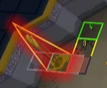
anyone know which plugin makes hovering over sceneary highlight it like this? https://imgur.com/vdJnuNy i downloaded a bunch of plugins yesterday... im not sure what did it
 remote tiger
Sorry if this is the wrong place to ask, probably a stupid question, but I'm developing a basic plugin that is only enabled when you enter a certain region. One of them is the fortis colosseum, the issue is everytime I go in it has a different region ID.. What's the best way to achieve this, do I have to get all the possible region IDs.. or is there another way?
charred wind
remote tiger
Sorry if this is the wrong place to ask, probably a stupid question, but I'm dev...
Pluginhub dev questions are better suited for #runelite but try getting your region ID like this:
public int getCurrentRegion()
{
return WorldPoint.fromLocalInstance(client, client.getLocalPlayer().getLocalLocation()).getRegionID();
}
That might be wrong but it’s in one of my plugins and it works :)
remote tiger
Thanks I'll test that out 🙂
 next bronze
Anyone recognize this chime? Audio mixer shows RL as the source, and I want to shut off whichever plugin it is.
viscid lantern
custom sounds plugin
ornate kite
How do I get rid of this horrible green?
 next bronze
viscid lantern
custom sounds plugin
next bronze
viscid lantern
custom sounds plugin
I should have guessed it had sound in the title >.> thank you!
 pulsar pawn
https://youtu.be/OaKLvhvGZgA Does anybody recognize what this sound was? it kept randomly chiming during my raid and was sometimes freezing my computer too. It was 10000% runelite because I could cut it off mid chime if i muted only runelite, tried it with other sounds and it wouldnt mute it
 next bronze
pulsar pawn
https://youtu.be/OaKLvhvGZgA Does anybody recognize what this sound was? it kept...
next bronze
pulsar pawn
https://youtu.be/OaKLvhvGZgA Does anybody recognize what this sound was? it kept...
Check my post a few minutes ago, seems like Custom Sounds plugin is having problems. It was lagging my client bad, too.
pulsar pawn
next bronze
Check my post a few minutes ago, seems like Custom Sounds plugin is having probl...
ty
oblique plume
looks like the settings are fine here
 small yacht
Was messing around a little bit and moved the ".runelite" folder to desktop because I wanted easier access to some of my screenshots, but I launch up runelite through the jagex launcher now and it seems to have resetted my settings and plugins to default so I would have to turn all qol changes all over again, the timers to my birdhouses and farms are gone and some stuff from my loot trackers is gone as well.
don't suppose there's anyway to revert this is there?
viscid lantern
close runelite and move the .runelite folder back
solid mesa
You can also right click the screenshot icon to open the screenshot folder. Or make a desktop shortcut to C:\Users\username\.runelite\screenshots
 little loom
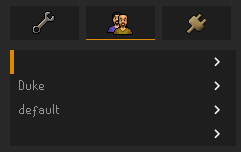
Not sure if this is the place to post it, I closed my runelite clients & re opened, for some reason my runelite profile page looks like this now & I cannot load plugins on both the profiles I use https://i.imgur.com/fzalXsU.png
 haughty pumiceBOT
small yacht
haughty pumiceBOT
small yacht
the embarrassing thing is is that I don't know where it came from in the first place, I used the search bar in my folders to look up my RSN to get to those screenshots, saw it came from the .runelite folder, and dragged it out onto my desktop. I think I see it goes into my C:/Users/myname/app data, etc etc and see several runelite folders there too but not sure which one to put it back into
solid mesa
It goes in C:\Users\username\.runelite\ not appdata
small yacht
ooh got it! I saw it had a same file but I just had to drag the one from my desktop back into there to get all my info back, thank you!
 peak junco
Hello, i'm getting the following error when i try to launch runelite:

i tried looking for it oon google, but found nothing
zealous cedar
looks like a certificate error
peak junco
Any idea how i could fix it?
zealous cedar
maybe use a different network?
peak junco
i'm trying to run runelite on my work laptop but don't have admin priviliges
could that be the reason?
mossy swan
yes it's very likely they block video games and/or entertainment
peak junco
yeah forticlient probably
 dreamy granite
Hey, my runelite client keeps crashing, while taking up 100% of my cpu. Any things I can do?
charred wind
!logs
haughty pumiceBOT
To find the logs, you can do one of the following:
- If your client failed to open, click the
Open logs folderbutton. - Open the screenshot directory by right-clicking 📷
Camerabutton, navigate 1 directory up, then open logs folder. - Navigate to
%userprofile%\.runelite\logson Windows or$HOME/.runelite/logson Linux and macOS.
Upload the log files named client and launcher by dragging them to Discord. If there are files prefixed with jvm_crash dated from today, upload them too.
dreamy granite
haughty pumiceBOT
@dreamy granite Many plugins from the pluginhub break the client in subtle or not-so-subtle ways, including causing issues like client freezes. We do not support pluginhub plugins because we do not make or quality control them, and do not recommend their use.
Run the RuneLite (safe mode) shortcut, or with a Jagex account, first run the RuneLite (configure) shortcut and tick the Safe mode box, then launch RuneLite via the Jagex launcher.
This temporarily disables the GPU plugin and all hub plugins which will allow you to confirm the issue is caused by one of those plugins and isn't a core RuneLite issue.
If the issue is caused by a hub plugin, you should isolate which plugin it is and then uninstall the plugin.
charred wind
also launcher.log might be helpful
charred wind
that safe mode recommendation is just to diagnose if there's a plugin causing this problem
charred wind
haughty pumice
To find the logs, you can **do one of the following**:
- If your client failed t...
same place you found client.log
charred wind
in the bank?
 pallid orchid
yes
charred wind
when is the last time you restarted the game
charred wind
enable the extra options in the bank interface
pallid orchid
is that in game settings or runelite?
pallid orchid
ok it is working thank you
how come it changed from before used to be able to just set to placeholder
leaden trail
Jagex, basically
pallid orchid
because with this set up now it just placeholds everything
ok thanks hope they change it
dreamy granite
Hey support team, I have come to realize others are having problems on runelite when going through the monkey madness 2 caves. Others are getting client crashes like me. Someone posted on reddit 3 days ago about it https://www.reddit.com/r/2007scape/comments/1jw4wjm/bug_monkey_madness_2_cave_traps_cause_client_to/

Reddit
Explore this post and more from the 2007scape community
gilded kayak
yes we are aware of it but you did not say anything about mm2 caves
we could have told you the issue immediately, if you did
dreamy granite
just letting you know I didn't realize that woulda been the issue
 sinful pulsar
Is there any reason why Runelite would be randomly deleting my profiles almost everytime I open the app? I keep importing old ones but they're super outdated and my current ones refuse to save.
leaden trail
The last part of that might be file permissions issues.
Are you force powering down your computer or sleeping it with the client open regularly or anything like that?
sinful pulsar
leaden trail
The last part of that might be file permissions issues.
Are you force powering ...
Are you replying to me?
If so, yeah I force power down quite often
round jacinth
Runelite would like to turn off properly instead being forced quit like a sudden power outage happened
Most applications are that way, even hardware
sinful pulsar
I get that but would that really be the reason why my profiles are fucking up? I've force shut down my computer for years but this is a recent issue
round jacinth
it could be in the middle of writing to disk or something
It’s a bad behavior generically lol
leaden trail
We don't entirely understand why it happens but it's almost certainly why you're having the issue
sinful pulsar
So is there a fix?
leaden trail
Close RuneLite before you force power off your computer
sinful pulsar
leaden trail
Close RuneLite before you force power off your computer
I genuinely can't tell if you're being a smartass or not
mossy swan
he is not
leaden trail
No
mossy swan
you should never force power off anyway
leaden trail
You not doing that is why you're having this issue
sinful pulsar
- This has literally never happened in the almost decade I've been using this client.
- I didn't ask why it's happening, I asked for a fix
Are either of you staff here or
solid mesa
You're gonna reported to your manager Unmoon
sinful pulsar
So are you able to answer my question
mossy swan
we have people daily who lose their settings becaues of a power outage or something
leaden trail
The fix is not to do it
mossy swan
yeah, fix is not to choke your computer
sinful pulsar
That's literally not a fix
mossy swan
it might forget things
sinful pulsar
This advice is like contacting a tech support helpline in 2002
mossy swan

sinful pulsar
My bad for assuming y'all might help
mossy swan
okay just so i can be sure what you mean
you hold down the power button to power off your pc?
sinful pulsar
Not every time but yes I do often
mossy swan
you dont select shutdown from the windows power menu, or anything?
jesus fucking christ mate
leaden trail
We're telling you how to not have this issue. If you want to ignore us, you'll keep having the problem, but that's a deliberate choice on your part, not a failure on ours.
sinful pulsar
Why are you talking to me like I'm 65 years old and never owned a computer in my life
sinful pulsar
leaden trail
We're telling you how to not have this issue. If you want to ignore us, you'll k...
I'm not ignoring you, I asked for a fix to an evidently common issue and y'all can't seem to help me
mossy swan
because this is a problem only a 65yo person who has never owned a computer would have
sinful pulsar
leaden trail
We've told you the fix several times
No, you have not. You're reiterated your bullshit point but not provided me with any kind of solution.
mossy swan
you force powering off your pc causes your pc to lose data
that data happened to be runelite config
sinful pulsar
Powering off my PC manually has never affected anything in the decade I've played pc games
Until the last few days
leaden trail
Well you've been lucky and that luck ran out
mossy swan
as i said you've been crazy lucky then
sinful pulsar
It's literally saved via cloud
Idk how my pc being shutdown would affect an online save
mossy swan
if you are using runelite cloud sync that should not lose data, no
sinful pulsar
Plus it's giving me new profiles called default
Which has nothing to do with missing data
sinful pulsar
mossy swan
if you are using runelite cloud sync that should not lose data, no
Yeah well I am brother
Both of my profiles have been cloud synced for years
clear stratus
mossy swan
if you are using runelite cloud sync that should not lose data, no
the cloud sync could surely still be interrupted by a force power i would think
or force power would preempt a cloud sync from happening etc
(i could be wrong)
mossy swan
yes, that would only affect the settings you changed last though
sinful pulsar
clear stratus
or force power would preempt a cloud sync from happening etc
So in theory, that would prevent data being transferred and not change existing data, no?
mossy swan
if your pc doesnt have time to send it to cloud, then it's lost
but thats only the changes, yes
sinful pulsar
So it just so happens that the cloud sync is occuring the split second I turn my pc off
A cloud sync for a probably 15kb file
haughty pumiceBOT
To find the logs, you can do one of the following:
- If your client failed to open, click the
Open logs folderbutton. - Open the screenshot directory by right-clicking 📷
Camerabutton, navigate 1 directory up, then open logs folder. - Navigate to
%userprofile%\.runelite\logson Windows or$HOME/.runelite/logson Linux and macOS.
Upload the log files named client and launcher by dragging them to Discord. If there are files prefixed with jvm_crash dated from today, upload them too.
sinful pulsar
haughty pumice
To find the logs, you can **do one of the following**:
- If your client failed t...
Imagine if you sent this at the start of our conversation
mossy swan
yeah well is now the time for you to be a smartass and have me go away?
mossy swan
aight 
sinful pulsar
Insane service, fuck me for asking for help regarding an apparently insanely common issue that nobody has a fucking fix for
Cheers lads
sinful pulsar
Nah fuck you
gilded kayak
we don't work at microsoft
sinful pulsar
Well then don't fucking run a support group for a game client
gilded kayak
i thought u were leaving
mossy swan
you are free to not use runelite 
clear stratus
people really be wilding out here
fresh cosmos
its fun to watch
clear stratus
insane service
like this is not exactly a paid gig. what series of life events have to occur for your attitude to be that fucked
anyway
viscid lantern
they left, but force powering off their system and then going  when they experience data loss
clear stratus
bUt ItS nEvEr DoNE tHaT iN 10 YeaRS brO
fresh cosmos
brother
school thought me that you always save shit before you shut off your computer
gr1
leaden trail
I can only tell someone the exact way to not have their issue happen so many times, if they want to view it as not a solution that's their decision and makes it entirely their problem 🤷
 verbal tulip
Anyone know which plugin is responsible for making follower/pet options lower in the menu entries? I cant seem to find it
verbal tulip
stone parcel
I think there is an in-game setting for it.
Oh my gosh thanks so much haha
Was driving me insane
 teal ore
yo as of recent i get a pinging sound whenever i get a max hit in game. i dont know how that got there and i wanna turn it off. does anyone know if this comes from a plugin or in game setting? trying to look for it but can't find
oblique plume
Custom sounds plugin
teal ore
oblique plume
Custom sounds plugin
ty got it, is that a recent addition? i never had that before and i was freaking out during wardens core 😛
round jacinth
yeah they decided to add a new sound and made it a default on
 analog meadow
Question. So i imported a couple of bank tag tabs and I scroll to the bottom but their is still more below I can't scroll anymore
Any fixes?

 dry coral
Im doing monkey madness 2 and ive just gone down the trap door and am doing the agility steps in the dungeon, and everytime i fail an obstacle runelite crashes. it even crashes when i climb the vine to leave the lower level
stone parcel
Turn off GPU/117 plugin.
dry coral
ill give it a shot, thx
stone parcel
#support message if curious.
 plain verge
hello im getting client freeze for 1-2 seconds when doing toa, specifically at baba boulders and warden's core if out
haughty pumiceBOT
@plain verge Many plugins from the pluginhub break the client in subtle or not-so-subtle ways, including causing issues like client freezes. We do not support pluginhub plugins because we do not make or quality control them, and do not recommend their use.
Run the RuneLite (safe mode) shortcut, or with a Jagex account, first run the RuneLite (configure) shortcut and tick the Safe mode box, then launch RuneLite via the Jagex launcher.
This temporarily disables the GPU plugin and all hub plugins which will allow you to confirm the issue is caused by one of those plugins and isn't a core RuneLite issue.
If the issue is caused by a hub plugin, you should isolate which plugin it is and then uninstall the plugin.
crisp dune
 royal oyster
No, those can't be made smaller with the fixed viewport. You'd have to use one of the modern viewports to scale the UI up a lesser amount
royal oyster
crisp dune
No, those can't be made smaller with the fixed viewport. You'd have to use one o...
Ok ty
 tawdry badge
anyone know why the "custom overlay message" portion of this plugin keeps resetting every time I close and open runelite? I want there to be no text, but when I open osrs again the ready text is back in the box
it's responsible for this

 charred wind
Probably adds it by default if there’s nothing there. Try adding a space or some other white space character. Might break it idk
Ground items does something similar in hidden items if it’s empty
tawdry badge
trying now
ayy cheers, it's worked!
did an enter as well so idk if it was the space or enter, but it's all good now. Thanks!
 round wave
i cant launch runelite unless i click run as administrator. how do i fix this so i can launch it through the jagex launcher?
 haughty pumiceBOT
@round wave If you got permission problems, open Command Prompt (cmd) as administrator and try executing the following commands while testing if the problem is solved between every step. Make sure RuneLite is closed when executing commands!
mkdir "%userprofile%\.runelite"icacls "%userprofile%\.runelite" /grant:r *S-1-1-0:F /inheritance:r /tattrib -r -a -s "%userprofile%\.runelite\*.*" /d /s
plain verge
im getting this error constantly in the log
what may be the cause of this?
 haughty pumiceBOT
safemode: To enable safemode
Windows
Run the RuneLite (configure) shortcut from the windows start menu
Tick the Safe mode box, save, launch RuneLite the way you normally do.
Mac
In Terminal, run
/Applications/RuneLite.app/Contents/MacOS/RuneLite --configure
Tick the Safe mode box, save, launch RuneLite the way you normally do.
 dire grotto
Not sure if its a rs issue or runelite issue or whats doing it, but every time i try and cross this first stone obstacle on monkey madness 2 runelite freezes and crashes
 gilded kayak
turn off gpu/117
dire grotto
ill try, reloading now
gilded kayak
it's because of a change jagex made on the game update on the 9th, that they are reverting in this weeks game update
dire grotto
Yep that fixed it, ty 🙂
plain verge
where can i find the file that shows which plugins are enabled or disabled?
 teal otter
How do I go on about requesting a plugin to be created?
 summer yoke
so im having some trouble with my runelite profile not saving the plugin changes i make anymore.
i have cloud sync enabled though.
it all went wrong when i was playing around with my profile renaming it to some emojis and the next day it had removed all plugins from my profile. luckily i had a saved profile from a couple of months ago on my usb. but now it seems everytimne i restart it reloads from the same old profile and dosent save my changes.
any idea whats causing thi

old.main is the one that was corrupted and "Main" is the one i backuped
it's also creating new profiles names "old.xxx"
leaden trail
plain verge
im getting this error constantly in the log
what may be the cause of this?
Send the full log
leaden trail
summer yoke
so im having some trouble with my runelite profile not saving the plugin changes...
Post your logs
haughty pumiceBOT
To find the logs, you can do one of the following:
- If your client failed to open, click the
Open logs folderbutton. - Open the screenshot directory by right-clicking 📷
Camerabutton, navigate 1 directory up, then open logs folder. - Navigate to
%userprofile%\.runelite\logson Windows or$HOME/.runelite/logson Linux and macOS.
Upload the log files named client and launcher by dragging them to Discord. If there are files prefixed with jvm_crash dated from today, upload them too.
summer yoke
summer yoke
leaden trail
Post your logs
summer yoke
leaden trail
Post your logs
this one?
leaden trail
Try this
haughty pumiceBOT
If you got permission problems, open Command Prompt (cmd) as administrator and try executing the following commands while testing if the problem is solved between every step. Make sure RuneLite is closed when executing commands!
mkdir "%userprofile%\.runelite"icacls "%userprofile%\.runelite" /grant:r *S-1-1-0:F /inheritance:r /tattrib -r -a -s "%userprofile%\.runelite\*.*" /d /s
leaden trail
Oh wait
Reinstall RuneLite in place from the link in #welcome and run it as admin ONCE
oblique plume
i dont see any issues
summer yoke
leaden trail
Reinstall RuneLite in place from the link in <#432655530352181248> and run it as...
okay ill try that
summer yoke
haughty pumice
If you got permission problems, __open Command Prompt (cmd) as administrator__ a...
but dont do this?
oblique plume
they do the same things
summer yoke
oh okay
oblique plume
you already have the new launcher too
but idk what dura is getting at
because i dont see the issue solved by that to be present in your logs
your log looks fine to me
oblique plume
i dont know what that means
leaden trail
oblique plume
because i dont see the issue solved by that to be present in your logs
Yeah I didn't see the obvious signs but configwriter got angry in the logs a bit so figured it was worth trying, easy enough
summer yoke
okay, so when i boot up runelite, all plugins and changes i made to runelite the day before resets to the one i uploaded
oblique plume
i dont see an imported profile to begin with
summer yoke
in the picture above the logs i show my profiles and explain
the one called old.main is the one that somhow got corrupted and deleted everything
but i had a backup from when i formatted my pc so i used that one, but that dosent seem to save my changes
does that make sense? sorry if im bad at explaining
summer yoke
leaden trail
Yeah I didn't see the obvious signs but configwriter got angry in the logs a bit...
ill try this now
oblique plume
leaden trail
Yeah I didn't see the obvious signs but configwriter got angry in the logs a bit...
thats just shitty hub plugins being shitty hub plugins
oblique plume
summer yoke
but i had a backup from when i formatted my pc so i used that one, but that dose...
it looks like its doing fine in the log you sent, what if you post the client log from the past few days
oblique plume
Renamed profile file main-0.properties to ??????-0.properties lol
Using profile: å??
these must be the emojis youre talking about
summer yoke
ye thats what went wrong i was renaming to emojis haha
was little drunk playing around
xd
oblique plume
i mean this still looks fine to me
are you sure your not interpreting your hub plugins being made terribly with everything not working
like idk change a chat color or something and see if that sticks
summer yoke
i dont know what you mean, but like my settings in the stadard runelite fishing plugin keeps reverting to standard and stuff like that
summer yoke
oblique plume
like idk change a chat color or something and see if that sticks
ok ill try something
oblique plume
your profile very obviously isnt resetting so youre probably just looking at like the one thing that some hub plugin fucks with and think everything is broken
summer yoke
no it isnt resetting
oblique plume
it it was failing to sync i would expect a log about it somewhere
summer yoke
but i keep installing picture in picture plugin and event hider since ive use them now but not when i made the profile
summer yoke
random event hider*
now it saves changes so maybe the stuff @leaden trail told me do helped somehow
Thank you for helping and looking through my logs @oblique plume and @leaden trail, hope that was it this time 🙂
summer yoke
oblique plume
PiP is broken
what is wrong with it ? 😮
summer yoke
damn, one of my faves tho
round jacinth
I think it was written to see if it was possible as a hobby project not because it would work well but maybe I’m wrong lol
summer yoke
its working pretty well for me, but sucks if thats the plugins causing trouble for me lately
round jacinth
Any given hub plugin can be a cause of trouble
oblique plume
It's spamming the logs with garbage
summer yoke
ye and PSA dont make emoji profile names
round jacinth
that’s a sorta a given why would people do that
summer yoke
i just did lol
round jacinth
idk why OS allow it
It’s bad
I’m reading profile as Microsoft name rather than runelite profile
Anyways
summer yoke
oh haha
well runelite dosent like it, and yea i shoud've known, but thats how it goes
leaden trail
Picture in Picture once spammed someone's logs until their drive was totally full, I'd uninstall it lmao
summer yoke
leaden trail
Picture in Picture once spammed someone's logs until their drive was totally ful...
holy shit haha
is there a better alternative?
leaden trail
No
summer yoke
okay, thanks for telling me though
 stiff python
Not too familiar with reviewing github, but was there a requested to review the Timer and Buffs section? if the window is open on runelite - stutters occur in game, minor but very annoying
i also suspect theres not too much that can be done, since that timer/buff plugin fundamentally runs on it's own timer, and i think that's the problem.
maybe if the timer can be adjusted to "check" for farming patch updates on farm tick cycle? not familiar with feasability though, i might be way off lol
haughty pumiceBOT
Graphical artifacts? Try disabling hardware acceleration: https://github.com/runelite/runelite/wiki/Disable-Hardware-Acceleration
leaden trail
It might be that
stiff python
@leaden trail is that for me or the previous convo?
leaden trail
You
stiff python
ok ill give it a shot and follow up brb
leaden trail
Stuttering with the sidebar open is usually that
stiff python
disabling via configure will work with jamflex launcher too?
haughty pumiceBOT

FJDevelopment
Type
Crash or hang
Operating System
Windows
...
stiff python
ok great yeah that seems to have fixed it up, weird shit lol, thanks guys!
round jacinth
are you in mm2 tunnels?
round jacinth
because it's crashing if you have gpu/117 on
so turn it off
jagex broke mm2 on april 9th
 dim bone
that explains it lmao
Ty big help
wait what do i do if the game freezes when i turn gpu off
round jacinth
have it be off when you're there, so turn it off before you even login
round jacinth
!safe you can maybe make it toggled off while in safe mode (even though gpu/hub plugins dont turn on in safe mode)
haughty pumiceBOT
safemode: To enable safemode
Windows
Run the RuneLite (configure) shortcut from the windows start menu
Tick the Safe mode box, save, launch RuneLite the way you normally do.
Mac
In Terminal, run
/Applications/RuneLite.app/Contents/MacOS/RuneLite --configure
Tick the Safe mode box, save, launch RuneLite the way you normally do.
dim bone
ah
leaden trail
Yeah the freeze on toggling is a GPU driver thing I believe
 frail terrace
does anyone happen to know what plugin this is?

(i'm trying to change the threshold)
viscid lantern
pickpocket guardian?
frail terrace
oo yah tyvm
had mine set to 3 and died a couple times still from afking 😛
upped to 5:)
charred wind
Time to require plugins to identify themselves in chat messages
 quiet vapor
gameval/ItemID.java
has a lot of duplicates with different ids for the same item. I want to mimic ItemID.POH_FLATPACK_FANCY_DRESS_BOX3 behavour, how do I know which one it gets?
`gameval/ItemID.java
public static final int POH_FLATPACK_FANCY_DRESS_BOX3 = 9867;
public static final int POH_FLATPACK_FANCY_DRESS_BOX3 = 9892;
public static final int POH_FLATPACK_FANCY_DRESS_BOX3 = 15032;
`
Thanks!
 pseudo dragon
Hey, is there somewhere a guide to increase FPS for Runelite?
solid mesa
quiet vapor
gameval/ItemID.java
has a lot of duplicates with different ids for the same ite...
You'd have to check yourself with Identificator or see if there is more info on the wiki about the objects.
https://chisel.weirdgloop.org/moid/item_id.html#9867,9892,15032
Seems like only 9867 is used?
solid mesa
pseudo dragon
Hey, is there somewhere a guide to increase FPS for Runelite?
GPU on, unlock fps on, vsync off, compute shaders on, minimize other plugins
 tribal adder
Hi, I've logged in OSRS for the first time in a couple of months and my RuneLite account isn't showing any of my plugins or notes etc, it's as if I'm on a brand new account. Any ideas how to load my account back in to get plugins back? Thanks!
haughty pumiceBOT
tribal adder
sorted thanks 🙂
viscid lantern
quiet vapor
gameval/ItemID.java
has a lot of duplicates with different ids for the same ite...
item, itemnote, placeholder:
ItemID.POH_FLATPACK_FANCY_DRESS_BOX3;
ItemID.Cert.POH_FLATPACK_FANCY_DRESS_BOX3;
ItemID.Placeholder.POH_FLATPACK_FANCY_DRESS_BOX3;
#runelite would be a better place for this question btw.
 vernal badger
Hello, my RuneLite started crashing frequently today, will a fresh install resolve this?
stone parcel
Are you in the mm2 tunnels?
vernal badger
Yes
stone parcel
Turn off gpu/117 plugins.
stone parcel
NP 😁
"it's because of a change jagex made on the game update on the 9th, that they are reverting in this weeks game update"
 raven beacon
RL on mac, sometimes my clicks are acting as though alt (option) is held down, as in, my clicks are turning the camera, not actual yellow clicks
oh extra note, this doesnt happen when i have external keyboard and mouse plugged in
solid mesa
Sounds like maybe your internal keyboard has an issue
If you go to this website do you see Alt keyboard events?
 raven beacon
do i just open the webpage and leave it there for a minute or so?
solid mesa
Yea I would
raven beacon
yes this seeems to be showing alt right is being pressed when it is
isnt*
happens occasionally when i lightly brush the key
solid mesa
Yep seems like you've got a bad keyboard
raven beacon
would it be worth trying to remove the keycap to clean?
solid mesa
🤷♂️ That's up to you
solid mesa
Is it under warranty? Take it to apple
raven beacon
it's definitely under warranty but i didnt buy it direct from apple
i've downloaded karibiner which allows me to disable just the right option key ! thanks for the tip on the key event viewer
thorny fractal
thorny fractal
Hello everyone, I’ve ran into an unusual issue that started this weekend. Whenev...
It looks like this is happening again unfortunately. 😦 Not quite as often, but started up again today.
Recap: RuneLite is causing my PC to drop connectivity. It is not happening on the Jagex client or on mobile, but any sort of screen transition (teleporting somewhere, stepping into a new area that has to load like doors leading to DT2 bosses, etc) is causing connectivity loss. If I close RL after connectivity drops, everything comes back like normal.
And this is with World Hopper plugin turned off.
stone parcel
Just curious, is it only your PC that loses connection, or all devices connected to the router?
thorny fractal
Just my PC I'm pretty sure, but let me test and I'll update here.
 somber hawk
can anyone help me out, runelite keeps crashing and i have no idea why, i normally never have issues running chrome with runelite and even streaming on discord but for some reason with only runelite open it keeps crashing
oblique plume
does it happen in safemode
haughty pumiceBOT
To enable safemode
Windows
Run the RuneLite (configure) shortcut from the windows start menu
Tick the Safe mode box, save, launch RuneLite the way you normally do.
Mac
In Terminal, run
/Applications/RuneLite.app/Contents/MacOS/RuneLite --configure
Tick the Safe mode box, save, launch RuneLite the way you normally do.
leaden trail
somber hawk
can anyone help me out, runelite keeps crashing and i have no idea why, i normal...
Are you in mm2 tunnels?
somber hawk
yes
leaden trail
Disable GPU and 117
somber hawk
can i ask why that is?
round jacinth
jagex broke mm2
leaden trail
It's a known issue from Jagex, should be fixed next game update
somber hawk
ahhhh i see thanks for the help
thorny fractal
stone parcel
Just curious, is it only your PC that loses connection, or all devices connected...
Left is constant ping from my PC where RuneLite is running, right is my Mac Mini. It looks like it's just my PC dropping during the transitions.
 stone parcel
Does it happen in safe mode?
haughty pumiceBOT
To enable safemode
Windows
Run the RuneLite (configure) shortcut from the windows start menu
Tick the Safe mode box, save, launch RuneLite the way you normally do.
Mac
In Terminal, run
/Applications/RuneLite.app/Contents/MacOS/RuneLite --configure
Tick the Safe mode box, save, launch RuneLite the way you normally do.
thorny fractal
It does not happen in safe mode it looks like.
gilded kayak
if your issue doesn't happen in safe mode that would suggest something from the hub is violently shitting itself
as safe mode disables all the plugins from the 
thorny fractal
😦 Lol. I haven't changed anything recently. Are there error logs or anything I could check inside of Runelite to maybe narrow down where it might be happening?
gritty dust
Hi RuneLite, is it possible to link a Google account or any other account to a jagex launcher account so it can be logged in to runelite without using jagex launcher?
gilded kayak
thorny fractal
😦 Lol. I haven't changed anything recently. Are there error logs or anything I ...
!logs
haughty pumiceBOT
To find the logs, you can do one of the following:
- If your client failed to open, click the
Open logs folderbutton. - Open the screenshot directory by right-clicking 📷
Camerabutton, navigate 1 directory up, then open logs folder. - Navigate to
%userprofile%\.runelite\logson Windows or$HOME/.runelite/logson Linux and macOS.
Upload the log files named client and launcher by dragging them to Discord. If there are files prefixed with jvm_crash dated from today, upload them too.
gilded kayak
gritty dust
Hi RuneLite, is it possible to link a Google account or any other account to a j...
no that wouldn't make sense, Jagex has your account you need to use their flow
google does not have access to your OSRS account
gritty dust
Ahww I thought maybe same as steam
Since ur able to link a Steam account to a jagex account and login using steam
gilded kayak
if you could play osrs through the google games launcher then I guess maybe, but no
the steam thing is an official partnership between Jagex and Steam
gritty dust
I wanted to give someone access to one of my accounts which is Linked to my JL
gilded kayak
that seems like a great idea
gritty dust
But that would result in him having access to all accounts haha
Well it would be if it worked
But that's not possible beside linking a steam to it and forcing him to use steam client
Well if there's made fun of in the runelite discord it self I'll ask elsewhere thanks anyway!
thorny fractal
haughty pumice
To find the logs, you can **do one of the following**:
- If your client failed t...
gritty dust
Try to disable GPU plugin
thorny fractal
It's working without the GPU plugin, dang. Lol
oblique plume
i do not expect the gpu plugin to cause network instability
thorny fractal
What's the difference between GPU and GPU Experimental? Would I be able to use the latter instead?
gilded kayak
gpu experimental has sailing changes
i did not suggest it since I was thinking "if my GPU was causing my internet to die I'd just go walk into the woods"
thorny fractal
I have no idea why but that does seem to be the issue. Rj, what made you decide on disabling GPU? I turned it off and it's loading just fine on transitions now but if I turn it back on it drops again.
gilded kayak
 thorny fractal
I could probably do a screen recording for proof if needed but with it off everything is working.
gilded kayak
they read the very first error in your logs
thorny fractal
I did see that but skipped over it because it doesn't make sense as to why my computer drops full connectivity.
gilded kayak
I also skipped over it
gilded kayak
gilded kayak
i did not suggest it since I was thinking "if my GPU was causing my internet to ...
.
thorny fractal
I figured it would be another plugin that actually makes calls like wikisync, etc.
Well that's crazy. Do I have any troubleshooting/fix options?
Other than leaving it off I mean. I know that fixes it but it looks so bad without it. 😦 lol
solid mesa
Do you have a jagex account? Are you using the jagex launcher?
oblique plume
gilded kayak
this is just what you get if you force close the client sometiems
gilded kayak
yeah but the question is "why did that guy suggest it was the GPU plugin"
that was the answer
round jacinth
go to their website and download their launcher
 serene kayak
I seem to have lost my main plugin profile and the client has defaulted to the only other one available (another manually saved one from 6 months ago) Anyone got an idea what might have happened?
haughty pumiceBOT
serene kayak
Think that solves it (importing the profile back into the client), thank you @round jacinth idfk what happened though
gilded kayak
 idle solar
can sum1 send the client
idle solar
can sum1 send the client

Old School RuneScape
If you're a RuneScape veteran hungry for nostalgia, get stuck right in to Old School RuneScape. Download and re-live the adventure.
round jacinth
no, you can lanch runelite from jagex launcher as every instructional says
gilded kayak
no you're going to download the launcher like everything in 2025
like the origin* launcher
idle solar
ye my english rlly bad srry
round jacinth
serene kayak
Think that solves it (importing the profile back into the client), thank you <@1...
the previous user who had this issue was happening because they choke their computer until it power off (pulled plug/held down power button) so their configs broke
gilded kayak
and some other annoying 2025 games launchers
round jacinth
but generically if you're not doing that no, we don't know why
serene kayak
round jacinth
the previous user who had this issue was happening because they choke their comp...
I literally did that 15 mins ago so that's it for me too
serene kayak
appreciate the troubleshooting!
thorny fractal
thorny fractal
Well that's crazy. Do I have any troubleshooting/fix options?
So for this, is this a RuneLite thing or is this something I need to look at my GPU for?
round jacinth
the gpu shouldn't be causing connection problems, the person who suggested that as a fix literally only read the first line of your entire logs and said that's what to do i think
idle solar
gilded kayak
https://oldschool.runescape.com/launcher
well im dumb i guess i dled 4 times this but nothing hapen now rip
round jacinth
can you elaborate on "nothing happens"
i think your internet is just dropping and it's likely not runelite
(for erreth)
thorny fractal
That's the thing. I can recreate the issue immediately by launching RuneLite and playing whereas it has zero issues on anything else.
Jagex client is fine, streaming services are fine. I work remote connecting to a Citrix VDI all day for work, and it's fine.
round jacinth
you lost connection to cloudflare's dns even in your ping check
thorny fractal
I am happy to take screenrecordings or whatever you need to show connectivity is fine until some sort of transition happens in RL. I can reproduce it every time by launching RuneLite. It's even working in Safemode without issue.
round jacinth
if safe mode works without issues then runelite itself is not causing the problems but instead a hub plugin is causing it
or gpu plugin is but i don't think it's gpu
you can check if it's gpu by making a fresh profile and only having gpu on
idle solar
meh nvm i cant get it im trying for along time now and still says i got no account when i made one
oblique plume
could it just be your gpu itself is causing it
idle solar
god damn
oblique plume
like if you run some gpu benchmark does it cause soem problems
thorny fractal
Do you have one you'd like for me to try? I play other games too like FFXIV and Warframe (both recent) without connectivity issues.
I will create a second profile in RL to test the plugin though.
thorny fractal
Well, the fresh profile is working just fine weirdly enough. I think I might just consider this an opportunity to start fresh and call it a day lol.
round jacinth
!flow or do a search to figure out which hub plugin is causing issues
haughty pumiceBOT
flowchart: Please refer to this flowchart for further troubleshooting.
thorny fractal
I have too many plugins to sift through on the old profile, it's not worth digging through every custom setting.
 limpid galleon
Hey guys i'm new to discord don't know discord etiquette. I'm having issues w/ Runelite for the first time, on a Macbook Pro. The computer is not very old, and my internet seems to be fine.
I'm lagging constantly in CG. Causing deaths at Hunleff v frustrating.
Restarting my computer seems to help sometimes, sometimes it does not. I've tried uninstalling and re-installing Runelite. That seems to help only temporarily, then it is struggling again on subsequent startups. I noticed something odd happening where when I clicked the Runelite app, it was opening multiple icons at once on my dock.
I would love to try a full uninstall, but I'm not very computer savy. I dont think i'm FULLY uninstalling it, because it still seems to remember all my plugins etc every time i reinstall.
oblique plume
does it happen in safemode
haughty pumiceBOT
To enable safemode
Windows
Run the RuneLite (configure) shortcut from the windows start menu
Tick the Safe mode box, save, launch RuneLite the way you normally do.
Mac
In Terminal, run
/Applications/RuneLite.app/Contents/MacOS/RuneLite --configure
Tick the Safe mode box, save, launch RuneLite the way you normally do.
limpid galleon
Have to go pick up from daycare. I will try that tonight -- appreciate the suggestion. I'll circle back to here and let you know. Have a good one!
round wave
haughty pumice
<@1361201977375330345> If you got permission problems, __open Command Prompt (cm...
i tried running each command and then opening runelite and not a single one worked. any other ideas?
 solid mesa
You did not open command prompt as administrator

 solid mesa
That says 91 successful 0 failed
 gilded kayak
click the open logs folder button and drag launcher.log into this discord
mossy swan
inb4 onedrive
round wave
C:\Users\amaro.runelite\logs
round wave
not sure how to copy a file here, sorry im not very tech saavy lol
gilded kayak
left-click & drag it in
round wave
is this it?
gilded kayak
yes
round wave
okay cool
haughty pumiceBOT
run this command in cmd, then show us the displayed output through a screenshot.
"%localappdata%\runelite\runelite.exe" -c -v --console -- --debug
do this instead
don't use the terminal you already had open, open a new one non-admin
 gilded kayak
that means you runelite is not installed in the default location for some reason
round wave
okay.. what do i do to fix this?
gilded kayak
can you left-click & drag the runelite shortcut into this command prompt window
it will automatically fill it with the correct path
and then paste in
-c -v --console -- --debug
into command prompt, not discord, but yes
round wave
as admin or non admin?



 round wave
runelite actually tried to launch that time but still getting error
 gilded kayak
can you post that same launcher.log file as before, it should have the new logs in it
actually I guess I can see like every file has incorect permissions
round wave
here it is
stone parcel
I don't suppose this is related to the McAfee in the desktop screenshot is it?
viscid lantern
when in doubt, its mcafee 
round wave
so can i get rid of mcafee?
mossy swan
yes
viscid lantern
windows defender does its job just fine
leaden trail
Not only CAN you get of McAfee, you really SHOULD get rid of it
round wave
lol i just got this laptop yesterday specifically for runescape and now im dealing with all this rip
mossy swan
at least its not norton
round wave
do i just uninstall the app or do i need to do some extra?
round jacinth
may need to google how to uninstall it if it's not as simple as just uninstalling it through their own uinstaller
viscid lantern
I think windows will realize you uninstalled it and take over on its own 
 willow rock
has anyone been having issues w runelite crashing after just a minute of gameplay?
oblique plume
mm2?
willow rock
when i do the game is frozen until i turn it back on
been like that for a while not just at the cave
gilded kayak
if your game freezes when you turn gpu/117 on/off that's a different issue
willow rock
the chances of this being a bug only when i finally get around to doing mm2 is awesome
yea ik lol
gilded kayak
some driver versions have that problem, this mm2 specific thing is because of a recent game change
willow rock
alr lemme log in and leave the cave so i can work on that
round wave
okay ive fully deleted mcafee from my computer, now how should i go about trying to fix runelite lol
gilded kayak
now from the logs folder from before, click your username in the top bar
 willow rock
yea and i just did a driver update as soon as i started having problems
gilded kayak
scroll down and find the .runelite folder, then rename it to .runelite-old or something, like my screenshot example, from last august when I instructed someone to do the same thing, or you could delete it if you haven't yet played on this computer

then try opening the client again, letting it re-generate the file without any antivirus interference
oblique plume
not in admin mode
gilded kayak
willow rock
the chances of this being a bug only when i finally get around to doing mm2 is a...
and xd
willow rock
would just uninstalling 117hd be a bad idea
gilded kayak
u can uninstall any plugin from the hub whenever u want
but to get past the log neither 117 or GPU can be enabled
viscid lantern
I think that would actually fix your current issue yeah
uninstall 117, if it freezes just restart and the plugin will be gone already
then finish mm2 and then install it again
willow rock
yea i have to either have gpu or 117hd active to be able to do or interact w anything or like move the camera lol
music and everything is still fine its not like a full freeze
lemme try uninstalling gpu
i cant uninstall gpu
viscid lantern
gpu is core so thats correct
I would just turn them off and restart your client and go from there
viscid lantern
kinda a shot in the dark but if that doesnt work and you cant interact with the game you can try this:
haughty pumiceBOT
Graphical artifacts? Try disabling hardware acceleration: https://github.com/runelite/runelite/wiki/Disable-Hardware-Acceleration
willow rock
ok i think were chillin
everythings running fine
ok real talk tank path or agility path for mm2
oblique plume
everyone does agil afaik
round wave
finally got runelite running through jagex launcher, ty everyone for your help
 tardy bridge
is sound swapper banned in vards region?
 frank zephyr
Anyone know of any issues regarding to runelite freezing every 30s for a tick or 2?
solid mesa
tardy bridge
is sound swapper banned in vards region?
Not that I can see from quickly reading the code
 final axle
frank zephyr
Anyone know of any issues regarding to runelite freezing every 30s for a tick or...
final axle
frank zephyr
Anyone know of any issues regarding to runelite freezing every 30s for a tick or...
Maybe some of your cheats causing it 
tardy bridge
solid mesa
Not that I can see from quickly reading the code
oo i'll try it because jagex' accessibility change made another
frank zephyr
final axle
Maybe some of your cheats causing it <:thinkderp:313888236608946176>
I just upgraded pc & resetted windows, but copied my old runelite folder over to have exact same settings as when I last played, wondering if that's the issue
tardy bridge
so unless annoyance mute doesn't work in vard idk how am finding this sound ID
tardy bridge
i have it open
gilded kayak
there's 107 sound IDs for vardorvis on the wiki so i'm absolutely* certain one of them is the one u want
i like bleed_start right in the middle of all the dt2_vardorvis_ sound ids
good one jagex
tardy bridge

trust me i am looking
inputting sound ids im HOPING is the correct one for the sound i'm lookingh for
gilded kayak
well when does the sound play
does it happen when he wacks you with his tentacle, because that's probably dt2_vardorvis_tentacle_...
tardy bridge
i mean i can record a clip if you wanna try cypher what sound i'm trying to figure out
gilded kayak
i asked because they have names based on their mechanic
so saying "it's when he spawns the head" would easily cut the list down to all the of dt2_vardorvis_head_scream... options
tardy bridge
i've tried all the dt2_vardorvis_head_scream and the head still plays
the ranged attack noise
so either jagex using a sound else where that's the same but older, or annoyance mute doesn't work in vard
gilded kayak
or they named it wrong
maybe u will have to try all of them
i based what i said of assuming the sounds are all named correctly, but that's probably not true
tardy bridge
knowing jagex it's not
gilded kayak
yeaaaaaaaaah
tardy bridge

duke has it, but vard doesn't?
because ngl i'm not tryna guess what's playingh within this
moment axes start spawning it's over trying to figure out whats waht
gilded kayak
maybe this is a work backwards approach
put all of the IDs in annoyance mute and just remove them until you hear it again
that way you can do kills without the sound, instead of kills with the sound
tardy bridge
yeah feel only issue when i find it, i have to find the awakened mage head, because they added that way after awakened bosses as on release it played the same sound
but the new sound is almost not audible
jagex doing one "accessibility" feature and creating another
:classic:
gilded kayak
fwiw this list is from feb 26th 2025 so it's almost certainly on here
tardy bridge
yea, just finding it
round jacinth
You can play sounds on demand if you know the id using instant notify plugin
tardy bridge
none of the vard sound IDs are linked to that range attack noise :)
i give up lmfao
ty tho
 sonic idol
gilded kayak
if your game freezes when you turn gpu/117 on/off that's a different issue
sonic idol
gilded kayak
if your game freezes when you turn gpu/117 on/off that's a different issue
i had to turn off both. they freeze my game.
limpid galleon
oblique plume
does it happen in safemode
So first run in safemode I didn't have any lag. I'm going to do more testing because the issue has been hit or miss. Does that tell you something if it is not happening in safe mode?
Does safe mode prevent the use of certain plugins because i noticed the gauntlet plugins are gone
leaden trail
safe mode temporarily disables hub plugins and GPU
limpid galleon
does that mean if I'm lagging while not in safe mode one or more of the plugins I'm using is the culprit?
solid mesa
Yes
limpid galleon
I had already tried enabling low detail, reducing draw distance and that had not solved it prior
solid mesa
It's most likely hub plugins
limpid galleon
is there a way to "factory reset" my runelite to start fresh w/o hub plugins? Or does manually uninstalling accomplish the same thing
solid mesa
This will show all your hub plugins
 solid mesa
limpid galleon
is there a way to "factory reset" my runelite to start fresh w/o hub plugins? Or...
solid mesa
limpid galleon
is there a way to "factory reset" my runelite to start fresh w/o hub plugins? Or...
Make a new profile
limpid galleon
i can do that w/ same rsn i assume?
solid mesa
Yes
limpid galleon
ok tyvm i will try that
solid mesa
Just click the  icon then New Profile
limpid galleon
got a cg kill in safe mode w/o plugins for the first time. feel like that should be a combat achievement 🤣
got stomped a few times
 nova sphinx
Hi! My client lags when I open the bank or withdraw an item from it
leaden trail
try safe mode
haughty pumiceBOT
To enable safemode
Windows
Run the RuneLite (configure) shortcut from the windows start menu
Tick the Safe mode box, save, launch RuneLite the way you normally do.
Mac
In Terminal, run
/Applications/RuneLite.app/Contents/MacOS/RuneLite --configure
Tick the Safe mode box, save, launch RuneLite the way you normally do.
nova sphinx
Whats the difference for safe mode?
leaden trail
so the problem is almost certainly a hub plugin you've installed
nova sphinx
okay ill look around, Thank you!
 slender rain
how do i remove a jagax account login from base runelite that isn't being launched from the jagax launcher
solid mesa
Your cheats configured it to do that
limpid galleon
I know this is just a support discord but I have to let you know that I got enhanced 2 chests after your help so tyvm