#support
1 messages · Page 75 of 1
 fossil summit
 round jacinth
Sir this is Support please reframe from jokes here
 turbid owl
Logged in just now (was playing early with no issue) and noticed all my settings are back to default
round jacinth
!lost
 haughty pumiceBOT
round jacinth
haughty pumiceBOT
round jacinth
You probably changed profiles or something, that link should help.
turbid owl
I'll take a look there. Thank you!
Problem solved! I found the most recently used profile in the runelite settings. Strange though, I didn't do anything differently when I signed off RS earlier
Thanks again ron, and cute pups on your profile banner 🙂
round jacinth
Thank you 🙂
 leaden granite
Have anyone noticed that the idle notifier setting movement is acting strangely? My settings are setup to 6 seconds delay but currently movements idle notifications are pushed to my client after like 30-45 seconds

Never had this issue before today
 gilded kayak
pushed to your client or pushed to windows
 gilded kayak
if you enable game message notifications are the notifications timestamped way before you got the notif
leaden granite
Let me check
Doesnt look like I give any timestamps but I took a video of it. It literally took about a minute to get notified
Pretty boring video but it shows the issue
gilded kayak
if you click the ⚙️ next to idle movement notifications what comes up
leaden granite
 gilded kayak
mmm
can you install identificator from the hub, toggle on show overhead info and make sure show player animation id is on
and tell me what P: ### it gets when you stop moving
just to be sure this isn't some special idle animation* only in trouble brewing
and nobody knew about it since nobody does this game
leaden granite
I did this minigame for the past few weeks and it used to work jsut fine. Only today it started acting weird
But I'll try do to what u wrote
gilded kayak
if it worked fine before then we can probably skip this
and just cut right to safe mode
!safe
haughty pumiceBOT
safemode: To enable safemode
Windows
Run the RuneLite (configure) shortcut from the windows start menu
Tick the Safe mode box, save, launch RuneLite the way you normally do.
Mac
In Terminal, run
/Applications/RuneLite.app/Contents/MacOS/RuneLite --configure
Tick the Safe mode box, save, launch RuneLite the way you normally do.
leaden granite
Restart RL?
gilded kayak
ye whenever the game ends close the client and open it in safe mode, via those instructions
gilded kayak
indeed
leaden granite
How the fuck lol
gilded kayak
hub quality™️
leaden granite
Just reopened the client without safe mode on and now it works again
I have no idea what happened lol
gilded kayak
somtimes safe mode gives hub plugins the smacking they need
 viscid lantern
or maybe your client was open for a long time giving a hub plugin enough time to implode 
gilded kayak
ye
leaden granite
Opened up the game about 5-6 hours ago but got no idea
It works now - me happy :p
 bitter prairie
Hi all, is anybody here experiencing game freezes every after boss kill? I got my runelite and jagex launcher reinstalled but still had the same problem
haughty pumiceBOT
safemode: To enable safemode
Windows
Run the RuneLite (configure) shortcut from the windows start menu
Tick the Safe mode box, save, launch RuneLite the way you normally do.
Mac
In Terminal, run
/Applications/RuneLite.app/Contents/MacOS/RuneLite --configure
Tick the Safe mode box, save, launch RuneLite the way you normally do.
gilded kayak
IF your issue manages to happen in safe mode, then try disabling hardware accel instead, the client will clearly say RuneLite (safe mode), then you can try disabling hardware accel
!hw
haughty pumiceBOT
Graphical artifacts? Try disabling hardware acceleration: https://github.com/runelite/runelite/wiki/Disable-Hardware-Acceleration
gilded kayak
but much more likely your issue will not happen in safe mode, and you'll need to go through your  plugins and remove the one causing your issue
bitter prairie
Alright I'll try these out when I get back on pc. Thanks!
 green violet
hello, dont know what else to do as my client freezes randomly or will completely close unexpectedly...
round jacinth
!flow
haughty pumiceBOT
flowchart: Please refer to this flowchart for further troubleshooting.
round jacinth
!logs also share your logs first maybe
haughty pumiceBOT
To find the logs, you can do one of the following:
- If your client failed to open, click the
Open logs folderbutton. - Open the screenshot directory by right-clicking 📷
Camerabutton, navigate 1 directory up, then open logs folder. - Navigate to
%userprofile%\.runelite\logson Windows or$HOME/.runelite/logson Linux and macOS.
Upload the log files named client and launcher by dragging them to Discord. If there are files prefixed with jvm_crash dated from today, upload them too.
 mossy swan
 viscid kelp
APRILF OOL
viscid kelp
APRILF OOL
no adam actually banned you from rl
 sleek ibex
hmmge by RL is weird, when i scroll through my plugins its "smooth" scrolling & when i move my cam with mwheel click it stops moving at some point
it like freezes
round jacinth
Do you have the hub plugin "camera smoothing" on?
round jacinth
I've triedf everything and I am out of ideas.
sleek ibex
wtf
round jacinth
Toggling what?
sleek ibex
nvm, it doesnt, i tabbed in and out and it still does it
i toggled cam smoothing on and then off and it felt like it actually fixed it
round jacinth
You may need to show a video of what you mean
Keep it off and restart client
you said you don't have it and now you do?
sleek ibex
round jacinth
you said you don't have it and now you do?
i turned it on and then off to see if the "smooth scrolling" through my plugin list still persists and it felt like it fixed it, which i temporarily did, but tabbing in and out made it reoccur.
 austere birch
hi, i was pickpocketing vyres and 2 blood shards dropped on ground due to full inv.... this resulted in the loot tracker not tracking the drop. is there any way to adjust the tracker?
round jacinth
austere birch
hi, i was pickpocketing vyres and 2 blood shards dropped on ground due to full i...
No
austere birch
damn actually??
 oblique plume
cant you not pickpocket if your invent is full
austere birch
yes u can i can show proof
round jacinth
sleek ibex
i turned it on and then off to see if the "smooth scrolling" through my plugin l...
I don't know what you have on or off or what you're trying to explain anymore, I asked if a hub plugin was present/on and you said no, that plugin in question has issues that matches what you described. You then said you toggled that plugin on/and off (the plugin you said you didn't have)
show a video
oblique plume
i swear i was pickpocketing gnomes before for something on leagues and hated having to clean my invent all the time to be allowed to
round jacinth
I thought it was the money bags that prevented you from going infinite but i also thought it was loot.
oblique plume
i guess it can be different per npc or just straight changed to not block you anymore
sleek ibex
round jacinth
I don't know what you have on or off or what you're trying to explain anymore, I...
i had it installed but turned off
austere birch
just the money bags
round jacinth
Uninstall it and restart , but also show a vide of what you're trying to describe.
oblique plume
wait, doesnt the loot tracker already check drops on the ground
austere birch
clearly not
oblique plume
since people get empty jugs all the time when ardy knight splashing was big
oblique plume
you tell it per event
but pickpocket does
you could have maybe moved right when it showed up and thats why it wasnt associated to you
regardless you cant edit it anyways
austere birch
why tf it not track just cause it dropped tho
oblique plume
because if it didnt drop under you then it didnt think it got dropped to you
austere birch
it did get dropped under me
but either way the game code should be tied to me pickpocketing the shards
and the loot tracker should catch that
oblique plume
thats not how the loot tracker works
we cant see the game code that gives you drops
we have to watch when happens when you do things
to then associate the action with the thing
sleek ibex
round jacinth
Uninstall it and restart , but also show a vide of what you're trying to describ...
im going to uninstall cam smoothing and restart in check, I didnt record when i toggled cam smooth on&off but i think it was me tabbing in/out actually what causes it
00:00-00:01 no smooth scroll
00:02-00:04 tabbing in and out
00:05-00:10 showcasing the smooth scroll
sleek ibex
yes thats what im saying
round jacinth
im so annoyed now lol
austere birch
so basically im screwed... if i show u proof, can you adjust the tracker on the backend (assuming ur with runelite team?)
round jacinth
there is no way to adjust it
oblique plume
no the loot tracker is uneditable
it doesnt matter anyways
its not used for anything
nor should it be
its just a cool display
austere birch
yeah ik but i just like seeing accurate data
round jacinth
then pickpocket without a full inventory 🙂
oblique plume
play on the jagex client
austere birch
lolol
oblique plume
it uses the actual drop code (probably) to fill their loot tracker
 subtle furnace
Was an update pushed that seemingly wiped all properties? I logged in this morning to a base runelite client and all my settings/properties were wiped
austere birch
all good... runelite is amazing so cant complain off little things like that
haughty pumiceBOT
round jacinth
subtle furnace
Was an update pushed that seemingly wiped all properties? I logged in this morni...
No, we did not on April fools nuke people settings lol
subtle furnace
I know multiple ppl that logged in with issues today
I thankfully had a backup in my profile2 folder but for some reason it override my old property file with a new one
round jacinth
multiple people have that issue every day and they come here and they are given that !lost command link alex provided you
subtle furnace
Gotcha
I was still logged in to my runelite account + the one profile that I use for the record and that did not have my settings
I had to manually fix it in the profile2 folder
round jacinth
 make sure this is toggled in the
round jacinth
otherwise you're logged in for the sake of being logged in pretty much
round jacinth
oh thats right
oblique plume
yea it do be doing that
we dont know why tbh
but you just import the old one back
subtle furnace
Ye I renamed the 379 then renamed the 380 to match the 379
round jacinth
dont rename the files in there lol
like not in that directory just let it exist, and only interact with it through the tab
sleek ibex
i wanna reinstall RL, exported my RL Profile to my desktop, is that the only thing I would need?
round jacinth
just reinstall runelite directly
austere birch
question tho... how does runelite tacker track loot from bosses that drop on ground but not pickpocket?
round jacinth
you do not lose any settings if you reinstall
austere birch
im curious on the code and how it tracks
oblique plume
austere birch
question tho... how does runelite tacker track loot from bosses that drop on gro...
by looking at the ground
austere birch
so how does it not look at the ground when pickpocketing?
round jacinth
and special bosses have special cases like whisperer, titans and araxor
round jacinth
you maybe moved the same game tick it happened so the loot was not in the spot it should've been
in the same way people get scythes in the loot tracker doing araxor or royal titans, they do stuff the same game tick the loot event occurs
¯_(ツ)_/¯
austere birch
i didnt move... ik i was spamming to pickpocket.. so maybe that is why it didnt track
austere birch
round jacinth
in the same way people get scythes in the loot tracker doing araxor or royal tit...
ahhh
round jacinth
Alex is probably right about the moving though
Spam clicking doesn't cause it, if it did it would be fixed, that would be a very silly reason lol
austere birch
i just tested and it is counting the ruby that drops on the ground when inv is full
but yeah mustve moved or something
just wanted to see the root cause... ty guys
 edgy dawn
on the runelite site i can see accs i played on RL acc is there a way to get the login email back i use to have them saved with the profile plugin
 viscid thorn
Not seeing item stats in my bank or inventory in terms of attack and defense boosts. Anyone know a good method to fix this?
 solid mesa
Do you have it turned on for bank and inventory in the Item Stats plugin?
round jacinth
edgy dawn
on the runelite site i can see accs i played on RL acc is there a way to get the...
No
viscid thorn
checking
round jacinth
did you switch computers silesky?
 leaden trail
You can try restarting your client
viscid thorn
ok
leaden trail
Sometimes it fails to fetch it
edgy dawn
round jacinth
did you switch computers silesky?
its been a year or so and reinstalled windows since
round jacinth
so you've been without these emails for a while then
the hub plugin for profile (the one that stored your rsn) would've played it into the ./runelite/profiles folder as a file called profiles.json
if you have your old computer and that spot exists that is your lifeline i think
 high cradle
how do i disable discord/rl overlay
solid mesa
In discord settings
 gilded kayak
wdym by on the app
if you're stuck at that part, your connection to Jagex is probably broken right now
 oak tiger
the phone app was stuck too
gilded kayak
ah then yeah
gilded kayak
you could be in the same area of the world as eachother, wait a few more minutes and see if more people show up
 supple dock
i tried is official client as well, and it wont connect to the server
gilded kayak
i should start keeping score for these ISP issues
we can send out a newsletter at the end of the year, these are the ISPs that had the most issues
 fading jolt
I have an issue where ground items plugin isn't adding items when i press alt and + on the item
its also sometime randomly adding items and notifying me when i drop items
gilded kayak
what "random items" are being added, are they the items from barb assault
fading jolt
no its whatever i have in my inventory but i cant predict it
i can drop a list of any items and sometimes it adds the first one to my notifications but then it doesnt save it under the plugin settings
i have tried to reset the ground items plugin but the only fix has been to use a new profile
but not sure how to transfer all my other plugins to that profile, or if that is even possible
gilded kayak
if it doesn't happen on the new profile, it's probably happening because of one of those plugins you want to transfer
fading jolt
yeah thats what im thinking
gilded kayak
!safe does it happen in safe mode, on the normal profile?
haughty pumiceBOT
safemode: To enable safemode
Windows
Run the RuneLite (configure) shortcut from the windows start menu
Tick the Safe mode box, save, launch RuneLite the way you normally do.
Mac
In Terminal, run
/Applications/RuneLite.app/Contents/MacOS/RuneLite --configure
Tick the Safe mode box, save, launch RuneLite the way you normally do.
fading jolt
let me check
no the plugin works in safe mode on that profile
i kind of recall there was another plugin that interacts with ground items
but i cant remember exactly how
it was the highlight stackables plugin
that was causing my issue
 reef plank
any1 know how to fix this lagg issue when im swapping gears/if i spec bosses its just bopping? https://streamable.com/i77iiw i tried disabeling hardware accel, discord settings (overlay) and other settings on disc, turning plugins off and on etc. it gets mad delayed with specs too. whenever i try to spec the click doesnt register

this happens only on osrs
i tried redownloading runelite as well, no luck
haughty pumiceBOT
To enable safemode
Windows
Run the RuneLite (configure) shortcut from the windows start menu
Tick the Safe mode box, save, launch RuneLite the way you normally do.
Mac
In Terminal, run
/Applications/RuneLite.app/Contents/MacOS/RuneLite --configure
Tick the Safe mode box, save, launch RuneLite the way you normally do.
 crisp dune
If all is fine on safe mode, it is a hub plugin causing your issues
 gilded kayak
go to the runelite website, link in #welcome and run the installer again
or just move the dmg into your applications folder on mac i guess
reef plank
ive tried redownloading runelite, its still the same issue
i still had the same issue on safe mode, not as common as it was on regular runelite
 rocky remnant
has something changed with profiles recently? client freaks out and won't let me swap profiles in dev mode, throws this when i change at first:
2025-04-01 20:26:26 EDT [pool-2-thread-1] ERROR n.r.c.util.RunnableExceptionLogger - Uncaught exception in runnable net.runelite.client.plugins.config.ProfilePanel$$Lambda$3823/0x000000080192e948@9c2c809
java.lang.AssertionError: must be called on client thread
    at rl14.wr(rl14.java:33882)
    at client.removeRuneLiteObject(client.java:18541)
    at net.runelite.api.RuneLiteObject.setActive(RuneLiteObject.java:143)
    at com.ImmersiveGroundMarkers.ImmersiveGroundMarkersPlugin.removeObjects(ImmersiveGroundMarkersPlugin.java:520)
    at com.ImmersiveGroundMarkers.ImmersiveGroundMarkersPlugin.loadMarkers(ImmersiveGroundMarkersPlugin.java:498)
    at com.ImmersiveGroundMarkers.ImmersiveGroundMarkersPlugin.onProfileChanged(ImmersiveGroundMarkersPlugin.java:322)
    at net.runelite.client.eventbus.EventBus$Subscriber.invoke(EventBus.java:70)
    at net.runelite.client.eventbus.EventBus.post(EventBus.java:223)
    at net.runelite.client.config.ConfigManager.switchProfile(ConfigManager.java:239)
    at net.runelite.client.plugins.config.ProfilePanel.lambda$switchToProfile$7(ProfilePanel.java:758)
    at net.runelite.client.util.RunnableExceptionLogger.run(RunnableExceptionLogger.java:41)
    at java.base/java.util.concurrent.Executors$RunnableAdapter.call(Executors.java:539)
    at java.base/java.util.concurrent.FutureTask.run(FutureTask.java:264)
    at java.base/java.util.concurrent.ScheduledThreadPoolExecutor$ScheduledFutureTask.run(ScheduledThreadPoolExecutor.java:304)
    at java.base/java.util.concurrent.ThreadPoolExecutor.runWorker(ThreadPoolExecutor.java:1136)
    at java.base/java.util.concurrent.ThreadPoolExecutor$Worker.run(ThreadPoolExecutor.java:635)
    at java.base/java.lang.Thread.run(Thread.java:833)
unsure if that's the actual underlying issue though
round jacinth
you're calling code during your onProfileChange that isnt on client thread which should be
you can invokelater
For other development related questions you can ask in #runelite this channel is for release help not programming help
 pale stream
anytime I watch a friends stream in discord and tab into osrs through runelite the stream starts lagging and makes it unwatchable does anyone know a fix for this?
round jacinth
you said you're in dev mode so i assume you're writing this plugin?
rocky remnant
ye, but profiles have always been a bit scuffed for me even prior to that
round jacinth
hub plugins typically suck are swapping/turning off even
 empty hull
Hello! I'm new to OSRS (2mo~) and I want to start contributing to some plugins. Is this an appropriate place to ask for a few pointers every once in a while?
empty hull
Thanks
 rare flame
Today I've been having an issue with my middle mouse moving the camera, it seems to be getting stuck, any idea whats causing this? thanks
it's infuriating lol
round jacinth
Your mouse maybe isn’t feeling too well
rare flame
Seems fine everywhere else though lol
Just seems to like be "lagging" and doesn't move the screen sometimes
https://uvi.gg/keyboard-tester/ Maybe it is dead, middle button isn't staying fully lit
Online Keyboard testing tool that helps you to test all keys on
your keyboard. Supporting also mouse buttons and movement.
Sadge
rare flame
Not 100% sure anyway, but I bought a new mouse for good measure, this ones lasted awhile and they never last forever lol
 gritty crag
Hi there! I'm just starting out dabbling inside the world of RuneLite plugins.
I was wondering is how to actually test / access plugins that you create? As in, I'm currently at the stage that I got RuneLite running through Maven as per the documentation below. This opens a client (which is great), but I cannot login which in turn wouldn't allow me to test anything. Hence, I only have accounts created after the Jagex-Launcher era.
What is common practice for this? If this is the wrong channel feel free to send me elsewhere. Thanks!
https://github.com/runelite/runelite/wiki/Building-with-IntelliJ-IDEA
solid mesa
#runelite is better for development questions. But that is for building core, not for plugin development
haughty pumiceBOT
How to develop plugin-hub plugins: https://github.com/runelite/plugin-hub/blob/master/README.md
solid mesa
the cheats youve installed have configured runelite to do that
rare flame
l0l
gritty crag
😂
 bitter condor
Hopefully I'm asking in the correct channel. This might be a niche question.
I have a question regarding Profiles for RuneLite. As someone who plays multiple accs same time (2-4), I have different RL profiles for them.
Multiple times last year, the profiles have been removed/not there when I start up RuneLite again. Sometimes only my Synced profile remain, and sometimes Synced +1-2. I usually have 4-5 profiles in RuneLite, so they just dissapear.
Is there any way around this? Can I solve this in any way? Can I sync multiple profiles, without risk of losing my main one? Any way of retrieving "lost" profiles?
Any other general tips for how to use profiles efficiently, as they have different use (Main acc, Iron Acc, Boosting accs, etc)
haughty pumiceBOT
solid mesa
You can sync as many profiles as you want.
You can also link profiles to an account which is useful if you have one profile per character
bitter condor
solid mesa
You can also link profiles to an account which is useful if you have one profile...
Do you mean, by linking, that on startup they start with that profile only?
solid mesa
When you launch Jagex with that character, or login to that character with a legacy account it will automatically switch to that profile
bitter condor
solid mesa
When you launch Jagex with that character, or login to that character with a leg...
How, or where can I find a guide for that? It sounds amazing.
solid mesa
Once logged in click the chain so it turns orange
 bitter condor
I feel so dumb now, haha thank you
bitter condor
haughty pumice
<https://github.com/runelite/runelite/wiki/FAQ#my-plugins-are-gone-or-my-config-...
Thank you both ❤️ Saved me!!!
I love OSRS
bitter condor
solid mesa
Once logged in click the chain so it turns orange
Can u have multiple accs linked to each profile, or 1:1 only?
solid mesa
I think just 1:1
bitter condor
OK, ty
 tidal bone
#support When trying to paste my discord webhook URL into the discord plugins (Loot logger, death notifier, etc.) I do not get a drop down menu when right clicking, and I am unable to Ctrl-V (in my case, Ctrl-Shift-V).. It just will not allow me to paste. What could help me here?
mossy swan
tidal bone
<#442492468307427330> When trying to paste my discord webhook URL into the disco...
does ctrl+v work?
 idle raptor
why GPU has so bad fps now compared to 117HD?
viscid lantern
make sure compute shaders are enabled
idle raptor
oh thank you lol
 blissful storm
how long is the maint today?
blissful storm
ohh thanks
 tardy badge
viscid lantern
so probably the usual 5 seconds
tardy badge
viscid lantern
so probably the usual 5 seconds
world Online atm ?
blissful storm
Can't seem to log in is the server down?
mossy swan
must be up since you're the only one here
 slate basin
is runelite down? i click it and nothing
round jacinth
if it was down this place would act like there is 200k members in it.
Chat would be very fast
round jacinth
You may have an isp problem and others similar to you will show up or it could be just you
What is it specifically doing
slate basin
absolutely nothing. I click runelite and nothing loads. I try to use jag launcher and when i try to load via runelite it says error and launcher closes
leaden trail
I wonder if you and the other person above have the same isp
slate basin
same runelite ive had downloaded for years
round jacinth
Can you show that error
slate basin
wonder what would cause the issue now
round jacinth
You’re not actually telling us any information still
leaden trail
It's probably an internet issue rather than a RuneLite problem
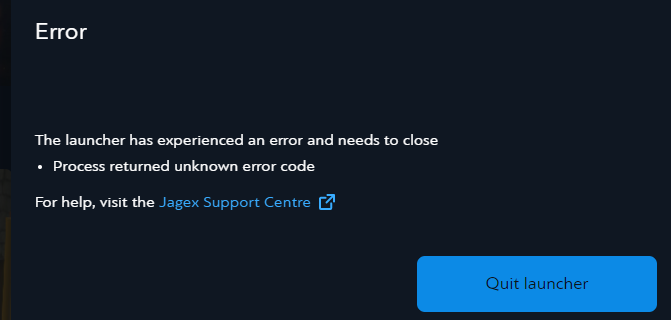 mossy swan
its possible your runelite install got corrupted too
so you can try reinstalling runelite first
slate basin
guess that was it. tyy
 untold lintel
my client gets stuck here then nothing happens no matter how long i wait

oh it loaded this time just took a while
 fast grail
With the latest version of RuneLite on Linux, I'm no longer getting native notifications & instead getting a small pop-up without noise from the tray icon. How do I revert it back to the previous behavior?
 violet tartan
Is this the correct place for Plugin development help? Or is that a separate discord?
 quaint moth
I have a problem with runelite, i can’t restart my xp tracker. I have tried to restart client and jagex luncher twice but still no go. Any tips for that?
solid mesa
It saves between sessions now. Right click on the XP tracker and Reset All/Hr
You can also turn off XP Tracker > Save between sessions
solid mesa
Like this?
 quaint moth
Yep, dosen’t work, it worked for me like week ago but now not
I deleted runelite and downloaded again to jagexluncher and restarted computer, now its working again.
 versed creek
just got kicked out of runelite, client closed automatically..
haughty pumiceBOT
@versed creek To find the logs, you can do one of the following:
- If your client failed to open, click the
Open logs folderbutton. - Open the screenshot directory by right-clicking 📷
Camerabutton, navigate 1 directory up, then open logs folder. - Navigate to
%userprofile%\.runelite\logson Windows or$HOME/.runelite/logson Linux and macOS.
Upload the log files named client and launcher by dragging them to Discord. If there are files prefixed with jvm_crash dated from today, upload them too.
leaden trail
I can't say I've seen this particular JVM crash before but seeing as you're on 13th gen Intel and not on microcode 0x12b, I would very much recommend you update your BIOS
Is it just the one JVM crash log?
leaden trail
That one is a bit more typical. You can try disabling SpeedStep in BIOS but it's not a super reliable solution unfortunately
versed creek
Gonna update it now, and hope for the best
leaden trail
Deleted your JVM crash logs because you have an environment variable with what looks like your full name fyi
 short coyote
Hi. After the update, I restarted my client and when I logged back in, every single Runelite setting had changed. What's weird is, all the plugins I have are still there, they just seem to have gone back to basic settings. All the bank tabs I've made have changed their icon back to "Spade" and only shows few items in them. My profile doesnt load it back to what it should be. I just cba to change every single plugin and every single setting back to what I had so if anyone knows why is it like that, I would appreciate the help!
leaden trail
versed creek
<@288504448030867466> u running 13th gen too?
Uh, I couldn't even tell you what generation my CPU is offhand, I haven't paid attention to enthusiast hardware in the better part of a decade
mossy swan
short coyote
Hi. After the update, I restarted my client and when I logged back in, every sin...
!lost
haughty pumiceBOT
versed creek
@leaden trail bios updated to latest. Ty for suggestion and i will test
tidal bone
mossy swan
does ctrl+v work?
No unfortunately nothing I’ve tried works
 cold magnet
Hi, anybody else been using VSync mode on 117 HD plugin? Mine havent been working since yesterday. I know its just like QoL feature because you can limit fps manually. With unlock fps enabled been popping in 400fps and GPU usage 85%
haughty pumiceBOT
@cold magnet Visit 117's HD plugin discord (https://discord.com/invite/U4p6ChjgSE) for support, issues & feedback
 dusty fiber
hi team, how do i login to the runelite client? (so my plugins sync across pcs)
gilded kayak
click the green icon near the ❌ and login with google
 ornate kite
!safemode
haughty pumiceBOT
To enable safemode
Windows
Run the RuneLite (configure) shortcut from the windows start menu
Tick the Safe mode box, save, launch RuneLite the way you normally do.
Mac
In Terminal, run
/Applications/RuneLite.app/Contents/MacOS/RuneLite --configure
Tick the Safe mode box, save, launch RuneLite the way you normally do.
haughty pumiceBOT
If you're getting an error while trying to install RuneLite in the lines of unable to find unins000.exe that means you have a previous RuneLite version that didn't uninstall cleanly. To fix that you need to delete the following windows registry key: Computer\HKEY_CURRENT_USER\SOFTWARE\Microsoft\Windows\CurrentVersion\Uninstall\RuneLite Launcher_is1
leaden trail
What's the value of that registry key for you?
pale stream
can someone please help me, i started getting fps drops when trying to watch videos on my second monitor, this just started happening. all my drivers are up to date and I have a decent pc. ryzen 5700x3d, radeon rx6600 xt, 32gb ram. runelite was running perfect just a week ago. I started using quest helper but i have disabled it and still seeing fps drops. also, when i try to stream to discord my stream lags when tabbed into runelite as well as if i try to watch a stream the same issue happens. does anyone know what can be the issue?
i also disabled hardware accel in runelite and discord
leaden trail
Do you have an Nvidia GPU?
pale stream
leaden trail
Do you have an Nvidia GPU?
no amd
im trying to switch to nvidia i get a lot of issues w amd
leaden trail
There goes that idea, sounds like an issue we see caused by gsync
pale stream
yeah ive seen that a lot when trying to find the solution
theres also a similar instant replay on amd but i have that disabled
ive also noticed sometimes when right clicking things in my sidebar, for example trying to reset my xp tracker or just simply changing a plug-in config, it freezes for a second
leaden trail
Does this all happen in safe mode?
haughty pumiceBOT
To enable safemode
Windows
Run the RuneLite (configure) shortcut from the windows start menu
Tick the Safe mode box, save, launch RuneLite the way you normally do.
Mac
In Terminal, run
/Applications/RuneLite.app/Contents/MacOS/RuneLite --configure
Tick the Safe mode box, save, launch RuneLite the way you normally do.
pale stream
leaden trail
Does this all happen in safe mode?
i haven't tried safe mode, what does it do?
leaden trail
It temporarily disables GPU and hub plugins to help with troubleshooting
pale stream
leaden trail
It temporarily disables GPU and hub plugins to help with troubleshooting
i found the issue it was 117 hd :/
regular gpu plug-in doesnt cause issues but 117 hd makes it look so much betteer
ahhh i found the fix
i had vysnc off and putting it on or adaptive worked
leaden trail
You can try disabling SpeedStep in BIOS
 paper hinge
how do i get my xp tracker to show kills until level? Swear it was enabled before, but doesnt seem to be. Other skills show actions left

For reference, im killing vyrewatch sentinels which is consistent exp/kill
oblique plume
It was removed
paper hinge
Dang, ty 😦
leaden trail
Your thing is a JVM bug
It's different from the others
The hardware issues are 13th/14th gen
reef plank
leaden trail
Do you have an Nvidia GPU?
Is there anything wrong by having nvidia gpu? Because I have lots of stutter clicks with the mouse/laggs and I have nvidia, newest version. I didn’t had this issue until 2 days ago (still is the same)
I tried running safe mode too without any luck, was still lagging
leaden trail
reef plank
Is there anything wrong by having nvidia gpu? Because I have lots of stutter cli...
Their issue sounded like something that can be caused by having gsync enabled so I was going to tell them to disable it
 tribal geyser
how do i take for example 7 elite clues ground item and have it say 7x elite clue
 crisp dune
With clues you generally can't. Only items with the same id get collapsed
crisp dune
but for other items generally you'd use the Ground Items > Collapse ground item menu option
tribal geyser
gotcha ok thx
 pliant oxide
Is there a default I can use for an overlay to test a plugin I’m writing?
Essentially I’m trying to track how many cannonballs were fired, damage done from the cannon specifically, and the average damage per cannonball.
I’ve resorted to seeing if ChatGPT could help but maybe I’m not giving the correct logic inputs. Any help would be appreciated
 cedar narwhal
is there a bug with menu entry swapper on explorer ring 4? I can't seem to change Either shift click or regular click to "use" on it

 bright atlas
is there a reason why the idle notifier doesn't go off when doing mother load mine? Here are my settings.
 solid mesa
You're probably using an ornamented pickaxe if I had to guess
bright atlas
rune pick
solid mesa
Turn on idle animation notifications
solid mesa
cedar narwhal
is there a bug with menu entry swapper on explorer ring 4? I can't seem to chang...
Seems like it
cedar narwhal
im thinking if some other plugin is interfering with it
solid mesa
I tried safe mode and it still happens. I think its a bug
bright atlas
solid mesa
Turn on idle animation notifications
that works but it goes off in between mining the vein
cedar narwhal
I see
solid mesa
Increase idle notification delay
 warm sonnet
After the last game update my runelite uninstalled all the plugins I had
Restarting runeline didn't bring them back and neither did restarting my pc.
gilded kayak
!lost
haughty pumiceBOT
warm sonnet
Thank you
 tough oasis
having trouble outlining my thralls. have had it setup forever but it has never worked. any pointers? doesn't matter if I disable entity hider
 haughty pumiceBOT
Get support for the Better NPC Highlight Plugin Hub plugin here: https://runelite.net/plugin-hub/show/better-npc-highlight.
You can also find the support link by searching for the plugin in the Plugin Hub panel and clicking the ? button on the plugin, or by right-clicking the plugin in the plugin panel and clicking the Support menu option.
viscid lantern
but afaik that plugin is pretty broken atm
 scarlet scarab
any way to fix blurry runelite hiscores etc in 125% windows mode? I somehow managed to make the game look good now

 gentle forge
So, looking online it says I can fix my blurriness issues with using something called Runelite Config, but I cannot find that anywhere. Can someone assist me?
Looks like this apparently?
 haughty pumiceBOT
Download and install the updated RuneLite launcher from the website link in #welcome. You don't need to uninstall your current version. You will not lose any settings or plugins.
solid mesa
If you don't have Runelite (Configure) you need to download the new version
gentle forge
I have just downloaded the latest version on the runelite website, still no luck
solid mesa
Search windows search for Runelite (Configure)
 floral plank
Question is there a plugin who notifies me when when for instance my antifire runs out? Like i know about the timers but is there an option were i could get a sound queue? Ty in advance
solid mesa
Chat notifications
solid mesa
gentle forge
Runelite hates 1440p
I use 100% scale, stretched mode, 1440p 27" monitor and it looks fine
gentle forge
solid mesa
I use 100% scale, stretched mode, 1440p 27" monitor and it looks fine
In Resizable scaling?
 solid mesa
100% scale in runelite configure, haven't adjusted that
 solid mesa
1.0 is 100%
solid mesa
I guess this is my stretched mode settings

 solid mesa
What size monitor do you have? Mine is 27" so I like 70%
gentle forge
Same. 2560x1440 at 27 inches
solid mesa
Then yea maybe I do just like a big ui
gentle forge
I miss my old monitor when playing this game.
Xbr makes the writing look like arse, but the items look nice and crisp.

But with a different UI Scaling Mode it makes items look blurry
round jacinth
i use 122% & bicubic catmull-rom
round jacinth
i mean when i play at full screen 122 makes a difference but when i play 1/4 screen i dont change it and its fine
gentle forge
 round jacinth
imo turn off xbr and just use bicbuic catmull as it's good at max size and good when you play at 1/4th size
full screen 1440p: #general message
1/4 screen on that same 1440p monitor:
#general message
tell me that catmull doesn't farm, looks good enough to me
gentle forge
Maybe this is an "in my head" sort of issue. I'm so used to how it looks in 1080p.
Like, does this look normal to you guys?
 round jacinth
normal is what you want it to be, thats why there is so many settings you play with
but stretching is stretching which means bluring unless integer scaling is on, so you just find something you like enough to play
gentle forge
I couldn't really see what integer scaling did
round jacinth
it makes the client scale 1:1 -> 2x2 etc
so it can only be scaled in fixed amounts
gentle forge
It just gives me a black border
 round jacinth
right because any additonal space would stretc/blur
that is the "perfect" no blur resize
gentle forge
Going to 0% removes it
round jacinth
just play around with what you want it to be is really going to be the reoccuring answer from me :p
gl 😄
gentle forge
😅
gentle forge
I think it must be in my head. I reckon I got so used to xbr and how smooth it looked that without it items look pixelated.
 knotty sonnet
Anyone know why I can’t use my commands? “!pb” “!kc” and all that fun stuff are just showing up as text. Anyone got a quick fix?
round jacinth
check your adventure log in your house
reef plank
!logs
haughty pumiceBOT
To find the logs, you can do one of the following:
- If your client failed to open, click the
Open logs folderbutton. - Open the screenshot directory by right-clicking 📷
Camerabutton, navigate 1 directory up, then open logs folder. - Navigate to
%userprofile%\.runelite\logson Windows or$HOME/.runelite/logson Linux and macOS.
Upload the log files named client and launcher by dragging them to Discord. If there are files prefixed with jvm_crash dated from today, upload them too.
reef plank
@round jacinth can u check dm
round jacinth
post ur logs here dont dm them to me
 limber ravine
RuneLite encountered a fatal error while downloading the bootstrap.
Exception: IOException
Message: Unable to download bootstrap (status code 520): error code: 520
'anyone know how to solve this
leaden trail
Try again in a minute or two
 wraith cloak
heyo, I'm having issues with stuttering every few seconds using my macbook air, it does it using GPU and the logs don't seem to display anything when I get these errors, is there anywhere else I can look (ie errors folder)
leaden trail
Does it happen in safe mode?
round jacinth
!safe does the stutter happen in safe?
haughty pumiceBOT
safemode: To enable safemode
Windows
Run the RuneLite (configure) shortcut from the windows start menu
Tick the Safe mode box, save, launch RuneLite the way you normally do.
Mac
In Terminal, run
/Applications/RuneLite.app/Contents/MacOS/RuneLite --configure
Tick the Safe mode box, save, launch RuneLite the way you normally do.
To enable safemode
Windows
Run the RuneLite (configure) shortcut from the windows start menu
Tick the Safe mode box, save, launch RuneLite the way you normally do.
Mac
In Terminal, run
/Applications/RuneLite.app/Contents/MacOS/RuneLite --configure
Tick the Safe mode box, save, launch RuneLite the way you normally do.
round jacinth
🤠
reef plank
round jacinth
!safe does the stutter happen in safe?
Yes
wraith cloak
I'll give safe mode a go
round jacinth
reef plank
Yes
can you record what you're having have happen
because you have none external plugins besides 117jd
wraith cloak
if it doesn't stutter, could I assume it's an issue with conflicting plugins/one that doesnt run on safe mode?
leaden trail
Correct
wraith cloak
thanks
round jacinth
every hub plugin doesn't run in safe mode
leaden trail
Or GPU but we have a way to rule that out too
reef plank
https://streamable.com/i77iiw
@round jacinth

the only time it stutters is only from gear swaps
and prayers
round jacinth
i dont see a stutter am i blind
reef plank
-2nd swap is where u see the stutters
look on the cursor
it doesnt happen always, but very annoying when it happens
round jacinth
oic
is this not just a bad mouse that relocates to a prior position or somethign some how
like my wireless mouse every once in a while the sensor goes fucky
reef plank
its with trackpad
tried mouse and it works fine, but the trackpad works fine on other games
other than rs
 atomic grail
reef plank
https://streamable.com/i77iiw
<@179369590902489088>
atomic grail
reef plank
https://streamable.com/i77iiw
<@179369590902489088>
This looks like a mouse with a dirty roller ball or laser sensor
ngl, you may want to open your mouse out first and check it that way
round jacinth
i dont think this is runelite related
atomic grail
osrs probably makes you notice a mouse error like that because it has perfect input and most games have input smoothing
round jacinth
well runelite/osrs uses what erver you set for the system but yes
reef plank
ive never had that issue before on trackpad tho until like 3 days ago
atomic grail
Check if it's dirty first, cause this has happened to me before with a crud that got stuck to my mouse laser
atomic grail
It's doing that after you cleaned the sensor?
reef plank
before that
i started to clean it up because i thought there was some dirt inside it
but wasnt the case
I just recorded another one
atomic grail
If it continues to misbehave, check and see if you have Mousekeys enabled. Sometimes if a fancy mouse has macro keys they can trigger mousekeys if you aggressively 5 way switch in 1 tick like that, maybe you're squeezing your mouse?
reef plank
Doesn’t happen always, just here and there
round jacinth
i think that is also how you're hoding your hand and rotating your finger on the pad..?
reef plank
Ye
round jacinth
its like on old devices where if you had two fingers on something it would put the pointer that moved in the mdidle spot between the two
it mucks with the trackpad
try using it normally lol
reef plank
I have 1 finger on the pad, the other finger on the left click
atomic grail
oh wait, I misunderstood, that's a trackpad WHAT? How do you 5 way switch like that with a trackpad, respect, but also, even a Callous on your finger or a hangnail can cause a trackpad to jitter.
viscid lantern
I just want to comment that I respect the trackpad skills 🫡
round jacinth
i think your pointer on the trackpad is moving wierdly/rotating
it is impressive yes
and the trackpad is capturing that
if you did that same exact motion in paint with the pen tool
i think you'd see it happen
atomic grail
trackpads are generally very unreliable but you're using it way beyond its ability imo
round jacinth
nah trackpad gamers exist
reef plank
I’ve always been playing like that for years, never had issue until now
Ive tried to factory reset it as well
But no luck
round jacinth
my friend did all of pre eoc stuff on a laptop and my other friend got to diamond or what ever is after that on trackapd for league of legends
you get good at it
reef plank
I have a vod even where I play for 18 mins without switches getting fkd
atomic grail
Any number of things can cause a trackpad to microjitter. It really could just be a callous or hangnail. They do tend to just jitter like that normally when doing quick movements
round jacinth
idk if that'll provide any value as i think this is just the trackpad capturing what your fingers are doing
leaden trail
This definitely just seems like an input thing
atomic grail
Man is out here 5 way 1 tick pking and raiding on a trackpad
That trackpad is a champ for even remotely taking that punishment
reef plank
Zom, I posted a vid in ur DMs. On that vid you can see everything works fine
round jacinth
i blocked you when you sent that
because i dont answer dms like that
i unblockewd you because you went here
dont cold call dm people
reef plank
Mb
round jacinth
np
reef plank
It still works fine on other games with the trackpad, just not on rs anymore
round jacinth
i do not think you're doing these exact positions and movements on other games
which is why i said use paint with paint brush and you'd see it
i beleive you can have network lag and fps lag in game but the mouse still behaves like the mouse would
atomic grail
most other games do not register mouse jitter like Windows does, also. Osrs takes raw mouse input and most other games "skip" mouse detection ticks because generally the event listeners are tied to the current framerate.
reef plank
round jacinth
which is why i said use paint with paint brush and you'd see it
Ooooo that’s a good idea
round jacinth
put a screenshot of the game into paint and draw black ontop of it to act like a swap
and i think you'd see the same issue
¯_(ツ)_/¯
reef plank
I’ll try that rn
reef plank
round jacinth
put a screenshot of the game into paint and draw black ontop of it to act like a...
yep ur right
it was still doing it on paint 😮
 silent idol
I've got a question about the Minimap plugin. For whatever reason the hide minimap option doesn't... hide the minimap. Does anyone know any conflicting plugins/fixes for this? (I should add - When I click hide minimap the minimap flickers for a quick second but that's all that happens)

 zealous cedar
it works for me. not sure
silent idol
hmm
zealous cedar
must be a pluginhub plugin breaking it.
silent idol
i've uninstalled minimap orb hider, still happening.
yeah, i thought the same but I don't know what it could even be.
well, bummer. i cant figure it out 🙂
haughty pumiceBOT
@silent idol Many plugins from the pluginhub break the client in subtle or not-so-subtle ways, including causing issues like client freezes. We do not support pluginhub plugins because we do not make or quality control them, and do not recommend their use.
Run the RuneLite (safe mode) shortcut, or with a Jagex account, first run the RuneLite (configure) shortcut and tick the Safe mode box, then launch RuneLite via the Jagex launcher.
This temporarily disables the GPU plugin and all hub plugins which will allow you to confirm the issue is caused by one of those plugins and isn't a core RuneLite issue.
If the issue is caused by a hub plugin, you should isolate which plugin it is and then uninstall the plugin.
haughty pumiceBOT
flowchart: Please refer to this flowchart for further troubleshooting.
 junior pond
Hey there yall! So i'm having trouble with getting Runelite to run through Steam. Every time i try to run the client through Steam it crashes the game and deletes the exe. file. Is there any way to fix this? Am i doing something wrong?
junior pond
lmao welp
oblique plume
Runelite isn't on steam
junior pond
oblique plume
Runelite isn't on steam
i know
i'm not saying that it's on steam
i'm saying that you can run it, much like other things, through the Properties menu
but every time i try, it deletes the EXE file
sorry that came off way more sassy than i meant it to, i've been trying to get this thing to run for an hour and a half now
round jacinth
You can’t run it through steam as the thing that launches the client in itself is a launcher, it’s like having steam launch epic launcher,
If you’re doing it for the steam overlay or tracking of time there is already a time tracker in game
junior pond
but steam can run the Jagex launcher just fine? And there are several guides to run Runelite as the launcher for Runescape through steam
junior pond
round jacinth
If you’re doing it for the steam overlay or tracking of time there is already a ...
it was mainly for convenience rather than anything else, but i also did want the steam overlay for social and update reasons
round jacinth
We just generically tell people it doesn’t work I guess, I don’t know if the guides ever worked or do still
 lime cairn
a friend of mine always has lag the moment he dies, we had thought it was a screenshot plugin but that didnot solve it.
Has anyone else experienced Lag the moment right before they die?
leaden trail
It's probably another hub plugin
dusty fiber
round jacinth
because i dont answer dms like that
bros v important in the discord. he's him. the man. can't just dm him like that dawg
leaden trail
It's funnier when he's wrong in the server instead of in DMs though
But also getting support DMs from random people is obnoxious, especially when it happens multiple times a day
ornate kite
Anyone experienced an issue where Runescape freezes and can't be interracted with? Runelite itself is fine, as in sidemenu responds but the game itself is frozen and ignores clicks?
Happened quite a bit since Weds update
Can't easily reproduce it but seems to happen if I alt + tab
leaden trail
If you install debug helper from the plugin hub and then use it to create a thread dump when the game freezes, we can probably tell you what it is
It's almost certainly a bad hub plugin
ornate kite
Yeah I tried running in safemode for a while but as I said really difficult to reproduce it. Had it all sorts of places like Castle Wars or bankstanding. Literally just had it on Colosseum loot window which is very sad
leaden trail
Yeah if you do the debug helper thing and then send the thread dump to the RuneLite bot we can look
ornate kite
Should happen again soon enough, just hope it's a better time
 mortal quarry
anyone have any idea why as of like yesterday wildy obelisks have examine as the first/left click option? even using menu entry swapper, I can't get any other option to be the left click option. No "reset" option in the menu entry swapper right click menu either
nvm. Custom menu swaps plugin
https://www.youtube.com/watch?v=mmje3RRliiY <- followed this idiot's guide blindly and it applied the toa obelisk option to wildy obelisks too

Live Daily on Twitch!
🟪 TWITCH ― http://twitch.tv/warmups
🟦 Join my Discord for competitively priced Jagex compliant ToA Boosting! https://discord.gg/2GGrG7P2ZR
🌟 Become a Channel Member to support me and get access to exclusive stream emotes and badges!
https://www.youtube.com/channel/UCRQcysA5wShC3RpTWhiiRjA/join
TILES FOR ALL TOA...
 main widget
ornate kite
Anyone experienced an issue where Runescape freezes and can't be interracted wit...
main widget
ornate kite
Anyone experienced an issue where Runescape freezes and can't be interracted wit...
yeah this is also happening to me as well, are you able to close rl when it happens or do you have to shut down pc?
ornate kite
main widget
yeah this is also happening to me as well, are you able to close rl when it happ...
I can close RL and interact with RL, it’s just the graphical portion of RuneScape that freezes, no sound etc
 wicked hawk
can i get help with RuneLite has encountered an unexpected error during startup.
 charred wind
Post a screenshot of the error your getting
wicked hawk
 haughty pumiceBOT
To find the logs, you can do one of the following:
- If your client failed to open, click the
Open logs folderbutton. - Open the screenshot directory by right-clicking 📷
Camerabutton, navigate 1 directory up, then open logs folder. - Navigate to
%userprofile%\.runelite\logson Windows or$HOME/.runelite/logson Linux and macOS.
Upload the log files named client and launcher by dragging them to Discord. If there are files prefixed with jvm_crash dated from today, upload them too.
pale stream
is it possible to allocate more ram to runelite?
haughty pumiceBOT
solid mesa
JVM arguments Xmx
pale stream
nice thanks, whats the default?
solid mesa
But the question is why? Unless you have a ton of plugins and your log says crashing due to out of memory there shouldn't be a need
pale stream
im getting really bad fps drops when watching a video on my second monitor, this just started happening and i tried almost everything else and could only think maybe this is why
solid mesa
99% sure that isn't going to fix your issue
If it happens when unfocused it's usually something in the GPU control panel or drivers that limit resources when unfocused
pale stream
nah its when im tabbed into runescape
solid mesa
You can try safe mode
haughty pumiceBOT
To enable safemode
Windows
Run the RuneLite (configure) shortcut from the windows start menu
Tick the Safe mode box, save, launch RuneLite the way you normally do.
Mac
In Terminal, run
/Applications/RuneLite.app/Contents/MacOS/RuneLite --configure
Tick the Safe mode box, save, launch RuneLite the way you normally do.
pale stream
solid mesa
You can try safe mode
it works but kinda defeats the whole reason i use runelite, rn i only use quest helper, quickest path and 117 gpu. was never having any issues with this until recently so not sure why its happening
solid mesa
If it works in safe mode then one of the hub plugins you installed is causing the issue and you should remove it
pale stream
solid mesa
If it works in safe mode then one of the hub plugins you installed is causing th...
so all i did was remove those three plug ins bc those are the only i use and i reinstalled them and it seemed to fix it, any idea why that could have happened?
nvm spoke too soon, seems to be 117 hd
 mint lynx
I'm on Ubuntu 24.10, Plasma 6 wayland session, and don't have the most goodest knowledge ever, though been a great month for so far.
Is there a way to run runelite via Bolt with ENVs? I am trying to run the environment variable env OBS_VKCAPTURE=1 so that OBS can capture via game capture, as opposed to window capture. According to the github page, obs-vkcapture works for both VK and OGL, and I am using the GPU plugin, which to my understanding runs OGL, but the obs plugin requires the env variable.
I have 18TB of storage, I may as well make use of it since I am not actively doing photography at this moment in time.
I understand that this is almost certainly outside of the scope of what this discord can offer, so if this is something that cannot be answered here, I completely understand, but the support channel seemed to be the best bet
haughty pumiceBOT
For support with using Jagex accounts on Linux, visit 7ormRS's Discord https://discord.gg/aX7GT2Mkdu
mossy swan
idk if thats the bolt discord but anyway
i dont think obs game capture works well with gpu plugin though, crashes a lot
mint lynx
Hey, thank you very much. ❤️
Good to know, though. I suppose I'll see what happens, but have no expectations -- may as well take this as a learning opportunity anyways!
 safe fog
hi guys i have an issue with my npc highlighting or npc indicators the small araxytes will highlight with a true tile but the medium and large ones wont and neither will araxxor he just gets a aura the glows around him not an true tile
leaden trail
What's your slayer task?
 opal bolt
is it still possible to run Rlite through steam client?
 empty sapphire
Hey all, I made my runelite account a while back, stupidily with my college email. I haven't played in a bit but my college email got de-activated in the past year or so, is there anyway to get my runelite account thats tied to that email back? perhaps I transfer it to the actual email I use nowadays?
round jacinth
do you still have that same computer?
you can follow this link from that pc and import the profile(s) into the new gmail
!lost
haughty pumiceBOT
round jacinth
the settings tied to the sync are still stored local, in a profiles2 folder
round jacinth
np
ornate kite
Hi. I've got a MacBook Air M1 (2020) with 8gb of RAM. I'm running RuneLite with default settings + GPU plugin. Sometimes the FPS noticeably drops below 60, the game gets choppy when rotating the camera. Usually turning the GPU plugin OFF then ON again fixes it. What might be the issue?
And are there any recommended GPU plugin settings for MacOS Sonoma on Air M1?
Compute shaders on or off? Vsync mode on, off, or adaptive? etc.
round jacinth
i sorta doubt that you are purely only default settings with gpu plugin on, you probably have any number of hub plugins also?
Make a new profile stock profile (navigate to the and click + New Profile and enable gpu there and see if it runs fine/behaves as it should
ornate kite
It's a fresh install actually. Of both the OS and RuneLite.
round jacinth
I have a Macbook Air M4 and my fps gets low only when i zoom out where there is tons of drawing
so you lost all your old settings? you have none of that and it's completely reset?
ornate kite
yes, brand new. I did not save/sync settings
round jacinth
unlucky unless you don't care
ornate kite
I do not
round jacinth
on my macbook i use compute shaders on and otherwise identical settings to my desktop running a rtx3080
ornate kite
Vsync off? as per default setting
round jacinth
unless you have a bad driver causing a memory leak it should be fine
yeah thats off, do you know what vsync even is?
lol
adaptive is something macs dont do either
you can try lowering draw distance, lower extend map loading and diable AA but have compute shaders on
ornate kite
compute shaders is on
I'll try lowering the distance and map loading
I've also got the quest plugin installed, only custom plugin. I doubt that would affect things though
ornate kite
will test things out again later
 echo crane
Hi, all of a sudden my Discord loot logger/ Better discord loot logger doesn't work anymore
any other notification sender do work
haughty pumiceBOT
Support for hub plugins should be directed to the author of the plugin.
You can find the support link by searching for the plugin in the Plugin Hub panel and clicking the ? button on the plugin, or by right-clicking the plugin in the plugin panel and clicking the Support menu option.
round jacinth
you should probably just use DINK has the do everything webhook thing as it's the more feature rich and actively supported plugin
echo crane
DINK?
round jacinth
yes
 round jacinth
not to be that guy but yes i dont see another oen named that lol
its a one stop shop for webhooking events to disc tho
leaden trail
ornate kite
Hi. I've got a MacBook Air M1 (2020) with 8gb of RAM. I'm running RuneLite with ...
The Mac GPU drivers have been known to have some pretty bad memory leaks so it's possibly that. I think disabling compute shaders has sometimes helped with that in the past, but if it doesn't help you then I'd just leave it on
 quick bloom
Cannot see my ping on runelite, any idea as to why is this happening

im using vpn, playing from china
zealous cedar
pings usually don't go over the vpn, so probably china is blocking it
echo crane
round jacinth
its a one stop shop for webhooking events to disc tho
It worked , thanks!!
echo crane
quick bloom
Oh i also have an issue with no more seeing my worlds anymore... only 1 or 2 sometimes
Any known issue involving what i encounter?
 warped fjord
HI, was wondering is it possible to change the windows sound for idle notifier to a custom sound or just any other windows sound
haughty pumiceBOT
Place the files for the feature you want in %userprofile%\.runelite on Windows or ~/.runelite/ on Linux/OSX
The names and type for the files are:
- Custom cursor:
cursor.png - Custom default notification sound:
notification.wav - Custom specific notification sound:
<name>.wavin.runelite/notifications, then select<name>in the notification sound dropdown - Custom login screen:
login.pngImage size 765 x 503 recommended, larger images will be (simply) scaled down automatically.
solid mesa
I don't know about the sound windows makes, but you can change the notification sound from runelite
warped fjord
solid mesa
I don't know about the sound windows makes, but you can change the notification ...
No that's allg, just wanted something different thanks
echo crane
I dont see my worlds anymore in the world switcher on Runelite, any help?
round jacinth
the in game world switcher? your internet maybe is flakey
leaden trail
You can use the sidebar instead
ornate kite
leaden trail
The Mac GPU drivers have been known to have some pretty bad memory leaks so it's...
thank you
echo crane
leaden trail
You can use the sidebar instead
That's the one where i dont see any worlds on
Im always using the in-game world switcher
ornate kite
leaden trail
The Mac GPU drivers have been known to have some pretty bad memory leaks so it's...
i think disabling antialiasing completely helped
and lowering the draw distance
dumb question perhaps, but what would be better resource wise, "remove color banding" ON or OFF?
i don't mind the color banding/textures, either way looks fine to me whether the extra textures are there or not
stinks that it's so hard to get my medieval clicky game from the early 2000s to play smoothly. lol even back then when it was on java twas always eating up all my resources
never had a proper "gaming rig"
runescape classic runs perfectly on the m1 though lmao
round jacinth
i think we're just telling folks to disable the overlay in discord because it's a bad product lol
 cinder spruce
Yeah, there used to be an option to disallow it to capture 'other overlays' but that seems to be gone or buried.
 worldly plume
How does the menu entry swapper work? I'm trying to swap attack and pickpocket, but shift clicking seems to do nothing
round jacinth
you cannot swap pickpocket's entry
you can disable attack option and it'll hide attack making left click pickpocket a thing

hide the npc attack option here
worldly plume
ah thank you!
 frosty dune
is the zigzag layout think part of bank tag layouts? i know it originally was, but i swear at some point i uninstalled it but still had the auto zig zag layout thing available
round jacinth
core bank tag does not have zigzag but other hub plugisn add it to it as a layout option
like inventory set ups
leaden trail
We really don't have any control over this, it's entirely on Discord 's end
cinder spruce
leaden trail
We really don't have any control over this, it's entirely on Discord 's end
I know, I was just describing what was actually happening compared to the issue of 'it doesn't work'. I'll delete it though.
gilded kayak
there was a few week period where they were hooking into the client, and not rendering correctly where we discussed blocking the dll
but now it seems that the overlay works, so blocking it would just prevent people who want to use it
 quiet harness
any1 else have this problem where these shows up as infoboxes and in boost informatin section? have tried disable all plugins one by one but dosent seem to change
 solid mesa
It's probably a plugin and the plugin doesn't clear the overlay when you turn it off. So you'd need to restart the client to be sure
round jacinth
That one specifically looks to be spec overlay
quiet harness
yeah what i thought aswell at first but wouldnt do when disabling it, altho when i reseted the client it fixed itself
round jacinth
Which seems to not turn off correctly
Just uninstall it or remember to restart when you want it off lol
 pliant thicket
anyone know why this is happening? its goes away when i drink the pot or wc
 gilded kayak
something is probably triggering your notification settings, and you probably have the flash-screen setting on
pliant thicket
i tried turnign that off and nothing
junior pond
Hey support channel! So i launched it again without going through Steam, i went ahead and just played on runelite proper last night, and when i tried to play it just now, the exe file is deleted once again. I'm not sure why it keeps disappearing, has anyone else had this issue? If so, is there a solution?
oblique plume
i know some antiviruses will quarantine RL
pliant thicket
gilded kayak
something is probably triggering your notification settings, and you probably ha...
it activates as soon as i stop interacting with something
and only in wt
junior pond
oblique plume
i know some antiviruses will quarantine RL
AVG has been a pain in my ass in the past, i'll check if it's that
thank you!
gilded kayak
pliant thicket
and only in wt
!safe does it happen in safe mode?
haughty pumiceBOT
safemode: To enable safemode
Windows
Run the RuneLite (configure) shortcut from the windows start menu
Tick the Safe mode box, save, launch RuneLite the way you normally do.
Mac
In Terminal, run
/Applications/RuneLite.app/Contents/MacOS/RuneLite --configure
Tick the Safe mode box, save, launch RuneLite the way you normally do.
pliant thicket
gilded kayak
!safe does it happen in safe mode?
ill have to try
pliant thicket
gilded kayak
!safe does it happen in safe mode?
how do i run safemode if i used jagex launcher
oblique plume
by doing what it says
pliant thicket
nvm got it, was a stupid idle plugin for WT that i didnt know i had
 austere birch
How do I change the font size of ground items?

Oh maybe it's already as small as it can be. 😦

 dull furnace
is there any way to have my client remain the same size while having my side bar opened
I typically play with it closed but when I open it my inventory basically goes to center of my screen
solid mesa

 dull furnace
l0l
leaden trail
Oh maybe it got renamed actually
dull furnace
no you are right its in tob qol
 oblique plume
Maybe it's dragged offscreen
 static ivy
lately the non jagex launcher runlite client crashes after logging in for the first time after launching
Open client
log in alt
cleint freezes
end task in task manager
open client
log in alt
play game
gilded kayak
open RuneLite (configure) and toggle on the safe mode box
and then do your steps
assuming you also have to restart your computer
 tender pecan
hey guys, so i dont know if anyone getting this aswell but lately my Runelite have been crashing alot on me does anyone know why would this happen?, i play runelite through the jagex launcher
haughty pumiceBOT
To find the logs, you can do one of the following:
- If your client failed to open, click the
Open logs folderbutton. - Open the screenshot directory by right-clicking 📷
Camerabutton, navigate 1 directory up, then open logs folder. - Navigate to
%userprofile%\.runelite\logson Windows or$HOME/.runelite/logson Linux and macOS.
Upload the log files named client and launcher by dragging them to Discord. If there are files prefixed with jvm_crash dated from today, upload them too.
 kindred dagger
just installed pop_os, got the system updated, drivers installed, etc. Got runelite running using the .jar, but I'm having an issue with a handful of plugins. all of the errors are the same aside from the plugin name itself
2025-04-04 22:31:59 CDT [pool-2-thread-1] ERROR n.r.c.e.ExternalPluginManager - Unable to download external plugin "pvp-performance-tracker"
net.runelite.client.util.VerificationException: Plugin pvp-performance-tracker didn't match its hash
    at net.runelite.client.externalplugins.ExternalPluginManager.refreshPlugins(ExternalPluginManager.java:250)
    at net.runelite.client.externalplugins.ExternalPluginManager.onProfileChanged(ExternalPluginManager.java:136)
    at net.runelite.client.eventbus.EventBus$Subscriber.invoke(EventBus.java:70)
    at net.runelite.client.eventbus.EventBus.post(EventBus.java:223)
    at net.runelite.client.config.ConfigManager.switchProfile(ConfigManager.java:239)
    at net.runelite.client.plugins.config.ProfilePanel.lambda$switchToProfile$7(ProfilePanel.java:758)
    at net.runelite.client.util.RunnableExceptionLogger.run(RunnableExceptionLogger.java:41)
    at java.base/java.util.concurrent.Executors$RunnableAdapter.call(Executors.java:539)
    at java.base/java.util.concurrent.FutureTask.run(FutureTask.java:264)
    at java.base/java.util.concurrent.ScheduledThreadPoolExecutor$ScheduledFutureTask.run(ScheduledThreadPoolExecutor.java:304)
    at java.base/java.util.concurrent.ThreadPoolExecutor.runWorker(ThreadPoolExecutor.java:1136)
    at java.base/java.util.concurrent.ThreadPoolExecutor$Worker.run(ThreadPoolExecutor.java:635)
    at java.base/java.lang.Thread.run(Thread.java:840)
odd, lets me re-install them no problem, but they show up as installed when searched for in the plugin hub. have to remove it then install once again. the install persists, weird, but I'll take it
 verbal tulip
oblique plume
Maybe it's dragged offscreen
verbal tulip
oblique plume
Maybe it's dragged offscreen
Nope, relaunching the client fixed it.. how weird
 mighty flame
anyone else having issues with bank tag layouts/potion storage? if i hold shift to withdraw all, its as if ive hit withdraw x?
solid mesa
Turn off bank item options in the in-game bank settings
 broken cargo
I can't get multiple accounts to sync with the discord plugin and notify level ups/drops etc in the same text channel. Only seems to work on 1 account (sometimes none) when I'm multilogged, I tried making new webhooks, separate profiles, not sure what I'm doing wrong tbh. TIA
mossy swan
probably use dink
 quartz copper
I have a question: I had an unfortunate scenario where I had to wipe my pc so when I reinstalled runelite, all my plugins were gone. Would creating a plugin to sync plugins to the client or to be able to create a plugin where you have packs to select to install a group of plugins be within TOS?
oblique plume
syncing is already a feature
haughty pumiceBOT
 midnight dove
Isn't it "Meiyerditch"?
 oblique plume
probably
midnight dove
The wiki says so at least
midnight dove
nice
 amber brook
hello, my power went out last night and shut off my PC, this morning when i log on all my runelite plugins are gone. My profile wont load. I checked the C drvie in .runelite folder and all my plugins are there. How do i make runelite recognize and load all those plugins I had?
haughty pumiceBOT
 vagrant mortar
I had a similar issue today where my profile was bugged, so I imported prior settings, most things seem to be back but I don't have any ground markers
round jacinth
you maybe didn’t import the right profile then
It’s all or nothing if it’s partial then you got a older version of the same profile that didn’t have those markers
quartz copper
oblique plume
syncing is already a feature
damn.... i wish i turned this on earlier 😭
vagrant mortar
round jacinth
you maybe didn’t import the right profile then
found the right one, thank you
oblique plume
It doesn't mess with the settings
 odd obsidian
can someone help???
im using jagex launcher, when i launch it through j launcher it loads up the screen but asks me to enter my email and password? it isnt 1 click login????
ive already logged into jagex launcher
with jagex acc
so thats not the issue
if that makes sense
ive tried re installing and everything
gilded kayak
are you clicking play inside the Jagex launcher?
odd obsidian
yea
gilded kayak
then that would mean either the Jagex Launcher is running as admin, or RuneLite is
running them as admin will break the 1-click login
 frank burrow
i switched my salmon/trout to drop on left click for fishing, its my food source and i cant menu entry swap it back to left click eat?
use/drop are my only options
round jacinth
you click the reset option
frank burrow
tried that as well, only will switch it to 'use'
round jacinth
if that is not the case are you using the left click dropper plugin and you put those items in the list it has?
raw fish is use, cooked fish is eat
(for defaults)
frank burrow
yep that was it. forgot i had that left click dropper plugin. Thanks man!
round jacinth
np
frank burrow
been grinding my new ironman right click eating for 3 days lmao
round jacinth
its meant to be a toggle on/off plugin for that purpose 🙂
charred wind
Toggle 😭
 round cobalt
i'm sure this gets asked plenty, but I was directed here. My loot tracker over the past 5 months has reset not everything but random monsters, how do I get that data back?
haughty pumiceBOT
round cobalt
haughty pumice
<https://github.com/runelite/runelite/wiki/FAQ#my-loot-tracker-data-is-gone>
ty
 grim plover
Support question: Runelite keeps crashing when exiting a tob raid. I have logs that point to JVM crash. Anyone know how to fix this?
zealous cedar
Jvm crashes aren’t typically always at the same place in game like that. Probably it’s a plugin instead crashing
tender pecan
hey guys, so i dont know if anyone getting this aswell but lately my Runelite have been crashing alot on me does anyone know why would this happen?, i play runelite through the jagex launcher
can someone please help me on this issue
gilded kayak
 grim plover
tender pecan
gilded kayak
grim plover
tender pecan
gilded kayak
did you not play the game today?
I guess post the log with the 2025-04-05 in the name
tender pecan
i did play today but in the uk we just got into 04-06 like 30 minutes ago
tender pecan
sorry, which file do you mean

 gilded kayak
you'll have to go in their discord and post your log showing it's the plugin causing it
!hd
haughty pumiceBOT
Visit 117's HD plugin discord (https://discord.com/invite/U4p6ChjgSE) for support, issues & feedback
gilded kayak
but they might just suggest you upgrade/downgrade your GPU drivers
tender pecan
alright thanks man for helping me
 fervent hemlock
anyone know what plugin might be muting sols attack sounds? I have area sounds on btw
its also not annoyance mute
 fringe token
Re: This.
I don't see any replies to this.
Is this possible or not?
 tame zealot
got my character reset. how do i get everything back for f2p?
round jacinth
fringe token
Re: This.
I don't see any replies to this.
Is this possible or not?
I don't think it does that feature on purpose so that a free to play member doesn't think they can do something that is members only, same reason why the ge search doesnt bring member results when you're f2p, dont want some one to think they can buy banana soup
round jacinth
tame zealot
got my character reset. how do i get everything back for f2p?
#runescape is a better place to chat about the game
tame zealot
i logged out and a week later my character was set to newb status
im pissed
10 mil of stuff lost
how can i get that back?
 final axle
Stick to one channel, this one isn't it
tame zealot
?
solid mesa
This is for runelite client support
tame zealot
i have runelite
final axle
We don't run the game, just the client
solid mesa
You don't have a problem with runelite
final axle
We have nothing to do with your account
final axle
Someone was already trying to help you in #general which is a much more appropriate channel
fringe token
round jacinth
I don't think it does that feature on purpose so that a free to play member does...
Time to make a feature request to disable this feature. I'm in between membership, and it would be nice to toggle the calculator for things once I re-up.
round jacinth
I think noobs would forget they have that set as people set and forget all the time, just use the wiki
charred wind
fringe token
Time to make a feature request to disable this feature. I'm in between membersh...
TOGGLE?
 tiny moth
Any plugins that export your stats directly onto a webpage or spreadsheet? Looking to import stats into Google sheets, but official hiscores/WOM etc cant retrieve unranked stats
round jacinth
No, no existing plugin does that afaik and every plugin that does anything with hiscores uses official hiscores for data
tiny moth
rippp alright thanks
charred wind
it is possible to pull existing values from the client though, iirc. So you could do it from a logged in account I think.
 prime monolith
Hi, I want to recolor all my ground markers. I exported my ground markers from https://runelite.net/account/tile-markers, and replaced the old color values with the new values. When importing the new string the game tells me 120 markers were imported, but my markers are not changing color. Any tips?
 sonic birch
Never tried that tbh. Also don't remember if that webpage has all the tile markers
Decent chance that it is still using the profile v1 system instead of the v2 system, so that function should just be removed from the website
prime monolith
That's good to know then. Any ideas on alternative ways I could go about making this change to my markers?
(i got that link from the wiki btw: https://github.com/runelite/runelite/wiki/Ground-Markers)

GitHub
Open source Old School RuneScape client. Contribute to runelite/runelite development by creating an account on GitHub.
The website does have some "recent" tiles I've made at the DT2 bosses for what it's worth.
sonic birch
sonic birch
Decent chance that it is still using the profile v1 system instead of the v2 sys...
Probs just this then
Idt there's an easy way to change it all
prime monolith
sonic birch
Idt there's an easy way to change it all
Indeed, it seems like I have to remove the tiles I want to change before reimporting the changed string. It also seems like I cant do them all in one go, maybe 120 markers is too many.
 willow zephyr
Is there a way to hide friendly's in Castle Wars with Entity Hider so only the enemy's show? (or another plugin that allows this?)
oblique plume
no
 harsh meteor
I’ve been having an issue with either runelite/ the jagex launcher. It’s very hit and miss but often I will be randomly logged out with the messaged “failed to login”. No computer updates pending, no driver updates needed.
Sometimes I can go 1,2,4 hours no issue, other times it’s every 2-3 minutes upon login. Anyone experience anything like this ?
harsh meteor
oblique plume
sounds like a jagex issue to me
Anyway to make that more stable or just kind of SOL with my internet connection?
oblique plume
Not really
 dense oriole
Anyone know how to turn the discord bubbles off on the client?
zealous cedar
you have to turn off the discord overlay. in discord
dense oriole
Thank you Adam
 silk herald
Yo i cant log in in runelite with my account
oblique plume
do you have a jagex account
silk herald
Yes but im not a member
oblique plume
then you have to launch rl with the jagex launcher
silk herald
How
oblique plume
the play button
 foggy tiger
is there a current bug with runelite with two clients open? me and another friend with completely different setups have had half a monitor flicker but nothing else. as soon as i close a runelite client it fixes . it is NOT my setup as everything is working perfectly monitor included when im playing 99.9% of the time lol could it be the GPU plugin glitching maybe?
it randomly started out of the blue and rebooting my runelite clients fixed it
zealous cedar
no
foggy tiger
its only happened once to both of us. next time it does ill try get it on video
im now back on like normal zero issues and no flickering
sonic birch
maybe a gpu driver issue, but not a rl issue
foggy tiger
thanks 🙂
 full sparrow
Can anyone help with fatal error while downloading bootstraps issue
solid mesa
Post a screenshot of the full error. But usually its an issue with your network
full sparrow

 stone parcel
Your pc's clock is wrong.
sonic birch
It's likely the clock, yeah
full sparrow
stone parcel
Your pc's clock is wrong.
I deleted everything re installed it like 3 times deleted vpn I change the time like you said and it now works lmao 🤣. Thank you I appreciate it 🙏
static ivy
static ivy
lately the non jagex launcher runlite client crashes after logging in for the fi...
This crashing issue seems to be tied to when the account profile loads just before the account is logged in btw
haughty pumiceBOT
flowchart: Please refer to this flowchart for further troubleshooting.
sonic birch
that doesn't sound like crashing btw, freezing at best
if it crashed, your client would poof out of existence
 deep epoch
has anyoen experienced lower fps recently?
sonic birch
instead of asking those vague "has anyone had x" questions, people should just properly state their problems and questions
the answer is always no, we have not experienced your problem
sonic birch
!flow first check green tree here
haughty pumiceBOT
flowchart: Please refer to this flowchart for further troubleshooting.
sonic birch
but you probs just turned off gpu or smth like that
gilded kayak
50 is the default fps so gpu is probably off yes
sonic birch
see how this is already more useful than asking "has anyone had x"
deep epoch
I guess I made my draw distance too high during sailing beta
 clever thunder

what's wrong with my custom menu swap settings?

here's the example in the readme

oh I see you have to separate it into multiple separate entries
 tender surge
so ive always been logged into to runelite when i play. I havent played osrs in a while logged in today and all my Loot tracking was reset? is there any way to fix? again ive always played while logged into my runelite account
haughty pumiceBOT
tender surge
haughty pumice
<https://github.com/runelite/runelite/wiki/FAQ#my-loot-tracker-data-is-gone>
if i do have a duplicate profile which do i delete?
i think i fugured that out
thank you
wonderful... deleted the empty profile. now the profile that was previously populated is empty
oblique plume
You will have removed the populated profile then
tender surge
oblique plume
You will have removed the populated profile then
go away . you arent support. roach
oblique plume

final axle
Maybe don't insult the person trying to help you?
leaden trail
Being nasty to people isn't a great way to get help, especially when those people are providing help for free
leaden trail
Oh he left anyway
 hushed gust
Hey, whenever I try to log in with Runelite, I get "failed to login. Please try again." But I can log in perfectly fine with the regular client. Is that a known issue at the moment?
 willow bone
Would a infobox plugin that just counts your hits be allowed? Every hitsplat on npc we +1 your hit counter.
gilded kayak
hushed gust
Hey, whenever I try to log in with Runelite, I get "failed to login. Please try...
it's a known issue always, we don't know why
we don't know if it's malice from Jagex or they are just stupid
edit: I mixed my errors up, I meant this comment about the too many login attempts error, not failed to login
i'm more likely to lean towards #2 tho
maybe ur doing something that's messing with the request
do u have a vpn on or something
are you on your work computer
hushed gust
I do have a VPN on but I set runelite to bypass
gilded kayak
check RuneLite's client.log file and see what 4xx error they are sending you
round jacinth
hushed gust
I do have a VPN on but I set runelite to bypass
be on the newest launcher version and enable the ipv4 option in the configure
gilded kayak
i mean if he comes back and say "that worked" i wont be too surprised
but nothing surprises me anymore
hushed gust
 gilded kayak
check RuneLite's client.log file and see what 4xx error they are sending you
gilded kayak
gilded kayak
check RuneLite's client.log file and see what 4xx error they are sending you
.
 muted lark
Having an issue after coming back from a hiatus - whenever I open my bank I seem to get 2 ticks of lag - then if I withdraw 8 or some items I also get a tick of lag.
Its reproduceable everytime. I've tried playing around with plugins doesnt seem to help. FPS seems to go down during the ticks.
gilded kayak
!safemode
haughty pumiceBOT
To enable safemode
Windows
Run the RuneLite (configure) shortcut from the windows start menu
Tick the Safe mode box, save, launch RuneLite the way you normally do.
Mac
In Terminal, run
/Applications/RuneLite.app/Contents/MacOS/RuneLite --configure
Tick the Safe mode box, save, launch RuneLite the way you normally do.
gilded kayak
can you replicate it in safe mode
muted lark
Will give that a go and see
Yeah it does seem to be fine in safe mode. Probably indicates its a plugin causing the issue?
round jacinth
Yep that is what it means
a hub plugin to be specific, which? that's an exercise for the reader
muted lark
Yeah totally makes sense. I have no idea what it could but Ill have to just test turning them all of I think and back one by one.
gilded kayak
i would probably turn half off & restart
keep doing half until you figure out which one
muted lark
divide and conq strat sounds like a better plan actually lol thanks
Do I need to restart my client actually everytime? I didnt do that before when playing around with them.
gilded kayak
i would probably yes since something that's broken isn't guarenteed to fix itself, when turned off
verbal tulip
Anyone know why the colossal pouch shows 5 uses instead of 8 when fully repaired?
 gilded kayak
do you have the hub plugin?
if no, I guess Jagex is sending the wrong value? I believe those come directly from jagex now
yeah it looks like we're using ESSENCE_POUCH_COLOSSAL_DEGRADE from jagex
verbal tulip
gilded kayak
do you have the hub plugin?
if no, I guess Jagex is sending the wrong value? I ...
Which hub plugin? This one was built in I think

