#support
1 messages · Page 70 of 1
 plucky orbit
Haha yep, I saw that too and intended on trying it tonight - just figured I'd search here too while I was out and about and not at home on my PC. Saw the one guy post above who I replied to.
Ironically though, my irl buddy just grabbed the same card as me and has SAM enabled and has similar issues, so I'm hopeful but also doubtful
 haughty pumiceBOT
flowchart: Please refer to this flowchart for further troubleshooting.
plucky orbit
 sonic birch
Probs driver issue then if it happens in green tree
sonic birch
Probs driver issue then if it happens in green tree
Thank ya!
 opal stream
I don't know if its RuneLite, or potentially tied to the new House Layouts or not - but when I go anywhere from my house, the "Lookup" feature when right clicking someone is changed to "Kick" as if im still in my house
 gilded kayak
hmm
can you maybe see if the kick entry is still there, on the official client. i know the lookup wont be but if jagex is forgetting to clear the kick option, that would explain the problem
gilded kayak
I played around with this and it seems to be not consistent at all, at least for me, I have to try to right-click someone immediately after leaving my house, the time it takes me to think about who I want to click, causes the bug to not replicate
but if I do it immediately, i can replicate it most of the time
not sure if it's a jagex bug tho
 honest thorn
Hi, I had to factory reset my pc and didn't get chance to backup my runelite config. I had a profile on there that had cloud sync enabled but it hasn't appeared after logging into my runelite account. Is there anything I have to do to recover it?
gilded kayak
go to the  tab, and if there's
``
frick i hit enter
if there's
default
default``` those are 2 different profilesdespite having the same name
if there is indeed 2 default's, double-click the second one and it's your settings
gilded kayak
if you're certain you're in the same email, then unfortunately then there's no backup
you have to have clicked the ☁️ next to all the other buttons, below the profile, to enable syncing
as we can't sync everybody's profile automatically since lots of people have dozens of profiles
gilded kayak
usually when people say factory reset, i expect no windows backup
honest thorn
yea i made sure i clicked the enable cloud sync as I had this before and lost all my settings
gilded kayak
was it actually a factory reset, or do you have a windows.old folder on your computer
honest thorn
and i dont have a windows.old
gilded kayak
just to be sure, you did log into RuneLite via google now,* right
honest thorn
yea
gilded kayak
i'm not sure what happened then, i know syncing works since people use it every single day
you'd have to make sure certainly that you didn't sync to a different google account and forget
honest thorn
I can double check all my google accounts
honest thorn
Looks like my rl was unlinked from my google account somehow so I guess thats why
 silent charm
if i want to switch between having my overlay font bold and infoboxes in a certain place and having it small and in another wats the best plugin setup a toggle for that
 hushed orchid
Gonna try again, is there a way to scale the RL client on linux? the icons are tiny on 4k screen lol
 gilded kayak
assuming you used bolt to launch the client, there's a setting in there to open our config window
where you can set the scale
if you dont use bolt, idk run runelite.exe with --scale=2 that probably works
hushed orchid
Using the jagex launcher https://github.com/USA-RedDragon/jagex-launcher-linux-flatpak
GitHub
Play RuneScape with the Jagex Launcher - in Flatpak form! - USA-RedDragon/jagex-launcher-linux-flatpak
gilded kayak
hushed orchid
Ah nice
gilded kayak
do that and once config is open, put 2 in the scale box
or 1.5
or 3
whatever you like
hushed orchid
I thought it was gonna be on runelite, and not jagex launcher, thanks
hushed orchid
gilded kayak
do that and once config is open, put 2 in the scale box
Hm... I get to the box and click save, but trying to close the launcher and then start it normally the settings don't save
gilded kayak
maybe try setting the scale there instead, with --scale=2
hushed orchid
you mean in the launch command in terminal? Cuz none of the settings in the window saves as soon as I close it
gilded kayak
yes, the section of the readme says its for additional runelite args, so instead of putting --configure there, try puting --scale=2
if that doesn't work then I'm not sure, I know the bolt dev had to put a little bit of effort in to get the working config menu, so this could be why
hushed orchid
Yea just annoying to have to launch every time with terminal
gilded kayak
make it a bash script?
i don't know if linux is the right choice in life if you hate using the terminal
hushed orchid
I don't hate using terminal, just like being able to launch programs using the start menu and not using the terminal for everything lol
 viscid lantern
just edit the entry in your start menu to include those params 
hushed orchid
Good idea, thanks
hushed orchid
gilded kayak
maybe try setting the scale there instead, with `--scale=2`
That did the trick, thnx
 stone spruce
hi, my runelite crashed twice in this part of monkey madness 2, has anyone experienced this before?

 blazing imp
any idea what is that ?? first time to happen with me
and iam logging in with mobile normaly

 void gate
Anyone know how to fix the "Withdraw All/Withdraw All but 1" option in bank tags being swapped?
viscid lantern
Its a known bug, disable the extra menu options in the bank interface they added this week for now(the charge stuff)
void gate
viscid lantern
Its a known bug, disable the extra menu options in the bank interface they added...
ah thank you ❤️
 leaden trail
leaden trail
leaden trail
leaden trail
leaden trail
@blazing imp ^
 rich birch
Anybody else experience FPS drops in towns, GE and GotR? I use 117 HD with target FPS at 120, but it keeps dropping to 5fps. AMD CPU and GPU
haughty pumiceBOT
Visit 117's HD plugin discord (https://discord.com/invite/U4p6ChjgSE) for support, issues & feedback
leaden trail
That discord is the better place to ask for 117 issues
rich birch
I tried to disable it, but i still have fps issues
 stone parcel
!safe
haughty pumiceBOT
safemode: To enable safemode
Windows
Run the RuneLite (configure) shortcut from the windows start menu
Tick the Safe mode box, save, launch RuneLite the way you normally do.
Mac
In Terminal, run
/Applications/RuneLite.app/Contents/MacOS/RuneLite --configure
Tick the Safe mode box, save, launch RuneLite the way you normally do.
rich birch
runs steady at 50 fps in safe mode
stone parcel
Next you might want to try a new (blank) RuneLite profile with no plugins except gpu on.
If issue persists maybe want to try a few different gpu driver versions.
 brittle vine
Is it possible to transfer to runelite settings i use on pc to my laptop?
haughty pumiceBOT
leaden trail
Follow that^
brittle vine
Thanks 🙂
rich birch
Okay new profile without plugins runs smooth
stone parcel
Sweet! Hopefully that means a hub plugin is causing your issue.
rich birch
Thank you!
leaden trail
Freezes freezes or gives you the loading bar saying it's attempting to connect?
 turbid leaf
Running runelite on OS and having ping spikes of 300-600ms every few seconds for past 48 hours. No settings have changed and is not ISP. Speedtest and packetloss test had good results, as well as other games. Trying reinstalling and clearing cache
leaden trail
Are you just going off of ping grapher or are you actually experiencing issues in game?
Because ping grapher is not particularly reliable
 velvet carbon
this works on windows 7 thanks for the help
 wise pagoda
https://gyazo.com/27fbf9019bc2b7b9cb85d63e61f08c37
https://gyazo.com/34994a927e12d1b47118fd5c899e6b43
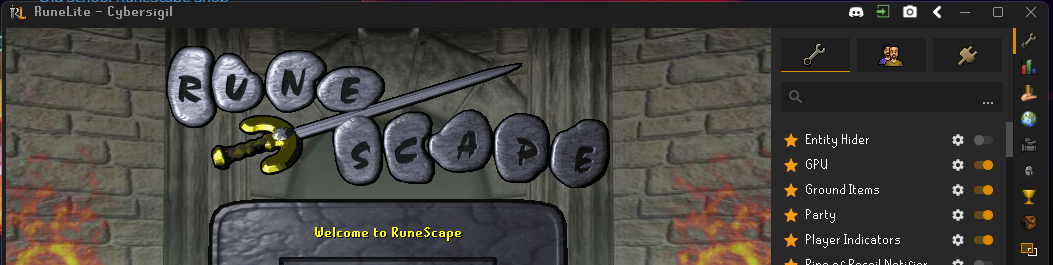
does anyone know why sometimes my client pulls open with the black top toolbar (1st pic) vs. the white (2nd pic)?

 charred wind
Runelite > custom chrome
wise pagoda
charred wind
Runelite > custom chrome
can you expand
charred wind
When windows thing, that setting is off. When black tool bar that setting is on
wise pagoda
fixed! thank you friend @charred wind
 green violet
i cant get runelite to stop crashing mid game....it either freezes or just closes on its own...
haughty pumiceBOT
@green violet To find the logs, you can do one of the following:
- If your client failed to open, click the
Open logs folderbutton. - Open the screenshot directory by right-clicking 📷
Camerabutton, navigate 1 directory up, then open logs folder. - Navigate to
%userprofile%\.runelite\logson Windows or$HOME/.runelite/logson Linux and macOS.
Upload the log files named client and launcher by dragging them to Discord. If there are files prefixed with jvm_crash dated from today, upload them too.
green violet
 fallow kestrel
Is there a way to get the timer for the yellow portal in the guardians of the rift that spawns every 160 seconds?
I tried checking the gotr plugin but it doesn't look it like it has it

To be exact I mean the timer for the portal, not the notification
gilded kayak
iirc it's at the top with the points
fallow kestrel
gilded kayak
iirc it's at the top with the points
It Only shows when it's available and for how long, it doesn't show When it will spawn
Which is every 160 seconds
 bright dew
What plugin do I have to disable
My rune pouch every so often doesnt let me withdraw ess from it no matter what I do I removed and reset client after deleting runecrafting utilities and thats not it
I took clips of it idk what to do its annoying i cant get 99 rc like this
 jolly basin

There was a way to not display the name of the npc you're engaging with, no? I'm 99% sure that it used to be a setting somewhere.
Opponent information doesn't have it
 flint glen
any idea why its happened ?
cant save the input when i tryi to leave, and when i go to other line or box its blink like you see in that video
 rocky hare
Recently bought a new PC - GPU = NVIDIA GeForceRTX 4060. My runelite keeps randomly crashing (not instantly, seemingly randomly), I have checked my logs and removed any potential pluggins that were causing warnings.
This is my Event Viewer, I am pretty sure it is a compatibility issue with NVIDIA OpenGL Driver. I have tried several different NVIDIA driver releases. Has anyone else came across this error? Is there a fix? Thank you
 gilded kayak
i see lots of posts on google if i search nvidia opengl driver event id 1
i see posts here over many years where it's happening for the steam client, steam games, some guy said it happened to him for r6seige and runescape, no specifics outside of "runescape" so idk if he means us
rocky hare
Yes, I dont know really how to fix this but im assuming loads of people must have came into this issue
gilded kayak
google thinks yes, but in this discord as far as I know, no
flint glen
flint glen
any idea why its happened ?
cant save the input when i tryi to leave, and when i...
anyone can help with this?
haughty pumiceBOT
To find the logs, you can do one of the following:
- If your client failed to open, click the
Open logs folderbutton. - Open the screenshot directory by right-clicking 📷
Camerabutton, navigate 1 directory up, then open logs folder. - Navigate to
%userprofile%\.runelite\logson Windows or$HOME/.runelite/logson Linux and macOS.
Upload the log files named client and launcher by dragging them to Discord. If there are files prefixed with jvm_crash dated from today, upload them too.
rocky hare
gilded kayak
no idea that's very odd, maybe the logs know
I have checked the logs, there is nothing suspicious, I am 99% sure it is a driver compatability issue, so if anyone with a 4060 is not having this issue I would be interested, and if so what driver version they are on
gilded kayak
 rocky hare
My bad
gilded kayak
yes
he already posted an image of his event viewer saying, "hey this is an nvidia driver issue" so i don't need to look at his logs
you have an issue in the runelite client, which your logs might have something about
 round jacinth
flint glen
i didnt get it you answered to me ?
round jacinth
flint glen
i didnt get it you answered to me ?
Show your logs
 olive hawk
Hi I have the 'Screenshot collection log entries' option enabled in screenshots, but it's not working. Is there something I've missed?
leaden trail
flint glen
is it safe to send it herE?
Yes
leaden trail
olive hawk
Hi I have the 'Screenshot collection log entries' option enabled in screenshots,...
Do you have the in game pop up enabled?
olive hawk
leaden trail
Do you have the in game pop up enabled?
yes
wait no, new account i'm dumb
ty
leaden trail
Send your launcher log as well
gilded kayak
does this issue happen if you use RuneLite instead of the botting client you're actually using?
 stray grove
imagine being so shit that you have to bot tithe farm
leaden trail
abex bullied him so hard he left the server, damn
stray grove
🎉
 strange snow
hello
i need an help important
someone changed my launcher pass pls someone contect with me any mod jagex pls
gilded kayak
we're not Jagex, you'll need to contact support, probably through https://support.runescape.com/hc/en-gb
strange snow
how can i conntack with him?
gilded kayak
Jagex is a company not a person, they make Runescape, click the support link and find your issue
strange snow
my launcher passward is changed idk anything more
 daring hill
anyone else having issues where runlite window opens and then just gets stuck with a white screen in a black screen?
daring hill
i am i will delete that file and see if it makes a difference thank you
gilded kayak
you can't delete plugins from the folder, they'll install again on startup
you need to uninstall it, or disable it, from the sidebar
if the white/black screen effects the side bar also, open the client in safe mode
!safe
haughty pumiceBOT
safemode: To enable safemode
Windows
Run the RuneLite (configure) shortcut from the windows start menu
Tick the Safe mode box, save, launch RuneLite the way you normally do.
Mac
In Terminal, run
/Applications/RuneLite.app/Contents/MacOS/RuneLite --configure
Tick the Safe mode box, save, launch RuneLite the way you normally do.
 final axle
stone spruce
hi, my runelite crashed twice in this part of monkey madness 2, has anyone exper...
final axle
stone spruce
hi, my runelite crashed twice in this part of monkey madness 2, has anyone exper...
It's likely quest helper causing you to run out of memory, it's happened to me and one other person in here before. You can increase the memory allocated to runelite and that should fix it
 silver lichen
Did you ever figure out the Driver error you were getting?
 deft quail
runelite keeps crashing on me. anybody able to help?
haughty pumiceBOT
To find the logs, you can do one of the following:
- If your client failed to open, click the
Open logs folderbutton. - Open the screenshot directory by right-clicking 📷
Camerabutton, navigate 1 directory up, then open logs folder. - Navigate to
%userprofile%\.runelite\logson Windows or$HOME/.runelite/logson Linux and macOS.
Upload the log files named client and launcher by dragging them to Discord. If there are files prefixed with jvm_crash dated from today, upload them too.
 fringe token
After an update, and a restart of RL, it feels like a lot of plugins that are turned on stop functioning until I toggle them off/on again.
For example, NPC aggro doesn't reactivate until I toggle it after an update (even after rebooting RL hours, days even, after it updates)
Any reason for this, or how to toggle everything to restart them?
 silk fox
round jacinth
silk fox
round jacinth
i bet if you searched the hub you'd find a few
round jacinth
fringe token
After an update, and a restart of RL, it feels like a lot of plugins that are tu...
npc agression timer loses calibration if you play not using runelite and return to it
!logs may show more but only if you're having the issues right now or fixed today
haughty pumiceBOT
To find the logs, you can do one of the following:
- If your client failed to open, click the
Open logs folderbutton. - Open the screenshot directory by right-clicking 📷
Camerabutton, navigate 1 directory up, then open logs folder. - Navigate to
%userprofile%\.runelite\logson Windows or$HOME/.runelite/logson Linux and macOS.
Upload the log files named client and launcher by dragging them to Discord. If there are files prefixed with jvm_crash dated from today, upload them too.
fringe token
round jacinth
npc agression timer loses calibration if you play not using runelite and return ...
Wait, does it not recalibrate every time you teleport? Maybe that's what it is. I occasionally hop on mobile at work to do runs, so I tp away from where NPC timer last left. That breaks it until the toggle? Seems odd that it doesn't recalibrate on teleport/reboot of runlite and instead just stays ???
round jacinth
fringe token
Wait, does it not recalibrate every time you teleport? Maybe that's what it is....
it calibrates when you teleport yes
read the ? and it says how to fix it
stone spruce
final axle
It's likely quest helper causing you to run out of memory, it's happened to me a...
hmm didnt know it had that configuration, ill look into it, thanks :)
gilded kayak
deft quail
you ran out of memory for the 216 hub plugins you have
either allow the client to use more memory, or preferably, remove some(a lot) of hub plugins
since it was fucking terrible trying to read your logs, due to hub plugins throwing up everywhere
!config
haughty pumiceBOT
deft quail
awesome thank you! ill remove some since i probably dont even use half of them and allow more memory
fringe token
round jacinth
read the ? and it says how to fix it
Yes, it says to run around. I actually misspoke because that's what I expected what it was. It wasn't.
I wasn't even getting the ??? or the region boxes. It just wasn't active even though it was turned on. I toggled it this session to turn it back on. Would log show what the issue is/was?
gilded kayak
preferably damage counter, since there's 5.5 MILLION errors in here (5555 logs of "this error'd 1000 times"
not the record tho i don't think
 crisp dune
gilded kayak
preferably damage counter, since there's 5.5 MILLION errors in here (5555 logs o...
crisp dune
gilded kayak
preferably damage counter, since there's 5.5 MILLION errors in here (5555 logs o...
If you feel so inclined, it'd be good for us to tell particularly noisy hub plugins to fix their errors
 frosty rivet
heyo, so need some help, just the last few times doing some TOA, the wardens phase 2 and 3 i lose all the sounds that go to the wardens attacks, and the tiles getting flipped over too, anything that comes to mind that I can try and get that woking again?
 wet zenith
Does anyone know why my runelite setting for window size doesn't seem to work upon launch? When I open the settings menu and click either the height or width value up and down one to update the value, the window size then snaps to where it should be. This behaviour is on a steam deck (which runs arch) . in addition, despite setting the window size to the resolution of the display, there still seems to be part of the window on the right and bottom of the display that aren't used. Any input or insights anyone may have into either issue would be appreciated, even if it's just anectodal or potentially not relevant
 toxic hawk
Hey team, is anyone else having crazy lag recently? for some reason my runelite seems to be running in red memory and its stuttering and crashing loads, have never had this issue on a 3090, i9-10900k with only discord and chrome open?
memory running in the 440k area for some reason?
 haughty pumiceBOT
flowchart: Please refer to this flowchart for further troubleshooting.
toxic hawk
Thanks mate will follow and try 🙂
 quaint cave
Hi there. My loot tracker randomly reset all my nex loot but none of my other bosses loot. is there anyway to get that back? i had about 1800~ nex kc logged and now its reset. ign merc jimmy. i recently name changed from jimmy talon
 vocal talon
Hi folks, do you guys know how to make the game flash when you're idle from skilling?
It works after I finish crafting the amethyst into arrow-tips 👍 but not when the rock is depleted 👎


 gilded kayak
quaint cave
Hi there. My loot tracker randomly reset all my nex loot but none of my other bo...
gilded kayak
quaint cave
Hi there. My loot tracker randomly reset all my nex loot but none of my other bo...
2 possible answers
question: did you stop doing nex for a little bit but continued to play the game
and then went back today, got a kc, and saw only 1 kc
if yes, that's because we only load the last x amount of enemies on startup, so if nex was not one of those enemies, then the loot wasn't loaded, a client restart should load them, as nex is now in that list (as the most recent)
quaint cave
gilded kayak
if yes, that's because we only load the last x amount of enemies on startup, so ...
that worked! thank you! i was aya boosting slayer and loaded a bunch of random mobs loot
gilded kayak
vocal talon
Hi folks, do you guys know how to make the game flash when you're idle from skil...
what pickaxe are you using
your image is of the regular ol pickaxe, but i know that works fine
vocal talon
gilded kayak
what pickaxe are you using
D pick
Anyway an ideas how to fix the issue?
gilded kayak
no, i'm looking at the code for the plugin and regular dragon pick is definitely on here
it should be working
 cerulean spade
anyone else having problems with using the bank tabs where when withdrawing 5=10 10=x and x=all and is their a fix for it or will it likely be fixed on the next game update?
stray grove
turn off item options in the in game bank settings
 deft fulcrum
Curently at dags and opponent information seems to be marking them as echo

 oblique plume
Jagex bug
 empty spoke
yo im at wintertodt, my game screen has a permanent red hue, like an idle.notificatioon but not flashing
not sure what plugins causing it, any ideas?
haughty pumiceBOT
Many plugins from the pluginhub break the client in subtle or not-so-subtle ways, including causing issues like client freezes. We do not support pluginhub plugins because we do not make or quality control them, and do not recommend their use.
Run the RuneLite (safe mode) shortcut, or with a Jagex account, first run the RuneLite (configure) shortcut and tick the Safe mode box, then launch RuneLite via the Jagex launcher.
This temporarily disables the GPU plugin and all hub plugins which will allow you to confirm the issue is caused by one of those plugins and isn't a core RuneLite issue.
If the issue is caused by a hub plugin, you should isolate which plugin it is and then uninstall the plugin.
 runic geyser
hi, is there any way to find out which account was used to sign in to runelite? all my settings and plugins are currently all wrong with the account im using right now and i cant remember the correct one
 wise hollow
Hello, I played Runescape 3 for a couple of minutes, launching it from RuneLite, on my Linux machine. Now it downloaded more than 1 GB of cache, do you know the exact folder where these files are located at? I do not think it's ~/.var/app/com.adamcake.Bolt/cache because it's only 5 MB in size actually.
 zealous cedar
its not possible to launch or play runescape 3 from runelite
leaden trail
runic geyser
hi, is there any way to find out which account was used to sign in to runelite? ...
If you click the  it'll show the email at the bottom
oblique plume
runic geyser
hi, is there any way to find out which account was used to sign in to runelite? ...
if you were using it over a year ago then the profiles folder might have it listed
as opposed to profiles2 which is different than profiles
wise hollow
zealous cedar
its not possible to launch or play runescape 3 from runelite
But wait a second, I clicked on RS3, then I clicked on Play, and I was in Runescape 3, I was playing for real, cutting wood basically
 oblique plume
this is not runelite
viscid lantern
Thats just tbe Bolt launcher
zealous cedar
you might have better luck asking in the bolt discord.
wise hollow
Ah....I continue to consider bolt and RuneLite as one single unit, because I basically combine them all the time. I will search for an answer there, thank you for the support.
runic geyser
leaden trail
If you click the <:info_icon:938514423155400804> it'll show the email at the bot...
yes, i know the email and it looks accurate when i look at runelite.net/account and see G.E trades ect on that email. but all my plugins and bank tags dont load
 dusk raven
Hey I noticed some problems or things(maybe I'm just missing something) that didn't work like I expect, so I play on a windows pc and a mac, I created one profile for my account and have the sync button on on the profile I also selected the profile as default, on both machines, so what I would expect from this is that when I do some change on windows it syncs, when I play on mac I have the last configuration for everything... this is not happening, when I go to mac I dont have last configurations, it seems that I also already lost some bank tags maybe because syncronized then on the mac loosing the ones from windows and then when I went to windows I have the mac ones which already miss some tags... I also noticed that on the account settings in the runelite web page I click on tags and tile markers and I don't have any configuration... because to solve this I could just do the sync manually when going to my mac I can just download the profile and settings but also on web page I don't have the config
oblique plume
runic geyser
yes, i know the email and it looks accurate when i look at runelite.net/account ...
that just sounds like you didnt sync the settings, not that youre using the wrong email
wise hollow
So basically the same launcher (Bolt), use two different clients (RuneLite or another one) depending on which game I choose
runic geyser
oblique plume
that just sounds like you didnt sync the settings, not that youre using the wron...
so its GG? :c
oblique plume
ye
runic geyser
rip, thanks
oblique plume
dusk raven
Hey I noticed some problems or things(maybe I'm just missing something) that did...
you have to re-launch the client to pull down any changes
otherwise this looks like it could be the case of two diffferent id:0 profiles then you synced one over the other
which ive seen before
dusk raven
oblique plume
you have to re-launch the client to pull down any changes
that makes sense for the mac no sync because I always have the runelite open there
oblique plume
the tag display stuff on the website doesnt the new support config profiles thats why they dont show there
dusk raven
and the tiles?
oblique plume
same thing
dusk raven
oh ok thanks 😁 I will try then to close always the runelite when I go to my mac
 sweet crescent
It won't let me login on runelite.net
the login button just does nothing, any ideas?
if i try to login through the runelite app, it takes me to a google login page, but then just goes to a blackscreen when i log in
charred wind
what browser are you using
sweet crescent
firefox
the program says i'm logged in, but it doesn't have any of my info or profiles, so it's just not logging in i guess
charred wind
yeah try copying the original login url it opens in firefox into chrome
i doubt it's a firefox issue but I cba running through all ur settings
 dense sierra
any known issues with bank tag layouts and withdrawing items?
viscid lantern
turn off item options in the in game bank settings
 indigo wolf
viscid lantern
indigo wolf
viscid lantern
also if you dont get an instant reply you dont have to post it within a minute in another channel 
dense sierra
ope sorry didn't mean to double post, i tried to delete my message becasuse i didn't mean to post it into this one but i only deleted 1 of the messages not both
dense sierra
viscid lantern
turn off item options in the in game bank settings
this definitely makes a lotta sense though, started during that time and that added a new option
this worked thanks!!
 minor widget
hey everyone, I'm i able to auto log in with steam like i do from the steam osrs version.
might sound dumb, but when open with steam it auto logs me into my account and im trying to do the same using runelite. i feel like it use to give me a "log in with steam" option but i dont see it anymore
 mossy swan
you can use jagex launcher to load up runelite to get that
cant login with steam to rl though
 drowsy shoal
Might be a dumb question but is there any way to change the location that the jagex launcher looks for the runelite installation (mac) so that it doesn't have to be in the applications folder? Tried poking around in the launcher config files but didn't see anything obvious
mossy swan
no
charred wind
You can’t symlink the folder?
 solid mesa
Though I don't really know on a Mac why you'd want an app outside of the /Applications/ folder
drowsy shoal
I'm doing the thing everyone says not to do and trying to get this thing running on a work laptop where they've disabled access to the apps folder. I'm able to run the jagex launcher out of my iCloud drive, just can't get it to recognize the RL install. Unfortunatley don't have perms to make a symlink in Applications either, tried that as well
gilded kayak
Jagex did not consult us with the Jagex Launcher<->RuneLite functionality, so on macOS RuneLite absolutely has to be in the applications folder
i do not believe you will find a workaround unfortunately
drowsy shoal
all good, I kind of figured this would be the case but wanted to check with the experts before giving up hope
 unreal walrus
Hi friends, I'm trying to help out my friend. He's using the screenshot feature in Chambers of Xeric plugin, but it's posting a clickable file leading to a bad link instead of just posting a picture. It switches to a hyperlink image.png when I paste the same link, but neither of us can get to the picture without him opening his screenshot folder. Any help fixing this so he can have an easier time would be very much appreciated ❤️
oblique plume
Do other screenshots work
unreal walrus
He said yes, and if he drags and drops any of those, including the layout ones, it embeds properly. He also mentioned he's using osx if that means anything
oblique plume
So you still need to go to the screenshot folder manually
unreal walrus
yeah
oblique plume
Then idk
unreal walrus
ok 😦 thank you
 feral pasture

Does anyone know why selecting 100 selects the bottom menu option?
I don't think i've eneabled any different plugins today.
gilded kayak
you turned the new bank setting on
feral pasture
Also, selecting withdraw 5 gives me 10
gilded kayak
and we weren't ready for it
feral pasture
oh SNAP
I did that days ago, how did i just now realise
I've played at least 20 hours lmao
gilded kayak
it's only a bug with bank tags, menu entry swapper, swapping, should work fine
so if you've been pulling everything out of the main bank, i think it works fine?
feral pasture

solved!
Disable bank item options in bank settings if your bank menu is rearranged
 rustic topaz
Automatic screenshots for skill level-ups and such aren't working consistently for me, I've only had a single level up get screenshotted in the past couple weeks. I'm on the Linux version, not sure what broke
leaden trail
Post your logs I guess
haughty pumiceBOT
To find the logs, you can do one of the following:
- If your client failed to open, click the
Open logs folderbutton. - Open the screenshot directory by right-clicking 📷
Camerabutton, navigate 1 directory up, then open logs folder. - Navigate to
%userprofile%\.runelite\logson Windows or$HOME/.runelite/logson Linux and macOS.
Upload the log files named client and launcher by dragging them to Discord. If there are files prefixed with jvm_crash dated from today, upload them too.
 charred brook
wet zenith
Does anyone know why my runelite setting for window size doesn't seem to work up...
charred brook
wet zenith
Does anyone know why my runelite setting for window size doesn't seem to work up...
We have a configuration file on the GitHub guide linked on this Jagex support page under resources which has the correct settings for the Steam Deck to fix this issue 🙂
https://help.jagex.com/hc/en-gb/articles/13413514881937
 red fox
how do i fix runelite slowing down my whole computer? mac m1
 west trench
not sure what this red box is, could anybody help remove that?

 rotund thorn
It's a radius marker
 gilded bridge
hey, i know this is a year old, but where did you find the loots folder?
west trench
rotund thorn
It's a radius marker
ty sir 🫡
 ashen belfry
gilded bridge
hey, i know this is a year old, but where did you find the loots folder?
ashen belfry
gilded bridge
hey, i know this is a year old, but where did you find the loots folder?
Lmaoo bro I don’t remember sorry 😦
round jacinth
gilded bridge
hey, i know this is a year old, but where did you find the loots folder?
You were provided help by Alex already
What didn’t it answer
gilded bridge
round jacinth
You were provided help by Alex already
he's telling me how to transfer profiles. i don't want to transfer and override my current profile
i want to merge
round jacinth
If you’re asking how to do it then you won’t be able to do it really the answer you didn’t want to hear
So just don’t try
Pick which one is right or better and delete the wrong one
rustic topaz
rustic topaz
Automatic screenshots for skill level-ups and such aren't working consistently f...
Here's the log, sorry for delayed reply, I was interrupted ^^"
actually wait, seems to be saving them again?? just not giving me a notification
 quartz shore
my last bank tab is putting a green outline around everything that goes in it, the rest are fine. Any idea why's it's doing it or what addon could be the cause?
https://cdn.discordapp.com/attachments/679454605675069475/1348858527929729075/image.png?ex=67d0fde5&is=67cfac65&hm=593e7906e4e335db73e8de64ae9803cd6995c358496d47dd213f3475bffc14a5&
It's only on my ironman, my main with the same settings does not have this problem

 hollow olive
some plugin related to high alch most likely
quartz shore
I will try to see, yeah no dice. Thanks for the input ill keep searching
 hollow olive
what about bank highlighter
quartz shore
Found the culprit, been trying to figure this out for like a month

Thanks for the tip, found it when searching hilighter
hollow olive
nice
 gilded kayak
lober
 muted jay
I installed the 'RuneScape' font from resources/net/runelite/client/ui/runescape.ttf. Doing so causes config section headers to use a different font. Tried System and User install options but both cause this.
Uninstalling the font 'fixes' the problem but I'd like to have it installed.
Arch Linux, KDE
 gilded kayak
open a github issue probably, i know this can happen on windows also
wet zenith
charred brook
We have a configuration file on the GitHub guide linked on this Jagex support pa...
Thanks for the reply, I'll check it out
 fluid ocean
Hi, how can some plug ins are gone? I play again since a couple years and made a lot of plug ins before the update
haughty pumiceBOT
leaden trail
Please only post in one channel
jolly basin
Is it safe to delete the cache folder? Both jagex' and runelite's. My client has been "freezing" for like 2 seconds where the client itself is responsive except for the game, has led to numerous deaths ingame, incredibly frustrating. Supposedly deleting the cache might help.
zealous cedar
yes. deleting the cache wont help though
jolly basin
Ah damnit. Thank you
zealous cedar
except in maybe rare cases when you have failing hardware or something. you could try it just to convince yourself it doesnt help
jolly basin
I will give it a try then
 glad edge
https://gyazo.com/c62a9443f491a6bf4884f73ff393e9aa anyone know why my 117 does this ? been like 2 weeks
 haughty pumiceBOT
Visit 117's HD plugin discord (https://discord.com/invite/U4p6ChjgSE) for support, issues & feedback
 wanton gate
Any chance this can be implemented from the official client? Either with the minimap orbs collapsing or staying in the same spot if a feature on the Orb Hider plugin?
oblique plume
people have asked before
gilded kayak
(it was him everytime)
oblique plume
lol
wanton gate
This is the 2nd time sharing the video. Its been requested by others in the past just surprised it doesn't get more traction considering minimap is not used in most PVM encounters.
wanton gate
There wasn't an answer provided on why or why not it couldn't/shouldn't be possible, hence why I posted it again. Guess the interest in making it a feature just isn't there from yall.
round jacinth
Lack of interest or it’s not possible with the Java client. Not sure if the globe changes can be done on runelite
wanton gate
Gotcha, thanks for that. Just as a reference this is from 2023 but was never published, seems it could be an addition to the orb hider plugin
 round jacinth
The thing jagex does shrinks it and moves the orbs
leaden trail
There are a lot of things people ask about that are in theory possible to implement, but there are only so many people willing and able to contribute to the client, so when it's something only one or two people ever ask about, it's unlikely to be something people put time into
round jacinth
Which is a much better ui/ux than just hiding the minimap
If you got that version that person posted you’d still not like it as floating orbs suck too
wanton gate
understood, when searching through the suggestions on github and in the RL discord its been brought up many times. There was a post on reddit 2-3 weeks ago about it thus thought it might have some traction. Thanks.
wanton gate
round jacinth
If you got that version that person posted you’d still not like it as floating o...
yeah especially when trying to move to the left of your inventory is what I would assume
leaden trail
I don't think many of us pay much attention to reddit at all so reddit posts don't really mean a ton
round jacinth
With it now existing in their enhanced client means maybe it could exist in Java but idk how their enhanced maps back or if it can’t be done.
People seem to think that it’s also probably trivial to do
leaden trail
That whole group of widgets is kinda funky in some ways afaik so 🤷
wanton gate
reddit doesn't mean much for sure, more so meant that there's been many more than "one or two people" requesting it. Appreciate the responses, thanks.
 lyric bear
hey, for like a couple weeks now, my GIM and I seem to have an issue with RuneLite not properly closing and/or opening.
the XP is always counting even if we close and reopen it and some plugins (like NPC Aggression Timer) need to be turned off and on for them to work again, i dont know how it happened to all of us at the same time when it seems like a client issue
oblique plume
xp tracker was updated to remember across sessions
aggro has a bug atm that sounds like that
lyric bear
ah that makes sense, thanks 🙂
 rotund swift
Hello, Does anyone know how do i prevent world hopping to bounty hunter worlds using the world hopper plugin, i dont like it gives me a notification when i want to hop. and when i click "normal" in the filter it still does hop to bounty hunter worlds
round jacinth
In the config of the plugin you can filter what ones appear
 gleaming summit
I'm having this weird issue where my client flashes white every now and then when I click back from another window
haven't noticed before today
rotund swift
round jacinth
In the config of the plugin you can filter what ones appear
i did that by clicking "normal" in the plugin and on the world hopper icon bounty hunter worlds stop showing, however it still hops to those worlds despite it not showing in the filter
 royal grove
u talking about the world hopper plugin or?
rotund swift
yeah,
 royal grove
i have mine set to 'normal' and it works perfectly fine tbf
rotund swift
royal grove
i have mine set to 'normal' and it works perfectly fine tbf
mine is set to normal i was just messing with other filters as i sent the SS. it still hops to any world for me despite me choosing a filer
royal grove
try turning it on and off after changing the filters
 tropic moth
Having a recent issue where if I resize my game with 117HD enabled the screen goes black. As long as I don't resize, everything works completely fine. Once the screen is black the only solution is to uninstall the plugin then re-install it after start up. I've tried updating GPU drivers already. Is there any other possible solution or am I stuck not using the plugin in the meantime?
round jacinth
Wym away
royal grove
round jacinth
Looks like only speed run worlds are filtered
the ss was taken after messing with the filters they said, i noticed that sometimes u have to toggle on and of said plugin to make it work as intented
haughty pumiceBOT
@tropic moth Visit 117's HD plugin discord (https://discord.com/invite/U4p6ChjgSE) for support, issues & feedback
round jacinth
royal grove
the ss was taken after messing with the filters they said, i noticed that someti...
That shouldn’t be a thing with core plugins like world hopper.
rotund swift
royal grove
try turning it on and off after changing the filters
tried
round jacinth
I don’t think that’s the case for world hopper either.
Not a fan of a screenshot of you saying the current behavior not matching the config of said behavior fwiw
gilded kayak
i see a world hopping hub plugin, in that screenshot
royal grove
i don't touch the settings once a plugin is working as i want it to so eh
gilded kayak
what if you don't use that hub plugin, does it work as expected?
rotund swift
round jacinth
I don’t think that’s the case for world hopper either.
this is how it normally is and when i click the highlited icon, the filter workd in the sense in there it does not show me bounty hunter worlds anymore. however using the keyboard shortvut to hop world it still hops to bounty huinter worlds is my issue

 round jacinth
gilded kayak
what if you don't use that hub plugin, does it work as expected?
round jacinth
gilded kayak
what if you don't use that hub plugin, does it work as expected?
They have multiple?
🤩
gilded kayak
yes they have a green globe above the regular globe
which is a hub plugin
and unsuprisingly the person who says it works, does not
round jacinth
Oh yes I don’t recognize that plugin
royal grove
yeh i only have 1 hopper
rotund swift
gilded kayak
yes they have a green globe above the regular globe
thje green glove was a pluginn someone told me to try but i dont use it its not what is causing this issue im talking about
i use the main world hopper
royal grove
i mean, if you aren't using it why still have it active? 🤔
round jacinth
Remove it then, don’t leave hub plugins you don’t use around lol
gilded kayak
you're installing random hub plugins, to try and fix your issue, while askign for help?
royal grove
some plugins tend to fight against each other
gilded kayak
hey can you guys help me, i'm also going to try random things while you're doing it
rotund swift
round jacinth
Remove it then, don’t leave hub plugins you don’t use around lol
if you look at my latest screenshot it has already mbeen removed........
 rotund swift
unreal, i use a plugin to test, that was for maxz 2 mins to try ans solve a problem im trying to get help on and its already off and im gettingt hounded for it LOL
its besides the point, the point is the world hopper plugin is not working as intended
haughty pumiceBOT
@rotund swift To enable safemode
Windows
Run the RuneLite (configure) shortcut from the windows start menu
Tick the Safe mode box, save, launch RuneLite the way you normally do.
Mac
In Terminal, run
/Applications/RuneLite.app/Contents/MacOS/RuneLite --configure
Tick the Safe mode box, save, launch RuneLite the way you normally do.
royal grove
i mean, it works perfectly for me
rotund swift
literally look at my last screen shot and its been removed
round jacinth
Try safe mode and report back
rotund swift
i will try safe mode, thanks
royal grove
also, we aren't saying we don't/won't help you but some plugins tend to fight with each other
round jacinth
Let them see if safe mode when correctly configured works correctly
rotund swift
i completely understand that trust me, i simply am making a point it was a test that was running for 2 mins. my issue was still prevelant before and after testing the seperate plugin
im trying safe mode now
round jacinth
It’s hard to know how long you’ve been doing stuff in a screenshot because you’re changing stuff async from the original point. Makes any advice moot.
green violet
green violet
any update on this?
rotund swift
round jacinth
It’s hard to know how long you’ve been doing stuff in a screenshot because you’r...
completely understand, but i did correct it within a minute it was mentioned. regardless, ive tried safe mode and still having the issue
ill get a vid to show
round jacinth
green violet
any update on this?
nobody is really going back that far to look at it so unless you got immediate eyes on it, then no.
At a glance you have 185 hub plugins. That’s probably going to be causing issues. A few of them throw errors but they shouldn’t be crashing.
You should turn off the Intel speed step/overclocks and see if that helps.
rotund swift
will delete that shortly incase of a security thing on my end
round jacinth
Pretty sure the world hopper filter only applies to side panel.
round jacinth
Because bh worlds only apply to pj timers or something?
They’re not a pvp specific world
oblique plume
idk why it doesnt follow the filter
rotund swift
my thought process was that it follows the filter but it doesnt
oblique plume
i guess filter came later and wasnt applied to it
rotund swift
i tried all the other filterts and it still hops to the next avail mem world
rotund swift
yeah not pvp
oblique plume
well if you have that specific option on
rotund swift
i personally do, and that works fine
oblique plume
its straight up gets the type of the world to check and then discards the bounty flag
before checking lol
rotund swift
seems like it, so thats not a individual isssue with just me righ thats a plugin issue, right?
oblique plume
yea
you can write an issue asking for the filter to apply to quick hopping #suggestions
rotund swift
will do, thanks for the help
 sleek blaze
hey for some reason better npc plugin isnt working well rn
was doing vardorvis and the axes arent highlighted
triple checked that I have the right id's and it aint working
 pearl fiber
Is anyone having issues loading runelite from the jagex launcher?
Trying to open it from there but I keep getting an error and it closes.
Can't open the standalone app either
stone parcel
Would you like to share the error you are getting?
pearl fiber
 stone parcel
Any errors shown when just trying to open RuneLite alone?
stone parcel
Mmmm, i'm not sure, but maybe the logs would be useful to have for the next person to look at this.
haughty pumiceBOT
To find the logs, you can do one of the following:
- If your client failed to open, click the
Open logs folderbutton. - Open the screenshot directory by right-clicking 📷
Camerabutton, navigate 1 directory up, then open logs folder. - Navigate to
%userprofile%\.runelite\logson Windows or$HOME/.runelite/logson Linux and macOS.
Upload the log files named client and launcher by dragging them to Discord. If there are files prefixed with jvm_crash dated from today, upload them too.
 strong dagger
Hi
I have 3 different RuneLite profiles for my 3 different accounts, so that when I open them, they have their specifc plugins aswell as remembering last position when closing down.
Two days ago, they started not "remembering" the profile, which means all of the open up on the same profile, and opening on that one specific position when opening up. I've checked the Runelite settings and initially I can't see any solution
round jacinth
When you load them are they shortcuts on the computer or jagex launcher
Also “means loading all same profile” can be wrong, if they open in the default position it means the last remembered spot is off screen so it defaults to normal spot to make sure it’s visible
Confirm they are the same profile by checking the
leaden trail
Post your logs I guess
haughty pumiceBOT
To find the logs, you can do one of the following:
- If your client failed to open, click the
Open logs folderbutton. - Open the screenshot directory by right-clicking 📷
Camerabutton, navigate 1 directory up, then open logs folder. - Navigate to
%userprofile%\.runelite\logson Windows or$HOME/.runelite/logson Linux and macOS.
Upload the log files named client and launcher by dragging them to Discord. If there are files prefixed with jvm_crash dated from today, upload them too.
strong dagger
They are the loading the same profile, all 3 accounts yea, checked under the profile - it has worked perfectly the past 8 months ish where I set it up, but now suddenly not. I will find the logs
round jacinth
Is it jagex launcher or shortcuts
strong dagger
I might've just actually solved it myself, because I'm fairly certain the past couple days when I was trying trouble shooting this button was gone, and that's why it was loading up wrong

Where it says default for this account
round jacinth
That button only is available when you’re logged in, you link it to a profile or jagex account profile loaded up
rotund swift
Hey again, does anyone know why this comes up? I am using jagex launcher and it hasnt been a problem before, only change i can really think of is when i turned off safe mode for the test. Which i turned off now

 mortal pond
Have you been doing a lot of world hopping? That can cause that error too
round jacinth
Afaik you can’t get that specific message when using jagex acc
rotund swift
mortal pond
Have you been doing a lot of world hopping? That can cause that error too
i have yeah, but never been an issue before now when i world hop more tthan 5 times it comes up
rotund swift
round jacinth
Afaik you can’t get that specific message when using jagex acc
well clearly you can when im using jagex acc
 round jacinth
In any case it’s jagex related and not runelite
Just haven’t seen it with jagex accs
royal grove
yeh thats a jagex thing, if you hop to much whitin x amount of minutes you get locked out and have to wait for like 15 minutes
also u can indeed get that issue with a jagex account using the jagex launcher, its just a thing to counter bots and other things
gilded kayak
that's a pretty helpful error for jagex account users
please use the jagex launcher
royal grove
in the end its not RuneLite related so ¯_(ツ)_/¯
gilded kayak
yeah because i'd physically fight someone if we had a useless error like that in core runelite
hub plugins having that is ok (if they do)
royal grove
i am glad i found runelite back in the day lol, cant go back to the vanilla client 😐
 wind ravine
Is there a way to move the discord video overlay away from the text chat?
sonic birch
No idea exactly what that means, but that seems like a discord problem
 dire bridge
How do i upload the debug report here?
My game is so cooked and its random when it happens
happens a lot on xarpus and nylo, extreme stutter but not really dropping fps
clicks are like 3-4 seconds behind
oblique plume
rotund swift
well clearly you can when im using jagex acc
How sure are you that you're actually using the jagex account login flow
What shows up when you click the play button
sonic birch
dire bridge
How do i upload the debug report here?
!flow should follow this probs
haughty pumiceBOT
flowchart: Please refer to this flowchart for further troubleshooting.
dire bridge
sonic birch
!flow should follow this probs
What if the bug is happening pretty randomyl and i cant force it to happen
this is my 3rd tob today and now its starting
no other changes
 smoky saddle
I keep getting a banner/pop-up when a friend of mine opens/logs into (can't quite remember the message) RL... I have no idea why. It's akin to a Steam notification for your friend logging in. It's an oblong/oval shape. Happened to me mid-Phosani and blocked the top left of my window. Then just now again, but this time it was over my icon sidebar, half on the client, half off. Any idea why this is happening? And how I can disable it?
zealous cedar
is it from discord?
smoky saddle
Not sure - I just saw a "xxxxx is now playing RuneLite" pop-up appear
I'll have a dig through the discord settings
leaden trail
That's probably discord
leaden trail
dire bridge
What if the bug is happening pretty randomyl and i cant force it to happen
Better NPC highlight seems unhappy, for one
dire bridge
leaden trail
Better NPC highlight seems unhappy, for one
that could be something, it always seems to happen in the same places sort of
hydra, vardorvis, xarpus, nylo
leaden trail
I'd try disabling it and restarting your client, at least
I know that can cause people issues
dire bridge
so what about the safemode thing for the flow
cause that addon isnt even showing in safe mode
leaden trail
Is the problem occurring for you in safe mode?
dire bridge
the issue is its very sporadic when it comes up
so id have to do a tob run in safe mode to even hope it shows up
the 3rd run today is when it appeared
but it happens relatively frequently but not always, thats what is th emain issue
leaden trail
You can try just disabling better npc highlight first, but safe mode would rule out hub plugins entirely
dire bridge
ill give both a shot
 fickle vapor
For chat colors... how do I change the color of the forestry messages from blue to... whatever? I tried "Server Message highlight", which doesn't work, but it seems like it should, since "Server Message" changes the "You've been awarded" part of the message
 sonic birch
Might need to use force recolor for that
Assuming all the chat color plugin options don't work
 tight trench
how do i get this tile unmarked it isnt marked manually by me it has to be a rogue tile from one of the random copy past tile things ive seen in a yt vid description https://imgur.com/tNlQRW4
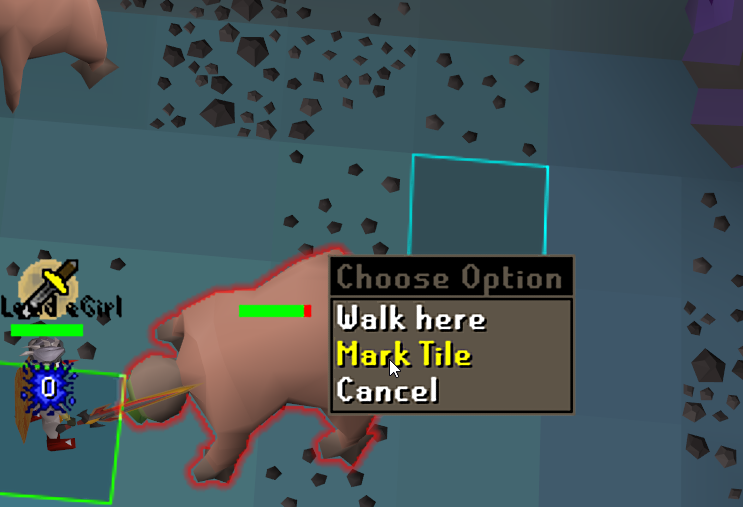
i can mark the tile and it goes a different colour but when i unmark it its still the original blue
round jacinth
It’s probably the source point of a radius marker then
tight trench
yeah when i turn off radium markers its no longer marked
radius
apparently light blue is a spawn point
 jagged patrol
Does anyone know what might have made this change? Currently when I click on Withdraw X it withdraws the 666 amount but when I click Withdraw 666 it pops up the option to enter what amount I want X to be. It is as if those two options swapped around in a recent update
 gilded kayak
you turned the new bank setting on
round jacinth
Disable the new bank setting
jagged patrol
Oh okay, I take it the new setting breaks it at the moment?
tight trench
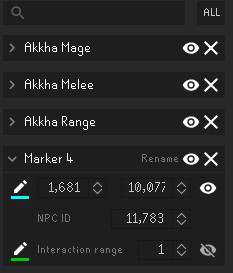
found the source not sure why i would ever have added this though or if there is somthing else with similar id https://imgur.com/5InFcg2
 gilded kayak
round jacinth
Disable the new bank setting
gilded kayak
round jacinth
Disable the new bank setting
ur the snail i'm 1 unix second faster than you
round jacinth
tight trench
found the source not sure why i would ever have added this though or if there is...
That blue top line is the “spawn point”
tight trench
of what? the bloodvelds?
 jagged patrol
Much appreciated @round jacinth and @gilded kayak
gilded kayak
my snowflake vs your snowflake

 round jacinth
You made it not me. That plugin defaults to the current location ur at
Stop being a snowflake
gilded kayak
tight trench
found the source not sure why i would ever have added this though or if there is...
if those akkha markers are imported from someone else, maybe they accidentally exported those, and this bloodveld one
and you just didn't notice
round jacinth
I reloaded discord and it corrected you to be first
tight trench
ah
round jacinth
But it’s on accident
round jacinth
It’s for the best to always hide that probably
People can make those radius markers from anywhere and when you import them you import them as their settings
Nobody cares about the spawn point lol
 pulsar frost
Hi, when I right-click withdraw items from the bank, it chooses the option below. Like, 'withdraw-5' takes out 10 items for example. From what I can tell, i've narrowed the issue down to withdrawing items when using the 'Use Layouts' option in Inventory setups. Just fyi
gilded kayak
pulsar frost
Hi, when I right-click withdraw items from the bank, it chooses the option below...
it's the new bank setting, it's broken in regular bank tags* also
pulsar frost
Ok so there's no fix for now apart from disabling plugin? If so it's good to know it's not just me
gilded kayak
it'll be fixed whenever we have to do a runelite update
i'm not sure if that's today
but no you disable the bank setting
unless you need to recharge your weapons every single time u open the bank
then I guess you can disable the plugin
pulsar frost
Well i'm confused but I appreciate the info 🤣
pulsar frost
gilded kayak
but no you disable the _bank_ setting
Where? In the bank or on a plugin?
gilded kayak
your issue should only exist, if you enabled the new in-game bank setting bank item options
did you do that?
gilded kayak
yes, you shouldn't need to disable the setting, we just missed having to update bank tags, to work with this new setting
the conflict will be fixed whenever the next RuneLite version comes out, as I mentioned earlier
pulsar frost
I see, much appreciated for putting up with me, thanks!
 signal orchid
gilded kayak
signal orchid
gilded kayak
does it say anything else
 worn gazelle
any1 have issues with better npc highlight?
haughty pumiceBOT
Get support for the Better NPC Highlight Plugin Hub plugin here: https://runelite.net/plugin-hub/show/better-npc-highlight.
You can also find the support link by searching for the plugin in the Plugin Hub panel and clicking the ? button on the plugin, or by right-clicking the plugin in the plugin panel and clicking the Support menu option.
 subtle lantern
If someone could help me figure out why my client is hanging up/freezing and also just crashing to desktop. Thank you!
leaden trail
subtle lantern
If someone could help me figure out why my client is hanging up/freezing and als...
Can you post yesterday's logs as well?
round jacinth
Oh you didn’t play for a month my bad.
subtle lantern
maybe i need to try and install a different JRE on my comp? i recently clean installed windows
sonic birch
No, rl has java bundled with it
With freezing do you mean that the game freezes briefly and then starts working again? Or something else
subtle lantern
a couple times the whole game just froze and never recovered. the side buttons on RL still functioned
sonic birch
!flow In that case you could do this to find the problematic plugin if it happens often
haughty pumiceBOT
flowchart: Please refer to this flowchart for further troubleshooting.
sonic birch
You could also install the debug helper plugin from the hub and dump the threads when it is frozen and someone might be able to figure out what's the problem
But someone would have to look at that the results
subtle lantern
ok thanks
sonic birch
If for crashing you mean "poof, client gone", you should post client.log and the most recent jvm crash log after a crash indeed
subtle lantern
that happened as well. i posted one above
sonic birch
Don't have time to look at it rn in mobile but someone else might
 reef hazel
hello i just had power outage and all my runelite gone , i saved everything i double check it and now everything gone
anyone can help? or it happend to him to?
haughty pumiceBOT
 carmine sable
Hi, I'm trying to play runelite on my steam deck using the jagex launcher but it doesn't seem to want to open. I'm hitting play, and it starts loading but once it hits "verifying" it just immediately stops and closes.
the official client loads perfectly fine so i'm sure it's a runelite issue of some kind.
haughty pumiceBOT
To find the logs, you can do one of the following:
- If your client failed to open, click the
Open logs folderbutton. - Open the screenshot directory by right-clicking 📷
Camerabutton, navigate 1 directory up, then open logs folder. - Navigate to
%userprofile%\.runelite\logson Windows or$HOME/.runelite/logson Linux and macOS.
Upload the log files named client and launcher by dragging them to Discord. If there are files prefixed with jvm_crash dated from today, upload them too.
leaden trail
Post your logs
carmine sable
carmine sable
oh yeah i've been meaning to get rid of it, i just keep forgetting
nope still crashing
leaden trail
Post your logs again?
carmine sable
okay well, i restarted my computer and it works fine now? i'm not sure wtf happened but i guess it's solved?????
didn't work the first time i restarted it so idk why it worked this time
thanks for your time man, i appreciate it, lmk if you still want the logs or anything like that
gleaming summit
was there a runelite update yesterday? Since yesterday I've had a weird white flash when I click runelite from another window
 clever jewel
Ah this did it
sonic birch
gleaming summit
was there a runelite update yesterday? Since yesterday I've had a weird white fl...
no
 round jacinth
are you on vista
velvet carbon
Vista is the best
But had to update to 7 to run osrs
It works now
It suddenly worked
Actually i was asking does runelite work on vista a few days a go. They said update to 7
 shut barn
Is there an easy way to reset an overlays position?
shut barn
tyty
hmmm my overlay (the black area) is set to dynamic but is still not sticking to top left, swear this used to cover the entire screen


 thin cloud
why xp tracker plugin doesnt reset automatically when i close runelite?
shut barn
ill take a look at what the blindfold plugin is doing
round jacinth
thin cloud
why xp tracker plugin doesnt reset automatically when i close runelite?
Recent update
You can turn it off in the xp tracker config
thin cloud
biiig ty 🙂
 rocky mist
any reason all my clients are notifying me of herb notifications for one account?
 wind owl
when you add multiple runescape accounts to a jagex account is there a way to have different runelite settings for each account? i just added another account to it and it opens up with my main runelite settings
haughty pumiceBOT
sonic birch
Button 4
viscid lantern
you can link a profile to an account so it switches automagically based on what you are launching
wind owl
how u do that
viscid lantern
after logging in on an account click the link button on the profile
 wind owl
i dont got that linking symbol
viscid lantern
have to login to the game first
wind owl
thanks
one more question if i get a new pc and download runelite to it will all my settings and accounts be on that pc or do i need a usb stick or something
round jacinth
you enable that cloud icon on profiles you want and it’ll sync to the new machine
wind owl
so enable it on all my acc profiles ?
viscid lantern
yup click the little cloud icon for the ones you want to sync
and then login on a new pc and your profiles should pop up
wind owl
sick,
haughty pumiceBOT
viscid lantern
but you can also do that if you prefer 
 leaden sinew
can you recover a profile? i was trying to link pc to laptop and created more deleting the one i actually wanted to link
haughty pumiceBOT
stone parcel
Step 4 may be helpful.
leaden sinew
thank you, for some reason my loot tracker isnt coming back the same
previous loot tracker for my osrs tag was 849 araaxor this one is 444
haughty pumiceBOT
 uneven delta
Hi, after todays update my FPS drops to 27 when i zoom out. especially at busy areas with game entities like fossil island/priffdians. i dont have FPS problems on other games.
ive restted the GPU and Camera plugin aswell
round jacinth
priff and fossil island are hard to draw areas.
And there was no update it was maintenance I think?
uneven delta
yeah small downtime (ddm update), and maintenance yesterday
anyhow the client has been rebooted today.
round jacinth
priff and fossil island are just detailed areas so they’re harder to draw. There are hub plugins that reduce the amount of stuff to draw specifically on those two locations.
uneven delta
true, but i didnt have this problem before. like yesterday it was working just fine
i thought, maybe someone knows what its causing/ how to fix this. or other people have the same issues?
viscid lantern
did you disable compute shaders in the gpu plugin? if so, turn those back on
uneven delta
no, that is still on. i resetted the GPU aswell and rebooted my PC
viscid lantern
maybe a driver update screwed you over then, nothing changed in the gpu plugin for a while now
try reverting back to an older gpu driver version
uneven delta
ok, im gonna try that, thanks
 quick wing
Bonjour, i have a question regarding the latest repo pull i seem to get:

nor can i find ComponentID in the repo on github:S
zealous cedar
its generated at build time.
uneven delta
@viscid lantern so i tried reinstalling the same version and did nothing, i now have an previous older version and still the same issue
also, what i did not mentioned is that i tried playing on the official client, and i do not have FPS issues there.
round jacinth
Runelite uses their Java client, their official new client isn’t the same in that regard
uneven delta
oh well, weird that i dont have problems there though.
 fossil summit
what zom is saying is that they aren’t the same client
uneven delta
yeah so, the problem is runelite. and i tried turning off plugins and see if that causes it. but also no succes
leaden trail
What if you make a new profile and try that?
uneven delta
if i create a new profile and load that, the game is frozen. idk why 😛 but has been like that forever
 long onyx
No idea if anyone can answer this but here we go. There is a plugin hub plugin that I use and quite often it stops working due to being flagged as incompatible. Was considering maintaining it myself if need be to prevent this, but I am not 100% certain the cause as I have never contributed to plugins before. Do new versions of runelite require basic versioning maintenance? Just trying to figure out if this might be something simple along those lines or more involved.
zealous cedar
which plugin?
uneven delta
thanks for the help and thinking with me <3. im just gonna wait it out i think, and we will see.
 opaque anchor
Heya, I recently got a new GPU and when I zoom out on RL I am getting terrible FPS. everything ok on Jagex official client.
@uneven delta oh you have same issue?
uneven delta
Yo, im discussing this aswell. do u have the problems mainly at priffdinas and fossil island?
opaque anchor
My account is at varrock
uneven delta
i already tried alot, i was just about to wait and see what happens tomorrow.
opaque anchor
yeah I got the new amd 9070, its to do with the gpu plugin for sure
uneven delta
yeah i guess, but i spoke to different people in game. and they dont seem to have problems.
gilded kayak
do you also have a 9070
or did you also buy a new gpu like this person, and not mention it
because from what I see it's "I suddenly have an issue since yesterday" vs "I bought a new GPU and have issues"
 sonic nimbus
How do I change the default login world from login screen?
uneven delta
no, i got a RTX 4050 laptop gpu, and been plalying for months on it
gilded kayak
default world plugin
or maybe it's login screen plugin
i dont remember but the second one makes more sense actually
gilded kayak
uneven delta
no, i got a RTX 4050 laptop gpu, and been plalying for months on it
we did not change anything with RuneLite since yesterday, or in the past week, so I would definitely check if you had a windows update last night
uneven delta
i do did a windows update, yes
gilded kayak
'_>'
uneven delta
so do i just revert the update?
gilded kayak
if you had no issues yesterday and issues today, probably yes
uneven delta
im sorry, im not an expert in this field
gilded kayak
we didn't change RuneLite but it seems windows did change windows
uneven delta
okay im gonna search how to do that, thanks
viscid lantern
opaque anchor
yeah I got the new amd 9070, its to do with the gpu plugin for sure
its likely their drivers, rolling back to an older gpu driver is not possible ofc so you will have to wait it out basically, I expect somewhat frequent updates for the 9070 though
mossy swan
viscid lantern
its likely their drivers, rolling back to an older gpu driver is not possible of...
may want to go complain on amd forums
gilded kayak
i wish people came back to the reddit thread about enabling ReBar in bios
viscid lantern
Guess I am making a windows boot for my new pc and investigate a bit 
viscid lantern
enabling rebar is highly recommended with a 9070, almost required
gilded kayak
ah good
well check to make sure that's enabled, it's mentioned minimally in here and reddit but never to the answer "thanks this fixed my FPS and my marriage"
opaque anchor
Ill see if Rebar will fix my marriage then
Well that was it. thanks man
Marriage saved
mossy swan
no way 
viscid lantern
gilded kayak
well check to make sure that's enabled, it's mentioned minimally in here and red...
there you go ^
gilded kayak
very good
viscid lantern
(still remind me in 2 days to look at it as well  )
)
opaque anchor
yeah crazy Rebar completely solved it.
 yay
yay zinc brook
Is anyone having trouble logging in now?
viscid lantern
yes, everyone
zinc brook
What is the problem
gilded kayak
jagex launcher ded
 coral lintel
We dc, but most using the launcher still can't log in
gilded kayak
a metric ton of people got disconnected, lots could get back in, but jagex launcher users did not
 ornate cave
yes i am here i cant get in the launcher
 frigid bane
welp
 hushed lynx
yeah launcher still cooked 😢
frigid bane
i gotta cut grass anyways
 tardy zinc
What's up with this..?
 gilded kayak
jagex launcher is 🅱️roken
viscid lantern
I think the launcher has experienced an error and needs to close, due to a network issue(its down)
tardy zinc
I reinstalled it and it's still the same.
solid mesa
Because the jagex servers are still down
tardy zinc
Oook
 heady juniper
 fossil summit
what patience
 barren nacelle
ornate cave
barren nacelle
ornate cave
yea me i play from 8 am to 3 am lol
 novel geode
 patent venture
Lol
final axle
This is a channel for runelite support, not shitposting
 tired hull
final axle
This is a channel for runelite support, not shitposting
tired hull
final axle
This is a channel for runelite support, not shitposting
i dont see anyone from runelite posting in here though. when fix game
 fast dirge
runelite down?
 strong oracle
think so
gilded kayak
the what
 indigo swallow
leaden trail
Disable that in Discord
indigo swallow
leaden trail
Disable that in Discord
try replying to me pls
gilded kayak
indigo swallow
try replying to me pls


 gilded kayak
is discord trying to turn their overlay into steam
that's what i'm getting from the vague comment
 indigo swallow
yeah idek where the settings is. it's vague af if it's in notifications
gilded kayak
if you're seeing the notifs at the bottom right, inside RuneLite, you'll need to turn the discord overlay off like Dura suggested
a reasonable amount of people asked why they suddenly couldn't click in the top left of their client, and then a few weeks later, what I assume is discord fixing the overlay, so people could correctly see it
they came in to ask about the overlay they could clearly see
tardy zinc
Launcher active..!
indigo swallow
They’re appearing top left. Super inconsistent but when I switch worlds, it’ll consistently pop up.
I don’t even see discord overlay either though. I know I’ve never turned anything on in disc or rl either
I’ll hop & try to grab a screenshot
gilded kayak
the discord overlay is enabled by default, and we had nothing to do with Discord's overlay integration
if it's top left, that's where the voice chat overlay is, join a voice channel in some discord and you'll probably see yourself
indigo swallow
yeahhh okay i see the vc overlay bs lol
gilded kayak
so go into Discord settings and disable it, if you don't want the notifs or vc overlay
Discord started expanding the range of the overlay, which after many many years, included RuneLite
the "playing" status was set by us via the Discord plugin for those years, since Discord did not recognize us as a game

 harsh stump
Not sure if there is a fix to this but looks weird when I open any of the tabs
Is it just because all the tabs load from the bottom right first?
 jovial sandal
Im trying to install runelite on Ubuntu 24.10
But when trying to run it says something about fuse which I have installed
zealous cedar
try sudo apt install fuse, or maybe fuse2
jovial sandal
Thanks for fast reply
fuse is installed
fuse2 doesnt seem to be available
fuse3 is tho
zealous cedar
it has to be specifically fuse2 I think
jovial sandal
Oh Ill try to manually install fuse2
zealous cedar
the fuse package might be fuse2 idr
jovial sandal
sudo add-apt-repository universe
sudo apt install libfuse2
This fixed it
Thank you
I assume I now need to install jagex launcher to login to runelite?
If I have a jagex account
stone parcel
Yeah, there are a few wine-based options or Bolt.
haughty pumiceBOT
Using Jagex accounts on Linux is not officially supported by Jagex, but there are some third party community guides to make it work https://help.jagex.com/hc/en-gb/articles/13413514881937-Downloading-the-Jagex-Launcher-on-Linux
jovial sandal
Awesome!!
coral lintel
Does anyone know why discord is popping up on my game? Also, we're watching a movie on my clan, and a list is showing up on the game? How do I stop that?
 final axle
disable the discord overlay in discord settings, has nothing to do with runelite
 gilded kayak
try them all and it's the one that worked?
final axle
I don't know, try them and see
 odd glade
fresh installed windows and accidently forgot to copy runelite folder over as backup, upon trying to login to my runelite account i cant access my gmail.. and google's not letting me recover account. is there a way i can recover all my plugins/tile markers or am i SOL?
oblique plume
No
gilded kayak
(if you have a windows.old folder, your profiles are probably in the .runelite folder)
odd glade
gilded kayak
(if you have a windows.old folder, your profiles are probably in the `.runelite`...
Unfortunately not :/ fresh installed wiped everything lol
odd glade
oblique plume
No
Not sure but couldn't devs or something lookup the plugins/tile markers using my email? Hell, even just the tile markers alone I need the most
Quite frustrating I can't recover the Gmail, not even letting me input phone number etc to start recovery
oblique plume
How do we know that's your email
odd glade
oblique plume
How do we know that's your email
I'm not sure, saw some old runelite folder back from 2020* on an old drive that listed that email, assuming it's the one I used to sync all my runelite settings to
Problem being it's an obscure email I used only for runelite it seems, I'll have to find one my old mobiles and see if my Gmail is logged in on there
It's just weird, trying to login to the Gmail I'm prompted with a captcha solver as if the account was targeted by hackers, Google locked recovery on it

not possible to get txt file of all my tile markers i have associated with that?
oblique plume
You can import that file, could have some stuff in it to not start all the way from scratch with
odd glade
oblique plume
You can import that file, could have some stuff in it to not start all the way f...
yeah imported a little bit of stuff, just very concerned about the ~100 or so tilemarkers i have spread out all over the game
odd glade
I think I found it!!! Was a different email.. lol.

 patent jewel
what plugin is responsible for this?

 vague vapor
patent jewel
what plugin is responsible for this?
vague vapor
patent jewel
what plugin is responsible for this?
Maybe the FPS one or World Hopper?
patent jewel
vague vapor
Maybe the FPS one or World Hopper?
I found it, it's tick tracker. Thanks for trying 🙂
vague vapor
patent jewel
I found it, it's tick tracker. Thanks for trying 🙂
well done, i havent used that one yet
patent jewel
vague vapor
well done, i havent used that one yet
I didn't even know I had it tbh, that's just been there for a long time. It's not moveable and it's on top of my FPS thing for FPS control, so i needed to move it
it's pretty cool tho, there's lots more to it.
vague vapor
patent jewel
I didn't even know I had it tbh, that's just been there for a long time. It's no...
I just learned you can move rl elements around last week and ive been using it for a long time haha
 ruby comet
hi, does anyone know how to fix this?
 crisp dune
turn off whatever plugin is adding a midnight-o'-clock overlay
(I'm not sure what is causing that, almost certainly a hub plugin of some sort)
ruby comet
honestly, i totally forgot what i install
crisp dune
You can use the 🔻 in the plugin panel to search for hub plugins specifically to check
ruby comet
crisp dune
You can use the 🔻 in the plugin panel to search for hub plugins specifically to...
where is that?
crisp dune
 final axle
did you maybe make a screen marker across the whole screen
ruby comet
any way i can find what i installed recently?
final axle
I know some people do that to dim vorkath arena
ruby comet
i didnt even know what i did lol
i just installed some plugin in the hub
nvm
i got it
thx anyway yall
 tawny chasm
Hey guys, when i use custom cursor plugin and have gpu plugin enabled my custom cursor becomes transparant.. any help with that?
Hey! I just posted this as well!! I’ve been able to recreate this issue. If I disable the gpu plugin the transparency goes away! There seems to be an issue with the GPU plugin
sonic birch
Are you sure you are not on linux?
Sounds like some weird os level thing for some reason
!flow can you reliably reproduce it in green tree?
haughty pumiceBOT
flowchart: Please refer to this flowchart for further troubleshooting.
sonic birch
If so, you should probably create a github issue with all the info (video as the flowchart notes, client logs, steps to reproduce)
 high quartz
Does anyone know what plugin this "Time Expired Time Remaining: 0s" is? It's been locked on for me since a update a few weeks ago and I don't know which one it is
 haughty pumiceBOT
Many plugins from the pluginhub break the client in subtle or not-so-subtle ways, including causing issues like client freezes. We do not support pluginhub plugins because we do not make or quality control them, and do not recommend their use.
Run the RuneLite (safe mode) shortcut, or with a Jagex account, first run the RuneLite (configure) shortcut and tick the Safe mode box, then launch RuneLite via the Jagex launcher.
This temporarily disables the GPU plugin and all hub plugins which will allow you to confirm the issue is caused by one of those plugins and isn't a core RuneLite issue.
If the issue is caused by a hub plugin, you should isolate which plugin it is and then uninstall the plugin.
gilded kayak
i'll save u the trouble it's in game timer
but it's preferred if you actually pay attention to what you're installing from the hub
high quartz
gilded kayak
but it's preferred if you actually pay attention to what you're installing from ...
I do pay attention, like I said, this popped up out of the blue without me installing any plugins for a while. It just appeared when The Royal Titans update dropped and I wasn't sure what was causing it.
 thick dune
tawny chasm
Hey! I just posted this as well!! I’ve been able to recreate this issue. If I di...
thick dune
tawny chasm
Hey! I just posted this as well!! I’ve been able to recreate this issue. If I di...
I use 117HD. Interesting that's what the issue is, because it only happens on my PC. I have Runelite on my laptop as well, with the 117HD and custom cursor and this issue isn't there.
 south siren
can some1 tell me whats wrong?
round jacinth
Try turning off the bank bank setting that did the charges thing
 stone egret
Does anyone know if Runelite and ProtonVPN work together?
charred wind
any VPN without split tunnel should be fine
I think there's a workaround for split tunnel but you'll have to search this channel to find it
solid mesa
With split tunnel you download the newest launcher in #welcome open Runelite (configure) and turn on the option “IPv4”
stone egret
solid mesa
With split tunnel you download the newest launcher in <#432655530352181248> open...
Hmm I actually don't see that option
oblique plume
show
solid mesa
Did you download the latest launcher? It’s new
sonic birch
They never do because nobody knows what the launcher is
At best they think the jagex launcher
!launcher just always gotta type this command and tell them to reinstall for them to potentially get it
haughty pumiceBOT
Download and install the updated RuneLite launcher from the website link in #welcome. You don't need to uninstall your current version. You will not lose any settings or plugins.
stone egret
solid mesa
Did you download the latest launcher? It’s new
There's a runelite launcher? Not just the app itself?
Don't even see it on the site
sonic birch
It's what you get when you download basically anything but the jar
oblique plume
the jar is still a launcher
sonic birch
oh yeah true I forgot; obv we're not just putting a shaded jar of the client or whatever there
I'm too sleepdeprived rn
Well anything you download basically. Just install it and you got the latest launcher
 rare sphinx
xp tracker on rl still not working 100%
leaden trail
Can you elaborate?
south siren
round jacinth
Try turning off the bank bank setting that did the charges thing
how to turn off? i dont have a setting for that right?
 stoic quest
im having an issue with menu entry swapper withdrawing items where the wrong amount is shown
leaden trail
stoic quest
im having an issue with menu entry swapper withdrawing items where the wrong amo...
Turn off the new bank setting Jagex added last week
stoic quest
leaden trail
Turn off the new bank setting Jagex added last week
thanks. does this mean the auto-charge feature wont work?
leaden trail
The fix is gonna be in the next version of RuneLite, it just hasn't gone out yet
stoic quest
okey dokey
viscid lantern
It still works you just cant modify the number while its off
stone egret
Still don't get it but it's fine
round jacinth
What don’t you get?
charred wind
stone egret
There's a runelite launcher? Not just the app itself?
he's talking about this zom
the Runelite (Configure) shortcut I think
round jacinth
Oh.
long onyx
zealous cedar
which plugin?
raid data tracker
zealous cedar
I think it is just unmaintained. you could consider submitting a takeover request for it https://github.com/runelite/runelite/wiki/Plugin-takeover-policy
 tulip surge
Hey, for the past few days my runelite has not been displaying my ping for worlds even though I have the checkbox for display current ping checked and show world ping checked. What could be the reason?
and it was previously fine for many many months, the issue just occured recently, still on the same computer etc
zealous cedar
do they show in the world switcher sidebar?
 zealous cedar
probably the pings are being blocked
tulip surge
How do I fix this? I haven't really changed anything on my setup or anything like that
One day it just randomly happened lol
zealous cedar
probably its something on your end. maybe ask your network admin if they are blocking ping
tulip surge
hmm okay thanks
leaden trail
zealous cedar
I think it is just unmaintained. you could consider submitting a takeover reques...
There's this but it's waiting on the author

GitHub
Large PR for the Raid Data Tracker plugin.
Tombs of Amascut support
Maintenance
Code reformatting
zealous cedar
uhh, what author
viscid lantern
hes the maintainer no?
zealous cedar
oh its waiting on review
viscid lantern
oh I see
leaden trail
Oh I missed the tag got removed mb
long onyx
Hm been sittin there for 10 days, sadly.
 hot oasis
there's 6k lines changed, it may take a while
viscid lantern
its not a small update
 tawny chasm
thick dune
I use 117HD. Interesting that's what the issue is, because it only happens on my...
tawny chasm
thick dune
I use 117HD. Interesting that's what the issue is, because it only happens on my...
I don’t use 117 just the regular GPU plugin, and when I disable it my cursor transparency goes away.
I also have another pc that it doesn’t happen on
The pc it doesn’t happen on is windows 10 3070Ti
The one it happens on is windows 11 3050
I’m not on Linux
Lemme know if disabling bring it back for you as well
 proud estuary
unable to download bootstrap . HELP!!!#
hollow olive
use a hotspot or other network to start runelite
gilded kayak
well if you read the error it probably said you can't connect to the bootstrap
proud estuary
mind, it wont let me reconnect to my original network wiothout disconnecting
gilded kayak
your internet is probably having an issue connecting to our server specifically
proud estuary
yeah it did but why? my connection to the internet is fine
gilded kayak
the internet is not an on or off situation
there could be dozens of websites you can't connect to right now
you just don't use any of them
proud estuary
weird 😦 it happened a month or so ago and it seemd to connect eventuallyt
😄
thats good information
 stone maple
Does anyone know why the hi-score search function automatically activate it by itself? Everytime when I click on the bank, the search-function at hi-scores will be active.
I play this game with the WASD-key function. It's so frustrating that the search function is on when I click at the bank
here a gif: https://gyazo.com/7965a2a8ab8404fb2afc9afa2f61ad74



 leaden trail
Does it happen in safe mode?
haughty pumiceBOT
To enable safemode
Windows
Run the RuneLite (configure) shortcut from the windows start menu
Tick the Safe mode box, save, launch RuneLite the way you normally do.
Mac
In Terminal, run
/Applications/RuneLite.app/Contents/MacOS/RuneLite --configure
Tick the Safe mode box, save, launch RuneLite the way you normally do.
stone maple
leaden trail
Does it happen in safe mode?
I'm trying to get in a safe mode, but I don't know how. It's an old windows version any way
leaden trail
Use the link in #welcome to reinstall RuneLite. As long as you don't delete anything, you won't lose any settings. Then you'll have the configure option
 zealous charm
regarding plugin dev help - where would one go (sorry if im intruding)
haughty pumiceBOT
How to develop plugin-hub plugins: https://github.com/runelite/plugin-hub/blob/master/README.md
round jacinth
The wiki of the project is a good resource
zealous charm
thank you, but modtly looking for where i can ask a q? ive submitted an update and it says "no reviews requested" for 5 days, just checking if this is normal? if the answer is i need to be patient then i will
round jacinth
What did you submit
zealous charm
prop-hunt
round jacinth
The owner of the repo/that hub plugin maintains their own project
zealous charm
i am the new owner
round jacinth
Oh idly gave it up
gilded kayak
llemon plans to review plugins later I think
zealous charm
yes he didnt have time to maintain and i found a fix as it was broken for time
thanks felan, thanks for reviewing the last update
round jacinth
Yeah the hub plugins are done when the people who review them find time
There is no order or routine
They just do it as they want to or can
zealous charm
thats okay, i was just making sure it wasnt lost in the ether with "no reviews requested"
gilded kayak
we only have 26 PRs I don't think it's possible to get lost
zealous charm
im not too familiar with github so i apologize, i understand tho
 weary dawn
Hey is there an easy fix to either recover or merge loot tracker data? Just got a new pc and it seems it wiped some loot tracking , not the biggest deal but wondering if its a commonly fixed issue
haughty pumiceBOT
round jacinth
you cant combine them, you pick which one you want to continue to use
they shouldn't split and idk what causes it cause they do split
round jacinth
well if you go to runelite.net and are signed in
weary dawn
im there