#support
1 messages · Page 69 of 1
 gilded kayak
 true fog
Help malformed login
gilded kayak
jagex problem, if you check your client.log you'll see that an error, from Jagex, is in there at the exact same time you got malformed login
can't really help sadly
 shrewd obsidian
is the collection log not working atm? (website /ingame)
gilded kayak
yes it is broken
it looks like he updated the website to confirm shutdown a few minutes ago
gilded kayak
we don't really know either, Jagex's errors are not helpful
true fog
Ok, thankyou
 peak grove
anyone having issues with xp orbs? currently woodcutting but the xp per hour seems more like actions per hour and then its making it say 700 hours to next level.
Not sure if its an orbs issue or something else so thought id ask here
 solid mesa
XP Tracker saves between sessions now. So maybe you just need to reset the xp/hr?
peak grove
frieeeed, just had to turn xp tracker plugin off and on. cheers!
the old it crowd trick
 round jacinth
You can disable remembering the xp tracker between sessions to go back to what it used to do
peak grove
Eaaaaaasy 🙂 cheerssss
 foggy rover
Hi I just signed up and my login isnt working please help :3

I can't find anything online
foggy rover
 hollow olive
you probably have a jagex account, use the jagex launcher to launch runelite
hollow olive
you probably have a jagex account, use the jagex launcher to launch runelite
I just made the account today I've never played before how do I tell?
hollow olive
all new accounts since like nov 2023 or 2024 are jagex accounts
so you have a jagex account
gilded kayak
download the jagex launcher, use that username/password to login, click the dropdown menu below play and select RuneLite instead of Official Client
click play, gg ez
foggy rover
how do i turn the music down omg
gilded kayak
there should be a 🔇 bottom left of the login
if you're in game, you have to do a little bit of the tutorial to unlock music (or at least create your character)
so you should mute in volume mixer until you can
foggy rover
any way to make the UI any bigger, it's like tiny on my screen
gilded kayak
i assume you have a large monitor?
foggy rover
I mean it's like 32 inches? but the ui is tiny
gilded kayak
🔧 on the right side, and search bar or scroll down, to stretched mode plugin
turn it on, and then ⚙️ to mess with the settings
or, you might actually want the in-game setting you'll unlock during the tutorial
 haughty pumiceBOT
 foggy rover
mine looks different than that pic
this is also like, so small i can't hardly read it
 gilded kayak
oh you want our sidebar
if you type runelite into your windows search bar, there should be a runelite (configure) shortcut
open that, put 1.5 or 2.0 into the scale box, save, and restart runelite
 jovial forum
if i modify a plugin thats already on the plugin hub do i need to load it in my intellij every time or can i some how get it on the plugin hub since it would be jagex approved?
gilded kayak
you can submit the changes to the author of the plugin, on the page you forked the plugin from
jovial forum
what if they dont want it ?
gilded kayak
then no probably not
jovial forum
so i would have to load intellij everytime?
gilded kayak
if you want to use their plugin, with your own changes, then yes
jovial forum
thats ok to do ?
gilded kayak
that depends
jovial forum
i just made shortest path highlight doors in its path
gilded kayak
if you're changing a plugin on the hub, and not breaking the plugin rules https://secure.runescape.com/m=news/third-party-client-guidelines?oldschool=1 then sure
jovial forum
so thats fine ?
gilded kayak
I cannot say, I assume he denied that feature because it's pretty clearly a feature for bots, so if you're botting then no its not okay
jovial forum
no im just trying to learn plugins
gilded kayak
if you were learning plugins then why would u need to use it, you've already learned how to do it
jovial forum
i was jw for reference
 final axle
I guess all those bot discords have great community sections then for you to be in them 
 fossil summit
coincidence
 tranquil fractal
i just got dc'd and restarted my PC. Then tried to login back to runelite via Jagex Launcher. My plugins are not loading and profile seems to be lost. need help please ❤️
 stone parcel
!lost
haughty pumiceBOT
tranquil fractal
i followed these steps, but no luck
stone parcel
Make sure you try step 4 really good.
tranquil fractal
i did
noo luck
could i get one on one support, with screen share>]
i did re-install runelite app, would that have deleted the profiles too, i assume not?
stone parcel
You can screenshot the contents of the profiles2 folder with the size and modified date visible and people here can try to figure out which is correct.
tranquil fractal
 gilded kayak
import 250500916...
 dusk plume
Anyone know why my FPS won't go above 60? Tried so many different things now with no success, also happens with GPU plugin. RL is definitely 64-bit version also. Specs are 9800X3D and 5070 Ti

 crisp dune
Do you have this plugin enabled, by any chance?

 sonic birch
He does
dusk plume
Oh wow, didn't even know that was in my list. Thank you!
sonic birch
Try to stick to one channel next time
No reason for us to answer it in both channels
 inner merlin
dusk plume
Anyone know why my FPS won't go above 60? Tried so many different things now wit...
inner merlin
dusk plume
Anyone know why my FPS won't go above 60? Tried so many different things now wit...
How do you solve this issue?
solid mesa
Turn off the FPS Control plugin
 fading aurora
@zealous cedar I know what plugin is responsible for this.

This one. I installed it to show when I was venoming tormented demons for a CA.
If you press CTRL in the the game a little Nex Helper UI thing shows up
It will also clear it.
This plugin is completely busted, as far as im aware, it didnt even work marking anything. Probably fkn malware or something rofl
Very suspicious plugin
solid mesa
Plugins from the hub aren't guaranteed to work, but they are reviewed to make sure they aren't malware or malicious.
They're clearly responsive to issues

 sacred solstice
anyone got the GPU plugin to work on a virtual machine?
i got GPU passthrough to work (with my AMD CPU's integrated graphics card), but when turning on the GPU plugin runelite just freezes
 vague vapor
sacred solstice
i got GPU passthrough to work (with my AMD CPU's integrated graphics card), but ...
vague vapor
sacred solstice
i got GPU passthrough to work (with my AMD CPU's integrated graphics card), but ...
First thing to check would be if your integrated graphics supports opengl 4.3 probably
Which model APU is it?
sacred solstice
vague vapor
Which model APU is it?
my CPU is the Ryzen 5 7600
which, according to GPU-Z is on OpenGL 4.6
vague vapor
Can you post a log?
sacred solstice
vague vapor
Can you post a log?
2025-03-05 02:15:13 PST [Client] INFO  n.r.client.plugins.gpu.GpuPlugin - Using device: AMD Radeon(TM) Graphics
2025-03-05 02:15:13 PST [Client] INFO  n.r.client.plugins.gpu.GpuPlugin - Using driver: 4.6.0 Compatibility Profile Context 24.10.27.02.241120
this is what's being logged when i enable the GPU plugin
interestingly I can interact with the game, for example click somewhere to walk, and when I disable the plugin again it has moved to where I have clicked
vague vapor
I think it may be a compatibility issue with the driver. Might try a rollback to a previous version, a lot of AMD users reporting issues with current version drivers
 leaden trail
Why are you trying to run in a VM in the first place?
 mossy swan
runelite already runs on mac, linux and windows natively
vague vapor
sacred solstice
anyone got the GPU plugin to work on a virtual machine?
If you have Core Isolation on, that can tend to interfere with some drivers and programs
Ones that arent compatible with memory integrity basically
sacred solstice
vague vapor
If you have Core Isolation on, that can tend to interfere with some drivers and ...
that might've been it! had to restart my PC for that setting to apply and now even my nvidia GPU works in my VM. thanks a lot! 🙂
 snow turret
Hi, keep seein this msg. Have restarted my pc multiple times and tried reopening mutiple times. How do I fix?

 proper nacelle
snow turret
Hi, keep seein this msg. Have restarted my pc multiple times and tried reopening...
proper nacelle
snow turret
Hi, keep seein this msg. Have restarted my pc multiple times and tried reopening...
Came here because I too am having this issue.
Am also getting connection timed out on Runelite website too.
round jacinth
522 seems to be a connection time out between the site and cloudflare, just wait it out.
proper nacelle
round jacinth
522 seems to be a connection time out between the site and cloudflare, just wait...
Thanks
 sinful drum
hi guys im trying to use the 2005 resource pack and i set my interface settings to 2005 but every time i tele it changes back to default interface settings and my icons dont fit, does anyone know how i can fix this please?
 oblique plume
it doesnt work with resource packs
sinful drum
ohhh i dont need to use the resource packs, didnt realise, ty
 worthy seal
snow turret
Hi, keep seein this msg. Have restarted my pc multiple times and tried reopening...
worthy seal
snow turret
Hi, keep seein this msg. Have restarted my pc multiple times and tried reopening...
Yea I got similar. I'll probs head to bed and wait it out as suggested by zom


 ember magnet
my wikisync not working. did the instructions and still not workin. "No data found. To use this, enable the WikiSync plugin in RuneLite." even did what it told me to do and nothing
round jacinth
are you typing in your rsn wrong
leaden trail
ember magnet
my wikisync not working. did the instructions and still not workin. "No data fou...
The last step is to ping someone in the Wiki discord

Old School RuneScape Wiki
WikiSync is a RuneLite and HDOS plugin that uploads your Old School RuneScape character's quest completion, Achievement Diary task completion, skill levels, and Leagues task status to a server run by the Old School RuneScape Wiki. This data is then used by various articles on the wiki in order to personalise the content for your character, inclu...
That discord is where you want to go for Wikisync support anyway, not here
round jacinth
you can leave after you get help
ember magnet
went to osrs > then here > now i gotta join a diff one
round jacinth
well you keep joining the wrong place to go
ember magnet
yeah this too much hassle xd forget that plugin
round jacinth
lmao
 leaden trail
Might have to just wait that one out
 cedar maple
wdym
im playing on my main with runelite
im just trying to get a 2nd runelite on and it wont let me
makes no sense
leaden trail
The client needs to fetch a file from static.runelite.net to start up and the host for that seems to be having an issue right now
cedar maple
its working
i think runelite was just getting overused by a lot of people
maybe server got crashed
 calm mesa
Anyone have any idea why runelite keeps saying “windows cannot access the specified device”?
 oblique plume
you didnt like our answers yesterday?
 tight kelp
Hey is anyone else having issues with Bootstrap?
oblique plume
ghpages are having issues afaik
tight kelp
so what wait it out?
tight kelp
Honestly dint realise you were a mod LMFAOOOOO
thought you were just a random talking shit so
 ionic hollow
hey guys
i need help with runelite sudenly not working for me 😦
been using it for a month straight no issues and was working fine till this last update a couple hours ago
 mossy swan
read the messages above yours
ionic hollow
gets stuck on preparing ( doanloading ) boot strap
copy
oh wow
i feel silly now!
all my friends are online using runelite, is it more of a server has reached capacity kinda thing? or were lucky to load it before crasing or something?
 viscid lantern
Once you get in its fine 
leaden trail
GitHub Pages seems to have some sort of issue going on right now but it's intermittent ish
ionic hollow
i installed quite a few plugns for toa before update and thought maybe that crashed it haha
leaden trail
Some people have just kept trying and gotten on eventually but I don't know how well that would work
viscid lantern
It needs the initial info to start the client which is on github pages and those are having difficulties atm
ionic hollow
i have a 1500kc bandos loot tab i was about to share online and i was so upset to think id lost it
ionic hollow
i just finished DT2 before forced logout from update and i am soooooo damn happy thats over!
aussie ping and bosses with tic ruthless attacks are terrrible 💔
viscid lantern
Gz on dt2 completion! But yeah just gotta wait for now, try every 5min or smth
mossy swan
it’s just microsoft being microsoft
ionic hollow
can you retrive deleted by accident loot trackers?
say for my bandos kc that i did before clearing it?
leaden trail
If it's been actually deleted I don't believe so
ionic hollow
copy
foggy rover
gilded kayak
open that, put `1.5` or `2.0` into the `scale` box, save, and restart runelite
I tried this but nothing changes
solid mesa
Can you screenshot Runelite (Configure)? You restarted the client after typing in?
 oblique plume
thats indicative of not have write permissions
lauch RL as admin once itl try to fix that
foggy rover
why is this software so bad at being installed off C drive - not everyone uses one drive
if it told me that would have saved some time lmao
oblique plume
you mean "why is everything upset at having its stuff messed with by things other than itself?"
foggy rover
I didn't just move all the files, I ran the installer and chose the install path. This isn't a normal behavior for software. It's quite common for software thats installed on another drive to have proper write permissions.
tight kelp
Bro still not working after an hour and a half
I thought RL had a nice deal with OSRS to be able to afford better servers than this?
foggy rover
the launcher needs an error to be shown if it has one, how was I ever supposed to know that lol
oblique plume
what
foggy rover
I swear, every support discord is full of the most entitled know it alls lol
oblique plume
that makes sense because youre in all of them
round jacinth
the common factor is the user
tight kelp
Idk what zeddwolff is on about but guysssa i need help
round jacinth

there is nothing you can do right now moe
you just wait it out
assuming it's still that 522 error?
tight kelp
Is this because of mod north as the new CEO
Lmfaoo jokes ahhh it's the bootstrap downloading issue still yes sir
oblique plume
github is not jagex
tight kelp
Was a joke
NAH NAH NAH IT JUST WORKED
Alright idl if this was it
But just spam launch from the jagex launcher open like 4 clients up one of thems gonna load up
viscid lantern
works for me atm 
tight kelp
viscid lantern
works for me atm <:Shrugfreg:1214687711491915896>
Sorry we're not all blessed by saradomim
🤓
Thank you for your time and effort though guys
And girls
Ans they thems
 simple bone
tight kelp
Ans they thems
simple bone
tight kelp
Ans they thems
Don't forget the ones who identify as a Lockheed Martin F-22 Raptor!
tight kelp
simple bone
Don't forget the ones who identify as a Lockheed Martin F-22 Raptor!
Thank you to all the Lockheed F-22 Raptors and all the furry butt pluggers
mossy swan

tight kelp
Seems like Sydney was the issue
And yes if you wear a flurry butt plug ima pull it out the next runefest!!!
Period
 warped crypt
Hi just got back into runescape and I'm noticing that I don't have the small ui for current skill levels when I have active pots that I remember having the last time I played. I checked my Timers & Buffs and everything seems enabled as well but it still doesn't show up. Stuff like brews and super restores also don't show up for popular pots etc.
 charred wind
Boosts information plugin
 rotund grove
Hey guys, I'm running with a 4070 SUPER and 7800X3D with 32gb RAM. When I use GPU plugin and zoom out I get 24 FPS. If I turn HD plugin on and Zoom out I stick at my desired FPS cap of 144. I am using the 64 bit client. Any ideas how I can fix this? I am not a fan of HD but it's the only way I can get 144 fps
oblique plume
Do you have compute shaders enabled in the gpu plugin
 inner summit
This is happening to my menu ever since I tried runelite. Any solutions or idea what is causing it?
 haughty pumiceBOT
@inner summit Graphical artifacts? Try disabling hardware acceleration: https://github.com/runelite/runelite/wiki/Disable-Hardware-Acceleration
inner summit
haughty pumice
<@578918413024624640> Graphical artifacts? Try disabling hardware acceleration: ...
Thanks alottt!!
 random frost
Any1 know how to fix this "issue"? Doesnt show Personal Best time for the completion time, only the overall time. What plugin/ingame setting controls this?
 random frost
But if every1 of my friends gets the message but i dont? The 2 pictures are from the same kc, same server
gilded kayak
i would maybe check the chat filter plugin and see if you filtered the duplicate messages
people have asked about this previously, due to not wanting both messages
actually nah that wouldn't make sense
nightfirecat is correct, jagex just didn't want to service u that info
(it's probably a bug)
 haughty locust
gilded kayak
haughty locust
gilded kayak
because bugs dont care about what makes sense
 misty pewter
Okay am I dumb what is the plugin that shows your walking/ running path?
gilded kayak
shortest path
viscid lantern
my guess is one of these 5 

 coral shale
Runelite down?
gilded kayak
RuneLite loads fine for me, can you be more specific about your issue
coral shale
Interesting. I can't access the website nor the client it's self.
Worked fine up until i went to bed last night
 vale folio
same davo
 vale folio
yea read up a bit
coral shale
I'm gonna hotspot to my phone see if that loads it
coral shale
Oh cool thank you
 short charm
Hello! Just got a new laptop and logged into Runeline. The text on my laptop looks much more grainy compared to when it looked crisp. Any idea how to fix?
 gilded kayak
!config you probably want to set the scale to 1
haughty pumiceBOT
gilded kayak
assuming your laptop has 125% zoom as the default
short charm
Yeah its at 125%. I can try the scale to 1, thank you!
 sick glen
coral shale
I'm gonna hotspot to my phone see if that loads it
sick glen
coral shale
I'm gonna hotspot to my phone see if that loads it
did ya hotspot end up working?
 past magnet
sick glen
did ya hotspot end up working?
past magnet
sick glen
did ya hotspot end up working?
I'm having the same issue. I tried to hotspot, it didn't work for me
oblique plume
Vpning to another continent might help
 quartz sorrel
hey guys just wondering on the gpu plugin, when my fps is capped at 50 my cpu is normal
when i put it up to 60 fps uncapped but limited to 60 its stil ok but anything above that and my cpu spikes on task manager
my monitor is 144hz and if i put it on 144 fps cap it spikes my cpu by 15%
its not a big thing but just wondering if anyone knows a way around this? or something i can do
coral shale
@sick glen Hotspot didn't work, will report back after i try a vpn.
I used tunnelbear vpn to connect to Japan, and i managed to open runelite. @sick glen
sick glen
coral shale
I used tunnelbear vpn to connect to Japan, and i managed to open runelite. <@154...
how good
 unique hatch
coral shale
Ah, a fellow aussie. I daresay related to the weather.
unique hatch
coral shale
Ah, a fellow aussie. I daresay related to the weather.
im in aus as well, pretty strange im all the way in vic no weather issues here, ill try the vpn
coral shale
The vpn is a 100% fix @unique hatch
You get 2gb for free with tunnelbear, connect to Japan and open runelite then turn the vpn off.
gilded kayak
a lot of the time it's something in "the chain" that's causing the issue, so even if you're not near the issue it can still effect you
it happened for users in brazil once, and it was effecting many other south american countries
unrelated to a storm, just an issue
sick glen
coral shale
You get 2gb for free with tunnelbear, connect to Japan and open runelite then tu...
I just signed up for it, I thought it said 500mb free
nvm I can't read this early in the morning it is 2gb
NZ worked as well, which might be better than Japan for ping idk @coral shale
gilded kayak
you just need to get the client open
unique hatch
nz worked for me, japan didnt ty all ❤️
gilded kayak
and turn the VPN off once it is
sick glen
gilded kayak
and turn the VPN off once it is
oooh
coral shale
Yeah just open runelite then disconnect from the VPN
 gilded kayak
you turned custom chrome off in the RuneLite plugin
 naive fog
gilded kayak
you turned custom chrome off in the `RuneLite` plugin
naive fog
gilded kayak
you turned custom chrome off in the `RuneLite` plugin
thanks!
 unreal flame
If I deleted my screenshot folder from my C Drive .runelite folder, how would I go about getting it back, or making a one?
Runelite is no longer saving screenshots
mossy swan
!logs
haughty pumiceBOT
To find the logs, you can do one of the following:
- If your client failed to open, click the
Open logs folderbutton. - Open the screenshot directory by right-clicking 📷
Camerabutton, navigate 1 directory up, then open logs folder. - Navigate to
%userprofile%\.runelite\logson Windows or$HOME/.runelite/logson Linux and macOS.
Upload the log files named client and launcher by dragging them to Discord. If there are files prefixed with jvm_crash dated from today, upload them too.
mossy swan
it should make a new one when a screenshot is saved
i guess its possible something is blocking that
unreal flame
Yeah I just got a collection log, and it didn't make a screenshot
mossy swan
try pressing the camera button and see if that makes one
unreal flame
nope
gilded kayak
then post the logs please so we can see why it's not working
unreal flame
gilded kayak
well the screenshot button didn't work, because you tried to click it in the login screen, not ingame
and we prevent it from doing that
but I do see the error here about the folder not existing
mossy swan
but thats just for trying to open the folder (right click camera)
unreal flame
i took a ss in game and it created a folder.
mossy swan
i forget what exactly collection log screenshots need... either the popup or the text? thats a jagex option
unreal flame
I suppose I will have to find a quick collection log and see if it starts making subfolders.
charred wind
mossy swan
i forget what exactly collection log screenshots need... either the popup or the...
Popup yes
unreal flame
Okay, so that is fixed.
Is there any way to redirect where the screenshots are sent to by dafult?
unreal flame
Perhaps I didn't follow the instructions properly because that's what got me into this.
How would i do that?
charred wind
Create folder where you want screenshots, create shortcut to folder in ./runelite, name the shortcut screenshots or whatever the current name is
that could be very wrong so confirm that for yourself
unreal flame
I hope that there will be a way in the future to change the location files get stored. Doing this method just makes double the files. So it takes up space in two spots.
My C Drive is almost full and I would have just liked to direct it to be D Drive.
gilded kayak
pretty sure whatever you're looking at, suggesting it's doubled* the files, is wrong
mossy swan
symlink is not the same as creating a shortcut though...
you'd better just google "how to create symlink"
charred wind
mossy swan
symlink is not the same as creating a shortcut though...
my bad, Windows bad
unreal flame
So when I go to open the Junction folder that the command promp creates, I get this alert. Also the folder that I am supposed to move to where I want the screenshots to be saved, doesn't save anything. Just finished a Barrows run and got a collection log and neither ss saved.
 oblique plume
I'm not quite sure what that means
 still acorn
what is this plugin?
 oblique plume
Have you searched for that
mossy swan
 perhaps a ... chunk... plugin
still acorn
mossy swan
<a:SUSSY:1197509230664622161> perhaps a ... chunk... plugin
nope
oblique plume
Well the default response when you install something that you don't want is don't install things that you don't want
still acorn
Wasn't so helpful, but thanks for trying.
gilded kayak
it's personal currency tracker
still acorn
oh thanks
gilded kayak
but what they said is true, that plugin has literally only 200 active installs so it should have been clearly obvious when it appeared, after you installed that plugin
oblique plume
Why is it called chunk???
gilded kayak
that's the default currency name
still acorn
gilded kayak
but what they said is true, that plugin has literally only 200 active installs s...
I agree with them. but the thing is, I accidentally download something and I lost track which one was it
I'll be careful next time
gilded kayak
oblique plume
Why is it called chunk???
apparently he did update it to just "coins" which I don't actually think is much better, in october 2022 but never submitted that change to the hub
oblique plume
Nice
 wild marsh
!logs
haughty pumiceBOT
To find the logs, you can do one of the following:
- If your client failed to open, click the
Open logs folderbutton. - Open the screenshot directory by right-clicking 📷
Camerabutton, navigate 1 directory up, then open logs folder. - Navigate to
%userprofile%\.runelite\logson Windows or$HOME/.runelite/logson Linux and macOS.
Upload the log files named client and launcher by dragging them to Discord. If there are files prefixed with jvm_crash dated from today, upload them too.
calm mesa
oblique plume
you didnt like our answers yesterday?
What was the answer?
gilded kayak
you posted it yesterday and we asked (but we could see from the previously cropped image) that you were clearly on a work computer
and we said that the computer likely has exe's locked down
 ornate kite
Can someone help me figure out why runelite keeps randomly crashing. Can't play for an hour w/o a crash it seems like. When I am sitting afk it doesn't crash but when I do anything it crashes.
haughty pumiceBOT
To find the logs, you can do one of the following:
- If your client failed to open, click the
Open logs folderbutton. - Open the screenshot directory by right-clicking 📷
Camerabutton, navigate 1 directory up, then open logs folder. - Navigate to
%userprofile%\.runelite\logson Windows or$HOME/.runelite/logson Linux and macOS.
Upload the log files named client and launcher by dragging them to Discord. If there are files prefixed with jvm_crash dated from today, upload them too.
ornate kite
charred wind
nothing sticks out. any other log files in there, specifically crash files?
No other (recent) crash files. Hmm weird - thanks anyway! If I see one generate I will post it here
gilded kayak
check event viewer then
ornate kite
Ooo good call - looks GPU related? (deleted logs)
gilded kayak
basically all crashes that don't show up in our logs, or generate a jvm crash log, are gpu yeah
ornate kite
Ah - thanks buds for the support! 🙂
gilded kayak
(but we tend to suggest you figure it out yourself, because people don't like being told about gpu issues)
they get very displeased and start yelling about what gpu they have
ornate kite
Haha 100% fair 😛
 silk fox
anyway to make this a keyboard shortcut for those with a messy ass bank?
 gilded kayak
ctrl+f
gilded kayak
xd
silk fox
how was I suppose to know it was like a document
hollow olive
its part of the bank plugin
silk fox
should be a plugin for bank organizing
silk fox
like one that does it for me
gilded kayak
yeah thats botting
silk fox
oh well
messy bank it is
but if botting was general crimes
botting to gain XP is like IRL murder
Botting to organize bank is like jaywalking
not a big deal
Jagex should let it slide
sonic birch
One could write a plugin that tries to sort it and then shows images of possible options as examples
So far it hasn't been done though, and idk if there are specific ways to organize your bank that would work for almost everyone
gilded kayak
chatgpt please sort my runescape bank
sonic birch
Sounds kinda hard to determine but it is possible
Well not the chatgpt joke; that'd be terrible lol
gilded kayak
who else is going to sort it for the plugin
u want us to write code that actually thinks about where items should be?
sonic birch
Way too much manual code like questhelper indeed that'd pull sets or smth from the wiki
Anyway, sounds like ass, so it makes sense it's never been done
 granite sky
logged in the runlite this morning and all my plugins/profile have vanished any help restoring this?
gilded kayak
!lost
haughty pumiceBOT
 twin scroll
Sorry if this is a known issue, but withdrawing stuff from the bank isn't working as expected. Selecting 5 pulls out 10, X pulls out X's value rather than letting me choose it, etc. Started with today's update.
Looks to be the same issue this user was having
gilded kayak
!safe does your issue happen in safe mode?
haughty pumiceBOT
safemode: To enable safemode
Windows
Run the RuneLite (configure) shortcut from the windows start menu
Tick the Safe mode box, save, launch RuneLite the way you normally do.
Mac
In Terminal, run
/Applications/RuneLite.app/Contents/MacOS/RuneLite --configure
Tick the Safe mode box, save, launch RuneLite the way you normally do.
twin scroll
Will check in a few
twin scroll
gilded kayak
!safe does your issue happen in safe mode?
Seems to be a bug with Inventory Setups and not Runelite, I see an open issue on their Github about it as well. Thanks!
 warm cape
twin scroll
Seems to be a bug with Inventory Setups and not Runelite, I see an open issue on...
warm cape
twin scroll
Seems to be a bug with Inventory Setups and not Runelite, I see an open issue on...
This might be an easy fix given inventory setups is relying on bank tags for drawing the tab and layout. I’ll take a look tomorrow if I have some time
calm mesa
gilded kayak
you posted it yesterday and we asked (but we could see from the previously cropp...
How can I check if my ex is blocked?
leaden trail
That message you get seems to point to that being the case
 green flax
not seeing much online for this issue, ive tried in safe mode and reinstalling but no luck, the official client runs fine
 leaden trail
Can you post your logs?
haughty pumiceBOT
To find the logs, you can do one of the following:
- If your client failed to open, click the
Open logs folderbutton. - Open the screenshot directory by right-clicking 📷
Camerabutton, navigate 1 directory up, then open logs folder. - Navigate to
%userprofile%\.runelite\logson Windows or$HOME/.runelite/logson Linux and macOS.
Upload the log files named client and launcher by dragging them to Discord. If there are files prefixed with jvm_crash dated from today, upload them too.
green flax
leaden trail
green flax
I'm drawing a blank on what the solution was last time this came up, but what if you rename your .runelite folder to .runelite-old and try launching?
Don't delete anything since you'll want to copy some stuff out of the old one if this works
green flax
leaden trail
I'm drawing a blank on what the solution was last time this came up, but what if...
still the same error, i couldnt see anything in the history on here either
leaden trail
If you're on a VPN try turning that off, along with any firewall and AV, those tend to be the other things we see causing issues. If it's.ot any of those you're probably better off waiting for someone who remembers the solution to chime in 😅
green flax
does runelite require different ports to be open to the normal client?
leaden trail
Not afaik
 acoustic field
when i load up rl or even just logout, it tries to assign username as 'op' is not recognized as internal or external command
mossy swan
huh?
acoustic field
mossy swan
huh?
 gilded kayak
do you have one of the password manager plugins installed
and not that password manager
acoustic field
ah yeah, i installed 1password, will uninstall
 torn tartan
Anyone know the widget ID's for this section of the collection log?
 oblique plume
dev tools would
torn tartan
Yeah had no luck in ever getting that to launch.
My friendship ended with intelliJ a while ago and vsc/mvn seem to have issues launching me into dev tools
 upper sage
is the collection log plugin broken?
round jacinth
The author has stopped supporting it and it is done yes
 keen jewel
you don't actually need intellij to use the dev tools
if you wanted you could use a shadowJar from your plugin (which you probably are using already)
torn tartan
keen jewel
if you wanted you could use a shadowJar from your plugin (which you probably are...
very new to the scene so I'm not, just creating something I want using GPT
torn tartan
I have done like 75% of what I want and it's already in a working state
Im down to nitty gritty niceties but plugin fully functional
keen jewel
torn tartan
Anyone know the widget ID's for this section of the collection log?
the inspector says COLLECTION_LOG_ENTRY_HEADER
 torn tartan
keen jewel
the inspector says `COLLECTION_LOG_ENTRY_HEADER`
torn tartan
keen jewel
the inspector says `COLLECTION_LOG_ENTRY_HEADER`
Yeah that's unfortunate. I think it renders repeatedly or something as it must be overwriting what i'm popping into that field.
Appreciate you taking the time.
 topaz nimbus
torn tartan
Yeah that's unfortunate. I think it renders repeatedly or something as it must b...
topaz nimbus
torn tartan
Yeah that's unfortunate. I think it renders repeatedly or something as it must b...
Ran into a similar issue w/ the actual header (Collection Log N/Y) - WikiSync button
Since WikiSync revalidates the header, it overwrites anything else in there and vice versa if you draw in there so there's a conflict with those 2 plugins
Didn't find a workaround, just added a button in my config to disable the button in case they want to use one button or another
torn tartan
topaz nimbus
Ran into a similar issue w/ the actual header (Collection Log N/Y) - WikiSync bu...
I did some weird stuff by hiding all of them then rendering raw over the top of it - definitely must be a better work around but seems to work
 torn tartan
keen jewel
the inspector says `COLLECTION_LOG_ENTRY_HEADER`
torn tartan
keen jewel
the inspector says `COLLECTION_LOG_ENTRY_HEADER`
thanks again 👍
 tardy bridge
i couldn't get custom menu swap to make it work but if in a bank tab and it say "unlock slot / x more options" it doesn't lock/unlock the slots so not sure what else i could do other than coming out the bank tag which will probs be my solution

idk if i thinks i'm clicking "duplicate infernal cape"
 gilded kayak
turn off inventory setups
or you can turn off that setting Jagex added yesterday, to let you recharge items in bank
but the 2 are conflicting right now
and causing the next entry, to be the one that's selected
tardy bridge
inventory setups under what plugin or in bank being blind and can't see it, and i don't have the recharge thing turned on
gilded kayak
inventory setups as in the plugin inventory setups
tardy bridge
i don't use that
gilded kayak
well that's not good because that's the only bug i know about in the bank right now
tardy bridge
i just got bank tag layouts
gilded kayak
!safe does your issue happen in safe mode
haughty pumiceBOT
safemode: To enable safemode
Windows
Run the RuneLite (configure) shortcut from the windows start menu
Tick the Safe mode box, save, launch RuneLite the way you normally do.
Mac
In Terminal, run
/Applications/RuneLite.app/Contents/MacOS/RuneLite --configure
Tick the Safe mode box, save, launch RuneLite the way you normally do.
tardy bridge
nah doesn't do it in safe mode
gilded kayak
then its some other hub plugin causing the issue
gilded kayak
i'd be interested if it is btl since both inventory setups and btl have a lot of users
and yet i can count on like 1 hand how many people have noticed this bug
usually when there's a bank bug it gets so many complaints it's mentioned on the blog
tardy bridge
yeah, just seems there's an item behind that slot within the bank tag interface
then it breaks
so probs the inventory setups doing the same
out of all of those it is just the two slots at the top lmao

okay now i'm even more confused because it only does it if the item is withdrawn from the bank lmfao
 loud dirge
Hello, I want to transfer my runlite settings and data (loottracker and plugins and what not) from my mac to my windows but i can't seem to find how to do this.
haughty pumiceBOT
ornate kite
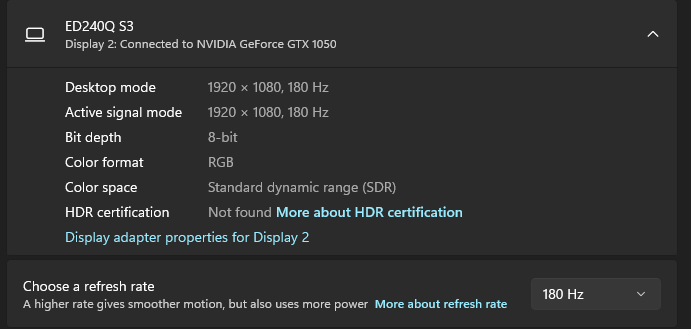
does anyone know why with my 180hz monitor I can't go past 60fps on runelite? few months ago I had a 120hz monitor and all I did was unlock fps and change the fps to 120 and it worked but it won't go past 60 right now.
My monitor is set to 180hz etc. runelite just won't change past 60
oblique plume
vsync/gsync?
loud dirge
haughty pumice
<https://github.com/runelite/runelite/wiki/FAQ#i-want-to-transfer-my-settings-to...
I did sync my profile but that didn't work for some reason
ornate kite
oblique plume
vsync/gsync?
vsync is off on client and I am on 180hz so it can't be my monitor settings
oblique plume
loud dirge
I did sync my profile but that didn't work for some reason
you sure youre signed in to the correct one on each machine
the info tab will say

 loud dirge
oblique plume
you sure youre signed in to the correct one on each machine
loud dirge
oblique plume
you sure youre signed in to the correct one on each machine
Yep I'm signed in with the same account
oblique plume
dunno then
 oblique plume
i guess you can post client log from each machine
tardy bridge
@ornate kite check nvidia control panel
 leaden trail
Is FPS Control enabled?
ornate kite
How to unlock your fps with an Nvidia GPU when it's stuck at 60fps
Discussion
My issue: Runelite was stuck at 60fps on my 165hz monitor with "unlock fps" turned on in 117HD. I use an RTX 3070, and this seems to only be an Nvidia issue.
The solution: in Nvidia control panel, go to: Manage 3D settings -> Program Settings -> Add-> Select Runelite -> scroll down to "max frame rate" and turn it off4
google says this
ill try this
ornate kite
leaden trail
Is FPS Control enabled?
I've played runelite since it came out, trust me settings are correct
it's a nvidia issue

 leaden trail
ornate kite
I've played runelite since it came out, trust me settings are correct
leaden trail
ornate kite
I've played runelite since it came out, trust me settings are correct
Just show me the fps control settings
I'm a potato I don't remember what all is there
 oblique plume
for some reason everyone forgets that the color is red if its being limited
leaden trail
Because there are about a dozen things that can limit your framerate
oblique plume
but everyone always suggests its fps control
ornate kite
found it
in my settings
look

i set max frame rate
when i was only using laptop display
LOL
should fix it, ty
ornate kite
oblique plume
for some reason everyone forgets that the color is red if its being limited
💯
leaden trail
oblique plume
for some reason everyone forgets that the color is red if its being limited
I don't think I was aware of that in the first place tbh
Like I said, potato
ornate kite
leaden trail
I don't think I was aware of that in the first place tbh
It's ok ty for trying 🙂 solved
loud dirge
Ayy it worked, but my loot tracker is empty now, i do have the json file tho, where do i put this on my windows pc so that i can see it in runelite
haughty pumiceBOT
oblique plume
its prob just that

 soft ferry
a question maybe i see over it, but i play with multiple accounts at the same time. is there a way to set good size the runlite window should open during startup? behave on the corner of the window to shrink and enlarge until everything fits?
oblique plume
theres the remember position option in "runelite" settings
and a hub plugin called client resizer that you can hotkey to move it around and resize it
 void sedge
my runelite account no longer has my plugins, I closed runelite for an hour and when I came back my runelite looks it basically reset to defautl
soft ferry
oblique plume
and a hub plugin called client resizer that you can hotkey to move it around and...
thx
haughty pumiceBOT
void sedge
I checked, and I am on the same RL account I always use
stone parcel
Check a few more of the steps in there, I think the account part is only step one.
 white pebble
Hey y'all, I just had my PC implode and I had to fully wipe my hard drive and reinstall windows. Is there any way I can see about getting my runelite settings back? I haven't downloaded runelite back because I'm too scared they're gone lol...
Looking at the link above I guess I just hope at this point I have a runelite account to log in to?
 fleet vapor
I have some class files missing when importing runelite to intellij, is that meant to happen or? I have InterfaceID and ComponentID class files missing
sonic birch
white pebble
Hey y'all, I just had my PC implode and I had to fully wipe my hard drive and re...
If you didnt backup .runelite, you gotta hope that you cloudsynced your profile
!lost has some steps regarding logging in and switching profiles
haughty pumiceBOT
leaden trail
fleet vapor
I have some class files missing when importing runelite to intellij, is that mea...
Follow what the build guide says
fleet vapor
leaden trail
Follow what the build guide says
Thank you!
white pebble
sonic birch
!lost has some steps regarding logging in and switching profiles
Thank you!
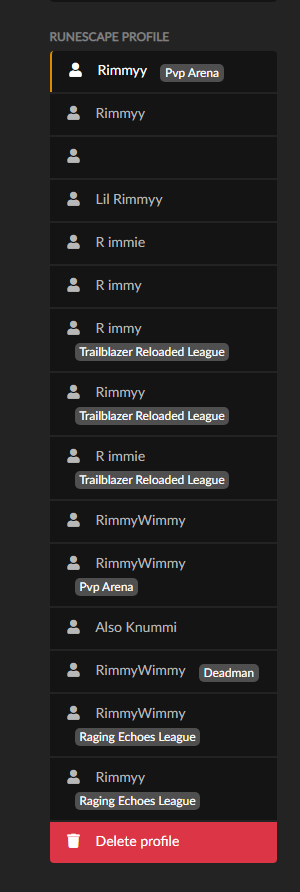
So I have logged in and I don't see my profiles sadly, I had like 4 or 5... Am I sol? I did see on the runelite page it has a bunch of profiles, is there a way to like import those in? I don't know if those are actual runelite profiles... https://i.imgur.com/dljZWGM.png
 oblique plume
Those are rlprofiles not config profiles
You have to elect to sync config profiles
white pebble
Sorry for being a noob but I really don't know what you mean by that second message. 😦
sonic birch
!transfer the yellow cloud had to be enabled for a rl config profile to be synced
haughty pumiceBOT
sonic birch
it it wasn't, the profile is dust now
round jacinth
Those things are the rl profiles that the site uses to assign to a rsn+world type, so dmm profile, leagues profile, etc. that’s why they share a rsn
oblique plume
unfortunately we cant always sync config profiles because people make a ton of them and it would prob be too much server load
white pebble
I'm really not sure if I did or not, is there a like list of my cloudsyncs online that i can view? Or would it just show up in there if I did
oblique plume
they would show in the client if they are synced
sonic birch
They would show up in the client
white pebble
ah ok i just gotta rebuild then. Thanks yall sorry 😦
white pebble
omg
i think i might have it
i dont want to fuck this up
i have my old .runelite folder, excuse my french
i found it in windows.old folder that has all my old files i guess
stone parcel
Yay! 😄
white pebble
oh my god its all back i cant believe it
yeah if anyone else has a similar problem and they had to reinstall windows, have them look for the windows.old folder. that's what worked for me.
thanks everyone ❤️
fuck what a relief
i cant believe it
sorry for the spam. First thing im doing is enabling that cloud sync lol. sorry. Have a good night.
oblique plume
you said you wiped the drive though
 tender thunder
sonic birch
tender thunder
sonic birch
Roll back to good drivers probs
white pebble
oblique plume
you said you wiped the drive though
I thought I did but there was a windows.old folder still. No idea. Maybe I didn't wipe it properly. Thank you a ton for your help
I really appreciate everyone that helps in here
 regal crag
There's no cloud save, right? If so, then how do I export my settings to prevent all the mods I collected get lost so that I don't need to look for them all again when I reinstall the game.
sonic birch
!transfer
haughty pumiceBOT
regal crag
Thank you! :D
sonic birch
There's a cloudsync you can enable
regal crag
sonic birch
There's a cloudsync you can enable
How do I do that?
sonic birch
Refer to the link
 bronze latch
so i havent logged in since 2016 and i cant get into my account what should i do
solid mesa
Get support on the jagex website, runelite can't do anything to help.
bronze latch
ok ty
 hushed sail
Hello, my username is iaustinw407, my email is iaustinwios@icloud.com. My hardware ID is TS28VMTLFQLNPAP3L7. I'm ready to receive my licence code (Premium).
well no one else will help
mossy swan
what the fuck are you talking about
haughty pumiceBOT
@hushed sail You've downloaded a fake client, and your account has been compromised. Remove the fake as soon as possible to minimise further damage.
The following actions should be performed from a secure computer or secure mobile device:
- Change your RuneScape password
- Remove and re-add Authenticator to RuneScape
- Change your RuneScape bank PIN
- Change your email's password
- Add 2FA to your email if you haven't got it enabled
- Check for any linked accounts by accessing the account settings page (https://www.runescape.com/account_settings)
Some fake clients also install malware, only a fresh install of your operating system can guarantee the total removal of any unwanted software.
You might also want to change any email password if you reused the same as your RuneScape account password.
Once your computer is secure, you should download RuneLite from the link available at the #welcome channel.
mossy swan
what code
gilded kayak
oh my god you're going to get court martialed
i better be included in the documentation
hushed sail
i hope
oblique plume
can i be an expert witness 🥺
gilded kayak
if you installed and paid for something you did not install from https://runelite.net/ then, yes, viruses
haughty pumiceBOT
The link in #welcome is the only download link for RuneLite. Beware of fake clients which use the name "RuneLite" that may steal your game credentials or infect your PC. All features of RuneLite are free and are included with the client.
hushed sail
then wtf do you do?
gilded kayak
make a free client for people to use
gilded kayak
nope, you were scammed by people pretending to be us
this program is completely free
hushed sail
sure sweetheart
hushed sail
ill find out
 alpine glacier
is there any way to see what the login is here?

 tall moat
hushed sail
this is a encrypted military computer try
tall moat
hushed sail
this is a encrypted military computer try
One, seven, three, four, six, seven, three, two, one, four, seven, six, Charlie, three, two, seven, eight, nine, seven, seven, seven, six, four, three, Tango, seven, three, two, Victor, seven, three, one, one, seven, eight, eight, eight, seven, three, two, four, seven, six, seven, eight, nine, seven, six, four, three, seven, six. Lock.
gilded kayak
alpine glacier
is there any way to see what the login is here?
I don't believe so no, because when you unhide it, it empties the input
 mortal pond
alpine glacier
is there any way to see what the login is here?
mortal pond
alpine glacier
is there any way to see what the login is here?
Do you remember your password? (are you still able to log into the game?)
gilded kayak
they probably need to know what email it is, so they can password reset
keen jewel
ithink it should be saved to disk
keen jewel
hushed sail
this is a encrypted military computer try
oh it will be encrypted if you downloaded ransomware
alpine glacier
keen jewel
ithink it should be saved to disk
ye it was ty, found it in a cache folder
leaden trail
keen jewel
oh it will be encrypted if you downloaded ransomware
They're about to be the root cause of a lot of people suffering death by PowerPoint, so 🤷
 upper lantern
warm cape
This might be an easy fix given inventory setups is relying on bank tags for dra...
upper lantern
warm cape
This might be an easy fix given inventory setups is relying on bank tags for dra...
Was the issue found and how to fix it? I got the same problem which started today.
And seems the issue is just for items and food in inventory setups in bank. Got potions in potion storage and withdrawing them works just fine
leaden trail
I'm not sure it's been looked at yet
gilded kayak
you can "fix" it by turning off that new setting that lets you charge items in the bank
since the issue probably started right after you turned that setting on
upper lantern
Oh, yeah that worked. Tyvm
topaz nimbus
gilded kayak
installing literal viruses on military computers
Put me in too
warm cape
upper lantern
Was the issue found and how to fix it? I got the same problem which started toda...
It’s a bug in core bank tags that Adam is looking into
For now avoid that option
upper lantern
Yeah fixed when disabling the "bank item options" in bank settings menu
 drowsy cove
Hi
If I want to PR a new feature to an existing external plugin, is the process to first create an issue on the repo and ask if the maintainer would be interested or should I just PR without initial discussion?
Thanks
oblique plume
Depends on what they want
drowsy cove
Not sure whats the best way to get in contact to establish if they want the feature or not is what I'm asking
round jacinth
Contact them through their GitHub or discord if you know it
 tepid robin
Hello! i have a question
can we reset runelite to default settings?
so yes? how we do that?
crisp dune
Yes, make a new profile and switch to it. That will have the default set of plugins enabled, and use default settings
tepid robin
And how we do import local settings?
 torpid forge
I have not had any issues and havent downloaded any new plugins. I used the cox scouter and it always let me scout just fine, now it wont show the overlay unless someone else scouts. Does anyone know the fix for this?
charred wind
Are you in a CM
torpid forge
no
charred wind
Are you in a large raid
tepid robin
@crisp dune I will do my settings from 0 now, how do i make sure it will import all the settings?
so for example if i clean boot my PC, and download Runelite again that i will have the settings
charred wind
!transfer
haughty pumiceBOT
charred wind
tepid robin
so for example if i clean boot my PC, and download Runelite again that i will ha...
This is for you^
torpid forge
charred wind
Are you in a large raid
ty, were all gopod to go now, apppreciate you
 hasty agate
Is there a known bug involving menu entry swapper atm? When I set left click or shift on an item in the bank it hits the next time instead (withdraw-5 does withdraw-10, withdraw 10 does withdraw-xxxx)
Oh wait, its only with interaction with bank tags
gilded kayak
it's the interaction with that new setting to charge items in the bank
turn it off and the conflict goes away
gilded kayak
we just forgot they were doing this
the setting just blindly adds a menu entry, which pushes everything else down
hasty agate
Why does it only impact bank tags
round jacinth
the new charge menu option was not added to other spots
they modified the index location of stuff i think?
isnt it off by 1 or somethin
gilded kayak
round jacinth
im farming
hasty agate
Im asking why the off by one index bug only impacts bank tags (as opposed to the main bank interface), im surprised they would use different menu interfaces to items in the main bank
But i suppose they must
 zealous cedar
the bank is part of the game, bank tags are part of runelite
they use different code
 vast lark
guys how do i transfer account plugins/bank tags from one pc to another?
haughty pumiceBOT
zealous cedar
hi
gilded kayak
it would be easier if you explained what issue you're having, but I'll guess you're talking about the bank buttons are clicking the one right below, instead of the one you clicked
if that is what you're talking about, disabling the new bank setting will fix it
 simple pagoda
I am having issues where clicks will go through enemies as yellow clicks, item pickups and swaps sometimes just don't register, I tried safemode but running on a laptop and need a gpu plugin to have decent fps, runs at about 20fps without gpu, so with 20 fps it's difficult to tell if these yellow clicks are still happening since it feels like fps plays a big part in registering red vs yellow click
Edit: Not just enemies but that is the most noticeable, seems to happen fairly frequently where the initial click will not register for roughly a game tick, then it always counts as a yellow click, can sometimes spot it as its happening and click again for the same game tick to register a red click
 left bramble
Hi, I'm having an issue with the scale option in my configuration. It works if I set it to 2.0 but if I try to set it to something like 1.5 then it will just not use the option at all and will go back to looking the same as the default 1.0. I'm using the flatpak installation of Runelite on Linux if that matters.
round jacinth
i think some OS refuse to use non integer numbers
left bramble
gilded kayak
are you on FEDORA
Yeah, Fedora 41
gilded kayak
some guy was in here a few weeks ago
 left bramble
gilded kayak
some guy was in here a few weeks ago
left bramble
gilded kayak
some guy was in here a few weeks ago
Apparently fractional scaling is enabled by default in Fedora 41. I think that's true because my desktop is scaled to 125% but Runelite still isn't doing anything with my 1.5 option. Guess I'll poke around knowing I might just be screwed. Thanks for the direction!
 acoustic cypress
puzzle solver not working it seems for a hard clue
 gilded kayak
it will eventually solve
there's a pattern that it gets stuck on
or throw that puzzle box on the ground and get a new one
acoustic cypress
not working just keep getting the same one again
oblique plume
Yea it'll do that
The plugin is just forcing you to make another brain wrinkle manually
acoustic cypress
fuck me
round jacinth
it isnt that hard
acoustic cypress
and my brain
acoustic cypress
round jacinth
it isnt that hard
i know but im lazy
round jacinth
Old School RuneScape Wiki
Occasionally, players will need to solve puzzle boxes for a hard, elite or master clue in a Treasure Trail. Puzzle boxes contain a scrambled image that players must work to unscramble by clicking on tiles to move them to an empty space. Once the puzzle box is completed, players will need to talk to the NPC who gave the puzzle box to receive the ...
round jacinth
it'd be nice if there was a random 1 that couldnt be solved to force people to use their noggins, wrinkle a brain 😄
 uneven pond
A while ago I noticed reports of issues with Mac OS Sequoia, mostly relating to connection problems.
From what I can tell it was on apples end and didn't just effect runelite, but I was wondering if anyone knew if the problem had been fixed in subsequent updates?
Or if there were any current issues with the latest mac os.
gilded kayak
yes in .1 afa we know
white pebble
hushed sail
sure sweetheart
this is a hilarious way to treat people legitimately trying to save you 🤣
acoustic cypress
is there a way to make npc indicators take higher prioty over slayer
i need to turn of slayer and back on to make it work correctly
gilded kayak
no they kind of race to be the winner
acoustic cypress
god dammit
gilded kayak
the impling plugin can also join the race
obviously never a slayer task, but same issue
acoustic cypress
gilded kayak
you want npc first
ya
but there is no way to have a loader order i take it
for plugins
gilded kayak
there is not
acoustic cypress
it is what it is
simple pagoda
simple pagoda
I am having issues where clicks will go through enemies as yellow clicks, item p...
Any help with this? 😅
charred wind
simple pagoda
Any help with this? 😅
yes
there's some delay between where the cursor last was and where your click happens
it's the same reason why touchscreens don't work, your cursor used to be in one place, then when you touch it moves but the click is registered in the previous location
so you might be clicking too quickly. I've noticed with a low framerate the yellow clicks are much more common
simple pagoda
Clicking too quickly as in, press and release too quickly?
It feels like client lag almost, for about a game tick, I just edited the original post to explain it a little bit more clearly, if that changes anything
charred wind
too quickly as in move mouse and click before the cursor has been over what you're clicking for 20ms
item pickups and swaps are two completely different things
swaps in inventory not completing is a network issue
not picking up items on the ground after red clicking them is you interrupting the pickup somehow
simple pagoda
charred wind
swaps in inventory not completing is a network issue
It isn't as if it doesn't complete, it more just acts as if that click hasn't registered?
Treating the click as if there was nothing in that inventory space, essentially, and this feels consistent in other aspects of what I mentioned
I.e, hovering an npc, clicking, and it being treated as a yellow click
 robust lichen
Anyone elses bank tags acting up?
When i try to right click > withdraw 5 the game withdraws 10
When i try to withdraw 10 the game withdraws all
bank is set to quantity of 1 and it only happens in bank tags, not normal bank tabs
robust lichen
ah wow, thank you lol
gilded kayak
usually we fix those before they can ever even cause an issue
but this one was missed
robust lichen
was driving me crazy this morning, but no worries easy fix until it's patched
 noble meteor
stupid question
other than github is there a way to see if a developer is planning to update a plugin hub plugin?
leaden trail
other than asking them no
noble meteor
rip
would be amazing if diary cape sub menu worked properly with easy teleports plugin
 steel shoal
Runelite profile config disappeared? Can anyone help me out please
All plug ins are gone
haughty pumiceBOT
leaden trail
Post a screenshot of the contents of your profiles2 folder, showing the modified dates and file sizes
steel shoal
Kk gimme a few min
 dusky sky
looks like its been posted a few times here, just swapped to a 9070xt from a 2080ti and the GPU plugin is chuggin in heavy render spots like fossil island. i tried out the experemiental gpu and while it does have better framerate, it brings with it a ton of graphical issues. anyone else having any luck with 9070xt?
 round jacinth
you have 2 or 3 decent candidates, one is 467kb and named default-0, the others that re good are the two most recent import prfoile (1) and 2
the one named default-0 is far bigger but also was last updated on feb22
the other two at least were updated today
 wooden mortar
can someone help me. i lost all the loot on my loot tracker at some point and i just went to the runelite page. there seems to be 2 accounts on there of my account with all the loot.
1: is it possible to merge the 2 accounts on runelite website to have all the loot in 1 place and 2: is it possible to get my loot back on the loot tracker for me to see
round jacinth
!lost
haughty pumiceBOT
round jacinth
- no you cannot merge
- your client does not load everything you've ever killed, its not a great spot to look at it, if you want it to hold data get a kc again so it reloads the loot missing
wooden mortar
theres 2 accounts of my account on the runelite website so even when i get a kc again it thinks i havent done any kills
i didnt know there was 2 so if i delete 1 of the 2 accounts on the website it will delete some of the loot ive gotten
leaden trail
You just have to choose which one you want to keep
 tawdry rampart
Is there any plugins to tell you how long till an enemy stops being aggresive?
charred wind
tawdry rampart
Is there any plugins to tell you how long till an enemy stops being aggresive?
NPC Aggression Timer
 simple pagoda
? Wasn't talking about blindfold or plugin presets at all, wrong reply?
 quartz vector
Need some help identifying something. Hoping the fine folks here can lend a hand. A clanmate mentioned getting these messages while he was in an instance, and they had this chat bubble icon attached to them. What is it from? Not typical friends chat for sure. Posted the question in the OSRS disc as well and the first response I got indicated it appeared related to some plug-in.

Not even sure this is the right spot, but I'm trying
gilded kayak
i would also assume it's a plugin
previously you could run into the wrong icon, if you kept your client open between a game update
but I think you have to restart now? so that issue shouldn't exist
 dry turret

 sand jacinth
As soon as I walk into the revs cave all my timers in the top left disappear, stat boosts, venge timer, freeze timer tbs, how much ammo I have etc
Just all disappear
Oh nvm a restart fixed it
gilded kayak
when in doubt
gilded kayak
!safe try safe mode
haughty pumiceBOT
safemode: To enable safemode
Windows
Run the RuneLite (configure) shortcut from the windows start menu
Tick the Safe mode box, save, launch RuneLite the way you normally do.
Mac
In Terminal, run
/Applications/RuneLite.app/Contents/MacOS/RuneLite --configure
Tick the Safe mode box, save, launch RuneLite the way you normally do.
gilded kayak
if anyone of the timers are from hub plugins, they will be missing in safe mode, but if the ammo and other default plugins, work, then its some hub plugin causing your issue
sand jacinth
Looking at the shadowplay it looks like it's wilderness player alarm causing it
As soon as it flickers they go away
gilded kayak
well great that saves you the trouble figuring out what plugin it is
sand jacinth
(atleast it's my assumption that's the cause without testing it)

I assume this is it
 little wing
Hello everyone! I just started making a plugin with IntelliJ, and I’ve got my scripts done. When I hit “Play,” I can find my plugin. The problem is that I need to log in to test it, and I can’t figure out how. I’ve already uploaded my files to GitHub and everything, but from there, I have no idea what to do. If someone could message me privately to help me, that would be super cool D: !
solid mesa
Do you have a link to the repo with the issue?
round jacinth
just because it's on github doesn't mean it's on the hub to pull down to install, you continue to test it and run it locally through intellij then submit it to hub so its available there
follow the build/submission guides
little wing
But to login i need Jagex Launcher and from Intellij is impossible xD thats my problem rn D:
haughty pumiceBOT
round jacinth
you didnt check the wiki because it explains that too.
hollow olive
read that
 tall chasm
Hello wondering if someone could help me. My game keeps crashing, sometimes every hour, sometimes every minute. Any help would be appreciated. I noticed some comments about the processor may be the issue. I'm going to post my JVM crash log here.
 errant juniper
why is my runelite like this?

after i updated windows and launched the game it became like this
I can't access the plugins
gilded kayak
your custom chrome was turned off, which doesn't kick in until the client is restarted
hover your mouse top right inside the game, above the scroll
there's also a keybind but i don't remember what it is
after you get the sidebar open, RuneLite plugin -> enable custom chrome
errant juniper
oh its fixed now thanks!
 tight pier
Is there an issue with right click withdrawing potions from a bank tag? Withdraw-1 works correctly, but Withdraw-5 takes out 10 potions, Withdraw-10 takes out whatever the X value is set to, and Withdraw-X asks to set a custom amount every single time.
gilded kayak
tight pier
Is there an issue with right click withdrawing potions from a bank tag? Withdraw...
yes when you have that new bank setting enabled
tight pier
gilded kayak
yes when you have that new bank setting enabled
Ahh yep, turning that off fixed it. Thank you!
 empty fulcrum
anyone know how to fix this?

 winter grove
Hello, I just got an power outage due to a cyclone in my area, when the power was back. all my runelite plugins are gone? Anyone has an idea? I'm still logged in to runelite account so idk why it's not showing me the plugins anymore
mossy swan
!lost
haughty pumiceBOT
winter grove
GOAT ❤️ @mossy swan
 velvet carbon
Can i run runelite on windows vista?
mossy swan
i dont think vista/w7 are supported anymore
velvet carbon
Sad
viscid lantern
If your pc is too old to run windows 10/11 you could consider trying linux
zealous cedar
7 is supported
 warped tendon
all my plugin in RL gone after my house blackout
can someone help me how to fix this?
haughty pumiceBOT
torn tartan
Please could someone get me the widget ID for the confirm button in the GE? https://i.imgur.com/gv6ns57.png
 viscid lantern
#runelite would be a better place for development related questions, but check devtools -> widget inspector:
haughty pumiceBOT
 stone sphinx
My "withdraw 5" and "withdraw 10" options in the bank are withdrawing the wrong amount of items? "withdraw 5" pulls out 10 items, and "withdraw 10" pulls out however many items "withdraw X" is set to. Known RL issue or something else?
zealous cedar
known issue
round jacinth
yes when you have that new bank setting enabled
zealous cedar
turn off the new bank item options thing
stone sphinx
Tyvm
torn tartan
viscid lantern
<#301497432909414422> would be a better place for development related questions,...
I can't sorry, thanks though
 atomic roost
hi, is there a way to change your active runelite profile with a keybind?
 pulsar portal
With the changes to runecraft pouches I've been unable to find a way to make pouches left click Fill, shift click Empty (the pre update behaviour). Is this possible any more?

 final frost
i noticed that when i change runelite profile game start to lag every couple seconds, it helps when i restart client. Anyone knows why this is happening and how to fix it? More time i switch profile more laggier it gets.
random frost
Back at it with this small issue. Doesnt show completion time pb. Someone here said its a server-side issue, which might be true. Issue not fixed by disabling chat filter plugin and tob stats plugin has no effect

 neon saddle
I got an annoying issue that I can't seem to figure out after searching on here. Using Manjaro Linux with XFCE. The sidebar is resizing the game size even though I have keep game size on. The runelite window is neither snapped or maximized. Tried both with and without custom window chrome. Searched for if any window manager settings are causing it, but not found anything yet. Keep windows size setting works fine.
Edit: Locking the window size works for now. But I resize the window frequent enough that locking the window size will become annoying quickly.
Wait. If the game window is big enough it works fine 🤔. But for the size I want to use it's resizing. I am playing on game size of 925x580.
round jacinth
final frost
i noticed that when i change runelite profile game start to lag every couple sec...
probably a bad hub plugin causing it
!flow
haughty pumiceBOT
flowchart: Please refer to this flowchart for further troubleshooting.
neon saddle
Ok, it seems like 1007 width is the threshold to make it work normally 😄
I'll flowchart
stone parcel
I think that was intended for the other person. Not sure it will have a difference for your thing.
neon saddle
oh right... I'm just a little blind.
round jacinth
indeed
final frost
@round jacinth yea, it was "NMZ Optimal Points"
 supple elk
Anyone familiar with streaming runelite with OBS? I'm streaming the right window but only the side panel comes up for runelite

It's something with runelite i think cause all other windows work
gilded kayak
i would guess if you turn off gpu it will work the way you want
solid mesa
Are you using game capture or window capture? Window capture works for me
supple elk
gilded kayak
i would guess if you turn off gpu it will work the way you want
that worked wtf why
gilded kayak
no idea i just thought it would be correct
and it was
the last time i obs'd something it was a default profile so i know i didn't have gpu enabled
and i remember it working as expected
solid mesa
I have GPU enabled with window capture and it works fine
supple elk
if i turn off gpu then my actual client freezes
if i turn on gpu then the window capture freezes
solid mesa
 supple elk
yeah that has always worked for me in the past
gilded kayak
if the past happens to be last week, i would say "did you update your drivers since then"
but if the past is really far back, then the answer is either idk or yes
supple elk
i haven't played for 3mo yeah
gilded kayak
if i open the client with gpu on, i get only the game
if i turn gpu off, i get only the game
if i turn gpu on, i get only the frame
gilded kayak
sounds like this gpu driver version is smelly
and probably only optimized for whatever the newest game is
supple elk
So basically if I turn GPU on my obs display freezes but runelite works. When I toggle GPU off my obs will display but my runelite freezes
really weird
zealous cedar
try adding runelite to obs after turning gpu on
supple elk
Just tried with gpu both off and on and same thing
velvet carbon
viscid lantern
If your pc is too old to run windows 10/11 you could consider trying linux
It runs 7 probably. The intention of the laptop is to run vista for nostalgia. I have a gaming pc running everything but it would be great to play for example on a trip.
viscid lantern
I would definitely get at least 7 on it, and advice against it since its not exactly a secure system 
velvet carbon
I could get an application called extended kernel that makes it run windows 7 supported software.
I have an antivirus on it and the security isnt a flaw
Does runelite run on 7?
viscid lantern
7 works yeah
supple elk
supple elk
So basically if I turn GPU on my obs display freezes but runelite works. When I...

just freezes if GPU turned off
leaden trail
That's a GPU driver issue, if you turn it off and restart it should be fine
velvet carbon
Do you have a nvidia card
supple elk
leaden trail
That's a GPU driver issue, if you turn it off and restart it should be fine
same thing
velvet carbon
But wouldnt it be better to check for new driver updates first
supple elk
i prolly don't know what you guys are talkin about. don't know computers lol
velvet carbon
It maybe that your computer is downloading a windows update. It makes everything lag like that
leaden trail
velvet carbon
It maybe that your computer is downloading a windows update. It makes everything...
No
leaden trail
Freezing when GPU gets turned off is a known issue with some GPU drivers
 cinder crystal
My loot tracker is bugging out. I'm missing 30+ kc at Tob and multiple other bosses are missing kc also. If i do tob it will track the kc while im logged in but if i close the client and open again it reset back to only 55kc tracked. I'm logged into the correct runelite account. Anyone know how to fix this issue?
velvet carbon
Yeah i didnt read the text just watched the video. Im so stupid
haughty pumiceBOT
supple elk
how do you fix again dura? i don't even know how to turn off gpu and re-start
leaden trail
Turn off the GPU plugin, then your client might freeze but just kill it with task manager, and then start the client again and it should be off.
You can try rolling back your drivers to an older version but realistically you probably aren't going to be toggling GPU very much so 🤷
supple elk
yeah only reason i'm toggling is because when it's on, my runelite works. But with it off, my OBS freezes
so idk if i wanna stream i need to figure it out
could it have anything to do with a new monitor? can't remember if i've played since i got this one
leaden trail
No, it's almost certainly a GPU driver issue
haughty pumiceBOT
Many plugins from the pluginhub break the client in subtle or not-so-subtle ways, including causing issues like client freezes. We do not support pluginhub plugins because we do not make or quality control them, and do not recommend their use.
Run the RuneLite (safe mode) shortcut, or with a Jagex account, first run the RuneLite (configure) shortcut and tick the Safe mode box, then launch RuneLite via the Jagex launcher.
This temporarily disables the GPU plugin and all hub plugins which will allow you to confirm the issue is caused by one of those plugins and isn't a core RuneLite issue.
If the issue is caused by a hub plugin, you should isolate which plugin it is and then uninstall the plugin.
supple elk
leaden trail
No, it's almost certainly a GPU driver issue
Just for more info, I have two graphics card. One UHD Graphics 630 which is the one that keeps freezing if GPU turns off. If i plug monitor into the other (GeForce RTX3060), then it fixes the freezing problem but the client starts moving incredibly slow
idk why it moves slower when plugged into a better GPU
 livid aspen
how do you set the treashold for what counts as "low charges" in "weapon charges" plugin?
i dont see a place to put a number, or what number / % do they use?
 drowsy path
YO can anyone help troubleshoot?
Cant shift-click equip/eat items from bank. And its toggled on in Menu entry swapper. Maybe another plugin I need to turn off?
 gilded kayak
it requires a bank setting to be enabled
drowsy path
like in game bank setting?
solid mesa
Yes, in the in-game bank interface
drowsy path
ty fam
tawdry rampart
I've added the mahogney homes plugin but it doesnt seem to tell me anything? Am I doing something wrong?
viscid lantern
the plugin has to see you get the contract to do anything
so if you installed it after getting one, it will work on your next contract
tawdry rampart
viscid lantern
the plugin has to see you get the contract to do anything
have to work this first one out on me ones
 hushed orchid
How do you change the scale on the client in linux? Only done it in windows before
 rare oak
Is anyone else loot tracker being weird? like straight up just not tracking drops or kills
round jacinth
What are ya killing?
rare oak
Ghouls for the champ scroll
round jacinth
I’m positive if it was more broad of an issue you’d see it being actively be talked about here
round jacinth
Did you ignore bones or something so it doesn’t keep track of them so it doesn’t track anything?
Or are you crushing them with bone crusher?
This might be like how ring of wealth auto picking up coins stops coins from being tracked? (Just guessing tho)
rare oak
i have the bone crusher let me bank it and see if its that easy
ok wierd bonecrasher mustve made it glitch out
ty
round jacinth
If you consume the drop so nothing drops then there is nothing to count
 mint surge
yoo anyone know how i got my npc agression timers lines to shown up
theres some bug maybe
it worked earlier but not anymore
round jacinth
You need to have it calibrated for them to show up
There should be an info box that shows a ? Instead of a timer if it’s not calibrated
mint surge
noope


 mint surge
what screen
round jacinth
The one where you play the game on..?
mint surge
 round jacinth
Top left of your screen
It indeed shows the infobox with the ?
It would explain you need to calibrate and it tells you how to calibrate it
mint surge
oooh yaa ty so much ❤️
round jacinth
If you ever login on mobile or a pc that isn’t synced with that computer you’ll uncalibrate it
mint surge
just logged first time with this pc today
round jacinth
You may need to teleport to varrock or something to get it to work again
gilded kayak
lumbridge lumbridge lumbridge lumbridge
round jacinth
But once it’s calibrated it’ll work forever unless you play on mobile again
mint surge
yess 10min its calibrated
round jacinth
or switch computers again.
mint surge
thanks guys
round jacinth
np
 sturdy reef
i need my oauth from github to be able to post in #development ?
I need help with the widget inspector
 plucky orbit
dusky sky
looks like its been posted a few times here, just swapped to a 9070xt from a 208...
plucky orbit
dusky sky
looks like its been posted a few times here, just swapped to a 9070xt from a 208...
I am also having problems - just swapped from a 3070TI to a 9070 XT like yourself. Have you made any further progress on this? Please reply or @ me otherwise my blind ass will not see it lol. The ONLY thing that helped my FPS thus far was turning off Vsync (from adaptive) which gave me more frames, but it still gets as low as ~50 or so when zoomed out (and 100% GPU usage). Typically used to run a near-flawless 180fps on the 3070ti.
solid mesa
sturdy reef
i need my oauth from github to be able to post in <#419891709883973642> ?
You can just ask in #runelite
plucky orbit
plucky orbit
I am also having problems - just swapped from a 3070TI to a 9070 XT like yoursel...
and I have also done the usual:
- Uninstall Nvidia drivers with Display Driver Uninstaller
- Install AMD Adrenalin and latest 9070XT drivers
- Played with every single 117 HD (and GPU) settings with no real changes
- Attempted to force some AMD Adrenalin settings onto Runelite with no success
etc
sonic birch
Try some different amd drivers
Usually we recommend older ones but idk if those support their new gpus
plucky orbit
I did see similar threads regarding the 7900XT, but like you just said there yeah - unsure if the brand new 9070XT can even support older versions lol
sonic birch
Some dude posted about having problems with rebar disabled on reddit recently, so can try enabling that as well if you got it disabled