#support
1 messages · Page 61 of 1
 oblique plume
 pulsar sand
Yep, got it! Had to manually certify the RuneLite app. For some reason Apple’s native tool wasn’t handling it correctly.
 gilded kayak
indeed, I'd say "it appears to be common" on sequoia, but only common in the sense of a reasonable amount of reports, but nobody has reported such a thing here before you
some of the github issues for other apps have 40+ 👍 's tho
apparently it's happening to some people 🤷
 stoic pond
Any idea how to set the scaling of like the RL buttons and what not? The scaling inside the game works, but like the mouse and everything else for RL is very small. Picture attached for scale reference with Firefox and desktop icons.
Ubuntu 24.04 with Bolt launcher
 gilded kayak
bolt settings
i think he re-implemented our --configure in there???
unless my memories of such a feature, are just a fever dream
stoic pond
EDIT: Got it in the Bolt settings, think you
 meager fable
hey guys my runelite started closing randomly after the newest game update, is there any way to check what might be causing it
would appreciate any help 🙂
 haughty pumiceBOT
To find the logs, you can do one of the following:
- If your client failed to open, click the
Open logs folderbutton. - Open the screenshot directory by right-clicking 📷
Camerabutton, navigate 1 directory up, then open logs folder. - Navigate to
%userprofile%\.runelite\logson Windows or$HOME/.runelite/logson Linux and macOS.
Upload the log files named client and launcher by dragging them to Discord. If there are files prefixed with jvm_crash dated from today, upload them too.
 cold dirge
I've been busy and unable to test for a while but it looks like disabling performance core 6 (the normal one, not the hyperthreading) in the BIOS is what was mapped to p-core 12 in Process Lasso. Uncertain if this helps with RL as I have no easily reproducible steps, but this is a great discovery and maybe will help someone else.
cold dirge
cold dirge
I've been busy and unable to test for a while but it looks like disabling perfor...
My goal was fix it on the BIOS level instead of relying on additional software running in the background at all times
gilded kayak
this one is fine
meager fable
gilded kayak
well this jvm crash log says you're running out of memory, which is weird to see outside of the client.log but interesting
assuming the jvm crash log is correct, probably removing some of the 208 hub plugins you have would reduce your issue
meager fable
okay i will remove all the ones that i am not currently using and see what happens
it closed on me maybe 3 times so far
all in different scenarios
 idle marsh
I've had this issue for a while now and hope someone can help me -
Whenever I have the sidebar open with something that updates, e.g Time Tracker for farming patches, Loot tracker, etc. I get random screen freezes for a splitsecond from time to time. Does anyone know what is causing this and how I can prevent it? Besides the obvious of not having those sidebars open
 tribal sand
whenever i enter the araxyte dungeon there is red arrow flashing, but when opening world map it doesn't find any graveyards etc. is this runelite bug or from fagex side?

 solid mesa
I believe that is from the Daeyalt essence mine which NFC just fixed today and will be in the next runelite release https://github.com/runelite/runelite/commit/0793415751e487b7a53af5c0e3b7391144f8631d
tribal sand
solid mesa
I believe that is from the Daeyalt essence mine which NFC just fixed today and w...
oh shit. thanks
 lament scarab
I need some help
 mossy swan
ok
lament scarab
is there a mod that can help me?
Jagex Launcher stuttering out of the blue? Repaired, uninstalled and reinstalled. Disabled fps/gpu/hd client still issue persists. Runelite works fine, just Launcher having issues? Any help appreciated.
mossy swan
we dont have anything to do with jagex launcher so we cant help you with that
this is runelite discord in case you were confused
!newplayer
haughty pumiceBOT
If you are new to OSRS, make sure to follow this excellent guide on OSRS wiki: https://oldschool.runescape.wiki/w/New_player_guide. You can also join the official OSRS Discord here: https://discord.gg/osrs
mossy swan
maybe check on the official discord
lament scarab
I'm running runelite through the jagex launcher
I think its a plugin or issues with my profile
but no issues running through runelite ass itself
app
if i switch profiles, then back to current profile
runs perfectly fine for 30mins, then will start to do this

default is my normal profile
haughty pumiceBOT
flowchart: Please refer to this flowchart for further troubleshooting.
lament scarab
how do i run safe mode through jagex launcher?
mossy swan
flowchart tells you
lament scarab
im on it
it just opens runelite (safe mode)
which is the regular rl client
ahh i see i see
haughty pumiceBOT
@idle marsh Graphical artifacts? Try disabling hardware acceleration: https://github.com/runelite/runelite/wiki/Disable-Hardware-Acceleration
oblique plume
disabling hw accel helps sidebar stuttering
oblique plume
lament scarab
you have flipping copilot?
lament scarab
yea i do
lament scarab
oblique plume
you have flipping copilot?
i think i downloaded that recently
ill remove it and see
 sick shadow
How do I remove "Press Enter to Chat..." and yes I have disabled Key Remapping
oblique plume
Different plugin then
sick shadow
oblique plume
Different plugin then
any ideas what plugin(s)?
 remote locust
is there anyway to adjust the apps scaling issue on 4k screens? stretched mode is nice but holy crap the ui on the runelites sooo freaking tiny and if i adjust scaling options within microsoft it messes up graphics with 117 making em look all blurry n jaged on the edges..
 round jacinth
there is a scale option in runelite (configure)
launch runelite (configure) and set the value to be above 1
pick like 2.0 or something
remote locust
in these settings? or do i like right click runelite and find it within properties?
 round jacinth
that is not what i said no
remote locust
how do i find these runelite configure options
haughty pumiceBOT
remote locust
oooo tytytytyyyyy
lament scarab
oblique plume
Different plugin then
I think flipping co pilot was causing the problem
thank you for ur help
 worldly parrot
Has anyone ever had this happen to their game? preceded by about a 9 second freeze of the computer(the tick tracker in chat basically matches it). This happens rarely, about once a week at random, and it's pretty annoying. Happens either while using the RL GPU mode or 117HD. After this happens, the client also starts memory leaking hard taking up entirety of RAM and swap in a minute, only fixable by closing the client.

The event produces no Java logs, I've checked. I'm wondering if I'm having some sort of hardware issue(GPU? wouldn't explain the mem leak filling RAM), or if I'm just hitting some sort of edge case
running Arch Linux with the latest Nvidia drivers(has been happening for many driver versions now), using .jar with Java 11
I was convinced it may have been my hardware but today I was running two clients at the same time and it only happened to one of them... I would have imagined a hardware issue would send both out of wack
Just shooting in the dark to see if anyone has seen anything like this before. I get no issues with any other games/applications that use the GPU which makes it all the more suspicious
 gusty hornet
Hi, it appears at random times I've been dropping a lot of frames that seem to sync up with the tick counter. I assumed it was the gpu plugin but ive now tried with 117hd and with neither enabled but its still happening. I've had it happen twice so far once inside tob and then outside of vorkath. Only remedy has been to relaunch the client. Other games appear to be working fine just runelite seems to be affected. No spikes in cpu, memory, or gpu usage either.
 celest current
anyone on linux mint?
Running bolt launcher, my cursor is like 5 pixel in size but outside the Runelite program, it's a normal size. Not sure what's causing the issue
Also pressing alt to move interface doesn't work, it just moved the whole Runelite window
 viscid lantern
for the alt moving the window, thats a cinnamon feature which you can disable in Windows Special key to move and resize windows, as to why your cursor is so small I have no idea
 viscid lantern
gusty hornet
Hi, it appears at random times I've been dropping a lot of frames that seem to s...
viscid lantern
gusty hornet
Hi, it appears at random times I've been dropping a lot of frames that seem to s...
Do you have flipping copilot installed?
celest current
fixed cursor, it was just stupid theme issue that seems to change when switching program lol
 celest current
i moved to linux mint after using arch for like a year. I like arch but having issue with internal micrphone and some other shit
gonna try that alt stuff now 🙂
celest current
viscid lantern
for the alt moving the window, thats a cinnamon feature which you can disable in...
perfect thats, that worked lol.
I spent like 20mins un-binding all of keybinds used for Alt. Didn't see it was right here lol
 celest current
yeah thought it'd be there
never mind cursor didn;t work, my mind tricked me.
So basically i changed to circle cursor (just to try test) then moved my cursor to runelite, it changed back to tiny arrow cursor
moving my pointer back to anything thats not Runelite, it changes back to circle cursor
im not sure whats the issue here 🤔
haughty pumiceBOT
Place the files for the feature you want in %userprofile%\.runelite on Windows or ~/.runelite/ on Linux/OSX
The names and type for the files are:
- Custom cursor:
cursor.png - Custom notification sound:
notification.wav - Custom login screen:
login.png. An image size of 765 x 503 is recommended, but bigger images will be (simply) scaled down automatically.
solid mesa
Did you add a custom cursor?
gusty hornet
viscid lantern
Do you have flipping copilot installed?
yeah i do, but not in use.
celest current
i might have, gonna check that above. I just installed bolt then having this issue
gusty hornet
removed it completely if thats an issue with it.
celest current
haughty pumice
Place the files for the feature you want in ``%userprofile%\.runelite`` on Windo...
this worked ty
Had to copy the cursor from linux mint under "/usr/share/icons" then pasted in ".ruinelite" folder
 sonic birch
worldly parrot
Has anyone ever had this happen to their game? preceded by about a 9 second free...
sonic birch
worldly parrot
Has anyone ever had this happen to their game? preceded by about a 9 second free...
I've personally never seen such an image with gpu, only 117hd
sonic birch
gusty hornet
Hi, it appears at random times I've been dropping a lot of frames that seem to s...
The tick counter is a kinda meh plugin, so that isn't that useful
!flow
haughty pumiceBOT
flowchart: Please refer to this flowchart for further troubleshooting.
gusty hornet
sonic birch
The tick counter is a kinda meh plugin, so that isn't that useful
its not the tick counter itself, it was syncing to every game tick that it would drop frames once its started dropping frames.
sonic birch
I know, the tick counter is just kinda meh
 deep epoch
that is tick tracker right
deep epoch
I use the ping grapher one instead
round jacinth
i think it has the same problem
deep epoch
I havent noticed
round jacinth
or a similar but different one where ping spikes happen on loading
and also pings drop
deep epoch
how would I reproduce that
round jacinth
I don't know.
worldly parrot
sonic birch
I've personally never seen such an image with gpu, only 117hd
I'd switch to base GPU and wait anywhere from 1 day to 1 month for it to happen again but what's the point in that if it doesn't produce any logs either way
 glad vortex
Is there a way to make the 'Lure' option appear first, instead of it defaulting to 'Bait' despite not carrying bait?
round jacinth
in menu entry swapper there is a option to swap that stuff
glad vortex
Tysm, I must have missed that!
 summer garden
@shadow flume @gusty hornet @lament scarab @wind pewter Sorry to hear the Flipping Copilot plugin has been causing stuttering issues. If you can share your Runelite client logs, it may help us diagnose the issue.
sonic birch
worldly parrot
I'd switch to base GPU and wait anywhere from 1 day to 1 month for it to happen ...
Because we do not support 117hd
!flow we just support core runelite
haughty pumiceBOT
flowchart: Please refer to this flowchart for further troubleshooting.
 sly chasm
Hey everyone, have seen alot of comments about the inventory setups preview auto layout button from Bank Tags not integrated correctly and disappearing with invent setups (1st img). Has anyone figured out how to get it to work again?
I suspect that it no longer works with invent setups, can confirm if I create a test bank tag if works (2nd img)


E.G. If you go to 2:51 in this video that is what no longer works for invent setups and I am wondering if there is a fix https://www.youtube.com/watch?v=gjdThmiGxVY&t=134s

These are two of my favorite RuneLite Plugins. Bank tag layouts + Inventory Setups makes gearing up quick and easy! Never forget items in your bank again!
 final axle
in the video probably is before inventory setups moved to using core bank tag layouts instead of the hub plugin
you can sort the setup by right clicking the equipment button in the top left, should be a sort option
 mellow wedge
running into issues using a mobile hotspot to play on my laptop
using bolt launcher on mint
any insights or is this gonna be a boring 2 hour ride home

 zealous cedar
your isp is blocking runelite? does runelite.net load?
sly chasm
final axle
you can sort the setup by right clicking the equipment button in the top left, s...
Yeah I did notice this, and I think you are right that this has replaced this feature. Was just reading this thread from the author of inventory setups - https://www.reddit.com/r/2007scape/comments/1gksv6d/inventory_setups_hub_plugin_upcoming_update/
Reddit
Explore this post and more from the 2007scape community
mellow wedge
Can get to runelite.net
I'm honestly thinking it's bolt not playing nice with my hotspot at this point
sly chasm
mellow wedge
running into issues using a mobile hotspot to play on my laptop
using bolt launc...
That indicates that you have a network issue, that isnt runelite. Check your network connection
Never tried RL on linux tho so unsure tbh
mellow wedge
It works pretty well NGL
This has been my first roadblock in well over a month of using it
And this isn't my normal use case either
Sitting in the back of a truck on the way back from a job 2 hours away and no way my phone is gonna last it 😭
 sweet comet
alright someone broke runelite client on bolt
have some problem as @mellow wedge
using ubuntu with bolt client
gilded kayak
i bet it was the bolt dev
sweet comet
yeah probs
round jacinth
If you’re in Europe then I think there is an isp issue
Some folks in #general having issues too
Probably not bolt related at all
As the game loaded.
gilded kayak
yeah it's probably not the last bolt version was released in october lol
sweet comet
looks like runescape itself shit the pants?
gilded kayak
this place would literally be on fire if it was the game
or at least, the game effecting everyone
round jacinth
sweet comet
looks like runescape itself shit the pants?
Are you Eastern Europe
sweet comet
yes
gilded kayak
but the game effecting people where it's night time, seems like it could be less loud
sweet comet
dont tell me some cable got cut again somewhere
 lunar lagoon
hello, i have boss health indicators installed, but it doesnt appear in my plugin list or on the side panel. any thoughts? ive tried disabling: opponent info, radius markers and tile packs. i cant think of what else might be causing this issue
lunar lagoon
it does not.
lunar lagoon
sonic birch
Are you in safe mode?
i dont think so, ive not messed around with any of that. just one day it stopped working! bizzarre.
sonic birch
Should hit us up with a screenshot of it being installed in the hub panel and it not showing up in the config panel

 haughty pumiceBOT
To find the logs, you can do one of the following:
- If your client failed to open, click the
Open logs folderbutton. - Open the screenshot directory by right-clicking 📷
Camerabutton, navigate 1 directory up, then open logs folder. - Navigate to
%userprofile%\.runelite\logson Windows or$HOME/.runelite/logson Linux and macOS.
Upload the log files named client and launcher by dragging them to Discord. If there are files prefixed with jvm_crash dated from today, upload them too.
 barren nacelle
heya
wasn't being able to salt up in toa
someone told me it was an issue with the tombs of amascut plugin
any idea how to fix this? lol
kinda sucks to do a 25 min wardens
round jacinth
in the toa plugin there is a setting to disable salting too early
barren nacelle
i'll try setting that to 0 maybe it'll do
it told me i was already salted when i wasn't :p
round jacinth
do a bug report to the repo then
haughty pumiceBOT
Get support for the Tombs of Amascut Plugin Hub plugin here: https://runelite.net/plugin-hub/show/tombs-of-amascut.
You can also find the support link by searching for the plugin in the Plugin Hub panel and clicking the ? button on the plugin, or by right-clicking the plugin in the plugin panel and clicking the Support menu option.
barren nacelle
round jacinth
do a bug report to the repo then
will do ty
lunar lagoon
sonic birch
!logs
ill try to find the right one

GitHub
I installed the plugin and added in the leviathan first. That worked great. Then I added the whisperer, this one didn't work so well. It seems like it was using the awakened version as a baseli...
this guys exact problem is mine, but i dont remember adding toa bosses
deep epoch
isn't that because the health indicators use the oponent information and the oponent information doesnt work exactly with scalable oponents
lunar lagoon
well idk what to do i cannot remove or even see the settings of the plugin after its installed


i can uninstall it sure, but it doesnt show up anywhere after i reinstall.
round jacinth
!logs
haughty pumiceBOT
To find the logs, you can do one of the following:
- If your client failed to open, click the
Open logs folderbutton. - Open the screenshot directory by right-clicking 📷
Camerabutton, navigate 1 directory up, then open logs folder. - Navigate to
%userprofile%\.runelite\logson Windows or$HOME/.runelite/logson Linux and macOS.
Upload the log files named client and launcher by dragging them to Discord. If there are files prefixed with jvm_crash dated from today, upload them too.
round jacinth
the information about why thats the case would be in the logs
lunar lagoon
is there another plugin i can use in place of boss health indicators
 orchid adder
hi is there a way to make my interfaces look bigger, i play on a large screen and my map, inventory are small asf i can`t see. also is there any good graphic plugin to help my game look better ?
solid mesa
Stretched mode or change the scale
haughty pumiceBOT
solid mesa
Either GPU or 117 HD improve the graphics depending on what you prefer the look of
orchid adder
thank you, my game look better and bigger now with 117 HD and i put 1.5 in scale value
 hybrid orchid
Any object markers for the spores inside nightmare?
 fervent hemlock
for the 'plugin presets' plugin, does anyone know what file I need to replace so that everytime I open jaagex launcher, it doesnt mess up my main runelite's (not on jagex launcher) plugins
solid mesa
Once you're logged in you can click the chain icon to link a profile to your character
worldly parrot
sonic birch
!flow we just support core runelite
I get that, I'm just afraid if I try the binary search it'll take an actual year to complete, considering the issue only pops up randomly a few times a month - very nasty to diagnose
 fast shuttle
whats the plugin to make chat so you hit enter? Updates messed it, and I can't type WASD kekw

 hot grail
fast shuttle
whats the plugin to make chat so you hit enter? Updates messed it, and I can't t...
hot grail
fast shuttle
whats the plugin to make chat so you hit enter? Updates messed it, and I can't t...
Key Remapping iirc
 floral plank
hot grail
Key Remapping iirc
floral plank
hot grail
Key Remapping iirc
its bugged
hot grail
welp o7
floral plank
Its on for me but i dont have to press enter to chat
And i also lost 5 clogs slots xD
 worn bridge
my enter to chat has disappeared
fast shuttle
welp, this isn't going to be annoying whatsoever
floral plank
worn bridge
my enter to chat has disappeared
its bugged please read
worn bridge
hopefully it gets fixed soon
hot grail
the game just updated... yall need to chill
floral plank
fr
worn bridge
no one is really freaking about it though...
 stray grove
I have a release buliding with a fix, should be like 15 minutes
worn bridge
I was just confused
floral plank
worn bridge
I was just confused
all good brotha dont worry about it 😄
worn bridge
stray grove
I have a release buliding with a fix, should be like 15 minutes
sweet i appreciate all that you do !
floral plank
its obvious ppl want to know 😄
worn bridge
floral plank
its obvious ppl want to know 😄
yeah thought it was an issue on my side :p
hot grail
probs be back here again this exact time next week too
worn bridge
i wish theyd just test these updates out before they roll it onto main (jagex) , seems like ppl are having their items duped/lost
it's ridiculous how incompetent they are with a game where progression takes a shit ton of time
youd think theyd be more careful
floral plank
huh
 jagged bay
quality update from Jagex

 midnight basin
that's the clog plugin
 grizzled rivet
just refresh the collection log after opening
floral plank
jagged bay
quality update from Jagex
Yeah i have that too XD
 celest pawn
Hello, sorry if it might be a dumb question, but this has been happening since the last update when I try to buy something

Tried to restart the game already, and it doesn't happen when I use the vanilla client
Does anyone have an idea what could be doing that?
 gentle olive
Can't lock the Keyboard "Press enter to chat" not showing up for plugins that require it
i have my f keys remapped
floral plank
gentle olive
Can't lock the Keyboard "Press enter to chat" not showing up for plugins that re...
Its bugged
fast shuttle
@stray grove Bless
gentle olive
tyty
floral plank
They are working on a fix
gentle olive
ty
stray grove
restart your client and it will be good now
mossy swan
you really post on github and then dont follow it 
gentle olive
thank you for that bless the Runelite Team ❤️
 ornate kite
yo my enter to chat dissapeared, what to do?
fast shuttle
read up
mossy swan
restart your client
ornate kite
ty boys
 obsidian chasm
Thanks for fixing it so fast <3
 olive mauve
ty absolute legends
 west trench
 dreamy stratus
where's quest helper? 😱
fast shuttle
Zoinks isn't awake nods
 fathom grove
do we need to be using intellij idea IDE or can we use spring boot to work on plugins?
glad vortex
Is there a way to fine-tune overlay priorities? If I use anchors, it'll just keep resetting itself and refuse to change in order
oblique plume
if you can get spring boot to work you could use it i suppose
oblique plume
any jvm_crash logs from recent?
 abstract marsh
no
oblique plume
does it happen in safemode?
haughty pumiceBOT
To enable safemode
Windows
Run the RuneLite (configure) shortcut from the windows start menu
Tick the Safe mode box, save, launch RuneLite the way you normally do.
Mac
In Terminal, run
/Applications/RuneLite.app/Contents/MacOS/RuneLite --configure
Tick the Safe mode box, save, launch RuneLite the way you normally do.
abstract marsh
It's hard to say because sometimes Runelite crashes within a few minutes, sometimes few hrs, sometimes not for 2-3 days
It doesn't say what the reason for the crash is in the logs?
oblique plume
it has something in there but its non decript
oblique plume
you sure? seems like you tested for like 2 mins
stray grove
you can try updating your launcher. you can download the latest version from the link in #welcome
 abstract marsh
oblique plume
you sure? seems like you tested for like 2 mins
abstract marsh
oblique plume
you sure? seems like you tested for like 2 mins
I can keep trying, RL did crash as soon as I went back to normal and played for a minute
zealous cedar
your launcher version is 2.7.2, but the latest is 2.7.3
abstract marsh
Is that just pressing that orange Download on main site?
abstract marsh
Yes ok ty
Well for now I did a clean install nvidia gpu using DDU on windows safe mode, and updated launcher to 2.7.3, gonna see if it happens again on normal RL not safe mode
ty guys
 solid mesa
Have you restarted the client recently?
 plush onyx
that just closing it out and reopening?
solid mesa
Yes
plush onyx
yes and have uninstalled and reinstalled
haughty pumiceBOT
To enable safemode
Windows
Run the RuneLite (configure) shortcut from the windows start menu
Tick the Safe mode box, save, launch RuneLite the way you normally do.
Mac
In Terminal, run
/Applications/RuneLite.app/Contents/MacOS/RuneLite --configure
Tick the Safe mode box, save, launch RuneLite the way you normally do.
solid mesa
Does it work in safe mode?
plush onyx
works in safe mode
 mortal pond
I'm guessing it's an issue with the resource packs plugin
solid mesa
One of your hub plugins is causing it in that case
plush onyx
So I have a resource pack but i've had it for years when removing it that box area seems darker, I only have 3 extra plug in's downloaded
unclicked everything 1 by one and it never changed
 leaden trail
Restart your client after disabling them
plush onyx
ok does seem lighter now on regular with turning the resource pack off, guessing reaper randomly started messing up?
@leaden trail
solid mesa
There was a game update today. The plugin probably needs to be updated
plush onyx
okayyyyyyyyyy that makes more sense I was like this just randomly happened
plush onyx
Na I close out the client everytime
plush onyx
oblique plume
this is actually just the first time you restarted
this wouldn't address the issue of it still broken after restarting
oblique plume
if it was a problem for everyone then we would be seeing more people say something by now
since resource packs has like 500k installs
plush onyx
add reaper and see if it does it for you
it's only for GE from what i've seen
@oblique plume try it out, others are just darker shade in the GE probably more than usual but the reaper one is just black
plush onyx
lmao
oblique plume
leagues only gamer
leaden trail
Look at this guy playing during Leagues 😛
 elfin wren
Hey guys my RL crashes any time my sound device becomes unavailable. Is this a known issue? Crash log attached 😁
zealous cedar
its probably a java bug, or maybe a directx bug. we cant do much about it. maybe update directx?
 stable scarab
Hi friends, I recently logged back in and my loot tracker reset. Is there a way to get that information back?
haughty pumiceBOT
elfin wren
zealous cedar
its probably a java bug, or maybe a directx bug. we cant do much about it. maybe...
I updated DirectX and after the latest client restart I can't reproduce the crash 🤞 This just started happening with the latest update but looks I'm good for now! Thank you!
stable scarab
haughty pumice
<https://github.com/runelite/runelite/wiki/FAQ#my-loot-tracker-data-is-gone>
No luck on getting the loottracker back after following this guide ;/
oblique plume
Are you signed in to the correct rl account
Do you have a different computer still signed in to the old one
stable scarab
I think so, I can see the acct profile info for my acct. But it only shows the recent kills etc
 foggy ferry
hi my enter to chat has been removed while using key remapping so now none of my keys that have been remapped are working?
mossy swan
try restarting
 hollow belfry
Ran into a weird bug that kept crashing my client on runeline while stacking clues up, if I right clicked my stack of clues, the whole client stopped, not reproducible on jagex client
 solid mesa
Do you use the clue details plugin?
 crisp dune
I have a feeling some hub plugin is crashing your client
solid mesa
Its the one Lope made
crisp dune
because core runelite does not do this
 hollow belfry
oh, sorry, is there a plugin specific support thread
haughty pumiceBOT
[ https://github.com/TheLope ] [ @halcyon star 475823434761502732 ] thelope#0
solid mesa
Do you have Impling Saver?
hollow belfry
no, just Implings (I think default RL?)
solid mesa
I thought it was some interaction with Ground Items, Clue Details, and Impling Saver. But I'm not sure exactly what you have to do to recreate it
 hollow belfry
yeah, turning off Clue details fixed it

oh, I see this commit: https://github.com/Zoinkwiz/clue-details/commit/ea800e02f953b32c759e14c28e635f96ea9f1922
damn, is it time to contribute
 pallid parcel
does anybody know why my game would randomly be stuck in 30-60 fps
i turned on 117 but then turned it off, turned back on gpu and fps control, unlocked fps set it to 144 in both plugins
even when i turn back on 117 i go back to 144 fps
this is with gpu turned on, with fps unlock fps checked set to 144

this is with 117 turned on and gpu turned off
 solid mesa
Try turning on compute shaders in GPU
 ashen marsh
I'm planning to buy a Snapdragon X Plus laptop (windows ARM64). Anyone with experience of playing OSRS on a machine like that?
zealous cedar
they are generally weaker than x64 cpus and i wouldnt really recommend it without first talking to someone to have one yeah (I dont)
 whole mango
Every 10 or so minutes my client gets a 5-10 second freeze and i die while i pvm. I tried RL safemode but it doesnt help. i deleted cache it doesnt help
what am i supposed to do?
uninstalled the game too and re installed doesnt help
haughty pumiceBOT
To find the logs, you can do one of the following:
- If your client failed to open, click the
Open logs folderbutton. - Open the screenshot directory by right-clicking 📷
Camerabutton, navigate 1 directory up, then open logs folder. - Navigate to
%userprofile%\.runelite\logson Windows or$HOME/.runelite/logson Linux and macOS.
Upload the log files named client and launcher by dragging them to Discord. If there are files prefixed with jvm_crash dated from today, upload them too.
oblique plume
can you interact with the sidebar when its frozen?
oblique plume
yea
oblique plume
if you can then you can use the debug plugin from the hub to dump threads while its frozen
 heady crane
Hi guys, I want to start building runelite plugins and got everything set up in Intellij. The question I have now is how can I sign into the dev build of Runelite, since the forced jagex launcher?
heady crane
Thank you! Cheers!
whole mango
oblique plume
if you can then you can use the debug plugin from the hub to dump threads while ...
i just had a short 3 second freeze this time
and i quickly checked the side panel
i could switch the things
that wasnt frozen
solid mesa
You can download the Debug plugin and click dump threads when it freezes
whole mango
debug helper' ?
solid mesa
Yes
whole mango
by Abex'
okay thanks
so the nexxt time my screen freezes i have to click on the dump threads
as fast as i can
 hidden dragon
could anyone look at my even logger and tell my why my game keeps crashing?
solid mesa
Upload your logs
haughty pumiceBOT
To find the logs, you can do one of the following:
- If your client failed to open, click the
Open logs folderbutton. - Open the screenshot directory by right-clicking 📷
Camerabutton, navigate 1 directory up, then open logs folder. - Navigate to
%userprofile%\.runelite\logson Windows or$HOME/.runelite/logson Linux and macOS.
Upload the log files named client and launcher by dragging them to Discord. If there are files prefixed with jvm_crash dated from today, upload them too.
whole mango
i just used teleport and my screen was waiting for 8 seconds before i got to the teleport area
i copied it
dump thread'
do i paste it here?
whole mango
uh no i have no such plugin
solid mesa
Okay, I just know it had some issues with teleports
whole mango
im not sure if this data is the best i can provide now but lets see:
oblique plume
this doesnt look like its frozen
hidden dragon
i cant find anything, i can only find runelite and runelite safemode in documents
whole mango
Should i record my gameplay instead?
oblique plume
you can yea'
hidden dragon
 round jacinth
use a different resource pack
i think that's what others are having issues with for that
 hushed lynx
ahh no worries man thanks
whole mango
i got a short recording of a small lagg input.. but during these 10mins it didnt show the "disconnect" text at the top left
i can still show it, but idk if that will help
it was a 5 second frozen screen
ill have to try tomorrow again if it doesnt mean anything
oblique plume
so youre DCing, not freezing?
whole mango
ill upload the video
dont mind the resolution
my screen is 125% and the recording is 100% resolution
whole mango
oblique plume
so youre DCing, not freezing?
i think dc then, but my internet has no problem at all, its super steady and its only on runescape
whole mango
when i get the black with the text at the top left i cant click on anything
but thats the same thing i guess
oblique plume
i think thats because the client is just suspending interaction since it knows its not doing anything
oblique plume
not really something you can fix, normally its out of your hands
you can try general network troubleshooting stuff though
whole mango
But then its supposed to be a network problem and not the client
haughty pumiceBOT
open command prompt, type this in: ping -t oldschoolXXX.runescape.com where the XXX is your world minus 300, for example world350 = 50
oblique plume
this will show you its not a client issue
hidden dragon
alex any idea on mine?
oblique plume
its got some logging that shouldnt be possible imo
hidden dragon
so...
oblique plume
but update day makes anything happen
oblique plume
since people will run runelite versions that are incompatable with the jagex versions
hidden dragon
i did a clean reboot of pc and dleted everything now you got me scared
so i ddint think this had anything to do with that
but bc you said interesting ill explain
they had me download runelite.pro and alter soemthing to get timers at TOA it gave them remote access to my account bypassed email and verifaction
i emailed jagex and they acted like i was silly
gilded kayak
that's not RuneLite that's a fake client you downloaded
oblique plume
thats very common
hidden dragon
they hacked my runelite via my help so yes my statement stands
whole mango
haughty pumice
open command prompt, type this in: `ping -t oldschoolXXX.runescape.com` where th...
i dont see anything weird on it. just the same numbers over and over again
hidden dragon
also alex is interesting anything i just meantioned?
oblique plume
they didnt hack runelite
you downloaded something that wasnt runelite
and ran it
hidden dragon
so they had me copy files and put it in place of runelites files, regardless i apologize my wording is wrong.
just want to verify my issue isnt that
oblique plume
whole mango
i dont see anything weird on it. just the same numbers over and over again
when you have issues in game the command promt will mirror those issues, showing you its not runelite having the issues
whole mango
oblique plume
when you have issues in game the command promt will mirror those issues, showing...
Thank you for your time i appreciate everyone looking into it
so basically i have to see how to fix my network with RL?
oblique plume
thats the size of the communication
oblique plume
not the architecture
whole mango
thanks a lot, i will look tomorrow if theres anything i can do to fix it
if there is nothing then so be it i guess :/
solid mesa
Are you on WiFi or Ethernet? An Ethernet connection could help. Or it could just be your ISP or anywhere down the line
hidden dragon
is there another contact i should try?
haughty pumiceBOT
You've downloaded a fake client, and your account has been compromised. Remove the fake as soon as possible to minimise further damage.
The following actions should be performed from a secure computer or secure mobile device:
- Change your RuneScape password
- Remove and re-add Authenticator to RuneScape
- Change your RuneScape bank PIN
- Change your email's password
- Add 2FA to your email if you haven't got it enabled
- Check for any linked accounts by accessing the account settings page (https://www.runescape.com/account_settings)
Some fake clients also install malware, only a fresh install of your operating system can guarantee the total removal of any unwanted software.
You might also want to change any email password if you reused the same as your RuneScape account password.
Once your computer is secure, you should download RuneLite from the link available at the #welcome channel.
leaden trail
Do that I guess
hidden dragon
yeah i did all that
he just meantioned my logs looked interesting so got me worried
thought id bring it up
i wiped pc and reinstalled windows as well
oblique plume
interersting is not concerning
leaden trail
oblique plume
but update day makes anything happen
oblique plume
if it was concerning i would say somthing
leaden trail
Look at the next message that was sent after that
hidden dragon
thank you i never got confirmed was scared
hidden dragon
Would providing logs from other days besides update day help? Excuse my ignorance just super unclear my next steps
 slow mantle
Hello everyone, I have a problem with the runelite client and I can't find an answer on the internet. I play 117 HD. When I move to busy locations like Falador, the scenery shakes. I already play with smoothing animation and my PC is recent. Has anyone ever encountered this problem? Thanks everyone and sorry for my English
haughty pumiceBOT
@slow mantle Visit 117's HD plugin discord (https://discord.com/invite/U4p6ChjgSE) for support, issues & feedback
leaden trail
Try their discord
slow mantle
thank you
leaden trail
hidden dragon
Would providing logs from other days besides update day help? Excuse my ignoranc...
Try disabling "Core Performance Boost" in BIOS
hidden dragon
leaden trail
Try disabling "Core Performance Boost" in BIOS
it’s disabled
oblique plume
you should probably try safemode and see if you still have problems there
haughty pumiceBOT
To enable safemode
Windows
Run the RuneLite (configure) shortcut from the windows start menu
Tick the Safe mode box, save, launch RuneLite the way you normally do.
Mac
In Terminal, run
/Applications/RuneLite.app/Contents/MacOS/RuneLite --configure
Tick the Safe mode box, save, launch RuneLite the way you normally do.
oblique plume
if not then its probably gpu plugin related
hidden dragon
what exactly is it saying the issue is related to? like graphics error or my pc related? i did clean install of runelite and turned off all plugins with same result
hidden dragon
leaden trail
That's really the one solution we have for that
what made you believe cpb would fix it? trying to understand yalls thought process so i can further diagnose
hidden dragon
oblique plume
if not then its probably gpu plugin related
it also crashes with 117hd on, gpu plugin and both off.
 hot oasis
did you run in safe mode
hidden dragon
hot oasis
did you run in safe mode
doing that now
leaden trail
It's a JVM crash, it's not really a RuneLite issue strictly speaking
whole mango
solid mesa
Are you on WiFi or Ethernet? An Ethernet connection could help. Or it could just...
On wifi. Ill try some stuff out this week
 lament crest
any1 else having fps stutters since the update today?
 frank osprey
Hi, I'm trying to log into my runelite profile and come to the Sign in with google choose account and it is not working. help
oblique plume
googles not authing you?
frank osprey
it just sits there try and doesn't give me any options and I have let it go for 10 minutes
oblique plume
dunno then, afaik we just use googles auth
so if it doesnt work im not sure theres anything we can do
frank osprey
I'm logged into google just fine It should just go to runelite
Is there a way to change how you log in for profiles
frank osprey
so a google problem
oblique plume
if they wont auth you yea
frank osprey
is there a way to change the whole account? it just goes to the google stuff and no way to change it
oblique plume
its just google auth
frank osprey
is there a way to start a new account that can reconnect to google?
oblique plume
google accounts are free yes
frank osprey
I can make a new g account but how do I make a new runelite account
solid mesa
There is no such thing as a runelite account, it is just logging into a google account
frank osprey
how do you change the association with google
oblique plume
There is no runelite association to Google really
It just is there to say you're unique
 idle sail
hey, ive lost all of my runelite settings on my account, i've relogged my client/account and its all gone, has this happened to anyone else?
haughty pumiceBOT
idle sail
nah it seems to have completely gone 😦 ill have to set it up again from scratch, thank you though
 proud granite
Please help me cant play the game 😂 im playing 2 clients at once for years and suddenly both flashing like this cant control anything
zealous cedar
you have something sitting on your keyboared and/or you have a piano keyboard instead of a computer keyboard
proud granite
Can confirm no keyboard and no buttons being pressed 😄
zealous cedar
try safe mode maybe
proud granite
Also hello Adam thanks for such a wonderul tool 🙂
kk trying now
so one of the accounts is launched via jagex > runelite
haughty pumiceBOT
safemode: To enable safemode
Windows
Run the RuneLite (configure) shortcut from the windows start menu
Tick the Safe mode box, save, launch RuneLite the way you normally do.
Mac
In Terminal, run
/Applications/RuneLite.app/Contents/MacOS/RuneLite --configure
Tick the Safe mode box, save, launch RuneLite the way you normally do.
proud granite
Both still doing it im afraid
proud granite
 round jacinth
What ever the key for your prayer book
zealous cedar
keyboard is broken? find a new keyboard?
round jacinth
Unplug it for a hot sec
zealous cedar
wow that is weird then
proud granite
so when the runelite is in the background it stops doing it only when bringing it foreground eg clicking on it
i thnk its f2
mortal pond
do you have a mouse with extra buttons?
proud granite
I do yes 🙂
mortal pond
maybe one of those buttons is broken
proud granite
3 extra its the aerox 5
kk will click on runescape then turn mouse off hold on
So when turning mouse off after clicking it does actually stop, but one of my mouse button were set to prayer book, although that is a great idea I will now do when I fix this so ty sir
I'm not sure if this is due to when turning mouse off it knows the apps not in foreground or no idea
going to try a fresh install
OMG ITS THE MOUSE
just tried another one
right im ordering a new one ty guys and sorry to have taken up your time
 edgy locust
What plugin is making the Great Guardian uninteractable?

 lusty breach
[Map Loader] ERROR injected-client - Client error: map loading
Any ideas what could cause this crash?
leaden trail
lusty breach
[Map Loader] ERROR injected-client - Client error: map loading
Any ideas what c...
Post your full log
round jacinth
edgy locust
What plugin is making the Great Guardian uninteractable?
Did you turn on entity hider and hide NPCs
 grand wraith
uhh, i think i just somehow got a java oom error?
2025-01-29 18:46:23 EST [Map Loader] ERROR injected-client - Client error: map loading
java.lang.OutOfMemoryError: Java heap space
....
gilded kayak
that's the plugins running out of memory
if you download too many hub plugins that can happen
grand wraith
is there a way to ask runelite to use a higher max memory?
haughty pumiceBOT
grand wraith
ty <3
gilded kayak
ctrl+f heap
grand wraith
used to java memory issues since i play modded minecraft :P
wait
i think i figured out why im crashing
could extended map loading on 4 do it?
gilded kayak
technically yes but probably because the memory that would try to use, is being used by hub plugins
i think the default can handle extended map loading, w/o any hub plugins
grand wraith
gotcha :3 it was just the only change i made before the crash started happening but it might just be a coincidence
ill just up the max memory since ive got plenty spare
ty again :3
 clever thunder
where is the raw data for Inventory setups stored? If I wanted to manually go into the files and replace all instances of arclight with emberlight for example I imagine I could go into that file and replace all instances of one ID with the other?
solid mesa
Manually editing configs is not supported
clever thunder
what format is it stored in exactly?
solid mesa
All I'll say is Manually editing configs is not supported. Proceed at your own risk.
 worthy valve
with a jagex account how would you log into the dev client to test plugins
haughty pumiceBOT
clever thunder
solid mesa
All I'll say is Manually editing configs is not supported. Proceed at your own r...
I have a technical background I'm not scared just curious, is this a better question for #development ?
solid mesa
Feel free to read the code or try it. But I don't think anyone will provide advice on how to manually edit the config.
 opal wolf
Question in relation to plugin development. In the exposed client method:
    /**
     * Gets a unique per-RuneScape-Account identifier or {@code -1} if the client has not logged in yet
     */
    long getAccountHash();
Is this unique per character or per jagex account and how does it behave for non jagex accounts?
zealous cedar
in jagex account land it is per character
opal wolf
Cool, thanks. I'm basically planning to migrate to using it as the identifier to store persistent state against rather than the display name. So just looking for reasons this wouldn't be a good idea since most other plugins I see seem to use the display name.
zealous cedar
yes, that is why its there
 verbal tulip
Anyone else get micro stuttering when moving the camera around whilst using the GPU plugin?
I'm on an AMD 7 9800x3D and RTX 4090 with 64 GB of DDR5 Ram at 6000mhz CL 32
Ram is 1:1 with FCLK 2000
haughty pumiceBOT
worthy valve
a config file for a plugin is needed to give it toggleable options right? or without a config it is just a menu on/off button?
zealous cedar
it needs to have a @Provides with something that is a Config to have options y es
 sinful comet
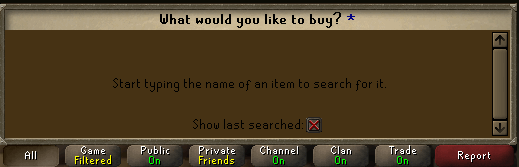
guys im losing my mind, does anyone know what plugin is making the g.e search function brown-ish in colour? doesnt seem to be a resource pack as the brown persists through changes there
 solid mesa
Resource Packs
sinful comet
doesnt seem to be a resource pack as the brown persists through changes there
gilded kayak
what about disabling the plugin and restarting the client
sinful comet
still the same
gilded kayak
!safe
haughty pumiceBOT
safemode: To enable safemode
Windows
Run the RuneLite (configure) shortcut from the windows start menu
Tick the Safe mode box, save, launch RuneLite the way you normally do.
Mac
In Terminal, run
/Applications/RuneLite.app/Contents/MacOS/RuneLite --configure
Tick the Safe mode box, save, launch RuneLite the way you normally do.
sinful comet
okay looked normal in safe mode
looks dodgy again with different resource packs enabled, even no resource pack
solid mesa
One of your hub plugins is causing it if it looks fine in safe mode
sinful comet
yeah thought that might be the case but cant for the life of me figure it out
 south wedge
this is probably asked a lot, im trying to use the plugin hub in my build but the vm argument to enable it keeps failing (im not sure if im putting the correct version of runelite in the argument, could anyone tell me wich one is it?
 final axle
maybe one of the flipping ones
haughty pumiceBOT
We don't provide builds of pluginhub plugins for snapshot versions. Usually you can pass -Drunelite.pluginhub.version=<current RL version> as a VM option to load the plugins built against the release into your build, which will work if there are no ABI changes. If there are ABI changes, build the plugins yourself and place them into the sideloaded-plugins directory when running in developer mode.
solid mesa
What runelite version are you passing?
south wedge
thats what idk, i just cloned the repository from the tutorial so im not sure if im even trying to use a different one from the default
when i open the client without the plugin hub argument it says 1.10.50-SNAPSHOT
in the info plugin
sinful comet
solid mesa
One of your hub plugins is causing it if it looks fine in safe mode
turned off every plugin and its still brown
 solid mesa
Did you restart the client after turning the plugins off?
gilded kayak
open the client normally without doing it through intellij
sinful comet
solid mesa
Did you restart the client after turning the plugins off?
yeah client has been restarted still brown
south wedge
gilded kayak
open the client normally without doing it through intellij
that works normally, whys that for?
gilded kayak
the number u need
 thorny patio
edgy locust
What plugin is making the Great Guardian uninteractable?
thorny patio
edgy locust
What plugin is making the Great Guardian uninteractable?
is that dark theme a plugin?
round jacinth
They’re resource packs yes
 keen lake
srry to ask this but can anyone help me i got a tiny iseu with runlite wich i dont understand
thorny patio
oh. cool, i was a dumbass
thanks
keen lake
it shows info or something and idunno how to get rid of it

 warm cape
clever thunder
where is the raw data for Inventory setups stored? If I wanted to manually go in...
warm cape
clever thunder
where is the raw data for Inventory setups stored? If I wanted to manually go in...
There’s a feature for this in the plugin… check the tutorial
gilded kayak
keen lake
it shows info or something and idunno how to get rid of it
some hub plugin you installed, can't really tell you what one since there's 0 info
unless it's profit tracker spawning them both
 hidden dragon
@leaden trail@oblique plume just wanted to let yall know this issue was because my bios was on version from 2021, updated bios no more crashing. For helping others in the future. 🙂
round jacinth
keen lake
for example
That might be a visual sound type plugin
Stop downloading and enabling plugins you don’t need to use
!flow
haughty pumiceBOT
flowchart: Please refer to this flowchart for further troubleshooting.
keen lake
srry i do this by acccident
round jacinth
Just because there is an option to install a hub plugin doesn’t mean you’re missing a feature.
You’ll have to troubleshoot which is adding it
keen lake
aaa it was the visaul sound plugin
that one if u unable that one it goes away
thanks sorry to anoy u futher problem solved
i see plugin and most of the time i got 2 pcs and i want alot of those but some a creating iseu for me srry that sometimes i annoy u with this i mostly installed a plugin and realy forget later what that plugin was
round jacinth
keen lake
thanks sorry to anoy u futher problem solved
Its no problem
But you should maybe not do that habit lol
So many hub plugins are bloatware and can cause crashes
Just play the game and use them as they make sense
🤝
keen lake
ye its a bit of a problem i am getting older these days
so ye
it might happpen again but i hope not
luckly its not everyday this happens
 main cipher
Anyone hear had issues or heard issues about moments? i'm trying to setup something so i can clip the last x minutes when i want on runelite
But steelseries moments doesnt seem to work. I added it in the detected games but it just doesnt work
 mint raft
sinful comet
https://i.imgur.com/hEVRJRK.png
mint raft
sinful comet
https://i.imgur.com/hEVRJRK.png
Any fix for this?
mossy swan
turn off resource packs
 dire frigate
mossy swan
turn off resource packs
dire frigate
mossy swan
turn off resource packs
even with resource packs turned off is still bugged
mossy swan
restart your client after
dire frigate
mossy swan
restart your client after
thanks it works
but i will miss my mystic pack
hope they fix it soon
abstract marsh
crashing often when teleporting for the first time
anyone got an idea?
I see this "2025-01-30 09:44:44 EST [Map Loader] ERROR injected-client - Client error: map loading"
zealous cedar
abstract marsh
crashing often when teleporting for the first time
weve looked at this, but we dont think it can happen and are confused how it is
so idk. it shouldnt be possible
stray grove
abstract marsh
I see this "2025-01-30 09:44:44 EST [Map Loader] ERROR injected-client - Client ...
You can try opening RuneLite (configure) in your start menu and adding -XX:CompileCommand="exclude,gx::ah" to the JVM arguments field. This isn't a permanent fix (it might not even be temporary), please @ me if you decide that it works (or that it does not)
abstract marsh
Tried that abex thanks, I'll see if it continues
Is "disable diffs" checked by default? not sure if I accidentally checked it
stray grove
it is unchecked by default
 dim valve
For the Ground Markers plugin, you can format Highlighted terms by bracketing with * to do fuzzy searches… for example putting in grimy will highlight all grimy herbs on the ground. This feature isn’t noted in the Wiki but I figured it would (or should) be since it can be useful in some situations
oblique plume
theyre called wildcards, but yea i dont see that documented anywhere for ground items
i thought it was
its mentioned for npc indicators
 vagrant eagle
anyone experienced this? screenshot from the buy menu at ge
encountered while using reaper resource pack, experienced with several other resource packs that make use of similar color palettes. experienced in both transparent and opaque interfaces. is there a way to override this background color?
 round jacinth
find a resource pack that isnt broken probably
but yes plenty of people are experiencing that issue
and the fix is to turn offf the resource pack
round jacinth
it's a hub problem
it's like asking microsoft why doesn't lego star wars doesn't work
vagrant eagle
respectfully, then say that
round jacinth
you already knew it was resource packs and this discord is for runelite, not resouce packs
there is a discord for resource packs
vagrant eagle
can you link it?
round jacinth
vagrant eagle
great, thanks
 old hinge
quick question, the weapon/gear/anim replacer has the old torva model but I't doesn't select it. Any solves?

 haughty pumiceBOT
Get support for the Weapon/Gear/Animation Replacer Plugin Hub plugin here: https://runelite.net/plugin-hub/show/weapon-animation-replacer.
You can also find the support link by searching for the plugin in the Plugin Hub panel and clicking the ? button on the plugin, or by right-clicking the plugin in the plugin panel and clicking the Support menu option.
leaden trail
But I think that's just the icon, I don't think swapping to a model not in the cache is possible
solid mesa
They put old torva in the cache
leaden trail
Oh neat then yeah see the hub support link
haughty pumiceBOT
@hallow pebble Use /ghauth command to get github roles and be allowed to post in #development
 hallow pebble
i dont want to clog up the wrong channel lol
leaden trail
Just ask there
plush onyx
sinful comet
This happened to me its resource packs if you remove and restart your client it'll fix it
 lapis elm
I just pushed an update for this, looks like some widget indexes got updated
oblique plume

 rough siren
Anyone have any solves for runelite dcing and freezing at random?
haughty pumiceBOT
open command prompt, type this in: ping -t oldschoolXXX.runescape.com where the XXX is your world minus 300, for example world350 = 50
round jacinth
is your internet bad today
rough siren
My internet stable, I'm on the 3rd day now of freezes and DC's
round jacinth
well your connection to netflix is not the same as the one to jagex
run that command prompt and see if your connection drops same time as a dc
rough siren
Ok so run that in command prompt? Reset client after?
round jacinth
just leave that command prompt running while you play the game and when you dc you should see it reflect there too
with a dropped ping or big number for the ping time
be sure you're pinging the same world
sinful comet
plush onyx
This happened to me its resource packs if you remove and restart your client it'...
Thanks man will give it a go when I get home
solid mesa
rough siren
So if I'm in world 492, I'd write 192?
Yes
rough siren
Ty
So what should I watch for in this command prompt once I experience a dc or freeze
solid mesa
The ping number to go from small and consistent to large, or timing out
rough siren
Ok, appreciate it
 crisp temple
minor issue but the "fixed mode hide chat" plugin doesn't bring up your chatbox when you initiate dialogue or prompt options
would be nice if this could get fixed if poss
haughty pumiceBOT
Support for hub plugins should be directed to the author of the plugin.
You can find the support link by searching for the plugin in the Plugin Hub panel and clicking the ? button on the plugin, or by right-clicking the plugin in the plugin panel and clicking the Support menu option.
crisp temple
ah cool it's already been acknowledged
 young dust
crisp temple
minor issue but the "fixed mode hide chat" plugin doesn't bring up your chatbox ...
young dust
crisp temple
minor issue but the "fixed mode hide chat" plugin doesn't bring up your chatbox ...
I came here to bring up this exact issue
young dust
crisp temple
ah cool it's already been acknowledged
Could you show me where it's been acknowledged?
crisp temple

GitHub
Is your feature request related to a problem? Please describe. In the current form of the plugin it's very forceful with how it hides chat, so basically it never pops up other than with manual ...
 sage palm
Is there a way to reorder the side bar icons or create "folders" to better organize them? Kind of like how Discord has folders you can minimize/expand to sort servers.
 hot oasis
no
young dust
crisp temple
https://github.com/deathbeam/example-plugin/issues/52
Thanks!
 uncut meteor
Hello, even with request Focus: force runelite does not come to top of screen when going idle
 oblique plume
Are you getting a notification
uncut meteor
I get the taskbar notification
 plush flame
just started getting this, first day back from vacation havent touched my computer in 2 weeks
-added exceptions to firewall, nothing
-has had this antivirus for years, but just started happening now?
 uncut meteor
i ensured that runelite notifications are enable for my computre
however the runelite window isnt forced to the top of my windows upon becoming idle
i do have idle notifier turned on
gilded kayak
check the idle notifier settings
some of the plugins can have their own notification settings
seperate from the global settings
 gilded kayak
it's the ⚙️ for the type of notification you're expecting
what are you doing that you expect to get an idle notif, from
uncut meteor
ammonites while watching a lecture
gilded kayak
plush flame
just started getting this, first day back from vacation havent touched my comput...
antiviruses update otherwise they'd be pretty useless
uncut meteor
hence after 10 minutes of being de agro hoping it forces rl to top of my lecture window
would it be idle animation or idle interaction that i need to change?
oblique plume
Interaction
plush flame
gilded kayak
antiviruses update otherwise they'd be pretty useless
yeah i just seen all my settings had reset on bitdefender, i feel goofy 💀 thank you
uncut meteor
awesome thanks
gilded kayak
the seperate settings aren't enabled by default, but if you clicked the ⚙️ and were met with a "copy" of the list of settings, then yeah that's the reason
if you haven't previously toggled on seperate settings, you would just get this

meaning it still uses the global settings
frank osprey
fyi I still can not log in to my profile. this is the message google gives me: 400. That’s an error.
The server cannot process the request because it is malformed. It should not be retried. That’s all we know.
 neat ruin
Something broke with my key remapping plugin. Press enter to chat isn't being automatically enabled, so if I leave wasd on I can't use those letters in chat and I can no longer remap f keys.
 gilded kayak
neat ruin
Something broke with my key remapping plugin. Press enter to chat isn't being au...
gilded kayak
neat ruin
Something broke with my key remapping plugin. Press enter to chat isn't being au...
restart the client
neat ruin
That appears to have worked. What happened?
gilded kayak
the game update had a few changes that caused this issue
if you were using the old version of the client, on this game version
 latent wadi
My idle notifier plugin stopped working earlier this morning and I can't find a way around it. My mining plugin shows "Not Mining" and it won't force focus anymore. It doesn't send any idle notifications, RuneLite will still force focus when I get the NPC aggression notification.


Any ideas?
 charred wind
which pickaxe are you using?
latent wadi
dragon (or)
charred wind
hmm. Could've gotten bungled with this week's update unless it hasn't been set by someone in the past for mining stars
charred wind
someone will have to get the mining animation ID for star mining with a dragon (or) pick
charred wind
nono, it should work
 charred wind
ty for identifying this
lament crest
Since the recent Clog Update, i am facing FPS stuttering Issues within TOB , this mainly triggers after or while fighting Xarpus and doesnt end unless i'll restart the client. Any Ideas what could cause this issues? I've been trying to A/B Test lots of plugins but i can't find the issue as of yet
- Updated drivers
- Clean installed Runelite (with my plugin Profile)
 stone parcel
Could use safe mode to verify it's caused by a pluginhub plugin or gpu.
haughty pumiceBOT
To enable safemode
Windows
Run the RuneLite (configure) shortcut from the windows start menu
Tick the Safe mode box, save, launch RuneLite the way you normally do.
Mac
In Terminal, run
/Applications/RuneLite.app/Contents/MacOS/RuneLite --configure
Tick the Safe mode box, save, launch RuneLite the way you normally do.
stone parcel
If it doesn't happen in safe mode it's caused by a pluginhub plugin or gpu.
lament crest
Will try that, thank you
 radiant wave
yo can anyone help me out, im not sure how to import the bank tags into the game if anyone can show me how?
oblique plume
 gleaming vessel
Can anyone tell me what is causing this big black box whenever I go to search something on the GE? This just started today. I haven't changed anything.
 crisp dune
Have you restarted your client since yesterday?
gleaming vessel
Yes.
oblique plume
what about again
gleaming vessel
I saw someone mention it was resource packs on someone else's post about it, but I turned off resource packs and still have the issue.
Just restarted the client again and it's fine now, no black chat box. I did a few hours ago and it was still there. Shrug Ty!
 shadow flume
Does anyone know the file path for downloaded plugins? For if I want to use one of them as a reference to make my own, for example
oblique plume
why would you want the jar instead of the code itself
shadow flume
I meant to replace like cursors and such, unless that would require coding too
Not my field lol
haughty pumiceBOT
Place the files for the feature you want in %userprofile%\.runelite on Windows or ~/.runelite/ on Linux/OSX
The names and type for the files are:
- Custom cursor:
cursor.png - Custom notification sound:
notification.wav - Custom login screen:
login.png. An image size of 765 x 503 is recommended, but bigger images will be (simply) scaled down automatically.
shadow flume
I got the resource pack preset so I can do that, but idk how i'd make my own plugin from scratch using those files without relying on the resource pack plugin
solid mesa
You can change cursor without a plugin
oblique plume
you are somehow confusing "making a plugin" with "using a feature of a plugin"
crisp dune
That aside, you can't edit the downloaded jars, the client would recognize they were changed and download a fresh copy
shadow flume
For safety yea
%userprofile%.runelite doesn't yield any results for me
im stoopid mb
 winged jetty
is there a fix for the client being blurry when windows is scaled to 150%? I've tried everything on reddit that people have suggested from previous post but it's still not clear
 brave slate
where can I report bugs?
If any devs see this. The loot tracker for Wintertodt loot cart doesn't log uniques, such as pyromancer outfit and dragon axe to loot tracker.
I asked people at wintertodt and their answers varied. Some say they see tome of fire logged, but no pyro outfit. Some say everything is showing (unsure if they're trolling me tho).
gilded kayak
yeah it's broken
jagex made those messages colored, so the pattern we have doesn't match them
and we only fix that sort of thing when we have the actual chat message to go off of
brave slate
Ah ok, thanks!
 simple charm
Is there some kind of problem with Jagex or Runelite? Keeps just loading and doesnt let me change world
 gilded kayak
your connection to Jagex probably
the RuneLite world hopper on the sidebar will probably work
simple charm
yea the world hopper on the sidebar works, thanks
 subtle ermine
Hey development support! I hope this is the right place to ask this, I've recently been dabbling in making a script. I've got it connected to runescape through runelite and I can see my plugin in the side bar however it tells me I've got an outdated version of runelite when I go to log in... How can I make it connect to the current version?
 sly shale
Second quest now that I've entered a cutscene to not be able to use chatboxes

 craggy peak
any chance on whitelisting Mullvad vpn DNS? I cant launch RuneLite even with split tunneling
gilded kayak
sly shale
Second quest now that I've entered a cutscene to not be able to use chatboxes
one of your 900 hub plugins
gilded kayak
craggy peak
any chance on whitelisting Mullvad vpn DNS? I cant launch RuneLite even with spl...
it's not a thing that needs to be whitelisted, it's an issue with our jvm, update to the latest RuneLite launcher #welcome, open runelite (configure) in your windows start menu, and check the ipv4 box
craggy peak
gilded kayak
it's not a thing that needs to be whitelisted, it's an issue with our jvm, updat...
Wow that was an instant fix, thank you
gilded kayak
!hw
haughty pumiceBOT
Graphical artifacts? Try disabling hardware acceleration: https://github.com/runelite/runelite/wiki/Disable-Hardware-Acceleration
 opal cypress
gilded kayak
!hw
opal cypress
gilded kayak
!hw
do i put off mode?
opal cypress
@gilded kayak Thanks ❤️
 vital crypt
Am i going crazy or XP drops down for a bit? Havent had them pop up in a couple days now and there toggled on
haughty pumiceBOT
We are using vanilla XP drops. To configure them: https://github.com/runelite/runelite/wiki/XP-Drop
 haughty kiln
Hi! Fixed mode hide chat doesn't function like it used to before this weeks update. When chat is hidden any chat prompts given (ie. use awakened on dt2 boss instance gate) are also hidden.
leaden trail
Someone already made an issue about it on the plugin's repo
haughty kiln
leaden trail
Someone already made an issue about it on the plugin's repo
I'll deal with it while waiting for the fix then. Thanks!
 ashen lodge
Good afternoon, for the past couple weeks I have had my RuneLite crash on me whenever receiving a drop from a boss (like the timing where the item would appear on the ground). Could someone have a quick peep at my logs and tell me what is going on? Thanks
haughty pumiceBOT
To find the logs, you can do one of the following:
- If your client failed to open, click the
Open logs folderbutton. - Open the screenshot directory by right-clicking 📷
Camerabutton, navigate 1 directory up, then open logs folder. - Navigate to
%userprofile%\.runelite\logson Windows or$HOME/.runelite/logson Linux and macOS.
Upload the log files named client and launcher by dragging them to Discord. If there are files prefixed with jvm_crash dated from today, upload them too.
ashen lodge
Can I paste it in here or should I PM it to ya?
charred wind
You can send it here
ashen lodge
Malwarebytes had flagged RuneLite as ransomware too which is strange, it has never done that before
oblique plume
yea they like doing that
ashen lodge
I added it to the whitelist, it might have caused this particular crash. But I have had the same issue during leagues where it crashed a couple of times when I got a drop from a boss
charred wind
Nothing stands out in your logs aside from a few thousand null pointer exceptions, don't think that'd crash it though
My money is on either resource packs or object hider
but it could be neither
oblique plume
those wont crash the client unless something is very wrong
charred wind
yea
ashen lodge
It is very strange how it always crashes whenever I'm supposed to see the drop on the floor
Kind of scary
oblique plume
that can be indicative of memory straining
ashen lodge
It has never crashed in any other scenario
oblique plume
since thers a good amount of stuff that can happen when drops show up
100 hub plugins is a good amount
ashen lodge
Yeah, at first I thought it was maybe my loot tracker filling up so quickly during leagues but I have since wiped it
Anything you'd recommend doing?
oblique plume
see if it has issues in saffemode
haughty pumiceBOT
To enable safemode
Windows
Run the RuneLite (configure) shortcut from the windows start menu
Tick the Safe mode box, save, launch RuneLite the way you normally do.
Mac
In Terminal, run
/Applications/RuneLite.app/Contents/MacOS/RuneLite --configure
Tick the Safe mode box, save, launch RuneLite the way you normally do.
ashen lodge
Alright thanks for the help and have a nice day both of you!
 wind owl
https://gyazo.com/48745f933a8095120a2096b5fb580255 do custom menu swaps not work for portal nexus or am i doing it wrong?
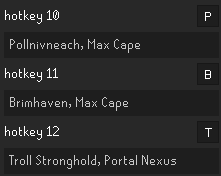 round jacinth
Is troll stronghold the menu option already on the nexus or is the right click option something else
wind owl
yeah left click is kourend
round jacinth
Then you can’t do a click for troll stronghold
You can do either or but not have both
wind owl
ok thought maybe it would be same as max cape
round jacinth
Max cape has those menus and sub menus
Nexus doesn’t
It’s just one option you pick as a right clickable option
wind owl
thanks
round jacinth
Np
 light trellis
where to check for client updates?
or is it done manually on launch?
automatically*
viscid lantern
done automatically on launch yup
 verbal trail
I'm using the fix mode hide chat plug in and its no longer opening the chat box when prompted
leaden trail
Someone's already made an issue on the plugin's GitHub repo about it
verbal trail
aweome i have no clue what that is but thank you
 random palm
Question about functionality. If I have plugins that I have installed but disabled and I completely close and restart the client, will those disabled plugins get loaded and consume resources? Or does that depend on how skilled the developer who created the the plugin is?
zealous cedar
they can consume memory if they are loaded, even if they were never started
but i imaging most wouldnt
random palm
Ok, thanks for sharing. On another note, is your team working on integrating more previous plugin hub plugins into RuneLite, or did I maybe not just realize how many plugins were already integrated previously?
zealous cedar
no, I dont do that really very often at all
random palm
oh, ok. Just wondering. Thanks. I appeciate all of the hard work you all do!
 soft cypress
hey guys, any idea how i can get the cloud icon in profiles to show? i play this game over 2 computers but i cant figure out how to cloud sync
round jacinth
you have to login to a gmail first
there should be a green door icon on the side bar of the client
make sure account plugin is on
 velvet jackal
anyone know how to access item stats?
itemManager.getItemStats(id).getEquipment().getAcrush(); > getEquipment() just throws NullPointer
round jacinth
look how the itemstats plugin does it in core
this channel is also for support for core client use, not development help, you can ask development questions in #runelite if you want
 crude pond
my pbs command randomly stopped working for everything, anyone familiar with a fix?
oblique plume
Read the adventure log in your house
crude pond
ah just had client open too long, ty tho
oblique plume
Or do a kill again
 subtle plaza
how do i separate my infoboxes? i cant figure it out
i press alt but it doesn't unlink them
haughty pumiceBOT
You can configure horizontal/vertical orientation, infobox groups or split infoboxes into new groups with the menu options opened with Shift + right-click. https://runelite.net/img/blog/1.6.28-Release/infobox.gif
 subtle plaza
oh ty i forgot to right click
 placid shell
Does anyone know if runelite is switching from java to c++ anytime soon since Jagex said they were discontinuing support for the legacy java client early this year
zealous cedar
there are no plans atm
 split dawn
hey guys, i have a problem with my account. i reset my windows and didnt save my runescape folder. im quite sure i had enabled cloud sync but if im loggin in now nothing happens so all my plugins are basicly gone. if i login into my account on the website it atleast tells me my boss kc so i know its the right one. do i need to setup my plugins again or is there a way to restore? (i know the profiles tab but there is no additional profile and cloud sync is activated)
haughty pumiceBOT
solid mesa
Are you logged into RuneLite? If you are and cloud sync was enabled it should sync it. If it isn't and the .runelite folder was deleted you may be out of luck
split dawn
yea im logged in and theres only the default profile. i clicked on cloud sync but nothing happens basicly
solid mesa
Had you previously enabled cloud sync on the old profile?
split dawn
i think so cause i had no problem with syncing like a year ago
but its wierd that the tracker on the runelite page is correct but the plugins are missing
and the runescape profiles are all listed too on runelite.net
solid mesa
Runescape profiles are not the same as Runelite profiles. You have to specifically enable cloud sync for the profile
split dawn
so if i login and dont have additional profiles with the old settings im out of luck i guess?
solid mesa
I believe so
split dawn
hmm god damn alright. appreciate the help my man thank you alot :)!
 abstract talon
So figured id ask here before creating a post on git. In "inventory setups" the layout I had open at the time got messed up. All other setups are fine. It looks normal on the side bar but in the bank its meshed together with other tabs. Anyone know of a way to refresh/fix it?
https://i.imgur.com/y4dLAqF.png
https://i.imgur.com/H693tPS.png
pics for reference
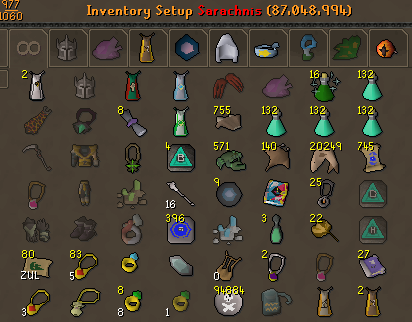
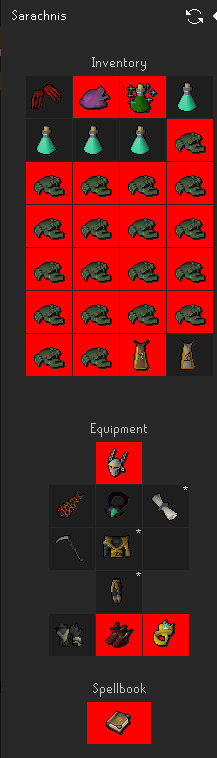
 modest breach
Runelite running at 99% usage on my computer. Tried sooo many things. Is there a common fix to this? I have a Radeon 5700XT
6700XT*
 wooden tulip
Runelites been having massive lagspikes the last 24 hours unsure on why
leaden trail
It's probably either your connection to Jagex or a hub plugin
wooden tulip
I have no new plugins, and i've uninstalled and reinstalled the launcher twice now
haughty pumiceBOT
To enable safemode
Windows
Run the RuneLite (configure) shortcut from the windows start menu
Tick the Safe mode box, save, launch RuneLite the way you normally do.
Mac
In Terminal, run
/Applications/RuneLite.app/Contents/MacOS/RuneLite --configure
Tick the Safe mode box, save, launch RuneLite the way you normally do.
leaden trail
Plugins can also update without input from you so just because you didn't install anything new doesn't mean a hub plugin didn't roll out an update with performance issues
wooden tulip
i went through my list and uninstalled a bunch i don't use
 rapid veldt
I have a question maybe anyone here has any idea sins a while when I do the !task command this(picture 1) text pops up in my chat. When friends/clan do the command I see picture 2. I cannot find where to change this


 proud bronze
Any fix if my client says "Runelite has encountered an unexpected error during startup"?
wooden tulip
games unplayable
proud bronze
I have re-downloaded it
leaden trail
wooden tulip
games unplayable
So try safe mode
leaden trail
proud bronze
Any fix if my client says "Runelite has encountered an unexpected error during s...
Post your logs
haughty pumiceBOT
To find the logs, you can do one of the following:
- If your client failed to open, click the
Open logs folderbutton. - Open the screenshot directory by right-clicking 📷
Camerabutton, navigate 1 directory up, then open logs folder. - Navigate to
%userprofile%\.runelite\logson Windows or$HOME/.runelite/logson Linux and macOS.
Upload the log files named client and launcher by dragging them to Discord. If there are files prefixed with jvm_crash dated from today, upload them too.
proud bronze
@leaden trail Dont know if this is what you mean?

 leaden trail
proud bronze
<@288504448030867466> Dont know if this is what you mean?
leaden trail
proud bronze
<@288504448030867466> Dont know if this is what you mean?
Just the ones with no dates, client.log and launcher.log
 fast narwhal
Guy's im having an issue. My runelite keeps zooming in when I hover over the game, and my chatbox scrolls up when i hover over it. It only does it on runelite, no other programs. I restarted my PC, and took the battery out of my keyboard and mouse. and it still does it with no power on them. I restarted runelite & my pc. what else can I do?
haughty pumiceBOT
To enable safemode
Windows
Run the RuneLite (configure) shortcut from the windows start menu
Tick the Safe mode box, save, launch RuneLite the way you normally do.
Mac
In Terminal, run
/Applications/RuneLite.app/Contents/MacOS/RuneLite --configure
Tick the Safe mode box, save, launch RuneLite the way you normally do.
leaden trail
Does it happen in safe mode?
fast narwhal
Dura, me?
leaden trail
Yes
fast narwhal
Checking now
yes it does it in safe mode as well
I've removed every hardware fault i can think of. and it doesnt do it on browsers/discord/ anything else.
proud bronze
Any ideas @leaden trail ? 🙂
zealous cedar
It looks like something is locking profiles.lck, maybe antivirus?
fast narwhal
idk what fixed it but i unplugged every dongle, uninstalled drivers, and turned off bluetooth. and it works now
proud bronze
But if i run in administrator it would work then no? But it does not so i dont understand
proud bronze
Well shit. I have no idea
 crimson fable
fellas, quick question, the OSRS native client has a setting to highlight quest givers, i can't find a way to enable this on runelite, anyone know if possible / how to do it?

 mystic dirge
sorry is it possible to get my osrs account that i played on steam transferet to runelite?
Its okay if i cant beacause i dont really have anything on that account😅
round jacinth
mystic dirge
sorry is it possible to get my osrs account that i played on steam transferet to...
Any account can become a jagex account which then you can use desktop clients for, runelite included.
mystic dirge
Thanks!
 trail dirge
Hi, I am getting this error when launching runelite. Does anyone know how to fix? I have tried reinstalling but still getting the same
 leaden trail
trail dirge
Hi, I am getting this error when launching runelite. Does anyone know how to fix...
leaden trail
trail dirge
Hi, I am getting this error when launching runelite. Does anyone know how to fix...
Is your system clock out of sync?
trail dirge
Yep it is 😄 I have tried everything to try to fix that but it keeps going out of sync. No idea why. guessing that is the issue?
Ok actually I just clicked Sync on the system settings and now the launcher opens, thanks for your help
 gentle lake
hey, is the pvp tracker broken? it hasn't been working for me since yesterday
haughty pumiceBOT
Get support for the PvP Performance Tracker Plugin Hub plugin here: https://runelite.net/plugin-hub/show/pvp-performance-tracker.
You can also find the support link by searching for the plugin in the Plugin Hub panel and clicking the ? button on the plugin, or by right-clicking the plugin in the plugin panel and clicking the Support menu option.
charred wind
trail dirge
Yep it is 😄 I have tried everything to try to fix that but it keeps going out o...
Update windows if it keeps going out of sync
gentle lake
what do you want me to dot there @leaden trail
leaden trail
Reach out to the author or make an issue there, we don't provide support for hub plugins because we didn't write them
 daring yoke
 unreal edge




