#support
1 messages · Page 60 of 1
 gilded kayak
 halcyon rover
oh thank you
 dusk ember
I did, with the new profile it seems to be working
gilded kayak
did you enable gpu
dusk ember
I did, and it's working too
gilded kayak
then it seems likely that something from the hub is causing your issue
dusk ember
Has there been anyone reporting the same issue before?
 leaden trail
Turn off gsync in the Nvidia control panel
 abstract marsh
@dusk ember me experiencing it also for 1-2 months
dusk ember
abstract marsh
<@330453601312833536> me experiencing it also for 1-2 months
Freeze just by opening the bank?
abstract marsh
@dusk ember wdym by freeze? My runelite stays open and crashes, once I acknowledge the popup then RL closes
Not exclusive to opening the bank though
dusk ember
For me the game freezes when I open the bank, then I have to restart the client, happens sometimes tho and when it happens it goes on for a while
Everything else I do in-game is perfectly fine
 rocky bison
Somebody should have a look into the pest control cc chat
some of the stuff is very disturbing
so disturbing ave been taking evidence for awhile
 crisp dune
That has nothing to do with RuneLite, let alone client support
rocky bison
ty
 opal stream
Anyone have any idea why if I swap active windows my RuneLite tanks to like 4 fps.
 solid mesa
FPS control plugin? Nvidia graphics card?
opal stream
solid mesa
FPS control plugin? Nvidia graphics card?
Uncapped and 4070S.
solid mesa
A lot of people seem to have it with Nvidia cards, I don't. But it seems like some sort of driver thing with nvidia
opal stream
So just a shoddy driver?
solid mesa
Yea, probably worth trying some older or newer drivers to see if it stops
abstract marsh
@cold dirge did you ever find a fix? Having same problem as you
 sonic birch
I doubt you got the exact same error
First properly describe what happens, e.g. poof client gone, then post logs
!logs
 haughty pumiceBOT
To find the logs, you can do one of the following:
- If your client failed to open, click the
Open logs folderbutton. - Open the screenshot directory by right-clicking 📷
Camerabutton, navigate 1 directory up, then open logs folder. - Navigate to
%userprofile%\.runelite\logson Windows or$HOME/.runelite/logson Linux and macOS.
Upload the log files named client and launcher by dragging them to Discord. If there are files prefixed with jvm_crash dated from today, upload them too.
sonic birch
I won't be available though, but someone else might be able to help you
abstract marsh
@sonic birch are you replying to me?
 mossy swan
yes he is
 cold dirge
abstract marsh
<@268997673867149313> did you ever find a fix? Having same problem as you
cold dirge
abstract marsh
<@268997673867149313> did you ever find a fix? Having same problem as you
Yea
abstract marsh
What fixed it?
cold dirge
Well, i dont know for sure if i fixed it. I can’t reproduce it with any reliability, not before, and not now that i think i’ve fixed it. I believe i fixed it because outside of rs, firefox, chrome, discord, steam all crashed consistently. i seem to have solved those software from crashing by disabling core 12 on my CPU, which i found by a process of elimination. If you’re really having the same issue as me, then i would look for reliable reproduction steps, and systematically test with different cores disabled
cold dirge
?
gilded kayak
shadows of chernobyl had a thing where all your issues went away if you disabled every core except 7
i'll believe anything at this point
 south siren
anyone know why i cannot withdraw my sara brews? i have like 7 left but cannot click them:

 cold dirge
mossy swan
you should probably RMA your cpu
cold dirge
mossy swan
you should probably RMA your cpu
You mean return it?
mossy swan
cold dirge
You mean return it?
warranty
cold dirge
Yeah maybe. Idk if its just an intel issue or if asus motherboard is to blame. Read online the newer models of both aren’t playing nice
mossy swan
what model is it?
cold dirge
i9-14900 / Asus ROG STRIX Z790A
mossy swan
oh yea 14th gen has issues
cold dirge
I used to have a lot of crashing from 117hd as well which was I never got around to troubleshooting (just turned it off). Hopefully this might help me there too
mossy swan
i'd return that and get either AMD or the newer intel cpus
13/14th gen get worse over time too
cold dirge
we'll see how disabling core number 12 goes. Using all 32 is sorta greedy right 😵💫
mossy swan
you should get that done before warranty expires
or you'll be stuck with a $$$$ brick
cold dirge
Also worth mentioning a bios update mitigated a ton of crashes (including MANY BSODs) i was getting a few months ago from both rl with 117, and monster hunter world. Rl was usually just crashing on its own but sometimes bsod, World was frequent bsod. So @abstract marsh see if there is any BIOS update avail
mossy swan
for daniel it depends on what cpu he has if its even the same issue
 bronze vigil
just downloaded runelite, my inventory and chat are tiny i can barely read them, any way to enlarge them?
 gilded kayak
!config
haughty pumiceBOT
gilded kayak
set scale to 1.5 or 2.0
bronze vigil
wheres that option felan?
mossy swan
or use stretched mode if you dont care about sidebar
bronze vigil
ty unmoon
abstract marsh
@mossy swan i7 11800
mossy swan
then its not the same issue
abstract marsh
Better for me thanks, Janice's issue looked annoying to have
cold dirge
Might not be of much further use to anyone but i’ll share anyways; i said i found it was core 12 that was causing me issues (which i identified using Process Lasso), it was showing me as core12 of my p-cores, but the cpu is only 24 physical cores. Hyperthreading is “doubling” the p-cores so the mapping would actually be to disable core 4 (or if possible, just hyperhtreading for core 4). Not sure if this will work and maybe i’ll just have to disable 4 altogether. Not really sure how hyper threading works and if it even makes sense for one of the “virtual”(12) cores to be faulty while the physical (4) works

Process Lasso did something weird where it just shows 0-14 instead of 0-15 with a greyed-out 12 now. Kind of confusing. Maybe i should stick to software-level control of disabling core usage? I thought doing it directly in BIOS would be nice to remove an additional software dep/“middleware”
Somehow, there is runescape at the end of this tunnel😵💫
 tardy bridge
cold dirge
Somehow, there is runescape at the end of this tunnel😵💫
tardy bridge
cold dirge
Somehow, there is runescape at the end of this tunnel😵💫
You updated your bios lately?
Stop the chip frying itself
0x12B microcode for your motherboard will help prolong the CPU
but if it’s under warranty I’d just return it and get either 12900k or a whole new AMD platform
tardy bridge
mossy swan
or you'll be stuck with a $$$$ brick
We love expensive paper weights
mossy swan
cold dirge
Also worth mentioning a bios update mitigated a ton of crashes (including MANY B...
they did mention updating bios
tardy bridge
Hm, yeah just depends which one they got
Latest, at least a couple months back, 0x12B microcode fixes any issues
But then if the damage is already done then won’t do anything
We go AMD next pc 🤝
 still magnet
Anyone know why it no longer shows how many bank layouts I have for an item next to edit tags? I have max cape in probably 40 different layouts so it should say like Edit-tags (40)
 tardy bridge
have you turned the plugin off or something because mines there
 still magnet
Have bank tags and bank tag layouts on. I tried turning on and off to see if that would do something lol.
This randomly happened the other day I never touched anything thought maybe it was just an issue with the plugin but I see it's not
 round jacinth
Bank tag layouts can be turned off cause bank tags (core) does layouts now
If layout is off do you see the count?
still magnet
Turned it off and it doesn't show. When I click edit tags as well it doesn't show the actual tab names either for any item even though they are all still in tabs.
I also took a random item and added it to a tab just now it will show it in the tab but also won't show it when I click edit tags
 shadow elk
Does anyone on Fedora 41 (KDE) know how to make the actual RL client UI bigger? Not ingame just the actual runelite
haughty pumiceBOT
 viscid lantern
the scale option
 thorny patio
On Linux, the /home/(users)/.runelite folder doesnt exist, despite RuneLite claiming it saved a screenshot there
thorny patio
I did ctrl+h, and also manually navigated to it in the folder path. Linux just told me the folder doesnt exist
Im wondering where its hiding my screenshots
round jacinth
It’s in that spot
 oblique plume
if youre running it in some sandbox then itl be wherever that is
thorny patio
jagex launcher is running through flatpak so idk
oblique plume
ok but where is RL
thorny patio
i dont know and dont know how to find it
A screenshot was saved to /home/x5/.runelite/screenshots/RevoSucks/Levels/Strength(14) 2025-01-23_08-53-31.png
its not there..
oblique plume
how did you install RL
thorny patio
GitHub
Play RuneScape with the Jagex Launcher - in Flatpak form! - USA-RedDragon/jagex-launcher-linux-flatpak
oblique plume
thats the jagex launcher
oblique plume
the jagex launcher doesnt install it, it just takes you to runelite.net to get it
maybe they edited that package to do something different
so ask them what they did with runelite
 clear fiber
 charred brook
The USA-RedDragon flatpak has an option to install RuneLite.
I think the screenshots should be located in /home/Pictures/RuneLite
thorny patio
cool. thats where it was
thanks
round jacinth
https://github.com/USA-RedDragon/jagex-launcher-linux-flatpak?tab=readme-ov-file#runelite-screenshots it even says it in the link you gave
GitHub
Play RuneScape with the Jagex Launcher - in Flatpak form! - USA-RedDragon/jagex-launcher-linux-flatpak
lol
charred brook
oh lol, i didn't see that. Looked at the code for the RuneLite installation 😂
 proven cloud
can i leave --rs=vanilla on all the time or is that a bad idea
 zealous cedar
its a bad idea, and is actually getting removed soonish.
proven cloud
gotcha thx 😔
 sage palm
Is there anyway to tell which plugin is giving me a notification? I am trying to afk NMZ and randomly getting alerts.
 vast bone
if you set game message notifications in "Runelite" plugin it might give you a clue based on the text.
that's about it.
sage palm
Cool I'll give t hat a try and hope to figure it out. Thanks!
 lime prairie
Hey my client crashed when I logged in, here is the log .
this isnt first time, happens quite often
haughty pumiceBOT
@lime prairie Delete your %userprofile%/.runelite/cache folder or run this command in command prompt run as Administrator:
rmdir /s "%userprofile%\.runelite\cache"
You can tryyy that maybe?
 alpine halo
The loot tracker does not track any Wintertodt uniques, is this expected? It is happening with all of my clan members https://i.imgur.com/uvYQO0T.png
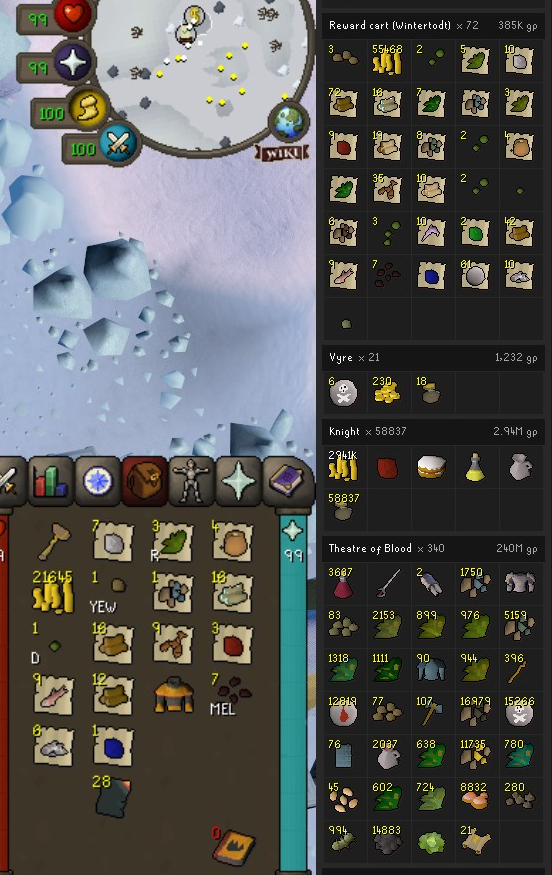 leaden trail
@hot oasis looks like you did the cart stuff so maybe relevant
alpine halo
oblique plume
did you hide it?
I have had them all check the loot tracker plugin settings, they have nothing blocked. As well as using the eye to hide and unhide
oblique plume
what does the message in the chat look like when you get a unique
if its different than normal then it wont pick it up
alpine halo
No message in the chat
oblique plume
its expecting it to start with "You found some loot: "
so you def got that message
since its picking it up for other loot
 light nova
Good evening all - I've started experiencing weird FPS drops over the last few days (240 down to 25 for consistent periods - see screenshot for evidence).
I've tried messing about with the settings in 117HD plugin but no luck so far.
I've uninstalled / re-installed Runelite (64 bit).
Any help would be really appreciated.
 haughty pumiceBOT
@light nova Visit 117's HD plugin discord (https://discord.com/invite/U4p6ChjgSE) for support, issues & feedback
leaden trail
oblique plume
its expecting it to start with "You found some loot: "
Maybe uniques get a different message now?
light nova
haughty pumice
<@274915417263308820> Visit 117's HD plugin discord (<https://discord.com/invite...
Thanks for the link - it affects the GPU plugin too (not just 117HD though).
oblique plume
yes thats why i asked what the message is
alpine halo
oblique plume
yes thats why i asked what the message is
seeing if I can get him to screenshot his text box at the moment of tome
oblique plume
could also be a filtered message so turn off game filtering if its on
alpine halo
oblique plume
could also be a filtered message so turn off game filtering if its on
So the message does show, it is just filtered. However he just got more burnt pages with the filter turned off (set to on in game) and it still didn't add them to the loot tracker
 charred wind
light nova
Thanks for the link - it affects the GPU plugin too (not just 117HD though).
charred wind
light nova
Thanks for the link - it affects the GPU plugin too (not just 117HD though).
If you’re using newer drivers you might try downgrading
oblique plume
what does the message say
solid mesa
Looks like I had game chat set to filtered so I didn't see a chat message for a unique
 alpine halo
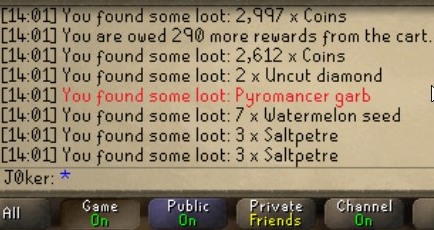 oblique plume
its the red
 hot oasis
I copied the other minigame strings, so those might have broken too
hot oasis
idk if thats a new change i didn't go for uniques when i added it
oblique plume
they prob want to highlight the uniques
which sounds nice
but then we dont strip colors out of stuff we match on so the color messes with the matching
 deep python
Does anyone know what changes this message from high alch value to ge value? (it's showing 120k instead of 800k~)

Sry realized I posted in wrong channel before.
alpine halo
oblique plume
but then we dont strip colors out of stuff we match on so the color messes with ...
At some point it stopped working in TOA too for Zebak and Kephrii https://i.imgur.com/MCTXepx.png
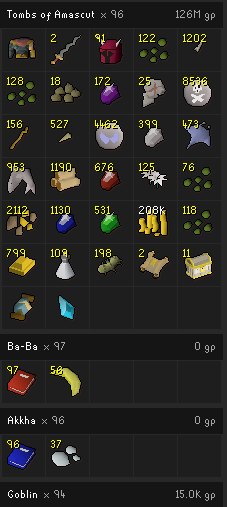 oblique plume
id what that means
monster loot is from where its dropped
jagex could have changed where they drop it
they do that sometimes
hot oasis
i found an old screenshot from tempoross and those looked like this lol
 oblique plume
if jagex did it that way then it wouldnt have broke our text matching 
hot oasis
the C in jagex stands for consistency
 plucky grotto
Switched PCs just now and i just relogged into RuneLite and it doesnt have seem to saved my profile, any ideas?
solid mesa
Did you enable cloud sync? 
 plucky grotto
solid mesa
Did you enable cloud sync? <:cloudsync:1302133016033886230>
plucky grotto
solid mesa
Did you enable cloud sync? <:cloudsync:1302133016033886230>
No idea, please dont tell me ive lost it all again
uh
solid mesa
Do you still have the old pc?
plucky grotto
Everythging was wiped
fuck
i did this again recently and took ages to get my setup back
solid mesa
If you didn't enable cloud sync or save .runelite then it's gone
plucky grotto
How do you even enable that
 safe grail
should be automatic unless u have too much space gg
plucky grotto
tf i wouldnt of had too much space
solid mesa
On the profiles you turn on the cloud
 solid mesa
safe grail
should be automatic unless u have too much space gg
solid mesa
safe grail
should be automatic unless u have too much space gg
It is not automatic
safe grail
oh
plucky grotto
oh wait
its loading
THANK FUCK
lol
was under this

i just di dthis fucking 1 month ago and i stg you dont realise how giga cancer it is to do again
ty anyway
 trim wadi
if you just clicked it, arent u just syncing ur existing setting with the cloud
plucky grotto
i just had the wrong profile on and it was synced.
trim wadi
ah gz
 lavish ledge
is there a way to make cox additions work even though it's not updated? had it working today until i had to restart my computer
 viscid lantern
nope
 real summit
Either the collection log is broken or its not working right
gilded kayak
i could not tell you the last time someone mentioned that plugin, where it wasn't followed by "is broken"
so maybe
 gilded kayak
it doesn't say reset, it says check the logs
gilded kayak
!logs
haughty pumiceBOT
To find the logs, you can do one of the following:
- If your client failed to open, click the
Open logs folderbutton. - Open the screenshot directory by right-clicking 📷
Camerabutton, navigate 1 directory up, then open logs folder. - Navigate to
%userprofile%\.runelite\logson Windows or$HOME/.runelite/logson Linux and macOS.
Upload the log files named client and launcher by dragging them to Discord. If there are files prefixed with jvm_crash dated from today, upload them too.
real summit
gilded kayak
!logs
It just says launcher client
gilded kayak
well that's good because thats exactly what it's supposed to say
sonic birch
Also, it's a hub plugin. You should contact the original author for help
oblique plume
you do know we arnt the people that make that plugin anyways
 winged tapir
Why is my wildy symbol missing? (the levels)
 light nova
Good evening all - I've started experiencing weird FPS drops over the last few d...
light nova
light nova
Good evening all - I've started experiencing weird FPS drops over the last few d...
Don't suppose anyone's got any other ideas here please? PC is working absolutely fine with other games, NVIDIA drivers are all up to date.
Symptoms I'm seeing are, GPU is working at 95%+, frames are at 240, then it drops to 23/25fps and GPU drops to 10%.
gilded kayak
what about not the latest driver
light nova
Certainly something I can test yes
gilded kayak
the latest drivers only exist for the latest AAAA <current-year> game, and very often cause issues for our early 2000s game
light nova
I'll give that a go then, thank you.
sonic birch
winged tapir
Why is my wildy symbol missing? (the levels)
!flow
haughty pumiceBOT
flowchart: Please refer to this flowchart for further troubleshooting.
 stark ore
Hey theres some guy messaging me from in here about buying gold
gilded kayak

 mild cave
s
 midnight radish
where can i report a bug?\
round jacinth
If its a bug with hub plugin you report it to the author
If it’s a bug on core you confirm that by using safe mode and report it in our github
What’s your issue?
midnight radish
max cape right click to home doesnt work and home teleport will send you to black chins wilderness
round jacinth
That was fixed by jagex and wasn’t a runelite bug I think
crisp dune
max cape home tele works fine for me
midnight radish
gilded kayak
can you screenshot your  tab, above your email if it's there
 midnight radish
oh thank you so much
gilded kayak
you should restart the client after game updates
usually the bugs are very minimal
but with this bug that Jagex had on all their clients, it's very bad
midnight radish
yeah it was horrible
midnight radish
gilded kayak
you should restart the client after game updates
i will do that thanks !
zealous cedar
this was probably a pluginhub plugin or something doing this, i dont think this happens generally, even on the older client
gilded kayak
mmm
 mortal pond
I think it was the teleport submenu option in menu entry swapper after the game update / before runelite updated
The duplicated teleports here all went to the wildy, and disabling menu entry swapper got rid of the dupes
(that was the RL issue Jagex was referring to in their announcement, although it was already fixed by the time they announced it lol)
 zealous cedar
no
 wet gull
how i make game dark same this?
 solid mesa
Might just be the in game brightness
 wet gull
oh cool thanks
 tacit flicker
Hi - I am receiving this message when attempting to login. Can someone assist? Thanks in advance!
Picture will not send but it's reading "too many login attempts. You can use the JX launcher to continue playing. Press the button below to download it now”
solid mesa
There's not much you can do except wait it out or upgrade to a jagex account
tacit flicker
how long is the wait it out period? Would upgrading to a jagex account immediately solve this and still have ability to use Runelite?
solid mesa
Yes you can use the jagex launcher to launch runelite
tacit flicker
Thanks, @solid mesa - Do you happen to have instructions on this? if not I'm sure I can find it on osrs website
solid mesa
Could be minutes, could be hours. It's really up to Jagex. If you're using a VPN you could try disconnecting if they have the IP timed out
tacit flicker
no VPN usage surprisingly
solid mesa
zealous cedar
it can also be from someone trying to login as you a bunch of times I think
tacit flicker
Oh gosh don't tell me that. Do most users have the jagex account/launcher?
zealous cedar
i dont know
 fading monolith
priority
still magnet
still magnet
Anyone know why it no longer shows how many bank layouts I have for an item next...
This has been annoying me so I completely wiped RL settings and started from a fresh RL thinking maybe some other plugin was messing with it and it still has the same issue. Someone said that it works for them though so it can't be a plugin issue
solid mesa
Maybe one is from core bank tags and the other is from bank tag layouts?
gilded kayak
works fine for me w/ only bank tags
 still magnet
I didn't get off bank tag layouts from the plugin hub yet still didn't work it was just bank tags
So strange like obviously it's marked in a tab but when I hit edit tags it will just be empty. If I press enter when the edit tag screen comes up as well it will wipe everything.
 gilded kayak
are you using inventory setups
still magnet
No I have RL completely base atm and it's still doing it
oblique plume
works for me 
still magnet
Cleared everything again and redownloaded RL and it works now hopefully will still work when move my settings back over lol
 limpid yew
does anyone know how to get the tick counter on visual metronome to just show the number and not have the white box behind it?
like the way its set up in the second picture.
i figured it out.
 spark bane
Has anyone ever had the message when trying to log in ( to many log in attempts ) never ever had this message before and my password isnt wrong.
**I do not have a jagex account and do not want to make one
gilded kayak
yes people have had it before, the only 100% will work, workaround, is to convert
otherwise it's wait until the error goes away
spark bane
Well how long is that?
mossy swan
clearing sessions from the osrs website has worked for some people, temporarily
spark bane
How to do that
mossy swan
go on the website and find that option somewhere in account management or something
ive never used it
gilded kayak
as for "how long" no idea nobody ever comes back to explicitly say, "my issue went away after x minutes/hours"
spark bane
Okay well thank you , 🤞 hopefully one of the first 3 options work
I thought maybe RL was doing some updates
mossy swan
we cant do anything about the login stuff, thats all jagex
you can use runelite when using a jagex account though
spark bane
I just never wanted to switch
mossy swan
you'll probably have to do it eventually either way
spark bane
The OG username you no
gilded kayak
your IGN doesn't change and nobody but you cares about your login name fwiw
but unless you plan to quit, when they force you to upgrade, you will have to do it eventually
spark bane
Just don't like change
Don't think the game should either, atleast osrs
But anyways
Ty
I'll try those out
 final axle
I was apprehensive about swapping over to a jagex account but I haven't had any issues with it and the extra free bank spaces are nice I guess
 vestal knoll
lately im having a problem that my tags, menu entry swapper, tile markers etc not get saved next time i start up my pc, anyone know what it could be. Im def logged in and syncing
 polar spear
Anyone get a "There was a fatal error starting RuneLite" before?
mossy swan
sure
polar spear
any fix?
oblique plume
No
 sturdy elk
Is it runelite which is bugged? Sometimes it doesnt show take (item) at the mouse cursor, when picking up from ground
round jacinth
seeing as jagex doesn’t do mouse tooltips but runelite does, it probably is a runelite setting or hub plugin interfering
haughty pumiceBOT
To enable safemode
Windows
Run the RuneLite (configure) shortcut from the windows start menu
Tick the Safe mode box, save, launch RuneLite the way you normally do.
Mac
In Terminal, run
/Applications/RuneLite.app/Contents/MacOS/RuneLite --configure
Tick the Safe mode box, save, launch RuneLite the way you normally do.
sturdy elk

 wise fox
Hi, few qs pls:
- Any1 running on a M2 Macbook Air ( or any mac silicon device? )
- Is it possible to run on CPU mode but with enhancements like you get when on GPU mode? Ie its much clearler and not pixelated on GPU mode
I am getting HORRIBLE fps on an m2 macbook air on gpu mode, and 117hd is basically unplayable
CPU mode works flawless but obvviously looks like crap by default
viscid lantern
Do you have compute shaders enabled in the gpu plugin?
viscid lantern
Turn those back on, that should improve performance
wise fox
the way it reads it makes it seem more stress on GPU so i didnt turn on
viscid lantern
else you will have to lower your draw distance
wise fox
as gpu is already 100% maxed with gpu mode on - but ill try now
I tried lowering draw distance to 10 it makes like 3-5fps difference only
viscid lantern
To answer 2) no thats not possible
wise fox
When it says restart plugin for changes to take effect.. does that mean flick it off and then on again or full restart of runelite?
viscid lantern
off and then on again
wise fox
lol this is so dumb..
I was getting 60fps in the area i was (this is high, not normally this high but this area is basically empty of graphics) normally like 30 at GE which is bullshit
Then i switched setting on compute shaders, flicked on and off plugin, no impact to fps
Then thought ok maybe rl needs restarting to take effect, log in again 50fps
Then turned off again, restarted runelite, log in again, 30fps
does runelite hate mac lol
oblique plume
Mac hates everything
wise fox
identical settings, identical locaation, gone from 60-fps to 30fps by quitting and restarting RL twice, wtf
wise fox
oblique plume
Mac hates everything
Well, its clearly more than powerful to run this game, so i dno
can run league great ✅
can run counterstrike great ✅
Cant run OSRS 💩
makes absolutely no sense
round jacinth
We are fortunate that Adam was able to gpu ify the client as much as he has and continues to do, it’s magic lol
wise fox
yeah im not hating, great effort and great job
just dont get why its borking on apple silicon
round jacinth
30fps is perfectly playable fwiw
wise fox
i last played a couple years ago and didnt have this issue
30fps is lagging, so either its not actually 30fps or something else is causing issues
round jacinth
Maybe it’s hub plugins doing stuff
wise fox
either way shit hops when it shows 30fps
so you cant click invent accurately etc
so not id argue unplayable based on experience
round jacinth
Make a new profile and only have gpu on
wise fox
ill try that thanks
wise fox
wise fox
identical settings, identical locaation, gone from 60-fps to 30fps by quitting a...
but this is still dumb irrespective
 fresh swift
i'm getting 92 fps at ge on a m1
if i go to somewhere silly like civitas then i get 30 ish
here's what i use
 wise fox
right thats positive to hear
ive just made a new profile
changed no settings
left all default plugins on / off as they are
lets see
Ok so i turned on FPS control (to see counter), and stretched mode - on CPU only mode, unlimited FPS
now with gpu mode... interesting
If i turn off bicubic , and leave linear it goes up to 60 fps again
still nowhere near 90
any antialiasing kills it again
anyway this is better than before so thanks
Drops to 45 at GE hmm
nearest neighbour looks shite compared to bicubic as well
round jacinth
Depending on population of players around and region you’re at you will see fluctuations in fps.
Priff and fossil island with nobody at them are harder to draw than lumbridge with nobody.
Don’t need a play by play of each setting you turn on. Just tweak it until you’re happy, on a default profile with no hub plugins but only GPU on, you’ve got a zero non sense/no bloatware hogging the cpu. It’ll be the best you can get, so just change the GPU settings until you like how it looks and performs.
wise fox
Cool thanks, final qstn, bnoth profiles are on stretch mode
buy my old profile looks "bigger" than the new profile
what coud be causing that? Is there a plugin for that or something>
round jacinth
you have different scaling on it in the cog of stretched mode for ui scaling.
wise fox
Ahhh legend thanks
thats where that bicubic (cat) vs linear vs nearest neighbour makes huge difference
at the expense of FPS
 wispy idol
My grounditem lootbeams stopped working a couple weeks ago (don't know specifically when, just noticed during leagues). I have checked my settings and they look on to me and my friends, any ideas?
zealous cedar
try restarting your client
wispy idol
I tried that first, any other thoughts? I DMed the bot, can send screenshots of settings too
zealous cedar
try restarting your client more
wispy idol
someone replied and said gpu needed to be on that its broken if not rn, and that worked, all set 🙂
oblique plume
i thought that got fixed
yea its fixed
so you probably arnt using RL if it doesnt work for you
 pulsar sand
I just got my first MacBook (M3, 24GB RAM) and I’m wondering if there is a way to run RuneLite at a different resolution/scaling than the desktop.
zealous cedar
you can try adjusting the scale option
haughty pumiceBOT
pulsar sand
zealous cedar
you can try adjusting the scale option
Thanks, I’ll give that a go. I haven’t tried it yet, but from what I’ve seen it doesn’t do anything on MacOS.
 dapper rose
https://i.imgur.com/XwGFIr1.png any idea why it freezes here? can log onto my alt fine just only my main freezes
 oblique plume
rsn hider
 zealous cedar
check the logs
haughty pumiceBOT
To find the logs, you can do one of the following:
- If your client failed to open, click the
Open logs folderbutton. - Open the screenshot directory by right-clicking 📷
Camerabutton, navigate 1 directory up, then open logs folder. - Navigate to
%userprofile%\.runelite\logson Windows or$HOME/.runelite/logson Linux and macOS.
Upload the log files named client and launcher by dragging them to Discord. If there are files prefixed with jvm_crash dated from today, upload them too.
 viral zephyr
Is it appropriate for me to upload them here Adam?
zealous cedar
yes
viral zephyr
zealous cedar
your system clock is wrong
viral zephyr
Smashing, thanks - working now
crisp dune
In the future please dm @haughty pumice for reports to the mods
 scarlet sequoia
crisp dune
In the future please dm <@454996275201572864> for reports to the mods
scarlet sequoia
crisp dune
In the future please dm <@454996275201572864> for reports to the mods
ok, didn't know some admins cry if you dm them so didn't want that hassle
crisp dune
It's fine, we appreciate the report
wet gull
How to show name the item in the chat
 oblique plume
you mean like the valueable drop message?
wet gull
Name of the thing
oblique plume
yes
wet gull
droped
crisp dune
 wet gull
worked cool
wet gull
how i remove this price ?

from the thing that falls
I just want to show the price on the monster I kill, not the thing that falls from it.
And keep showing the price here only
 oblique plume
you dont
wet gull
same this ?? on other client
 wet gull
It is self-activated. I don't know exactly
oblique plume
idk what youre talking about
wet gull
ok bro No problem
 violet berry
 zealous cedar
your system clock is wrong
 tidal anchor
i've been getting major packet loss the last few days and its only on runelite, any ideas on what could be causing this? Internet is ethernet connection and speeds are 400mbps+

 zinc sonnet
is there a way to wipe the tileman mode tiles?
round jacinth
tidal anchor
i've been getting major packet loss the last few days and its only on runelite, ...
ping commands are dropped and this plugin is showing when it drops
round jacinth
zinc sonnet
is there a way to wipe the tileman mode tiles?
click the reset button of the config of the plugin ( the bottom button) if i had to guess
zinc sonnet
round jacinth
click the reset button of the config of the plugin ( the bottom button) if i had...
i wish, it resets the parameters for the plug in
haughty pumiceBOT
Support for hub plugins should be directed to the author of the plugin.
You can find the support link by searching for the plugin in the Plugin Hub panel and clicking the ? button on the plugin, or by right-clicking the plugin in the plugin panel and clicking the Support menu option.
round jacinth
check their github if they have instructions there then
zinc sonnet
thanks
round jacinth
i checked, i dont think they do but nobody also complains about the issue
i think the reset button should clear all keys for the config
oblique plume
only the ones in the config file
you can save config values that arnt defined in the settings
reset button wont know about those unless you override reset
round jacinth
oic
tidal anchor
round jacinth
ping commands are dropped and this plugin is showing when it drops
any steps i can take to resolve this?
tidal anchor
ok so i guess i just gotta pray it gets better? bascially makes pvm unplayable for me rn
haughty pumiceBOT
open command prompt, type this in: ping -t oldschoolXXX.runescape.com where the XXX is your world minus 300, for example world350 = 50
round jacinth
you can try different worlds and different regions of worlds to see if the connection improves
but if you had a way to ctrl + f this discord for images of people's ping graphs, they all look like that because jagex blocks pings so the graph spikes up
gameplay would be normal tho
oblique plume
entity hider
 limber bolt
Hello is this the appropriate place to report a possible bug?
oblique plume
sure
limber bolt
I observed the following with bank tags: I had 1 tag called "cox" and one called "cox alt". Whenever I added anything to the "cox alt" tag it automatically added it to the "cox" tag also even though under "edit tags" it would show only the cox alt tag. I couldn't remove it, but resolved the issue by renaming the tab to "alt cox" and that fixed it. So easily resolvable but just wanted to report that behavior
oblique plume
that is a feature
it matches tags by starting characters not exact match
so you can sort of nest tags
limber bolt
Oh interesting. I haven't tried that before, what's a use case where someone would nest tags?
oblique plume
dunno
loot tags would be one
maybe slayer setups
where you have a general tag then more specific ones
limber bolt
I see like barrage gear if you have a tag for most common slayer tasks
interesting, thank you!
 hybrid meadow
Hey I'm wondering if anybody is able to assist me with a driver issue/question. I have a 6800XT GPU which on paper should be able to basically max out runelite with HD plugin etc. I noticed that on newer drivers, I was getting super low FPS, like 15-20, and found on reddit that somebody suggested downgrading to driver 22.5.1, which completely fixed my issue. My only problem now is that newer games I want to play want me to upgrade my drivers, which means I need to install and reinstall drivers every time I get the itch to play another game, then want to play osrs again. Does anybody else have a newer AMD GPU and know if there are any drivers besides 22.5.1 which allow me to both play osrs and new games?
oblique plume
you could try the experimental gpu plugin on the hub with the new drivers
see if that performance outweighs the quirks of the experimental ness
hybrid meadow
oblique plume
see if that performance outweighs the quirks of the experimental ness
Can I use HD with GPU plugn at the same time? I've honestly become addicted to HD
solid mesa
No
oblique plume
this guy said this version fixed some issue, dunno if it was performance related
hybrid meadow
oblique plume
this guy said this version fixed some issue, dunno if it was performance related
Testing it now
oblique plume
most talk i see is the 22.5.1 being the go to
hybrid meadow
yeah thats what I hav now, bummer honestly. My pc runs cyberpunk in 1440 at 60fps and 300+ mods, but struggles to run runelite if I use the newer drivers :/ AMD needs to get their shit together
too many osrs players for them to just not have functioning drivers for the game
viscid lantern
you could go through the painstaking process of trying every single driver version starting with the most current one, and hope you find one that works thats newer than 22.5.1 
hybrid meadow
unfortunately 24.9.1 did not work for me, honestly I'm just gonna stick with 22.5.1 for now. Just find it so lame that I have to do this. The drivers are so old
New games won't even let me boot up the game that's how old they are
but it's better to use them and just upgrade when I wanna play new games rather than play at 10 fps every time I go to priff
oblique plume
what if its just an hd issue
just dont use that and not reinstall drivers all the time
hybrid meadow
well so here's the thing, i've tried without hd as well, but on 22.5.1 I get around like 120-150 fps, but on newer drivers it's around 65-80. Which I mean, on osrs isn't a huge deal but it tells me that the issue is optimization with osrs as a whole, hd just simply makes it even worse
fresh swift
Thing is, the osrs client that rl uses was never meant to run on gpus
 winter plover
Hello all, my old pc died and I have lost my runelite settings (bank tabs etc) It was suggested I come and ask here if anyone knows how to get them back if possible
haughty pumiceBOT
winter plover
haughty pumice
<https://github.com/runelite/runelite/wiki/FAQ#my-plugins-are-gone-or-my-config-...
thank you heaps, turns out I had never signed in previously so looks like it's all lost 😦
 stone parcel
If the hdd/ssd still works maybe you could get the files from there.
 summer sluice
any dumb reason why I wouldn't be able to move runelite clients to a second monitor? Can move them freely on one monitor, but wont move to a second.
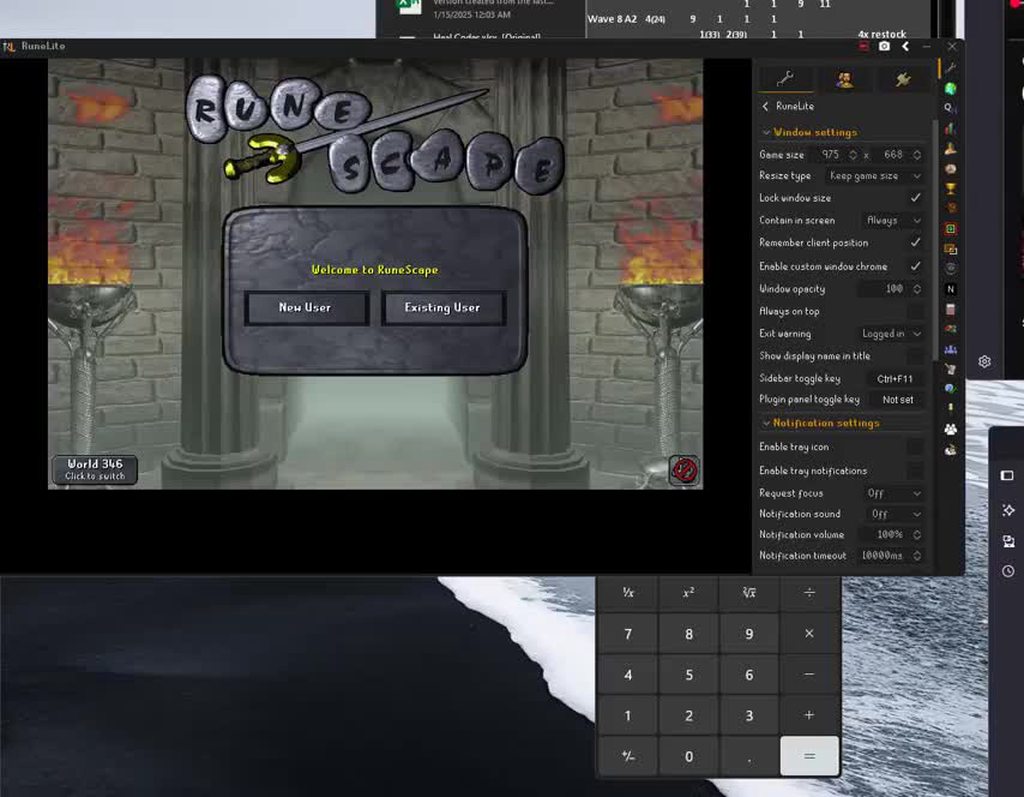 viscid lantern
"contain in screen" is set to always
 void gate
Anyone having issues with the ahrim ornament kit not working in bank layouts even using the * in tag?
it seems to take up several inventory spaces too and not sure if its intended
 coarse lichen
any2 know what to do with the error had to staart using my old laptop for a couple days and went to launch rl an i got this i unistalled re installed an all that an im still getting it?
 solid mesa
How have there been four people today with wrong PC clocks
round jacinth
i think some one mentioned the new cert happened
and on a new cert that's when it rechecks?
coarse lichen
lol this pc has been dead for about a month idk y time an date were wrong
round jacinth
so these 4 have had it wrong for N number of days but the recert was today so they're all happening today? rather than happening over the last N days/weeks?
solid mesa
Normally SSL errors even if the clock is wrong. I guess they were within that tolerance that it wasn't an issue until it was the Not Valid Before
coarse lichen
idk about them but i had to start using my old laptop cause my fan decided to take a shit today on my new one
coarse lichen
so im useing this one until i get the replacment on monday
zealous cedar
the cert rotated today so anyone with a wrong clock would notice it
it happens every time it rotates really
 sly sinew
Hello! I thought it was because of a profile switch via leagues. But now that im playing the main again, i noticed all my bank tabs are gone, tile markers, everything. But my loot trackers still have all my previous loot? I'm confused to why it all dissapeared
round jacinth
!lost
haughty pumiceBOT
round jacinth
You’re probably on the wrong profile
sly sinew
None of those things worked
im signed in to my email account. i tried signing out and signing back in. ive tried importing three different files in the foler it told me to do it from. none of those worked either
nevermind. i found the issue. Thanks!
 spark token
where did the set default profile option go
 gilded kayak
are you logged in
spark token
yes
gilded kayak
to the game
gilded kayak
how else would we know what account to link to?
spark token
decent point however with jagex launcher you cant change what account you are to log into
assumed that runelite would just have the info
solid mesa
Even with the jagex launcher you can link to different profiles. You can have a profile for leagues and main game. Runelite doesn't know which profile to load until you login to a world.
 fossil shell
i need help trying get my jagex launcher to work with runelite
 gilded kayak
did you try doing what it says
fossil shell
yes i ran it as admin and still wont load
gilded kayak
!logs
haughty pumiceBOT
To find the logs, you can do one of the following:
- If your client failed to open, click the
Open logs folderbutton. - Open the screenshot directory by right-clicking 📷
Camerabutton, navigate 1 directory up, then open logs folder. - Navigate to
%userprofile%\.runelite\logson Windows or$HOME/.runelite/logson Linux and macOS.
Upload the log files named client and launcher by dragging them to Discord. If there are files prefixed with jvm_crash dated from today, upload them too.
fossil shell
gilded kayak
there's no indication in this log that you ran RuneLite as admin
did you run the jagex launcher as admin instead?
fossil shell
i did not run jagex loauncher as admin yet ill try it
gilded kayak
that won't fix the problem, it would just match up
since your logs say you didn't run RuneLite as admin, even if you did
gilded kayak
the log does now say that you ran RuneLite as admin
try restarting your computer, i'll write up instructions for after if it doesn't work
fossil shell
ok not a problem give me a few to restart
gilded kayak
if restarting doesn't work, do that, it's what RuneLite tried and failed to do, to fix the problem
gilded kayak
the file that it's mad about is not a file RuneLite generates
both the posts I see on reddit about .lock_xxxx files blame the new nvidia app
have you downloaded the new nvidia app?
fossil shell
yea i updated it today
gilded kayak
well it's probably causing this issue
I would assume you should just be able to delete the file?, it's C:\Users\markc\.runelite\.lock_9396
gilded kayak
well that's a problem because RuneLite isn't going to appreciate this foreign file with shady permissions, in the folder
fossil shell
i try rs3 and it runs but the RuneLite the only one that doesnt let me run it
gilded kayak
yes this problem is nothing to do with Runescape
you have a file that RuneLite the application, does not want, in your folder
I guess try disabling these settings? https://old.reddit.com/r/WindowsHelp/comments/1dk5d0t/what_is_a_lock_file_and_can_i_delete_them/lxslh1i/
fossil shell
no i dont i log on a few mins after i got off work and when i play i had that update to the nvida and then it kick me off
thanks felanbird i got it working with that link u send me
 placid hollow
Using Runelite on my Mac, but i get no notifcations appear - i get a notificaiton sound but no banner, can anyone help?
 keen storm
im completely new in osrs and im doing some adventure paths, already did woodcutting but I wanna do fishing and mining. where do I go to catch shrimps?
placid hollow
keen storm
im completely new in osrs and im doing some adventure paths, already did woodcut...
Quickest way I find info is just going on youtube and searching what you want to do like - best places to catch shrimps in osrs
leaden trail
keen storm
im completely new in osrs and im doing some adventure paths, already did woodcut...
For help with the game itself, post in #runescape , but your best bet is just to look at the wiki
 grim totem
im not sure what to look for or type in but whats the plug in to put your health bar and prayer bar on the sides of your inventory? ty
 dire warren
grim totem
im not sure what to look for or type in but whats the plug in to put your health...
dire warren
grim totem
im not sure what to look for or type in but whats the plug in to put your health...
status bars
grim totem
thankkkk you!!!
 ember citrus
anyone know when Cox Additions is expected to be updated?
round jacinth
Nobody knows, no
ember citrus
oh wait it's been done, you just need to remove it and add it again
round jacinth
Oh maybe it already updated
And you just had to restart
If it was still unavailable removing and adding it back wouldn’t have fixed it.
ember citrus
no i think it glitched
wasnt in my settings, but was in the store as installed
so had to remove then install again
and it works
 proud shale
Hello friends I am looking for help with an issue where my runelite will legit just randomly close when im in the middle of playing. Its been going on for months now sometimes it will be okay for a while and then sometimes 3 crashes b2b2b I've tried deleting plugins, I've tried Safe mode, updating drivers, Run as admin. It eventually will just close out. Sometimes it freezes instead of closing out and gives me the runelite has crashed popup. I have logs and crash reports looking for help thanks!
charred wind
You’re tried Runelite safe mode? Or windows safe mode?
round jacinth
!logs are helpful yes
haughty pumiceBOT
To find the logs, you can do one of the following:
- If your client failed to open, click the
Open logs folderbutton. - Open the screenshot directory by right-clicking 📷
Camerabutton, navigate 1 directory up, then open logs folder. - Navigate to
%userprofile%\.runelite\logson Windows or$HOME/.runelite/logson Linux and macOS.
Upload the log files named client and launcher by dragging them to Discord. If there are files prefixed with jvm_crash dated from today, upload them too.
oblique plume
the jvm_crash points to 117hd being the cause
i notice the client log from today says regular gpu plugin though
so are you switching back and forth and its only having issues with hd plugin
proud shale
i wanted to see if it was 117 causing it so i switched to regular gpu then it crashed 5 mins into my toa still
oblique plume
and its still crashed if you ran runelite in safemode
proud shale
yeah
oblique plume
cuz it sounds like the normal gpu driver issues atm
proud shale
is there anything that points to it being cpu?
oblique plume
but if it still has issues with runelite in safemode then i would say thats leaning towards hardware ffaults
proud shale
i have an i9 and im reading online here where it says its a very common issue with the chips to be failing
oblique plume
we have a thread that suggests to disable some cpu overclocking stuff that has helped people
 lapis elm
Is it a laptop?
oblique plume
a 13900K is in the family of bad cpus
proud shale
i9 13900 4090
round jacinth
There might be a microcode update to apply for bios or what ever, you also may want to try turning off the Intel speedstep stuff that other users have issues with
charred wind
yea have a look at "Intel Meltdown" as well
proud shale
yeah i saw those threads i posted my code into google sadly i turned off speedstep already
oblique plume
where is the place to see the microcode thing
microcode 0x11d
idk if thats a bad one though lol
google says thats got the "fix" in it
proud shale
so what do i do with that
oblique plume
you can try the 32 bit launcher i suppose
hd plugin doesnt like that, but its something to try
proud shale
yeah its cooked 💔 gonna grab that 5090 next week tho for sure
round jacinth
5090 to play osrs 
 quiet rock
apoligies for 20iq here but anyone having teleport charges info boxes display and cant get rid of them?
wasnt a problem last night but logged in today and cant get rid of them
sonic birch
item charges "improved" probs
or whatever the tictac7x plugin is called
!flow otherwise follow the flowchart
haughty pumiceBOT
flowchart: Please refer to this flowchart for further troubleshooting.
sonic birch
quiet rock
all sorted ty
Was it the item charges improved one?
 sturdy island
does anyone else has a problem with the menu swap plugin to use left click tele with the ring of shadows?
it isnt working
round jacinth
Doesn’t it have to be equipped for it to work
Or do you mean not to a specific destination but regular teleport menu pop up
(I don’t recall if shadow ring does the same way as ring of dueling)
 ornate kite
Sup i just trying to login onto RuneLite on Linux Mint but it promtps an error ("incorrect username or password") and shows "If u have upgraded to a jagex account u need to login using the jagex launcher instead". I created my account using the "new user" button from the launcher that led me to jagex page to create an account there
zealous cedar
you have a jagex account, so you cant login to runelite directly. https://help.jagex.com/hc/en-gb/articles/13413514881937-Downloading-the-Jagex-Launcher-on-Linux
the first link there has some options
ornate kite
thanks a bunch
sturdy island
round jacinth
!safe does that swap work in safe mode
haughty pumiceBOT
safemode: To enable safemode
Windows
Run the RuneLite (configure) shortcut from the windows start menu
Tick the Safe mode box, save, launch RuneLite the way you normally do.
Mac
In Terminal, run
/Applications/RuneLite.app/Contents/MacOS/RuneLite --configure
Tick the Safe mode box, save, launch RuneLite the way you normally do.
sturdy island
i am using the jagex launcher to open runelite, i cant open rl safe mode
@round jacinth
solid mesa
So one of your plugins is causing an issue
solid mesa
sturdy island
does anyone else has a problem with the menu swap plugin to use left click tele ...
@vale dome
 vale dome
solid mesa
<@211115689807839232>
vale dome
solid mesa
<@211115689807839232>
Im not the creator of MES related plugins, just the "easy-teleports"
solid mesa
Apparently easy teleports prevents mes from working on the ring?
hot oasis
someone mentioned this yesterday as well
#runelite message
vale dome
That's not good
Do we know if it's just the ring of shadows?
Oh and book of the dead i see
It's apparently worse than that, I'll make an issue on the hub and I'll look into it when I have some time
 soft musk
someone have the same issue with xp trackerplugin on runelite? whn i have it open my game is having lag spikes. when im at another plugin tab no lag spikes anymore
haughty pumiceBOT
Graphical artifacts? Try disabling hardware acceleration: https://github.com/runelite/runelite/wiki/Disable-Hardware-Acceleration
oblique plume
Try that
 hidden marsh
hi I ran into this issue like a year ago too, after a system update i now cannot turn on the gpu plugin, and no, hd is not enabled
zealous cedar
check the logs
 orchid egret
hey guys, ive got this weird stutter in runelite all of a sudden. idk what caused it, i havent touched any of my plugins and it randomly started like 30 mins ago. restarting my pc + runelite multiple times does not fix it. game stutters when I move the camera or run around..
hidden marsh
how do i check logs
haughty pumiceBOT
To find the logs, you can do one of the following:
- If your client failed to open, click the
Open logs folderbutton. - Open the screenshot directory by right-clicking 📷
Camerabutton, navigate 1 directory up, then open logs folder. - Navigate to
%userprofile%\.runelite\logson Windows or$HOME/.runelite/logson Linux and macOS.
Upload the log files named client and launcher by dragging them to Discord. If there are files prefixed with jvm_crash dated from today, upload them too.
hidden marsh
soft musk
haughty pumice
Graphical artifacts? Try disabling hardware acceleration: <https://github.com/ru...
thanks! looks like it helped 🙂
zealous cedar
you are using linux. you probably just need to flatpak update and reboot or something
orchid egret
just solved the issue by finding the culprit plugin, stutters were caused by flipping copilot
vale dome
solid mesa
Apparently easy teleports prevents mes from working on the ring?
https://github.com/runelite/plugin-hub/pull/7289 fixed it in this PR, just gotta wait till someone approves 🙂
GitHub
Fixes issue with MES (hopefully temp fix).
Adds new default colors for Khardest Memoirs and DT2 ring.
Adds text shadows for colored text.
coarse lichen
any1 know how to fix there error sorry u have been blocked error with jagex launcher when trying to log in
sonic birch
They probs didn't like that you were botting
oblique plume

 lone wasp
Hey! Want to describe an error that I am having; in short my runelite profile never loads on runelite:
- about 2 weeks ago, I lost my profile on my computer, none of my saved profiles were mine (all default)
- I had played at a friends house and he had a copy of my profile; we migrated it, it worked for about 30 minutes then deleted itself
- I had tried re-installing all my plugins under a new profile, when I loaded in a new session they were no longer there.
lapis elm
Is your hard drive full
zealous cedar
you should definitely check the logs for any sort of io error
lone wasp
how do I check logs?
sonic birch
!logs
haughty pumiceBOT
To find the logs, you can do one of the following:
- If your client failed to open, click the
Open logs folderbutton. - Open the screenshot directory by right-clicking 📷
Camerabutton, navigate 1 directory up, then open logs folder. - Navigate to
%userprofile%\.runelite\logson Windows or$HOME/.runelite/logson Linux and macOS.
Upload the log files named client and launcher by dragging them to Discord. If there are files prefixed with jvm_crash dated from today, upload them too.
lone wasp
great, found it, should I search for IO error?
its interesting, I think you are right ron, I tried moving a while ago my runelite to a diffrent drive (cause space issues on C drive)
but it seems everything is still trying to save in C drive
sonic birch
You can't move runelite to a different drive lol
lone wasp
well then thats my issue
sonic birch
At best you can symlink some stuff
People mostly do it for screenshots since that's basically the only thing that takes up space
But idk how you thought you could just move it
How would the client know the location moved
sonic birch
Their own java legacy client has been deprecated or will soon be
This does not impact RL
 covert coral
I need help with the auto retaliate warning plugin I was using it to hide the auto retaliate box but the plugin is buggy for when I do want to turn on auto retaliate where it will hide the box even when the plugin is off. So I uninstalled the plugin and I dont have the auto retaliate box. I closed and opened runelite multiple times and I cant find the plugin in the runelite folder when it was installed or uninstalled https://i.imgur.com/xWKeec1.png
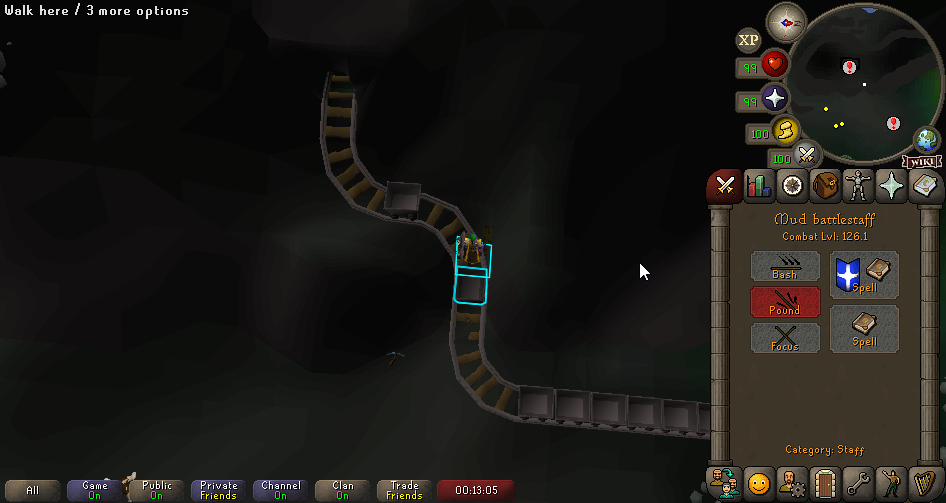 viscid lantern
covert coral
I need help with the auto retaliate warning plugin I was using it to hide the au...
viscid lantern
covert coral
I need help with the auto retaliate warning plugin I was using it to hide the au...
make sure you dont have Hide auto retaliate enabled in the Attack Styles plugin
covert coral
viscid lantern
make sure you dont have `Hide auto retaliate` enabled in the `Attack Styles` plu...
thanks that fixed it I never enabled that so it must have auto enabled itself and why the other plugin was buggy
viscid lantern
that plugin was probably just togling the core plugin setting
covert coral
I just installed it and checked and it doesnt enable the attack styles plugin
but yea I dont use the warn stuff I was only using the hide option so going to keep it uninstalled
 left inlet
Anyone know what plugin is causing this? I cant click the stinkhorn mushroom and shift click provide these options

My only option is to bank it once it's in my inventory
gilded kayak
is it clue details?

 sonic birch
left inlet
Anyone know what plugin is causing this? I cant click the stinkhorn mushroom and...
sonic birch
left inlet
Anyone know what plugin is causing this? I cant click the stinkhorn mushroom and...
@hollow lily why does your plugin work on this lol
left inlet
I cant even click use on it lol
gilded kayak
try restarting the client now that it's disabled
 hollow lily
Good question lol, maybe the check is for id of item when it shouldn’t be for masters
Can look into it tomorrow
left inlet
Restarting the client now
Had to finish raid
Well, I tried to relog in the raid but I'll check in 10 minutes in this next raid
It had kicked me
hollow lily
Oh wait no that’s normal if you have a clue on you, it’s to add it to a clue for highlighting so ignore me
Shouldn’t be effecting clicks I’d hope)
hollow lily
Yeah that part might be off, but it being on an item makes sense
left inlet
It's not a clue item tho its a raid only item
hollow lily
You can choose items to associate with clues for highlighting
 hollow lily
Inventory overlay being off should disable it so it needs a fix for that! Don’t think clue details is why you can’t click though
gilded kayak
!safe try safe mode then
haughty pumiceBOT
safemode: To enable safemode
Windows
Run the RuneLite (configure) shortcut from the windows start menu
Tick the Safe mode box, save, launch RuneLite the way you normally do.
Mac
In Terminal, run
/Applications/RuneLite.app/Contents/MacOS/RuneLite --configure
Tick the Safe mode box, save, launch RuneLite the way you normally do.
gilded kayak
i only assumed clue details because it was on the screen and clearly not on a clue
left inlet
I will try when I'm done raiding, in a bingo atm and team isnt gonna wanna wait for me but will @ you when I do!
Cant restart yet but this is what it looks like
 sonic birch
Lmao, a classic. 99% of problems here are PEBCAK

 covert coral
Idk if you completely fixed it but clicking on the swap left click option than clicking reset would bring it back to default
gilded kayak
they did, it was broken because they intentionally added it to custom menu swaps
 glad vortex
Sorry if this is a dumb question, but I thought the words were supposed to show up above the tiles...?

 tawdry mango
int getOwnership()
Get the item ownership
Returns:
this returns 1 if it is yours . and 2 if it isn't?
TileItem
solid mesa
glad vortex
Sorry if this is a dumb question, but I thought the words were supposed to show ...
Are you using improved tile indicators?
glad vortex
solid mesa
Are you using improved tile indicators?
Yes, I am
solid mesa
That is causing it
glad vortex
But to clarify, it is supposed to be above the tile right? Okay, thanks
solid mesa
tawdry mango
```java
int getOwnership()
Get the item ownership
Returns:
```
this returns 1 i...
    /**
     * Get the item ownership
     * @return
     */
    @MagicConstant(intValues = {OWNERSHIP_NONE, OWNERSHIP_SELF, OWNERSHIP_OTHER, OWNERSHIP_GROUP})
    int getOwnership();
oh, so 0 is neutral, 1 is self, 2 if others.
thank you
 frank basin
how come i lost all my profiles over night?
mossy swan
!lost
haughty pumiceBOT
frank basin
mossy swan
!lost
OMG THANK YOU ❤️
frank basin
weirdo its almost fixed, but it seems i have some sort of dark mode on... how do i turn that off? invent is dark bank etc
mossy swan
got a screenshot?
frank basin
 mossy swan
resource packs?
 mossy swan
im pretty sure it is  i dont know any other plugin that changes the ui like that
frank basin
its not installed tho XD
mossy swan
try restarting i guess
frank basin
ill try thanks ill let u know
weirdly!
the pack was installed but the plugin was not when i installed the plugin it showed it was the dark mode
thanks agian!
frank basin
thankssss bud
 hasty cargo
Hi, im having an issue with my runelite where all my saved data appears to be gone
I was logged into runelite. Had an issue where the sound bugged out in TOB. So I reset my pc and now it doesnt appear to have my plugins/tile markers etc saved
gilded kayak
!lost
haughty pumiceBOT
gilded kayak
but this is only going to work if you previously logged into RuneLite, with google, and synced your settings
if you reset your PC, that's where your settings are, so
hasty cargo
I will have a look thanks
 whole mango
Does anyone know how to make your runelite look normal again? I just deleted my cache and my game looks like it has low pixels/low quality. i can show pictures with the before and after if needed
is there something to make it look better again?
it looked good before with gpu/hd stuff turned OFF as well
 hasty cargo
gilded kayak
but this is only going to work if you previously logged into RuneLite, with goog...
hasty cargo
gilded kayak
but this is only going to work if you previously logged into RuneLite, with goog...
Thank you so much. Was so worried about losing all the info but found the profile on my PC with your instructions.
Going to be more careful with backing up now ❤️
gilded kayak
when you said reset, you meant restart didn't you
gilded kayak
yeah that's why I suggested your settings would not be there
hasty cargo
Thanks again
 winged flame
any way to have dedicated click to fill and shift click to empty on colossal pouch?
it varies between fill/empty after the update
 last steppe
does anyone know the plugin name to change the color of the ground tiles?
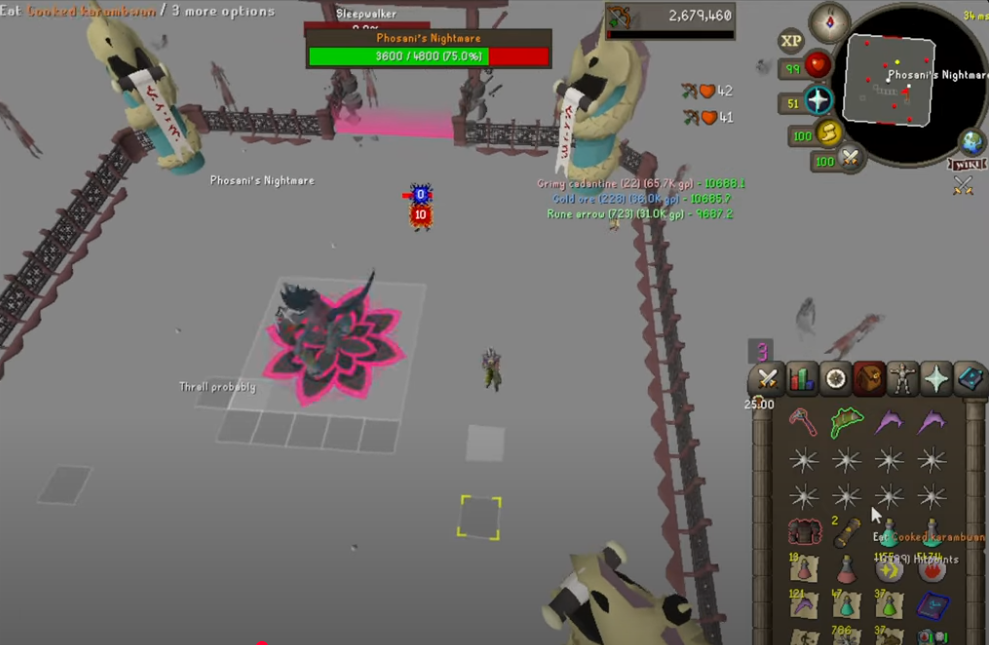
 humble zinc
rocky bison
Somebody should have a look into the pest control cc chat
humble zinc
rocky bison
Somebody should have a look into the pest control cc chat
💀 💀 💀
glad vortex
Any chance anyone might have any idea which plugin this one is? (I looked through NPC Indicators, Better NPC Highlight but neither had specifically set all bandits to be tagged... When I press shift and right click the bandits, they appear untagged so it's not exactly even able to be disabled that way...)

 light trellis
what keeps causing my client to crash seconds after getting to login screen. Its not a plugin because if i restart my PC it stops happening until next time.
i launched 2 clients, identical, both with the same runelite account. 1 crashed, other didnt
zealous cedar
its likely from a pluginhub plugin. try using safe mode.
light trellis
its not a plugin as stated
zealous cedar
ok then
light trellis
restarting pc fixes it temporarily
leaden trail
You can post your logs but I suspect that your assessment of it not being a plugin is wrong
sonic birch
glad vortex
Any chance anyone might have any idea which plugin this one is? (I looked throug...
!flow
haughty pumiceBOT
flowchart: Please refer to this flowchart for further troubleshooting.
glad vortex
Thank you!
 fast shuttle
Getting double hit splats. Anyway to sort this?
 zealous cedar
did you install a plugin which adds more hitsplats?
fast shuttle
nope
sonic birch
!flow then it's another hub plugin
haughty pumiceBOT
flowchart: Please refer to this flowchart for further troubleshooting.
fast shuttle
might have fixed it. Extended hitsplats might have been intefering with the customizable xp drops
zealous cedar
who would have thought extended hitsplats would add more hitsplats
fast shuttle
tbf, i have a lot of random shit installed. probably should go through at some point lol
oblique plume
its just colors
wet gull
oblique plume
its just colors
ok thanks
 supple gate
I have a couple of questions, the 1st one is I can't get my farming timers to work, It just tells me everyhing is always ready. I've tried to turn it off and turn it back on, I've tried to uninstall it and redownload it. I'm not really sure what else to do. Same with the wiki sync
solid mesa
What do you mean the farming timers don't work? Like it's desynced by a few minutes?
supple gate
They're not working at all, all it has said is that they're ready? am I supposed to set the timer or somthing?

They just look like this all the time.
haughty pumiceBOT
Get support for the Time Tracking Reminder Plugin Hub plugin here: https://runelite.net/plugin-hub/show/time-tracking-reminder.
You can also find the support link by searching for the plugin in the Plugin Hub panel and clicking the ? button on the plugin, or by right-clicking the plugin in the plugin panel and clicking the Support menu option.
solid mesa
That is time tracking reminder. Core Time Tracking is in the sidebar
 supple gate
Oh!!!!! Thank you!!!
 molten portal
Anyone ever have issues with input lag like this?
solid mesa
Is there a reason your camera is spinning around like that?
molten portal
yes im holding the camera turn input
It happens with all types of inputs, including camera spin, right clicking, and even clicking through the runelite UI.
Turning off the GPU plugin on my default profile fixes the issue. However, creating a new profile with only the GPU plugin enabled also fixes the issue. So I'm pretty lost here.
light trellis
leaden trail
You can post your logs but I suspect that your assessment of it not being a plug...
basing it purely off the fact that restarting my pc solves it until i close/reopen client the next time and then i have to restart again. If it was plugin related. The client would crash anytime i open it. Would it not?
leaden trail
Not necessarily no
light trellis
hmm interesting. Alright ill have to post logs next time. Thanks for input ^^
sonic birch
molten portal
Turning off the GPU plugin on my default profile fixes the issue. However, creat...
!flow but I didn't see any blatant stutters, so might just be network related
haughty pumiceBOT
flowchart: Please refer to this flowchart for further troubleshooting.
 upper gazelle
Hello , can someone please show me the way to Fullscreen capture runelite in OBS , would this be via game capture for fullscreen mode in runelite??
upper gazelle
Can it capture Fullscreen using window capture?
zealous cedar
game capture is hit and miss, if it does happen to work for you then its fine
sonic birch
Sure, you can just use ctrl/shift/alt (one of those) and drag the side to crop the sidebar etc off, then one of those combinations to stretch it to fullscreen
upper gazelle
And using the fullscreen runelite plugin is not advisable then?
sonic birch
There is a warning on that plugin when installing it for a reason
You mean that the sidebar buttons stop responding?
That's a new one for me
!logs maybe the logs show some error if it happened to you today
haughty pumiceBOT
To find the logs, you can do one of the following:
- If your client failed to open, click the
Open logs folderbutton. - Open the screenshot directory by right-clicking 📷
Camerabutton, navigate 1 directory up, then open logs folder. - Navigate to
%userprofile%\.runelite\logson Windows or$HOME/.runelite/logson Linux and macOS.
Upload the log files named client and launcher by dragging them to Discord. If there are files prefixed with jvm_crash dated from today, upload them too.
 bitter vine
ah ty, i see this -
2025-01-26 20:01:13 GMT [AWT-EventQueue-0] INFO net.runelite.client.ui.ClientUI - Reset client position. Client bounds: 746x0x796x1006 2025-01-26 20:01:13 GMT [Client] ERROR n.r.client.callback.ClientThread - Exception in invoke java.lang.NullPointerException: Cannot invoke "java.lang.Boolean.booleanValue()" because the return value of "net.runelite.client.config.ConfigManager.getConfiguration(String, String, java.lang.reflect.Type)" is null at melky.resourcepacks.ResourcePacksManager.saveClientSprites(ResourcePacksManager.java:428) at melky.resourcepacks.ResourcePacksManager.updateAllOverrides(ResourcePacksManager.java:375) at melky.resourcepacks.ResourcePacksPlugin.lambda$queueUpdateAllOverrides$5(ResourcePacksPlugin.java:326) at net.runelite.client.callback.ClientThread.invokeList(ClientThread.java:119) at net.runelite.client.callback.ClientThread.invoke(ClientThread.java:101) at net.runelite.client.callback.Hooks.tick(Hooks.java:226) at client.cj(client.java:41126) at client.bd(client.java) at bt.aj(bt.java:393) at bt.bz(bt.java) at bt.run(bt.java:44509) at java.base/java.lang.Thread.run(Unknown Source)
zealous cedar
this probably isnt related to whatever is preventing the sidebar from working
bitter vine
sorry should have just pasted the file
zealous cedar
there are certainly a lot of errors but i dont see anthing that looks like it would affect the sidebar
bitter vine
full laptop restart got it working again
ember citrus
anyone know what the coins represents in the supplies tracker?
 sonic birch
Probably coins. If you want to make sure, contact the author
haughty pumiceBOT
Get support for the Supplies Tracker Plugin Hub plugin here: https://runelite.net/plugin-hub/show/supplies-tracker.
You can also find the support link by searching for the plugin in the Plugin Hub panel and clicking the ? button on the plugin, or by right-clicking the plugin in the plugin panel and clicking the Support menu option.
ornate kite
how do i see whats on my screen in settings
like theres too much stuff on my screen
 round jacinth
Turn off the hub plugins that are cluttering it up
wet gull
how i make hp bar same this ?

 low topaz
morning - certain actions including clicking on specific items in collection log interface give me the chat message ***************
this was produced by clicking torva plate body. This occurs also from examining random items and occasionally opening imps.
 sonic birch
low topaz
morning - certain actions including clicking on specific items in collection log...
sonic birch
low topaz
morning - certain actions including clicking on specific items in collection log...
!flow
haughty pumiceBOT
flowchart: Please refer to this flowchart for further troubleshooting.
low topaz
there is no pattern to it - happens with the most random actions
wet gull
guys how i make hp bar same this ???
 mortal pond
wet gull
guys how i make hp bar same this ???
mortal pond
wet gull
guys how i make hp bar same this ???
interface styles -> high detail health bars
wet gull
why bar is small ?
 mortal pond
I think the only way to make it bigger is by increasing your interface scaling in the stretched mode plugin
wet gull
mortal pond
I think the only way to make it bigger is by increasing your interface scaling i...
oh
low topaz
!flow
haughty pumiceBOT
flowchart: Please refer to this flowchart for further troubleshooting.
low topaz
is this the correct channel to post a video in safe mode in?
morning - certain actions including clicking on specific items in collection log interface give me the chat message ***
this was produced by clicking torva plate body. This occurs also from examining random items and occasionally opening imps.
gilded kayak
you probably put . in the Chat Filter regex box\
. matches every single character, and thus would censor every single character
or I guess, if it's only certain actions, then same logic but different pattern
something in your Chat Filter is matching those messages
low topaz
 gilded kayak
> Filter lists
low topaz
thank you solved - had muted spammers in ge which included some high value items!
legend
appreciate you felan bird!
 broken olive
Has anyone had trouble setting a ping hotkey in the party plugin?
gilded kayak
i don't think so, everyone who comes here with a party ping problem*, is because they successfully set the hotkey, and forgot, and that key press was being eaten
broken olive
Weird, it doesn't let me set one
Says not set and when I try any key it flashes but doesn't bind
gilded kayak
it flashes?
i'm not aware of the hotkey feature doing that, but maybe I just don't set enough of them
 gilded kayak
your system time is wrong
 steel salmon
gilded kayak
your system time is wrong
steel salmon
gilded kayak
your system time is wrong
how did you know
gilded kayak
b/c our cert refreshed the other day, and people with incorrect system time, have gotten that error
 magic kiln
Does anyone know how to use custom sprite markers on the sprite markers plugin? It says you can upload custom ones by importing from your clipboard, but I can't seem to get it to work :/ https://i.imgur.com/io2zdM6.png
 haughty pumiceBOT
Get support for the Sprite Markers Plugin Hub plugin here: https://runelite.net/plugin-hub/show/sprite-markers.
You can also find the support link by searching for the plugin in the Plugin Hub panel and clicking the ? button on the plugin, or by right-clicking the plugin in the plugin panel and clicking the Support menu option.
 shut thistle
Hey everyone,
Hope you're doing well, and thanks a lot for getting RuneLite working on Linux!
A lot of us are running into an issue where, after registering on the Jagex Launcher, we can't log in to RuneLite on Linux. It looks like the Jagex Launcher doesn’t have an official Linux client.
Any chance there's a safe workaround for this?
Thanks in advance!
mossy swan
bolt launcher works on linux natively
haughty pumiceBOT
Using Jagex accounts on Linux is not officially supported by Jagex, but there are some third party community guides to make it work https://help.jagex.com/hc/en-gb/articles/13413514881937-Downloading-the-Jagex-Launcher-on-Linux
mossy swan
or this
shut thistle
Thanks for your reply, what is the bolt launcher?
I see.
I looked at the article, but I thought maybe the creators of runelite may create a workaround for linux users. Thanks for the information
mossy swan
we don’t touch the login stuff at all
 rose perch
hey would anyone know any solution to better disc loot logger not sending notifications for discord?
leaden trail
The solution is probably just to use Dink instead tbh
 small whale
Not sure if this is the best place to talk but I've had two graphical freezes today (game continues on, I can't see any response just frozen screen) whilst on RuneLite that have caused me two deaths. Client does not crash, it just unfreezes after some variable time.
Is there a list of common plugins that can cause freezes? I'd hate to go through and switch them off one by one, because I can't trigger the freezing, it just happens! (assuming it is to do with my crappy old laptop)
Can anyone help me debug or even point me in the right direction?
Appreciate any help, and also apologies if this is a stupid question.
Cheers.
round jacinth
!flow
haughty pumiceBOT
flowchart: Please refer to this flowchart for further troubleshooting.
small whale
Right ok. Thanks.
 dry socket
Hey guys, Im trying to make a new character and none of the spanners are showing up for me to click. Ive force closed the client, restarted my computer and its still not working. Ive never had this problem before
Im literally stuck on the first step to click the settings cog and it wont let me proceed
fresh swift
Scam
 low dust
ight
 quasi thunder
ayo how do I separate infoboxes? I don't want my birdhouse reminder glued to super set boost if possible
haughty pumiceBOT
You can configure horizontal/vertical orientation, infobox groups or split infoboxes into new groups with the menu options opened with Shift + right-click. https://runelite.net/img/blog/1.6.28-Release/infobox.gif
 quasi thunder
oh that's hot, ty
 shadow flume
need help fixing a stuttering issue that just started yesterday.
running a 3060 and this has never been an issue before.
messed with settings, updated drivers and java, turned off 117hd and turned on gpu and it still happens.
turned down all settings and it still happens
haughty pumiceBOT
To enable safemode
Windows
Run the RuneLite (configure) shortcut from the windows start menu
Tick the Safe mode box, save, launch RuneLite the way you normally do.
Mac
In Terminal, run
/Applications/RuneLite.app/Contents/MacOS/RuneLite --configure
Tick the Safe mode box, save, launch RuneLite the way you normally do.
oblique plume
does it happen in safemode
oblique plume
that means its a hub plugin causing the issue
shadow flume
no with or without it and with or without 117 enabled
oblique plume
ok then yea it would have to be a hub plugin then
if it was doing it when you turned the gpu plugins off
shadow flume
how do i find those to remove them
 icon
icon





 shadow flume
it was working fine before though just yesterday it started
think i found it
uninstalling flipping co pilot and reinstalling its not lagging now
nvm it started again so im removing it forever
thank you @oblique plume
 tough oasis
Can anybody help me launching runelite in safemode on mac? I get this error when running the command in terminal:
2025-01-27 20:23:04 [RuneLite] ERROR n.r.launcher.ReflectionLauncher - Unable to launch client
java.lang.reflect.InvocationTargetException: null
at java.base/jdk.internal.reflect.NativeMethodAccessorImpl.invoke0(Native Method)
at java.base/jdk.internal.reflect.NativeMethodAccessorImpl.invoke(NativeMethodAccessorImpl.java:77)
at java.base/jdk.internal.reflect.DelegatingMethodAccessorImpl.invoke(DelegatingMethodAccessorImpl.java:43)
at java.base/java.lang.reflect.Method.invoke(Method.java:568)
at net.runelite.launcher.ReflectionLauncher$1.run(ReflectionLauncher.java:63)
Caused by: joptsimple.UnrecognizedOptionException: configure is not a recognized option
at joptsimple.OptionException.unrecognizedOption(OptionException.java:108)
at joptsimple.OptionParser.handleLongOptionToken(OptionParser.java:510)
at joptsimple.OptionParserState$2.handleArgument(OptionParserState.java:56)
at joptsimple.OptionParser.parse(OptionParser.java:396)
at net.runelite.client.RuneLite.main(RuneLite.java:204)
... 5 common frames omitted
haughty pumiceBOT
To enable safemode
Windows
Run the RuneLite (configure) shortcut from the windows start menu
Tick the Safe mode box, save, launch RuneLite the way you normally do.
Mac
In Terminal, run
/Applications/RuneLite.app/Contents/MacOS/RuneLite --configure
Tick the Safe mode box, save, launch RuneLite the way you normally do.
zealous cedar
have you tried this?
tough oasis
That is the command I'm running
zealous cedar
what launcher version do you have?
tough oasis
1.6.0
zealous cedar
that isnt possible, try again
tough oasis
Are you not referring to the jagex launcher?
 zealous cedar
no, im referring to the runelite launcher
tough oasis
2.4.2
zealous cedar
what macos version do you have?
tough oasis
13.6.7 (22G720)
zealous cedar
you should update your launcher from the link in #welcome
2.4.2 is old and doesnt have the configure ui
sonic birch
dry socket
Hey guys, Im trying to make a new character and none of the spanners are showing...
The ingame settings tab is not unlocked till you progress enough in the tutorial
 patent heron
im trying to learn to make my first plugin (im super new), and ive been following the Plugin Hub guide for getting setup.
But one thing i cant find mentioned is, am i able to run a local runelite client so that i can test the plugin out, or do i need to submit it for approval first?
oblique plume
how far have you gotten in the guide
patent heron
licensing/submitting
tried this before, and submitted but was declined and told to finish the plugin before submitting, something along those lines
oblique plume
so you skipped step 5 then
patent heron
oblique plume
so you skipped step 5 then
step 5 of submitting a plugin?
oblique plume
no reason to submit one if you havent created one yet
patent heron
ahh okay, i see what youre referring to! ill run through that section again, thanks!
dry socket
sonic birch
The ingame settings tab is not unlocked till you progress enough in the tutorial
The problem is that it's not showing me the cog to click. I literally cannot progress with the tutorial without clicking it. I've restarted my computer, I've un-installed and reinstalled the launcher and nothing helps. I have 4 accounts and this is the first time it's ever done this to me. It seems like a bug
sonic birch
dry socket
The problem is that it's not showing me the cog to click. I literally cannot pro...
Post a pic of it
I don't recall having to click on a cog, so we can't help without a picture
dry socket
I'm not at my computer atm or i would. So it's the very first thing the tutorial has you do. It says click the flashing cog for settings and all of the tiles are Grey and there is no flashing cog for me to select. You know how it runs you through clicking all the selections, I have nothing to click. And it's stuck like that
sonic birch
if you play on resizable, you might have split the bars and dragged them on top of each other
gotta alt + right click a bunch on them to reset their positons
alternatively, a hub plugin might be hiding it
!flow
haughty pumiceBOT
flowchart: Please refer to this flowchart for further troubleshooting.
dry socket
Thank you friend. As soon as I get home I will try. I do play on resizeable. That would make a lot of sense. I appreciate you
 wind pewter
recently my game has begun stuttering when moving or running. switching to a blank profile with no plugins and then back to my normal profile seems to fix it for a little bit. Restarting runelite and or my PC does not fix the issue.
wind pewter
wind pewter
recently my game has begun stuttering when moving or running. switching to a bla...
Never mind i scrolled up and saw that the plugin Flipping Copilot was causing the issue. Thanks @shadow flume
pulsar sand
Has anyone dealt with this issue on MacOS before when trying to launch RuneLite?
 gilded kayak
google say yes, I don't think anyone has reported such a thing here
or I should say, google knows of the issue, not specific to RuneLite
sturdy island
is there a way to hide overhead chat of the lost souls at the whisperer leaving the mors! one?
oblique plume
does chat filter work on them
sturdy island
oblique plume
does chat filter work on them
negative