#support
1 messages · Page 59 of 1
 crystal pine
 hexed lark
A cpu with integrated graphics with opengl version 3.1 can run GPU plugin?
 gilded kayak
what did the logs say
crystal pine
is there any way to scale the runelite interface without it also scaling the game?
 faint ether
sad bc i still prefer on click compared to on tick since im trying to 0t bank as much as possible so not knowing if its full til a tick later kinda sucks
is there a way to scale the game through the config on linux btw?
 dim schooner
A better video of the lag I'm experiencing compared to the short stutters above.
gilded kayak
faint ether
is there a way to scale the game through the config on linux btw?
if you're using bolt it has its own settings
gilded kayak
crystal pine
is there any way to scale the runelite interface without it also scaling the gam...
i'm not sure how that would work? if I'm understanding you correctly, would the sidebar not just overlap a portion of the client if that was possible
 placid hollow
Does anyone know why i get sound notifications but no banner notifications for Runelite on my Mac?
 empty current
 terse linden
are there any plugins or any way to set up an audio notification, similar to c-engineers collection log plugin, but for example hard clue drop from an npc?
 proud estuary
im havign an issuue downloading bootstrap, any advice?
im also having issues logging into the jagex launcher. so i uninstalled all of them but getting unfortunately unable to connect to jagex launcher please try again
 lyric pollen
I have a number of custom plugins I use. I log into RL today and they're all gone - what's the fix?
E.g. Quest Helper - its completely gone and I'd have to install it again.
 round jacinth
!lost
 haughty pumiceBOT
 sterile python
my bag is in the middle of the screen on resizable classic whats the fix
i dont even kow what i did
 mortal pond
sterile python
my bag is in the middle of the screen on resizable classic whats the fix
mortal pond
sterile python
my bag is in the middle of the screen on resizable classic whats the fix
hold alt and right click your bag
round jacinth
!overlays
haughty pumiceBOT
RL overlays and many Jagex widgets can be moved around the screen by holding the Drag Hotkey, (default: Alt) configurable in "RuneLite" settings, and left click dragging it around the screen.
Some overlays can be resized by dragging their bounds, right clicking will also reset their size and position.
They can also contain additional options, such as opening the config of the plugin that makes them, which can be discovered by shift right clicking.
sterile python
omg i fucking love you been trying to fix this for ages
 fringe token
I've been wondering for a while, RL has a lot of default plugins, including the skill trackers which give overlays. How do I reset the numbers? Reset stats implies I wait 5 mins without mining, but that hasn't worked (I've afk logged and the stats are still there), reset button which resets the plugin's configuration doesn't work either.


This also applies to woodcutting, and maybe others
 zealous cedar
shift right click the overlay
 oblique plume
They're from the exp tracker

 charred wind
Some bank space or house storage plugin
 bleak geode
trying to figure it out
 glacial hound
bleak geode
glacial hound
bleak geode
thank you
 slim quest
Hello i have a q ?? Can any help me whit q ? I must compleate a night at the theatre and i must make a enter mode
 solid mesa
So whats the question?
 languid temple
There is an issue with entity hider plugin I believe. It has happened twice now while killing KQ. It hides the 'dead' NPC but it is still alive due to regening 1hp or so I believe. Anyone report something similar?
round jacinth
Yes its been reported a bunch
Turn off entity hider at kq until it’s fixed, idk when that would be
languid temple
cool, ty
 crisp dune
We maintain it's a jagex bug but they don't seem to understand it. Hopefully we'll either decide on a special case fix on our side or jagex will figure it out and fix it themselves
 wet umbra
is there a bank plugin with shortcuts for other features than search akin to waht the base "bank" plugin provides? eg. deposit all
 round jacinth
no
wet umbra
is it possible to make? i'll make it myself if its possible, i just dont know much about runelite plugin development
 cold dirge
Had a lot more crashes a few weeks ago, disabled all plugin hub plugins minus wiki sync, and just got this:
Not sure how to reproduce consistently. no jvm_crash_pid file, happened outside Nex
wet umbra
round jacinth
that is botting
makes sense why it doesnt exist then
zealous cedar
cold dirge
Had a lot more crashes a few weeks ago, disabled all plugin hub plugins minus wi...
this seems impossibly broken
cold dirge
😵💫
I think i have a hardware issue with the newer intel i9s and asus motherboards. I haven't done much troubleshooting on that front yet but wanted to know if waht im experiencing might be RL side that i could try fixes for before getting into the hardware problems
that crash left RL open but the game client part completely frozen
 graceful gulch
long time no see, cutie. I have the same problem. just recently changed 40+ bank layout to the default RL plugin, but it sucks. guess i'm reinstalling the layout plugin and converting all 40+ again
 cedar aurora
hey i got a new pc, is there a way i can transfer all my plugin from my old pc to this new one or do i have to redownload them indivudally?
haughty pumiceBOT
 grim rune

was working yesterday now it aint
uninstalled runelite and re downloaded same message
grim rune
not that i know of..... but for some reason taking the LAN line from my extern off fixed it
 frozen glade
hey all. is there a plugin or way to section off your bank with boxes for organization? heres a mockup of what im talking about
 charred wind
There is not a plugin for this afaik no, not one that would maintain its position in the bank
frozen glade
dang no worries. i found bank highlighter i can make do with that 😀
crystal pine
Is there any way to scale the runelite interface without also scaling the game canvas?
Setting it in the configure menu also scales the game canvas and ruins the game interface scaling, and setting it in windows does the same except with linear interpolation rather than point
solid mesa
No
crystal pine
ah damn, thanks
 covert karma
how do i import my runeline client settings to the runelite website profile? i went on to the website, clicked create account, it didnt give me the option to create a password or anything
how do i merge the data from my runelite client into the website.
solid mesa
covert karma
how do i import my runeline client settings to the runelite website profile? i w...
You login with the same google account. It is not possible to merge the data
covert karma
same google account as what? i login via the jagex launcher w/ runelite
solid mesa
You can login to the runelite client with a google account
covert karma
still via the jagex launcher?
solid mesa
Yes. It logs you into runelite, not RuneScape
 sand flame
@zealous cedar I made my old runelite acc with my work mail (I know... stupid of me) and is now locked behind new update and work policy. Is it possible to change the email somehow so that I can log into it again (my loot tracker is gone atm 🥺 )
 delicate portal
is there anyway to change the icons on the highscore to the old ones?
gilded kayak
no
the old ones required adding them manually by us, the new ones are pulled directly from the client
which is 🆒
sand flame
does anybody know if its possible to import old maps into new and transfer loot tracker?
solid mesa
sand flame
<@143183183322677248> I made my old runelite acc with my work mail (I know... st...
I would dm @haughty pumice with the old email address and the email adress you want it changed to
haughty pumiceBOT
sand flame
ty @solid mesa ill try that ❤️
oblique plume
sand flame
<@143183183322677248> I made my old runelite acc with my work mail (I know... st...
did you sign out of it, or are you on a new computer trying to sign in to it?
sand flame
On my old work pc I’m logged in. Tried to log into a new pc but when I sign in with google it just stops there and an Error message pops up. Made a new account and imported the file but my loot tracker didn’t transfer
@oblique plume
oblique plume
so you could grab the .runelite directory from the old and put it on the new
or import on the new, the profiles you want and the $rsprofile file in profiles2 from the old
sand flame
you are talking to an amature atm. if i understand you correctly - take a usb, transfer .runelite map from old pc - replace .runelite on new pc with old map? right? @oblique plume
sand flame
love you ❤️
oh! folder is the right word!
thinking in another language xd
It worked ❤️ @oblique plume tyvm!
 pulsar pawn
Anyone seen this 😂
 oblique plume
117hd bug
 fading bloom
Why does the mining plugin show "NOT mining" while mining a crashed star? I want an idle notification when I stop mining after the star tier changes. I have idle interaction notifications on in the idle notifier and it works with other things like motherlode mine. It's just not detecting mining a crashed star correctly, it seems...
zealous cedar
it doesnt recognize your pickaxe probably
oblique plume
trailblazer reloaded skin?
fading bloom
Ah yes I did activate that one recently. That's a weird little quirk
Thanks for the hint
 velvet ravine
Hi, can someone tell me which setting do i fix please? I wanna see GE prices on my inventory items when i hover my mouse.
It shows GE prices when i have bank open but not when i close.
I dont wanna see item stats, just GE prices.
on inventory
fringe token
frozen glade
hey all. is there a plugin or way to section off your bank with boxes for organi...
Not exactly, but "Bank tags" and "Bank Tags Layout" is a powerful tool which allows for bank organization. It seems you have bank tags, but aren't using or aware of their function.
They are the left side bar, and you can use them to organize items in a different way than tabs. Tabs move items between them, while tags simply says "if you have this item, put it here", so you can have access to the same item from multiple tags. Here, you can see I have my equipment in their own tag (the dscim) named "combat".
 velvet ravine
Hi, can someone tell me which setting do i fix please? I wanna see GE prices on ...
velvet ravine
velvet ravine
Hi, can someone tell me which setting do i fix please? I wanna see GE prices on ...
Pls help someone?
solid mesa
Item Prices > Hide on Inventory Items
solid mesa
Logout Timer
 olive roost
Does anyone have issuses with notification banners not appearing in MacOS? I made sure system settings allowed runelite to notify, but I can't seem to get runelite to produce a banner. I can hear the sound and taskbar request, but no banner/alert.
solid mesa
Do you have Do Not Disturb on? Banners work fine for me
olive roost
do not disturb is off. I'm still not sure. I've tried a clean vanilla configuration runelite too. Maybe something in my systems settings is blocking applescript notifications?
 lavish crest
is any other experiencing problems with ToB Light recolour plugin? it's enableb but not purple or white beam
 lavish phoenix
I'm getting this error when trying to launch Runelite, happening when I launch Runelite itself and via the Jagex Launcher. I've uninstalled / reinstalled Runelite and restarted my computer but same thing. Error log:
2025-01-20 11:29:34 CST [RuneLite] ERROR net.runelite.client.RuneLite - Failure during startup
java.lang.RuntimeException: java.lang.IllegalArgumentException: Malformed \uxxxx encoding.
    at net.runelite.client.config.ConfigData.<init>(ConfigData.java:71)
    at net.runelite.client.config.ConfigManager.load(ConfigManager.java:553)
    at net.runelite.client.RuneLite.start(RuneLite.java:338)
    at net.runelite.client.RuneLite.main(RuneLite.java:284)
    at java.base/jdk.internal.reflect.NativeMethodAccessorImpl.invoke0(Native Method)
    at java.base/jdk.internal.reflect.NativeMethodAccessorImpl.invoke(Unknown Source)
    at java.base/jdk.internal.reflect.DelegatingMethodAccessorImpl.invoke(Unknown Source)
    at java.base/java.lang.reflect.Method.invoke(Unknown Source)
    at net.runelite.launcher.ReflectionLauncher.lambda$launch$0(ReflectionLauncher.java:61)
    at java.base/java.lang.Thread.run(Unknown Source)
Caused by: java.lang.IllegalArgumentException: Malformed \uxxxx encoding.
    at java.base/java.util.Properties.loadConvert(Unknown Source)
    at java.base/java.util.Properties.load0(Unknown Source)
    at java.base/java.util.Properties.load(Unknown Source)
    at net.runelite.client.config.ConfigData.<init>(ConfigData.java:64)
    ... 9 common frames omitted
 zealous cedar
your config is corrupt, if you delete the profiles2/ directory it will wipe your settings and reset your profile
lavish phoenix
That did it- thanks Adam!
faint ether
gilded kayak
if you're using bolt it has its own settings
it just brings up that where the scale option doesnt work

 oblique plume
what do you put in the field
faint ether
usually 0.8
oblique plume
dunno, linux just decides to not do things the normal way a lot
faint ether
why does 2 work ??
oblique plume
maybe you cant do non integer values
faint ether
2.1 works
faint ether
yeah..
uhh
oh it is just 2.0
rude so its just integer values only
let me scale down ;-;
 cunning horizon
@faint ether @jovial totem @bronze epoch I re-enabled the plugin and it should now be available again. Sorry about that. I took disabled it assuming RL by default now supports tracking everything. Of course, I still would suggest you rely on RL's instead for 100% accuracy. I more than likely won't be working on the plugin anymore to be honest. There's a new option that only shows the overlay for my plugin only for the colossal pouch by default. So just a heads up if you want to continue using my plugin and want it for the basic pouches too.
I guess I could fix it to be more accurate with error checking with the recent changed, but honestly I don't know if I want to spend the time.
faint ether
cunning horizon
<@382436519736115201> <@599664929720631317> <@86951916222828544> I re-enabled th...
i dont think theres any accuracy problems outside of zmi IF you deposit inv + withdraw essence and fill pouch all in the same tick
 modest saddle
i need help, why is everything having that yellow outline?
 faint ether
holy inventory tags
modest saddle
inventory tags is off
solid mesa
Maybe a plugin that highlights profitable high alchs
modest saddle
off too
solid mesa
Well it's almost certainly a plugin causing it. Not all plugins turn off properly and some require restarting Runelite
faint ether
i had that problem a lot, where inv tags would keep highlighting even if the plugin was off, never had it tag everything tho
 gritty sable
Does runelite control when a file is saved from a plugin (flipping utils) ? or can the plugin dev force the file to save while client is still open.
zealous cedar
no.
gritty sable
So I assume flipping utils is just doing the save when the client is exited
zealous cedar
i dont know how flipping utils works offhand. but we dont have magic control over the file io that plugins do
 bronze epoch
cunning horizon
<@382436519736115201> <@599664929720631317> <@86951916222828544> I re-enabled th...
bronze epoch
cunning horizon
<@382436519736115201> <@599664929720631317> <@86951916222828544> I re-enabled th...
thank you so much! i don't have a clue how any of this works but i think the runecraft plugin will have its own fixes eventually, i suspect there are some adjustments that havent been made for the colossal pouch since the update which allows it to be used pre-85. but again, i literally have no idea what im talking about.
your plugin was the only one out of the ~4 on the plugin hub for pouch tracking which actually worked (for the specific case of pre-85 colossal pouch specifically, at least), so it was pretty inconvenient when it was disabled.
so in the meantime, until further updates, it works exactly as needed. thank you so much once again!
gritty sable
zealous cedar
i dont know how flipping utils works offhand. but we dont have magic control ove...
Thanks for clarification, ill do some more research
 verbal flower
does anyone have a github account
tourist trap quest has an issue when you get anna out instead of telling you to take her back to her mom itll tell you to go back into the camp with her
can anyone report this issue
for the quest helper plug
solid mesa
You can join their discord
haughty pumiceBOT
Visit Zoinkwiz's Quest Helper plugin discord (https://discord.com/invite/XCfwNnz6RB) for support, issues & feedback
 static stratus
anyone know why when i talk to an npc or have any dialogue it automatically skips even though im not pressing or holding spacebar?
 junior timber
all my plugins got deleted, how do i get them back?
haughty pumiceBOT
 sinful patio
is there any chance to transfer data, settings, plugin and other things from runelite on which I was not logged in to runelite on another computer?? so I don't have to do it manually? thank you
haughty pumiceBOT
junior timber
Thanks
dim schooner
dim schooner
A better video of the lag I'm experiencing compared to the short stutters above.
Just bumping this here as I'm still having issues with stuttering. I've seen some reddit posts about time tracking causing a similar issue but mine persists with that off, as well as other sidebar plugins. Considering it still happens in safemode and on another profile (albeit less intensely), is it likely it's a plugin causing stutters or am I screwed and just have to completely restart and make a new runelite profile?
 stone parcel
Does it only happen with side panel open?
dim schooner
stone parcel
Does it only happen with side panel open?
Nope, I just thought I'd try that since I saw a few posts mentioning it. But ruled that out.
lavish phoenix
I've been randomly crashing every week or so, just had it happen a few minutes ago. Not sure if the crash log points to anything useful
 rustic palm
hello, wondering if anyone else's lootbeams not showing or know a fix to this? the text color is changed and everything, just no lootbeam. i tried turning off/on the ground items plugin and uninstalling/reinstalling runelite; neither worked.
 leaden trail
GPU needs to be on for them to show right now
dim schooner
rustic palm
hello, wondering if anyone else's lootbeams not showing or know a fix to this? t...
yeah it's broken rn, theyre working on it
leaden trail
It's a known bug
leaden trail
lavish phoenix
I've been randomly crashing every week or so, just had it happen a few minutes a...
You can try going into BIOS and disabling "core performance boost"
lavish phoenix
leaden trail
You can try going into BIOS and disabling "core performance boost"
Turned off "core performance boost" and "precision performance boost", will see how it goes- thank you!
leaden trail
Good luck!
Unfortunately if that doesn't work, I don't really have a solution for you, since that's the workaround we know of
 echo needle
anyone know if there is a true tile for artios mage attack on better npc highlight plugin?
true tile ID*
crisp dune
no
 glad vortex
Any way to move coll log popup?
crisp dune
no, sorry
glad vortex
crisp dune
no, sorry
Any chance it can move and/or at least be scaled by changing resolution and/or stretched mode? (I'd check, but I'm never ready when a task complete pops up lol)
crisp dune
Stretched mode would also scale up the popup. If you're playing in resizable and were to increase your client size, it wouldn't take up any more space than before
 mellow pewter
hey, apologies if this isn't a good place to ask this. i wanted to try making a custom plugin to learn how it all works, and i thought a simple starting point for this would be to simply locally change the name of an npc (just something silly like "charlie the tramp" to "charlie the king"), but i can't see any clear way to accomplish this. is it safe to assume this just isn't something that is possible?
 final axle
You could look at the meepspeak hub plugin that already can do that
mellow pewter
final axle
You could look at the `meepspeak` hub plugin that already can do that
ooh, i wasn't aware of this plugin. thanks a lot, will look into it!
 kindred thorn
Gday all, My runelite is crashing as soon as it turns on pretty much, sometimes it runs okay for a few minutes, im trying to open from the launcher. I looked at the last log and this is what was there. Does that mean anything to anyone?

 sonic birch
Post the full logs and time when you crash + what you define as a crash
Is crash poof client gone?
sonic birch
preferably also a timestamp when you crashed, but yh
you could try disabling resource packs perhaps
kindred thorn
just move them out of the folder?
sonic birch
no, disable the plugin
although idk if that error would be fatal tbh, but it's consistent
kindred thorn
i just deleted the plugin, ill reload client and try, it crashes instantly if i try and load two clients
so it may be my pc issue maybe too
kindred thorn
oh, sorry
sonic birch
!safe you can start in safe mode and uninstall the plugin via the hub tab if needed
haughty pumiceBOT
safemode: To enable safemode
Windows
Run the RuneLite (configure) shortcut from the windows start menu
Tick the Safe mode box, save, launch RuneLite the way you normally do.
Mac
In Terminal, run
/Applications/RuneLite.app/Contents/MacOS/RuneLite --configure
Tick the Safe mode box, save, launch RuneLite the way you normally do.
kindred thorn
im not on a mac? or is that not relevant to that
 kindred thorn
yea that let me boot up two clients
 warm gate
hmm I'm getting a black screen when I open runelite
sonic birch
kindred thorn
yea that let me boot up two clients
yes, but try uninstalling resource packs in safe mode
then untick that box and start runelite out of safe mode again and see if that fixes it
I kinda doubt it since I think it might be a gpu problem but we'll see
sonic birch
warm gate
hmm I'm getting a black screen when I open runelite
!logs
haughty pumiceBOT
To find the logs, you can do one of the following:
- If your client failed to open, click the
Open logs folderbutton. - Open the screenshot directory by right-clicking 📷
Camerabutton, navigate 1 directory up, then open logs folder. - Navigate to
%userprofile%\.runelite\logson Windows or$HOME/.runelite/logson Linux and macOS.
Upload the log files named client and launcher by dragging them to Discord. If there are files prefixed with jvm_crash dated from today, upload them too.
kindred thorn
well ive got two clients open now, just standing at bank, they havent crashed yet, both gpu settings were turned off when i opened client though
ive turned them on and it seems to be holding currently
warm gate
I was able to get it to work after closing out and retrying like 12 times. Same thing happened this morning. here are my logs anyway if it helps to understand what caused it and what I can do to prevent it or fix it faster in the future
sonic birch
kindred thorn
well ive got two clients open now, just standing at bank, they havent crashed ye...
Is the only difference that you uninstalled resource packs?
kindred thorn
yep
sonic birch
kindred thorn
@lapis elm ^might want to look at that one
leaden trail
warm gate
I was able to get it to work after closing out and retrying like 12 times. Same ...
what if you install the 64 bit client
sonic birch
117hd is probs not happy with the 32 bit client indeed
 lapis elm
I think that error happens from people not turning interface styles on ever
 elfin forum
any 1 around that clan help please ?
lapis elm
boolean interfaceStylesEnabled = configManager.getConfiguration(RuneLiteConfig.GROUP_NAME, Plugins.interfacestylesplugin, Boolean.class);
lapis elm
kindred thorn
yep
Toggle the interface styles plug-in and try again maybe
elfin forum
so i restarted laptop # format my laptop and previously my runelite was very good quality , i have gpu and hd 117 and on both of them they are still blury / bad quality
any1 around that can help me please ?
?
 warped kiln
I am unable to change skybox color with low detail plug in , the ground is always black no matter what color I choose. Anyone knows how to fix this ? Much appreciated in advance !
kindred thorn
update on my issues, both clients still crashed, hadnt even tried the interface style trick
 minor moat
How might I get permission for the development channel?
 tacit island
need to login in the bot channel
 distant sun
Hello, I've been getting BSOD'ed and Runelite randomly crashing for a few days now. As for BSOD, absolute majority of the time its caused by "ntoskrnl.exe", which is a windows exec, but like no other game or stuff gives me blue screen, only on runelite. I can play youtube videos or surf browser for days and all g, i open runelite and eventually in like 30 mins i'll get BSOD, i updated all drivers, ran any suggestion i could on the internet and it's still happening. Want to do literally everything from the software issue side, if nothing works then probably its a hardware issue. Anyone happened to have this problem?
lapis elm
That's one of the generic "something in the system" errors
If you have mini dumps, you can maybe get a clue but not always
 carmine summit
I'm getting this error when trying to open RL, any hints?

As you can see, I am connected to the internet
java.net.UnknownHostException: No such host is known (api.runelite.net)
I have this on my log
sonic birch
Yes, but you might still not be able to connect to the correct servers
Post the full logs
carmine summit
Ok, 1s
oblique plume
today isnt the 8th
carmine summit
That's true
That's the most recent log I have tho, when I open the log huh
Lemme double check
I wasn't even here on the 8th
carmine summit
Yeah
oblique plume
then something is blocking RL from going there
 carmine summit
I have allowed RL true my firewall, changed DNS provider, reset my DNS and connection to the ISP and still the same error..
Any ideas, guys?
Fixed it! Tysm
 clear fiber
carmine summit
Fixed it! Tysm
clear fiber
carmine summit
Fixed it! Tysm
How did you fix it?
 short locust
is anyone able to answer this, my runelite is using roughly 40% memory of my gaming laptop. Is this considered high and is there a way to lower that at all?
oblique plume
gpu drivers can leak memory
clear fiber
short locust
is anyone able to answer this, my runelite is using roughly 40% memory of my gam...
My runelitee is currently using 1GB memory, what is 40% memory for you?
short locust
1,400 MB
carmine summit
clear fiber
How did you fix it?
Redid the connection to my ISP and changed the DNS, as I've said
Took some minutes but it then fixed itself
clear fiber
short locust
1,400 MB
Your gaming laptop only has 3.5 GB memory?
clear fiber
carmine summit
Redid the connection to my ISP and changed the DNS, as I've said
Well you wrote that you did those things and still the same error, just wanted to clarify. Thanks!
short locust
7.65gb ram USUABLE
clear fiber
short locust
7.65gb ram USUABLE
I'd say that seems reasonable amount of memory the game is using. It depends on what you're doing in the game and what plugins you are using.
short locust
gotcha, yea im just sitting int he ge flipping. wasnt sure if that was high or not.
clear fiber
Restart the game, it should drop
That applies to pretty much any program ever
And it's pretty obvious, but don't use HD plugins if you care about memory
round jacinth
clear fiber
I'd say that seems reasonable amount of memory the game is using. It depends on ...
Runelite uses 750mb at most or something like that
short locust
117 hd is too pretty not to use lol.
clear fiber
Well yeah that would raise memory significantly
round jacinth
If you want to use more then increase the limit runelite is allowed to use
Your web browser or even discord use more ram than runelite
clear fiber
100%
round jacinth
8gb in 2025 is not great and even 16gb is showing its age
clear fiber
Are you really sure 1400 MB is 40% of your ram? That sounds way too high
on a "gaming laptop" even
my school laptop had 16 GB
you write 8 GB usable, so 1400 MB can't be 40%
round jacinth
Pebcak on math or they’re using a different software to report usable and actual
clear fiber
and unless your PC/game is lagging, there's no reason to care about memory usage
short locust
sitting at 21-27% of my cpu and 36%memory
round jacinth
With runelite running?
I don’t see any problems with that stat line regardless tbh
short locust
yes I was just wondering if those numbers were high or not
 clear fiber
did you restart the game as i told you?
short locust
I did yea zipp
round jacinth
It only matters if it’s laggy and if it’s laggy you see if it’s a runelite problem or a hub plugin problem
clear fiber
yeah it would be a plugin problem anyways
round jacinth
!safe helps determine if it’s just your computer or not
haughty pumiceBOT
safemode: To enable safemode
Windows
Run the RuneLite (configure) shortcut from the windows start menu
Tick the Safe mode box, save, launch RuneLite the way you normally do.
Mac
In Terminal, run
/Applications/RuneLite.app/Contents/MacOS/RuneLite --configure
Tick the Safe mode box, save, launch RuneLite the way you normally do.
clear fiber
task manager is also just terrible at measuring stuff
round jacinth
Reduce the number of hub plugins you use and you’ll have a better experience
task manager gives a good enough picture to an end user
clear fiber
not for me anyway, it tell me 51% of my memory is used but counting the applications it's not even 30%
round jacinth
I think task manager doesn’t include all stuff, but idk.
We put lightning into sand and made it think
Happy it even works at all
 wet gull
Is there a way to save the password? ????????
clear fiber
round jacinth
Happy it even works at all
true, but that's not really a good reason to give software that's bad considering we have countless software that's good
round jacinth
You can still use runelite if you go to a jagex acc
wet gull
this or what?
 round jacinth
there are a few to pick from
I don’t know how any work better than another
If you don’t know what a password manager is and don’t have 1 already being sued
Used
Idk if you’d enjoy using one suddenly
Just upgrade to a jagex acc lol
clear fiber
wet gull
this or what?
yes that would work if you use 1Password
round jacinth
Teaching a person that they exist is already a stopping point
clear fiber
jagex accounts already have this feature though
round jacinth
You can upgrade and have one click login without password entering
round jacinth
Then your option is to use a password manager
clear fiber
yes, the plugin you just looked at
wet gull
need photo?
round jacinth
no
clear fiber
read here
GitHub
A plugin that lets you automatically login into your Runescape account in Runelite! - tymscar/runelite-1password-plugin
round jacinth
You can copy paste password into password field
Just store the password in plain text 🫣
(Don’t)
clear fiber
Do
wet gull
1password plug safe??
clear fiber
All plugins are verified to not be malicious.
 clear fiber
I already linked you to how to use it. This discord isn't meant for a guide on how to use a specific plugins
No one uses this plugin because jagex accounts already have this feature, so you'll be on your own
wet gull
k i upgrade
 swift nimbus
I need some help at vorkath. Multiple kill trips. Items remain on floor between kills. Sometimes they get in my way and i end up picking up items instead of moving tiles to avoid fireball attack. I dont want to turn off ground items becuz i might miss if skeleton visage drop. Is there anyway to make runelite so i click ground to walk there and not pickup item*
zealous cedar
set "deprioritize menu hidden items" and then hide the items
solid mesa
You could just turn off ground items. Skeletal visage is a collection log item so I think it'd be hard to miss
In menu entry swap you can make it so shift-click is walk here on items but I don't think you can make click to walk
oblique plume
turning off the plugin wont affect the fact you can click on it to pick it up
round jacinth
You poke to wake vorkath up between kills and the loot has appeared by then, you’d see the chat message or the ground item have a loot beam surely
solid mesa
Maybe Custom Menu Swaps can prioritize walk-here over take. Not sure though
swift nimbus
Ok so if i hide items then it will ensure i wont click?
N then just check loot aftee each kill to make sure 4 visage
oblique plume
hidden items can have their take option deprioritized to below walk-here
swift nimbus
Works perfect thx everyone 🤗
My previous workaround was to move 3 tiles for fireball 😜😜😜😜😜😜😇
So this is nice
 winged gate
Hello, my lootbeams function stopped working all of the sudden. Im not sure why. i reset the plugin and tried to redownload rune lite fresh. Is there a possibility its my graphics card or there is sole setting in the regular client i might have toggled?
 near saddle
is there a way to see all of your loot tracker drops for a monster? I noticed it's limited to a certain amount of monsters? Can I view this in the file system somewhere?
oblique plume
if you have a rl account syncing your config, then you can view it on the rl website
 zealous totem
yesterday when i was hopping worlds in game, the client would log me out and I couldn't log back in until I restarted client. Eventually, this came up when restarting client. It fixed itself after I clicked "get help on discord" which is pretty funny but I kind of want to know what was going on lol

I lied. It broke again.

Not sure what kind of network issue I could have. Everything else that uses internet works fine
solid mesa
Bootstrap is downloaded from here https://static.runelite.net/bootstrap.json
You must have some sort of network issue if you have issues communicating with runelite.net and Jagex servers
 meager lion
Hi i got an friend with an issue
Since yesterday his RL hung on starting external Plugins so i got him in to safemode and deleted all his plugins i found this fix on the internet.
When hes playing in safe mode its fine when hes playing with out plugins from the hub its fine.
As soon as he start downloading plugins or load a profile either RL will freeze and the game keeps running or the game freezes and RL keeps running.
hes using jagex laucher to get to RL but also when hes using RL without jagex launcher the same problems occur
i did the following
clean install (deleted all the folders by hand after)
Updated motherboard (idk why i was desperate)
Deleted everything again and downloaded a new install made sure it was 64 bit
I am kinda clueless cant find anything on the internet about this matter hoping someone can help me here or guide me to a solution
zealous cedar
the plugins he is downloading is causing his client to freeze and crash, just dont do that
zealous cedar
that sounds unlikely. i guess check the logs?
meager lion
it makes a logg on freeze? i can try get fetch them can i post them here?
there was some command to see where to find the logs
haughty pumiceBOT
To find the logs, you can do one of the following:
- If your client failed to open, click the
Open logs folderbutton. - Open the screenshot directory by right-clicking 📷
Camerabutton, navigate 1 directory up, then open logs folder. - Navigate to
%userprofile%\.runelite\logson Windows or$HOME/.runelite/logson Linux and macOS.
Upload the log files named client and launcher by dragging them to Discord. If there are files prefixed with jvm_crash dated from today, upload them too.
meager lion
charred wind
Makes more sense for you to send your friend here
his english wont suffice
Ill report back when i got the logs thanks so far
 wise hollow
solid mesa
wise hollow
solid mesa
Not sure about a tutorial, I know a lot of people use the bolt launcher
haughty pumiceBOT
For support with using Jagex accounts on Linux, visit 7ormRS's Discord https://discord.gg/aX7GT2Mkdu
sonic birch
Also, without a jagex account, there are a ton of options to run RL on linux
Among others it's in the ubuntu snap store, but we also got a flatpak, a jar etc
zealous totem
solid mesa
Bootstrap is downloaded from here https://static.runelite.net/bootstrap.json
You...
What would the network issue be if everything else that uses internet works though
sonic birch
Firewall, antivirus, router blocking it, your ISP having problems connecting to the server etc etc
Internet is not a 1 or 0
You can have a great connection to 99.9% of services, but no connection to specific servers (which can be a local problem, or a non-local problem)
Also, a lot of services are buffered nowadays like yt. Periodic problems with your internet aren't even noticable then
 limpid wadi
anyone able to give me some advice, runelite will keep randomly closing, no pop ups, no warnings, ram, cpu usage and gpu are all normal, I've tried uninstalling plugins and reinstalling runelite nothing seems to be working
charred wind
!logs
haughty pumiceBOT
To find the logs, you can do one of the following:
- If your client failed to open, click the
Open logs folderbutton. - Open the screenshot directory by right-clicking 📷
Camerabutton, navigate 1 directory up, then open logs folder. - Navigate to
%userprofile%\.runelite\logson Windows or$HOME/.runelite/logson Linux and macOS.
Upload the log files named client and launcher by dragging them to Discord. If there are files prefixed with jvm_crash dated from today, upload them too.
limpid wadi
.
leaden trail
You can try disabling SpeedStep in BIOS but if that doesn't work we don't really have a reliable solution beyond that
 trim lance
hey guys, have this issue on my acc, not on my other profiles, ive tried to compare plugin settings and cant find any difference, any idea?
sonic birch
I assume you mean the stutteriness
trim lance
yes, sorry
sonic birch
Well, if it only happens on 1 profile and not the others, it is a plugin setting
!flow you can try this approach to find the culprit
haughty pumiceBOT
flowchart: Please refer to this flowchart for further troubleshooting.
sonic birch
a binary approach will make it a bit faster, as descirbed in the flowchart, but might still take a while
trim lance
thanks !
round jacinth
Camera smoothing?
trim lance
nope, figured it out though, was an external plugin from plugin hub
flow chart very helpful though, thanks @sonic birch
sonic birch
trim lance
nope, figured it out though, was an external plugin from plugin hub
Just for my own interest, which one was it?
trim lance
99% it was player outline
zealous cedar
someone the other day said something similar
trim lance
works fine on other profiles on different accounts
same settings and based of duplicates
v strange
zealous totem
sonic birch
Firewall, antivirus, router blocking it, your ISP having problems connecting to ...
Oh this makes sense. I had a free Norton trial that just expired so it could be that. Will check when I get home. Should uninstalling Norton fix it?
sonic birch
Perhaps
 crude tendon
Hello everyone! I have a question sorry if this isn't the correct channel. I was just wondering, my little brother wanted to play runescape and I have a little laptop nothing crazy at all, with 4gb of ram. He's not looking for it to have animation smoothing or anything crazy probably just quest helper lol. With 4GB of ram, would he be able to play with like low graphics? Thanks in advance!
stone parcel
It could probably be playable. There are a few specs that would likely matter more than ram but its basically risk free to install it and try. Low detail plugin might help too.
crude tendon
Awesome! Definitely worth a shot then 🙂 sadly I can't buy him a Walmart one which would probably be better haha but I'll give it a go 🙂 thank you kalil! I'll try with the low detail plugin too 🙂
stone parcel
Np, turning on GPU plugin might help too, and fiddling with settings in there could help. 😄 GL!
crude tendon
Thank ya!! We may have another scaper joining in on the fun! Haha
 quasi slate
what is that? it's say the byrnes book is there with the soul journey book, but it's not green and it take always the soul. I don't understand

i am at soutwest top floor ight? im not drunk
sonic birch
I havent done this content in years, but could it be on the other side?
I also think jagex added one option that was impossible, but idt it was this one?
quasi slate
sonic birch
I havent done this content in years, but could it be on the other side?
i dont think because if u look that i am southwest
 quasi slate
ahhh no i tried
quasi slate
sonic birch
I also think jagex added one option that was impossible, but idt it was this one...
What? And how we skip it?
solid mesa
Hop worlds
sonic birch
There is one impossible option nowadays because jagex changed something in an update. I don't think it's this one, but the solution is just to hop worlds if it happens
quasi slate
ok thanks, i have hop
 tight terrace
Could the Map Zoom out feature be updated to match the new Draw Distance we have from the Extended Map loading in the GPU plugin? the minimap shows less than if we don't use it, would help fixed mode to match resizeable a lot
sonic birch
the minimap shows less than if we don't use it, would help fixed mode to match resizeable a lot
What does that mean?
round jacinth
I think they mean those lizard things that block the screen(but you can click through them)?
 gusty trail
Hi everyone - I can't figure out for the life of my why my frames are randomly dropping in runelite. I assume it's my Nvidia control panel. Any help would be great, I have an I9 with 16RAM and a 4060 laptop. I play on a 49 inch ultra wide and sometimes use it split screen. Any help is welcomed
I have clean wiped, reset app, tried different settings it's inconsistent, can't figure out the problem, windows update, and Nvidia updated
charred wind
create a new profile in Runelite, restart runelite, make sure you only use the new profile and see if it happens when you have the GPU plugin on
gusty trail
GPU plugin is currently on
charred wind
did you read the first 3/4 of the message
the goal is to make sure there's not a hub plugin that's causing the issue
a vid with the fps in the top right (the rl fps counter) showing the dips would be helpful too
gusty trail
charred wind
create a new profile in Runelite, restart runelite, make sure you only use the n...
Thanks for helping and trying this now
Frames seem to be better on new profile with regular GPU on with FPS control
Seems to be when I load another client (not jagex account but the other account is linked to jagex acc) - playing two accounts at once (both use the same runelite acc). Game feels like it's stuttering
gusty trail
Frames just randomly dropped (seems to make laptop lag as well - wondering if its in Nvidia control panel settings?)

Please note - laptop temp etc. is fine
 round jacinth
Does it lag on a kill and you have loot side panel open?
gusty trail
It ran fine yesterday, and seems to without having the side panel open. The day before that it didn't for a month. I have 20+ hours into fixing this
round jacinth
The side panel just draws a lot on a new kill I think? Not sure. Just close the window?
Could try turning off hw acceleration
gusty trail
I meant same issue with the panel open or closed
round jacinth
Oh
gusty trail
I think I found the problem! If I minimize twitch the frames don't move or a lot better
round jacinth
ok so other apps are taking resources?
gusty trail
gusty trail
Please note - laptop temp etc. is fine
This is with twitch up
Anyway to fix this other than not watch twitch while scaping?
round jacinth
I don’t know. You could try safe mode or clone your profile and only have GPU enabled
Rather make a new profile
Switch to it
Enable GPU reload client (using that profile) and see if issue persists
Try that
gusty trail
Could it be my internet is trash so it takes more bandwidth of my laptop to keep twitch up?
I used to have a wifi extender down here but it broke and moving in a month or so getting hardwired
round jacinth
I don’t know, doing what I suggested won’t make you lose anything
It’s a 30 second thing to try
gusty trail
I can run 1 client with twitch up but can't run two - to my knowledge but I'll test that tomorrow
I used to run 4 clients with twitch when I had the wifi extender
 azure horizon
any reason why I cant add a color to the axe here? TIA
 zealous cedar
unwield it first
round jacinth
gusty trail
I used to run 4 clients with twitch when I had the wifi extender
I think you should just try what I suggested as it’s an immediate feedback on what’s going on, rather than asking what to do (said you’re 20+ hours in) and not doing it lol
gusty trail
round jacinth
I think you should just try what I suggested as it’s an immediate feedback on wh...
I will try it later tonight and ping you back
round jacinth
I will be asleep but some one may be around
thought you were actively playing yet and just didn’t want to log out for a quick check.
gusty trail
I do not understand what you want me to test?
charred wind
gusty trail
Frames seem to be better on new profile with regular GPU on with FPS control
@round jacinth I think he tried that
but if you do that with all RuneLite instances you launch, are you experiencing the same issue? You could try disabling hardware acceleration in your browser, that may help
It also depends on if RuneLite is dropping frames while unfocused
gusty trail
charred wind
but if you do that with *all* RuneLite instances you launch, are you experiencin...

Preferred method of video enhancement - should I turn that on or change it/any other ideas?
Seems to be more when unfocused but Idk for sure 100%
stone parcel
Could try several older gpu drivers.
gusty trail
I tried that already for Nvidia older drivers - good suggestion though
gusty trail
charred wind
but if you do that with *all* RuneLite instances you launch, are you experiencin...
I disabled hardware acceleration and it seems to have helped. I will need to try it longer to be 100% certain, tyvm all!
 terse mantle
I am having issues with FPS + frame skips. As far as I can tell this is a fairly newish issue.
Does disabling plugins do enough, or do I need to uninstall them to see if one of them is causing the issue?
solid mesa
You don't need to uninstall them. But it is best to restart runelite after turning them off
terse mantle
10-4. Everything has been turned off aside from GPU. Will restart now
Yeah it looks like the profile with everything disabled is getting ~10-30 FPS higher than my normal profile.
I suppose I just go through until I find the problem eh? Last time I had this issue it turned out to be this super silly plugin (shortest path) that shouldn't even affect frames. What a pain!
solid mesa
Yea, you can enable half the plugins and see if it happens. Then enable another half. That should narrow it down the fastest
round jacinth
gusty trail
I do not understand what you want me to test?
I suggested a new profile with only gpu on
 new profile
Switch to it, enable GPU
Restart client, make sure it loads this profile.
Check if your issue persists
charred wind
That was my first suggestion lol
round jacinth
I said the same but idk if he did anything with it
terse mantle
holy cow I am having a hard time isolating the problematic plugin
is it possible it is just a culmination of a bunch of plugins overloading my computer? I really do have a lot...
charred wind
Depends. Do you have a dedicated graphics card or integrated graphics?
Laptop or desktop?
charred wind
Then yes, every bit of stuff you add on top of base Runelite is possibly slowing it down
Well it definitely is but stronger devices show less signs of it
charred wind
If you create a new profile, like Zom suggested, you might see improvements
terse mantle
i am hitting 110 fps with all plugins off, my default profile is getting like 40-70
charred wind
Good computer or not, graphics rendering is mostly dependent on the gpu and if it’s integrated it’s likely buns
terse mantle
I got to Sol 3 times yesterday and just got sat by frame skips. That was bad for my psyche lmao
how do i check if its integrated or not
or do you just assume it is because its a laptop
charred wind
Open “SystemInformation” and look for Components > display
terse mantle
okay found it
charred wind
Should show you something like intel uhd or some Nvidia/amd card
terse mantle
there no personal info in this box is there?
solid mesa
Maybe your windows username at the worst

 fading swallow
Is this the right place to ask a coding question for runelite plugins?
terse mantle
I am reading through these, just dont know what im lookin for
solid mesa
Intel UHD
charred wind
No
solid mesa
Integrated graphics
charred wind
Nvidia 2070
terse mantle
where does that leave me
solid mesa
Oh yea it has an RTX 2070
Mak sure that it is set to use that. Sometimes laptops will switch to integrated based on power profile
terse mantle
would that vary game to game?
solid mesa
It can
terse mantle
because i can run like... bo1 or WaW at 120 fps most of the time
I shouldnt be dropping frames on runelite lmao
charred wind
No identifiers for you in that screenshot btw
terse mantle
(thank you so much for helpin me fellas, this is not what i wanted to do after work)
solid mesa
fading swallow
Is this the right place to ask a coding question for runelite plugins?
Use #runelite
charred wind
Is there a way to find out if RL is using the dedicated GPU?
solid mesa
Logs would show
terse mantle
I just wanna get back to the colosseum but i cant do Sol on 40 fps
haughty pumiceBOT
To find the logs, you can do one of the following:
- If your client failed to open, click the
Open logs folderbutton. - Open the screenshot directory by right-clicking 📷
Camerabutton, navigate 1 directory up, then open logs folder. - Navigate to
%userprofile%\.runelite\logson Windows or$HOME/.runelite/logson Linux and macOS.
Upload the log files named client and launcher by dragging them to Discord. If there are files prefixed with jvm_crash dated from today, upload them too.
solid mesa
client.log will have something like
2025-01-21 19:08:56 PST [Client] INFO  n.r.client.plugins.gpu.GpuPlugin - Using device: NVIDIA GeForce RTX 3090/PCIe/SSE2
2025-01-21 19:08:56 PST [Client] INFO  n.r.client.plugins.gpu.GpuPlugin - Using driver: 4.6.0 NVIDIA 560.94
I do it this way
Open the screenshot directory by right-clicking 📷 Camera button, navigate 1 directory up, then open logs folder.
solid mesa
2025-01-21 08:11:56 MST [Client] INFO  n.r.client.plugins.gpu.GpuPlugin - Using device: NVIDIA GeForce RTX 2070 with Max-Q Design/PCIe/SSE2
2025-01-21 08:11:56 MST [Client] INFO  n.r.client.plugins.gpu.GpuPlugin - Using driver: 4.6.0 NVIDIA 566.36
It's using the 2070
charred wind
Might try a rollback on driver version then
terse mantle
okay, so back to thinking it is an issue with one of the plugins
well I was having this FPS issue, then I updated my drivers last night
didn't really make a difference as far as I could tell
 abstract marsh
 jolly girder
hello can anyone help to fix this? 2025-01-21 16:05:31 AEDT [pool-3-thread-1] ERROR n.r.c.util.RunnableExceptionLogger - Uncaught exception in runnable net.runelite.client.config.ConfigManager$$Lambda$241/0x000000010049b440@18895ee4
java.io.FileNotFoundException: C:\Users\zzzz.runelite\profiles2\profiles.lck (The file or directory is corrupted and unreadable)
terse mantle
Dominick and Cooper, it turned out it was ground markers
solid mesa
You can delete the profiles2 folder
terse mantle
Particulary in the colosseum where I had a bunch tagged
super annoying because i kinda need them
but at least i can possible to get to sol without having to do it on 40 fps
jolly girder
sick thank you ❤️ @solid mesa
dim schooner
dim schooner
Just bumping this here as I'm still having issues with stuttering. I've seen som...
Still having this issue with stuttering. I've tried a number of different things today.
Fresh reinstall of nvidia graphics drivers.
Ran dism /online /cleanup-image /restorehealth and sfc /scannow in CMD prompt
Turned off EVERY SINGLE plugin - STILL STUTTERS??? I don't understand lol.
Again, without reiterating everything (in the replied posts above this message), no stutters on official client, still stutters in safe mode, still stutters with a completely new profile, fresh reinstall of runelite didn't help either.
So frustrating
 bronze condor
Is this a Runelite feature? I've seeen this popup before but this popup is happening every 10 seconds and im not even in a Discord call

 viscid lantern
thats a discord feature, can turn it off in there somewhere
 lime oxide
hey guys, my RuneLite freezes when I try to switch profiles. the plugin sections is still working but the game freezes. is there a way to debug this or find out what's happening
 cedar cypress
currently, all of these try to take you to level 32 wilderness to black chins 😱 (i assume this is already known)

thank god for wildy tp warnings, tried to tp to house in full bis and almost went to wildy instead lol
 stray grove
if you restart it should be good now
cedar cypress
oh cool lemme try
 neon thunder
am i the only one having the sound menu not work properly? I can use the full settings page but the mini menu where my inventory is wont let you adjust or unmute
stray grove
stray grove
if you restart it should be good now
.

 nova bone
GUYS THERE IS A BUG RN WHERE MAX CAPE TELES YOU TO 32 WILDY WHEN YOU CLICK HOME. DO NOT PRESS YES
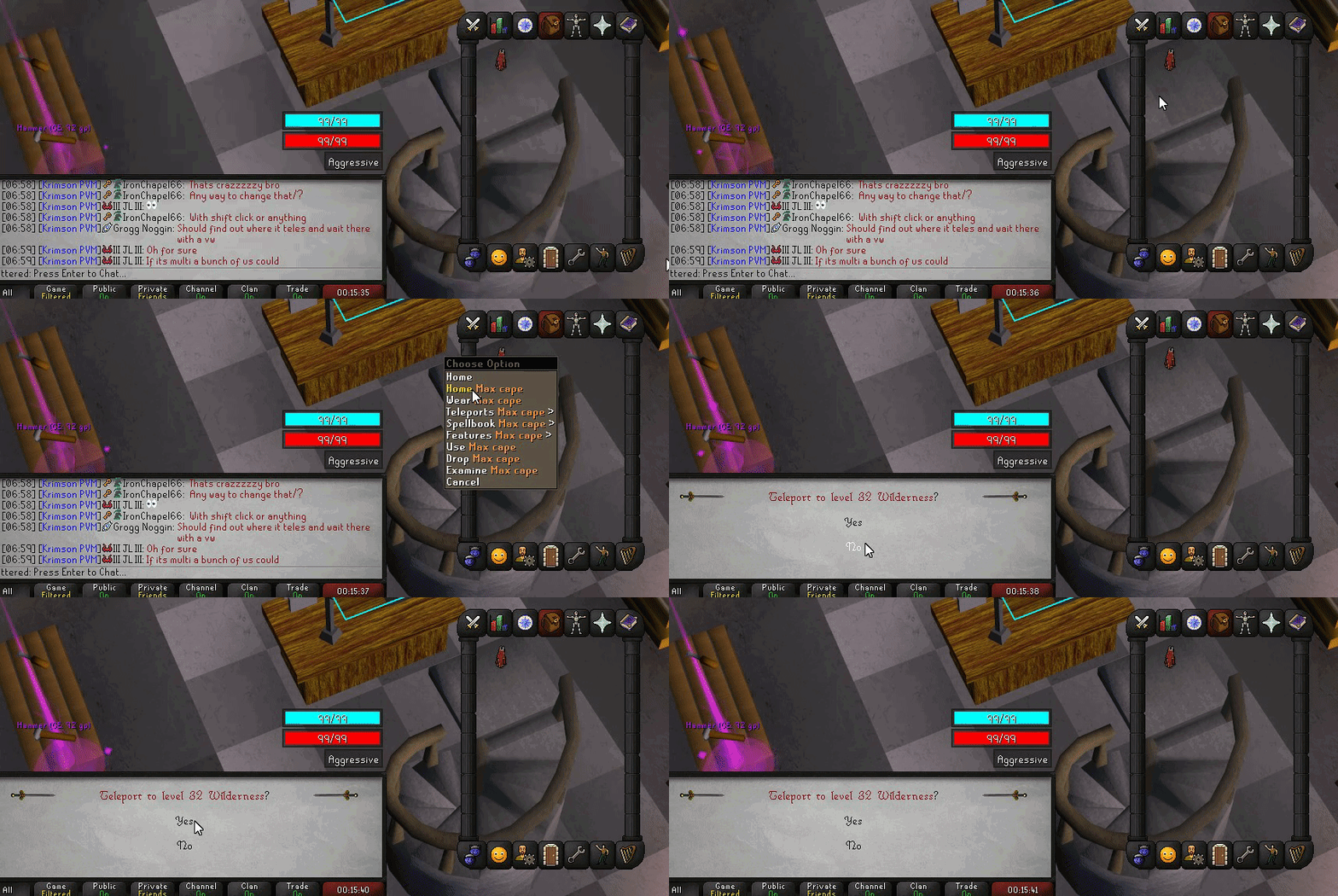 nova bone
oka y
 prisma trench
is the sound setting a bug on jagex's end?
stray grove
its because you didn't restart your client
prisma trench
so it was a rl issue?
 young heath
it was a user issue
 pure egret
When will the Customizable Xp Drops plugin work again?
viscid lantern
when the author submits an update and we review it
neon thunder
@pure egret author needs to update it
neon thunder
you also need to pay jagex for premium membership to gain full access to your plugins
pure egret
Afufufu
 blazing river
Just to be clear there is also a vanilla bug where the teleports window (not the right click menu) teleports you to the wrong location, among other bugs. I described my findings here: https://www.reddit.com/r/2007scape/comments/1i78fd6/bank_qol_mini_menu_improvements/m8itqbk/
 distant tangle
 blazing river
what i described above is happening on steam client and on mobile also
viscid lantern
its not actually a runelite bug afaik
 unique ferry
neon thunder
am i the only one having the sound menu not work properly? I can use the full se...
unique ferry
neon thunder
am i the only one having the sound menu not work properly? I can use the full se...
DId you find a fix. mines doing the same thing
 ornate kite
distant tangle
ornate kite
distant tangle
can anyone confirm if this has been fixed?
neon thunder
im on my pure, try it out... for research...
viscid lantern
there was a runelite update 35min ago, there are vanilla bugs though
ornate kite
neon thunder
im on my pure, try it out... for research...
coincidentially, i am on my hardcore...
LOL.
neon thunder
afufu
 lone bolt
is there a bug to the predicted hit for xp drops?
haughty pumiceBOT
Some hub plugins failed to build against the latest RuneLite version, this means that they're not available until the owner updates them.
lone bolt
ah okay thanks
wet gull
why this plug have problem?

 compact spear
Reading really is hard for some people
haughty pumiceBOT
Some hub plugins failed to build against the latest RuneLite version, this means that they're not available until the owner updates them.
wet gull
haughty pumice
Some hub plugins failed to build against the latest RuneLite version, this means...
ok ❤👍
round jacinth
compact spear
Reading really is hard for some people
Going to support in update day is brave
 vague lance
help plz
 mossy swan
no plz
 ember leaf
woah
 tardy bridge
round jacinth
Going to support in update day is brave
tardy bridge
round jacinth
Going to support in update day is brave
support on update day is kick back and get the popcorn out
 quick jay
the xp drop plgin not working ist thats just with me or with all?
haughty pumiceBOT
Some hub plugins failed to build against the latest RuneLite version, this means that they're not available until the owner updates them.
 normal lagoon
so there are still teleport bugs from jagex their side and not runelite if im understanding correctly?
 winged nymph
the animation replacer plugin is borked. if you replace the scythe animation with the holy scythe animation it neverdisapears
haughty pumiceBOT
Support for hub plugins should be directed to the author of the plugin.
You can find the support link by searching for the plugin in the Plugin Hub panel and clicking the ? button on the plugin, or by right-clicking the plugin in the plugin panel and clicking the Support menu option.
 wind owl
anyway to go back to the old max cape?
round jacinth
wait for jagex to fix maybe
normal lagoon
seems that my max cape teles were only messed up when equipped. when i reset left click/shift click and set it back to home/crafting guild it worked normal again
 kindred loom
Issues launching runelite from the jagex launcher, tried everything i can think of, restarting, reinstalling, administrator permissions. Can't figure out whats wrong
round jacinth
stop running as admin
 round jacinth
i guess they stopped running as admin
but run regular runelite (not from jagex launcher) as admin once
and then run runelite from jagex launcher without admin, ever again
kindred loom
same fatal error
oblique plume
yea because your stuff is borked
and idk why
must have some crazy anti ransomware protection idk
 minor sonnet
Interesting, I didn't restareted RL after update and received 2 day false ban
short locust
is there a way to fix my !pb command not showing the times? its working for everyone else in my clan and in game but me
oblique plume
do a kill or read adventure log in house
kindred loom
oblique plume
must have some crazy anti ransomware protection idk
went check and yeah, for some reason it blocked runelite, after whitelisting it launched
short locust
oblique plume
do a kill or read adventure log in house
ill try reading adv in house. thank you
abstract marsh
kindred loom
Issues launching runelite from the jagex launcher, tried everything i can think ...
seems the same issue as me and several before, a program called "Nahimic" on your pc/laptop
even after myself removing it, it still crashes RL
If anyone can make sense out of
"2025-01-22 00:58:09 EST [RuneLite] INFO net.runelite.client.RuneLite - Java VM arguments: -XX:+DisableAttachMechanism -Drunelite.launcher.blacklistedDlls=RTSSHooks.dll,RTSSHooks64.dll,NahimicOSD.dll,NahimicMSIOSD.dll,Nahimic2OSD.dll,Nahimic2DevProps.dll,k_fps32.dll,k_fps64.dll,SS2DevProps.dll,SS2OSD.dll,GTIII-OSD64-GL.dll,GTIII-OSD64-VK.dll,GTIII-OSD64.dll -Xmx768m -Xss2m -XX:CompileThreshold=1500 -Dsun.java2d.d3d=true -Dsun.java2d.opengl=false -Drunelite.launcher.version=2.7.2 -XX:ErrorFile=C:\Users\dani_.runelite\logs\jvm_crash_pid_%p.log"
always the problem and see so many others here have the same thing
round jacinth
blacklistedDlls just prevents stuff from otherwise interacting with runelite
the rest of the line is settings and what not, it is not an error line
it's by definition an "INFO" line
literally everybodys log has that exacty same start
abstract marsh
it says jvm_crashpid at the end
round jacinth
XX:ErrorFile=C:\Users\dani.runelite\logs\jvm_crashpid%p.log"
that's a "on error this si where you make the file"
abstract marsh
this part "Drunelite.launcher.blacklistedDlls=RTSSHooks.dll,RTSSHooks64.dll,NahimicOSD.dll,NahimicMSIOSD.dll,Nahimic2OSD.dll,Nahimic2DevProps.dll,k_fps32.dll,kfps64.dll,SS2DevProps.dll,SS2OSD.dll,GTIII-OSD6"
everyone has that too?
round jacinth
yes
abstract marsh
Because it's saying specific program names, "Nahimic"
and every time I seen it the person had an MSI motherboard that had Nahimic
round jacinth
it used specifically call out rivatuner
idk if it still does it of the dll is named different
that log line is information about how it launched and no errors are present in it
abstract marsh
So which part of mine is the reason runelite crashed?
round jacinth
if it's an error line it would say ERROR in the start
that line doesn't contain any context as to why you crashed
leaden trail
abstract marsh
If anyone can make sense out of
"2025-01-22 00:58:09 EST [RuneLite] INFO net.r...
This line is expected, it doesn't indicate any sort of problem
round jacinth
if get bored and want to validate what dura and i said, find any random client.log and see the first lines of it, it will look very similar to that. Java VM arguments: -XX:+DisableAttachMechanism -Drunelite.laun....
!safemode
haughty pumiceBOT
To enable safemode
Windows
Run the RuneLite (configure) shortcut from the windows start menu
Tick the Safe mode box, save, launch RuneLite the way you normally do.
Mac
In Terminal, run
/Applications/RuneLite.app/Contents/MacOS/RuneLite --configure
Tick the Safe mode box, save, launch RuneLite the way you normally do.
round jacinth
see if your client crashes in safe mode
abstract marsh
Okay I'll check..but sometimes it crashes several times a day and sometimes not at all
for the past 2 months
round jacinth
you maybe just have a bad overclock
and should turn off intel speedstep/amd powerboost or what ever
round jacinth
ik, i had to default everything && turn off intel speedstep because after 2 years of normal use, it started to misbehave
abstract marsh
thanks, Ill check that for now
round jacinth
if you have a jvm crash log file in that same logs folder
attach the latest one here
abstract marsh
There's no log named "Jvm crash" but it does say jvm_crash_pid in some of the lines
round jacinth
I asked for a jvm_crash log file (if present)
once again the text of "jvm_crash_pid" in the file is just the naming of the error file if it were to be made
abstract marsh
So let me get this clear, in the 2 files I put earlier, nothing is stating why RL is crashing?
round jacinth
i see NullPointerExceptions thrown but idk if they're crashing cause you're not loading the client again right away
One NPE is thrown for LowMemoryPlugin and another for ObjectHiderPlugin
There are others that I don't know because they're the at client.cm(client.java:50518) type of stuff that i dont know what they mean
abstract marsh
there's no "LowMemoryPlugin" in any of the 2 files I put
round jacinth
i think it's actually low detail
abstract marsh
Neither that, perhaps you're reading someone else's post
abstract marsh
Ah okay it doesn't let me see the full text from discord
oblique plume
lol
abstract marsh
Sorry
round jacinth
i dont think it causes a crash tho, because other stuff still loads after and there isn't another logged line about you reloading the client
¯_(ツ)_/¯
abstract marsh
Going to try playing on safe mode for a bit
 finite palm
Adding group iron section to the hiscores. It is impossible to check early group members and knowing if an account is a group iron or not is a good thing imo
viscid lantern
the api doesnt allow it basically
solid mesa
Ask jagex, runelite cant do anything about it
viscid lantern
there is no way to tell if someone is a group iron from the hiscores
viscid lantern
if they add support to the hiscores for it, then we can add it to the plugin ofc
finite palm
Just a small fee of 5.99 to get gim on the hiscores
solid mesa
You have to know their group name to be able to look them up
finite palm
yeh i know its aids
solid mesa
Clicking the spec orb doesn't trigger a special attack?
 deep epoch
it doesnt fill up
round jacinth
i thi nk they mean the regen meter
Works for me

maybe you have a hub plugin that is breaking it, but it works for me as per normal
 exotic vortex
Hello, anyone having trouble with the customizable xp drop plugin?
mines completely not working since this morning
round jacinth
it's currently unavaialble for everybody
round jacinth

 round jacinth
read what the error message says to do
abstract marsh
@round jacinth and if I don't crash on safe mode, that means it's from either gpu plugin or one of the plugin hub plugins?
round jacinth
yeah, if core runelite without gpu/hub is stable that's what we can infer
 iron junco
round jacinth
read what the error message says to do
iron junco
round jacinth
read what the error message says to do
there isnt an error message. It just says the the file permissions or a file within it are not correct. Tried to unistall and reinstall
said to try running as admin, didnt change anything
clear fiber
"If you rerun RuneLite as an admin"
iron junco
didnt do anything
clear fiber
rip
round jacinth
reinstall runelite from the link in #welcome and run runelite by itself as admin
then run runelite normally from jagex launcher
 scenic estuary
The music plugin seems bugged and when on, no music is able to be played
round jacinth
restart client
 lament pasture
 dawn pilot
Anyone know why the text is blurry like this in the chatbox?

trying to play with the Nvidia control panel settings but don't know what's effecting it
charred wind
Looks fine to me
Stretched mode can do this, enabling integer scaling can help
Otherwise try changing the ui scaling option in the gpu plugin
 brisk birch
doesn't look blurry at all to me
dawn pilot
just trust me that i'm not making it up
charred wind
Was gonna say, maybe you need glasses, don’t mean to be rude but it looks crisp. The shadow on it might be making it look blurry
Again, check ui scaling options and change them
Looks like you’re currently on xBR
brisk birch
I mean, you're showing us a picture and we can quite clearly see it's not blurry, there's nothing to trust <_<
dawn pilot
Yeah I am on xBR
dawn pilot
brisk birch
I mean, you're showing us a picture and we can quite clearly see it's not blurry...
I understand you have nothing else to go on besides the image, I'm just explaining it is noticeably less clear than where it was
Should this be set to 1.0?
 charred wind
Yes
 winged tapir
(mac) Anyone know why cmd + m to minimise doesnt work on RL but works on every other application?
dawn pilot
does the "lesser demon" compared to "(level-94)" look different?

 open jolt
customizable-xp-drops broken?
oblique plume
winged tapir
(mac) Anyone know why cmd + m to minimise doesnt work on RL but works on every o...
do you have custom chrome enabled in "runelite" settings
winged tapir
@oblique plume nah it's disabled
oblique plume
dunno then
solid mesa
open jolt
customizable-xp-drops broken?
Restart runelite, it got updated
 rocky bison
Anything am able to do when ignore list is full without removing people and adding more?
any plugins? a tried spam filter but didn't work
able to make a plugin or mention this to OSRS?
round jacinth
if spam filter is not working, you probably have a bad spam filter
rocky bison
just looking for something to be able to add users to a thing so am never able to see their messages ever again
round jacinth
you can enable these settings to automatically clean up the ignore list
 rocky bison
legit maxed out on ignore
400 people isn't alot when theres like 100k players or more
round jacinth
use combat level muting to automatically stop seeing a large % of spammy messages and fix your chat filter to do the rest
rocky bison
zom its like
a need something to legit ignore people because a have alot of people tryna speak to me lol
round jacinth
there is no extended ignore list
rocky bison
like not bots but trolls
if a could get someone to code it
would that help?
like am able to make my own ignore list thing?
dawn pilot
the combat level muting is probably the play
then just redo your ignore list
or just delete as needed
solid mesa
What are you doing that causes you to have over 400 people trying to troll you?
rocky bison
would be cool if you just add a folder in the osrs thing runelite thing that you would just auto ignore
rocky bison
solid mesa
What are you doing that causes you to have over 400 people trying to troll you?
helped alot of people on osrs and done alot of stuff, had a few people copy my name, my clan etc
played with over 10k players at toa
been through hell lol
viscid lantern
can always set public chat to friends only
rocky bison
yeah pchat on friends too
was hoping for a super wiz genuis to be like , yo do this XD ❤️
mortal pond
There's a "Filtered Names" option in the chat filter plugin, it might be annoying to update but you can add infinite names there probably?
For best results you would want ^ and $ at the start and end of each name like so ^Name$ (otherwise a filter like test would block every name that contains test)
rocky bison
Tryna keep my energy at its best, a just think having a break / staying away from people for a long time is the 1
wow
let me read
dude let me try it
round jacinth
extending that list to just include every name ever would surely become a chore
rocky bison
mortal pond
There's a "Filtered Names" option in the chat filter plugin, it might be annoyin...
can't find it
round jacinth
you need to expand filter lists
round jacinth
there is filter by words, regex and by player name
rocky bison
fast learners but am confused
round jacinth
you can censor their message, censor the words or remove the message
round jacinth
there is multiple sections
mortal pond
^tv777$ in the filtered names, and use a new line for each name
round jacinth
 round jacinth
have fun maintaing that
mortal pond
^
 rocky bison
btw for the info back the feedback
you dont have to use those symbol things
just type the name in
round jacinth
those symbols are for regex to signal start and end of expression
they're not needed if youy're typing 1:1 the name
mortal pond
if you don't use the ^$ and you add the name e it will block everyone that has an e in their name, i'm pretty sure
round jacinth
i guess 1:1 the name and < 12 letters means any subset containing that str is also censored
lol
 supple cove
hey what do i do the game says i have a clue scroll but i don't have any in my bank or inventory
 solid mesa
Could be in death's office
 last hound
my runelite is crashing semi-often since the update
round jacinth
!logs
haughty pumiceBOT
To find the logs, you can do one of the following:
- If your client failed to open, click the
Open logs folderbutton. - Open the screenshot directory by right-clicking 📷
Camerabutton, navigate 1 directory up, then open logs folder. - Navigate to
%userprofile%\.runelite\logson Windows or$HOME/.runelite/logson Linux and macOS.
Upload the log files named client and launcher by dragging them to Discord. If there are files prefixed with jvm_crash dated from today, upload them too.
last hound
which is very weird since it used to not crash at all
 brisk comet
when are we getting custom xp drops backs?
last hound
round jacinth
!logs
lol but where is the open logs folder button or the camera button?
round jacinth
and a third option was also present
round jacinth
brisk comet
when are we getting custom xp drops backs?
restart client
round jacinth
here is good
gilded kayak
brisk comet
when are we getting custom xp drops backs?
2 hours ago
 versed island
any update on being able to move the side bar icons? https://i.imgur.com/K1mrYfH.png


 round jacinth
no
versed island
rip any plan for it
versed island
so coding to make them drag able would be to big of a task?
solid mesa
Someone made a pr to make them draggable but they didn't save the position to your profile
leaden trail
Things have to work pretty well to get included in core, just kinda working with some issues isn't really gonna cut it
 long crescent
Noticing some weird interaction with the herb sack. If i have a grimy herb of one type in my inventory, and click fill on the herb sack it says "You have no grimy herbs in your inventory that can be stored in the sack". Using thet herb on the sack gets around this. If i have two types of herbs, it fills as normal. Had someone on vanilla client test it out and it was working fine.
dim schooner
Is there somewhere I can put in an official ticket for an issue? I haven't received a response any time I've asked in here but I'm seeing other people get responded to lol.
I appreciate people may be busy and things may be missed, just not having a fun time with how pervasive the issue I'm facing is and could use some expert help 😂
round jacinth
just restate what you have issues with
a stuttering issue it seems from what you mentioned
you talked at 3:30 AM, nobody saw it probably gotta checkin and re-ring the bell some times
still stutters in safe mode, still stutters with a completely new profile, fresh reinstall of runelite didn't help either
dim schooner
dim schooner
A better video of the lag I'm experiencing compared to the short stutters above.
Correct - no stutters on official client.
All other games running fine.
No network issues.
Have tried:
- restarting PC
- reset internet/router
- fresh reinstall of Runelite
- fresh reinstall of graphics drivers
- turning off all plugins
- making a new profile in runelite
- logging out of my current profile and making a new profile in runelite
- safe mode
- flushing DNS in CMD prompt
- running dism /online /cleanup-image /restorehealth and sfc /scannow in CMD prompt
I think that's everything I've done so far
round jacinth
#support message has good video of the issue happening, but idk if you can confirm it's not network
and when we say graphics drivers, it's not meaning "update to latest" it's usually "go back and find a driver version that works better" as in "down grade"
and comparing official client (their new client) and runelite is not great cause they're not the same at all
haughty pumiceBOT
open command prompt, type this in: ping -t oldschoolXXX.runescape.com where the XXX is your world minus 300, for example world350 = 50
round jacinth
have that command prompt running while you play in safe mode and get a stutter ot two to happen in a capture
dim schooner
Okay, I'll try to do that now, thanks!
dim schooner
round jacinth
https://discord.com/channels/301497432909414422/442492468307427330/1330351555253...
The issue started happening only about 15-20 days ago. The latest graphics driver I downloaded was on Dec 5, 2024, so wouldn't have been any change in the drivers since the issue started happening which I assume could potentially rule that one out? I could try an earlier version as well though.
dim schooner
round jacinth
have that command prompt running while you play in safe mode and get a stutter o...
Stutter at ~2s and ~10s
There are two examples to help with diagnosing 🙂
Sorry for the audio, didn't realize it was picking up off my headset and not my muted microphone lol.
Another thing I've noticed, the stutters are less frequent in safe mode compared to when not in safe mode. With safe mode off, they're pretty much constant/every few seconds, and then occasionally a super bad stutter (like 10-15 seconds of just frozen screen).
zealous cedar
dim schooner
this is just network lag
dim schooner
zealous cedar
this is just network lag
What about the second video?
zealous cedar
yes, also network lag
dim schooner
Would that be a problem with my ISP then? Speedtests have been normal (~14 ping, 900mbps down)

I've also not had any issues on any other online game, streaming, etc., like runelite is the only thing being affected by it?
leaden trail
Speed tests aren't between you and Jagex's servers
The Internet is a giant web, it's not all in one place
dim schooner
leaden trail
Speed tests aren't between you and Jagex's servers
I understand that, just trying to understand what specifically could be causing this. I haven't seen anyone else posting about this issue - if it were an issue with Jagex servers, would it not be more widespread? Or is it like SPECIFICALLY between me interacting with jagex servers? I'm not in IT or anything and have limited knowledge of this stuff lol.
If it's not runelite, where should I go to find solutions for this/what should I search for?
Also with the command prompt running that ping command, what are you looking for to determine if it's network lag? I typically get about 30 ping to the server with spikes when loading chunks and such, but it has never been constantly stuttering/lagging like this.
leaden trail
it's just bad luck with how the traffic is getting routed
we have people coming in all the time experiencing similar, it's just an issue somewhere along the path between a given user and Jagex. You can try to wait it out, or you can maybe try connecting to a world in a different region
if it were an issue with Jagex servers, would it not be more widespread?
it's not an issue with their servers
dim schooner
huh, so weird. Thanks for the insight though. Hopefully it sorts itself out. I think I get what you're saying now so I'll probably try hopping around and if that doesn't work, wait it out and hope for the best 😭 appreciate you guys looking into this regardless seeing as it is not a runelite issue
round jacinth
You could try a vpn and see if it’s any different, it’ll add a little bit to the total trip time but it might not have the same route with the lag
viscid lantern
the easiest thing you can try is using a different region than your usual(assuming thats an option ofc)
dim schooner
So I'm usually on US east worlds (im in ontario, canada), so try something like US west first, then maybe try a vpn if no improvement?
viscid lantern
yeah those are things you can try 
round jacinth
thanks for checking in with the responses sorry it seemed like ya got ignored
dim schooner
@ornate kite yeah I play on east coast worlds, glad I'm not the only one having the issue lol. Makes me feel less crazy 😂
dim schooner
round jacinth
thanks for checking in with the responses sorry it seemed like ya got ignored
No it's totally cool, and I hope I didn't come off as annoyed or anything lol I know this stuff is all open source and basically a passion for you guys so I appreciate any help. My frustration lies with the issue itself and not you guys at all ❤️
ornate kite
dim schooner
<@456226577798135808> yeah I play on east coast worlds, glad I'm not the only on...
Yeah was the same as me. I have the same ping on both west/east, but switching to west fixed it for me
 dusk ember
Hello! Can someone tell me what this is?
[Client] INFO injected-client - cache itemModelCache thrashing, enlarging to 128 entries
zealous cedar
do you have the animated icons plugin?
dusk ember
Is that an external one or stock? Cause I haven't installed any icon plugins
zealous cedar
external. that message is probably safe to ignore anyway
dusk ember
Well the issue is, my game freezes whenever I open the bank, being on the main tab. all the other tabs are fine.
Including bank tags
 opaque yarrow
would animation smoothing cause it?
zealous cedar
cause what
opaque yarrow
Sams crash
zealous cedar
no, animation smoothing is a core plugin. the bank crashing would be from a pluginhub plugin
opaque yarrow
the client itself doesn't actually crash, the screen just freezes
that is the last thing listed in the log
zealous cedar
as i said, its from a pluginhub plugin
opaque yarrow
what kind of external plugins should we be looking for?
zealous cedar
you might be able to isolate it to a specific plugin if you use the debug helper plugin to take a thread dump after it is frozen
if it happens to be spinning or something, if it has actually crashed it wouldnt help, but i would expect something in the log if it did crash
opaque yarrow
yeah the screen just freezes, he has to manually close RL in task manager
it doesn't actually close when crossed off
it seems like it's getting stuck, or hanging on something
round jacinth
!logs can you share your logs
haughty pumiceBOT
To find the logs, you can do one of the following:
- If your client failed to open, click the
Open logs folderbutton. - Open the screenshot directory by right-clicking 📷
Camerabutton, navigate 1 directory up, then open logs folder. - Navigate to
%userprofile%\.runelite\logson Windows or$HOME/.runelite/logson Linux and macOS.
Upload the log files named client and launcher by dragging them to Discord. If there are files prefixed with jvm_crash dated from today, upload them too.
round jacinth
but if i had to guess, you have rsn hider/changer on
opaque yarrow
it's not mine, I have been trying to help Samimo, no errors in the log, last item is:
[Client] INFO injected-client - cache itemModelCache thrashing, enlarging to 128 entries
scroll up a bit for more context, rather than me retyping it all lol
round jacinth
oic
opaque yarrow
what I mean is, I've been assisting as a friend, not as a dev in here, so any insights are appreciated
iron junco
Thanks for helping out earlier btw Zom. Turns out it's a hard drive issue and my entire computer kicked the bucket, not just Runescape
 soft pewter
Hey guys whenever I put Runelite to the background the game will not run. It works perfectly when the window is in focus but as soon as I tab out it freezes and sometimes when i click back in it runs again but sometimes i have to turn 117hd off and back on
I am not running FPS control.
leaden trail
soft pewter
I am not running FPS control.
Are you on an Nvidia GPU by any chance? Sounds like something that happens with gsync enabled for some people
soft pewter
I am on a 3070 yes let me check
 unreal surge
Off topic: How would I find the OSRS leagues discord? I have a question about the leagues points I was awarded?
soft pewter
how would I go about getting rid of that for osrs?
round jacinth
opaque yarrow
what I mean is, I've been assisting as a friend, not as a dev in here, so any in...
i asked for logs but im being sent a single snippet of a line lol
round jacinth
unreal surge
Off topic: How would I find the OSRS leagues discord? I have a question about t...
join the official discord
!newplayer
haughty pumiceBOT
If you are new to OSRS, make sure to follow this excellent guide on OSRS wiki: https://oldschool.runescape.wiki/w/New_player_guide. You can also join the official OSRS Discord here: https://discord.gg/osrs
opaque yarrow
zealous cedar
you might be able to isolate it to a specific plugin if you use the debug helper...
we just tried this, it seems to kill RL before the login screen
opaque yarrow
round jacinth
i asked for logs but im being sent a single snippet of a line lol
I will ask him to send it
dusk ember
soft pewter
leaden trail
Are you on an Nvidia GPU by any chance? Sounds like something that happens with ...
do you know anywhere that people found solutions? I cant figure out how to disable gsync for osrs/find a way to make it work
round jacinth
can you turn off radius markers/better npc highlight and see if that helps?
dusk ember
round jacinth
can you turn off radius markers/better npc highlight and see if that helps?
Just tried that, same outcome
gilded kayak
!safe
haughty pumiceBOT
safemode: To enable safemode
Windows
Run the RuneLite (configure) shortcut from the windows start menu
Tick the Safe mode box, save, launch RuneLite the way you normally do.
Mac
In Terminal, run
/Applications/RuneLite.app/Contents/MacOS/RuneLite --configure
Tick the Safe mode box, save, launch RuneLite the way you normally do.
gilded kayak
this was what adam wanted originally, does it happen in safe mode
dusk ember
It does not, no. Working fine in safe mode
gilded kayak
safe mode turns off all plugins from the  tab, and GPU, so it seems clear that the problem is either them, or your GPU driver
dusk ember
But I've been playing for a while now without safe mode and all the plugins enabled, didn't have an issue, till yesterday where it started to freeze again, and today too.
gilded kayak
did you maybe update your drivers yesterday
dusk ember
Nope, I did not.
gilded kayak
can you check to make sure nividia control panel didn't do it for you
after that, I would leave safe mode, click the new profile button in the tab, double-click to swap to the new profile (the currently selected profile has the orange bar next to it)
enable gpu, maybe restart the client again, and see if your problem continues
if it doesn't, then it's fairly likely it's one of the hub plugins
gilded kayak
gilded kayak
after that, I would leave safe mode, click the `new profile` button in the <:pro...
if it turns out nvidia did update your drivers yesterday, and your issue does continue to occur, then downgrade 1 version and see if it's magically fixed
soft pewter
stil having the exact same problem of my game not running when Im not focused on the window
with both 117hd and GPU
essentially as soon as I click on another window the game freezes until i click back into runelite
dusk ember
gilded kayak
after that, I would leave safe mode, click the `new profile` button in the <:pro...
There was no nvidia update. And as soon I click "new profile" RL crashes completely. wasn't even loaded into the game
gilded kayak
can you do the new profile and swap, in safe mode, then
soft pewter
Figured it out. Blindfold was causing issues.
 inner ginkgo
Do y'all reckon a plugin that shows you what prayers you had activated in the last X (say, 5-10 ticks) be against ToS?
 halcyon rover
anyone know when customizable xp drop is going to be fixed?