#support
1 messages · Page 54 of 1
 nimble bison
 sonic birch
That is assuming you are indeed running out of heap space
But that is a plausible explanation with your story
 slender gazelle
Hi, I'm having an issue in runelite where the letter "d" is intermittently not detected. I'm using a lot of plugins including key remapping to use d to open my combat options page.
This issue happens whether I'm typing in chat or using d to open combat options.
It only occurs in runelite. Pleae help.
edit: I've swapped keyboards and it happened with both devices
 haughty pumiceBOT
If one of your keys isn't working in game, you've most likely bound it to a feature of a plugin. The Debug Helper hub plugin can show what keys are bound to what plugins.
 dark radish
hello, is there some graphical way to view the bounding rects for client widgets?
I'm trying to draw over the widget produced by client.getWidget(ComponentID.INVENTORY_CONTAINER) however it seems the bounding rect is misaligned (though correctly sized).

 zealous cedar
you probably need to set your overlay position to DYNAMIC
dark radish

 proper pasture
Hi. My client keeps crashing, already tried safe mode. Didn't work.
haughty pumiceBOT
To find the logs, you can do one of the following:
- If your client failed to open, click the
Open logs folderbutton. - Open the screenshot directory by right-clicking 📷
Camerabutton, navigate 1 directory up, then open logs folder. - Navigate to
%userprofile%\.runelite\logson Windows or$HOME/.runelite/logson Linux and macOS.
Upload the log files named client and launcher by dragging them to Discord. If there are files prefixed with jvm_crash dated from today, upload them too.
 cedar fractal
hello, i just changed pcs. Can anyone help pn how do i import all the plugins i had on my old pc?
haughty pumiceBOT
cedar fractal
thanks
 shy arrow
Hi guys, I was just wondering if you had any advice on reducing the energy impact for runelite on mac? I've attached a screenshot of my current energy usage on a 2020 M1 MBA - my main issue is when playing on runelite, my battery is drain is greater than the rate of charge.
 zealous cedar
never heard of a battery able to drain and charge at the same time. is that a macos thing lol
shy arrow
I mean, the battery consumption is more than what it receives when charging
zealous cedar
turn compute shaders off, or turn the gpu plugin off and play fixed mode (not sure which of those would use less power)
shy arrow
in otherwords, im at a net loss XD
zealous cedar
typically when you charge a laptop battery it runs on the wall power directly and then charges the battery in addition to that
shy arrow
but I know other people on reddit ect have asked about why Runelite uses alot of battery
zealous cedar
zealous cedar
turn compute shaders off, or turn the gpu plugin off and play fixed mode (not su...
its probably from the gpu usage, try doing this
shy arrow
😦 bye bye gpu
I think it likes the GPU plug-in XD, as this is the energy impact with the GPU turned off

I dont suppose you have any other suggestions, @zealous cedar ?
zealous cedar
that is odd
shy arrow
for reference, i've just turned GPU back on
 zealous cedar
is that in fixed mode?
shy arrow
I've just put it into fixed mode. Still much prefers the GPU plug-in. Fixed does seem to reduce the energy consumption

 shy arrow
I'm just curious if theres a compatibility / optimisation setting I should explore
I understand why people don't like Mac's now XD
zealous cedar
you could use the fps control plugin to limit the fps to something lower
slender gazelle
did you buy it used? @shy arrow might just be a bad battery
turn off optimized battery charging in energy preferences
shy arrow
bought it new but it is a few years old. Very well might be the battery but was just exploring the energy consumption part
(I'm not a tech guy as you can probably tell XD)
I appreciate the help anyway guys
 solid mesa
FPS Control helps a lot. I was playing in a vehicle which only had a 15W USB-C charge output for my MacBook. At uncapped FPS the battery was draining. But at 20FPS cap it was not draining with only a 15W charger. An FPS limit should help a lot
 dreamy kestrel
Hey anyone know how to fix this ?

 warped hatch
Random little issue, I cant rid this notification in the top left that "your celastrus tree is ready" Not only do I not have one planted, I've got a timer that says I do and even that says its not ready, tried tuirning time tracking on/off, relogging and reloading client to no avail.

 gilded kayak
that's from time tracking reminder not time tracking
warped hatch
Ahhh, thank you! all fixed now appreciate it! Merry Xmas!
 vivid yacht
Hello
I'm using runelite for the first time since last year and I think the newest update messed something up. Going into the plugin hub and downloaded it doesn't show up in the configuration list.
Here is a example of a plugin i want to use.
plugin1
plugin2
Not just with this plugin but any new ones I want to download don't show up.
s
i copied and pasted this cause i have the exact same problem can some one help me?
vivid yacht
i asked a guy "ron" in runelite chat but its unclear if hes helping me atm or noth
oh was that question for me?
no im aint no timetraveler?
lmfao
gilded kayak
yes, your logs say it's been 9am in CET which is not true at all
vivid yacht
noo but i did change my settings of time and date after downloading runelite
i just bought a new laptop
vivid yacht
damn i thought i found me some help XD
gilded kayak
i'd probably do this first since u had an okhttp error in those logs
close the client before u do that
gilded kayak
you can press windowskey+R to bring up the run prompt and just copy paste in
%userprofile%/.runelite/cache/
yehlike i found a whole list of files with okhttp in it
like i can scroll all the way down they all have that in it
ill send u exxample
gilded kayak
gilded kayak
you can press windowskey+R to bring up the `run` prompt and just copy paste in
did you not do what I said here
it should take you to a folder, with 1 folder in it and like 5 files
delete the okhttp folder
gilded kayak
start the client again and see what happens
if 117 shows up, if it shows up as installed in the  tab
tab
i'm thinking it wont
vivid yacht
it shows as installed but dont work
gilded kayak
can you screenshot it in the tab
gilded kayak
since an hour ago?
vivid yacht
i copied and pasted the whole time
gilded kayak
snipping tool is probably fine
vivid yacht
that picture of the screnshot was a copied one from a guy with the same problem
vivid yacht
i screwed up right..
tried diownloading runelite first after that was nothing i downloaded jagex launcher and the problem was the whole time that i didnt set my time right
cause it didnt want to log in
first that was my problem now i finalyy fixed that and deleted the runelite launcher. now i log in via the jagex launcher to runelite
gilded kayak
snipping tool -> new -> left-click&drag a box around the tab

something like this
save and drag the image into discord
 gilded kayak
what happens if u try to remove it
because the logs u uploaded say that plugin is definitely not installed
vivid yacht
than it sais install again
if i press remove
it stays on removing
till i change a tab and go back
than it says install again
so ot stays like this ill send u pic
gilded kayak
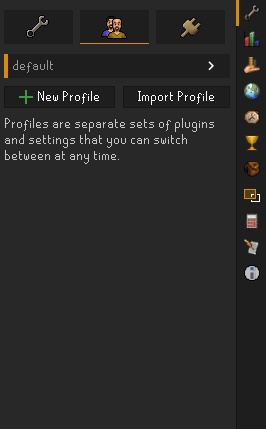
what if you go to the  tab, click
 new profile and double-click that new profile so the orange bar to the left, is next to it

then try to install 117 on that profile
vivid yacht
oke
 vivid yacht
yeh
gilded kayak
why
gilded kayak
well that prevents plugins from the tab from loading
gilded kayak
windows start menu, runelite (configure) and turn both safe mode and debug off
vivid yacht
yeh the new profile doesnt work
gilded kayak
yes thats not relevant anymore
vivid yacht
okee
gilded kayak
it is working, you're just in safe mode
there's no indication at all for the install process that you need to mess with runelite (configure)
vivid yacht
gilded kayak
there's no indication at all for the install process that you need to mess with ...
i realy didnt know
now it sais normal runelite
in the corner
gilded kayak
yes now it will all work as expected
vivid yacht
gonna try now
gilded kayak
it's going to work fine now
vivid yacht
dude
dueee
urrr
the greatesss
!!!
damnnn
!!!!
XDXD @gilded kayak thankss duddee
fffss
\
gilded kayak
i didn't recognize that it was in safe mode, because I removed all lines with DEBUG because your issue wouldn't have debug logs
and the line that says safe mode, has debug in it
vivid yacht
FFSSS so thats whyy
dude u learned me so much lmfao in this litle time
omg bro u dont relize i 1st was stugling with a error loging in eventually i found out it was the time and date now the runelite i think its been about 5 hourss now
I appreciate u bro fr @gilded kayak
thank you
gilded kayak
scroll faster in what sense
gilded kayak
camera plugin
vivid yacht
thank youuu😊
gilded kayak
i don't know if u turn it up or down
 hazy fractal
Is there any way to disable anti-aliasing for runelite drawn objects? For example: tile markers

 lyric prawn
i think both 117hd and gpu plugin use MSAA, to disable AA for specific things it would have to be drawn after the AA pass
and like... why
 charred wind
I think, and could be wrong, markers like this are affected by the UI scaling method in the GPU plugin
hazy fractal
I am not using 117, have AA off in GPU, and am using Nearest Neighbour with Stretched mode set to 2x and inter scaling only
 signal bone
Is anyone else having the issue of Runelite freezing when focuing on other windows? It has also frozen on me severtal times after getting a kill at vorkath, making the game unplayable. I have to red X to close the client and lose all of the loot on the floor (not important). This has been happening for the last 2 to 3 days now and it is making the game unplayable through the Runelite client.
zealous cedar
if its freezing on a loot event its probably from a pluginhub plugin freezing. try safe mode.
signal bone
zealous cedar
if its freezing on a loot event its probably from a pluginhub plugin freezing. t...
I have ran it in safe mode, updates all drivers and still no result
zealous cedar
can you get the logs of it freezing in safe mode?
signal bone
zealous cedar
can you get the logs of it freezing in safe mode?
I will do that when i arrive home from work in a couple of hours
sonic birch
fyi we mean runelite safe mode, not windows safe mode or something like that
a video of it freezing in safe mode with the title bar visible would also help
 chrome vortex
anyone have a solve 🥺 I want to remove everything except how much i heal
 pale gale
Does anyone know what to do if the Time Tracking plugin is bugged?
My herb cycle has always been :08, :28, 48, now suddenly it shows :09, :29, :49, however my cycle is still the first one. If i plant something at exactly 08 and wait the time tracking will show as one cycle ahead the second it hits 09, has anyone else encountered this?
zealous cedar
you can use ::resetfarmtick and then watch a tree grow and it will resync
pale gale
Thanks for the information, will try that!
sonic birch
chrome vortex
anyone have a solve 🥺 I want to remove everything except how much i heal
Nope unless item stats has a config option but it does not afaik.
 oblique plume
just use status bars
sonic birch
Thats what I do indeed
 lone spindle
havent ben able to play in over a week, any ideas why?
 sonic birch
!logs and someone might be able to look at it
haughty pumiceBOT
To find the logs, you can do one of the following:
- If your client failed to open, click the
Open logs folderbutton. - Open the screenshot directory by right-clicking 📷
Camerabutton, navigate 1 directory up, then open logs folder. - Navigate to
%userprofile%\.runelite\logson Windows or$HOME/.runelite/logson Linux and macOS.
Upload the log files named client and launcher by dragging them to Discord. If there are files prefixed with jvm_crash dated from today, upload them too.
 fresh swift
Vpn?
haughty pumiceBOT
To find the logs, you can do one of the following:
- If your client failed to open, click the
Open logs folderbutton. - Open the screenshot directory by right-clicking 📷
Camerabutton, navigate 1 directory up, then open logs folder. - Navigate to
%userprofile%\.runelite\logson Windows or$HOME/.runelite/logson Linux and macOS.
Upload the log files named client and launcher by dragging them to Discord. If there are files prefixed with jvm_crash dated from today, upload them too.
zealous cedar
firewall blocking runelite?
lone spindle
ive tried adding runelite to my firewall but my firewall wwont let me add anything
not sure how to get past that
just greyed out
 gilded kayak
did you try googling add exception to firewall button greyed out
zealous cedar
maybe
lone spindle
@zealous cedar my anti fvirus had me closed out to adding to firewall
i'll try restarting my computer and trying again after my game
 unkempt dew
Hey, i got a file with my Settings from windows.. my pc is down atm and i thought i can use my mac for this time to play. when i want to put my settings from windows to my mac it doesn't works, do you guys know what i did wrong? i can add the file but the plugins aren't in runelite
 leaden trail
What did you copy over, first off?
unkempt dew
i sent the setting before to a mate, he used to play with those profile properties. now when i add this file in the profile folder it doesn't works in the runelite client
oblique plume
what do you have and where are you putting it
haughty pumiceBOT
oblique plume
thats what you should be doing
unkempt dew
Oo nice thanks, yea i just had to load that shit
lone spindle
zealous cedar
maybe
unfortuantely no joy still
 opal stream
Having an issue where "Deposit Worn Items" doesn't want to actually deposit my worn items, any ideas?
Works just fine if I turn off the Disable left-click bank equipment option under Bank
nvm - turned the disable back on and it seems to work now.
oblique plume
are you saying it doesnt work if you right click it
opal stream
oblique plume
are you saying it doesnt work if you right click it
i have it set so that clicking it makes me confirm by clicking it again
and it wasnt working
this option

toggling it fixed it though
 thin cloud
is there somekind of bug or anything on runelite? i've got twice connection lost in 3 hours suddenly. I had to swap world or just force shut down whole runelite to able to log in.
gilded kayak
that would be connection lost
thin cloud
not sure why my internet still working even i get dc on runelite 🤔
gilded kayak
because the internet is not an on or off thing
sometimes some things have issues
actually most of the time some things have issues, you just don't notice because you aren't using those things
 lilac tide
I have lost all my plug ins and bank tags on rl. Any way to recover them?
haughty pumiceBOT
 molten moss
Use annoyance mute
this goes in "muted sounds"
9929, 10002
 amber sedge
molten moss
Use annoyance mute
this goes in "muted sounds"
9929, 10002
amber sedge
molten moss
Use annoyance mute
this goes in "muted sounds"
9929, 10002
Woah, didn't expect to get a reply this late lol. I eventually found those codes and have stopped losing my mind, but thanks for replying!
 round jacinth
the sounds the pet uses is the same as the boss i think
so i can't just add em to the plugin :<
 willow delta
What's the point of integer scaling in stretched mode? From my experience it just crops the game up to a lower size and you might aswell play on that client size with the plugin off.
 mossy swan
it will scale up to two times the size, three times the size etc instead of fractional scaling like 25% larger
so you need enough space to scale up to double the original size, which you dont i guess
hazy fractal
hazy fractal
Is there any way to disable anti-aliasing for runelite drawn objects? For exampl...
Anyone else have any input re: disabling AA on these? The official client does this very well
gilded kayak
i would hope the official client does a good job not anti-aliasing runelite objects
hazy fractal
gilded kayak
i would hope the official client does a good job not anti-aliasing runelite obje...
Aha yes, I of course mean the official client does not apply AA to marked tiles, tagged NPCs, etc - whereas runelite does
 snow pier
I get 'too many login attempt' for over a month now, anyone an idea how to help it?
I tried the Jagex launcher, but it gives me a new character, os that's not an option either
mossy swan
you'd need to migrate to jagex account to fix that basically
snow pier
But I can't, on ym mobile phone it works perfectly fine btw
snow pier
I tried, I got prompted with a new character
mossy swan
then you just created a new jagex account instead of migrating your old account
snow pier
I login via username, not email, coudl it be because my account is extremely old?
snow pier
it's either runelite or the jagex launcher, no in between huh?
Like the old school client hey used to have?
mossy swan
jagex launcher can launch runelite just fine
snow pier
does ti work good with gpu functions like anti aliasing?
mossy swan
runelite works exactly the same with jagex launcher
or even better, since you get one-click login and faster world hopping
snow pier
except I need ot login via email instead of my super short and nice username
mossy swan
and you dont get this stupid too many login attempts issue
jagex launcher remembers you though
snow pier
if you tick that option probably
mossy swan
no, it just remembers you
holy frick just go do it
stop arguing with me about things that you dont know
snow pier
No, I don't want that on public pc's
Hence why I ask you things other then the jagex launcher, just like how it uused to be, worked for years and works perfectly fine
mossy swan
oh well if you play on public pcs thats a different thing
but no, its a jagex thing
they did some security upgrades i guess
snow pier
Ah, I can kinda understand it, I just hope it works on Linux now as well lol, I am going to try the launcher, thanks!
mossy swan
bolt launcher works on linux, jagex launcher sadly doesnt
but bolt is probably gonna be better anyway lol
snow pier
for now I have fixed it by using the old school runescape steam version, jsut no runelite, but so be it 😄
 west spire
!sync
haughty pumiceBOT
!sync command not found!
west spire
!profiles
haughty pumiceBOT
 flat plover
is there a way to duplicate all plugin settings on one profile but keep bank tag layouts from another profile? -- this scenario has happened because i had a main with max gear but didn't play it for over a year.
 proud zephyr
Hello! I have just had 2 client crashes. But i cannot see a crash log. Would the file named client.log be show enough information on the crash to find a solution?
round jacinth
flat plover
is there a way to duplicate all plugin settings on one profile but keep bank tag...
You can dupe the profile and manually import in bank tags to it from another profile
 smoky grove
hi guys my inventory tags are not showing the colours and not working does anybody have any idea why?
 haughty pumiceBOT
The Inventory Tags plugin allows you to customize highlighted outline colors on items, you can pick the color by holding shift and right clicking on the item in your inventory then picking the color from the color picker window that appears, any previously used colors will already be available in the rightclick menu.
 smoky grove
ah right, thanks i used to have to click the bag before.
round jacinth
That’s been changed for a year and change now I think lol
smoky grove
yeah i havent played for 2 years at least
round jacinth
wb
flat plover
round jacinth
You can dupe the profile and manually import in bank tags to it from another pro...
You are now the 20th holiest lad. thank you for the suggestion
round jacinth
Sadly unless some one holier gets banned I remain 21st
round jacinth
flat plover
You are now the 20th holiest lad. thank you for the suggestion
You may need a second client window open and just side by side import one to another
There isn’t a way to bulk import
 merry wigeon
Is there a plugin or option to scale the UI in runelite? Using a high dpi display right now and it is so tiny
(talking about the runelite ui itself, not ingame ui)
round jacinth
There is an option for scale in runelite (configure)

GitHub
Open source Old School RuneScape client. Contribute to runelite/runelite development by creating an account on GitHub.
merry wigeon
round jacinth
There is an option for scale in runelite (configure)
may need a sec to figure out how to launch this 😅 using a tool that ported the jagex launcher to linux so i need to figure out where it put runelite
oblique plume
should use bolt
 viscid lantern
in bolts its a couple clicks to open the config
viscid lantern
for the configure its in settings->osrs->button at the top
 quaint ermine
Does anyone else have the issue where if the laptop they're using goes to sleep and then they turn it back on, client sounds don't work? I have to close and re-open runelite every time I open my computer
leaden trail
Yeah sleeping kinda breaks stuff
We highly recommend closing the client whenever you aren't actively using it to make sure you're on the latest version, though
 grim escarp
Hey guys any ideas why the GPU plugin on an ARM snapdragon x laptop looks like this?
 signal bone
sonic birch
fyi we mean runelite safe mode, not windows safe mode or something like that
signal bone
sonic birch
fyi we mean runelite safe mode, not windows safe mode or something like that
I see. I don't have such logs unfortunately. My friend had similar issues with RL freezing when changing focus to another window. He managed to get around this by deleting his temporary profile that he created for leauges, and it worked. I did the same last evening and everything has been running smootly from then on. Maybe it is a bug in one of the plugins. We tried to figure out mutual plugins but we couldn't put our finger on a specific one. I wish that I could provide you with more info. Apologies.
Have a nice weekend and Enjoy Christmas and New year! 🙂
 crisp dune
grim escarp
Hey guys any ideas why the GPU plugin on an ARM snapdragon x laptop looks like t...
crisp dune
grim escarp
Hey guys any ideas why the GPU plugin on an ARM snapdragon x laptop looks like t...
No idea, but it looks kinda neat tbh
You might try disabling compute shaders
grim escarp
crisp dune
You might try disabling compute shaders
no good im afraid 😦
zealous cedar
this looks like the textures arent working, but also its missing ground deco like the grass
weird
grim escarp
yeah the textures load all good without the plugin
 lone spindle
zealous cedar
firewall blocking runelite?
lone spindle
zealous cedar
firewall blocking runelite?
Any reason why my ethernet cable would be blocking it? i unplugged my ethernet cable and it loaded up immediately
zealous cedar
weird
 vestal halo
anyone knows how to fix this issue?

 solid mesa
Click the button that says XP by your minimap
 deep epoch
i dont have one of those
haughty pumiceBOT
We are using vanilla XP drops. To configure them: https://github.com/runelite/runelite/wiki/XP-Drop
 blissful locust
hello, i just opened runelite and all my plug ins were gone and my bank tabs and everything, is there a way to get these back? the default and imported files are just empty
haughty pumiceBOT
grim escarp
grim escarp
Hey guys any ideas why the GPU plugin on an ARM snapdragon x laptop looks like t...
any potential fixes on this one? 😦
zealous cedar
it might be related to a recent texture change we made, but we don't have anyone that has an arm laptop I think to really look into it
grim escarp
damn is it possible for me to use a previous release?
zealous cedar
if you are a dev and can look if the recent texture changes has caused this, that would be useful. but the previous release no longer runs due to the texture issue we had to fix causing it to be broken
did it work previously? do you know when it stopped working?
grim escarp
ahh no i literally just got this new laptop today
based on a YT vid the GPU plugin did work with this laptop at some point
 deep epoch
solid mesa
Click the button that says `XP` by your minimap
deep epoch
solid mesa
Click the button that says `XP` by your minimap
this didn't work for me

this is my situation
oblique plume
you didnt read the message
solid mesa
If you don't hide the icon it's right there

 robust elk
hi can anyone help me with this? tried uninstalling and reinstalling client and x logging etc?
 gilded kayak
that just means you're having an issue connecting to jagex's world hopper, try using the runelite one on the sidebar
it probably works fine
robust elk
yeah the runelite world hopper works fine, is there anything i can do to sort this?
oblique plume
not really
 mortal pond
robust elk
yeah the runelite world hopper works fine, is there anything i can do to sort th...
mortal pond
robust elk
yeah the runelite world hopper works fine, is there anything i can do to sort th...
I would try some of the tips here https://support.runescape.com/hc/en-gb/articles/207344375-Common-connection-solutions
 magic kiln
Why is runelite changing the refresh rate of my cursor now? It never used to do that
 lapis elm
What are you talking about
magic kiln
My cursor frames should be independent from the client right? I'm pretty sure it always used to be
oblique plume
Prob vsync
magic kiln
Now it's all choppy and it changes with the game fps
magic kiln
oblique plume
Prob vsync
Do you know where I could change that?
oblique plume
Try turning the gpu plugin off
 deep apex
Hey Ya'll, Having some trouble launching runlite from the Jagex Launcher.
Usually stuck on this loading screen here:
 haughty pumiceBOT
To find the logs, you can do one of the following:
- If your client failed to open, click the
Open logs folderbutton. - Open the screenshot directory by right-clicking 📷
Camerabutton, navigate 1 directory up, then open logs folder. - Navigate to
%userprofile%\.runelite\logson Windows or$HOME/.runelite/logson Linux and macOS.
Upload the log files named client and launcher by dragging them to Discord. If there are files prefixed with jvm_crash dated from today, upload them too.
crisp dune
Most likely, some plugin you've installed is causing this hang
deep apex
crisp dune
Most likely, some plugin you've installed is causing this hang
Absolutely! I figured as much, just wasn't able to figure out which plugin it was! I'll send the files here!
crisp dune
It looks like it might be the bank history plugin
haughty pumiceBOT
To enable safemode
Windows
Run the RuneLite (configure) shortcut from the windows start menu
Tick the Safe mode box, save, launch RuneLite the way you normally do.
Mac
In Terminal, run
/Applications/RuneLite.app/Contents/MacOS/RuneLite --configure
Tick the Safe mode box, save, launch RuneLite the way you normally do.
crisp dune
You can try removing it in safe mode, then you can disable it and try launching again
deep apex
Gotcha! Thank you so much, I'll launch in safe mode and remove it until further notice! You've been a blessing! ❤️ Happy Holidays!
 frank nexus
Hello, I have been having this problem recently with runelite (launched from Jagex Launcher) where any time I restart the client, my settings get reverted. I had to do so the other day for an OSRS update and so many of my settings/configurations from the last month were just gone. I started troubleshooting, and now any time I make any changes (ex: tag an NPC), they get erased when I restart the client. I am logged into RL and signed into the correct profile. Any suggestions?
zealous cedar
usually that means runelite doesnt have permissions to write to disk to save your profile. you could check the logs
frank nexus
Where would I find that and what is the fix?
haughty pumiceBOT
To find the logs, you can do one of the following:
- If your client failed to open, click the
Open logs folderbutton. - Open the screenshot directory by right-clicking 📷
Camerabutton, navigate 1 directory up, then open logs folder. - Navigate to
%userprofile%\.runelite\logson Windows or$HOME/.runelite/logson Linux and macOS.
Upload the log files named client and launcher by dragging them to Discord. If there are files prefixed with jvm_crash dated from today, upload them too.
frank nexus
round jacinth
are you using the hub plugin for "smooth camera"
if so turn it off
yes it's bad
soup put it in a recent video of plugin recommendations and it's really just bad
i do not know
linux stinky
your entire .runelite folder is just the config + screenshots
it shouldn't matter where you put it/bring it
 frank nexus
haughty pumice
To find the logs, you can **do one of the following**:
- If your client failed t...
frank nexus
haughty pumice
To find the logs, you can **do one of the following**:
- If your client failed t...
Uploaded the log files. Anything?
gilded kayak
the logs didn't say anything but i would still think adam's assumption is correct, so
haughty pumiceBOT
Download and install the updated RuneLite launcher from the website link in #welcome. You don't need to uninstall your current version. You will not lose any settings or plugins.
gilded kayak
once you update, run runelite as admin one time, which the client will try to fix any permission issues it runs into, for you
close that runelite launched as admin, and then start it the way you normally would
try messing with settings, restart the client, see if it saves
frank nexus
gilded kayak
once you update, run runelite as admin one time, which the client will try to fi...
"run runelite as admin" I dont know what this means.
Downloaded and installed the runelite version from the link in welcome
gilded kayak
right-click run as admin, it's an option for any app
frank nexus
Yeah I looked it up and tried, still the same result
gilded kayak
can you post the logs again, that same file might say "yesterdays" date now that it's 0:01, instead of just client.log
gilded kayak
was there a specific setting you were messing with
frank nexus
No. I just closed the client the other day when I was forced to for an OSRS update (which was probably the first time I had closed it in a month, and I restarted and all settings from that timeframe were reverted. Tested it multiple times today just with random configurations like tagging an NPC or typing in notes. Reverts every single time I restart the client
gilded kayak
did you tag the NPC with the tag button, instead of tag-all
frank nexus
I did
gilded kayak
alright well so that specifically does not persist through restarts, because we can't guarentee the same NPC will be tagged
some technical crap i can't remember but there's basically no chance the same npc you tagged, will be tagged after a restart, which is where tag-all covers
the notes should persist tho
frank nexus
Ah. Well a bunch of my other settings reverted too. Things like menu entry swapper for the ring of shadows, bank tags, etc
Havent tested those since the original revertion though, will try now
Well alright, looks like settings are being saved now... Not sure if it was redownloading and running as admin that fixed it or it was working fine the whole time (after the original revert) since I was mainly troubleshooting by tagging an NPC. Im glad its working now, so thanks for the help, but do you have any idea why so many of my settings might have reverted the other day? This has actually happened to me in the past but I didn't care enough to get to the source of the problem, but I really do not like having to re-implement so many configurations
gilded kayak
the client probably didn't have permissions to write to the folder, where your profiles are saved
the admin run lets the client give itself the permission it needs
2024-12-20 23:55:27 EST [main] INFO  n.r.launcher.FilesystemPermissions - RuneLite is running as an administrator. This is not recommended because it can cause the files RuneLite writes to C:\Users\<redacted>\.runelite to have more strict permissions than would otherwise be required.
2024-12-20 23:55:27 EST [main] INFO  n.r.launcher.FilesystemPermissions - RuneLite is updating the ACLs of the files in C:\Users\<redacted>\.runelite to be: NT AUTHORITY\SYSTEM, BUILTIN\Administrators, and S-1-5-21-1356097938-265518049-78950371-1002 (your user SID). To avoid this, don't run RuneLite with elevated permissions.
you can see from these 2 logs in the launcher.log file
the logs are written, to tell people not to run as admin, but obviously I told you to do it for a reason
frank nexus
Interesting. The weird part is I've had a similar issue of configurations resetting in the past on client restart, but the issue did not persist. eventually, it would begin to save my settings again. I would assume if it was a permissions issue from my OS, it would not save anything at all until I ran as admin to fix it like you said
Regardless, thank you for your help
 sand thicket
Anyone know a plugin/setting for showing Ironman icons when you rightclick a player? I swear it used to be like that but everyone seems to just have text atm
solid mesa
There isn't one. You can't know someone is an ironman until they talk or you look them up on the hiscores.
 ornate kite
sand thicket
Anyone know a plugin/setting for showing Ironman icons when you rightclick a pla...
ornate kite
sand thicket
Anyone know a plugin/setting for showing Ironman icons when you rightclick a pla...
A plugin could probably be made that looks them up on the hiscores and displays an icon if necessary, but you'd add a lot of delay to right clicking players since it needs to query the hiscores API first and determine their ironman status. I don't think it's really feasible.
 odd kelp
Is there a setting/plugin that shows potion duration? iirc the official client had it and i turned it off, but not sure about runelite
nvm I found it, "Timers & Buffs"
 clear fiber
sand thicket
Anyone know a plugin/setting for showing Ironman icons when you rightclick a pla...
clear fiber
sand thicket
Anyone know a plugin/setting for showing Ironman icons when you rightclick a pla...
That's RS3
 dusky berry
When bank is open, on Windows I do ctrl + f to search, on Mac i try cmd + f, but it does not work. What is the correct shortcut on Mac?
mossy swan
dusky berry
When bank is open, on Windows I do ctrl + f to search, on Mac i try cmd + f, but...
ive at least just rebound it on mac
you can do that in bank plugin
dusky berry
Perfect, thanks!
 frosty otter
If i have keris and bowfa shall i unblock kalph til head?
 remote notch
not sure what happened or where to post but for some reason the castle puzzle stopped showing the right moves.
round jacinth
Try dropping and getting a new one
remote notch
ive tried that. ive reset it and turned it off and on too.
round jacinth
Guess you’re solving it normally lol
remote notch
unfortunately lol
 tidal ocean
Hi! i have a question about the game settings of osrs: if i want to buy stuff at a store. Now i need to right click buy 5 every time. I want to change it so i can just buy the max ammount with left click. How do i do this? thanks
 thorny jacinth
Hey the plug-ins on runelite all of a sudden aren't working for me. I've un-installed and reinstalled, but still nothing. Any idea what could be going on?
 lament condor
Right now I'm having an issue with the "shift swap "plug-in, where even after deleting the plug-in i have to press "enter" to type in game
zealous cedar
tidal ocean
Hi! i have a question about the game settings of osrs: if i want to buy stuff at...
shift-right click and swap to buy 50
oblique plume
lament condor
Right now I'm having an issue with the "shift swap "plug-in, where even after de...
Key remapping
tidal ocean
zealous cedar
shift-right click and swap to buy 50
that option doesnt come up. the tag option does
zealous cedar
the tag option?
tidal ocean
zealous cedar
the tag option?
yes, i can tag the shopowner. then there comes a colour around him
zealous cedar
you have to swap buy on the item, not on the shop owner
 fallow rune
Hey guys, I've just had the client crash 2 times in a row with no explanation. First time it happened was after a few hours of playing, doing barrows. Then the second time was also doing barrows but it crashed ~2 minutes after reopening the client... All I can think of is me using "!log barrows" a couple times (it's not showing me the right clog). Any ideas??
zealous cedar
what happens when it crashes?
fallow rune
client closes with zero popup
zealous cedar
its probably a jvm crash. the log shows no issues
tidal ocean
zealous cedar
you have to swap buy on the item, not on the shop owner
the swap option still doesnt come up. just the normal value and buy options
fallow rune
zealous cedar
its probably a jvm crash. the log shows no issues
Is that something that can be updated like a driver?
zealous cedar
it should look like this
 zealous cedar
fallow rune
Is that something that can be updated like a driver?
zealous cedar
fallow rune
Is that something that can be updated like a driver?
do you have any jvm_crash log files?
tidal ocean
zealous cedar
it should look like this
yes i saw a similar image online. But for me there is no difference between just right click on the item in the shop and shift right click item in the shop. The options are the same
zealous cedar
fallow rune
i dont know what causes this issue
fallow rune
tidal ocean
yes i saw a similar image online. But for me there is no difference between just...
Is the an option in the side panel to customizable left-click
zealous cedar
make sure the menu entry swapper plugin is on
fallow rune
zealous cedar
i dont know what causes this issue
 fallow rune
zealous cedar
i dont know what causes this issue
fallow rune
zealous cedar
i dont know what causes this issue
I'll update all my drivers and try again. Thanks for your time!
I used the command: !log barrows both times minutes before the crashes. Maaaaaybe it has something to do with it.
the log it pulls are also not updated to what I have, idk if there's a correlation
tidal ocean
zealous cedar
make sure the menu entry swapper plugin is on
aha. This did the trick. Thanks Adam!
 iron gale
My cliant started to lag like hell and when I restarted me pc the runelite cliant dosn't have any of my plugins installed
fallow rune
iron gale
My cliant started to lag like hell and when I restarted me pc the runelite clian...
Are you logged in?
iron gale
yes I am
fallow rune
I mean on Runelite, with your runelite account
iron gale
yes
 noble vector
hey guys, for some reason my RuneLite Side bar when open it steps in front of my side panel, like this:

How can i fix this?
lament condor
oblique plume
Key remapping
do you have any idea how i can fix this?
oblique plume
Did you turn it off
lament condor
yes and uninstalled it as well
oblique plume
You cant uninstall it
 jovial vigil
 charred wind
Seen what?
 opaque compass
hey guys im having trouble with runelite, the number zero doesnt work
it only works when i hold alt plus zero
haughty pumiceBOT
If one of your keys isn't working in game, you've most likely bound it to a feature of a plugin. The Debug Helper hub plugin can show what keys are bound to what plugins.
opaque compass
on other accounts on runelite it works
and i tried turning remap off and on whioch didnt help
mossy swan
haughty pumice
If one of your keys isn't working in game, you've most likely bound it to a feat...
this was for you
opaque compass
where is the debug helper
leaden trail
You download it from the plugin hub
 fickle vault
hi
 rigid temple
I'm sorry if this isn't the place, and I know the devs are busy but whats the ETA for a plugin to get approved usually? I've been waiting to continue my CG grind till the recolor plugin came back but its been a month since he apparently submitted it so I was just checking in
clear fiber
rigid temple
I'm sorry if this isn't the place, and I know the devs are busy but whats the ET...
My plugin was merged in around a week or so
rigid temple
clear fiber
My plugin was merged in around a week or so
aw alright he said he submitted it a month ago I might jsut be holding out to some false hope
clear fiber
do you know their github?
gilded kayak
the changes are basically only going to be reviewed by Adam and he's already got a billion other things to do, when there's time to do RuneLite stuff
so the plugin is kinda stuck right now
rigid temple
ahh gotcha ok
lament condor
oblique plume
Did you turn it off
I did and it still has me use enter to talk
 languid zinc
would anyone know why i dont have the dialogue to ask charlie the tramp about the hideout?
all i can do is give him money, ask who he is, and tell him to get ajob
 modest kraken
anyone know what plguin/setting it is to enable discord pfp in party hub plugin? like the player rdpser has?
 modest kraken
no its on
noticed some ppl just have it on and didnt enable it but i never changed any settings and its not enabled idk
 flat wagon
languid zinc
would anyone know why i dont have the dialogue to ask charlie the tramp about th...
flat wagon
languid zinc
would anyone know why i dont have the dialogue to ask charlie the tramp about th...
Need to start the quest at reldo nowadays
 lavish mural
I keep gettting failed to login please try again when clicking login in runelite what would I do to fix that?
round jacinth
if you're a jagex account then you should be using jagex launcher
 wooden trout
looking to get help with discord loot logger
its been working for as long as i can remember, starting this morning it quit notifying discord and sending screenshots. any ideas?
round jacinth
idk if there was any update to that hub plugin in a long time, but you maybe should just use Dink instead, does all of the other "discord webhook" stuff that the other hub plugins do but in a 1 stop shop
wooden trout
my level notification works still, just the loot logger and collection logger ones quit working
i uninstalled all plug ins related, and re installed, also checked for discord updates as well
round jacinth
idk i dont use any of those plugins and this channel is used for core help not hub help
haughty pumiceBOT
Support for hub plugins should be directed to the author of the plugin.
You can find the support link by searching for the plugin in the Plugin Hub panel and clicking the ? button on the plugin, or by right-clicking the plugin in the plugin panel and clicking the Support menu option.
round jacinth
figure id say "just use dink, it's better"
wooden trout
okay. thanks
round jacinth
lol
 snow bloom
Running into an issue that I might be able to solve swapping VPNs, we'll see. I use a VPN to stabilize packet loss I've been expereincing otherwise, I get disconnected frequently when not on one. I see the issue raised about it that it's apparently due to the VPN IPv4-mapped IPv6 addresses. Same bootstrap error everyone seems to be getting here the last week
I can probably do some hardware related network config to fix it on my end if it comes down to it
Might be the move, such is life
ornate kite
Hi has anyone else had stuttering issues with Runelite lately? It started yesterday and the game will freeze up for a second randomly. Haven't installed any new plugins lately
 unreal flume
I'm using my laptop while I'm doing some work on my PC and I can't get the RL client to use the GPU plugin. It immediately turns itself off. 117hd works but terrible frame rate. The laptop use to be my main source of RS and it worked before but not sure what I'm missing. I checked for updated drivers and it's telling me I'm up to date
 small berry
Has anyone been having trouble with random logouts/DCing? (I'm on an M1 Mac, wondering if it could be related to this). No black box saying disconnected trying to reconnect. Just completly instant from playing the game with good connection to looking at the login screen. Happens maybe once every hour or two, regardless of anything I am doing in game. TIA!
 obsidian sluice

 valid dome
hello i just got nordvpn and normally play runelite client through the jagex client i have disabled the vpn for jagex but when i launch the runelite cannot connect to the server while downloading bootstrap does anyone know a fix?
flat wagon
Don't use split tunneling
valid dome
but then the jagex client is blocked
 tiny lily
No puedo usar el click derecho ayudaaaa
mossy swan
tiny lily
No puedo usar el click derecho ayudaaaa
english only please
tiny lily
I can't right click in the game and left click doesn't attack it gives me the option to attack
@mossy swan hell
Help
 rain kettle
hi, sometimes got little strange blue dot in centre, what plugin can cause this?
 noble vector
hey guys, for some reason my RuneLite Side bar when open it steps in front of my...
noble vector
noble vector
hey guys, for some reason my RuneLite Side bar when open it steps in front of my...
Hey, Can some1 help me fix this please?
 sweet cargo
Anyone know how I can get hp bar to show both % hp and the real value?
round jacinth
sweet cargo
Anyone know how I can get hp bar to show both % hp and the real value?
opponent information
sonic birch
signal bone
I see. I don't have such logs unfortunately. My friend had similar issues with R...
FYI it's a bad hub plugin in 95% of cases. You won't find any of those errors in logs, but you have to properly disable them to find the cause. You can type !flow in here next time you're freezing to find a flowchart that will tell you what steps to take.
 fringe rose
I got an AMD RX 7800XT and whenevber i use hd on runelite it uses 100 procenty of my gpu did anyone else have an issue like this? its really a very expensive and good exp so idk whats wrong
some places its fine and i get max fps but some places i get around 30 fps and when i look up at the sky for some reason my fps drops too
 jolly hazel
hello, i get constant runelite window crash. well its more like runelite is just closes while im playing and thats it. everything is uopdated and i even reinstaled runelite to 32bit but nothing cahnged. i got crash_log if anyone wants to try to help
leaden trail
Post your logs
haughty pumiceBOT
To find the logs, you can do one of the following:
- If your client failed to open, click the
Open logs folderbutton. - Open the screenshot directory by right-clicking 📷
Camerabutton, navigate 1 directory up, then open logs folder. - Navigate to
%userprofile%\.runelite\logson Windows or$HOME/.runelite/logson Linux and macOS.
Upload the log files named client and launcher by dragging them to Discord. If there are files prefixed with jvm_crash dated from today, upload them too.
fringe rose
charred wind
Are you using HD or the default GPU
HD and yes
when i use gpu plugin all is well and only 8 procent gpu usage
charred wind
If the fps issues occur on normal GPU then you should ask here, otherwise
haughty pumiceBOT
Visit 117's HD plugin discord (https://discord.com/invite/U4p6ChjgSE) for support, issues & feedback
fringe rose
right okay
jolly hazel
@leaden trail
dont have 117HD plugin, but sometimes i can play 3-4hrs and nothing and sometimes it seems like depends on location casue i went to Kraken and crashed like 3-4 times already
while before i trained construction and in like 4hrs i crashed maybe 1 or even 0 times. dont remember correctly
sonic birch
 ebon egret
Is there a guide for installing the jagex launcher on the steamdeck yet, like there is for runelite
the steamdeck is linux but it does spoof windows so 🤔
unreal flume
I'm using my laptop while I'm doing some work on my PC and I can't get the RL client to use the GPU plugin. It immediately turns itself off. 117hd works but terrible frame rate. The laptop use to be my main source of RS and it worked before but not sure what I'm missing. I checked for updated drivers and it's telling me I'm up to date
sonic birch
ebon egret
Is there a guide for installing the jagex launcher on the steamdeck yet, like th...
!linux
haughty pumiceBOT
For support with using Jagex accounts on Linux, visit 7ormRS's Discord https://discord.gg/aX7GT2Mkdu
sonic birch
unreal flume
I'm using my laptop while I'm doing some work on my PC and I can't get the RL cl...
probs just using your igpu instead of dgpu
ebon egret
sonic birch
!linux
the steamdeck spoofs windows i heard
unreal flume
sonic birch
probs just using your igpu instead of dgpu
How can I change that?
ebon egret
are you sure the entire process is based on potentially destroying your steam deck by messing with linux commands? 👀
sonic birch
ebon egret
the steamdeck spoofs windows i heard
steamos is just based on debian
and no, you should never destroy a system using linux commands...
ebon egret
i dont use linux because the one time i did i accidently broke it somehow and my local tech guy couldn't fix it
and i lost a bunch of homework
thats why im fearful :kek:
sonic birch
but even then, bolt is just available as a flatpack
sonic birch
unreal flume
How can I change that?
by googling
windows 11 how to use dedicated gpu instead of integrated gpu
unreal flume
Fair enough answer 🍻😂😂❤️❤️
haughty pumiceBOT
To find the logs, you can do one of the following:
- If your client failed to open, click the
Open logs folderbutton. - Open the screenshot directory by right-clicking 📷
Camerabutton, navigate 1 directory up, then open logs folder. - Navigate to
%userprofile%\.runelite\logson Windows or$HOME/.runelite/logson Linux and macOS.
Upload the log files named client and launcher by dragging them to Discord. If there are files prefixed with jvm_crash dated from today, upload them too.
 wintry warren
I usually play rs on macos I'm currently playing on windows, my client size is too big, is there a way to make it smaller? I play on fixed mode
sonic birch
in the runelite config, you can set your size
there's also a decent chance your scale is set to more than 1.0
!config for scale
haughty pumiceBOT
gilded kayak
if i open that link and ctrl+f windows and something comes up what are we gonna do
wintry warren
Is there a way to access configure other than opening start menu, I'm in an internet cafe and thats not enabled lool
I can access files though
Whats the directory for it?
gilded kayak
it's not a file it's a shortcut
it runs runelite.exe with --configure like the post says
wintry warren
How can i find this shortcut with no access to start menu
 glacial relic
im about to reinstall windows
how do i make sure i keep my runelite settings? im about to create a runelite account
haughty pumiceBOT
gilded kayak
wintry warren
How can i find this shortcut with no access to start menu
you would have to manually input --configure into the desktop shortcut you have
wintry warren
How can I find the shortcut for the config?
gilded kayak
how are you opening runelite
wintry warren
By going to my file explorer and opening the shortcut on desktop
gilded kayak
gilded kayak
you would have to manually input `--configure` into the desktop shortcut you hav...
looks like that's what I said
right-click it, properties
put this in and save

the next startup should instead open the config menu, instead of the client
if they have right-click properties locked down, then you cannot do it
wintry warren
gilded kayak
if they have right-click properties locked down, then you cannot do it
Yup
I'll ask if they can enable it
gilded kayak
they'd probably be more willing to remote run the command for you
just say you need this application ran with dash dash configure
--configure
oblique plume
why do you even need to configure it though
the default size is tiny
so chances are you just are stretching it
oblique plume
with a higher resolution than some cafe
wintry warren
Gonna have to try and see I guess
Can't play on a big client
What would you recommend scaling it down to?
Nvm got it tyvm for helping out
 sterile light
Is there any way to increase the font size of the chat box? I am using 3 clients on one screen.
I've tried messing with the in game layouts, stretched mode, resizable chat, fixed resizable hybrid, and chat panel plugins but none of them really work.
I just want the chat to take up like 40-50% of the client and increase the font size to triple of what it is now.
Any help would be greatly appreciated! Thank you ❤️
This is what my screen looks like with stretched mode enabled. If I increase the height of each client, the chatbox gets bigger but I dont have enough screen space to get it as big as I'd like it on each client, even if I remove discord off the top of the screen. The resizable chat plugin works great but it keeps the font size the same unfortunately
 wintry warren
oblique plume
scaling it down is going to look bad
wintry warren
oblique plume
scaling it down is going to look bad
Scaling down was straight ass you were right lol
That’s the only way to get the client smaller right?
oblique plume
yes
sterile light
wintry warren
That’s the only way to get the client smaller right?
Pretty much. If you right click your desktop and go into display settings you can lower the scaling to 100% but thats as low as you can go. Otherwise you can use a higher resolution display but thats probably not possible in an internet cafe
languid zinc
flat wagon
Need to start the quest at reldo nowadays
Got it, appreciate you!
 fringe trellis
Hey, jagex launcher shows runelite tab as 'install' while its installed.
Windows 11 system, i already tried turning run as administrator off on runelite client app, no luck.
file default installs to C:\Users\PC\AppData\Local\RuneLite
I even tried to copy pastye it into the jagexlauncher/games folder, no luck...
I know this is probably a somewhat common issue, so let me know if there were any solves i can refer to above me in the chat. Searched a little but didnt find any resolutions
oblique plume
what if you uninsstall rl and install it again
haughty pumiceBOT
If you're getting an error while trying to install RuneLite in the lines of unable to find unins000.exe that means you have a previous RuneLite version that didn't uninstall cleanly. To fix that you need to delete the following windows registry key: Computer\HKEY_CURRENT_USER\SOFTWARE\Microsoft\Windows\CurrentVersion\Uninstall\RuneLite Launcher_is1
fringe trellis
bet hold on
its not there lol
Computer\HKEY_CURRENT_USER\Software\Microsoft\Windows\CurrentVersion\Uninstall
sonic birch
hit us up with a screenshot
fringe trellis
sec
oblique plume
that would explain why the jagex launcher cant find it
sonic birch
that would explain why the jagex launcher could not find it though
sonic birch
yh thats ok
fringe trellis
iut was there before
sonic birch
now install it and check if the key is there
fringe trellis
ok ok
fringe trellis
fringe trellis
iut was there before
earlier*
when i checked
one sec tho
C:\Users\PC\AppData\Local\RuneLite
install here right
default dir
oblique plume
thats the default location yea
fringe trellis
kk
fringe trellis
ok the runelite launcher is1
is there
Computer\HKEY_CURRENT_USER\Software\Microsoft\Windows\CurrentVersion\Uninstall
in this loc
 sonic birch
that does look good
fully close the jagex launcher, also in the little task area in the bottom right
then reopen it and it should work
fringe trellis
hmm
okay damnb
i usually use mac forgot abt that area
lemme try
yea it works lol
thank you
silly mac user mistake
appreciate how quickly u guys solved that 🔥
 bleak dirge
Anyone know why when i click my runelite client it just says connecting to server loading please wait but doesnt log in
 leaden trail
You don't need to ask in multiple channels, one is fine.
And this just seems like, unsurprisingly, a connection issue
odd kelp
Is there a way to notify for a specific drop?
 slow cedar
in the plugin hub, it shows i have downloaded a plugin, but they're not showing up in the list on the right? i have used them in the past, though?
sterile light
bleak dirge
Anyone know why when i click my runelite client it just says connecting to serve...
Happens to me sometimes. I just close the client and reopen it and it loads in normally.
bleak dirge
@sterile light its weird only happening on 1 account not my others
zealous cedar
try using safe mode
sterile light
odd kelp
Is there a way to notify for a specific drop?
Ground Items plugin. Highlight the item or add it to the list and check the box for "Notify for highlighted drops"
sterile light
slow cedar
in the plugin hub, it shows i have downloaded a plugin, but they're not showing ...
Uninstall and reinstall the plugin
slow cedar
sterile light
Uninstall and reinstall the plugin
ty, this fixed it...and automatically re-set the settings!
sterile light
Two questions that would solve the same issue of not being able to easily read the text in the chat box:
1: Can you change the font size of the text in the chat box?
2: Can you scale the chat box/UI past what Stretched Mode is capable of doing?
 ember marsh
Hi, there is a way to download all my runelite config in another PC?
haughty pumiceBOT
zealous cedar
sterile light
Two questions that would solve the same issue of not being able to easily read t...
no, only just using stretched mode
sterile light
zealous cedar
no, only just using stretched mode
Dang. Thank you for your answer regardless ❤️ I appreciate all you do for this community
 proud mist
Getting this issue when trying to run devmode, has worked in the past. Any ideas
 proud mist
Nvm the 6th try of clean install -DskipTests -U worked
 ancient helm
is there a way to make the game view bigger and the inerface smaller?

or less transparent
 gilded kayak
u can't have it both ways afaik u have to pick
do u want more game or not transparent
gilded kayak
they are not both possible afaik

 thick sinew
Is the Araxxor loot bug a known issue ?
gilded kayak
if u mean the fact that equipping an item while its despawning you're looting*, makes it appear, yes and we can't really fix it
loot that doesn't fall to the floor is no fun to track
 paper kettle
How the bloody hell do i change this colour:-
 mossy swan
probably need to use force recolor from the hub
paper kettle
ah is it jagex's choice to use that disgusting colour?
mossy swan
yes
paper kettle
doesntr seem to be working for me
mossy swan
you probably did it wrong then, can you screenshot the settings?
paper kettle
@mossy swan
 mossy swan
paper kettle
<@213762071165141002>
mossy swan
paper kettle
<@213762071165141002>
it's comma separated list, not new line
paper kettle
I've removed the second word as I figured that could be the problem and its still not recolouring
mossy swan
and just to be clear it wont retroactively recolor them, it will only apply for new messages
viscid lantern
pretty sure that config should work fine, I recommend being a bit more specific though
paper kettle
@viscid lantern can it handle multiple words in the same string, or even regex/wildcards?
mossy swan
hover over the config text to see the explanation of what you should put in there
it says comma separated
paper kettle
but received,a,drop would activate on each word/letter no?
paper kettle
How strange, so I've added the words, though, when I close the side bar and re-enter the plugin, the words are gone
mossy swan
try going back to the plugin list from the < arrow at the top before closing the sidebar
paper kettle
Same thing happens
mossy swan
@oblique plume help your plugin is broken and terrible and has no documentation
paper kettle
Succinct and to the point, I like it :kekw:
 dapper lynx
https://gyazo.com/f9801abbe8f8c9e57b81c8dd2ee732c1 why it do that agen all plugins is gone tis like 4 times in this month...
 mossy swan
!lost
haughty pumiceBOT
mossy swan
maybe your hard drive is dying or you are doing something to corrupt the settings files
dapper lynx
idk but all files is empty so ty anyway going do new
 mossy swan
 finite vigil
can you please stick to one channel ffs
oblique plume
mossy swan
<@97115422100291584> help your plugin is broken and terrible and has no document...
its literally chat notifications
it doesnt need documentation
mossy swan
well why doesnt it work for that guy
 tawny cliff
is there a way to show timers like imbued heart / stamina horizontal instaed of vertical ?
 haughty pumiceBOT
You can configure horizontal/vertical orientation, infobox groups or split infoboxes into new groups with the menu options opened with Shift + right-click. https://runelite.net/img/blog/1.6.28-Release/infobox.gif
 finite vigil
mossy swan
can you please stick to one channel ffs
finite vigil
mossy swan
can you please stick to one channel ffs
why
 chilly sun
Is anyone else having issues with Improved Rooftop plug in?
Every time I finish a circuit, the starting obstacle doesn’t get highlighted
haughty pumiceBOT
Get support for the Rooftop Agility Improved Plugin Hub plugin here: https://runelite.net/plugin-hub/show/tictac7x-rooftops.
You can also find the support link by searching for the plugin in the Plugin Hub panel and clicking the ? button on the plugin, or by right-clicking the plugin in the plugin panel and clicking the Support menu option.
 stark hawk
Hey I downloaded the jagex launcher and runelite onto my new pc, and i logged in. My loot tab and everything transfered but none of my plugins did, and none of my settings
is there a way to fix this
haughty pumiceBOT
 copper violet
any reason why my runelite suddenly wont load at all? just gets stuck on starting plugins at 216/291 and i havent changed a single thing in weeks
zealous cedar
plugins can update even if you don't do anything
copper violet
is there anyway to fix this? or find out what plugin it is, incredibly frustrating haha
zealous cedar
you could run runelite in safe mode, which disables problematic plugins
copper violet
how do I go about that?
haughty pumiceBOT
To enable safemode
Windows
Run the RuneLite (configure) shortcut from the windows start menu
Tick the Safe mode box, save, launch RuneLite the way you normally do.
Mac
In Terminal, run
/Applications/RuneLite.app/Contents/MacOS/RuneLite --configure
Tick the Safe mode box, save, launch RuneLite the way you normally do.
copper violet
ok that loaded it, should I just keep checking to see if it'll load without safe mode? I assume it'd fix once a plugin update for the one breaking it is issued
zealous cedar
i wouldnt assume it will be fixed anytime soon, might be better to try and determine which plugin it is via uninstalling some and restarting
might be tasks tracker if you have that, its been causing problems lately
copper violet
ooo how do I remove the plugin if it won't load? is there a safe way to do this in the files maybe
zealous cedar
using safe mode
copper violet
oh I can view the plugin hub in here, nice thank you
thanks Adam removing that one did the trick, appreciate it and happy Christmas 🙂
magic kiln
I opened runelite (configure) and changed the scale to 1.24, it was working for a few hours and then my clients randomly crashed. I'm now not able to open the configure thing or clients at all, so I'm not sure how to fix it or undo it. Any ideas?
zealous cedar
nothing opens at all when you run runelite? try reinstalling?
magic kiln
No :/ would uninstalling it delete my screenshots etc?
zealous cedar
no
 weary summit
When switching between profiles it looks like half of my plugins / settings are missings any idea how to fix this or should I start to reconfigure?
Sync to cloud kinda fucked me over here. Or can I reset to a certain time?
zealous cedar
do you have the task tracker plugin?
weary summit
Ye
zealous cedar
i think it locks the client when you switch profiles
magic kiln
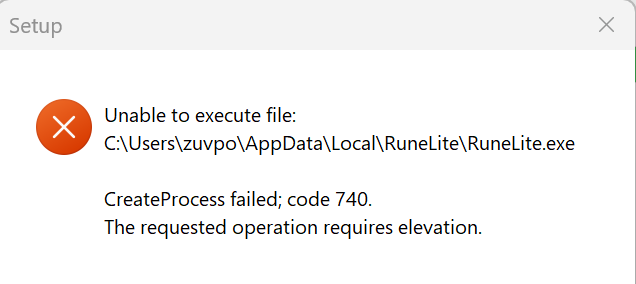
I reinstalled runelite but the configure shortcut won't launch still, does anyone know why?
haughty pumiceBOT
run this command in cmd, then show us the displayed output through a screenshot.
"%localappdata%\runelite\runelite.exe" -c -v --console -- --debug
try this
magic kiln
I tried reinstalling it but it won't let me do that now for some reason https://i.imgur.com/3CdHo44.png
 zealous cedar
did you install runelite as an admin? dont do that
 dusk heron
I see that tasks tracker had the "unavailable" marking added in repo.
I read about the profile issue and I am fine with it. Is it possible to somehow bypass the "unavailable" mark?
leaden trail
No
dusk heron
Do you think it would be a viable improvement if it was possible to somehow bypass it in RL whilst letting me know that no support will be provided?
gilded kayak
well it freezes your client, so I don't see why we would want you to intentionally do that
solid mesa
dusk heron
Do you think it would be a viable improvement if it was possible to somehow bypa...
Probably not. People already don't read the warning "This plugin can freeze your client and make it unusable. We recommend not using it." then come here for support when their client is freezing. Also, some plugins are disabled because they are used for nefarious purposes which should not be allowed to be bypassed.
 potent raptor
@copper violet @weary summit Hi, I'm one of the task tracker developers, I want to fix the bug so we can get back on the plugin hub but can't recreate it. Would either of you be able to help with logs from the freeze/crash?
dusk heron
gilded kayak
well it freezes your client, so I don't see why we would want you to intentional...
I think that issue was limited to only a few people, not everyone. I do understand the support burden things brings though
gilded kayak
are you on mac or windows
solid mesa
potent raptor
<@129796253381951488> <@139053940003045376> Hi, I'm one of the task tracker deve...
Did you see this comment on github?
what's happening is:
When profiles are manually switched ClientThread::invokeLater is called at some point, allowing plugins to rely on it during startup without issue.
When profiles are auto switched ClientThread::invokeLater is never called. Plugins relying on it during startup will hang.
dusk heron
solid mesa
Probably not. People already don't read the warning "This plugin can freeze your...
I understand where you are coming from!
I guess from my viewpoint I would love if there was a greater granularity - there could be unavailable and e.g "unstable" marking - each serving its own purpose.
By the way I am not saying this must be implemented - just trying to understand sentiment if someone had a PR for this!
potent raptor
solid mesa
Did you see this comment on github?
> what's happening is:
>
> When profiles ar...
No I didn't, thank you! I wish they'd followed Adam's advice and raised the issue with us directly then maybe it could have been fixed a week ago 😩
 maiden parrot
gilded kayak
are you on mac or windows
maiden parrot
gilded kayak
are you on mac or windows
windows
mossy swan
dusk heron
I understand where you are coming from!
I guess from my viewpoint I would love ...
hub plugins are already considered unstable as is
gilded kayak
maiden parrot
windows
before i suggest you do something, did you make sure to restart the jagex launcher AND close it from the minimized icons

bottom right
maiden parrot
gilded kayak
before i suggest you do something, did you make sure to restart the jagex launch...
yea i restarted the jagex launcher, but not yet restart my pc, should i try to restart my pc ?
gilded kayak
it never hurts
maiden parrot
okay 😄
 halcyon thunder
My client closes/crashes without any warnings. Happened now couple of times, any ideas how to fix?
round jacinth
!logs might tell us
haughty pumiceBOT
To find the logs, you can do one of the following:
- If your client failed to open, click the
Open logs folderbutton. - Open the screenshot directory by right-clicking 📷
Camerabutton, navigate 1 directory up, then open logs folder. - Navigate to
%userprofile%\.runelite\logson Windows or$HOME/.runelite/logson Linux and macOS.
Upload the log files named client and launcher by dragging them to Discord. If there are files prefixed with jvm_crash dated from today, upload them too.
halcyon thunder
Are these the right logs?
leaden trail
You can try disabling Core Performance Boost in BIOS
halcyon thunder
Okay I'll do that, is there anything else in the logs that might indicate the problem?
leaden trail
It's a JVM crash that sometimes is fixed by disabling that, that's really all I know
Although this isn't entirely consistent with what I've seen before with that crash so I'm not sure
 golden knot
anyone know how to transfer all my plugins and stuff, i got a new pc logged into runelite but none of my settings are there
haughty pumiceBOT
 south kelp
Is anyone else having issues clicking leagues-specific items in their inventory? I tried on a fresh profile and this is still happening to me (restarted as well)
sec I'm restarting my cpu might be a weird glitch with my desktop
nvm it's working now. Mysterious issue 🤷
bleak dirge
Hey my client still just says loading please wait after trying everything when i click log in. Cleared my cache folder too any suggestions?
 calm belfry
the Discord Collection Logger plugin stopped working for my whole clan. Any idea as to why?
It stopped working after Dec 21, 2024
zealous cedar
it was last updated around then, Dec 19, so maybe it no longer works
 arctic hull
Woke up today to runelite having closed overnight, and closed again today after freezing for a few seconds, no jvm crashes from this year
zealous cedar
there are some types of crashes it wont write a jvm crash file for, they show up in the windows event viewer
arctic hull
found the errors, should I just copy/paste to here?
Think I can work it out actually, looks like a corrupted driver, ty 🙂
 calm rose
It looks like the Tasks Tracker plugin just got disabled remotely in my client due to a freeze having been found. Totally fair to disable new installs of it through the hub, but is there a way I can force-enable it locally in my install? I don't use the profile feature that I hear is at issue.
Apologies if this isn't the right place for this question, but this seemed like the closest fit.
zealous cedar
not without making your own client build with it
calm rose
Hm. Unfortunate - I'm not at my primary machine at this time, so I don't really have that capability until the start of the new year. Hopefully the plugin gets re-enabled before then, given how useful it is for the League!
Thanks for the quick response, though!
 worthy dune
Just reading some other folks talking about crashes similar to my experience, does overclocking end up causing a lot more crashes than normal?
I turned off GPU acceleration in runelite and that seems to have fixed most of my crashes
zealous cedar
ive seen overclocking cause jvm crashes before
magic kiln
The runelite (configure) thing just crashes and closes every time I try to open it, any ideas?
I just did a fresh install too
robust elk
hi, just wondering when i can see myyear summary in osrs? havent recivced an email?
mossy swan
!newplayer
haughty pumiceBOT
If you are new to OSRS, make sure to follow this excellent guide on OSRS wiki: https://oldschool.runescape.wiki/w/New_player_guide. You can also join the official OSRS Discord here: https://discord.gg/osrs
mossy swan
try asking in the official discord
 past leaf
ok
 obsidian hazel
im signed in on runelite. i had a bunch of settings set a particular way on my previous installation. how do i load these settings from the cloud
found it thanks
 livid aspen
Every time I afk log out, I am shown a list of worlds whereas I wanted it so im back to the main screen - its always been main screen but i guess fo ra couple of weeks i get a world list which i do not want how do i change that
 torn ermine
does anyone know if amd drivers ever got good or is 22.5.1 still the meta
round jacinth
You can try a higher version and check and roll back if it doesn’t
torn ermine
gotcha, man thats such a bummer
 wise holly

GitHub
Webapp with calculators, trackers, and other tools for Old School Runescape's seasonal Leagues game mode - osrs-reldo/os-league-tools
hey this plugin got taknen away after today's update
cant find it anymore
 runic arrow
I'm sorry I just cannot figure it out.. Since a few days my tooltip when hovering over skills doesn't show the remaining XP until the next level anymore.. Which plug-in adds / manages this? I must've accidentally toggled it but can't find it 😦
 solid mesa
wise holly
https://github.com/osrs-reldo/os-league-tools
solid mesa
wise holly
https://github.com/osrs-reldo/os-league-tools
Yes, it was disabled for causing freezes when switching profiles
wise holly
solid mesa
Yes, it was disabled for causing freezes when switching profiles
oh wow ok ,thanks
runic arrow
Configure XP Drops looks like this

 stone parcel
Maybe this

 humble pier
With the new "Tag Layout" that you guys added to Bank Tags plugin.
The plugin hub one has a fixed scroll bar for how big you make it
The base runelite one is just a massive scroll bar. Is this intended to changed? Its very aesthetically annoying
gilded kayak
it's not like that but we don't know why some people have that issue
none of us can replicate the huge scroll bar, when tab layout is enabled
 humble pier
gilded kayak
none of us can replicate the huge scroll bar, when tab layout is enabled
humble pier
gilded kayak
none of us can replicate the huge scroll bar, when tab layout is enabled

Its right here
from Adam
Its massive
gilded kayak
oh that
humble pier
Yeah
humble pier
Im not talking about Marnis stuck bar
gilded kayak
it's the best way to do it, the way btl did it looked better but sucked code wise iirc
humble pier
gilded kayak
it's the best way to do it, the way btl did it looked better but sucked code wis...
Welp back to the plugin hub one
My autism cannot handle it this way
😭
runic arrow
stone parcel
Maybe this
Thank you so much 😭 ❤️
 normal dawn
can you change the metronome sound with sound swapper?
round jacinth
no
normal dawn
ok thank you, if its not to much trouble could you explain why if it is no biggy I appreciate the response
solid mesa
Because sound swapper swaps in-game sounds. Metronome is another plugin so sound swapper isn't able to modify it
normal dawn
thank you for explaining it
oblique plume
idk why it wouldnt work
it just tell the game to play a sound
sound swapper sees the game try to play a sound and picks a different one
round jacinth
hmmm i thought it as its own sound but its not is it
round jacinth
normal dawn
thank you for explaining it
try swapping the IDs)
3929
3930
round jacinth
Yeah the metronome uses the same sounds, was worth a shot.
normal dawn
I appreciate the attempt
 dire grotto
 ornate kite
I had it but ended process and restarted the program
haughty pumiceBOT
@dire grotto To find the logs, you can do one of the following:
- If your client failed to open, click the
Open logs folderbutton. - Open the screenshot directory by right-clicking 📷
Camerabutton, navigate 1 directory up, then open logs folder. - Navigate to
%userprofile%\.runelite\logson Windows or$HOME/.runelite/logson Linux and macOS.
Upload the log files named client and launcher by dragging them to Discord. If there are files prefixed with jvm_crash dated from today, upload them too.
 wise kraken
Hello, im using a vpn and want to exclude runelite from this by using split-tunneling. I've added the jagex launcher as well as the runelite client but it still fatal errors on start-up. Is there another .exe that i have to add to the split-tunneling?
the error message is the one where it says it cant connect to a required server.
zealous cedar
runelite doesnt work with split tunneling
wise kraken
Oof
wise kraken
zealous cedar
runelite doesnt work with split tunneling
Do you know of any work-arounds? because this would cause me to not be able to use nordvpn whilest playing runelite.
wise kraken
Thankyou
 ocean iron
My magic animations seem sort of 'off', like they're being interrupted way too easily or just generally not playing. I don't use magic often enough to know when it started, but I'm noticing it during leagues. Are there any settings or common plugins that are known to mess with magic animations?
charred wind
Leagues animation something, search for it
leaden trail
fixer, I think
ocean iron
charred wind
Leagues animation something, search for it
Hmm I found some reddit posts referencing it, but it doesn't seem to be on the plugin hub anymore 😦
charred wind
Search for it in the client or plugin hub
ocean iron
I did - no longer exists
at least I know it's just a leagues thing and not a problem with my client though, thanks
oblique plume
Jagex fixed it themselves so the plugin isn't required anymore
 wet roost
Just got a new laptop, signed into runelite but my settings didn't transfer over. How do I make this happen?
round jacinth
be sure you switch to the profile after
haughty pumiceBOT
 marsh zephyr
Hey yall. I'm having a bit of an issue, and was hoping someone could help me out. I'm sure this was asked a million times, but I got a new laptop for christmas today, and I'm trying to import my runelite profile from my old laptop to this one. The account ported over, but no plugins, tile markers, bank tags, etc.. Can someone please help me figure out how to get this fixed? If I did it one plugin at a time, i'd be reinstalling stuff for the next week and a half. I've looked online and couldnt find much of anything, other than different people all saying different things.
leaden trail
And then maybe
haughty pumiceBOT
 atomic sphinx
I've had 3 random runelite crashes happen in the past week or so, with no crash ever in the past year aside of that. Is there something done recently that could be causing that?
afaik I haven't added any plugins since
had a crash at ToA baba room, one at castlewars bank just now and another i cant recall precisely
zealous cedar
plugin authors can update their plugins without you doing anything
atomic sphinx
is there some way to send a file dump to help you guys?
to see what might cause it
zealous cedar
it depends on what kind of crash it is
atomic sphinx
just closes
zealous cedar
does it write a jvm crash log?
zealous cedar
check the logs folder
zealous cedar
you could upload it here, but we probably cant help with it
atomic sphinx
ah rip
A fatal error has been detected by the Java Runtime Environment:
EXCEPTION_ACCESS_VIOLATION (0xc0000005) at pc=0x00007ff9eb69c3ac, pid=8968, tid=7864
JRE version: OpenJDK Runtime Environment Temurin-11.0.21+9 (11.0.21+9) (build 11.0.21+9)
Java VM: OpenJDK 64-Bit Server VM Temurin-11.0.21+9 (11.0.21+9, mixed mode, tiered, compressed oops, g1 gc, windows-amd64)
Problematic frame:
V [jvm.dll+0x76c3ac]
No core dump will be written. Minidumps are not enabled by default on client versions of Windows
If you would like to submit a bug report, please visit:
https://github.com/adoptium/adoptium-support/issues
oh didnt expect it to blow up that much
marsh zephyr
Hey yall. so, i followed the guide about my issue I mentioned earlier, and, after downloading the entirety of .runelite and re-installing runelite, my plugins still arent there. can anyone direct me into getting this situated? I have no idea what I'm doing 😦
atomic sphinx
if that may give you any indication a full dump might help I can upload it to pastebin and give you the link
gilded kayak
marsh zephyr
Hey yall. so, i followed the guide about my issue I mentioned earlier, and, afte...
did u follow the second one dura posted
gilded kayak
atomic sphinx
if that may give you any indication a full dump might help I can upload it to pa...
you can just click&drag the file into discord
marsh zephyr
I followed what it said on FAQ's.
i copied the whole thing, well, it turned into a rar file, i emailed it to myself and downloaded it onto my new laptop
zealous cedar
atomic sphinx
if that may give you any indication a full dump might help I can upload it to pa...
this is just an excerpt of the logfile. it wont create a full dump without setting -XX:+CreateMinidumpOnCrash
haughty pumiceBOT
leaden trail
Make sure to follow that closely
marsh zephyr
Will do. I'll report back if I hae any issues. thank you so much, dura.
atomic sphinx
zealous cedar
this is just an excerpt of the logfile. it wont create a full dump without setti...
ah, so the 135 kB file still isnt a full minidump? 😮
https://pastebin.com/sEux2L2X ^passcode in deleted msg above
Pastebin
Pastebin.com is the number one paste tool since 2002. Pastebin is a website where you can store text online for a set period of time.
leaden trail
Just drag the file to Discord
atomic sphinx
wasn't sure if it could contain any private info or if ppl would want to open actual files
zealous cedar
yeah, this is a compiler crash. i dont really have any reason to believe this isnt a hardware issue. if you really think this is a runelite bug, getting a minidump from a debug build of the jvm would be the most useful thing to help me debug the jvm
atomic sphinx
leaden trail
Unless your windows username is your full SSN, no
atomic sphinx
aight
atomic sphinx
zealous cedar
yeah, this is a compiler crash. i dont really have any reason to believe this is...
the pc itself is about 2 years old, so I dont think RAM etc should have given out yet
could you tell me how to get the debug build of the jvm?
zealous cedar
https://cdn.discordapp.com/attachments/359016743802503178/1143287606206021653/jdk-11.0.208-fastdebug-win-x64.zip?ex=676dc30e&is=676c718e&hm=e892114d7eda4b7e6d3ff183f4f1294d06d7a27a89ec175fc0d6f5a365c2c7ae& I have this one I made awhile ago, it is 11.0.20, and you have 11.0.21, but it is close
atomic sphinx
damn my antivirus and chrome's alarm belsl went off on downloading that file XD
how do I run it? I cant find an .exe or other obvious file to clic kto run
or will this just simply provide with more info when another crash happens?
zealous cedar
you would have to replace the jre that the launcher uses with it
marsh zephyr
It worked! Thank you guys! Y'all are awesome ❤️
atomic sphinx
alright
marsh zephyr
I've been trying at this all day 🥲 shoulda just came here first lol
Happy (insert whatever holiday you celebrate here)! Thanks again 🙂
atomic sphinx
might be an idiot when it comes to this 😛 where do I find the jdk/jre file in most cases?
zealous cedar
in localappdata\runelite\jre
atomic sphinx
if I just copy that into explorer navigation bar, it always just opens a chrome tab
zealous cedar
it is probably better if you just dont attempt this, it requires good knowledge of computers
 warped comet
experiencing a new bug. the top left portion of my screen becomes non-interactable. the custom runelite cursor I have also changes to system default.
This seems to happen randomly, while PvMing and while banking. A client restart fixes the issue but it occurs shortly after.
I haven't changed anything with my plugins recently
this green region is like a void zone https://i.imgur.com/JwoSEbP.png





wait this is happening on chrome too. nvm not a runelite bug
crisp dune
Are your windows notifications in the top left corner?
 sturdy island
does anyone know why the alch blocker doesnt work?
haughty pumiceBOT
Get support for the Alch Blocker Plugin Hub plugin here: https://runelite.net/plugin-hub/show/alch-blocker.
You can also find the support link by searching for the plugin in the Plugin Hub panel and clicking the ? button on the plugin, or by right-clicking the plugin in the plugin panel and clicking the Support menu option.
 fallow igloo
sturdy island
does anyone know why the alch blocker doesnt work?
fallow igloo
sturdy island
does anyone know why the alch blocker doesnt work?
I found that the Normal Ancient Teleports plugin was breaking my alch blockers for whatever reason.
sturdy island
fallow igloo
I found that the Normal Ancient Teleports plugin was breaking my alch blockers f...
i turned it off, didnt work
gilded kayak
u have to restart the client after you turn it off
disabling* it doesn't un-break it
the same issue happens for no bad alchs
 tame pier
Hi was wondering why the message “this program does not support the version of windows your computer is running” pops up
I have windows 11 and downloaded the 64bit
gilded kayak
download the arm one
 polar crypt
I exported my Loot-Tracker loot from the website onto my Desktop on my new PC, where do I put the JSON file exactly?
solid mesa
You can't