#support
1 messages · Page 52 of 1
 gilded kayak
 quaint creek
noworries
 round jacinth
and when you turn off status bars the item stats works? you didn't show that
you keep saying status bars is why it's not working
 oblique plume
i dont see anything happening here
round jacinth
that's sorta the issue?
quaint creek
oh no, that was a separate issue.
but yeah something not happening is definitely the issue
round jacinth
oblique plume
i dont see anything happening here
they have item stats to show what an item does on hover over but nothing is showing on the items
oblique plume
ok so they took two videos and one ofthem doesnt show anything
quaint creek
shows on equippables like the shiled but not on consumeables
 haughty pumiceBOT
To find the logs, you can do one of the following:
- If your client failed to open, click the
Open logs folderbutton. - Open the screenshot directory by right-clicking 📷
Camerabutton, navigate 1 directory up, then open logs folder. - Navigate to
%userprofile%\.runelite\logson Windows or$HOME/.runelite/logson Linux and macOS.
Upload the log files named client and launcher by dragging them to Discord. If there are files prefixed with jvm_crash dated from today, upload them too.
quaint creek
oblique plume
your sunlit bracers are breaking it
quaint creek
the ones i dont have?
oblique plume
or actually this might be because you have nothing equipped on your character at all
quaint creek
oh shit
oblique plume
and now kids this is why we null check things
quaint creek
works when i equip something
gilded kayak
oblique plume
and now kids this is why we null check things
noidontthinkso
oblique plume
i think for this specific problem its happened 3 times now
gilded kayak
well where's our test to prevent it
 deep epoch
friends
deep epoch
when I turn on my runelite
oblique plume
its done this multiple times before
deep epoch
It is wrong size
and I have to manually move size 1 up
and then 1 down
for it to resize
can this be corrected for me
or no
round jacinth
are you sizing it and then snapping it to a corner?
quaint creek
and now it works even when everything is unequipped. Well thats today for strange bugs. Thanks!
oblique plume
yes because once something is put on the container stays around
but if nothing is ever on then there is no need to make the container
so when we look for it its no where to be found
deep epoch
I need the launcher to launch my client on floating
but idk how to make the client do that
oh maybe I can add a rule on dwm
oh nvm I already had that
I have to resize it each time
it is so sad
 random ruin
 round jacinth
well reloading client typically is the fix
round jacinth

 distant tangle
Is there a way to turn off/ filter out Leagues level ups/ achievements in Clan Chat ? 🤔
round jacinth
i think a clan setting can change it
but a leader must change it
otherwise golden gods reign supreme and spam with their 50m construction in 17 minutes of work
gg
oblique plume
I think there's hub plugins that can too
 vital prairie
What is the purpose/function of anti aliasing within the GPU plugin? None make an impact
oblique plume
To anti alias
vital prairie
If it did, edges would appear smoother. No setting makes a difference
 spark mason
I have to keep GPU off until it's properly fixed. When i'm in resizeable mode and not in full screen, all of the interfaces have this weird/annoying flicker that is only fixed by turning off the gpu.
If I'm in resizeable-fullscreen then the interfaces don't flicker. The log-in screen also has a flicker.
vital prairie
oblique plume
To anti alias
Thank you for providing the action and definition of anti aliasing instead of why it makes no changes.
 tribal marlin
hi all, ive had new internet installed (cable to fibre) yesterday. And it seems my RL isnt appreciative i DC regularily, sometimes fully out of the game and sometimes the game recovers but i am unable to do anything for a solid couple seconds. Ping and Latency seem stable with the plugin that tracks it, so i am trying to find what else could be causing it. Any ideas?
Heres what ive tried so far;
-> Turn off ivP6 on PC (did not fix) (also bootstrap would not load)
-> Turn on ivp6 on PC and on Router (did not fix)
-> Turn off world hopper plug in ( (did not fix)
-> Try running on just the OSRS vanilla client (did not fix)
oblique plume
most people think it doesnt do anything but it does
the other few are actually just overriding the value with their gpu driver
 willow bone
https://gyazo.com/ac054f10b64dd40da657a1c000ba44aa
Is this not correct? trying to load hub
 haughty pumiceBOT
We don't provide builds of pluginhub plugins for snapshot versions. Usually you can pass -Drunelite.pluginhub.version=<current RL version> as a VM option to load the plugins built against the release into your build, which will work if there are no ABI changes. If there are ABI changes, build the plugins yourself and place them into the sideloaded-plugins directory when running in developer mode.
 torn girder
help!!! help!!! how do i drag this box higher!!!!
help!!!! @haughty pumiceadam help!!!!
torn girder
that just resets the position
 daring heart
playing on linux has an audio issue?
round jacinth
I saw an overlay moving and figure you didn’t know how to move it home
torn girder
stop bounding my boxes!!!
let the boxes be free!!!
let me think outside the box!!!
round jacinth
I think there is an invisible thing there that’s preventing it
gilded kayak
ya its probably the xp drops
 viscid lantern
this thing 
 torn girder
new idea: golden interfaces. sometimes when getting an interface it is 10x more respectful of the user intentions and lets u move it anywhere u want
torn girder
viscid lantern
this thing <a:NODDERS:788415598290927666>
yeah but why!!!!
viscid lantern
You would have to ask the widget they have free will
torn girder
adam!!!!! help!!!!!!!! fix it!!!!!!!!!!!!!!!!!!!!!
 zealous cedar
!!!!!!!!
haughty pumiceBOT
!!!!!!!! command not found!
 dusk ember
Hey. I'm having issues loging in for some reason, client is loading up and then freezes and I can't get in-game. I was using it earlier today and it was working fine. Any ideas what might cause the issue? I have tried reinstalling it and the same problem occurs.
zealous cedar
it might be a pluginhub plugin crashing. try using safe mode.
 knotty snow
@zealous cedar, I need mental support due to how clean the new boss icons are, good god.. Whoever was responsible for them is the absolute MVP, make sure they know they're loved!
knotty snow
Oh really?! god I love them
zealous cedar
and i guess theyre on mobile too
 prime sparrow
any news on the region lock plugin?
dusk ember
zealous cedar
it might be a pluginhub plugin crashing. try using safe mode.
Thanks!
 proper pasture
Hi, even after changing to safe mode, it is still crashing
 rough hemlock
Anyone else notice that the Dragon Axe (or) Trailblazer recolor no longer shift-click equips when in the bank?
It appears none of the trailblazer recolored items are working
Just tried with harpoon and pickaxe and they don't either
 buoyant garnet
whats wrong with my runelite?

if i uninstall runelite, then reinstall
do the plugins wipe?
rough hemlock
If you log in to Runelite up at the top then no, they'll stay
That green box with arrow at the top by minimize/max and exit
buoyant garnet
rough hemlock
If you log in to Runelite up at the top then no, they'll stay
wdym log in up the top
oh
is there any reason it stays stuck here for a while?

and then when it launches, runelite is fked
 leaden trail
buoyant garnet
do the plugins wipe?
leaden trail
buoyant garnet
do the plugins wipe?
No
 buoyant garnet
rough hemlock
buoyant garnet
rough hemlock
did that
am having problems with the client, i guess time to reinstall and hope it fixes
cus wtf is that
 rough hemlock
Yours is green so you haven't logged in
leaden trail
A reinstall is unlikely to resolve your issue
buoyant garnet
leaden trail
A reinstall is unlikely to resolve your issue
then?
why the sudden fk up
leaden trail
It looks like you just have connection issues
haughty pumiceBOT
open command prompt, type this in: ping -t oldschoolXXX.runescape.com where the XXX is your world minus 300, for example world350 = 50
leaden trail
You can try that for the world you were trying to connect to
 rough hemlock
oh that's just the blind man mode plugin
buoyant garnet
hell yeah
buoyant garnet
rough hemlock
And try turning off any HD plugins
i cant survive without 117hd
rough hemlock
Rip
At least test it
Process of elimination
The 117, Animation Smoothing, GPU any plugins like that
leaden trail
rough hemlock
Try reinstalling
Can you stop recommending things that aren't going to help please
haughty pumiceBOT
To enable safemode
Windows
Run the RuneLite (configure) shortcut from the windows start menu
Tick the Safe mode box, save, launch RuneLite.
Mac
In Terminal, run
/Applications/RuneLite.app/Contents/MacOS/RuneLite --configure
Tick the Safe mode box, save, launch RuneLite.
leaden trail
Launch in safe mode and go from there^
rough hemlock
How the fuck is that not helping when his game screen is black, but it shows everythig else
gilded kayak
because most people need to figure out what's causing it themselves, as they wont listen to us
rough hemlock
Lol
gilded kayak
as that guy just said, he can't live without 117 but it very easily could be the "problem" due to gpu drivers
rough hemlock
And thats exactly what I said
gilded kayak
yeah after you told him to reinstall for no reason
rough hemlock
Obviously thats mre likely to help than safemode
rough hemlock
I seconded someone else saying reinstall
gilded kayak
turning it off means nothing
rough hemlock
holy fuck yall dumb
buoyant garnet
gilded kayak
as that guy just said, he can't live without 117 but it very easily could be the...
i have had that plugin for over a year
buoyant garnet
downloading runelite 🙂
gilded kayak
idk why you would need to download runelite when you already have runelite
but sure why not
buoyant garnet
trying out safemode..
rough hemlock
Did you at least go to the official OSRS site or the link here in the disc to download it?
buoyant garnet
rough hemlock
Did you at least go to the official OSRS site or the link here in the disc to do...
the link from runelite where i logged in
am able to log in in safe mode but worlds dont load
 gilded kayak
that one is internet
the in-game world hopper comes from Jagex
many people have been reporting the latest GPU drivers are causing them issue
buoyant garnet
i dont think my wifi s bad
gilded kayak
i didn't say it was bad
i said it was having a problem loading the in-game world hopper
rough hemlock
Stop suggesting stuff that won't help felanbird
buoyant garnet
 gilded kayak
that means nothing
buoyant garnet
now do i just sleep and hope it fixes it self? lmao
gilded kayak
the internet is not an on or off thing
no
unless you HAVE to play the game with the in-game world hopper
and can't use our sidebar one instead
buoyant garnet
now aussie worlds are loading
 buoyant garnet
what does safe mode even do?
buoyant garnet
gilded kayak
double-click any of the worlds
it does work
but i want to play with my plugins
not raw
gilded kayak
turns off your hub plugins to help figure out the problem
yes that's fine
this is to show you that a plugin is causing your issue
gilded kayak
gilded kayak
many people have been reporting the latest GPU drivers are causing them issue
as I mentioned here
the latest GPU drivers for a bunch of GPU's are causing people issues
buoyant garnet
gilded kayak
as I mentioned here
where are the reports?
gilded kayak
u want me to go through and find others reporting it first
what I was going to suggest which is much more useful, is click the 🔧 ->  and
and new profile button
double-click to swap to it, you can tell you are on that profile because the bar to the left will be orange
then close the client, start it normally outside of safe mode, and then turn on GPU or download 117
close and re-open the client one more time, and see if your problem still happens
if it doesn't, then luckily your issue is not a GPU driver version, and it's just another plugin you installed from the 
if it does then we will have shown it's the plugins that use your GPU
and then I would say "check if you are on the latest GPU drivers, if you are downgrade, if you're not, upgrade"
buoyant garnet
gilded kayak
then close the client, start it normally outside of safe mode, and then turn on ...
outside of safemode, you mean turn it off?
gilded kayak
turn it on outside of safe mode, since you can't in safe mode
gilded kayak
buoyant garnet
where are the reports?
#support message #support message #support message here are some of the people reporting their recent gpu driver versions are causing them issues
those are just the ones I interacted with
buoyant garnet
thx for the help but its stuck at this, then will probably black screen soon, its 5am here, i gotta sleep, will solve this tmrw hopefully

and yeah it went black
Is it 117hd thats causing problem for others or GPU plugin? Or both?
gilded kayak
probably neither
buoyant garnet
Yeah..
gilded kayak
did you check if you are on the latest GPU driver version
buoyant garnet
gilded kayak
did you check if you are on the latest GPU driver version
Didn’t, but I was literally playing 1h ago
Then it froze
I’ll check it out tmrw if it still has same problem i guess
 simple oar
when my hp is low my screen flashes red, what is the plugin that does that?
oblique plume
idle notifier
simple oar
i turned that off and its still happening
oblique plume
then its some hub plugin
 atomic hamlet
when i set bank tags and set my inventor it frequently resets. why?
let me send pics...
i need it to stay like this

but it changes to this

why?
it wont let me reset it, white arrows do not change it
atomic hamlet
how do i get in contact
haughty pumiceBOT
Support for hub plugins should be directed to the author of the plugin.
You can find the support link by searching for the plugin in the Plugin Hub panel and clicking the ? button on the plugin, or by right-clicking the plugin in the plugin panel and clicking the Support menu option.
 vast bone
atomic hamlet
how do i get in contact
vast bone
atomic hamlet
how do i get in contact
you're not using inventory setups
unless something is broken with BTL
 onyx flax
Never had issues with runelite but as of yesterday the last 2 weeks of plugin settings, tile markers, loot tracker aso were reset
 merry wolf
buoyant garnet
thx for the help but its stuck at this, then will probably black screen soon, it...
merry wolf
buoyant garnet
thx for the help but its stuck at this, then will probably black screen soon, it...
i have same issue 🙂
 jolly stream
built a brand new pc, and my runelite (fresh account no plugins) still keeps timing out and causing me to lag in game for 1 tic very often i dont know what else to do. it does not happen on HDOS
 zealous cedar
runelite can't cause network lag
jolly stream
i dont have the lag on another client,
zealous cedar
it doesnt matter - runelite cant cause network lag.
jolly stream
so can you help me troubleshoot why its happening only on runelite
zealous cedar
use safe mode. if it still happens in safe mode, get a recording of it.
 ornate kite
my runelite crashed
haughty pumiceBOT
To find the logs, you can do one of the following:
- If your client failed to open, click the
Open logs folderbutton. - Open the screenshot directory by right-clicking 📷
Camerabutton, navigate 1 directory up, then open logs folder. - Navigate to
%userprofile%\.runelite\logson Windows or$HOME/.runelite/logson Linux and macOS.
Upload the log files named client and launcher by dragging them to Discord. If there are files prefixed with jvm_crash dated from today, upload them too.
buoyant garnet
merry wolf
i have same issue 🙂
Gg 😂 did u fix it?
 clear kestrel
ornate kite
clear kestrel
ornate kite
yeah mines fucked
how do u use safe mode\
2024-12-11 17:38:27 AEST [Map Loader] ERROR injected-client - Client error: map loading
java.nio.BufferOverflowException: null
at java.base/java.nio.Buffer.nextPutIndex(Unknown Source)
at java.base/java.nio.DirectIntBufferU.put(Unknown Source)
at info.sigterm.plugins.gpuzbuf.GpuIntBuffer.put22224(GpuIntBuffer.java:70)
at info.sigterm.plugins.gpuzbuf.SceneUploader.uploadModelScene(SceneUploader.java:711)
at info.sigterm.plugins.gpuzbuf.SceneUploader.uploadZoneRenderable(SceneUploader.java:414)
at info.sigterm.plugins.gpuzbuf.SceneUploader.uploadZoneTile(SceneUploader.java:324)
at info.sigterm.plugins.gpuzbuf.SceneUploader.uploadZoneLevelRoof(SceneUploader.java:226)
at info.sigterm.plugins.gpuzbuf.SceneUploader.uploadZoneLevel(SceneUploader.java:181)
at info.sigterm.plugins.gpuzbuf.SceneUploader.uploadZone(SceneUploader.java:137)
at info.sigterm.plugins.gpuzbuf.GpuPlugin.loadScene(GpuPlugin.java:1631)
at rl3.pa(rl3.java:18311)
at rl3.run(rl3.java:25905)
at java.base/java.util.concurrent.Executors$RunnableAdapter.call(Unknown Source)
at java.base/java.util.concurrent.FutureTask.run(Unknown Source)
at java.base/java.util.concurrent.ThreadPoolExecutor.runWorker(Unknown Source)
at java.base/java.util.concurrent.ThreadPoolExecutor$Worker.run(Unknown Source)
at java.base/java.lang.Thread.run(Unknown Source)
2024-12-11 17:38:28 AEST [Client] ERROR injected-client - Client error
java.lang.NullPointerException: null
at info.sigterm.plugins.gpuzbuf.GpuPlugin.swapScene(GpuPlugin.java:1818)
at client.jm(client.java:19546)
at my.ks(my.java:12466)
at client.bu(client.java:1140)
at bo.qn(bo.java:391)
at bo.on(bo.java)
at bo.run(bo.java:60039)
at java.base/java.lang.Thread.run(Unknown Source)
 mossy swan
how are you using experimental gpu?
mossy swan
oh i see adam updated it last night
anyway that’s error from it, so either report it or turn off the plugin
haughty pumiceBOT
Get support for the GPU (experimental) Plugin Hub plugin here: https://runelite.net/plugin-hub/show/gpu-experimental.
You can also find the support link by searching for the plugin in the Plugin Hub panel and clicking the ? button on the plugin, or by right-clicking the plugin in the plugin panel and clicking the Support menu option.
 cold bough
 tribal marlin
hi all, ive had new internet installed (cable to fibre) yesterday. And it seems ...
tribal marlin
tribal marlin
hi all, ive had new internet installed (cable to fibre) yesterday. And it seems ...
hi all, any ideas :)? Thanks
leaden trail
tribal marlin
hi all, any ideas :)? Thanks
I don't think ping grapher is necessarily the most accurate plugin so I wouldn't be super reliant on it to diagnose anything
You can try this thing below for the world you're connected to when you have issues to have a more accurate representation
haughty pumiceBOT
open command prompt, type this in: ping -t oldschoolXXX.runescape.com where the XXX is your world minus 300, for example world350 = 50
tribal marlin
leaden trail
I don't think ping grapher is necessarily the most accurate plugin so I wouldn't...
I have tried this in bios aswell 🙂 no issues, tried a UK server and a 'Na server
leaden trail
What I just mentioned has nothing to do with bios
tribal marlin
no sorry cmd prompt
im not very good with pcs 🙂 a friend helped me do exactly what you just mentioned 🙂
i read above about a lot of ppl having gpu issues
leaden trail
Leave it running and send a screenshot of what it shows when you have a DC
tribal marlin
so i have now tried updating my graphics card, so far (last 10mins) it seems to have helped
will do
leaden trail
GPU shouldn't have any effect on your connection


 dark patio
How can I view my loot tracker online? The link on the runelite website for the online loot tracker just returns me to the main download runelite page every time
tribal marlin
leaden trail
GPU shouldn't have any effect on your connection
weird thing is; i am now running 117 hd (i usually dont) and now i have been able to play for an hour+ without a dc
Without 117 it would be as frequent as every couple minutes
 solid mesa
dark patio
How can I view my loot tracker online? The link on the runelite website for the ...
dark patio
solid mesa
https://runelite.net/account/loot-tracker
solid mesa
dark patio
How can I view my loot tracker online? The link on the runelite website for the ...
dark patio
solid mesa
https://runelite.net/account/loot-tracker

Just brings me to this every time
solid mesa
I don't know about the mobile UI. But I'd guess you aren't logged in and need to open the hamburger menu at the top right to login?
buoyant garnet
gilded kayak
did you check if you are on the latest GPU driver version
i came back frmo work and it is fixed, idk what issue it was tho
zealous cedar
ornate kite
2024-12-11 17:38:27 AEST [Map Loader] ERROR injected-client - Client error: map ...
If you can figure out how to reproduce gpu-experimental crashing I am interested in that
dusk ember
Hey, I've been having troubles with my client recently and one of the issues is that I can't see my installed plugins, and it's stuck on this screen saying "loading", what's the solution for this issue?
 haughty pumiceBOT
@dusk ember To find the logs, you can do one of the following:
- If your client failed to open, click the
Open logs folderbutton. - Open the screenshot directory by right-clicking 📷
Camerabutton, navigate 1 directory up, then open logs folder. - Navigate to
%userprofile%\.runelite\logson Windows or$HOME/.runelite/logson Linux and macOS.
Upload the log files named client and launcher by dragging them to Discord. If there are files prefixed with jvm_crash dated from today, upload them too.
dusk ember
dark patio
solid mesa
I don't know about the mobile UI. But I'd guess you aren't logged in and need to...
When I sign in and follow the link to accounts page it brings me back to same page as that screenshot again.
solid mesa
Not sure, I logged in on my iPhone browser and it works fine
round jacinth
dusk ember
i don't see what is wrong with those logs, it's loading the hub i think
 obsidian palm
 topaz quartz
having proplom with equipment inspecter have to keep cutting of and off and still not working right
haughty pumiceBOT
Get support for the Equipment Inspector Plugin Hub plugin here: https://runelite.net/plugin-hub/show/equipment-inspector.
You can also find the support link by searching for the plugin in the Plugin Hub panel and clicking the ? button on the plugin, or by right-clicking the plugin in the plugin panel and clicking the Support menu option.
haughty pumiceBOT
 earnest spade
Does anyone know if I can make the sidebar UI bigger in size, struggle to read some of the text sometimes
 oblique plume
you can use the scale option in here
haughty pumiceBOT
earnest spade
Ahh tysm exactly what I was looking for!
 cunning gazelle
Question, I've took "https://github.com/runelite/example-plugin" and made a plugin for myself. Everything works fine, and I can run it without Intellij. However, I'm wanting to compile this into a jar to throw the file into the plugins directory if possible without having to recompile the whole RuneLite project. What would be the steps to compile this? I tried compiling using artifacts and putting it into the directory but RuneLite didn't detect it.
round jacinth
if you get it onto the hub you wouldn't have to worry about this, you need to run either dev mode or run shadow jar for the plugin to run for you i think
which you currently are doing
tribal marlin
tribal marlin
weird thing is; i am now running 117 hd (i usually dont) and now i have been abl...
now with 117 aswell after a couple hours break, still pinging the same world, still nothing out of the ordinary on those pings
 balmy karma
Would anyone be able to help me diagnose why my client is crashing constantly 😦
Getting a bit frustrated if I need to turn off any plugins it's no issue been trying to troubleshoot but am just severely lacking in the knowledge department
solid mesa
I'm not sure if it's the cause of your crashing but Steps Per Clue is spamming your log with a ton of errors. I would try turning that off
balmy karma
solid mesa
I'm not sure if it's the cause of your crashing but `Steps Per Clue` is spamming...
Will give it a try, thanks a ton
 opal stream
strange question, but sometimes when I log in NPCs are missing - i.e. today when I logged in Guildmaster Jane wasn't appearing in the farming guild, but when I logged out and back in she was visible again - is that potentially RL or a main Jagex issue
 crisp dune
it's probably a hub plugin issue
haughty pumiceBOT
Many plugins from the pluginhub break the client in subtle or not-so-subtle ways, including causing issues like client freezes. We do not support pluginhub plugins because we do not make or quality control them, and do not recommend their use.
Run the RuneLite (safe mode) shortcut, or with a Jagex account, first run the RuneLite (configure) shortcut and tick the Safe mode box, then launch RuneLite via the Jagex launcher.
This temporarily disables the GPU plugin and all hub plugins which will allow you to confirm the issue is caused by one of those plugins and isn't a core RuneLite issue.
If the issue is caused by a hub plugin, you should isolate which plugin it is and then uninstall the plugin.
opal stream
Ok, good to know... yesterday the whole crafting guild wasnt there LOL
ornate kite
is there any way to use this plugin or enable ctrl+v for login use?
 obsidian sluice
Can i type bank pin on keyboard ?\
ornate kite
i found a keypassx plugin but it fails to launch

GitHub
Open source Old School RuneScape client. Contribute to runelite/runelite development by creating an account on GitHub.
ornate kite
obsidian sluice
Can i type bank pin on keyboard ?\
i like jokes but ive played this game for almost twenty years and also do work for gentoo linux
can it be all business please? :(
solid mesa
obsidian sluice
Can i type bank pin on keyboard ?\
Setting in the Bank plugin
obsidian sluice
solid mesa
Setting in the `Bank` plugin
Does this allow me to type on the keyboard?
ornate kite
solid mesa
Setting in the `Bank` plugin
thanks found the setting :D
solid mesa
obsidian sluice
Does this allow me to type on the keyboard?
Yes
obsidian sluice
What is the name of the program?
ornate kite
Bank
click the cog on Bank
or the cog on Login-Screen
allows you to change the background and enables ctrl+shift+v
bye everyone thanks for the sorta-help
round jacinth
o they left immediately
obsidian sluice
ornate kite
click the cog on Bank
Do you mean that?


 round jacinth
obsidian sluice
Do you mean that?
round jacinth
obsidian sluice
Do you mean that?
the person left
obsidian sluice
ty
 zenith iron
How do I log into an alt account that is not on a jagex account, everytime I open runelite from the start menu / desktop icon then it's already logged into my jagex account ( 1 click login )
I'd like to use a email login alt
 stone parcel
You are just launching the Runelite.exe, and its showing your Jagex account?
zenith iron
exactly
haughty pumiceBOT
To find the logs, you can do one of the following:
- If your client failed to open, click the
Open logs folderbutton. - Open the screenshot directory by right-clicking 📷
Camerabutton, navigate 1 directory up, then open logs folder. - Navigate to
%userprofile%\.runelite\logson Windows or$HOME/.runelite/logson Linux and macOS.
Upload the log files named client and launcher by dragging them to Discord. If there are files prefixed with jvm_crash dated from today, upload them too.
oblique plume
is that what it says to do
leaden trail
This is doing precisely what you told it to do
zenith iron
so how can I log into an account that is not a jagex account (email login)
leaden trail
Ask the people you got your cheats from
zenith iron
okay
Uninstalled it with Revo Uninstaller (registry aswell) and reinstalling helped, ty
haughty pumiceBOT
You've downloaded a fake client, and your account has been compromised. Remove the fake as soon as possible to minimise further damage.
The following actions should be performed from a secure computer or secure mobile device:
- Change your RuneScape password
- Remove and re-add Authenticator to RuneScape
- Change your RuneScape bank PIN
- Change your email's password
- Add 2FA to your email if you haven't got it enabled
- Check for any linked accounts by accessing the account settings page (https://www.runescape.com/account_settings)
Some fake clients also install malware, only a fresh install of your operating system can guarantee the total removal of any unwanted software.
You might also want to change any email password if you reused the same as your RuneScape account password.
Once your computer is secure, you should download RuneLite from the link available at the #welcome channel.
 maiden ferry
Hey there, Im having 2 issues that have popped up the last few days, wondering if anyone would have any ideas here.
First, my comma key randomly doesnt work in the chat box anymore. It works perfectly fine everywhere else, as you can see. but like 3-4 days ago it just stopped working. I didnt install any plugins that would change it. Ive gone through every plugin that lets me rebind keys and nothing seems to have overridden it. I can even do shift+, to do <, but no comma. Any ideas?
Second, and this might just be a game update/server thing, but today when I logged in every time I hover over a piece of food in my inventory, my prayer status bar disappears next to my inventory, as does the numerical values on the bars. Ive tried disabling everything I can think of and it still happens. The odd thing is its only on a leagues world. Main game seems to be fine, which leads me to think it might be a weird server thing

 haughty pumiceBOT
@maiden ferry If one of your keys isn't working in game, you've most likely bound it to a feature of a plugin. The Debug Helper hub plugin can show what keys are bound to what plugins.
round jacinth
maiden ferry
Hey there, Im having 2 issues that have popped up the last few days, wondering i...
equip a piece of equipment
there is a bug that snuck into release when your character has nothign on, it doesnt do healing stats
it's fixed next update
maiden ferry
round jacinth
equip a piece of equipment
Yup wow that fixed it, thanks
maiden ferry
haughty pumice
<@148583332257464320> If one of your keys isn't working in game, you've most lik...
huh... turns out it got bound to the ping option on the party plugin. Have no memory of doing that, dont even know the last time i used the party system, but that fixed it. thanks so much
 indigo swallow
Hello! My runelite client has started having massive stuttering issues when I enter my POH that don't go away until I close and re-open the client. This only started happening today after a Jagex launcher update. I also made a new runelite profile with default settings which didn't help. Here's a video:
zealous cedar
have you tried safe mode?
indigo swallow
Nope! How would I enable that?
haughty pumiceBOT
To enable safemode
Windows
Run the RuneLite (configure) shortcut from the windows start menu
Tick the Safe mode box, save, launch RuneLite.
Mac
In Terminal, run
/Applications/RuneLite.app/Contents/MacOS/RuneLite --configure
Tick the Safe mode box, save, launch RuneLite.
indigo swallow
Enabled safe mode, still stutters though :/
zealous cedar
can you get a recording of it from safe mode?
indigo swallow
I had it stuttering 10 minutes ago, leaving the game open while I set up my recording software to avoid capturing my whole desktop has made the stuttering stop even after re-opening it, so I don't know, if it happens again I'll post a video again. If you were just looking to make sure I had safe mode enabled, it looked the same as the other video with a (safe mode) in the window title.
Thanks for the help though, because apparently leaving the game open instead of closing it and restarting my computer resolved it, still isn't coming back after disabling safe mode
tfw turning it off and on again is the issue
 cursive hound
does anyone have a problem with runelite notifications opening script editor when they click on them? I am on a macbook pro m2
 sonic nimbus
Why do the boss highscores icons suck now?
 rain thistle
well one time i had to defrost shrimp in my mouth because my microwave was busted
leaden trail
The highscores panel uses Jagex's official icons now that those are a thing
 quiet crater
is the status bars plugin broken for anyone else? when i hover over food to heal it bugs the bars out

normally they look like this

doesnt show how much itll restore either, which is inconvenient to say the least
prayer pots work fine
 round jacinth
your character is naked probably
and if you equip something it will show up properly
a bug exists when your character has nothing equiped, it is fixed in next release
 rapid shadow
is dynamic inventory tags mistaking warped sceptre as a melee weapon for anyone else?
even when tagging it as a mage weapon
haughty pumiceBOT
Get support for the Dynamic Inventory Tags Plugin Hub plugin here: https://runelite.net/plugin-hub/show/dynamic-inventory-tags.
You can also find the support link by searching for the plugin in the Plugin Hub panel and clicking the ? button on the plugin, or by right-clicking the plugin in the plugin panel and clicking the Support menu option.
gilded kayak
it does look like the author has fixed that issue, but the update they submitted to us needs another change
which has not yet been resolved
 west spire
is it possible to change the scaling algo for the RL client itself? Some things get a bit squashed when configuring the client scaling:

or is there a certain multiple to go by to optimize the scaling?
 dire grotto
Not sure if I can word this any better but someone might be able to help? Having a small issue with runelite thats new for me.
If im typing say something to search on youtube, if i go idle in the game during that time (while typing) the computer sort of forces the typing to change from youtube search bar and continues in the game chat box without me clicking in the game? Was wondering what that might be and how to stop it? Thanks 🙂
mossy swan
probably notification causing runelite to take focus
check what this highlighted setting is set to

 mossy swan

 solar zephyr
Hello I tried to make a plugin and get this. How may I find this solution?
 leaden trail
Are you following the plugin hub guide?
I think the solution to this doesn't apply to the plugin template so I'm not sure you should even encounter it if you're doing things correctly
solar zephyr
I'll start the guide over to make sure I didn't skip something.
round jacinth
More than likely you should be following the hub build guide not the core client development guide.
 light trellis
is "release" being the default left click on bank fillers, a recent runelite or vanilla update?
 primal hollow
is there a plugin that highlights poison tiles for Vorkath?
oblique plume
vorkath does that for you
round jacinth
light trellis
is "release" being the default left click on bank fillers, a recent runelite or ...
Base client does that but it’s a left click that creates a right click menu to confirm I think?
 minor crane
my client just keeps closing down all the time? after like 3 mins of playing. have unistalled and re installed but still doing same..
haughty pumiceBOT
@minor crane To find the logs, you can do one of the following:
- If your client failed to open, click the
Open logs folderbutton. - Open the screenshot directory by right-clicking 📷
Camerabutton, navigate 1 directory up, then open logs folder. - Navigate to
%userprofile%\.runelite\logson Windows or$HOME/.runelite/logson Linux and macOS.
Upload the log files named client and launcher by dragging them to Discord. If there are files prefixed with jvm_crash dated from today, upload them too.
minor crane
doesnt fail to open, can go on it play it for 2mins then it just dissapears. just done it then again
round jacinth
can you provide the logs?
minor crane
just paste em in ere?
round jacinth
yes
round jacinth
remove/disable collectionlog plugin and see if it happens again? it's the only error i'm seeing
minor crane
in the client one?
round jacinth
it's from the hub
round jacinth
then reload and see if it crashes again
minor crane
ok, started yesterday wokred for a hour or so then did it again. seems to be on rn so well see. thanks
yeah just done it again
haughty pumiceBOT
@minor crane To enable safemode
Windows
Run the RuneLite (configure) shortcut from the windows start menu
Tick the Safe mode box, save, launch RuneLite.
Mac
In Terminal, run
/Applications/RuneLite.app/Contents/MacOS/RuneLite --configure
Tick the Safe mode box, save, launch RuneLite.
round jacinth
try safe mode
oblique plume
this looks like the hd plugin
minor crane
been using GPU and not hd
 minor crane
just delete it off? i do have to switch it to gpu when log in like.
have unistalled the 117 hd
round jacinth
then restart again just in case after uninstalling and double check that it's gone
oblique plume
it could be a general gpu problem
minor crane
will see how get on
round jacinth
okay so it seems you don't have write permission issues, thought maybe settings weren't being respected
minor crane
is that in general or on runelite? just shut down again
 gloomy oriole
can i get old hiscore icons somehow
minor crane
oblique plume
in general
Howd i go about that then
round jacinth
gloomy oriole
can i get old hiscore icons somehow
no
oblique plume
download a different driver and try it out
 oblique plume
a plugin
haughty pumiceBOT
Many plugins from the pluginhub break the client in subtle or not-so-subtle ways, including causing issues like client freezes. We do not support pluginhub plugins because we do not make or quality control them, and do not recommend their use.
Run the RuneLite (safe mode) shortcut, or with a Jagex account, first run the RuneLite (configure) shortcut and tick the Safe mode box, then launch RuneLite via the Jagex launcher.
This temporarily disables the GPU plugin and all hub plugins which will allow you to confirm the issue is caused by one of those plugins and isn't a core RuneLite issue.
If the issue is caused by a hub plugin, you should isolate which plugin it is and then uninstall the plugin.
 vapid nacelle
It was fine like, a few days ago. I'm not using any special plugins. Anyone with similar issues.
Safe mode is okay
 manic spear
Anyone else getting a hard freeze when they open the bank?
Not frequently. maybe a couple times a week
 fresh cosmos
hi @zealous cedar m . if i give you my ign, are you able to see which account i was logged into runelite under? i know you dont like getting push notifications, so im sorry 😦
oblique plume
they arnt linked like that
fresh cosmos
what isnt linked?
oblique plume
ign to rl account email
fresh cosmos
oh thats lame
viscid lantern
also being able to just get someones email by giving an ign sounds like a not so great thing
oblique plume
and also you can play on multiple rs accounts while being signed in to a single rl account
fresh cosmos
because i had all my plugins settings saved under one account, i just forget the account login and which google account i was using
please tell me theres hope
oblique plume
nope
zealous cedar
I cant tell whichaccount you were using
fresh cosmos
not even if i had my ign displayed in the top?
oh solved my own problem thanks brothers. you can view which accounts are used in a runelite account, by clicking your email in the top right of your runelite account
oblique plume
i thought you said you didnt have to email to sign in with
but youre already signed in???
viscid lantern
which account i was logged into runelite under
this is past tense

yes if you are signed in you can find the email you used under the  panel
panel
oblique plume
hes on the website
viscid lantern
ah then its top right
fresh cosmos
google saves which accounts im logged into
now my middle mouse isnt rotating the camera. i checked osrs settings, turn it off/on. still doesnt work. any known issues with this?
oblique plume
no
minor crane
oblique plume
download a different driver and try it out
updated all drivers and stuff. just shut down again pretty much straight away. opened the rs client thorugh jagex launcher and no shut down
oblique plume
have you tried 522.25 yet?
 brazen dirge
why does Hide others 2D no longer work for members in party
 lapis elm
use hide party members
brazen dirge
well i dont want to hide them completely
only their 2d
hiding 2d only seems to works if player is not in your party, not on your friends list and not in the same cc or fc as u
Im curious as to why it works that way and not just hides 2D for every player when you enable it
leaden trail
It might be an oversight, hide party members is pretty new
merry wolf
buoyant garnet
Gg 😂 did u fix it?
It got fixed i didn’t do anything
buoyant garnet
merry wolf
It got fixed i didn’t do anything
that makes both of us
round jacinth
What do you mean you can't right click?
fresh cosmos
earlier, i was bitching about being logged out of runelite, then i asked adam if he could see what account i was logged into, to get all my settings back, like my Game size and such. then, I cried about not being able to rotate the camera with m3 anymore, even after I tried reenabling m3 to control my camera setting, in the offical settings. now, i cannot right click anything in game...
unless i use the offical client but fuck that noise*
round jacinth
if you used the same pc for the last 2 years without reformatting it, you can find the email you used to use of you never nuked the .runelite folder
how many gmails do you have that you can't remember which one tho lol
anyways
fresh cosmos
a few
round jacinth
!safe to confirm it's not a plugin messing with ability to right click stuff
haughty pumiceBOT
safemode: To enable safemode
Windows
Run the RuneLite (configure) shortcut from the windows start menu
Tick the Safe mode box, save, launch RuneLite.
Mac
In Terminal, run
/Applications/RuneLite.app/Contents/MacOS/RuneLite --configure
Tick the Safe mode box, save, launch RuneLite.
round jacinth
you can find the emails you did use to use in .runelite/profiles
fresh cosmos
even if i use the Jagex Launcher?
round jacinth
yes
if your email you used to use was actively used prior to feb 2023
and you never nuked the folder, you'd know which email it was
 celest yew
https://i.imgur.com/JKTu5sz.png
where does this quest symbol come from? turned off a bunch of tog plugins and others and its still there lol
 round jacinth
i think it's the indicator for tears of guthix for where the xp will go
and if the icon is still there after disabling the plugin(s) that might do it, you may need to restart cause the plugin is not cleaing up it's edits to the skill page
celest yew
aahhh okay, ill try that
fresh cosmos
is there a setting that i can reenable holding down the m3 to rotate the camera? i reeabled it in offical osrs settings. only works in the default client
but default client is nowhere near peak osrs
 haughty pumiceBOT
Low Detail plugin causes some ground/roof textures to be missing or black. To solve this issue, disable Low Detail plugin.
fresh cosmos
how do i boot runelite in safe mode, through the jagex launcher?
haughty pumiceBOT
To enable safemode
Windows
Run the RuneLite (configure) shortcut from the windows start menu
Tick the Safe mode box, save, launch RuneLite.
Mac
In Terminal, run
/Applications/RuneLite.app/Contents/MacOS/RuneLite --configure
Tick the Safe mode box, save, launch RuneLite.
fresh cosmos
through the jagex launcher?
stone parcel
Okay.
fresh cosmos
...
leaden trail
It's the same
viscid lantern
just follow the instructions in that command
fresh cosmos
whats the difference between vanilla runelite and safemode?
fresh cosmos
oh fair thanks
round jacinth
Maybe the rsps you used to play broke your runelite 🙈
fresh cosmos
i may have but i had a lot of things i was trying ... remind me again. what was it that you suggested?
round jacinth
Scroll up
round jacinth
That was one thing. I said you can maybe find your email.
stone parcel
Did they ever look at the normal lost settings thing either? I saw them trying to find the account they synced to, but not sure if they ever looked for profiles2* files.
fresh cosmos
whats the path for the runelite installation?
round jacinth
That’s not where profile is located
!lost start here and find the original profiles folder if you have it. See if it has an email in it.
haughty pumiceBOT
fresh cosmos
i cant make sure im using the correct account as i do not know which account i was using beforehand
i have many gmail accounts
round jacinth
Okay you win
fresh cosmos
does it really not tell you which account is linked to a certain ip?
round jacinth
I’m not asking you to check every Gmail account you’ve got I’m asking you to check a folder to see if an email is listed
And you’re disinterested in seeing if that’s route for you
No. Adam said earlier he has no way to know
if you navigate to c:/users/yourname/.runelite if your runelite is older than 2023 Feb then you will have a profiles folder
Are you able to see if you do or not?
fresh cosmos
fuck
i had to reinstall the jagex launcher, reinstalling runelite
does that matter?
round jacinth
I give up o think
stone parcel
Just go to the folder and look.
fresh cosmos
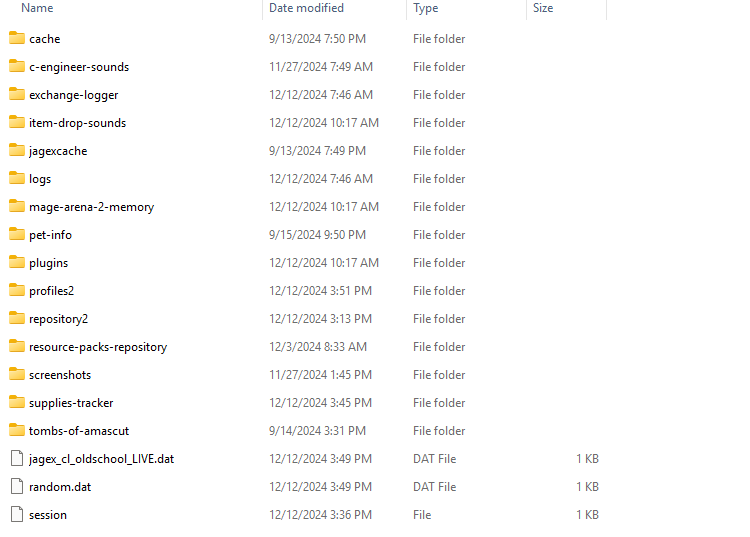 round jacinth
Then you’ve had a reset or didn’t have it since Feb 2023
Unlucky
Pick a Gmail and start from scratch, your old profile stuff is in profiles2 and you can start from there
fresh cosmos
gay
stone parcel
But you might find more than you expect in that profiles2 folder, expecially if you had those profiles on this PC.
fresh cosmos
fuck it ill just make a new account
round jacinth
Please at least try to refigure things out instead asking one configurable thing at a time here 😂
But we will be here lol
fresh cosmos
i reinstalled the jagex launcher, runelite, made a new google account. middle mouse button still isnt rotating camera.
stone parcel
And this is checked?
 deep epoch
good friends
when I start up runelite
on linux
I have to make width up one and then down one
to make it right size
can someone help make this step automatic
fresh cosmos
do you have a runelite account?
deep epoch
no
stone parcel
Heard you mention that, I don't have that issue, maybe your WM is doing it. Or if you are on wayland try on x11 or vice versa maybe.
deep epoch
oh maybe I add a config to make it the exact size on my wm
that sounds like a 200 iq idea
stone parcel
fresh cosmos
and i reenabled it
Maybe the "Debug Helper" plugin would show your MMB being bound to something else, we are sure the button functions on things other than RL right?
fresh cosmos
stone parcel
Maybe the "Debug Helper" plugin would show your MMB being bound to something els...
yes sir I can open linked in a new tab, on chrome using my MMB. i will try the Debug Helper plugin asap
uh
how do i see what my mmb is bound to? it worked this morning
my middle mouse button works in other programs btw. just not rl
and i cant right click shit
figured it out. 'Left Click Only ' plugin was the culprit. idk why i had that plugin installed. thanks for the help anyways friends
 tall coyote
Hey guys my friend is trying to download runelite (new player) and it will not download for him regardless of what we try
he is using the official link
when you choose runeelite in the jagex launcher it linked him to the website and when he hits download it says "unkown file" and sits at 0b and wont move
i did it on my machine and it downloaded runelite setup immediately
leaden trail
I would have your friend come in here and talk to us directly
 mossy swan
probably whatever browser they are using is doing something very smart and trying to do a virus scan or something
stone parcel
Maybe whatever other Antivirus type stuff.
 flat perch
nah everything is turned off
stone parcel
For some people that's not enough, but probably a good step.
flat perch
ok we finally tried fire fox and it worked haha
 unborn ledge
Hi friends! Been using runelite for a few years now. For whatever reason it won't launch anymore.
I've tried to troubleshoot via the "troubleshoot compatibility" feature on windows and following the steps on github. Still having issues. I find that the only time runelite runs is when I use "troubleshoot compatibility" and test the program
haughty pumiceBOT
@unborn ledge To find the logs, you can do one of the following:
- If your client failed to open, click the
Open logs folderbutton. - Open the screenshot directory by right-clicking 📷
Camerabutton, navigate 1 directory up, then open logs folder. - Navigate to
%userprofile%\.runelite\logson Windows or$HOME/.runelite/logson Linux and macOS.
Upload the log files named client and launcher by dragging them to Discord. If there are files prefixed with jvm_crash dated from today, upload them too.
 toxic girder
I turned my ground markers plugin off and back on or something and all my existing ground markers got turned fully transparent. The tile i'm hovering over has a ground marker on it (hence the "unmark" options etc.) but you can't see it at all unless I change the colour

Is there a way to restore the colour to my tilemarkers without manually finding every one and changing their colour?
round jacinth
perhaps you imported some one else's tiles over yours?
toxic girder
I haven't imported anything since Leagues began and I'm on a separate profile for Leagues so I don't think it should be the case
maybe it was me messing around with the "full opacity" settings but the border itself has been changed, not just the fill
 tacit cedar
Hi, my runelite is crashing quite frequently. Can someone help me? I have some jvm crash logs, are they safe to post here? Thanks
leaden trail
Yup, go ahead
tacit cedar
leaden trail
tacit cedar
You can try disabling "Core Performance Boost" in BIOS
tacit cedar
Thanks I'll try that
 willow vault
the answers for the varrock museum quiz isn't being highlighted?
oblique plume
Is the puzzle plugin on
willow vault
oblique plume
Is the puzzle plugin on
thanks!
 sharp plume
Anyone mind helping me with my crashing? I think it was crashing my PC before, but now I've got it down to crashing the client.
haughty pumiceBOT
To find the logs, you can do one of the following:
- If your client failed to open, click the
Open logs folderbutton. - Open the screenshot directory by right-clicking 📷
Camerabutton, navigate 1 directory up, then open logs folder. - Navigate to
%userprofile%\.runelite\logson Windows or$HOME/.runelite/logson Linux and macOS.
Upload the log files named client and launcher by dragging them to Discord. If there are files prefixed with jvm_crash dated from today, upload them too.
sharp plume
leaden trail
If your PC was crashing it's likely something like a GPU driver
sharp plume
I reinstalled with the nvidia app and it crashed after a couple of seconds in the bank menu.
Also reinstalled integrated drivers yesterday because of the crashing. Was hoping the logs would have something useful.
stone parcel
Might be worth trying a handful of older driver versions.
sharp plume
Nuking Runelite it is! I'm not having an issue with anything else on my laptop.
stone parcel
Maybe test safe mode first to see if its caused by a plugin then.
haughty pumiceBOT
To enable safemode
Windows
Run the RuneLite (configure) shortcut from the windows start menu
Tick the Safe mode box, save, launch RuneLite.
Mac
In Terminal, run
/Applications/RuneLite.app/Contents/MacOS/RuneLite --configure
Tick the Safe mode box, save, launch RuneLite.
stone parcel
But I don't think nuking RL is going to do much. 🤷
sharp plume
i get told i cant log in that way when i try that method in the launcher.
leaden trail
Safe mode shouldn't affect login in any way
fresh cosmos
is there a way to get my old bank tag layouts, from earlier today? i uninstalled the plugin my accident, and it would be a pain in the nuts to replace everything back to the correct order:/
leaden trail
deleting and resending the same message multiple times isn't going to accomplish anything
oblique plume
You won't like the answer
fresh cosmos
give it to me straight, alex
oblique plume
Uninstalling doesn't affect settings
fresh cosmos
shiet
 willow agate
Does the custom sound notification not work anymore? i've tried adding a WAV file labeled notification.wav to the .runelite folder and it's not working any ideas?
nevermind fixed it
 chilly ibex
my runelite randomly started crashing ever since i started while guthix sleeps quest
 amber sedge
Does anyone know how to mute the gargoyle pet? Annoyance Mute isn't working with it for some reason. I wanna keep sounds on for star mining but it's making me want to blow my brains out
 weary tundra
There is a bug with Menu Entry Swapper at fairy ring ALR all abbysal guardians loses there option popup after first kill, at the moment its on leagues when Menu Entry Swapper is disabled option window is back
leaden trail
weary tundra
There is a bug with Menu Entry Swapper at fairy ring ALR all abbysal guardians l...
Turn off "Remove dead NPC menus" in Menu Entry Swapper
 last oxide
There seems to be a bug with the GPU plugin. I cannot login if it is enabled, the login process freezes and I need to force quit runelite. If I disabled GPU I can login and enable it ingame again.
last oxide
last oxide
There seems to be a bug with the GPU plugin. I cannot login if it is enabled, th...
Seems to be connected to my profiles. I created new profiles for leagues. It tries to fetch external plugins but fails. I switched back to my original profiles which seems to work for now.
leaden trail
You can try posting your logs I guess
haughty pumiceBOT
To find the logs, you can do one of the following:
- If your client failed to open, click the
Open logs folderbutton. - Open the screenshot directory by right-clicking 📷
Camerabutton, navigate 1 directory up, then open logs folder. - Navigate to
%userprofile%\.runelite\logson Windows or$HOME/.runelite/logson Linux and macOS.
Upload the log files named client and launcher by dragging them to Discord. If there are files prefixed with jvm_crash dated from today, upload them too.
 chilly silo
Hey, there seems to be an issue with the MenuEntrySwapperPlugin, where it gets an ArrayIndexOutOfBoundsException sometimes, causing the game to hang until I interact with it somehow (click, drag camera, whatever). Is this a known bug, or should I make an issue about it? And is there a workaround? The freezing is a little bit annoying
It may also actually be related to the OverlayRenderer as well. Hard to tell.
No yeah sorry, the freezing at least I'm pretty sure is caused by a NullPointerException with the Overlay Renderer when calculating the Combo StatBoost.effect. I suppose the MenuEntrySwapper error was unrelated to the freezing (probably)
I did not find anything from google relating to this problem, so I came here.
leaden trail
Can you post your logs? A lot of the times things taken out of context like that aren't really helpful
chilly silo
I'm a software developer FWIW, but this is the one I meant
2024-12-12 14:27:09 EET [Client] WARN  n.r.c.ui.overlay.OverlayRenderer - Error during overlay rendering
java.lang.NullPointerException: Cannot invoke "net.runelite.api.ItemContainer.contains(int)" because the return value of "net.runelite.api.Client.getItemContainer(net.runelite.api.InventoryID)" is null
    at net.runelite.client.plugins.itemstats.StatBoost.effect(StatBoost.java:78)
    at net.runelite.client.plugins.itemstats.Combo.calculate(Combo.java:43)
And earlier today
2024-12-13 13:04:33 EET [Client] WARN  n.r.c.ui.overlay.OverlayRenderer - Error during overlay rendering
java.lang.NullPointerException: Cannot invoke "net.runelite.api.ItemContainer.contains(int)" because the return value of "net.runelite.api.Client.getItemContainer(net.runelite.api.InventoryID)" is null
    at net.runelite.client.plugins.itemstats.StatBoost.effect(StatBoost.java:78)
    at net.runelite.client.plugins.itemstats.SingleEffect.calculate(SingleEffect.java:36)
As I've not really kept track of when these freezes have happened, they can be quite rare and I've not found a consistent pattern to them, even the stack-trace isn't entirely consistent, but it is clear that the issue is within the OverlayRenderer, relating to the StatBoosts
I haven't looked at RuneLite code regarding this, but I could check up and see if I can figure out what the issue is later in the evening, if that's helpful.
leaden trail
Upload the full logs
But I'm pretty sure this is just because you have nothing equipped, it's already fixed on master but there hasn't been a release since
unborn ledge
haughty pumice
<@469634991643688962> To find the logs, you can **do one of the following**:
- I...
chilly silo
leaden trail
But I'm pretty sure this is just because you have nothing equipped, it's already...
This tracks, thanks. I frankly doubt the rest of the logs contain anything else relevant, but if the problem persists with me having something equipped I'll be sure to debug it further
oblique plume
This wouldn't cause a freeze
leaden trail
Oh I forgot it was freezing lmao
lapis elm
The logs can provide more context and let us vaguely know which plugins are active
leaden trail
There's a lot of non-error info we look at
chilly silo
I know. I'm a software engineer. The logs also contain a bunch of sensitive information like usernames and filepaths I'm not going to share, and I don't really have time right now to go through multiple log-files to redact everything. If you want specifically the plugin-info, ask.
For plugins;
"supplies-tracker" jar "hpqNinxJQlPdIq1YunKiE4vxA1LhH-6Ec_YPRHjSsvM"
"zulrah-helper" jar "HuvWM82r_-39Vaicp63zRMJfbRHm__jyK58jaYIab4E"
"wikisync" jar "AYS8JcQ-30N0JtfNM4lVSziDDKdNby-7YX7IThA2UUg"
"guardians-of-the-rift-helper" jar "x_G-7OJeb5f7AcK0ijQdPr4V0eTP4GvO8ElO0lKMC0w"
"mahogany-homes" jar "YwcKn3W9dv5BKCW8FdXDRggDx9rZGeVAmGVSax_u9eI"
"ess-pouch" jar "mLOzuds7LU-HlBH2_JJ5t-AVOwzaW7UW6YJVbiMlAzI"
"maxhitplugin" jar "4IkMqcQ_aHy8FMXCjc2IXELAOGevO6hRJxMTC6yV7A4"
"chatbox-opacity" jar "Zsyc98G0rea4yBRfp07-DO4gMaUkSCr54L2j6z5XVXI"
"quest-helper" jar "-gdOj07AqY5XbuU0eq8Y3f2ErjGa6ZpGwF7gFDnF5tI"
"117hd" jar "ErRy5OOGkh8_1Tk29N0aYPx_S4IDj8HhHWu5PGgJnlA"
"plank-sack" jar "re6QrfTfIcuq-sVwzCmaC66auHT2oAf40JW3zXbsaPQ"
"better-npc-highlight" jar "a_5NAmc_zVGDryUyjWhERLaPBOudWnqrfXL5vNSc2bQ"
I also said, that I would look at the code when I have time, rather than share logs.
round jacinth
chilly silo
I know. I'm a software engineer. The logs also contain a bunch of sensitive info...
They contain your windows user name at most and you can ctrlf replace that easily.
Nothing else in there is PII
chilly silo
I use Linux, not Windows
round jacinth
That doesn’t really matter
chilly silo
I know
round jacinth
You can replace the information in one go
Giving us a list of the plugins and the hash they’re on is sorta worthless.
We need the entire log
chilly silo
I'm not arguing here
round jacinth
And then if people edit their logs and replace too much they remove the actual problem like when peoples username is “🥰🥰🥰dogs😎”
And the jvm breaks
So just put the entire log and delete it after nobody keeps logs and nobody but the people trying to help you read them
I get to client.log(4) at most
round jacinth
chilly silo
I'm a software developer FWIW, but this is the one I meant
```
2024-12-12 14:27:...
This happened because your character is naked when trying to look at equipment stats
I mean good recovery
Food**
Put an item on and it work s
chilly silo
- I only came here to ask if the problem was known. Evidently it is possible, but not probable
- I am not going to share the logs, no matter how much you pester me about it, because they contain things like file paths and runescape usernames, and possibly other things I have not spotted (and as such will not trust a simple search-and-replace
- There is literally nothing else regarding the plugins in the logs, most of them are literally not mentioned anywhere else. You will not get anything else than hashes, because nothing else exists.
- I can provide specific information from the logs if you like, but as I said, I am not particularily interested in that. I would rather look at the code and debug the issue myself, when I have time, as I have said repeatedly, now that I know the issue might not be a known issue.
chilly silo
round jacinth
This happened because your character is naked when trying to look at equipment s...
Yeah Dura said the same thing an hour ago, and I said that it tracks, and that I will be on the lookout for it.
round jacinth
ok
lapis elm
I think we are past this at this point
But we ask for whole logs because we have many experiences with people, even our own developers, providing out of context logs or not including relevant information. That's all it is.
chilly silo
I. Know.
round jacinth
I woke up to a end user asking for help and not providing any resources for the help and then saying they’re a developer so I imagine they work off of no logs or pictures of any issues it’s all by vibe lol
chilly silo
I didnt ask for help
round jacinth
Anyways glad it’s fixed
chilly silo
I literally only asked if the issue was known
Apparently it is not.
I only asked if it was known, because I wanted to know if I should spend time debugging it and finding out what the problem is, or if I would just be wasting my time because someone already knows the issue and is potentially fixing it.
 pure kraken
Is it possible to restore the old hiscores icons on my client? Not a fan of these 🤔
 viscid lantern
no
pure kraken
Well that sucks
 grizzled nymph
I have a newfound issue with what looks like the 117 plugin. I’ve never had any issue running my account with it on until yesterday/today. My GPU temps shoot up to 80c core and 90c hotspot. If I turn 117 off, they immediately drop down to 65c/75c. I have a 5600x, 32gigs of ram, and a 7800xt. GPU utilization sits at 50-52% when it’s running warmer. It happens whether I’m playing one or two accounts. No issues with running just the GPU plugin atm, even with everything mostly maxed.
I pulled all of my dust filters off and hit the fans with air to make sure it wasn’t causing air flow issues, and then ran a benchmark. Everything looks good until I turn on 117.
Anyone having any issues or had some in the past?
haughty pumiceBOT
@grizzled nymph Visit 117's HD plugin discord (https://discord.com/invite/U4p6ChjgSE) for support, issues & feedback
round jacinth
fwiw gpus are fine to run at 80c or 90c, they're still within spec by a good margin
but for more hd help go to their discord and check in
grizzled nymph
Yeah I wasn’t super concerned with it until I finished up a TOA and PC crashed inside chest room. No BSoD or notifications inside Radeon Software so I can only assume they’re related.
I will post over there and see what they know, thank you!
round jacinth
if you have random sporatic crashing a common fix is to turn off the amd percision boost or intel speed step in bios, but to see if that's a fix for you we'd have to look at a jvm crash log
!logs
haughty pumiceBOT
To find the logs, you can do one of the following:
- If your client failed to open, click the
Open logs folderbutton. - Open the screenshot directory by right-clicking 📷
Camerabutton, navigate 1 directory up, then open logs folder. - Navigate to
%userprofile%\.runelite\logson Windows or$HOME/.runelite/logson Linux and macOS.
Upload the log files named client and launcher by dragging them to Discord. If there are files prefixed with jvm_crash dated from today, upload them too.
round jacinth
it also could be gpu related crashes of course, without logs its hard to say
 left niche
hey guys, for some reason im not managing to put essence in the pouches from the bank can anyone help
fresh cosmos
use menu entry swapper and hold sift to change the pouch left click option to 'fill'
iirc
 weary wolf
RuneLite is unable to connect to a required server while downloading the bootstrap. Please check your internet connection.
Exception: ConnectException
Message: Cannot assign requested address: no further information
left niche
thats how the setting is, when i press shift i get the fill option but when i press it doesnt do anything
weary wolf
hello, after a pc update my runelite is no longer working with the jagexlauncher. i already did the firewall change as is suggested on the site but still same message. anyone know how to fix?
left niche
left niche
thats how the setting is, when i press shift i get the fill option but when i pr...
its actually working on the small pouch but not for the others
 normal plaza
just encountered some monsters in the Abyss that immediately respawn, and after respawning they are invisible
I realised that somehow the client considers them "dead", and it turned out that the thing that was making them invisible was Entity Hider's "Hide dead NPCs"
however, even after turning it off, I couldn't interact with them; it turned out that it's because of Menu Entry Swapper's "Remove dead NPC menus"
however...er, there's clearly some weird stuff going on in this case, as it's as if the monsters are dead and alive at the same time
leaden trail
Yeah it's a known issue with leagues
normal plaza
oh it's a Leagues thing cuz of respawn timer?
leaden trail
Yeah they don't get marked as not being dead basically, as I understand it
crisp dune
it's more that they don't actually despawn, which causes that issue
leaden trail
Ahhh
crisp dune
the plugin code expects them to properly despawn, and because they spawn instantly, they do not do that
leaden trail
I don't leagues so I haven't really paid that much attention 😅
normal plaza
yeah you can see that immediately after "death" they move to their respawn spot with the empty HP bar still above their head
thanks for responding 👍
chilly ibex
can anyone help, my runelite randomly started crashing as i try to login and sometimes when in game randomly crashes, how do i fix?
haughty pumiceBOT
@chilly ibex To find the logs, you can do one of the following:
- If your client failed to open, click the
Open logs folderbutton. - Open the screenshot directory by right-clicking 📷
Camerabutton, navigate 1 directory up, then open logs folder. - Navigate to
%userprofile%\.runelite\logson Windows or$HOME/.runelite/logson Linux and macOS.
Upload the log files named client and launcher by dragging them to Discord. If there are files prefixed with jvm_crash dated from today, upload them too.
leaden trail
Try disabling the GPU plugin
gilded kayak
it's the gpu experimental plugin
that's why it's experimental, once you are logged in can you screenshot exactly what tile you are standing on
chilly ibex
yes
its the sqaure when u die and respawn in edgeville, also found trouble in falador which mightve been from new event

i suicide bombed in wild and as i died it logged me and just got on bc the gpu thing, thank you!
 snow leaf
I have an issue with abyssal sire not showing up on runelite safe mode after I kill sire if I run through him as he is dying running towards the respawn point, I have to run far away and come back or relog to fix it. Insanely annoying. I'm playing on the official client and don't have this issue. Any ideas what plugin could be causing it or if it's beyond a plugin issue?
leaden trail
Is it in leagues?
snow leaf
yeh
didn't think that would be relevant but yeh leagues. Trying with entity hider disabled, may be hide dead npcs or something else
leaden trail
Turn off hide dead NPCs in entity hider and the dead npc options setting in menu entry swapper if you have that on as well
snow leaf
yeh it was that
can turn plugin hide dead npcs on/off and watch it disappear in realtime lmfao
weary wolf
hello, does anyone know how to fix this? already put runelite on the windows firewall?
 snow leaf
try with a vpn
or search in here for bootstrap, it's a common issue with internet blocking the connection
once you have login screen you can probably disable vpn before logging in
weary wolf
ty i will try the vpn
snow leaf
leaden trail
Turn off hide dead NPCs in entity hider and the dead npc options setting in menu...
how did you know it was this and to ask about leagues? Is it causing issues because leagues has different respawn timers so interferes with what the plugin expects to see?
leaden trail
snow leaf
how did you know it was this and to ask about leagues? Is it causing issues beca...
Because like ten other people have encountered it in about the last day
leaden trail
crisp dune
the plugin code expects them to properly despawn, and because they spawn instant...
snow leaf
ah ty i searched for sire in here and didnt see anything, i see it's multiple other things not just this, makes sense
solid mesa
Most people are seeing it with the abyssal walker, guardian, and leechs in the abyss
 minor nymph
can someone help me please

 exotic sigil
One message removed from a suspended account.
zealous cedar
are you talking about the custom curor plugin?
exotic sigil
One message removed from a suspended account.
 halcyon shuttle
is it normal to have runelite client crashing when doing the christmas event at the end part with the cutscenes?
zealous cedar
what runelite version do you have?
halcyon shuttle
how can I check
zealous cedar
the
halcyon shuttle
it says 1.10.46 - SNAPSHOT
the website says current release is 1.10.46.1
could that be the issue?
zealous cedar
yes that is a major issue.
haughty pumiceBOT
You've downloaded a fake client, and your account has been compromised. Remove the fake as soon as possible to minimise further damage.
The following actions should be performed from a secure computer or secure mobile device:
- Change your RuneScape password
- Remove and re-add Authenticator to RuneScape
- Change your RuneScape bank PIN
- Change your email's password
- Add 2FA to your email if you haven't got it enabled
- Check for any linked accounts by accessing the account settings page (https://www.runescape.com/account_settings)
Some fake clients also install malware, only a fresh install of your operating system can guarantee the total removal of any unwanted software.
You might also want to change any email password if you reused the same as your RuneScape account password.
Once your computer is secure, you should download RuneLite from the link available at the #welcome channel.
 kind sparrow
I have this weird issue, when im playing runescape on runelite and get adds on twitch my chatbox gets blurry
 glossy crown
https://github.com/runelite/runelite/issues/16914 any ideas on why this is happening? Not my post but I've been having the same issue for years. I think disabling the in-game, option to disable ctrl click stopped it from happening
GitHub
Type Incorrect behavior Operating System Windows OS Version Window 10 Bug description I find this bug often when in combat, and have not had it occur otherwise. During combat with runelite, my run ...
solid mesa
Well then it sounds like you're holding down control. Do you have a faulty keyboard or something?
glossy crown
No
It's been happening to me since my last keyboard even, and I'm not pressing control
solid mesa
Does it happen in safe mode?
haughty pumiceBOT
To enable safemode
Windows
Run the RuneLite (configure) shortcut from the windows start menu
Tick the Safe mode box, save, launch RuneLite.
Mac
In Terminal, run
/Applications/RuneLite.app/Contents/MacOS/RuneLite --configure
Tick the Safe mode box, save, launch RuneLite.
glossy crown
I'll give that a shot
leaden trail
Do you have the in game setting that automatically turns run on/off at certain energy levels enabled?
solid mesa
I think that only turns it on, not off
halcyon shuttle
zealous cedar
yes that is a major issue.
ok I will use the latest version from the website and let you know if there's still the same issue
glossy crown
leaden trail
Do you have the in game setting that automatically turns run on/off at certain e...
No it's been happening before that option existed, also
zealous cedar
halcyon shuttle
ok I will use the latest version from the website and let you know if there's st...
you have a fake client, usually that is the result of downloading it from a sketchy source
halcyon shuttle
well the guy is lazy if he does not even update the fake client to latest version
I see as well on the github there is already 1.10.47 snapshot? when does this get released.. and where I can see when 1.10.46.1 was released?
 lapis flame
I got a new PC and none of my profiles transfer to runelite when I installed it, yet i have them all cloud synced. Where can I find them to install them?
haughty pumiceBOT
oblique plume
are you sure theyre cloud synced
lapis flame
oblique plume
are you sure theyre cloud synced
yes as ive had them transfer to my laptop not even 3 weeks ago
oblique plume
did you sign in to the correct RL account
lapis flame
I only have 1
oblique plume
look at the info tab on both machines
lapis flame
the old PC blew up, so I can even turn it on
oblique plume
both of them
stone parcel
Could compare laptop vs new pc then if im following.
lapis flame
its the same user account, I have 1. its the only one i log into
on the laptop the cloud sync is orange, showing that it is synced. however. logging into my runelite doesnt provide those profiles
oblique plume
are they the same rl account
lapis flame
yes, ive said that 3 times
lapis flame
can you read? the message above says they are the same
lapis flame
thank you for not helping
oblique plume
yw
solid mesa
halcyon shuttle
I see as well on the github there is already 1.10.47 snapshot? when does this ge...
minor nymph
can someone look at my other post above and maybe see why i cant launch my client
oblique plume
your av is locking a file
torn girder
runelite adam!!!!! why are lines drawn BEFORE stretched mode scaling is done!!!!!! the AAing on them looks bad!!! when its scaled up!!!!! runelite adam!!!!!!!!!!!
 zealous cedar
😦
torn girder
 📢 RUNELITE ADAM!!!!!!!!!!!!!!!
 leaden trail
TOWELCAT THE IDORT
 bitter pelican
anyone know why I'm getting this error? I've uninstalled/reinstalled runelite and jagex launcher

still doesn't work :/
zealous cedar
can you upload the client log file here?
bitter pelican
zealous cedar
i guess antivirus is locking the jagexcache?
bitter pelican
Ahh I'll turn it off and see if it fixes
zealous cedar
if it fixes it can you tell me what antivirus you have
bitter pelican
hmm it worked that's weird, I've been using Kaspersky for years don't know why it was blocking it
I need it new one, it's been shitty lately. I appreciate you
leaden trail
yeah I would just uninstall that lmao
just post your issue here
Doubtful
disable statussocket This seems to be submitted in bad faith by botters
that's why it was disabled
crisp dune
I don't think so, no.
That plugin had been submitted by people who run bots so I'm not sure what you've used it for before
 wheat stump
crisp dune
That plugin had been submitted by people who run bots so I'm not sure what you'v...
wheat stump
crisp dune
That plugin had been submitted by people who run bots so I'm not sure what you'v...
Was run for ODAs tournament and purpose built for that purpose.
We don't use bots.
Nor have made bots as part of odas team.
So think there is some confusion on that avenue.
If there is anything exploitable don't mind remedying.
crisp dune
Yes, looking back at some past discussion it seems like it may have been added separately, however it was being abused by bot operators which led to it being disabled. I'll look tonight but I'm not sure whether it will be possible (or feasible) to update it such that it won't become an issue again
wheat stump
Would not be shocked honestly if it has been used. Just saying if there's anything we can change to make it approvable can get it fixed.
Purpose was to provide data to a frontend for a display on a stream for hitpoints/stats/inventory/etc to have a proper overaly for a tournament.
round jacinth
could you not just leverage the party plugin information
and draw stuff with that?
 halcyon ermine
Hey guys, so, i started having this wierd issue with runelite today, i started having severe Latency lag spikes on every level up, spiking well over 700-1k ms for 1 second and then dropping down again, it stops when i change to a clean profile without any plugins/settings, but i cant seem to find the culprit in my regular settings, already checked the lvl up related plugins( e.g. cEngineer/Xp drops/Screenshot) anyone here having a clue which plugin could be causing this?
THX in advance.
 half galleon
bitter pelican
anyone know why I'm getting this error? I've uninstalled/reinstalled runelite an...
half galleon
bitter pelican
anyone know why I'm getting this error? I've uninstalled/reinstalled runelite an...
Hey same exact issue, Antivirus is shut off and still persistent . I can open runelite just fine on its own, Its through the Jagex launcher it refuses. Been fighting this for over 3 hours. Reinstalled both apps multiple times now

 charred wind
halcyon ermine
Hey guys, so, i started having this wierd issue with runelite today, i started ...
charred wind
halcyon ermine
Hey guys, so, i started having this wierd issue with runelite today, i started ...
!flow
haughty pumiceBOT
flowchart: Please refer to this flowchart for further troubleshooting.
 sand thicket
Anyone know how to turn this thing back on once it's disappeared somehow: https://i.imgur.com/4Mm3BEY.png
 gilded kayak
click the xp button near the minimap
 gray igloo
Hi, I am experiencing an issue where runelite changes audio output source if a bluetooth headphone is disconnected. It doesnt get back to the source when the headphone is connected back.
It has happens with 2 different headphones and only for runelite
 vivid cairn
Anyone know how to make your floor fully black likes his?

 ripe agate
i dunno whats wrong with my runelite.. first i lose all my profiles.. now i can make profiles but when i relog most of them are not there... never had problems with it till now .8
::(
 hasty plank
yo
does anyone know how i can highlight tiles of the echo bosses
its not working for me
round jacinth
Tag them the same way you would other thing and choose the style
They’re no different than other NPCs you can tag



 oblique plume
try deleteing %userprofile%/.runelite/jagexcache then starting rl again and authing
 zinc brook
This is it ?
 zinc brook
oblique plume
try deleteing `%userprofile%/.runelite/jagexcache` then starting rl again and au...
zinc brook
oblique plume
try deleteing `%userprofile%/.runelite/jagexcache` then starting rl again and au...
This is it ?
 oblique plume
yes
zinc brook
Deleted more than once
oblique plume
what about doing that and the jagex cache outside .runelite too
zinc brook
oblique plume
what about doing that and the jagex cache outside .runelite too
I didn't understand
 hollow olive
you play on multiple clients/accounts or just one?
zinc brook
hollow olive
you play on multiple clients/accounts or just one?
Encroachers
oblique plume
theres a %userprofile%/.runelite/jagexcache and a %userprofile%/jagexcache
zinc brook
Is this the problem?
hollow olive
idk what that means
zinc brook
Multiple accounts
hollow olive
follow this: #runelite message
 summer yoke
hello, i just installed runelite on my newly formatted pc, and realised all my settings and plugins gone, which is ok, but worst of all my bank tags, and cant for the life of me get them back, tried logging in with every email i know and i only get some very old settings
Any help would be greatly appreciated if even possible to do anything
oblique plume
if they wernt synced before then theyre gone
oblique plume
enable cloud sync with the ☁️ icon on the profile
summer yoke
thanks!
deep epoch
does anyone know how to fix it
 gaunt lion
Oddly enough, I have gone from getting consistent 90FPS to now barely having 20. Not sure what is going on. Any ideas? Seems to go away if I disable 117hd and use GPU. Can't possible be hardware, 3090 RTX in this system.
round jacinth
deep epoch
does anyone know how to fix it
Fix what
oblique plume
it
summer yoke
everytime i open up runelite now all settings reset to the old ones
i dont know whats going on, never had these problems before
anyone tried this
oblique plume
sounds like you have write permissions issues
launch as admin once and it should try to fix those
summer yoke
so i have to launch jagex launcher via adm?
oblique plume
no you can launch rl directly
summer yoke
okay
oblique plume
once it comes up you can close
summer yoke
then it should remember my setings from now on?
oblique plume
if the file permissions were the issue yes
haughty pumiceBOT
To find the logs, you can do one of the following:
- If your client failed to open, click the
Open logs folderbutton. - Open the screenshot directory by right-clicking 📷
Camerabutton, navigate 1 directory up, then open logs folder. - Navigate to
%userprofile%\.runelite\logson Windows or$HOME/.runelite/logson Linux and macOS.
Upload the log files named client and launcher by dragging them to Discord. If there are files prefixed with jvm_crash dated from today, upload them too.
oblique plume
can always post that and we can look too
ripe agate
iv lost my runelite profiles but when i log into the website i see my charactere, loot tracker and everything im doing with my char... so the profile settings must be somewhere right>?
oblique plume
those are rsprofiles not config profiles
ripe agate
so thres no way i can get config profiles from the website? all the plugins and tilemarkings and geez 😦
oblique plume
if you wernt syncing them no
ripe agate
formated my pc and after that lost my profiles, never happend before... could play anywhere where i logged in coz it loaded my profiles and plugins.
i was.. thats what confuses me..
oblique plume
you probably wernt and were riding on the old config system from beffore
the new system you elect to sync a profile
since you can now do multiple
ripe agate
wdym?
haughty pumiceBOT
ripe agate
i had multiple yes, some variations of the ones i used but mostly used the first one
ripe agate
haughty pumice
<https://github.com/runelite/runelite/wiki/General-Features#profiles>
yeh i tryd that, downloaded a recovery app to recover old data and found .runelite folder too with profiles but non of them were the one or even working >(
mostly annoyd coz of all the effort i put for plugins and tile marking places and npc etc....
round jacinth
Try the same link they replied to
summer yoke
my settings ingame donsent save either lol, something must have gone wrong this install or something
oblique plume
turn on debug mode then launc has admin and post the launcher log
maybe its having trouble setting perms correctly
deep epoch
I have to resize my client each time cuz it cant resize on its own on launch
oblique plume
cuz reseting like this is usually the perms issue stuff
deep epoch
by clicking the size up and down
 jolly coral
hi, how can i make defeated npcs insta dissapear?
oblique plume
Entity hider
ripe agate
how do i open it in debug mode>?
haughty pumiceBOT
leaden trail
There's a checkbox for it there
 sonic birch
deep epoch
I have to resize my client each time cuz it cant resize on its own on launch
sonic birch
deep epoch
I have to resize my client each time cuz it cant resize on its own on launch
Give it another try in safe mode to be sure.
Maybe client resizer can fix it otherwise by enabling the dragging edges workaround under advanced, enabling resizing when the attribute is unchanged, and activating resizes on profile switching... but it'd be quite hacky and should not be necessary
 lean compass
did we lose access to fastest path plug in? seems i cant right click inside map anymore and set a target
viscid lantern
Shortest Path is still available and working afaik
round jacinth
It still exists and works yes
lean compass
thanks! had to uninstall and reinstall for some reason
 near saddle
none of my plugins are loading
it says starting plugins but none seem to be installed. was working fine my last sign in
haughty pumiceBOT
near saddle
haughty pumice
<https://github.com/runelite/runelite/wiki/FAQ#my-plugins-are-gone-or-my-config-...
had to reimport for some reason. ty
 queen cove
Hey I'm having issues with the mage training arena overlay
well, frankly there is no overlay
ripe agate
on the launch mode part what did u put? i left it on auto and now im loaded in safemode with runelite but cant login , do i still need to login with cliant?
ok i got in through the launcher
had alot of dublicated profiles so i deleted all but the one that im using
leaden trail
queen cove
Hey I'm having issues with the mage training arena overlay
well, frankly there i...
If you have status bars on, try turning them off. I think it can get hidden behind them sometimes
queen cove
leaden trail
If you have status bars on, try turning them off. I think it can get hidden behi...
that didn't do it.. the telekenetic room works but none of the other oens do
i'm going to try safe moed
ripe agate
ok so i have logfiles from the cliant, should i post them here?=
queen cove
no dice in safe mode, telegrab room is the only one that works still
 wind holly
playing on asus rog ally, just started having this issue.
Ever time i click play to enter the game, my display black screen crashes. task manager will get screen to turn back on, but runelite is then whitescreened. literally any help appreciated
gilded kayak
back in april it was disable hw accel and/or use the drivers from 2024/4/25
i don't know about now
zealous cedar
this says to use driver V31.0.24027.1012
queen cove
Ok, I've followed the troubleshooting flowchart. The telegrab and alchemist rooms work
https://streamable.com/gyk46l here is the short video showing me going into every room and the (safemode) marker is visible at the top
 wind holly
gilded kayak
back in april it was disable hw accel and/or use the drivers from 2024/4/25
wind holly
gilded kayak
back in april it was disable hw accel and/or use the drivers from 2024/4/25
thank you for that thread, will try fixes when i get off the plane
ripe agate
damn.. is there no1 that can help me out? or is this even fixable .. or just start all over again with the damn profile 😦
round jacinth
If your settings weren’t to the cloud to pull down and you reformatted your computer you gotta start from square 1
queen cove
queen cove
Ok, I've followed the troubleshooting flowchart. The telegrab and alchemist room...
Bueler
zealous cedar
I tested it and it is working for me
queen cove
zealous cedar
I tested it and it is working for me
is there any further troubleshooting I can do? It's an overlay issue, I just don't know where to look so I can debug
zealous cedar
you said that the telekinetic room was working but your recording shows it is not working?
queen cove
zealous cedar
you said that the telekinetic room was working but your recording shows it is no...
Look at :35 :36
zealous cedar
oh you have the plugin off in the recording. why would you do that
the plugin has to be on
queen cove
bruh
zealous cedar
so what is the problem then?
zealous cedar
 oblique plume
Video looks like it's working to me, after you turn the plugin on
queen cove

the enchantment room still doesn't have the countdown that comes up on the wiki page
for teh graveyard room, the UI was moved to the top left... and I wasn't looking there
zealous cedar
this looks like it is working to me
queen cove
ok. was the countdown removed for the bonus in enchantment room?
ok now I'm a little embarrassed. I was watching a video on a youtube channel. Is the countdown even a feature in RuneLite?
oblique plume
What countdown
zealous cedar
it looks like you are botting. maybe you are confusing your bot with runelite
queen cove
zealous cedar
it looks like you are botting. maybe you are confusing your bot with runelite
fella what
you're a dick
crisp dune
botters be honest: challenge level impossible
 ebon egret
does runelite work on the steamdeck through the steam client
if so how