#support
1 messages · Page 50 of 1
 leaden trail
Back to blaming Microsoft then idk
 verbal tulip
Yeahhh
Back to the drawing board
Is this even possible with runelite?

Since we launch it with the jagex launcher
 fossil summit
how many monitors
verbal tulip
3
fossil summit
that’s ur prob

 gilded kayak
all the jagex launcher does is double-click runelite.exe for you
you can do what that suggests yes
verbal tulip
Hmm didnt work, oh well
verbal tulip
fossil summit
that’s ur prob
Can you elaborate more?
fossil summit
your monitors have different scales
verbal tulip
Scaling settings for all of them are 100% and automatic scaling is disabled though
 modern verge
yo (i dont mind pings)
fossil summit
I don’t think your problem is a real issue and also don’t think it’s runelite
 lament sail
Hello, I'm having this exact issue, how can I make the auto layout button show up in inventory setups bank tags? (it shows up when i click a tab on the sidebar but i pretty much exclusively use inventory setups)
lament sail
lament sail
Hello, I'm having this exact issue, how can I make the auto layout button show u...
nevermind, i figured it out, inventory setups has its own way of updating auto layout now, you right click the deposit worn items button in the top-left of the bank

 dire anvil
how do i sync my settings/plugins between computers? I'm signed in on both. But nothing synced
so now i have two PCs with different/overlapping settings but i am logged in to runelite
the only sync settings i see is

oh i see now. theres the profiles tab
On my second PC, it created its own local 'default' and also had the cloud synced 'default'. I switched to the cloud sync and it seems to be working

ah, it messed up a few better tele hotkeys but overall it worked
 low siren
hello i have gpu problmes cpu use 27% gpu in some areas use 100% and lagging. Try change settings in mine nvidia control panel like ritten but nothing change card gtx960
 sonic birch
!flow check green tree for performance
 haughty pumiceBOT
flowchart: Please refer to this flowchart for further troubleshooting.
sonic birch
Install the fossil island hub plugin and prifddinas hub plugin for fossil island & prif performance. Those areas suck.
 coarse sorrel
Does anyone know how to potentially fix the "View DPS" button on the equipment screen that links to the Wiki DPS page? It used to work for me when it was first released but for the last 5-6 months every single time I hit the button it pulls up the DPS calc page but says failed to load

Doesn't matter what gear etc it fails to load every single time
 zealous cedar
do you have a link to one of the layouts which fails to load?
coarse sorrel
Sure just tried it again

See how your gear stacks up against Old School RuneScape's monsters using the OSRS Wiki's damage-per-second calculator.
 viscid lantern
fwiw that link loads fine for me
coarse sorrel
Yeah it's weird cause I've watched other people in my clan do it just fine it seems to just be me with the problem
Ok that's really weird
viscid lantern
tried another browser/incognito window? (to rule out extensions messing with it)
coarse sorrel
when I tried it it says failed to load
but if I take same link and paste it in it works
zealous cedar
oh weird i tried his link earlier and it didnt work, but now it does
coarse sorrel
Weird work around but hey if it loads in the end I'm happy haha
Cheers lads ty for the help! 🙂
Wait nvm I just pasted it in again and says failed to load again
 small musk
do you have any errors in your browser console?
coarse sorrel
I'm not sure what that means, how would I look that up?
small musk
are you on chrome
coarse sorrel
Yes
small musk
press F12, and in the panel that opens switch to the "Console" tab at the top. Look for lines that are red, but ignore "WebSocket connection" lines (anything relevant should be near the top). Screenshot those red lines and send them here
coarse sorrel
 small musk
hmm so it is the 400 thing
we've seen this before
the issue boils down to things being slow, so RL creates the link by firing off a request and opens it in browser, but your browser tries to open it and that link isn't actually ready yet
so the workaround is to wait a few seconds and reload the same link
it's not something I can fix, but @viscid kelp see above
the cf kv 60s propagation is causing rl integration to race
coarse sorrel
Ahh gotcha, so it's just trying to pull the data too fast then and failing? You're right though I left up the last page I tried to pull the DPS calc for and just hit refresh and it loaded
small musk
basically yeah
coarse sorrel
Gotcha appreciate dumbing it down for me 🙂 LOL. Simple enough to deal with if all I have to do it wait a few seconds then refresh. Appreciate the help!
 steep jasper
hello,
i'm having an issue with runelite. i have two characters running off of the same runite profile and the one works 100% no issues. the second one which sadly is my main account is DCing quite often regardless what i'm doing. i've even had them both doing the same content and the one will DC and the other will not. i've tried to save the profile from the non-dcing account and loaded it onto the dcing one, didn't fix the issue. When i say DC i mean the the runelite tab itself is closing and i can't seem to figure out why it is. i've factory reset my computer and still can't seem to solve the issue on the one account.
 worn imp
Anyone else having trouble with the Kourend Library plug-in with the Transvergence Theory book at Southwest top floor never gives the book but all other book locations are correct I have reset the plugin multiple times and it's still doing it.
leaden trail
worn imp
Anyone else having trouble with the Kourend Library plug-in with the Transvergen...
It's probably this Jagex bug
GitHub
Type Incorrect behavior Operating System Windows OS Version Windows 10 Bug description Have correct location for a book, Biblia confirms, but constantly shows as two or more books, only gives me th...
worn imp
leaden trail
It's probably this Jagex bug
https://github.com/runelite/runelite/issues/18294
ty
steep jasper
any solutions to my issue will be very helpful. Thank you.
leaden trail
Post your logs
haughty pumiceBOT
@steep jasper To find the logs, you can do one of the following:
- If your client failed to open, click the
Open logs folderbutton. - Open the screenshot directory by right-clicking 📷
Camerabutton, navigate 1 directory up, then open logs folder. - Navigate to
%userprofile%\.runelite\logson Windows or$HOME/.runelite/logson Linux and macOS.
Upload the log files named client and launcher by dragging them to Discord. If there are files prefixed with jvm_crash dated from today, upload them too.
 thick siren
what plugin is this how do i get it to go away

 misty niche
Hello, I was making a new character via jagex character management to play with a friend, I tried a name, that was taken, and a friend error showed in chat, at first i though it was just name error, so i clicked past it and saw at the end, eventually through, and now all my characters are invisible like this, just wondering if there is a fix? Entity hider is off, and ive reinstalled runelite
 leaden trail
It's probably a hub plugin of some sort
misty niche
The 117 HD?
leaden trail
🤷 maybe
thick siren
thick siren
what plugin is this how do i get it to go away
I installed a trick tracker plugin and it popped up, I’ve since uninstalled it and restarted runelite and it’s still there
haughty pumiceBOT
flowchart: Please refer to this flowchart for further troubleshooting.
leaden trail
You can try disabling SpeedStep in BIOS
 stone parcel
That's also a 14th gen with a 0x11f microcode, I think they might want to update that too.
steep jasper
not sure what that means
stone parcel
You can check out info here related to the RuneLite crash, https://github.com/runelite/runelite/issues/10628#issuecomment-1967388241.
But you might also want to look up "Intel 14th gen crashes"
I believe the microcode the fixes the Intel 14th gen crashes is 0x129, and your says 0x11f, which I have to assume is older/lower version. Not 100% sure your specific cpu is effected however, but might be something to look into.
steep jasper
i'll try these thank you
 late badge
Is there a way to test an unofficial plugin locally on Linux? I use the Bolt launcher from Flathub on Ubuntu to run RuneLite, and I'm not sure how to load and test my custom plugin that isn't on the official Plugin Hub yet.
haughty pumiceBOT
Run gradle shadowJar to generate a runnable jar in build/libs/*-all.jar. You can run the jar with java -jar -ea jarName.jar. If you run into problems, update build.gradle to the latest plugin template version.
stone parcel
I think if you make a shadowjar and then select a custom RuneLite jar in Bolt, that would work.
Or maybe the normal Jagex Account dev thing would work through Bolt > RuneLite configure.
haughty pumiceBOT
sonic birch
thick siren
what plugin is this how do i get it to go away
Some boss hp bar hub plugin
It has some weird muspah or vork icon with an hp bar above it
late badge
stone parcel
Or maybe the normal Jagex Account dev thing would work through Bolt > RuneLite c...
Bolt only allows to run JAR files, so the client arguments option isn't possible for this it seems. I will look into shadow jar though thanks
 young bough
anyone online who can read crash logs? Runelite keeps crashing and using crazy CPU. Not sure what the problem is
stone parcel
Might be a bit late to find the pros around here, but you could post your logs and maybe one will show up.
haughty pumiceBOT
To find the logs, you can do one of the following:
- If your client failed to open, click the
Open logs folderbutton. - Open the screenshot directory by right-clicking 📷
Camerabutton, navigate 1 directory up, then open logs folder. - Navigate to
%userprofile%\.runelite\logson Windows or$HOME/.runelite/logson Linux and macOS.
Upload the log files named client and launcher by dragging them to Discord. If there are files prefixed with jvm_crash dated from today, upload them too.
young bough
 frigid bane
Hi, I recently hard reset my whole pc and after re downloading jagex launcher and runelite and some other plugins for runelite i now have to hit enter to type and i have key remapping off, any suiggestions?
 ashen moth
I was playing in Leagues 2 days ago and Runelite randomly crashed hard. So hard that even after uninstalling and reinstalling, any time I try to login, the client just freezes after a few seconds. I can login with the Jagex client no problem.
STRANGELY - I left it alone just sitting on the login screen from 2 days ago until last night. I tried again last night and logged in no problem with Runelite. However, in the middle of playing, I noticed the chat buttons were misaligned with the report button; so I logged out, exited the client, fired it up again, attempted to login, and the issue presented itself again. Any suggestions for stopping this crash will be appreciated.
 atomic hamlet
why is my screen vibrating fast when i move camera
 lusty lagoon
on my runelite i see the quest helper wont let me select the quest i need to do to unlock my final spellbook
ashen moth
ashen moth
I was playing in Leagues 2 days ago and Runelite randomly crashed hard. So hard ...
Created a new fresh profile with all defaults, still crashes, but at least this time I can see this screen pop up... Not sure why it is coming up here after I click login though.
 lusty lagoon
for those who cant use the quest helper i recommend starting it then the helper will pop up with the quest you started
 short depot
my system crashed and upon logging back in all my runelite settings are gone, how can i get them back
low siren
hello i have gpu problmes cpu use 27% gpu in some areas use 100% and lagging. Try change settings in mine nvidia control panel like ritten but nothing change card gtx960 it doesn't metter are i using 117hd or gpu plug in
Try change cards bettwen hd530 and nvidia both react same
 marsh rivet
does anyone know what plugin causes this box and how to disable it?
 haughty pumiceBOT
We are using vanilla XP drops. To configure them: https://github.com/runelite/runelite/wiki/XP-Drop
misty niche
Hi again, made this post pretty late last night... My character is bugged out invisible, only on the runelite client.. Please, if there is a way to fix this, id greatly appreciate some help, as i feel like ive tried doing everything i can, reinstalling everything, resetting all runelite settings to default... No entity hider, I have gear on, all the animations for my character are janky

 teal basin
Runelite isn't solving this puzzle, is there a way to reset the plugin or something?

It stays in "solving..."
It solved after ~10 minutes, I guess it was a really hard puzzle lmao
low siren
How I can see no one have suggestion how to fix 117hd/gpu... or at all it's possible to fix
 hollow olive
misty niche
Hi again, made this post pretty late last night... My character is bugged out in...
hollow olive
misty niche
Hi again, made this post pretty late last night... My character is bugged out in...
does it occur with a new profile/safe mode?
misty niche
I added the character through the jagex character management, opened jegex laucher and selected the new character, then all this happened
idk how to do profile or safe mode
haughty pumiceBOT
Windows
Run the RuneLite (safe mode) shortcut, or with a Jagex account, first run the RuneLite (configure) shortcut and tick the Safe mode box, then launch RuneLite via the Jagex launcher.
Mac
In Terminal, run:
/Applications/RuneLite.app/Contents/MacOS/RuneLite --configureTick the Safe mode box. Launch RuneLite.
If it's not working, download and install the updated RuneLite launcher from the website link in #welcome. You don't need to uninstall your current version. You will not lose any settings or plugins. Then try running safemode again.
viscid lantern
but its almost certainly a hub plugin you installed and has nothing to do with your account
misty niche
i didnt install any
or change any settings
It just started happening and idk what ive done
viscid lantern
you can run safemode to confirm its a hub plugin, and then you will have to find the one that does this
misty niche
i'll try and report back
But i havent changed any plugins or downloaded any new ones
in safe mode i can see my character
But out of it, how would i find which one is causing the issue, if i havent installed any new ones or changed any settings
viscid lantern
well its one of the plugins you have installed, so try toggling them and see if your character becomes visible again I guess
haughty pumiceBOT
Please refer to this flowchart for further troubleshooting.
misty niche
Alright, i'll report back in a bit then, thanks gamma
ashen moth
marsh rivet
does anyone know what plugin causes this box and how to disable it?
Look to the right of where you circled. See the minimap? Look at the icons around it. See the one that says "XP" ?? Try clicking that. Try right clicking that. oooohhh. ahhhhhh.
ashen moth
ashen moth
I was playing in Leagues 2 days ago and Runelite randomly crashed hard. So hard ...
Safe mode works fine. ugh. How in the world does this happen? Seems its one of the default plugins since a fresh profile didn't fix it. Boy oh boy.
 mossy swan
ashen moth
Safe mode works fine. ugh. How in the world does this happen? Seems its one of t...
mossy swan
ashen moth
Safe mode works fine. ugh. How in the world does this happen? Seems its one of t...
client poofs? try turning off gpu, or maybe just "compute shaders" in gpu plugin
ashen moth
Turned off everything just now. In the middle of logging in, a bunch of plugins just turned back on like it switched profiles, and the client froze again...
 ashen moth
ah
hmm, i don't have that button on any of my profiles... i've seen it before but it's not there right now.. what?
 mossy swan
try logging in using safe mode and it should be there then
ashen moth
negative
mossy swan
you logged in to the game and it doesnt show?
mossy swan
yeah i figured the client wont know which character you are on before you login :d
but that would point towards it being some hub plugin you have on that profile
ashen moth
that worked. thanks. I'll start eliminating them until I find the one that f'ed up my s**t lol
mossy swan
best way to search for it is called binary search
you disable half, restart and see if happens again
mossy swan

ashen moth
It appears to be Stretched Mode.
One I use and could disable but not uninstall, so not a hub plugin.
Yep. Once I took that back to 0% stretching, the game starts up without issue even with it enabled. I had it at 32%.
 oblique plume
that doesnt make sense since stretched mode will operate in safemode
so it was allowing you to login before you turned it off
ashen moth
Windows 11 24H2
I'm re-verifying now. I turned it fully off, closed the client, opened it again, logged in no issue. Turned it back on, lowered to 0%, closed the client, opened again, login no issue. Raise it back to 32%, close, reopen, login no issue... Maybe something was just corrupt and adjusting the % in settings fixed it?
 weak lily
whenever i try to open the client from jagex launcher i keep getting this? i read through most of the support page but didnt see anything for this notice
 haughty pumiceBOT
run this command in cmd, then show us the displayed output through a screenshot.
"%localappdata%\runelite\runelite.exe" -c -v --console -- --debug
theres more up above if needed
oblique plume
looks like something is using a file rl neds
mossy swan
try restarting your computer
weak lily
i had this yesterday, restarted it then and it didnt work. just woke up and started it again same error
mossy swan
the might need to try deleting that file manually
weak lily
ty, I will give that a try
 leaden trail
That's just a connection issue afaik
 worthy sand
thanks for the help i guess
leaden trail
🤷
Try a world in a different region, or using a different network.
If you're using a VPN you can try disabling it
ashen moth
Close runelite, open Jagex launcher, launch Runelite from there. Your token from the Jagex client probably expired and doing this refreshes it.
ashen moth
Happens once a month for me. I have to occasionally go to Jlauncher to open Runelite so that Jlauncher will update the local token file that Runelite uses to auth.
Hmm tho that's because I'm on linux, so i have to copy the file from Windows to login.
mossy swan
might want to switch to bolt if you are on linux
ashen moth
bolt?
sonic birch
frigid bane
Hi, I recently hard reset my whole pc and after re downloading jagex launcher an...
!flow
haughty pumiceBOT
flowchart: Please refer to this flowchart for further troubleshooting.
sonic birch
teal basin
It solved after ~10 minutes, I guess it was a really hard puzzle lmao
Tip for next time: drop it and ask for a new one. Alternatively, try to debug it. I have never read that solver though as I try to stay away from all the clue stuff
 unique inlet
Hi! I got the last stand timer plugin enabled, but cannot see the infobox anywhere. Anything obvious I might have missed?
haughty pumiceBOT
Support for hub plugins should be directed to the author of the plugin.
You can find the support link by searching for the plugin in the Plugin Hub panel and clicking the ? button on the plugin, or by right-clicking the plugin in the plugin panel and clicking the Support menu option.
 slate saddle
My profiles disappear while I play constantly. Even when I reboot my clients. The plugin configurations persist (like plugins don't get disabled or anything) but when I view the profiles tab there are zero and I will re import them only for them to disappear a few minutes later. I have my .runelite/ folder in a cloud share and I have multiple computers which contribute to the .runelite cloud shared folder. Might this be the issue? I am thinking maybe I should just cloud share the screenshots folders instead of everything. I just want the same experience on all my computers and don't want to lose my data. Anyone have any thoughts on this subject? I am guessing that profiles and plugin information are saved to the runelite account so it might be redundant of me to be storing that info in my own cloud folder so maybe I should just do the screenshots folders
sonic birch
Probs just a problem with your cloud share crap
Just dont use that. Use the normal cloud storage
slate saddle
Does that store screenshots do you know? That's the thing which is most important to me
mossy swan
yes, sync your screenshots only
slate saddle
Cool, I'll update my stuff. Thank you!
And related to this, when does the client pull updates from the runelite native cloud storage? E.g. if I am on computer A and I change a plugin option, when does computer A sync that change to the cloud and when does computer B pull that change?
oblique plume
On start
slate saddle
For both? Cool thanks! Do you know where in the code this happens? I'm curious about how it works and would like to take a look
 wet dew
client keeps closing itself within about 10 seconds of opening it 🥲 pls help
haughty pumiceBOT
To find the logs, you can do one of the following:
- If your client failed to open, click the
Open logs folderbutton. - Open the screenshot directory by right-clicking 📷
Camerabutton, navigate 1 directory up, then open logs folder. - Navigate to
%userprofile%\.runelite\logson Windows or$HOME/.runelite/logson Linux and macOS.
Upload the log files named client and launcher by dragging them to Discord. If there are files prefixed with jvm_crash dated from today, upload them too.
wet dew
frigid bane
sonic birch
!flow
Hi, so on my other pc with runleite and jagex launcher i dont have the "enter to type" so what i gathered from that flow chart is test "safe mode" and if that doesn't work turn off half the plugins i have and restart to see if its any plugins i left on and work at it like trial and error?
frigid bane
sonic birch
Can just follow it
i will do my best, and at the end of the day it isn't the worst thing, thank you
mossy swan
frigid bane
Hi, so on my other pc with runleite and jagex launcher i dont have the "enter to...
that might actually be broken since i dont have it either 
wet dew
wet dew
client keeps closing itself within about 10 seconds of opening it 🥲 pls help
clarification; it closes itself down 2-3 seconds after logging in, not after launching the client
mossy swan
wet dew
clarification; it closes itself down 2-3 seconds after logging in, not after lau...
!safemode
haughty pumiceBOT
Windows
Run the RuneLite (safe mode) shortcut, or with a Jagex account, first run the RuneLite (configure) shortcut and tick the Safe mode box, then launch RuneLite via the Jagex launcher.
Mac
In Terminal, run:
/Applications/RuneLite.app/Contents/MacOS/RuneLite --configureTick the Safe mode box. Launch RuneLite.
If it's not working, download and install the updated RuneLite launcher from the website link in #welcome. You don't need to uninstall your current version. You will not lose any settings or plugins. Then try running safemode again.
wet dew
seems to have sorted it, thank you ❤️
gilded kayak
safe mode is not for fixing, it's for confirming your problem is from the hub, or your GPU drivers
wet dew
lmao rip me, next steps?
gilded kayak
normally I would say to start removing plugins from the  tab until your problem goes away
but
this smells much more likely to be the driver
so I would instead click the 🔧 ->  ->
-> + New Profile button
wet dew
everything was working normally pre-update, not sure if that has any impact on diagnostic?
gilded kayak
pre-update of what, the game or your GPU drivers
wet dew
the game sorry
gilded kayak
I would think no
gilded kayak
gilded kayak
so I would instead click the 🔧 -> <:profiles:1183560772022964305> -> `+ New Pro...
do this, and then double-click to swap to the New Profile, you can tell you are on that profile by the orange bar to the left
 wet dew
gotcha
gilded kayak
close the client and start it again outside of safe mode, enable GPU, and see if u can crash again
if you do, I would downgrade my GPU driver version
if you can't, then it was something you installed from the on your normal profile
wet dew
oh yeah, gpu crashes it alright haha
gilded kayak
can you also check what GPU driver version you're currently on and note it here
before downgrade
or upgrade I guess if there's a new version
gilded kayak
awkward
wet dew
lmao i realised after i typed it
long day
ok very long day apparently. good ol' engineers fix seems to have sorted it. i am no longer qualified to call myself "somewhat techy"
thanks for the help ❤️
gilded kayak
when in doubt
wet dew
runelite support channel rn
 leaden trail
And magically it works, usually
mossy swan
wet dew
runelite support channel rn
rn everyday
leaden trail
Facts
 cunning horizon
🤔 Do you mean that non-vanilla plugins sometimes ignore the shutdown event?
@Override
    protected void shutDown() throws Exception
    {
        log.debug("Resetting the plugin state and saving the tracking state before plugin shutting down");
        this.resetPluginState();
        this.saveTrackingState();
        this.overlayManager.remove(overlay);
        if (developerMode)
        {
            this.overlayManager.remove(debugOverlay);
        }
    }
they just dont have enough in shutdown to actually shut down everything usually
cunning horizon
Oh did
Ah
Well now I'm more curious why the overlay didn't remove 🤔 I'll look into it later 😔 Burnt from RS
weak lily
Still receiving a fatal error crash when I try to open RL. Tried every suggestion, restarting everything (internet, reinstalling everything etc) nothing working atm if anyone else has some more suggestions
 oblique plume
safemode?
zealous cedar
mm its probably a prefs error or something if its in init()
weak lily
oblique plume
safemode?
how do i try that from launcher
weak lily
leaden trail
Jagexcache in use by another process?
weak lily
idk where though, any ideas where to check
leaden trail
Silly question but what if you reboot your computer and then try to launch?
weak lily
tried like 10x
zealous cedar
if you load http://oldschool.runescape.com/jav_config.ws what does it show
this might just be an overly aggressive antivirus or something
weak lily
a bunch of script, anything specific i should be looking for?
zealous cedar
no, try disabling your antivirus and also try deleting the .runelite/jagexcache folder
weak lily
unfortunately neither of those worked
idk if this helps but it has no problems logging into rs3
zealous cedar
is it still showing the The process cannot access the file because it is being used by another proces error?
weak lily
idk how to read the logs exactly but looks the same as before
weak lily
is it worth trying to reinstall jagex launcher? is that a possible issue. I only tried uninstallling RL before
leaden trail
just upload the new log
gilded kayak
it kinda looks like the anti drag plugin
 sterile ibex
gilded kayak
it kinda looks like the `anti drag` plugin
sterile ibex
gilded kayak
it kinda looks like the `anti drag` plugin
xd that worked. wow ok. thank you

 unique tangle
I see, okay :c
 rose elm
Couple noob questions for an old guy here, I just had to factory reset my computer because my NIC card for my Ethernet cable wasn’t working, I had to reinstall every plugin because it wasn’t working even when I signed in with runelite
Is there a way to know all the plugins I previously had since it’s not working with runelite being signed in
Couple examples, when I am tabbed out, everything is choppy now, just sitting at edgeville bank the people are walking all stuttery
Another being, even when i have everything equipped it stil bunches up in my bank
 stone parcel
Might get lucky and be able to find your old profile cloud synced
haughty pumiceBOT
 stone parcel
Super glad to hear that! 😄
rose elm
Thank you Kalil
 indigo hill
Hello. I have not logged into rs for probably a few years now and I am trying to launch runelite and at first it looked like it tried to update and now its just showing a quick loading banner at 0% for a second and then the app closes. I assume the version is really out of date. I could uninstall and reinstall but I dont want to lose my tilemarkers and plugin settings. What should I do?
haughty pumiceBOT
Download and install the updated RuneLite launcher from the website link in #welcome. You don't need to uninstall your current version. You will not lose any settings or plugins.
indigo hill
will try now. Thanks

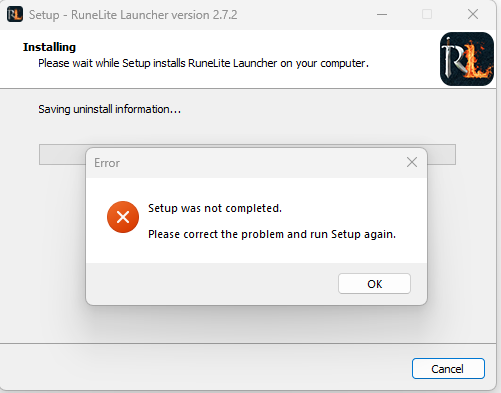
It is currently installed to program files x86 and i am trying to download to the same location. do I have to have it in local now?
zealous cedar
try uninstalling it first in control panel
indigo hill

ok i said screw it and installed to local instead of program files x86 and that seems to have done the trick
thanks
ashen moth
If you had run the installer as admin (right click the .exe and click Run as Administrator), it would have the correct permissions to install in program files. Just as a point of note for future reference. 🙂
The failure you were seeing could be anything but runelite automatically updates itself and plugins while it is running for as long as I've used it.
 topaz quartz
runelite wannt let me back into leagues but will in main game
 calm haven
giant seaweed patches show ready (state 5/5) when actual status is (state 4/5) - been happening for a couple days now
timer in 'Time Tracking' plugin correctly updates to (state 4/5) five minutes after showing (5/5)
 plucky horizon
Hello
mossy swan
yo
 round jacinth
calm haven
giant seaweed patches show ready (state 5/5) when actual status is (state 4/5) -...
round jacinth
calm haven
giant seaweed patches show ready (state 5/5) when actual status is (state 4/5) -...
Reset the farming tick and then watch a tree grow
type ::resetfarmingtick and watch a tree go through a growth stage
calm haven
ok i will do that - it has to be a tree? just curious
round jacinth
Maybe alch or something next to it for a little bit
A tree fully calibrates ot
You get the off by 5 10 15 minutes because the calibrate wasn’t as good
A tree will fix that, and should be fixed forever
But you must type that command into chat for it to allow the reset
calm haven
okay, i just had my trees go 3/9 to 4/9. thank you for the help
round jacinth
Hopefully it’s all good now 😉
 west spire
is there a reason only notify on own name gets a custom notif config for Chat Notifications?
 mossy swan
because we are old and thats how it was on IRC
west spire
oh lol
was looking to see if its possible to setup diff notif sounds for diff message detections
 icy wharf
 west spire
what happens if you specifically click on karamja
mossy swan
yeah you had to read the tutorial text and it disappears if you just try to speedrun
same thing happened to me lol
west spire
jagex should know 99% of their players smash that spacebar
its just also odd because IIRC other steps had visuaul UI highlight hints or tooltips
mossy swan
yeah
 tardy stone
Hey guys just wondering why ive logged in today and all my plugins I use are gone, they are all in plugin hub saying to install them, my client was fine last night?
Note pad completely empty as well 😮
mossy swan
!lost
haughty pumiceBOT
tardy stone
Problem solved, it loaded a different profile. thank you guys 🙂
 lapis siren
Getting "RuneLite has encountered an unexpected error during startup" error. Tried re-installing and restarting, but no luck. Any suggestions?
 obsidian sluice
Why doesn't it appear?

 solid mesa
Because there's no hub or core plugin called Status widgets
lapis siren
@solid mesa Getting "RuneLite has encountered an unexpected error during startup" error. Tried re-installing and restarting, but no luck. Any suggestions?
haughty pumiceBOT
run this command in cmd, then show us the displayed output through a screenshot.
"%localappdata%\runelite\runelite.exe" -c -v --console -- --debug
.
How do I make it appear?
solid mesa
Are you talking about infoboxes? I'm not sure what you're referring to
obsidian sluice
This is what I want to show
 solid mesa
Yes, those are infoboxes. In Runelite settings make sure Infobox Size isn't set to 0px. I beleive 35px is the default size
lapis siren
@solid mesa
 solid mesa
You need to post the output from command prompt
obsidian sluice
solid mesa
Yes, those are infoboxes. In Runelite settings make sure Infobox Size isn't set ...
What is his name?

What do I write here?
solid mesa

 lapis siren
@solid mesa
 solid mesa
Something is using the file main_file_cache.dat2
*You can try restarting your computer
*Disabling an antivirus if you have one
*Delete the folder C:\Users\Almos\.runelite\jagexcache
lapis siren
@solid mesa Tried all of that. only thing that works is launching runelite separately from the jagex launcher
@solid mesa doesnt work through jagex launcher
 crystal lintel
i've noticed recently that my runelite is kinda slow while entering instances or different floor levels in raids i get a black screen for like 1-3 seconds, i am clicking the doors before other people who are with me and they are loading through faster and have already started running i have a 3080ti and a 7800 3xd way more than what should be needed for runelite could this be a clear cache problem ?
 quiet sandal
is there a way to increase the UI size of runelite? Like not the game itself, I know there's stretched mode, that can do that for the game, but the runelite client itself?
haughty pumiceBOT
leaden trail
Use the scale parameter
quiet sandal
leaden trail
Use the scale parameter
Thank you
 wraith hinge
Got a friend whose only device is a Chromebook. I don't have one myself so I don't know how to get RuneLite working on it.
Anyone know if there are any good guides? Google's giving me stuff about enabling the linux environment, but I'm not entirely sure if those are the best guides to send someone clueless.
wraith hinge
crystal lintel
i've noticed recently that my runelite is kinda slow while entering instances or...
You on an HDD or SSD?
 acoustic field
Hey, i'm trying to use the Cox Scouting QOL plugin but it's not appearing to be working or i've configured it incorrectly. I've turned off MES so climb was default. Any reason why?
 crystal lintel
wraith hinge
You on an HDD or SSD?
crystal lintel
wraith hinge
You on an HDD or SSD?
m2 drive
ive tried updating client
clearing cache
nothing works
wraith hinge
How much ram do you have?
crystal lintel
wraith hinge
How much ram do you have?
32
wraith hinge
Maybe there's something in your Runelite's settings that allows it to use more of that.
lemme boot and check
crystal lintel
wraith hinge
Maybe there's something in your Runelite's settings that allows it to use more o...
becuase its stuff like tob/cox rooms if im 1st to click them people come nheind me and somehow manage to get through before me and start running
wraith hinge
I know in RS3 the first person to click a dungeoneering door will load it, but the others will actually go through first because of that.
Does your game stutter or anything when loading?
 severe orchid
Hey guys! I'm having an issue with something I've done.
I wanted to add a different sound to the game (something to replace the ruby bolt proc sound) so I went in the folder and did a few things.
Now I can't find the folder anymore and it keeps ruby bolt proccing whenever I have a high hit with any weapon (so it got even worse). Does anyone know where I can find the osrs sounds folder on my pc again?
oblique plume
you cant edit sounds that way to begin with
severe orchid
oblique plume
you cant edit sounds that way to begin with
Yes but where is that folder again?
oblique plume
there is no folder
severe orchid
oblique plume
there is no folder
so how do i get rid of the ruby bolt spec sound 😄
haughty pumiceBOT
Many plugins from the pluginhub break the client in subtle or not-so-subtle ways, including causing issues like client freezes. We do not support pluginhub plugins because we do not make or quality control them, and do not recommend their use.
Run the RuneLite (safe mode) shortcut, or with a Jagex account, first run the RuneLite (configure) shortcut and tick the Safe mode box, then launch RuneLite via the Jagex launcher.
This temporarily disables the GPU plugin and all hub plugins which will allow you to confirm the issue is caused by one of those plugins and isn't a core RuneLite issue.
If the issue is caused by a hub plugin, you should isolate which plugin it is and then uninstall the plugin.
severe orchid
haughty pumice
Many plugins from the pluginhub break the client in subtle or not-so-subtle ways...
??
leaden trail
The sound is being played by a plugin you installed from the hub
severe orchid
ah i see
severe orchid
leaden trail
The sound is being played by a plugin you installed from the hub
okay i did that and it turns out its gone
what now
oblique plume
now you play the game
oblique plume
dartboard method
 toxic girder
Is there a way to make the default runelite "time tracking" plugin accomodate for Leagues' 5x farming speed?
leaden trail
severe orchid
how do i localize the plugin causing this
Search "Ruby" maybe?
There's another called onlyscree or something I think
severe orchid
leaden trail
There's another called onlyscree or something I think
you're a god
leaden trail
toxic girder
Is there a way to make the default runelite "time tracking" plugin accomodate fo...
No but there's a PR open to fix it
crystal lintel
wraith hinge
Does your game stutter or anything when loading?
nah it doesnt just the short black screen
leaden trail
crystal lintel
nah it doesnt just the short black screen
Your issue is probably just bad hub plugins
crystal lintel
leaden trail
Your issue is probably just bad hub plugins
too many plugins /?
crystal lintel
i dont usually use much my friends have the same and dont have these issues
leaden trail
It might be connection related I guess but if it's just in raids then I wouldn't think so
crystal lintel
its deffo not connectio nrelated
sit at 5 ping and have 1gb up 1 down
verystable
oblique plume
allegedly
 delicate marlin
is the PlayerLootReceived event supposed to fire when receiving loot keys from pvp in the wilderness?
 hot badge
Why would my debug log show runelite trying to load a plugin I don't have installed?
My RL gets stuck when I press "Play":
 round jacinth
It won’t load stuff you don’t have installed, but you might be auto switching profile used to a profile that does have the plugin as you wouldn’t have that window load unless you switch profile
hot badge
Ah, that makes sense. Let me load RL by itself outside of the jagex launcher and see if it shows the plugin
btw... it's the "Task Tracker" one causing this issue, at least that's where the log stops when it freezes
Good call... idk what the difference is but if I load RL outside of the launcher it showed the plugin installed... weird. Issue fixed after I removed it and reloaded using the launcher
 hot badge
Weird considering I haven't made a new profile ever
 hot badge
Yes
round jacinth
If you’re using it, you could be loading the default profile assigned in your —profile=ironman in the shortcut
Then you load the world you want and it’s auto switching to the league profile
And that’s why you’d get that runelite plugin loading screen on login
As it’s switching profile as you load a new profile(dmm and leagues could triggered profile switch)
hot badge
That makes a lot of sense, thanks for clarifying. In the meantime, nuke that plugin 😛
round jacinth
I’m also not positive that the logs can 1000% determine that is the one with the issue because just because it loaded last doesn’t mean it’s the problem one as they could start to do stuff a few ms after load
It’s why we just tell people to troubleshoot and figure it out
But maybe it is the specific plugin you mentioned, idk
hot badge
It worked in this case, the log just stopped loading stuff after it got to that task tracker plugin. Once I opened it up and removed it outside the launcher it worked
Debug feature worked great
crystal lintel
so has anyone else had the issue with long black screens going through doors
or is it just me ?
round jacinth
you were told either too many bad hub plugins or internet issues and you said it was neither so idk what to do for you now
crystal lintel
i tried taking all plugins off so its deffo not that and as i said my internet is stable
round jacinth
you could make a new profile and only have gpu (117 or regular) enabled and check to see if the issue persists
your internet to speedtest.net is not the same as the connection to jagex
crystal lintel
i was gonna try reisntalling but im not sure i would lose settings / plugin stuff
round jacinth
you wouldn't lose anything no
unless you deleted your .runelite folder
just make a new profile and check
reload the client after profile switch too
crystal lintel
its just very odd, its stuff like leaving games of tempoross going to new floors in raids or going into tunnels etc...
round jacinth
cool, can you try the suggested thing or nah
crystal lintel
ye for sure
 charred wind
there's a forced delay on 117 for loading into your house, could be that's the same thing happening here - but we won't know until you try without all the hub crap
crystal lintel
yeah not a 117 user just gpu will give it a test now just got back on
 charred brook
wraith hinge
Anyone know if there are any good guides? Google's giving me stuff about enablin...
charred brook
wraith hinge
Anyone know if there are any good guides? Google's giving me stuff about enablin...
Does he have a Jagex account?
wraith hinge
charred brook
Does he have a Jagex account?
I believe those are mandatory as of like, a month or two ago.
wraith hinge
I really regret switching to a jagex account, because I want to play on linux.
oblique plume
bolt is good for linux afaik
wraith hinge
And can't be arsed to figure that out.
charred brook
wraith hinge
I believe those are mandatory as of like, a month or two ago.
Only if he made a new account in that time
wraith hinge
And he's new so probably has a jagex account.
charred brook
Then Bolt would definitely be the easiest way to get it working 🙂
There is a guide at the bottom of the GitHub guide linked on this Jagex Support page on how to install in on Chromebook. https://help.jagex.com/hc/en-gb/articles/13413514881937
Would recommend you to try out Bolt as well if you play on Linux.
 acoustic flower
Howdy folks! Just popping in to report that I'm not getting Abyssal creatures tracked in the abyss in leagues. Not sure where you want this info. I have a screenshot as well if you want that
 crisp dune
what do you mean "tracked"?
acoustic flower
There is no section in the tracker dedicated to the number of Abyssal walkers I've killed nor is there a list of drops I've obtained for each one

Sorry, specifically the Loot Tracker plugin
acoustic flower
Oooh okay ty
 opal halo
is there a way to recovered a deleted profile from website?
solid mesa
You can try these steps, it may not actually be deleted
haughty pumiceBOT
opal halo
cause i accidently deleted the wrong profile on the website and i cant find the right profile within files
only see "profiles 2" folder and no "profiles" folder
sonic birch
You mean that you removed an rsprofile on the site?
opal halo
yes
casue i had 2 of the same name ones
but i guess one of the names had all my raid loot and the other one had like slayer stuff from way back
sonic birch
You needed to delete one then anyway
sonic birch
Yesh, but you needed to choose one of the two anyway
Doesn't matter that much tbh; loot tracker stuff is whatever
You got the collection log
sonic birch
Yh, those are fine
opal halo
question, how come i can only see profiles 2 folder but not regular profiles folder?
sonic birch
They are config profile, so you cant delete those via the website
sonic birch
opal halo
question, how come i can only see profiles 2 folder but not regular profiles fol...
We swapped from profile system 1 to profile system 2
opal halo
okok
sonic birch
If we at some point swap to profile system 3, you'll have a profiles3 folder
opal halo
okay thank you for help
is there a folder where i can find all my ground markers?s cant see alll of them on website anymore
solid mesa
They're saved as part of your profile. But you shouldn't try to edit them manually.
 shy lodge
My power just went out and when I turned my pc back on I've lost my runelite profile/all my plugins, any suggestions?
mossy swan
!lost
haughty pumiceBOT
shy lodge
I don't think that applies to me?
I don't have a profile to import, it literally just deleted it
oblique plume
how do you know
shy lodge
That it deleted it?
oblique plume
yea
shy lodge
Because I can't see it anywhere?
oblique plume
prove it
mossy swan
it’s possible the profile index just got corrupted and your settings are all there if you just import them again
shy lodge
?
 mossy swan
got a screenshot?
shy lodge
Not without doxing my email?
mossy swan
i guess you can dm @haughty pumice or crop it out
shy lodge
I'm not sure what I'm trying to show you?
It has my email in the profile foider but only 1 file and if I important it then its old af
mossy swan
the different profiles you see when you press import
go in to the profiles2 folder and check what’s there
shy lodge
There are a lot of files in that folder and I can't sort by date so idk which would be the most recent?
round jacinth
there is a view button on that pop out window to change it so you can see dates
shy lodge
round jacinth
there is a view button on that pop out window to change it so you can see dates
❤️

 haughty pumiceBOT
@loud hearth Many plugins from the pluginhub break the client in subtle or not-so-subtle ways, including causing issues like client freezes. We do not support pluginhub plugins because we do not make or quality control them, and do not recommend their use.
Run the RuneLite (safe mode) shortcut, or with a Jagex account, first run the RuneLite (configure) shortcut and tick the Safe mode box, then launch RuneLite via the Jagex launcher.
This temporarily disables the GPU plugin and all hub plugins which will allow you to confirm the issue is caused by one of those plugins and isn't a core RuneLite issue.
If the issue is caused by a hub plugin, you should isolate which plugin it is and then uninstall the plugin.
round jacinth
!flow rather
haughty pumiceBOT
flowchart: Please refer to this flowchart for further troubleshooting.
round jacinth
mb
 loud hearth
haughty pumice
<@371242560938573824> Many plugins from the pluginhub break the client in subtle...
loud hearth
haughty pumice
<@371242560938573824> Many plugins from the pluginhub break the client in subtle...
i dont think that is the issue
idk i aint doing all that, ty tho
round jacinth
i guess enjoy the hub plugin doing that
it's NPC Overhead Dialogue apparently
perhaps stop installing stuff and not knowing what stuff does
loud hearth
round jacinth
it's NPC Overhead Dialogue apparently
thanks
loud hearth
round jacinth
perhaps stop installing stuff and not knowing what stuff does
nah i dont think ill stop ill just more careful
round jacinth
(x) doubt
loud hearth
 round jacinth
see you soon 🙂
loud hearth
just needed to see that
round jacinth
i found it this way
 loud hearth
fancy
round jacinth
just because there is an install option does not mean you're missing an feature
try to find stuff you actually want
round jacinth
moleman mode needs a content creator
leaden trail
Please don't install my plugin
 civic arch
is there a known reason why profiles sometimes disappear on the sidebar? I check the profiles.json and it normally overwites it. For me I know the fix which is just opening another client and it loads the list properly again just weird that it does it
zealous cedar
i use the profile system daily and have never seen it lose a profile
gilded kayak
last year tasks tracker made it so all my profiles disappeared, but outside of that one thing which was reported and fixed, i've also not seen that
zealous cedar
if it did lose it i wouldnt expect it to be in profiles.json though
gilded kayak
gilded kayak
last year `tasks tracker` made it so all my profiles disappeared, but outside of...
visually disappeared*
civic arch
ye it doesn't delete them, just only shows a few instead of all
then I open another runelite and click off profiles tab and back and they all reappear
civic arch
I have a video of it if I can dm you, Adam?
civic arch
mainly just showing the process of profiles.json displaying 1 profile then when I open another client and refresh profiles tab on the side it has them all again and the profiles.json has all them again too
civic arch
ye fair, not a problem for me since I know the fix, just wasn't sure if it was that common to happen to others
sonic birch
The problem we have is that when someone's power goes out, it sometimes screws profiles.json up
Which doesn't make sense because it fsyncs that file
However, there isn't a dev that can replicate it to debug it
 gloomy patrol
hi, does anyone know how i can reset iron ore to use on left click? even if i disable the menu entry swapper plugin it defaults to left click drop and i can only set use on shift click
 gloomy patrol
i totally forgot about since i haven't played in a minute
 marsh wedge
How do I get started with contributing to Runelite? Like finding out what needs to be worked on
round jacinth
the github has a bunch of stuff that range from small feature asks that are marked as "good for first time contributor" or you can try to work on a hub plugin that you want to see exist (or make updates to an existing one)
many ways to get into it
the wiki has resources on how to build the client
marsh wedge
I have the client built and ready to go but I want to help improve already existing plugins or fix bugs or add new features
I have a strong understanding of Java and an intermediate understanding of OSRS as a game
round jacinth
core prs unless very small in scope take a long time to review because the core team are working on other stuff, so you might have more fun trying to make something as a hub plugin exist instead
marsh wedge
I’m just task oriented so I wanted to know where I can find things to do you know
round jacinth
well it doesn't really work like that
https://github.com/runelite/runelite/issues?q=is%3Aopen+is%3Aissue+label%3Agood-for-first-contribution is a list of "easy" things to do but not necessarily things that would be merged immediately when done
 tawny gale
Can anyone help me? Runelite won't let me log on to any leagues worlds, it starts loading external plugins and my rl just crashs but it's completely fine on normal worlds
round jacinth
!safe
haughty pumiceBOT
safemode: To enable safemode
Windows
Run the RuneLite (configure) shortcut from the windows start menu
Tick the Safe mode box, save, launch RuneLite.
Mac
In Terminal, run
/Applications/RuneLite.app/Contents/MacOS/RuneLite --configure
Tick the Safe mode box, save, launch RuneLite.
round jacinth
load in safe mode and see if it works
and when it does, disable/uninstall some hub plugins, i believe a user earlier was saying task helper or w/e was the issue
marsh wedge
round jacinth
https://github.com/runelite/runelite/issues?q=is%3Aopen+is%3Aissue+label%3Agood-...
so i think i can resolve this one fairly easy. if im understanding correctly, they want a toggle on/off for the idle notifier? https://github.com/runelite/runelite/issues/17890

GitHub
Type Incorrect behavior Operating System Windows OS Version Windows 10 Bug description Regarding the "Idle Notifier" plugin and it's bug-every time the log out timer that i have enabl...
i had a hard time understanding what it is exactly that they want even with the last comment
mossy swan
there is always a notification 20 minutes before you are force logged out, they want to be able to turn that off
round jacinth
tawny gale
but when i went to uninstall it, it wasn't there
it's probably installed on the profile that you have linked to the league world/acc
switch to the profile you use for leagues and remove it there
tawny gale
yeah you were right i'm in and playing now, thanks for the help 🙂
 vital prairie
What is the proper format to attack/prioritize the mirrorback when stacked under araxxor?
Attack, arraxor* , attack, mirrorback araxyte* still has me standing still and red xing araxxor 3 feet away from him while clicking on the minion
 vast bone
vital prairie
What is the proper format to attack/prioritize the mirrorback when stacked under...
vast bone
vital prairie
What is the proper format to attack/prioritize the mirrorback when stacked under...
attack,mirrorback* should be fine
vital prairie
vast bone
`attack,mirrorback*` should be fine
Doesnt it have to match the NPC ID or do you already use that custom menu swap yourself?
vast bone
that plugin doesn't do npc ids
vital prairie
vast bone
that plugin doesn't do npc ids
So for example: Attack, Dusk* , Attack, Dawn* will prioritize Dawn?
vast bone
no, the opposite
just do attack,dawn*, it's simpler.
unless you're also trying to walk under it or something like that.
vital prairie
No its just Araxxor is the only boss in this game my client cannot properly format, most likely 150% stretched mode and his clickbox is nearly unplayable unless you have gotten used to it as long as me. I cant click anything near him even 2 tiles away without it being attack him
So I figured since I cant scale down, Ill prioritize the mirrorback so I can stop having to right click and find attack on a paragraph dropdown list
vital prairie
Yeah I cant believe after this many kc I havent tagged the minion yet only him
Good call
 hidden dragon
ive been dealing with runelite crashing all week... ive uninstalled and turned so many plugins off.. can anyone help?
haughty pumiceBOT
To enable safemode
Windows
Run the RuneLite (configure) shortcut from the windows start menu
Tick the Safe mode box, save, launch RuneLite.
Mac
In Terminal, run
/Applications/RuneLite.app/Contents/MacOS/RuneLite --configure
Tick the Safe mode box, save, launch RuneLite.
hidden dragon
what does safemode do?
solid mesa
Disables all plugins and GPU so you can determine if that is causing the crashes
haughty pumiceBOT
To find the logs, you can do one of the following:
- If your client failed to open, click the
Open logs folderbutton. - Open the screenshot directory by right-clicking 📷
Camerabutton, navigate 1 directory up, then open logs folder. - Navigate to
%userprofile%\.runelite\logson Windows or$HOME/.runelite/logson Linux and macOS.
Upload the log files named client and launcher by dragging them to Discord. If there are files prefixed with jvm_crash dated from today, upload them too.
solid mesa
You can post your logs and we can see if there's any info
hidden dragon
so it takes 45mins-hour to crash... how do you determine that haha
hidden dragon
solid mesa
You can post your logs and we can see if there's any info
sure how do i do that
solid mesa
haughty pumice
To find the logs, you can **do one of the following**:
- If your client failed t...
This message has the steps
leaden trail
You can try disabling "Core Performance Boost" in BIOS
hidden dragon
how do i do that?
also just curious why this would randomly start
i feel like it started this once i messed with stretch mode idk if that helps
stone parcel
To get into your PC's BIOS you can shutdown your computer and when you restart it there will be a key you can hit to enter bios, sometimes F2. There might be a screen that tells you which key to press to enter BIOS.
Then when you are in you are looking for "Core Performance Boost", there might also be an option to search your BIOS settings by name.
hidden dragon
so i have my computer "over clocked" is that creating the issue? i used it for 2 months no issues till this week
stone parcel
The info we have on the issue is here. https://github.com/runelite/runelite/issues/10628
It's kinda unclear why it happens, but this seems to fix it for some people.
Not sure I'd count CPB as overclocked though, since it is suppose to put the CPU at its advertised boost speeds. 🤷
hidden dragon
so could i turn cpb off and keep my manual boost settings entered?
stone parcel
That might work yeah.
Ohhhh, but if you also have any other overclocks that might be it too. I didn't catch that when I first read it.
hidden dragon
Yes I have ryzen 7 5700 overclocked to 3600
 slate fox
Has anyone been successful in adding different fonts in for the Customizable XP drop plugin?
Anyone have good looking customizeable xp drop settings they are willing to share?
marsh wedge
if im creating a PR for an issue do i just PR to master? or a different branch?
mossy swan
your fork's non-master branch to runelite/master
marsh wedge
mossy swan
your fork's non-master branch to runelite/master
i added the 6hr toggle for idle notifier and pushed it to a branch called idle-notifier-6hr-toggle. now im creating the PR and will point it toward the runelite master?
mossy swan
yep
marsh wedge
they closed the thread so i cant tell them it was resolved. is that ok?
 marsh wedge
ok. and no im not new to git, i just didnt know what the workflow was for this
marsh wedge
mossy swan
you can still say "fixes !123" even if its closed

i got a question mark, maybe i wasnt supposed to fix that oops
oh i cant type in that chat
haughty pumiceBOT
Visit 117's HD plugin discord (https://discord.com/invite/U4p6ChjgSE) for support, issues & feedback
mossy swan
what are you talkinga bout
vital prairie
vast bone
yeah so do `attack,mirrorback*`
Dont I have to add the other target I want to avoid when they are stacked? (Boss)
 vast bone
no
unless you want to avoid prioritizing the mirrorback over something else other than araxxor.
vital prairie
So I only need Attack, Husk* and no Nightmare behind it?
vast bone
yes
vital prairie
Thank you
 south gust
I play on 1170x650 on a 1440p and that's perfect for me
If I keep the same settings on a 1080p, game looks much bigger irl which is not ideal, a solution is to scale it to like 935x520 which does get me the perfect window size irl, but it fucks up my game since the inventory and chatbox dont scale down so it looks weird for me
I need something like stretch mode but reverse
I heard there was some way to override the pixel ratio of the runelite window idk how or if that fixes it
Any suggestions are appreciated
haughty pumiceBOT
 agile river
hello, can anyone help me with my issue please, when leagues started i created a separate rl profile for it (as a base for it i exported the main profile) i have been using the leagues profile for a week just fine, making inv. setups, notes, swapping menu entries etc. and now i logged in and none of that is there, its reverted back to being the exact copy of the main profile. any way i can get back the data for the secondary league profile?
oblique plume
that actually happened to me yesterday
but then today i launch rl again and its back
tbh no idea how
agile river
a friend who is playing multiple account just told me the feature straight up does not work if you use more profiles, any time you switch it deletes everything how is that part of the software if it doesnt work tho? i logged to main game world just before everything got deleted so that checks out
agile river
oblique plume
but then today i launch rl again and its back
i have tried relogging, restarting etc and doesnt seem to help
 white pebble
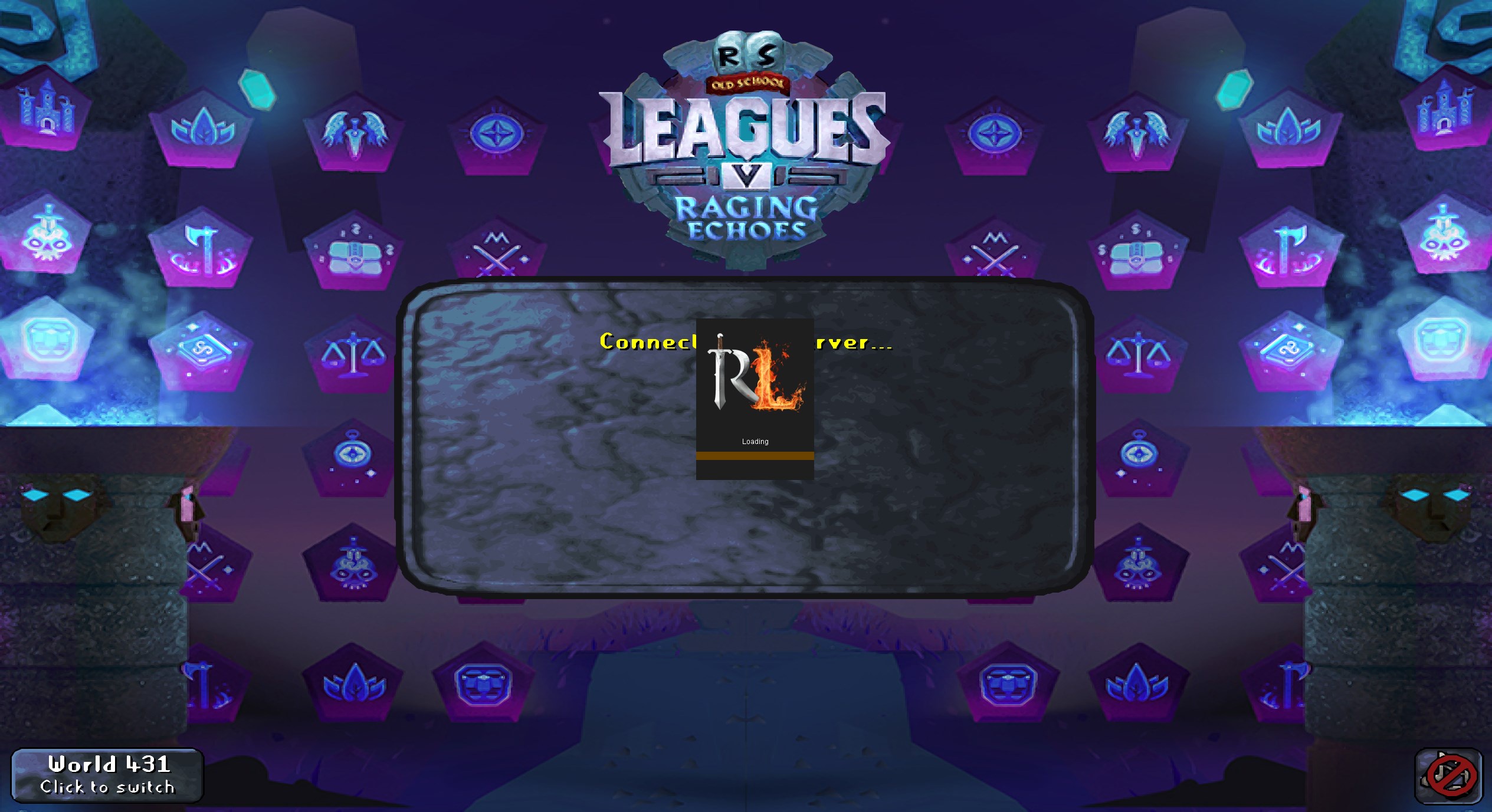
My runelite seems to be getting stuck while loading, but only for getting on to leagues. I didn't change anything from yesterday. I am able to get into the main game and on mobile. It's been stuck on this screen for multiple minutes. https://i.imgur.com/K1KIi5Z.jpeg Last time I tried to log in to leagues it was stuck on "Starting External Plugins". Any suggestions for how to fix?
 haughty pumiceBOT
To enable safemode
Windows
Run the RuneLite (configure) shortcut from the windows start menu
Tick the Safe mode box, save, launch RuneLite.
Mac
In Terminal, run
/Applications/RuneLite.app/Contents/MacOS/RuneLite --configure
Tick the Safe mode box, save, launch RuneLite.
oblique plume
that will disable your hub plugins
so you can log in and uninstall some
ive heard its probably tasks tracker
so try removing that one
white pebble
oblique plume
ive heard its probably tasks tracker
Can confirm, that was the only one i disabled and it instantly loaded no problem. Phew. Thank you so much for your help! I wasn't able to find Runelite (configure), no idea what that is, but i was still able to disable it anyhow by loading the standalone runelite client not through jagex account. Thanks again!
slate saddle
!profiles
haughty pumiceBOT
 cosmic sable
@ionic ivy am I missing something, trying to add slayer helmet to shamans, but seems to not work any of the things or items I've tried.

 ionic ivy
cosmic sable
<@141364906376167425> am I missing something, trying to add slayer helmet to sha...
ionic ivy
cosmic sable
<@141364906376167425> am I missing something, trying to add slayer helmet to sha...
try slayer_helmet, if that doesn't work I'll add some functionality to the next update
cosmic sable
not working :(
ionic ivy
kk
white pebble
cosmic sable
not working :(
that is sick what plugin is that?
cosmic sable
CoX scouter external
 strong verge
hey guys, does anyone know how to get the audio from runelite to work going through an audio interface
all the other sound on my pc works except for runelite :c
round jacinth
try updating your audio drivers
it works for everybody who has a normal set up afaik
 red brook
Is there a way to make potion storage work with bank tag layouts/inventory setups?
round jacinth
yes
you use bank tag plugin and it just works
make sure you have no place holders in your bank for those potions
bank tag layouts does not support it and can be removed once you make all your layouts converted to core
topaz quartz
i have restored my computer and lost all my profiles how do i get back
round jacinth
!lost
haughty pumiceBOT
round jacinth
by "restored my computer"i hope you didn't reformat it and never backed it up
topaz quartz
i have my profile on my laptop can i transfer it to my pc some how
round jacinth
you should eanble cloud sync and it'd just work
you do not want to manually move those files around, that is not how you'd want to do that
topaz quartz
ok thqanks
 noble pollen

 round jacinth
that anchor is broken
noble pollen
it is?
 noble pollen
ahh


 noble pollen
i never used it soooooo i did not know XD
 neat notch
I did the same thing the first time i got that clue step
It's another some number of gp to go get that repaired on pirate island
noble pollen
ya im reading about it now
slate saddle
Hey y'all looking for some help after I messed up my profiles2/ folder. I have accidentally created thousands of $rsprofile...properties files and $<profile name>...properties files and profiles....json files. I have found and stopped the issue creating all these extra files so I want to know which I need to keep and which I can delete. I was thinking I can just save the most recently modified version of each $<profile name>...properties and delete everything else. Is this all I need in order to recover or is there some amount of versioning which I need to retain for these files? I'm unsure of what the $rsprofile files are and the profiles...json files are. I tested a fresh install and I think it only have a couple of <$profilename>...properties files which has me guess the rest aren't necessary
mossy swan
make a copy of the folder, delete the oldest ones and see when you start losing your profiles?
slate saddle
Yeah that might work but I am not sure that I'll be able to fully test everything and be aware of a missing dependency. So I'm hoping to get a definitive answer about what is necessary and what isn't
sonic birch
Don't write bad code/do weird stuff
ionic ivy
cosmic sable
not working :(
next release(available soon™️) will have a fix for slayer helms
slate saddle
sonic birch
Don't write bad code/do weird stuff
Great contribution thanks
gilded kayak
well he tried to tell you the exact same thing when your problem first arose, and now we're here
so 🤷
i don't think you'll listen if we give better help
slate saddle
How is everyone so rude here
This is the first time I have mentioned this issue
I just discovered it
I have extra files and I don't know which ones are necessary to keep
slate saddle
runelite generates these files
what does runelite do with these files
there are extras
which does runelite need?
leaden trail
Unmodified RuneLite does not generate thousands of them
leaden trail
One of them?
slate saddle
like how is it so hard to get this question answered
leaden trail
We aren't going to like
slate saddle
I see 3 files types: $rsprofiles, profiles.json, profilename.properties
leaden trail
Walk you through trying to patch one together from bits of all of them?
Yes
You need all of those
slate saddle
great
leaden trail
slate saddle
like how is it so hard to get this question answered
Because you messing with things and ending up with your profiles2 being in a really really weird state isn't something we deal with, nor do we have the details of what you did
slate saddle
I am not asking for you to help me debug how we got to this state I am asking for help understanding what the proper state is so that I can get there myself how is this so hard to understand
I don't know what these files are so I don't know how to get there
so I am asking for definitions of these files types so I can understand them
oblique plume
if you delete everything then it will put itself back in the default proper state 🙂
slate saddle
That's what I want to do, but I obvi don't want to lose my profiles. I suspect I can just retain the latest <profilename>.properties files, but what value does $rsprofiles.properties and profiles.json serve? keep latest of those too or is there some other means of determining which is relevant?
oblique plume
rsprofile is rs account bound settings
profiles is a tracker for what profiles are available
the other is non rs account config settings
thats the one you see in client
slate saddle
Perfect this is exactly the answer I was looking for thank you
oblique plume
that doesnt help you at all though
you want to know which of the 200 you have is relevant to you
we cant have that answer
slate saddle
Yeah and I'm not asking for that answer
but knowing what they are so I know what I am looking at can help me to arrive at that answer
oblique plume
keep latest of those too or is there some other means of determining which is relevant?
oblique plume
slate saddle
Yeah and I'm not asking for that answer
allegedly
slate saddle
it sounds to me like I need one profiles.json file which should contain n number of entries for n number of profiles that I have
What do you mean by "non rs account" config settings?
does that mean if I didn't have a profile selected/default was selected?
 runic dagger
I have started to get significant lag when having xp tracker open and I get xp and when loot tracker when getting any loot. What could be the issue?
haughty pumiceBOT
Graphical artifacts? Try disabling hardware acceleration: https://github.com/runelite/runelite/wiki/Disable-Hardware-Acceleration
runic dagger
It has worked for years for now so I dont think hw acceleration is the issue here
haughty pumiceBOT

FJDevelopment
Type
Crash or hang
Operating System
Windows
...
 pseudo halo
I think I finally figured out the stuttering. It only happens when the XP Tracker panel is open (or at least, opening the XP panel causes it to happen 100% of the time)
EDIT: Having trouble reproducing this on a run with no other plugins, will keep trying
 ornate kite
anyone having issues with 117HD and a rx7800xt hitting 100% usage and less than 20 fps
mossy swan
!hd
haughty pumiceBOT
Visit 117's HD plugin discord (https://discord.com/invite/U4p6ChjgSE) for support, issues & feedback
ornate kite
ah thanks
 abstract phoenix
Having an issue with my new GPU I just installed (Radeon RX 7800 XT), FPS tanks when walking into chambers and being zoomed out at all. Tried booting in safe mode and it was fine, then tried loading a new profile with no plugins except GPU and the issue persisted. Tried messing with the settings a bit to try and see if that was causing issues, but the issue is still happening.
abstract phoenix
abstract phoenix
Having an issue with my new GPU I just installed (Radeon RX 7800 XT), FPS tanks ...
Also I see someone with the same GPU is having issues above me, I do not use the HD plugin.
mossy swan
ive had very poor fps when zoomed out, gpu experimental has fixed that but its graphically quite broken
abstract phoenix
mossy swan
ive had very poor fps when zoomed out, gpu experimental has fixed that but its g...
Just installed that plugin, getting 20 fps more than with normal GPU plugin (20 fps on normal plugin). Is there any other known work arounds for this?
I also see what you mean by graphically broken, zooming in at all breaks everything
fossil summit
mossy swan
ive had very poor fps when zoomed out, gpu experimental has fixed that but its g...
I’ve been using it too, fixed a few things but not sure if it’s just my setup
mossy swan
rolling back gpu drivers might help
fossil summit
I’ve hardcoded a lot of models, mostly ground models, so they don’t zfight
there’s a model that’s causing a crash for me too, not sure which one it is, only happens at GE
abstract phoenix
mossy swan
rolling back gpu drivers might help
Looks like this is the culprit, down to >30% gpu usage and fps is fairly normal so far. @ornate kite There was a update for out GPU on the 5th, downgrade and to the last version and you should be good.
Thanks @mossy swan
abstract phoenix
mossy swan
which gpu driver is that?
Adrenalin 24.12.1 is the most recent version, I downgraded to Adrenalin 24.10.1
mossy swan
 thanks
 sullen fulcrum
Im having issues with the barrel west of the winch on The Tourist Trap quest. I right click to "search" and nothing happens, but will respond with a promt if i click "look in"
obsidian sluice
What type of desktop computer do I need? / What is the specification
leaden trail
basically anything
obsidian sluice
leaden trail
basically anything
Something average for a long time
 dusk tiger
guys would there be a way to copy all the plugins and settings data to my other pc
from runelite
mossy swan
!transfer
haughty pumiceBOT
 past minnow
On mobile theres a way to see a lot more buffs (total waterskins, waterskin timer, how many people are currently hitting the tree youre hitting etc.), how do I see those buffs on PC?
Like the exact same buffs / buff bar, not just importing a new custom plugin for a specific task. I already have Timers & Buffs enabled with everything checked
mossy swan
use jagex client instead of runelite i guess
 inland bloom
hi does anyone know which plugin could be causing the 1 key to not work while doing construction? it works to remove the bench but not to rebuild it. If i load a completely blank Runelite profile the 1 key works as normal.
key remapper is disabled.
haughty pumiceBOT
If one of your keys isn't working in game, you've most likely bound it to a feature of a plugin. The Debug Helper hub plugin can show what keys are bound to what plugins.
inland bloom
ty for quick reply can't see it on there unfortunately
 inland bloom
vast bone
the construction one
inland bloom
vast bone
the construction one
tyvm
round jacinth

dusk tiger
mossy swan
!transfer
whats the easiest way to transfer a file like that in your opinion? wont let me email it to myself lol
round jacinth
if you zip it, it'd probably work
but you should just enable sync
if you have access to the old computer and still would be using it, just enable sync
dusk tiger
mossy swan
justbeamit is also nice
that is awesome. its failing to download for some reason
mossy swan
did you zip it?
dusk tiger
is .runelite zipped?
mossy swan
no
.runelite is a folder, so it can be hundreds of files
compressing (zipping) it will make a single file that is going to be a lot easier to move around
dusk tiger
ohh ur right duh
cosmic sable
ionic ivy
next release(available soon™️) will have a fix for slayer helms
Thank you! :)
 gray panther
anything known tyo cause ground items to just stop working
vast bone
double press alt
gray panther
thank you smh
sonic birch
past minnow
Like the exact same buffs / buff bar, not just importing a new custom plugin for...
I am slowly working on some of those (idk if I'll do waterskins specifically; that one seems to be weird/hard to implement). For some I've already written the code but it still needs to be reviewed by maintainers
So you'll see them pop-up automatically in timers & buffs over time probably
Timers & buffs is kinda my favorite plugin to work on
past minnow
sonic birch
I am slowly working on some of those (idk if I'll do waterskins specifically; th...
thats sick. idc much about waterskins its just one i remembered off the top. The one I care most about currently is woodcutting forestry buff but for now I just use other runelite plugins that support showing how many are hitting the current tree. I just don't know the full extent of everything that mobile shows conveniently there that we don't see
solid mesa
The woodcutting forestry one has already been programmed and is in review.
gilded kayak
afaik while the hub plugin is kind of just guessing, I don't think it's ever too-wrong, yves' implementation of the official™️ bar will just show the exactly corect count
past minnow
yeah I haven't looked at the code but my guess is that its just counting players facing a direction + its a tree tile + theyre performing a chopping anim
which is why I was super interested in seeing the buff for the real count
solid mesa
sonic birch
That code should be merge ready, so when we get Ronald to stream, he might merge it
 last hound
why does my font looks like ass if I set my window opacity to 100? (the standard)
it seems fine at anything below 100, but since it shows the window behind it, I don't really wanna set it to another value.
here are some screenshots comparing

huhh....
the moment I press the button to take a screenshot it fixes itself momentarily and doesn't show on the SS... very weird
I'll have to actually take a phone picture for this, sorry
vast bone
probably scaling
either stretched mode plugin
most likely that
but it could also be scale not being 1.0 in
haughty pumiceBOT
last hound
vast bone
probably scaling
stretched mode was disabled
it looks even worse if I turn it on because all the menus become huge
how do I change scaling to being 1.0?
 wheat terrace
Hey guys, wanted to ask if it's possible for people reviewing github PRs to up the priority of this code change https://github.com/runelite/runelite/pull/18343
It's been well documented/tested and due to Leagues it might affect more people (guess how I found about it lol). Would splitting the changes (basically moving Mark of Darkness change out to a separate PR) make it easier to merge sooner?
Thanks in advance

GitHub
Adds the WGS timers and buffs:
Stone of Jas empowerment
Please DM me for Stone of Jas empowerment testing videos. Alternatively, if it's deemed too niche, the commit can be dropped. I ass...
last hound
vast bone
follow the guide there
changing it to 1.0 in the menu seemed to fix it. Thanks.
what happens if I set it to 0.5 or 2.0 instead, for example? Will the game be in higher resolution (better) or should I stick to 1.0 at all cases?
vast bone
it will be bigger or smaller on your screen
last hound
what exactly will be bigger or smaller?
vast bone
if you pick a non-whole number the scaling algorithm might make it look bad.
the entire program
client, sidebar, etc.
like stretched mode plugin, but for the sidebar as well.
last hound
but if I use the maximize button it readjusts itself automatically right?
vast bone
the scale thing is something OS-level, the stretched mode stuff is done in the client.
last hound
so it should always fill up my entire screen (I think)
 hoary canopy
did jagex had an update or something just now all my plugins are gone for some reason ?
haughty pumiceBOT
last hound
vast bone
yes you can hit maximize
so is it better to use an integer value higher than 1.0 if I want better resolution? or the other way around? or just stick to 1.0
vast bone
use something above 1.0 if the text looks small and hard to read to you
otherwise stick with 1.0, it will look the best.
 clever bluff
whenever i try to take a screenshot (hotkey or button on top bar) it instead flashes the date over my report button for just a split second, any suggestions? (automatic ones are working just fine)
sonic birch
It's in your screenshot folder, not clipboard
 tidal agate
Have any other Linux scapers had similiar issues with runelite and tiling managers? I'm running PopOs and the default tiling manager, and for whatever reason runelite doesn't wanna stay put on the tile I've assigned it to. The window keeps shifting left and right on about a minute intervals.
 civic ginkgo
Guys, I'm trying to play OSRS Runelite through Bolt on my Steamdeck. I have it installed, and I logged into the client, but it says no character selected. When I press the drop down menu, no characters show up. Help? 😦
mossy swan
perhaps you should ask on the bolt discord
civic ginkgo
Oh, right .. 😄 sorry!
topaz quartz
screen shot button missing since restored computer
sonic birch
Screenshot plugin disabled or button located elsewhere due to disabling custom chrome or some other setting like that
topaz quartz
still cant see it
sonic birch
You gotta post a picture of your client with side-and top bar, screenshot plugin settings, perhaps runelite plugin settings for us to help
 vital nest
is it possible to remove other peoples random events? it's not the end of the world if not but for the larger afk spots on leagues it's like a barrage of them constantly haha
topaz quartz

 opaque sapphire
anyone know what might be causing this? there's like a small black line going over my entire client which makes the text bug out when it's on the right spot. only happens on fixed mode or with resizeable when the window is the smallest it can go, the line disappears on resizeable if i make the client window bigger
sonic birch
topaz quartz
Screenshot plugin settings?
topaz quartz
sonic birch
Screenshot plugin settings?
cant find it on rl
topaz quartz
 topaz quartz
 mossy swan
see how "screenshot" is not turned on?
topaz quartz
thanks got it
sonic birch
Thats what I suspected but now you learned how plugins work 👍
If you then click the cogwheel, you get the plugin settings
 marsh night
hi everyonnneeee
mossy swan
sup
marsh night
im very new to the game, im wondering how i unlock the wilderness area? i keep trying to cross into it and it keeps telling me its locked
mossy swan
!newplayer
haughty pumiceBOT
If you are new to OSRS, make sure to follow this excellent guide on OSRS wiki: https://oldschool.runescape.wiki/w/New_player_guide. You can also join official OSRS Discord here: https://discord.gg/osrs
mossy swan
maybe the official discord is a better place
marsh night
oh is this not the official discord? i found it by clicking the link in the game 😦
mossy swan
this is discord for runelite, a third-party client that adds functionality in to the client, similar to wow has addons
marsh night
ive been working through the raging echoes league tasks
oooooo i see my bad 🙂 thank you anyway ❤️
vital nest
can I make my bank so it does auto placeholders on a certain tab but not on all of them?
 spice crystal
Hey there, I'm having an issue, I crashed during a Soul Wars game and now my client won't even connect to the server, half the time it won't even fetch the start-up process. I've uninstalled and reinstalled, tried running as admin

Nothing has worked so far. but I can run the game on Mobile?? How is this bricked.
 vernal wing
their servers went down randomly
their website doesnt even load
it's slowly coming back up now tho
sonic birch
vernal wing
their website doesnt even load
Osrs you mean, I assume
spice crystal
I mean, I could understand "the servers being down"
sonic birch
Mobile doesnt use your internet provider
If you turn wifi off
Probs an ISP somewhere that has problems connecting to jagex's servers
Edit: everyone in #general is complaining about COX
viscid lantern
you on COX?
 golden wren
I use COX as well, checked their app and looks like there is a known issue impacting service experiences. Estimated resolve time in my area is 11:45 AM CST but take that with a grain of salt like everything from them
 hazy idol
!import
haughty pumiceBOT
hazy idol
!plugins
haughty pumiceBOT
round jacinth
Jagex cache in the home directory is where jagex puts their stuff when you play their game
Runelite has a setting to move it or it is always moved I forget to it’s own .runelite directory
The session stuff is the Gmail for sync I believe
 green willow
hello so my client keeps crashing whenever im loading into a new area, im getting the error java.lang.OutOfMemoryError: Java heap space any help with this would be appreciated
gilded kayak
we only allow the client to use so much memory by default, the amount of hub plugins you've installed probably pushes you over the basic limit
you can remove some hub plugins, or increase the limit
!config
haughty pumiceBOT
green willow
ok ty
 fallen dagger
I am having an issue where my plugins are not loading up, I have tried multiple restarts and even restarting my pc, is there a current issue with this?
haughty pumiceBOT
fallen dagger
score thanks the 2nd point on that worked
 weary talon
Did I hallucinate there being a way to hide the email and pw boxes on the login screen? Can't find it anywhere, and Google is coming up completely empty, like no one's even thought to ask about this before. And yet I swear I've seen streamers have these fields hidden.
weary talon
sonic birch
Just star them?
Star what?
sonic birch
Your username and password
weary talon
Cant star a plugin I dont have or dont know the name of
Yeah sorry idk what you mean. Password is already stars by default, like most passwords. I'd like to hide my email though
sonic birch
The ingame option allows you to hide your password with stars and the login screen plugin email probs
weary talon
And I thought Runelite had a streamer mode. Maybe I was mistaken
sonic birch
No we dont have a streamer mode
weary talon
Wild
sonic birch
Streamer modes are shit anyway imo
Everyone can use the available plugins to do whatever they want, if obs is active or closed
weary talon
sonic birch
The ingame option allows you to hide your password with stars and the login scre...
Which plugin is this? I've searched high and low for one. Cant find anything relevant by searching the plugins for "login"
The first three results are for collection log stuff
oblique plume
Have you looked at the login screen