#support
1 messages · Page 49 of 1
 gilded kayak
 zinc brook
Yes, it requires the code
RuneLite /
gilded kayak
zinc brook
gilded kayak
Is this that

 misty nebula
RuneLite is unable to connect to a required server while downloading the bootstrap. Please check your internet connection.
 mossy swan
please check your internet connection
misty nebula
it's fine
mossy swan
https://static.runelite.net/bootstrap.json does this page load?
 hollow surge
i'm having the same issue
mossy swan
and you didnt have to wait or complete a captcha or anything?
mossy swan
where are you guys located?
misty nebula
Europe
hollow surge
ohio
mossy swan
alright probably its just something blocking runelite then
misty nebula
well I can't run it as admin once again cause I'm on jagex account using launcher
misty nebula
ok nvm ran the jlauncher on admin it launched now
gl my ohio friend
and see yous all later
hollow surge
lol. glad you got yours up
 flat junco

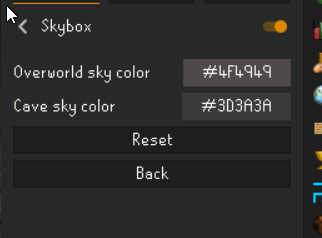
 warm ice
also can anybody tell me if im missing something? i want to use 117HD without a seasonal theme but struggle to figure out how to disable it

 haughty pumiceBOT
Visit 117's HD plugin discord (https://discord.com/invite/U4p6ChjgSE) for support, issues & feedback
 vast sable
I literally can’t use RuneLite, I’m on Mac, I’ve installed it bht in my Jagex launcher it says install and takes me to the install page still, any tips?
 zealous cedar
vast sable
I literally can’t use RuneLite, I’m on Mac, I’ve installed it bht in my Jagex la...
vast sable
zealous cedar
<https://github.com/runelite/runelite/wiki/FAQ#the-jagex-launcher-is-stuck-on-in...
zealous cedar
vast sable
I literally can’t use RuneLite, I’m on Mac, I’ve installed it bht in my Jagex la...
vast sable
zealous cedar
<https://github.com/runelite/runelite/wiki/FAQ#the-jagex-launcher-is-stuck-on-in...
Fixed, thank you 👍🏼
 wind owl
i have a problem when i drag an item to a different tab it just goes to the first tab
 light yacht
anyone else get this? was working fine an hour ago tried logging in and now its completely frozen on this screen after a few seconds of trying to log in. Even the torches in the background freeze

actually it seems like when trying to log into a leagues world the client freezes, works fine on the normal worlds
wind owl
it only happens too when i dont have any items in the first tab

 stone parcel
Maybe a hub plugin
haughty pumiceBOT
Windows
Run the RuneLite (safe mode) shortcut, or with a Jagex account, first run the RuneLite (configure) shortcut and tick the Safe mode box, then launch RuneLite via the Jagex launcher.
Mac
In Terminal, run:
/Applications/RuneLite.app/Contents/MacOS/RuneLite --configureTick the Safe mode box. Launch RuneLite.
If it's not working, download and install the updated RuneLite launcher from the website link in #welcome. You don't need to uninstall your current version. You will not lose any settings or plugins. Then try running safemode again.
light yacht
stone parcel
Maybe a hub plugin
it launches in safe mode on the leagues world
stone parcel
Nice! Okay so its caused by a hub plugin probably.
 brazen magnet
Hi! I don't see the safe mode box when launching runelite in safe mode, is there a way to force the prompt?
stone parcel
Try running the RuneLite (configure) thing and setting safe mode there.
brazen magnet
ah great that did it thank you!
light yacht
stone parcel
Nice! Okay so its caused by a hub plugin probably.
legend thank you, i just cleared some random plugins i had and it fixed it
🙏
stone parcel
Awesome glad to hear it! 😄
 lusty sphinx
light yacht
legend thank you, i just cleared some random plugins i had and it fixed it
lusty sphinx
light yacht
legend thank you, i just cleared some random plugins i had and it fixed it
do you maybe have a list of things you turned off? I'm currently facing the exact same issue, game was working fine a few hours ago
stone parcel
If you look at the pluginhub plugins on the RuneLite website you can sort by "Time Updated", that might be useful.
lusty sphinx
I think this plugin is causing the issue
https://runelite.net/plugin-hub/show/dink
It's the only plugin I added in the past hours and now that I removed it, I can join leagues worlds fine 😄
stone parcel
Interesting, that's a pretty popular one too.
lusty sphinx
on this topic, i've been using discord loot logger for the past years and just found this out which is wayyyy more interesting with all the different options, but until leagues are finished I'll probably not use it 😛
 odd kelp
Is there something like NPC indicator but for objects? Interact highlight doesn't keep objects lit up. And I only wanna do certain ones anyways.
odd kelp
with interact highlight?
or thats just a built in runelite setting?
the tile marking?
 round jacinth
No it’s object marking
And yes it’s built into the client
It’s a core plugin not a hub plugin
 round jacinth
Did you even look for “object markers”…?
 leaden trail
Not everything in core is enabled by default
 rapid siren
Hi there, how do I find item ID's for things like hunllef tornadoes or zebak waves which aren't produced by NPC ID overhead plugins?
round jacinth
You check Reddit or ask in Twitch chats of people with them highlighted
Some times people have them on hand here
 glass osprey
I think I have an issue with a 3rd party plugin preventing me from logging on, but I can't seem to check it by running Runelite in safe mode since I use Jagex Launcher (and safe mode requests email and password which doesn't work with Jagex Launcher). Is there another way to check what is causing my Runelite to freeze at login?
Oops, sorry for the long message.
haughty pumiceBOT
Windows
Run the RuneLite (safe mode) shortcut, or with a Jagex account, first run the RuneLite (configure) shortcut and tick the Safe mode box, then launch RuneLite via the Jagex launcher.
Mac
In Terminal, run:
/Applications/RuneLite.app/Contents/MacOS/RuneLite --configureTick the Safe mode box. Launch RuneLite.
If it's not working, download and install the updated RuneLite launcher from the website link in #welcome. You don't need to uninstall your current version. You will not lose any settings or plugins. Then try running safemode again.
light yacht
lusty sphinx
I think this plugin is causing the issue
https://runelite.net/plugin-hub/show/d...
its not this one
stone parcel
There is an option for Jagex Account
light yacht
i got rid of bot detector plugin
and some of the ones that were highlighted as beta
"BETA"
117HD is fine
playing with it now
rapid siren
round jacinth
You check Reddit or ask in Twitch chats of people with them highlighted
Asking more from the perspective of finding IDs for new content, like Leagues or a new content patch
glass osprey
stone parcel
There is an option for Jagex Account
Ah thank you! Now I know that it is a 3rd party plugin issue, hopefully I can find the culprit. Thanks again.
round jacinth
rapid siren
Asking more from the perspective of finding IDs for new content, like Leagues or...
some one ith dev tools might need to find them for you then
the ids for leagues should be the same besides the echo fight
rapid siren
round jacinth
some one ith dev tools might need to find them for you then
Is that something you need special permission for or is that just the same as running it in dev mode?
round jacinth
no you dont need permissions to loo at ids of stuff in the game
im not a fan of tagging all movable things personally cause it reduces the game to just click boxes and avoid boxes
rapid siren
I really just need help with finding the IDs for this plugin hub PR, I think the people who are using the plugin are already okay having the tornado tiles be displayed. I'll spend some time digging around in developer mode to see if I can find them
round jacinth
what pr/plugin
rapid siren

GitHub
Contribute to LlemonDuck/the-gauntlet development by creating an account on GitHub.
round jacinth
Oh Llemon could add them, she has the echo form/that region
Just make a suggestion..?
 vocal apex
hi, when i start runelite it keeps getting stuck on starting plugins. but i hear the music on the background. i already have reinstalled and deleted the cache
 haughty pumiceBOT
safemode: Windows
Run the RuneLite (safe mode) shortcut, or with a Jagex account, first run the RuneLite (configure) shortcut and tick the Safe mode box, then launch RuneLite via the Jagex launcher.
Mac
In Terminal, run:
/Applications/RuneLite.app/Contents/MacOS/RuneLite --configureTick the Safe mode box. Launch RuneLite.
If it's not working, download and install the updated RuneLite launcher from the website link in #welcome. You don't need to uninstall your current version. You will not lose any settings or plugins. Then try running safemode again.
vocal apex
will do, thx
glass osprey
For the record, in case it helps anyone else it looks like it was the Teleport Maps (mjhylkema) 3rd party plugin that was causing Runelite to freeze at login.
Also, for some reason my Runelite was reverting back to a different profile at times, which was causing issues finding the perpetrator.
 native gate
Hello guys, for some reason colelctions logs etc levels etc doesnt save on my computer through runelite. It used to do it. Can someone guide me?
rapid siren
round jacinth
Just make a suggestion..?
Gotcha, just do that in the #suggestions channel?
leaden trail
native gate
Hello guys, for some reason colelctions logs etc levels etc doesnt save on my co...
Do you have screenshots enabled for them?
native gate
where do is ee?
round jacinth
rapid siren
Gotcha, just do that in the <#474137683120095263> channel?
No..? Yoy make it as an issue on the repo you linked me
leaden trail
rapid siren
Gotcha, just do that in the <#474137683120095263> channel?
No, that's for core stuff. Open a discussion on the plugin repository
native gate
 round jacinth
And request a feature
leaden trail
Can you set a screenshot hotkey, use it to take a screenshot, and then send your logs?
haughty pumiceBOT
To find the logs, you can do one of the following:
- If your client failed to open, click the
Open logs folderbutton. - Open the screenshot directory by right-clicking 📷
Camerabutton, navigate 1 directory up, then open logs folder. - Navigate to
%userprofile%\.runelite\logson Windows or$HOME/.runelite/logson Linux and macOS.
Upload the log files named client and launcher by dragging them to Discord. If there are files prefixed with jvm_crash dated from today, upload them too.
native gate
leaden trail
Can you set a screenshot hotkey, use it to take a screenshot, and then send your...
CAn you guide me how?

 leaden trail
native gate
CAn you guide me how?
leaden trail
native gate
CAn you guide me how?
Look at the message right before yours
haughty pumiceBOT
@mint mist Windows
Run the RuneLite (safe mode) shortcut, or with a Jagex account, first run the RuneLite (configure) shortcut and tick the Safe mode box, then launch RuneLite via the Jagex launcher.
Mac
In Terminal, run:
/Applications/RuneLite.app/Contents/MacOS/RuneLite --configureTick the Safe mode box. Launch RuneLite.
If it's not working, download and install the updated RuneLite launcher from the website link in #welcome. You don't need to uninstall your current version. You will not lose any settings or plugins. Then try running safemode again.
 mint mist
Where do I find the shortcut? Tried to run %localappdata%runeliterunelite.exe --safe-mode in command and got an error
native gate
Thank you
 autumn ravine
@barren sigil @leaden trail did you guys resolve the issue with Runelite is stuck at Starting plugin 139/164
gilded kayak
the fact that the numbers happened to align with another guy is purely a coincidence
start the client in safe mode and start removing plugins from the  tab until the client starts outside of safe mode
gilded kayak
haughty pumice
<@705608466131320914> **Windows**
Run the ``RuneLite (safe mode)`` shortcut, or ...
scroll up a tiny bit for the safe mode instructions
autumn ravine
ty
leaden trail
I barely remember what day of the week it is, I'm not gonna remember a support post from a month ago
mint mist
I am seeing this - I don't have a Runelite (safe mode) shortcut as far as I can tell
 gilded kayak
so read the part at the bottom that says "If it's not working..."
mint mist
I just updated it - but will do so again
gilded kayak
did you update it from what it said, or from an old download you had
autumn ravine
safemode seems to have resolved it for me
 gilded kayak
oh that's your issue? that looks like your gpu lol
mint mist
I don't think my 4090 is the problem
haughty pumiceBOT
Graphical artifacts? Try disabling hardware acceleration: https://github.com/runelite/runelite/wiki/Disable-Hardware-Acceleration
gilded kayak
autumn ravine
safemode seems to have resolved it for me
yeah I knew it would start in safe mode, you just need to figure out which plugin from the tab is getting stuck
or, sometimes people try go through these steps, but the safe mode step smacks the broken plugin upside the head, and their problem goes away
but that's a little rare
mint mist
haughty pumice
Graphical artifacts? Try disabling hardware acceleration: <https://github.com/ru...
Solved, thank you king
 gilded kayak
there's 130(129?) default plugins, so you first have to have downloaded 34(35) plugins, and then have one of them break, I promise this actually is a coincidence
i started the client and it said 129 but the hw accel guy's screenshot says 130
and i don't want to count the plugins
autumn ravine
is there a verbose mode or some logs i can look at to see which plugin its stuck on, or do i have to disable all plugins?
autumn ravine
im on mac btw
haughty pumiceBOT
To find the logs, you can do one of the following:
- If your client failed to open, click the
Open logs folderbutton. - Open the screenshot directory by right-clicking 📷
Camerabutton, navigate 1 directory up, then open logs folder. - Navigate to
%userprofile%\.runelite\logson Windows or$HOME/.runelite/logson Linux and macOS.
Upload the log files named client and launcher by dragging them to Discord. If there are files prefixed with jvm_crash dated from today, upload them too.
gilded kayak
i'm not 100% sure if the plugins always load in the same order
if they do, I guess try the last plugin to load in today's log, and the first one that loads after, in yesterday's log
 oblique plume
I don't believe it's deterministic
autumn ravine
I'm guessing i have some discord plugin for runelite 🤷♂️
2024-11-30 13:24:05 CST [RuneLite] INFO  n.r.client.discord.DiscordService - Initializing Discord RPC service.
2024-11-30 13:24:06 CST [Client] ERROR n.r.client.callback.ClientThread - Exception in invoke
oh it was the party hub app that caused starting plugins to hang
 frail terrace
anyone's runelite not loading?
gilded kayak
my RuneLite loads fine, what specifically is happening
frail terrace
i can get in on mobile and on other games but not rl
 gilded kayak
basically everything involving that login box is Jagex afaik
frail terrace
it just stays on that screen, what more do u want? :p
gilded kayak
uh
actually
there was one time where a cox plugin maybe caused this issue?
try safe mode
!safe
haughty pumiceBOT
safemode: Windows
Run the RuneLite (safe mode) shortcut, or with a Jagex account, first run the RuneLite (configure) shortcut and tick the Safe mode box, then launch RuneLite via the Jagex launcher.
Mac
In Terminal, run:
/Applications/RuneLite.app/Contents/MacOS/RuneLite --configureTick the Safe mode box. Launch RuneLite.
If it's not working, download and install the updated RuneLite launcher from the website link in #welcome. You don't need to uninstall your current version. You will not lose any settings or plugins. Then try running safemode again.
gilded kayak
if you can login fine in safe mode, something you installed from the tab is causing this issue
frail terrace
will try, cheers 🙂
gilded kayak
fwiw were you trying to log into Leagues
frail terrace
i was world hopping in leagues and then it just froze
reset pc, reset runelite a couple times, same thing
frail terrace
hmm i may done it wrong. ive got jagex account. launcehd regular rl in safemode then opened it on jagex
where is the runelite configure shortcut?
frail terrace
oo got it
it worked but my screen is very blurry now :p
well i was using 117 before
gilded kayak
yes that's fine, this is just a problem confirmation tool
start removing plugins from the tab until the client can* login, outside of safe mode
in safe mode when you click remove they will appear as if they didn't get removed, but they did
frail terrace
ight ty will try
will i need to reload runelite on the jagex client after i remove plugin from safe mode?
leaden trail
gilded kayak
there was one time where a cox plugin maybe caused this issue?
Raids data tracker or whatever, right?
gilded kayak
frail terrace
will i need to reload runelite on the jagex client after i remove plugin from sa...
If you want to do it one at a time, yeah you'll need to close RuneLite, toggle off safe mode, and click play in the jagex launcher
so maybe do a few more than 1 lol
tho if you really want to do it one at a time, it would be nice to know what plugin is causing an issue like this
mossy swan
fwiw binary search is the fastest way to find the plugin
so turn off half, restart, if it happens still, turn off another half.. etc
frail terrace
gilded kayak
If you want to do it one at a time, yeah you'll need to close RuneLite, toggle o...
i have over 100 plugins so i'll probably just try to do recent ones that i can find 😅
gilded kayak
then you should do what Unmoon just suggested
try disabling the hub plugins, outside of safe mode
gilded kayak
leaden trail
Raids data tracker or whatever, right?
yeah I was wondering how related it would be to Leagues servers, but beta worlds very clearly reloaded the client when you picked them in the login screen picker
frail terrace
tried a few more times and got back in. hopefully whatever it was won't happen again 😆 thanks a lot for the help!
 verbal tulip
Hey can someone remind me how I tie a specific profile to a specific character from the jagex launcher? - I used to be able to do it, now I can't recall - So that it automatically switches profile
stone parcel
I think there is a 🔗 icon on the Profiles screen that does it iirc.
verbal tulip
stone parcel
I think there is a 🔗 icon on the Profiles screen that does it iirc.
THANK YOU
Also.. what plugin shows the cooldown of the home teleport?
I cant remember
My settings got wiped
stone parcel
Maybe "Timers & Buffs", not sure.
stone parcel
There is also lostsettings if you lost your settings.
haughty pumiceBOT
verbal tulip
stone parcel
There is also lostsettings if you lost your settings.
I re-installed windows so they went poof haha
stone parcel
Ahhhh, there is a chance they were cloud synced, but you may be right. :C
 true ruin
Trying to start SOTF & can't see Veliaf in graveyard - Have all reqs for it done, tried hopping & closing client, but he's not there? Any ideas team?
mossy swan
leagues? jagex bug, you gotta talk to him in the hideout or something idk
true ruin
Yeah, he's not in the hideout at Tob
gilded kayak
yeah you're not the only person to report this
mossy swan
try burgh de rott or w/e
 solid mesa
Should be in the basement
mossy swan
tob hideout 
true ruin
Alright - FYI, he was in Burgh basement, as soon as I clicked him he disappeared & now he's in Slepe, tyty
gilded kayak
lol
 sharp nest
Hey, I wanna know if RL can sometimes bring issues? Like one time my PC straight up shut down while playing RL, and today super loud fans started whirling out of nowhere while playing RL (but continued after closing the game and restarting PC). I just want to know if there are any problems that could be happening from using RL sometimes. I use Nvidia graphics on a core i7 gaming PC. 16GB ram, and doesn't seem like it was causing any warnings of high memory usage.
mint mist
Im not sure where else to ask ( I apologize ) Does anyone have any idea what plugin causes people around me to dance randomly?
mossy swan
mint mist
Im not sure where else to ask ( I apologize ) Does anyone have any idea what pl...
have you tried searching the plugin list for dance?
mint mist
mossy swan
have you tried searching the plugin list for dance?
erm, yes - yes that was it. I did search it but I must have mis-spelled. sorry!
 jolly stream
been happening for like a week now, used to be fine and it just times out every few seconds, any known fixes?

seems to be only happening on runelite
i have not downloaded any new plugins recently either
 worthy crane
how did u manage to solve this if u dont mind
or has anyone ran into the same issue with no minimap icons all of a sudden?
leaden trail
jolly stream
seems to be only happening on runelite
Seeing as that's a Runelite plugin I can't imagine how you would even know if it was happening on a different client
Are you actually experiencing issues or just going off the graph?
 modern verge
lusty sphinx
I think this plugin is causing the issue
https://runelite.net/plugin-hub/show/d...
modern verge
lusty sphinx
I think this plugin is causing the issue
https://runelite.net/plugin-hub/show/d...
unable to replicate; feel free to try to re-install it to see if the problem appears again
gilded kayak
someone later said it was hub party causing their version
so the actual cause could be like any plugin lol
modern verge
ah yeah prolly uninstalled multiple in one go
worthy crane
glad i found this

turned it on for fight caves on leagues, same issue almost a year later
gilded kayak
it looks like nobody reported it back then
so it's gonna happen next years leagues too if someone doesn't
haughty pumiceBOT
Get support for the Ground Object Hider Plugin Hub plugin here: https://runelite.net/plugin-hub/show/object-hider.
You can also find the support link by searching for the plugin in the Plugin Hub panel and clicking the ? button on the plugin, or by right-clicking the plugin in the plugin panel and clicking the Support menu option.
 scenic bone
Hello I'm trying to build RuneLite from Visual Studio and can't seem to successfully build the project. Lots of "problems" such as "ComponentID cannot be resolved to a variable" etc. Is there a better place I can ask for help, or is this the right section? I am using JDK 11 and the Maven install build was able to complete successfully
mossy swan
!building
haughty pumiceBOT
!building command not found!
gilded kayak
#runelite is a better place but just use intellij, i wouldn't wish java development outside of intellij on my worst enemy
scenic bone
okay fair enough i can give that a shot. figured id try to use 1 IDE for everything
 cursive cedar
inventory setups doesnt yet support potion storage right?
gilded kayak
it does now that it uses bank tags instead of bank tag layouts
you'd have to check the discord search history for more specifics, there were multiple people a day for like 2 weeks after it was added, and then they all completely stopped
so i have no memory of how it works lol
cursive cedar
alright. im using the classic filtering, do you know if that isnt supported top of your head?
gilded kayak
depends what classic filtering is lol
i never really used the plugin that often
i just know that it works with potion storage
now
cursive cedar
ok ill poke around ty felan
gilded kayak
i think it might have issues if you have a placeholder in the bank, for a potion thats also in your potion storage
incase that ends up helping you
scenic bone
trying to build with intelliJ now and getting errors also:
java: package net.runelite.cache.script.assembler.rs2asmParser does not exist```Follow the build guide
None of the steps that don't specifically say they're optional are optional
This channel is for release client support though
scenic bone
I have been but okay thanks
 atomic hamlet
how do i get the top down view with my camera?
leaden trail
Camera plugin -> expand pitch limit
jolly stream
anyone know how to fix this timing out issue? its been happening for 2 weeks , i thought it was my internet till i tried hdos client and it doesnt happen on other clients
 stone parcel
Maybe try safe mode.
haughty pumiceBOT
Windows
Run the RuneLite (safe mode) shortcut, or with a Jagex account, first run the RuneLite (configure) shortcut and tick the Safe mode box, then launch RuneLite via the Jagex launcher.
Mac
In Terminal, run:
/Applications/RuneLite.app/Contents/MacOS/RuneLite --configureTick the Safe mode box. Launch RuneLite.
If it's not working, download and install the updated RuneLite launcher from the website link in #welcome. You don't need to uninstall your current version. You will not lose any settings or plugins. Then try running safemode again.
jolly stream
is that only for mac?
gilded kayak
 jolly stream
how do i run the runlite safe mode shortcut?
jolly stream
found it thank you
cannot see my ping in safe mode but i believe it did not fix my issue
gilded kayak
are you lagging
 timber edge
anybody know what plugin is making abyssal leeches un attackable?
they respawn completely invisible
gilded kayak
entity hider
turn off hide dead
the NPCs are respawning in a very specific way, different than any other in the game I believe
timber edge
i did that
gilded kayak
there's also uh
timber edge
they are not interactable
gilded kayak
oh interactable
u want the other plugin
it's a setting in menu entry swapper
something about dead again i believe
remove dead NPC menus
timber edge
that did it thank you
 upbeat sorrel
i keep crashing in brimhaven agility course
stone parcel
Probably due to a plugin, you can try safe mode.
haughty pumiceBOT
Windows
Run the RuneLite (safe mode) shortcut, or with a Jagex account, first run the RuneLite (configure) shortcut and tick the Safe mode box, then launch RuneLite via the Jagex launcher.
Mac
In Terminal, run:
/Applications/RuneLite.app/Contents/MacOS/RuneLite --configureTick the Safe mode box. Launch RuneLite.
If it's not working, download and install the updated RuneLite launcher from the website link in #welcome. You don't need to uninstall your current version. You will not lose any settings or plugins. Then try running safemode again.
 minor field
Have a question about key remapping - remapping to letter buttons (QWER in this case) randomly breaks 3-4 times a day. closing and reopening the client fixes it....until it breaks again. Any idea what might be causing this behavior?
Sometimes buttons remapped to numbers works fine, but other times some number buttons break as well. This has happened in cg, running around misthalin, afking at edgeville furnace, killing stuff at the slayer tower in morytania...

 vast bone
maybe include the actual error too.
 torpid kelp
How do I know which external plugin is preventing me from logging in? Safe mode works fine
 sonic birch
!flow can follow this
haughty pumiceBOT
flowchart: Please refer to this flowchart for further troubleshooting.
vast bone
vast bone
maybe include the actual error too.
@paper apex I thought you just didnt' include it for some reason lol. I didn't know it was super long.
 spare token
Anyone know if there’s a plugin that basically scans your bank and highlights the best gear for a certain monster? Just want one for the iron as I have so much crap now but idk whats best for what
sonic birch
No
 west thorn
Hey guys - I'm having an issue where the left click attack options are disappearing on mobs, this seems to be happening on Leagues because of the insta-respawns on some creatures
I've tried to disable hiding entity hider/re-enabling death animations and this doesn't seem to fix it either
https://i.imgur.com/2z2Qx5P.png
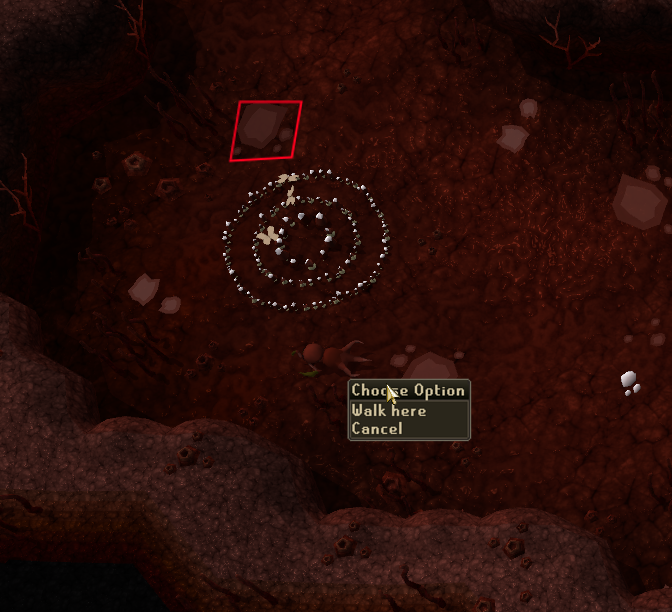
Anyone know what would be causing this?
 mortal pond
west thorn
Anyone know what would be causing this?
mortal pond
west thorn
Anyone know what would be causing this?
I think it's menu entry swapper's "Remove dead NPC menus" not working correctly because those enemies respawn instantly on league
 willow zephyr
Could anyone remind me, where in the settings it was we can change the backround of the login screen? can't quite remember where I went last time
 dusky lantern
Hey does anyone know what the plugin called when u have an item highligted to see how long you have untill it despawn?
frail terrace
dusky lantern
Hey does anyone know what the plugin called when u have an item highligted to se...
ground items, scroll to the bottom, "despawn timer"
oblique plume
same
frail terrace
yep same plugin
dusky lantern
yre
yr
ye i know
but is there a listy
that someone has
i cant find on internet haha
frail terrace
dusky lantern
but is there a listy
 frail terrace
the items i have highlited?
frail terrace
i mean i can, but your needs will probably be unique to yourself
dusky lantern
ye dw bout that one
frail terrace
Hi, could I get some help? My Runelite won't connect to server.
I can only get it to run in safe mode so I think a plugin is messed up?
@gilded kayak was helping me with this yesterday. I was able to login then, but the same issue has come up again
round jacinth
If you can’t connect to the internet then safe mode isn’t going to help
frail terrace
round jacinth
If you can’t connect to the internet then safe mode isn’t going to help
I am connected. the game just wont open
when I click login runelite freezes. i can still change runelite settings but the game just doesn't load and the load screen permanently freezes.
I get this if I'm logged in on mobile, but trying to login regularly when i'm not on mobile the client just stays frozen and does nothing
 round jacinth
!safe
haughty pumiceBOT
safemode: Windows
Run the RuneLite (safe mode) shortcut, or with a Jagex account, first run the RuneLite (configure) shortcut and tick the Safe mode box, then launch RuneLite via the Jagex launcher.
Mac
In Terminal, run:
/Applications/RuneLite.app/Contents/MacOS/RuneLite --configureTick the Safe mode box. Launch RuneLite.
If it's not working, download and install the updated RuneLite launcher from the website link in #welcome. You don't need to uninstall your current version. You will not lose any settings or plugins. Then try running safemode again.
round jacinth
And you login fine in safe mode?
frail terrace
yep
haughty pumiceBOT
Many plugins from the pluginhub break the client in subtle or not-so-subtle ways, including causing issues like client freezes. We do not support pluginhub plugins because we do not make or quality control them, and do not recommend their use.
Run the RuneLite (safe mode) shortcut, or with a Jagex account, first run the RuneLite (configure) shortcut and tick the Safe mode box, then launch RuneLite via the Jagex launcher.
This temporarily disables the GPU plugin and all hub plugins which will allow you to confirm the issue is caused by one of those plugins and isn't a core RuneLite issue.
If the issue is caused by a hub plugin, you should isolate which plugin it is and then uninstall the plugin.
round jacinth
Then you still have bad acting plugins stopping the login
frail terrace
ye i have so many plugins i was having a hard time figuring out which it may be
when i click login it does quickly load a plugin or something, like a load bar briefly flashes
so how do i isolate the plugin?
round jacinth
You can’t
You have many bloatware plugins you could and should clean up
Just isolate the hub plugins you don’t use or need and start there
frail terrace
round jacinth
You have many bloatware plugins you could and should clean up
does bloatware just mean unused/excess?
round jacinth
No, it’s a term I’m using to describe the bottom 90% hub plugins (in terms of installs) but it’s not accurate at all to use
I shouldn’t use it lol
frail terrace
ahh no worries haha
round jacinth
Just remove unused plugins you don’t use or need as quick easy ones to delete
They keep settings
So you can add them back later if you want
frail terrace
alright thanks 😄 will keep trying
frail terrace
rogues den, mahogany homes, or i forget the third one i took off. lemee see if i can find it
the third may have been better npc highlight, but can't say for sure. sorry!
 void gate
Is there any way to adjust border width on radius makers like you can with marked tiles?
 snow matrix
Good morning! I tried installing RuneLite on my new laptop and it seems it is not compatible with windows 11 natively. Could someone guide me? I appreciate any help or just being pointed in the right direction 🙂
oblique plume
it def works with windows 11
solid mesa
You might have an ARM laptop
snow matrix
solid mesa
You might have an ARM laptop
Yes it is. I was unfamiliar with ARM until this moment, haha
Seems like Ill install the .jar and try installing it that way. Knew I was going to have to play with Java eventually :p
Thank you for the tip coop ❤️
oblique plume
why not just use the arm launcher
the website should serve that to you by default
is it not?
snow matrix
Omg I overlooked the third option
Thank you
I was so curious about ARM processing that I went down the rabbit hole on that and the integration of JDK into ARM
But long story short I have the client running now and am about to start grinding again
Thank you for the support 💖
 bronze vector
frail terrace
rogues den, mahogany homes, or i forget the third one i took off. lemee see if i...
bronze vector
frail terrace
rogues den, mahogany homes, or i forget the third one i took off. lemee see if i...
Same exact issue here. I did not have the NPC highlight plugin, only Mahogany Homes and Rogues Den
frail terrace
bronze vector
Same exact issue here. I did not have the NPC highlight plugin, only Mahogany Ho...
did either of those work?
bronze vector
Yeah, uninstalling them both worked
frail terrace
ayyy good to hear it 🙂
bronze vector
Thanks for doing the work for me lol
frail terrace
lol you're welcome. it caused me a fair deal of stress! 😆
zealous cedar
oblique plume
the website should serve that to you by default
i dont think we can detect it atm
oblique plume
Ohh darn
sonic birch
willow zephyr
Could anyone remind me, where in the settings it was we can change the backround...
Login screen plugin
round jacinth
fwiw people using resource packs have an option to overwrite the login screen too, idk if that happens after the core plugin or not tho.
If they’re wondering what’s changing it that is
 winter cargo
Hello, can someone explain how to pull your profile from the cloud?
I had a hard drive failure yesterday, however I had cloud sync on. On the new windows install I've logged in to runelite with my profile but the synced one hasn't showed up, only a default one with default settings. I read through the whole FAQ but it doesn't explain how to import from cloud, only how to enable it.
oblique plume
if it was syncing then it should already be there
perhaps a restart could pop it up in the display if it should be there
winter cargo
Hmm, should i delete the default profile in case the synced one has the same name?
sonic birch
No
oblique plume
no
sonic birch
You do need to login though by clicking on the green door
winter cargo
I'm logged in
oblique plume
is it the correct account
 sonic birch
Then you can try restarting a couple times, but that's it
winter cargo
Alright, so there is no way to "grab" it manually from the cloud? On the website I can see the loot tracker and stuff is still there
oblique plume
chances are it wasnt synced
sonic birch
winter cargo
Alright, so there is no way to "grab" it manually from the cloud? On the website...
Thats rsprofile, not the config profile you are looking for
winter cargo
Alright that sucks, I'm 100% sure it was synced. Would it help renaming the "new" default profile? in hopes of the old one popping up?
Or is it designed to merge if they have the same name
oblique plume
theres internal ids
sonic birch
You'd have 2 defaults if they differed and it pulled it from cloud
winter cargo
Interesting, I feel like it would be useful for the user to see and manage cloud synced profiles somehow. Usually I back up everything but this time it was unexpected
If my "default" profile is the correctly synced one, whould it autodownload all the plugins? Or would I have to do that manually
winter cargo
Aight
atomic hamlet
is there a plugin that notifies me when my window is minimzed that i am no longer fishing?
round jacinth
Idle notifier sends notification when you’re idle(not fishing)
atomic hamlet
I just want to say the support from this discord for Runelite has been amazing. Thank you so much @round jacinth and to multiple others who have always helped me within minutes of me asking questions.
Seriously appreciate it a lot.
 tight terrace
Would it be feasible to move the clue scroll to the side bar instead of always on screen? (or is there a setting i'm missing)
for cleaner UI purposes
scenic bone
What's the most efficient way to learn the API and what "options" I have to choose from? For example, client.getWidget... How do I find out all the possible options of widgets to choose from? Does RL have a feature that shows those Widget IDs, itemIDs, etc inside of the UI?
oblique plume
look at something that already does what you want
zealous cedar
scenic bone
What's the most efficient way to learn the API and what "options" I have to choo...
the widget inspector shows widget ids
scenic bone
zealous cedar
the widget inspector shows widget ids
Is this a RL plugin?
zealous cedar
its part of developer tools
scenic bone
Ahh I see. Will take a look. Sounds very useful - thanks
tight terrace
zealous cedar
its part of developer tools
Do you think it'd be possible to have an option to move the clue scroll solve to sidebar?
zealous cedar
i dont know what that means
tight terrace
when you click a clue scroll, the "equip x item and emote x and teleport x" shows on your small game screen, i was wondering if it could instead have the option to reside on the sidebar (akin to quest helper) and not covering the game itself
zealous cedar
it cant be moved to the sidebar
scenic bone
zealous cedar
its part of developer tools
I managed to enable DevTools in RL but don't see WidgetInspector. Sorry
zealous cedar
can you screenshot the devtools?
tight terrace
zealous cedar
it cant be moved to the sidebar
would it be something possible to implement?
zealous cedar
its possible, sure
scenic bone
 tight terrace
zealous cedar
its possible, sure
tight terrace
zealous cedar
its possible, sure
nice
zealous cedar
that isnt the devtools, that is just the plugin for it
haughty pumiceBOT
zealous cedar
devtools are broken on the release atm
scenic bone
Maybe that's why I don't see it?
zealous cedar
maybe
scenic bone
I followed those instructions
scenic bone
Sorry I'm fairly new. I just compiled the RL build in IntelliJ and wanted to try to write my own plugin, so now I enabled DevTools with that link, and I see the plug-in in RL, but it only has Swing inspector
 oblique plume
its a sidebar panel
scenic bone
Skimmed it again and didn't see mention of it, but maybe I'm blind.. Hope not
 scenic bone
Woo!
Can you guys think of any plugin I can look at that interacts with widgets, or clicks things? IE: I want to open the Skill tab or the Inventory tab, which I assume are widgets. I want to click an item in my inventory, etc
oblique plume
you cant click things programatically
scenic bone
noted
 compact vigil
Hi, my game is stuck on 'connecting to server...'. I can log-in without any issues on the official client. Runelite is through the jagex launcher, any idea what's wrong?
 gilded kayak
something you installed from the hub is broken I would guess
!safe can you login in safe mode?
haughty pumiceBOT
safemode: Windows
Run the RuneLite (safe mode) shortcut, or with a Jagex account, first run the RuneLite (configure) shortcut and tick the Safe mode box, then launch RuneLite via the Jagex launcher.
Mac
In Terminal, run:
/Applications/RuneLite.app/Contents/MacOS/RuneLite --configureTick the Safe mode box. Launch RuneLite.
If it's not working, download and install the updated RuneLite launcher from the website link in #welcome. You don't need to uninstall your current version. You will not lose any settings or plugins. Then try running safemode again.
compact vigil
Yep, can log into safe mode
gilded kayak
so one of the plugins you installed from the is causing your issue
I do not know which one unfortunately
but maybe you're a user who only has like 4 plugins and you'll be able to figure it out easily 🙂
(dont worry I know you aren't xd)
sonic birch
!flow can try this
haughty pumiceBOT
flowchart: Please refer to this flowchart for further troubleshooting.
compact vigil
Will do, thanks a lot!
I have an issue with the flowchart where if I create a new profile and load it, it still tries to load my original profile that is attached to my account when logging in
haughty pumiceBOT
compact vigil
I can't see the option until I'm logged in
sonic birch
cant you log in and disable it?
 sonic birch
or does it not even get to the logged in state
hmmmm, then you can duplicate the old profile as a backup, not switch to the new profile, and just do the flowchart procedure with the old profile
 marble hull
hello, for a couple of my plug ins like ground items. Whenever i add an item to the highlighted list, leave them come back to the menu its gone. it is like that with other plug ins with similair text boxes as well.
bronze vector
compact vigil
Hi, my game is stuck on 'connecting to server...'. I can log-in without any issu...
Do you have the Mahogany Homes or Rogues Den plugins installed? Those were the problem for me this morning
 arctic flax
compact vigil
arctic flax
compact vigil
Where you able to figure out which plugin you downloaded? The only one I downloaded was the gauntlet & hunluf plugin?
compact vigil
Hey, I simply loaded my normal plugins, disabled gpu, logged in and enabled gpu and now everything works fine. Not sure if it had anything to do with it but now all works, incl. mahog homes, rouges den, gauntlet & hunleff plugins
arctic flax
Ill give it a go, thanks
gilded kayak
arctic flax
Ill give it a go, thanks
if that works for you, can you post what gpu drivers you're on
and i'm gonna place a bet now its the same one as bret
arctic flax
Made it worse. lol it split the screen for some reason.

Made a new profile, unsync'ed the other profiles and turned off GPU
 quiet sandal
I just installed RuneLite, and i've been trying to get it to launch for over an hour, and it just doesn't do anything, i've tried updating drivers, changing my network, disabling the firewall, allowing into the firewall, uninstalling it, and reinstalling, and downloading JDK 11, and nothing works, it just won't launch. when I click the program, nothing happens.
haughty pumiceBOT
run this command in cmd, then show us the displayed output through a screenshot.
"%localappdata%\runelite\runelite.exe" -c -v --console -- --debug
try this
quiet sandal
zealous cedar
try this
Will do.
quiet sandal
zealous cedar
try this
normal CMD, or elevated?
zealous cedar
normal
quiet sandal
zealous cedar
normal
 zealous cedar
remove the invalid _JAVA_OPTIONS from your env
quiet sandal
zealous cedar
remove the invalid _JAVA_OPTIONS from your env
How do I do that? it's a fresh install of Java.
haughty pumiceBOT
To remove the Java memory limit on your PC follow https://github.com/runelite/runelite/wiki/Remove-java-memory-limit
zealous cedar
basically the same as this
quiet sandal
zealous cedar
basically the same as this
Yup, that was it. I forgot I did that as a troubleshooting step for Minecraft. Thank you lol
quiet sandal
zealous cedar
basically the same as this
So i'm confused on the whole account thing.. is the "login" my OSRS email?
zealous cedar
it depends. do you have a new account?
quiet sandal
zealous cedar
it depends. do you have a new account?
No, i'm using an account that I had preciously played.
but it's just saying invalid
zealous cedar
you probably need to use the jagex launcher
quiet sandal
Would I need to make an entirely new account to use RuneLite?
zealous cedar
no, you can use the jagex launcher to launch runelite
 stone parcel
Yes.
 viral kite
hi,
Im trying to train agility in the brimhaven dungeon at the moment on leagues, and i have crashed 5 times by now
stone parcel
Might want to see if it happens in safe mode.
haughty pumiceBOT
Windows
Run the RuneLite (safe mode) shortcut, or with a Jagex account, first run the RuneLite (configure) shortcut and tick the Safe mode box, then launch RuneLite via the Jagex launcher.
Mac
In Terminal, run:
/Applications/RuneLite.app/Contents/MacOS/RuneLite --configureTick the Safe mode box. Launch RuneLite.
If it's not working, download and install the updated RuneLite launcher from the website link in #welcome. You don't need to uninstall your current version. You will not lose any settings or plugins. Then try running safemode again.
stone parcel
Should be in your windows start menu.
If you don'tfind it, there are instructions at the bottom of that message.
viral kite
you were right
 tidal whale
is runelite free why does it say skills are members only?
gilded kayak
RuneLite is just a client for playing the game, OldSchool Runescape is a game that has members only skills/content
 cerulean kindle
Hey guys, I've had the problem for a few days now as you can see in the screenshot. I've already re-downloaded RuneLite and I still get the same error message when starting the client.

 remote junco
cerulean kindle
Hey guys, I've had the problem for a few days now as you can see in the screensh...
remote junco
cerulean kindle
Hey guys, I've had the problem for a few days now as you can see in the screensh...
is this on a work/school computer or having any sort of restrictions on it? This usually happens when certain traffic is filtered by an organization
cerulean kindle
No, it runs on my private laptop
remote junco
are you on a vpn?
 lapis goblet
I get an error when I try to launch the plugin with --developer-mode --debug mode:
Caused by: java.lang.IllegalArgumentException: Multiple entries with same key: 4099=SCURRIUS_FOOD_PILE_COOLDOWN and 4099=GOD_WARS_ALTAR_COOLDOWN
And if I track it down to my build, I indeed find this code in Varbits.java:
    /**
     * Cooldown timer remaining before eligible to restore at a god wars dungeon altar.
     * Number of game ticks remaining is in intervals of 100; for a value X there are 100 * X game ticks remaining.
     * A player can pray at a god wars altar once this reaches 0.
     */
    public static final int GOD_WARS_ALTAR_COOLDOWN = 4099;

    /**
     * Cooldown timer remaining before being able to eat from the piles of food in Scurrius's lair.
     * Number of game ticks remaining is in intervals of 100; for a value X there are 100 * X game ticks remaining.
     * A player can eat from the food piles once this reaches 0.
     */
    public static final int SCURRIUS_FOOD_PILE_COOLDOWN = 4099;
But why does gradle build it like this? 😄 I have not developed in a while, so I updated everything, but the problem somehow persists
gilded kayak
cuz we broke the dev tools on the release build
change your runeLiteVersion to 1.10.46-SNAPSHOT
lapis goblet
Oh well
how would I setup the version? I currently run 1.10.45, so I have to change it in my installed runelite client? Or is there kind of a website where I can download exact versions?
zealous cedar
set it to 1.10.46-SNAPSHOT
 ancient meteor
is there a reason on leagues i cant move boss hp below this point

but in the main game i can move it anywhere
zealous cedar
I think it depends on where your xptracker is?
oblique plume
prob the relic info stops it
ancient meteor
so its impossible to fix?
oblique plume
you can turn off the relic display
zealous cedar
you could hide the relics maybe
ancient meteor
worked thanks
 wet parcel
Getting this Error.. Tried reinstalling. Tried disabling Nvidia Gforce Experience. tried selecting 'OFF' in hardware acceleration in launcher configuration. Disabled TLS verification, got 2nd pictures error.
if it means anything, I have had this issue with basically all game clients since moving and changing internet provider. Have tried disabling virus protections and firewall. please help!


 silent fable
my idle notifier isnt working on anglerfish, i have it set to 2200ms but im not even getting the fishing status on the screen
zealous cedar
wet parcel
Getting this Error.. Tried reinstalling. Tried disabling Nvidia Gforce Experienc...
maybe your internet provider is blocking runelite? something is blocking the request at least.
cerulean kindle
remote junco
are you on a vpn?
No I don’t use any VPN
 lime jacinth
why are my runelite clients not staying synced
they sync but will not keep syncing
ok scratch that why are my boss kc/times not updating
wtf
wet parcel
zealous cedar
maybe your internet provider is blocking runelite? something is blocking the req...
hm okay i'll reach out to them and see what I can find out. thank you adam
 odd birch
hi all, getting this error.

was playing about 30 mins ago, closed runelite, came back and got this. nothing changed since
mossy swan
are you using a vpn?
odd birch
not at all
mossy swan
maybe give your pc and router a reboot
odd birch
router reboot was the key, ty sir
 steady basalt
hey i factory reseted my pc and signed into runelite but none of my saved plugins are there, even though i can see it in the homepage browser of runelite
anyway to fix this?
oblique plume
were you syncing your profile before
 viscid falcon
how i turn off snow on runelite settings
oblique plume
i dont think you can
viscid falcon
its ok i found it, its on 117 settings
 hasty plank
anyone know how to turn off tooltips?

i cant find the setting
i dont wanna see that info
round jacinth
Turn off mouse tooltips plugin
oblique plume
thats only for menu option
you have to disable the plugin making those tooltips
one looks like item stats
and the other rune pouch
 noble pollen
what varbits are for the rooms of CoX? im trying to make a custom plugin to stop me from skipping to the next room if i find a room that is good/ a room that i want
pretty much if room = X the left click turns into something else
ether examine something like that
noble pollen
oh?
i thought everything was based on varbits, ok one sec
the only thing i did before was quest helper, i wanted to dabble in this stuff but never did really anything more then simple stuff like that
where would i look for in this? im trying to look at the plugin code but i cant find it
maybe i should be asking in development instead of here
sorry
or not
leaden trail
Just because there are varbits for something doesn't mean that they're necessarily transmitted to the client
oblique plume
the scouter overlay
noble pollen

GitHub
Open source Old School RuneScape client. Contribute to runelite/runelite development by creating an account on GitHub.
is this what im looking for?
 obsidian sluice
Is there anything to help?
Puro puro
oblique plume
impling plugin
 leaden trail
Implings
obsidian sluice
 oblique plume
lol
obsidian sluice
What does he do?
oblique plume
i beach
 hollow olive
it's in 🔧
oblique plume
they know
leaden trail
obsidian sluice
The second one here
obsidian sluice
How to cancel it
 oblique plume
configure the plugin
 dry cave
Hi guys anyone else having black flickering on screen after the update or knows how to fix this?
 icy zenith
Heyy, im haivng very bad performance issues. I've got AMD ryzen 5 5600x and 6800xt but im still only getting 30fps while using 117 HD. Also yes, i got 64bit client. Is there anyone who could help me pls ;_;?
 haughty pumiceBOT
Visit 117's HD plugin discord (https://discord.com/invite/U4p6ChjgSE) for support, issues & feedback
haughty pumiceBOT
Many plugins from the pluginhub break the client in subtle or not-so-subtle ways, including causing issues like client freezes. We do not support pluginhub plugins because we do not make or quality control them, and do not recommend their use.
Run the RuneLite (safe mode) shortcut, or with a Jagex account, first run the RuneLite (configure) shortcut and tick the Safe mode box, then launch RuneLite via the Jagex launcher.
This temporarily disables the GPU plugin and all hub plugins which will allow you to confirm the issue is caused by one of those plugins and isn't a core RuneLite issue.
If the issue is caused by a hub plugin, you should isolate which plugin it is and then uninstall the plugin.
 earnest jackal
Is there any reason why Logout timer doesn't work? I'm playing leagues, and I have the logout timer set to 25 minutes, and I keep getting logged out at 5 minutes


 gilded sparrow
hey team, my loot tracker was reset the other day for my account. Anyway I can get it back up to date?
round jacinth
if you deleted it, then its' gone
gilded sparrow
I did not delete it or manualy touch anything to my knowledge. Just loged in one morning and it was all gone. Can still see the old loot on the runelite.net website tho. I'm wondering if I can somehow upload that to my client?
round jacinth
you can't pull that down, but if you get a kill of something that is on the list of stuff
it should "remember" in the side panel
the side panel does not list everything forever, it's not meant to
haughty pumiceBOT
earnest jackal
earnest jackal
Is there any reason why Logout timer doesn't work? I'm playing leagues, and I h...
To the left I have it set to show Idle time. A few seconds later (at 5 minutes) I logout
 oblique plume
do you actually log out
earnest jackal
Disconnect
oblique plume
works on my machine
gilded sparrow
haughty pumice
<https://github.com/runelite/runelite/wiki/FAQ#my-loot-tracker-data-is-gone>
appreciate it I got it solved! had the duplicate account thing going on. Cheers!
leaden trail
o7
earnest jackal
Seems I fixed the issue. I clicked on "Reset" on the plugin settings, and set it back up to 25 minutes, and it's working now
 oblique plume
weird
 gilded scroll
Is there a log file or anything to figure out which plugin is causing a hanging "Starting external plugins" after login? Everything was working fine last night. Safe mode works, but I don't know how to narrow it down.
oblique plume
no
sonic birch
!flow can try this for a binary approach
haughty pumiceBOT
flowchart: Please refer to this flowchart for further troubleshooting.
steady basalt
oblique plume
were you syncing your profile before
Ya
I can see all my progress on the website, but on the client when i sign in it doesnt load up my stuff
oblique plume
thats not nessesarily your profile though
steady basalt
Hmm, it does allow me to import tho like “import home” for example
oblique plume
da heck is import home
 hidden dragon
my runelite keeps crashing.. been fine for months i did delete all plugins i downloaded last 2-3 weeks still crashing\
 hushed lynx
Anyone know how to get the cox npc’s hp overlay to not be in percentage? Or is it bugged?
solid mesa
I don't think it is possible since they change based on the scale of the raid
hushed lynx
solid mesa
I don't think it is possible since they change based on the scale of the raid
Ahh fair tyty
 vast sundial
does anyone know what plugin does the Damage counter thing? it's annoying me
 oblique plume
the game itself
zealous cedar
the corp plugin I think hides it?
vast sundial
ah that's annoying
oblique plume
i thout it just replaces it with another overlay
vast sundial
i can't turn it off in the game itself?
arctic flax
hi all, Im still having an issue logging into runelite, Im just getting stuck connecting to server. Ive tried logging out, deleting profiles, Creating a plank profile, reinstalling runelite, turning off GPU, Its still trying to download plugins from a different computer and crashing
oblique plume
nope
zealous cedar
try using safe mode.
arctic flax
How with the jagex profile?
gilded kayak
!safe and start reading after "or with a jagex account..."
haughty pumiceBOT
safemode: Windows
Run the RuneLite (safe mode) shortcut, or with a Jagex account, first run the RuneLite (configure) shortcut and tick the Safe mode box, then launch RuneLite via the Jagex launcher.
Mac
In Terminal, run:
/Applications/RuneLite.app/Contents/MacOS/RuneLite --configureTick the Safe mode box. Launch RuneLite.
If it's not working, download and install the updated RuneLite launcher from the website link in #welcome. You don't need to uninstall your current version. You will not lose any settings or plugins. Then try running safemode again.
oblique plume
vast sundial
i can't turn it off in the game itself?
it looks like if you turn on the corp plugin then disable the damage counter itl only have the core overlay and still hide the jagex damage one
vast sundial
seems that that does the trick, thanks
arctic flax
Sorry but where is this configure?
arctic flax
Im sorry im so bad with this stuff, I dont under where the tick box is or what the configure version is?
gilded kayak
do you see RuneLite (configure) in your windows start menu
gilded kayak
then you want the part at the bottom that says if it's not working...
arctic flax
Ive done that, and reinstalled it
stone parcel
Type "RuneLite" into the windows start menu, then does RuneLite (configure) show up?
gilded kayak
are you searching RuneLite or just expecting it to be there
arctic flax
Searching runelite
ok ive found it, i had to navigate to the folder and it was theer
gilded kayak
not sure maybe windows is trolling you
arctic flax
sorry about that
gilded kayak
it always shows up for me
gilded kayak
so the profile you are currently on, one of the plugins from the tab is causing your issue
click the 🔧 on the sidebar, then the and remove some stuff
arctic flax
Ok all removed
gilded kayak
then you should be able to close the client, open runelite (configure) again, uncheck the box and launch it again via the jagex launcher
arctic flax
Its still trying to load the plugins and crashing
 untold sun
all plugins have been removed, why?
arctic flax
oh my profiles are still there, if ive logged out and i delete my profiles, i wont lose everything right?
if*
haughty pumiceBOT
gilded kayak
arctic flax
oh my profiles are still there, if ive logged out and i delete my profiles, i wo...
you mentioned before that you tried a profile with no GPU plugin, can you make sure GPU is disabled on this current profile
disable it and restart maybe
untold sun
haughty pumice
<@259135219427311626> <https://github.com/runelite/runelite/wiki/FAQ#my-plugins-...
didnt help
steady basalt
Guess i’m cooked
untold sun
haughty pumice
<@259135219427311626> <https://github.com/runelite/runelite/wiki/FAQ#my-plugins-...
on the website i believe everything is there, but when in the app itself, nothing is there
it does say im signed in under the correct email
stone parcel
Make sure to check step 4, and If you can't find your profile* send a screenshot of the profiles2 folder sorted by size with date displayed.
arctic flax
So ive had to delete my profiles and it works. si now i just need to get the profiles back and see if it works?
gilded kayak
did I suggest you delete your profiles?
oblique plume
no but people love not doing what we tell them to
gilded kayak
deleting them and then adding them again should just restore the same problem
you aren't the first person to have a problem like this, which is why I wanted you to disable GPU and restart, because it's not uncommon that the latest GPU drivers will break this game from 15 years ago
untold sun
in step 4 when importing, im not sure which of the 4 files i should import
gilded kayak
can you screenshot them, click the button top right so extra info shows up
arctic flax
I did miss your message, sorry
gilded kayak
well import your profile I guess and see if the problem comes back
round jacinth
untold sun
in step 4 when importing, im not sure which of the 4 files i should import
You can see which one is the biggest size or most recent
gilded kayak
but restart after the import, since I would not be surprised if you imported, and then could log in, and then tomorrow you can't login again
round jacinth
One of those two usually the one you want
untold sun
i have ones inside my explorer folder that do not show up when i try to import inside of runelite

 leaden trail
Import default-136.....
The ones in that folder that don't show up are temporary files, not sure why those are there
gilded kayak
leaden trail
The ones in that folder that don't show up are temporary files, not sure why tho...
WINDOWS
i think they are from save fail attempts
arctic flax
I dont know why, but its working. Thanks so much for your help
sorry for being an idiot
gilded kayak
gilded kayak
but restart after the import, since I would not be surprised if you imported, an...
i hope you did this part
arctic flax
Nope, but i will do it now lol
leaden trail
gilded kayak
WINDOWS
Well yeah but I wasn't sure of a root cause beyond just "dammit Microsoft"
arctic flax
Disabled the GPU and restarted and i cant log in
sorry can log it*
Just leave it unchecked or is there something i can do>
gilded kayak
you could check what driver version you're on
and tell me so I can make a note of it
for the next person who comes in with a similar sounding issue
arctic flax
is that easy information to find?
gilded kayak
maybe
probably google how do i check what gpu driver version i'm on and also include NVIDIA or AMD
or if you know that nvidia geforce experience is on your computer
or AMD adrenaline
 stone parcel
Try typing Nvidia into the windows* start menu and see if a nvidia program is installed and comes up.
Geforce experience or something iirc.
gilded kayak
you could probably do this instead
search command prompt in the windows start menu
click it
copy paste into it nvidia-smi
scroll up and tell me what Driver Version: it says right here

i googled "check nvidia driver version from terminal" and this came up
very useful
arctic flax
 arctic flax
Thanks
 gloomy frost
Hi guys I have a (i9900k/rtx 3090) and I cannot for my life get decent gameplay while using 117 plugin. I tried all the lowest settings, and its still incredibly laggy. I updated all my drivers, my pc but its still unbelievable choppy and not smooth as my other friends who have a less powerful setup. anyone have any ideas?
haughty pumiceBOT
@gloomy frost Visit 117's HD plugin discord (https://discord.com/invite/U4p6ChjgSE) for support, issues & feedback
 cedar cypress
There's an issue currently open for potion storage not being included in bank value calculation for entire bank (https://github.com/runelite/runelite/issues/18419). Is this currently on anyone's radar, or is it an opportunity for someone to send a pull request?
I've never contributed to RuneLite before, but if no one else was already working on it, I was at least going to take a look at the code and see if I could figure out how to do it.
zealous cedar
thats probably somewhat difficult to do
 patent granite
my game is stuck on 30 fps. how do i get it to go up. it was running at 50 yesterday and i was cool with that
haughty pumiceBOT
flowchart: Please refer to this flowchart for further troubleshooting.
 hushed bridge
hi my runelite just hard closes now sometimes if i go into another tab like disc or spotify etc, this started right after leagues. ive uninstalled both jagex launcher and runelite but its still an issue. any ideas?
haughty pumiceBOT
To find the logs, you can do one of the following:
- If your client failed to open, click the
Open logs folderbutton. - Open the screenshot directory by right-clicking 📷
Camerabutton, navigate 1 directory up, then open logs folder. - Navigate to
%userprofile%\.runelite\logson Windows or$HOME/.runelite/logson Linux and macOS.
Upload the log files named client and launcher by dragging them to Discord. If there are files prefixed with jvm_crash dated from today, upload them too.
hushed bridge
 tight solstice
anyoen have a\n iussue in library where plugin says 2 books are in the same shelf
stone parcel
hushed bridge
To my untrained eye I think it might be this issue. https://github.com/runelite/runelite/issues/10628#issuecomment-1771957664
You may want to wait for a more knowledgeable person to confirm or deny my suspicious before you take any action, but here is this if you don't get any other leads. 😄
I haven't seen it on that cpu before though....
Idk, might wanna try safe mode to make sure its not a plugin causing it, i'm not sure it's the same crash anymore.
haughty pumiceBOT
Windows
Run the RuneLite (safe mode) shortcut, or with a Jagex account, first run the RuneLite (configure) shortcut and tick the Safe mode box, then launch RuneLite via the Jagex launcher.
Mac
In Terminal, run:
/Applications/RuneLite.app/Contents/MacOS/RuneLite --configureTick the Safe mode box. Launch RuneLite.
If it's not working, download and install the updated RuneLite launcher from the website link in #welcome. You don't need to uninstall your current version. You will not lose any settings or plugins. Then try running safemode again.
oblique plume
hushed bridge
looks like the gpu plugin
haughty pumiceBOT
Graphical artifacts? Try disabling hardware acceleration: https://github.com/runelite/runelite/wiki/Disable-Hardware-Acceleration
oblique plume
you can try that and see if it helps
 frosty drum
is it possible to mute level ups from other players? im so sick of hearing it on the ge
i also have this cheap aliexpress headset that doesnt help
sonic birch
sure, among others the music plugin can remove area sounds from other players
odd birch
odd birch
hi all, getting this error.
this has happened again, any suggestion? router reboot yesterday worked fyi
gilded kayak
i would maybe try using your phone data as a hotspot
odd birch
rebooted router and fixed it again
more looking for an idea of potential root cause why a reboot to router would fix it, nothing else on PC is affected
gilded kayak
internet
there's probably other websites u can't connect to, but you just don't have an application that tries to connect to them
odd birch
but like an ip restriction or something?
 tepid sun
Why can i not get ruinelite to open normally to log into my legacy email accounts
Runelite opens only to jagex account laucher
round jacinth
Your cheats broke your login route
tepid sun
you sound dumb not helpful
round jacinth
You can only have that happen if you’re a developer with a jagex account or a cheater. Since you’re not a dev, you’re a cheater.
Not too hard to explain tbh
tepid sun
i have legacy accounts and created a new account that is a jagex laucher account i logged into it and now my normal runelite opens directly to my jagex account
has nothing to do with cheats tf do you even cheat on this game
i launched jagex using runelite not the official client
and runelite now defaulted to jagex
round jacinth
I’m aware of what the problem is
haughty pumiceBOT
You've downloaded a fake client, and your account has been compromised. Remove the fake as soon as possible to minimise further damage.
The following actions should be performed from a secure computer or secure mobile device:
- Change your RuneScape password
- Remove and re-add Authenticator to RuneScape
- Change your RuneScape bank PIN
- Change your email's password
- Add 2FA to your email if you haven't got it enabled
- Check for any linked accounts by accessing the account settings page (https://www.runescape.com/account_settings)
Some fake clients also install malware, only a fresh install of your operating system can guarantee the total removal of any unwanted software.
You might also want to change any email password if you reused the same as your RuneScape account password.
Once your computer is secure, you should download RuneLite from the link available at the #welcome channel.
tepid sun
i have never cheated in this game so you saying that sounds dumb
tepid sun
just had to delete the credentials folder under runelite for my jagex account
and fixed
save this message for educational purposes before you assume cheats
since it was the last one to log into runelite it saves the credentials and automatically aswsumes your going to play on your jagex account
gilded kayak
alright i'm gonna mute you now
but just so you know, RuneLite does not automatically generate that file
so if it's on your computer, and you don't know why, then you're probably compromised lol
but, i'm sure you do know why
 weary talon
Why are the colors in the TzHaar area all washed out with the GPU plugin enabled? I like the GPU plugin for the draw distance feature, but I don't want Runelite adjusting colors without me telling it to, and I've tried changing every single option in the GPU plugin and nothing seems to fix this. Turning off "remove color banding" slightly helped but did not fix it entirely. What is causing this and how can I have it not happen?


First screenshot is without the plugin enabled. 2nd one is with the plugin and no "remove color banding" enabled. It's like the lightness of everything has been turned up. When I went into the TzHaar area after not having been here in a long time, I just knew the color seemed wrong.
mossy swan
doesnt answer your question but you could turn down the ingame brightness a little bit
oblique plume
does bright textures change anything
weary talon
mossy swan
doesnt answer your question but you could turn down the ingame brightness a litt...
Is there an option for that somewhere? I havent seen one. Would it be in Runelite or the default game settings?
oblique plume
i dont think it would but can try
mossy swan
weary talon
Is there an option for that somewhere? I havent seen one. Would it be in Runelit...
ingame settings
weary talon
oblique plume
does bright textures change anything
Nope :(
mossy swan
first slider here
 weary talon
oblique plume
what about compute shaders
weary talon
oblique plume
what about compute shaders
I didnt notice any changes from toggling that either
oblique plume
its a toggle then you gotta restart the plugin
did you turn the plugin off and on again
weary talon
oblique plume
did you turn the plugin off and on again
I did
weary talon
Nah, I've changed literally all the options and toggled the gpu plugin off and on with every change
oblique plume
it just be like that then
mossy swan
yeah unfortunately the gpu plugin is not perfect 1:1 match
weary talon
Does it have to be though? Could this be fixed? It looks like the GPU plugin is automatically changing the gamma of the game, which I feel should not be the case unless the user has control over it
mossy swan
but its better than osb playdough 
well, if someone who knows their shit fixes the plugin, maybe
but it's written by people with no experience mostly
weary talon
Damn. Well I guess compensating with the native brightness slider will have to do then. I hope it gets fixed in the future.
 delicate marlin
is there a place for discussing the dink plugin specifically? kinda hoping to just ask questions without having to open a github issue or having to ping the plugin's devs in here every time
oblique plume
theyre active in here
 white peak
Hey everyone, I am having trouble with a couple different plugin’s feature which is making me think it’s an issue with my runelite client. In plugins with text boxes, like ground items, I try to add new items to hidden or highlighted and they keep resetting. Chat filter is the other one I tried to add new info too, just kept resetting the box to what it was previously. Please let me know if I am posting this issue in the wrong spot. Thank you in advance.
oblique plume
its only text boxes?
or if you say turn a plugin off and restart runelite
is it still off
white peak
No just text boxes
Haven’t had issues with anything outside of that. Before I reinstalled I wanted to check with yall about something stupid I might be missing
oblique plume
dunno then
people get issues with every option not saving, which we know the answer to
but not only a specific type
perhaps you installed a plugin that doesnt let you edit those
haughty pumiceBOT
Many plugins from the pluginhub break the client in subtle or not-so-subtle ways, including causing issues like client freezes. We do not support pluginhub plugins because we do not make or quality control them, and do not recommend their use.
Run the RuneLite (safe mode) shortcut, or with a Jagex account, first run the RuneLite (configure) shortcut and tick the Safe mode box, then launch RuneLite via the Jagex launcher.
This temporarily disables the GPU plugin and all hub plugins which will allow you to confirm the issue is caused by one of those plugins and isn't a core RuneLite issue.
If the issue is caused by a hub plugin, you should isolate which plugin it is and then uninstall the plugin.
white peak
Ima check that out in case I’m missing something and that is the solution. I appreciate the help.
white peak
oblique plume
people get issues with every option not saving, which we know the answer to
Do you work for this discord server? I was trying to get help for this a few days ago and I thought my message got lost in the messages then I went back to yesterday to see if it was resolved and my main discord account can’t chat in any channel.
oblique plume
everyone is a volunteer
round jacinth
Just re-ask your question
white peak
marble hull
hello, for a couple of my plug ins like ground items. Whenever i add an item to ...
Right here
My other account can’t type in any channel in here. Had to recover this account to ask the question.
zealous cedar
It looks like you aren't using runelite and so we removed your ability to talk in the support channel
 somber kettle
Hi there when I launch runelite the window is just all black. This just started happening recently and I havent changed anything. I've gathered that it could be caused by the gpu plugin possibly but there is no way to turn it off through the client and I couldn't find the folder to delete. Ive tried reinstalling jagex and runelite and still have the same problem
zealous cedar
Use safe mode
haughty pumiceBOT
Windows
Run the RuneLite (safe mode) shortcut, or with a Jagex account, first run the RuneLite (configure) shortcut and tick the Safe mode box, then launch RuneLite via the Jagex launcher.
Mac
In Terminal, run:
/Applications/RuneLite.app/Contents/MacOS/RuneLite --configureTick the Safe mode box. Launch RuneLite.
If it's not working, download and install the updated RuneLite launcher from the website link in #welcome. You don't need to uninstall your current version. You will not lose any settings or plugins. Then try running safemode again.
white peak
zealous cedar
Use safe mode
Thank you. I’ll take care of that when I get home
somber kettle
I tried to run runelite(safe mode) and runelite(configure) and both of those are black as well
zealous cedar
can you upload your client log file after running runelite (safe mode)?
haughty pumiceBOT
To find the logs, you can do one of the following:
- If your client failed to open, click the
Open logs folderbutton. - Open the screenshot directory by right-clicking 📷
Camerabutton, navigate 1 directory up, then open logs folder. - Navigate to
%userprofile%\.runelite\logson Windows or$HOME/.runelite/logson Linux and macOS.
Upload the log files named client and launcher by dragging them to Discord. If there are files prefixed with jvm_crash dated from today, upload them too.
somber kettle
like that?
I can send a screenshot of the black window but its litteraly just all black even the windows bar is black. I can hear the runescape music though idk if that helps
 modern anvil
Has anyone had trouble with the menu swapping for inventory items?
Other than myself?
somber kettle
somber kettle
also the official client seems to work fine
haughty pumiceBOT
@somber kettle Graphical artifacts? Try disabling hardware acceleration: https://github.com/runelite/runelite/wiki/Disable-Hardware-Acceleration
oblique plume
what if you do that
hasty plank
is there a plugin that shows you how long ur entangle on an npc lasts?
mossy swan
no
round jacinth
runelite doesn't have it
hasty plank
ok ty
mossy swan
jagex banned that so runelite will not have it ever either
oblique plume
snitches get stiches
 cunning gust
Runelite crashes on startup when i start it via the jagex launcher anyone got any tips?
round jacinth
!safe
haughty pumiceBOT
safemode: Windows
Run the RuneLite (safe mode) shortcut, or with a Jagex account, first run the RuneLite (configure) shortcut and tick the Safe mode box, then launch RuneLite via the Jagex launcher.
Mac
In Terminal, run:
/Applications/RuneLite.app/Contents/MacOS/RuneLite --configureTick the Safe mode box. Launch RuneLite.
If it's not working, download and install the updated RuneLite launcher from the website link in #welcome. You don't need to uninstall your current version. You will not lose any settings or plugins. Then try running safemode again.
round jacinth
use safe mode and disable/remove hub plugins that are probably preventing it from loading
cunning gust
Tried with a completely fresh runelite so it cant be plugins
And runelite starts fine when i start it without the launcher either way
mossy swan
do it anyway
 zealous cedar
can you upload the logs here?
cunning gust
logs with safemode disabled
mossy swan
drag and drop the file here
cunning gust
its just the same thing from earlier launch attempts tho
 brittle tapir
is there a setting that messes with the sidebar font size? I noticed that all of the text looked 25% bigger randomly yesterday
 cunning gust
safe mode startup attempt from earlier
stone parcel
Drag and drop.
cunning gust
iam leaving out my disc name on purpose the file is not longer.
 amber briar
hi! can someone help me troubleshoot menu entry swapper? im having an issue with customizing my shift clicks in general. examples. this issue extends to npcs aswell, i cannot shift click attack for example and so on


while for almost all items i can swap left to drop, i cannot swap shift click to drop
sonic birch
If shift click is already drop, you can't swap to it lol
amber briar
it isnt
verbal tulip
Hey I've encountered a bug when it comes to having the client move from two monitors with different resolutions. Every time I move runelite from a 1080p monitor to a 1440p monitor and back (client is within 1080p measurements and not full screen), upon moving it back, it gets resized into a square... Any fix??
It's pretty annoying to have to resize it every time
haughty pumiceBOT
rsoptions: https://oldschool.runescape.wiki/w/Options
Old School RuneScape Wiki
Settings is the screen that lets players change various settings, such as the brightness of the game client, whether or not chat effects display, whether to accept aid or not, the volume of the music and sound effects, and much more.
sonic birch
verbal tulip
Hey I've encountered a bug when it comes to having the client move from two moni...
Did you specifically tell client-resizer to do that? lol
verbal tulip
sonic birch
Did you specifically tell client-resizer to do that? lol
Huh how would one do that
round jacinth
the auto resizer plugin or w/e has a setting to change the size of a client when it hits the resolutions
which is the behavior you're descriving
verbal tulip
round jacinth
the auto resizer plugin or w/e has a setting to change the size of a client when...
Whats the exact plugin name?
So I can check
stone parcel
Client Resizer



 haughty pumiceBOT
flowchart: Please refer to this flowchart for further troubleshooting.
verbal tulip
sonic birch
!flow
Welp... happens on safe mode with a brand new runelite profile
Idk how to record 2 monitors at once
sonic birch
sharex, obs, maybe unregistered hypercam 2
verbal tulip
It moves over from the 1080p monitor to the 1440p without resizing, but then resizes when moving back to the 1080p monitor
Ok let me see
verbal tulip
sonic birch
sharex, obs, maybe unregistered hypercam 2

As you can see, it moves over fine to the right monitor without resizing, then upon moving back, it gets sandwhiched
oblique plume
looks like its following the height ratio of what it is on the other monitor
verbal tulip
oblique plume
looks like its following the height ratio of what it is on the other monitor
This doesnt happen with any other app at all, any way to fix this?
Every app moves accordingly within the resolution without resizing, including discord
oblique plume
what happens if you turn custom chrome off, in "runelite" settings
sonic birch
think it is a window manager thing indeed,especially since you set the size by dragging it to the top
verbal tulip
oblique plume
what happens if you turn custom chrome off, in "runelite" settings
Let me see
verbal tulip
sonic birch
think it is a window manager thing indeed,especially since you set the size by d...
From the custom chrome?
verbal tulip
oblique plume
what happens if you turn custom chrome off, in "runelite" settings

Also tried disabling contain in screen
 oblique plume
Dunno
verbal tulip
Does maybe adam know?
sonic birch
No, windows
Just keep custom chrome enabled, enable lock window size, and then set the size via the runelite config instead
I suspect it'll stay the right size
verbal tulip
sonic birch
No, windows
Wdym no windows
oblique plume
java sucks
verbal tulip
Idk.. can we maybe ask adam?
sonic birch
Adam doesn't know how your system & windows manager works probs lol
Just try my suggestion and see if it works or not
verbal tulip
Im pretty sure its something within runelites code
verbal tulip
sonic birch
Just try my suggestion and see if it works or not
I'll try but I dont want to have to resort to limiting myself like that
Not a fan of bandaid fixes
Welp.. I selected lock window size and it still happened lmao
RIP
Now can we ask adam? :p
oblique plume
he reads this channel
verbal tulip
round jacinth
do you have per monitor dpi scaling?
How do I check
round jacinth
idk
verbal tulip
This is a new install of win10
round jacinth
googling is a good thing to try
verbal tulip
havent changed anything
round jacinth
idk
verbal tulip
Ok so I dont have anything like that enabled
and this literally only happens with runelite
literally nothing else
Ive tried to do the same thing
cunning gust
solved my issue (not thanks to the useless logs)
verbal tulip
This is off
 oblique plume
you dont
verbal tulip
So I guess I'm cooked?
verbal tulip
1080p and 1440p, yes
verbal tulip
leaden trail
(I haven't read this whole chain)
Haha it's not long, feel free to look through
leaden trail
I don't really have the time
verbal tulip
That way we don't rehash everything
It'll be easier than you asking questions that may be already answered :p
and faster
leaden trail
But I think your issue is just windows being windows because I have the same resolution difference and experience the same thing
verbal tulip
Strange.. let me create an app in c#.net and see if it happens the same
leaden trail
That's really all I have to say, I need to go give a presentation and hopefully not accidentally burn like $50 of GCP credits again
verbal tulip
I genuinely think its just runelite
leaden trail
As others have said it's probably Java nonsense
 fickle olive
Raid reloader keeps giving me malformed packet crash anyone else having this issue?