#support
1 messages · Page 46 of 1
 leaden trail
 main tendon
I'll get onto testing that now after sending the log
can't unfortunately just call upon it so if its like yesterday, i'll be waiting a solid 15 hours before it breaks
 void geyser
Hey man no worries asking. Everything is all good now. I have disable your plugin, pet plugin and the custom vital bars. I think it was probably the custom vital bars as i was getting the same issues that someone else on the github posted. After that update i havent crashed. I havent reinstalled it back but i dont think it was the issue. Ive decied to reduce the amount of plugins overall anyways.
I was doing zmi
 cunning horizon
Thanks. Gonna give it a try later and see why you were getting exceptions at least
void geyser
No worries. Help others who may experience it in the future.
 alpine summit
been having issues with the inventory setup plugin, the update button in the bank has suddenly disappeared so that I can't swap an item out and update it. Also has randomly changed the layout from zig zag to inventory layout for new setups that I make
 haughty pumiceBOT
Support for hub plugins should be directed to the author of the plugin.
You can find the support link by searching for the plugin in the Plugin Hub panel and clicking the ? button on the plugin, or by right-clicking the plugin in the plugin panel and clicking the Support menu option.
 round jacinth
alpine summit
been having issues with the inventory setup plugin, the update button in the ban...
round jacinth
alpine summit
been having issues with the inventory setup plugin, the update button in the ban...
The bank set ups plugin no longer works with the bank tag layouts and instead should be using core’s bank tags. Maybe you can investigate from that angle.
 last vine
i am trying to create a plugin, to do so, i need the data that is being collected by another plugin (https://runelite.net/plugin-hub/show/event-scouting), how do i get access to the person who wrote this plugin to see how the data is being stored?
 hollow olive
join their discord and ask?
last vine
how do i join their discord, not sure where to find it
 viscid lantern
the website you linked has a discord link on there, have you tried asking there? 
you can also just reach out through github
last vine
i click the discord link and it just links to this server
hollow olive
??
 last vine
thanks, im quite new to this sorry
 steel fractal
I have a weird thing that keeps on occuring with my runelite, so I've noticed that from time to time my profiles unlink from all my accounts.
Now I also noticed that a bunch of loot tracker info is gone too. Is there a way to recover the latter and prevent the former from happening?
I am signed in and I have cloud sync enabled on all of the profiles
p sure i've lost like a week worth of loot tracker and everything, including some config of plugins
 charred wind
!lost
haughty pumiceBOT
 oblique plume
loot tracker isnt affected by that
this sounds like you lost connection to sync them and its just evaporated
haughty pumiceBOT
To find the logs, you can do one of the following:
- If your client failed to open, click the
Open logs folderbutton. - Open the screenshot directory by right-clicking 📷
Camerabutton, navigate 1 directory up, then open logs folder. - Navigate to
%userprofile%\.runelite\logson Windows or$HOME/.runelite/logson Linux and macOS.
Upload the log files named client and launcher by dragging them to Discord. If there are files prefixed with jvm_crash dated from today, upload them too.
oblique plume
the client log should show that
steel fractal
can't really see anything specific that would be obvious
but idk what to exactly look for
have noticed this behaviour before but i would just relink, having the loot tracker data lost is the thing that irks me a little bit on one account
don't have any jvm crash logs (most recent one is from 29/04)
 crystal steppe
Hi. Hoping someone could help.
I'm trying to make 2 client sizes that I can change between easily, **whilst **keeping the same looking UI. I could achieve this by making a new profile, but I don't want to keep having to change settings on both profiles whenever I add or change a plugin (maybe missing an easier way here)
With Client resizing I can change my resolution with a hotkey and it is perfect, however my UI looks janky, for example I can no longer see my hot bar when using the smaller ui.
Is there a way I can utilise client resizing, and not have to move UI around? Thank you.
Added images for reference of settings I am using


 oblique plume
Put stuff in anchors
oblique plume
steel fractal
can't really see anything specific that would be obvious
This shows permission issues since there's more than one day in it, also there's dns problems
crystal steppe
Hi Alex, if thats a reply to me. An anchor is when you move something with ALT and there's a highlighted box?
oblique plume
Get the newest launcher and launch it once as admin and it should fix the perms issues
oblique plume
crystal steppe
Hi Alex, if thats a reply to me. An anchor is when you move something with ALT a...
Yes
crystal steppe
So that would be fine for my NPC agreession box I showed, but I'm mainly having an issue with my invent covering my hotbar for example.
And there's no anchors in the bottom right, that I can see anyway
crystal steppe
Thanks Alex that's helpful
 lunar schooner
Does anyone know how to sync up/correct bank value? Seems like it is incorrect on my end

vs in inventory
 oblique plume
It's giving the tooltip for the item behind it in the infinity tab iirc
It's a bug
viscid lantern
oh is that what happens 
 serene basin
does the raids data tracker plugin info transfer over to jagex account if i put my account on there?
oblique plume
We don't make that plugin so idk
 minor skiff
is it possible to change this white stuff?
 leaden trail
The skybox?
minor skiff
dosen't help
 steel fractal
oblique plume
Get the newest launcher and launch it once as admin and it should fix the perms ...
steel fractal
oblique plume
Get the newest launcher and launch it once as admin and it should fix the perms ...
sorry was away from pc for a while. I tend to leave clients open for a while but launching as admin should prevent it in future?
leaden trail
Well
Leaving your client open for an extended period of time can cause weird issues
 gilded kayak
the client isn't meant to be used in admin, we suggest running it once like Alex did because the client will try to fix the relevant issues
so you can continue running it outside of admin
steel fractal
ok, both jagex launcher and rl individually? or should do a standalone launch of the client?
gilded kayak
just the standalone RL client
steel fractal
ok thx, hope that fixes it going forward
would it be recommended to do an admin launch after rl updates in general?
gilded kayak
no
this isn't to fix issues we cause, it's to fix issues something else is causing, effecting us
steel fractal
aight thx
 drifting anvil
My RuneLite occasionally resizes upon logout, even though I have 'lock window size' checked. I'm not sure why.
I'm on MacOS.
 vast bone
No
 wind owl
i swear it feels like theres a tiny bit of anti drag
toa just makes me drag everythign tho too
 random moss
hi, need some help regarding audio issues. everytime I turn on the GPU or 117HD plugins, I start experiencing audio crackling. Ive reinstalled and cleared cache but the problem persists, and doesn't happen when those plugins are off. It occurs on the main menu as well. It should not be a hardware issue because it does not happen with any other program. Windows 10, standalone client.
 static yarrow
My wilderness player alarm has been only highlighting the bottom right rectangle of my screen (behind the inventory) I've tried resetting and uninstalling and reinstalling it but no luck, can't click and drag it either.
haughty pumiceBOT
Get support for the Wilderness Player Alarm Plugin Hub plugin here: https://runelite.net/plugin-hub/show/wilderness-player-alarm.
You can also find the support link by searching for the plugin in the Plugin Hub panel and clicking the ? button on the plugin, or by right-clicking the plugin in the plugin panel and clicking the Support menu option.
 crude dirge
My "Tag tab tab's" that use icons of things I have in my bank don't work. They will withdraw the item if I >right click >change icon, I can still change the icon, so I can fix the problem but its somewhat annoying. any fixes?

just for clarity the circled red items are things I currently have in my bank. the other items I dont own, there just the icons I use
I also do not have "Bank tag layouts" installed and I do have potion storage if that's relevant
 zealous cedar
if you right click -> change icon it withdraws the item?
viscid lantern
bank tag tag tab strikes again!
crude dirge
if the item isn't in my bank everything works as normal
zealous cedar
i cant reproduce that
oh that is a bug, it happens if you go from a layout tab to the tag tab tab
i know about that
crude dirge
yes
actully now that you mention it it works fine when I first open the bank too
or go to a regular tab then back to the ttt
 stoic hemlock
I have such a problem that the clan cape is not visible, but the basic cape is visible. What i need do?
zealous cedar
wait for jagex to fix it
stoic hemlock
Ight ight 👍
wind owl
is there a pluggin that allows me to insert a place holder into my bank without actually owning the item first?
 fossil summit
never
round jacinth
wind owl
is there a pluggin that allows me to insert a place holder into my bank without ...
no, just insert the red X as a place holder
and put the real item later
 gaunt scroll
Im sure I typed that right in the hidden items

 stone parcel
I don't see a , after ashes.
 worn flame
Hey not sure if it's a runelite plugin. But recently noticed in Chambers the "player received "unique drop" text is gone.
Just curious if anyone else has that issue
gilded kayak
usually when there's a problem in CoX people get really really really mad about it
i haven't heard about this yet so i'm more inclined to believe it might be you only
maybe check your chat filter plugin
worn flame
Yea not sure, but that plugin was already turned off
 dense tendon
does anyone know if there's a way to rebind space bar so you can press a different key to take bars at blast furnace? idk why it even requires confirmation at all instead of take all
 solid mesa
Probably Key Remapping
dense tendon
o it does have space
i wonder what a good key would be, i already use tab for click (on macbook trackpad), q for shift, E for ctrl, and wasd for camera
dont really have room for more keys to press while clicking tbh
i guess can rebind 1 while skilling even tho i use that for combat
for some reason when i do that, it works for blast furnace confirmation but not last item on smithing menu at anvil?
only real space works there even after keybinding?
 simple path
https://i.imgur.com/F9ZXN7q.png
I'm having a weird issue. I've turned on and off 1 by 1 each plugin and seems to be "Loot Tracker" spams my chat with "Current tile is out of bounds" on any account I play, and anywhere in the game when I receive any loot tracked by the plugin, I've attempted to google the issue with nothing. Anyone have any ideas on how to fix this?
 solid mesa
Some plugins don't shutdown when you turn them off and you need to restart Runelite to be certain. Have you tried safe mode?
haughty pumiceBOT
Windows
Run the RuneLite (safe mode) shortcut, or with a Jagex account, first run the RuneLite (configure) shortcut and tick the Safe mode box, then launch RuneLite via the Jagex launcher.
Mac
In Terminal, run:
/Applications/RuneLite.app/Contents/MacOS/RuneLite --configureTick the Safe mode box. Launch RuneLite.
If it's not working, download and install the updated RuneLite launcher from the website link in #welcome. You don't need to uninstall your current version. You will not lose any settings or plugins. Then try running safemode again.
simple path
I close client, ran in safe mode, then ran runelite through jagex launcher. didnt work.
Then downloaded runelite again through website. ran safemode then jagex launcher again. didnt work.
Then restarted pc. still having the popup
 simple path
oh, I see where I got that wrong, ill try that now. ty
gilded kayak
because the loot tracker plugin absolutely does not do that
something else is doing it
simple path
okay, in safe mode and it hasnt done that
How do I figure out what would be the cause? when I went 1 by 1, disabling loot tracker was the only thing that stopped that notification from appearing
1 by 1 with my plugins *
gilded kayak
lots of plugins consume the loot tracker
if you turn the thing off they use, they wont be able to work anymore
simple path
I figured out which plugin it was. I was messing with some plugins about a week ago and generally have only clan chat open so I didnt notice till today. Plugin called "Bingo Helper" caused the message. If anyone else runs into that issue.
haughty pumiceBOT
Get support for the Bingo Helper Plugin Hub plugin here: https://runelite.net/plugin-hub/show/bingo-helper.
You can also find the support link by searching for the plugin in the Plugin Hub panel and clicking the ? button on the plugin, or by right-clicking the plugin in the plugin panel and clicking the Support menu option.
gilded kayak
definitely should report that issue because that's unhinged
simple path
definitly will. i've been losing my mind over these messages. currently going for champ scrolls, and its all I see in all or game when opened.
 chrome holly
dealing with some crashes from oom, been asked to record the vmem.txt with debug plugin, lmk
main tendon
main tendon
I'll get onto testing that now after sending the log
@leaden trail So i played a couple of hours as suggested and had no issue. Did some further "kind of testing" just now and its rapidly breaking even after switching profiles back to the one with the issue, made a copy of that one too to test switching to it which did some fixing temporarily, but now its completely fucked unless I go into the fresh profile. I imagine some setting from a different base RL plugin is clashing with the gpu plugin? Also probably not a surprise but using 117 HD also breaks
 frosty drum
hey how do i get npc indicator to tag style true tile AND its SW tile?
I can only seem to choose one?\
 glad fox
is there a way i can copy over plugins from one profile to another without having to compaire each then download the missing ones? (like file copying)
round jacinth
You can just duplicate the profile
glad fox
well I have a large flipping history for each of the different profiles
unless that plugin can pickup on the accout name after copying
round jacinth
Is the flipping history tied to the account or to the actual profile
glad fox
account
round jacinth
Like loot tracker is tied to the account not the profile
Then you can just duplicate the profile
Because the profile doesn’t contain account information, account stuff like loot tracker or farming timers are to the rsn not the profile
glad fox
like I can see all accounts no matter what profile I load up
round jacinth
Then a second profile won’t matter?
There is 3 things it could be and you answered it was 1 of the 3 but now it’s a different one
glad fox
what about the info that is loaded/sync to rl site?:
round jacinth
That information is tied to the account
Like loot tracker or farming timers
The plugin could)
Use profile information (so a new profile clears data)
Use account information (so a new profile retains data)
Use their own folder/file that is not related to the runelite config and they can do what ever with that
A quick way to check is if your .runelite folder has an obvious folder in it related to flipping utilities
haughty pumiceBOT
Get support for the Flipping Utilities Plugin Hub plugin here: https://runelite.net/plugin-hub/show/flipping-utilities.
You can also find the support link by searching for the plugin in the Plugin Hub panel and clicking the ? button on the plugin, or by right-clicking the plugin in the plugin panel and clicking the Support menu option.
glad fox
The only accounts that have different settings are my iron and 1 def pure im going to start making, all the others I want the same settings but with their own folder logs/profile (or whatever you call it)
 worldly plover
hey does sombody got experience with hd mod on mac and can recommend me some settings for better perormace? i just get 20 fps with hd plugin on
haughty pumiceBOT
Visit 117's HD plugin discord (https://discord.com/invite/U4p6ChjgSE) for support, issues & feedback
stone parcel
They might know more there. 😄
worldly plover
thank you!
 clever glade
idk if anyone else is having this issue. When I open runelite, it opens the client from my old PC with some fucked plugin settings. Any idea why it would randomly pull this up?
haughty pumiceBOT
 forest loom
can somebody confirm that there's no way to get a notification that a boss timer is up?
from googling that seems to be the case (e.g. as said here https://www.reddit.com/r/2007scape/comments/18mlgxt/) but I wanted to get that confirmed from a more authoritative source than some dude on reddit
 glossy pumice
hey guys, im using Stretched + xBR on runelite. Its wonderful, except that it makes tile markers blurry. I can't seem to make it better messing with settings. Is there a fix to this, or just something I have to deal with?

 past moon
Hi, after changing RSN, my loot tracker data got split into 2 different profiles. Is there any way to merge these?
haughty pumiceBOT
solid mesa
You can delete one but I don't think you can merge them
leaden trail
Loot tracker or loot logger? I don't think a name change should matter for core loot tracker
past moon
Loot tracker. The data you can see on runelite.net/account section
past moon
solid mesa
You can delete one but I don't think you can merge them
Looks like it 😦 thanks anyway mate
 warm brook
just came home and open runelite like normal and all my plugins are gone any clue why?
haughty pumiceBOT
drifting anvil
Hi Supporters!
Do any of you know why my client lengthens upon logout (see example below)? I have 'lock window size' checked, which it ignores. I now constantly have to resize my client :(
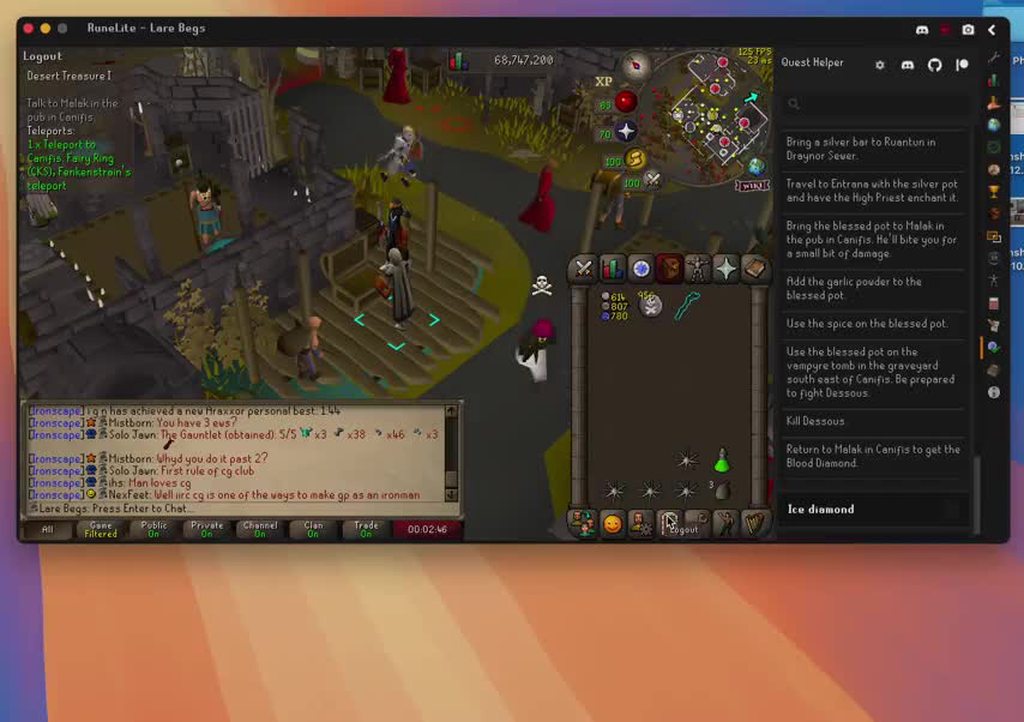 drifting anvil
Ah, that would explain why it only happens sometimes...
^ Correct: only happens when I have the quest helper tab open. I'll work around it for now.
warm brook
f thanks for link but still cant find anything guess gotta start fresh again
stone parcel
Make sure to check step 4 carefully, people often overlook that step.
If you want to submit a screenshot of that profiles2 folder sorted by size, there is a chance someone in here can find the desired profile.
leaden trail
^ make sure you include the dates as well
warm brook
found it thanks
only problem is party hub plugin
loaded client again and now it shows
clever glade
haughty pumice
<@478254467909812224> <https://github.com/runelite/runelite/wiki/FAQ#my-plugins-...
yea i dont have profiles, and when I got my new pc, i logged into runelite with my same email trying to pull my plugins forwad. Now after 2 months it's using my old settings for whatever reason. Im just starting from scratch, gg
 rocky mist
nvm figured it out lol
 summer sluice
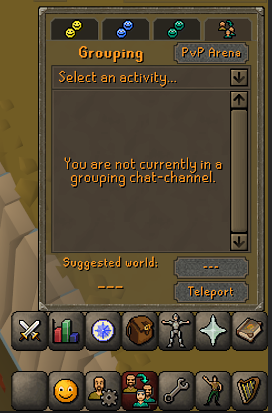
not sure if this a glitch or not, but randomly upon logging in; my client size gets messed up, to where it adds like a few pixels lengthwise;
https://i.imgur.com/Aed4Yn3.png
I have to change game size in runelite (which is correct btw) and then revert the change to have it be normal, and only seems to happen after being logged out for more than 1 minute (undetermined actual time)
Any tips/help?
 gilded kayak
it probably is
summer sluice
this been going on for >3 months
 tulip vector
my runelite keeps crashing everytime i open it
gilded kayak
everyone seems to have noticed it the past few days but i feel like it's existed for a while
haughty pumiceBOT
To find the logs, you can do one of the following:
- If your client failed to open, click the
Open logs folderbutton. - Open the screenshot directory by right-clicking 📷
Camerabutton, navigate 1 directory up, then open logs folder. - Navigate to
%userprofile%\.runelite\logson Windows or$HOME/.runelite/logson Linux and macOS.
Upload the log files named client and launcher by dragging them to Discord. If there are files prefixed with jvm_crash dated from today, upload them too.
summer sluice
gilded kayak
everyone seems to have noticed it the past few days but i feel like it's existed...
I feel like Its been going on for >3 months but just never been annoying enough to report
tulip vector
Anyone kow why all of a sudden my runelite crashed when i open it? it goes to loading screen and just shuts off
haughty pumiceBOT
@tulip vector To find the logs, you can do one of the following:
- If your client failed to open, click the
Open logs folderbutton. - Open the screenshot directory by right-clicking 📷
Camerabutton, navigate 1 directory up, then open logs folder. - Navigate to
%userprofile%\.runelite\logson Windows or$HOME/.runelite/logson Linux and macOS.
Upload the log files named client and launcher by dragging them to Discord. If there are files prefixed with jvm_crash dated from today, upload them too.
gilded kayak
summer sluice
I feel like Its been going on for >3 months but just never been annoying enough ...
yeah i'm not sure afaik they didn't change anything recently to cause this issue, but it's been reported suddenly like 10 times in the past 2 days
but ya quest helper issue
summer sluice
Thanks
tulip vector
@solid mesa the runelite wont open at all it opens quick then shuts off. so how do i find log folder or screenshot directory
leaden trail
Go to the folder mentioned
solid mesa
%userprofile%\.runelite\logs
leaden trail
Are there any jvm_crash files?
leaden trail
I don't see anything in these. Will it launch in safe mode?
haughty pumiceBOT
Windows
Run the RuneLite (safe mode) shortcut, or with a Jagex account, first run the RuneLite (configure) shortcut and tick the Safe mode box, then launch RuneLite via the Jagex launcher.
Mac
In Terminal, run:
/Applications/RuneLite.app/Contents/MacOS/RuneLite --configureTick the Safe mode box. Launch RuneLite.
If it's not working, download and install the updated RuneLite launcher from the website link in #welcome. You don't need to uninstall your current version. You will not lose any settings or plugins. Then try running safemode again.
tulip vector
it happens with jagex account and just trying to open runelite itsself
also i deleted and reinstalled runelite
leaden trail
Oh actually it looks like you're running the 32 bit version?
Try going to the link in #welcome and installing the 64 bit version
None of that is relevant to me asking about safe mode, try that
Realistically I would try to look at event viewer though, if it's not logging any issues and there are no JVM crashes then it's hard for us to really have anything to go on
 tidal grove
by default where is the runelite folder on mac and can I transfer my plugin settings from my windows computer to my mac?
haughty pumiceBOT
glossy pumice
hey guys, im using Stretched + xBR on runelite. Its wonderful, except that it makes tile markers blurry. I can't seem to make it better messing with settings. Is there a fix to this, or just something I have to deal with?
 leaden trail
I think you just have to live with it iirc
hollow olive
or just play quite zoomed in :D


 ornate kite
Hello. I have a question. If I'm using RuneLite and I visit the GE at a clearly peak hour time, and I start having minor to moderate lag, is this a PC issue or just a general server processing issue?
Well, just tested RuneLite and the Original Client on the Jagex Launcher at the GE. RuneLite runs terribly. The OC is very smooth and lag-free. Must be a RuneLite issue.
haughty pumiceBOT
Many plugins from the pluginhub break the client in subtle or not-so-subtle ways, including causing issues like client freezes. We do not support pluginhub plugins because we do not make or quality control them, and do not recommend their use.
Run the RuneLite (safe mode) shortcut, or with a Jagex account, first run the RuneLite (configure) shortcut and tick the Safe mode box, then launch RuneLite via the Jagex launcher.
This temporarily disables the GPU plugin and all hub plugins which will allow you to confirm the issue is caused by one of those plugins and isn't a core RuneLite issue.
If the issue is caused by a hub plugin, you should isolate which plugin it is and then uninstall the plugin.
 sullen hill
Getting this on boot up:
Exception: FileNotFoundException
Message: https://workshop-web3.nl//runelite/bootstrap.json
zealous cedar
wtf is that
sullen hill
That's my question 🤣
solid mesa
Did you download the client from the link in #welcome
Well that is not the runelite website
haughty pumiceBOT
You've downloaded a fake client, and your account has been compromised. Remove the fake as soon as possible to minimise further damage.
The following actions should be performed from a secure computer or secure mobile device:
- Change your RuneScape password
- Remove and re-add Authenticator to RuneScape
- Change your RuneScape bank PIN
- Change your email's password
- Add 2FA to your email if you haven't got it enabled
- Check for any linked accounts by accessing the account settings page (https://www.runescape.com/account_settings)
Some fake clients also install malware, only a fresh install of your operating system can guarantee the total removal of any unwanted software.
You might also want to change any email password if you reused the same as your RuneScape account password.
Once your computer is secure, you should download RuneLite from the link available at the #welcome channel.
zealous cedar
you might be playing an rsps that is sending you to here
sullen hill
I already have Runelite and just updated it, I am an OSRS player.
sullen hill
zealous cedar
you might be playing an rsps that is sending you to here
Believe that to be the case
zealous cedar
ok, well this is the wrong place
sullen hill
Thank you
 limpid talon
Having trouble reinstalling RL after a break. Client is returning a fatal error about being unable to create the RuneLite directory and suggests to run as admin - which also does not resolve the problem
Oh. Just went to try and create the folder structure manually. Turns out I had used a symlink in the past. Removing the defunct shortcut and opening RL again fixed it.
solid mesa
It typically just doesnt work very well
 wet creek
Is the vpn or runelite client the problem?
solid mesa
It has something to do with java
You could look at this https://github.com/runelite/runelite/issues/15098#issuecomment-1796518159
wet creek
thank you
 potent mantle
Hey guys, Just joined the discord, Having triuble launching the client after last wednesdays update, it gets stuck on 'Starting' 'starting core classes' is there anything i can do to fix this, I am on Mac btw. thanks guys
haughty pumiceBOT
@potent mantle To find the logs, you can do one of the following:
- If your client failed to open, click the
Open logs folderbutton. - Open the screenshot directory by right-clicking 📷
Camerabutton, navigate 1 directory up, then open logs folder. - Navigate to
%userprofile%\.runelite\logson Windows or$HOME/.runelite/logson Linux and macOS.
Upload the log files named client and launcher by dragging them to Discord. If there are files prefixed with jvm_crash dated from today, upload them too.
 bright cloak
hello guys, any idea why the highlight hovered tile feature has been automatically enabled for me? I cannot find any setting to disable it.
viscid lantern
thats the Tile Indicators plugin
bright cloak
this plugin is not enabled
viscid lantern
"improved tile indicators"?
 viscid lantern
can you screenshot the hovered tile being highlighted?
bright cloak
 viscid lantern
well its a location of sorts, so that might help you narrow down the search
 mortal pond
It might be "World Location"
 raw oak
Hey, I ran to an issue where "Attack" option is hidden specifically for maniacal monkeys. My NPC attack option is set to left click, tried switching to different ones, reloging, tried to disable certain plugins but I'm not able to figure it out.
On mobile it works fine and "attack" option is there so it's something with runelite specifically.
Also I had a similar issue before where I couldn't start a quest because "talk" option was missing for a certain npc so I had to start it over the phone.
Any help would be appreciated.
 round jacinth
NPC Attack options in game set to hidden?
raw oak
left click
round jacinth
it should share settings between devices i think
raw oak
but on mobile it works fine
haughty pumiceBOT
Windows
Run the RuneLite (safe mode) shortcut, or with a Jagex account, first run the RuneLite (configure) shortcut and tick the Safe mode box, then launch RuneLite via the Jagex launcher.
Mac
In Terminal, run:
/Applications/RuneLite.app/Contents/MacOS/RuneLite --configureTick the Safe mode box. Launch RuneLite.
If it's not working, download and install the updated RuneLite launcher from the website link in #welcome. You don't need to uninstall your current version. You will not lose any settings or plugins. Then try running safemode again.
solid mesa
If it only happens on maniacal monkeys and nothing else it’s almost certainly a plugin
raw oak
yeah, so with safe mode attack option is there
round jacinth
then a hub is doing it
raw oak
any ideas how I could fix it?
haughty pumiceBOT
flowchart: Please refer to this flowchart for further troubleshooting.
raw oak
okay, I'll try, thanks for help!
great, just fixed it, it was "Custom menu swaps" plugin
 summer patio
hi, how do I take these info off in the chat box with numbers on the left??
 viscid lantern
Its a hub plugin you installed, so just remove that. Also dont post in 2 places at once
summer patio
whats the hub plugin named?
viscid lantern
No idea
main tendon
main tendon
<@288504448030867466> So i played a couple of hours as suggested and had no issu...
not even a completely clean reinstall fixes it, and i'm didn't even get a response to that
hollow olive
is it network lag?
main tendon
No it's not. Only runelite is affected and only if the gp plugin is on
any interaction with any bit of the client breaks
leaden trail
Reinstalls won't fix most issues because settings are maintained.
So GPU with default settings on an otherwise fresh profile still has your problem?
main tendon
yes
leaden trail
Try disabling "compute shaders" maybe?
Other than that I'm at a loss because it doesn't even really make sense to me how your issue could at all be tied to GPU in the first place
main tendon
It doesn't make sense to me either. I'm just testing what im told to test with some extra. Drivers are updated, no clue to what extend that would be affected, did it. The fresh reinstall just for testing sake
hollow olive
you could try downgrading drivers
main tendon
not sure how effective that is. I did update after I've started asking here after I realized the gpu plugin fucks it over
don't think i had them updated since before it started
will just try it tho if the compute shaders doesn't work
its nice when you run into an issue seemingly no one ever had
round jacinth
people have gpu issues quite often, but they get them after they've updated their drivers usually i think
 shell hull
do i really need intellij to make/update a plugin
round jacinth
you can use any ide you want, if you get it working. Guides are written for intellij. This channel is for release help not help with development/building, feel free to ask more in #runelite
main tendon
round jacinth
people have gpu issues quite often, but they get them after they've updated thei...
Yeah in this case I tried to update to fix it
pre and post start of the issue had no drivers updated at any point
yep, compute shaders isn't the issue
guess ill attempt downgrading
 manic coyote
hi i reset my pc. and redownloaded runelite. ive logged in but none of my plugins are there. do i have to add them all manually again as on the website its shows the ones ive got installed, is there no way to automatically do this ?
 tender iron
Hey can anyone help with why my client it just randomly closes, no crashes
haughty pumiceBOT
@tender iron To find the logs, you can do one of the following:
- If your client failed to open, click the
Open logs folderbutton. - Open the screenshot directory by right-clicking 📷
Camerabutton, navigate 1 directory up, then open logs folder. - Navigate to
%userprofile%\.runelite\logson Windows or$HOME/.runelite/logson Linux and macOS.
Upload the log files named client and launcher by dragging them to Discord. If there are files prefixed with jvm_crash dated from today, upload them too.
tender iron
manic coyote
haughty pumice
<@276408233151692801> <https://github.com/runelite/runelite/wiki/FAQ#my-plugins-...
thank u so much
tender iron
@leaden trail its happened a few more times since
chrome holly
can someone please look at my vmem.txt log and help me with oom crashes? seems to be gpu plugin related #support message
oblique plume
idk why that file is relevant
but the log just says youre out of system memory
which is what i said initially
leaden trail
Did you try doing what was suggested the last time you asked?
 ember sand
Anyone is experience issues when screensharing Runelite on discord it automatically closes after x period of minutes?
charred wind
disable the experimental crap discord has on for screensharing
ember sand
charred wind
disable the experimental crap discord has on for screensharing
this one?
 oblique plume
ye
ember sand
ok will do , thanks
 brittle tartan
somebody please help
 haughty pumiceBOT
Graphical artifacts? Try disabling hardware acceleration: https://github.com/runelite/runelite/wiki/Disable-Hardware-Acceleration
brittle tartan
I found the issue
its the gpu plugin
how come when I turn on gpu
the game shits itself?
 lapis elm
what in the cursed is that text
leaden trail
brittle tartan
the game shits itself?
try disabling "compute shaders"
brittle tartan
leaden trail
try disabling "compute shaders"
It works for now
brittle tartan
leaden trail
try disabling "compute shaders"
But I've spent 2 hours fixing it and I don't even feel like playing anymore
There's always tomorrow to play ig
 verbal tulip
Anyone know what plugin plays level up music? Its annoying the hell out of me and Idk which plugin it's coming from - coming back from a long break, and I'm guessing someone updated their plugin to play level up music
charred wind
!flow
haughty pumiceBOT
flowchart: Please refer to this flowchart for further troubleshooting.
viscid lantern
Task Jingle probably
 glossy hinge
any updates on the random freezing issues
verbal tulip
viscid lantern
Task Jingle probably
Omg thank you, I was losing my mind
glossy hinge
its been like this for over 6 months...
haughty pumiceBOT
Many plugins from the pluginhub break the client in subtle or not-so-subtle ways, including causing issues like client freezes. We do not support pluginhub plugins because we do not make or quality control them, and do not recommend their use.
Run the RuneLite (safe mode) shortcut, or with a Jagex account, first run the RuneLite (configure) shortcut and tick the Safe mode box, then launch RuneLite via the Jagex launcher.
This temporarily disables the GPU plugin and all hub plugins which will allow you to confirm the issue is caused by one of those plugins and isn't a core RuneLite issue.
If the issue is caused by a hub plugin, you should isolate which plugin it is and then uninstall the plugin.
 sullen fulcrum
what do i doooo
 leaden trail
sullen fulcrum
what do i doooo
leaden trail
sullen fulcrum
what do i doooo
Redownload RuneLite from the link in #welcome and install it without deleting anything, and run it as admin ONCE
stone parcel
Did you ever turn off that BIOS setting that was mentioned?
tender iron
i didnt know if that was for me
stone parcel
Check this out. #support message
Look for the stuff talking about Speedstep for your Intel cpu.
tender iron
tysm
stone parcel
Np, good luck, hope it helps. 😄
stone parcel
If that ends up working you probably will want to only use one of those solutions for the long term. I think the cpu ratio thing was more aimed for amd users with the problem, but worth trying for sure.
 gloomy jolt
Anyone familiar with the issue felanbird described here? https://github.com/runelite/runelite/issues/8457#issuecomment-2481743128

GitHub
Describe the bug When removing all items from the "Hidden" Ground Items list, after quitting and restarting the client, they are back. To Reproduce Go to Ground Items Erase everything in ...
basically i'm unable to edit my ground items plugin. the highlighted items always revert, and, when i drop items, they automatically highlight themselves
haughty pumiceBOT
Many plugins from the pluginhub break the client in subtle or not-so-subtle ways, including causing issues like client freezes. We do not support pluginhub plugins because we do not make or quality control them, and do not recommend their use.
Run the RuneLite (safe mode) shortcut, or with a Jagex account, first run the RuneLite (configure) shortcut and tick the Safe mode box, then launch RuneLite via the Jagex launcher.
This temporarily disables the GPU plugin and all hub plugins which will allow you to confirm the issue is caused by one of those plugins and isn't a core RuneLite issue.
If the issue is caused by a hub plugin, you should isolate which plugin it is and then uninstall the plugin.
gilded kayak
do that first, if it's not that then i could be permissions like I thought
gloomy jolt
indeed the issue is gone in safe mode. it's also gone when i make a new profile in regular mode.
is there a way to turn off all plugins instead of one at a time?
gilded kayak
there is not, i'd probably start removing the ones you actually don't use, first
also include barbarian assault plugins in that
cuz it might be them
gilded kayak
well that plugin sounds like it does exactly what you've reported
oblique plume
bingo!
gloomy jolt
indeed!
gilded kayak
This plugin is making constant changes to the Highlighted Items list of the built in "Ground items" plugin. Any highlighted items you already had will Automatically be copied over, but if you want to manually add new highlighted items do it through this plugin not "Ground Items". Otherwise your changes will not be saved.
yup
gloomy jolt
hah ok cool well i edited my github comment for that 1 noob like me who's gonna google the same thing in 7 months
haughty pumiceBOT
Use /ghauth command to get github roles and be allowed to post in #development
 late fox
Hi there, my power at home surged and then went out for a couple hours.
Upon loading back into Runelite and logging in, my plugins are gone.
I checked my runelite folder, and i see the names of plugins listed there. Does anyone have any idea how I can fix 😐
haughty pumiceBOT
late fox
Thank you.
 wide plume
why is some of my plugins all of a sudenly not allowing it to highlight the color of certain valuable items based on the ge?
solid mesa
It's possible when RuneLite started it failed to get GE prices. You could try restarting your client
 dense citrus
having issue with profiles it switches plug in but not login
summer sluice
https://i.imgur.com/tl99hgA.png is this something fixable? or is this a bug
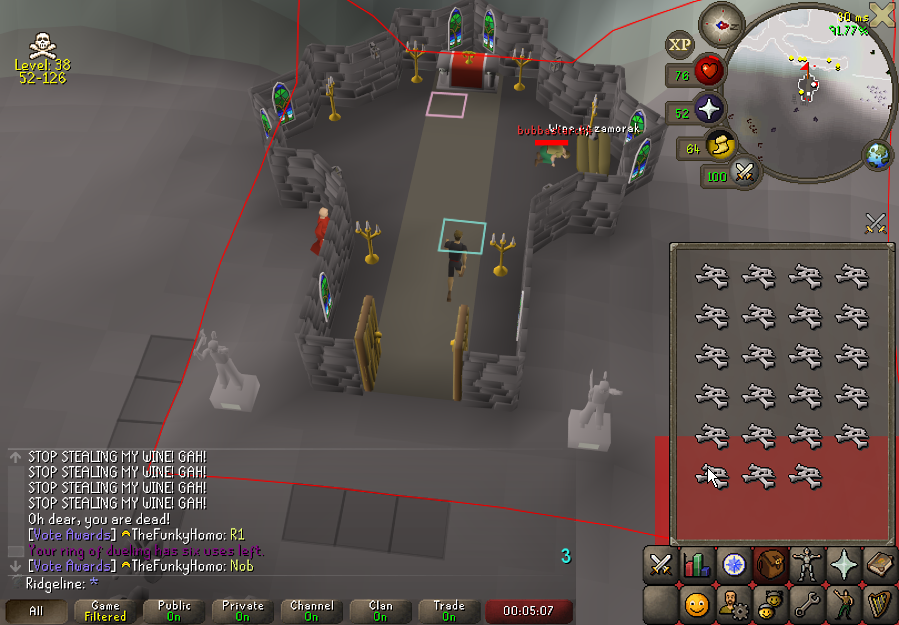
wilderness player alarm, the red alert is just in that bottom corner, instead of entire screen.
haughty pumiceBOT
Get support for the Wilderness Player Alarm Plugin Hub plugin here: https://runelite.net/plugin-hub/show/wilderness-player-alarm.
You can also find the support link by searching for the plugin in the Plugin Hub panel and clicking the ? button on the plugin, or by right-clicking the plugin in the plugin panel and clicking the Support menu option.
 thin cobalt
Hello, i wanna play on my steam deck but when i install Jagex from Lutris, i press play runelite and it doesnt open.. I dont know what to do.. help pls
viscid lantern
I personally use the Bolt launcher on linux https://github.com/Adamcake/Bolt
 tight terrace
Hey guys I need help from someone more tech savvy than me regarding my runelite files:
I had an SSD and an HDD, my SSD was apparently the cause for blue screens so the technician removed it and installed a new one, he supposedly took all the files from that one and put them in my HDD, he also upgraded me to Windows 11
But now I finally have my computer back and I do have all the files, except I had to reinstall both OSRS and League of Legends which for whatever reason are no longer on my computer, and not only that, I can't seem to find any of my screenshots taken through runelite in that folder we usually have, I also lost (or well, can't find) all of my settings, as in, all the plugins, all the marked tiles, all the bank "presets", everything, ah and it gives me a vanguard error 1067 whenever I try to play League now saying I need Tpm version 2.0 (unrelated to this osrs part but i'm overall at a loss here)
I mention the vanguard part because I'm guessing maybe the new install is still detecting remnant files from LoL which the anticheat is interpreting as foreign files of the game somewhere, so maybe the info isn't lost
leaden trail
Look for wherever he may have saved your ".runelite" folder
haughty pumiceBOT
leaden trail
And then you can basically try following that
tight terrace
Thank you Dura! I just went back to the shop and he gave me my old SSD in an enclosure so I can hopefully just plug it back in to my computer and drag the files/settings back to the new one and lose nothing
Also to prevent this from happening in the future, if I login on the Runelite top right corner green arrow thingy will it keep all my rl info on that account?
leaden trail
You need to click the cloud icon on the profile you want to sync as well
(on the system that has the settings you want.)
Just make sure to follow the steps in that link carefully so you don't accidentally sync a blank profile over the one with your settings.
I'd recommend keeping a backup of your .runelite folder somewhere just in case
main tendon
@leaden trail Im feeling pretty certain that I found it. Seems to be "unlock fps" being enabled which is also the default for the gpu pluginthat is the cause. Is there anything you could suggest or tell if that's some very specific issue that could be found on your guys' side?
leaden trail
You are so far outside of any issues I've ever heard of that I'm not really sure I can help further, so I'd see if someone else might know
main tendon
Alright fair enough
It certainly sounds fucked despite being clueless
thanks anyways
main tendon
main tendon
<@288504448030867466> Im feeling pretty certain that I found it. Seems to be "un...
For anyone else interested: The client breaks after a random amount of time, causing all inputs to be delayed or deleted while all animations play out smoothly until the client is restarted. Feeling sure that after some more testing it's the unlock fps option in the gpu plugin
round jacinth
I think you’ve got a memory leak. Many or most use they config of GPU and don’t have issues
main tendon
That'd be specific to osrs? I don't have it in any other game
round jacinth
main tendon
That'd be specific to osrs? I don't have it in any other game
couldn't tell ya otherwise tbh
gpu driver updates only ever try to add support for newer AAA titles and do not care if they break lego star wars or osrs or warcraft 2
so it is normal to find a driver that works and just not update it
if it used to work, go back to the version that did work
main tendon
Thing is unless it auto updated at one point, it broke without any updates to the driver. Was still gonna try downgrading anyway but was curious if the specific setting would've told you anything
 subtle oracle
Hey all, having issues with using Key Remapping to bind back quote/tilde to ESC. Anyone else encounter this or know a fix? Other keys work fine for mapping ESC
leaden trail
Maybe try binding the ping key in the party plugin to something else first and then try remapping it?
subtle oracle
Whoops just realized it was being intercepted by party plugin...
 real delta
Does anyone know why my Drop sounds plugin is no longer working? It used to work, and I have no idea what changed. Runescape sounds still work fine, and Runelite still works with the Windows notification sound (like Idle notifier). I don't know what steps to take to troubleshoot further, any advice greatly appreciated.
 haughty pumiceBOT
Support for hub plugins should be directed to the author of the plugin.
You can find the support link by searching for the plugin in the Plugin Hub panel and clicking the ? button on the plugin, or by right-clicking the plugin in the plugin panel and clicking the Support menu option.
real delta
My bad, thanks!
 fallen pivot
hey im getting the too many log in attempts message when trying to log into my account. i can log onto steam and mobile just fine but runelite isnt working. any ideas?
fallen pivot
my alts work but my main dosnt 😦
 mossy swan
it do be like that
fallen pivot
oblique plume
you can migrate to a jagex account or wait it out
how long does it take?
oblique plume
was that for jagex or you 
fallen pivot
welp it worked im in thx
oblique plume
pog
 vital prairie
When a NPC is already marked, has a highlighted tile underneath or outline, what does “Draw above/Below” even do? There is no change that im noticing from just “Marking”
haughty pumiceBOT
Support for hub plugins should be directed to the author of the plugin.
You can find the support link by searching for the plugin in the Plugin Hub panel and clicking the ? button on the plugin, or by right-clicking the plugin in the plugin panel and clicking the Support menu option.
vital prairie
haughty pumice
Support for hub plugins should be directed to the author of the plugin.
You can ...
If that was helpful I wouldnt ask specifically what difference there was between the two styles of tagging. The ? Is not of use 99% of the time unless its self explanatory
charred wind
Are you asking for help with a specific plugin or are you writing one
If you’re writing one, #runelite is better. This channel is for release client support
vital prairie
I just want to know when shift right clicking what draw above or below even means
What does that even do that standard tagging already isnt?
charred wind
I dont think so no
vital prairie
?
charred wind
sorry i misread
i don't think base runelite even offers those options which is why you were referred to hub support
oblique plume
its not something we make
so you have to go ask the author that did it what it does
which is why i posted the message of go ask the author for help with their plugin
vital prairie
You dont use NPC indicators yourself?
oblique plume
it is not a feature of npc indicators
charred wind
charred wind
i don't think base runelite even offers those options which is why you were refe...
?
vital prairie
oblique plume
it is not a feature of npc indicators
You could have said that to begin with, Its been there since day 1 of using npc ind for me
oblique plume
i did
i told you to contact the author of the hub plugin
since i know its nota core feature
stone parcel
Thats some spicy history.
 tropic bronze
Can anyone help me figure out this issue? Im not very skilled with computers and im not sure what is causing this to happen. For some reason I keep getting this error code whenever i try to load runelite. I have a similar issue with discord right now in that it will not update and just gives me the spinning update of infinite loops. I have tried my hardest over the last week to try to find a solution but have not found anything so far that can help. Any reccommendations or help would be greatly appreciated. I havent been able to play osrs in almost 2 weeks because of this.
 solid mesa
You have some sort of network or firewall issue
tropic bronze
What would be the best way to diagnose that? I have tried resetting my router and that hasnt done anything
oblique plume
tether from phone
leaden trail
Yeah
tropic bronze
will that reset the connection? or will i now only be limited to playing osrs while i have my phone in hotspot mode now?
oblique plume
depends
tropic bronze
I had never had this issue until about a week or two ago. my pc has always been able to run runelite with no issues.
no issues connection to servers. I have poor connection on other games too like fortnite, could it have been a change made during an update?
oblique plume
sounds like you have a poor connection
tropic bronze
I have xfinity internet, my router is maybe 10 ft from my computer. I also checked speeds in my area and we dont have any reported outages or anything
i just connected to hotspot so ill see if that changes anything
round jacinth
your connection to jagex is not the same as your connection to speedtest or netflix or youtube
tropic bronze
Still shows the same error code as previously show
is there any way i can check to see if i have issues that im not addressing maybe?
like is there something i can post here that would help figure this out?
 bright current
Hey RL gang, I know this is pretty niche but any ETA on bringing back self/others toggles for Animation Smoothing? I know it was removed for dev reasons a while ago. I'm just a freak who likes it on others but not me 😛
round jacinth
no eta afaik
bright current
round jacinth
no eta afaik
Fair enough, appreciate the answer. Thanks for all the hard work ❤️ Ill keep hopefully checking the plugin page every month haha
round jacinth
if/when it's added you'll see a gear icon next to animation smoothing
until then there isn't an eta i think
bright current
Time to start a twitter campaign
tropic bronze
So ive tried redownloading runelite after deleting all the files and nothing seems to work. I keep getting the same Ioexception
I also tried the hotspot from my phone and that doesnt work either
leaden trail
So it's probably an antivirus or firewall setting
tropic bronze
okay so i have kaspersky internet security, where would i go to disable and or allow runelite to run?
round jacinth
maybe google that
leaden trail
I would Google how to uninstall it tbqh
round jacinth
lol
 soft agate
Hey, I just signed into runelite and lost my previous plugins and seetings, is it possible to get them back?
haughty pumiceBOT
tropic bronze
So i was able to redownload discord and get discord to finally update, but i have no idea what im supposed to do about runelite. I cant find a way to get rid of all the files
hollow olive
?
round jacinth
you were instructed to google how to disable your antivirus or w/e and you redownloaded discord?
tropic bronze
disabling the antivirus did nothing
round jacinth
you never reported back and started to do random stuff, not sure what to add to the convo
the things to try is vpn i guess
tropic bronze
I apologize that was not my intention
round jacinth
tether from phone was tried but were you using same wifi as tether
or were you using cell phone tower's internet
tropic bronze
I can try just using data from phone with no wifi enabled if thats what you mean
tropic bronze
okay i have connected to my phone, i disabled wifi, still getting same message on runelite
ioexception connection closed by remote host
round jacinth
&& your anti irus thing is turned off?
soft agate
I was signed out for a while without updating my saved profile, when i signed into runelite my current plugins and settings were gone can i get them back?
hollow olive
i responded below you
haughty pumiceBOT
soft agate
I tried that I cant find the profile
tropic bronze
Yes ive turned off antivirus and it doesnt change anything
round jacinth
well my bag of tricks is empty now
tropic bronze
I appreciate youre help, youve tried more than anyone else. So i am very thankful
I am considering the extreme option, What if i factory reset my computer and redownload everything? Is it worth nuking my pc and starting over?
round jacinth
if it's actually network related then no it shouldn't fix anything
hollow olive
have you tried a different laptop pc on the same internet
tropic bronze
I could try my Fiances laptop and download runelite on that. Its old and rather unreliable for gaming but maybe that will give us an idea. one moment as i do that
So runelite downloaded, and ran no problem on her laptop
so it seems to just be my pc
hollow olive
yeah probably uninstall and do a full restart
round jacinth
windows bit defender is quite fine
the best anti virus is not downloading random stuff and common ense lol
tropic bronze
Okay ill try to uninstall kaspersky, do a system restart and report back
soft agate
@hollow olive im on step 4 but dont see how to load my previous multi session profile
or config file
tropic bronze
Josh and Zom, I cant believe it but uninstalling kaspersky worked
I was able to get runelite up and running
Thank you, thank you thank you thank you botrh
It has been 2 weeks and i can finally play again.
i am so thankful for both of you, If there was a way to hug you i would
round jacinth
😄
tropic bronze
Also thank you for being patient with me. This was so frustrating but im so happy its fixed
 tidal scaffold
anyone know if theres ever gonna be a fix on the demonbane spells? I have to turn off animation smoothing everytime I get a demon task
gilded kayak
we made it so animation smoothing ignores those animations like 3 months ago
do you have an example of them still being broken-smoothed?
tidal scaffold
you know what probably not for a while, I just default turn it off whenever I have those tasks... I shall check again when I'm on next! Thanks 🙂
tight terrace
leaden trail
Look for wherever he may have saved your ".runelite" folder
Just passing by to say that it worked! I recovered everything, all the screenshots and settings, I have it all back, thank you! 🥹
leaden trail
Love to hear it
zealous cedar
launch runelite outside of the jagex launcher
the cheats youve installed have configured runelite to do that
gilded kayak
If you didn't intentionally put that file on your computer, that means something other than the real RuneLite did
so you're probably compromised
solid mesa
The Jagex launcher does not thow it in there unless you specifically pass a parameter to do so,
vital prairie
oblique plume
i told you to contact the author of the hub plugin
That isnt indicating that its separate from NPC indicators. You said that after.
vital prairie
round jacinth
its the same abrasive guy who got kicked last time he asked for help
Its the same idiot that was 110% wrong about stretched mode impacting clickboxes and called me a “skill issue” because hes too stupid to answer a question 😭
oblique plume
who stole your lunch money today?
vital prairie
I feel like the b2b araxtye fangs were from you tbh @round jacinth
leaden trail
Can you be a bit more civil to people in here, please?
vital prairie
oblique plume
who stole your lunch money today?
You lowkey had an attitude because I didnt know NPC indicator is seperate and then made it a last point. I dont do disrespect well
vital prairie
leaden trail
Can you be a bit more civil to people in here, please?
Just keeping mutual energy im given when asking questions time to time 💪😘
stone parcel
No, your history shows you are throwing out some really uncivil behavior.
leaden trail
The hostility towards other people isn't necessarily even though Zom could have been a bit clearer
vital prairie
stone parcel
No, your history shows you are throwing out some really uncivil behavior.
Nah it shows I asked about clickboxes and got trolled about skill issues, protect your buddies though im already hip
vital prairie
leaden trail
The hostility towards other people isn't necessarily even though Zom could have ...
Lmao zom likes to start shit so this is what happens in the real world. People dont just play along with your bullshit
stone parcel
Maybe you should look through what you have said here in the past.
vital prairie
stone parcel
Maybe you should look through what you have said here in the past.
Oh im very aware
oblique plume
buddy all i see is you talking to yourself
vital prairie
I get blocked 😭😭
oblique plume
its frankly embarrasing
vital prairie
oblique plume
buddy all i see is you talking to yourself
Im replying to you talking to me 😭😭
Please stop being mean please
Chiv you are too much
stone parcel
Well clearly timing you out didn't work before.....
leaden trail
Support is really not the place for this
leaden trail
Zom hasn't posted in here in three hours, I'm talking about right now
vital prairie
leaden trail
Zom hasn't posted in here in three hours, I'm talking about right now
Im here right now, not everyone is on your time. I was busy getting 2 synapses when he wanted to run his bitchmade mouth
3 hours ago apparently
hollow olive

chrome holly
leaden trail
Did you try doing what was suggested the last time you asked?
yes.
 pliant magnet
@deep epoch #runelite message are you talking about "Attack Timer Metronome" plugin?
 deep epoch
yes sir
pliant magnet
deep epoch
yes sir
Open an issue on the github repo with a video if possible, I hadn't seen that before 🧐
deep epoch
there is no way u have not seen it bro
it gets unsynced super often
ok I'll suply some evidence
c u later aligator
 young flare
RL has been randomly logging me out with a Failed to Log In Please Try Again message displayed on the login screen. Checking the error log I found the following: 2024-11-19 19:23:27 EST [Client] ERROR injected-client - Client error: Login authentication error. Response code: 400 Error servicing REST query: auth.runescape.com Response body: Any idea what this is and how I can fix it?
zealous cedar
its an authentication error to the jagex services.
 sand parrot
is there a way to make cox reloader irrelevent like it is on official client?
as that client just seems to know every room no matter what, assuming not or itd be gone already
soft agate
Is it possible to change shift click to walk here on all npcs? Or do you have to change specific npcs shift click?
solid mesa
 soft agate
ty
 trim wadi
have any of you heard of a way for potion storage to work with bank tag layouts? figured it worth an ask
gilded kayak
u can migrate to the default bank tags plugin, it has layouts now and potion storage support
trim wadi
gilded kayak
u can migrate to the default `bank tags` plugin, it has layouts now and potion s...
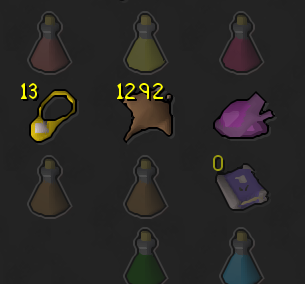
hm really, when i tag inventory, its not tagging pots in my invent, should i remove the bank tag layouts plugin then?
gilded kayak
i know the functionality works but not the specifics
i think someone said if you have any potion placeholders, it doesn't work
trim wadi
no actual place holders in my bank just my layous look like this now;
 trim wadi
gilded kayak
i know the functionality works but not the specifics
trim wadi
gilded kayak
i know the functionality works but not the specifics
i figured it out, you have to copy the tag w/ layout, disable the layout plugin, import and it works
let me know if that makes sense
gilded kayak
ya it does
it matches up with what i was going to copy paste from cooper but i felt maybe what he said might be missing a step
but it matches what u just said
i was gonna post this
 trim wadi
yeah perfect
thats what I did
the random info i found online no one said to disable the layouts one
since this has native layout support ill just remove the other one
gilded kayak
i wouldn't have thought that either because i'm fairly sure geheur intended to make it continue to work together
since there's no reason for him to make it, not work
and i don't think he did
especially since when u have BTL on, it changes the one of the buttons to say "THIS IS THE CORE RUNELITE BUTTON" <-------
trim wadi
yeah that was wicked confusing
 eternal belfry
Anyone know a fix to fps drops in toa. im only getting them in kephri and akkha demi boss rooms. Ive reset my gpu plugin and adjustsed fps but cant seem to fix it
gilded kayak
it's almost certainly a plugin you installed from the  tab
tab
 rigid rose
Hey there. Having an issue with the GPU plugin being unable to start. Getting the following in the logs:
2024-11-19 21:17:29 CST [Client] INFO n.r.client.plugins.gpu.GpuPlugin - Using device: GDI Generic 2024-11-19 21:17:29 CST [Client] INFO n.r.client.plugins.gpu.GpuPlugin - Using driver: 1.1.0 2024-11-19 21:17:29 CST [Client] ERROR n.r.client.plugins.gpu.GpuPlugin - Error starting GPU plugin java.lang.RuntimeException: OpenGL 3.1 is required but not available
I'm using a Qualcomm Adreno X1-45. Documentation shows it supports up to OpenGL 3.2. Drivers are up to date at 31.0.67.0. This is my first ARM based Windows machine, so feel like perhaps I'm missing something. Any help is appreciated, thanks!
 crisp dune
It has OpenGL ES 3.2 support, which isn't the same thing afaict
rigid rose
Well, poop. I missed the ES part. Good catch, thank you.
 inland frigate
my friend has this giant pink square around the tob spectator cage at verzik. It looks like a radius marker but he has turned them off and its still there, anyone know what it might be lol. Scuffed screenshot but he just gave up on fixing it so i'm seeing if anyone has any ideas

 pseudo halo
Looks like an attack radius around the marked tile in the cage
 charred wind
Someone got their task on mobile
 naive palm
ah so the command displays like that if the task was obtained on the mobile client?
charred wind
Yes, Runelite reads the slayer master message to store original task amount
naive palm
thank you!
 young sandal
I’m getting a fatal error when trying to launch. I tried to check the launcher log and just see “Failure during start up” with a file path I’ve deleted (it was a broken 0kb file) after having this error start popping up. Since then I’ve uninstalled/reinstalled, deleted all the files in appdata/moved my profiles out and deleted my plugins. I’ve also since restarted the computer just to make sure that 0kb file was actually gone. Not really sure what I should do from here
haughty pumiceBOT
run this command in cmd, then show us the displayed output through a screenshot.
"%localappdata%\runelite\runelite.exe" -c -v --console -- --debug
 eternal ibex
i get this when trying to launch runelite.. i've tried uninstalling and reinstalling

 proven wharf
Hi, my preview auto layout button is missing even though i have the option checked. How can i fix it?

 gilded kayak
that was the button from the hub plugin that sat in the bottom right corner
right-click the tab you're in on the sidebar
left side
proven wharf
oh it shows for my tag tabs but not for my inventory setups anymore
gilded kayak
well half the people who come in here as of recent are because inventory setups is working with bank tags but they have <specific issue>
so i'm gonna say it probably does work
proven wharf
oh okay, ive figured it out thanks!
 zinc brook
Any program to help
؟

 compact spear
Just practice 🙂
 plucky badge
how can you add a potion from storage to a bank tag. layout is enabled on the tag and hub BTL is disabled
 flat wagon
zinc brook
Any program to help
؟
flat wagon
zinc brook
Any program to help
؟
Your marked tiles are wrong, they need to be 1 durther inside of the room
gilded kayak
plucky badge
how can you add a potion from storage to a bank tag. layout is enabled on the ta...

also some people said something about make sure u dont have those potions, placeholders, in the bank
zinc brook
flat wagon
Your marked tiles are wrong, they need to be 1 durther inside of the room
How do I do that?
plucky badge
gilded kayak
I've already done that and it works great. If I already have a converted tag tab, how do I add a new potion to it? Previously you would drag the potion from your bank onto the tag tab on the left
gilded kayak
🤷
plucky badge
I feel like that functionality may have been overlooked 😂
gilded kayak
everyone just uses inventory setups, since the bank tags layout functionality was written with "let plugins do stuff with it" in mind
since adding a new potion to that is easy
would you not be able to go into the storage, and right-click tag the potion, manually?
plucky badge
Yeah that's what I use primarily but I have some random tabs w/ layout just to keep things together
 plucky badge
gilded kayak
would you not be able to go into the storage, and right-click `tag` the potion, ...
plucky badge
gilded kayak
would you not be able to go into the storage, and right-click `tag` the potion, ...
No the potions there only have the default doses/withdraw options
gilded kayak
unlucky
plucky badge
hmm maybe might be good for my first core contribution
 exotic river
Does runelite run on any tablets?
gilded kayak
RuneLite doesn't support touch screens so if you were able to get it running, functionally it just wouldn't work
gilded kayak
so I'm gonna go with probably no
exotic river
I really want to buy a tablet to play osrs but I really hate the osrs mobile app without all the plugins
gilded kayak
they're coming soon™️
exotic river
I know theyre talking about plugin hub for mobile app but not sure when thats gnna be
viscid lantern
(you would have to double tab everything to get a red x click, and no way to rotate cam)
exotic river
Maybe ill wait and see if they do a good job with plugin hub
viscid lantern
The new mobile app is very good and the plugins in there already help quite a bit imo
plucky badge
never actually tested if touch input works on my steam deck
viscid lantern
Also npc markers+tile markers now
crystal steppe
Not getting any sounds from "custom drop notifier" any ideas?
Attached images of plugins that I think may be relevant.
Under notification settings the "notification sound" is off, but I have tried all variations on that dropdown.
I missed a blood shard as I had no sound. It used to work fine


 gilded kayak
well u seem to have notification sound set to `off
so that would be my first guess
but idunno
i didn't even know we had thatp lugin tbf]
tbf
haughty pumiceBOT
Get support for the Custom Drop Sounds Plugin Hub plugin here: https://runelite.net/plugin-hub/show/custom-drop-sounds.
You can also find the support link by searching for the plugin in the Plugin Hub panel and clicking the ? button on the plugin, or by right-clicking the plugin in the plugin panel and clicking the Support menu option.
crystal steppe
Thanks for trying to help, I covered that above. If i turn that on it doesnt fix custom drop sounds
crystal steppe
it plays a windows sound, and includes all notifications like being out of combat, which i dont want.
I've been on that page, where do you see the most recent issue?
crystal steppe
I see thanks. So maybe an unresolved issue.
It used to work, I have my own custom sounds set up for different tiers of drops
gilded kayak
ya thats what the issue says
crystal steppe
rip i guess
crystal steppe
If anyone has a similar issue and is interested. I've tried 4 different plugins, mostly the same issue.
Not sure if a runelite update at some point has broken these.
But "Ground Item Sounds" is working.
I don't want generic runeltie notifications, just for expensive drops. As it runelite notifications would just notify me each time i'm out of combat (with my current settings)
Thanks for your help felan
 civic marlin
Have there been any reports of malicious plugins recently? My account was hijacked when I tried to log in, 2fa on account and email, virus scan turned up blank, so I'm just confused as to what could have happened
(I put in the ticket with jagex to get my account back)
leaden trail
Plugins are reviewed any time they're submitted or updated so that's pretty unlikely to be your issue
haughty pumiceBOT
@civic marlin You've downloaded a fake client, and your account has been compromised. Remove the fake as soon as possible to minimise further damage.
The following actions should be performed from a secure computer or secure mobile device:
- Change your RuneScape password
- Remove and re-add Authenticator to RuneScape
- Change your RuneScape bank PIN
- Change your email's password
- Add 2FA to your email if you haven't got it enabled
- Check for any linked accounts by accessing the account settings page (https://www.runescape.com/account_settings)
Some fake clients also install malware, only a fresh install of your operating system can guarantee the total removal of any unwanted software.
You might also want to change any email password if you reused the same as your RuneScape account password.
Once your computer is secure, you should download RuneLite from the link available at the #welcome channel.
leaden trail
You can follow those steps though
civic marlin
Havn't downloaded runelite recently, just been using the same client I've been playing on for years, but I'll take a look
 real summit
civic marlin
Havn't downloaded runelite recently, just been using the same client I've been p...
real summit
civic marlin
Havn't downloaded runelite recently, just been using the same client I've been p...
Join the official runescape discord and download the official jagex launcher through their channel dont trust anyone as someone might use a fake site
Also they might make you have to create a new email just to be safe so you dont get hacked again
civic marlin
As much as I dont want to use a jagex account, that seems safest. Just hope my ticket gets answered before leagues drops
 inner karma
civic marlin
As much as I dont want to use a jagex account, that seems safest. Just hope my t...
inner karma
civic marlin
As much as I dont want to use a jagex account, that seems safest. Just hope my t...
jagex launcher is the goat
 pastel saffron
exotic river
Does runelite run on any tablets?
pastel saffron
exotic river
Does runelite run on any tablets?
Yo, Surface pro's work with runelite just get the surface bluetooth mouse. plays fine, still limited touch screen support. but the mouse works on every surface ive tried it on so far
 stiff hill
If you don't have a Jagex account already it's possible somebody created a new one and linked your characters to it
which is the #1 reason to create one even if you're reluctant
 lavish umbra
still no fix for this? keeps happening once everyday even after reinstalling windows
civic marlin
stiff hill
If you don't have a Jagex account already it's possible somebody created a new o...
That's what happened. I get a "no character found" when trying to recover the account, the thing thats happened is that my chars been imported to someone elses jagex account
civic marlin
lavish umbra
still no fix for this? keeps happening once everyday even after reinstalling win...
??? can you, uh, make sure your ram is seated properly?
Like, in theory the computer wouldnt boot if this was the issue, but thats kinda what it looks like
leaden trail
lavish umbra
still no fix for this? keeps happening once everyday even after reinstalling win...
Try disabling SpeedStep in BIOS
lavish umbra
Im 99% sure that my PC is fine other games like DayZ, CS2 runs perfectly without crashes
leaden trail
civic marlin
Like, in theory the computer wouldnt boot if this was the issue, but thats kinda...
No this is a JVM crash
I don't think the SpeedStep crash is usually in GC2 afaik but it's worth a shot
lavish umbra
leaden trail
Try disabling SpeedStep in BIOS
I'll try this. like a year ago I changed some core ratio setting from bios wich helped someone but didnt make the job for me :/
 graceful bramble
Bank tabs seem to be broken for me
leaden trail
Restart your client maybe?
graceful bramble
Will do
zealous cedar
can you define broken?
 inner abyss
 random sundial
Invetory setups missing?
 lost fern
looks like it
haughty pumiceBOT
Some hub plugins failed to build against the latest RuneLite version, this means that they're not available until the owner updates them.
 quasi seal
i aint smart enough to remember my gear setups darn.
lavish umbra
bank tag layouts OP
graceful bramble
zealous cedar
can you define broken?
Bank tags is not compatible i suppose.
gilded kayak
define broken as in:
I can't do this...
This is missing...
 stray grove
do you mean inventory setups, not bank tags?
zealous cedar
(they had said bank tabs are broken. which is different from bank tags)
stray grove
ah
zealous cedar
it looks ok to me
graceful bramble
I can't remember which plug in it is exactly since there are many that due similar jobs. But I'm looking now for the specific one
leaden trail
Inventory Setups, I would imagine
graceful bramble
It's inventory setups
leaden trail
Which is currently broken
graceful bramble
Good job finding it out team! Figured I'd try and help from a user standpoint. Love you guys/gals
 rotund shadow
Does anyone know what could be wrong? I have 16 gb ram, Ryzen 5 5500 and RTX 3060 and I'm using the GPU plugin when doing CMs and I usually have like 4 or 5 clients open on the same time, I'm having like 20-30fps at CM rooms, meanwhile Olm is super smooth, just the rooms make the client lag for some reason, can it be the CPU bottlenecking or maybe 16gb of ram aint enough? Pc usually runs very smooth, only issue is CMs with 5 clients open.
zealous cedar
its probably a pluginhub plugin lagging the client
rotund shadow
I used to use the HD plugin, but turned it off cause it couldnt handle it at all, but now its the same with even GPU plugin
rotund shadow
zealous cedar
its probably a pluginhub plugin lagging the client
WHat's the best way of testing it? Should I just start removing the plugins 1 by 1 when I'm lagging at CMs? or should I remove and reopen the client every time when doing that?
zealous cedar
you could use safe mode. removing or turning off plugins without restarting doesnt always remove them
 grizzled drift
Make a list of your must have plugins, make a new profile and only use those, if still lag, one of your choices is the issue
 south siren
u guys also have a problem when u go to prifddinas and zoom out, that the screen lagg alot? and when u zoom in you have no lagging?
 oak ermine
south siren
u guys also have a problem when u go to prifddinas and zoom out, that the screen...
oak ermine
south siren
u guys also have a problem when u go to prifddinas and zoom out, that the screen...
 south siren
thanksss
 near saddle
how can i follow if a plugin has been updated?
gilded kayak
i'll just guess you're asking about inventory setups, adam just fixed it so restart your client in 5min
or every minute for 5 minutes until it works
near saddle
gilded kayak
i'll just guess you're asking about inventory setups, adam just fixed it so rest...
how good
gilded kayak
however u wish to do it
 opal stream
I am unsure if it's a plugin or one in runelite default, but I no longer have the little 0 in the corner of placeholders when I withdraw an item in a bank tag. Did I miss a config setting or is this intended
opal stream
I dont have bank tag layouts
oblique plume
that would explain why its not there then
opal stream
ah, its a feature of, not a cause of, gotcha
I had removed that because I use inventory setups, and the inventory setups github issues say the lack of placeholders is from runelite's bank tags
thanks for the info
round jacinth
yeah the plugin relies on core's bank tags system now
 quartz lance
is the removal of walk here in the void returning to RL since jagex client got it back today?
zealous cedar
its been back for like a full month
quartz lance
ah 👍
 buoyant kernel
potion storage integration with unfinished pots working but only for part of them? (i got all but avantoes in storage, and released all the placeholders) am i missing something or might just be wanky with some of them?
btw any plan way to have it work with potion storage even if theres a placeholder in bank plus pots in storage? (mostly for some 4 dose pots)
 round jacinth
buoyant kernel
potion storage integration with unfinished pots working but only for part of the...
round jacinth
buoyant kernel
potion storage integration with unfinished pots working but only for part of the...
I noticed this unf issue too, but got it to behave by duplicating the spot that wasn’t working and the dupe spot did work
buoyant kernel
damn easy solve
round jacinth
And if you have a place holder in bank, it’s got priority over the storage spot
So I don’t think there is plans to make it work but idk
buoyant kernel
yah that i noticed, but if i have one 4 dose scb in bank and withdraw, it shows i got 0 left even tho we got in storage
but its just for niche uses
anyways thanks for solve 🙂
buoyant kernel
round jacinth
I noticed this unf issue too, but got it to behave by duplicating the spot that ...
uh, how do i get rid of the original now though? it has release option still for some reason that does nothing, and if i remove tag wont that yeet the duplicated one too?
or no work around and just drag it to the side? lol
round jacinth
Nope I have no clue
I just left it
lol
It says release when it’s not even in the bank
It’s in potion storage
oak ermine
@warm cape the layouts got messed up after this update :C
opal stream
round jacinth
yeah the plugin relies on core's bank tags system now
so if im using inventory setups, i wont get any placeholder text because bank tags don't display them, correct?
oblique plume
what is placeholder text
opal stream
I even tried enabling bank tag layouts on top and still dont get them, which isnt like the worst thing in the world, but it makes seeing if your item withdrew/equipped slightly more annoying cause it only reduces opacity
round jacinth
oak ermine
<@123994257857052672> the layouts got messed up after this update :C
It’s already fixed just restart
opal stream
oblique plume
what is placeholder text
when I withdraw something from a bank tag/inventory setup i dont get the little 0 showing theres none in my bank now
oblique plume
i suppose you can #suggestions that as a feature for the bank plugin
round jacinth
When you withdraw all items but leave a place holder it doesn’t draw a 0, it just transparent the item
opal stream
its only difficult for things that dont transparent well, like black graceful for example
it doesnt look much different in bank or not without the 0 LOL
oak ermine
round jacinth
It’s already fixed just restart
updated yes, but none of the layouts are getting set up properly / how they used too
round jacinth
If you’re still using bank tag layout plugin then you’re right
Because it dropped support for that I think and you use core layouts instead
oak ermine
so "inventory setups" no longer generate a layout something similar to tag tabs bc of that?
round jacinth
It never did generate the layouts, you combined it with the hub plugin called bank tag layouts, but now you use it with just core “bank tags”
opal stream
oak ermine
so "inventory setups" no longer generate a layout something similar to tag tabs...
i've had no issues with inventory setups, but it no longer uses bank tag layouts, you are recommended to disable bank tag layouts for inventory setups as per the inventory setups developer
round jacinth
It only did the tags and side panel thing it didn’t organize stuff
Bank tag layouts is effectively defunct because core does it now
🙂
 warm cape
oak ermine
<@123994257857052672> the layouts got messed up after this update :C
warm cape
oak ermine
<@123994257857052672> the layouts got messed up after this update :C
Can you explain?
round jacinth
I think we just explained to them why it doesn’t work
And they can get it to work again by using core tag for layouts
warm cape
Thank you guys again for explaining and answering questions with inv setups lol I really do appreciate it
 zinc moth
is there a way to both use the bank tag layouts and inventory setups now?
since the fix for inventory setups is to disable bank tag layouts
 robust onyx
When I use the gpu plugin I get these messed up graphical lines I’m running a Ryzen 7 3700x an a nvidia 3060
Video for evidence
zealous cedar
try updating your drivers?
robust onyx
I did this last night I even uninstalled the drivers and reinstalled
zinc moth
round jacinth
If you’re still using bank tag layout plugin then you’re right
is there any way to use both?
round jacinth
You don’t need both is sorta the point
You can do layout with core bank tag plugin + then it supports potion storage
zinc moth
for example i like some of the setups to be in bank tag layouts and rest in inv setups, but now its either or for some reason
just wish there was a way for both of them to be usable
round jacinth
I guess I’m confused with how they’re not the same
 fossil bough
When you say core tag, what is that?
round jacinth
Bank tags
fossil bough
this bit on the left? starting with herb/nest/mushroom?
 zinc moth
i mean they do perform the same function, i just prefer to have some of them in my bank and some in side bar
round jacinth
If you right click one of those icons
It has an option to enable layout on a tag
And that’s from the “bank tags” plugin
I wish there was a blog post to point to for the read up because I explain it differently everytime lol
 round jacinth
zinc moth
i mean they do perform the same function, i just prefer to have some of them in ...
round jacinth
zinc moth
i mean they do perform the same function, i just prefer to have some of them in ...
I don’t think inventory set up has to have a tag tab
fossil bough
Because my vardorvis setup now is a legit handgrenade of nonsense
round jacinth
Show that nonsense
fossil bough
 round jacinth
I think there is a button on the side panel to fix it but not from that screen maybe? Idk
@warm cape should know what the deal is
zinc moth
fossil bough
if you disable the plugin called bank tag layouts it will work as it should
round jacinth
I don’t use rhat hub plugin anymore
 round jacinth
Oh yeah maybe just turn off bank tag layouts off
warm cape
Yeah, Hub BTL needs an update to disable the integration with Inventory Setups
oak ermine
un checking the enable layouts fixed my issue with that
warm cape
the latest update of Inventory setups accidentally re-enabled it 🤦♂️
fossil bough
Okay but now my issue, and its obviously not the end of the world, is that I'm having to re-duplicate all my anglers etc.
oak ermine
i did find tho, once the inventory setup was already loaded and everything moved, you cant fix it
fossil bough
And I kinda just got through doing that last time 😅

this one seems to be working fine though?
warm cape
re-duplicate? Invnetory setups will reduplicaet it for oyu
fossil bough
Maybe delete and re-create the inventory setup?
zinc moth
round jacinth
I don’t think inventory set up has to have a tag tab
they dont but, i just want to be able to use both bank tag layours and inventory setups, which was possible until todays update
fossil bough
Nope, even tried a different name
oak ermine
zinc moth
they dont but, i just want to be able to use both bank tag layours and inventory...
is still possible with just unckecing this option
 zinc moth
oak ermine
is still possible with just unckecing this option
zinc moth
oak ermine
is still possible with just unckecing this option
nope, does nothing
fossil bough
warm cape
re-duplicate? Invnetory setups will reduplicaet it for oyu
Mine is not unfortunately, at least not for this setup. Can check others
round jacinth
zinc moth
they dont but, i just want to be able to use both bank tag layours and inventory...
Just import your bank tag layouts into core and then uninstall bank tag layouts

Do that for each bank tag layout you’ve got and then you can disable or delete bank tag layout plugin
And not have to worry about it
zinc moth
will try that thank you
fossil bough
When I logged in (after updating RL) I somehow had the vardorvis setup loaded (with duplicated anglers etc) but it had a weird name with a bunch of numbers
But yeah now I can't get it to duplicate 😔
oak ermine
fossil bough
But yeah now I can't get it to duplicate 😔
hold shift and right click
fossil bough
Well yeah I can manually duplicate everything but I'm really hoping that's not necessary
warm cape
Hold on, I'm gonna release an patch to stop the integration of Hub BTL again
zinc moth
round jacinth
Do that for each bank tag layout you’ve got and then you can disable or delete b...
that did what i wanted exactly, appreciate it a lot
round jacinth
Enjoy
warm cape
fossil bough
Well yeah I can manually duplicate everything but I'm really hoping that's not n...
No it shouldnt be. In your layout I can see multiple anglers already though
fossil bough
fossil bough
This is how the setup opens in my bank currently
fossil bough
fossil bough
I guess in short my question is how do I get this back
this is what it looked like prior to the update, and how I'd like for it to be
warm cape
Ok a patch was just added. In 5 minutes restart your client
fossil bough
Thank you Muaddib, I know we had a similar conversation/situation the last update. I appreciate your time
warm cape
I just hope i didn't muck up layouts
I don't think I did
If you turned off Hub BTL it should have been back to normal behavior
the problem was Hub BTL was trying to do it's stuff again
Ok @fossil bough I think that should be enough time for the update to go through. Can you restart your client and try?
fossil bough
Doing
zinc moth
works now, amazing thank you
warm cape
are auto layouts working as expected?
fossil bough
Better, but no

 fossil bough
 zinc moth
which is what i needed
warm cape
@fossil bough in inventory setups settings, do you have this set?
 fossil bough
Yep that worked
warm cape
Nice. My bad on that one. All my testing was with Hub BTL off unfortunately. :/
zinc moth
thank you again
 runic silo
does anyone know why i can't connect to the server?
been failing to login since the update
round jacinth
internet issues probably
runic silo
don't think so, everything else is working fine
round jacinth
Your connection to jagex is not the same as the connection to everything else I reckon
runic silo
restarted te router, same issue.. any suggestions?
runic silo
Packets: Sent = 4, Received = 4, Lost = 0 (0% loss),
round jacinth
Being able to login is different from pinging to a world probably
leaden trail
I think the login servers are separate yeah
 umbral crescent
I downloaded the bottom 3 files from here https://github.com/runelite/runelite/tree/master/runelite-client/src/main/resources/net/runelite/client/ui hoping to get the osrs font to be able to use in other applications. However since reloading my runelite client, the ui font has all changed to a larger/bolder style. I think one of these files wasn't just purely a font and a some kind of font manager for runelite? I was trying to import them into my fontbook but only 2/3 would work. How could i go about reverting this?
 leaden trail
umbral crescent
I downloaded the bottom 3 files from here <https://github.com/runelite/runelite/...
leaden trail
umbral crescent
I downloaded the bottom 3 files from here <https://github.com/runelite/runelite/...
No all three of those are just ttf fonts. The commit message about a font manager is in reference to something else
umbral crescent
What could've caused my font to change? I know there was a client update today, but it seemed like too much of a coincidence.
round jacinth
There was no update on runelite for the font for 4 years
 flint warren
Hi, it's not really client-breaking or anything, but is anyone else getting a blank activity adviser? Oficial client does have it
zealous cedar
is this you or someone else? https://www.reddit.com/r/2007scape/comments/1gvv4qc/runelite_empty_activity_adviser/
Reddit
Explore this post and more from the 2007scape community
umbral crescent
From researching, it could be part of ui scaling? I'm on mac so it may specific to that, if it is to do with ui.
flint warren
that's not me
zealous cedar
interesting
flint warren
I'm on Windows PC btw
zinc brook
How to make tornadoes in square shape
 zinc brook
oblique plume
prob some gauntlet plugin auto does it
zinc brook
oblique plume
prob some gauntlet plugin auto does it
Program name
oblique plume
discord
zinc brook
oblique plume
people tag them
؟
oblique plume
e4
leaden trail
You sank my battleship!
 humble pine
woke up this morning to "deposit inventory" in bank menu disappearing, any thoughts? and yes, I have tried turning off and on all bank plugins. I always restart my runelite when I wake up as well
haughty pumiceBOT
Windows
Run the RuneLite (safe mode) shortcut, or with a Jagex account, first run the RuneLite (configure) shortcut and tick the Safe mode box, then launch RuneLite via the Jagex launcher.
Mac
In Terminal, run:
/Applications/RuneLite.app/Contents/MacOS/RuneLite --configureTick the Safe mode box. Launch RuneLite.
If it's not working, download and install the updated RuneLite launcher from the website link in #welcome. You don't need to uninstall your current version. You will not lose any settings or plugins. Then try running safemode again.




 humble pine
good lord, thanks zom
i definitely never go in that menu so thats strange it was off. thank you!
 still badger
hey if we're using multiple osrs accounts under the same profile how can we ensure plugins installed on account x will appear on account a,b,c etc .
do i need to close the runelites in a certain order?
 wanton viper
heya, is there any fix for an empty activity adviser? Several reinstalls didnt help
 hollow olive
still badger
hey if we're using multiple osrs accounts under the same profile how can we ensu...
hollow olive
still badger
hey if we're using multiple osrs accounts under the same profile how can we ensu...
recommend you using separate profiles. there is no guaranteed certain order if you use the same profile
solid mesa
wanton viper
heya, is there any fix for an empty activity adviser? Several reinstalls didnt h...
Seems like it's a bug, someone else brought it up today and Adam found another reddit post about it. So he is aware of it. I don't think there's any solution at this time.
 crimson perch
has herbiboar been updated this week or have both runelite herbiboar plugins both broken? this is the 3rd time i've gotten stuck on this solve today
 zealous cedar
no and no
crimson perch
i've done 2k herbi on another gim and never got this layout problem though, what am i being dumb about and missing
round jacinth
crimson perch
i've done 2k herbi on another gim and never got this layout problem though, what...
Some times it does loop on itself but you can still solve it
 tiny isle
hey, npcs can stop getting highlighted after being logged in for a while
if I relog they are highlighted again
I just want to report this in hopes it can be looked at
I'm highlighting 2 different names, sometimes one of them stops, sometimes all
sometimes can be logged in for 6 hours and none of them stop getting highlighted
 meager pulsar
anyone else getting black screen through jagex launcher? figured updates would fix it but i still can't play
 lusty spade
hey guys im experiencing an issue where everytime im loading up the game it stops at "starting external plugins"
and wont go beyond that point
lmk if anyone can help
haughty pumiceBOT
Windows
Run the RuneLite (safe mode) shortcut, or with a Jagex account, first run the RuneLite (configure) shortcut and tick the Safe mode box, then launch RuneLite via the Jagex launcher.
Mac
In Terminal, run:
/Applications/RuneLite.app/Contents/MacOS/RuneLite --configureTick the Safe mode box. Launch RuneLite.
If it's not working, download and install the updated RuneLite launcher from the website link in #welcome. You don't need to uninstall your current version. You will not lose any settings or plugins. Then try running safemode again.
gilded kayak
run in safe mode and start removing plugins from the tab until the client loads again
loads again outside of safe mode*
lusty spade
how would one open in this "safe mode" you speak of
gilded kayak
 meager pulsar
just type in runelite (safe mode) into windows search bar and it'll pop up
 wild niche
Hi, GPU plugin won't turn on for me 😦 tried updating/reinstalling Runelite/Jagex Luancher/Graphic cards & restarting computer. I have a HP Pavilion Gaming Laptop with Win 11 home, Intel core I-5 2.5GHZ. 16 GB ram, and NVIDIA Geforce GTX 1650 Ti graphics card...any help would be greatly appreciated!
gilded kayak
!logs
haughty pumiceBOT
To find the logs, you can do one of the following:
- If your client failed to open, click the
Open logs folderbutton. - Open the screenshot directory by right-clicking 📷
Camerabutton, navigate 1 directory up, then open logs folder. - Navigate to
%userprofile%\.runelite\logson Windows or$HOME/.runelite/logson Linux and macOS.
Upload the log files named client and launcher by dragging them to Discord. If there are files prefixed with jvm_crash dated from today, upload them too.
gilded kayak
the client.log file will almost certainly say why its not turning on
wild niche
thanks for your response! I don't have a logs folder
wild niche
my Runelite is located in Programs Files (I moved it there from AppData, because Jagex Launcher wouldn't open Runelite otherwise)
I'm using a second computer profile on my laptop (local account)--this is the profile I use for gaming
gilded kayak
the logs folder is not in the same folder as runelite.exe
one of the folders is runelite the other one is .runelite
wild niche
gotcha, let me try to locate it!
Found it! do I upload the client and launcher logs here?
gilded kayak
ye
zealous cedar
its probably because your username is (Gaming??)Anonymous
gilded kayak
i'm surprised the client even opens
i guess the java bug doesn't care about those characters
leaden trail
Changing your windows username won't fix it since it doesn't change the path, you'll need a whole new user account
leaden trail
Oh I was thinking it was, mb
wild niche
hey guys I'm back
so I deleted the local account and recreated it with the same name with no special characters
reinstalled everything and everything is working perfectly now
thanks for the help!!
oblique plume
looks like it cant even change perms when admin
so something must be agressivly changing them to unwriteable i guess
 dull parrot
Minor inconvenience, but loot tracking wont start with this setup untill killing small lizardman.
 dull parrot
Not sure if i can report runelite bugs here
hmm, might have done that. How to do that?
oblique plume
the eye button
dull parrot
i dont have it
oblique plume
you can check loot tracker settings
dull parrot

ah I do have it there
ty so much
Is there some keybind to hide npcs, dont recall adding them manually?
oblique plume
i dont think so